Quality Office Products Since 1917
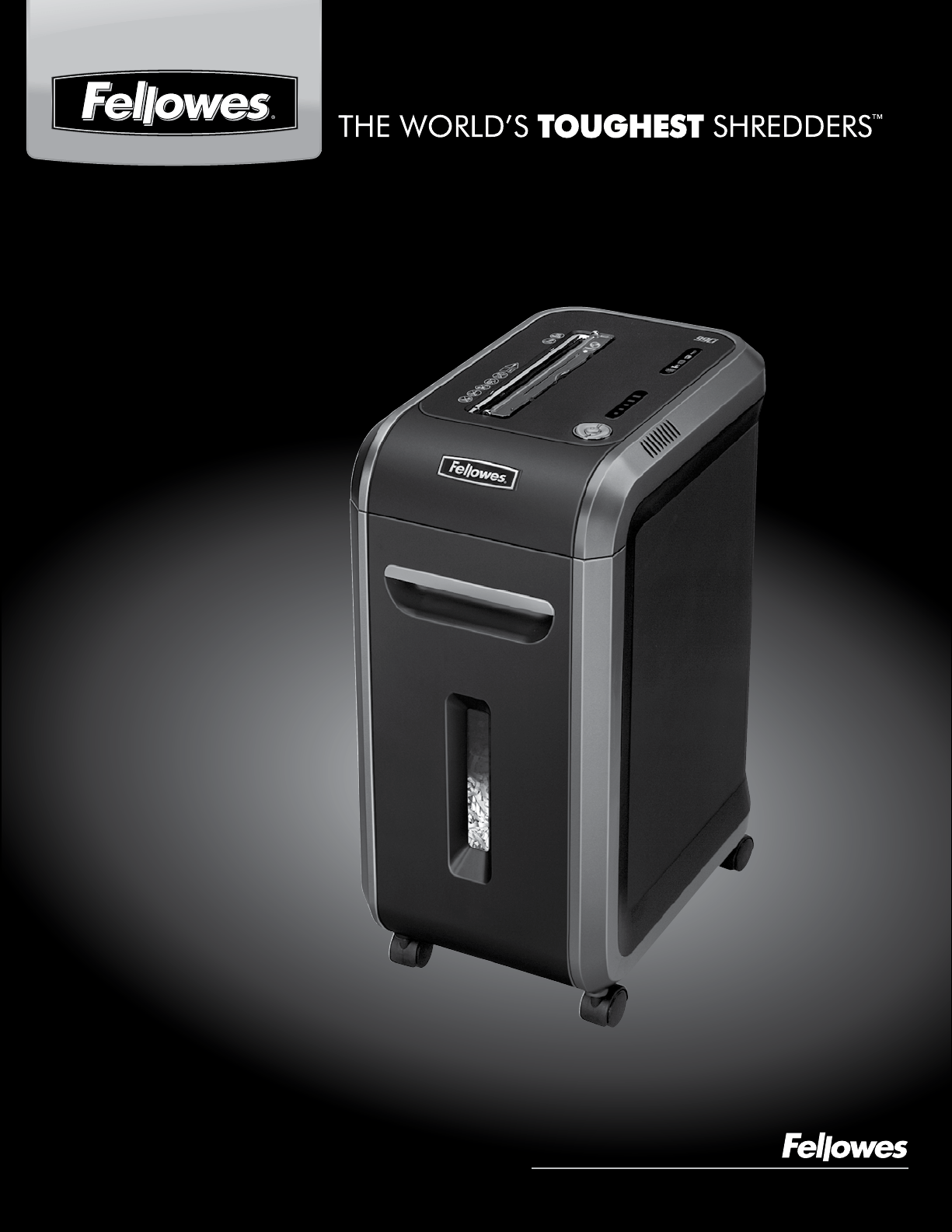
POWERSHRED
®
99Ci
POWERSHRED
®
99Ci
Please read these instructions before use.
Do not discard: keep for future reference.
Veuillez lire ces instructions avant d’utiliser l’appareil.
Ne pas jeter : conserver afin de consulter les directives
ultérieurement, en cas de besoin.
Lea estas instrucciones antes del uso.
No las deseche: consérvelas como referencia futura.
2
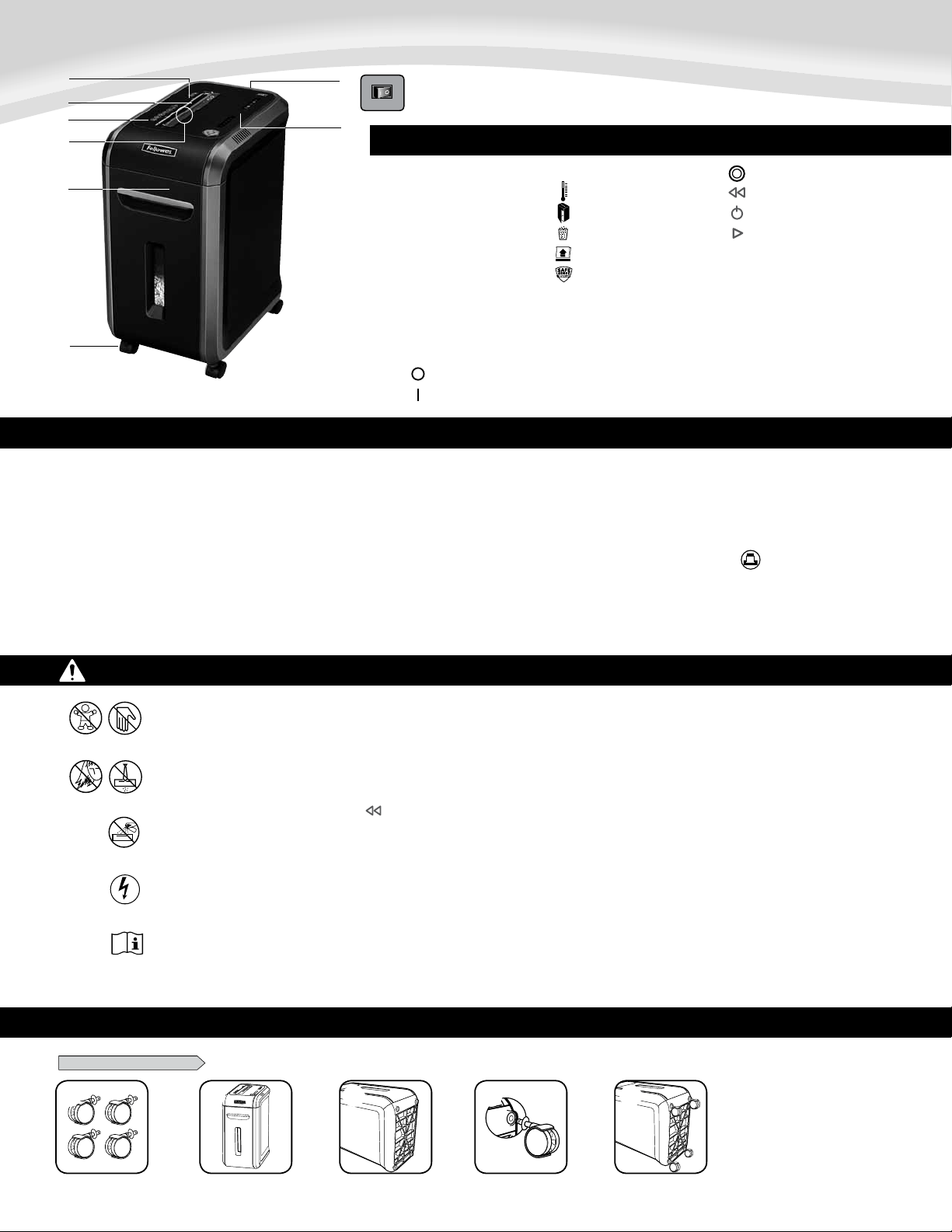
CAPABILITIES
ENGLISH
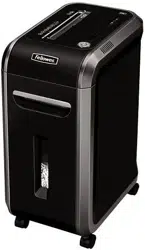
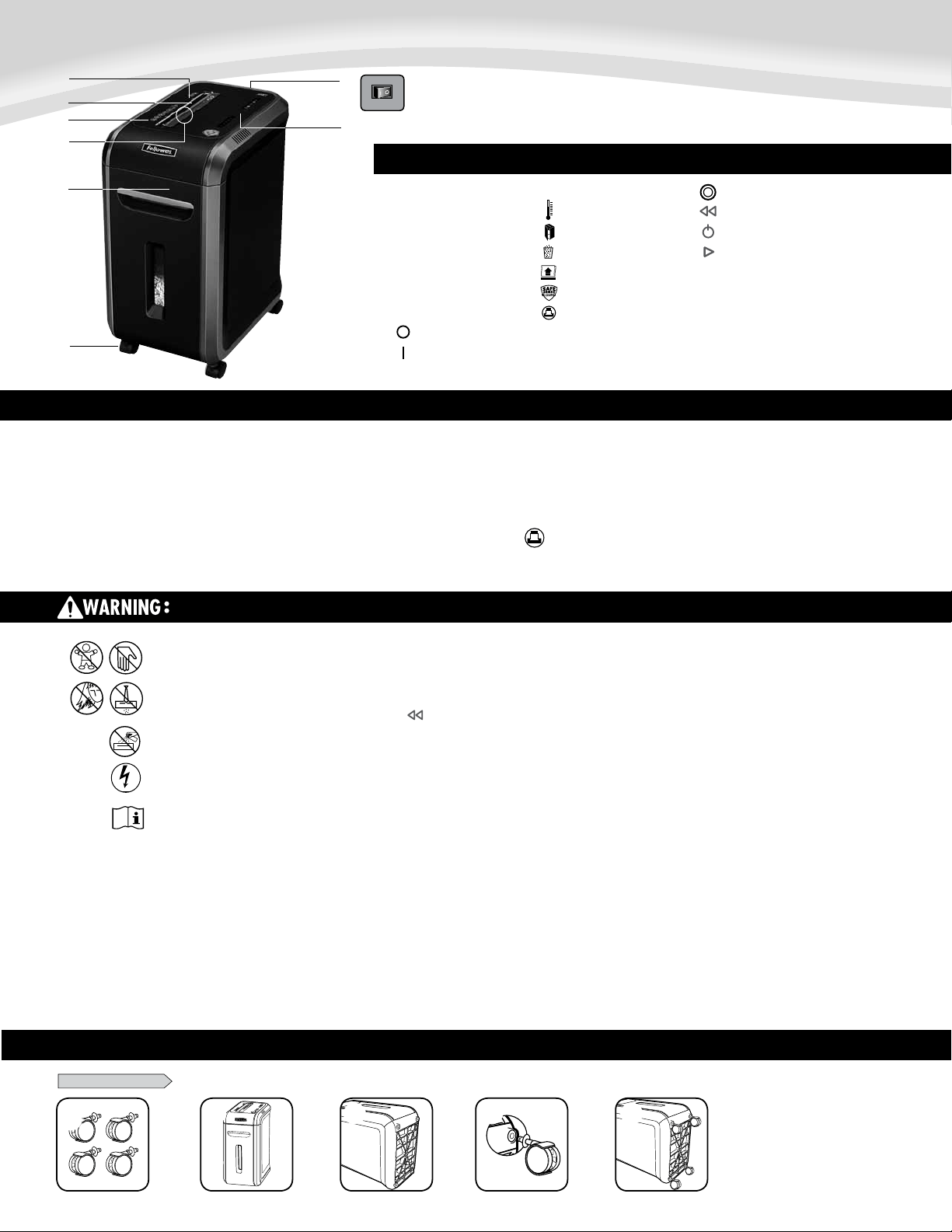
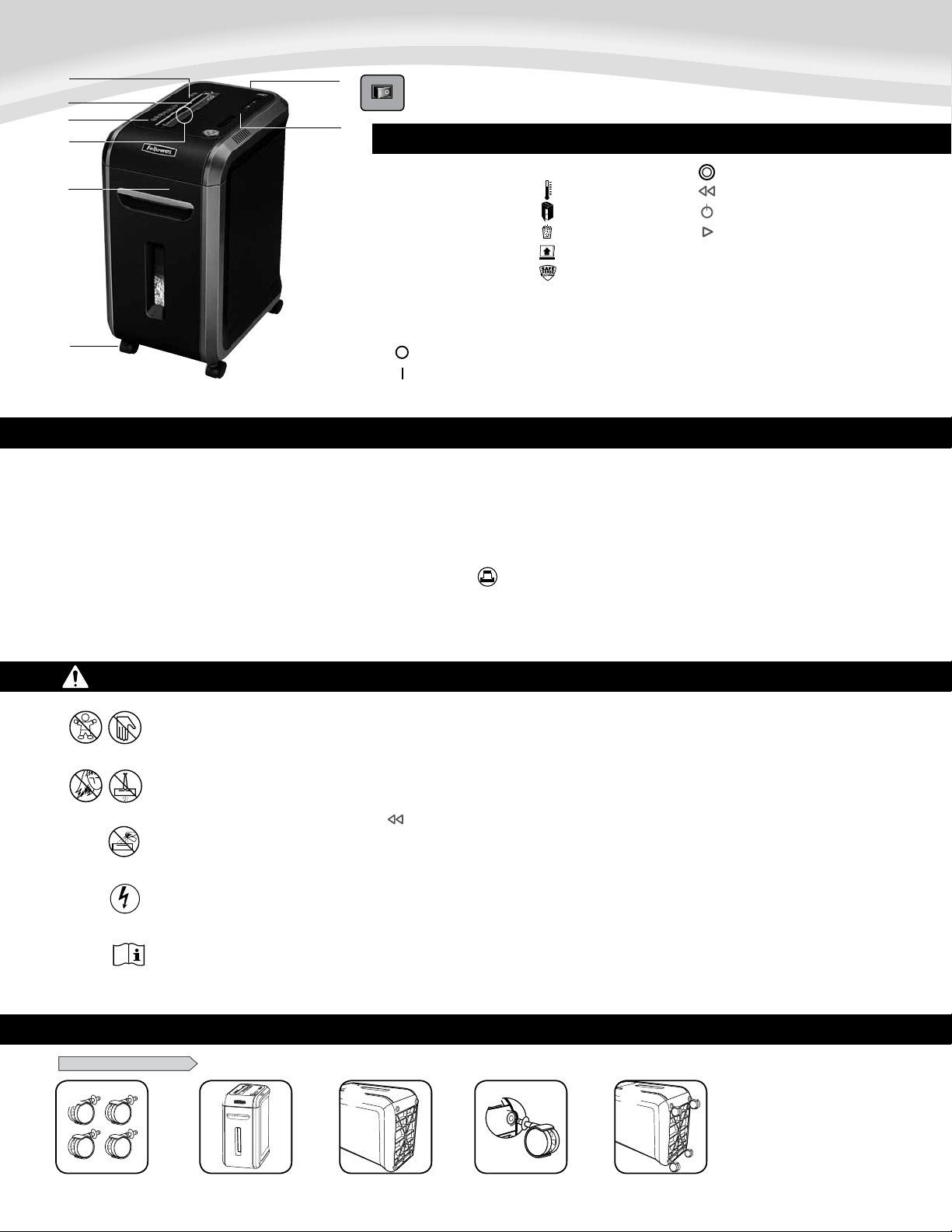
Model 99Ci
KEY
A. SafeSense
®
Technology
B. Paper entry
C. See safety instructions
D. CD/Card safety flap
E. Pullout bin
F. Casters
G. Disconnect power switch
1. OFF
2. ON
H. Control Panel and LEDs
1. Overheat (red)
2. Bin open (red)
3. Bin full (red)
4. Remove Paper (red)
5. SafeSense
®
indicator (yellow)
6. Sheet capacity indicator
7. Auto (blue)
8. Reverse
9. ON/OFF (blue)
10. Forward
IMPORTANT SAFETY INSTRUCTIONS — Read Before Using!
15
15
• Keepawayfromchildrenandpets.Keephandsawayfrompaperentry.Always
set to off or unplug when not in use.
• Keepforeignobjects–gloves,jewelry,clothing,hair,etc.–awayfromshredder
openings.Ifobjectenterstopopening,switchtoReverse()tobackoutobject.
• Neveruseaerosolproducts,petroleumbasedlubricantsorotherflammable
products on or near shredder. Do not use canned air on shredder.
• Donotuseifdamagedordefective.Donotdisassembleshredder.
Do not place near or over heat source or water.
• Operation,maintenance,andservicerequirementsarecoveredintheinstruction
manual. Read the entire instruction manual before operating shredders.
• ThisshredderhasaDisconnectPowerSwitch(G)thatmustbeintheON(I)
positiontooperateshredder.Incaseofemergency,moveswitchtoOFF(O)
position. This action will stop shredder immediately.
• Avoidtouchingexposedcuttingbladesundershredderhead.
• Shreddermustbepluggedintoaproperlygroundedwalloutletorsocketofthe
voltageandamperagedesignatedonthelabel.Thegroundedoutletorsocket
mustbeinstalledneartheequipmentandeasilyaccessible.Energyconverters,
transformers,orextensioncordsshouldnotbeusedwiththisproduct.
• FIREHAZARD–DoNOTshredgreetingcardswithsoundchipsorbatteries.
• Forindooruseonly.
15
15
Warning:Changesormodificationstothisunitnotexpresslyapprovedbythepartyresponsibleforcompliancecouldvoidtheuser'sauthoritytooperatetheequipment.NOTE:Thisequipment
hasbeentestedandfoundtocomplywiththelimitsforaClassBdigitaldevice,pursuanttoPart15oftheFCCRules.Theselimitsaredesignedtoprovidereasonableprotectionagainstharmful
interferenceinaresidentialinstallation.Thisequipmentgenerates,usesandcanradiateradiofrequencyenergyand,ifnotinstalledandusedinaccordancewiththeinstructions,maycause
harmful interference to radio communications.
However,thereisnoguaranteethatinterferencewillnotoccurinaparticularinstallation.Ifthisequipmentdoescauseharmfulinterferencetoradioortelevisionreception,whichcanbe
determinedbyturningtheequipmentoffandon,theuserisencouragedtotrytocorrecttheinterferencebyoneormoreofthefollowingmeasures:
•Reorientorrelocatethereceivingantenna.
•Increasetheseparationbetweentheequipmentandreceiver.
•Connecttheequipmentintoanoutletonacircuitdifferentfromthattowhichthereceiverisconnected.
•Consultthedealeroranexperiencedradio/TVtechnicianforhelp.
A.
B.
D.
C.
G.
F.
E.
H.
Will shred:Paper,creditcards,CD/DVDs,staplesandsmallpaperclips
Will not shred:Adhesivelabels,continousformpaper,transparencies,newspaper,cardboard,
largepaperclips,laminates,filefolders,X-raysorplasticotherthannotedabove
Paper shred size:
Cross-Cut ...............................................................................5/32”x1-1/2”(4x38mm)
Maximum:
Sheets per pass ........................................................................................................... 18*
CDs/Cards per pass ....................................................................................................... 1*
Paper entry width .............................................................................................9”/230mm
*8.5”x11”,20lb.,(75g)paperat120V,60Hz,5Amps;heavierpaper,humidityorotherthanrated
voltagemayreducecapacity.Recommendeddailyusagerates:1500sheetsperday,50creditcards;
10 CDs. 18 sheets per pass.
Fellowes SafeSense
®
shredders are designed to be operated in home and office environments ranging
between50–80degreesFahrenheit(10–26degreesCelsius)and40–80%relativehumidity.
BASIC SET UP
CASTER INSTALLATION
1
8
1
1
8
2
1
8
3
1
8
4
1
8
5
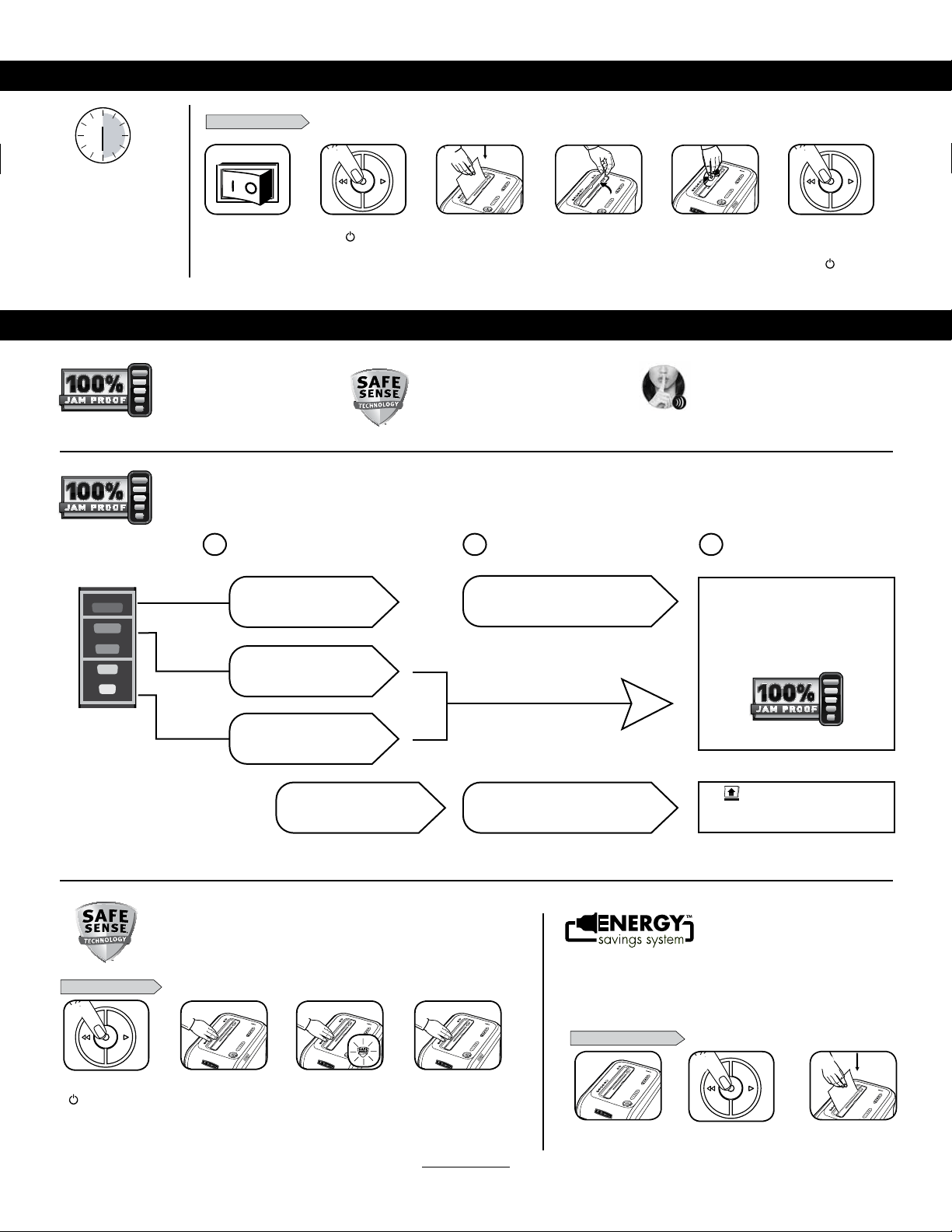
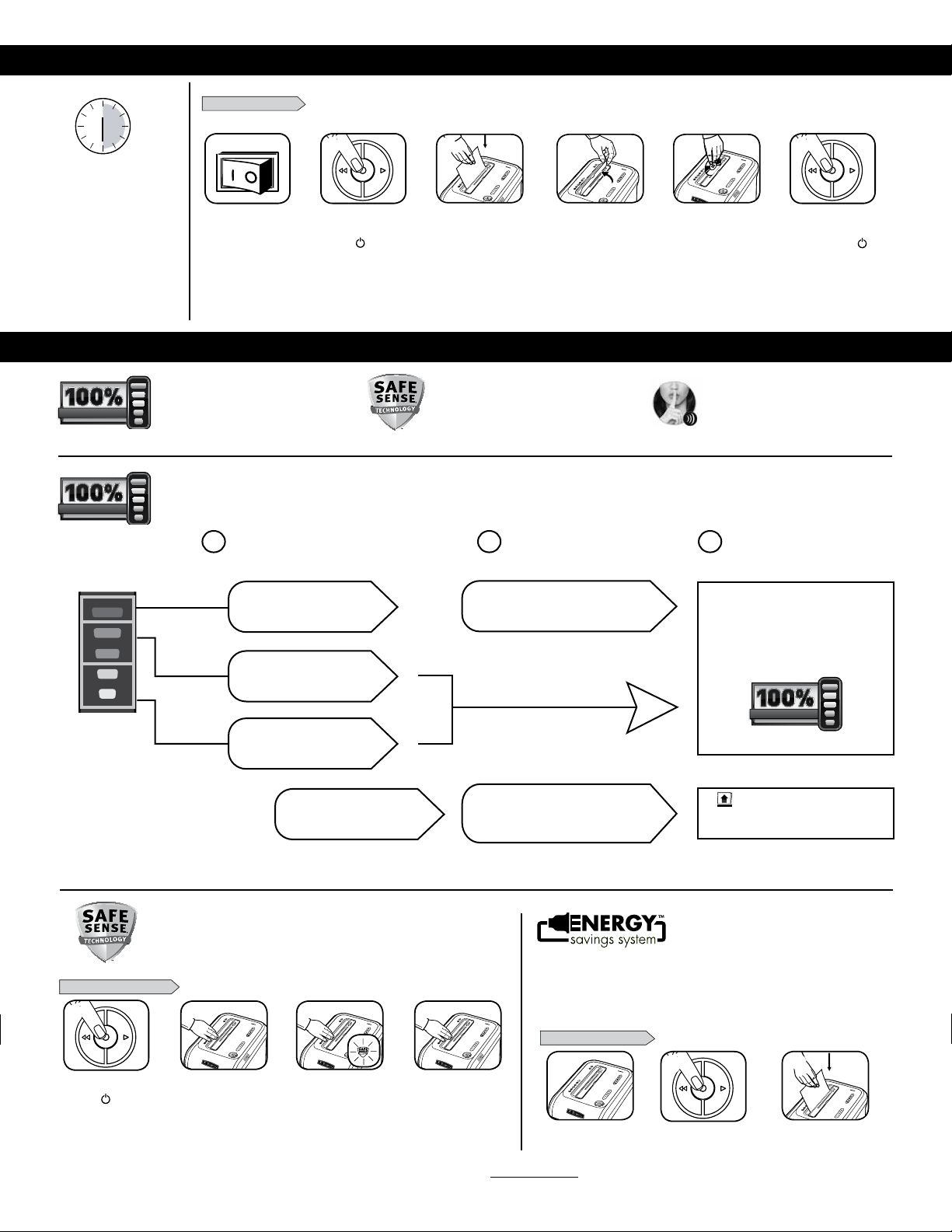
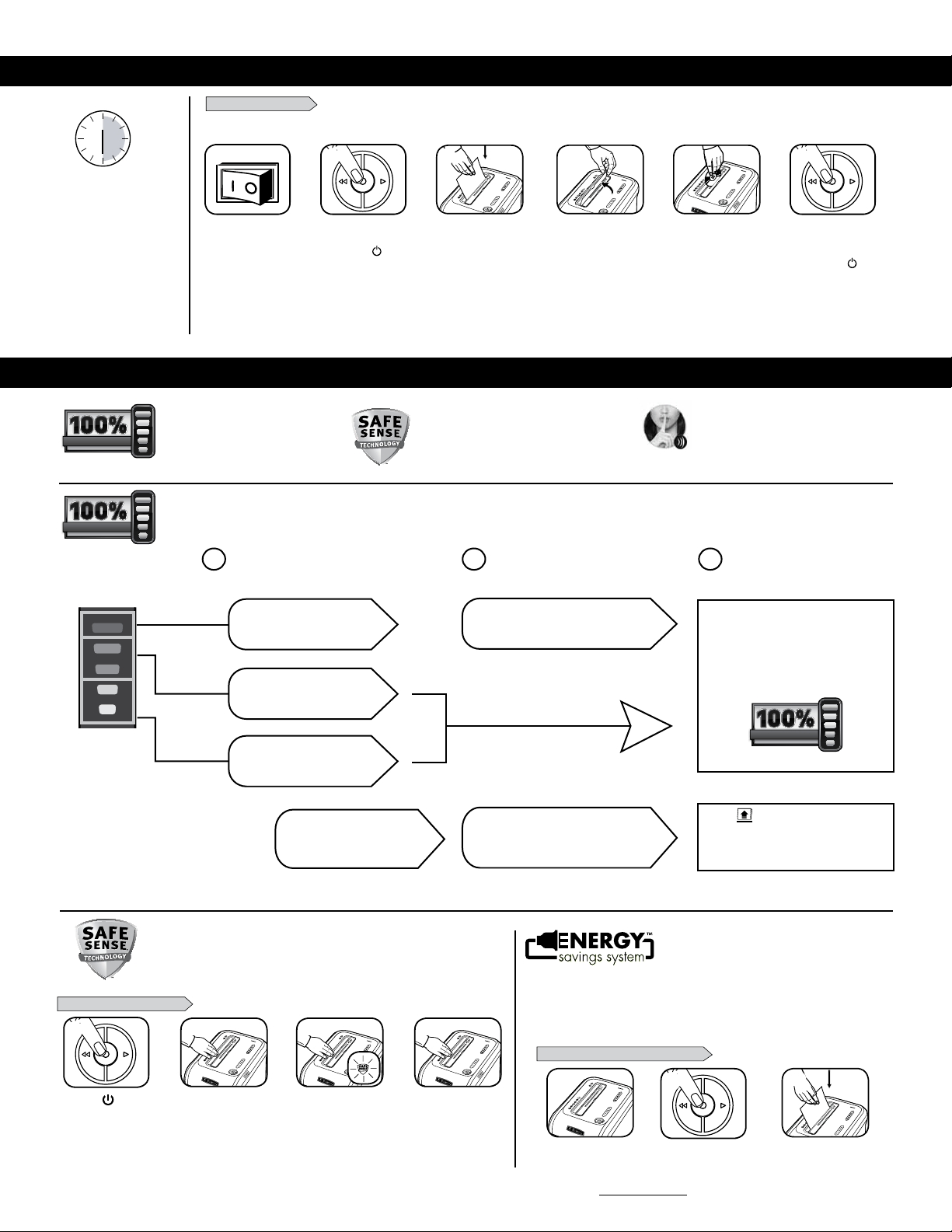
BASIC SHREDDING OPERATION
Continuous operation:
30-minutemaximum
NOTE: Shredder runs briefly
after each pass to clear entry.
Continuous operation beyond
30-minuteswilltrigger
40-minutecooldownperiod.
3
ADVANCED PRODUCT FEATURES
Press ( ) ON to
activate (blue)
PAPER OR CD/CARD
Feed paper straight into
paper entry and release
Plug in and put
disconnect power
switch in ON (I) position
When finished
shredding set
to OFF (
)
SilentShred™
Technology
SilentShred™noisequality
shreds without noisy disruptions.
Patented SafeSense
®
Technology
Stops shredding immediately when
hands touch the paper opening.
Jam Proof System
Eliminatesjamsandpowers
throughtoughjobs.
18
18
18
4
3
5
21
21
6
or
To shred CDs or credit
cards rotate safety flap
into place
Hold card/CD at edge.
Feed into center of
entry and release
JAM PROOF SYSTEM OPERATION*
*100% Jam Proof when used in accordance with user manual
Advanced Jam Prevention- Electronically
measures paper thickness to prevent paper jams:
Remove several sheets until
indicator is below red.
Continue 100% Jam
Proof Shredding
If a misfeed
occurs:
If
illuminates after paper has been
reversed, press reverse and remove paper.
Otherwise, regular shredding will resume.
1 2 3
Up to RED: Too many
sheets have been inserted.
Up to GREEN: More sheets
can be added.
Up to YELLOW: Productivity
is optimized.
All indicators light up and
shredder pauses for 3-6 seconds
Wait for flashing to stop after automatic correction
is complete. Regular shredding will resume.
Eliminates paper jams and powers through tough jobs.
SAFESENSE
®
TECHNOLOGY OPERATION
Stops shredding immediately when hands touch the paper opening.
or
SET-UP AND TESTING
Turn the shredder ON
( ) to activate SafeSense
®
Touch test area and
look for the SafeSense
®
indicator to illuminate
SafeSense
®
is active and
working properly
If hand is held on SafeSense
®
area more than 3 seconds
shredder will shut off
WHEN IN SLEEP MODE
In sleep mode
To get out of sleep mode
touch control panel
insert paper
For more information about all of Fellowes Advanced Product Features go to www.fellowes.com
ENERGY SAVINGS SYSTEM
• Savesenergyinfourways:energy-efficientelectronics,jamprevention,
standby mode and sleep mode.
• SleepModeshutsdownshredderafter2minutesofinactivity.
Optimal energy efficiency 100% of
the time – in use and out of use.
18
18
18
3
18
18
1
3
2 4
2
1
2
2
ENGLISH
Model 99Ci
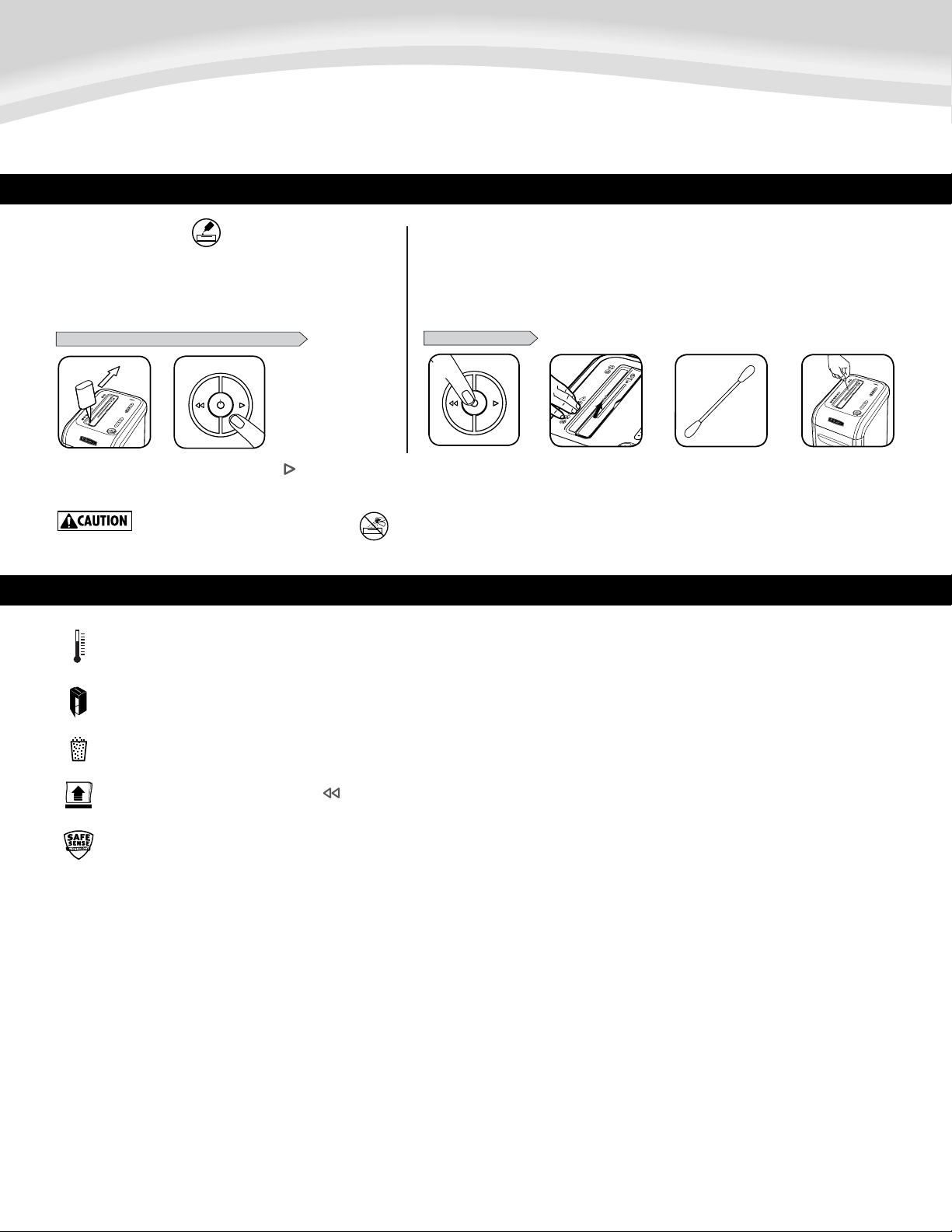
Press and hold forward ( )
2-3seconds
2
4
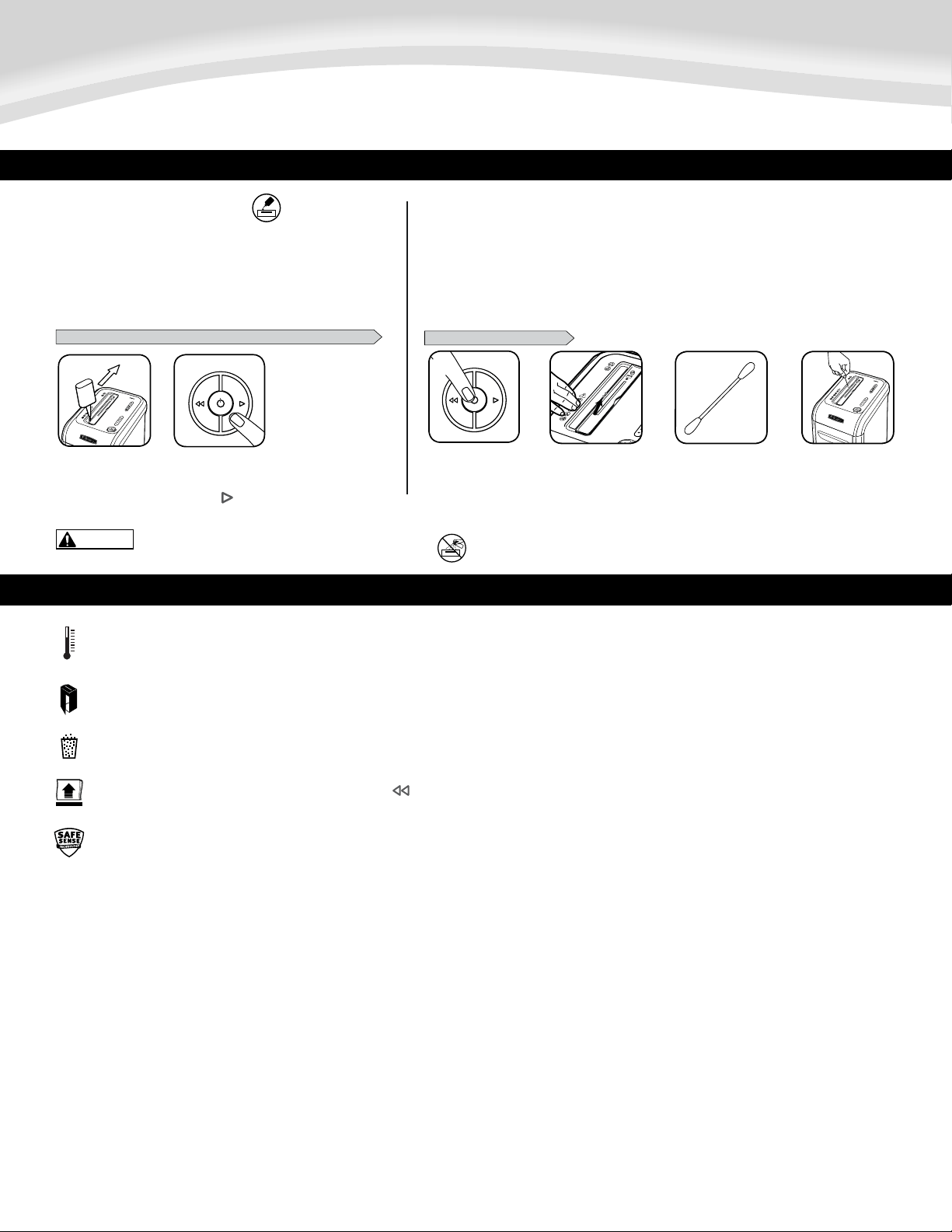
PRODUCT MAINTENANCE
CLEANING AUTO-START INFRARED SENSORS
Paperdetectionsensorsaredesignedformaintenancefreeoperation.However,onrareoccasionsthesensors
maybecomeblockedbypaperdustcausingthemotortorunevenifthereisnopaperpresent.
(Note:twopaperdetectionsensorsarelocatedinthecenterofthepaperentry).
Allcross-cutshreddersrequireoilforpeakperformance.Ifnotoiled,a
machinemayexperiencediminishedsheetcapacity,intrusivenoisewhen
shreddingandcouldultimatelystoprunning.Toavoidtheseproblems,we
recommend you oil your shredder each time you empty your waste bin.
OILING SHREDDER
15
*Only use a non-aerosol vegetable oil in long
nozzle container such as Fellowes 35250
FOLLOW OILING PROCEDURE BELOW AND REPEAT TWICE
*Apply oil across entry
18
1
TO CLEAN THE SENSORS
1
Turn off and unplug
shredder
LocateAuto-start
infared sensor
Dip cotton swab in
rubbing alcohol
Usingcottonswab,wipe
away any contamination
from the paper sensors
18
43
18
2
15
TROUBLESHOOTING
Overheat Indicator: When the Overheat Indicator is illuminated, the shredder has exceeded its maximum operating temperature and needs to cool down. This indicator
will remain illuminated and the shredder will not operate for the duration of the recovery time. See Basic Shredding Operation for more information about the
continuous operation and recovery time for this shredder.
Bin Full: When illuminated, the shredder waste bin is full and needs to be emptied. Use Fellowes waste bag 36053.
Bin Open: The shredder will not run if the bin is open. When illuminated, close the bin to resume shredding.
Remove Paper: When illuminated, press reverse ( ) and remove paper. Reduce paper quantity to an acceptable amount and refeed into paper entry.
SafeSense
®
Indicator: If hands are too close to the paper entry, the SafeSense
®
indicator will illuminate and the shredder will stop shredding. If SafeSense
®
is active for 3 seconds, the shredder will automatically turn off and the user must press the power button on the control panel to resume shredding.

5
LIMITED PRODUCT WARRANTY
LimitedWarranty:Fellowes,Inc.(“Fellowes”)warrantsthepartsofthemachinetobefreeof
defectsinmaterialandworkmanshipandprovidesserviceandsupportfor2yearsfromthedate
of purchase by the original consumer. Fellowes warrants the cutting blades of the machine to be
freefromdefectsinmaterialandworkmanshipforthelifetimeoftheshredder.Ifanypartis
foundtobedefectiveduringthewarrantyperiod,yoursoleandexclusiveremedywillberepair
orreplacement,atFellowes’optionandexpense,ofthedefectivepart.Thiswarrantydoesnot
applyincasesofabuse,mishandling,failuretocomplywithproductusagestandards,shredder
operationusinganimproperpowersupply(otherthanlistedonthelabel),orunauthorized
repair. Fellowes reserves the right to charge the consumers for any additional costs incurred by
Fellowes to provide parts or services outside of the country where the shredder is initially sold
byanauthorizedreseller.ANYIMPLIEDWARRANTY,INCLUDINGTHATOFMERCHANTABILITYOR
FITNESSFORAPARTICULARPURPOSE,ISHEREBYLIMITEDINDURATIONTOTHEAPPROPRIATE
WARRANTYPERIODSETFORTHABOVE.InnoeventshallFellowesbeliableforanyconsequential
or incidental damages attributable to this product. This warranty gives you specific legal rights.
Theduration,terms,andconditionsofthiswarrantyarevalidworldwide,exceptwheredifferent
limitations,restrictions,orconditionsmayberequiredbylocallaw.Formoredetailsortoobtain
serviceunderthiswarranty,pleasecontactusoryourdealer.
6
CAPACITÉS
FRANÇAIS
Modèle 99Ci
CONFIGURATION DE BASE
INSTALLATION DES ROULETTES
TOUCHE
A. Technologie SafeSense
MD
B. Entrée de papier
C.Consultezlesinstructions
de sécurité
D. Rabat de sécurité
CD/Carte
E. Contenant amovible
F. Roulettes
G. Sectionneur
1. ARRÊT
2.
MARCHE
H. Panneau de commande et DEL
1. Surchauffe (rouge)
2. Contenant ouvert
3. Contenant plein (rouge)
4.Retirezlepapier(rouge)
5.VoyantSafeSense
MD
(jaune)
6.Voyantdecapacitédefeuilles
7. Bouton (bleu)
8. Inversion
9. MARCHE/ARRÊT (bleu)
10. Marche avant
15
ATTENTION
AVERTISSEMENT :
15
• Gardezhorsdelaportéedesenfantsetdesanimauxdomestiques.
Gardezlesmainséloignéesdel'entréedupapier.Régleztoujours
l’appareilàl'arrêtoudébranchez-lelorsqu’iln’estpasutilisé.
• Gardezlescorpsétrangers-gants,bijoux,vêtements,cheveux,
etc.-loindesentréesdeladéchiqueteuse.Siunobjetpénètrepar
l'ouverturesupérieure,faitesMarchearrière()poursortirl'objet.
• N’utilisezjamaisd’aérosol,deproduitsàbasedepétroleouautres
produitsinflammablessurladéchiqueteuseouàproximité.N’utilisez
pasd’airencannettesurladéchiqueteuse.
• N’utilisezpasl’appareils’ilestendommagéoudéfectueux.Ne
démontezpasl'appareil.Neplacezpasl’appareilsurunesourcede
chaleuroud’eau,ouàproximitédecelle-ci.
• Opération,maintenance,etexigencesdeservicesontcouvertsdans
lemanueld’instructions.Veuillezliretoutlemanueld’instructions
avantdefairefonctionnerlesdéchiqueteuses.
• Cettedéchiqueteuseestdotéed'unsectionneur(G)quidoitêtreen
positionMARCHE(I)pourpouvoirfonctionner.Encasd’urgence,
mettezl'interrupteurenpositionARRÊT(O).Celaarrêtera
immédiatementladéchiqueteuse.
• Évitezdetoucherleslamesexposéessouslatêtedéchiqueteuse.
• L’appareildoitêtrebranchédansuneprisemuralecorrectementmise
àlaterreouuneprisedelatensionetdel’ampéragedésignéesur
l’étiquette.Lapriseoulaprisemiseàlaterredoitêtreinstalléeprès
del’équipementetfaciled’accès.Lesconvertisseursd’énergie,les
transformateursoulesrallongesnedoiventpasêtreutilisésavec
ce produit.
• DANGERD’INCENDIE-NEdéchiquetezPASlescartesdesouhaitsavec
piles ou puces sonores
• Réservéàuneutilisationintérieure.
15
15
IMPORTANTES INSTRUCTIONS DE SÉCURITÉ — À lire avant d’utiliser !
A.
B.
D.
C.
G.
F.
E.
H.
Déchiquettera :papier,cartesdecrédit,CD/DVD,agrafesetpetitstrombones
Ne déchiquettera pas :étiquettesadhésives,papierdeformulaireencontinu,acétates,
journaux,carton,largestrombones,stratifiés,dossiers,radiographiesouplastiqueautre
quecequiestindiquéplushaut
Taille de déchiquetage du papier :
Coupe croisée ................................................................... 4x38mm(5/32x11/2po)
Maximum :
Feuilles par passage .................................................................................................... 18*
CD/cartes par passage .................................................................................................. 1*
Largeurd’entréedepapier ...........................................................................230 mm/9 po
*papierde21,59x27,94cm(8,5x11po),75g(20lb)à120V,60Hz,5ampères;pourunpapier
pluslourd,l’humiditéetunetensionautrequelatensionnominalepeuventréduirelacapacité.Débit
d’utilisationquotidiennerecommandée:1,500feuillesparjour, 50cartesdecrédit;10CD.
18 feuilles par passage.
LesdéchiqueteusesFellowesSafeSense
MD
sontconçuespourdesmilieuxrésidentielsetdebureaudont
latempératuresesitueentre10et26degrésCelsius(50et80degrésFahrenheit)etàunehumidité
relativeentre40et80%.
1
8
1
1
8
2
1
8
3
1
8
4
1
8
5
7
CONFIGURATION ET TEST
Appuyezsur
MARCHE ( ) pour
activer (bleu)
Pourdéchiqueterles
CD,tournezlerabat
de CD pour le mettre
en place
Acheminezlepapier
directement dans
l’entréeetlaissez-le
aller
Branchezetplacezle
sectionneur en position
MARCHE (I)
Opération en continu :
30minutesaumaximum
REMARQUE : La
déchiqueteusefonctionneun
peuaprèschaqueinsertion
pourdégagerl’entrée.Une
utilisationcontinuelled’une
duréesupérieureà30minutes
déclenchera une période de
refroidissement de 40 minutes.
Aprèsledéchiquetage,
réglezàARRÊT(
)
OPÉRATION DE DÉCHIQUETAGE DE BASE
PAPER OR CD/CARD
FONCTIONS AVANCÉES DE LA DÉCHIQUETEUSE
18
18
18
4
3
5
21
21
6
ou
Système à l'épreuve des blocages
Éliminelesblocagesdepapieret
fonctionnepourlestravauxdifficiles.
Technologie SafeSense
MD
brevetée
Arrêteledéchiquetageimmédiatementlorsque
lesmainstouchentl'ouverturedupapier
Technologie SilentShred
MC
LaqualitédebruitSilentShred
MC
permetundéchiquetagesans
interruption bruyante
TenezleCDoulacarte
parlebord.Acheminez-
laaucentredel’entrée
etlaissezaller
*100 % à l’épreuve des blocages lorsque utilisé conformément au manuel de l’utilisateur
À L'ÉPREUVE DES BLOCAGES
À L'ÉPREUVE DES BLOCAGES
Prévention des blocages de pointe - Mesure électroniquement
l’épaisseur du papier pour éviter les blocages de papier:
Poursuivez le déchiquetage
100 % à l’épreuve des blocages
1 2 3
Jusqu’à ROUGE: trop de feuilles
ont été insérées.
Jusqu’à VERT: on peut ajouter
plus de feuilles.
Jusqu’à JAUNE: la productivité
est optimisée.
S’il y a un mauvais
acheminement:
Si
s’allume après que le papier soit inversé,
enclenchez la marche arrière et retirez le papier.
Sinon, le déchiquetage régulier reprendra.
Tous les voyants s’allument et l’appareil
s’arrête pendant 3 à 6 secondes
Attendez que le voyant cesse de clignoter
après la fin de la correction automatique.
Le déchiquetage régulier reprendra.
Retirez quelques feuilles jusqu’à ce que le
voyant soit sous rouge.
SYSTÈME À L’ÉPREUVE DES BLOCAGES*
À L'ÉPREUVE DES BLOCAGES
À L'ÉPREUVE DES BLOCAGES
À L'ÉPREUVE DES BLOCAGES
À L'ÉPREUVE DES BLOCAGES
Élimine les blocages de papier et fonctionne pour les travaux difficiles.
ou
Si vous gardez la main
sur la section SafeSense
®
pendant plus de 3
secondes, la déchiqueteuse
s
’
éteindra
En mode veille
Pour sortir du panneau
de contrôle tactile en
mode veille
insérer le papier
SYSTÈME D’ÉCONOMIE D’ÉNERGIE
• Économisedel’énergiedequatremanières:produitsélectroniquestrèsefficaces
sur le plan énergétique, prévention des blocages, mode attente et mode sommeil.
• Lemodesommeilarrêteladéchiqueteuseaprès2minutesd’inactivité.
Efficacité énergétique optimale en
permanence (en service et hors service).
18
18
18
3
18
18
1
3
2 4
2
1
2
2
OPÉRATION DE TECHNOLOGIE SAFESENSE
MD
Arrête le déchiquetage immédiatement lorsque les mains touchent l'ouverture
du papier
La fonction SafeSense
MD
est activée et fonctionne
correctement
Touchezlasectionde
testetattendezquele
voyant de la fonction
SafeSense
MD
s’allume
Mettezladéchiqueteuseen
MARCHE (
) pour activer la
fonction SafeSense
MD
Pour de plus amples informations sur les fonctions avancées des produits Fellowes, visitez www.fellowes.com
EN MODE VEILLE (SLEEP)
18
8
FRANÇAIS
Modèle 99Ci
NETTOYAGE DES CAPTEURS INFRAROUGE DE DÉMARRAGE AUTOMATIQUE
MAINTENANCE DE BASE
Lescapteursdedétectiondupapiersontconçuspourunfonctionnementsansmaintenance.Toutefois,dansderares
cas,lescapteurspeuventêtrebloquéspardelapoussièredepapieretentraînerlefonctionnementdumoteur
mêmeenl’absencedepapier.
(Remarque:Deuxcapteursdedétectiondupapiersetrouventaucentredelafented’insertiondupapier).
Toutdestructeuràcoupecroiséenécessitedel’huilepourassurerdes
performancesoptimales.S’iln’estpashuilé,l’appareilpourraitavoirune
capacitéréduite,fairedesbruitsdérangeantslorsdeladestructionet
finalement,s’arrêterdefonctionner.Pourévitercesproblèmes,nousvous
recommandonsd’huilervotredestructeuràchaquefoisquevousvidez
votrecorbeilleàpapier.
HUILAGE DU DESTRUCTEUR
15
Eteindre et débrancher
le destructeur
Repérer le capteur
infrarouge de
démarrage
automatique
Nettoyer toutes les
saletés des capteurs
de papier avec le
coton-tige
Tremperuncoton-
tigedansdel’alcool
àfriction
Appuyer et maintenir
enfoncée la touche
Avancer ( ) pendant
(2à3econdes)
*Mettredel’huileen
traversdel’insertion
POUR NETTOYER LES CAPTEURS
SUIVRE LA PROCEDURE D’HUILAGE CI-DESSOUS ET LA REPETER DEUX FOIS
15
ATTENTION
1
18
432
* N’utiliser que de l’huile végétale dans un conteneur à long
col sans aérosol telle que l’huile Fellowes n° 35250.
2
18
1
DÉPANNAGE
Indicateur de surchauffe: Lorsque l'indicateur de surchauffe est allumé, le broyeur a dépassé la température maximale de fonctionnement et doit refroidir. Cet indicateur reste allumé
et le broyeur ne fonctionne pas pendant la durée du temps de récupération. Voir base de déchiquetage opération pour plus d'informations sur le fonctionnement continu et temps de
récupération pour ce broyeur.
Contenant plein : Lorsque le voyant s’allume, le contenant de déchets de la déchiqueteuse est plein et doit être vidé. Utilisez le sac de déchets Fellowes 36053.
Contenant ouvert : La déchiqueteuse ne fonctionnera pas si la contenant du boîtier est ouverte. Lorsque le voyant est allumé, fermez la contenant pour reprendre le déchiquetage.
Retirer le papier : Lorsqu’il s’allume, enclenchez la marche arrière ( ) et retirez le papier Réduisez la quantité de papier à une quantité acceptable et remettez dans l’entrée de papier.
Voyant SafeSense
MD
: Si les mains sont trop proches de l’entrée de papier, le voyant SafeSense
MD
s’allumera et la déchiqueteuse cessera de déchiqueter. Si la fonction SafeSense
MD
est
activée pendant 3 secondes, la déchiqueteuse s’éteindra automatiquement et l’utilisateur doit enfoncer la touche de courant sur le panneau de commande pour reprendre le déchiquetage.

9
GARANTIE LIMITÉE DU PRODUIT
Garantielimitée:Fellowes,Inc.(«Fellowes»)garantitquelespiècesdel’appareilsontlibresdetout
vicedematériauetdefabricationetoffreserviceetsoutienpendantunepériodede2ansàpartirdela
dated’achatparleconsommateuroriginal.Fellowesgarantitqueleslamesdecoupedel’appareilsont
libresdetoutvicedematériauoudefabricationpendantladuréedeviedeladéchiqueteuse.Siune
pièces’avèredéfectueusedurantlapériodedegarantie,votreseuletuniquerecoursseralaréparation
ouleremplacementdelapièceàladiscrétionetauxfraisdeFellowes.Cettegarantienecouvrepas
lescasdemauvaiseutilisation,mauvaisemanipulation,nepasseconformerauxnormesd’usagedu
produit,l’utilisationdeladéchiqueteuseavecuncourantinapproprié(autrequ’indiquésurl’étiquette)
ouuneréparationinterdite.Fellowesseréserveledroitdefacturerauxconsommateurstouscoûts
supplémentairesencourusparFellowespourfournirdespiècesoulesservicesàl’extérieurdupaysoù
ladéchiqueteuseaétévendueàl’origineparunrevendeurautorisé.TOUTEGARANTIEIMPLICITE,Y
COMPRISCELLEDEQUALITÉMARCHANDEOUD’ADAPTATIONÀUNEUTILISATIONPARTICULIÈRE,SELIMITE
PARLAPRÉSENTEÀLA
DURÉEDELAPÉRIODEDEGARANTIEAPPROPRIÉEÉTABLIEDANSCEDOCUMENT.En
aucuncas,Fellowesneseratenueresponsabledequelquefaçonquecesoitdetoutdommageindirectou
consécutifattribuableàceproduit.Cettegarantievousdonnedesdroitsjuridiquesspécifiques.Ladurée,
lesmodalitésetlesconditionsdecettegaranties’appliquentpartoutaumondesaufdanslescasoù
différenteslimites,restrictionsouconditionspourraientêtreexigéesparlaloilocale.Pourplusdedétails
oupourobtenirunservicesouscettegarantie,veuilleznouscontacteroucontactervotreconcessionnaire.
NETTOYAGE DES CAPTEURS INFRAROUGE DE DÉMARRAGE AUTOMATIQUE
CAPACIDADES
ESPAÑOL
Modelo 99Ci
CONFIGURACIÓN BÁSICA
10
INSTALACIÓN DE LAS RUEDITAS
EXPLICACIÓN
A. Tecnología SafeSense
®
B. Entrada del papel
C. Consulte las instrucciones
de seguridad
D. Tapa de seguridad para
CD/tarjetap
E.Papeleraextraíble
F. Rueditas
G.Interruptordedesconexión
de la energía
1. APAGADO
2. .
ENCENDIDO
H. Panel de control e indicadores luminosos
1.Sobrecalentamiento(rojo)
2.Papeleraabierta(rojo)
3.Papelerallena(rojo)
4.Quitarpapel(rojo)
5. Indicador de SafeSense
(amarillo)
6.Indicadordecapacidaddehojas
7.Botónautomática(azul)
8. Retroceso
9. ENCENDIDO/APAGADO(azul)
10. Avance
INSTRUCCIONES DE SEGURIDAD IMPORTANTES ¡Léalas antes de usar la máquina!
15
PRECAUCIÓN
ADVERTENCIA:
15
• Mantengalatrituradoraalejadadeniñosymascotas.Mantenga
lasmanosalejadasdelaentradadepapel.Siempreapagueo
desenchufe la trituradora cuando no esté en uso.
• Mantengaobjetosextraños(guantes,joyas,ropa,cabello,etc.)lejosde
lasaberturasdelatrituradora.Sialgúnobjetoseintroduceenlaabertura
superior,pongalatrituradoraenRetroceso()pararetirarelobjeto.
• Nuncautiliceproductosenaerosol,lubricantesabasedepetróleou
otros productos inflamables para limpiar la trituradora ni cerca de
ella. No utilice aire comprimido para limpiar la trituradora.
• Noutilicelatrituradorasiestádañadaodefectuosa.Nodesarmela
trituradora.Nocoloquelatrituradoracercanisobreunafuentede
calor o agua.
• Losrequisitosdeoperación,mantenimientoyserviciosecubrenenel
manual de instrucciones. Lea dicho manual en su totalidad antes de
operar las trituradoras.
• EstatrituradoraposeeunInterruptordedesconexióndeenergía(G)
quedebeestarenlaposicióndeENCENDIDO(ON)(I)parafuncionar.
Encasodeemergencia,coloqueelinterruptorenAPAGADO(O).Esta
accióndetendrálatrituradoradeinmediato.
• Evitetocarlascuchillascortantesexpuestasdebajodelcabezaldela
trituradora.
• Latrituradoradebeenchufarseenunatomaoenchufedeparedcon
descargaatierraquetengaelvoltajeyamperajequeseindican
enlaetiqueta.Latomaoenchufecondescargaatierradebeestar
instaladacercadelequipoyserdefácilacceso.Nodebenusarsecon
esteproductoconvertidoresdeenergía,transformadoresnicables
prolongadores.
• RIESGODEINCENDIO–NOdestruyatarjetasdesaludoconchipsde
sonido o baterías.
• Parausoenáreascubiertasúnicamente.
15
15
A.
B.
D.
C.
G.
F.
E.
H.
Destruye:papel,tarjetasdecrédito,CD/DVD,grapasysujetapapelespequeños
No destruye:etiquetasadhesivas,papeldeformularioscontinuos,transparencias,
periódicos,cartón,sujetapapelesgrandes,laminados,carpetasdearchivos,radiografíasni
plástico,aexcepcióndelosmencionadosanteriormente
Tamaño de corte del papel:
Cortecruzado .......................................................................4x38mm(5/32”x11/2”)
Máximo:
Hojasporpasada......................................................................................................... 18*
CD/tarjetasporpasada ................................................................................................ 1*
Ancho de la entrada de papel ........................................................................230 mm (9”)
*Papelde21,59x27,94cm(8,5x11pulg.),75g(20lb)a120V,60Hz,5A;sielpapelesmás
pesado,estáhúmedooelvoltajeesotro,lacapacidadpuededisminuir.Frecuenciadeusodiario
recomendada:1,500hojaspordía,50tarjetasdecrédito;10CD.18hojasporpasada.
Las destructoras SafeSense
®
deFellowesestándiseñadasparafuncionarenelhogarylaoficina,en
ambientescontemperaturasde10a26°C(50a80°F)y40a80%dehumedadrelativa.
1
8
1
1
8
2
1
8
3
1
8
4
1
8
5
OPERACIÓN BÁSICAS DE LA DESTRUCTORA
Presioneelbotónde
ENCENDIDO (
) para
activarlamáquina(azul)
PAPEL O CD/TARJETA
Introduzcaelpapel
directamente en la
entrada de papel y suelte
Enchúfelaycoloque
el interruptor de
desconexióndela
energíaenlaposiciónde
ENCENDIDO (I)
Funcionamiento continuo:
Máximode30minutos
NOTA: la destructora funciona
brevemente después de
cada pasada para limpiar la
entrada. El funcionamiento
continuodurantemásde30
minutosactivaráelperíodode
enfriamiento de 40 minutos.
Cuando termine de
destruir,presioneelbotón
de APAGADO (
)
11
CARACTERÍSTICAS AVANZADAS DEL PRODUCTO
18
18
18
4
3
5
21
21
6
o
Sistema a prueba de atascos
Elimina los atascos de papeles y
superalostrabajos.
Tecnología SafeSense
®
patentada
Detieneladestruccióninmediatamente
cuando las manos tocan la abertura
para papel
Tecnología SilentShred™
La calidad sonora SilentShred™
destruye sin hacer ruidos molestos.
Para destruir CD o
tarjetagirelatapapara
CDhastaquealcancesu
posiciónnormal
Mantengalatarjeta/
CD sobre el borde.
Introduzcaelpapelenla
entrada y suelte
A PRUEBA DE ATASCOS
A PRUEBA DE ATASCOS
A PRUEBA DE ATASCOS
A PRUEBA DE ATASCOS
*Es 100% a prueba de atascos cuando se utiliza según el manual del usuario
A PRUEBA DE ATASCOS
A PRUEBA DE ATASCOS
Prevención avanzada de atascos: Medición electrónica del
espesor del papel, para evitar atascos:
Retire varias hojas hasta que el indicador esté
debajo del nivel rojo.
Siga con la destrucción con la
protección total contra atascos
Si se produce una
carga incorrecta:
Si la luz
se enciende después de que se ha
invertido el papel, presione el botón de retroceso
y retire el papel. Si no lo hace, continuará la
destrucción normalmente.
1 2 3
Hasta el nivel ROJO: Se han
introducido demasiadas hojas.
Hasta el nivel VERDE: Se pueden
agregar más hojas.
Hasta el nivel AMARILLO:
Productividad óptima.
Se encenderán todas las luces
indicadoras, y la destructora hará
una pausa de 3 a 6 segundos
Espere a que las luces dejen de estar intermitentes,
para que se complete la corrección automática.
Luego continuará la destrucción normalmente.
OPERACIÓN DEL SISTEMA A PRUEBA DE ATASCOS*
Elimina los atascos de papeles y supera los trabajos.
o
Si se deja la mano por
másde3segundosen
el área de seguridad
SafeSense
®
, la trituradora
de papel se apagará
18
18
18
3
18
18
1
3
2 4
2
1
2
2
TECNOLOGÍA SAFESENSE
®
Detiene inmediatamente la destrucción cuando las manos tocan la abertura
para papel.
SafeSense
®
está
activa y funciona
correctamente
Toque el área de
prueba y espere a
que el indicador de
SafeSense
®
se encienda
Encienda (
)la destructora
para activar SafeSense
®
Si desea obtener más información acerca de todas las características avanzadas del producto de Fellowes, visite www.fellowes.com
CONFIGURACIÓN Y PRUEBA
En modo latente
Para salir del modo latente,
toque el panel de control
inserte papel
CARACTERÍSTICAS DEL MODO LATENTE
SISTEMA DE AHORRO DE ENERGÍA
• Cuatromanerasdeahorrarenergía:circuitoelectrónicoconbajoconsumoenergético,
prevención de atascos, modo de reserva y modo de suspensión.
• Elmododesuspensiónapagaladestructoradespuésde2minutosdeinactividad.
Óptima eficiencia energética todo el
tiempo – en uso y fuera de uso.
18
12
ESPAÑOL
Modelo 99Ci
MANTENIMIENTO DEL PRODUCTO
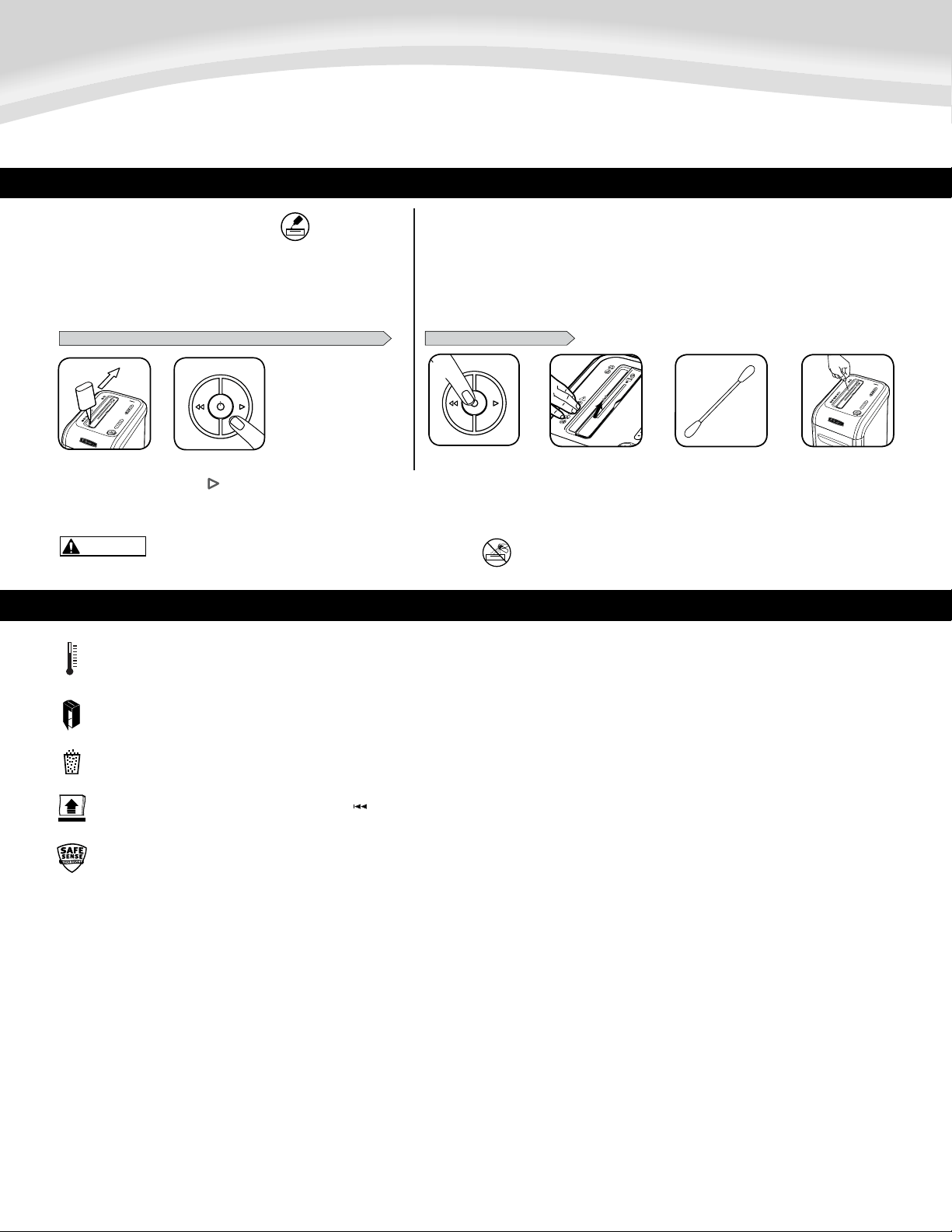
PARA LIMPIAR LOS SENSORES
ENGRASE DE LA DESTRUCTORA
15
15
PRECAUCIÓN
REALICE EL SIGUIENTE PROCEDIMIENTO DE ENGRASE Y REPÍTALO DOS VECES
*Apliqueaceiteen
la entrada
Mantenga pulsada la
tecla ( ) de retroceso
(2 a 3 segundos)
LIMPIEZA DE LOS SENSORES INFRARROJOS DE INICIO AUTOMÁTICO
Lossensoresdedeteccióndepapelestándiseñadosparafuncionarsinningúnmantenimiento.Sin
embargo,enrarasocasioneslossensorespodríanbloquearsedebidoapolvodepapelquehaceque
el motor siga funcionando aún cuando no haya papel. (Nota:enelcentrodelaentradadepapelseencuentrandos
sensoresdedeteccióndepapel).
Todaslasdestructorasdecortecruzadonecesitanaceiteparafuncionar
almáximodesurendimiento.Siunamáquinanoseengrasa,podríaver
reducidoelnúmerodehojasquepuededestruir,producirunruidomolesto
aldestruireinclusodejardefuncionar.Paraevitarestosproblemas,
recomendamosengrasarladestructoracadavezquesevacíelapapelera.
Localice el sensor de
infrarrojosdeinicio
automático
Impregne un
bastoncillo de
algodónconalcohol
Limpielacontaminación
de los sensores de
papel con el bastoncillo
dealgodón
Apague y desenchufe
la destructora
1
18
432
* Use sólo aceite vegetal que no sea en aerosol en los contenedores
de boquilla larga como el Fellowes No. 35250
2
18
1
SOLUCIÓN DE PROBLEMAS
Indicadordesobrecalentamiento:Cuandoelindicadordesobrecalentamientoseenciende,laplantahasuperadolatemperaturadefuncionamientomáximoyfrío
deben. Este indicador permanece encendido y el molino no funciona durante el tiempo de recuperación. Trituración Ver basado en la operación para
obtener más información sobre el funcionamiento continuo y el tiempo de recuperación de este molino.
Papelera llena: Cuando está encendido, la papelera de la trituradora está llena y se debe vaciar. Use una bolsa de residuos Fellowes 36053.
Papelera abierta: La trituradora no funcionará si la puerta del papelera está abierta. Cuando está encendido este indicador, cierre la papelera para reanudar el corte.
Quitar papel: Cuando está iluminado, presione retroceso ( ) y retire el papel. Reduzca la cantidad de papel a una adecuada y vuelva a cargarlo en la entrada de papel.
Indicador SafeSense
®
: Si las manos están demasiado cerca de la entrada del papel, se encenderá el indicador SafeSense
®
y la trituradora dejará de funcionar. Si SafeSense
®
está activo por 3 segundos, la trituradora se apagará automáticamente y el usuario deberá presionar el botón de encendido en el panel de control para reanudar el corte.

13
GARANTÍA LIMITADA DEL PRODUCTO
Garantíalimitada:Fellowes,Inc.(“Fellowes”)garantizaquelaspiezasdelamáquinaestarán
libres de defectos de material y mano de obra y proporciona servicio y soporte técnico durante
2añosapartirdelafechaenqueelconsumidororiginalhayaadquiridoelproducto.Fellowes
garantizaquelascuchillascortantesdelamáquinaestaránlibresdedefectosdematerialymano
deobradurantelavidaútildeladestructora.Siseencuentraalgúndefectoencualquierade
laspiezasduranteelperíododegarantía,laúnicayexclusivasoluciónserálareparaciónoel
cambiodelapiezadefectuosa,acriterioycuentadeFellowes.Estagarantíanorigeparacasos
deabuso,usoindebido,incapacidaddecumplirconlasnormasdeusodelproducto,operaciónde
latrituradorausandounafuentedeenergíaindebida(distintaalaqueseindicaenlaetiqueta),
oreparacionesnoautorizadas.Fellowessereservaelderechoacobraralosconsumidoreslos
costosadicionalesenqueincurraFellowesparasuministrarpiezasoserviciosfueradelpaís
enelqueunrevendedorautorizadohayavendidooriginalmentelatrituradora.PORMEDIO
DEL PRESENTE, TODA GARANTÍA IMPLÍCITA, INCLUIDA LA GARANTÍA DE COMERCIABILIDAD
O ADAPTABILIDAD PARA UNPROPÓSITO ESPECÍFICO, SE LIMITA AL PERÍODO DEDURACIÓN
CORRESPONDIENTEDELAGARANTÍACONFERIDAANTERIORMENTE.
Enningúncaso,Fellowesserá
responsabledecualquierdaño,directooindirecto,quepuedaatribuírseleaesteproducto.Esta
garantíaleconfierederechoslegalesespecíficos.Laduración,lostérminosylascondicionesde
estagarantíasonválidosentodoelmundo,exceptoenloslugaresdondelalegislaciónlocalexija
limitaciones,restriccionesocondicionesdiferentes.Paraobtenermásdetallesorecibirservicio
conformeaestagarantía,comuníqueseconnosotrosoconsudistribuidor.

14

15

Quality Office Products Since 1917
POWERSHRED
®
99Ci
©2014 Fellowes, Inc. Part No. 408019
Canada +1-800-665-4339
Mexico +001-800-514-9057
United States +1-800-955-0959
Questions or Concerns?
www.fellowes.com
Troubleshooting
Registration
Manuals
Customer Service & Support
Troubleshooting
Replacement parts
General questions