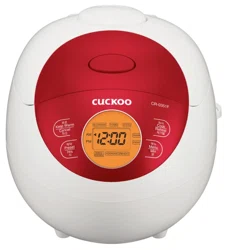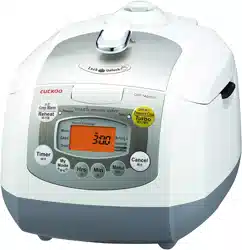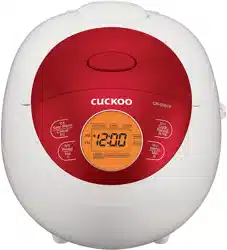
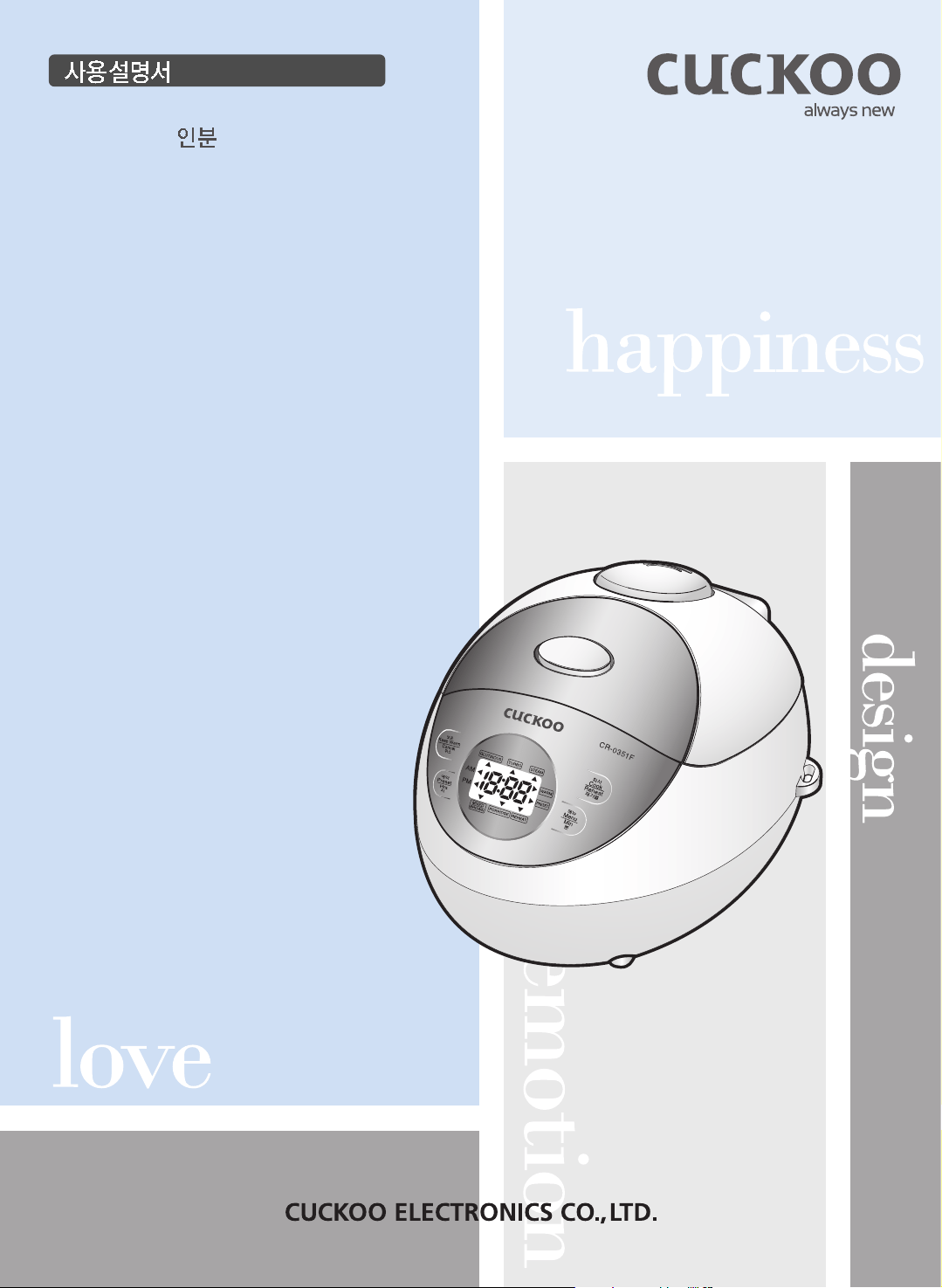
CR-0351F Series
0.54L(0.5~3 ) / 0.54L(0.5~3Persons)
Operating Instructions
NO.1 CUCKOO
Electric Rice cooker/warmer
Read all instructions before use.
Save these instructions for future reference.
Limited warranty
...................................................................
48
Important safeguards
..........................................................
3
Specifications
.......................................................................
4
Caution for safety
...............................................................
5~8
Name of each part
...............................................................
9
Cleaning and Maintenance
............................................
10~11
Function operating part
.......................................................
12
How to set time
....................................................................
13
Before cooking rice
..............................................................
14
For tasty rice
........................................................................
15
How to cook
....................................................................
16~17
How to use “MY MODE”
.....................................................
18
How to use “STEAM”
..........................................................
19
How to preset the timer
..................................................
20~21
To keep warm the cooked rice tasty
.............................
22~23
Check before asking for service
.....................................
24~25
Limited warranty
...................................................................
48
Read all instructions.
Do not touch hot surfaces. Use handles or knobs.
To protect against electrical shock do not immerse cord, plugs in water or other liquid.
Close supervision is necessary when any appliance is used by or near children.
Unplug from outlet when not in use and before cleaning. Allow to cool before putting on or taking
off parts.
Do not operate any appliance with a damaged cord or plug, or after the appliance malfunctions, or
is dropped or damaged in any manner.
Return appliance to your nearest authorized service facility for examination, repair, or electrical or
mechanical adjustment.
If the supply cord is damaged, it must be replaced by a special cord or assembly available from the
manufacturer or its service agent.
The use of accessary attachments not recommended by the appliance manufacturer may cause
injuries.
Do not use outdoors.
Do not let cord hang over edge of table or counter, or touch hot surfaces.
Do not place on or near a hot gas or electric burner, on in a heated oven.
Extreme caution must be used when moving an appliance containing hot oil or other hot liquids.
Always attach plug to appliance first, then plug cord into wall outlet.
To disconnect, turn any control to “off”, then remove plug from wall outlet.
Do not use appliance for other than intended use.
Do not obstruct the steam vent hole with any articles, e.g.a piece of cloth.
Do not place the inner pot directly over flame for cooking.
Avoid touching hot parts : outer lid, inner pot, inner lid and especially the steam vent hole.
Do not switch on when the main body is empty.
Make sure that heating plate and the magnetic switch are clean and dry whenever putting the inner pot
into the cooker.
Do not use sharp instruments to clean the inner pot as these will damage the nonstick coating.
A short power-supply cord is to be provided to reduce the risk resulting from becoming entangled in or
tripping over a longer cord.
Longer detachable power-supply cords or extension cords are available and may be used if care is
exercised in their use.
When using electrical appliances, basic safety precautions should always be followed,
including the following :
Note:
A. A short power-supply cord (or cord set) is to be provided to reduce the hazards resulting from
becoming entangled in or tripping over a longer cord.
B. Longer cord set or extension cords are available and may be used if care is exercised in their use.
C. If a long cord set or extension cord is used.
(1) the marked electrical rating of the cord set or extension cord should be at least as great as the
electrical rating of the appliance.
(2) if the appliance is of the grounded type, the extension cord should be a grounding-type three-wire
cord, and
(3) the longer cord should be arranged so that it will not drape over the counter top or tabletop where
it can be pulled on by children or tripped over accidentally.
This appliance has a polarized plug : (one blade is wider than the other).
As a safety feature, this plug will fit in a polarized outlet only only one way.
If the plug does not fit fully in the outlet, reverse the plug.
If it still does not fit, contact a qualified electrician.
Do not attempt to defeat this safety feature.
CAUTION : During use, the internal parts of the rice cooker and the area around the steam vent
are HOT.
Keep out of reach of children to avoid possible injury.
AC 120V, 60Hz
425W
65W
CR-0351F
1/2 ~ 3 cup
1/2 ~2 1/2 cup
1/2~ 1 cup
22.5
29.3
19.8
1.2m
CAUTION FOR SAFETY
www.cuckoo.co.kr
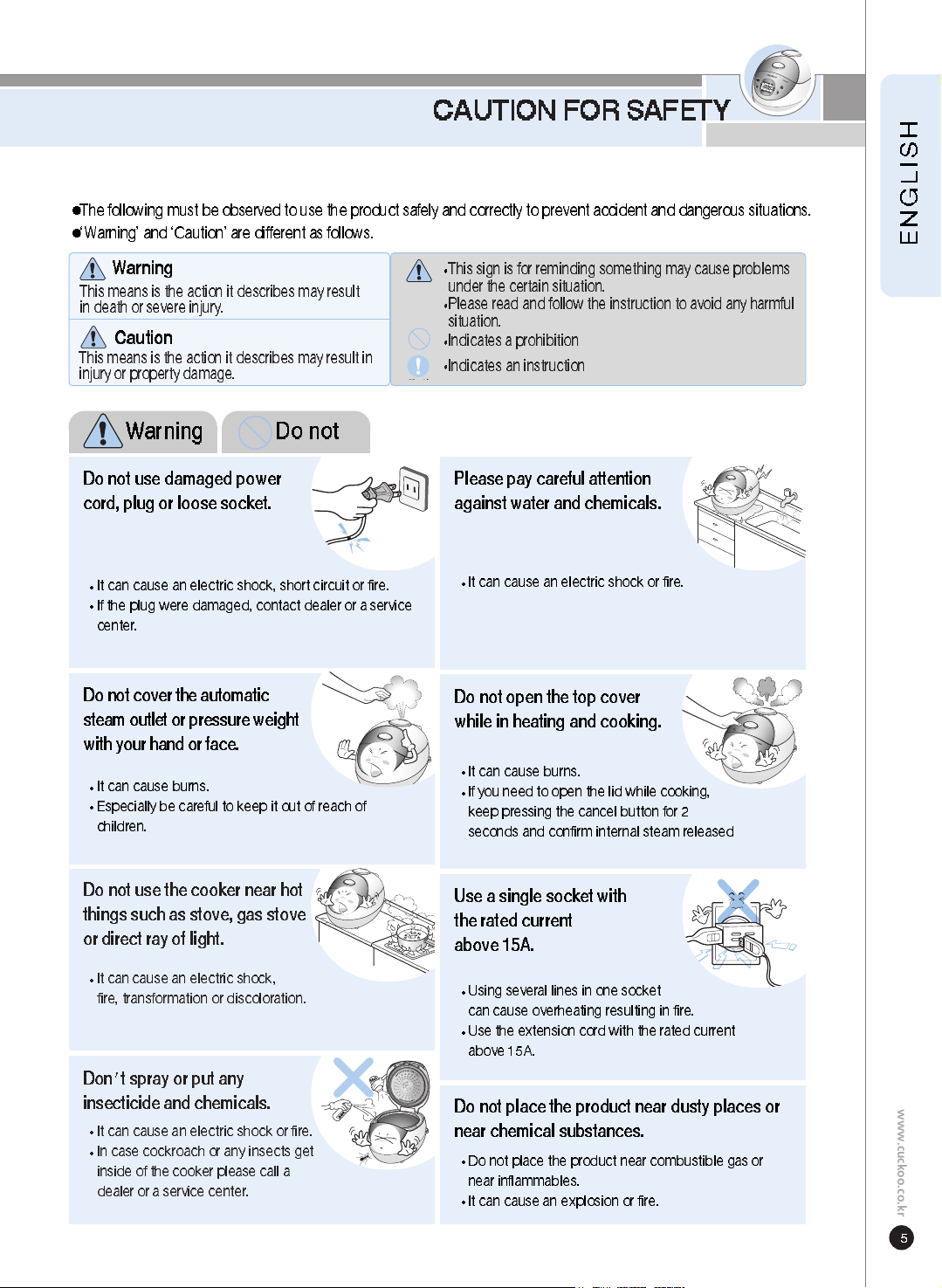
This sign is for reminding something may cause problems
under the certain situation.
Please read and follow the instruction to avoid any harmful
situation.
Indicates a prohibition
This means is the action it describes may result
in death or severe injury.
This means is the action it describes may result in
injury or property damage.
Indicates an instruction
The following must be observed to use the product safely and correctly to prevent accident and dangerous situations.
‘Warning’ and ‘Caution’ are different as follows.
Wa rning
Caution
Don t spray or put any
insecticide and chemicals.
It can cause an electric shock or fire.
In case cockroach or any insects get
inside of the cooker please call a
dealer or a service center.
Do not use the cooker near hot
things such as stove, gas stove
or direct ray of light.
It can cause an electric shock,
fire, transformation or discoloration.
Use a single socket with
the rated current
above 15A.
Using several lines in one socket
can cause overheating resulting in fire.
Use the extension cord with the rated current
above 15A.
Do not place the product near dusty places or
near chemical substances.
Do not place the product near combustible gas or
near inflammables.
It can cause an explosion or fire.
Do not cover the automatic
steam outlet or pressure weight
with your hand or face.
It can cause burns.
Especially be careful to keep it out of reach of
children.
Do not use damaged power
co rd, plug or loose socket.
It can cause an electric shock, short circuit or fire.
If the plug were damaged, contact dealer or a service
center.
Please pay careful attention
against water and chemicals.
It can cause an electric shock or fire.
Do not open the top cover
while in heating and cooking.
It can cause burns.
If you need to open the lid while cooking,
keep pressing the cancel button for 2
seconds and confirm internal steam released
Wa rning Do not
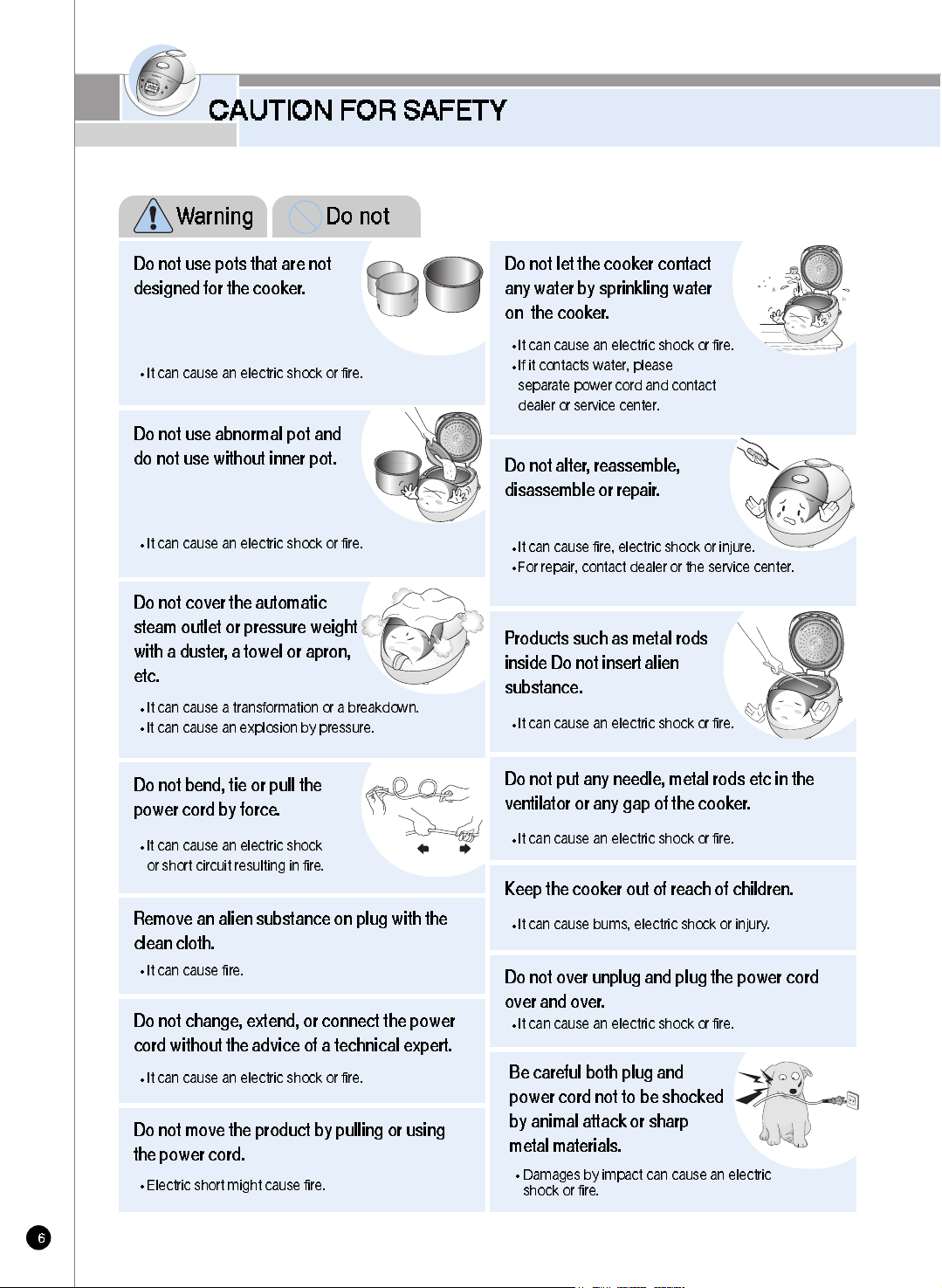
Do not bend, tie or pull the
power cord by force.
It can cause an electric shock
or short circuit resulting in fire.
Do not cover the automatic
steam outlet or pressure weight
with a duster , a towel or apron,
etc.
It can cause a transformation or a breakdown.
It can cause an explosion by pressure.
Remove an alien substance on plug with the
clean cloth.
It can cause fire.
Do not change, extend, or connect the power
co rd without the advice of a technical expert.
It can cause an electric shock or fire.
Do not use abnormal pot and
do not use without inner pot.
It can cause an electric shock or fire.
Do not move the product by pulling or using
the power cord.
Electric short might cause fire.
Do not use pots that are not
designed for the cooker .
It can cause an electric shock or fire.
CAUTION FOR SAFETY
Do not put any needle, metal rods etc in the
ventilator or any gap of the cooker.
It can cause an electric shock or fire.
Keep the cooker out of reach of children.
It can cause bums, electric shock or injury.
P roducts such as metal rods
inside Do not insert alien
substance.
It can cause an electric shock or fire.
Do not alter , reassemble,
disassemble or repair .
It can cause fire, electric shock or injure.
For repair, contact dealer or the service center.
Do not let the cooker contact
any water by sprinkling water
on the cooker .
It can cause an electric shock or fire.
If it contacts water, please
separate power cord and contact
dealer or service center.
Be careful both plug and
power cord not to be shocked
by animal attack or sharp
metal materials.
Damages by impact can cause an electric
shock or fire.
Do not over unplug and plug the power cord
over and over .
It can cause an electric shock or fire.
Wa rning Do not
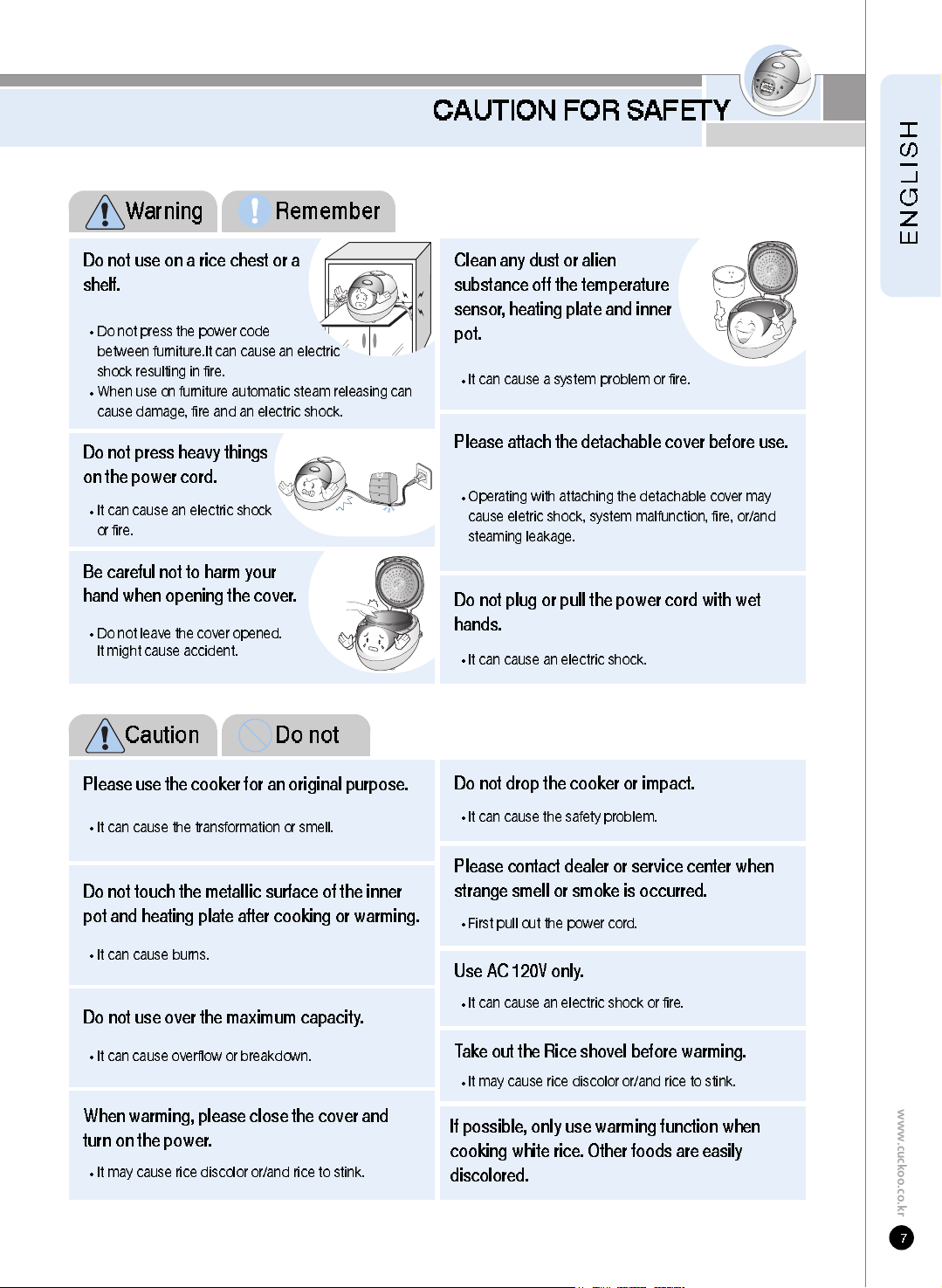
Be careful not to harm your
hand when opening the cover .
Do not leave the cover opened.
It might cause accident.
CAUTION FOR SAFETY
www.cuckoo.co.kr
Do not plug or pull the power cord with wet
hands.
It can cause an electric shock.
Do not press heavy things
on the power cord.
It can cause an electric shock
or fire.
Please attach the detachable cover before use.
Operating with attaching the detachable cover may
cause eletric shock, system malfunction, fire, or/and
steaming leakage.
Do not use on a rice chest or a
shelf.
Do not press the power code
between furniture.It can cause an electric
shock resulting in fire.
When use on furniture automatic steam releasing can
cause damage, fire and an electric shock.
Clean any dust or alien
substance off the temperature
sensor , heating plate and inner
pot.
It can cause a system problem or fire.
Please use the cooker for an original purpose.
It can cause the transformation or smell.
Do not drop the cooker or impact.
It can cause the safety problem.
Do not touch the metallic surface of the inner
pot and heating plate after cooking or warming.
It can cause burns.
Do not use over the maximum capacity .
It can cause overflow or breakdown.
When warming, please close the cover and
turn on the power .
It may cause rice discolor or/and rice to stink.
Take out the Rice shovel before warming.
It may cause rice discolor or/and rice to stink.
If possible, only use warming function when
cooking white rice. Other foods are easily
discolored.
Please contact dealer or service center when
strange smell or smoke is occurred.
Use AC 120V only .
It can cause an electric shock or fire.
Wa rning Remember
First pull out the power cord.
Caution Do not
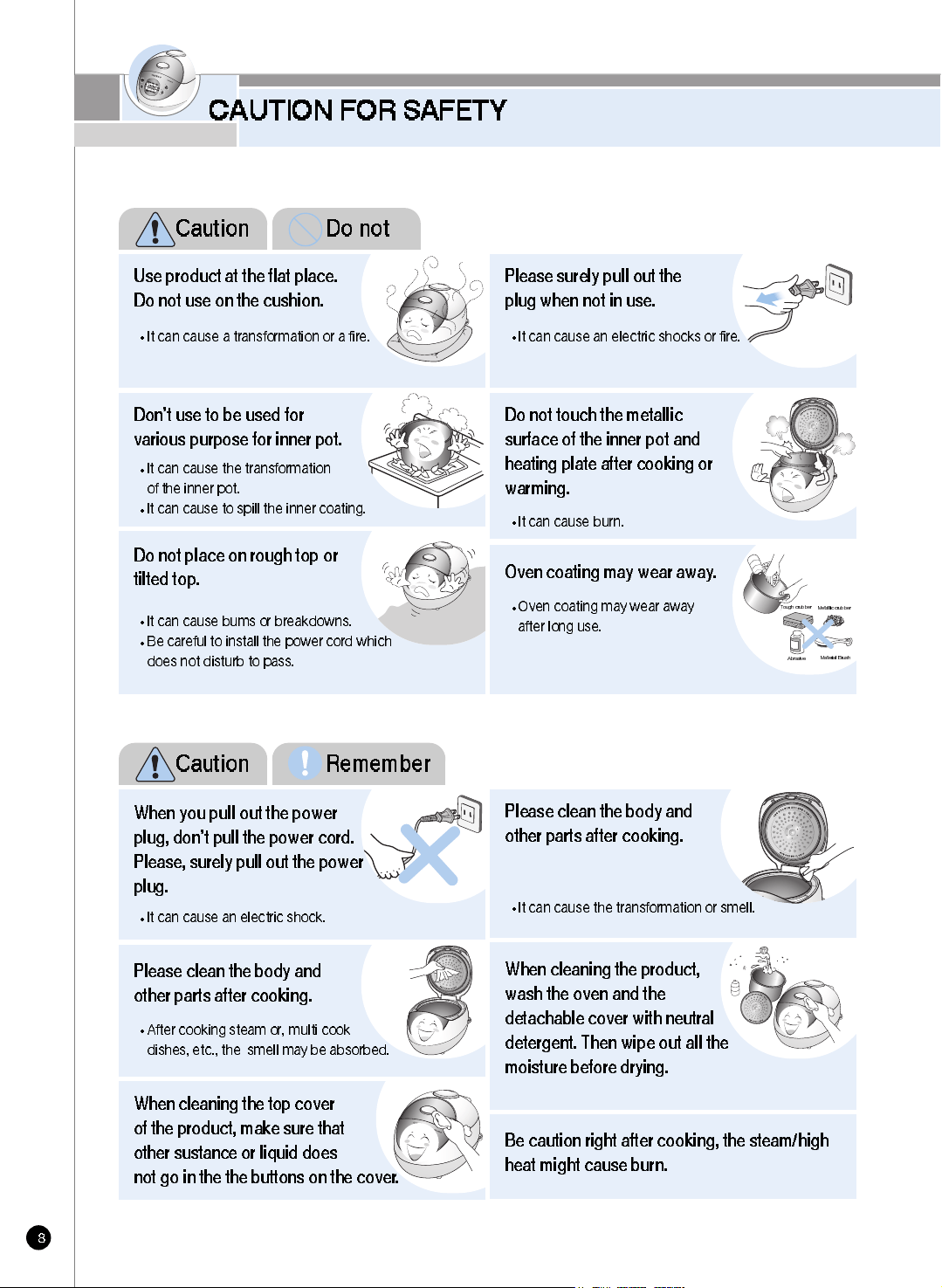
When cleaning the top cover
of the product, make sure that
other sustance or liquid does
not go in the the buttons on the cover .
Please clean the body and
other parts after cooking.
After cooking steam or, multi cook
dishes, etc., the smell may be absorbed.
When cleaning the product,
wash the oven and the
detachable cover with neutral
detergent. Then wipe out all the
moisture before drying.
Be caution right after cooking, the steam/high
heat might cause burn.
Do not place on rough top or
tilted top.
It can cause bums or breakdowns.
Be careful to install the power cord which
does not disturb to pass.
Oven coating may wear away .
Oven coating may wear away
after long use.
Don’t use to be used for
various purpose for inner pot.
It can cause the transformation
of the inner pot.
It can cause to spill the inner coating.
Do not touch the metallic
surface of the inner pot and
heating plate after cooking or
warming.
It can cause burn.
Use product at the flat place.
Do not use on the cushion.
It can cause a transformation or a fire.
CAUTION FOR SAFETY
When you pull out the power
plug, don’t pull the power cord.
Please, surely pull out the power
plug.
It can cause an electric shock.
Please clean the body and
other parts after cooking.
It can cause the transformation or smell.
Please surely pull out the
plug when not in use.
It can cause an electric shocks or fire.
Caution Do not
Caution Remember
Tough crubber
Abrasive
Material Brush
Metallic crubber
NAME OF EACH PART
www.cuckoo.co.kr
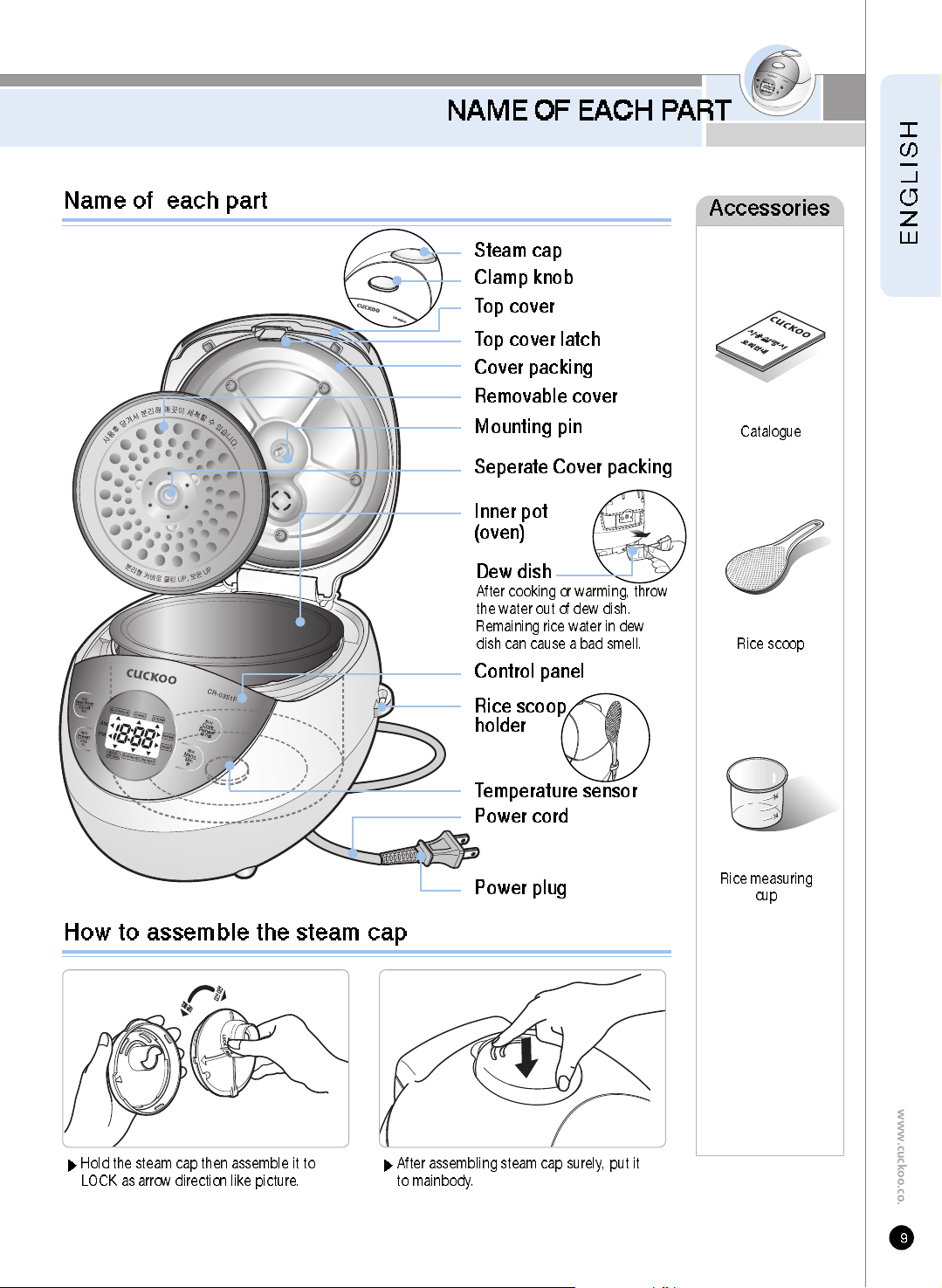
Name of each part
How to assemble the steam cap
Accessories
Catalogue
Rice scoop
Rice measuring
cup
Top cover
Top cover latch
Cover packing
Removable cover
Clamp knob
Seperate Cover packing
Mounting pin
Inner pot
(oven)
Control panel
Temperature sensor
Power cord
Power plug
Rice scoop
holder
UN
L
OCK
L
OCK
Hold the steam cap then assemble it to
LOCK as arrow direction like picture.
After assembling steam cap surely, put it
to mainbody.
Dew dish
After cooking or warming, throw
the water out of dew dish.
Remaining rice water in dew
dish can cause a bad smell.
Steam cap
CLEANING AND MAINTENANCE
-
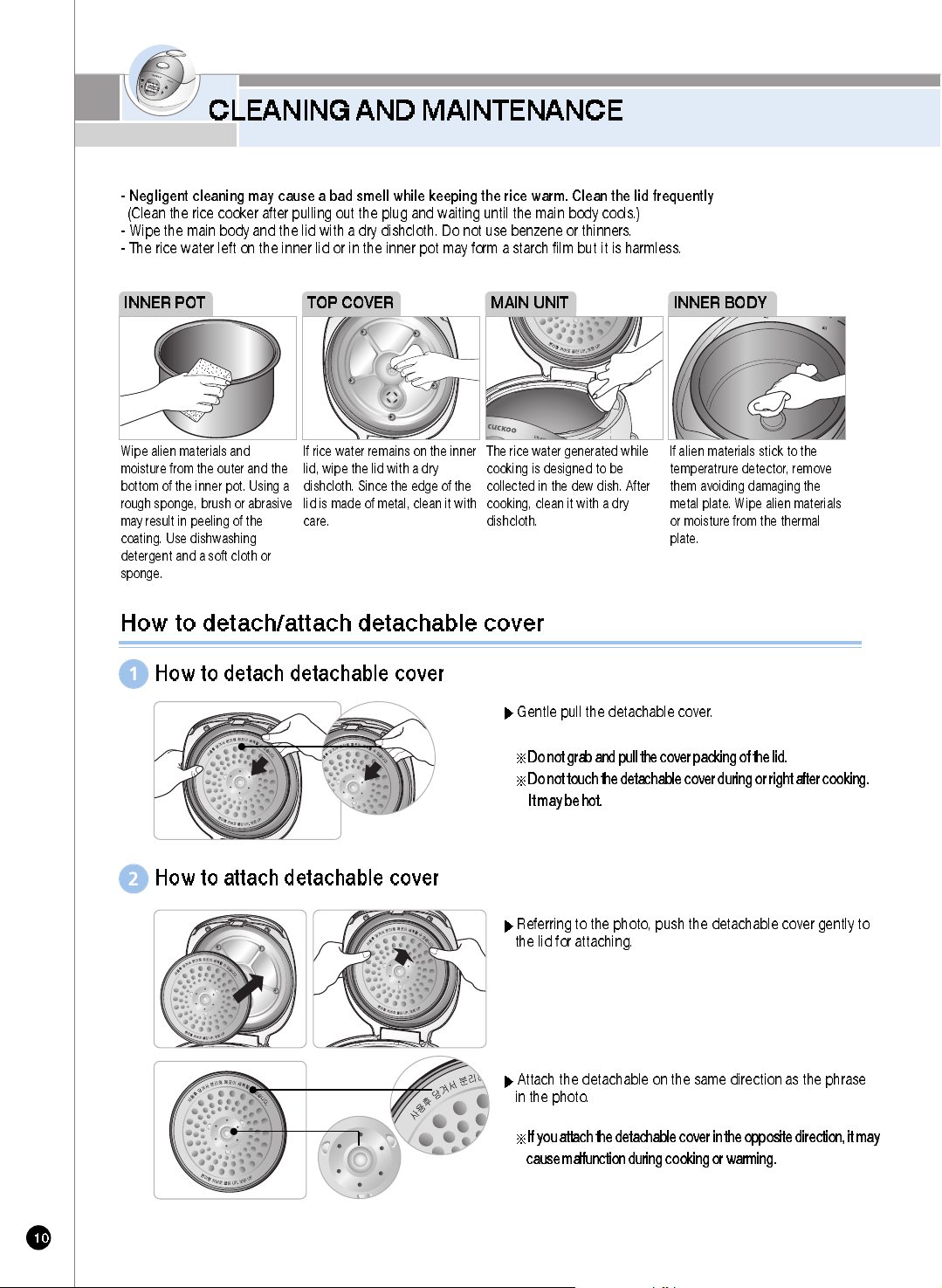
Negligent cleaning may cause a bad smell while keeping the rice warm. Clean the lid frequently
(Clean the rice cooker after pulling out the plug and waiting until the main body cools.)
- Wipe the main body and the lid with a dry dishcloth. Do not use benzene or thinners.
- The rice water left on the inner lid or in the inner pot may form a starch film but it is harmless.
Wipe alien materials and
moisture from the outer and the
bottom of the inner pot. Using a
rough sponge, brush or abrasive
may result in peeling of the
coating. Use dishwashing
detergent and a soft cloth or
sponge.
If rice water remains on the inner
lid, wipe the lid with a dry
dishcloth. Since the edge of the
lid is made of metal, clean it with
care.
The rice water generated while
cooking is designed to be
collected in the dew dish. After
cooking, clean it with a dry
dishcloth.
INNER POT MAIN UNIT
If alien materials stick to the
temperatrure detector, remove
them avoiding damaging the
metal plate. Wipe alien materials
or moisture from the thermal
plate.
INNER BODYTOP COVER
How to detach/attach detachable cover
How to detach detachable cover
Gentle pull the detachable cover.
Do not graband pull the cover packing of the lid.
Do not touch the detachable cover during or right after cooking.
It may be hot.
If you attach the detachable cover in the opposite direction, it may
cause malfunction during cooking or warming.
1
How to attach detachable cover
Referring to the photo, push the detachable cover gently to
the lid for attaching.
Attach the detachable on the same direction as the phrase
in the photo.
2
CLEANING AND MAINTENANCE
www.cuckoo.co.kr
The steam cap
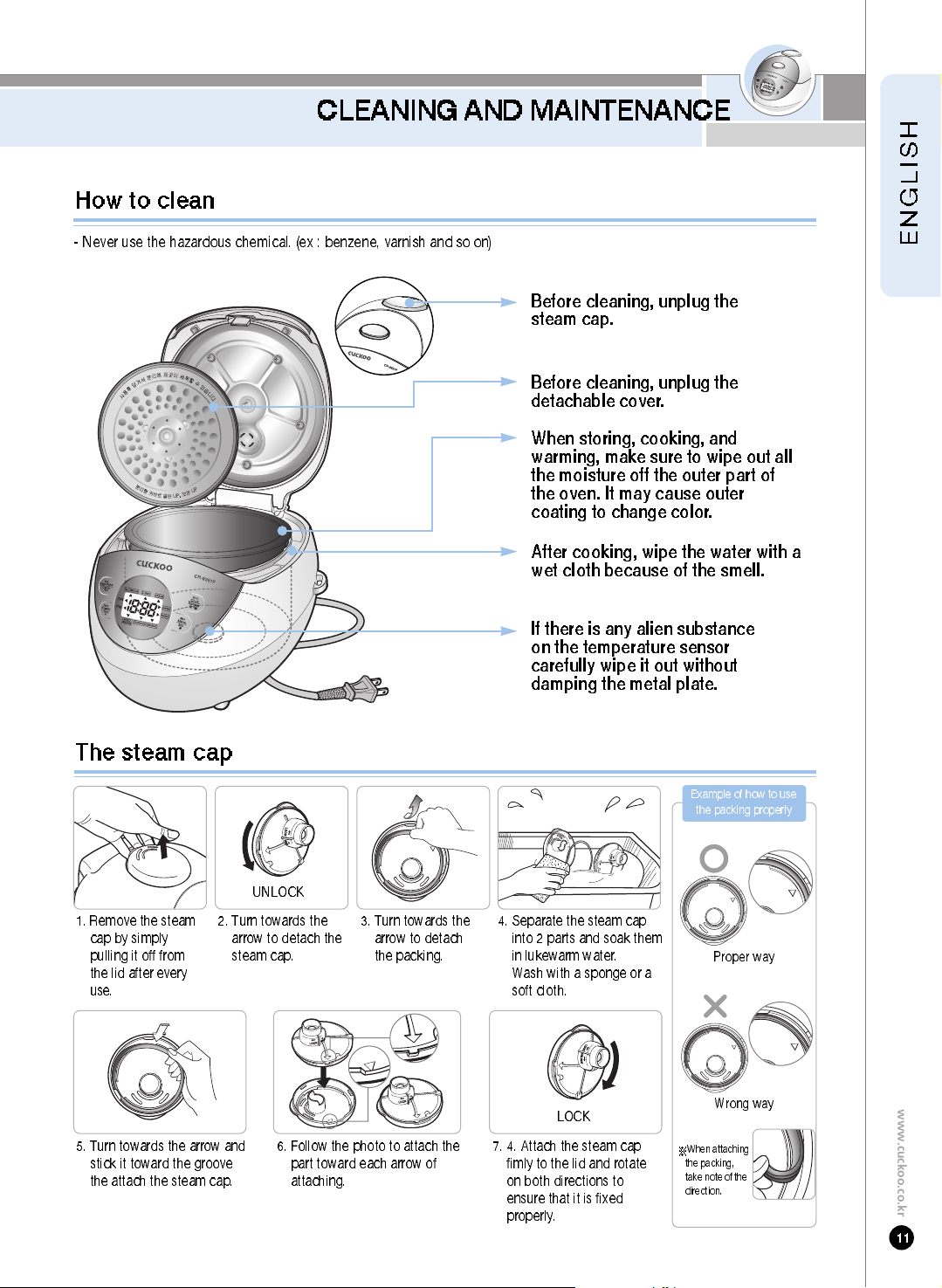
1. Remove the steam
cap by simply
pulling it off from
the lid after every
use.
2. Turn towards the
arrow to detach the
steam cap.
3. Turn towards the
arrow to detach
the packing.
4. Separate the steam cap
into 2 parts and soak them
in lukewarm water.
Wash with a sponge or a
soft cloth.
6. Follow the photo to attach the
part toward each arrow of
attaching.
5. Turn towards the arrow and
stick it toward the groove
the attach the steam cap.
7. 4. Attach the steam cap
fimly to the lid and rotate
on both directions to
ensure that it is fixed
properly.
- Never use the hazardous chemical. (ex : benzene, varnish and so on)
After cooking, wipe the water with a
wet cloth because of the smell.
Before cleaning, unplug the
steam cap.
Before cleaning, unplug the
detachable cover.
When storing, cooking, and
warming, make sure to wipe out all
the moisture off the outer part of
the oven. It may cause outer
coating to change color.
If there is any alien substance
on the temperature sens or
ca refully wipe it out without
damping the metal plate.
Proper way
Wrong way
Example of how to use
the packing properly
When attaching
the packing,
take note of the
direction.
How to clean
UNLOCK
LOCK
FUNCTION OPERATING PART
Press the buttons until you hear a buzzer sound. The design of this template may differ from the actual product.
When the product have any problem or use it inappropriately you can see the below mark.
Er ror Codes and Possible Causes
Temperature sensor problem.
(Consult the service center and dealer)
When the inner pot is not placed into the unit.
When setting preset time longer than 13 hours.
Set the preset time within 13 hours.
Refer to page 20, 21
When the operation don’t finish for a long time.
(Consult the service center and dealer) Refer to page 25
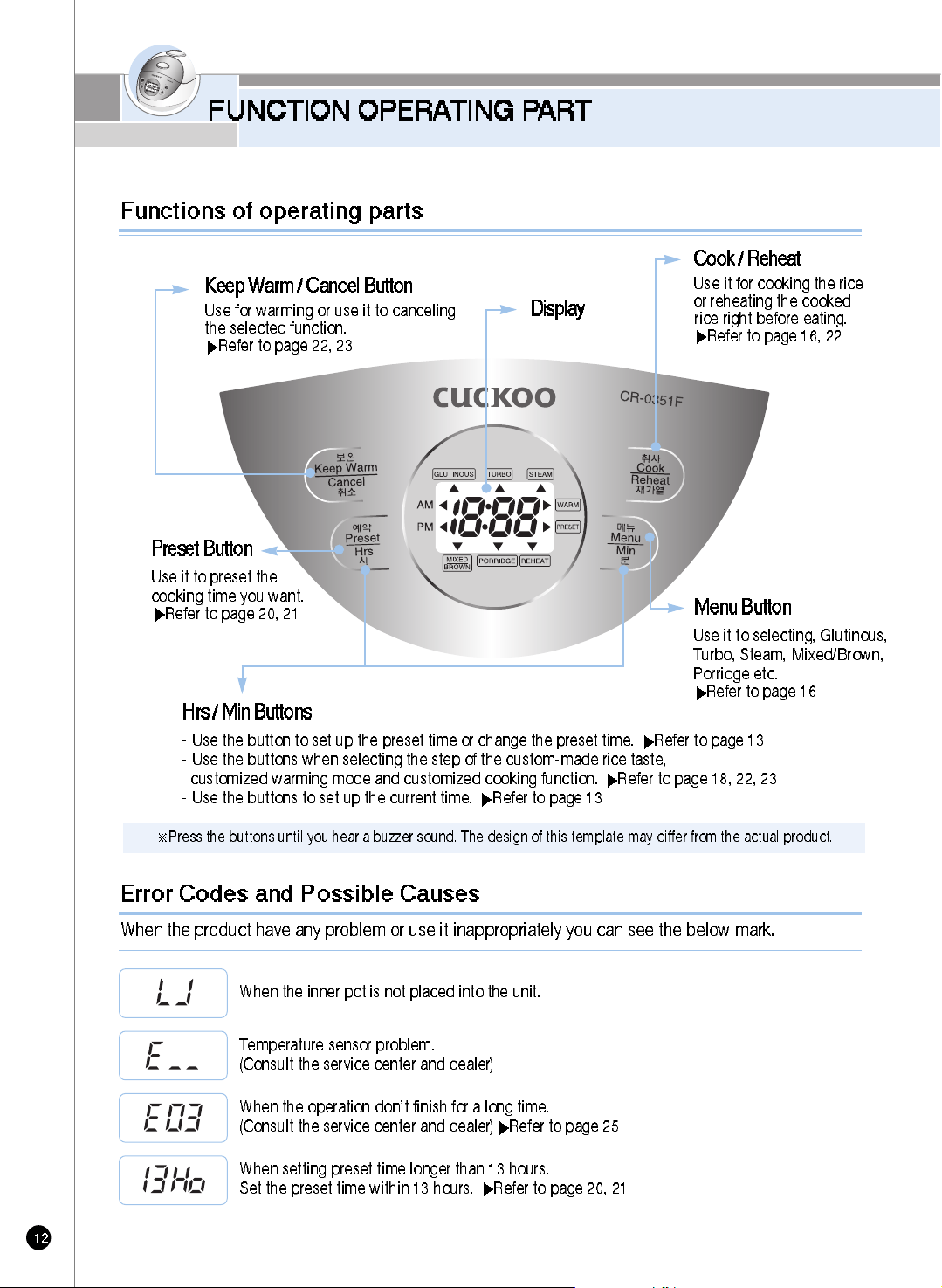
Display
Menu Button
Use it to selecting, Glutinous,
Turbo, Steam, Mixed/Brown,
Porridge etc.
Refertopage16
Keep Warm / Cancel Button
Use for warming or use it to canceling
the selected function.
Refer to page 22, 23
Cook / Reheat
Use it for cooking the rice
or reheating the cooked
rice right before eating.
Refer to page 16, 22
Preset Button
Use it to preset the
cooking time you want.
Refer to page 20, 21
Hrs / Min Buttons
- Use the button to set up the preset time or change the preset time. Refer to page 13
- Use the buttons when selecting the step of the custom-made rice taste,
customized warming mode and customized cooking function. Refer to page 18, 22, 23
- Use the buttons to set up the current time. Refer to page 13
Functions of operating parts
HOW TO SET TIME
www.cuckoo.co.kr
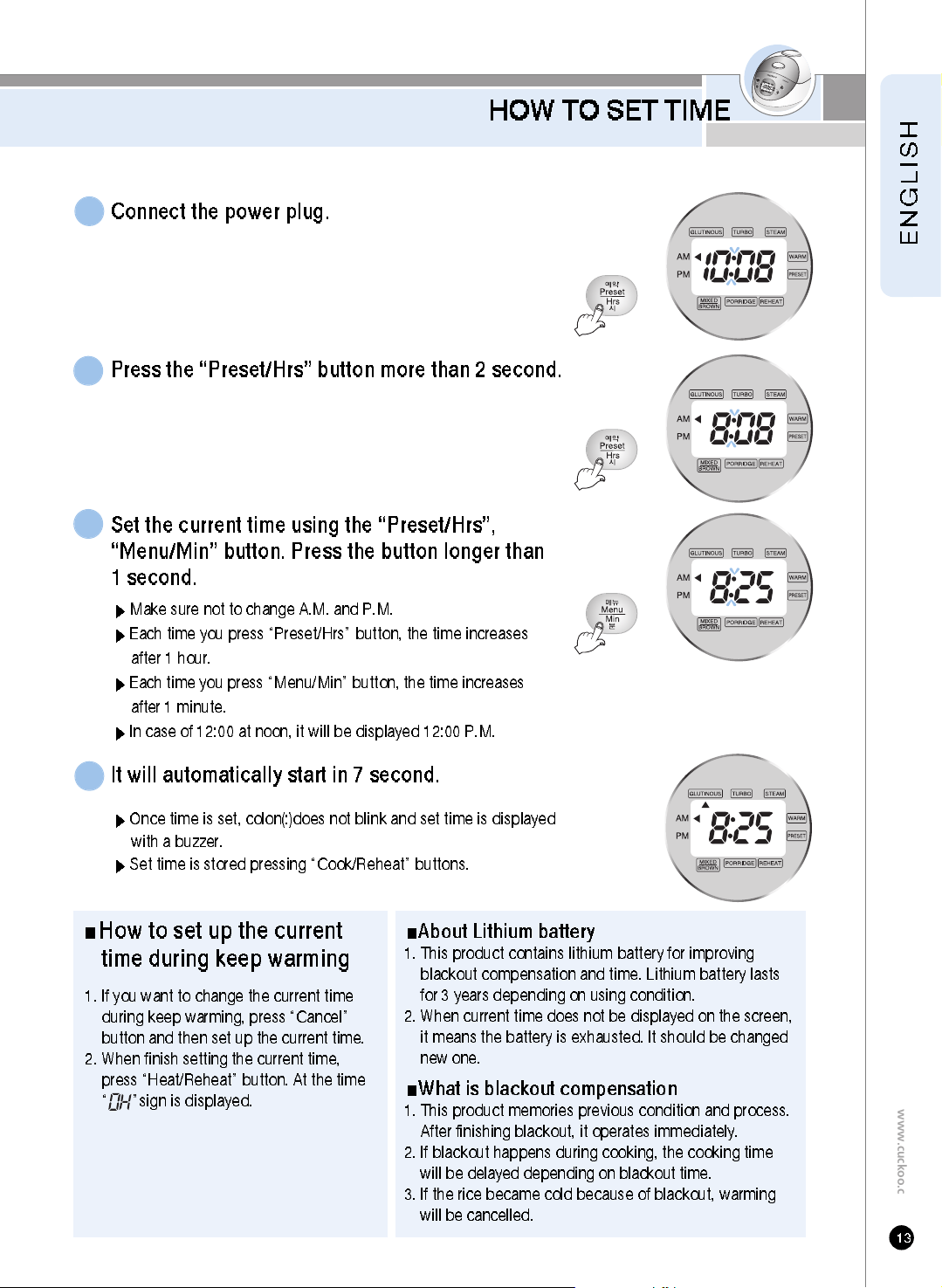
Connect the power plug.
1
Press the “Preset/Hrs” button more than 2 second.
2
Set the current time using the “Preset/Hrs”,
“Menu/Min” button. Press the button longer than
1 second.
Make sure not to change A.M. and P.M.
Each time you press “Preset/Hrs” button, the time increases
after 1 hour.
Each time you press “Menu/Min” button, the time increases
after 1 minute.
In case of 12:00 at noon, it will be displayed 12:00 P.M.
3
It will automatically start in 7 second.
Once time is set, colon(:)does not blink and set time is displayed
with a buzzer.
Set time is stored pressing “Cook/Reheat” buttons.
4
About Lithium battery
1. This product contains lithium battery for improving
blackout compensation and time. Lithium battery lasts
for 3 years depending on using condition.
2. When current time does not be displayed on the screen,
it means the battery is exhausted. It should be changed
new one.
What is blackout compensation
1. This product memories previous condition and process.
After finishing blackout, it operates immediately.
2. If blackout happens during cooking, the cooking time
will be delayed depending on blackout time.
3. If the rice became cold because of blackout, warming
will be cancelled.
How to set up the current
time during keep warming
1. If you want to change the current time
during keep warming, press “Cancel”
button and then set up the current time.
2. When finish setting the current time,
press “Heat/Reheat” button. At the time
“ ”sign is displayed.
BEFORE COOKING RICE
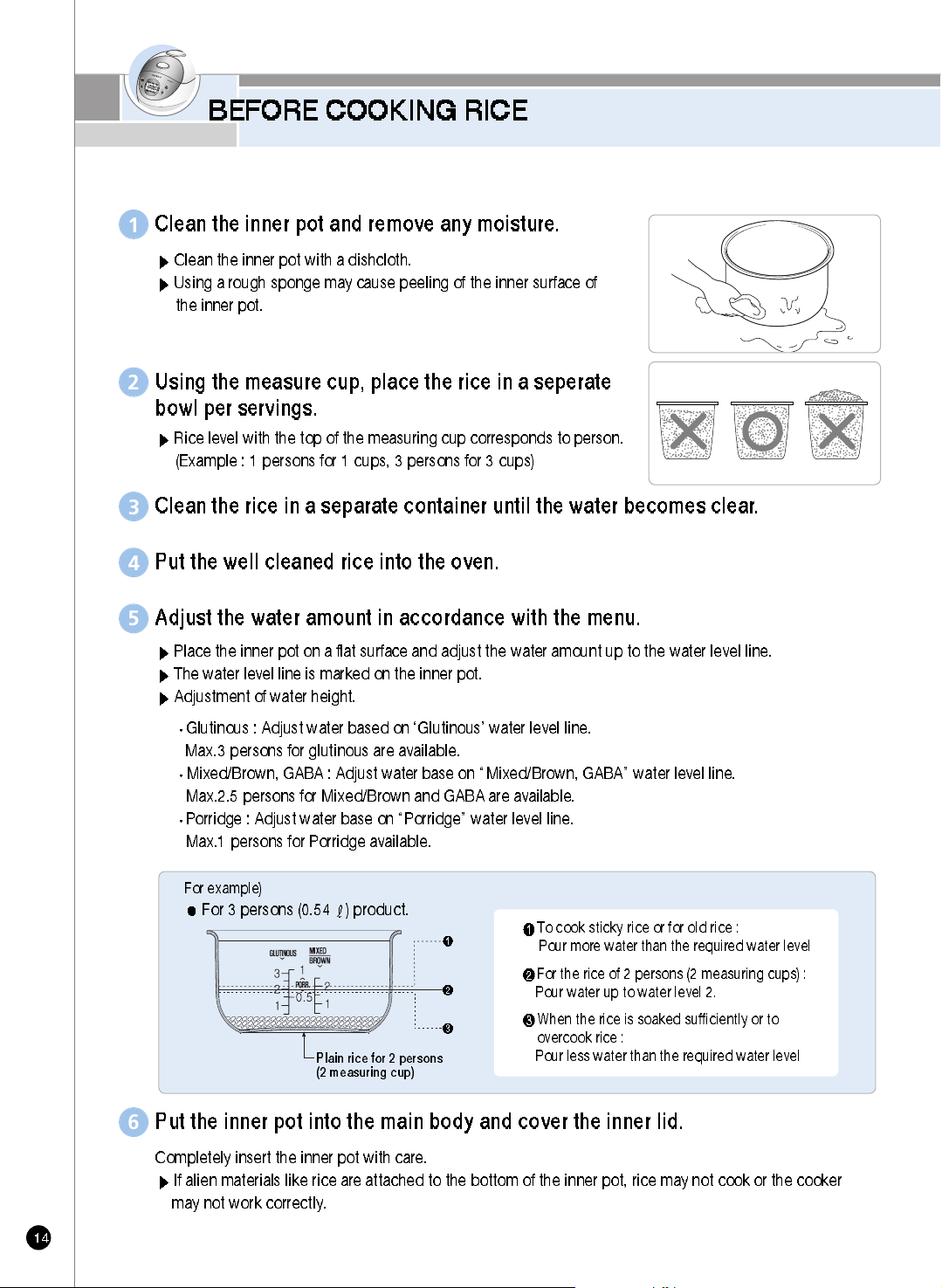
Clean the inner pot and remove any moisture.
Clean the inner pot with a dishcloth.
Using a rough sponge may cause peeling of the inner surface of
the inner pot.
1
Using the measure cup, place the rice in a seperate
bowl per servings.
Rice level with the top of the measuring cup corresponds to person.
(Example : 1 persons for 1 cups, 3 persons for 3 cups)
2
Clean the rice in a separate container until the water becomes clear.
3
Put the well cleaned rice into the oven.
4
Put the inner pot into the main body and cover the inner lid.
Completely insert the inner pot with care.
If alien materials like rice are attached to the bottom of the inner pot, rice may not cook or the cooker
may not work correctly.
6
For the rice of 2 persons (2 measuring cups) :
Pour water up to water level 2.
When the rice is soaked sufficiently or to
overcook rice :
Pour less water than the required water level
To cook sticky rice or for old rice :
Pour more water than the required water level
Adjust the water amount in accordance with the menu.
Place the inner pot on a flat surface and adjust the water amount up to the water level line.
The water level line is marked on the inner pot.
Adjustment of water height.
Glutinous : Adjust water based on ‘Glutinous’ water level line.
Max.3 persons for glutinous are available.
Mixed/Brown, GABA : Adjust water base on “Mixed/Brown, GABA” water level line.
Max.2.5 persons for Mixed/Brown and GABA are available.
Porridge : Adjust water base on “Porridge” water level line.
Max.1 persons for Porridge available.
5
For 3 persons (0.54 ) product.
For example)
Plain rice for 2 persons
(2 measuring cup)
FOR T ASTY RICE
www.cuckoo.co.kr
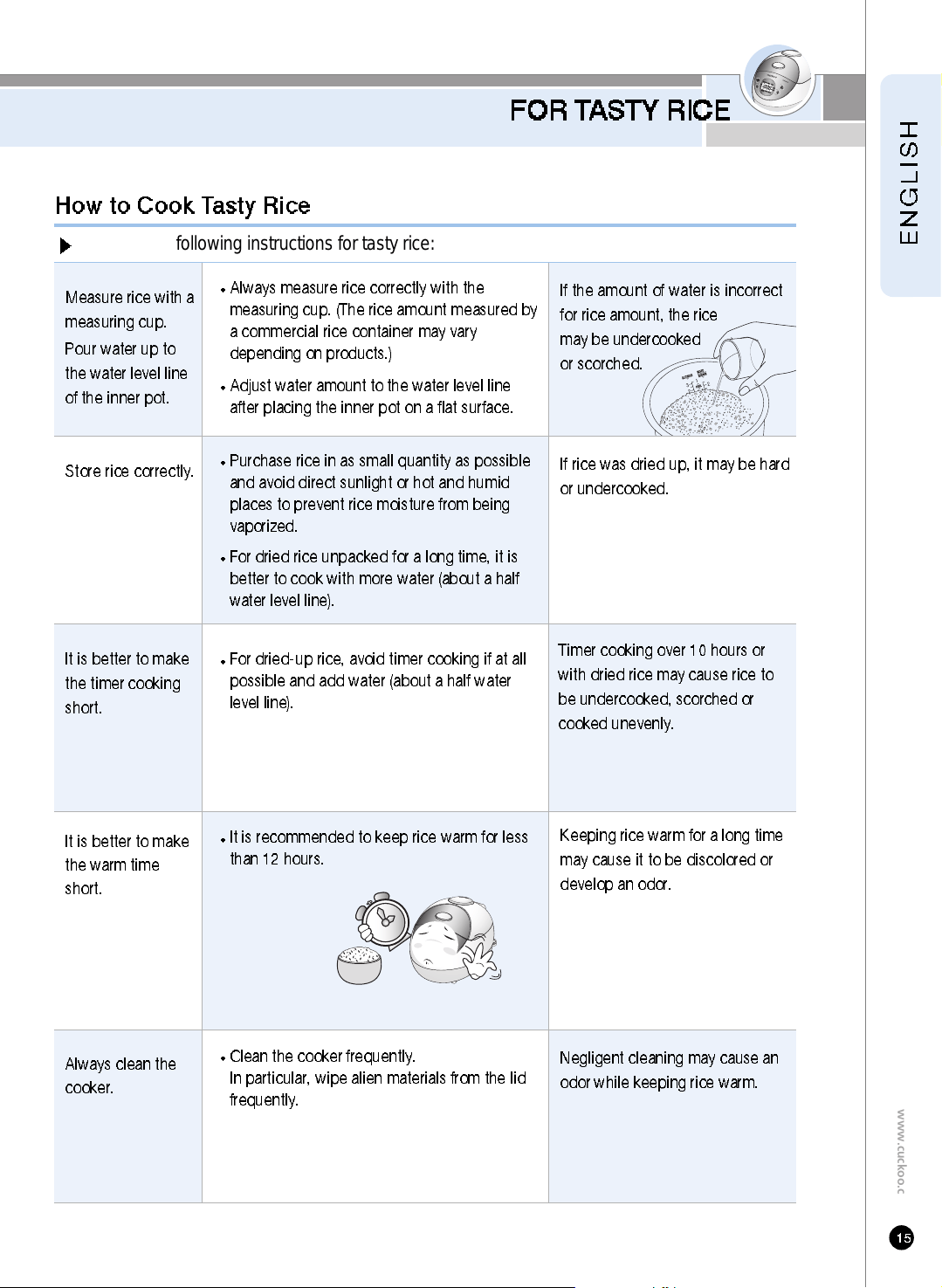
Store rice correctly.
Always clean the
cooker.
Always measure rice correctly with the
measuring cup. (The rice amount measured by
a commercial rice container may vary
depending on products.)
Adjust water amount to the water level line
after placing the inner pot on a flat surface.
Purchase rice in as small quantity as possible
and avoid direct sunlight or hot and humid
places to prevent rice moisture from being
vaporized.
For dried rice unpacked for a long time, it is
better to cook with more water (about a half
water level line).
Clean the cooker frequently.
In particular, wipe alien materials from the lid
frequently.
If rice was dried up, it may be hard
or undercooked.
Negligent cleaning may cause an
odor while keeping rice warm.
Measure rice with a
measuring cup.
Pour water up to
the water level line
of the inner pot.
Keeping rice warm for a long time
may cause it to be discolored or
develop an odor.
It is better to make
the warm time
short.
If the amount of water is incorrect
for rice amount, the rice
may be undercooked
or scorched.
Observe the following instructions for tasty rice:
How to Cook Tasty Rice
It is better to make
the timer cooking
short.
For dried-up rice, avoid timer cooking if at all
possible and add water (about a half water
level line).
It is recommended to keep rice warm for less
than 12 hours.
Timer cooking over 10 hours or
with dried rice may cause rice to
be undercooked, scorched or
cooked unevenly.
HOW TO COOK
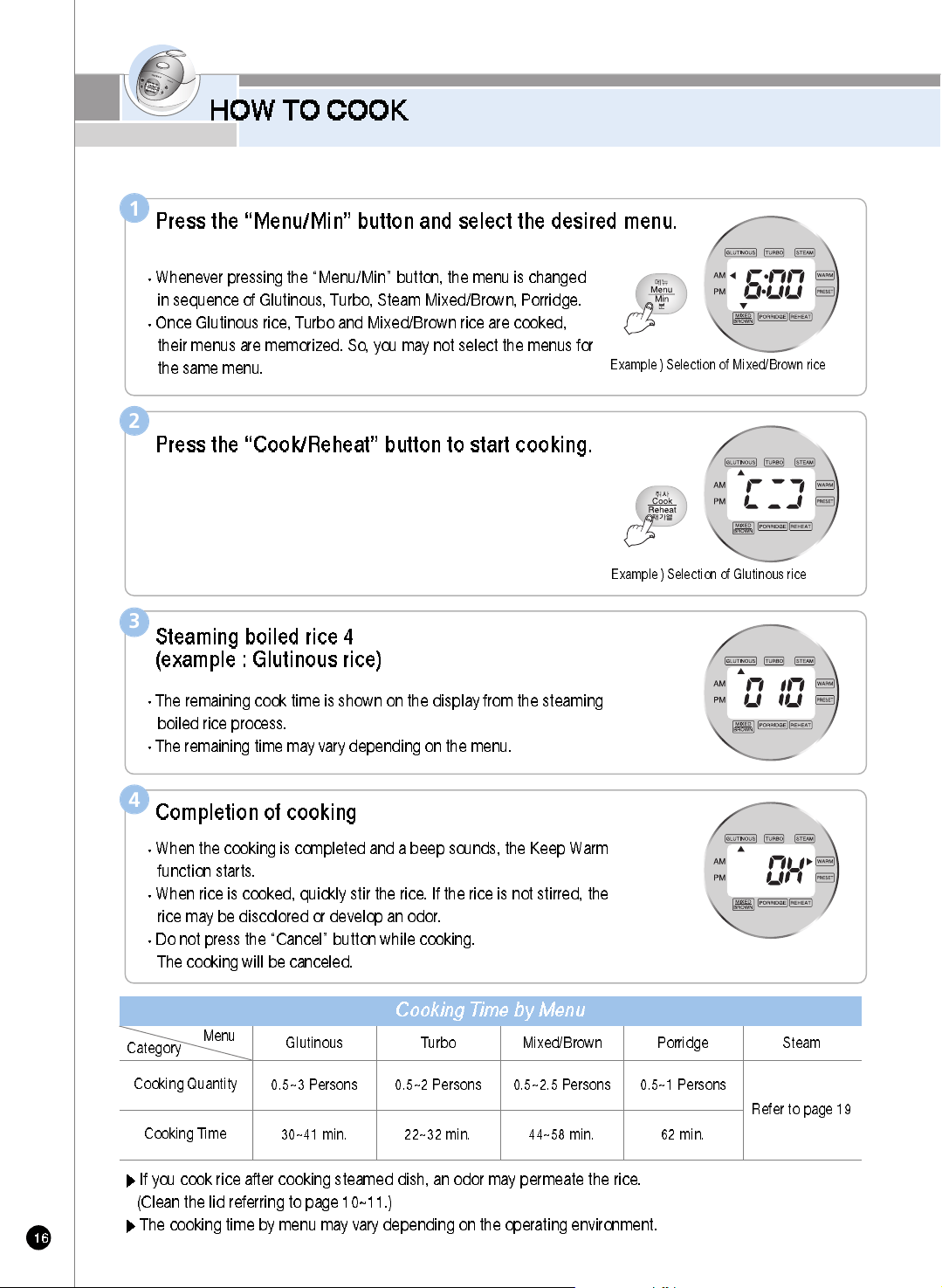
Press the “Menu/Min” button and select the desired menu.
Whenever pressing the “Menu/Min” button, the menu is changed
in sequence of Glutinous, Turbo, Steam Mixed/Brown, Porridge.
Once Glutinous rice, Turbo and Mixed/Brown rice are cooked,
their menus are memorized. So, you may not select the menus for
the same menu.
1
Category
Menu
Cooking Quantity
Cooking Time
If you cook rice after cooking steamed dish, an odor may permeate the rice.
(Clean the lid referring to page 10~11.)
The cooking time by menu may vary depending on the operating environment.
Example ) Selection of Mixed/Brown rice
Cooking Time by Menu
Glutinous Turbo Mixed/Brown Porridge
0.5~3 Persons 0.5~2 Persons 0.5~2.5 Persons 0.5~1 Persons
30~41 min. 22~32 min. 44~58 min. 62 min.
Steam
Refer to page 19
Press the “Cook/Reheat” button to start cooking.
2
Example ) Selection of Glutinous rice
Steaming boiled rice 4
(example : Glutinous rice)
The remaining cook time is shown on the display from the steaming
boiled rice process.
The remaining time may vary depending on the menu.
3
Completion of cooking
When the cooking is completed and a beep sounds, the Keep Warm
function starts.
When rice is cooked, quickly stir the rice. If the rice is not stirred, the
rice may be discolored or develop an odor.
Do not press the “Cancel” button while cooking.
The cooking will be canceled.
4
HOW TO COOK
www.cuckoo.co.kr
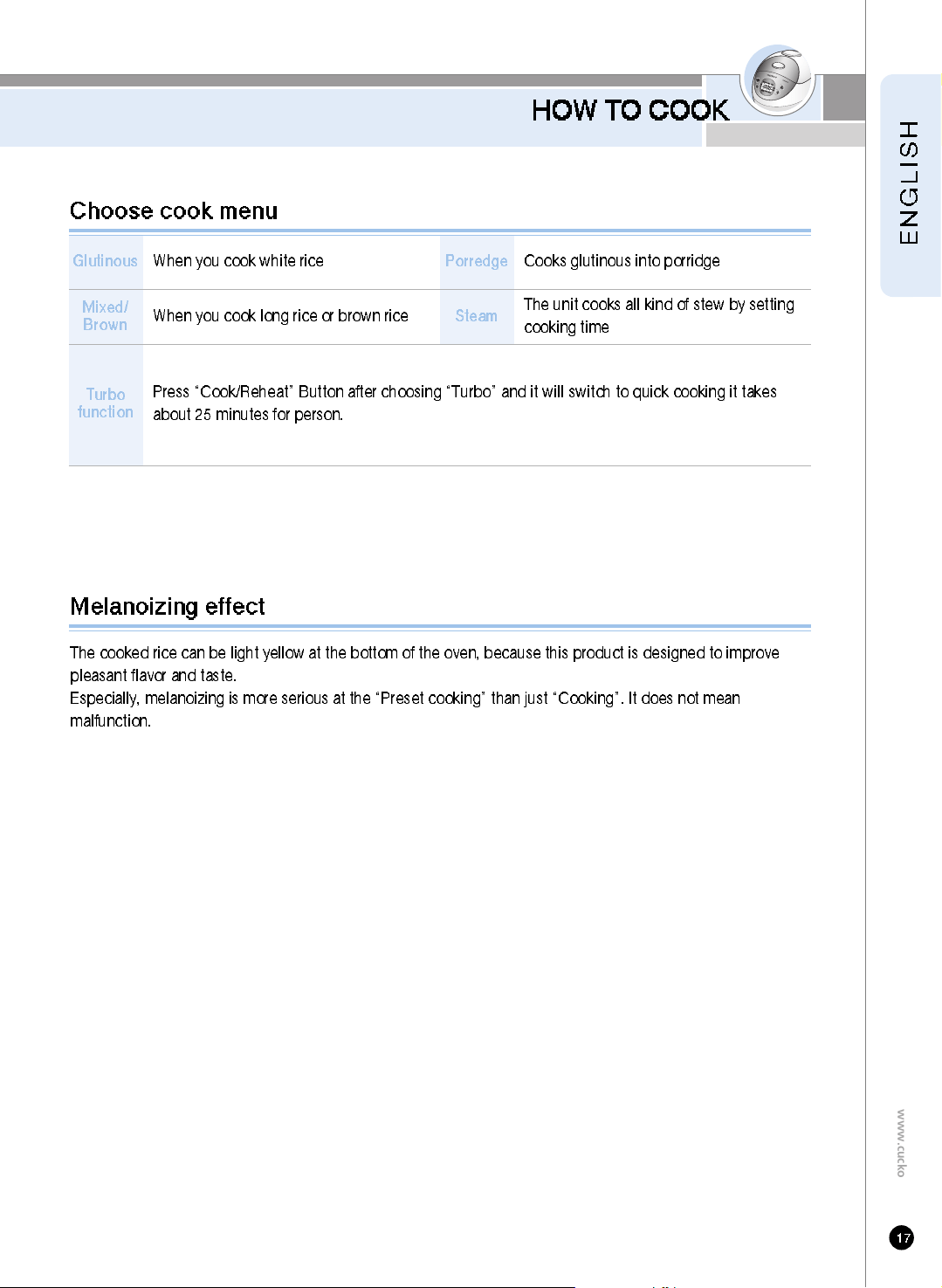
The cooked rice can be light yellow at the bottom of the oven, because this product is designed to improve
pleasant flavor and taste.
Especially, melanoizing is more serious at the “Preset cooking” than just “Cooking”. It does not mean
malfunction.
Melanoizing effect
Glutinous
When you cook white rice
Mixed/
Brown
Turbo
function
When you cook long rice or brown rice
Press “Cook/Reheat” Button after choosing “Turbo” and it will switch to quick cooking it takes
about 25 minutes for person.
Porredge
Cooks glutinous into porridge
Steam
The unit cooks all kind of stew by setting
cooking time
Choose cook menu
HOW TO USE “MY MODE”
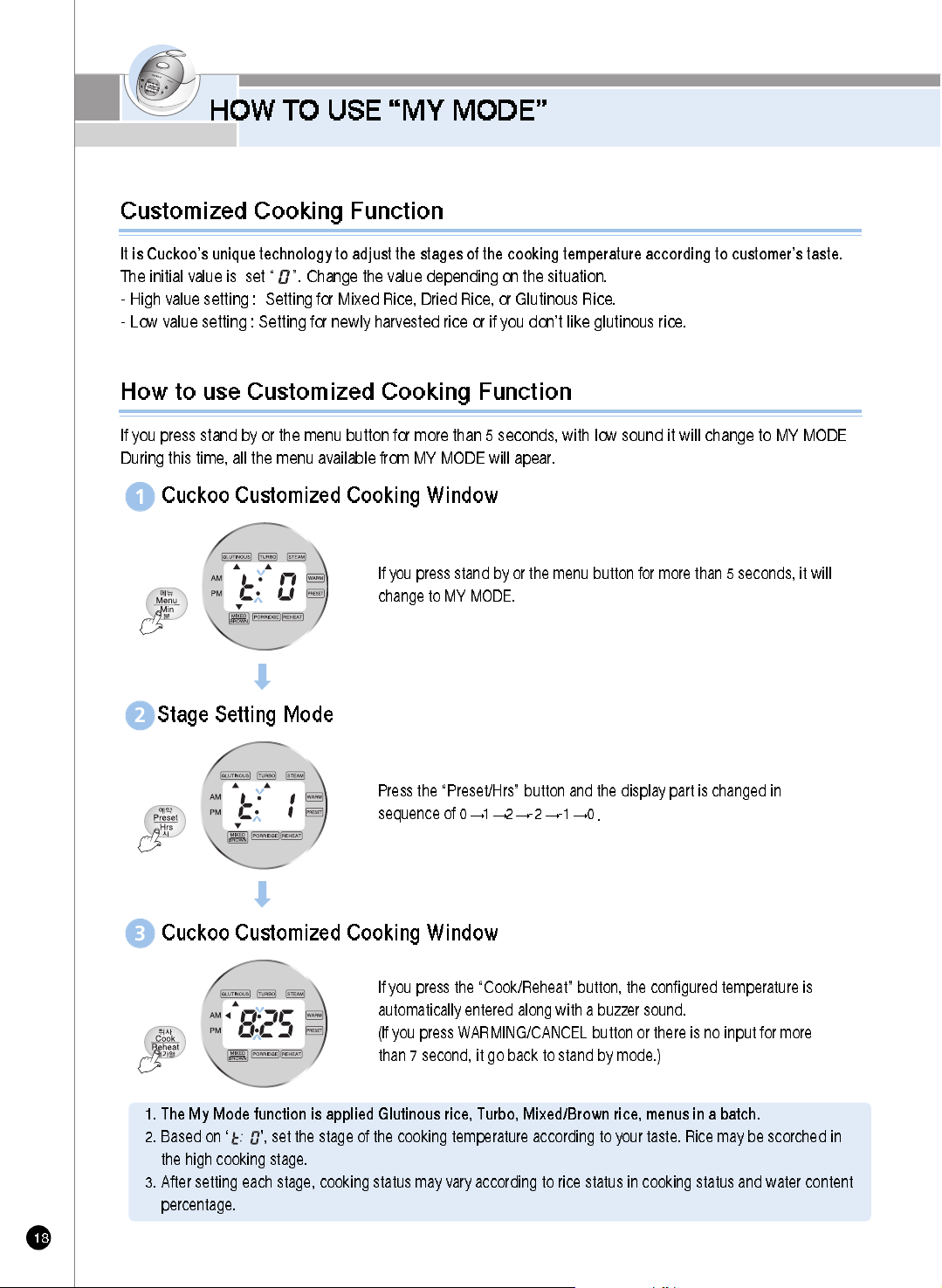
How to use Customized Cooking Function
If you press stand by or the menu button for more than 5 seconds, with low sound it will change to MY MODE
During this time, all the menu available from MY MODE will apear.
If you press stand by or the menu button for more than 5 seconds, it will
change to MY MODE.
Cuckoo Customized Cooking Window
1
Cuckoo Customized Cooking Window
3
Press the “Preset/Hrs” button and the display part is changed in
sequence of 0
1 2 -2 -1 0
Stage Setting Mode
2
1. The My Mode function is applied Glutinous rice, Turbo, Mixed/Brown rice, menus in a batch.
2. Based on ‘ ’, set the stage of the cooking temperature according to your taste. Rice may be scorched in
the high cooking stage.
3. After setting each stage, cooking status may vary according to rice status in cooking status and water content
percentage.
If you press the “Cook/Reheat” button, the configured temperature is
automatically entered along with a buzzer sound.
(If you press WARMING/CANCEL button or there is no input for more
than 7 second, it go back to stand by mode.)
It is Cuckoo’s unique technology to adjust the stages of the cooking temperature according to customer’s taste.
The initial value is set “ ”. Change the value depending on the situation.
- High value setting : Setting for Mixed Rice, Dried Rice, or Glutinous Rice.
- Low value setting : Setting for newly harvested rice or if you don’t like glutinous rice.
Customized Cooking Function
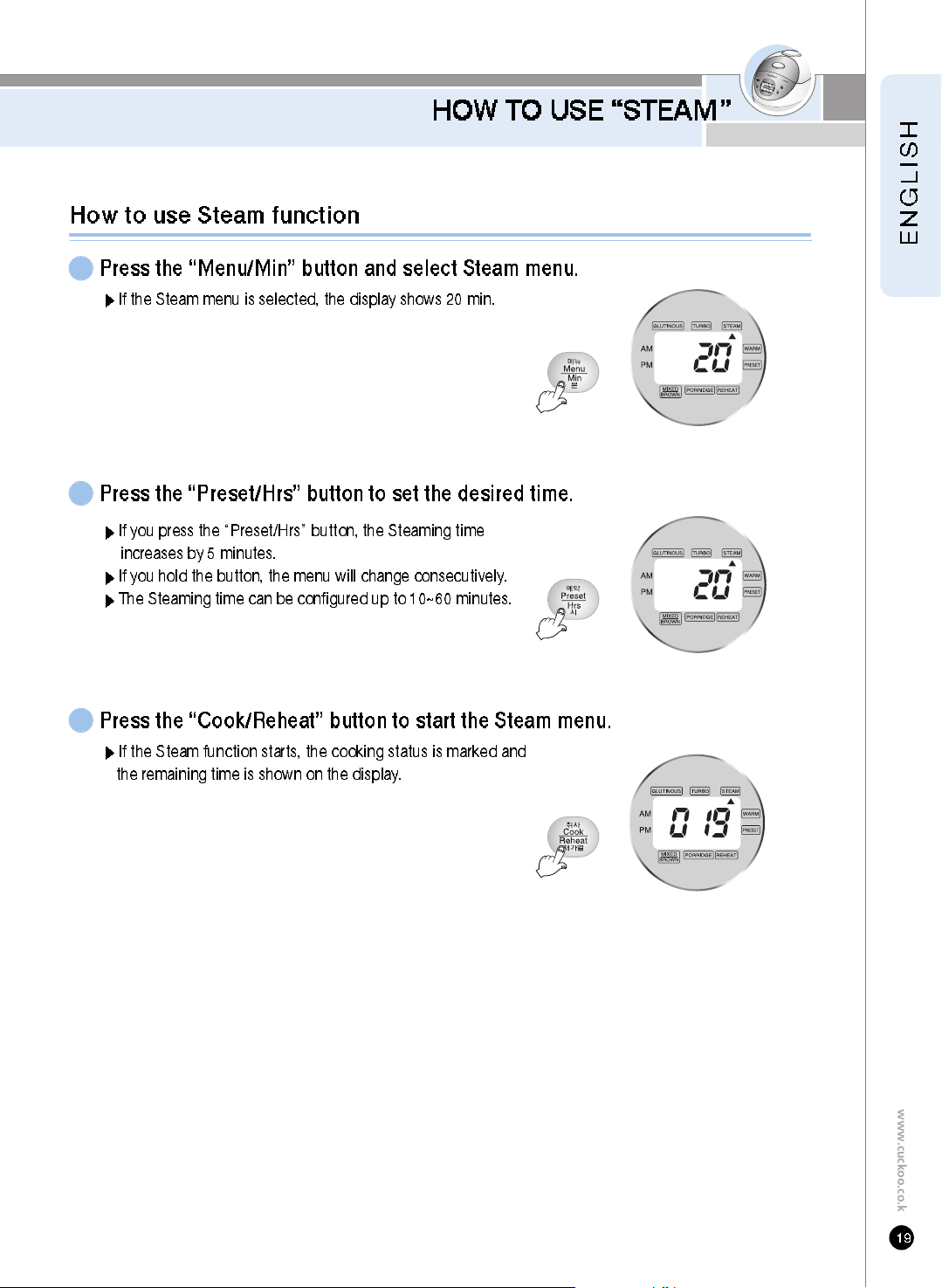
HOW TO USE “STEAM”
www.cuckoo.co.kr
How to use Steam function
Press the “Menu/Min” button and select Steam menu.
1
If the Steam menu is selected, the display shows 20 min.
If you press the “Preset/Hrs” button, the Steaming time
increases by 5 minutes.
If you hold the button, the menu will change consecutively.
The Steaming time can be configured up to 10~60 minutes.
Press the “Preset/Hrs” button to set the desired time.
2
Press the “Cook/Reheat” button to start the Steam menu.
3
If the Steam function starts, the cooking status is marked and
the remaining time is shown on the display.
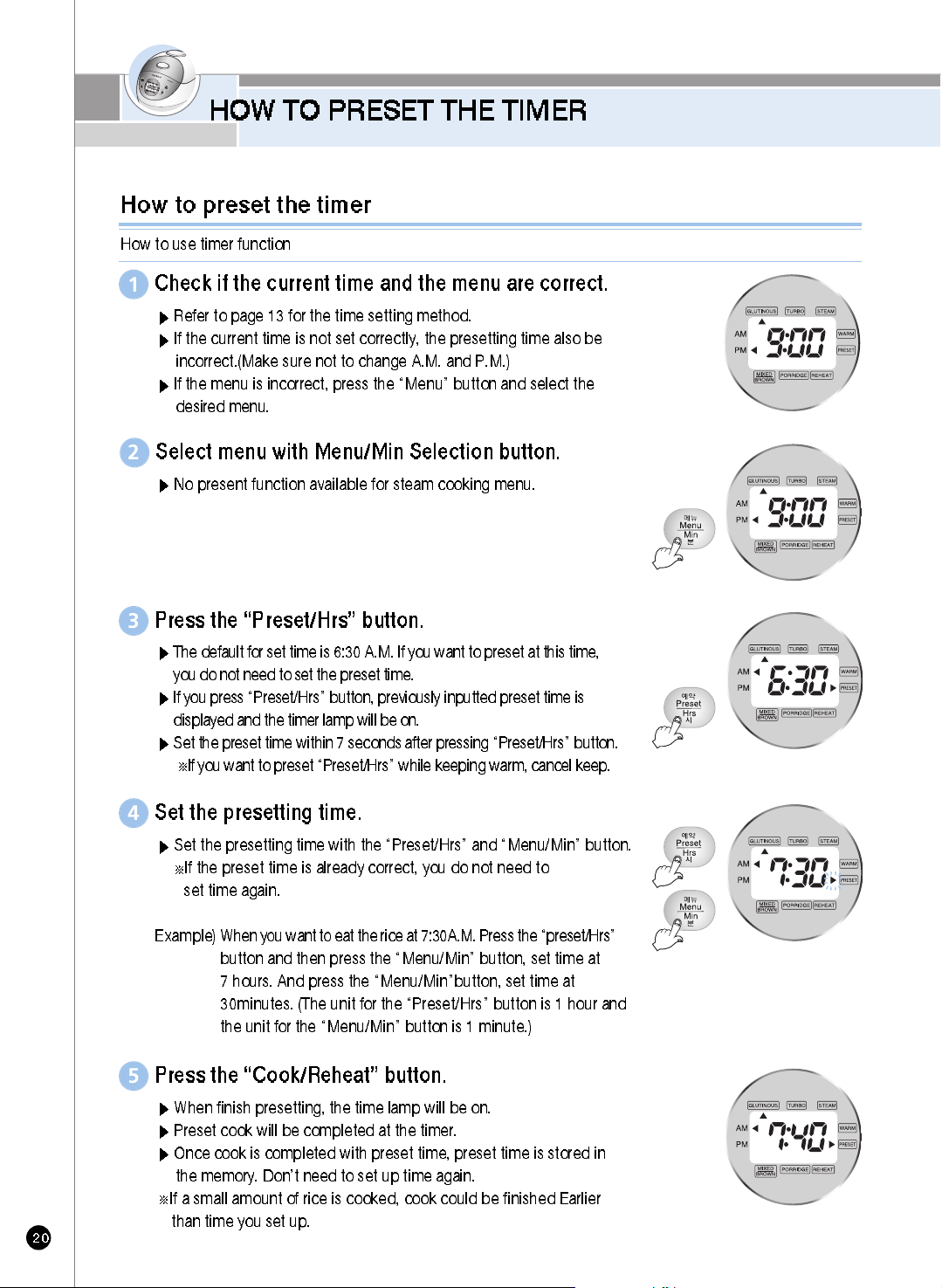
HOW TO PRESET THE TIMER
Check if the current time and the menu are correct.
Refer to page 13 for the time setting method.
If the current time is not set correctly, the presetting time also be
incorrect.(Make sure not to change A.M. and P.M.)
If the menu is incorrect, press the “Menu” button and select the
desired menu.
1
Press the “Preset/Hrs” button.
3
Set the presetting time.
Set the presetting time with the “Preset/Hrs” and “Menu/Min” button.
If the preset time is already correct, you do not need to
set time again.
Example)
When you want to eat the rice at 7:30A.M. Press the “preset/Hrs”
button and then press the “Menu/Min” button, set time at
7 hours. And press the “Menu/Min”button, set time at
30minutes. (The unit for the “Preset/Hrs” button is 1 hour and
the unit for the “Menu/Min” button is 1 minute.)
4
Press the “Cook/Reheat” button.
When finish presetting, the time lamp will be on.
Preset cook will be completed at the timer.
Once cook is completed with preset time, preset time is stored in
the memory. Don’t need to set up time again.
If a small amount of rice is cooked, cook could be finished Earlier
than time you set up.
5
Select menu with Menu/Min Selection button.
2
How to preset the timer
How to use timer function
The default for set time is 6:30 A.M. If you want to preset at this time,
you do not need to set the preset time.
If you press “Preset/Hrs” button, previously inputted preset time is
displayed and the timer lamp will be on.
Set the preset time within 7 seconds after pressing “Preset/Hrs” button.
If you want to preset “Preset/Hrs” while keeping warm, cancel keep.
No present function available for steam cooking menu.
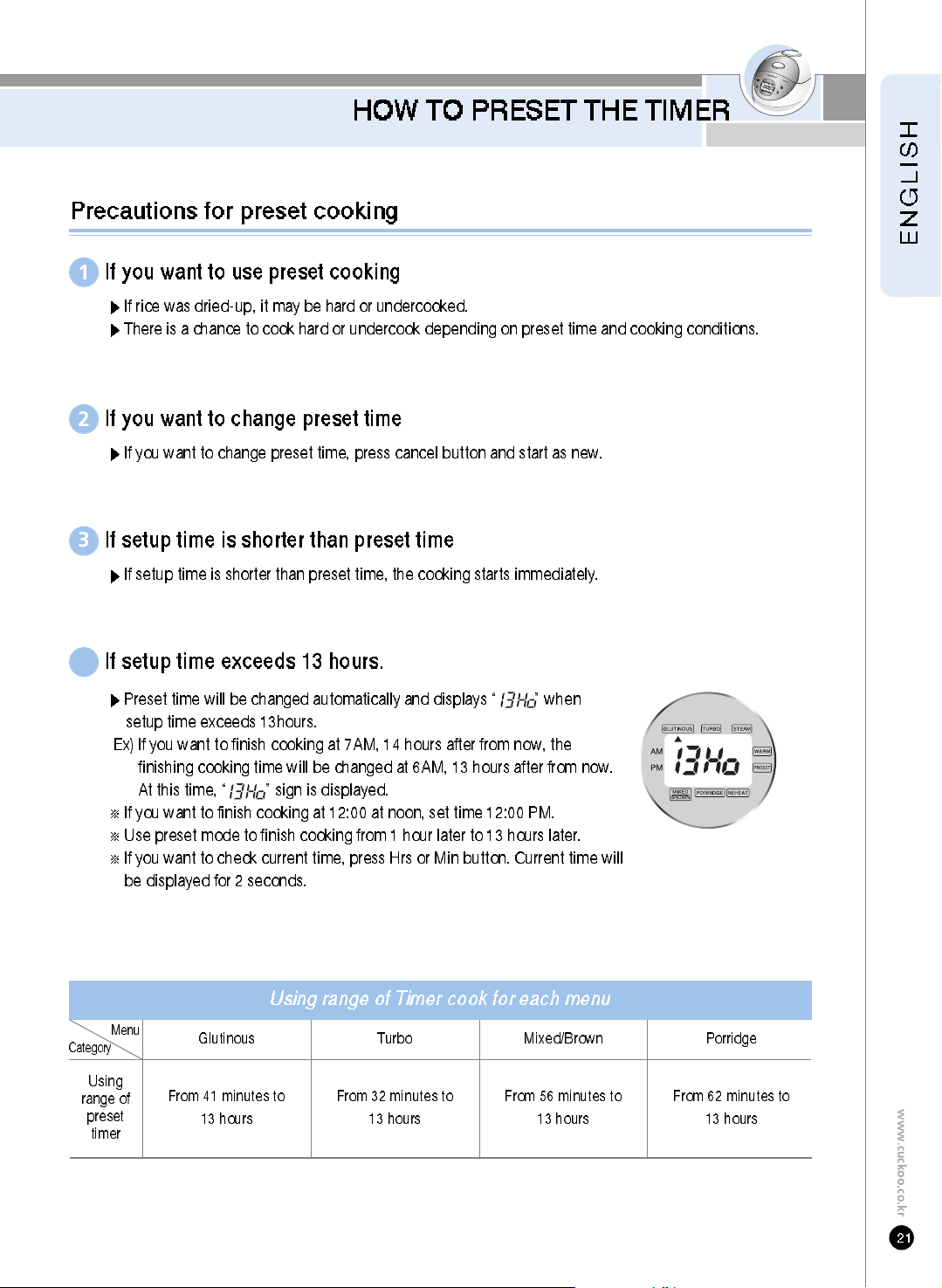
HOW TO PRESET THE TIMER
www.cuckoo.co.kr
Preset time will be changed automatically and displays “ ” when
setup time exceeds 13hours.
Ex) If you want to finish cooking at 7AM, 14 hours after from now, the
finishing cooking time will be changed at 6AM, 13 hours after from now.
At this time, “ ” sign is displayed.
If you want to finish cooking at 12:00 at noon, set time 12:00 PM.
Use preset mode to finish cooking from 1 hour later to 13 hours later.
If you want to check current time, press Hrs or Min button. Current time will
be displayed for 2 seconds.
P recautions for preset cooking
If you want to use preset cooking
If rice was dried-up, it may be hard or undercooked.
There is a chance to cook hard or undercook depending on preset time and cooking conditions.
1
If you want to change preset time
If you want to change preset time, press cancel button and start as new.
2
If setup time is shorter than preset time
If setup time is shorter than preset time, the cooking starts immediately.
3
If setup time exceeds 13 hours.
4
Using range of Timer cook for each menu
Using
range of
preset
timer
Glutinous
Menu
Category
From 41 minutes to
13 hours
Turbo
From 32 minutes to
13 hours
Mixed/Brown
From 56 minutes to
13 hours
Porridge
From 62 minutes to
13 hours
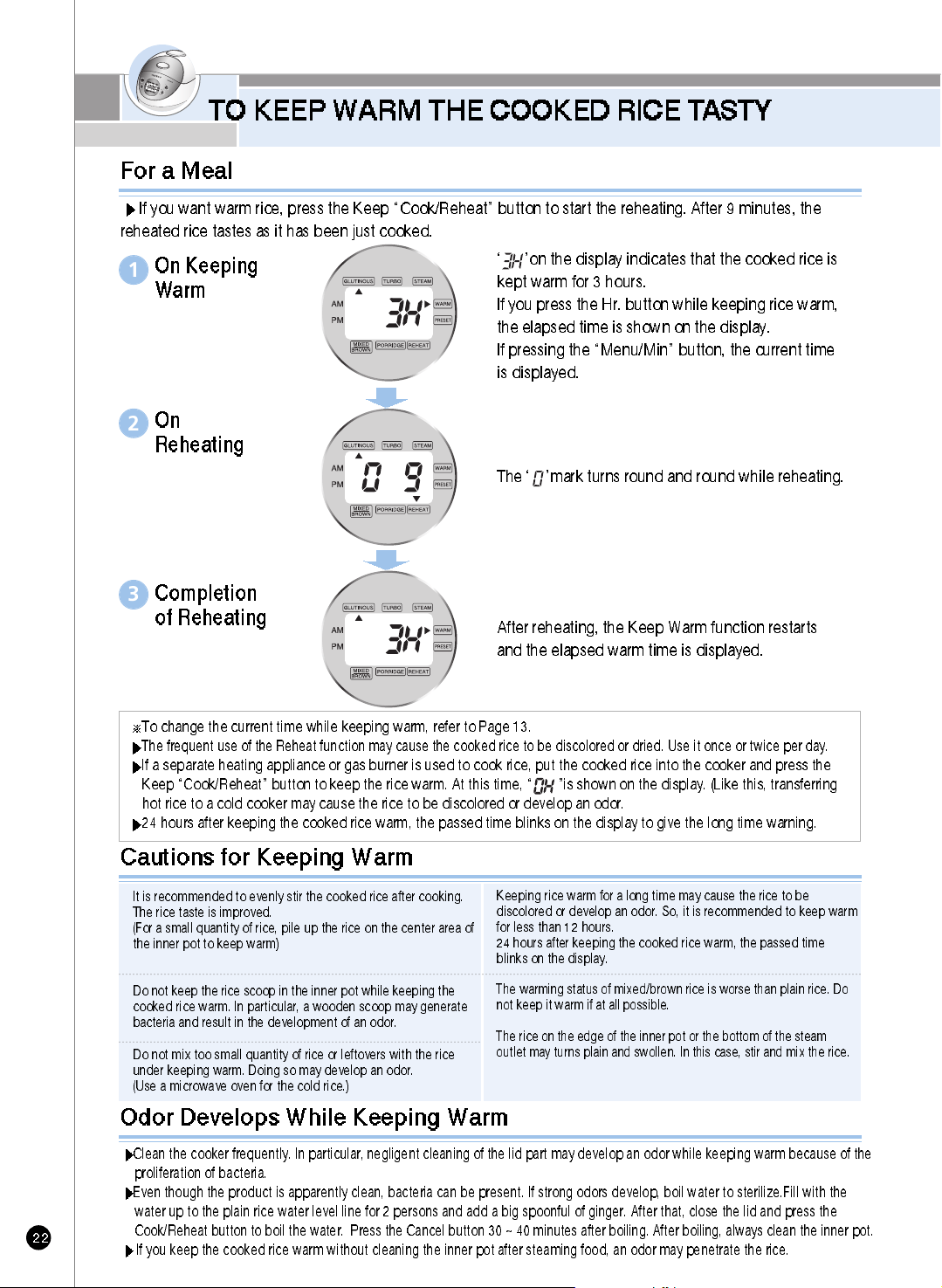
TO KEEP WARM THE COOKED RICE T ASTY
‘ ’on the display indicates that the cooked rice is
kept warm for 3 hours.
If you press the Hr. button while keeping rice warm,
the elapsed time is shown on the display.
If pressing the “Menu/Min” button, the current time
is displayed.
After reheating, the Keep Warm function restarts
and the elapsed warm time is displayed.
For a Meal
If you want warm rice, press the Keep “Cook/Reheat” button to start the reheating. After 9 minutes, the
reheated rice tastes as it has been just cooked.
To change the current time while keeping warm, refer to Page 13.
The frequent use of the Reheat function may cause the cooked rice to be discolored or dried. Use it once or twice per day.
If a separate heating appliance or gas burner is used to cook rice, put the cooked rice into the cooker and press the
Keep “Cook/Reheat” button to keep the rice warm. At this time, “ ”is shown on the display. (Like this, transferring
hot rice to a cold cooker may cause the rice to be discolored or develop an odor.
24 hours after keeping the cooked rice warm, the passed time blinks on the display to give the long time warning.
On Keeping
Warm
1
The ‘ ’mark turns round and round while reheating.
On
Reheating
2
Completion
of Reheating
3
It is recommended to evenly stir the cooked rice after cooking.
The rice taste is improved.
(For a small quantity of rice, pile up the rice on the center area of
the inner pot to keep warm)
Do not keep the rice scoop in the inner pot while keeping the
cooked rice warm. In particular, a wooden scoop may generate
bacteria and result in the development of an odor.
Do not mix too small quantity of rice or leftovers with the rice
under keeping warm. Doing so may develop an odor.
(Use a microwave oven for the cold rice.)
Keeping rice warm for a long time may cause the rice to be
discolored or develop an odor. So, it is recommended to keep warm
for less than 12 hours.
24 hours after keeping the cooked rice warm, the passed time
blinks on the display.
The warming status of mixed/brown rice is worse than plain rice. Do
not keep it warm if at all possible.
The rice on the edge of the inner pot or the bottom of the steam
outlet may turns plain and swollen. In this case, stir and mix the rice.
Cautions for Keeping Warm
Odor Develops While Keeping Warm
Clean the cooker frequently. In particular, negligent cleaning of the lid part may develop an odor while keeping warm because of the
proliferation of bacteria.
Even though the product is apparently clean, bacteria can be present. If strong odors develop, boil water to sterilize.Fill with the
water up to the plain rice water level line for 2 persons and add a big spoonful of ginger. After that, close the lid and press the
Cook/Reheat button to boil the water. Press the Cancel button 30 ~ 40 minutes after boiling. After boiling, always clean the inner pot.
If you keep the cooked rice warm without cleaning the inner pot after steaming food, an odor may penetrate the rice.
TO KEEP WARM THE COOKED RICE T ASTY
www.cuckoo.co.kr
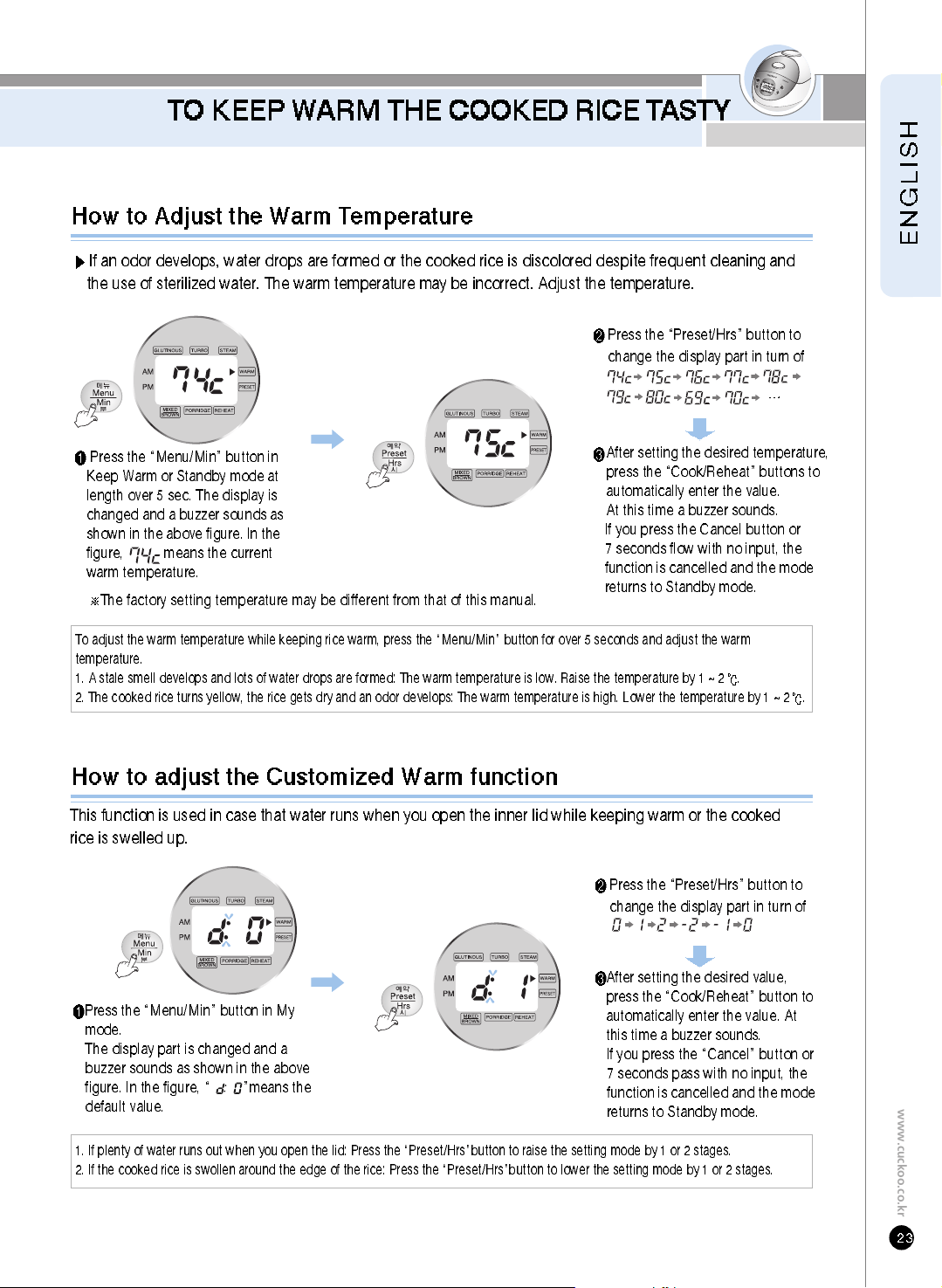
Press the “Menu/Min” button in
Keep Warm or Standby mode at
length over 5 sec. The display is
changed and a buzzer sounds as
shown in the above figure. In the
figure, means the current
warm temperature.
Press the “Preset/Hrs” button to
change the display part in turn of
How to Adjust the Warm Temperature
After setting the desired temperature,
press the “Cook/Reheat” buttons to
automatically enter the value.
At this time a buzzer sounds.
If you press the Cancel button or
7 seconds flow with no input, the
function is cancelled and the mode
returns to Standby mode.
Press the “Menu/Min” button in My
mode.
The display part is changed and a
buzzer sounds as shown in the above
figure. In the figure, “ ”means the
default value.
After setting the desired value,
press the “Cook/Reheat” button to
automatically enter the value. At
this time a buzzer sounds.
If you press the “Cancel” button or
7 seconds pass with no input, the
function is cancelled and the mode
returns to Standby mode.
Press the “Preset/Hrs” button to
change the display part in turn of
How to adjust the Customized Warm function
To adjust the warm temperature while keeping rice warm, press the “Menu/Min” button for over 5 seconds and adjust the warm
temperature.
1. A stale smell develops and lots of water drops are formed: The warm temperature is low. Raise the temperature by 1 ~ 2
.
2. The cooked rice turns yellow, the rice gets dry and an odor develops: The warm temperature is high. Lower the temperature by1~2
.
The factory setting temperature may be different from that of this manual.
1. If plenty of water runs out when you open the lid: Press the “Preset/Hrs”button to raise the setting mode by 1 or 2 stages.
2. If the cooked rice is swollen around the edge of the rice: Press the “Preset/Hrs”button to lower the setting mode by 1 or 2 stages.
If an odor develops, water drops are formed or the cooked rice is discolored despite frequent cleaning and
the use of sterilized water. The warm temperature may be incorrect. Adjust the temperature.
This function is used in case that water runs when you open the inner lid while keeping warm or the cooked
rice is swelled up.
CHECK BEFORE ASKING
FOR SERVICE
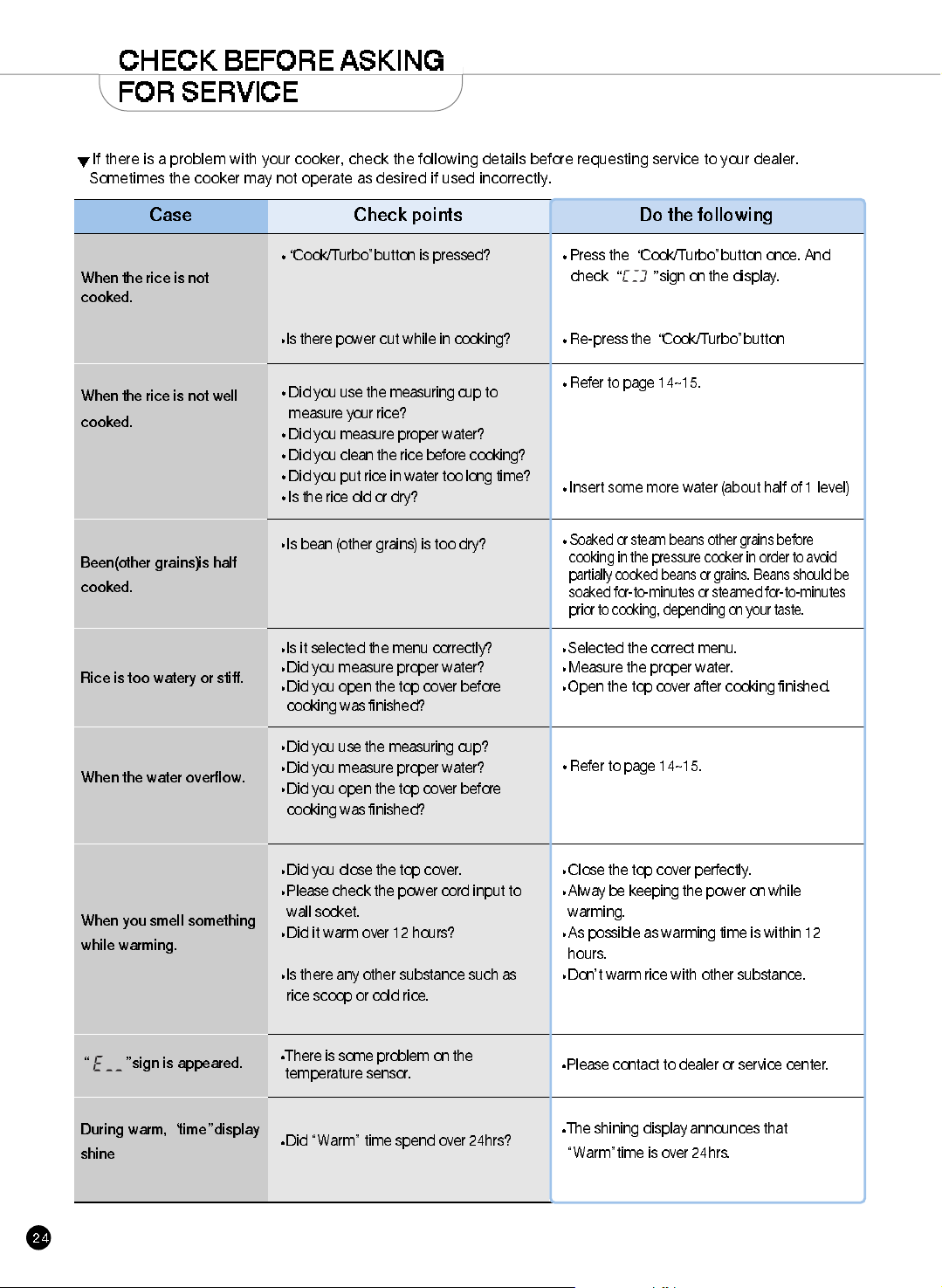
If there is a problem with your cooker, check the following details before requesting service to your dealer.
Sometimes the cooker may not operate as desired if used incorrectly.
Case
When the rice is not well
cooked.
Been(other grains)is half
cooked.
Rice is too watery or stiff.
When the water overflow.
When you smell something
while warming.
sign is appeared.
Check points
Did you use the measuring cup to
measure your rice?
Did you measure proper water?
Did you clean the rice before cooking?
Did you put rice in water too long time?
Is the rice old or dry?
Is bean (other grains) is too dry?
Is it selected the menu correctly?
Did you measure proper water?
Did you open the top cover before
cooking was finished?
Did you use the measuring cup?
Did you measure proper water?
Did you open the top cover before
cooking was finished?
Did you close the top cover.
Please check the power cord input to
wall socket.
Did it warm over 12 hours?
Is there any other substance such as
rice scoop or cold rice.
There is some problem on the
temperature sensor.
During warm, time display
shine
Did “Warm” time spend over 24hrs?
Do the following
Cook/Turbo”button is pressed?
Is there power cut while in cooking?
When the rice is not
cooked.
The shining display announces that
“Warm”time is over 24hrs.
Please contact to dealer or service center.
Close the top cover perfectly.
Alway be keeping the power on while
warming.
As possible as warming time is within 12
hours.
Don’t warm rice with other substance.
Refer to page 14~15.
Selected the correct menu.
Measure the proper water.
Open the top cover after cooking finished.
Soaked or steam beans other grains before
cooking in the pressure cooker in order to avoid
partially cooked beans or grains. Beans should be
soaked for-to-minutes or steamed for-to-minutes
prior to cooking, depending on your taste.
Refer to page 14~15.
Insert some more water (about half of 1 level)
Press the Cook/Turbo”button once. And
check
sign on the display.
Re-press the Cook/Turbo”button
www.cuckoo.co.kr
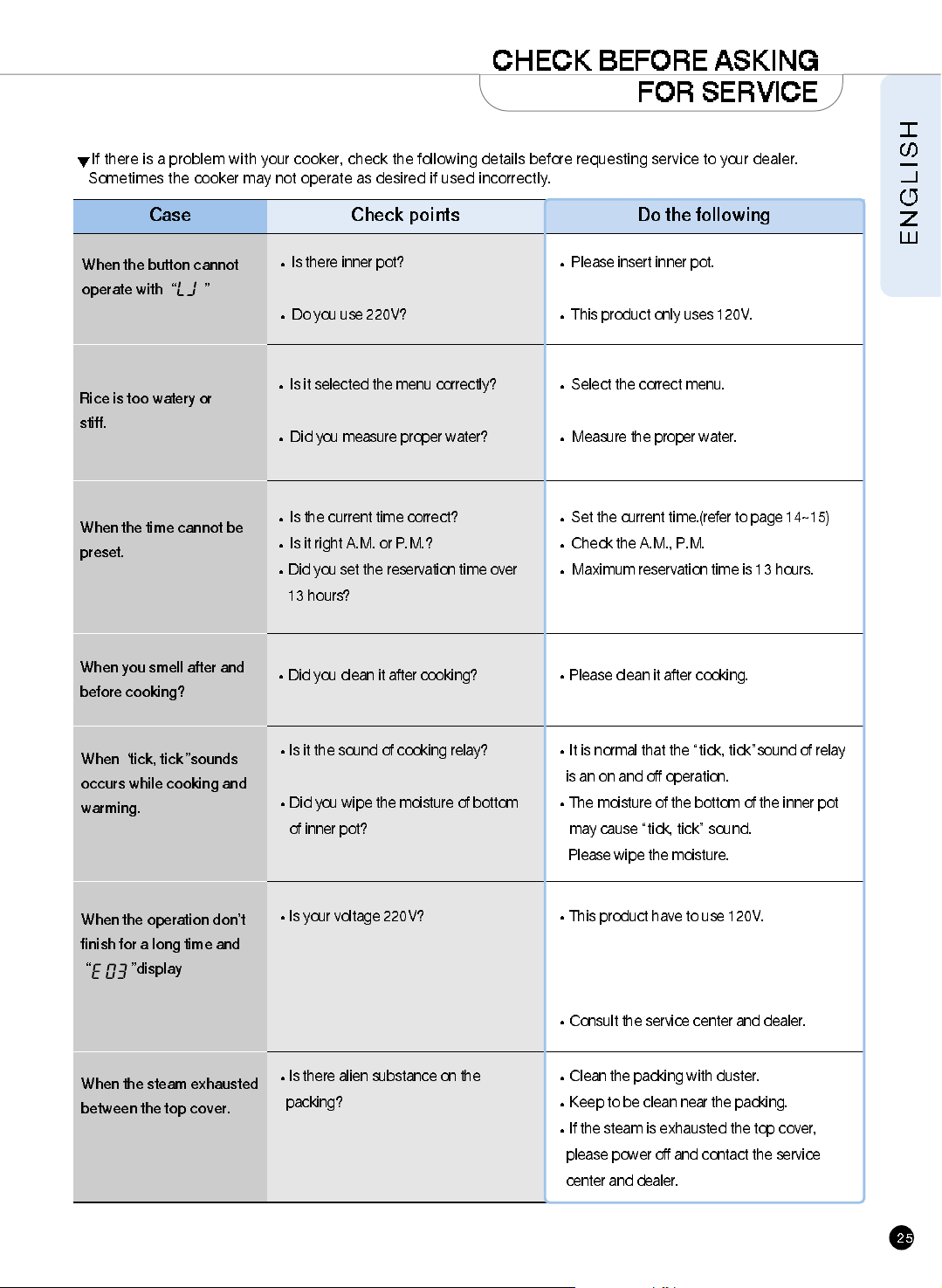
If there is a problem with your cooker, check the following details before requesting service to your dealer.
Sometimes the cooker may not operate as desired if used incorrectly.
Case
When the time cannot be
preset.
When you smell after and
before cooking?
Check points
Is the current time correct?
Is it right A.M. or P.M.?
Did you set the reservation time over
13 hours?
Did you clean it after cooking?
Do the following
Rice is too watery or
stiff.
Is it selected the menu correctly?
Did you measure proper water?
Select the correct menu.
Measure the proper water.
Set the current time.(refer to page 14~15)
Check the A.M., P.M.
Maximum reservation time is 13 hours.
Please clean it after cooking.
When the button cannot
operate with
Is there inner pot?
Do you use 220V?
Please insert inner pot.
This product only uses 120V.
When
tick, tick sounds
occurs while cooking and
warming.
Is it the sound of cooking relay?
Did you wipe the moisture of bottom
of inner pot?
Is your voltage 220V?
It is normal that the “tick, tick”sound of relay
is an on and off operation.
The moisture of the bottom of the inner pot
may cause “tick, tick” sound.
Please wipe the moisture.
When the steam exhausted
between the top cover.
Is there alien substance on the
packing?
Clean the packing with duster.
Keep to be clean near the packing.
If the steam is exhausted the top cover,
please power off and contact the service
center and dealer.
This product have to use 120V.
Consult the service center and dealer.
When the operation don’t
finish for a long time and
display
CHECK BEFORE ASKING
FOR SERVICE
www.cuckoo.co.kr
100% Recycled paper 383-850B Rev.0
CUCKOO ELECTRIC RICE COOKER/WARMER
LIMITED WARRANTY
KEY Company, P&K USA TRADING CORP and Cuckoo Trading Canada. will repair at its option replace,
without charge, your product which proves to be defective in material or workmanship under normal use,
during the warranty period listed below from the data of original purchase. This warranty is good only to the
original purchaser of the product during the warranty period. P&K USA TRADING CORP covers the east and
the central districts, KEY Company covers the west and the central districts, Cuckoo Trading Canada covers
the whole Canada.
WARRANTY PERIOD
MODEL# #LABOR PARTS HOW SERVICE IS HANDLED
CR-0351F 1YEAR 1YEAR The East and the Central Districts
Call : 718 888 9144
Address : 129-04 14th Avenue College Point, NY 11356, USA
The West and the Central Districts.
Call : 213 687 9828 Toll Free : 877 481 9828
Address : 700 Jackson Street, L.A, CA 90012, USA
Canada (TORONTO)
Call : 416 878 4561 / 905 707 8224
Address :
#D8-7398 Yonge Street
Thornhill Ontario Canada L4J 8J2
Canada (VANCOUVER)
Call : 604 540 1004 / 604 523 1004
Address :
945 Lougheed Hwy Coquitlam BC Canada V3K 3T4
No other express warranty is applicable to this product. THE DURATION OF ANY IMPLED WARRANTIES,
INCLUDING THE IMPLIED WARRANTY OF MERCHANTABILITY, IS LIMITED TO THE DURATION OF
THE EXPRESS WARRANTY HEREIN. CUCKOO ELECTRONICS CO.,LTD, SHALL NOT BE LIABLE FOR
THE LOSS THE USE OF THE PRODUCT, INCONVENIENCE, LOSS OR ANY OTHER DAMAGES, DIRECT
OR CONSE QUENTIAL, ARISING OUT OF THE USE OF, OR INABILITY TO USE, THIS PRODUCT OR
FOR ANY BREACH OF ANY EXPRESS OR IMPLIED WARRANTY, INCLUDING THE IMPLIED
WARRANTY OF MERCHANTABILITY APPLICABLE TO THIS PRODUCT
.
Some states do not allow the exclusion or limitation of incidental or consequential damages or limitations on
how long an implied warranty lasts : so these limitations or exclusions may apply to you. This warranty gives
you specific legal rights and you may also have other rights which vary from state to state.
THE ABOVE WARRANTY DOES NOT APPLY IN THESE CASES:
To damages problems which result from delivery or improper installation.
To damages problems which result from misuse, abuse, accident, alteration,
or incorrect electrical current or voltage.
To serve call which do not involve defective workmanship or material and explaining the operation of the unit.
Therefore, these costs are paid by the consumer. Customer assistance numbers :
To Prove warranty Coverage :
Retain your Sales Receipt to prove data of purchase
Copy of your Sales Receipt must submitted at the time
warranty service is provided.
To Obtain Product, Customer, or Service Assistance and Nearest Authorized service center,
Parts Distributor or Sales Dealer:
The West and the Central Districts.
Call : 213 687 9828
Toll Free : 877 481 9828
Address : 700 Jackson Street, L.A,
CA 90012, USA
Canada (Toronto)
Call : 416 878 4561 / 905 707 8224
Address : #D8-7398 Yonge Street
Thornhill Ontario Canada
L4J 8J2
Canada (Vancouver)
Call : 604 415 9858/604 524 8282
Address : 103-4501 North Road
Burnaby BC Canada
V3R 4R7
The East and the Central Districts
Call : 718 888 9144
Address :129-04 14th Avenue
College Point, NY 11356, USA