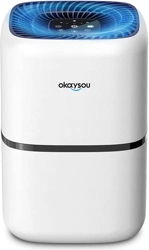
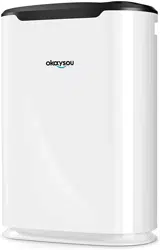
User Manual Air Purifier
Package Contents
- 1x Air Purifier
- 1 x 3-in-1 medical grade H13 true HEPA filte
- r 1 x User Manual
- 1 x Warranty Card
Specification
- Power Supply: AC 110~120V, 60Hz
- Rated Power: 25W
- Effective Area: up to 580 sq.ft
- Operating Temperature: -10℃-40℃
- Humidity: <90%RH
- Noise Level: 24dB~51dB
- Standby Power: 0.5W
- Dimension: 221*221*302mm
- Weight: 3kg
Know Your Air Purifier
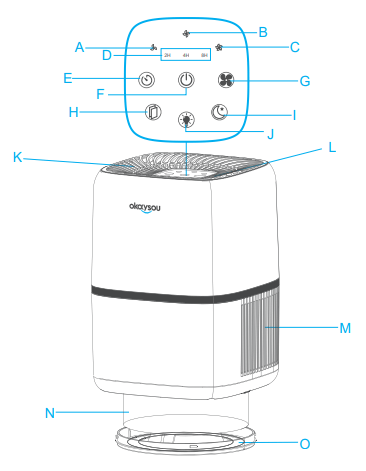
A: Low speed indicator
B: Medium speed indicator
C: High speed indicator
D: Timer indicators
E: Timing function switch
F: ON/OFF
G: Fan speed switch
H: Filter reset switch
I: Sleep mode switch
J: Dimmer switch
K: Air Oulet
L: Ambient light
M: Air Inlet
N: 3-in-1 Medical grade filter
O: Filter Cover
Control Panel
 On/Off Button
Turns the air purifier on/off. After the air purifier is turned on, the buzzer beeps, the wind speed defaults to the lowest, the corresponding function indicator lights, and the ambient light is in the highest brightness
 Fan Speed Button
Adjusts fan speeds from low, medium, and high.
 Sleep Mode Button
Turns sleep function on/off. After pressing the sleep button, all the indicator lights and the nightlight turns off, and the fan speed automatically enters the lowest level. 3s later, the indicator light of sleep mode will turn off. Except the sleep mode and dimmer button, all other functions are deactivated. Press sleep button again to exist.
 Timer Function Button
Customizes working hours from 2/4/8/no timer.
 Dimmer Button
Adjusts the ambient light from high, low and off.
 Filter Reset Indicator
Lights up when the air filter should be replaced. After changing the filter, press the button for 3s to reset. The buzzer will sound once and the reminder light will turn off.
Getting Started
1. Flip the air purifier over. Twist the filter counterclockwise indicated by the arrow and remove it. [Figure 1.1]
2. Remove the plastic package of the filter and place it back into the purifier. This filter does not have the top or button and can be installed either way. [Figure 1.2]
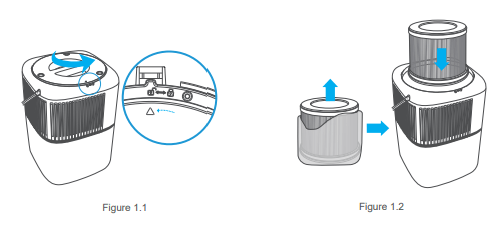
3. Replace the filter cover and twist clockwise to lock. [Figure 1.3]
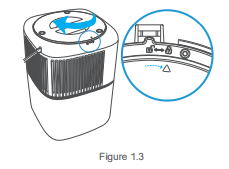
4. Place the purifier on a flat, stable surface. Keep away from anything that would block air inlet and outlet
5. Plug in and tap the power button to turn on the purifier and enjoy fresh air
About the Filter
The air purifier uses a 3-stage purification system to purify air.
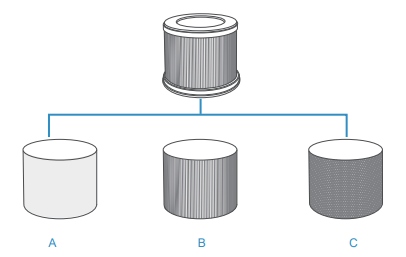
A. Washable & Detachable Pre-filter: Captures large particles such as dust, fibers, pet fur, hair etc. Largely extend the purifier's life. (Pre-installed)
B. Home Medical Grade H13 True HEPA Filter: Removes 99.97% of airborne particles 0.3 micrometers in diameter; Filters small particles such as smoke, tiny dust particles, mold spores, bacteria, viruses, and allergens such as pollen, dander and mites.
C. High-Efficiency Active Carbon Filter: Effectively absorbs stubborn and unwanted odors and fumes. Filters compounds such as formaldehyde, ammonia, hydrogen sulfide, benzene and volatile organic compounds (VOCs).
Replacing the Filter
When Should I Replace the Air Filter?
The filter should be replaced every 6–8 months. You may need to replace your filter sooner or later depending on how often you use your air purifier. Using your air purifier in an environment with relatively high pollution may mean you will need to replace the filter more often, even if the replacement filter indicator is off.
- You may need to replace your filter if you notice:
- Increased noise when the air purifier is on
- Decreased airflow
- Unusual odors
- A visibly clogged filter
NOTE
- To maintain the performance of your air purifier, only use official Okaysou filters. To buy replacement filters, visit Okaysou’s online . store. Go to okaysou.com for more information.
- Remember to reset after changing the filter.
Check Filter Indicator
 will light up as a reminder to check the air filter. Depending on how much you use the air purifier, the indicator should turn on within 6–8 months. You may not need to replace your filter yet, but you should check it when turns on.
Replacing the Air Filter
1. Unplug the air purifier. Flip the air purifier over and remove the filter cover.
2. Remove the old air filter.
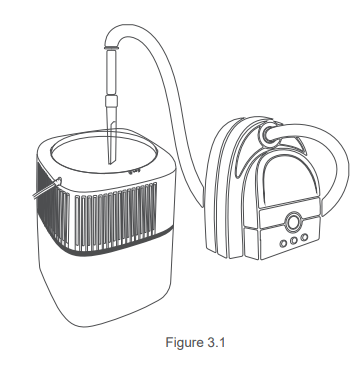
3. Clean out any remaining dust or hair inside the purifier using a vacuum hose. Do not use water or liquids to clean the purifier. [Figure 3.1]
4. Unwrap the new air filter and place it into the housing (see Getting Started, page 8).
5. Replace the cover. Plug in the air purifier.
6. Reset the Check Filter Indicator.
Resetting the Filter Replacement Indicator
1. Replace the air filter.
2. Turn on the air purifier.
3. Press and hold the filter replacement indicator for 3 seconds.
4. Filter replacement indicator will turn off when successfully reset.
Maintenance
When the machine is maintained, checked and moved, please stop running and pull the power plug. Please do not use wet hand to plug in or pull out the power plug. Otherwise it may cause electric shock and injury.
Clean the Air Purifier
- Unplug before cleaning.
- Wipe the outside of the air purifier with a soft, dry cloth. If necessary, wipe the housing with a damp cloth, then immediately dry.
- Do not clean with abrasive chemicals or flammable cleaning agents.
NOTE
- Do not use too hot water (higher than 40℃), or it may cause fade deformation.
- Do not wash the air purifier’s body with water.
Clean the Air Filter
- The H13 True HEPA filter should be cleaned once a month to increase its efficiency and extend the life.
- The pre-filter is detachable to wash, if washing, please wait it completely dry before installing
- Clean the inside and outside of the filter with a soft brush or vacuum hose to remove hair, dust, and large particles.
- It is suggested to replace the filter 6-8 months depending on your surrounding air condition.
- Do not clean the filter with water or other liquids.
Long Idle Time
- Pull out the power cord.
- Cover the machine with plastic bag and place it in a dry place for safekeeping.
- Do not store the purifier upside down, or it may lead to product failure.
Troubleshooting
Air purifier will not turn on or fail to respond to button controls
- Plug in the air purifier
- Plug the air purifier into a different outlet
- Air purifier is malfunctioning. Contact customer support
Airflow is significantly reduced
- Make sure the filter is removed from its packaging and properly in place
- Tap
 to increase the fan speed
- Make sure there is at least 50cm of clearance on all sides of the air purifier
- Replace the filter
Air purifier makes an unusual noise when the fan is on
- Make sure the filter is properly in place with plastic packaging removed
- Make sure the air purifier is placed on a hard, flat surface
- The air purifier may be damaged, or a foreign object may be in side. Stop using the air purifier and contact customer support. Do not try to repair the air purifier
Strange smell coming from the purifier
- Clean the filter or replace if necessary
- Make sure not to use your air purifier in an area with high humidity or while diffusing essential oils
- Contact customer support
is still on after replacing the filter
- Reset the filter according to the guideline
Poor air purification quality
- The filter has absored to much peculiar smell and dust,change the filter
- Close doors and windows while using the air purifier
- Make sure the room is suitable for air purifier. The air purifier emay not be as effective in larger rooms
- Tap to increase the fan speed
- Make sure no objects are blocking the sides or top of the air purifer(the air inlet or outlet)
- Make sure the filter is removed from its packaging and properly in place
has not turned on whithin or after 6 months
- is a reminder for your to check the filter and will light up based on how long the air purifier has been used. If you don't use your air purifier often, will take longer to turn on
turned on before six months
- is a reminder for your to check the filter and will light up based on how long the air purifier has been used.If you run your air purifier frequently, will turn on sooner
Air does not flow evenly out of the air purifie
- This is due to the design of the air purifier. This is normal and will not affect the air purifier's efficiency