
ASI533 Manual
Revision 1.2
Aug, 2021
All material in this publication is subject to change without notice and its copyright totally
belongs to Suzhou ZWO CO.,LTD.

ASI533 Manual
2
ASI533 Manual ............................................................................................................................... 1
1. Instruction ............................................................................................................................... 3
2. What's in the box? ..................................................................................................................... 4
3. Camera technical specifications ................................................................................................ 5
4. QE Value & Read Noise ........................................................................................................... 6
5. Getting to know your camera .................................................................................................... 8
5.1 External View ...................................................................................................................... 8
5.2 Power consumption ............................................................................................................. 9
5.3 Cooling system .................................................................................................................. 11
5.4 Back focus distance ........................................................................................................... 11
5.5 Protect Window ................................................................................................................. 11
5.6 Analog to Digital Converter (ADC) .................................................................................. 12
5.7 Binning .............................................................................................................................. 12
5.8 DDR Buffer ....................................................................................................................... 12
6. How to use your camera.......................................................................................................... 13
7. Cleaning .................................................................................................................................. 15
8. Mechanical drawing ................................................................................................................ 16
9. Servicing ................................................................................................................................. 17
10. Warranty ......................................................................................................................... 17
ASI533 Manual
3
1. Instruction
Congratulations and thank you for buying one of our ASI Cameras! This manual will give
you a brief introduction to your ASI camera. Please take the time to read it thoroughly, if you have
any questions, feel free to contact us: info@zwoptical.com.
The ASI533 camera is specifically designed with astrophotography in mind. It is not only
suitable for deep space photography, but also for planetary photography. We are sure that the
outstanding performance and wide range of uses for the ASI533MC PRO will amaze you.
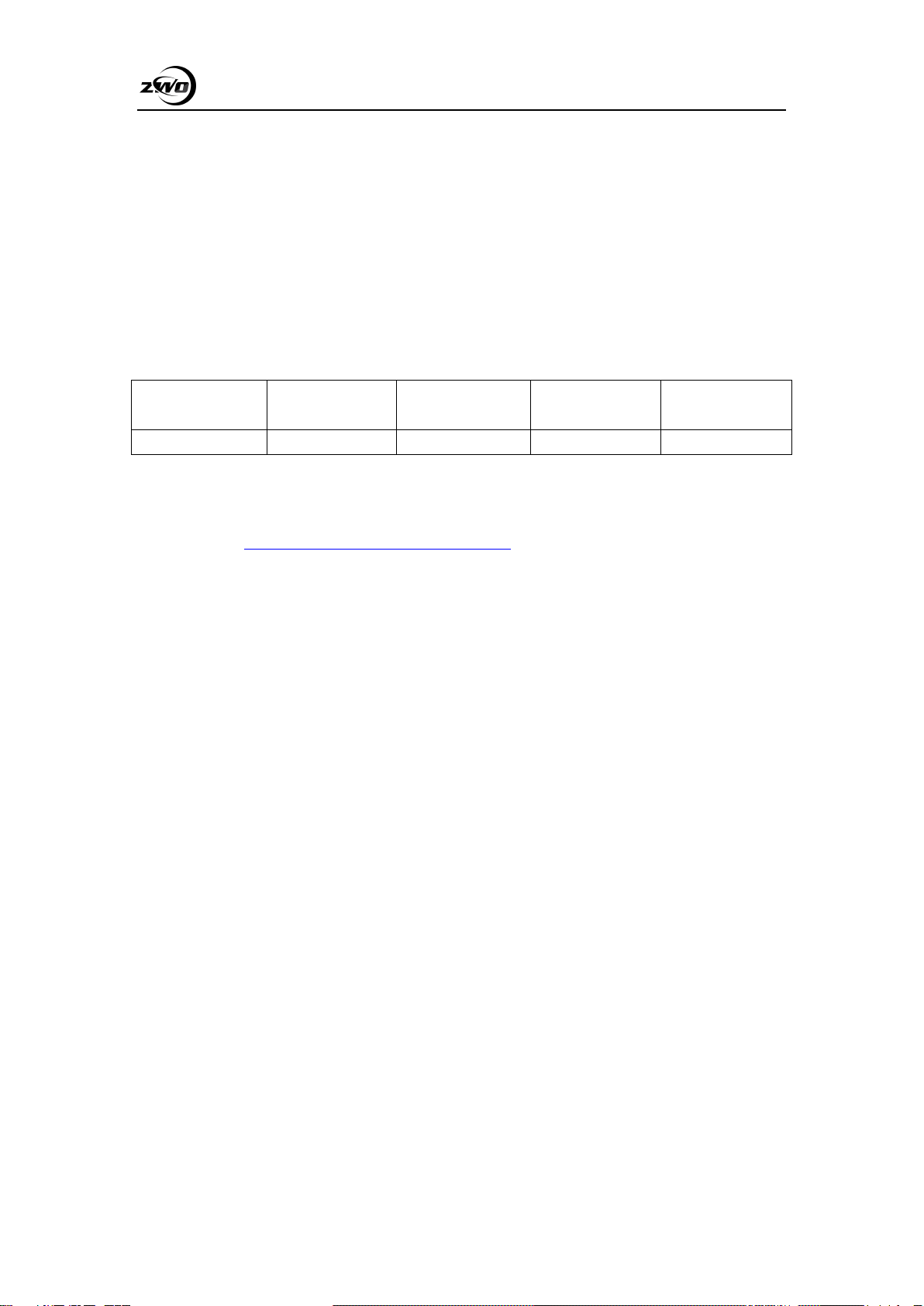
Model
Mono or Color
Regulated TEC
Cooling
DDR3 Cache
Sensor
ASI533MC PRO
Colour
YES
256MB
SONY IMX533
For software installation instructions and other technical information please refer to our
official website: https://astronomy-imaging-camera.com/
ASI533 Manual
4
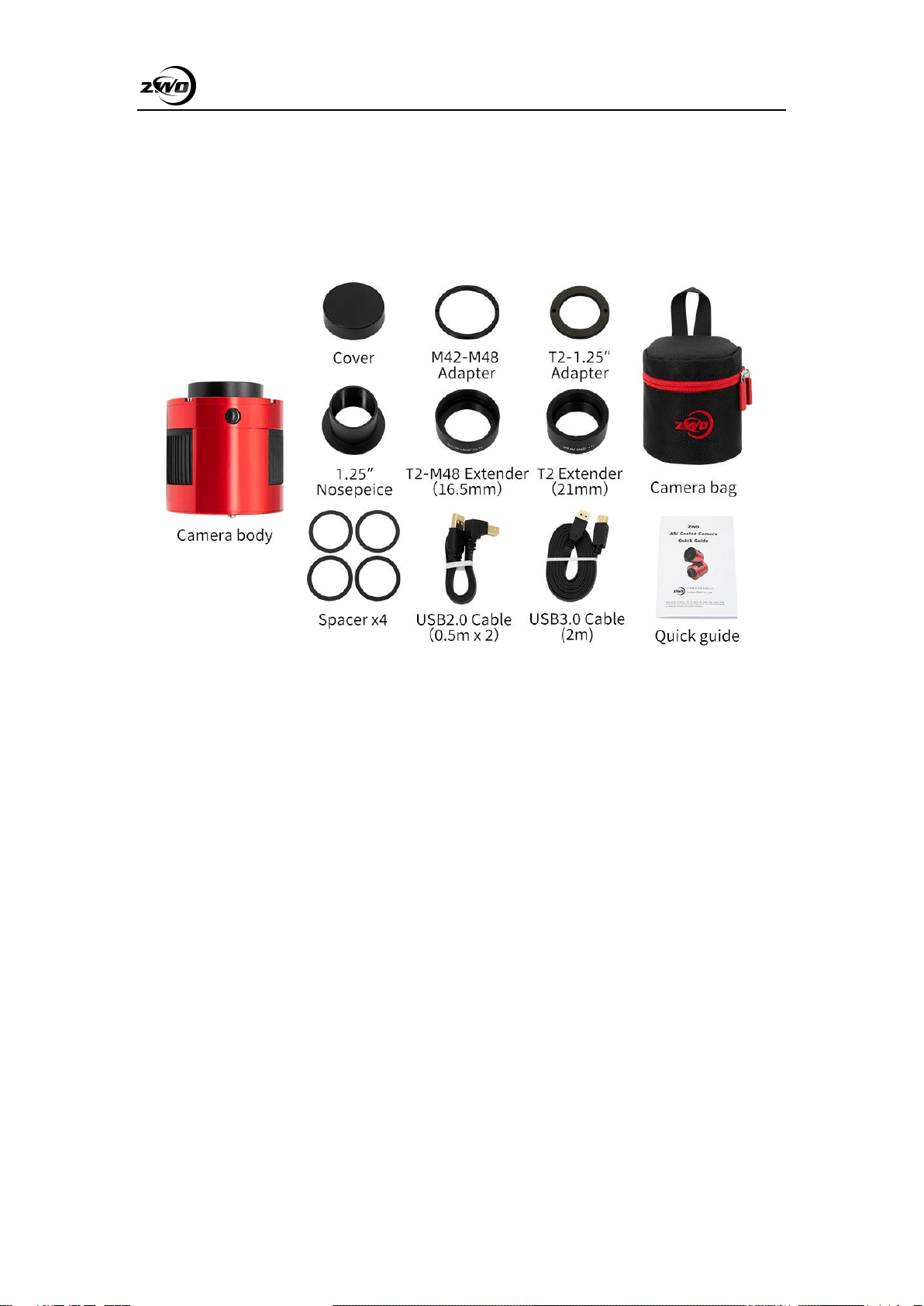
2. What's in the box?
ASI533MC Pro
ASI533 Manual
5
3. Camera technical specifications
Sensor
SONY IMX533CMOS
Diagonal
15.968mm
Resolution
9 Mega Pixels
3008*3008
Pixel size
3.76µm
Image area
11.31*11.31mm
Max FPS at full resolution
20FPS
Shutter
Rolling Shutter
Exposure Range
32μs~2000s
Read noise
1.0-3.8e
QE peak
About 80%
Full well
50,000e
ADC
14bit
DDR3 buffer
256MB
Interface
USB3.0/USB2.0
Adapters
M42X0.75
Protective window
AR window
Dimensions
78mm
Weight
470g
Back focus distance
6.5mm/17.5mm
Cooling
Two Stage TEC
Delta T
35°C
(based on 30°C ambient temperature)
Cooling Power consumption
12V at 3A Max
Supported OS
Windows, Linux & Mac OSX

ASI533 Manual
6
4. QE Value & Read Noise
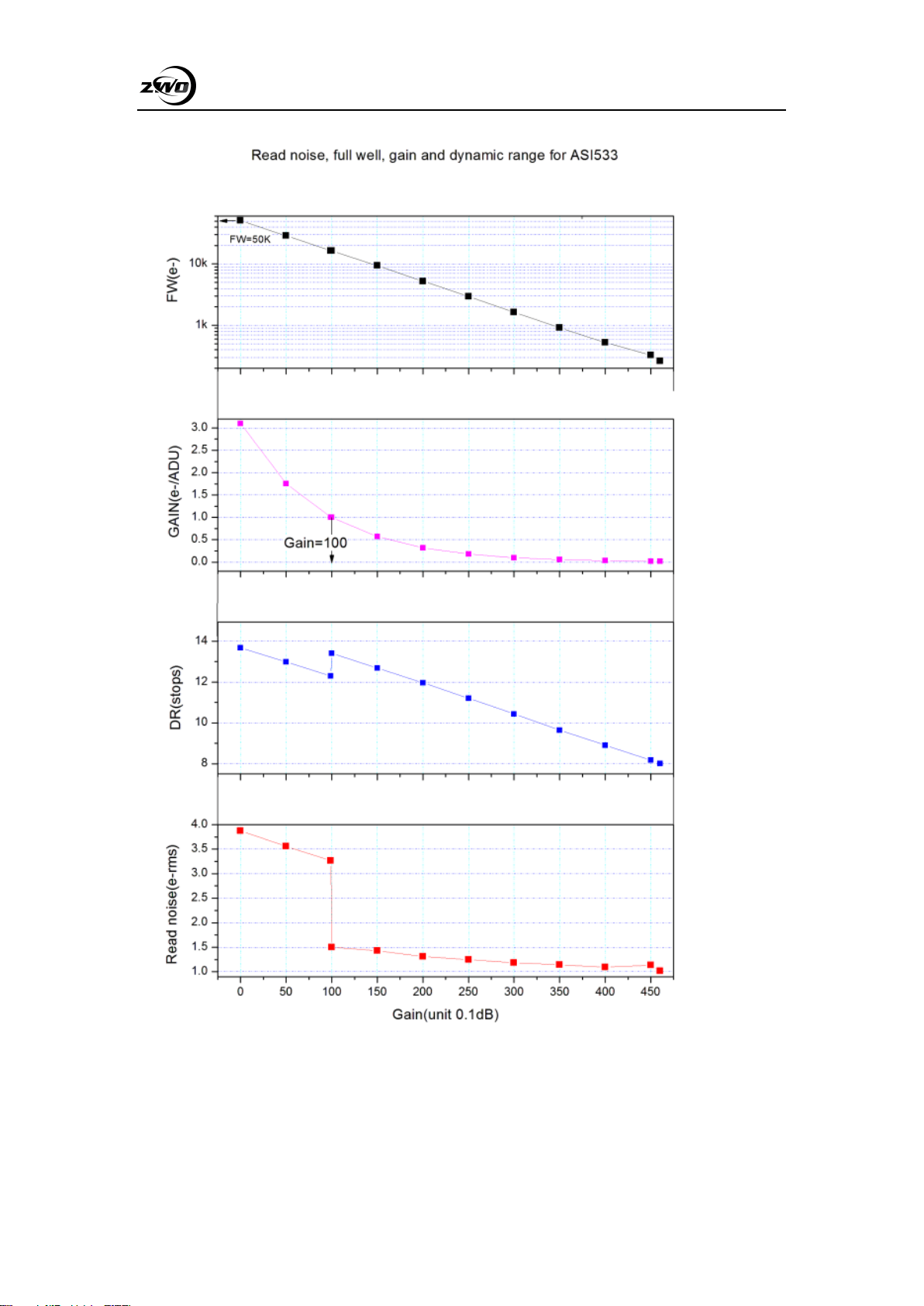
The QE value and readout noise are the most important parameters to measure camera
performance. Higher QE and lower readout noise are necessary to improve the image
signal-to-noise ratio.
We suppose the QE peak of ASI533 is above 80%.
Readout noise includes pixel noise, circuit noise, and ADC quantization noise. The lower the
readout noise, the better. As can be seen, compared with the conventional CCD camera, the
readout noise value of the ASI533 is very low, and as the gain value increases, the readout noise is
further reduced.
The parameter settings vary depending on your shooting target. If you turn down the gain, the
dynamic range will be larger (suitable for long exposure) or increase the gain, and the readout
noise will be further reduced (suitable for short exposure or fortunate imaging).
ASI533 Manual
7
ASI533 Manual
8
5. Getting to know your camera
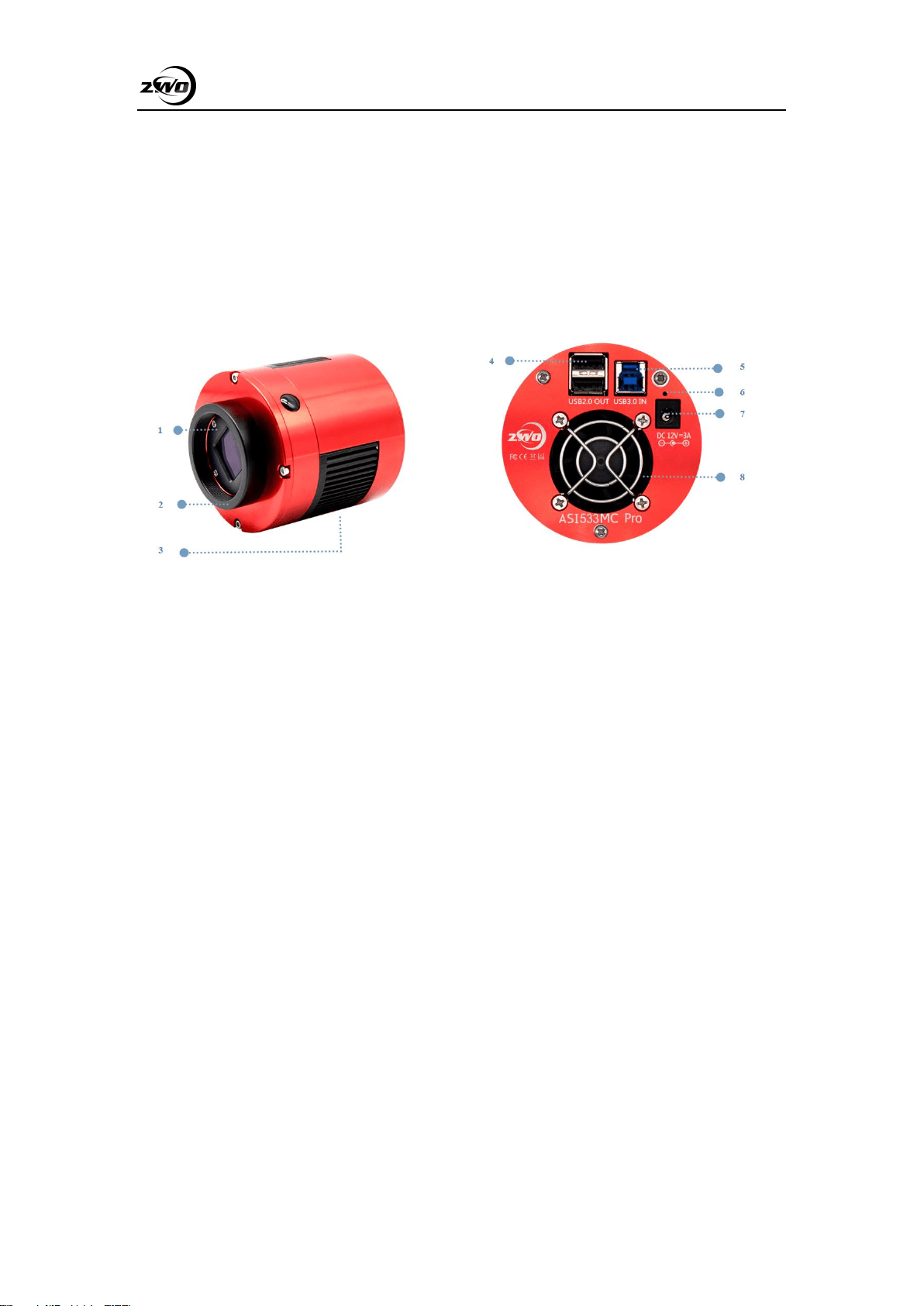
5.1 External View
1. Protective window, AR anti-reflection film D32*2mm
2. 2′′ M42 thread, thickness 11mm, removable
3. Radiator
4. USB2.0Hub
5. USB3.0/USB2.0 data interface
6. Led indicator
7. Cooling power supply DC power port: size 5.5*2.1mm, inside and outside negative, it is
recommended to use 12V at 3A power supply
8. Ultra-quiet magnetic suspension fan
There is 1/4″ screw under the holder.
ASI533 Manual
9
5.2 Power consumption
ASI cameras are low-power. When the camera is powered by a USB cable and not cooling,
the power consumption is only 2.5W. While in cooling, you need to use a 12V at 3A power
adapter (D5.5*2.1mm, center positive) or a lithium battery (supporting a wide range of 11V to
15V) to power the fans, and the maximum power consumption is about 22W.
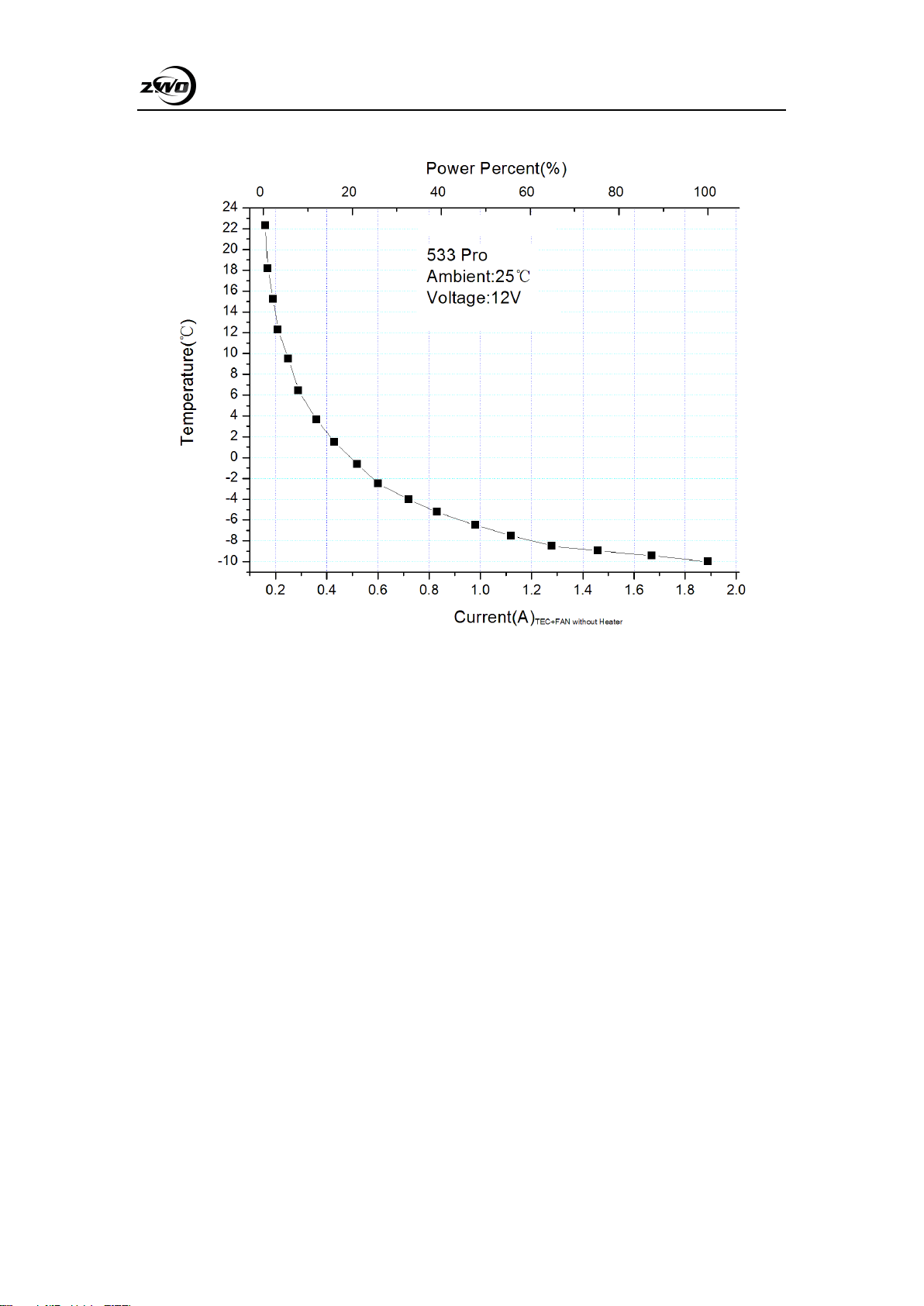
The figure below shows the cooling efficiency of the ASI533. The cooling temperature
difference of 30 degrees requires only 0.7A.
ASI533 Manual
10
ASI533 Manual
11
5.3 Cooling system
The ASI533 2-stage TEC cooling system precisely controls the temperature of the sensor.
Unlike traditional CCDs, the ASI533 camera features ultra-low readout noise, efficient cooling,
and adjustable gain. This eliminates the need for ultra-long exposures to capture targets,
dramatically reducing the need for photographic systems and guide systems. However, if a short
exposure is used (eg, less than 100ms, cooling has little effect on the image) the cooling system
can be set to a minimum of -35 °C (based on the testing result at 30℃ ambient temperature).
Please note that the Delta T might get down when the cooling system is working for long time.
Also, as the ambient temperature falls, the Delta T would also decrease.
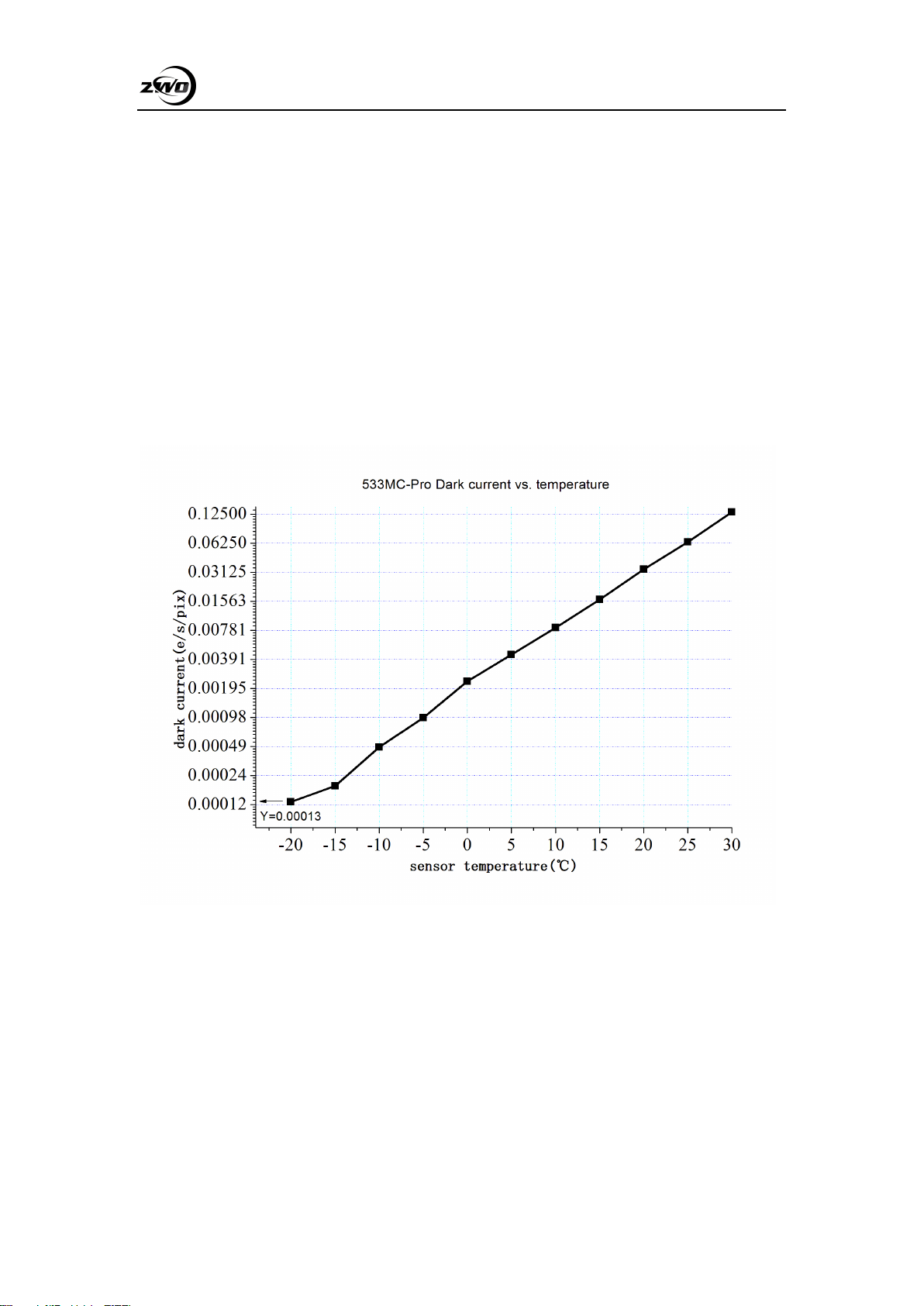
Here is a dark current test result of ASI533 sensor at various temperatures.
5.4 Back focus distance
When 11mm T2 Extender is removed from camera, back focus length is reduced to 6.5mm.
5.5 Protect Window
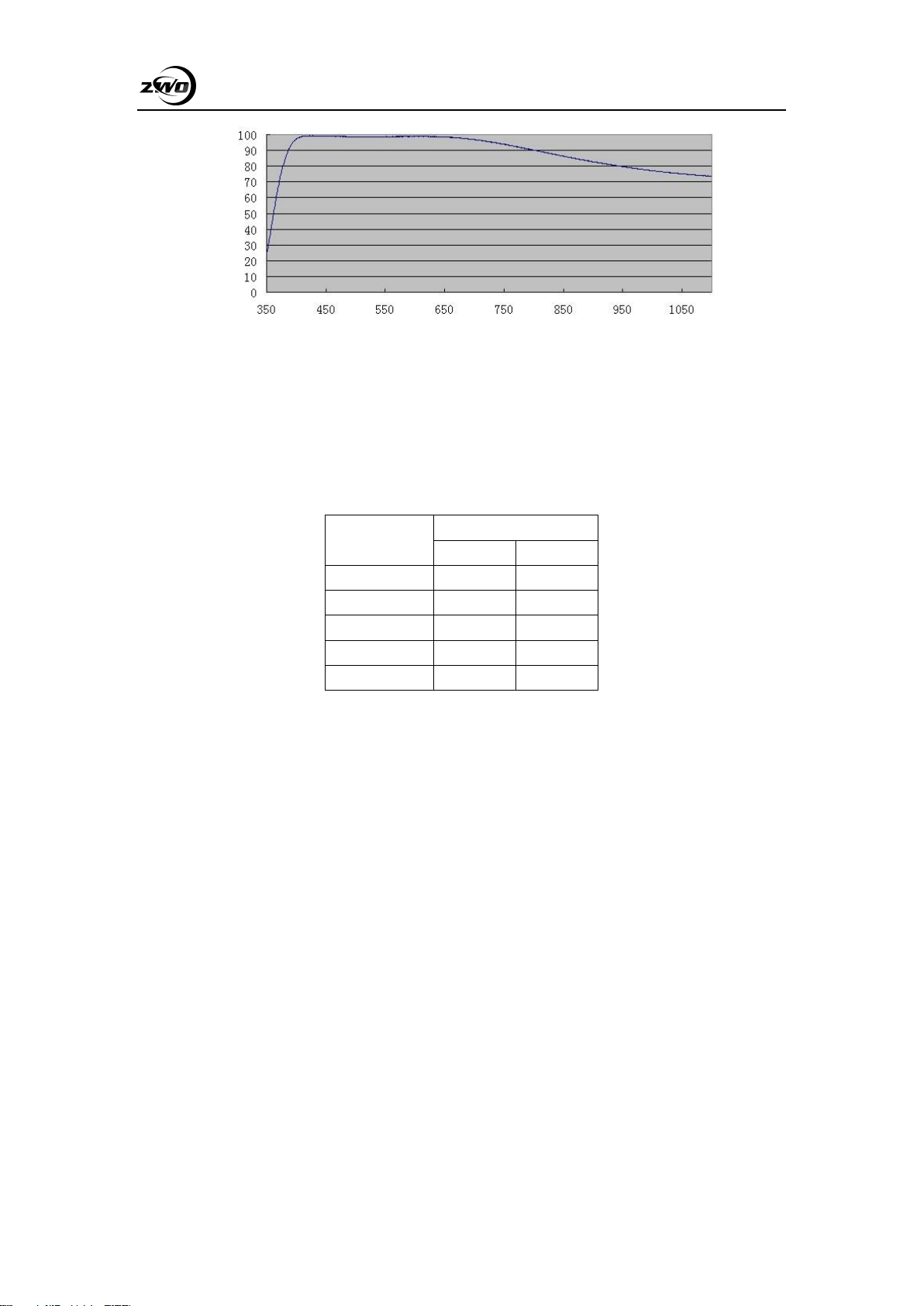
In front of the ASI533 camera sensor there is an AR coated protection window with a
diameter of 32mm and a thickness of 2mm.
ASI533 Manual
12
5.6 Analog to Digital Converter (ADC)
The ASI533 camera has a built-in 14bit ADC. The ASI533 also supports a custom ROI local
readout mode with faster frame rates at small ROI resolutions. The following figure shows the
frame rate of the ASI533 in 14bit mode, USB3.0 and USB2.0 at different resolutions:
Resolution
14Bit ADC
USB2.0
USB3.0
3008*3008
2fps
20fps
1920*1080
10fps
54fps
1280*720
24fps
80fps
640*480
70fos
117fps
320*240
216fps
216fps
5.7 Binning
The ASI533 camera supports bin2, bin3 and bin4 software pixel binning modes. The biggest
benefit of hardware pixel binning is the faster frame rate. If you do not require increased frame
rate, then we recommend software binning.
5.8 DDR Buffer
The ASI533MC Pro camera has built-in 256MB DDR3 high-speed memory to buffer image
data, ensuring stable data transmission, and effectively reducing the amp-glow caused by slow
reading speed. The key difference between “Cool” and “Pro” model ASI cameras is that the Pro
models have this built-in DDR memory buffer.
ASI533 Manual
13
6. How to use your camera
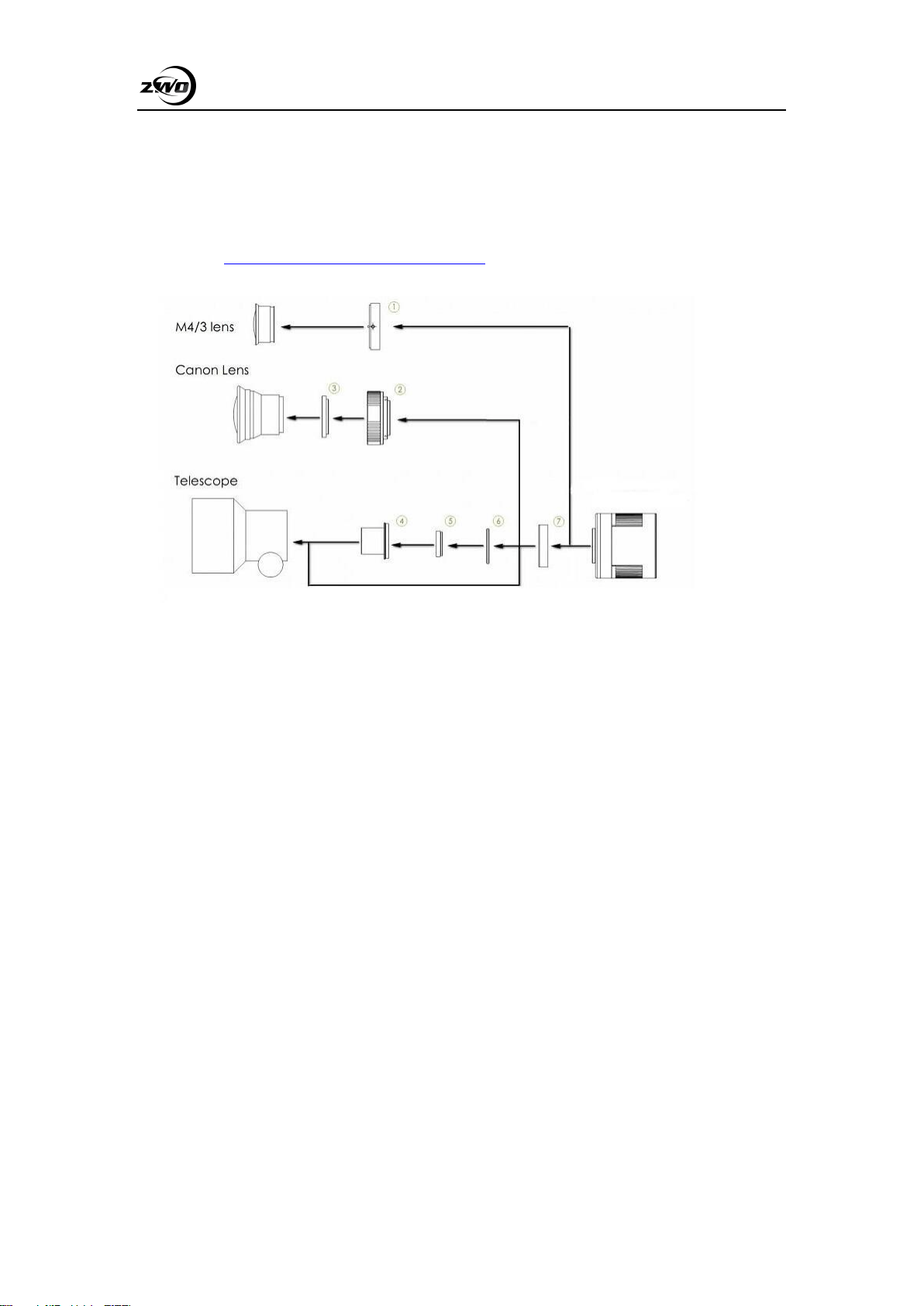
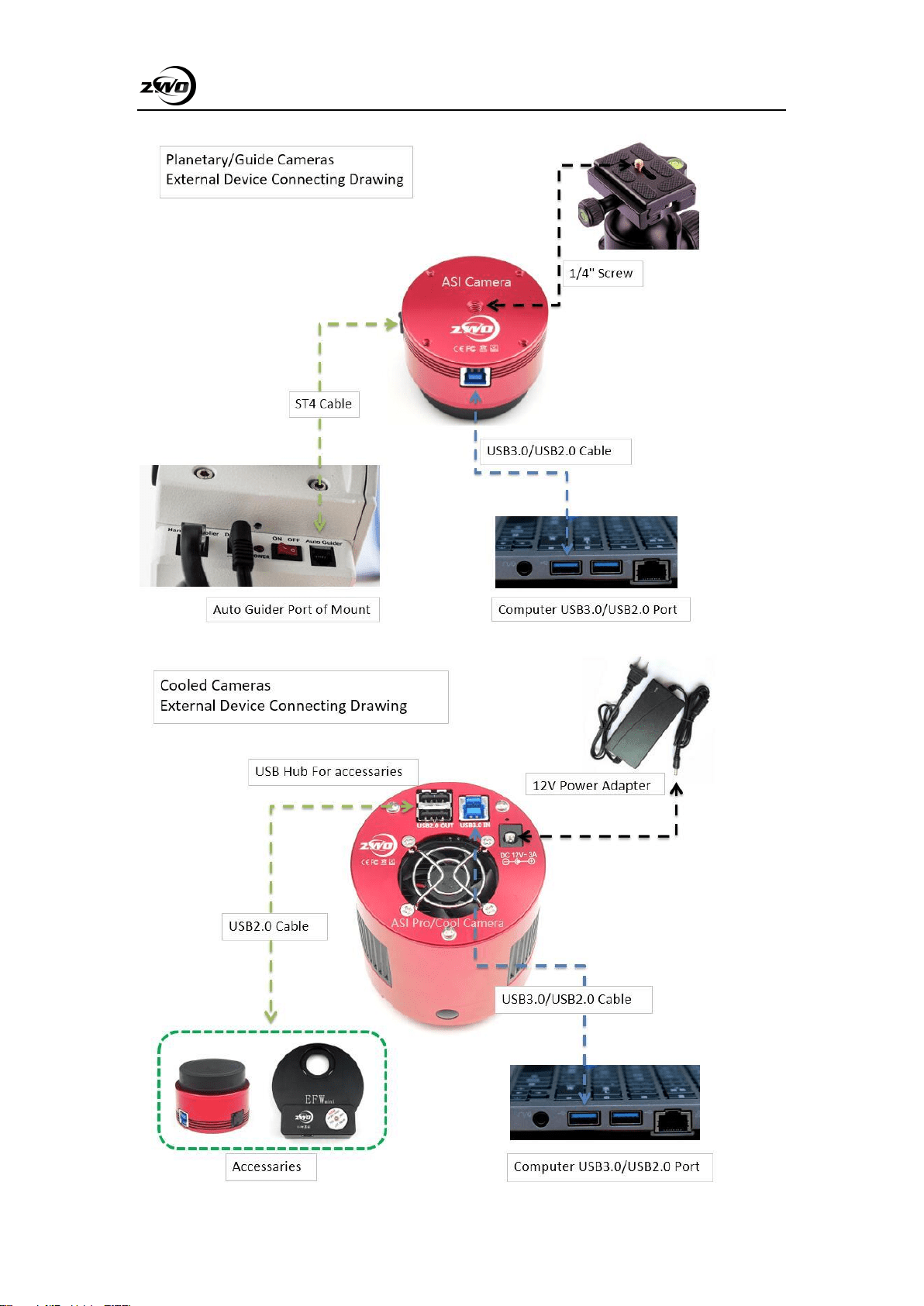
The ASI533 can be connected to a telescope or camera lens via the necessary adapters. Most
of the commonly needed adapters are already included and the rest can be purchased directly from
our website: https://astronomy-imaging-camera.com/
1. M43-T2 adapter
2. EOS-T2 adapter
3. 2”Filter (optional)
4. 1.25” T-Mount
5. 1.25” Filter (optional)
6. M42-1.25” Filter (optional)
7. T2 extender 11mm
Here is an example of the whole setup including an OAG and guider camera.
ASI533 Manual
14
ASI533 Manual
15
7. Cleaning
The camera is equipped with a protective window glass. The inside of the sensor is dry and
sealed. We do not recommend opening the camera to clean it. Opening the camera may cause the
sensor room to get wet and condensation may occur during cooling. If you need to clean the
protective glass, it is best during the day.
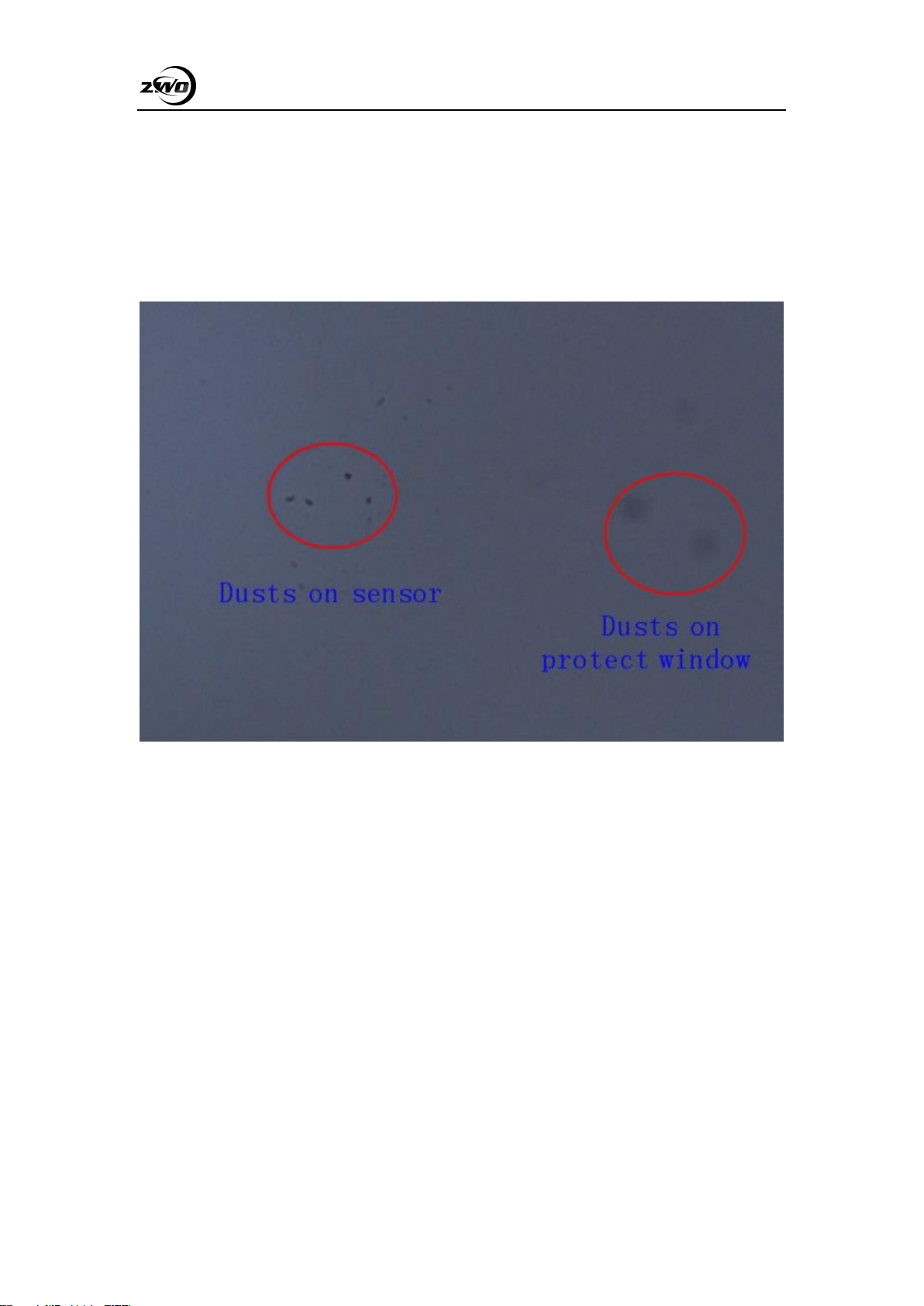
The dark spot on the right is the shadow of dust on the protective glass. The very small black
spot on the left is the shadow of dust on the chip. In the above situation, it is recommended to
blow off the dust on the glass surface with air. The remaining dust is recommended to be removed
with calibration flat frames.
ASI533 Manual
16
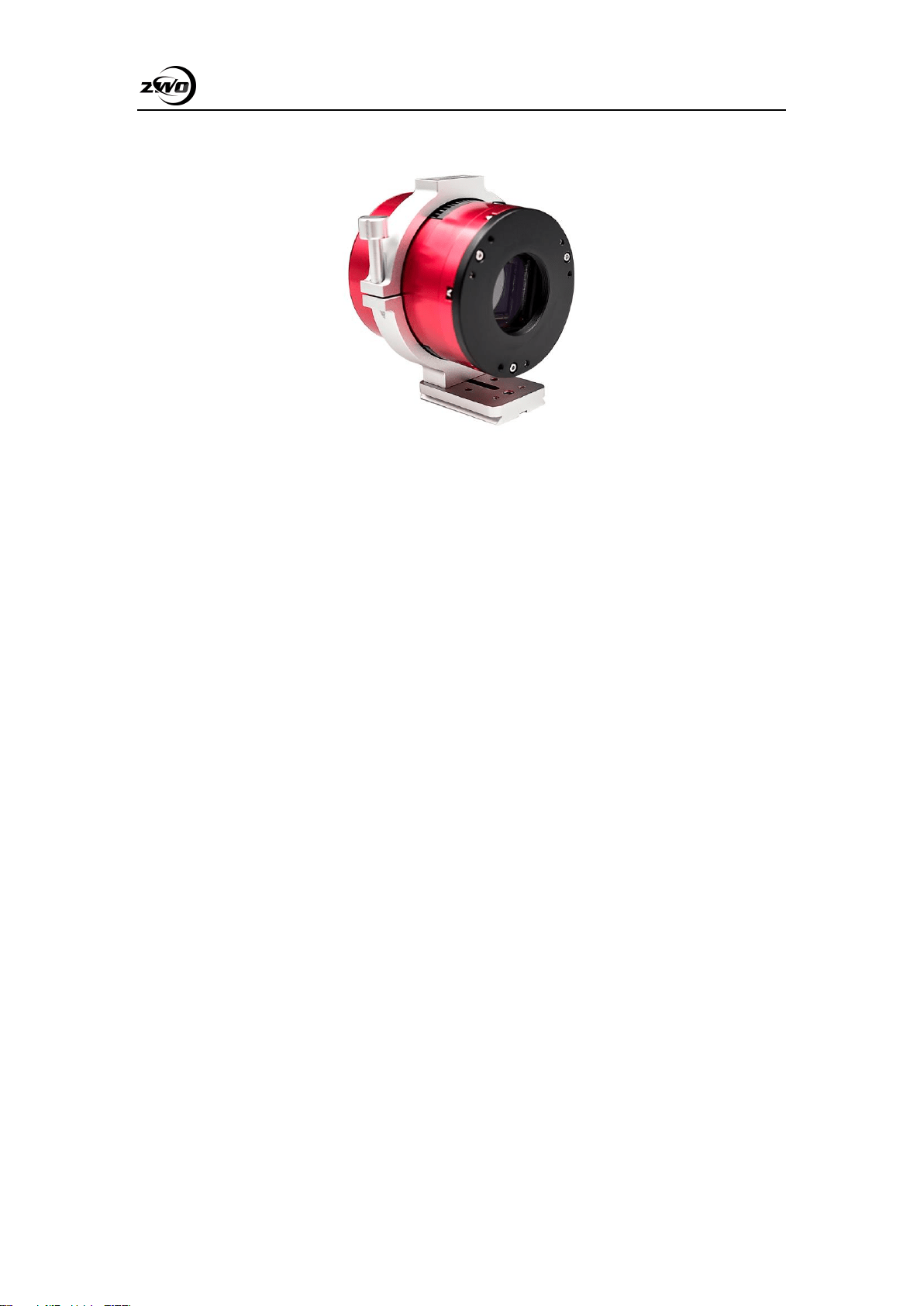
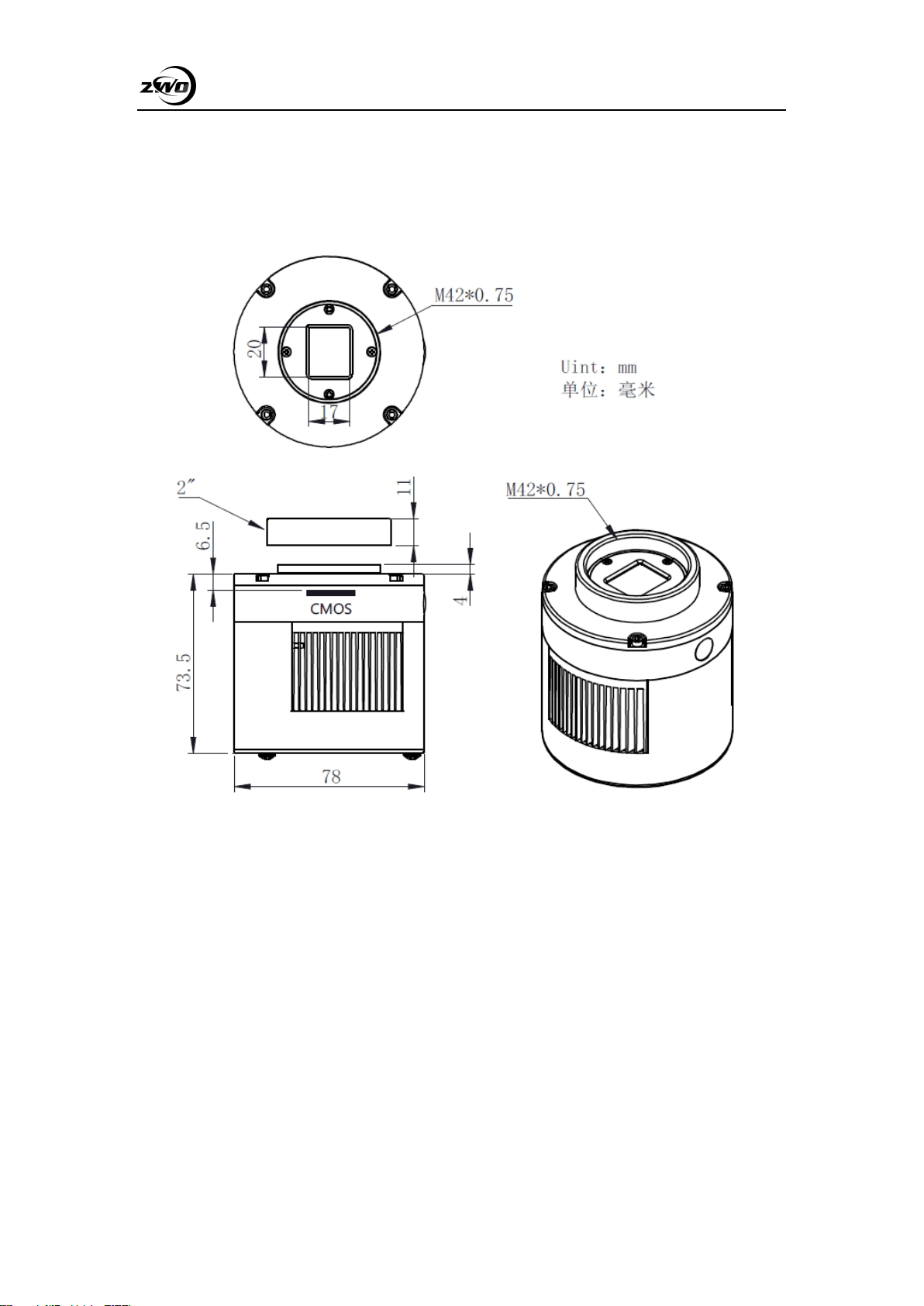
8. Mechanical drawing
ASI533MC Pro

ASI533 Manual
17
9. Servicing
For software upgrades, please go directly to the following official website to download updates:
https://astronomy-imaging-camera.com/software-drivers
For repairs and other services, please contact us via email: info@zwoptical.com
For cameras purchased from agents, please contact your dealer for after-sales service.
10. Warranty
We provide 2-year warranty for our products, we will offer the repair service for free or
replace for free if the camera doesn’t work within warranty period. After the warranty period, we
will continue to provide repair support and service on a charged basis.
This warranty does not apply to damage that occurred as a result of abuse or misuse, or
caused by a fall or any other transportation failures after purchase.
Customer must pay for shipping when shipping the camera back for repair or replacement
If you get a faulty camera, please contact us as soon as possible though email:
info@zwoptical.com. Please describe the problem in detail and we will do our best to help you
solve the problem. Most instances perceived problems are simply bad driver install or software
configuration.