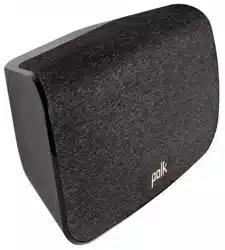
User Manual for Polk SR1 OLD
Table of contents
- Technical Assistance
- What’s in the Box
- Setup
- Remote Control
- Visual Indicators
- Optimizing Your Surround Speakers
Setup
Connecting to Your Surround Speakers
1. Placing or mounting the surrounds
Place the surround speakers on the left and right sides and equidistant from the main listening position. Make sure you place the speaker marked “L” on the left and the speaker marked “R” on the right. If you decide to mount the surrounds, Please refer to the wall mounting template for instructions.
2. Connecting the surrounds to an AC outlet
A flashing green light will be visible on the back of the surrounds until you have manually synced the bar, sub, and surrounds.
3. Verifying your connections
Turn on your TV and verify that you are seeing video and hearing sound from the sound bar. If you do not hear sound and do not see any lights on the front of your sound bar, press the power button on the sound bar to turn it on.
Note: If you are hearing sound from both your TV and your sound bar, you must manually turn off your TV speakers using the Settings Menu on your TV. Please refer to your TV’s owner’s manual for instructions.
4. Syncing the Surround Speakers to the Soundbar
Note: You must sync BOTH surround speakers AND the subwoofer.
Sync the Subwoofer
1) Press the power button on the soundbar to turn it on.
2) On the back of the SOUNDBAR, press and hold the SYNC button until you hear a tone (about 3-4 seconds) and then release the button. The SUB and SURR lights above the SYNC button will flash green
3) On the back of the SUBWOOFER, press and hold the SYNC button until you hear a tone (about 10 seconds) and the light on the back of the subwoofer turns solid green.
Sync the Surround Speakers
4) On the back of EACH of the SURROUND SPEAKERS, press and hold the SYNC button until the light on the bottom of the speaker turns solid green (about 10 seconds).
5) When BOTH LEFT and RIGHT surround speakers are paired to the bar you will hear a tone from the bar.
NOTE: If you hear a two note descending tone from the bar syncing failed. Please try again.
Optimizing Your Surround Speakers
Volume Control Easily adjust volume of the surround speakers for more or less impact.
Balance Control Easily adjust the balance of the surround speakers based on your listening position.
Wall mounting your SR1 Wireless Surround Speakers
A wall mounting template is provided for wall mounting the surround speakers. For proper installation, please refer to the instructions printed on the template. Screws for attaching the surrounds to the wall are not included. Choose the screw type and length appropriate to your home’s construction. If in doubt, consult a professional.
I Don’t Hear Sound from my Surround Speakers
1) Verify that the left and right surrounds speakers are plugged in to a power source.
2) Check the green light on the back of each speaker.
• If it is solid green, turn up the Surround Volume using the remote control.
• If it is flashing green you need to sync the surround speaker to the soundbar using the following instructions