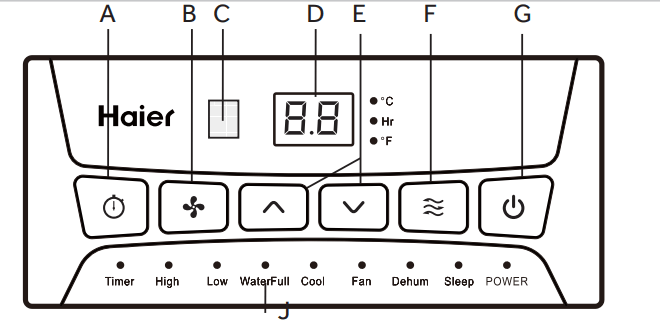
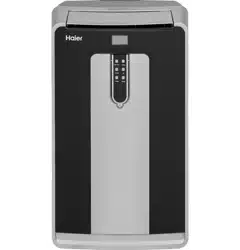
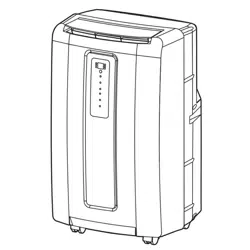
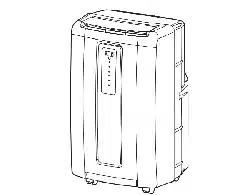
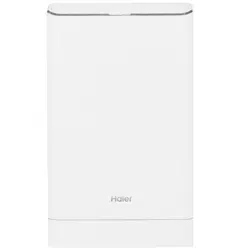
Program a time from (1-hour to 24-hours) for the air conditionerto turn Offor On. When a Time Delay is programmed, the Timer indicator light will illuminate.
While the air conditioner is operating:
1. Press the Timer button.
2. Press the Up/Down arrow buttons to select the number of hours you want the air conditioner to continue to operate before turning Off.
NOTE: Wait approximately 5 seconds for the Turn-Offtime to be saved.
While the air conditioner is off:
1. Press the Timer button.
2. Press the Up/Down arrow buttons to select the number of hours you wanttheairconditionerto remain offbefore turning On.
NOTE: Wait approximately 5 seconds for the Turn-On time to be saved.
To cancel the timer:
Press the Timer button once, the hours remaining will flash, press the timer button again and the timer will be canceled.
B FAN SPEED BUTTON
The fan speed can be adjusted from Low speed to High speed when the air conditioner is either in Cool or Fan mode.
NOTE: The fan speed cannot be adjusted when the unit is in DRY mode.
Press the Fan Speed button to toggle among the two speeds. The corresponding fan speed indicator will illuminate.
C REMOTE CONTROL SIGNAL RECEIVING WINDOW
Aim the Remote Control at this window so the Control will receive the signal.
D CONTROL PANEL DISPLAY
Displays the Set Temperature in degrees Fahrenheit or degrees Celsius, or the hours remaining in a Time Delay. The corresponding indicator light will illuminate.
E UP AND DOWN ARROW BUTTONS
Adjusts the Temperature or Hours in Time Delay.
To Set the Temperature:
The temperature can be set between 62°F and 86° F (17°C and 30° C) when the air conditioner is in Cool mode.
1. Press the Mode button until the Cool mode is selected.
2. Press the Up Arrow or Down Arrow buttons to select the Temperature.
NOTE: The temperature cannot be set when the air conditioner is in either Fan or Dry mode.
F MODE BUTTON
Press the Mode button to toggle among the operating options. The corresponding indicator will illuminate:
Cool - Cools the room to the set temperature Dehum - Reduces the humidity in the room
Fan - Circulates the air in the room without cooling
G POWER BUTTON
Turns ON/OFF power to the air conditioner.
NOTE: Turning o power by pressing the Power button does NOT disconnect the appliance from the power supply.
Press the Power button. The Power indicator will illuminate.
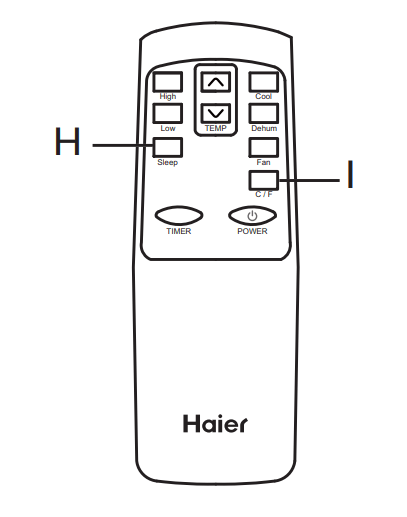
REMOTE CONTROL
1. Insert the two batteries (provided).
2. Aim the remote control at the signal receiver on the control panel to operate the air conditioner.
H SLEEP BUTTON
Increases the set temperature by 2°F (1°C) after 2-hours, and then increases the temperature by an additional 2°F (1°C) after another 2-hours.
NOTE: The fan will operate at Low speed and cannot be adjusted while in Sleep mode.
Press the Sleep button to enter Sleep mode. The Sleep indicator will illuminate.
To Cancel Sleep Mode:
Press the Sleep button or the Mode button (Cool, Fan or Dry) on the remote control.
I °C/°F BUTTON
Press the °C/°F button to toggle between displaying the temperature in degrees Fahrenheit or degrees Celsius. The corresponding indicator will illuminate.
INDICATOR LIGHTS
Illuminate to indicate the selected mode, speed or condition.
J WATER FULL
The Water Full indicator illuminates, when the internal water tank has filled with condensed water. The air conditioner will turn o automatically. To drain the water tank, see "Air Conditioner Care" for instructions.
AIR CONDITIONER USE
IMPORTANT: If the air conditioner has been tilted on its side, wait 24 hours before turning on the air conditioner to allow the oil to return to the compressor. This will prevent the air conditioner from failing prematurely.
Allow 20" (51 cm) of space around the unit for proper air circulation.
Do Notoperatetheairconditionerwithoutairfilters in place.
Do not spill liquid on the control panel; it may cause an electrical short to the interior electronic parts that would either disable them or cause them to function improperly.
When turning on theairconditionerforthefirsttime after plugging it into an electrical outlet, the unit will start in Cooling mode set at 75°F (24°C), and at High fan speed. The control panel will display the current room temperature.
When turning on the unit after previous use, it will remember the last settings used.
After a normal shut down, please wait for 3 minutes before restarting the unit.
In Cooling mode, this unit should not require water to be removed. This model has a unique design that continuously evaporates the water.
When the unit is operated in high humidity conditions, you may need to empty the water tank periodically.
The unit will shut down automatically when the water tank is full. The Water Full indicator illuminates to alert you of this condition.
CLEANING
1. Unplug or disconnect power.
2. Use only a soft cloth dampened with water to clean the cabinet.
NOTE:
Do not use a liquid or spray cleaner to clean the air conditioner.
DO NOT use chemicals, abrasives, ammonia, chlorine bleach, concentrated detergents, solvents or scouring pads. Some of these chemicals/items may damage and/ or discolor your air conditioner.
3. Dry thoroughly with a soft cloth.
4. Plug in or reconnect power.
AIR FILTER
Theairfilters should be cleaned atleastonceaweekforyour unitto operate at optimum efficiency.
IMPORTANT: Do Not operate the air conditioner without air filters in place.
1. Unplug or disconnect power.
2. Pull on the tabs to slide outthe filters from the back of the air conditioner.
NOTE: The secondaryfilters are accessible once the main filters are removed.
3. Wash or vacuum the dust from the air filters.
NOTE: Ifwashed, gently shake the filter to remove the excess waterand dust particles trapped in the filter.
4. Reinstall the filters.
5. Plug in or reconnect power.
INTERNAL WATER TANK
The Water Full indicator illuminates, when the internal water tank has filled with condensed water.
To Empty the Internal Water Tank:
1. Unplug or disconnect power.
2. Place a shallow 1 quart or larger pan (not included) below the lower drain located on the back (near the bottom) of the air conditioner.
3. Remove the cap and the rubber plug and drain the water tank.
4. Re-insert the drain plug and screw the cap snugly into place.
5. Plug in or reconnect power.
STORAGE
If the unit is not being used for a long period of time:
1. Unplug or disconnect power.
2. Drain the water from the water tank. See "Air Conditioner Care."
3. Use the original packaging to repack the unit to avoid a buildup of dust or dirt.
4. Store the air conditioner in a cool, dry location.
TROUBLESHOOTING
Problem
Possible Causes
Solution
Unit does not start or operate
Power supply cord is not plugged into an outlet.
Plug the power cord into a grounded 3 prong outlet.
Power supply cord has tripped.
Press and release the RESET button on the power supply cord.
The Power button has not been pressed.
Press the Power button on the Control Panel or Remote Control to turn ON the air conditioner.
There is no power to the electrical outlet.
Plug a working lamp into the outlet to check for power.
A household fuse has blown or a circuit breaker has tripped.
Replace the fuse or reset the circuit breaker.
The control was programmed for a Time Delay.
Cancel the Time Delay. See “Control Panel.”
The batteries in the remote control are dead.
Replace the batteries.
The internal water tank is full.
NOTE: The air conditioner automatically turns off, and the Water Full indicator illuminates to alert you of this condition.
Empty the water tank. See “Air Conditioner Care.”
Remote control is not working
Batteries are dead.
Replace the batteries.
Batteries are installed incorrectly.
Make sure the batteries are inserted in the correct position.
Air conditioner is working but the room is not cooling.
The room temperature is hot.
NOTE: On extremely hot and humid days ,the air conditioner will take longer to cool the room.
Allow time for the room to cool when you first turn on the unit.
Make sure the air conditioner has an adequate BTU rating for the size of the room being cooled.
The control is set incorrectly to Fan or Dehum mode.
Set the Mode to Cool and the Fan Speed to High.
Airflow is restricted.
Remove any obstacles to the airflow and redirect airflow for uniform cooling.
Temperature set too high.
Lower the set temperature.
Air filters are dirty or restricted.
Clean the air filter. See “Air Conditioner Care.”
Air conditioner installed incorrectly
Check the exhaust hose and window panel for proper installation.
Doors and windows are open.
Close the doors and windows to the room being cooled to prevent cooled air from escaping.