XTREME2
Quick Start Guide
Guide
de
demarrage
rapide
® Voice assistant
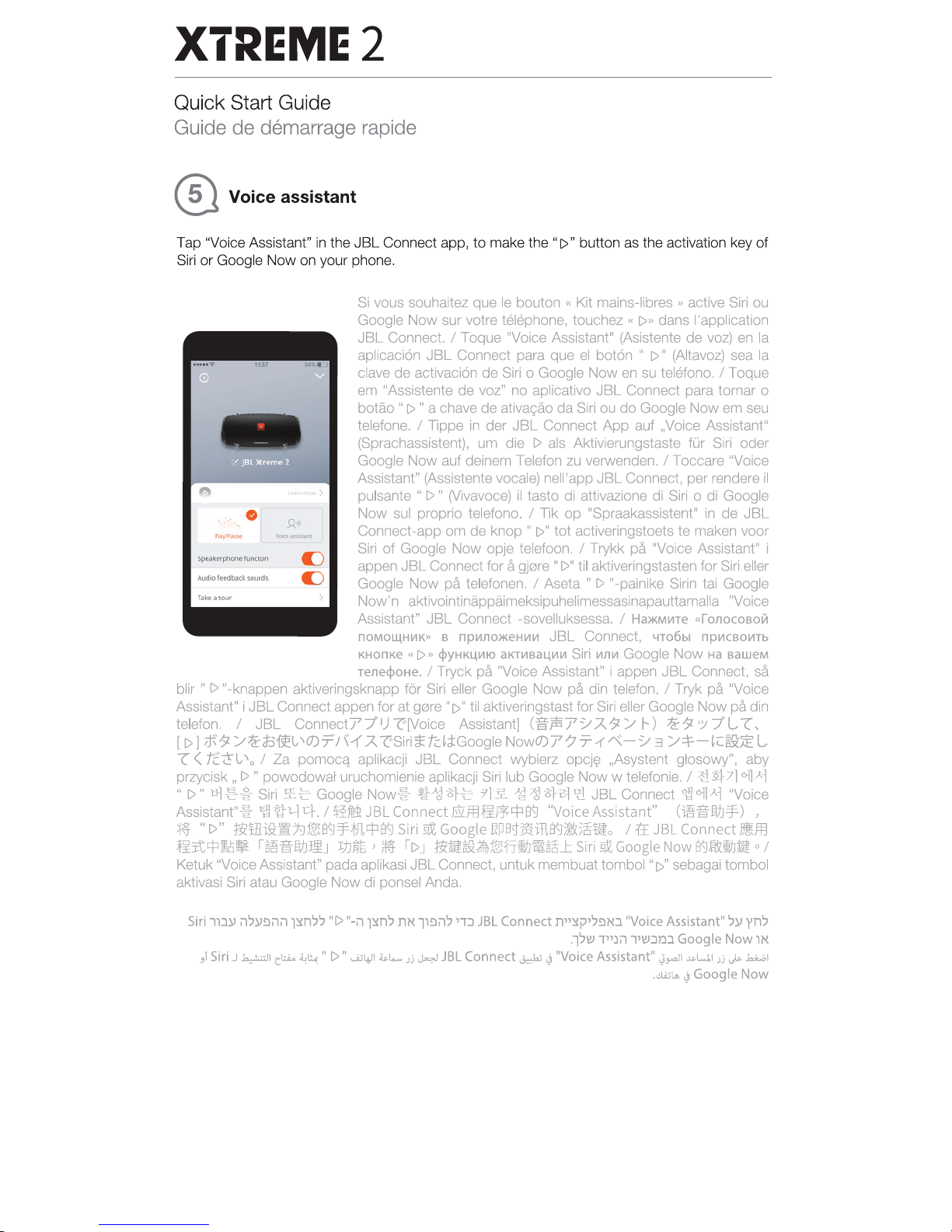
Tap 'Voice Assistant"
in
the
JBL
Connect app,
to
make the
"1>"
button as the activation key of
Siri
or
Google Now on your phone.
0
u
u
Si
vous souhaitez que le bouton « Kit mains-libres
.,
active Siri ou
Google
Now
sur votre telephone, touchez «
1>.,
dans !'application
JBL
Connect. I Toque "Voice Assistant" (Asistente
de
voz)
en
Ia
aplicaci6n JBL Connect para que el bot6n •
1>"
(Aitavoz) sea
Ia
clave
de
activaci6n de Siri o Google
Now
en
su telefono. I Toque
em "Assistente
de
voz" no aplicativo JBL Connect para tamar o
batao "
1>
" a chave de ativacao da Siri ou
do
Google Now em seu
telefone.
I Tippe
in
der
JBL Connect
App
auf ,Voice Assistant"
(Sprachassistent), um die
I>
als Aktivierungstaste
fOr
Siri oder
Google Now auf deinem Telefon zu verwenden.
I Toccare "Voice
Assistant" (Assistente vocale) nell'app
JBL
Connect, per rendere
il
pulsante
"I>"
(Vivavoce)
il
tasto di attivazione di Siri o di Google
Now
sui proprio telefono. I Tik
op
"Spraakassistent"
in
de
JBL
Connect-app om
de
knop
"1>"
tot activeringstoets te maken voor
Siri
of
Google
Now
opje telefoon. I Trykk pA "Voice Assistant" i
appen
JBL
Connect for a gj0re
II
I>"
til aktiveringstasten for Siri eller
Google
Now
pa
telefonen. I Aseta w
I>
n-painike Sirin tai Google
Now'n aktivointinappaimeksipuhelimessasinapauttamalla "Voice
Assistant"
JBL
Connect -sovelluksessa. I
Ha>KM~Te
«ronocoaoiil
nOMO~H~K»
B
np~IIO>KeH~II'I
JBL Connect,
4T06bl
npii'ICBO~Tb
KHOnKe
"[)»
cjlyHKI..IIIIIO
aKTI/IBal..lllllll
Siri
11111~
Google
Now
Ha
aaweM
renecjloHe.
I Tryck
pll.
"Voice Assistantw i appen
JBL
Connect,
sA
blir
II
I>
n-knappen aktiveringsknapp for Siri eller Google Now
pa
din telefon. I Tryk pA "Voice
Assistant" i
JBL
Connect appen for
at
g121re
"1>
•
til
aktiveringstast for Siri eller Google Now
pll.
din
telefon.
I
JBL
Connect77"
1
J-r-[Voice Assistant]
(if"fli7~A.9/
t-)
1.f1Z'Y7"L
"(,
[I>
)ift9
/1.fd31£lt'O)T'I~1'A.
~Siri~tdci:Google
Now0)7?7-1~-~
3
/:}-~t:~;i:EL
"C
<
fi:~t,
'o
I Za
pomoc~
aplikacji
JBL
Connect wybierz
opcj~
,Asystent glosowy", aby
przycisk,
I>" powodowaf uruchomienie aplikacji Siri lub Google
Now
w telefonie. I
~~71
O]lJ,.i
"1>•
~
::=
~
Siri
!f.~
Google
Now~
~-"BeSt~
7]£1l~-8-}a'J\'l
JBL
Connect
~Oll).i
"Voice
Assistantn~
1!1~1-Jct.l~ftel.JBLConnectllil.ffl~ft;!=p~
"VoiceAssistant"
(~.gW:J=f.)
,
~~
"I>"
~tHi~!lh11&!~=Fiffl.tf:l~
Siri
~
Google
~p~~m~ifi~tlo
I
1:E
JBL
Connect
Biffl
~J;tcp~g:
r~.gW:J~J
J:}JR§'
~
II>J
~-~~~rrii.J~~J:
Siri
~
Google Now
~~II.Jtl
o I
Ketuk 'Voice Assistane pad a aplikasi
JBL
Connect, untuk membuat tombol •
[>''
sebagai tombol
aktivasi Siri atau Google
Now
di ponsel Anda.
Siri ll::W
il')l.J~ilil
T~n')7
WI>
"-il
pm')
mt
ll~il')
,-r::J
JBL
Connect
n,~p,J~IO
''Voice Assistant"
'))I
yn7
.lJ\!1 i,:lill,\!I::JT.lJ
Goog
le
Now
lN
.,1
Siri J
~~
c;la.
~li.:"
I>"
...t:~"'l
~t....
JJ
~
JBL
Connect~~
"Voice
Assistant"~~
~w.l
Jj
,p
J.;w.l
,l!lliLo.
~
Google
Now
Downloaded from www.ManualsFile.com manuals search engine
XTREME2
Quick Start Guide
Guide
de
demarrage
rapide
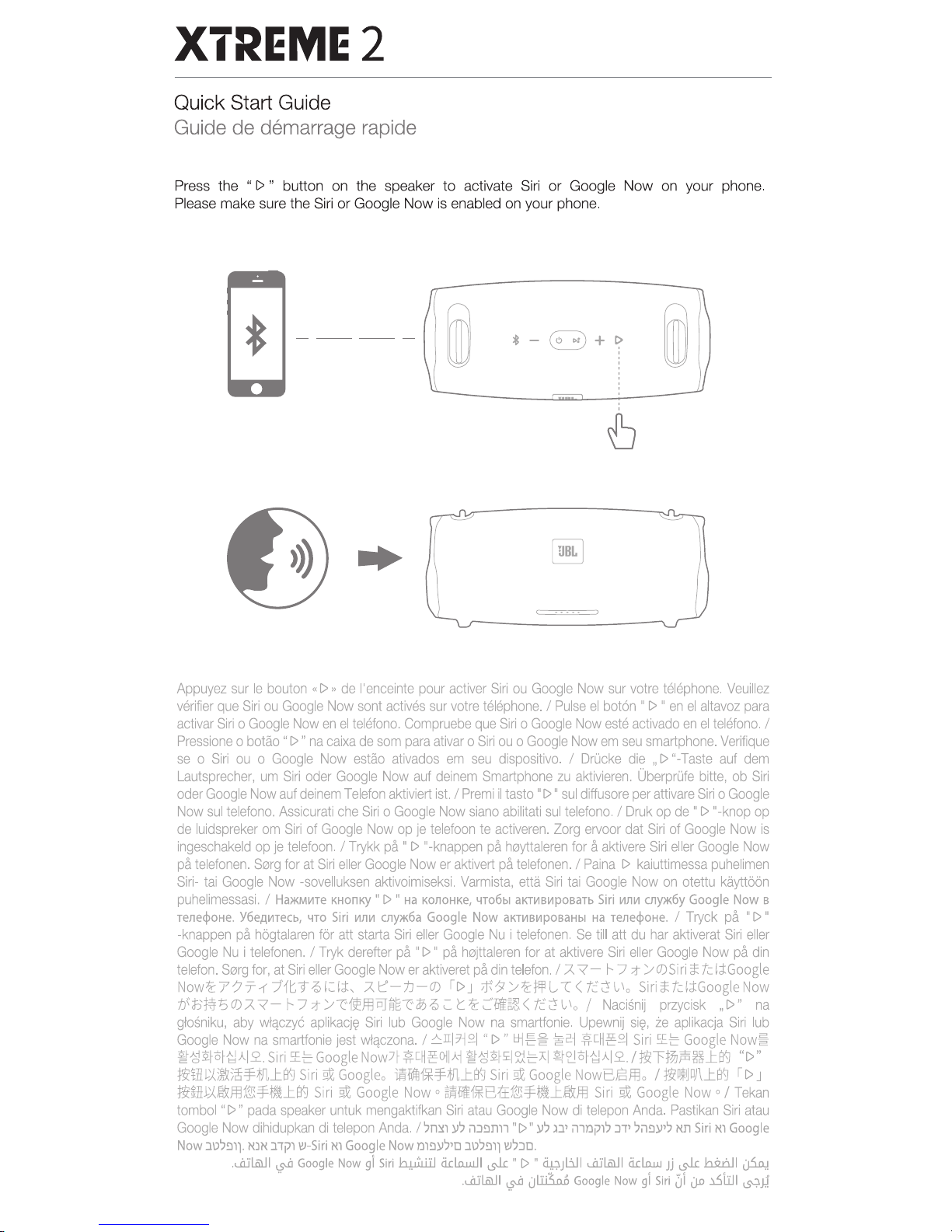
Press
the "
I>
" button
on
the speaker to activate
Siri
or Google Now
on
your
phone.
Please
make sure the
Siri
or
Google
Now
is
enabled on your
phone.
Appuyez
sur
le
bouton
«I>»
de
!'enceinte
pour
activer
Siri
ou
Google
Now
sur
votre
telephone.
Veuillez
verifier
que
Siri
ou
Google
Now
sont
actives
sur
votra
telephone.
I
Pulse
el
bot6n
"
I>
•
en
el
altavoz
para
activar
Siri
o
Google
Now
en
el
teletono.
Compruebe
que
Siri
o
Google
Now
este
activado
en
el
telefono.
I
Pressione
o
botao
"I>"
na
caixa
de
som
para
ativar
o
Siri
ou
o
Google
Now
em
seu
smartphone.
Verifique
se
o
Siri
ou
o
Google
Now
estao
ativados
em
seu
dispositive.
I
Drucke
die
,.
I>
"-Taste
auf
dem
Lautsprecher,
urn
Siri
oder
Google
Now
auf
deinem
Smartphone
zu
aktivieren.
Oberprufe
bitte,
ob
Siri
oder
Google
Now
auf
deinem
Telefon
aktiviert
ist.
I
Premi
il
tasto
"I>"
sui
diffusore
per
attivare
Siri
o
Google
Now
sui
telefono.
Assicurati
che
Siri
o
Google
Now
siano
abilitati
sui
telefono.
I
Druk
op
de"
1>
"-knop
op
de
luidspreker
om
Siri
of
Google
Now
op
je
telefoon
te
activeren.
Zorg
ervoor
dat
Siri
of
Google
Now
is
ingeschakeld
op
je
telefoon.
I
Trykk
pc\
"
I>
"-knappen
pc\
h0)'ttaleren
for
A
aktivere
Siri
eller
Google
Now
pa
telefonen.
S0rg
for
at
Siri
eller
Google
Now
er
aktivert
pa
telefonen.
I
Paina
1>
kaiuttimessa
puhelimen
Siri-
tai
Google
Now
-sovelluksen
aktivoimiseksi.
Varmista,
etta
Siri
tai
Google
Now
on
otettu
kayttoon
puhelimessasi.
I
Ha>KM~Te
KHom<y
"
I>
"
Ha
KonOHKe,
'IT06bl
aKT~B~poeaTb
Siri
~n~
Cll)'lK6y
Google
Now
B
TeJlecjloHe.
Y6e~~Tecb,
'ITO
Siri
~n~
Cll)?K6a
Google
Now
aKT~B~POBiiHbl
Ha
TeJlecjloHe.
I
Tryck
pa
"I>"
-knappen
pa
hogtalaren
for
att
starta
Siri
slier
Google
Nu
i
telefonen.
Sa
till
att
du
har
aktiverat
Siri
slier
Google
Nu
i
telefonen.
I
Tryk
derefter
pa
"I>
•
pa
h0jttaleren
for
at
aktivere
Siri
eller
Google
Now
pa
din
telefon.
S0rg
for,
at
Siri
eller
Google
Now
er
aktiveret
padin
telefon.
I
.A~-
1'-7
:t
/O)Siri
~tclci:Google
Now.f:7?7--r:11t.9~l;::lcl:,
.A~-:tJ-0)
II>J
t:K~/.f:WL:t<tc~l-'o
Siri~tdci:GoogleNow
7lsm"1.:JO).A
~-
1--7
:t
/~~Jf.lPJ~~itD~;::::.
C:'i~m~<
tc~l-'o
1
Nacisnii
przycisk
.,I>"
na
glosniku,
aby
\Nif!czy6
aplikacj~
Siri
lub
Google
Now
na
smartfonie.
Upewnij
si~.
ie
aplikacja
Siri
lub
Google
Now
na
smartfonie
jest
wlf!czona.
I
~rr[?j£1
"I>"
~e~
~2.i
~cH.g2J
Siri
~E
Google
Now~
~~2!-o~~AI2..
Siri
~E
Google
Now7f
ff[/j.gOJIAi
~~2f~
~EAI
~?Jo~~AI2../~"'F~f6~...l:~
"I>"
~ffit;j,J:)%-fm...t~
Siri
~
Googlea
~fdll'f*.ftrt...l:~
Siri
~
Google
Now8Bfflo I
ti(iJDJ1...l:~
I[> J
~~Mfflf&l.f-~...1:~
Siri
~
Google
Now
o
~lii~Bttf&l.f.-ll...l:.I:Jf.l
Siri
~
Google
Now
o I
Tekan
tombol
"I>
•
pad
a
speaker
untuk
mengaktifkan
Siri
atau
Google
Now
di
telepon
Anda.
Pastikan
Siri
atau
Google
Now
dihidupkan
di
telepon
Anda.
I
.,mn
Y.,
il:J!lnn
"1>"
Y.,
ll'
il1Dj7l.,
:J'T'
.,il!lll'"
Nn
Siri
Nl
Google
Now
.JU.,!l11.
NlM
.J1j71
YJ-Siri
Nl
Google
Now
D1!lli,D
.JOO!l11
\!J;:JD
•
•
..iUI.m.ll19-'i
Google
Now
gl
Siri
h...!llillJ
ckLD.u..t.ll
~"I>
•
~JI.ill
..iUI.m.ll
d.d.o.w
.Jj
~
hluill
~
- .
..iUI.m.ll
~
c)l:iBJW
Google
Now
gl
Siri
~~
JD
l.Silll
~.1.1
Downloaded from www.ManualsFile.com manuals search engine
XTREME2
Quick Start Guide
Guide
de
demarrage rapide
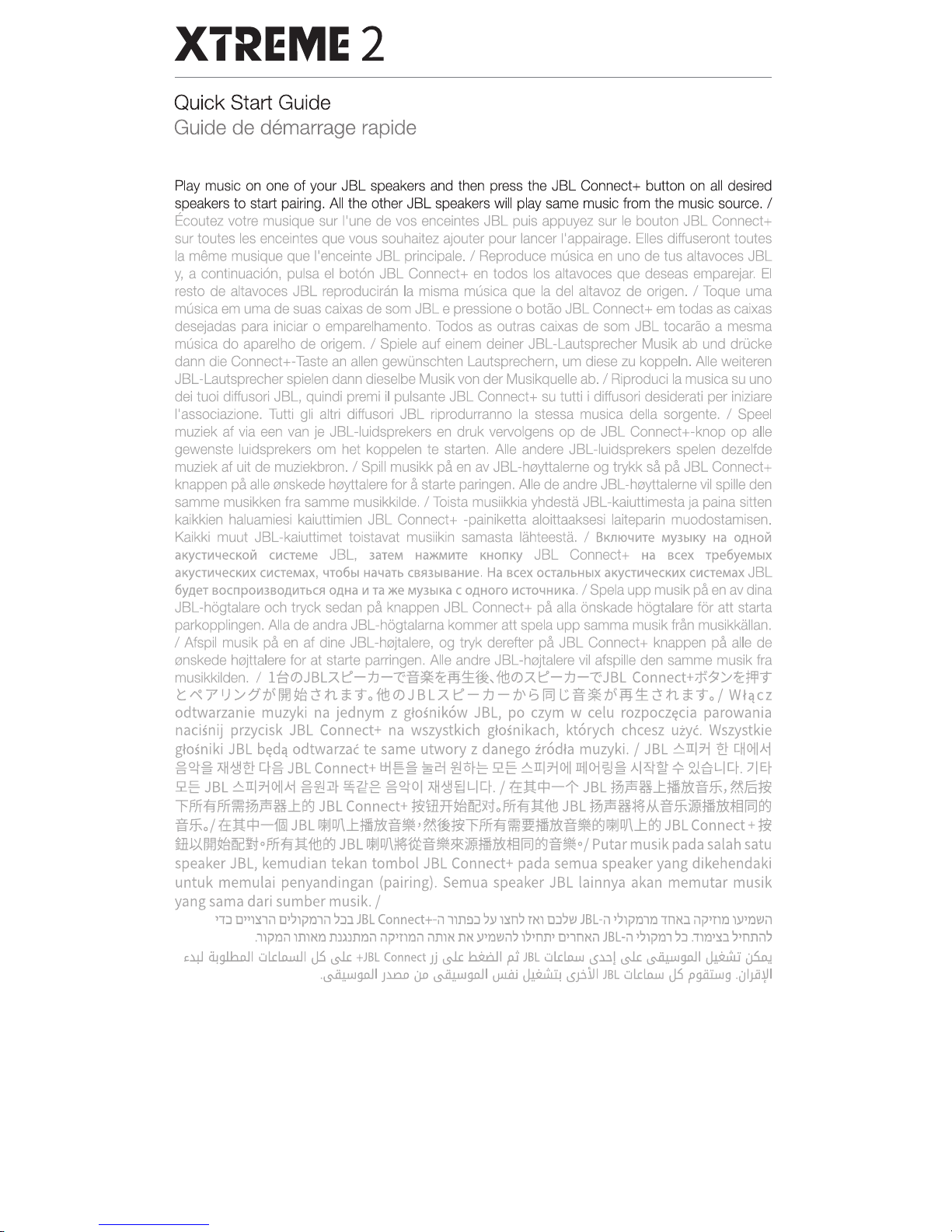
@ JBL Connect+
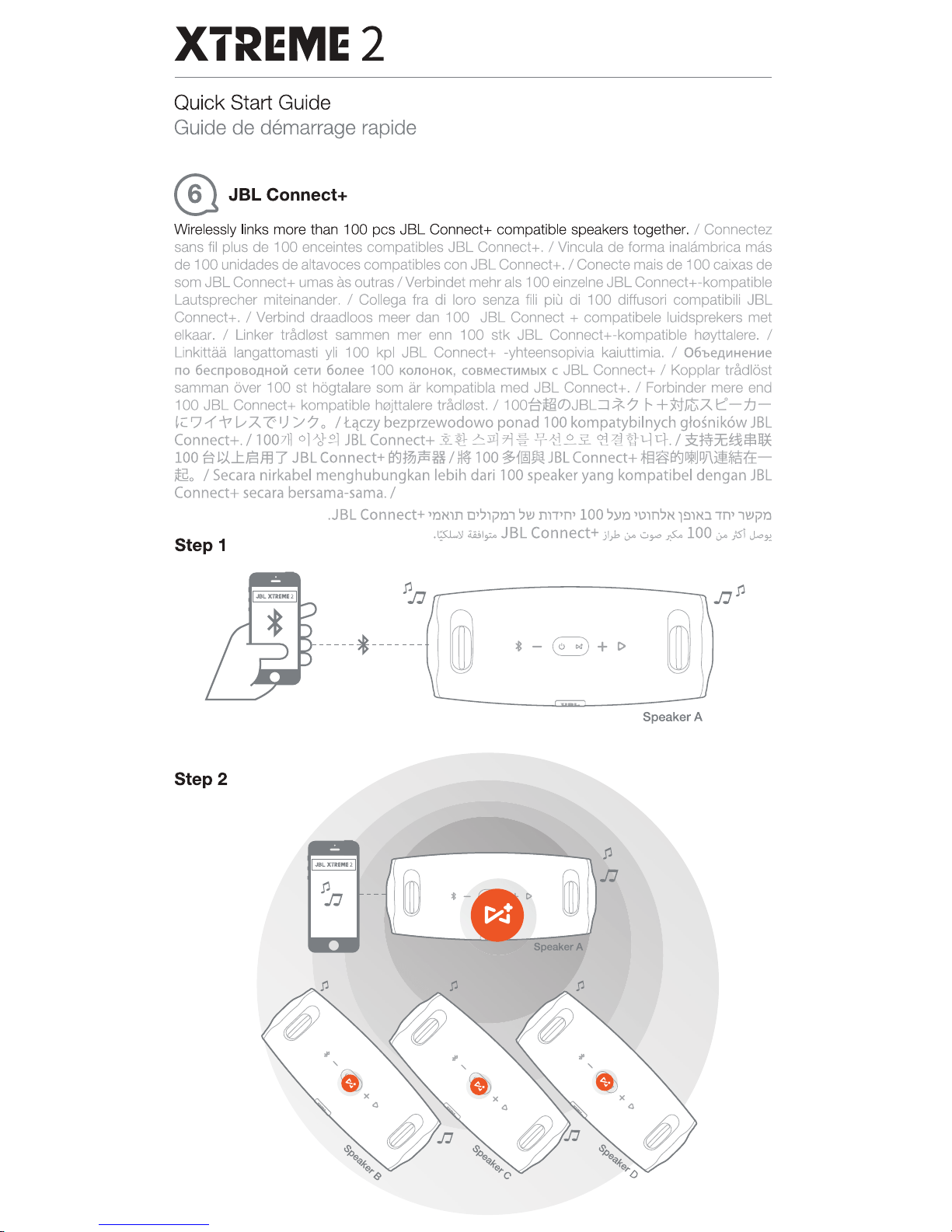
Wirelessly links more
1t1an
1
00
pes
JBL
Connect+ compatible speakers together. I Connectez
sans
fil
plus
de
1
00
enceintes compatibles
JBL
Connect+. I Vincula
de
forma inaiM'lbriea mas
de
1
00
unidades
de
attavoces compatibles con
JBL
Connect+. I Conecte mais
de
100
caixas
de
som
JBL
Connect+ umas
~
outrasiVerbindet mehr als
100
einzelneJBL Connect+-kompatible
Lautsprecher miteinander.
I Collega
fra
di
loro senza fili piu di
100
diffusori compatibili
JBL
Connect+. I Verbind draadloos meer dan
100
JBL
Connect+
compatibele luidsprekers met
ell<aar.
I Unker trndloot sammen
mer
enn
100
stk
JBL
Connect+-kompatible heyttalere. I
Linkittaa langattomasti yli
100
kpl
JBL
Connect+ -yhteensopivia kaiuttimia. I
06be,qMHeHI'Ie
no
6ecnposo,qHo.:t
cent 6onee
100
KonoHoK,
coeMecrii!MbiX
c
JBL
Connect+ I Kopplar trndiOst
sarnman aver
100
st
hogtalare som
8r
kompatibla mad
JBL
Connect+. I Forbinder mere and
100
JBL
Connect+ kompatibla h0jttalare trAdlest.
/10~(/)JBL::J-*?
t-+t-f~A.
~-tJ
'c:::?
-1'-?
v
A.
7!
1
)
/?
o I
t..qczy
bezprzewodowo
ponad
100 kompatybilnych
gto~nik6w
JBL
Connect+./
1007~
0]~.9.1
JBLConnect+
~l!A~7'j~lj!-~~.£.
c~HHtl-Jt:f./
X~~~*~
100
~
~..t.ISJl.l
7 J
BL
Connect+
MJ~jili
HI
l!f 100
Hft
JBL
Connect+
~3$9'-lll'\H.ff
& I
Secara
nirkabel
menghubungkan
lebih dari 100
speaker
yang
kompatibel
dengan
JBL
Connect+
secara
bersama-sama.
I
.J
BL
Connect+
~Km
o~~lj».n
':1w
nrPn'
100
'})ID
~om~N.l!l1N.J.
1n~
1Wjm
Step1
.~
m1,::..
JBL Connect+ Jl)o
v.-
.::.,..
p..lOO
v.-
;s'I.;...J:!
fl.Jj
----------
~
-----·-------
®
Speaker A
Step2
--
Downloaded from www.ManualsFile.com manuals search engine
XTREME2
Quick Start Guide
Guide
de
demarrage
rapide
Play
music
on
one
of
your
JBL
speakers
and
then
press
the
JBL
Connect+
button
on
all
desired
speakers
to
start
pairing.
All
the
other
JBL
speakers
will
play
same
music
from
the
music
source.
I
Ecoutez
votre
musique
sur
l'une
de
vos
enceintes
JBL
puis
appuyez
sur
le
bouton
JBL
Connect+
sur
toutes
les
enceintes
que
vous
souhaitez
ajouter
pour
lancer
l'appairage.
Elles
diffuseront
toutes
Ia
meme
musique
que
!'enceinte
JBL
principale.l
Reproduce
musica
en
uno
de
tus
altavoces
JBL
y,
a
continuaci6n,
pulsa
el
bot6n
JBL
Connect+
en
todos
los
altavoces
que
deseas
emparejar.
El
resto
de
altavoces
JBL
reproduciran
Ia
misma
musica
que
Ia
del
altavoz
de
origen.
I
Toque
uma
musica
em
uma
de
suas
caixas
de
sam
JBL
e
pressione
o
batao
JBL
Connect+
em
todas
as
caixas
desejadas
para
iniciar
o
emparelhamento.
Todos
as
outras
caixas
de
som
JBL
tocarao
a
mesma
musica
do
aparelho
de
origem.
I
Spiele
auf
einem
deiner
JBL-L..autsprecher
Musik
ab
und
drucke
dann
die
Connect+-Taste
an
allen
gewlinschten
L..autsprechern,
urn
diese
zu
koppeln.
Aile
weiteren
JBL-L..autsprecher
spielen
dann
dieselbe
Musik
von
der
Musikquelle
ab.l
Riproduci
Ia
musica
su
uno
dei
tuoi
diffusori
JBL,
quindi
premi
il
pulsante
JBL
Connect+
su
tutti i
diffusori
desiderati
per
iniziare
l'associazione.
Tutti
gli
altri
diffusori
JBL
riprodurranno
Ia
stessa
musica
della
sorgente.
I
Speel
muziek
at
via
een
van
je
JBL-Iuidsprekers
en
druk
vervolgens
op
de
JBL
Connect+-knop
op
aile
gewenste
luidsprekers
om
hat
koppelen
te
starten.
Aile
andere
JBL-Iuidsprekers
spelen
dezelfde
muziek
at
uit
de
muziekbron.l
Spill
musikk
pa
en
av
JBL-h.0)fttalerne
og
trykk sa
pa
JBL
Connect+
knappen
pa
aile
enskede
h.0)fttalere
for Astarte
paringen.
Aile
de
andre
JBL-h.0)fttalerne
vii
spille
den
samme
musikken
fra
samme
musikkilde.
I
Toista
musiikkia
yhdesta
JBL
-kaiuttimesta
ja
paina
sitten
kaikkien
haluamiesi
kaiuttimien
JBL
Connect+
-painiketta
aloittaaksesi
laiteparin
muodostamisen.
Kaikki
muut
JBL-kaiuttimet toistavat
musiikin
samasta
lahteesta.
I
BKliiO~~re
MY3b1K)'
Ha
OAHOM
aK)'CTL4'1eCKOiil
CIIICTeMe
JBL,
3aTeM
HaJKM~Te
KHOnK)'
JBL
Connect+
Ha
BCex
rpe6yeMbiX
aK)'CT~'IeCKIIIX
c111creMax,
"'T06bl
Ha'laTb
CBJI3biBaHIIIe.
Ha
ecex
ocranbHbiX
aK)'CTIII"'ecK~x
CL4creMax
JBL
6yAer
socnpo1113BQAIIITbCA
QAHa
111
ra
JKe
MY3b1Ka
c
QAHoro
~cro~HIIIKa.l
Spela
upp
musik
pa
en
av
dina
JBL-h6gtalare
och
tryck
sedan
pa
knappen
JBL
Connect+
pa
alia
onskade
h6gtalare
for
att starta
parkopplingen.
Alia
de
andra
JBL-hogtalarna
kommer
att
spela
upp
samma
musik
frAn
musikkallan.
I
Afspil
musik
pa
en
at
dine
JBL-hejtalere,
og
tryk
deretter
pA
JBL
Connect+
knappen
pa
aile
de
enskede
hejttalere
for at
starte
parringen.
Aile
andre
JBL-hejtalere
vii
afspille
den
samme
musik
fra
musikkilden.
I
l~(J)JBL.A~-1J-"r:'~~~~1:,~,
'ft!!(J).A~-1J-"r:'JBL
Connect+;f-1l~~W9
t~ 7
1
J
~~t.J~Im~~tta:::9o'ffi!O)JBL.A
e-:n
-t.J'61DJ
~~-t.J~~1:.
~tta:::9ol
Wtctcz
odtwarzanie muzyki
na
jednym z glosnik6w JBL, po
czym
w celu
rozpocz~cia
parowania
naci~nij
przycisk JBL Connect+
na
wszystkich
glo~nikach,
kt6rych
chcesz
UZyc.
Wszystkie
glo~niki
JBL
b~d<l
odtwarzac te same utwory z danego zr6dla muzyki. I JBL
.6.1117-i
~
ctlOIIAi
~Qj"~
All~~
q~
JBLConnect+
~E~Ici
~ol~
2§
ARI?iOII
njiOJ~~
AI~~*
2J.gLiq,
/IE~
£:: JBL
.6.RI7i011Ai
~~:ill-
~~g
~Qj"OI
All~~
Ljq, I
:(;t;tt$-1-
JBL
~~HJ:M~~ffi.
?&J§~
""FPJT~rJTj#~~B...l:a9
JBL
Connect+
~il7f~ft[:!X\toPJT~;tt'ft!!
JBL
~~-~M~ffil!M~~IDJ~
~ff..ol
t:E;tt$-11
JBL
JjJJDJ\J::JI~~~'~-ft:J~ffffi~\\W~m1&~~a9ljiJDJ\J:a9
JBL
Connect+:Ji
SHJ.XIm~~~o,6JT~;tt1t!la9
JBL
llj]Df\)M:~~~*~:JI1&~fii.la9~~ol
Putar musik
pad
a salah satu
speaker JBL, kemudian tekan tombol
JBL
Connect+ pada semua speaker yang dikehendaki
untuk memulai penyandingan (pairing).
Semua
speaker
JBL
lainnya
akan
memutar musik
yang
sama
dari sumber musik. I
'1J
D"l~lil
D''Jljm'lil 'J:JJ
JBL
Connect+-il
lln!lJ
Jlll~n'J
l'Nl
DJJ\!1
JBL-il
''nvl'lli'J 1nMJ ili''Tll'l lli'T.l\!lil
.llj:ll'lil lnlNI'l
nmnon
iliJ'Tll'lil
nmK
nN ll'lli!Jil'J l'7lnn'
c'lnKil
J Bl-il'Jlj:llll 'JJ
.1ll'l'll
'Jlflnn'J
"~
(4gl.hnll
ul.r::lo.w..ll
~
~
+JBL
Connect
.Jj
~~I
pj
JBL
ul.r::lnw
u-.u!
~
~gn.JI
J.!.izUU
~
.~go.ll
J~
c)D
~go.!
I
c..)oi.Lii.i
~
a.Plll
JBL
ul.r::lnw
J.S
pgiiluJg
.c)lj.ii~l
Downloaded from www.ManualsFile.com manuals search engine
XTREME2
Quick Start Guide
Guide
de
demarrage
rapide
ANDROID APP ON
~
Google
play
Download the JBL Connect app for the
following
features:
stereo
setup,
firmware upgrade, and
device
renaming.
Telechargez
!'application JBL Connect pour
les
fonctions suivantes: configuration stereo,
mise
a
jour de micrologiciel et changement de nom d'appareil.
Descargue
Ia
aplicaci6n JBL Connect
para
disfrutar de
las
funciones
siguientes:
configuraci6n
estereo,
actualizaci6n
del
firmware
y renombrado de dispositivos.
Baixe
o aplicativo JBL Connect
para
usar
os
seguintes
recursos:
configura<;ao
estereo,
atualiza<;ao
de firmware e
mudant;;:a
dos
nomes
dos dispositivos.
Lade
die
JBL Connect App
herunter,
um
uber folgende
Funktionen
zu
verfugen:
Stereo-Einstel-
lung,
Firrnware-Aufrustung und
Gerateumbenennung.
Scarica l'applicazione JBL Connect per
Ia
seguenti
funzionalita:
configurazione
stereo,
aggiomamento del
firmware,
e
ridenominazione
del dispositive.
Download de JBL Connect app voor
de
onderstaande functies: stereo
setup,
firmware
upgrade,
en
appraten
hernoemen.
Last
ned
JBL Connect
appen
for f0lgende
funksjoner:
stereooppsett, oppgradering
av
fastvare
og
omd0ping
av
enhet.
Lataa
JBL Connect
sovellus
saadaksesi
kayttoon
seuraavat
ominaisuudet: stereoasetukset,
laiteohjelmistopaivitykset ja
laitteiden
uudelleen
nimeaminen.
3arpy3111Te
np111no>KeH111e
JBL Connect
P/U1
Aocryna
K
cneAYIOll.llo1M
IPYHKL.J,Io151M:
Hacrpo~Ka
cr
epeo3sy'laHio151,
o6HosneHI1e
M
1-1
KponporpaMMbl
11
nepelo1MeHosaHI1e
ycrpo.:;;crsa.
Ladda ner appen JBL Connect
som
har
foljande
funktioner:
stereoinstallning,
uppgradering
av
fast programvara och
nya
namn
pA
enheter.
Download
appen
JBL Connect for
at
fA
adgang til f0lgende funktioner: stereokonfiguration,
firmwareopgradering
og
omd0bning af
enheder.
JBL
Connect~1i'?/[:J-
~·L
Z~""FO)·!i~~r.!ilf.l(fC~t-':
A.7v:t0)~,
7r-b.
QI'?(J)'?•:;"j'/j'J/-
~\
TI~-{A_O)~"iW~£o
Pobierz
aplikacj~
JBL Connect, aby korzystac z
nast~pujl'lcych
funkcji: konfiguracja
stereo,
aktualizacja
oprogramowania ukladowego
oraz
zmiana
nazwy
urz!'ldzenia.
~'6ll'C.11.2.
~~.
~~~<>1
·~L:::z.ll]ol=.
~
~~1
on;
~?d
71
'o~
J.}.§--8-}p:jl?l
JBL Connect
'l]l~
"Cf-~_£E_~yq,
""F=
JBL Connect
!Sillf.l
•
HPol~ml-~TI}J~
:
.IT1<$F515Ui,
li!il14=7t-m~n.~1i!i$:g
•
""Fti
JBL Connect
Bifflf1JtJ,){~ffl""F~JJ}JJ;5
:
.ITIIIU!!:~
,
i.lll7!-~l-){&!!Ui~iin'il=8
•
Unduh
aplikasi
JBL Connect untuk fitur-fitur berikut
ini:
pengaturan
stereo,
memperbarui
firmware,
dan
penamaan
ulang
perangkat.
.1''li:JD
D\!J
'll'\!Jl
iln\!Jlj'
llTT\!J ,1M100 nlj)11i1
:nllUil
m':n:J'il
1l:Jli:J
JBL
Connect
i1
Dl\!J"
JlN
i11i1
.j~l
C4naU
ibl..cjg
·c'14li.ll
~l.uJI
c4CJ1
.9!J.!:Iwlll
~ll.CJ
:c'4.Jl1.JI
ui,Will
JBL
Connect~
J!.Jil!
p.iJ
Downloaded from www.ManualsFile.com manuals search engine
XTREME2
Quick Start Guide
Guide
de
demarrage
rapide
®
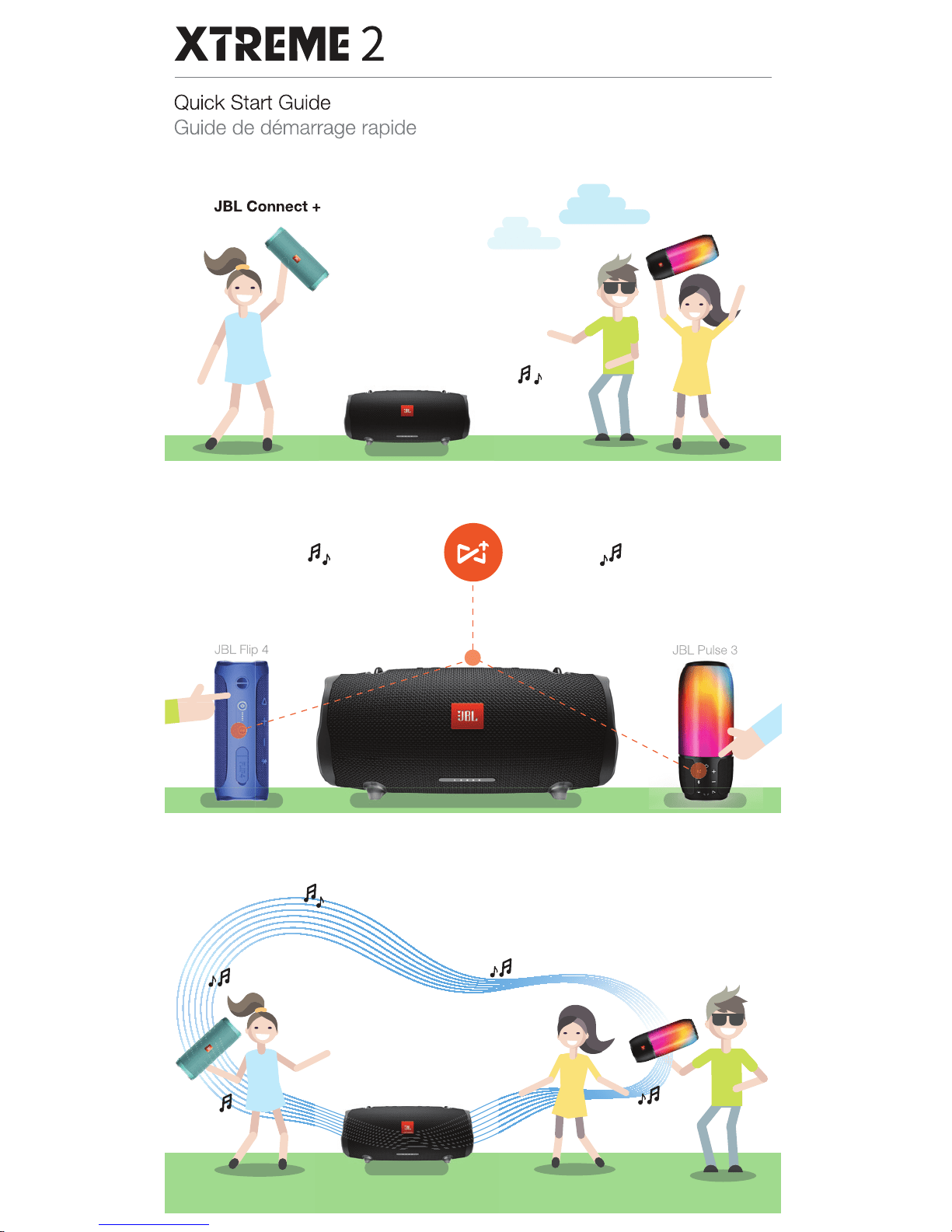
LED
Behavior
@)Power
On
Stand
by
Bluetooth
pairing mode
Bluetooth
connected
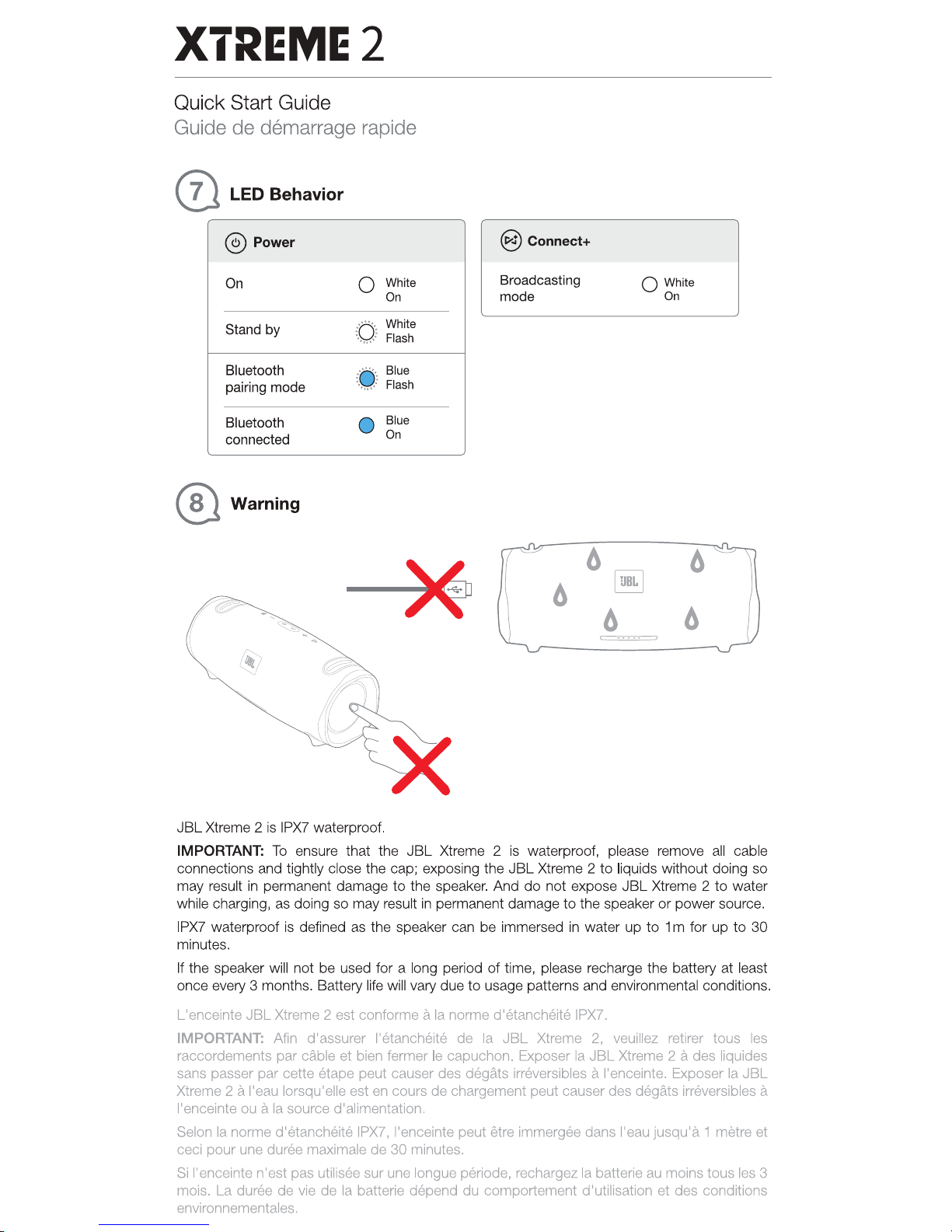
® Warning
Q White
On
:rt
: White
·
~;
Flash
: .
.....
:
Blue
• ..... •
Flash
•
Blue
On
-*
JBL
Xtreme 2
is
IPX7
waterproof.
@)Connect+
Broadcasting
mode
0 White
On
IMPORTANT:
To
ensure that the
JBL
Xtreme 2
is
waterproof, please remove all cable
connections and tightly close the cap; exposing the
JBL
Xtreme 2
to
liquids without doing so
may result
in
permanent damage
to
the speaker. And
do
not expose
JBL
Xtreme 2
to
water
while charging, as doing so may result
in
permanent damage
to
the speaker
or
power source.
IPX7
waterproof is defined as the speaker can be immersed
in
water up
to
1m for
up
to
30
minutes.
If the speaker will not
be
used for a long period
of
time, please recharge the battery
at
least
once every 3 months. Battery life will vary due
to
usage patterns and environmental conditions.
L'enceinte JBLXtreme 2 est conforme a
Ia
norme d'etancheite IPX7.
IMPORTANT:
Afin d'assurer l'etancheite
de
Ia
JBL
Xtreme
2,
veuillez retirer taus
les
raccordements par cable et bien fermer
le
capuchon. Exposer
Ia
JBL
Xtreme 2 a des liquides
sans passer par cette
€!tape
peut causer des degats irreversibles a !'enceinte. Exposer
Ia
JBL
Xtreme 2 a l'eau lorsqu'elle est en cours
de
chargement peut causer des degats irreversibles a
!'enceinte ou a
Ia
source d'alimentation.
Salon
Ia
norma d'etancheite IPX7, !'enceinte peut etre immergee dans l'eau jusqu'a 1 metra at
ceci pour une duree maximale
de
30
minutes.
Si
!'enceinte n'est pas utilisee sur une longue periode, rechargez
Ia
batterie
au
mains taus les 3
mois.
La
duree de vie de
Ia
batterie depend
du
comportement
d'
utilisation et des conditions
environnementales.
Downloaded from www.ManualsFile.com manuals search engine
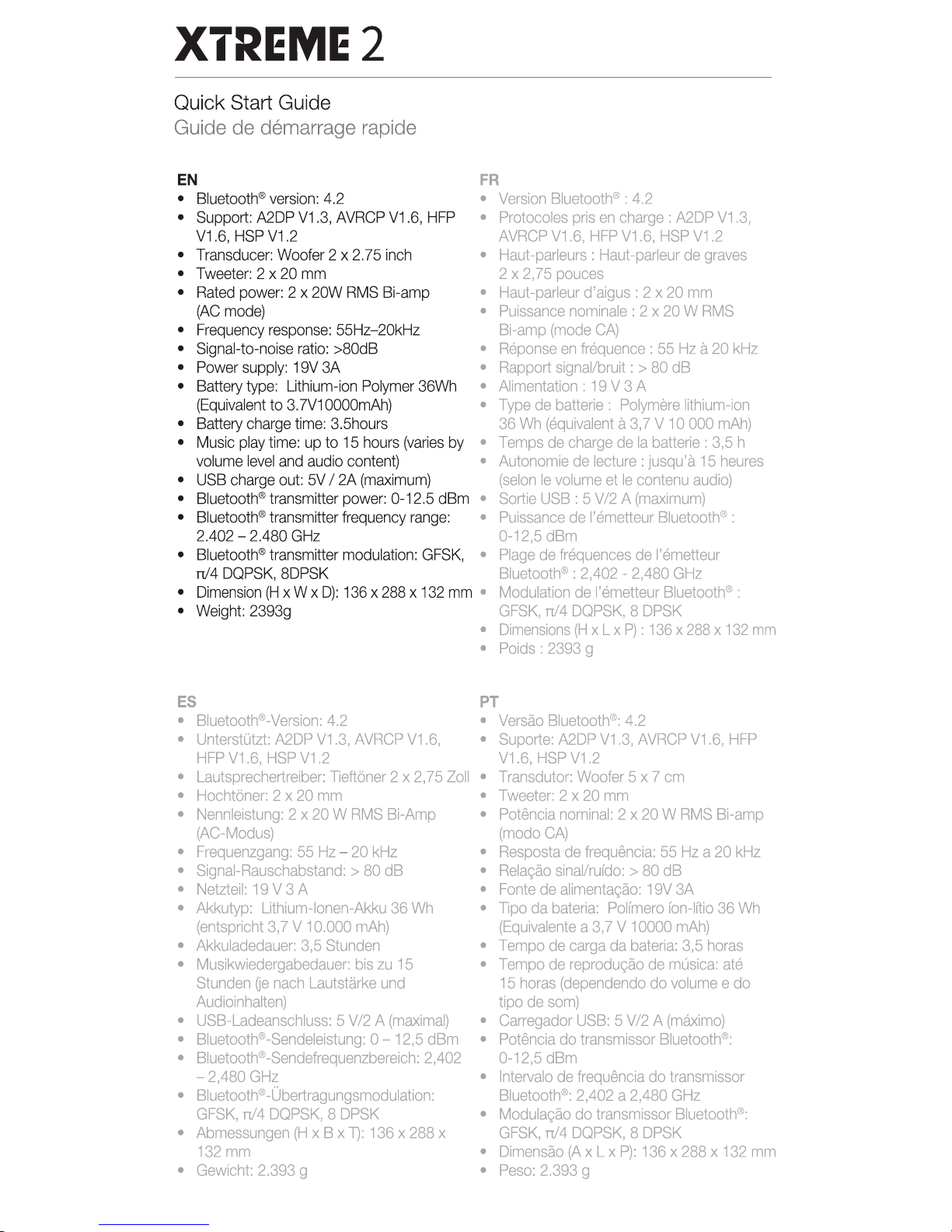
XTREME2
Quick Start Guide
Guide
de
demarrage
rapide
EN
FR
•
Bluetooth®
version:
4.2
•
•
Support:
A2DP
V1.3,
AVRCP
V1.6,
HFP
•
V1.6,
HSP
V1.2
•
Transducer:
Woofer
2 x
2.75
inch
•
•
Tweeter:
2 x 20
mm
•
Rated
power:
2 x
20W
RMS
Bi-amp
•
(AC
mode)
•
•
Frequency
response:
55Hz-20kHz
•
Signal-to-noise
ratio:
>BOdB
•
•
Power
supply:
19V
3A
•
•
Battery
type:
Uthium-ion
Polymer
36Wh
•
(Equivalent
to
3.N10000mAh) •
•
Battery
charge
time:
3.5hours
•
Music
play
time:
up
to
15
hours
(varies
by
•
volume
level
and
audio
content)
•
•
USB
charge
out:
5V
I 2A
(maximum)
•
Bluetooth®
transmitter
power:
0-12.5
dBm
•
•
Bluetooth®
transmitter
frequency
range:
•
2.402
-
2.480
GHz
•
Bluetooth®
transmitter
modulation:
GFSK,
•
n/4
DQPSK,
8DPSK
•
Dimension
(H
x W x
D):
136
x
288
x
132
mm
•
•
Weight:
2393g
•
•
Version
Bluetooth®
:
4.2
Protocoles
pris
en
charge:
A2DP
V1.3,
AVRCP
V1.6,
HFP
V1.6,
HSP
V1.2
Haut
-parleurs
:
Haut
-par1eur
de
graves
2 x
2,75
pouces
Haut-parleur
d'aigus: 2 x
20
mm
Puissance
nominale
: 2 x
20
W
RMS
Bi-amp
(mode
CA}
Reponse
en
frequence
:
55
Hz
a
20
kHz
Rapport
signaVbruit:
>
80
dB
Alimentation
:
19
V 3 A
Type
de
batterie
:
Polymere
lithium-ion
36
Wh
(equivalent
a
3,
7 V 1 0
000
mAh)
Temps
de
charge
de
Ia
batterie:
3,5
h
Autonomie
de
lecture:
jusqu'a
15
heures
(selon
le
volume
et
le
contenu
audio)
Sortie
USB
: 5 V /2 A
(maximum)
Puissance
de
l'emetteur
Bluetooth®:
0-12,5
dBm
Plage
de
frequences
de
l'emetteur
Bluetooth®
:
2,402
-
2,480
GHz
Modulation
de
l'emetteur
Bluetoothil!l:
GFSK,
n/4
DQPSK,
8
DPSK
Dimensions
(H
x L x
P)
:
136
x
288
x
132
mm
Poids
:
2393
g
ES
PT
•
BluetoothiiD-Version:
4.2
•
Versao
BluetoothiiD:
4.2
•
UnterstOtzt:
A2DP
V1.3,
AVRCP
V1.6,
•
Suporte:
A2DP
V1.3,
AVRCP
V1.6,
HFP
HFP
V1.6,
HSP
V1.2
V1.6,
HSP
V1.2
•
Lautsprechertreiber:
1leftoner 2 x
2,75
Zoll
•
Transdutor:
Woofer
5 x 7
em
•
Hochtoner:
2 x
20
mm
•
Tweeter:
2 x
20
mm
•
Nennleistung:
2 x
20
W
RMS
Bi-Amp
•
Potencia
nominal:
2 x
20
W
RMS
Bi-amp
(AC-Modus)
(modo
CA}
•
Frequenzgang:
55
Hz-
20
kHz
•
Resposta
de
frequencia:
55
Hz
a
20
kHz
•
Signai-Rauschabstand:
>
80
dB
•
Relacao
sinallrufdo:
>
80
dB
•
Netzteil:
19
v 3 A •
Fonte
de
alimentacao:
19V
3A
•
Akkutyp:
Uthium-lonen-Akku
36
Wh
• 1lpo
da
bateria:
Polfmero
fon-lftio
36
Wh
(entspricht
3,
7 V
10.000
mAh)
(Equivalents
a
3,7
V
10000
mAh)
•
Akkuladedauer:
3,5
Stunden
•
Tempo
de
carga
da
bateria:
3,5
horas
•
Musikwiedergabedauer:
bis
zu
15
•
Tempo
de
reprodu~
de
musica:
ate
Stunden
Oe
nach
Lautstarke
und
15
horas
(dependendo
do
volume
e do
Audioinhalten)
tipo
de
som)
•
USB-Ladeanschluss:
5
V/2
A
(maximal)
•
Garregador
USB:
5
V/2
A
(maximo)
•
Bluetooth®-Sendeleistung:
0 -
12,5
dBm
•
Potencia
do
transmissor
Bluetooth®:
•
BluetoothiiD-Sendefrequenzbereich:
2,402
0-12,5
dBm
-
2,480
GHz
•
Intervale
de
frequencia
do
transmissor
•
BluetoothiiD-Obertragungsmodulation:
Bluetoothe:
2,402
a
2,480
GHz
GFSK,
n/4
DQPSK,
8
DPSK
•
Modulacao
do
transmissor
Bluetooth®:
•
Abmessungen
(H
x B x 1):
136
x
288
x
GFSK,
n/4
DQPSK,
8
DPSK
132
mm
•
Dimensao
fAx L x
P):
136
x
288
x
132
mm
•
Gewicht:
2.393
g •
Peso:
2.393
g
Downloaded from www.ManualsFile.com manuals search engine
XTREME2
Quick Start Guide
Guide
de
demarrage
rapide
0
Bluetooth·
The Bluetooth®
word
mark and logos are registered trademarks owned by Bluetooth
SIG, Inc. and any use
of
such marks
by
HARMAN International Industries, Incorporated
is under license. Other trademarks and trade names are those
of
their respective owners.
Toprosa~
MapKa:
JBL
Ha3HaY€HI!1€
TOBapa:
AKH1BHa~
aKYCH1Y€CKa~
CI!1CTeMa
Vl3rOTOBII1T€nb:
XapMaH
VlHrepHew
HJl
VlHAacrp1113
VlHKopnope~TeA,
CWA,
06901
KoHHeKH1KYT,
r.CnMcpopA,
ArnaHTiiiK
Crp111r
400,
Ocp1!1C
1500
CrpaHa
npoiiiCXO>KP,eHIII~:
KiiiTa~
VlMnoprep
B
Poccillto:
000
"XAPMAH
PYC
Ci11A~3c",
Poccill~,
127018,
r.MocKsa,
yn.
ABHHL\eB,
A.12,
K 1
lapaHTI!1~Hbli:1
nepi!IOA:
1
rDA
VlHcpOpMa4H~
0
cepB111CHbiX
4eHTpax:
www.harman.com/ru ren. +
7-800-700-0467
CpoKcny>t<6bl:
2
roAa
[H(
Tosap
cepri11¢1111..1111POBaH
[
Aara
npo1!13BOACTBa:
Aara
1!13rorosneHill~
ycrpo~crsa
onpeAen~eT~
no
ABYM
6yKBeHHbiM
o6o3HaYeHiii~M
i113
sropo~
rpynnbl
CiiiMBOJlOB
cep111i:1HOrD
HOMepa
H3A€JlH~,
cneAYIOll.\IIIX
nocne
pa3A€11iiiTenbHoro
3HaKa
«-».
KOAIIIPOBKa
coorsercrsyer
nop~AKY
6yKB
naTiiiHCKOro
ancpaBiiiTa,
HaYiiiHa~
C
~HBapfl
2010
roAa:
000000-MYOOOOOOO,
rAe
«M»-
M€014
npo1!13BOACTBa
(A-
flHBapb,
B-
¢espan
b,
C- Mapr
111
T.A.)
ill
«Y»-
rDA
n
po1!13BOACTBa
(A-
2010,
B-
2011,
C-
2012
ill
T.A.).
e)ANATEL
Este
equipamento opera
em
carater
secundano,
isto
a,
nao tem direito a
prot~o
contra interfertlncia
prejudicial,
mesmo
de
estacoes do
mesmo
tipo, e nao pode
causar
interferAncia
a
sistemas
operando
em
can~ter
primano"
Este
produto
esta
homologado
pela
ANA
TEL,
de acordo
com
os procedimentos
regulamentados
pela
Resoluc§o
242/2000, e atende aos requisites tecnicos
aplicados.
Para
maiores
informacoes,
consulte
o
site
da
ANA
TEL-
www.anatel.gov.br
TR04515_B
Downloaded from www.ManualsFile.com manuals search engine
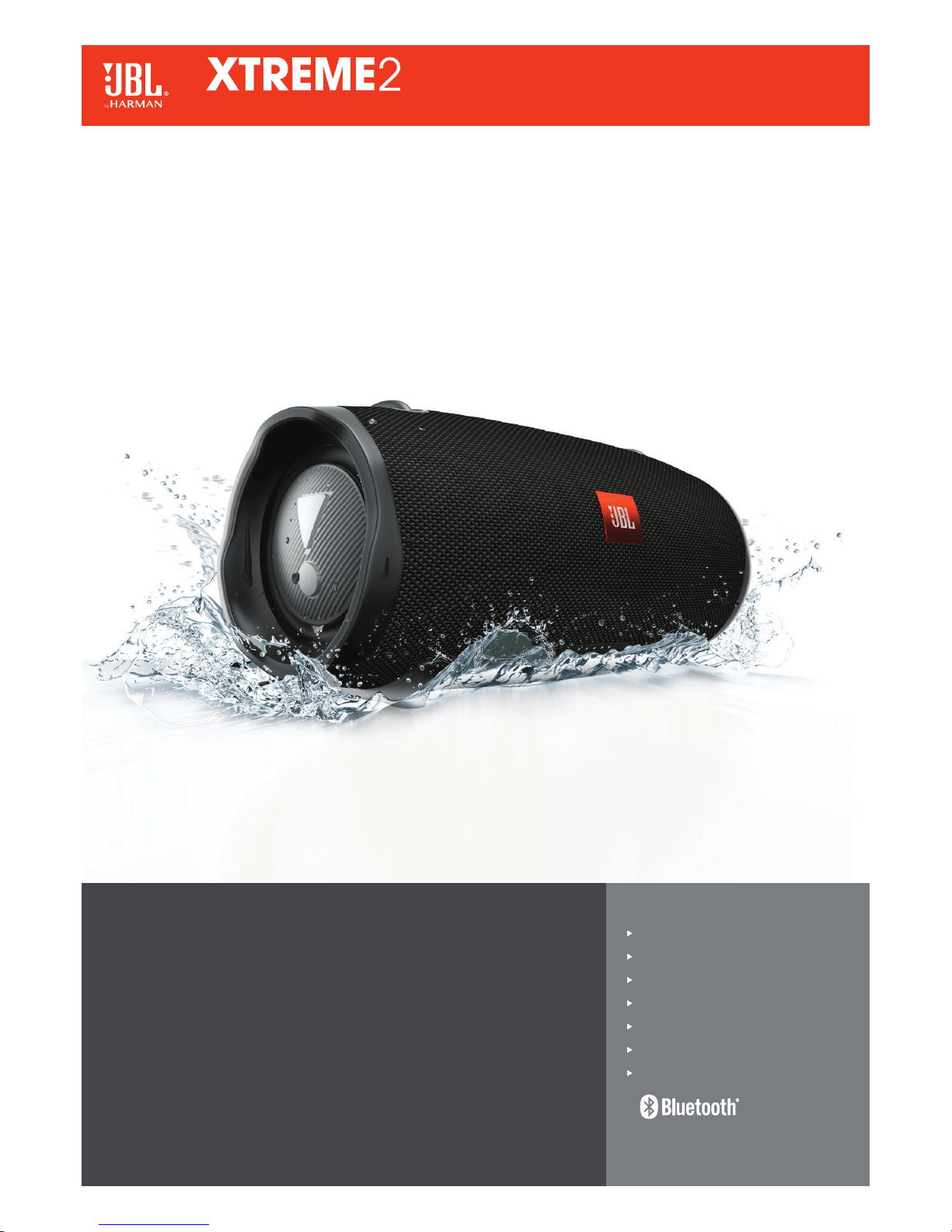
Features
Wireless Bluetooth Streaming
15 hours of playtime
IPX7 waterproof
JBL Connect+
Speakerphone
Durable fabric and rugged material
JBL Bass Radiator
Unleash powerful sound everywhere.
JBL Xtreme 2 is the ultimate portable Bluetooth speaker that effortlessly delivers dynamic
and immersive stereo sound. The speaker is armed with four drivers, two JBL Bass Radiators,
a rechargeable 10,000mAh Li-ion battery supporting up to 15 hours of playtime. On top
of these, the speaker carries a convenient USB charge out. The speaker is IPX7 rated,
featuring a waterproof design, with rugged fabric in exclusive colors complementing the
Xtreme 2. Together with JBL Connect+ it can wirelessly link more than 100 JBL Connect+
enabled speakers to elevate your listening experience and making the party even bigger.
The speaker carries integrated hooks, a durable metal base, and an added bottle opener to
the carrying strap adding to the consumer convenience level whilst on the go. Not to forget
it’s just as well a perfect audio solution for any home. Whether in the living room, poolside,
or tailgating for the big game, the JBL Xtreme 2 brings bold sound, wherever!
Portable Bluetooth
®
Speaker
Downloaded from www.ManualsFile.com manuals search engine
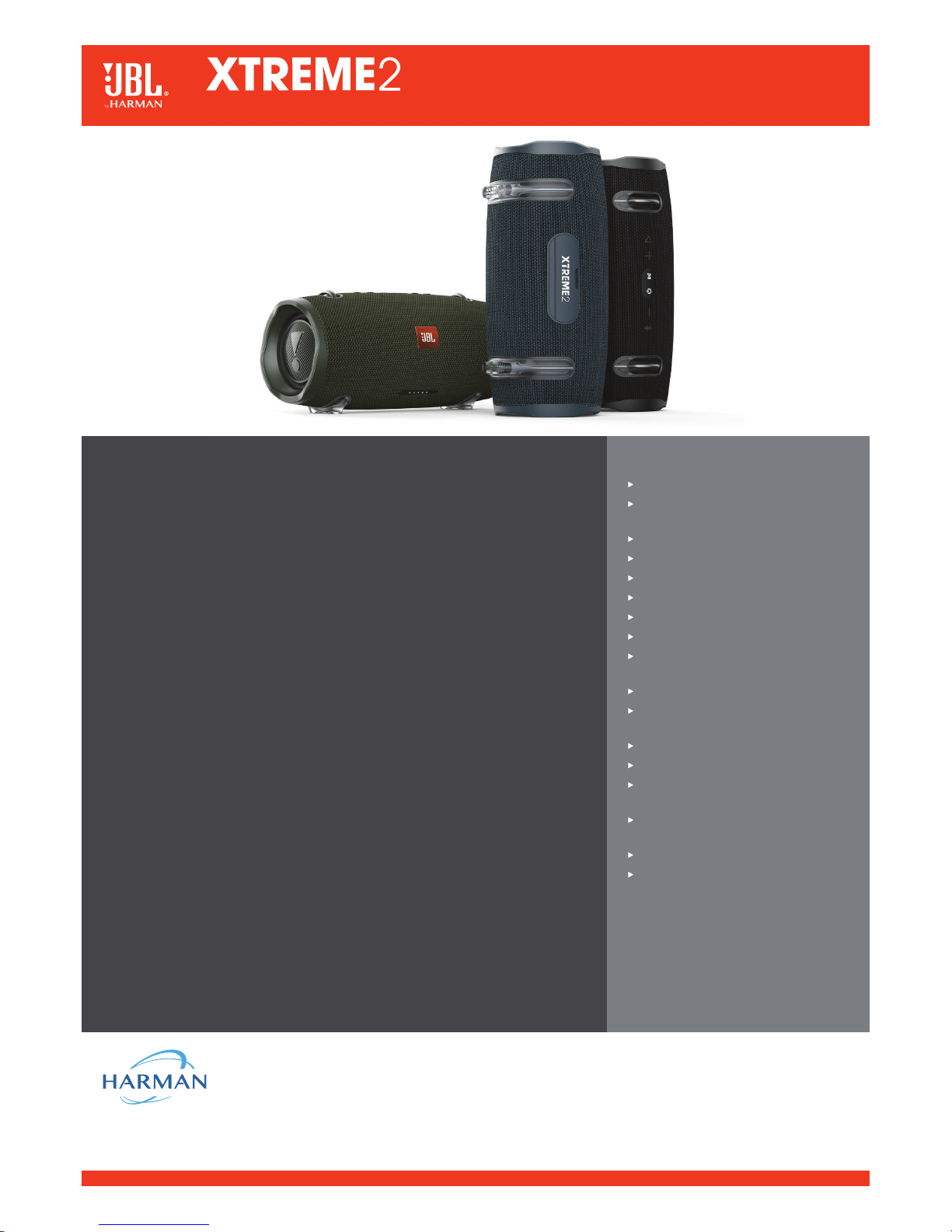
HARMAN International Industries, Incorporated
8500 Balboa Boulevard, Northridge, CA 91329 USA
www.jbl.com
© 2018 HARMAN International Industries, Incorporated. All rights reserved. JBL is a trademark of HARMAN
International Industries, Incorporated, registered in the United States and/or other countries. The Bluetooth
®
word
mark and logos are registered trademarks owned by Bluetooth SIG, Inc. and any use of such marks by HARMAN
International Industries, Incorporated is under license. Other trademarks and trade names are those of their
respective owners. Features, specifications and appearance are subject to change without notice.
Technical specifications:
Bluetooth
®
version: 4.2
Support: A2DP V1.3, AVRCP V1.6, HFP V1.6,
HSP V1.2
Transducer: Woofer 2 x 2.75 inch
Tweeter: 2 x 20mm
Rated power: 2 x 20W RMS Bi-amp (AC mode)
Frequency response: 55Hz–20kHz
Signal-to-noise ratio: >80dB
Power supply: 19V 3A
Battery type: Lithium-ion Polymer 36Wh
(Equivalent to 3.7V10000mAh)
Battery charge time: 3.5 hours
Music play time: up to 15 hours (varies by
volume level and audio content)
USB charge out: 5V/2A (maximum)
Bluetooth
®
transmitter power: 0-12.5dBm
Bluetooth
®
transmitter frequency range:
2.402 – 2.480GHz
Bluetooth
®
transmitter modulation:
GFSK, π/4 DQPSK, 8DPSK
Dimension (H x W x D): 136 x 288 x 132mm
Weight: 2393g
Features and Benefits
Wireless Bluetooth
®
Streaming
Wirelessly connect up to 2 smartphones or tablets to the speaker and take turns enjoying
immersive stereo sound.
15 hours of playtime
The built-in rechargeable Li-ion battery supports up to 15 hours of playtime and effortlessly
charges your device via an USB port.
IPX7 waterproof
Take the Xtreme 2 to the beach or the pool without worrying about spills or even submersion
in water.
JBL Connect+
Amplify your listening experience to epic levels and rock the party perfectly by wirelessly
connecting more than 100 JBL connect+ enabled speakers.
Speakerphone
Take crystal clear calls from your speaker with the touch of a button thanks to the noise
and echo cancelling speakerphone.
Durable fabric and rugged material
The durable fabric material and rugged rubber housing allows your speaker to outlast all of
your adventures.
JBL Bass Radiator
Dual passive radiators deliver powerful, ear catching JBL sound that resonates loud and clear.
What’s in the box:
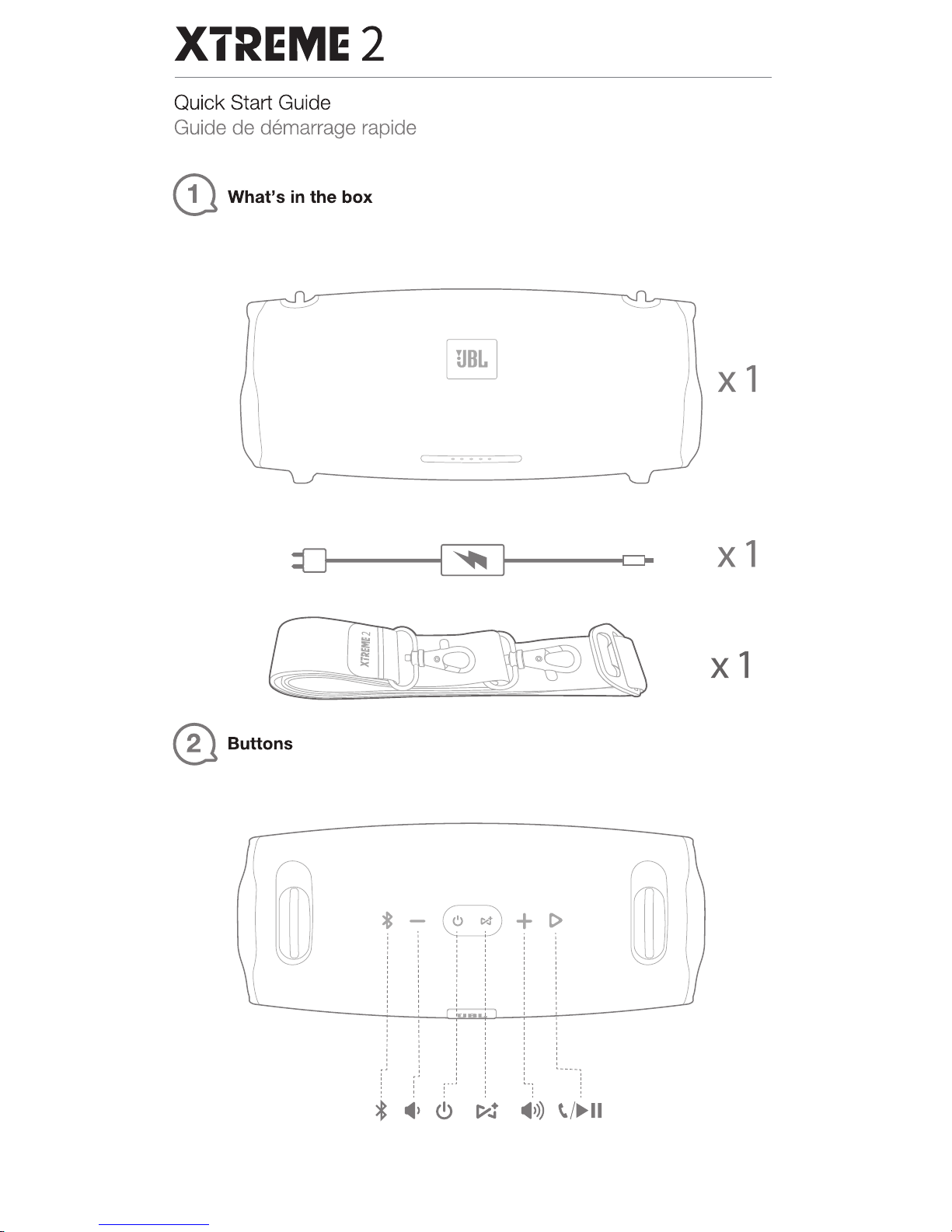
1 x JBL XTREME 2
1 x Power adaptor
1 x Strap
1 x Quick start guide
1 x Safety sheet
1 x Warranty card
Portable Bluetooth
®
Speaker
Downloaded from www.ManualsFile.com manuals search engine
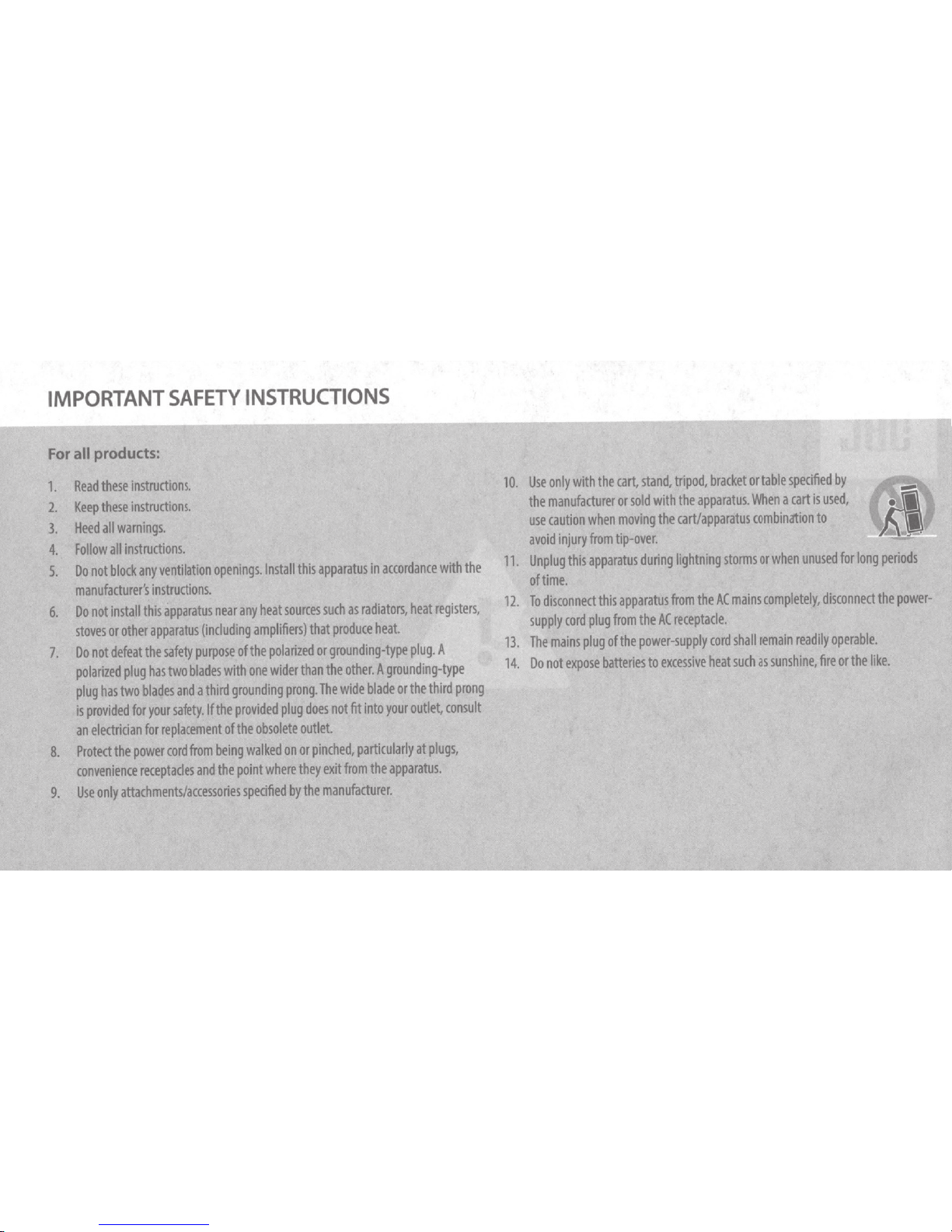
IMPORTANT
SAFETY
INSTRUCTIONS
For
all prOducts:
1.
Read
these
Instructions.
2.
Keep
these
instructions.
3.
Heed
all
warnings.
4.
Follow
all
instrudions.
5.
Do
not
blodt
any
ventilation
openings.
Install
this
apparatus
in
accordance
with
the
manufactum's
instructions.
6.
Do
not
install
this
ipparatus
near
any
heat
soams
such
as
radiators,
heat
registers,
stoves
or
other
apparatus
(including
amplifiers)
that
produce
heat.
7.
Do
not
defeat
the
safety
purpose
of
the
polarized
or
grounding-type
plug.
A
polarized
plug
has
two
blades
with
one
wider
than
the
other.
A
grounding-type
plug
has
two
bla4es
and
a
third
grounding
prong.
The
wide
blade
or
the
third
prong
is
provided
for
your
safety.
If
the
provided
plug
does
not
fit
Into
your
outlet,
consult
an
electrkian
for
replacement
of
the
obsolete
outlet
8.
Protect
the
power
cord
from
being
walked
on
or
pinched,
particularly
at
plugs,
convenience
receptacles
and
the
point
where
they
exit
from
the
apparatus.
9.
Use
only
attachments/accessories
specified
by
the
manufacturer.
10.
Use
only
with
the
cart,
stand,
tripod,
bracket
or
table
specified
by
(I)
the
manufacturer
or
sold
with
the
apparatus.
When
a
cart
is
used,
~
....
use
caution
when
moving
the
carVapparatus
combination
to
• ,
avoid
injury
from
tip-over.
~-
11.
Unplug
this
apparatus
during
lightning
stonns
or
when
unused
for
long
periods
of
time.
12.
To
disconnect
this
apparatus
from
the
AC
mains
completely,
disconnect
the
power-
supply
cord
plug
from
the
AC
receptacle.
13.
The
mains
plug
of
the
power-supply
cord
shall
remain
readily
operable.
14.
Do
not
expose
batteries
to
excessive
heat
such
as
sunshine,
fire
or
the
like.
Downloaded from www.ManualsFile.com manuals search engine
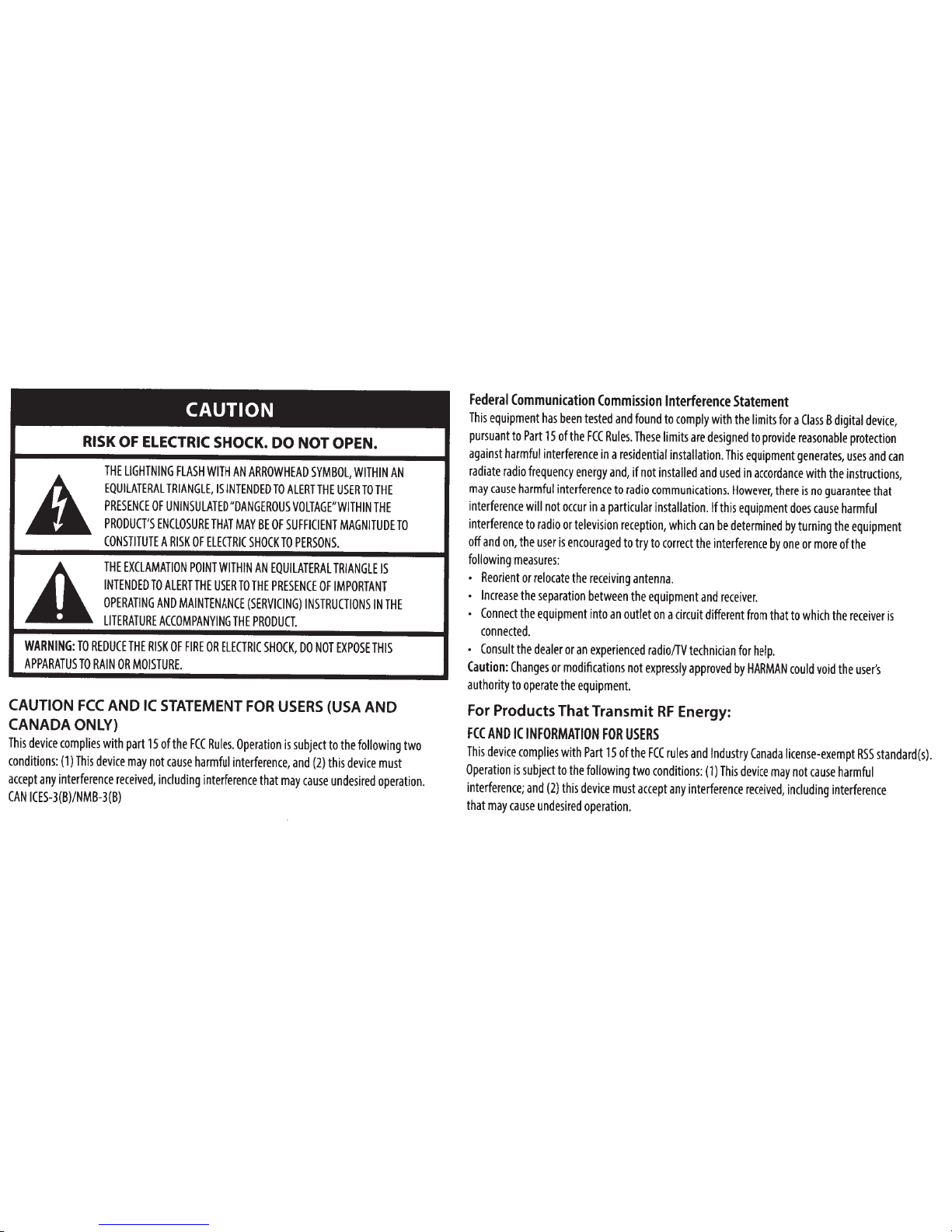
CAUTION
RISK
OF
ELECTRIC
SHOCK.
DO NOT
OPEN.
A
THE
LIGHTNING
FLASH
WITH
AN
ARROWHEAD
SYMBOL,
WITHIN
AN
EQUILATERAL
TRIANGLE,
IS
INTENDED
TO
ALERT
THE
USER
TO
THE
PRESENCE
OF
UNINSULATED
"DANGEROUS
VOLTAGE"WITHIN
THE
PRODUCT'S
ENCLOSURE
THAT
MAY
BE
OF
SUFFICIENT
MAGNITUDE
TO
CONSTITUTE
A
RISK
OF
ELECTRIC
SHOCK
TO
PERSONS.
A
THE
EXCLAMATION
POINT
WITHIN
AN
EQUILATERAL
TRIANGLE
IS
INTENDED
TO
ALERT
THE
USER
TO
THE
PRESENCE
OF
IMPORTANT
OPERATING
AND
MAINTENANCE
(SERVICING)
INSTRUCTIONS
IN
THE
LITERATURE
ACCOMPANYING
THE
PRODUCT.
WARNING:
TO
REDUCE
THE
RISK
OF
FIRE
OR
ELECTRIC
SHOCK,
DO
NOT
EXPOSE
THIS
APPARATUS
TO
RAIN
OR
MOISTURE.
CAUTION
FCC
AND
IC
STATEMENT
FOR
USERS
(USA
AND
CANADA
ONLY)
This
device
complies
with
part
15
of
the
FCC
Rules.
Operation
is
subject
to
the
following
two
conditions:
(1)
This
device
may
not
cause
harmful
interference,
and
(2)
this
device
must
accept
any
interference
received,
including
interference
that
may
cause
undesired
operation
.
CAN
ICES-3(B)/NMB-3(B)
Federal
Communication
Commission
Interference
Statement
This
equipment
has
been
tested
and
found
to
comply
with
the
limits
for
a
Class
B
digital
device,
pursuant
to
Part
15
of
the
FCC
Rules.
These
limits
are
designed
to
provide
reasonable
protection
against
harmful
interference
in
a
residential
installation.
This
equipment
generates,
uses
and
can
radiate
radio
frequency
energy
and,
if
not
installed
and
used
in
accordance
with
the
instructions,
may
cause
harmful
interference
to
radio
communications.
However,
there
is
no
guarantee
that
interference
will
not
occur
in
a
particular
installation.
If
this
equipment
does
cause
harmful
interference
to
radio
or
television
reception,
which
can
be
determined
by
turning
the
equipment
off
and
on,
the
user
is
encouraged
to
try
to
correct
the
interference
by
one
or
more
of
the
following
measures:
•
Reorient
or
relocate
the
receiving
antenna
.
•
Increase
the
separation
between
the
equipment
and
receiver.
•
Connect
the
equipment
into
an
outlet
on
a
circuit
different
from
that
to
which
the
receiver
is
connected.
•
Consult
the
dealer
or
an
experienced
radio/TV
technician
for
help.
Caution:
Changes
or
modifications
not
expressly
approved
by
HARMAN
could
void
the
user's
authority
to
operate
the
equipment.
For Products That Transmit
RF
Energy:
FCC
AND
IC
INFORMATION
FOR
USERS
This
device
complies
with
Part
15
ofthe
FCC
rules
and
Industry
Canada
license-exempt
RSS
standard(s).
Operation
is
subject
to
the
following
two
conditions
:
(1)
This
device
may
not
cause
harmful
interference;
and
(2)
this
device
must
accept
any
interference
received,
including
interference
that
may
cause
undesired
operation.
Downloaded from www.ManualsFile.com manuals search engine
FCUIC
Radiation
Exposure
Statement
This
equipment
complies
with
FCC/IC
RSS-102
radiation
exposure
limits
set
forth
for
an
uncontrolled
environment.
This
equipment
should
be
installed
and
operated
with
minimum
distance
20cm
between
the
radiator
&
your
body.
For Wi-Fi
SG
device
FCC
Caution:
High
power
radars
are
allocated
as
primary
users
of
the
5.25
to
5.35
GHz
and
5.65
to
5.85
GHz
bands.
These
radar
stations
can
cause
interference
with
and/or
damage
this
device.
No
configuration
controls
are
provided
for
this
wireless
equipment
allowing
any
change
in
the
frequency
of
operations
outside
the
FCC
grant
of
authorization
for
US
operation
according
to
Part
15.407
of
the
FCC
rules.
IC
Caution:
User
should
also
be
advised
that:
(i)
The
device
for
operation
in
the
band
5150-
5250
MHz
is
only
for
indoor
use
to
reduce
the
potential
for
harmful
interference
to
co-channel
mobile
satellite
systems;
(ii)
the
maximum
antenna
gain
permitted
for
devices
in
the
bands
5250-
5350
MHz
and
5470-
5725
MHz
shall
comply
with
the
e.i.r.p
.
limit:
and
(iii)
The
maximum
antenna
gain
permitted
for
devices
in
the
band
5725-
5825
MHz
shall
comply
with
the
e.i.r.p.limits
specified
for
point-to-point
and
non
point-to-point
operation
as
appropriate.
(iv)
Users
should
also
be
advised
that
high-power
radars
are
allocated
as
primary
users
(i.e.
priority
users)
of
the
bands
5250-
5350
MHz
and
5650-
5850
MHz
and
that
these
radars
could
cause
interference
and/or
damage
to
LE-LAN
devices
.
Exposure
of
humans
to
RF
fields
(RSS-102)
The
computers
employ
low
gain
integral
antennas
that
do
not
emit
RF
field
in
excess
of
Health
Canada
limits
for
the
general
population
;
consult
Safety
Code
6,
obtainable
from
Health
Canada's
Web
site
at
http://www.hc-sc.gc.ca/
The
radiated
energy
from
the
antennas
connected
to
the
wireless
adapters
conforms
to
the
IC
limit
of
the
RF
exposure
requirement
regarding
IC
RSS-1
02,
Issue
5
clause
4.
SAR
tests
are
conducted
using
recommended
operating
positions
accepted
by
the
FCC/
RSS
with
the
device
transmitting
at
its
highest
certified
power
level
in
all
tested
frequency
band
without
distance
attaching
away
from
the
body.
Non-compliance
with
the
above
restrictions
may
result
in
violation
of
FCC
RF
exposure
guidelines.
Use
Restriction
Attention
in
France,
operation
is
limited
to
indoor
use
within
the
band
5150-5350
MHz.
For Products
with
Radio Receivers
That
Can Use
an
External
Antenna
(USA
ONLY):
CATV
(Cable
TV)
or
Antenna
Grounding
If
an
outside
antenna
or
cable
system
is
connected
to
this
product,
be
certain
that
it
is
grounded
so
as
to
provide
some
protection
against
voltage
surges
and
static
charges.
Section
810
of
the
National
Electrical
Code
(NEC),
ANSI/NFPA
No
.
70-1984,
provides
information
with
respect
to
proper
grounding
of
the
mast
and
supporting
structure,
grounding
of
the
lead
-
in
wire
to
an
antenna
discharge
unit,
size
of
grounding
conductors,
location
of
antenna
discharge
unit
,
connection
to
grounding
electrodes
and
requirements
of
the
grounding
electrode.
Downloaded from www.ManualsFile.com manuals search engine
Note
to
CATV
System
Installer:
This
reminder
is
provided
to
call
the
CATV
(cable
TV)
system
installer's
attention
to
article
820-40
of
the
NEC,
which
provides
guidelines
for
proper
grounding
and,
in
particular,
specifies
that
the
cable
ground
shall
be
connected
to
the
grounding
system
of
the
building,
as
close
to
the
point
of
cable
entry
as
possible
.
For
CD/DVD/Biu-ray
Disc™
Players:
Caution:
This
product
uses
a
laser
system.
To
prevent
direct
exposure
to
the
laser
beam,
do
not
open
the
cabinet
enclosure
or
defeat
any
of
the
safety
mechanisms
provided
for
your
protection.
DO
NOT
STARE
INTO
THE
LASER
BEAM
.
To
ensure
proper
use
of
this
product,
please
read
the
owner's
manual
carefully
and
retain
it
for
future
use
.
Should
the
unit
require
maintenance
or
repair,
please
contact
your
local
JBL
service
center
.
Refer
servicing
to
qualified
personnel
only.
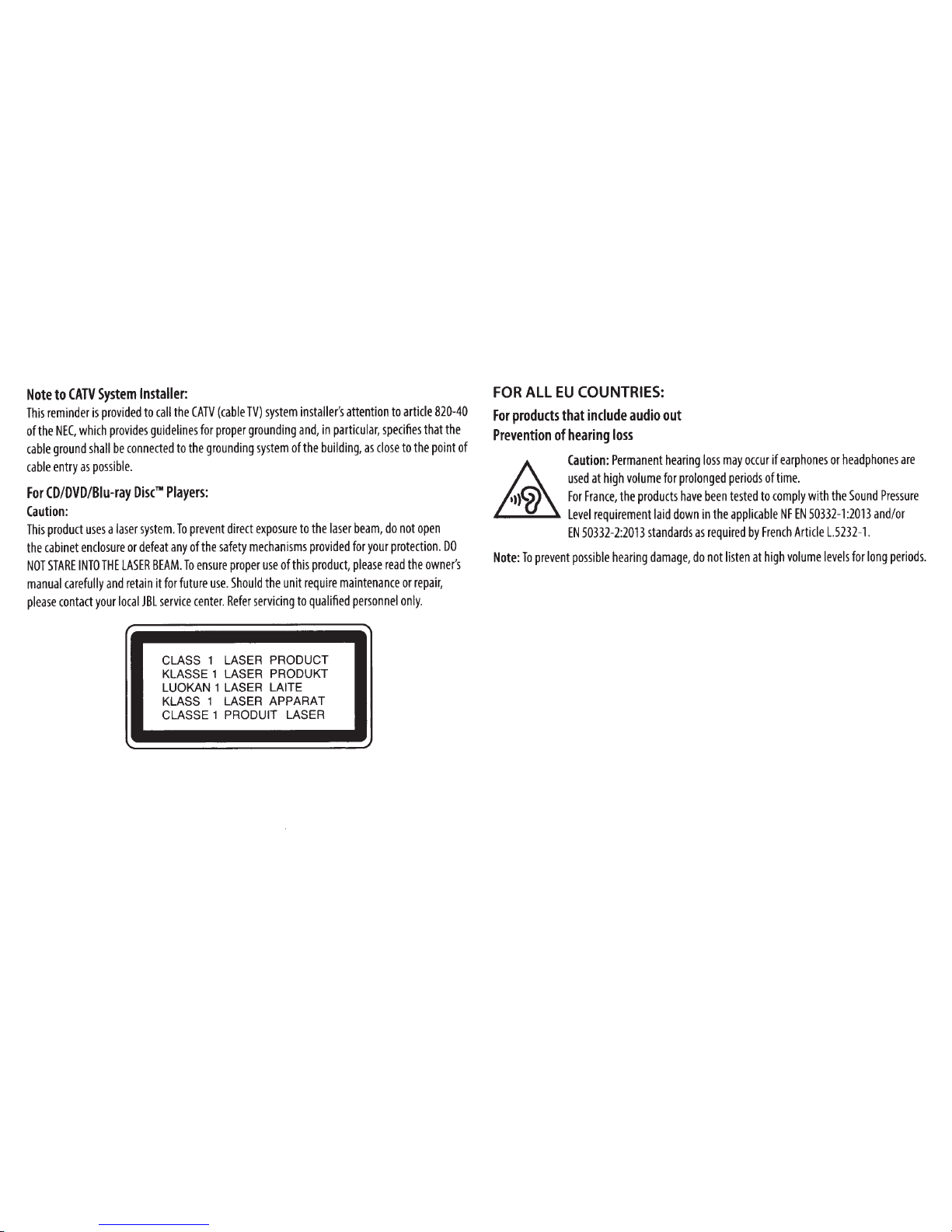
CLASS
1
LASER PRODUCT
KLASSE1 LASER PRODUKT
LUOKAN 1 LASER LAITE
KLASS
1 LASER APPARAT
CLASSE
1
PRODUIT LASER
•
FOR
ALL
EU
COUNTRIES:
For
products
that
include
audio
out
Prevention
of
hearing
loss
Caution:
Permanent
hearing
loss
may
occur
if
earphones
or
headphones
are
used
at
high
volume
for
prolonged
periods
of
time
.
For
France,
the
products
have
been
tested
to
comply
with
the
Sound
Pressure
Level
requirement
laid
down
in
the
applicable
NF
EN
50332-1
:
2013
and/or
EN
50332-2:2013
standards
as
required
by
French
Article
L.5232-1.
Note:
To
prevent
possible
hearing
damage
,
do
not
listen
at
high
volume
levels
for
long
periods.
Downloaded from www.ManualsFile.com manuals search engine
WEEE
Notice
The
Directive
on
Waste
Electrical
and
Electronic
Equipment
(WEEE),
which
entered
into
force
as
European
law
on
14/02/2014,
resulted
in
a
major
change
in
the
treatment
of
electrical
equipment
at
end-of-l
i
fe
.
The
purpose
of
this
Directive
is,
as
a
first
priority,
the
prevention
ofWEEE,
and
in
addition,
to
promote
the
reuse,
recycling
and
other
forms
of
recovery
of
such
wastes
so
as
to
reduce
disposal.
The
WEEE
logo
on
the
product
or
on
its
box
indicating
collection
for
electrical
and
electronic
equipment
consists
of
the
crossed-out
wheeled
bin,
as
shown
below
.
This
product
must
not
be
disposed
of
or
dumped
with
your
other
household
waste
.
You
are
liable
to
dispose
of
all
your
electronic
or
electrical
waste
equipment
by
relocating
over
to
the
specified
collection
point
for
recycling
of
such
hazardous
waste
.
lsolated
collection
and
proper
recovery
of
your
electronic
and
electrical
waste
equipment
at
the
time
of
disposal
will
allow
us
to
help
conserving
natural
resources.
Moreover,
proper
recycling
of
the
electronic
and
electrical
waste
equipment
will
ensure
safety
of
human
health
and
environment.
For
more
information
about
electronic
and
electrical
waste
equipment
disposal,
recovery,
and
collection
points,
please
contact
your
local
city
center,
household
waste
disposal
service,
shop
from
where
you
purchased
the
equipment,
or
manufacturer
of
the
equipment.
RoHS
Compliance
This
product
is
in
compliance
with
Directive
2011/65/EU
of
the
European
Parliament
and
of
the
Council
of
8
June
2011
on
the
restriction
of
the
use
of
certain
hazardous
substances
in
el
ectr
i
ca
l
and
electronic
equipment.
For
Products That
Include
Batteries
EU
Batteries
Directive
2013/56/EU
A
new
battery
di
rective
2013
/
56
/
EU
on
Battery
and
Accumu
l
ato
r
rep
l
acing
di
rect
i
ve
entered
into
force
on
the
01/07/2015.
The
directive
applies
to
all
types
of
batteries
and
accumulators
(AA,
AAA,
button
cells
,
lead
acid,
rechargeable
packs)
including
those
incorpo
r
ated
i
nto
appliances
except
for
mi
litary,
medical
and
power
tool
applications
.
The
directive
se
ts
out
ru
l
es
for
collection,
treatment,
recycling
and
disposal
of
batte
r
ies
,
and
aims
to
pr
oh
ibit
certa
in
hazardous
substances
and
to
improve
environmental
performance
of
batter
i
es
and
all
opera
t
ors
in
the
supply
chain.
Instructions
for
Users
on
Removal,
Recycling
and
Disposal
of
Used
Batteries
To
remove
the
batteries
from
your
equipment
or
remote
contro
l,
reverse
the
procedure
described
in
the
owner
's
manual
for
inserting
batteries.
For
products
wi
th
a
bui
l
t-
in
battery
that
l
asts
for
the
lifetime
of
the
product
,
removal
may
not
be
possible
for
the
user.
In
this
case
,
recycling
or
recovery
centers
handle
the
dismantling
of
the
product
and
the
removal
of
the
battery.
If,
for
any
reason,
it
becomes
necessary
to
replace
such
a
battery,
this
procedure
must
be
perfo
r
med
by
authorized
service
centers.
In
the
European
Union
and
other
locations
,
it
is
ill
egal
to
di
spose
of
any
battery
with
household
trash.
All
batteries
must
be
disposed
of
in
an
env
i
ronmentally
sound
manner.
Contact
your
local
waste-management
officials
for
information
regarding
the
environmentally
sound
collection,
recycling
and
disposal
of
used
batteries.
WARNING:
Danger
of
explosion
if
battery
is
i
ncorrectly
rep
l
aced.
To
reduce
risk
of
fi
re
or
burns
,
don
't
disassemble
,
crush
,
puncture,
short
external
contacts
,
expose
to
temperature
above
60
°(
Downloaded from www.ManualsFile.com manuals search engine

(140°F),
or
dispose
of
in
fire
or
water.
Replace
only
with
specified
batteries.
The
symbol
indicating
'separate
collection'
for
all
batteries
and
accumulators
shall
be
the
crossed-out
wheeled
bin
shown
below:
In
case
of
batteries,
accumulators
and
button
cells
containing
more
than
0.0005%
mercury,
more
than
0.002
%
cadmium
or
more
than
0.004%
lead,
shall
be
marked
with
the
chemical
symbol
for
the
metal
concerned:
Hg,
Cd
or
Pb
respectively.
Please
Refer
to
the
below
symbol:
Hg
Cd
Pb
WARNING
DO
NOT
INGEST
BATTERY,
CHEMICAL
BURN
HAZARD
[The
remote
control
supplied
with]
This
product
contains
a
coin/button
cell
battery.
If
the
coin/button
cell
battery
is
swallowed,
it
can
cause
severe
internal
burns
in
just
2
hours
and
can
lead
to
death.
Keep
new
and
used
batteries
away
from
children.
If
the
battery
compartment
does
not
close
securely,
stop
using
the
product
and
keep
it
away
from
children.
If
you
think
batteries
might
have
been
swallowed
or
placed
inside
any
part
of
the
body,
seek
immediate
medical
attention.
For
All
Products
Except
Those
with
Wireless
Operation:
HARMAN
International
hereby
declares
that
this
equipment
is
in
compliance
with
the
EMC
2014/30/EU
Directive,
LVD
2014/35/EU
Directive,
ErP
2012/27/EU
Directive
and
RoHS
2011/65/
EU
Directive.
The
declaration
of
conformity
may
be
consulted
in
the
support
section
of
our
Web
site,
accessible
from
www
.
jbl.com.
For
All
Products
with
Wireless
Operation:
HARMAN
International
hereby
declares
that
this
equipment
is
in
compliance
with
the
essential
requirements
and
other
relevant
provisions
of
Directive
2014/53/EU,
ErP
2012/27/EU
Directive
and
RoHS
2011/65/EU
Directive
The
declaration
of
conformity
may
be
consulted
in
the
support
section
of
our
Web
site,
accessible
from
www.jbl.com.
HARMAN
HARMAN International Industries, Incorporated
8500 Balboa Boulevard, Northridge,
CA
91329
USA
516.255.4545
(USA
only)
HARMAN
International
Industries,
Incorporated.
All
rights
reserved.
JBL
is
a
trademark
of
HARMAN
International
Industries,
Incorporated,
registered
in
the
United
States
and/or
other
countries.
Features,
specifications
and
appearance
are
subject
to
change
without
notice.
CE
www.jbl.com
Downloaded from www.ManualsFile.com manuals search engine
m~rft~~•J
M
Wm~m••~
~
~~-~~~T~M~
~
n ~
~wrut
nJR
tlfl
:
~D
*
11~
,
lf
m
~fDfHtD
11
1tE -2!
Wm~
0.0005%
9"J
7K
,
m~
0.
002%
B"J
&rv1!!Xm~
0.004%
~
iS
'
M~BAW
~
m
:&
JIB"J
1
t*
1-1
~
:
ft]j
iJ
~
Hg
,
Cd
~
Pb
o
~i!f~
~ T
3J
IJ
{:
1~
:
Hg
Cd
Pb
~tW!Jftt1M1m~ti1'F~9i-Pfi~mJ~8B
:
HARMAN
International
~il:t~BAJtt
~~
fFm~
f
l§
EMC
2014/30/EU
t~
~
'
LVD
2014/35/EU
t~
~
,
ErP
2012/27/EU
t~
~f
D
RoHS
2011/65/EU
t
~~
o
~
D
~
iMJ
~
t-i=
i
tli~BA~
'
QJWJ
1
1:$:
0
~~
l1
t;B"J
3(
t
~H~
tifri
o
~tJ!:
~
:
www.jbl.com
~t!~Pfi~JJrom1Rt**tli1=mJ~aa
:
HARMAN
International
~
Jtt
VBAJtt
~~
{JlfHi
f
l§
2014/53/EU
t~
~
'
ErP
2012/27
/
EU
t
~~
fD
RoHS
2011/65/EU
t~
~
B"J~
:$:
~
*&:ft
iti!f§
~
m
~
I
J:i::
o
t-i=~tt:
WB
A~
QJ~
gE]
*0~
~
%
9
"J3(
t
i~fifj
o
~
tJ!:
~
:
www.jbl.com
HARMAN
HARMAN
International Industries,
Incorporated
8500 Balboa Boulevard, Northridge,
CA
91329
USA
516.255.4545
(
f
i~.ft~~)
HARMAN
International
Industries,
Incorporated.
f:~
W-t
JJ
;tfl
fiJ
o
JBL
~Harman
International
Industries,
Incorporated
1£~~
&
I
WZ
;!'t=
f
ili~
*~i
fffiB
"J
ffiifj
o
~@.
,
tl
t~&9~
~
f6J~II~f
~
j!5('
=f~1T
®9m
o
CE
www.jbl.com
TR00247_080_2425_F
Downloaded from www.ManualsFile.com manuals search engine

EN
WARRANTY
CARD
SET
UP
INFORMATION
&
PRODUCT
REGISTRATION
Congratulations
with
the
purchase
of
your
new
Product.
We
have
done
our
utmost
to
make
your
experience
the
best
one
possible.
If
you
have
any
questions
when
setting
up
your
Product
and
would
like
some
helpful
hints,
we
recommend
that
you
visit
the
relevant
country
specific
support
website
for
your
Product:
www.jbl.com.
There
you
will
also
find
relevant
contact
information.
If
you
cannot
find
the
information
you
are
looking
for,
please
contact
the
vendor
that
sold
the
Product
to
you
or
contact
the
relevant
JBL
customer
support
center
by
electronic
mail
or
phone.
We
recommend
that
you
register
your
Product
via
the
relevant
country
specific
website
for
your
Product.
Your
registration
will
allow
us
to
inform
you
about
updates
for
certain
products,
possible
new
offers
and
new
Products
and/or
applications.
Registering
is
easy;
just
follow
the
instructions
on
the
relevant
country
specific
website
for
your
Product.
NOTE:
THIS
UMITED
WARRANTY
DOES
NOT
APPLY
TO
CONSUMERS
IN
THE
EUROPEAN
ECONOMIC
AREA
(EEA)
MEMBER
STATES
AND
THE
RUSSIAN
FEDERATION
AS
THEY
ARE
PROTECTED
BY
LOCAL
CONSUMER
LAW
AND
BENEFIT
FROM
LOCAL
STATUTORY
WARRANTIES
LIMITED
WARRANTY
WHO
IS
PROTECTED
BY
THE
WARRANTY
This
limited
warranty
(the
"Limited
Warranty")
protects
only
the
original
end-user
("you"
or
"your"),
and
is
not
transferable
and
is
applicable
only
in
the
country
(excluding
EEA
member
states
and
the
Russian
Federation)
in
which
you
originally
purchased
your
JBL
Product
(the
"Product").
Any
attempt
to
transfer
this
warranty
shall
immediately
make
this
warranty
void.
UMITED
WARRANTY
HARMAN
International
Industries,
Incorporated
("HARMAN")
is
the
manufacturer
and
through
its
local
subsidiary,
warrants
to
you
that
the
Product
(including
components
provided
in/with
the
Product)
will
be
free
from
defects
in
workmanship
and
materials
for
a
period
of
ONE
year
from
the
date
of
retail
purchase
by
you
(the
"Warranty
Period").
During
the
Warranty
Period,
the
Product
(including
components),
will
be
repaired
or
replaced
at
HARMAN's
option,
without
charge
for
either
parts
or
labor
OR
at
HARMAN's
sole
option,
the
price
of
the
Product
may
be
refunded,
subject
to
depreciation
based
on
your
purchase
price
for
the
Product
pro-rated
over
the
remaining
balance
of
the
Warranty
Period.
Any
warranty
service
or
replacement
of
parts
will
not
extend
the
Warranty
Period.
This
Limited
Warranty
does
not
cover
defects
which
are
a
result
of:
(1)
damage
caused
by
accident,
unreasonable
use
or
neglect
(including
the
lack
of
reasonable
and
necessary
maintenance);
(2)
damage
during
shipment
(claims
must
be
presented
to
the
carrier);
(3)
damage
to,
or
deterioration
of,
any
accessory
or
decorative
surface;
(4)
damage
resulting
from
failure
to
follow
instructions
contained
in
your
owner's
manual;
(5)
damage
resulting
from
the
performance
of
repairs
by
someone
other
than
an
authorized
JBL
service
center;
(6)
deterioration
of
component
parts,
the
nature
of
which
is
to
become
worn
or
depleted
with
use,
such
as
batteries
and
headphone
ear
pads.
Downloaded from www.ManualsFile.com manuals search engine
Furthermore,
this
Limited
Warranty
covers
only
actual
defects
within
the
Product
itself,
and
does
not
cover
the
cost
of
installation
or
removal
from
a
fixed
installation,
setup
or
adjustments,
claims
based
on
misrepresentation
by
the
seller,
performance
variations
resulting
from
installation-related
circumstances
such
as
source
quality
or
AC
power
or
Product
modifications,
any
unit
on
which
the
serial
number
has
been
effaced,
modified
or
removed,
or
units
used
for
other
than
home
use.
This
Limited
Warranty
is
valid
only
for
JBL
products
purchased
from
an
authorized
dealer.
Except
to
the
extent
expressly
prohibited
in
your
jurisdiction
by
applicable
law,
all
implied
warranties,
including
fitness
for
a
particular
purpose
and
merchantability
are
hereby
excluded
and
in
no
event
shall
HARMAN
or
any
HARMAN
subsidiary
be
liable
for
any
indirect,
direct.
incidental,
special
or
consequential
loss
or
damages
whatsoever
(including,
without
limitation,
other
pecuniary
loss)
arising
out
of
the
use
of
or
inability
to
use
the
Product.
even
if
HARMAN
and/or
a
HARMAN
subsidiary
have
been
advised
of
the
possibility
of
such
damages.
To
any
extent
that
HARMAN
cannot
lawfully
disclaim
implied
warranties
under
this
Limited
Warranty,
all
such
implied
warranties
are
limited
in
duration
to
the
duration
of
this
warranty.
Some
jurisdictions
do
not
allow
the
exclusion
or
limitation
of
incidental
or
consequential
damages
or
exclusions
or
limitations
on
the
duration
of
implied
warranties
or
conditions,
so
the
above
limitations
or
exclusions
may
not
apply
to
you.
This
warranty
gives
you
specific
legal
rights,
and
you
may
also
have
other
rights
that
vary
by
jurisdiction.
HOW
TO
OBTAIN
WARRANTY
SERVICE
Contact
the
dealer
who
sold
you
this
Product,
or
contact
JBL
customer
support
using
the
contact
information
on
the
relevant
country
specific
support
website
for
your
Product
to
request
warranty
service.
To
validate
your
right
to
this
Limited
Warranty,
you
must
provide
the
original
sales
invoice
or
other
proof
of
ownership
and
date
of
purchase.
Do
not
return
your
Product
without
prior
authorization
from
the
corresponding
dealer
or
HARMAN.
Warranty
repair
of
the
HARMAN
Product
must
be
carried
out
by
an
authorized
dealer
or
service
center.
Unauthorized
warranty
repair
will
void
the
warranty
and
is
performed
at
your
sole
risk.
You
are
also
welcome
to
consult
the
relevant
country
specific
HARMAN
support
website
for
your
Product
for
helpful
hints.
WHO
PAYS
FOR
WHAT
This
Limited
Warranty
covers
all
expenses
for
labor
and
materials
required
for
the
repair
OR
replacement
of
the
Product
that
is
found
to
be
defective,
and
a
reasonable
return
shipping
charge
within
the
country
of
repair.
Please
be
sure
to
save
the
original
shipping
carton(s),
because
a
charge
will
be
made
for
additional
cartons/packaging.
You
will
be
charged
for
the
cost
of
examining
a
unit
that
is
not
in
need
of
repair
(including
resulting
shipping
costs),
or
for
necessary
repairs
not
covered
by
this
Limited
Warranty.
We
sincerely
thank
you
for
your
expression
of
confidence
in
JBL.
We
wish
you
many
years
of
listening
pleasure.
Downloaded from www.ManualsFile.com manuals search engine