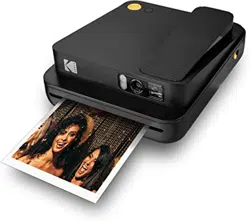

User Guide
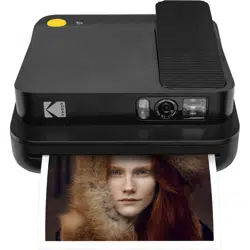
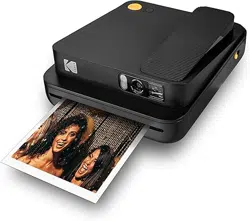
KODAK SMILE Classic
INSTANT PRINT DIGITAL CAMERA
Cámara digital con impresión
instantánea
Digitale Sofortdruckkamera
Appareil photo numérique à
impression instantanée
Fotocamera digitale a stampa
istantanea
Guía del usuario
Benutzerhandbuch
Guide de l'utilisateur
Guida utente

2 | EN EN | 3
English
Español
Deutsche
Français
Italiana
TABLE OF CONTENTS
TABLA DE CONTENIDO INHALTSVERZEICHNIS TABLE DES MATIÈRES INDICE
56
72
4
22
40

4 | EN EN | 5
INTRODUCTION
Thank you for purchasing the KODAK SMILE Classic Instant Print
Digital Camera. This User Guide is intended to provide you with
guidelines to ensure that operation of this product is safe and
does not pose risk to the user. Any use that does not conform to
the guidelines described in this User Guide may void the limited
warranty.
Please read all directions before using the product and retain this
guide for reference. This product is intended for household use only.
It is not intended for commercial use.
This product is covered by a limited one-year warranty. Coverage is
subject to limits and exclusions. See warranty for details.
SPECIFICATIONS
• Dimensions: 4.94 W x 5.91 D x 1.88 H (125.5 x 150.0 x 47.8 mm)
• Weight: 14.4 oz. (408 g)
• Colors Available: Black, Blue, Green, and Red
• Supported Storage: microSD™ cards up to 256GB
• Battery Capacity: 1100 mAh
• Battery Type: Lithium-polymer
• Prints Per Charge: ~35
• Supported Photo Paper: KODAK ZINK 3.5 x 4.25 sticky-back photo
paper
BOX CONTENTS
• KODAK SMILE Classic Instant Print Digital Camera
• Micro USB Charging Cable
• Starter Pack of KODAK ZINK Photo Paper
• User Guide / Quick Start Card
• Limited Warranty
SAFETY PRECAUTIONS
• Seizure warning: This device utilizes lashing strobe lights which
may potentially trigger seizures for people with photosensitive
epilepsy and/or other seizure disorders. User discretion is advised.
• Do not attempt to disassemble this device for any reason.
• Never leave your camera or the KODAK ZINK photo paper in an
area that might become extremely hot or where it will be exposed
to direct sunlight for a long time. This can cause your camera to
overheat or suer other problems.
• Don’t get it wet! If you need to clean your camera, use a soft cloth
that’s been slightly dampened with water or rubbing alcohol, and
gently wipe away any dirty spots. Don’t submerge the whole thing
in water, ever.
• Be careful with your camera. Try not to drop it, or shake it violently.
The inside of the camera has a lot of very small parts that could
break if they are jostled around too much.
• Do not use products such as alcohol, gasoline, diluent, or any
other organic solvent when cleaning or attempting to clean this
product.
• Do not use this device in an environment where it will be exposed
to heavy dust or humidity/moisture.
• Do not use this camera while bathing or in a shower.
• Do not place or charge the camera where it can fall or be pulled
into a tub or sink.
• Do not place, drop, or submerge the camera in water or any other
liquid.
• Take care that objects do not fall and liquids are not spilled onto
the camera.
6 | EN EN | 7
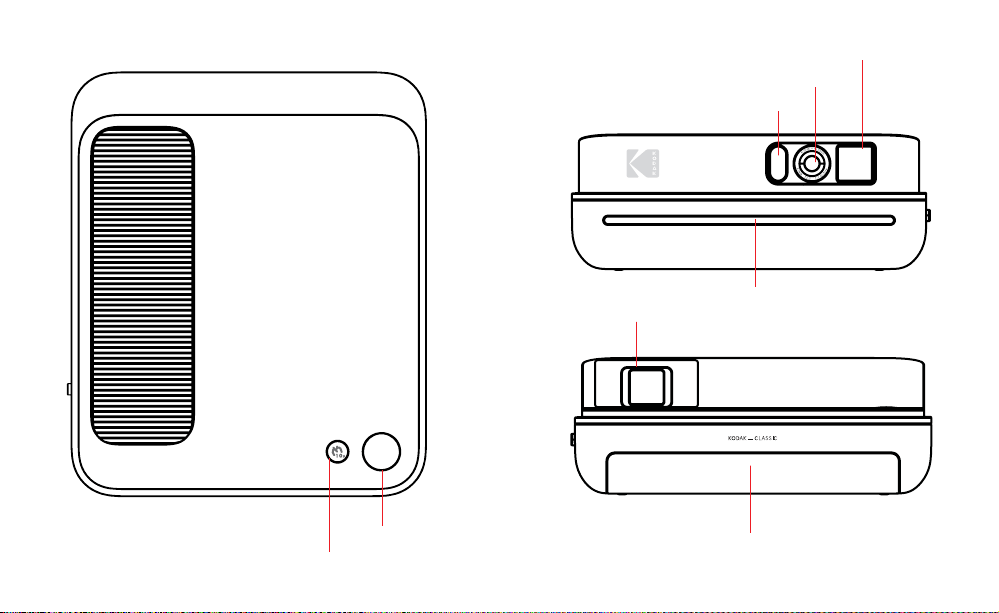
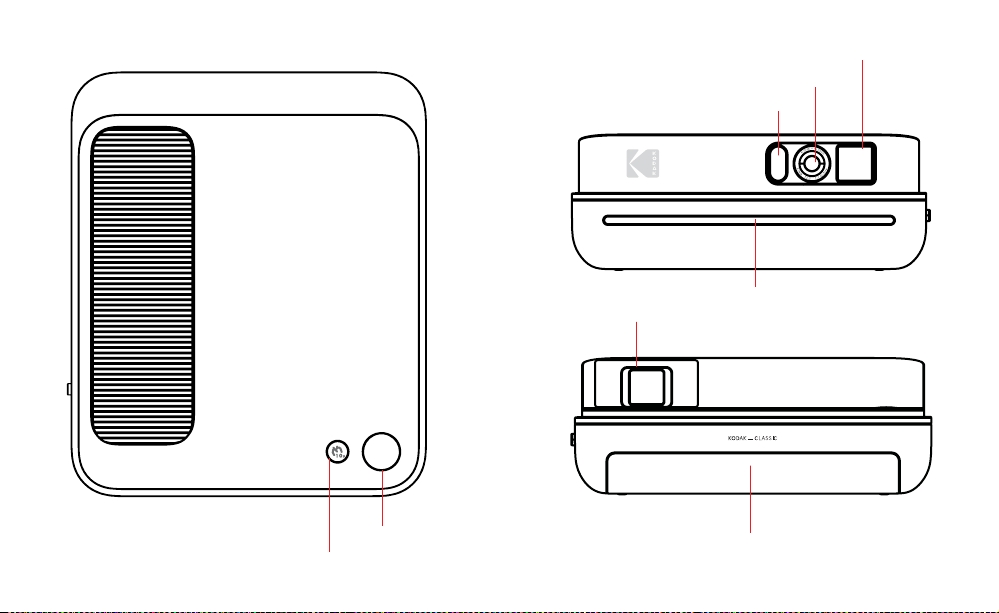
PRODUCT OVERVIEW
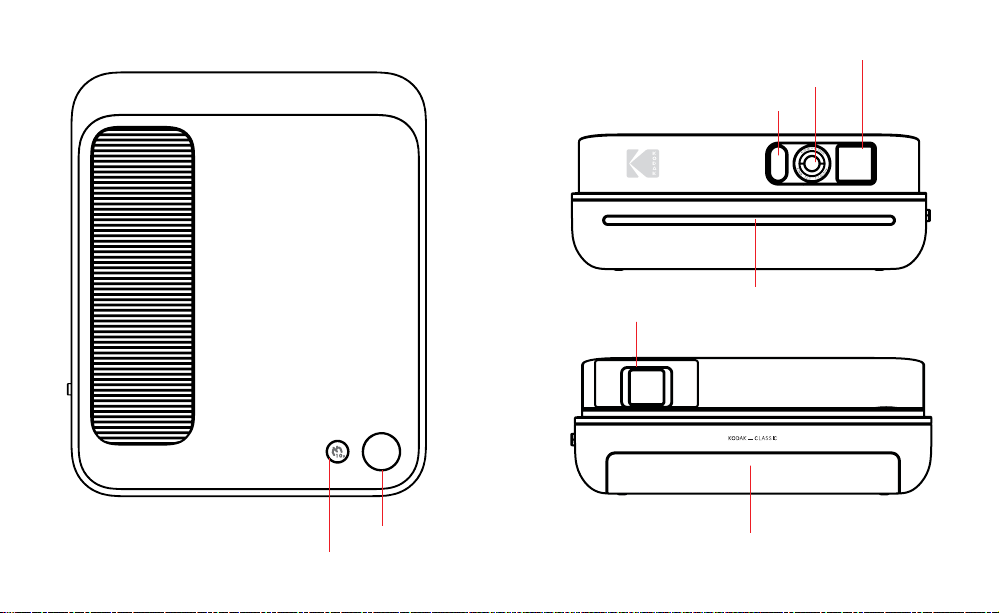
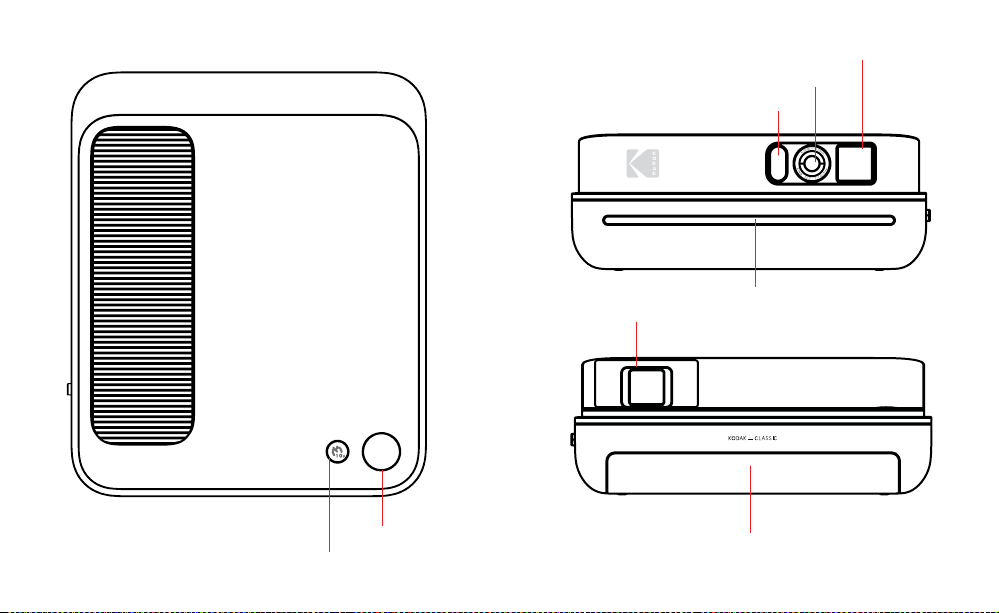
Strobe
lash
Viewinder
window
Camera
lens
10 sec. timer button
Shutter button
Photo print
slot
Paper tray
cover
Pop-up viewinder
8 | EN EN | 9
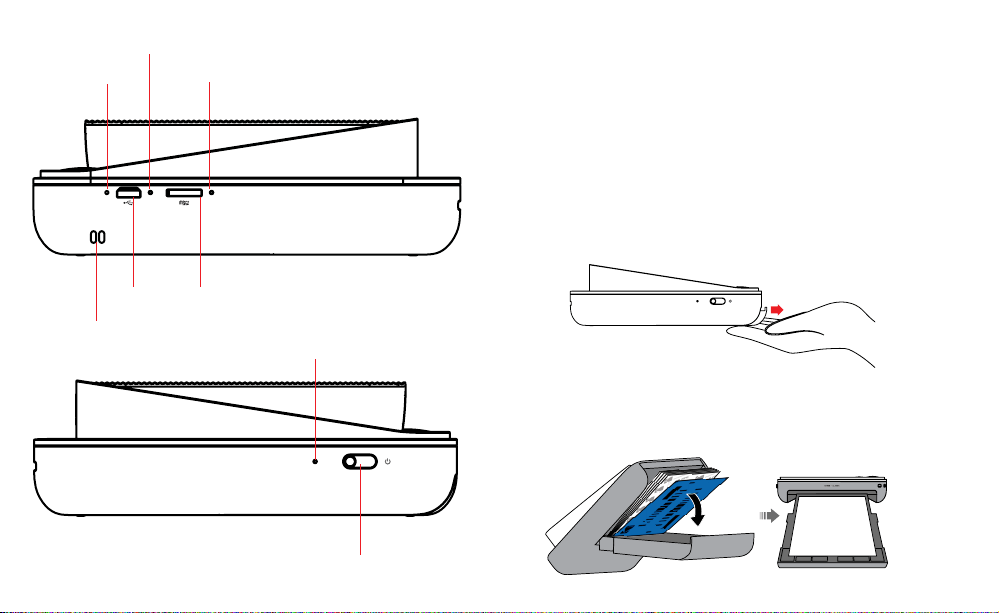
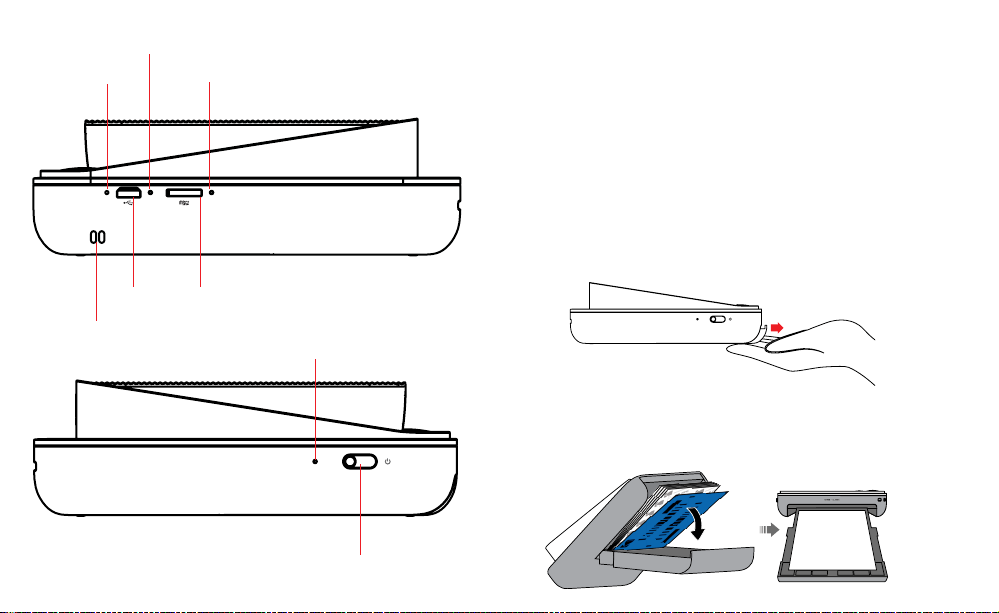
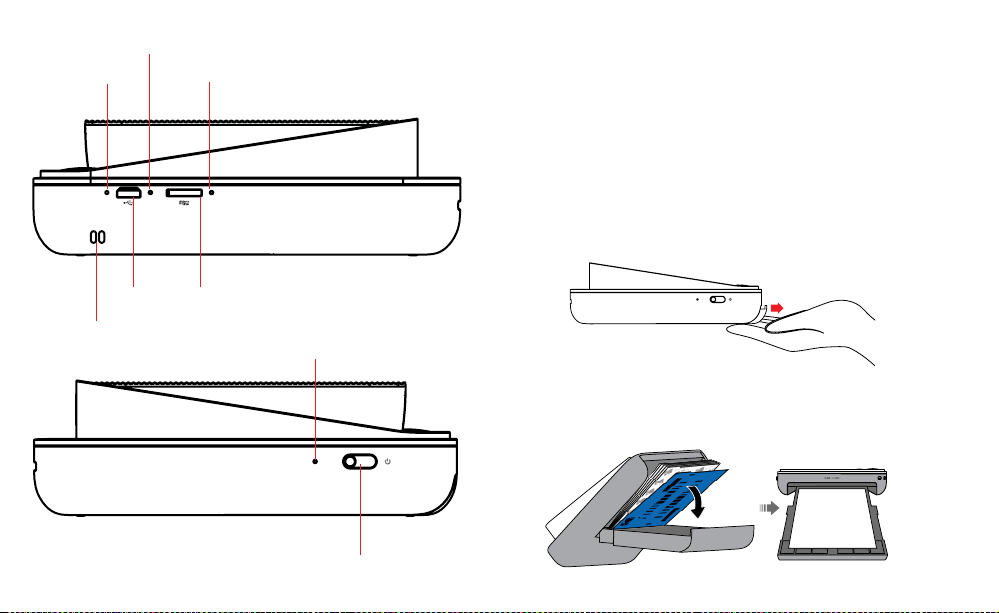
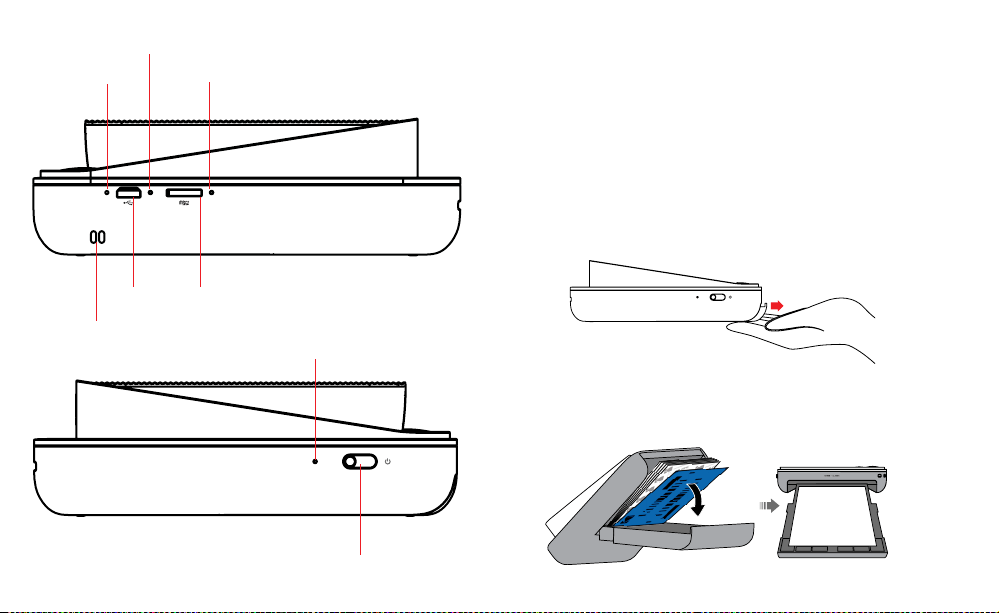
Charging
indicator LED
Reset button
microSD™
indicator LED
Power latch
microSD™
port
Micro USB
port
Power indicator LED
GETTING READY FOR USE
1. Charge it irst: Before you start using your new KODAK SMILE
Classic camera, plug it in to your computer or any USB charging
block with an output of two amps (2A) or higher. The charging
indicator will lash white while the camera charges. Once it turns
solid white and stops lashing, it’s fully charged and ready to use.
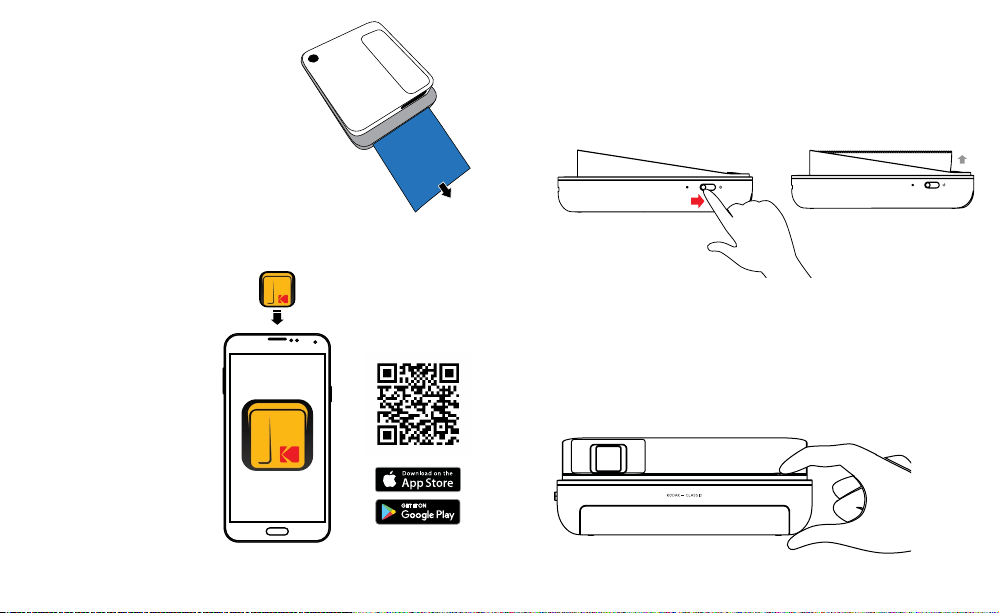
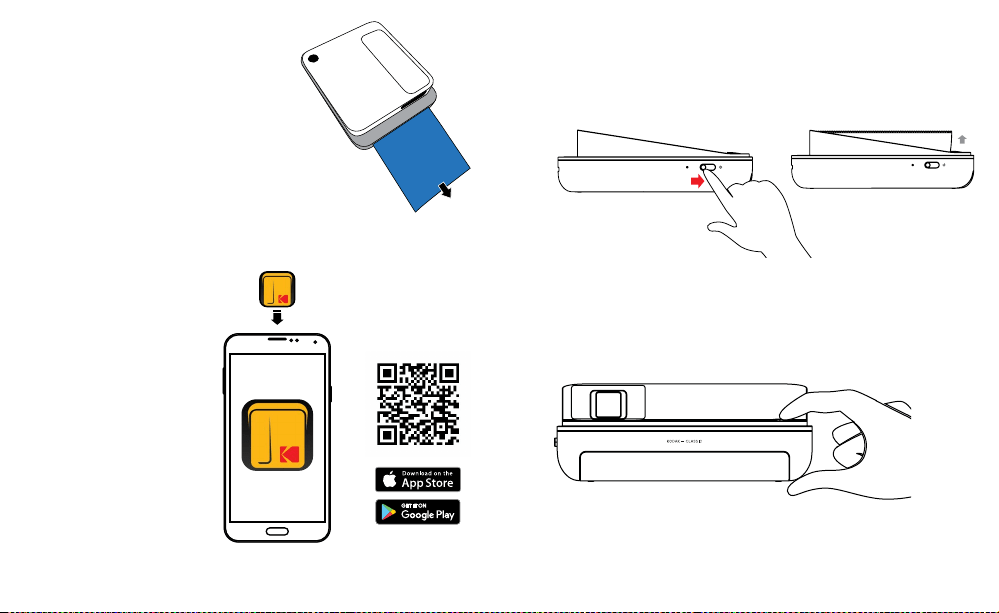
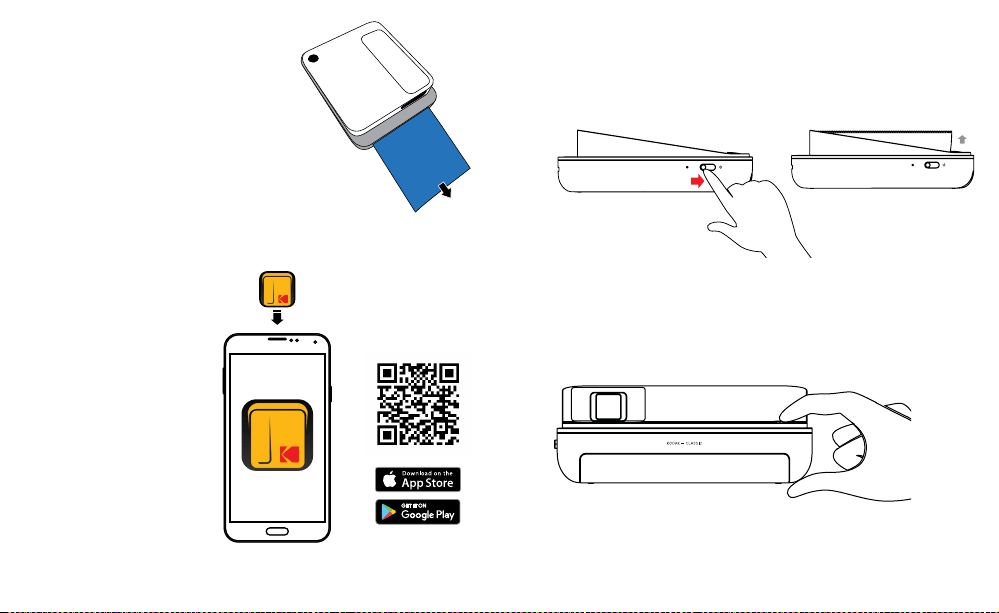
2. Load your ZINK® paper into the camera: Follow the steps below to
quickly and easily get your new camera loaded with ZINK® sticky-
back paper so you can start printing photos!
a. Open the paper tray in the back by releasing the tray cover at
the rear of the device. Press down on the arrow and slide the
cover toward you.
b. Load the blue calibration sheet in with the barcode facing
down. Place the other plain sheets on top with the glossy side
facing you. Try to avoid touching the glossy side so you don’t
get ingerprints on it.
Carrying strap
attachment
10 | EN EN | 11
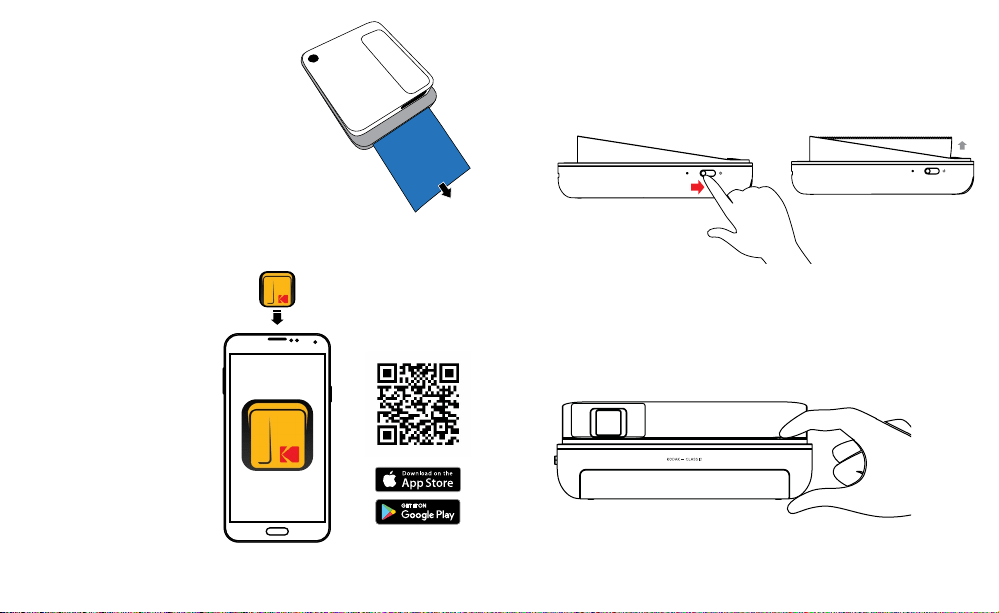
c. When you take your irst photo after
loading the ZINK® paper,
the blue calibration sheet will be
slowly ejected from the
printing slot. Your photo will print
after the calibration sheet inishes.
NOTE: Please make sure not to push
the paper in too far or else the paper
could jam or cause misprinting issues.
3. Insert a microSD™ card into the
corresponding slot on the side,
located directly underneath the charging port. The KODAK SMILE
Classic supports microSD™ cards up to 256GB.
4. Download the KODAK
Classic 2-in-1 application
from the Google Play™
or Apple® App Store®.
The KODAK SMILE
Classic works without
downloading anything,
but the app provides a lot
of unique and fun features
for your new camera!
TAKING PICTURES WITH THE KODAK SMILE CLASSIC
1. Turn the camera on by sliding the power latch toward the rear of
the camera so that the viewinder pops up. You will hear a musical
tune and the LED indicator on the side of the camera will blink red,
then turn solid green when the power is on.
2. If you want to set a 10-second timer, press the timer button on top
of the camera, next to the shutter button. The camera lash will
blink to count down the seconds, and the camera will also play a
sound before taking the picture.
3. Look through the viewinder to line up your picture, and then press
the shutter button on top of the camera.
4. If you’re taking pictures in a low-light setting, the KODAK SMILE
Classic will auto-detect the light level and use the strobe lash
12 | EN EN | 13
when necessary. In a room with luorescent lighting, you may want
to focus on the bolder colors to avoid a washed-out look.
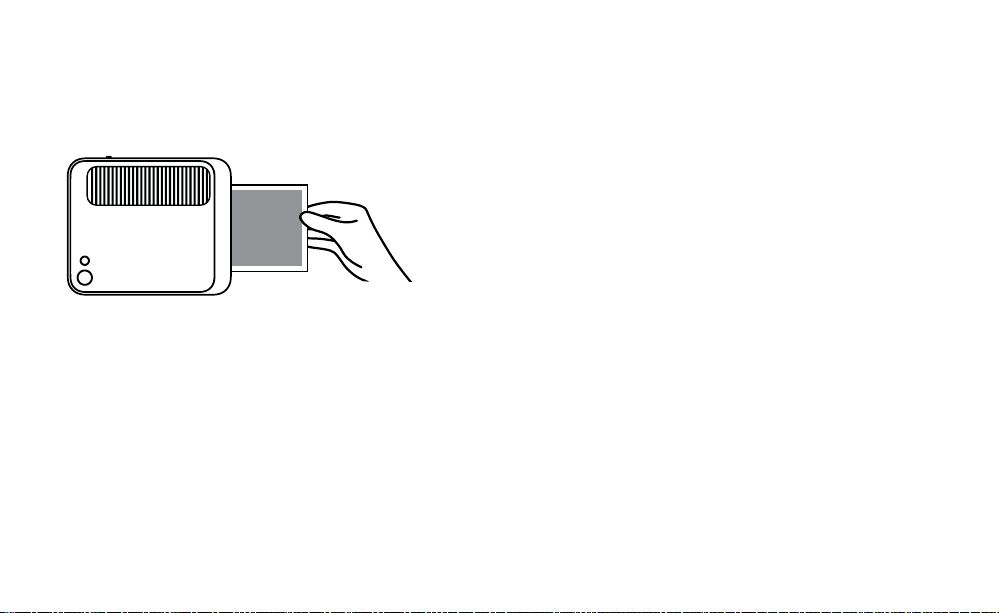
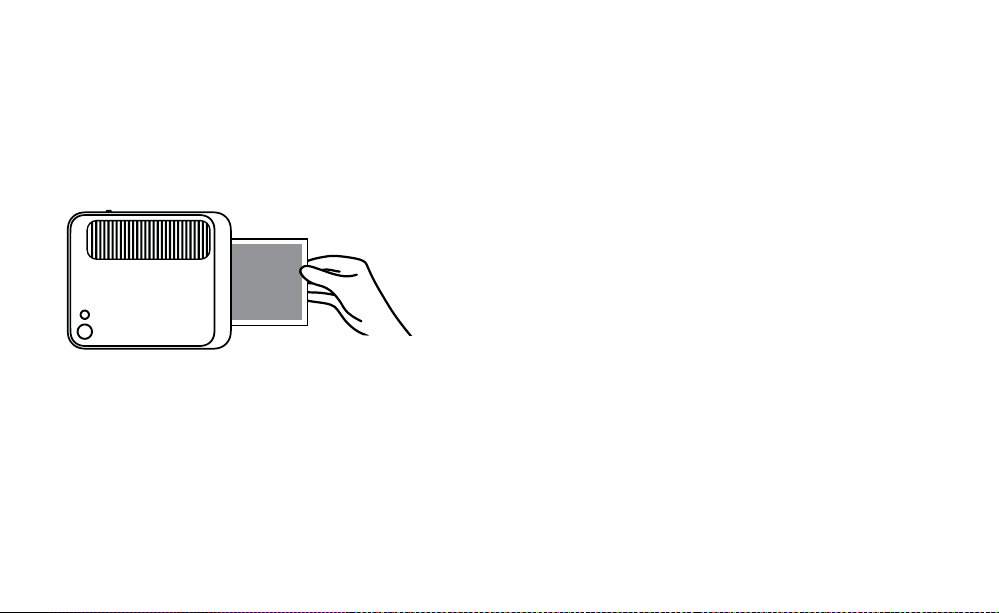
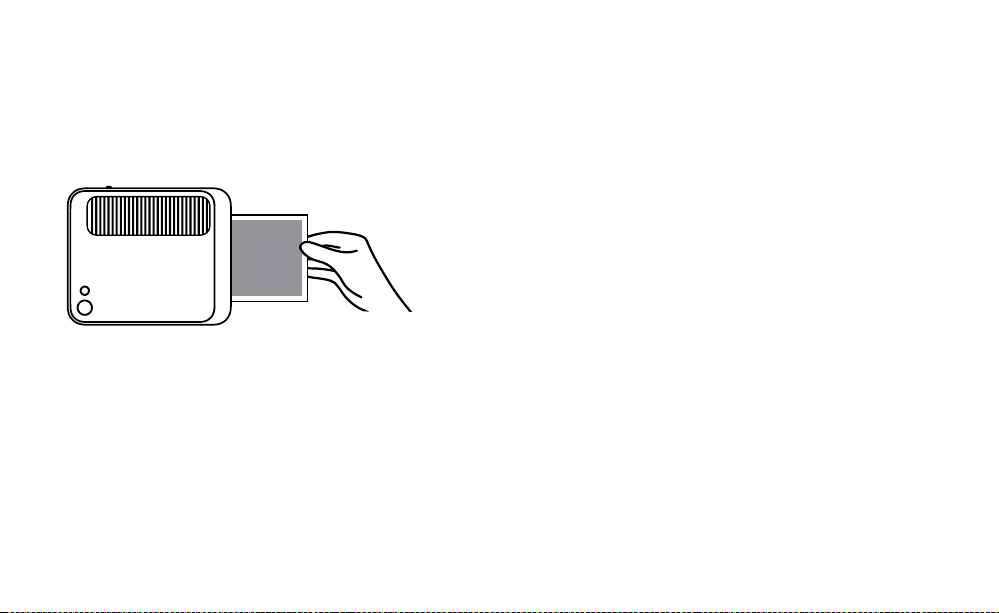
5. The camera will then beep to let you know that your picture is
processing, and after a couple seconds, it will begin to print the
photo from the photo print slot.
6. Retrieve your photo after it inishes printing.
PRINTING PICTURES USING THE KODAK CLASSIC 2-IN-1 APP
1. Turn the camera on by sliding the power latch toward the rear of
the camera so that the viewinder pops up.
2. Make sure Bluetooth® on your phone is enabled.
3. Open up the KODAK Classic 2-in-1 application from your phone,
follow the instructions to pair your camera with the app, and start
using your new KODAK SMILE Classic camera!
If you have trouble connecting to your camera from the application,
try following these steps instead:
1. Access your phone’s Bluetooth® settings, usually found under the
general Settings menu.
2. Make sure the camera is on irst, and then allow your phone to
scan for new devices.
3. You will see “Kodak Classic XX:XX” appear in the Bluetooth® list.
The X’s will be replaced with speciic letters and numbers which
correspond to your speciic camera. Tap on it to start pairing.
4. After a couple of seconds, your phone should say “paired”.
DOWNLOADING YOUR PHOTOS
If you have a microSD™ card installed in your KODAK SMILE Classic
camera, you can easily download and view higher-resolution copies of
your photos from any laptop or personal computer.
1. Plug the USB connector end of your charging cable into any USB port
on your computer (or laptop). Plug the micro USB connector into the
charging port of your camera.
2. Turn the camera on by sliding the power latch toward the rear of the
camera so that the viewinder pops up. The indicator light above the
charging port should start lashing.
3. The irst time you connect your camera, it will take a few minutes to
automatically download the drivers and recognize the camera as an
external storage device. Do not disconnect your camera during this
process.
4. After the camera is plugged in and drivers have been installed, you
can access the pictures you’ve taken by going to your computer’s
menu and viewing it as an external storage device (usually defaults
to E:\). You will see a folder called DCIM, and inside that folder will be

14 | EN EN | 15
another folder called CLASSIC_CAM. This is where you will ind copies
of all your photos, even the ones you took when the camera had no
paper loaded.
5. Have fun with viewing, editing, printing, and/or posting these higher-
resolution versions of your KODAK SMILE Classic photos from your
computer!
6. When you’re inished, be sure to choose the option to “eject
removable storage device” to prevent any issues with your microSD™
card.
TIPS AND TRICKS
• If you don’t have any paper, but you do have a microSD™ card
installed, any pictures you try to take will be stored on the microSD™
card and can be accessed from your computer at any time. However,
only your most recently taken photo will print out once you put more
paper in the camera.
• If there is no microSD™ card installed, your KODAK SMILE Classic
camera will let you know when it’s out of paper by beeping and
lashing all LED indicators whenever you try to take a picture. If you
don’t have a microSD™ card installed, none of the photos you try to
take while the camera is out of paper will be stored.
• Important! Don’t rest your inger on the shutter button unless you’re
ready to take a picture or your camera is turned completely o; this
camera automatically prints out any images it captures. If you leave
your inger resting on the button, you could end up printing a photo
you didn’t want to take.
WARRANTY INFORMATION
LIMITED WARRANTY ON KODAK SMILE CLASSIC INSTANT PRINT
DIGITAL CAMERA
THIS LIMITED WARRANTY GIVES YOU SPECIFIC LEGAL RIGHTS AND
YOU MAY ALSO HAVE OTHER RIGHTS, WHICH VARY FROM STATE
TO STATE.
WE WARRANT THAT DURING THE WARRANTY PERIOD, THE PRODUCT
WILL BE FREE FROM DEFECTS IN MATERIALS AND WORKMANSHIP.
LIMITATION OF LIABILITY
TO THE EXTENT NOT PROHIBITED BY LAW, THIS WARRANTY IS
EXCLUSIVE AND IN LIEU OF ALL OTHER WARRANTIES, ORAL,
WRITTEN, STATUTORY, EXPRESS OR IMPLIED. EXCEPT FOR THE
EXPRESS WARRANTIES CONTAINED IN THIS LIMITED WARRANTY
STATEMENT AND TO THE EXTENT NOT PROHIBITED BY LAW, WE
DISCLAIM ALL OTHER WARRANTIES, EXPRESSED OR IMPLIED,
STATUTORY OR OTHERWISE, INCLUDING WITHOUT LIMITATION,
THE WARRANTIES OF MERCHANTABILITY AND FITNESS FOR A
PARTICULAR PURPOSE. SOME STATES DO NOT ALLOW DISCLAIMERS
OF IMPLIED WARRANTIES, SO THIS DISCLAIMER MAY NOT APPLY TO
YOU. TO THE EXTENT SUCH WARRANTIES CANNOT BE DISCLAIMED
UNDER THE LAWS OF YOUR JURISDICTION, WE LIMIT THE DURATION
AND REMEDIES OF SUCH WARRANTIES TO THE DURATION OF THIS
EXPRESS LIMITED WARRANTY.

16 | EN EN | 17
OUR RESPONSIBILITY FOR DEFECTIVE GOODS IS LIMITED TO
REPAIR, REPLACEMENT OR REFUND AS DESCRIBED BELOW IN THIS
WARRANTY STATEMENT.
WHO MAY USE THIS WARRANTY? C&A Marketing, Inc. located at
114 Tived Lane East, Edison, NJ (“we”) extend this limited warranty
only to the consumer who originally purchased the product (“you”).
It does not extend to any subsequent owner or other transferee of
the product.
WHAT DOES THIS WARRANTY COVER? This limited warranty covers
defects in materials and workmanship of the KODAK SMILE Classic
Instant Print Digital Camera (the “product”) for the Warranty Period as
deined below.
WHAT DOES THIS WARRANTY NOT COVER? This limited warranty
does not cover any damage due to: (a) transportation; (b) storage; (c)
improper use; (d) failure to follow the product instructions or to perform
any preventive maintenance; (e) modiications; (f) unauthorized repair;
(g) normal wear and tear; or (h) external causes such as accidents,
abuse, or other actions or events beyond our reasonable control.
WHAT IS THE PERIOD OF COVERAGE? This limited warranty starts
on the date of your purchase and lasts for one year (the “Warranty
Period”). The Warranty Period is not extended if we repair or replace
the product. We may change the availability of this limited warranty at
our discretion, but any changes will not be retroactive.
WHAT ARE YOUR REMEDIES UNDER THIS WARRANTY? With
respect to any defective product during the Warranty Period, we will,
at our sole discretion, either: (a) repair or replace such product (or the
defective part) free of charge or (b) refund the purchase price of such
product if an exchange unit cannot be provided.
HOW DO YOU OBTAIN WARRANTY SERVICE? To obtain warranty
service, you must contact us at 8445161539 or by email at kodak@
camarketing.com during the Warranty Period to obtain a Defective
Merchandise Authorization (“DMA”) number. No warranty service will
be provided without a DMA number and return shipping costs to our
facilities shall be assumed by you, the purchaser. Shipping costs of the
replacement unit to you shall be assumed by us.
CUSTOMER SERVICE CONTACT INFORMATION
Should you experience any problems with your product, please
contact us before returning the item to the place of purchase.
We’re here to help!
U.S. Support:
kodak@camarketing.com
8445161539
International Support:
kodakintl@camarketing.com
8445161540

18 | EN EN | 19
FEDERAL COMMUNICATION COMMISSION
INTERFERENCE STATEMENT
This device complies with Part 15 of the FCC Rules. Operation is subject
to the following two conditions: (1) This device may not cause harmful
interference, and (2) this device must accept any interference received,
including interference that may cause undesired operation.
This equipment has been tested and found to comply with the limits
for a Class B digital device, pursuant to Part 15 of the FCC Rules. These
limits are designed to provide reasonable protection against harmful
interference in a residential installation. This equipment generates, uses
and can radiate radio frequency energy and, if not installed and used
in accordance with the instructions, may cause harmful interference to
radio communications. However, there is no guarantee that interference
will not occur in a particular installation. If this equipment does cause
harmful interference to radio or television reception, which can be
determined by turning the equipment o and on, the user is encouraged
to try to correct the interference by one of the following measures:
• Reorient or relocate the receiving antenna.
• Increase the separation between the equipment and receiver.
• Connect the equipment into an outlet on a circuit dierent from that
to which the receiver is connected.
• Consult the dealer or an experienced radio/TV technician for help.
FCC Caution: Any changes or modiications not expressly approved by
the party responsible for compliance could void the user's authority to
operate this equipment.
This transmitter must not be co-located or operating in conjunction with
any other antenna or transmitter.
Radiation Exposure Statement:
This equipment complies with FCC radiation exposure limits set forth for
kodakphotoplus.com
The Kodak trademark, logo, and trade dress are used under license from
Eastman Kodak Company.
Android is a trademark of Google LLC.
Google Play is a trademark of Google LLC.
Bluetooth is a trademark of Bluetooth SIG, Inc. USA.
IOS is a trademark of Cisco in the U.S. and other countries and is used
under license.
Apple and App Store are trademarks of Apple Inc. in the U.S. and other
countries.
ZINK, ZERO INK, and the ZINK logo are trademarks of ZINK Holdings, LLC.
MicroSD is a trademark of SD3C, LLC.
All other products, brand names, company names, and logos are
trademarks of their respective owners, used merely to identify their
respective products, and are not meant to connote any sponsorship,
endorsement or approval.
Distributed by C&A Marketing, Inc., 114 Tived Lane East, Edison, NJ 08837.
C&A Marketing UK LTD, 167 Hermitage Road, Crusader Industrial Estate,
London N4 1LZ, UK.
Made in China.
© 2019. C&A IP Holdings, LLC. All Rights Reserved.
20 | EN EN | 21
an uncontrolled environment.
IC Statement
This device complies with RSS247 of Industry Canada. Cet appareil
se conforme à RSS247 de Canada d'Industrie. This device complies
with Industry Canada license-exempt RSS standard(s). Operation
is subject to the following two conditions: (1) this device may not
cause interference, and (2) this device must accept any interference,
including interference that may cause undesired operation of the
device. appareils radio exempts de licence. Son fonctionnement
est sujet aux deux conditions suivantes: (1) le dispositif ne doit
pas produire de brouillage prejudiciable, et (2) ce dispositif doit
accepter tout brouillage recu, y compris un brouillage susceptible de
provoquer un fonctionnement indesirable.
The device must not be co-located or operating in conjunction with
any other antenna or transmitter.
Radiation Exposure Statement: The product complies with the
Canada portable RF exposure limit set forth for an uncontrolled
environment and are safe for intended operation as described in this
manual.
Déclaration d'exposition aux radiations : Le produit est conforme aux
limites d'expossition pour les appareils portable RF pour les Etats-
Unis et le Canada établies pour un environnement non contrôlé.
Unis et le Canada établies pour un environnement non contrôlé.

22 | ES ES | 23
INTRODUCCIÓN
Gracias por adquirir la cámara digital con impresión instantánea
KODAK SMILE Classic. La presente Guía del usuario está destinada a
proporcionarle pautas para garantizar que el funcionamiento de este
producto sea seguro y no suponga un riesgo para el usuario. Cualquier
uso que no cumpla con las pautas descritas en esta Guía del usuario
puede anular la garantía limitada.
Lea todas las instrucciones antes de usar el producto y conserve esta
guía para consultas futuras. Este producto es solo para uso doméstico.
No está destinado para uso comercial.
Este producto está cubierto por una garantía limitada de un año. La
cobertura está sujeta a límites y exclusiones. Consulte la garantía para
más detalles.
ESPECIFICACIONES
• Dimensiones: 4,94 ancho x 5,91 largo x 1,88 alto (125,5 x 150,0 x 47,8 mm)
• Peso: 14,4 oz. (408 g)
• Colores disponibles: Negro, azul, verde y rojo
• Almacenamiento admitido: tarjetas MicroSD™ de hasta 256 GB
• Capacidad de la batería: 1100 mAh
• Tipo de batería: Polímero de litio
• Impresiones por carga: -35
• Papel fotográico compatible: Papel fotográico adhesivo KODAK ZINK
de 3,5 x 4,25 (8,89 cm x 10,8 cm)
CONTENIDO DE LA CAJA
• Cámara digital con impresión instantánea KODAK SMILE Classic
• Cable de carga Micro-USB
• Paquete de principiante de papel fotográico KODAK ZINK
• Guía de usuario/Tarjeta de inicio rápido
• Garantía limitada
PRECAUCIONES DE SEGURIDAD
• Riesgo de convulsión: Este dispositivo utiliza luces estroboscópicas
parpadeantes que pueden desencadenar posibles convulsiones en
personas con epilepsia fotosensible y/u otros trastornos convulsivos.
Se aconseja la discreción del usuario.
• No intente desarmar este dispositivo por ningún motivo.
• Nunca deje su cámara o el papel fotográico ZINK en un área que
pueda calentarse mucho o que se exponga a la luz solar directa
durante mucho tiempo. Esto puede hacer que su cámara
sobrecaliente o sufra otros problemas.
• ¡No permita que se moje! Si necesita limpiar su cámara, use un trapo
suave humedecido ligeramente con agua o alcohol de uso externo y
frote suavemente cualquier mancha. No sumerja el aparato entero
en agua nunca.
• Tenga cuidado con su cámara. Intente que no se le caiga ni la
agite violentamente. El interior de la cámara tiene muchas piezas
muy pequeñas que podrían romperse si se mueven fuertemente
demasiado.
• No use productos como alcohol, gasolina, disolvente o cualquier otro
solvente orgánico al limpiar o intentar limpiar este producto.
• No use este dispositivo en un entorno en el que estará expuesto
a mucho polvo o humedad.
• No use esta cámara cuando esté en la bañera o en la ducha.
• No coloque ni cargue la cámara en un lugar en el que pueda caerse o
empujarse a una bañera o lavabo.
• No coloque, deje caer ni sumerja la cámara en agua ni en ningún otro
líquido.
• Tenga cuidado de que no caigan objetos ni se derramen líquidos sobre
la cámara
24 | ES ES | 25
DESCRIPCIÓN DEL PRODUCTO
Botón temporizador de 10 segundos
Botón del disparador
Flash
estroboscópico
Ventana del
visor
Lente de
la cámara
Ranura de
impresión
fotográica
Tapa de la
bandeja del
papel
Visor emergente
26 | ES ES | 27
Luz LED indicadora
de carga
Botón de
reinicio
Luz LED indicadora
de microSD™
Interruptor de encendido
Puerto
microSD™
Puerto
micro-USB
Luz LED indicadora de energía
Fijiación de la
correa de viaje
PREPARARSE PARA EL USO
1. Cárguela primero: Antes de empezar a utilizar su nueva cámara
KODAK SMILE Classic, conéctela a su ordenador o a cualquier
aparato de carga USB con una salida de dos amperios (2 A) o más.
El indicador de carga parpadeará mientras se carga la cámara.
Cuando se quede de color blanco ijo y deje de parpadear, estará
completamente cargada y lista para usar.
2. Coloque su papel ZINK® en la cámara: ¡Siga los siguientes pasos
para colocar el papel adhesivo ZINK® en su cámara nueva de
forma rápida y fácil y así poder comenzar a imprimir fotografías!
a. Abra la bandeja del papel en la parte posterior soltando la tapa
de la bandeja en la parte de atrás del dispositivo. Pulse hacia
abajo la lecha y deslice la tapa hacia usted.
b. Cargue la hoja de calibración azul con el código de barras hacia
abajo. Coloque las otras hojas planas en la parte superior, con el
lado brillante hacia usted. Intente evitar tocar el lado brillante
para no dejar huellas dactilares en él.
28 | ES ES | 29
c. Cuando haga su primera foto
después de cargar el papel ZINK®,
la hoja de calibración azul se
expulsará lentamente de la ranura
de impresión. Su foto se imprimirá
después de que termine la hoja de
calibración.
NOTA: Por favor, asegúrese de no
empujar el papel demasiado lejos o
se podría atascar o provocar
problemas de mala impresión.
3. Introduzca una tarjeta microSD™ en la ranura correspondiente
en el lateral, situada directamente debajo del puerto de carga. La
KODAK SMILE Classic es
compatible con tarjetas
microSD™ de hasta
256 GB.
4. Descargue la aplicación
de KODAK Classic 2
en 1 desde the Google
Play™ o Apple® App
Store®. ¡La KODAK SMILE
Classic funciona sin
descargar nada, pero la
app proporciona muchas
características únicas y
divertidas para su nueva
cámara!
TOMAR FOTOS CON LA KODAK SMILE CLASSIC
1. Encienda la cámara deslizando el interruptor de encendido
hacia la parte posterior de la cámara para que el visor aparezca.
Escuchará una melodía, el indicador LED en el lateral de la cámara
parpadeará en rojo y después se quedará en verde ijo cuando
esté encendida.
2. Si quiere establecer el temporizador de 10 segundos, pulse el
botón del temporizador en la parte superior de la cámara, al lado
del disparador. El lash de la cámara parpadeará al hacer la cuenta
atrás de los segundos y además la cámara reproducirá un sonido
antes de tomar la foto.
3. Mire por el visor para alinear la foto y después pulse el botón del
disparador en lo alto de la cámara.
30 | ES ES | 31
4. Si va a tomar fotos en un ambiente con poca luz, la KODAK SMILE
Classic detectará automáticamente el nivel de luz y usarla el
lash estroboscópico cuando sea necesario. En una sala con luz
luorescente, quizá desee centrarse en los colores más atrevidos
para evitar un aspecto desgastado.
5. Entonces la cámara pitará para informarle de que se está
procesando su foto y, tras un par de segundos, comenzará a
imprimir la foto en la ranura de impresión fotográica.
6. Retire la foto cuando termine de imprimirse.
IMPRIMIR FOTOS USANDO LA APP KODAK CLASSIC 2 EN 1
1. Encienda la cámara deslizando el interruptor de encendido hacia
la parte posterior de la cámara para que el visor aparezca.
2. Asegúrese de que el Bluetooth® de su teléfono está habilitado.
3. Abra la aplicación KODAK Classic 2 en 1 desde su teléfono, siga las
instrucciones para emparejar su cámara con la app ¡y empiece a
utilizar su nueva cámara KODAK SMILE Classic!
Si tiene problemas para conectarse a su cámara desde la aplicación,
pruebe a seguir estos pasos a cambio:
1. Acceda a los ajustes de Bluetooth® de su teléfono, que
normalmente se encuentran bajo el menú general de Ajustes.
2. Asegúrese primero de la cámara está encendida y después deje
que su teléfono busque nuevos dispositivos.
3. Verá que aparece "Kodak Classic XX:XX" en la lista del Bluetooth®.
Las X se cambiarán por letras y números especíicos que
corresponden a su cámara especíica. Pulse sobre eso para
empezar a emparejar.
4. Tras un par de segundos, su teléfono dirá "emparejado".
DESCARGAR SUS FOTOS
Si ha instalado una tarjeta microSD™ en su cámara KODAK SMILE
Classic fácilmente podrá descargar y ver copias de sus fotografías
con mayor resolución en cualquier ordenador portátil o personal.
1. Enchufe el extremo del conector USB de su cable de carga en
cualquier puerto USB de su ordenador (o portátil). Enchufe el
conector micro-USB en el puerto de carga de su cámara
2. Encienda la cámara deslizando el interruptor de encendido hacia
la parte posterior de la cámara para que el visor aparezca. La luz
indicadora encima del puerto de carga comenzará a parpadear.
3. La primera vez que conecte su cámara, la descarga automática
tardará unos minutos y el ordenador reconocerá la cámara como
un dispositivo de almacenamiento externo. No desconecte la
cámara durante este proceso.

32 | ES ES | 33
4. Después de conectar la cámara y de instalar los controladores,
podrá acceder a las fotos que ha realizado al dirigirse al
menú de su ordenador y visualizarlas como un dispositivo de
almacenamiento externo (normalmente está predeterminado
como E:\). Verá una carpeta llamada DCIM y en el interior de
esa carpeta habrá otra carpeta llamada CLASSIC_CAM. Aquí es
donde encontrará copias de todas sus fotos, incluso las que tomó
cuando la cámara no tenía papel.
5. ¡Diviértase viendo, editando, imprimiendo o publicando estas
versiones de alta resolución de sus fotos KODAK SMILE Classic
desde su ordenador!
6. Cuando haya terminado, asegúrese de elegir la opción de
"expulsar el dispositivo de almacenamiento extraíble" para evitar
problemas con su tarjeta microSD™.
CONSEJOS Y TRUCOS
• Si no tiene papel, pero tiene una tarjeta microSD™ instalada,
cualquier foto que intente tomar se guardará en la tarjeta
microSD™ y podrá acceder a ella desde su ordenador en cualquier
momento. Sin embargo, solamente se imprimirá su foto más
reciente cuando ponga más papel en la cámara.
• Si no hay instalada una tarjeta microSD™, su cámara KODAK
SMILE Classic le informará cuando no haya papel con un pitido
y haciendo parpadear todos los indicadore sLED cuando intente
tomar una foto. Si no hay instalada una tarjeta microSD™, no
se guardará ninguna de las fotos que intente tomar mientras la
cámara no tenga papel.
• ¡Importante! No deje descansar su dedo sobre el botón del
disparador a menos que esté listo para tomar una foto o su
cámara esté apagada completamente; esta cámara imprime
automáticamente cualquier imagen que capture. Si deja su dedo
descansando sobre el botón, podría terminar imprimiendo una
foto que no quería tomar.

34 | ES ES | 35
INFORMACIÓN DE GARANTÍA
GARANTÍA LIMITADA DE LA CÁMARA DIGITAL CON IMPRESIÓN
INSTANTÁNEA KODAK SMILE CLASSIC
DERECHOS LEGALES ESPECÍFICOS Y ES POSIBLE QUE TAMBIÉN TENGA
OTROS DERECHOS, QUE VARÍAN DE UN ESTADO A OTRO.
GARANTIZAMOS QUE, DURANTE EL PERÍODO DE LA GARANTÍA, EL
PRODUCTO NO PRESENTARÁ FALLAS DE MATERIALES O DE MANO DE
OBRA.
LIMITACIÓN DE LA RESPONSABILIDAD
EN LA MEDIDA EN QUE NO LO PROHÍBA LA LEY, ESTA GARANTÍA ES
EXCLUSIVA Y REEMPLAZA TODA OTRA GARANTÍA, SEA VERBAL, ESCRITA,
LEGAL, EXPRESA O IMPLÍCITA. CON EXCEPCIÓN DE LAS GARANTÍAS
EXPRESAS QUE FIGURAN EN ESTA DECLARACIÓN DE GARANTÍA LIMITADA
Y EN LA MEDIDA EN QUE NO LO PROHÍBA LA LEY, NOS EXIMIMOS DE
TODA OTRA GARANTÍA, EXPRESA O IMPLÍCITA, LEGAL O DE OTRA ÍNDOLE,
INCLUIDAS ENTRE OTRAS, LAS GARANTÍAS DE COMERCIABILIDAD
E IDONEIDAD PARA UN FIN DETERMINADO. ALGUNOS ESTADOS
NO PERMITEN DESCARGOS DE RESPONSABILIDAD DE GARANTÍAS
IMPLÍCITAS, DE MODO QUE ES POSIBLE QUE ESTE DESCARGO NO SEA
APLICABLE EN SU CASO. EN LA MEDIDA EN QUE DICHAS GARANTÍAS
NO PUEDAN EXIMIRSE CONFORME A LAS LEYES DE SU JURISDICCIÓN,
LIMITAMOS LA DURACIÓN Y LOS RECURSOS DE DICHAS GARANTÍAS A LA
DURACIÓN DE ESTA GARANTÍA LIMITADA EXPRESA.
NUESTRA RESPONSABILIDAD POR PRODUCTOS DEFECTUOSOS SE
LIMITA A LA REPARACIÓN, LA SUSTITUCIÓN O EL REEMBOLSO SEGÚN SE
DESCRIBE A CONTINUACIÓN EN ESTA DECLARACIÓN DE GARANTÍA.
¿QUIÉN PUEDE USAR ESTA GARANTÍA? C&A Marketing, Inc., ubicado
en 114 Tived Lane East, Edison, Nueva Jersey (“nosotros”) extendemos
la presente garantía limitada únicamente al consumidor que adquirió
originalmente el producto (“usted”). No abarca a ningún propietario
posterior u a otra persona a quien se le transiera el producto.
¿QUÉ CUBRE ESTA GARANTÍA? Esta garantía limitada cubre los defectos
en materiales y mano de obra de la cámara digital con impresión instantánea
KODAK SMILE Classic (el "producto") durante el Periodo de Garantía
¿QUÉ NO CUBRE ESTA GARANTÍA? Esta garantía limitada no cubre
ningún daño que se deba a: (a) transporte; (b) almacenamiento; (c) uso
inadecuado; (d) incumplimiento de las instrucciones del producto o falta de
mantenimiento preventivo; (e) modiicaciones; (f) reparación no autorizada;
(g) uso y desgaste normales; o (h) causas externas, como accidentes, uso
indebido u otras acciones o sucesos más allá de nuestro control razonable.
¿CUÁL ES EL PERÍODO DE COBERTURA? La garantía limitada comienza
en la fecha de compra y se extiende por un año (el “Período de garantía”). El
período de garantía no se extiende si reparamos o sustituimos el producto.
Es posible que cambiemos la disponibilidad de esta garantía limitada a
nuestro criterio, pero ningún cambio se aplicará de modo retroactivo.
¿CUÁLES SON LOS RECURSOS DISPONIBLES CONFORME A ESTA
GARANTÍA? En lo que respecta a cualquier producto que resulte
defectuoso durante el período de la garantía, aplicaremos, a nuestro criterio
exclusivo, una de las siguientes opciones: (a) reparar o sustituir el producto
(o la pieza defectuosa) sin cargo o (b) reembolsar el precio de compra del
producto si no se proporciona una unidad de cambio.
¿CÓMO SE OBTIENE EL SERVICIO POR LA GARANTÍA? Para obtener el
servicio por la garantía, debe comunicarse con nosotros al 8445161539 o
por correo electrónico a kodak@camarketing.com durante el Período de la
garantía para obtener un número de Autorización de producto defectuoso

36 | ES ES | 37
(“DMA”, por sus siglas en inglés). No se brindará servicio alguno por la
garantía si no tiene un número de DMA y será usted, el comprador, quien
deba asumir los costos de envío por devolución a nuestras instalaciones.
Nosotros asumiremos los costos de envío de la unidad de sustitución.
INFORMACIÓN DE CONTACTO DE ATENCIÓN AL CLIENTE
En caso de experimentar problemas con su producto, comuníquese con
nosotros antes de devolver el artículo al lugar de compra. ¡Estamos aquí
para ayudarle!
Soporte en EE.UU.:
kodak@camarketing.com
8445161539
Soporte internacional:
kodakintl@camarketing.com
8445161540
kodakphotoplus.com
La marca registrada Kodak, el logotipo y la presentación del producto se
usan bajo licencia de Eastman Kodak Company.
Android es una marca registrada de Google LLC.
IOS es una marca comercial de Cisco en los EE. UU. Y otros países y se
utiliza bajo licencia.
Bluetooth es una marca comercial de Bluetooth SIG, Inc. USA.
Google Play es una marca registrada de Google LLC.
Apple y App Store son marcas comerciales de Apple Inc. en los EE. UU. Y
otros países.
Todos los otros productos, nombres de marcas, nombres de compañías
y logotipos son marca registrada de sus respectivos propietarios, se
utilizan solo para identiicar sus correspondientes productos y no
pretenden connotar patrocinio, aprobación o autorización.
Distribuido por: C&A Marketing, Inc., 114 Tived Lane East, Edison, NJ
08837, USA
C&A Marketing UK LTD, 167 Hermitage Road, Crusader Industrial Estate,
London N4 1LZ, UK
©2019. Todos los derechos reservados. Fabricado en China.

38 | ES ES | 39
DECLARACIÓN DE INTERFERENCIAS DE LA COMISIÓN
FEDERAL DE COMUNICACIÓN
Este dispositivo cumple con la Parte 15 de las Reglas de la FCC. El
funcionamiento está sujeto a las siguientes dos condiciones: (1) este
dispositivo no puede causar interferencias perjudiciales y (2) este
dispositivo debe aceptar cualquier interferencia recibida, como aquellas
que puedan causar un funcionamiento no deseado.
Este equipo ha sido probado y cumple con los límites para un dispositivo
digital de Clase B, cumpliendo con la Parte 15 de las Reglas de la
FCC. Estos límites están diseñados para proporcionar una protección
razonable contra interferencias en una instalación residencial.
Este equipo genera, utiliza y puede emitir energía de radiofrecuencia y, si
no se instala y utiliza según las instrucciones, puede causar interferencias
perjudiciales en las comunicaciones por radio. Sin embargo, no hay
garantía de que no se produzcan interferencias en una instalación en
particular. Si este equipo provoca interferencias perjudiciales en la
recepción de radio o televisión, lo cual puede determinarse encendiendo
y apagando el equipo, se recomienda al usuario que intente corregir la
interferencia tomando una de las siguientes medidas:
• Reoriente o reubique la antena receptora.
• Aumente la separación entre el equipo y el receptor.
• Conecte el equipo a una toma de corriente en un circuito diferente al
que esté conectado el receptor.
• Consulte al distribuidor o a un técnico de radio o televisión con
experiencia para obtener ayuda.
Precaución de la FCC: cualquier cambio o modiicación no aprobada
expresamente por la parte responsable del cumplimiento podría anular
la autoridad del usuario para manejar este equipo.
Este transmisor no debe coubicarse ni funcionar junto con ninguna otra
antena o transmisor.
Declaración de exposición a la radiación:
Este equipo cumple con los límites de exposición a la radiación
establecidos por la FCC para un entorno no controlado.

40 | DE DE | 41
EINLEITUNG
Vielen Dank für den Kauf der KODAK SMILE Classic Digitale
Sofortdruckkamera Dieses Benutzerhandbuch enthält Richtlinien zum
Umgang mit dem Drucker, damit der Betrieb dieses Produkts sicher ist
und kein Risiko für den Benutzer darstellt. Bei jeglicher Verwendung,
die nicht den in dieser Bedienungsanleitung beschriebenen Richtlinien
entspricht, kann die eingeschränkte Garantie ungültig werden.
Bitte lesen Sie die gesamte Anleitung durch, bevor Sie das Produkt
verwenden, und bewahren Sie diese Anleitung als Referenz auf. Dieses
Produkt ist nur für den Gebrauch in privaten Haushalten bestimmt. Es ist
nicht für den kommerziellen Gebrauch bestimmt.
Dieses Produkt unterliegt einer eingeschränkten einjährigen Garantie.
Die Garantie unterliegt Einschränkungen und Ausschlüssen. Einzelheiten
inden Sie in der Garantie.
SPEZIFIKATIONEN
• Maße: 4,94 B x 5,91 T x 1,88 H (125,5 x 150,0 x 47,8 mm)
• Gewicht: 408 g (14,4 oz.)
• Verfügbare Farben: Schwarz, Blau, Grün und Rot
• Unterstützter Speicher: MicroSD™-Karten bis zu 256 GB
• Akkukapazität: 1100 mAh
• Akkutyp: Lithium-Polymer-Akku
• Drucke pro Ladung: Bis zu 35
• Unterstütztes Fotopapier KODAK ZINK 3,5 x 4,25 Fotopapier mit
selbstklebender Rückseite
INHALT DER SCHACHTEL
• KODAK SMILE Classic Digitale Sofortdruckkamera
• Micro-USBLadegerät
• Starterpaket KODAK ZINK Fotopapier
• Bedienungsanleitung / Schnellstart-Karte
• Beschränkte Garantie
SICHERHEITSMASSNAHMEN
• Anfallwarnung: Dieses Gerät verwendet blitzende Stroboskoplichter, was
möglicherweise Anfälle auslösen kann bei Personen mit fotosensitiver
Epilepsie und/oder anderen Anfallerkrankungen. Es empiehlt sich daher
ein angemessener Umgang.
• Versuchen Sie aus keinem Grund, dieses Gerät zu zerlegen.
• Lassen Sie Ihre Kamera oder das KODAK ZINK Fotopapier nie in einem
Bereich, der extrem heiß werden könnte oder wo die Kamera oder das
Papier für eine lange Zeit direktem Sonnenlicht ausgesetzt sein werden.
Dies kann dazu führen, dass Ihre Kamera
überhitzt oder andere Probleme erleidet.
• Lassen Sie sie nicht nass werden! Wenn Sie Ihre Kamera reinigen
müssen, verwenden Sie ein weiches Tuch, das leicht mit Wasser oder
Reinigungsalkohol angefeuchtet worden ist, und wischen Sie sanft alle
schmutzigen Flecken weg. Tauchen Sie niemals das ganze Gerät in Wasser.
• Gehen Sie behutsam mit Ihrer Kamera um. Bemühen Sie sich, sie nicht
fallenzulassen oder gewaltsam zu schütteln. Das Innere der Kamera
enthält viele kleine Teile, die kaputtgehen könnten, wenn sie zu sehr
umhergestoßen werden.
• Verwenden Sie keine Produkte wie Alkohol, Benzin, Verdünner oder
irgendein anderes organisches Lösungsmittel, wenn Sie dieses Produkt
reinigen oder versuchen, es zu reinigen.
• Verwenden Sie dieses Gerät nicht in einer Umgebung, wo es starkem
Staub oder Feuchtigkeit/Nässe ausgesetzt sein wird.
• Verwenden Sie diese Kamera nicht beim Baden oder Duschen.
• Platzieren oder laden Sie die Kamera nicht dort auf, wo sie in eine
Badewanne oder ein Waschbecken fallen oder gezogen werden kann.
• Die Kamera nicht in Wasser oder einer anderen Flüssigkeit platzieren, fallen
lassen oder eintauchen.
• Achten Sie darauf, dass keine Objekte auf die Kamera fallen und keine
Flüssigkeiten darauf verschüttet werden.
42 | DE DE | 43
PRODUKTÜBERSICHT
10 Sekunden Timer-Taste
Verschlusstaste
Stroboskopblitz
Bildsucher-Fenster
Kameralinse
Fotodruck-Schlitz
Papierschacht-Deckel
Pop-up Bildsucher
44 | DE DE | 45
Lade-Indikator-
LED
Reset-Taste
MicroSD™-
Indikator-LED
Stromsperre
MicroSD™-
Anschluss
Micro-USB-
Anschluss
Strom-Indikator-LED
Tragriemenbefestigung
FÜR DEN EINSATZ HERRICHTEN
1. Laden Sie die Kamera zuerst auf: Bevor Sie anfangen, Ihre neue KODAK
SMILE Classic Kamera zu verwenden, schließen Sie sie an Ihren
Computer oder jeden anderen USBLadeblock mit einer Leistung von
zwei Ampere (2 A) oder höher an. Der Lade-Indikator wird weiß blinken,
während die Kamera aulädt. Sobald er dauerhaft weiß wird und auhört,
zu blinken, ist die Kamera voll aufgeladen und betriebsbereit.
2. Legen Sie Ihr ZINK®-Papier in die Kamera ein: Befolgen Sie die
untenstehenden Schritte, um das ZINK®-Papier mit selbstklebender
Rückseite schnell und einfach in Ihre neue Kamera einzulegen, so dass
Sie anfangen können, Fotos zu drucken!
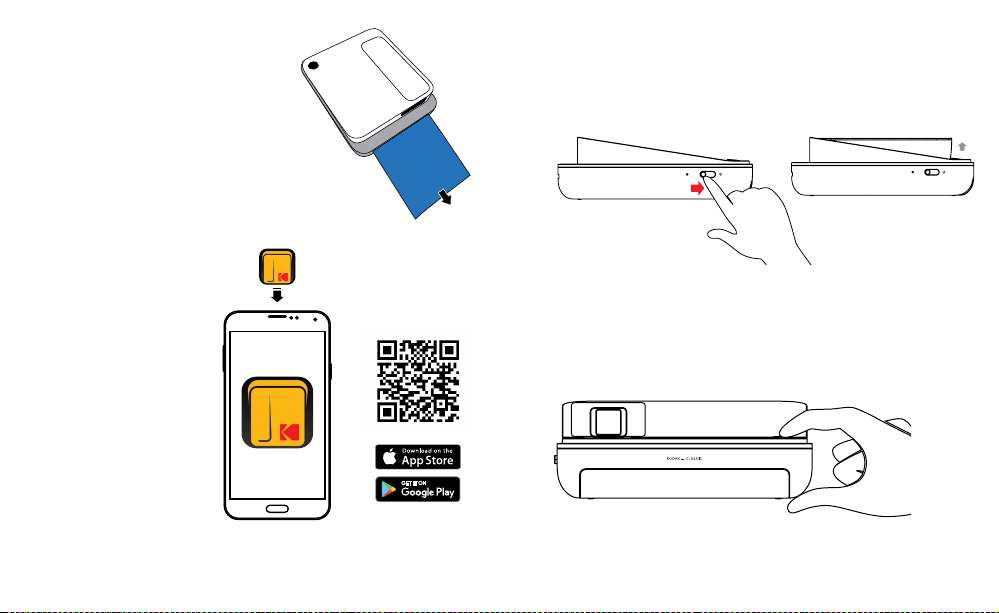
a. Önen Sie den Papierschacht an der Rückseite, indem Sie den
Schachtdeckel an der hinteren Seite des Geräts lösen. Drücken
Sie auf dem Pfeil nach unten und schieben Sie den Deckel zu sich.
b. Legen Sie das blaue Kalibrierungsblatt ein, wobei der Barcode nach
unten zeigt. Platzieren Sie die anderen neutralen Blätter darüber mit
der glänzenden Seite zu Ihnen. Bemühen Sie sich, die glänzende
Seite nicht zu berühren, damit Sie keine Fingerabdrücke darauf
bekommen.
46 | DE DE | 47
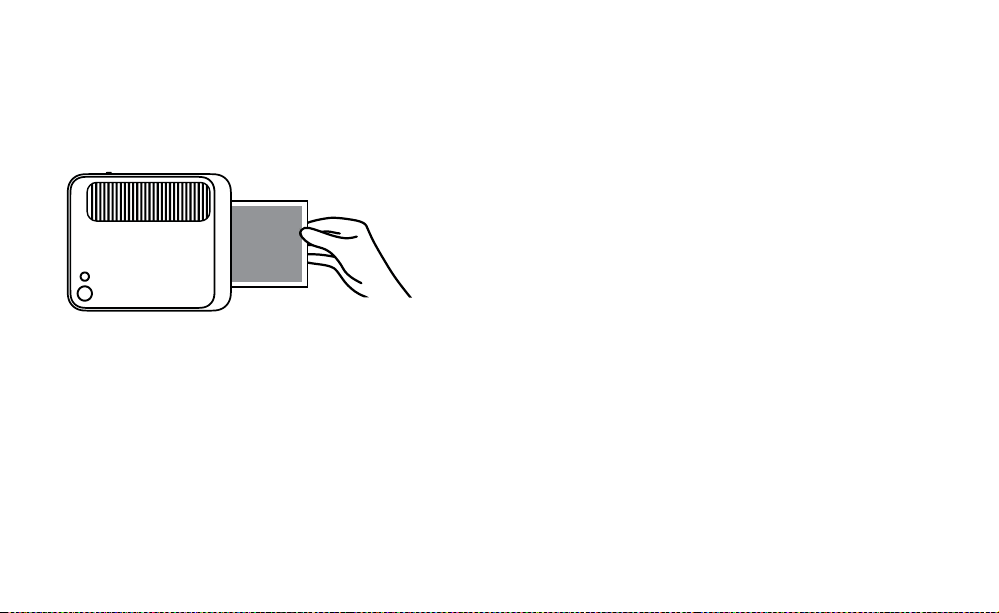
c. Wenn Sie Ihr erstes Foto aufnehmen,
nachdem Sie das ZINK®-Papier
eingelegt haben, wird das blaue
Kalibrierungsblatt langsam aus dem
Druckschlitz ausgeworfen werden. Ihr
Foto wird gedruckt, nachdem
das Kalibrierungsblatt
ausgefworfen wurde.
HINWEIS: Bitte stellen Sie sicher, dass Sie
das Papier nicht zu weit hineinschieben,
da es sonst stauen könnte oder
Fehldruck-Probleme verursachen könnte.
3. Fügen Sie eine MicroSD™-Karte in den
entsprechenden Schlitz an
der Seite ein, der sich direkt
unter dem Ladeanschluss
beindet. Die KODAK SMILE
unterstützt MicroSD™-Karten
bis zu 256 GB.
4. Laden Sie die KODAK
Classic 2-in-1App vom
Google Play™-Store oder
vom Apple® App Store®
herunter. Die KODAK
SMILE Classic funktioniert,
ohne irgendetwas
herunterzuladen, aber die
App bietet viele einzigartige
und lustige Funktionen für
Ihre neue Kamera!
BILDER AUFNEHMEN MIT DER KODAK SMILE CLASSIC
1. Schalten Sie die Kamera ein, indem Sie die Stromsperre Richtung
Rückseite der Kamera schieben, so dass der Bildsucher aufpoppt. Sie
werden eine Musikfolge hören und der LEDIndikator an der Seite der
Kamera wird rot blinken, dann dauerhaft grün werden, wenn der Strom
eingeschaltet ist.
2. Wenn Sie einen 10Sekunden-Timer einstellen möchten, drücken Sie
die Timer-Taste oben auf der Kamera, neben der Verschlusstaste. Der
Kamerablitz wird blinken, um die Sekunden herunterzuzählen, und
die Kamera wird außerdem einen Ton abspielen, bevor sie das Bild
aufnimmt.
3. Sehen Sie durch den Bildsucher, um Ihr Bild auszurichten, und drücken
Sie dann die Verschlusstaste oben auf der Kamera.
4. Wenn Sie Bilder in einer Einstellung bei schwachem Licht aufnehmen,
wird die KODAK SMILE Classic die Lichtstärke automatisch entdecken
48 | DE DE | 49
und den Stroboskopblitz verwenden, wenn es nötig ist. In einem Raum
mit luoreszierendem Licht möchten Sie sich vielleicht auf die kräftigeren
Farben fokussieren, um einen verwaschenen Look zu vermeiden.
5. Die Kamera wird dann piepen, um Sie wissen zu lassen, dass Ihr Bild
verarbeitet wird, und nach ein paar Sekunden wird sie beginnen, das
Foto aus dem Foto-Druckschlitz zu drucken.
6. Holen Sie Ihr Foto heraus, nachdem die Kamera das Drucken beendet
hat.
BILDER DRUCKEN UNTER VERWENDUNG DER KODAK
CLASSIC 2-IN-1-APP
1. Schalten Sie die Kamera ein, indem Sie die Stromsperre Richtung
Rückseite der Kamera schieben, so dass der Bildsucher aufpoppt.
2. Vergewissern Sie sich, dass Bluetooth® auf Ihrem Telefon aktiviert ist.
3. Önen Sie die KODAK Classic 2-in-1App von Ihrem Telefon, folgen
Sie den Anweisungen, um Ihre Kamera mit der App zu verbinden,
und beginnen Sie dann, Ihre neue KODAK SMILE Classic Kamera zu
verwenden!
Wenn Sie Probleme haben, von der App zu Ihrer Kamera zu verbinden,
versuchen Sie stattdessen, die folgenden Schritte zu befolgen:
1. Greifen Sie auf die Bluetooth®-Einstellungen Ihres Telefons zu, die
normalerweise unter dem Menü der allgemeinen Einstellungen zu
inden sind.
2. Vergewissern Sie sich zuerst, dass die Kamera eingeschaltet ist, dann
lassen Sie Ihr Telefon nach neuen Geräten scannen.
3. Sie werden „Kodak Classic XX:XX“ in der Bluetooth®-Liste erscheinen
sehen. Die Platzhalter „X“ werden durch bestimmte Buchstaben und
Zahlen ersetzt sein, die Ihrer speziischen Kamera entsprechen. Tippen
Sie darauf, um das Verbinden zu beginnen.
4. Nach ein paar Sekunden sollte Ihr Telefon „verbunden“ melden.
HERUNTERLADEN IHRER FOTOS
Wenn Sie eine MicroSD™-Karte in Ihrer KODAK SMILE Classic Kamera
installiert haben, können Sie leicht von jedem Laptop oder PC Kopien Ihrer
Fotos mit höherer Aulösung herunterladen und ansehen.
1. Stecken Sie den USBAnschlussstecker Ihres Ladekabels in irgendeinen
USBAnschluss an Ihrem Computer (oder Laptop). Stecken Sie den
Micro-USBAnschlussstecker in den Ladeanschluss Ihrer Kamera.
2. Schalten Sie die Kamera ein, indem Sie die Stromsperre Richtung
Rückseite der Kamera schieben, so dass der Bildsucher aufpoppt. Das
Indikator-Licht über dem Ladeanschluss sollte anfangen, zu blinken.
3. Wenn Sie die Kamera zum ersten Mal verbinden, wird es einige Minuten
dauern, um die Treiber automatisch herunterzuladen und die Kamera als
externes Speichergerät zu erkennen. Trennen Sie die Kamera nicht
während dieses Vorgangs.
4. Nachdem die Kamera verbunden wurde und die Treiber installiert
worden sind, können Sie auf die Bilder zugreifen, die Sie aufgenommen
haben, indem Sie zum Menü Ihres Computers gehen und es sich als
externes Speichergerät (normalerweise standardmäßig unter E:\)
ansehen. Sie werden einen Ordner mit dem Namen DCIM sehen,
und in diesem Ordner wird es einen anderen Ordner mit dem Namen
CLASSIC_CAM geben. Hier werden Sie Kopien all Ihrer Fotos inden,
sogar von jenen, die Sie aufgenommen haben, als kein Papier in die
Kamera eingelegt war.

50 | DE DE | 51
5. Wir wünschen Ihnen viel Spaß beim Ansehen, Bearbeiten, Ausdrucken
und/oder Veröentlichen dieser Versionen in höherer Aulösung Ihrer
KODAK SMILE Classic Fotos von Ihrem Computer!
6. Wenn Sie fertig sind, stellen Sie sicher, dass Sie die Option
„abnehmbares Speichergerät ausgeben“ wählen, um etwaige Probleme
mit Ihrer MicroSD™-Karte zu vermeiden.
TIPPS UND TRICKS
• Wenn Sie kein Papier haben, aber eine MicroSD™-Karte installiert
haben, werden alle Bilder, die Sie aufzunehmen versuchen, auf der
MicroSD™-Karte gespeichert werden und Sie können jederzeit von
Ihrem Computer darauf zugreifen. Es werden jedoch nur Ihre zuletzt
aufgenommenen Fotos ausgedruckt werden, sobald Sie mehr Papier in
die Kamera einlegen.
• Wenn keine MicroSD™-Karte installiert ist, wird Ihre KODAK SMILE Classic
Kamera Sie durch Piepen und das Blinken aller LEDIndikatoren wissen
lassen, dass sie kein Papier mehr hat, sooft Sie versuchen, ein Bild
aufzunehmen. Wenn Sie keine MicroSD™-Karte installiert haben, wird
keins der Fotos, die sie aufzunehmen versuchen, während kein Papier in
der Kamera ist, gespeichert werden.
• Wichtig! Lassen Sie den Finger nicht auf der Verschlusstaste, außer
Sie sind bereit, ein Bild aufzunehmen, oder Ihre Kamera ist komplett
ausgeschaltet; diese Kamera druckt automatisch alle Bilder aus, die
sie aufnimmt. Wenn Sie den Finger auf der Taste lassen, könnten Sie
letztendlich ein Foto drucken, das Sie nicht aufnehmen wollten.
GARANTIE-INFORMATION
BESCHRÄNKTE GARANTIE AUF KODAK SMILE CLASSIC DIGITALE
SOFORTDRUCKKAMERA
DIESE BESCHRÄNKTE GARANTIE GIBT IHNEN BESTIMMTE RECHTE UND
SIE KÖNNTEN AUCH WEITERE RECHTE HABEN, DIE VON LAND ZU LAND
UNTERSCHIEDLICH AUSFALLEN.
WIR GARANTIEREN, DASS DAS PRODUKT WÄHREND DER GARANTIEZEIT
FREI VON MATERIAL- UND HERSTELLUNGSMÄNGELN IST.
HAFTUNGSBEGRENZUNGEN
SOWEIT ES NICHT GESETZLICH VERBOTEN IST, IST DIESE GARANTIE
EXKLUSIV UND ERSETZT ALLE ANDEREN GARANTIEN, SEIEN SIE
MÜNDLICH, SCHRIFTLICH, GESETZLICH, AUSDRÜCKLICH ODER
STILLSCHWEIGEND. MIT AUSNAHME DER IN DIESER BESCHRÄNKTEN
GARANTIEERKLÄRUNG ENTHALTENEN AUSDRÜCKLICHEN
GARANTIEN UND SOWEIT NICHT GESETZLICH VERBOTEN, LEHNEN
WIR ALLE ANDEREN AUSDRÜCKLICHEN ODER STILLSCHWEIGENDEN,
GESETZLICHEN ODER SONSTIGEN GARANTIEN AB, EINSCHLIESSLICH
UND OHNE EINSCHRÄNKUNG AUCH DIE GEWÄHRLEISTUNG DER
MARKTGÄNGIGKEIT UND EIGNUNG FÜR EINEN BESTIMMTEN ZWECK.
EINIGE LÄNDER ERLAUBEN KEINE HAFTUNGSAUSSCHLÜSSE
FÜR STILLSCHWEIGENDE GARANTIEN, SODASS DIESER
HAFTUNGSAUSSCHLUSS MÖGLICHERWEISE NICHT FÜR SIE
GILT. SOWEIT SOLCHE GARANTIEN NACH DEN GESETZEN IHRER

52 | DE DE | 53
RECHTSORDNUNG NICHT AUSGESCHLOSSEN WERDEN KÖNNEN,
BEGRENZEN WIR DIE DAUER UND DIE RECHTSMITTEL SOLCHER
GARANTIEN AUF DIE DAUER DIESER AUSDRÜCKLICH BEGRENZTEN
GARANTIE.
UNSERE VERANTWORTUNG FÜR FEHLERHAFTE WAREN BESCHRÄNKT
SICH AUF REPARATUR, ERSATZ ODER RÜCKERSTATTUNG, WIE UNTEN IN
DIESER GARANTIEERKLÄRUNG BESCHRIEBEN.
WER DARF DIESE GARANTIE NUTZEN? C&A Marketing, Inc. mit Sitz
in 114 Tived Lane East, Edison, NJ („wir“), erstreckt diese beschränkte
Garantie nur auf den Verbraucher, der das Produkt ursprünglich gekauft
hat („Sie“). Diese erstreckt sich nicht auf einen späteren Eigentümer oder
sonstigen Übernehmer des Produkts.
WAS DECKT DIESE GARANTIE? Diese beschränkte Garantie deckt
Defekte beim Material und der Verarbeitung der KODAK SMILE Classic
Digitale Sofortdruckkamera (das „Produkt“) für den Garantiezeitraum ab,
wie unten deiniert wird.
WAS WIRD DIESE GARANTIE NICHT DECKEN? Diese beschränkte
Garantie deckt keine Schäden, die durch: (a) Transport; (b) Lagerung; (c)
unsachgemäße Verwendung; (d) Nichteinhaltung der Produkthinweise
oder vorbeugende Wartung; (e) Modiikationen; (f) nicht autorisierte
Reparaturen; (g) normale Abnutzung; oder (h) äußere Ursachen wie
Unfälle, Missbrauch oder andere Handlungen oder Ereignisse verursacht
wurden, und die außerhalb unserer angemessenen Kontrolle liegen.
WIE LANGE IST DIE GELTUNGSDAUER? Diese beschränkte
Garantie beginnt mit dem Datum Ihres Kaufs und dauert ein Jahr (die
„Garantiezeit“). Die Gewährleistungsfrist verlängert sich nicht, wenn
wir das Produkt reparieren oder ersetzen. Wir können die Verfügbarkeit
dieser eingeschränkten Garantie nach unserem Ermessen ändern, aber
alle Änderungen werden nicht rückwirkend gültig sein.
WELCHE RECHTSMITTEL STEHEN IHNEN UNTER DIESER GARANTIE
ZUR VERFÜGUNG? In Bezug auf ein defektes Produkt während der
Garantiezeit werden wir nach eigenem Ermessen entweder (a) dieses
Produkt (oder das defekte Teil) kostenlos reparieren oder ersetzen oder
(b) den Kaufpreis dieses Produkts erstatten, wenn keine Austauscheinheit
bereitgestellt werden kann.
WIE ERHALTEN SIE DEN GARANTIE -SERVICE? Um den Garantie-
Service in Anspruch zu nehmen, müssen Sie sich innerhalb der
Garantiezeit unter 8445161539 oder per EMail an kodak@camarketing.
com wenden, um eine Nummer für defekte Warenautorisierung („DMA“)
zu erhalten. Ohne DMANummer wird keine Garantieleistung erbracht
und die Rücksendekosten an unsere Einrichtungen werden von Ihnen,
dem Käufer, übernommen. Die Versandkosten des Ersatzgerätes an Sie
werden von uns übernommen.

54 | DE DE | 55
kodakphotoplus.com
Die Marke, das Logo und die Handelskleidung von Kodak werden unter Lizenz
der Eastman Kodak Company verwendet.
Android ist eine Marke von Google LLC.
IOS ist eine Marke von Cisco in den USA und anderen Ländern und wird
unter Lizenz verwendet.
Bluetooth ist eine Marke von Bluetooth SIG, Inc. USA.
Google Play ist eine Marke von Google LLC.
Apple und App Store sind Marken von Apple Inc. in den USA und anderen
Ländern.
Alle anderen Produkte, Markennamen, Firmennamen und Logos sind
Warenzeichen der jeweiligen Eigentümer. Sie dienen lediglich zur
Identiizierung der jeweiligen Produkte und sind nicht als Sponsoring,
Bestätigung oder Genehmigung zu verstehen.
Vertrieben von: C&A Marketing, Inc., 114 Tived Lane East, Edison, NJ
08837, USA
C&A Marketing UK LTD, 167 Hermitage Road, Crusader Industrial Estate,
London N4 1LZ, UK
©2019. Alle Rechte vorbehalten. In China hergestellt.
KUNDENDIENST-KONTAKTINFORMATIONEN
Sollten Sie Probleme mit Ihrem Produkt haben, setzen Sie sich bitte mit uns
in Verbindung, bevor Sie den Artikel an die Verkaufsstelle zurücksenden. Wir
sind hier um zu helfen!
USUnterstützung:
kodak@camarketing.com
8445161539
Internationale Unterstützung:
kodakintl@camarketing.com
84451615400

56 | FR FR | 57
INTRODUCTION
Merci d'avoir acheté l'ppareil photo numérique à impression
instantanée KODAK SMILE Classic. La presente Guía del usuario
está destinada a proporcionarle pautas para garantizar que el
funcionamiento de este producto sea seguro y no suponga un
riesgo para el usuario. Cualquier uso que no cumpla con las pautas
descritas en esta Guía del usuario puede anular la garantía limitada.
Lea todas las instrucciones antes de usar el producto y conserve
esta guía para consultas futuras. Este producto es solo para uso
doméstico. No está destinado para uso comercial.
Este producto está cubierto por una garantía limitada de un año. La
cobertura está sujeta a límites y exclusiones. Consulte la garantía
para más detalles.
CARACTÉRISTIQUES TECHNIQUES
• Dimensions : 125,5 mm L × 150,0 mm l × 47,8 mm H
• Poids : 408 g
• Couleurs disponibles : Noir, bleu, vert et rouge
• Stockage compatible : cartes microSD™ jusqu'à 256 Go
• Capacité de batterie : 110 mAh
• Type de batterie : Lithium-polymère
• Nombre d'impressions par recharge : -35
• Papier photo compatible : Papier photo à dos adhésif KODAK ZINK
88 mm × 106 mm
CONTENU DE LA BOITE
• Appareil photo numérique à impression instantanée KODAK SMILE Classic
• Câble de recharge micro USB
• Paquet de démarrage de papier photo KODAK ZINK
• Guide de l'utilisateur / Carte de démarrage rapide
• Garantie limitée
PRÉCAUTIONS DE SÉCURITÉ
• Avertissement épilepsie : Cet appareil utilise des lampes lash
stroboscopiques susceptibles de provoquer des crises chez les
personnes sourant d'épilepsie photosensible ou d'autres troubles
similaires. L'utilisateur est invité à faire preuve de discernement.
• Ne pas essayer de démonter l'appareil, quelle qu'en soit la raison.
• Ne pas laisser l'appareil photo ou le papier photo KODAK ZINK
dans un lieu qui pourrait devenir extrêmement chaud ou où il
sera exposé pendant un long moment à la lumière du soleil. Cela
pourrait, entre autres, provoquer une surchaue de votre appareil.
• Tenir à l'écart de l'eau ! Si vous devez nettoyer votre appareil photo,
utilisez un chion doux légèrement humecté d'eau ou d'alcool, et
frottez doucement les taches de saleté. Ne jamais – au grand jamais
– plonger l'appareil entier dans l'eau.
• Traiter l'appareil photo avec soin. Ne pas le faire tomber ni le
secouer violemment. L'intérieur de l'appareil est rempli de très
petites pièces
qui pourraient se casser en cas de heurts brusques.
• Ne pas utiliser de produits tels que de l'alcool, de l'essence, du
white spirit ou tout autre solvant organique pour nettoyer ou tenter
de nettoyer ce produit.
• Ne pas utiliser cet appareil dans un environnement où il sera
exposé à de fortes poussières ou à une forte humidité.
• Ne pas utiliser cet appareil pendant que vous vous lavez ou dans la
douche.
• Ne pas placer ou recharger cet appareil à un endroit où il pourrait
tomber ou être entrainé dans un évier ou une baignoire.
• Ne pas placer, jeter ou plonger l'appareil dans de l'eau ou tout autre
liquide.
• Veiller à ce que rien ne tombe sur l'appareil et à ce qu'il ne soit pas
éclaboussé par le moindre liquide.
58 | FR FR | 59
PRÉSENTATION DU PRODUIT
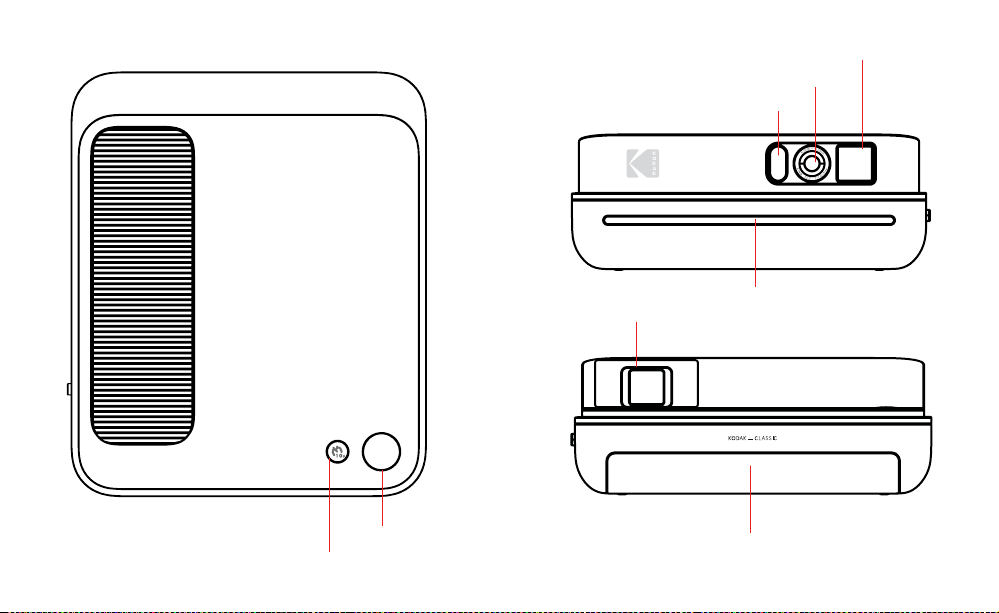
Bouton minuterie 10 secondes
Bouton obturateur
Flash stroboscopique
Fenêtre viseur
Lentille de l'appareil
Fente d'impression
de photo
Protection du
plateau à papier
Viseur téléscopique
60 | FR FR | 61
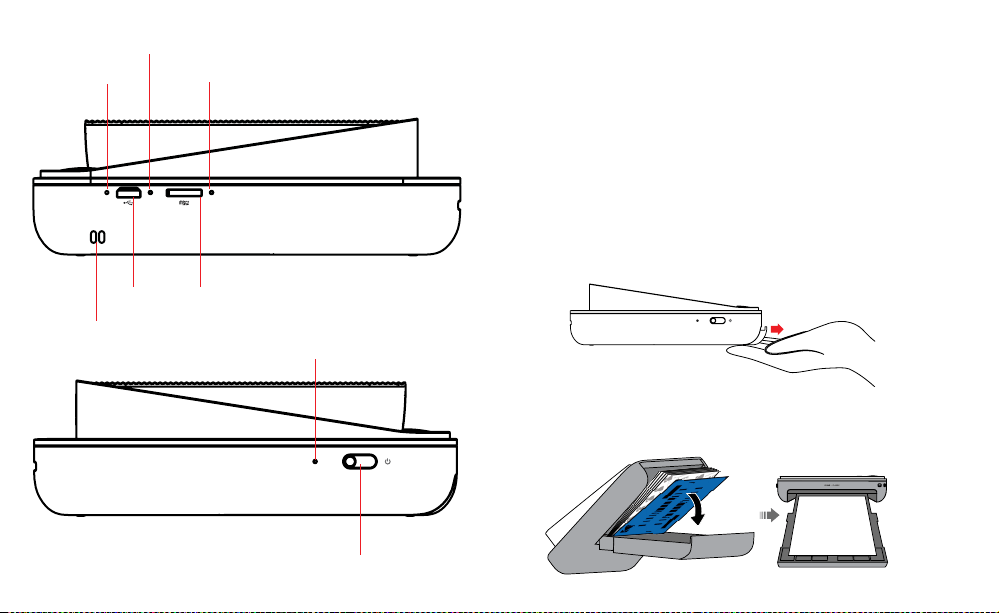
Indicateur de
charge à LED
Bouton redémarrage
Indicateur
microSD™ à LED
Verrouillage alimentation
Port
microSD™
Port micro
USB
Indicateur de
puissance à LED
Attache pour la
dragonne
PRÉPARATION À L'EMPLOI
1. Recharger d'abord : Avant de démarrer, utiliser votre nouveau
KODAK SMILE Appareil photo classique, branchez-le à votre
ordinateur ou à tout bloc de recharge USB avec un débit d'2
ampères (2 A) ou plus. L'indicateur de recharge clignotera en blanc
pendant la recharge de l'appareil. Une fois qu'il arrête de clignoter
pour briller de façon continue, il est entièrement chargé et prêt à
l'emploi.
2. Insérez le papier photo ZINK® dans l'appareil photo : Suivez les
étapes ci-dessous pour charger votre appareil facilement et
rapidement avec du papier à dos adhésif ZINK® pour commencer
à imprimer vos photos !
a. Ouvrez le plateau à papier à l'arrière en soulevant sa protection
à l'arrière de l'appareil. Appuyez sur la lèche et faites glisser
la protection dans votre direction.
b. Insérez la feuille de calibrage bleue avec le code-barres face
vers le bas. Placez les autres feuilles vierges par-dessus, côté
brillant face à vous. Évitez de toucher le côté brillant pour ne
pas le marquer de traces de doigts.
62 | FR FR | 63
c. Quand vous prenez votre première
photo après avoir chargé le papier
ZINK®, la feuille de calibrage sera
lentement éjectée par la fente
d'impression. Votre photo sera
imprimée après que la feuille de
calibrage inisse.
REMARQUE : Veillez à ne pas enfoncer
le papier trop loin, sans quoi il pourrait
se bloquer ou provoquer des erreurs
d'impression.
3. Insérez une carte microSD™ dans
la fente correspondante sur le côté,
située directement sous le port de recharge. Le KODAK SMILE
Classic est compatible
avec les cartes microSD™
jusqu'à 256 Go.
4. Téléchargez l'application
KODAK Classic 2 en 1
dans Google Play™ ou
sur l'App Store® d'Apple®.
Le KODAK SMILE Classic
fonctionne sans devoir
télécharger quoi que
ce soit, mais l'appli
fournit beaucoup de
fonctionnalités uniques
et amusantes pour votre
nouvel appareil photo !
PRENDRE DES PHOTOS AVEC LE KODAK SMILE CLASSIC
1. Allumez l'appareil en faisant glisser le verrou alimentation
vers l'arrière de l'appareil de sorte à faire apparaitre le viseur
téléscopique. Vous entendrez une petite mélodie, et l'indicateur à
LED sur le côté de l'appareil clignotera en rouge, avant de briller en
vert une fois l'appareil allumé.
2. Si vous voulez activer la minuterie de 10 secondes, appuyez sur
le bouton minuterie sur le dessus de l'appareil photo, à côté du
bouton obturateur. Le lash de l'appareil clignotera pour indiquer
le compte à rebours, et l'appareil jouera une mélodie avant de
prendre la photo.
3. Regardez dans le viseur pour cadrer votre photo, puis appuyez sur
le bouton obturateur sur le dessus de l'appareil.
4. Si vous prenez une photo dans un environnement à faible lumière,
le KODAK SMILE Classic détectera de lui-même l'insuisance de
lumière et utilisera le lash stroboscopique si nécessaire. Dans une
64 | FR FR | 65
pièce avec un éclairage luorescente, vous pourriez vouloir vous
focaliser sur les couleurs plus vives pour éviter une apparence
délavée.
5. L'appareil bippera pour vous informer de ce que votre photo est
en cours de traitement. Après quelques secondes, il commencera
l'impression de la photo, qui sortira de la fente d'impression de
photos.
6. Récupérez votre photo une fois qu'elle est complètement
imprimée.
IMPRIMER DES PHOTOS AVEC L'APPLICATION KODAK
CLASSIC 2 EN 1
1. Allumez l'appareil en faisant glisser le verrou alimentation
vers l'arrière de l'appareil de sorte à faire apparaitre le viseur
téléscopique.
2. Assurez-vous que la connexion Bluetooth® de votre téléphone est
activée.
3. Ouvrez l'application KODAK Classic 2 en 1 sur votre téléphone,
suivez les instructions pour synchrosiner votre appareil à l'appli, et
commencez à utiliser votre nouvel appareil photo KODAK SMILE
Classic !
Si vous éprouvez des diicultés à synchroniser votre appareil avec
l'application, essayez de suivre ces étapes à la place :
1. Ouvrez le menu des paramètres de Bluetooth® de votre téléphone
(qui se trouve généralement sous le menu des Paramètres
généraux).
2. Assurez-vous que l'appareil photo soit bien allumé, puis laissez
votre téléphone rechercher de nouveaux appareils.
3. Vous verrez « Kodak Classic XX:XX » apparaitre sur la liste de
Bluetooth®. (Les « X » seront remplacés par les lettres et les
chires qui correspondent à votre appareil). Appuyez dessus pour
démarrer la synchronisation.
4. Après quelques secondes, votre téléphone devrait dire «
Synchronisé ».
TÉLÉCHARGER VOS PHOTOS
Si vous avez une carte microSD™ installée sur votre KODAK SMILE
Classic, vous pouvez facilement télécharger et aicher des copies en
haute résolution de vos photos sur n'importe quel ordinateur.
1. Branchez la prise USB de votre câble de recharge dans n'importe
quel port USB de votre ordinateur. Branchez le connecteur micro
USB dans le port de recharge de votre appareil photo.
2. Allumez l'appareil photo en faisant glisser le verrou alimentation
vers l'arrière de l'appareil de sorte à faire apparaitre le viseur
téléscopique. La lampe de l'indicateur au-dessus du port de
charge devrait se mettre à clignoter.
3. La première fois que vous connectez votre appareil à votre
ordinateur, il vous faudra patienter quelques minutes pour que
l'ordinateur télécharge automatiquement les pilotes et reconnaisse
l'appareil en tant que périphérique de stockage externe. Ne
déconnectez pas votre appareil pendant ce processus.
4. Une fois que l'appareil a été branché et que les pilotes ont été
installés, vous pouvez accéder aux photos que vous avez prrises

66 | FR FR | 67
en allant dans le menu de votre ordinateur et en les aichant en
tant que périphérique de stockage externe (normalement, la lettre
attribuée par défaut à ce périphérique est E:\). Vous verrez un
dossier appelé « DCIM ». Dans ce dossier, il y a un autre dossier
appelé « CLASSIC_CAM ». C'est là que vous trouverez les copies
de toutes vos photos, même de celles que vous avez prises
lorsque l'appareil n'avait pas de papier chargé.
5. Nous vous souhaitons un bon amusement avec l'aichage,
le traitement, l'impression et l'envoi de ces versions en haute
résolution de vos photos KODAK SMILE Classic à partir de votre
ordinateur !
6. Lorsque vous aurez terminé, n'oubliez pas de choisir l'option
« Éjecter le périphérique de stockage externe amovible » ain
d'éviter tout problème avec votre carte microSD™.
CONSEILS ET ASTUCES
• Si vous n'avez pas de papier, mais que vous avez installé une
carte microSD™, toutes les photos que vous prendrez seront
enregistrées sur la carte microSD™ et seront accessibles de votre
ordinateur à tout moment. Cependant, seules vos photos les plus
récentes s'imprimeront lorsque vous remettrez du papier dans
l'appareil.
• Si vous n'avez pas de carte microSD™ installée, votre appareil
KODAK SMILE Classic vous informera qu'il est à court de papier
en bippant et en faisant clignoter tous les indicateurs LED lorsque
vous tenterez de prendre une photo. Si vous n'avez pas de
carte microSD™ installée, aucune des photos que vous tenterez
de prendre lorsque l'appareil est à court de papier ne sera
enregistrée.
• Important ! Ne posez pas votre doigt sur le bouton obturateur
à moins que vous ne soyez prêts à prendre une photo ou que
votre appareil soit complètement éteint ; cet appareil imprime
automatiquement toute photo qu'il prend. Si vous posez le doigt
sur le bouton obturateur, il se pourrait que l'appareil imprime une
photo que vous ne vouliez pas prendre.

68 | FR FR | 69
INFORMATIONS RELATIVES À LA GARANTIE
GARANTIE LIMITÉE SUR VOTRE APPAREIL PHOTO NUMÉRIQUE À
IMPRESSION INSTANTANÉE KODAK SMILE CLASSIC
CETTE GARANTIE LIMITÉE VOUS CONFÈRE DES DROITS SPÉCIFIQUES
RECONNUS PAR LA LOI. VOUS POURRIEZ DISPOSER DE DROITS
SUPPLÉMENTAIRES QUI VARIENT D'UN PAYS À UN AUTRE.
NOUS GARANTISSONS QUE CE PRODUIT SERA EXEMPT DE TOUT DÉFAUT
DE FABRICATION ET DE MATÉRIAUX PENDANT LA PÉRIODE DE GARANTIE.
LIMITATION DE RESPONSABILITÉ
Dans la mesure où le droit ne l'interdit pas, cette garantie est exclusive et
vient en lieu et place de toute autre garantie écrite, orale, légale, expresse
ou implicite. À L'EXCEPTION DES GARANTIES EXPRESSES CONTENUES
DANS LA DÉCLARATION DE GARANTIE LIMITÉE ET DANS LA MESURE OÙ
CELA NE CONTREVIENT PAS À LA LOI, NOUS DÉCLINONS TOUTES LES
AUTRES GARANTIES, EXPLICITES OU IMPLICITES, LÉGALES OU AUTRES,
INCLUANT SANS LIMITATION, LES GARANTIES COMMERCIALES ET
D'USAGE POUR UN BUT PARTICULIER. DANS LA MESURE OÙ CERTAINES
JURIDICTIONS N'AUTORISENT PAS LA LIMITATION DES GARANTIES
TACITES, CES INFORMATIONS PEUVENT NE PAS S’APPLIQUER À VOTRE
CAS. DANS LA MESURE OÙ DE TELLES GARANTIES NE PEUVENT ÊTRE EN
CONTRADICTION AVEC LES LOIS EN VIGUEUR SOUS VOTRE JURIDICTION,
NOUS LIMITONS LA DURÉE ET LA PRISE EN CHARGE À LA DURÉE DE
CETTE GARANTIE LIMITÉE EXPRESSE.
NOTRE RESPONSABILITÉ QUANT AUX ARTICLES DÉFECTUEUX SE LIMITE À
LA RÉPARATION, AU REMPLACEMENT OU AU REMBOURSEMENT COMME
DÉCRIT CIDESSOUS DANS LA DÉCLARATION DE GARANTIE.
QUI PEUT BÉNÉFICIER DE CETTE GARANTIE? C&A Marketing, Inc., situé
114 Tived Lane East, Edison, NJ, USA (« nous ») n'accorde cette garantie
limitée qu'au client d'origine du produit (« vous»). Elle ne s'étend pas au
propriétaire suivant ou à un bénéiciaire du transfert du produit.
QUE COUVRE CETTE GARANTIE? Cette garantie limitée couvre les
défauts dans le matériel et la fabrication de l'appareil photo numérique
à impression instantanéeKODAK SMILE Classic 1 (« le Produit ») pour la
période de garantie, telle que déinie ci-dessous.
QU'ESTCE QUI N'EST PAS COUVERT PAR CETTE GARANTIE? Cette
garantie limitée ne couvre pas les dégâts dus aux cas suivants: (a) transport
; (b) entreposage ; (c) mauvaise utilisation ; (d) non-respect des consignes
d'utilisation du produit ou omission des opérations d'entretien préventif ;
(e) modiications; (f) réparation non autorisée ; (g) usure normale ; ou (h)
causes externes comme des accidents, usage abusif ou toute autre action
ou événement au-delà de notre contrôle.
QUELLE EST LA PÉRIODE DE COUVERTURE? Cette garantie limitée
commence le jour de votre achat et dure pendant un an (la «Période de
garantie »). La Période de garantie ne se prolonge pas si nous réparons
ou remplaçons le produit. Nous pouvons changer à notre discrétion la
disponibilité de cette garantie limitée, mais les changements ne seront pas
rétroactifs.
QUELS SONT VOS RECOURS SOUS CETTE GARANTIE? En cas de
défectuosité du produit pendant la période de garantie, nous pourrons,
à notre entière discrétion: (a) réparer ou remplacer le produit (ou la pièce

70 | FR FR | 71
défectueuse) gratuitement ou (b) rembourser le prix d'achat du produit si
une unité de remplacement ne peut être fournie.
COMMENT BÉNÉFICIER DE LA GARANTIE? Pour bénéicier du service de
garantie, vous devez nous contacter au +1 8445161539 ou par courriel à
l'adresse kodak@camarketing.com pendant la Période de garantie pour
obtenir un numéro d'autorisation de marchandise défectueuse («DMA»,
Defective Marchandise Authorization). Aucun service de garantie ne sera
eectué sans numéro DMA et les frais de retour vers nos installations
doivent être pris en charge par vous, l'acheteur. Nous prendrons à notre
charge les frais d'expédition de l'unité de remplacement.
INFORMATIONS DE CONTACT DE SERVICE À LA
CLIENTÈLE
Si vous rencontrez des problèmes avec votre produit, veuillez nous
contacter avant de ramener le produit au point de vente. Nous sommes
là pour vous aider!
Support technique aux USA:
kodak@camarketing.com
8445161539
Support technique international:
kodakintl@camarketing.com
8445161540
kodakphotoplus.com
La marque commerciale Kodak, le logo et l'habillage sont utilisés sous
licence de Eastman Kodak Company.
Android est une marque commerciale de Google LLC.
IOS est une marque commerciale de Cisco aux États-Unis et dans
d’autres pays et est utilisée sous licence.
Bluetooth est une marque commerciale de Bluetooth SIG, Inc. USA.
Google Play est une marque commerciale de Google LLC.
Apple et App Store sont des marques commerciales de Apple Inc. aux
États-Unis et dans d'autres pays.
Tous les autres produits, noms de produits, noms de sociétés ainsi que
les logos sont des marques de commerce ou des marques déposées de
leur détenteur respectif, et ne signiient aucun parrainage, autorisation ou
approbation.
Distribué par: C&A Marketing, Inc., 114 Tived Lane East, Edison, NJ 08837,
USA
C&A Marketing UK LTD, 167 Hermitage Road, Crusader Industrial Estate,
London N4 1LZ, UK
©2019. Tous droits réservés. Fabriqué en Chine.

72 | IT IT | 73
PRESENTAZIONE
Grazie per aver acquistato la otocamera digitale a stampa istantanea
KODAK SMILE Classic. La presente Guida utente ha lo scopo di fornire
le linee guida per garantire che il funzionamento di questo prodotto
sia sicuro e non comporti un rischio per l'utente. Qualsiasi utilizzo non
conforme alle linee guida descritte in questa Guida utente potrebbe
invalidare la garanzia limitata.
Vi invitiamo a leggere tutte le istruzioni, prima di utilizzare il prodotto,
e a conservare questa guida come riferimento. Questo prodotto è
esclusivamente per uso domestico. Non può essere usato in ambito
commerciale.
Questo prodotto è coperto da una garanzia limitata di 1 anno. La
copertura è soggetta a limiti ed esclusioni. Vi invitiamo a leggere la
garanzia, per maggiori informazioni.
SPECIFICHE
• Dimensioni: 4.94 L x 5.91 P x 1.88 H (125,5 x 150 x 47,8 mm)
• Peso: 14.4 oz. (408 g)
• Colori disponibili: Nero, blu, verde e rosso
• Memoria supportata: schede microSD™ ino a 256GB
• Capacità della batteria: 1100 mAh
• Tipo di batteria: polimeri di litio
• Stampe per ricarica: -35
• Carta fotograica supportata: Carta fotograica KODAK ZINK in fogli
adesivi da 3.5 x 4.25
CONTENUTO DELLA CONFEZIONE
• Fotocamera digitale a stampa istantanea KODAK SMILE Classic
• Cavo per ricarica USB Micro
• Risma iniziale di carta fotograica KODAK ZINK
• Manuale utente/Scheda Quick Start
• Garanzia limitata
NORME DI SICUREZZA
• Pericolo di svenimento: Questo dispositivo usa un lash a luce
stroboscopica, che potrebbe scatenare una crisi in persone aette da
epilessia fotosensibile e/o altre patologie. Si consiglia agli utenti di fare
attenzione.
• Non tentare di smontare questo dispositivo per alcun motivo.
• Non lasciare mai la fotocamera o la carta fotograica KODAK ZINK in
aree soggette a temperature estremamente elevate, o in luoghi
esposti alla luce solare diretta per lunghi periodi di tempo. Ciò può
comportare il surriscaldamento della fotocamera, o il veriicarsi di altri
problemi.
• Evitare il contatto con l'umidità! Se devi pulire la tua fotocamera, usa un
panno morbido leggermente inumidito con acqua o alcol denaturato e
stroinalo delicatamente sui punti sporchi. Non immergere mai il
dispositivo in acqua.
• Abbi cura della tua fotocamera. Non provare a lasciarla cadere o
a scuoterla violentemente. L'interno della fotocamera è costituito
da minuscole componenti che potrebbero rompersi a causa di
scuotimenti continui.
• Non usare prodotti come alcol, benzina, diluenti o altri solventi organici
per pulire, o provare a pulire, questo prodotto.
• Non usare questo dispositivo in ambienti che comportino l'esposizione
a condizioni di eccessiva polvere o umidità.
• Non usare questa fotocamera sotto la doccia o durante il bagno.
• Non lasciare o ricaricare la fotocamera su punti da cui possa cadere o
essere trascinata accidentalmente in una vasca o un lavello
• Non posare, far cadere o immergere la fotocamera in acqua o altre
sostanze liquide.
• Accertarsi che sulla fotocamera non cadano oggetti, o che sostanze
liquide penetrino nella stessa.
74 | IT IT | 75
DESCRIZIONE DEL PRODOTTO
Pulsante timer 10 sec.
Pulsante otturatore
Flash
stroboscopico
Visore
Lenti della
fotocamera
Porta
stampante
Coperchio
vano carta
Visore pop-up
76 | IT IT | 77
Indicatore di messa
in carica LED
Pulsante di
ripristino
Indicatore LED
microSD™
Latch
alimentazione
Porta
microSD™
Porta USB
Micro
Indicatore
alimentazione LED
Attacco cinghia
per trasporto
INIZIO
1. Per prima cosa, ricaricare la fotocamera: Prima di iniziare a
usare la nuova KODAK SMILE Classic, collegarla al computer o
a un alimentatore USB con uscita di due Amp (2A) o superiore.
L'indicatore di messa in carica lampeggerà durante la fase di
ricarica della fotocamera. Quando diventa bianco e smette
di lampeggiare, vuol dire che la fotocamera è completamente
ricaricata e pronta all'uso.
2. Caricare la carta ZINK® nella fotocamera: Seguire la procedura
sottostante per caricare velocemente la carta fotograica adesiva
ZINK® e iniziare a stampare le foto!
a. Aprire il vano carta sul retro, rilasciando il coperchio sul retro del
dispositivo. Premere verso il basso sulla freccia e tirare il
coperchio verso di sé.
b. Caricare il foglio blu per la taratura con il codice a barre rivolto
verso il basso. Posizionare altri fogli bianchi in alto, con il lato
patinato rivolta verso sé stessi. Evitare di toccare il lato patinato,
in modo da non lasciare le impronte digitali.
78 | IT IT | 79
c. Quando si scatta la prima foto dopo
aver caricato la carta ZINK®, il foglio
blu verrà fatto uscire lentamente
dalla porta di stampa. La foto sarà
stampata una volta terminato il
foglio per la taratura.
NOTA: Accertarsi di non spingere
la carta troppo all'interno, al
ine di evitare errori di stampa o
accartocciamenti.
3. Inserire una scheda microSD™ nella
porta corrispondente situata a lato,
direttamente sotto la porta di ricarica.
Il modello KODAK SMILE Classic supporta schede microSD™ ino
a 256GB.
4. Scaricare l'applicazione
KODAK Classic 2-in-1
da Google Play™ o App
Store® di Apple®. Il
modello KODAK SMILE
Classic funziona senza
scaricare programmi, ma
l'app mette a disposizione
un sacco di funzioni
uniche e divertenti per la
tua nuova fotocamera!
SCATTARE FOTO CON KODAK SMILE CLASSIC
1. Accendere la fotocamera, spostando il latch verso il retro della
fotocamera, ino a quando il visore non si illumina. Si udrà un
motivo musicale e l'indicatore LED sul lato della fotocamera
lampeggerà inizialmente di rosso, per poi diventare verde una
volta acceso il dispositivo.
2. Se si desidera impostare un timer della durata di 10 secondi,
premere il relativo pulsante in alto della fotocamera, vicino
il pulsante dell'otturatore. Il lash della fotocamera inizierà a
lampeggiare, dando il via al conto alla rovescia, e la fotocamera
emetterà un suono prima di scattare la foto.
3. Guardare attraverso il visore per allineare la foto, dopodiché
premere il pulsante dell'otturatore in alto della fotocamera.
4. Se si scatta una foto in condizioni di luce scarsa, KODAK SMILE
Classic rileverà automaticamente il livello di luminosità e userà
il lash stroboscopico ove necessario. In una stanza con luce
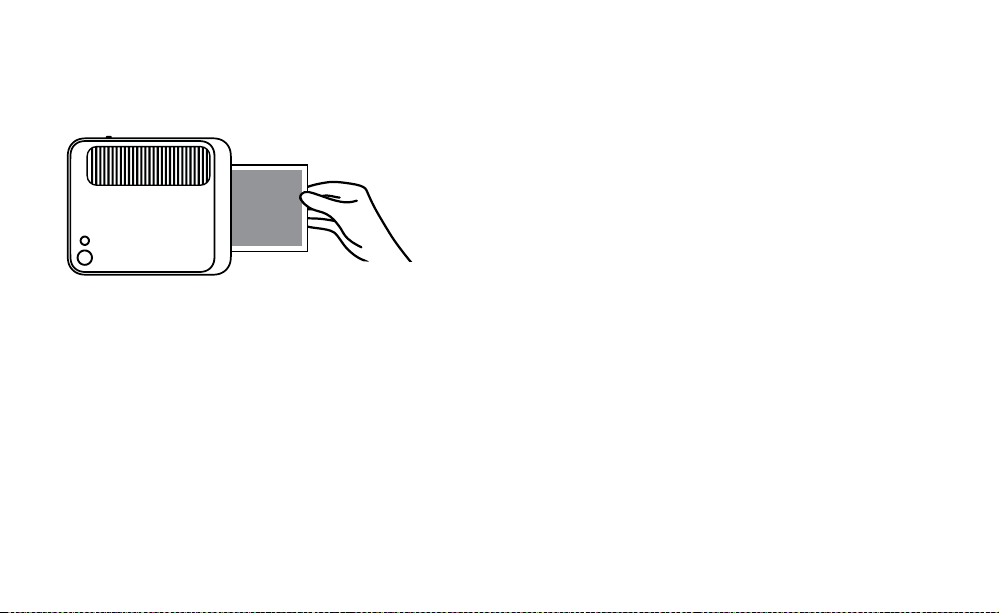
80 | IT IT | 81
luorescente, per evitare colori sbiaditi è possibile inquadrare i
colori più vivaci.
5. A questo punto, la camera emetterà un beep per avvisare che la
foto viene elaborata, e dopo un paio di secondi inizierà a stampare
la foto dalla porta della stampante.
6. Recuperare la foto una volta terminata la procedura di stampa
STAMPARE FOTO USANDO L'APP KODAK CLASSIC 2-IN-1
1. Accendere la fotocamera, spostando il latch verso il retro della
fotocamera, ino a quando il visore non si illumina.
2. Accertarsi che la funzione Bluetooth® del telefono sia attivata.
Aprire l'applicazione KODAK Classic 2-in-1 dal telefono, seguire
le istruzioni per l'accoppiamento della fotocamera con l'app e
iniziare a usare la nuova fotocamera KODAK SMILE Classic.
In caso di problemi durante la connessione della fotocamera con
l'applicazione, provare a seguire questa procedura:
1. Accedere alle impostazioni Bluetooth® del telefono, solitamente
disponibili nel menu Impostazioni generali.
2. Accertarsi innanzitutto che la fotocamera sia accesa, quindi
consentire al telefono di rilevare nuovi dispositivi tramite
scansione.
3. Nell'elenco Bluetooth® apparirà il dispositivo “Kodak Classic
XX:XX”. Le X saranno sostituite dagli speciici caratteri alfanumerici
che corrispondono alla fotocamera usata. Toccare su di esso per
avviare l'accoppiamento.
4. Dopo un paio di secondi, sul telefono dovrebbe apparire la dicitura
"accoppiato".
SCARICARE LE FOTO
Se nella fotocamera KODAK SMILE Classi è installata una scheda
microSD™, è possibile scaricare e visualizzare velocemente le
copie in una risoluzione maggiore delle proprie foto su qualunque
notebook o personal computer.
1. Inserire il connettore USB del cavo di ricarica con qualunque
porta USB del computer (o notebook). Inserire il connettore USB
Micro nella porta di ricarica della fotocamera.
2. Accendere la fotocamera, spostando il latch verso il retro della
fotocamera, ino a quando il visore non si illumina. La luce
dell'indicatore sopra la porta di ricarica dovrebbe iniziare a
lampeggiare.
3. La prima volta che si collega la fotocamera, ci vorranno un paio
di minuti per scaricare automaticamente i driver e riconoscere la
fotocamera come dispositivo di storage esterno. Non scollegare la
fotocamera durante questa procedura.
4. Una volta che la fotocamera è collegata e i driver installati, sarà
possibile aprire le foto scattate andando al menu del computer
e aprendo il dispositivo di storage esterno (normalmente,
denominato E:\). Sarà visibile una cartella denominata DCIM, e
all'interno di essa
sarà visibile un'altra cartella denominata CLASSIC_CAM. Le copie
di tutte le foto sono memorizzate qui, anche quelle scattate
quando la carta fotograica non era caricata.
5. Divertiti a guardare, editare e/o postare queste versioni a una

82 | IT IT | 83
risoluzione maggiore delle tue foto KODAK SMILE Classic
sul tuo computer!
6. Una volta terminato, accertarsi di scegliere l'opzione ""rimuovi
dispositivo di storage rimovibile"", al ine di evitare problemi con la
scheda microSD™.
TRUCCHI E SUGGERIMENTI
• Se hai inito la carta, ma hai una scheda microSD™ installata,
le foto che vuoi scattare saranno memorizzate nella scheda
microSD™, alla quale sarà possibile accedere dal computer in
qualunque momento. Tuttavia, a essere stampate saranno solo
le foto più recenti, dopo aver caricato più carta fotograica nella
fotocamera.
• Se non c'è una scheda microSD™ installata, la KODAK SMILE
Classic ti avviserà quando la carta è esaurita, emettendo un
segnale acustico e facendo lampeggiare gli indicatori LED
ogni volta che provi a scattare una foto. Se non hai una scheda
microSD™ installata, nessuna delle foto che vorrai scattare in
assenza della carta fotograica sarà salvata.
• Importante! Non lasciare appoggiato il dito sul pulsante
dell'otturatore, a meno che tu non sia pronto a scattare una foto,
o se la fotocamera sia completamente spenta; questa fotocamera
stampa tutte le foto scattate. Se lasci appoggiato il dito sul
pulsante, potresti stampare foto che non intendevi scattare.
INFORMAZIONI SULLA SICUREZZA
GARANZIA LIMITATA SULLA FOTOCAMERA DIGITALE A STAMPA
ISTANTANEA KODAK SMILE CLASSIC
QUESTA GARANZIA LIMITATA CONFERISCE ALL’UTENTE DIRITTI LEGITTIMI
E SPECIALI, OLTRE AI DIRITTI CHE POSSONO ESSERE RICONOSCIUTI A
SECONDA DELLO STATO.
NOI GARANTIAMO CHE, NEL CORSO DEL PERIODO DI GARANZIA, IL
PRODOTTO NON PRESENTERÀ DIFETTI DI FABBRICAZIONE O NEI MATERIALI.
LIMITAZIONE DELLA RESPONSABILITÀ
NELLA MISURA NON VIETATA DALLA LEGGE, QUESTA GARANZIA È DA
INTENDERSI ESCLUSIVA E SOSTITUTIVA DI TUTTE LE ALTRE GARANZIE, SIANO
ESSE VERBALI, SCRITTE, OBBLIGATORIE, ESPRESSE O IMPLICITE, FATTE
SALVE LE GARANZIE ESPRESSE CONTEMPLATE IN QUESTA DICHIARAZIONE
DI GARANZIA LIMITATA. NELLA MISURA NON VIETATA DALLA LEGGE, NOI
NON RICONOSCIAMO TUTTE LE ALTRE GARANZIE, SIANO ESSE ESPRESSE
O IMPLICITE, OBBLIGATORIE O ALTRO, INCLUSE, SENZA LIMITAZIONI,
LE GARANZIE DI COMMERCIABILITÀ E ADEGUATEZZA A PARTICOLARI
FINALITÀ. ALCUNI STATI NON AMMETTONO IL DISCONOSCIMENTO DI
GARANZIE IMPLICITE, PERTANTO QUESTO DOCUMENTO POTREBBE NON
ESSERE APPLICABILE A OGNI UTENTE. NELLA MISURA IN CUI TALI GARANZIE
NON POSSONO ESSERE DISCONOSCIUTE IN VIRTÙ DI LEGGI VIGENTI
NELLA SUA GIURISDIZIONE, NOI LIMITIAMO LA VALIDITÀ E I RIMEDI SANCITI
DALLE STESSE ALLA VALIDITÀ DI QUESTA GARANZIA ESPRESSA E LIMITATA.

84 | IT IT | 85
LA NOSTRA RESPONSABILITÀ IN MERITO A PRODOTTI DIFETTOSI È LIMITATA
ALLA RIPARAZIONE, SOSTITUIZIONE O AL RIMBORSO, NELLE MODALITÀ
DESCRITTE A PIÈ DI PAGINA DI QUESTA DICHIARAZIONE DI GARANZIA.
CHI PUÒ RICORRERE A QUESTA GARANZIA? C&A Marketing, Inc.
domiciliata in 114 Tived Lane East, Edison, NJ (in prosieguo la “Società”) estende
questa garanzia limitata solo al cliente che ha eettivamente acquistato
il prodotto (in prosieguo il “Cliente”). Questa garanzia non viene estesa ai
proprietari successivi o agli altri destinatari del prodotto.
COSA COPRE QUESTA GARANZIA? Questa garanzia limitata copre i difetti
nei materiali e di fabbricazione della fotocamera digitale a stampa istantanea
KODAK SMILE Classic (il "prodotto") nel corso del periodo di validità della
garanzia, come di seguito speciicato.
COSA NON COPRE QUESTA GARANZIA? Questa garanzia limitata non
copre danni dovuti a: (a) trasporto; (b) stivaggio/immagazzinamento; (c)
uso improprio; (d) mancato rispetto delle istruzioni del prodotto o mancata
manutenzione preventiva; (e) modiiche; (f) riparazioni non autorizzate; (g)
normale usura; (h) cause esterne, come incidenti, abusi o altre azioni o eventi al
di fuori del nostro ragionevole controllo.
QUAL È IL PERIODO DI COPERTURA? La validità di questa garanzia limitata
decorre dalla data di acquisto e ha la durata di un anno (in prosieguo “Periodo
di garanzia”). Il Periodo di garanzia non viene prorogato a seguito di interventi
di riparazione o sostituzione del prodotto. Noi ci riserviamo la facoltà di
modiicare la disponibilità di questa garanzia limitata a nostra discrezione; le
modiiche non avranno eetto retroattivo.
QUALI SONO I RIMEDI PREVISTI DA QUESTA GARANZIA? Relativamente
ai prodotti che presentino difetti nel corso del Periodo di garanzia, a nostra
esclusiva discrezione provvederemo a: (a) riparare o sostituire il prodotto
difettoso (o la parte difettosa) gratuitamente; (b) rimborsare il prezzo di acquisto
del prodotto difettoso, nel caso non fosse possibile sostituirlo con un altro.
COME È POSSIBILE OTTENERE INTERVENTI IN GARANZIA? Per ottenere
interventi in garanzia, è necessario contattarci telefonicamente al numero
8445161539 o via email all’indirizzo kodak@camarketing.com durante il
Periodo di garanzia, e richiedere il numero di autorizzazione alla restituzione
della merce (ossia il numero “DMA”). In assenza di un numero DMA non verrà
erogato alcun servizio di garanzia e le spese di restituzione saranno a carico del
Cliente, ossia dell’acquirente. La Società si farà carico delle spese di spedizione
dei prodotti sostitutivi.

86 | IT IT | 87
kodakphotoplus.com
Il marchio, il logo e il vestito commerciale Kodak sono utilizzati su licenza
di Eastman Kodak Company.
Android è un marchio di Google LLC.
IOS è un marchio di Cisco negli Stati Uniti e in altri paesi e viene utilizzato
su licenza.
Bluetooth è un marchio di Bluetooth SIG, Inc. USA.
Google Play è un marchio di Google LLC.
Apple e App Store sono marchi commerciali di Apple Inc. negli Stati Uniti
e in altri Paesi.
Tutti gli altri prodotti, nomi di marchi, nomi di società e loghi sono
marchi dei rispettivi proprietari, utilizzati solo per identiicare i loro
rispettivi prodotti e non intendono connotare alcuna sponsorizzazione,
approvazione o approvazione.
Distribuito da: C&A Marketing, Inc., 114 Tived Lane East, Edison, NJ 08837,
USA
C&A Marketing UK LTD, 167 Hermitage Road, Crusader Industrial Estate,
London N4 1LZ, UK
©2019. Tutti i diritti riservati. Prodotto in Cina.
INFORMAZIONI DI CONTATTO DEL SERVIZIO CLIENTI
In caso di problemi con il prodotto, si prega di contattarci prima di restituire
l'articolo al luogo di acquisto. Siamo qui per aiutare!
Supporto USA:
kodak@camarketing.com
8445161539
Supporto internazionale:
kodakintl@camarketing.com
8445161540