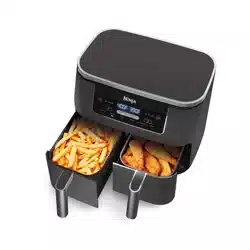
OWNER’S GUIDE AIR FRYER
PARTS
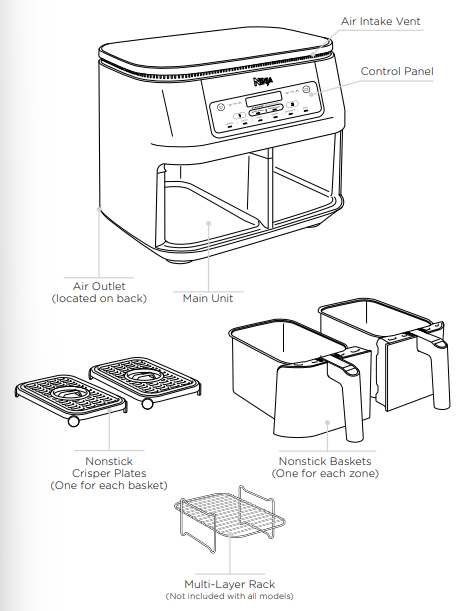
GETTING TO KNOW YOUR NINJA® FOODI® 2-BASKET AIR FRYER
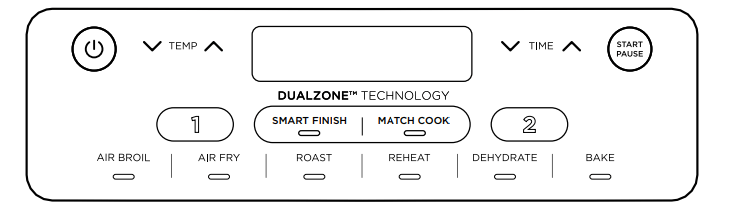
When setting time, the digital display shows HH:MM.
*Not all functions are included on every model.
FUNCTION BUTTONS*
AIR BROIL: Add the crispy finishing touch to meals, or melt toppings to create the perfect finish.
AIR FRY: Use this function to give your food crispiness and crunch with little to no oil.
ROAST: Use the unit as a roaster oven for tender meats and more.
REHEAT: Warm your leftovers, with a crispy result.
DEHYDRATE: Dehydrate meats, fruits, and vegetables for healthy snacks.
BAKE: Create decadent baked treats and desserts.
OPERATING BUTTONS
- Controls the output for the basket on the left.
- Controls the output for the basket on the right
TEMP arrows: Use the up and down arrows to adjust the cook temperature before or during cooking.
TIME arrows: Use the up and down arrows to adjust the cook time in any function before or during the cook cycle.
SMART FINISH button: Automatically syncs the cook times to ensure both zones finish at the same time, even if there are different cook times.
MATCH COOK button: Automatically matches zone 2 settings to those of zone 1 to cook a larger amount of the same food, or cook different foods using the same function, temperature, and time.
START/PAUSE button: After selecting temperature and time, start cooking by pressing the START/PAUSE button. To pause cooking, first select the zone you would like to pause, then press the START/PAUSE button.
POWER BUTTON: The  button turns the unit on and off and stops all cooking functions.
Standby Mode: After 10 minutes of no interaction with the control panel, the unit will enter standby mode. The Power button will be dimly lit.
Hold Mode: Hold will appear on the unit while in SMART FINISH mode. One zone will be cooking, while the other zone will be holding until the times sync together.
NOTE: Not all models include all functions
BEFORE FIRST USE
1 Remove and discard any packaging material, promotional labels, and tape from the unit.
2 Remove all accessories from the package and read this manual carefully. Please pay particular attention to operational instructions, warnings, and important safeguards to avoid any injury or property damage.
3 Wash the baskets and crisper plates in hot, soapy water, then rinse and dry thoroughly. The crisper plates and baskets are the ONLY dishwasher-safe parts. NEVER clean the main unit in the dishwasher.
COOKING IN YOUR 2-BASKET AIR FRYER
REFERENCE QUICK START GUIDE FOR RECIPES AND COOKING CHARTS
COOKING WITH DUALZONETM TECHNOLOGY
DualZone Technology utilizes two cooking zones to increase versatility. The Smart Finish feature ensures that, regardless of different cook settings, both zones will finish ready to serve at the same time.
For detailed instructions on using each function, see pages 10–13
SMART FINISH
To finish cooking at the same time when foods have different cook times, temps, or even functions:
1 Place ingredients in the baskets, then insert baskets in unit.
2 Zone 1 will remain illuminated. Select the desired cooking function. Use the TEMP arrows to set the temperature, and use the TIME arrows to set the time.
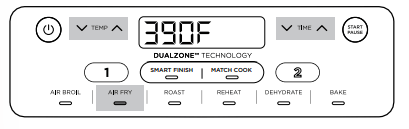
3 Select zone 2, then select the desired cooking function. (AIR BROIL is not available if selected in zone 1) Use the TEMP arrows to set the temperature, and use the TIME arrows to set the time
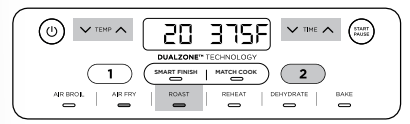
NOTE: You can select a different function for zone 2.
NOTE: Air Broil can only be used in one zone.
4 Press SMART FINISH, then press the START/PAUSE button to begin cooking in the zone with the longest time. The other zone will display Hold. The unit will beep and activate the second zone when both zones have the same time remaining
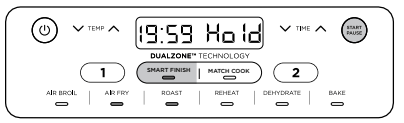
NOTE: It is recommended to shake your food during cooking. To keep the time at a synchronized finish, press the START/PAUSE button to pause both zones. To pause a single zone during dual zone cooking, refer to page 8
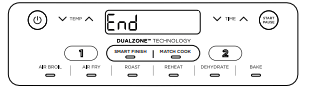
5 When cooking is complete, the unit will beep and “End” will appear on the display
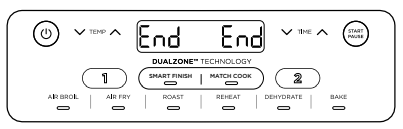
6 Remove ingredients by dumping them out or using silicone-tipped tongs/utensils. DO NOT place drawer on top of unit.
NOTE: If you decide the food in one of the zones is done cooking before the cook time is up, you can STOP A ZONE. Select that zone, then press START/PAUSE to pause the zone or set the time to zero. See page 11 for further instructions.
MATCH COOK
To cook a larger amount of the same food, or cook different foods using the same function, temperature, and time:
1 Place ingredients in the baskets, then insert baskets in unit.
2 Zone 1 will remain illuminated. Select the desired cooking function. (AIR BROIL is not available with this function.) Use the TEMP arrows to set the temperature, and use the TIME arrows to set the time
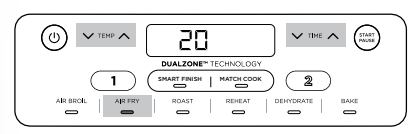
3 Press the MATCH COOK button to copy the zone 1 settings to zone 2. Then Press START/PAUSE to begin cooking in both zones.
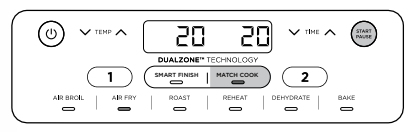
NOTE: It is recommended to shake your food during cooking. To keep the time at a synchronized finish, press the START/PAUSE button to pause both zones. To pause a single zone during dual zone cooking, refer to page 8
4 “End” will appear on both screens when cooking ends at the same time.
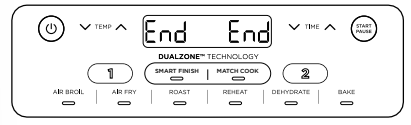
5 Remove ingredients by dumping them out or using silicone-tipped tongs/utensils
NOTE: Air Broil cannot be used in Match Cook mode
Starting both zones at the same time, but ending at different times:
1 Select zone 1, then select the desired function. Use the TEMP arrows to set the temperature.
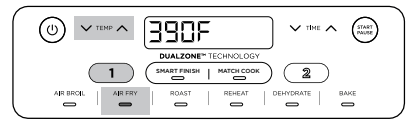
2 Use the TIME arrows to set the time.
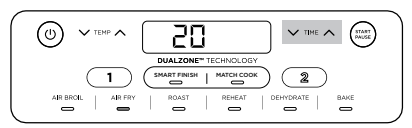
3 Repeat steps 2 and 3 for zone 2. (AIR BROIL is not available if programmed in zone 1.)
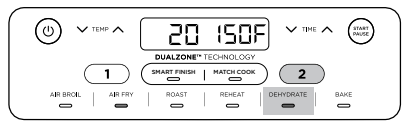
4 Press the START/PAUSE button to begin cooking in both zones.
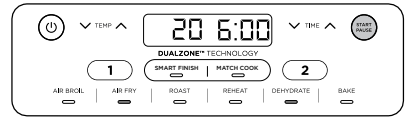
NOTE: If you decide the food in one of the zones is done cooking before the cook time is up, you can STOP A ZONE. Select that zone, then press START/PAUSE to pause the zone or set the time to zero. See page 11 for further instructions.
5 When cooking is complete in each zone, the unit will beep and “End” will appear on the display.
6 Remove ingredients by dumping them out or using silicone-tipped tongs/utensils.
ENDING THE COOK TIME IN ONE ZONE (WHILE USING BOTH ZONES)
1 Select the zone you would like to stop.
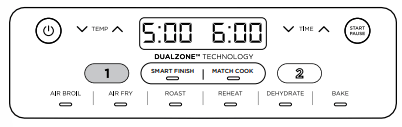
2 Then press the down TIME arrow to set the time to zero.
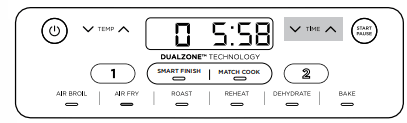
3 Once you have set the time to zero, press the START/PAUSE button.
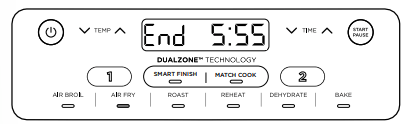
4 The time in that zone is then canceled, and “End” will appear on the display. Cooking will continue in the other zone
PAUSING BOTH ZONES AT THE SAME TIME
1 To pause time in the SMART FINISH mode, or to pause both zones in dual zone cooking, press the START/PAUSE button.
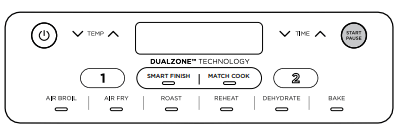
2 To resume cooking, press the START/PAUSE button again.
PAUSING A SINGLE ZONE DURING DUAL ZONE COOKING
1 To pause time in a single zone while both zones are running, select the zone you want to pause, then press the START/PAUSE button.
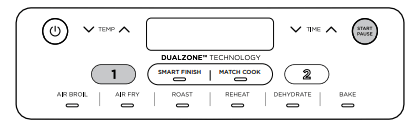
2 To resume cooking, press the START/PAUSE button again.
COOKING IN A SINGLE ZONE
For instructions on using both zones at the same time, see pages 6–7.
To turn on the unit, plug the power cord into a wall outlet, then press the powerbutton.
Air Fry
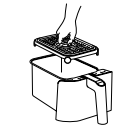
1 Install crisper plate in the basket, then place ingredients in the basket, and insert basket in unit.
2 The unit will default to zone 1 (to use zone 2 instead, select zone 2). Select AIR FRY.
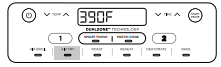
3 Use the TEMP arrows to set the desired temperature.
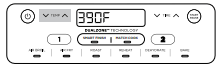
5 Use the TIME arrows to set the time in 1-minute increments up to 1 hour. Press the START/PAUSE button to begin cooking.
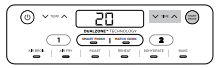
NOTE: During cooking, you can remove the basket and shake or toss ingredients for evening crisping. If you would like to pause during this time, press the zone number then START/PAUSE. If using a single zone, press START/PAUSE
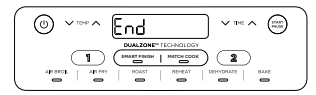
6 When cooking is complete, the unit will beep and “End” will appear on the display.
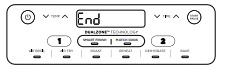
7 Remove ingredients by dumping them out or using silicone-tipped tongs/utensils.
Bake (Not available on all models.)
1 Install crisper plate in the basket (optional), then place ingredients in the basket, and insert basket in unit.
2 The unit will default to zone 1 (to use zone 2 instead, select zone 2). Select BAKE.
NOTE: To convert recipes from a traditional oven, reduce the temperature by 25°F
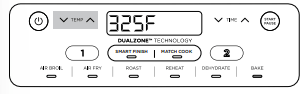
3 Use the TEMP arrows to set the desired temperature.
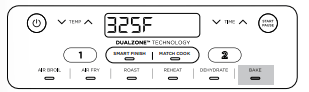
4 Use the TIME arrows to set the time in 1-minute increments up to 1 hour and in 5-minute increments from 1 to 4 hours. Press the START/PAUSE button to begin cooking.
5 When cooking is complete, the unit will beep and “End” will appear on the display
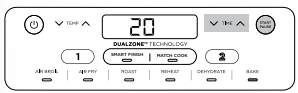
6 Remove ingredients by dumping them out or using silicone-tipped tongs/utensils.
Roast
1 Install crisper plate in the basket (optional), then place ingredients in the basket, and insert basket in unit.
2 The unit will default to zone 1 (to use zone 2 instead, select zone 2). Select ROAST.
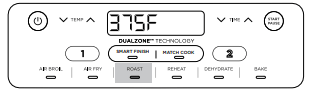
3 Use the TEMP arrows to set the desired temperature.
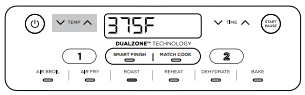
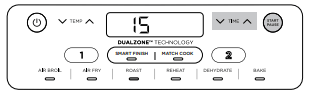
4 Use the TIME arrows to set the time in 1-minute increments up to 1 hour and in 5-minute increments from 1 to 4 hours. Press the START/PAUSE button to begin cooking.
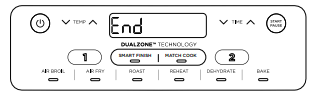
5 When cooking is complete, the unit will beep and “End” will appear on the display.
6 Remove ingredients by dumping them out or using silicone-tipped tongs/utensils.
Reheat
1 Install crisper plate in the basket (optional), then place ingredients in the basket, and insert basket in unit
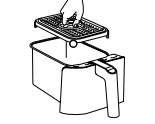
2 The unit will default to zone 1 (to use zone 2 instead, select zone 2). Select REHEAT.
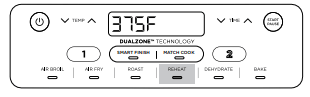
3 Use the TEMP arrows to set the desired temperature.
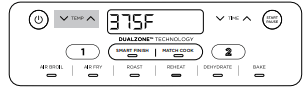
4 Use the TIME arrows to set the time in 1-minute increments up to 1 hour. Press the START/PAUSE button to begin reheating.
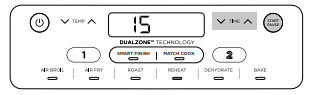
5 When reheating is complete, the unit will beep and “End” will appear on the display.
6 Remove ingredients by dumping them out or using silicone-tipped tongs/utensils.
Dehydrate
1 Place a single layer of ingredients in the basket. Then install the crisper plate in the basket on top of the ingredients and place another layer of ingredients on the crisper plate.
2 The unit will default to zone 1 (to use zone 2 instead, select zone 2). Select DEHYDRATE. The default temperature will appear on the display. Use the TEMP arrows to set the desired temperature.
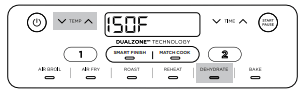
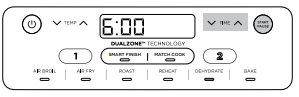
3 Use the TIME arrows to set the time in 15-minute increments from 1 to 12 hours. Press the START/PAUSE button to begin dehydrating.
4 When cooking is complete, the unit will beep and “End” will appear on the display.
5 Remove ingredients by dumping them out or using silicone-tipped tongs/utensils.
Air Broil (Not available on all models.)
NOTE: AIR BROIL cannot be used in both zones at the same time.
1 Install crisper plate in the basket, then place ingredients in the basket, and insert basket in unit.
2 The unit will default to zone 1 (to use zone 2 instead, select zone 2). Select AIR BROIL.
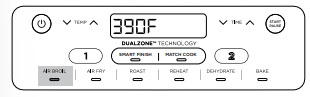
3 Use the TEMP arrows to set the desired temperature.
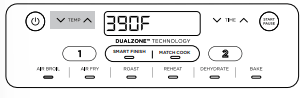
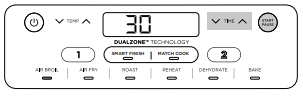
4 Use the TIME arrows to set the time in 1-minute increments up to 30 minutes. Press the START/PAUSE button to begin cooking.
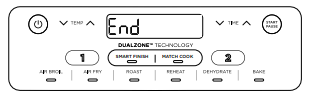
5 When cooking is complete, the unit will beep and “End” will appear on the display.
6 Remove ingredients by dumping them out or using silicone-tipped tongs/utensils.
CLEANING YOUR 2-BASKET AIR FRYER
The unit should be cleaned thoroughly after every use. Unplug the unit from the wall outlet before cleaning. Part/Accessory Cleaning Method
Main Unit
- To clean the main unit and the control panel, wipe them clean with a damp cloth.
NOTE: NEVER immerse the main unit in water or any other liquid. NEVER clean the main unit in a dishwasher.
Crisper Plates
- The crisper plates can be washed in the dishwasher or by hand. If hand-washing, air-dry or towel-dry all parts after use.
Baskets
- The baskets can be washed in the dishwasher or by hand. If hand-washing, air-dry or towel-dry all parts after use. *To extend the life of your basket, we recommend hand-washing them.
If food residue is stuck on the crisper plates or baskets, place them in a sink filled with warm, soapy water and allow to soak.
HELPFUL TIPS
1 For consistent browning, make sure ingredients are arranged in an even layer on the bottom of the basket with no overlapping. If ingredients are overlapping, make sure to shake them halfway through cooking.
2 Cook temperature and time can be adjusted at any time during cooking. Simply select the zone you want to adjust, then press the TEMP arrows to adjust the temperature or the TIME arrows to adjust the time.
3 To convert recipes from a traditional oven, reduce the temperature by 25°F. Check food frequently to avoid overcooking.
4 Occasionally, the fan from the air fryer will blow lightweight foods around. To alleviate this, secure foods (like the top slice of bread on a sandwich) with wooden toothpicks.
5 The crisper plates elevate ingredients in the baskets so air can circulate under and around ingredients for even, crisp results.
6 After selecting a cooking function, you can press the START/PAUSE button to begin cooking immediately. The unit will run at the default temperature and time.
7 For best results with fresh vegetables and potatoes, use at least 1 tablespoon of oil. Add more oil as desired to achieve the preferred level of crispiness.
8 For best results, check progress throughout cooking and remove food when desired level of brownness has been achieved. We recommend using an instant-read thermometer to monitor the internal temperature of proteins.
9 For best results, remove food directly after the cook time is complete to avoid overcooking.
TROUBLESHOOTING GUIDE
How do I adjust the temperature or time while using a single zone?
When a single zone is running the time or temperature can be adjusted at any time by pressing the up/down arrows.
How do I adjust the temperature or time while using both zones?
Select the desired zone, then use the TEMP arrows to adjust the temperature or the TIME arrows to adjust the time.
Can I cook different foods in each zone and not worry about cross contamination?
Yes, both zones are self-contained with separate heating elements and fans.
How do I pause or stop one zone when using both zones?
Select the zone you want to pause or stop, then press the START/PAUSE button.
Are the baskets safe to put on my countertop?
The baskets will heat up during cooking. Use caution when handling, and place them on heat-safe surfaces only. DO NOT place the baskets on the top of the unit.
When should I use the crisper plate? Use the crisper plate when you want food to come out crispy. The plate elevates the food in the basket so that air can flow under and around it to cook ingredients evenly.
Why didn’t my food cook fully?
Make sure the basket is fully inserted during cooking. For consistent browning, make sure ingredients are arranged in an even layer on the bottom of the basket with no overlapping. Shake basket to toss ingredients for even crispiness. Cook temperature and time can be adjusted at any time during cooking. Simply use the TEMP arrows to adjust the temperature or the TIME arrows to adjust the time.
Why is my food burned?
For best results, check progress throughout cooking and remove food when desired level of brownness has been achieved. Remove food immediately after the cook time is complete to avoid overcooking.
Why do some ingredients blow around when air frying?
Occasionally, the fan from the air fryer will blow lightweight foods around. Use wooden toothpicks to secure loose lightweight food, like the top slice of bread on a sandwich.
Can I air fry wet, battered ingredients?
Yes, but use the proper breading technique. It is important to coat foods first with flour, then with egg, and then with bread crumbs. Press breading firmly onto the battered ingredients, so crumbs won’t be blown off by the fan.
Why did the display screen go black?
The unit is in standby mode. Press the powerbutton to turn it back on.
Why is the unit beeping?
Either the food is done cooking, or the other zone has started cooking.
Why is there an “E” message on the display screen?
The unit is not functioning properly. Please contact Customer Service at 1-877-646-5288.
Why did a circuit breaker trip while using the unit?
The unit uses 1690 watts of power, so it must be plugged into an outlet on a 15-amp circuit breaker. Using an outlet on a 10-amp breaker will cause the breaker to trip. It is also important that the unit be the only appliance plugged into an outlet when in use. To avoid tripping a breaker, make sure the unit is the only appliance plugged into an outlet on a 15-amp breaker