1
1
1
3
4
6
6
6
7
13
13
13
15
15
15
16
16
17
17
19
20
20
20
20
21
22
22
23
24
26
27
28
30
31

INTRODUCTION
Thank you for purchasing the iHealth Wireless Smart Gluco-Moni-
toring System (the iHealth system). This manual provides
important information to help you use the system properly. Before
using this product, please read the Owner's Manual thoroughly.
INTENDED USE
The iHealth system is intended to be used for:
. Quantitative measurement of glucose in fresh capillary whole
blood samples drawn from the ngertip, palm, forearm, upper
arm, calf, or thigh
. Single person measurement only (it should not be shared)
. Self-testing outside the body (in vitro diagnostic use) by people
with diabetes at home as an aid to monitor the eectiveness of
diabetes control
The iHealth system should not be used for the diagnosis of or
screening for diabetes, or for neonatal use.
IMPORTANT SAFETY INSTRUCTIONS
Please read the following information carefully before using the
iHealth system. Always keep these instructions in a safe place for
reference.
. Misuse of the iHealth system can cause electrocution, burns, re,
and other hazards.
. The meter and lancing device are for single patient use.
. Do not use either item on multiple patients.
. Do not share the meter or lancing device with anyone, including
other family members.
. Do not place the iHealth system in or near liquid.
. Use the iHealth system only for the purpose described in the
Owner's Manual.
. Use only accessories that are supplied by the manufacturer.
. Do not use the iHealth system if it has sustained any damage or is
not working properly.
. Keep the iHealth system away from heat at all times. Do not let
the iHealth system come into contact with surfaces that are hot to
the touch.
. Do not block test port or place the iHealth system on soft
surfaces that may block them. Keep test port free from lint, hair,
debris, etc.
. Do not place anything on top of the iHealth system.
. Do not place foreign objects into any opening in the iHealth
system.
. Do not use the meter in a manner not specied by the manufac-
turer.
. All parts of the iHealth system are considered biohazards and can
potentially transmit infectious diseases, even after you have
performed cleaning and disinfection.
. Please refer to the resources identied below fo r detailed
information:
"FDA Public Health Notication: Use of Fingerstick Devices on
More than One Person Poses Risk for Transmitting Bloodborne
Pathogens: Initial Communication" (2010)
http ://www.fda.gov/MedicaIDevices/Safety/
AlertsandNotices/ucm224025.htm
"CDC Clinical Reminder: Use of Fingerstick Devices on More than
One Person Poses Risk for Transmitting Bloodborne
Pathogens"(2010)
http://www.cdc.gov/injectionsafety/Fingerstick-DevicesBGM.html
1

INTRODUCTION
Thank you for purchasing the iHealth Wireless Smart Gluco-Moni-
toring System (the iHealth system). This manual provides
important information to help you use the system properly. Before
using this product, please read the Owner's Manual thoroughly.
INTENDED USE
The iHealth system is intended to be used for:
. Quantitative measurement of glucose in fresh capillary whole
blood samples drawn from the ngertip, palm, forearm, upper
arm, calf, or thigh
. Single person measurement only (it should not be shared)
. Self-testing outside the body (in vitro diagnostic use) by people
with diabetes at home as an aid to monitor the eectiveness of
diabetes control
The iHealth system should not be used for the diagnosis of or
screening for diabetes, or for neonatal use.
IMPORTANT SAFETY INSTRUCTIONS
Please read the following information carefully before using the
iHealth system. Always keep these instructions in a safe place for
reference.
. Misuse of the iHealth system can cause electrocution, burns, re,
and other hazards.
. The meter and lancing device are for single patient use.
. Do not use either item on multiple patients.
. Do not share the meter or lancing device with anyone, including
other family members.
. Do not place the iHealth system in or near liquid.
. Use the iHealth system only for the purpose described in the
Owner's Manual.
. Use only accessories that are supplied by the manufacturer.
. Do not use the iHealth system if it has sustained any damage or is
not working properly.
. Keep the iHealth system away from heat at all times. Do not let
the iHealth system come into contact with surfaces that are hot to
the touch.
. Do not block test port or place the iHealth system on soft
surfaces that may block them. Keep test port free from lint, hair,
debris, etc.
. Do not place anything on top of the iHealth system.
. Do not place foreign objects into any opening in the iHealth
system.
. Do not use the meter in a manner not specied by the manufac-
turer.
. All parts of the iHealth system are considered biohazards and can
potentially transmit infectious diseases, even after you have
performed cleaning and disinfection.
. Please refer to the resources identied below fo r detailed
information:
"FDA Public Health Notication: Use of Fingerstick Devices on
More than One Person Poses Risk for Transmitting Bloodborne
Pathogens: Initial Communication" (2010)
http ://www.fda.gov/MedicaIDevices/Safety/
AlertsandNotices/ucm224025.htm
"CDC Clinical Reminder: Use of Fingerstick Devices on More than
One Person Poses Risk for Transmitting Bloodborne
Pathogens"(2010)
http://www.cdc.gov/injectionsafety/Fingerstick-DevicesBGM.html
2
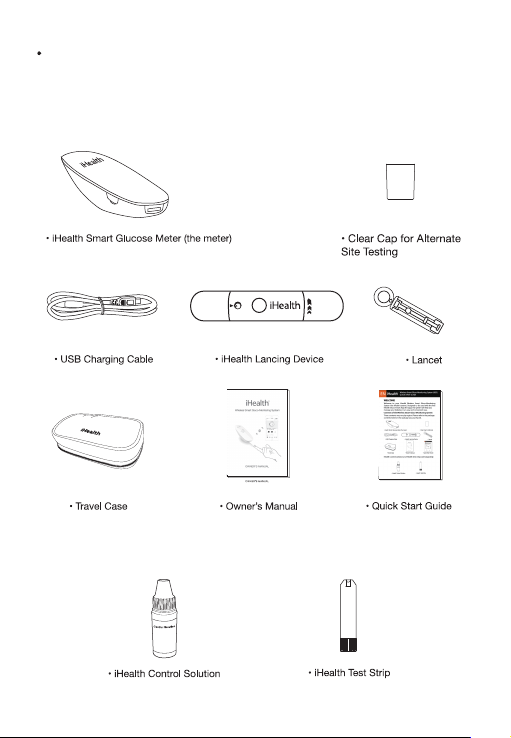
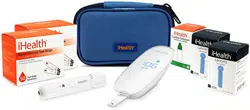
CONTENTS OF THE WIRELESS SMART
GLUCO-MONITORING SYSTEM
Package contents vary by region. Please refer to the package
contents listed on the package you purchased.
iHealth control solution and iHealth test strips sold separately.
3
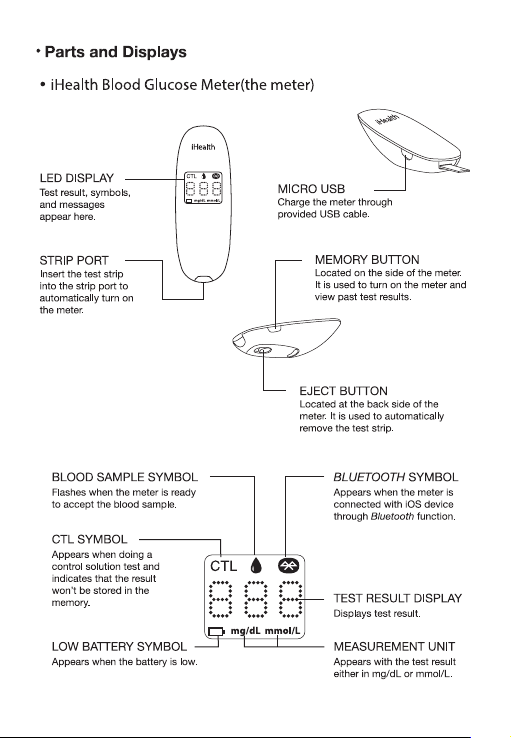
4
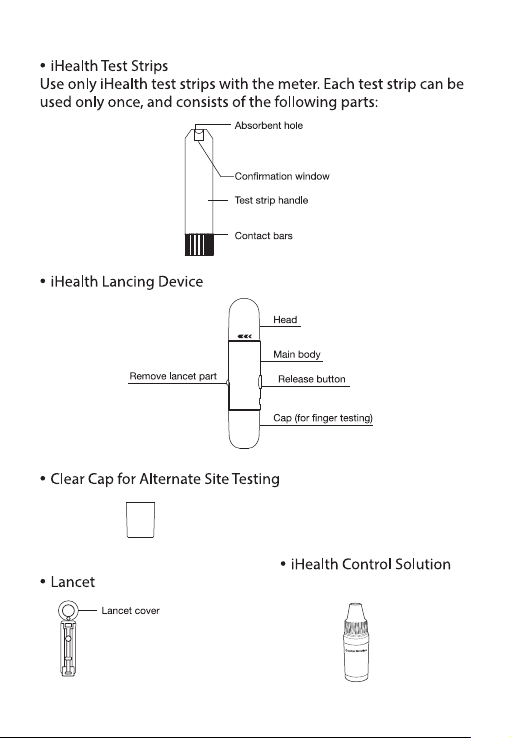
(sold separately)
(sold separately)
5

professional.
. If you are experiencing symptoms that are inconsistent with your
blood glucose test, and you have followed all of the instructions
provided in this Owner's Manual, contact your healthcare
professional immediately.
. Use only fresh whole blood samples to test your blood glucose.
. Do not use test strips that are expired or appear to be damaged
as they may return inaccurate results.
. The lancing device is for self-use only. Do not share or re-use
lancets. Please refer to the La ncing Device Manual for the detailed
procedure.
For more detailed information, please refer to the resources
identied below:
"FDA Public Health Notication: Use of Fingerstick Devices on
More than One Person Poses Risk for Transmitting Bloodborne
Pathogens: Initial Communication" (2010)
http ://www.fda.gov/MedicaIDevices/Safety/
AlertsandNotices/ucm224025.htm
"CDC Clinical Reminder: Use of Fingerstick Devices on More than
One Person Poses Risk for Transmitting Bloodborne
Pathogens"(2010)
http://www.cdc.gov/injectionsafety/Fingerstick-DevicesBGM.html
FIRST TIME SETUP INSTRUCTIONS
. Download the companion app
Prior to rst use, download and install the free iHealth
Gluco-Smart App from the Apple App Store or Google Play Store.
Follow the on-screen instructions to create your iHealth account.
. Access iHealth Cloud
You can use your iHealth ID to gain access to free and secure
Cloud Services. Go to www.ihealthlabs.com and click on "Sign In".
. Charge the battery
Out of the box
Your meter is powered by a built-in, rechargeable battery. Plug
one end of the charging cable into the side of the meter and the
other end into an USB charger port. Charge it for two to four hours
before rst use. A fully charged battery can typically last up to 200
tests depending on your daily usage.
Low battery message
After you have used your meter for some time, appears for
three seconds when the battery in your meter is low on power.
You must recharge the battery before using it again. After three
seconds, the meter shuts o automatically. The meter does not
take any measurement when the battery is low.
Important: If battery is completely drained, fully charge the
battery and launch the app to sync the meter before using it
again.
. Sync the meter
Prior to rst use, follow the steps below to connect the meter to
the app on your smart device to set your meter's time and date. By
connecting the two, the date and time of the meter will be synced
with your smart device.
1. Enable Bluetooth on your iOS or Android device.
2. Press and hold the "Memory" button for three seconds to turn
the meter on.
Mobile Device Compatibility
Works with the following devices:
iPhone 4+
iPad 2+
iPad Mini+
iPad Air+
iPod Touch (5th generation)
Select Android devices
Requires iOS version 7.0+ or Android version 4.0+
TEST PRINCIPLE
Testing with the iHealth system is based on the measurement of
electrical currents generated by the reaction of glucose with the
reagent of the test strip. The iHealth system measures the current
and converts it to the corresponding blood glucose level. The
strength of the current produced by the reaction depends on the
amount of glucose in the blood sample.
IMPORTANT TEST INFORMATION
Please read the following:
. Severe dehydration and excessive water loss may cause
inaccurate results. If you believe you are suering from severe
dehydration, consult your healthcare professional immediately.
. Inaccurate results may occur in severely hypotensive individuals
or patients who are in shock. Test results that are lower than actual
values may occur in individuals who are in a hyperglycemic-hyper-
osmolar state, with or without ketosis. Critically ill patients should
not be tested with blood glucose meters.
. If your blood glucose results are lower or higher than usual, and
you do not have symptoms of illness, rst repeat the test. If you
have symptoms or continue to get results that are higher or lower
than usual, follow the treatment advice of your healthcare
6

professional.
. If you are experiencing symptoms that are inconsistent with your
blood glucose test, and you have followed all of the instructions
provided in this Owner's Manual, contact your healthcare
professional immediately.
. Use only fresh whole blood samples to test your blood glucose.
. Do not use test strips that are expired or appear to be damaged
as they may return inaccurate results.
. The lancing device is for self-use only. Do not share or re-use
lancets. Please refer to the La ncing Device Manual for the detailed
procedure.
For more detailed information, please refer to the resources
identied below:
"FDA Public Health Notication: Use of Fingerstick Devices on
More than One Person Poses Risk for Transmitting Bloodborne
Pathogens: Initial Communication" (2010)
http ://www.fda.gov/MedicaIDevices/Safety/
AlertsandNotices/ucm224025.htm
"CDC Clinical Reminder: Use of Fingerstick Devices on More than
One Person Poses Risk for Transmitting Bloodborne
Pathogens"(2010)
http://www.cdc.gov/injectionsafety/Fingerstick-DevicesBGM.html
FIRST TIME SETUP INSTRUCTIONS
. Download the companion app
Prior to rst use, download and install the free iHealth
Gluco-Smart App from the Apple App Store or Google Play Store.
Follow the on-screen instructions to create your iHealth account.
. Access iHealth Cloud
You can use your iHealth ID to gain access to free and secure
Cloud Services. Go to www.ihealthlabs.com and click on "Sign In".
. Charge the battery
Out of the box
Your meter is powered by a built-in, rechargeable battery. Plug
one end of the charging cable into the side of the meter and the
other end into an USB charger port. Charge it for two to four hours
before rst use. A fully charged battery can typically last up to 200
tests depending on your daily usage.
Low battery message
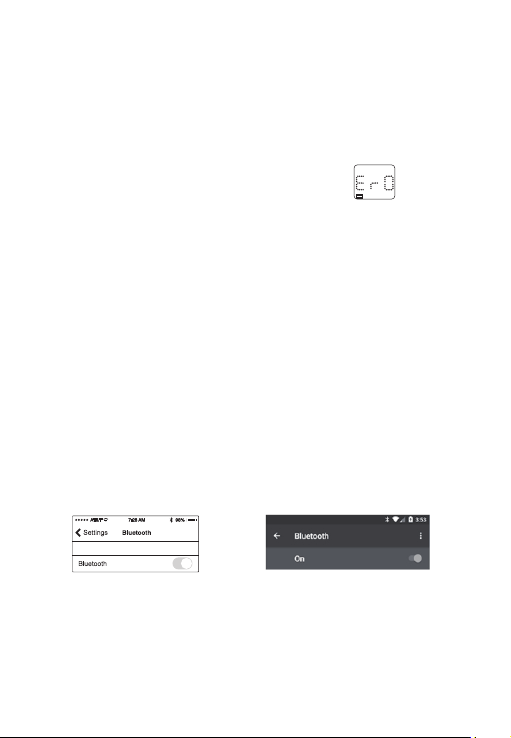
After you have used your meter for some time, appears for
three seconds when the battery in your meter is low on power.
You must recharge the battery before using it again. After three
seconds, the meter shuts o automatically. The meter does not
take any measurement when the battery is low.
Important: If battery is completely drained, fully charge the
battery and launch the app to sync the meter before using it
again.
. Sync the meter
Prior to rst use, follow the steps below to connect the meter to
the app on your smart device to set your meter's time and date. By
connecting the two, the date and time of the meter will be synced
with your smart device.
1. Enable Bluetooth on your iOS or Android device.
2. Press and hold the "Memory" button for three seconds to turn
the meter on.
Mobile Device Compatibility
Works with the following devices:
iPhone 4+
iPad 2+
iPad Mini+
iPad Air+
iPod Touch (5th generation)
Select Android devices
Requires iOS version 7.0+ or Android version 4.0+
TEST PRINCIPLE
Testing with the iHealth system is based on the measurement of
electrical currents generated by the reaction of glucose with the
reagent of the test strip. The iHealth system measures the current
and converts it to the corresponding blood glucose level. The
strength of the current produced by the reaction depends on the
amount of glucose in the blood sample.
IMPORTANT TEST INFORMATION
Please read the following:
. Severe dehydration and excessive water loss may cause
inaccurate results. If you believe you are suering from severe
dehydration, consult your healthcare professional immediately.
. Inaccurate results may occur in severely hypotensive individuals
or patients who are in shock. Test results that are lower than actual
values may occur in individuals who are in a hyperglycemic-hyper-
osmolar state, with or without ketosis. Critically ill patients should
not be tested with blood glucose meters.
. If your blood glucose results are lower or higher than usual, and
you do not have symptoms of illness, rst repeat the test. If you
have symptoms or continue to get results that are higher or lower
than usual, follow the treatment advice of your healthcare
7
professional.
. If you are experiencing symptoms that are inconsistent with your
blood glucose test, and you have followed all of the instructions
provided in this Owner's Manual, contact your healthcare
professional immediately.
. Use only fresh whole blood samples to test your blood glucose.
. Do not use test strips that are expired or appear to be damaged
as they may return inaccurate results.
. The lancing device is for self-use only. Do not share or re-use
lancets. Please refer to the La ncing Device Manual for the detailed
procedure.
For more detailed information, please refer to the resources
identied below:
"FDA Public Health Notication: Use of Fingerstick Devices on
More than One Person Poses Risk for Transmitting Bloodborne
Pathogens: Initial Communication" (2010)
http ://www.fda.gov/MedicaIDevices/Safety/
AlertsandNotices/ucm224025.htm
"CDC Clinical Reminder: Use of Fingerstick Devices on More than
One Person Poses Risk for Transmitting Bloodborne
Pathogens"(2010)
http://www.cdc.gov/injectionsafety/Fingerstick-DevicesBGM.html
FIRST TIME SETUP INSTRUCTIONS
. Download the companion app
Prior to rst use, download and install the free iHealth
Gluco-Smart App from the Apple App Store or Google Play Store.
Follow the on-screen instructions to create your iHealth account.
. Access iHealth Cloud
You can use your iHealth ID to gain access to free and secure
Cloud Services. Go to www.ihealthlabs.com and click on "Sign In".
. Charge the battery
Out of the box
Your meter is powered by a built-in, rechargeable battery. Plug
one end of the charging cable into the side of the meter and the
other end into an USB charger port. Charge it for two to four hours
before rst use. A fully charged battery can typically last up to 200
tests depending on your daily usage.
Low battery message
After you have used your meter for some time, appears for
three seconds when the battery in your meter is low on power.
You must recharge the battery before using it again. After three
seconds, the meter shuts o automatically. The meter does not
take any measurement when the battery is low.
Important: If battery is completely drained, fully charge the
battery and launch the app to sync the meter before using it
again.
. Sync the meter
Prior to rst use, follow the steps below to connect the meter to
the app on your smart device to set your meter's time and date. By
connecting the two, the date and time of the meter will be synced
with your smart device.
1. Enable Bluetooth on your iOS or Android device.
2. Press and hold the "Memory" button for three seconds to turn
the meter on.
Mobile Device Compatibility
Works with the following devices:
iPhone 4+
iPad 2+
iPad Mini+
iPad Air+
iPod Touch (5th generation)
Select Android devices
Requires iOS version 7.0+ or Android version 4.0+
TEST PRINCIPLE
Testing with the iHealth system is based on the measurement of
electrical currents generated by the reaction of glucose with the
reagent of the test strip. The iHealth system measures the current
and converts it to the corresponding blood glucose level. The
strength of the current produced by the reaction depends on the
amount of glucose in the blood sample.
IMPORTANT TEST INFORMATION
Please read the following:
. Severe dehydration and excessive water loss may cause
inaccurate results. If you believe you are suering from severe
dehydration, consult your healthcare professional immediately.
. Inaccurate results may occur in severely hypotensive individuals
or patients who are in shock. Test results that are lower than actual
values may occur in individuals who are in a hyperglycemic-hyper-
osmolar state, with or without ketosis. Critically ill patients should
not be tested with blood glucose meters.
. If your blood glucose results are lower or higher than usual, and
you do not have symptoms of illness, rst repeat the test. If you
have symptoms or continue to get results that are higher or lower
than usual, follow the treatment advice of your healthcare
8
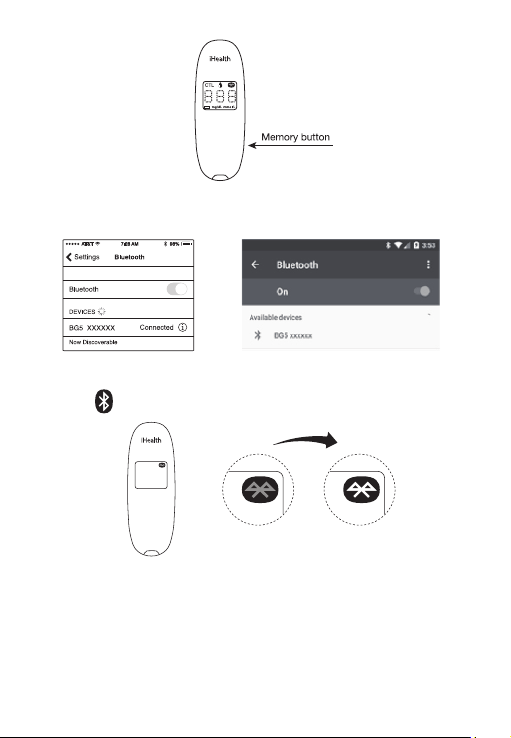
3. Select the model name "BG5xxxxxx" in the Bluetooth menu to
pair and connect.
4. Launch the app to connect the meter to the app. The Bluetooth
symbol will ash and remain lit on the meter.
Note: Repeat steps 1-4 when switching to a dierent iOS or
Android device, making sure to un-pair or forget the meter on the
previous device..
. Scan the test strip vial
Connect your mobile device to the Internet and open the
9
3. Select the model name "BG5xxxxxx" in the Bluetooth menu to
pair and connect.
4. Launch the app to connect the meter to the app. The Bluetooth
symbol will ash and remain lit on the meter.
Note: Repeat steps 1-4 when switching to a dierent iOS or
Android device, making sure to un-pair or forget the meter on the
previous device..
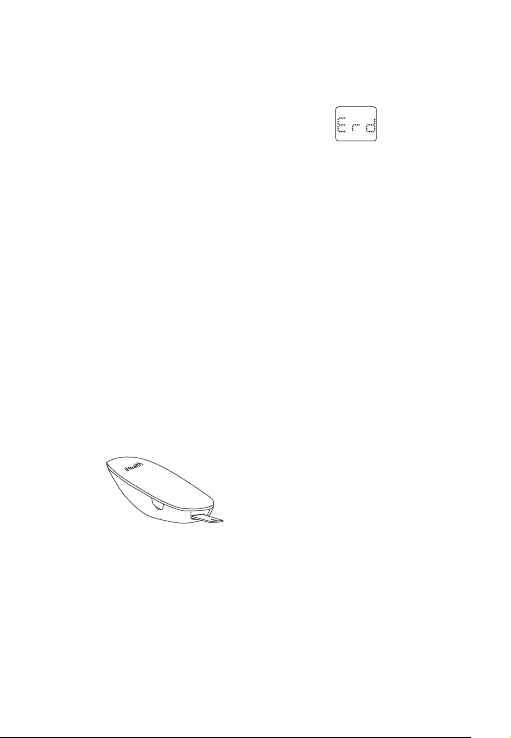
. Scan the test strip vial
Connect your mobile device to the Internet and open the
Gluco-Smart App. When the glucose meter is connected to the
mobile device, scan the QR code on the top of the iHealth test
strip vial to calibrate the test strips with the meter. You must scan
the QR code each time a new vial is opened.
When all 25 strips in a vial have been used, appears on
the meter to alert you that it is time to open a new vial, and the
meter will shut o automatically. The meter does not take any
measurement when "Er d" appears on the meter.
. Test blood glucose level
If you have synced your meter to the app on your mobile device,
scanned the QR code of a test strip vial, and want to take a reading
with the app:
[1] Make sure Bluetooth is turned on to connect the meter to the
app on your mobile device.
If you have synced your meter to the app on your mobile device,
scanned the QR code of test strip vial, and want to take a reading
without the app launched: Skip step [1].
[2] Insert the test strip into the meter's strip port.
Insert the test strip into the strip port with the contact bars facing
toward you.
[3] Prepare the lancing device.
① Snap o the lancet device cap
② Insert a new lancet rmly into the lancing holder cup
③ Twist the lancet cover o
④ Replace the lancing device cap
⑤ Set the lancing level
⑥ Cock the handle until it clicks
10
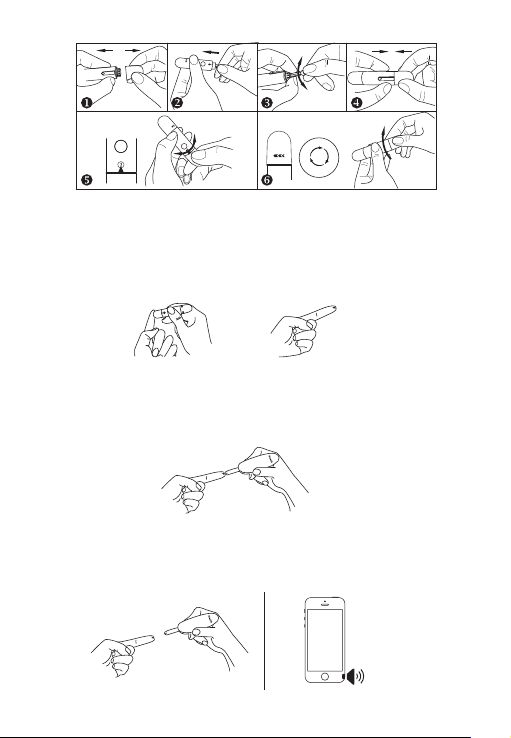
[4] Obtain a blood sample.
Press the lancing device against the site to be lanced. Press the
release button to puncture the site. Gently squeeze your nger
until a drop of blood forms. Wipe away the rst blood drop and
squeeze until a second small blood drops forms.
[5] Apply the blood sample to the test strip.
Quickly apply the blood sample to the absorbent hole (tip) of the
test strip. Make sure the conrmation window of the test strip is
completely lled with the blood sample.
Quickly remove your nger from the test strip when the
countdown (from 5 to 1) begins on the meter display, or when you
hear a sound alert from your mobile device.
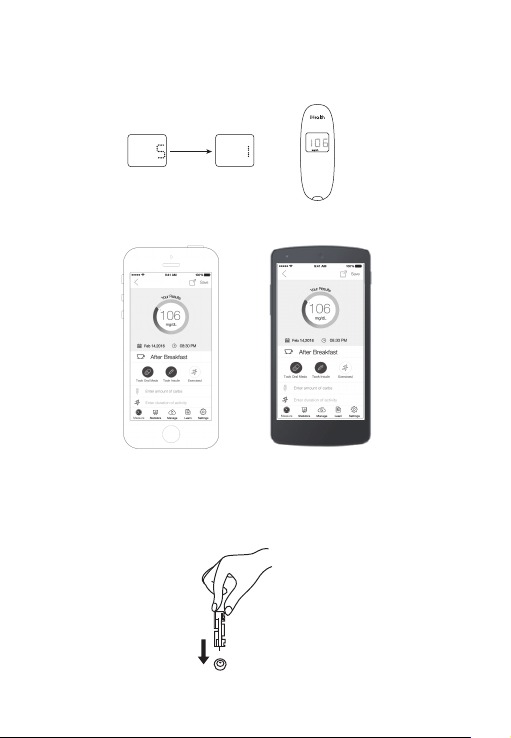
[6] Read the test results.
-If the meter is not connected to the app, the test result will
appear on the meter after counting down from 5 to 1 .
- If the meter is connected to the app, the test result will appear on
the app.
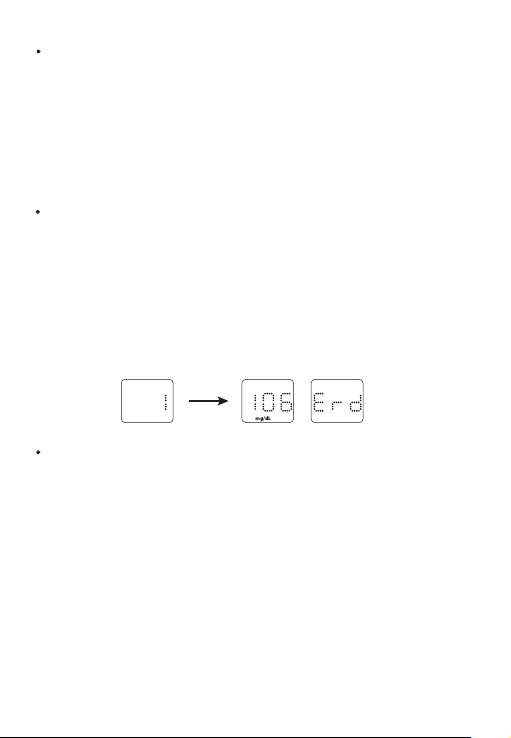
[7] Discard the used test strip and lancet.
Remove the used test strip from the meter using a small amount
of tissue paper. Discard the used test strip and lancet properly.
(Tip: Prior to disposal, stick the lancet into the cover)
11
[4] Obtain a blood sample.
Press the lancing device against the site to be lanced. Press the
release button to puncture the site. Gently squeeze your nger
until a drop of blood forms. Wipe away the rst blood drop and
squeeze until a second small blood drops forms.
[5] Apply the blood sample to the test strip.
Quickly apply the blood sample to the absorbent hole (tip) of the
test strip. Make sure the conrmation window of the test strip is
completely lled with the blood sample.
Quickly remove your nger from the test strip when the
countdown (from 5 to 1) begins on the meter display, or when you
hear a sound alert from your mobile device.
[6] Read the test results.
-If the meter is not connected to the app, the test result will
appear on the meter after counting down from 5 to 1 .
- If the meter is connected to the app, the test result will appear on
the app.
[7] Discard the used test strip and lancet.
Remove the used test strip from the meter using a small amount
of tissue paper. Discard the used test strip and lancet properly.
(Tip: Prior to disposal, stick the lancet into the cover)
12
DATA SYNCING
The meter can save up to 500 of the most recent blood glucose
test results. When the meter needs to save a new test result and
has already stored 500 test results, the oldest test result will be
overwritten by the new test result.
When the meter is connected to the app on your mobile device,
tap the "Upload" button to upload the saved data from the meter
to the app.
REVIEWING SAVED TEST RESULTS ON THE METER
Press the memory button to view the test results stored in the
meter. The rst reading you see is your most recent blood glucose
result. To review earlier test results, press the memory button
repeatedly.
When you reach the last test result, the word "End" will appear,
and the meter will shut o automatically. Similarly, the meter will
shut o automatically when it is idle for three minutes.
CLEANING AND DISINFECTION
Cleaning and disinfection is a necessary and important part of the
test procedure. It can help to prevent infection, the potential
spread of infection, and cross-contamination. Cleaning can also
ensure that the meter works properly and that the display is clear
and readable.
The meter and lancing device should be cleaned and disinfected
following each use. We suggest that you use CaviWipesTM
(Metrex~ Research Corporation, EPA Reg. No. 46781-8, EPA Est. No.
56952-WI-O01). CaviWipes, with isopropanol and diisobutyl-phe-
noxy-ethoxyethyl dimethyl benzyl ammonium chloride as the
active ingredient, have been shown to be safe for use with the
13
meter and lancing device.
You can purchase this product from the suppliers listed below:
(1) Visit the website www.metrex.com or contact Metrex at
800-841-1428 for product or technical information.
(2) Visit the website http://www.endochoice.com/
Equipment?search=wipe
The meter and lancing device are validated to support 10,000
individual tests and consequently 1 0,000 cleanings over their 5
year life spans.
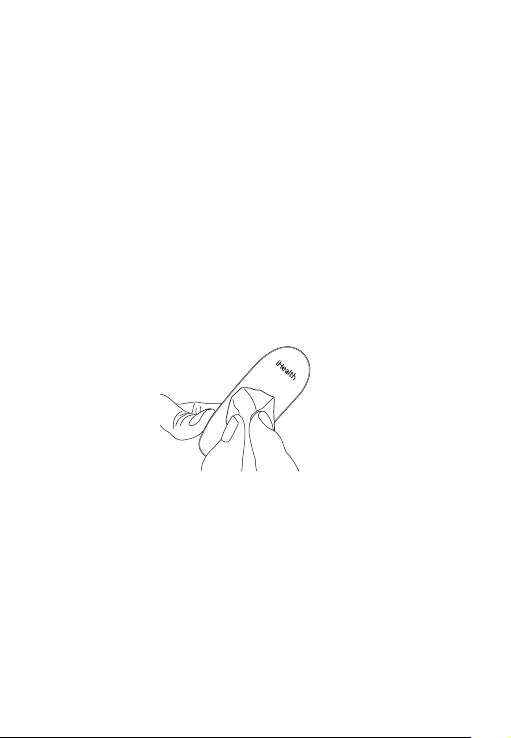
Below are the steps on how to clean the meter and lancing device.
1. After a test, clean and wash your hands.
2. Use one CaviWipe to carefully clean the meter, front and back
3. Then, disinfect the meter with another wipe and allow the
surface to dry naturally: this should take approximately 2 minutes.
4. Use the same method with the CaviWipes to clean and disinfect
the lancing device.
Note:
① Each disinfection step requires a pre-cleaning step. Wash
hands thoroughly with soap and water after handling the meter,
lancing device, or test strips.
② Only the surface of the meter can be cleaned and disinfected
with the disinfecting towelette. Do not insert the disinfecting
towelette into the test strip port, or else the perfo rmance of the
meter may be aected.
14
SIGNS OF POTENTIAL PHYSICAL AND PERFOR-
MANCE DETERIORATION
If you encounter one of the following circumstances, stop using
the meter and contact iHealth Customer Support by email (
[email protected]) phone ( 1-855-816-7705 ):
1. The device does not work; for example, the mobile device can
not begin testing when the meter is connected with the mobile
device or when a test strip is inserted into the meter.
2. Discoloration of the meter casing or lancing device; for
example, it is dicult to read the labeling information.
3. Corrosion, crazing (ne cracks), embrittlement, and/or cracking
of the meter casing or lancing device.
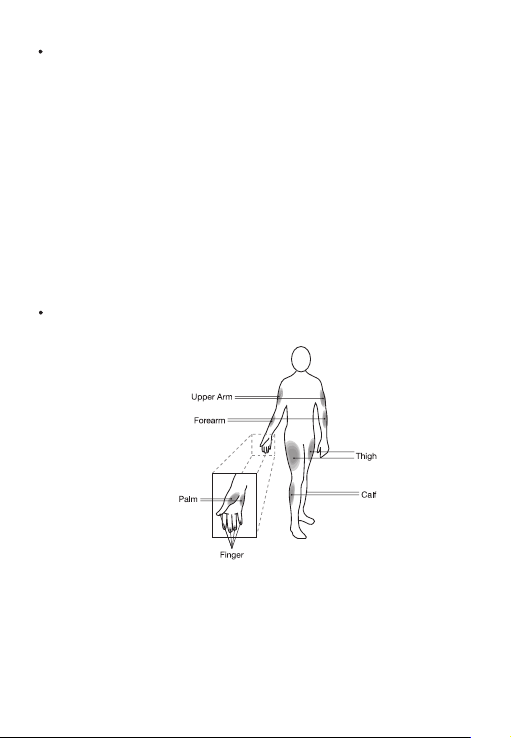
INFORMATION ABOUT ALTERNATE SITE TESTING
(AST)
What is Alternate Site Testing?
Alternate Site Testing (AST) is the use of parts of the body, other
than the ngertips, to check blood glucose levels. The iHealth
system allows you to test on the palm, forearm, upper arm, calf, or
thigh with equivalent results to ngertip testing when used at
appropriate times.
Caution: When performing Alternate Site Testing, please
15

remember to change the cap of the lancing device to the clear cap
specially designed for AST.
There are limitations for doing AST. Please consult your healthcare
professional before you conduct AST. The iHealth system should
only be used for AST under steady-state blood glucose conditions.
What is the Advantage of Alternate Site Testing?
Pain is felt more readily on the ngertips because they are full of
nerve endings (receptors). At other body sites where nerve
endings are not so condensed, pain is not felt as acutely.
When Should You Use Alternate Site Testing?
Food, medication, illness, stress, and exercise can aect blood
glucose levels. Capillary blood from the ngertips reects these
changes faster than capillary blood from other sites. Therefore,
when testing blood glucose levels during or immediately after
meals or exercise, or when another of the above-noted conditions
applies, take a blood sample from your ngertips only. AST should
be used only during steady-state times when glucose levels are
not changing rapidly.
Alternate Site Testing is suitable in the following instances:
. In a pre-meal or fasting state (two hours or more after the last
meal)
. Two hours or more after taking insulin
. Two hours or more after exercising
Caution: Alternate Site Testing should not be used to calibrate
continuous glucose monitoring systems (CGMs). Results from
Alternate Site Testing should not be used in insulin dose
calculations. Do not use AST if:
. You think your blood glucose is low
. You are unaware that you might have hypoglycemia
. You are testing for hyperglycemia
16

. Your AST results do not match the way you fee
. Your routine glucose results uctuate often
IMPORTANT INFORMATION ABOUT CONTROL
SOLUTION TESTS
Control solution contains a known amount of glucose that reacts
with test strips and is used to check that your meter and test strips
are working together properly.
Materials needed to perform a control solution test:
. iHealth Blood Glucose Meter (the meter)
. iHealth Test Strip
. iHealth Control Solution
Perform a control solution test when:
. First receiving or purchasing the meter
. Checking the meter and test strips (which should be done at least
once a week)
. Using a new vial of test strips
. You suspect the meter or test strips are not working properly
. Your blood glucose test results a re not consistent with you
expectation, or you think the results are not accurate
. Practicing the testing process
. The meter has been dropped or damaged
PERFORMING A CONTROL SOLUTION TEST
[1] When the meter is not connected to your iHealth Gluco-Smart
App on your mobile device:
Step 1: Turn on the control solution test (CTL) mode. Insert the
test strip into the meter's strip port to turn on the meter. When the
blood sample symbol appears on the meter display, press the
memory button to turn on the CTL mode. When the CTL symbol
appears, the meter is in control solution test mode and will not
save this test result in memory.
17
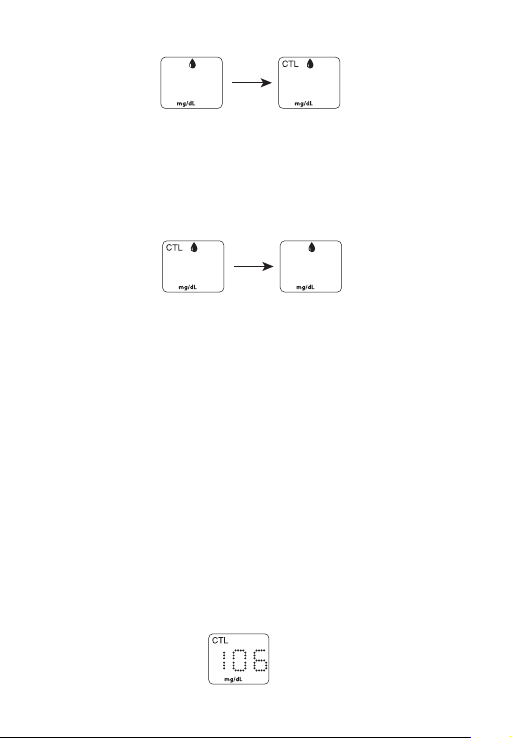
Note: Be sure to set the meter and/or app on the CTL mode before
performing a control solution test. The control solution test result
will not be saved in the meter.
Step 2: Press the memory button again to turn o the CTL mode
and switch back to the regular testing mode.
Step 3: Apply the control solution.
. Shake the control solution vial before each use.
. Squeeze a drop of control solution into the vial cap. For better
results, it is recommended that you use the second drop of the
control solution (discard the rst drop).
. Hold the meter and move the absorbent hole of the test strip to
absorb the drop. Once the conrmation window lls completely,
the meter will start counting down. Remove the control solution
sample from the test strip when the countdown begins.
Note: To avoid contaminating the entire vial of control solution, do
not directly apply control solution onto a strip.
Step 4: Read and compare the results.
After the meter counts down to "1"; the control solution test result
will appear on the meter display.
18

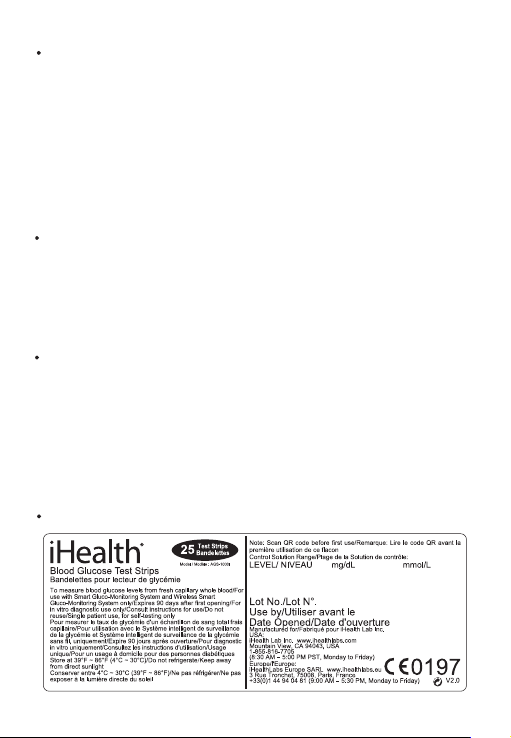
The result of the control solution test should be within the range
printed on the test strip vial la bel. If the test result falls outside the
specied range, repeat the test, carefully following the steps
above.
[2] When the meter is connected to your iHealth Gluco-Smart App
on your mobile device:
Step l: Launch the app.
Step 2: Tap the CTL button to switch to control (CTL) mode.
Step 3: Follow Steps 3-4 above in section [1].
Step 4: The control solution test result will appear on the app on
your mobile device.
Out-of-Range Results
Results falling outside the specied range may be caused by:
. An error in the test
. Expired or contaminated control solution
. An expired or contaminated test strip
. Meter malfunction
If you continue to get control solution test results that fall outside
of the range printed on the vial, the meter may not be working
properly. Discontinue use and call iHealth Labs Customer Service
at 1-855-816-7705 for assistance or email at
Control solution is available for purchase directly on the iHealth
website store at www.ihealthlabs.com and other select retailers.
NOTE:
. Do not use expired control solution.
. The control solution range printed on the test strip vial is for
control solution use only. It is not a recommended range for your
blood glucose level.
19
COMPARING GLUCOSE METER TEST RESULTS
WITH LABORATORY RESULTS
The iHealth system provides you with whole blood equivalent
results. The result you obtain from your glucose meter may dier
somewhat from your laboratory results due to normal variation.
The iHealth system results can be aected by factors and
conditions that do not aect laboratory results in the same way. To
make an accurate comparison between the iHealth system and
laboratory results, follow the guidelines below.
Before the Lab Test
. Perform a control solution test to make sure that the meter is
working properly.
. If possible, fast at least eight hours before conducting a
comparison test.
. Take the iHealth system to the lab.
While at the Lab
Make sure that samples for both tests are taken and tested within
15 minutes of each other.
. Wash your hands before obtaining a blood sample.
. Never use your glucose meter with blood samples collected in
a test tube.
. Use fresh capillary blood only.
TEST STRIP VIAL LABEL
20

IHEALTH WIRELESS SMART GLUCO-MONITOR-
ING SYSTEM SPECIFICATIONS
1. Model: BG5
2. Machine size: 3.8" x 1.35"x 0.75" (96 mm x 34.5 mm x19 mm)
3. Measuring method: Amperometric technology using glucose
oxidase
4. Result range: 20 mg/d L - 600 mg/d L (1.1 mmol/L - 33.3
mmol/L)
5. Power source: DC 3.7V , li-ion 250 mAh
6. Wireless communication:
Bluetooth V3.O+EDR Class2 SPP
Frequency Band: 2.402-2.480 GHz
7. Storage condition: Test strips 39.2° F - 86° F(40℃ - 300℃),
Humidity 10% - 80% RH
8. Storage condition: The meter -4° F - 131° F (-20℃ - 55℃)
Humidity 10 - 80% RH
9. Operating conditions: 50° F - 104° F (1 0℃ - 40℃)
10. Blood source: Fresh capillary whole blood
11. Blood volume: Min. 0.7 micro-liter
12. Life span: Five years
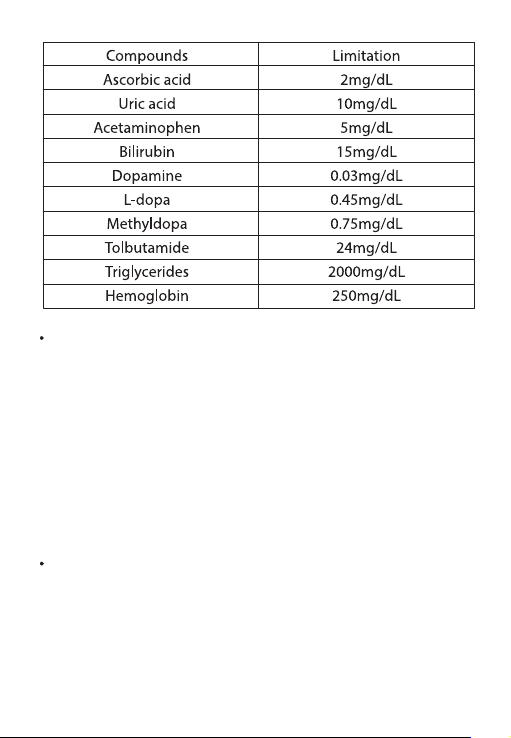
13.The table of substances below shows the highest concentration
without signicant interfe rence (± 10% error)
21
MAINTENANCE AND STORAGE OF YOUR IHEALTH
SYSTEM
. Always use care when handling the iHealth Smart Glucose Meter.
Dropping or throwing the meter may cause damage.
. Don't expose the iHealth Smart Glucose Meter, test strips, or
control solution to extreme conditions such as high humidity heat,
freezing cold, or dust.
. Always wash your hands with soap and water, and rinse and dry
them completely before handling the iHealth Smart Glucose
Meter and test strips.
LIMITATIONS OF USE
. The iHealth system is not intended for use on neonates.
. The iHealth system is not intended for use on artery blood,
serum, and plasma.
. The iHealth system should only be used with iHealth test strips.
. The iHealth system can be used up to an altitude of 3276
meters(10744 feet).
22

. The following substances at levels grreater than normal or
therapeutic levels may cause signicant interference (aect the
result by greater than 10%), resulting in an inaccurate result:
ascorbic acid, uric acid, acetaminophen, dopamine, L-dopa, etc.
These substances do not aect test results in normal concentra-
tions but may aect test results in high concentrations. Do not use
haemolysis samples, icterus samples, or high lipemia samples.
. Patients undergoing oxygen thera py may yield falsely lower
results.
. Not for use for patients in a hyperglycemic-hyperosmolar state,
with or without ketosis.
. Not for use on critically ill patients.
. Not to be used for patients who are dehydrated, hypertensive,
hypotensive, or in shock.
. Very low or very high red blood cell count (hematocrit) can lead
to incorrect test results. If you do not know your hematocrit level,
please consult your healthca re provider.
We recommend periodic comparison of the iHealth system to
another monitoring system known to be well maintained and
monitored by a healthcare provider.
SYSTEM TROUBLESHOOTING
If you follow the recommended action but the problem persists or
error messages other than the ones below appear, please call
iHealth Labs Customer Service at l-855-816-7705. Do not attempt
to repair the meter by yourself and never try to disassemble the
meter under any circumstances.
23
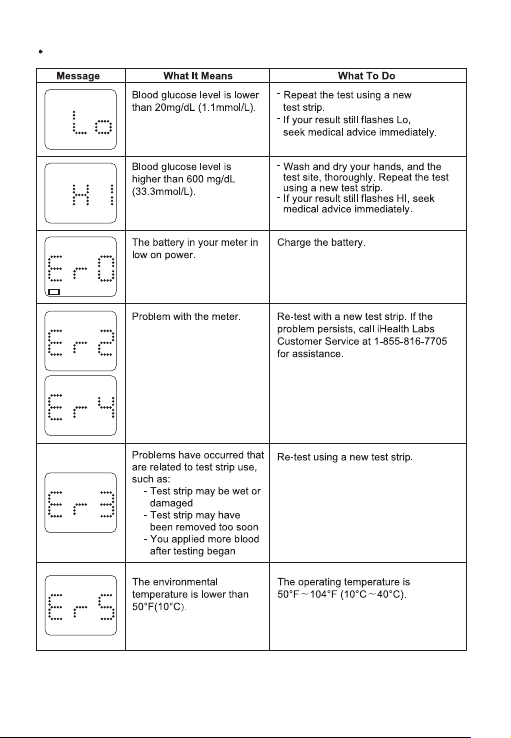
DISPLAY MESSAGES
24
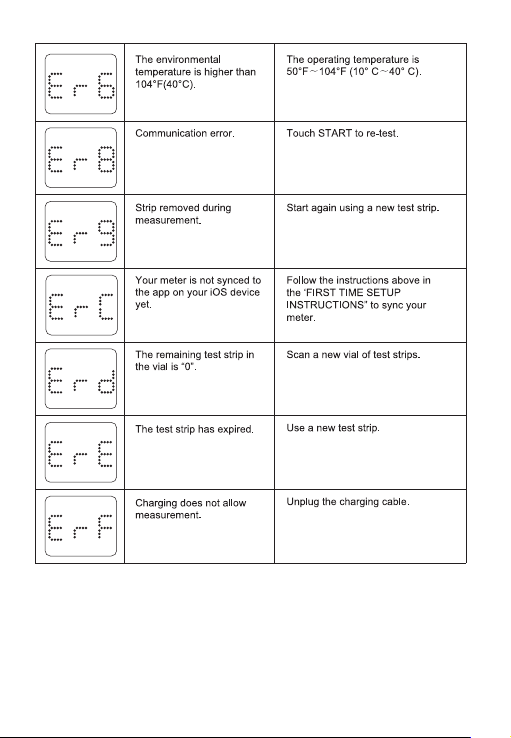
25
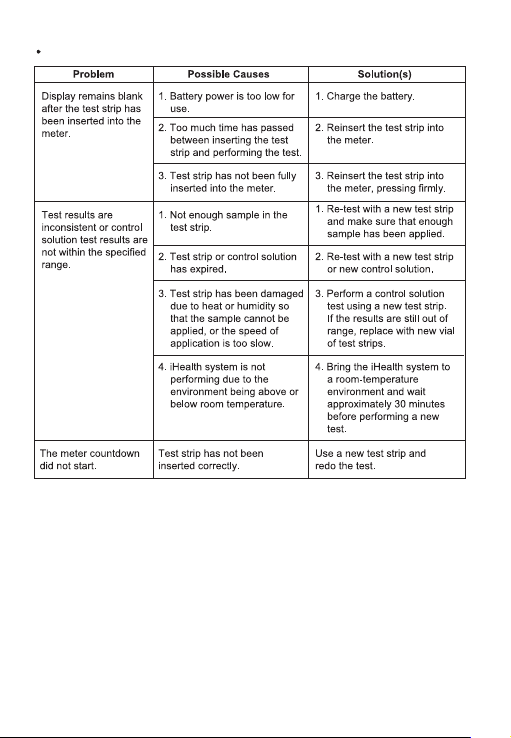
TROUBLESHOOTING
26
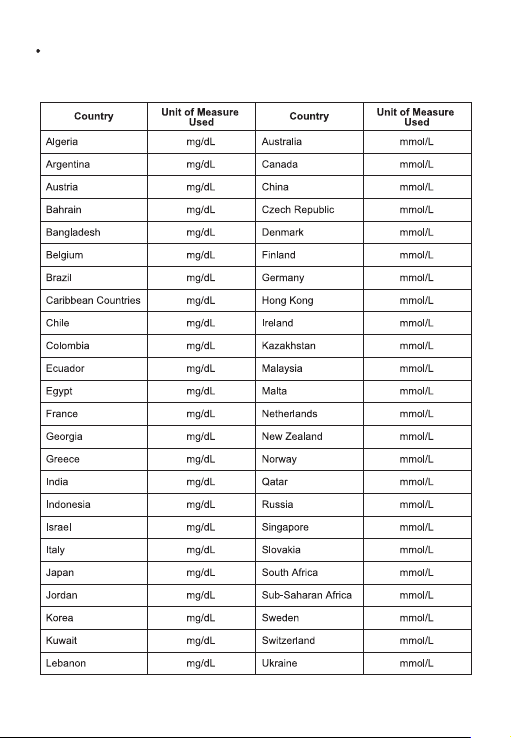
INTERNATIONAL BLOOD GLUCOSE
MEASUREMENTS UNITS
27
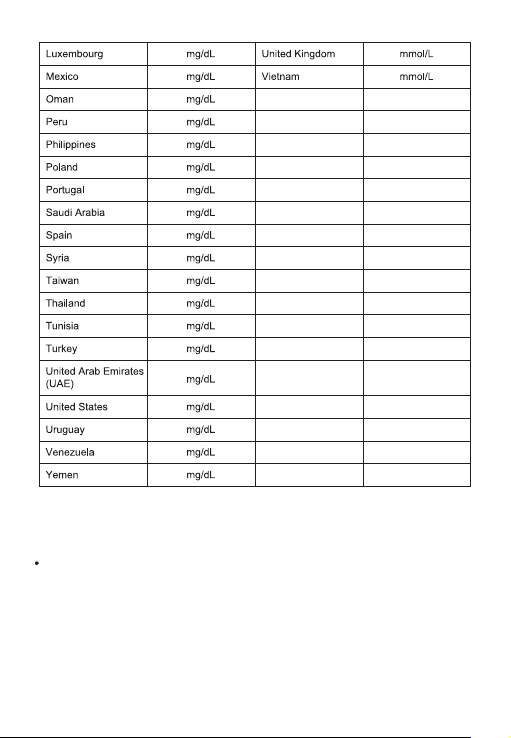
Note: The default setting in US is mg/dL. Please contact customer
service if your meter isn't set to mg/dL when purchased.
WARRANTY INFORMATION
iHealth Labs, Inc. ("iHealth") warrants the iHealth meter (the
“Product"), and only the Product, against defects in materials and
workmanship under normal use for a period of three years from
the date of pu rchase by the original pu rchaser ("Warranty
Period"). Under this Limited Warranty, if a defect arises and a valid
claim is received by iHealth within the Warranty Period regarding
the Product, at its option and to the extent permitted by law,
iHealth will either (1) repair the Product using new or refurbished
replacement parts or (2) exchange the Product with a new or
refurbished Product. In the event of a defect, to the extent
permitted by law, these a re the sole and exclusive remedies.
iHealth is a trademark of iHealth Labs Inc.
"Made for iPod,” "Made fo r iPad,” and "Made for iPhone" mean that
an electronic accessory has been designed to connect specically
to the iPod, iPad, and/or iPhone, respectively, and has been
certied by the developer to meet Apple performance standards.
Apple is not responsible for the operation of this device or its
compliance with safety and regulatory standards.
Please note that the use of this accessory with the iPod, iPad,
and/or iPhone may aect wireless performance. iPod Touch, iPad,
and iPhone are trademarks of Apple Inc., registered in the U.S. and
other countries.
Manufactured for iHealth Labs Inc
USA:
iHealth Labs Inc. www.ihealthlabs.com
Mountain View, CA 94043, USA
855-816-7705
(8:30 AM - 5:30 PM PST, Monday to Friday except holidays)
Email: support@ihealthlabs.com
Europe:
iHealthLabs Europe SARL www.ihealthlabs.eu
3 Rue Tronchet, 75008, Paris, France
+33(0)1 44 94 04 81 (9:00 AM-5:30 PM, Monday to Friday
except holidays)
Email: support@ihealthlabs.eu
28

WARRANTY INFORMATION
iHealth Labs, Inc. ("iHealth") warrants the iHealth meter (the
“Product"), and only the Product, against defects in materials and
workmanship under normal use for a period of three years from
the date of pu rchase by the original pu rchaser ("Warranty
Period"). Under this Limited Warranty, if a defect arises and a valid
claim is received by iHealth within the Warranty Period regarding
the Product, at its option and to the extent permitted by law,
iHealth will either (1) repair the Product using new or refurbished
replacement parts or (2) exchange the Product with a new or
refurbished Product. In the event of a defect, to the extent
permitted by law, these a re the sole and exclusive remedies.
iHealth is a trademark of iHealth Labs Inc.
"Made for iPod,” "Made fo r iPad,” and "Made for iPhone" mean that
an electronic accessory has been designed to connect specically
to the iPod, iPad, and/or iPhone, respectively, and has been
certied by the developer to meet Apple performance standards.
Apple is not responsible for the operation of this device or its
compliance with safety and regulatory standards.
Please note that the use of this accessory with the iPod, iPad,
and/or iPhone may aect wireless performance. iPod Touch, iPad,
and iPhone are trademarks of Apple Inc., registered in the U.S. and
other countries.
Manufactured for iHealth Labs Inc
USA:
iHealth Labs Inc. www.ihealthlabs.com
Mountain View, CA 94043, USA
855-816-7705
(8:30 AM - 5:30 PM PST, Monday to Friday except holidays)
Email: [email protected]
Europe:
iHealthLabs Europe SARL www.ihealthlabs.eu
3 Rue Tronchet, 75008, Paris, France
+33(0)1 44 94 04 81 (9:00 AM-5:30 PM, Monday to Friday
except holidays)
Email: [email protected]
29
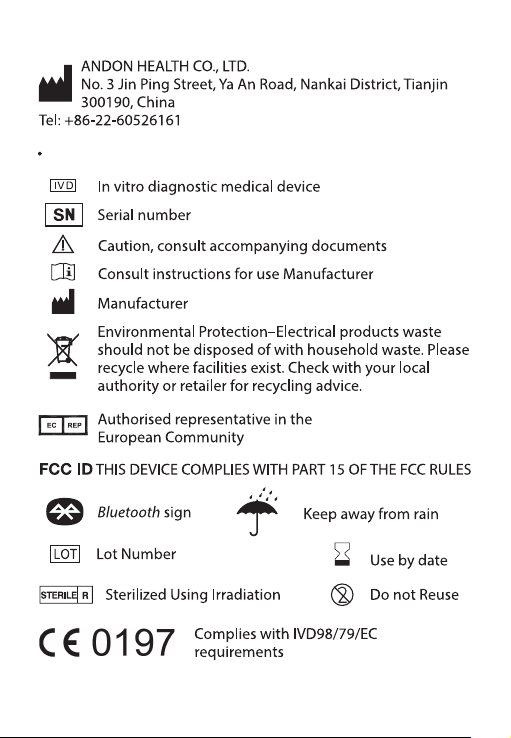
EXPLANATION OF SYMBOLS
30

IMPORTANTINFORMATION REQUIRED BY THE FCC
This device complies with Part 15 0f the FCC Rules. Its operation is
subject to the following two conditions: (1) This device may not
cause harmful interference, and (2) this device must accept
any interfe rence received, including interfe rence that may cause
undesired operation.
Changes or modications not expressly approved by iHealth
LabInc. would void the user's authority to operate the product.
NOTE: This product has been tested and found to comply with the
limits for a Class B digital device, pursuant to Part 15 of the FCC
Rules. These limits a re designed to provide reasonable
protection against harmful interfe rence in a residential installation.
This product generates, uses, and can radiate radio frequency
energy and, if not installed and used in accordance
with the instructions, may cause harmful interfe rence to radio
communications. However, there is no guarantee that interference
will not occur in a particular installation. If this product does cause
harmful interference to radio or television reception, which can be
determined by turning the equipment o and on, the user is
encouraged to try to correct the interference by one or more of the
following measures:
-Reorient or relocate the receiving antenna.
-lncrease the separation between the equipment and receiver.
-Connect the equipment into an outlet on a circuit deerent from
that to which the receiver is connected.
-Consult the dealer or an experienced radio/TV technician for help.
Radiofrequency radiation exposure Information: This equipment
complies with FCC radiation exposure limits set forth for an
uncontrolled environment. This equipment should be installed and
operated with minimum distance of [20] cm between the radiator
and your body. This transmitter must not be co-located or
operating in conj unction with any other antenna or transmitter.
NOTICE: Changes or modications made to this equipment not
expressly approved by iHealth Lab Inc. may void the FCC
authorization to operate this equipment.
This product complies with Industry Canada. lC: RSS-21 0
This product is approved in accordance to R&TTE directive
transmitter.
IC NOTICE
This device complies with Industry Canada licence-exempt RSS
standard (s). Operation is subject to the following two conditions
(1) this device may not cause interference, and
(2) this device must accept any interference, including interfer-
ence that may cause undesired operation of the device.
31

IMPORTANTINFORMATION REQUIRED BY THE FCC
This device complies with Part 15 0f the FCC Rules. Its operation is
subject to the following two conditions: (1) This device may not
cause harmful interference, and (2) this device must accept
any interfe rence received, including interfe rence that may cause
undesired operation.
Changes or modications not expressly approved by iHealth
LabInc. would void the user's authority to operate the product.
NOTE: This product has been tested and found to comply with the
limits for a Class B digital device, pursuant to Part 15 of the FCC
Rules. These limits a re designed to provide reasonable
protection against harmful interfe rence in a residential installation.
This product generates, uses, and can radiate radio frequency
energy and, if not installed and used in accordance
with the instructions, may cause harmful interfe rence to radio
communications. However, there is no guarantee that interference
will not occur in a particular installation. If this product does cause
harmful interference to radio or television reception, which can be
determined by turning the equipment o and on, the user is
encouraged to try to correct the interference by one or more of the
following measures:
-Reorient or relocate the receiving antenna.
-lncrease the separation between the equipment and receiver.
-Connect the equipment into an outlet on a circuit deerent from
that to which the receiver is connected.
-Consult the dealer or an experienced radio/TV technician for help.
Radiofrequency radiation exposure Information: This equipment
complies with FCC radiation exposure limits set forth for an
uncontrolled environment. This equipment should be installed and
operated with minimum distance of [20] cm between the radiator
and your body. This transmitter must not be co-located or
operating in conj unction with any other antenna or transmitter.
NOTICE: Changes or modications made to this equipment not
expressly approved by iHealth Lab Inc. may void the FCC
authorization to operate this equipment.
This product complies with Industry Canada. lC: RSS-21 0
This product is approved in accordance to R&TTE directive
transmitter.
IC NOTICE
This device complies with Industry Canada licence-exempt RSS
standard (s). Operation is subject to the following two conditions
(1) this device may not cause interference, and
(2) this device must accept any interference, including interfer-
ence that may cause undesired operation of the device.
32