User's Guide
True RMS Multimeter
plus IR Thermometer
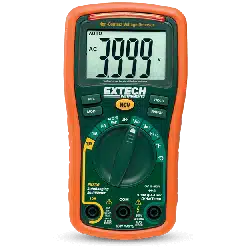
Extech 470
V4.1 9/03
2
Introduction
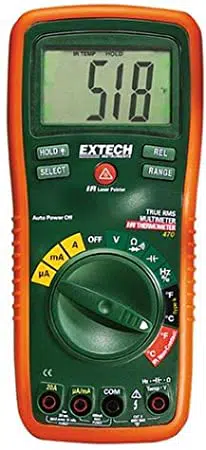
Congratulations on your purchase of the Extech 470 (part number
EX470) True RMS Autoranging Multimeter plus IR Thermometer.
This meter measures AC/DC Voltage, AC/DC Current, Resistance,
Capacitance, Frequency, Duty Cycle, Diode Test, and Continuity
plus Thermocouple and Non-Contact IR Temperature. Proper use
and care of this meter will provide many years of reliable service.
Safety
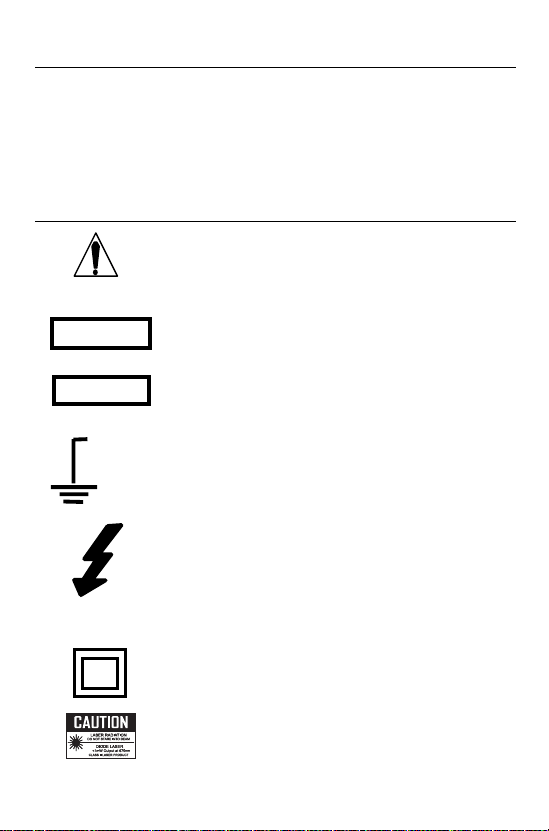
This symbol adjacent to another symbol,
terminal or operating device indicates that the
operator must refer to an explanation in the
Operating Instructions to avoid personal injury
or damage to the meter.
This WARNING symbol indicates a potentially
hazardous situation, which if not avoided,
could result in death or serious injury.
This CAUTION symbol indicates a potentially
hazardous situation, which if not avoided, may
result damage to the product.
This symbol advises the user that the
terminal(s) so marked must not be connected
to a circuit point at which the voltage with
respect to earth ground exceeds (in this case)
600 VAC or VDC.
This symbol adjacent to one or more terminals
identifies them as being associated with
ranges that may, in normal use, be subjected
to particularly hazardous voltages. For
maximum safety, the meter and its test leads
should not be handled when these terminals
are energized.
This symbol indicates that a device is
protected throughout by double insulation or
reinforced insulation.
This symbol indicates there is a potential
hazard from a laser light source.
WARNING
CAUTION
MAX
600V
V4.1 9/03
3
OVERVOLTAGE CATEGORY III
This meter meets the IEC 610-1-95 standard for OVERVOLTAGE
CATEGORY III. Cat III meters are protected against overvoltage
transients in fixed installation at the distribution level. Examples
include switches in the fixed installation and some equipment for
industrial use with permanent connection to the fixed installation.
SAFETY INSTRUCTIONS
This meter has been designed for safe use, but must be operated
with caution. The rules listed below must be carefully followed for
safe operation.
1. NEVER apply voltage or current to the meter that exceeds the
specified maximum:
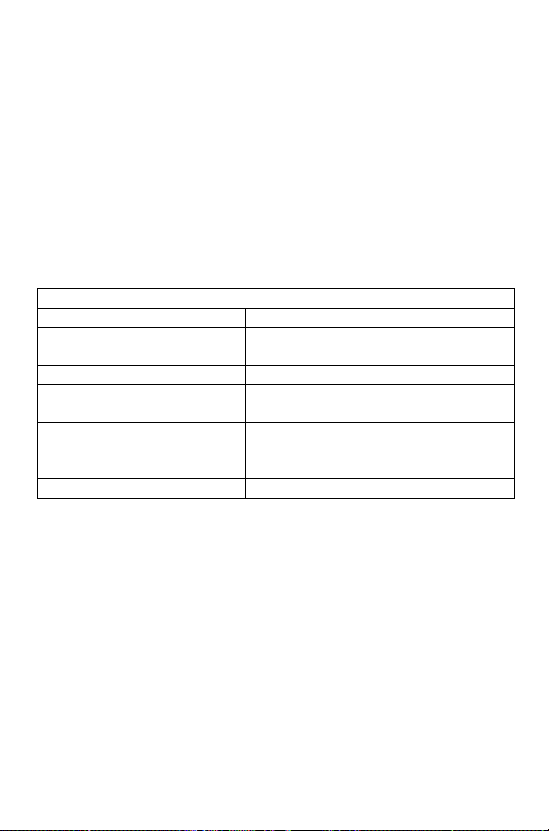
Input Protection Limits
Function Maximum Input
V DC or V AC 600V DC/AC, 200Vrms on 400mV
range
mA AC/DC 500mA 250V fast acting fuse
A AC/DC 20A 250V fast acting fuse(30
seconds max every 15 minutes)
Frequency, Resistance,
Capacitance, Duty Cycle,
Diode Test, Continuity
250Vrms for 15sec max
Temperature 60V DC/24V AC
2. USE EXTREME CAUTION when working with high voltages.
3. DO NOT measure voltage if the voltage on the "COM" input
jack exceeds 600V above earth ground.
4. NEVER connect the meter leads across a voltage source
while the function switch is in the current, resistance, or diode
mode. Doing so can damage the meter.
5. ALWAYS discharge filter capacitors in power supplies and
disconnect the power when making resistance or diode tests.
6. ALWAYS turn off the power and disconnect the test leads
before opening the covers to replace the fuse or batteries.
7. NEVER operate the meter unless the back cover and the
battery and fuse covers are in place and fastened securely.
8. NEVER look directly at the laser light source or aim the
pointer at an eye.
V4.1 9/03
4
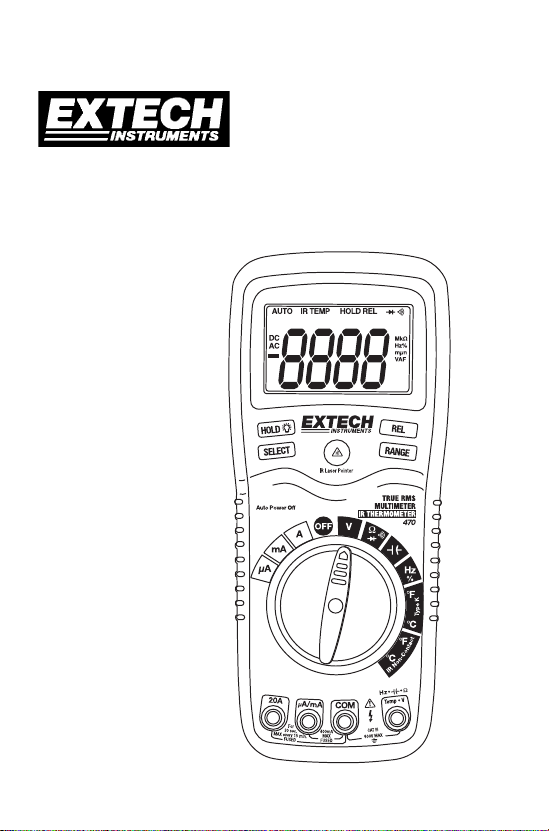
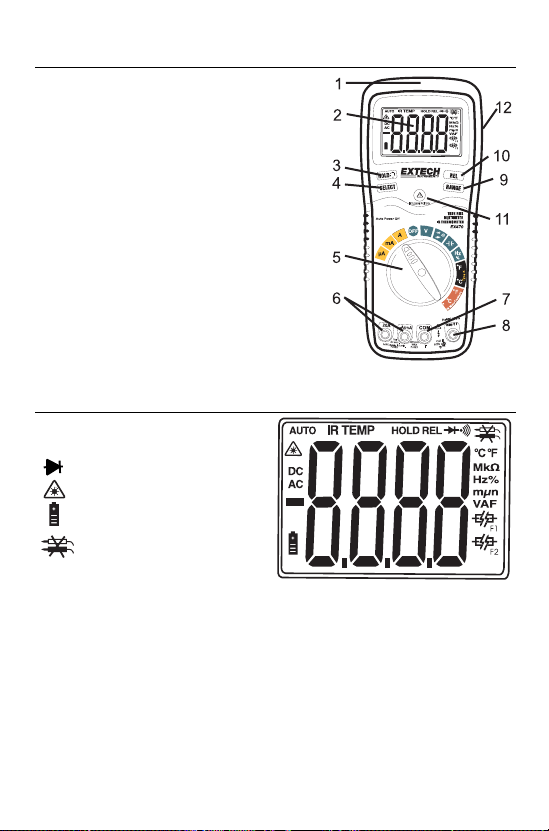
Controls and Jacks
1. IR Thermometer and laser pointer
2. 4000 count LCD display
3. HOLD and Backlight button
4. SELECT button
5. Function switch
6. mA, uA and A input jacks
7. COM input jack
8. Positive input jack
9. RANGE hold button
10. RELATIVE button
11. Laser pointer button
12. Protective holster
Note: Tilt stand and battery compartment are on rear of unit.
Symbols and Annunciators
•))) Continuity
Diode test
Laser pointer
Battery status
Test lead connection
error
n nano (10
-9
) (capacitance)
µ micro (10
-6
) (amps, cap)
m milli (10
-3
) (volts, amps) A Amps
k kilo (10
3
) (ohms) F Farads (capacitance)
M mega (10
6
) (ohms) Ω Ohms
Hz Hertz (frequency) V Volts
% Percent (duty ratio) REL Relative
AC Alternating current AUTO Autoranging
DC Direct current HOLD Display hold
ºF Degrees Fahrenheit ºC Degrees Centigrade
V4.1 9/03
5
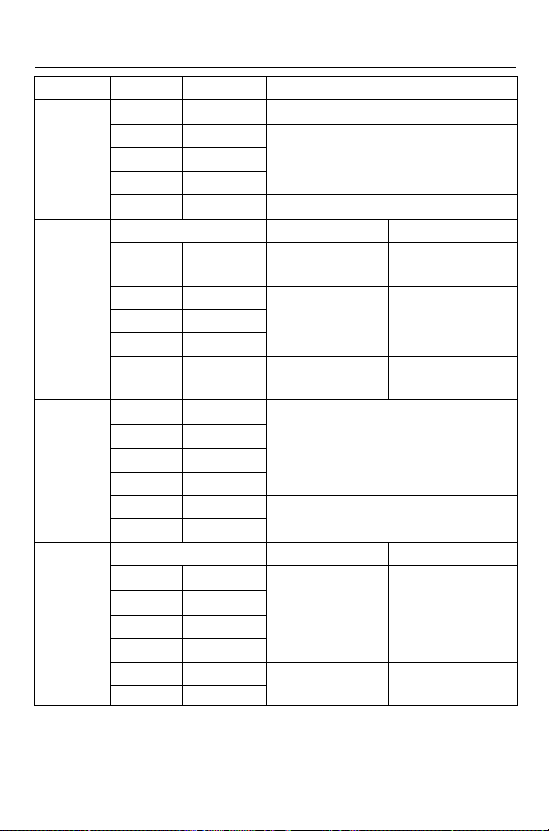
Specifications
Function Range Resolution Accuracy
400mV 0.1mV ±(0.3% reading + 2 digits)
4V 0.001V
40V 0.01V
400V 0.1V
±(0.5% reading + 2 digits)
DC
Voltage
600V 1V ±(0.8% reading + 3 digits)
50 to 400Hz 400Hz to 1kHz
400mV 0.1mV ±(1.5% reading
+ 15 digits)
±(2.5% reading
+ 15digits)
4V 0.001V
40V 0.01V
400V 0.1V
±(1.5% reading
+ 6 digits)
±(2.5% reading
+ 8 digits)
AC
Voltage
600V 1V ±(1.8% reading
+ 6 digits)
±(3% reading +
8 digits)
400µA0.1µA
4000µA1µA
40mA 0.01mA
400mA 0.1mA
±(1.5% reading + 3 digits)
4A 0.001A
DC
Current
20A 0.01A
±(2.5% reading + 5 digits)
50 to 400Hz 400Hz to 1KHz
400µA0.1µA
4000µA1µA
40mA 0.01mA
400mA 0.1mA
±(1.8% reading
+ 8 digits)
±(3.0% reading
+ 7 digits)
4A 0.001A
AC
Current
20A 0.01A
±(3.0% reading
+ 8 digits)
±(3.5% reading
+ 10 digits)
NOTE:: Accuracy is stated at 65
o
F to 83
o
F (18
o
C to 28
o
C) and less
than 75% RH.

V4.1 9/03
6
Function Range Resolution Accuracy
400Ω 0.1Ω±(0.8% reading + 4 digits)
4kΩ 0.001kΩ±(0.8% reading + 2 digits)
40kΩ 0.01kΩ
400kΩ 0.1kΩ
4MΩ 0.001MΩ
±(1.0% reading + 2 digits)
Resistance
40MΩ 0.01MΩ±(3.0% reading + 5 digits)
40nF 0.01nF ±(5.0% reading + 7 digits)
400nF 0.1nF ±(3.0% reading + 5 digits)
4µF 0.001µF
40µF0.01µF
±(3.5% reading + 5 digits)
Capacitance
100µF0.1µF ±(5.0% reading + 5 digits)
5.000Hz 0.001Hz
50.00Hz 0.01Hz
±(1.5% reading + 5 digits)
500.0Hz 0.1Hz
5.000kHz 0.001kHz
50.00kHz 0.01kHz
500.0kHz 0.1kHz
±(1.2% reading + 2 digits)
5.000MHz 0.001MHz
10.00MHz 0.01MHz
±(1.5% reading + 4 digits)
Frequency
Sensitivity: 0.8V rms min. @ 20% to 80% duty cycle and <100kHz; 5Vrms
min @ 20% to 80% duty cycle and > 100kHz
.
0.1 to 99.9% 0.1% ±(1.2% reading + 2 digits)Duty Cycle
Pulse width: 100µs - 100ms, Frequency: 5Hz to 150kHz
-4 to 1382°F1°FTemp
(type-K)
-20 to 750°C1°C
±(3.0% reading + 3 digits)
(probe accuracy not included)
-4 to 518°F1°FTemp
(IR)
-20 to270°C1°C
±2.0% reading or ±2°C, ± 4 °F
Note: Accuracy specifications consist of two elements:
• (% reading) – This is the accuracy of the measurement circuit.
• (+ digits) – This is the accuracy of the analog to digital converter.

V4.1 9/03
7
Diode Test Test current of 0.3mA maximum,
open circuit voltage 1.5V DC typical
Continuity Check Audible signal will sound if the
resistance is less than 150Ω
(approx.), test current <0.7mA
Temperature Sensor Requires type K thermocouple
IR Spectral response 6 to 16µm
IR Emissivity 0.95 fixed
IR distance ratio 8:1
Input Impedance >7.5M_ (VDC & VAC)
AC Response True rms
ACV Bandwidth 50Hz to 1kHz
Display 4000 count backlit liquid crystal
Overrange indication “OL” is displayed
Auto Power Off 15 minutes (approximately)
Polarity Automatic (no indication for
positive); Minus (-) sign for negative
Measurement Rate 2 times per second, nominal
Low Battery Indication “ ” is displayed if battery voltage
drops below operating voltage
Battery One 9 volt (NEDA 1604) battery
Fuses mA, µA ranges; 0.5A/250V fast blow
A range; 20A/250V ceramic fast
blow
Operating Temperature 41ºF to 104ºF (5ºC to 40ºC)
Storage Temperature -4
o
F to 140
o
F (-20
o
C to 60
o
C)
Operating Humidity Max 80% up to 87ºF (31ºC)
decreasing linearly to 50% at
104ºF(40ºC)
Storage Humidity <80%
Operating Altitude 7000ft. (2000meters) maximum.
Weight 0.753lb (342g) (includes holster).
Size 7.36” x 3.2” x 2.0” (187 x 81 x
50mm) (includes holster)
Safety For indoor use and in accordance with the
requirements for double insulation to IEC1010-1
(1995): EN61010-1 (1995) Overvoltage Category
III, Pollution Degree 2.
V4.1 9/03
8
Operating Instructions
WARNING: Risk of electrocution. High-voltage circuits, both AC
and DC, are very dangerous and should be measured with great
care.
1. ALWAYS turn the function switch to the OFF position when the
meter is not in use.
2. If “OL” appears in the display during a measurement, the value
exceeds the range you have selected. Change to a higher
range.
NOTE:: On some low AC and DC voltage ranges, with the test
leads not connected to a device, the display may show a
random, changing reading. This response is normal and is
caused by the high-input sensitivity. The reading will stabilize
and give a proper measurement when connected to a circuit.
DC VOLTAGE MEASUREMENTS
CAUTION: Do not measure DC voltages if a motor on the
circuit is being switched ON or OFF. Large voltage surges may
occur that can damage the meter.
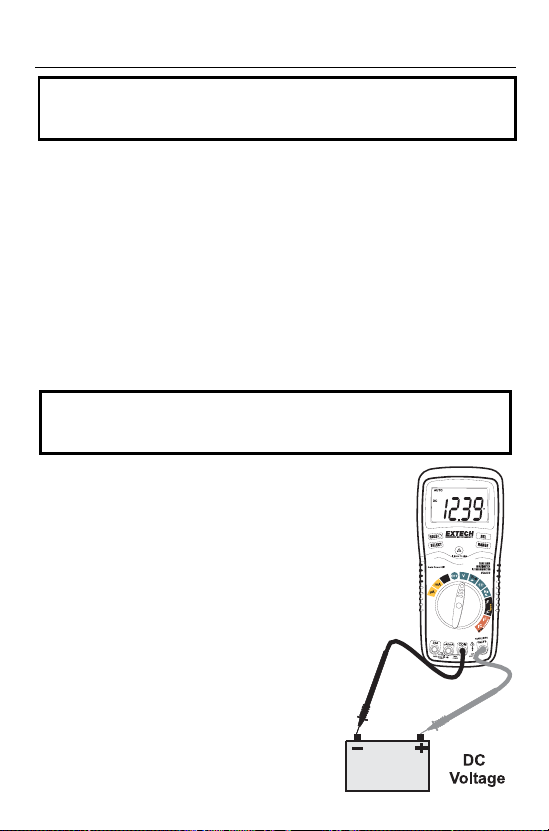
1. Set the function switch to the green
V position.
2. Press the SELECT button to indicate
“DC” on the display.
3. Insert the black test lead banana
plug into the negative COM jack.
Insert the red test lead banana plug
into the positive V jack.
4. Touch the black test probe tip to the
negative side of the circuit.
Touch the red test probe tip to the
positive side of the circuit.
5. Read the voltage in the display.
V4.1 9/03
9
AC VOLTAGE MEASUREMENTS
WARNING: Risk of Electrocution. The probe tips may not be
long enough to contact the live parts inside some 240V outlets
for appliances because the contacts are recessed deep in the
outlets. As a result, the reading may show 0 volts when the
outlet actually has voltage on it. Make sure the probe tips are
touching the metal contacts inside the outlet before assuming
that no voltage is present.
CAUTION: Do not measure AC voltages if a motor on the
circuit is being switched ON or OFF. Large voltage surges may
occur that can damage the meter.
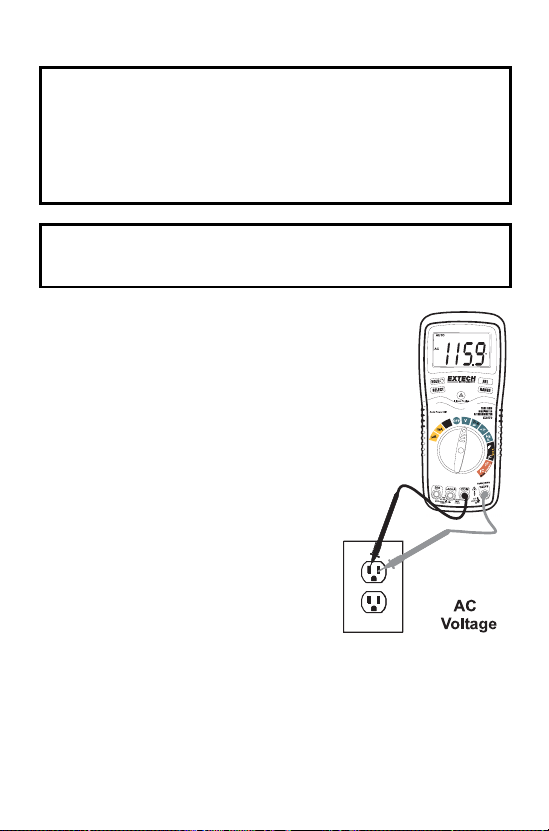
1. Set the function switch to the green
V position.
2. Press the SELECT button to
indicate “AC” on the display.
3. Insert the black test lead banana
plug into the negative COM jack.
Insert red test lead banana plug into
the positive V jack.
4. Touch the black test probe tip to the
neutral side of the circuit.
Touch the red test probe tip to the
“hot” side of the circuit.
5. Read the voltage in the display.
V4.1 9/03
10
DC CURRENT MEASUREMENTS
CAUTION: Do not make current measurements on the 20A
scale for longer than 30 seconds. Exceeding 30 seconds may
cause damage to the meter and/or the test leads.
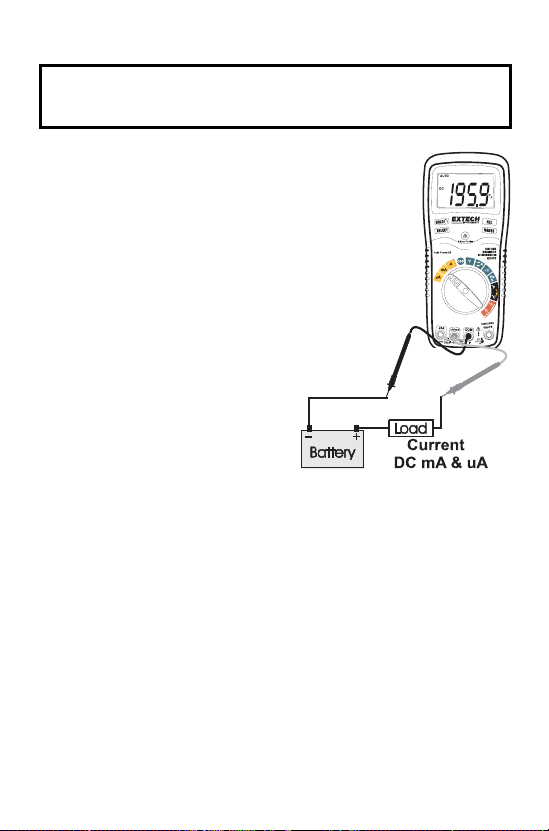
1. Insert the black test lead
banana plug into the negative
COM jack.
2. For current measurements up
to 4000µA DC, set the
function switch to the yellow
µA position and insert the red
test lead banana plug into the
µA/mA jack.
3. For current measurements up
to 400mA DC, set the function
switch to the yellow mA
position and insert the red test
lead banana plug into the
µA/mA jack.
4. For current measurements up
to 20A DC, set the function
switch to the yellow A range
and insert the red test lead banana plug into the A jack.
5. Press the SELECT button to indicate “DC” on the display.
6. Remove power from the circuit under test, then open up the
circuit at the point where you wish to measure current.
7. Touch the black test probe tip to the negative side of the circuit.
Touch the red test probe tip to the positive side of the circuit.
8. Apply power to the circuit.
9. Read the current in the display.

V4.1 9/03
11
AC CURRENT MEASUREMENTS
CAUTION: Do not make current measurements on the 20A
scale for longer than 30 seconds. Exceeding 30 seconds may
cause damage to the meter and/or the test leads.
1. Insert the black test lead banana plug into the negative COM
jack.
2. For current measurements up to 4000µA AC, set the function
switch to the yellow µA position and insert the red test lead
banana plug into the µA/mA jack.
3. For current measurements up to 400mA AC, set the function
switch to the yellow mA position and insert the red test lead
banana plug into the µA/mA jack.
4. For current measurements up to 20A AC, set the function
switch to the yellow A range and insert the red test lead
banana plug into the A jack.
5. Press the SELECT button to
indicate “AC” on the display.
6. Remove power from the
circuit under test, then open
up the circuit at the point
where you wish to measure
current.
7. Touch the black test probe tip
to the neutral side of the
circuit.
Touch the red test probe tip to
the “hot” side of the circuit.
8. Apply power to the circuit.
9. Read the current in the
display.
V4.1 9/03
12
RESISTANCE MEASUREMENTS
WARNING: To avoid electric shock, disconnect power to the
unit under test and discharge all capacitors before taking any
resistance measurements. Remove the batteries and unplug
the line cords.
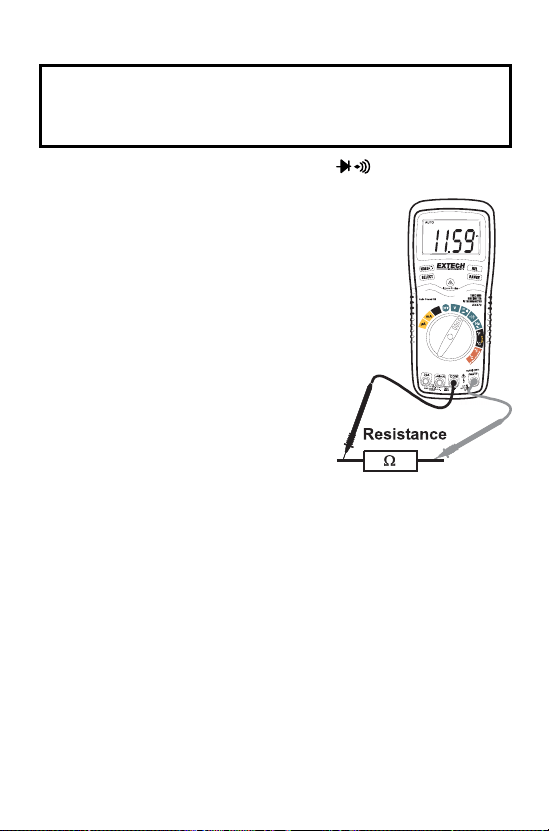
1. Set the function switch to the green _ position.
2. Insert the black test lead banana
plug into the negative COM jack.
Insert the red test lead banana
plug into the positive Ω jack.
3. Press the SELECT button to
indicate “Ω" on the display.
4. Touch the test probe tips across
the circuit or part under test. It is
best to disconnect one side of the
part under test so the rest of the
circuit will not interfere with the
resistance reading.
5. Read the resistance in the display.
V4.1 9/03
13
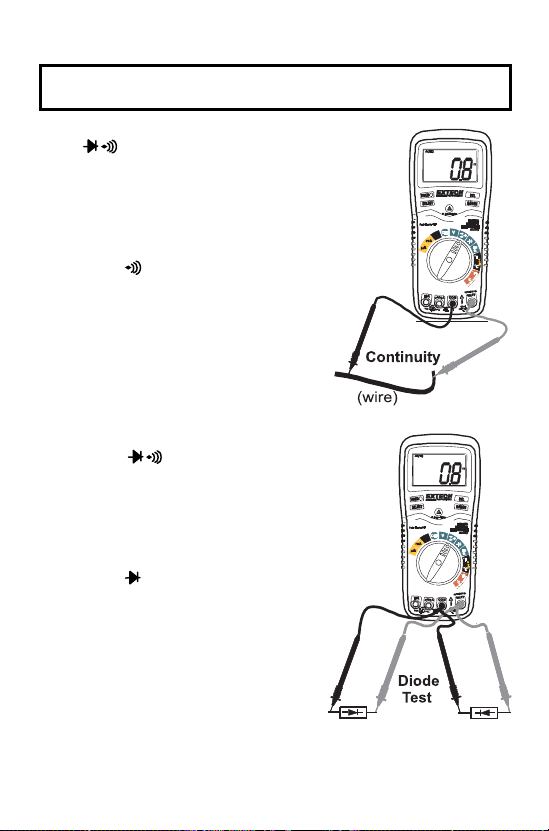
CONTINUITY CHECK
WARNING: To avoid electric shock, never measure continuity
on circuits or wires that have voltage on them.
1. Set the function switch to the green
_ position.
2. Insert the black lead banana plug
into the negative COM jack.
Insert the red test lead banana
plug into the positive Ω jack.
3. Press the SELECT button to
indicate” " and “_” on the display
4. Touch the test probe tips to the
circuit or wire you wish to check.
5. If the resistance is less than
approximately 150Ω, the audible
signal will sound. If the circuit is
open, the display will indicate “OL”.
DIODE TEST
1. Set the function switch to the
green _ position.
2. Insert the black test lead banana
plug into the negative COM jack
and the red test lead banana plug
into the positive V jack.
3. Press the SELECT button to
indicate and V on the
display.
4. Touch the test probes to the diode
under test. Forward voltage will
typically indicate 0.400 to 0.700V.
Reverse voltage will indicate
“OL”. Shorted devices will indicate
near 0V and an open device will
indicate “OL” in both polarities.
V4.1 9/03
14
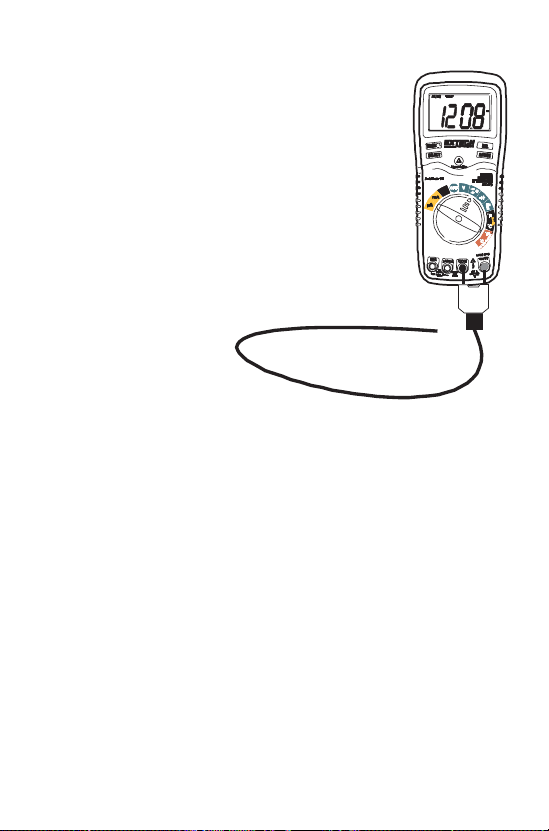
CONTACT TEMPERATURE MEASUREMENTS
1. Set the function switch to the black Type K ºF
or ºC position.
2. Insert the Temperature Probe into the input
jacks, making sure to observe the correct
polarity.
3. Touch the Temperature Probe head to the
part whose temperature you wish to measure.
Keep the probe touching the part under test
until the reading stabilizes (about 30 seconds).
4. Read the temperature in the display.
Note: The temperature probe is fitted with a type
K mini connector. A mini connector to banana
connector adaptor is supplied
for connection to
the input banana
jacks.
V4.1 9/03
15
NON-CONTACT TEMPERATURE MEASUREMENTS
1. Set the function switch to the red IR Non-Contact ºF or ºC
position.
2. Point the meter at the surface to be measured.
3. If needed, press the red IR Laser Pointer button to locate the
exact spot being measured.
4. The area of the surface to be measured must be larger than the
spot size as determined by the distance to spot size
specification.
5. Read the temperature in the display.
(2.5cm)
(5cm)
(10cm)
(20cm)
(40cm)
(80cm)
DiameterofSpot
DistancetoObject
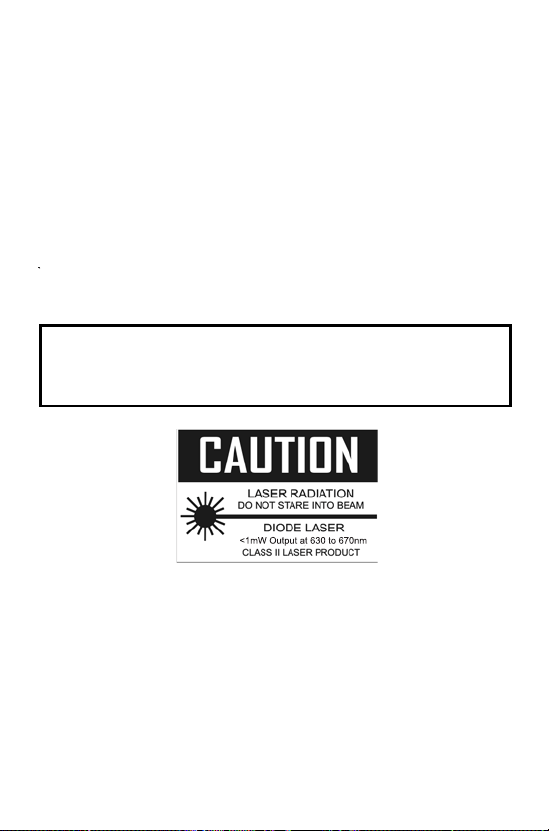
WARNING: Do not directly view or direct the laser pointer
at an eye. Low power visible lasers do not normally present a
hazard, but may present some potential for hazard if viewed
directly for extended periods of time.
V4.1 9/03
16
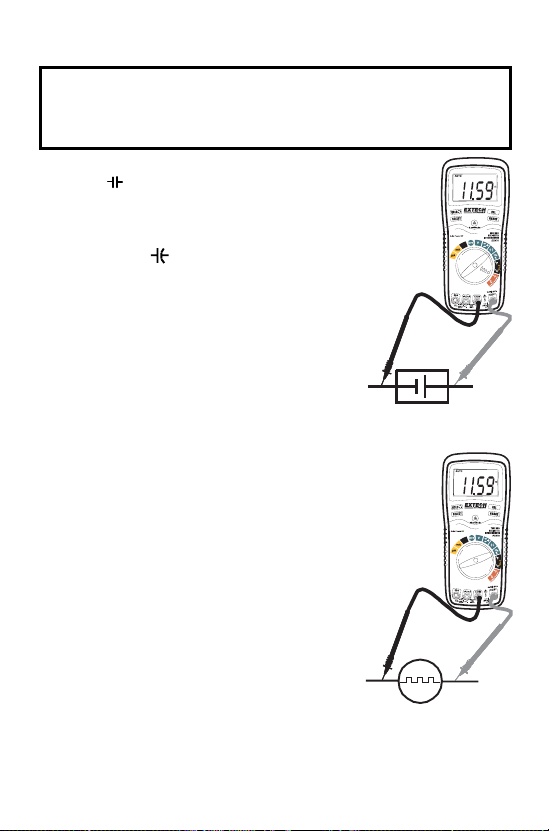
CAPACITANCE MEASUREMENTS
WARNING: To avoid electric shock, disconnect power to the
unit under test and discharge all capacitors before taking any
capacitance measurements. Remove the batteries and unplug
the line cords.
1. Set the rotary function switch to the
green position.
2. Insert the black test lead banana plug
into the negative (COM) jack.
Insert the red test lead banana plug into
the positive jack.
3. Touch the test leads to the capacitor to
be tested.
4. Read the capacitance value in the
display
FREQUENCY MEASUREMENTS
1. Set the rotary function switch to the
green “Hz” position.
2. Insert the black lead banana plug into
the negative COM jack and the red test
lead banana plug into the positive Hz
jack.
3. Touch the test probe tips to the circuit
under test.
4. Read the frequency on the display.
% DUTY CYCLE
1. Set the rotary function switch to the
“Hz” position.
2. Insert the black lead banana plug into
the negative COM jack and the red test
lead banana plug into the positive Hz
jack.
3. Press the SELECT key momentarily to select “%” in the
display.
4. Touch the test probe tips to the circuit under test.
5. Read the % duty cycle on the display.

V4.1 9/03
17
AUTORANGING/MANUAL RANGE SELECTION
When the meter is first turned on, it automatically goes into
AutoRanging. This automatically selects the best range for the
measurements being made and is generally the best mode for
most measurements. For measurement situations requiring that
a range be manually selected, perform the following:
1. Press the RANGE key. The “AUTO” display indicator will turn
off.
2. Press the RANGE key to step through the available ranges
until you select the range you want.
3. To exit the Manual Ranging mode and return to AutoRanging,
press and hold the RANGE key for 2 seconds.
Note: Manual ranging does not apply for the Capacitance,
Frequency and Temperature functions.
RELATIVE MODE
The relative measurement feature allows you to make
measurements relative to a stored reference value. A reference
voltage, current, etc. can be stored and measurements made in
comparison to that value. The displayed value is the difference
between the reference value and the measured value.
1. Perform the measurement as described in the operating
instructions.
2. Press the REL button to store the reading in the display and
the "REL" indicator will appear on the display.
3. The display will now indicate the difference between the stored
value and the measured value.
4. Press the REL button to exit the relative mode.
Note: The Relative function does not operate in the Frequency
function.
V4.1 9/03
18
DISPLAY BACKLIGHT
Press and hold the HOLD key for >1 second to turn on or off the
display backlight function. The backlight will automatically turn
off after 30 seconds.
Note: The HOLD feature will activate when the Backlight is
turned on. Press the HOLD key again to exit Hold.
HOLD
The hold function freezes the reading in the display. Press the
HOLD key momentarily to activate or to exit the HOLD function.
AUTO POWER OFF
The auto off feature will turn the meter off after 15 minutes.
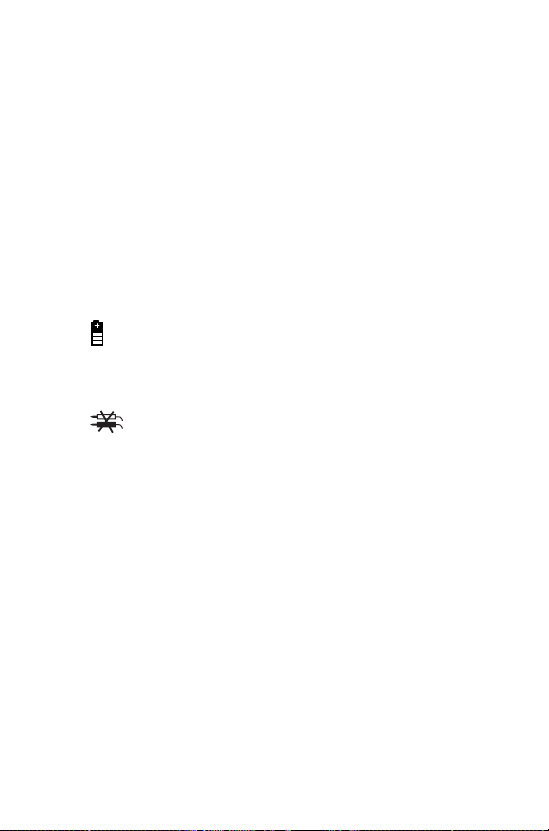
LOW BATTERY INDICATION
The icon will appear in the lower left conner of the display
when the battery voltage becomes low. Replace the battery
when this appears.
WRONG CONNECTION INDICATION
The icon will appear in the upper right conner of the
display and the buzzer will sound whenever the positive test
lead is inserted into the 20A or uA/mA input jack and a non-
current (green, black or red) function is selected. If this occurs,
turn the meter off and reinsert the test lead into the proper input
jack for the function selected.

V4.1 9/03
19
Maintenance
WARNING: To avoid electric shock, disconnect the test leads
from any source of voltage before removing the back cover or
the battery or fuse covers.
WARNING: To avoid electric shock, do not operate your meter
until the battery and fuse covers are in place and fastened
securely.
This MultiMeter is designed to provide years of dependable
service, if the following care instructions are performed:
1. KEEP THE METER DRY. If it gets wet, wipe it off.
2. USE AND STORE THE METER IN NORMAL
TEMPERATURES. Temperature extremes can shorten the life
of the electronic parts and distort or melt plastic parts.
3. HANDLE THE METER GENTLY AND CAREFULLY. Dropping
it can damage the electronic parts or the case.
4. KEEP THE METER CLEAN. Wipe the case occasionally with a
damp cloth. DO NOT use chemicals, cleaning solvents, or
detergents.
5. USE ONLY FRESH BATTERIES OF THE RECOMMENDED
SIZE AND TYPE. Remove old or weak batteries so they do not
leak and damage the unit.
6. IF THE METER IS TO BE STORED FOR A LONG PERIOD
OF TIME, the batteries should be removed to prevent damage
to the unit.
V4.1 9/03
20
BATTERY INSTALLATION
WARNING: To avoid electric shock, disconnect the test leads
from any source of voltage before removing the battery cover.
1. Turn power off and disconnect the test leads from the meter.
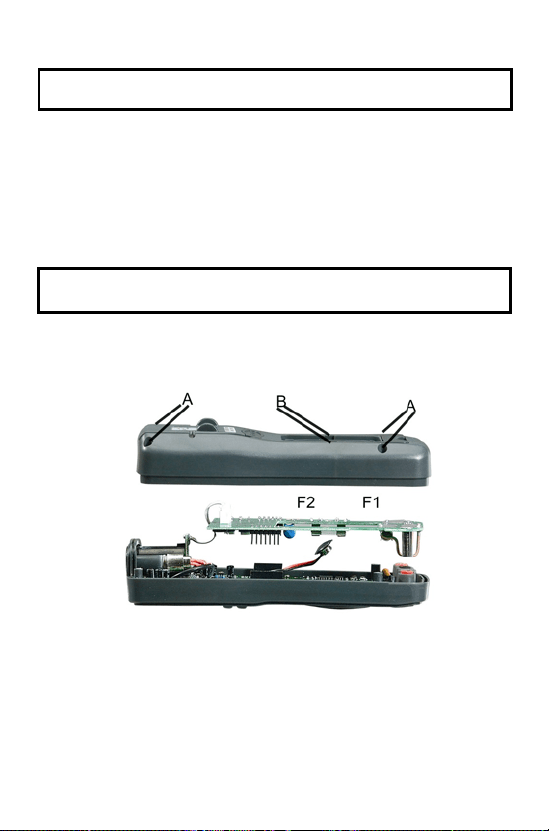
2. Open the rear battery cover by removing two screws (B) using
a Phillips head screwdriver.
3. Insert the battery into battery holder, observing the correct
polarity.
4. Put the battery cover back in place. Secure with the screw.
WARNING: To avoid electric shock, do not operate the meter
until the battery cover is in place and fastened securely.
NOTE:: If your meter does not work properly, check the fuses and
batteries to make sure that they are still good and that they
are properly inserted.

V4.1 9/03
21
REPLACING THE FUSES
WARNING: To avoid electric shock, disconnect the test leads
from any source of voltage before removing the fuse cover.
1. Disconnect the test leads from the meter.
2. Remove the protective rubber holster.
3. Remove the battery cover (two “B” screws) and the battery.
4. Remove the four “A” screws securing the rear cover.
5. Lift the center circuit board straight up from the connectors to
gain access to the fuse holders.
6. Gently remove the old fuse and install the new fuse into the
holder.
7. Always use a fuse of the proper size and value (0.5A/250V fast
blow for the 400mA range, 20A/250V fast blow for the 20A
range).
8. Align the center board with the connectors and gently press
into place.
9. Replace and secure the rear cover, battery and battery cover.
WARNING: To avoid electric shock, do not operate your meter
until the fuse cover is in place and fastened securely.
UL LISTED
The UL mark does not indicate that this product has been
evaluated for the accuracy of its readings.
Support Hotline (781) 890-7440
Tech support: Ext. 200; Email: [email protected]
Repair/Returns: Ext. 210; Email: [email protected]
Website: www.extech.com

V4.1 9/03
22
Warranty
EXTECH INSTRUMENTS CORPORATION warrants this
instrument to be free of defects in parts and workmanship for
three years from date of shipment (a six month limited
warranty applies on sensors and cables). If it should become
necessary to return the instrument for service during or
beyond the warranty period, contact the Customer Service
Department at (781) 890-7440 ext. 210 for authorization or
visit our website at www.extech.com (click on ‘Contact
Extech’ and go to ‘Service Department’ to request an RA
number). A Return Authorization (RA) number must be issued
before any product is returned to Extech. The sender is
responsible for shipping charges, freight, insurance and
proper packaging to prevent damage in transit. This warranty
does not apply to defects resulting from action of the user
such as misuse, improper wiring, operation outside of
specification, improper maintenance or repair, or unauthorized
modification. Extech specifically disclaims any implied
warranties or merchantability or fitness for a specific purpose
and will not be liable for any direct, indirect, incidental or
consequential damages. Extech's total liability is limited to
repair or replacement of the product. The warranty set forth
above is inclusive and no other warranty, whether written or
oral, is expressed or implied.
Calibration and Repair Services
Extech offers complete repair and calibration services for the
products we sell. For periodic calibration, NIST certification or
repair of an Extech product, call customer service for details on
services available for that product. Extech recommends that
calibration be performed on an annual basis to ensure
calibration integrity.
Copyright © 2003 Extech Instruments Corporation.
All rights reserved including the right of reproduction
in whole or in part in any form.