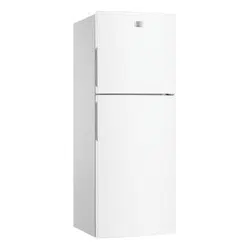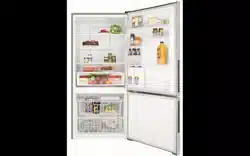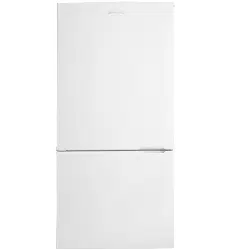
Refrigeration
Use & Care
2 Contents Kelvinator Refrigeration
Congratulations and thank you for choosing our refrigerator.
We are sure you will nd your new refrigerator a pleasure
to use. Before you use the refrigerator, we recommend that
you read through the entire user manual, which provides
the description of the refrigerator and its functions.
To avoid the risks that are always present when you use
an electric appliance, it is important that the refrigerator is
installed correctly and that you read the safety instructions
carefully to avoid misuse and hazards.
We recommend that you keep this instruction booklet
for future reference and pass it on to any future owners.
After unpacking the refrigerator please check it is not
damaged. If in doubt, do not use the refrigerator but
contact your local Electrolux Customer Care Centre.
environmental tip
Information on disposal for users
• Most of the packing materials are recyclable.
Please dispose of those materials through your
local recycling depot or by placing them in
appropriate collection containers.
• If you wish to discard this refrigerator, please
contact your local authorities and ask for the
correct method of disposal.
1. Ensure appliance is on a at surface.
2. Leave standing in stable upright position
for half an hour prior to turning ‘on’.
3. Plug into power socket and turn on.
4. Temperature controls are pre-set to ‘mid’
adjust as required.
5. Leave run for 2 – 3 hours before storing food.
For optimum usage, safety information and
handy hints please read full document.
Important safety instructions 3
Installing your new refrigerator 4
Side by Side model features 6
Top and Bottom Mount model features 7
Refrigerator & freezer operation 8
Controlling the temperature 8
Using your refrigerator 10
Changing the light bulb 10
Cleaning your refrigerator 11
Energy consumption 11
Safety 12
Helpful hints 12
Troubleshooting 13
Notes 14
Warranty 15
Congratulations
Kelvinator quick start guide
Contents
Please read the user manual carefully and store in a handy
place for later reference.
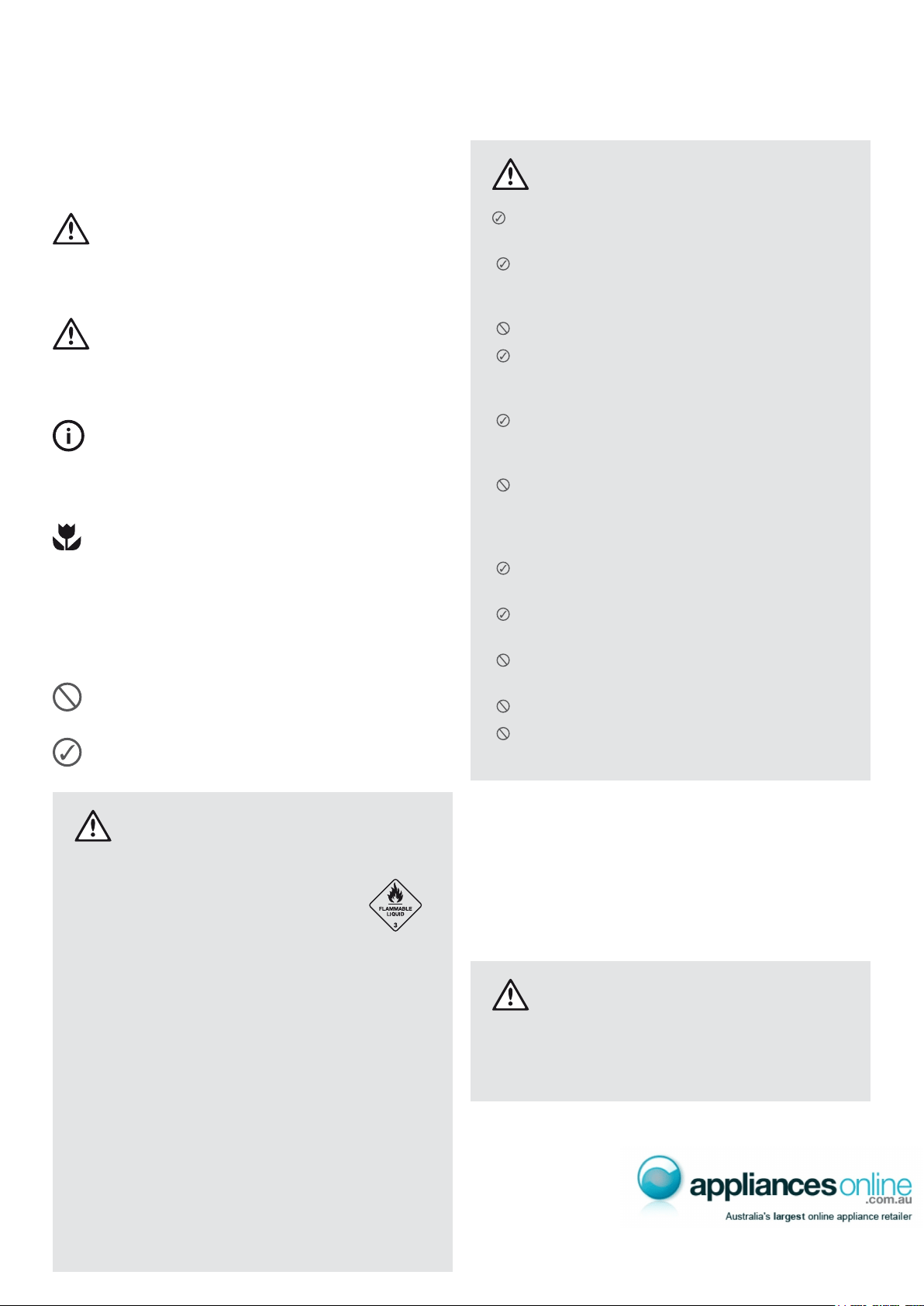
The symbols you will see in this booklet have these meanings:
warnin g
This symbol indicates information concerning your
personal safety
caution
This symbol indicates information on how to avoid
damaging the appliance
tips and information
This symbol indicates tips and information about
use of the appliance
environmental tip
This symbol indicates tips and information about
economical and ecological use of the appliance
Meanings of symbols used in this manual are shown below:
This symbol indicates never to do this
This symbol indicates always do this
warnin g
symbol, do not store them inside any
refrigerator or freezer. If you do so you
may cause an explosion.
(including children) with reduced physical, sensory
or mental capabilities, or lack of experience and
knowledge, unless they have been given supervision
or instruction concerning use of the appliance by
a person responsible for their safety.
do not play with the appliance.
freezers, remove any doors. Children can suffocate
if they get trapped inside.
by carefully disposing of this appliance.
Important safety instructions
warnin g
The appliance must be plugged into its own
Ensure that the electric outlet is properly earthed
are unsure.
Do not use an extension cord or adapter plug.
If the power cord is damaged, it should
be replaced by a service technician or
Unplug the appliance before cleaning and
before changing the light bulb to avoid
electric shock.
Never unplug the appliance by pulling on the
pull straight out of the receptacle to prevent
damaging the power cord.
Choose a location that is not too cold –
the temperature should be above 10°C.
Put the appliance in a dry place, avoiding areas
of high moisture or humidity.
areas, for example in a garage or on a verandah.
or heaters.
When correctly installed, your appliance should:
• have adequate clearance to the back and sides
for air circulation (refer to page 4).
• be aligned to the surrounding cupboards.
• have doors that will self-close from a partially
open position.
warnin g
• Have the stability foot in place (see diagrams on
pages 4 and 5) to prevent the appliance falling
forward when a door with heavy food load is opened.
Kelvinator Refrigeration Important safety instructions 3
Installing your refrigerator
The appliance should arrive with the
front adjustable rollers wound down to
tilt the top of the refrigerator backwards
by about 10 -15mm from upright.
The stability foot should also be wound
fully up so it will not interfere with the
operation of the rollers (see diagram
in Step 3 below).
caution
The rollers are designed for forward or backward
movement only. They are not castors. Moving the
the rollers.
1. Roll the refrigerator into its nal position.
2. The top of the refrigerator should be tilted back by
approximately 10 -15mm. This will allow the doors to
self-close providing a consistent door seal.
3. If the refrigerator is not tilted back, you can adjust the
two front rollers by turning the large, plastic roller nut
(see diagram below). This will increase the height of the
rollers. One turn of the nut will tilt the refrigerator back
approximately 10mm. If you have difculty turning the
roller nut you can have someone tilt the refrigerator back,
so that you have better access. Alternatively, you can
access the rollers from the side, using a at screwdriver
to help you turn the nut (see diagram below).
4. Check the alignment of the refrigerator to the
surrounding cupboards. The top of the refrigerator
should be level from side to side (see diagram below).
If you need to adjust the level, use the adjustable rollers
as discussed in Step 3.
Installing your new refrigerator
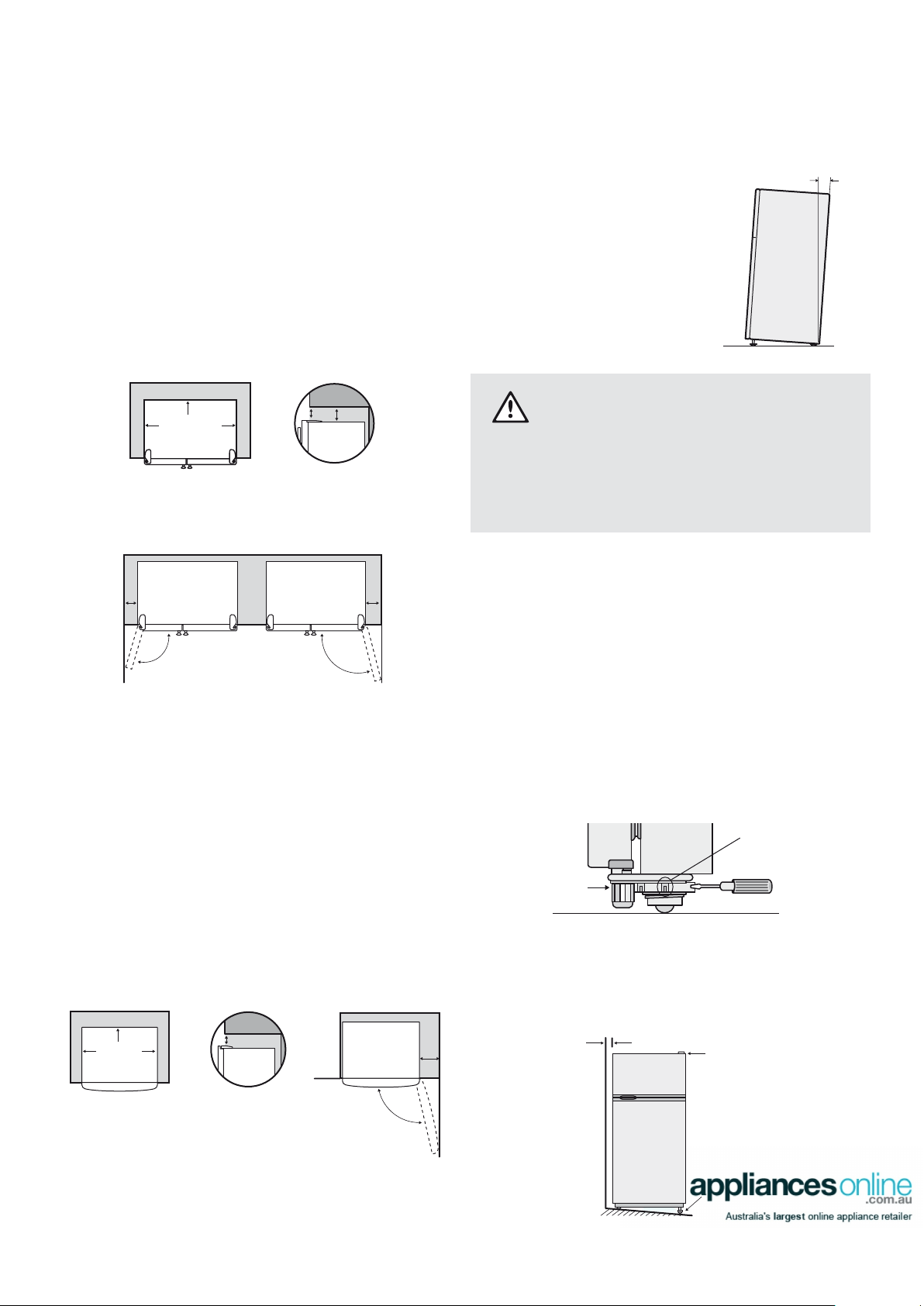
Clearance around your Side by Side refrigerator
Your Side by Side Refrigerator can be installed between
cupboards or xtures but you must allow for the following
spaces around the cabinet.
1. allow a minimum of 5mm clearance on both sides.
2. allow 10mm clearance at the back of the refrigerator.
3. allow a minimum of 10mm clearance above hinge covers.
4. If you do not have a cupboard with a rear gap, the
recommended clearance area on top increases from
50mm to 90mm (x) and from 32mm to 72mm (y).
5. allow a 250 or 300mm clearance on the hinge side of
the doors, if you place the refrigerator next to the wall.
This will make cleaning easier.
6. make sure that cupboards or xtures do not stick out
further than the refrigerator cabinet.
Clearance around your Top and Bottom Mount refrigerator
1. allow a minimum of 5mm clearance on both sides.
2. allow 10mm clearance at the back of the refrigerator.
3. allow a minimum of 10mm clearance above hinge covers.
4. If you do not have a cupboard with a rear gap, the
recommended clearance area on top increases from
50mm to 90mm.
5. When positioned in a corner area, spacing of at least
350mm on the hinge side will allow the doors to open
enough to enable the removal of bins and shelves.
Note: Doors on all models are designed to sit proud of
cabinetry (not ush). The refrigerator should be placed
against a wall and the gap between the rear of the
refrigerator and the wall should be no greater than 75mm.
90mm
50mm
30mm
30mm
Recommended
airspace
CABINET
DOOR
350mm
10-15mm
Fixed rea
r
rollers
Height adjustable
front rollers
Top of refrigerator
is level ie. horizontal
Adjust front rollers
for uneveness of floor
eg. wind this roller
down or up
Aligned to
cupboards
ie. even gap
4 Installing your new refrigerator Kelvinator Refrigeration
Stability foot
wound up
Large plastic
roller nut
10mm
5mm
5mm
Recommended
airspace
CABINET
DOORS
(y)
(x)
Freezer
Door
Fridge
Door
250mm
300mm
10mm
5mm
5mm
Recommended
airspace
CABINET
DOORS
(y)
(x)
Freezer
Door
Fridge
Door
250mm
300mm
Kelvinator Refrigeration Installing your new refrigerator 5
5. If the refrigerator now rocks from one corner to the
opposite rear corner, this means that the oor is uneven;
you will need to put some packing under one of the
rear rollers. You could use thin pieces of solid material,
such as thin board, vinyl oor tiles or laminate. Place
the packing so that it will sit under one of the rear rollers
when the refrigerator is rolled into position.
6. You may now need to ne-tune the installation
by repeating Steps 3, 4 and 5.
7. When you have the appliance in its nal position,
it needs to be stabilised. Wind the stability foot down
to the oor until it just makes contact with the oor.
Lift the front of the appliance to take the weight off the
stability foot, then turn it ¼ turn further to ensure rm
contact with the oor. Whenever you need to move
the appliance, be sure to wind the foot back up so
that the appliance can roll freely and be sure to
reset it when reinstalling.
the foot back up so that the refrigerator can roll freely.
8. Clean your refrigerator thoroughly following the
instructions on page 11 and wipe off any dust that
has accumulated during shipping.
9. Plug the refrigerator into the power point. Don’t use
a double adaptor. If you need to roll the refrigerator
out to get at the power point, remember to raise the
stability foot before you do so.
10. We recommend that you let your refrigerator run for two
to three hours before you put any food in it. This will allow
you to check that it is operating properly.
Congratulations! You have successfully installed your
new refrigerator.
caution
Keep ventilation openings, in the appliance enclosure
or in the built-in structure clear of obstruction.
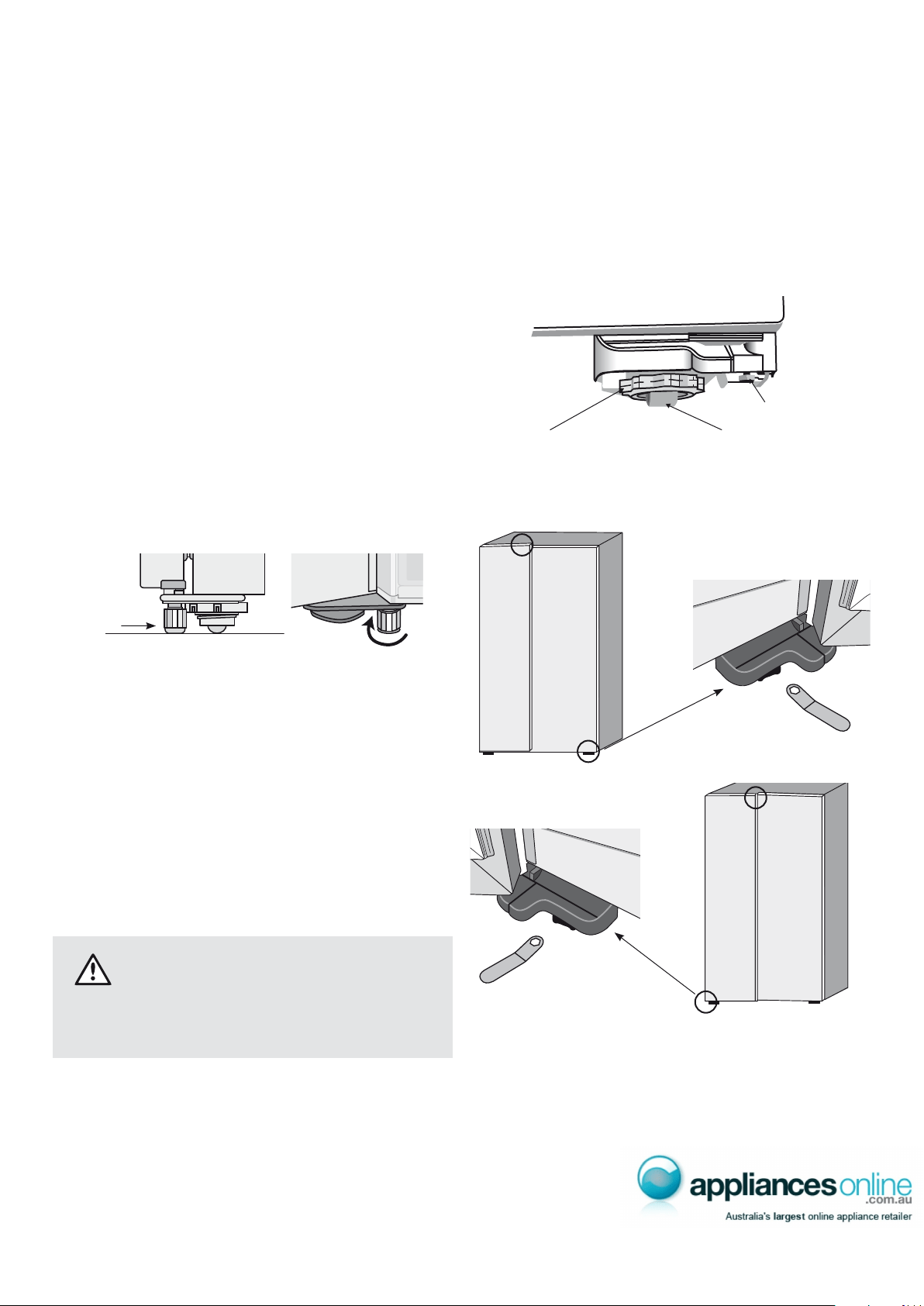
Each door is independently adjustable in the vertical
direction by turning the adjustable bolts under the hinges
using a spanner.
The doors can be adjusted up or down. Depending on
the amount of adjustment required it may be sufcient
to adjust only one door. (see Diagrams below)
Note: When the height of the rollers and adjusting bolts
are correctly adjusted the refrigerator will stand rmly on
the oor then adjust door alignment as required.
Large plastic roller nut
Front Roller
Adjusting Bolt
Stabilising
foot wound
down
side view front view
¼ turn
6 Parts of your refrigerator Kelvinator Refrigeration
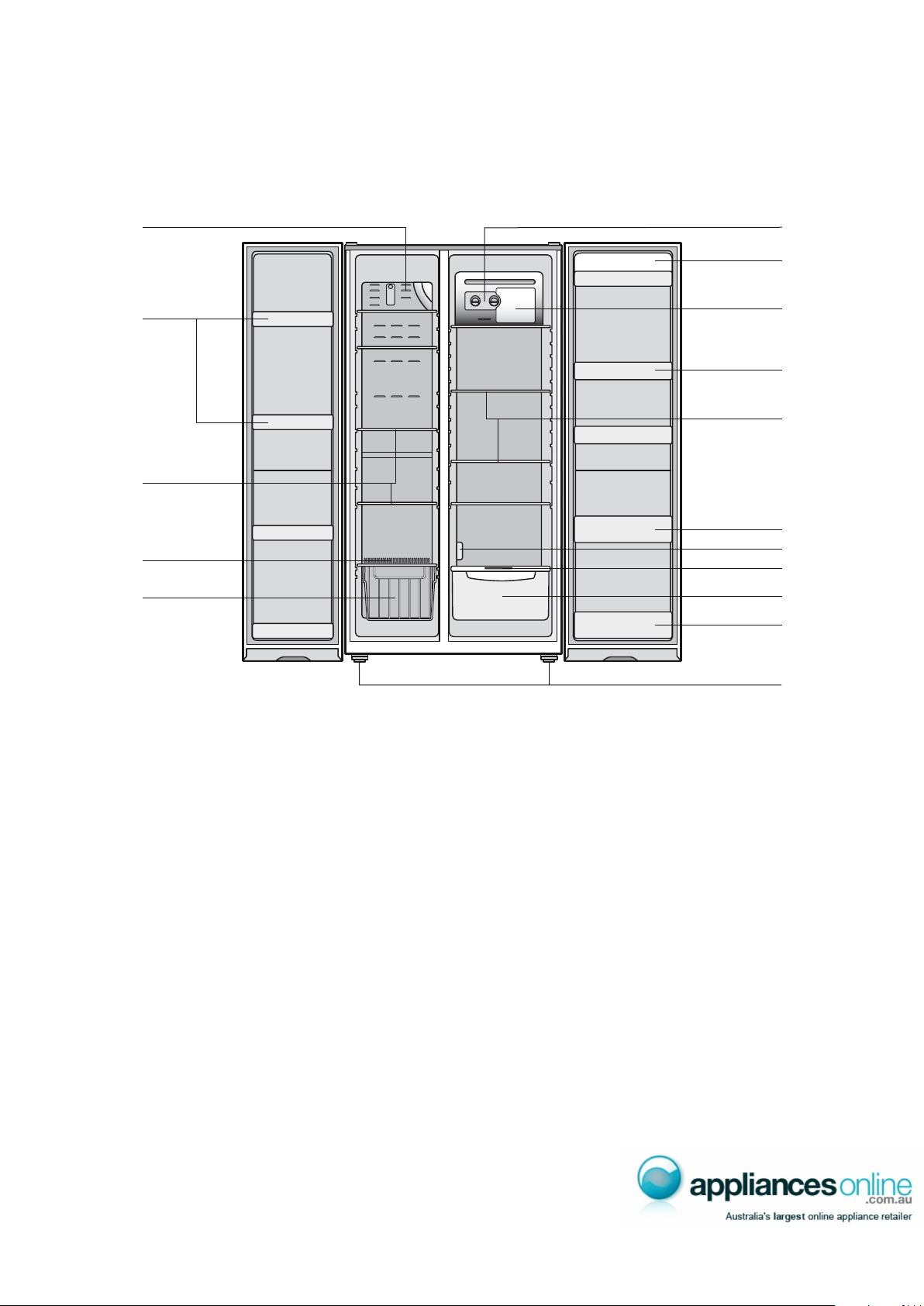
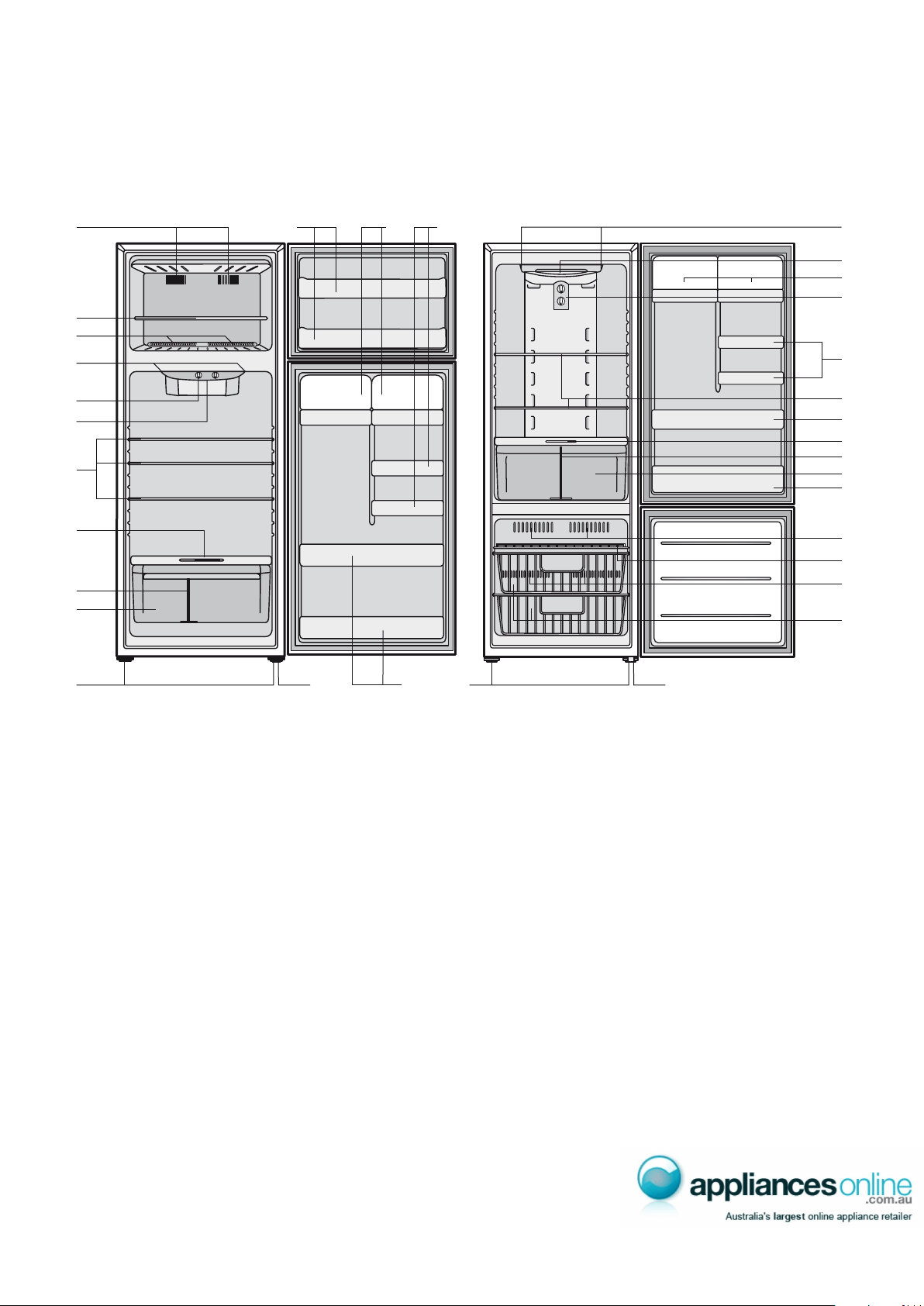
Side by Side model
Note: Product illustrations demonstrate various features but may not be completely in line with current products.
1 6
2
3
15
8
7
9
10
11
13
13
12
14
1 Freezer air outlets
2 Adjustable freezer door bins
3 Adjustable spill safe slide-out glass shelves
4 Freezer air returns
5 Freezer roll out basket
6 Temperature controls
7 Dairy bin
8 Fridge light
9 Adjustable fridge door bins
10 Adjustable spill safe slide-out glass shelves
11 Fridge air return vent
12 Crisper humidity control
13 Bottle bins
14 Crisper
15 Adjustable rollers
Side by Side model features
4
5
Kelvinator Refrigeration Parts of your refrigerator 7
1 Freezer air outlets
2 Wire shelves
3 Freezer air returns
4 Fridge air outlets
5 Temperature controls
6 Glass shelves
7 Crisper humidity control
8 Crisper divider (where tted)
9 Full width crisper (where tted)
10 Adjustable rollers
11 Full width freezer door bins
12 Dairy compartment
13 Half width door bins
14 Full width door bins
(two bins on selected models only)
15 Stabilising foot
16 Fridge light
Bottom Mount model additional features
17 Freezer basket
Top Mount model Bottom Mount model
Note: Product illustrations demonstrate various features but may not be completely in line with current products.
14
14
8
13
1 11 1312 4
2
4
5
16
6
7
8
9
10 1015 1514
12
16
5
1
2
7
9
3
17
6
3
Top and Bottom Mount model features

The refrigerator transfers heat from food placed inside the
appliance to the outside air.
This process makes the rear, the sides and the area
feel warm. This is normal.
There is a cooling coil located behind the rear wall of the
cabinet. This coil cools and removes moisture from the air.
A fan then circulates cold, dry air throughout the cabinet.
This air circulation means that foods are refrigerated far
more quickly than in refrigerators where the air remains
relatively static.
air circulation.
A light frosting will occasionally occur on the cold interior of
the freezer when the door is opened frequently. This is normal
and will disappear after a few days in most climates.
Make sure you fully close the freezer door after you load
or remove food. If the door is left partly open, a heavy
frost will coat the inside of the freezer. If a frost develops,
remove it. Take care to properly close the door and the
frost will not reoccur. If the food is placed forward of the
ribs on the bottom of the freezer, it will keep the door open.
Ensure that all food is stored behind the ribs.
Your new energy efcient appliance uses a high-speed
compressor and other energy efcient components that
may produce different noises to your old appliance.
These sounds are normal and include:
• compressor running noise.
• air movement noise from the small fan motor.
• occasional gurgling, similar to water boiling.
• a popping noise, heard during automatic defrosting.
• a clicking noise, just prior to the compressor starting up.
These noises are normal and not cause for alarm.
Further details can be found on page 13.
Set the temperature by using the main temperature
controls at the rear of the refrigerator compartment.
When you rst start your refrigerator, set both refrigerator
and freezer controls to MID. The refrigerator temperature
control is affected by altitude and it is recommended
that it be set warmer to compensate. e.g. at 1000 metres
above sea level set the refrigerator temperature control
to one setting warmer than MID.
tips and information
A good indication of optimal freezer temperature
is ice cream that is frozen, but still soft enough for
easy scooping.
For the fridge compartment, we recommend using
drinking water and simply adjusting the fridge controls
until the water is at your ideal temperature.
To change settings. When you change temperature settings,
make small adjustments and wait 24 hours before assessing
whether you need to make any further changes.
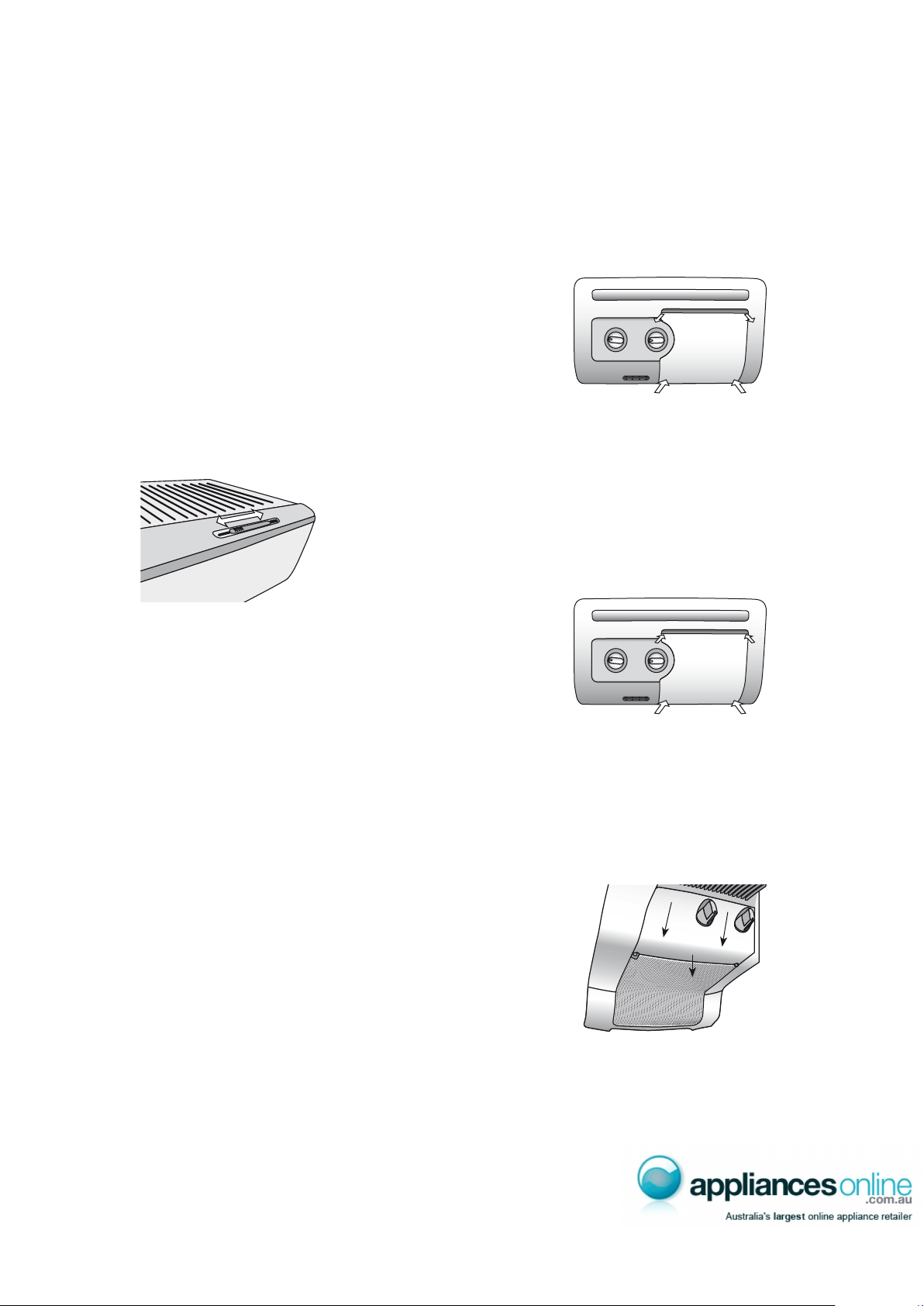
Side by Side temperature control
1. Select the refrigerator control (right knob).
2. Rotate the knob clockwise to set colder.
3. Rotate the knob anti-clockwise to set less cold.
1. Select the freezer control (left knob).
2. Rotate the knob clockwise to set colder.
3. Rotate the knob anti-clockwise to set less cold.
Refrigerator and freezer operation
Ribs
Controlling the temperature
8 Refrigerator & freezer operation/Controlling the temperature Kelvinator Refrigeration
less cold
colder
freezer
mid
fridge
colder
less cold
mid
less cold
colder
freezer
mid
fridge
colder
less cold
mid

The refrigerator temperature control is affected by altitude
and is recommended that it be set warmer to compensate.
e.g. at 1000 metres above sea level set the refrigerator
temperature control to one half setting warmer than MID.
When you change
temperature settings, make small adjustments and wait
24 hours before assessing whether you need to make any
further changes.
NB: Testing ice cream is a good way to check the freezer
temperature. Testing drinking water is a good way to
check the refrigerator compartment temperature.
tips and information
• Coldest freezer setting is not recommended in
normal and very hot climates as this will limit the
cooling to the refrigerator section.
• In very cold climates (where temperatures are
below 10°C) the freezer may need to be set colder.
• Adjustment of the fridge compartment temperature
may cause a small movement in freezer temperature.
Chill Channel – Side by Side model only
The chill channel allows air to circulate through your
refrigerator. For optimum cooling, keep the channel
behind your shelves clear.
Try to avoid storing plates, trays or any object that may extend
beyond the back edge of your shelves. Doing so may block
the cold air ow from the vents located in the control housing,
causing uneven temperatures in your refrigerator. This may
also freeze items stored on the top shelf.
Top Mount temperature control
(TM) model
1. Select the refrigerator control (bottom knob).
2. Rotate the knob clockwise to set colder.
3. Rotate the knob anti-clockwise to set less cold.
(TM) model
1. Select the freezer control (top knob).
2. Rotate the knob clockwise to set colder.
3. Rotate the knob anti-clockwise to set less cold.
Bottom Mount temperature control
(BM) model
1. Select the refrigerator control (top knob).
2. Rotate the knob clockwise to set colder.
3. Rotate the knob anti-clockwise to set less cold.
(BM) model
1. Select the freezer control (bottom knob).
2. Rotate the knob clockwise to set colder.
3. Rotate the knob anti-clockwise to set less cold.
Kelvinator Refrigeration Controlling the temperature 9
colder
less
cold
colder
less
cold
mid
fridge
freezer
mid
colder
less
cold
colder
less
cold
mid
fridge
freezer
mid
less cold
colder
colder
less cold
freezer
mid
mid
fridge
less cold
colder
colder
less cold
freezer
mid
mid
fridge
10 Using your refrigerator/Changing the light bulb Kelvinator Refrigeration
Changing the light bulb Using your refrigerator
This section tells you how to make the most of the many
useful features and how to clean them.
Door storage bins
Both refrigerator and freezer are tted with door storage
bins. You can adjust the refrigerator bins to meet different
storage needs. All the door bins are completely removable
for cleaning. If you want to remove or adjust a bin, lift it
over the support lugs on the inner door panel. To replace,
push the bin down over the support lugs to lock it in place.
Crisper bin
You can use the crisper bin to store vegetables, fruit or
smallgoods. You can change the humidity inside the bin
by sliding the humidity control.
You should store vegetables in the crisper bin remembering
to set the humidity control to more humid (closed).
You can also store fruit & smallgoods in the crisper bin
remembering to set the humidity control to less humid (open).
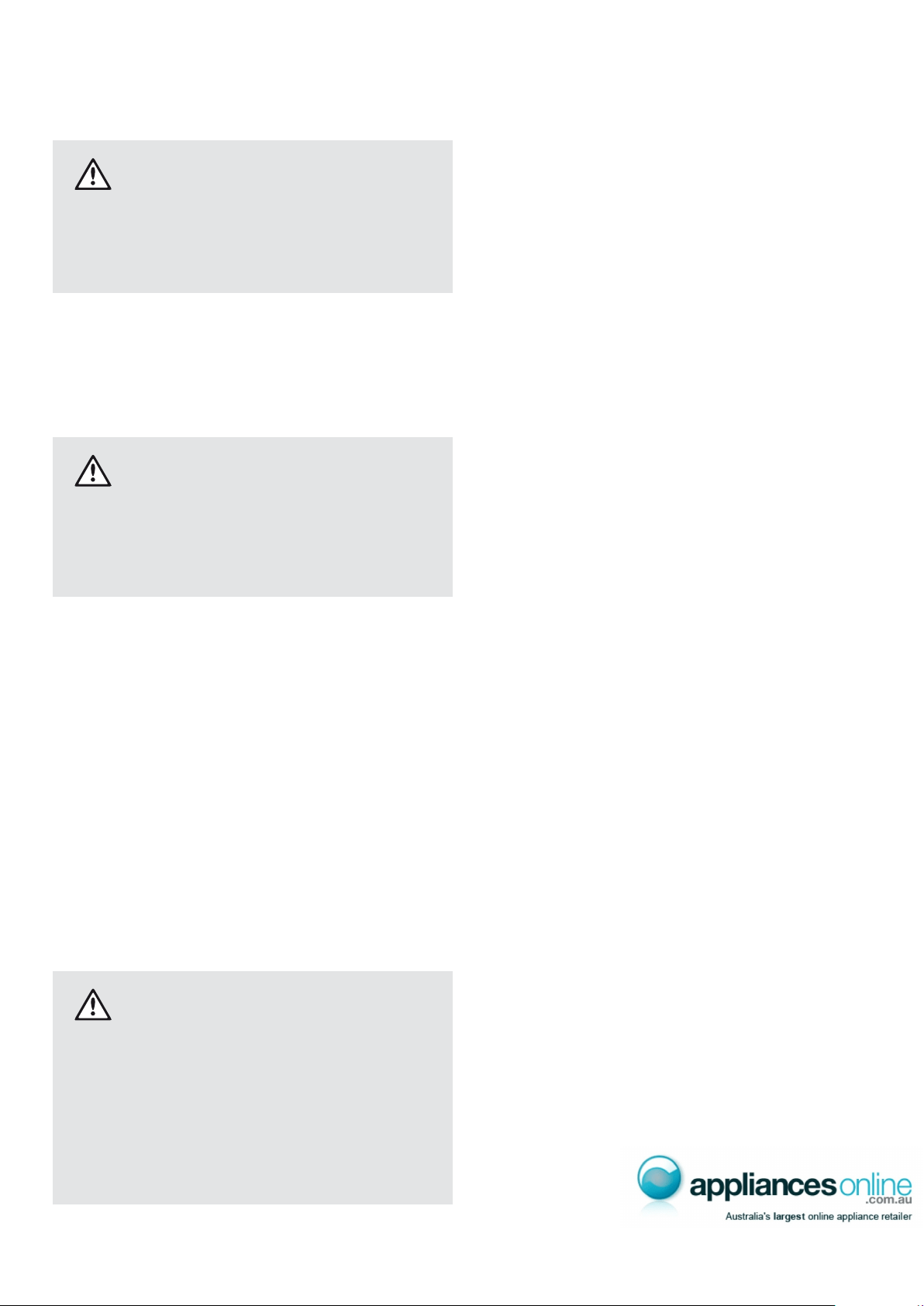
Changing the light bulb – Side by Side fridge
1. Switch off the power at the power point and remove
the refrigerator’s power cord from the power point.
2. Carefully unclip the light cover. You do this by inserting
your ngers behind the top of the light cover and pulling
it out while at the same time pushing it up at the bottom.
3. Pull the cover out until it is clear of the housing.
4. Unscrew the light bulb and replace it with a bulb that is
the same as the original.
5. Replace the cover by inserting the tab back into place
and pushing in the cover with both hands at the top.
6. Wait 5 minutes to ensure pressures in the refrigeration
system are equalized. Then reconnect and turn the
refrigerator on at the power point.
Changing the light bulb – Top and Bottom Mount fridge
1. Switch off the power at the power point and remove
the refrigerator’s power cord from the power point.
2. Carefully unclip the light cover. You do this by pushing
the light cover tabs at the front towards the back of
the cabinet, then lowering the cover down.
3. Unscrew the light bulb and replace it with a bulb that
is the same as the original, as specied on the rating
plate behind the cover.
4. Replace the light cover by hooking the light cover lugs
into the rear of the housing and pressing the front of
the cover until it clips in.
5. Wait 5 minutes to ensure pressures in the refrigeration
system are equalized. Then reconnect and turn the
refrigerator on at the power point.
Push Push
PullPull
Ta bTab
PushPush
Kelvinator Refrigeration Cleaning your refrigerator/Energy consumption 11
Energy consumption
(electricity costs)
Cleaning your refrigerator
warnin g
Before cleaning: Turn appliance off at the power point,
then remove power cord from socket. This will make
sure there is no chance of getting an electric shock.
Doors and exterior
You should only clean the doors with lukewarm soapy
water and a soft cloth, rinsing with clean water and then
wipe the surface with clean water and a soft clean cloth
to remove soap residue.
caution
Do not use stainless steel cleaners, abrasive pads or
other cleaners as they are likely to scratch the surface.
Damage to this product after delivery is not covered
by your warranty.
Interior
You should clean the appliance interior regularly. It will be
easiest to clean when the food supply is low. Wash the interior
with a soft cloth and use an unscented mild soap with luke-
warm water. Thoroughly dry all surfaces and removable parts.
Avoid getting water on appliance controls. If you have taken
out any removable parts, replace them and switch the power
on before re-stocking the appliance with food. Naturally,
you should keep the interior of your appliance hygienic by
promptly and thoroughly wiping up any food spills.
Door seals
Take care to keep door seals clean. Sticky food and drink
can cause seals to stick to the cabinet and tear when you
open the door. Wash seal with a mild detergent and warm
water. Rinse thoroughly and dry.
warnin g
Never use hot water, solvents, commercial kitchen
cleaners, aerosol cleaners, metal polishes, caustic or
abrasive cleaners, or scourers to clean this appliance,
as they will damage it. Many commercially available
cleaning products and detergents contain solvents
use only a soft cloth with an unscented mild soap
and lukewarm water.
The following guide will help you reduce the running cost
of your new refrigerator. This will save you money and help
conserve our valuable energy resources.
1. If you keep your old refrigerator, save power by
switching it off when not in use.
2. Do not set your freezer temperature too low. After 24 hours,
ice cream should be rm but able to be scooped out
with a spoon without bending the handle. If ice cream is
rmer than this (or too soft), adjust the freezer temperature
controls (see ‘Temperature control’, page 8).
3. Ensure that the refrigerator doors seal properly as
you close them.
4. Before you open the refrigerator doors, decide what
you want to put in or take out. This will minimize the
time you have the doors open.
5. It is best to have the refrigerator in a place that is out
of direct sunlight and away from heating appliances
of any kind. For example, do not place the refrigerator
next to a cooker, stove or dishwasher.
6. Allow hot foods to cool to room temperature
before you put them in your freezer.
7. Thaw frozen food in the refrigerator section.
8. If you keep the freezer compartment lled to
capacity, your food mass will help maintain the
freezer temperature when you open the door.
9. Do not block air vents. Doing so may cause the
refrigerator to run longer and use more energy.
Turning off the refrigerator
If you are leaving for a short holiday, there is no need
to turn off your refrigerator .
If you are going on a long holiday and want to turn the
refrigerator off, follow the steps below.
1. Take all the food out of the refrigerator and freezer
compartments.
2. Switch off the refrigerator and remove the electric
cord from the power point.
3. Clean the inside.
4. Leave the doors open. This prevents bacteria from
growing and causing smells in the refrigerator.
Power failure
If there is a power failure in your area, keep the door to the
freezer closed. Most foods in your freezer will stay frozen for
24 hours.
Safety
It is important to use your appliance safely. This means you
need to supervise young children and inrm persons when
they use it. You need to make sure that young children do
not play with the appliance. Follow the tips below.
Check the power point is properly grounded –
if you are not sure get an electrician to check it.
Switch off the appliance at the power point before
you clean or move it.
If the supply cord is damaged you should have
safety hazard.
Never do this
Never let children play with the appliance.
Never store spray cans, explosive liquids or
freezer. This can freeze burn your lips and mouth.
Never try to repair the appliance yourself.
Never use electric heaters or dryers to defrost the
freezer because you can receive an electric shock.
Never use electrical appliances inside the food
storage areas.
This appliance contains insulation formed with
take care when you dispose of it.
Do not damage the appliance circuit.
warnin g
remove any doors. Children can suffocate if they get
trapped inside.
Helpful hints for storing food
Buy the freshest, best quality food and put it in the
refrigerator as soon as possible.
Cover food with plastic wrap or foil to stop it drying
out and to help prevent bad smells.
in the refrigerator.
poultry before you put it in the refrigerator.
store them with the pointed end down.
Never do this
Store bananas, avocados or mangoes in the
refrigerator. This can cause them to go black
or to go soft.
Put hot or warm food in the refrigerator.
Helpful hints for freezing food
You can use the freezer to store food which you buy in bulk
when prices are low. You can also cook extra food and
freeze it for later use.
Buy the freshest, best quality food and put it in the
freezer as soon as possible.
Place food in plastic bags or plastic wrap before
you put it in the freezer.
Squeeze the air out of plastic bags as this
prevents frost.
keep them in their packaging when you store them.
refrigerator compartment. This stops bacteria
from growing.
Leave food in its wrapping while it defrosts.
Use defrosted food immediately.
Never do this
Never refreeze defrosted food.
Helpful hints
12 Safety/Helpful hints Kelvinator Refrigeration
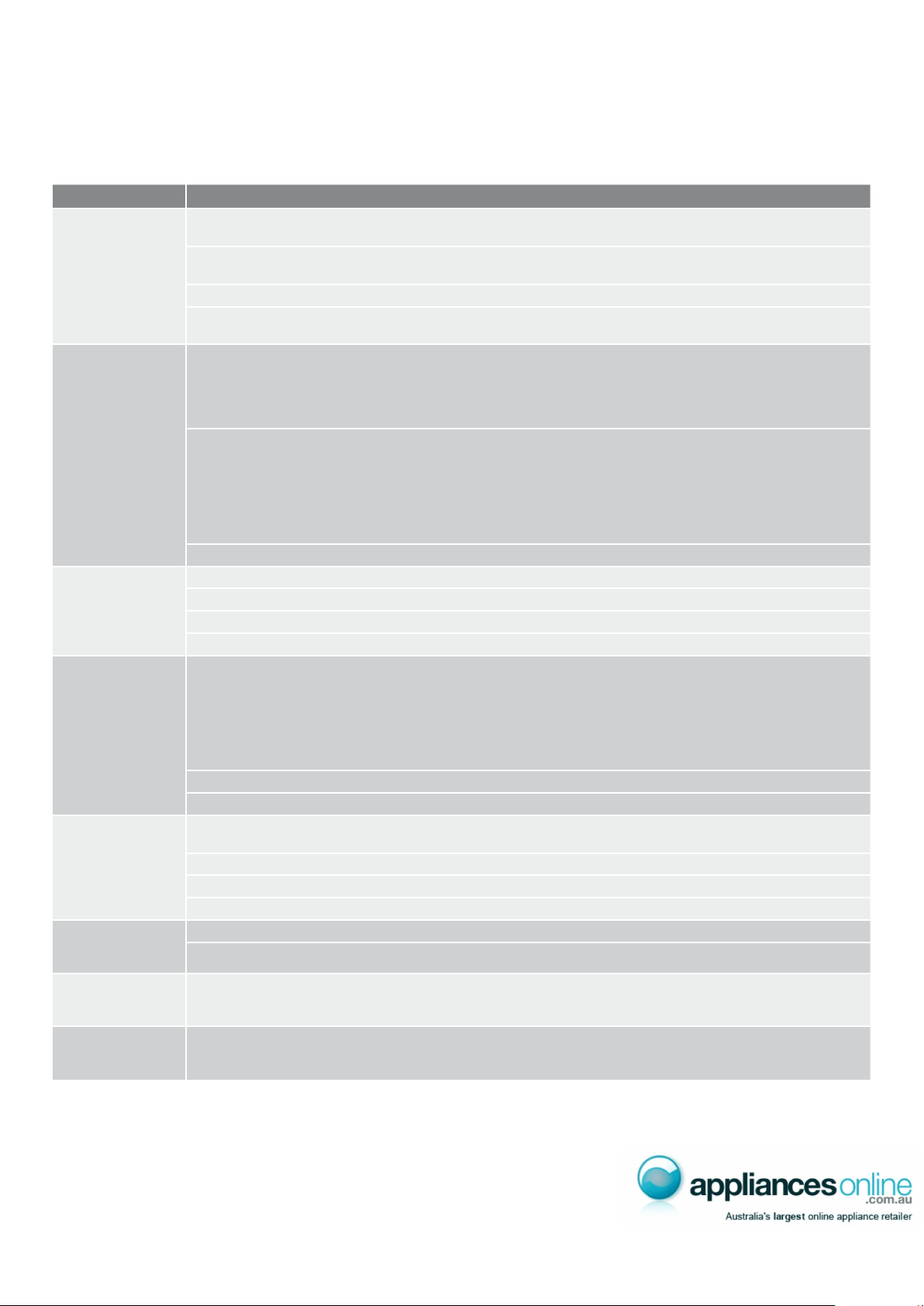
If you think something may be wrong with your refrigerator, you can carry out some easy checks before calling
for service. You may locate the problem, sparing yourself from inconvenience and saving time and money.
Problem Solution
When your
appliance is
not operating
• Check that the power cord is plugged into the power outlet properly and that the outlet
is switched ‘ON’.
• Try running another appliance from the power outlet. If no power is coming from the outlet
you may have blown a fuse or tripped a circuit of your household power supply.
• Try adjusting the temperature control to a slightly “colder” position.
• It is normal for the freezer fan NOT to operate during the automatic defrost cycle, or for a short time
after the appliance is switched on.
When there
is refrigerator/
freezer noise
Modern refrigerators/freezers with increased storage capacity use high speed compressors. These can
provide a seemingly high level of sound which is quite normal. Normal operational sounds include:
• Occasional gurgling, similar to water boiling.
• Air ow noise (air circulates because of a small fan).
• A popping noise heard during automatic defrost.
Other strange sounds may mean that you need to check and take action. For example, noises may
mean that:
• The cabinet is not level.
• The oor is uneven or weak.
• Bottles are badly placed and rattling.
• There are vibrations from an object on top of or behind or beside the refrigerator.
• The back of the refrigerator cabinet is touching the wall.
Remember it is quite normal for noise to seem louder just after the refrigerator starts operating.
If there are
odours inside
the appliance
• The interior may need cleaning.
• Some foods produce odours.
• Some containers and wrapping can cause odours.
• Ask yourself if the odour started about the same time you started storing something unusual.
When the motor
seems to run more
than expected
Your new appliance provides you with large capacities in both the refrigerator section and the
separate freezer. It is normal for the motor to operate frequently. However, to keep operation to
a minimum, check the following:
• Are doors kept open too long or too often?
• Are controls set too cold? Refer to page 8 “Temperature control”.
• Have large amounts of warm food just recently been stored? Summer, festive seasons and holidays
usually mean a lot more work for your appliance.
• If the day is hot or the room is very warm, the appliance will need to run more than normal.
• The appliance will run more than normal just after you install it or when it has been turned off for a long time.
If the temperature
in the refrigerator
is too warm
• Check that the appliance has enough clearance at the sides, back and top.
Refer to page 4 “Installing your new refrigerator”.
• Refer to page 8 “Temperature control”.
• You may have kept the door open too long or too frequently.
• Food containers or packaging may be holding a door open.
If the temperature
in the refrigerator
is too cold
• Refer to page 8 “Temperature control”.
• Increase the temperature to avoid high energy consumption.
If heavy frosting
occurs in the
freezer
Make sure you fully close the freezer and fridge doors. If the doors are left partly open a heavy frost will
coat the inside of the freezer. If a frost develops, remove it. Take care to properly close the doors and the
frost will not reoccur.
If water drips
on the oor
The defrost water tray, (located on the compressor at the back of the cabinet), may not be properly
positioned, or the drain tube may not be properly positioned to direct water into this tray. You may need
to pull the refrigerator away from the wall to check the tray and tube.
If you still require service
If you have a problem, and the problem persists after you have made the checks mentioned above, contact your
nearest Electrolux approved Service Centre or the dealer you bought the refrigerator from. Be ready to quote the
model number, 9-digit PNC and 8-digit serial number, which is stated on the label inside the refrigerator compartment.
Troubleshooting
Kelvinator Refrigeration Troubleshooting 13
14
Notes
FOR SALES IN AUSTRALIA AND NEW ZEALAND
APPLIANCE: KELVINATOR SIDE BY SIDE, TOP AND BOTTOM MOUNT FRIDGE FREEZER
This document sets out the terms and conditions of product warranties for
Electrolux branded appliances. It is an important document. Please keep it with
your proof of purchase documents in a safe place for future reference should
you require service for your Electrolux appliance.
General Terms and Conditions
1. In this warranty
(a) ‘Electrolux’ means Electrolux Home Products Pty Ltd ABN 51 004 762 341 in
respect of Appliances purchased in Australia and Electrolux (NZ) Limited
in respect of Appliances purchased in New Zealand;
(b) ‘Appliance’ means any Electrolux product purchased by you
accompanied by this document;
(c) ‘Warranty Period’ means
(i) where you use the Appliance for personal, domestic or household
purposes in Australia the period of ‘24’ months and in New Zealand
the period of ‘24’ months;
(ii) where you use the Appliance for commercial purposes, in Australia
the period of ‘3’ months and in New Zealand the period of ‘3’ months,
(if the period stated is 0 months you are not covered by this product
warranty) following the date of original purchase of the Appliance;
(d) ‘you’ means the purchaser of the Appliance not having purchased the
appliance for re-sale, and ‘your’ has a corresponding meaning.
2. This warranty only applies to Appliances purchased and used in Australia
or New Zealand and is in addition to (and does not exclude, restrict, or
modify in any way) any non-excludable statutory warranties in Australia
or New Zealand.
3. Electrolux warrants that, when dispatched from an Electrolux warehouse, the
Appliance is free from defects in materials and workmanship for the Warranty
Period.
4. During the Warranty Period Electrolux or its Authorised Service Centre will,
at no extra charge if your appliance is readily accessible without special
equipment, and subject to these terms and conditions, repair or replace
any parts which it considers to be defective. Electrolux or its ASC may use
reconditioned parts to repair your appliance. You agree that any replaced
Appliances or parts become the property of Electrolux. This warranty does
not apply to light globes, batteries, lters or similar perishable parts.
5. Parts and Appliances not supplied by Electrolux are not covered by this
warranty.
6. Where you are within an Electrolux service area, this warranty covers the
cost of transport of the Appliance to and from Authorised Service Centres of
Electrolux and travelling costs for representatives of the Authorised Service
Centre to and from your home or business. If you are outside an Electrolux
service area, you will bear these costs. For information about whether you are
within an Electrolux service area, please phone 13 13 49 in Australia, or 0800
10 66 10 in New Zealand.
7. Proof of purchase is required before you can make a claim under this
warranty.
8. You may not make a claim under this warranty unless the defect claimed is
due to faulty or defective parts or workmanship. Electrolux is not liable in the
following situations (which are not exhaustive):
(a) The Appliance is damaged by:
(i) accident
(ii) misuse or abuse, including failure to properly maintain or service
(iii) normal wear and tear
(iv) power surges, electrical storm damage or incorrect power supply
(v) incomplete or improper installation
(vi) incorrect, improper or inappropriate operation
(vii) insect or vermin infestation.
(b) The Appliance is modied without authority from Electrolux in writing.
(c) The Appliance’s serial number or warranty seal has been removed
or defaced.
(d) The Appliance was serviced or repaired by anyone other than Electrolux
or its Authorised Service Centres.
9. This warranty, the contract to which it relates and the relationship between
you and Electrolux are governed by the law applicable in the Australian
State where the Appliance was purchased or the law applicable in
New Zealand if the Appliance was purchased in New Zealand. Where
the Appliance was purchased in New Zealand for business purposes the
Consumer Guarantee Act does not apply.
Limitation of Liability
10. To the extent permitted by law:
(a) Electrolux excludes all warranties other than as contained in this
document;
(b) Electrolux shall not be liable for any loss or damage whether direct or
indirect or consequential arising from your purchase, use or non-use of
the Appliance.
11. Provisions of the Trade Practices Act and State consumer legislation in
Australia, and the Consumer Guarantees Act, the Sale of Goods Act and
the Fair Trading Act in New Zealand, imply warranties or conditions, or
impose obligations, upon Electrolux which cannot be excluded, restricted
or modied. To the extent permitted by law, the liability of Electrolux (if any)
arising out of or in relation to the Appliance or any services supplied by
Electrolux shall be limited (where it is fair and reasonable to do so),:
(a) in the case of Appliances, at its option, to the replacement or repair of
the Appliances or the supply of equivalent products or the payment of
the cost of replacing the Appliances or having the Appliances repaired
or of acquiring equivalent Appliances. Upon being replaced, parts and
Appliances become the property of Electrolux; or
(b) in the case of services, at its option, to the supply of the services again
or the payment of the cost of having the services re-supplied; and in the
case of Appliances or services supplied in New Zealand, loss or damage
whether direct or indirect or consequential that is reasonably foreseeable.
Privacy
You acknowledge that in the event that you make a warranty claim it will
be necessary for Electrolux and its Authorised Service Centres to exchange
information in relation to you to enable Electrolux to meet its obligations under
this warranty.
For a further period of three years following the expiry of the Warranty period,
Electrolux or its agent will supply replacements for, or at the sole option of
Electrolux, repair, all parts it nds defective in the Sealed Refrigeration System
which comprises: compressor, condenser, evaporator, dryer and tubing. During
this three year period you will pay for the costs of labour (including any call out or
service fees), and freight if necessary in replacing defective parts in the Sealed
Refrigeration System. You will pay for the costs of transport of the Appliance if
further service is required and the costs of parts or repairs to parts other than
those included in the Sealed Refrigeration System
Frozen Food indemnity
Subject to the following exclusions, Electrolux will indemnify you for a period of 24
months from the date of purchase of the Appliance against any loss or damage
to frozen foodstuffs due to a Sealed Refrigeration System breakdown. This
indemnity will be limited to:
(a) in the case of freezers with a capacity of less than 400 litres – AU$150
(b) in the case of freezers with a capacity of 400 litres or more – AU$300
This indemnity does not cover loss or damage to frozen foodstuffs occasioned
by:
(a) failure to plug in the freezer to a properly connected power supply or
failure to switch on the power point
(b) accidental removal of the plug from the power point or switching off the
power supply;
(c) failure to keep the door or lid of the freezer closed
(d) the introduction of abnormal heat loads to the freezer;
(e) failure to observe the operating and installation instructions supplied with
the freezer; and
(f) failure to defrost the freezer at recommended intervals on chest freezers
or non frost free models
Important Notice
Before Calling a Service Technician please check carefully the operating instructions, service booklet and the warranty
terms and conditions.
FOR SERVICE
or to nd the address of your nearest
state service centre in Australia
For the cost of a local call (Australia only)
ELECTROLUX HOME PRODUCTS
www.electrolux.com.au
or to nd the address of your nearest
state spare parts centre in Australia
For the cost of a local call (Australia only)
FOR SERVICE
or to nd the address of your nearest
authorised service centre in New Zealand
(New Zealand only)
ELECTROLUX HOME PRODUCTS
www.electrolux.co.nz
or to nd the address of your nearest
state spare parts centre in New Zealand
(New Zealand only)
Kelvinator Refrigeration Warranty 15

© Copyright 2008 Electrolux Home Products Pty Ltd ABN 51 004 762 341
Print code: KMAN_KFRI_Aug08
phone or email our Customer Care team or visit our website.
Phone: 1300 363 640
Fax: 1800 350 067
Email: [email protected]
www.kelvinator.com.au