Instructions for Use
pro7
™
Model
Consumer & Commercial Fitness

Contents
Introduction 01
Important Safety Instructions 02
Health Warnings 02
Setup and Handling 02
Position and Balance 03
proMOTION
™
Dynamic Vibration Technology 04
Technical Specications 05
Maintenance 06
Box Contents 07
EMC Declaration and Precautions 08
Environmental Requirements/ Warnings/ Users/ Facilities 09
FCC / IC statement 10
Touchscreen Controls 11-14
Parameters 14
Contact and Support 15
Warranty 15
©2020 Performance Health Systems, LLC. All rights reserved. Power Plate, the Power
Plate device/logo, pro7, Pro7M, Pro7HC, pro6+, pro5, Pro5M, pro5HP, my7, My7M,
Pro4PlusM, my5, my3, Personal, MOVE and proMOTION, are registered trademarks
and/or trademarks of Performance Health Systems and/or their aliates. All other
trademarks are the property of their respective owners. Power Plate machines are
protected under patents and design rights in numerous countries around the world.
Performance Health Systems retains all rights (including copyright, trademark and all
other intellectual property rights) in relation to all information provided in this manual.
You may not copy, publish or distribute any of the information contained in this manual,
or in any other documents published by Performance Health Systems without the prior
written consent of Performance Health Systems.

Introduction
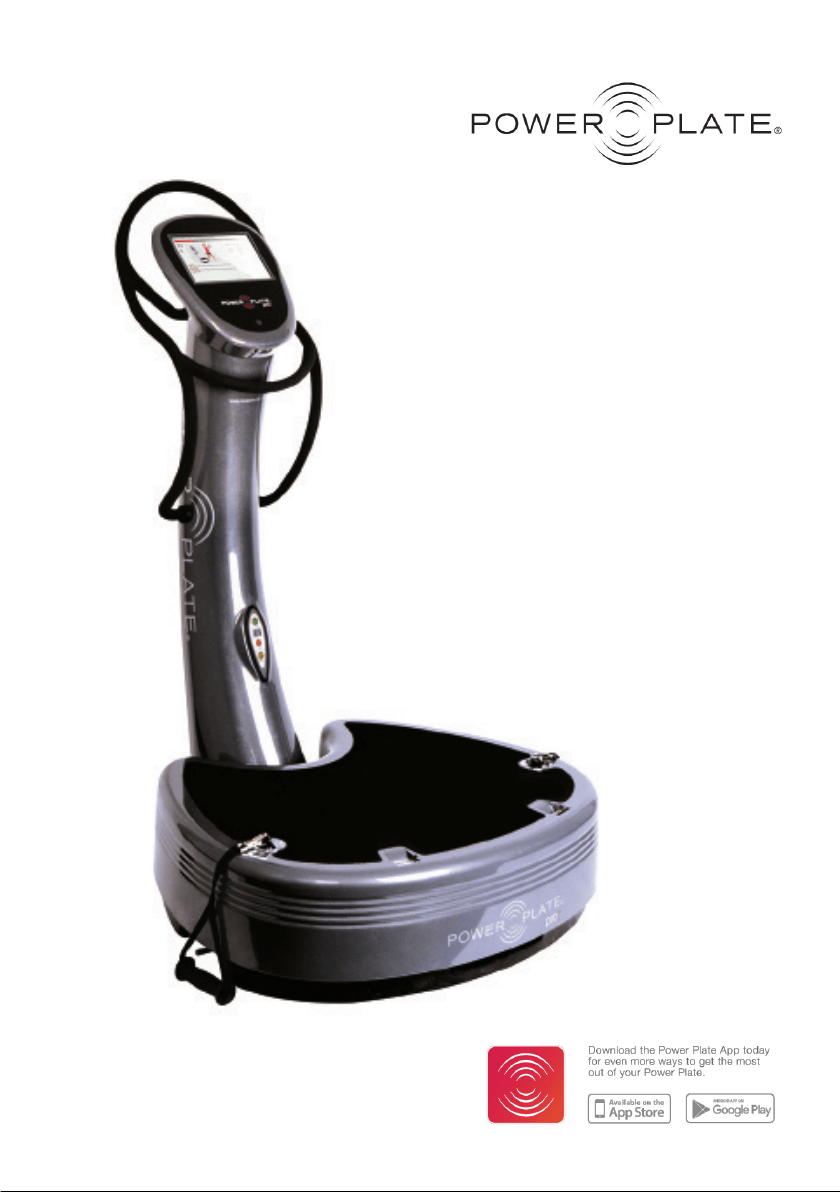
Power Plate® pro7 model is a consumer and commercial product that may be used by
almost everyone for tness and exercise purposes. Power Plate pro7 allows you to adjust
training to your own level and reduce the burden on your joints, tendons and ligaments.
As with every form of training, the correct use of exercises, adjusted to your personal
abilities, will determine the benets and eects of completing a training session on Power
Plate, while at the same time, reduce the risk of injury to the body.
We recommend consulting your physician before beginning any new exercise program.
For your safety, please review the product instructions before operating Power Plate. If at
any time you feel faint, dizzy, nauseous, short of breath or in pain, stop exercising immedia-
tely and consult with your physician.
Body posture, muscle stiness and muscle tension are important contributing factors in
your training session. If muscles are tensed, or contracted, they will absorb vibrations to
help strengthen and tone those muscles. Passive or active exercises, such as stretching and
massage, can be performed on a more frequent basis.
Exercise should be performed on a regular basis, starting with low intensity, which means
low frequency and amplitude settings for short sessions. The body should be gently stimu-
lated in a way that will allow you to adjust to vibration training, but will not overload your
body. Over time, the intensity and duration can be increased in the same manner as other
progressive training programs. Once the body has adapted to vibration, training can be
changed or intensied to keep improving performance.

Important Safety Instructions
Before using the Power Plate
®
machine,
it is essential that you read the entire user
manual, including all warnings and safety
instructions. You should also convey
all such warnings and instructions to
any other person using the Power Plate
machine. Retain this user manual for
future reference.
! Health Warning
Before beginning any exercise program,
you should consult a physician for a
physical examination and clearance to
engage in the program, or personal injury
could result.
If you have any known medical condition,
or any physical limitation on your
ability to exercise, Power Plate strongly
recommends that you seek the advice
of a physician before using the Power
Plate machine, in order to avoid possible
personal injury.
If while using the Power Plate machine,
you experience any dizziness, faintness,
shortness of breath or pain, you must
stop using the machine immediately
and consult a physician. Failure to do so
could result in personal injury.
The Power Plate pro7 machine is a
consumer and commercial device and
is designed for tness and exercise
programs and supervision integrated into
a closely monitored exercise program
only and as part of an exercise program.
Always follow the directions on the
machine’s console for proper operation.
Close supervision is required when the
machine is used by or near, children or
disabled persons.
Always take care when getting on and
o the machine. Use the handles on the
machine as needed, to maintain stability
when getting on and o the machine.
Never reach into or under the machine,
or tip the machine on its side, while it is in
operation.
Use the machine only for the purposes
described in this user manual and only
with attachments or accessories that
come with the machine or which Power
Plate has specically approved for use
with the machine, or personal injury could
result.
Setup and Handling
! Danger: To reduce the risk of electrical
shock, always unplug the Power Plate
machine before cleaning or servicing it.
! Warning: To reduce the risk of electrical
shock, re, burns or other injury, always
plug the Power Plate machine into a
properly-grounded electrical outlet.
! Warning: To ensure safe use of the
Power Plate machine, it must be regularly
examined for damage and wear. The
machine, however, contains no user-
serviceable parts. Thus, with the
exception of the maintenance tasks
described later in this manual, the owner/
user should always retain an authorized
Power Plate service professional to
perform maintenance and/or service on
the machine.
!Warning
The device is not suitable for use in
the presence of ammable anesthetic
mixtures with air or with oxygen or nitrous
oxide.
The device requires no calibration.
The device is not repairable and contains
no user serviceable parts.
The user must check that the equipment
functions safely and see that it is in proper
working condition before being used.
The manufacturer does not require such
2
of 22

preventive inspections by other persons.
The plug is used to disconnect from
the main supply. Do not position
the machine so that it is dicult to
disconnect the main plug.
!Warning: To avoid the risk of electric
shock, this equipment must only be
connected to a supply main with
protective earth grounding.
The machine should be set up on a
hard, level surface in an area free of
obstructions within at least three feet
of the vibration platform.
The machine should not be used
outdoors, near a pool, or near any
source of water or extreme humidity.
Contact with water could cause a
short-circuit, which could cause
personal injury or damage the machine.
Unplug the machine when not in use.
Never attempt to lift or move the
machine without assistance.
Never operate the machine if it has
been dropped, tipped over, damaged,
or even partially immersed in water,
unless an authorized Power Plate
service professional has examined the
machine and cleared it for use.
Never insert objects into any opening
on the machine. If an object falls into
the machine, shut the machine o
and remove the power plug before
attempting to retrieve the object.
If the object cannot be reached,
contact an authorized Power Plate
service professional.
Position and Balance
In order to avoid possible injury from
the machine’s vibrations, Power Plate
recommends that the user not lean back
on his/her heels or “lock” his/her joints
or straighten his/her legs when standing
upright on the machine.
It is important at all times to maintain
balance while on the machine.
The user, however, should not “hang”
on the machine’s handles in order to
maintain balance but should (unless the
directions for a particular exercise state
otherwise) keep his/her knees directly
above the toes.
Proper position and balance are
especially important if the user employs
weights during any exercise on the
machine. Power Plate strongly
recommends that users not employ
weights while using the machine,
unless they are being coached by an
exercise professional or unless the user
has extensive experience with weight
training or with the Power Plate machine.
The three illustrations on the right
demonstrate the incorrect ways to stand
on the machine.
The illustration below demonstrates the
correct way to stand on the machine.
Incorrect
You always need to be
balanced when
standing on the Power
Plate machine. Never
hang on to the handles,
use them only to
maintain balance.
Incorrect
Don’t lean on your
heels too much.
Balance your weight
predominantly on the
front of your feet.
Incorrect
When training with the
Power Plate machine,
do not “lock” any joints,
such as your knees and
elbows, but keep them
slightly bent.
Legs slightly bent.
Correct
3 of 22
proMOTION
™
Dynamic Vibration
Technology
How Does it Work?
proMOTION™ Dynamic Vibration
Technology uses high strength cables for
high quality.
The unique cables, which pound-by-
pound are ve times stronger than steel.
Each cable extends to more than two
meters, allowing for movement in all
planes and directions, so you can enjoy full
range of movement and innite dynamic
exercise options.
The proMOTION oers variable resistance.
Changing the resistance puts more load on
the muscles during the most intense part
of the movement, oering another way
to progress your workouts by increasing
the intensity of your training. The unique
gel dampening system also increases the
resistance as you work harder.
Usage and Guidelines
As with any form of exercise, cease your
session immediately if you feel faint, dizzy
or ill while working out on the Power
Plate
®
machine. Always consult a doctor or
specialist before restarting your training.
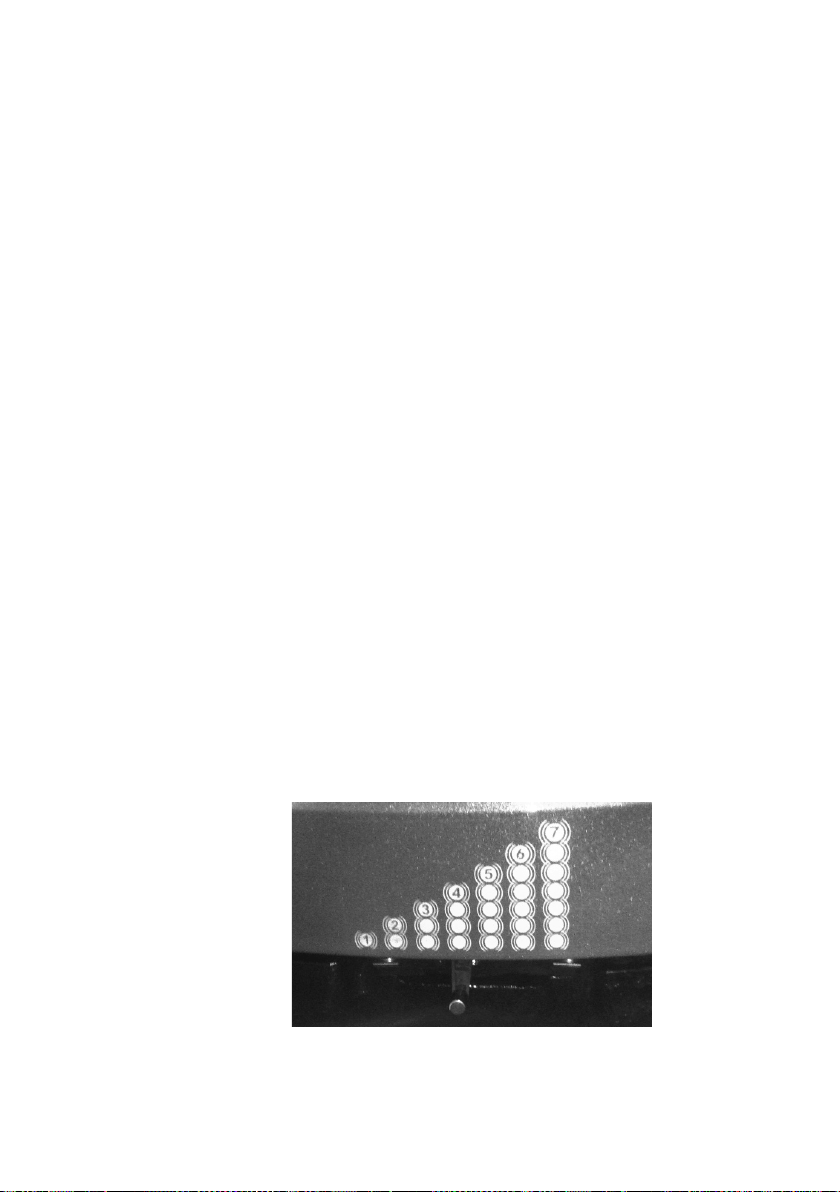
Shift lever towards you to
increase; shift away from you to
decrease
As with any training routine, it is important
to start using the proMOTION on the
lowest level of resistance and with the
Power Plate machine on a low setting.
Establish a good technique before
increasing the setting on the proMOTION
from low to high.
Always pay special attention to your
posture, especially the position of your
wrists and back, and how close you are
to the Power Plate machine. proMOTION
cables should be used within the normal
range and angle to maximize training
eect and prevent damaging the device.
The cables should be used between
90 degrees and 25 degrees from the
horizontal base.
4
of 22

Technical Specications
Power Plate
®
pro7
™
Technical Specications
Color (standard) Graphite or Silverstone
Dimensions (W x D x H) 96cm x 116cm x 152cm / 38in x 46in x 60in
Base surface area 0.50sq.m
Weight 202kg / 445lb (Est.)
Power Supply 100-240V, 50/60 Hertz, Universal Voltage
Nominal Power 160-265VA
Maximum Load 227.2kg / 500lb
Operation User-friendly interactive touch screen computer
DualSync Twin Motor System DualSync Twin Motor System maintains precise balance at any
frequency and amplitude level, allowing perfect synchronization of
vibration for maximum muscle response and eciency.
PrecisionWave Technology High-delity harmonic vibration system that provides
uncompromising performance for unsurpassed results.
Frequencies 25 - 50 Hertz
Time Selections 0 - 9 minutes (15 second increments)
Amplitude High or Low
G-Factor 0 25Hz/Low Amplitude G-Factor 5 35Hz/High Amplitude
G-Factor 1 30Hz/Low Amplitude G-Factor 6 40Hz/High Amplitude
G-Factor 2 35Hz/Low Amplitude G-Factor 7 45Hz/High Amplitude
G-Factor 3 40Hz/Low Amplitude G-Factor 8 50Hz/High Amplitude
G-Factor 4 30Hz/High Amplitude
Certications PSE, CE Standard Electrical , NRTL, C-NRTL; RoHS / WEEE compliant
Computer & Software Specications
Operating System Windows Android OS 64bit System
Software Power Plate proprietary pro7 software (Prepare and Recover)
Graphics High Performance 3D Graphic Accelerator
CPU Samsung S5P6818 Octa-core Cortex A53 processor (16GB eMMC
Hard Drive (Storage) TF card slot : Support iNAND, MMC/SD 64GB
Screen/Monitor LVDS Type LCD , Resolution : 1280X800(RGB), 10.1 inch
USB Port/Hub USB 1.0 Port x1
proMOTION™ Dynamic Vibration Technology Specications
Resistance Levels 7 resistance levels. Pull toward front of the machine to increase.Push
toward back of the machine to decrease.
Cable Maximum 2.2m / 98.4in
proMOTION Embedded
Usage Control Yes; Password enabled locking system
5 of 22

WARNING: THE MACHINE
CONTAINS NO USERSERVICEABLE
PARTS. PLEASE CONTACT AN
AUTHORIZED POWER PLATE
®
SERVICE PROFESSIONAL
FOR ANY MAINTENANCE OR
TROUBLESHOOTING NOT
OTHERWISE DESCRIBED BELOW,
OR PERSONAL INJURY OR DAMAGE
TO THE MACHINE COULD RESULT.
CAUTION: Any changes, modications
or unauthorized maintenance performed
to or on the machine could void the
product warranty.
Always unplug the machine and then
wait for at least one minute before
performing any maintenance.
Clean the machine only with a moist
cloth. Do not use sharp objects, bristles,
scrubs or acid-based detergents, which
will damage the lacquer nish.
Do not spray any cleaning solution
directly onto the machine. Instead,
moisten a cloth, then apply to the
machine.
On plastic components, use only
polishes specically designed for
plastic. Use a soft brush, not a cloth,
to clean the platform, including the
contoured mat.
Clean electrical components only with
a dry cloth, in order to avoid the risk of
shock or damage to the components.
Troubleshooting
Always unplug the machine and then
wait for at least one minute before
performing any troubleshooting.
If the machine is not operational and the
console display is not illuminated, check
the power connections to the machine.
If all power connections are working,
please check the circuit breaker or fuse
for the electrical outlet that is supplying
power to the machine in order to ensure
that the outlet is receiving electrical power.
If the console display is illuminated, but
the platform will not vibrate, unplug the
machine, wait at least one minute, then
check the connection to the machine’s
motor, located under the base of
the machine.
If the machine makes a rattling noise,
unplug the machine, wait at least one
minute, then check to make sure that
the feet are properly tightened.
DANGER: The user not try to resolve
any electrical issues regarding the power
source to the machine. Instead, Power
Plate requests that the user contact
a licensed, professional electrician to
conduct any examination and make any
necessary repairs. Otherwise, serious
personal injury or property damage
could result. No modication for this
equipment is allowed.
APPLIED PARTS: applied parts are not
intended to deliver heat during normal
use. The maximum temperature for
applied part may be up to 43degrees
Celsius / 109.4 degree Fahrenheit.
!
!
•
•
•
•
•
•
•
•
•
•
!
Maintenance
Applied Parts:
• Platform
• Handlebars
Power On / O:
• To Power On the Machine: Press the
rocker switch located on lower back of
the column to indicate “I” position.
• To Power O the Machine: Press the
rocker switch located on lower back of
the column to indicate “0” position.
• To Power O the Main Control Panel:
While power to the machine is on, press
and hold the green power button located
on the lower half of the main control
panel. This will power o only the main
control panel for standby mode. Press
and hold the green power button again
to power on the main control panel.
6
of 22

pro7 Box Contents
Straps Set (2pcs)
Exercise Mat
Protection Cover
Power Cord
Handgrips (2pcs)
Box Contents
7 of 22

! Electromagnetic Compatibility (EMC)
Precautions
The pro7 model is suitable for
use in consumer and commercial
establishments, including domestic
establishments and those directly
connected to the public low-voltage
power supply network that supplies
buildings used for domestic purposes.
The pro7 model emits electromagnetic
energy to perform its intended function.
Nearby electronic equipment may be
aected by this emission. Similarly
the pro7 model may be aected by
electromagnetic emissions from other
equipment in the vicinity.
The pro7 model is intended for use in the
electromagnetic environment specied
in this manual. The customer or user of
the pro7 model should ensure that it is
used in such an environment:
– Floors should be wood, concrete or
ceramic tile. If the oor is covered with
synthetic material, the relative humidity in
the room should be at least 30%.
– Power quality should be that of a typical
domestic, commercial environment as
appropriate.
– The pro7 model should not be used
during power interruptions.
– Power frequency magnetic elds should
be at levels characteristic of a typical
location in a typical commercial or
consumer environment.
The pro7 model is intended for use in an
electronic environment in which radiated
radio-frequency (RF) disturbances
are controlled.
The customer or user of the pro7 model
can help prevent electromagnetic
interference by maintaining a minimum
distance between portable and mobile
RF communications equipment
(transmitters) and the pro7 model as
recommended in this user manual,
according to the maximum output power
of the communications equipment:
The adequate separation distance
to provide base immunity to RF
disturbances is 1.0m.
• USB Port - USB port supplies 5Volt DC
current. This port is only used for soft-
ware updates and uploading personal
pictures to user proles. The operator
must take care to not touch the USB port
and a patient simultaneously.
• LAN port - the pro7 has included a
LAN port on the lower back side of
the machine. This LAN port is used
to connect a LAN cable to access the
internet.The operator must take care
to not touch the LAN port and a user
simultaneously.
• Phone jack adapter- On the Control Panel
of the pro7, there is a phone jack adapter
for sound playback. The operator must
take care to not touch the Phone jack
adapter and a user simultaneously.
Retain this user manual for your future
reference.
8
of 22

Environmental Requirements
OPERATING CONDITIONS
Temperature: 10ºC to 40ºC
Humidity: 10% to 95% RH
Pressure altitude: Normal atmospheric
conditions/ 860-1060hPa
STORAGE AND SHIPPING CONDITIONS
Temperature: 10ºC to 40ºC
Humidity: 10% to 95% RH
Pressure altitude: Normal atmospheric
conditions/ 860-1060hPa
WARNING
The device is not suitable for use in the presence of ammable anesthetic mixtures
with air or with oxygen or nitrous oxide.
The device requires no calibration.
The device is not repairable and contains no user serviceable parts.
The user must check that the equipment functions safely and see that it is in
proper working condition before being used.
The manufacturer does not require such preventive inspections by other persons.
The plug is used to disconnect from the main supply. Do not position the machine
so that it is dicult to disconnect the main plug.
Warning: To avoid the risk of electric shock, this equipment must only be
connected to a supply main with protective earth grounding.
Users
The machine is intended for use by a diverse user population including:
• Adult men and women who are medically cleared and able to undertake
physical exercises such as weight bearing and ground reaction force type
exercise programs. In general this applies to healthy adults (16+ years old).
• All others users should be cleared by their physician and only use Power Plate
under medical supervision.
Facilities
The device is intended to be used in all types of facilities including, but not limited
to:
• Domestic
• Hotels, Spas, Resorts
• Health Clubs
9 of 22

Radio Frequency Interference Requirements-FCC
Note: This equipment has been tested and found to comply with the limits for a
Class B digital device, pursuant to Part 15 of the FCC rules. These limits are
designed to provide reasonable protection against harmful interference in a
residential installation. This equipment generates, uses and can radiate radio
frequency energy and, if not installed and used in accordance with the
instructions, may cause harmful interference to radio communications. However
there is no guarantee that interference will not occur in a particular installation. If this
equipment does cause harmful interference to radio or television reception, which
can be determined by turning the equipment o and on, the user is encouraged to
try to correct the interference by one or more of the following measures:
• Reorient or relocate the receiving antenna
• Increase the separation between the equipment and receiver
• Connect the equipment into an outlet on a circuit dierent from that to which
the receiver is connected
• Consult the dealer or an experienced radio/TV technician for help.
Radio Transmitters (Part 15)
This device complies with Part 15 of the FCC Rules. Operation is subject to the
following two conditions: (1) this device may not cause harmful interference, and (2)
this device must accept any interference received, including interference that may
cause undesired operation.
FCC RF Exposure Guidelines
Safety Information
Reducing RF Exposure - Use Properly
Only operate the device in accordance with the instructions supplied.
This device complies with FCC radiation exposure limits set forth for an
uncontrolled environment. In order to avoid the possibility of exceeding the FCC
radio frequency exposure limits, human proximity to the antenna shall not be less
than 20cm (8 inches) during normal operation.
Changes or modications not expressly approved by the party responsible for
compliance could void the user‘s authority to operate the equipment.
Radio Frequency Interference Requirements-Canada
This Class B digital apparatus complies with Canadian ICES-003.
Radio Transmitters
This device complies with RSS 210 of Industry & Science Canada. Operation is
subject to the following two conditions: (1) this device may not cause harmful
interference and (2) this device must accept any interference received, including
interference that may cause undesired operation.
Label Marking: The Term “IC:” before the radio certication only signies that
Industry Canada technical specications were met.
FCC / IC statement
10
of 22
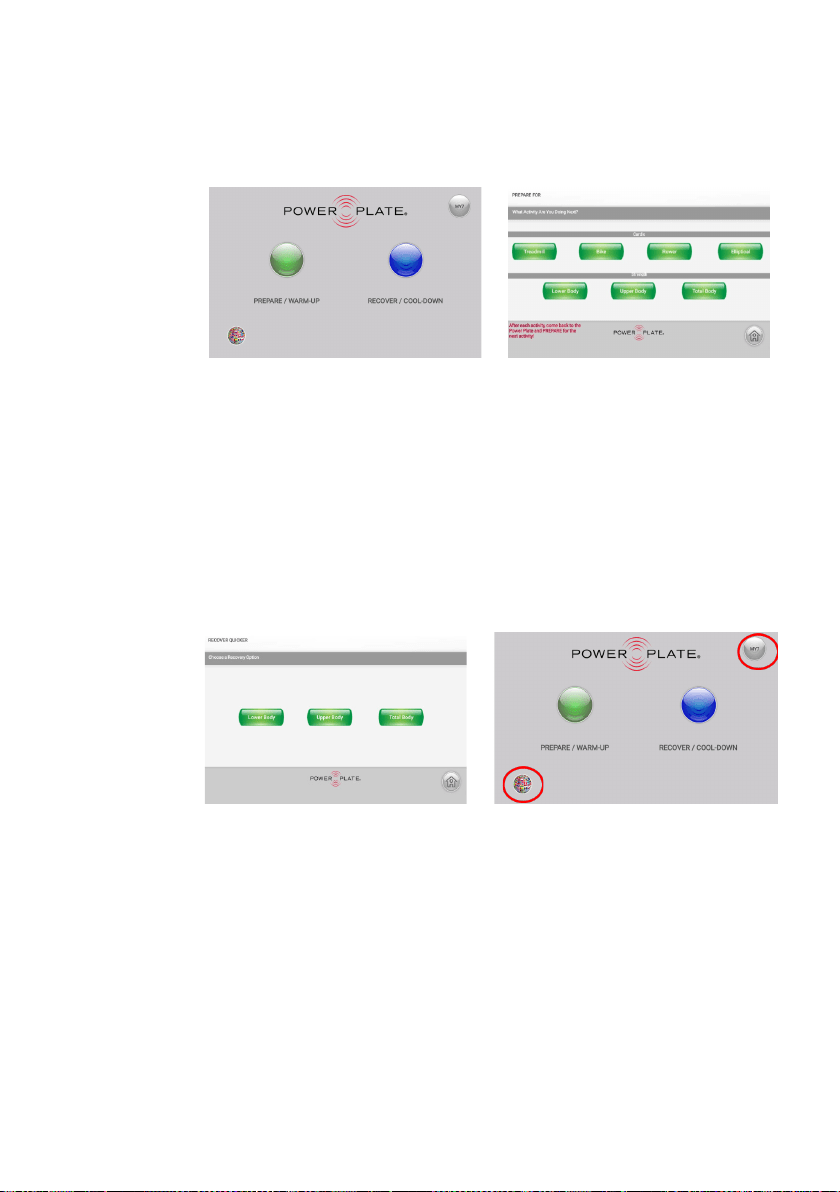
pro7 Touchscreen Controls
The home page allows quick access to
workout Preparation/Warm Up and
Recovery/Cool Down exercises.
Home Page
Prepare / Warm Up
Users can select warm up exercise to
prepare for seven popular workouts:
• Treadmill • Upper Body
• Bike • Total Body
• Roller • Lower Body
• Elliptical
Recover / Cool Down
Three cool down options are provided
via the Recover Quicker screen:
• Lower Body
• Upper Body
• Total Body
Home Page
Click on the “pro7” button in the upper
right hand corner (see above) to access
250+ customized programs and 1,000+
exercise videos.
Click on the “multi-colored globe” button
in the lower left hand corner (see above)
to access multiple languages.
11 of 22
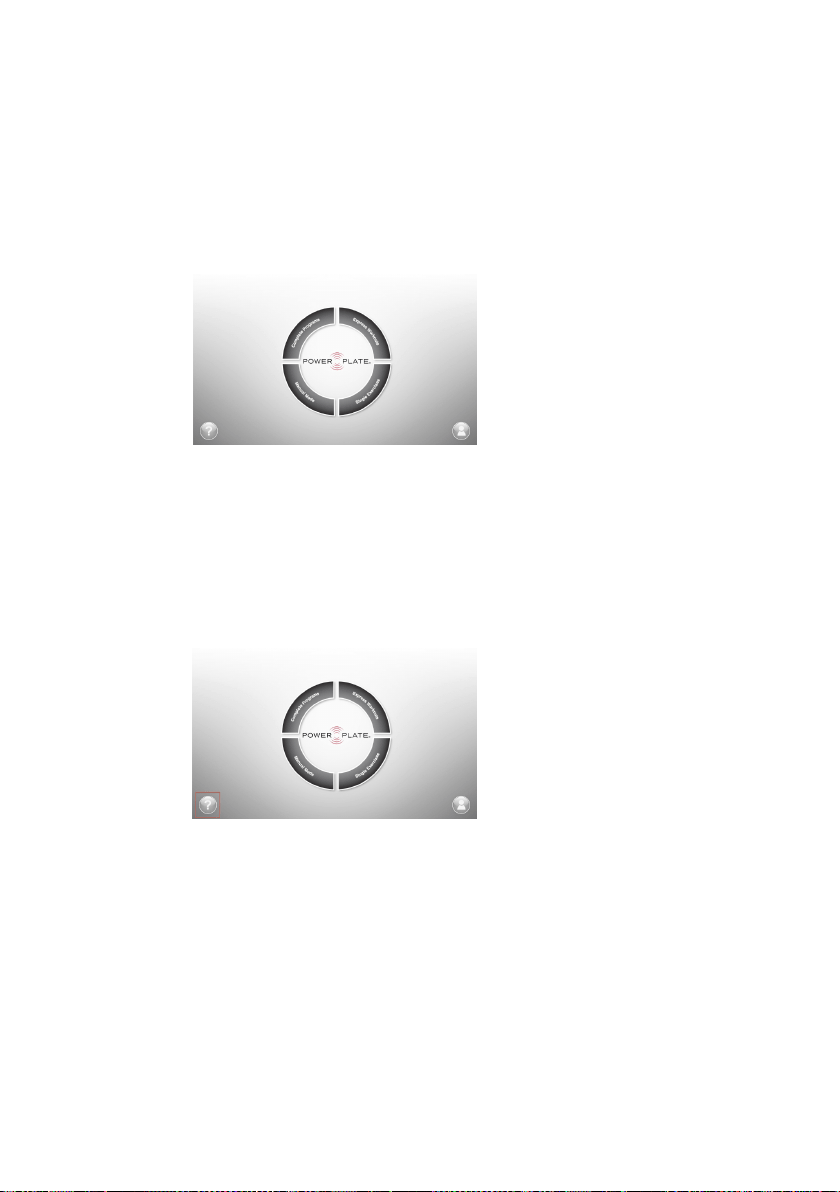
pro7 Touchscreen controls
The pro7 software is organized in four modules: Complete Programs, Express workouts,
Single Exercises, Manual Mode.
Complete Program:
• Select your goal between Feel Better,
Look Better or Play Better
• Select a specic Program
• Select your level and duration of the
program between 10 and 30 min.
Express Workouts:
• Select a mini program
Single Exercise:
• Select an element between Stretch,
Core, Balance, Strength and Massage
• Select a specic exercise.
Manual Mode:
• Select a duration
• Select the G-Factor
This button takes you to the education
screen. It is broken down into 5 educa-
tional videos
3 Goals
5 elements
G-Factor
New to Power Plate
Welcome to the pro7
I.1 Home page
I.1.1 Education
12
of 22
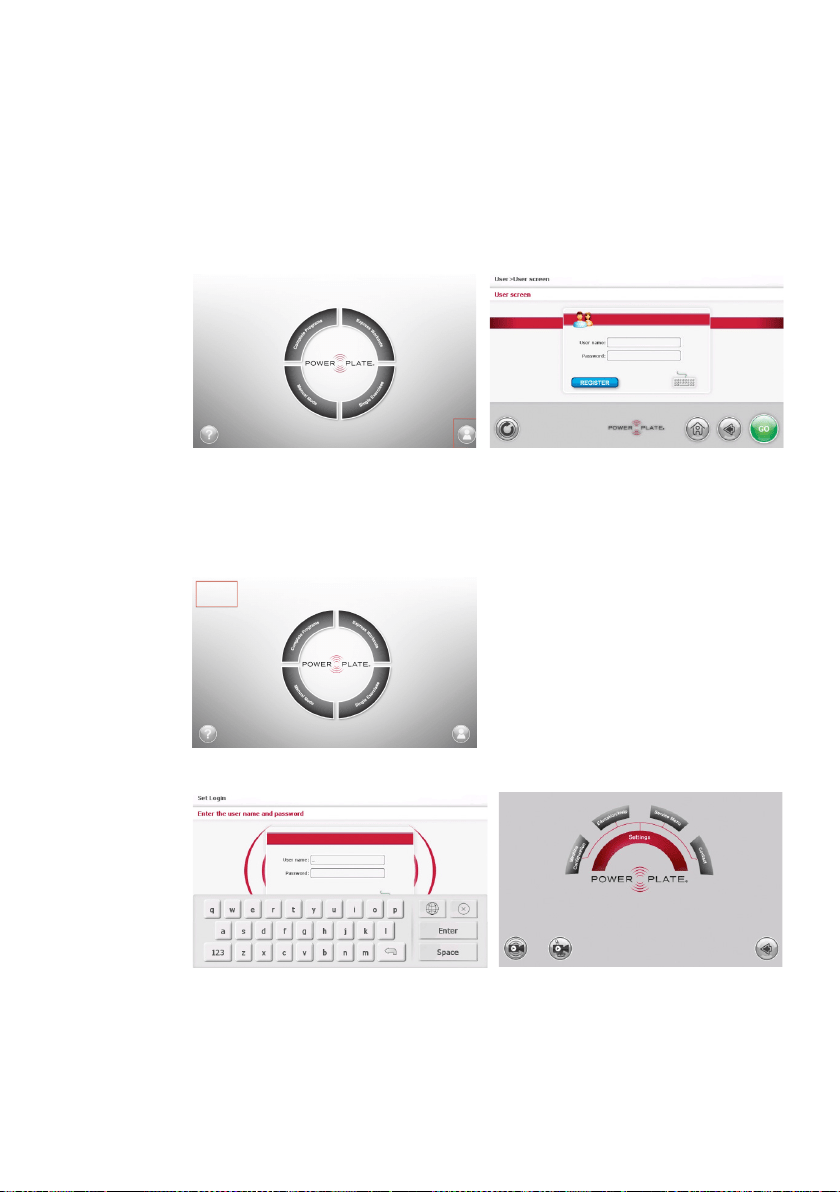
This button takes you to the users’ login screen. It is broken down into 2 areas
• New Users • Existing User
The setting module is reserved for the
commercial facility manager. It will be ac-
cessible via a private button and login.
User name: admin
Password: Asyn086Si
This button takes you to the setting
module. The settings are broken down
into 4 areas
• Machine Conguration
• Education/Help
• Service Menu
• Contact
I.1.2 User login
I.1.3 Settings
Set Login
Settings
13 of 22

Power Plate has three parameters to increase the intensity of the machine:
frequency, amplitude and duration of the exercise expressed in seconds. This last
parameter does not directly inuence the intensity felt by the user but the duration of
the exercise.
Intensity level
The intensity on the machine can be determined by multiplying frequency and
amplitude. The platform of the Power Plate accelerates with a certain speed caused
by the selected frequency and amplitude. Acceleration is expressed in meters per
Second Square (m/s2) and can be converted to g-forces. An acceleration of 9.81
m/s2 equals a g-force of 1g.
Setting G-factor™
25 Hz – Low 0
30 Hz - Low 1
35 Hz - Low 2
40 Hz – Low 3
30 Hz – High 4
35 Hz – High 5
40 Hz – High 6
45Hz – High 7
50 Hz - High 8
Only the Manual Mode allows a user to set the G-Factor in any level of the complete
range (G0 to G8). G-Factor range for all other mode of exercising have been set to
maximize your results for each exercise under each user level.
Parameters
14
of 22

Contact and Support
If you have any questions, please visit our website at
powerplate.com and select “Contact”. Complete the
form and a member of the Power Plate team will
contact you regarding your inquiry.
Warranty / Product Registration
To register your Power Plate
®
machine please visit us online at
powerplate.com/products/registration
Copies of this manual and any other
paperwork may be obtained by contacting Power Plate through the
“Contact Us” page online or by writing to Power Plate:
Performance Health Systems UK Ltd.
Business Design Centre, Unit 115
52 Upper Street
Islington
London, N1 0QH
+44 20 7317 5000
serviceUK@powerplate.com
Performance Health Systems LLC
401 Huehl Road, Ste. 2A
Northbrook, IL 60062, USA
T
|
+1-877-877-5283
serviceUSA@powerplate.com
www.powerplate.com
Rev.7– 02Nov2020
© Copyright 2020 Power Plate. All Rights Reserved.
15 of 22