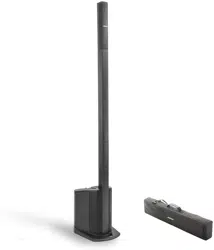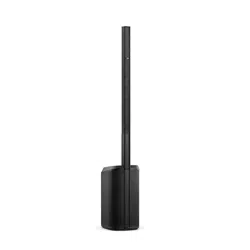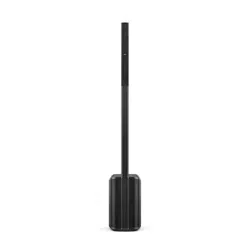
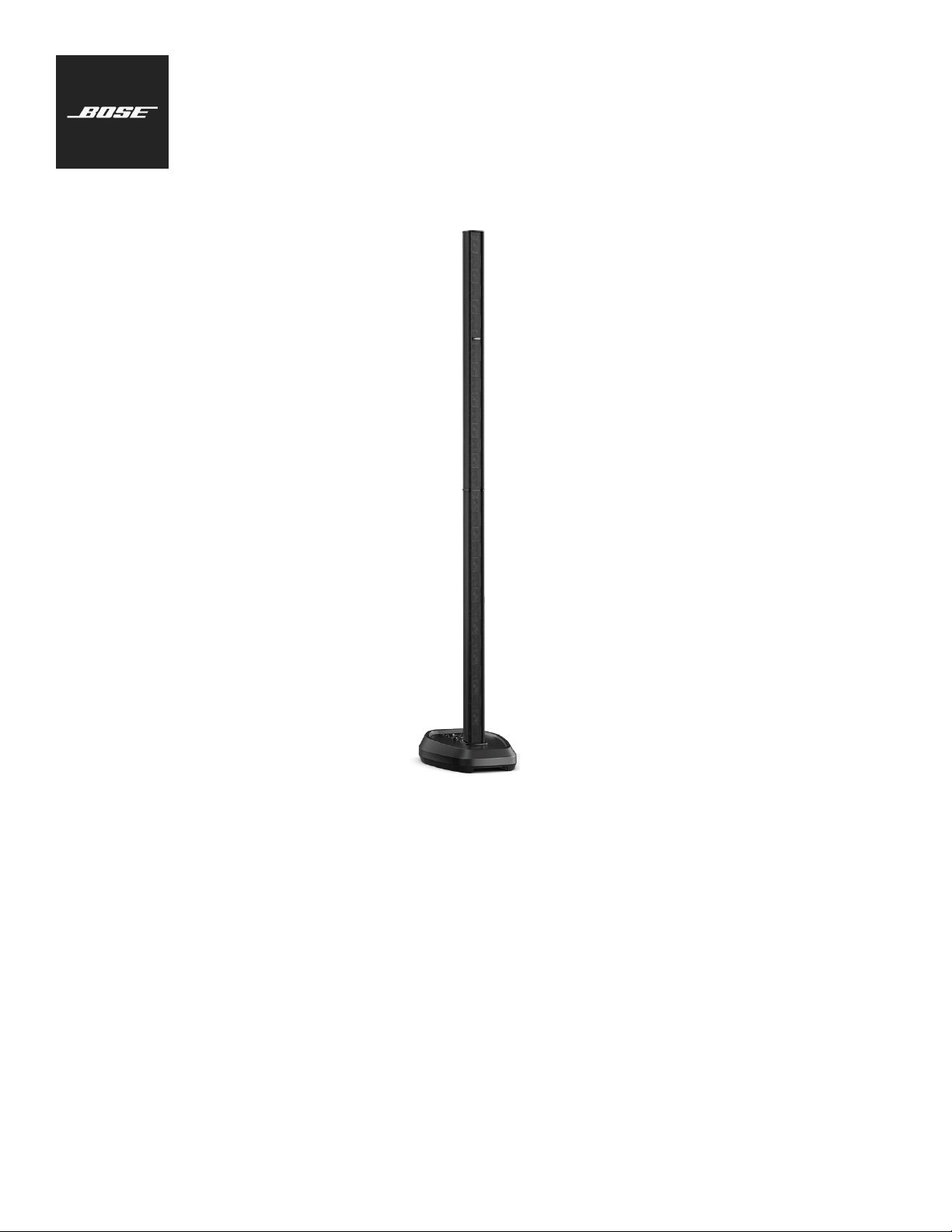
L1 Pro32
Portable Line Array
Owner's Guide
2 • English L1 Pro32 Portable Line Array • Owner's Guide
PRO.BOSE.COM
Important Safety Instructions
Please read and keep all safety and use instructions.
Important Safety Instructions
Bose Corporation hereby declares that this product is in compliance with the
essential requirements and other relevant provisions of Directive 2014/53/EU and
all other applicable EU directive requirements. The complete declaration of
conformity can be found at: www.Bose.com/compliance.
1. Read these instructions.
2. Keep these instructions.
3. Heed all warnings.
4. Follow all instructions.
5. Do not use this apparatus near water.
6. Clean only with a dry cloth.
7. Do not block any ventilation openings. Install in accordance with the manufacturer’s
instructions.
8. Do not install near any heat sources such as radiators, heat registers, stoves, or other
apparatus (including amplifiers) that produce heat.
9. Do not defeat the safety purpose of the polarized or grounding-type plug. A polarized
plug has two blades with one wider than the other. A grounding type plug has two
blades and a third grounding prong. The wide blade or the third prong are provided for
your safety. If the provided plug does not fit into your outlet, consult an electrician for
replacement of the obsolete outlet.
10. Protect the power cord from being walked on or pinched, particularly at plugs,
convenience receptacles, and the point where it exits from the apparatus.
11. Only use attachments/accessories specified by the manufacturer.
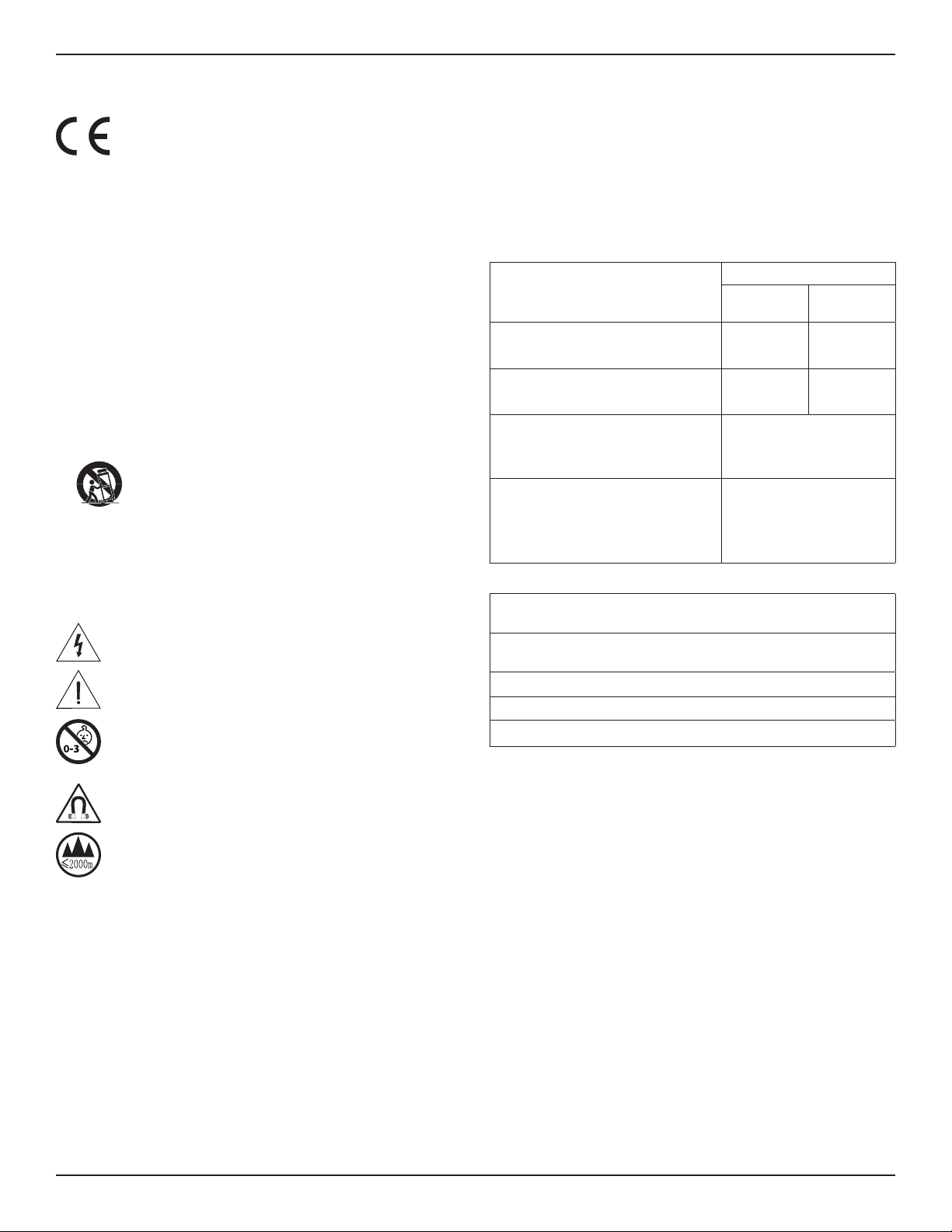
12. Use only with the cart, stand, tripod, bracket, or table specified by the
manufacturer or sold with the apparatus. When a cart is used, use caution
when moving the cart/apparatus combination to avoid injury from tip-over.
13. Unplug this apparatus during lightning storms or when unused for long periods of time.
14. Refer all servicing to qualified personnel. Servicing is required when the apparatus has
been damaged in any way such as power-supply cord or plug is damaged, liquid has been
spilled or objects have fallen into the apparatus, the apparatus has been exposed to rain or
moisture, does not operate normally, or has been dropped.
WARNINGS/CAUTIONS
This symbol on the product means there is uninsulated, dangerous voltage within
the product enclosure that may present a risk of electrical shock.
This symbol on the product means there are important operating and maintenance
instructions in this guide.
Contains small parts which may be a choking hazard. Not suitable for children
under age 3.
This product contains magnetic material. Consult your physician on whether this
might aect your implantable medical device.
Use at altitude less than 2000meters only.
• Do NOT make unauthorized alterations to this product.
• Do NOT use in vehicles or boats.
• Do NOT place the product in a confined space such as in a wall cavity or in an enclosed
cabinet while in use.
• Do NOT place or install the bracket or product near any heat sources, such as fireplaces,
radiators, heat registers or other apparatus (including amplifiers) that produce heat.
• Keep the product away from fire and heat sources. Do NOT place naked flame sources,
such as lighted candles, on or near the product.
• To reduce the risk of fire or electrical shock, do NOT expose the product to rain, liquids,
or moisture.
• Do NOT expose this product to dripping or splashing and do not place objects filled with
liquids, such as vases, on or near the product.
• Do NOT use a power inverter with this product.
• Provide an earth connection or ensure the socket outlet incorporates a protective
earthing connection before connecting the plug to the mains socket outlet.
• Where the mains plug or an appliance coupler is used as the disconnect device, the
disconnect device shall remain readily operable.
• When wrapping or coiling the cable, make sure the diameter of the coil is at least 20
centimeters (8 inches). Doing this can prevent unnecessary stress and damage to the
internal wires throughout the life of the cable.
• The SubMatch Cable is intended for use with these Bose products only: L1 Pro32, Sub1,
and Sub2.
• Do NOT use the SubMatch Cable to connect more than two Sub1/Sub2 subwoofers
together.
Regulatory Information
The product, in accordance with the Ecodesign Requirements for Energy Related Products
Directive 2009/125/EC, is in compliance with the following norm(s) or document(s): Regulation
(EC) No. 1275/2008, as amended by Regulation (EU) No. 801/2013.
Required Power State Information
Power Modes
Standby
Networked
Standby
Power consumption in specified power mode, at
230V/50Hz input
≤ 0.5 W N/A*
Time after which equipment is automatically
switched into mode
4 hours N/A*
Power consumption in networked standby if all
wired network ports are connected and all wireless
network ports are activated, at 230V/50Hz input
N/A*
Network port deactivation/activation procedures.
Deactivating all networks will enable standby
mode.
*Product does not utilize a networked
standby mode for a Bluetooth®
connection and does not have the
ability to be configured to a network
via Wi-Fi® or Ethernet
L1 Pro32
Dimensions (H ×W ×D)
213.5 ×34.5 ×55.0cm
(84.1 ×13.6 ×21.7in)
Net Weight
13.0kg
(28.6lb)
Input Rating 100–240VAC, 5A, 50/60Hz
Initial turn on inrush current 15.3 A at 120 V; 29.0 A at 230 V
Inrush current after AC mains interruption of 5s 1.2 A at 120 V; 26.5 A at 230 V
This equipment should be installed and operated with a minimum distance of 20 cm between
radiator and your body.
The product label is located on the bottom of the product.
Model: 431389L32. The CMIIT ID is located on the bottom of the product.
CAN ICES-3(B)/NMB-3(B)
Information About Products That Generate Electrical Noise (FCC Compliance Notice for US)
NOTE: This equipment has been tested and found to comply with the limits for a Class B digital
device, pursuant to Part 15 of the FCC Rules. These limits are designed to provide reasonable
protection against harmful interference in a residential installation. This equipment generates,
uses, and can radiate radio frequency energy and, if not installed and used in accordance with
the instructions, may cause harmful interference to radio communications. However, there is
no guarantee that interference will not occur in a particular installation. If this equipment does
cause harmful interference to radio or television reception, which can be determined by turning
the equipment o and on, the user is encouraged to try to correct the interference by one or
more of the following measures:
• Reorient or relocate the receiving antenna.
• Increase the separation between the equipment and receiver.
• Connect the equipment into an outlet on a circuit dierent from that to which the
receiver is connected.
• Consult the dealer or an experienced radio/TV technician for help.
Changes or modifications not expressly approved by Bose Corporation could void the user’s
authority to operate this equipment.
This device complies with part15 of the FCC Rules and with ISED Canada’s license-exempt
RSS standard(s). Operation is subject to the following two conditions: (1) This device may not
cause harmful interference, and (2) this device must accept any interference received, including
interference that may cause undesired operation.
English • 3Owner's Guide • L1 Pro32 Portable Line Array
PRO.BOSE.COM
Important Safety Instructions
For Europe:
Frequency band of operation 2400 to 2483.5 MHz.
Maximum transmit power less than 20 dBm EIRP.
Maximum transmit power is below regulatory limits such that SAR testing is not necessary and
exempt per applicable regulations.
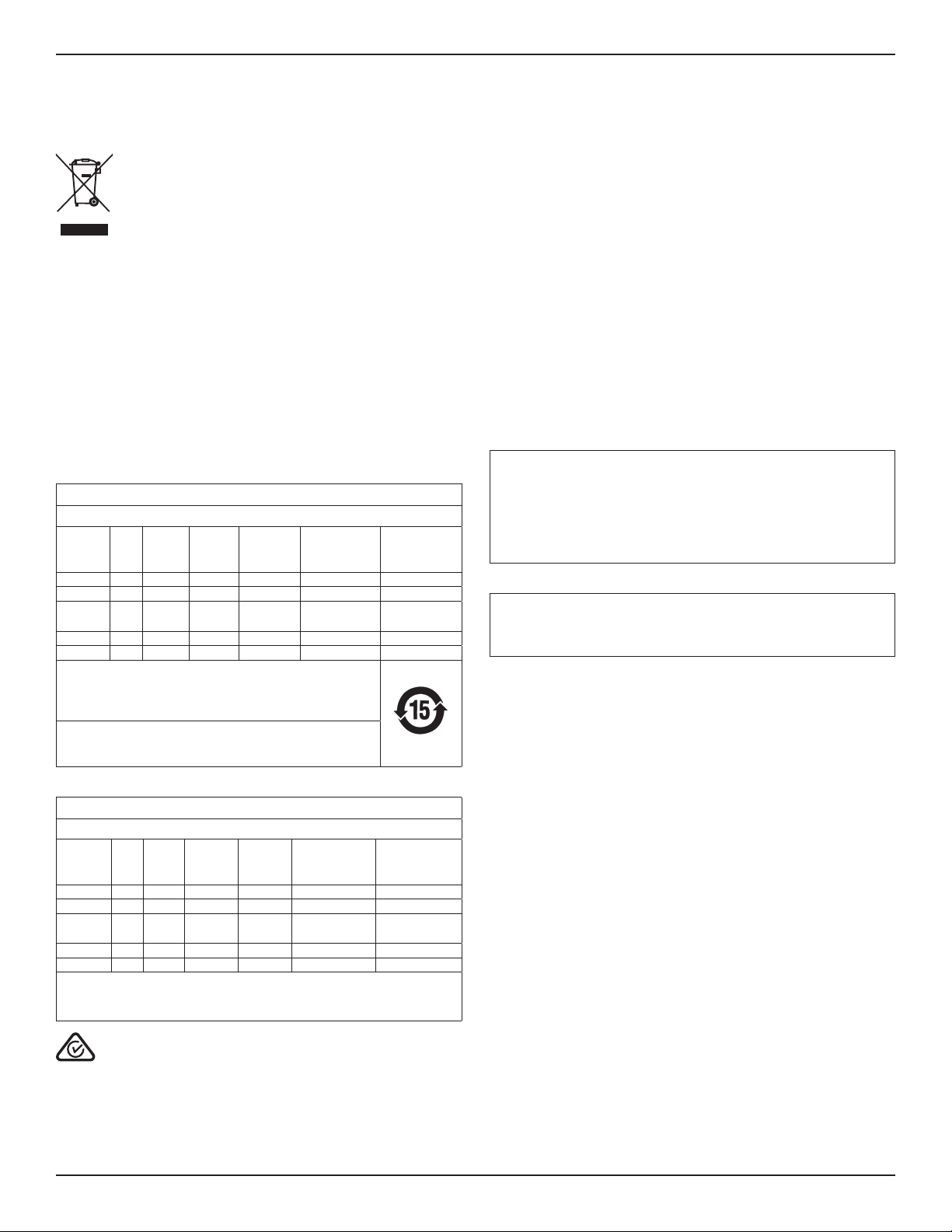
This symbol means the product must not be discarded as household waste, and
should be delivered to an appropriate collection facility for recycling. Proper
disposal and recycling helps protect natural resources, human health, and the
environment. For more information on disposal and recycling of this product,
contact your local municipality, disposal service, or the shop where you bought
this product.
Management Regulation for Low-power Radio-frequency Devices
Article XII
According to “Management Regulation for Low-power Radio-frequency Devices”, without
permission by the NCC, any company, enterprise, or user is not allowed to change frequency,
enhance transmitting power, or alter original characteristics, as well as performance, to an
approved low power radio-frequency device.
Article XIV
The low power radio-frequency devices shall not influence aircraft security and interfere with
legal communications; If found, the user shall cease operating immediately until no interference
is achieved. The said legal communications means radio communications in compliance with
the Telecommunications Act.
The low power radio-frequency devices must be susceptible with the interference from legal
communications or ISM radio wave radiated devices.
China Restriction of Hazardous Substances Table
Names and Contents of Toxic or Hazardous Substances or Elements
Toxic or Hazardous Substances and Elements
Part Name
Lead
(Pb)
Mercury
(Hg)
Cadmium
(Cd)
Hexavalent
(CR(VI))
Polybrominated
Biphenyl (PBB)
Polybrominated
diphenylether
(PBDE)
PCBs X O O O O O
Metal Parts X O O O O O
Plastic
Parts
O O O O O O
Speakers X O O O O O
Cables X O O O O O
This table is prepared in accordance with the provisions of SJ/T 11364.
O: Indicates that this toxic or hazardous substance contained in all of the
homogeneous materials for this part is below the limit requirement of
GB/T 26572.
X: Indicates that this toxic or hazardous substance contained in at least
one of the homogeneous materials used for this part is above the limit
requirement of GB/T 26572.
Taiwan Restriction of Hazardous Substances Table
Equipment name: L1 Pro32 Type designation: 431389L32
Restricted substances and its chemical symbols
Unit
Lead
(Pb)
Mercury
(Hg)
Cadmium
(Cd)
Hexavalent
chromium
(Cr+6)
Polybrominated
biphenyls (PBB)
Polybrominated
diphenyl ethers
(PBDE)
PCBs −
○ ○ ○ ○ ○
Metal Parts −
○ ○ ○ ○ ○
Plastic
Parts
○ ○ ○ ○ ○ ○
Speakers −
○ ○ ○ ○ ○
Cables −
○ ○ ○ ○ ○
Note 1: “○” indicates that the percentage content of the restricted substance does not exceed
the percentage of reference value of presence.
Note 2: The “−” indicates that the restricted substance corresponds to the exemption.
Date of Manufacture: The eighth digit in the serial number indicates the year of manufacture;
“0” is 2010 or 2020.
China Importer: Bose Electronics (Shanghai) Company Limited, Part C, Plant 9, No. 353 North
Riying Road, China (Shanghai) Pilot Free Trade Zone
EU Importer: Bose Products B.V., Gorslaan 60, 1441 RG Purmerend, The Netherlands
Mexico Importer: Bose de México, S. de R.L. de C.V. , Paseo de las Palmas 405-204, Lomas de
Chapultepec, 11000 México, D.F. For service or importer information, call +5255 (5202) 3545
Taiwan Importer: Bose Taiwan Branch, 9F-A1, No. 10, Section 3, Minsheng East Road, Taipei
City 104, Taiwan. Phone Number: +886-2-2514 7676
Bose Corporation Headquarters: 1-877-230-5639
Apple and the Apple logo are trademarks of Apple Inc. registered in the U.S. and other
countries. App Store is a service mark of Apple Inc.
The Bluetooth® word mark and logos are registered trademarks owned by Bluetooth SIG, Inc.
and any use of such marks by Bose Corporation is under license.
Google Play is a trademark of Google LLC.
Wi-Fi is a registered trademark of Wi-Fi Alliance®
Bose, L1, SubMatch, and ToneMatch are trademarks of Bose Corporation.
All other trademarks are the property of their respective owners.
The Bose Privacy Policy is available on the Bose website.
©2020 Bose Corporation. No part of this work may be reproduced, modified, distributed or
otherwise used without prior written permission.
Please complete and retain for your records.
The serial and model numbers are located on the product label on the bottom of the
product.
Serial number: ___________________________________________________
Model number: ___________________________________________________
Warranty Information
This product is covered by a limited warranty.
For warranty details, visit global.bose.com/warranty.

4 • English L1 Pro32 Portable Line Array • Owner's Guide
PRO.BOSE.COM
Contents
Overview 5
Package Contents ..................................................................................................................................................................................... 5
Optional Accessories ............................................................................................................................................................................... 5
Setup 6
Connections and Controls ..................................................................................................................................................................... 6
Assembling the Power Stand and Array .......................................................................................................................................... 7
Connecting Power and a Sub1/Sub2 ................................................................................................................................................. 8
AutoO/Low-power Standby ....................................................................................................................................................... 8
Connecting Sources .................................................................................................................................................................................9
Channel 1 & 2 Controls .....................................................................................................................................................................9
Channel 3 Controls .......................................................................................................................................................................... 10
L1 Mix App Control .......................................................................................................................................................................... 10
Additional Adjustments ..........................................................................................................................................................................11
Channel Mute .......................................................................................................................................................................................11
Phantom Power ..................................................................................................................................................................................11
System EQ ............................................................................................................................................................................................11
Setup Scenarios ........................................................................................................................................................................................12
Musician (with Sub)..........................................................................................................................................................................12
Musician with Mobile Device (with Sub) .................................................................................................................................13
Band (with Sub).................................................................................................................................................................................13
Musician with T8S Mixer (with Sub) ......................................................................................................................................... 14
Musician (with Analog Sub Connection) ............................................................................................................................... 14
Musician Stereo with T4S Mixer (with Two Subs) ...............................................................................................................15
DJ Stereo (with Two Subs) ...........................................................................................................................................................16
DJ Mono (with Two Stacked Subs) ...........................................................................................................................................17
DJ Mono (with Two Stacked Cardioid Subs) .........................................................................................................................18
DJ Stereo (with Four Stacked Subs).........................................................................................................................................19
Musician Dual Mono (with Two Subs) .................................................................................................................................... 20
Musician with S1 Pro Monitor (with Sub) .................................................................................................................................21
Care & Maintenance 22
Cleaning Your L1 Pro ..............................................................................................................................................................................22
Troubleshooting .......................................................................................................................................................................................22
English • 5Owner's Guide • L1 Pro32 Portable Line Array
PRO.BOSE.COM
Overview
Overview
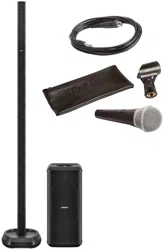
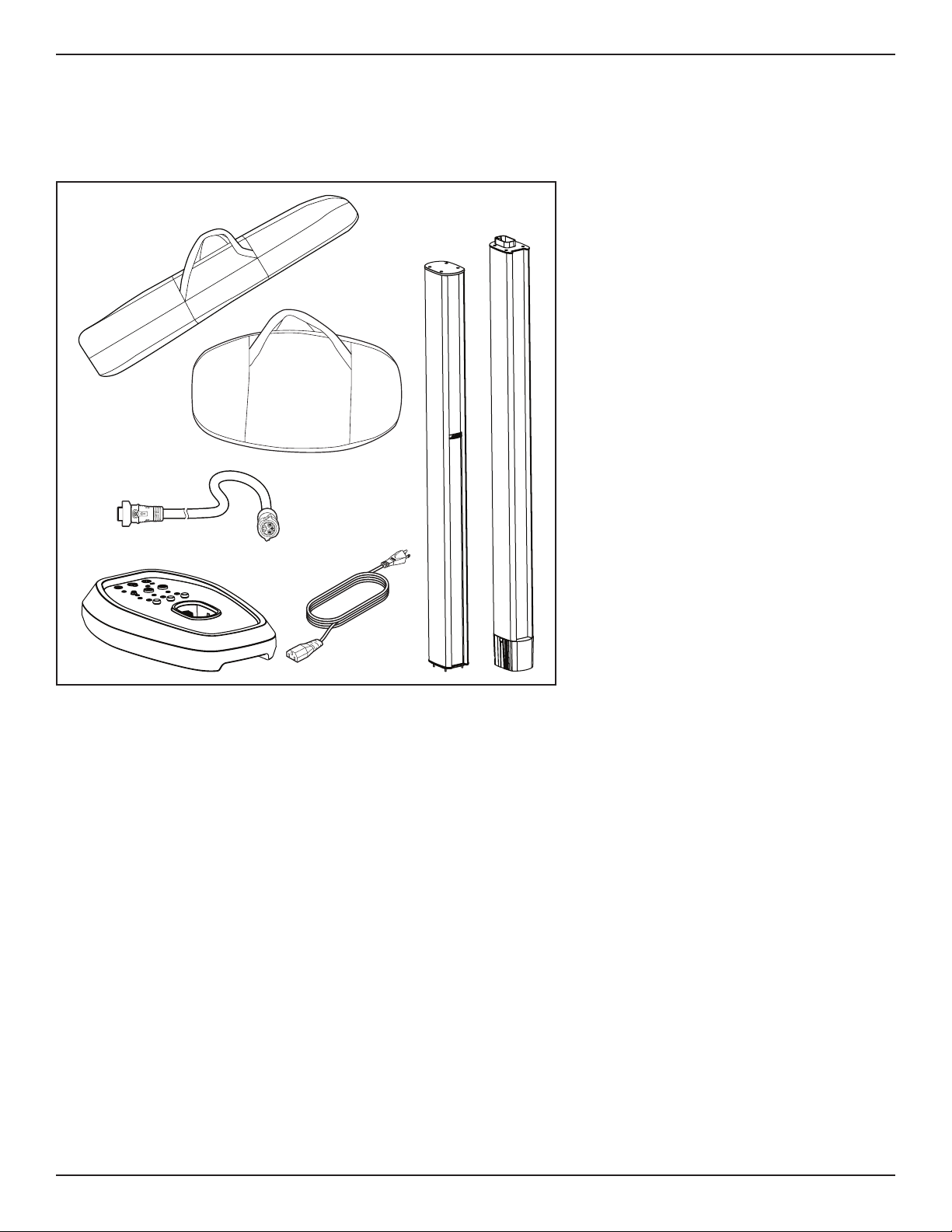
Package Contents
L1 Pro32
Optional Accessories
• L1 Pro32 Array & Power Stand Bag
• SubMatch Cable
For additional information on L1 Pro accessories, visit PRO.BOSE.COM.
6 • English L1 Pro32 Portable Line Array • Owner's Guide
PRO.BOSE.COM
Setup
Setup
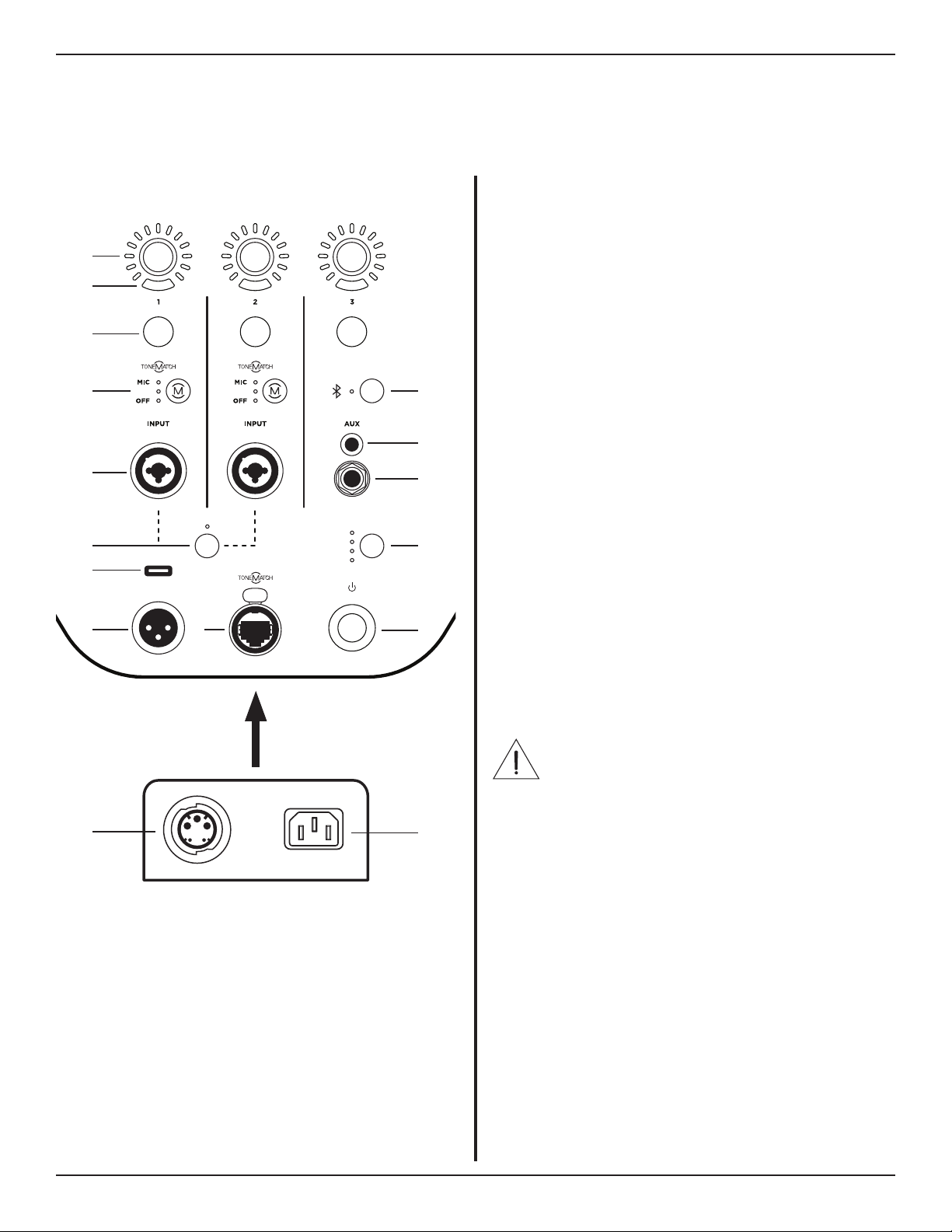
q Channel Parameter Control: Adjust the level of
volume, treble, bass, or reverb for your desired
channel. Press the control to switch between
parameters; rotate the control to adjust the level
of your selected parameter.
w Signal/Clip Indicator: The LED will illuminate
green when a signal is present and will illuminate
red when the signal is clipping or the L1 Pro is
entering limiting. Reduce the channel or signal
volume to prevent signal clipping or limiting.
e Channel Mute: Mute the output of an individual
channel. Press the button to mute the channel.
While muted, the button will illuminate white.
r Channel ToneMatch Button: Select the
ToneMatch preset for an individual channel. Use
MIC for microphones and use INST for acoustic
guitar. The corresponding LED will illuminate
white while selected.
t Channel Input: Analog input for connecting
microphone (XLR), instrument (TS unbalanced),
or line level (TRS balanced) cables.
y Phantom Power: Press the button to apply 48-
volt power to channels 1 and 2. The LED will
illuminate white while phantom power is applied.
u USB Port: USB-C connector for Bose service use.
Note: This port is not compatible with
Thunderbolt 3 cables.
i XLR Line Output: Use an XLR cable to connect
the line-level output to a Sub1/Sub2 or another
bass module.
o ToneMatch Port: Connect your L1 Pro to a T4S or
T8S ToneMatch mixer via a ToneMatch cable.
CAUTION: Do not connect to a computer or
phone network.
a Standby Button: Press the button to power on
the L1 Pro. The LED will illuminate white while the
L1 Pro is on.
s System EQ: Press the button to scroll through
and select a master EQ suitable for the use case.
The corresponding LED will illuminate white while
selected.
d TRS Line Input: Use a 6.4-millimeter (¼-inch) TRS
cable to connect line-level audio sources.
f Aux Line Input: Use a 3.5-millimeter (⅛-inch) TRS
cable to connect line-level audio sources.
g Bluetooth® Pair Button: Set up pairing with
Bluetooth capable devices. The LED will flash
blue while the L1 Pro is discoverable and
illuminate solid white when a device is paired for
streaming.
h SubMatch Output: Connect a Sub1/Sub2 bass
module with a SubMatch cable.
j Power Input: IEC power cord connection.
Connections and Controls
MUTE MUTE MUTE
PUSH
VOLUME
TREBLE
BASS
REVERB
VOLUME
TREBLE
BASS
REVERB
VOLUME
TREBLE
BASS
TREBLE
BASS
REVERB
VOLUME
TREBLE
BASS
REVERB
VOLUME
TREBLE
BASS
INST INST
PHANTOM
LINE OUT
OFF
LIVE
MUSIC
SPEECH
SYSTEM EQ
i
h
o
u
y
t
r
e
q
g
f
d
s
a
j
w
English • 7Owner's Guide • L1 Pro32 Portable Line Array
PRO.BOSE.COM
Setup
Assembling the Power Stand and Array
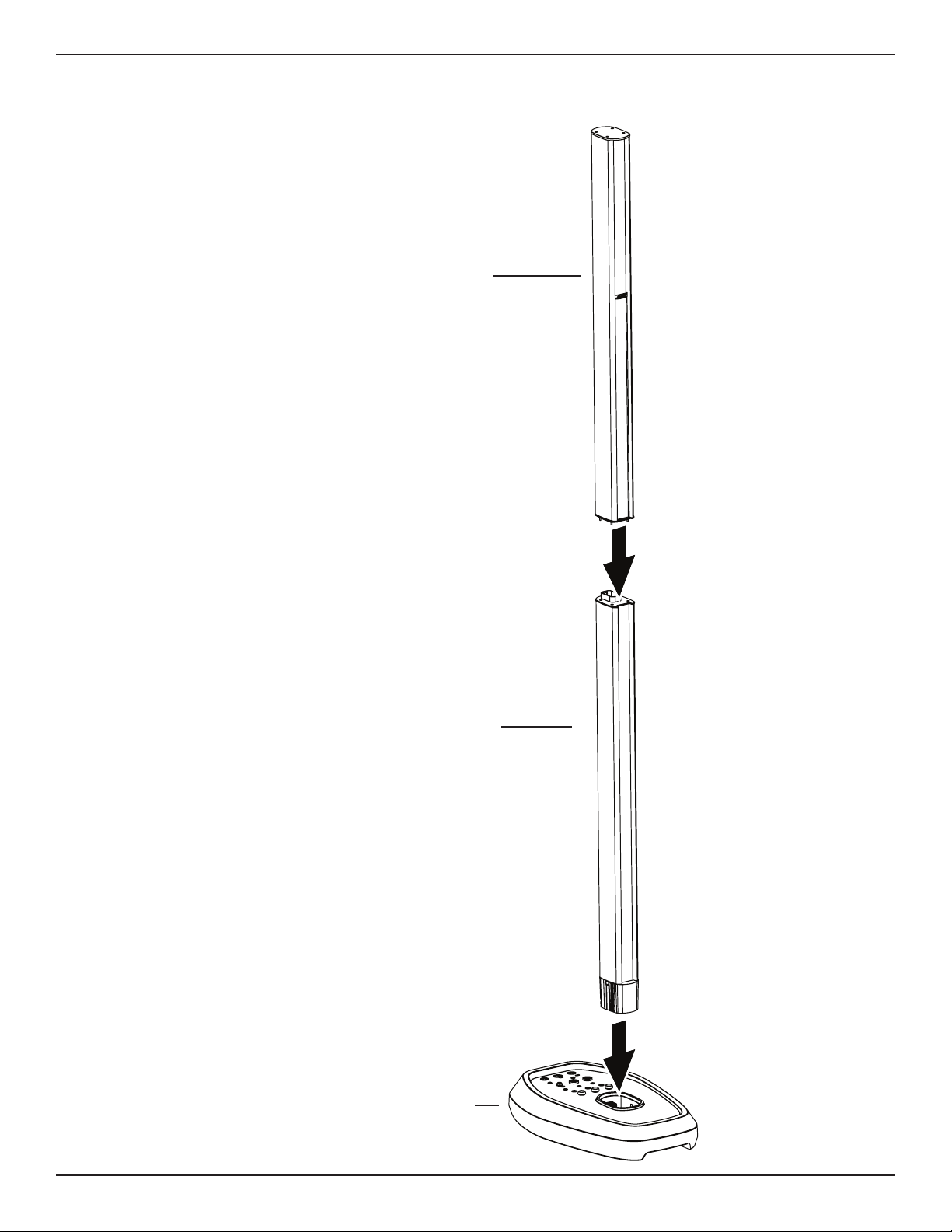
Upper mid-high array
Lower mid-high array
Before connecting the power
stand to a power source,
assemble the L1 Pro32 using the
upper mid-high array and lower
mid-high array.
1. Insert the lower array into
the power stand.
2. Insert the upper array into
the lower array.
The L1 Pro32 can be used
without the upper array.
This configuration is useful
when a venue ceiling cannot
accommodate the height of the
L1 Pro32.
Power stand
8 • English L1 Pro32 Portable Line Array • Owner's Guide
PRO.BOSE.COM
Setup
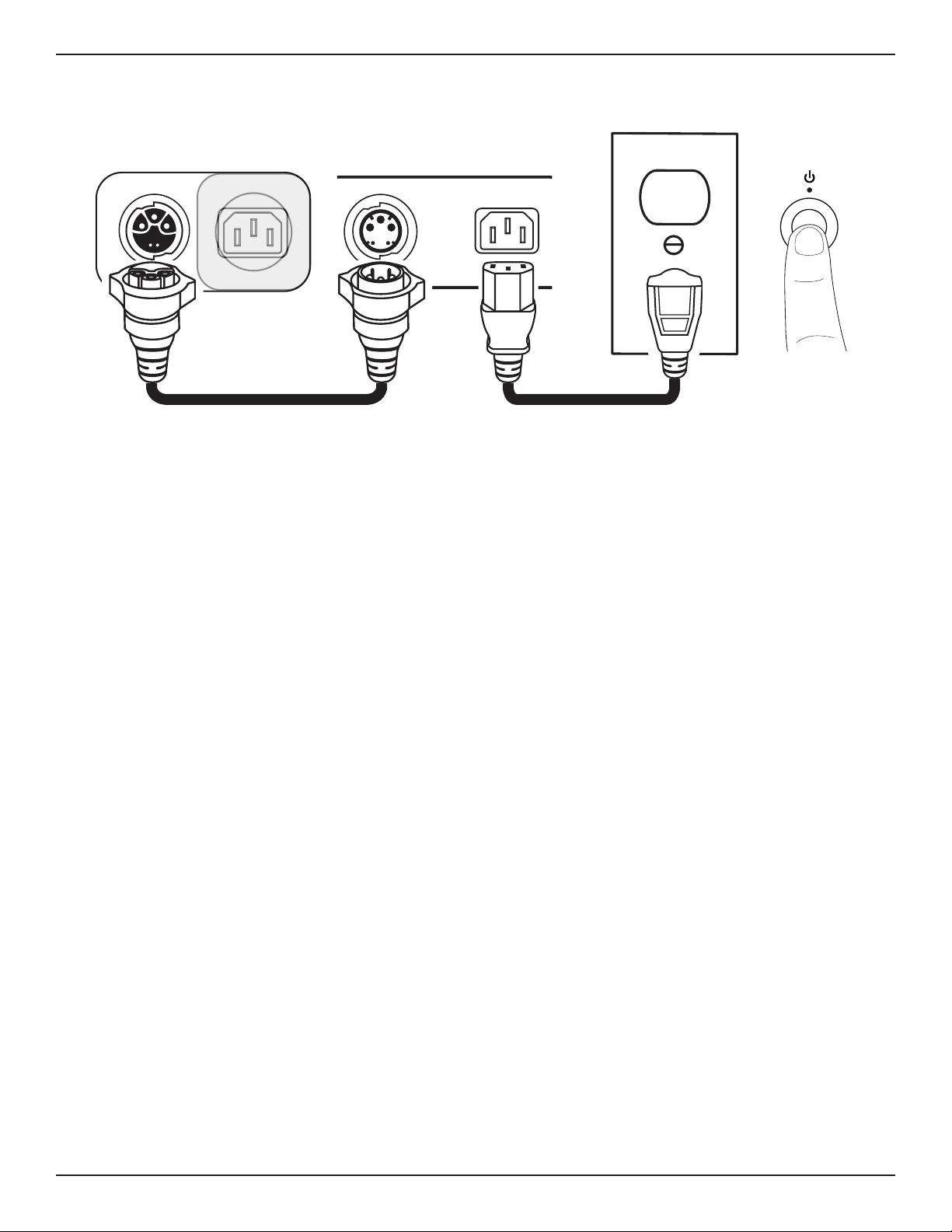
Connecting Power and a Sub1/Sub2
q
w e
tr
L1 Pro32Sub1/Sub2
1. Plug the SubMatch cable into the SubMatch Input on a Sub1/Sub2.
2. Plug the other end of the SubMatch cable into the SubMatch Output of the L1 Pro32.
3. Plug the power cord into the Power Input on the L1 Pro32.
4. Plug the other end of the power cord into a live electrical outlet.
Note: Do not power on the L1 Pro until after you've connected your sources. See Connecting Sources on
page9.
5. Press the Standby Button. The LED will illuminate white while the L1 Pro is on.
Note: Press and hold the Standby Button for 10 seconds to reset the L1 Pro to factory settings.
Press the Standby Button on any connected Sub1/Sub2. For additional information on how to set up a Sub1/
Sub2, see the Sub1/Sub2 owner's guide at PRO.BOSE.COM.
Note: When two Subs are connected to the L1 Pro32, first turn on the Sub connected directly to the L1 Pro32,
then turn on the second Sub.
AutoO/Low-power Standby
After four hours of no use, the L1 Pro will enter AutoO/Low-power Standby mode to save power. To wake
the L1 Pro from AutoO/Low-power Standby mode, press the Standby Button. When the L1 Pro32 goes into
AutoO/Low-power Standby mode, this will cut power to any Sub1/Sub2 connected with a SubMatch cable.
Press the Standby Button on a connected Sub1/Sub2 to wake it from AutoO/Low-power Standby mode.
Note: Disable AutoO/Low-power Standby mode by pressing and holding all three Channel Parameter
Controls for 10 seconds, or via the Settings page in the L1 Mix app. Enable AutoO/Low-power Standby mode
by repeating this step. Disabling AutoO/Low-power Standby mode will result in higher energy usage when
the L1 Pro is not in use.
English • 9Owner's Guide • L1 Pro32 Portable Line Array
PRO.BOSE.COM
Setup
Connecting Sources
Channel 1 & 2 Controls
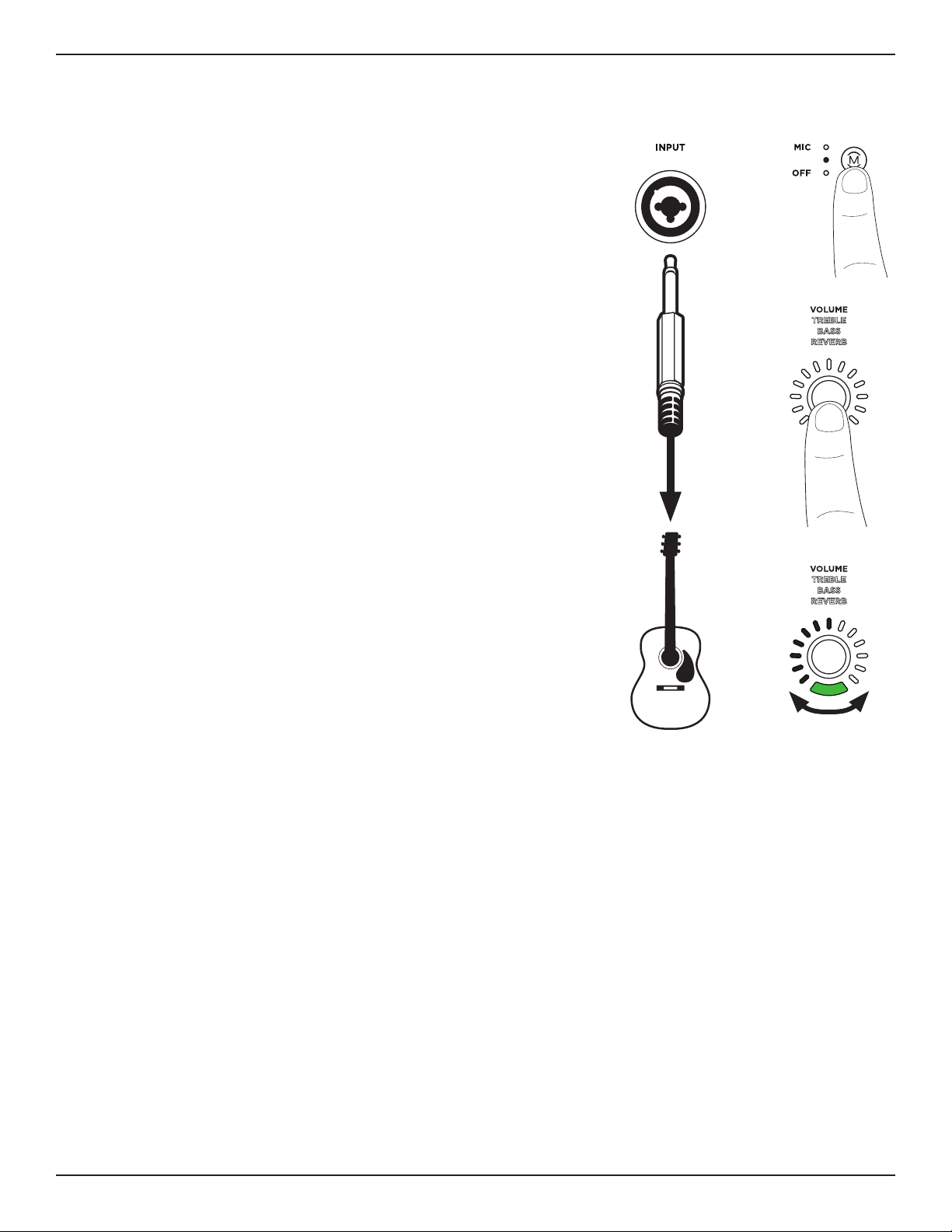
Channel 1 and 2 are for use with microphones, guitars, keyboards,
or other instruments. Channel 1 and 2 will automatically detect
when a source is close to clipping and will reduce the analog gain
to avoid clipping.
1. Connect your sound source to the Channel Input with the
appropriate cable.
2. Apply a ToneMatch preset—to optimize the sound of your
microphone or instrument—by pressing the Channel ToneMatch
Button until the LED for your chosen preset is illuminated.
Use MIC for microphones and use INST for acoustic guitars
and other instruments. Use OFF if you do not want to apply a
preset.
Note: Use the L1 Mix app to choose custom presets from the
ToneMatch library. The corresponding LED will illuminate green
when a custom preset is selected.
3. Press the Channel Parameter Control to choose a parameter
to modify. The parameter name will illuminate white while it is
selected.
4. Rotate the Channel Parameter Control to adjust the level of the
selected parameter. The parameter LED will indicate the level of
the selected parameter.
Note: While Reverb is selected, press and hold the control for
two seconds to mute the reverb. While reverb is muted, Reverb
will flash white. To unmute reverb, press and hold for two
seconds while Reverb is selected. Reverb mute will reset when
the L1 Pro is powered o.
q w
e
r
INST
10 • English L1 Pro32 Portable Line Array • Owner's Guide
PRO.BOSE.COM
Setup
Channel 3 Controls
Channel 3 is for use with Bluetooth® enabled devices and line-level audio inputs.
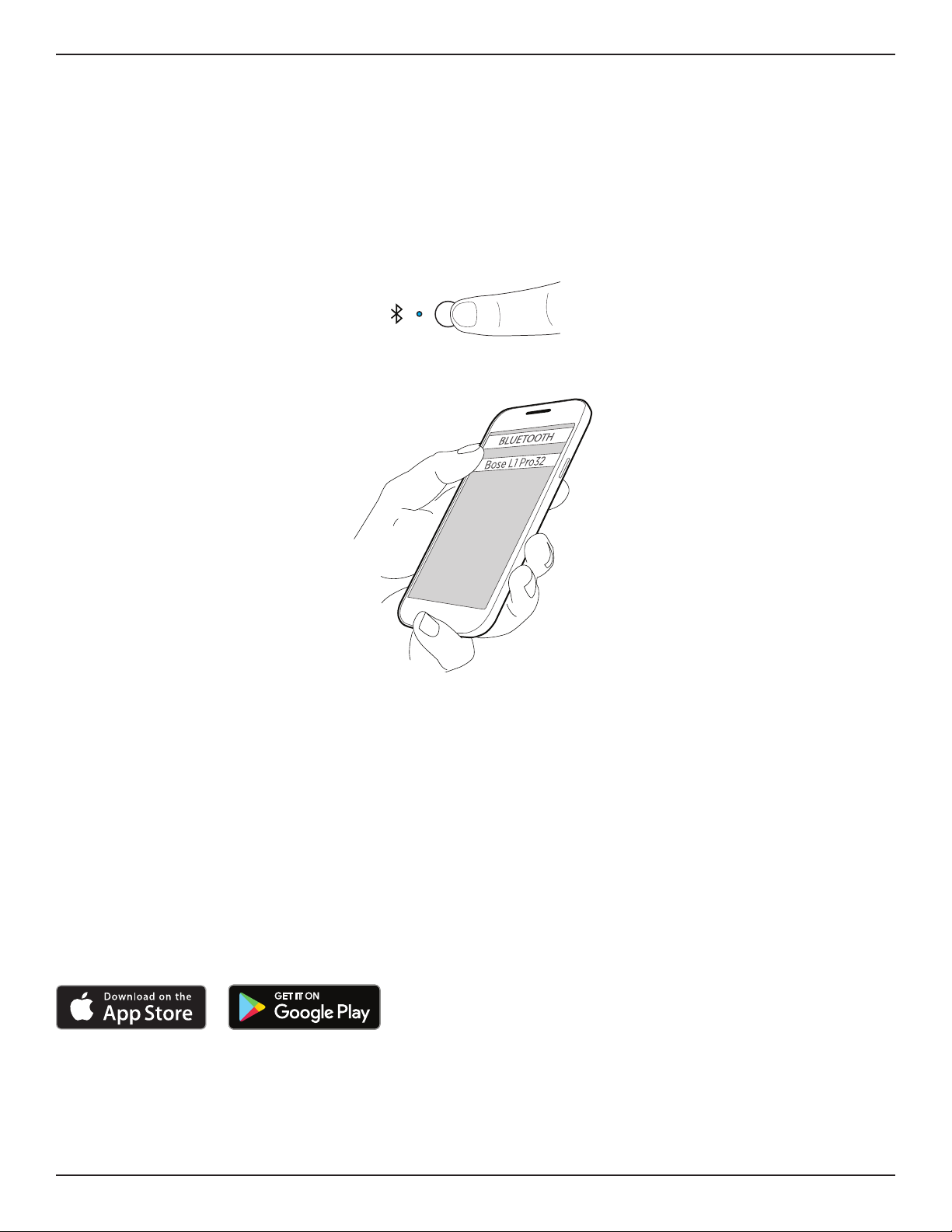
Bluetooth Pairing
The following steps describe how to manually connect a Bluetooth enabled device to stream audio.
You can use the L1Mix app to access additional device control. For more information on the L1 Mix app, see
L1Mix App Control below.
1. Turn on the Bluetooth feature on your mobile device.
2. Press and hold the Bluetooth Pair Button for two seconds. When ready to pair, the LED will flash blue.
3. Your L1 Pro will be visible in your device list on your mobile device. Select your L1 Pro from the device list.
When the device pairs successfully, the LED will illuminate solid white.
Note: Some notifications may be audible through the L1 Pro while in use. To prevent this, disable notifications
on your connected device. Enable airplane mode to prevent call/message notifications from interrupting
audio.
TRS Line Input
A mono input. Use a 6.4-millimeter (¼-inch) TRS cable to connect line-level audio sources, such as mixers or
instrument eects.
Aux Line Input
A stereo input. Use a 3.5-millimeter (⅛-inch) TRS cable to connect a line-level audio source, such as mobile
devices or laptops.
L1 Mix App Control
Download the Bose L1 Mix app for additional device control and audio streaming. Once downloaded, follow
the instructions in the app to connect your L1 Pro. For specific information on how to use the L1 Mix App, see
the in-app help.
Features
• Adjust channel volume
• Adjust channel mixer parameters
• Adjust system EQ
• Enable channel mute
• Enable reverb mute
• Enable phantom power
• Access to ToneMatch preset library
• Save scenes
English • 11Owner's Guide • L1 Pro32 Portable Line Array
PRO.BOSE.COM
Setup
Additional Adjustments
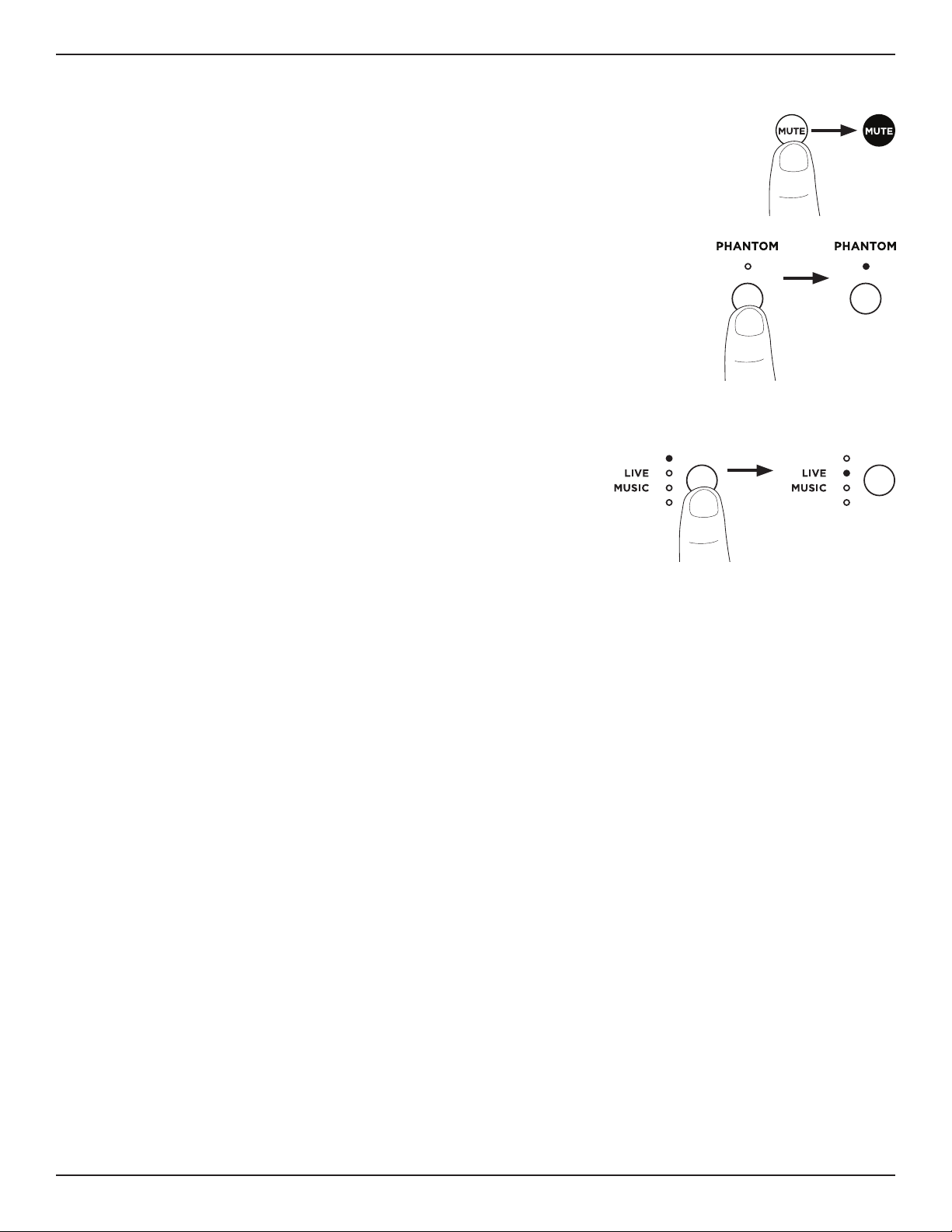
Channel Mute
Press the Channel Mute to mute the audio for an individual channel. While a channel is
muted, the button will illuminate white. Press the button again to unmute the channel.
Phantom Power
Press the Phantom Power button to apply 48-volt power to channels 1 and 2. The
LED will illuminate white while phantom power is applied. Apply phantom power
when using a condenser microphone. Press the button again to turn o phantom
power.
Note: Phantom power will only aect sources connected to a Channel Input using an
XLR cable.
System EQ
Select your system EQ by pressing the System EQ button until the
corresponding LED for your desired EQ illuminates white. Choose
between OFF, LIVE, MUSIC, and SPEECH. Your chosen EQ will stay
selected when you power o and power on your L1 Pro.
Note: The system EQ aects power stand/array audio only. System EQ
does not aect XLR Line Output audio.
SYSTEM EQ
OFF
SPEECH
SYSTEM EQ
OFF
SPEECH
12 • English L1 Pro32 Portable Line Array • Owner's Guide
PRO.BOSE.COM
Setup
Setup Scenarios
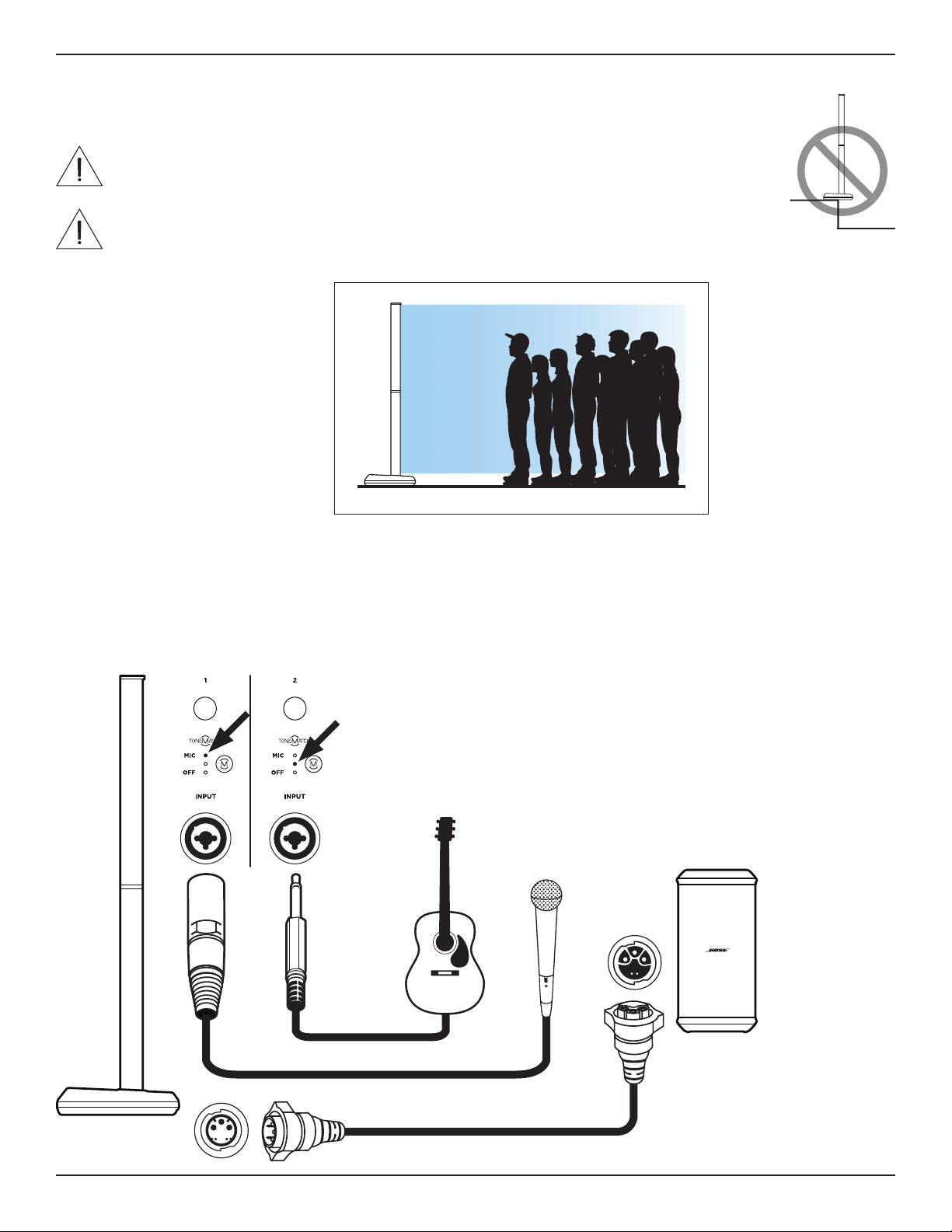
The L1 Pro32 can be placed on the floor or on an elevated stage (see Assembling the Power
Stand and Array on page 7).
WARNING: Do not place the equipment in an unstable location. The equipment could
become unstable leading to a hazardous condition, which could result in injury.
CAUTION: The power stand should not be placed anywhere that may block the
ventilation holes at the rear/bottom of the L1 Pro32. Operating directly on sand or grass
could cause debris to enter the product through vent openings and result in the L1 Pro32
not functioning properly.
L1 Pro32
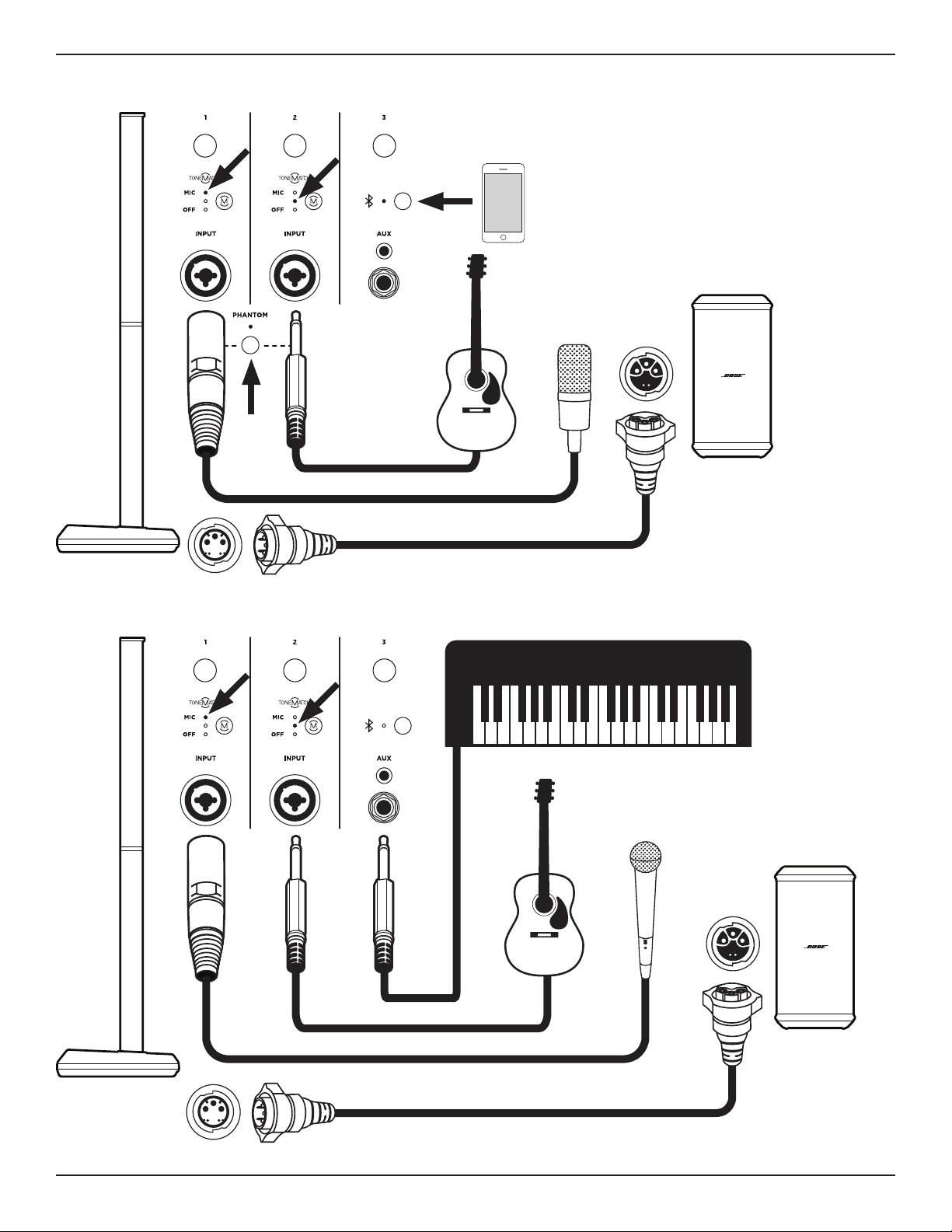
All of the following setup scenarios require at least one Sub1 or Sub2 bass module. For proper Sub1/Sub2
settings, see the Sub1/Sub2 owner's guide at PRO.BOSE.COM.
Musician (with Sub)
MUTE MUTE
INST INST
English • 13Owner's Guide • L1 Pro32 Portable Line Array
PRO.BOSE.COM
Setup
MUTE MUTE MUTE
INST INST
MUTE MUTE MUTE
INST INST
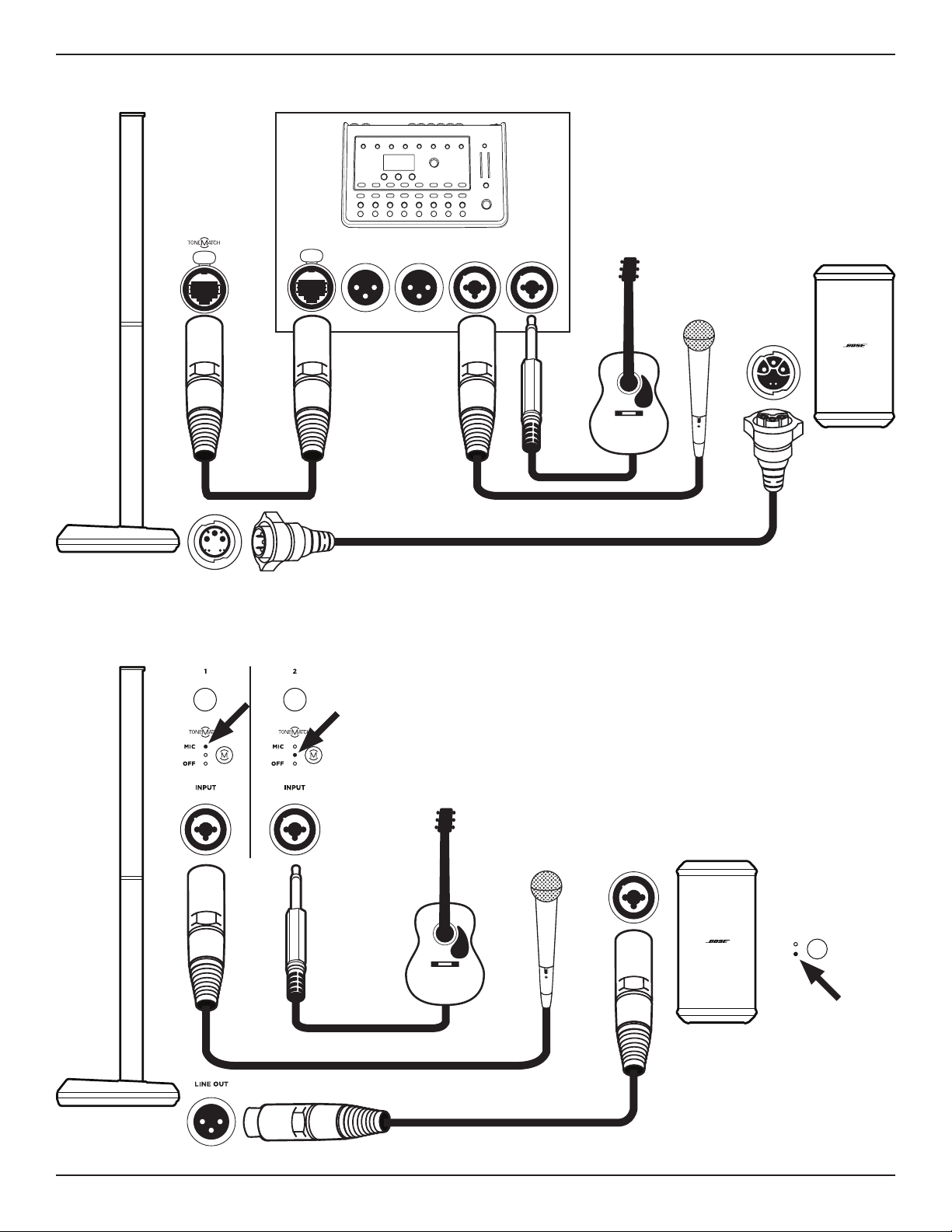
Band (with Sub)
Musician with Mobile Device (with Sub)
14 • English L1 Pro32 Portable Line Array • Owner's Guide
PRO.BOSE.COM
Setup
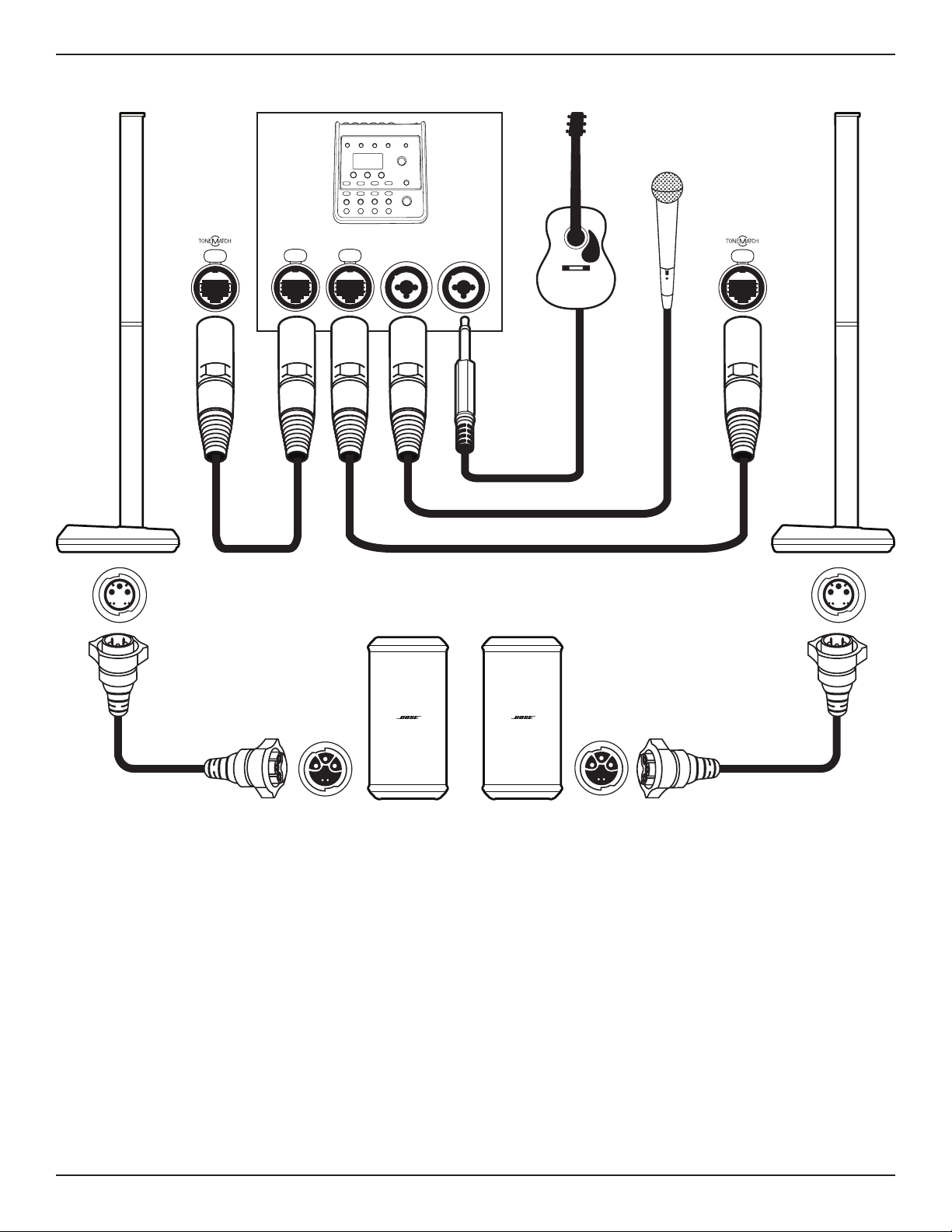
Musician with T8S Mixer (with Sub)
PUSH
ToneMatch
Cable
78
R
POWER
LMAIN OUT
PUSH
Note: T8S left channel audio is delivered only.
Musician (with Analog Sub Connection)
MUTE MUTE
INST INST
LINE IN 1
LINE IN EQ
LP
F
L1
English • 15Owner's Guide • L1 Pro32 Portable Line Array
PRO.BOSE.COM
Setup
Musician Stereo with T4S Mixer (with Two Subs)
PUSH PUSH
ToneMatch Cable ToneMatch Cable
PUSH PUSH
R
POWER
LMAIN OUT
43
16 • English L1 Pro32 Portable Line Array • Owner's Guide
PRO.BOSE.COM
Setup
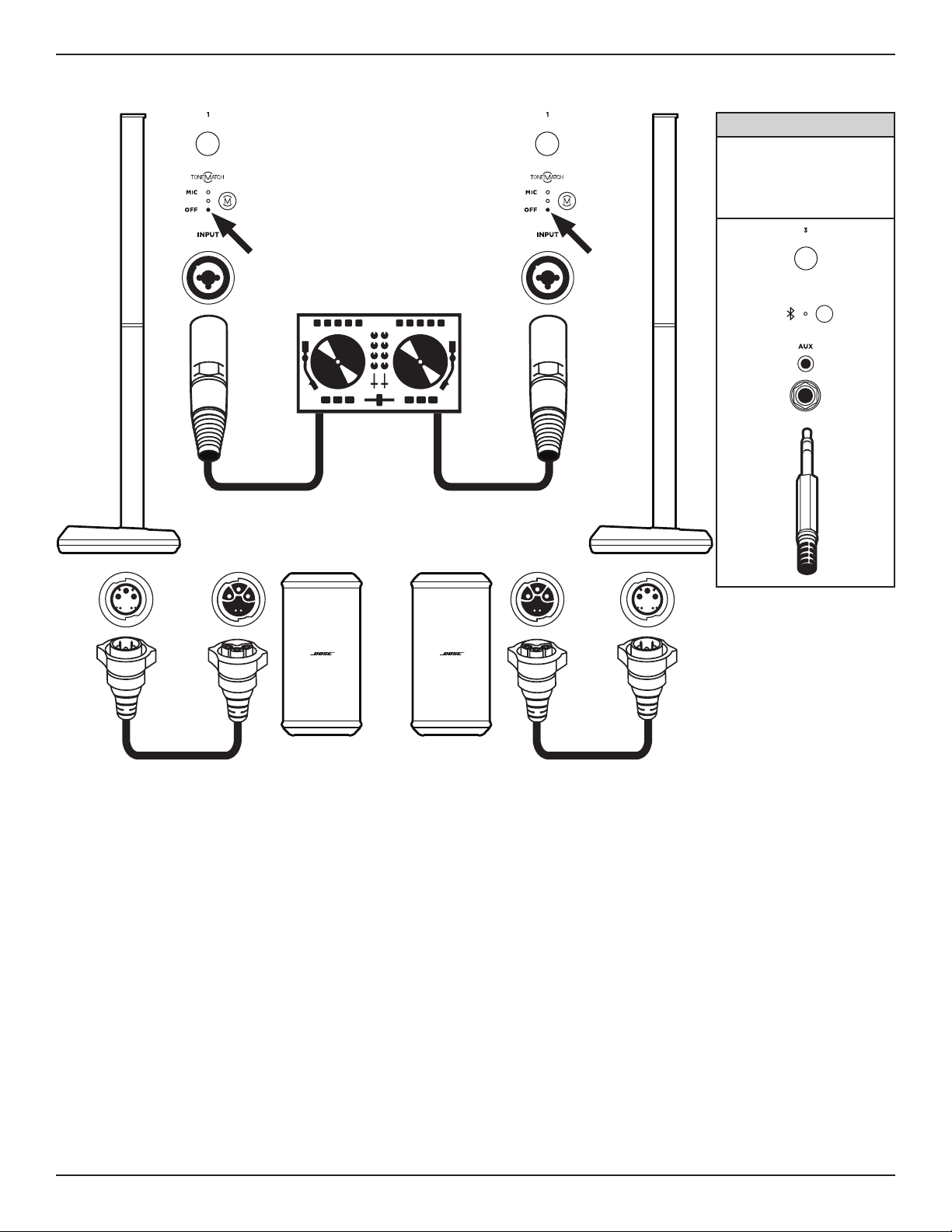
DJ Stereo (with Two Subs)
L R
*Alternate Connection
This scenario may require a
specialized cable or adapter.
Connect a TRS cable to the
TRS Line Input to allow for a
wider range of volume control.
MUTE MUTE MUTE
INST INST
* *
MUTE
INST
MUTE
INST
English • 17Owner's Guide • L1 Pro32 Portable Line Array
PRO.BOSE.COM
Setup
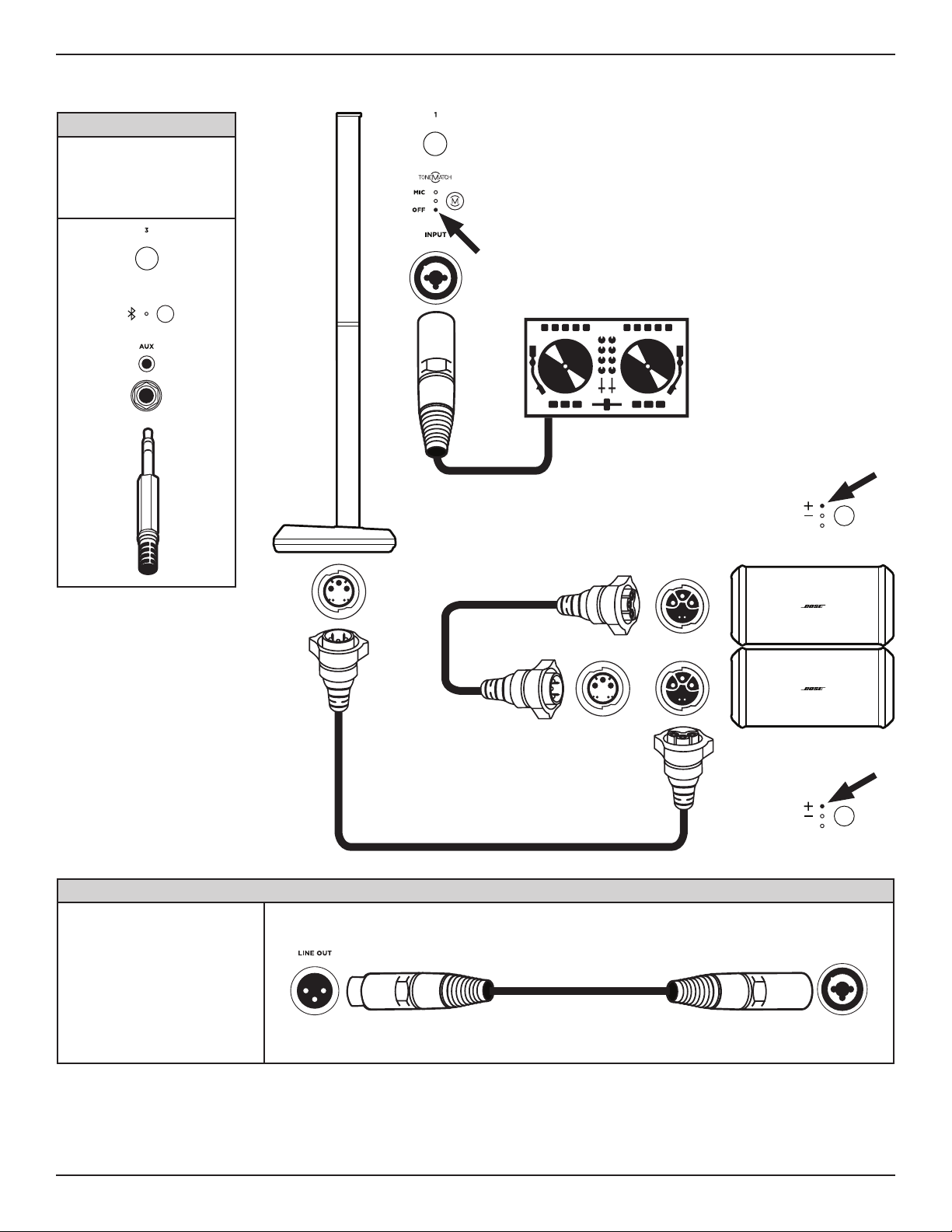
DJ Mono (with Two Stacked Subs)
*Alternate Connection
This scenario may require a
specialized cable or adapter.
Connect a TRS cable to the
TRS Line Input to allow for a
wider range of volume control.
MUTE MUTE MUTE
INST INST
**Alternate Connection
The L1 Pro32 can be connected to
a Sub1/Sub2 by analog connection.
Two Subs can also be connected
together by analog connection.
When connecting two Subs
together by analog connection,
connect the Line Output of the first
Sub to the Line Input of the second
Sub with an XLR cable. Subs set up
without a SubMatch cable must be
connected to a power source.
LINE IN 1
*
**
MUTE
INST
PHASE/PATTERN
CARDIOID
PHASE/PATTERN
CARDIOID
(Facing audience)
(Facing audience)
18 • English L1 Pro32 Portable Line Array • Owner's Guide
PRO.BOSE.COM
Setup
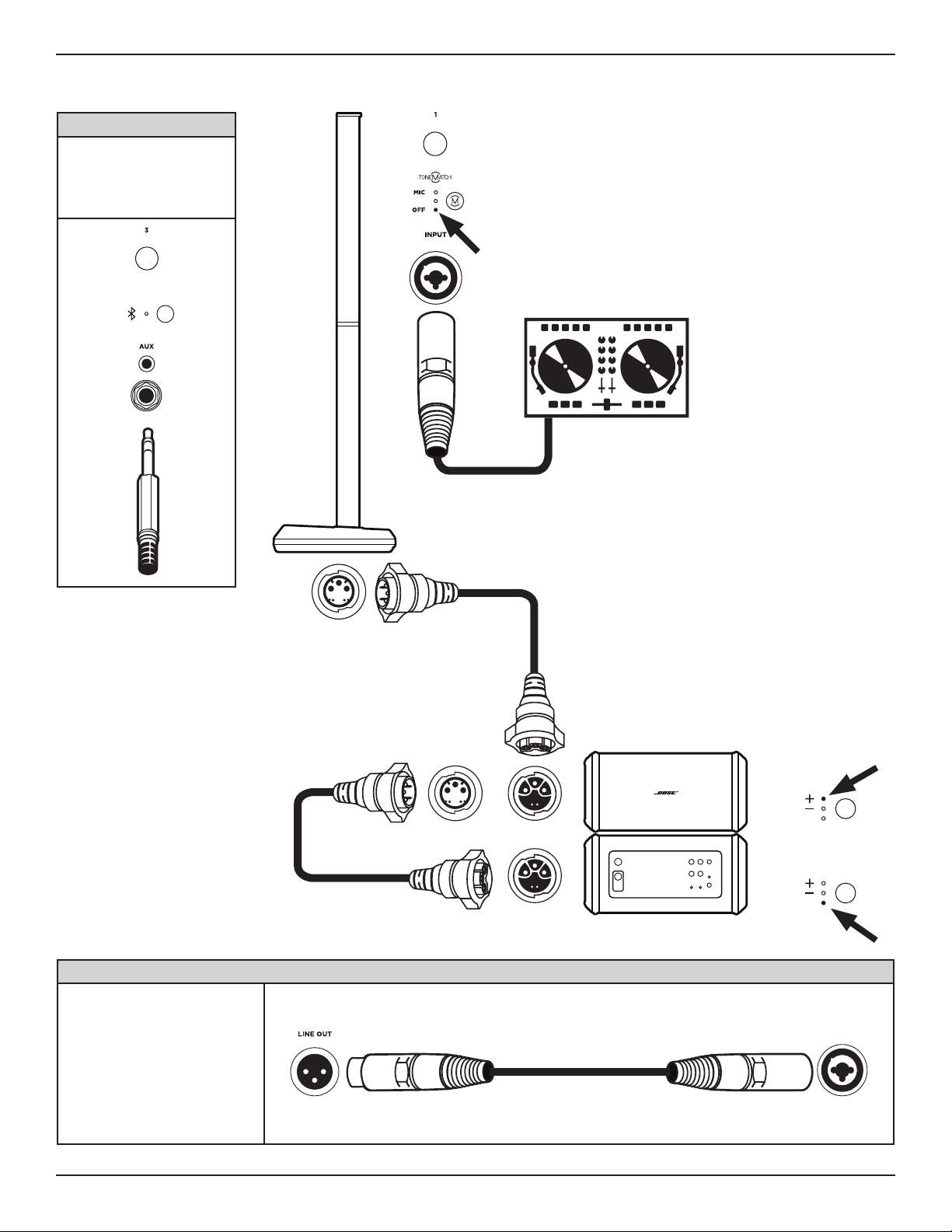
DJ Mono (with Two Stacked Cardioid Subs)
*Alternate Connection
This scenario may require a
specialized cable or adapter.
Connect a TRS cable to the
TRS Line Input to allow for a
wider range of volume control.
MUTE MUTE MUTE
INST INST
*
**
MUTE
INST
PHASE/PATTERN
CARDIOID
PHASE/PATTERN
CARDIOID
**Alternate Connection
The L1 Pro32 can be connected to
a Sub1/Sub2 by analog connection.
Two Subs can also be connected
together by analog connection.
When connecting two Subs
together by analog connection,
connect the Line Output of the first
Sub to the Line Input of the second
Sub with an XLR cable. Subs set up
without a SubMatch cable must be
connected to a power source.
LINE IN 1
(Facing performer)
(Facing audience)
English • 19Owner's Guide • L1 Pro32 Portable Line Array
PRO.BOSE.COM
Setup
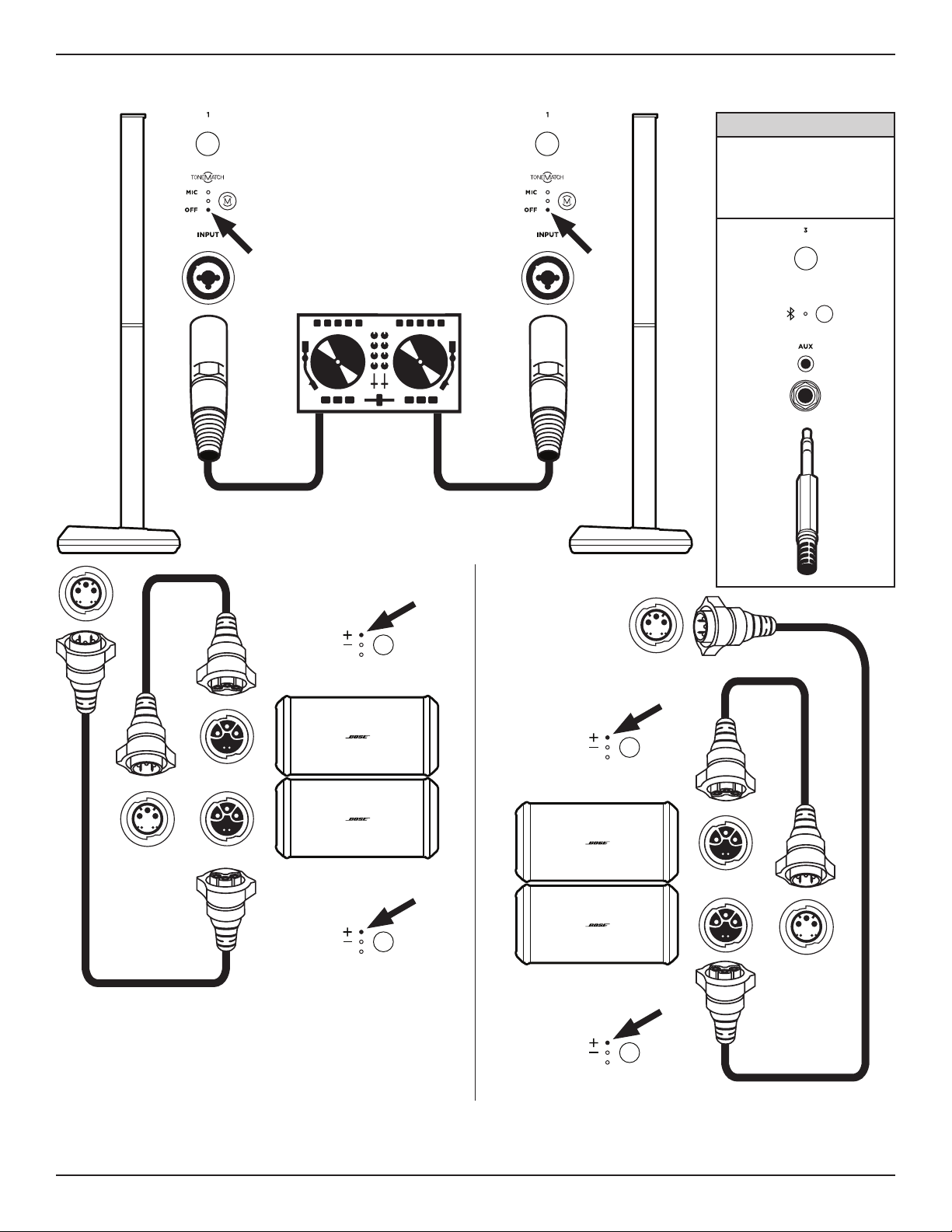
DJ Stereo (with Four Stacked Subs)
L R
*Alternate Connection
This scenario may require a
specialized cable or adapter.
Connect a TRS cable to the
TRS Line Input to allow for a
wider range of volume control.
MUTE MUTE MUTE
INST INST
* *
MUTE
INST
MUTE
INST
PHASE/PATTERN
CARDIOID
PHASE/PATTERN
CARDIOID
PHASE/PATTERN
CARDIOID
PHASE/PATTERN
CARDIOID
(Facing audience)
(Facing audience)
(Facing audience)
(Facing audience)
20 • English L1 Pro32 Portable Line Array • Owner's Guide
PRO.BOSE.COM
Setup
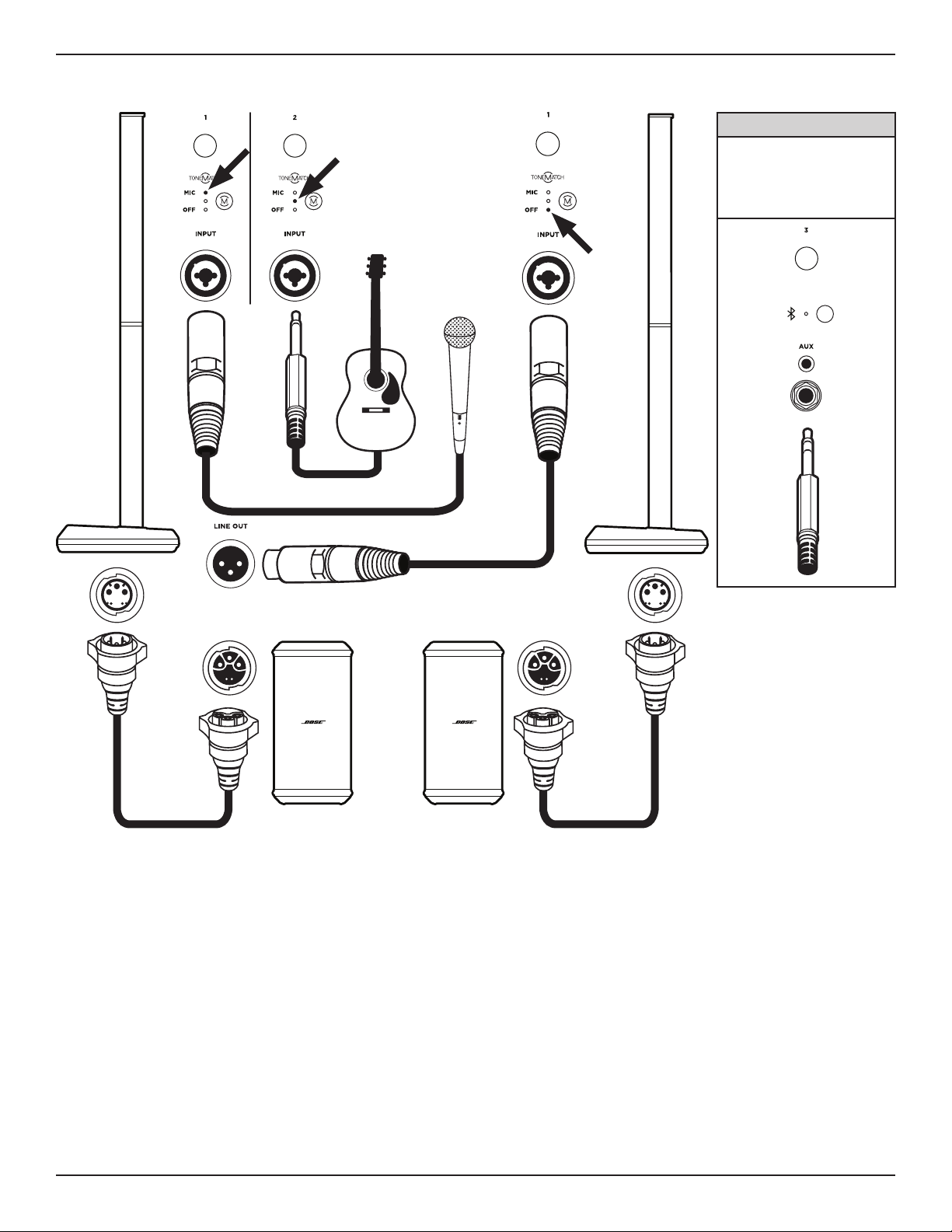
Musician Dual Mono (with Two Subs)
MUTE MUTE
INST INST
*Alternate Connection
This scenario requires a
specialized cable or adapter.
Connect a TRS cable to the
TRS Line Input to allow for a
wider range of volume control.
MUTE MUTE MUTE
INST INST
*
MUTE
INST
English • 21Owner's Guide • L1 Pro32 Portable Line Array
PRO.BOSE.COM
Setup
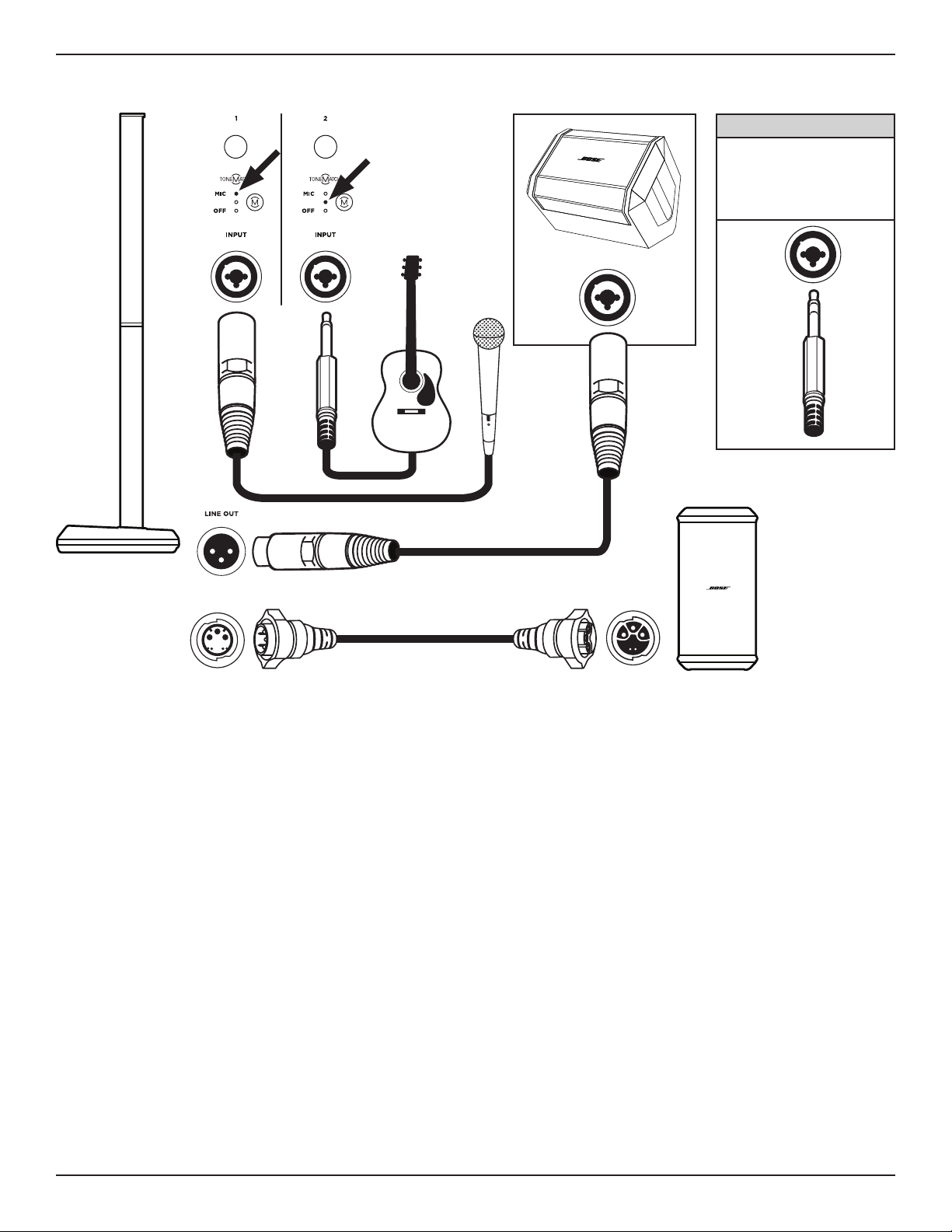
Musician with S1 Pro Monitor (with Sub)
MUTE MUTE
INST INST
*Alternate Connection
This scenario requires a
specialized cable or adapter.
Connect a TRS cable to allow
for a wider range of volume
control.
INPUT
*
INPUT
22 • English L1 Pro32 Portable Line Array • Owner's Guide
PRO.BOSE.COM
Care & Maintenance
Care & Maintenance
Cleaning Your L1 Pro
• Before cleaning your L1 Pro32, disconnect the L1 Pro32 from AC power.
• Clean the product enclosure using only a soft, dry cloth. If necessary, carefully vacuum the grille of the
L1Pro.
• Gently wipe external surface of vent area (on the rear/bottom of the L1 Pro32) with cloth to remove debris
that may be lodged in vent openings. Take care not to push debris into the L1 Pro32.
• With the array removed from the power stand, gently remove debris from vent openings near array
output connector (at the base of the power stand). Take care not to push debris into the L1 Pro32.
CAUTION: Do not use any solvents, chemicals, or cleaning solutions containing alcohol, ammonia, or
abrasives.
CAUTION: Do not use any sprays near the product or allow liquids to spill into any openings.
Troubleshooting
Problem What to do
No power • Make sure you have power at the AC outlet. Try operating a lamp or other
equipment from the same AC outlet or test the outlet using an AC outlet
tester.
No sound • Make sure your L1 Pro is turned on.
• Make sure your instrument is plugged into the Channel Input.
• Make sure the volume is turned up on your source.
• Make sure the volume is turned up on the L1 Pro.
• Make sure the L1 Pro isn't in AutoO/Low-power Standby mode.
• Plug your instrument into a dierent amplifier to make sure the source is
working.
• Make sure the Channel Mute button is not engaged.
Standby LED is flashing
red (thermal fault)
• Turn o the L1 Pro and wait 30 minutes before turning it back on.
• Move the L1 Pro to a cooler location.
• Move the L1 Pro to a location that has more ventilation.
Standby LED is solid red
(system fault)
• Contact Bose customer service. Visit worldwide.Bose.com/contact.
With nothing plugged
into the L1 Pro, a light
hum or buzz is heard
• Using an AC outlet tester, test the AC outlet the L1 Pro is plugged into for
reversed or open (hot, neutral, and/or ground) contacts.
• If using an extension cord, plug the L1 Pro directly into the outlet.
Instrument or audio
source sounds distorted
• Turn down volume on the source.
• Turn down channel volume.
• Try a dierent source or instrument.
English • 23Owner's Guide • L1 Pro32 Portable Line Array
PRO.BOSE.COM
Care & Maintenance
Problem What to do
Microphone is
encountering feedback
• Turn down channel volume.
• Orient the microphone so that it is not pointing directly at the L1 Pro.
• Try a dierent microphone.
• Try a dierent position for the L1 Pro and/or vocalist on stage.
• Increase the distance from the L1 Pro to the microphone.
• If using a vocal eects processor, make sure it is not contributing to the
feedback problem.
Paired Bluetooth®
device will not connect
to the loudspeaker
• If your paired device requires a passcode, make sure the one you entered is
correct.
• Make sure Bluetooth® functionality is turned on or enabled on your source
device.
• Your Bluetooth device may be out of range; try moving it closer to the L1Pro.
• If possible, turn o all other nearby Bluetooth devices or disable their
Bluetooth functionality.
• Clear the loudspeaker memory or pair to a new device by pressing and
holding the Bluetooth Pair Button for ten seconds. Delete the L1 Pro from the
Bluetooth device's memory. Pair the Bluetooth device with the L1Pro again.
• Turn the power o and back on; then try re-pairing your device.
Excessive hum when
daisy-chaining multiple
units
• Ensure the volume on the daisy-chained unit(s) is not set too high.

©2020 Bose Corporation, All rights reserved.
Framingham, MA 01701-9168 USA
PRO.BOSE.COM
AM857142 Rev. 00
September 2020