LG Electronics NC2000-BAAB

Product's Documents

Below are documents related to this product, you can read online or download:
User Manual Other Documents

User Manual

This is the main product document for model NC2000-BAAB.

The file format is pdf, 105 pages, you can download this manual here .

background
OWNER’S MANUAL
DIGITAL SIGNAGE MEDIA PLAYER
NC1000
NC2000
www.lg.com
Please read this manual carefully before operating
your set and retain it for future reference.
ENGLISH

background














 

 
 
 


 
 
 

 

 



 
 
 

 




 

 
 
 
 
 
 


 

 
 
 

 


 

 
 
 
 

 
 
 
 
 
 

 
 
 
background
 
 
 
 
 
 

 
 
 
 
 
 

 
 
 
 




 
 
 



 
 
 
 
 
 


 
 
 




background
















 
 

 



  
   


  

 

 
 

 


 
 
 
 
 

 
 



Attention




NC1000

  


  

  
background




















Attention

NC1000
background


  
 
 
 
 



 
 


       

 
 
 
 
 

NC1000
background
1 
2 
3 



Attention

Warning


NC1000
background
4 
5 
6 

NC1000
background
1
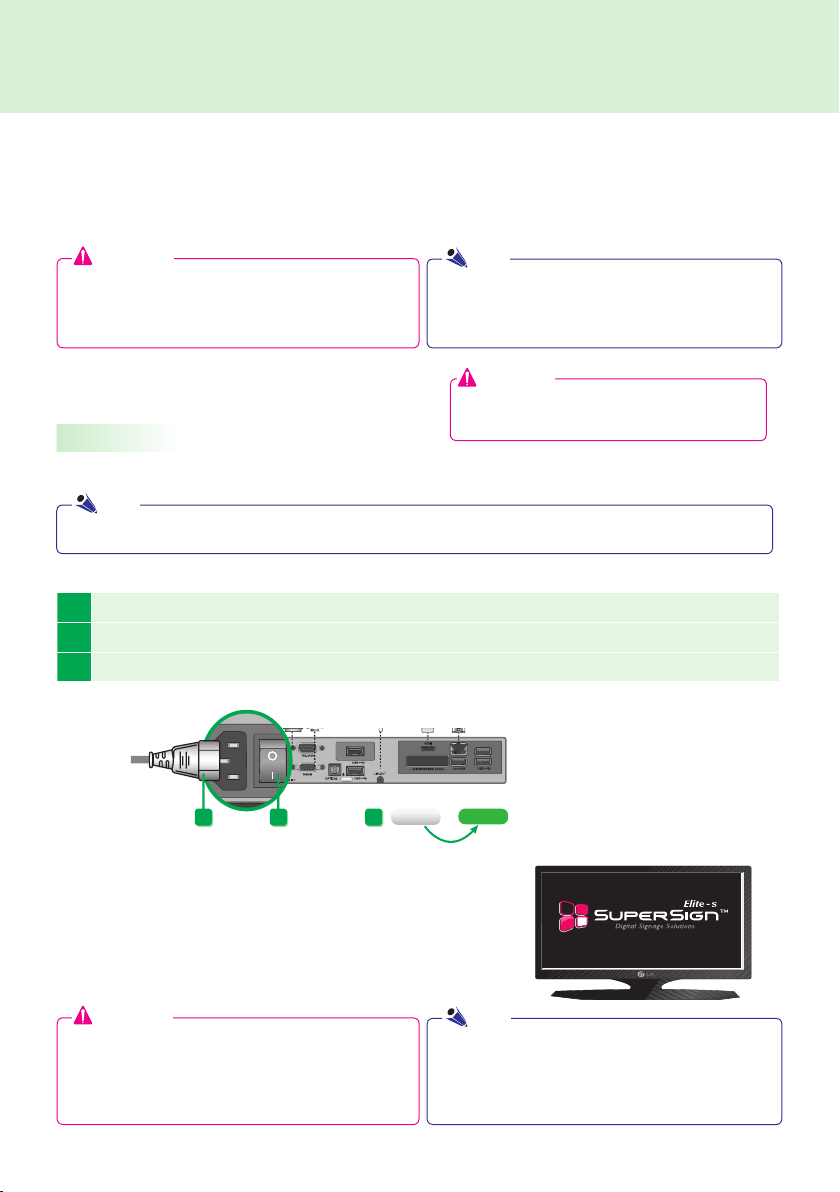
Turning NC1000 On





Attention


                 





Attention




Note

Note
NC1000
background


2 
3 
NC1000
background

5 

4 
NC1000
background

2 
1
Turning NC1000 On



                




Note
Attention
NC1000
background

4 
3 

NC1000
background
1 
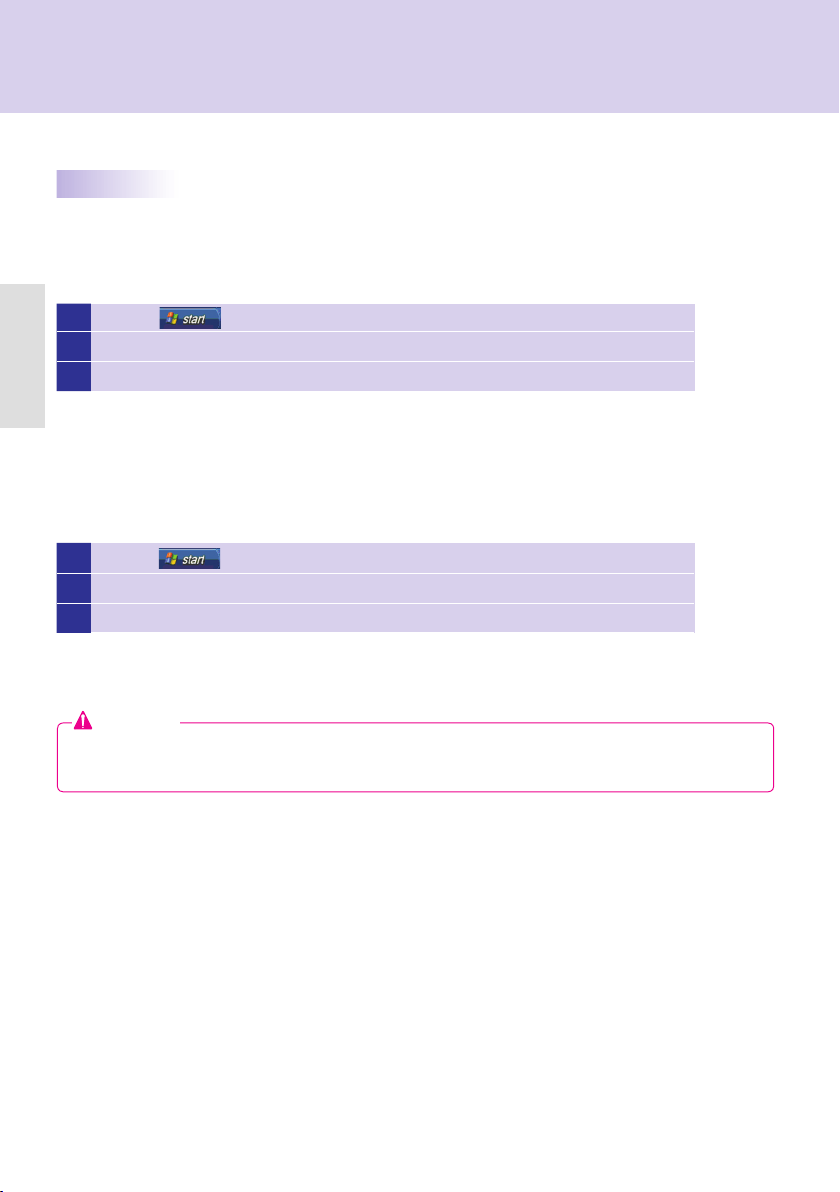
2  Start > Control Panel > Sounds and Audio Devices > Audio.
3 Play Sounds > NVIDIA High Defi nition Audio from the listOK
1 
2  Start > Control Panel > Sounds and Audio Devices > Audio.
3 Play Sounds > Realtek HD Audio output from the listOK

Connecting HDMI
Disconnecting HDMI


Attention



NC1000
background
3
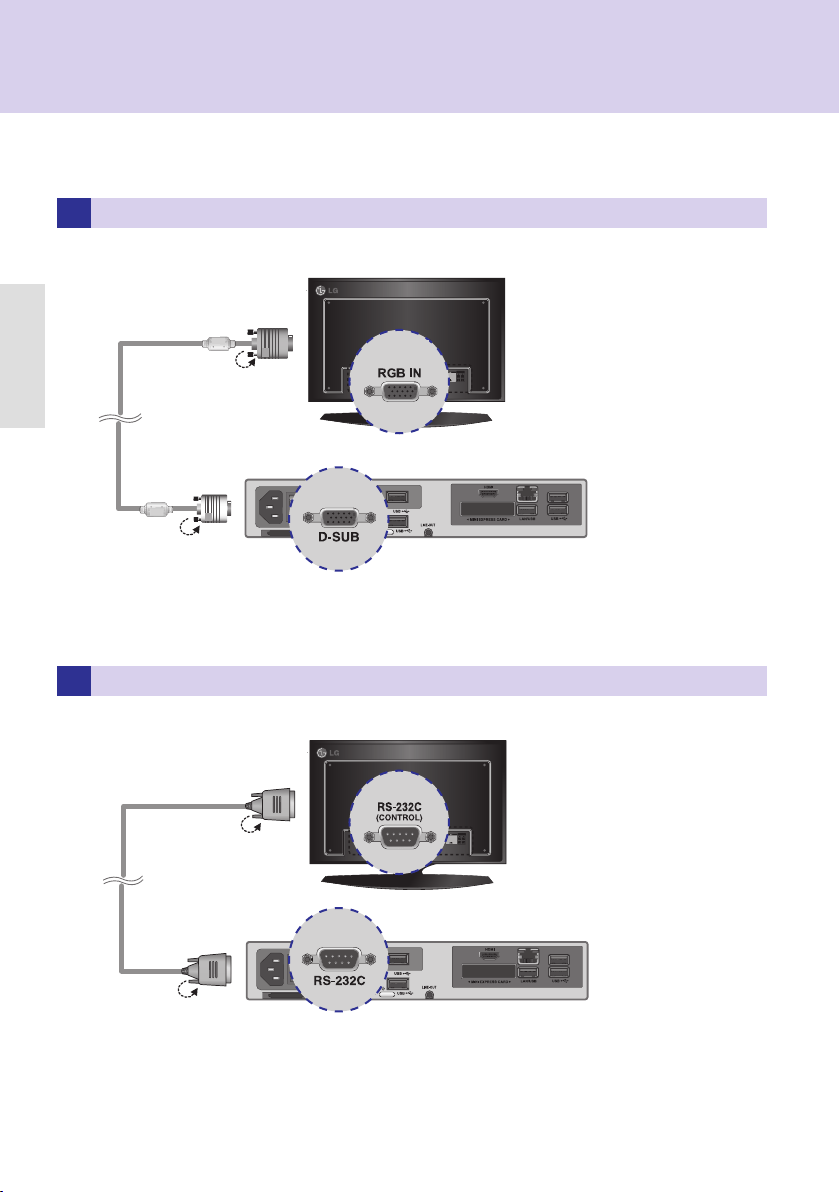
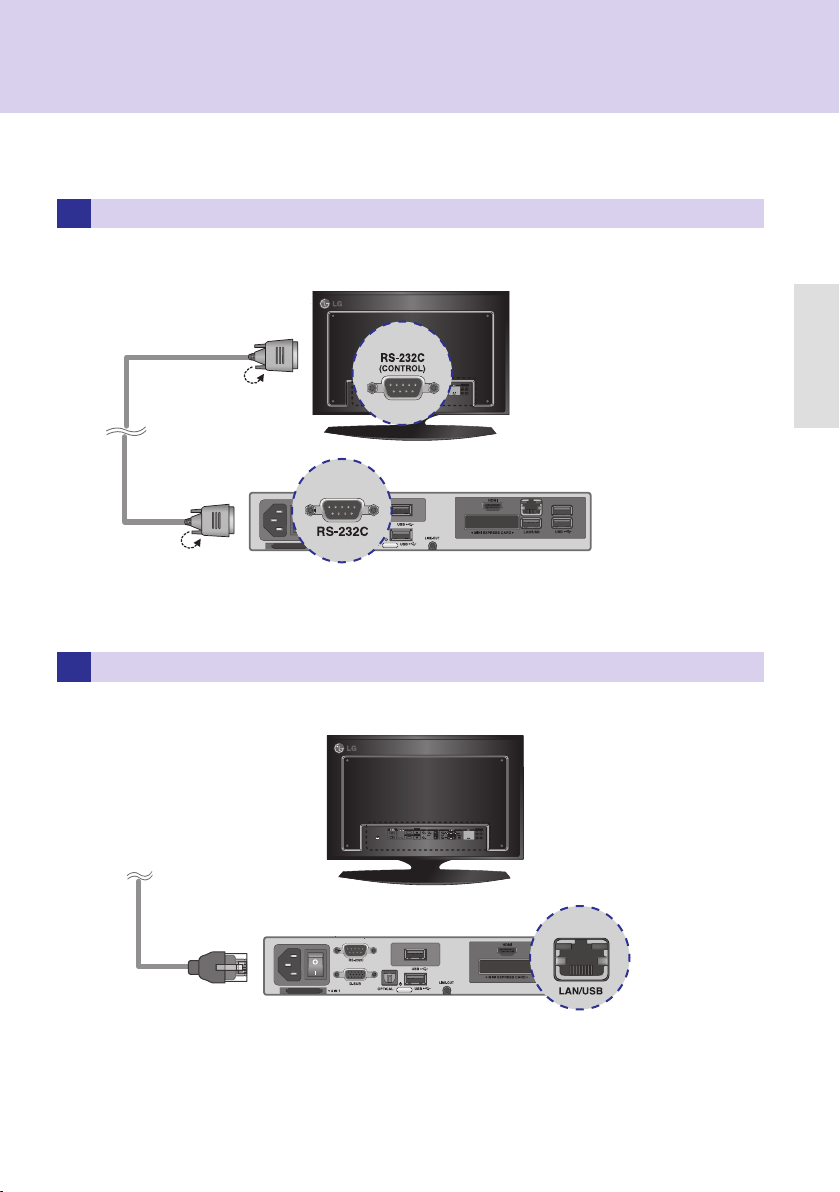
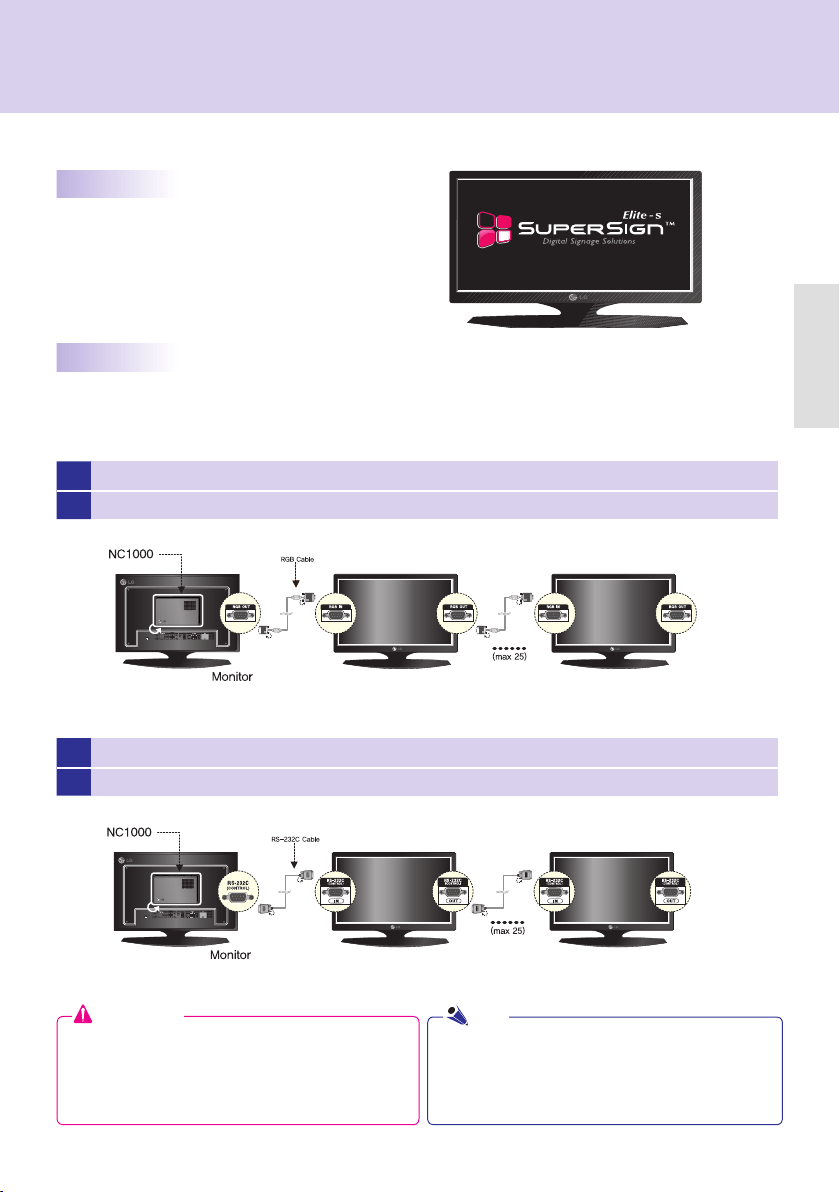
RS-232C OUTRS-232C INSET ID = 1
4
IN/OUT
1 D-SUB OUTD-SUB INSET ID = 1
2 D-SUBIN/OUT









Attention




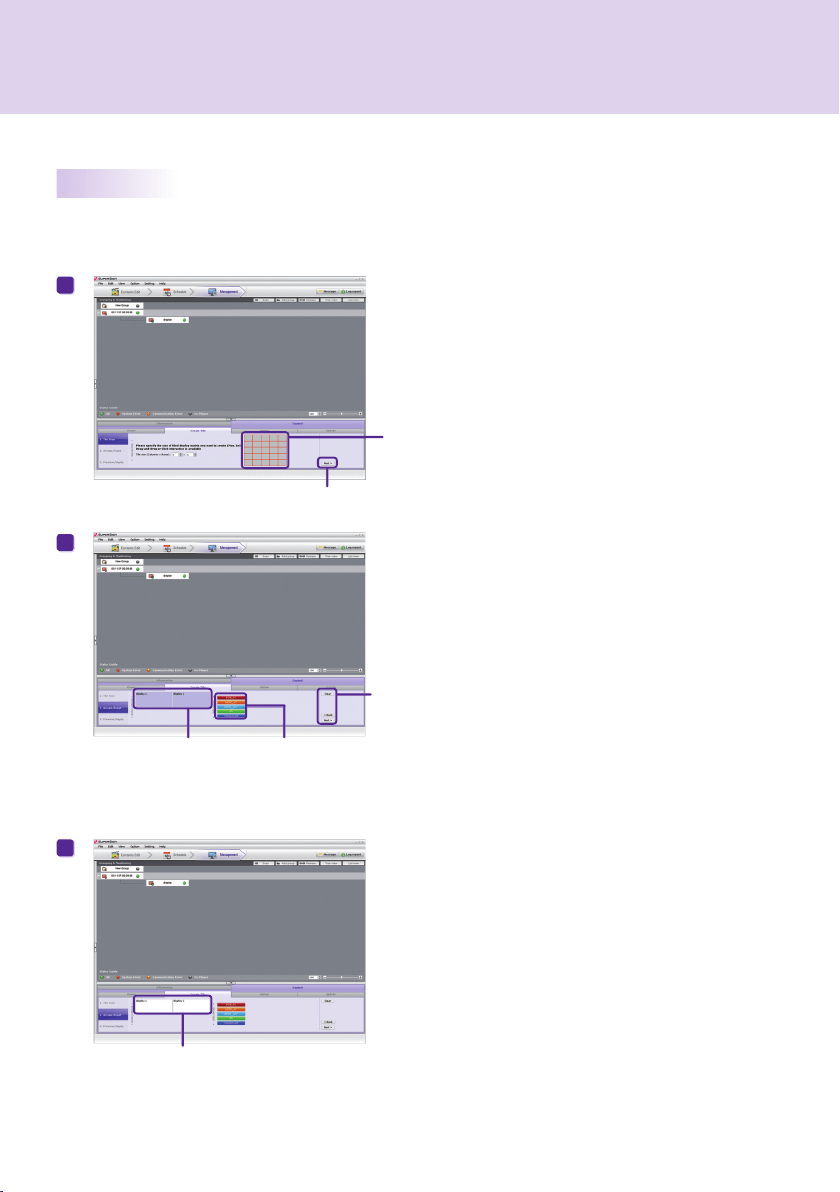
Creating Tile
Mode > Create Tile
Note
NC1000
background



99.8 mm (W) x 183.3 mm (H) x 28.4 mm (D) (only Set)

0.215 kg (only Set)

Intel ATOM Processor 330 1.6 GHz(Dual Core), FSB 533 MHz

Nvidia MCP7A-I ON
 




Windows Embedded Standard


 
 

 

N/A

  
   


  

 

 
 

 



N/A

Hi-Speed USB 2.0 port 480 Mbps rate (x3)

Realtek RTL8103E 10/100 Mbps Ethernet controller

Nvidia MCP7A-ION integrated Graphic chipset

N/A

Supported

N/A


N/A
Attention


NC2000

  


  

  
background




Attention



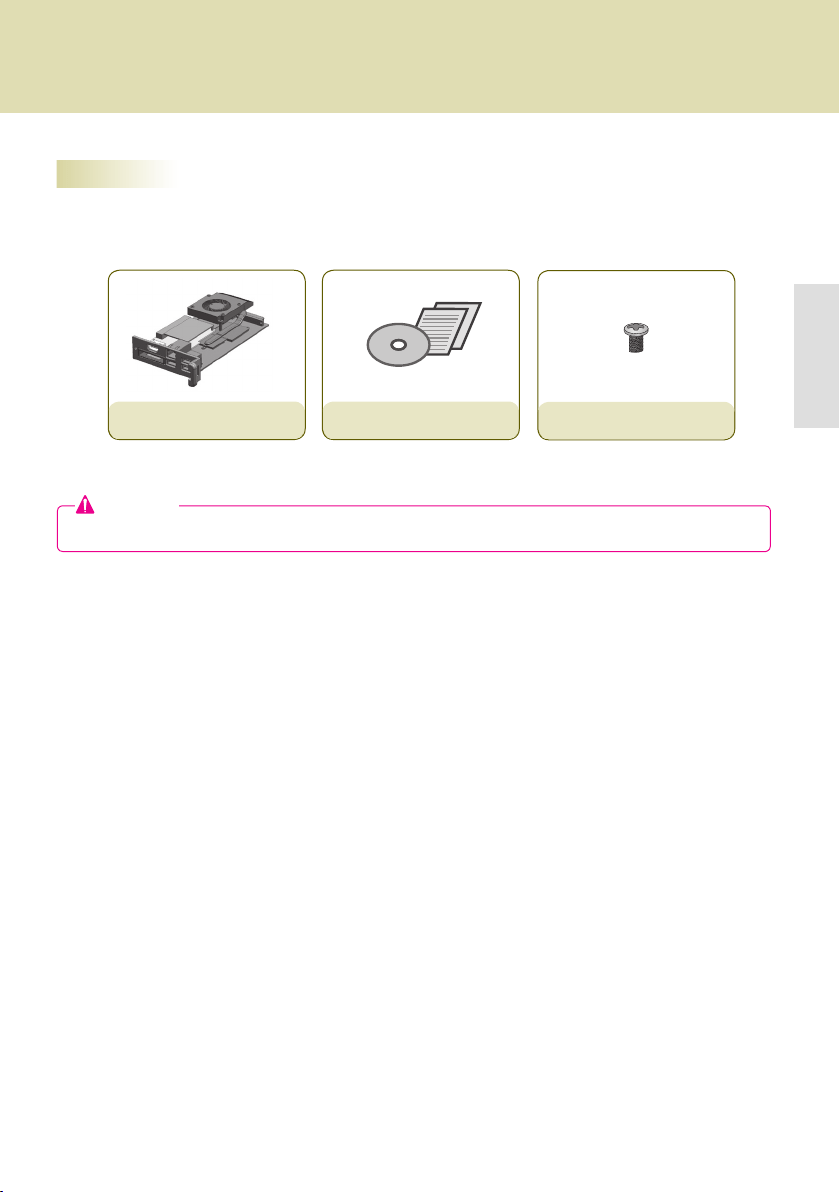
screw x 2
NC2000

background


  
 
 



 
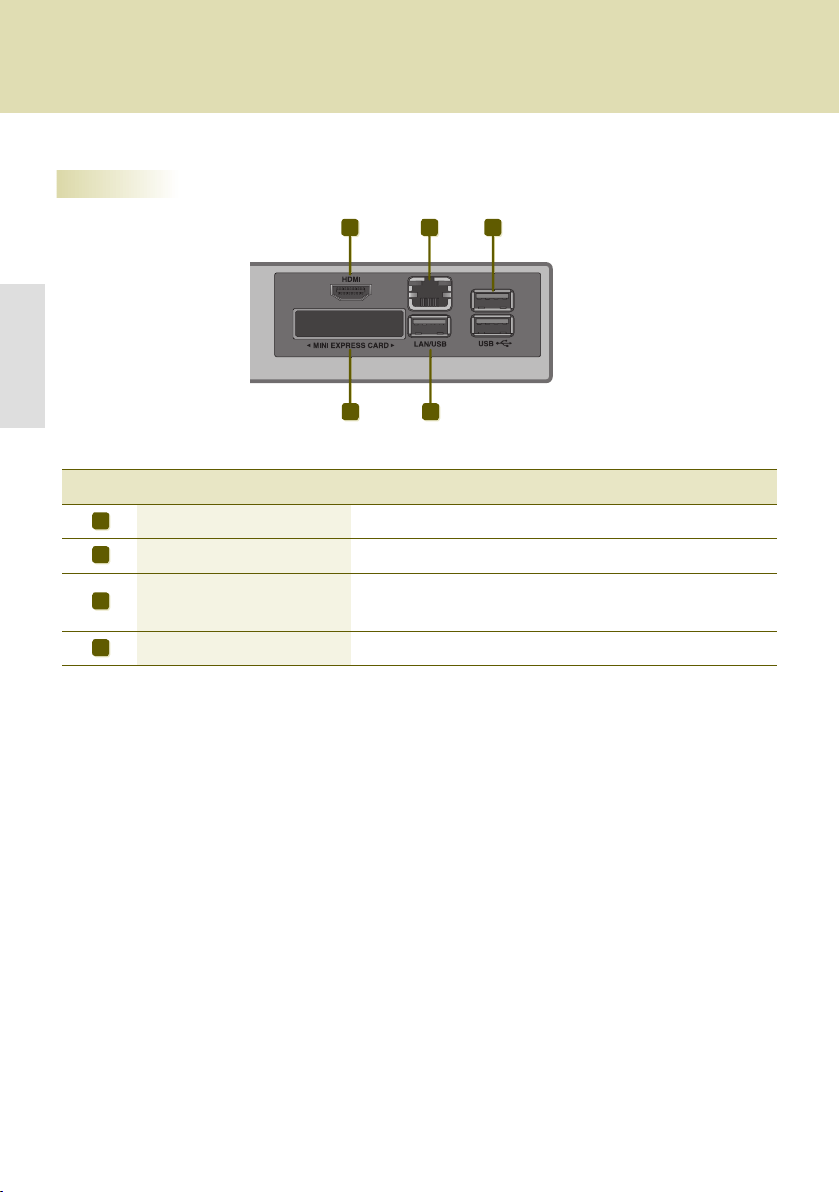
A B C
CD
A
B
C
D

NC2000
background

1 
2 
3 


Attention


NC2000


Note
background
20
Display
Software
Component
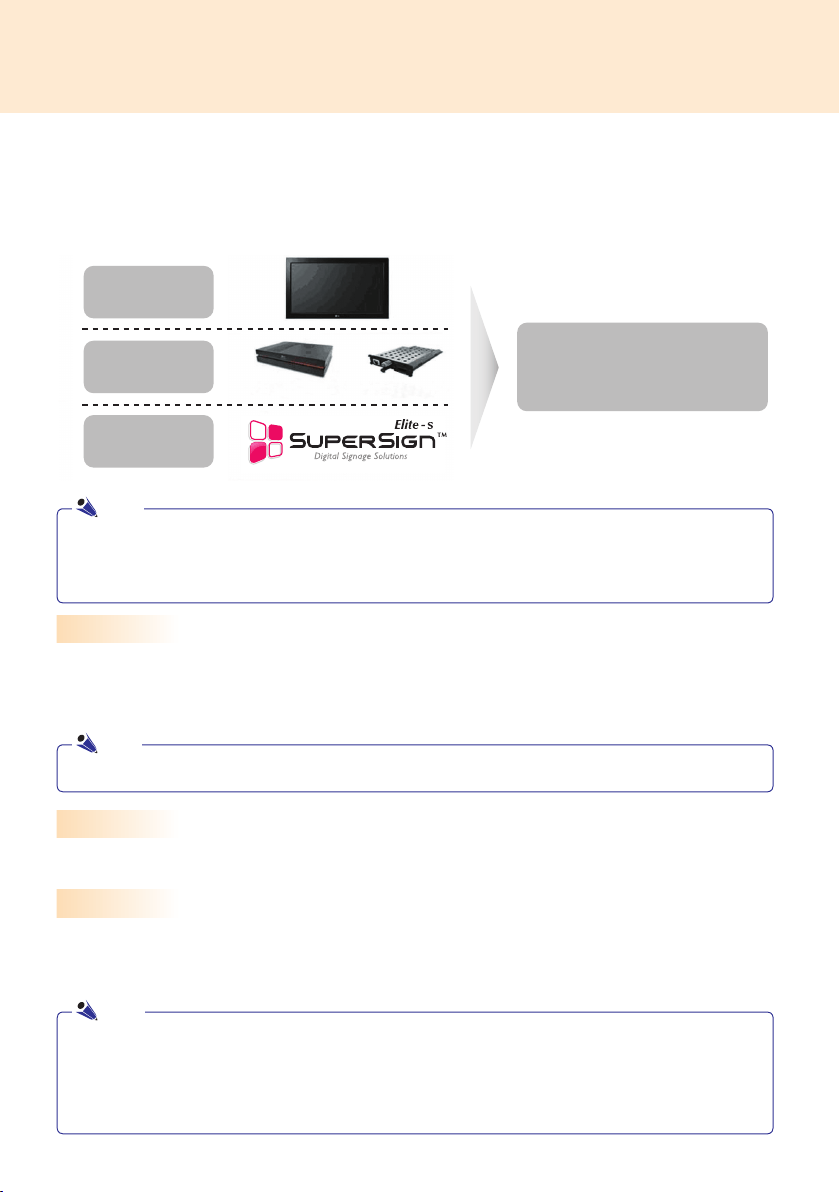
LG SuperSign Solution
Display
Media Player
Software
LG
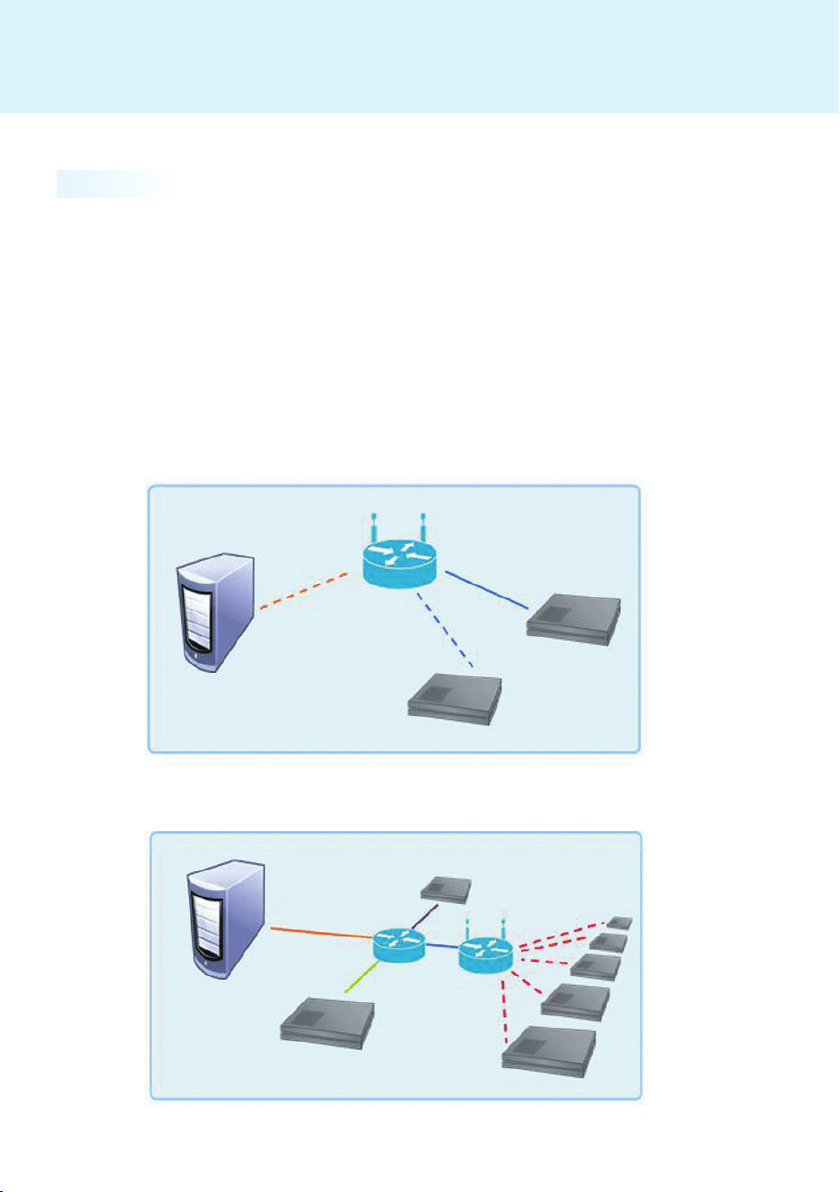
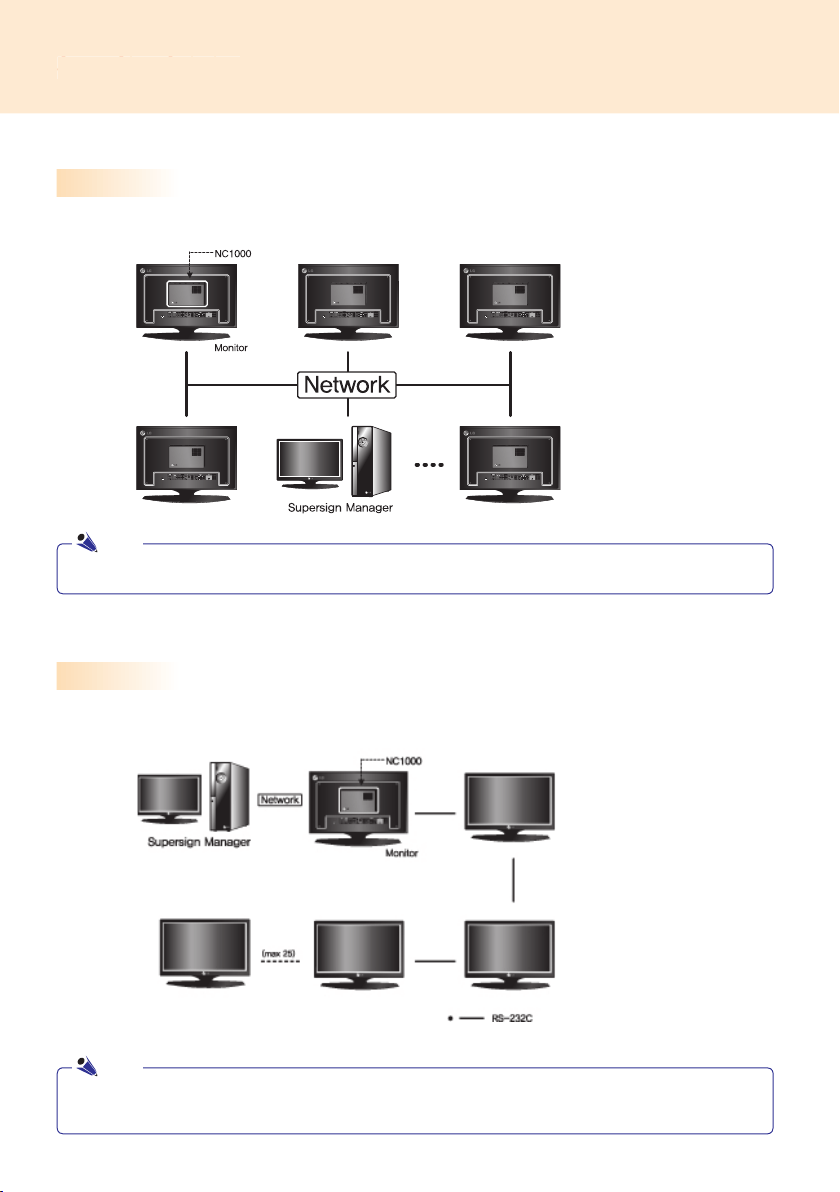
SuperSign is a digital signage solution developed exclusively by LG Electronics. The comprehensive LG
SuperSign solution offers displays, media player (hardware and software), and management programs.
A monitor (or monitors) is connected to the media player and used to display advertising content. LG’s SuperSign
Solution supports most LCD monitors supporting LG RS-232C protocols. The brightness, resolution, sound, and
other features of an LG RS-232C protocols-enabled monitor can be controlled by SuperSign Manager software.
Media Player
SuperSign Solution's Media Player includes the NC1000/NC2000 hardware as well as its software.
The SuperSign Solution provides SuperSign Manager software, an all-in-one management program that is
used to control the display and the media player, as well as the means to create and distribute media.
What is SuperSign?
SuperSign Solution
More information on SuperSign Manager is available in the SuperSign Manager section of this manual.
The contents of SuperSign software are copyrighted by LG Electronic, Inc. and they may not be edited,
reproduced or transmitted in any form or by any means, electronic or mechanical, including photocopying,
recording, downloading, digital transmission, imaging, or any other information storage and retrieval
system, without the prior written permission of LG Electronic, Inc.
Digital Signage Solution is a network-based digital signage communication program. These new advertising
media can be used in various places such as commercial and public facilities, airports, and schools,
depending on the ad content and location’s conditions.
Note
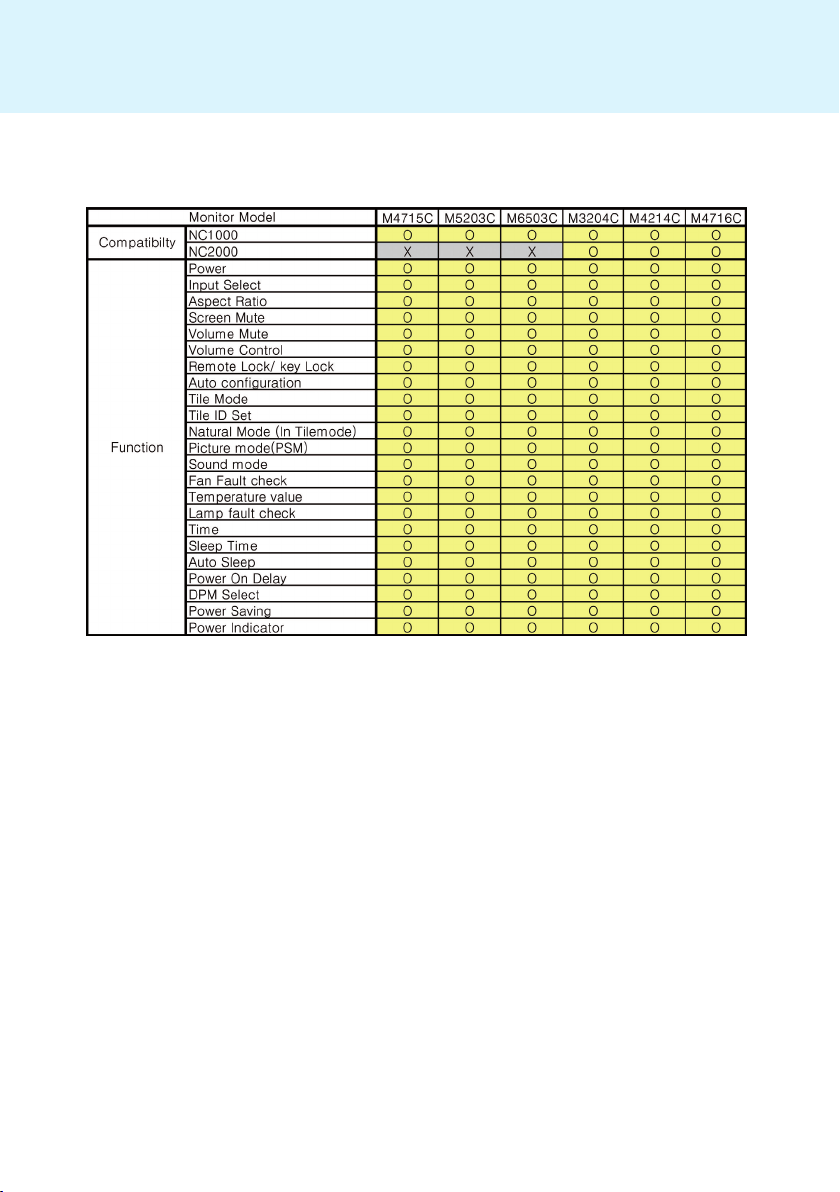
● Display types and their controllable range are listed in the Appendix of this manual.
Note
Note
background




SET ID = 1



Note
Note


background
1 
2 
3 











Attention
Attention





  


Files Supported by SuperSign

ESC

Name and Functions of Each Part
Note
Note
Note
Power is automatically supplied to
NC2000 when the monitor is turned on.
Attention
background

2
Setup
"0000"
1




3 OK
Password
Note


background




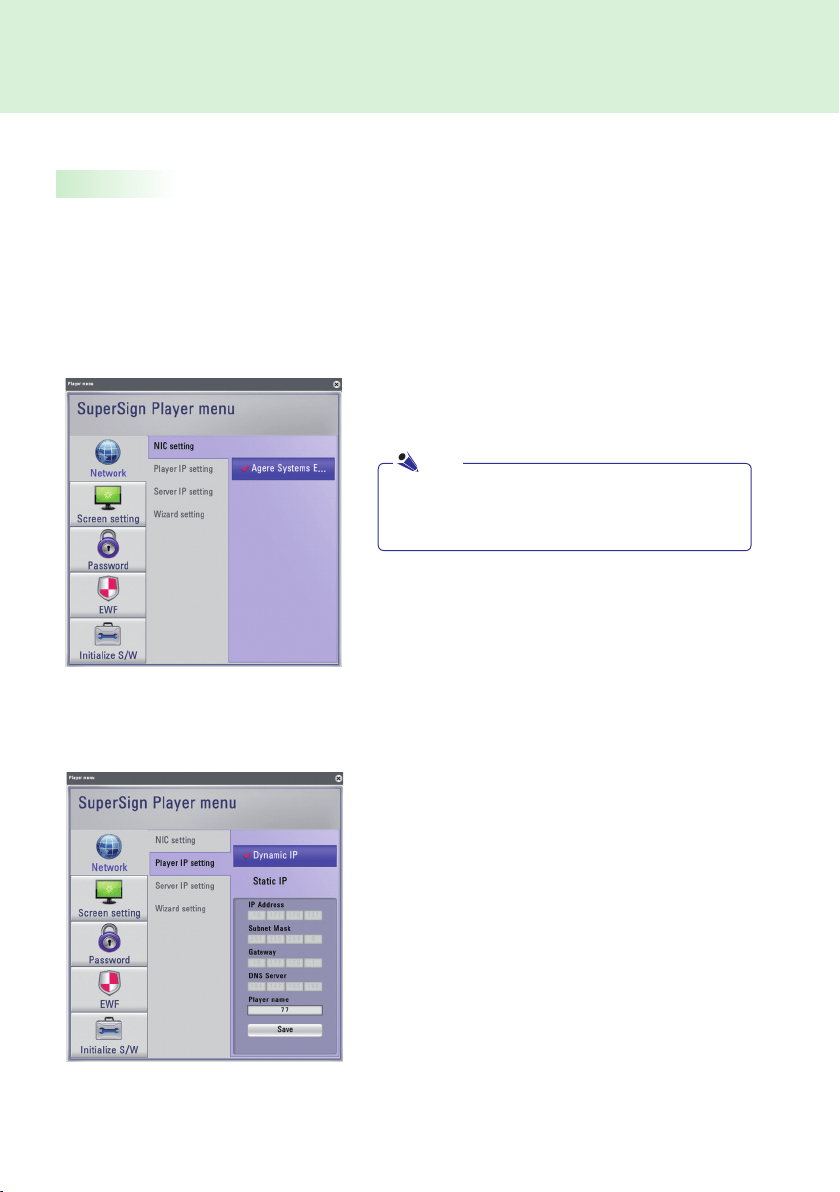
NIC Setting





Player IP Setting
Player IP settingDynamic IP
Dynamic IP

Static IP

Player name


Save
Note
background

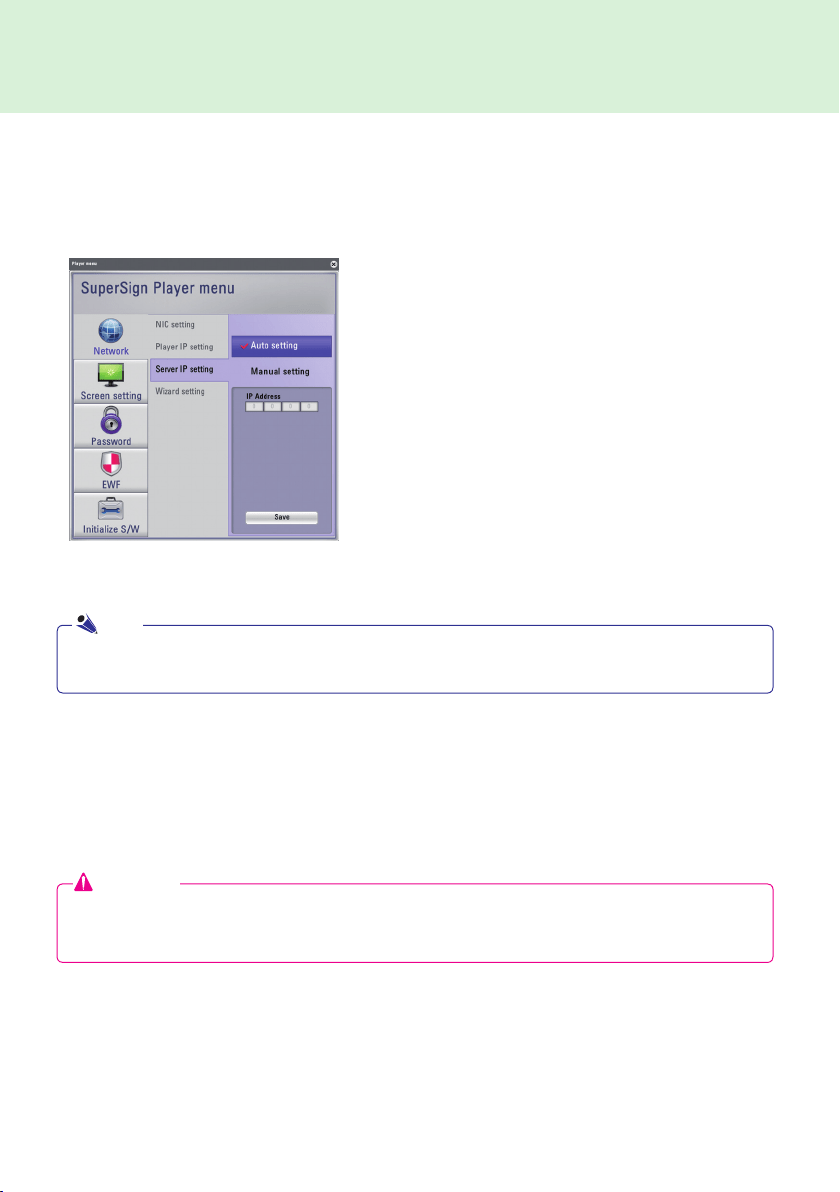
Server IP setting
Server IP
Auto Setting
Wizard Setting
SuperSign Wizard setting

Auto Setting

Manual Setting

Save
Attention
Wizard setting



Note
background
1



Wizard
                 



Start > Control Panel
Network Connections
Local Area Connection
Properties
Internet Protocol (TCP/IP)Properties


      SuperSign Player Settings > Network Settings  

  LAN      

  WAN      

Note
background
3


2




4


Dynamic IP

Static IP

background

6


Op-
tion > Start
Start search
5



Auto Setting

Manual Setting

Attention



background


Landscape
Landscape
Portrait

background


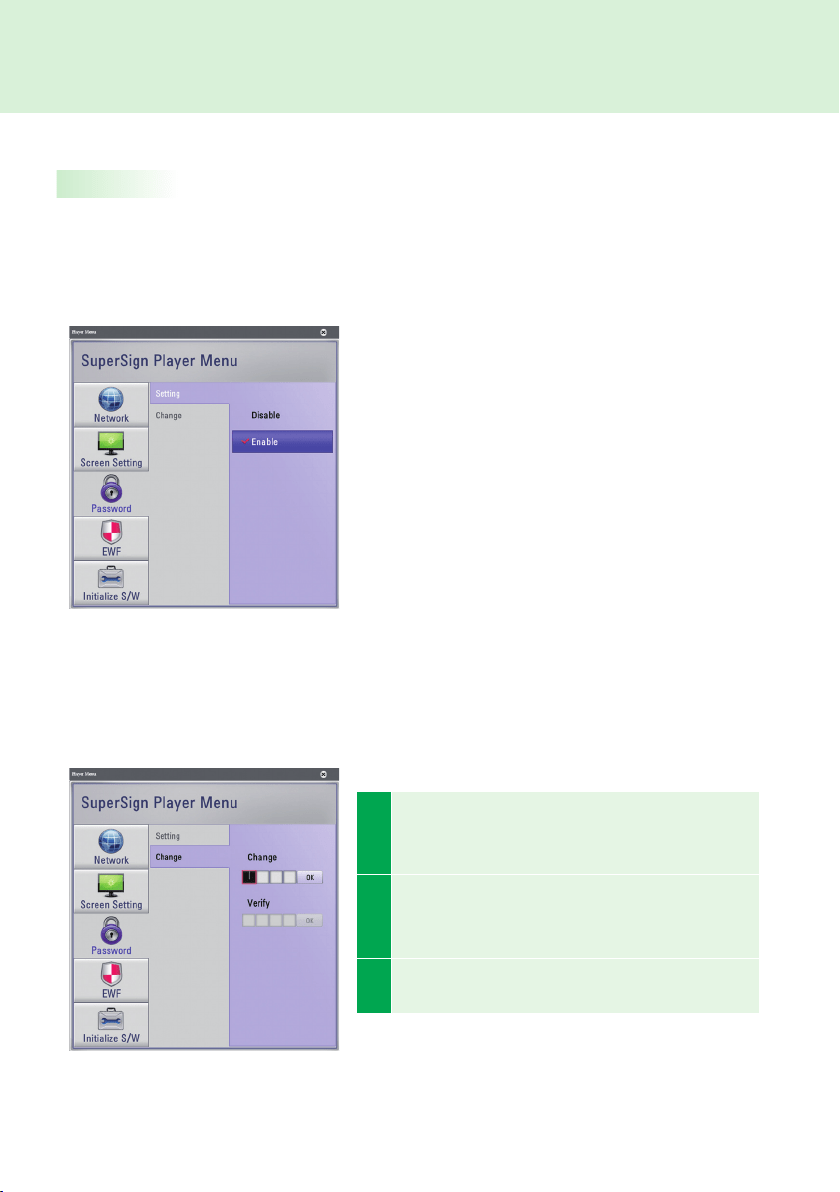
SuperSign Player Menus
Settings
SuperSign Player Menu
Change
SuperSign Player Menu
SuperSign Player Menu
Enable
SuperSign Player Menu
DisableSuperSign
Player Menu
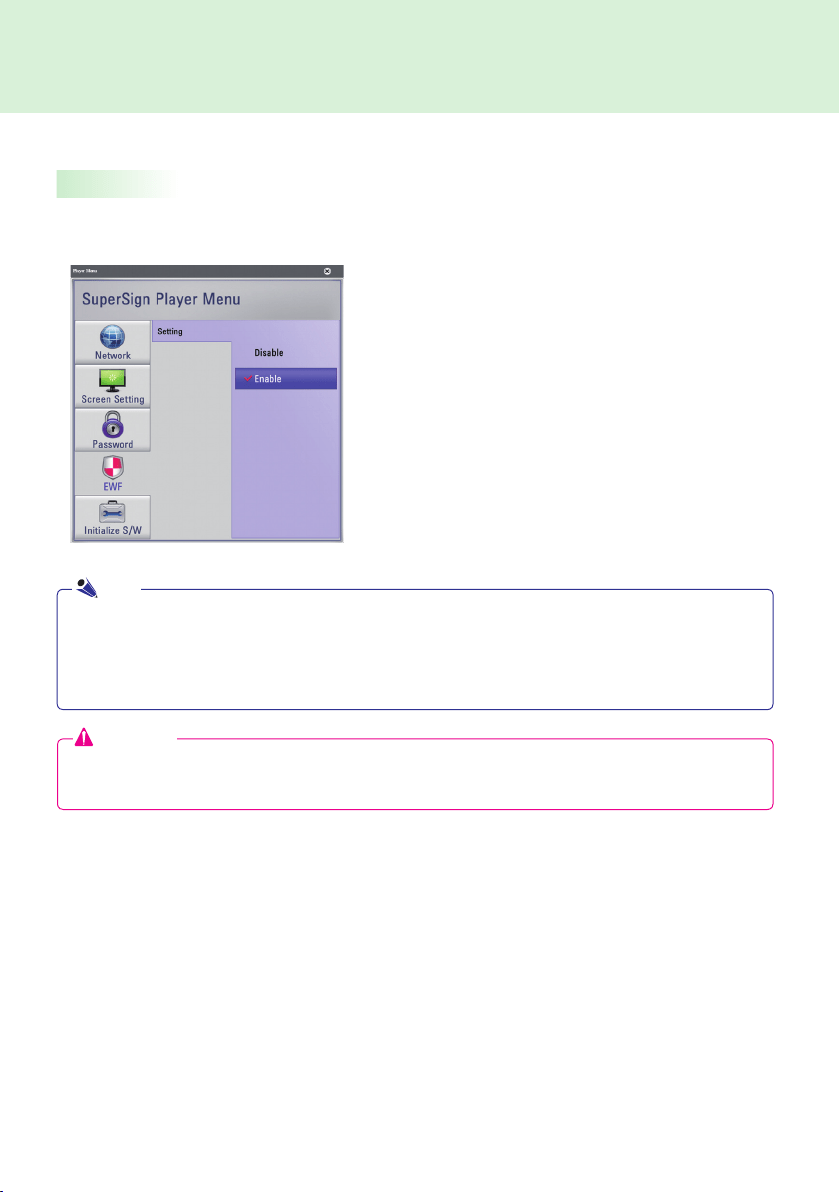
1
Change 
OK
Verify
2
  Verify      
Change
OK
3

"Your password has been changed."
background


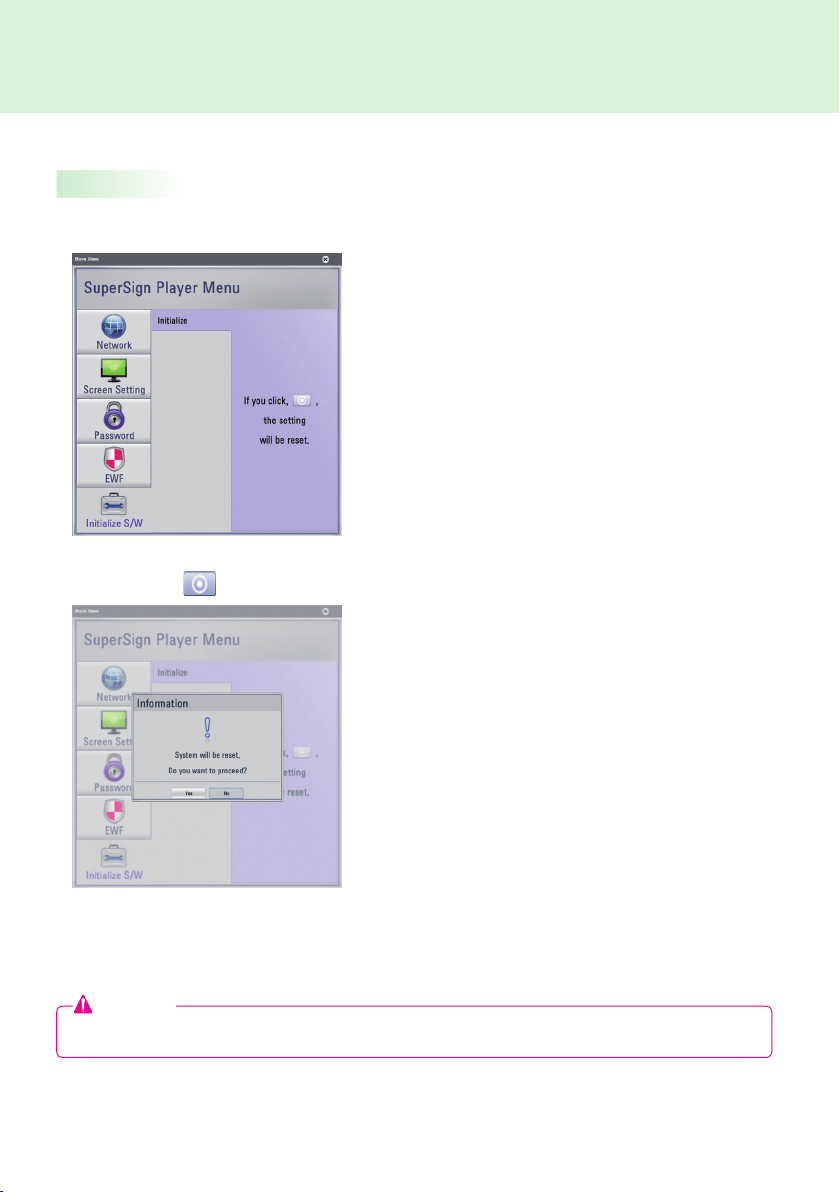
EWFEnhanced Write Filter

EWF       

EWF


EWF
 Enable      

EWF, 
Attention
EWF

EWF
<SuperSign Player Menu>EWF
EWF
IPEWF
Note
background


Yes


Initialize S/W
Attention

background
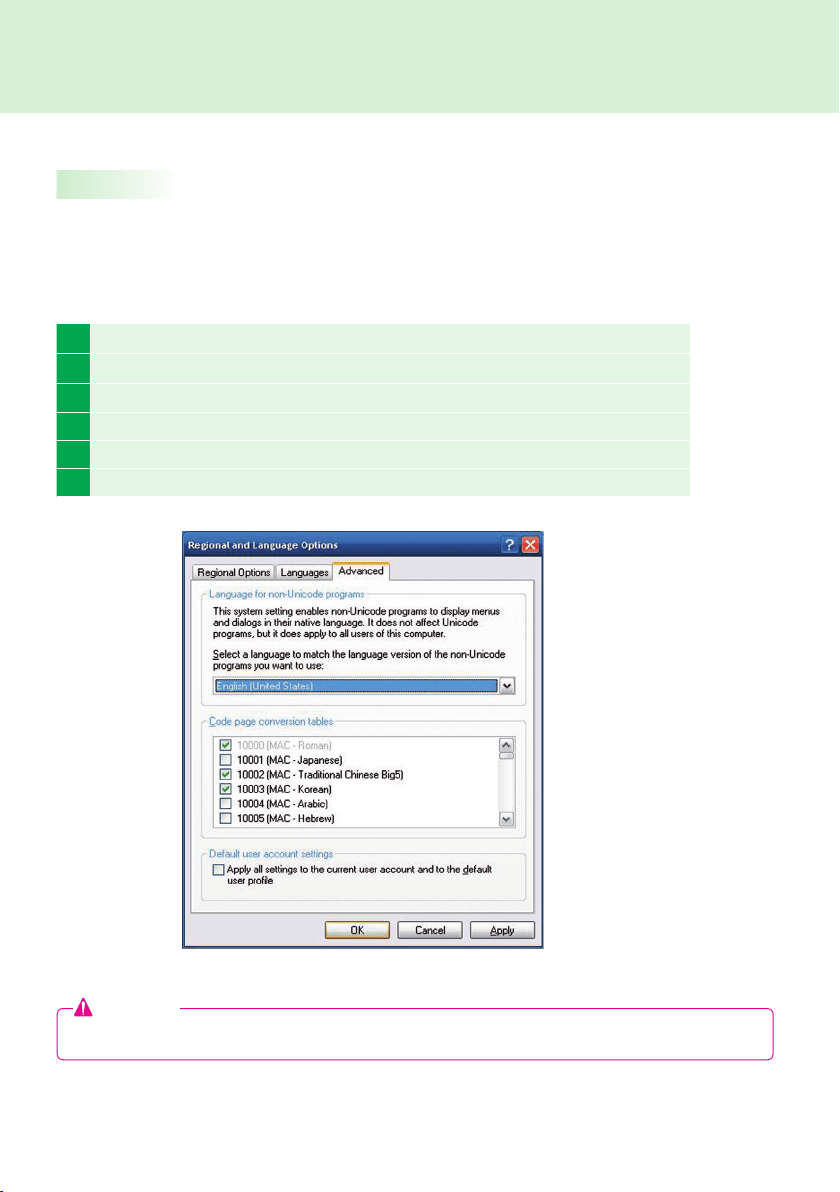
1 EWF
2 Start > Setting > Control Panel > Regional and Language Options
3 
4 
5 EWF
6 



          Regional and Language Options   

To Change the Language:
Attention

background


Play
Schedule Signage 
Signage

Attention



PowerDVD SEPowerDVD

Transition effects


Edit ContentsManagement

Note
background

 


         




ESC

background
  
 














 









 
 




 






background
37
Contents Edit
You can create content for the SuperSign Player with a variety of media fi les. It supports numerous media
les, including video, audio, documents, and Flash fi les, and applies an easy drag and drop feature to
facilitate content creation.
Schedule Management
You can manage the schedules of your content to be played in the SuperSign Player. Schedules can be
assigned by period as well as time.
SuperSign Player Management
You can register and manage more than one SuperSign Player on the same network. You can manage the
registered SuperSign Players by controlling their power on/off, multiple monitor connection, and updates.
SuperSign Manager
Product Information
What is SuperSign Manager ?
SuperSign Manager is a network-based comprehensive management program that creates and manages digital
media, distributes content, and supports video playback and remote control.
background
 
 
 
 
 
 
 
 
 
 
 
 
 
 



SuperSign Manager PC Recommended Specifications
SuperSign Manager PC Minimum Requirements
         


Note

background





SuperSign Manager

SupersignMgr_setup.exeSuperSignSuperSign_
SoftwareApplicationSuperSign_Manager
Note

background
4
Next

1 Run
2 Run
3 OK




background
5

install
Next
6
Details

7
     
Agree


8 Complete
background

Finish

DONE



                

Note

background

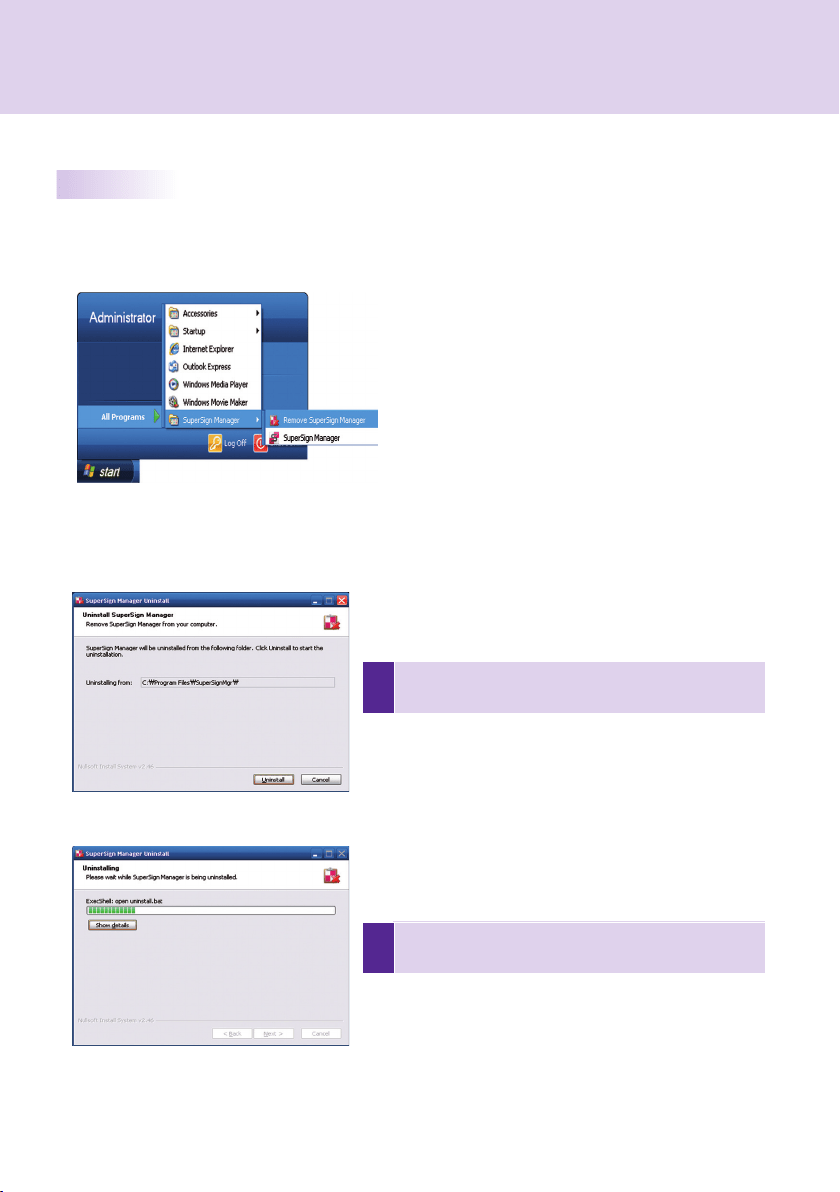
Start > Program > SuperSign Manager > Remove SuperSign Manager

1
Remove    

2
Details


background
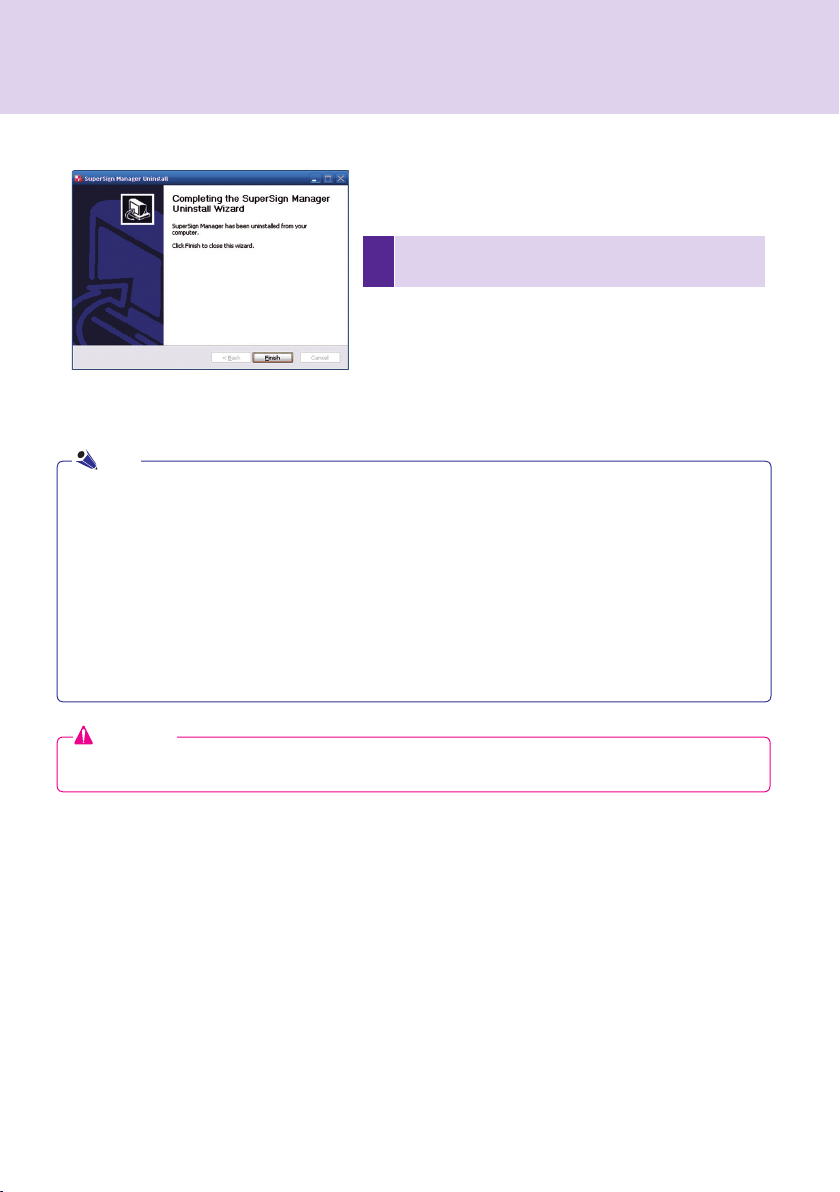
     
Finish
AddRemove Programs

    Start > Settings > Control Panel > Add  Remove Programs 
Remove

Start > Settings > Control Panel > Programs  Features > Uninstall 
change a programRemove
Attention

Note

background
1


2

         
         OK
Cancel


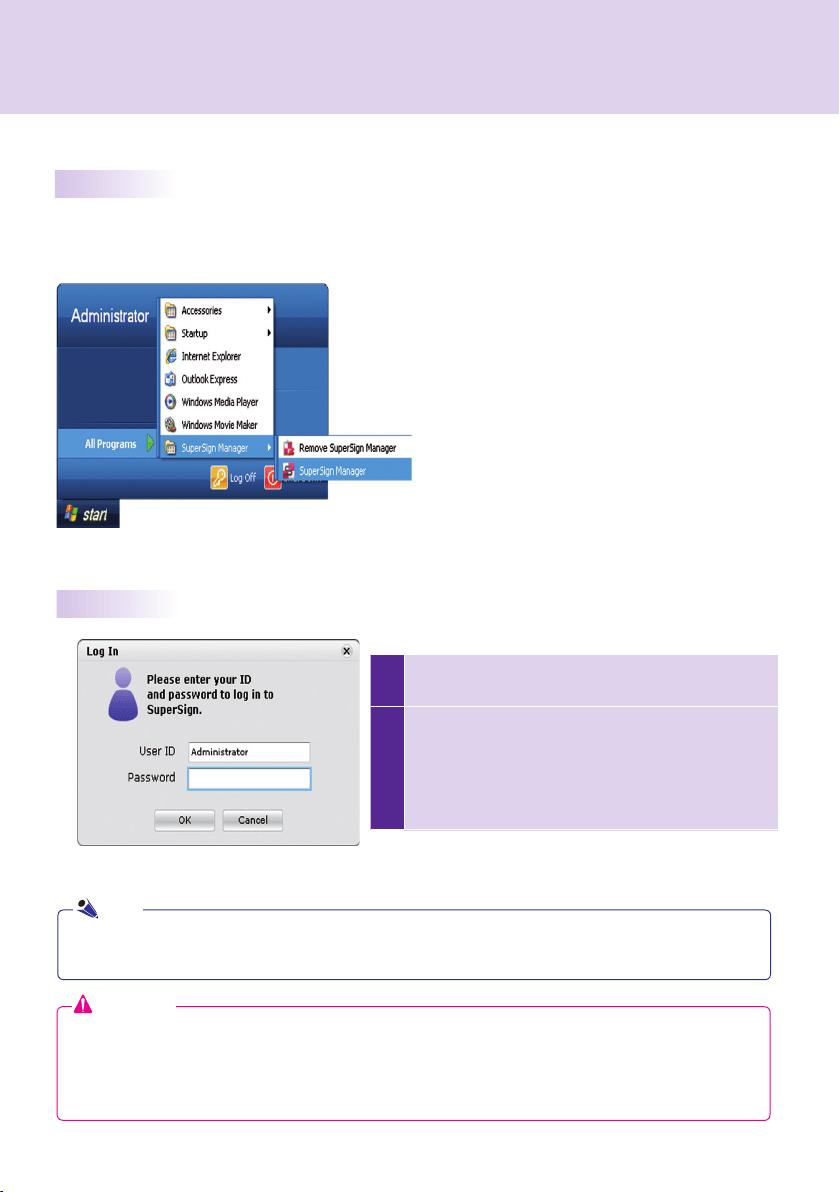
Start > Programs > SuperSign Manager > SuperSign Manager


"Administrator"



"1234567890init" 

Attention
Note

background
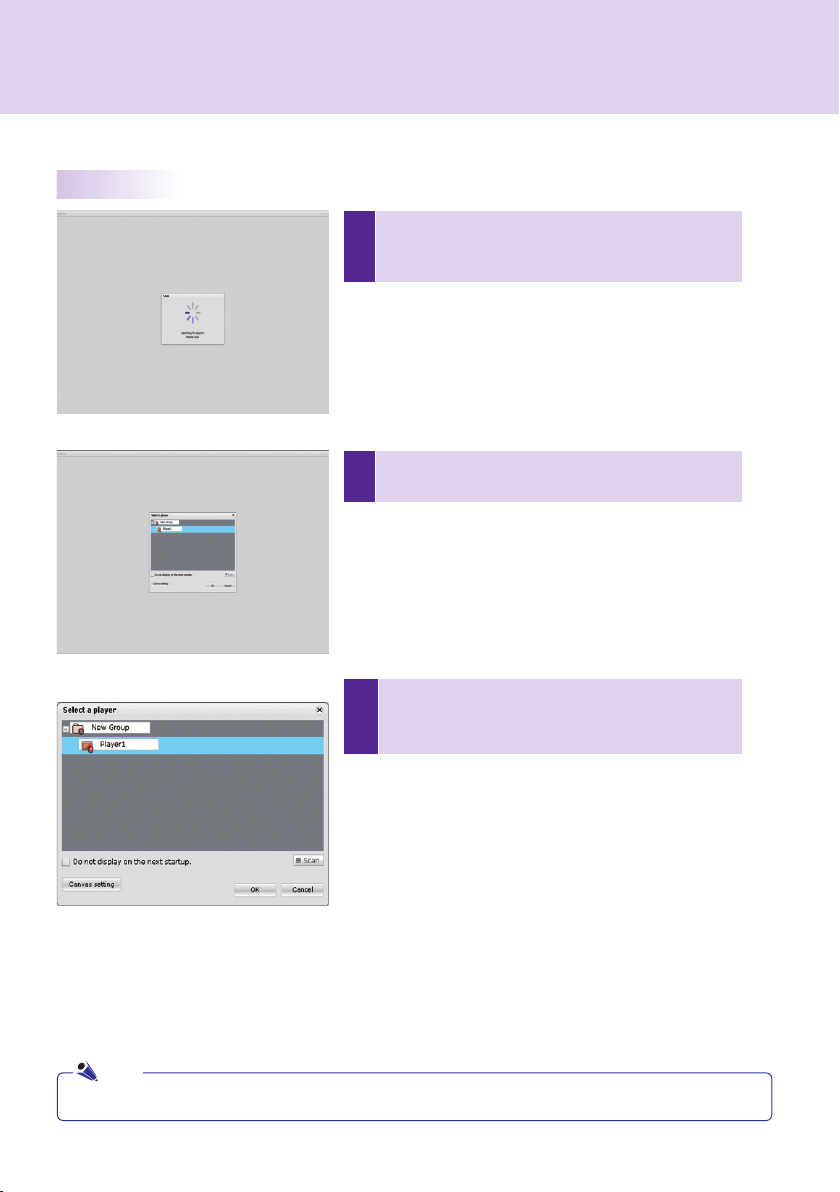
1



2




3



Scan

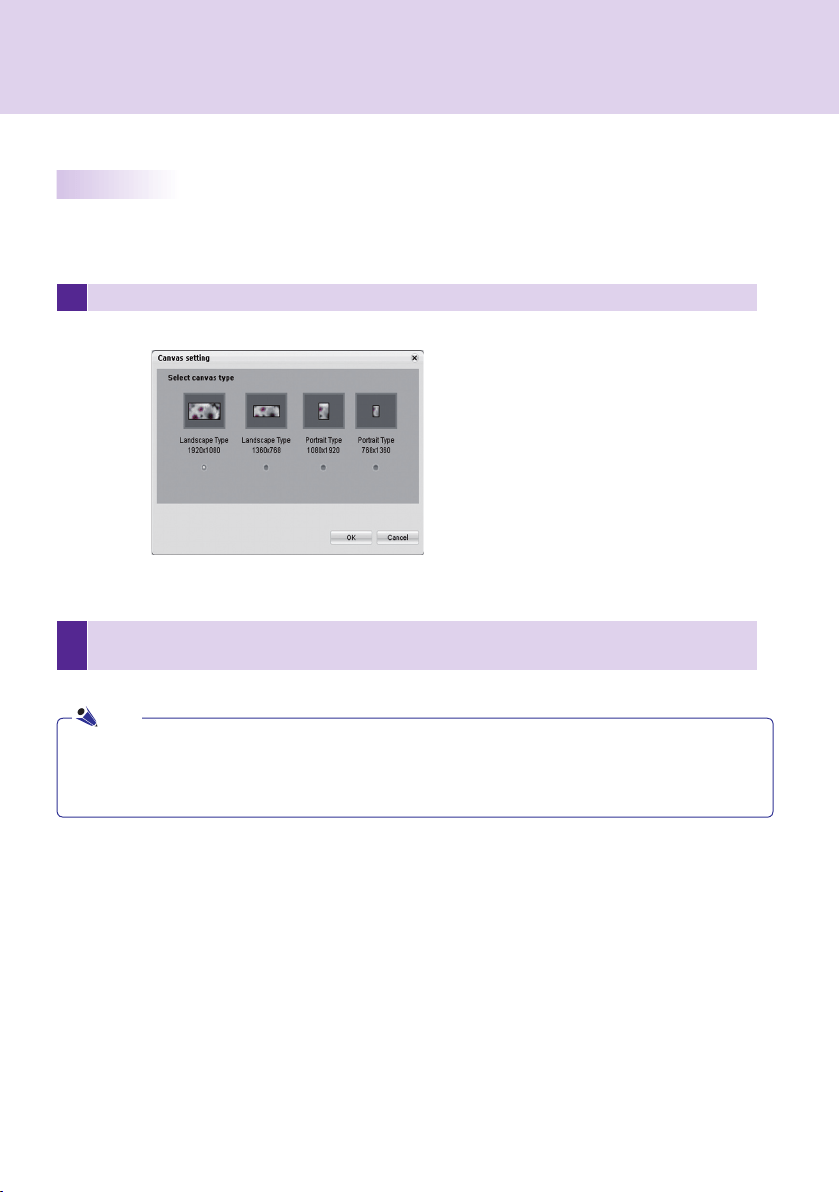
Canvas Setting

OK
OK

Cancel

Do not display on the next startup.

Note

background
2

OK
1 Canvas Setting





Note

background
1
OK

2 OK




Note

background
  
 






 Hide


background
  
 

        















     



              






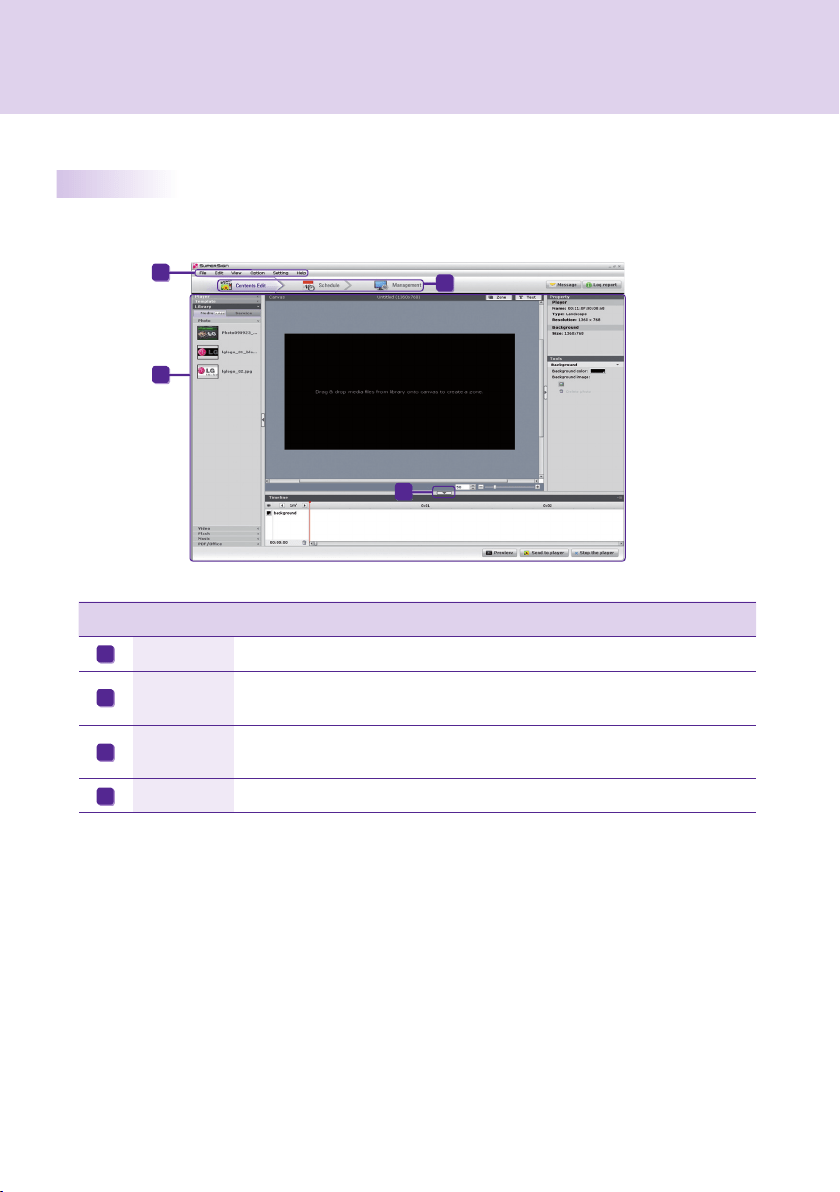
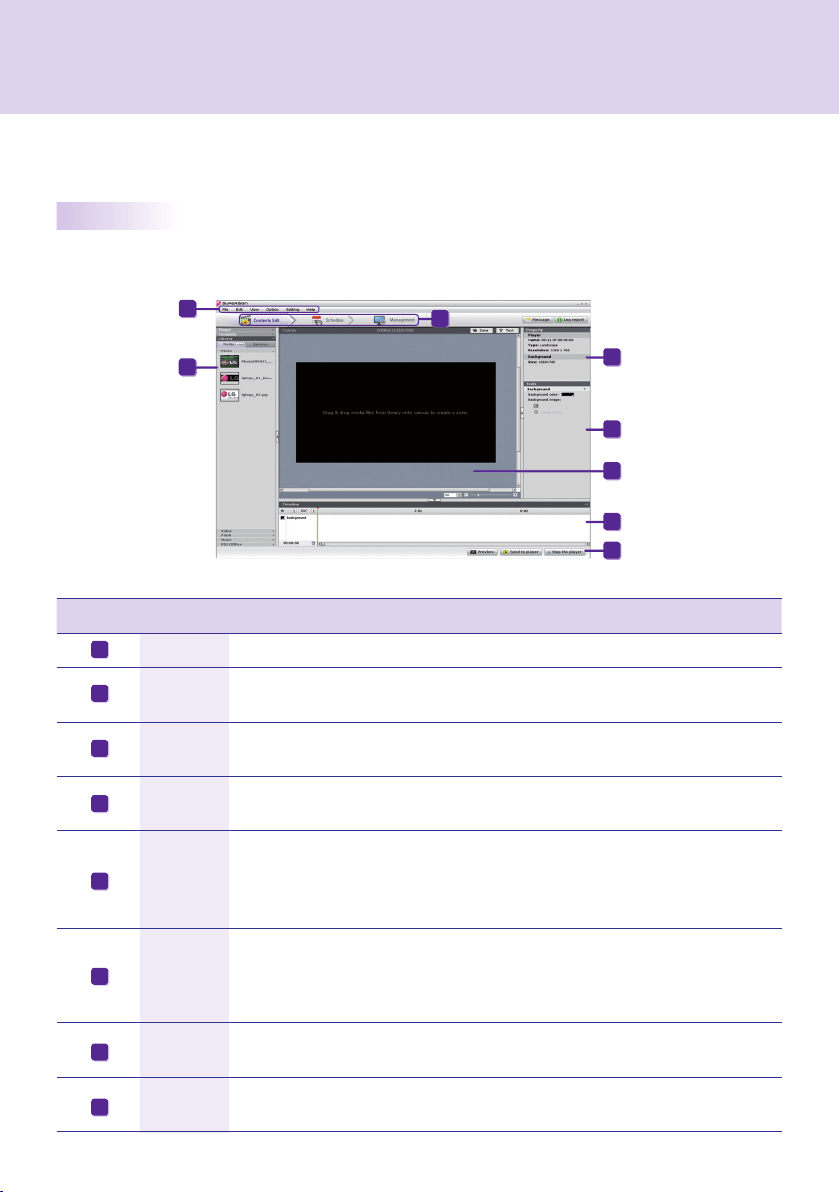
Contents Edit



background



                 




 


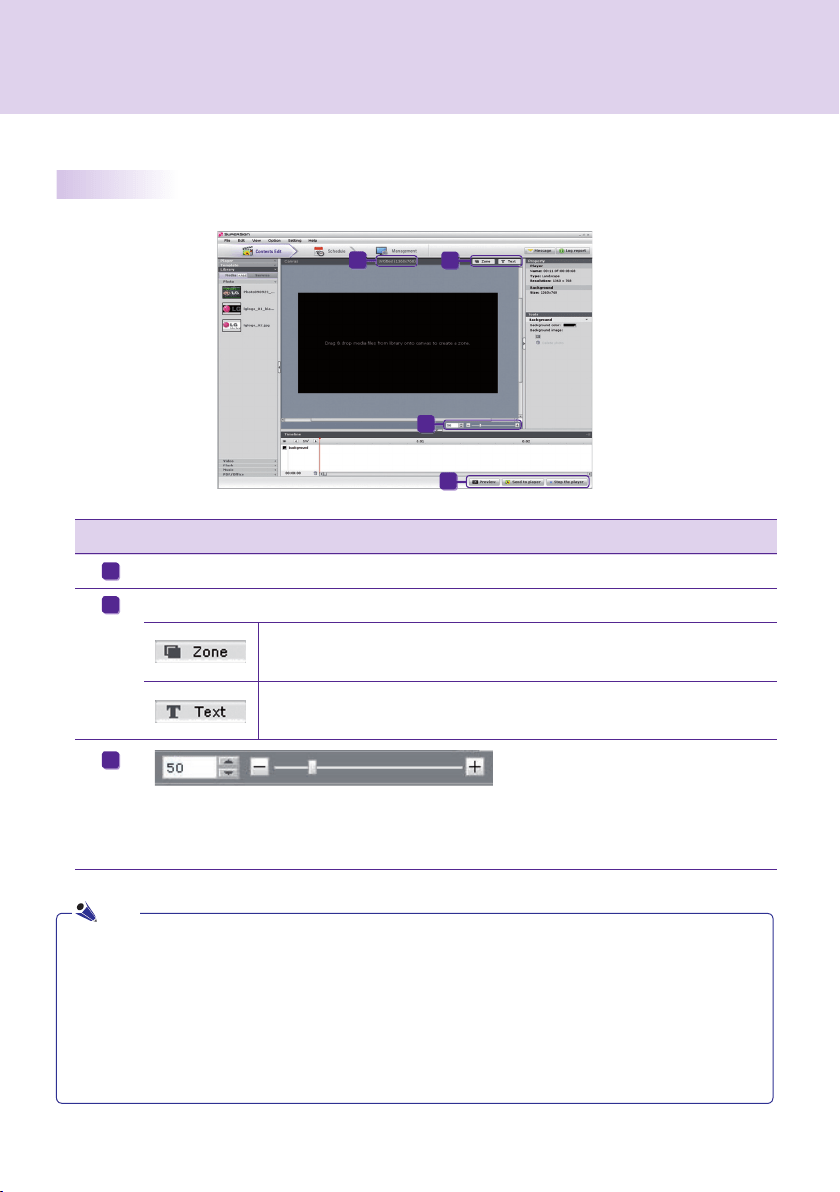
Zone

Text




Note

background

 

          


    





Attention
Note

background
1 Template > Layout
2 
3 
4 


Attention


background

1 Template
2


3

shopping
4 

Attention


background


Library


Codec Package Installation

Note

background
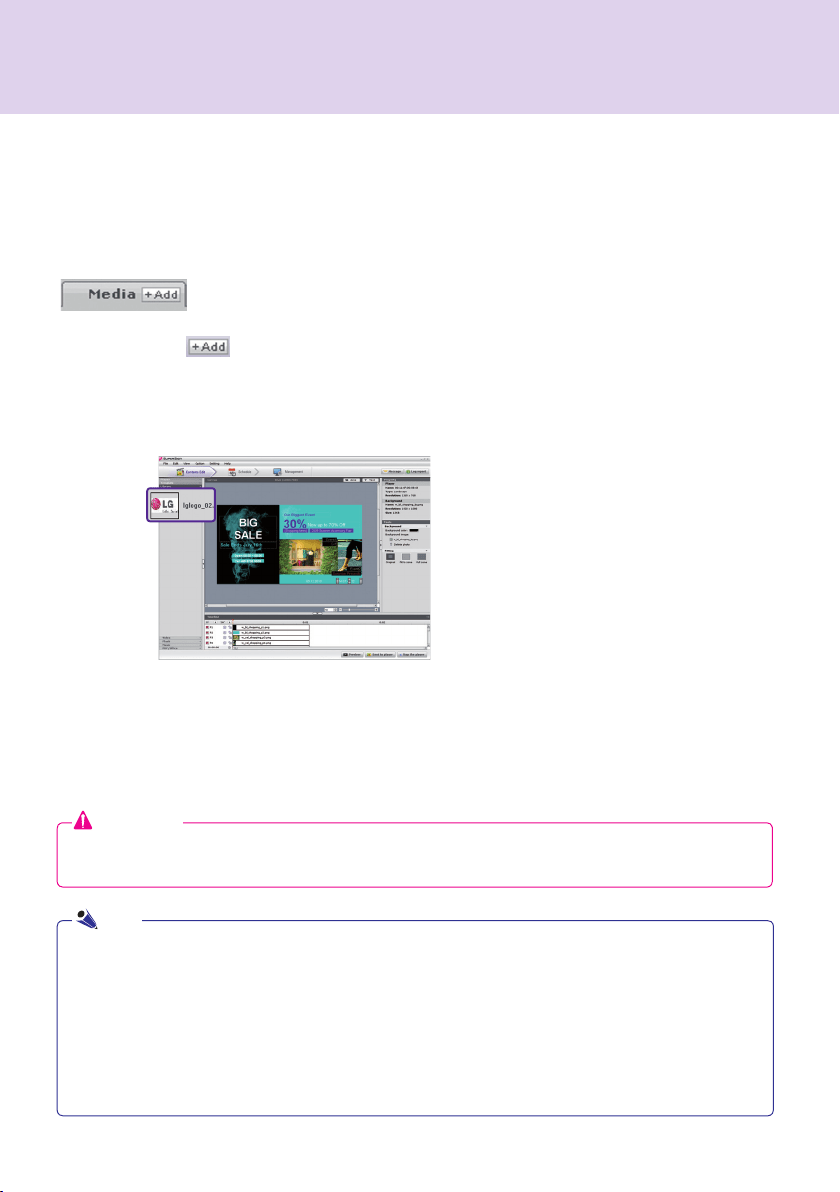
Add a Media File


Select FilesOpen



             


Options > Contents EditLocal media library
folder information
Options > Contents Edit
Start Sync
Attention



Note

background
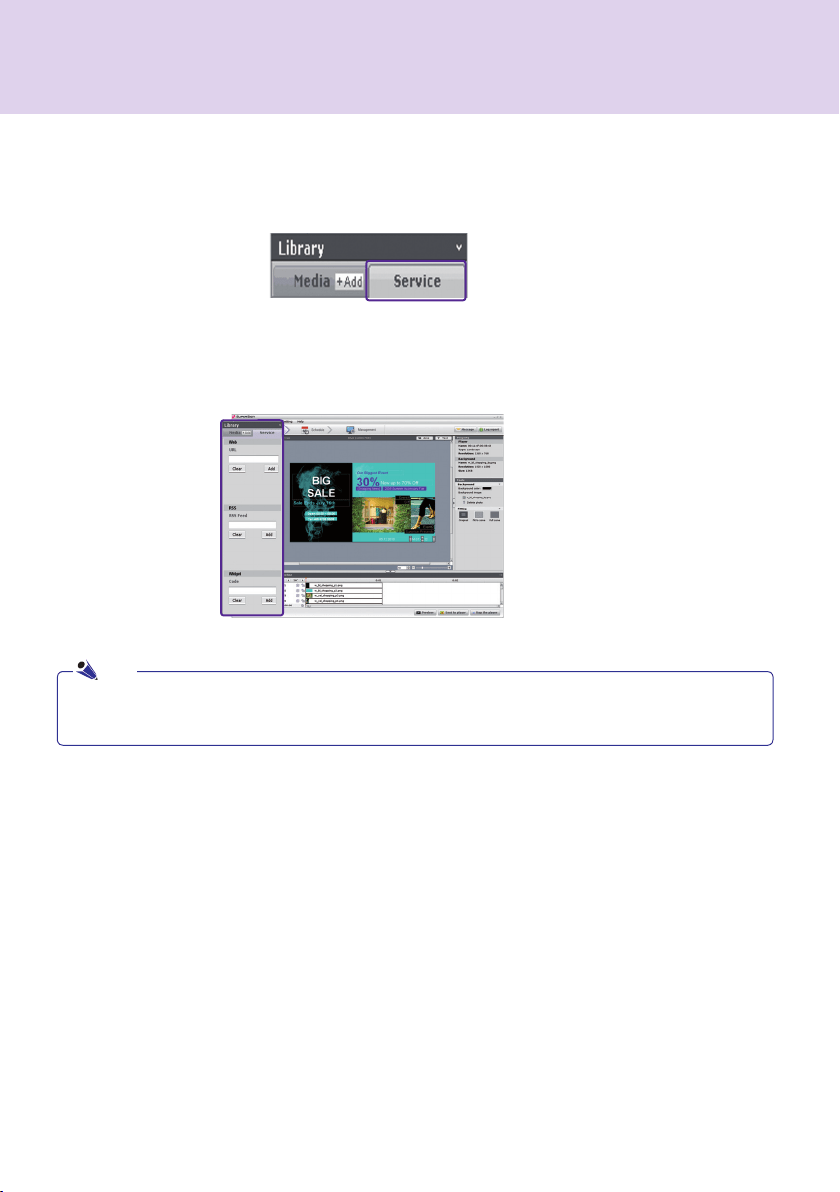
Library > Service


Note
Add Service Contents



background
1
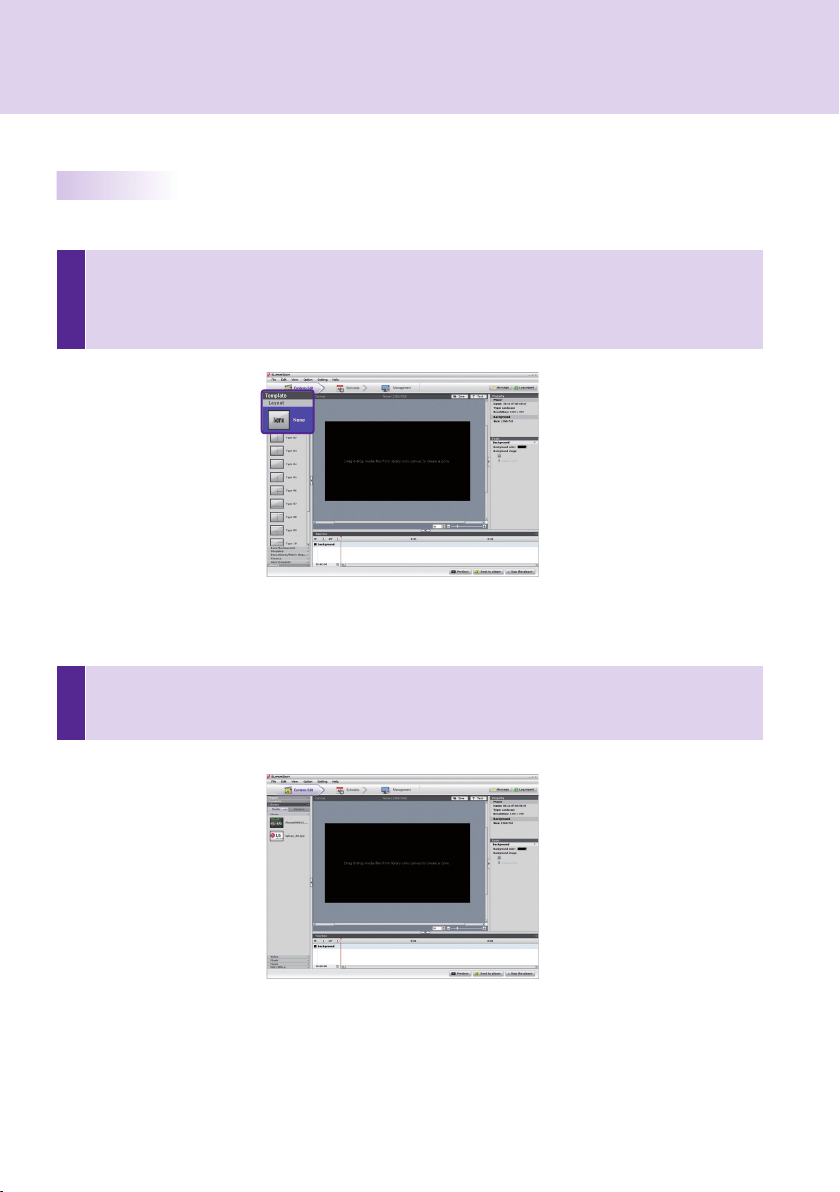
Select Template or Layout

None           Changing layouts  Changing
Templates
2
Register Media in Library

Using Library



background
        






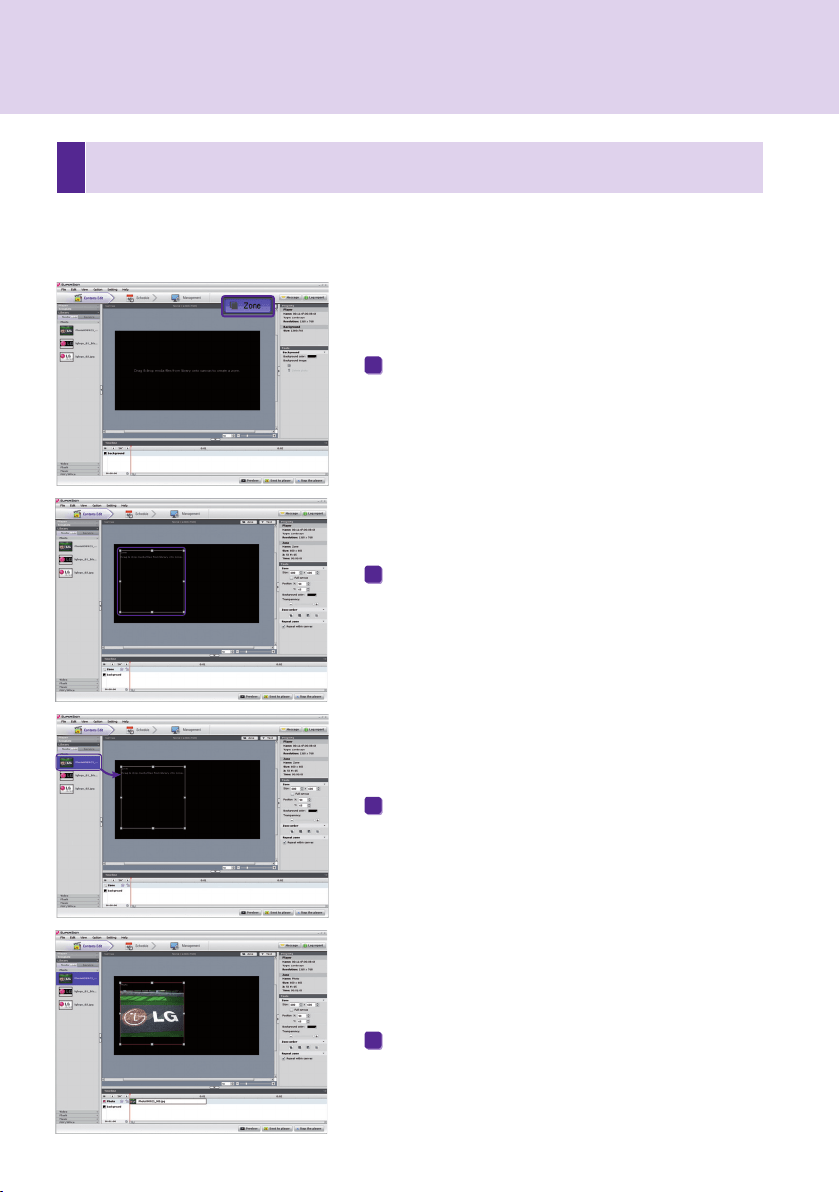
Add Media to Zone
Zone
Zone
3
Display Media


background


        

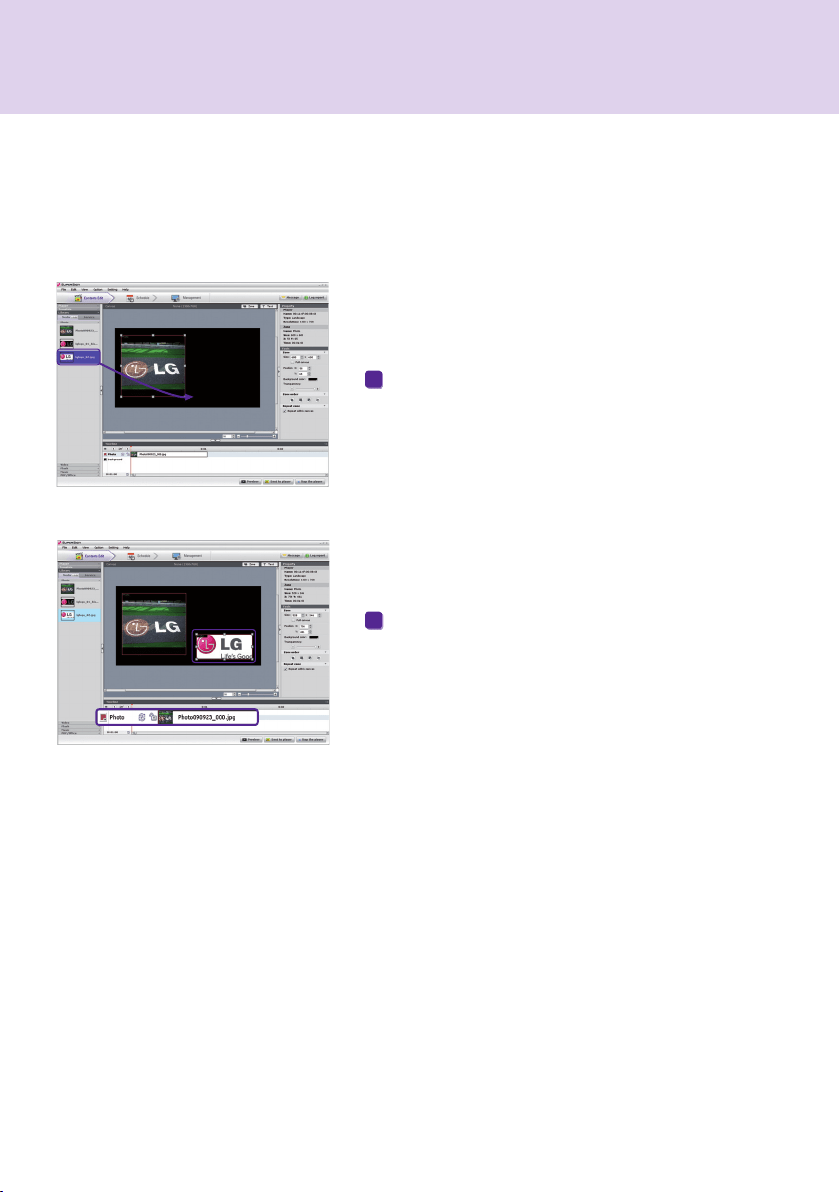
Drag Media


background
4
Display Service Content


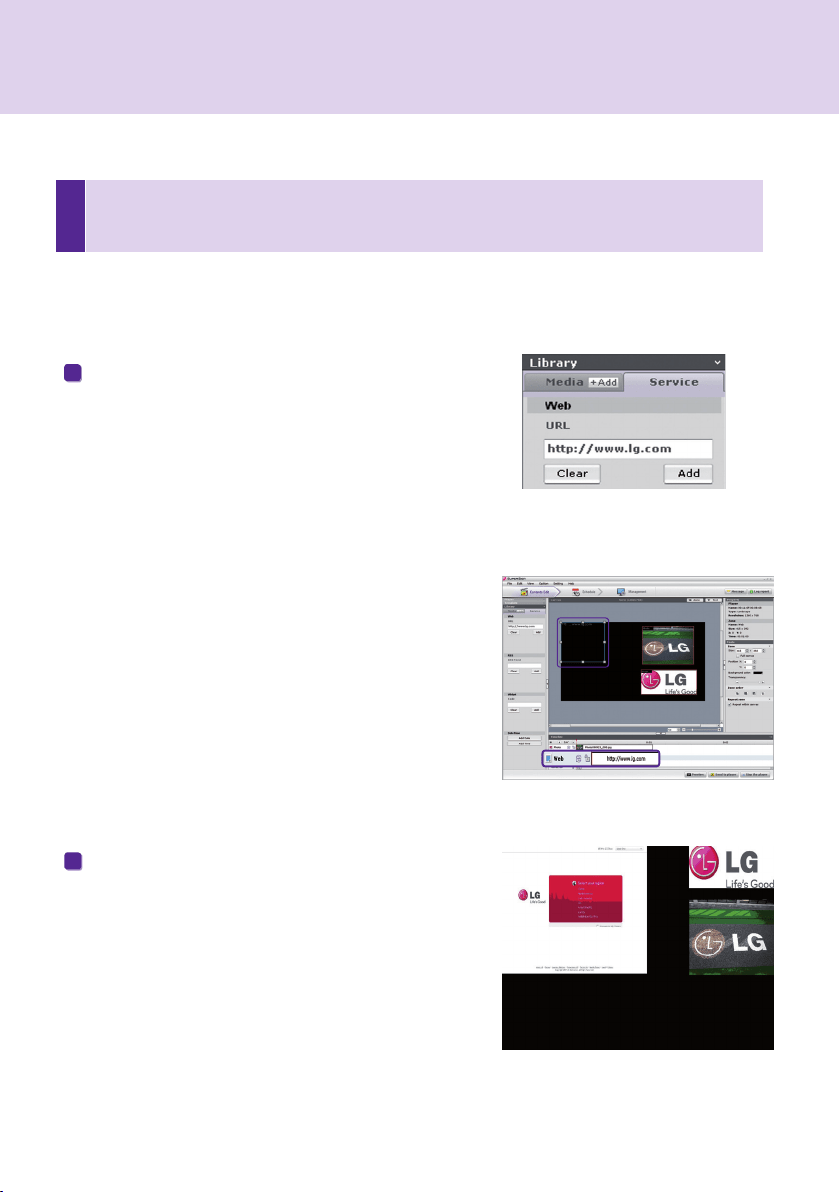
Library > Service
Add Websites


Add

Preview         


background
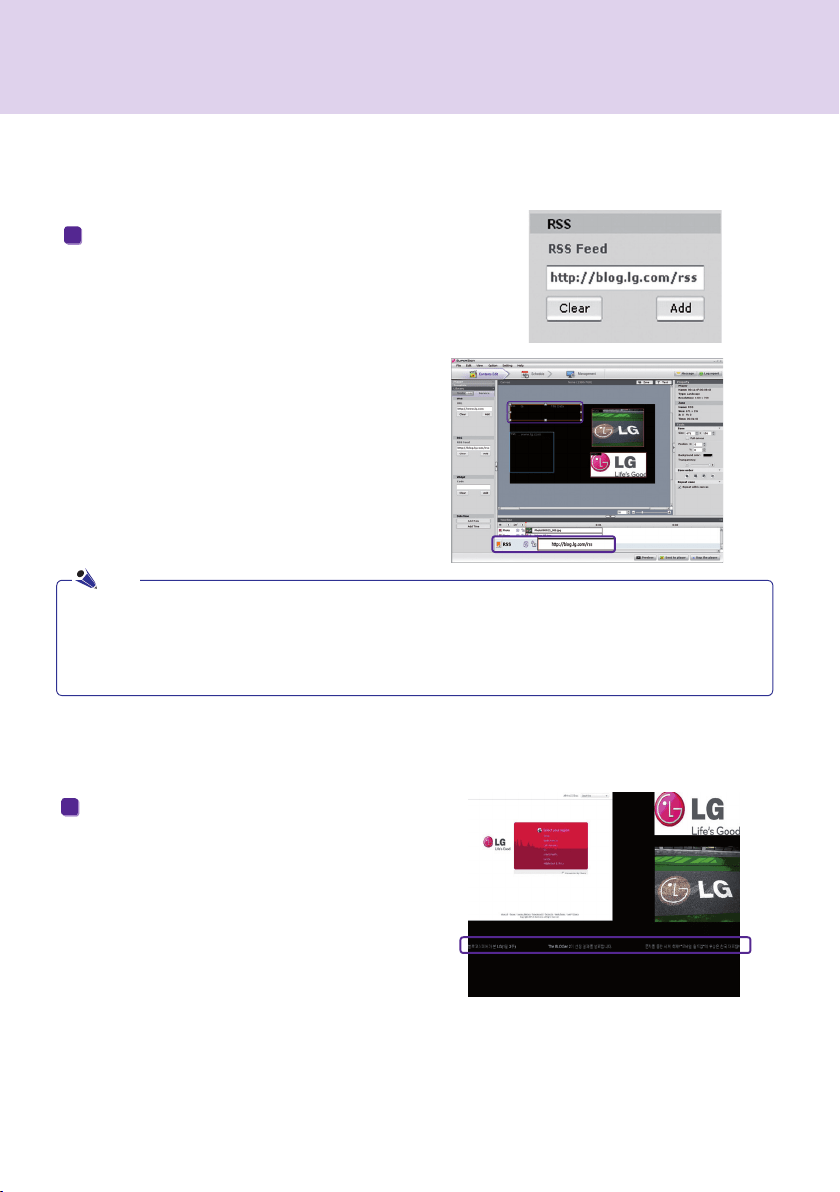
Add RSS Feeds




               


Add
       
Preview

Note

background
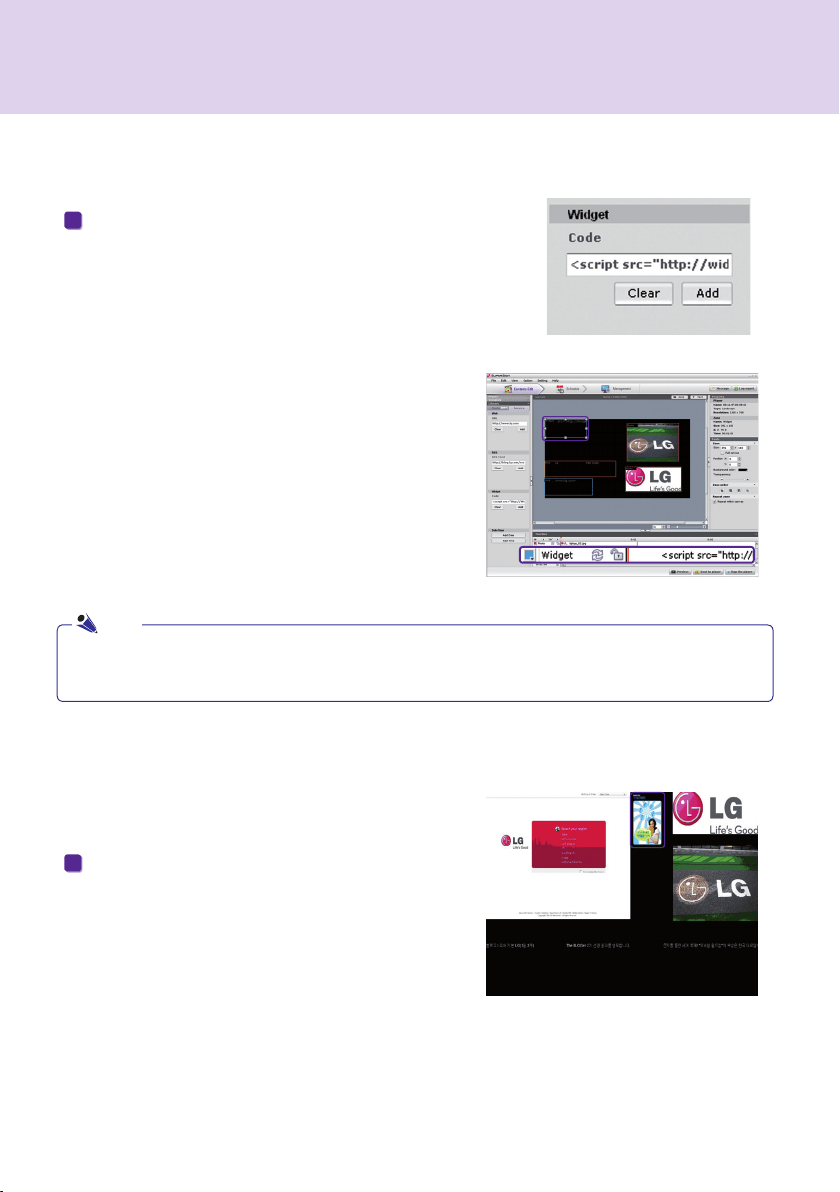
Add Widgets

               

Add

  Preview       

Note

background
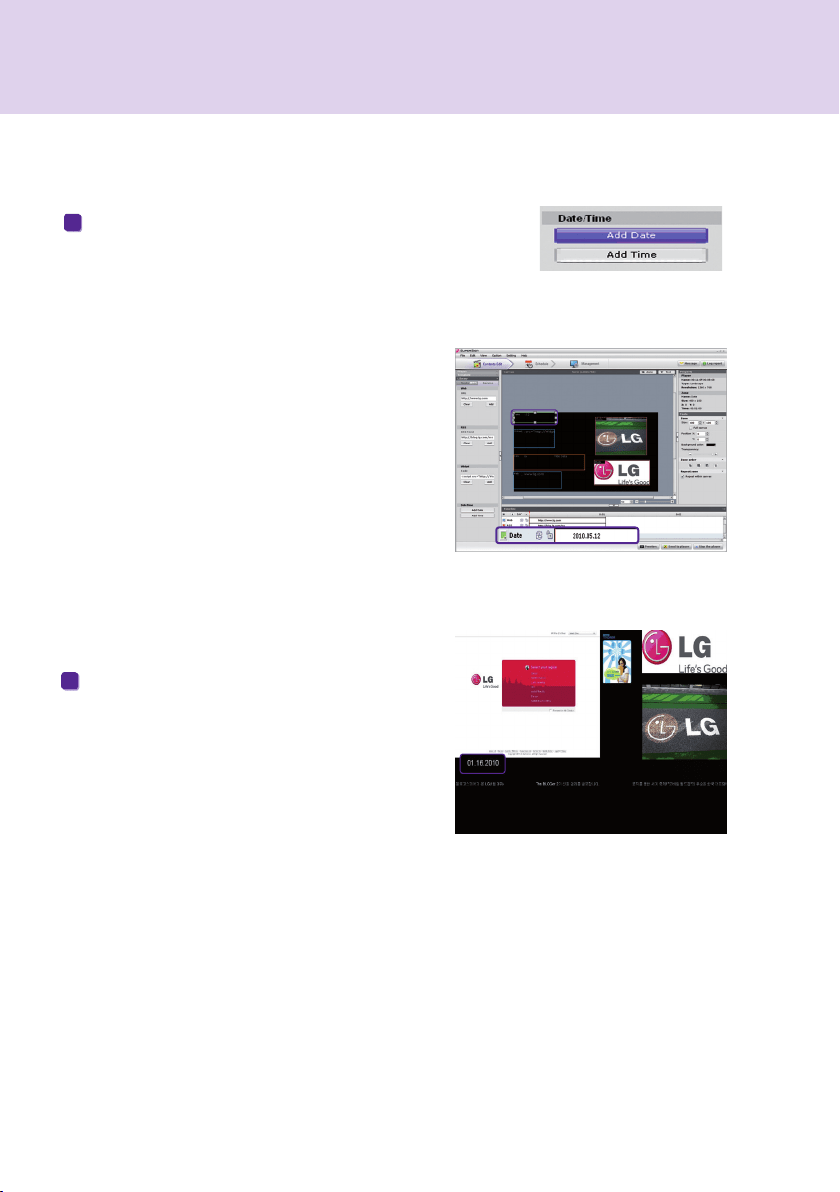
Add Dates

DateDate/
Time zone
 
     Preview  
    


background
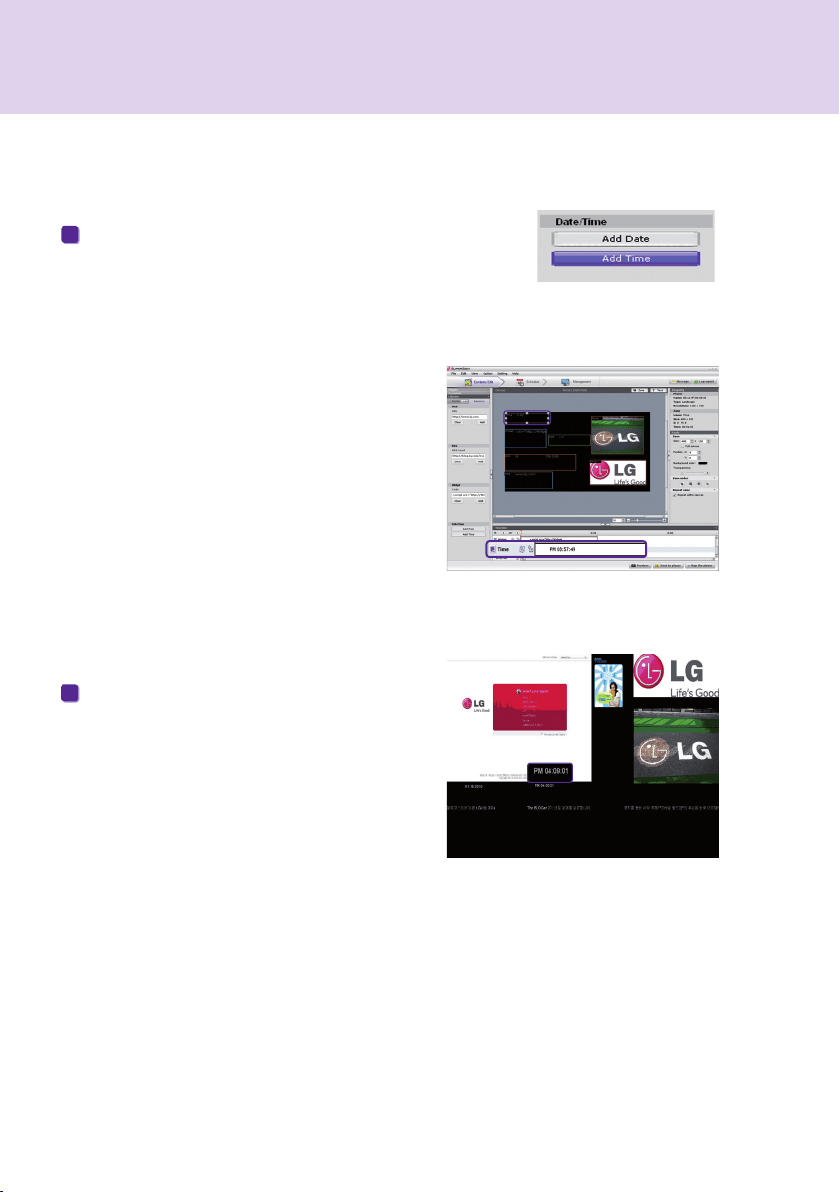
Add Times

Add TimeDate/
Time zone

  Preview     


background


Copy Zones

Edit > CopyCtrl + C
Edit > PasteCtrl + V
Note

background

















         
         





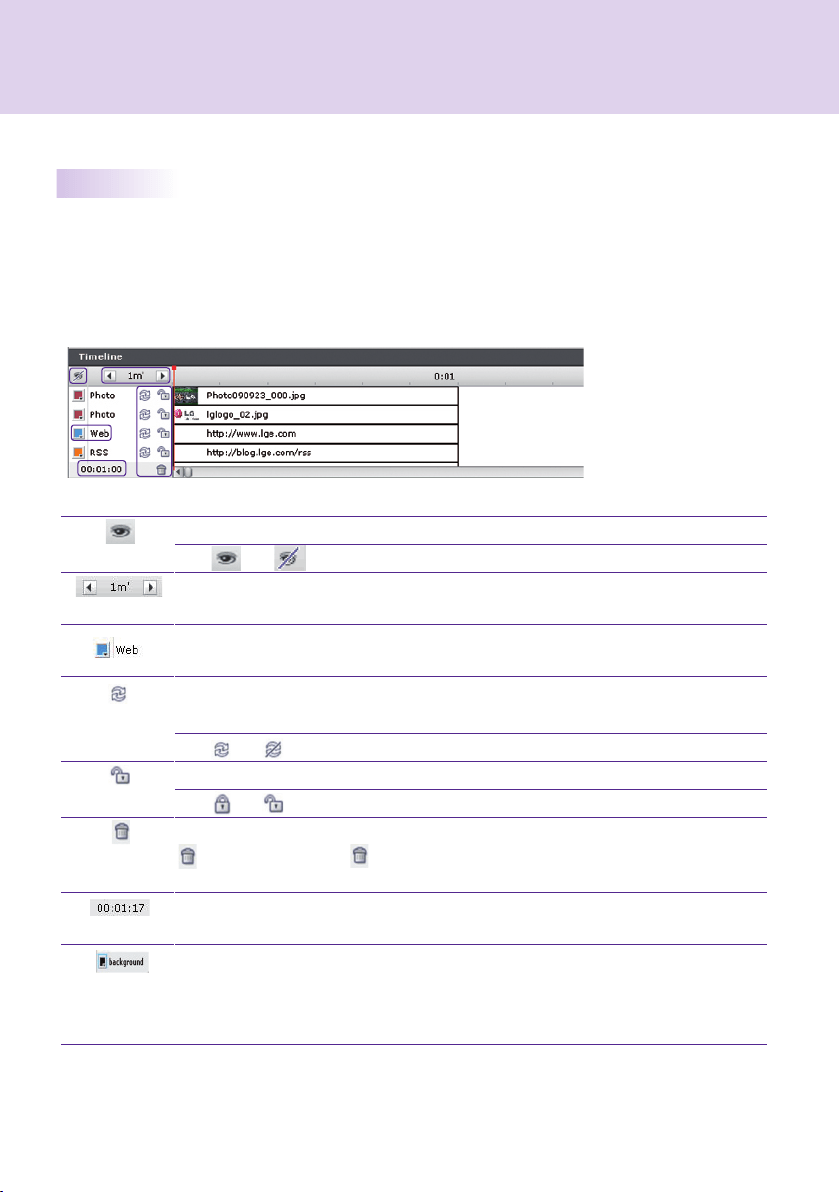
Overview Timeline Setting

background

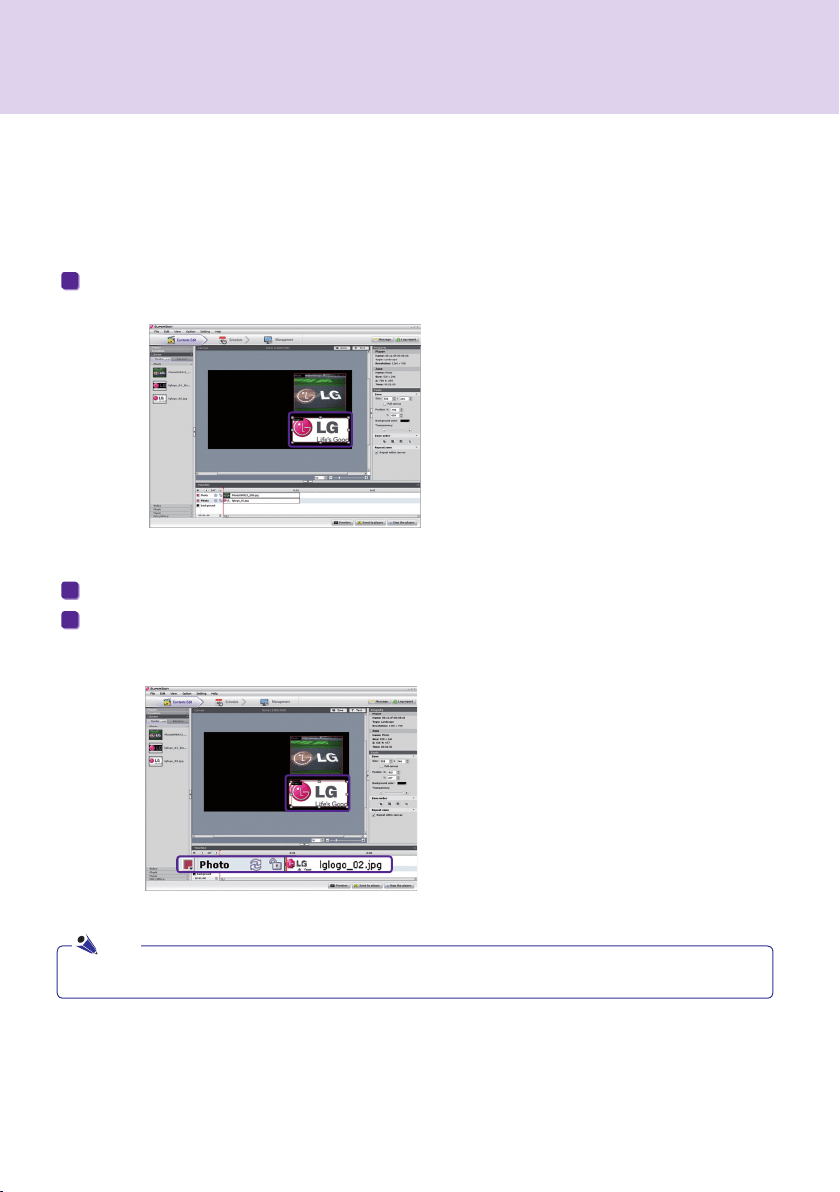
Add Media to Timeline


Copy Media to Timeline


Ctrl + C
Ctrl + V
Note
background
1
 Player      

2
         

3
 Send to Player      




5 
4

OK



Immediate Distribution




Send to Player
Send to Player
                

Note
background

1 Export contents
2 
3
Export Contents

Export Contents
Export Contents
Export Contents



Scheduled Distribution

Schedule
Attention
Export Contents
Export Contents


Export Contents


Note
background



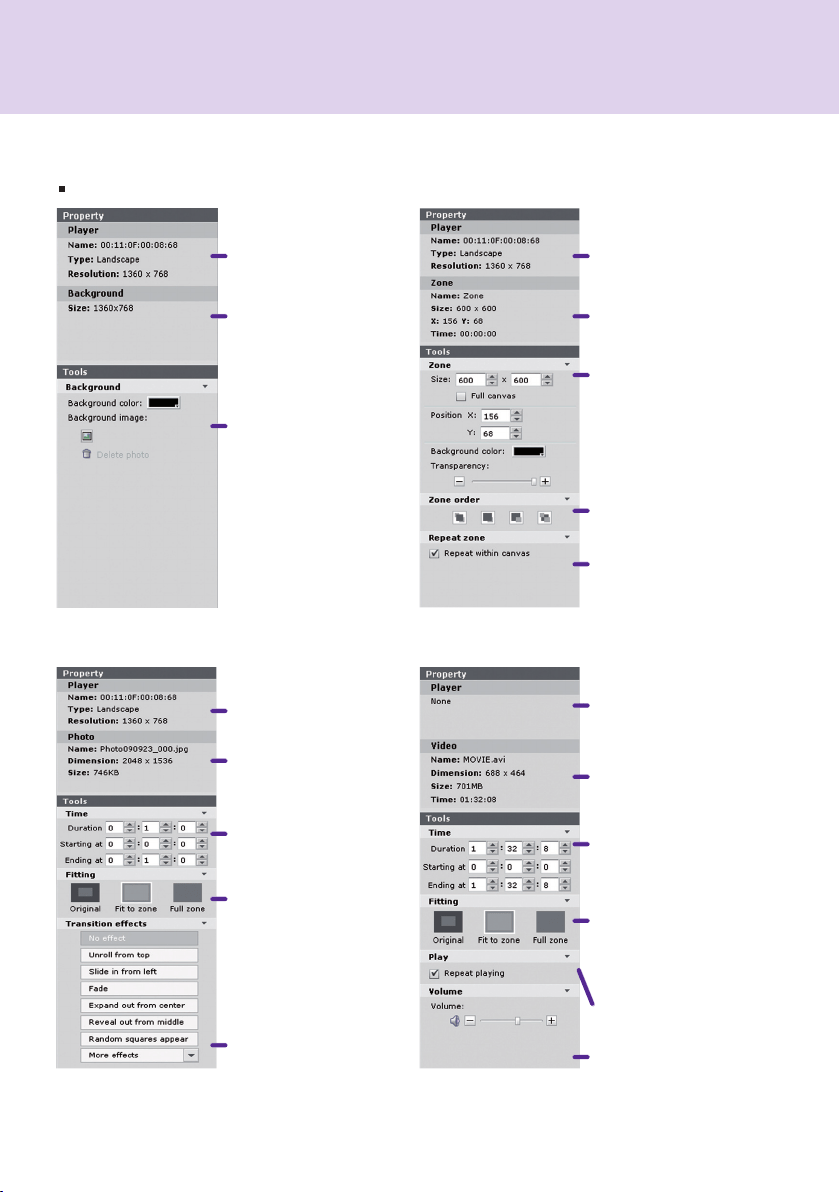
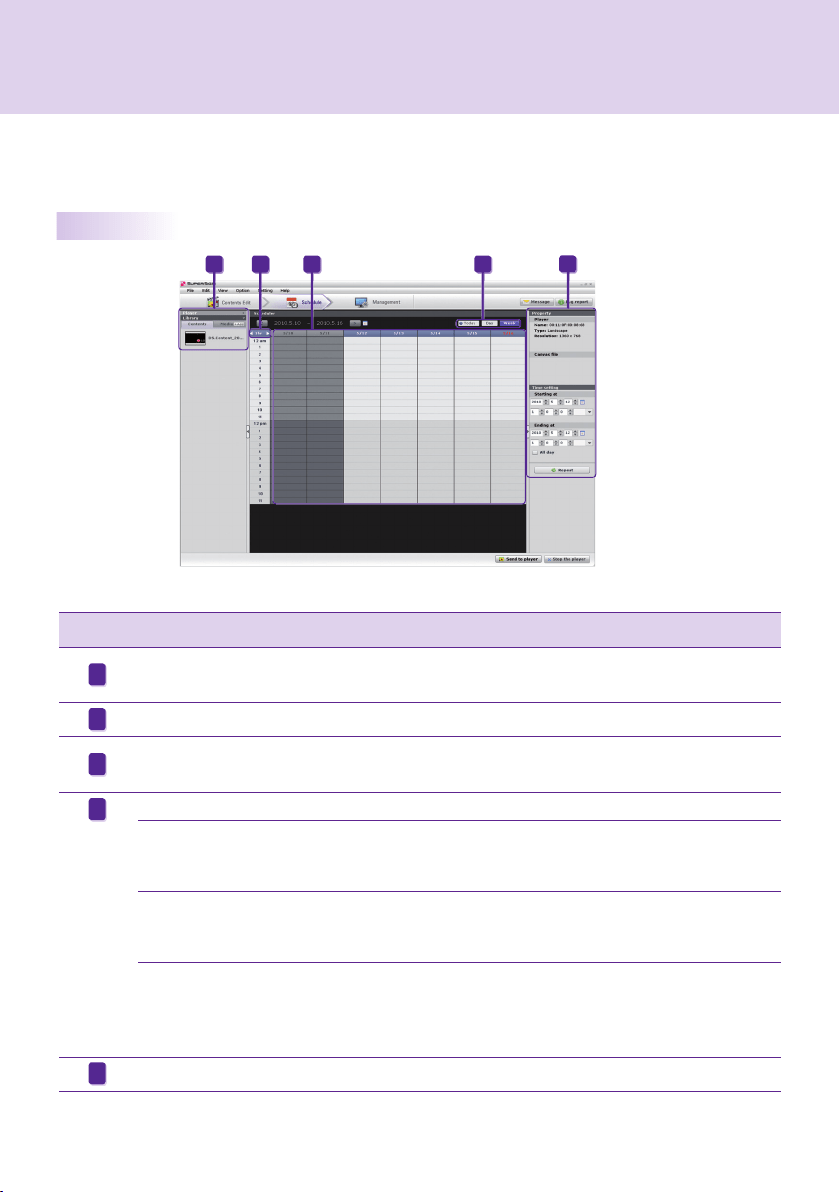
Canvas zoneproperties
Tool
background























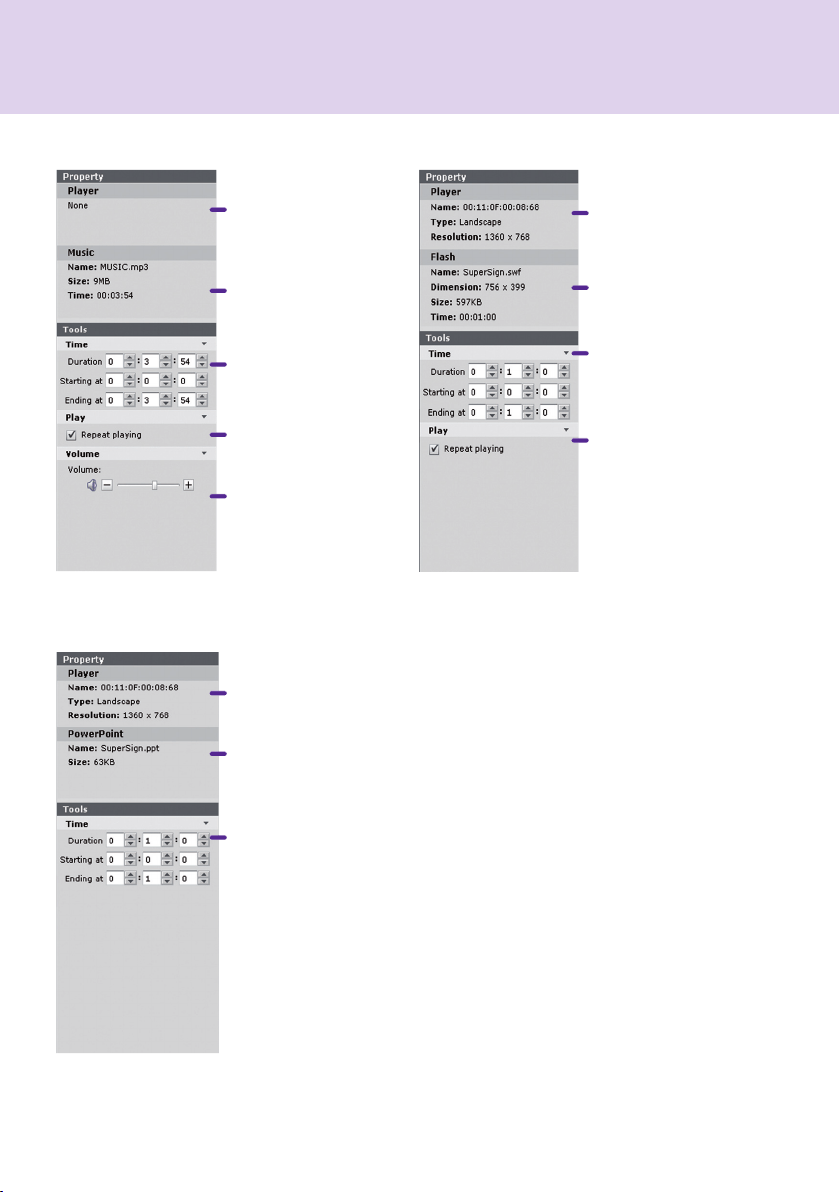
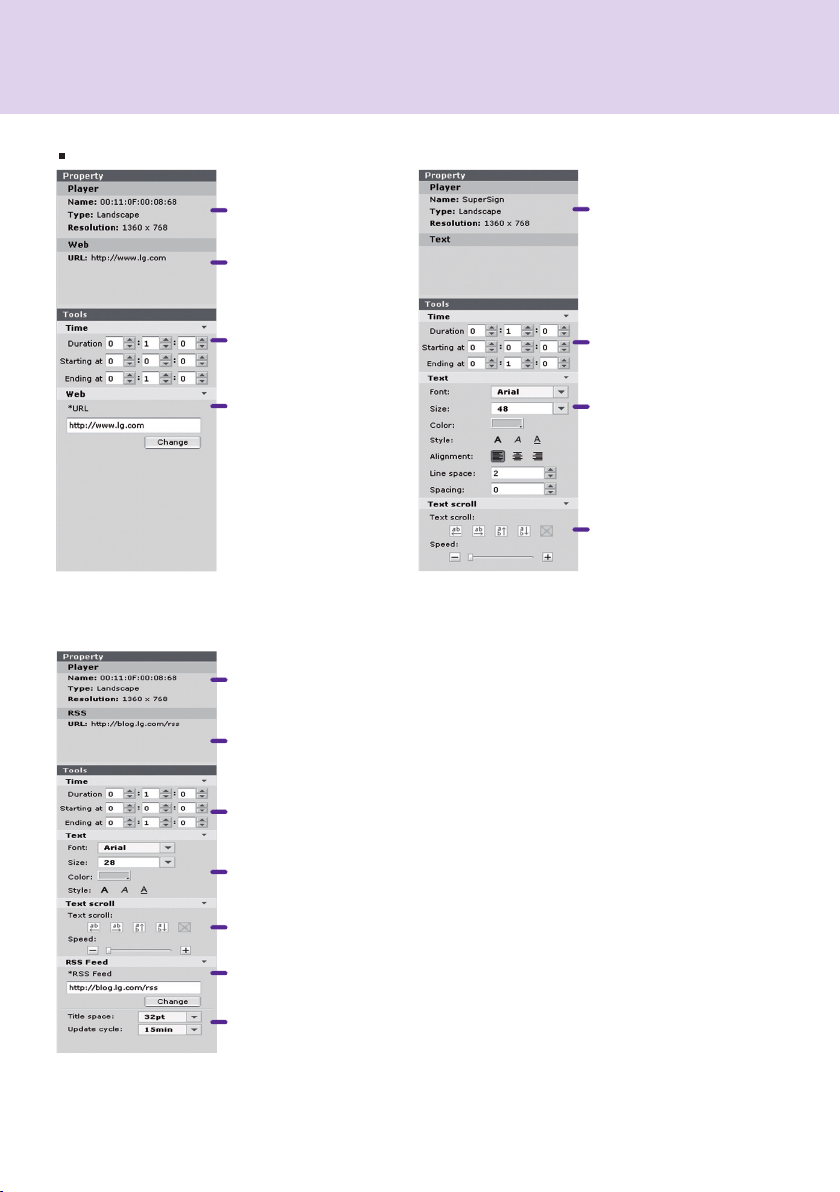
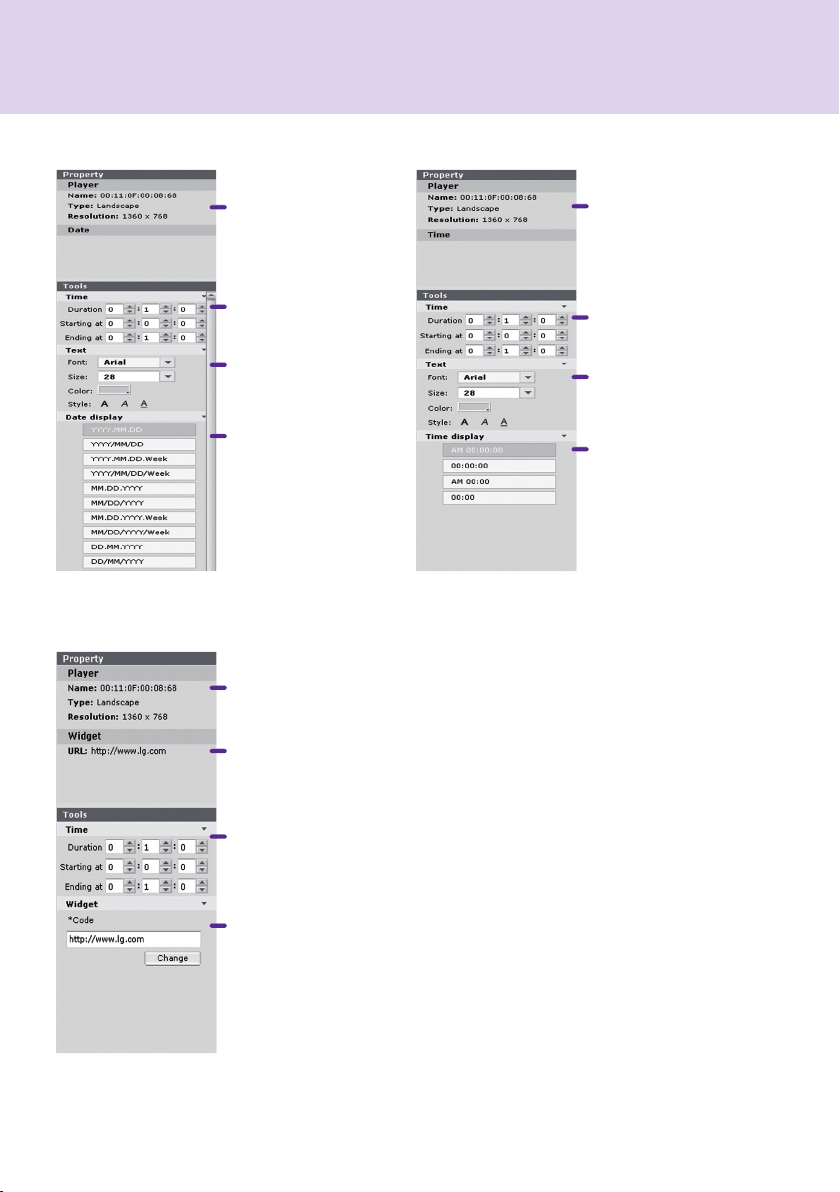
Content Properties / Tools
 


























background





 
























background


































background


























background





 









Today
Today


Today
Weekly


Today
Daily


background
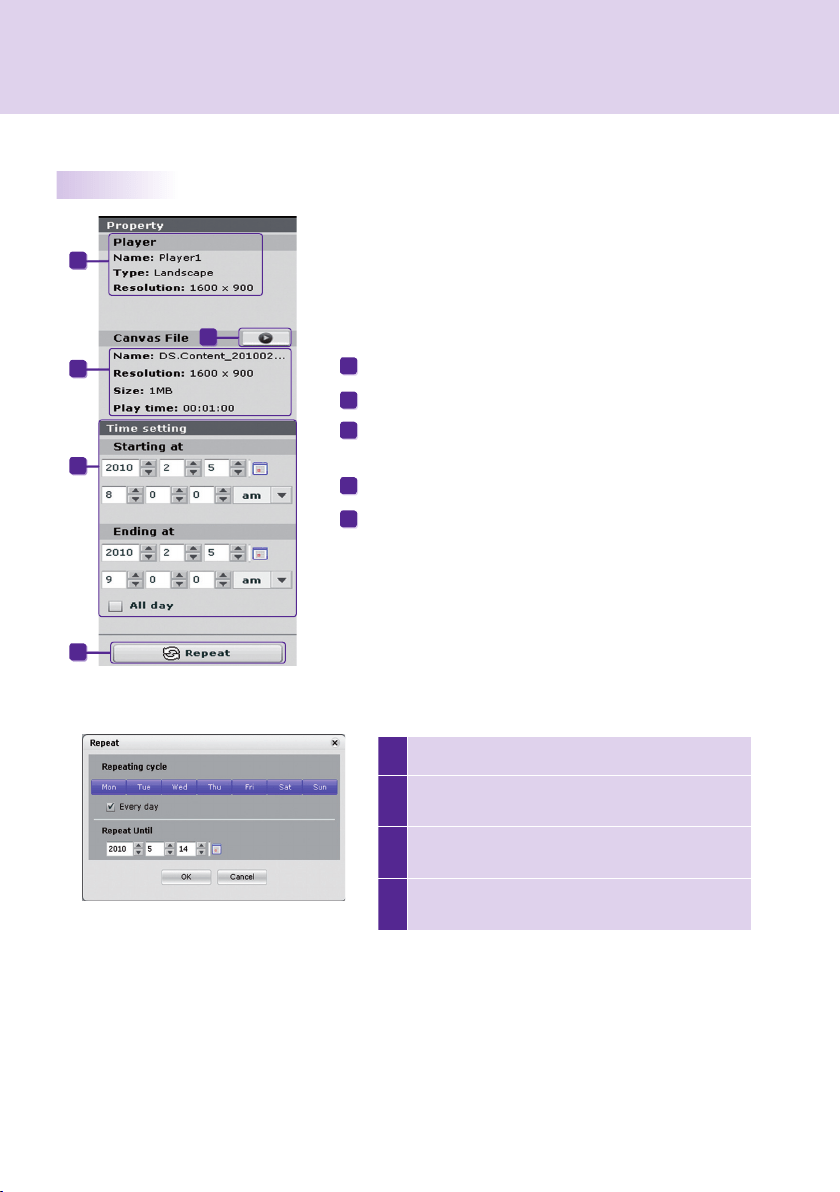

1 
2


3
Every day

4
OK









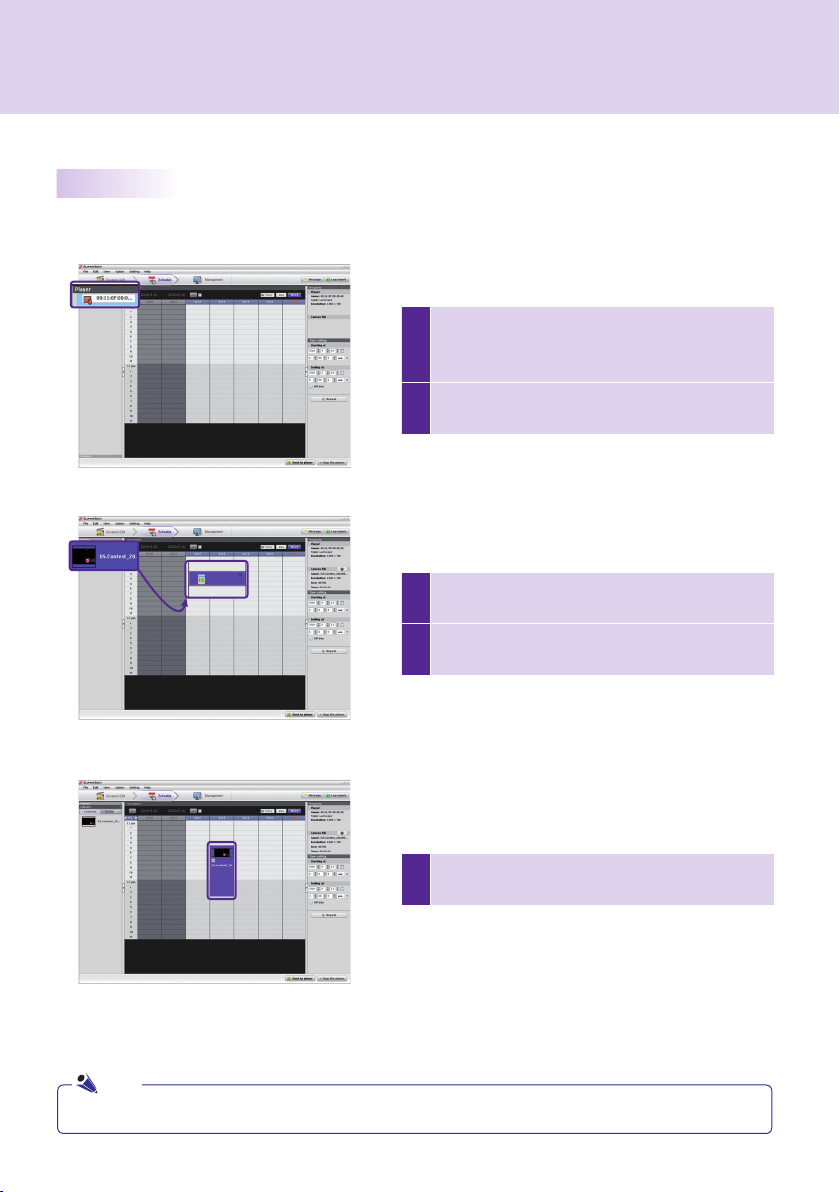
background
1
Player


2



5





3

Library
4
      

Note
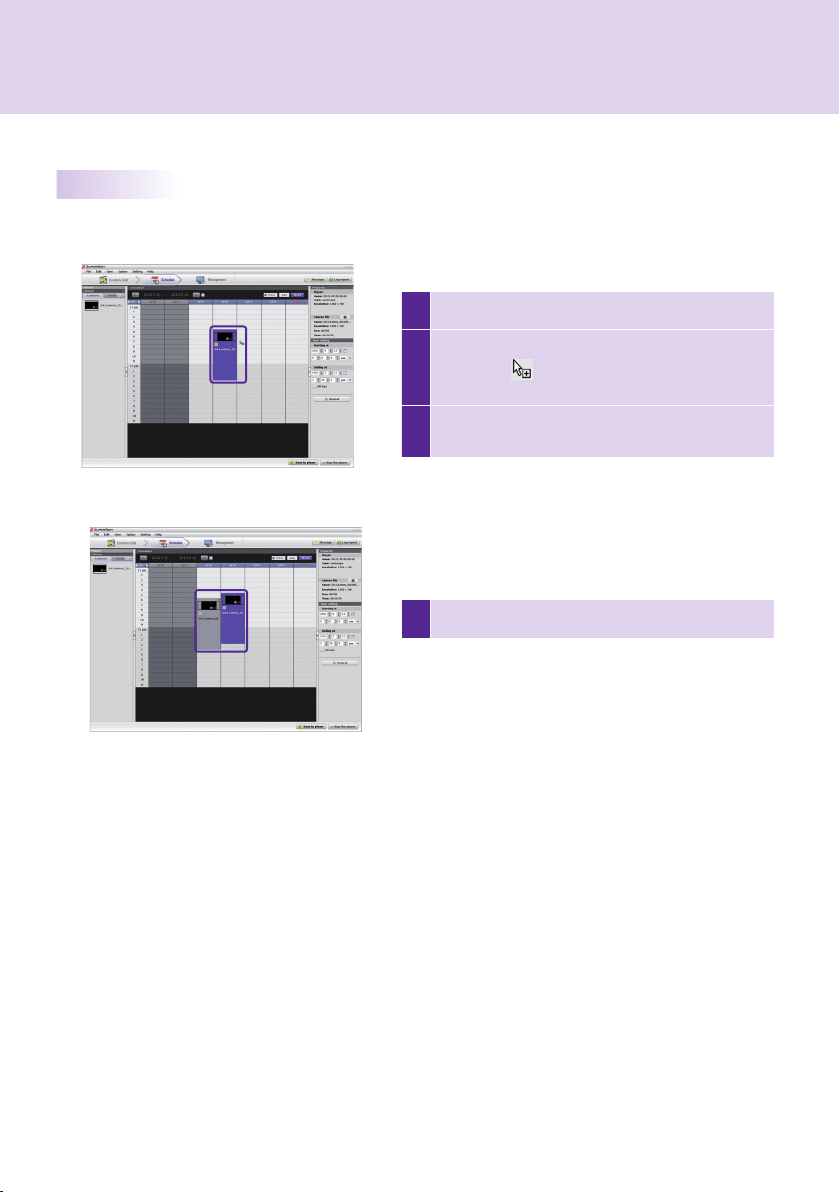
background
4 Save
1 
2
 Ctrl + C       
Esc

3





background

Delete Schedules via File Menu
Edit > Delete
Delete Schedules via X Button
Delete
Delete Schedules via Delete Key
Delete
Immediate Distribution
Send to Player
Scheduled Distribution
Option > Distribution
disabled




Note
background
 






 
 
 
 
 








Note
background

5

1
        

2 
3 
4

OK

Manual Setting
               




                 


Distribute Content Immediately




Note
Note
Note
background

Control Players



players


Note

Manage Groups



Note
background

Control Displays







Note
background

Next












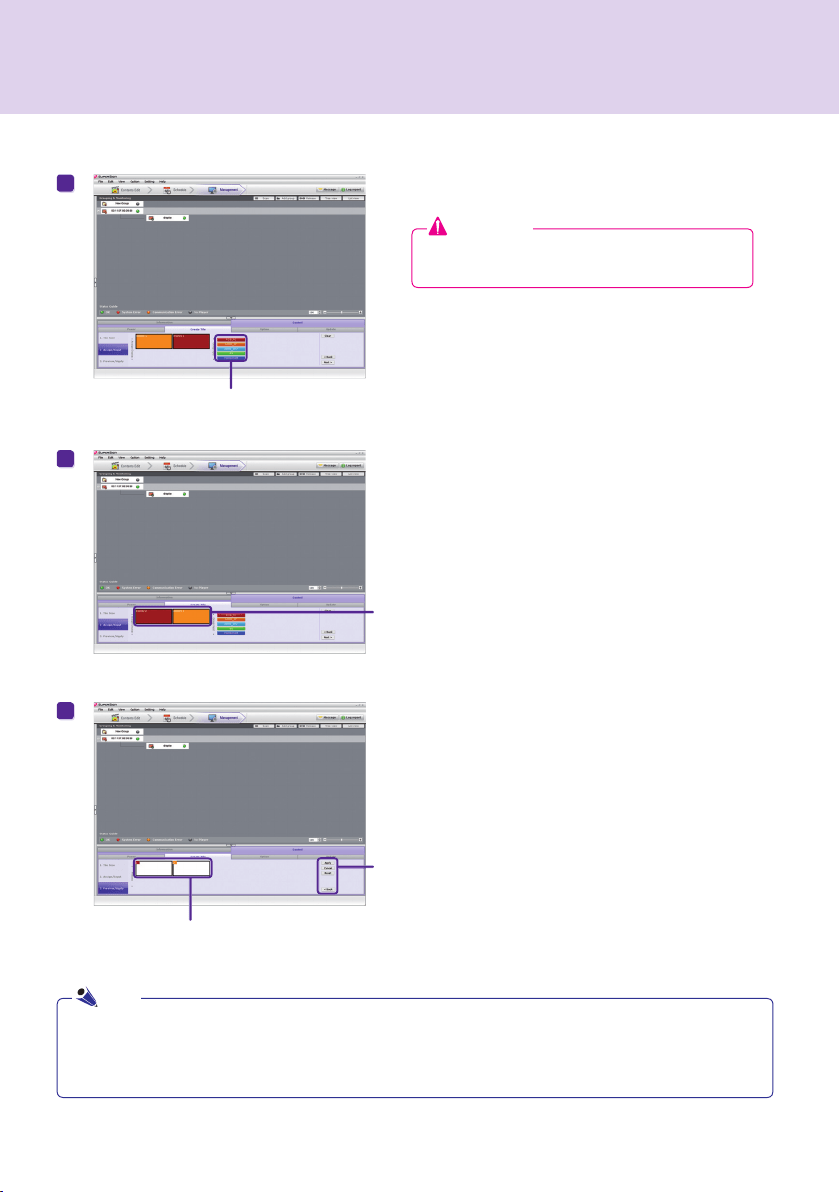
Display Search for Daisy ChainTile Mode


background




 
 
 
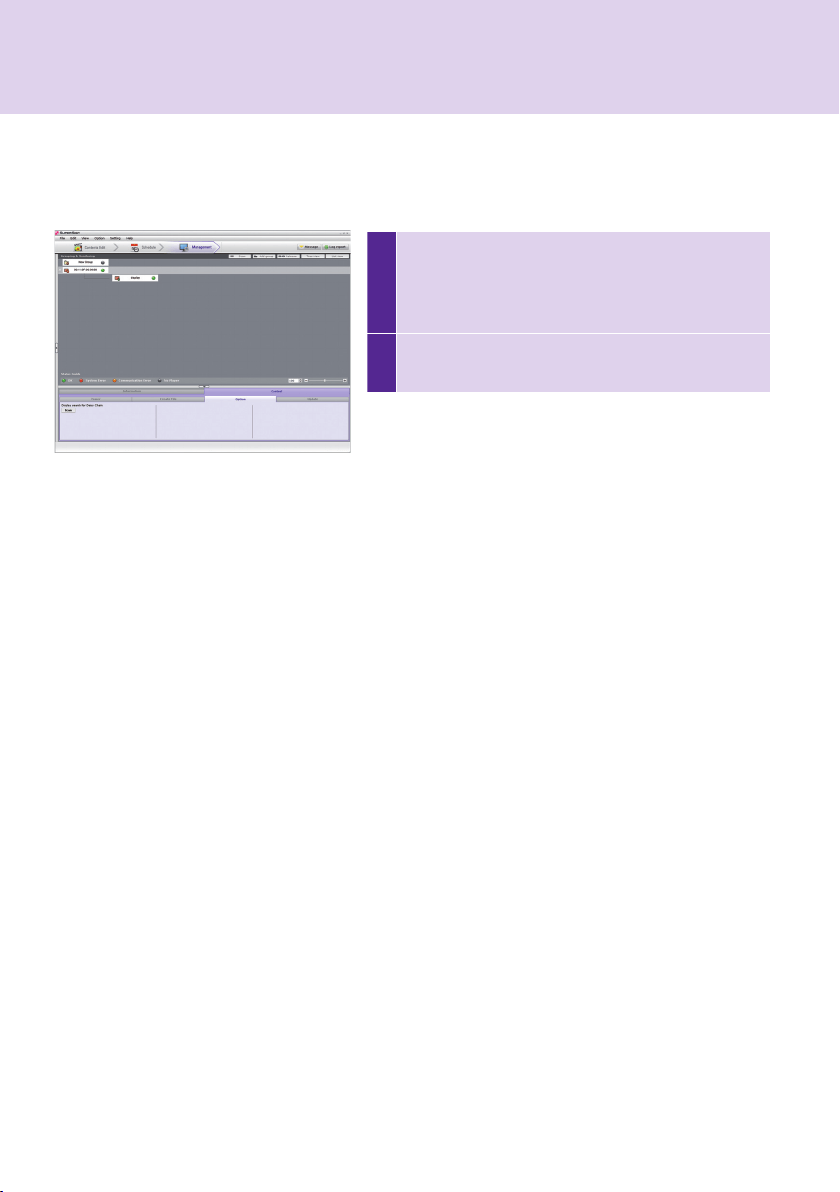
Preview/Apply



Attention


Note

background
1


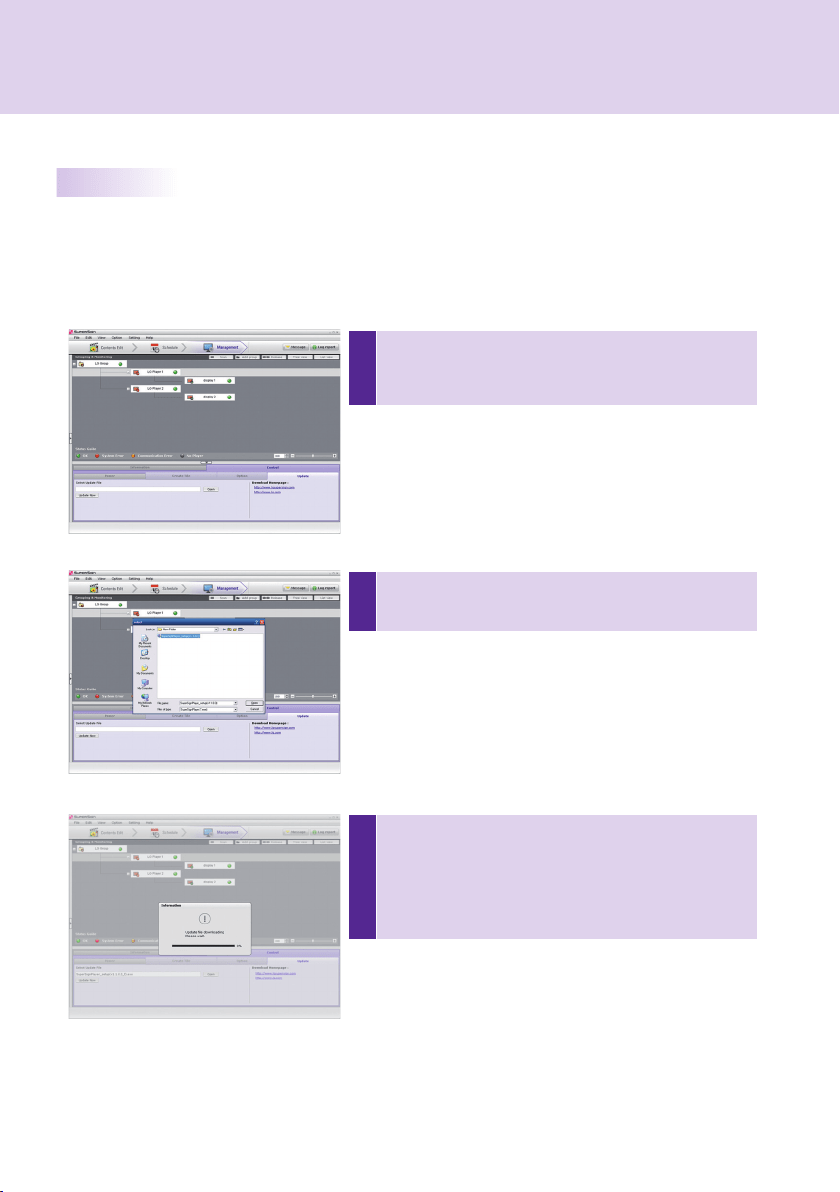
Control > Options > Display
search for Daisy Chain
2
Search


Option

background
3
Update Now
         



1
Grouping & Monitoring
Control


2
       

Update Now



background

A 
B 
C 
D 
E Send
Send Messages





Note
background

Create Log Report

Appendix


Send Email
Option > Management
Send an email
Note
background
 

Send to player

Supported
by SuperSign 
Scan














    Enhanced Write Filter (EWF)  
EWF
         
EWF
EWF


EWF
        EWF   
EWF






Send to Player


Regional and Language
Options


background

 

     Regional and Language Options  








EWF



            

   










"1234567890init"



   SuperSign\SuperSign_Software\Application\SuperSign
PlayerSuperSign\SuperSign_Software\System\SuperSign Driver

as the web
server is not operational, the
program will be terminated

          
  



background



Single Connection


Multiple Connections










background











Internet Connection


Private Network Connection


background




   






Wired/Wireless Complex Network
Wired/Wireless Router
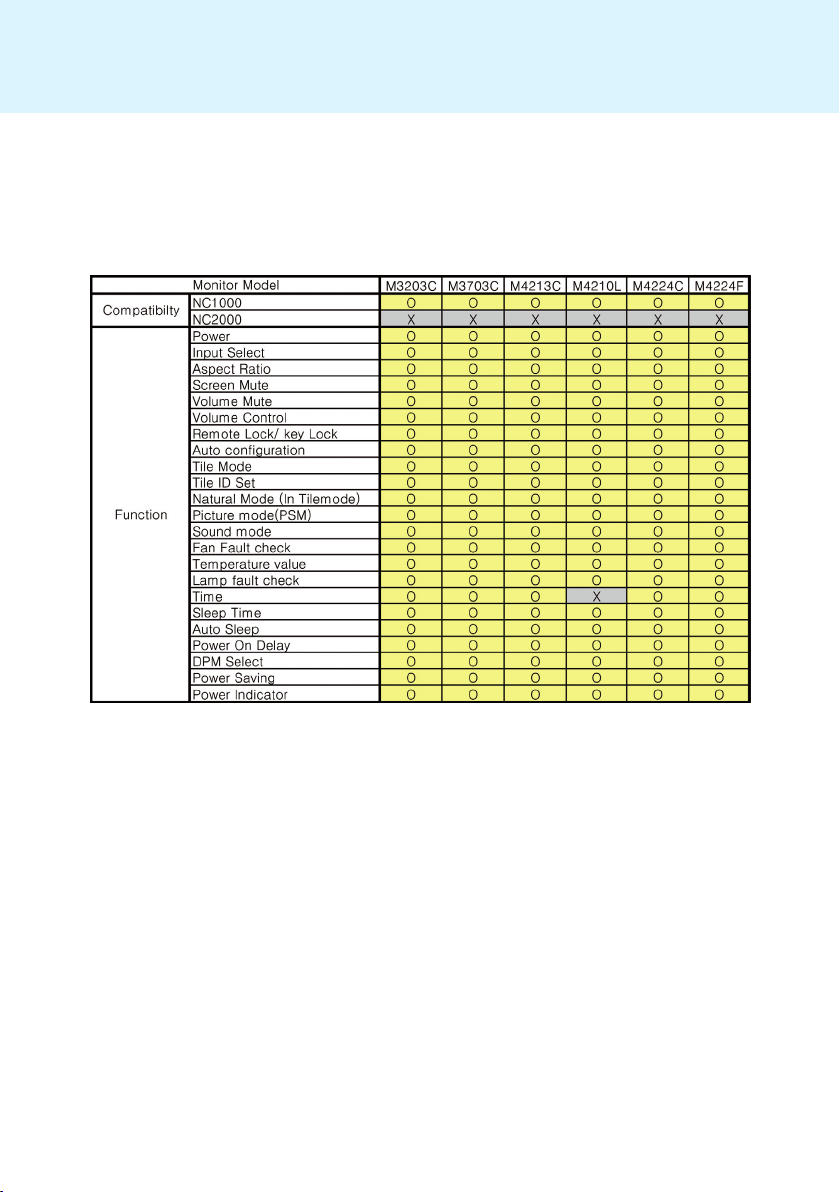




background






background



background





File
Write a new canvas
Open
Close
Write a new canvas
Open exisiting contents file
Close currently editing canvas
Save
Save as
Save for Template
Export contents
Send to player
Log out
Password Change
Exit
Save currently editing contents
Save contents to new name
Save contents as a template
Export currently editing contents to the file
Send currently editing contents to the player
User log out
Change user password
Exit the program
Main menu
Sub menu
Option
Description
Menu Enabled
Contents Edit
Plan
Management
Edit
Cut
Copy
Paste
Delete
Cut
Copy
Paste
Delete
Move to Contents
Edit window
Move to Plan
window
Add group
Release group
Move to Contents Editing window
Move to Plan window
Create a new group
Remove selected group
View
Preview
Show Wizard
Hide Wizard
Contents Edit
Window
Zoom
150%
120%
100%
80%
60%
50%
30%
150% (Zoom in)
120% (Zoom in)
100% (Original)
80% (Zoom out)
60% (Zoom out)
50% (Zoom out)
30% (Zoom out)
Timeline
Player
Template
Library
Property
Tool
Player
Library
Property
TimeSetting
Library
Information
Control
Preview currently editing contents
Show Start Wizard when startup the program or write a new canvas
Do not show Start Wizard when startup the program or write a new canvas
Show/Hide Timeline
Show/Hide player/Template/Library
Show/Hide Property/Tool
Show/Hide player/Library
Plan Window
Show/Hide Property TimeSetting/Library
Show/Hide Library
Management
Window
Show/Hide Information/Control
Setting
Server
Reset
Show server information
Initialize the SuperSign Manager settings
Help
Manual
Technical Support
Show SuperSign manual
Show LG Electronics technical support information
About
Show SuperSign Manager software information
Option
Management
Distribution
Start search
Contents Edit
Start Player Scanning
Set options related to Contents Edit mode
Set the E-mail of the administrator to send the Logreport
Set contents distribution time schedule
Main menu
Sub menu
Option
Description
Menu Enabled
Contents Edit
Plan
Management
Main menu
Sub menu
Option
Description
Menu Enabled
Contents Edit
Plan
Management
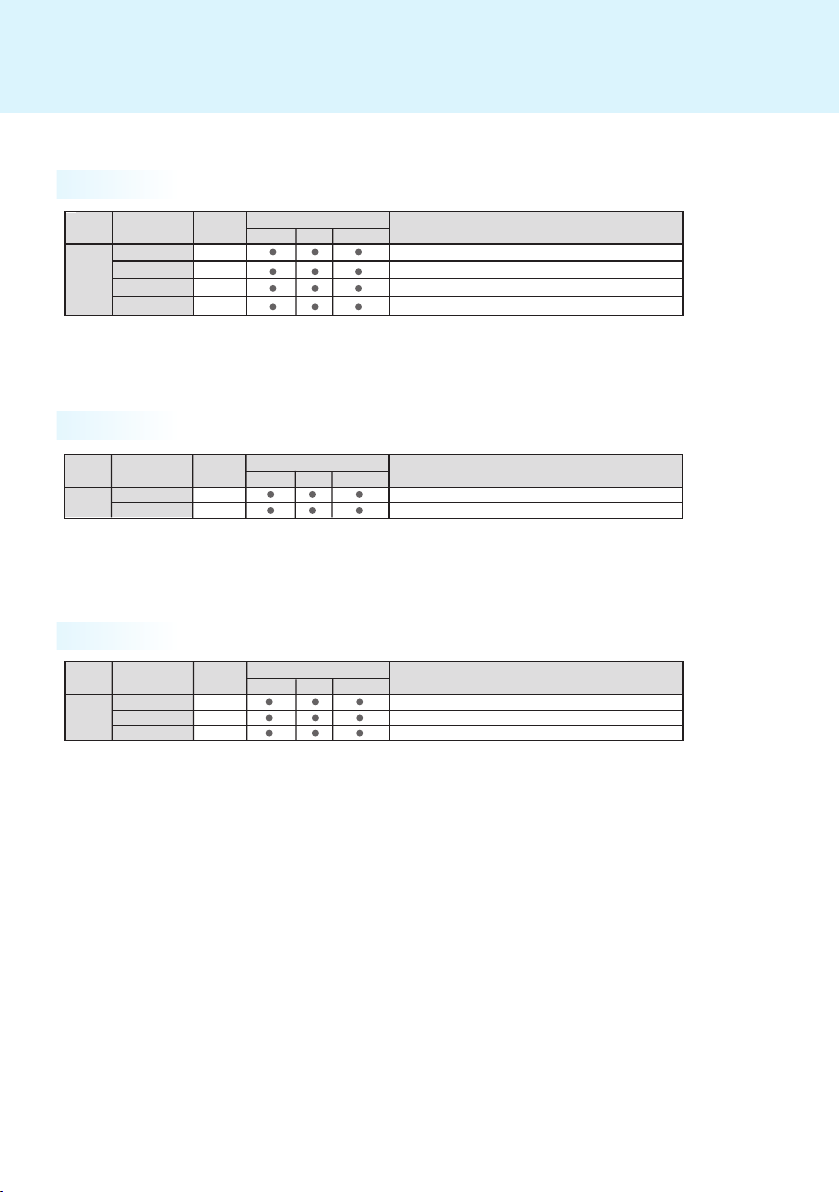
Main menu
Sub menu
Option
Description
Menu Enabled
Contents Edit
Plan
Management
Main menu
Sub menu
Option
Description
Menu Enabled
Contents Edit
Plan
Management
Main menu
Sub menu
Option
Description
Menu Enabled
Contents Edit
Plan
Management
File
Write a new canvas
Open
Close
Write a new canvas
Open exisiting contents file
Close currently editing canvas
Save
Save as
Save for Template
Export contents
Send to player
Log out
Password Change
Exit
Save currently editing contents
Save contents to new name
Save contents as a template
Export currently editing contents to the file
Send currently editing contents to the player
User log out
Change user password
Exit the program
Main menu
Sub menu
Option
Description
Menu Enabled
Contents Edit
Plan
Management
Edit
Cut
Copy
Paste
Delete
Cut
Copy
Paste
Delete
Move to Contents
Edit window
Move to Plan
window
Add group
Release group
Move to Contents Editing window
Move to Plan window
Create a new group
Remove selected group
View
Preview
Show Wizard
Hide Wizard
Contents Edit
Window
Zoom
150%
120%
100%
80%
60%
50%
30%
150% (Zoom in)
120% (Zoom in)
100% (Original)
80% (Zoom out)
60% (Zoom out)
50% (Zoom out)
30% (Zoom out)
Timeline
Player
Template
Library
Property
Tool
Player
Library
Property
TimeSetting
Library
Information
Control
Preview currently editing contents
Show Start Wizard when startup the program or write a new canvas
Do not show Start Wizard when startup the program or write a new canvas
Show/Hide Timeline
Show/Hide player/Template/Library
Show/Hide Property/Tool
Show/Hide player/Library
Plan Window
Show/Hide Property TimeSetting/Library
Show/Hide Library
Management
Window
Show/Hide Information/Control
Setting
Server
Reset
Show server information
Initialize the SuperSign Manager settings
Help
Manual
Technical Support
Show SuperSign manual
Show LG Electronics technical support information
About
Show SuperSign Manager software information
Option
Management
Distribution
Start search
Contents Edit
Start Player Scanning
Set options related to Contents Edit mode
Set the E-mail of the administrator to send the Logreport
Set contents distribution time schedule
Main menu
Sub menu
Option
Description
Menu Enabled
Contents Edit
Plan
Management
Main menu
Sub menu
Option
Description
Menu Enabled
Contents Edit
Plan
Management
Main menu
Sub menu
Option
Description
Menu Enabled
Contents Edit
Plan
Management
Main menu
Sub menu
Option
Description
Menu Enabled
Contents Edit
Plan
Management
Main menu
Sub menu
Option
Description
Menu Enabled
Contents Edit
Plan
Management
File
Write a new canvas
Open
Close
Write a new canvas
Open exisiting contents file
Close currently editing canvas
Save
Save as
Save for Template
Export contents
Send to player
Log out
Password Change
Exit
Save currently editing contents
Save contents to new name
Save contents as a template
Export currently editing contents to the file
Send currently editing contents to the player
User log out
Change user password
Exit the program
Main menu
Sub menu
Option
Description
Menu Enabled
Contents Edit
Plan
Management
Edit
Cut
Copy
Paste
Delete
Cut
Copy
Paste
Delete
Move to Contents
Edit window
Move to Plan
window
Add group
Release group
Move to Contents Editing window
Move to Plan window
Create a new group
Remove selected group
View
Preview
Show Wizard
Hide Wizard
Contents Edit
Window
Zoom
150%
120%
100%
80%
60%
50%
30%
150% (Zoom in)
120% (Zoom in)
100% (Original)
80% (Zoom out)
60% (Zoom out)
50% (Zoom out)
30% (Zoom out)
Timeline
Player
Template
Library
Property
Tool
Player
Library
Property
TimeSetting
Library
Information
Control
Preview currently editing contents
Show Start Wizard when startup the program or write a new canvas
Do not show Start Wizard when startup the program or write a new canvas
Show/Hide Timeline
Show/Hide player/Template/Library
Show/Hide Property/Tool
Show/Hide player/Library
Plan Window
Show/Hide Property TimeSetting/Library
Show/Hide Library
Management
Window
Show/Hide Information/Control
Setting
Server
Reset
Show server information
Initialize the SuperSign Manager settings
Help
Manual
Technical Support
Show SuperSign manual
Show LG Electronics technical support information
About
Show SuperSign Manager software information
Option
Management
Distribution
Start search
Contents Edit
Start Player Scanning
Set options related to Contents Edit mode
Set the E-mail of the administrator to send the Logreport
Set contents distribution time schedule
Main menu
Sub menu
Option
Description
Menu Enabled
Contents Edit
Plan
Management
Main menu
Sub menu
Option
Description
Menu Enabled
Contents Edit
Plan
Management
Main menu
Sub menu
Option
Description
Menu Enabled
Contents Edit
Plan
Management
Main menu
Sub menu
Option
Description
Menu Enabled
Contents Edit
Plan
Management
Main menu
Sub menu
Option
Description
Menu Enabled
Contents Edit
Plan
Management
background




File
Write a new canvas
Open
Close
Write a new canvas
Open exisiting contents file
Close currently editing canvas
Save
Save as
Save for Template
Export contents
Send to player
Log out
Password Change
Exit
Save currently editing contents
Save contents to new name
Save contents as a template
Export currently editing contents to the file
Send currently editing contents to the player
User log out
Change user password
Exit the program
Main menu
Sub menu
Option
Description
Menu Enabled
Contents Edit
Plan
Management
Edit
Cut
Copy
Paste
Delete
Cut
Copy
Paste
Delete
Move to Contents
Edit window
Move to Plan
window
Add group
Release group
Move to Contents Editing window
Move to Plan window
Create a new group
Remove selected group
View
Preview
Show Wizard
Hide Wizard
Contents Edit
Window
Zoom
150%
120%
100%
80%
60%
50%
30%
150% (Zoom in)
120% (Zoom in)
100% (Original)
80% (Zoom out)
60% (Zoom out)
50% (Zoom out)
30% (Zoom out)
Timeline
Player
Template
Library
Property
Tool
Player
Library
Property
TimeSetting
Library
Information
Control
Preview currently editing contents
Show Start Wizard when startup the program or write a new canvas
Do not show Start Wizard when startup the program or write a new canvas
Show/Hide Timeline
Show/Hide player/Template/Library
Show/Hide Property/Tool
Show/Hide player/Library
Plan Window
Show/Hide Property TimeSetting/Library
Show/Hide Library
Management
Window
Show/Hide Information/Control
Setting
Server
Reset
Show server information
Initialize the SuperSign Manager settings
Help
Manual
Technical Support
Show SuperSign manual
Show LG Electronics technical support information
About
Show SuperSign Manager software information
Option
Management
Distribution
Start search
Contents Edit
Start Player Scanning
Set options related to Contents Edit mode
Set the E-mail of the administrator to send the Logreport
Set contents distribution time schedule
Main menu
Sub menu
Option
Description
Menu Enabled
Contents Edit
Plan
Management
Main menu
Sub menu
Option
Description
Menu Enabled
Contents Edit
Plan
Management
Main menu
Sub menu
Option
Description
Menu Enabled
Contents Edit
Plan
Management
Main menu
Sub menu
Option
Description
Menu Enabled
Contents Edit
Plan
Management
Main menu
Sub menu
Option
Description
Menu Enabled
Contents Edit
Plan
Management
File
Write a new canvas
Open
Close
Write a new canvas
Open exisiting contents file
Close currently editing canvas
Save
Save as
Save for Template
Export contents
Send to player
Log out
Password Change
Exit
Save currently editing contents
Save contents to new name
Save contents as a template
Export currently editing contents to the file
Send currently editing contents to the player
User log out
Change user password
Exit the program
Main menu
Sub menu
Option
Description
Menu Enabled
Contents Edit
Plan
Management
Edit
Cut
Copy
Paste
Delete
Cut
Copy
Paste
Delete
Move to Contents
Edit window
Move to Plan
window
Add group
Release group
Move to Contents Editing window
Move to Plan window
Create a new group
Remove selected group
View
Preview
Show Wizard
Hide Wizard
Contents Edit
Window
Zoom
150%
120%
100%
80%
60%
50%
30%
150% (Zoom in)
120% (Zoom in)
100% (Original)
80% (Zoom out)
60% (Zoom out)
50% (Zoom out)
30% (Zoom out)
Timeline
Player
Template
Library
Property
Tool
Player
Library
Property
TimeSetting
Library
Information
Control
Preview currently editing contents
Show Start Wizard when startup the program or write a new canvas
Do not show Start Wizard when startup the program or write a new canvas
Show/Hide Timeline
Show/Hide player/Template/Library
Show/Hide Property/Tool
Show/Hide player/Library
Plan Window
Show/Hide Property TimeSetting/Library
Show/Hide Library
Management
Window
Show/Hide Information/Control
Setting
Server
Reset
Show server information
Initialize the SuperSign Manager settings
Help
Manual
Technical Support
Show SuperSign manual
Show LG Electronics technical support information
About
Show SuperSign Manager software information
Option
Management
Distribution
Start search
Contents Edit
Start Player Scanning
Set options related to Contents Edit mode
Set the E-mail of the administrator to send the Logreport
Set contents distribution time schedule
Main menu
Sub menu
Option
Description
Menu Enabled
Contents Edit
Plan
Management
Main menu
Sub menu
Option
Description
Menu Enabled
Contents Edit
Plan
Management
Main menu
Sub menu
Option
Description
Menu Enabled
Contents Edit
Plan
Management
Main menu
Sub menu
Option
Description
Menu Enabled
Contents Edit
Plan
Management
Main menu
Sub menu
Option
Description
Menu Enabled
Contents Edit
Plan
Management
File
Write a new canvas
Open
Close
Write a new canvas
Open exisiting contents file
Close currently editing canvas
Save
Save as
Save for Template
Export contents
Send to player
Log out
Password Change
Exit
Save currently editing contents
Save contents to new name
Save contents as a template
Export currently editing contents to the file
Send currently editing contents to the player
User log out
Change user password
Exit the program
Main menu
Sub menu
Option
Description
Menu Enabled
Contents Edit
Plan
Management
Edit
Cut
Copy
Paste
Delete
Cut
Copy
Paste
Delete
Move to Contents
Edit window
Move to Plan
window
Add group
Release group
Move to Contents Editing window
Move to Plan window
Create a new group
Remove selected group
View
Preview
Show Wizard
Hide Wizard
Contents Edit
Window
Zoom
150%
120%
100%
80%
60%
50%
30%
150% (Zoom in)
120% (Zoom in)
100% (Original)
80% (Zoom out)
60% (Zoom out)
50% (Zoom out)
30% (Zoom out)
Timeline
Player
Template
Library
Property
Tool
Player
Library
Property
TimeSetting
Library
Information
Control
Preview currently editing contents
Show Start Wizard when startup the program or write a new canvas
Do not show Start Wizard when startup the program or write a new canvas
Show/Hide Timeline
Show/Hide player/Template/Library
Show/Hide Property/Tool
Show/Hide player/Library
Plan Window
Show/Hide Property TimeSetting/Library
Show/Hide Library
Management
Window
Show/Hide Information/Control
Setting
Server
Reset
Show server information
Initialize the SuperSign Manager settings
Help
Manual
Technical Support
Show SuperSign manual
Show LG Electronics technical support information
About
Show SuperSign Manager software information
Option
Management
Distribution
Start search
Contents Edit
Start Player Scanning
Set options related to Contents Edit mode
Set the E-mail of the administrator to send the Logreport
Set contents distribution time schedule
Main menu
Sub menu
Option
Description
Menu Enabled
Contents Edit
Plan
Management
Main menu
Sub menu
Option
Description
Menu Enabled
Contents Edit
Plan
Management
Main menu
Sub menu
Option
Description
Menu Enabled
Contents Edit
Plan
Management
Main menu
Sub menu
Option
Description
Menu Enabled
Contents Edit
Plan
Management
Main menu
Sub menu
Option
Description
Menu Enabled
Contents Edit
Plan
Management
background



Edit
Microsoft Offi ce
   

Adobe Acrobat Reader (8.1 or later)
Help





Attention
Note
background



Supported Video File Formats: 
Supported Image File Formats: 
Supported Audio File Formats
Supported Flash File Formats
Supported Document File Formats
Attention


Attention











Attention




Attention
      


       

Note
background





Alt + Enter
Save AsPrint


background



Control Panel > Nvidia Control Panel
Attention
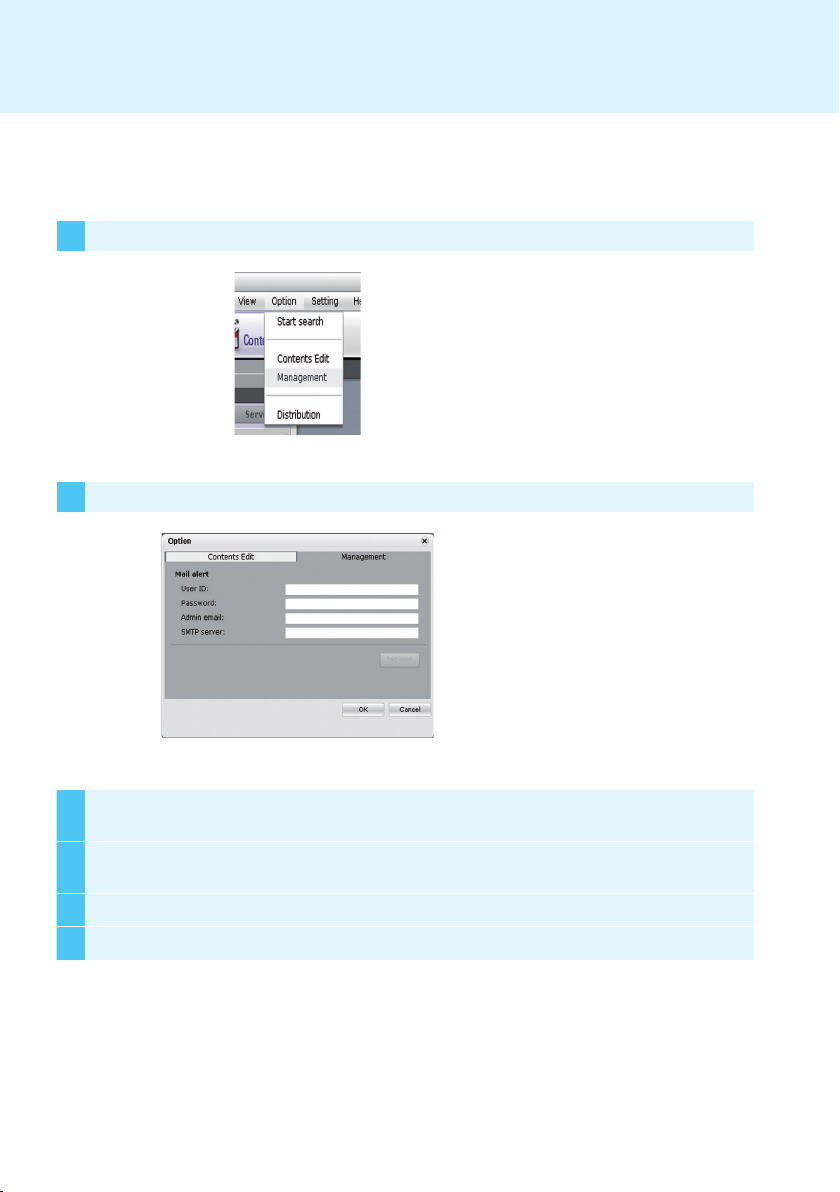


background


3
Administrator E-mail
SMTP Server
4
OK

5 Test E-mail
6 
1 Options > Management
2 Options


background
20
Make sure to read the Safety Precautions
before using the product.
Ke e p t h e O w n e r s M a n u a l (C D ) i n a n
accessible place for future reference.
The model and serial number of the SET is
located on the back and one side of the SET.
Record it below should you ever need service.
WARNING - This is a class A product. In
a domestic environment this product may
cause radio interference in which case the
user may be required to take adequate
measures.
MODEL
SERIAL
Temporary noise is normal when powering
ON or OFF this device.


Specifications

LG Electronics NC2000-BAAB Questions and Answers

Questions and Answers

Related Products