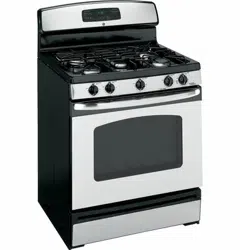
User Manual Gas RangeUSING THE RANGE
In Case of a Power Failure
In the event of a power failure, the oven is inoperable and no attempt should be made to operate it. However, the surface burners may be lit with a match. using extreme caution, hold a lit match near the ports beneath the surface burner cap, then slowly turn the knob to the LITE position. Once lit, surface burners will continue to operate normally
Surface Burners
Lighting a Surface Burner
WARNING Burners should be operated only when covered by cookware. Burner flames not covered by cookware present a risk of fire or clothing ignition. Never let flames extend beyond the sides of the cookware. Failure to comply may result in serious injury.
Make sure all burners are in their correct locations and fully assembled before attempting to operate any burner. Select a burner and find its control knob. Push the knob in and turn it to the LITE position.
You will hear a clicking noise – the sound of the electric spark igniting the burner. When one burner is turned to LITE, all burners will spark. Sparking will continue as long as the knob remains at LITE. Once gas is ignited, turn the knob to adjust the flame size.

Selecting a Flame
Size Watch the flame, not the knob, as you adjust heat. When rapid heating is desired, the flame size should match the size of the cookware you are using. Flames larger than the bottom of the cookware will not heat faster and may be hazardous.

Using the Surface Burners
NOTES:
- Do not operate the burner for an extended period of time without cookware on the grate. The finish on the grate may discolor or chip without cookware to absorb the heat.
- Do not attempt to disassemble any burner is on. Damage to the product may occur.
- Be sure the burners and grates are cool before you place your hand, a pot holder or cleaning materials on them.
Your rangetop offers convenience, cleanability and flexibility for a wide range of cooking applications.
The smallest burner is the simmer burner. A simmer burner turned down to LO provides precise cooking performance for foods such as delicate sauces that require low heat for a long cooking time.
Types of Surface Burners

Top-of-Range Cookware
Aluminum: Medium-weight cookware is recommended because it heats quickly and evenly. Most foods brown evenly in an aluminum skillet. Use saucepans with tight-fitting lids when cooking with minimum amounts of water.
Stainless Steel: This metal alone has poor heating properties and is usually combined with copper, aluminum or other metals for improved heat distribution. Combination metal skillets usually work satisfactorily if they are used with medium heat or as the manufacturer recommends.
Cast-Iron: If heated slowly, most skillets will give satisfactory results.
Enamelware: Under some conditions of some cookware may melt. Follow the cookware manufacturer’s recommendations for cooking methods.
Glass: There are two types of glass cookware-those for oven use only and those for top-of-range cooking ( saucepans, coffee and teapots ). Glass conducts heat very slowly.
Heatproof Glass Ceramic: Can be used for either surface or oven cooking. It conducts heat very slowly and cools very slowly. Check the cookware manufacturer’s directions to be sure it can be used on gas ranges
Stove Top Grills
Do not use an after-market stove top grill on your gas surface burners. A stove top grill will cause incomplete combustion resulting in carbon monoxide levels above allowable standards. This could be hazardous to your health.

Using a Wok
Use only a flat-bottomed wok with a diameter of 14 inches or less. Make sure the wok bottom sits flat on the grate.
Do not use a wok support ring. Placing the ring over the burner or grate may cause the burner to work improperly, resulting in carbon monoxide levels above allowable standards. This could be hazardous to your health.

Griddle (on some models)
Using Your Nonstick Aluminum Griddle (on some models)
Your griddle provides an extra-large cooking surface for meats, pancakes, and other foods usually prepared in a skillet. Before first use, rinse with hot water and dry thoroughly.
Griddle Precautions:
- Do not use oil on the griddle for extended lengths of time. Permanent staining and/or craze lines on the surface could result.
- Do not overheat the griddle. Leaving the griddle burner on at Hi for an extended amount of time without food can damage the nonstick coating.
- Use only plastic, nylon, wooden utensils, or SilverStone® kitchen tools to prevent marring of the coating.
- Never use knives or cut food on the griddle
- Do not use metal utensils with sharp point or rough, sharp edges which might damage the griddle surface.
- Do not place the griddle in a microwave oven
- If something has spilled to accumulate under the griddle, it should be cleaned up as soon as possible to prevent “baked on” food soil.
- Do not allow grease to accumulate under the griddle as it can be a fire hazard. Clean under the griddle with hot, soapy water as soon as it is cool. Do not clean your griddle in the dishwahsher.
- Do not clean the griddle in the self-cleaning oven. Doing so will damage the nonstick coating. For instructions on how to clean the griddle, see the Cleaning the Cooktop section of this manual.
Nonstick Aluminum Griddle


Oven Controls
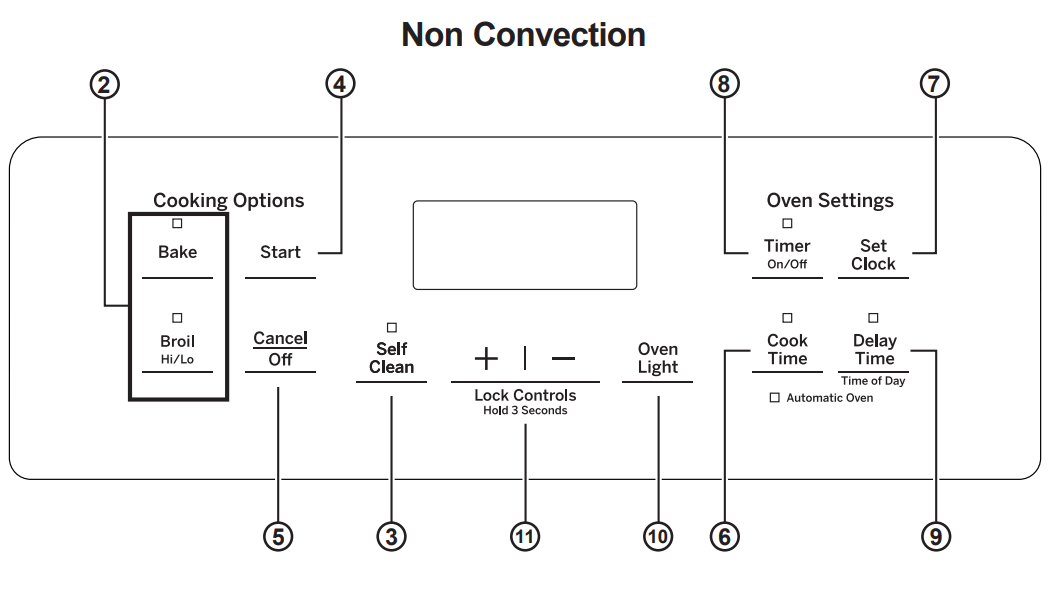
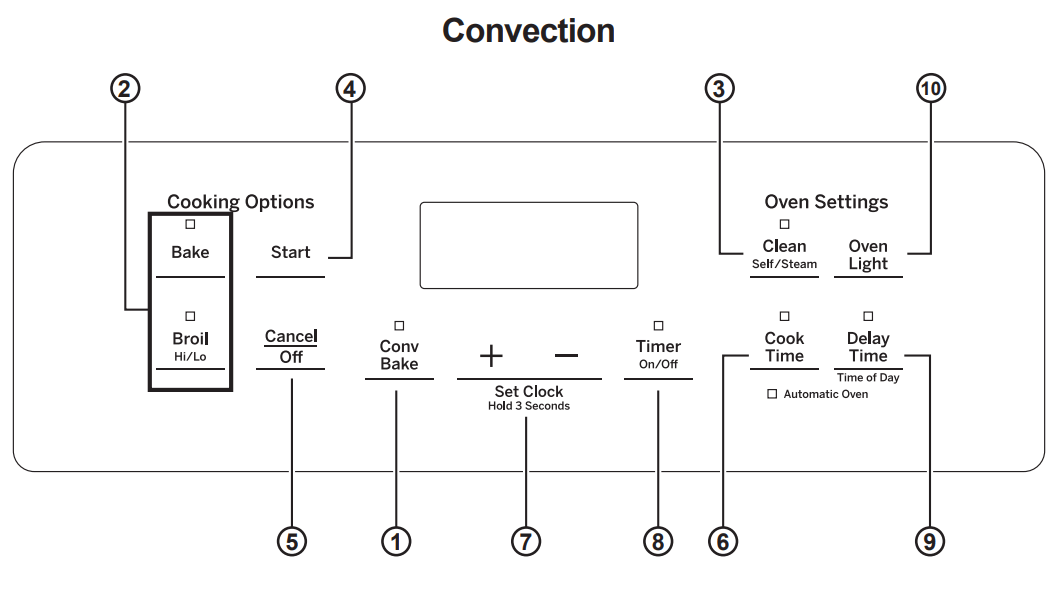
1. Convection Bake (on some models): Convection cooking uses increased air circulation to improve performance when baking on multiple racks. See the Cooking Modes section for more information.
2. Traditional Cooking Modes: Your oven has the following traditional cooking modes: Bake, Broil Hi and Broil Lo. See the Cooking Modes section for more information.
3. Clean (on some models): There are two cleaning modes: Self Clean and Steam Clean. See the Cleaning the Oven section for important information about using these modes.
4. Start: Must be pressed to start any cooking, cleaning or timed function.
5. Cancel/Off: Cancels ALL oven operations except the clock and timer.
6. Cook Time: Counts down cooking time and turns off the oven when the cooking time is complete. Ptogram the desired cooking mode and temperature and press Start. Then, press the Cook Time pad and use the number pads to program a cooking time in hours and minutes. Then, press Start again. This can only be used with Traditional Bake and Convection Bake.
7. Clock: Sets the oven clock time and clock display (on some models). To set the clock display (on/off) press the Set Clock pad (on some models) once. If your model does not have a Set Clock pad, see the Special Features section for instructions on how to adjust the clock display. To set the clock time, press both the + and - pads and hold for 3 seconds or press the Set Clock pad until the display is flashing. Use the + and _ pads to adjust the clock. Press Start to save the time.
8. Timer: Works as a countdown timer. Press the Timer pad and the + and - pads to program the time in hours and minutes. Press the Start pad. The oven will continue to operate when the timer countdown is complete. To turn the timer off, press the Timer pad.
9. Delay Time: Delays when the oven will turn on.Use this to set a time when you want the oven to star. Press the Delay Time pad, and use the + and - pads to program the time of day for the oven to turn on. Then press the desired cooking mode pad, use the + and - pads to adjust the temperature, then press Start. After Start has been pressed, a cook time may also be programmed if desired. Once the Delay Time has been programmed, the start time set for the oven will be displayed until that time is reached. Then, either the cook time (if programmed} or the temperature will be displayed. Delay Time can only be used with Traditional Bake, Convection, Bake, and the Clean models (on some models)
10. Oven Light (on some models): Turns the oven light on or off.
11. Lock Controls (on some models): Locks out the control so that pressing the pads does not activate the controls. Press and both the + and - pads and hold for 3 seconds to lock or unlock the control. Cancel/Off is always active, even when the control is locked.
Special Features
There are several different special features on your range. To change the settings of these special features:
- Press the Bake and Broil pads at the same time and hold for three seconds.
- ‘SF” will appear in the display
- For instructions on how to select different features, refer to the section below that corresponds to the special feature of interest.
- When the change has been made, press the Start key to save the change and exit the special features menu.
Adjust the Oven Temperature
This feature allows the oven baking temperature to be adjusted up to 35˚ F hotter or down 35˚ F cooler. Use this feature if you believe your oven temperature is too hot or too cold and wish to change it. This adjustment affects every cooking mode except broil.
After entering the special features menu, press the Bake pad to enter the temperature adjustment mode. A number between 35 and -35 will display. Use the + or _ pads to set the desired temperature adjustment. Press the Start pad to save the temperature adjustment.
12-Hour Auto Shut-Off and Sabbath
12-hour auto shut-off turns off the oven after 12 hours of continuous operation. The12-hour auto shut-off may be “on” or “oFF.” For details on the “sAb” option, see the Sabbath Mode Section. Enter into the special features menu as outlined above and repeatedly press the Set Clock pad until the desired setting is displayed. If your model does not have a Set Clock pad, then repeatedly press the Cook Time pad until the desired setting is displayed. Press the Start pad to save the setting.
Clock Display (on some models)
This feature specifies if the time of day is displayed. The clock display may be “on” or “oFF.” If your model has a Set Clock pad, see the Oven Controls section for instructions on adjusting the display. If your model does not have a Set Clock pad, enter into the special features menu as outlined above. Press the Timer pad to see the current setting. Press the Timer pad again to change the setting. Press the Start pad to save the display setting.
Increment/Decrement Speed
A setting (i.e temperature) may be rapidly by pressing and holding the + or - pad. To adjust the increment/decrement speed, enter into the special features menu ad outlined above. Press the + pad to increase the speed or press the - pad to decrease the speed. Settings vary from 1 (slowest) to 5 (fastest). Press the Start pad to save the speed setting.
Sabbath Mode
The Sabbath mode feature complies with standards set forth by Star K. Only continuous baking or timed baking is allowed in the Sabbath mode. All tones are disabled in the Sabbath mode. Cooking in the Sabbath mode is a two-step process, first the Sabbath mode must be set and then the bake mode must be set.
Setting the Sabbath Mode
Press the Bake and Broil pads at the same time and hold for three seconds. “SF” will appear in the display.
Press the Set Clock pad until “SAb” appears in the display and then press Start. If your model does not have a Set Clock pad, then press the Cook Time pad until “SAb” appears in the display and then press Start. A single bracket “]” will appear in the display indicating that the Sabbath mode is set. Continuous bake or timed bake can now be set as outlined below.
Start a Continuous Bake
Press Bake, if a temperature other than 35˚ F is desired then press the + or - pads to adjust the temperature in 25 degree increments, then press Start. After a delay, a second bracket “] [” will appear in the display indicating that the oven is baking.
Adjusting the Temperature
Press Bake, then press the + or - pads to adjust the temperature in 25 degree increments, then press Start. An oven thermometer can be used if some indication of temperature setting is desired.
Start a Timed Bake
Press Cook Time, then press the + or - pads to adjust the cook time in one minute increments. Press the Bake, if a temperature other than 35˚ F is desired then press the + or - pads to adjust the temperature in 25 degree increments, then press Start. After a delay, a second bracket “] [” will appear in the display indicating that the oven is baking. When the cook time expires the display will change back to a single bracket “]” indicating that the oven is no longer baking
Exit the Sabbath Mode
Exiting the Sabbath mode should be done after the Sabbath is over. Press Cancel/Off to end any bake mode that may be running. Press the Bake and Broil pads at the same time and hold for three seconds. “SF” will appear in the display. Press the Set Clock pad until “On” appears in the display and then press Start. If your model does not have a Set Clock pad, then press the Cook Time pad until “On” appears in the display and then press Start. The display will change from a single bracket “]” to the time of day indicating that the Sabbath mode has been exited.
Sabbath Mode Power Outage Note
If a power outage occurs, the Sabbath mode will not resume when power is restored.
Cooking Modes
Your new oven has a variety of cooking modes to help you get the best results. These modes are described below. Refer to the Cooking Guide section for recommendations for specific foods. Remember, your new oven may perform differently than the oven it is replacing.
Bake
The bake mode is for baking and roasting. This mode uses heat only from the lower burner. When preparing baked goods such as cakes, cookies and pastries, always preheat the oven first. To use this mode, press the Bake pad, use the + and - pads to adjust the temperature, then press Start.
Broiling Modes
Always broil with the oven door and drawer closed. Monitor food closely while broiling on the upper rack positions as placing food closer to the broil burner increases smoking, spattering, and the possibility of fats igniting.
Try broiling foods that you would normally grill. Adjust rack positions to adjust the intensity of the heat to the food. Place foods closer to the broil burner when a seared surface and rare interior is desired. Thicker foods and foods that need to be cooked through should be broiled on a lower rack position or by using the Broil Lo mode.
Broil Compartment (on some models)
For better searing use the rack position that places food closest to the broil heater. Move food down for more doneness/less searing. Take care not to touch the inner door when placing and removing food in broil compartment.

Broil Hi
The Broil Hi mode uses intense heat from the upper burner to sear foods. Use Broil Hi for the thinner cuts of meat and/or when you would licke to have a seared surface and rare interior. To use this mode press the Broil pad once and then press Start. It is not necessary to preheat when using this mode.
Broil Lo
The Broil Lo mode uses less intense heat from the upper burner to cook food thoroughly while also browning the the surface. Use Broil Ho for thicker cuts of meat and/or foods that you would like cooked all the way through. To use this mode press the Broil pad twice and then press Start. It is not necessary to preheat when using this mode.
Convection Bake (on some models)
The Convection Bake mode is intended for baking on multiple racks at the same time. This mode uses air movement from the convection fan to enhance cooking evenness. Your oven is equipped with Auto Recipe Conversion, so it is not necessary to adjust the temperature when using this mode. Always preheat when using this mode. Baking times may be slightly longer for multiple racks than what would be expected for a single rack. To use this mode press the Conv Bake pad, use the + and - pads to adjust the temperature, and then press Start. Always preheat when using this mode.
Oven Racks
Recommended rack positions for various types of foods are provided in the Cooking Guide. Adjusting rack position is one way to impact cooking results. For example, if you would prefer darker tops on cakes, muffins, or cookies, try moving food one rack position higher. If you find foods are too brown on top try moving them down next time. When baking with multiple pans and on multiple racks, ensure there is at least 1 ½” between pans to allow sufficient space for air to flow.
To avoid possible burns, place the racks in the desired position before you turn the oven on.

Removing and Replacing Flat Racks
When placing and removing cookware, pull the rack out to the bump (stop position) on the rack support.
To remove a rack, pull it toward you until it reaches the stop position, tilt up the front of the rack and pull it out.

To replace a rack, place the curved end of the rack onto the rack supports. Tilt up the front of the rack and push the rack in until it stops. Then lay the rack flat and push it in until it is all the way into the oven.

Racks may become difficult to slide, especially after a self-clean cycle. To improve sliding conditions, use a soft cloth or paper towel to rub vegetable oil on the left and right edges of the racks and/or rack supports.
Aluminum Foil and Oven Liners
CAUTION Do not use any type of foil or oven liner to cover the oven bottom. These items can trap heat or melt, resulting in damage to the product and risk of shock, smoke or fire. Damage from improper use of these items is not covered by the product warranty.
Foil may be used to catch spills by placing a sheet on a lower rack, several inches below the food. Do not use more foil than necessary and never entirely cover an oven rack with aluminum foil. Keep foil ateast 1-1/2” fromm oven walls to prevent poor heat circulation.
Cookware
Cookware Guidelines
The material, finish, and size of cookware affect baking performance. Dark, coated and dull pans absorb heat more readily than light, shiny pans. Pans that absorb heat more readily can result in a browner, crisper, and thicker crust. If using dark and coated cookware check food earlier than minimum cook time. If undesirable results are obtained with this type of cookware consider reducing oven temperature by 25°F next time.
Shiny pans can produce more evenly cooked baked goods such as cakes and cookies.
Glass and ceramic pans heat slowly but retain heat well. These types of pans work well for dishes such as pies and custards.
Air insulated pans heat slowly and can reduce bottom browning.
Keep cookware clean to promote even heating. Stoneware heats slowly and retains heat well. It is recommended to preheat this type of cookware if possible. Additional cook time may be required.
Oven Air Vents
Never bloack the vents (air openings) of the range. They provide the air inlet and outlet that are necessary for the range to keep cool and operate properly with correct combustion.
Air openings are located at the rear of the cooktop, at the top and bottom of the oven door, and at the bottom of the range.

Cooking Guide


*When baking four cake layers at a time, stagger the pans as shown to the right so that one pan is not directly above another.
Cook food thoroughly to help protect against foodborne illness. Minimum safe food temperature recommendations for food safety can be found at IsItDoneYet.gov. Make sure to use a food thermometer to take food temperatures.
NOTE: Remove unused racks when using the oven for faster preheat, improved efficiency and optimal cooking performance.
CARE AND CLEANING
Range – Exterior
Be sure all controls are off and all surfaces are cool before cleaning any part of the range.
WARNING If your range is removed for cleaning, servicing or any reason, be sure the anti-tip device is reengaged properly when the range is replaced. Failure to take this precaution could result in tipping of the range and can result in death or serious burns to children or adults.
Control Lockout
If desired, the touch pads may be deactivated before cleaning.
See Lock Controls in the Oven Controls section in this manual.
Clean up splatters with a damp cloth.
You may also use a glass cleaner.
Remove heavier soil with warm, soapy water. Do not use abrasives of any kind.
Reactivate the touch pads after cleaning.
Control Panel
It’s a good idea to wipe the control panel after each use. Clean with mild soap and water or vinegar and water, rinse with clean water and polish dry with a soft cloth.
Do not use abrasive cleansers, strong liquid cleansers, plastic scouring pads or oven cleaners on the control panel-they will damage the finish, including Black Stainless Steel.
Oven Exterior
Do not use oven cleaners, abrasive cleansers, strong liquid cleansers, steel wool, plastic scouring pads, or cleaning powders on the interior or exterior of the oven.
Clean with a mild soap and water or vinegar and water solution. Rinse with clean water and dry with a soft cloth. When cleaning surfaces, make sure that they are at room temperature and not in direct sunlight.
If stain on the door vent trim is persistent, use a mild abrasive cleaner and a sponge-scrubber for best results.
Spillage of marinades, fruit juices, tomato sauces and basting liquids containing acids may cause discoloration and should be wiped up immediately. Let hot surfaces cool, then clean and rinse.
Painted Surfaces
Painted surfaces include the sides of the range and the door, top of control panel and the drawer front. Clean these with soap and water or a vinegar and water solution.
Do not use commercial oven cleaners, cleaning powders, steel wool or harsh abrasives on any painted surface, including Black Stainless Steel.
Stainless Steel excluding Black Stainless Steel (on some models)
Do not use a steel wool pad; it will scratch the surface.
Cleaners with oxalic acid such as Bar Keepers Friend Soft Cleanser™ will remove surface rust, tarnish and small blemishes. Use only a liquid cleanser free of grit and rub in the direction of the brush lines with a damp, soft sponge.
To clean the stainless steel surface, use warm sudsy water or a stainless steel cleaner or polish. Always wipe the surface in the direction of the grain. Follow the cleaner instructions for cleaning the stainless steel surface.
To inquire about purchasing cleaning products including stainless steel appliance cleaner or polish, see the Accessories and Consumer Support sections at the end of this manual.
Range – Interior
The interior of your new oven can be cleaned manually or by using Self Clean mode.
Spillage of marinades, fruit juices, tomato sauces and basting liquids containing acids may cause discoloration and should be wiped up immediately. Let hot surfaces cool, then clean and rinse.
Manual Cleaning
Do not use oven cleaners, strong liquid cleansers, steel wool, or scouring pads on the interior of the oven. For soils on the oven bottom and other enameled surfaces, use a gentle abrasive containing oxalic acid, such as Bar Keepers Friend®, with a non-scratch sponge. Take care not to apply any abrasive cleaners or sponges to the door glass, as it will scratch the reflective coating. The oven interior and door glass may be cleaned using a soft cloth with a mild soap and water, or vinegar and water solution. After cleaning, rinse with clean water and dry with a soft cloth.
Steam Clean Mode
The Steam Clean feature is for cleaning light soil from your oven at a lower temperature than Self Clean.
To use the Steam Clean feature:
- Start with the oven at room temperature
- Wipe excess grease and soils from the oven
- Pour one cup of water onto the bottom of the oven
- Close the door
- Press the Clean pad, select Steam Clean and then press Start/Enter.
You cannot open the door during 30 minutes Steam Clean cycle. At the end of the Steam Clean cycle, soak up the remaining water, and wipe the moisture-softened soil from the oven walls and door.
Self Clean Mode (on some models)
Read Self-Cleaning Oven Safety Instructions at the beginning of this manual before using the Self Clean Mode. Self Clean uses very high temperatures to clean the oven interior. Only self-clean (black) racks and grates may remain in the oven during the self-clean cycle. All other items, including nickel plated (sliver) racks, should be removed. If nicked plated (siver) racks are left in the oven during a self-clean cycle, the racks will tarnish. If either type of rack is left in the oven during a self-clean cycle, the rack may become difficult to slide. See the Oven Racks section for instructions on how to improve.
IMPORTANT: The health of some birds is extremely sensitive to the fumes given off during the self-cleaning cycle of any range. Move birds to another well-ventilated room.
To use the Self Clean feature:
- Start with the oven at room temperature
- Wipe excess grease and soils from the oven and interior door.
- Remove all items. See Cleaning the Cooktop to determine if your grates may be self-cleaned and for important details regarding grate placement.
- Close the door. Slide the door latch handle to the left as far as it will go.
- Turn Oven Knob to Self Clean.
You cannot open the door during the self-clean cycle. The door will remain locked after the self-clean cycle until the oven cools below the unlocking temperature. At the end of the self-clean cycle, allow the oven to cool and wipe any ash out of the oven.
Racks
All racks can be washed with warm, soapy water. Enameled (not shiny) racks can be left in the cavity during self clean.
Racks may be more difficult to slide, especially after a self-clean. Put some vegetable oil on a soft cloth or paper towel and rub onto the left and right edges.
Cooktop
Removal of Surface Burners for Cleaning
Turn all controls OFF. Allow cooktop to cool before removing grates and burner parts. When removing the burner caps and heads, remember their size and location. Replace them in the same location after cleaning.
CAUTION Do not attempt to remove oval burner cap from burner head.

Cleaning the Surface Burners
Cleaning the Burner Caps
Wash burner caps in hot, soapy water and rinse with clean water. You may scour with a plastic scouring pad to remove burned-on food particles. The round burner caps may also be cleaned in your dishwasher.
Cleaning the Burner Heads
Wash the burner heads routinely, especially after bad spillovers which could clog the burner openings. Lift burners off when cool. Wash with hot, soapy water. Rinse with clean water. For more stubborn stains, use a brush with plastic bristles.
NOTE: Do not use steel wool or scouring pads to clean the burner parts as these may clog the openings. Never wash burner heads in your dishwasher as dishwasher. Doing so may cause them to discolor.
The ports in the burner heads must be kept clean at all times for an even, unhampered flame.
Clogged or dirty burner ports or electrodes will not allow the burner to operate properly.

Replacing Surface Burners
Before replacing the burner caps, heads and oval head/cap assembly, shake out excess water and allow them to dry thoroughly.
Replace burner heads in the correct locations according to size. Ensure each cap is properly seated on the burner head, as pictured below.

CAUTION Do not operate the cooktop without all burner parts and grates in place.
Any spill on or around an electrode must be carefully cleaned. Avoid hitting the electrode with anything hard or it could be damaged.

Burner Grates
Manual Cleaning
Grates should be washed in hot, soapy water and rinsed with clean water. To soften burned-on food, place grates in a solution containing ¼-cup of household ammonia for several hours. Afterward, scrub grates with a plastic scouring pad soaked in hot, soapy water. Rinse well and dry.
Self Clean Mode (on some models)
If your grates do not have rubber bumpers on their bottom surface, they may be cleaned in the oven using the self-clean cycle. Do not attempt to clean your grates in the oven if your grates have rubber bumpers. Doing so will destroy the rubber bumpers and may affect the function of your surface burners.
Porcelain-coated grates may gradually dull if continually exposed to self-clean temperatures.
You oven is equipped with nickel-plated (silver) racks, it is recommended to follow the instructions for placing grates on the oven bottom. Nickel-plated racks should not remain in the oven during the self clean cycle. Doing so will tarnish the racks. If either type of rack is left in the oven during a self-clean cycle, the rack may become difficult to slide.
NOTE: When placing or removing grates from the oven, do not slide the grates on the racks or oven bottom. Doing so could damage the enamel on the racks or oven bottom.
To self clean your grates on the oven bottom:
- Remove all oven racks
- Gently place one grate on the center of the oven bottom with the grate oriented in the upright position. Stack remaining grate(s) as shown below. Do not place or stack grates in any other configuration.

Once the grates are placed in the oven, operate the self-clean cycle per the instruction in the Cleaning the Oven section.
Once the self-clean cycle is complete, the grates may carefully be removed. You may notice a white residue on
the grates. Wipe it off with a damp sponge. If white spots persist, wet the sponge with a 50/50 solution of vinegar and water and wipe the grates again.
When replacing the grates on the cooktop, be sure to locate them correctly. Grates should fit securely into the cooktop
Grate Support Bumpers (on some models)
If any of the rubber grate support bumpers in the cooktop are missing or damaged, replacement parts can be obtained by calling GE Appliances at 1.800.GE.CARES (1.800.432.2737)
To insert the new bumpers, simply place the cone shaped end of the bumper into the hole in the cooktop and push down while gently twisting the bumper.

Griddles (on some models)
Nonstick Aluminum Griddle: Avoid scraping the griddle surface with metal utensils. Wash your griddle with dish soap and hot water. If necessary, scrub with a non abrasive plastic pad.
Griddle Precautions:
- If something has spilled under the griddle, it should be cleaned up as soon as possible to prevent the spill from getting baked onto the cooktop.
- Do not allow grease to accumulate under the griddle as it can be a fire hazard. Clean under the griddle with hot, soapy water as soon as it is cool.
- Do not wash your griddle in the dishwasher.
- Do not clean the griddle in the self-cleaning oven.
Door anf Drawer
Cleaning the Oven Door
Cleaning the Door Interior
Do not allow excess water to run into any holes or slots in the door .
Wipe dish soap over any baked-on spatters on the glass. Use a singe sided safety razor blade to clean it off. Then wipe over the glass with a soapy cloth to remove any residue and dry off.
The area outside the gasket can be cleaned with a soap filled plastic scouring pad. Do not rub or clean the door gasket - it has an extremely low resistance to abrasion.
If you notice the gasket becoming worn, frayed or damaged in any way or if it has become displaced on the door, you should have it replaced.
Cleaning the Door Exterior
If a stain on the door vent trim is persistent, use a mild abrasive cleaner and a sponge-scrubber for best results. Do not use this method on any other surface.
Stainless Steel Surfaces (on some models)
Do not use a steel wool pad; it will scratch the surface.
To clean the stainless steel surface, use warm sudsy water or a stainless steel cleaner or polish. Always wipe the surface in the direction of the grain. Follow the cleaner instructions for cleaning the stainless steel surface.
To inquire about purchasing cleaning products including stainless steel appliance cleaner or polish, see the Accessories and Consumer Support sections at the end of this manual.
Removable Storage Drawer (on some models)
The storage drawer is a good place to store cookware and bakeware. Do not store plastics or flammable material in the drawer.
The storage drawer may be removed for cleaning under the range. Clean the storage drawer with a damp cloth or sponge. Never use harsh abrasives or scouring pads.
Removing the Storage Drawer:
- Pull drawer straight out until it stops
- Tilt the front of the drawer upward and pull the drawer free of the range.

Replacing the Storage Drawer:
- Rest the drawer slides on the range stops.
- Push directly backward until the drawer drops into place.
- Slide the drawer all the way into the oven.
Oven Light
NOTE: The glass cover should be removed only when cold. Wearing latex gloves may offer a better grip. Before replacing the bulb, disconnect electrical power to the oven at the main fuse or circuit breaker panel. Let the bulb cool completely before removing it. For your safety do not touch a hot bulb with a damp cloth. If you do the bulb may break.
To remove: Trurn the glass cover counterclockwise ¼ turn until the tabs of the glass cover clear the grooves of the socket and pull the cover off. Remove the bulb.
To replace: Put in a new 40-watt appliance bulb. Place the tabs of the glass cover into the grooves of the socket. Turn the glass cover clockwise ¼ turn
NOTE:
- A 40-watt appliance bulb is smaller than a standard 40-watt household bulb.
- Reconnect electrical power to the oven once the new bulb is installed.
- For improved lighting inside the oven, clean the glass cover frequently using a wet cloth. This should be done when the oven is completely cool.

Replacing the Light Bulb (JGSS66 model only):
- Disconnect electrical power to the range
- Hold the glass cover stable, so it doesn’t fall when released.
- Slide near the indent of the cover holder until the cover is released. Do not remove any screws to release the glass cover.
- Replace bulb with a 40-watt household appliance bulb. Do not touch hot bulb with hand or wet cloth. Only remove bulb when it is cool.
- Hold glass cover stable over new bulb.
- Pull the wire cover holder near the indent in the wire cover holder is located in the indent of the glass cover.
- Connect electrical power to range.

Oven Door
The door is very heavy. Be careful when removing and lifting the door. Do not lift door by the handle.
Removing the Door:
- Fully open the oven door
- On each hinge, slide the hinge lock up, making sure it snaps into its fully raised position.
- Firmly grasp both sides of the door near the handle.
- Close the door until the top of the door is approximately 3” from the range frame.
- Lift door up and away from the range until both hinge arms are clear of the slots in the range frame

Replacing the Door:
- Firmly grasp both sides of the door near the handle
- With the door at the same angle as the removal position, rest the notch in the bottom of the left hinge arm on the bottom edge of the left hinge slot. The notch in the hinge arm must be fully seated onto the bottom of the slot. Repeat for the right side.
- Fully open the door. If the door will not fully open, the hinge arms are not seated correctly. Lift the door off the range and repeat Step 2.
- Push the hinge locks down to the locked position.
- Close the oven door.

To Remove the door (JGSS66 model only):
- Fully open the door
- Pull the hinge locks up and away from the range frame to the unlocked position.
- Firmly grasp both sides of the door near the top.
- Close door until the top of the door is approximately 6” from the range frame.
- Lift door up and away from the range until both hinge arms are clear of the slots in the range frame.

To Replace the Door (JGSS66 model only):
- Firmly grasp both sides of the door near the top
- With the door at the same angle as the removal position, rest the notch on the underside of the left hinge arm on the bottom edge of the left hinge slot. The notch in the hinge arm must be fully seated into the bottom of the slot. Repeat for the right side.
- Fully open the door. If the door will not fully open, the notches in the bottoms of the hinge arms have not seated correctly in the bottom edge of the slot. Lift the door off the range and repeat previous step.
- Push the hinge locks toward the range cavity and down to the locked position.
- Close the oven door.

TROUBLESHOOTING TIPS
My new oven doesn't cook like my old one. Is something wrong with the temperature settings?
Possible Cause
- Your new oven has a different cooking system from your old oven and therefore may cook differently than your old oven.
What To Do
- For the first few uses, follow your recipe times and temperatures carefully and use rack positions recommended in the Cooking Guide. If you still think your new oven is too hot or too cold, you can adjust the temperature yourself to meet your specific cooking preference. See the Oven Controls section.
Food does not bake properly
Possible Cause
- Oven controls improperly set.
- Rack position is incorrect or rack is not level
- Incorrect cookware or cookware of improper size being used.
- Oven temperature needs adjustment.
What To Do
- See the Cooking Modes section.
- See the Cooking Modes section and Cooking Guide.
- See the Cookware section.
- See the Oven Controls section.
Food does not broil properly
Possible Cause
- Oven controls improperly set.
- Improper rack position being used.
- Cookware not suited for broiling.
- Aluminum foil on the broil pan has not been fitted properly or slit to drain grease.
What To Do
- Make sure you select the appropriate broil mode.
- See Cooking Guide for rack location suggestions.
- Use a pan specifically designed for boiling
- If using aluminum foil on broil pan, wrap tightly and add slits conforming to those in the pan to allow grease to drain.
Oven temperature too hot or too cold
Possible Cause
- Oven temperature needs adjustment.
What To Do
- See the Oven Controls section.
Oven and/or display appears not to work
Possible Cause
- A fuse in your home may be blown or the circuit breaker tripped.
- Oven controls improperly set.
- Oven is in Sabbath Mode.
- The clock is turned off.
What To Do
- Replace the fuse or reset the circuit breaker.
- See the Using the Oven section.
- Verify, that the oven is not in Sabbath Mode. See the Special Features section.
- See the Oven Controls or Special Features section.
“Crackling” or “popping” sound
Possible Cause
- This is the sound of the metal heating and cooling during both the cooking and cleaning functions.
What To Do
Why is my range making a "clicking" noise when using my oven?
Possible Cause
- Your range has been designed to maintain a tighter control over your oven's temperature. You may hear your oven's heating elements “click” on and off more frequently than in older ovens to achieve better results during baking, broiling, and self-clean cycles.
What To Do
Clock and timer do not work
Possible Cause
- A fuse in your home may be blown or the circuit breaker tripped.
What To Do
- Replace the fuse or reset the circuit breaker.
Sometimes the oven takes longer to preheat to the same temperature
Possible Cause
- Cookware, food, and/or number of racks in oven.
What To Do
- Cookware, food, and racks in the oven will cause differences in preheat times. Remove excess items to reduce preheat time.
Oven light does not work
Possible Cause
- Light bulb is loose or defective.
What To Do
- Tighten or replace bulb. See the Maintenance section for instructions on how to replace the bulb.
Oven will not self-clean
Possible Cause
- The temperature is too high to set a self-clean operation.
- Oven controls improperly set.
What To Do
- Allow the oven to cool and reset the controls.
- See the Care and Cleaning section.
Excessive smoking during clean cycle
Possible Cause
- Excessive soil or grease.
What To Do
- Turn the Oven Temperature Knob to OFF. Wait until the Oven cools below the unlocking temperature. Open the windows to rid the room of smoke. Wipe up the excess soil and reset the clean cycle.
Oven not clean after a clean cycle
Possible Cause
- Oven controls improperly set.
- Oven was heavily soiled.
What To Do
- See the Care and Cleaning section.
- Clean up heavy spillovers before starting the clean cycle. Heavily soiled ovens may need to self-clean again.
Strong “burning” or “oily” odor emitting from the vent
Possible Cause
- This is normal in a new oven and will disappear in time.
What To Do
- To speed the process, set a self-clean cycle. See the Care and Cleaning section. This is temporary.
Excessive smoking during broiling
Possible Cause
- Food too close to burner element.
What To Do
- Lower the rack position of the food.
Oven door will not open when you want to cook.
Possible Cause
- The oven door is locked because the temperature inside the oven has not dropped below the locking temperature.
What To Do
- Allow the oven to cool below the locking temperature.
"LOCK DOOR" flashes in the display
Possible Cause
- The self-clean or steam-clean cycle has been selected but the door is not locked.
What To Do
“F— and a number or letter” flash in the display You have a function error code.
Possible Cause
- You have a function eror code.
What To Do
- Press the Cancel/Off pad. Allow the oven to cool for one hour. Put the oven back into operation. If the function code repeats, disconnect all power to the oven for at least 30 seconds and then reconnect power. If the function error code repeats again, call for service.
Clock flashes due to a power outage
Possible Cause
What To Do
- Reset the clock. If the oven was in use, you must reset it by pressing the Cancel/Off pad, setting the clock and resetting any cooking function.
Lock Controls or Control Lockout feature is activated
What To Do
- If LOC ON appears in the display, the range control is locked. Turn this feature off to use the range. See the Oven Controls section.
Burners do not light
Possible Cause
- Plug on range is not completely inserted in the electrical outlet.
- Gas supply not connected or turned on.
- A fuse in your home may be blown or the circuit breaker tripped.
- Burner parts not replaced correctly.
- Burner slots near the electrode, or the round lighter port on the oval burner, may be clogged.
- Food residue on electrode
What To Do
- Make sure electrical plug is plugged into a live, properly grounded outlet.
- See the Installation Instructions that came with your range.
- Replace the fuse or reset the circuit breaker.
- See the Care and Cleaning of the range section.
- Remove the burners and clean them. Check the electrode area for burned-on food or grease. See the Care and Cleaning of the range section.
- Lightly polish flat tip of electrode with nail file or sandpaper until shiny.
Top burners do not burn evenly
Possible Cause
- Improper burner assembly.
- Burner slots on the side of the burner may be clogged.
What To Do
- Make sure the burner caps are seated correctly. See the Care and Cleaning of the range section.
- Remove the burners for cleaning. See the Care and Cleaning of the range section.
Burner flames are very large or yellow
Possible Cause
- Improper air to gas ratio.
What To Do
- If range is connected to Propane gas, contact the technician who installed your range or made the conversion.
Surface burners light but bake and broil burners do not.
Possible Cause
- Gas to the oven burners may have been shut off.
What To Do
- The oven gas shut-off is located on the gas regulator near the gas line attachment to your range. Locate it and flip the lever.

My oven door glass appears to be "tinted" or have a "rainbow" color.
Possible Cause
- The inner oven glass is coated with a heat barrier to reflect the heat back into the oven to prevent heat loss and keep the outer door cool while baking.
What To Do
- This is normal. Under certain light or angles, you may see this tint or rainbow color.
Drawer does not slide smoothly or drags
Possible Cause
- The drawer is out of alignment.
- Drawer is over-loaded or load is unbalanced.
What To Do
- Fully extend the drawer and push it all the way in. See the Care and Cleaning of the range section.
- Reduce weight or redistribute drawer contents.
GE Appliances Gas Range Limited Warranty
All warranty service is provided by our Factory Service Centers, or an authorized Customer Care® technician. To schedule service online, or call GE Appliance at 800.GE.CARES (800.432.2737). Please have your serial number and your model number available when calling for service.
Servicing your appliance may require the use of the onboard data port for diagnostics. This gives a GE Appliances factory service technician the ability to quickly diagnose any issues with your appliance and helps GE Appliances improve its products by providing GE Appliances with information on your appliance. If you do not want your appliance data to be sent to GE Appliances, please advise your technician not to submit the data to GE Appliances at the time of service.
For the period of
One year From the date of the original purchase
GE Appliances will replace
Any part of the range which fails due to a defect in materials or workmanship. During this limited one-year warranty, GE Appliances will provide, free of charge, all labor and in-home service to replace the defective part.
What GE Appliances will not cover:
- Service trips to your home to teach you how to use the product.
- Improper installation, delivery, or maintenance.
- Failure of the product if it is abused, misused, modified, or used for other than the intended purpose or used commercially.
- Replacement of the house fuses or resetting or circuit breakers
- Damage to the product caused by accident, fire, floods, or acts of God.
- Damage to finish, such as surface rust, tarnish, or small blemishes not reported within 48 hours of delivery.
- Incidental or consequential damage caused by possible defects with this appliance>
- Damage caused after delivery.
- Product not accessible to provide required service.
- Service to repair or replace light bulbs, except for LED lamps.
EXCLUSION OF IMPLIED WARRANTIES
Your sole and exclusive remedy is product repair as provided in this Limited Warranty. Any implied warranties, including the implied warranties of merchantability or fitness for a particular purpose, are limited to one year or the shortest period allowed by law.
This limited warranty is extended to the original purchaser and any succeeding owner for products purchased for home use within the USA. If the product is located in an area where service by GE Appliances Authorized Servicer is is not available, you may be responsible for a trip charge or you may be required to bring the product to an Authorized GE Appliances Service location for service. In Alaska, the limited warranty excludes the cost of shipping or service calls to your home.
Some states do not allow the exclusion or limitation of incidental or consequential damages. This limited warranty gives you specific legal rights, and you may also have other rights which vary from state to state. To know what your legal rights are, consult your local or state consumer affairs office or your state’s Attorney General.
Warrantor: GE Appliances, a Haier company
Louisville, KY 40225