®
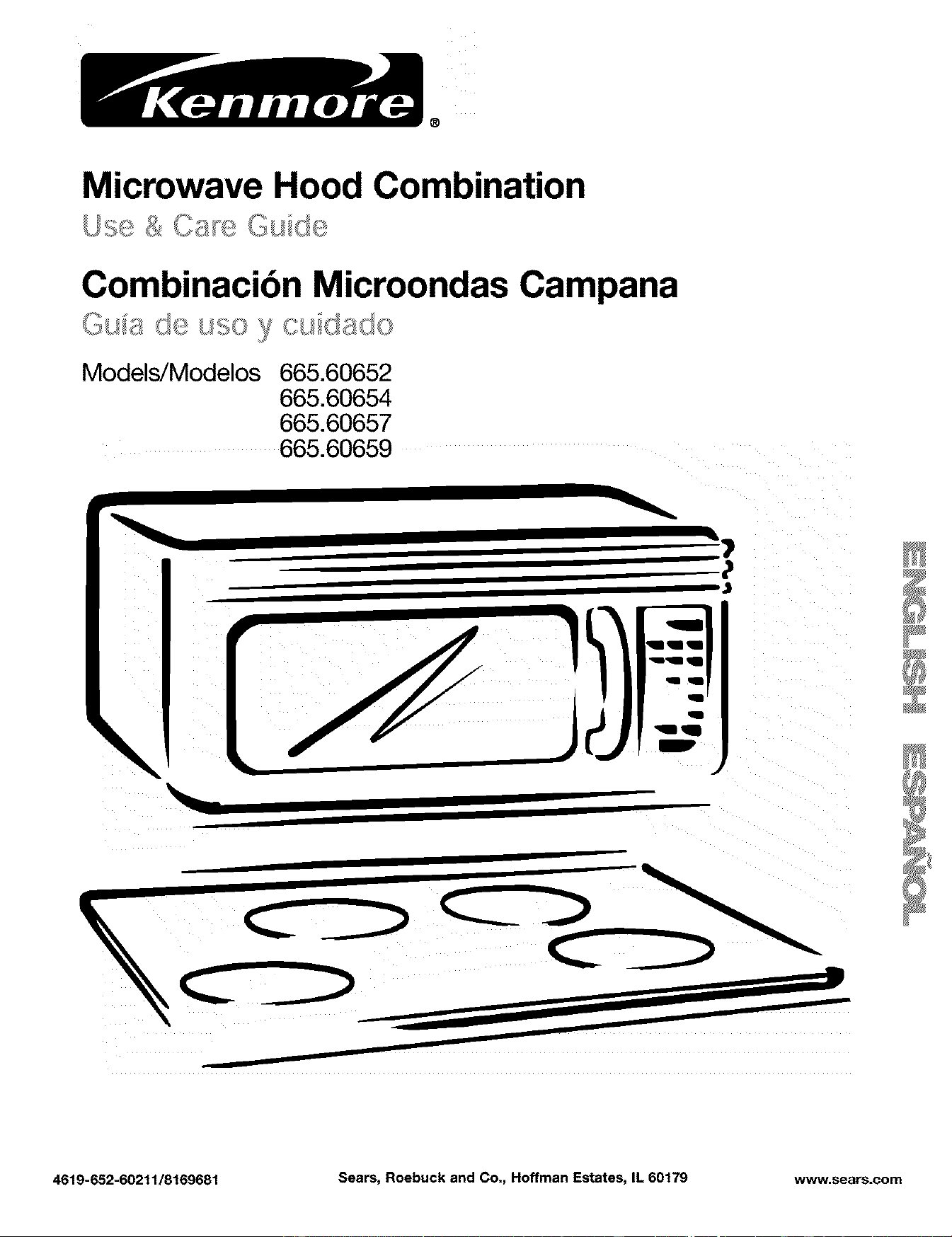
Microwave Hood Combination
Combinacibn Microondas Campana
Models/Modelos 665.60652
665.60654
665.60657
665.60659
\
4619-652-60211/8169681 Sears, Roebuck and Co., Hoffman Estates, IL 60179 www.sears.com
Table of
Contents
Warranty .............................................................. 2
Sears Service ..................................................... 3
Microwave Oven Safety .................................... 4
Installation Instructions ..................................... 7
Getting to Know Your
Microwave Oven ................................................ 8
How your microwave oven works ................... 8
Radio interference ........................................... 8
Testing your microwave oven .......................... 8
Testing your dinnerware or cookware ............. 9
Operating tips .................................................. 9
Electrical connection ....................................... 9
Microwave oven features .............................. 10
Control panel features ................................... 11
Using the cooking rack ................................. 14
Using the exhaust fan ................................... 14
Using the cooktop/countertop light .............. 15
Setting the clock ........................................... 15
Using the kitchen timer ................................. 16
Using ADD ONE MINUTE .............................. 17
Changing preset cooking times .................... 17
Using Your Microwave Oven .......................... 18
Cooking at high cook power ......................... 18
Cooking at different cook powers ................. 18
Cooking in stages ......................................... 20
Progress bar .................................................. 21
Using AUTO COOK ....................................... 22
Using AUTO REHEAT .................................... 23
Using ZIP DEFROST ..................................... 24
ZIP DEFROST chart ...................................... 26
Defrosting tips ............................................... 27
Using BREAD DEFROST ............................... 28
Using SURE SIMMER ................................... 29
Sensor cookin ............................................. 30
Using HOLD WARM ...................................... 31
Caring for Your Microwave Oven ................... 32
Installing and caring for filters ....................... 33
Replacing the cooktop and oven lights ........ 34
Cooking Guide ................................................. 35
Questions and Answers .................................. 37
Troubleshooting ............................................... 38
Index .................................................................. 40
Service .............................................. Back Cover
Microwave
Oven
Warranty
FULL ONE-YEAR WARRANTY ON
MICROWAVE OVEN
For one year from the date of purchase, if this
Kenmore Microwave Oven fails due to a defect in
material or workmanship, Sears will repair it free of
charge.
FULL FIVE-YEAR WARRANTY ON THE
MAGNETRON
For five years from the date of purchase, if the
magnetron in this Kenmore Microwave Oven fails
due to a defect in material or workmanship, Sears
will repair it free of charge.
The above warranty coverage applies only to
Microwave Ovens which are used for private
household purposes.
WARRANTY SERVICE IS AVAILABLE BY SIMPLY
CONTACTING THE NEAREST SEARS STORE OR
SERVICE CENTER IN THE UNITED STATES.
This warranty applies only while this product is in use
in the United States.
This warranty gives you specific legal rights, and you
may also have other rights which vary from state to
state.
Sears, Roebuck and Co.,
Dept. 817WA,
Hoffman Estates, IL 60179
For service call:
1-800-4-MY-HOME s"
(1-800,469-4663)
Please record your model's
information.
Whenever you call to request service for your appli-
ance, you need to know your complete model number
and serial number. You can find this information on
the model and serial number label/plate (see
"Microwave oven features" in the "Getting to Know
Your Microwave Oven" sect!on). A!so, record the other
information shown below.
Model Number
Serial Number
Purchase Date
2
Sears Service
"We service what we sell"
"We service what we sell" is our assurance to you that you can depend on Sears for service because Sears
Service is nationwide.
Your Sears Kenmore Microwave Oven has added value when you consider that Sears has a service unit near
you, staffed by Sears Trained Technicians - professional technicians specifically trained on Sears Kenmore
Microwave Ovens, having the parts, tools and equipment to insure that we meet our pledge to you - "We
service what we sell!"
To further add to the value of your microwave oven,
buy a Sears Maintenance Agreement.
Sears Kenmore Microwave Ovens are designed, manufactured and tested for years of dependable operation.
Yet, any modern appliance may require service from time to time. A Sears Maintenance Agreement is more than
an extension of the Warranty. It provides complete protection from unexpected repair bills and undue inconve-
nience. It assures you of maximum efficiency from your Microwave Oven.
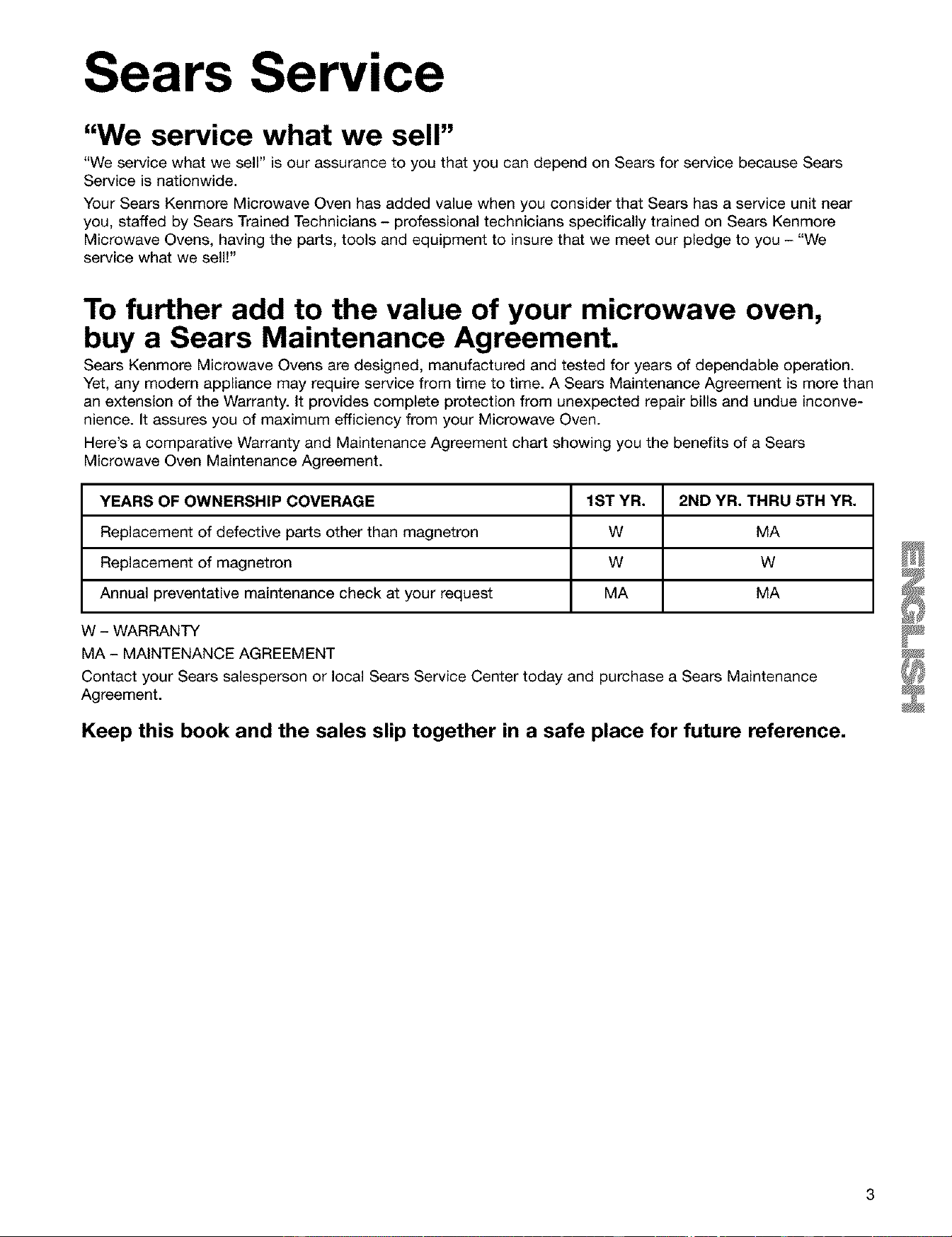
Here's a comparative Warranty and Maintenance Agreement chart showing you the benefits of a Sears
Microwave Oven Maintenance Agreement.
YEARS OF OWNERSHIP COVERAGE 1ST YR. 2ND YR. THRU 5TH YR.
Replacement of defective parts other than magnetron W MA
Replacement of magnetron W W
Annual preventative maintenance check at your request MA MA
W - WARRANTY
MA - MAINTENANCE AGREEMENT
Contact your Sears salesperson or local Sears Service Center today and purchase a Sears Maintenance
Agreement.
Keep this book and the sales slip together in a safe place for future reference.
Microwave Oven Safety
Your safety and the safety of others are very important.
We have provided many important safety messages in this manual and on your appliance. Always read and
obey all safety messages.
This is the safety alert symbol.
This symbol alerts you to potential hazards that can kill or hurt you and others.
All safety messages will follow the safety alert symbol and either the word "DANGER" or
"WARNING." These words mean:
You can be killed or seriously injured if you don't
immediately follow instructions.
You can be killed or seriously injured if you don't
follow instructions.
All safety messages will tell you what the potential hazard is, tell you how to reduce the chance of injury,
and tell you what can happen if the instructions are not followed.
IMPORTANT SAFETY INSTRUCTIONS
When using electrical appliances basic safety precautions should be followed, including the following:
WARNING: To reduce the risk of burns, electric
shock, fire, injury to persons, or exposure to
excessive microwave energy:
• Read ait instructions before using the microwave
oven.
• Read and follow the specific "PRECAUTIONS TO
AVOID POSSIBLE EXPOSURE TO EXCESSIVE
MICROWAVE ENERGY" found in this section.
• The microwave oven must be grounded. Connect
only to properly grounded outlet. See
"GROUNDING INSTRUCTIONS" found in this sec-
tion and in the provided installation instructions.
• Install or locate the microwave oven only in
accordance with the provided Installation
Instructions.
• Some products such as whole eggs in the shell
and sealed containers - for example, closed glass
jars - may explode and should not be heated in
the microwave oven.
• Use the microwave oven only for its intended use
as described in this manual. Do not use corrosive
chemicals or vapors in the microwave oven. This
type of oven is specifically designed to heat, cook,
or dry food. It is not designed for industrial or
laboratory use.
• As with any appliance, close supervision is
necessary when used by children.
• Do not operate the microwave oven if it has a
damaged cord or plug, if it is not working properly,
or if it has been damaged or dropped.
• The microwave oven should be serviced only by
qualified service personnel. Call an authorized
service company for examination, repair, or
adjustment.
• See door surface cleaning instructions in the
"Caring for Your Microwave Oven" section.
• To reduce the risk of fire in the oven cavity:
- Do not overcook food. Carefully attend the
microwave oven if paper, plastic, or other
combustible materials are placed inside the oven
to facilitate cooking.
- Remove wire twist-ties from paper or plastic bags
before placing bags in oven.
- If materials inside the oven should ignite, keep
oven door closed, turn oven off, and disconnect
the power cord, or shut off power at the fuse or
circuit breaker panel.
- Do not use the cavity for storage purposes. Do
not leave paper products, cooking utensils, or
food in the cavity when not in use.
• Suitable for use above both gas and electric
cooking equipment.
SAVE THESE INSTRUCTIONS
4
IMPORTANT SAFETY INSTRUCTIONS
• Intended to be used above ranges with maximum
width of 36 inches.
• Clean Ventilating Hoods Frequently - Grease
should not be allowed to accumulate on hood or
filter.
• Oversized foods or oversized metal utensils should
not be inserted in the microwave oven as they may
create a fire or risk of electric shock.
• Do not clean with metal scouring pads. Pieces can
burn off the pad and touch electrical parts involv-
ing a risk of electric shock.
• Do not use paper products when appliance is
operated in the "PAN BROWN" mode.
• Do not store any materials other than manufactur-
er's recommended accessories in this oven when
not in use.
• Do not store anything directly on top of the
microwave oven when the microwave oven is
in operation.
• When flaming foods under the hood, turn the fan
on.
• Use care when cleaning the vent-hood filter.
Corrosive cleaning agents, such as lye-based oven
cleaners, may damage the filter.
• Do not cover or block any openings on the
microwave oven.
• Do not store this microwave oven outdoors.
Do not use the microwave oven near water - for
example, near a kitchen sink, in a wet basement,
or near a swimming pool, and the like.
• Do not immerse cord or plug in water.
• Keep cord away from heated surfaces.
• Do not let cord hang over edge of table or counter.
• Do not mount over a sink.
• Do not cover racks or any other part of the oven
with metal foil. This will cause overheating of the
oven.
SAVE TH ESE INSTRUCTIONS
PRECAUTIONS TO AVOID POSSIBLE EXPOSURE TO
EXCESSIVE MICROWAVE ENERGY
(a) Do not attempt to operate this oven with the door
open since open-door operation can result in
harmful exposure to microwave energy. It is im-
portant not to defeat or tamper with the safety in-
terlocks.
(b) Do not place any object between the oven front
face and the door or allow soil or cleaner residue
to accumulate on sealing surfaces.
(c) Do not operate the oven if it is damaged. It is
particularly important that the oven door close
properly and that there is no damage to the:
(1) Door (bent),
(2) Hinges and latches (broken or loosened),
(3) Door seals and sealing surfaces.
(d) The oven should not be adjusted or repaired by
anyone except properly qualified service
personnel.
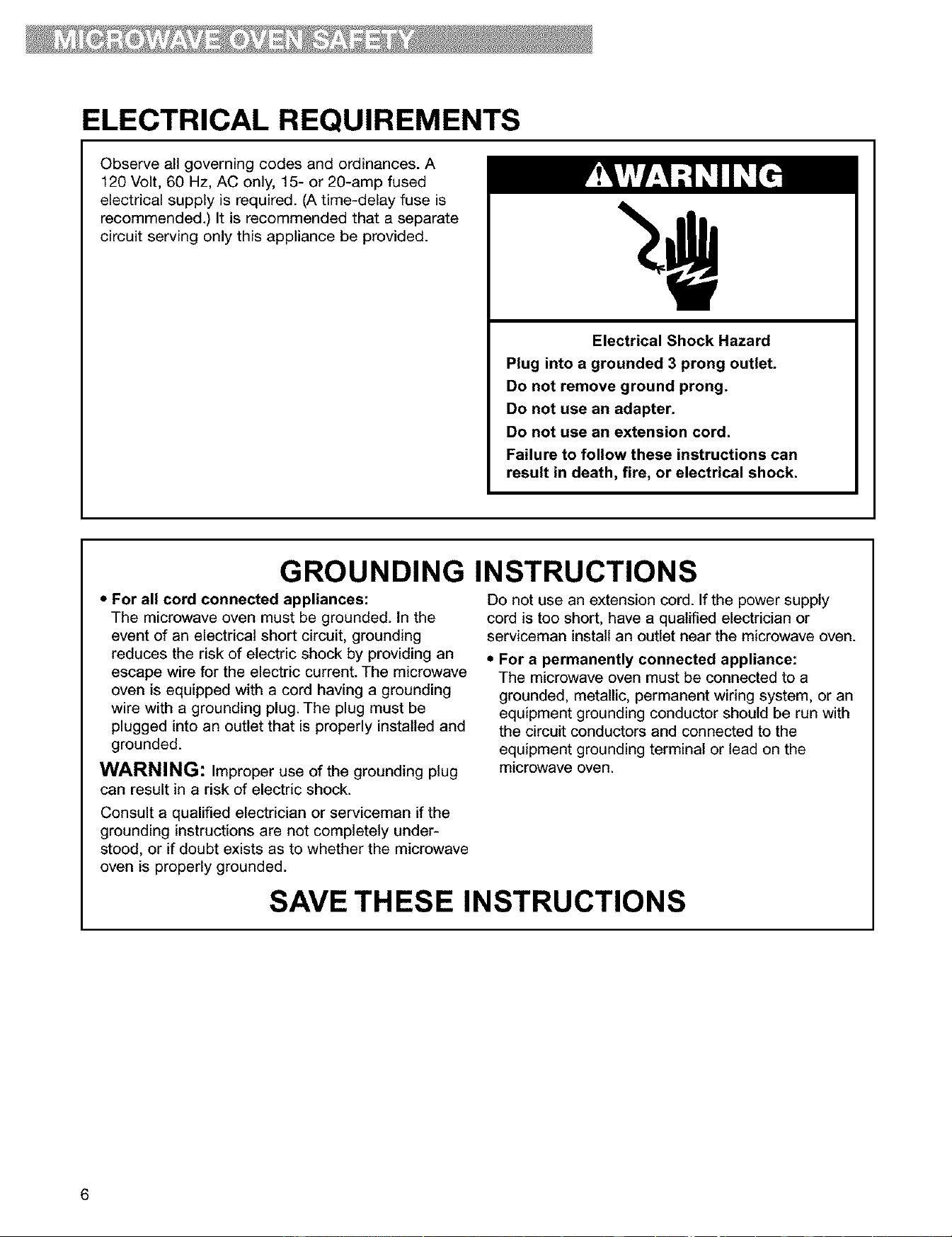
ELECTRICAL REQUIREMENTS
Observe all governing codes and ordinances. A
120 Volt, 60 Hz, AC only, 15- or 20-amp fused
electrical supply is required. (A time-delay fuse is
recommended.) It is recommended that a separate
circuit serving only this appliance be provided.
Electrical Shock Hazard
Plug into a grounded 3 prong outlet.
Do not remove ground prong.
Do not use an adapter.
Do not use an extension cord.
Failure to follow these instructions can
result in death, fire, or electrical shock.
GROUNDING INSTRUCTIONS
• For all cord connected appliances:
The microwave oven must be grounded. In the
event of an electrical short circuit, grounding
reduces the risk of electric shock by providing an
escape wire for the electric current. The microwave
oven is equipped with a cord having a grounding
wire with a grounding plug. The plug must be
plugged into an outlet that is properly installed and
grounded.
WARNING: Improper use of the grounding plug
can result in a risk of electric shock.
Consult a qualified electrician or serviceman if the
grounding instructions are not completely under-
stood, or if doubt exists as to whether the microwave
oven is properly grounded.
Do not use an extension cord. If the power supply
cord is too short, have a qualified electrician or
serviceman install an outlet near the microwave oven.
• For a permanently connected appliance:
The microwave oven must be connected to a
grounded, metallic, permanent wiring system, or an
equipment grounding conductor should be run with
the circuitconductors and connected to the
equipment grounding terminal or lead on the
microwave oven.
SAVE THESE INSTRUCTIONS
6
Installation Instructions
REMOVING AND REPLACING THE MICROWAVE HOOD
COMBINATION
Excessive Weight Hazard
Use two or more people to move and install
microwave oven.
Failure to do so can result in back or other
injury.
If you need to remove your Microwave Hood
Combination for any reason, follow these simple
steps:
[ I!e
_fi_ i
..........................0
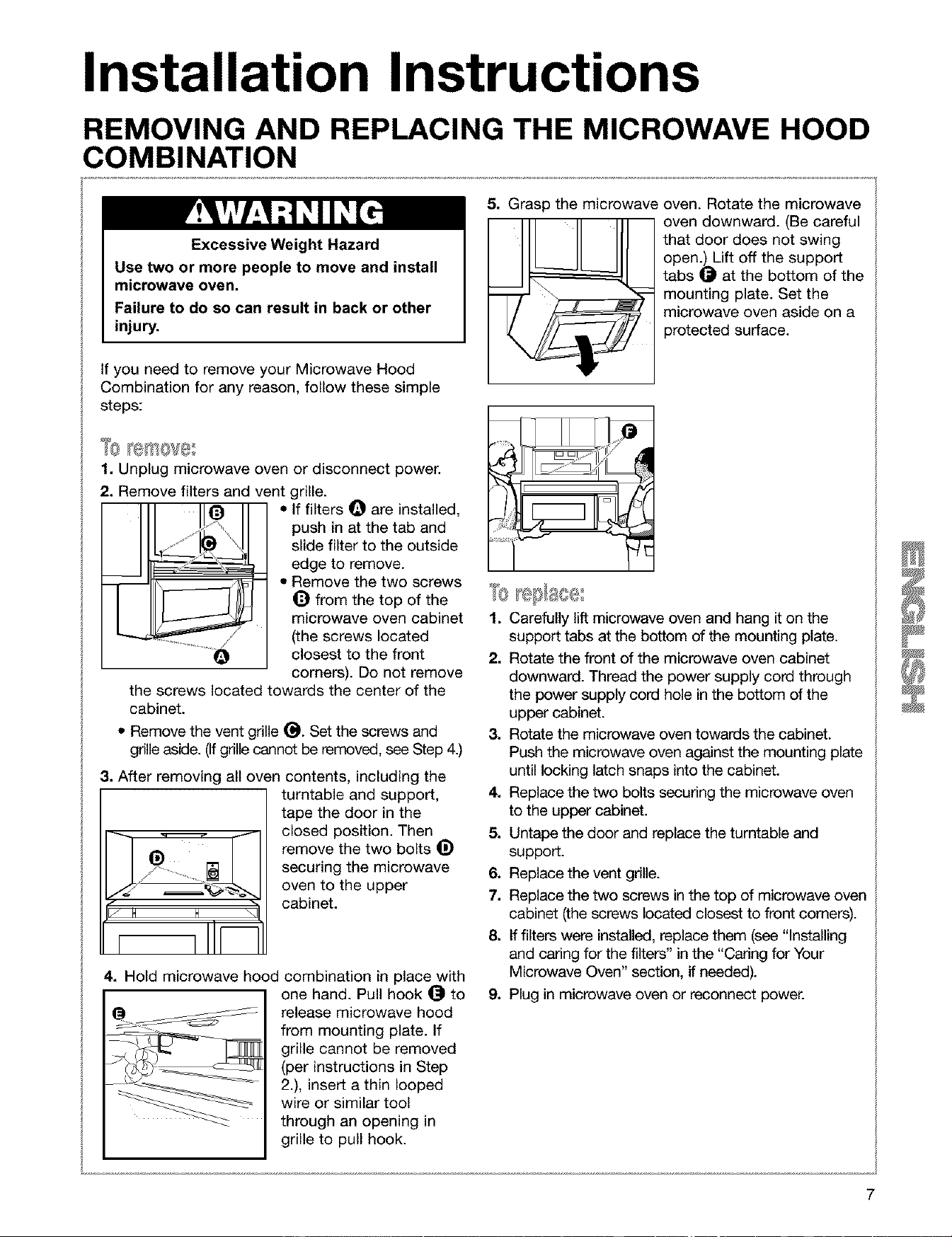
1. Unplug microwave oven or disconnect power.
2. Remove filters and vent grille.
• If filters Q are installed,
push in at the tab and
slide filter to the outside
edge to remove.
• Remove the two screws
_) from the top of the
microwave oven cabinet
(the screws located
closest to the front
corners). Do not remove
the screws located towards the center of the
cabinet.
• Remove the vent grille _). Set the screws and
grille aside. (Ifgrille cannot be removed, see Step 4.)
3. After removing all oven contents, including the
turntable and support,
Jd ¸ _'_.,
J H H \1
tape the door in the
closed position. Then
remove the two bolts _)
securing the microwave
oven to the upper
cabinet.
4. Hold microwave hood combination in place with
one hand. Pull hook @ to
release microwave hood
from mounting plate. If
grille cannot be removed
(per instructions in Step
2.), insert a thin looped
wire or similar tool
through an opening in
grille to pull hook.
5. Grasp the microwave oven. Rotate the microwave
oven downward. (Be careful
that door does not swing
open.) Lift off the support
tabs _ at the bottom of the
mounting plate. Set the
microwave oven aside on a
protected surface.
1. Carefully lift microwave oven and hang iton the
support tabs at the bottom of the mounting plate.
2. Rotate the front of the microwave oven cabinet
downward. Thread the power supply cord through
the power supply cord hole in the bottom of the
upper cabinet.
3. Rotate the microwave oven towards the cabinet.
Push the microwave oven against the mounting plate
until locking latch snaps into the cabinet.
4. Replace the two bolts securing the microwave oven
to the upper cabinet.
5. Untape the door and replace the turntable and
support.
6. Replace the vent grille.
7. Replace the two screws in the top of microwave oven
cabinet (the screws located closest to front comers).
8. If filters were installed, replace them (see "Installing
and caring for the filters" in the "Caring for Your
Microwave Oven" section, if needed).
9. Plug in microwave oven or reconnect power.
Getting to Know Your
Microwave Oven
This section discusses the concepts behind microwave cooking. It also shows you the basics you need
to know to operate your microwave oven. Please read this information before you use your oven.
HOW YOUR MICROWAVE OVEN WORKS
Microwave energy is not hot. It causes food to make
its own heat, and it's this heat that cooks the food.
Microwaves are like TV waves, radio waves, or
light waves. You cannot see them, but you can see
what they do.
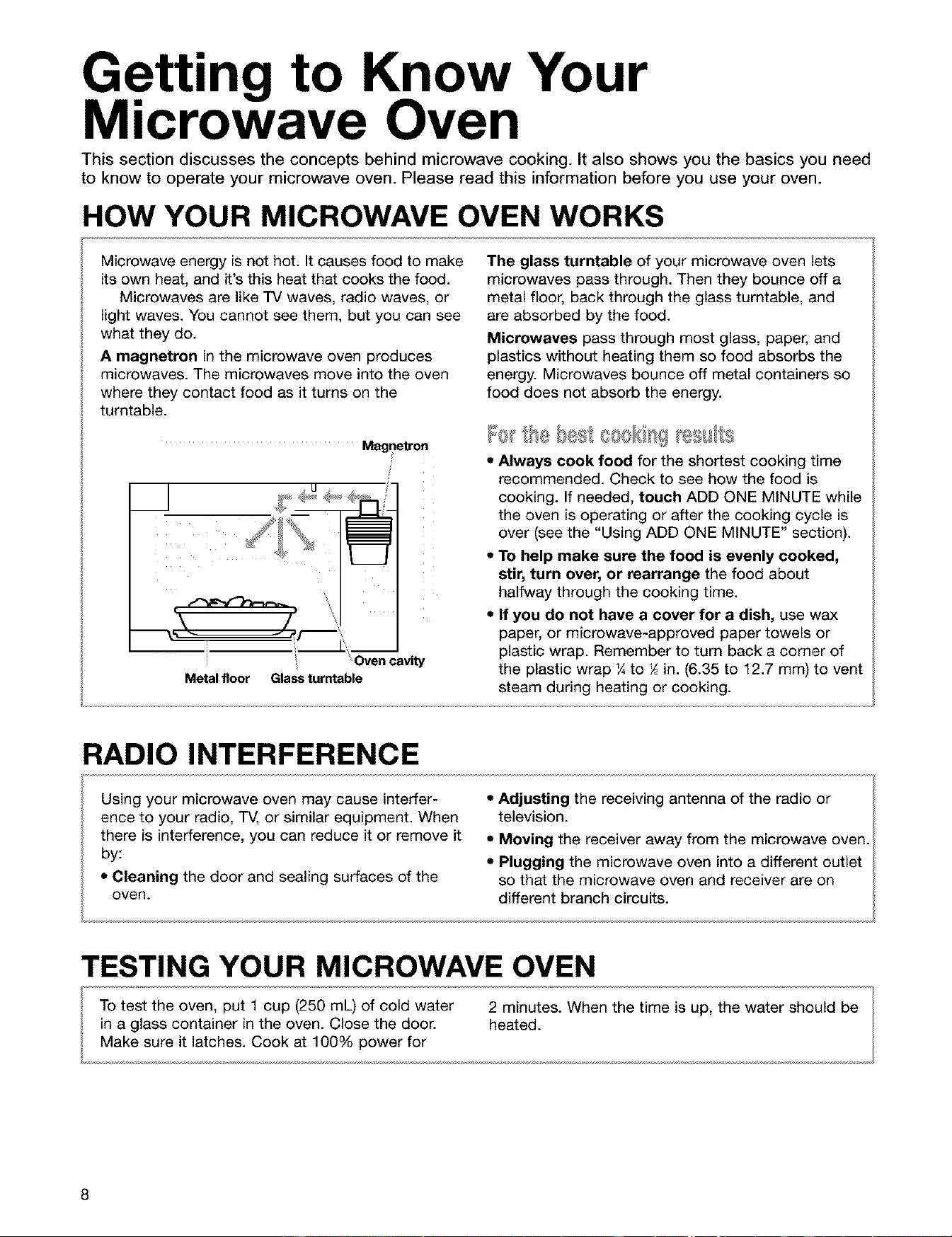
A magnetron in the microwave oven produces
microwaves. The microwaves move into the oven
where they contact food as it turns on the
turntable.
The glass turntable of your microwave oven lets
microwaves pass through. Then they bounce off a
metal floor, back through the glass turntable, and
are absorbed by the food.
Microwaves pass through most glass, paper, and
plastics without heating them so food absorbs the
energy. Microwaves bounce off metal containers so
food does not absorb the energy.
Magnetron
\ /
Metal floor
Oven cavity
Glassturntable
,, Always cook food for the shortest cooking time
recommended. Check to see how the food is
cooking. If needed, touch ADD ONE MINUTE while
the oven is operating or after the cooking cycle is
over (see the "Using ADD ONE MINUTE" section).
,, To help make sure the food is evenly cooked,
stir, turn over, or rearrange the food about
halfway through the cooking time.
• If you do not have a cover for a dish, use wax
paper, or microwave-approved paper towels or
plastic wrap. Remember to turn back a corner of
the plastic wrap ¼ to _ in. (6.35 to 12.7 mm) to vent
steam during heating or cooking.
RADIO INTERFERENCE
• Adjusting the receiving antenna of the radio or
television.
• Moving the receiver away from the microwave oven.
• Plugging the microwave oven into a different outlet
so that the microwave oven and receiver are on
Using your microwave oven may cause interfer-
ence to your radio, TV, or similar equipment. When
there is interference, you can reduce it or remove it
by:
• Cleaning the door and sealing surfaces of the
oven. different branch circuits.
TESTING YOUR MICROWAVE OVEN
To test the oven, put 1 cup (250 mL) of cold water 2 minutes. When the time is up, the water should be
in a glass container in the oven. Close the door. heated.
Make sure it latches. Cook at 100% power for
8
TESTING YOUR DINNERWARE OR COOKWARE
Test dinnerware or cookware before using.
To test a dish, put it into the oven with 1 cup
(250 mL) of water beside it. Cook at 100% cook
power for one minute. If the dish gets hot and
water stays cool, do not use it. Some dishes
(melamine, some ceramic dinnerware, etc.)
absorb microwave energy, and may become too hot
to handle or may slow cooking times. Cooking in
metal containers not designed for microwave use
could damage the oven, as could containers with
hidden metal (twist-ties, foil lining, staples, metallic
glaze or trim).
OPERATING TIPS
• Never lean on the door or allow a child to swing
on it when the door is open.
• Use hot pads. Microwave energy does not heat
containers, but the heat from the food can make
the container hot.
• Do not use newspaper or other printed paper in
the oven.
• Do not dry flowers, fruit, herbs, wood, paper,
gourds, or clothes in the oven.
• Do not start a microwave oven when it is empty.
Product life may be shortened. If you practice
programming the oven, put a container of water in
the oven. It is normal for the oven door to look
wavy after the oven has been running for a while.
• Do not try to melt paraffin wax in the oven.
Paraffin wax will not melt in a microwave oven
because it allows microwaves to pass through it.
• Do not operate the microwave oven unless the
glass turntable is securely in place and can rotate
freely. The turntable can rotate in either direction.
Make sure the turntable is correct-side up in the
oven. Handle your turntable with care when
removing it from the oven to avoid possibly
breaking it. If your turntable cracks or breaks,
contact your dealer for a replacement.
• When you use a browning dish, the browning
dish bottom must be at least _ in. (5 mm) above
the turntable. Follow the directions supplied with
the browning dish.
• Never cook or reheat a whole egg inside the
shell. Steam buildup in whole eggs may cause
them to burst, and possibly damage the oven.
Slice hard-boiled eggs before heating. In rare
cases, poached eggs have been known to
explode. Cover poached eggs and allow a stand-
ing time of one minute before cutting into them.
• For best results, stir any liquid several times
during heating or reheating. Liquids heated in
certain containers (especially containers shaped
like cylinders) may become overheated. The liquid
may splash out with a loud noise during or after
heating or when adding ingredients (coffee
granules, tea bags, etc.). This can damage the oven.
• Microwaves may not reach the center of a roast.
The heat spreads to the center from the outer,
cooked areas just as in regular oven cooking. This
is one of the reasons for letting some foods (for
example, roasts or baked potatoes) stand for a
while after cooking, or for stirring some foods
during the cooking time.
• Do not deep fry in the oven. Microwavable
utensils are not suitable and it is difficult to
maintain appropriate deep-frying temperatures.
• Do not overcook potatoes. At the end of the
recommended cooking time, potatoes should be
slightly firm because they will continue cooking
during standing time. After microwaving, let
potatoes stand for 5 minutes. They will finish
cooking while standing.
ELECTRICAL CONNECTION
If your electric power line or outlet voltage is less
than 110 volts, cooking times may be longer. Have a
qualified electrician check your electrical system.
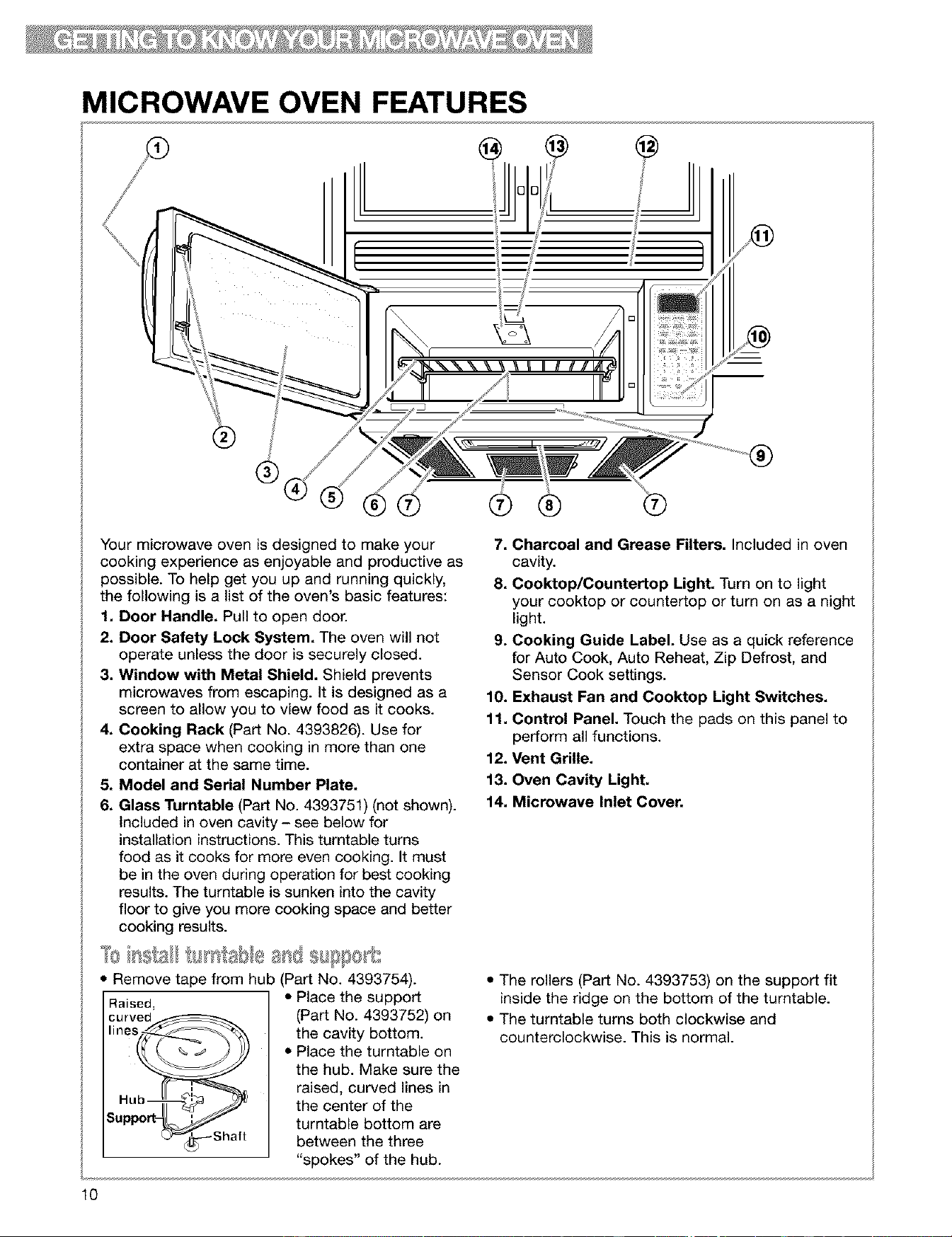
MICROWAVE OVEN FEATURES
®
Your microwave oven is designed to make your
cooking experience as enjoyable and productive as
possible. To help get you up and running quickly,
the following is a list of the oven's basic features:
1. Door Handle. Pull to open door.
2. Door Safety Lock System. The oven will not
operate unless the door is securely closed.
3. Window with Metal Shield. Shield prevents
microwaves from escaping. It is designed as a
screen to allow you to view food as it cooks.
4. Cooking Rack (Part No. 4393826). Use for
extra space when cooking in more than one
container at the same time.
5. Model and Serial Number Plate,
6. Glass Turntable (Part No. 4393751) (not shown).
Included in oven cavity - see below for
installation instructions. This turntable turns
food as it cooks for more even cooking. It must
be in the oven during operation for best cooking
results. The turntable is sunken into the cavity
floor to give you more cooking space and better
cooking results.
Remove tape from hub (Part No. 4393754).
Raised,
curved
lines_
Hub
_up
%_'_--- Shaft
• Place the support
(Part No. 4393752) on
the cavity bottom.
• Place the turntable on
the hub. Make sure the
raised, curved lines in
the center of the
turntable bottom are
between the three
"spokes" of the hub.
®
7. Charcoal and Grease Filters. Included in oven
cavity.
8. Cooktop/Countertop Light. Turn on to light
your cooktop or countertop or turn on as a night
light.
9. Cooking Guide Label. Use as a quick reference
for Auto Cook, Auto Reheat, Zip Defrost, and
Sensor Cook settings.
10. Exhaust Fan and Cooktop Light Switches.
11. Control Panel. Touch the pads on this panel to
perform all functions.
12. Vent Grille.
13. Oven Cavity Light.
14. Microwave Inlet Cover.
• The rollers (Part No. 4393753) on the support fit
inside the ridge on the bottom of the turntable.
• The turntable turns both clockwise and
counterclockwise. This is normal.
10
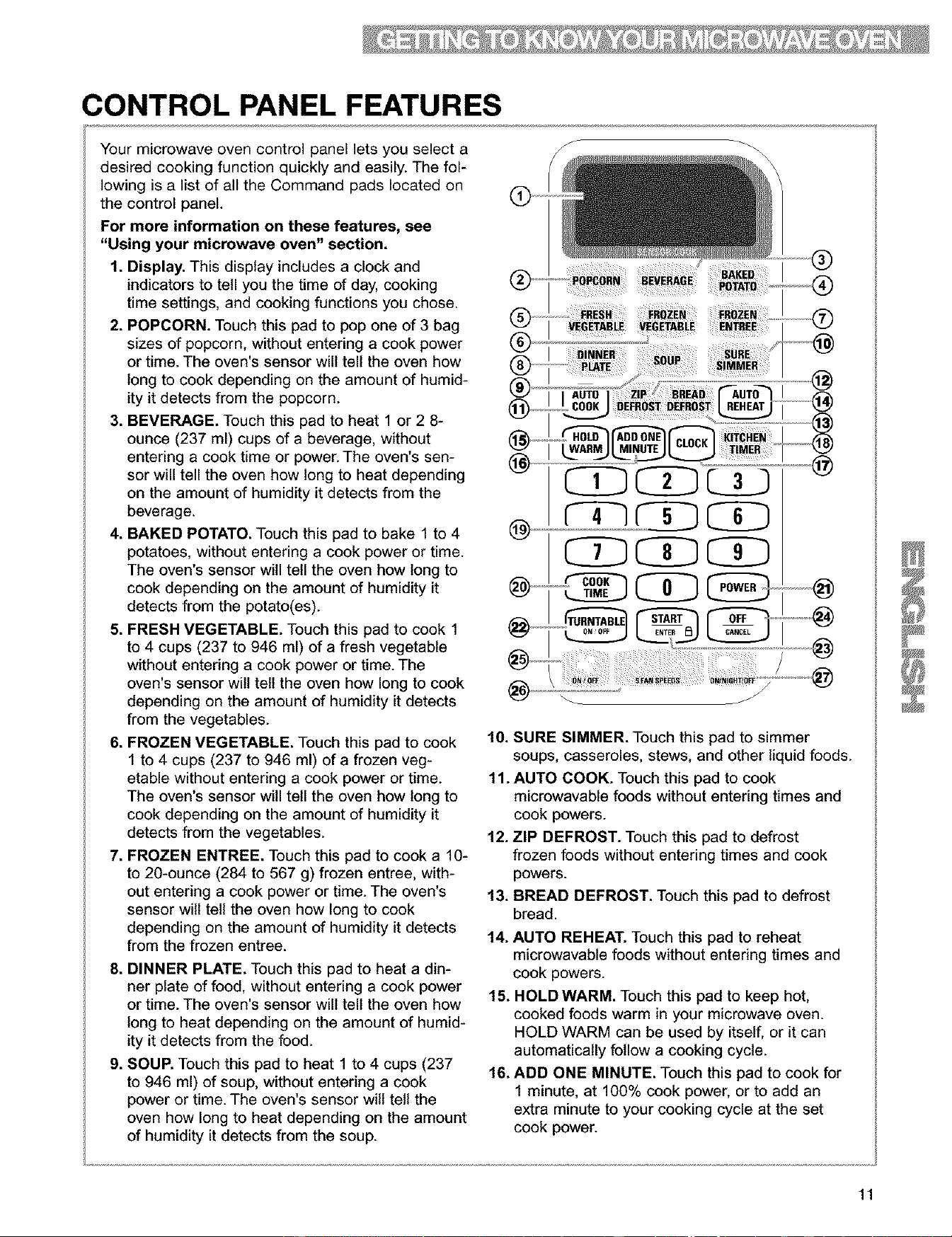
CONTROL PANEL FEATURES
Your microwave oven control panel lets you select a
desired cooking function quickly and easily. The fol-
lowing is a list of all the Command pads located on
the control panel.
For more information on these features, see
"Using your microwave oven" section.
1. Display. This display includes a clock and
indicators to tell you the time of day, cooking
time settings, and cooking functions you chose.
2. POPCORN. Touch this pad to pop one of 3 bag
sizes of popcorn, without entering a cook power
or time. The oven's sensor will tell the oven how
long to cook depending on the amount of humid-
ityit detects from the popcorn.
3. BEVERAGE. Touch this pad to heat 1 or 2 8-
ounce (237 ml) cups of a beverage, without
entering a cook time or power. The oven's sen-
sor will tell the oven how long to heat depending
on the amount of humidity it detects from the
beverage.
4. BAKED POTATO. Touch this pad to bake 1 to 4
potatoes, without entering a cook power or time.
The oven's sensor will tell the oven how long to
cook depending on the amount of humidity it
detects from the potato(es).
5. FRESH VEGETABLE. Touch this pad to cook 1
to 4 cups (237 to 946 ml) of a fresh vegetable
without entering a cook power or time. The
oven's sensor wilt tell the oven how long to cook
depending on the amount of humidity it detects
from the vegetables.
6. FROZEN VEGETABLE. Touch this pad to cook
1 to 4 cups (237 to 946 ml) of a frozen veg-
etable without entering a cook power or time.
The oven's sensor will tell the oven how long to
cook depending on the amount of humidity it
detects from the vegetables.
7. FROZEN ENTREE. Touch this pad to cook a 10-
to 20-ounce (284 to 567 g) frozen entree, with-
out entering a cook power or time. The oven's
sensor wilt tell the oven how long to cook
depending on the amount of humidity it detects
from the frozen entree.
8. DINNER PLATE. Touch this pad to heat a din-
ner plate of food, without entering a cook power
or time. The oven's sensor will tell the oven how
long to heat depending on the amount of humid-
ity it detects from the food.
9. SOUP. Touch this pad to heat 1 to 4 cups (237
to 946 ml) of soup, without entering a cook
power or time. The oven's sensor will tell the
oven how long to heat depending on the amount
of humidity it detects from the soup.
@
r- -q cD
J
10. SURE SIMMER. Touch this pad to simmer
soups, casseroles, stews, and other liquid foods.
11. AUTO COOK. Touch this pad to cook
microwavable foods without entering times and
cook powers.
12. ZIP DEFROST. Touch this pad to defrost
frozen foods without entering times and cook
powers.
13. BREAD DEFROST. Touch this pad to defrost
bread.
14. AUTO REHEAT. Touch this pad to reheat
microwavable foods without entering times and
cook powers.
15. HOLD WARM. Touch this pad to keep hot,
cooked foods warm in your microwave oven.
HOLD WARM can be used by itself, or it can
automatically follow a cooking cycle.
16. ADD ONE MINUTE. Touch this pad to cook for
1 minute, at 100% cook power, or to add an
extra minute to your cooking cycle at the set
cook power.
11
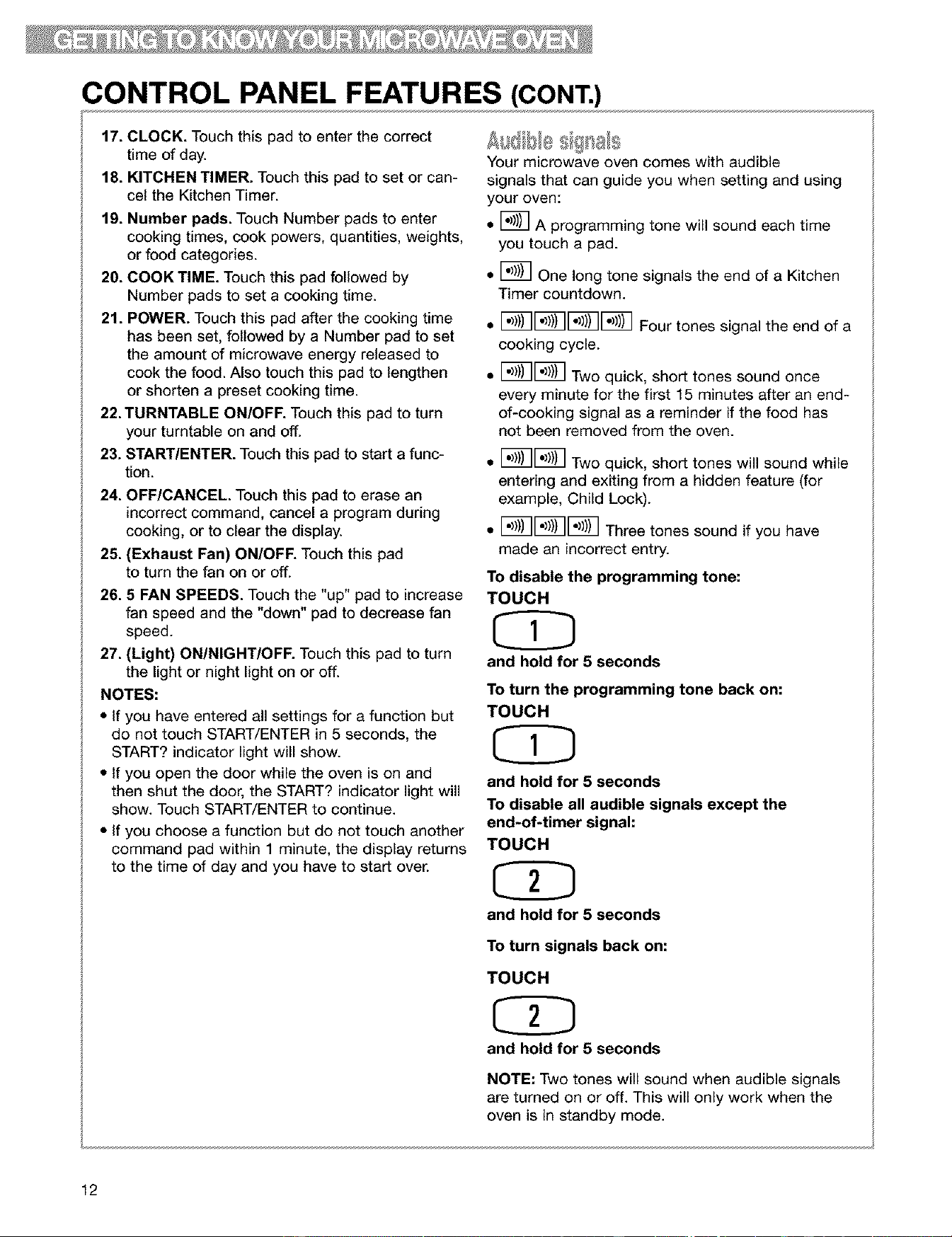
CONTROL PANEL FEATURES (CONT.)
17. CLOCK. Touch this pad to enter the correct
time of day.
18. KITCHEN TIMER. Touch this pad to set or can-
cel the Kitchen Timer.
19. Number pads. Touch Number pads to enter
cooking times, cook powers, quantities, weights,
or food categories.
20. COOK TIME. Touch this pad followed by
Number pads to set a cooking time.
21. POWER. Touch this pad after the cooking time
has been set, followed by a Number pad to set
the amount of microwave energy released to
cook the food. Also touch this pad to lengthen
or shorten a preset cooking time.
22. TURNTABLE ON/OFF. Touch this pad to turn
your turntable on and off.
23. START/ENTER. Touch this pad to start a func-
tion.
24. OFF/CANCEL. Touch this pad to erase an
incorrect command, cancel a program during
cooking, or to clear the display.
25. (Exhaust Fan) ON/OFF. Touch this pad
to turn the fan on or off.
26. 5 FAN SPEEDS. Touch the "up" pad to increase
fan speed and the "down" pad to decrease fan
speed.
27. (Light) ON/NIGHT/OFF. Touch this pad to turn
the light or night light on or off.
NOTES:
• if you have entered all settings for a function but
do not touch START/ENTER in 5 seconds, the
START? indicator light will show.
• if you open the door while the oven is on and
then shut the door, the START? indicator light will
show. Touch START/ENTER to continue.
• if you choose a function but do not touch another
command pad within 1 minute, the display returns
to the time of day and you have to start over.
Your microwave oven comes with audible
signals that can guide you when setting and using
your oven:
• _ A programming tone will sound each time
you touch a pad.
• [_ One long tone signals the end of a Kitchen
Timer countdown.
• I1"1))I1"1))IFour tones signal the end of a
cooking cycle.
F_1_7F_7
• I'_l) II"JJJI Two quick, short tones sound once
every minute for the first 15 minutes after an end-
of-cooking signal as a reminder if the food has
not been removed from the oven.
• I_1_ Two quick, short tones will sound while
entering and exiting from a hidden feature (for
example, Child Lock).
• I -I1"1))I1"1))IThree tones sound if you have
made an incorrect entry.
To disable the programming tone:
TOUCH
and hold for 5 seconds
To turn the programming tone back on:
TOUCH
and hold for 5 seconds
To disable all audible signals except the
end-of-timer signal:
TOUCH
and hold for 5 seconds
To turn signals back on:
TOUCH
and hold for 5 seconds
NOTE: Two tones will sound when audible signals
are turned on or off. This will only work when the
oven is in standby mode.
12
CONTROL PANEL FEATURES (CONT.)
}slem@ sg s9
You can stop the oven during a cycle by opening
the door. The oven stops heating and the fan stops,
but the light stays on. To restart cooking, close the
door and
TOUCH
If you do not want to continue cooking:
• Close the door and the light goes off.
OR
•TOUCH
NOTE: Before setting a function, touch
OFF/CANCEL to make sure no other
function is on.
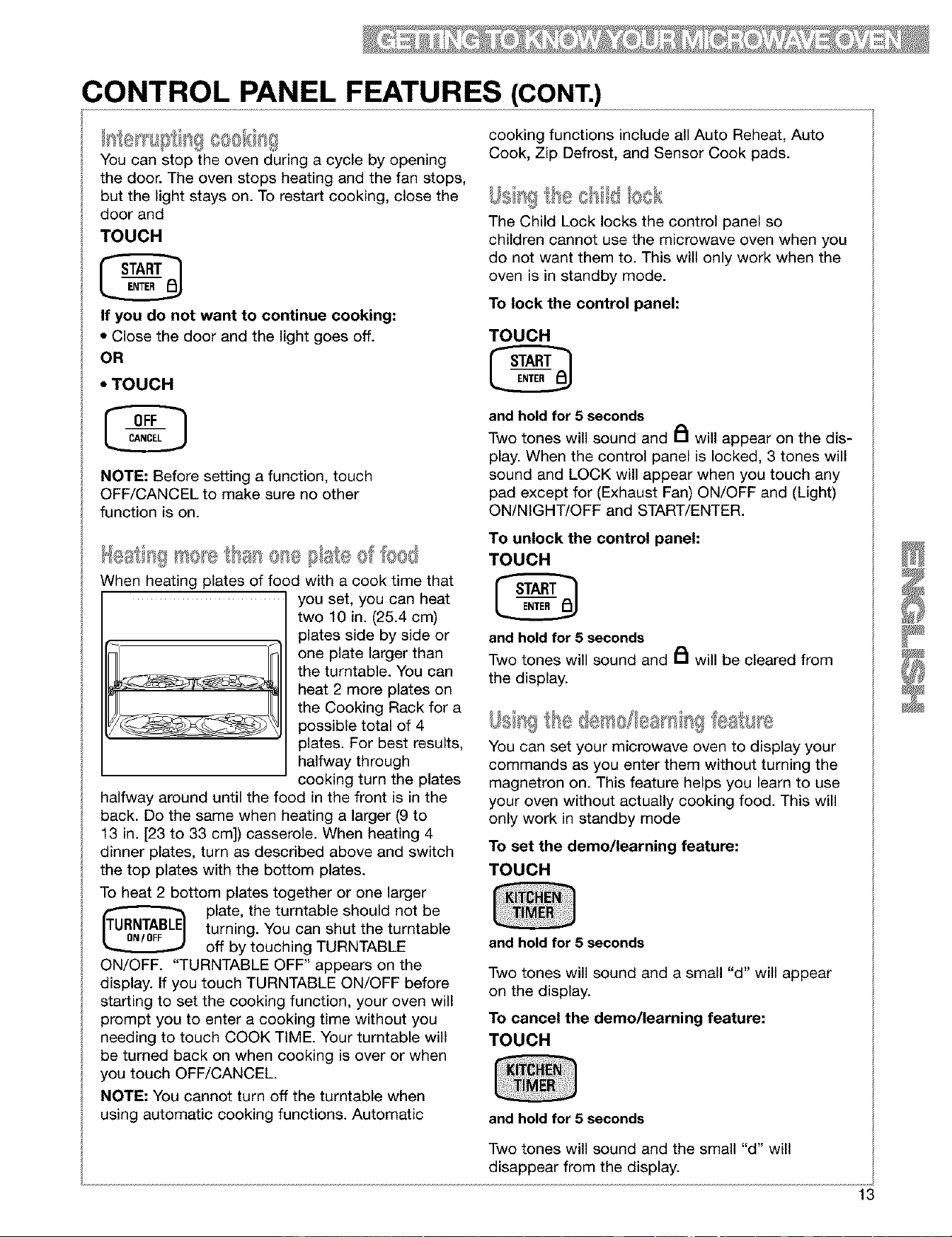
When heating plates of food with a cook time that
you set, you can heat
two 10 in. (25.4 cm)
plates side by side or
one plate larger than
the turntable. You can
heat 2 more plates on
the Cooking Rack for a
possible total of 4
plates. For best results,
halfway through
cooking turn the plates
halfway around until the food in the front is in the
back. Do the same when heating a larger (9 to
13 in. [23 to 33 cm]) casserole. When heating 4
dinner plates, turn as described above and switch
the top plates with the bottom plates.
To heat 2 bottom plates together or one larger
plate, the turntable should not be
turning. You can shut the turntable
off by touching TURNTABLE
ON/OFF. "TURNTABLE OFF" appears on the
display. If you touch TURNTABLE ON/OFF before
starting to set the cooking function, your oven will
prompt you to enter a cooking time without you
needing to touch COOK TIME. Your turntable will
be turned back on when cooking is over or when
you touch OFF/CANCEL
NOTE: You cannot turn off the turntable when
using automatic cooking functions. Automatic
cooking functions include all Auto Reheat, Auto
Cook, Zip Defrost, and Sensor Cook pads.
The Child Lock locks the control panel so
children cannot use the microwave oven when you
do not want them to. This will only work when the
oven is in standby mode.
To lock the control panel:
TOUCH
and hold for 5 seconds
Two tones will sound and _1 will appear on the dis-
play. When the control panel is locked, 3 tones will
sound and LOCK will appear when you touch any
pad except for (Exhaust Fan) ON/OFF and (Light)
ON/NIGHT/OFF and START/ENTER.
To unlock the control panel:
TOUCH
and hold for 5 seconds
Two tones will sound and _1 will be cleared from
the display.
You can set your microwave oven to display your
commands as you enter them without turning the
magnetron on. This feature helps you learn to use
your oven without actually cooking food. This will
only work in standby mode
To set the demo/learning feature:
TOUCH
and hold for 5 seconds
Two tones will sound and a small "d" will appear
on the display.
To cancel the demo/learning feature:
TOUCH
and hold for 5 seconds
Two tones will sound and the small d will
disappear from the display.
13
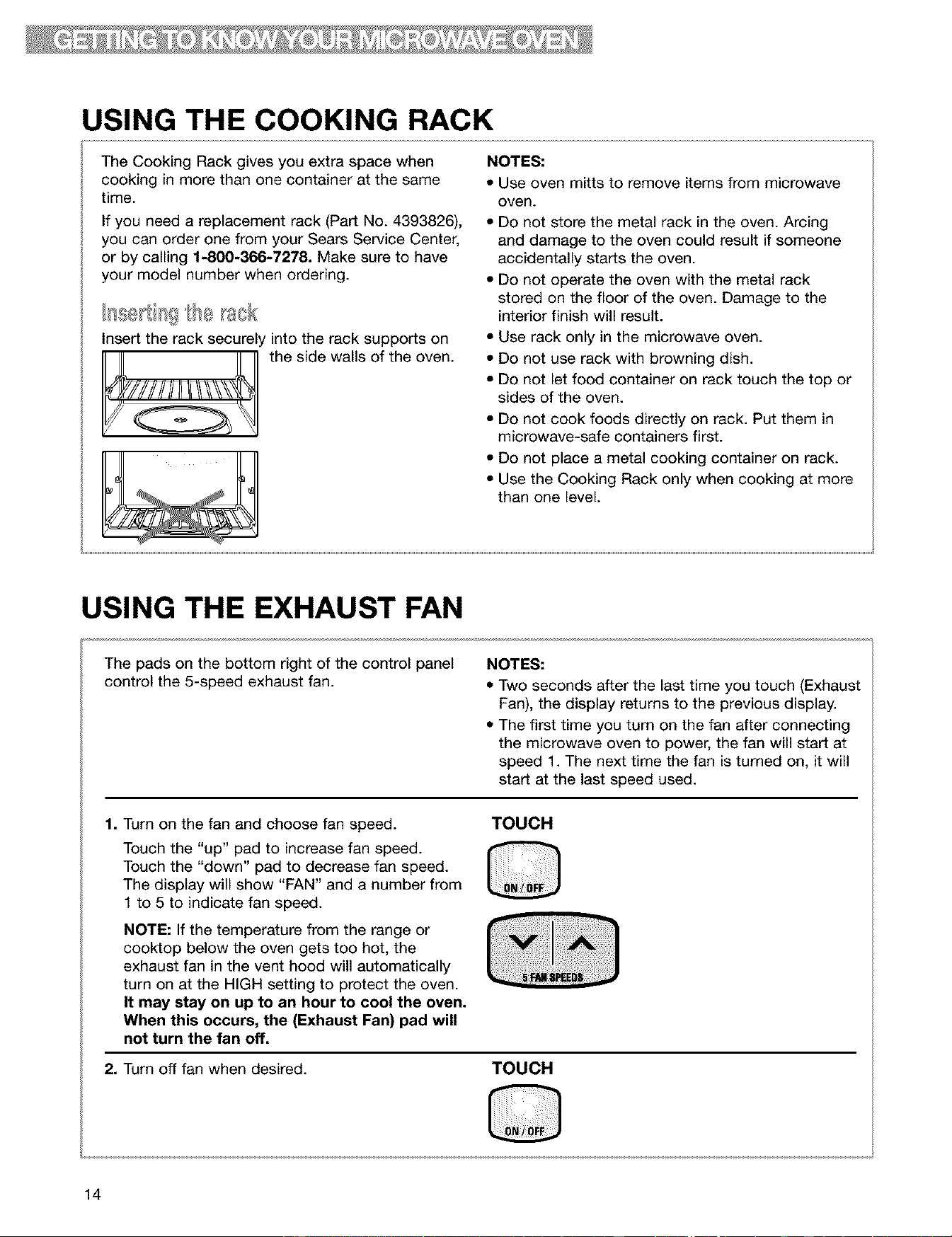
USING THE COOKING RACK
The Cooking Rack gives you extra space when
cooking in more than one container at the same
time.
If you need a replacement rack (Part No. 4393826),
you can order one from your Sears Service Center,
or by calling 1-800-366-7278. Make sure to have
your model number when ordering.
Insert the rack securely into the rack supports on
the side walls of the oven.
NOTES:
• Use oven mitts to remove items from microwave
oven.
• Do not store the metal rack in the oven. Arcing
and damage to the oven could result if someone
accidentally starts the oven.
• Do not operate the oven with the metal rack
stored on the floor of the oven. Damage to the
interior finish will result.
• Use rack only in the microwave oven.
• Do not use rack with browning dish.
• Do not let food container on rack touch the top or
sides of the oven.
• Do not cook foods directly on rack. Put them in
microwave-safe containers first.
• Do not place a metal cooking container on rack.
• Use the Cooking Rack only when cooking at more
than one level.
USING THE EXHAUST FAN
The pads on the bottom right of the control panel
control the 5-speed exhaust fan.
NOTES:
• Two seconds after the last time you touch (Exhaust
Fan), the display returns to the previous display.
• The first time you turn on the fan after connecting
the microwave oven to power, the fan will start at
speed 1. The next time the fan is turned on, it will
start at the last speed used.
1. Turn on the fan and choose fan speed.
Touch the "up" pad to increase fan speed.
Touch the "down" pad to decrease fan speed.
The display will show "FAN" and a number from
1 to 5 to indicate fan speed.
NOTE: If the temperature from the range or
cooktop below the oven gets too hot, the
exhaust fan in the vent hood will automatically
turn on at the HIGH setting to protect the oven.
It may stay on up to an hour to cool the oven.
When this occurs, the (Exhaust Fan) pad will
not turn the fan off.
TOUCH
2. Turn off fan when desired.
TOUCH
14
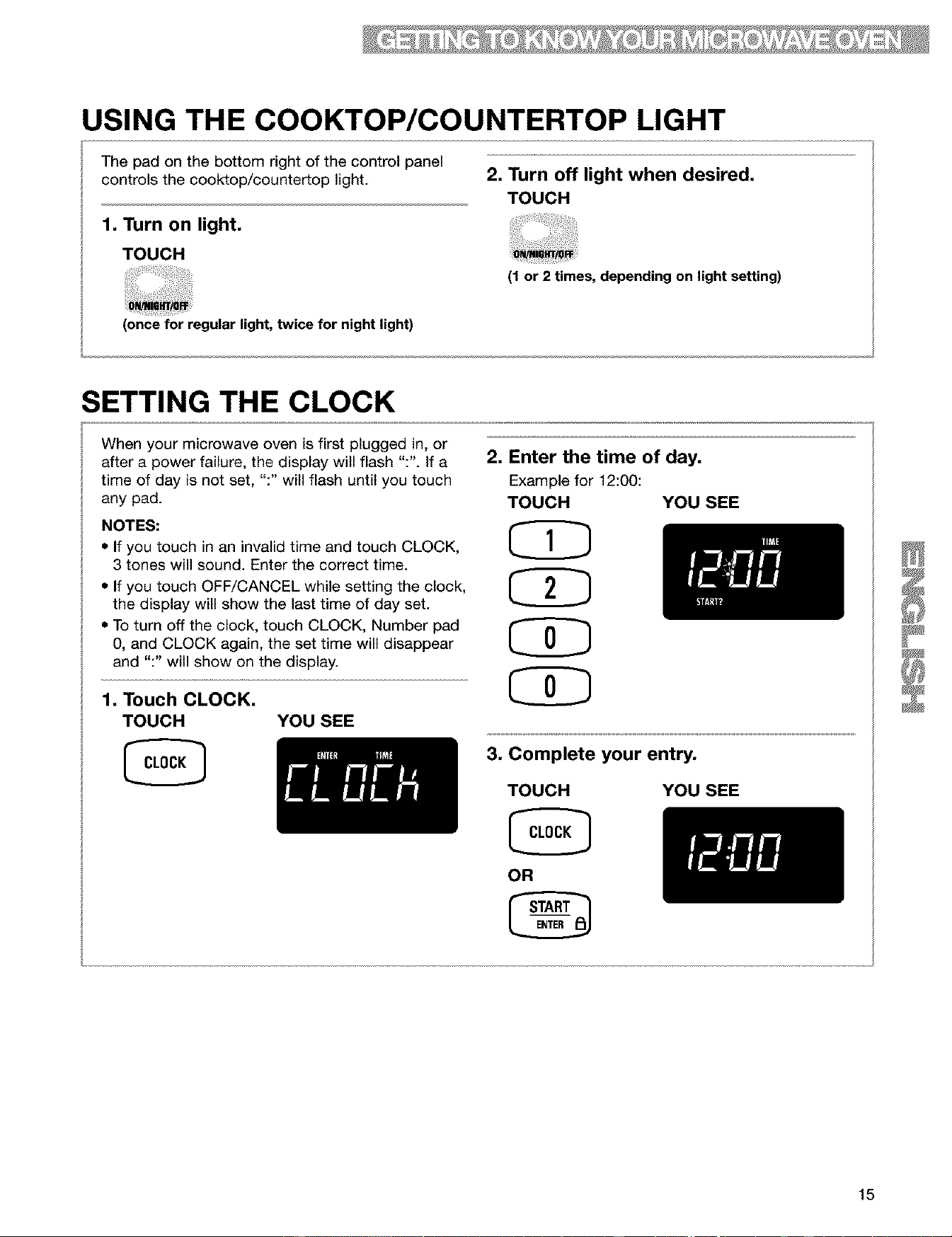
USING THE COOKTOP/COUNTERTOP LIGHT
The pad on the bottom right of the control panel
controls the cooktop/countertop light.
1, Turn on light,
TOUCH
2, Turn off light when desired,
TOUCH
(1 or 2 times, depending on light setting)
(once for regular light, twice for night light)
SETTING THE CLOCK
When your microwave oven is first plugged in, or
after a power failure, the display will flash ":". if a 2,
time of day is not set, ":" will flash until you touch
any pad.
NOTES:
• If you touch in an invalid time and touch CLOCK,
3 tones will sound. Enter the correct time.
• If you touch OFF/CANCEL while setting the clock,
the display will show the last time of day set.
• To turn off the clock, touch CLOCK, Number pad
0, and CLOCK again, the set time will disappear
and ":" will show on the display.
1. Touch CLOCK.
TOUCH YOU SEE
Enter the time of day,
Example for 12:00:
TOUCH YOU SEE
3, Complete your entry,
TOUCH
OR
YOU SEE
15
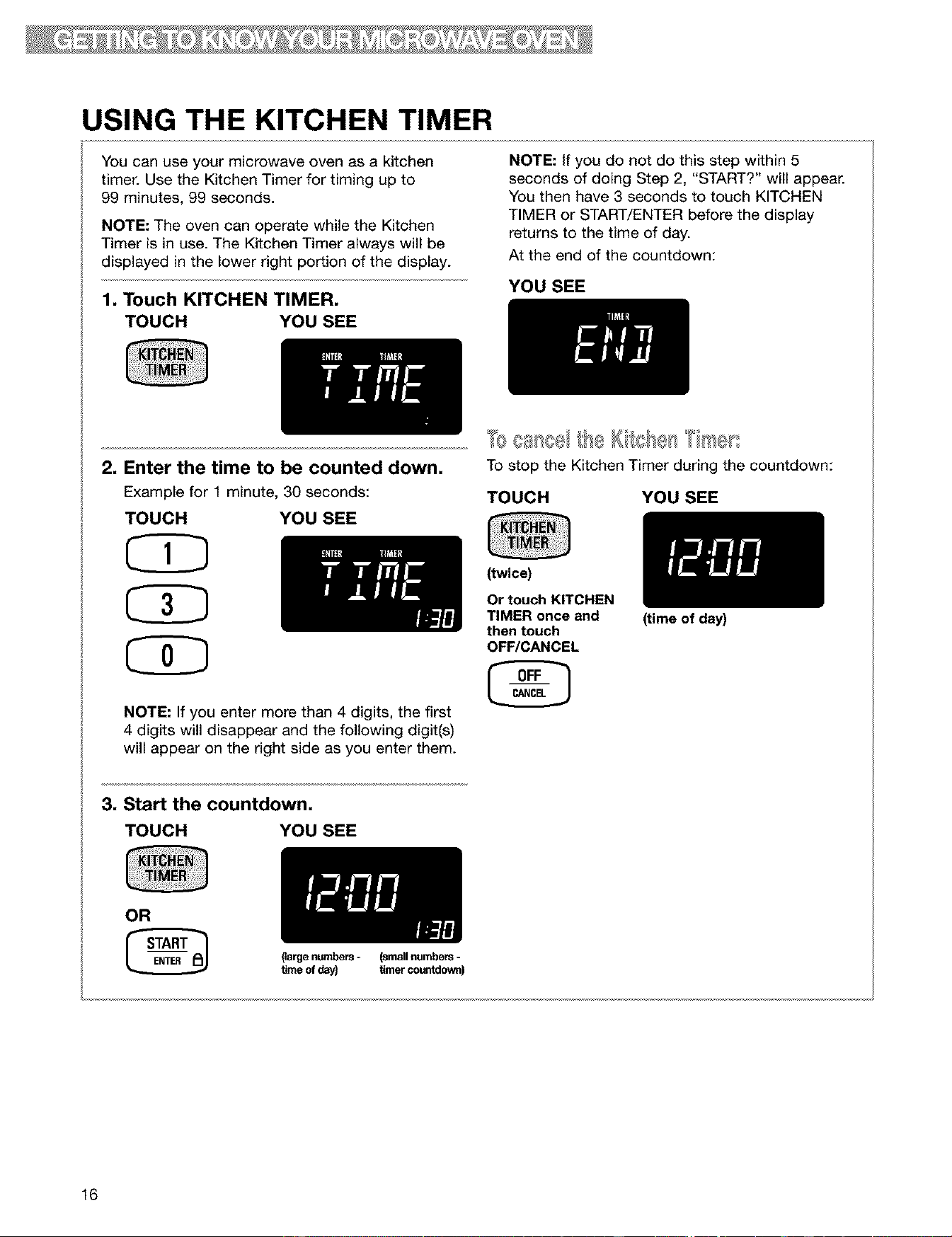
USING THE KITCHEN TIMER
You can use your microwave oven as a kitchen
timer. Use the Kitchen Timer for timing up to
99 minutes, 99 seconds.
NOTE: The oven can operate while the Kitchen
Timer is in use. The Kitchen Timer always will be
displayed in the lower right portion of the display.
1, Touch KITCHEN TIMER,
TOUCH YOU SEE
NOTE: If you do not do this step within 5
seconds of doing Step 2, "START?" will appear.
You then have 3 seconds to touch KITCHEN
TIMER or START/ENTER before the display
returns to the time of day.
At the end of the countdown:
YOU SEE
2. Enter the time to be counted down.
Example for 1 minute, 30 seconds:
TOUCH YOU SEE
CD
NOTE: If you enter more than 4 digits, the first
4 digits will disappear and the following digit(s)
will appear on the right side as you enter them.
To stop the Kitchen Timer during the countdown:
TOUCH YOU SEE
(twice)
Or touch KITCHEN
TIMER once and
then touch
OFF/CANCEL
3, Start the countdown,
TOUCH YOU SEE
OR
(largenumbers- (smallnumbers-
_me ofday) timercountdown)
16
(time of day)
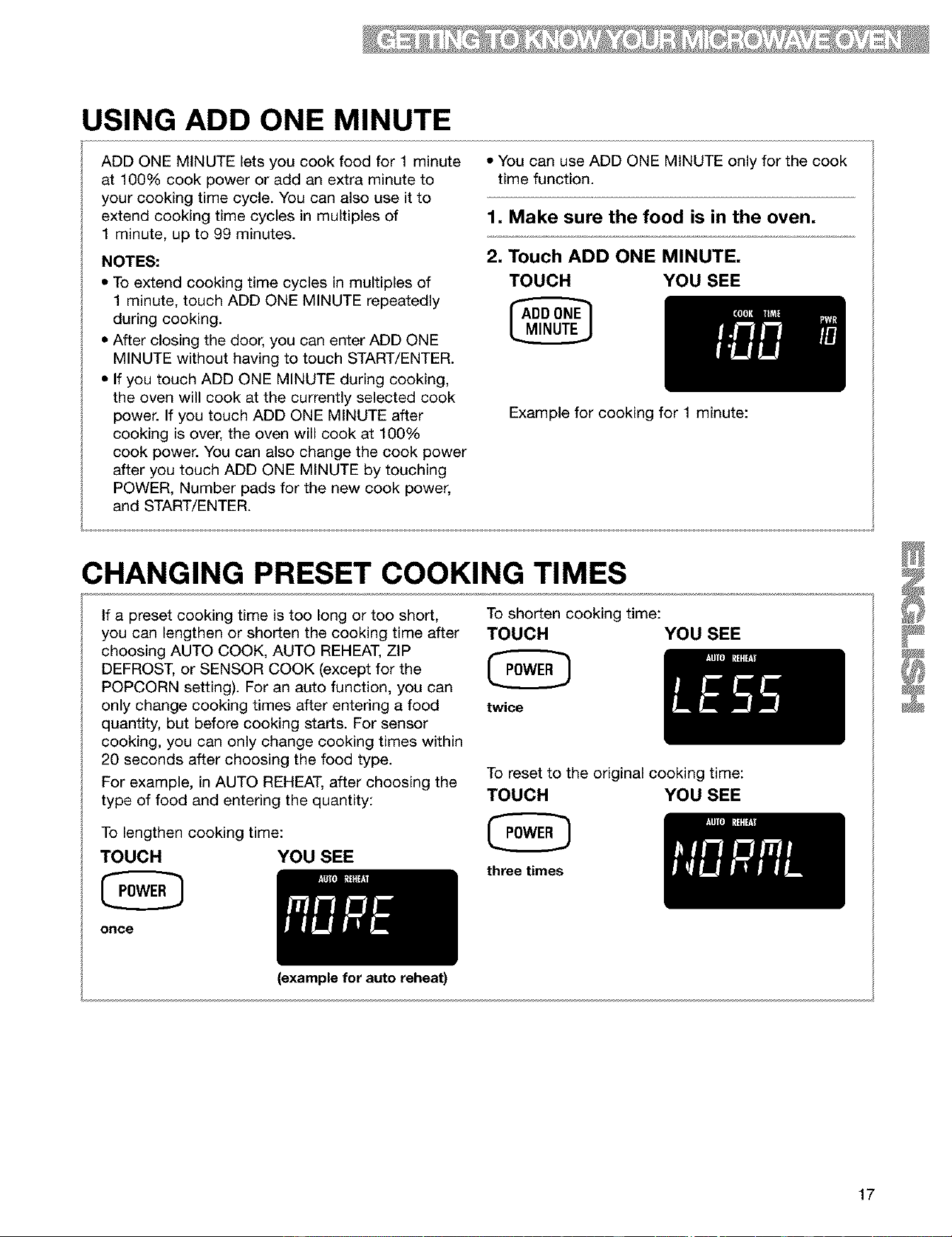
USING ADD ONE MINUTE
ADD ONE MINUTE lets you cook food for 1 minute
at 100% cook power or add an extra minute to
your cooking time cycle. You can also use it to
extend cooking time cycles in multiples of
1 minute, up to 99 minutes.
NOTES:
• To extend cooking time cycles in multiples of
1 minute, touch ADD ONE MINUTE repeatedly
during cooking.
• After closing the door, you can enter ADD ONE
MINUTE without having to touch START/ENTER.
• If you touch ADD ONE MINUTE during cooking,
the oven will cook at the currently selected cook
power. If you touch ADD ONE MINUTE after
cooking is over, the oven will cook at 100%
cook power. You can also change the cook power
after you touch ADD ONE MINUTE by touching
POWER, Number pads for the new cook power,
and START/ENTER.
• You can use ADD ONE MINUTE only for the cook
time function.
1, Make sure the food is in the oven,
2, Touch ADD ONE MINUTE,
TOUCH YOU SEE
lilt
Example for cooking for 1 minute:
CHANGING PRESET COOKING TIMES
If a preset cooking time is too long or too short,
you can lengthen or shorten the cooking time after
choosing AUTO COOK, AUTO REHEAT, ZIP
DEFROST, or SENSOR COOK (except for the
POPCORN setting). For an auto function, you can
only change cooking times after entering a food
quantity, but before cooking starts. For sensor
cooking, you can only change cooking times within
20 seconds after choosing the food type.
For example, in AUTO REHEAT, after choosing the
type of food and entering the quantity:
To lengthen cooking time:
TOUCH YOU SEE
once
(example for auto reheat)
To shorten cooking time:
TOUCH YOU SEE
twice
To reset to the original cooking time:
TOUCH YOU SEE
three times
17
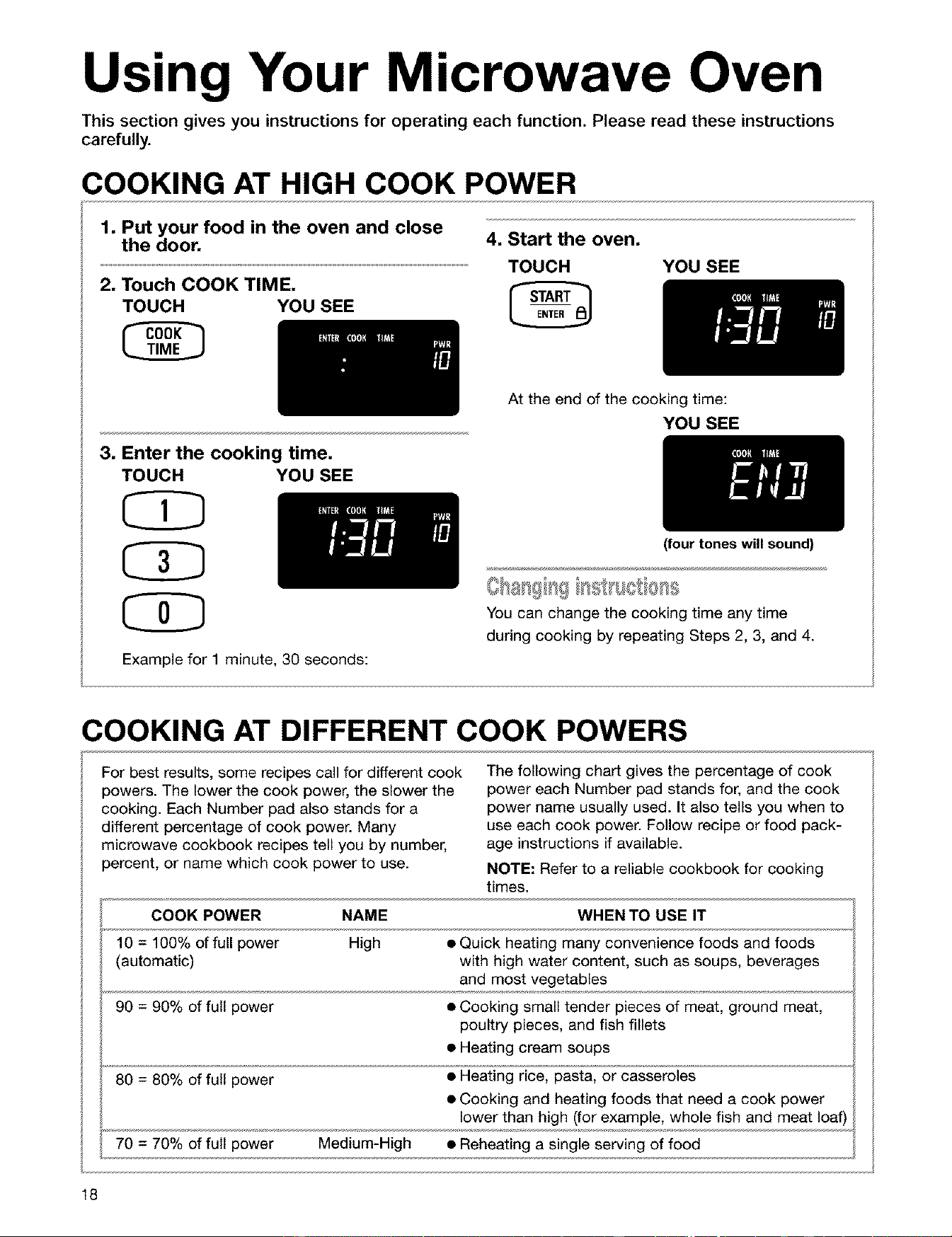
Usi Your Microwave Oven
This section gives you instructions for operating each function. Please read these instructions
carefully.
COOKING AT HIGH COOK POWER
1, Put your food in the oven and close
the door,
2, Touch COOK TIME,
TOUCH YOU SEE
4, Start the oven,
TOUCH YOU SEE
At the end of the cooking time:
YOU SEE
3, Enter the cooking time,
TOUCH YOU SEE
(four tones will sound)
You can change the cooking time any time
during cooking by repeating Steps 2, 3, and 4.
Example for 1 minute, 30 seconds:
COOKING AT DIFFERENT COOK POWERS
For best results, some recipes call for different cook
powers. The lower the cook power, the slower the
cooking. Each Number pad also stands for a
different percentage of cook power. Many
microwave cookbook recipes tell you by number,
percent, or name which cook power to use.
The following chart gives the percentage of cook
power each Number pad stands for, and the cook
power name usually used. It also tells you when to
use each cook power. Follow recipe or food pack-
age instructions if available.
NOTE: Refer to a reliable cookbook for cooking
times.
COOK POWER NAME WHEN TO USE IT
10 = 100% of full power High • Quick heating many convenience foods and foods
(automatic) with high water content, such as soups, beverages
and most vegetables
90 = 90% of full power • Cooking small tender pieces of meat, ground meat,
poultry pieces, and fish fillets
• Heating cream soups
80 = 80% of full power • Heating rice, pasta, or casseroles
• Cooking and heating foods that need a cook power
lower than high (for example, whole fish and meat loaf
70 = 70% of full power Medium-High • Reheating a single serving of food
18
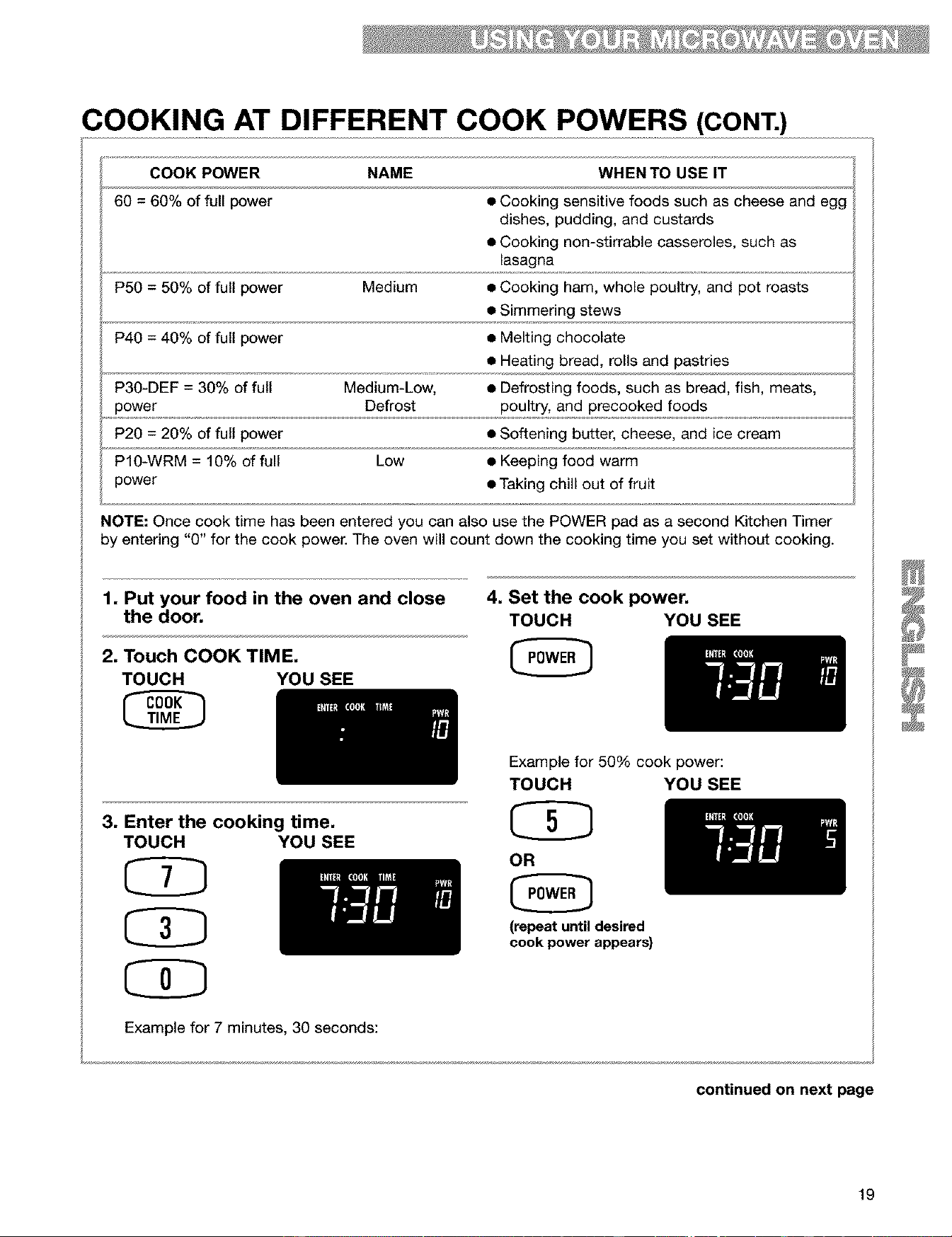
COOKING AT DIFFERENT COOK POWERS (CONT.)
COOK POWER NAME WHEN TO USE IT
60 = 60% of full power • Cooking sensitive foods such as cheese and egg
dishes, pudding, and custards
• Cooking non-stirrable casseroles, such as
lasagna
P5O = 50% of full power Medium • Cooking ham, whole poultry, and pot roasts
• Simmering stews
P4O = 40% of full power • Melting chocolate
• Heating bread, rolls and pastries
P30-DEF = 30% of full Medium-Low, • Defrosting foods, such as bread, fish, meats,
power Defrost poultry, and precooked foods
P2O = 20% of full power • Softening butter, cheese, and ice cream
P10-WRM = 10% of full Low • Keeping food warm
power • Taking chill out of fruit
NOTE: Once cook time has been entered you can also use the POWER pad as a second Kitchen Timer
by entering "O" for the cook power. The oven will count down the cooking time you set without cooking.
1, Put your food in the oven and close
the door,
2, Touch COOK TIME,
TOUCH YOU SEE
3, Enter the cooking time,
TOUCH YOU SEE
CD
CD
Example for 7 minutes, 30 seconds:
4, Set the cook power,
TOUCH YOU SEE
Example for 50% cook power:
TOUCH YOU SEE
OR
(repeat until desired
cook power appears)
continued on next page
19
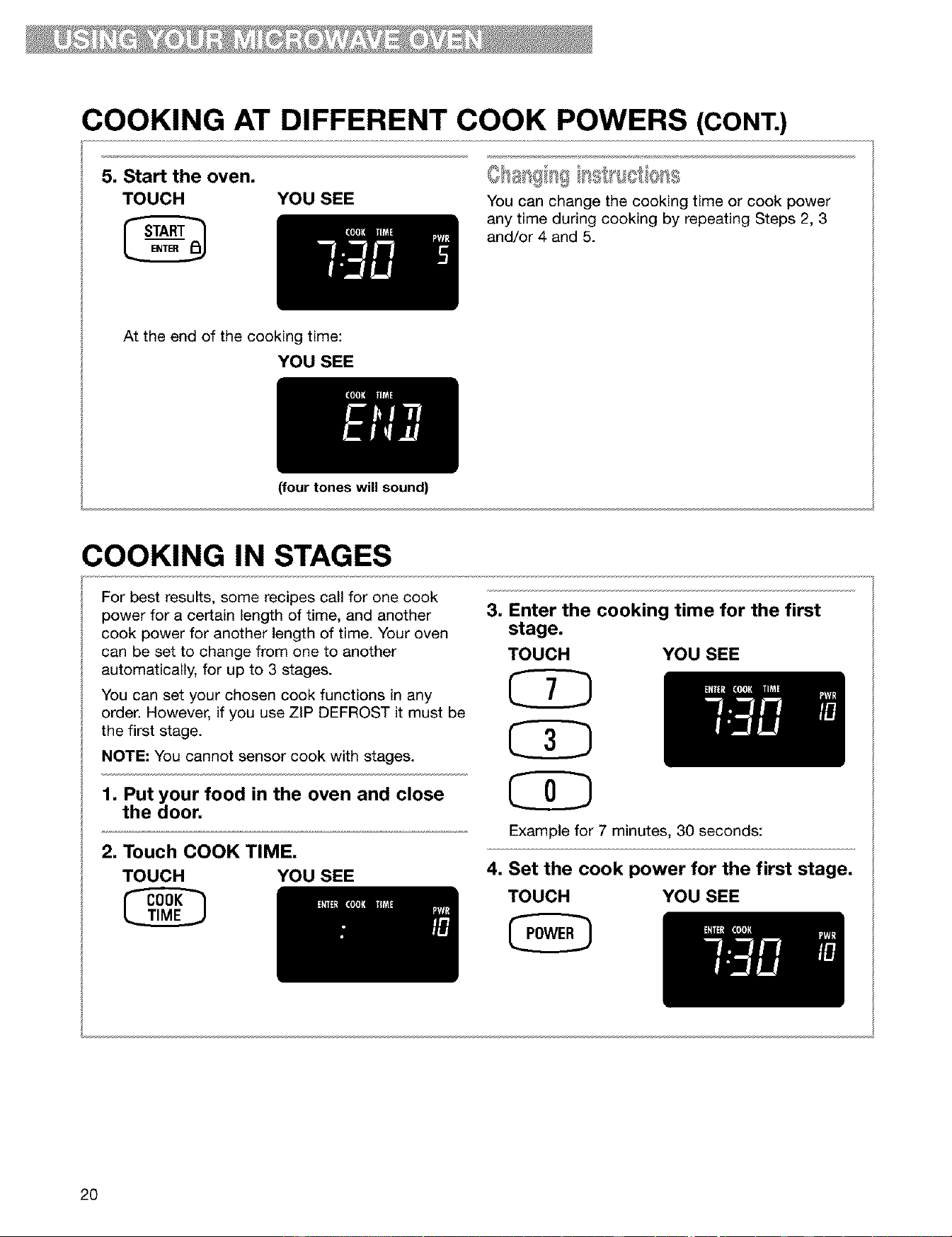
COOKING AT DIFFERENT COOK POWERS (CONT.)
5, Start the oven,
TOUCH YOU SEE
You can change the cooking time or cook power
any time during cooking by repeating Steps 2, 3
and/or 4 and 5.
At the end of the cooking time:
YOU SEE
(four tones will sound)
COOKING IN STAGES
For best results, some recipes call for one cook
power for a certain length of time, and another
cook power for another length of time. Your oven
can be set to change from one to another
automatically, for up to 3 stages.
You can set your chosen cook functions in any
order. However, if you use ZIP DEFROST it must be
the first stage.
NOTE: You cannot sensor cook with stages.
1, Put your food in the oven and close
the door,
2, Touch COOK TIME,
TOUCH YOU SEE
3, Enter the cooking time for the first
stage,
TOUCH YOU SEE
Example for 7 minutes, 30 seconds:
4, Set the cook power for the first stage,
TOUCH YOU SEE
2O
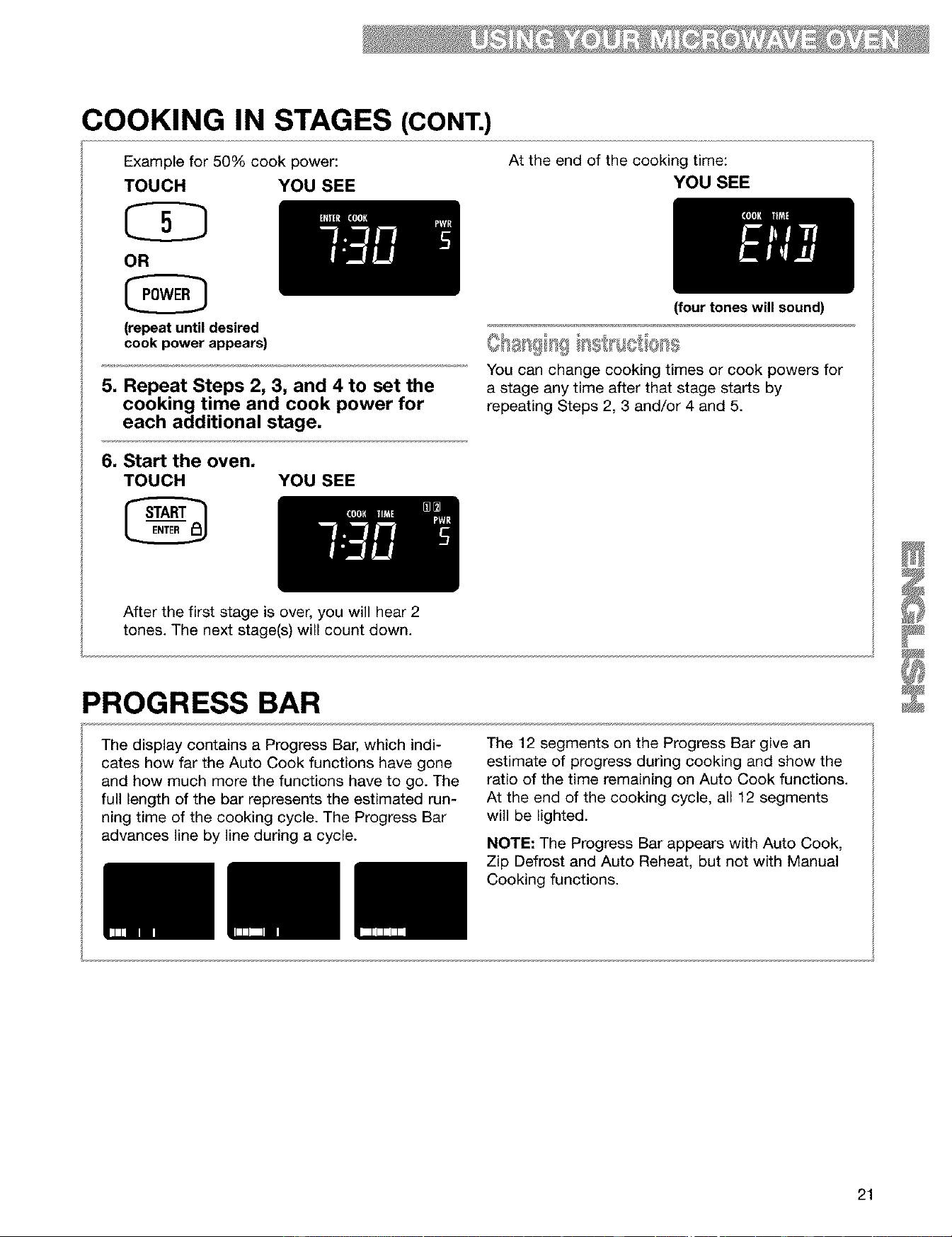
COOKING IN STAGES (CONT.)
Example for 50% cook power:
TOUCH YOU SEE
OR
(repeat until desired
cook power appears)
5, Repeat Steps 2, 3, and 4 to set the
cooking time and cook power for
each additional stage,
6, Start the oven,
TOUCH YOU SEE
At the end of the cooking time:
YOU SEE
(four tones will sound)
You can change cooking times or cook powers for
a stage any time after that stage starts by
repeating Steps 2, 3 and/or 4 and 5.
After the first stage is over, you will hear 2
tones. The next stage(s) will count down.
PROGRESS BAR
The display contains a Progress Bar, which indi-
cates how far the Auto Cook functions have gone
and how much more the functions have to go. The
full length of the bar represents the estimated run-
ning time of the cooking cycle. The Progress Bar
advances line by line during a cycle.
The 12 segments on the Progress Bar give an
estimate of progress during cooking and show the
ratio of the time remaining on Auto Cook functions.
At the end of the cooking cycle, all 12 segments
will be lighted.
NOTE: The Progress Bar appears with Auto Cook,
Zip Defrost and Auto Reheat, but not with Manual
Cooking functions.
21
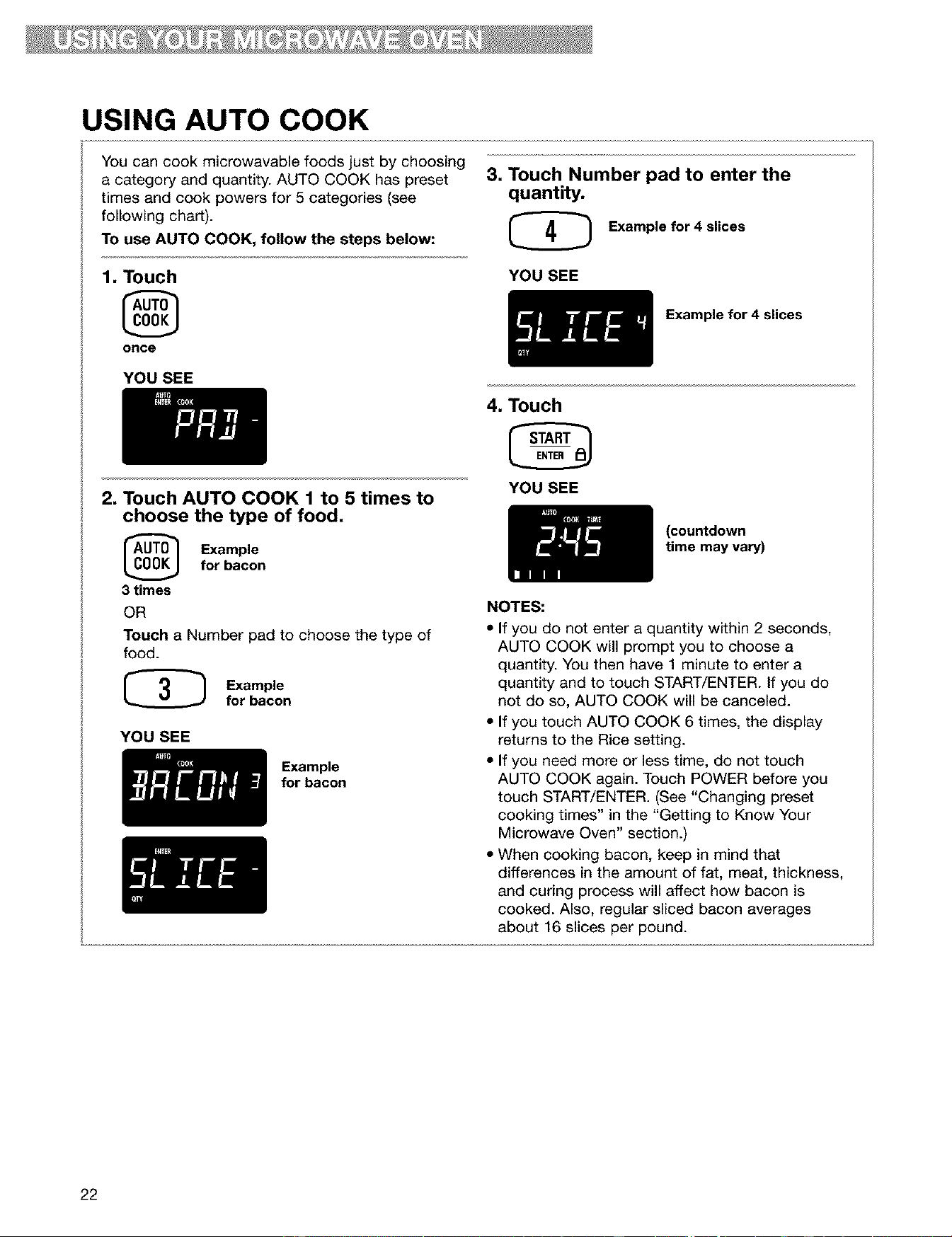
USING AUTO COOK
You can cook microwavable foods just by choosing
a category and quantity. AUTO COOK has preset
times and cook powers for 5 categories (see
following chart).
To use AUTO COOK, follow the steps below:
3, Touch Number pad to enter the
quantity,
(_ Example for 4 slices
1, Touch
once
YOU SEE
Example for 4 slices
YOU SEE
2, Touch AUTO COOK 1 to 5 times to
choose the type of food,
_ Example
for bacon
3 times
OR
Touch a Number pad to choose the type of
food.
Example
for bacon
YOU SEE
Example
for bacon
4, Touch
YOU SEE
(countdown
time may vary)
NOTES:
• If you do not enter a quantity within 2 seconds,
AUTO COOK will prompt you to choose a
quantity. You then have 1 minute to enter a
quantity and to touch START/ENTER. If you do
not do so, AUTO COOK will be canceled.
• If you touch AUTO COOK 6 times, the display
returns to the Rice setting.
• If you need more or less time, do not touch
AUTO COOK again. Touch POWER before you
touch START/ENTER. (See "Changing preset
cooking times" in the "Getting to Know Your
Microwave Oven" section.)
• When cooking bacon, keep in mind that
differences in the amount of fat, meat, thickness,
and curing process will affect how bacon is
cooked. Also, regular sliced bacon averages
about 16 slices per pound.
22
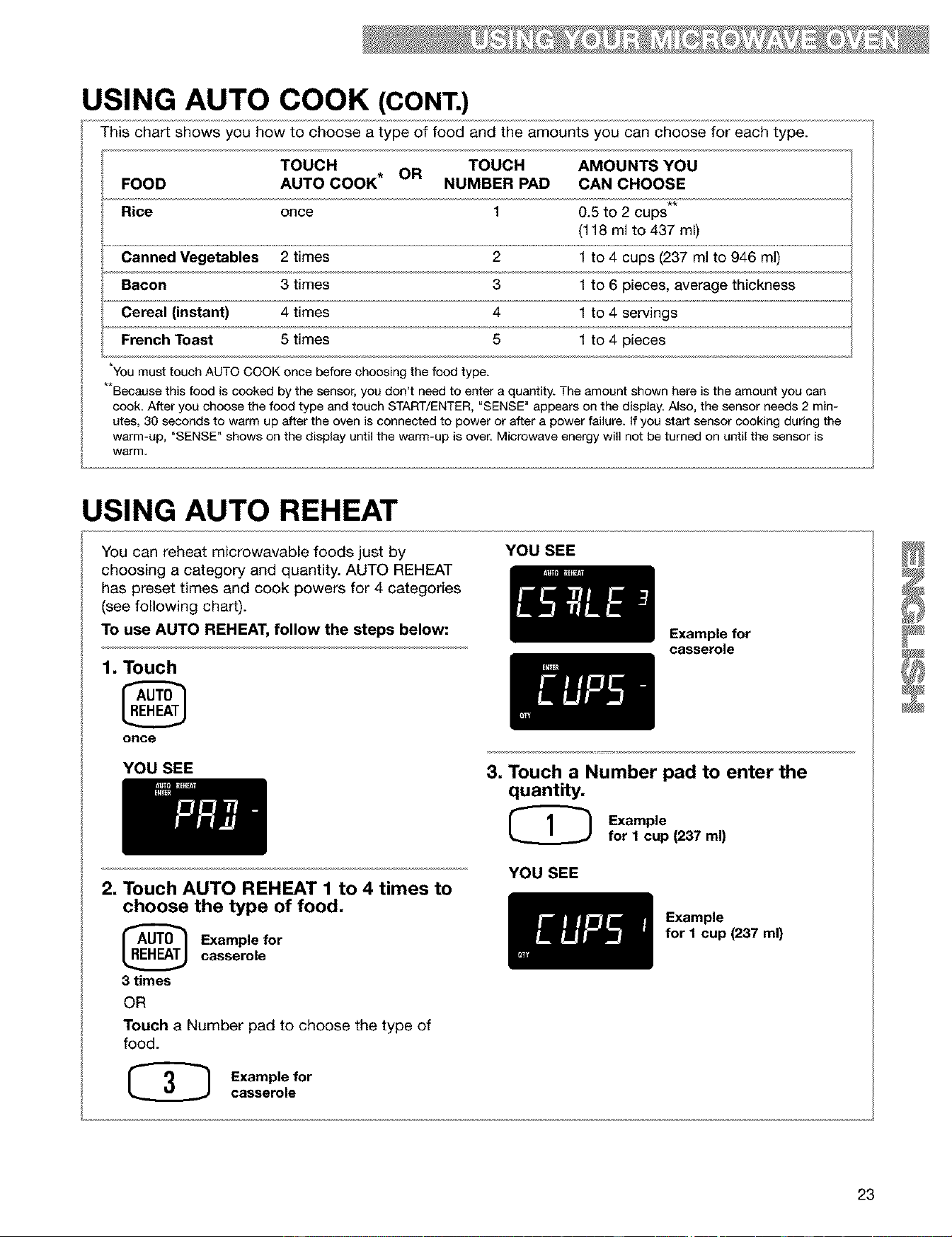
USING AUTO COOK (CONT.)
This chart shows you how to choose a type of food and the amounts you can choose for each type.
TOUCH OR TOUCH AMOUNTS YOU
FOOD AUTO COOK* NUMBER PAD CAN CHOOSE
Rice once 1 0.5 to 2 cups**
(118 ml to 437 ml)
Canned Vegetables 2 times 2 1 to 4 cups (237 ml to 946 ml)
Bacon 3 times 3 1 to 6 pieces, average thickness
Cereal (instant) 4 times 4 1 to 4 servings
French Toast 5 times 5 1 to 4 pieces
YOUmust touch AUTO COOK once before choosing the food type.
Because this food is cooked by the sensor, you don't need to enter a quantity. The amount shown here is the amount you can
cook. After you choose the food type and touch START/ENTER, "SENSE" appears on the display. Also, the sensor needs 2 min-
utes, 30 seconds to warm up after the oven is connected to power or after a power failure, if you start sensor cooking during the
warm-up, "SENSE" shows on the display until the warm-up is over, Microwave energy will not be turned on until the sensor is
warm,
USING AUTO REHEAT
YOU SEE
You can reheat microwavable foods just by
choosing a category and quantity. AUTO REHEAT
has preset times and cook powers for 4 categories
(see following chart).
To use AUTO REHEAT, follow the steps below:
1, Touch
once
Example for
casserole
YOU SEE
3, Touch a Number pad to enter the
quantity.
@ Example
for 1 cup (237 ml)
2, Touch AUTO REHEAT 1 to 4 times to
choose the type of food,
_ xample forcasserole
3 times
OR
Touch a Number pad to choose the type of
food.
(_ Example for
casserole
YOU SEE
Example
for I cup (237 ml)
23
USING AUTO REHEAT (CONT.)
4. Touch
YOU SEE
NOTES:
(countdown
time may vary)
• If you do not enter a quantity within 2 seconds,
AUTO REHEAT will prompt you to choose a
quantity. You then have 1 minute to enter a
quantity and to touch START/ENTER. If you do not
do so, AUTO REHEAT will be canceled.
• If you touch AUTO REHEAT 5 times, the display
returns to the Pizza Slice setting.
• If you need more or less time, do not touch AUTO
REHEAT again. Touch POWER before you touch
START/ENTER. (See "Changing preset cooking
times" in the "Getting to Know Your Microwave
Oven" section.)
• When reheating a large (4 oz [113 g]) muffin or bagel
use the 2-piece setting. The 1-piece setting heats 1
regular-size muffin or bagel, or 2 small dinner rolls.
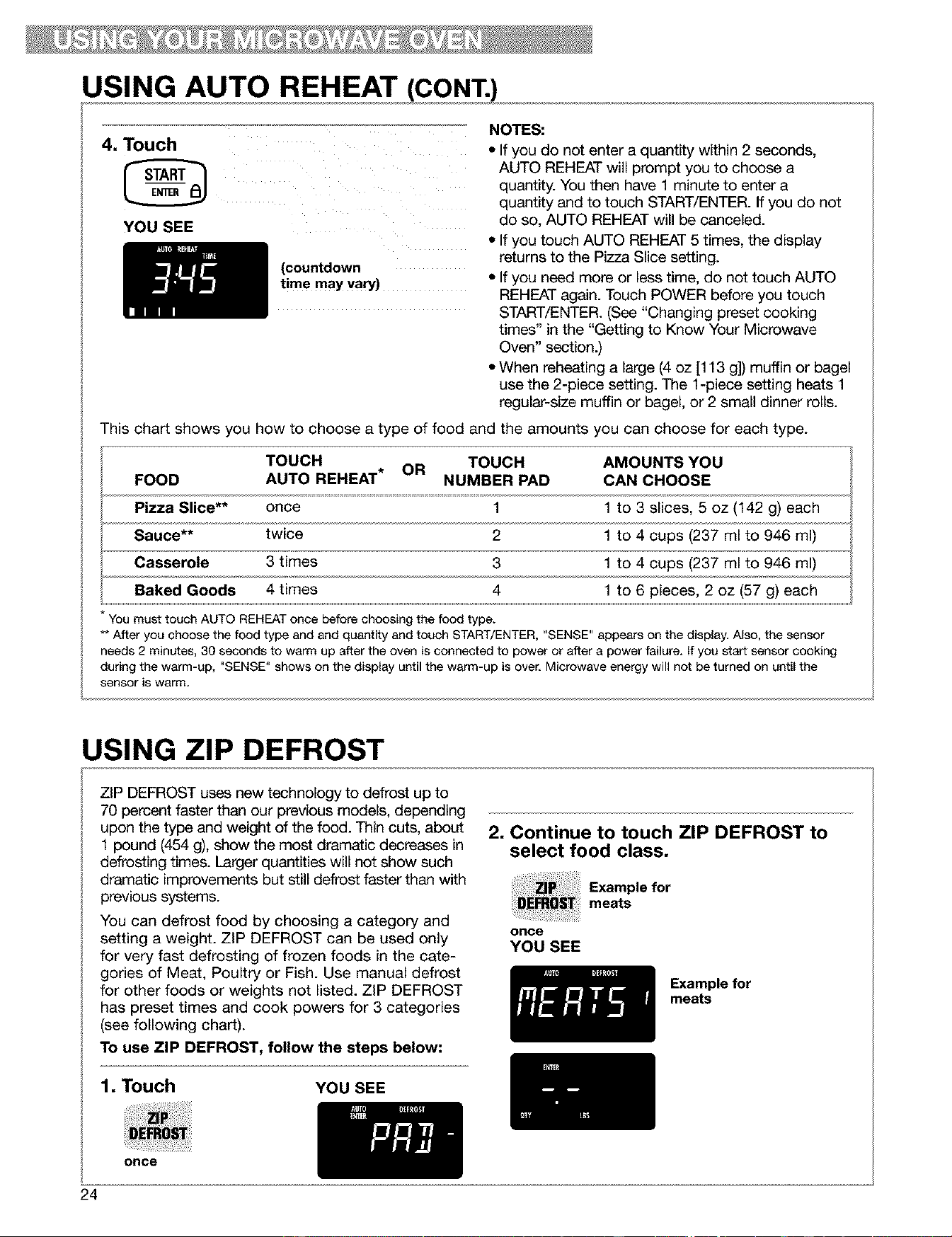
This chart shows you how to choose a type of food and the amounts you can choose for each type.
TOUCH TOUCH AMOUNTS YOU
FOOD AUTO REHEAT* OR NUMBER PAD CAN CHOOSE
Pizza Slice** once 1 1 to 3 slices, 5 oz (142 g) each
Sauce** twice 2 1 to 4 cups (237 ml to 946 ml)
Casserole 3 times 3 1 to 4 cups (237 ml to 946 ml)
Baked Goods 4 times 4 1 to 6 pieces, 2 oz (57 g) each
You must touch AUTO REHEAT once before choosing the food type.
** After you choose the food type and and quantity and touch START/ENTER, "SENSE" appears on the display. Also, the sensor
needs 2 minutes, 30 seconds to warm up after the oven is connected to power or after a power failure. If you start sensor cooking
during the warm-up, "SENSE" shows on the display until the warm-up is over. Microwave energy will not be turned on until the
sensor is warm.
USING ZIP DEFROST
ZIP DEFROST uses new technology to defrost up to
70 percent faster than our previous models, depending
upon the type and weight of the food. Thin cuts, about
1 pound (454 g), show the most dramatic decreases in
defrosting times. Larger quantities will not show such
dramatic improvements but still defrost faster than with
previous systems.
You can defrost food by choosing a category and
setting a weight. ZIP DEFROST can be used only
for very fast defrosting of frozen foods in the cate-
gories of Meat, Poultry or Fish. Use manual defrost
for other foods or weights not listed. ZIP DEFROST
has preset times and cook powers for 3 categories
(see following chart).
To use ZIP DEFROST, follow the steps below:
2, Continue to touch ZIP DEFROST to
select food class,
Example for
meats
once
YOU SEE
Example for
meats
1, Touch YOU SEE
once
24
USING ZIP DEFROST (CONT.)
3. Touch Number pad(s) to enter the
weight. Input the correct weight.
Example for
1.1 Ibs (0.5 kg)
YOU SEE
Example for
1.1 Ibs (0.5 kg)
4. Touch
YOU SEE
(countdown
time may vary)
5. Approximately halfway through the
cycle, the oven will beep.
The indicator will say "TURN". Turn food and
then touch START/ENTER. If you don't open
the door and turn the food, the oven will beep
and continue defrosting but will take longer to
defrost.
NOTES:
• If you do not enter a weight within 2 seconds,
ZIP DEFROST will prompt you to enter a weight.
You then have 1 minute to enter a weight and to
touch START/ENTER. If you do not do so, ZIP
DEFROST will be canceled.
• If you enter a weight higher than the highest
weight or lower than the lowest weight (0.2 lb.)
allowed for your food setting, 3 tones will sound
and "RETRY" will appear on the display when you
touch START/ENTER. Then the maximum weight
allowed will be displayed.
• If you touch ZIP DEFROST 4 times, the display
returns to the Meats setting.
• If you need more or less defrosting time, do not
touch ZIP DEFROST again. Touch POWER
before you touch START/ENTER. (See "Changing
preset cooking times" in the "Getting to Know
Your Microwave Oven" section.)
• See the "Zip defrost chart" later in this section
for defrosting directions for each food.
• To defrost items not listed in the "Zip defrost
chart," use 30% cook power. Refer to a reliable
cookbook for defrosting information.
• The shape of the package affects how quickly
food will defrost. Shallow packages will defrost
more quickly than a deep block.
• As food begins to defrost, separate the pieces.
Separated pieces defrost more evenly.
• Use small pieces of aluminum foil to shield parts
of food such as chicken wings, leg tips, fish tails,
or areas that start to get warm. Make sure the foil
does not touch the sides, top, or bottom of
the oven.
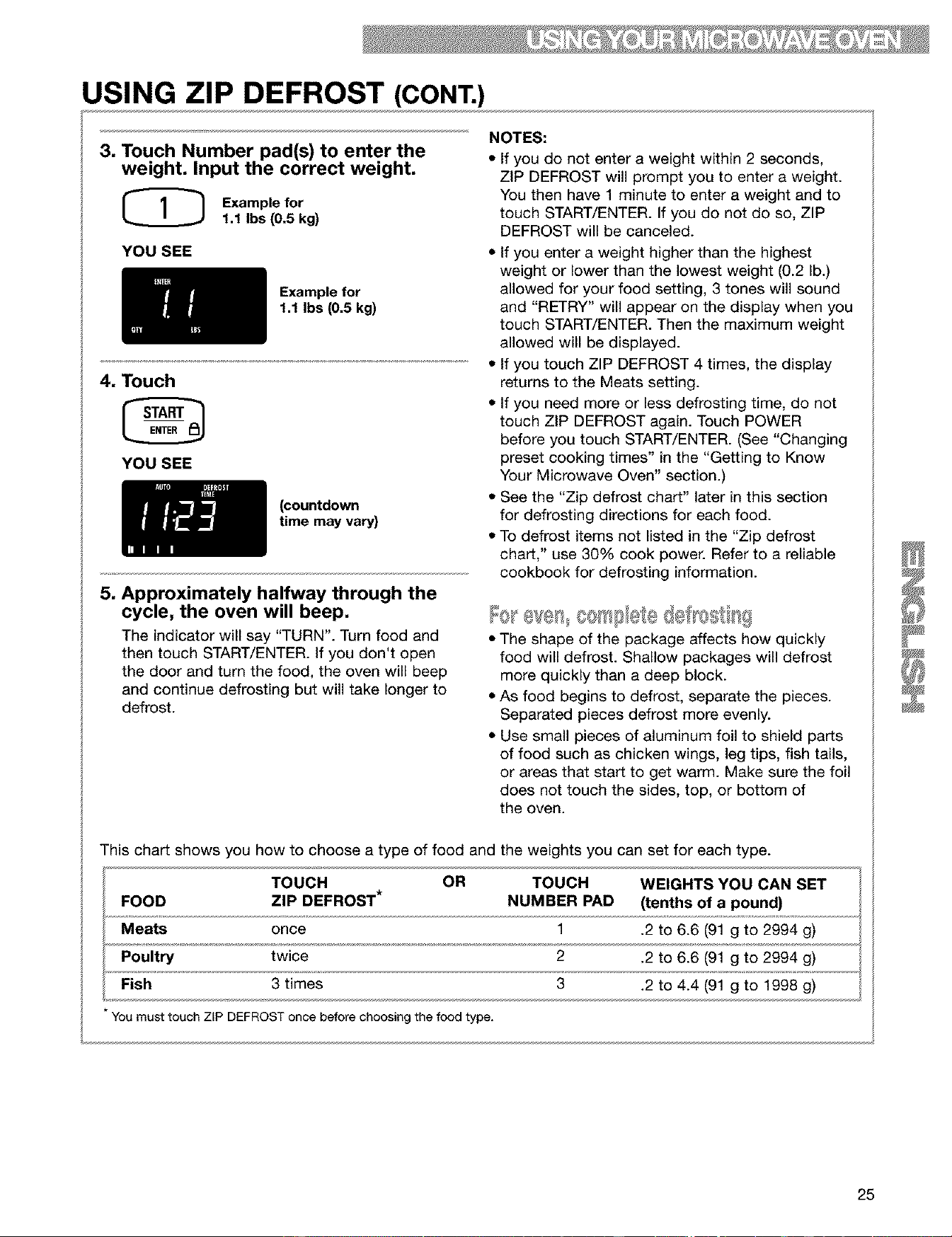
This chart shows you how to choose a type of food and the weights you can set for each type.
TOUCH OR TOUCH WEIGHTS YOU CAN SET
FOOD ZIP DEFROST* NUMBER PAD (tenths of a pound)
Meats once 1 .2 to 6.6 (91 g to 2994 g)
Poultry twice 2 .2 to 6.6 (91 g to 2994 g)
Fish 3 times 3 .2 to 4.4 (91 g to 1998 g)
You must touch ZIP DEFROST once before choosing the food type.
25
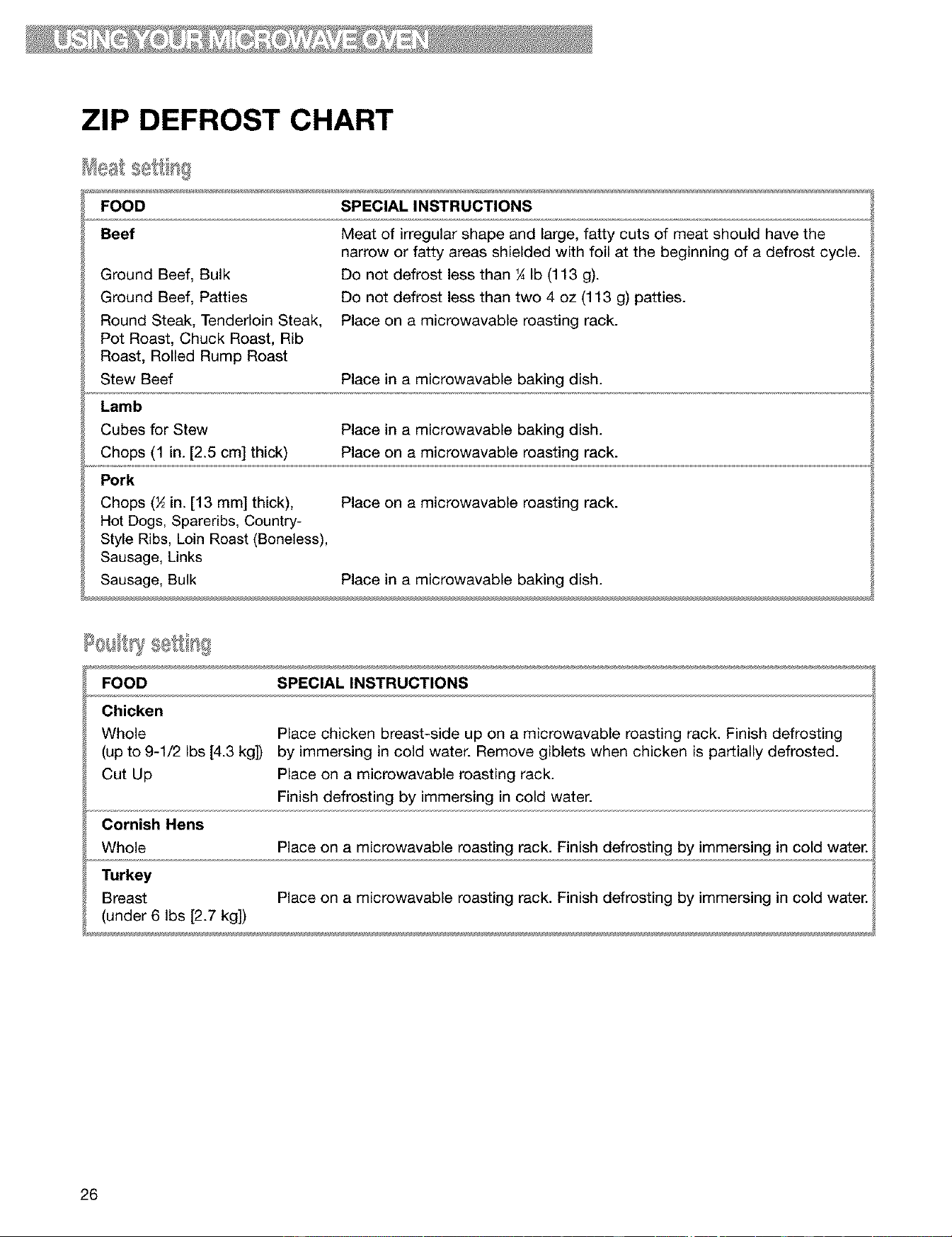
ZIP DEFROST CHART
FOOD SPECIAL INSTRUCTIONS
Beef
Meat of irregular shape and large, fatty cuts of meat should have the
narrow or fatty areas shielded with foil at the beginning of a defrost cycle.
Do not defrost less than ¼ Ib (113 g).
Do not defrost less than two 4 oz (113 g) patties.
Place on a microwavable roasting rack.
Ground Beef, Bulk
Ground Beef, Patties
Round Steak, Tenderloin Steak,
Pot Roast, Chuck Roast, Rib
Roast, Rolled Rump Roast
Stew Beef Place in a microwavable baking dish.
Lamb
Cubes for Stew Place in a microwavable baking dish.
Chops (1 in. [2.5 cm] thick) Place on a microwavable roasting rack.
Pork
Chops (½ in. [13 mm] thick), Place on a microwavable roasting rack.
Hot Dogs, Spareribs, Country-
Style Ribs, Loin Roast (Boneless),
Sausage, Links
Sausage, Bulk Place in a microwavable baking dish.
FOOD SPECIAL INSTRUCTIONS
Chicken
Whole Place chicken breast-side up on a microwavable roasting rack. Finish defrosting
(up to 9-1/2 Ibs [4.3 kg]) by immersing in cold water. Remove giblets when chicken is partially defrosted.
Cut Up Place on a microwavable roasting rack.
Finish defrosting by immersing in cold water.
Cornish Hens
Whole Place on a microwavable roasting rack. Finish defrosting by immersing in cold water.
Turkey
Breast
(under 6 Ibs [2.7 kg])
Place on a microwavable roasting rack. Finish defrosting by immersing in cold water.
26
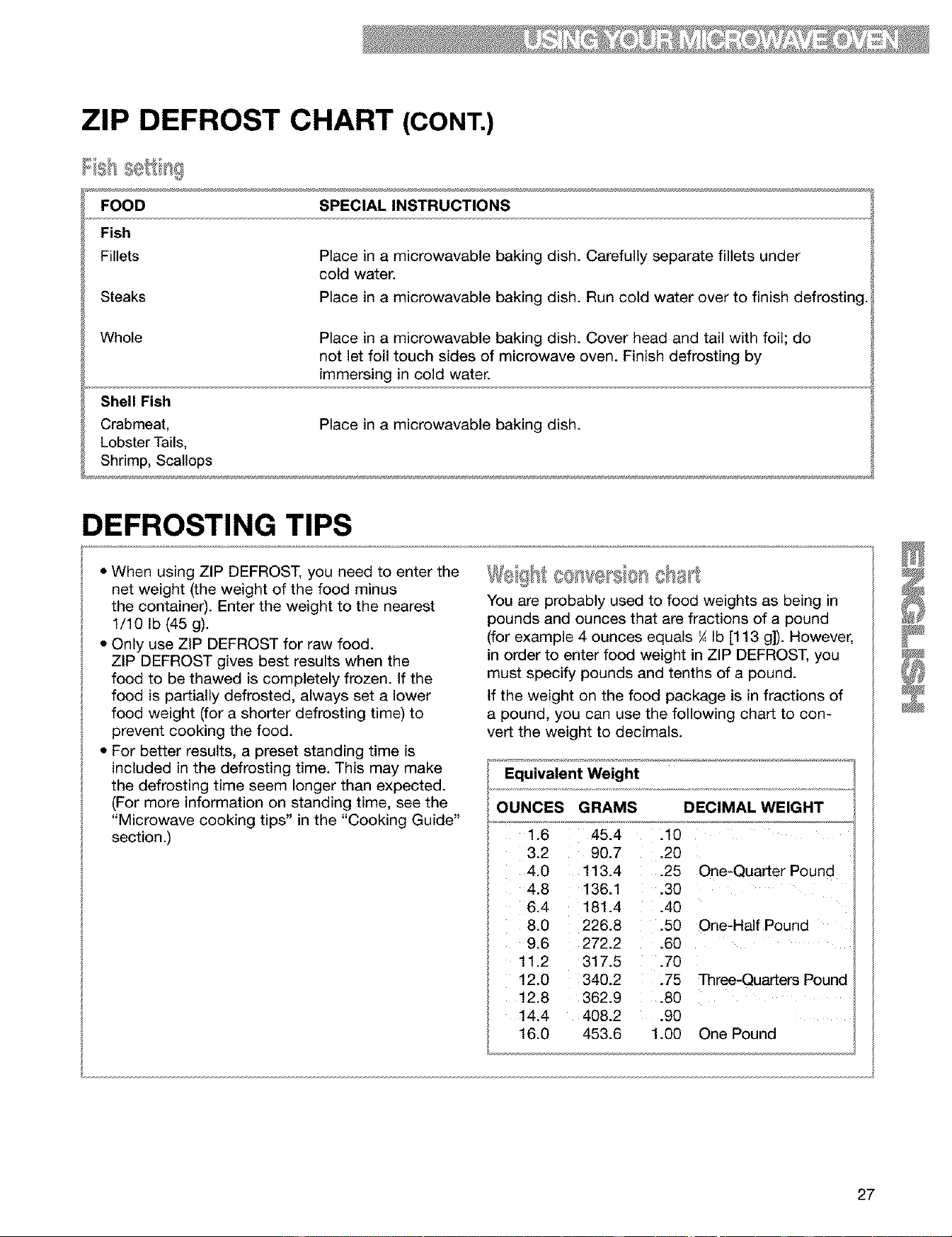
ZIP DEFROST CHART (CONT.)
ish oett g
FOOD
Fish
Fillets
Steaks
SPECIAL INSTRUCTIONS
Place in a microwavable baking dish. Carefully separate fillets under
cold water.
Place in a microwavable baking dish. Run cold water over to finish defrosting.
Whole
Shell Fish
Crabmeat,
Lobster Tails,
Shrimp, Scallops
Place in a microwavable baking dish. Cover head and tail with foil; do
not let foil touch sides of microwave oven. Finish defrosting by
immersing in cold water.
Place in a microwavable baking dish.
DEFROSTING TIPS
• When using ZIP DEFROST, you need to enter the
net weight (the weight of the food minus
the container). Enter the weight to the nearest
1/10 Ib (45 g).
• Only use ZIP DEFROST for raw food.
ZiP DEFROST gives best results when the
food to be thawed is completely frozen. If the
food is partially defrosted, always set a lower
food weight (for a shorter defrosting time) to
prevent cooking the food.
• For better results, a preset standing time is
included in the defrosting time. This may make
the defrosting time seem longer than expected.
(For more information on standing time, see the
"Microwave cooking tips" in the "Cooking Guide"
section.)
: OO(t%@FS@f_,,,,.,_
You are probably used to food weights as being in
pounds and ounces that are fractions of a pound
(for example 4 ounces equals ¼ Ib [113 g]). However,
in order to enter food weight in ZIP DEFROST, you
must specify pounds and tenths of a pound.
if the weight on the food package is in fractions of
a pound, you can use the following chart to con-
vert the weight to decimals.
Equivalent Weight
OUNCES GRAMS DECIMAL WEIGHT
1.6 45.4
3.2 90.7
4.0 113.4
4.8 136.1
6.4 181.4
8.0 226.8
9.6 272.2
11.2 317.5
12.0 340.2
12.8 362.9
14.4 408.2
16.0 453.6
.10
.20
.25 One-Quarter Pound
.30
.40
.50 One-HalfPound
.60
.70
.75 Th_e-QuaAe_ Pound
.80
.90
1.00 One Pound
27
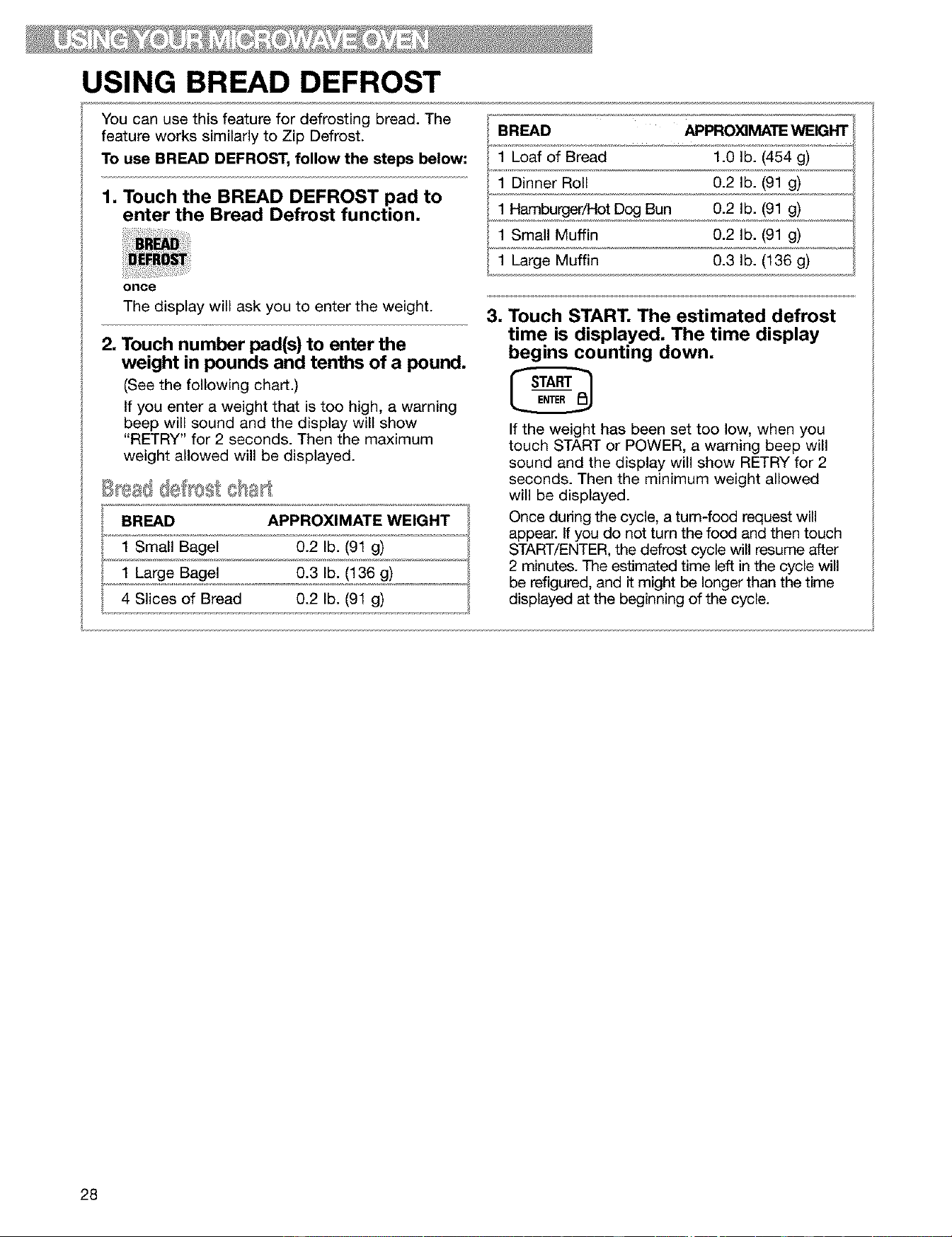
USING BREAD DEFROST
You can use this feature for defrosting bread. The
feature works similarly to Zip Defrost.
To use BREAD DEFROST, follow the steps below:
1, Touch the BREAD DEFROST pad to
enter the Bread Defrost function,
once
The display will ask you to enter the weight.
2. Touch number pad(s) to enter the
weight in pounds and tenths of a pound,
(See the following chart.)
If you enter a weight that is too high, a warning
beep will sound and the display will show
"RETRY" for 2 seconds. Then the maximum
weight allowed will be displayed.
BREAD APPROXIMATE WEIGHT
1 Small Bagel 0.2 lb. (91 g)
1 Large Bagel 0.3 lb. (136 g)
4 Slices of Bread 0.2 lb. (91 g)
BREAD APPRO_MATE WEIGHT
1 Loaf of Bread 1.0 lb. (454 g)
1 Dinner Roll 0.2 lb. (91 g)
1 Hamburger/Hot Dog Bun 0.2 lb. (91 g)
1 Small Muffin 0.2 lb. (91 g)
1 Large Muffin 0.3 lb. (136 g)
, Touch START, The estimated defrost
time is displayed, The time display
begins counting down.
If the weight has been set too low, when you
touch START or POWER, a warning beep will
sound and the display will show RETRY for 2
seconds. Then the minimum weight allowed
will be displayed.
Once dudng the cycle, a turn-food request will
appear. If you do not turn the food and then touch
START/ENTER, the defrost cycle will resume after
2 minutes. The estimated time left in the cycle will
be refigured, and it might be longer than the time
displayed at the beginning of the cycle.
28
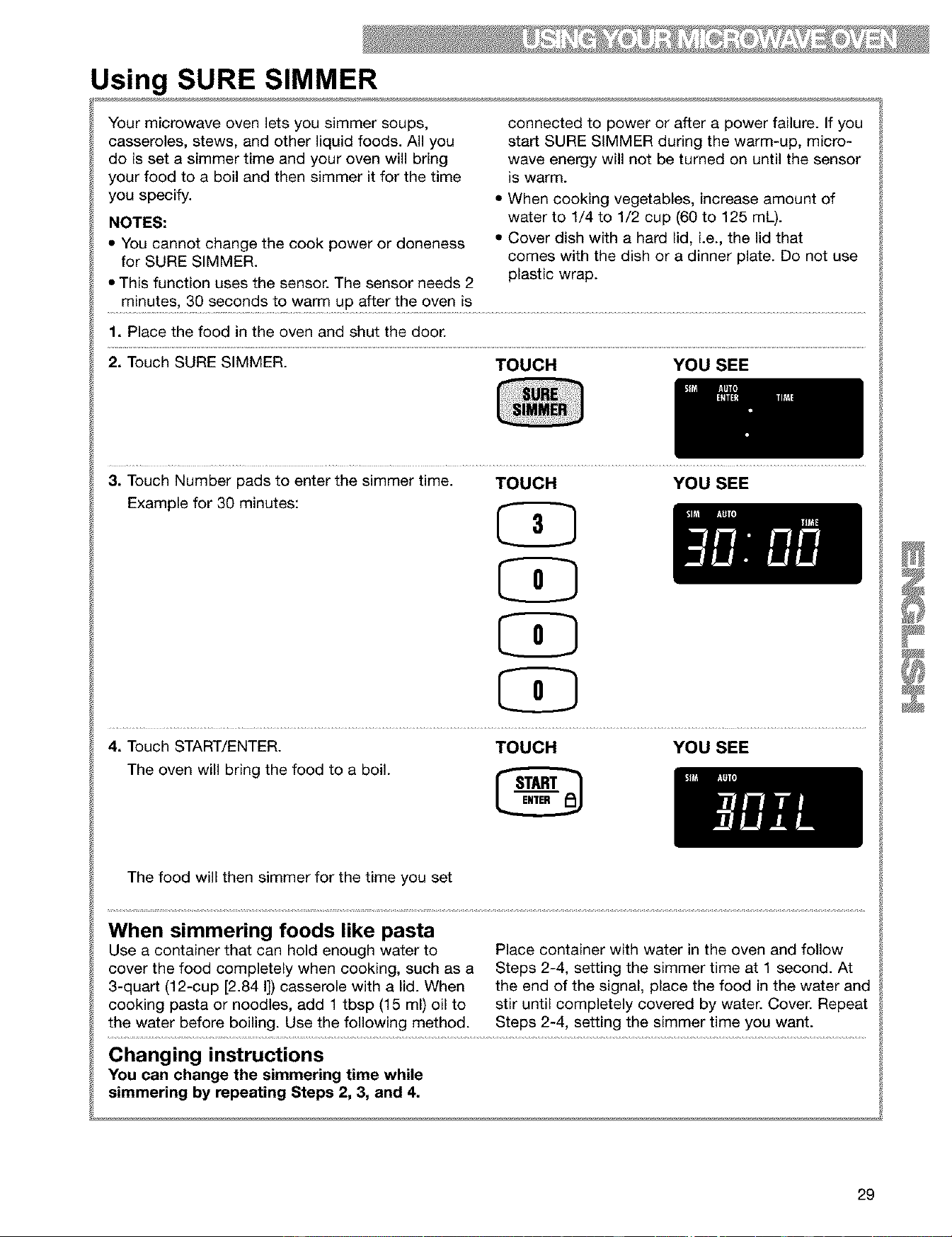
Using SURE SIMMER
Your microwave oven lets you simmer soups,
casseroles, stews, and other liquid foods. All you
do is set a simmer time and your oven will bring
your food to a boil and then simmer it for the time
you specify.
NOTES:
• You cannot change the cook power or doneness
for SURE SIMMER.
• This function uses the sensor. The sensor needs 2
minutes, 30 seconds to warm up after the oven is
connected to power or after a power failure. If you
start SURE SIMMER during the warm-up, micro-
wave energy will not be turned on until the sensor
is warm.
• When cooking vegetables, increase amount of
water to 1/4 to 1/2 cup (60 to 125 mL).
• Cover dish with a hard lid, i.e., the lid that
comes with the dish or a dinner plate. Do not use
plastic wrap.
1. Place the food in the oven and shut the door.
2. Touch SURE SIMMER. TOUCH YOU SEE
3. Touch Number pads to enter the simmer time. TOUCH YOU SEE
Example for 30 minutes: (_
4. Touch START/ENTER. TOUCH YOU SEE
The oven will bring the food to a boil.
The food will then simmer for the time you set
When simmering foods like pasta
Use a container that can hold enough water to
cover the food completely when cooking, such as a
3-quart (12-cup [2.84 I]) casserole with a lid. When
cooking pasta or noodles, add 1 tbsp (15 ml) oil to
the water before boiling. Use the following method.
Place container with water in the oven and follow
Steps 2-4, setting the simmer time at 1 second. At
the end of the signal, place the food in the water and
stir until completely covered by water. Cover. Repeat
Steps 2-4, setting the simmer time you want.
Changing instructions
You can change the simmering time while
simmering by repeating Steps 2, 3, and 4.
29

SENSOR COOKING
Food releases humidity during cooking/heating.
How much humidity food releases is affected by
the quantity, temperature, and shape of the food.
Your microwave oven has a sensor that detects
this humidity. The amount of humidity detected
tells the oven how long to cook or heat your food.
You can sensor cook when preparing any of 8
types of food. Just touch the pad for the food you
want to cook or heat (see the chart below).
To sensorcook:
1. Touch a SENSOR COOK pad.
Example for baked
potato
YOU SEE
(until cooking
time is
estimated)
(*'MAX" appears
every 3 seconds)
NOTES:
• You do not need to touch START/ENTER to
start the oven. The oven will start cooking/
heating when you touch one of the
SENSOR COOK pads.
• If you need more or less cooking time, do not
touch the selected SENSOR COOK pad again.
Touch POWER within 20 seconds after choosing
the food type. (See "Changing preset cooking
times" in the "Getting to Know Your Microwave
Oven" section.) You cannot change preset cook-
ing times for POPCORN.
• The sensor needs 2 minutes, 30 seconds to warm
up after the oven is connected to power or after a
power failure. If you start sensor cooking during
the warm-up, "SENSE" shows on the display until
the warm-up is over. Microwave energy will not be
turned on until the sensor is warm.
• When cooking foods for a long time, allow the
oven to cool down before sensor cooking again.
Popcorn brands make a difference
How well your popcorn cooks will depend on the
brand of popcorn and how much fat it has in it. Try
several brands to decide which pops the best. For
best results, use fresh bags of popcorn.
This chart shows you how to choose a type of food and the amount you can choose for each type.
PAD INSTRUCTIONS AMOUNT
Popcorn* Pop only 1 package at a time. If you are using a 3.5 oz (100 g), 3.0 oz (85 g),
microwave popcorn popper, follow manufacturer's 1.75 oz (50 g)
instructions.
Baked Pierce the potato with a fork several times. After 1 to 4 potatoes
Potato cooking, let the potato stand 5 minutes to finish (10 oz [284 g] to 13 oz [369 g]
cooking, each)
Fresh Place vegetables in a correct-size 1 to 4 cups (237 ml to 946 ml)
Vegetable microwavable container. Add 2 to 4 tbsp (30 to
60 ml) water. Cover with plastic wrap and vent.
Frozen Remove from package, rinse off frost under 1 to 4 cups (237 ml to 946 ml)
Vegetable running water. Place vegetables in a correct-size
microwavable container. Add 2 to 4 tbsp (30 to 60
ml) water. Cover with plastic wrap and vent.
Frozen Entree Loosen the covering for venting. 10- or 20-ounce (284 g or 568 g)
Beverage* Do not cover. The shape of the mug will affect how 1 or 2 8-ounce (237 ml) cups
the contents heat - if narrow and tall, contents may
be hotter; if more open area on top (i.e., 1-cup
[237 ml] measuring cup) contents may be cooler.
Dinner Plate Place food to be heated on a dinner plate or similar 1 serving (or 1 plate) (8 to 16 oz
dish. Cover with plastic wrap and vent. [227 g to 454 g])
Soup Place soup to be heated in a correct-size microwav- 1 to 4 cups (237 ml to 946 ml)
able container. Cover with plastic wrap and vent.
* The display does not show cooking time for this setting. "SENSE" stays on the display until cooking is
finished.
30
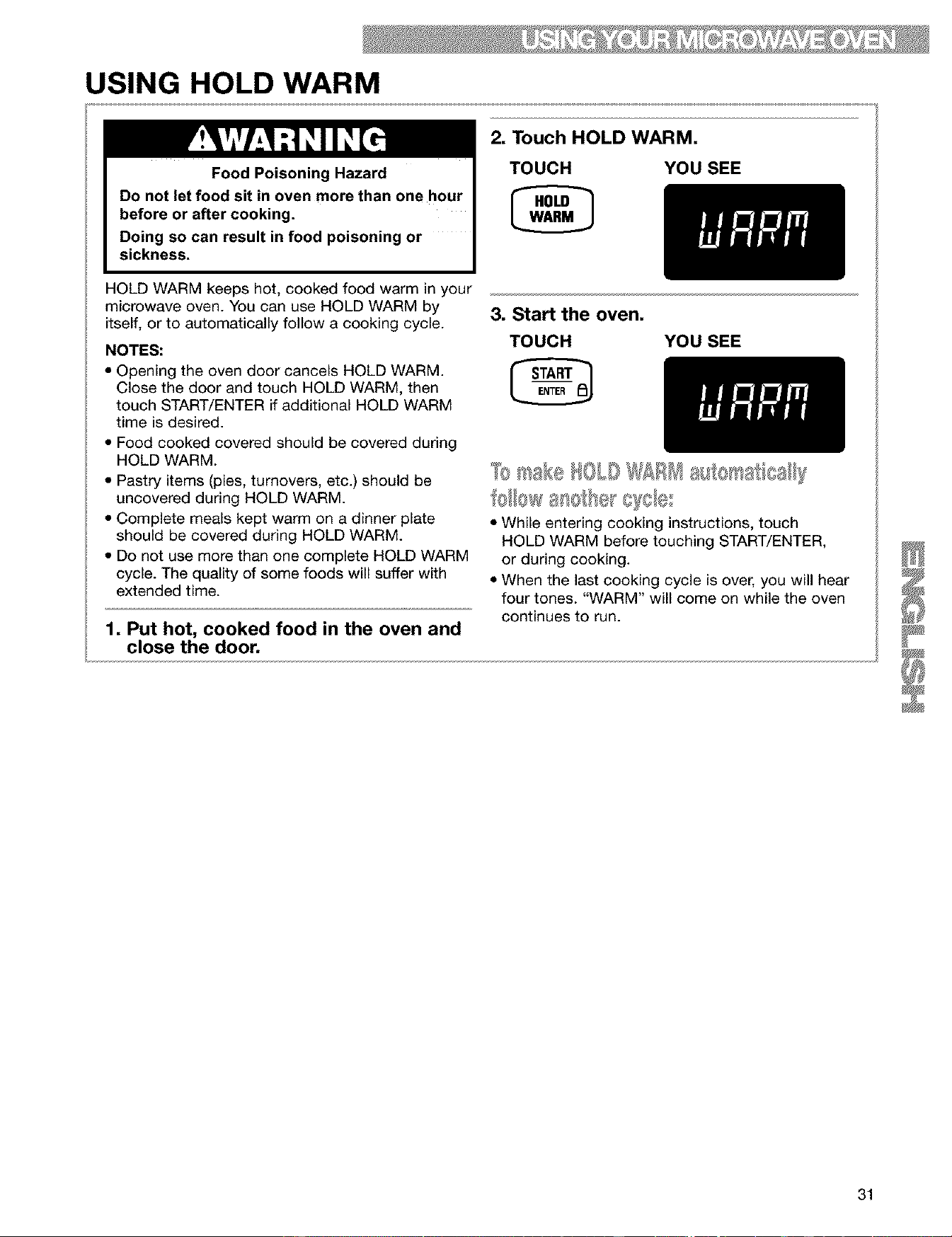
USING HOLD WARM
Food Poisoning Hazard
Do not let food sit in oven more than one hour
before or after cooking.
Doing so can result in food poisoning or
sickness.
2, Touch HOLD WARM,
TOUCH YOU SEE
HOLD WARM keeps hot, cooked food warm in your
microwave oven. You can use HOLD WARM by
itself, or to automatically follow a cooking cycle.
NOTES:
• Opening the oven door cancels HOLD WARM.
Close the door and touch HOLD WARM, then
touch START/ENTER if additional HOLD WARM
time is desired.
3, Start the oven,
TOUCH YOU SEE
• Food cooked covered should be covered during
HOLD WARM.
• Pastry items (pies, turnovers, etc.) should be
uncovered during HOLD WARM.
• Complete meals kept warm on a dinner plate
should be covered during HOLD WARM.
• Do not use more than one complete HOLD WARM
cycle. The quality of some foods will suffer with
extended time.
1, Put hot, cooked food in the oven and
close the door,
• While entering cooking instructions, touch
HOLD WARM before touching START/ENTER,
or during cooking.
• When the last cooking cycle is over, you will hear
four tones. "WARM" will come on while the oven
continues to run.
31
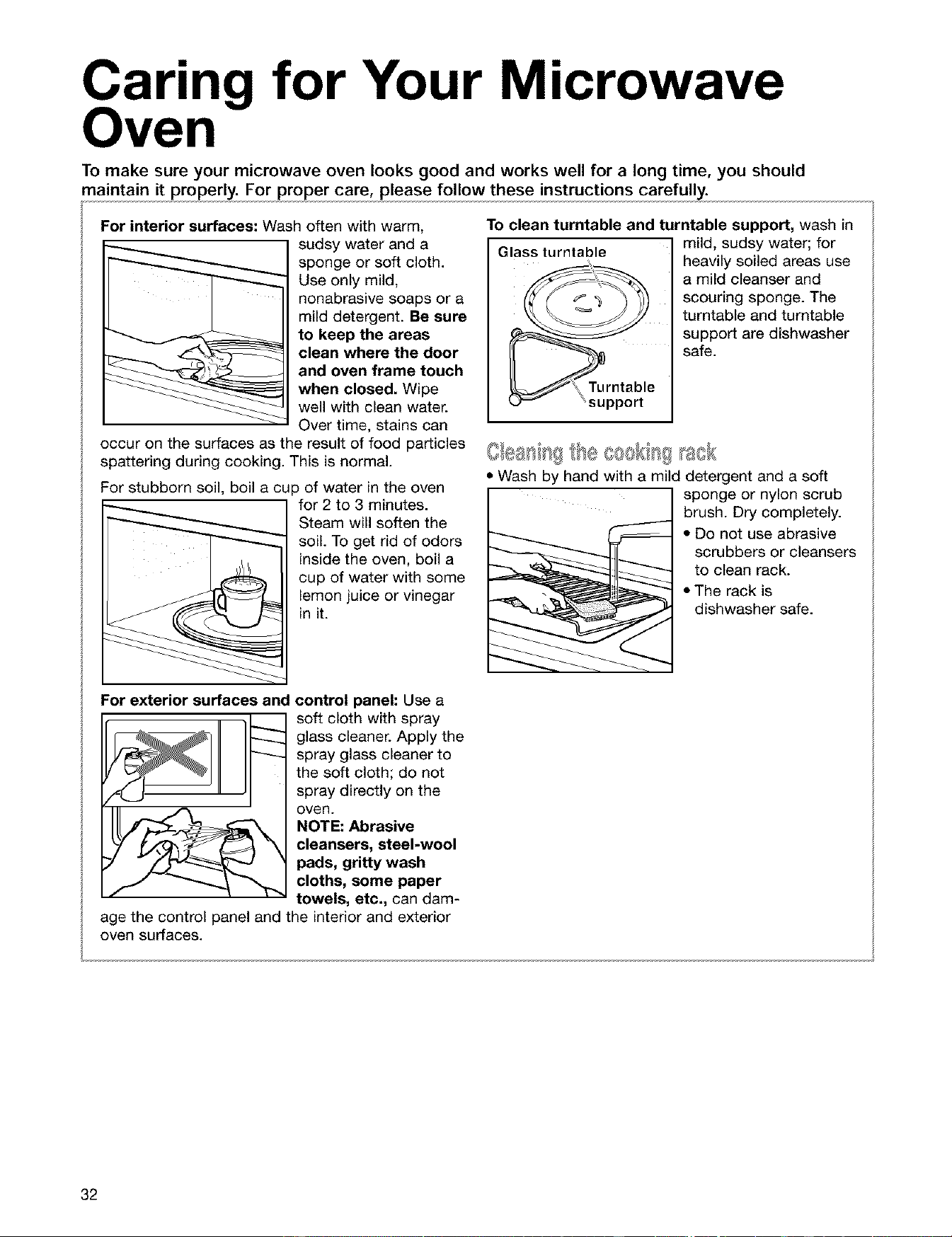
Caring for Your Microwave
ven
To make sure your microwave oven looks good and works well for a long time, you should
maintain it properly. For proper care, please follow these instructions carefully.
For interior surfaces: Wash often with warm,
sudsy water and a
sponge or soft cloth.
Use only mild,
nonabrasive soaps or a
mild detergent. Be sure
to keep the areas
clean where the door
and oven frame touch
when closed. Wipe
well with clean water.
Over time, stains can
occur on the surfaces as the result of food particles
spattering during cooking. This is normal.
For stubborn soil, boil a cup of water in the oven
for 2 to 3 minutes.
Steam will soften the
soil. To get rid of odors
inside the oven, boil a
cup of water with some
lemon juice or vinegar
in it.
To clean turntable and turntable support, wash in
Glass turntable mild, sudsy water; for
heavily soiled areas use
a mild cleanser and
scouring sponge. The
turntable and turntable
support are dishwasher
safe.
ipport
• Wash by hand with a mild detergent and a soft
sponge or nylon scrub
brush. Dry completely.
• Do not use abrasive
scrubbers or cleansers
to clean rack.
• The rack is
dishwasher safe.
For exterior surfaces and
control panel: Use a
soft cloth with spray
glass cleaner. Apply the
spray glass cleaner to
the soft cloth; do not
spray directly on the
oven.
NOTE: Abrasive
cleansers, steel-wool
pads, gritty wash
cloths, some paper
towels, etc., can dam-
age the control panel and the interior and exterior
oven surfaces.
32
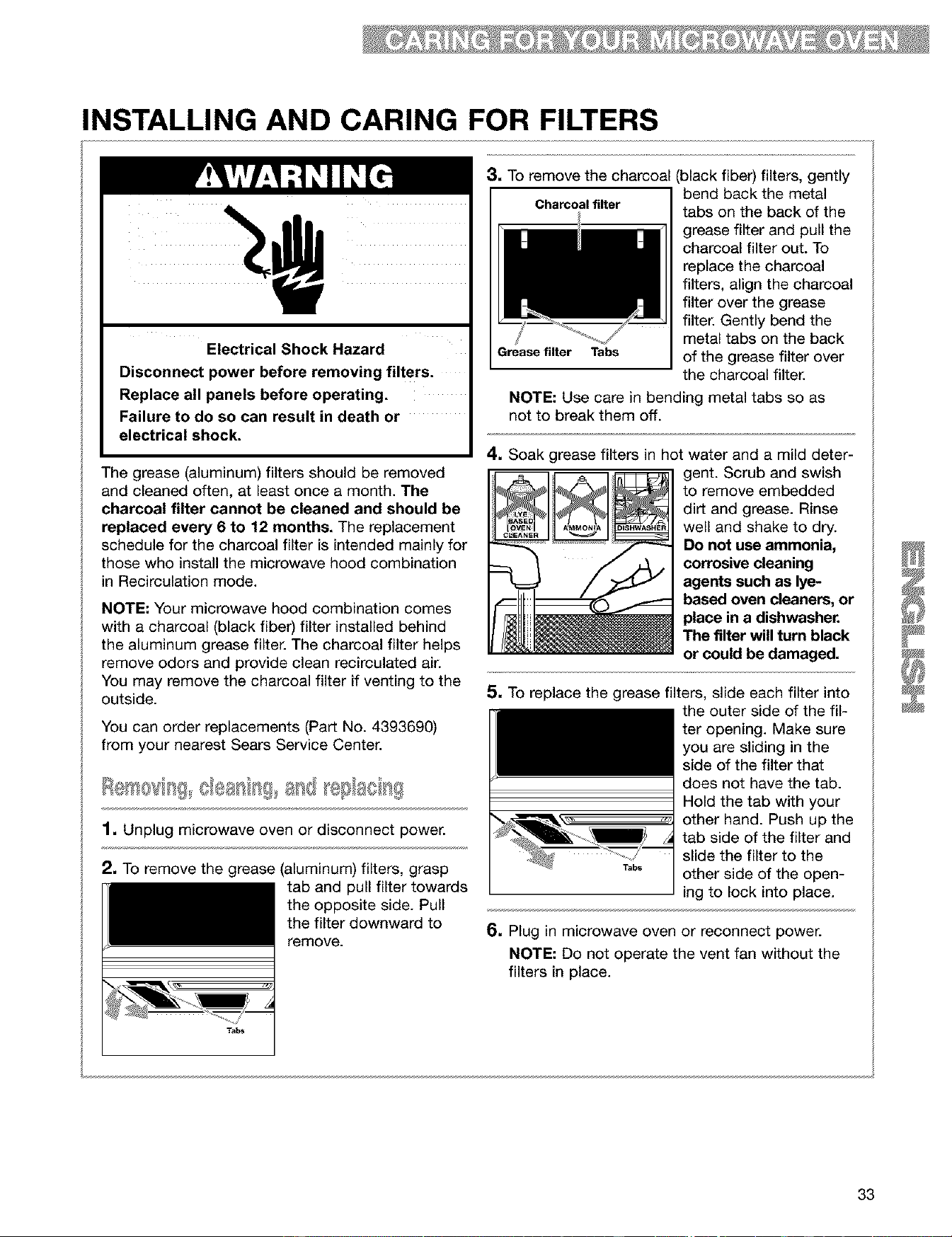
INSTALLING AND CARING FOR FILTERS
Electrical Shock Hazard
Disconnect power before removing filters.
Replace all panels before operating.
Failure to do so can result in death or
electrical shock.
The grease (aluminum) filters should be removed
and cleaned often, at least once a month. The
charcoal filter cannot be cleaned and should be
replaced every 6 to 12 months. The replacement
schedule for the charcoal filter is intended mainly for
those who install the microwave hood combination
in Recirculation mode.
NOTE."Your microwave hood combination comes
with a charcoal (black fiber) filter installed behind
the aluminum grease filter. The charcoal filter helps
remove odors and provide clean recirculated air.
You may remove the charcoal filter if venting to the
outside.
You can order replacements (Part No. 4393690)
from your nearest Sears Service Center.
1• Unplug microwave oven or disconnect power.
2. To remove the grease (aluminum) filters, grasp
tab and pull filter towards
the opposite side. Pull
the filter downward to
remove.
Tabs
3, To remove the charcoal
I Charcoal filter
Grease filter Tabs
(black fiber) filters, gently
bend back the metal
tabs on the back of the
grease filter and pull the
charcoal filter out. To
replace the charcoal
filters, align the charcoal
filter over the grease
filter. Gently bend the
metal tabs on the back
of the grease filter over
the charcoal filter.
NOTE." Use care in bending metal tabs so as
not to break them off.
4• Soak grease filters in hot water and a mild deter-
gent. Scrub and swish
to remove embedded
dirt and grease. Rinse
well and shake to dry.
Do not use ammonia,
corrosive cleaning
agents such as lye-
based oven cleaners, or
place in a dishwasher.
The filter will turn black
or could be damaged.
5. To replace the grease filters, slide each filter into
the outer side of the fil-
ter opening. Make sure
you are sliding in the
side of the filter that
does not have the tab.
Hold the tab with your
other hand. Push up the
tab side of the filter and
slide the filter to the
T,_, other side of the open-
ing to lock into place.
6• Plug in microwave oven or reconnect power.
NOTE." Do not operate the vent fan without the
filters in place.
33
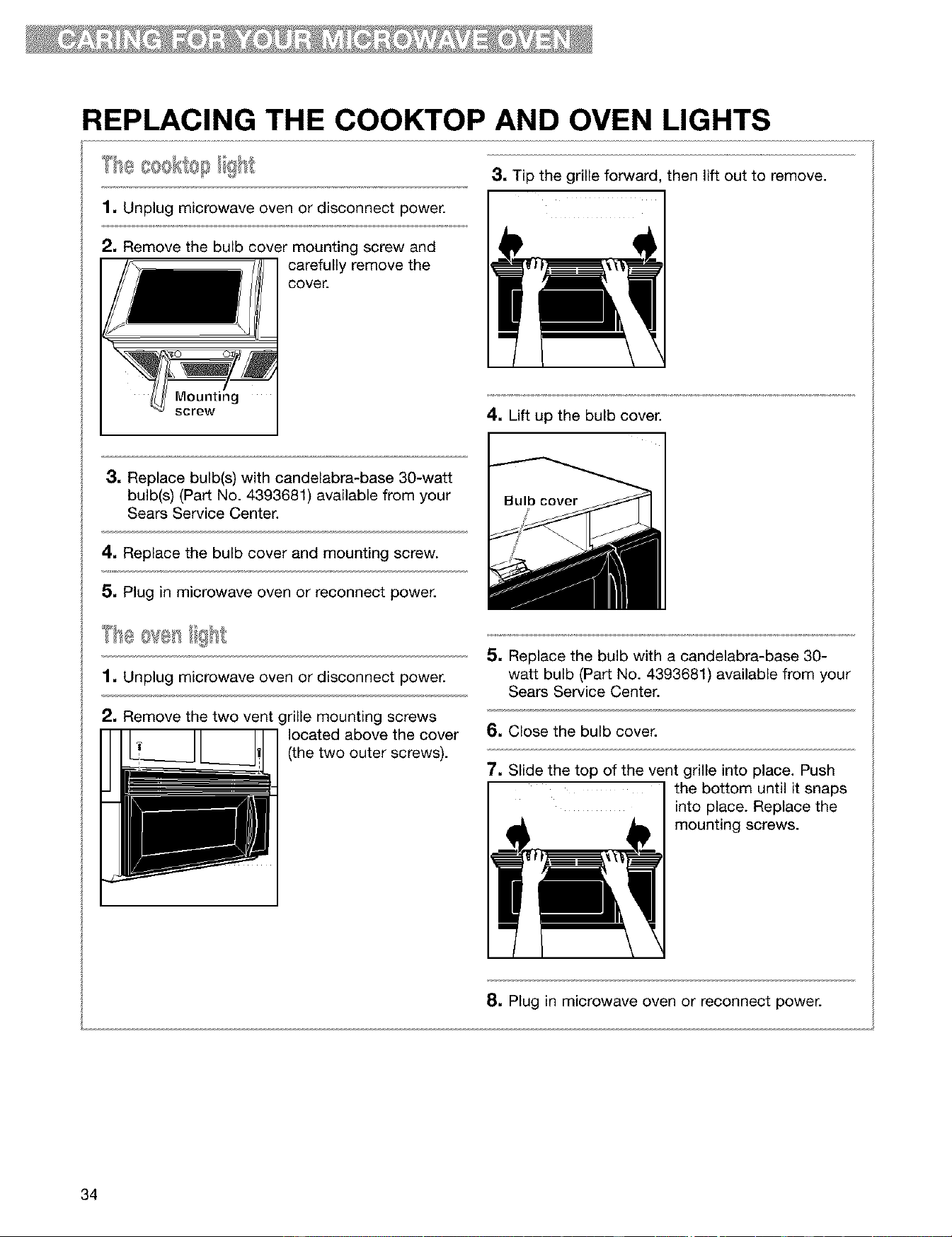
REPLACING THE COOKTOP AND OVEN LIGHTS
1, Unplug microwave oven or disconnect power.
3, Tip the grille forward, then lift out to remove.
I 1
2, Remove the bulb cover mounting screw and
carefully remove the
cover.
Mounting
screw
4. Lift up the bulb cover.
3, Replace bulb(s) with candelabra-base 30-watt
bulb(s) (Part No. 4393681) available from your
Sears Service Center.
4. Replace the bulb cover and mounting screw.
5. Plug in microwave oven or reconnect power.
1. Unplug microwave oven or disconnect power.
2. Remove the two vent grille mounting screws
located above the cover
(the two outer screws).
5. Replace the bulb with a candelabra-base 30-
watt bulb (Part No. 4393681) available from your
Sears Service Center.
6. Close the bulb cover.
7, Slide the top of the vent grille into place. Push
I the bottom until it snaps
into place. Replace the
mounting screws.
8, Plug in microwave oven or reconnect power.
34
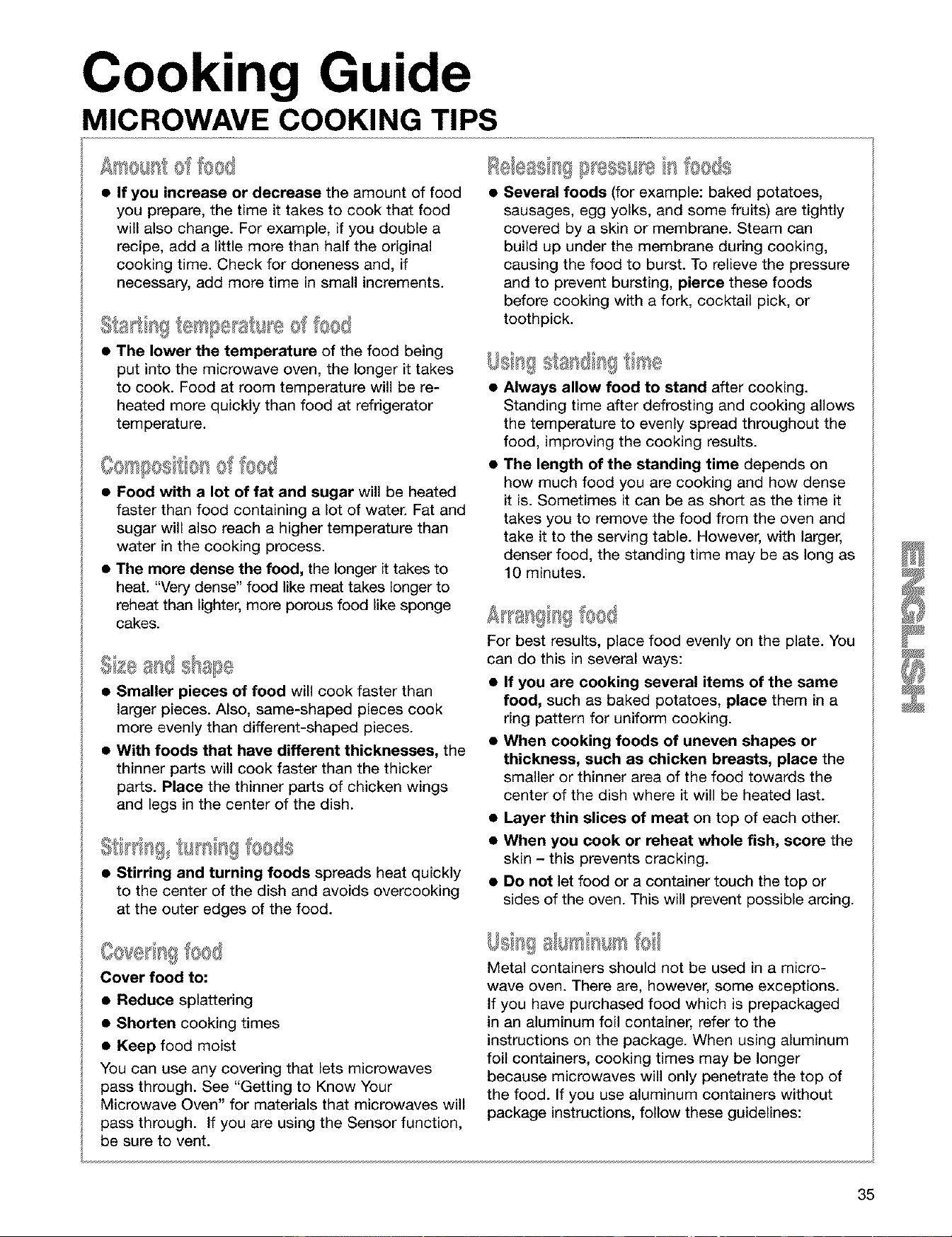
Cooking Guide
MICROWAVE COOKING TIPS
• If you increase or decrease the amount of food
you prepare, the time it takes to cook that food
will also change. For example, if you double a
recipe, add a little more than half the original
cooking time. Check for doneness and, if
necessary, add more time in small increments.
• The lower the temperature of the food being
put into the microwave oven, the longer it takes
to cook. Food at room temperature will be re-
heated more quickly than food at refrigerator
temperature.
• Food with a lot of fat and sugar will be heated
faster than food containing a lot of water. Fat and
sugar will also reach a higher temperature than
water in the cooking process.
• The more dense the food, the longer it takes to
heat. "Very dense" food like meat takes longer to
reheat than lighter, more porous food like sponge
cakes.
• Smaller pieces of food will cook faster than
larger pieces. Also, same-shaped pieces cook
more evenly than different-shaped pieces.
• With foods that have different thicknesses, the
thinner parts will cook faster than the thicker
parts. Place the thinner parts of chicken wings
and legs in the center of the dish.
Itl[l:l[l_] IIi_[III!I fOOlS
• Stirring and turning foods spreads heat quickly
to the center of the dish and avoids overcooking
at the outer edges of the food.
Cover food to:
• Reduce splattering
• Shorten cooking times
• Keep food moist
You can use any covering that lets microwaves
pass through. See "Getting to Know Your
Microwave Oven" for materials that microwaves will
pass through, if you are using the Sensor function,
be sure to vent.
Several foods (for example: baked potatoes,
sausages, egg yolks, and some fruits) are tightly
covered by a skin or membrane. Steam can
build up under the membrane during cooking,
causing the food to burst. To relieve the pressure
and to prevent bursting, pierce these foods
before cooking with a fork, cocktail pick, or
toothpick.
Always allow food to stand after cooking.
Standing time after defrosting and cooking allows
the temperature to evenly spread throughout the
food, improving the cooking results.
The length of the standing time depends on
how much food you are cooking and how dense
it is. Sometimes it can be as short as the time it
takes you to remove the food from the oven and
take it to the serving table. However, with larger,
denser food, the standing time may be as long as
10 minutes.
For best results, place food evenly on the plate. You
can do this in several ways:
• If you are cooking several items of the same
food, such as baked potatoes, place them in a
ring pattern for uniform cooking.
• When cooking foods of uneven shapes or
thickness, such as chicken breasts, place the
smaller or thinner area of the food towards the
center of the dish where it will be heated last.
• Layer thin slices of meat on top of each other.
• When you cook or reheat whole fish, score the
skin - this prevents cracking.
• Do not let food or a container touch the top or
sides of the oven. This will prevent possible arcing.
, I = I@I
I=111[ 811]"@(@[I
Metal containers should not be used in a micro-
wave oven. There are, however, some exceptions.
if you have purchased food which is prepackaged
in an aluminum foil container, refer to the
instructions on the package. When using aluminum
foil containers, cooking times may be longer
because microwaves will only penetrate the top of
the food. If you use aluminum containers without
package instructions, follow these guidelines:
35
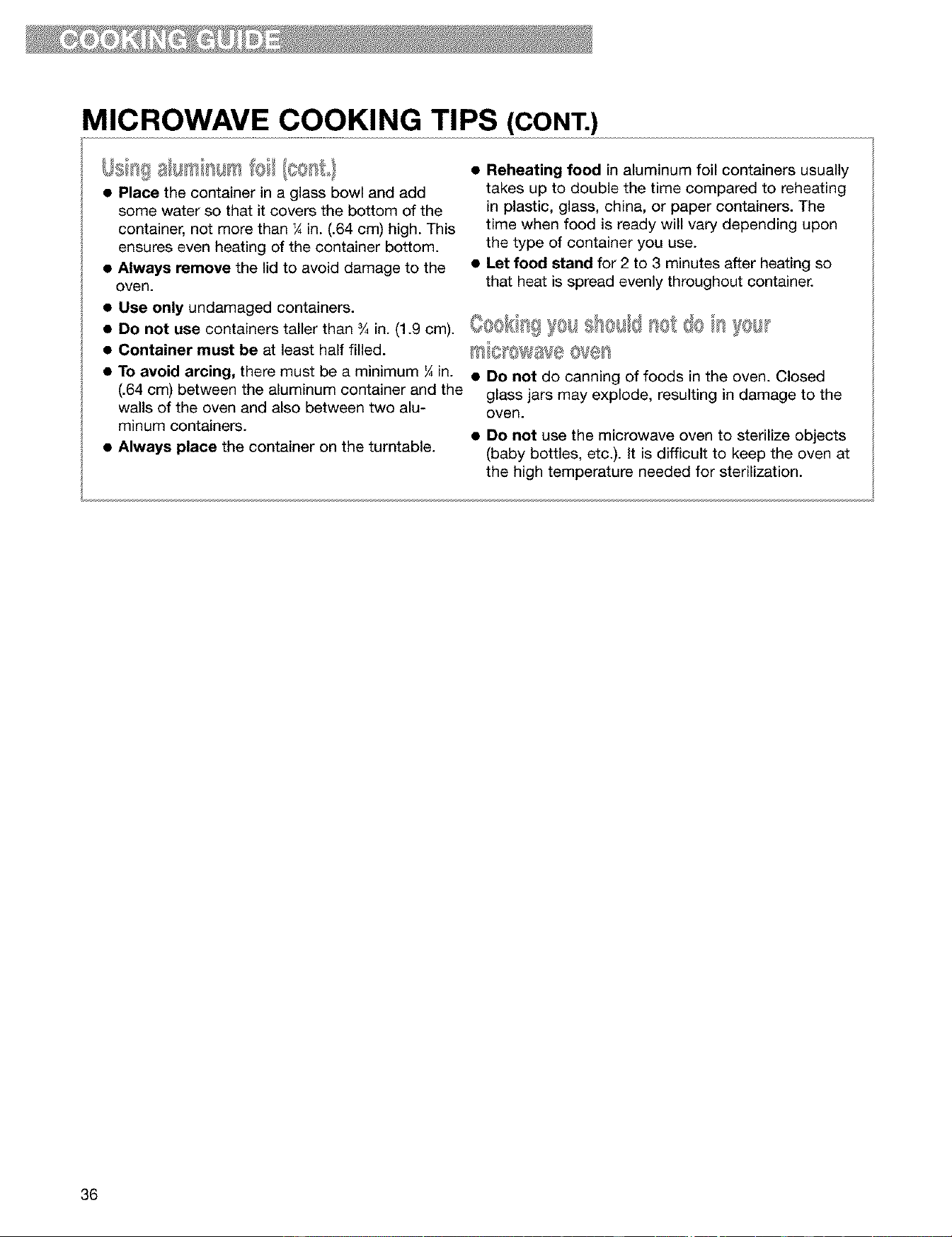
MICROWAVE COOKING TIPS (CONT.)
• Place the container in a glass bowl and add
some water so that it covers the bottom of the
container, not more than ¼ in. (.64 cm) high. This
ensures even heating of the container bottom.
• Always remove the lid to avoid damage to the
oven.
• Reheating food in aluminum foil containers usually
takes up to double the time compared to reheating
in plastic, glass, china, or paper containers. The
time when food is ready will vary depending upon
the type of container you use.
• Let food stand for 2 to 3 minutes after heating so
that heat is spread evenly throughout container.
• Use only undamaged containers.
• DO not use containers taller than s/4in. (1.9 cm). (_'_@{}__=_ }I@1_,_{!i!I@_1[} _{}! _f_} (} _¢'_*_:,_
• Container must be at least half filled.
• To avoid arcing, there must be a minimum ¼ in.
(.64 cm) between the aluminum container and the
walls of the oven and also between two alu-
minum containers.
• Always place the container on the turntable.
• Do not do canning of foods in the oven. Closed
glass jars may explode, resulting in damage to the
oven.
• Do not use the microwave oven to sterilize objects
(baby bottles, etc.). It is difficult to keep the oven at
the high temperature needed for sterilization.
36
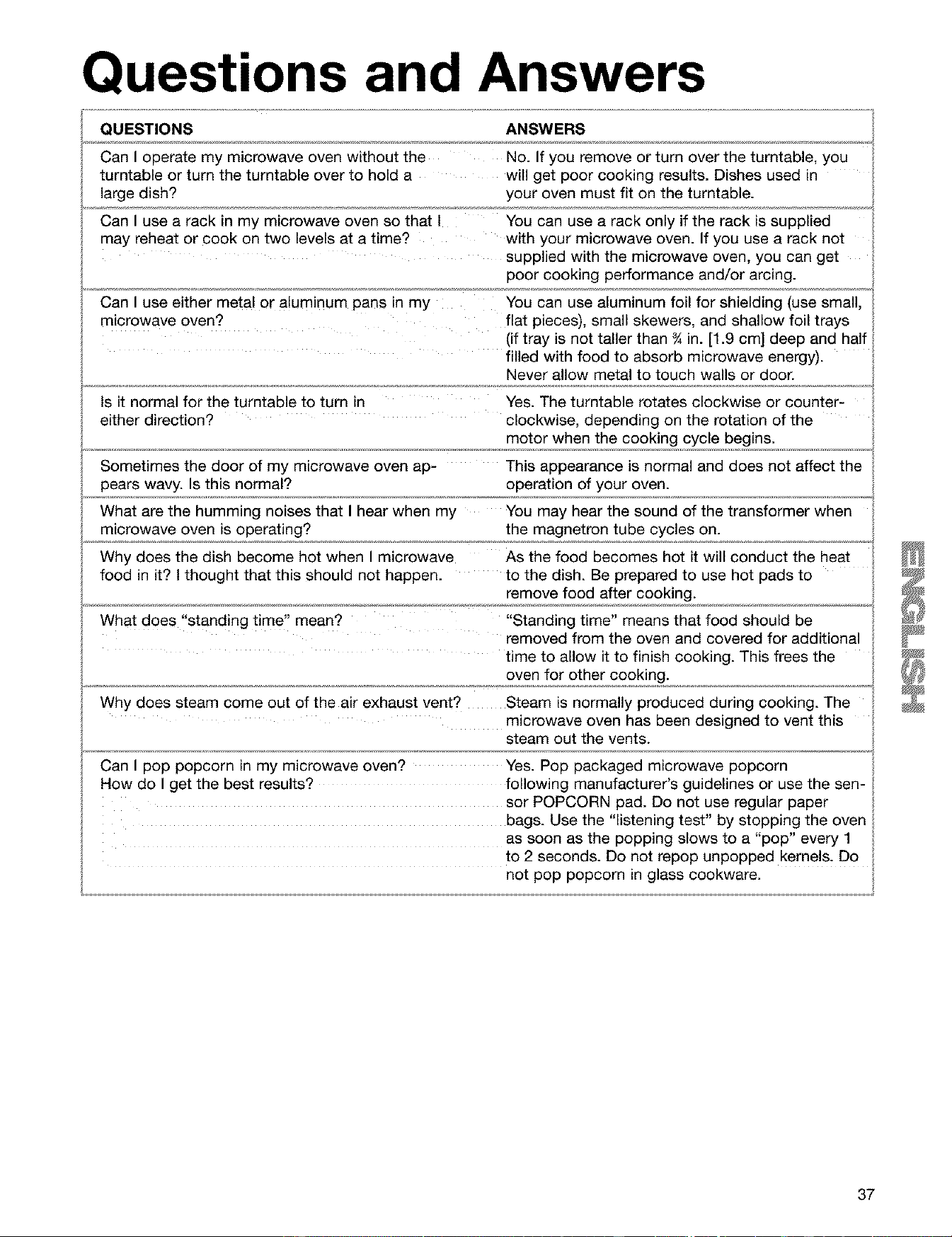
Questions and Answers
QUESTIONS ANSWERS
Can I operate my microwave oven without the No. If you remove or turn over the turntable, you
turntable or turn the turntable over to hold a will get poor cooking results. Dishes used in
large dish? your oven must fit on the turntable.
Can I use a rack in my microwave oven so that I You can use a rack only if the rack is supplied
may reheat or cook on two levels at a time? with your microwave oven. If you use a rack not
supplied with the microwave oven, you can get
poor cooking performance and/or arcing.
Can I use either metal or aluminum pans in my You can use aluminum foil for shielding (use small,
microwave oven? flat pieces), small skewers, and shallow foil trays
(if tray is not taller than _ in. [1.9 cm] deep and half
filled with food to absorb microwave energy).
Never allow metal to touch walls or door.
Is it normal for the turntable to turn in Yes. The turntable rotates clockwise or counter-
either direction? clockwise, depending on the rotation of the
motor when the cooking cycle begins.
Sometimes the door of my microwave oven ap- This appearance is normal and does not affect the
pears wavy. Is this normal? operation of your oven.
What are the humming noises that I hear when my You may hear the sound of the transformer when
microwave oven is operating? the magnetron tube cycles on.
Why does the dish become hot when I microwave As the food becomes hot it will conduct the heat
food in it? I thought that this should not happen, to the dish. Be prepared to use hot pads to
remove food after cooking.
What does "standing time" mean? "Standing time" means that food should be
removed from the oven and covered for additional
time to allow it to finish cooking. This frees the
oven for other cooking.
Why does steam come out of the air exhaust vent? Steam is normally produced during cooking. The
microwave oven has been designed to vent this
steam out the vents.
Can I pop popcorn in my microwave oven? Yes. Pop packaged microwave popcorn
How do I get the best results? following manufacturer's guidelines or use the sen-
sor POPCORN pad. Do not use regular paper
bags. Use the "listening test" by stopping the oven
as soon as the popping slows to a "pop" every 1
to 2 seconds. Do not repop unpopped kernels. Do
not pop popcorn in glass cookware.
37
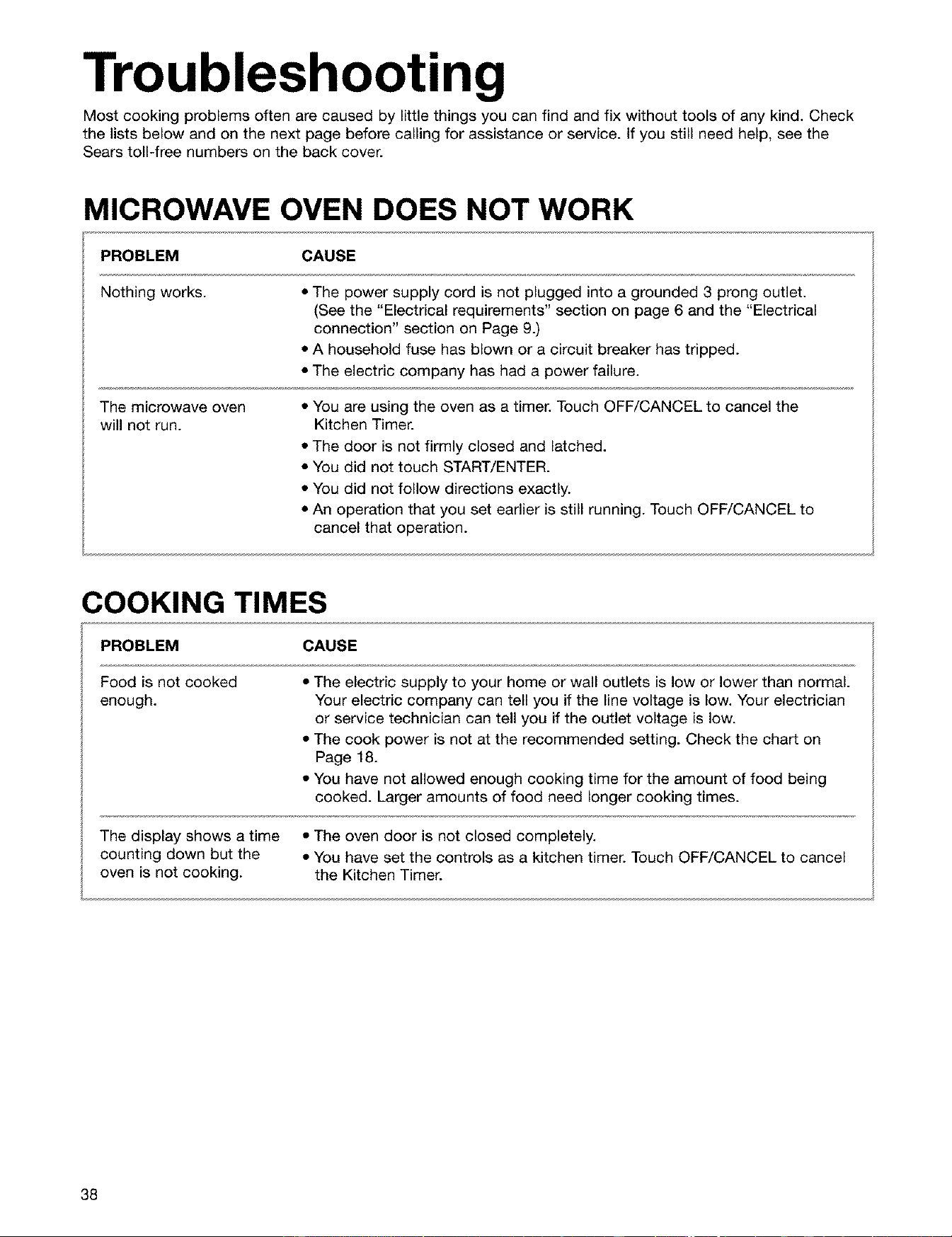
Troubleshooting
Most cooking problems often are caused by little things you can find and fix without tools of any kind. Check
the lists below and on the next page before calling for assistance or service. If you still need help, see the
Sears toll-free numbers on the back cover.
MICROWAVE OVEN DOES NOT WORK
PROBLEM CAUSE
Nothing works. • The power supply cord is not plugged into a grounded 3 prong outlet.
(See the "Electrical requirements" section on page 6 and the "Electrical
connection" section on Page 9.)
• A household fuse has blown or a circuit breaker has tripped.
• The electric company has had a power failure.
The microwave oven • You are using the oven as a timer. Touch OFF/CANCEL to cancel the
will not run. Kitchen Timer.
• The door is not firmly closed and latched.
• You did not touch START/ENTER.
• You did not follow directions exactly.
• An operation that you set earlier is still running. Touch OFF/CANCEL to
cancel that operation.
COOKING TIMES
PROBLEM CAUSE
Food is not cooked
enough.
• The electric supply to your home or wall outlets is low or lower than normal.
Your electric company can tell you if the line voltage is low. Your electrician
or service technician can tell you if the outlet voltage is low.
• The cook power is not at the recommended setting. Check the chart on
Page 18.
• You have not allowed enough cooking time for the amount of food being
cooked. Larger amounts of food need longer cooking times.
The display shows a time • The oven door is not closed completely.
counting down but the • You have set the controls as a kitchen timer. Touch OFF/CANCEL to cancel
oven is not cooking, the Kitchen Timer.
38

TURNTABLE
PROBLEM
The turntable will
not turn.
CAUSE
• You have turned off the turntable. (See the "Heating more than one plate of
food" section on Page 13.)
• The turntable is not correctly in place. It should be correct-side up and
sitting firmly on the center shaft.
• The support is not operating correctly. Remove the turntable and restart the
oven. If the support still does not move, call an authorized service technician
for repair. Cooking without the turntable can give you poor results.
TONES
PROBLEM CAUSE
You do not hear the • You have not entered the correct command.
programming or • You have turned off the tone. (See the "Audible signals" section on Page 12.)
end-of-cycle tone.
DISPLAY MESSAGES
PROBLEM CAUSE
The display is flashing " : ". • There has been a power interruption. Reset the clock. (See the "Setting the
clock" section on Page 15.)
If none of these items are causing your problem, see the "Sears Toll-Free Numbers" section on Back Cover.
39
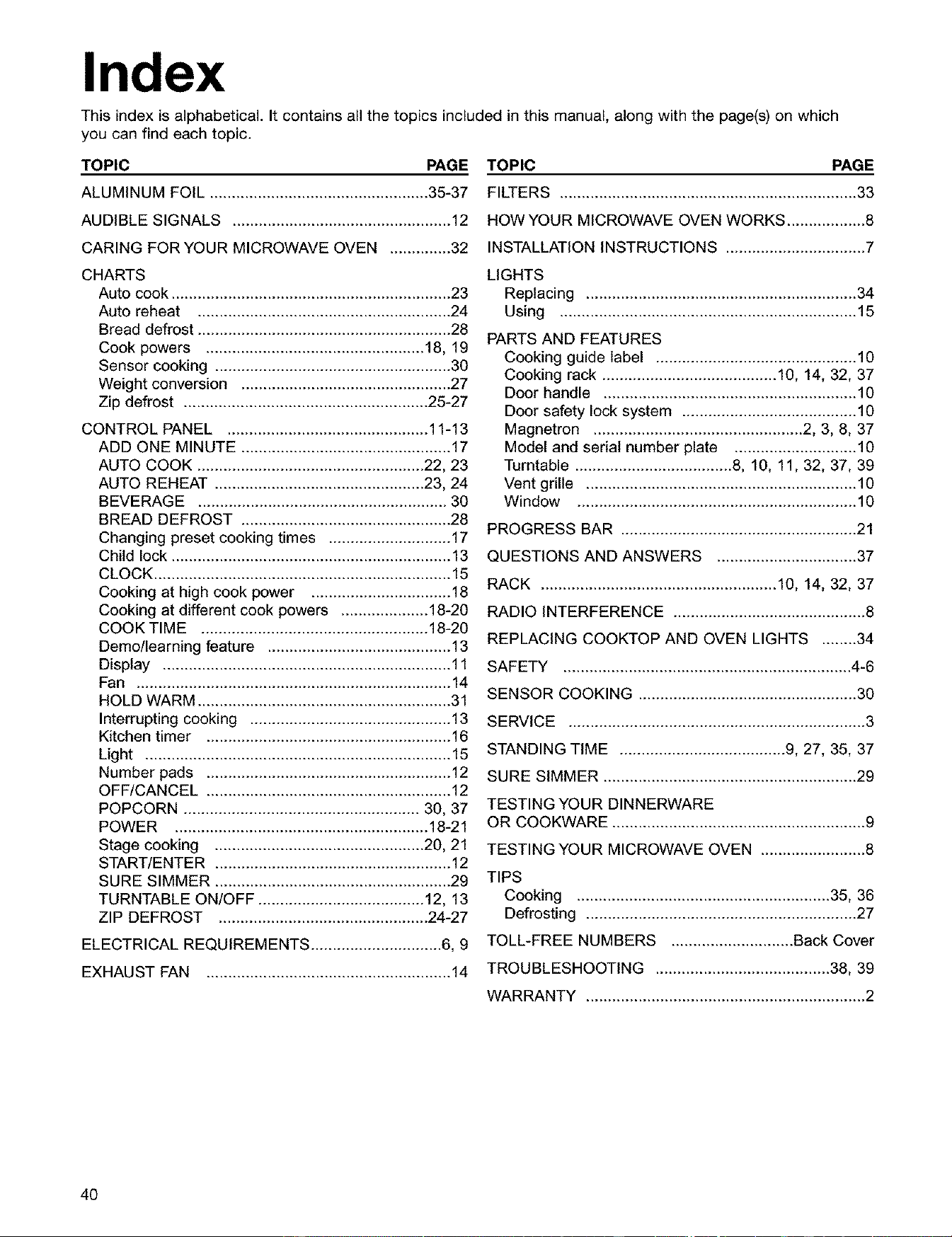
Index
This index is alphabetical. It contains all the topics included in this manual, along with the page(s) on which
you can find each topic.
TOPIC PAGE TOPIC PAGE
ALUMINUM FOIL .................................................. 35-37 FILTERS .................................................................... 33
AUDIBLE SIGNALS .................................................. 12 HOW YOUR MICROWAVE OVEN WORKS .................. 8
CARING FORYOUR MICROWAVE OVEN .............. 32 INSTALLATION INSTRUCTIONS ................................ 7
CHARTS
Auto cook ................................................................ 23
Auto reheat .......................................................... 24
Bread defrost .......................................................... 28
Cook powers .................................................. 18, 19
Sensor cooking ...................................................... 30
Weight conversion ................................................ 27
Zip defrost ........................................................ 25-27
CONTROL PANEL .............................................. 11-13
ADD ONE MINUTE ................................................ 17
AUTO COOK .................................................... 22, 23
AUTO REHEAT ................................................ 23, 24
BEVERAGE ......................................................... 30
BREAD DEFROST ................................................ 28
Changing preset cooking times ............................ 17
Child lock ................................................................ 13
CLOCK .................................................................... 15
Cooking at high cook power ................................ 18
Cooking at different cook powers .................... 18-20
COOK TIME .................................................... 18-20
Demo/learning feature .......................................... 13
Display .................................................................. 11
Fan ........................................................................ 14
HOLD WARM .......................................................... 31
Interrupting cooking .............................................. 13
Kitchen timer ........................................................ 16
Light ...................................................................... 15
Number pads ........................................................ 12
OFF/CANCEL ........................................................ 12
POPCORN ...................................................... 30, 37
POWER .......................................................... 18-21
Stage cooking ................................................ 20, 21
START/ENTER ...................................................... 12
SURE SIMMER ...................................................... 29
TURNTABLE ON/OFF ...................................... 12, 13
ZIP DEFROST ................................................ 24-27
ELECTRICAL REQUIREMENTS .............................. 6, 9
EXHAUSTFAN ........................................................ 14
LIGHTS
Replacing .............................................................. 34
Using .................................................................... 15
PARTS AND FEATURES
Cooking guide label .............................................. 10
Cooking rack ........................................ 10, 14, 32, 37
Door handle .......................................................... 10
Door safety lock system ........................................ 10
Magnetron ................................................ 2, 3, 8, 37
Model and serial number plate ............................ 10
Turntable .................................... 8, 10, 11, 32, 37, 39
Vent grille .............................................................. 10
Window ................................................................ 10
PROGRESS BAR ...................................................... 21
QUESTIONS AND ANSWERS ................................ 37
RACK ...................................................... 10, 14, 32, 37
RADIO INTERFERENCE ............................................ 8
REPLACING COOKTOP AND OVEN LIGHTS ........34
SAFETY .................................................................. 4-6
SENSOR COOKING .................................................. 30
SERVICE .................................................................... 3
STANDING TIME ...................................... 9, 27, 35, 37
SURE SIMMER .......................................................... 29
TESTING YOUR DINNERWARE
OR COOKWARE .......................................................... 9
TESTING YOUR MICROWAVE OVEN ........................ 8
TIPS
Cooking .......................................................... 35, 36
Defrosting .............................................................. 27
TOLL-FREE NUMBERS ............................ Back Cover
TROUBLESHOOTING ........................................ 38, 39
WARRANTY ................................................................ 2
40
41

42
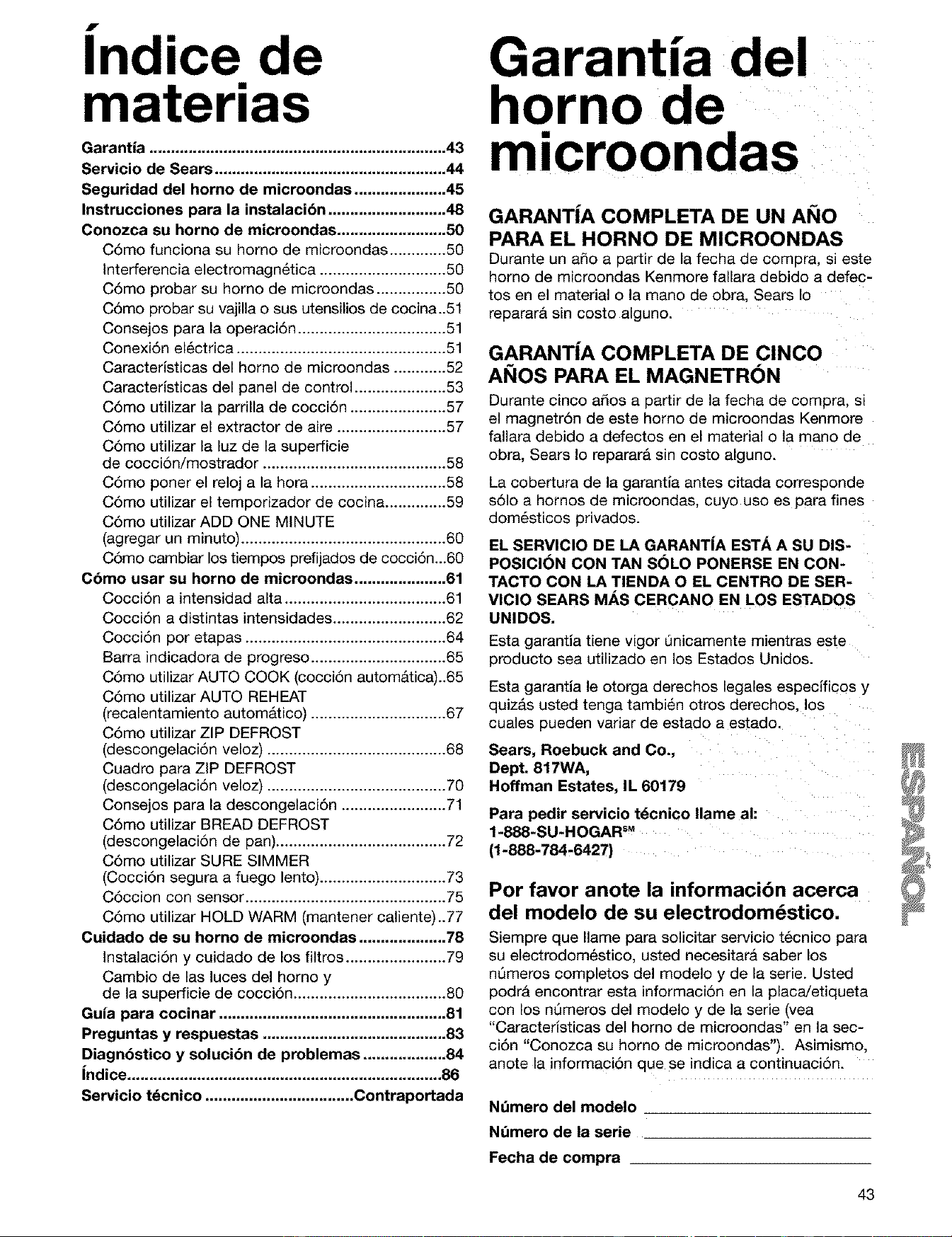
f •
Ind,ce de
materias
Garantia .................................................................... 43
Servicio de Sears ..................................................... 44
Seguridad del homo de microondas ..................... 45
Instrucciones para la instalacibn ........................... 48
Conozca su horno de microondas ......................... 50
C6mo funciona su homo de microondas ............. 50
Interferencia electromagn6tica ............................. 50
C6mo probar su homo de microondas ................ 50
C6mo probar su vajilla o sus utensilios de cocina..51
Consejos para la operaci6n .................................. 51
Conexi6n el_ctrica ................................................ 51
Caracterlsticas del homo de microondas ............ 52
Caracterlsticas del panel de control ..................... 53
C6mo utilizar la parrilla de cocci6n ...................... 57
C6mo utilizar el extractor de aire ......................... 57
C6mo utilizar la luz de la superficie
de cocci6n/mostrador .......................................... 58
C6mo poner el reloj a la hora ............................... 58
C6mo utilizar el temporizador de cocina .............. 59
C6mo utilizar ADD ONE MINUTE
(agregar un minuto) ............................................... 60
C6mo cambiar los tiempos prefijados de cocci6n...60
C6mo usar su horno de microondas ..................... 61
Cocci6n a intensidad alta ..................................... 61
Cocci6n a distintas intensidades .......................... 62
Cocci6n por etapas .............................................. 64
Barra indicadora de progreso ............................... 65
C6mo utilizar AUTO COOK (cocci6n autom&tica)..65
C6mo utilizar AUTO REHEAT
(recalentamiento automatico) ............................... 67
C6mo utilizar ZIP DEFROST
(descongelaci6n veloz) ......................................... 68
Cuadro para ZIP DEFROST
(descongelaci6n veloz) ......................................... 70
Consejos para la descongelaci6n ........................ 71
C6mo utilizar BREAD DEFROST
(descongelaci6n de pan)....................................... 72
C6mo utilizar SURE SIMMER
(Cocci6n segura a fuego lento) ............................. 73
C6ccion con sensor .............................................. 75
C6mo utilizar HOLD WARM (mantener caliente)..77
Cuidado de su horno de microondas .................... 78
Instalaci6n y cuidado de los filtros ....................... 79
Cambio de las luces del homo y
de la superficie de cocci6n ................................... 80
Guia para cocinar .................................................... 81
Preguntas y respuestas .......................................... 83
Diagnbstico y solucibn de problemas ................... 84
indice ........................................................................ 86
Servicio t_cnico .................................. Contraportada
Garantia del
horno de
microondas
GARANT|A COMPLETA DE UN AI_IO
PARA EL HORNO DE MICROONDAS
Durante un ado a partir de la fecha de compra, si este
homo de microondas Kenmore fallara debido a defec-
tos en el material o la mano de obra, Sears Io
reparargt sin costo alguno.
GARANT|A COMPLETA DE CINCO
AI_IOS PARA EL MAGNETRON
Durante cinco a_os a partir de la fecha de compra, si
el magnetr6n de este homo de microondas Kenmore
fallara debido a defectos en el material o la mano de
obra, Sears Io reparar& sin costo alguno.
La cobertura de la garantia antes citada corresponde
s61o a hornos de microondas, cuyo uso es para fines
dom_sticos privados.
EL SERVICIO DE LA GARANTiA ESTA A SU DIS-
POSICI6N CON TAN S6LO PONERSE EN CON-
TACTO CON LA TIENDA O EL CENTRO DE SER-
VICIO SEARS MAS CERCANO EN LOS ESTADOS
UNIDOS.
Esta garantia tiene vigor Qnicamente mientras este
producto sea utilizado en los Estados Unidos.
Esta garantia le otorga derechos legales especificos y
quiz_s usted tenga tambien otros derechos, los
cuales pueden variar de estado a estado.
Seam, Roebuck and Co.,
Dept. 817WA,
Hoffman Estates, IL 60179
Para pedir servicio t_cnico Ilame ah
1-888-SU-HOGARSM
(1-888-784-6427)
Per favor anote la informacibn acerca
del modelo de su electrodom_stico.
Siempre que Ilame para solicitar servicio t_cnico para
su electrodom_stico, usted necesitar& saber los
nQmeros completos del modelo y de la serie. Usted
podra encontrar esta informaci6n en la placa/etiqueta
con los nQmeros del modelo y de la serie (yea
"Caracteristicas del homo de microondas" en la sec-
ci6n "Conozca su homo de microondas'). Asimismo,
anote la informaci6n que se indica a continuaci6n.
Nt_mero del modelo
Nt_mero de la serie
Fecha de compra
43
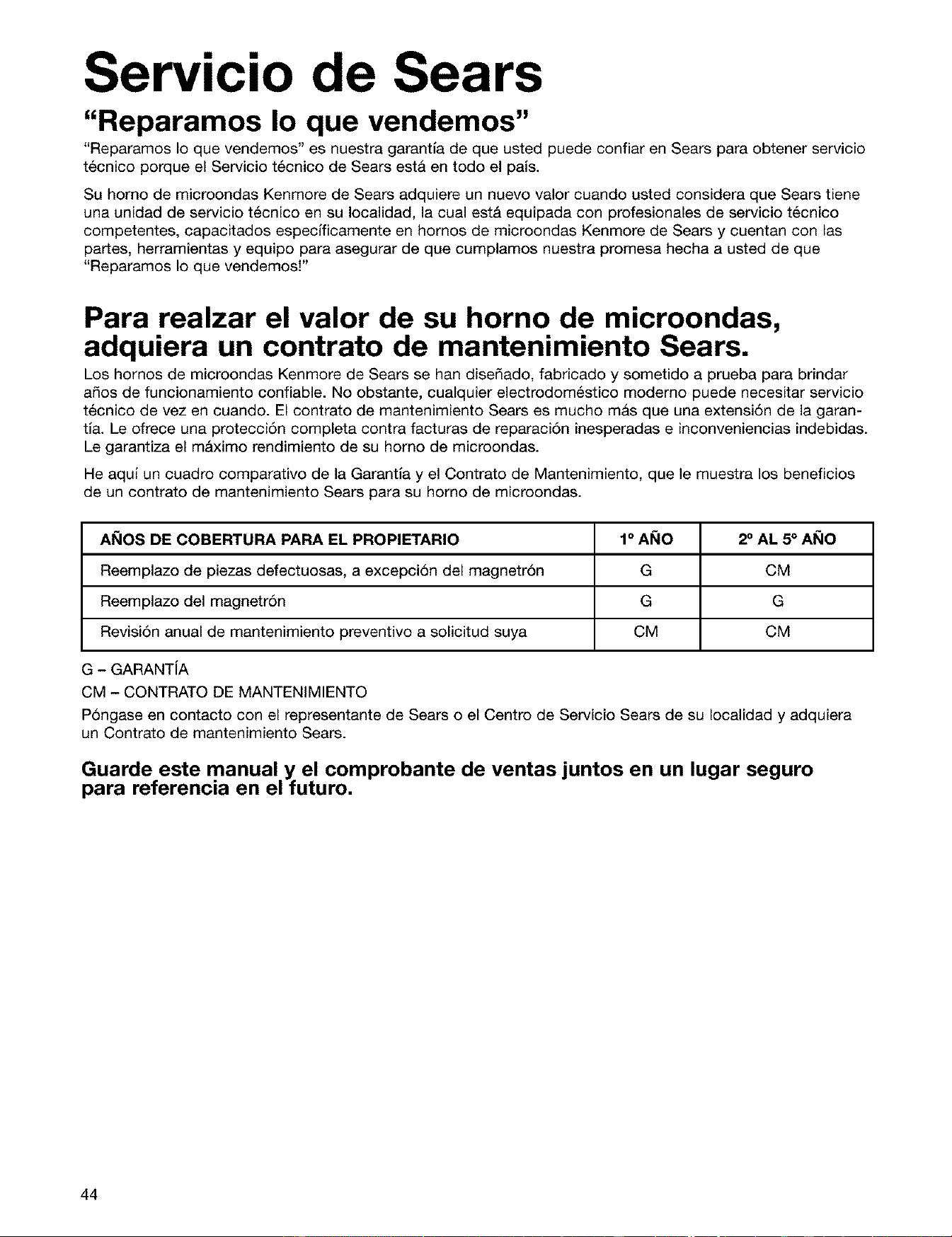
Servicio de Sears
"Reparamos Io que vendemos"
"Reparamos Io que vendemos" es nuestra garantla de que usted puede confiar en Sears para obtener servicio
t6cnico porque el Servicio t6cnico de Sears esta en todo el paJs.
Su homo de microondas Kenmore de Sears adquiere un nuevo valor cuando usted considera que Sears tiene
una unidad de servicio t6cnico en su Iocalidad, la cual est& equipada con profesionales de servicio t6cnico
competentes, capacitados especMcamente en homos de microondas Kenmore de Sears y cuentan con las
partes, herramientas y equipo para asegurar de que cumplamos nuestra promesa hecha a usted de que
"Reparamos Io que vendemosF
Para realzar el valor de su horno de microondas,
adquiera un contrato de mantenimiento Sears.
Los hornos de microondas Kenmore de Sears se hart disedado, fabricado y sometido a prueba para brindar
ados de funcionamiento confiable. No obstante, cualquier electrodom6stico modemo puede necesitar servicio
t6cnico de vez en cuando. El contrato de mantenimiento Sears es mucho masque una extensi6n de la garan-
tla. Le ofrece una protecci6n completa contra facturas de reparaci6n inesperadas e inconveniencias indebidas.
Le garantiza el m&ximo rendimiento de su homo de microondas.
He aquJ un cuadro comparativo de la Garantla y el Contrato de Mantenimiento, que le muestra los beneficios
de un contrato de mantenimiento Sears para su homo de microondas.
AI_IOS DE COBERTURA PARA EL PROPIETARIO
Reemplazo de piezas defectuosas, a excepci6n del magnetr6n
Reemplazo del magnetr6n
Revisi6n anual de mantenimiento preventivo a solicitud suya
G - GARANTIA
CM - CONTRATO DE MANTENIMIENTO
P6ngase en contacto con el representante de Sears o el Centro de Servicio Sears de su Iocalidad y adquiera
un Contrato de mantenimiento Sears.
1° AI_IO 2° AL 5° AI_IO
G CM
G G
CM CM
Guarde este manual y el comprobante de ventas juntos en un lugar seguro
para referencia en el futuro.
44
Seguridad del horno de
microondas
Su seguridad y la seguridad de los demos es muy importante.
Hemos incluido muchos mensajes importantes de seguridad en este manual yen su etectrodomestico.
Lea y obedezca siempre todos los mensajes de seguridad.
Este es el simboto de advertencia de seguridad.
Este simbolo te llama ta atenci6n sobre peligros potenciales que pueden ocasionar la muerte
o una lesi6n a usted y a los demas.
Todos los mensajes de seguridad iron a continuaci6n del simboio de advertencia de
seguridad y de la palabra "PELIGRO" o "ADVERTENCIA". Estas palabras significan:
Si no sigue las instrucciones de inmediato,
usted puede morir o sufrir una lesibn grave.
Si no sigue las instrucciones, usted puede
morir o sufrir una lesibn grave.
Todos los mensajes de seguddad le diran el peligro potencial, te diran c6mo reducir las posibilidades de
sufrir una lesi6n y Io que puede suceder si no se siguen las instrucciones.
INSTRUCCIONES IMPORTANTES DE SEGURIDAD
Cuando se usan aparatos electrodomesticos, deben tomarse precauciones de seguddad, incluyendo las
siguientes:
ADVERTENCIA: Para reducir el desgo de
quemaduras, choques et6ctricos, fuego, da_os per-
sonales o exposiciSn a energia excesiva de microon-
das:
•' Lea todas las instrucciones antes de usar el homo
de microondas.
• Lea y siga las "PRECAUCIONES PARA EVITAR
LA POSIBLE EXPOSICION A ENERGiA •
EXCESIVA DE MICROONDAS" especificas
que se encuentran en esta secci6n.
• El homo de microondas debe estar conectado a •
tierra. El enchufe se debe conectar a un tomacord-
ente con conexi6n a tierra. Vea "INSTRUCCIONES
PARA CONEXION A TIERRA" en esta secci6n y •
en las instrucciones de instalaci6n proporcionadas.
• Instale o ubique et horno de microondas s61o de
acuerdo alas instrucciones para instalaci6n pro-
porcionadas. •
• Atgunos productos tales como huevos enteros con
la cascara y recipientes hermeticos - por ejemplo,
frascos de vidrio cerrados - pueden explotar y no
deben calentarse en el homo de microondas.
Use et homo de microondas s61amente como se
describe en este manual. No use productos
quimicos o vapores corrosivos en et homo de
microondas. Este tipo de homo esta especifica-
mente diseSado para calentar, cocinar o
deshidratar alimentos. Este no esta diseSado para
uso industrial o de laboratodo.
Lo mismo que con cualquier aparato
electrodomestico, es necesario supervisar de
cerca si 1ousan los ni_os.
No opere et homo de microondas si el cable o el
enchufe estan daSados, si et horno no funciona
correctamente o si se ha daSado o caido.
El homo de microondas debe ser revisado y
reparado s61o por personal tecnico calificado.
Llame una compafiia de servicio autorizada para
el examen, reparaci6n y ajuste.
Vea las instrucciones para limpieza de la puerta en
la secciSn "Cuidado de su homo de microondas".
GUARDE ESTAS INSTRUCCIONES
45
INSTRUCCIONES IMPORTANTES DE SEGURIDAD
• Para reducir et riesgo de incendio en la cavidad
del horno:
- No recocine los alimentos. Preste cuidadosa aten-
ciAn at homo si usa papel, plAstico u otro material
combustible dentro del horno para
facilitar la cocciAn.
- Quite las ataduras de alambre de las botsas de
papel o plAstico antes de ponerlas en el homo.
- Si algQn elemento se prende fuego dentro del
homo, mantenga la puerta cerrada, apague el
homo y desenchQfeto o corte la corriente con los
fusibles o el disyuntor.
- No use la cavidad para guardar cosas. No deje
productos de papel, utensilios de cocina o alimen-
tos en la cavidad cuando no esta en uso.
• Se adapta para el uso tanto sobre cocinas a gas
como electricas.
• No use articulos de papel mientras la operaciAn
del horno esta en el modo "PAN BROWN" (Dorado
en la sart_n).
• No almacene ningt3n material en el horno cuando
no est6 en uso, salvo los accesorios
recomendados por el fabricante.
• No ponga nada directamente sobre el horno de
microondas cuando _ste esta
funcionando.
• Cuando flamee alimentos debajo de la campana,
encienda el ventilador.
• Tenga cuidado al limpiar el filtro de la campana
extractora. Los agentes de limpieza corrosivos,
tales como productos para limpieza de hornos con
lejfa, pueden dadar el filtro.
• No cubra o bloquee ninguna abertura en el horno
de microondas.
• Destinado para usarse sobre cocinas de una
anchura maxima de 36 pulgadas (91 cm).
• Limpie con frecuencia las salidas de aire de la
campana extractora - no permita que se acumule
grasa en la campana o en el filtro.
• No hay que introducir alimentos o utensilios de
metal demasiado grandes en el horno de
microondas debido a que pueden ocasionar un
incendio o riesgo de choque elActrico.
• No limpie con esponjas de lana de acero. Las
fibras de la esponja pueden desprenderse y tocar
las piezas elActricas originando un riesgo de
choque elActrico.
• No guarde el horno de microondas a la
intemperie. No use et horno de microondas cerca
del agua - por ejemplo, cerca det fregadero en la
cocina, en un sAtano hQmedo o cerca de una
alberca o lugares similares.
• No sumerja el cable o et enchufe en agua.
• Mantenga el cable alejado de superficies calientes.
• No deje que el cable cuetgue det borde de una
mesa o mostrador.
• No monte el horno sobre un fregadero.
• Nunca cubra la parrilla o cualquier otro accesorio
con papel metAlico. Esto puede recalentar el horno.
GUARDE ESTAS INSTRUCCIONES
PRECAUCIONES PARA EVITAR LA POSIBLE
EXPOSlClON A ENERGiA EXCESlVA DE
MICROONDAS
(a) No intente operar este horno con la puerta abier-
ta ya que esto puede resultar en exposicidn
nociva a energia de microondas. Es importante
no forzar o tocar las trabas de seguridad.
(b) No ponga ningQn objeto entre la cara frontal del
horno y la puerta y no permita que se acumule
suciedad o residuos de limpiadores en las
superficies de sellado.
(c) No opere el horno si este estA daSado. Es par-
ticularmente importante que la puerta det horno
cierre correctamente y que no haya
daSo en:
(1) La puerta (torcida),
(2) Bisagras y seguros (rotos o flojos),
(3) Sellado de la puerta y superficies de sella-
do.
(d) El horno no debe ser ajustado o reparado por
nadie, excepto personal de servicio calificado.
46
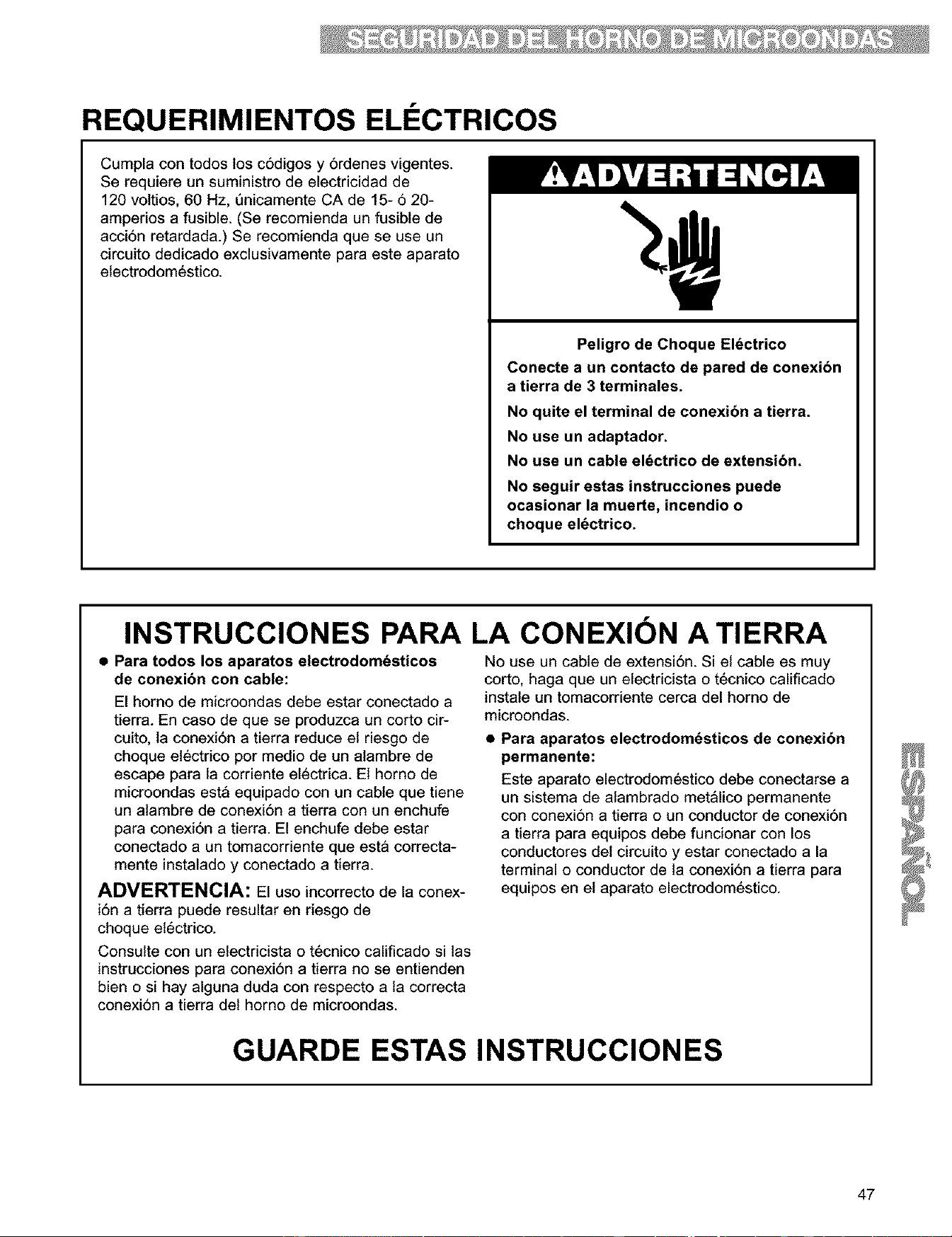
REQUERIMIENTOS ELI CTRICOS
Cumpla con todos los c6digos y 6rdenes vigentes.
Se requiere un suministro de electricidad de
120 voltios, 60 Hz, t_nicamente CA de 15- 6 20-
amperios a fusible. (Se recomienda un fusible de
acci6n retardada.) Se recomienda que se use un
circuito dedicado exclusivamente para este aparato
etectrodomestico.
Peligro de Choque EI6ctrico
Conecte a un contacto de pared de conexi6n
a tierra de 3 terminales.
No quite el terminal de conexibn a tierra.
No use un adaptador.
No use un cable el_ctrico de extensibn.
No seguir estas instrucciones puede
ocasionar la muerte, incendio o
choque el_ctrico.
INSTRUCCIONES PARA LA CONEXION A TIERRA
• Para todos los aparatos electrodomdsticos
de conexibn con cable:
El homo de microondas debe estar conectado a
tierra. En caso de que se produzca un corto cir-
cuito, la conexi6n a tierra reduce et riesgo de
choque etectrico por medio de un alambre de
escape para la corriente electrica. El horno de
microondas est_ equipado con un cable que tiene
un alambre de conexi6n a tierra con un enchufe
para conexi6n a tierra. El enchufe debe estar
conectado a un tomacordente que esta correcta-
mente instalado y conectado a tierra.
ADVERTENCIA: El uso incorrecto de la conex-
i6n a tierra puede resultar en riesgo de
choque et6ctrico.
Consulte con un etectdcista o tecnico calificado si las
instrucciones para conexi6n a tierra no se entienden
bien o si hay alguna duda con respecto a la correcta
conexi6n a tierra det homo de microondas.
No use un cable de extensi6n. Si el cable es muy
corto, haga que un etectdcista o tecnico calificado
instale un tomacorriente cerca del homo de
microondas.
• Para aparatos electrodom_sticos de conexibn
permanente:
Este aparato electrodomestico debe conectarse a
un sistema de alambrado met_lico permanente
con conexi6n a tierra o un conductor de conexi6n
a tierra para equipos debe funcionar con los
conductores det circuito y estar conectado a la
terminal o conductor de la conexi6n a tierra para
equipos en et aparato electrodomestico.
GUARDE ESTAS INSTRUCCIONES
47
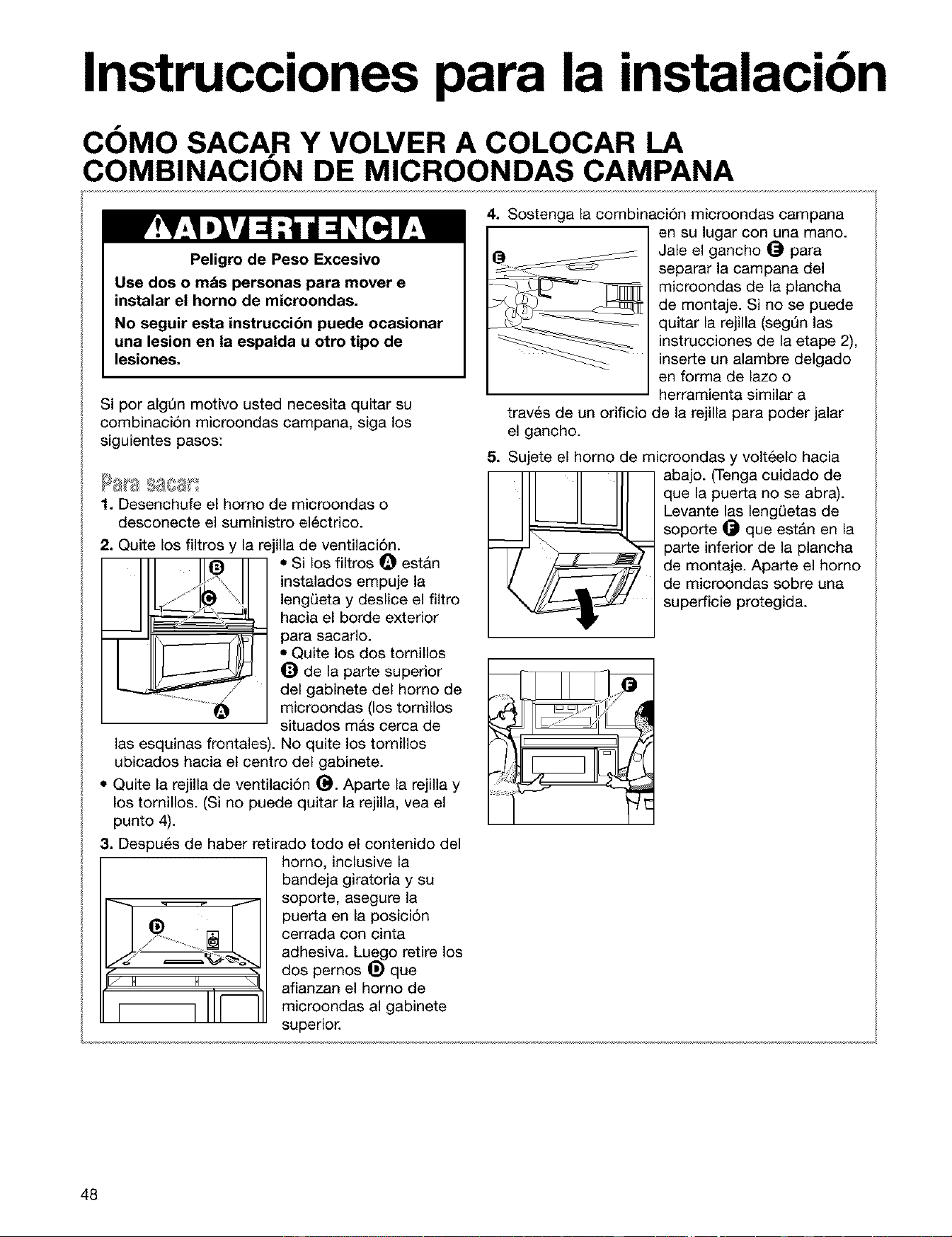
Instrucciones para la instalacibn
COMO SACA.R Y VOLVER A COLOCAR LA
COMBINACION DE MICROONDAS CAMPANA
Peligro de Peso Excesivo
Use dos o mds personas para mover e
instalar el horno de microondas.
No seguir esta instruccibn puede ocasionar
una lesion en la espalda u otro tipo de
lesiones.
Si por algQn motivo usted necesita quitar su
combinaci6n microondas campana, siga los
siguientes pasos:
1. Desenchufe el homo de microondas o
desconecte el suministro el6ctrico.
I I!e
2. Quite los filtros y la rejilla de ventilaci6n.
• Si los filtros _ estan
instalados empuje la
lengQeta y deslice el filtro
hacia el borde exterior
para sacarlo.
• Quite los dos tomillos
_) de la parte superior
del gabinete del homo de
microondas (los tomillos
situados m&s cerca de
las esquinas frontales). No quite los tornillos
ubicados hacia el centro del gabinete.
• Quite la rejilla de ventilaci6n (_. Aparte la rejilla y
los tornillos. (Si no puede quitar la rejilla, vea el
punto 4).
3. Despu_s de haber retirado todo el contenido del
J H H _1
homo, inclusive la
bandeja giratoria y su
soporte, asegure la
puerta en la posici6n
cerrada con cinta
adhesiva. Luego retire los
dos pemos _) que
afianzan el homo de
microondas al gabinete
superior.
4. Sostenga la combinaci6n microondas campana
en su lugar con una mano.
Jale el gancho _ para
separar la campana del
microondas de la plancha
de montaje. Si no se puede
quitar la rejilla (segQn las
instrucciones de la etape 2),
inserte un alambre delgado
en forma de lazo o
herramienta similar a
traves de un orificio de la rejilla para poder jalar
el gancho.
5. Sujete el homo de microondas y volt_elo hacia
_ bajo. (Tenga cuidado de
que la puerta no se abra).
Levante las lengL)etas de
soporte _ que est&n en la
parte inferior de la plancha
de montaje. Aparte el homo
de microondas sabre una
superficie protegida.
48
COMO SACA.R Y VOLVER A COLOCAR LA
COMBINACION DE MICROONDAS CAMPANA (CONT.)
1. Levante cuidadosamente el homo de
microondas y cu61guelo en las lengL)etas de
soporte ubicadas en la parte inferior de la
plancha de montaje.
2. Gire hacia abajo la parte frontal del gabinete
para el homo de microondas. Pase el cable
electrico a trav6s del orificio Iocalizado en la
parte inferior del gabinete superior.
3, Gire el homo de microondas hacia el gabinete.
Empuje el homo contra la placa de montaje
hasta que el pestillo de sujeci6n se acople en
el gabinete.
4. Reponga los dos pemos que sirven para
asegurar el homo de microondas al gabinete
superior.
5. Retire la cinta adhesiva de la puerta y vuelva a
colocar en su sitio la bandeja giratoria y el soporte.
6. Reemplace la rejilla de ventilaci6n.
7. Reponga los dos tornillos en la parte superior del
gabinete para el homo de microondas (los
tomillos situados m&s pr6ximos alas esquinas
frontales).
5. Si se instalaron filtros, reempl&celos (de ser
necesario, vea "lnstalaci6n y cuidado de los
filtros" en la secci6n "El cuidado de su homo de
microondas').
9. Enchufe el homo de microondas o conecte
nuevamente el suministro electrico.
49
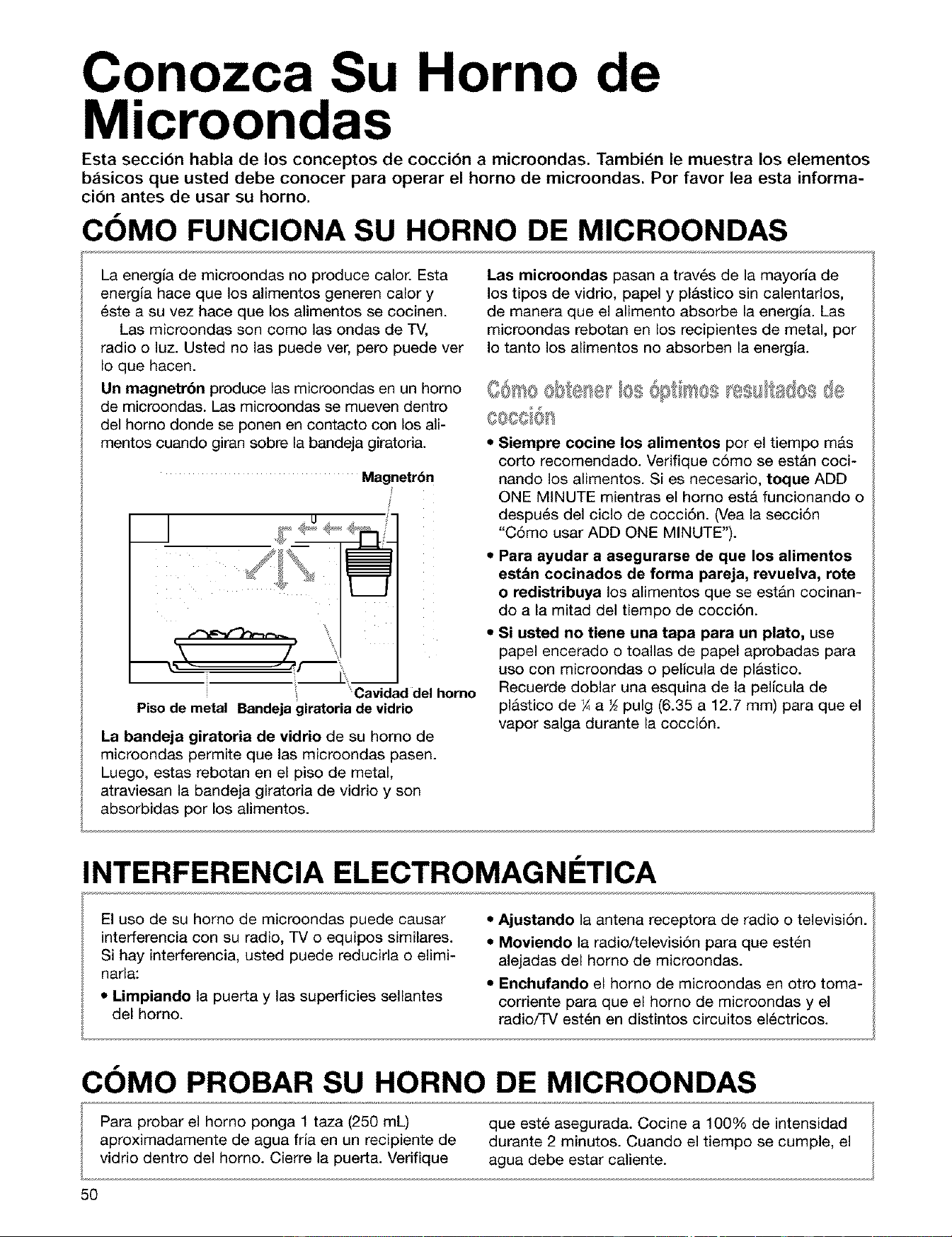
Conozca Su Horno de
Microondas
Esta seccion habla de los conceptos de coccion a microondas. Tambien le muestra los elementos
b,_sicos que usted debe conocer para operar el horno de microondas. Por favor lea esta informa-
cion antes de usar su horno.
COMO FUNCIONA SU HORNO DE MICROONDAS
La energ{a de microondas no produce calor. Esta
energla hace que los alimentos generen calory
_ste a su vez hace que los alimentos se cocinen.
Las microondas son como las ondas de TV,
radio o luz. Usted no las puede ver, pero puede ver
Io que hacen.
Un magnetrbn produce las microondas en un homo
de microondas. Las microondas se mueven dentro
del homo donde se ponen en contacto con los ali-
mentos cuando giran sobre la bandeja giratoria.
Magnetr6n
7"
' Cavidad del homo
Pisode metal Bandeja giratoria de vidrio
La bandeja giratoria de vidrio de su horno de
microondas permite que las microondas pasen.
Luego, estas rebotan en el piso de metal,
atraviesan la bandeja giratoria de vidrio y son
absorbidas por los alimentos.
Las microondas pasan a trav6s de la mayorla de
los tipos de vidrio, papel y pl&stico sin calentarlos,
de manera que el alimento absorbe la energla. Las
microondas rebotan en los recipientes de metal, por
Io tanto los alimentos no absorben la energla.
• Siempre cocine los alimentos por el tiempo m&s
corto recomendado. Verifique c6mo se est&n coci-
nando los alimentos. Si es necesario, toque ADD
ONE MINUTE mientras el horno est& funcionando o
despu6s del ciclo de cocci6n. (Vea la secci6n
"C6mo usar ADD ONE MINUTE").
• Para ayudar a asegurarse de que los alimentos
est_n cocinados de forma pareja, revuelva, rote
o redistribuya los alimentos que se est&n cocinan-
do a la mitad del tiempo de cocci6n.
• Si usted no tiene una tapa para un plato, use
papel encerado o toallas de papel aprobadas para
uso con microondas o pelicula de pl&stico.
Recuerde doblar una esquina de la pellcula de
plastico de ¼a 1/2pulg (6.35 a 12.7 mm) para que el
vapor salga durante la cocci6n.
INTERFERENCIA ELECTROMAGNI TICA
El uso de su horno de microondas puede causar
interferencia con su radio, TV o equipos similares.
Si hay interferencia, usted puede reducirla o elimi-
narla:
• Limpiando la puerta y las superficies sellantes
del homo.
• Ajustando la antena receptora de radio o televisi6n.
• Moviendo la radio/televisi6n para que est6n
alejadas del homo de microondas.
• Enchufando el horno de microondas en otro toma-
corriente para que el homo de microondas y el
radio/TV est6n en distintos circuitos el6ctricos.
COMO PROBAR SU HORNO DE MICROONDAS
Para probar el horno ponga 1 taza (250 mL) que est_ asegurada. Cocine a 100% de intensidad
aproximadamente de agua fria en un recipiente de durante 2 minutos. Cuando el tiempo se cumple, el
vidrio dentro del homo. Cierre la puerta. Verifique agua debe estar caliente.
5O
COMO PROBAR SU VAJILLA O SUS UTENSILIOS
DE COCINA
Pruebe la vajilla de mesa o de cocina antes de
usarla. Para saber si un plato se puede usar en
forma segura, col6quelo dentro del horno junto a una
taza (250 mL) con agua. Cocine a 100% de intensi-
dad durante un minute. Si el plato se calienta y el
agua est_ fria, no Io use. Algunos platos (melami-
na, alguna vajitla ceramica, etc.) absorben energfa
de microondas, calentandose demasiado para agarrar-
los y hace mas lentos los tiempos de cocci6n. La coc-
ci6n en recipientes de metal que no est_n diseSados
para use con microondas puede daSar el homo, Io
mismo que recipientes con metal escondido (ataduras
de alambre revestido, revestimiento de aluminio,
broches metalicos, esmalte o adornos met_licos).
CONSEJOS PARA LA OPERACION
• Nunca se apoye sobre la puerta o permita que los
niSos se columpien con ella mientras est_ abierta.
• Use guantes para homo. La energia de microon-
das no calienta los recipientes, pero et calor de los
alimentos puede hacer que et recipiente se
caliente.
• No use peri6dicos u otros papeles impresos en et
horno.
• No seque flores, frutas, hierbas, madera, papel,
calabazas o ropa en et horno.
• No encienda et horno cuando esta vacio. La
duraci6n del producto se puede acortar. Si practica
con la programaci6n del horno, coloque un recipi-
ente con agua en el horno. Es normal que la puerta
parezca ondulada cuando el homo ha estado fun-
cionando por un tiempo.
• No trate de fundir parafina en el horno. La parafina
no se fundira en un horno de microondas porque
permite que las microondas la atraviesen.
• No opere et horno de microondas a menos que la
bandeja giratoria este asegurada en su lugar y
pueda rotar con libertad. La bandeja giratoria
puede rotar en ambas direcciones. Asegerese que
et lade correcto de la bandeja giratoda esta hacia
ardba. Maneje su bandeja giratoria con cuidado
para sacarla del homo para evitar que se rompa. Si
su bandeja giratoria se quiebra o se astilla, Ilame a
su distribuidor para reemplazarla.
• Cuando usa un plato para dorar alimentos, et
fondo del plato debe quedar a una distancia de per
Io menos 3/,_de pulgada (5 mm) por arriba de la
bandeja giratoria. Siga las instrucciones provistas
con el plato para dorar alimentos.
• Nunca cocine o caliente un huevo entero con la
cbscara. La acumulaci6n de vapor en el huevo
entere puede hacer que explote y posiblemente el
home se daSe. Corte los huevos duros antes de
ealentarlos. En raras ocasiones ha ocurrido que los
huevos poche han expletade. Cubra los huevos
poch6 y deje reposar durante un minute antes de
cortarlos.
• Para bptimos resultados, revuelva los liquidos
varias veces antes de calentar o recalentar. Los
liquidos calentados en algunos recipientes (espe-
eialmente recipientes con forma cilindrica) se
pueden ealentar excesivamente. El liquido puede
salpicar haciendo un ruido fuerte durante e
despu6s det calentamiento o cuando se agregan
ingredientes (granulos de car6, bolsitas de te, etc.).
Esto puede da_ar el horne.
• Las microondas pueden no ltegar al eentro de un
asado. El calor se extiende al centro desde la parte
de afuera cocinada, Io mismo que cuando se ceci-
na en un homo cemen. Esta es una de las razones
para dejar que algunos alimentos (per ejemplo
asado o papas horneadas) reposen por un tiempo
luego de cocinar, o para revolver algunos alimen-
tos mientras se estan cocinando.
• No haga frituras en el horno. La vajitla para coci-
nar a microondas no es apropiada yes dificil man-
tener las temperaturas apropiadas para freir.
• No recocine las papas. At final det tiempo de
cocci6n recomendado, las papas deben estar ligera-
mente firmes porque se seguiran cocinando durante
el tiempo de reposo. Luego de cocinar a microon-
das, dejelas reposar por 5 minutos. €:stas se termi-
naran de cocinar durante el tiempo de reposo.
CONEXION ELI CTRICA
Los tiempos de cocci6n ser_n prolongados en
caso de que su suministro de energia el_ctrica
o el voltaje de salida sea menor de 110 voltios.
Haga que un etectricista catificado compruebe su
sistema electrico.
51
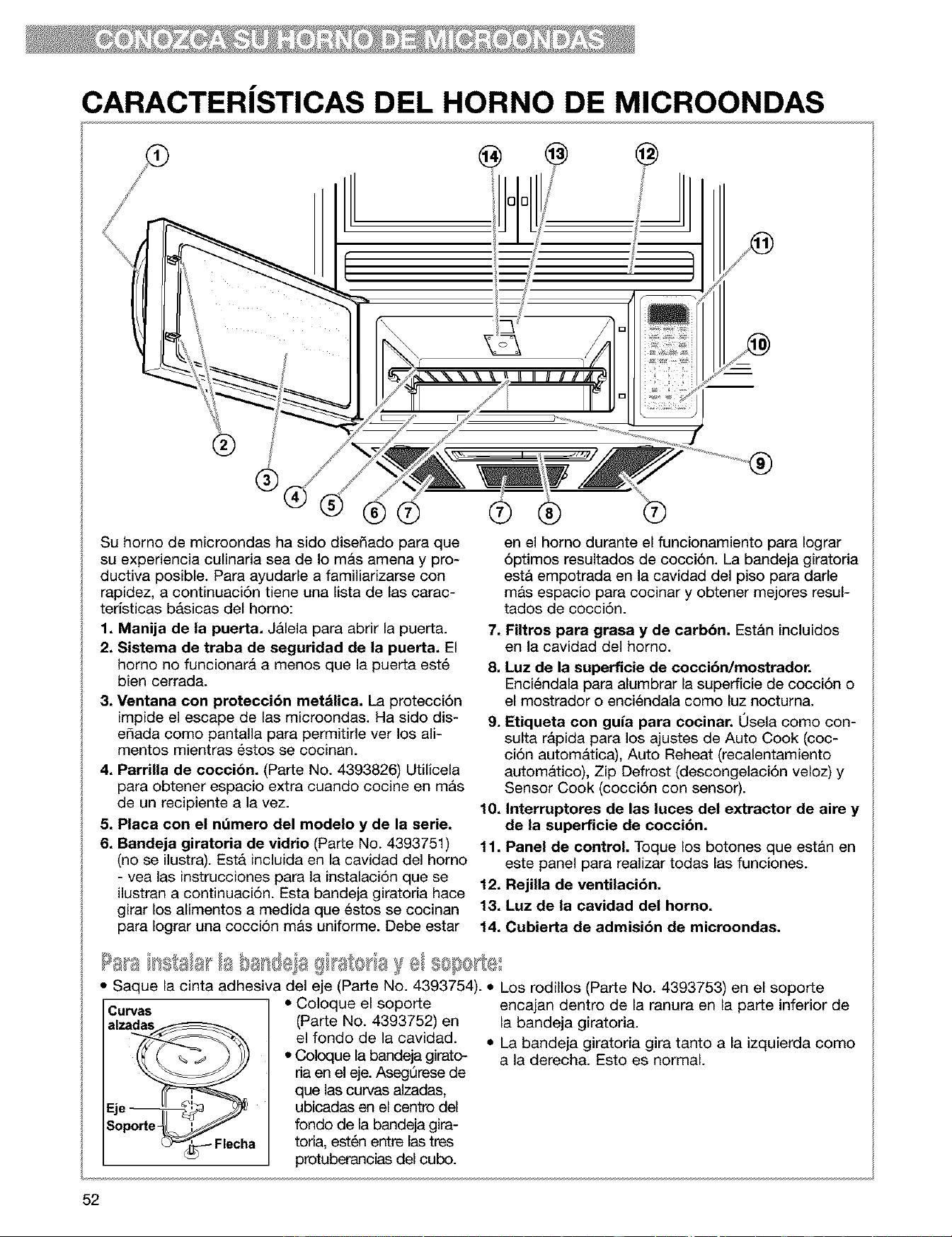
CARACTERiSTICAS DEL HORNO DE MICROONDAS
Su homo de microondas ha sido diseSado para que
su experiencia culinaria sea de Io mas amena y pro-
ductiva posible. Para ayudarle a familiarizarse con
rapidez, a continuaci6n tiene una lista de las carac-
teristicas basicas del homo:
1. Manija de la puerta. Jalela para abrir la puerta.
2. Sistema de traba de seguridad de la puerta. El
homo no funcionara a menos que la puerta est_
bien cerrada.
3. Ventana con proteccibn metdlica. La protecci6n
impide el escape de las microondas. Ha sido dis-
eSada como pantalla para permitide ver los ali-
mentos mientras _stos se cocinan.
4. Parrilla de coccibn. (Parte No. 4393826) Utilicela
para obtener espacio extra cuando cocine en m&s
de un recipiente a la vez.
5. Plata con el ndmero del rnodelo y de la serie.
6. Bandeja giratoria de vidrio (Parte No. 4393751)
(no se ilustra). Esta incUda en la cavidad del homo
-vea las instrucciones para la instalaci6n que se
ilustran a continuaci6n. Esta bandeja giratoria hace
girar los alimentos a medida que _stos se cocinan
para Iograr una cocci6n m&s uniforme. Debe estar
®
en el homo durante el funcionamiento para Iograr
6ptimos resultados de cocci6n. La bandeja giratoria
est& empotrada en la cavidad del piso para darle
m&s espacio para cocinar y obtener mejores resul-
tados de cocci6n.
7. Filtros para grasa y de carbbn. Estan incluidos
en la cavidad del horno.
8. Luz de la superficie de cocci6n/mostrador.
Enci_ndala para alumbrar la superficie de cocci6n o
el mostrador o enci_ndala como luz nocturna.
9. Etiqueta con guia para cocinar. Usela como con-
sulta rapida para los ajustes de Auto Cook (coc-
ci6n autom&tica), Auto Reheat (recalentamiento
autom&tico), Zip Defrost (descongelaci6n veloz) y
Sensor Cook (cocci6n con sensor).
10. Interruptores de las lutes del extractor de aire y
de la superficie de coccibn.
11. Panel de control. Toque los botones que estan en
este panel para realizar todas las funciones.
12, Rejilla de ventilacibn.
13. Luz de la cavidad del homo.
14. Cubierta de admisibn de microondas.
• Saque la cinta adhesiva del eje (Pa_e No. 4393754). • Los rodillos (Pa_e No. 4393753) en el sopo_e
CUP/aS
alzadas_
k2_"__.-- Flecha
• Coloque el soporte
(Parte No. 4393752) en
el fondo de la cavidad.
• Coloque la bandeja girato-
ria en el eje. AsegQrese de
que las curvas alzadas,
ubicadas en el centre del
fondo de la bandeja gira-
toria, est_n entre las tres
protuberancias del cubo.
encajan dentro de la ranura en la parte inferior de
la bandeja giratoria.
• La bandeja giratoria gira tanto a la izquierda como
a la derecha. Esto es normal.
52
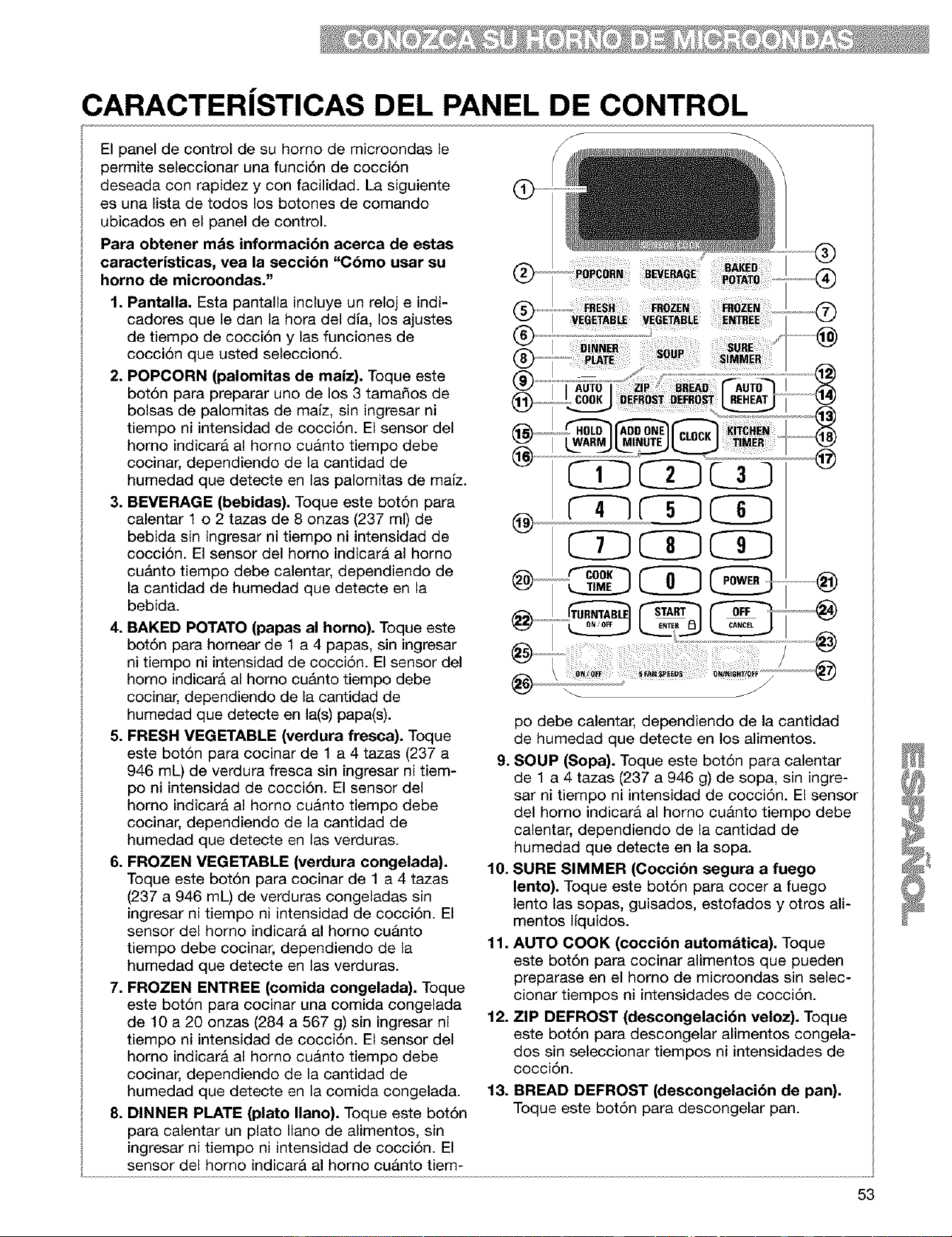
CARACTERJSTICAS DEL PANEL DE CONTROL
El panel de control de su homo de microondas le
permite seleccionar una funci6n de cocci6n
deseada con rapidez y con facilidad. La siguiente
es una Iista de todos los botones de comando
ubicados en el panel de control.
Para obtener mds informacibn aoeroa de estas
caracteristicas, vea la seccibn "C6mo usar su
homo de microondas."
1. Pantalla. Esta pantalla incluye un reloj e indi-
cadores que le dan la hora del dia, los ajustes
de tiempo de cocci6n y las funciones de
cocci6n que usted seleccion6.
2. POPCORN (palomitas de maiz). Toque este
bot6n para preparar uno de los 3 tama_os de
bolsas de palomitas de mafz, sin ingresar ni
tiempo ni intensidad de cocci6n. El sensor del
homo indicara al horno cuanto tiempo debe
cocinar, dependiendo de la cantidad de
humedad que detecte en las palomitas de mafz.
3. BEVERAGE (bebidas). Toque este bot6n para
calentar 1 o 2 tazas de 8 onzas (237 ml) de
bebida sin ingresar ni tiempo ni intensidad de
cocci6n. El sensor del homo indicar& al horno
cu&nto tiempo debe calentar, dependiendo de
la cantidad de humedad que detecte en la
bebida.
4. BAKED POTATO (papas al homo). Toque este
bot6n para homear de 1 a 4 papas, sin ingresar
ni tiempo ni intensidad de cocci6n. El sensor del
homo indicara al homo cu&nto tiempo debe
cocinar, dependiendo de la cantidad de
humedad que detecte en la(s) papa(s).
5. FRESH VEGETABLE (verdura fresca). Toque
este bot6n para cocinar de 1 a 4 tazas (237 a
946 mL) de verdura fresca sin ingresar ni tiem-
pc ni intensidad de cocci6n. El sensor del
homo indicara al horno cuanto tiempo debe
cocinar, dependiendo de la cantidad de
humedad que detecte en las verduras.
6. FROZEN VEGETABLE (verdura congelada).
Toque este bot6n para cocinar de 1 a 4 tazas
(237 a 946 mL) de verduras congeladas sin
ingresar ni tiempo ni intensidad de cocci6n. El
sensor del homo indicar& al homo cuanto
tiempo debe cocinar, dependiendo de la
humedad que detecte en las verduras.
7. FROZEN ENTREE (comida congelada). Toque
este bot6n para cocinar una comida congelada
de 10 a 20 onzas (284 a 567 g) sin ingresar ni
tiempo ni intensidad de cocci6n. El sensor del
homo indicara al horno cuanto tiempo debe
cocinar, dependiendo de la cantidad de
humedad que detecte en la comida congelada.
8. DINNER PLATE (plato llano). Toque este bot6n
para calentar un plato llano de alimentos, sin
ingresar ni tiempo ni intensidad de cocci6n. El
@
J
pc debe calentar, dependiendo de la cantidad
de humedad que detecte en los alimentos.
9. SOUP (Sopa). Toque este bot6n para calentar
de 1 a 4 tazas (237 a 946 g) de sopa, sin ingre-
sar ni tiempo ni intensidad de cocci6n. El sensor
del horno indicar& al horno cuAnto tiempo debe
calentar, dependiendo de la cantidad de
humedad que detecte en la sopa.
10. SURE SIMMER (Coccibn segura a fuego
lento). Toque este bot6n para cocer a fuego
lento las sopas, guisados, estofados y otros ali-
mentos Ilquidos.
11. AUTO COOK (coccibn automdtica). Toque
este bot6n para cocinar alimentos que pueden
preparase en el homo de microondas sin selec-
cionar tiempos ni intensidades de cocci6n.
12. ZIP DEFROST (descongelaci6n veloz). Toque
este bot6n para descongelar alimentos congela-
dos sin seleccionar tiempos ni intensidades de
cocci6n.
13. BREAD DEFROST (descongelacibn de pan).
Toque este bot6n para descongelar pan.
sensor del homo indicar& al homo cuanto tiem-
53
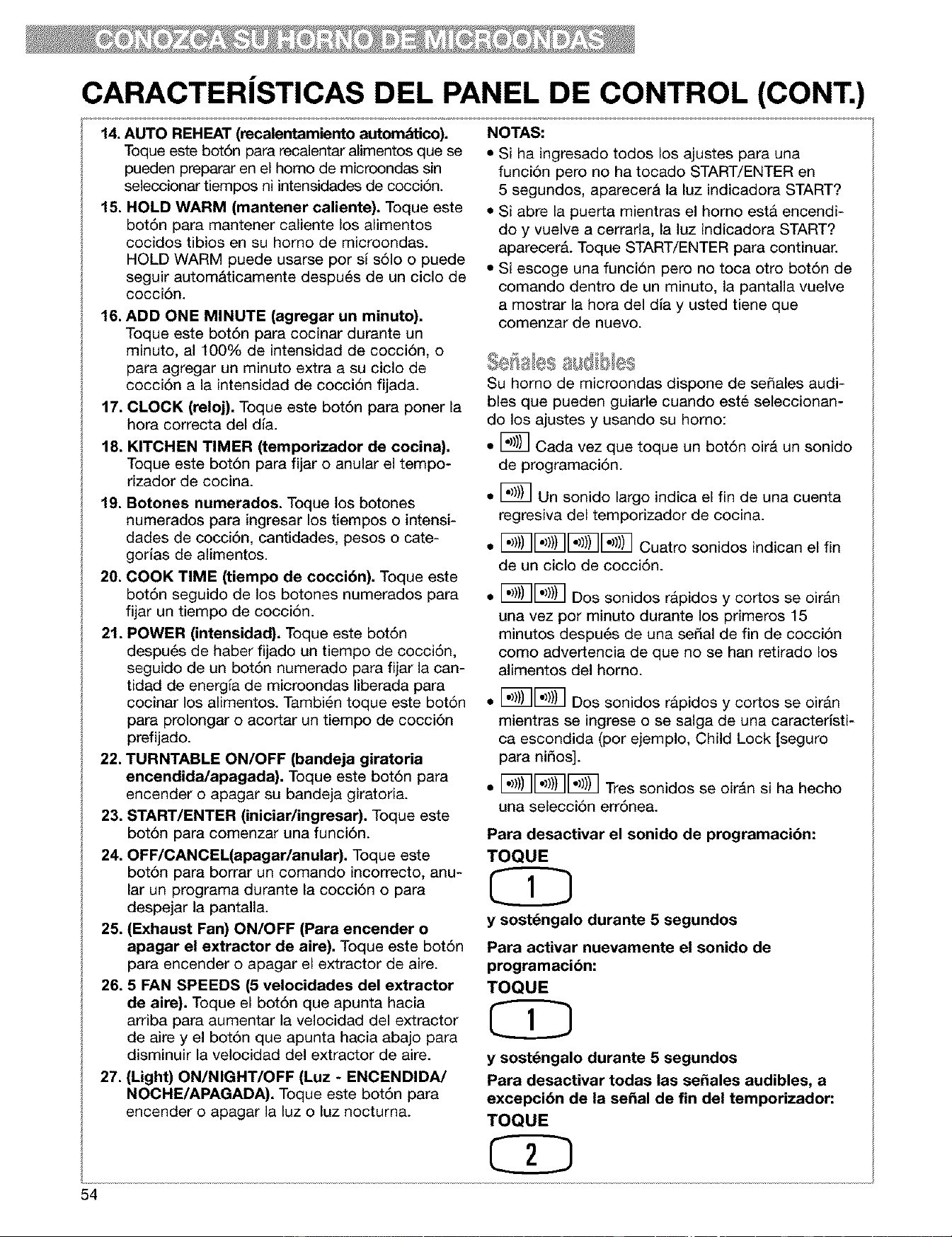
CARACTERiSTICAS DEL PANEL DE CONTROL (CONT.)
14.AUTO REHEAT (recalentamiento autom_tico).
Toque este bot6n para recalentar alimentos que se
pueden preparar en el homo de microondas sin
seleccionar tiempos ni intensidades de cocci6n.
15. HOLD WARM (mantener caliente). Toque este
bot6n para mantener caliente los alimentos
cocidos tibios en su homo de microondas.
HOLD WARM puede usarse por si s61o o puede
seguir autom&ticamente despu6s de un ciclo de
cocci6n.
16. ADD ONE MINUTE (agregar un minuto),
Toque este bot6n para cocinar durante un
minuto, al 100% de intensidad de cocci6n, o
para agregar un minuto extra a su ciclo de
cocci6n a la intensidad de cocci6n fijada.
17. CLOCK (reloj). Toque este bot6n para poner la
hora correcta del dla.
18. KITCHEN TIMER (tempodzador de cocina).
Toque este bot6n para fijar o anular el tempo-
rizador de cocina.
19. Botches numerados. Toque los botones
numerados para ingresar los tiempos o intensi-
dades de cocci6n, cantidades, pesos o cate-
gorias de alimentos.
20. COOK TIME (tiempo de cocci6n). Toque este
bot6n seguido de los botones numerados para
fijar un tiempo de cocci6n.
21. POWER (intensidad). Toque este bot6n
despu6s de haber fijado un tiempo de cocci6n,
seguido de un bot6n numerado para fijar la can-
tidad de energla de microondas liberada para
cocinar los alimentos. Tambi6n toque este bot6n
para prolongar o acortar un tiempo de cocci6n
prefijado.
22. TURNTABLE ON/OFF (bandeja giratoria
encendida/apagada). Toque este bot6n para
encender o apagar su bandeja giratoria.
23. START/ENTER (iniciar/ingresar). Toque este
bot6n para comenzar una funci6n.
24. OFF/OANOEL(apagarlanular). Toque este
bot6n para borrar un comando incorrecto, anu-
lar un programa durante la cocci6n o para
despejar la pantalla.
25. (Exhaust Fan) ON/OFF (Para encender o
apagar el extractor de aire). Toque este bot6n
para encender o apagar el extractor de aire.
26.5 FAN SPEEDS (5 velocidades del extractor
de aire). Toque el bot6n que apunta hacia
arriba para aumentar la velocidad del extractor
de aire y el bot6n que apunta hacia abajo para
disminuir la velocidad del extractor de aire.
27. (Light) ON/NIGHT/OFF (Luz - ENCENDIDA/
NOCHE/APAGADA). Toque este bot6n para
encender o apagar la luz o luz nocturna.
NOTAS:
• Si ha ingresado todos los ajustes para una
funci6n pero no ha tocado START/ENTER en
5 segundos, aparecer& la luz indicadora START?
• Si abre la puerta mientras el homo est& encendi-
do y vuelve a cerrarla, la luz indicadora START?
aparecer& Toque START/ENTER para continuar.
• Si escoge una funci6n pero no toca otro bot6n de
comando dentro de un minuto, la pantalla vuelve
a mostrar la hora del dla y usted tiene que
comenzar de nuevo.
Su homo de microondas dispone de se_ales audi-
bles que pueden guiarle cuando est6 seleccionan-
do los ajustes y usando su homo:
• [_ Cada vez que toque un bot6n oir& un sonido
de programaci6n.
• [_ Un sonido largo indica el fin de una cuenta
regresiva del temporizador de cocina.
• [_[_[_E_ Cuatro sonidos indican el fin
de un ciclo de cocci6n.
• [_[_ DOS sonidos rapidos y cortos se oir&n
una vez por minuto durante los primeros 15
minutos despu6s de una sedal de fin de cocci6n
como advertencia de que no se han retirado los
alimentos del homo.
• [_[_ Dos sonidos rapidos y cortos se oir&n
mientras se ingrese o se salga de una caracterlsti-
ca escondida (por ejemplo, Child Lock [seguro
para ni_os].
• [_[_[_ Tres sonidos se oir&n si ha hecho
una selecci6n err6nea.
Para desactivar el sonido de programacibn:
TOQUE
y sost_ngalo durante 5 segundos
Para activar nuevamente el sonido de
programacibn:
TOQUE
y sost_ngalo durante 5 segundos
Para desactivar todas las se_ales audibles, a
excepci6n de la sepal de fin del temporizador:
TOQUE
54
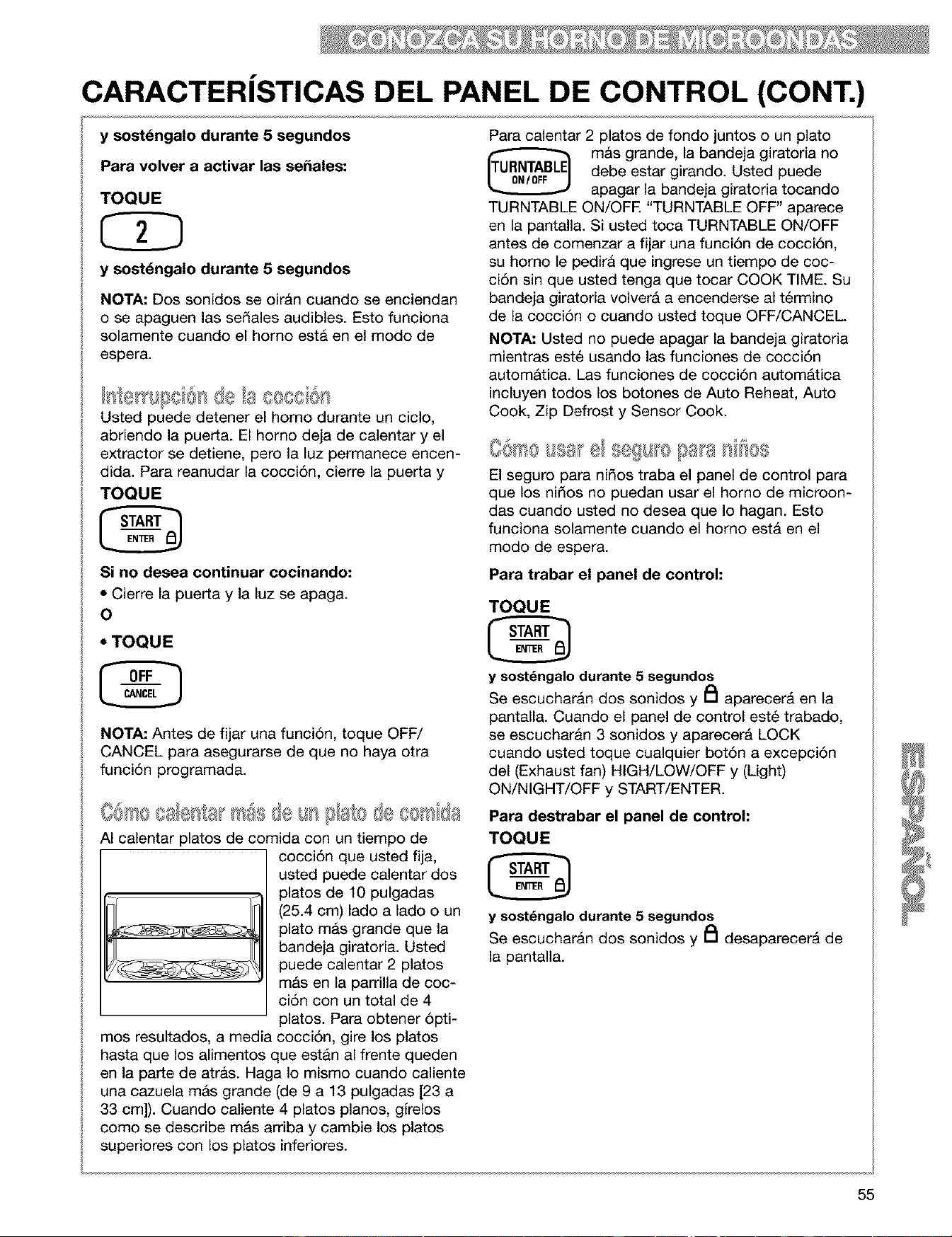
CARACTERiSTICAS DEL PANEL DE CONTROL (CONT.)
y sost_ngalo durante 5 segundos
Para volver a activar las sefiales:
TOQUE
y sost_ngalo durante 5 segundos
NOTA: Dos sonidos se oiran cuando se enciendan
o se apaguen las sedales audibles. Esto funciona
solamente cuando el homo esta en el modo de
espera.
Usted puede detener el homo durante un ciclo,
abriendo la pue_a. El homo deja de calentar y el
extractor se detiene, pero la luz permanece encen-
dida. Para reanudar la cocci6n, cierre la puerta y
TOQUE
Si no desea continuar cocinando:
• Cierre la puerta y la luz se apaga.
O
• TOQUE
NOTA: Antes de fijar una funci6n, toque OFF/
CANCEL para asegurarse de que no haya otra
funci6n programada.
C@so @ts} m Ssde VsB! sde c(x @
AI calentar platos de comida con un tiempo de
cocci6n que usted fija,
usted puede calentar dos
platos de 10 pulgadas
(25.4 cm) lado a lado o un
LSS:C_S_a_ plato mas grande que la
bandeja giratoria. Usted
puede calentar 2 platos
mAs en la parrilla de coc-
ci6n con un total de 4
platos. Para obtener 6pti-
mos resultados, a media cocci6n, gire los platos
hasta que los alimentos que estan al frente queden
en la parte de atras. Haga Io mismo cuando caliente
una cazuela mas grande (de 9 a 13 pulgadas [23 a
33 cm]). Cuando caliente 4 platos pianos, girelos
como se describe mAs arriba y cambie los platos
superiores con los platos inferiores.
Para calentar 2 platos de fondo juntos o un plato
m&s grande, la bandeja giratoria no
debe estar girando. Usted puede
apagar la bandeja giratoria tocando
TURNTABLE ON/OFE "TURNTABLE OFF" aparece
en la pantalla. Si usted toca TURNTABLE ON/OFF
antes de comenzar a fijar una funci6n de cocci6n,
su homo le pedira que ingrese un tiempo de coc-
ci6n sin que usted tenga que tocar COOK TIME. Su
bandeja giratoria volver& a encenderse al t@mino
de la cocci6n o cuando usted toque OFF/CANCEL
NOTA: Usted no puede apagar la bandeja giratoria
mientras est6 usando las funciones de cocci6n
automatic& Las funciones de cocci6n autom&tica
incluyen todos los botones de Auto Reheat, Auto
Cook, Zip Defrost y Sensor Cook.
El seguro para ni_os traba el panel de control para
que los nidos no puedan usar el homo de microon-
das cuando usted no desea que Io hagan. Esto
funciona solamente cuando el homo estA en el
modo de espera.
Para trabar el panel de control:
TOQUE
y sost_ngalo durante 5 segundos
Se escucharan dos sonidos y PI aparecer_ en la
pantalla. Cuando el panel de control est6 trabado,
se escucharan 3 sonidos y aparecer& LOCK
cuando usted toque cualquier bot6n a excepci6n
del (Exhaust fan) HIGH/LOW/OFF y (Light)
ON/NIGHT/OFF y START/ENTER.
Para destrabar el panel de control:
TOQUE
y sostdngalodurante 5 segundos
Se escuchar&n dos sonidos y PI desaparecer_ de
la pantalla.
55
Usted puede fijar su homo de microondas para
mostrar en la pantalla los comandos a medida que
los ingresa sin encender el magnetr6n. Esta carac-
teristica le ayuda a aprender a utilizar su homo sin
tenet que cocmar en realidad. Esto funciona sola-
mente cuando el homo esta en el modo de espera.
Para fijar la ¢aracteristica
demostraci6n/aprendizaje:
TOQUE
y sost_ngalo durante 5 segundos
Se escucharan dos tonos y una pequefia "d" apare-
cera en la pantalla.
Para anular la ¢aracteristica demo/leaming:
TOQUE
y sost_ngalo durante 5 segundos
Se escuchar_n dos sonidos y la pequefia "d" desa-
parecer& de la pantalla.
56
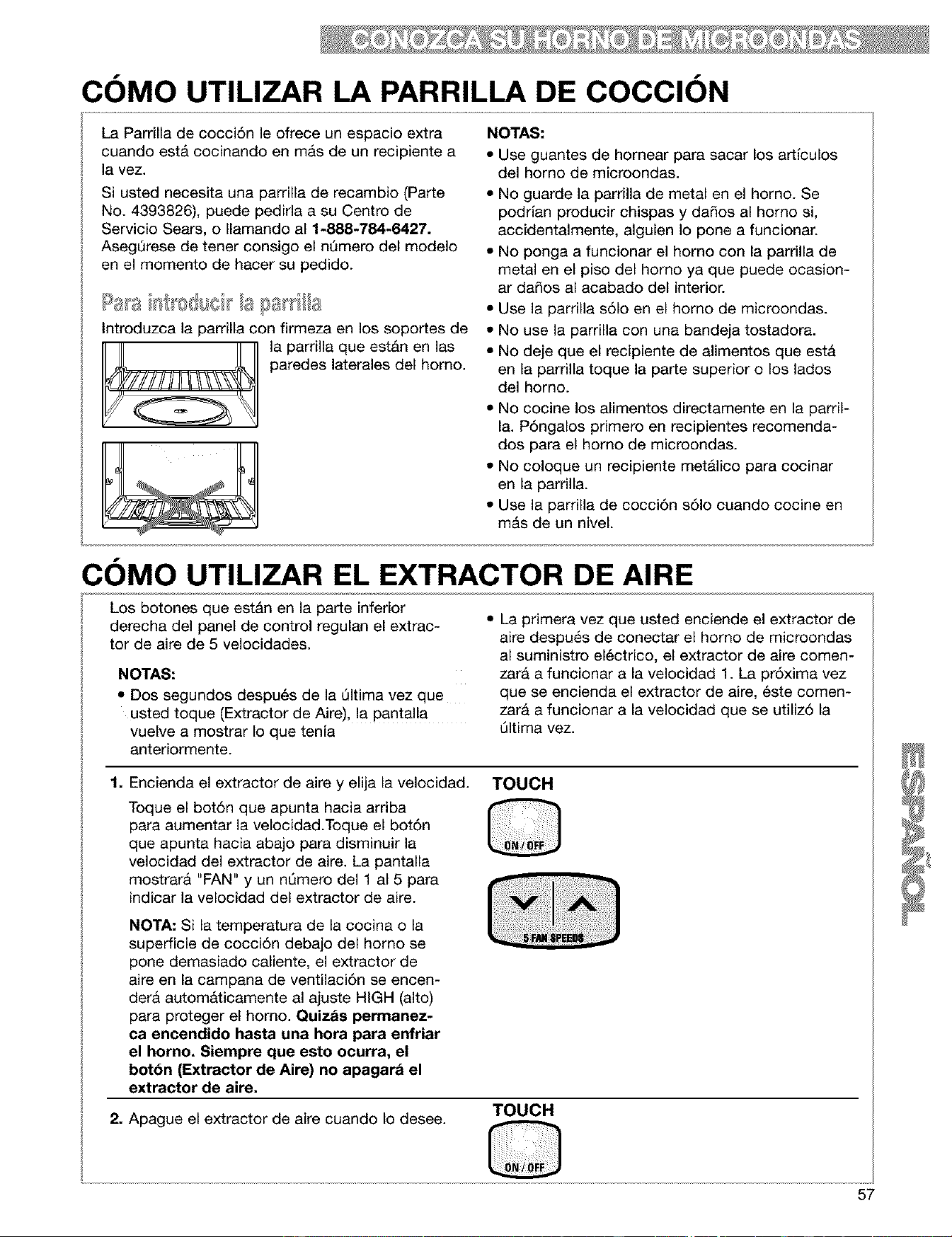
COMO UTILIZAR LA PARRILLA DE COCCION
La Parrilla de cocci6n le ofrece un espacio extra
cuando est& cocinando en mas de un recipiente a
la vez.
Si usted necesita una parrilla de recambio (Parte
No. 4393826), puede pedirla a su Centro de
Servicio Sears, o Ilamando al 1-888-784-6427.
AsegQrese de tener consigo el nQmero del modelo
en el momento de hacer su pedido.
Introduzca la parrilla con firmeza en los soportes de
la parrilla que estAn en las
paredes laterales del homo.
NOTAS:
• Use guantes de hornear para sacar los artlculos
del horno de microondas.
• No guarde la parrilla de metal en el horno. Se
podrlan producir chispas y da_os al homo si,
accidentalmente, alguien Io pone a funcionar.
• No ponga a funcionar el horno con la parrilla de
metal en el piso del homo ya que puede ocasion-
ar da_os al acabado del interior.
• Use la parrilla s61o en el homo de microondas.
• No use la parrilla con una bandeja tostadora.
• No deje que el recipiente de alimentos que esta
en la parrilla toque la parte superior o los lados
del homo.
• No cocine los alimentos directamente en la parril-
la. P6ngalos primero en recipientes recomenda-
dos para el homo de microondas.
• No coloque un recipiente metalico para cocinar
en la parrilla.
• Use la parrilla de cocci6n s61o cuando cocine en
m&s de un niveL
COMO UTILIZAR EL EXTRACTOR DE AIRE
Los botones que est&n en la parte inferior
derecha del panel de control regulan el extrac-
tor de aire de 5 velocidades.
NOTAS:
• Dos segundos despu6s de la Qltima vez que
usted toque (Extractor de Aire), la pantalla
vuelve a mostrar Io que tenia
anteriormente.
• La primera vez que usted enciende el extractor de
aire despu6s de conectar el homo de microondas
al suministro el6ctrico, el extractor de aire comen-
zara a funcionar a la velocidad 1. La pr6xima vez
que se encienda el extractor de aire, 6ste comen-
zara a funcionar a la velocidad que se utiliz6 la
@tima vez.
1. Encienda el extractor de aire y elija la velocidad. TOUCH
Toque el bot6n que apunta hacia arriba
para aumentar la velocidad.Toque el bot6n
que apunta hacia abajo para disminuir la
velocidad del extractor de aire. La pantalla
mostrara "FAN" y un nQmero del 1 al 5 para
indicar la velocidad del extractor de aire.
NOTA: Si la temperatura de la cocina o la
superficie de cocci6n debajo del homo se
pone demasiado caliente, el extractor de
aire en la campana de ventilaci6n se encen-
dera automaticamente al ajuste HIGH (alto)
para proteger el homo. Quizds permanez-
ca encendido hasta una hora para enfriar
el homo. Siempre que esto ocurra, el
bot6n (Extractor de Aire) no apagara el
extractor de aire.
2. Apague el extractor de aire cuando Io desee.
TOUCH
57
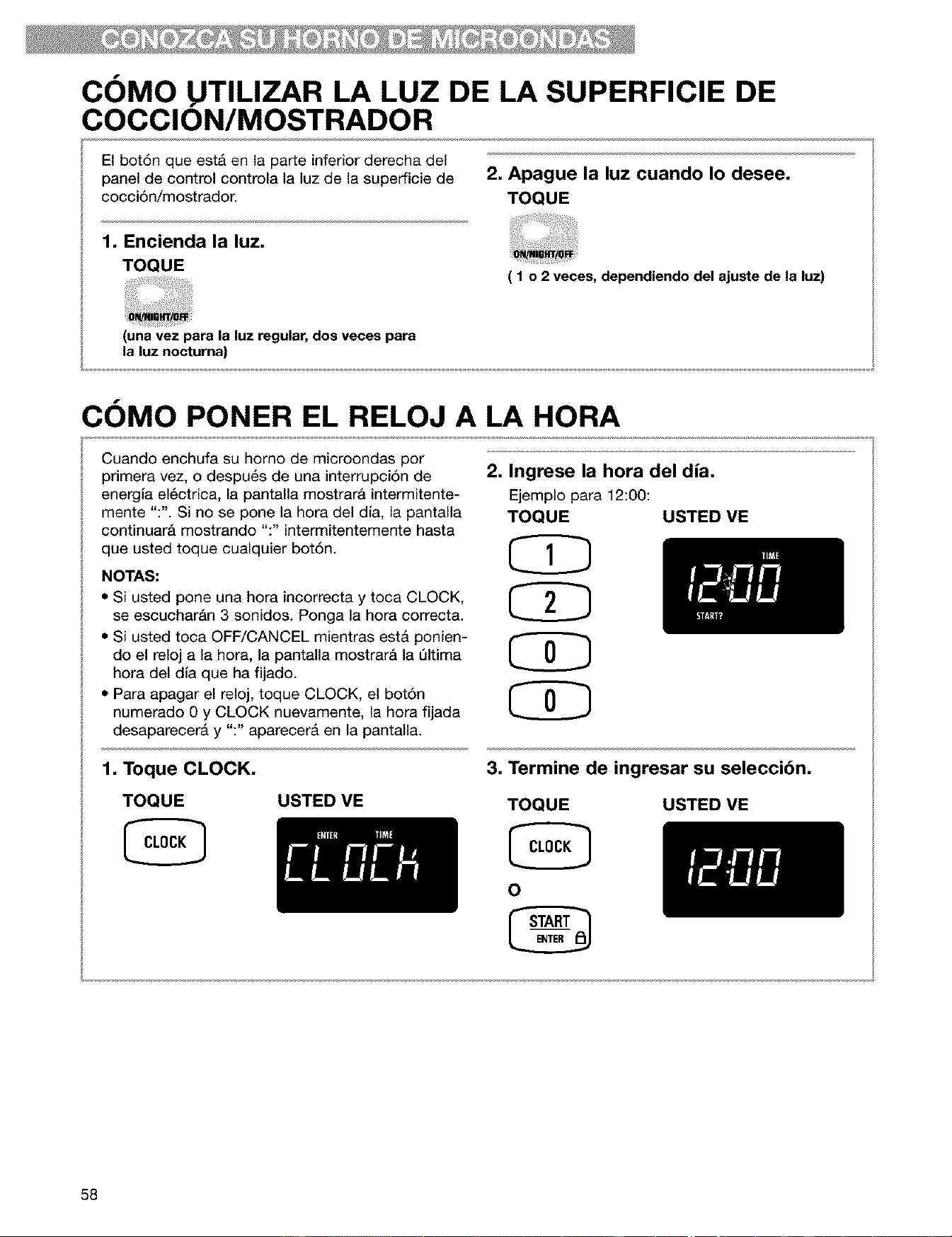
COMO UTILIZAR LA LUZ DE LA SUPERFICIE DE
COCCION/MOSTRADOR
El bot6n que est& en la parte inferior derecha del
panel de control controla la luz de la superficie de
cocci6n/mostrador.
2. Apague la luz cuando Io desee.
TOQUE
1. Encienda la luz.
TOQUE
( 1 o 2 veces, dependiendo del ajuste de la luz)
(una vez para la luz regular,dos veces para
la luz nocturna)
COMO PONER EL RELOJ A I.A HORA
Cuando enchufa su homo de microondas por
primera vez, o despu_s de una interrupci6n de 2.
energla el6ctrica, la pantalla mostrarA intermitente-
mente ":". Si no se pone la hora del dla, la pantalla
continuarA mostrando ":" intermitentemente hasta
que usted toque cualquier bot6n.
NOTAS:
• Si usted pone una hora incorrecta y toca CLOCK,
se escuchar&n 3 sonidos. Ponga la hora correcta.
• Si usted toca OFF/CANCEL mientras estA ponien-
do el reloj a la hora, la pantalla mostrar& la Qltima
hora del dla que ha fijado.
• Para apagar el reloj, toque CLOCK, el bot6n
numerado 0 y CLOCK nuevamente, la hora fijada
desaparecer& y ":" aparecer& en la pantalla.
Ingrese la hora del dia.
Ejemplo para 12:00:
TOQUE USTED ME
1. Toque CLOCK.
TOQUE USTED ME
3. Termine de ingresar su seleccibn.
TOQUE
o
USTED ME
58
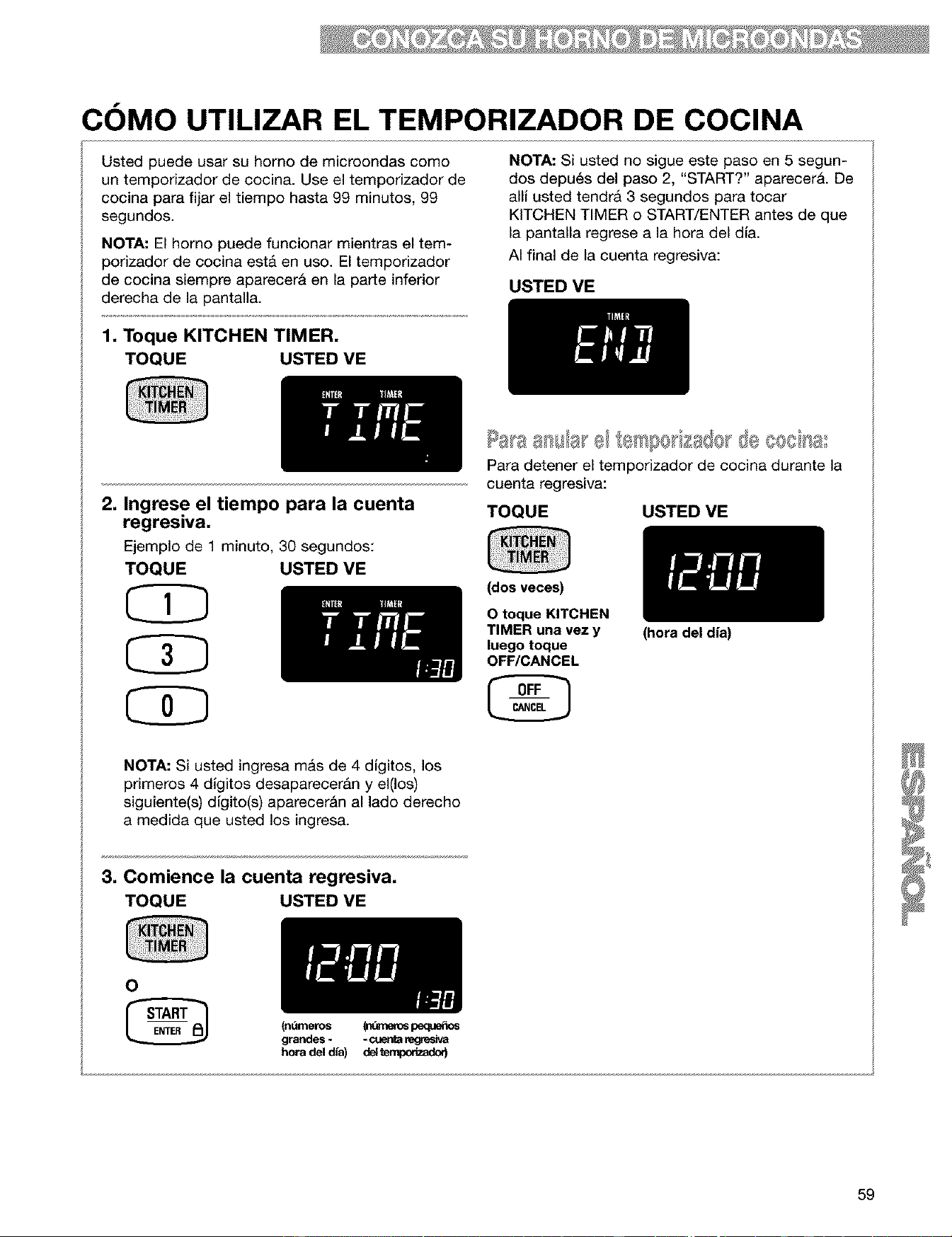
COMO UTILIZAR EL TEMPORIZADOR DE COCINA
Usted puede usar su homo de microondas coma
un temporizador de cocina. Use el temporizador de
cocina para fijar el tiempo hasta 99 minutos, 99
segundos.
NOTA: El homo puede funcionar mientras el tem-
porizador de cocina est& en uso. El temporizador
de cocina siempre aparecerA en la parte inferior
derecha de la pantalla.
NOTA: Si usted no sigue este paso en 5 segun-
dos depu6s del paso 2, "START?" aparecerA. De
alli usted tendrA 3 segundos para tocar
KITCHEN TIMER o START/ENTER antes de que
la pantalla regrese a la hora del dia.
AI final de la cuenta regresiva:
USTED VE
1. Toque KITCHEN TIMER,
TOQUE USTED ME
2, Ingrese el tiempo para la cuenta
regresiva,
Ejemplo de 1 minuto, 30 segundos:
TOQUE USTED ME
CZ}
CD
CD
Para detener el temporizador de cocina durante la
cuenta regresiva:
TOQUE USTED VE
(dos veces)
0 toque KITCHEN
TIMER una vez y
luego toque
OFF/CANCEL
NOTA: Si usted ingresa mas de 4 digitos, los
primeros 4 digitos desaparecer&n y el(los)
siguiente(s) digito(s) aparecer&n al lado derecho
a medida que usted los ingresa.
3, Comience la cuenta regresiva,
TOQUE USTED ME
0
(ndmeros
grandes -
hora del dia)
(n_ne_spe_e_os
d_
(hora del dia)
59
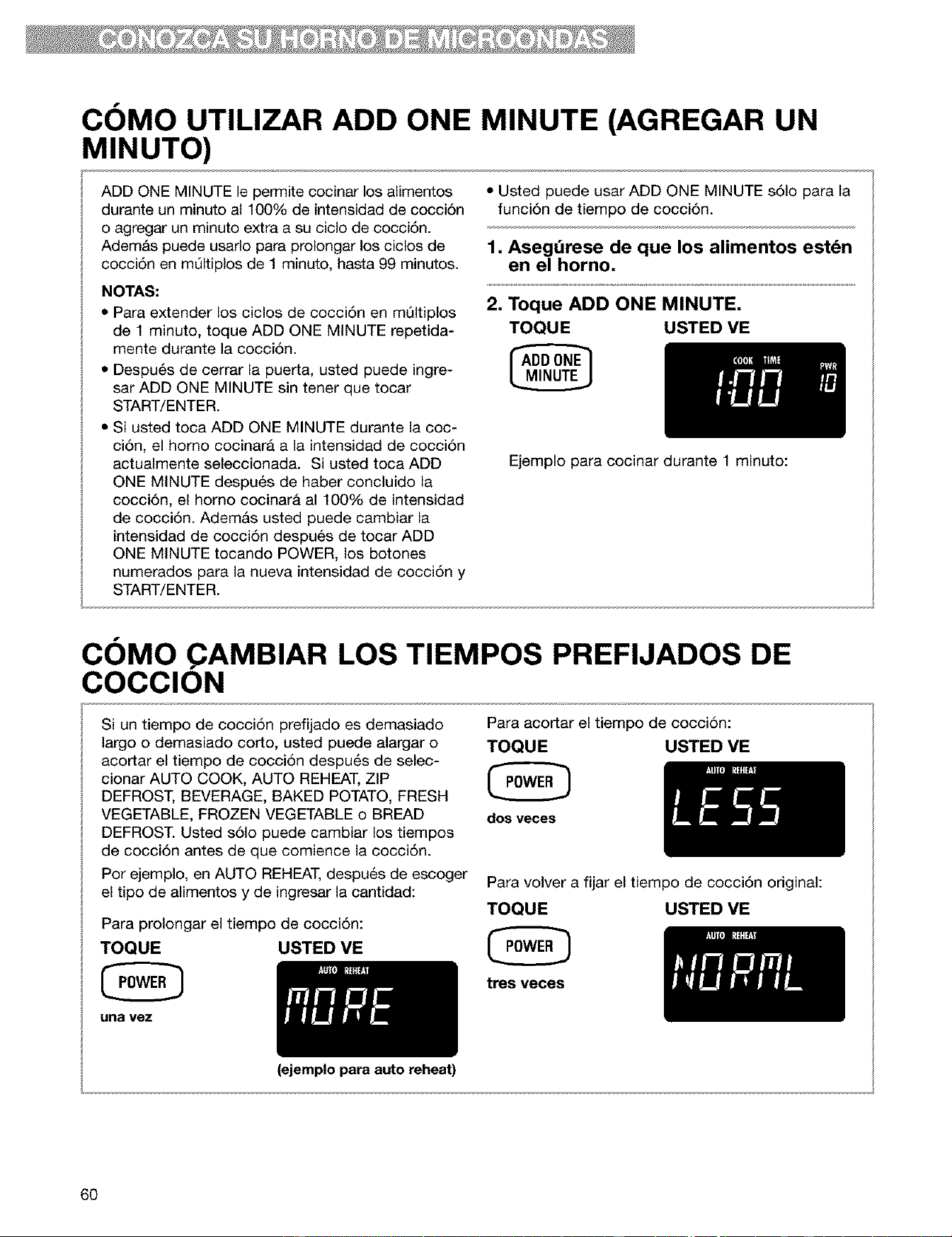
COMO UTILIZAR ADD ONE MINUTE (AGREGAR UN
MINUTO)
ADD ONE MINUTE le permite cocinar los alimentos
durante un minuto al 100% de intensidad de cocci6n
o agregar un minuto extra a su ciclo de cocci6n.
Adem&s puede usarlo para prolongar los ciclos de
cocci6n en mQItiplos de 1 minuto, hasta 99 minutos.
NOTAS:
• Para extender los ciclos de cocci6n en mQItiplos
de 1 minuto, toque ADD ONE MINUTE repetida-
mente durante la cocci6n.
• Despu6s de cerrar la puerta, usted puede ingre-
sar ADD ONE MINUTE sin tener que tocar
START/ENTER.
• Si usted toca ADD ONE MINUTE durante la coc-
ci6n, el homo cocinara a la intensidad de cocci6n
actualmente seleccionada. Si usted toca ADD
ONE MINUTE despu_s de haber concluido la
cocci6n, el homo cocinara al 100% de intensidad
de cocci6n. Adem&s usted puede cambiar la
intensidad de cocci6n despu6s de tocar ADD
ONE MINUTE tocando POWER, los botones
numerados para la nueva intensidad de cocci6n y
START/ENTER.
• Usted puede usar ADD ONE MINUTE s61o para la
funci6n de tiempo de cocci6n.
1, Asegdrese de que los alimentos estdn
en el homo,
2, Toque ADD ONE MINUTE,
TOQUE USTED VE
Ejemplo para cocinar durante 1 minuto:
COMO AMBIAR LOS TIEMPOS PREFIJADOS DE
COCCION
Si un tiempo de cocci6n prefijado es demasiado
largo o demasiado corto, usted puede alargar o
acortar el tiempo de cocci6n despu6s de selec-
cionar AUTO COOK, AUTO REHEAT, ZIP
DEFROST, BEVERAGE, BAKED POTATO, FRESH
VEGETABLE, FROZEN VEGETABLE o BREAD
DEFROST. Usted s61o puede cambiar los tiempos
de cocci6n antes de que comience la cocci6n.
Por ejemplo, en AUTO REHEAT, despu6s de escoger
el tipo de alimentos y de ingresar la cantidad:
Para prolongar el tiempo de cocci6n:
TOQUE USTED VE
una vez
(ejemplo para auto reheat)
Para acortar el tiempo de cocci6n:
TOQUE USTED VE
dos veees
Para volver a fijar el tiempo de cocci6n original:
TOQUE USTED VE
tree vecee
6O
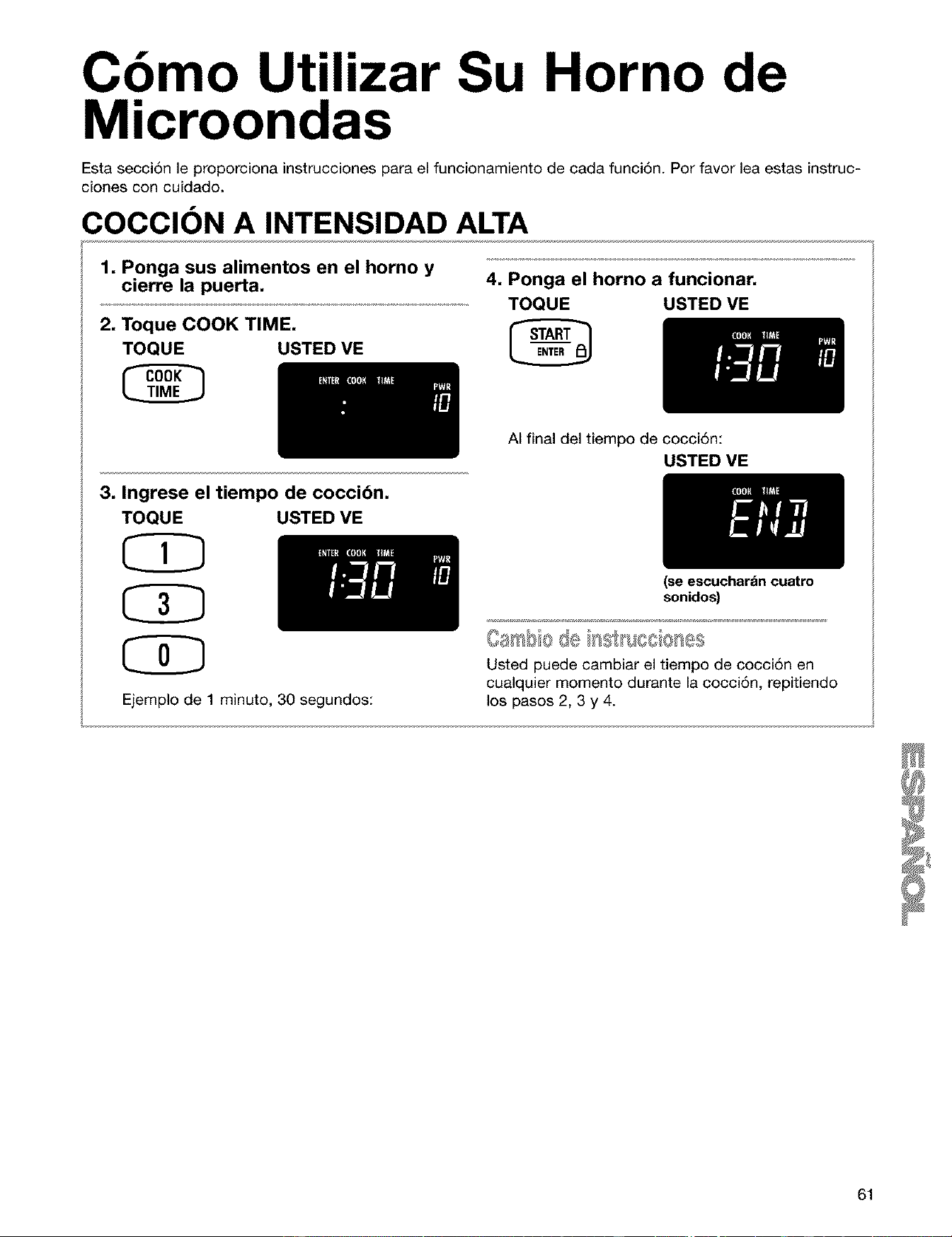
Cbmo Utilizar Su Horno de
Microondas
Esta secci6n le proporciona instrucciones para el funcionamiento de cada funci6n. Por favor lea estas instruc-
clones con cuidado.
COCClON A INTENSIDAD ALTA
1. Ponga sus alimentos en el horno y
cierre la puerta.
2. Toque COOK TIME,
TOQUE USTED VE
3. Ingrese el tiempo de coccibn.
TOQUE USTED VE
Ejemplo de 1 minuto, 30 segundos:
4, Ponga el horno a funcionar,
TOQUE USTED VE
AI final del tiempo de cocci6n:
USTED VE
(se escuchar_in cuatro
sonidos)
Usted puede cambiar el tiempo de cocci6n en
cualquier momento durante la cocci6n, repitiendo
los pasos 2, 3 y 4.
61
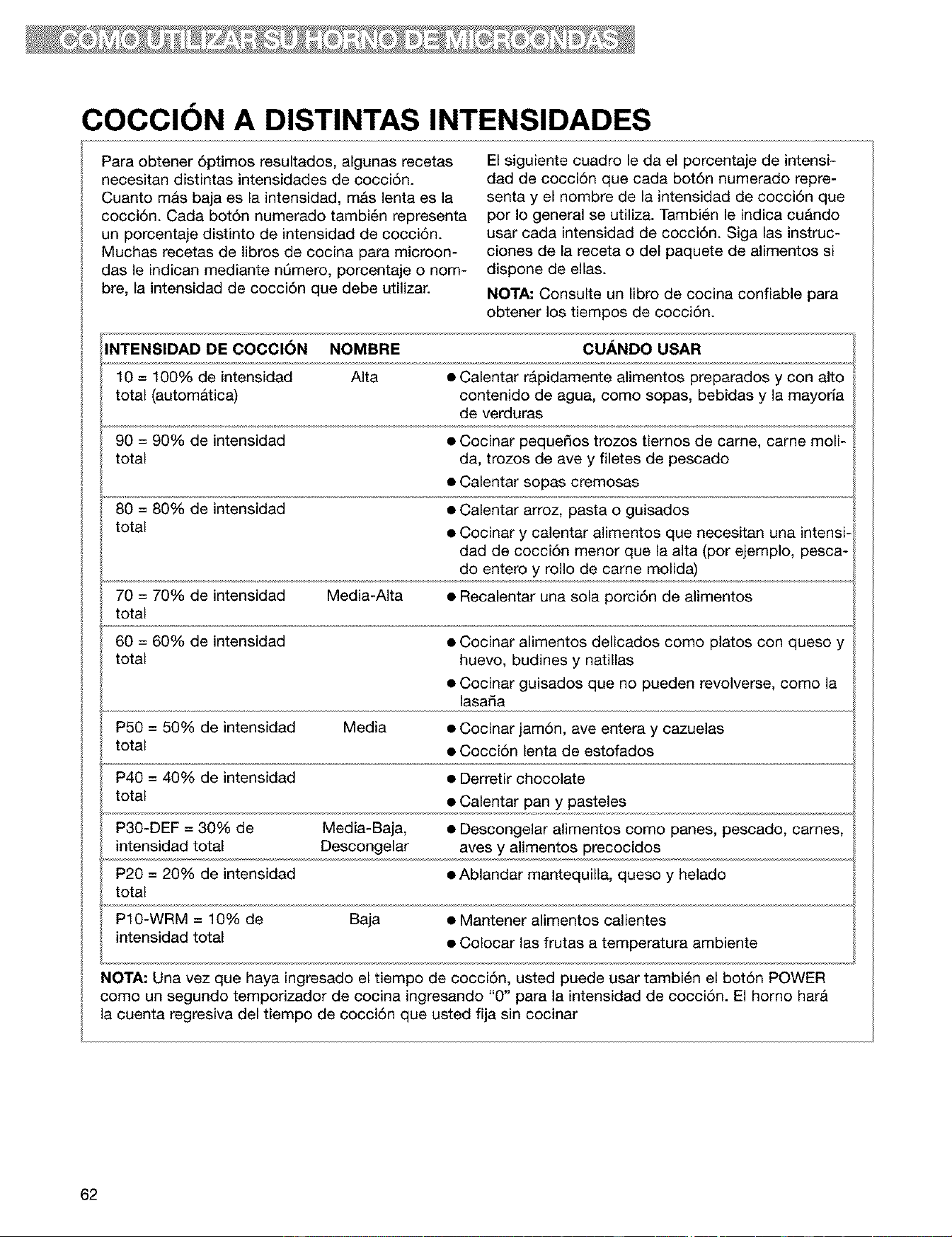
COCClON A DISTINTAS INTENSIDADES
Para obtener 6ptimos resultados, algunas recetas
necesitan distintas intensidades de cocci6n.
Cuanto mas baja es la intensidad, m&s lenta es la
cocci6n. Cada bot6n numerado tambi6n representa
un porcentaje distinto de intensidad de cocci6n.
Muchas recetas de libros de cocina para microon-
das le indican mediante nQmero, porcentaje o nom-
bre, la intensidad de cocci6n que debe utilizar.
El siguiente cuadro le da el porcentaje de intensi-
dad de cocci6n que cada bot6n numerado repre-
senta y el nombre de la intensidad de cocci6n que
por Io general se utiliza. Tambi6n le indica cuAndo
usar cada intensidad de cocci6n. Siga las instruc-
ciones de la receta o del paquete de alimentos si
dispone de elias.
NOTA: Consulte un libro de cocina confiable para
obtener los tiempos de cocci6n.
INTENSIDAD DE COCCION NOMBRE CUANDO USAR
10 = 100% de intensidad Alta • Calentar r_pidamente alimentos preparados y con alto
total (autom&tica) contenido de agua, como sopas, bebidas y la mayorla
de verduras
90 = 90% de intensidad • Cocinar peque_os trozos tiernos de came, carne moli-
total da, trozos de ave y filetes de pescado
• Calentar sopas cremosas
80 = 80% de intensidad • Calentar arroz, pasta o guisados
total • Cocinar y calentar alimentos que necesitan una intensi-
dad de cocci6n menor que la alta (por ejemplo, pesca-
do entero y rollo de carne molida)
70 = 70% de intensidad Media-Alta • Recalentar una sola porci6n de alimentos
total
60 = 60% de intensidad • Cocinar alimentos delicados como platos con queso y
total huevo, budines y natillas
• Cocinar guisados que no pueden revolverse, como la
lasada
P50 = 50% de intensidad Media • Cocinar jam6n, ave entera y cazuelas
total • Cocci6n lenta de estofados
P40 = 40% de intensidad • Derretir chocolate
total • Calentar pan y pasteles
P30-DEF = 30% de Media-Baja, • Descongelar alimentos como panes, pescado, carries,
intensidad total Descongelar aves y alimentos precocidos
P20 = 20% de intensidad • Ablandar mantequilla, queso y helado
total
P10-WRM = 10% de Baja • Mantener alimentos calientes
intensidad total • Colocar las frutas a temperatura ambiente
NOTA: Una vez que haya ingresado el tiempo de cocci6n, usted puede usar tambi6n el bot6n POWER
como un segundo temporizador de cocina ingresando "0" para la intensidad de cocci6n. El horno harA
la cuenta regresiva del tiempo de cocci6n que usted fija sin cocinar
62
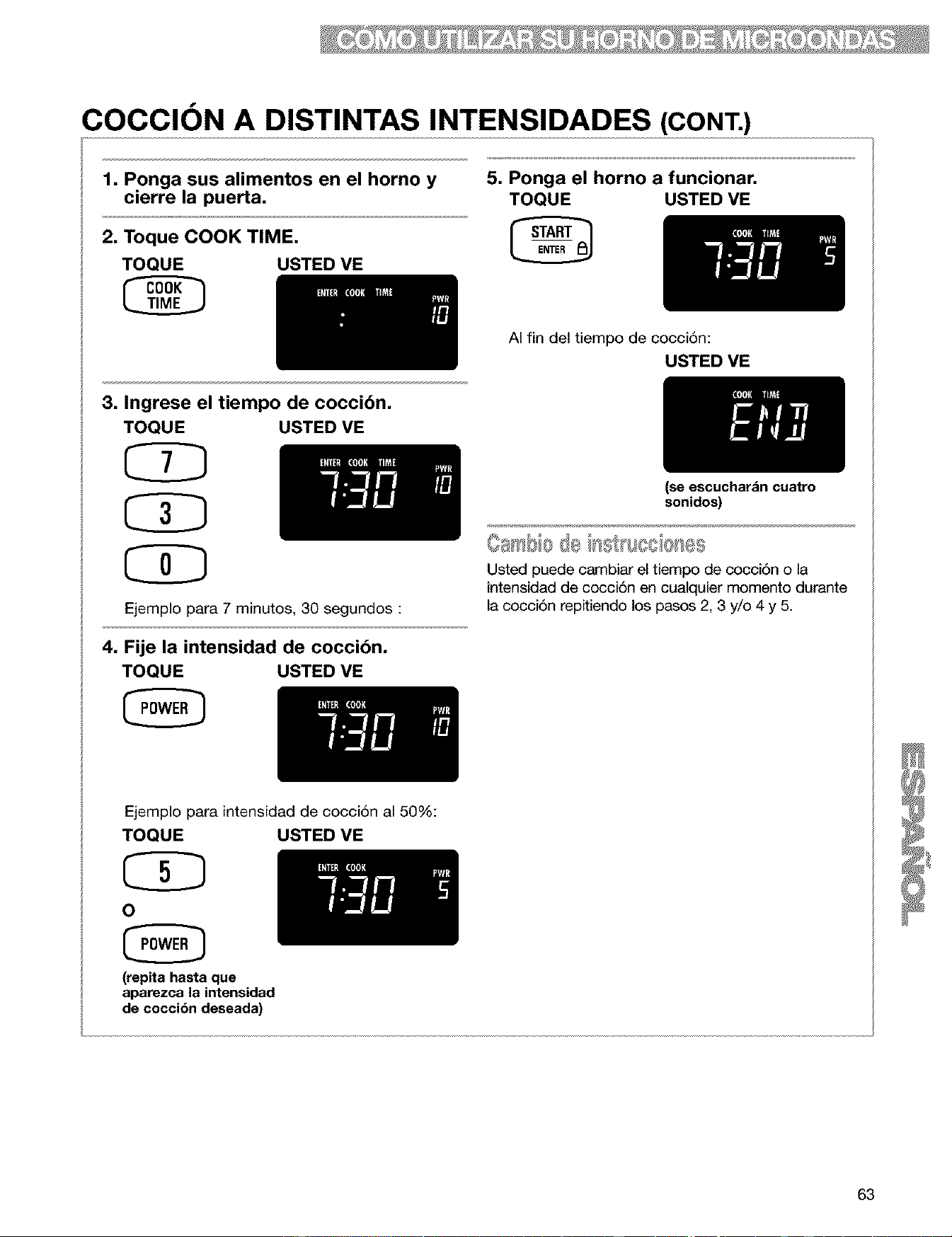
COCClON A DISTINTAS INTENSIDADES (CONT.)
1. Ponga sus alimentos en el horno y
cierre la puerta.
2. Toque COOK TIME,
TOQUE USTED VE
3. Ingrese el tiempo de coccibn.
TOQUE USTED VE
CD
CD
Ejemplo para 7 minutos, 30 segundos :
4. Fije la intensidad de coccibn.
TOQUE USTED VE
5. Ponga el horno a funcionar,
TOQUE USTED VE
AI fin del tiempo de cocciSn:
USTED VE
(se escuchar&n cuatro
sonidos)
Usted puede cambiar el tiempo de cocci6n o la
intensidad de cocci6n en cualquier momento durante
la cocci6n repitiendo los pasos 2, 3 y/o 4 y 5.
Ejemplo para
TOQUE
intensidad de cocci6n al 50%:
USTED VE
O
(repita hasta que
aparezca la intensidad
de coccibn deseada)
63
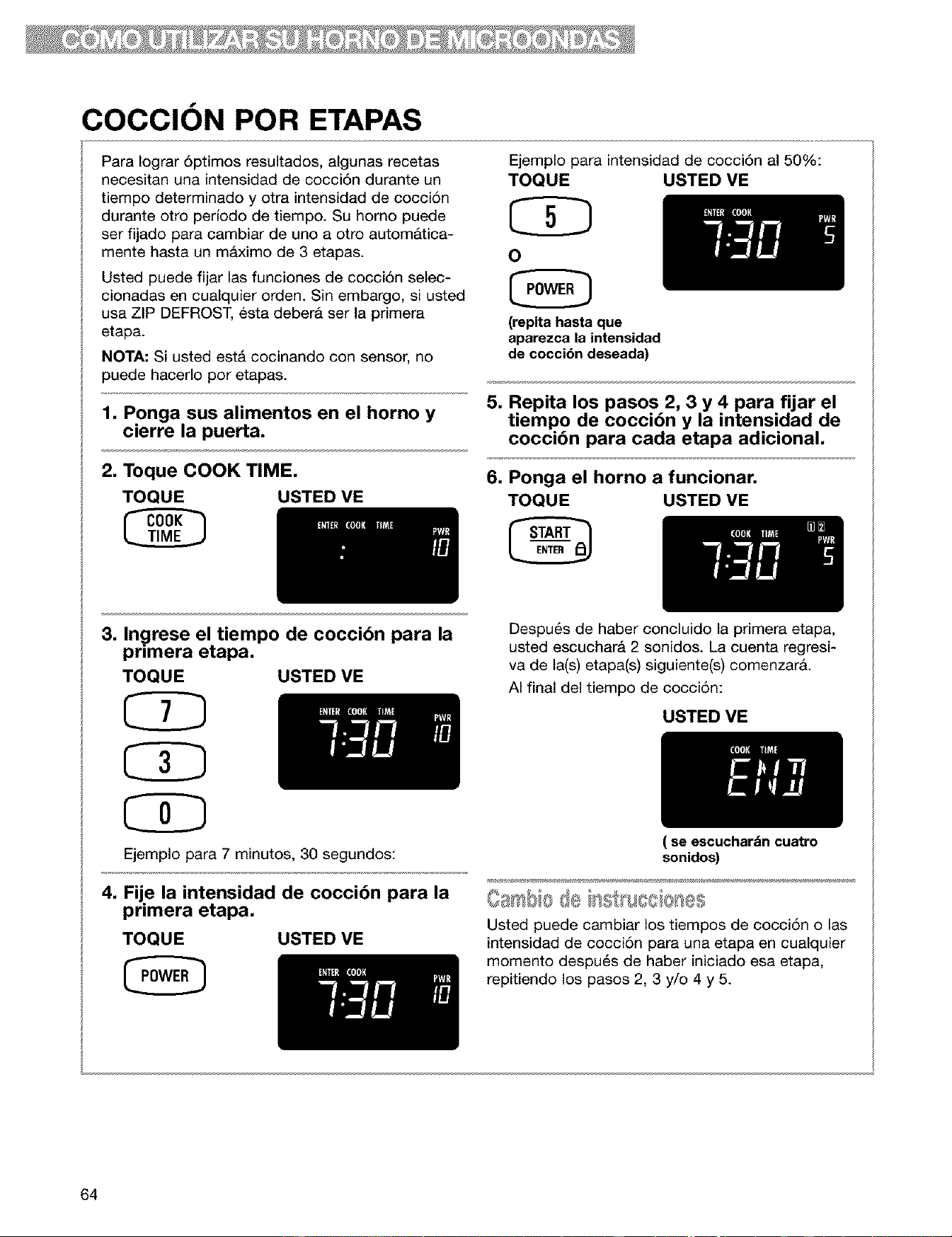
COCCION POR ETAPAS
Para Iograr 6ptimos resultados, algunas recetas
necesitan una intensidad de cocci6n durante un
tiempo determinado y otra intensidad de cocci6n
durante otro perJodo de tiempo. Su homo puede
ser fijado para cambiar de uno a otto automAtica-
mente hasta un m&ximo de 3 etapas.
Usted puede fijar las funciones de cocci6n selec-
cionadas en cualquier orden. Sin embargo, si usted
usa ZIP DEFROST, esta deberA ser la primera
etapa.
NOTA: Si usted est& cocinando con sensor, no
puede hacerlo por etapas.
1. Ponga sus alimentos en el horno y
cierre la puerta.
2. Toque COOK TIME.
TOQUE USTED VE
Ejemplo para intensidad de cocci6n al 50%:
TOQUE USTED VE
O
(repita hasta que
aparezca la intensidad
de cocci6n deseada)
5. Repita los pasos 2, 3 y 4 para fijar el
tiempo de cocci6n y la intensidad de
cocci6n para cada etapa adicional.
6. Ponga el horno a funcionar.
TOQUE USTED VE
3. In_lrese el tiempo de cocci6n para la
pr,mera etapa.
TOQUE USTED VE
Ejemplo para 7 minutos, 30 segundos:
4. Fije la intensidad de cocci6n para la
primera etapa.
TOQUE USTED VE
Despu6s de haber concluido la primera etapa,
usted escuchara 2 sonidos. La cuenta regresi-
va de la(s) etapa(s) siguiente(s) comenzarA.
AI final del tiempo de cocci6n:
USTED VE
( se escuchar_in cuatro
sonidos)
Usted puede cambiar los tiempos de cocci6n o las
intensidad de cocci6n para una etapa en cualquier
momento despu6s de haber iniciado esa etapa,
repitiendo los pasos 2, 3 y/o 4 y 5.
64
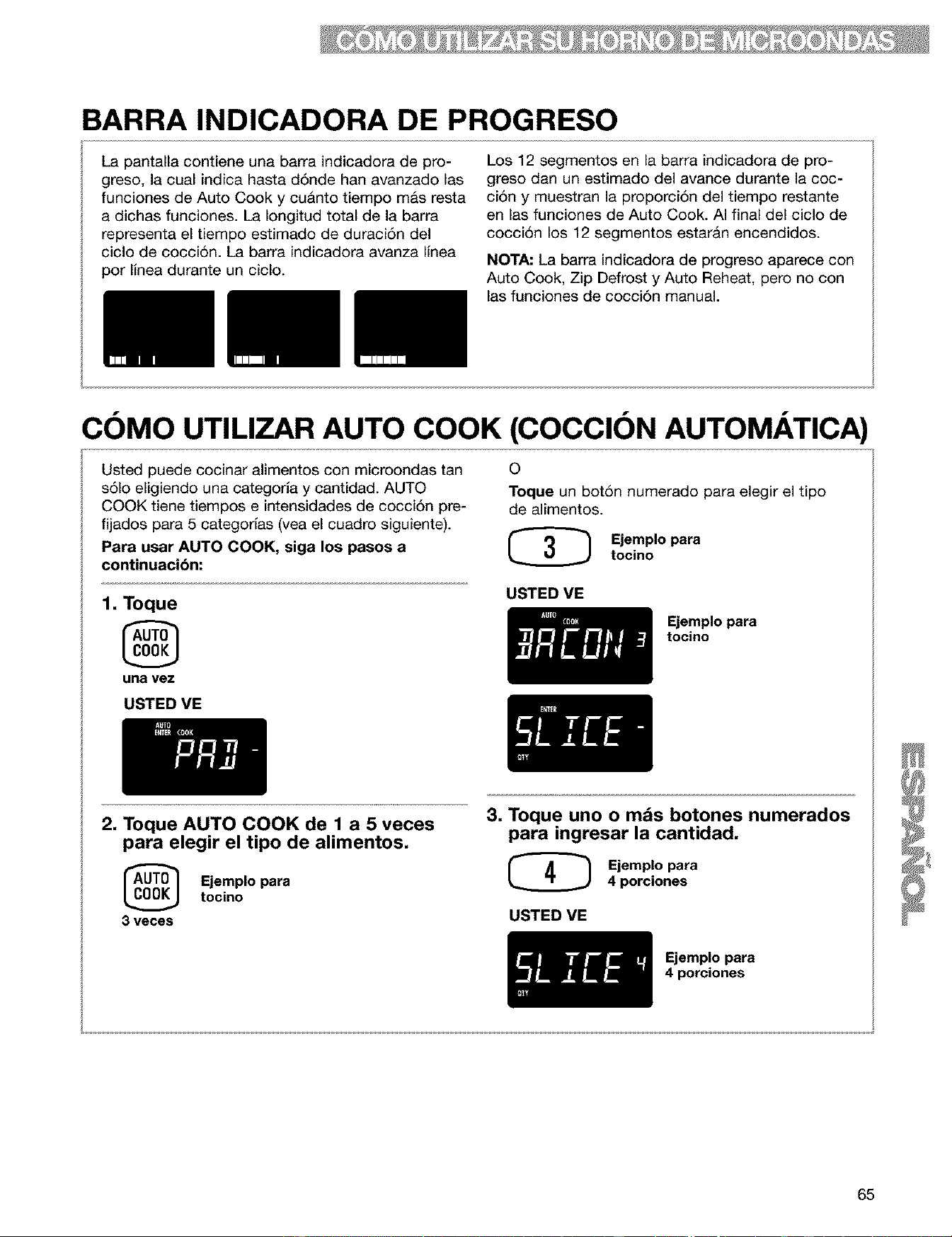
BARRA INDICADORA DE PROGRESO
La pantalla contiene una barra indicadora de pro-
greso, la cual indica hasta d6nde han avanzado las
funciones de Auto Cook y cu&nto tiempo m&s resta
a dichas funciones. La Iongitud total de la barra
representa el tiempo estimado de duraci6n del
ciclo de cocci6n. La barra indicadora avanza linea
por linea durante un ciclo.
Los 12 segmentos en la barra indicadora de pro-
greso dan un estimado del avance durante la coc-
ci6n y muestran la proporci6n del tiempo restante
en las funciones de Auto Cook. AI final del ciclo de
cocci6n los 12 segmentos estar&n encendidos.
NOTA: La barra indicadora de progreso aparece con
Auto Cook, Zip Defrost y Auto Reheat, pero no con
las funciones de cocci6n manual.
COMO UTILIZAR AUTO COOK (COCCION AUTOMATICA)
Usted puede cocinar alimentos con microondas tan
s61o eligiendo una categorla y cantidad. AUTO
COOK tiene tiempos e intensidades de cocci6n pre-
fijados para 5 categorias (yea el cuadro siguiente).
Para usar AUTO COOK, siga los pasos a
continuacibn:
1. Toque
una vez
0
Toque un bot6n numerado para elegir el tipo
de alimentos.
(_ Ejemplo para
tocino
USTED ME
Ejemplo para
tocino
USTED ME
2. Toque AUTO COOK de 1 a 5 veces
para elegir el tipo de alimentos.
Ejemplo paratocino
3 veces
3. Toque uno o mds botones numerados
para ingresar la cantidad.
(_ Ejemplo para
4 porciones
USTED VE
Ejemplo para
4 porciones
65
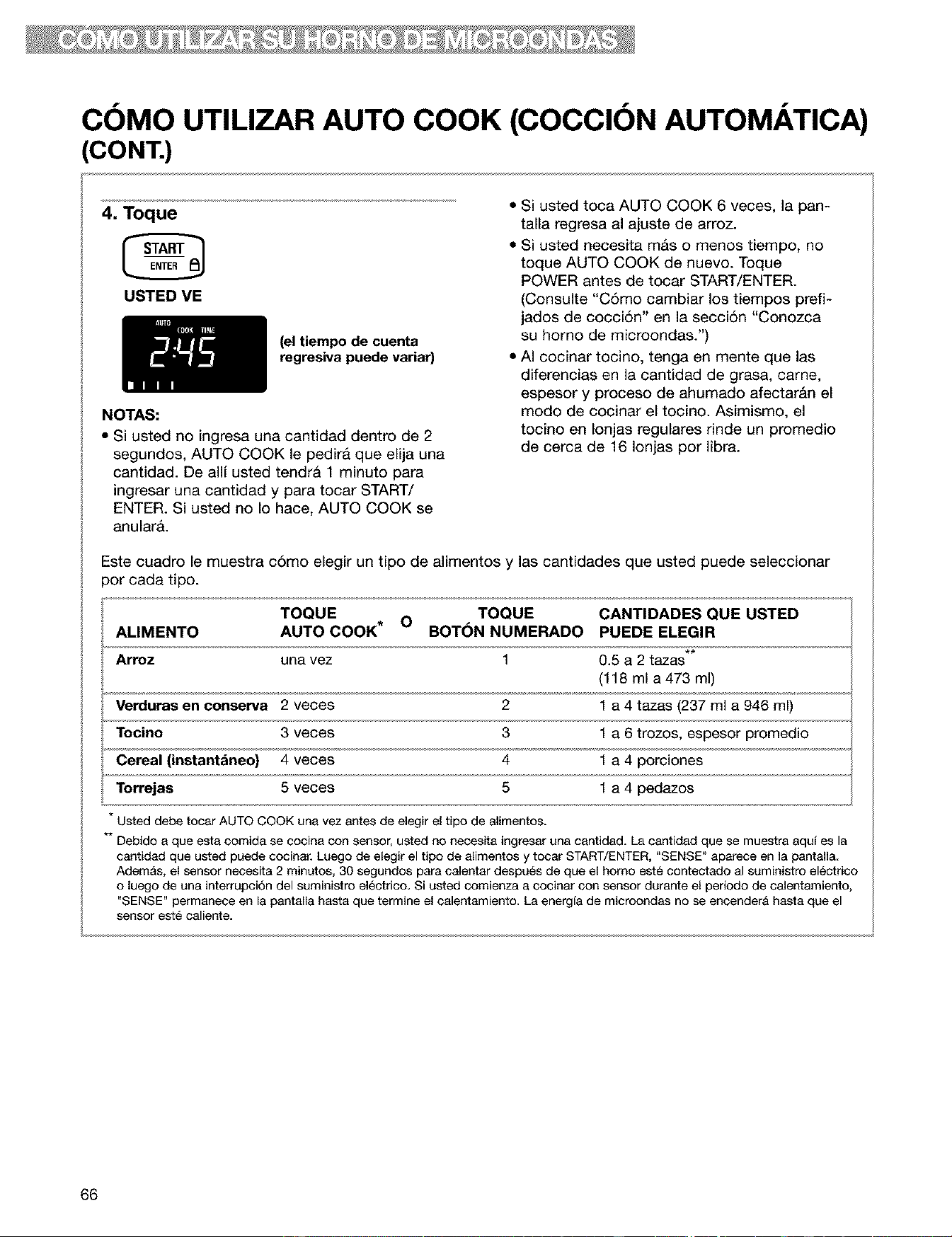
COMO UTILIZAR AUTO COOK (COCCION AUTOMATICA)
CONT.)
4, Toque
USTED VE
(el tiempo de cuenta
regresiva puede variar)
NOTAS:
• Si usted no ingresa una cantidad dentro de 2
segundos, AUTO COOK le pedira que elija una
cantidad. De allf usted tendr& 1 minuto para
ingresar una cantidad y para tocar START/
ENTER. Si usted no Io hace, AUTO COOK se
anularA.
• Si usted toca AUTO COOK 6 veces, la pan-
talla regresa al ajuste de arroz.
• Si usted necesita m&s o menos tiempo, no
toque AUTO COOK de nuevo. Toque
POWER antes de tocar START/ENTER.
(Consulte "C6mo cambiar los tiempos prefi-
jados de cocciSn" en la secciSn "Conozca
su horno de microondas.")
• AI cocinar tocino, tenga en mente que las
diferencias en la cantidad de grasa, carne,
espesor y proceso de ahumado afectarAn el
modo de cocinar el tocino. Asimismo, el
tocino en Ionjas regulares rinde un promedio
de cerca de 16 Ionjas por libra.
Este cuadro le muestra c6mo elegir un tipo de alimentos y las cantidades que usted puede seleccionar
3or cada tipo.
TOQUE O TOQUE CANTIDADES QUE USTED
ALIMENTO AUTO COOK* BOT(_N NUMERADO PUEDE ELEGIR
Arroz una vez 1 0.5 a 2 tazas**
(118 ml a473 ml)
Tocino 3 veces 3
Cereal (instantdneo) 4 veces 4 1 a 4 porciones
Torrejas 5 veces 5 1 a 4 pedazos
* Usted debe tocar AUTO COOK una vez antes de elegir el tipo de alimentos.
** Debido a que esta comida se cocina con sensor, usted no necesita ingresar una cantidad. La cantidad que se muestra aqui es la
cantidad que usted puede cocinar. Luego de elegir el tipo de alimentos y tocar START/ENTER, "SENSE" aparece en la pantalla.
Adem_s, el sensor necesita 2 minutos, 30 segundos para calentar despu6s de que el homo este contectado al suministro electrico
o luego de una interrupci6n del suministro electrico. Si usted comienza a cocinar con sensor durante el periodo de calentamiento,
"SENSE" permanece en la pantalla hasta que termine el calentamiento. La energia de microondas no se eneender& hasta que el
sensor est_ caliente.
66
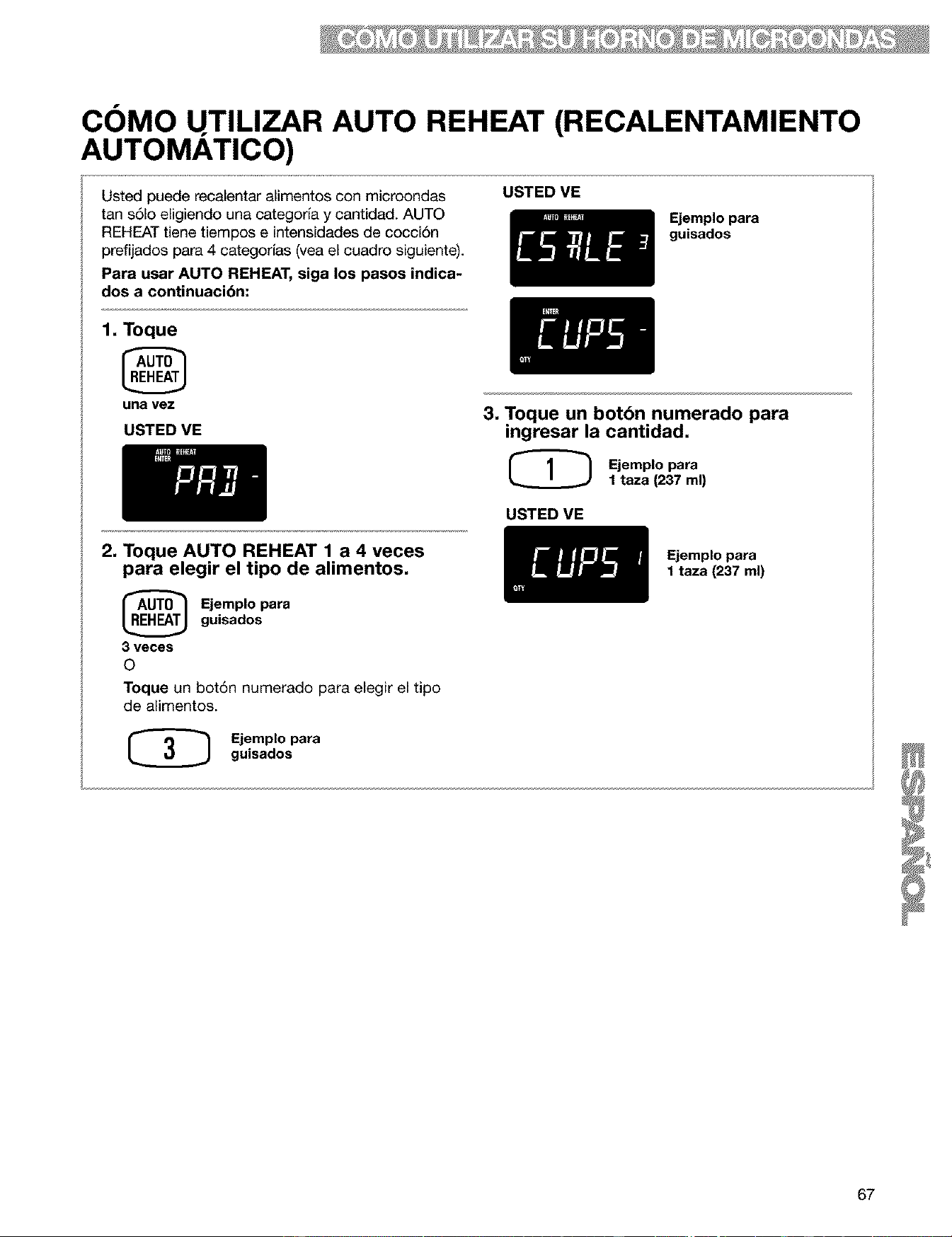
COMO UTILIZAR AUTO REHEAT (RECALENTAMIENTO
AUTOMATICO)
Usted puede recalentar alimentos con microondas
tan s61oeligiendo una categorfa y cantidad. AUTO
REHEAT tiene tiempos e intensidades de cocci6n
prefijados para 4 categorfas (vea el cuadro siguiente).
Para usar AUTO REHEAT, siga los pasos indica-
dos a continuacibn:
USTED VE
Ejemplo para
guisados
1, Toque
una vez
USTED VE
3, Toque un botbn numerado para
ingresar la cantidad,
@ Ejemplo _ra
1 taza (237 ml)
USTED VE
2, Toque AUTO REHEAT 1 a 4 veces
para elegir el tipo de alimentos,
Ejemplo para
guisados
3 veces
O
Toque un bot6n numerado para elegir el tipo
de alimentos.
(_ Ejemplo paraguisados
Ejemplo para
I taza (237 ml)
67
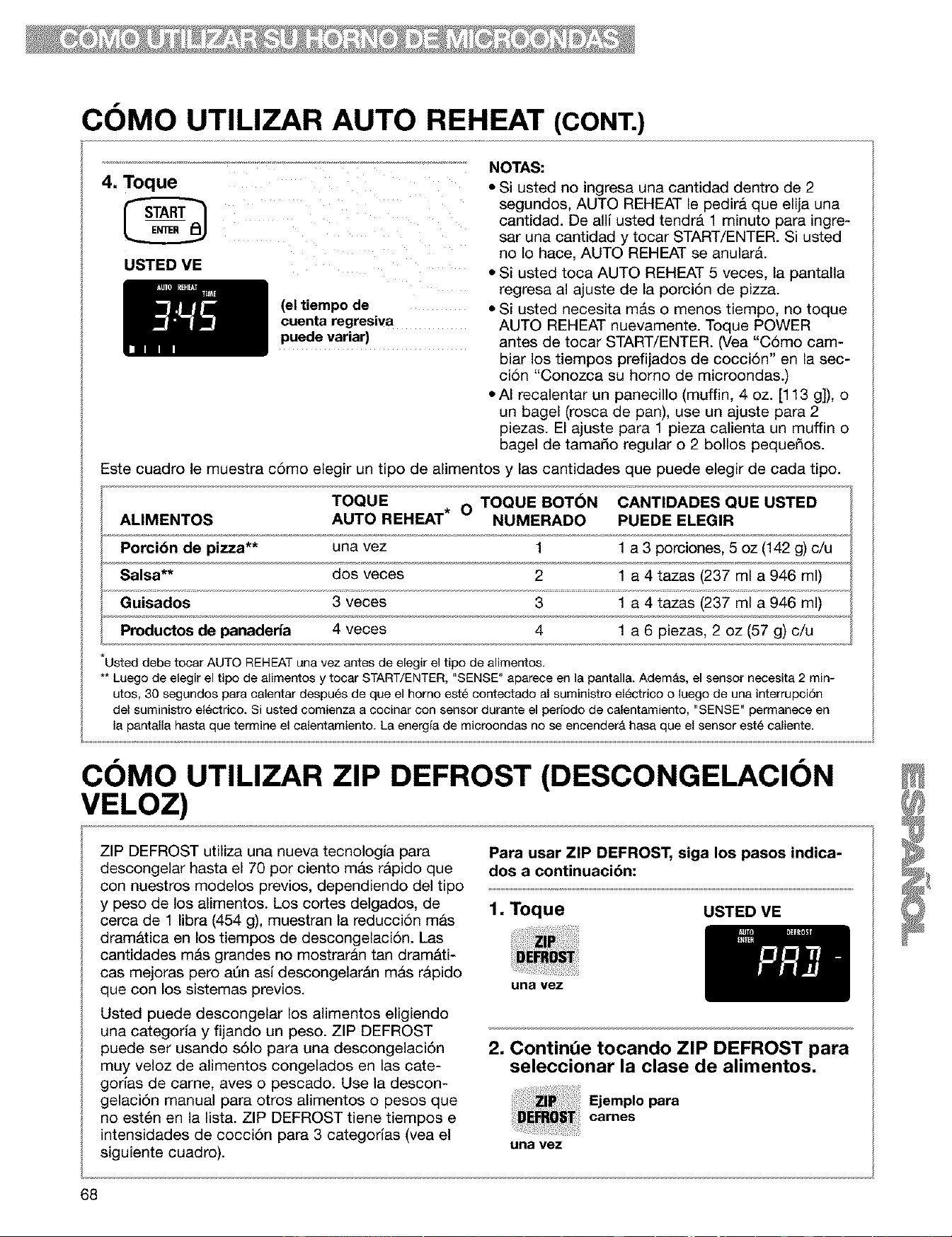
COMO UTILIZAR AUTO REHEAT (CONT.)
4. Toque
USTED VE
NOTAS:
• Si usted no ingresa una cantidad dentro de 2
segundos, AUTO REHEAT le pedira que elija una
cantidad. De alli usted tendr& 1 minuto para ingre-
sar una cantidad y tocar START/ENTER. Si usted
no Io hace, AUTO REHEAT se anular&
• Si usted toca AUTO REHEAT 5 veces, la pantalla
regresa al ajuste de la porci6n de pizza.
(el tiempo de • Si usted necesita m&s o menos tiempo, no toque
cuenta regresiva AUTO REHEAT nuevamente. Toque POWER
puede variar) antes de tocar START/ENTER. (Vea "C6mo cam-
biar los tiempos prefijados de cocci6n" en la sec-
ci6n "Conozca su homo de microondas.)
• AI recalentar un panecillo (muffin, 4 oz. [113 g]), o
un bagel (rosca de pan), use un ajuste para 2
piezas. El ajuste para 1 pieza calienta un muffin o
bagel de tamado regular o 2 bollos peque_os.
Este cuadro le muestra c6mo elegir un tipo de alimentos y las cantidades que puede elegir de cada tipo.
TOQUE O TOQUE BOT6N CANTIDADES QUE USTED
ALIMENTOS AUTO REHEAT* NUMERADO PUEDE ELEGIR
Porci6n de pizza** una vez 1 1 a 3 porciones, 5 oz (142 g) c/u
Salsa** dos veces 2 1 a 4 tazas (237 ml a 946 ml)
Guisados 3 veces 3 1 a 4 tazas (237 ml a 946 ml)
Productos de panaderia 4 veces 4 1 a 6 piezas, 2 oz (57 g) c/u
Usted debe tocar AUTO REHEAT una vez antes de elegir el tipo de alimentos.
** Luego de elegir el tipo de alimantos y tocar START/ENTER, "SENSE" aparece en la pantalla< Ademas, el sensor necesita 2 min-
utos, 30 segundos para calentar despues de que el homo est_ contectado al suministro el_ctrico o luego de una interrupci6n
del suministro el_ctrico. Si usted comienza a cocinar con sensor durante el perfodo de calentamiento, "SENSE" permanece en
la pantalla hasta que termine el calentamiento. La energfa de microondas no se encender& hasa que el sensor este caliante.
COMO UTILIZAR ZIP DEFROST (DESCONGELACION
VELOZ)
ZIP DEFROST utiliza una nueva tecnologla para
descongelar hasta el 70 por ciento mas r&pido que
con nuestros modelos previos, dependiendo del tipo
y peso de los alimentos. Los cortes delgados, de
cerca de 1 libra (454 g), muestran la reducci6n mas
dramatica en los tiempos de descongelaci6n. Las
cantidades m&s grandes no mostraran tan dram&ti-
cas mejoras pero aQn asi descongelar&n mAs rApido
que con los sistemas previos.
Usted puede descongelar los alimentos eligiendo
una categorfa y fijando un peso. ZIP DEFROST
puede ser usando s61o para una descongelaci6n
muy veloz de alimentos congelados en las cate-
gorfas de came, aves o pescado. Use la descon-
gelaci6n manual para otros alimentos o pesos que
no est6n en la list& ZIP DEFROST tiene tiempos e
intensidades de cocci6n para 3 categorias (vea el
siguiente cuadro).
Para usar ZIP DEFROST, siga los pasos indica-
dos a continuaci6n:
1,Toque USTED VE
una vez
2, Continde tocando ZIP DEFROST para
seleccionar la clase de alimentos,
Ejemplopara
carries
una vez
68
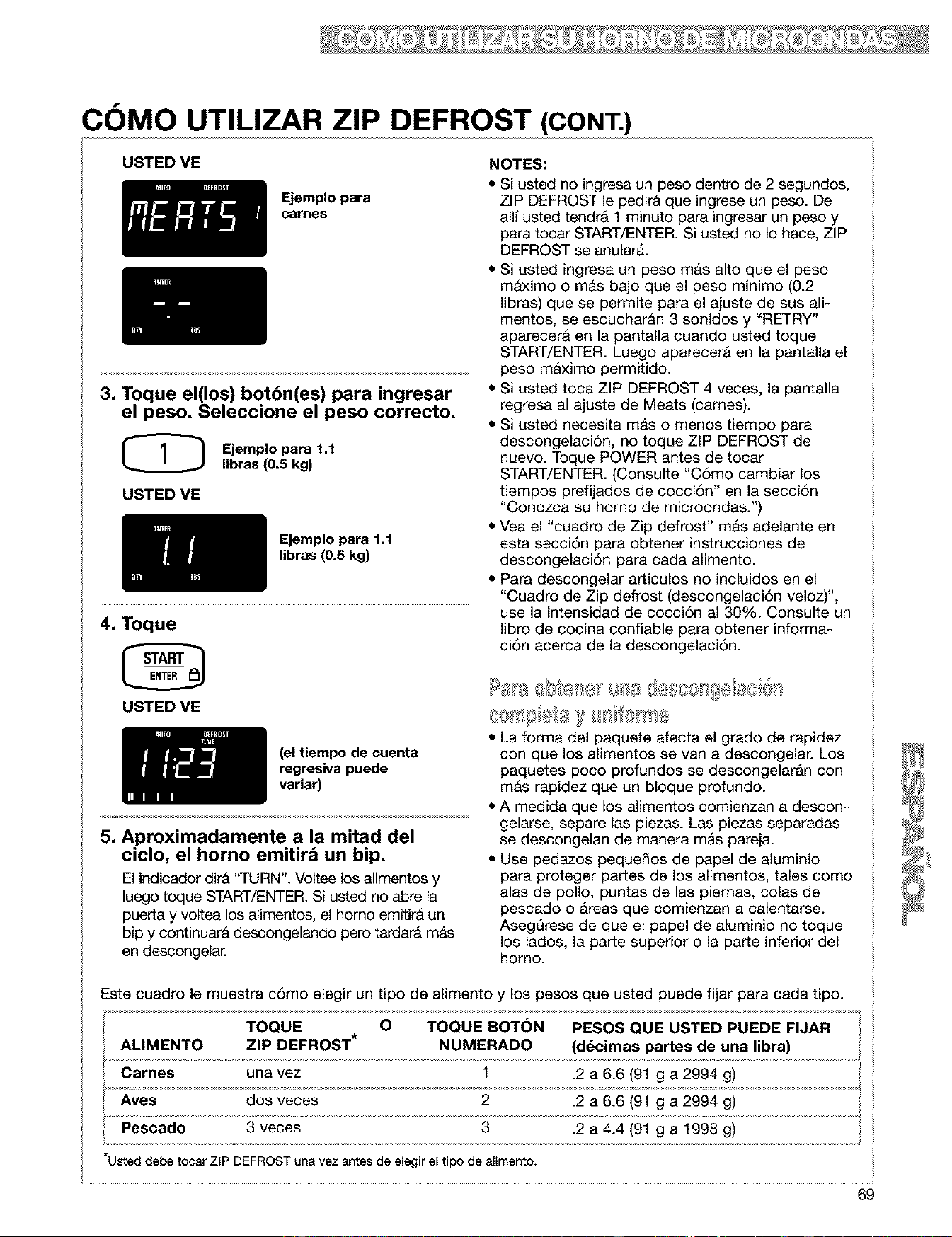
COMO UTILIZAR ZIP DEFROST (CONT.)
USTED VE
Ejemplo para
carnes
3. Toque el(los) botbn(es) para ingresar
el peso, Seleccione el peso correcto,
Ejemplo para 1.1
libras (0.5 kg)
USTED VE
Ejemplo para 1.1
libras (0.5 kg)
4, Toque
USTED VE
(el tiempo de cuenta
regresiva puede
variar)
5, Aproximadamente a la mitad del
ciclo, el horno emitird un bip,
El indicador dira "TURN". Voltee los almentos y
luego toque START/ENTER. Si usted no abre la
puerta y voltea los alimentos, el homo emitira un
bip y continuarA descongelando pero tardara mas
en descongelar.
NOTES:
• Si usted no ingresa un peso dentro de 2 segundos,
ZIP DEFROST le pedira que ingrese un peso. De
all usted tendra 1 minuto para ingresar un peso y
para tocar START/ENTER. Si usted no Io hace, ZIP
DEFROST se anularA.
• Si usted ingresa un peso mas alto que el peso
maximo o m&s bajo que el peso minimo (0.2
libras) que se permite para el ajuste de sus ali-
mentos, se escucharan 3 sonidos y "RETRY"
aparecera en la pantalla cuando usted toque
START/ENTER. Luego aparecerA en la pantalla el
peso mAximo permitido.
• Si usted toca ZIP DEFROST 4 veces, la pantalla
regresa al ajuste de Meats (cames).
• Si usted necesita mas o menos tiempo para
descongelaci6n, no toque ZIP DEFROST de
nuevo. Toque POWER antes de tocar
START/ENTER. (Consulte "C6mo cambiar los
tiempos prefijados de cocci6n" en la secci6n
"Conozca su homo de microondas.")
• Vea el "cuadro de Zip defrost" mas adelante en
esta secci6n para obtener instrucciones de
descongelaci6n para cada alimento.
• Para descongelar artlculos no incluidos en el
"Cuadro de Zip defrost (descongelaci6n veloz)",
use la intensidad de cocci6n al 30%. Consulte un
libro de cocina confiable para obtener informa-
ci6n acerca de la descongelaci6n.
o s 'sa@scos!8 aci@s
@rr_iSlSta)_I IfOhr_s
• LI forma del paquete afecta el grado de rapidez
con que los alimentos se van a descongelar. Los
paquetes poco profundos se descongelarAn con
mas rapidez que un bloque profundo.
• A medida que los alimentos comienzan a descon-
gelarse, separe las piezas. Las piezas separadas
se descongelan de manera mAs pareja.
• Use pedazos peque_os de papel de aluminio
para proteger partes de los alimentos, tales como
alas de polio, puntas de las piemas, colas de
pescado o Areas que comienzan a calentarse.
Aseg0rese de que el papel de aluminio no toque
los lados, la parte superior o la parte inferior del
homo.
Este cuadro le muestra c6mo elegir un tipo de alimento y los pesos que usted puede fijar para cada tipo.
TOQUE O TOQUE BOTON PESOS QUE USTED PUEDE FIJAR
ALIMENTO ZIP DEFROST* NUMERADO (d_cimas partes de una libra)
Carnes una vez 1 .2 a 6.6 (91 g a 2994 g)
Ayes dos veces 2 .2 a 6.6 (91 g a 2994 g)
Pescado 3 veces 3 .2 a 4.4 (91 g a 1998 g)
UsteddebetocarZIPDEFROSTunavezantesdeelegir el tipo dealimento.
69
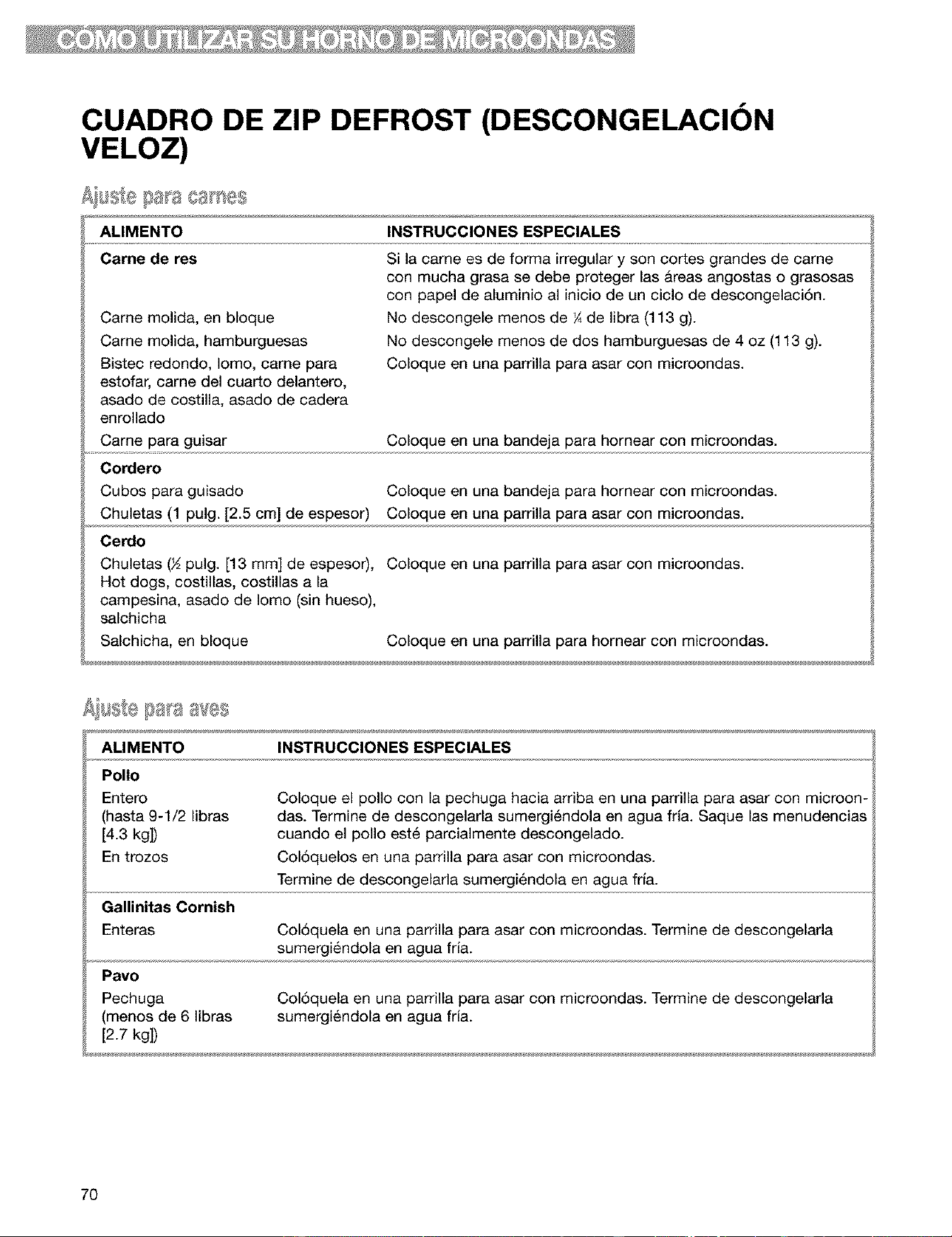
CUADRO DE ZIP DEFROST (DESCONGELACION
VELOZ)
ALIMENTO INSTRUCCIONES ESPECIALES
Carne de res
Came molida, en bloque
Came molida, hamburguesas
Bistec redondo, Iomo, came para
estofar, carne del cuarto delantero,
asado de costilla, asado de cadera
enrollado
Came para guisar
Cordero
Cubos para guisado
Chuletas (1 pulg. [2.5 cm] de espesor)
Cerdo
Si la came es de forma irregular y son cortes grandes de came
con mucha grasa se debe proteger las Areas angostas o grasosas
con papel de aluminio al inicio de un ciclo de descongelaciAn.
No descongele menos de ¼de libra (113 g).
No descongele menos de dos hamburguesas de 4 oz (113 g).
Coloque en una parrilla para asar con microondas.
Coloque en una bandeja para hornear con microondas.
Coloque en una bandeja para hornear con microondas.
Coloque en una parrilla para asar con microondas.
Chuletas (½ pulg. [13 mm] de espesor), Coloque en una parrilla para asar con microondas.
Hot dogs, costillas, costillas a la
campesina, asado de Iomo (sin hueso),
salchicha
Salchicha, en bloque Coloque en una parrilla para hornear con microondas.
ALIMENTO INSTRUCCIONES ESPECIALES
Polio
Entero
(hasta 9-1/2 libras
[4.3 kg])
En trozos
Coloque el polio con la pechuga hacia arriba en una parrilla para asar con microon-
das. Termine de descongelarla sumergiAndola en agua fHa. Saque las menudencias
cuando el polio est6 parcialmente descongelado.
ColAquelos en una parrilla para asar con microondas.
Termine de descongelarla sumergiAndola en agua fria.
Gallinitas Cornish
Enteras ColAquela en una parrilla para asar con microondas. Termine de descongelarla
sumergiAndola en agua fria.
Pavo
Pechuga
(menos de 6 libras
[2.7 kg])
ColAquela en una parrilla para asar con microondas. Termine de descongelarla
sumergiAndola en agua fria.
7O
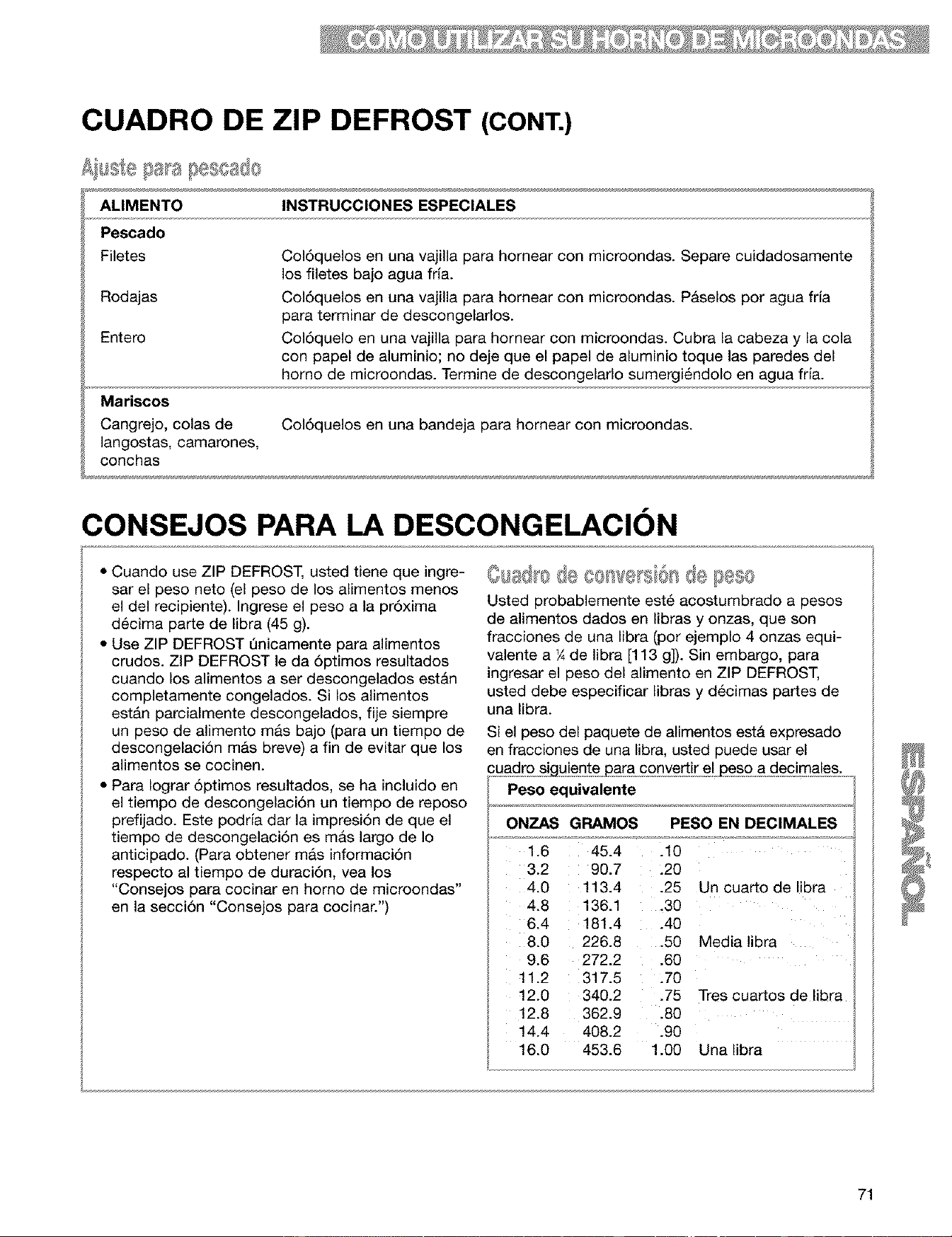
CUADRO DE ZIP DEFROST (CONT.)
ALIMENTO INSTRUCCIONES ESPECIALES
Pescado
Filetes
Rodajas
Entero
Mariscos
Cangrejo, colas de
langostas, camarones,
conchas
Col6quelos en una vajilla para homear con microondas. Separe cuidadosamente
los filetes bajo agua frla.
Col6quelos en una vajilla para homear con microondas. Paselos por agua frJa
para terminar de descongelarlos.
Col6quelo en una vajilla para hornear con microondas. Cubra la cabeza y la cola
con papel de aluminio; no deje que el papel de aluminio toque las paredes del
homo de microondas. Termine de descongelarlo sumergi6ndolo en agua fria.
Col6quelos en una bandeja para homear con microondas.
CONSEJOS PARA LA DESCONGELACION
• Cuando use ZIP DEFROST, usted tiene que ingre-
sar el peso neto (el peso de los alimentos menos
el del recipiente). Ingrese el peso a la pr6xima
d6cima parte de libra (45 g).
• Use ZIP DEFROST Qnicamente para alimentos
crudos. ZIP DEFROST le da 6ptimos resultados
cuando los alimentos a ser descongelados est&n
completamente congelados. Si los alimentos
est&n parcialmente descongelados, fije siempre
un peso de alimento mas bajo (para un tiempo de
descongelaci6n m&s breve) a fin de evitar que los
alimentos se cocinen.
• Para Iograr 6ptimos resultados, se ha incluido en
el tiempo de descongelaci6n un tiempo de reposo
prefijado. Este podria dar la impresi6n de que el
tiempo de descongelaci6n es mas largo de Io
anticipado. (Para obtener mas informaci6n
respecto al tiempo de duraci6n, vea los
"Consejos para cocinar en homo de microondas"
en la secci6n "Consejos para cocinar.")
@usd ede eo we si6s @ F es¢
Usted probablemente est_ acostumbrado a pesos
de alimentos dados en libras y onzas, que son
fracciones de una libra (por ejemplo 4 onzas equi-
valente a ¼ de libra [113 g]). Sin embargo, para
ingresar el peso del alimento en ZIP DEFROST,
usted debe especificar libras y d@cimas partes de
una libra.
Si el peso del paquete de alimentos esta expresado
en fracciones de una libra, usted puede usar el
Peso equivalente
ONZAS GRAMOS PESO EN DECIMALES
1.6 45.4
3.2
4.0
4.8
6.4
8.0
9.6
11.2
12.0
12.8
14.4
16.0
90.7
113.4
136.1
181.4
226.8
272.2
317.5
340.2
362.9
408.2
453.6
.10
.20
.25 Un cuarto de libra
.30
.40
.50 Media libra
.60
.70
.75 Tres cuartos de libra
.80
.90
1.00 Una libra
71
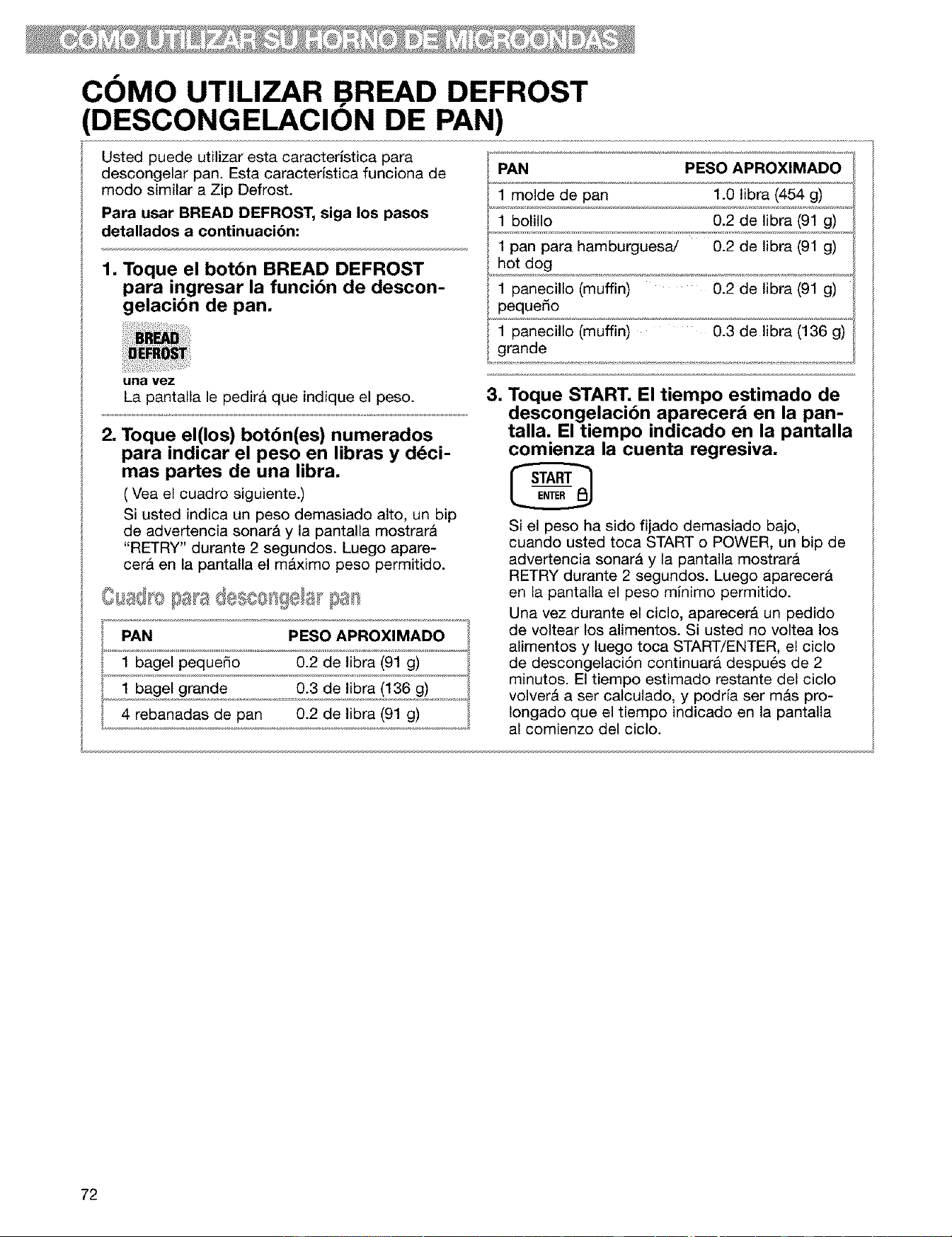
COMO UTILIZAR BREAD DEFROST
(DESCONGELACION DE PAN)
Usted puede utilizar esta caracterlstica para
descongelar pan. Esta caracteristica funciona de
modo similar a Zip Defrost.
Para usar BREAD DEFROST, siga los pasos
detallados a continuacibn:
1. Toque el botbn BREAD DEFROST
para ingresar la funcibn de descon-
gelacibn de pan.
PAN PESO APROXIMADO
1 molde de pan 1.O libra (454 g)
1 bolillo 0.2 de libra (91 g)
1 pan para hamburguesaJ 0.2 de libra (91 g)
hot dog
1 panecillo (muffin) 0.2 de libra (91 g)
pequedo
1 panecillo (muffin) 0.3 de libra (136 g)
grande
una vez
La pantalla le pedirfi que indique el peso.
2. Toque el(los) botbn(es) numerados
para indicar el peso en libras y ddci-
mas partes de una libra,
( Vea el cuadro siguiente.)
Si usted indica un peso demasiado alto, un bip
de advertencia sonar& y la pantalla mostrar&
"RETRY" durante 2 segundos. Luego apare-
cer& en la pantalla el m&ximo peso permitido.
PAN PESO APROXIMADO
1 bagel peque_o 0.2 de libra (91 g)
1 bagel grande 0.3 de libra (136 g)
4 rebanadas de pan 0.2 de libra (91 g)
,
Toque START, El tiempo estimado de
descongelacibn aparecer& en la pan-
talla. El tiempo indicado en la pantalla
comienza la cuenta regresiva.
Si el peso ha sido fijado demasiado bajo,
cuando usted toca START o POWER, un bip de
advertencia sonar& y la pantalla mostrar&
RETRY durante 2 segundos. Luego aparecer&
en la pantalla el peso minimo permitido.
Una vez durante el ciclo, aparecer& un pedido
de voltear los alimentos. Si usted no voltea los
alimentos y luego toca START/ENTER, el ciclo
de descongelaci6n continuar& despu6s de 2
minutos. El tiempo estimado restante del ciclo
volver& a ser calculado, y podrfa ser m&s pro-
Iongado que el tiempo indicado en la pantalla
al comienzo del ciclo.
72
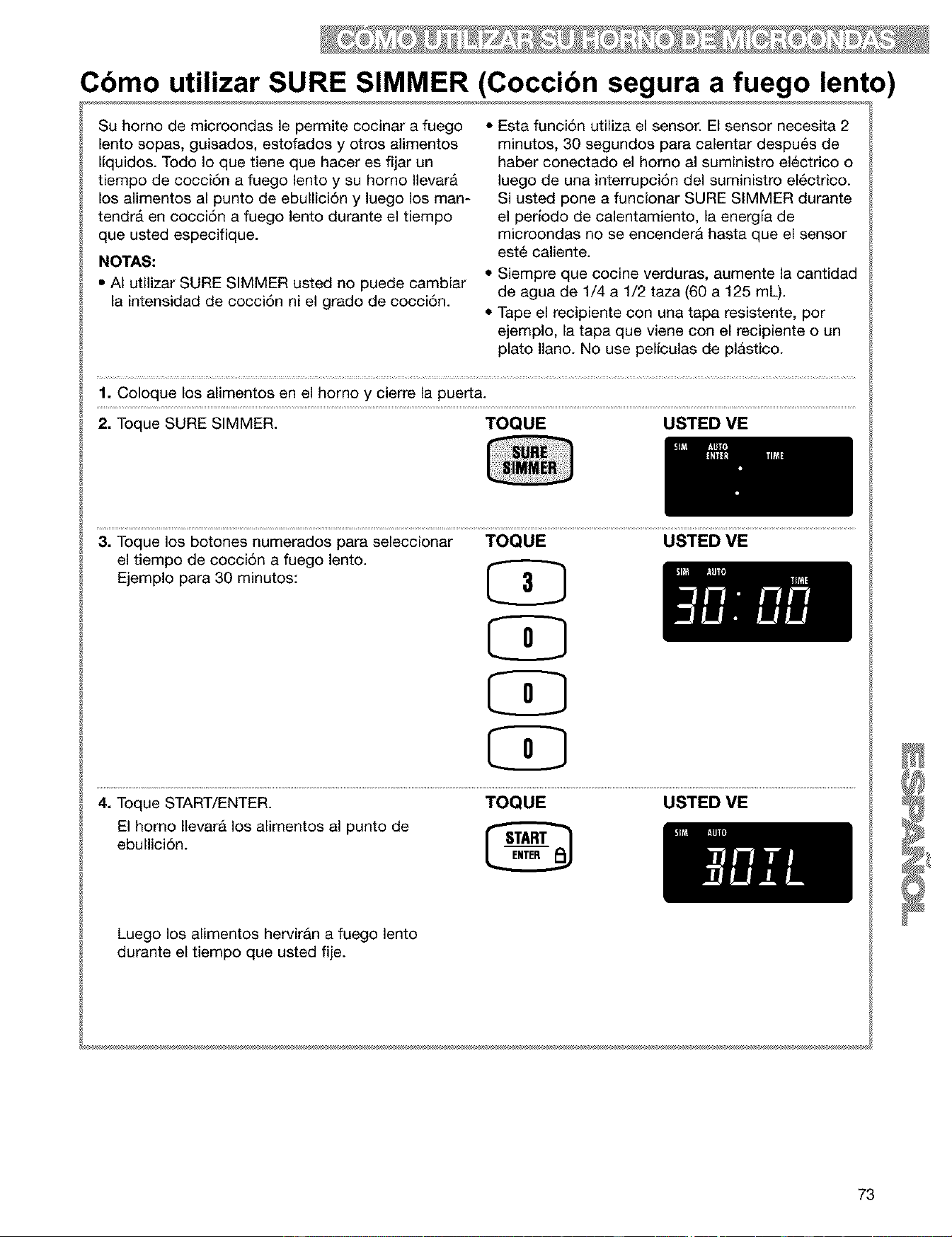
Cbmo utilizar SURE SIMMER (Coccibn segura a fuego lento)
Su homo de microondas le permite cocinar a fuego
lento sopas, guisados, estofados y otros alimentos
liquidos. Todo Io que tiene que hacer es fijar un
tiempo de cocci6n a fuego lento y su homo Ilevar&
los alimentos al punto de ebullici6n y luego los man-
tendr& en cocci6n a fuego lento durante el tiempo
que usted especifique.
NOTAS:
• AI utilizar SURE SIMMER usted no puede cambiar
la intensidad de cocci6n ni el grado de cocci6n.
• Esta funci6n utiliza el sensor. El sensor necesita 2
minutos, 30 segundos para calentar despu6s de
haber conectado el homo al suministro electrico o
luego de una interrupci6n del suministro el6ctrico.
Si usted pone a funcionar SURE SIMMER durante
el perJodo de calentamiento, la energia de
microondas no se encenderA hasta que el sensor
est6 caliente.
• Siempre que cocine verduras, aumente la cantidad
de agua de 1/4 a 1/2 taza (60 a 125 mL).
• Tape el recipiente con una tapa resistente, por
ejemplo, la tapa que viene con el recipiente o un
plato llano. No use peliculas de plastico.
1. Coloque los alimentos en el homo y cierre la puerta.
2. Toque SURE SIMMER. TOQUE USTED VE
3. Toque los botones numerados para seleccionar
el tiempo de cocci6n a fuego lento.
Ejemplo para 30 minutos:
TOQUE USTED VE
4. Toque START/ENTER. TOQUE USTED VE
El homo Ilevara los alimentos al punto de
ebullici6n.
Luego los alimentos hervir&n a fuego lento
durante el tiempo que usted fije.
73
Cuando hierva a fuego lento
alimentos tales como pasta
Use un recipiente con capacidad suficiente para
que el agua cubra los alimentos por completo
durante la cocci6n, como una cacerola de 3
cuartos _12tazas [2.84 I]) con tapa. AI cocinar
oasta o fideos, agregue 1 cucharada (15 ml] de
aceite al agua antes de herv_r.
Emplee el siguiente m6todo. Ponga el recipiente
con agua en el homo y siga los pasos 2 a 4. fijando
el tiempo de coccion a fuego lento en 1 segundo.
AI fin de la seSal, coloque los alimentos en el agua
y revuelvalos hasta que est6n completamente
cubiertos pot el agua. Tape. Repita los pasos 2 a 4.
fijando el tiemoo de cocci6n a fuego lento oue
usted desee.
Cambio de instrucciones
Usted puede cambiar el tiempo de coccibn a
fuego lento durante dicho periodo de coc-
cibn, repitiendo los pasos 2, 3 y 4,
74
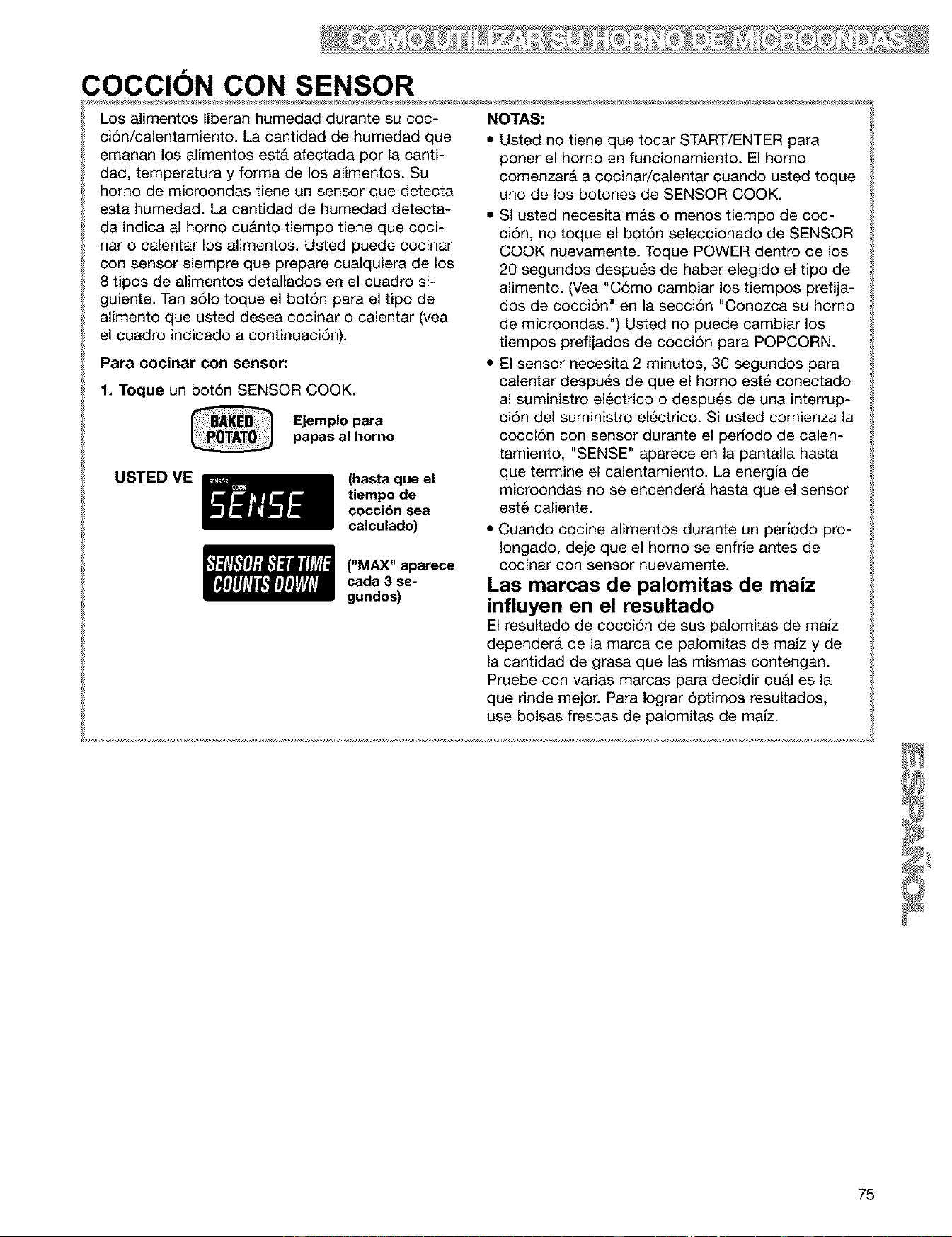
COCClON CON SENSOR
Los alimentos liberan humedad durante su coc-
ci6n/calentamiento. La cantidad de humedad que
emanan los alimentos est& afectada por la canti-
dad, temperatura y forma de los alimentos. Su
homo de microondas tiene un sensor que detecta
esta humedad. La cantidad de humedad detecta-
da indica al homo cu&nto tiempo tiene que coci-
nar o calentar los alimentos. Usted puede cocinar
con sensor siempre que prepare cualquiera de los
8 tipos de alimentos detallados en el cuadro si-
guiente. Tan s61o toque el bot6n para el tipo de
alimento que usted desea cocinar o calentar (vea
el cuadro indicado a continuaci6n).
Para cocinar con sensor."
1. Toque un bot6n SENSOR COOK.
Ejemplo para
papas al homo
USTED ME
(hasta que el
tiempo de
cocci6n sea
calculado)
("MAX" aparece
cada 3 se-
gundos)
NOTAS:
• Usted no tiene que tocar START/ENTER para
porter el homo en funcionamiento. El homo
comenzar& a cocinar/calentar cuando usted toque
uno de los botones de SENSOR COOK.
• Si usted necesita m&s o menos tiempo de coc-
ci6n, no toque el bot6n seleccionado de SENSOR
COOK nuevamente. Toque POWER dentro de los
20 segundos despu6s de haber elegido el tipo de
alimento. (Vea "C6mo cambiar los tiempos prefija-
dos de cocci6n" en la secci6n "Conozca su homo
de microondas.") Usted no puede cambiar los
tiempos prefijados de cocci6n para POPCORN.
• El sensor necesita 2 minutos, 30 segundos para
calentar despu_s de que el horno est6 conectado
al suministro electrico o despu_s de una interrup-
ci6n del suministro el6ctrico. Si usted comienza la
cocci6n con sensor durante el perlodo de calen-
tamiento, "SENSE" aparece en la pantalla hasta
que termine el calentamiento. La energla de
microondas no se encenderA hasta que el sensor
est6 caliente.
• Cuando cocine alimentos durante un perJodopro-
Iongado, deje que el horno se enfrle antes de
cocinar con sensor nuevamente.
Las marcas de palomitas de maJz
influyen en el resultado
El resultado de cocci6n de sus palomitas de malz
depender& de la marca de palomitas de malz y de
la cantidad de grasa que las mismas contengan.
Pruebe con varias marcas para decidir cu&l es la
que rinde mejor. Para Iograr 6ptimos resultados,
use bolsas frescas de palomitas de malz.
75
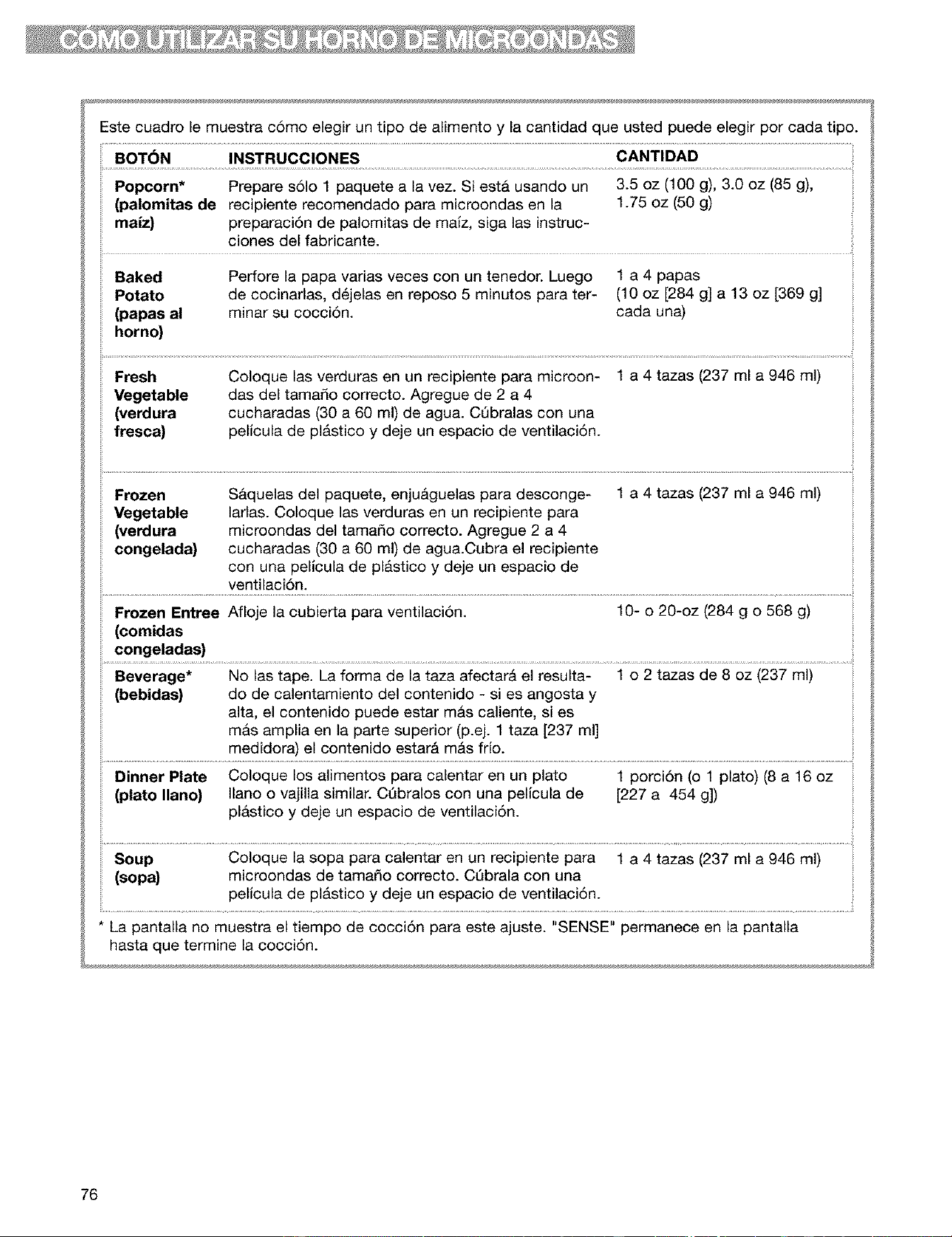
Estecuadrole muestrac6moelegiruntipodealimentoy lacantidadqueustedpuedeelegirporcadatipo.
BOT6N INSTRUCCIONES CANTIDAD
Popcorn* Prepare s61o 1 paquete a la vez. SiestA usando un 3.5 oz (100 g), 3.0 oz (85 g),
(palomitas de recipiente recomendado para microondas en la 1.75 oz (50 g)
maiz) preparaci6n de palomitas de maiz, siga las instruc-
ciones del fabricante.
Baked Perfore la papa varias veces con un tenedor. Luego 1 a 4 papas
Potato de cocinarlas, d6jelas en reposo 5 minutos para ter- (10 oz [284 g] a 13 oz [369 g]
(papas al minar su cocci6n, cada una)
horno)
Fresh
Vegetable
(verdura
fresca)
Coloque las verduras en un recipiente para microon-
das del tama_o correcto. Agregue de 2 a 4
cucharadas (30 a 60 ml) de agua. CObralas con una
pelicula de pl&stico y deje un espacio de ventilaci6n.
1 a 4 tazas (237 ml a 946 ml)
Frozen
Vegetable
(verdura
congelada)
S&quelas del paquete, enju&guelas para desconge-
larlas. Coloque las verduras en un recipiente para
microondas del tama_o correcto. Agregue 2 a 4
cucharadas (30 a 60 ml) de agua.Cubra el recipiente
con una pelicula de pl&stico y deje un espacio de
ventilaci6n.
1 a 4 tazas (237 ml a 946 ml)
i!...............................................................................................................................................................................................................................................................................................................................................................................................................................................................................i
Frozen Entree Afioje la cubierta para ventilaci6n. 10- o 20-oz (284 g o 568 g)
(comidas
congeladas)
Beverage* No las tape. La forma de la taza afectar& el resulta- 1 o 2 tazas de 8 oz (237 ml)
(bebidas) do de calentamiento del contenido - si es angosta y
alta, el contenido puede estar m&s caliente, si es
mas amplia en la parte superior (p.ej. 1 taza [237 ml]
medidora) el contenido estar& m&s frio.
Dinner Plate Coloque los alimentos para calentar en un plato 1 porci6n (o 1 plato) (8 a 16 oz
(plato llano) llano o vajilla similar. C6bralos con una pelicula de [227 a 454 g])
pl&stico y deje un espacio de ventilaci6n.
Soup Coloque la sopa para calentar en un recipiente para 1 a 4 tazas (237 ml a 946 ml)
(sopa) microondas de tama_o correcto. C6brala con una
pelicula de pl&stico y deje un espacio de ventilaci6n.
* La pantalla no muestra el tiempo de cocci6n para este ajuste. "SENSE" permanece en la pantalla
hasta que termine la cocci6n.
76
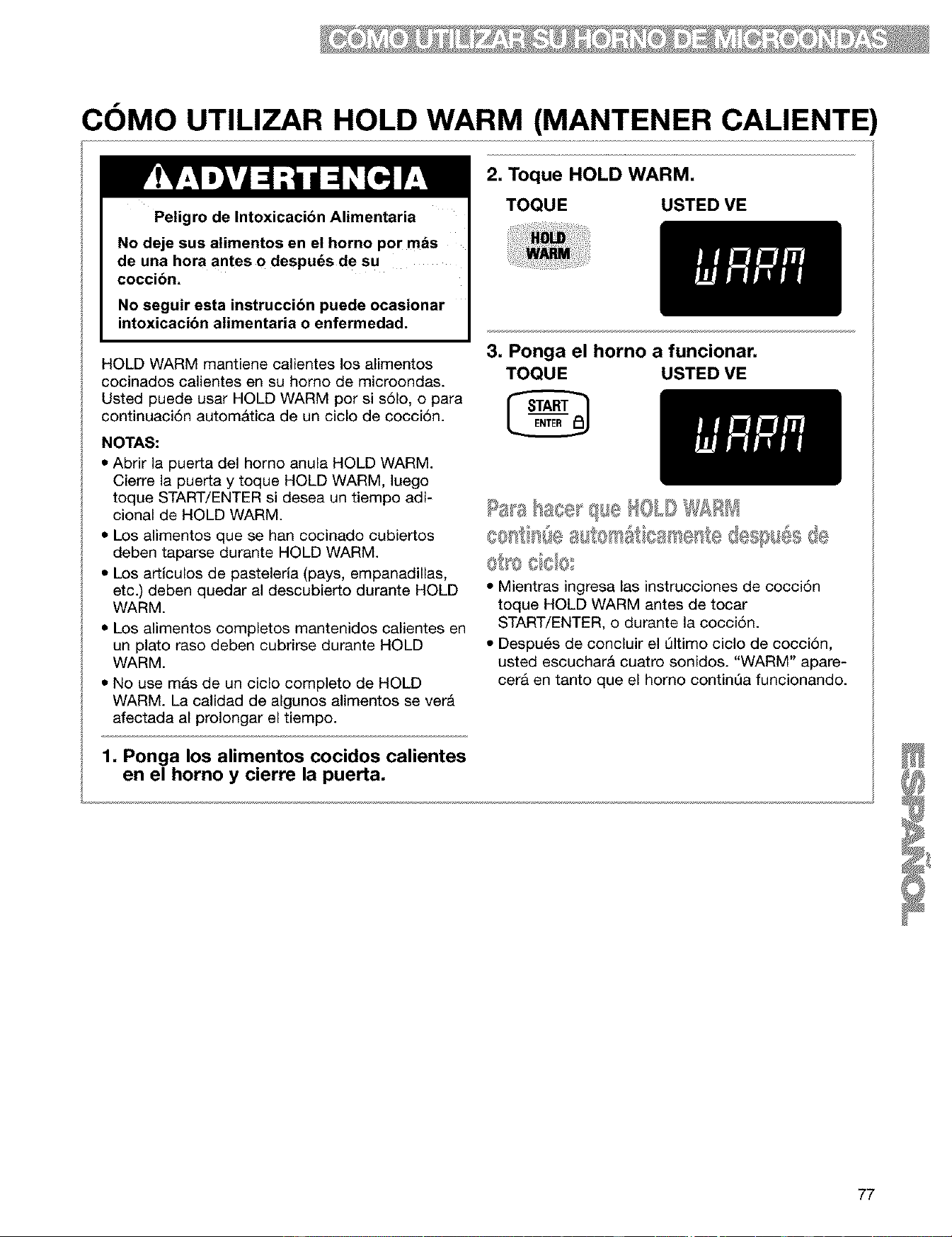
COMO UTILIZAR HOLD WARM (MANTENER CALIENTE)
Peligro de Intoxicacibn Alimentaria
No deje sus alimentos en el horno por mds
de una hora antes o despu_s de su
coccibn.
No seguir esta instruccibn puede ocasionar
intoxicacibn alimentaria o enfermedad.
HOLD WARM mantiene calientes los alimentos
cocinados calientes en su homo de microondas.
Usted puede usar HOLD WARM por si s61o, o para
continuaci6n autom&tica de un ciclo de cocci6n.
NOTAS:
• Abrir la puerta del homo anula HOLD WARM.
Cierre la puerta y toque HOLD WARM, luego
toque START/ENTER si desea un tiempo adi-
cional de HOLD WARM.
• Los alimentos que se han cocinado cubiertos
deben taparse durante HOLD WARM.
• Los artlculos de pasteleria (pays, empanadillas,
etc.) deben quedar al descubierto durante HOLD
WARM.
• Los alimentos completos mantenidos calientes en
un plato raso deben cubrirse durante HOLD
WARM.
• No use mas de un ciclo completo de HOLD
WARM. La calidad de algunos alimentos sever&
afectada al prolongar el tiempo.
1, Ponga los alimentos cocidos calientes
en el horno y cierre la puerta.
2, Toque HOLD WARM,
TOQUE USTED VE
3, Ponga el horno a funcionar,
TOQUE USTED VE
• Mientras ingresa las instrucciones de cocci6n
toque HOLD WARM antes de tocar
START/ENTER, o durante la cocci6n.
• Despu6s de concluir el Qltimo ciclo de cocci6n,
usted escuchar& cuatro sonidos. "WARM" apare-
cera en tanto que el homo continQa funcionando.
77
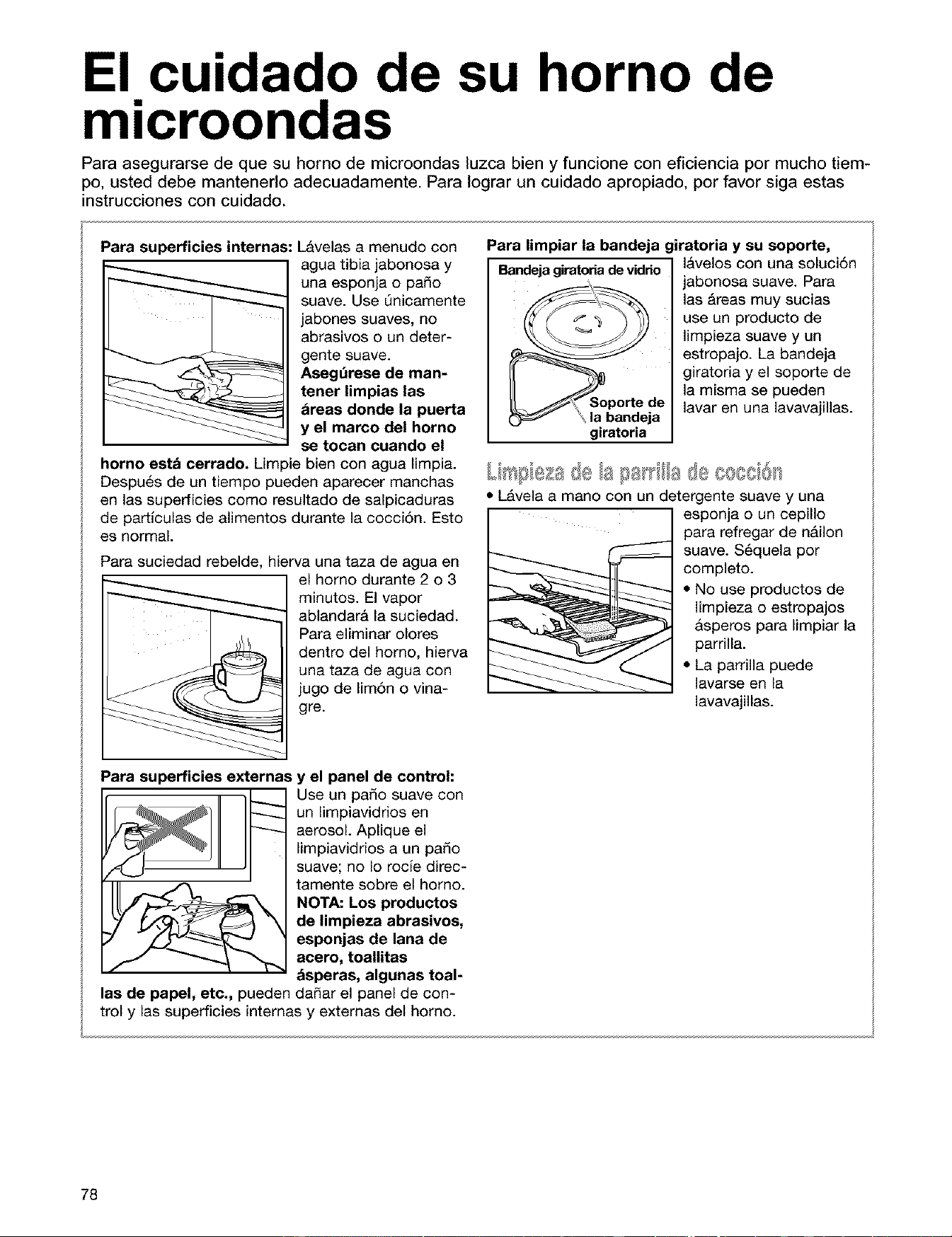
El cuidado de su horno de
microondas
Para asegurarse de que su horno de microondas luzca bien y funcione con eficiencia por mucho tiem-
po, usted debe mantenerlo adecuadamente. Para Iograr un cuidado apropiado, por favor siga estas
instrucciones con cuidado.
Para superficies internas: Lavelas a menudo con
agua tibia jabonosa y
una esponja o pado
suave. Use Qnicamente
jabones suaves, no
abrasivos o un deter-
gente suave.
Asegt_rese de man-
tener limpias las
areas donde la puerta
y el marco del horno
se tocan cuando el
horno estA cerrado. Limpie bien con agua limpia.
DespuAs de un tiempo pueden aparecer manchas
en las superficies como resultado de salpicaduras
de particulas de alimentos durante la cocciSn. Esto
es normal.
Para suciedad rebelde, hierva una taza de agua en
el homo durante 2 o 3
minutos. El vapor
ablandara la suciedad.
Para eliminar olores
dentro del homo, hierva
una taza de agua con
jugo de limAn o vina-
gre.
Para limpiar la bandeja giratoria y su soporte,
Bandejagiratoriade vidrio lavelos con una soluciAn
jabonosa suave. Para
las Areas muy sucias
use un producto de
limpieza suave y un
estropajo. La bandeja
giratoria y el soporte de
la misma se pueden
lavar en una lavavajillas.
de
la bandeja
giratoria
LIFilBI@II " .... " = ....
- 118 £18 Ia(_=QOOQIOII
• LAvIII a mini con un detergente suave y uni
esponja o un cepillo
para refregar de nAilon
suave. SAquela por
completo.
• No use productos de
limpieza o estropajos
asperos para limpiar la
parrilla.
• La parrilla puede
lavarse en la
lavavajillas.
Para superficies externas y el panel de control:
Use un paso suave con
un limpiavidrios en
aerosol. Aplique el
limpiavidrios a un pado
suave; no Io rocie direc-
tamente sobre el horno.
NOTA: Los productos
de limpieza abrasivos,
esponjas de lana de
acero, toallitas
asperas, algunas toal-
las de papel, etc., pueden dinar el panel de con-
trol y las superficies internas y externas del homo.
78
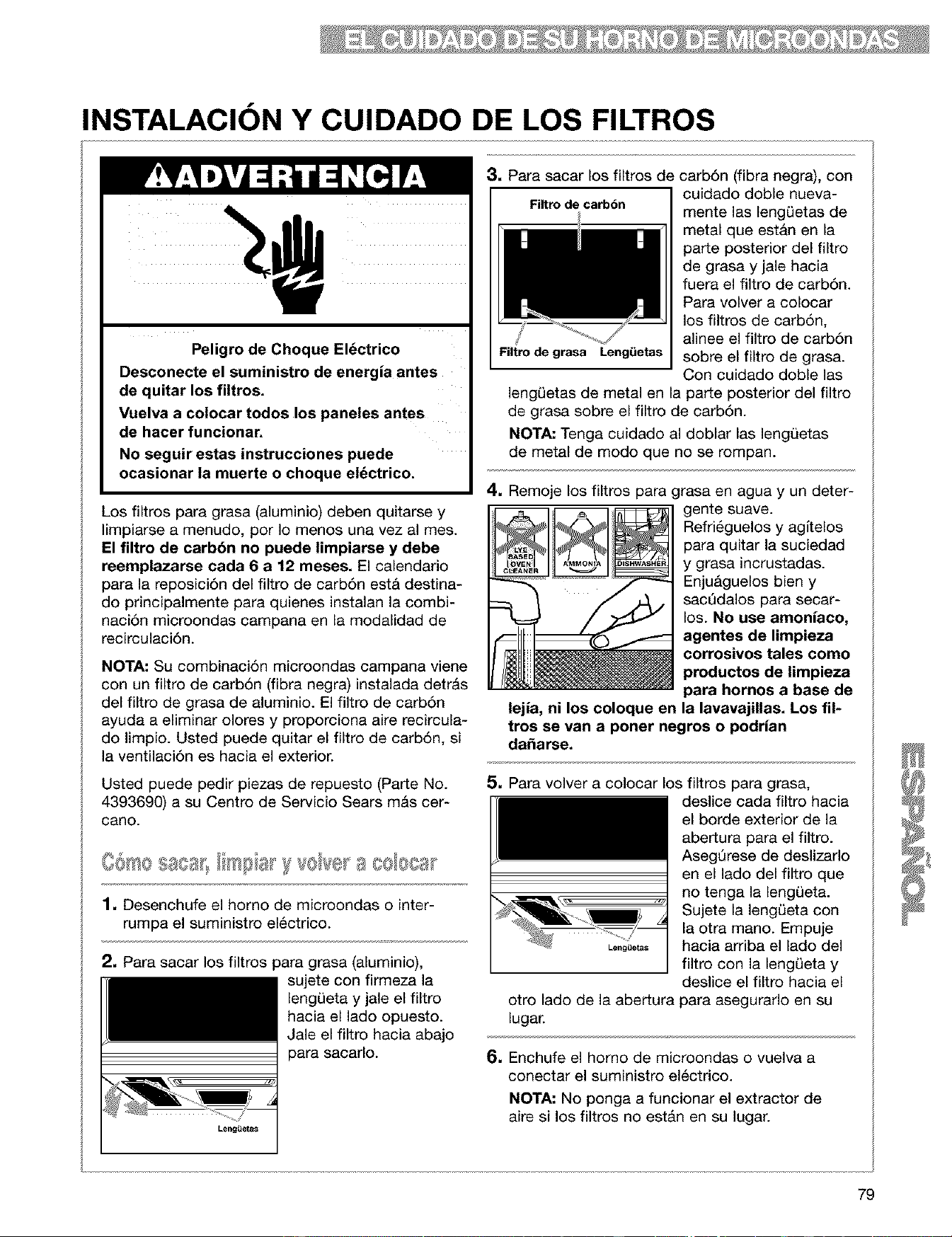
INSTALACION Y CUIDADO DE LOS FILTROS
Peligro de Choque Eldctrico
Desconecte el suministro de energia antes
de quitar los filtros.
Vuelva a colocar todos los paneles antes
de hacer funcionar.
No seguir estas instrucciones puede
ocasionar la muerte o choque eldctrico.
Los filtros para grasa (aluminio) deben quitarse y
limpiarse a menudo, por Io menos una vez al mes.
El filtro de carb6n no puede limpiarse y debe
reemplazarse cada 6 a 12 meses. El calendario
para la reposici6n del filtro de carb6n est& destina-
do principalmente para quienes instalan la combi-
naci6n microondas campana en la modalidad de
recirculaci6n.
NOTA: Su combinaci6n microondas campana viene
con un filtro de carb6n (fibra negra) instalada detr&s
del filtro de grasa de aluminio. El filtro de carb6n
ayuda a eliminar olores y proporciona aire recircula-
do limpio. Usted puede quitar el filtro de carb6n, si
la ventilaci6n es hacia el exterior.
Usted puede pedir piezas de repuesto (Parte No.
4393690) a su Centro de Servicio Sears m&s cer-
cano.
1, Desenchufe el homo de miaroondas o inter-
rumpa el suministro el_ctrico.
2, Para sacar los filtros para grasa (aluminio),
sujete con firmeza la
lengL)eta y jale el filtro
hacia el lado opuesto.
Jale el filtro hacia abajo
para sacarlo.
3, Para sacar los filtros de
I Filtro de carbbn
Filtro de grasa Leng_ietas
carb6n (fibra negra), con
cuidado doble nueva-
mente las lengL)etas de
metal que est&n en la
parte posterior del filtro
de grasa y jale hacia
fuera el filtro de carb6n.
Para volver a colocar
los filtros de carb6n,
alinee el filtro de carb6n
sobre el filtro de grasa.
Con cuidado doble las
lengL)etas de metal en la parte posterior del filtro
de grasa sobre el filtro de carb6n.
NOTA: Tenga cuidado al doblar las lengQetas
de metal de modo que no se rompan.
4, Remoje los filtros para grasa en agua y un deter-
gente suave.
Refri6guelos y agltelos
para quitar la suciedad
y grasa incrustadas.
Enju&guelos bien y
sacQdalos para secar-
los. No use amoniaco,
agentes de limpieza
corrosivos tales como
productos de limpieza
para hornos a base de
lejia, ni los coloque en la lavavajillas. Los fil-
tros se van a poner negros o podrian
daSarse.
Leng_Jetas
otro lado de la abertura
lugar.
5. Para volver a colocar los filtros para grasa,
deslice cada filtro hacia
el borde exterior de la
abertura para el filtro.
Aseg6rese de deslizarlo
en el lado del filtro que
no tenga la lengL)eta.
Sujete la lengQeta con
la otra mano. Empuje
hacia arriba el lado del
filtro con la lengL)eta y
deslice el filtro hacia el
para asegurarlo en su
6. Enchufe el homo de microondas o vuelva a
conectar el suministro el6ctrico.
NOTA: No ponga a funcionar el extractor de
aire si los filtros no estAn en su lugar.
79
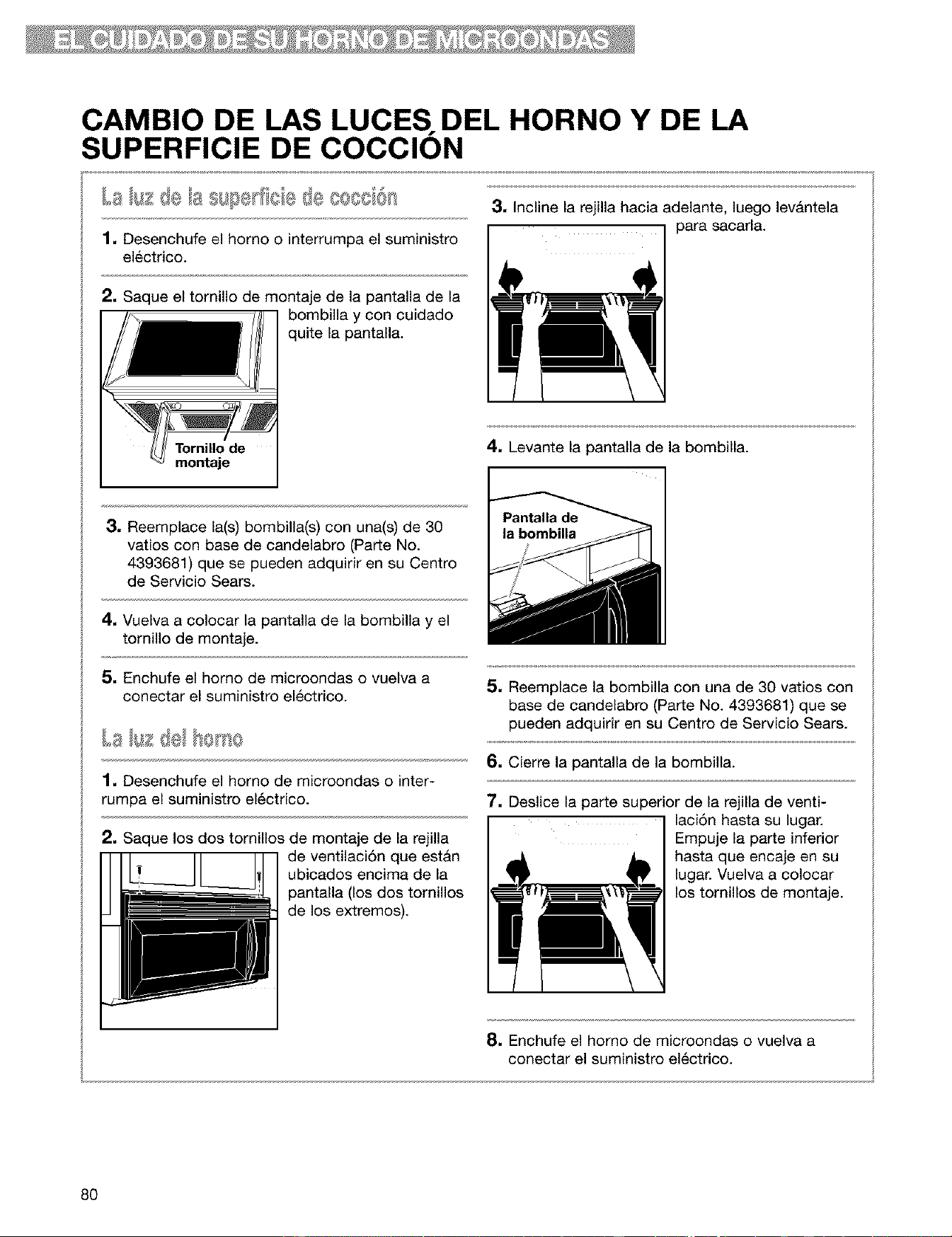
CAMBIO DE LAS LUCES. DEL HORNO Y DE LA
SUPERFICIE DE COCCION
1. Desenchufe el horno o interrumpa el suministro
electrico.
2. Saque el tornillo de montaje de la pantalla de la
bombilla y con cuidado
quite la pantalla.
Tornillode
montaje
3, Incline la rejilla hacia adelante, luego lev&ntela
I ] para sacarla.
4. Levante la pantalla de la bombilla.
3. Reemplace la(s) bombilla(s) con una(s) de 30
vatios con base de candelabro (Parte No.
4393681) que se pueden adquirir en su Centro
de Servicio Sears.
4. Vuelva a colocar la pantalla de la bombilla y el
tomillo de montaje.
5. Enchufe el homo de microondas o vuelva a
conectar el suministro el&ctrico.
1. Desenchufe el homo de microondas o inter-
rumpa el suministro el_ctrico.
2. Saque los dos tornillos de montaje de la rejilla
de ventilaci6n que estan
ubicados encima de la
pantalla (los dos tomillos
de los extremos).
5. Reemplace la bombilla con una de 30 vatios con
base de candelabro (Parte No. 4393681) que se
pueden adquirir en su Centro de Servicio Sears.
6. Cierre la pantalla de la bombilla.
7. Deslice la parte superior de la rejilla de venti-
I laci6n hasta su lugar.
Empuje la parte inferior
hasta que encaje en su
lugar. Vuelva a colocar
los tornillos de montaje.
8. Enchufe el homo de microondas o vuelva a
conectar el suministro el6ctrico.
80
Guia para cocinar
CONSEJOS PARA COCINAR CON EL HORNO DE
MICROONDAS
• Si usted aumenta o disminuye la cantidad de
alimentos que prepara, el tiempo requerido para
cocinarlos tambi6n cambiar&. Por ejemplo, si
usted usa el doble de una receta, agregue un
poco m&s de la mitad del tiempo de cocci6n
original. Verifique si est& cocido y, si es nece-
sario, agregue m&s tiempo en incrementos
pequedos.
[_C/a c_e/a Ise_sto
• Cuanto menor es la temperatura del alimento
que usted coloca en el homo de microondas,
mayor serA el tiempo requerido para su cocci6n.
Los alimentos a temperatura ambiente se reca-
lentarAn m&s r&pido que los alimentos que estAn
a la temperatura del refrigerador.
Oo spos @o de/afs es Q
• Los alimentos con mucha grasa o azt_car se
calentar_n m&s r_pido que los alimentos con alto
contenido de agua. La grasa y el azScar alcanzan
una temperatura m&s alta que el agua durante el
proceso de cocci6n.
• Cuanto m&s denso es el alimento, mayor es el
tiempo requerido para calentarlo. Alimentos "muy
densos" como las carnes necesitan m&s tiempo
para recalentarse que los alimentos mas livianos
o m&s porosos como pasteles esponjosos.
• Las piezas mds peque_as de alimento se coci-
nar_n m&s r&pido que las piezas mas grandes y
piezas con la misma forma se cocinar&n en
forma mAs pareja que los alimentos con forma
irregular.
• En los alimentos con gruesos diferentes, las
partes mAs delgadas se cocinar&n mAs rapido
que las partes mAs gruesas. Coloque las partes
m&s delgadas de las alas y patas de polo en el
centro del plato.
Rs/;ac@ y af ta=e de
• Cuando usted rota o revuelve los alimentos, el
calor se distribuye rapidamente al centro del
plato y evita que los bordes del alimento se
recocinen.
0,= IllllellI@;_,
Tape los alimentos para:
• Reducir salpicaduras
• Acortar los tiempos de cocci6n
• Retener la humedad de los alimentos
Todas las tapas que permiten pasar las microondas
son adecuadas. Para m&s informaci6n acerca de
los materiales que permiten el paso de las
microondas, vet la secci6n "Conozca su homo de
microondas". Si usted est& usando la funci6n del
sensor, aseg_rese de dejar un espacio de venti-
laci6n.
L/b_¢ o//de Is tres ol le !@ss tie =tos
• Muchos alimentos (por ejemplo: papas al
homo, salchichas, yemas de huevo y algunas
frutas) est&n cubiertos por una piel o membrana
apretada. Esto puede causar que los alimentos
estallen por la acumulaci6n de vapor bajo la
membrana mientras se cocinan. Para aliviar la
presiin y prevenir los estallidos, trinche estos
alimentos con un tenedor o un palillo de dientes
antes de cocinarlos.
'XeF@o :fe 'eises0
• Siempre deje reposar los alimentos por un
rato despu6s de cocinar. El peHodo de reposo
despu_s de cocinar, descongelar o recalentar
siempre mejora el resultado ya que la temperatu-
ra se distribuye en forma pareja a trav6s del ali-
mento.
El intervalo del tiempo de reposo depende del
volumen y la densidad del alimento. A veces
puede ser tan corto como el tiempo que le Ileva
sacar los alimentos del homo y servirlos en la
mesa. Sin embargo, con alimentos m&s volumi-
nosos y mas densos, el intervalo de tiempo de
reposo puede ser tan largo como 10 minutos.
Para resultados 6ptimos, distribuya los alimentos
en forma pareja sobre el plato. Usted puede hacer
esto de varias maneras:
• Si usted est_ cocinando varias piezas del
mismo tipo de alimento, como papas al homo,
col6quelas en forma de anillo para una cocci6n
81
CONSEJOS PARA COClNAR CON EL HORNO DE
MICROONDAS (CONT.)
uniforme.
• Cuando cocina alimentos con forma o espe-
sot irregular, tales como pechugas de polo,
coloque las partes m_s peque_as y delgadas
hacia el centro del plato donde se calentar&n en
Qltimo lugar.
• Apile las rodajas delgadas de came una sobre
otra.
• Cuando usted cocina o recalienta pescados
enteros, haga un corte en la piel - esto evita
que se quiebre.
• No deje que los alimentos o los recipientes
toquen el techo o los costados del homo. Esto
evitar& la posible formaci6n de chispas.
No deben usarse recipientes de metal in el homo
de microondas. Sin embargo, hay algunas excep-
clones. Si usted ha comprado alimentos que est&n
pre-empaquetados en un recipiente de papel de
aluminio, siga las instrucciones del paquete. Si usa
recipientes de papel de aluminio, los tiempos de
cocci6n pueden ser m&s largos porque las
• Siempre quite la tapa para evitar que el horno se
da_e.
• Use sblo recipientes que no est&n da_ados.
• No use recipientes m&s altos de ¾ de pulgada
(19 mm).
• El recipiente debe estar Ileno por Io menos hasta
la mitad.
• Para evitar que se formen chispas, debe haber
como mlnimo ¼ de pulgada (6.4 mm) entre el recipi-
ente de aluminio y las paredes del homo Io mismo
que entre dos recipientes de aluminio.
• Siempre coloque el recipiente sobre la bandeja
giratoria.
• El recalentamiento de alimentos en recipientes
papel de aluminio Ileva el doble de tiempo que
recalentarlos en recipientes de pl&stico, vidrio,
porcelana o papel. El tiempo requerido para que
los alimentos est6n listos depende del tipo de
recipiente que usted usa.
• Deje reposar los alimentos por 2 6 3 minutos
despu_s de calentar para que el calor se distribuya
en forma pareja a trav_s del recipiente.
microondas penetraran s61o la parte superior del , =,• _t_'=,_
alimento. Si usted usa recipientes de aluminio que L@ (_lj) _J _e_ l"o _(_/o@ csos,_FIB @F_8,_,_l_o/'_0
no tienen instrucciones en el paquete, siga las
siguientes indicaciones:
• No envase alimentos en el horno. Los frascos de
• Coloque el recipiente en un taz6n de vidrio y vidrio cerrados pueden explotar, resultando en
agregue un poco de agua para que cubra la da_os al horno.
base del recipiente, a no mas de Y44de pulgada
(6.4 mm) de alto. Esto asegura un calentamiento • No use el homo de microondas para esterilizar
parejo en la base del recipiente, objetos (mamaderas, etc.). Es dificil mantener la
temperatura alta requerida para una esterilizaci6n
segura.
82
Preguntas y Respuestas
PREGUNTAS RESPUESTAS
&Puedo hacer funcionar mi homo de microondas No. Si usted saca o da vuelta a la bandeja girato-
sin la bandeja giratoria o voltear la bandeja ria, tendra resultados de cocciSn insatisfactorios.
giratoria para acomodar un plato m&s grande? Los platos que use en su homo deben caber en la
bandeja giratoria.
&Puedo usar una )arrilla en mi homo de Usted puede usar una parrilla si 6sta v_no con su
microondas 3ara recalentar o cocinar en dos homo de microondas. El uso de una parrilla ajena
niveles al mismo tiempo? al homo de microondas, puede dar como resulta-
do una cocci6n insatisfactoria y/o la )roducci6n de
chispas.
&Puedo usar bandejas de metal o aluminio en mi Usted puede usar papel de aluminio para
homo de microondas? protecci6n (use pedazos pequedos y pianos),
brochetas peque_as y bandejas poco profundas
de aluminio (si la bandeja tiene una profundidad de
¾ de pulgada [1.9 cm] y est& a medio Ilenar con
alimentos para absorber la energia de microondas).
Nunca deje que el metal toque las paredes o la
puerta.
&Es normal que la bandeja giratoria rote en ambas Si. La bandeja giratoria gira a la izquierda o a la
direcciones? derecha, dependiendo de la rotaci6n del motor
cuando se inicia el ciclo de cocciSn.
A veces la puerta de mi homo de microondas Esta apariencia es normal y no afecta el fun-
parece ondulada. _,_.._9[m.,_,!,_
&Qu_ son los zumbidos que escucho cuando el Usted puede escuchar el sonido del transformador
homo de microondas est& funcionando? cuando el tubo de magnetr6n comienza los ciclos.
&Por que el plato se calienta cuando cocino all- A medida que los alimentos se calientan, 6stos '
mentos en el? Pens_ que esto no ocurdHa, transfieren el calor al plato. Prep&rese para usar
guantes de hornear para sacar los alimentos
despu6s de la cocci6n.
_,Que significa "tiempo de reposo"?
"Tiempo de reposo" significa que los alimentos
deben sacarse del homo y quedar tapados por un
tiempo adicional para permitir que se termine la
cocci6n. Esto libera el homo para cocinar otras
cosas.
&p0r que sale vapor del conducto de ventilaci6n? El vapor se produce normalmente durante la coc-
ci6n. El homo de microondas ha sido disedado para
ventilar el vapor por los orificios de ventilaci6n.
&Puedo hacer palomitas de maiz en mi homo de Si. Haga palomitas de malz empaquetadas sigu-
microondas? &CSmo Iogro 5ptimos resultados? iendo las instrucciones del fabricante o use el
botSn prefijado POPCORN. No use bolsas
comunes de papel. Use la "prueba de sonido"
parando el homo en cuanto los estallidos sean
m&s espaciados hasta que haya uno cada uno o
dos segundos. No vuelva a usar granos de maiz
que no hayan reventado. No haga palomitas de
malz en utensilios de vidrio.
83
Diagnbstico y solucibn de
problemas
La mayoria de los problemas al cocinar a menudo son causados por pequei_as cosas que usted puede
encontrar y arreglar sin herramientas de ningQn tipo. Revise las siguientes listas detalladas a continuacidn yen
la prdxima pagina antes de pedir ayuda o servicio. Si usted aQn necesita ayuda, vea los nQmeros telef6nicos
gratuitos de Sears, que se encuentran en la contraportada
EL HORNO DE MICROONDAS NO FUNCIONA
PROBLEMA CAUSA
Nada funciona. • El cable de alimentaci6n no est& enchufado en un contacto de tres terminales
con conexi6n a tierra. (Vea la secci6n "Requisitos el6ctricos" en la p&gina 47
y la secci6n "Conexi6n electrica" en la p&gina 51.)
• Se ha quemado algQn fusible en la casa o se ha disparado el disyuntor.
• La empresa de servicios electricos ha tenido una interrupci6n en el suministro
de electricidad.
El homo de microondas
no funciona.
• Usted est& usando el homo como temporizador. Toque OFF/CANCEL para
anular el temporizador de cocina.
• La puerta no esta bien cerrada o asegurada.
• Usted no toc6 START/ENTER.
• Usted no sigui6 las instrucciones con exactitud.
• Una funci6n que usted fij6 anteriormente todavfa esta funcionando. Toque
OFF/CANCEL para anular dicha selecci6n.
TIEMPOS DE COCCION
PROBLEMA CAUSA
Los alimentos no est&n
bien cocidos.
• El suministro electrico de su casa o los contactos de pared son bajos o m&s
bajos de Io normal. La empresa de servicios electricos puede indicarle si el
voltaje del contacto es bajo. El electricista o t6cnico de servicio puede indi-
carle si el voltaje del contracto es bajo.
• La intensidad de cocci6n no est& en el ajuste recomendado. Revise el cuadro
en la p_gina 62.
• Usted no ha dejado suficiente tiempo de cocci6n para la cantidad de alimen-
tos que estA cocinando. Las cantidades mAs grandes de alimentos necesitan
tiempos de cocci6n mAs prolongados.
La pantalla muestra un
tiempo de cuenta
regresiva pero el horno
no est& cocinando.
• La puerta del horno no est& completamente cerrada.
• Usted ha fijado los controles como un temporizador de cocina. Toque
OFF/CANCEL para anular el temporizador de cocina.
84
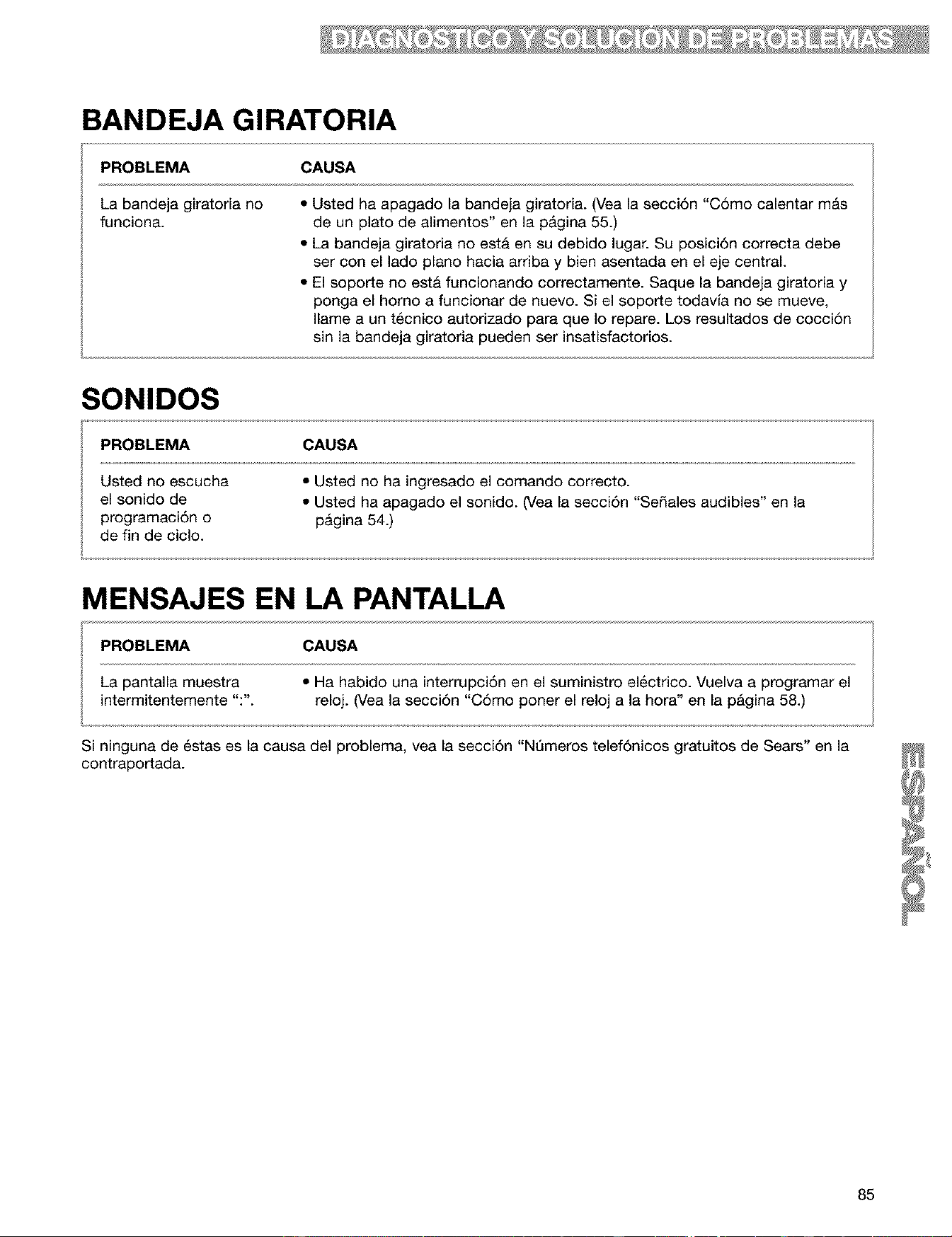
BANDEJA GIRATORIA
PROBLEMA CAUSA
La bandeja giratoria no
funciona.
• Usted ha apagado la bandeja giratoria. (Vea la secci6n "C6mo calentar mAs
de un plato de alimentos" en la pAgina 55.)
• La bandeja giratoria no est& en su debido lugar. Su posici6n correcta debe
ser con el lado piano hacia arriba y bien asentada en el eje central.
• El soporte no esta funcionando correctamente. Saque la bandeja giratoria y
ponga el homo a funcionar de nuevo. Si el soporte todavia no se mueve,
Ilame a un t_cnico autorizado para que Io repare. Los resultados de cocci6n
sin la bandeja giratoria pueden ser insatisfactorios.
SONIDOS
PROBLEMA CAUSA
Usted no escucha • Usted no ha ingresado el comando correcto.
el sonido de • Usted ha apagado el sonido. (Vea la secci6n "Sedales audibles" en la
programaci6n o p&gina 54.)
de fin de ciclo.
MENSAJES EN LA PANTALLA
PROBLEMA CAUSA
La pantalla muestra • Ha habido una interrupci6n en el suministro electrico. Vuelva a programar el
intermitentemente ":". reloj. (Vea la secci6n "C6mo poner el reloj a la hora" en la pAgina 58.)
Si ninguna de 6stas es la causa del problema, vea la secci6n "NQmeros telef6nicos gratuitos de Sears" en la
contraportada.
85
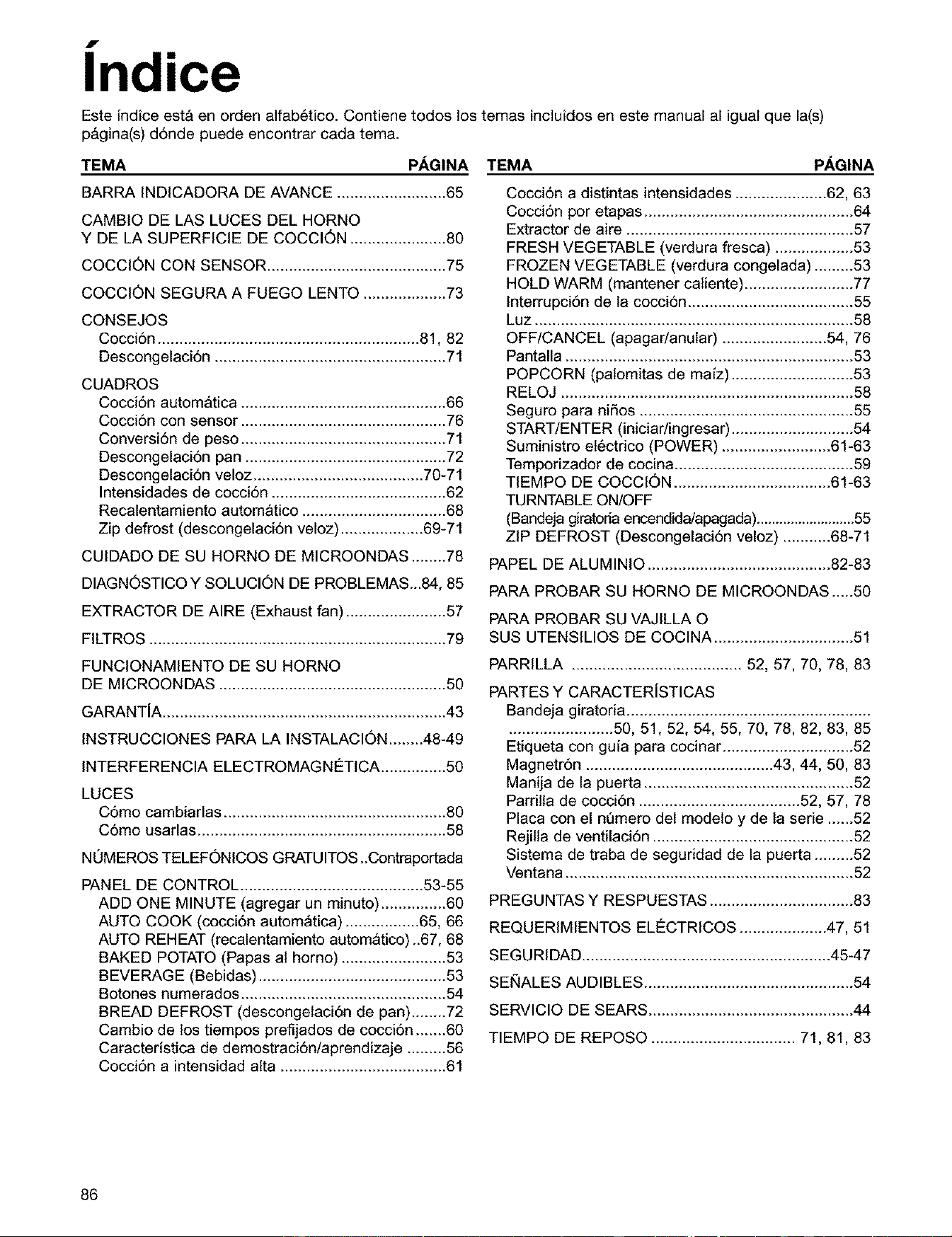
f •
Indlce
Este [ndice est& en orden alfab6tico. Contiene todos los temas incluidos en este manual al igual que la(s)
p&gina(s) d6nde puede encontrar cada tema.
TEMA PAGINA TEMA PAGINA
BARRA INDICADORA DE AVANCE ......................... 65
CAMBIO DE LAS LUCES DEL HORNO
Y DE LA SUPERFICIE DE COCCION ...................... 80
COCCION CON SENSOR ......................................... 75
COCCION SEGURA A FUEGO LENTO ................... 73
CONSEJOS
Cocci6n ............................................................ 81, 82
Descongelaci6n ..................................................... 71
CUADROS
Cocci6n automatica ............................................... 66
Cocci6n con sensor ............................................... 76
Conversi6n de peso ............................................... 71
Descongelaci6n pan .............................................. 72
Descongelaci6n veloz ....................................... 70-71
Intensidades de cocci6n ........................................ 62
Recalentamiento automatico ................................. 68
Zip defrost (descongelaci6n veloz) ................... 69-71
CUIDADO DE SU HORNO DE MICROONDAS ........78
DIAGNOSTICO Y SOLUCION DE PROBLEMAS...84, 85
EXTRACTOR DE AIRE (Exhaust fan) ....................... 57
FILTROS .................................................................... 79
Cocci6n a distintas intensidades ..................... 62, 63
Coccidn por etapas ................................................ 64
Extractor de aire .................................................... 57
FRESH VEGETABLE (verdura fresca) .................. 53
FROZEN VEGETABLE (verdura congelada) ......... 53
HOLD WARM (mantener caliente) ......................... 77
Interrupci6n de la cocci6n ...................................... 55
Luz ......................................................................... 58
OFF/CANCEL (apagadanular) ........................ 54, 76
Pantalla .................................................................. 53
POPCORN (palomitas de ma[z) ............................ 53
RELOJ ................................................................... 58
Seguro para niSos ................................................. 55
START/ENTER (iniciar/ingresar) ............................ 54
Suministro et6ctrico (POWER) ......................... 61-63
Temporizador de cocina ......................................... 59
TIEMPO DE COCCION .................................... 61-63
TURNTABLE ON/OFF
(Bandeja giratoria encendida/apagada) ..........................55
ZIP DEFROST (Descongelaci6n veloz) ........... 68-71
PAPEL DE ALUMINIO .......................................... 82-83
PARA PROBAR SU HORNO DE MICROONDAS.....50
PARA PROBAR SU VAJILLA O
SUS UTENSILIOS DE COCINA ................................ 51
FUNCIONAMIENTO DE SU HORNO
DE MICROONDAS .................................................... 50
GARANT[A ................................................................. 43
INSTRUCCIONES PARA LA INSTALACION ........48-49
INTERFERENCIA ELECTROMAGNETICA ............... 50
LUCES
C6mo cambiarlas ................................................... 80
C6mo usarlas ......................................................... 58
NOMEROS TELEFONICOS GRATUITOS ..Contraportada
PANEL DE CONTROL .......................................... 53-55
ADD ONE MINUTE (agregar un minuto) ............... 60
AUTO COOK (coccidn autom_tica) ................. 65, 66
AUTO REHEAT (recalentamiento automatico)..67, 68
BAKED POTATO (Papas al horno) ........................ 53
BEVERAGE (Bebidas) ........................................... 53
Botones numerados ............................................... 54
BREAD DEFROST (descongelaci6n de pan) ........ 72
Cambio de los tiempos prefijados de cocci6n ....... 60
Caracteristica de demostraci6n/aprendizaje ......... 56
Cocci6n a intensidad alta ...................................... 61
PARRILLA ....................................... 52, 57, 70, 78, 83
PARTES Y CARACTERiSTICAS
Bandeja giratoria ........................................................
........................ 50, 51, 52, 54, 55, 70, 78, 82, 83, 85
Etiqueta con guia para cocinar .............................. 52
Magnetr6n ........................................... 43, 44, 50, 83
Manija de la puerta ................................................ 52
Parrilla de cocci6n ..................................... 52, 57, 78
Placa con el nQmero det modeto y de la serie ......52
Rejilla de ventilaci6n .............................................. 52
Sistema de traba de seguridad de la puerta ......... 52
Ventana .................................................................. 52
PREGUNTAS Y RESPUESTAS ................................. 83
REQUERIMIENTOS ELC:CTRICOS .................... 47, 51
SEGURIDAD ......................................................... 45-47
SEt_IALES AUDIBLES ................................................ 54
SERVICIO DE SEARS ............................................... 44
TIEMPO DE REPOSO ................................. 71, 81, 83
86

87
For repairof majorbrandappliancesin your own home...
no matter who made it, no matterwho soldit!
1"8004"IVlY-HOME sMAnytime,dayor night
(1-800-4694663)
w11ANi/.sears.OBiln
To bring in productssuchas vacuums,lawn equipmentandelectronics
for repair,callfor the locationofyour nearestSears Parts & Repair Center
1-800488-1222 AnyUme,dayor night
wwll/i/.sears=co111
Forthe replacementparts, accessoriesand owner's manuals
thatyou needto do-it-yourself,call Sears PartsDire_L_!
1-800-366-PART 6=m-11p.m.C_-,
(!-800-366-7278) 7 daysaweek
www.sears.€om/partsdirea
To purchaseor inquireabout a SearsServiceAgreement:
! -800-82 7-6655
7a_m.- S p.m. CST, Mon.- Sat.
Parapedirservidode reparacibna domicilio,
y paraordenarpiezasconentmgaa domidlio:
! -888-SU-HOGAR _
(1-888-784-6427)
Au Canada pour senlice en francis:
1-877-LE-FOYB_ _
(1-877-533-6937)
SEARS I
HomeCentral" J
4619-652-60211/8169681 5/00
© Sears, Roebuck and Co, ® Registered Trademark/TM Trademark of Sears,Roebuck and Co. Printed in China
® Marca Registrada/TM Marca de comercio de Sears, Roebuck and Co, Impreso en China