www.lg.com
OWNER'S MANUAL
WASHING
MACHINE
Copyright © 2019 LG Electronics Inc. All Rights Reserved
MFL69860132
Rev.01_032719
Before beginning installation, read these instructions carefully. This will simplify
installation and ensure that the product is installed correctly and safely. Leave
these instructions near the product after installation for future reference.
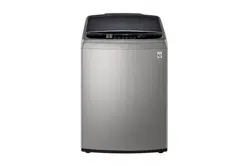
WTG1432VHF
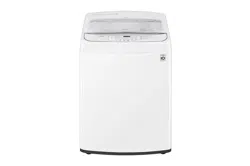
WTG1432WHF
EN ENGLISH


TABLE OF CONTENTS
This manual may contain images or content
different from the model you purchased.
This manual is subject to revision by the
manufacturer.
SAFETY INSTRUCTIONS ..............................................................4
IMPORTANT SAFETY INSTRUCTIONS ..........................................................4
INSTALLATION ...............................................................................9
Parts .................................................................................................................. 9
Accessories ....................................................................................................... 9
Specifications ..................................................................................................10
Installation Place Requirements...................................................................... 11
Connecting the Supply Hose...........................................................................12
Installing the Drain Hose .................................................................................14
Leveling the Appliance ....................................................................................16
Assembling the Anti-Rat Cover (some models only) ....................................... 16
OPERATION .................................................................................17
Using the Appliance ........................................................................................17
Sorting Laundry ............................................................................................... 18
Adding Cleaning Products...............................................................................19
Control Panel ..................................................................................................21
Washing Programme ......................................................................................22
Option Programme .......................................................................................... 24
Manual Washing .............................................................................................26
Special Functions ............................................................................................ 27
SMART FUNCTIONS ....................................................................28
Using LG SmartThinQ Application ..................................................................28
Using Smart Diagnosis™ ................................................................................31
MAINTENANCE ............................................................................ 32
Cleaning the Washing Machine ......................................................................32
Cleaning the Water Inlet Filter .........................................................................33
Cleaning the Drain Pump Filter (some models only).......................................33
Caution on Freezing During Winter ................................................................. 34
TROUBLESHOOTING .................................................................. 35
Diagnosing Problems ......................................................................................35
Error Messages ............................................................................................... 39
4
EN
SAFETY INSTRUCTIONS
The following safety guidelines are intended to prevent unforeseen
risks or damage from unsafe or incorrect operation of the
appliance.
The guidelines are separated into ‘WARNING’ and ‘CAUTION’ as
described below.
This symbol is displayed to indicate matters and
operations that can cause risk. Read the part with this
symbol carefully and follow the instructions in order to
avoid risk.
WARNING
This indicates that the failure to follow the instructions can
cause serious injury or death.
CAUTION
This indicates that the failure to follow the instructions can
cause the minor injury or damage to the product.
IMPORTANT SAFETY INSTRUCTIONS
WARNING
To reduce the risk of explosion, fire, death, electric shock,
injury or scalding to persons when using this product, follow
basic precautions, including the following:
Children in the Household
This appliance is not intended for use by persons (including children)
with reduced physical, sensory or mental capabilities, or lack of
experience and knowledge, unless they have been given supervision or
instruction concerning use of the appliance by a person responsible for
their safety. Children should be supervised to ensure that they do not
play with the appliance.

5
EN
Technical Safety
• If the power cord is damaged or the hole of the outlet socket is loose,
do not use the power cord and contact an authorized service centre.
• The water pressure must be between 30 and 600 kPa.
• Refer to the specifications within this manual. The maximum capacity
for dry clothes to be washed is 14 kg.
Installation
• Never attempt to operate the appliance if it is damaged,
malfunctioning, partially disassembled, or has missing or broken
parts, including a damaged cord or plug.
• This appliance should only be transported by two or more people
holding the appliance securely.
• Tighten the drain hose at connecting ends to avoid separation.
• Make sure the plug is completely pushed into the outlet.
• Do not install the appliance in a damp and dusty place. Do not install
or store the appliance in any outdoor area, or any area that is subject
to weathering conditions such as direct sunlight, wind, or rain or
temperatures below freezing.
• Ventilation openings must not be obstructed by a carpet.
• Do not plug the appliance into multiple socket outlets or extension
power cable.
• This appliance must be earthed / grounded via the mains supply
lead. In the event of malfunction or breakdown, grounding will reduce
the risk of electric shock by providing a path of least resistance for
electric current.
• This appliance is equipped with a power cord having an equipment-
earthing / grounding conductor (earthing pin) and a grounding power
plug. The power plug must be plugged into an appropriate outlet
socket that is installed and earthed / grounded in accordance with all
local codes and ordinances.
• Improper connection of the equipment-grounding conductor can
result in risk of electric shock. Check with a qualified electrician or
service personnel if you are in doubt as to whether the appliance is
properly grounded.

6
EN
• Do not modify the power cord provided with the appliance.
Operation
• Do not use a sharp object like drill or pin to penetrate, modify or
disassemble the unit.
• Keep the area underneath and around the appliance free of
combustible materials such as lint, paper, rags, chemicals, etc.
• Do not put animals, such as pets into the appliance.
• Do not leave the appliance door open. Children may hang on the
door or crawl inside the appliance, causing damage or injury.
• Use a new hose or hose-set supplied with the appliance. Reusing old
hoses can cause a water leak and subsequent property damage.
• Turn off water taps to relieve pressure on hoses and valves and
to minimize leakage if a break or rupture should occur. Check the
condition of the fill hoses; they may need replacement after 5 years.
• Never reach into the appliance while it is operating. Wait until the
drum has completely stopped.
• Do not put in, wash or dry articles that have been cleaned in, washed
in, soaked in, or spotted with combustible or explosive substances
(such as waxes, wax removers, oil, paint, gasoline, degreasers,
drycleaning solvents, kerosene, petrol, spot removers, turpentine,
vegetable oil, cooking oil, acetone, alcohol, etc.). Improper use can
cause fire or explosion.
• In case of flood, disconnect the power plug and contact the LG
Electronics customer information centre.
• Do not use or store flammable or combustible substances (ether,
benzene, alcohol, chemical, LPG, combustible spray, insecticide, air
freshener, cosmetics, etc.) near the appliance.
• If there is a gas leakage (isobutane, propane, natural gas, etc.),
do not touch the appliance or power plug and ventilate the area
immediately.
• If the drain hose or inlet hose is frozen during winter, use it only after
thawing.
• Keep all washing detergents, softener and bleach away from children.
• Do not touch the power plug or the appliance controls with wet hands.

7
EN
• Do not bend the power cable excessively or place a heavy object on
it.
• Do not put your hand, foot or anything under the washing machine
while the washing machine is in operation.
• The hands shall not be inserted into running water-extracting drum.
• Make sure that drainage is working properly. If water is not drained
properly, your floor may get flooded.
• If, during spinning, opening the door does not stop the drum within
about 15 seconds, immediately discontinue operating the appliance
and contact your dealer or LG Electronics service centre.
• Do not use a plug socket and wiring equipment for more than their
rated capacity.
• When the air temperature is high and the water temperature is low,
condensation may occur and thus wet the floor.
• Wipe off dirt or dust on the contacts of the power plug.
• Under certain conditions hydrogen gas may be produced in a water
heater that has not been used for two weeks or more. Hydrogen
gas can be explosive under these circumstances. If the HOT water
has not been used for two weeks or more, prevent the possibility
of damage or injury by turning on all Hot water taps and allowing
them to run for several minutes. Do this before using any electrical
appliance which is connected to the HOT water system. This simple
procedure will allow any built-up hydrogen gas to escape. Since the
gas is flammable, do not smoke or use an open flame or appliance
during this process.

8
EN
Maintenance
• Remove the power plug when you clean the appliance.
• Securely plug the power plug in the outlet socket after completely
removing any moisture and dust.
• Do not spray water inside or outside the appliance to clean it.
• Never unplug the appliance by pulling on the power cable. Always
grip the power plug firmly and pull straight out from the outlet socket.
• Only qualified service personnel from LG Electronics service centre
should disassemble, repair, or modify the appliance. Contact an LG
Electronics customer information centre if you move and install the
appliance in a different location.
Disposal
• Before discarding an old appliance, unplug it. Cut off the cable
directly behind the appliance to prevent misuse.
• Dispose of all packaging materials (such as plastic bags and
styrofoam) away from children. The packaging materials can cause
suffocation.
• Remove the door before disposing of or discarding this appliance to
avoid the danger of children or small animals getting trapped inside.
For Models with One Inlet Valve (some countries only)
• Do not connect to a hot water supply. Connect to cold water only.
9
EN
INSTALLATION
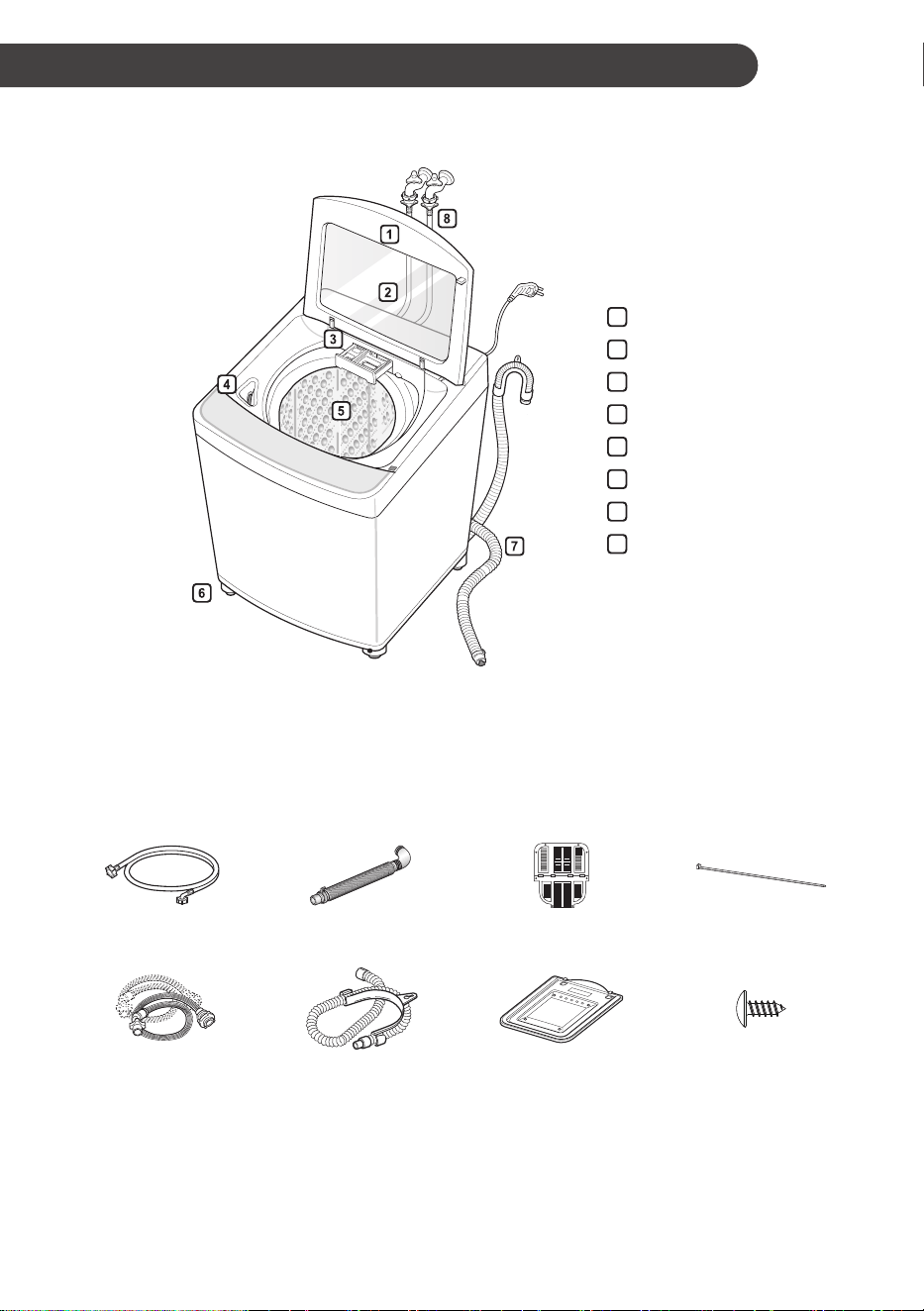
Parts
1
Door
2
Tempered Glass
3
Dispenser Drawer
4
Bleach Dispenser
5
Drum
6
Leveling Feet
7
Drain hose
8
Water Supply Hose
• Appearance and specifications may change without notice to improve the quality of the product.
Accessories
or or or
Tie strap
(some countries only)
2 water supply hoses
(Hot + Cold)
Drain hose Anti-rat cover
(some countries only)
Screw for Anti-rat cover
(some countries only)
10
EN
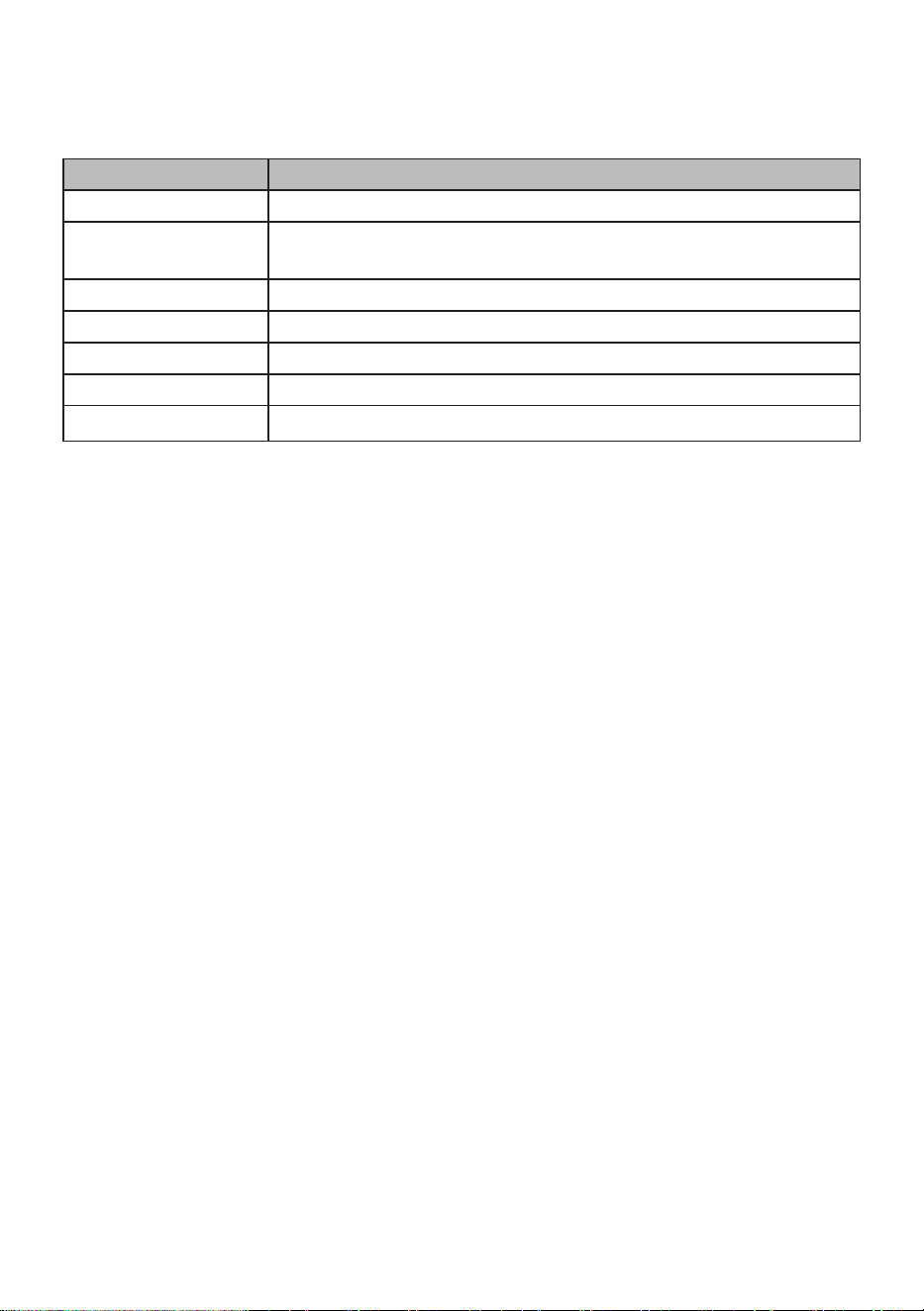
Specifications
Model WTG1432*HF
Power Supply 220 - 240 V~, 50 Hz
Product Dimension
(Width X Depth X Height)
686 mm (W) x 721 mm (D) x 1026 mm (H)
Product Weight 63.5 kg
Allowable Temperature 5 - 35 °C
Allowable Water Pressure 30 - 600 kPa
Max. Power 1500 - 1800 W
Max. Capacity 14 kg
• Appearance and specifications may change without notice to improve the quality of the product.
11
EN
Installation Place
Requirements
Location
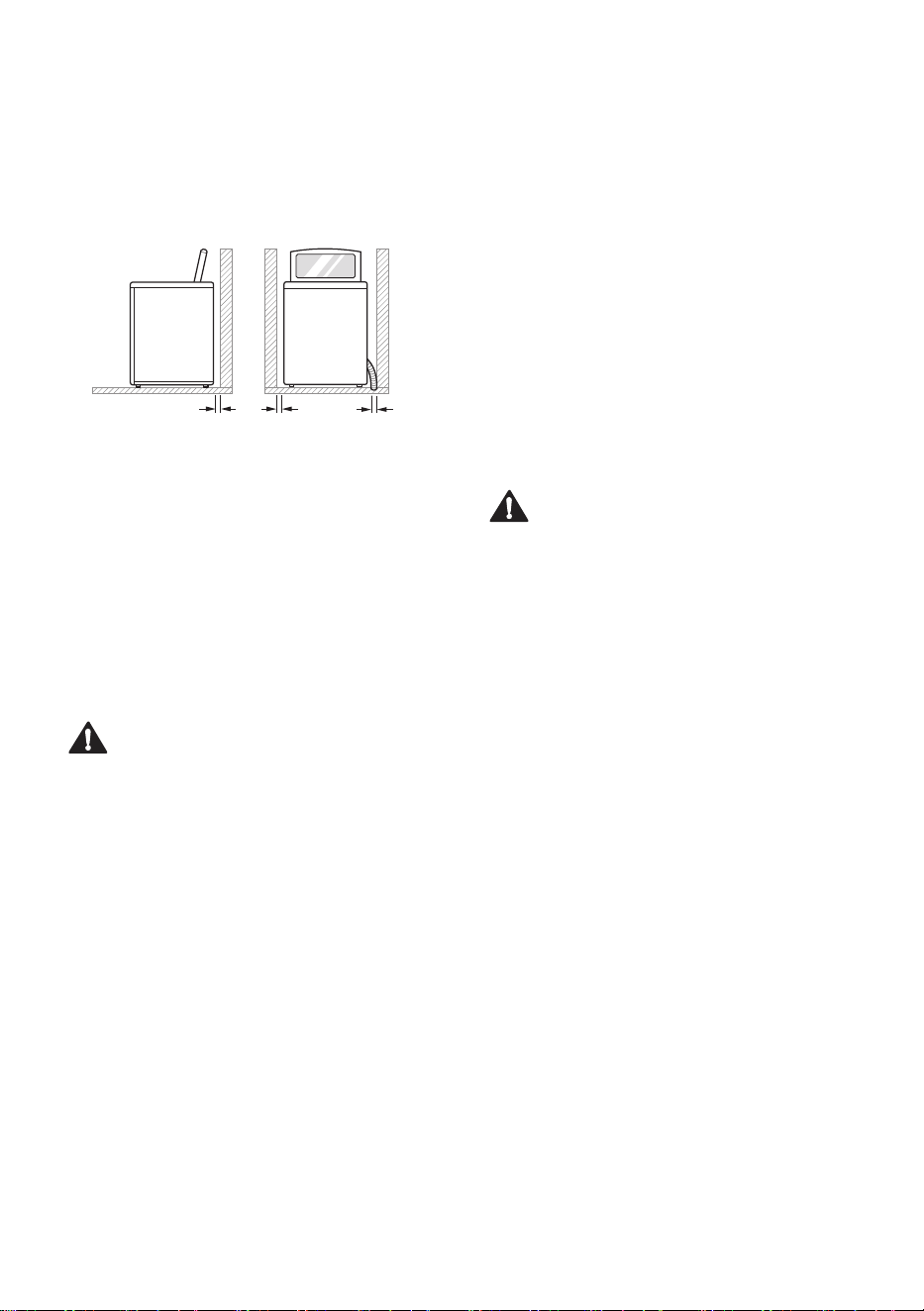
10
cm
2
cm
2
cm
Level floor : Allowable slope under the entire
appliance is 1°.
Power outlet : Must be within 1.5 meters of either
side of the location of the appliance.
• Do not overload the outlet with more than one
appliance.
Additional Clearance : For the wall, 10 cm: rear/2
cm: right & left side.
• Do not place or store laundry products on top of
the appliance at any time. These products may
damage the finish or controls.
WARNING
• The plug must be plugged into an appropriate
outlet that is properly installed and earthed /
grounded in accordance with all local codes and
ordinances.
Positioning
• Install the appliance on a flat hard floor. Do not
install on an elevated surface.
• Make sure that air circulation around the
appliance is not impeded by carpets, rugs, etc.
• Never try to correct any unevenness in the
floor with pieces of wood, cardboard or similar
materials under the appliance.
• If it is impossible to avoid positioning the
appliance next to a gas cooker or coal burning
stove, an insulation (85x60 cm) covered with
aluminum foil on the side facing the cooker
or stove must be inserted between the two
appliances.
• Do not install the appliance in rooms where
freezing temperatures may occur. Frozen hoses
may burst under pressure. The reliability of
the electronic control unit may be impaired at
temperatures below freezing point.
• Ensure that when the appliance is installed, it is
easily accessible for an engineer in the event of
a breakdown.
• If the appliance is delivered in winter and
temperatures are below freezing, place the
appliance at room temperature for a few hours
before putting it into operation.
WARNING
• This equipment is not designed for maritime
use or for use in mobile installations such as
caravans, aircraft etc.
Electrical Connection
• Do not use an extension cord or double adapter.
• Always unplug the appliance and turn off the
water supply after use.
• Connect the appliance to an earthed socket in
accordance with current wiring regulations.
• The appliance must be positioned so that the
plug is easily accessible.
• Repairs to the appliance must only be carried
out by qualified personnel. Repairs carried out
by inexperienced persons may cause injury or
serious malfunctioning. Contact your local an
authorised LG repairer.
12
EN
Connecting the Supply
Hose
• Before connecting the water supply hose to the
water tap, check the hose type and then choose
the correct instruction.
• The water supply hose supplied may vary from
country to country. Make sure to connect the
blue supply hose to the COLD water tap, and
the orange supply hose to the HOT water tap.
• Water supply pressure must be between 30 kPa
and 600 kPa (0.3 - 6.0 kgf / cm²).
• Do not overtighten the water supply hose.
• If the water supply pressure is more than
600 kPa, a decompression device should be
installed.
• Periodically check the condition of the hose and
replace the hose if necessary.
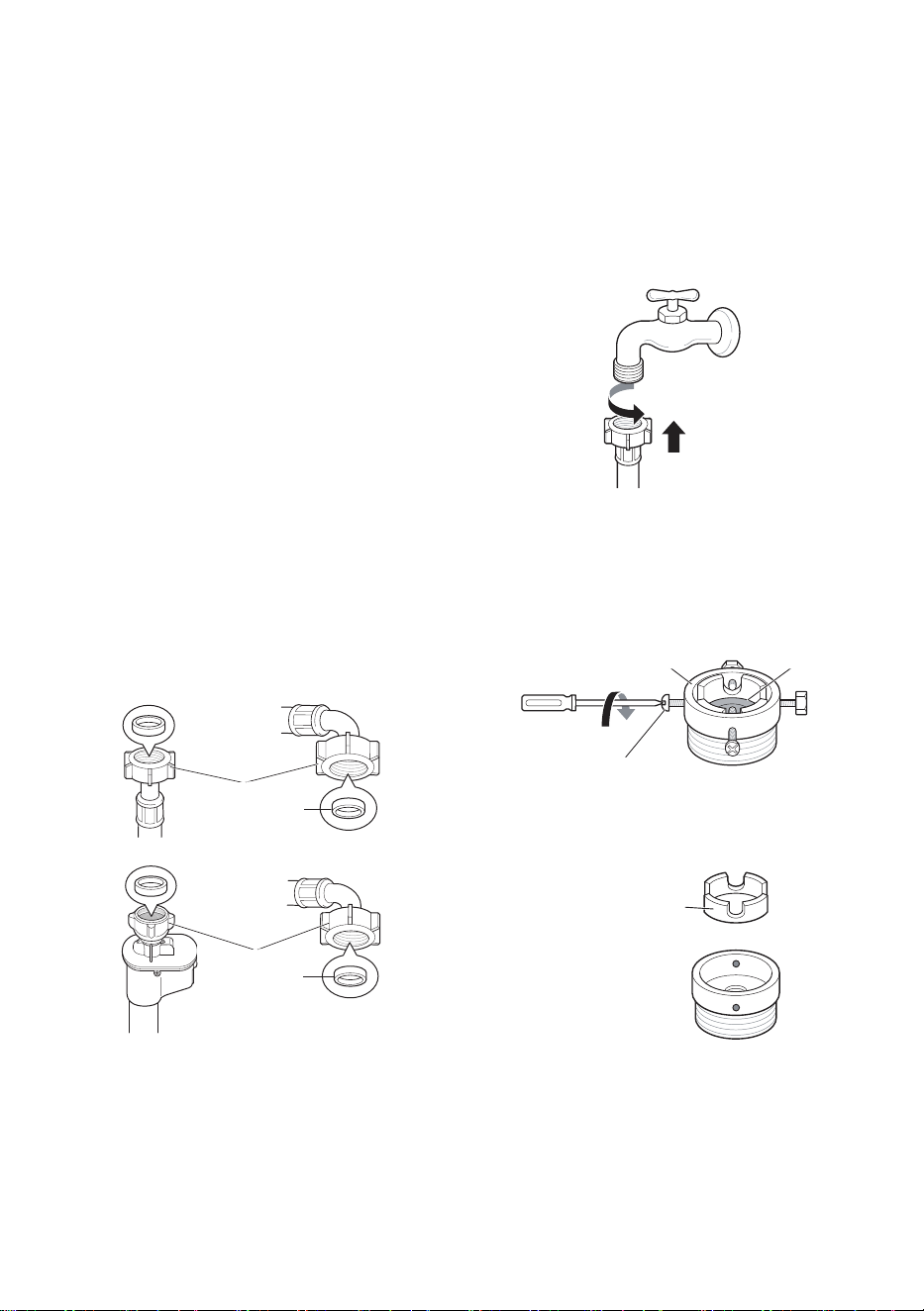
Checking the Rubber Seal on the
Supply Hose
Two rubber seals are supplied with the water
supply hoses. They are used for preventing
water leaks. Make sure the connection to taps is
sufficiently tight. Do not use mechanical devices
such as multi grips to tighten the inlet hoses.
Rubber seal
Hose connector
Rubber seal
Hose connector
Connecting Hose to Water Tap
Connecting Screw-Type Hose to a Tap
with a Thread
Screw the hose connector onto the water supply
tap. Do not overtighten or use any mechanical
grips to tighten the hoses.
Connecting Screw-Type Hose to Tap
Without Thread
1
Loose the four fixing screws.
Fixing screw
Upper
connector
Rubber
seal
2
Remove the guide plate if the tap is too large
to fit the adapter.
Guide plate
13
EN
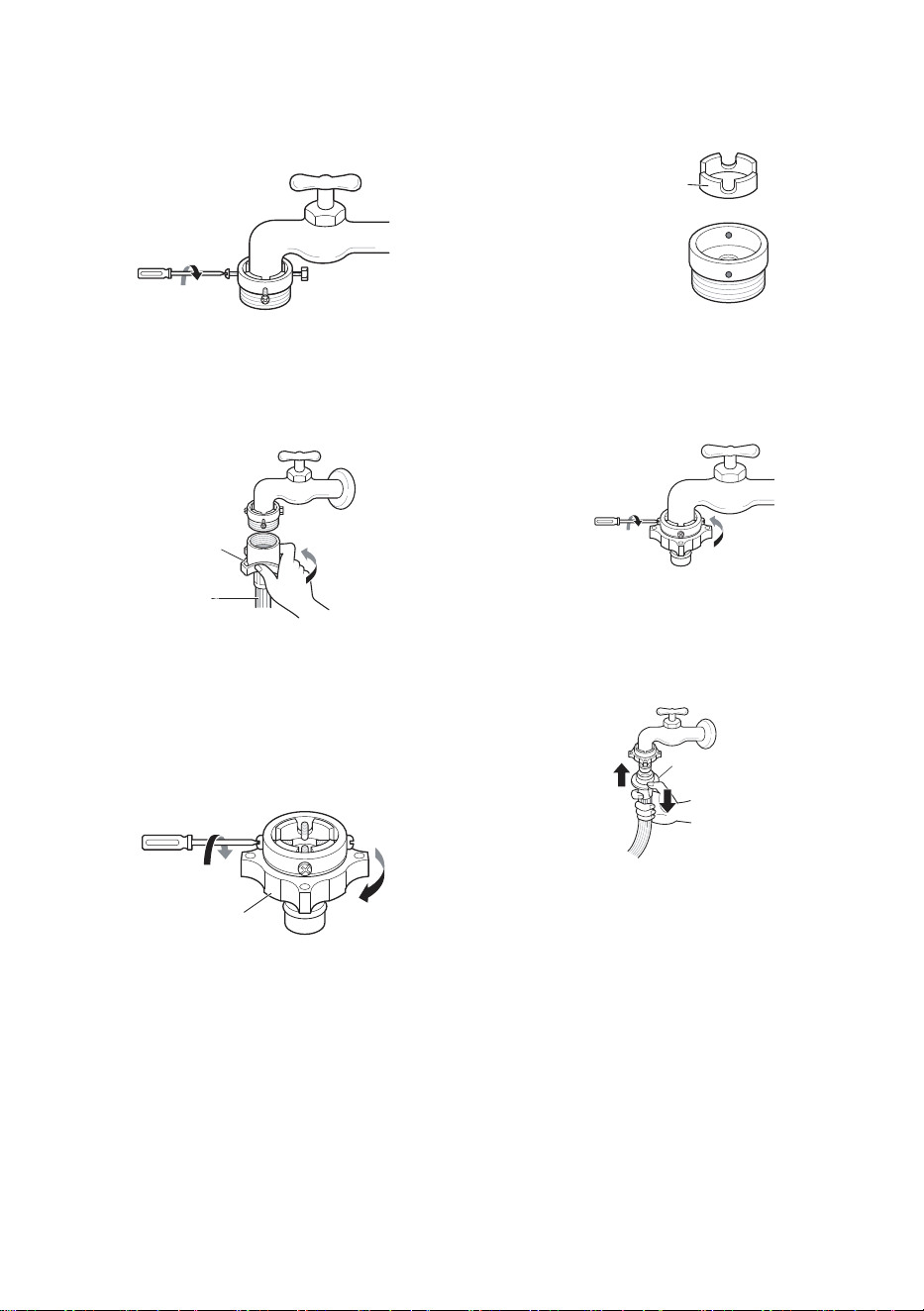
3
Push the adapter onto the end of the tap
so that the rubber seal forms a watertight
connection. Tighten the four fixing screws.
4
Push the supply hose vertically upwards
so that the rubber seal within the hose can
adhere completely to the tap and then tighten
it by screwing it to the right.
Plate
Supply
hose
Connecting One Touch Type
Hose to Tap Without Thread
1
Unscrew the adapter ring plate and loose the
four fixing screws.
Ring plate
2
Remove the guide plate if the tap is too large
to fit the adapter.
Guide plate
3
Push the adapter onto the end of the tap
so that the rubber seal forms a watertight
connection. Tighten the four fixing screws and
the adapter ring plate.
4
Pull the connector latch plate down, push the
supply hose onto the adapter, and release the
connector latch plate. Make sure the adapter
locks into place.
Latch plate
NOTE
• After connecting the supply hose to the water
tap, turn on the water tap to flush out foreign
substances (dirt, sand, sawdust, and etc.) in the
water lines. Let the water drain into a bucket,
and check the water temperature.

14
EN
Connecting Hose to Appliance
Attach the hot water line to the hot water inlet on
the back of the washing machine. Attach the cold
water line to the cold water inlet on the back of the
washing machine.
NOTE
• After completing connection, if water leaks from
the hose, repeat the same steps. Use the most
conventional type of tap for the water supply.
In case the tap is square or too big, remove
the guide plate before inserting the tap into the
adaptor.
Installing the Drain Hose
Before connecting the drain hose, check your drain
hose model and choose the correct instruction.
Pump Model (Australia and other
countries)
• The drain hose should not be placed higher than
120 cm above the floor. Water in the washing
machine may not drain or may drain slowly.
• Securing the drain hose correctly will protect the
floor from damage in the event of water leakage.
• If the drain hose is too long, do not force it
back into the washing machine. This will cause
abnormal noise.
• When installing the drain hose to a sink, secure
it tightly with string.
0.9 - 1.2 m
0.9 - 1.2 m
Laundry tub
Hose
retainer
Tie strap
NOTE
• The discharge height should be approximately
0.9 - 1.2 m from the floor.
15
EN
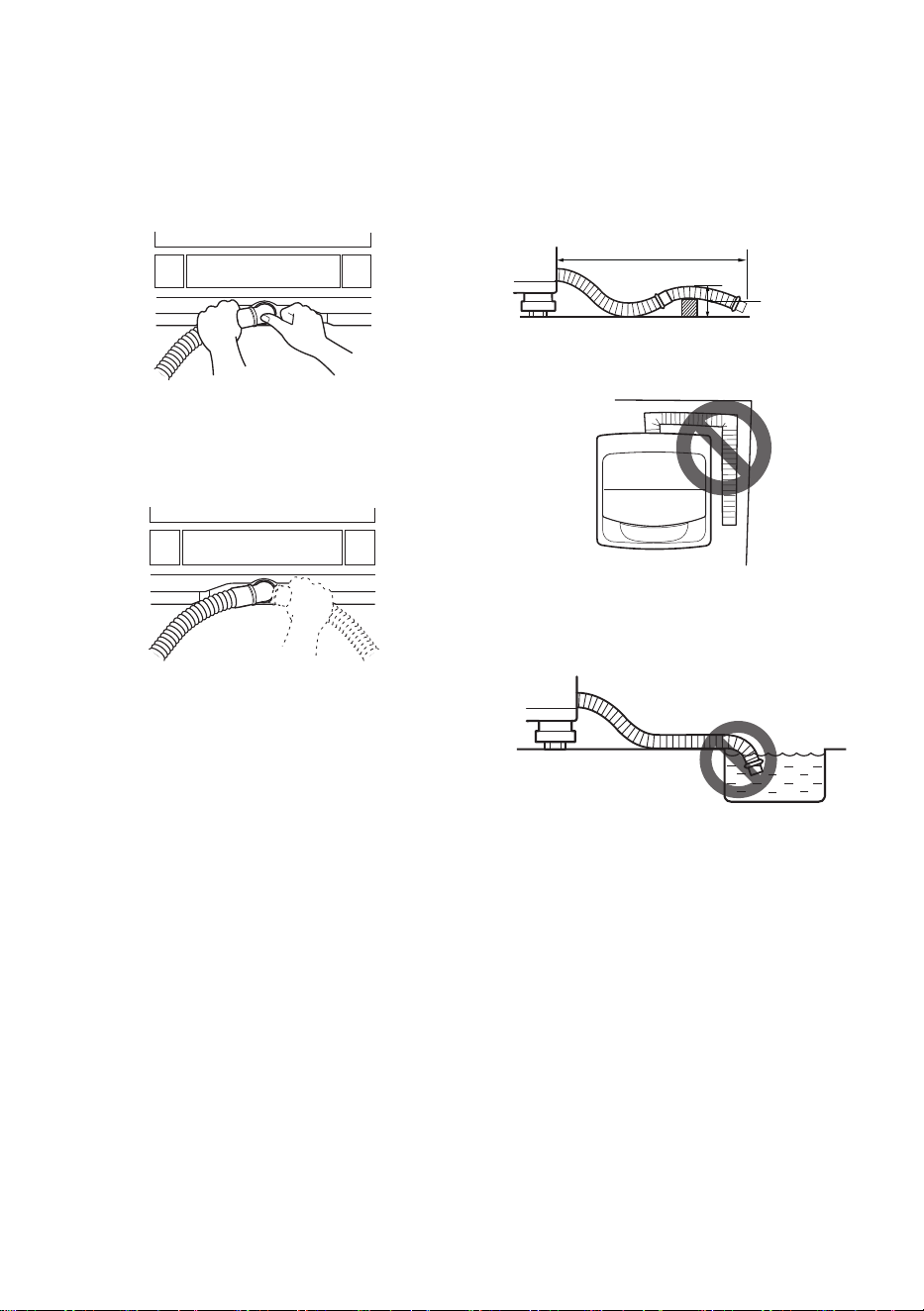
Non-pump Model (some countries
only)
1
Push the elbow hose toward the body of the
washing machine.
2
To change the direction of the hose, pull out
the elbow hose and change the direction.
Repeat Step 1.
Positioning the Drain Hose
• The length of the drain hose should not exceed
3 m.
• Do not place the drain hose on a threshhold of
6 cm or more.
max. 6 cm
max. 3 m
• Make sure the drain hose is not kinked.
• The outlet of the drain hose should not be
submerged in water.
• Make sure the drain hose is not kinked.
16
EN
Leveling the Appliance
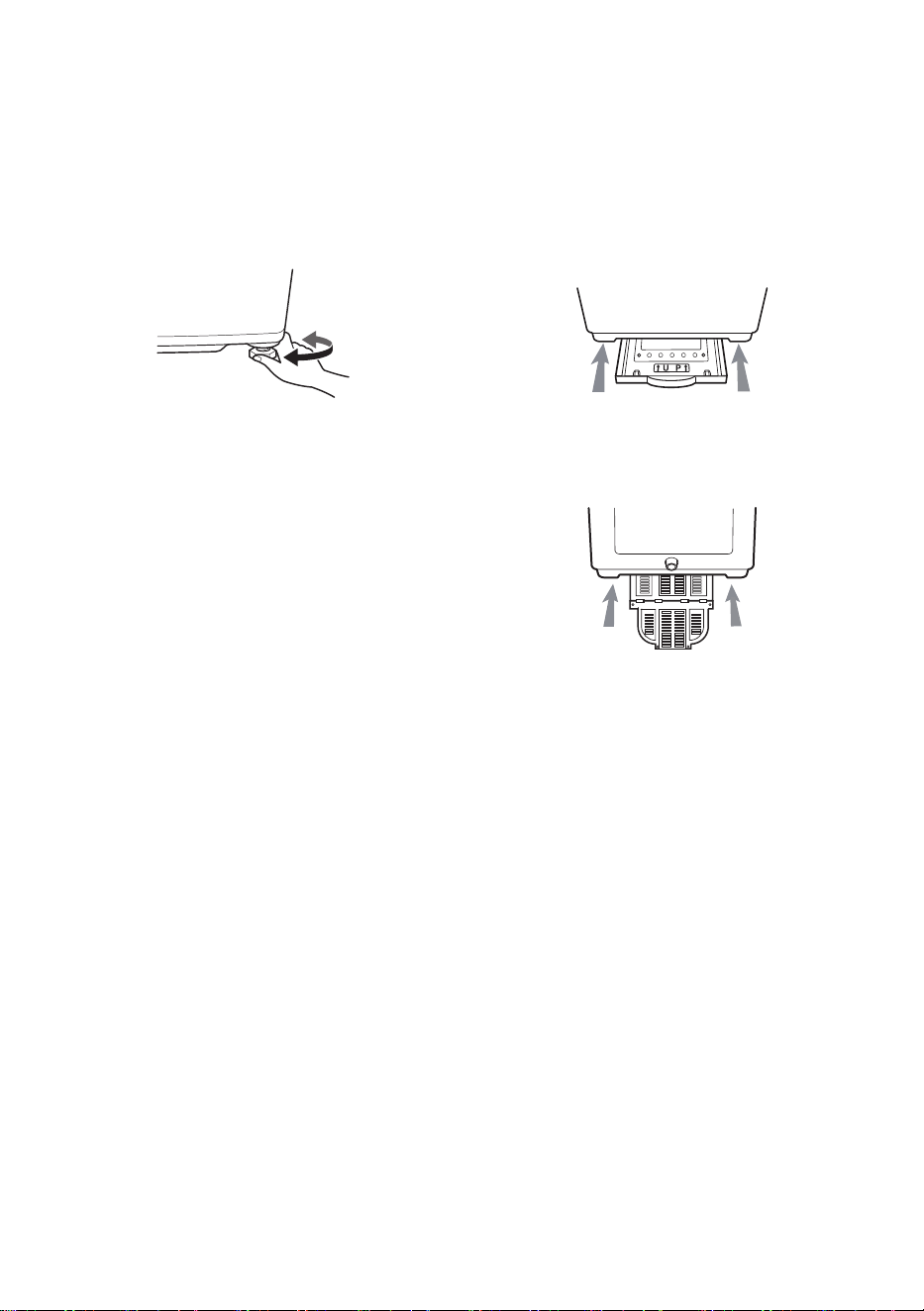
If the floor is uneven, turn the adjustable feet as
required (Do not insert pieces of wood etc. under
the feet). Make sure that all four feet are stable
and resting on the floor and then check that the
appliance is perfectly level.
Diagonal Check
When pushing down the edges of the appliance
top plate diagonally, the appliance should not
move up and down at all (Check both directions). If
the appliance rocks when pushing the machine top
plate diagonally, adjust the feet again.
NOTE
• Timber or suspended type flooring will
contribute to excessive vibration and unbalance.
Re enforcement or bracing of the timber floor
may need to be considered to stop or reduce
excessive noise and vibration.
• Do not install the washing machine on any
elevated surface, stand or plinth as it can
become unstable and fall causing serious injury
and damage.
• If the washing machine is installed on a uneven,
weak or tilted floor causing excessive vibration,
spin failure or UE error can occur. It must be
placed on a firm and level floor to prevent spin
failure.
Assembling the Anti-Rat
Cover (some models only)
Insert the Anti-Rat cover to the assembling hole
from the front or back of the washing machine.
Type 1
Type 2
17
EN
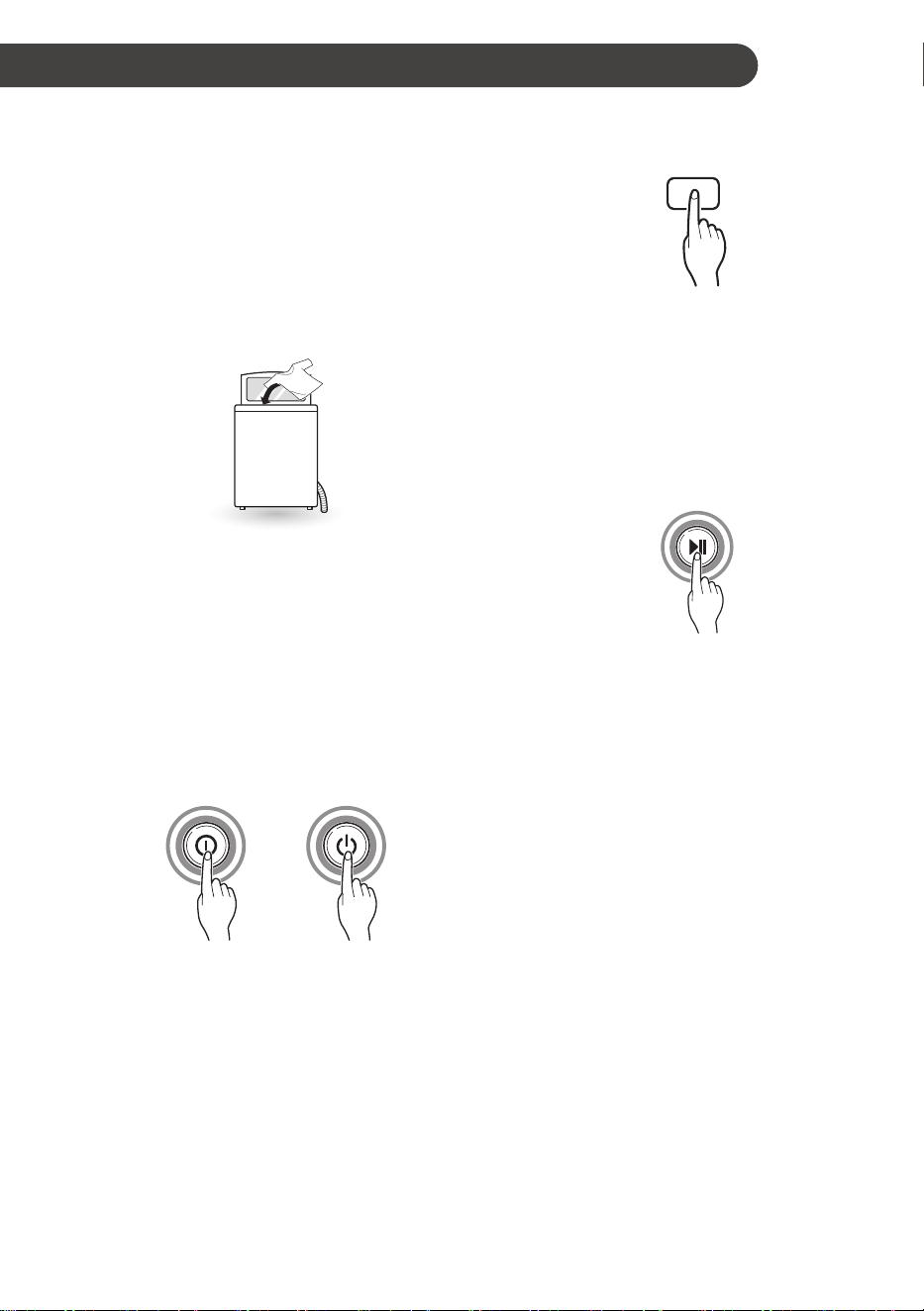
Using the Appliance
Before the first wash, select a washing programme
(Cotton Wash, add a half load of detergent), allow
the washing machine to wash without clothing.
This will remove residue and water from the drum
that may have been left during manufacturing.
1
Sort laundry and load items.
• Sort laundry by fabric type, soil level, colour
and load size as needed. Open the door
and load items into the washing machine.
2
Add cleaning products and/or detergent and
softener.
• Add the proper amount of detergent to the
detergent dispenser drawer. If desired, add
bleach or fabric softener to the appropriate
areas of the dispenser.
3
Turn on the washing machine.
• Press the Power button to turn on the
washing machine.
4
Choose the desired wash programme.
• Press the Program button repeatedly until
the desired programme is selected.
5
Begin programme.
• Press the Start/Pause button to begin the
programme. The washing machine will
agitate briefly without water to measure
the weight of the load. If the Start/Pause
button is not pressed within 60 minutes,
the washing machine will shut off and all
settings will be lost.
6
End of programme.
• When the programme is finished, a melody
will sound. Immediately remove your
clothing from the washing machine to
reduce wrinkling.
NOTE
• The Auto Restart function allows the programme
to restart by itself in case of power failure. lt
resumes from the stage where it stopped.
OPERATION
18
EN
Sorting Laundry
1
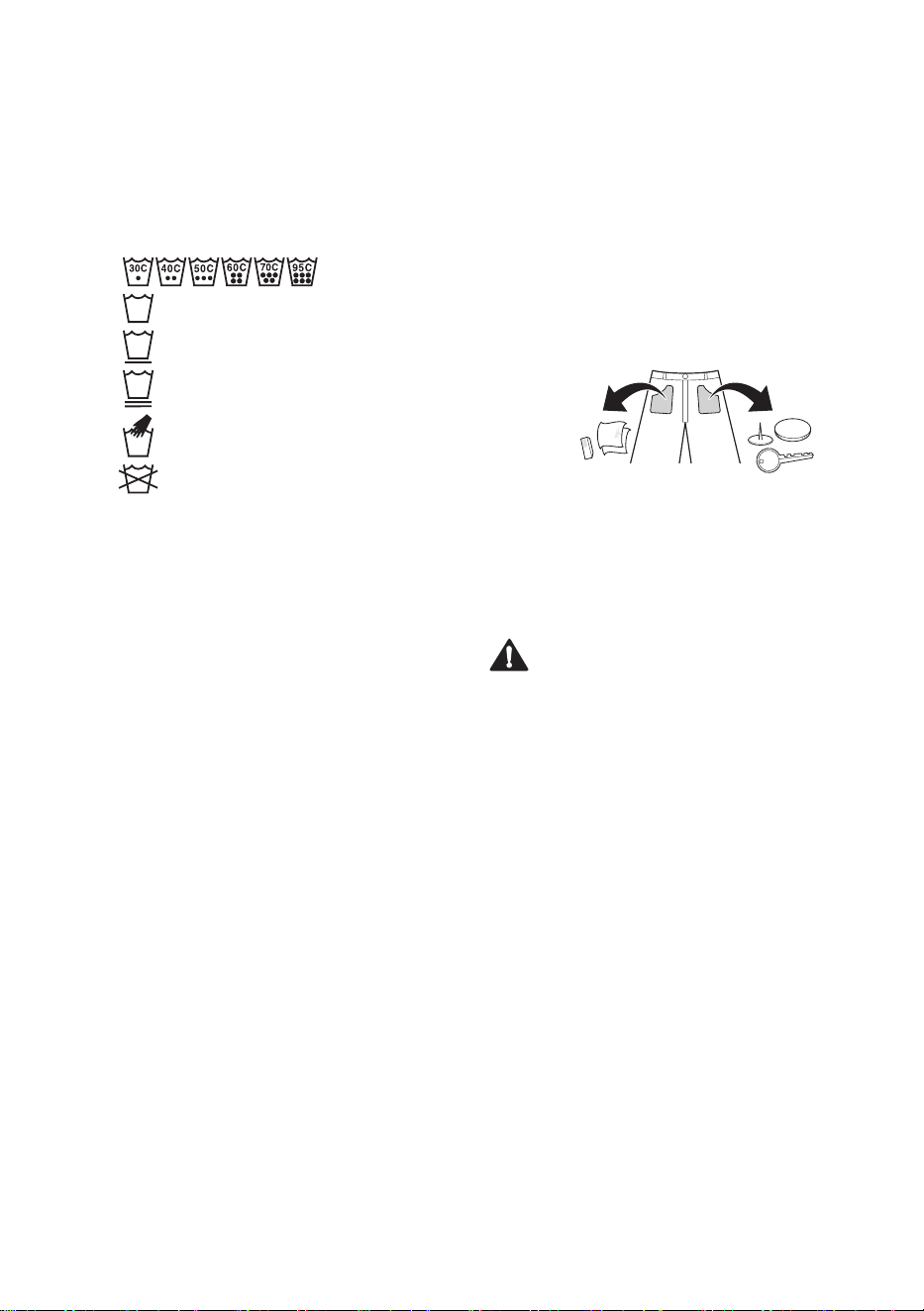
Look for the care label on your clothes.
• This will tell you about the fabric content of
your garment and how it should be washed.
• Symbols on the care labels.
[Wash temperature]
[Normal machine wash]
[Permanent press]
[Delicate]
[Hand wash]
[Do not wash]
2
Sorting laundry.
• To get the best results, sort clothes into
loads that can be washed with the same
wash cycle.
• Different fabrics need to be washed at
varying temperatures and spin speeds.
• Always sort dark colours from pale colours
and whites. Wash separately as dye and lint
transfer can occur causing discolouration
of white and pale garments. Do not
wash heavily soiled loads in the washing
machine.
− Soil (Heavy, Normal, Light) :
Separate clothes according to amount of
soil.
− Colour (White, Lights, Darks):
Separate white fabrics from coloured
fabrics.
− Lint (Lint producers, Collectors):
Wash lint producers and lint collectors
separately.
3
Caring before loading.
• Combine large and small items in a load.
Load large items first.
• Large items should not be more than half
the total wash load. Do not wash single
items. This may cause an unbalanced load.
Add one or two similar items.
• Check all pockets to make sure that they
are empty. Items such as nails, hair clips,
matches, pens, coins and keys can damage
both your washing machine and your
clothes.
• Close zippers, hooks and strings to make
sure that these items don’t snag on other
clothes.
• Pre-treat dirt and stains by brushing a small
amount of detergent dissolved water onto
stains to help lift dirt.
CAUTION
• Do not wash or spin any item labeled or known
to be water-proof or water-resistant, even if the
product care label on the item permits machine
washing. Failure to follow these instructions
could result in severe damage to your laundry,
your washing machine and/or property damage
as a result of abnormal vibration of the washing
machine.
− Examples of water-proof or water-resistant
items include certain mattress pads, mattress
covers, rain gear, camping gear, skiing
apparel, outdoor gear and similar items.

19
EN
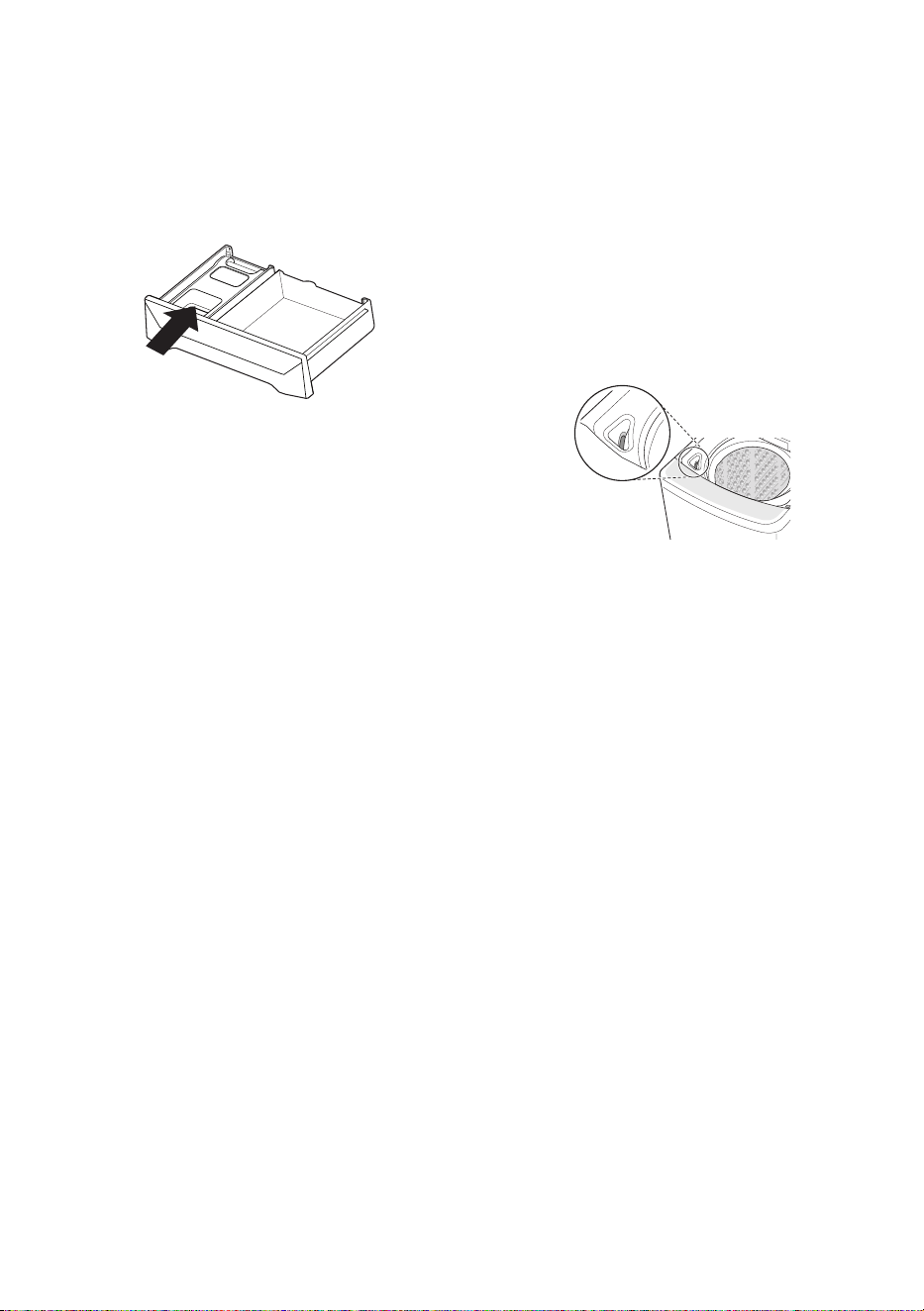
Adding Cleaning Products
Detergent Dosage
• Detergent should be used according to the
instruction of the detergent manufacturer and
selected according to type, colour, soiling of the
fabric and washing temperature.
• If too much detergent is used, too many suds
can occur and this will result in poor washing
results or cause heavy load to the motor. If
the water temperature is too cold, then the
detergent will not dissolve and can remain
inside the machine causing odors.
• If you wish to use liquid detergent follow
the guidelines provided by the detergent
manufacturer.
• You can pour liquid detergent directly into the
main detergent drawer if you are starting the
cycle immediately.
• Do not use liquid detergent if you are using
Time Delay as the liquid may harden.
• If too many suds occur, reduce the detergent
amount.
• Detergent usage may need to be adjusted for
water temperature, water hardness, size and
soil level of the load. For best results, avoid
oversudsing.
• Refer to the label of the clothes, before
choosing the detergent and water temperature.
• When using the washing machine, use
designated detergent for each type of clothing
only:
− General powdered detergents for all types
of fabric
− Powdered detergents for delicate fabric
− Liquid detergents for all types of fabric or
designated detergents only for wool
• For better washing performance and whitening,
use detergent with the general powdered
bleach.
• Detergent is flushed from the dispenser at the
beginning of the cycle.
• Dilute liquid detergent with water and pour into
the drum, start the cycle.
• Using liquid detergent without diluting, or leaving
laundry for a long time after pouring diluted
liquid detergent into the drum might cause
damage, bleaching or discoloration of cloth.
NOTE
• Do not let the detergent harden. Doing so may
lead to blockages, poor rinse performance or
odour.
• Full load : According to manufacturer’s
recommendation.
• Part load : 3/4 of the normal amount
• Minimum load : 1/2 of full load
Adding Detergent
• Follow the detergent package directions.
Using too little detergent is a common cause of
laundry problems. Use more detergent if you
have hard water, large loads, greasy or oily soils
or lower water temperature.
• Soap flakes or granulated soap powders should
not be used in your washing machine. When
washing woolens, remember to use detergent
suitable for washing woolens.
NOTE
• Too much detergent, bleach or softener may
cause an overflow or a malfunction.
20
EN
Adding Fabric Softener
• Do not exceed the maximum fill line. Overfilling
can cause early dispensing of the fabric
softener, which may stain clothes. Close
the dispenser drawer slowly. If the softener
consistency is thick, then it should be diluted.
• Do not leave the fabric softener in the detergent
drawer for more than 2 days (Fabric softener
may harden).
• Softener will automatically be added during the
last rinse cycle.
• Do not open the drawer when water is being
supplied.
• Solvents (benzene, etc.) should not be used.
NOTE
• Do not pour fabric softener directly on the
clothes as it may stain the clothes.
Adding Liquid Bleach
• Check clothing care label for special instructions
and separate the laundry to be bleached.
• Dilute liquid chlorine bleach.
• Measure the recommended amount of liquid
bleach carefully following instructions on the
bottle.
• Before starting the washing machine, pour the
measured amount of bleach directly into the
bleach dispenser. Avoid splashing or overfilling.
Powdered bleach should be mixed with water
before being poured into the dispenser.
NOTE
• Never pour undiluted liquid bleach directly onto
clothes or into the wash basket. This may cause
change of color or damage the laundry.
• Do not pour powdered bleach into the bleach
dispenser.

21
EN
Control Panel
1
Power Button
• Press the Power button to turn the
washing machine on, or off if washing
hasn’t commenced.
• The appliance will automatically turn off
once a certain time has passed after the
wash has completed.
2
Start/Pause Button
• Press the Start/Pause button to start the
wash cycle or pause the wash cycle.
• If a temporary stop of the wash cycle is
needed, press the Start/Pause button.
NOTE
• If the wash is not recommenced within
60 minutes when in pause, then the
appliance will automatically turn off.
• For customer safety, the door will be
locked automatically during operation.
If there are additional laundry to put in,
press Start/Pause to unlock.
• Press Start/Pause button again to resume
operation.
3
Program Button
• Programmes are available according to
laundry type.
• Lamp will light up to indicate the selected
programme.
4
Option Button
• Press buttons to select the desired
options.
5
Display
• The display shows the settings, estimated
time remaining, options, and status
messages. When the product is turned
on, the default settings in the display will
illuminate.
• The process lamp will remain prior to it
beginning. The process lamp will blink
during that process, and the lamp will then
turn off when that process has completed.

22
EN
Washing Programme
Wash cycles are designed for the best wash
performance for each type of load. Select the
programme that best matches the load contents
for maximum wash performance and fabric care.
Press the Program button to select the desired
programme. When you select a wash programme,
the light for the corresponding wash programme
will turn on.
Cotton Wash
Use this programme to wash cotton wash loads.
• This programme automatically selects the
most appropriate conditions and completes the
sequence in one operation.
• The built-in sensor detects the weight of the
load and the ideal wash power and wash, rinse
and spin times are set accordingly.
• If water is already in the drum, or putting wet
laundry into the drum before starting increases
the water level.
• Water level can be set low with lightweight bulky
loads.
Stain Care
Use this programme to remove stains efficiently.
Water will be heated up to about 40 °C under this
programme for the best washing result.
• This programme uses more warm water
than other programmes as it has higher set
temperature for heating.
• Stains that can be easily removed with this
programme are coffee, soda, juice, soy sauce
etc.
• If only cold water is connected, it takes longer
laundry time as heating time lengthens. Use
cold water and hot water together.
• While heating, there might be water drops at the
glass of the door due to humidity differences.
Wipe it after laundry as this is normal
phenomenon.
• Be careful as the exterior of the machine is hot
by heating.
Allergy Care
This programme is a powerful, high temperature
programme designed specifically to reduce certain
allergens.
• Stains that can be easily removed with this
programme are milk, blood, sebum, egg.
• If only cold water is connected, it takes longer
laundry time as heating time lengthens.
• While heating, there might be water drops at the
glass of the door due to humidity differences.
Wipe it after laundry as this is normal
phenomenon.
• Be careful as the exterior of the machine is hot
by heating.
• Due to higher water temperatures used, this
programme is not recommended for wool, silk,
leather, or any other delicates or temperature
sensitive items.
Extra Rinse
Use this programme to increase rinsing
performance.
• This programme is recommended for underwear
and baby clothes.
• If someone has sensitive skin or skin trouble,
use this programme.
23
EN
Eco Cotton
Use this programme to consume less water and
electricity to wash normal clothes.
Information for Energy Test
Select the water temperature to suit wash cycles.
Always follow garment manufacturer’s care label
or instructions when washing.
• Set programme of Eco Cotton, Wash 6
minutes, Rinse 5 times, Spin Ultra, Hot Wash,
Cold Wash, Soak 2 hours is for normally soiled
load and testing in accordance or in conformity
with AS/NZS 2040. 1.
• The test results depend on water pressure,
water hardness, water supply temperature,
room temperature, type and amount of load,
degree of soiling utilized detergent, fluctuations
in the main electricity supply and chosen
additional options.
• For best washing results, we recommend dilute
the detergent powder (drum type) in warm water
and pour directly into the drum.
Quick Wash
Use this programme to wash lightly soiled clothes
for a short time.
• This programme’s recommended laundry
amount is under 3 kg.
Delicates
Use this programme to wash delicate fabrics such
as lingerie and woolens. Before washing, check
the care label for the washing instructions.
• This programme uses a slow spin to extract
water from laundry, so the laundry has more
moisture than normal.
• Only cold water will be used for this programme
as hot water may damage laundry.
Towels
Use this programme to wash bath towels,
bathrobes, hand towels etc.
• To wash bulky loads, increase the water level
manually to reduce linting and detergent
residue.
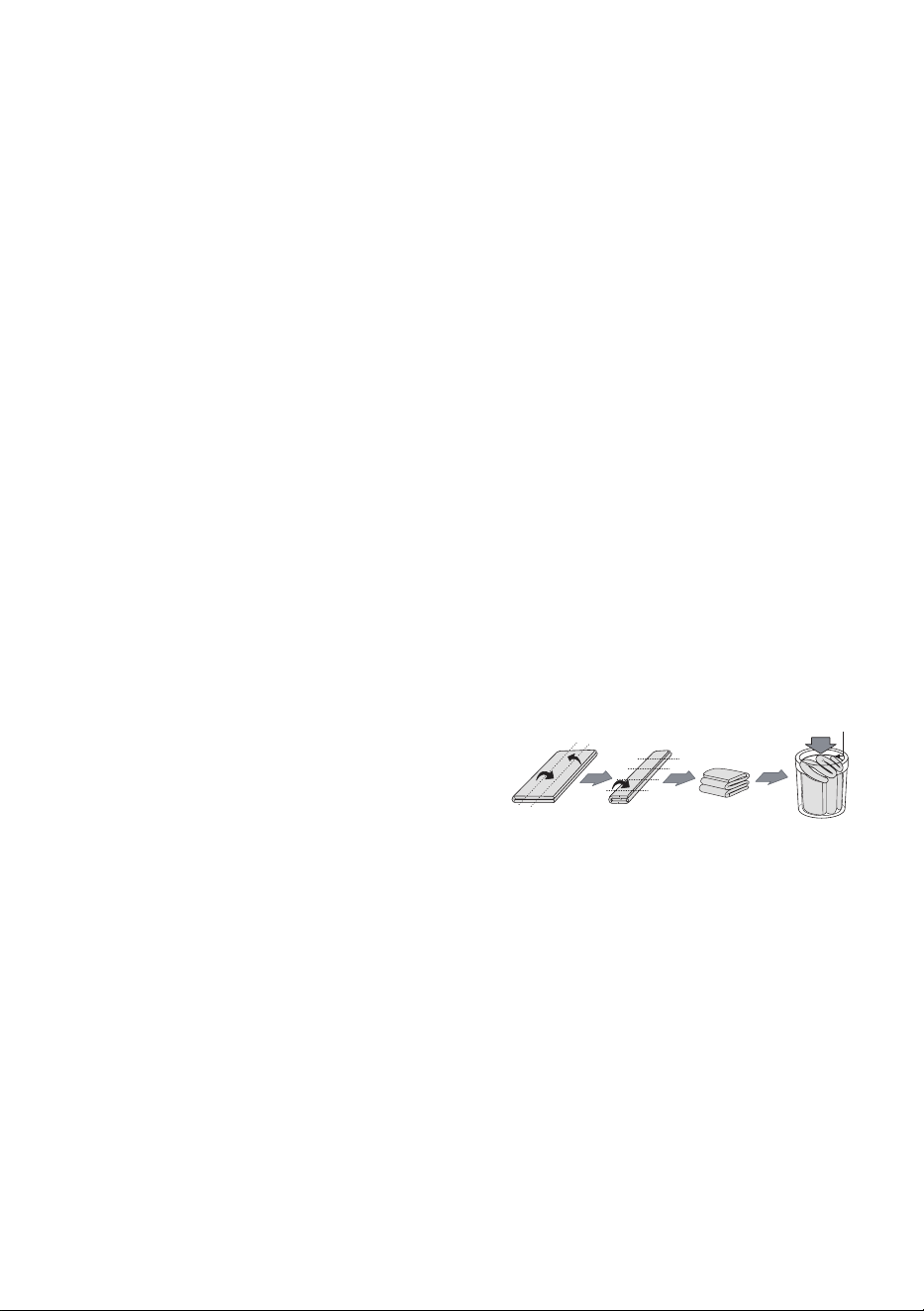
Duvet
Use this programme to wash a blanket or
bedsheets with hand wash sign.
• Cashmere bedsheets, acrylic blanket, mixed
spinning blanket, woolen blanket, infilling
(polyester 101), and bed sheet might be
damaged by floating. It is recommended to
purchase a separate laundry net to wash.
• Separate bed clothes from general clothes. Not
doing so might cause laundry to askew and
results in abnormal washing.
• Spin dry might take longer to spread out laundry
if bedsheets are lumped to a side.
• Never wash an electric blanket or carpets. It can
cause damage to the washing machine.
• Use a laundry net to soak and sink bedsheets
that may float easily. it may damage the
machine if the items float during the wash or
spin.
• Regardless of size, we recommend to washing
bedsheets individually. If two bedsheets with
different materials are washed at the same
time, it might cause a spin malfunction due to
imbalance.
NOTE
• How to put a blanket into the drum
Below this line
Quiet Wash
Use this programme to wash clothes quietly
especially during late night and dawn.
• This programme has a longer washing time than
the Cotton Wash programme.
• To reduce noise in spinning, this programme
uses a slow spin to extract water from the
clothes, so the clothes will have more moisture
than normal.
24
EN
Option Programme
Water Level
Use this option to adjust water level. This
appliance detects the quantity of laundry
automatically, then sets the water level.
• It may be necessary to increase the water level
manually when washing bulky light weight
clothes.
• This may be required to avoid linting and
unbalanced errors when the load is bulky but
lightweight.
• It can be changed during operation.
• When you select a wash programme, the water
level will be shown on the control panel.
• When water level is automatically detected, it
may differ depending on the quantity of laundry
even though the same water level is indicated
on the control panel.
Wash
• Press the Wash button to change the wash
time.
• Adjusting the wash level setting will modify the
cycle times and/or wash actions. Press the
Wash button until the desired wash level is
selected.
Rinse
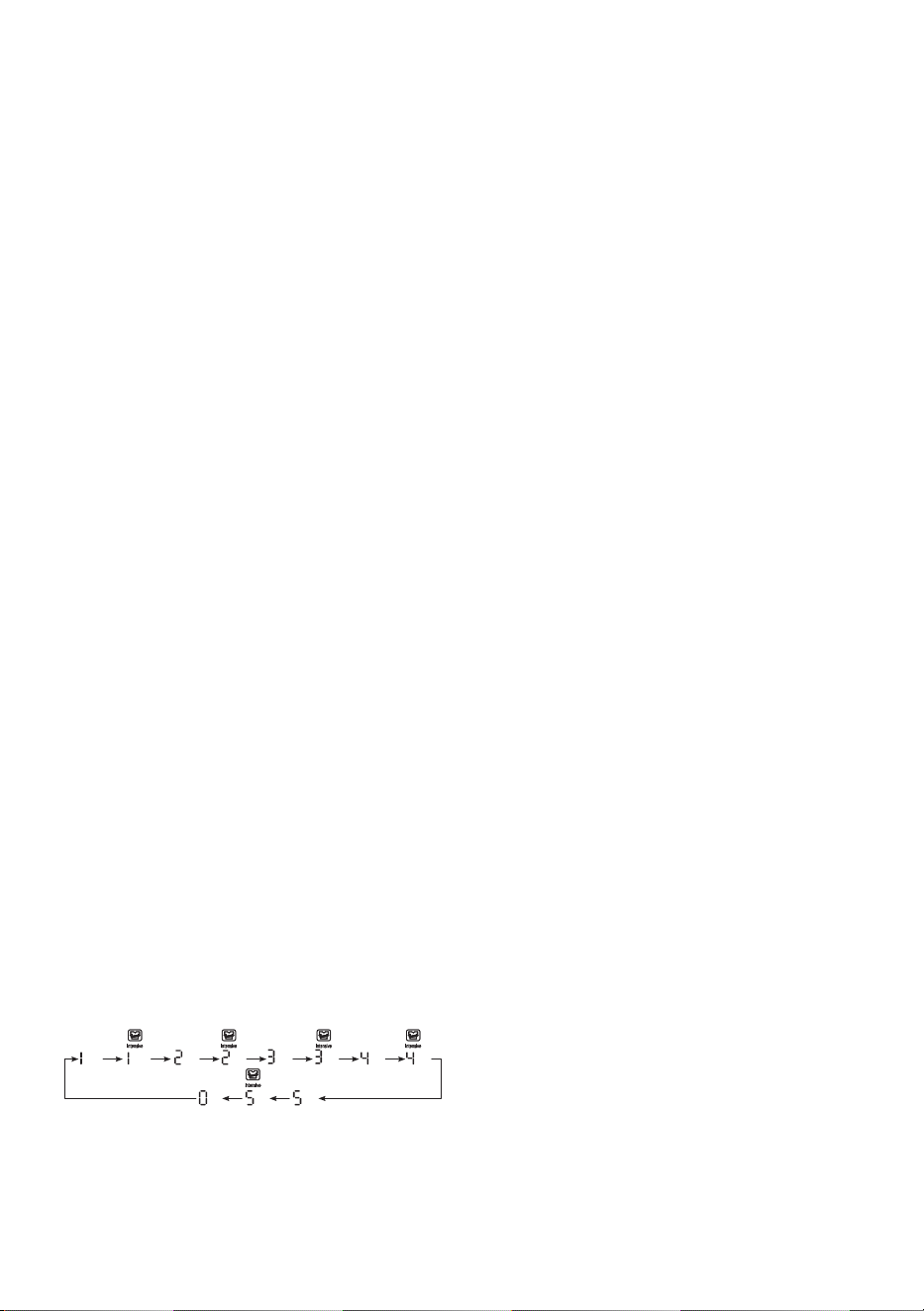
• Press the Rinse button to change the number
of rinses.
Intensive Rinse
• Use Intensive Rinse to remove detergents more
effectively.
• Press the Rinse button to start Intensive Rinse.
Spin
• Press the Spin button to change spin strength.
• Press Start/Pause button to indicate remaining
time.
To use the Air Dry function
• When you select Air Dry, you can reduce the
drying time by minimizing the moisture in the
laundry.
• Press the Spin button for 3 seconds to select
and press the Power button to deselect.
NOTE
• Always keep the laundry amount to 2 kg or less
and make sure to spread it out evenly.
• Select 60 minutes for cotton laundry and 120
minutes for synthetic fiber laundry for effective
moisture removal.
Vapour Mode
Use this option to enhance washing performance
with vapour.
• It increases the wash temperature to 60°C for a
short period of the wash cycle.
• This option is automatically selected under the
Allergy Care programme.
time time times times times times times times
times
timestime

25
EN
Time Delay
• You can set a Time Delay so that the washing
machine will start automatically and finish after a
specified time interval.
1
Press the Power button.
2
Select a washing programme.
3
Press the Time Delay button to set the
required delay ending time.
4
Press the Start/Pause button.
NOTE
• This function is the time to the end of the
programme, not the start. The actual running
time may vary due to water temperature, wash
load and other factors.
• Reservation can be made up to 18 hours by
1-hour interval up to 3 - 12 hours and 2-hour
interval for 12 - 18 hours. This function cannot
be set for less than 3 hours.
• To cancel this function, press Time Delay button
repeatedly until the reservation is canceled
or press the Power button to turn off and on
power.
Soak
• This option can be selected to wash heavily
soiled clothes by soaking in water for some time
to remove dirt and grime.
1
Press the Power button.
2
Select a washing programme.
3
Press the Soak button to set time required.
4
Press each of the Rinse or Spin button
to select the number of rinses or the spin
strength.
5
Press the Start/Pause button.
Hot Wash / Cold Wash
• Press the Hot Wash and Cold Wash buttons
to select hot water, cold water, or hot and cold
water (warm water).
• It can be changed during operation.
• If Hot Wash is selected, washing will be done
with hot water and rinse will be done with cold
water.
• Hot and cold water makes appropriate
temperature by mixing them adequately when
both hot water and cold water are selected.
• Delicates programme is cold water only. If hot
water is used, the laundry can be damaged.
• Both Hot Wash and Cold Wash are
automatically selected for the Extra Rinse
programme and Tub Clean function.
26
EN
Manual Washing
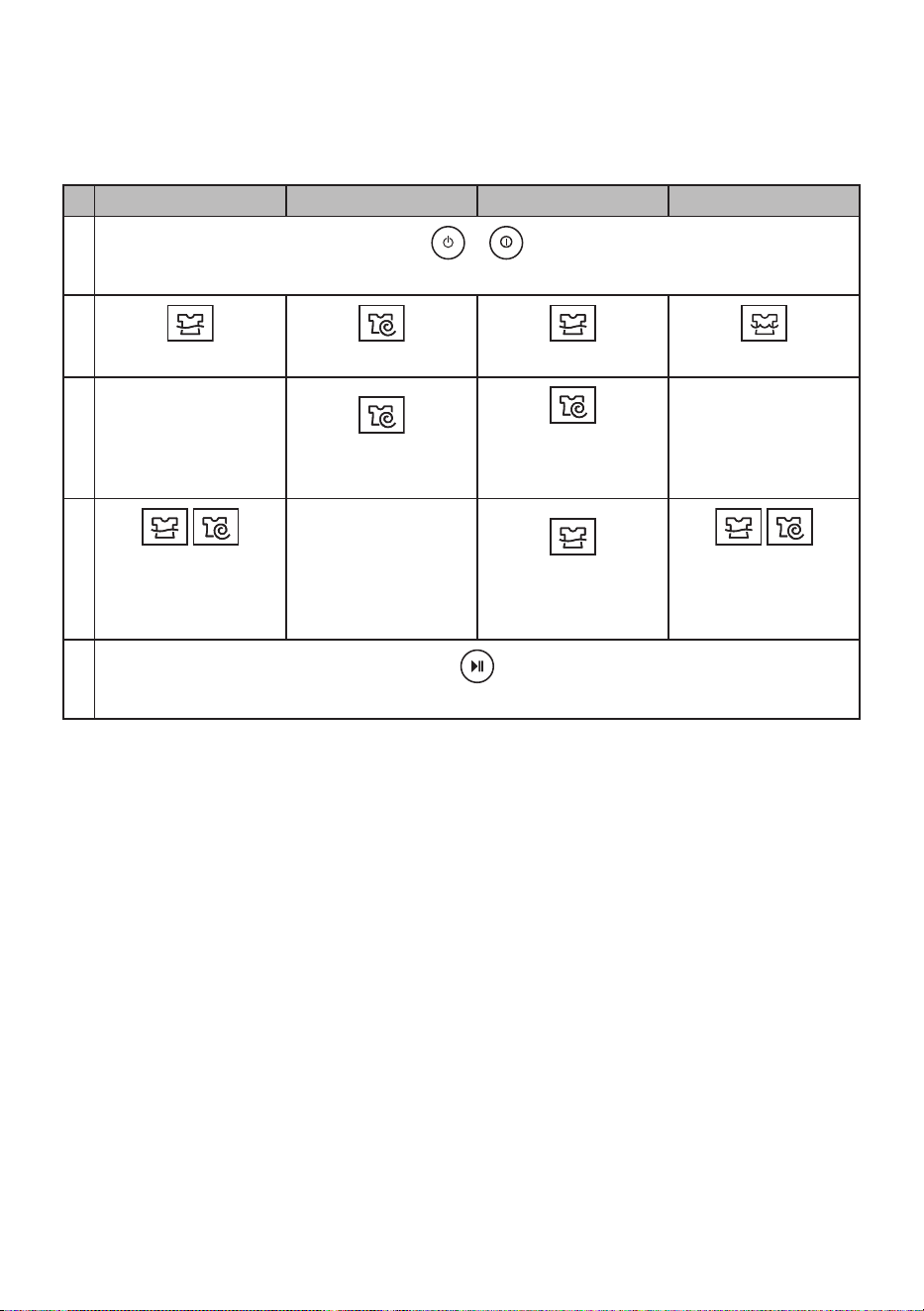
When you need a rinse/spin, spin, rinse, or wash cycle only, these can be set manually.
Rinse, Spin Spin only Rinse only Wash only
1
or
Press the Power button.
2
Press the Rinse button. Press the Spin button. Press the Rinse button. Press the Wash button.
3
Rinse and spin are
automatically selected.
Press the Spin button
to adjust spin strength.
Press the Spin button
until the spin function is
canceled.
Rinse and spin are
automatically selected.
4
Press the Rinse or
Spin buttons to adjust
the number of rinses or
the spin strength.
Press the Rinse button
to adjust the number of
rinses.
Press the Rinse and
Spin buttons until the
rinse and spin functions
are canceled.
5
Press the Start/Pause button.
NOTE
• When a wash, wash/rinse or rinse only option is selected, the water will not be drained out after the wash
is completed. If you wish to drain the water, select a spin only cycle after the wash has completed.
• If rinse only is selected, the process will start from the inlet water being supplied.
• If you do not select or change the water level, the water level will be set automatically.

27
EN
Special Functions
Child Lock
Use this option to disable the controls. This feature
can prevent children from changing programmes
or operating the appliance.
Locking the Control Panel
1
Press and hold the Rinse button for 3
seconds.
2
‘ ’ and the remaining time are alternatively
shown on the display while they are locked.
• When this function is set, all buttons are
locked except the Power button.
NOTE
• Turning off the power will not reset this function.
You must deactivate this function before you
can access any other functions.
• To see the remaining time for each process,
press one of the Wash, Rinse and Spin
buttons. The remaining time for each process
will appear for about 1 second.
Unlocking the Control Panel
Press and hold the Rinse button for 3 seconds.
• A chime will sound and the remaining time for
the current programme will reappear on the
display.
28
EN
Using LG SmartThinQ
Application
Things to check before using LG
SmartThinQ
• For appliances with the or logo
1
Check the distance between the appliance
and the wireless router (Wi-Fi network).
• If the distance between the appliance and
the wireless router is too far, the signal
strength becomes weak. It may take a
long time to register or installation may fail
altogether.
2
Turn off the Mobile data or Cellular Data on
your smartphone.
• For iPhones, turn data off by going to
Settings → Cellular → Cellular Data.
3
Connect your smartphone to the wireless
router.
NOTE
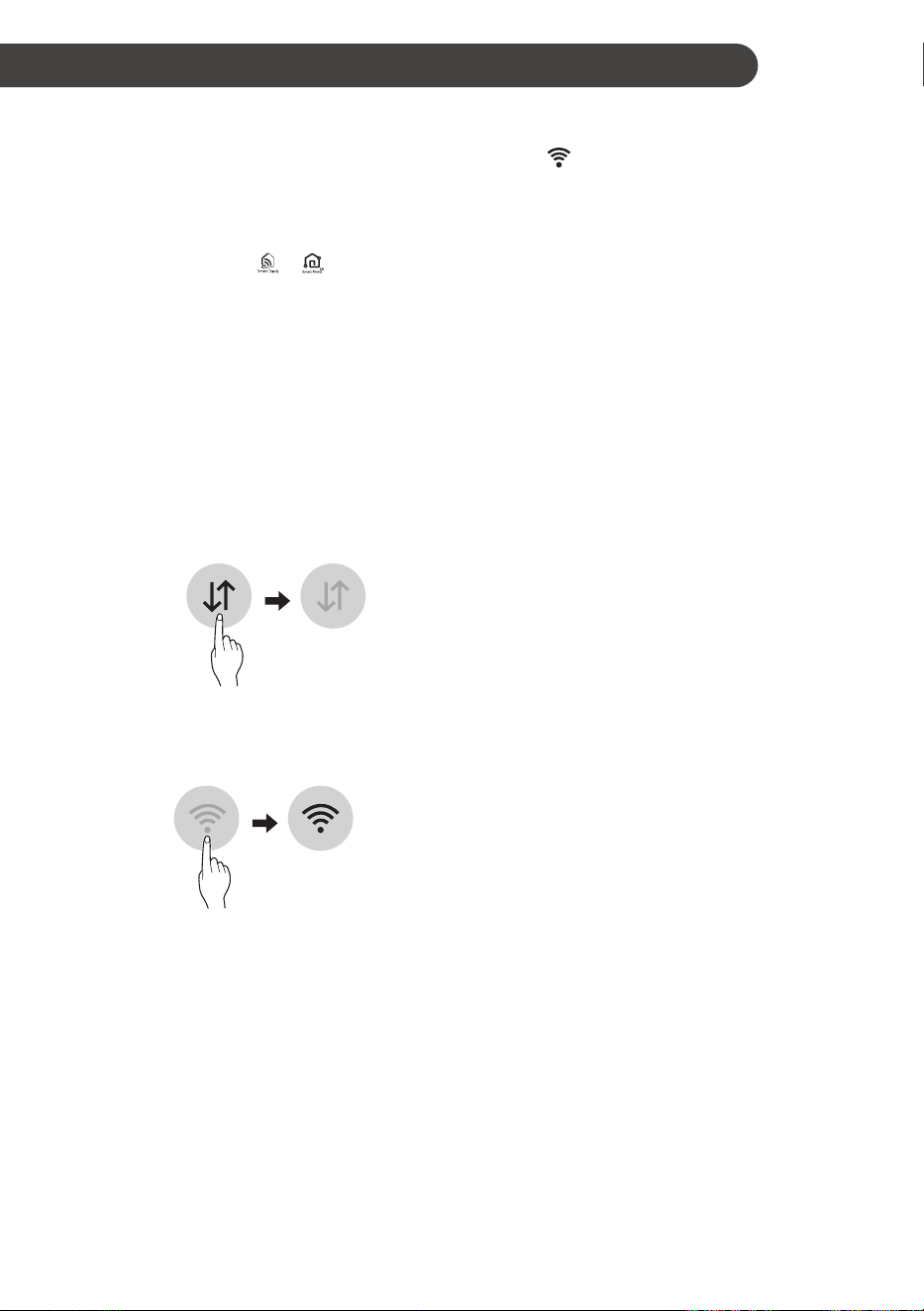
• To verify the Wi-Fi connection, check that
Wi-Fi icon on the control panel is lit.
• The appliance supports 2.4 GHz Wi-Fi networks
only. To check your network frequency, contact
your Internet service provider or refer to your
wireless router manual.
• LG SmartThinQ is not responsible for any
network connection problems or any faults,
malfunctions, or errors caused by network
connection.
• If the appliance is having trouble connecting
to the Wi-Fi network, it may be too far from
the router. Purchase a Wi-Fi repeater (range
extender) to improve the Wi-Fi signal strength.
• The Wi-Fi connection may not connect or may
be interrupted because of the home network
environment.
• The network connection may not work properly
depending on the Internet service provider.
• The surrounding wireless environment can
make the wireless network service run slowly.
• The appliance cannot be registered due to
problems with the wireless signal transmission.
Unplug the appliance and wait about a minute
before trying again.
• If the firewall on your wireless router is enabled,
disable the firewall or add an exception to it.
• The wireless network name (SSID) should be a
combination of English letters and numbers. (Do
not use special characters.)
• Smartphone user interface (UI) may vary
depending on the mobile operating system (OS)
and the manufacturer.
• If the security protocol of the router is set to
WEP, you may fail to set up the network. Please
change it to other security protocols (WPA2 is
recommended) and register the product again.
SMART FUNCTIONS

29
EN
Installing LG SmartThinQ
Search for the LG SmartThinQ application from the
Google Play Store or Apple App Store on a smart
phone. Follow instructions to download and install
the application.
Wi-Fi Function
• For appliances with the or logo
Communicate with the appliance from a smart
phone using the convenient smart features.
Washer Cycle (Remote Start,
Download Cycle)
Set or download any preferred cycle and operate
by remote control.
Tub Clean Coach
This function shows how many cycles remain
before It is time to run the Tub Clean programme.
Energy Monitoring
Check the energy consumption of the recently
used cycles and monthly average.
Smart Diagnosis™
This function provides useful information for
diagnosing and solving issues with the appliance
based on the pattern of use.
Settings
Various functions are available.
Push Alert
Turn on the Push Alerts to receive appliance status
notifications. The notifications are triggered even if
the LG SmartThinQ application is off.
NOTE
• If you change your wireless router, Internet
service provider, or password, delete the
registered appliance from the LG SmartThinQ
application and register it again.
• The application is subject to change for
appliance improvement purposes without notice
to users.
• Functions may vary by model.

30
EN
Using the Washing Machine
Remotely
Remote Start
Use a smart phone to control your appliance
remotely. You can also monitor your cycle
operation so you know how much time is left in the
cycle.
To Use Remote Start:
1
Press the Power button.
2
Put the laundry into the drum.
3
Press and hold Remote Start button for 3
seconds to enable this function.
4
Start a cycle from the LG SmartThinQ
application on your smartphone.
NOTE
• Once this function is enabled, you can start
a cycle from the LG SmartThinQ smartphone
application. If the cycle is not started, the
machine will wait to start the cycle until it is
turned off remotely from the application or this
mode is disabled.
• When this function is turned on, the door is
automatically locked.
To Disable Remote Start:
When this function is activated, press and hold the
Remote Start button for 3 seconds. The machine
cannot be manually operated in the home whilst
this function is activated. This function must
be turned off so that the machine can be used
manually.
Download Cycle
Download a new or special cycle that is not
included in the basic cycles on the appliance.
Appliances that have been successfully registered
can download from a variety of specialty cycles
specific to the appliance.
Only one cycle can be stored on the appliance at
a time.
Once cycle download is completed in the
appliance, the product keeps the downloaded
cycle until a new cycle is downloaded.
RF Radiation Exposure Statement
This equipment shall be installed and used at a
minimum distance of 20 cm from the human body.
Open Source Software Notice
Information
To obtain the source code under GPL, LGPL, MPL,
and other open source licenses, that is contained
in this product, please visit http://opensource.lge.
com.
In addition to the source code, all referred license
terms, warranty disclaimers and copyright notices
are available for download.
LG Electronics will also provide open source code
to you on CD-ROM for a charge covering the cost
of performing such distribution (such as the cost of
media, shipping, and handling) upon email request
to [email protected]. This offer is valid for a
period of three years after our last shipment of this
product. This offer is valid to anyone in receipt of
this information.
Smart Diagnosis™ Using a Smart
Phone
• For appliances with the or logo
Use this function if you need an accurate diagnosis
by an LG Electronics customer information centre
when the appliance malfunctions or fails.
Smart Diagnosis™ can not be activated unless the
appliance is connected to power. If the appliance
is unable to turn on, then troubleshooting must be
done without using Smart Diagnosis™.

31
EN
Using Smart Diagnosis™
Smart Diagnosis™ Through the
Customer Information Centre
Use this function if you need an accurate diagnosis
by an LG Electronics customer information centre
when the appliance malfunctions or fails. Use this
function only to contact the service representative,
not during normal operation.
1
Press the Power button to turn on the washing
machine. Do not press any other buttons.
2
When instructed to do so by the call centre,
place the mouthpiece of your phone close to
the Smart Diagnosis™ icon.
Max.
10 mm
3
Press and hold the Cold Wash button for 3
seconds.
4
Keep the phone in place until the tone
transmission has finished. Time remaining for
data transfer is displayed.
• For best results, do not move the phone
while the tones are being transmitted.
• If the call centre agent is not able to get an
accurate recording of the data, you may be
asked to try again.
5
Once the countdown is over and the tones
have stopped, resume your conversation with
the call centre agent, who will then be able to
assist you using the information transmitted for
analysis.
NOTE
• The Smart Diagnosis™ function depends on the
local call quality.
• The communication performance will improve
and you can receive better service if you use the
home phone.
• If the Smart Diagnosis™ data transfer is poor
due to poor call quality, you may not receive the
best Smart Diagnosis™ service.
32
EN
WARNING
• Unplug the washing machine before cleaning to
avoid the risk of electric shock. Failure to follow
this warning may result in serious injury, fire,
electric shock, or death.
• Never use harsh chemicals, abrasive cleaners,
or solvents to clean the washing machine. They
may damage the finish.
Cleaning the Washing
Machine
Care After Wash
• If you always use COLD water, we recommend
that a WARM or HOT wash be used at regular
intervals e.g. every 5th wash should be at least
a WARM one.
• Turn off taps to prevent the chance of flooding
should an inlet hose burst.
• Always unplug the power cord after use.
• After the cycle is finished, wipe the door and the
inside of the door seal to remove any moisture.
• Leave the door open to dry the drum interior
but only if there no unsupervised children in the
home.
• Wipe the body of the washing machine with a
dry cloth to remove any moisture.
Cleaning the Exterior
Proper care of your washing machine can extend
its life.
Exterior:
• Immediately wipe off any spills and avoid using
excessive detergent.
• Wipe with a damp cloth.
• Do not press on the surface or the display with
sharp objects.
Dispenser Drawer:
Detergent and fabric softener may build up in the
dispenser drawer. Remove the drawer and inserts
and check for buildup once or twice a month.
Tub Clean
This function is a special function to help to clean
the inside of the washing machine. Perform this
cycle regularly.
1
Remove any clothing or items from the
washing machine.
2
Open the dispenser drawer and add
antilimescale (e.g. Calgon) to the main wash
compartment.
3
Close the dispenser drawer slowly. Close the
door.
4
Press the Program button to select
Tub Clean.
5
Press the Start/Pause button to start.
6
After the cycle is complete, leave the door
open to allow the washing machine door
opening, flexible seals and door glass to dry.
CAUTION
• Children should be supervised if leaving the
washing machine’s door open.
NOTE
• Do not add any detergents to the detergent
dispenser drawer for the this function. Excessive
suds may generate and leak from the washing
machine.
MAINTENANCE
33
EN
Cleaning the Water Inlet
Filter
• Turn off the supply taps to the machine if the
washing machine is to be left for any length of
time (e.g. holiday), especially if there is no floor
drain (gully) in the immediate vicinity.
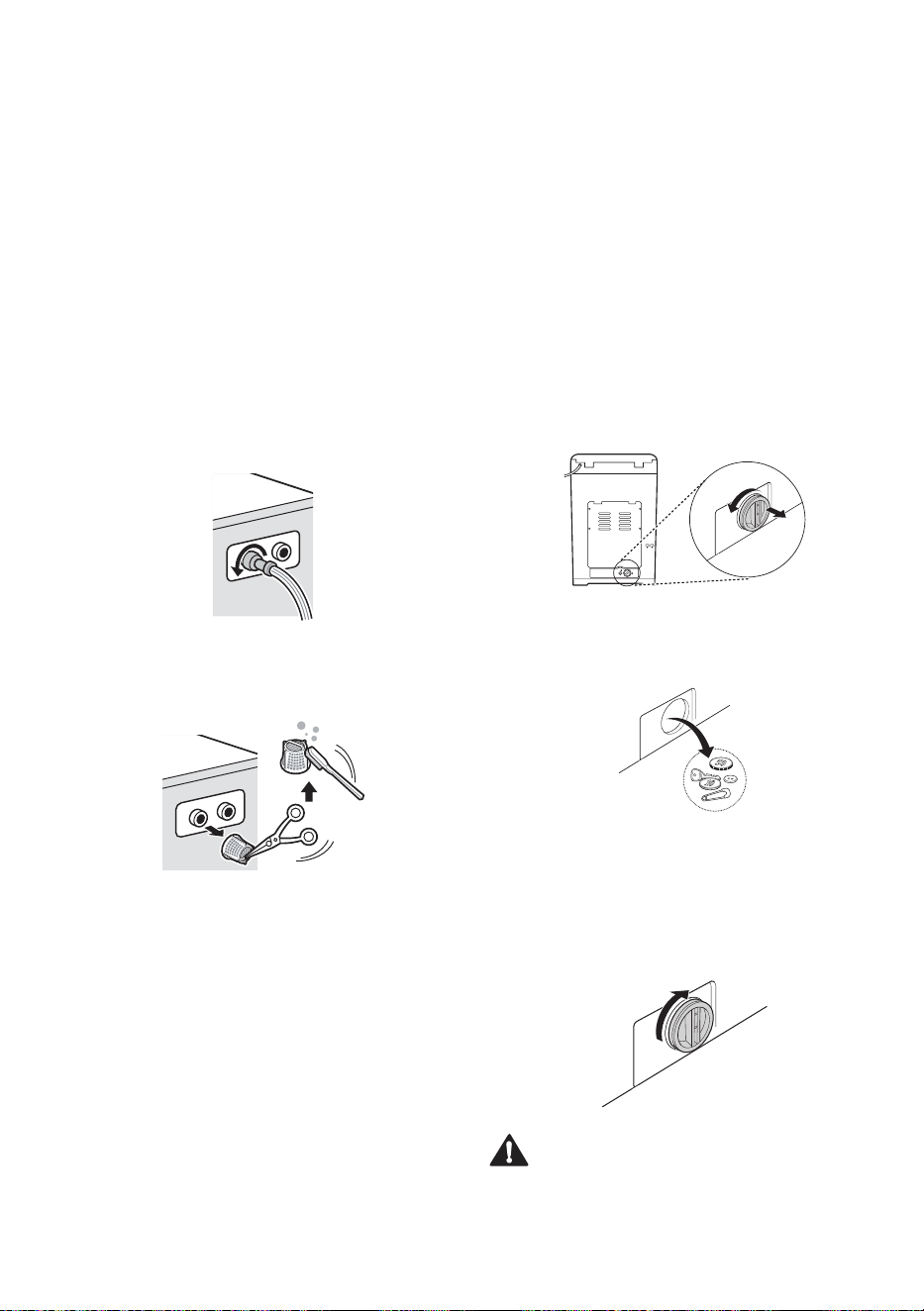
• 1E error message will be displayed on the
control panel when water is not entering the
detergent drawer.
• If water hardness level is high, or contains
traces of lime deposit, the water inlet filter may
become clogged. It is therefore a good idea to
clean it occasionally.
1
Turn off the water tap and unscrew the water
supply hose.
2
Clean the filter using a medium bristle tooth
brush.
Cleaning the Drain Pump
Filter (some models only)
• The drain filter collects threads and small
objects left in the laundry. Check regularly that
the filter is clean to ensure smooth running of
your washing machine.
• Empty all the water from the tub by running a
spin only cycle for a few minutes then unplug
the machine off from the power outlet socket.
1
Turn the cap on the rear of the machine
counter-clockwise and pull it out. There will
be some residual water remaining in the drain
hose that will pour out. Prepare an old towel
for this purpose.
2
Remove any foreign objects and fluff inside
pump casing and from the filter.
3
Replace the cap. Insert the filter along the
guide ribs inside the pump casing. Ensure
the Filter faces the guide ribs inside the pump
casing when reinserting, and then firmly turn
the cap clockwise by hand to close it.
CAUTION
• Be careful when draining, as any residual water
may also be hot.
34
EN
Caution on Freezing
During Winter
• When frozen, the product does not operate
normally. Make sure to install the product where
it will not freeze during winter.
• In case the product must be installed outside
on a porch or in other outdoor conditions, make
sure to check the following.
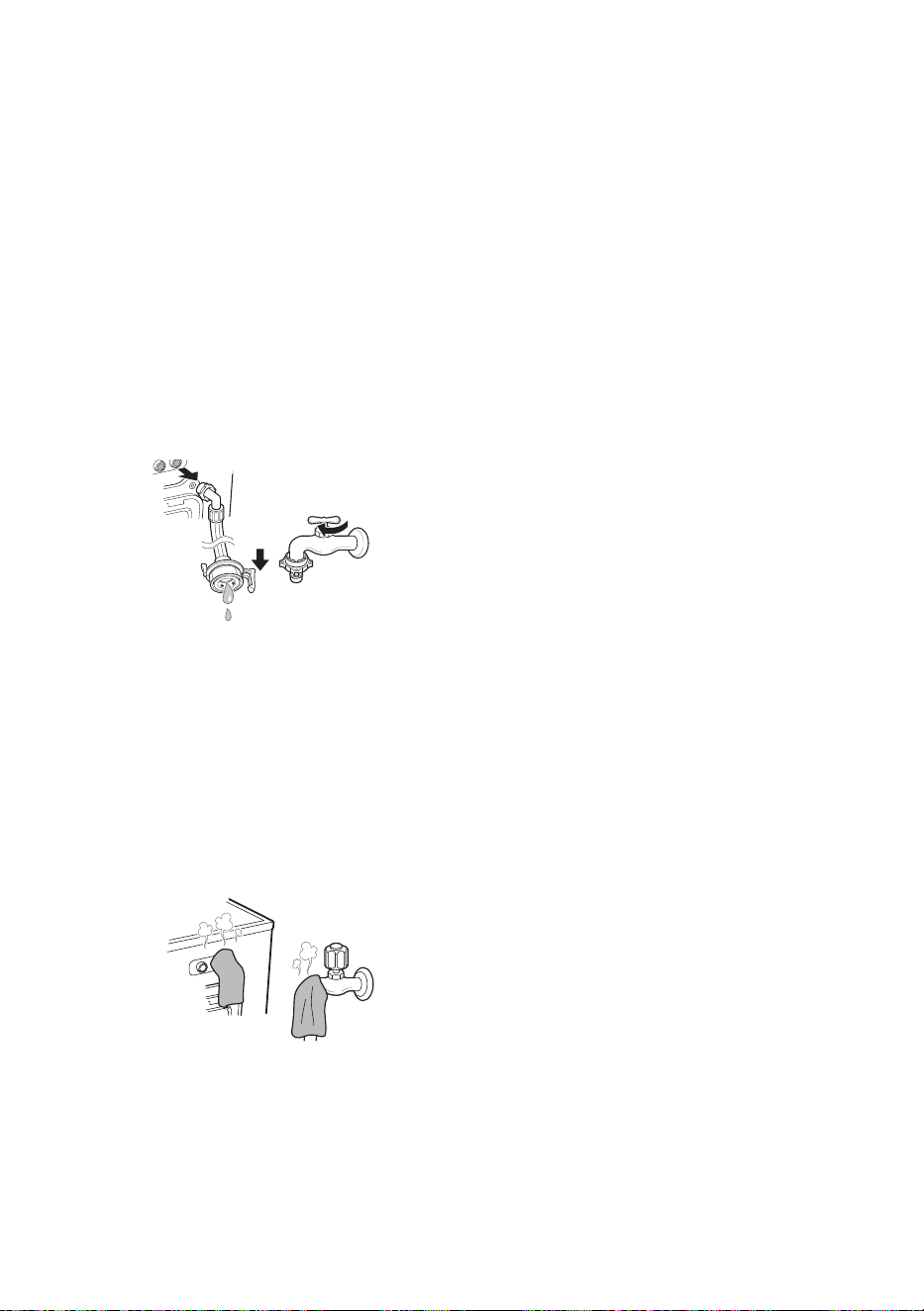
How to Keep the Product from
Freezing
• After closing the tap, disconnect the cold supply
hose from the tap, and remove water while
keeping the hose facing downwards.
Supply hose
How to Handle Freezing
• When water supply problems occur, take the
following measures.
− Turn off the tap, and thaw out the tap and
both connection areas of supply hose of the
product using a hot water cloth.
− Take out supply hose and immerse in warm
water below 50–60 °C.
50‒60 °C
35
EN
TROUBLESHOOTING
The appliance is equipped with an automatic error-monitoring system to detect and diagnose problems at
an early stage. If the appliance does not function properly or does not function at all, check the following
before you call for service:
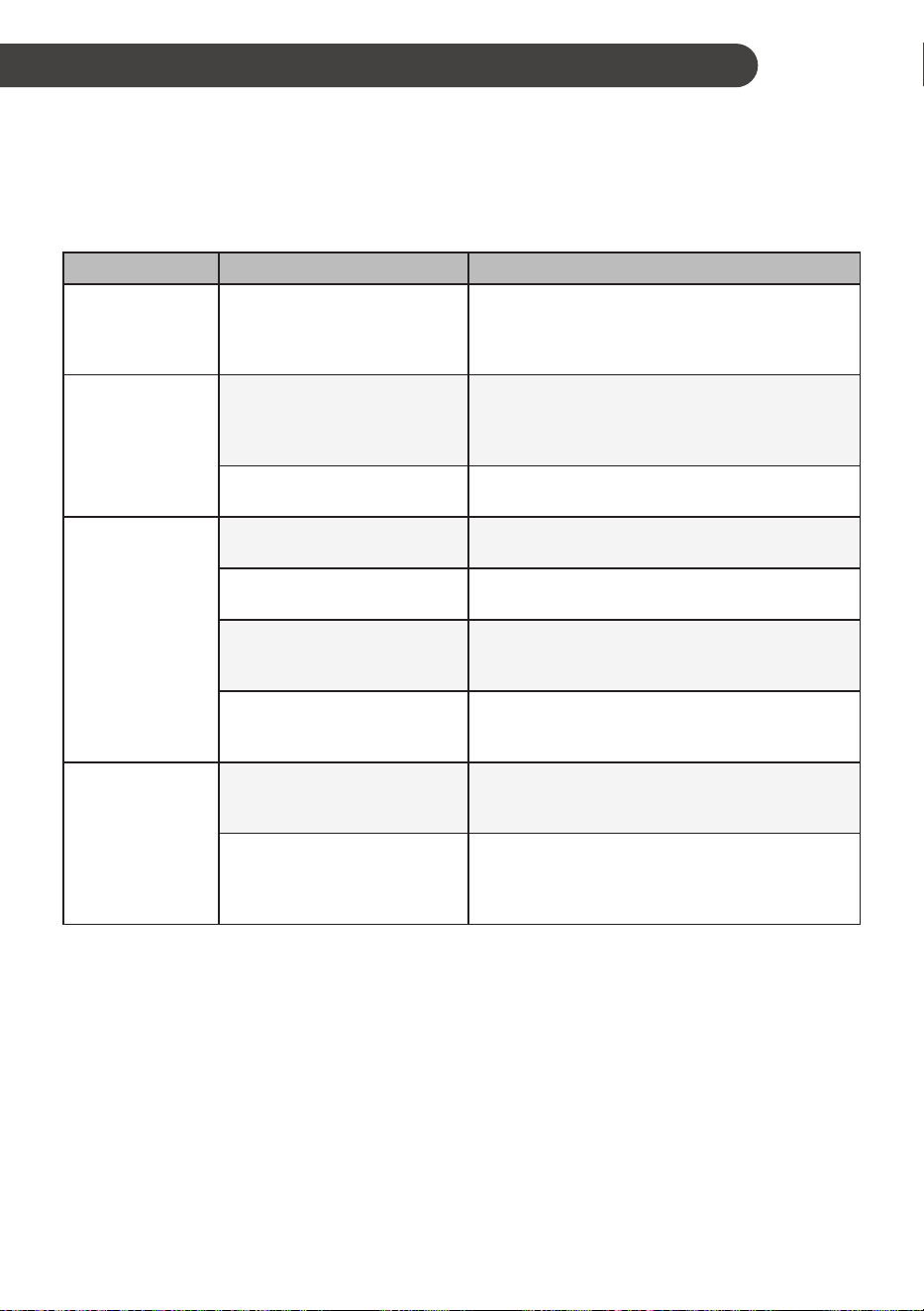
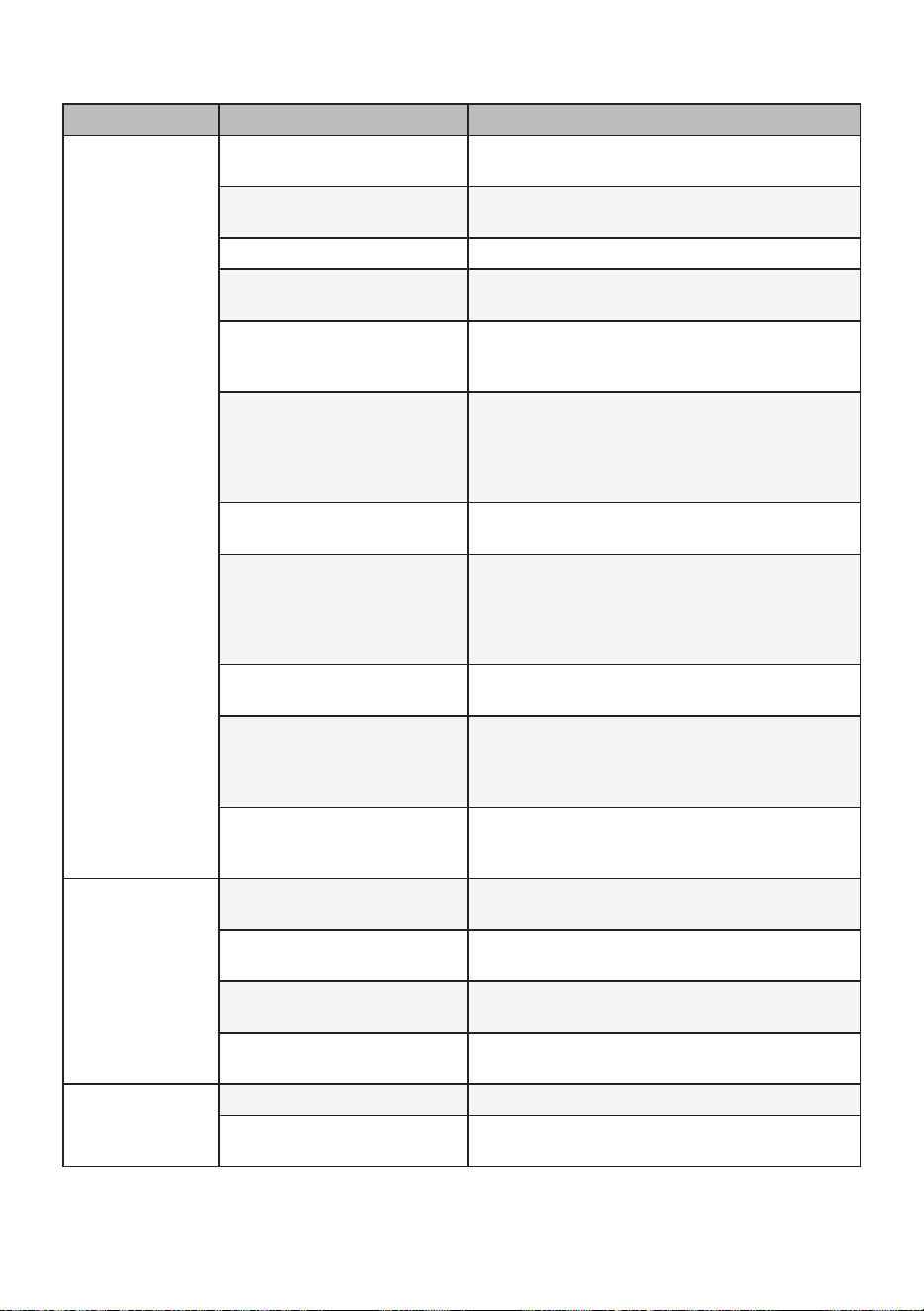
Diagnosing Problems
Symptoms Reason Solution
Rattling and
clanking noise
Foreign objects, such as
keys, coins, or safety pins
may be in the drum.
• Stop the washing machine, remove the clothes
and check the drum for foreign objects. If noise
continues after washing machine is restarted,
call for service.
Thumping sound
Heavy wash loads may
produce a thumping sound.
This is usually normal.
• If sound continues, washing machine is probably
out of balance. Stop and redistribute the wash
load.
Wash load may be out of
balance.
• Pause the cycle and redistribute the load after
the door unlocks.
Vibrating noise
Packaging materials were not
removed.
• Remove packing materials
Wash load may be unevenly
distributed in the drum.
• Pause the cycle and redistribute the load after
the door unlocks.
Not all leveling feet are
resting firmly and evenly on
the floor.
• See Leveling the Appliance in the Installation
section.
Floor not rigid enough.
• Make sure that the floor is solid and does not
flex. See the Installation Place Requirements
section.
Poor stain
removal
Proper options not selected.
• Heavier soils and tougher stains may require
extra cleaning power. Select the Soak feature to
boost the cleaning power of the selected cycle.
Previously set stains.
• Articles that have previously been washed may
have stains that have been set. These stains
may be difficult to remove and may require hand
washing or pretreating to aid in stain removal.

36
EN
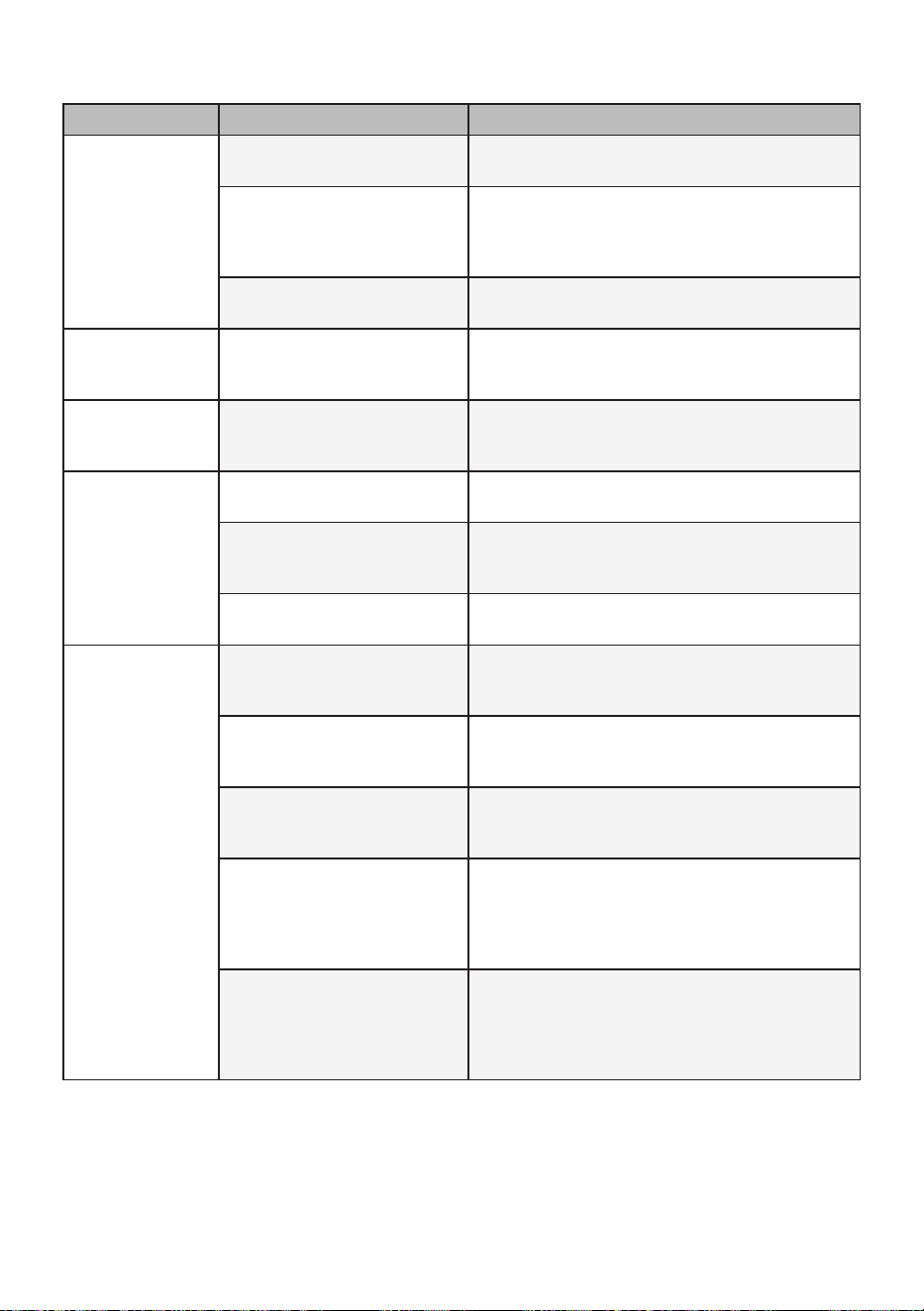
Symptoms Reason Solution
Staining
Bleach or softener dispensed
too soon.
• Dispenser compartment is overfilled causing
bleach or softener to dispense immediately.
ALWAYS measure bleach to prevent overfilling.
• Close the dispenser drawer slowly.
Bleach or softener was added
directly to the wash load in
the drum.
• Always use the dispensers to ensure that
laundry products are properly dispensed at the
right time in the cycle.
Clothes were not properly
sorted.
• Always wash dark colours separately from light
colours and whites to prevent discoloration.
• Never wash heavily soiled items with lightly
soiled items.
Water leaking
Supply hose connection
is loose at tap or washing
machine.
• Check hoses for leaks, cracks and splits.
• Tighten hose connections.
House drain pipes are
clogged.
• The washing machine pumps out water very
rapidly. Check for water backing up out of the
drain pipe during drain. If water is seen coming
out of the drain, check for proper drain hose
installation and check for restrictions in the
drain. Contact a plumber to repair the drain pipe.
Drain hose has come out of
drain or is not inserted far
enough.
• Tie drain hose to supply hose or standpipe to
prevent it from coming out during drain. For
smaller drain pipes, insert the drain hose into
the pipe as far as the drain hose flange. For
larger drain pipes, insert the drain hose into the
pipe 2.5 - 5 cm past the flange.
A large item such as a pillow
or blanket is above the top of
the drum.
• Stop the washing machine and check the load.
Make sure the load does not crest above the top
edge of the drum and is fully submerged in the
water.
37
EN
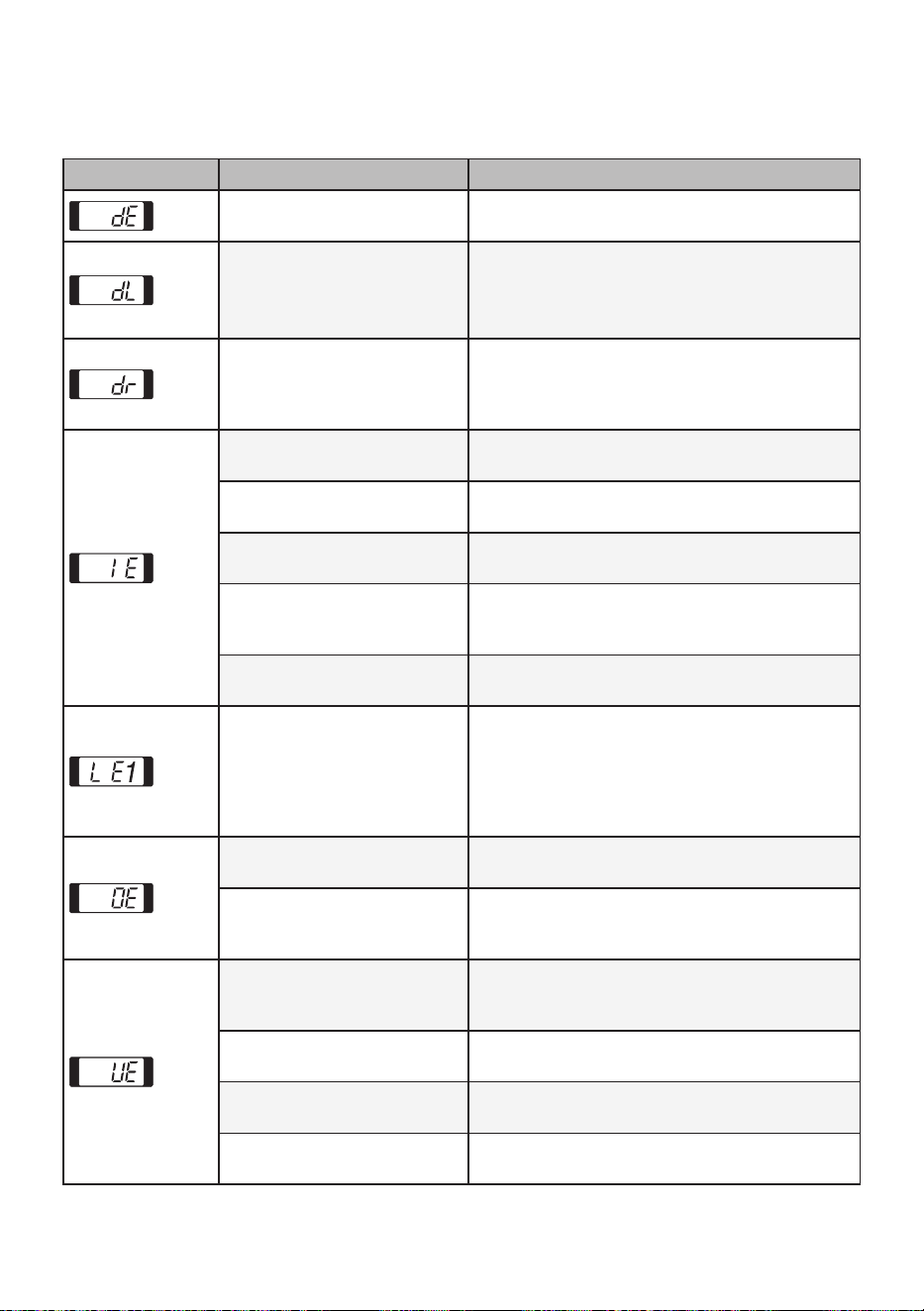
Symptoms Reason Solution
Washing machine
will not operate
Control panel has powered
off due to inactivity.
• This is normal. Press the Power button to turn
the washing machine back on.
Washing machine is
unplugged.
• Make sure the power cord is plugged securely
into a working outlet.
Water supply is turned off. • Turn both hot and cold taps fully on.
Controls are not set properly.
• Make sure the cycle was set correctly, close the
door and press the Start/Pause button.
Door is open.
• Close the door and make sure that nothing is
caught under the door preventing it from closing
completely.
Circuit breaker/fuse is
tripped/blown.
• Check house circuit breakers/fuses. Replace
fuses or reset breaker. The washing machine
should be on a dedicated circuit. The washing
machine will resume the cycle from where it
stopped once power is restored.
Control needs to be reset.
• Press the Power button, then reselect the
desired cycle and press the Start/Pause button.
Start/Pause was not pressed
after a cycle was set.
• Press the Power button then reselect the
desired cycle and press the Start/Pause button.
The washing machine will shut off if the
Start/Pause button is not pressed within 60
minutes.
Extremely low water
pressure.
• Check another tap in the house to make sure
that household water pressure is adequate.
Washing machine is too cold.
• If the washing machine has been exposed to
temperatures below freezing for an extended
period of time, allow it to warm up before
pressing the Power button.
Washing machine is heating
the water or making vapour.
(some models only)
• The washing machine drum may stop operating
temporarily during certain cycles, while water is
safely heated to a set temperature.
Washing machine
not filling
properly
Filter clogged.
• Make sure the inlet filters on the fill valves are
not clogged.
Supply hoses may be kinked.
• Check that supply hoses are not kinked or
clogged.
Insufficient water supply.
• Make sure that both hot and cold water taps are
turned on all the way.
Hot and cold supply hoses
are reversed.
• Check supply hose connections.
Washing machine
will not drain
water
Kinked drain hose. • Ensure that the drain hose is not kinked.
Drain located higher than 1.2
m above the floor.
• Make sure that the drain hose is no higher than
1.2 m above the bottom of the washing machine.
38
EN
Symptoms Reason Solution
Wrinkling
Washing machine not
unloaded promptly.
• Always remove items from the washing machine
as soon as the cycle is completed.
Washing machine
overloaded.
• The washing machine can be fully loaded, but
the drum should not be tightly packed with
items. The door of the washing machine should
close easily.
Hot and cold water supply
hoses are reversed.
• Hot water rinse can set wrinkles in garments.
Check the supply hose connections.
Incomplete or
no dispensing of
detergent
Too much detergent used.
• Follow the guidelines provided by the detergent
manufacturer.
Musty or mildewy
odor in washing
machine
Inside of drum was not
cleaned properly.
• Run the Tub Clean programme regularly.
Cycle time is
longer than usual
The load is too small.
• Add more items to allow the washing machine to
balance the loads.
Heavy articles are mixed with
lighter items.
• Always try to wash articles of somewhat similar
weight to allow the washing machine to evenly
distribute the weight of the load for spinning.
The load is out of balance.
• Manually redistribute the load if articles have
become tangled.
Your home
appliance and
smartphone is
not connected to
the Wi-Fi network.
The password for the Wi-Fi
that you are trying to connect
to is incorrect.
• Find the Wi-Fi network connected to your
smartphone and remove it, then register your
appliance on LG SmartThinQ.
Mobile data for your
smartphone is turned on.
• Turn off the Mobile data of your smartphone
and register the appliance using the Wi-Fi
network.
The wireless network name
(SSID) is set incorrectly.
• The wireless network name (SSID) should be a
combination of English letters and numbers. (Do
not use special characters.)
The router frequency is not
2.4 GHz.
• Only a 2.4 GHz router frequency is supported.
Set the wireless router to 2.4 GHz and connect
the appliance to the wireless router. To check
the router frequency, check with your Internet
service provider or the router manufacturer.
The distance between the
appliance and the router is
too far.
• If the distance between the appliance and the
router is too far, the signal may be weak and
the connection may not be configured correctly.
Move the location of the router so that it is closer
to the appliance.
39
EN
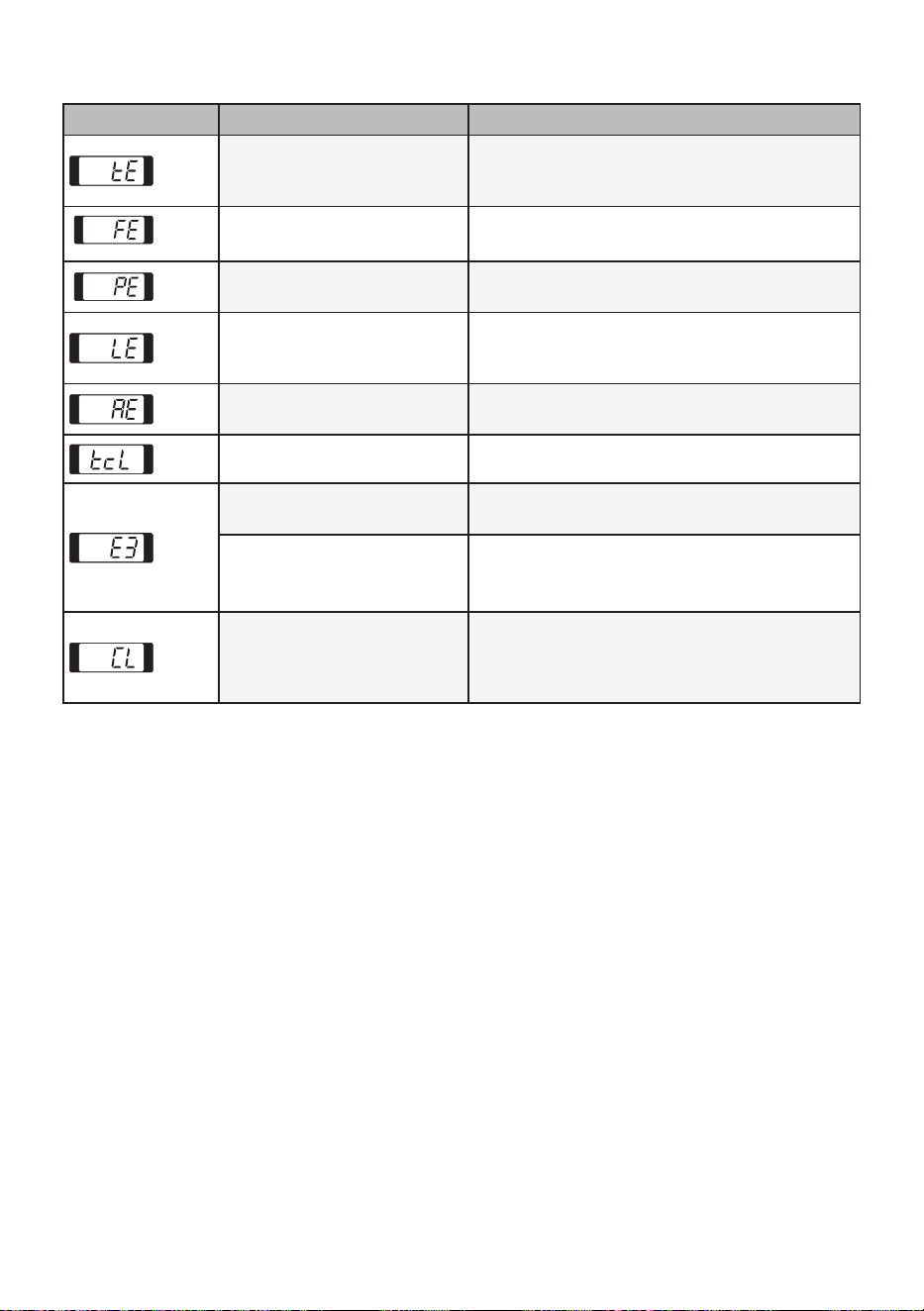
Error Messages
Symptoms Reason Solution
The door is not closed
properly.
• Close the door completely. If the error code is
not released, call for service.
Door lock switch error.
• Check nothing is caught under the door,
including shipping materials or lothing.
• Close the door completely. If the error code is
not released, call for service.
Special Drain Feature.
• If the washing machine is paused during a cycle
for a few minutes, the cycle will be cancelled
and any water remaining in the drum will be
drained.
Water supply taps are not
fully open.
• Fully open tap.
Water line hoses are kinked,
pinched, or crushed.
• Straighten the hose(s).
Water inlet filters are
clogged.
• Clean the inlet filters.
Water supply pressure to tap
or house is too low or very
high.
• Contact a plumber to have the water lines
repaired.
Water supply connected with
leaklimiting hoses.
• Do not use leak limiting hoses.
Foreign objects, such as
coins, pins, clips, etc., caught
between the wash plate and
the inner basket.
• Turn off the washing machine and then press
the Power button. Press the Spin button without
selecting a cycle to drain and spin the load.
When the spin is complete, remove the clothes
and then find and remove any objects caught in
the wash plate.
Drain hose is kinked,
pinched, or clogged.
• Straighten the hose(s).
Drain discharge is more
than 1.2 m above bottom of
washing machine.
• Adjust or repair drain. Maximum drain height is
1.2 m.
UE rebalancing operation is
not successful.
• The automatic attempt to rebalance the load
was not successful. The cycle has been paused
to allow the load to be manually adjusted.
The load is too small.
• Add more items to allow the washing machine to
balance the loads.
Heavy articles are mixed with
lighter items.
• Wash articles of somewhat similar weight.
The load is out of balance.
• Manually redistribute the load if articles have
become tangled.
40
EN
Symptoms Reason Solution
Control error.
• Unplug the washing machine and wait 60
seconds. Reconnect power and try again. If the
error code is not released, call for service.
Water level is too high due to
a faulty water valve.
• Close the water taps, unplug the washing
machine, and call for service.
The water level sensor is not
working correctly.
• Close the water taps, unplug the washing
machine, and call for service.
A motor error has occurred.
• Allow the washing machine to stand for 30
minutes and then restart the cycle. If the error
code is not released, call for service.
Clutch error.
• Unplug the washing machine and call for
service.
Tub Clean Alarm. • Run the Tub Clean programme.
sensing malfunction.
• Manually redistribute the load if articles have
become tangled.
Motor’s revolution is too low.
• Unplug the washing machine and wait 60
seconds. Reconnect power and try again.
• Call for service.
CL is not an error. This
prevents children from
changing cycles or operating
the appliance.
• To deactivate, press and hold the Rinse button
for 3 seconds.
Memo
Memo
Memo

Memo
Memo
Memo
Memo