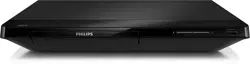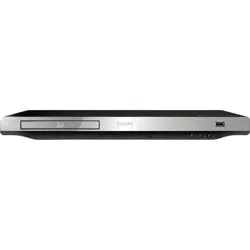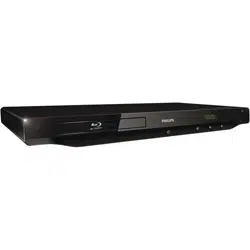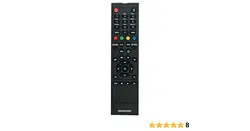
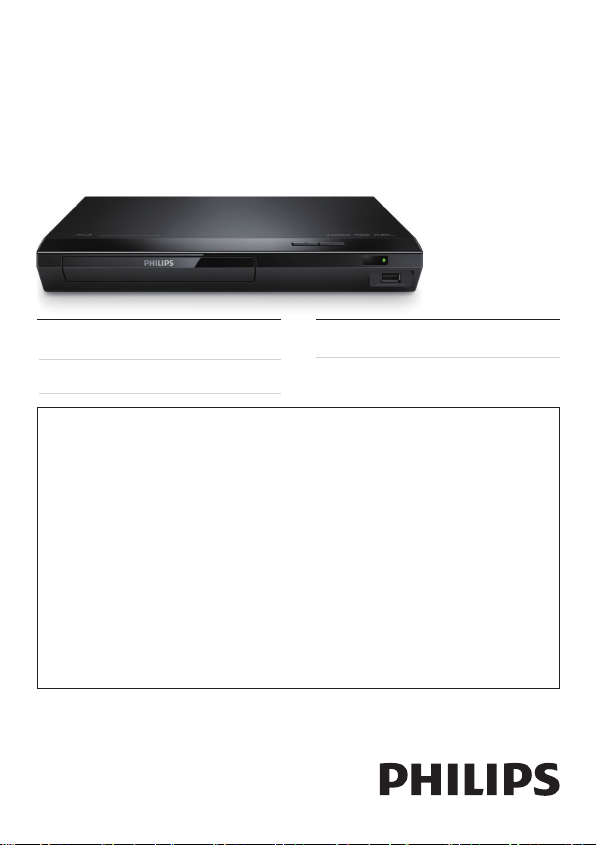
BDP1300
For product support, visit
Para obtener asistencia técnica, visite
Pour en savoir plus sur l’assistance sur les produits, visitez le site
www. philips.com/support
Manuel d’utilisation
User manual
Manual del usuario
EN: For further assistance, call the customer support service in your country.
• To obtain assistance in the U.S.A., Canada, Puerto Rico, or the U.S. Virgin Islands, contact
Philips Customer Care Center at 1 (866) 226-6074
• To obtain assistance in Mexico, contact Philips Customer Care Center at 01 800 839 1989;
Mexico city: 5887-9736
ES: Para obtener mas informacion, llame al servicio de soporte al cliente de su pais.
• Para obtener asistencia en los Estados Unidos, en Canada, Puerto Rico o en las Islas
Virgenes de los Estados Unidos, comuniquese con Centro de atencion al cliente de Philips
al 1 (866) 226-6074
• Solo para Mexico CENTRO DE ATENCION A CLIENTES LADA, 01 800 839 1989 Solo
Para Mexico; Mexico city: 5887-9736
FR: Pour obtenir de l’aide supplementaire, communiquez avec le centre de service a la
clientele de votre pays.
• Pour obtenir de l’aide aux Etats-Unis, au Canada, a Puerto Rico ou aux lles Vierges
americaines, communiquez avec le centre de service a la clientele Philips au : 1 (866) 226-6074
• Pour obtenir l’aide au Mexique, entrez en contact avec le centre de soin de client de Philips a 01
800 839 1989; Mexico city: 5887-9736
For Product recycling information, please visit - www.recycle.philips.com
Para obtener información de productos de reciclaje, por favor visite - www.recycle.philips.com
Pour tout renseignement sur le recyclage des produits, veuillez visiter - www.recycle.philips.com
BDP1300_F7_UM_V2.0.indb 1 4/14/2015 5:17:00 PM

BDP1300_F7_UM_V2.0.indb 2 4/14/2015 5:17:00 PM
1
English
Important
Know these safety symbols
This ‘bolt of lightning’ indicates uninsulated material within your unit may
cause an electrical shock. For the safety of everyone in your household,
please do not remove product covering.
The ‘exclamation point’ calls attention to features for which you should read
the enclosed literature closely to prevent operating and maintenance
problems.
WARNING: To reduce the risk of re or electric shock, this apparatus should not be
exposed to rain or moisture and objects lled with liquids, such as vases, should not be
placed on this apparatus.
CAUTION: To prevent electric shock, match wide blade of plug to wide slot, fully insert.
Important Safety Instructions
a Read these instructions.
b Keep these instructions.
c Heed all warnings.
d Follow all instructions.
e Do not use this apparatus near water.
f Clean only with dry cloth.
g Do not block any ventilation openings. Install in accordance with the
manufacturer’s instructions.
h Do not install near any heat sources such as radiators, heat registers, stoves, or
other apparatus (including ampliers) that produce heat.
i Do not defeat the safety purpose of the polarized or
grounding-type plug. A polarized plug has two blades
with one wider than the other. A grounding type plug
has two blades and a third grounding prong. The wide
blade or the third prong are provided for your safety.
If the provided plug does not t into your outlet, consult an electrician for
replacement of the obsolete outlet.
BDP1300_F7_UM_V2.0.indb 1 4/14/2015 5:17:01 PM

2
j Protect the power cord from being walked on or pinched, particularly at plugs,
convenience receptacles, and the point where they exit from the apparatus.
k Only use attachments/accessories specied by the manufacturer.
l Use only with the cart, stand, tripod, bracket, or table specied
by the manufacturer or sold with the apparatus. When a cart is
used, use caution when moving the cart/apparatus combination
to avoid injury from tip-over.
m Unplug this apparatus during lightning storms or when unused
for long periods of time.
n Refer all servicing to qualied service personnel. Servicing is required when the
apparatus has been damaged in any way, such as power-supply cord or plug is
damaged, liquid has been spilled or objects have fallen into the apparatus, the
apparatus has been exposed to rain or moisture, does not operate normally, or
has been dropped.
o Battery usage CAUTION – To prevent battery leakage which may result in
bodily injury, property damage, or damage to the unit:
• Install all batteries correctly, + and - as marked on the unit.
• Do not mix old and new batteries.
• Do not mix alkaline, standard (carbon-zinc), or rechargeable (ni-cad, ni-mh,
etc) batteries.
• Remove batteries when the unit is not used for a long time.
• The batteries shall not be exposed to excessive heat such as sunshine, re
or the like.
• Perchlorate Material - special handling may apply.
See www.dtsc.ca.gov/hazardouswaste/perchlorate.
p Apparatus shall not be exposed to dripping or splashing.
q Do not place any sources of danger on the apparatus (e.g. liquid lled objects,
lighted candles).
r This product may contain lead and mercury. Disposal of these materials may
be regulated due to environmental considerations. For disposal or recycling
information, please contact your local authorities or the Electronic Industries
Alliance: www.eiae.org.
s Where the MAINS plug or an appliance coupler is used as the disconnect
device, the disconnect device shall remain readily operable.
BDP1300_F7_UM_V2.0.indb 2 4/14/2015 5:17:01 PM
3
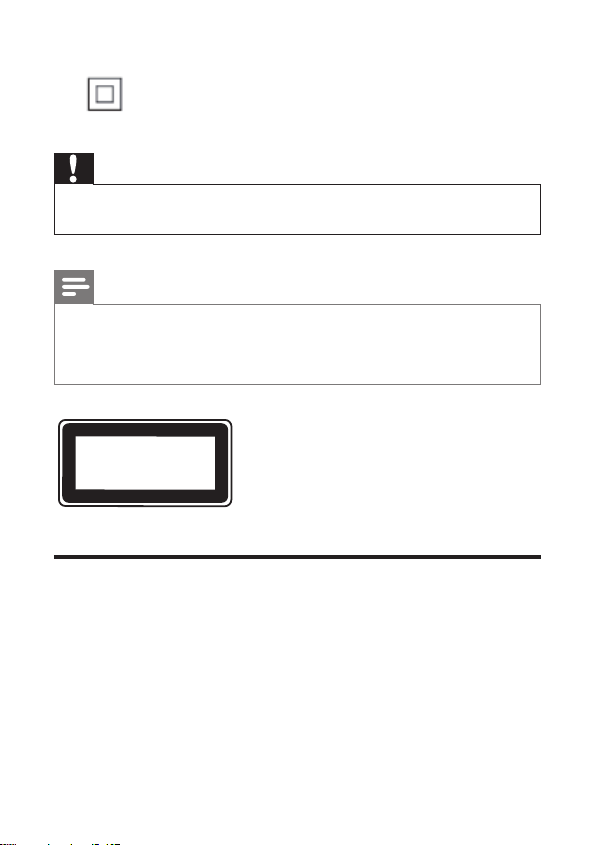
Class II equipment symbol
This symbol indicates that the unit has a double insulation system.
Caution
•
Use of any controls, adjustments, or procedures other than those specied herein may
result in hazardous radiation exposure or other unsafe operation.
Note
• For identication and supply ratings, see the type plate at the back or bottom of the
product.
• Before you make or change any connections, make sure that all devices are disconnected
from the power outlet.
CLASS 1
LASER PRODUCT
Notice of compliance
This set complies with the FCC rules, Part 15. Operation is subject to the following two
conditions:
a This device may not cause harmful interference, and
b This device must accept any interference received, including interference that
may cause undesired operation.
FCC rules
This equipment has been tested and found to comply with the limits for a Class B digital
device, pursuant to part 15 of the FCC Rules. These limits are designed to provide
reasonable protection against harmful interference in a residential installation. This
BDP1300_F7_UM_V2.0.indb 3 4/14/2015 5:17:02 PM

4
equipment generates, uses and can radiate radio frequency energy and, if not installed
and used in accordance with the instruction manual, may cause harmful interference to
radio communications.
However, there is no guarantee that interference will not occur in a particular installation.
If this equipment does cause harmful interference to radio or television reception, which
can be determined by turning the equipment off and on, the user is encouraged to try
to correct the interference by one or more of the following measures:
• Relocate the receiving antenna.
• Increase the separation between equipment and receiver.
• Connect the equipment into an outlet on a circuit different from that to which the
receiver is connected.
• Consult the dealer or an experienced radio/TV technician for help.
Warning: Changes or modications made to this equipment not expressly approved by
Philips may void the FCC authorization to operate this equipment.
Model number: PHILIPS BDP1300/F7
Trade Name: Philips
Responsible Party: P&F USA, Inc. PO Box 2248 Alpharetta, GA 30023-2248;
1 (866) 226-6074
Canada:
CAN ICES-3(B)/NMB-3(B)
Care for your product
• Do not insert any objects other than discs into the disc compartment.
• Do not insert warped or cracked discs into the disc compartment.
• Remove discs from the disc compartment if you are not using the product for an
extended period of time.
• Only use microber cloth to clean the product.
Care of the environment
Disposal of your old product and battery
Your product is designed and manufactured with high quality materials and components,
which can be recycled and reused.
BDP1300_F7_UM_V2.0.indb 4 4/14/2015 5:17:02 PM
5
This product may contain lead and mercury. Disposal of these materials may be
regulated due to environmental considerations. For disposal or recycling information,
please contact your local authorities or visit www.recycle.philips.com.
This product contains batteries:
• Dispose of batteries properly. Do not incinerate. Batteries may explode if
overheated.
• Do not wrap in metal or aluminum foil. Wrap in newspaper before discarding.
• It is suggested that you contact your local town or city to determine proper
battery redemption site(s) in your area.
• Please visit www.call2recycle.org for additional information on a recycling center in
your area for rechargeable batteries.
Copyright
This item incorporates copy protection technology that is protected by U.S. patents
and other intellectual property rights of Rovi Corporation. Reverse engineering and
disassembly are prohibited.
This product incorporates proprietary technology under license from Verance
Corporation and is protected by U.S. Patent 7,369,677 and other U.S. and worldwide
patents issued and pending as well as copyright and trade secret protection for certain
aspects of such technology. Cinavia is a trademark of Verance Corporation. Copyright
2004-2013 Verance Corporation. All rights reserved by Verance. Reverse engineering or
disassembly is prohibited.
Cinavia notice
This product uses Cinavia technology to limit the use of unauthorized copies of some
commercially-produced lm and videos and their soundtracks. When a prohibited use of
an unauthorized copy is detected, a message will be displayed and playback or copying
will be interrupted.
More information about Cinavia technology is provided at the Cinavia Online Consumer
Information Center at http://www.cinavia.com. To request additional information about
Cinavia by mail, send a postcard with your mailing address to: Cinavia Consumer
Information Center, P.O. Box 86851, San Diego, CA, 92138, USA.
BDP1300_F7_UM_V2.0.indb 5 4/14/2015 5:17:02 PM

6
Open source software
Philips Electronics Singapore hereby offers to deliver, upon request, a copy of the
complete corresponding source code for the copyrighted open source software
packages used in this product for which such delivery is requested by the respective
licenses. This offer is valid up to three years after product purchase to anyone in receipt
of this information. To obtain source code, please send your request in English with
product type to [email protected]. If you prefer not to use email or if you do not
receive conrmation receipt within 2 weeks after mailing to this email address, please
write in English to “Open Source Team, Philips Intellectual Property & Standards, P.O. Box
220, 5600 AE Eindhoven, The Netherlands”. If you do not receive timely conrmation
of your letter, please email to the email address above. The texts of the licenses and
acknowledgements for open source software used in this product are included on a
separate leaet.
BDP1300_F7_UM_V2.0.indb 6 4/14/2015 5:17:02 PM
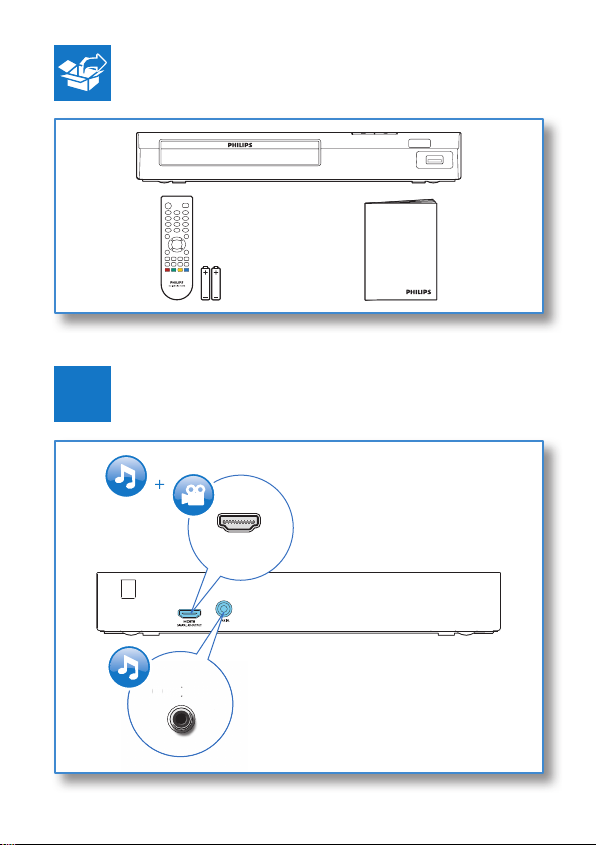
19
User manual
HDMI
COAXIAL
C
OA
X
I
AL
A
A
1
BDP1300_F7_UM_V2.0.indb 19 4/14/2015 5:17:06 PM
20
2
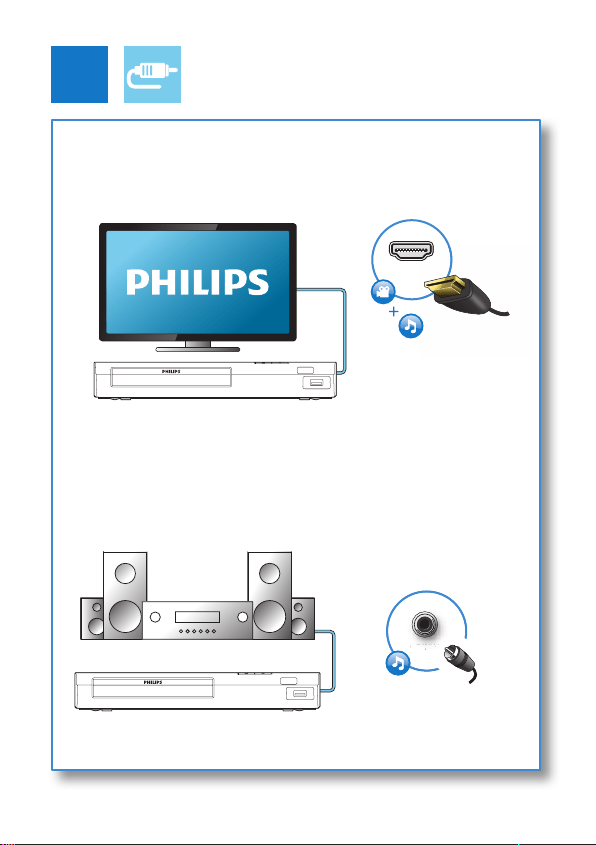
HDMI
COAXIAL
C
OA
XIA
AL
A
A
COAXIAL
HDMI
BDP1300_F7_UM_V2.0.indb 20 4/14/2015 5:17:08 PM
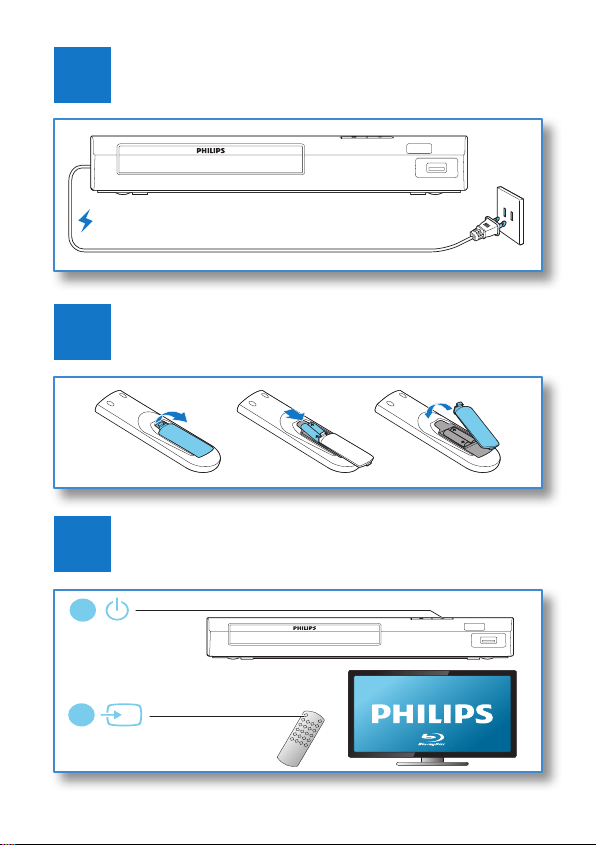
21
4
3
5
SOURCE
1
2
TV
2 x AAA
BDP1300_F7_UM_V2.0.indb 21 4/14/2015 5:17:09 PM
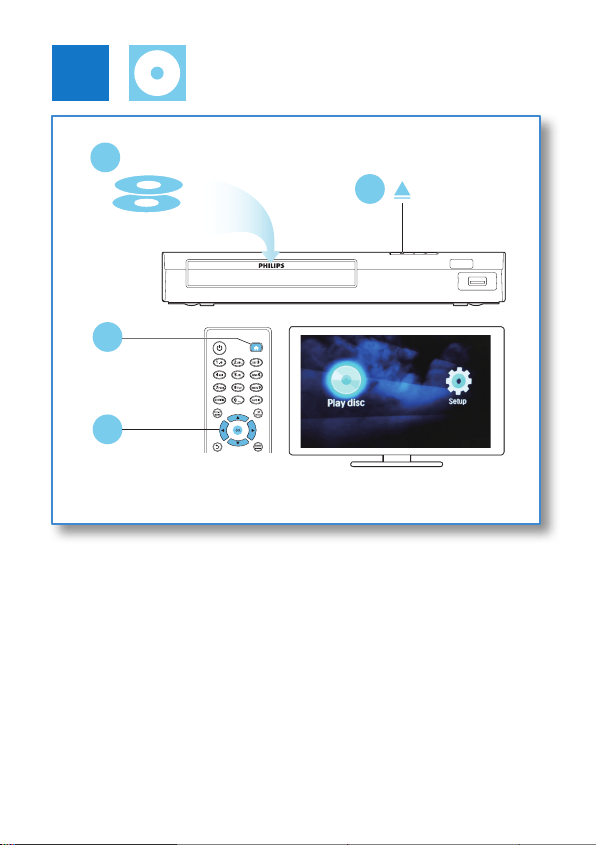
22
6
2
3
DISC MENU
4
1
DVD/VCD/CD
BD
BDP1300_F7_UM_V2.0.indb 22 4/14/2015 5:17:10 PM

1EN
Contents
1 Use your Blu-ray disc / DVD player 2
Basic play control 2
Video and audio options 3
BonusView on Blu-ray 5
Use Philips EasyLink 5
2 Change settings 6
Picture 7
Sound 7
Preference (languages, parental control...) 8
Advanced options (clear memory...) 8
3 Update software 9
Update software via USB 9
4 Specications 10
5 Troubleshooting 11
English
BDP1300_F7_UM_V2.0.indb 1 4/14/2015 5:17:10 PM
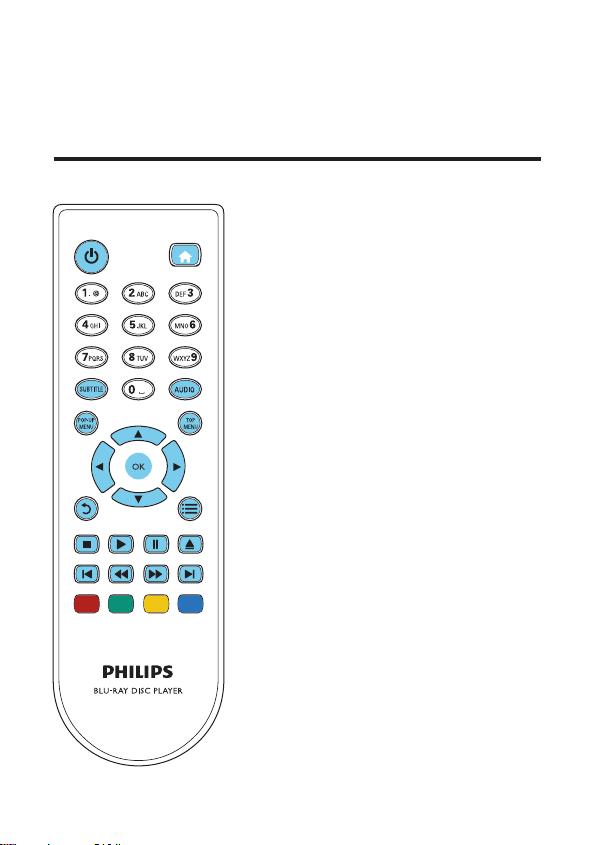
2 EN
1 Use your Blu-ray disc / DVD player
Congratulations on your purchase, and welcome to Philips! To fully benet from the
support that Philips offers (e.g. product software upgrade), register your product at
www.philips.com/welcome.
Basic play control
DISC MENU
BDP1300_F7_UM_V2.0.indb 2 4/14/2015 5:17:11 PM
3EN
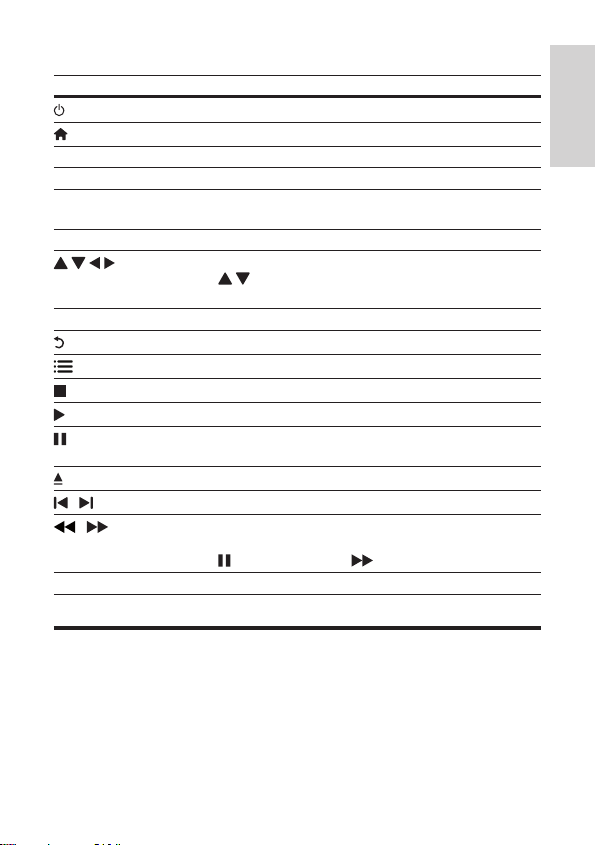
During play, press the following buttons to control.
Button Action
Turn on the player, or switch to standby.
Access the home menu.
SUBTITLE Select a subtitle language.
AUDIO Select an audio language or channel.
DISC MENU /
POP-UP MENU
Access or exit the disc menu.
TOP MENU Access the main menu of a video disc.
Navigate the menus.
Press
to rotate a picture clockwise or counter-clockwise
during slideshow.
OK Conrm a selection or entry.
Return to a previous display menu.
Access more options during play.
Stop play.
Start or resume play.
Pause play.
Press repeatedly to slow forward frame by frame.
Open or close the disc compartment.
/
Skip to the previous or next track, chapter or le.
/
Fast backward or forward.
Press repeatedly to change the search speed.
Press
once, and then press to slow forward.
Color buttons Select tasks or options for Blu-ray discs.
Video and audio options
More options are available for video play from a disc.
English
BDP1300_F7_UM_V2.0.indb 3 4/14/2015 5:17:14 PM
4 EN
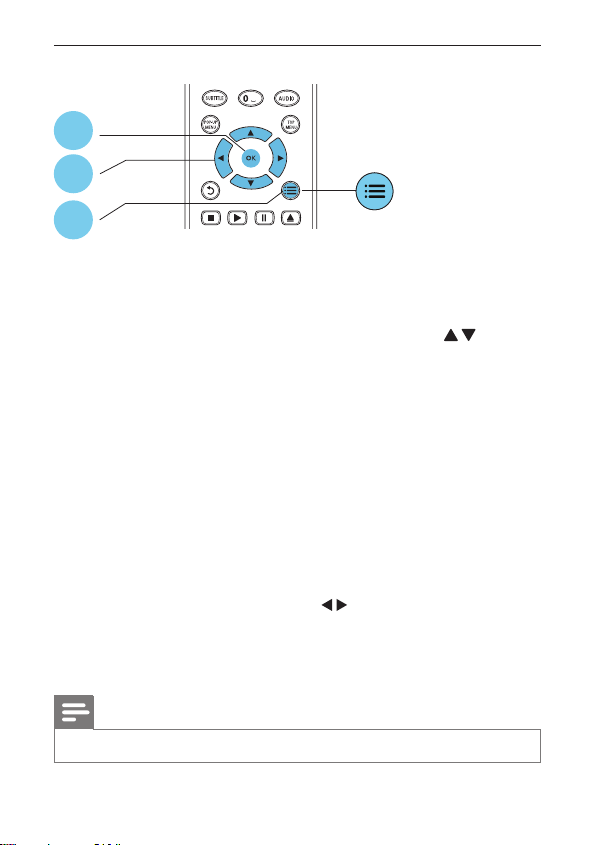
Video options
Access more options during video play.
• [Audio language]: Select an audio language.
• [Subtitle language]: Select a subtitle language.
• [CC]: Select an option about Closed Caption.
• [Subtitle shift]: Change the subtitle position on the screen. Press to change
the subtitle position.
• [Info]: Display play information.
• [Time search]: Skip to a specic time via the numeric buttons on the remote
control.
• [2nd audio language]: Select the second audio language (only for Blu-ray discs that
support BonusView).
• [2nd subtitle language]: Select the second subtitle language (only for Blu-ray discs
that support BonusView).
• [Titles]: Select a title.
• [Chapters]: Select a chapter.
• [Angle list]: Select a camera angle.
• [Menus]: Display a disc menu.
• [PIP selection]: Display a picture-in-picture window (only for Blu-ray discs that
support BonusView).
• [Zoom]: Zoom into a video picture. Press to select a zoom factor.
• [Repeat]: Repeat a chapter or title.
• [Repeat A-B]: Mark two points within a chapter for repeat play, or turn off repeat
mode.
• [Picture settings]: Select a predened color setting.
Note
• Available video options depend on the video source.
3
2
1
DISC MENU
BDP1300_F7_UM_V2.0.indb 4 4/14/2015 5:17:15 PM
5EN
Audio options
Press repeatedly to cycle through the following options.
• Repeat the current track.
• Repeat all the tracks on the disc or folder.
• Play audio tracks in a random loop.
• Turn off a repeat mode.
BonusView on Blu-ray
View special content (such as commentaries) in a small screen window.
This feature is only applicable to Blu-ray discs compatible with BonusView (also known
as picture in picture).
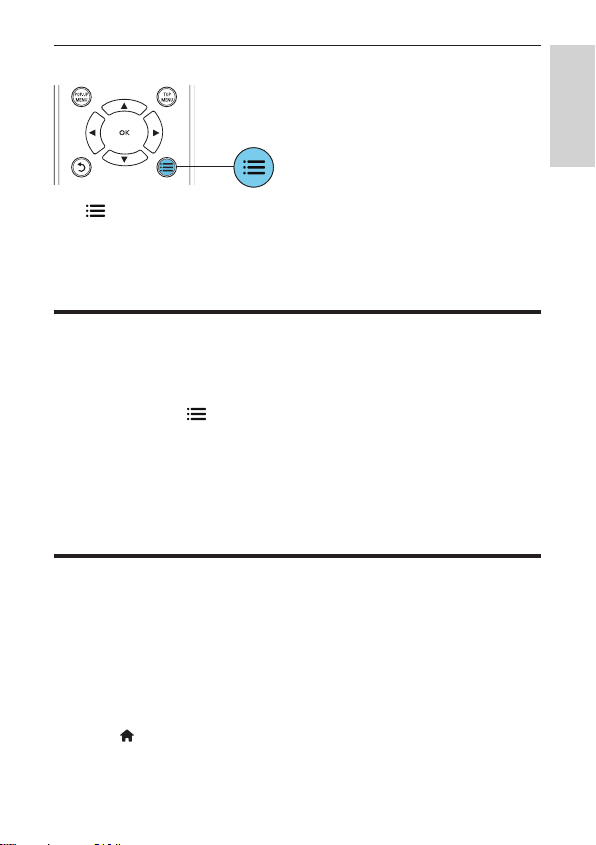
1 During play, press .
» The options menu is displayed.
2 Select [PIP selection] > [PIP], and press OK.
» PIP options [1]/[2] depend on the video contents.
» The secondary video window is displayed.
3 Select [2nd audio language] or [2nd subtitle language], and press OK.
Use Philips EasyLink
This player supports Philips EasyLink which uses the HDMI CEC (Consumer
Electronics Control) protocol. You can use a single remote control to control EasyLink
compliant devices that are connected through HDMI. Philips does not guarantee 100%
interoperability with all HDMI CEC devices.
1 Connect the HDMI CEC compliant devices through HDMI, and turn on the HDMI
CEC operations on the TV and other connected devices (see the user manual of
the TV or other devices for details).
2 Press .
3 Select [Setup]> [EasyLink].
English
BDP1300_F7_UM_V2.0.indb 5 4/14/2015 5:17:15 PM
6 EN
4 Select [On] under the options: [EasyLink], [One Touch Play] and [One Touch
Standby].
» EasyLink function is turned on.
One Touch Play
When a video disc is in the disc compartment, press
to wake up the TV from
standby, and then play a disc.
One Touch Standby
When a connected device (for example TV) is put to standby with its own remote
control, this player is put to standby automatically.
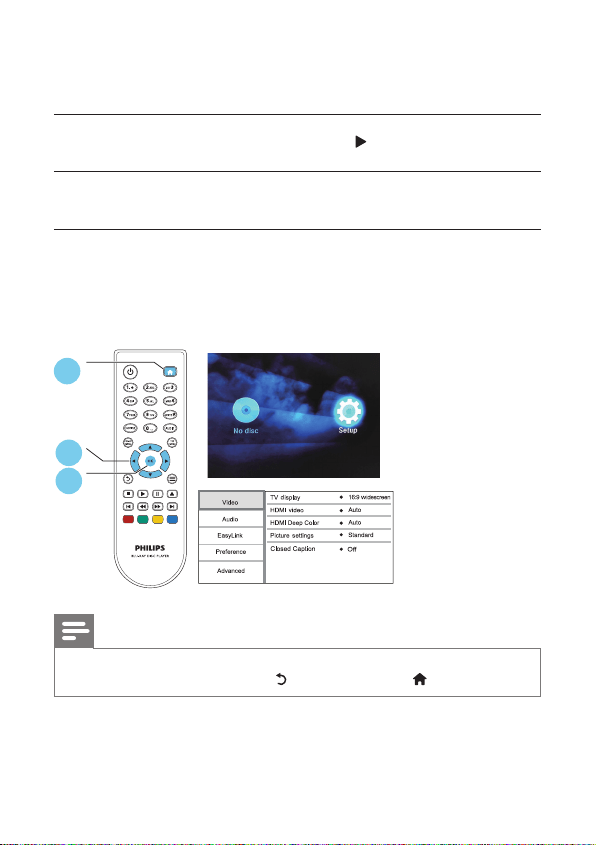
2 Change settings
This section helps you change the settings of this player.
Note
• You cannot change a menu option that is grayed out.
• To return to the previous menu, press . To exit the menu, press .
1
DISC MENU
2
3
BDP1300_F7_UM_V2.0.indb 6 4/14/2015 5:17:16 PM
7EN
Picture
1 Press .
2 Select [Setup] > [Video] to access the video setup options.
• [TV display]: Select a picture display format to t the TV screen.
• [HDMI video]: Select an HDMI video resolution.
• [HDMI Deep Color]: Display colors with more shades and hues when the video
content is recorded in Deep Color and the TV supports this feature.
• [Picture settings]: Select a predened color setting.
• [Closed Caption]: Turn on or off the display of sound effects in subtitles
(applicable only when a disc and a TV support this feature).
Note
• If you change a setting, make sure that the TV supports the new setting.
Sound
1 Press .
2 Select [Setup] > [Audio] to access the audio setup options.
• [Night mode]: Select quiet or full dynamic sound. Night mode decreases the
volume of loud sound and increases the volume of soft sound (such as speech).
• [HDMI audio]: Set an HDMI audio format when this player is connected through
HDMI.
• [Digital audio]: Select an audio format for the sound output when this player is
connected through a digital connector (coaxial).
• [PCM downsampling]: Set the sampling rate for PCM audio output when this
player is connected through a digital connector (coaxial).
Note
• For settings related to HDMI, the TV must be connected through HDMI.
• Night mode is only available for Dolby
®
TrueHD / Dolby
®
Digital Plus encoded DVD and
Blu-ray discs.
English
BDP1300_F7_UM_V2.0.indb 7 4/14/2015 5:17:17 PM
8 EN
Preference (languages, parental control...)
1 Press .
2 Select [Setup] > [Preference] to access the preference setup options.
• [Menu language]: Select an onscreen display menu language.
• [Audio]: Select an audio language for video.
• [Subtitle]: Select a subtitle language for video.
• [Disc menu]: Select a menu language for a video disc.
• [Parental control]: Restrict access to discs that are encoded with ratings. Input
“0000” to access the restriction options. To play all discs irrespective of the rating,
select level “8”.
• [Screen saver]: Enable or disable screen saver mode. If enabled, the screen enters
idle mode after 10 minutes of inactivity (for example, in pause or stop mode).
• [Auto subtitle shift]: Enable or disable subtitle shift. If enabled, the subtitle position
is changed automatically to t the TV screen (this feature works with some Philips
TVs only).
• [Change password]: Set or change a password to play a restricted disc. Input
“0000” if you do not have a password or if you have forgotten your password.
• [Auto standby]: Enable or disable auto standby. If enabled, the player switches to
standby after 30 minutes of inactivity (for example, in pause or stop mode).
• [VCD PBC]: Display or skip the content menu for VCD and SVCD.
• CC options: Adjust the closed caption’s font size, font style, font opacity, etc.
Note
• If your preferred language is not available for disc language, audio or subtitle, you can
select [Others] from the menu options and input 4-digit language code which can be
found at the back of this user manual.
• If you select a language which is not available on a disc, this player uses the default
language of the disc.
Advanced options (clear memory...)
1 Press .
2 Select [Setup] > [Advanced] to access the advanced setup options.
• [Downmix mode]: Control 2-channel stereo audio output.
• [Software update]: Select to update software from USB storage device.
• [Version information]: Display the software version of this player.
BDP1300_F7_UM_V2.0.indb 8 4/14/2015 5:17:17 PM
9EN
• [Restore default settings]: Reset this player to the default settings made at the
factory, except for password and parental control level.
• [Clear memory]: Remove some Blu-ray disc data (such as BonusView) that
are automatically copied on the connected USB device. A “BUDA” folder is
automatically created to store some necessary data from Blu-ray disc.
3 Update software
Before you update the software of this player, check the current software version:
• Press , and then select [Setup] > [Advanced] > [Version information], and
press OK.
Update software via USB
1 Check the latest software version on www.philips.com/support.
• Search for your model and click on “Software and drivers”.
2 Download the software into a USB storage device.
a Unzip the download, and make sure that the unzipped folder is named
“UPG”.
b Put the “UPG” folder in the root directory.
3 Connect the USB storage device to the USB connector on the back of this player.
4 Press , and select [Setup].
5 Select [Advanced] > [Software update]> [USB].
» If an upgrade media is detected, you are prompted to start the update.
6 Follow the instructions on the TV screen to update the software.
» When the update is complete, this player automatically turns off and on
again.
Caution
• Do not turn off the power or remove the USB storage device when the software
update is in progress because you might damage this player.
English
BDP1300_F7_UM_V2.0.indb 9 4/14/2015 5:17:17 PM
10 EN
4 Specifications
Note
• Specications are subject to change without notice
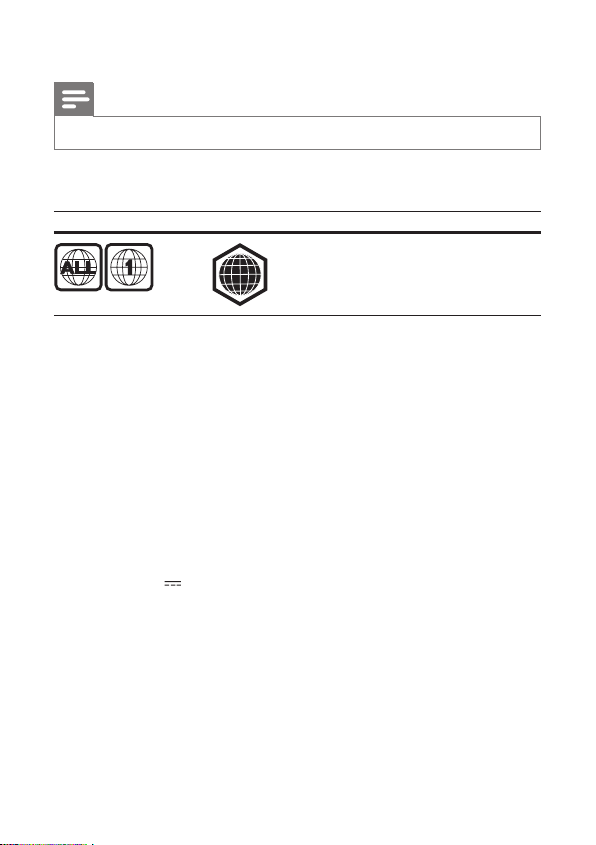
Region code
This player can play discs with the following region codes.
DVD Blu-ray Countries
USA and Canada
Playable media
• BD-Video
• DVD-Video
• VCD/SVCD
• Audio CD
Video
• Signal system: PAL / NTSC
• HDMI output: 480i/576i, 480p/576p, 720p, 1080i, 1080p, 1080p/24Hz
Audio
• HDMI output
• Digital output: 0.5 Vp-p (75 ohm)
• Coaxial
USB
• USB port: 5V , 200mA
• Support software update and BonusView contents.
• Compatibility: Hi-Speed USB (2.0)
• Class support: USB Mass Storage Class
• File system: FAT16, FAT32
Main unit
• Power supply rating: AC 100-127V~, 50Hz / 60Hz
• Power consumption: 10.5 W
• Power consumption in standby mode: < 0.5 W
• Dimensions (w x h x d): 270 x 39 x 193 mm / 10.6” x 1.5” x 7.6”
A
BDP1300_F7_UM_V2.0.indb 10 4/14/2015 5:17:17 PM
11EN
• Net Weight: 1.03 kg / 2.27 lbs
Accessories supplied
• Remote control and 2 AAA batteries
• User manual
Laser Specication
• Laser Type (Diode): AlGaInN (BD), AlGaInP (DVD/CD)
• Wave length: 400 - 410 nm (BD), 650 - 664 nm (DVD), 780 - 800 nm (CD)
• Output power (max.): 1.33 mW (BD), 0.21 mW (DVD), 0.34 mW (CD)
5 Troubleshooting
Warning
• Risk of electric shock. Never remove the casing of the player.
To keep the warranty valid, never try to repair the player yourself.
If you have problems using this player, check the following points before you
request service. If you still have a problem, register your player and get support at
www.philips.com/support.
If you contact Philips, you will be asked for the model and serial number of this player.
The model number and serial number are on the back of this player. Write the numbers
here:
Model No. __________________________
Serial No. ___________________________
Main unit
The buttons on this player do not work.
• Disconnect this player from the power supply for a few minutes, and then
reconnect.
Picture
No picture.
• Make sure that the TV is switched to the correct source input for this player. .
No picture on HDMI connection.
• Make sure that the HDMI cable is not faulty. If it is faulty, replace with a new HDMI
cable.
English
BDP1300_F7_UM_V2.0.indb 11 4/14/2015 5:17:18 PM

12 EN
• On the remote control, press and then press “731” (numeric buttons) to
recover picture display. Or wait for 10 seconds for auto recovery.
• If this player is connected to an unauthorized display device with an HDMI cable,
the audio and video signals may not be output.
The disc does not play high-denition video.
• Make sure that the disc contains high-denition video.
Sound
No audio output from the TV.
• Make sure that the TV is switched to the correct source input for this player.
No audio output from the loudspeakers of the external audio device (home theater
or amplier).
• Switch the external audio device to the correct audio source input.
No sound on HDMI connection.
• You may not hear any sound from the HDMI output if the connected device is non-
HDCP compliant or only DVI-compatible.
No secondary audio output for Picture-in-Picture feature.
• When [Bitstream] under the [HDMI audio] or [Digital audio] menu is selected,
interactive sound like secondary sound for Picture-in-Picture feature is muted.
De-select [Bitstream].
Play
Cannot play a disc.
• Clean the disc.
• Make sure that the disc is correctly loaded.
• Make sure that this player supports the disc. See “Specications”.
• Make sure that this player supports the region code of the DVD or BD.
‘No entry’ or ‘x’ sign is displayed on the TV.
• The operation is not possible.
EasyLink feature does not work.
• Make sure that this player is connected to the Philips brand EasyLink TV, and the
EasyLink option is turned on (see “Use your Blu-ray disc/ DVD player” > “Use
Philips EasyLink”).
The USB device cannot be played on this product.
• This product cannot play any audio/video/photo le stored on a USB device. USB
connection works only for software updates and BonusView contents.
BDP1300_F7_UM_V2.0.indb 12 4/14/2015 5:17:18 PM

13
P&F USA Inc. PO Box 2248 Alpharetta, GA 30023-2248
ONE (1) YEAR LIMITED WARRANTY
WARRANTY COVERAGE:
This warranty obligation is limited to the terms set forth
below.
WHO IS COVERED:
This product is warranted to the original purchaser or the per-
son receiving the product as a gift against defects in materials and
workmanship as based on the date of original purchase
(“Warranty Period”) from an Authorized Dealer. The original
sales receipt showing the product name and the purchase date
from an authorized retailer is considered such proof.
WHAT IS COVERED:
This warranty covers new products if a defect in material
or workmanship occurs and a valid claim is received within
the Warranty Period. At its option, the company will either (1)
repair the product at no charge, using new or refurbished
replacement parts, or (2) exchange the product with a product
that is new or which has been manufactured from new, or ser-
viceable used parts and is at least functionally equivalent or most
comparable to the original product in current inventory,
or (3) refund the original purchase price of the product.
The company warrants replacement products or parts provided
under this warranty against defects in materials and workmanship
from the date of the replacement or repair for ninety (90) days
or for the remaining portion of the original product’s warranty,
whichever provides longer coverage for you. When a product or
part is
exchanged, any replacement item becomes your property
and the replaced item becomes the company property. When a
refund is given, your product becomes the company property.
Note: Any product sold and identified as refurbished or
renewed carries a ninety (90) day limited warranty.
Replacement product can only be sent if all warranty
requirements are met. Failure to follow all requirements
can result in delay.
WHAT IS NOT COVERED - EXCLUSIONS AND LIMI-
TATIONS:
This Limited Warranty applies only to the new products that
can be identified by the trademark, trade name, or logo affixed
to it. This Limited Warranty does not apply to any non-Philips
hardware product or any software, even if packaged or sold
with the product. Non-Philips manufacturers, suppliers, or
publishers may provide a separate warranty for their own
products packaged with the bundled product.
The company is not liable for any damage to or loss of any ,
programs data, or other information stored on any media
contained within the product, or any non-Philips product or part
not covered by this warranty. Recovery or reinstallation of
programs, data or other information is not covered under this
Limited Warranty.
This warranty does not apply (a) to damage caused by accident,
abuse, misuse, neglect, misapplication, or non-Philips product, (b)
to damage caused by service performed by anyone other than
an Authorized Service Location, (c) to a
product or
a part that has been modified without written permission,
or (d) if any serial number has been removed or defaced,
or (e) product, accessories or consumables sold “AS IS”
without warranty of any kind by including refurbished Philips
product sold “AS IS” by some retailers.
This Limited Warranty does not cover:
• Shipping charges to return defective product.
• Labor charges for installation or setup of the product, adjust-
ment of customer controls on the product, and installation or
repair of antenna/signal source systems outside of the product.
• Product repair and/or part replacement because of improper
installation or maintenance, connections to improper voltage
supply, power line surge, lightning damage, retained images or
screen markings resulting from viewing fixed stationary con-
tent for extended periods, product cosmetic appearance items
due to normal wear and tear, unauthorized repair or other
cause not within the control of the company.
• Damage or claims for products not being available for use, or
for lost data or lost software.
• Damage from mishandled shipments or transit accidents when
returning product.
• A product that requires modification or adaptation to enable
it to operate in any country other than the country for which
it was designed, manufactured, approved and/or authorized, or
repair of products damaged by these modifications.
• A product used
for commercial or institutional purposes
(including but not limited to rental purposes).
• Product lost in shipment and no signature verification receipt
can be provided.
• Failure to operate per Owner’s Manual.
TO OBTAIN ASSISTANCE IN THE U.S.A., CANADA,
PUERTO RICO, OR U.S. VIRGIN ISLANDS…
Contact Customer Care Center at:
1 (866) 226-6074
REPAIR OR REPLACEMENT AS PROVIDED UNDER THIS
WARRANTY IS THE EXCLUSIVE REMEDY FOR THE CON-
SUMER. PHILIPS SHALL NOT BE LIABLE FOR ANY INCIDEN-
TAL OR CONSEQUENTIAL DAMAGES FOR BREACH OF
ANY EXPRESS OR IMPLIED WARRANTY ON THIS PROD-
UCT. EXCEPT TO THE EXTENT PROHIBITED BY APPLICABLE
LAW, ANY IMPLIED WARRANTY OF MERCHANTABILITY OR
FITNESS FOR A PARTICULAR PURPOSE ON THIS PRODUCT
IS LIMITED IN DURATION TO THE DURATION OF THIS
WARRANTY.
Some states do not allow the exclusions or limitation of inciden-
tal or consequential damages, or allow limitations on how long an
implied warranty lasts, so the above limitations or exclusions may
not apply to you.
This warranty gives you specific legal rights. You may have other rights which vary from state/province to state/province.
BDP1300_F7_UM_V2.0.indb 13 4/14/2015 5:17:18 PM
15
‘Blu-ray Disc ’ and ‘Blu-ray Disc ’ logo are the trademarks of Blu-ray Disc
Association.
HDMI, and HDMI logo and High-Denition Multimedia Interface are trademarks or
registered trademarks of HDMI licensing LLC in the United States and other countries.
Manufactured under license from Dolby Laboratories. Dolby and the double-D symbol
are trademarks of Dolby Laboratories.
For DTS patents, see http://patents.dts.com. Manufactured under license from DTS
Licensing Limited. DTS, the Symbol, & DTS and the Symbol together are registered
trademarks, and DTS 2.0+Digital Out is a trademark of DTS, Inc. © DTS, Inc. All Rights
Reserved.
‘DVD Video’ is a trademark of DVD Format/Logo Licensing Corporation.
Oracle and Java are registered trademarks of Oracle and/or its afliates. Other names
may be trademarks of their respective owners.
BDP1300_F7_UM_V2.0.indb 15 4/14/2015 5:17:35 PM
16
Abkhazian 6566
Afar 6565
Afrikaans 6570
Amharic 6577
Arabic 6582
Armenian 7289
Assamese 6583
Avestan 6569
Aymara 6589
Azerhaijani 6590
Bahasa Melayu 7783
Bashkir 6665
Belarusian 6669
Bengali 6678
Bihari 6672
Bislama 6673
Bokmål, Norwegian 7866
Bosanski 6683
Brezhoneg 6682
Bulgarian 6671
Burmese 7789
Castellano, Español 6983
Catalán 6765
Chamorro 6772
Chechen 6769
Chewa; Chichewa; Nyanja
7889
9072
Chuang; Zhuang 9065
Church Slavic; Slavonic 6785
Chuvash 6786
Corsican 6779
Česky 6783
Dansk 6865
Deutsch 6869
Dzongkha 6890
English 6978
Esperanto 6979
Estonian 6984
Euskara 6985
6976
Faroese 7079
Français 7082
Frysk 7089
Fijian 7074
Gaelic; Scottish Gaelic 7168
Gallegan 7176
Georgian 7565
Gikuyu; Kikuyu 7573
Guarani 7178
Gujarati 7185
Hausa 7265
Herero 7290
Hindi 7273
Hiri Motu 7279
Hrwatski 6779
Ido 7379
Interlingua (International)7365
Interlingue 7365
Inuktitut 7385
Inupiaq 7375
Irish 7165
Íslenska 7383
Italiano 7384
Ivrit 7269
Japanese 7465
Javanese 7486
Kalaallisut 7576
Kannada 7578
Kashmiri 7583
Kazakh 7575
Kernewek 7587
Khmer 7577
Kinyarwanda 8287
Kirghiz 7589
Komi 7586
Korean 7579
Kuanyama; Kwanyama 7574
Kurdish 7585
Lao 7679
Latina 7665
Latvian 7686
Letzeburgesch; 7666
Limburgan; Limburger 7673
Lingala 7678
Lithuanian 7684
Luxembourgish; 7666
Macedonian 7775
Malagasy 7771
Magyar 7285
Malayalam 7776
Maltese 7784
Manx 7186
Maori 7773
Marathi 7782
Marshallese 7772
Moldavian 7779
Mongolian 7778
Nauru 7865
Navaho; Navajo 7886
Ndebele, North 7868
Ndebele, South 7882
Ndonga 7871
Nederlands 7876
Nepali 7869
Norsk 7879
Northern Sami 8369
North Ndebele 7868
Norwegian Nynorsk; 7878
Occitan; Provencal 7967
Old Bulgarian; Old Slavonic 6785
Oriya 7982
Oromo 7977
Ossetian; Ossetic 7983
Pali 8073
Panjabi 8065
Persian 7065
Polski 8076
Português 8084
Pushto 8083
Russian 8285
Quechua 8185
Raeto-Romance 8277
Romanian 8279
Rundi 8278
Samoan 8377
Sango 8371
Sanskrit 8365
Sardinian 8367
Serbian 8382
Shona 8378
Shqip 8381
Sindhi 8368
Sinhalese 8373
Slovensky 8373
Slovenian 8376
Somali 8379
Sotho; Southern 8384
South Ndebele 7882
Sundanese 8385
Suomi 7073
Swahili 8387
Swati 8383
Svenska 8386
Tagalog 8476
Tahitian 8489
Tajik 8471
Tamil 8465
Tatar 8484
Telugu 8469
Thai 8472
Tibetan 6679
Tigrinya 8473
To nga (Tonga Islands) 8479
Tsonga 8483
Tswana 8478
Türkçe 8482
Turkmen 8475
Tw i
8487
Uighur 8571
Ukrainian 8575
Urdu 8582
Uzbek 8590
Vietnamese 8673
Volapuk 8679
Walloon 8765
Welsh 6789
Wolof 8779
Xhosa 8872
Yiddish 8973
Yoruba 8979
Zulu 9085
Language Code
BDP1300_F7_UM_V2.0.indb 16 4/14/2015 5:17:36 PM

Specifications are subject to change without notice
© 2015 Koninklijke Philips N.V. All rights reserved.
Trademarks are the property of Koninklijke Philips N.V. or their
respective owners.
BDP1300_F7_UM_V2.0
P&F USA, Inc.
PO Box 2248 Alpharetta, GA 30023-2248
BDP1300_F7_UM_V2.0.indb 20 4/14/2015 5:17:36 PM