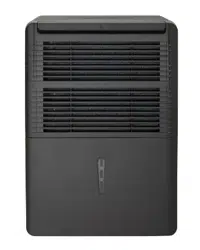
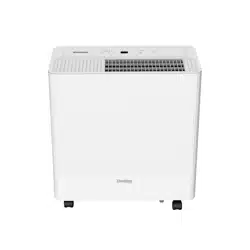
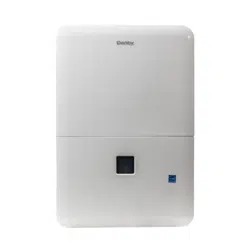
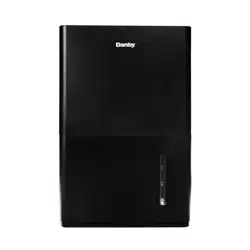
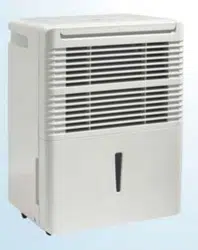
Place the dehumidifier on a smooth, level floor that is strong enough to support the appliance with a full bucket of water.
Do not place the dehumidifier on carpeting as this can block air flow around the appliance.
Do not force casters to move over carpeting as the appliance can become unbalanced and spill water.
To maintain efficiency, operate the appliance in an enclosed area. Keep nearby doors and windows closed.
Maintain a minimum clearance of 20 cm (8 inches) on the sides and back of the appliance and 40 cm (16 inches) on the top of the appliance to allow for proper air circulation.
The recommended ambient operating temperature is between 5°C (41°F) and 35°C (95°F).
Any time the appliance is placed on its back or side, it must be allowed to stand upright for 6 hours before plugging in to avoid damage to internal components.
The default humidity setting is 40% and high fan speed. Depending on humidity conditions the dehumidifier may not start automatically under the default setting. This means the humidity in the surrounding air is less than 40%. Press the down button to lower the set humidity until the set humidity is lower than the ambient humidity.
For optimal performance, ensure that the humidity setting is 10% lower than the ambient humidity. It is normal for the ambient humidity to vary up to 5% above or below the set humidity.
It is recommended in normal conditions to set the humidity between 40-45%.
It is normal for the dehumidifier to exhaust warm air from the top
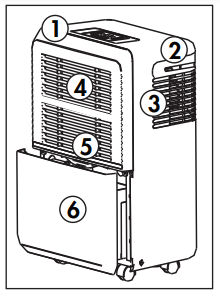
FEATURES
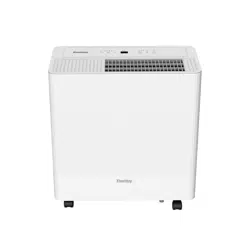
Front
Control Panel
Handles (both sides)
Air Outlet
Air Intake
Air Filter
Water Bucket
Back
Continuous Drain Outlet
Power Cord Storage Band
Power Cord
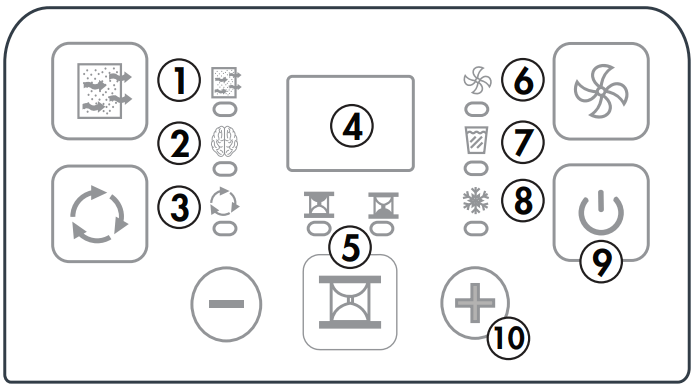
CONTROL PANEL
1. Filter Button and Indicator Light
The filter light will illuminate when the filter needs to be cleaned. Press the filter button once the filter has been cleaned to return to regular functioning.
2. Smart Dehumidify
This function will automatically adjust the humidity level with the fluctuating room temperatures. The humidity level cannot be adjusted in this setting, it will stabilize between 45% - 55%.
3. Continuous Mode Button and Indicator Light
Press this button to activate continuous mode. This will run the dehumidifying function continuously. The indicator light will turn on when continuous mode is active.
4. Display
The display will show the set humidity, the ambient humidity or the timer function.
The humidity can be set between 35-85% in 5% increments. For drier air, set the humidity to a lower number. For damper air, set the humidity to a higher number.
The ambient humidity display is accurate within +/- 5%.
5. Timer Button and Indicator Lights
Use this button to set the timer function.
6. Fan Button and Indicator Lights
Press this button to set the fan speed to low or high. The single fan icon indicates low speed. The double fan icon indicates high speed.
7. Full Bucket Indicator Light
The full bucket indicator light will illuminate when the bucket is full of water. Empty the bucket to resume regular functioning.
8. Defrost Indicator Light
The defrost indicator light will illuminate when frost has accumulated on the interior of the appliance. This can indicate that the ambient temperature is too cold. The dehumidifying function will cease until the frost has melted.
9. Power Button
Use this button to turn the appliance on or off.
10. Plus and Minus Buttons
The plus and minus buttons can adjust the set humidity or the timer setting.
TIMER FUNCTION
Auto On Function
Press the timer button until the auto on indicator light illuminates.
Use the plus and minus buttons to select the desired amount of time before the appliance should turn on. The plus and minus buttons will add or subtract 30 minutes of time up to 10 hours, then at 1 hour increments up to a maximum of 24 hours.
The time selected will appear on the display panel and will count down until the appliance turns on.
Auto Off Function
Press the timer button until the auto off indicator light illuminates.
Use the plus and minus buttons to select the desired amount of time before the appliance should turn on. The plus and minus buttons will add or subtract 30 minutes of time up to 10 hours, then at 1 hour increments up to a maximum of 24 hours.
The time selected will appear on the display panel and will count down until the appliance turns off.
Using Auto On and Auto Off Simultaneously
The auto on and auto off functions can be used at the same time by first setting one and then the other. Both indicator lights will illuminate and the display will count down to the appliance either turning off or on, whichever function was set first.
Note: The timer will not cycle the appliance on and off indefinitely. The auto on and auto off timers will function one time and then the appliance will return to regular functioning.
Turning the appliance off, pressing the default button on the remote or unplugging the appliance will clear all memory settings, including the timer.
WATER REMOVAL
There are two ways to remove collected water from the appliance.
1. Water Bucket
The dehumidifier will automatically collect condensed water in the water bucket. When the bucket is full, the compressor and fan will turn off and the full bucket indicator light will turn on. The display will show “P2”.
To empty the bucket, gently remove it from the appliance by gripping both sides and pulling outward. Be cautious when removing the bucket, it will be full and can be heavy.
Do not place the water bucket directly on the floor. The bottom of the bucket is uneven and it will fall over and spill water.
Empty the bucket and replace it in the appliance. The dehumidifier will not function without the bucket installed.
2. Continuous Drain
Water can be removed from the appliance using the continuous drain and a standard garden hose (not provided).
Before using any automatic drain functions, check that all drain ports are clean and free of debris. There is one drain port inside the bucket compartment of the appliance, remove the bucket to see it. There is one drain port on the back of the appliance where the drain hose attaches. All drain ports should be cleaned with a pipe cleaner prior to use.
Note: Do not clean the drain ports with anything more rigid than a pipe cleaner as this can damage the appliance.
Note: If the drain ports are clogged or dirty it can cause water to leak from the bottom of the appliance.
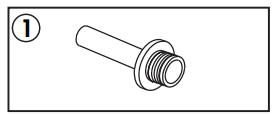
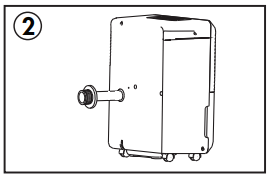
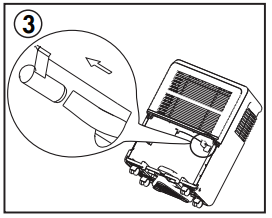
1. Before attaching the garden hose, first install the provided adapter and drain hose.
2. Remove the cover from the continuous drain outlet and insert the drain hose into the appliance until it connects to the drip point inside the bucket compartment.
3. The drip point is visible when the bucket is removed.
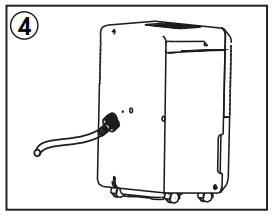
4. Attach the female threaded end of the garden hose to the adapter on the back of the appliance. Direct the other end of the garden hose to a bucket or floor drain.
Ensure that the garden hose is not bent and goes straight down from the back of the appliance. The continuous drain is only activated by gravity so any bends or upward motion in the hose will stop the water from draining.
The garden hose should be cut so that it is no more than 1.8 m (6 feet) long. If the drain hose is too long water may not drain completely which can lead to stagnant water and mildew build up inside the hose.
CARE & MAINTENANCE
AIR FILTER
The air filter should be cleaned approximately every 2 weeks. The air filter may require more frequent cleaning if there is significant dander or fur in the air.
Approximately every two weeks, the filter indicator light on the control panel will illuminate as a reminder to clean the filter. Follow the steps below to clean the filter and return the appliance to normal functioning.
The air filter is located behind the front intake grill. To remove the air filter, grasp the filter tab on the top of the grill and slide it upward.
Use a vacuum cleaner with a soft brush attachment to remove any large debris or dust build up from the air filter.
Wash the filter in lukewarm, soapy water, below 40°C (104°F), or use a neutral cleaning agent.
Rinse the filter with clean water and dry thoroughly before reinstalling in the appliance.
Press the filter button on the control panel to resume normal functioning.
Note: Do not operate the appliance without the air filter installed.
ERROR CODES
If the display panel shows any of the below error codes, unplug the appliance, let it stand for 5-10 minutes and then plug it back in. If the error persists, call for service.
AS - Humidity sensor error
ES - Temperature sensor error
P2 - Full bucket or bucket not in the correct position
EC - Cooling system error or sensor error
CLEANING
To avoid possible electric shock, ensure that the appliance is unplugged before performing any cleaning or maintenance.
The outside of the appliance can be wiped clean with a soft cloth or with a lukewarm, damp cloth if necessary.
Do not use gasoline, benzene, thinner or any other chemicals to clean this appliance as these substances can cause damage to the finish and deformation of plastic parts.
Never pour water directly onto the appliance as this will cause deterioration of electrical components and wiring insulation.
Ensure that the drain port on the interior of the appliance and the drain port on the back of the appliance are free of dirt and calcium build up.
END OF SEASON CARE
Before removing the appliance from service for the year, operate the appliance on high fan mode for half a day to ensure that the inside of the appliance is dry. This will help avoid the growth of mold or mildew inside the appliance. Ensure the filter is clean and dry. Store the appliance covered in a dry location.
DISPOSAL
This appliance may not be treated as regular household waste, it should be taken to the appropriate waste collection point for recycling of electrical components. Check for local regulatory compliance regarding approved and safe disposal of this appliance.
TROUBLESHOOTING
Danby Consumer Care: 1-800-263-2629
Hours of operation:
Monday to Thursday 8:30 am - 6:00 pm Eastern Standard Time
Friday 8:30 am - 4:00 pm Eastern Standard Time
Information in this manual is subject to change without notice.
PROBLEM
POSSIBLE CAUSE
Appliance will not operate
• Plug is not fully inserted into the wall outlet
• Blown fuse or circuit breaker
• Ambient humidity is lower than the set humidity
• Bucket is full or is not in the proper position
Insufficient dehumidifying
• Air filter is dirty
• Blocked air flow
• Appliance size is too small for application
• Ambient humidity is lower than the set humidity
Noise
• Air filter is dirty
• Bucket is not in proper position
• Floor surface is not level
Odors
• Formation of mold or mildew on internal wet surfaces
• Place an algaecide tablet in the water bucket
Water on floor
• Hose connection is loose
• Drain cover has been removed
Frost build up
• When ambient temperature is below 5°C (41°F) frost may form
• Switch the appliance to fan only mode until the frost melts