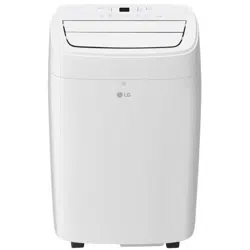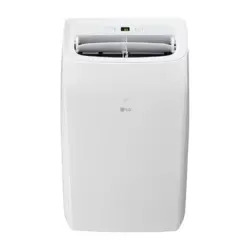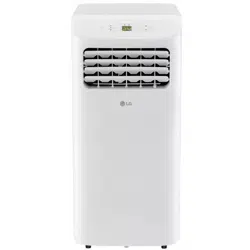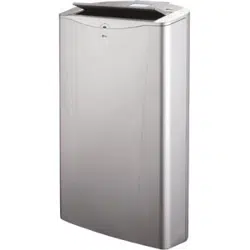

TYPE PORTABLE AIR CONDITIONER
MODEL LP1414SHR
OWNER’S MANUAL
AIR CONDITIONER
Please read this manual carefully before operating
your air conditioner and retain it for future reference.
www.lgappliances.com
INTRODUCTION
IMPORTANT SAFETY INSTRUCTIONS
Basic Safety Precautions . . . . . . . . . . . . . . . . . . . . . . 3 - 6
Electrical Safety. . . . . . . . . . . . . . . . . . . . . . . . . .. . . . .6, 7
CARE AND CLEANING
Storing the Air Conditioner
PARTS AND FEATURES
Key Parts and Components . . . . . . . . . . . . . . . . . . . 8
Control Panel and Remote . . . . . . . . . . . . . . . . . . . . 9
HOW TO USE
Before Using Your Air Conditioner
.. . . . . . . . . . . 27
.. . . . . . .
Using the Controls
Cleaning the Case. . . . . . . . . . . . . . . . . . . . . . . . . . 24
Cleaning the Air Filter . . . . . . . . . . . . . . . . . . . . . . . 24
Emptying the Water Collection Tank . . . . . . . . . 25, 26
2
Heating Drainage
. . . . . . . . . . . . . . . . . . . . . . . . 22, 23
Product Registration Information . . . . . . . . . . . . . 30
WARRANTY
Before Calling for Service. . . . . . . . . . . . . . . . . 28, 29
TROUBLESHOOTING
Congratulations on your purchase
and welcome to the LG family.
Your new LG Air Conditioner
combines high-efficiency operation
with portable convenience.
If you follow the operating and care
instructions in this manual, your
air conditioner will provide you with
many years of reliable service.
THANK YOU!
. . . . . . . . . . .10, 11
. . . . . . . . . . . . . . . . . . . . . . 12- 14
Preparing for Installation . . . . . . . . . . . . . . . . . . . . . 15
Window Vent Panel and Extensions . . . . . . . . . . . . 17
Installation in Vertical Sliding Windows . . . . . . . 18, 19
Installation in Casement Style Windows . . . . . . 20, 21
INSTALLATION INSTRUCTIONS
Selection of Installation Location . . . . . . . . . . . . . . . 16
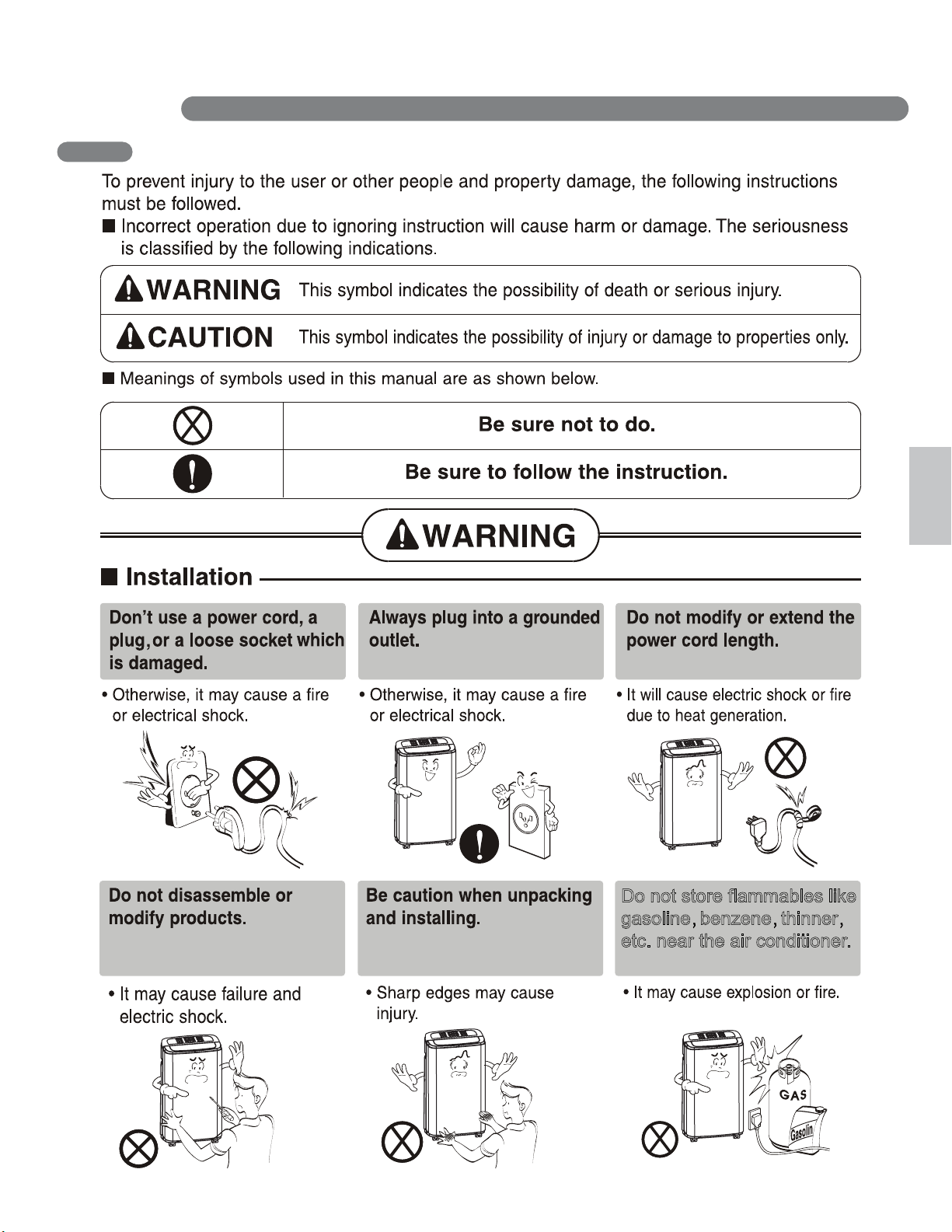
IMPORTANT SAFETY INSTRUCTIONS
3
EnglishEnglish
Do not store flammables like
gasoline benzene thinner
etc. near the air conditioner.
BASIC SAFETY PRECAUTIONS
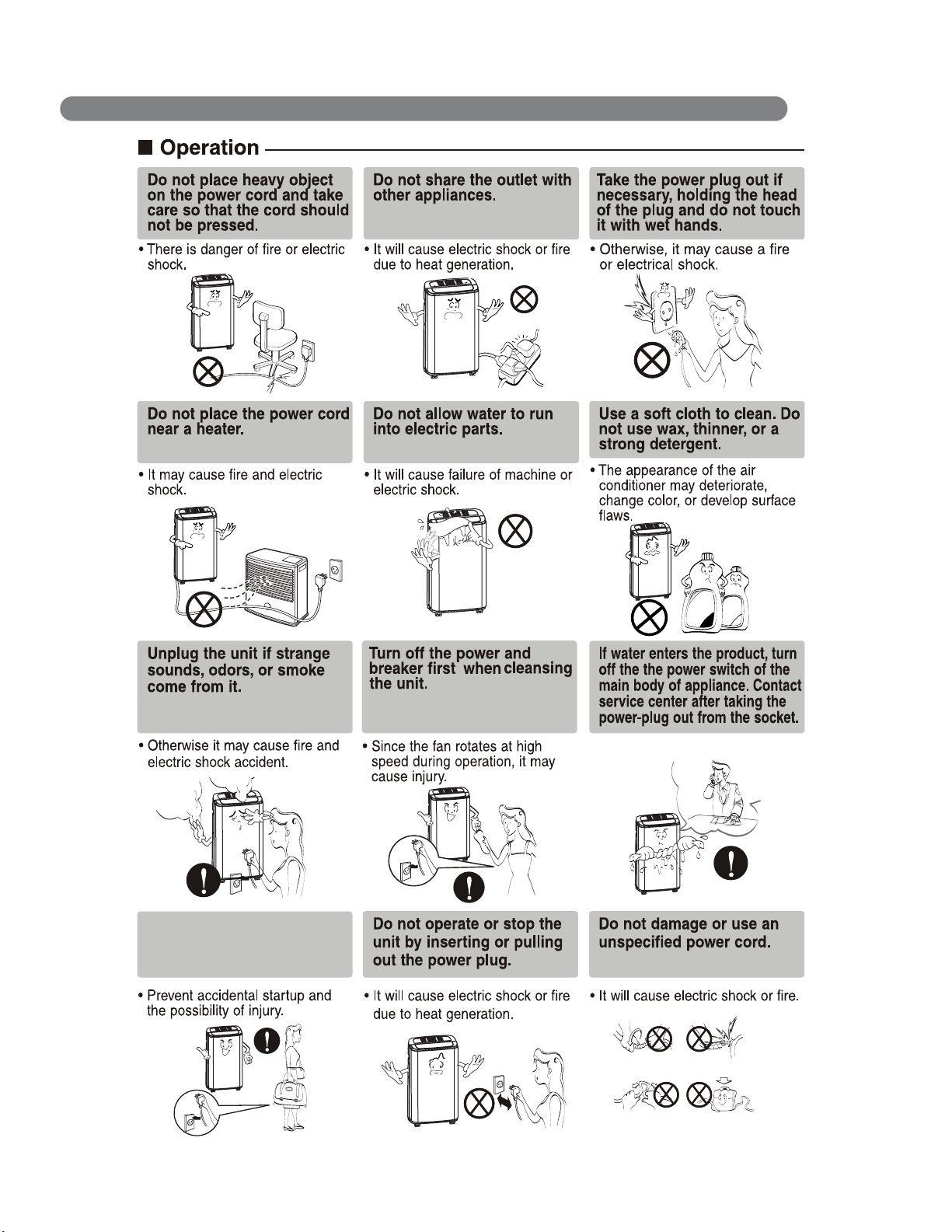
IMPORTANT SAFETY INSTRUCTIONS
4
Unplug the unit when not
using it for a long time.
Wax
Thinner
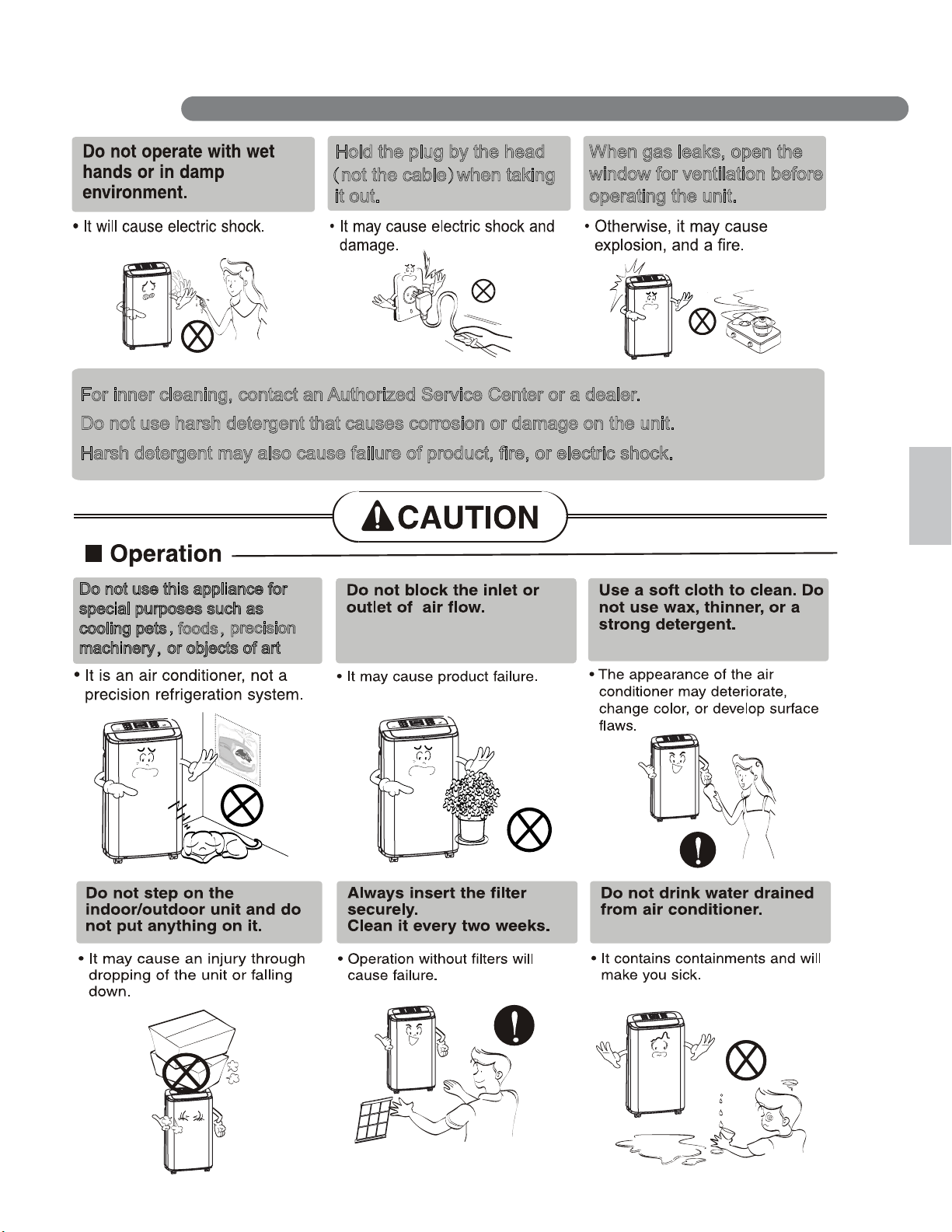
IMPORTANT SAFETY INSTRUCTIONS
5
EnglishEnglish
When gas leaks, open the
window for ventilation before
operating the unit.
Hold the plug by the head
it out.
(not the cable)when taking
For inner cleaning, contact an Authorized Service Center or a dealer.
Do not use harsh detergent that causes corrosion or damage on the unit.
Harsh detergent may also cause failure of prod
uct, fire, or electric shock.
Do not use this appliance for
special purposes such as
cooling pets
foods,
precision
machinery,or objects of art
,
IMPORTANT SAFETY INSTRUCTIONS
6
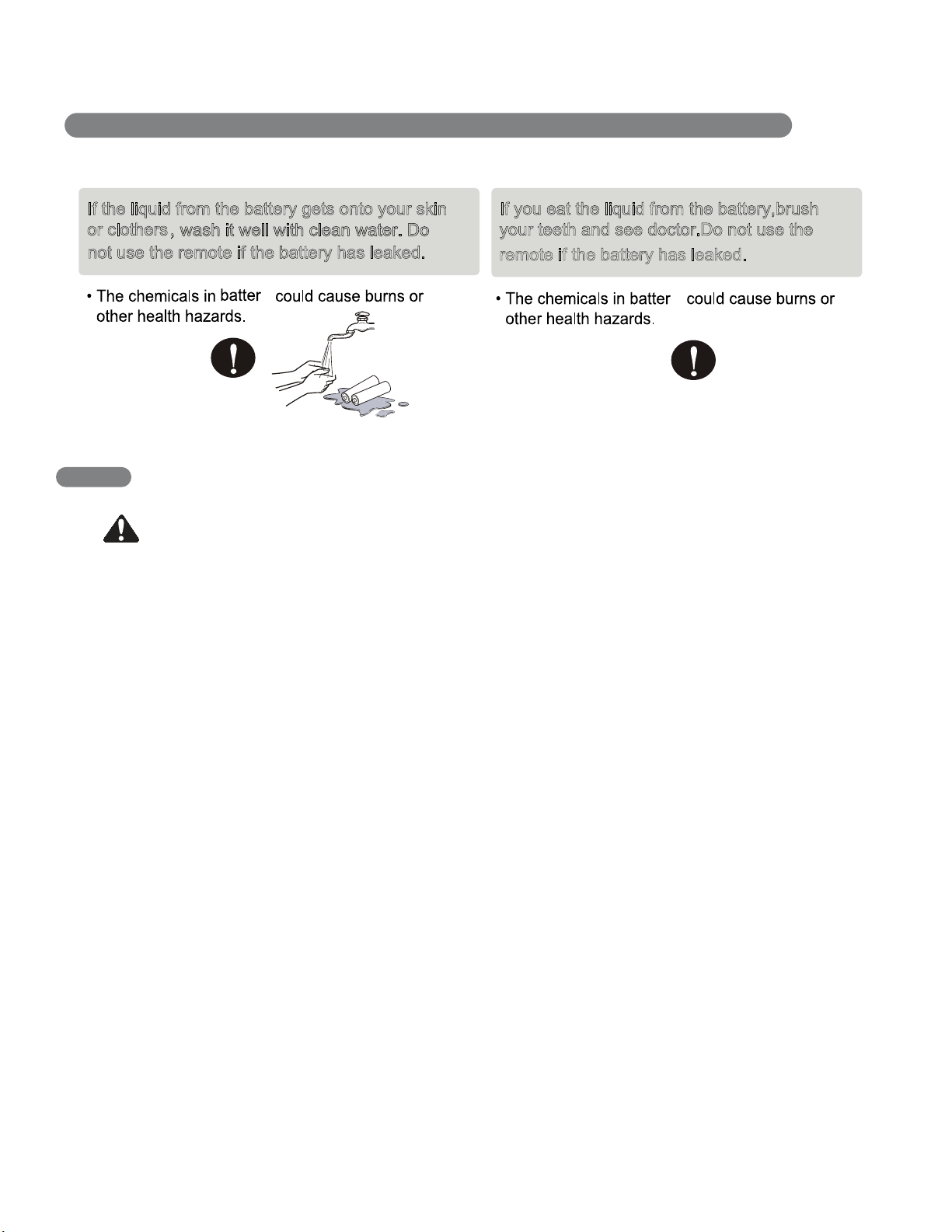
If the liquid from the battery gets onto your skin
or clothers,
wash it well with clean water. Do
not use the remote if the battery has leaked.
y
If you eat the liquid from the battery,brush
your teeth and see doctor.Do not use the
remote if the battery has leaked.
y
ELECTRICAL SAFETY
WARNING
Electrical Shock Hazard
Failure to follow these instructions can result
in death, fire, or electrical shock.
• This unit must be properly grounded.
• Do not, under any circumstances, cut or
remove the ground prong.
• If you do not have a properly grounded
outlet, or if there is any doubt that the outlet
is not properly grounded, a qualified
electrician should check the outlet and
circuit, and, if necessary, install a properly
grounded outlet.
• This air conditioner must be plugged
into a grounded 60 Hz, 120 VAC outlet
protected by a 15 amp time delay fuse
or circuit breaker.
• This air conditioner must be installed in
accordance with national wiring codes.
• Do not alter or modify the plug or cord
of this air conditioner. If the power cord
becomes worn or damaged, the cord should
only be replaced by a qualified service
technician using genuine replacement parts.
• Do not use an extension cord.
7
English
IMPORTANT SAFETY INSTRUCTIONS
READ ALL INSTRUCTIONS BEFORE USE
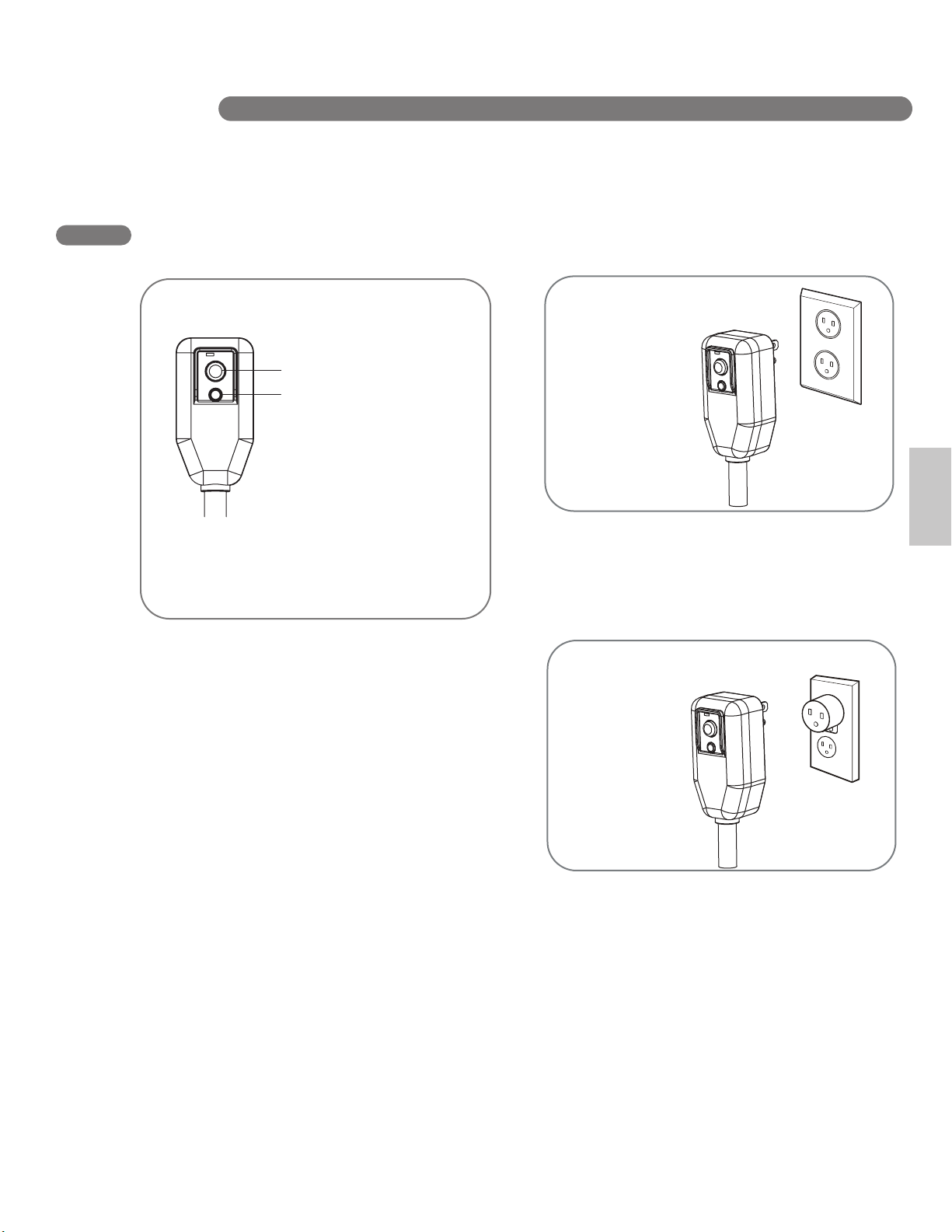
For additional safety,
the power cord
features an integrated
circuit breaker. Test
and reset buttons are
provided on the plug
case.
The circuit breaker
should be tested
periodically by
pressing the TEST
button then the RESET button. If the TEST
button does not cause the circuit breaker to trip,
or if the RESET button will not stay engaged,
unplug the air conditioner immediately and
contact your LG service technician.
INTEGRATED CIRCUIT BREAKER
Test
Reset
ELECTRICAL SAFETY
Due to potential safety hazards, the use of
an adapter plug is strongly discouraged.
For temporary connections, use only a
UL-listed adapter. Ensure that the large slot
in the adapter is aligned with the large slot
in the outlet.
To prevent damage to the adapter’s ground
terminal, hold the adapter in place while
plugging in or unplugging the air conditioner.
• Attaching the adapter ground terminal to
the wall receptacle cover screw does not
ground the appliance unless the cover
screw is metal and not insulated, and the
wall receptacle is grounded through the
house wiring.
• Frequent connection and disconnection
can damage the ground terminal on the
adapter. Never use a broken or damaged
adapter.
SAVE THESE INSTRUCTIONS
PREFERRED
GROUNDING METHOD
Ensure proper
ground exists
before use.
TEMPORARY GROUNDING
METHOD
Ensure proper
ground exists
before use.
1
2
3
4
5
6
7
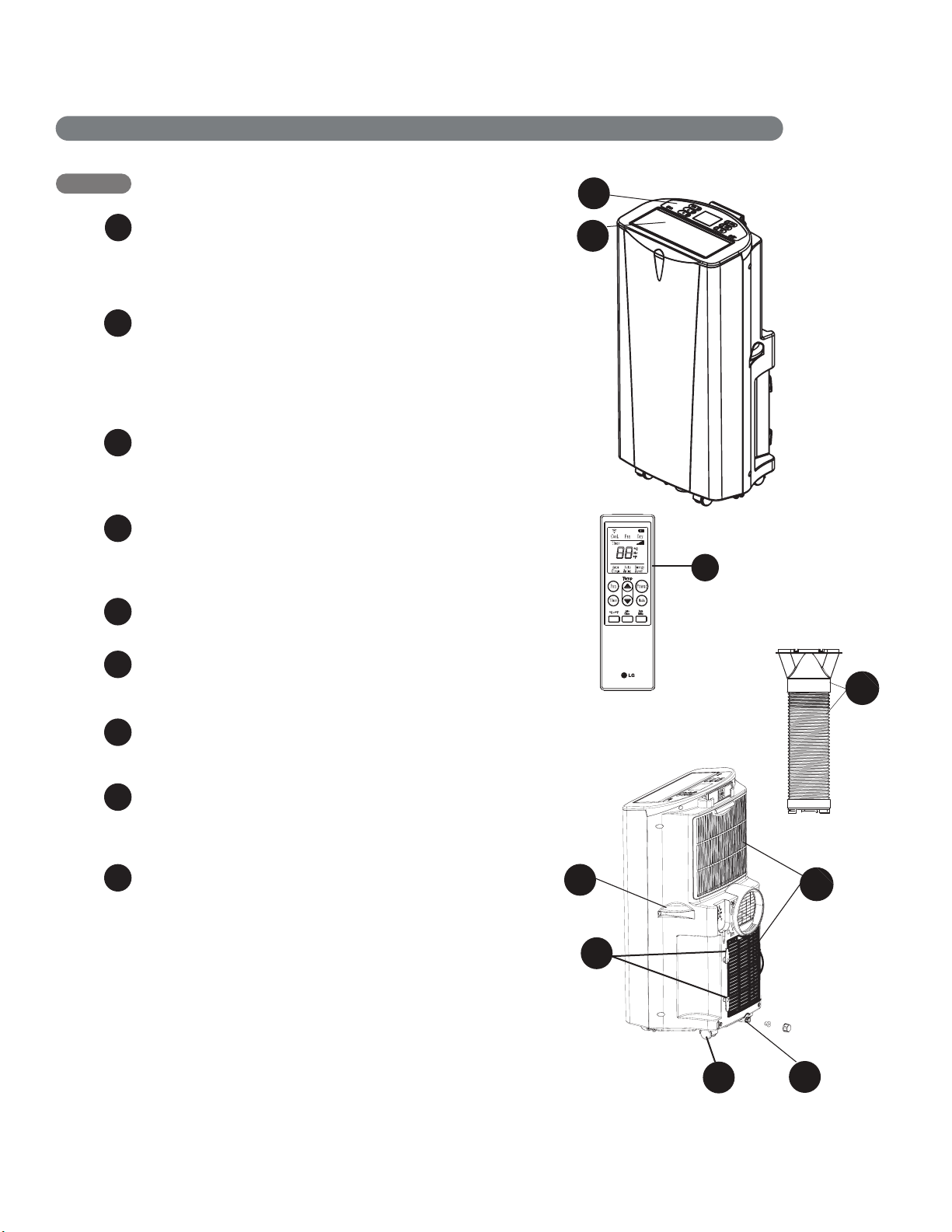
KEY PARTS AND COMPONENTS
CONTROL PANEL AND DISPLAY
Easy-to-read white LCD display shows the
operating state. Digital touch buttons make
changing settings quick and easy.
MOTORIZED AIR DISCHARGE
The adjustable louvered air discharge opens
automatically when the air conditioner is turned
on, and closes when it is turned off. It can also
be set to oscillate to distribute air more evenly
through the room.
INFRARED REMOTE CONTROL
Th
e LCD
remote control allows you to adjust
the
temperature and operate most functions of the
air conditioner from across the room.
HOSE AND DIFFUSER
Use the diffuser and hose to connect the air
conditioner to the window installation kit to vent
exhaust air outside.
FILTER
You can pull out and insert the filter easily.
HANDLES
The handles provide a convenient grip
when lifting the air conditioner.
SWIVELING CASTERS
Swiveling casters allow you to move the air
conditioner easily on most floor surfaces.
BOTTOM DRAIN PORT
Before moving the air conditioner, drain the
internal water in collection tank completely
using bottom drain port.
POWER SUPPLY CORD HOLDER
Wrap the power supply cord around the holders
for your convenience.
8
9
8
PARTS AND F E A TURES
3
Heat
6
5
7
9
8
4
1
2

Refer to the Installation Instructions included in
this manual before using the air conditioner.
Once the air conditioner has been properly
assembled and installed:
Plug the power cord into its own dedicated
properly grounded outlet.
Do not plug
other
it could overload the outlet and create a
e hazard.
Make sure the air conditioner and cord is
positioned where it does not create a
tripping hazard and will receive adequate
ventilation. Do not place it directly next to
furniture or objects that could block the
vent openings.
Make sure that any items that could be
blown over or damaged by the airflow from
the fan are out of the airflow path.
PREPARING FOR OPERATION
1
2
appliances
into the same outlet;
fir
e
3
• Do not remain in the direct airflow from the air
conditioner for extended periods of time.
• When used at the same time as stoves,
fireplaces, and other combustion devices,
make sure there is a sufficient flow of fresh air
into the room. Do not use in tightly enclosed
spaces with these types of devices.
• This air conditioner is intended for household
use as a consumer comfort appliance. Do not
use it as a precision climate control system,
or for purposes such as cooling precision
equipment, food, pets, plants, artwork, etc.
Such items could be damag
ed.
• Do not bend the hose downward when
window installation kit is not applied. It may
cause failure of air conditioner or performance
deterioration.
IMPORTANT:
Remove and store packing materials for reuse.
Remove any shipping tape before using the
air conditioner. If the tape leaves behind any
adhesive, rub a small amount of liquid dish
soap onto it and wipe with a damp cloth. Do
NOT use sharp instruments, alcohol, thinners,
or abrasive cleaners to remove adhesive.
They could damage the finish.
UNPACKING THE AIR CONDITIONER
BEFORE USING YOUR AIR CONDITIONER
HOW TO USE
10
11
2
3
CAUTION
• If the liquid fromthe batteries getsonto your skin orclothes,wash itwell with cleanwater.
Do not use the remote if the batteries have leaked.
• If you eat the liquid from the batteries, brush your teeth and see doctor.
The chemicals in batteries could cause burns or other health hazards.
In order to avoid losing the remote, please
put the remote inside of the storage place when
you not use it.
NOTE:
1
2
Be sure to note
proper polarity!
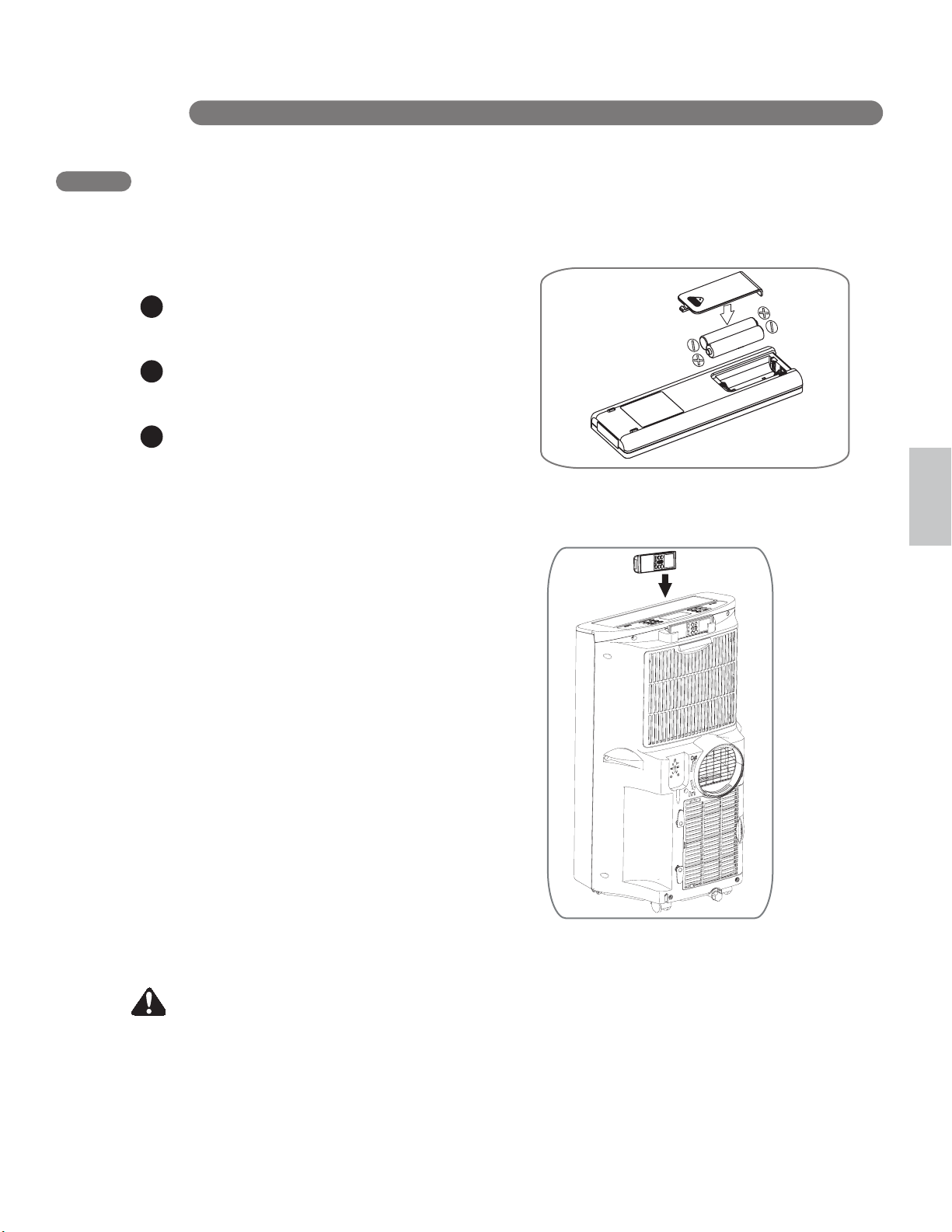
Before using your remote, install the provided
AAA batteries.
Press and glide the battery cover on the back
of the remote, then you can remove the cover.
Insert two new alkaline AAA batteries into
the battery compartment, being sure to note
the proper polarity.
Reattach the battery cover, making sure the
locking tab clicks into place.
NOTES:
• Use only alkaline batteries. Do not use
rechargeable batteries.
• When replacing batteries, always replace both
batteries with new batteries. Do not mix old
and new batteries.
• If the air conditioner will not be used for an
extended period of time, remove the batteries
from the remote.
INSERTING BATTERIES IN THE REMOTE
Your air conditioner has a special place for
convenient storage the remote control.
See the drawing to the right.
REMOTE STORAGE
3
BEFORE USING YOUR AIR CONDITIONER
HOW TO U SE
English
12
Press the POWER button to turn the air
conditioner ON or OFF. When you turn the air
c
tone will play and the LCD
display will show the set
temperature and any active
onditioner on, an ascending
mode.The air discharge on the top of the air
conditioner will automatically open.
When turning the air conditioner off, you will
hear a descending tone and the air discharge
on the top of the air conditioner will close.
Any control settings such as Mode, Set
Temperature, Auto Swing, etc. will be retained
in memory when the power is off.
NOTE: When turned on after being unplugged,
the air conditioner will automatically reset to
COOL mode, with a temperature setting of 72°F.
Any settings will need to be re-entered.
Control panel buttons shown. Operat
ion
using the remote control is the same, unless
specifically noted.
NOTE:
The remote sensor is located under
the air discharge and on the front panel.
Always point the remote at the sensor. The
remote may not work if the sensor is in bright
light or if there is not a clear path between the
remote and the sensor.
USING THE CONTROLS
Mode Features
COOL
(HEAT)
Compressor runs and cools the room.
Use the and FAN buttons to set
the desired temperature and circulation
fan speed.
FAN
DRY
ENERGY
SAVER
HOW TO U S E
/
Fan circulates air but compressor does
not run. Use the FAN button to set the
desired fan speed.
Dry mode is used to remove humidity
from the room without additional
cooling. Once the set temperature is
reached, the compressor and
circulation fan turns off and only the
exhaust fan will run. Fan speed is
pre-set and can not be adjusted.
Under normal operation, the exhaust
fan cycles on and off with the
compressor, and the circulation fan
runs at the set speed.
The mode helps reduce power
consumption by automatically turning
off the circulation fan as well as the
exhaust fan when the compressor is
off. The air conditioner will
automatically cycle both fans on and
off with the compressor as needed for
cooling.
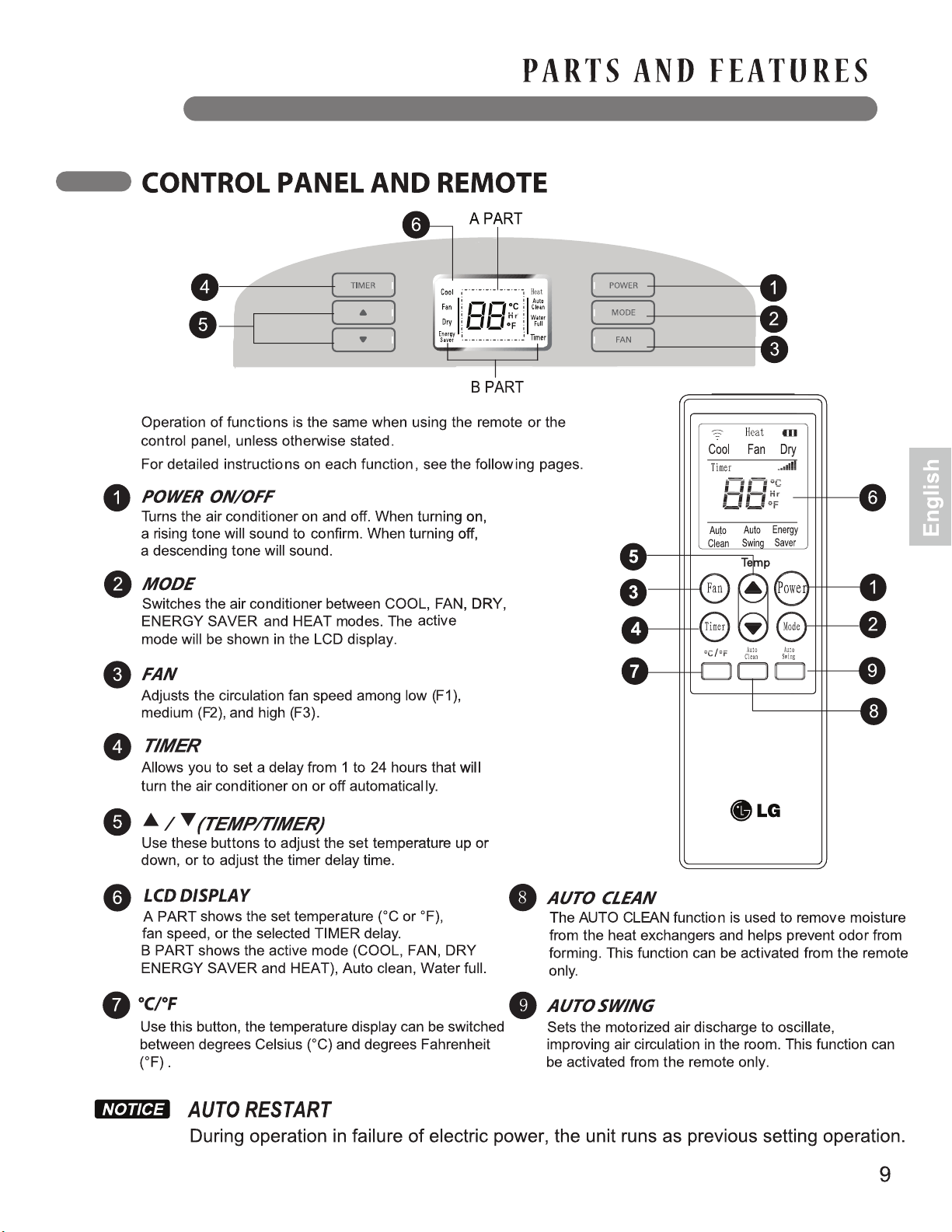
POWER
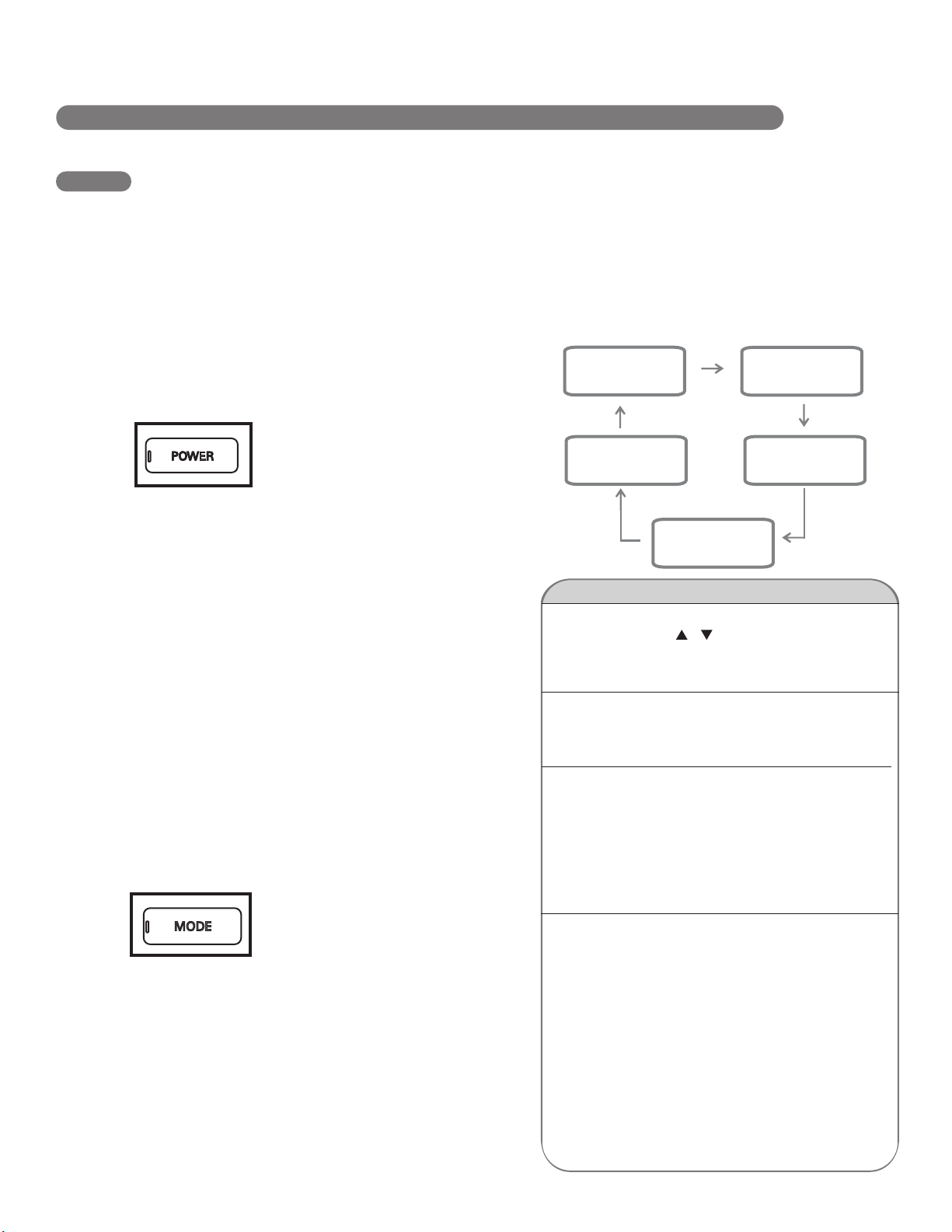
Press the MODE button to select the operating
mode (COOL, FAN, DRY , ENERGY SAVER or HEAT)
for
the air conditioner. And you
can see the active mode through
the LCD Display.
The default setting is COOL.
Press the MODE button to
change to FAN, press again to change to DRY,
again to change to ENERGY SAVER, again to
change to HEAT and again to return to COOL.
MODE
COOL FAN
DRY
→
→
ENERGY
SAVER
→
HEAT
→
13
USING THE CONTROLS
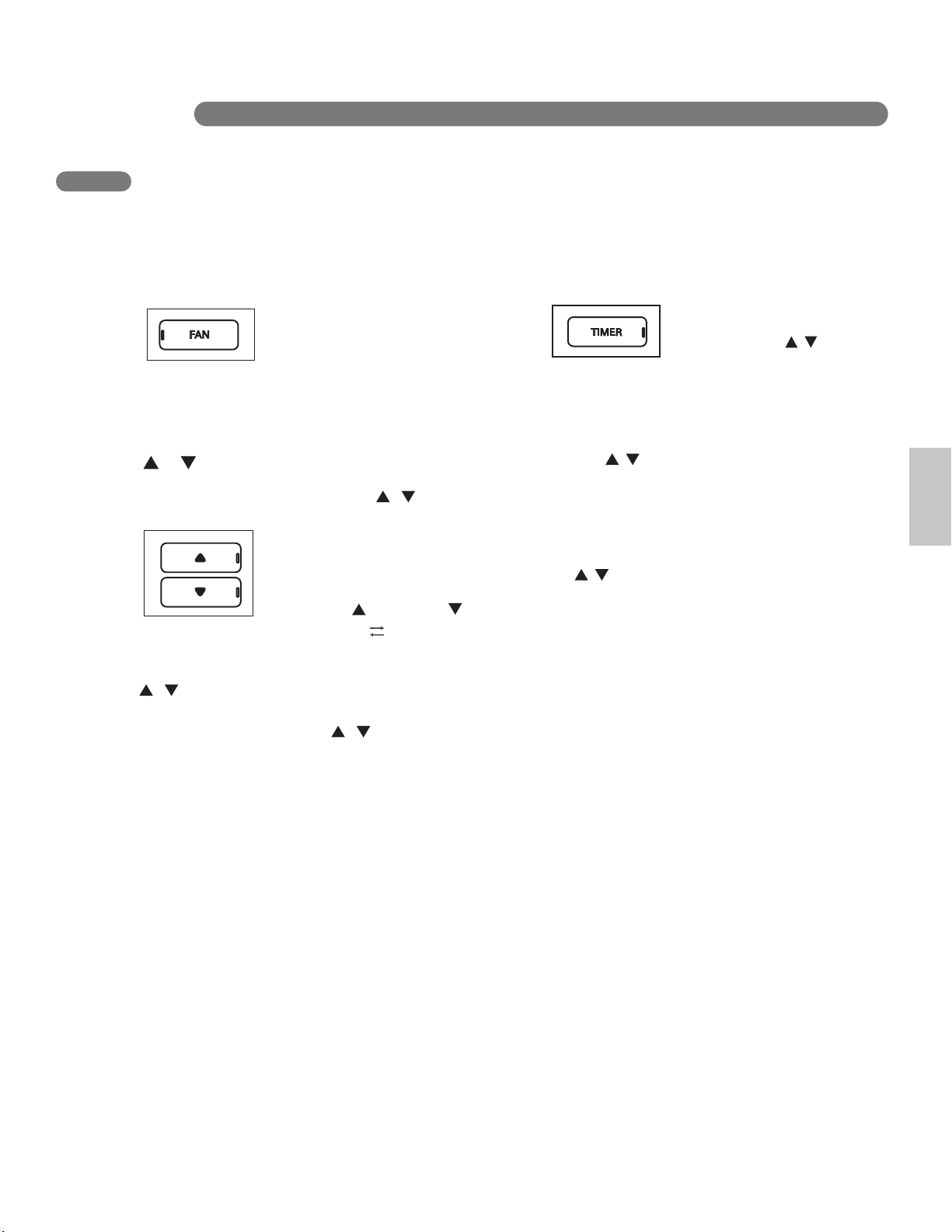
Pressing the FAN button cycles the circulation
fan speed from low (F1) to medium (F2) to high
(F3).The selected fan speed will
be shown in the LCD display.
The function can be used in
either COOL ,HEAT or FAN
modes.
When changing fan speeds, there is a brief
delay before the fan motor changes speed.
FAN
In COOl , DRY and HEAT modes, the
/ (TEMP/TIMER)
buttons adjust the set temperature up to 86°F or
down to 60°F ,in one degree
increments. The temperatu
re can
be switched between degrees
Fahrenheit and degrees Celsius,
pressing the button and button
When the TIMER function is selected, use the
/ (TEMP/TIMER)
buttons to adjust the delay
time from 1 to 24 hours, in one hour increments.
If you press and hold the
buttons, the set temperature or time will change
automatically after a few seconds.
NOTE: The displayed temperature is the SET
t
DRY,
emperature, not the room temperature.
In COOL,
ENERGY SAVER or
HEAT mode, the thermostat in
the
air conditioner will run the compressor until the
set temperature is reached, then cycle the
compressor on and off to maintain the set
temperature.
/ (TEMP/TIMER)
When the
TIMER
function is selected, you can set
the air conditioner to either automatically turn
OFF or turn ON after a delay of
up to 24 hours. The display will
show 0. Use the
buttons to adjust the delay
time from 1 to 24 hours, in one
hour increments.
To set an automatic off delay, press the TIMER
button while the air conditioner is running and
use the buttons to adjust the
delay time. The air
conditioner will automatically
turn OFF after the
set delay.
To set an automatic on delay, press the TIMER
button while the air conditioner is off and use
the butt
ons to adjust the
delay time.
The display will show the number of hours
remaining
until the unit is set to come on. The
air conditioner will automatically turn ON
after the set delay.
If you want to know how many hours you have
set, press the TIMER button and then you
can
see the time through the LCD display.
If you want to change the set timer, press the
TIMER button and adjust the time when the
number is flickering.
To cancel the Timer function, press the TIMER
button and adjust the number to 0 when the
number is flickering, then the function will be
canceled in a few seconds.
Another better method is press the TIMER
button and press this button again when the
number is still flickering.
NOTE: Do not unplug the air conditioner when
using the timer function.
TIMER
/ (TEMP/TIMER)
/
(TEMP/TIMER)
/ (TEMP/TIMER)
/ (TEMP/TIMER)
at the same time,or pressing °C °F button on the
remote.
HOW TO USE
English
14
•
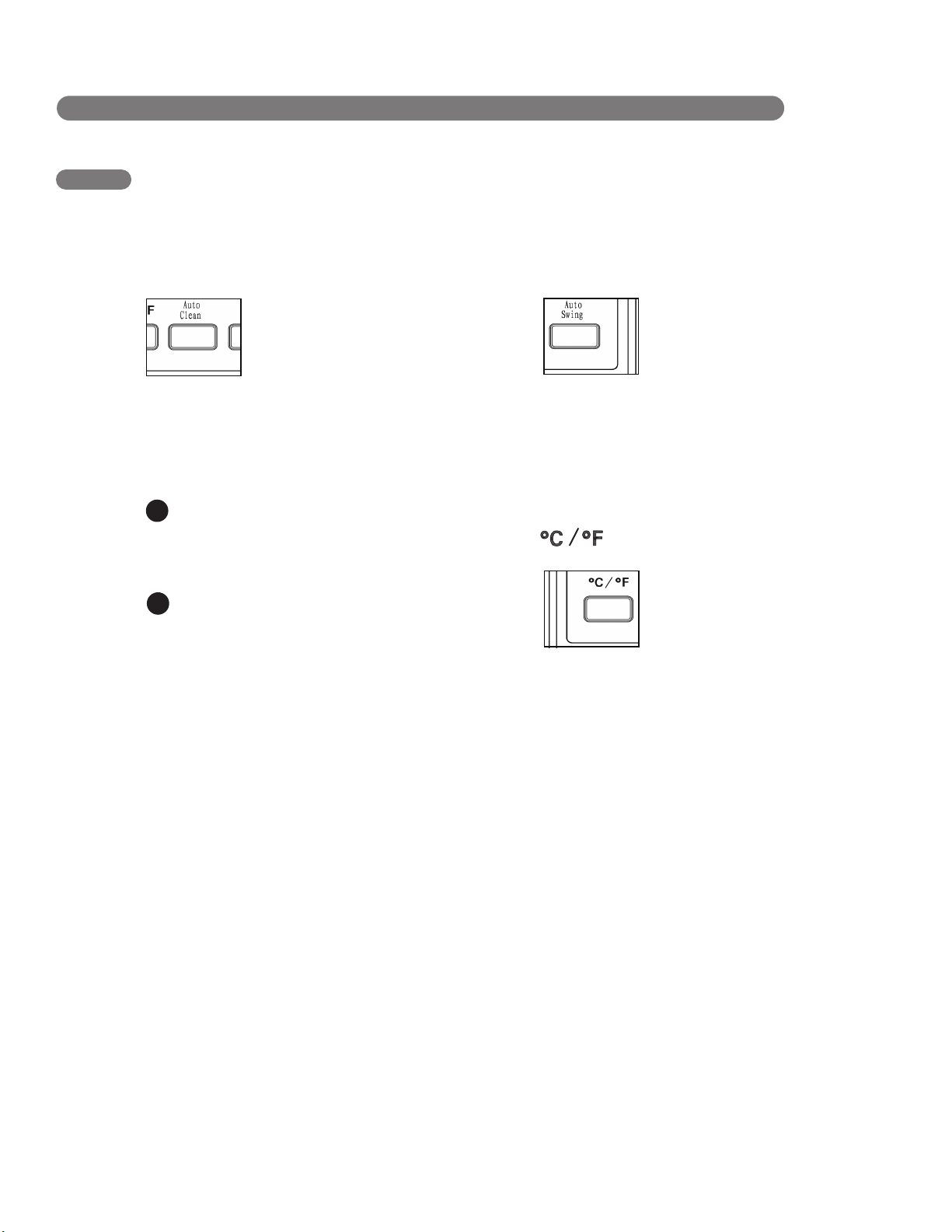
To use AUTO CLEAN
With the air conditioner running in COOL,
DRY,ENERGY SAVER or HEAT mode,
press the AUTO CLEAN button.
To cancel AUTO CLEAN, or to stop an
AUTO CLEAN cycle in process, simply press
the AUTO CLEAN button again. The
AUTO CLEAN function will not operate if the
air conditioner is already off.
AUTO CLEAN
1
2
AUTO SWING
When the displayed
temperature is °C (or °F), you
can press this button to swith
to °F (or °C).
USING THE CONTROLS
HOW TO USE
To turn the AUTO CLEAN function on, press
the AUTO CLEAN button while the air
conditioner is running in COOL,
DRY, ENERGY SAVER or HETA mode.
This function can only be selected
from the remote; it is not available
from the control panel. It must be
set each time you wish to run the AUTO CLEAN
function.
AUTO CLEAN is used to remove moisture from
the heat exchange coils. This helps prevent the
formation of mildew and odors.
AUTO CLEAN will be displayed in the
LCD diplay.
Press the POWER button to turn the air
conditioner off. AUTO CLEAN will run
the circulation and exhaust fans with the
compressor off for a few minutes after
the power is turned off.
AUTO SWING function can only be activated
with the remote. When this function is on, the
air discharge will oscillate to
circulate air more evenly
through the room. To turn this
function off, simply press the
AUTO SWING button with the
remote again.
With AUTO SWING off, you may also manually
adjust the air discharge to the desired position.
It will maintain this position until the air
conditioner is turned off or AUTO SWING is
activated.
15
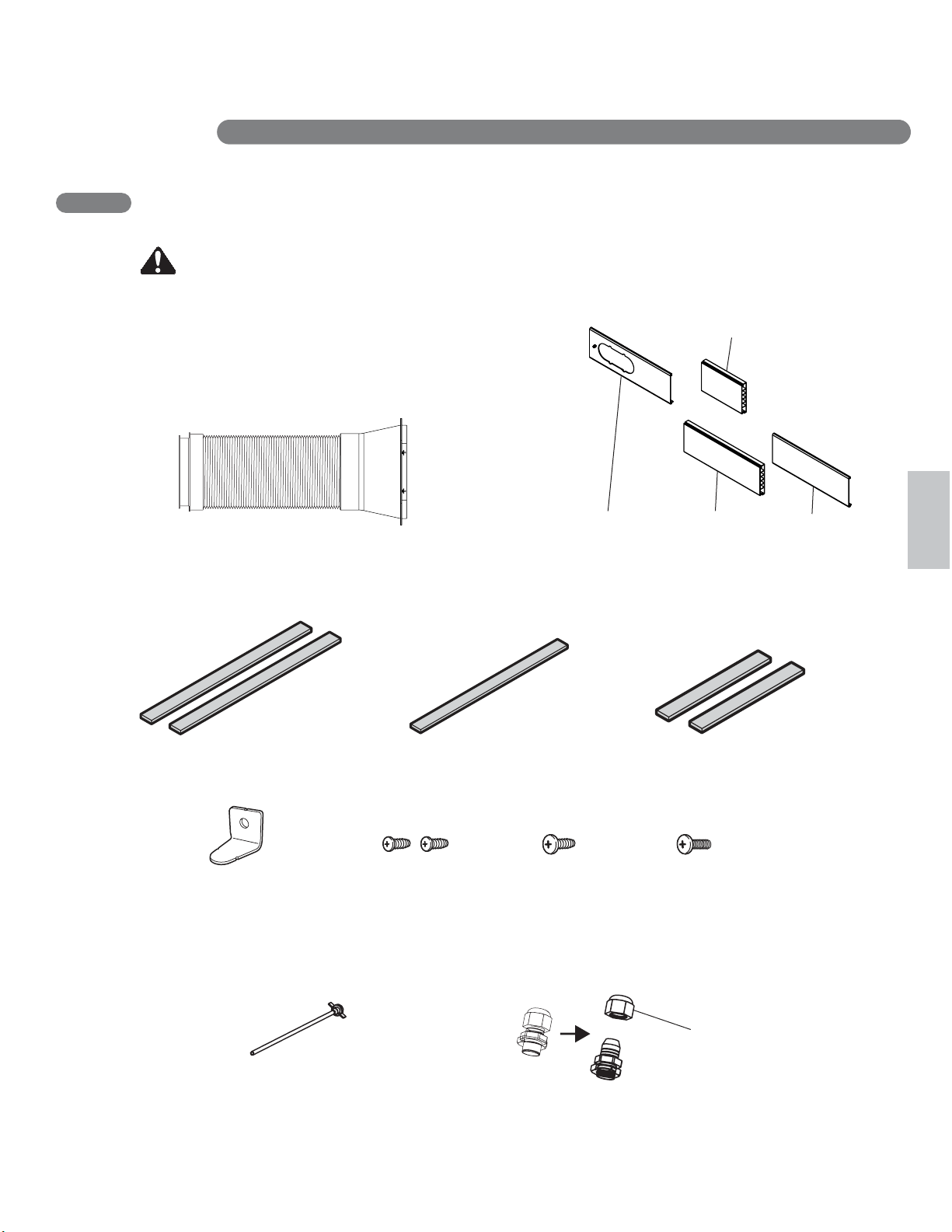
2 Type A Screws 1 Type B Screw 1 Type C Screw
The following components are used for window venting.
Not all components are used for every installation.
EXHAUST COMPONENTS
Window Installation Kit (includes 1 Window
Vent Panel and 3 Extension Panels)
Flexible Venting Hose
2 Type A Foam Seals
(Adhesive)
Diffuser
Security Bracket
1 Type B Foam Seal
(Non-adhesive)
2 Type C Foam Seals
(Adhesive type-Shorter)
English
INSTALLATION INSTRUCTIONS
PREPARING FOR INSTALLATION
WARNING The air conditioner is heavy! Use two or more people to
lift and install the unit! Failure to do so could result in back injury or other injuries.
1 Window Vent Panel
Panel A (18’’)
3 Extension Panels
Panel C (17’’)
Panel D (17’’)
Panel B (9’’)
Fixing Nut
Additional Parts (For Heating Drainage)
Drain Pipe
(In The Accessory Box)
(On the Vent Panel)
Nut Cover
INSTALLATION INSTRUCTIONS
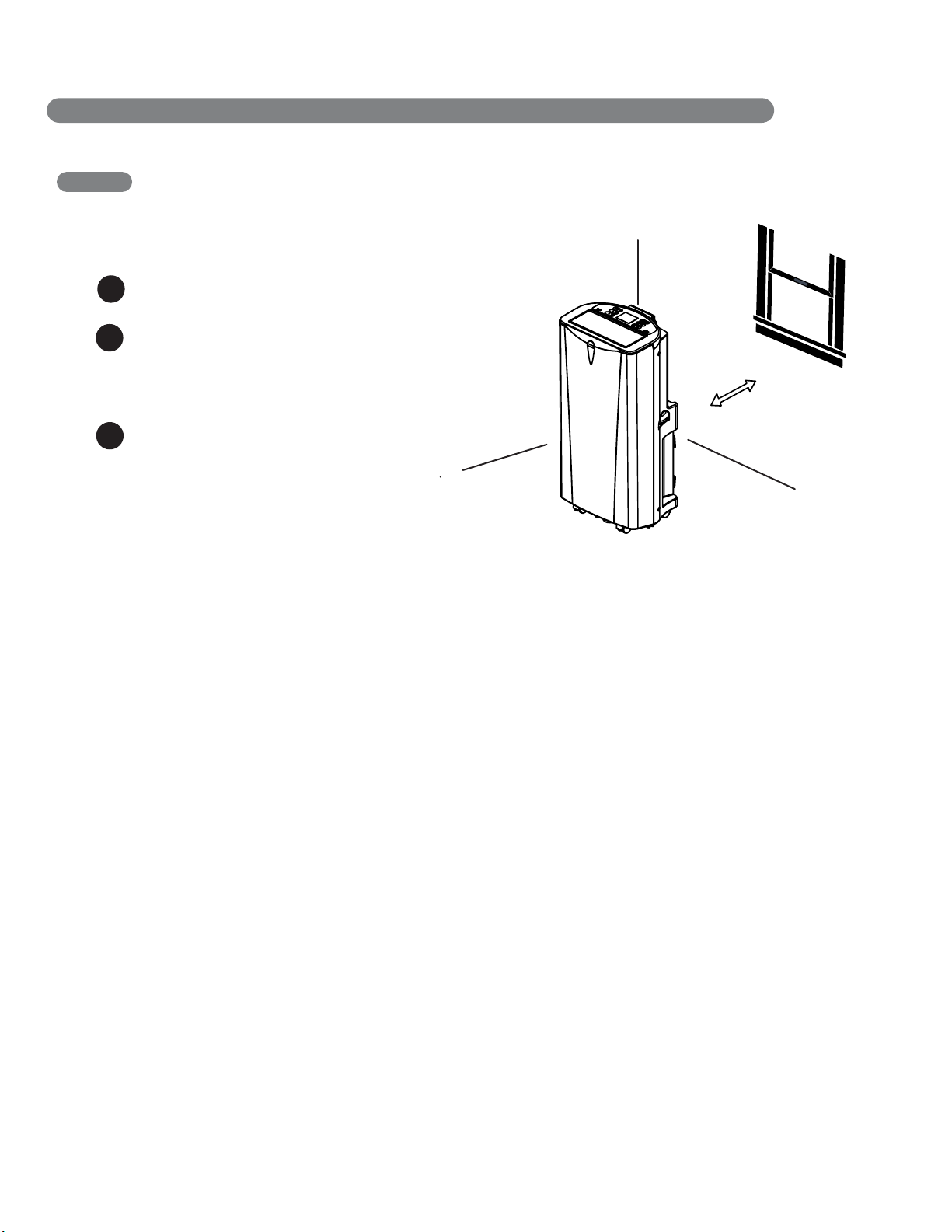
SELECTION OF INSTALLATION LOCATION
Place the unit on a level floor.
For best performance,allow at least 20 in
of air space on back side of the unit for
good air circulation.
1
2
20 in
16
Place the unit near a window. The hose
and diffuser will be used to connect the air
conditioner to the window installation kit to
vent exhaust air outside.
3
INSTALLATION INSTRUCTIONS
WINDOW VENT PANEL AND EXTENSIONS
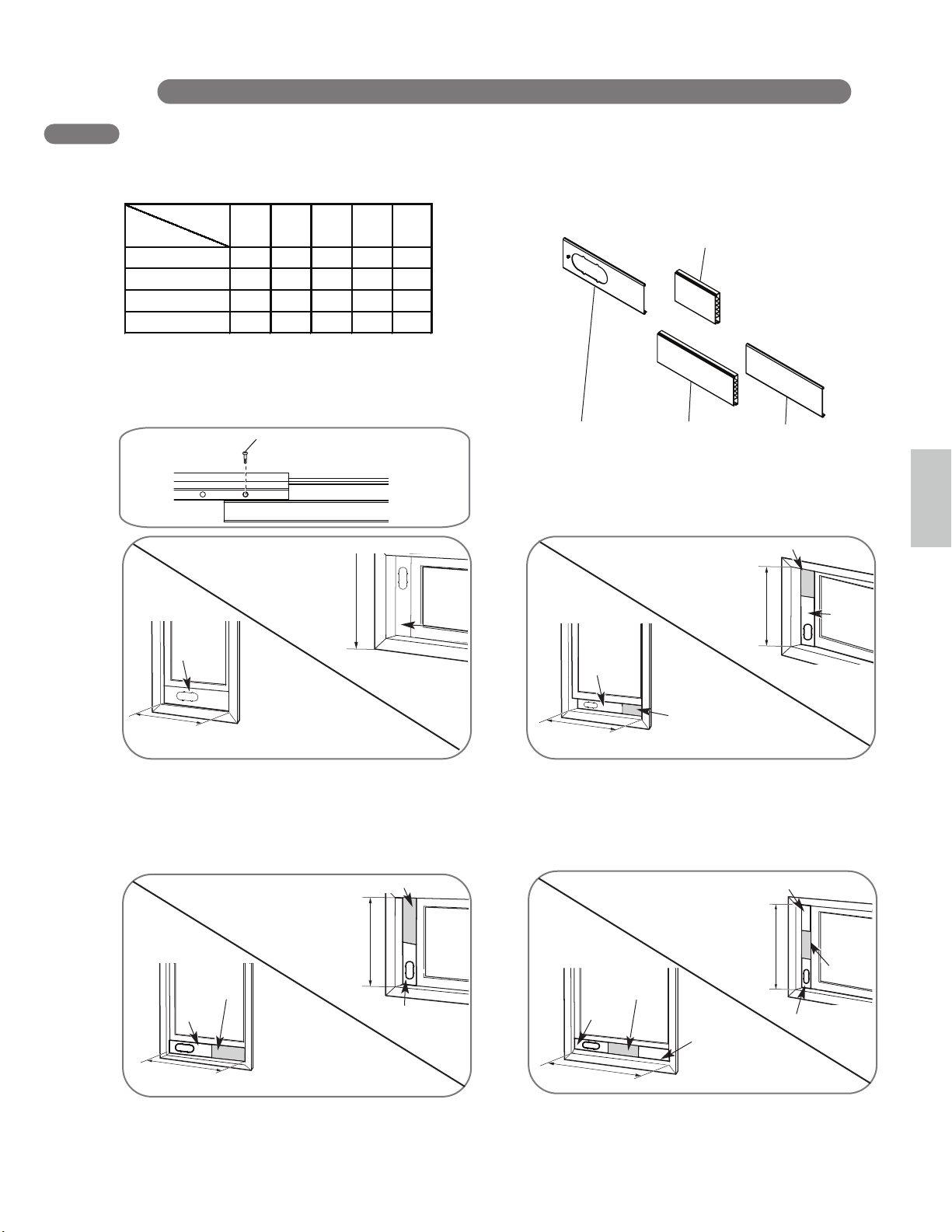
The window installation kit allows you to install the air conditioner in most vertical-sliding windows
18" to 50" wide, or casement-style windows from 18 " to 50 " high.
For an 18" window opening, use the window
vent panel by itself.
For window openings from 19" to 26",
use the window vent panel (Panel A) and a
extension panel (Panel B).
use the window vent panel (Panel A) and a
extension panel (Panel C).
For window openings from 35 " to 50", use the
window vent panel and two extension panels
(Panel C and Panel D).
Panel A
Panel A
18"
18"
Panel A
19"− 26"
19"− 26"
Panel B
Panel A
English
Fig. “a”
Fig. “b”
27"−34"
Fig. “c”
Fig. “d”
For window openings from 27 " to 34",
A B C D
18" 9" 17" 17"
18"
√
a
19" − 26"
√ √
b
√ √
c
√
d
Fig.
Panel
Window Length
17
√ √
1. Please check your window length and choose the
fit panels from the above tabel.
retfa ,slenap 2 naht erom deen htgnel wodniw ruoy fI .2
adjust the length, please use type A screw to fix them.
Panel D
Panel A
Panel C
Panel A
Panel C
Panel D
Panel A
Panel C
Screw A
27" − 34"
35" − 50"
27"−34"
35"−50"
35"−50"
Window Installation Kit (includes 1 Window
Vent Panel and 3 Extension Panels)
Panel A (18’’)
Panel C (17’’)
Panel D (17’’)
Panel B (9’’)
1 Window Vent Panel
3 Extension Panels
Panel B
Panel A
Panel C
NOTE: The window installation kit can be used with vertical sliding windows between
18" and 50" wide.
INSTALLATION INSTRUCTIONS
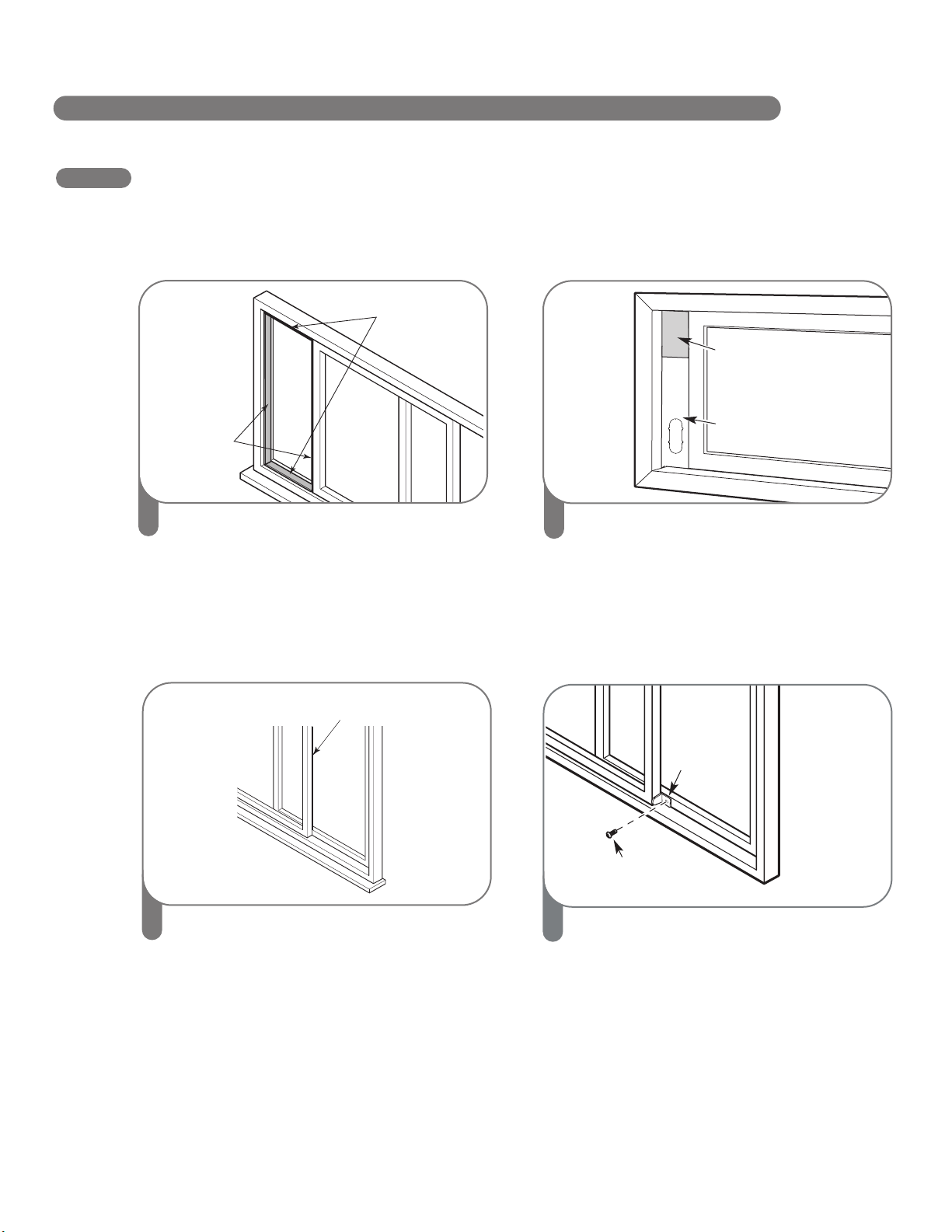
INSTALLATION IN VERTICAL SLIDING WINDOWS
18
Foam seal A
(Adhesive type)
Foam seal C
(Adhesive type-shorter)
Sellante de espuma A
(Tipo adhesivo)
Tipo C de sellado con espuma
(tipo adhesivo-más corto).
Joints en Mousse A
(Adhesive type)
Joints en Mousse C
(Plus court de type adhésif)
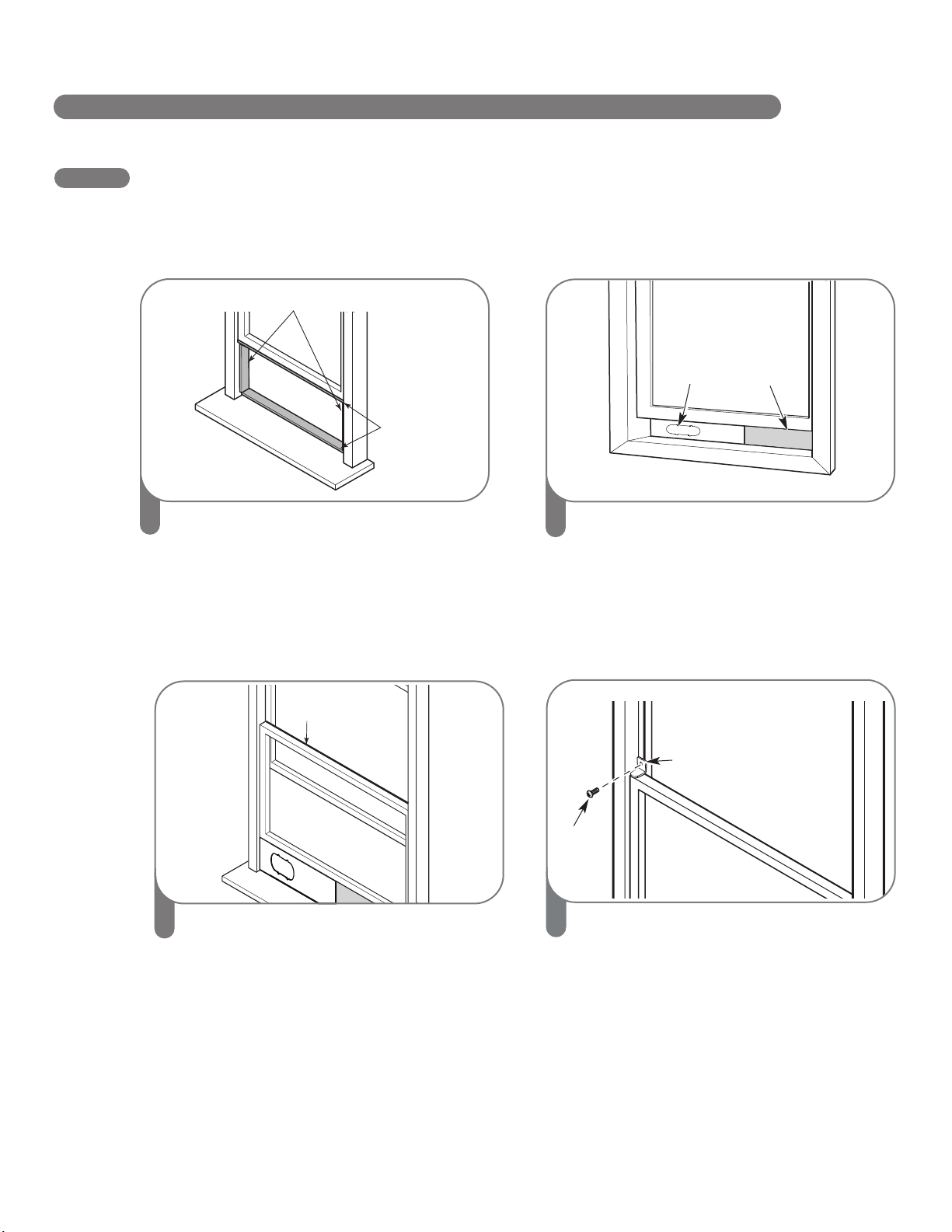
1
Cut the foam seal A (adhesive type) &
C (adhesive type-shorter) to the proper
length, and attach it to the window sash
and frame.
2
Insert the vent panel assembly, including
extension panels, if needed, into the window
opening. Extend the extension panels, if
used.
Foam seal B
(Non-adhesive type)
3
Cut the foam seal B (Non-adhesive type) to
the window width. Stuff the foam seal B
between the glass and the window to
prevent air and insects from getting into the
room.
4
Install the security bracket with a type B
screw as shown if you need.
Type B
screw
Security Bracket
Extension panel
(if required)
Vent
Panel
INSTALLATION IN VERTICAL SLIDING WINDOWS
INSTALLATI ON INSTRUC TIONS
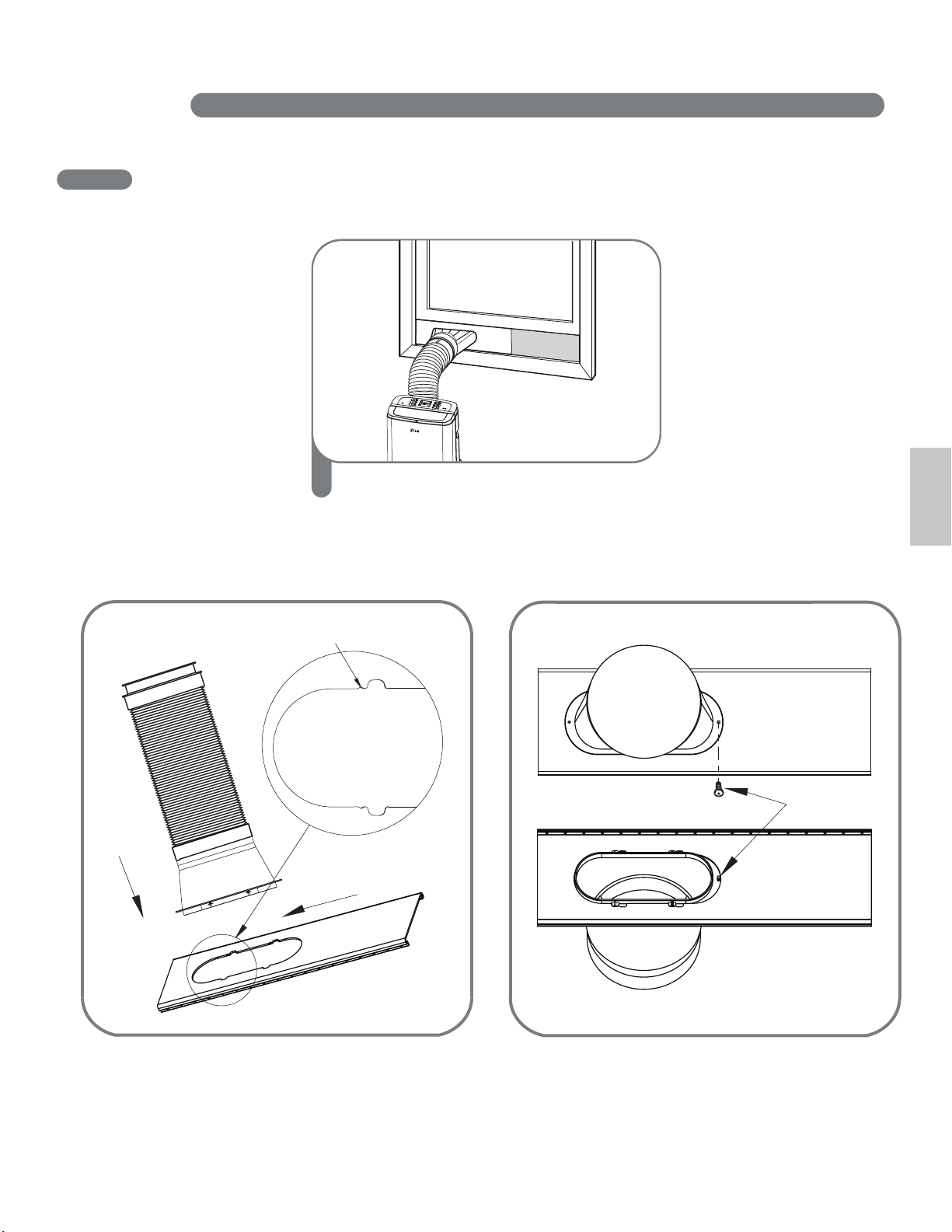
5
Insert the diffuser into the Vent Panel. And
then slide.
English
If you want fix the diffuser more firmly, use
the type C screw.
Small gap
First
Insert
Second
Slide
First insert to the vent panel fully and then
slide for locking.
Type C screw
19
Foam seal A
(Adhesive type)
Foam seal C
(Adhesive
type-shorter)
1
Cut the foam seal A (adhesive type) &
C (adhesive type-shorter) to the proper
length, and attach it to the window sash and
frame.
2
Insert the vent panel assembly, including
extension panels, if needed, into the window
opening. Extend the extension panels, if
used.
Foam seal B
(Non-adhesive type)
3
Cut the foam seal B (Non-adhesive type) to
the window height. Stuff the foam seal B
between the glass and the window to
prevent air and insects from getting into the
room.
Vent
Panel
INSTALLATION IN CASEMENT STYLE WINDOWS
NOTE: The window installation kit can be used with casement windows between 18
″
and 50
″
tall.
INSTALLATION INST RU CTIONS
Extension panel
(if required)
Joints en
Mousse C
(plus court de
type adhésif)
Sellado con
espuma A
(tipo adhesivo)
Sellado con
espuma C
(tipo adhesivo-
más corto)
Sellado con espuma B
(tipo adhesivo)
4
Install the window security bracket with a
type B screw as shown.
Type B screw
Security
bracket
20
INSTALLATION IN CASEMENT STYLE WINDOWS
INSTALLATION INSTRUCTIONS
English
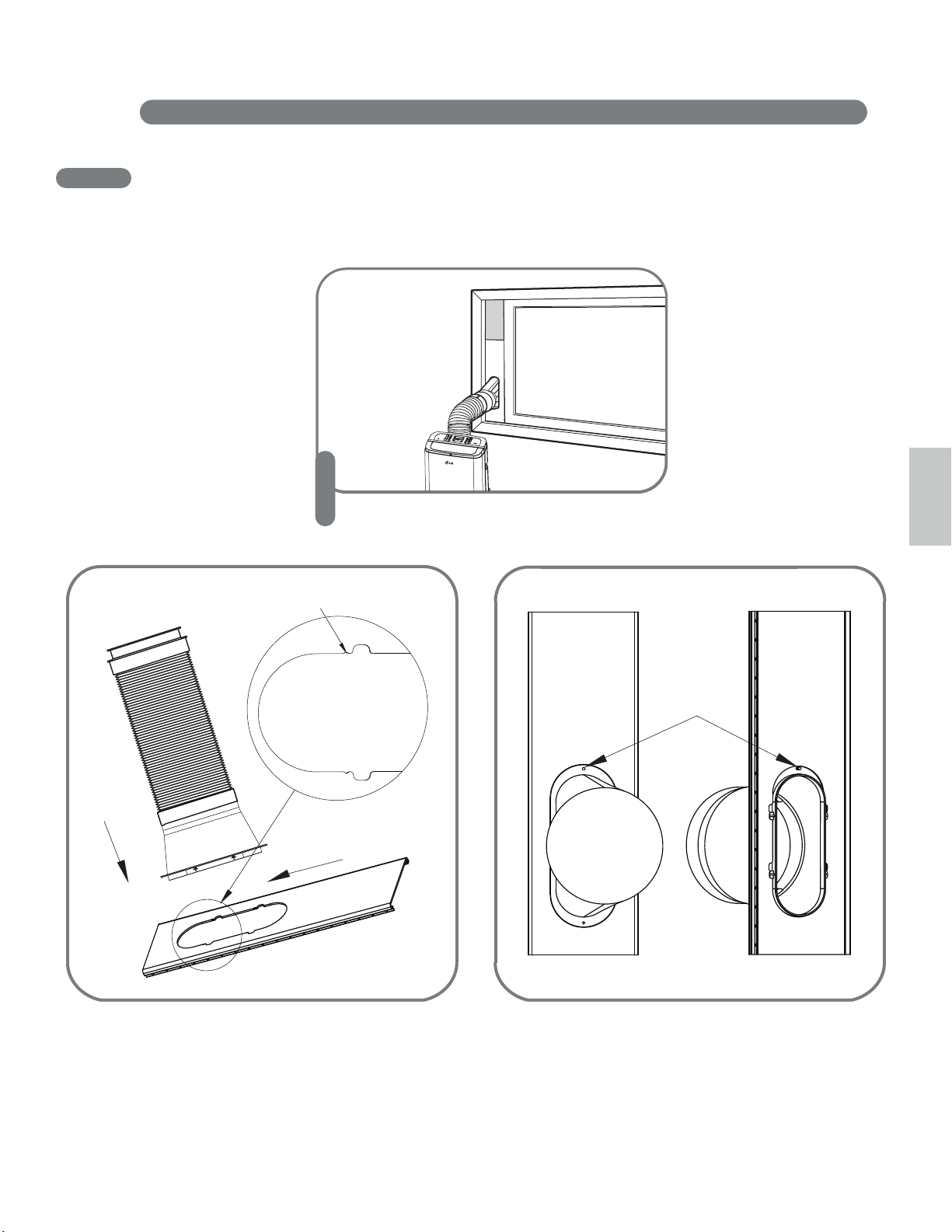
5
Insert the diffuser into the Vent Panel. And
then slide.
If you want fix the diffuser more firmly, use
the type C screw.
Small gap
First
Insert
Second
Slide
First insert to the vent panel fully and then
slide for locking.
Type C screw
21
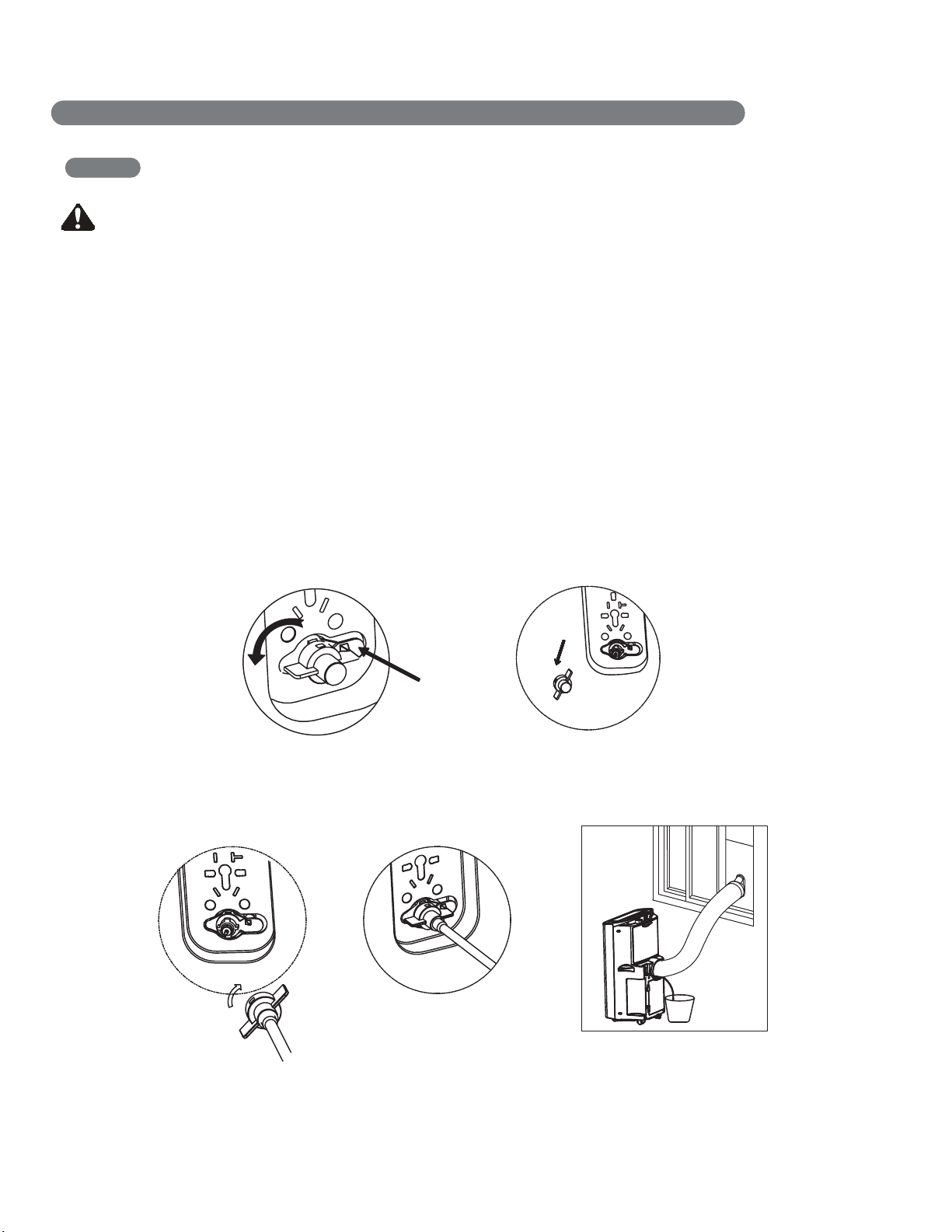
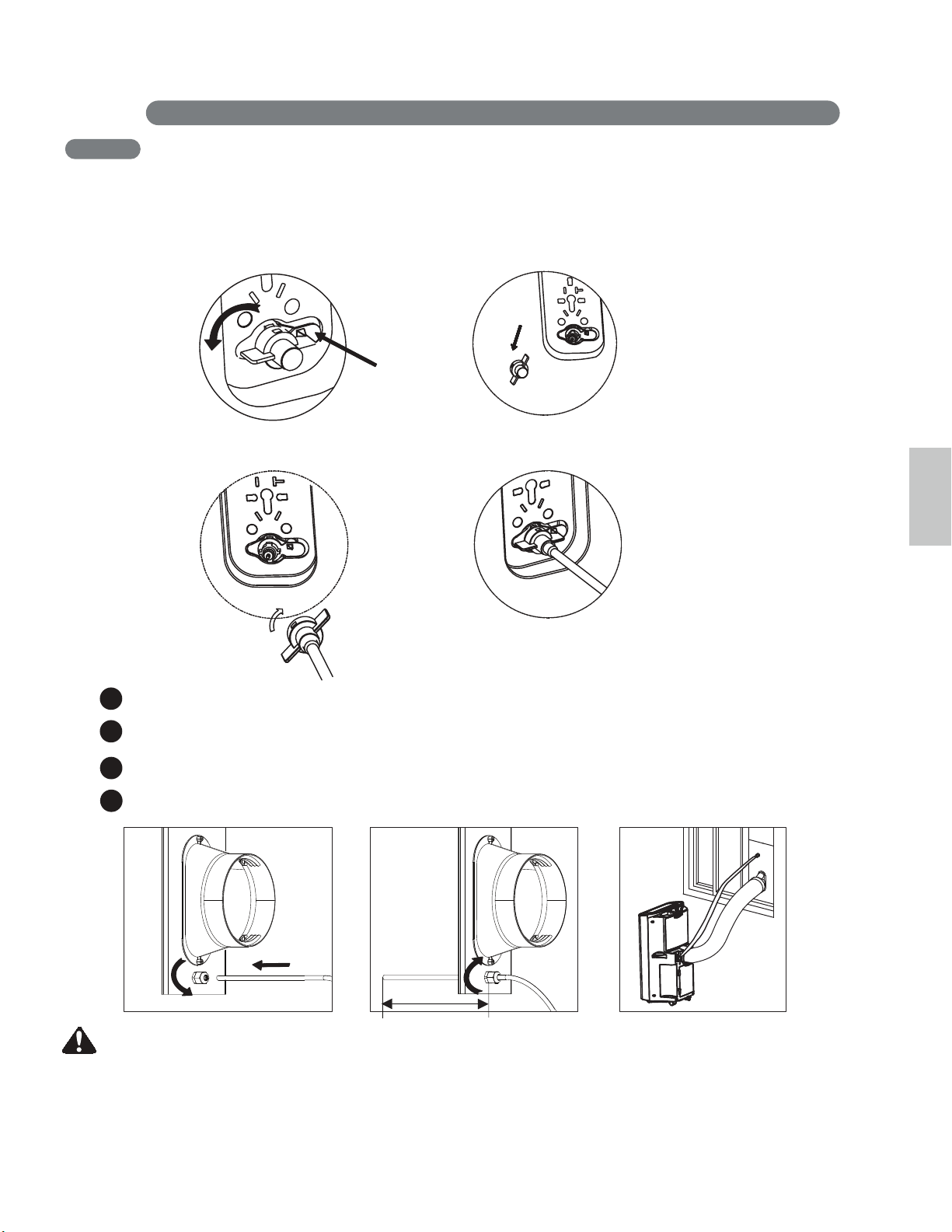
When you use heating function, draining water is needed. For cooling only function, you do not need
to install this part.
INDOOR DRAINAGE
1.Remove the water plug firstly on the back of the product.
2. Install end point of the drain pipe to the unit, and put the other end of the pipe into a bucket.
(Bigger than 28oz)
CAUTION
22
Push Here
before Rotation
the drain cover
INSTALLATION INSTRUCTI ONS
When you use the heating function. It is highly recommended to use indoor drainage because outdoor drainage
can cause some problems. When the outside temperature is below 32℉(0℃), the drain pipe will be frozen if
using outside drainage. In that case, you have to use indoor drainage.
If you want to use outdoor drainage, keep an outlet of water far away from outdoor window to prevent stain of
drained water.
When the relative humidity is 50%, it will generate 28oz water per hour in heating mode.
Please pay attention to selete proper bucket, otherwise the water will be over flowed on the floor.
HEATING DRAINAGE
OUTDOOR DRAINAGE
CAUTION
23
INSTALLATION INSTRU C TIONS
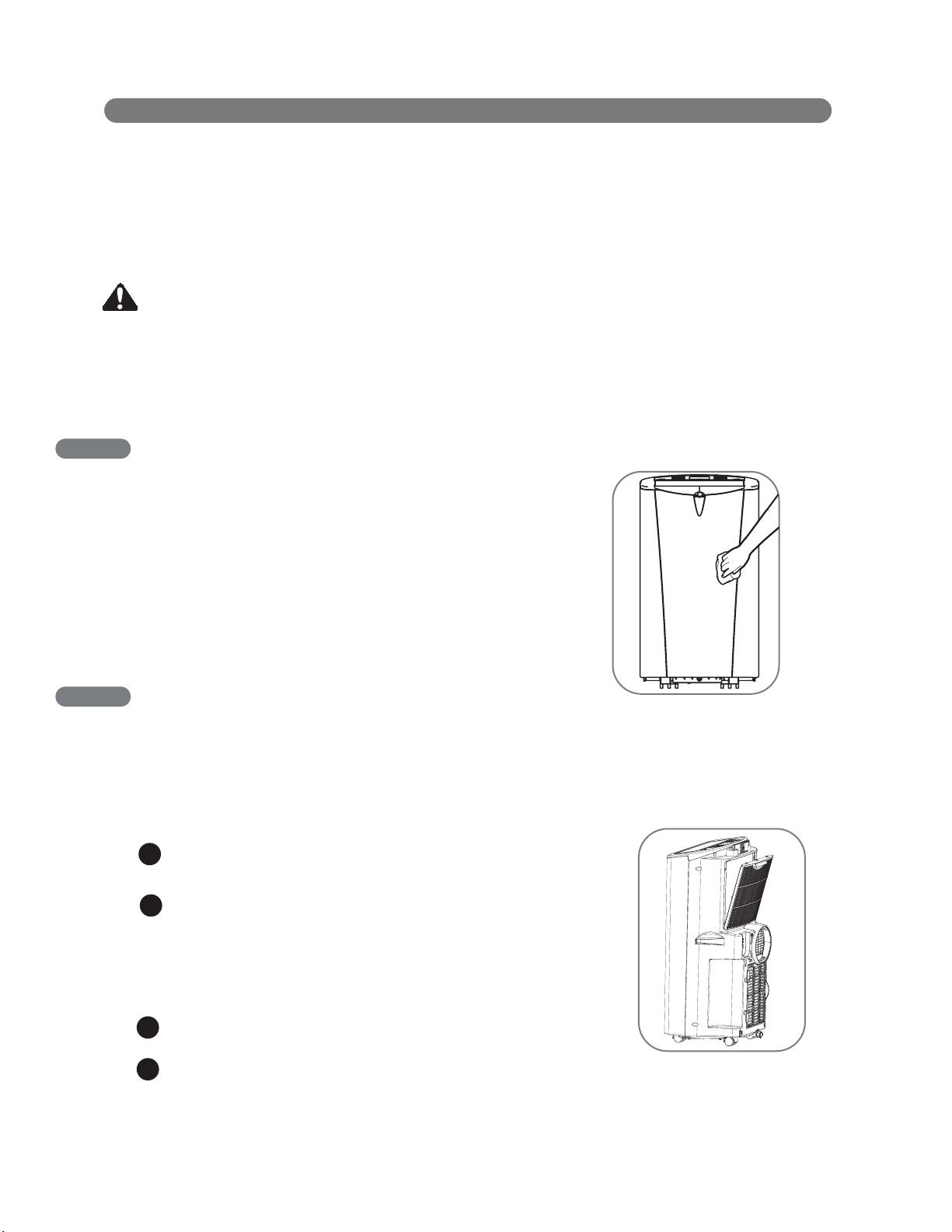
2. Install end point of the drain pipe to the unit, connect the other end pipe to the drain hole of the window panel.
1.Remove the water plug firstly.
When water is being drained at the drain pipe, you can press TIMER and DOWN buttons simultaneously to stop
the drain pump inside when unit is run, or press TIMER and DOWN buttons simultaneously again to turn on the
drain pump.
HEATING DRAINAGE
Rotate the nut cover on the vent panel.
1
2
Insert drain pipe into the vent panel
3
When installing the drain pipe on the vent panel, keep end pipe of outdoor far away from install kit more than 8”.
4
Rotate nut cover to fix the drain pipe.
English
Push Here
before Rotation
More than 8”
CARE AND CLEANING
24
Your air conditioner is designed for year-round
operation with only minimal cleaning and
maintenance.
For maximum efficiency, it is recommended
that you have the cooling coils inspected and
cleaned annually. Your local LG Authorized
Service Center can provide this inspection
and cleaning service for a nominal fee.
WARNING
• Unplug the air conditioner before cleaning or performing any maintenance or servicing.
• Be careful when cleaning coils or removing or reinstalling the filter-the cooling fins
are sharp!
Failure to follow the above precautions could result in electrical shock or personal injury.
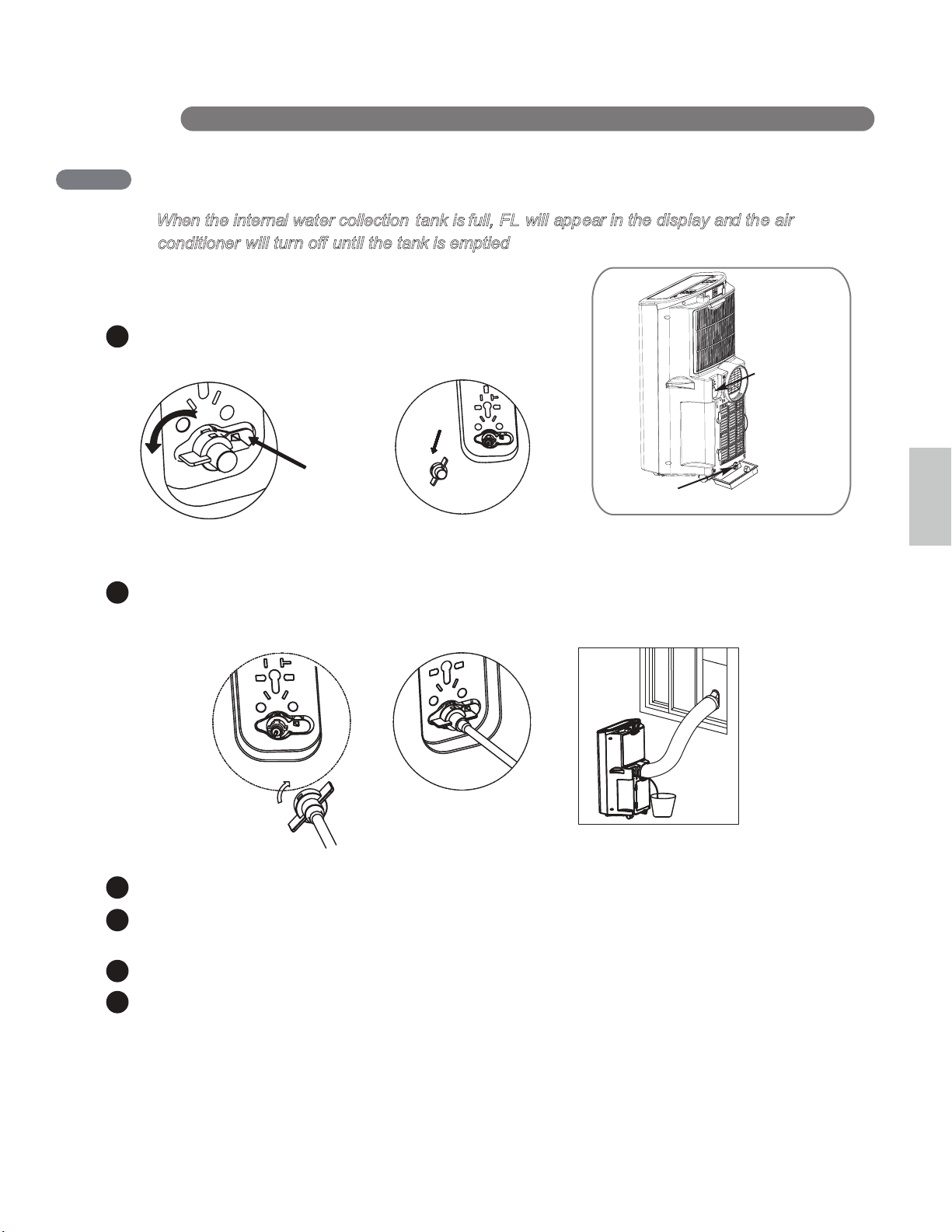
CLEANING THE CASE
Wipe the case with a slightly damp cloth, then wipe dry
with a dry cloth or towel.
CLEANING THE AIR FILTER
The air filter should be cleaned every two weeks; depending on indoor air quality, more
frequent cleaning may be needed. A dirty air filter will decrease airflow and reduce efficiency.
Do not operate the air conditioner without
the air filter in place.
Grasp the grip which is in the center and on the top of
the filter and pull out the filter directly.
1
Use a vacuum cleaner to clean the filter. If the filter is
heavily soiled, it can be washed in warm water using a
mild detergent.
Do not use harsh cleaners or very hot water.
Do not wash in a dishwasher.
Allow the filter to dry completely before reinstalling.
2
3
4
• To prevent damage to the finish, do not use gasoline,
benzene, thinner, etc., or any abrasive cleansers to
clean the air conditioner; they may damage the finish.
• Never pour water onto or into the air conditioner.
It could damage internal components and create a
shock and fire hazard.
Reinsert the filter, making sure that the bottom of the
filter is between the tabs and the coil guard. Reinstall
the filter cover, making sure it clips into place.
CARE AND CLEANING
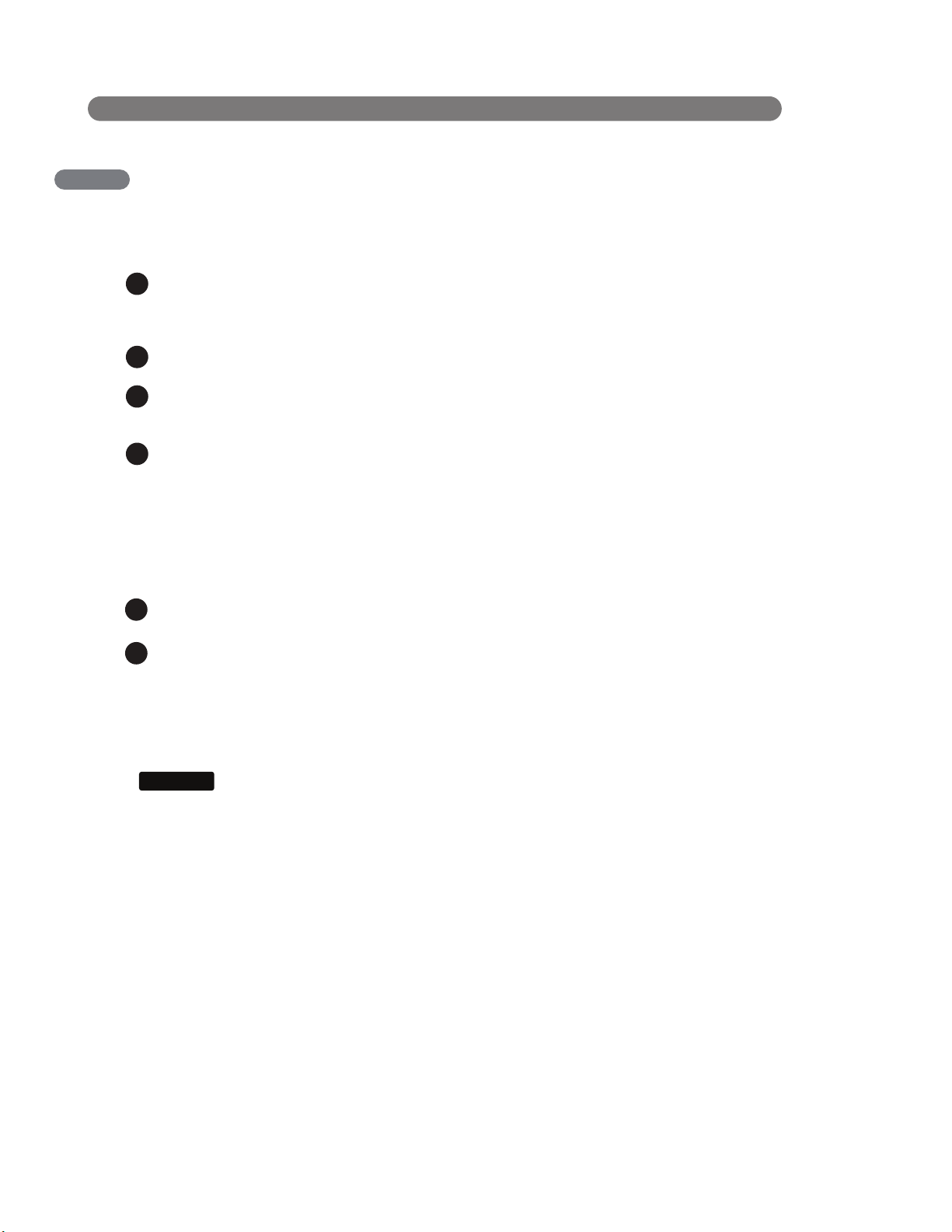
EMPTYING THE WATER COLLECTION TANK
When the internal water collection t ank is full, FL
Using the upper drain port
25
English
Install end point of the drain pipe to the unit, and put the other end of the pipe into a bucket.
(Bigger than 28oz)
Remove the water plug firstly on the back of the product.
Push Here
before Rotation
Press TIMER and DOWN buttons simultaneously to activate drain pump inside of product.
This pump will be activated during 3 minutes. (If you want to stop draining before 3 minutes, you can
press TIMER and DOWN buttons simultaneously again.)
Pull out drain pipe from the product.
Reassemble the drainage cover.
will appear in the display and the air
will turn off until the tank is emptied.
c
onditioner
Bottom drain port
Upper drain port
2
1
3
4
5
6
CARE AND CLEANI NG
Use Drain hose when use the DRY mode
EMPTYING THE WATER COLLECTION TANK
Unplug the air conditioner, disconnect the exhaust hose from the back, and move the air conditioner
to a suitable drain location or outdoors. You may also place a pan under the drain that will hold up to
3 pints of water.
Remove the drain cap and the rubber plug from the drain outlet.
Once the water collection tank is drained, reinstall the rubber plug and the drain cap, making sure it is
on securely.
Place the air conditioner in the desired location, reconnect the exhaust hose, and plug in the air
conditioner.
When need running in high humidity, or during the DRY mode remove the drain cap and the
exhaust from the back of the unit.
NO TE S:
When turned on after being unplugged, the air conditioner will automatically reset to
COOL mode, with a temperature setting of 72°F.
2
1
3
4
Using the bottom drain port
1
Install a drain hose (11/16" [18mm] inside diameter) and place the open end of the hose a suitable
drain location or outdoors.
2
FL apperars in the display
The water collection tank is full, drain the tank and restart the air conditioner.
NOTICE
26
1
2
3
1
2
3
4
4
STORING THE AIR CONDITIONER
If the air conditioner will not be used for an
extened period of time:
To drain the water collection tank completely,
leave the bottom drain cap off long enough to
allow any residual water to drain out. Once
the tank is completely drained and no more
water flows out, reinstall the cap.
Remove and clean the filter, allow it to dry
completely, then reinstall it.
Store the air conditioner in a cool, dry
location, away from direct sunlight, extreme
temperatures, and excessive dust.
Remove the batteries from the remote.
Before using the air conditioner again:
Make sure the filter and drain cap are
in place
Check the power cord to make sure it is in
good condition, with no cracks or damage.
Place new batteries in the remote.
Install the air conditioner as described in the
Installation Instructions.
CARE AND CLEANING
27
English
BEFORE CALLING FOR SERVICE
TROUBLESHOOTING
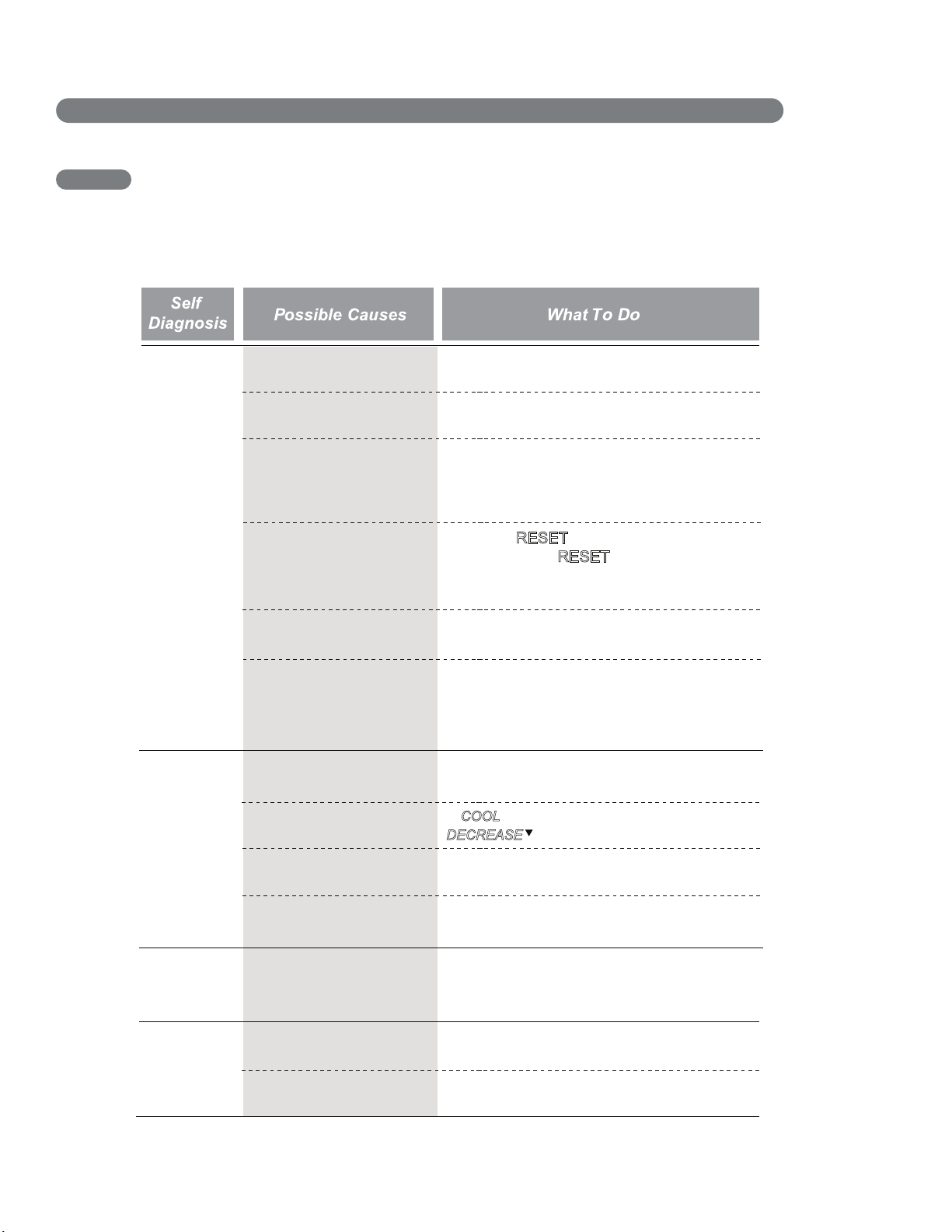
Before you call for service, review this list. It may save you time and expense. This list includes
common occurrences that are not the result of a defect in workmanship or materials.
Air
conditioner
does not
start
The air conditioner is
unplugged.
Make sure the air conditioner plug is pushed
completely into the outlet.
The fuse is blown/circuit
breaker is tripped.
Check the house fuse/circuit breaker box and
replace the fuse or reset the breaker.
Power failure.
If power failure occurs, turn the mode control
to Off. When power is restored, wait 3 minutes
to restart the air conditioner to prevent tripping
of the compressor overload.
The current interrupter
device is tripped.
Press the RESET
button located on the power
cord plug. If the RESET
button will not stay
engaged, discontinue use of the air conditioner
and contact a qualified service technician.
Air conditioner
does not cool
as it should
Airflow is restricted.
The room may have been
hot.
The cooling coils are iced
over.
The air filter is dirty.
Make sure there are no curtains, blinds, or
furniture blocking the front of the air conditioner.
In COOL
model,press the
DECREASE
pad.
Clean the filter at least every 2 weeks.
See the Care and Cleaning section.
When the air conditioner is first turned on, you
need to allow time for the room to cool down.
Ice may block the air flow and obstruct the air
conditioner from properly cooling the room.
Set the mode control at High Fan or High Cool.
The temp control may not
be set correctly.
FL appears in the display.
The water collection tank is full. Drain the tank
and reset your settings.
Room temperature is less
than the set temperature.
This is normal. The air conditioner automatically
shuts off when the room equals or is less than
the set temperature. Adjust the temperature
setting, if needed.
Air conditioner
runs too often
or too long
Area to be cooled is too
large for the air conditioner.
Doors or windows are open.
Consult your dealer for the air conditioner
capacity necessary to cool the desired area.
Make sure doors and windows are closed.
Air conditioner
freezing up
English
and HEAT
28
TROUBLESHOOTING
BEFORE CALLING FOR SERVICE
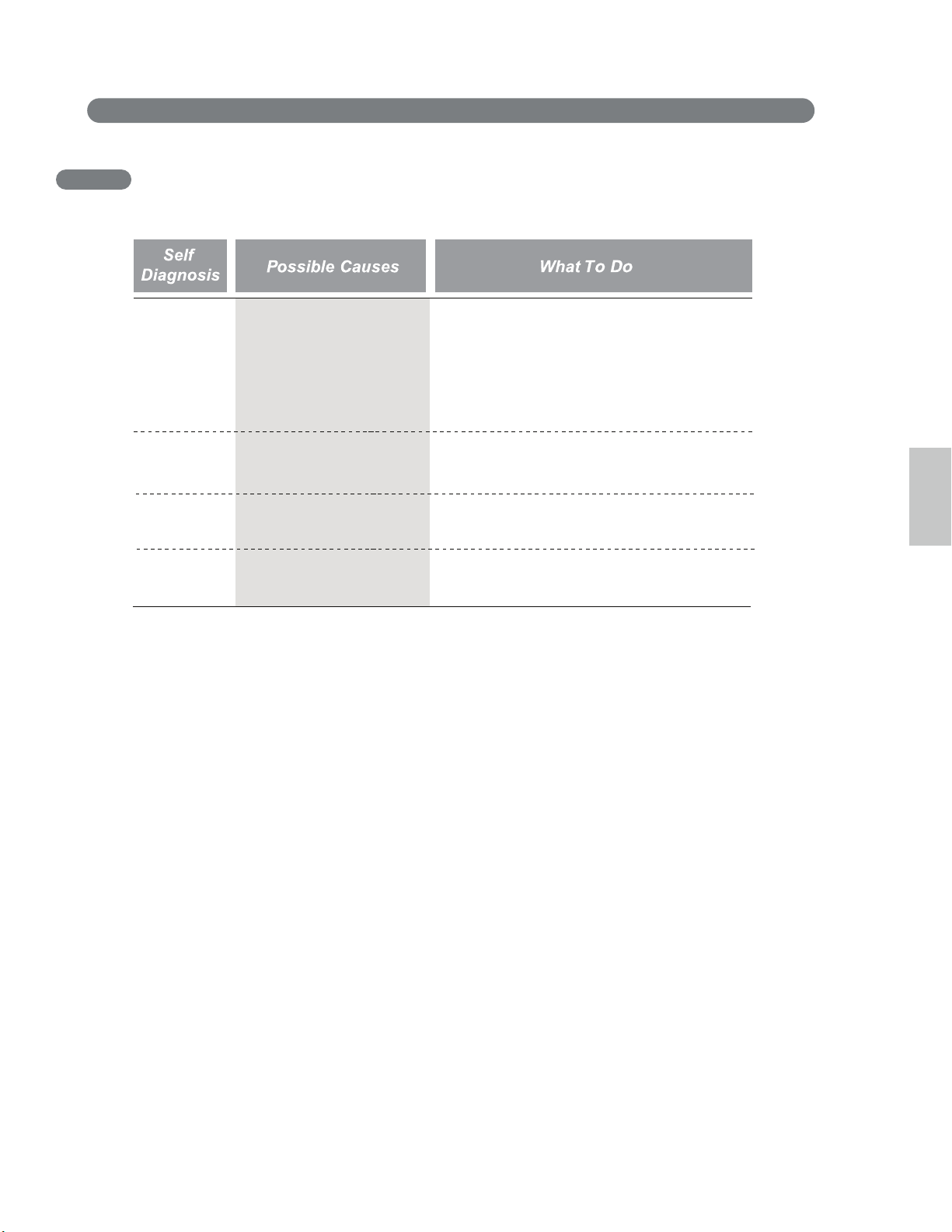
Code
appears in
the display.
The water collection tank
is full.
Empty the water collection tank.
See the Care and Cleaning section.
FL
Short or open circuit in the
indoor air thermistor.
Unplug the air conditioner and contact your
authorized LG service center.
CH01
Short or open circuit in the
indoor pipe thermistor.
Unplug the air conditioner and contact your
authorized LG service center.
CH02
29
Air conditioner is in FAN
mode and the number
shown is the set fan speed.
This is normal. The air conditioner is working
properly.
F1,F2 or F3
English
WARRANTY
LG PORTABLE AIR CONDITIONER LIMITED WARRANTY - USA
WH
AT THIS WARRANTY COVERS:
LG Electronics U.S.A., Inc. (“LG”) warrants your LG Portable Air Conditioner ("product") against defect in materials or workmanship
under normal household use, during the warranty period set forth below, LG will, at its option, repair or replace the product. This
limited warranty is valid only to the original retail purchaser of the product, is not assignable or transferrable to any subsequent
purchaser or user, and applies only when the product is purchased through an LG authorized dealer or distributor and used within
the United States (“U.S.”) including U.S. Territories.
Note: Replacement products and repair parts may be new or factory-remanufactured and are warranted for the remaining portio
n
of the original unit’s warranty period or ninety (90) days, whichever is longer. Please retain dated receipt or delivery ticket as
evidence of the Date of Purchase for proof of warranty (you may be required to submit a copy to LG or authorized representative).
WARRANTY PERIOD:
1 year from the Date of Purchase: Any internal/ functional Parts and Labor.
HOW SERVICE IS HANDLED: In-Home Service
In-home service will b
e provided during the warranty
period subject to availability within the United States. In-home service may
not be available in all areas. To receive in-home service, the product must be unobstr
ucted and accessible to service personnel. If
during in-home service repair cannot be completed, it may be necessary to remove, repair and return the product. If in-home
service is unavailable, LG may elect, at our option, to provide for transportation of our choice to and from a LG authorized service
center.
THIS LIMITED WARRANTY
DOES NOT COVER:
1. Ser
vice trips to deliver, pick up, or install the product o
r
for instruction on product use.
2. Replacing house fuses or resetting of circuit breakers,
correction of house wiring or plumbing, or correction of
product installation.
3. Damage or failure caused by leaky/ broken/ frozen water
pipes, restricted drain lines, inadequate or interrupted
water supply or inadequate supply of air.
4. Damage or failure caused by accidents, pests and vermin,
lightning, wind, fire, floods or acts of God.
5. Damage or failure resulting from misuse, abuse, improper
installation, repair or maintenance. Improper repair
includes use of parts not approved or specified by LG.
6. Damage or failure caused by unauthorized modification or
alteration to the product.
7. Damage or failure ca
used by incorrect electrical current,
voltage, or plumbing codes.
8. Cosmetic damage, including scratches, dents, chips or
other damage to the finish of the product, unless such
damage results from defects in materials or
workmanship and is reported to LG within seven (7)
calendar days from the date of delivery.
9. Damage or missing items to any display, open box,
discounted, or refurbished product.
10. Product where the original factory serial numbers have
been removed, defaced or changed in any way.
11. Repairs when product is used in other than normal and
usual household use (e.g. rental, commercial use,
offices, or recreational facilities) or contrary to the
instructions outlined in the owner’s manual.
12. The removal and reinstallation of the Product if it is
installed in an inaccessible location.
THIS
WARRANTY IS IN LIEU OF ANY OTHER WARRANTY, EXPRESS OR IMPLIED, INCLUDING AND WITHOUT LIMITATION TO, ANY
WARRANTY OF MERCHANTABILITY OR FITNESS FOR A PARTICULAR PURPOSE. TO THE EXTENT ANY IMPLIED WARRANTY IS
REQUIRED BY LAW, THIS WARRANTY IS LIMITED IN DURATION TO THE TERM PERIOD EXPRESSED ABOVE. REPAIR OR
REPLACEMEN
T AS PROVIDED UNDER THIS WARRANTY IS THE EXCLUSIVE REMEDY FOR THE CUSTOMER. NEITHER THE
MANUFACTURER NOR ITS U.S. DISTRIBUTOR SHALL BE LIABLE FOR ANY INCIDENTAL, CONSEQUENTIAL, INDIRECT, SPECIAL, OR
PUNITIVE DAMAGES OF ANY NATURE, INCLUDING AND WITHOUT LIMITATION TO, LOST REVENUES OR
PROFITS, OR ANY OTHER
DAMAGE, WHETHER BASED IN CONTRACT, TORT, OR OTHERWISE.
SOME STATES DO NOT ALLOW THE EXCLUSION OR LIMITATION OF INCIDENTAL OR CONSEQUENTIAL DAMAGES OR LIMITATIONS
ON HOW LONG AN IMPLIED WARRANTY LASTS, SO THE ABOVE EXCL
USION
OR LIMITATION MAY NOT APPLY TO YOU. THIS
WARRA
NTY
GI
VES
Y
O
U S
PECI
FIC LE
GAL
RI
GHTS
A
ND
YOU
MAY AL
S
O
HA
VE
OT
HER
RIGHTS T
H
AT
VAR
Y FR
OM ST
ATE
TO
ST
ATE.
H
OW
T
O
OBT
A
I
N
WARR
A
N
T
Y
S
E
RV
I
C
E
&
A
DDITIONAL INFORMATION:
Call 1-800-243-0000 or visit our website at www.lg.com
.
Mail to: LG Customer Information Center (ATTN: CIC)
201 James Record Road, Huntsville, AL 35824
Joints en
Mousse C
(plus court de
type adhésif)
Sellado con
espuma A
(tipo adhesivo)
Sellado con
espuma C
(tipo adhesivo-
más corto)
Sellado con espuma B
(tipo adhesivo)
19
1-800-243-0000
LG Customer Information Center
Register your product Online!
www.lgappliances.com
LG ELECTRONICS,INC.
1000 Sylvan Ave.,Englewood Cliffs,NJ 07632