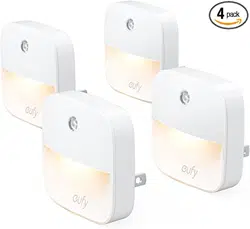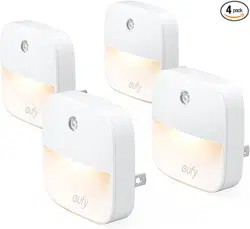

Lighting
www.eufylife.com
For FAQs and more information, please visit:
51005001476 V01
Welcome Guide
Lumi Dual-Bright
Night Light
Bedienungsanleitung

Table of Content
01 Important Safety Instructions
02 Introduction
02 At a Glance
03 Installing the Batteries
04 Installing Your Lumi
08 Using Your Lumi
09 Troubleshooting
10 Specifications
12 Customer Service
01 English
14 Deutsch

English 0201 English
Important Safety Instructions
Read and follow all the safety instructions:
•This device is for indoor use only.
•This device should not be exposed to dripping or
splashing water.
•This device is powered by three AAA batteries (not
included). Do not attempt to recharge them when
using non-rechargeable batteries.
•This device uses a non-replaceable light source.
When the light source reaches the end of its life
cycle, the device should be replaced.
•Do not install near any heat sources.
•Do not place any sources of danger on this device (e.g.
liquid filled objects, lighted candles).
•Do not mix different types of batteries together, e.g.
lithium-ion (Li-ion) and nickel-metal hydride (NiMH)
batteries.
•Do not mix new and used batteries.
•Do not use metal objects to connect the terminals of
the battery.
•A
n exhausted battery should be disposed of
according to local environmental regulations.
Introduction
Thank you for purchasing Lumi Dual-Bright Night Light
(hereafter called "Lumi"). Lumi uses light and motion-
sensing technology to temporarily illuminate dark
spaces with a soft light.
At a Glance
3
1
2
Motion sensor
Screws x2
Wall plugs x2

English 0403 English
Installing the Batteries
Slide down to remove the mounting bracket on the
back of your Lumi.
Insert three AAA batteries. Make sure the positive
and negative ends are facing the correct polarity
direction as marked in the battery compartment.
Installing Your Lumi
After installing the batteries, there are two ways to
install your Lumi. When choosing a suitable location for
your Lumi, remember that:
•Itshouldbeinstalledinadarkarea.
•DonotinstallLumiinalocationthatcaninterfere
with your work or rest.
•DonotinstallLumiinalocationthatdirectlyfacesan
infrared beam.
•Themotionsensorisdesignedtocoveranarcof
approximately 120 degrees horizontally and to detect
motion up to 3 meters/10 feet away;
The effective distance and range are subject to the
ambient temperature.
Make sure the area in front of the motion sensor is
obstruction-free.

English 0605 English
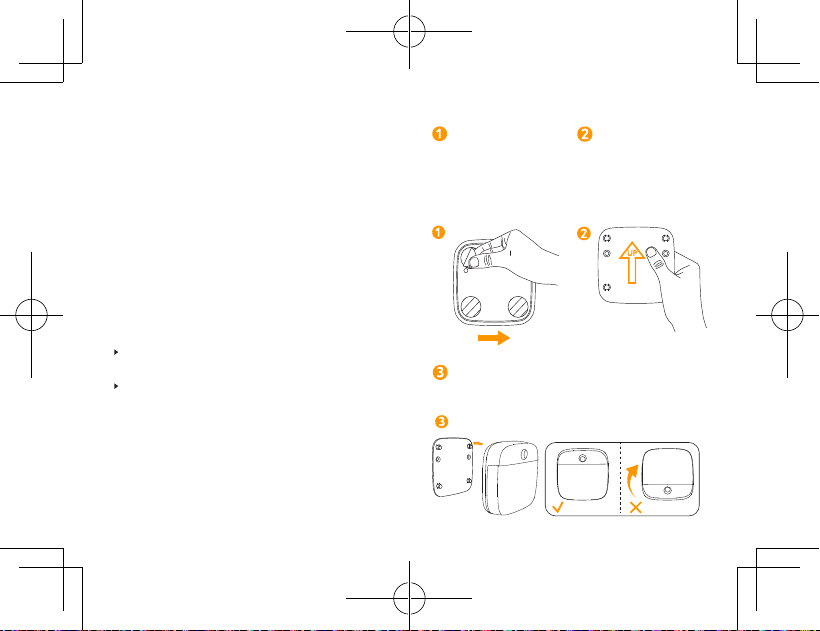
Option A: Installing Lumi with the adhesive mounting
bracket:
Remove the
protective film on the
back of the bracket.
Stick the bracket
onto the wall. Make
sure the arrow on the
bracket is pointing up.
UP
Align the holes on the back of Lumi with the
pins on the bracket; slide down to mount Lumi.
T
Select the type of surface you will adhere the mounting
bracket to carefully. Removing the mounting bracket
may cause damage to the surface if removed.
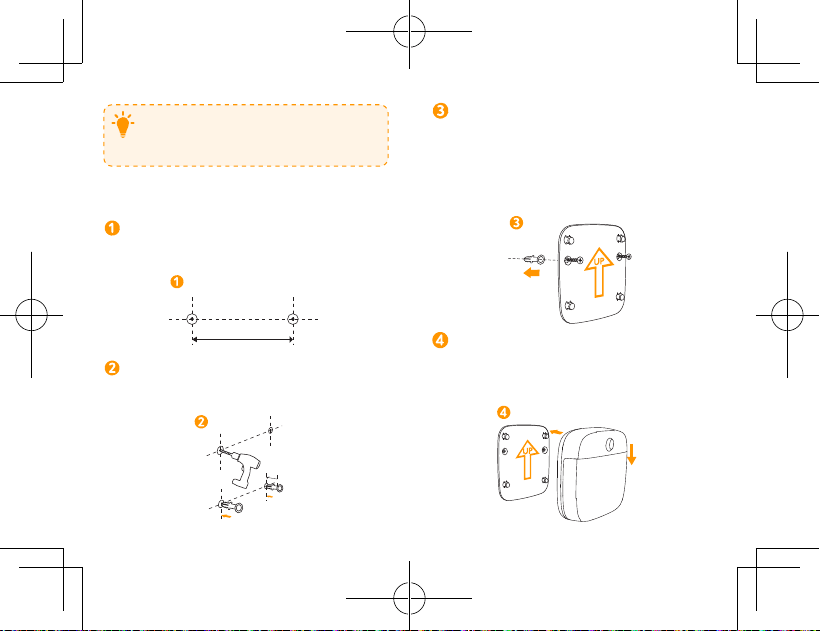
Option B: Installing Lumi with the supplied screws:
Measure a distance of 1.97in (50mm) between
two points for the wall plugs. Use a pen to mark
the drill points.
1.97in/50mm
Use a drill bit to drill two 0.9in (23mm) deep holes
and fully insert the wall plugs into the holes.
0.9in/23mm

English 0807 English
Align the mounting bracket with the wall plugs
and hold against the wall. Insert the screws
through the fixing holes and screw firmly into the
wall plugs. Make sure the arrow on the mounting
bracket is pointing up when installing.
UP
Align the mounting holes on the back of Lumi with
the pins on the mounting bracket; slide down to
mount Lumi.
UP
Using Your Lumi
TT
Adjust the slider to select a
brightness level: low or high.
Lumi
T
Lumi does not turn on in bright
areas.
Lumi
In dark areas, Lumi does not
turn on if motion is not detected
within its effective range.
Lumi
In dark areas, Lumi
automatically turns on if motion
is detected within its effective
range. The light automatically
turns off if motion is not
detected for 15 seconds.

English 1009 English
Troubleshooting
The light does
not turn on.
•Lumi is installed in an area with
too much light. Move Lumi to an
area with less light exposure.
•Lumi is not able to detect motion
within its effective range. Make
sure there are no obstructions
blocking Lumi’s motion sensor.
•Batteries are out of power.
Replace batteries.
The light is dim.
•The batteries are low. Replace
batteries.
The light does
not turn off in
bright areas.
•When Lumi lights up due to
motion in the dark and then
another bright light source is
turned on, Lumi will remain lit and
only turn off if the sensor does
not detect motion for 15 seconds.
Specifications
Model T1305
Light Wattage 0.2 W
Battery 3 AAA batteries (not included)
Dimensions 76 × 76 × 33 mm / 3.0 × 3.0 × 1.3 in
Weight 44 g / 1.6 oz
Specifications are subject to change without notice.
Notice
This symbol means the product must not be
discarded as household waste, and should be
delivered to an appropriate collection facility for
recycling. Proper disposal and recycling helps
protect natural resources, human health and the
environment. For more information on disposal
and recycling of this product, contact your local
municipality, disposal service, or the shop where
you bought this product.

English 1211 English
FCC Statement
This device complies with Part 15 of the FCC Rules. Operation
is subject to the following two conditions: (1) This device may
not cause harmful interference, and (2) this device must accept
any interference received, including interference that may cause
undesired operation.
Warning: Changes or modifications not expressly approved
by the party responsible for compliance could void the user's
authority to operate the equipment.
Note: This equipment has been tested and found to comply
with the limits for a Class B digital device, pursuant to Part 15 of
the FCC Rules. These limits are designed to provide reasonable
protection against harmful interference in a residential installation.
This equipment generates, uses and can radiate radio
frequency energy and, if not installed and used in accordance
with the instructions, may cause harmful interference to
radio communications. However, there is no guarantee
that interference will not occur in a particular installation. If
this equipment does cause harmful interference to radio or
television reception, which can be determined by turning the
equipment o and on, the user is encouraged to try to correct
the interference by one or more of the following measures: (1)
Reorient or relocate the receiving antenna. (2) Increase the
separation between the equipment and receiver. (3) Connect
the equipment into an outlet on a circuit dierent from that to
which the receiver is connected. (4) Consult the dealer or an
experienced radio / TV technician for help.
The following importer is the responsible party (for FCC
matters only).
Company Name: POWER MOBILE LIFE, LLC
Address: 400 108th Ave NE Ste 400, Bellevue, WA 98004-5541
Telephone:1-206-383-8247
Declaration of Conformity
Hereby, Anker Innovations Limited declares that the product
type T1305 is in compliance with Directives 2014/35/EU &
2014/30/EU.
The full text of the EU declaration of conformity is available at
the following internet address:https://www.eufylife.com/.
Anker Innovations Limited
Room 1318-19, Hollywood Plaza, 610 Nathan Road, Mongkok,
Kowloon, Hong Kong
Customer Service
18-month limited warranty
Lifetime technical support
(US) +1 (800) 988 7973 Mon-Fri 9:00am - 5:00pm (PT)
(UK) +44 (0) 1604 936200 Mon-Fri 6:00 - 11:00 (GMT)
@EufyOcial
@EufyOcial
@EufyOcial
@EufyOcial

Deutsch 14
Wichtige Sicherheitshinweise
Lesen Sie die Bedienungsanleitung vor dem ersten
Gebrauch und bewahren Sie diese als Referenz auf.
•Das Gerät ist ausschließlich für den Gebrauch in
geschlossenen Räumen geeignet.
•Setzen Sie das Gerät keinen Flüssigkeiten oder
Spritzwasser aus.
•Dieses Gerät wird mit drei AAA-Batterien betrieben
(nicht im Lieferumfang enthalten). Versuchen Sie
nicht reguläre Batterien erneut aufzuladen.
•Die Lichtquelle dieser Lampe ist nicht wechselbar.
Alsbald die Lichtquelle ihre Lebensdauer überschritten
hat, muss die gesamte Lampe gewechselt werden.
• Stellen Sie Lumi nicht in der Nähe von Hitzequellen auf.
•Stellen Sie keine Gefahrenquellen auf dieses Gerät
(z. B. flüssigkeitsgefüllte Gegenstände, brennende
Kerzen).
•Mischen Sie keine unterschiedlichen Arten von
Batterien, z.B. Lithium-Ionen- (Li-Ion) und Nickel-
Metallhydrid (NiMH) -Batterien.
•Mischen Sie keine neuen und gebrauchten Batterien.
•Verwenden Sie keine Metallgegenstände, um die
Klemmen der Batterie anzuschließen.
• Leere Batterien müssen entsprechend den örtlichen
Umweltvorschriften entsorgt werden.
Inhaltsverzeichnis
14 Wichtige Sicherheitshinweise
15 Einleitung
15 Auf einen Blick
16 So legen Sie die Batterien ein
17 So Installieren Sie Lumi
21 So Verwenden Sie Lumi
22 Problembehebung
23 Technische Daten
24 Kundenservice

Deutsch 1615 Deutsch
So legen Sie die Batterien ein
Schieben Sie diesen Teil nach unten, um die
Montagehalterung auf der Rückseite zu entfernen.
Legen Sie drei AAA-Batterien ein. Vergewissern
Sie sich, dass die positiven und negativen Enden
in die korrekte Polaritätsrichtung weisen, wie im
Batteriefach markiert.
Einleitung
Vielen Dank, dass Sie sich für das Lumi Dual-Bright
Nachtlicht (nachfolgend „Lumi“ genannt) entschieden
haben. Lumi nutzt Licht-und Bewegungsmeldetechnik,
um dunkle Räume mit einem weichen Licht
vorübergehend zu beleuchten.
Auf einen Blick
3
1
2
Bewegungssensor Zwei Schrauben
Zwei Dübel
Deutsch 1817 Deutsch
Option A: Lumi mit der Kleberhalterung befestigen.
Entfernen Sie die
Schutzfolie auf
der Rückseite der
Halterung.
Stecken Sie die
Halterung auf die
Wand. Vergewissern
Sie sich, dass der Pfeil
auf der Halterung nach
oben zeigt.
UP
Richten Sie die Löcher auf der Rückseite von Lumi
an den Stiften der Halterung aus. Schieben Sie
Lumi nach unten, um sie zu befestigen.
So Installieren Sie Lumi
Nach der Installation der Batterien gibt es zwei
Möglichkeiten, um Lumi zu installieren. Bei der Auswahl
eines geeigneten Ortes für Lumi, denken Sie an folgende
Punkte:
•Sie sollte in einem dunklen Bereich installiert werden.
•Installieren Sie Lumi nicht an Orten, die Ihre Arbeit
oder Ruhephasen beeinträchtigen.
•Installieren Sie Lumi nicht an Orten, die direkt einem
Infrarotsignal gegenüber stehen.
•Der Bewegungssensor ist so ausgelegt, dass er einen
Bogen von etwa 120 Grad horizontal abdeckt und
Bewegungen bis zu drei Metern entfernt erkennt.
Die Reichweite ist von der Umgebungstemperatur
abhängig.
Vergewissern Sie sich, dass der Bereich vor dem
Bewegungssensor frei von Gegenständen ist.
Deutsch 2019 Deutsch
Befestigen Sie die Montagehalterung mit den
Dübeln und halten Sie sie an der Wand fest. Setzen
Sie die Schrauben durch die Befestigungslöcher
ein und schrauben Sie sie fest in die Dübel.
Vergewissern Sie sich, dass der Pfeil auf der
Montagehalterung bei der Installation nach oben
zeigt.
UP
Richten Sie die Befestigungslöcher auf der
Rückseite von Lumi mit den Stiften an der
Montagehalterung aus. Schieben Sie Lumi nach
unten, um sie zu befestigen.
UP
T
Wählen Sie die Art der Oberfläche auf der Sie die
Montagehalterung befestigen sorgfältig aus. Das
Entfernen der Montagehalterung kann zu
Beschädigungen der Oberfläche führen, wenn sie
entfernt wird.
Option B: Lumi mit den mitgelieferten Schrauben
befestigen.
Messen Sie einen Abstand von 50 mm zwischen
zwei Punkten für die Dübel. Verwenden Sie einen
Stift, um die Bohrpunkte zu markieren.
50mm
Verwenden Sie einen 5 mm Bohrer, um zwei 2,3
cm tiefe Löcher zu bohren und schieben Sie die
Dübel vollständig in die Löcher.
23mm

Deutsch 2221 Deutsch
Problembehebung
Das Licht
schaltet sich
nicht ein.
•Lumi ist in einem Bereich mit zu
viel Licht installiert. Stellen Sie
Lumi in einen Bereich mit weniger
Licht auf.
•Lumi ist nicht in der Lage,
Bewegungen innerhalb seines
effektiven Bereichs zu erkennen.
Stellen Sie sicher, dass es
keine Hindernisse gibt, die den
Bewegungssensor von Lumi
blockieren.
•Die Batterien sind leer. Ersetzen
Sie die Batterien.
Das Licht ist zu
dunkel.
•Die Batterien sind fast leer.
Ersetzen Sie die Batterien.
Das Licht
schaltet sich in
hellen Räumen
nicht aus.
•Wenn Lumi durch Bewegungen
im Dunkeln aufleuchtet und
eine weitere helle Lichtquelle
eingeschaltet wird, leuchtet Lumi
und schaltet sich nur aus, wenn
der Sensor 15 Sekunden lang
keine Bewegung erkennt.
So Verwenden Sie Lumi
TT
Verwenden Sie den
Schieberegler, um ein
Helligkeitslevel einzustellen:
niedrig oder hoch.
Lumi
T
Lumi schaltet sich nicht in hellen
Umgebungen ein.
Lumi
In dunklen Bereichen schaltet
sich Lumi nicht ein, wenn
innerhalb von drei Metern des
Sensors keine Bewegung erkannt
wird.
Lumi
In dunklen Bereichen schaltet
sich Lumi automatisch ein,
wenn
innerhalb von drei Metern
des Sensors Bewegungen
erkannt werden. Das Licht
schaltet sich automatisch aus,
wenn 15Sekunden lang keine
Bewegung erkannt wird.

Deutsch 2423 Deutsch
Konformitätserklärung
Anker Innovations Limited erklärt hiermit, dass das Produkt
des Typs T1305 den Richtlinien 2014/35/EU und 2014/30/
EU entspricht.
Der vollständige Text der EU-Konformitätserklärung ist
online unter der folgenden Adresse verfügbar:
https://www.eufylife.com/.
Kundenservice
18 Monate beschränkte Herstellergarantie
Lebenslanger technischer Support
(DE) +49 (0) 69 9579 7960 Mo-Fr 6:00 - 11:00
Technische Daten
Modell T1305
Lumen 0.2 W
Batterie 3 AAA Batterien (nicht enthalten)
Maße 76 × 76 × 33 mm
Gewicht 44 g
Technische Daten können ohne vorherige
Ankündigung geändert werden.
Notice
Dieses Symbol bedeutet, dass das Produkt nicht mit
dem Hausmüll entsorgt werden darf, sondern bei
einer geeigneten Sammelstelle für das Recycling
abgegeben werden muss. Die ordnungsgemäße
Entsorgung und das Recycling tragen dazu bei, die
natürlichen Ressourcen, die Gesundheit und die
Umwelt zu schützen. Weitere Informationen zur
Entsorgung und zum Recycling dieses Produkts
erhalten Sie von Ihrer zuständigen Kommune, Ihrem
Entsorgungsdienst oder dem Geschäft, in dem Sie
dieses Produkt gekauft haben.