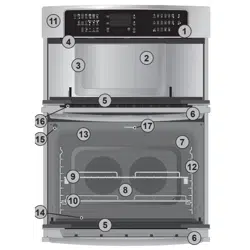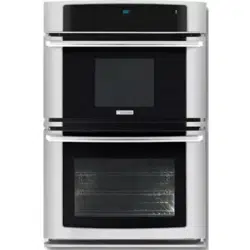

EVEM677
................................................ .............................................
EN MICROWAVE COMBI-OVEN USER MANUAL

CONTENTS
1. SAFETY INFORMATION . . . . . . . . . . . . . . . . . . . . . . . . . . . . . . . . . . . . . . . . . . . . . . . . . . . 3
2. SAFETY INSTRUCTIONS . . . . . . . . . . . . . . . . . . . . . . . . . . . . . . . . . . . . . . . . . . . . . . . . . . 5
3. PRODUCT DESCRIPTION . . . . . . . . . . . . . . . . . . . . . . . . . . . . . . . . . . . . . . . . . . . . . . . . . 7
4. BEFORE FIRST USE . . . . . . . . . . . . . . . . . . . . . . . . . . . . . . . . . . . . . . . . . . . . . . . . . . . . . . 8
5. CONTROL PANEL . . . . . . . . . . . . . . . . . . . . . . . . . . . . . . . . . . . . . . . . . . . . . . . . . . . . . . . 8
6. DAILY USE . . . . . . . . . . . . . . . . . . . . . . . . . . . . . . . . . . . . . . . . . . . . . . . . . . . . . . . . . . . . 10
7. MICROWAVE MODE . . . . . . . . . . . . . . . . . . . . . . . . . . . . . . . . . . . . . . . . . . . . . . . . . . . . . 13
8.
CLOCK FUNCTIONS . . . . . . . . . . . . . . . . . . . . . . . . . . . . . . . . . . . . . . . . . . . . . . . . . . . . 17
9. AUTOMATIC PROGRAMMES . . . . . . . . . . . . . . . . . . . . . . . . . . . . . . . . . . . . . . . . . . . . . . 18
10.
USING THE ACCESSORIES . . . . . . . . . . . . . . . . . . . . . . . . . . . . . . . . . . . . . . . . . . . . . . . 18
11. ADDITIONAL FUNCTIONS . . . . . . . . . . . . . . . . . . . . . . . . . . . . . . . . . . . . . . . . . . . . . . . . 20
12.
HELPFUL HINTS AND TIPS . . . . . . . . . . . . . . . . . . . . . . . . . . . . . . . . . . . . . . . . . . . . . . . 21
13. CARE AND CLEANING . . . . . . . . . . . . . . . . . . . . . . . . . . . . . . . . . . . . . . . . . . . . . . . . . . . 37
14.
WHAT TO DO IF… . . . . . . . . . . . . . . . . . . . . . . . . . . . . . . . . . . . . . . . . . . . . . . . . . . . . . . 38
15. INSTALLATION . . . . . . . . . . . . . . . . . . . . . . . . . . . . . . . . . . . . . . . . . . . . . . . . . . . . . . . . . 38
16. WARRANTY . . . . . . . . . . . . . . . . . . . . . . . . . . . . . . . . . . . . . . . . . . . . . . . . . . . . . . . . . . . 43
WE’RE THINKING OF YOU
Thank you for purchasing an Electrolux appliance. You’ve chosen a product that brings with it
decades of professional experience and innovation. Ingenious and stylish, it has been designed
with you in mind. So whenever you use it, you can be safe in the knowledge that you’ll get great
results every time.
Welcome to Electrolux.
Visit our website for:
Get usage advice, brochures, trouble shooter, service information:
www.electrolux.com
Register your product for better service:
www.electrolux.com/productregistration
Buy Accessories, Consumables and Original spare parts for your appliance:
www.electrolux.com/shop
CUSTOMER CARE AND SERVICE
We recommend the use of original spare parts.
When contacting Service, ensure that you have the following data available.
The information can be found on the rating plate. Model, PNC, Serial Number.
Warning / Caution-Safety information
General information and tips
Environmental information
Subject to change without notice.
2
www.electrolux.com

1. SAFETY INFORMATION
Before the installation and use of the appliance, carefully
read the supplied instructions. The manufacturer is not
responsible if an incorrect installation and use causes in-
juries and damages. Always keep the instructions with
the appliance for future reference.
1.1 Children and vulnerable people safety
WARNING!
Risk of suffocation, injury or permanent disability.
• This appliance can be used by children aged from 8
years and above and persons with reduced physical,
sensory or mental capabilities or lack of experience and
knowledge if they are supervised by an adult or a per-
son who is responsible for their safety.
• Do not let children play with the appliance.
• Keep all packaging away from children.
• Keep children and pets away from the appliance when
it operates or when it cools down. Accessible parts are
hot.
• If the appliance has a child safety device, we recom-
mend that you activate it.
• Cleaning and user maintenance shall not be made by
children without supervision.
1.2 General Safety
• This appliance is intended to be used in household and
similar applications such as:
– staff kitchen areas in shops, offices and other work-
ing environments;
– farm houses;
– by clients in hotels, motels and other residential envi-
ronments;
– bed and breakfast type environments.
ENGLISH 3

• Internally the appliance becomes hot when in opera-
tion. Do not touch the heating elements that are in the
appliance. Always use oven gloves to remove or put in
accessories or ovenware.
• Do not use a steam cleaner to clean the appliance.
• Before maintenance cut the power supply.
• If the door or door seals are damaged, the appliance
must not be operated until it has been repaired by a
competent person.
• Only a competent person can carry out any service or
repair operation that involves the removal of a cover
which gives protection against exposure to microwave
energy.
• Do not heat liquids and other foods in sealed contain-
ers. They are liable to explode.
• Only use utensils that are suitable for use in microwave
ovens.
• When heating food in plastic or paper containers, keep
an eye on the appliance due to the possibility of igni-
tion.
• The appliance is intended for heating food and bever-
ages. Drying of food or clothing and heating of warm-
ing pads, slippers, sponges, damp cloth and similar
may lead to risk of injury, ignition or fire.
• If smoke is observed, switch off or unplug the appli-
ance and keep the door closed in order to stifle any
flames.
• Microwave heating of beverages can result in delayed
eruptive boiling. Care must be taken when handling the
container.
• The contents of feeding bottles and baby food jars shall
be stirred or shaken and the temperature checked be-
fore consumption, in order to avoid burns.
• Eggs in their shell and whole hard-boiled eggs should
not be heated in the appliance since they may explode,
even after microwave heating has ended.
4
www.electrolux.com

• The appliance should be cleaned regularly and any
food deposits removed.
• Failure to maintain the appliance in a clean condition
could lead to deterioration of the surface that could ad-
versely affect the life of the appliance and possibly re-
sult in a hazardous situation.
• Do not use harsh abrasive cleaners or sharp metal
scrapers to clean the glass door since they can scratch
the surface, which may result in shattering of the glass.
• To remove the shelf supports first pull the front of the
shelf support and then the rear end away from the side
walls. Install the shelf supports in the opposite se-
quence.
2.
SAFETY INSTRUCTIONS
2.1 Installation
WARNING!
Only a qualified person must in-
stall this appliance.
• Remove all the packaging.
• Do not install or use a damaged appli-
ance.
• Obey the installation instruction sup-
plied with the appliance.
• Always be careful when you move the
appliance because it is heavy. Always
wear safety gloves.
• Do not pull the appliance by the handle.
• Keep the minimum distance from the
other appliances and units.
• Make sure that the appliance is installed
below and adjacent safe structures.
• The sides of the appliance must stay
adjacent to appliances or to units with
the same height.
Electrical connection
WARNING!
Risk of fire and electrical shock.
• All electrical connections should be
made by a qualified electrician.
• The appliance must be earthed.
• Make sure that the electrical information
on the rating plate agrees with the pow-
er supply. If not, contact an electrician.
• Always use a correctly installed shock-
proof socket.
• Do not use multi-plug adapters and ex-
tension cables.
• Make sure not to cause damage to the
mains plug and to the mains cable.
Contact the Service or an electrician to
change a damaged mains cable.
• Do not let mains cables to come in
touch with the appliance door, specially
when the door is hot.
• The shock protection of live and insula-
ted parts must be fastened in such a
way that it cannot be removed without
tools.
• Connect the mains plug to the mains
socket only at the end of the installa-
tion. Make sure that there is access to
the mains plug after the installation.
• If the mains socket is loose, do not
connect the mains plug.
ENGLISH 5

• Do not pull the mains cable to discon-
nect the appliance. Always pull the
mains plug.
• Use only correct isolation devices: line
protecting cut-outs, fuses (screw type
fuses removed from the holder), earth
leakage trips and contactors.
• The electrical installation must have an
isolation device which lets you discon-
nect the appliance from the mains at all
poles. The isolation device must have a
contact opening width of minimum 3
mm.
2.2 Use
WARNING!
Risk of injury, burns or electric
shock or explosion.
• Use this appliance in a household envi-
ronment.
• Do not change the specification of this
appliance.
• Make sure that the ventilation openings
are not blocked.
• Do not let the appliance stay unatten-
ded during operation.
• Deactivate the appliance after each
use.
• Be careful, when you open the appli-
ance door while the appliance is in op-
eration. Hot air can release.
• Do not operate the appliance with wet
hands or when it has contact with wa-
ter.
• Do not apply pressure on the open
door.
• Do not use the appliance as a work
surface or as a storage surface.
• Always keep the appliance door closed
when the appliance is in operation.
• Open the appliance door carefully. The
use of ingredients with alcohol can
cause a mixture of alcohol and air.
• Do not let sparks or open flames to
come in contact with the appliance
when you open the door.
• Do not put flammable products or items
that are wet with flammable products
in, near or on the appliance.
WARNING!
Risk of damage to the appliance.
• To prevent damage or discoloration to
the enamel:
– do not put ovenware or other objects
in the appliance directly on the bottom.
– do not put aluminium foil directly on
the bottom of the appliance.
– do not put water directly into the hot
appliance.
– do not keep moist dishes and food in
the appliance after you finish the cook-
ing.
– be careful when you remove or install
the accessories.
• Discoloration of the enamel has no ef-
fect on the performance of the appli-
ance. It is not a defect in the sense of
the warranty law.
• Use a deep pan for moist cakes. Fruit
juices cause stains that can be perma-
nent.
Microwave
WARNING!
Risk of fire and burns.
• Do not activate the appliance when it is
empty.
• Do not use the appliance if it does not
work correctly.
• Always stir liquids before heating them
in the microwave oven to help prevent
sudden boil overs.
• Make sure metal objects are placed
minimum 2 cm from the interior appli-
ance walls or door.
• Obey the minimum temperature when
cooking or reheating food. Use only mi-
crowave safe thermometers to measure
the temperature.
• Do not heat cooking oil or alcohol in the
appliance.
• Do not dry animals, textiles, grain pil-
lows and gel cushions in the appliance.
• Do not put aluminium foil in the appli-
ance.
• To prevent corrosion, dry the appliance
with a cloth after each use.
6
www.electrolux.com
2.3 Care and Cleaning
WARNING!
Risk of injury, fire or damage to
the appliance.
• Before maintenance, deactivate the ap-
pliance and disconnect the mains plug
from the mains socket.
• Make sure the appliance is cold. There
is the risk that the glass panels can
break.
• Replace immediately the door glass
panels when they are damaged. Con-
tact the Service.
• Be careful when you remove the door
from the appliance. The door is heavy!
• Clean regularly the appliance to prevent
the deterioration of the surface material.
• Remaining fat or food in the appliance
can cause fire.
• Clean the appliance with a moist soft
cloth. Only use neutral detergents. Do
not use abrasive products, abrasive
cleaning pads, solvents or metal ob-
jects.
• If you use an oven spray, obey the safe-
ty instructions on the packaging.
• Do not clean the catalytic enamel (if ap-
plicable) with any kind of detergent.
2.4 Internal light
• The type of light bulb or halogen lamp
used for this appliance, is only for
household appliances. Do not use it for
house lighting.
WARNING!
Risk of electrical shock.
• Before replacing the lamp, disconnect
the appliance from the power supply.
• Only use lamps with the same specifi-
cations.
2.5 Disposal
WARNING!
Risk of injury or suffocation.
• Disconnect the appliance from the
mains supply.
• Cut off the mains cable and discard it.
• Remove the door catch to prevent chil-
dren and pets to get closed in the ap-
pliance.
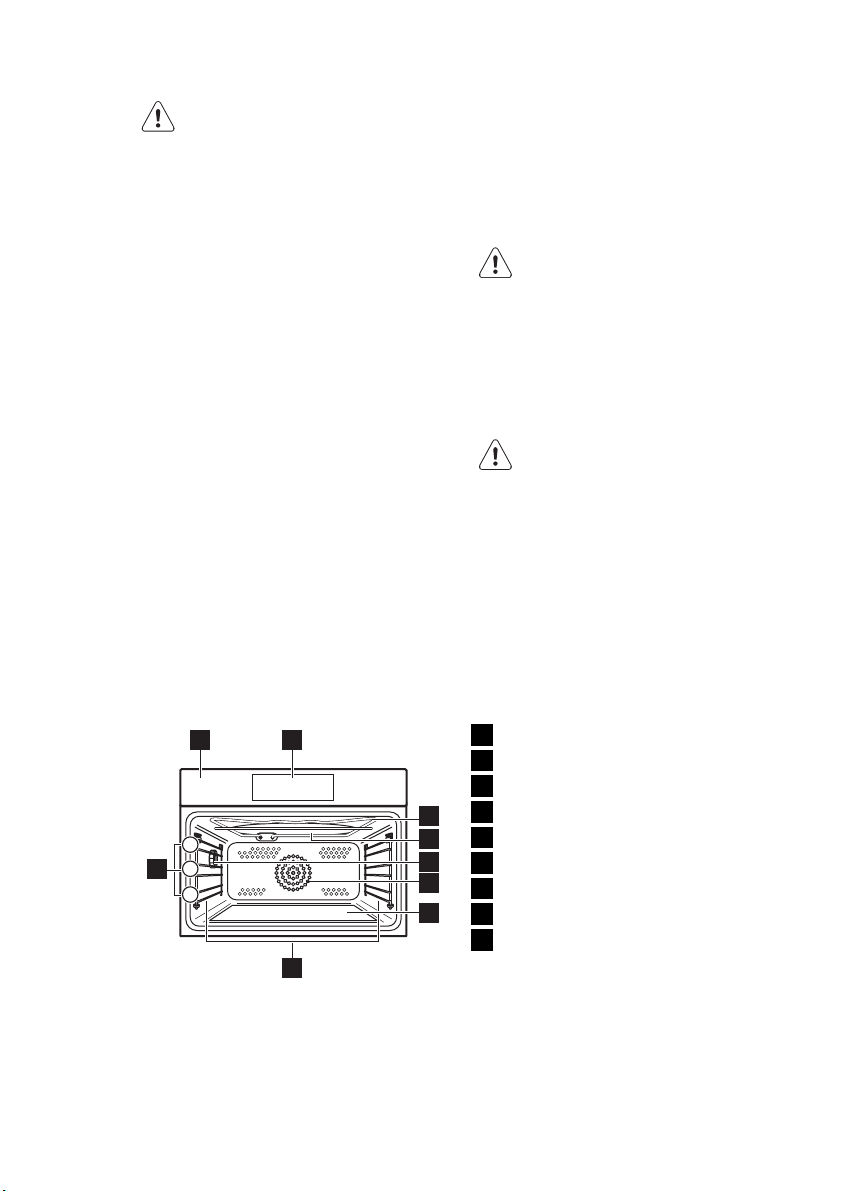
3. PRODUCT DESCRIPTION
1 2
8
3
9
7
6
4
3
2
1
5
1
Control panel
2
Electronic programmer
3
Grill and heating element
4
Microwave generator
5
Lamp
6
Fan and heating element
7
Glass base, removable
8
Shelf support, removable
9
Shelf positions
ENGLISH 7
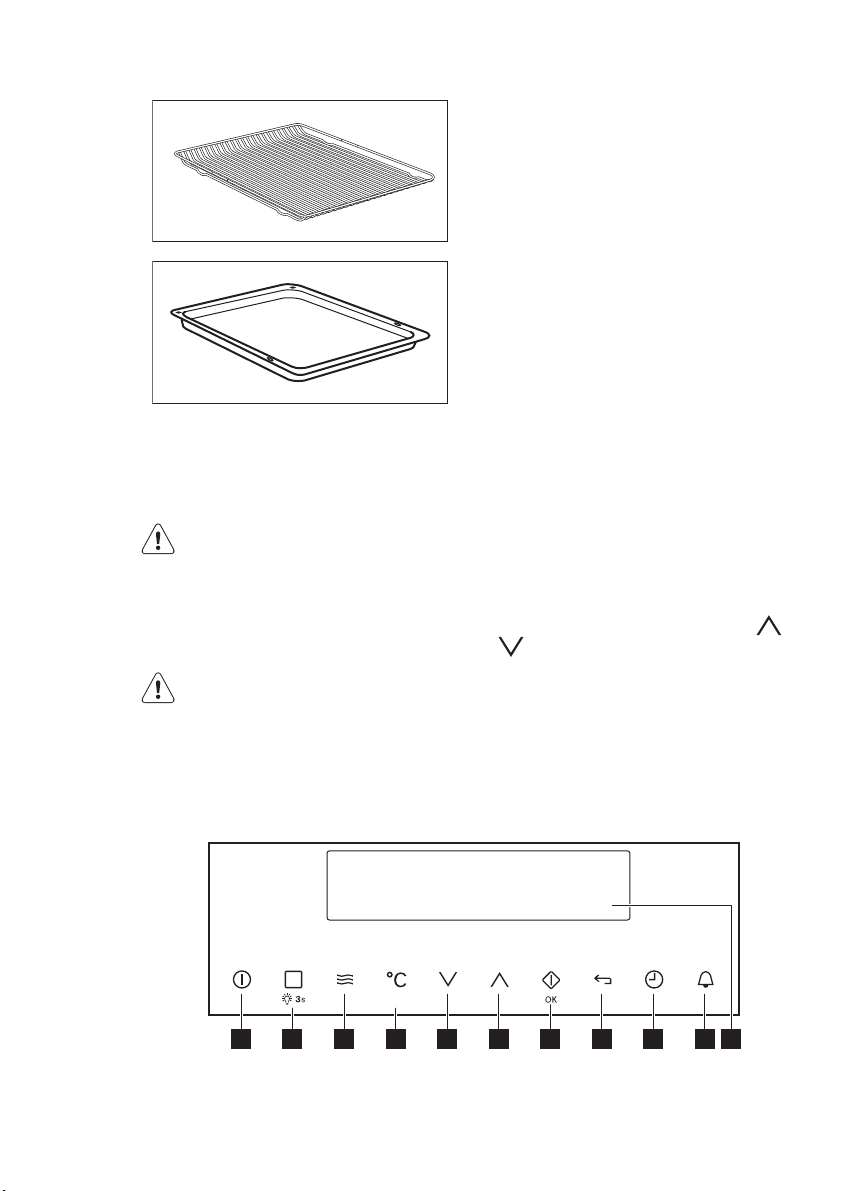
3.1 Accessories
Wire shelf
For cookware, cake tins and roasts.
Baking tray
For cakes and biscuits.
4. BEFORE FIRST USE
WARNING!
Refer to the Safety chapters.
4.1 Initial Cleaning
• Remove all parts from the appliance.
• Clean the appliance before first use.
Refer to chapter "Care and Clean-
ing".
4.2 First Connection
When you connect the appliance to the
mains or after a power cut, you have to
set the language, display contrast, display
brightness and time of the day. Press
or to set the value. Press OK to con-
firm.
5. CONTROL PANEL
Electronic programmer
10987654321 11
8
www.electrolux.com
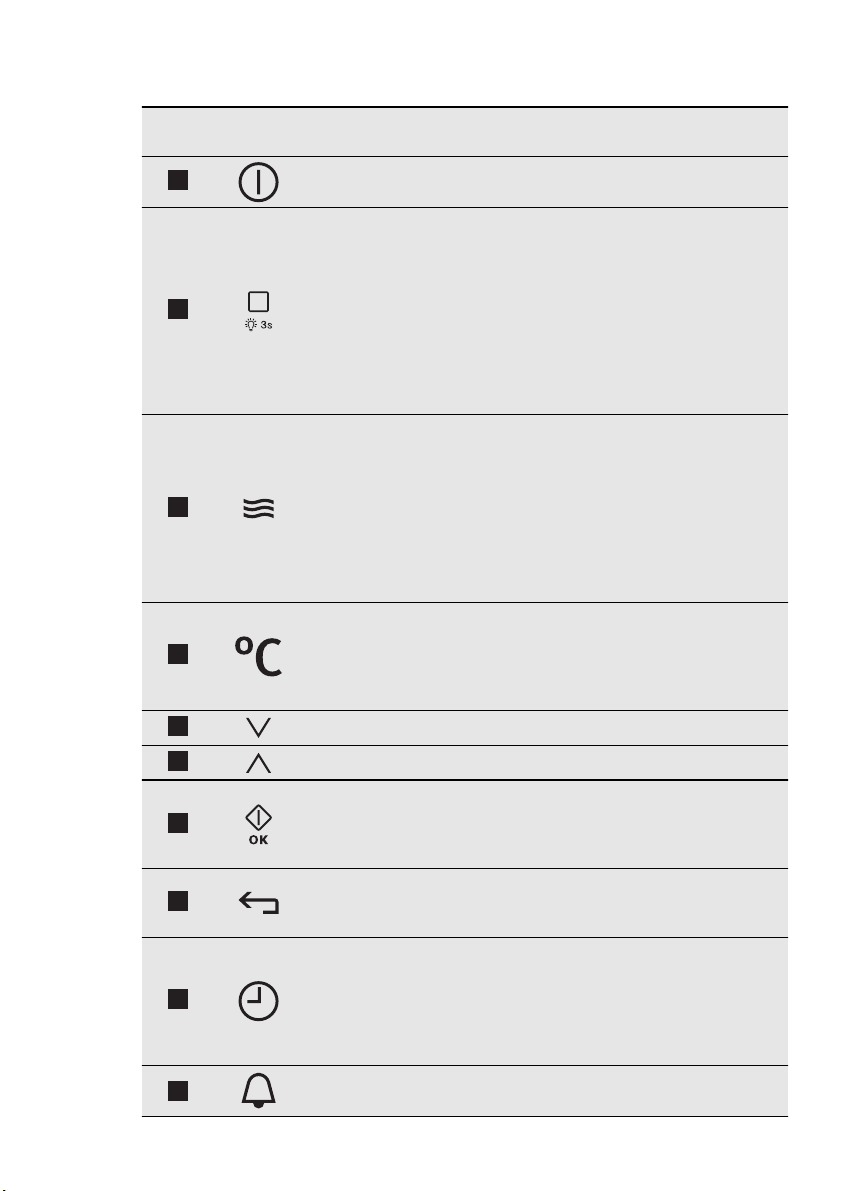
Use the sensor fields to operate the appliance
Num-
ber
Sensor
field
Function Comment
1
ON / OFF To activate and deactivate the ap-
pliance.
2
Heating Functions or
Assisted Cooking
To set a heating function or an
Assisted Cooking function. To set
the necessary function, touch the
sensor field one or two times after
you activate the appliance. To ac-
tivate or deactivate the lamp,
touch and hold the sensor field for
3 seconds (you can also activate
the lamp after you deactivate the
appliance).
3
Microwave function To activate the microwave func-
tion (you can also use it after you
deactivate the appliance).
When you use the Microwave
function with the Duration function
for more than 7 minutes and in
Combi mode, the Microwave
power cannot be more than 600
W.
4
Temperature selection To set the temperature or show
the temperature in the appliance.
To activate or deactivate the Fast
Heat Up function, touch and hold
the sensor field for 3 seconds.
5
Down key To move down in the menu.
6
Up key To move up in the menu.
7
OK / Microwave Quick
Start
To confirm the selection or set-
tings. To activate the microwave
function (you can also use it after
you deactivate the appliance).
8
Home key To go back one level in the menu.
To show the main menu, touch
the field for 3 seconds.
9
Time and additional
functions
To set different functions. When a
heating function operates, touch
the sensor field to set the timer,
Function Lock , Favourite Pro-
gramme memory, Heat + Hold or
Set + Go .
10
Minute Minder To set the Minute Minder .
ENGLISH 9
Num-
ber
Sensor
field
Function Comment
11
-
Display It shows the settings of the appli-
ance.
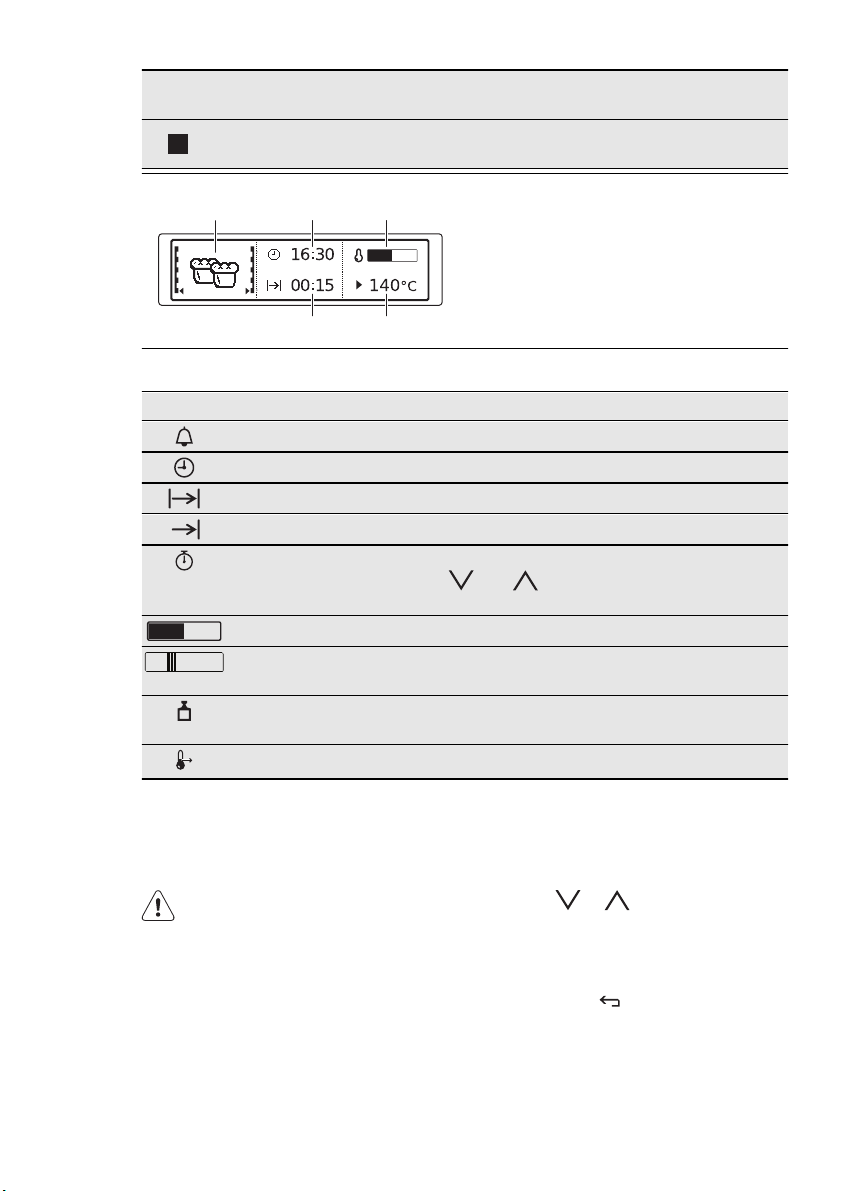
Display
A
DE
B C
A)
Heating or microwave function
B)
Current time
C)
Heat-up indicator
D)
Temperature or power of the micro-
wave
E)
Duration time or end time of a function
Other indicators in the display
Symbol Function
Minute Minder The function is active.
Time The display shows the current time.
Duration It shows the time required for the cooking cycle.
End Time It shows when the cooking cycle ends.
Time Indication It shows how long the heating function operates.
Press
and at the same time to reset the
time.
Heat-up indicator It shows the temperature level in the oven.
Fast Heat Up Indi-
cator
The function is active. It decreases the heat up
time (for selected models only).
Weight Automatic The automatic weight system is active, or weight
can be changed.
Heat + Hold The function is active.
6. DAILY USE
WARNING!
Refer to the Safety chapters.
6.1 Navigating the menus
Operation of the menus:
1.
Activate the appliance.
2.
Press or to select the menu
option.
3.
Press OK to move to submenu or ac-
cept setting.
At every point you can get back to the
main menu with
.
10
www.electrolux.com
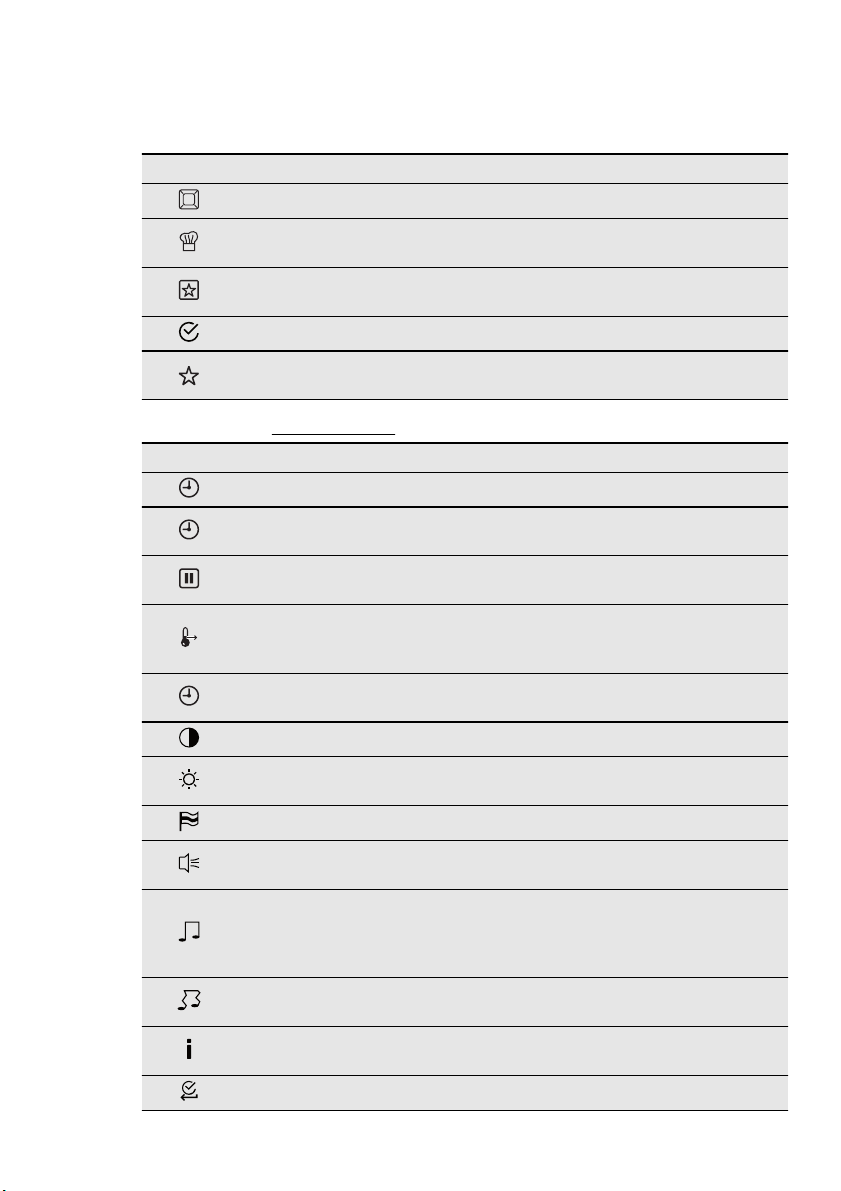
6.2 The menus in overview
Main menu
Symbol Menu item Application
Heating Functions Contains a list of heating functions.
Assisted Cooking
Contains a list of automatic cooking pro-
grammes.
Favourite Programme
Contains a list of favourite cooking pro-
grammes made by the user.
Basic Settings Contains a list of other settings.
Specials
Contains a list of additional heating func-
tions.
Submenus for: Basic Settings
Symbol Submenu Description
Set Time of Day Sets the current time on the clock.
Time Indication
When ON, the display shows the current
time when you deactivate the appliance.
SET + GO
When ON, you can choose the SET + GO
function in the Select Options window.
Heat + Hold
When ON, you can choose the Heat +
Hold function in the Select Options win-
dow.
Extra time
Activates and deactivates the Time Ex-
tension function.
Display Contrast Adjusts the display contrast by degrees.
Display Brightness
Adjusts the display brightness by de-
grees.
Set Language Sets the language for the display.
Buzzer Volume
Adjusts the volume of press-tones and
signals by degrees.
Key Tones
Activates and deactivates the tone of the
touch fields. It is not possible to deacti-
vate the tone of the ON / OFF touch
field.
Alarm/Error Tones
Activates and deactivates the alarm
tones.
Service
Shows the software version and configu-
ration.
Factory Settings Resets all settings to factory settings.
ENGLISH 11
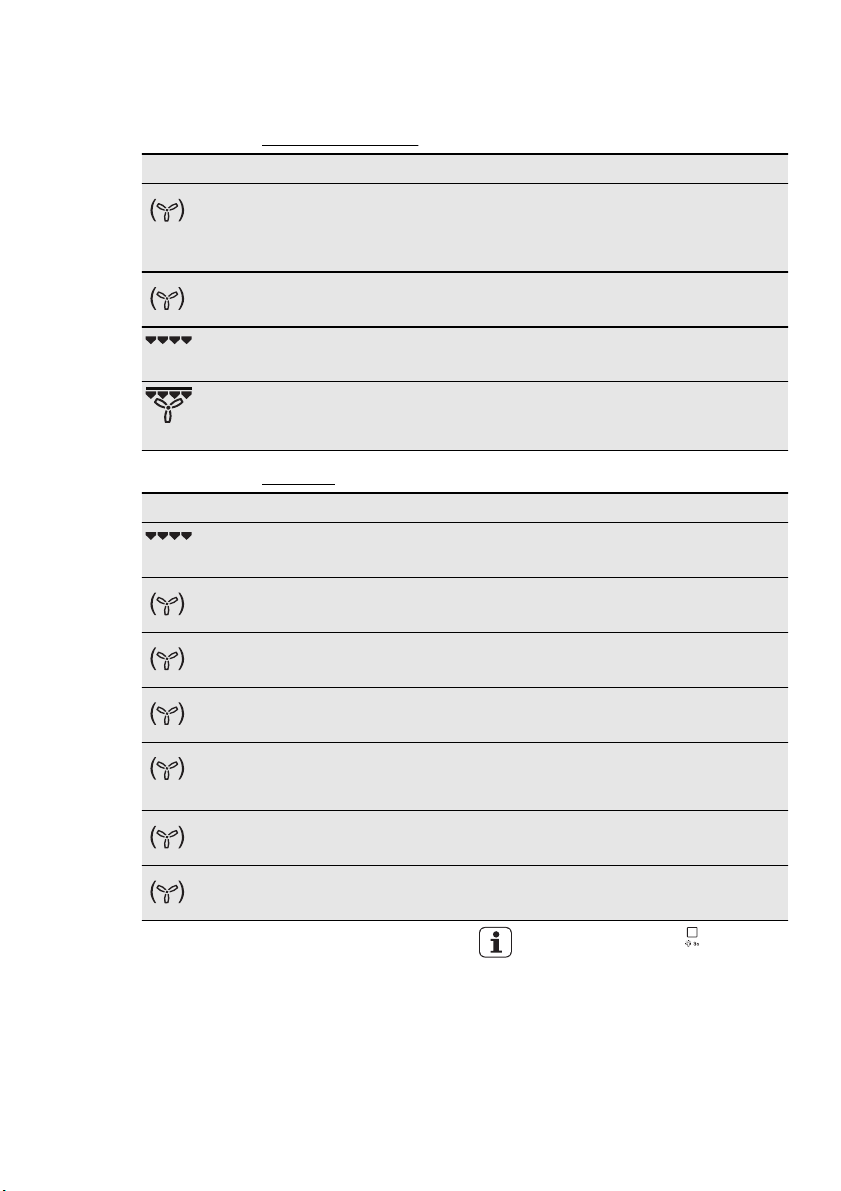
6.3 Heating functions
Submenu for: Heating Functions
Heating function Application
True Fan Cooking To bake on up to 2 oven levels at the same
time and to dry food. Set the oven tempera-
tures 20 - 40 °C lower than when using
Conventional Cooking .
Slow Cook To prepare tender, succulent roasts.
Grilling To grill flat food and to toast bread.
Turbo Grilling To roast larger joints of meat or poultry on
one shelf position. Also to gratinate and to
brown.
Submenu for: Specials
Heating function Application
Au gratin For dishes such as lasagna or potato gratin.
Also to gratinate and to brown.
Dough Proving For controlled rising of yeast dough before
baking.
Plate Warming To preheat your plate for serving.
Preserving To preserve vegetables in glasses and liquid
(e.g. mixed pickles).
Drying To dry sliced fruit (e.g. apples, plums,
peaches) and vegetables (e.g. tomatoes,
zucchini, mushrooms).
Keep Warm To keep food warm.
Defrost To defrost frozen food.
6.4 Activating a heating function
1.
Activate the appliance.
2.
Select the Heating Functions menu.
Press OK to confirm.
3.
Set the heating function. Press OK to
confirm.
4.
Set the temperature. Press OK to
confirm.
Press once or twice to go di-
rectly to the Heating Functions
menu (when the appliance is acti-
vated).
6.5 Heat-up indicator
When you activate a heating function, the
bar on the display comes on. The bar
shows that the temperature increases.
12
www.electrolux.com

Fast Heat Up Indicator
This function decreases the heat-up time.
To activate the function, hold
for 3
seconds. You will see the heat-up indica-
tor alternates.
Residual heat
When you deactivate the appliance, the
display shows the residual heat. You can
use the heat to keep the food warm.
6.6 Energy saving
The appliance contains fea-
tures which help you save en-
ergy during everyday cooking:
• Residual heat:
– When the heating function or pro-
gramme operates, the heating ele-
ments are deactivated 10% earlier
(the lamp and fan continue to oper-
ate). For this feature to operate, the
cooking time must be longer than 30
minutes or you must use the clock
functions ( Duration , End Time ).
– When the appliance is off, you can
use the heat to keep food warm. The
display shows the remaining temper-
ature.
• Cooking with the lamp off - Touch
and hold
for 3 seconds to deactivate
the lamp during cooking.
7. MICROWAVE MODE
7.1 Microwave
Information about operation
General:
• After you deactivate the appliance, let
the food stand for some minutes (refer
to “Microwave Tables: standing time”).
• Remove the aluminium foil packaging,
metal containers, etc. before you pre-
pare the food.
Cooking:
• If possible, cook food covered with ma-
terial suitable for use in the microwave.
Only cook food without a cover if you
want to keep a crust.
• Do not overcook the dishes by setting
the power and time too high. The food
can dry out, burn or catch fire in some
places.
• Do not use the appliance to cook eggs
in their shells and snails, because they
can burst. With fried eggs, pierce the
yolks first.
• Prick food with "skin" or "peel", such as
potatoes, tomatoes, sausages, with a
fork several times before cooking so
that the food does not burst.
• For chilled or frozen food, set a longer
cooking time.
• Dishes which contain sauce must be
stirred from time to time.
• Vegetables that have a firm structure,
such as carrots, peas or cauliflower,
must be cooked in water.
• Turn larger pieces after half the cooking
time.
• If possible, cut vegetables into similar-
sized pieces.
• Use flat, wide dishes.
• Do not use cookware made of porce-
lain, ceramic or earthenware with small
holes, e. g. on handles or unglazed bot-
toms. Moisture going into the holes can
cause the cookware to crack when it is
heated.
• The bottom glass is a work space for
heating food or liquids. It is necessary
for the operation of the microwave
oven.
• Always put the glass stick (if supplied)
in the container when you heat liquids,
in order to prevent overcooking or
splashing.
Defrosting meat, poultry, fish:
• Put the frozen, unwrapped food on a
small upturned plate with a container
below it, or on a defrosting rack or plas-
tic sieve so that the defrosting liquid
can run off.
ENGLISH 13
• Turn the food after half the defrosting
time. If possible, divide and then re-
move the pieces that have started to
defrost.
Defrosting butter, portions of gateau,
quark:
• Do not fully defrost in the appliance, but
let them defrost at room temperature.
This gives a more even result. Fully re-
move all metal or aluminium packaging
or parts before defrosting.
Defrosting fruit, vegetables:
• Do not fully defrost fruit and vegetables,
which are to be further prepared while
raw, in the appliance. Let them defrost
at room temperature.
• You can use a higher microwave power
to cook fruit and vegetables without de-
frosting them first.
Ready meals:
• Ready meals in metal packaging or
plastic trays with metal covers can only
be defrosted or heated in the micro-
wave if they are expressively designa-
ted as suitable for use in the micro-
wave.
• You must follow the manufacturer's in-
structions printed on the packaging (e.
g. remove the metal cover and pierce
the plastic film).
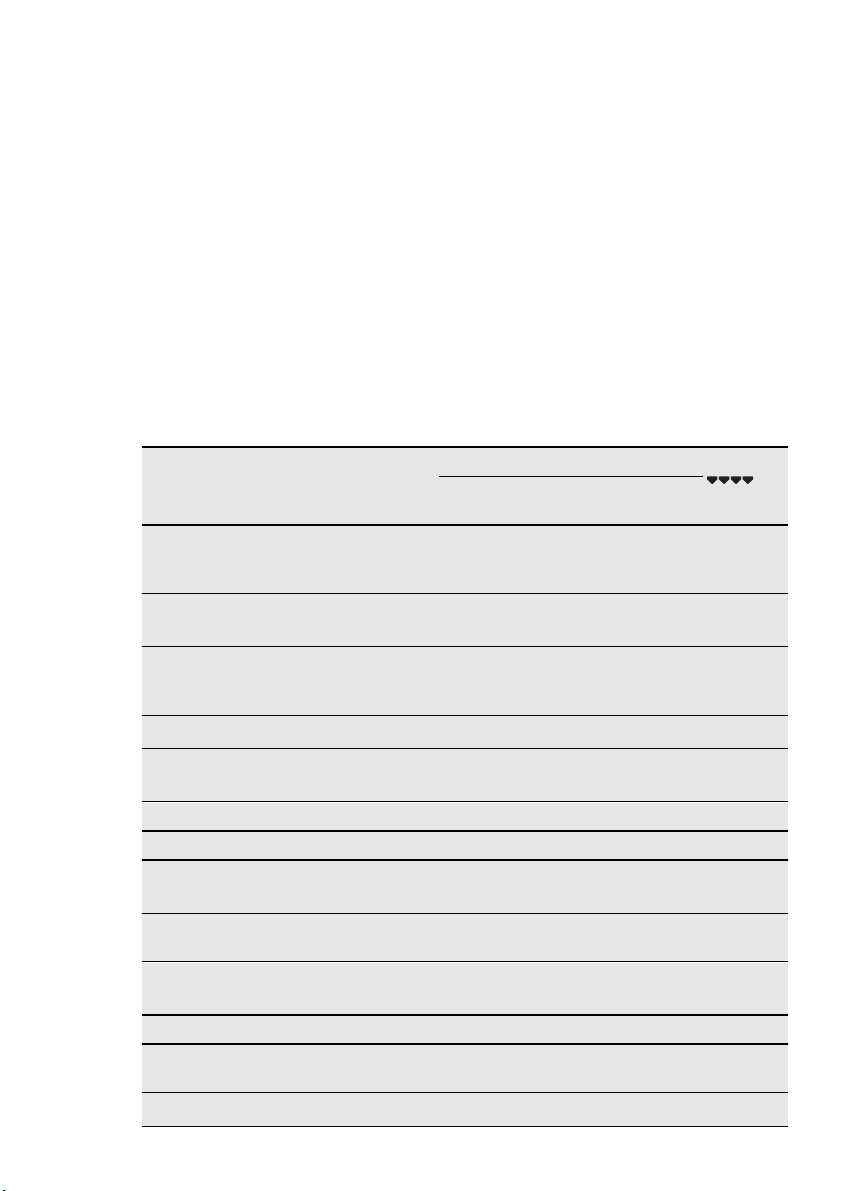
Suitable cookware and materials
Cookware / Material Microwave Grilling
Defrost-
ing
Heat-
ing
Cook-
ing
Ovenproof glass and porcelain (with
no metal components, e. g. Pyrex,
heat-proof glass)
X X X X
Non-ovenproof glass and porcelain
1)
X -- -- --
Glass and glass ceramic made of
ovenproof / frost-proof material (e.
g. Arcoflam), grill shelf
X X X X
Ceramic
2)
, earthenware
2)
X X X --
Heat-resistant plastic up to 200 °C
3)
X X X --
Cardboard, paper X -- -- --
Clingfilm
X -- -- --
Roasting film with microwave safe
closure
3)
X X X --
Roasting dishes made of metal, e.
g. enamel, cast iron
-- -- -- X
Baking tins, black lacquer or silicon-
coated
3)
-- -- -- X
Baking tray -- -- -- X
Browning cookware, e. g. Crisp pan
or Crunch plate
-- X X --
Ready meals in packaging
3)
X X X X
14
www.electrolux.com
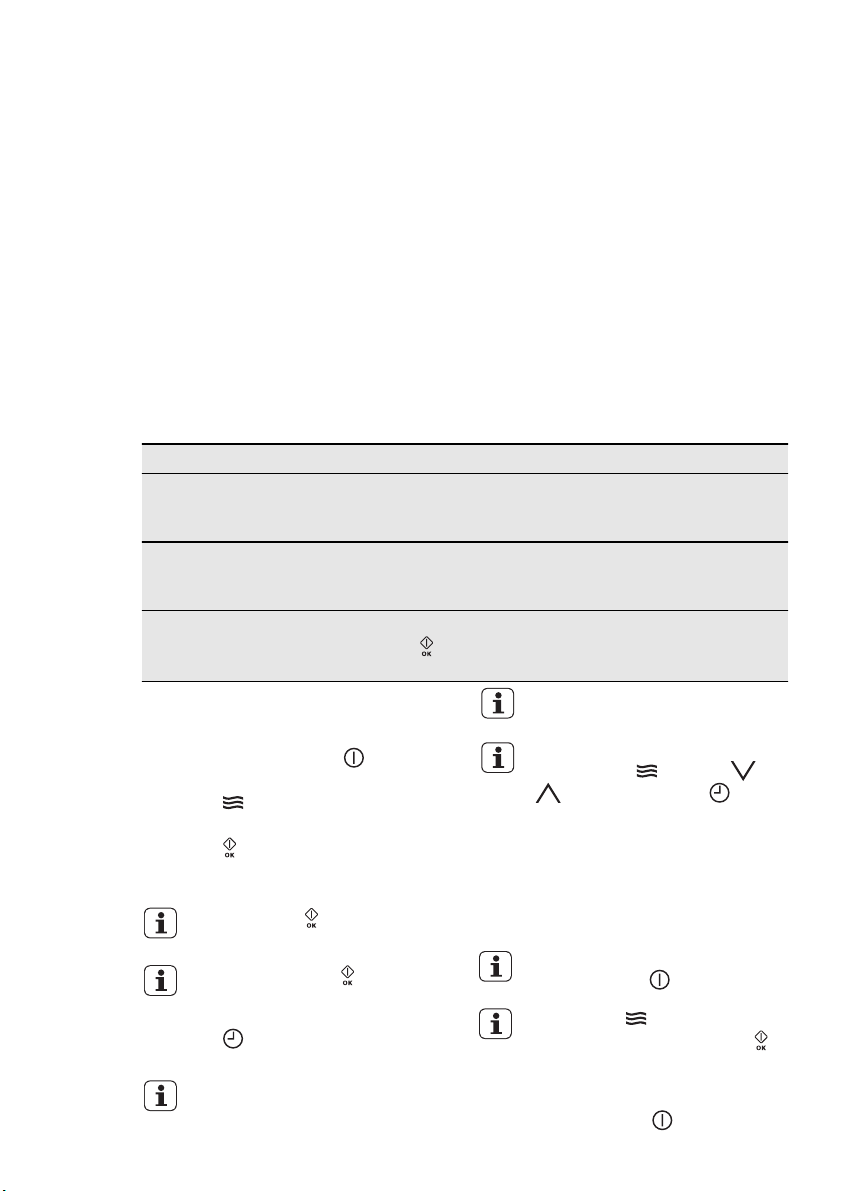
1)
With no silver, gold, platinum or metal plating / decorations
2)
Without quartz or metal components, or glazes which contain metals
3)
You must follow the manufacturer’s instructions about the maximum temperatures.
X suitable
-- not suitable
Other things to think about…
• Food items have different shapes and
qualities. They are prepared in different
quantities. Because of this, the neces-
sary time and power for defrosting,
heating or cooking can vary. As a rough
guide: double the quantity = almost
double the time.
• The microwave creates the heat directly
in the food. Because of this, all places
cannot be heated at the same time.
You must stir or turn the heated dishes,
especially with larger quantities of food.
•The standing time is given in the ta-
bles. Let the food stand, in the appli-
ance or outside it, so that the heat is
distributed more equally.
• You get better results for rice if you use
flat, wide dishes.
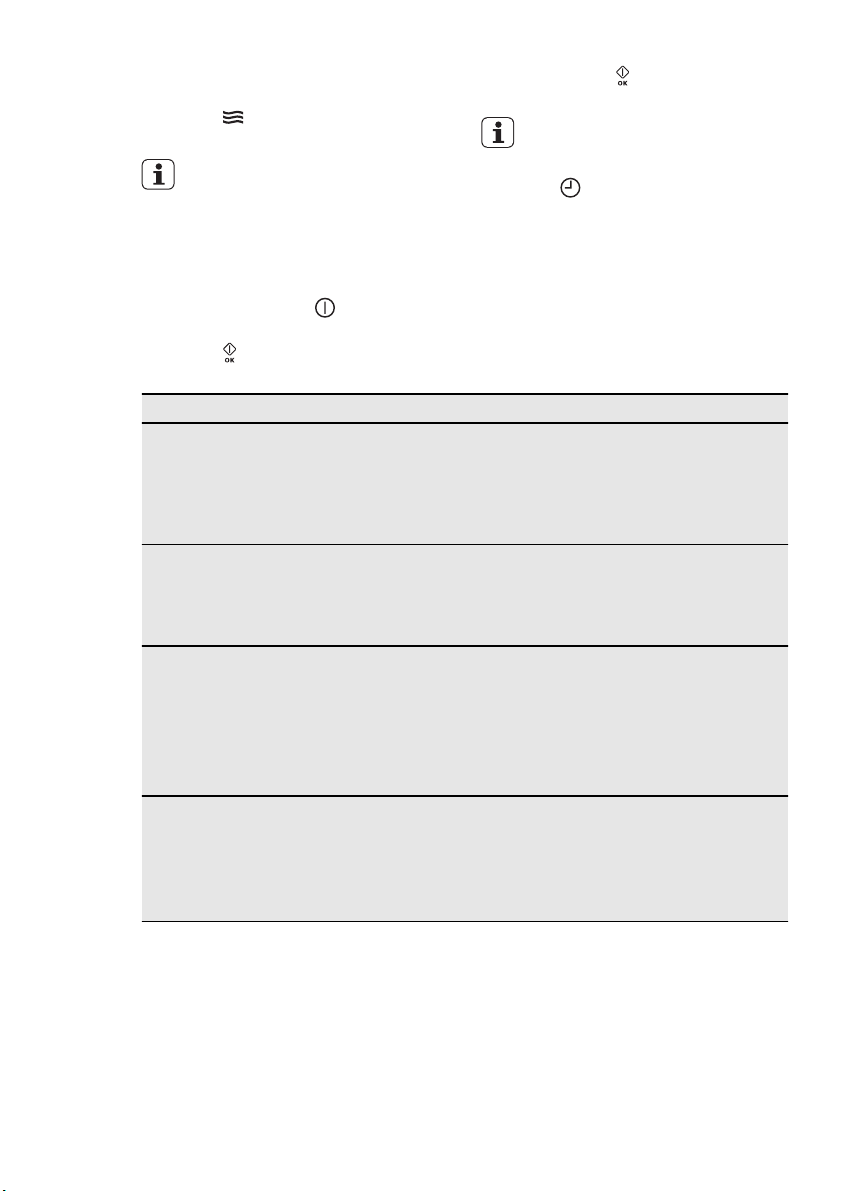
7.2 Microwave functions
Functions Description
Microwave Creates the heat directly in the food. Use it to heat pre-pre-
pared meals and drinks, to defrost meat or fruit, and to cook
vegetables and fish.
Combi Use it to operate the oven function and the microwave mode
together (selected models only). Use it to cook food in a
shorter time and brown it at the same time.
Quick Start Use it to activate the Microwave function with one touch of
the sensor field
with the maximum microwave power. Oper-
ating time: 30 seconds.
7.3 Setting the Microwave
function
1.
If it is necessary, touch to deacti-
vate the appliance.
2.
Touch to activate the Microwave
function.
3.
Touch . The Duration function is set
to 30 seconds and the microwaves
starts to operate.
Each touch of adds 30 seconds
to the Duration time.
If you do not touch , the appli-
ance deactivates after 20 sec-
onds.
4.
Touch to set the Duration function
(refer to "Setting the clock functions").
When the Duration time is longer
than 7 minutes the Microwave
power is decreased to 600 W.
The maximum setting of the Dura-
tion time is 90 minutes.
You can change the microwave
power (touch
and then or
) and the Duration ( ) any
time when the Microwave function
operates.
5.
When the set time ends, an acoustic
signal sounds for 2 minutes. The Mi-
crowave function deactivates auto-
matically. Touch a sensor field to stop
the acoustic signal.
To deactivate the Microwave
function, touch
If you touch , the function
stops. To start it again, touch
.
7.4 Setting the Combi function
1.
If necessary, touch to deactivate
the appliance.
ENGLISH 15
2.
Activate a heating function. Refer to
“Activating a heating function”.
3.
Touch and do the same steps as
when you set the Microwave function.
The functions End Time , Set +
Go and Heat + Hold are not avail-
able for the Combi function.
7.5 Setting the Quick Start
function
1.
If necessary, touch to deactivate
the appliance.
2.
Touch to activate the Quick Start
function.
Each touch of
adds 30 seconds to
the Duration time.
You can change the microwave
power (refer to “Setting the Micro-
wave function”).
3.
Touch to set the Duration time (re-
fer to "Setting the clock functions").
7.6 Examples of cooking
applications for power settings
The data in the table is for guidance only.
Power setting Use
• 1000 Watt
•900 Watt
•800 Watt
•700 Watt
• Heating liquids
• Searing at the start of the cooking
process
•Cooking vegetables
• Melting gelatine and butter
•600 Watt
•500 Watt
• Defrosting and heating frozen meals
• Heating one-plate meals
• Simmering stews
• Cooking egg dishes
•400 Watt
•300 Watt
•200 Watt
• Continuing to cook meals
• Cooking delicate food
• Heating baby food
• Simmering rice
• Heating delicate food
• Melting cheese
•100 Watt • Defrosting meat, fish, bread
• Defrosting cheese, cream, butter
• Defrosting fruit and cakes (gateaux)
• Raising yeast dough
• Heating up cold dishes and drinks
16
www.electrolux.com
8. CLOCK FUNCTIONS
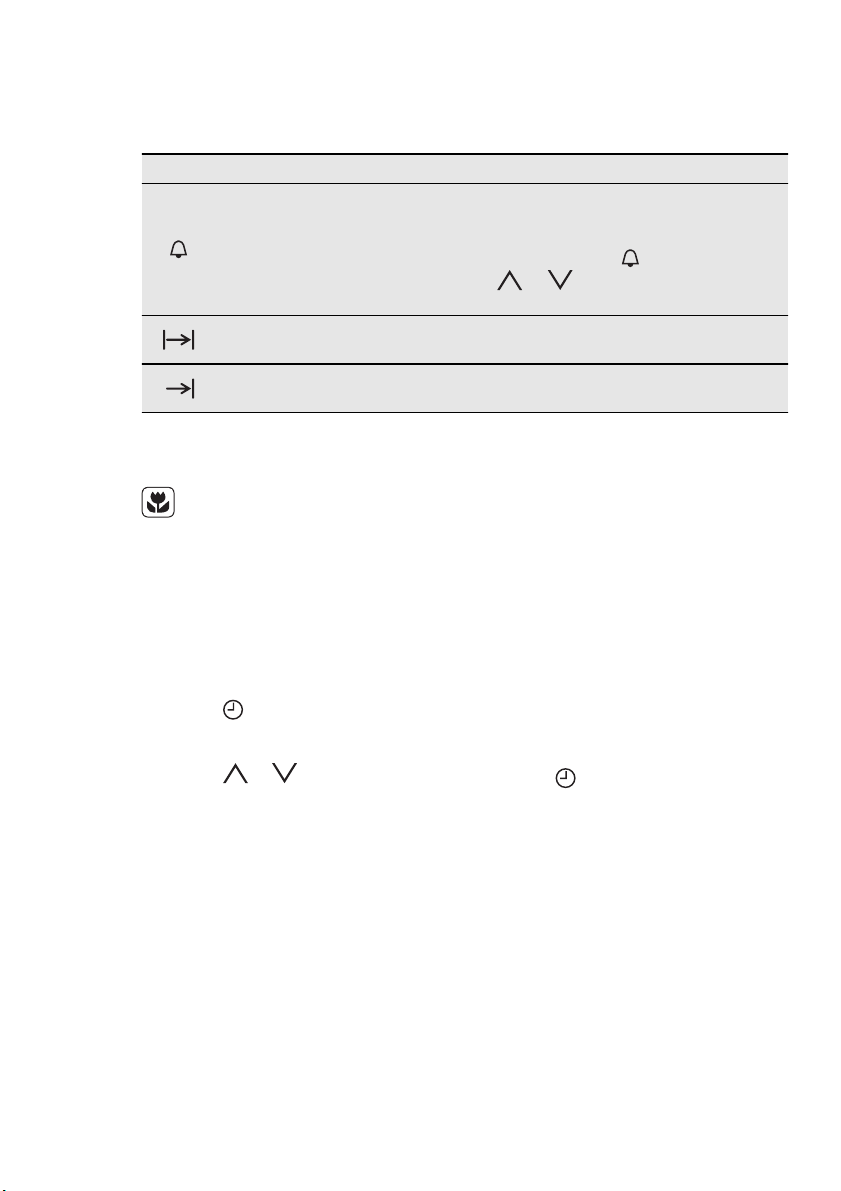
8.1 Clock functions
Symbol Function Description
Minute Minder
To set a countdown (maximum: 2 hours, 30 mi-
nutes). This function has no effect on the operation
of the appliance. You can also activate it when the
appliance is deactivated. Touch
to activate the
function. Touch
or to set the minutes and
OK to start.
Duration
To set the length of an operation (maximum: 23
hours, 59 minutes).
End Time
To set the switch-off time for a heating function
(maximum: 23 hours, 59 minutes).
If you set the time for a clock function, the
time starts to count down after 5 sec-
onds.
If you use the clock functions Du-
ration and End Time , the appli-
ance deactivates the heating ele-
ments after 90% of the set time.
The appliance uses the residual
heat to continue the cooking pro-
cedure until the time ends (3 – 20
minutes).
Setting the clock functions:
1.
Set a heating function.
2.
Touch again and again until the
display shows the necessary clock
function and the related symbol.
3.
Touch or to set the necessary
time. Touch OK to confirm.
When the time ends, an acoustic sig-
nal sounds. The appliance deacti-
vates. The display shows a message.
4.
Touch a sensor field to stop the sig-
nal.
• With Duration and End Time , the appli-
ance deactivates automatically.
• With Duration and End Time , you must
set the heating function and the tem-
perature first. Then you can set the
clock function.
• You can use Duration and End Time at
the same time if you want to automati-
cally activate and deactivate the appli-
ance at a given time later.
8.2 Heat + Hold
The Heat + Hold function keeps prepared
food warm at 80 °C for 30 minutes. It ac-
tivates after the baking or roasting proce-
dure ends.
• You can activate or deactivate the func-
tion in the Basic Settings menu.
• Conditions for the function:
– The set temperature is more than 80
°C.
– The function Duration is set.
Activating the function
1.
Activate the appliance.
2.
Select the heating function.
3.
Set the temperature above 80 °C.
4.
Press again and again until the
display shows Heat + Hold . Press
OK to confirm.
When the function ends, an acoustic sig-
nal sounds.
The Heat + Hold function stays on if you
change the heating functions.
8.3 Extra Time
The Extra Time makes the heating func-
tion continue after the Duration ends.
• Applicable for all heating functions with
Duration or Weight Automatic.
Activating the function:
1.
When the cooking time ends, an
acoustic signal sounds. Press any
sensor field.
ENGLISH 17
2.
The display shows the message for
Extra Time for one minute.
3.
Press to activate (or to cancel).
4.
Set the Extra Time period. Press OK
to confirm.
9. AUTOMATIC PROGRAMMES
WARNING!
Refer to the Safety chapters.
9.1 Assisted Cooking with
Recipe Automatic
This appliance has a set of recipes you
can use. Recipes are fixed and you can-
not change them.
Activating the function:
1.
Activate the appliance.
2.
Select the Assisted Cooking menu.
Press OK to confirm.
3.
Select the category and dish. Press
OK to confirm.
4.
Select Recipe Automatic . Press OK
to confirm.
When you use the Manual func-
tion, the appliance uses automatic
settings. You can change them as
with other functions.
9.2 Assisted Cooking with
Weight Automatic
This function automatically calculates the
roasting time. To use it, it is necessary to
input the food weight.
Activating the function:
1.
Activate the appliance.
2.
Select Assisted Cooking . Press OK
to confirm.
3.
Select the category and dish. Press
OK to confirm.
4.
Select the Weight Automatic . Press
OK to confirm.
5.
Touch or to set the food
weight. Press OK to confirm.
The automatic programme starts. You
can change the weight at any time. Press
or to change the weight. When
the time ends, an acoustic signal sounds.
Press a sensor field to deactivate the sig-
nal.
With some programmes turn over
the food after 30 minutes. The
display shows a reminder.
10. USING THE ACCESSORIES
WARNING!
Refer to the Safety chapters.
18
www.electrolux.com
10.1 Inserting the accessories
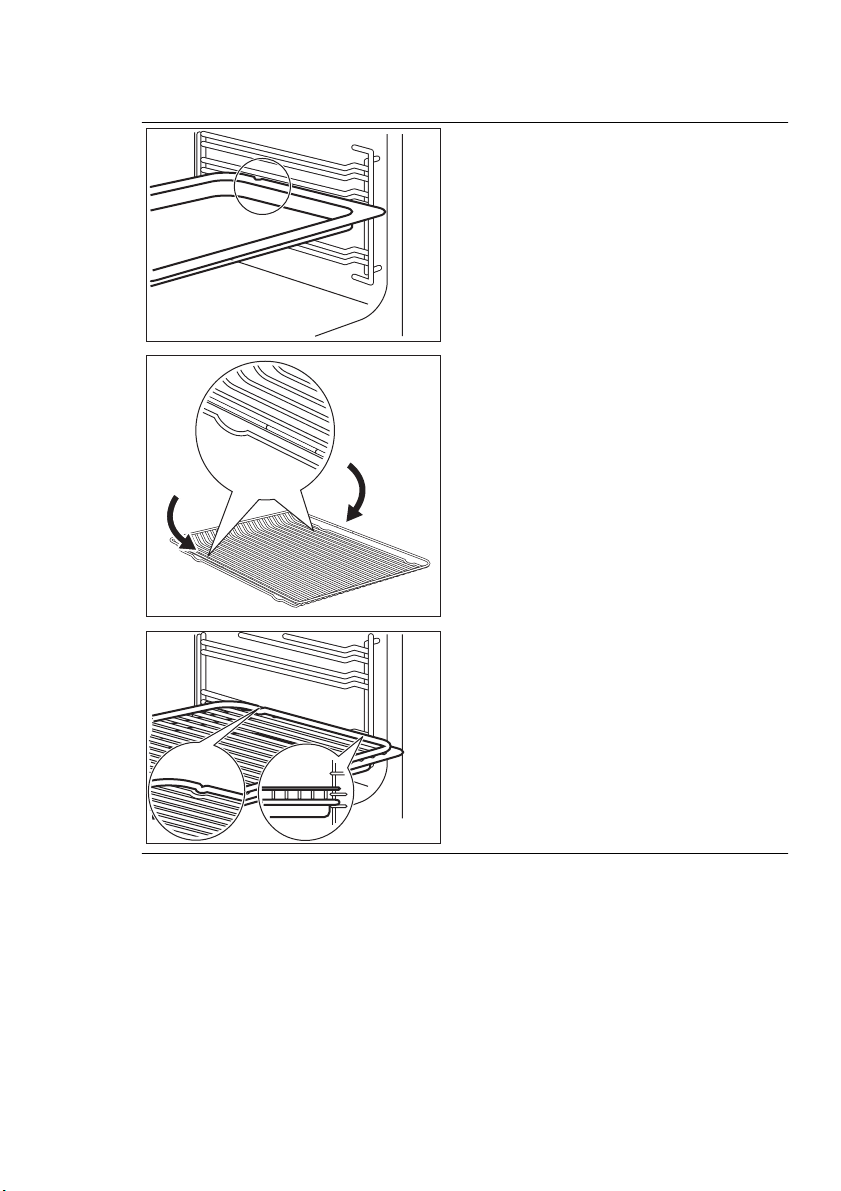
Baking tray:
Push the baking tray between the guide
bars of the shelf support.
Wire shelf:
Push the shelf between the guide bars of
the shelf support and make sure that the
feet point down.
Wire shelf and baking tray together:
Push the baking try between the guide
bars of the shelf support and the wire
shelf on the guide bars above.
• All accessories have a small indentation
at the bottom on the right and left edge
to increase the safety. Always make
sure that this indentation is at the rear
of the appliance. This indentation is also
an anti-tip device.
• The high rim around the shelf is a de-
vice which prevents cookware from
slipping off.
ENGLISH 19
11. ADDITIONAL FUNCTIONS
11.1 Favourite Programme
menu
You can save your favourite settings, like
duration, temperature or heating function.
They are available in the Favourite Pro-
gramme menu. You can save 20 pro-
grammes.
Saving a programme
1.
Activate the appliance.
2.
Set a heating function or an Assisted
Cooking function.
3.
Touch again and again until the
display shows SAVE . Press OK to
confirm.
4.
The display shows the first free mem-
ory position.
Press OK to confirm.
5.
Enter the name of the programme.
The first position flashes.
Touch
or to change the letter.
Press OK.
6.
Touch or to move the cursor
to the right or to the left. Press OK.
The next letter flashes. Do steps 5
and 6 again as necessary.
7.
Press and hold OK to save.
• You can overwrite a memory position.
When the display shows the first free
memory position, touch
or and
press OK to overwrite an existing pro-
gramme.
• To change the name of a programme,
select the Edit Programme Name sub-
menu in the Favourite Programme
menu.
Activating the programme
1.
Activate the appliance.
2.
Select the Favourite Programme
menu. Press OK to confirm.
3.
Select your favourite programme
name. Press OK to confirm.
11.2 Child Lock
The Child Lock prevents an accidental
operation of the appliance.
Activating and deactivating the Child
Lock function:
1.
Activate the appliance.
2.
Touch and at the same time
until the display shows a message.
11.3 Function Lock
The Function Lock function prevents an
accidental change of the heating function.
You can activate the Function Lock func-
tion only when the appliance operates.
Activating the Function Lock function:
1.
Activate the appliance.
2.
Set a heating function or setting.
3.
Press again and again until the
display shows Function Lock func-
tion.
4.
Press OK to confirm.
Deactivating the Function Lock
function:
1.
Press two times.
2.
Press OK to confirm.
11.4 SET + GO
The SET + GO function lets you set a
heating function (or programme) and use
it later with one press of the sensor field.
Activating the function:
1.
Activate the appliance.
2.
Set the heating function.
3.
Press again and again until the
display shows Duration .
4.
Set the time.
5.
Press again and again until the
display shows SET + GO .
6.
Press OK to confirm.
To start SET + GO function, press any
sensor field (except for
). The set heat-
ing function starts.
When the heating function ends, an
acoustic signal sounds.
• When the heating function operates,
the Function Lock function is on.
• You can activate and deactivate the
SET + GO function in the Basic Set-
tings menu.
20
www.electrolux.com
11.5 Automatic switch-off
For safety reasons the appliance deacti-
vates after some time:
• If a heating function operates.
• If you do not change the oven tempera-
ture.
Oven temperature Switch-off time
30 °C - 115 °C 12.5 h
120 °C - 195 °C 8.5 h
200 °C - 230 °C 5.5 h
The automatic switch-off works
with all functions, except Light ,
Duration and End Time .
11.6 Cooling fan
When the appliance operates, the cooling
fan activates automatically to keep the
surfaces of the appliance cool. If you de-
activate the appliance, the cooling fan can
continue to operate until the appliance
cools down.
12. HELPFUL HINTS AND TIPS
12.1 Inner side of door
In some models on the inner side of
the door you can find:
• the numbers of the shelf positions (se-
lected models)
• information about the heating functions,
recommended shelf positions and tem-
peratures for typical dishes (selected
models).
The temperature and baking times
in the tables are guidelines only.
They depend on the recipes, qual-
ity and quantity of the ingredients
used.
12.2 Advice for special heating
functions of the appliance
Keep Warm
Use this function if you want to keep food
warm.
The temperature regulates itself automati-
cally to 80 °C.
Plate Warming
For warming plates and dishes.
Distribute plates and dishes evenly on the
oven shelf. Move stacks around after half
of the warming time (swap top and bot-
tom).
The automatic temperature is 70 °C.
Recommended shelf position: 3.
Dough Proving
You can use this automatic function with
any recipe for yeast dough you like. It
gives you a good atmosphere for rising.
Put the dough into a dish that is big
enough for rising and cover it with a wet
towel or plastic foil. Insert a wire shelf on
level one and put the dish in. Close the
door and set the function dough proving.
Set the necessary time.
12.3 Baking
General instructions
• Your new appliance may bake or roast
differently to the appliance you had be-
fore. Adapt your usual settings (temper-
ature, cooking times) and shelf posi-
tions to the values in the tables.
• With longer baking times, the appliance
can be switched off about 10 minutes
before the end of baking time, to use
the residual heat.
When you use frozen food, the trays
in the appliance can twist during bak-
ing. When the trays get cold again,
the distortion will be gone.
ENGLISH 21
How to use the Baking Tables
• We recommend to use the lower tem-
perature the first time.
• If you cannot find the settings for a spe-
cial recipe, look for the one that is al-
most the same.
• Baking time can be extended by 10 -
15 minutes, if you bake cakes on more
than one level.
• Cakes and pastries at different heights
do not always brown equally at first. If
this occurs, do not change the temper-
ature setting. The differences equalize
during the baking procedure.
• Unless otherwise stated, the values in
the tables assume that the appliance is
cold when the cooking starts.
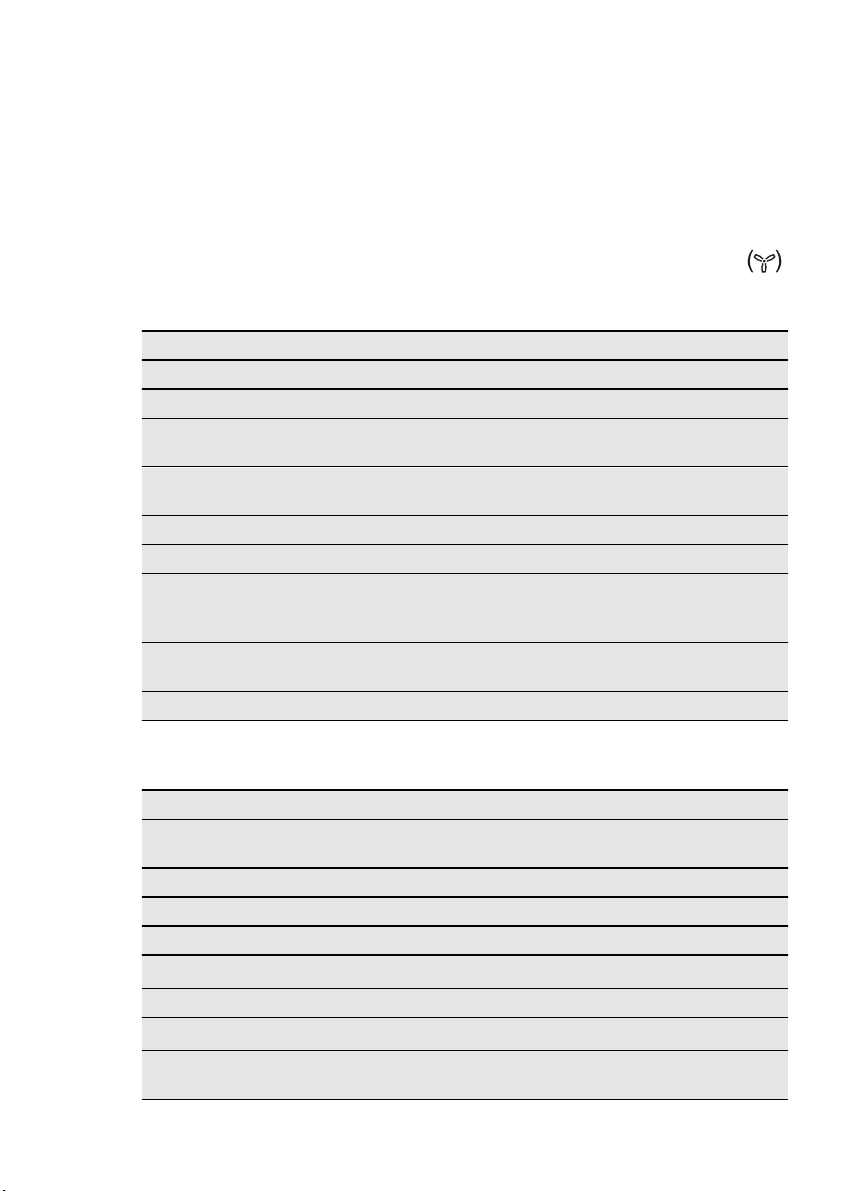
12.4 Baking on one oven level
Heating function: True Fan Cooking
Baking in tins
Food Shelf position Temperature (°C) Time (min)
Ring cake or brioche 1 160 - 170 50 - 60
Madeira cake / Fruit cakes 1 150 - 170 70 - 90
Fatless sponge cake / Fat-
less sponge cake
1 160 - 180 25 - 40
Flan base - shortcrust pas-
try
2
170 - 190
1)
10 - 25
Flan base - sponge mixture 2 150 - 170 20 - 25
Apple tart (covered) 1 160 - 180 50 - 60
Apple pie / Apple pie (2
tins, Ø 20cm, placed diag-
onally)
1 180 - 190 65 - 80
Savoury flan (e. g. Quiche
Lorraine)
2 170 - 190 30 - 70
Cheesecake 1 160 - 180 60 - 90
1)
Preheat oven.
Cakes / pastries / breads on baking trays
Food Shelf position Temperature (°C) Time (min)
Plaited bread / bread
crown
1 160 - 180 30 - 40
Christmas stollen 1 160 - 180 40 - 60
Bread (rye bread) 1 180 - 200 45 - 60
Cream puffs / éclairs 2 170 - 190 30 - 40
Swiss Roll 2
200 - 220
1)
8 - 15
Crumb cake (dry) 2 160 - 180 20 - 40
Butter / sugar cake 2
180 - 200
1)
15 - 30
Fruit flan (made with yeast
dough / sponge mixture)
2 160 - 180 25 - 50
22
www.electrolux.com

Food Shelf position Temperature (°C) Time (min)
Fruit flan made with short-
crust pastry
2 170 - 190 40 - 80
Yeast cakes with delicate
toppings (e. g. quark,
cream, almond slice)
2 150 - 170 40 - 80
Pizza (with a lot of topping) 2
190 - 210
1)
20 - 40
Pizza (thin crust) 2
230
1)
12 - 20
Flat bread 2
230
1)
10 - 20
Swiss flaky pastry tarts 2 190 - 210 35 - 50
1)
Preheat oven.
Biscuits
Food Shelf position Temperature (°C) Time (min)
Short pastry biscuits 2 160 - 180 6 - 20
Viennese whirls 2 160 10 - 40
Biscuits made with sponge
mixture
2 160 - 180 15 - 20
Pastries made with egg
white, meringues
2 80 - 100 120 - 150
Macaroons 2 100 - 120 30 - 60
Fancy yeast biscuits 2 160 - 180 20 - 40
Puff pastries 2
180 - 200
1)
20 - 30
Rolls 2 210 - 230 20 - 35
Small cakes / Small cakes
(20 per tray)
2
170
1)
20 - 30
1)
Preheat the oven.
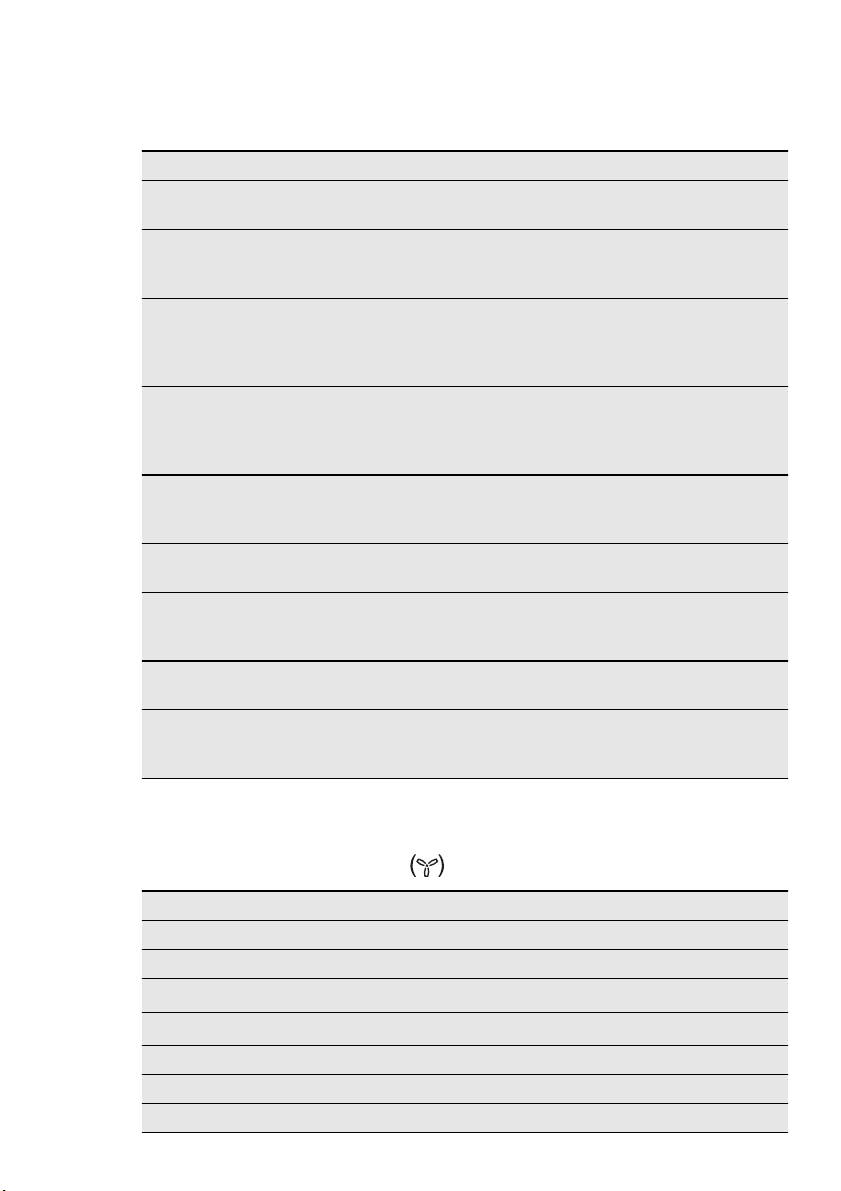
Baking on more than one level - Biscuits / small cakes / pastries / rolls
Food True Fan Cooking
2 shelf positions
Temperature
(°C)
Time (min)
Short pastry biscuits 2 / 3 160 - 180 15 - 35
Viennese whirls 2 / 3 160 20 - 60
Biscuits made with
sponge mixture
2 / 3 160 - 180 25 - 40
Pastries made with
egg white, meringues
2 / 3 80 - 100 130 - 170
Macaroons 2 / 3 100 - 120 40 - 80
Danish pastries 2 / 3 160 - 180 30 - 60
Puff pastries 2 / 3
180 - 200
1)
30 - 50
ENGLISH 23
1)
Preheat oven.
12.5 Tips on baking
Baking results Possible cause Remedy
The bottom of the cake is
not browned sufficiently.
The shelf position is in-
correct.
Put the cake on a lower
shelf.
The cake sinks and be-
comes soggy, lumpy or
streaky.
The oven temperature is
too high.
The next time you bake,
set a slightly lower oven
temperature.
The cake sinks and be-
comes soggy, lumpy or
streaky.
The baking time is too
short.
Set a longer baking time.
You cannot decrease
baking times by setting
higher temperatures.
The cake sinks and be-
comes soggy, lumpy or
streaky.
There is too much liquid
in the mixture.
Use less liquid. Be careful
with mixing times, espe-
cially if you use a mixing
machine.
The cake is too dry.
The oven temperature is
too low.
The next time you bake,
set a higher oven temper-
ature.
The cake is too dry.
The baking time is too
long.
The next time you bake,
set a shorter baking time.
The cake browns uneven-
ly.
The oven temperature is
too high and the baking
time is too short.
Set a lower oven temper-
ature and a longer baking
time.
The cake browns uneven-
ly.
The mixture is unevenly
distributed.
Spread the mixture evenly
on the baking tray.
The cake is not ready in
the baking time given.
The oven temperature is
too low.
The next time you bake,
set a slightly higher oven
temperature.
12.6 Soufflés and au gratin
dishes table
Heating function: True Fan Cooking
Food Shelf position Temperature (°C) Time (min)
Pasta bake 1 180 - 200 30 - 50
Lasagne 1 180 - 200 25 - 40
Vegetables au gratin
1)
1 160 - 170 15 - 30
Baguettes au gratin
1)
1 160 - 170 15 - 30
Sweet bakes 1 180 - 200 40 - 60
Fish bakes 1 180 - 200 30 - 60
Stuffed vegetables 1 160 - 170 30 - 60
24
www.electrolux.com
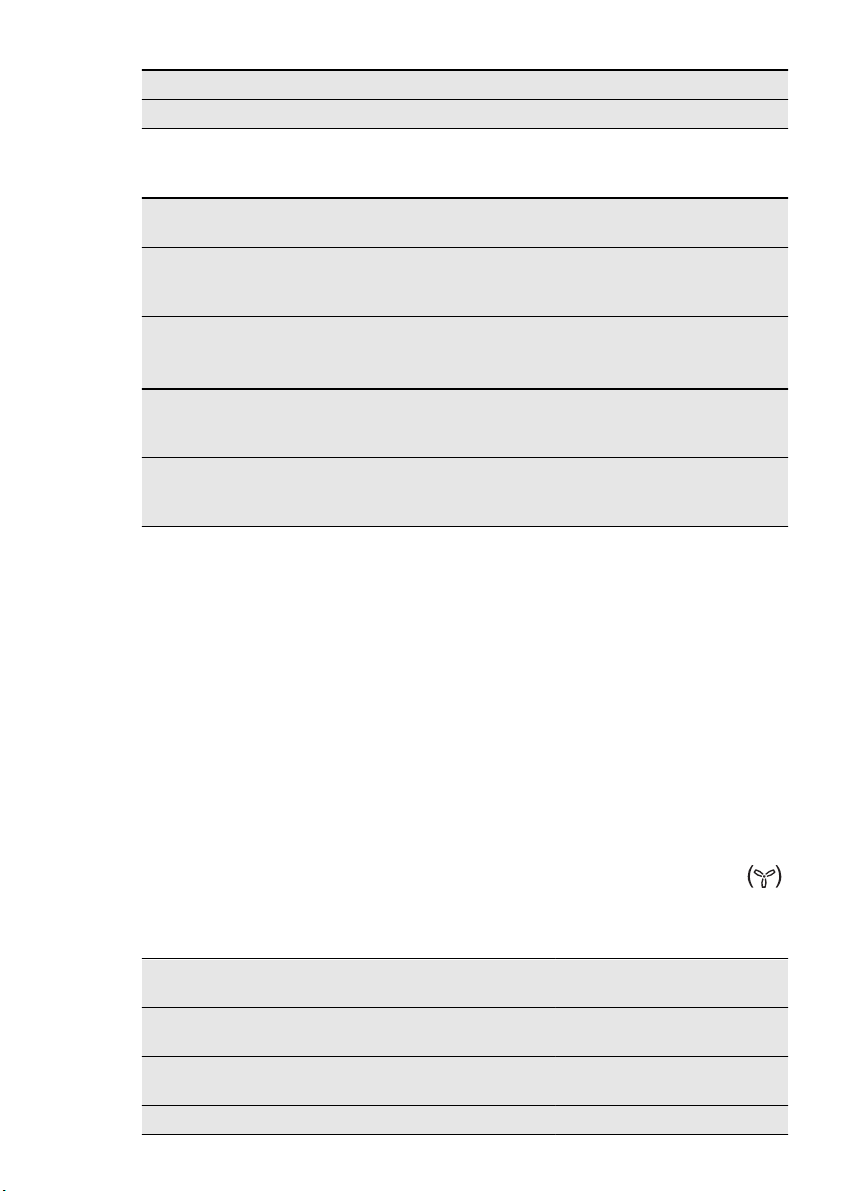
Food Shelf position Temperature (°C) Time (min)
Potato gratin 2 180 - 200 40 - 50
1)
Preheat oven.
Ready made frozen food table
Food Heating
Function
Shelf posi-
tion
Temperature (°C) Time (min)
Frozen pizza True Fan
Cooking
3 as per manufactur-
er's instructions
as per manu-
facturer's in-
structions
Chips
1)
(300 - 600
g)
Turbo Grilling 3 200 - 220 as per manu-
facturer's in-
structions
Baguettes True Fan
Cooking
3 as per manufactur-
er's instructions
as per manu-
facturer's in-
structions
Fruit cake True Fan
Cooking
3 as per manufactur-
er's instructions
as per manu-
facturer's in-
structions
1)
Turn chips 2 or 3 times during cooking
12.7 Roasting
Roasting dishes
• Use heat-resistant ovenware to roast
(refer to the instructions of the manu-
facturer).
• You can roast large roasting joints di-
rectly in the deep pan (if present) or on
the wire shelf above the deep pan.
• Roast lean meats in the roasting tin with
the lid. This keeps the meat more suc-
culent.
• All types of meat that can be browned
or have crackling can be roasted in the
roasting tin without the lid.
• We recommend that you cook meat
and fish weighing 1 kg and above in the
appliance.
• To prevent the meat juices or fat from
burning onto the pan, put some liquid
into the deep pan.
• If necessary, turn the roast (after 1 / 2 -
2 / 3 of the cooking time).
• Baste large roasts and poultry with their
juices several times during roasting.
This gives better roasting results.
• You can deactivate the appliance ap-
proximately 10 minutes before the end
of the roasting time, and use the residu-
al heat.
12.8 Roasting tables
Heating function: True Fan Cooking
Pork
Food Weight
(g)
Shelf po-
sition
Temperature
(°C)
Time
(min)
Shoulder, neck, ham
joint
1000 - 1500 1 170 - 190 90 - 120
Chops, smoked loin of
pork
1000 - 1500 1 180 - 200 60 - 90
Meat loaf 750 - 1000 1 180 - 200 45 - 60
ENGLISH 25

Food Weight
(g)
Shelf po-
sition
Temperature
(°C)
Time
(min)
Knuckle of pork (pre-
cooked)
750 - 1000 1 170 - 190 90 - 120
Beef
Food Weight
(g)
Shelf
position
Temperature
(°C)
Time
(min)
Pot roast 1000 - 1500 1 180 - 200 120 - 150
Roast beef or sirloin per cm of
thickness
1
210 - 230
1)
6 - 9
per cm of
thickness
1)
Preheat the oven.
Veal
Food Weight
(g)
Shelf
position
Temperature
(°C)
Time
(min)
Pot roast 1000 - 1500 1 170 - 190 150 - 120
Knuckle of veal 1500 - 2000 1 170 - 190 120 - 150
Lamb
Food Weight
(g)
Shelf
position
Temperature
(°C)
Time
(min)
Leg of lamb 1000 - 1500 1 170 - 190 75 - 120
Saddle of lamb 1000 - 1500 1 180 - 200 60 - 90
Quick roast items cooked on a baking tray
Food Shelf
position
Temperature
(°C)
Time
(min)
Sausages 'Cordon bleu' 1
220 - 230
1)
5 - 8
Small sausages 1
220 - 230
1)
12 - 15
Schnitzel or chops, breaded 1
220 - 230
1)
15 - 20
Rissoles 1
210 - 220
1)
15 - 20
Fish (steamed)
Food Weight
(g)
Shelf
position
Temperature
(°C)
Time
(min)
Whole fish 1000 - 1500 1 210 - 220 45 - 75
26
www.electrolux.com
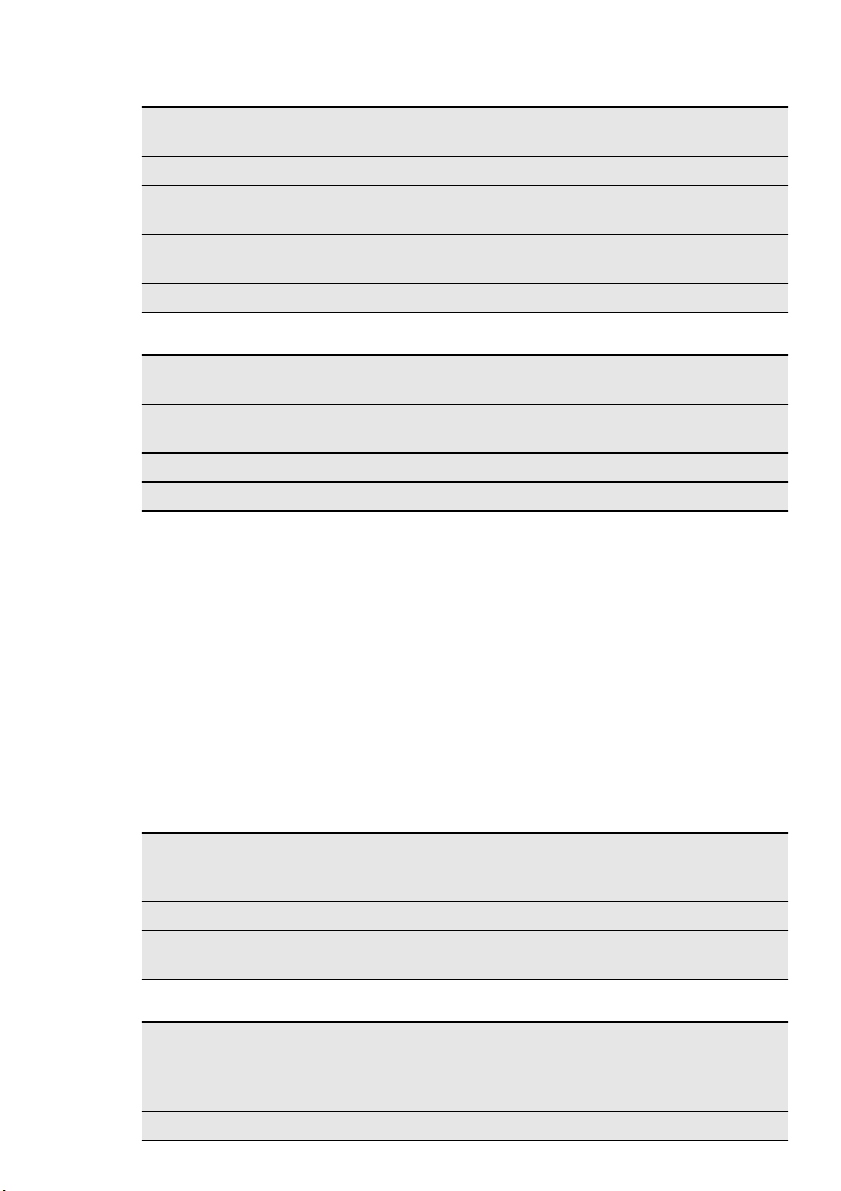
Poultry
Food Weight
(g)
Shelf
position
Temperature
(°C)
Time
(min)
Chicken, spring chicken 1000 - 1500 1 190 - 210 45 - 75
Chicken half per 400 -
500
1 200 - 220 35 - 50
Poultry pieces per 200 -
250
1 200 - 220 35 - 50
Duck 1500 - 2000 1 180 - 200 75 - 105
Game
Food Weight
(g)
Shelf
position
Temperature
(°C)
Time
(min)
Saddle of hare, leg of
hare
up to 1000 1
220 - 230
1)
25 - 40
Saddle of venison 1500 - 2000 1 210 - 220 75 - 105
Leg of venison 1500 - 2000 1 200 - 210 90 - 135
12.9 Slow Cook
• Slow Cook function is correct for pieces
of tender, lean meat and fish to make
them succulent.
• Do not use Slow Cook function for pot
roasts or fatty pork roasts.
• Always cook without a lid in Slow Cook
function.
• With Slow Cook function the oven gets
the preset temperature and a signal op-
erates. Then, the oven automatically
sets to a lower temperature to continue
cooking.
Cooking with Slow Cook function:
1.
Sear the meat in a pan in a very high
heat.
2.
Put the meat in a roasting dish or di-
rectly on the wire shelf.
3.
Put the tray below the shelf to catch
the fat.
4.
Put the shelf in the oven.
5.
Set Slow Cook function.
If it is necessary, change the temper-
ature and cook until done (refer to
Slow Cook table).
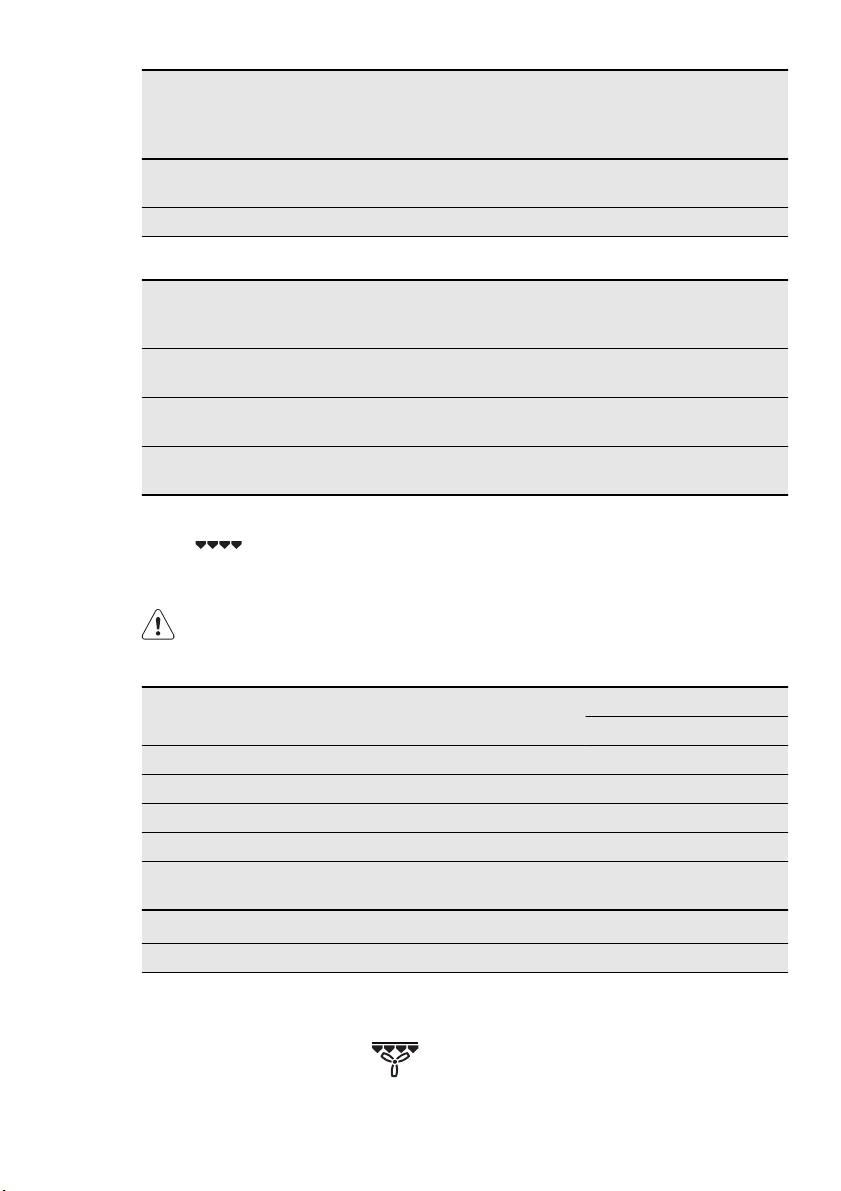
Beef
Food to be
cooked
Weight
(g)
Searing
each side
(min)
Tempera-
ture
(°C)
Shelf
posi-
tion
Time
(min)
Filet medium 1000 - 1500 2 80 - 90 1 90 - 110
Roast beef me-
dium
1000 - 1500 4 80 - 90 1 180 - 240
Veal
Food to be
cooked
Weight (g)
Searing
each
side
(min)
Tempera-
ture (°C)
Shelf
position
Time
(min)
Filet rosé 1000 - 1500 2 80 - 90 1 90 - 120
ENGLISH 27
Food to be
cooked
Weight (g)
Searing
each
side
(min)
Tempera-
ture (°C)
Shelf
position
Time
(min)
Loin, in one
piece
1000 - 1500 4 80 - 90 1 120 - 150
Nierstück 1000 - 1500 4 80 - 90 1 120 - 150
Pork
Food to be
cooked
Weight (g)
Searing
each side
(min)
Tempera-
ture (°C)
Shelf
position
Time
(min)
Filet rosé 1000 -
1500
2 80 - 90 1 90 - 110
Loin, in one
piece
1000 -
1500
4 80 - 90 1 150 - 170
Nierstück 1000 -
1500
4 80 - 90 1 150 - 170
12.10 Grilling
Grilling with maximum temperature
setting
Grill with the oven door closed.
• Use both the wire shelf and the tray
when you grill.
• The grilling time is for guidance only.
Grilling table
Food Shelf position Cooking times (min)
1st side 2nd side
Rissoles 3 8 - 10 6 - 8
Pork fillet 2 10 - 12 6 - 10
Sausages 3 8 - 10 6 - 8
Fillet steaks, veal steaks 3 6 - 7 5 - 6
Fillet of beef, roast beef (approx. 1
kg)
2 10 - 12 10 - 12
Toast / Toast
1)
3 4 - 6 3 - 5
Toast with topping 2 8 - 10 ---
1)
Use the wire shelf without a tray
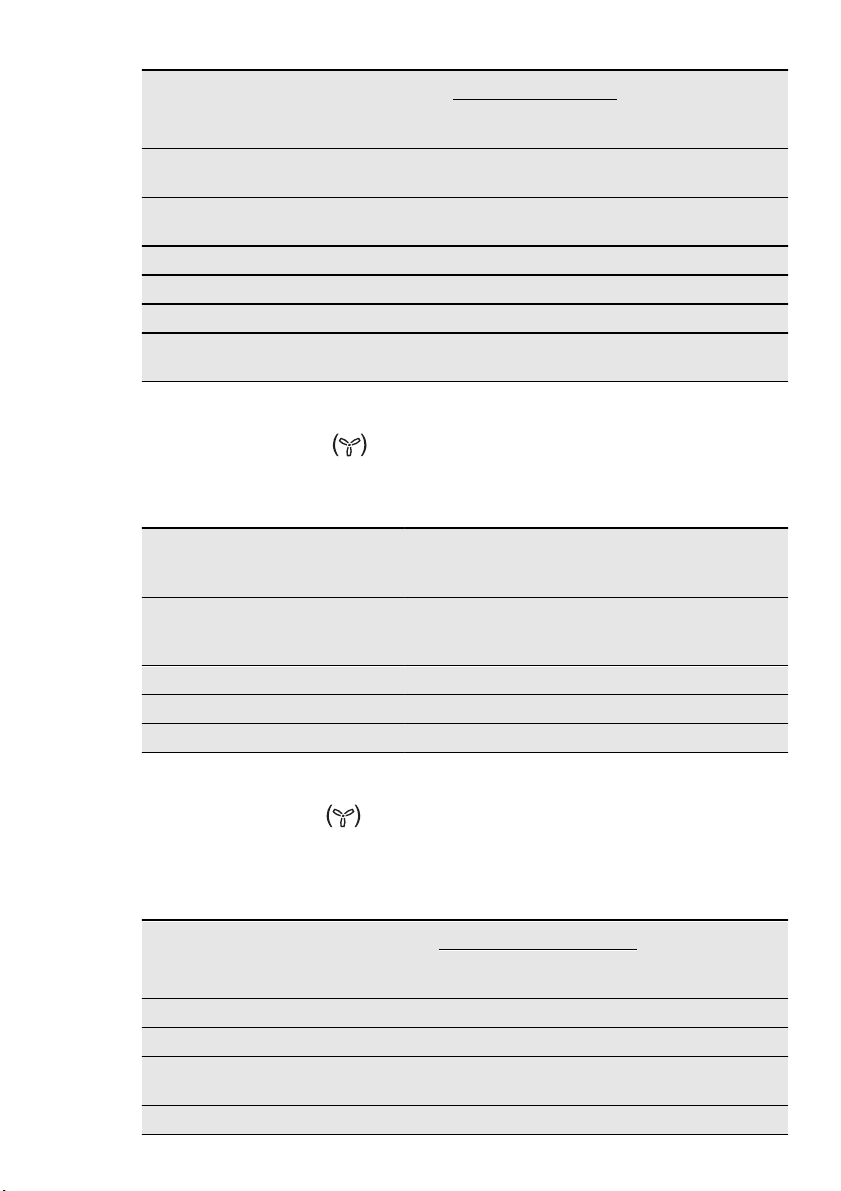
12.11 Turbo Grilling
Heating function: Turbo Grilling
28
www.electrolux.com
Food Tempera-
ture (°C)
Shelf position Time
(min)
turn af-
ter (min)
Deep
pan
Wire
shelf
Chicken (900 - 1000
g)
180 - 200 1 2 50 - 60 25 - 30
Stuffed rolled pork
roast (2000 g)
180 - 200 1 2 90 - 95 45
Pasta bake 180 --- 2 30 ---
Potato bake au gratin 200 --- 2 20 - 23 ---
Gnocchi, au gratin 180 --- 2 20 - 23 ---
Cauliflower with Hol-
landaise sauce
200 --- 2 15 ---
12.12 Defrosting
Heating function: Defrost (Temper-
ature setting 30 °C)
• Unpack the food and put it on a plate
on the first shelf position from the bot-
tom.
• Do not cover with anything to decrease
the defrosting time.
Defrosting table
Food Time (min) Further de-
frosting
time (min)
Note
Poultry, 1000 g 100 - 140 20 - 30 Put the chicken on an upturned
saucer in a big plate.
Turn halfway through
Meat, 1000 g 100 - 140 20 - 30 Turn halfway through
Meat, 500 g 90 - 120 20 - 30 Turn halfway through
Fish, 150 g 25 - 35 10 - 15 ---
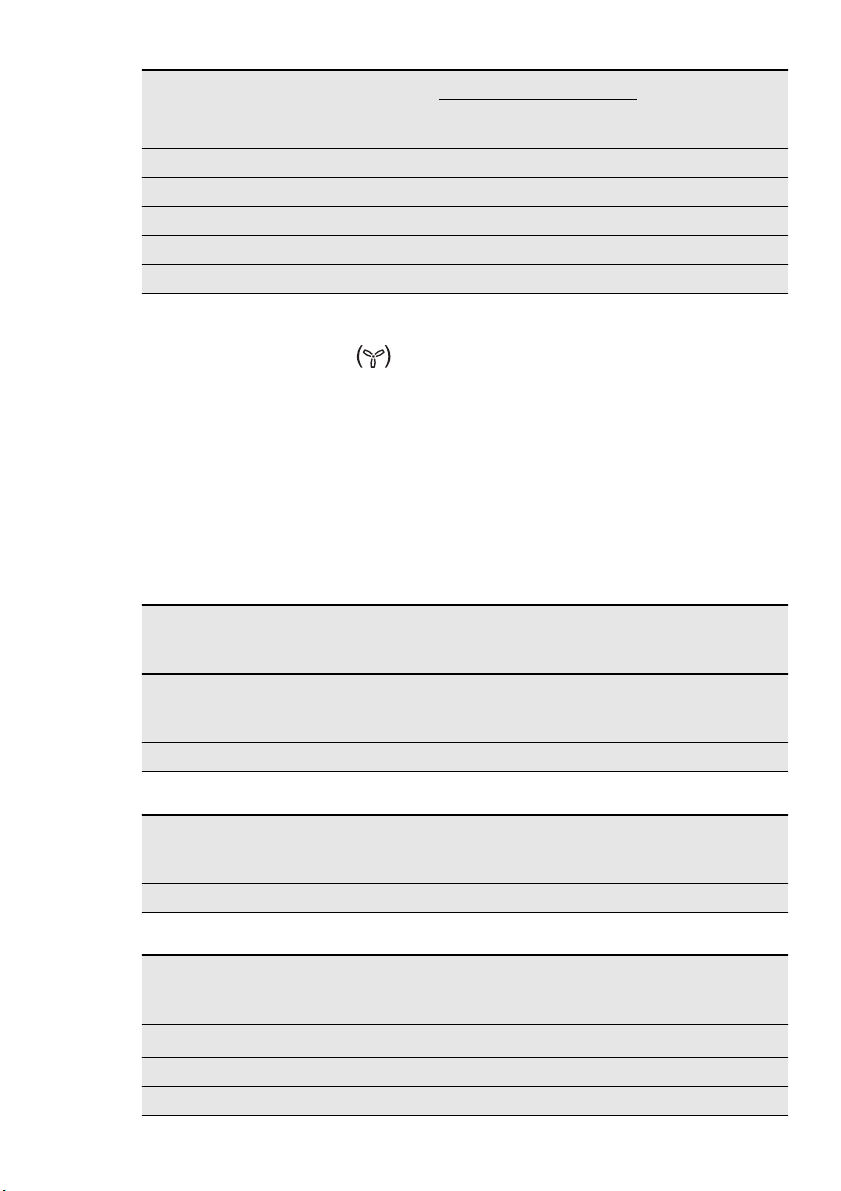
12.13 Drying
Heating function: Drying
• Cover trays with grease proof paper or
baking parchment.
• For a better result, stop the appliance
halfway through the drying time, open
the door and let it cool down for one
night to complete the drying.
Drying table
Food Temperature
(°C)
Shelf position Time (h)
1 position 2 posi-
tions
Beans 75 2 2 / 3 6 - 9
Pepper slices 75 2 2 / 3 5 - 8
Vegetables for
soup
75 2 2 / 3 5 - 6
Mushrooms 50 2 2 / 3 6 - 9
ENGLISH 29
Food Temperature
(°C)
Shelf position Time (h)
1 position 2 posi-
tions
Herbs 40 - 50 2 2 / 3 2 - 4
Plums 75 2 2 / 3 8 - 12
Apricots 75 2 2 / 3 8 - 12
Apple slices 75 2 2 / 3 6 - 9
Pears 75 2 2 / 3 9 - 13
12.14 Making preserves
Heating function: Preserving
• Use only preserve jars of the same di-
mensions available on the market.
• Do not use jars with twist - off and bay-
onet type lids, or metal tins. The results
can be worse the expectations.
• Use the first shelf from the bottom for
this function.
• Put no more than six one - litre pre-
serve jars on the baking tray.
• Fill the jars up to the same level and
close with a clamp.
• The jars cannot touch each other.
• Put approximately 1 / 2 litre of water in-
to the baking tray to give sufficient
moisture in the appliance.
• When the liquid in the jars starts to sim-
mer (after approx. 35 - 60 minutes with
one - litre jars), stop the appliance or
decrease the temperature to 100 °C
(see the table).
Preserves table - Berries
Preserve Temperature
(°C)
Cooking time
until simmering
(min)
Cooking
time at 100
°C (min)
Strawberries, blueberries,
raspberries, ripe gooseber-
ries
160 - 170 35 - 45 ---
Unripe gooseberries 160 - 170 35 - 45 10 - 15
Preserves table - Stone fruits
Preserve Temperature
(°C)
Cooking time
until simmering
(min)
Cooking
time at 100
°C (min)
Pears, quinces, plums 160 - 170 35 - 45 10 - 15
Preserves table - Vegetables
Preserve Temperature
(°C)
Cooking time
until simmering
(min)
Cooking
time at 100
°C (min)
Carrots
1)
160 - 170 50 - 60 5 - 10
Cucumbers 160 - 170 50 - 60 ---
Mixed pickles 160 - 170 50 - 60 15
30
www.electrolux.com

Preserve Temperature
(°C)
Cooking time
until simmering
(min)
Cooking
time at 100
°C (min)
Kohlrabi, peas, asparagus 160 - 170 50 - 60 15 - 20
1)
Keep in the oven after you stop the oven
Microwave Cooking Table
Defrosting meat
Food
Microwave
Weight
(g)
Power
(Watts)
Time
(min)
Standing
time (min)
Comments
Whole cuts of
meat
500 200 10 - 12 10 - 15
Turn halfway
through
Steak 200 200 3 - 5 5 - 10
Turn halfway
through; remove
defrosted parts
Mixed minced
meat
500 200 10 - 15 10 - 15
Turn halfway
through; remove
defrosted parts
Goulash 500 200 10 - 15 10 - 15
Turn halfway
through; remove
defrosted parts
Defrosting poultry
Food
Microwave
Weight
(g)
Power
(Watts)
Time
(min)
Standing
time (min)
Comments
Chicken 1000 200 25 - 30 10 - 20
Turn halfway
through; cover
defrosted parts
with aluminium
foil
Chicken
breast
100 -
200
200 3 - 5 10 - 15
Turn halfway
through; cover
defrosted parts
with aluminium
foil
Chicken
thighs
100 -
200
200 3 - 5 10 - 15
Turn halfway
through; cover
defrosted parts
with aluminium
foil
ENGLISH 31

Food
Microwave
Weight
(g)
Power
(Watts)
Time
(min)
Standing
time (min)
Comments
Duck 2000 200 45 - 60 20 - 30
Turn halfway
through; cover
defrosted parts
with aluminium
foil
Defrosting fish
Food
Microwave
Weight
(g)
Power
(Watts)
Time
(min)
Stand-
ing time
(min)
Comments
Whole Fish 500 100
10 -
15
15 - 20
Turn halfway
through
Fish fillets 500 100
10 -
12
15 - 20
Turn halfway
through
Defrosting sausage
Food
Microwave
Weight
(g)
Power
(Watts)
Time
(min)
Stand-
ing time
(min)
Comments
Sliced sausage 100 100 2 - 4 20 - 40
Turn halfway
through
Defrosting dairy products
Food
Microwave
Weight
(g)
Power
(Watts)
Time
(min)
Stand-
ing time
(min)
Comments
Quark 250 100
10 -
15
25 - 30
Remove aluminium
parts, turn halfway
through
Butter 250 100 3 - 5 15 - 20
Remove aluminium
parts, turn halfway
through
Cheese 250 100 3 - 5 30 - 60
Remove aluminium
parts, turn halfway
through
Cream 200 100 7 - 12 20 - 30
Remove aluminium
top, stir halfway
through
32
www.electrolux.com

Defrosting cakes / pastries
Food
Microwave
Weight
(g)
Power
(Watts)
Time
(min)
Stand-
ing time
(min)
Comments
Yeast dough 1 piece 100 2 - 3 15 - 20
Turn plate halfway
through
Cheesecake 1 piece 100 2 - 4 15 - 20
Turn plate halfway
through
Cake (gateau) 1 piece 100 1 - 2 15 - 20
Turn plate halfway
through
Dry cake (e. g.
Pound cake)
1 piece 100 2 - 4 15 - 20
Turn plate halfway
through
Fruit cake 1 piece 100 1 - 2 15 - 20
Turn plate halfway
through
Bread 1000 100
15 -
20
10 - 15
Turn halfway
through
Sliced bread 500 100 8 - 12 10 - 15
Turn halfway
through
Bread rolls 4 rolls 100 5 - 8 5 - 10
Turn halfway
through
Defrosting Fruit
Food
Microwave
Weight
(g)
Power
(Watts)
Time
(min)
Stand-
ing time
(min)
Comments
Strawberries 300 100 8 - 12 10 - 15
Defrost covered,
stir halfway
through
Plums, cherries,
raspberries, black-
currants, apricots
250 100 8 - 10 10 - 15
Defrost covered,
stir halfway
through
Cooking / Melting
Food
Microwave
Weight
(g)
Power
(Watts)
Time
(min)
Stand-
ing time
(min)
Comments
Chocolate / Choc-
olate coating
150 600 2 - 3 ---
Stir halfway
through
Butter 100 200 2 - 4 ---
Stir halfway
through
ENGLISH 33
Defrosting heating
Food
Microwave
Weight
(g)
Power
(Watts)
Time
(min)
Stand-
ing time
(min)
Comments
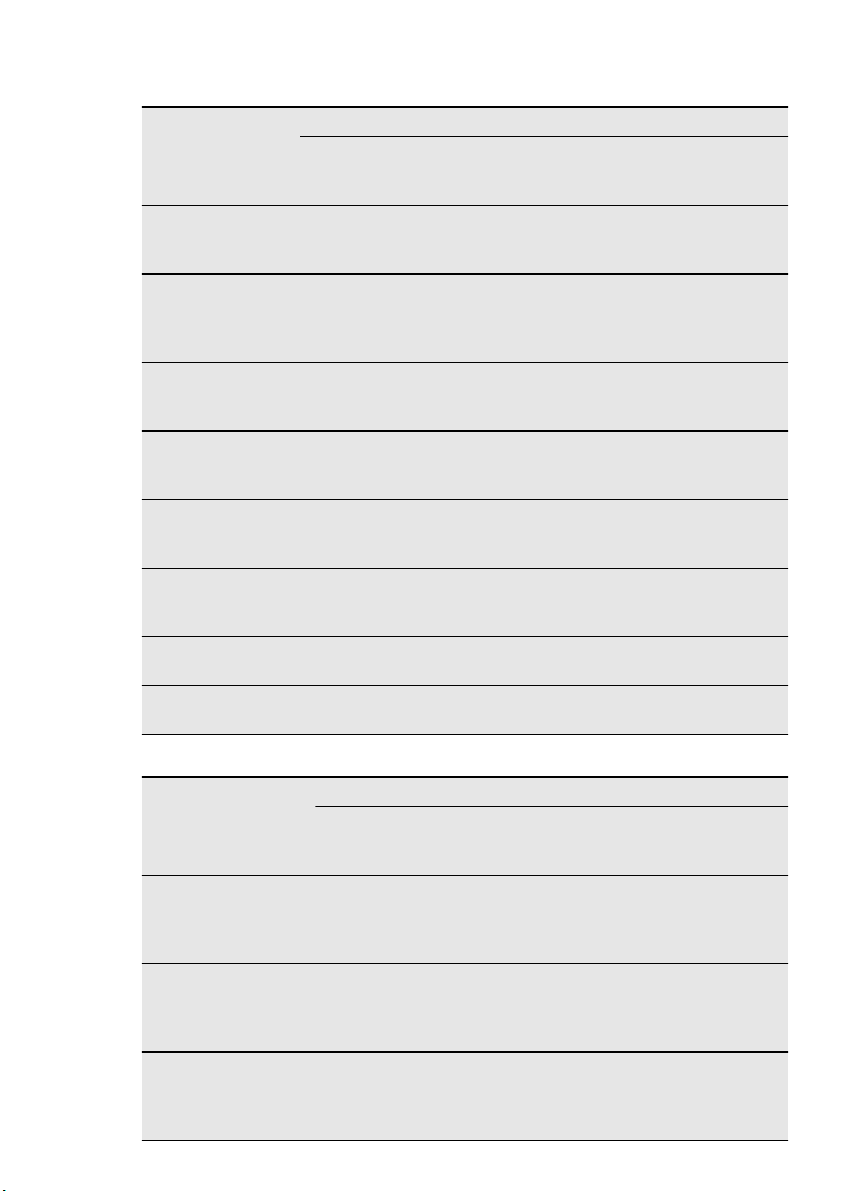
Baby food in jars 200 300 2 - 3 ---
Stir halfway
through; check
temperature!
Baby milk (bottle,
180 ml)
200 1000
0:20 -
0:40
---
Put spoon into
bottle, stir and
check tempera-
ture!
Convenience food 400 - 500 600 4 - 6 5
Remove any alu-
minium lids, turn
halfway through
Frozen ready
meals
400 - 500 400
14 -
20
5
Remove any alu-
minium lids, turn
halfway through
Milk
1 cup ap-
prox. 200
ml
1000
1:15 -
1:45
---
Put spoon in the
container
Water
1 cup ap-
prox. 200
ml
1000
1:30 -
2
---
Put spoon in the
container
Sauce 200 ml 600 1 - 2 ---
Stir halfway
through
Soup 300 ml 600 2 - 4 ---
Stir halfway
through
Cooking table
Food
Microwave
Weight
(g)
Power
(Watts)
Time
(min)
Stand-
ing time
(min)
Comments
Whole fish 500 500 8 - 10 ---
Cook covered,
turn container sev-
eral times during
cooking
Fish fillets 500 500 6 - 8 ---
Cook covered,
turn container sev-
eral times during
cooking
Vegetables, short
cooking time, fresh
1)
500 600
12 -
16
---
Add approx. 50 ml
water, cook cov-
ered, stir halfway
through
34
www.electrolux.com
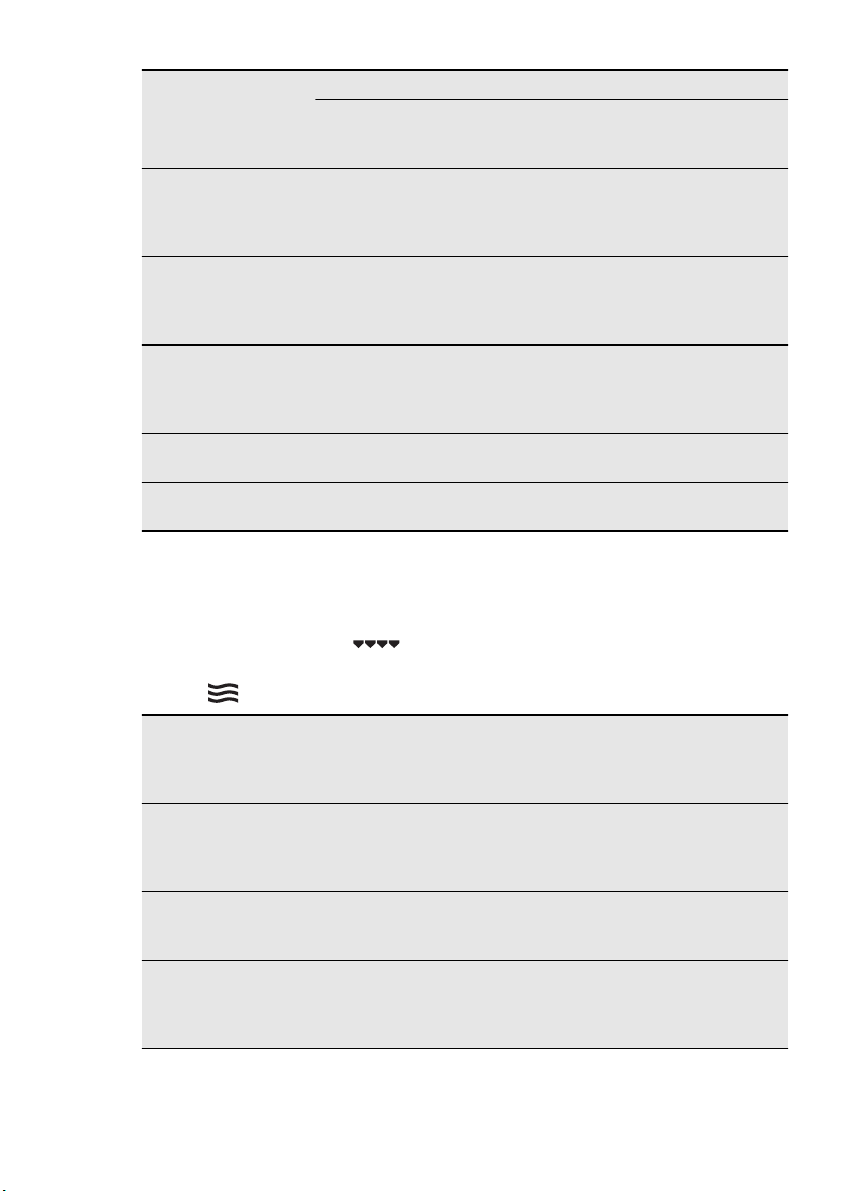
Food
Microwave
Weight
(g)
Power
(Watts)
Time
(min)
Stand-
ing time
(min)
Comments
Vegetables, short
cooking time, frozen
1)
500 600
14 -
18
---
Add approx. 50 ml
water, cook cov-
ered, stir halfway
through
Vegetables, long
cooking time, fresh
1)
500 600
14 -
20
Add approx. 50 ml
water, cook cov-
ered, stir halfway
through
Vegetables, long
cooking time, frozen
1)
500 600
18 -
24
---
Add approx. 50 ml
water, cook cov-
ered, stir halfway
through
Potatoes in their
jacket
800 g +
600 ml
1000 5 - 7
300 W /
15 - 20
Cook covered, stir
halfway through
Rice
300 g +
600 ml
1000 4 - 6 ---
Cook covered, stir
halfway through
1)
Cook all vegetables with a cover on the container. The times given are guidelines only and
depend upon the type and qualities of the foodstuffs.
Combi-Function Table
(for selected models only)
Cooking functions: Grilling
+ mi-
crowave
Preheat Crostino plate: 4 minutes at 700
Watt
Food
Baking / roasting
dishes
Tem
p.
(°C)
Micro-
wave
(Watt)
Shel
f po-
si-
tion
Time
(min)
Comments
2 chicken
halves (
2 x 600 g)
Glass dish with
strainer
220 300 2 40
Turn after
20 min.,
standing
time 5 min.
au gratin
potatoes (1
kg)
Gratin dish 200 300 2 40
10 min.
standing
time
Roast pork
neck
(1100 g)
Glass dish with
strainer
200 300 1 70
Turn in be-
tween, 10
min. stand-
ing time
ENGLISH 35

Food
Baking / roasting
dishes
Tem
p.
(°C)
Micro-
wave
(Watt)
Shel
f po-
si-
tion
Time
(min)
Comments
Apple cake
Crostino plate on
bottom glass. with
pastry max. 5 min. /
preheat 1000 Watt,
turn 1 x
220 400 - 25
Turn in be-
tween
Cheese
cake, frozen
(2 x 70 g)
Crostino plate on
bottom glass. Max. 4
min. / preheat at 700
Watt, turn 1 x
230 200 - 25
Turn in be-
tween
Ham and
cheese
toast, fro-
zen (2 x 100
g)
Crostino plate on
bottom glass. Max. 4
min. / preheat at 700
Watt, turn 1 x
230 200 - 20
Turn after
15 min.
Hamburger
frozen (2 x
90 g)
Crostino plate on
bottom glass. Max. 4
min. / preheat at 700
Watt, turn 1 x
230 300 - 20
Turn after
12 min.
Pizza frozen
Ø 28 cm
(320 g)
Crostino plate on
bottom glass. Max. 4
min. / preheat at 700
Watt, turn 1 x
230 200 - 15
Turn in be-
tween
The cooking times and temperatures are
guidelines only and depend upon the type
and qualities of the foodstuffs.
Tips for the microwave
Result Remedy
You cannot find details for the
amount of food prepared.
Look for a similar food. Increase or shorten
the length of the cooking times according to
the following rule: Double the amount = al-
most double the timeHalf the amount =
half the time
The food has got too dry. Set shorter cooking time or select lower mi-
crowave power.
The food is still not defrosted, hot
or cooked after the time has
elapsed.
Set longer cooking time or select higher mi-
crowave power. Please note that taller
dishes need longer.
After the cooking time has
elapsed, the food is overheated at
the edge but is still not ready in the
middle.
Next time select a lower power and a longer
time. Stir liquids, e. g. soup, halfway
through.
36
www.electrolux.com

13. CARE AND CLEANING
WARNING!
Refer to the Safety chapters.
Notes on cleaning:
• Clean the front of the appliance with a
soft cloth with warm water and a clean-
ing agent.
• To clean metal surfaces, use a usual
cleaning agent.
• Clean the oven interior after each use.
Then you can remove dirt more easily
and it does not burn on.
• Clean all oven accessories after each
use and let them dry.
• If you have nonstick accessories, do
not clean them using aggressive
agents, sharp-edged objects or a dish-
washer. It can cause a damage to the
nonstick coating.
13.1 Removing the shelf
supports
You can remove the shelf supports to
clean the side walls.
Lift the shelf support up and pull it out.
Install the shelf supports in the op-
posite sequence.
1
2
2
13.2 Lamp
WARNING!
Danger of electrocution! Discon-
nect the fuse before you replace
the lamp.
The lamp and the lamp glass cov-
er can be hot.
Before you change the lamp:
• Deactivate the appliance.
• Remove the fuses from the fuse box or
deactivate the circuit breaker.
CAUTION!
Put a cloth on the bottom of the
interior of the appliance. It pre-
vents damage to the lamp glass
cover and the cavity.
Always use the same lamp type.
13.3 Replacing the oven lamp
and cleaning the glass cover
To prevent damage to the oven
lamp and the glass cover, put a
cloth on the bottom of the oven.
Always hold the halogen lamp
with a cloth to prevent grease res-
idue from burning on the lamp.
1.
The oven lamp is on the left side of
the oven cavity. Remove the left shelf
support to get access to the lamp.
2.
Turn the lamp glass cover counter-
clockwise to remove it.
3.
Clean the glass cover.
4.
If necessary, replace the oven lamp
with an applicable 300 °C, G9 heat-
resistant oven lamp.
5.
Install the glass cover.
6.
Install the shelf support.
ENGLISH 37
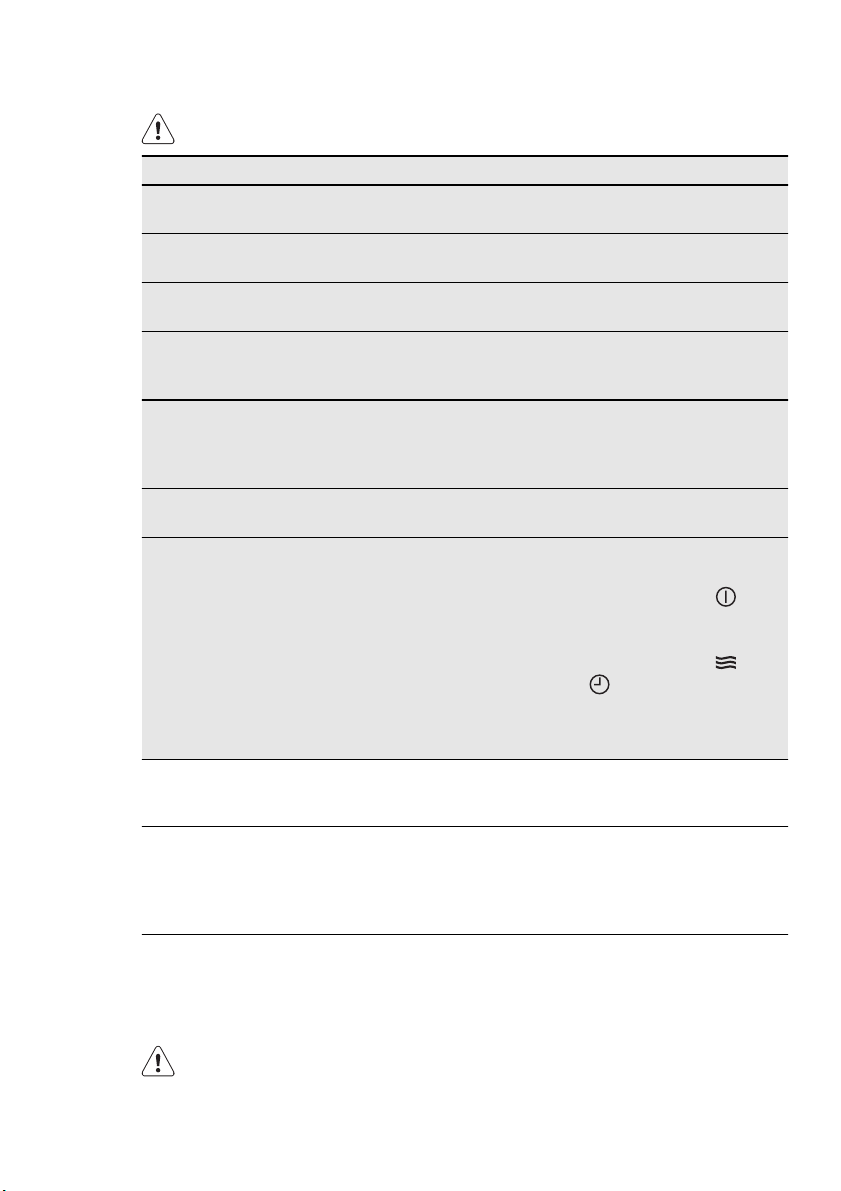
14. WHAT TO DO IF…
WARNING!
Refer to the Safety chapters.
Problem Possible cause Remedy
The appliance does
not heat up.
The appliance is deactiva-
ted.
Activate the appliance.
The appliance does
not heat up.
The clock is not set. Set the clock.
The appliance does
not heat up.
The necessary settings are
not set.
Make sure that the settings
are correct.
The appliance does
not heat up.
The Child Lock is on. Refer to “Activating and de-
activating the Child Lock
function”.
The appliance does
not heat up.
The fuse in the fuse box is
released.
Do a check of the fuse. If
the fuse is released more
than one time, contact a
qualified electrician.
The lamp does not
operate.
The lamp is defective. Replace the lamp.
The appliance does
not heat up. The fan
does not operate.
The display shows
“DEMO”.
The test mode is activated.
1.
Deactivate the appli-
ance.
2.
Touch and hold until
the appliance activates
and deactivates.
3.
Touch and hold and
at the same time un-
til an acoustic signal
sounds three times and
“DEMO” goes out.
If you cannot find a solution to the prob-
lem yourself, contact your dealer or the
service centre.
The necessary data for the service centre
is on the rating plate. The rating plate is
on the front frame of the appliance cavity.
We recommend that you write the data here:
Model (Mod.) .........................................
Product number (PNC) .........................................
Serial number (Serie:) .........................................
15. INSTALLATION
WARNING!
Refer to the Safety chapters.
38
www.electrolux.com
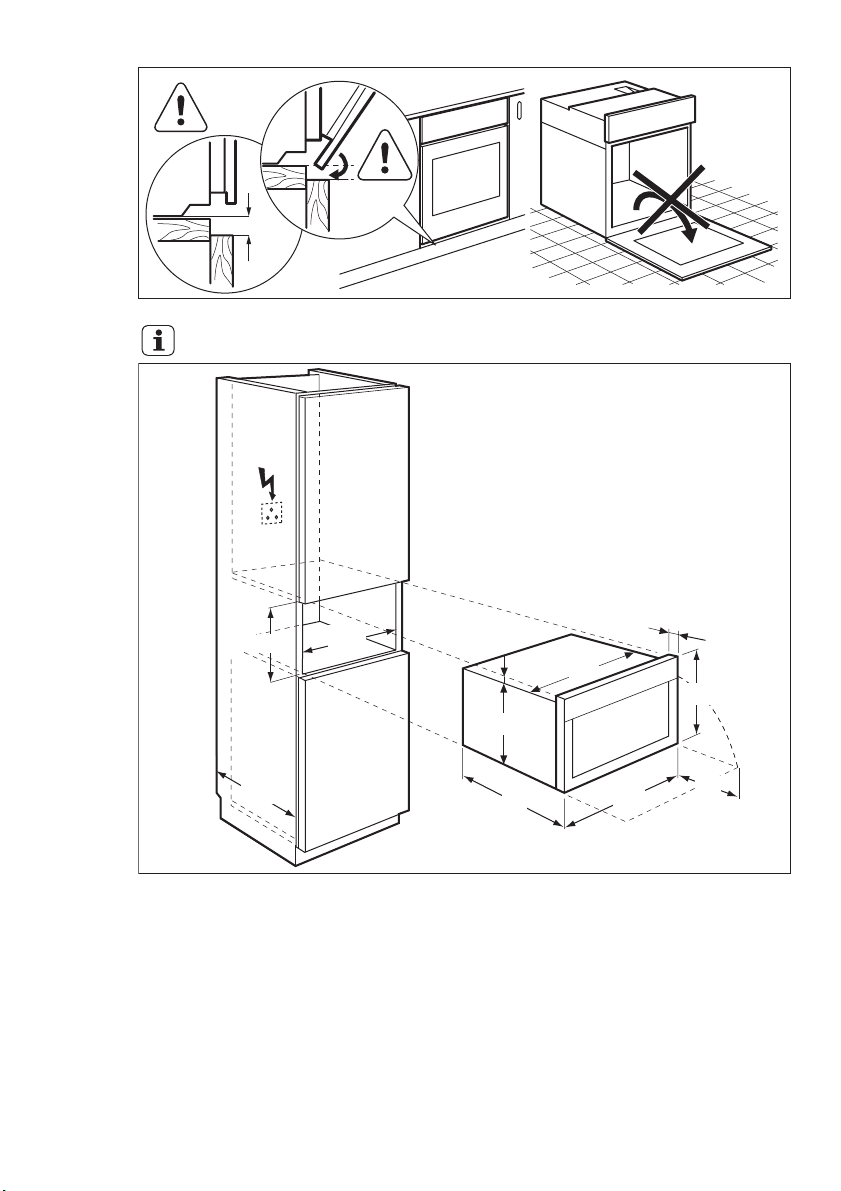
min.
3 mm
To lift the appliance, do not use
the door handle.
375
594
567
594
252
388
20
380-383
min.
550
min.
560
13
ENGLISH 39
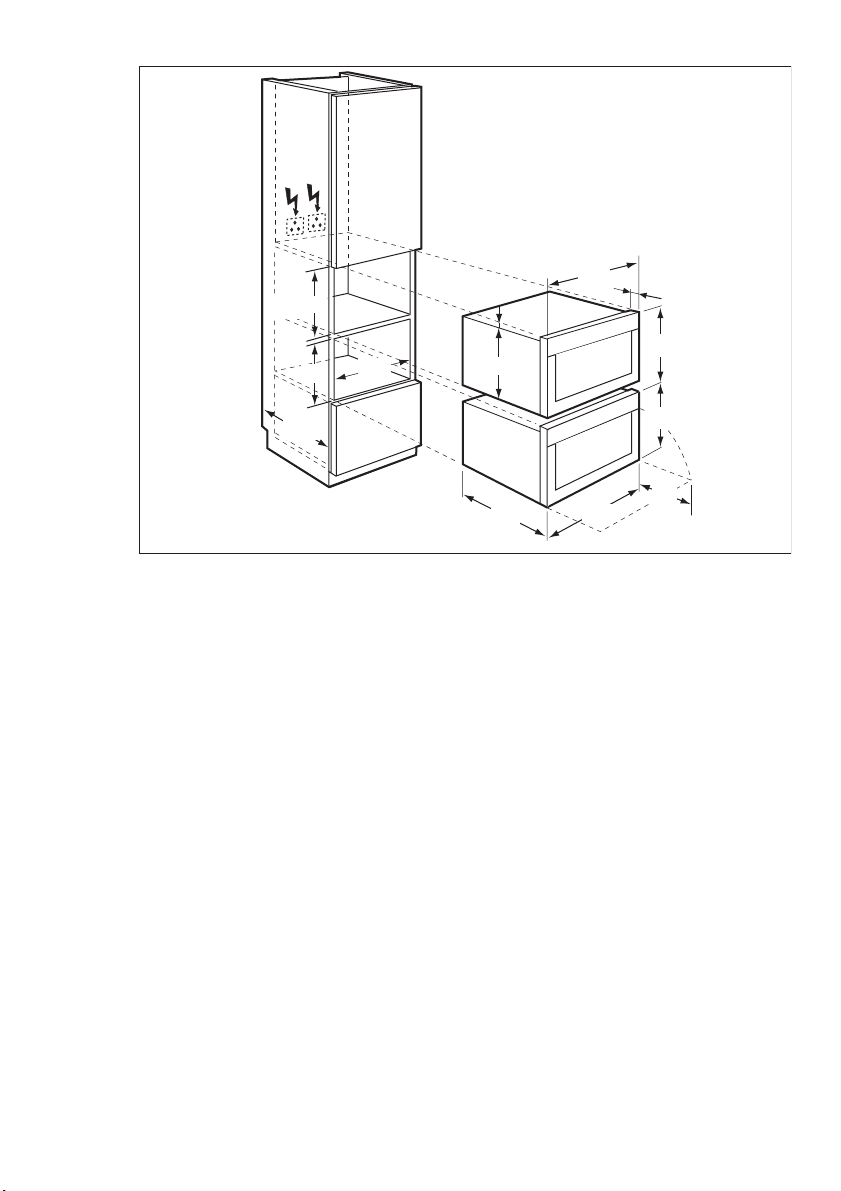
375
min.
567
594
252
388
388
380-383
594
550
380
560
min.
20
13
40
www.electrolux.com
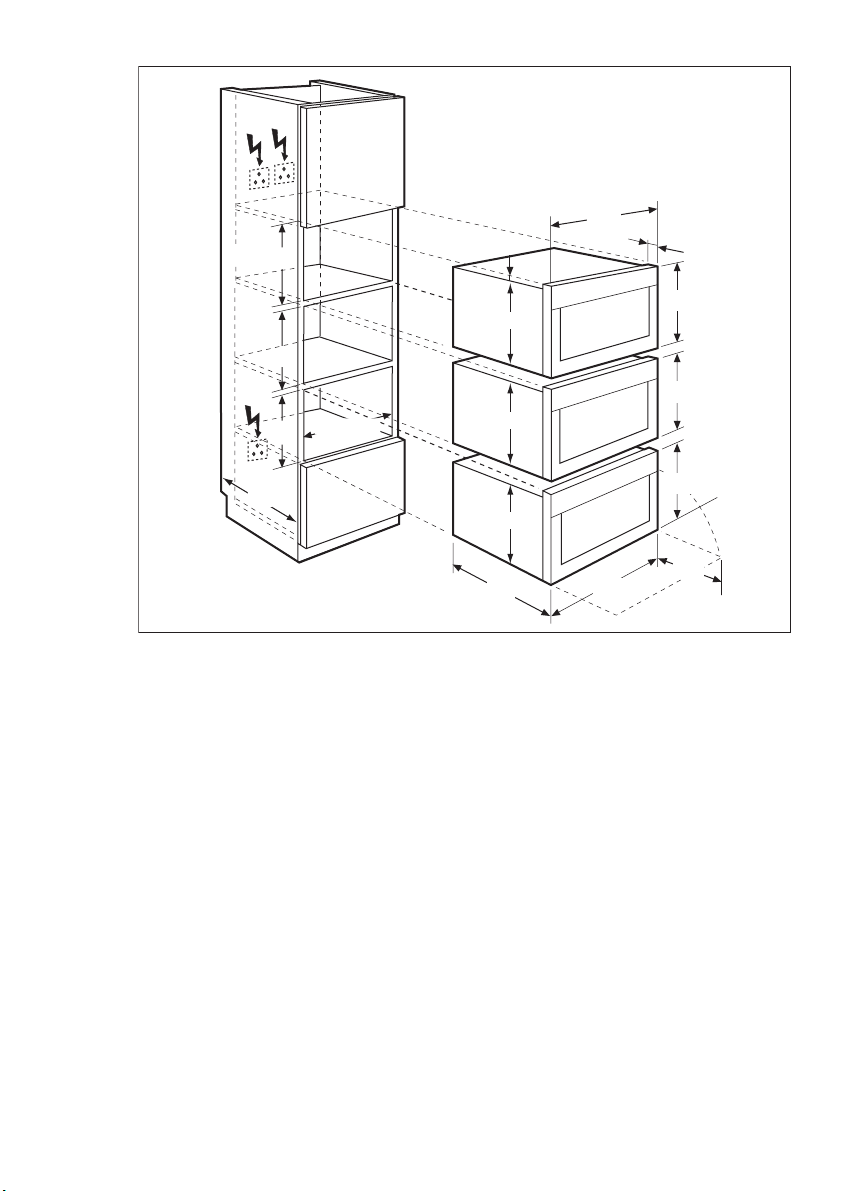
375
13
375
380
380
380-383
375
388
388
388
567
594
252
594
20
min.
550
min. 560
ENGLISH 41
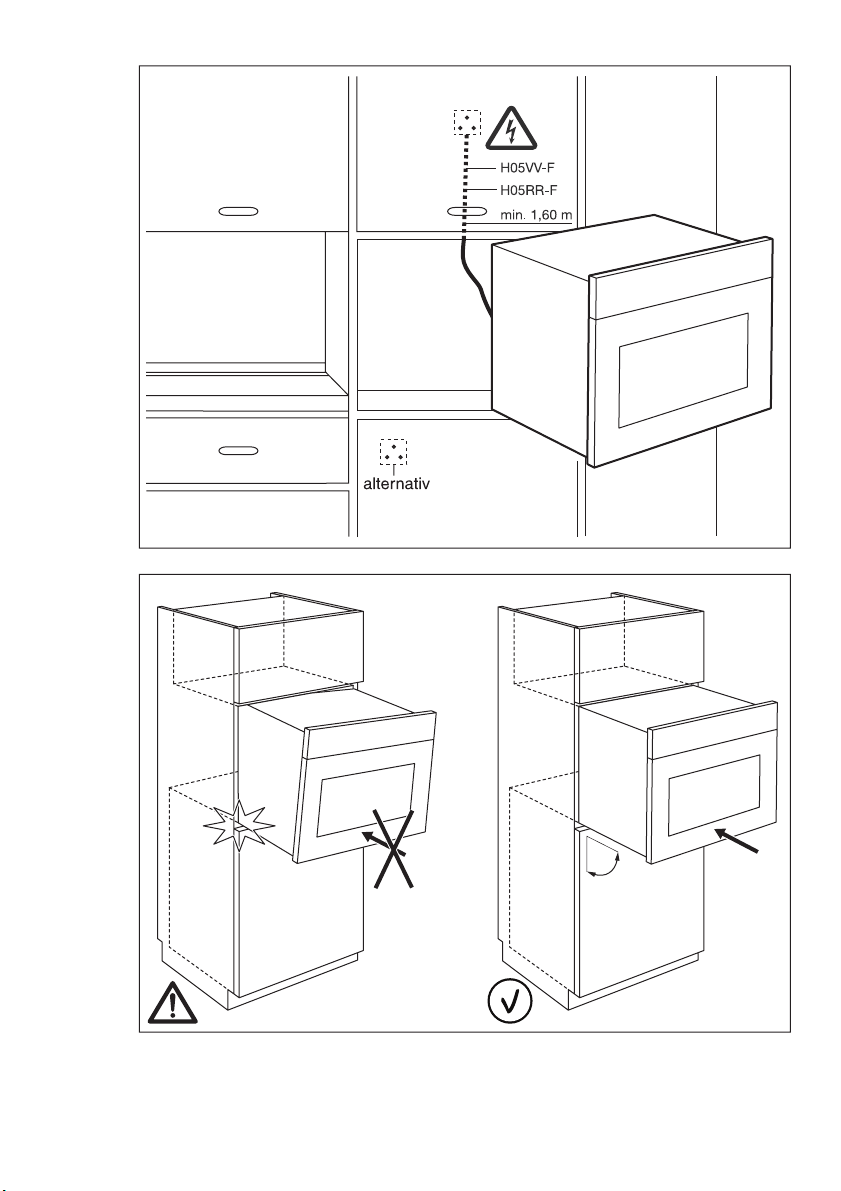
90°
42
www.electrolux.com
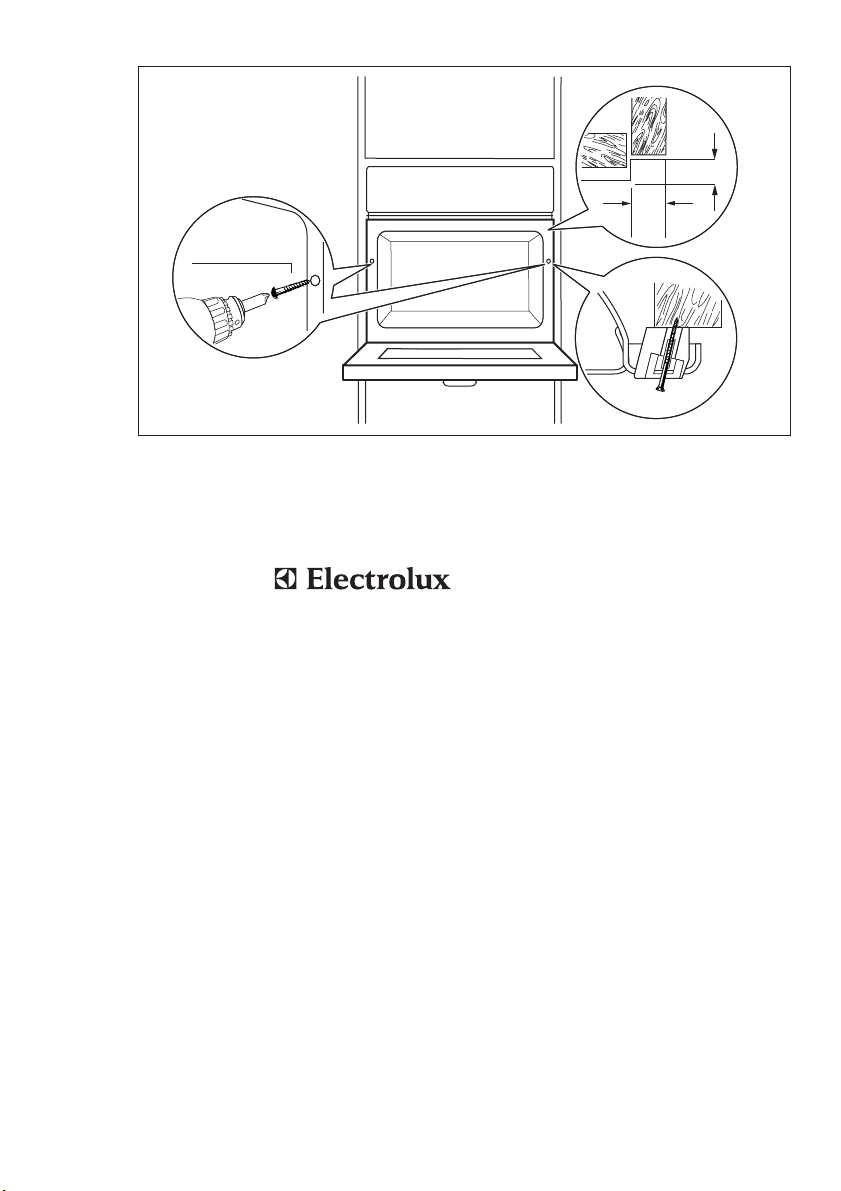
13
20
2x3,5x25
16. WARRANTY
FOR SALES IN AUSTRALIA AND NEW
ZEALAND
APPLIANCE: BUILT-IN OVEN, COOKTOP
AND FREESTANDING COOKER
This document sets out the terms and
conditions of the product warranties
for Electrolux Appliances. It is an im-
portant document. Please keep it with
your proof of purchase documents in
a safe place for future reference
should you require service for your
Appliance.
1.
In this warranty
a)
‘acceptable quality’ as referred to
in clause 10 of this warranty has
the same meaning referred to in
the ACL;
b)
‘ACL’ means Trade Practices
Amendment (Australian Consumer
Law) Act (No.2) 2010;
c)
‘Appliance’ means any Electrolux
product purchased by you ac-
companied by this document;
d)
‘ASC’ means Electrolux’ author-
ised serviced centres;
e)
‘Electrolux’ means Electrolux
Home Products Pty Ltd of 163
O’Riordan Street, Mascot, NSW
2020, ABN 51 004 762 341 in re-
spect of Appliances purchased in
Australia and Electrolux (NZ) Limi-
ted of 3-5 Niall Burgess Road,
Mount Wellington, in respect of
Appliances purchased in New
Zealand;
f)
‘major failure’ as referred to in
clause 10 of this warranty has the
same meaning referred to in the
ACL and includes a situation when
an Appliance cannot be repaired
or it is uneconomic for Electrolux,
at its discretion, to repair an Appli-
ance during the Warranty Period;
g)
‘Warranty Period’ means:
– where the Appliance is used for
personal, domestic or house-
hold use (i.e. normal single fami-
ly use) as set out in the instruc-
tion manual, the Appliance is
warranted against manufactur-
ing defects in Australia for 24
months and in New Zealand for
24 months, following the date of
original purchase of the Appli-
ance;
ENGLISH 43

– where the Appliance is used for
commercial purposes (including
being used to directly assist a
business or where the Appli-
ance is used in a multi-family
communal or share type envi-
ronment), the Appliance will
then be warranted against man-
ufacturing defects in Australia
for 3 months and in New Zea-
land for 3 months, following the
date of original purchase of the
Appliance.
h)
‘you’ means the purchaser of the
Appliance not having purchased
the Appliance for re-sale, and
‘your’ has a corresponding mean-
ing.
2.
This warranty only applies to Applian-
ces purchased and used in Australia
or New Zealand and is in addition to
(and does not exclude, restrict, or
modify in any way) any non-excluda-
ble statutory warranties in Australia or
New Zealand.
3.
During the Warranty Period Electrolux
or its ASC will, at no extra charge if
your Appliance is readily accessible
for service, without special equipment
and subject to these terms and con-
ditions, repair or replace any parts
which it considers to be defective.
Electrolux or its ASC may use rema-
nufactured parts to repair your Appli-
ance. You agree that any replaced
Appliances or parts become the
property of Electrolux. This warranty
does not apply to light globes, batter-
ies, filters or similar perishable parts.
4.
Parts and Appliances not supplied by
Electrolux are not covered by this
warranty.
5.
You will bear the cost of transporta-
tion, travel and delivery of the Appli-
ance to and from Electrolux or its
ASC. If you reside outside of the serv-
ice area, you will bear the cost of:
a)
travel of an authorised representa-
tive;
b)
transportation and delivery of the
Appliance to and from Electrolux
or its ASC,
In all instances, unless the Appliance
is transported by Electrolux or an
Electrolux authorised representative,
the Appliance is transported at the
owner’s cost and risk while in transit
to and from Electrolux or its ASC.
6.
Proof of purchase is required before
you can make a claim under this war-
ranty.
7.
You may not make a claim under this
warranty unless the defect claimed is
due to faulty or defective parts or
workmanship. Electrolux is not liable
in the following situations (which are
not exhaustive):
a)
the Appliance is damaged by:
–accident
– misuse or abuse, including fail-
ure to properly maintain or serv-
ice
– normal wear and tear
– power surges, electrical storm
damage or incorrect power
supply
– incomplete or improper installa-
tion
– incorrect, improper or inappro-
priate operation
– insect or vermin infestation
– failure to comply with any addi-
tional instructions supplied with
the Appliance;
b)
the Appliance is modified without
authority from Electrolux in writing;
c)
the Appliance’s serial number or
warranty seal has been removed
or defaced;
d)
the Appliance was serviced or re-
paired by anyone other than Elec-
trolux, an authorised repairer or
ASC.
8.
This warranty, the contract to which it
relates and the relationship between
you and Electrolux are governed by
the law applicable where the Appli-
ance was purchased. Where the Ap-
pliance was purchased in New Zea-
land for business purposes the Con-
sumer Guarantee Act does not apply.
9.
To the extent permitted by law, Elec-
trolux excludes all warranties and lia-
bilities (other than as contained in this
document) including liability for any
loss or damage whether direct or indi-
rect arising from your purchase, use
or non use of the Appliance.
44
www.electrolux.com
10.
For Appliances and services provided
by Electrolux in Australia, the Applian-
ces come with a guarantee by Elec-
trolux that cannot be excluded under
the Australian Consumer Law. You
are entitled to a replacement or re-
fund for a major failure and for com-
pensation for any other reasonably
foreseeable loss or damage. You are
also entitled to have the Appliance re-
paired or replaced if the Appliance
fails to be of acceptable quality and
the failure does not amount to a ma-
jor failure. The benefits to you given
by this warranty are in addition to
your other rights and remedies under
a law in relation to the Appliances or
services to which the warranty re-
lates.
11.
At all times during the Warranty Peri-
od, Electrolux shall, at its discretion,
determine whether repair, replace-
ment or refund will apply if an Appli-
ance has a valid warranty claim appli-
cable to it.
12.
For Appliances and services provided
by Electrolux in New Zealand, the Ap-
pliances come with a guarantee by
Electrolux pursuant to the provisions
of the Consumer Guarantees Act, the
Sale of Goods Act and the Fair Trad-
ing Act.
13.
To enquire about claiming under this
warranty, please follow these steps:
a)
carefully check the operating in-
structions, user manual and the
terms of this warranty;
b)
have the model and serial number
of the Appliance available;
c)
have the proof of purchase (eg an
invoice) available;
d)
telephone the numbers shown be-
low.
14.
You accept that if you make a war-
ranty claim, Electrolux and its ASC
may exchange information in relation
to you to enable Electrolux to meet its
obligations under this warranty.
Important Notice
Before calling for service, please ensure that the steps listed in point 13 above have
been followed.
FOR SERVICE
or to find the address of
your nearest state service
centre in Australia
Please call 13 13 4 9
For the cost of a local call (Aus-
tralia only)
SERVICE AUSTRALIA
ELECTROLUX HOME
PRODUCTS
www.electrolux.com.au
FOR SPARE PARTS
or to find the address of
your nearest state spare
parts centre in Australia
Please call 13 13 50
For the cost of a local call (Aus-
tralia only)
FOR SERVICE
or to find the address of
your nearest authorised
service centre in New
Zealand
Free call 0800 10 66 10
(New Zealand only)
SERVICE NEW ZEA-
LAND
ELECTROLUX HOME
PRODUCTS
www.electrolux.co.nz
FOR SPARE PARTS
or to find the address of
your nearest state spare
parts centre in New Zea-
land
Free call 0800 10 66 20
(New Zealand only)
17. ENVIRONMENT CONCERNS
Recycle the materials with the symbol
. Put the packaging in applicable
containers to recycle it.
Help protect the environment and human
health and to recycle waste of electrical
and electronic appliances. Do not dispose
appliances marked with the symbol
with the household waste. Return the
product to your local recycling facility or
contact your municipal office.
ENGLISH 45

46
www.electrolux.com

ENGLISH 47
www.electrolux.com/shop
892960003-A-042013