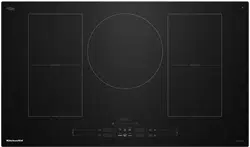
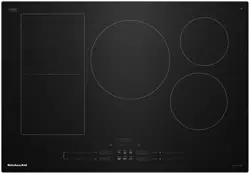
This manual covers different models. The cooktop you have purchased may have some or all of the features listed.
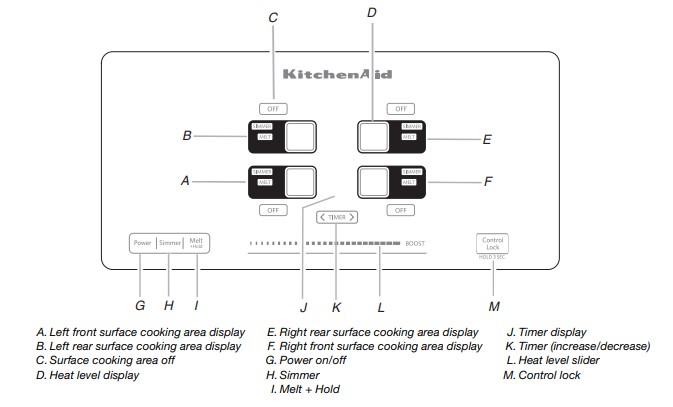
30" (76.2 cm) Model KICU500
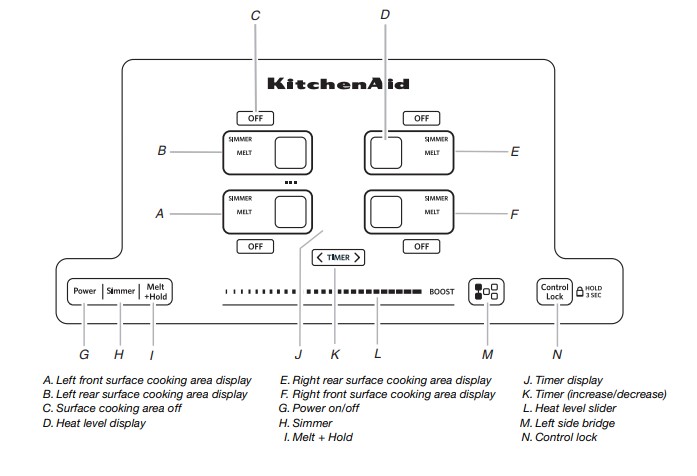
30" (76.2 cm) Model KICU509
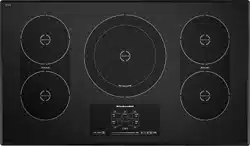
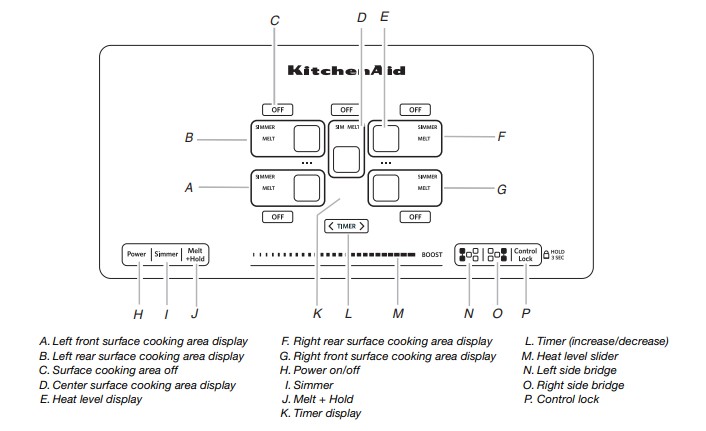
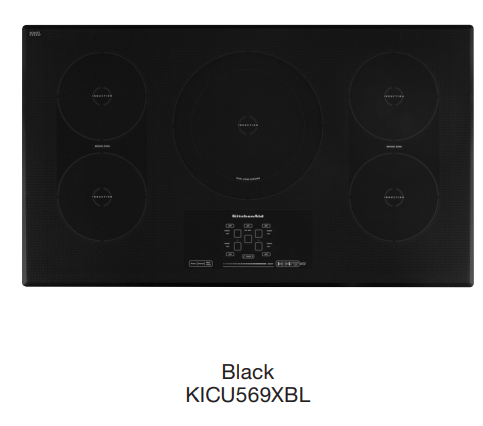
36" (91.4 cm) Model KICU569
Induction Cooking
Induction cooking is quite different from traditional forms of cooking. The heat is generated directly in the pan, keeping the cooking surface cooler than a traditional element. Induction cooking does not lose as much heat as traditional forms because all the heat is created in the pan itself.
The cooktop heats up or cools down quickly after the controls are set. It also stops heating when the pan is removed without turning off the power.
Food spilled on the cooktop surface will not burn because the glass is not heated. Induction cooking allows for immediate cleaning after use because the heat is created in the pan.
Pan size, material (see “Cookware” section), and positioning is very important to achieve maximum wattage. The diameter of the pan’s base should be equal to the size of the element.
If the pan is too small, the burner does not sense the pan and will not activate.
Cooktop Controls
The touch-activated electronic controls offer a variety of heat settings for optimal cooking results. When melting foods such as chocolate or butter, the surface cooking area can be set to the Melt function for minimal cooking power. For maximum surface cooking power, all cooktop touchactivated electronic controls can be set to Performance Boost function when bringing liquids to a fast and rapid boil. Touch BOOST to immediately reach the highest setting.
NOTE: This cooktop will also work with a 208V operation where 240V installation is not available.
First use or after a power failure:
After connecting the cooktop to an electrical power supply or after a power failure, the control panel will be locked. An indicator light above the key icon will be on. To unlock the control panel, press and hold CONTROL LOCK for 3 seconds. The indicator light will turn off, and the cooktop is ready for use.
To Use
To Turn On the Cooktop:
Press POWER. The indicator light above the Power keypad and a dash (“-”) in each surface cooking area will light to indicate that each surface cooking area is ready to be activated. Inactivity for 1 minute after the main power has been turned on will automatically turn off the power to the cooktop. If a cooking function or the power slider is touched without first selecting a surface cooking area, all dashes (one for each zone) will flash and an invalid tone will sound 3 times.
To Turn On a Surface Cooking Area:
Touch directly on the display area for the surface cooking area you want to use. The current power level and indicator light will flash for 10 seconds then remain on. Touching any other feature or the power slider stops the flashing and information for the keypad that was touched will be displayed. When a surface cooking area is selected, the timer will also turn on to show that it can now be set. When a surface cooking area is left at the “0” power level for 1 minute, the surface cooking area will automatically turn off and display only the middle dash without the indicator light.
Select a heat setting from 1 - 9 by touching/sliding on the power slider. The heat setting will appear in the surface cooking area display. The power slider consists of 9 positions plus a “Boost” position. When the user slides to 0, “0” will be displayed. The surface cooking area will not turn on but remains active/ selected. When a surface cooking area is left at the “0” power level for 1 minute, the zone will automatically turn off and display only the middle dash without the indicator light.
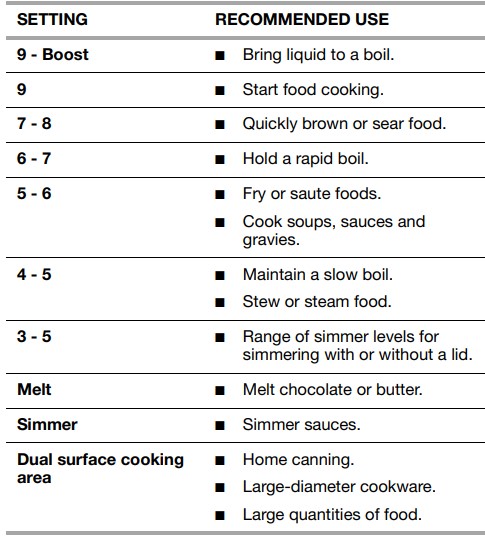
Use the following chart as a guide when setting heat levels.
To Turn Off:
Touch OFF to turn off desired surface cooking area. One tone will sound when Off is pressed.
Touch POWER to turn off the cooktop when finished.
Hot Surface Indicator
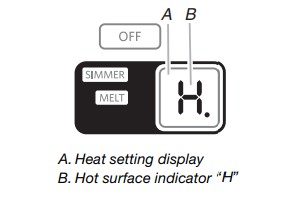
An “H” will appear in the heat setting display as long as any surface cooking area is too hot to touch, even after the surface cooking area(s) is turned off
Dual Size Surface Cooking Area
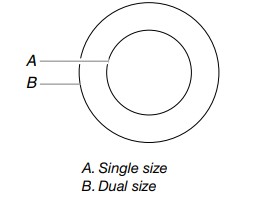
The dual size surface cooking area offers flexibility to cook using different sizes of cookware. Single size can be used in the same way as a regular surface cooking area. The dual size combines inner and outer surface cooking areas and is recommended for larger cookware, large quantities of food, and home canning.
The dual size surface cooking area contains two cooking areas. If the size of the pan is the same as the single size surface cooking area, the cooking area will work as a single size cooking area. If the pan is slightly larger than the single size cooking area, it may activate only part of the dual size cooking area. This will result in the burner being less efficient and will increase the heating time. If the size of the pan is the same as the dual size surface cooking area, the dual size cooking area will activate automatically.
Simmer
The Simmer function can be used on with all surface cooking areas. Simmer can be used on more than 1 surface cooking area at a time.
To Use:
To Turn On:
Check that a surface cooking area has been selected.
Touch SIMMER. “A” will appear in the display, and the indicator light next to Simmer will light. The timer remains visible and can be set if desired.
To Turn Off:
Simmer can be turned off in 3 different ways:
Use the power slider to set to a heat level. OR
Touch the surface cooking area OFF keypad. OR
Select a different cooking function.
Melt + Hold
The Melt + Hold function can be used on with all surface cooking areas. Melt + Hold can be used on more than 1 surface cooking area at a time.
To Use
To Turn On:
Check that a surface cooking area has been selected.
Touch MELT + HOLD. “A” will appear in the display, and the indicator light next to Melt + Hold will light. The timer remains visible and can be set if desired.
To Turn Off:
Melt + Hold can be turned off in 3 different ways:
Use the power slider to set to a heat level. OR '
Touch the surface cooking area OFF keypad. OR
Select a different cooking function
Bridge (on some models)
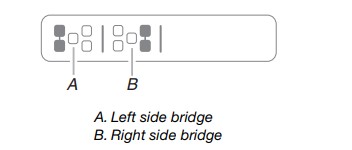
The Bridge function can be activated when surface cooking areas are on or when they are off. The Bridge function allows you to use 2 cooking zones as an extra-large cooking zone.
To Turn On a Bridge:
Touch the desired Bridge keypad (left side bridge or right side bridge). The indicator light above the Bridge keypad will light. The heat setting levels for the 2 surface cooking areas will default to “0” and can be set from a minimum of “1” to a maximum of “9.” Any timers that may be running for the 2 surface cooking areas will turn off, and 2 dashes “--” will appear in the timer display.
Slide a finger on the Heat Level Slider to change the power level up or down. The selected heat level will show in the heat level display for each surface cooking area using the bridge.
To Turn Off a Bridge:
Touch the Bridge keypad for the zone being used (left side bridge or right side bridge). The surface cooking areas will resume operation as 2 separate areas. NOTE: Performance Boost cannot be used on the same elements in combination when the Bridge function.
Pan Detection
If a pan is removed from a surface cooking area when it is in use, the “no pan” indicator lights up. A flashing dash “-” will also appear in the display along with an “alert” tone for 1 minute. If the pan is not correctly replaced within 1 minute, the surface cooking area will switch Off.
If a Timer is running when a pan is removed the countdown will pause.
Control Lock
The Control Lock avoids unintended use of the surface cooking areas.
If Control Lock is activated when power to the cooktop is off, the cooktop is locked out, and the surface cooking areas cannot be turned on by the cooktop touch controls.
If Control Lock is activated when power to the cooktop is on, all keypads are locked out except for the Power and On/Off keypads.
To Lock Cooktop: Touch and hold the CONTROL LOCK keypad for 3 seconds. After 3 seconds, a tone will sound and the indicator light above the Control Lock keypad will light, indicating that the cooktop controls are in the lockout position. If the cooktop is in use when Control Lock is activated, cooking will proceed as normal and any timers that have been set will continue their countdown.
To Unlock Cooktop: Touch and hold the CONTROL LOCK keypad for 3 seconds
Performance Boost Function
This function allows you to increase the heat setting level above the maximum heat setting 9 for 10 minutes or less.
NOTE: Performance Boost is not available when the Bridge function is activated.
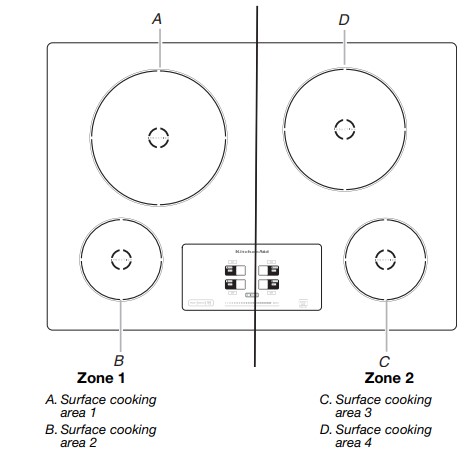
30" (76.2 cm) Model KICU500
Performance Boost function is available on only 1 surface cooking area at a time within a zone. If you attempt to use another surface cooking area in the same zone, “P” and “9” will briefly flash in the display before returning to heat setting level 9. The surface cooking area that was set to the Performance Boost function will automatically reset to heat setting level 9. See the following illustrations for zones.
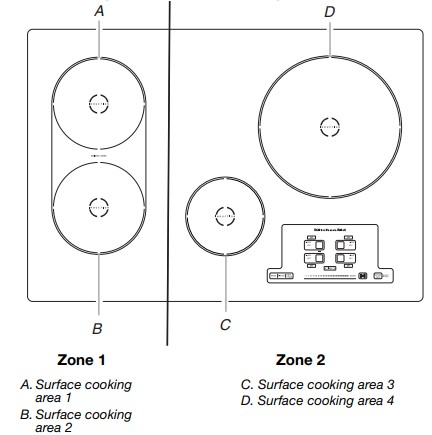
30" (76.2 cm) Model KICU509
Performance Boost function is available on only 1 surface cooking area at a time within a zone. If you attempt to use another surface cooking area in the same zone, “P” and “9” will briefly flash in the display before returning to heat setting level 9. The surface cooking area that was set to the Performance Boost function will automatically reset to heat setting level 9. See the following illustrations for zones.
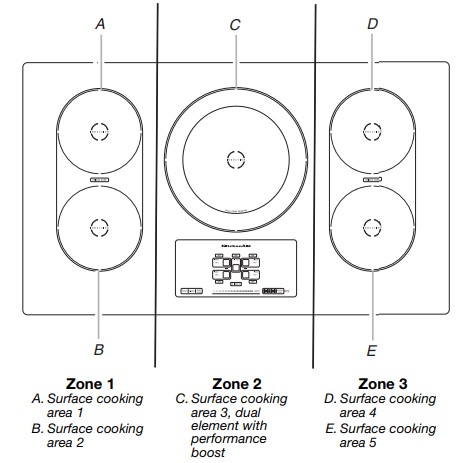
36" (91.4 cm) Model KICU569
Perfomance Boost can be used on all surface cooking areas at the same time.
To Use:
Check that a surface cooking area has been selected.
Touch BOOST. “P” will appear in the display.
Touch BOOST keypad when finished. The “P” will no longer be visible in the display, and the Performance Boost function will no longer be active. The surface cooking area turns back to heat setting level 9.
NOTE: The Performance Boost function may automatically deactivate to keep the internal electronic components of the cooktop from becoming too hot.
Timer
Use the cooking timer to set times up to 90 minutes. The timer is independent of any other control settings. The timer can be used only on one cooking zone at a time.
To Use:
Touch the TIMER keypad. “01” will appear in the timer display.
Touch the “>” key to increase the time in 1-minute increments. or Touch the “<” key to decrease the time in 1-minute increments
The timer will start to count down after a few seconds. To change the time, touch the time “>” or “<” keypads.
When the countdown is finished,”00” flashes and a tone will sound.
NOTE: When the power is restored after an outage, the timer will no longer be running.
Tones
Tones are audible signals, indicating the following:
One tone
Valid pad press
Slider is moved to “0” power level
Slider is moved to “Boost” power level
Two tones
Invalid pad press
Three tones
End of Timer cycle
Ceramic Glass
Cleaning off the induction cooktop before and after each use will help keep it free from stains and provide the most even heating. For more information, see “General Cleaning” section.
Avoid storing jars or cans above the cooktop. Dropping a heavy or hard object onto the cooktop could crack the cooktop.
To avoid damage to the cooktop, do not leave a hot lid on the cooktop. As the cooktop cools, air can become trapped between the lid and the cooktop, and the ceramic glass could break when the lid is removed.
For foods containing sugar in any form, clean up all spills and soils as soon as possible. Allow the cooktop to cool down slightly. Then, while wearing oven mitts, remove the spills while the surface is still warm. If sugary spills are allowed to cool down, they can adhere to the cooktop and can cause pitting and permanent marks.
To avoid scratches, do not slide cookware or bakeware across the cooktop.
To avoid damage to the cooktop, do not allow objects that could melt, such as plastic or aluminum foil, to touch any part of the entire cooktop.
To avoid damage to the cooktop, do not use the cooktop as a cutting board.
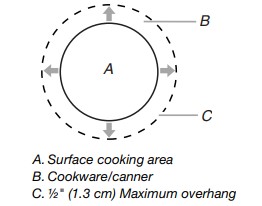
Use cookware about the same size as the surface cooking area. Cookware should not extend more than ½" (1.3 cm) outside the area.
Use flat-bottomed cookware for best heat conduction and energy efficiency. Cookware with rounded, warped, ribbed or dented bottoms could cause uneven heating and poor cooking results.
Determine flatness by placing the straight edge of a ruler across the bottom of the cookware. While you rotate the ruler, no space or light should be visible between it and the cookware.
Make sure the bottoms of pots and pans are clean and dry before using them. Residue and water can leave deposits when heated.
Cookware
Only ferromagnetic pans can be used for induction cooking.
Ferromagnetic materials include:
Enameled steel
Cast iron
Stainless steel designed for induction cooking
Non-ferromagnetic materials include:
These types of pans will not work with induction cooking.
Stainless steel
Glass
Ceramic
Copper or aluminum pans
To find out whether your pans can be used with an induction cooktop, flip the pan over, hold a magnet to the bottom of the pan, and see whether it sticks. If the magnet sticks to the bottom of the pan, the pan is ferromagnetic and can be used for induction cooking.
The number on the surface cooking area heat setting display will flash if no pan is placed on the surface cooking area, or the pan is not made of the right material, or it is not the right size. It will stop flashing once a suitable pan is placed on the surface cooking area. If you take longer than 90 seconds to place the correct pan on the surface cooking area, the surface cooking area will turn off.
Ideal cookware should have a flat bottom, straight sides and a well-fitting lid, and the material should be of medium-to-heavy thickness.
Choose the correct pan size for each surface cooking area. The diameter of the pan’s base should correspond to the size of the surface cooking area.
NOTE: Cookware manufacturers often give the diameter across the top of the pan. This is usually larger than the diameter of the base. Pans with rough finishes may scratch the cooktop.
COOKTOP CARE
General Cleaning
IMPORTANT: Before cleaning, make sure all controls are off and the cooktop is cool. Always follow label instructions on cleaning products.
Soap, water and a soft cloth or sponge are suggested first unless otherwise noted.
CERAMIC GLASS
To avoid damage, do not use steel wool, abrasive powder cleansers, chlorine bleach, rust remover or ammonia.
Cleaning Method:
Always wipe with a clean, wet cloth or sponge and dry thoroughly to avoid streaking and staining.
Cooktop Cleaner is recommended for regular use to help avoid scratches, pitting and abrasions, and to condition the cooktop. It may be ordered as an accessory. See “Assistance or Service” section to order.
A Cooktop Scraper is also recommended for stubborn soils, and can be ordered as an accessory. See “Assistance or Service” section to order. The Cooktop Scraper uses razor blades. Store razor blades out of the reach of children.
Light to moderate soil
Paper towels or clean damp sponge.
Cooktop Cleaner and clean damp paper towel: Clean as soon as cooktop has cooled down. Rub creme into surface with a damp paper towel or soft cloth. Continue rubbing until white film disappears.
Sugary spills (jellies, candy, syrup)
Cooktop Scraper: Clean while the cooktop is still warm. You may want to wear oven mitts while cleaning the cooktop.
Heavy soil, dark streaks, specks and discoloration
Cooktop Cleaner or nonabrasive cleanser: Rub product into soil with a damp paper towel or soft cloth. Continue rubbing until white film disappears.
Burned-on soil
Cooktop Cleaner and Cooktop Scraper: Rub creme into soil with damp paper towel. Hold scraper as flat as possible on surface and then scrape. Repeat for stubborn spots. Polish entire cooktop with creme and paper towel.
Tiny scratches and abrasions
Cooktop Cleaner: Rub creme into surface with a damp paper towel or soft cloth. Continue rubbing until white film disappears. Scratches and abrasions do not affect cooking performance and after many cleanings become less noticeable.
TROUBLESHOOTING
Try the solutions suggested here first in order to avoid the cost of an unnecessary service call.
Nothing will operate
Is the cooktop wired properly? See the Installation Instructions for more information.
Has a household fuse blown, or has a circuit breaker tripped? Replace the fuse or reset the circuit breaker. If the problem continues, call an electrician.
Cooktop will not operate
Is the cooktop control set correctly? Touch the display area on the control panel to select a cooking surface before selecting a function.
Is the “Control Lock” Cooktop Lockout set? See “Control Lock” section.
Has the cooktop turned off by itself? The power off key was unintentionally touched. Press power key again. Reset the cooktop.
Excessive heat around cookware on cooktop
Is the cookware the proper size? Use cookware about the same size as the surface cooking area. Cookware should not extend more than ½" (1.3 cm) outside the cooking area.
Cooktop cooking results not what expected
Is the proper cookware being used? See “Cookware” section.
Is the cooktop control set to the proper heat level? See “Cooktop Controls” section.
Is the cooktop level? Level the cooktop. See the Installation Instructions.
Display shows messages
Is the display flashing when you place a saucepan on an induction surface cooking area? Check that the saucepan is electromagnetic. Check that the diameter of the saucepan is large enough. Center the saucepan on the surface cooking area. Allow the saucepan to cool down in the event that it has become hot when used. Switch the surface cooking area off, then on again. If the display still does not light up, turn power off at the circuit breaker. Wait 20 seconds and turn power back on.
Is the Performance boost function display flashing and switching off? The Performance boost function operates the surface cooking area with the most power. During long cooking times, it is possible that the function will switch the surface cooking area off to keep the cooktop from overheating. You can continue to use the cooktop if the display is not flashing.
Is the display flashing “Er” and numbers? If an “Er” and a series of numbers appear in the display panel, turn power off at the circuit breaker. Turn on again. If problem continues, call customer service. See “Assistance or Service” section.
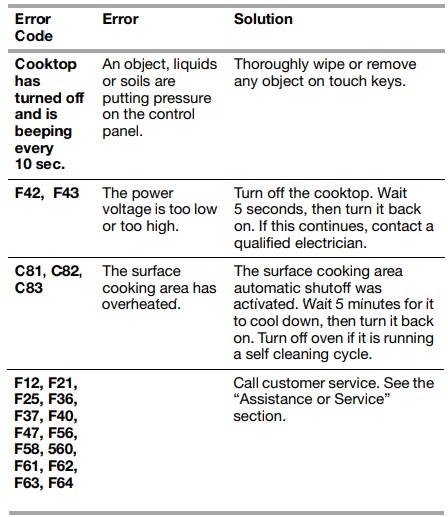
Is the display flashing “F” or “C” and numbers? If “F” or “C” and a number are alternately flashing on the display, refer to the following table for possible solutions.
Operational cooktop sounds
Is there a low humming? This occurs when cooking at high power. The cause of this is the amount of energy that is transmitted from the appliance to the cookware. This sound will quiet or go away when the power is turned down.
Is there a crackling? This sound occurs when cookware is used that consists of different materials. The noise is caused by vibrations in the joint faces between the different layers. It may change depending on the amount and type of food being cooked.
Is there a fan noise? The electronics require a controlled temperature in order to function reliably. The cooktop is fitted with a fan that runs at various speeds according to the temperature detected. The fan may also continue to run even after the cooktop has been switched off, if the temperature it detects is too high.