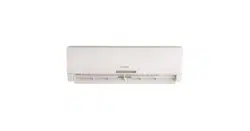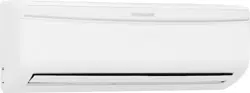
Refer to Page 2 for table of contents.
www.frigidaire.com www.frigidaire.ca
All about the
Use &Care
of your
Split Type Room Air Conditioner
USA 1-866-942-1567 Canada 1-866-942-1567
Attention
Please read all of the instructions before using the air conditioner and keep
this manual for future reference.
We know you will enjoy your new air conditioner and thank you for choosing
our product.
We hope you will consider us for future purchase.
The air conditioner that you have bought may be slightly different from the one
illustrated in this manual. Please refer to the information related to the model
you have.
This air conditioner is for domestic use only. It is not reccomended for
commercial or industrial use.
recommend that you separate plastic, paper and
cardboard and give them to recycling companies.
do NOT throw it away with the rest of your domestic
Environmental advices
Welcome to the world of
simple handling and no worries
01
Welcome
Thank you for choosing Frigidaire. This manual contains all of the information
required to guarantee your safety and the appropriate use of your air
conditioner.
If you need to dispose of this appliance in the future,
garbage.
The packaging material used is recyclable. We
Contents
02
Contents
01. Welcome...........................................................................................01
02. Environmental advices..........................................................................01
03. Contents...............................................................................................02
05. Installation:
5.1 Choosing the installation site.......................................................07
5.2 Parts list.....................................................................................09
5.4 Outdoor unit installation............................................................15
5.5 Refrigerant piping connection.....................................................17
5.6 Electrical
5.7
5.8
Gas leak check...........................................................................25
06. Operation:
6.1
6.2
- Remote control operation
- Remote control specifications
- Remote control battery
- When should the batteries be replaced
- To replace batteries
- Remote control instructions
6.4 Remote control description.........................................................32
- On/Off
-
-
- TIMER OFF
- Clock
- Turbo
- Mode
- Fan
- Sleep
- TEMP
- Blow
- LIGHT
6.5 INTRODUCTION FOR SPECIALFUNCTION.................................33
04. Safety precautions.......................................................................04
5.3 Indoor unit installation......................................................11
work...
...................................................................19
Electrical safety.....................................................................25
5.9
5.10 Test running..............................................................................26
Air Purge...................................................................................22
6.3 Remote control.........................................................................30
Product description.............................................................28
Preparing the device for operation............................................27
- TIMER ON
-
+

36.64
- Automatic operation
- Cool/heat and fan only operation
- Dry operation
- Airflow direction adjustment
- Sleep mode
- Timer operation
- Optimal operation
6.7 How to use the indoor unit......................................................38
- Adjusting air flow direction
- Adjusting the vertical air flow direction (up/down)
- To set the horizontal air flow direction (left/right)
- To automatically swing the air flow direction (up/down)
6.8
07. Maintenance....................................................................................41
How the air conditioner works........................................
Manual operation.....................................................................40
09. Solution for problems...........................................................................45
08. Operation tips......................................................................................43
10.Major appliance 5 year parts only limited warranty................................46
03
Contents

Safety precautions
04
Safety precautions
DANGER! Avoid Serious Injury
This appliance must be installed by a qualified licensed HVAC
technician in accordance with all applicable codes. All electrical
connections should be performed by a licensed electrician.
or Death
1. Do not attempt to install the split air
conditioner by yourself.
2. This air conditioner contains no
user-serviceable parts. Always call
an authorized Electrolux servicer for
repairs.
3. When moving the air conditioner,
always call an authorized Electrolux
servicer for disconnection and
re-installation.
4. Do not insert or place fingers or
objects into the air discharge area in
the front of the indoor unit.
5. Do not insert or place fingers or
objects into the air discharge area
in the outdoor unit.
6. Do not start or stop the air conditioner
by unplugging the power cord or
turning off the power at the electrical
box.
7. Do not cut or damage the power cord.
8. If the power cord is damaged it should
only be replaced by an authorized
Electrolux servicer.
9. In the event of a malfunction (sparks,
burning smell, etc.) immediately stop
the operation, disconnect the power
cord, and call an authorized Electrolux
servicer.
10.Do not operate the air conditioners
with wet hands
11.Do not pull on the power cord.
12.Do not drink any water that is drained
from the air conditioners.
1. Provide occasional ventilation
during use. Do not direct airflow at
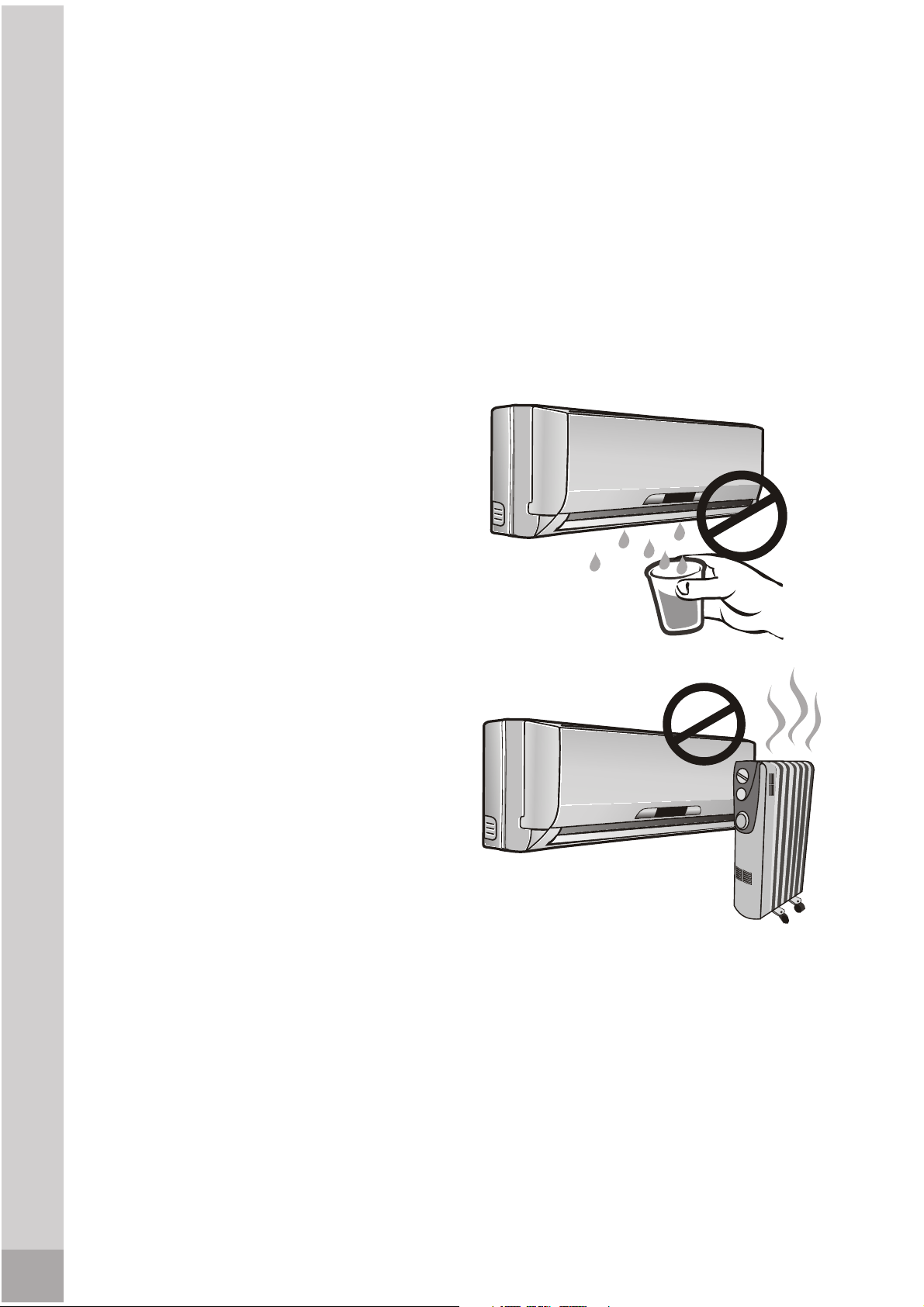
fireplaces or other heat related
sources as this could cause flare ups
or make units run excessively.
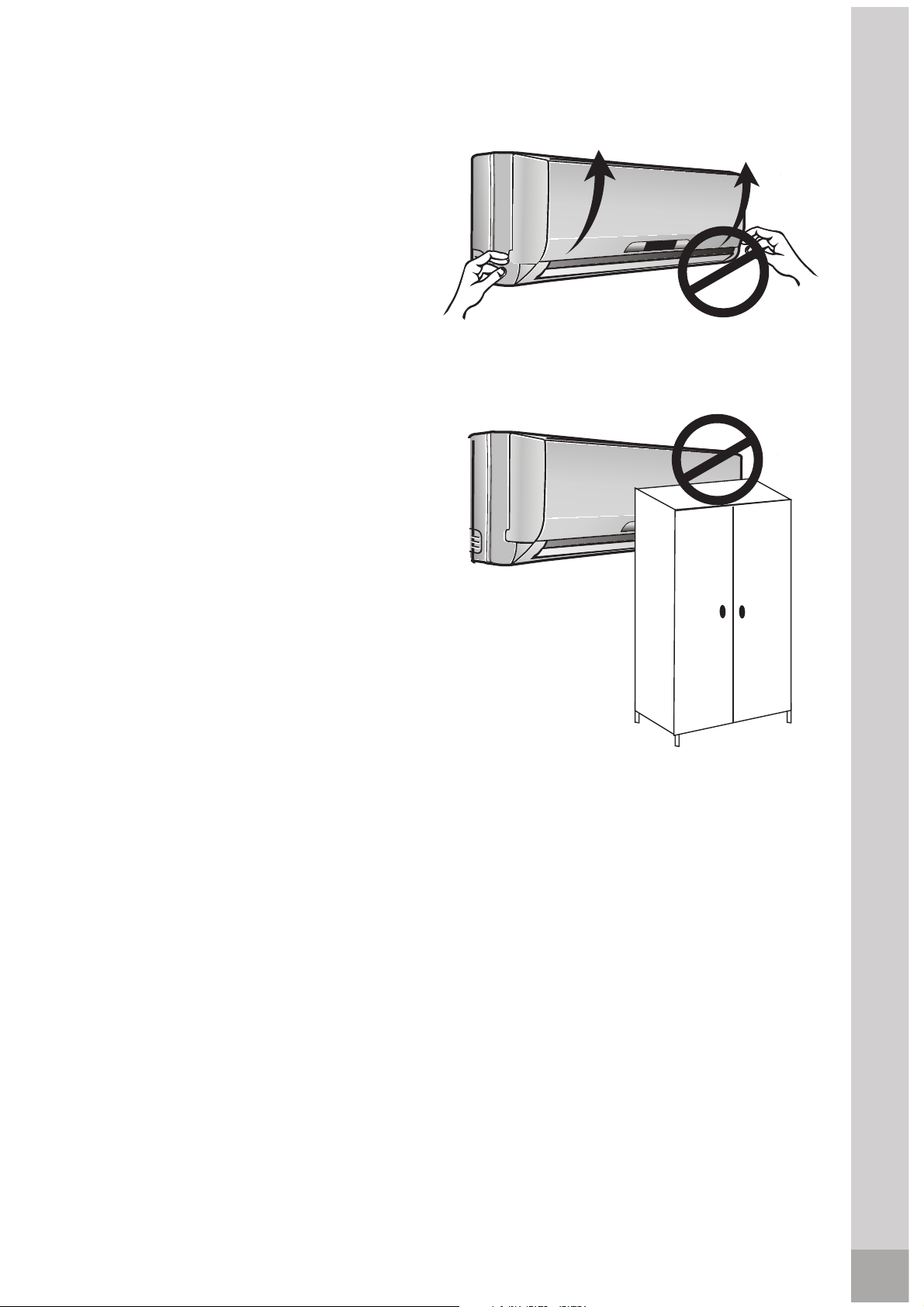
2. Do not climb on or place objects on
the outdoor unit.
3. Do not hang objects off the indoor
unit.
4. Do not place containers containing
water on the indoor and/or outdoor
units.
5. Turn off the air conditioner at the
power source when it will not be
used for an extended period of time.
6. Periodically check the condition of
the outdoor unit’s installation base
for any damage.
7. Do not apply heavy pressure to the
radiator fins of the indoor and/or
outdoor units.
8. Operate the indoor unit with air
filters in place.
9. Do not block or cover the intake
grille, discharge area and outlet
ports.
10.Ensure that any electrical/electronic
equipment is one yard away from
the indoor unit and outdoor unit.
11.Do not use or store flammable
gases near the indoor and/or
outdoor units.
CAUTION! Avoid Injury or
damage to the unit or other
property
To prevent injury to the user or other people and property damage, the
following instructions must be followed.
Incorrect operation due to ignoring of instructions may cause harm or
damage. The seriousness is classified by the following indications.
1. Connect with the power properly.
Otherwise, it may cause electric
shock or fire due to excess heat
generation.
shock.
sounds, smell, or smoke comes
from it. It may cause fire and
electric shock.
switching on or off the power. It
may cause electric shock or fire due
to heat generation.
damp environment. It may cause
electric shock.
electric parts. It may cause failure of
05
Safety precautions
3. Disconnect the power if strange
machine, electric shock or fire.
2. Always ensure effective grounding.
No grounding may cause electric
4. Do not operate or stop the unit by
5. Do not operate with wet hands or in
6. Do not allow water to run into
heating appliances. It may cause
fire and electric shock.
unspecified power cord. It may
cause electric shock or fire.
9.Do not damage or use an
8. Do not use the power cord close to
flammable gas or combustibles,
such as gasoline, benzene, thinner,
etc. It may cause an explosion or fire.
7. Do not use the power cord near
power cord and ensure that the
is danger of fire or electric shock.
cord will not be compressed. There
10.Do not place heavy object on the
operation. It may cause electric
removed, do not touch the metal
parts of the unit. It may cause an
injury.
shock or injury.
and electric shock.
It may cause failure of appliance
11.Do not open the unit during
13.Do not disassemble or modify unit.
14.When the air filter is to be
switch off, and turn off the circuit
breaker. Do not clean unit when
power is on as it may cause fire,
electric shock or injury.
to air flow.
not using the unit for a long time.
15.When the unit is to be cleaned,
16.Avoid direct exposure of occupants
17.Turn off the main power switch when
18.The air conditioner may be dusted
with an oil free cloth, or washed
with a cloth dampened in a solution
of warm water and mild dishwashing
detergent. Rinse thoroughly and wipe
dry. Wring excess water from cloth
before wiping around controls.
Clean filter once every two weeks.
inlets or inside of air-outlet. It may
cause failure of appliance or
accident.
concern of damage due to falling
of unit.
due to prolonged exposure. If
bracket damages, there will be
the outdoor unit will not damage
19.Ensure that the installation bracket of
20.Always insert the filters securely.
22.Do not place obstacles around air-
cause failure.
Operation without filters may
from air conditioner. It contains
12.Do not drink water drained
contaminants and could make
you sick.
dedicated power circuit. No
installation may cause fire and
electric shock.
21.Always install circuit breaker and a
Safety precautions
06
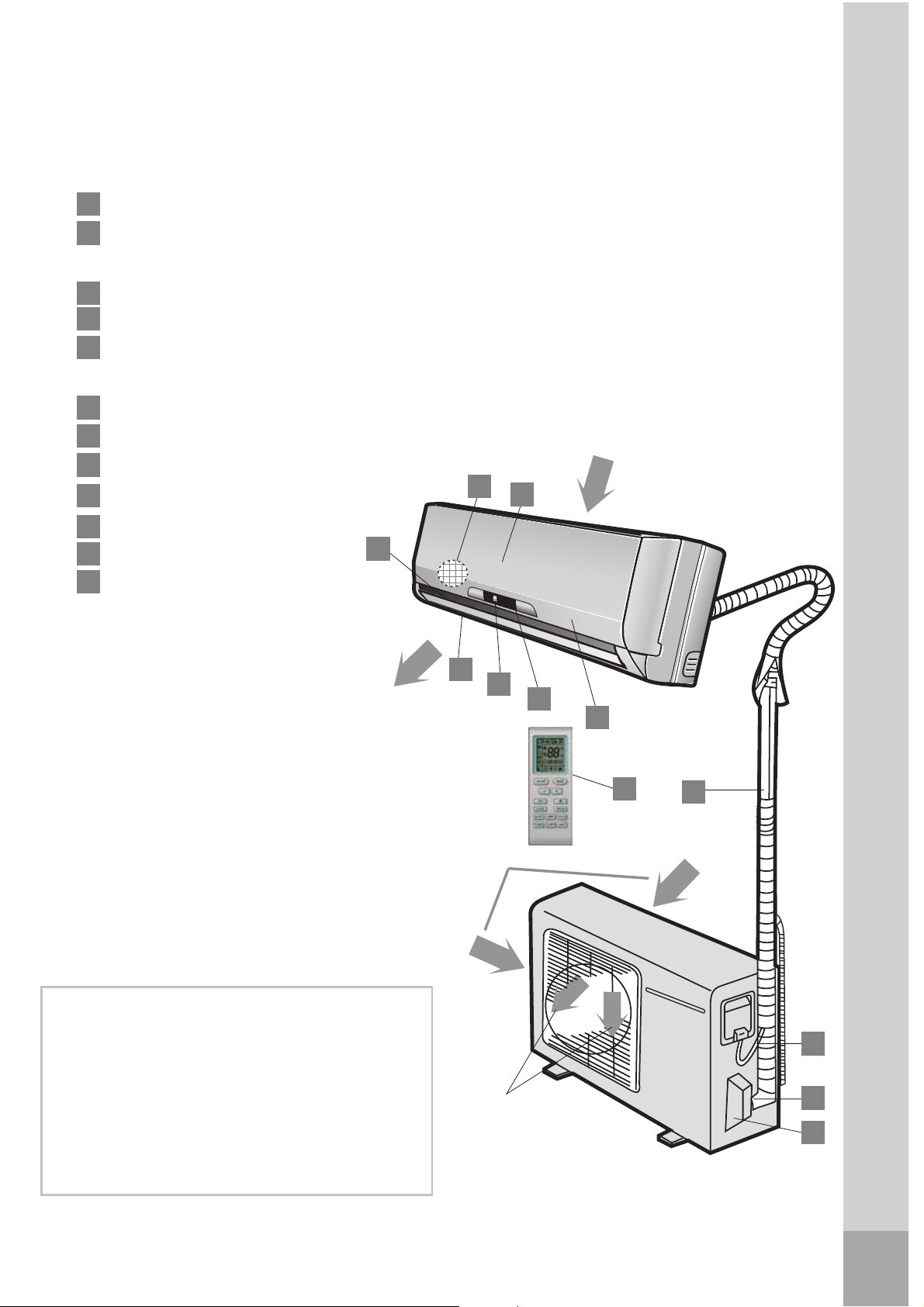
Product description
Air outlet
Air inlet
12
9
Outdoor unit
All the pictures in this manual are for
explanation purpose only. They may
be slightly different from the air
conditioner you purchased.
Air inlet
3
2
1
4
5
Air outlet
Indoor unit
7
6
Product description
Front panel
Air filter
Horizontal airflow grille
Vertical airflow grille
Temperature sensor
Panel
Remote control
Detection valve
Drain hose and refrigerant
connecting pipe
1
2
3
4
5
6
7
8
9
10
11
12
Attention
Infrared signal receiver
Connecting cable
(inside the indoor unit)
10
8
11
Refrigerant gas connector
(beneath front panel )
28
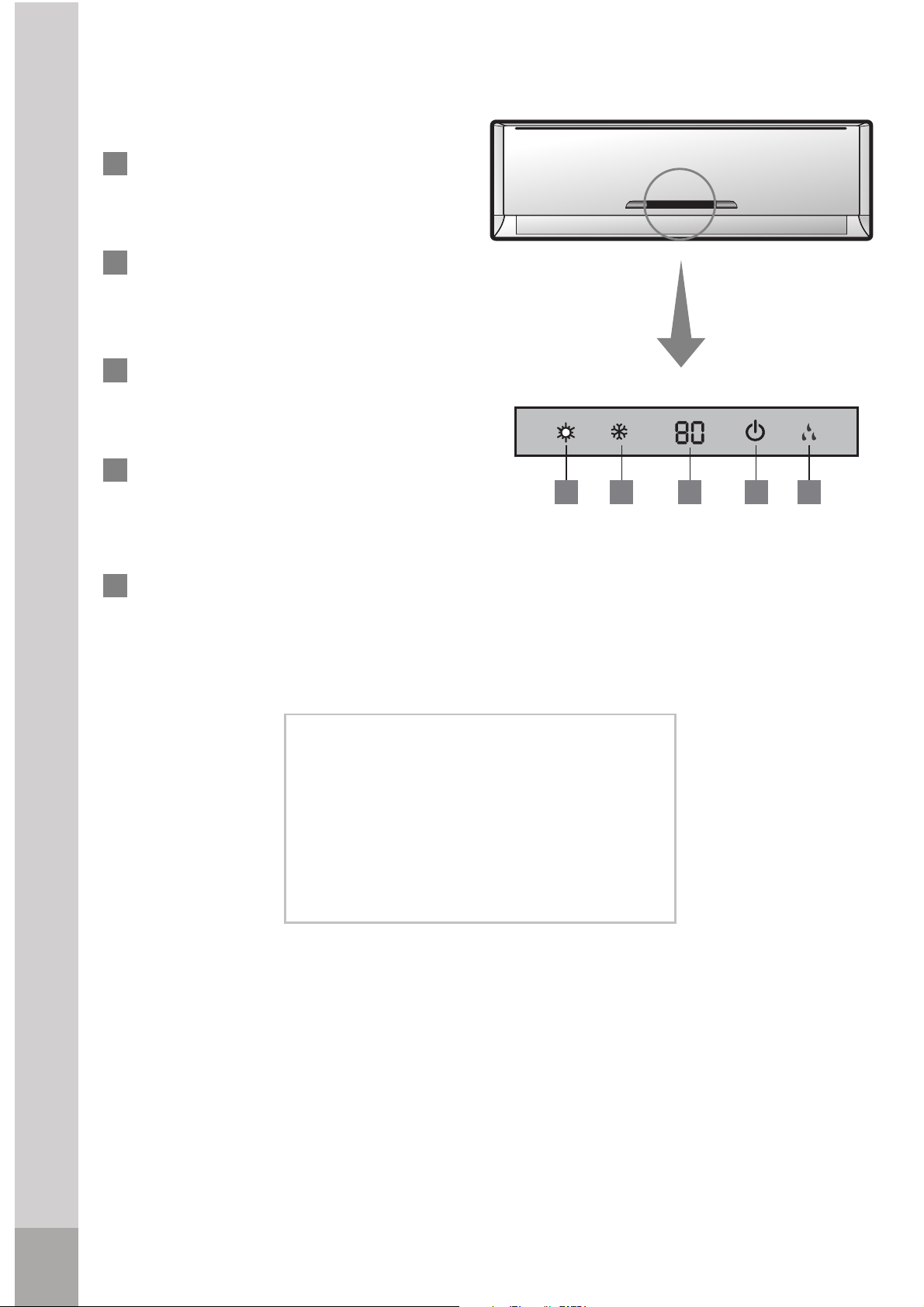
Product description
29
on a typical model. The functions are
the same in your air conditioner, even
if there are some differences in the
appearance.
Display panel
(indoor unit)
HEAT indicator: This indicator
illuminates when the air conditioner
is in Heat operation
DIGITAL SCREEN: Show the
present
adjustments to temperature
when
air conditioner is operating.
1713 14
15
16
Attention
13
15
16
17
14
OPERATION indicator: This
indicator illuminates red after
power is on and illum
inates
green when the unit is in operation.
The description of the control is based
COOL indicator: This indicator
illuminates when the air conditioner
is in cool operation
DRY indicator: This indicator
illuminates when the air conditioner
is in Dry operation
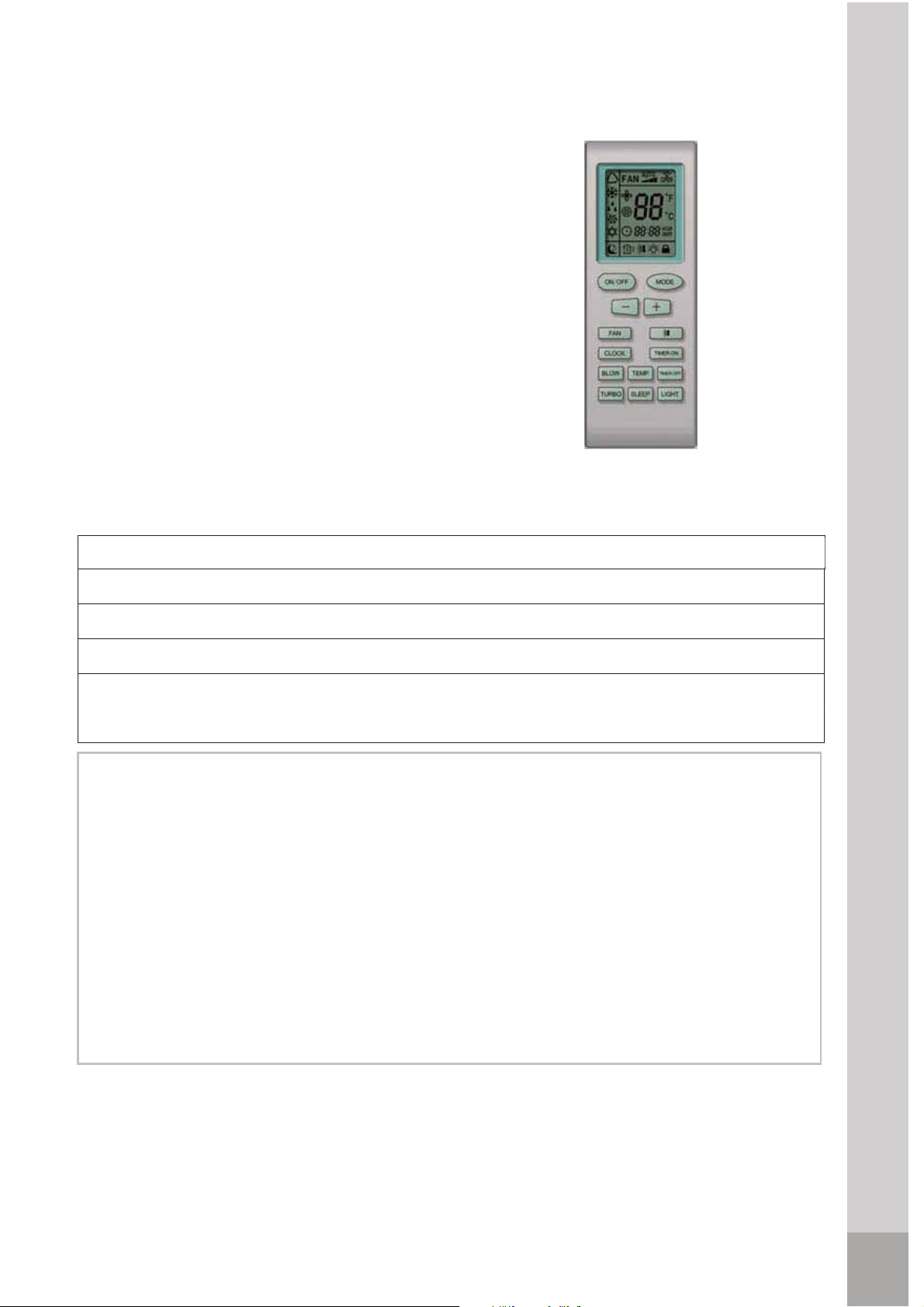
Remote control
Rated voltage
Transmission distance
Environment
3 V
two (R03/Ir03x2) alkaline AAA batteries.
block the signals between the remote control and the indoor unit.
2. Avoid spilling any liquid in the remote control. Do not expose to sunlight or any
heat source.
3. If the infrared signal receiver in the indoor unit is exposed to sunlight, the air
conditioner unit might not work properly. Use curtains or shades to avoid
having sunlight directly to the receiver.
1. Operation mode: Cool, Heat (Only
FAN, and AUTO (Automatic).
3. Internal temperature range selection:
4. LCD
Remote control operation
Remote control
Attention
for models with heating function), DRY,
Lowest voltage of CPU emiting signal
2.4 V
1. The air conditioner will not operate when curtains, doors or other materials
Remote control battery: To use the remote control, it is necessary to install
2. 24 hrs Timer.
REMOTE CONTROL SPECIFICATIONS
61ºF - 86ºF
32.8'*
23ºF ~ 140ºF
4. If other electrical equipments react to the signals sent by the remote control,
change their position or consult with you local dealer.
* With 3 V, reaches 40'
30
Remote control
31
When should the batteries be
replaced
2. The indoor unit does not respond
to the remote control commands to
activate the programs.
To replace batteries
1. Slide out the battery
control).
the compartment (indicated in the
drawing located inside the
compartment).
3. Slide in the cover.
4. If the remote control is not
operated for long period of times,
batteries should be discarded.
Remote control instructions
1. The signal reach distance of the
remote control to the receiver that
obstruction placed between the
receiver and the remote control
can cause interference, limiting
the capacity of the programming.
conditioner emits a "beep" that
indicates that a command has
the indoor unit.
1. When replacing batteries, do not
use old batteries or a different
type battery. This may cause the
remote control to malfunction.
2. If you do not use the remote
remove the batteries. Otherwise
battery leakage may damage the
remote controller.
3. The average battery life under
normal use is about 6 months.
4. Replace the batteries when there
is no answering beep from the
3. When selecting the function of
timer, the remote control sends
(automatically) a signal to the indoor
that the signal is blocked, a 15
minute delay can be produced.
Attention
1. There is not a "beep" anymore
compartment cover ( located at
the back of the remote
2. Install two AAA batteries in
is inside the indoor unit of the air
conditioner is
32.8 ft. Any
2. Any time when a button is pressed
on the remote control, the air
been received and transmitted to
remote control is left in a position
unit at the specific period. If the
controller for several weeks,
indoor unit or if the transmission
from the indoor unit when using
the control remote or the signal
light indicator does not light.
indicator fails to light.
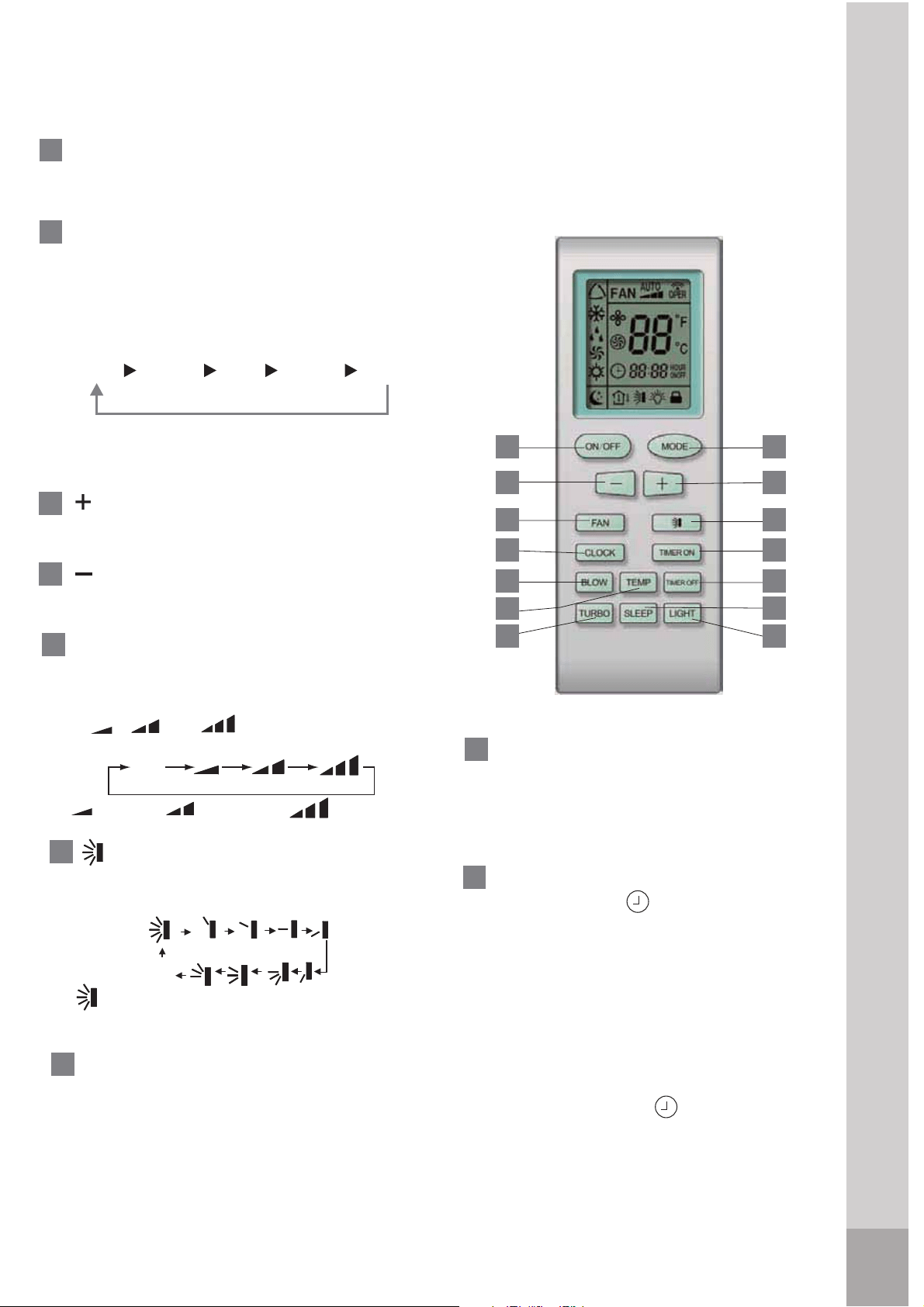
Remote control description
1
2
3
5
6
-
+:
:Press the button to decrease
4
AUTO
COOL DRY
HEAT*FAN
button, a mode is selected in a
sequence that goes from AUTO,
COOL, DRY,
HEAT*
NAF dna, , as
the following figure indicates:
MODE: Each time you press the
* Note: Only for models with heating
function
Cooling and heating model
1
2
8
9
10
3
4
11
12
7
6
13
14
5
ON/OFF: Press this button to start
the unit operation. Push the button
again to stop the unit operation.
Press the button to increase
the indoor temperature setting.
8
FAN : This button is used
for setting Fan Speed in the
sequence that goes from AUTO,
, to , then back to
Auto.
TIMER ON: Press this button to
initiate the auto-on timer.
T
o cance
l
the
auto-timer program, simply
press this
button again.
7
TIMER OFF: Press this button to
initiate the auto-off timer.
To cancel
the auto-timer program,sinply press the
9
Press this button, the clock can
be set up, icon blinks. Within 5
seconds, the value
can be adjusted by
pressing "+
+
" or "-
-
" button, if continuously
press this button for 2 seconds above,
in every 1/2 seconds, one minute will be
increased, if you are still pressing the
button after ten minutes increased,ten
minutes will be increased every 1/2
seconds. Druing blinking, repress the
Clock button, icon will be constantly
displayed and it denotes the setting
succeeded
CLOCK:
Middle fan
Low fan
High fan
the indoor temperature setting.
Auto
OFF
:Press this button, to set up swing
angle and swing range,which
circularly changes as below:
which indicates the
hozizontal louver
will swing up and
down
automatically
.
button again.
Remote control description
32
TURBO:Press this button to activate
/deactivate
the Turbo function which
enables the unit to reach the preset
temperature in the shortest time.
In cooling mode, the unit will blow
strong cooling air with super high
fan speed. In heating mode, the
unit will blow strong heating
air with super high fan speed.
Remote control description
12
33
SLEEP: Press this button to go into
the operation mode.
Press
it again to cancel. This
function
only can be used in
and
maintain the most comfortable
temperature for you.
To cancel SLEEP
program,press this button again.
COOL
, HEAT
(Only for models with
heating
function)
or DRY mode,
2.About switch between Fahrenheit
and Centigrade
Under status of unit off, press "MODE"
and " -
-
" buttons simultaneously to switch
INTRODUCTION FOR SPECIAL
FUNCTION
Press "+
+
" and "-
-
" buttons simultaneously
to lock or unlock the keypad. If the
remote controller is locked, the icon
will be displayed on it, in that case,
press any button, the mark will
flicker for three times. Repress the
combination to unlock.
1.ABOUT LOCK
When in cool or dry mode,
press "BLOW" button to active
or deactive blow function ,the
icon will display and the indoor
fan will continuely run for 10
minutes in order to dry the indoor
unit even though you have turned
off the unit.
BLOW
:
10
Turn the unit LED light on or off
only.
LIGHT
:
13
14
ć
and
.
TEMP:When pressing "TEMP" button,
there may be 3 optional icon display:
, , .But only is effective. The
display panel will indicate ambient
temperature for 5 seconds.
11
SLEEP
How the air conditioner works
Automatic operation
When the Air Conditioner is ready for use, switch on the power and the
OPERATION indicator lamp on the display panel of the indoor unit starts
illuminating.
1. Use the MODE button to select AUTO.
2. Use the "MODE" button to select Auto. The unit will automatically select
Cool, Fan and Heat operation depending on the difference ambient
temperature and system difference temperature .When in Cool Operation
the panel will display 77 . In Fan Operation the panel will display 77
In Heat Operation the panel will display 68 .
COOL / HEAT and FAN ONLY operation
1. If the AUTO mode is not comfortable, you may manually override the
2. Press the "+"/"-" button to set the desired room temperature. When in COOL
3. Press the FAN to select the FAN mode of AUTO, , or .
4. Press the ON/OFF button, the operation lamp lights and the air conditioner
start to operate as your settings. Press the ON/OFF button again to stop this
unit operation.
**Note: The FAN ONLY mode can not be used to control the temperature.
While in this mode, only steps 1,3 and 4 may be performed.
1. When you set the air conditioner in AUTO mode, it will automatically select
depending on the room
temperature.
2.
If the AUTO mode is uncomfortable, you can select desired conditions
manually.
How the air conditioner works
Attention
mode, the most comfortable settings are
* Note: Only for models with heating function
cooling, heating(only for models with heating function) or fan only operation
settings by using COOL, HEAT* or FAN ONLY** mode.
mode, the most comfortable settings are 70ºF or above. When in HEAT
82ºF or below.
34
ºF
ºF
ºF
3. Press the ON/OFF button again to stop the unit operation. .
Time
DRY FUNCTION
Room
Temperature
Set temperature
Cooling
Cooling
Cooling
Fa onlyn
Fa onlyn
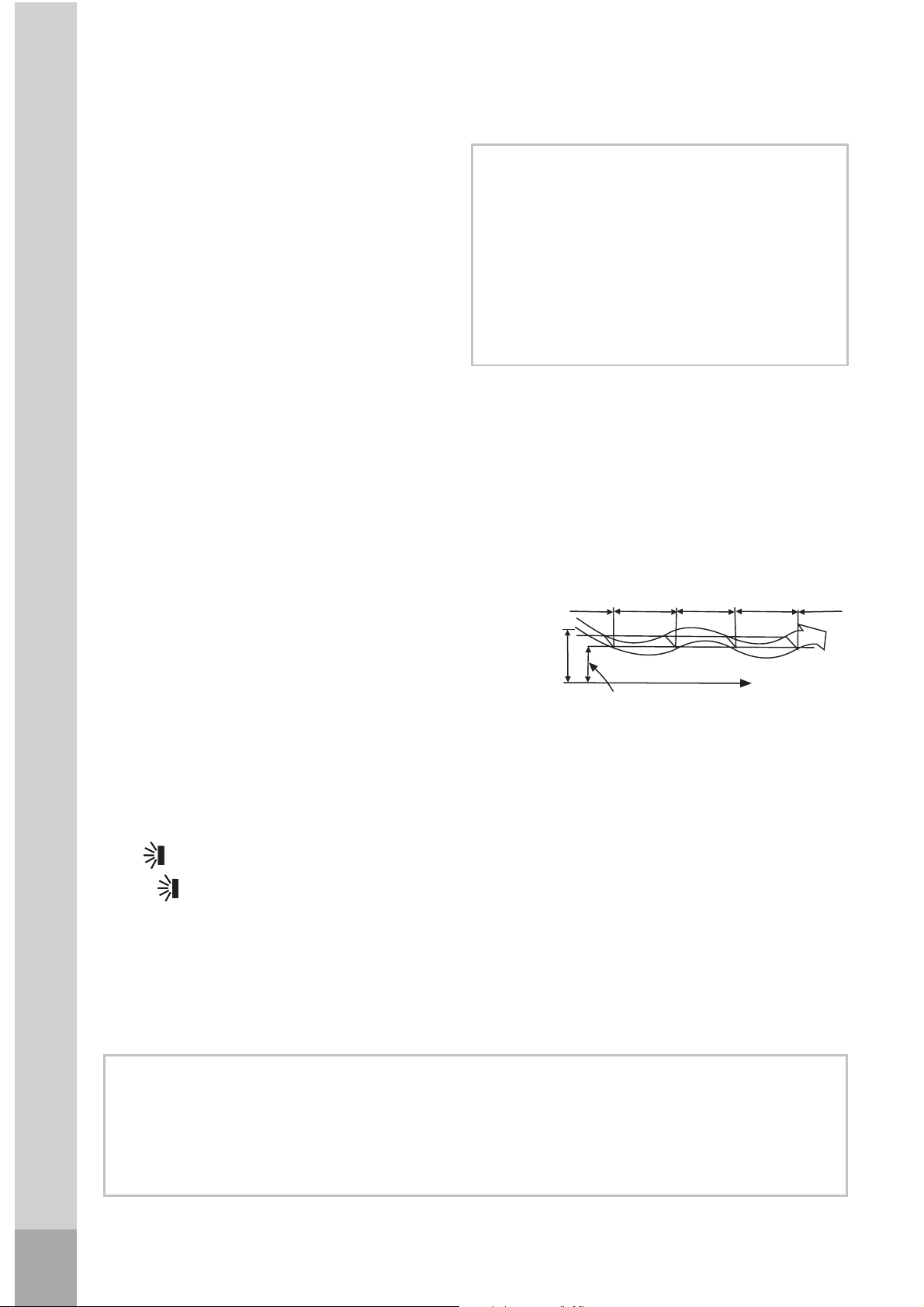
DRY operation
The dry mode will automatically
select the drying operation based on
the difference between the set
temperature and the actual room
temperature.
The temperature is regulated while
dehumidifying by repeating turning
on and off of the cooling operation
DRY.
operation lamp lights and the air
conditioner starts to operate in the
DRY mode. FAN SPEED is Low.
Push the ON/OFF button again to
stop this unit operation.
Due to the difference between the set
temperature of the unit and the actual
indoor temperature, the Air Conditioner
If the louver oscillates or moves in a position that could affect the cooling or
heating(only for models with heating function) of the air conditioner, the direction
of the oscillation/movement would alter automatically.
How the air conditioner works
Attention
Attention
1. Press the MODE button to select
2. Press the "+
+
"/"-
-
" button to set the
3. Press the ON/OFF button, the
in DRY mode will automatically switch
the operation modes between COOL
and FAN ONLY many times.
desired temperature from 61ºF to
86ºF.
.or fan only. The fan speed is mainly
LOW.
35
Air flow direction adjustment
Use button to adjust the airflow direction up and down.
When button is pressed, the horizontal louver moves up and
down automatically. Press again to stop operation.
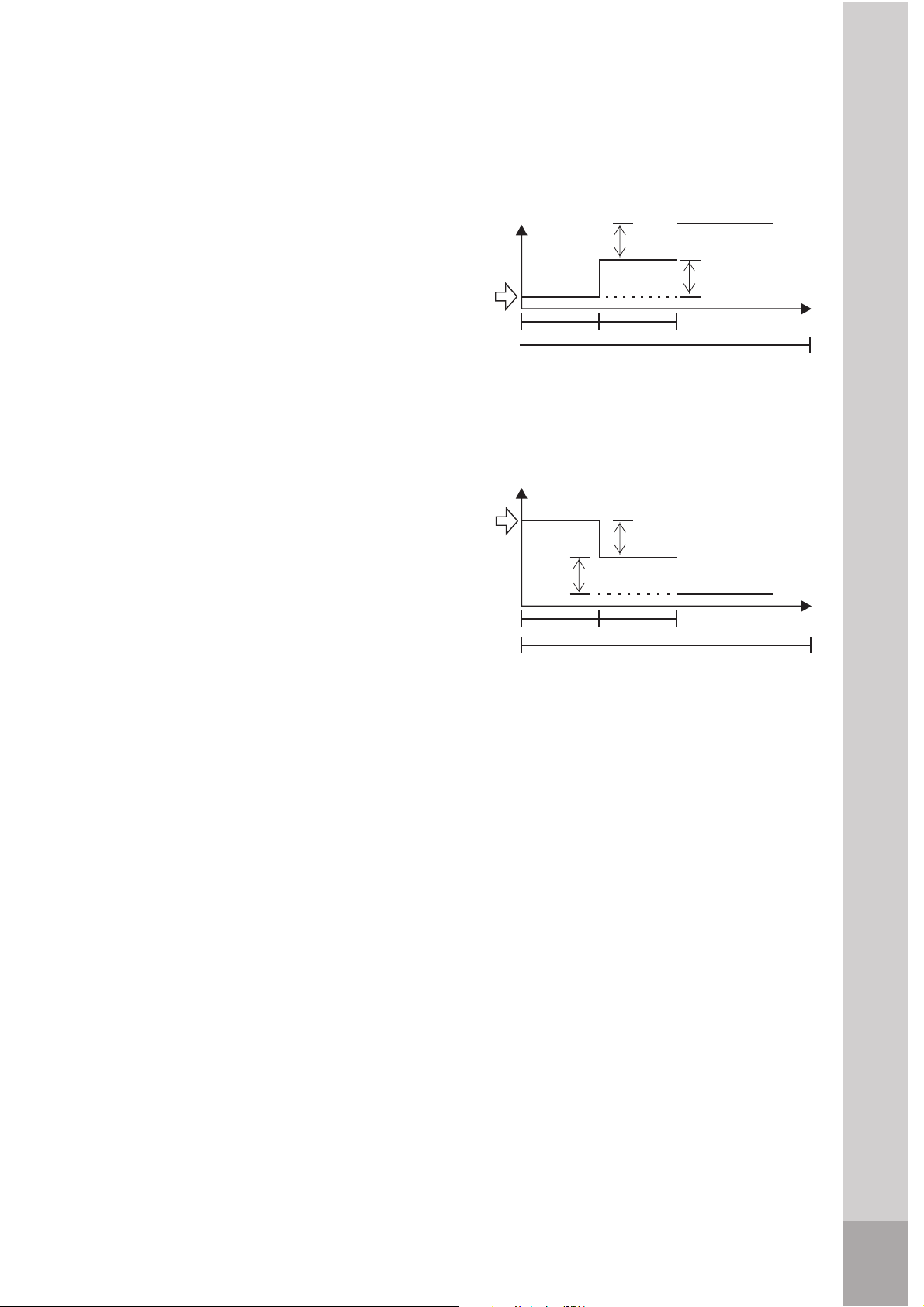
SLEEP mode(Only for >12000 Btu's)
Press the sleep button to activate the
button again.
Set
temperature
SLEEP FUNCTION (Cooling mode)
1 hour 1 hour
SLEEP FUNCTION (Heating mode)
7 hours
Set
temperature
TIMER Operation
TIMER button can set the auto-on time of the unit.
To set the starting time
1.
2.
Press the "TIMER ON" button to activate the auto start timer function .
Auto start can be set from 0~24 hours. After pressing "TIMER ON" button,
"ON" on the display will blink, and
during 5 seconds blinking ,the value can be
adjusted by pressing or "+" "-" button.
Every press of this button,1 minute will be
2
seconds later
the value will be increased or decreased automalically ,and after 10
minutes
increase or decreased, the value will be changed 10 minutes every 0.5 second;
Press the "TIMER ON" button to conform the time.
when repressing the "TIMER ON" button , the "TIMER ON" setting will be
canceled.
How the air conditioner works
sleep mode. To deactivate, press the
7KHIDQVSHHGZLOOEHDXWRPDWLFDOO\
FRQWUROOHG
7KHIDQVSHHGZLOOEHDXWRPDWLFDOO\
FRQWUROOHG
7KHDLUFRQGLWLRQHUZLOODXWRPDWLFDOO\
GHFUHDVH SHUKRXULQDKRXUSHULRG
7KHVHWWHPSHUDWXUHZLOOEHVWHDG\IRU
WKHQH[WKRXUVWKHQWKLVPRGHZLOO
E H WHUPLQDWHG
In heating mode (only for models with
heating function):
In cooling mode:
7KHDLUFRQGLWLRQHUZLOODXWRPDWLFDOO\
LQFUHDVH SHUKRXULQDKRXUSHULRG
7KHVHWWHPSHUDWXUHZLOOEHVWHDG\IRU
WKHQH[WKRXUVWKHQWKLVPRGHZLOO
E H WHUPLQDWHG
2 °F
2 °F
1 hour1 hour
2 °F
2 °F
7 hours
36
increased or decreased,but press the or button,continuously
"+"
"-"
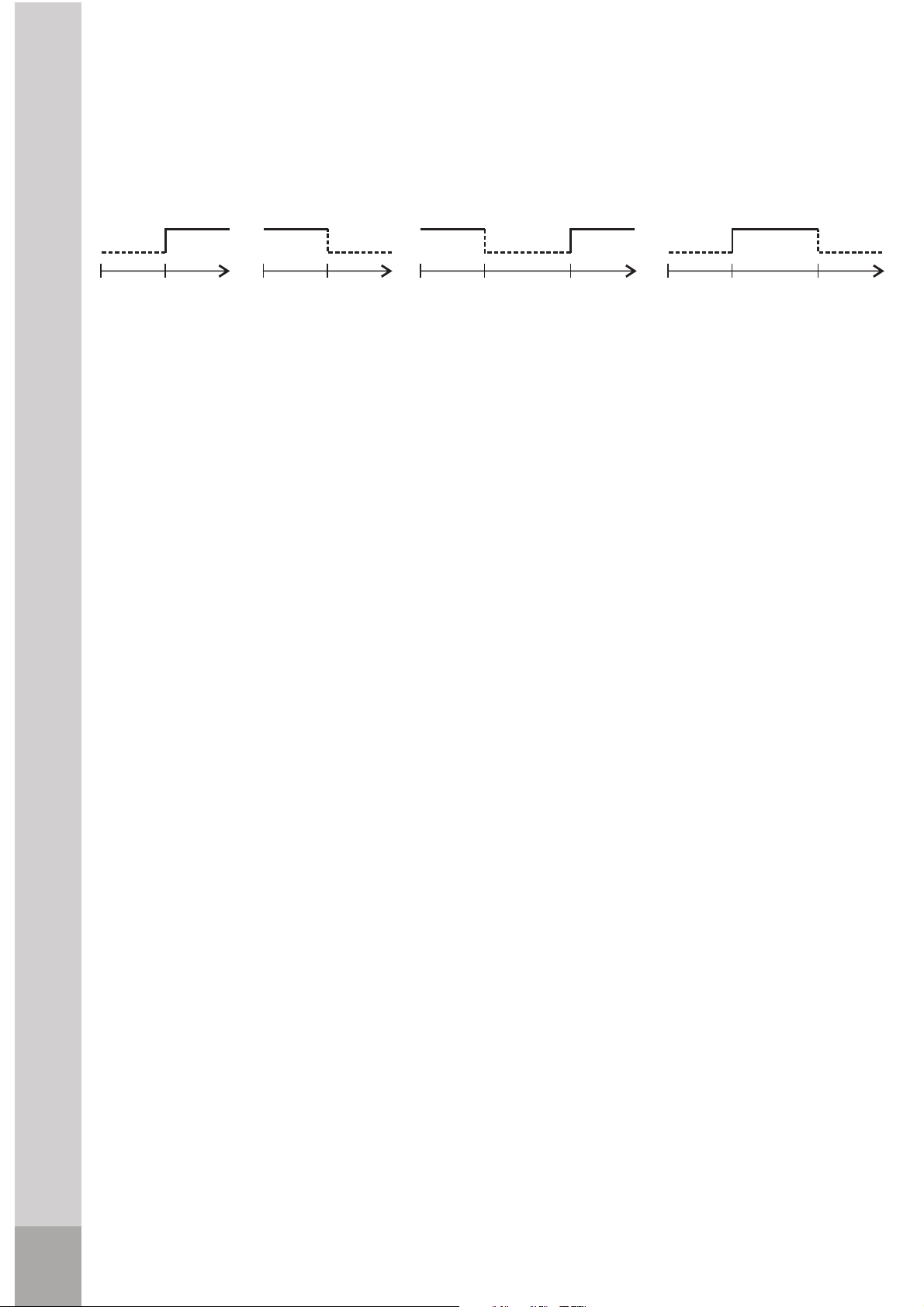
To set the stopping time
1.
2.
Optimal operation
To achieve optimal performance, please note the following:
1. Adjust the air flow direction correctly so that it is not directed on people.
2. Adjust the temperature to achieve the highest comfort level. Do not adjust
the unit to excessive temperature levels.
3. Close doors and windows on COOL or HEAT(only for models with heating
4. Use TIMER ON button on the remote controller to select a time you want
to start your air conditioner.
5. Do not put any object near air inlet or air outlet, as the efficiency of the air
conditioner may be reduced and the air conditioner may stop running.
6. Clean the air filter periodically, otherwise cooling or heating(only for models
with heating function) performance may be reduced.
7. Do not operate unit with horizontal louvre in closed position.
How the air conditioner works
Exemples:
6h
(Timer On)
OFF
ON
6h
(Timer Off)
ON
OFF
12h
(Timer Off)
ON
OFF
ON
14h
(Timer On)
20h
(Timer On)
OFF
23h
(Timer Off)
OFF
ON
function)mode, or performance may be reduced.
37
Press the "TIMER OFF" button to activate the auto start timer function.
The method of setting is the same as above of
"TIMER ON".
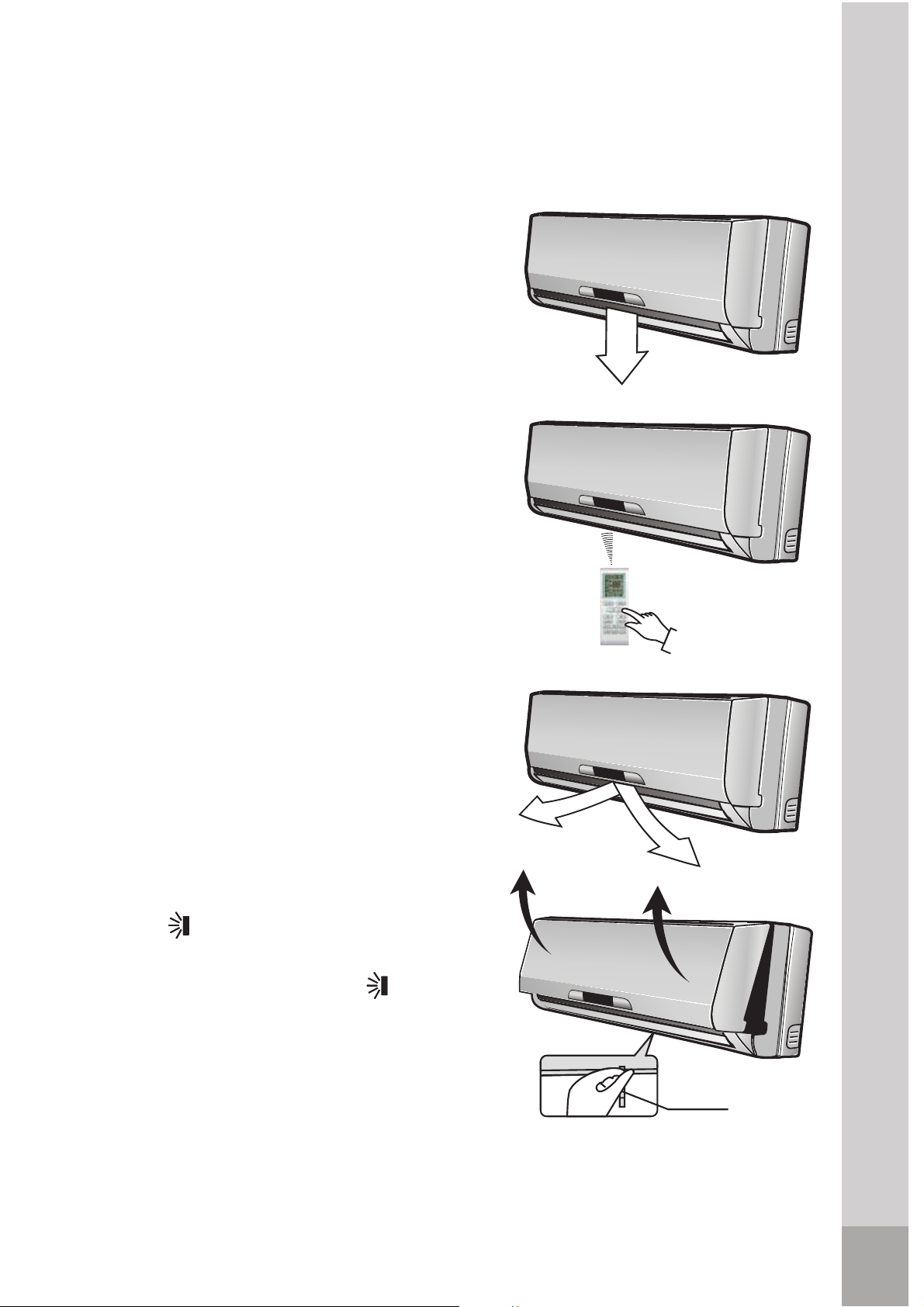
How to use the indoor unit
Adjusting air flow direction
Adjust the air flow direction properly
otherwise, it might cause discomfort or
cause uneven room temperatures.
Adjust the horizontal louver using the
remote controller. Adjust the vertical
louver manually.
To set the horizontal air flow
direction (left/ right)
Adjust the vertical louver manually
using the lever on the left or right side
depending on the specific model you
choose
) end of the air outlet to the
desired position. Perform these
adjustments before you start the unit
because once it has been started, there
To automatically swing the air flow
direction (up/down)
Perform this function while the air
conditioner is in operation.
Press the button on the remote
controller.
To stop the function, press the
button again.
Lever
How to use the indoor unit
of the vertical louver arm (Depending
on the specific model you choose), or
move the lever at the left(or right,
or middle
is risk of your fingers getting caught
on the fan.
38
which is only for 21500 Btu's,

Press
to lock louver in desired position.
The button
will be disabled when the air
conditioner
is not in operation (including
when the
TIMER ON is set).
Do not operate the air conditioner for
long periods with the air flow direction
set downward in cooling or dry mode.
Otherwise, condensation may occur on
the surface of the horizontal louver and
drop on to the floor or on furnishings.
Do not move the horizontal louver
manually. Always use the
button.
If you
move this louver manually
,
it may
malfunction during operation.
If the
louver malfunctions, stop the
Open angle of the horizontal louver
should not be set too small, as
COOLING or HEATING(only for models
with heating function) performance may be
impaired due to too restricted air flow area.
Do not operate unit with horizontal
louver in closed position.
When the air conditioner is connected to
power (initial operation), the horizontal
louver may generate a sound for 10
seconds, this is a normal operation.
How to use the indoor unit
air conditioner and restart it.
39
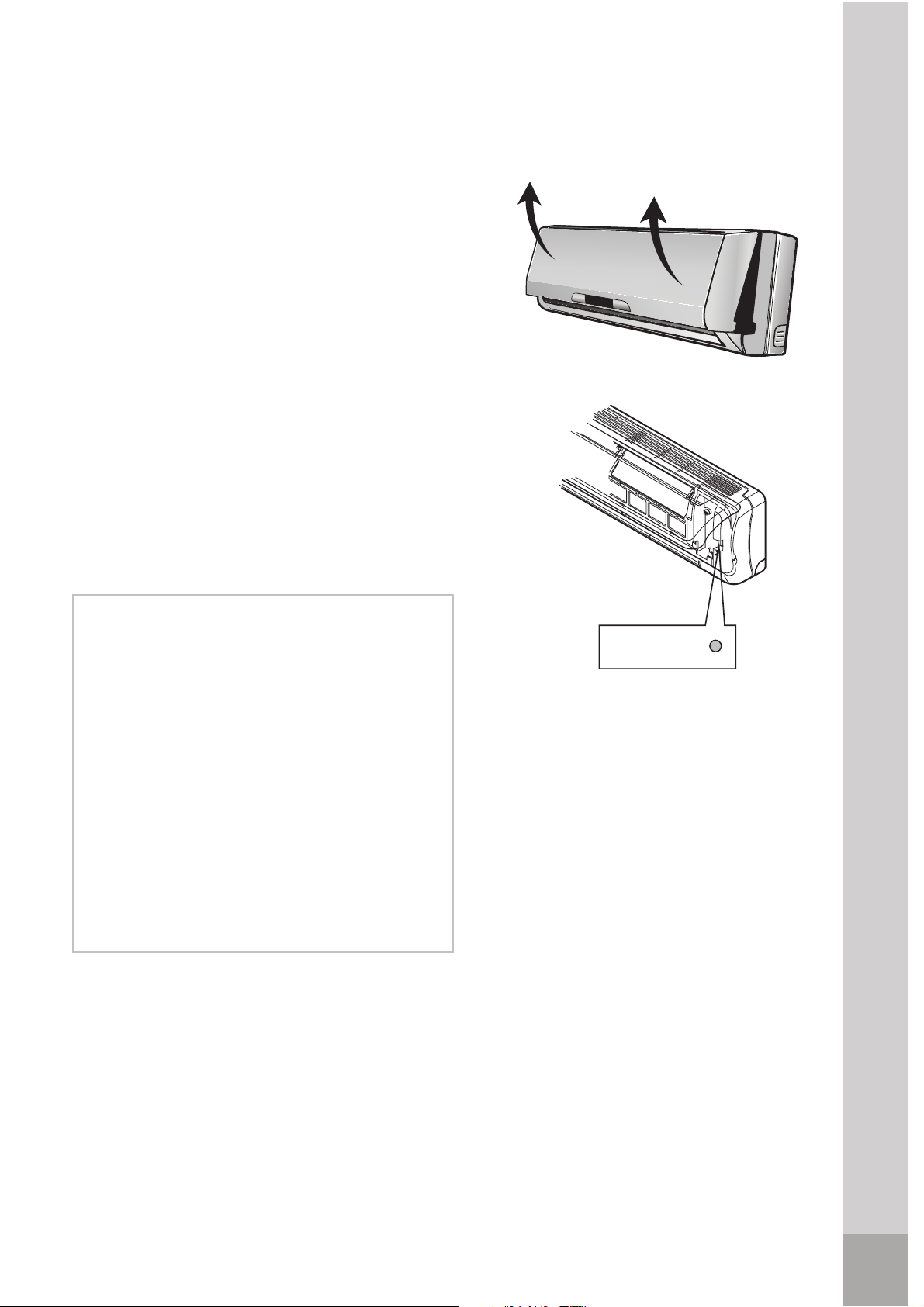
Manual operation (without remote control)
Manual operation can be used
temporarily in case you can not find
the remote controller or its batteries
are exhausted.
1. Open and lift the front panel up to
an angle until it remains fixed with
a clicking sound.
2. One press of the manual control
button will lead to the forced AUTO
operation.
3. Close the panel firmly to its
original position.
Manual control
button
Once you press the manual button, the
operation mode is shifted in an order
as: AUTO and OFF.
The manual
operation is mainly used for
testing
it is necessary. To return to the remote
controller operation, use the remote
Auto/OFF
Manual operation
Attention
purpose. Do not choose it unless
controller
40
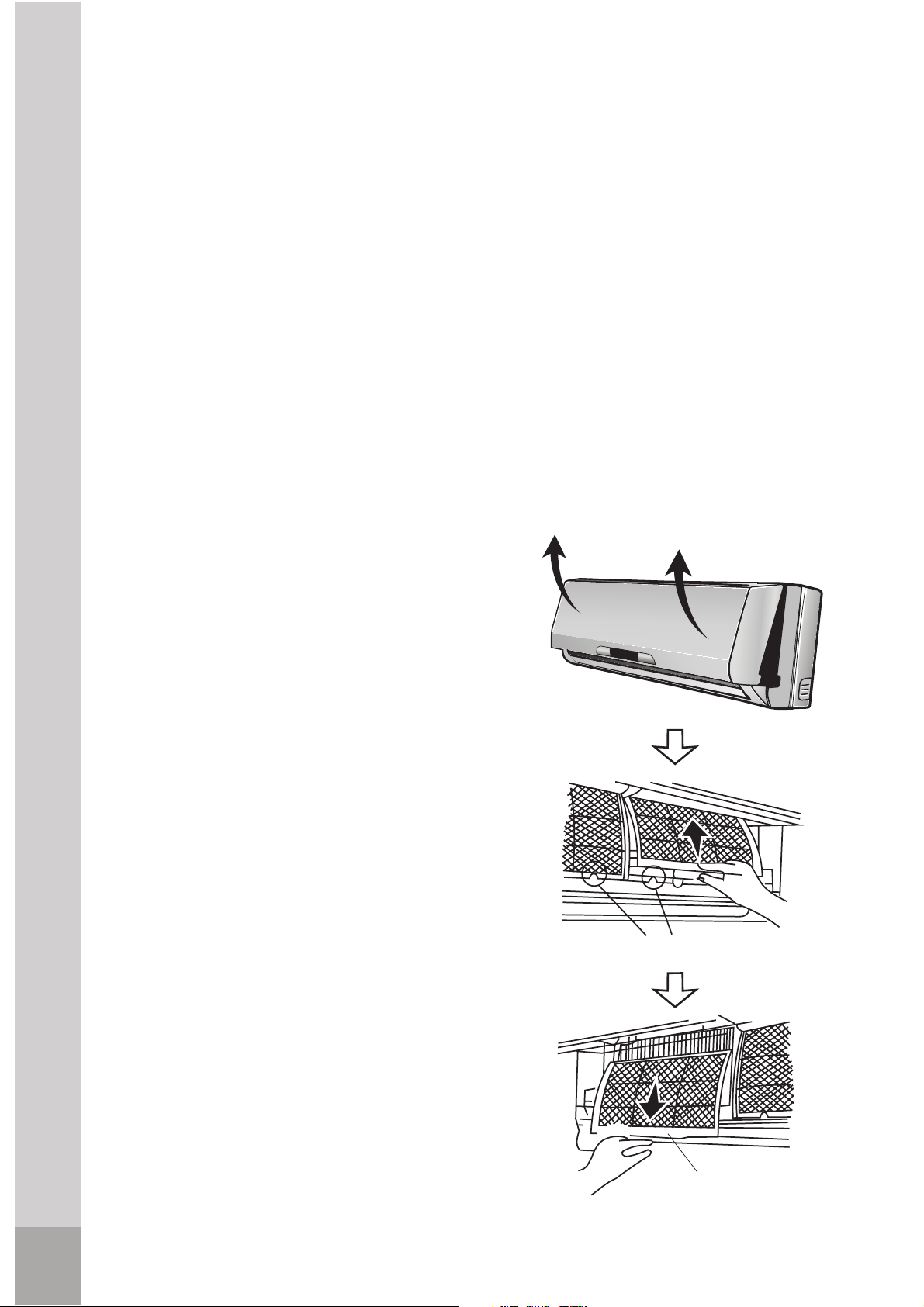
Maintenance
Cleaning the indoor unit and remote
controller
1. It is necessary to stop the air
conditioner and disconnect the power
supply before cleaning.
2. Use a dry cloth to wipe the indoor
unit and remote controller.
3. A cloth dampened with cold water
may be used on the indoor unit if it is
very dirty.
4. The front panel of the indoor unit can
be removed and cleaned with water.
Then wipe it with a dry cloth.
5. Do not use a chemically treated cloth
or duster to clean the unit.
6. Do not use benzine, thinner,
polishing powder, or similar solvents
for cleaning. These may cause the
plastic surface to crack or deform.
Cleaning the air filter
A clogged air filter reduces the cooling
efficiency of this unit. Please clean the
filter once every 2 weeks.
1. Lift the indoor unit panel up to an
angle until it stops with a clicking
pull it downwards.
3. Remove the air filter (Fresh air filter if so
5. Clean the fresh air filter(if so equipped)
at least once a month, and replace
every 4 to 5 months. Use a vacuum
cleaner, then dry.
6. Clean the support frame using a
air filter
air filter
Maintenance
vacuum cleaner or water. Then dry
sound.
2. Take hold of the handle of the air
filter and lift it up slightly to take
it out from the filter holder, then
equipped + support frame) from the unit.
4. If so equipped, remove fresh air filter
from the support frame.
41
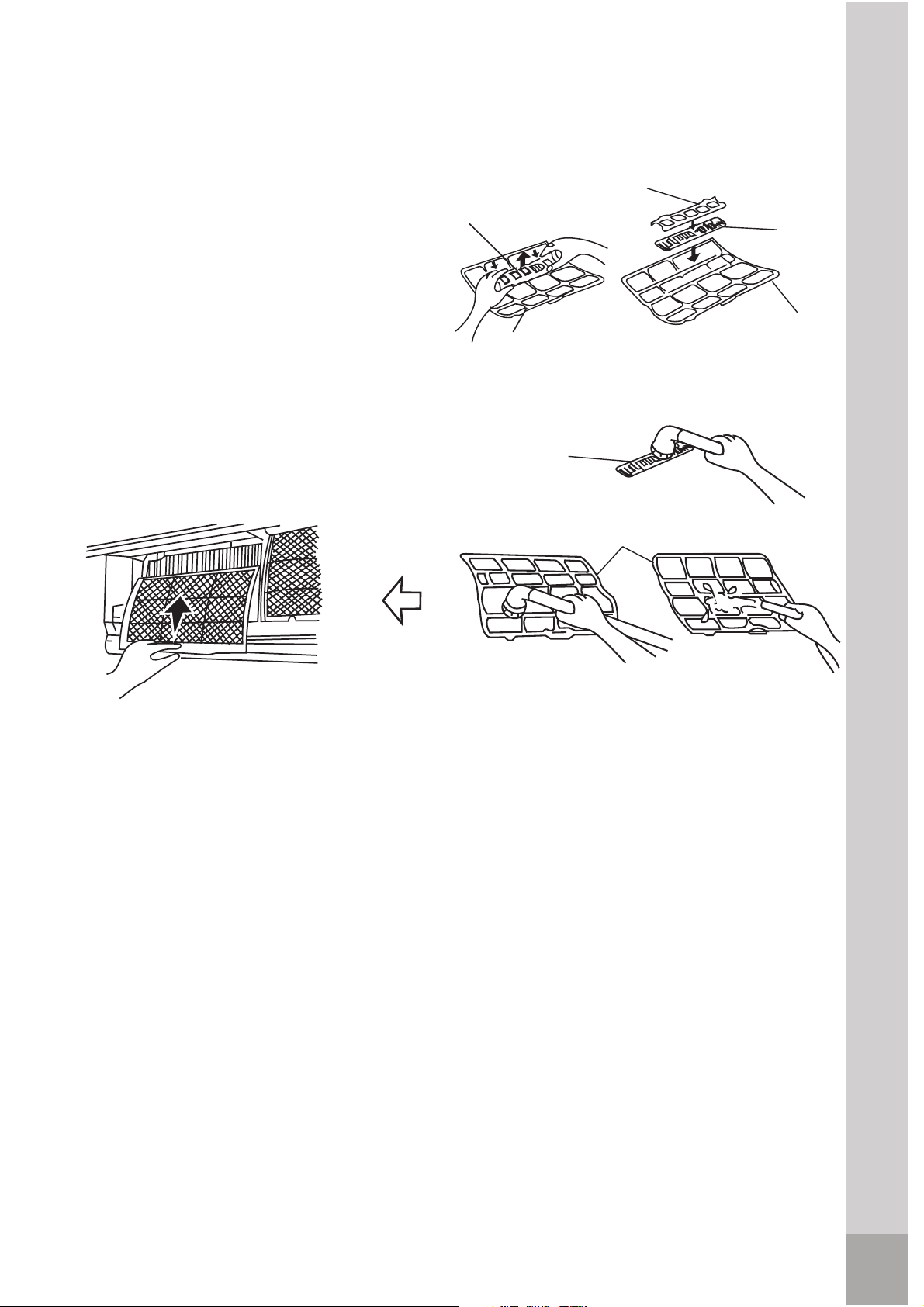
7. Insert the fresh air filter(if so
equipped) in its original place.
keeping in mind that the outside
filter in its initial position.
Maintenance
If you plan to idle the unit for a long time, perform the following:
1. Operate in fan mode for about half a day to dry the inside of the unit.
2. Stop the air conditioner and disconnect power. Remove the batteries from
the remote controller.
3. The outdoor unit requires periodic maintenance and cleaning. Do not
attempt to do this yourself. Contact your dealer or servicer.
2. Check that the air filter is installed.
Maintenance
Fig.2
Fig.3
Fig.4
Fig.5
Support
frame
Support
frame
for a couple of hours.
(Fresh air filter if so equipped +
border (right and left) are lined
1. Check that the wiring is not broken or disconnected.
Check before operation
3. Check whether the air outlet or inlet is blocked after the air conditioner has
not been used for a long time.
Support
frame
Fig.1
Bracket
8. Insert the upper part of the air filter
support frame) back into the unit
up correctly, then place the whole
42
Fresh air
filter(if so
equipped)
Fresh air
filter(if so
equipped)
Fresh air
filter(if so
equipped)
Operation tips
The following events may occur during normal operation.
Operation tips
Protection of the air conditioner.
Compressor protection
The compressor can't restart for 3 minutes after it stops.
Anti-cold air (Only for models with heating function)
heat exchanger is in one of the following three situations and the set
temperature has not been reached.
1. When heating has just starting.
2. Defrosting.
3. Low temperature heating.
Defrosting (Only for models with heating function)
Frost may be generated on the outdoor unit during heat cycle when outdoor
temperature is low and humidity is high resulting in lower heating efficiency of
the air conditioner. During this condition, air conditioner will stop heating
operation and start defrosting automatically.
The time of defrosting may vary from 0 to 8 minutes according to the outdoor
temperature and the amount of frost buildup on the outdoor unit.
The indoor or outdoor fan stop running when defrosting (Only for models with
heating function).
A white mist coming out from the indoor unit
A white mist may generate due to a large temperature difference between air
inlet and air outlet in COOL mode in an indoor environment that has a high
relative humidity.
A white mist may generate due to moisture generated from defrosting process
when the air conditioner restarts in HEAT mode operation after defrosting.
Low noise of the air conditioner
You may hear a low hissing sound when the compressor is running or has just
to stop.
You can also hear a low "squeak" sound when the compressor is running or
has just stopped running. This is caused by heat expansion and cold
contraction of the plastic parts in the unit when the temperature is changing.
A noise may be heard due to louver returning to its original position when
power is first turned on.
Dust is blown out from the indoor unit.
This is a normal condition when the air conditioner has not been used for a
The unit is designed not to blow cold air in HEAT mode, when the indoor
stopped running. This sound is the sound of the refrigerant flowing or coming
43

Operation tips
long time or during first use of the unit.
A peculiar smell comes out from the indoor unit.
material, furniture or smoke.
When indoor temperature reaches the temperature setting on air conditioner,
the compressor will stop automatically, and the air conditioner turns to FAN
only mode. The compressor will start again when the indoor temperature rises
to the set point.
Dripping water may generate on the surface of the indoor unit when cooling in
a high relatively humidity (relative humidity higher than 80%). Adjust the
horizontal louver to the maximum air outlet position and select HIGH fan
speed.
The air conditioner draws in heat from the outdoor unit and releases it via the
indoor unit during heating operation. When the outdoor temperature falls,
heat drawn in by the air conditioner decreases accordingly. At the same time,
heat loading of the air conditioner increases due to larger difference between
indoor and outdoor temperature. If a comfortable temperature can't be
achieved by the air conditioner, we suggest you use a supplementary heating
device.
Auto-restart function
Power failure during operation will stop the unit completely.
For the unit without Auto-restart feature, when the power restores, the
OPERATION indicator on the indoor unit starts
illuminating. To restart the
operation,
press the ON/OFF button on the remote controller. For the unit with
Auto-restart feature, when the power restores, the unit restarts automatically
with all the previous settings preserved by the memory function.
Lightning or a car wireless telephone operating nearby may cause the
unit to malfunction.
Disconnect the unit with power and then re-connect the unit with power again.
Push the ON/OFF button on the remote controller to restart operation.
This is because the indoor unit gives off smells permeated from building
The air conditioner turns to FAN only mode from COOL or HEAT (Only
for models with heating function) mode.
in COOL mode or falls in HEAT mode (Only for models with heating function)
Heating mode (Only for models with heating function)
Dripping water condenses on the surface of indoor unit
44
Solutions for problems
Poor Equipment performance
heat source.
3.
Heater or a cooking stove is being used in the same room.
4.
Room is full of people.
5.
The air filter is obstructed by dust or is dirty.
6.
Inappropriate temperature adjustment.
8. The capacity of the equipment is not adequate for the size of the room.
9. Air conditioner was just turn on.
10.Windows or doors are open.
The unit does not start
If your air conditioner malfunctions, check the following information to find
solutions or probable causes of the failure. Do not try to repair the unit by
repair team.
Solution for problems
Attention
Stop the air conditioner immediately if one of the following
malfunctions occur
1. The operation indicator or other indicator flash(5 times per second) and the
3. Water spills over the equipment.
4. Remote control does not work.
yourself, if these solutions do not solve the failures, call your local service
2.
The outdoor temperature is high due to direct sunlight or another
1. The air outlet or inlet of outdoor unit is obstructed.
7.
The air outlet or inlet of indoor unit is obstructed.
2. The voltage is different.
3. Temperature is not adjusted properly.
5. The remote control batteries need to be replaced.
1. No power supply.
4. Fuse have blown.
6. The time you have set with timer is incorrect.
2. Fuse blows frequently or circuit breaker trips frequently.
5. Any other abnormal situations.
flashing is not stop by disconnecting the power and and then connecting it
again.
45
Exclusions
This limited warranty does not cover the following:
1. Products with original serial numbers that have been removed,
altered or cannot be readily determined.
2. Product that has been transferred from its original owner to
another party or removed outside the USA or Canada.
3. Rust on the interior or exterior of the unit.
4. Products purchased "as-is" are not covered by this warranty.
5. Food loss due to any refrigerator or freezer failures.
6. Products used in a commercial setting.
materials or workmanship, or for appliances not in ordinary
household use or used other than in accordance with the provided
instructions.
instruct you how to use your appliance.
9. Expenses for making the appliance accessible for servicing,
such as removal of trim, cupboards, shelves, etc., which are not a
part of the appliance when it is shipped from the factory.
10. Service calls to repair or replace appliance light bulbs, air
filters, water filters, other consumables, or knobs, handles, or
other cosmetic parts.
11. Surcharges including, but not limited to, any after hour,
weekend, or holiday service calls, tolls, ferry trip charges, or
mileage expense for service calls to remote areas, including the
state of Alaska.
12. Damages to the finish of appliance or home incurred during
installation, including but not limited to floors, cabinets, walls, etc.
46
Your appliance is covered by a five year parts only limited warranty. For five years
from your original date of purchase, Electrolux will pay for the cost of replacement
parts used in the repair of the appliance if the original parts prove to be defective in
materials or workmanship when such appliance is installed, used and maintained in
accordance with the provided instructions.
13. Damages caused by: services performed by unauthorized
service companies; use of parts other than genuine Electrolux
parts or parts obtained from persons other than authorized service
companies; or external causes such as abuse, misuse, inadequate
power supply, accidents, fires, or acts of God.
Major Appliance 5 Year Parts Only Limited Warranty
14. The consumer will be responsible for diagnostic, labor, and parts
costs as well as any removal, transportation and reinstallation
expenses which are incurred during service.
15. Labor costs for any and all repairs.
7. Service calls to correct the installation of your appliance or to
8. Service calls which do not involve malfunction or defects in
Major Appliance 5 Year Parts Only Limited Warranty
USA
1.866.942.1567
Electrolux Major Appliances
North America
P.O. Box 212378
Augusta, GA 30907
Canada
1.866.942.1567
Electrolux Canada Corp.
5855 Terry Fox Way
Mississauga, Ontario, Canada
L5V 3E4
DISCLAIMER OF IMPLIED WARRANTIES; LIMITATION OF
REMEDIES
If You Need
Service
Keep your receipt, delivery slip, or some other appropriate payment
record to establish the warranty periodshould service be required. If
service is performed, it is in your best interest to obtain and keep all
receipts. Service under this warranty must be obtained by contacting
Electrolux at the addresses or phone numbers below.
This limited warranty only applies in the USA and Canada. In the USA, your appliance
is warranted by Electrolux Major Appliances NorthAmerica, a division of Electrolux
Home Products, Inc. In Canada, your appliance is warranted by Electrolux Canada
Corp. Electrolux authorizes no person to change or add to any obligations under this
warranty. Obligations for service and parts under this warranty must be performed
by Electrolux or an authorized service company. Product features or specifications
as described or illustrated are subject to change without notice.
CUSTOMER'S SOLE AND EXCLUSIVE REMEDY UNDER THIS LIMITED
PARTS ONLY WARRANTY SHALL BE THE COST OF REPLACEMENT PARTS
AS PROVIDED HEREIN.
CLAIMS BASED ON IMPLIED WARRANTIES,
INCLUDING WARRANTIES OF MERCHANTABILITY OR FITNESS FOR
A PARTICULAR PURPOSE, ARE LIMITED TO ONE YEAR OR THE
SHORTEST PERIOD ALLOWED BY LAW, BUT NOT LESS THAN ONE
YEAR. ELECTROLUX SHALL NOT BE LIABLE FOR CONSEQUENTIAL
OR INCIDENTAL DAMAGES SUCH AS PROPERTY DAMAGE AND
INCIDENTAL EXPENSES RESULTING FROM ANY BREACH OF THIS
WRITTEN LIMITED WARRANTY OR ANY IMPLIED WARRANTY. SOME
STATES AND PROVINCES DO NOT ALLOW THE EXCLUSION OR
LIMITATION OF INCIDENTAL OR CONSEQUENTIAL DAMAGES, OR
LIMITATIONS ON THE DURATION OF IMPLIED WARRANTIES, SO
THESE LIMITATIONS OR EXCLUSIONS MAY NOT APPLY TO YOU.
THIS WRITTEN WARRANTY GIVES YOU SPECIFIC LEGAL RIGHTS.
YOU MAY ALSO HAVE OTHER RIGHTS THAT VARY FROM STATE TO
STATE.
47