MACRO PHOTO LENS
MP-E 65mm f/2.8 1-5×
Instruction
ENG
COPY
ENG-1
Canon Macro Photo Lens MP-E 65mm f/2.8 1-
5× is a high-magnification macro lens that
can magnify the subject anywhere from 1× to
5×. It is dedicated to Canon EOS cameras.
Features
1. The UD element, three-group floating system,
and other features result in excellent
delineation at all focusing distances from life-
size to 5× magnification.
2. The lens can attain a magnification of up to
5×.
3. A Canon macro flash makes it easy to take
close-up flash pictures.
Thank you for purchasing a Canon product.
Conventions used in this instruction
Warning to prevent lens or camera malfunction
or damage.
Supplementary notes on using the lens and
taking pictures.
COPY

a Safety Precautions
ENG-2
a Safety Precautions
• Do not look at the sun or a bright light source
through the lens or camera. Doing so could result
in loss of vision. Looking at the sun directly through
the lens is especially hazardous.
• Whether it is attached to the camera or not, do
not leave the lens under the sun without the
lens cap attached. This is to prevent the lens from
concentrating the sun’s rays, which could cause a
fire.
Handling Cautions
• If the lens is taken from a cold environment into
a warm one, condensation may develop on the
lens surface and internal parts. To prevent
condensation in this case, first put the lens into an
airtight plastic bag before taking it from a cold to
warm environment.Then take out the lens after it
has warmed gradually. Do the same when taking
the lens from a warm environment into a cold one.
• Do not leave the lens in excessive heat such as in
a car in direct sunlight. High temperatures can
cause the lens to malfunction.
This device complies with Part 15 of the FCC Rules. Operation is
subject to the following two conditions: (1) This device may not
cause harmful interference, and (2) this device must accept any
interference received, including interference that may cause
undesired operation.
Do not make any changes or modifications to the equipment
unless otherwise specified in the instructions. If such changes or
modifications should be made, you could be required to stop
operation of the equipment.
This equipment has been tested and found to comply with the
limits for a class B digital device, pursuant to part 15 of the FCC
Rules.These limits are designed to provide reasonable protection
against harmful interference in a residential installation.This
equipment generates, uses and can radiate radio frequency
energy and, if not installed and used in accordance with the
instructions, may cause harmful interference to radio
communications.
However, there is no guarantee that interference will not occur in
a particular installation. If this equipment does cause harmful
interference to radio or television reception, which can be
determined by turning the equipment off and on, the user is
encouraged to try to correct the interference by one or more of
the following measures:
• Reorient or relocate the receiving antenna.
• Increase the separation between the equipment and receiver.
• Consult the dealer or an experienced radio/TV technician for
help.
This Class B digital apparatus complies with Canadian ICES-003.
COPY
ENG-3
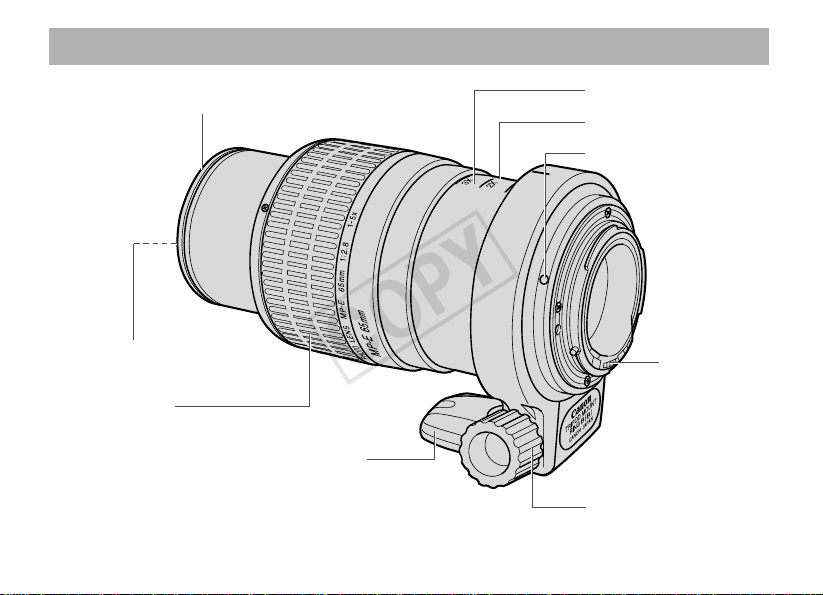
Nomenclature
For detailed information, reference page numbers are provided in parentheses (→ **).
Macro flash mount (→ 11)
Tr ipod mount (→ 9)
Filter mounting thread (→ 10)
Magnification (→ 8)
Working distance (→ 6)
Lens mounting index (→ 9)
Focusing ring (→ 4)
Orientation lock knob (→ 9)
Contacts (→ 4)
COPY
ENG-4
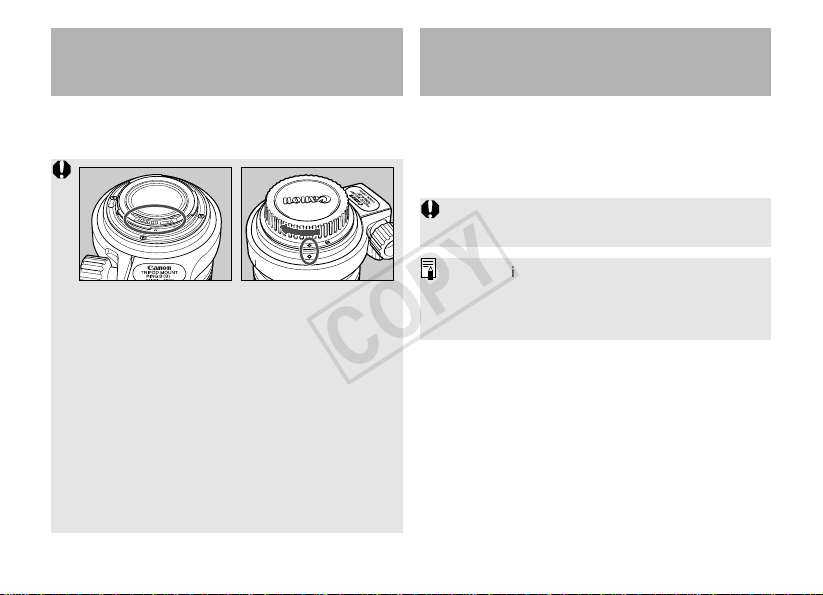
See your camera’s instructions for details on
mounting and detaching the lens.
• After detaching the lens, place the lens with the
rear end up to prevent the lens surface and
electrical contacts from getting scratched.
• If the contacts get soiled, scratched, or have
fingerprints on them, corrosion or faulty
connections can result.The camera and lens
may not operate properly.
• If the contacts get soiled or have fingerprints on
them, clean them with a soft cloth.
• If you remove the lens, cover it with the dust
cap.To attach it properly, align the lens mount
index and the
K
index of the dust cap as shown
in the diagram, and turn clockwise.To remove it,
reverse the order.
1.Mounting and
Detaching the Lens
To focus, turn the focusing ring on the MP-E
65mm f/2.8 1-5× lens (AF is not possible).
You can focus in two ways, either by setting the
magnification first or by framing the subject first.
2.Focusing
Since macro shots have a very shallow depth of
field, focus carefully to obtain proper sharpness.
The magnification refers to the ratio between the
subject’s size and the corresponding image size
on the focal plane.The available magnifications
are marked on the lens barrel.
COPY
ENG-5
Focusing
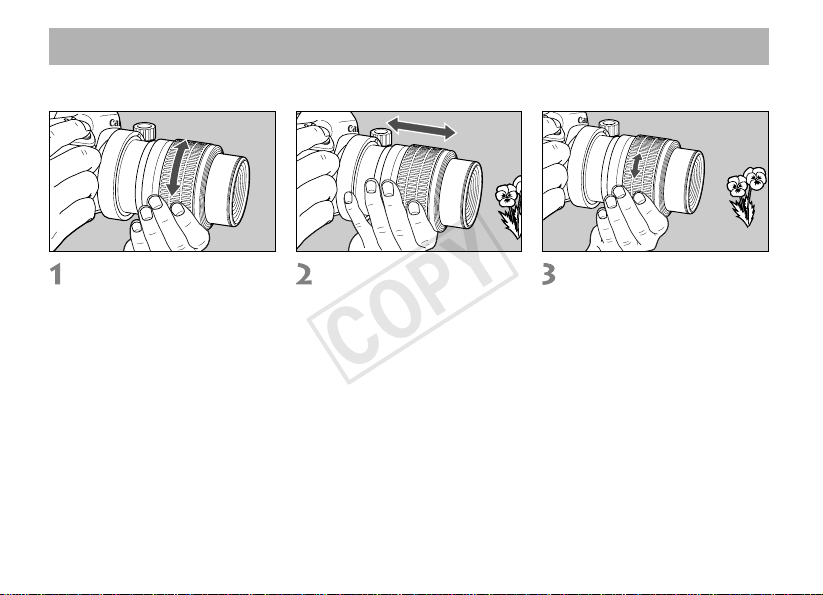
• Setting the Magnification First
Set the magnification.
Turn the focusing ring to the
desired magnification marked on
the lens barrel.
Focus the subject roughly.
While looking through
viewfinder, move the camera
forward or back to find the
proper focus.
Focus the subject finely.
Turn the focusing ring for fine
focusing of the subject.
• Framing the Subject First
While looking through the viewfinder to frame and focus, turn the focusing ring. After framing the
subject, follow steps 2 and 3 above.
COPY
ENG-6
•To prevent camera shake, use a tripod and the
Remote Switch (sold separately).
•For magnification-priority macro photography, a
focusing rail (commerically available) will make
focusing easier.
• With high-magnification shots, the viewfinder
image will darken, making it difficult to focus.
Using Angle Finder C (sold separately) will
make it easier to focus.
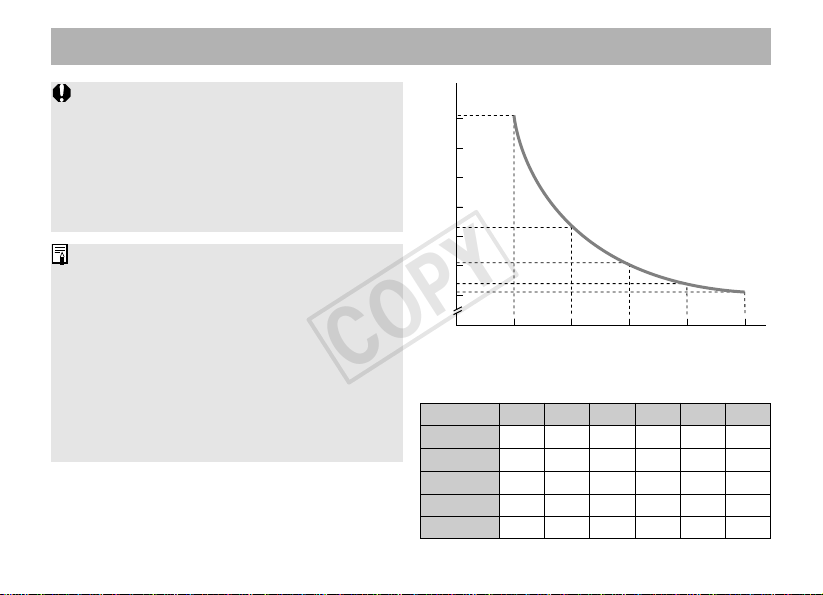
•To check the depth of field, refer to the Depth-of-
field Table or use the camera’s depth-of-field
preview.
• With the lens attached to the camera, the in-
focus indicator in the viewfinder will not display
properly. When focusing, do not rely on the in-
focus indicator.
• With high-magnification macro shots, the
working distance (distance between the front of
the lens and the subject) becomes very short.
Be careful not to bump into the subject.
Focusing
[
mm
]
100
90
80
70
60
40
50
1×
3×
4×
5×
2×
0
Magnification and Working Distance
Magnification
f/2.8 f/4 f/5.6 f/8 f/11 f/16
1× 0.396 0.560 0.792 1.120 1.584 2.240
2× 0.148 0.210 0.297 0.420 0.594 0.840
3× 0.088 0.124 0.176 0.249 0.352 0.498
4× 0.062 0.088 0.124 0.175 0.247 0.350
5× 0.048 0.067 0.095 0.134 0.190 0.269
Depth-of-field Table
[mm]
COPY

ENG-7
3.Setting the Exposure
Magnification and Effective f-number
The aperture displayed by the camera assumes
that the focus is set to infinity.The actual
aperture (effective f-number) becomes darker
(effective f-number increases) at closer focusing
distances (magnification increases).This does
not cause exposure problems for normal picture-
taking. However, for closeup photography, you
cannot ignore the change in the effective f-
number.
When you use a handheld exposure meter to set
the exposure, you must take into account the
exposure factor shown in the following table.
Use the following formula to calculate the
effective f-number:
Effective f-number = f-number × (Magnification + 1)
For example, if the aperture displayed by the
camera is f/2.8 and the magnification is 1×, the
effective f-number will be f/5.6.
Setting the Exposure
The correct exposure for a close-up shot largely
depends on the subject.Therefore, try to bracket
the exposure for the same subject.
With the EOS-1Ds Mark III, 1Ds Mark II, 1Ds, 1D Mark III,
1D Mark II N, 1D Mark II, 1D, 1, 1N/DP/HS, and 1V/HS
TTL autoexposure metering is possible from 1×
to 5×. Select the desired picture-taking mode and
check the shutter speed and aperture.
With Other EOS Cameras
Since there will be a slight exposure error, using AE
metering is not recommended.Take test shots first
or use a handheld meter to determine the proper
exposure based on the effective f-number. If you use
the f-number displayed by the camera, use the
exposure factor in the table below to convert it.
Magnification 1× 2× 3× 4× 5×
Exposure Factor +2 +3 +4 +4 +5
(stops)* +2 +3 +4 +4 +5
1
2
1
3
2
3
1
3
* Upper values: 1/3 stops. Lower values: 1/2 stops.
Magnification 1× 2× 3× 4× 5×
Effective f/No. 5.6 8.4 11.2 14.0 16.8
COPY
ENG-8
• With the EOS-3, using a Laser Matte focusing
screen will enable AE metering at all
magnifications from 1× to 5×.
• Using aperture-priority AE (Av) or Manual (M)
picture-taking modes are recommended as it is
easy to adjust depth of field and exposure in
these modes.
Setting the Exposure
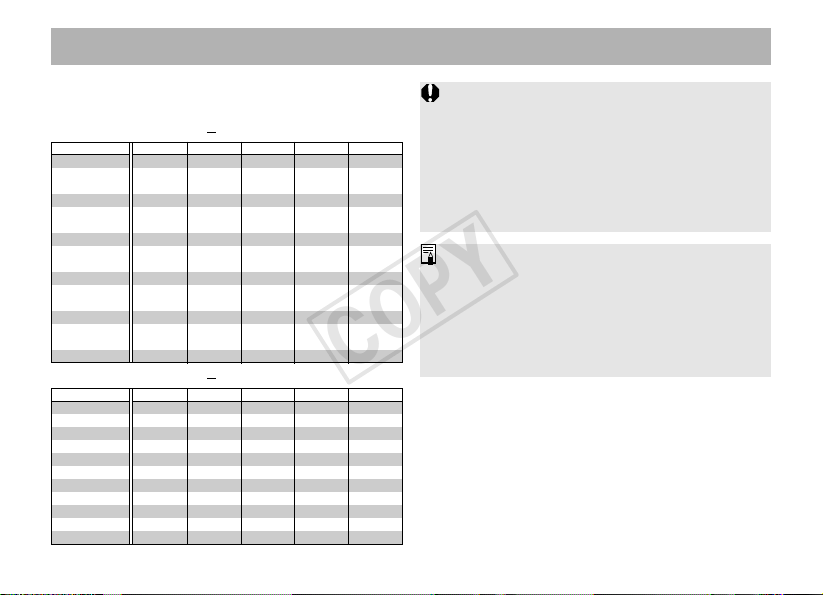
Effective f-number for the Magnification and
Camera’s f/No.
For Cameras Displaying Stops
1
3
f-number 1× 2× 3× 4× 5×
2.8 5.6 8.4 11.2 14 16.8
3.2 6.4 9.6 12.8 16 19.2
3.5 7 10.5 14 17.5 21
481216 20 24
4.5 9 13.5 18 22.5 27
51015202530
5.6 11.2 16.8 22.4 28 33.6
6.3 12.6 18.9 25.2 31.5 37.8
7.1 14.2 21.3 28.4 35.5 42.6
81624324048
91827364554
10 20 30 40 50 60
11 22 33 44 55 66
13 26 39 52 65 78
14 28 42 56 70 84
16 32 48 64 80 96
• With the EOS-1 and EOS-1N/DP/HS, fine spot
metering cannot be used because an exposure
error will result.
• During remote control shooting, etc., when you
take your eye off the eyepiece, cover the
eyepiece with the eyepiece shutter or cover.
Otherwise, stray light may enter the eyepiece
and affect the proper exposure reading.
For Cameras Displaying Stops
1
2
f-number 1× 2× 3× 4× 5×
2.8 5.6 8.4 11.2 14 16.8
3.5 7 10.5 14 17.5 21
481216 20 24
4.5 9 13.5 18 22.5 27
5.6 11.2 16.8 22.4 28 33.6
6.7 13.4 20.1 26.8 33.5 40.2
81624324048
9.5 19 28.5 38 47.5 57
11 22 33 44 55 66
13 26 39 52 65 78
16 32 48 64 80 96
COPY
ENG-9
Adjusting the Revolving Mount
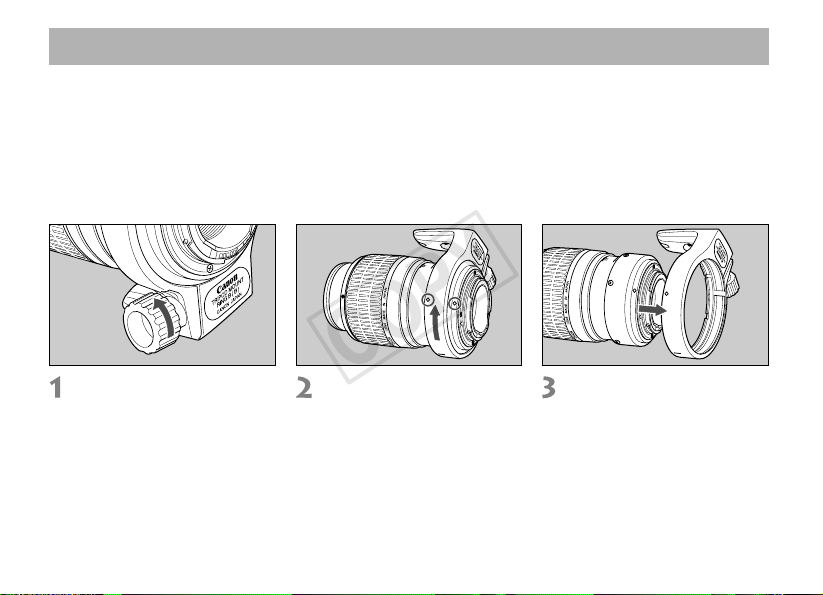
You can loosen the orientation lock-knob on the tripod mount to allow it to rotate as needed to fit a
particular camera model for switching between vertical and horizontal positions.
Detaching
First remove the lens from the camera and then remove the tripod mount from the lens as shown
below. To attach the tripod mount, reverse the procedure.
Loosen the orientation
locking knob.
Rotate the tripod mount and
align the mounting indicator
on the tripod mount with the
one on the lens.
Slide off the tripod collar
away from the rear of the
lens.
4.Using the Tripod Mount
COPY
ENG-10
Using the Tripod Mount
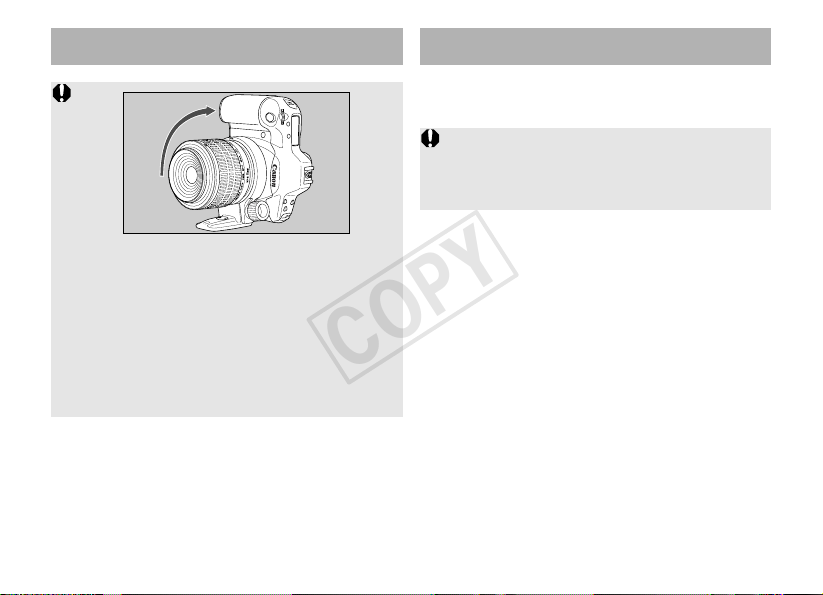
• When switching to vertical shooting, rotate the
camera so that the grip is at the top. Rotating
the camera in the opposite direction will have
the grip bump into the tripod mount.
• Before attaching or detaching the lens, set the
tripod mount back to its normal position
(horizontal shooting position). Otherwise, the
tripod mount may bump into the camera grip or
pentaprism and prevent the lens from being
attached to or detached from the camera.
• Filters and the macro flash cannot be used on
this lens at the same time.
• If you need a polarizing filter, use the Canon
Circular Polarizing Filter (58mm).
5.Filters (Sold Separately)
You can attach filters to the filter mounting thread
on the front of the lens.
COPY
ENG-11
•For information on operating the Canon Macro
Ring Lite MR-14EX or the Macro Twin Lite MT-
24EX, refer to the individual instruction booklets.
• Using aperture-priority AE (Av) or Manual (M)
picture-taking modes are recommended for
macro photography as it is easy to adjust depth
of field and exposure in these modes.
• When using the MT-24EX, it is recommended to
use the hood designed for the MP-E65 sold
separately.
6.
Macro Flash (Sold Separately)
7.Other Notes
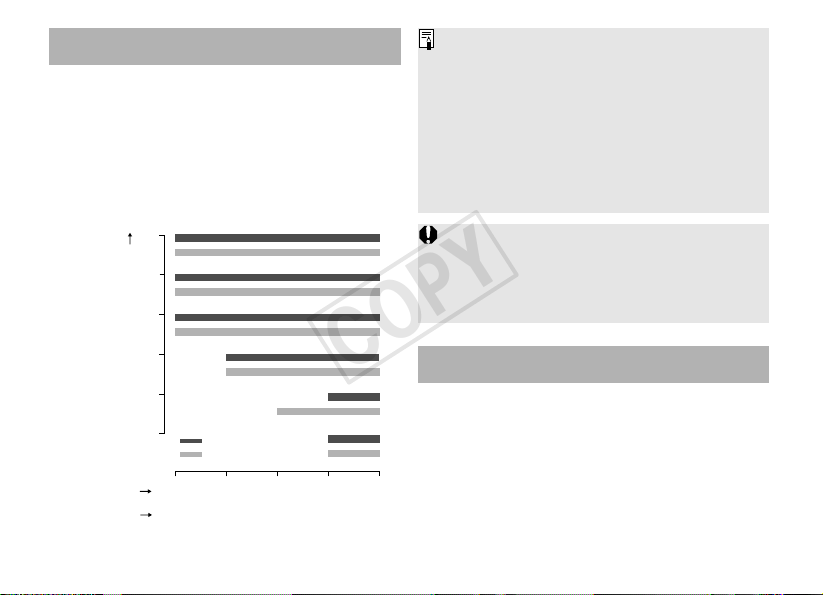
The Canon Macro Ring Lite MR-14EX or the
Macro Twin Lite MT-24EX enable fully automatic
macro flash photography from life-size to 5X
magnification in E-TTL autoflash mode.
Flash Range with Macro Ring Lite MR-14EX
and MP-E 65mm Lens
0.253
0.285
0.313
2
3
4
5
0.238
Aperture
5.6
8
16
11
4
2.8
ISO
400
100
0.243
1
Distance from
focal plane (m)
Magnification
Compared to normal picture-taking, the proper
exposure for macro photography largely depends
on the subject. It is difficult to obtain the proper
exposure the first time.Therefore, you should
bracket the exposure.
Multiple, EOS-dedicated Speedlites can be used
for fully automatic wired or wireless flash
photography.
COPY
ENG-12
• The lens length is measured from the mount surface to the front end of the lens.Add 21.5 mm to include the
E-58 lens cap and dust cap, and 24.2 mm for the E-58 II.
• The size and weight listed are for the lens only, except as indicated.
• The EF1.4X II/EF2X II extender, the EF12 II/EF25 II extension tube, and 250D/500D close-up lenses cannot
be used with this lens.
• Aperture settings are specified on the camera.
• All data listed is measured according to Canon standards.
• Product specifications and appearance are subject to change without notice.
8.Specifications
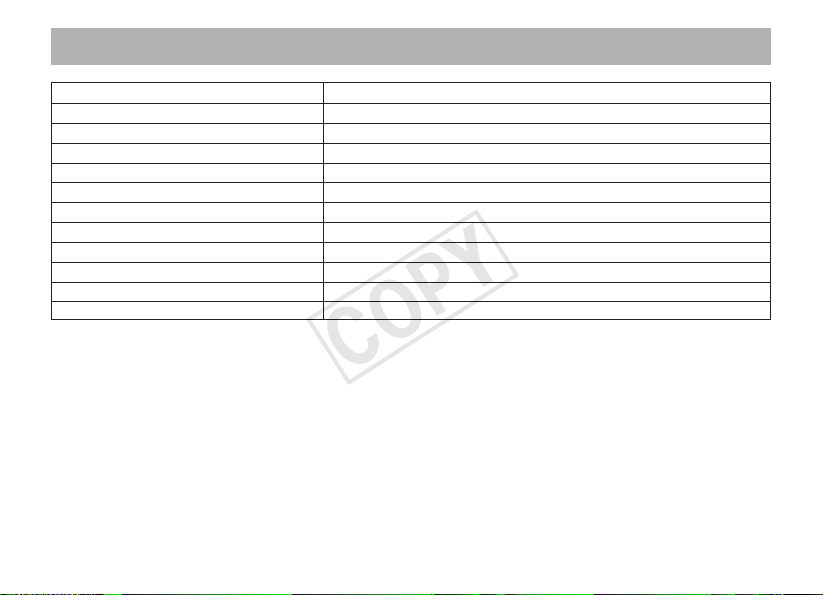
Focal Length & Max. Aperture 65 mm, f/2.8
Lens Construction 10 elements in 8 groups
Min. Aperture f/16
Angle of View (at 1×) Diagonal: 18˚40’ Vertical: 10˚35’ Horizontal: 15˚40’
Focusing Distance 0.238 - 0.313 m / 0.78 - 1.02 ft.
Max. Magnification & Field of view 1× - 5×, 24 × 36 mm - 4.8 × 7.2 mm / 0.9 × 1.4 inch - 0.2 × 0.3 inch
Filter Diameter 58 mm
Max. Diameter & Length 81 × 98 mm / 3.2 × 3.8 inch
Weight 710 g / 25 oz
Hood MP-E65 Hood (sold separately)
Lens Cap E-58/E-58 II
Case LP1216
COPY

© CANON INC. 2002CT1-8506-004 0812Ni
COPY