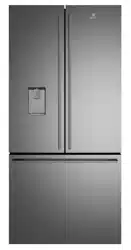
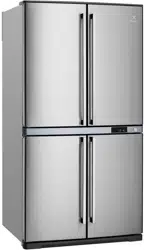
User Manual
FEATURES AT A GLANCE
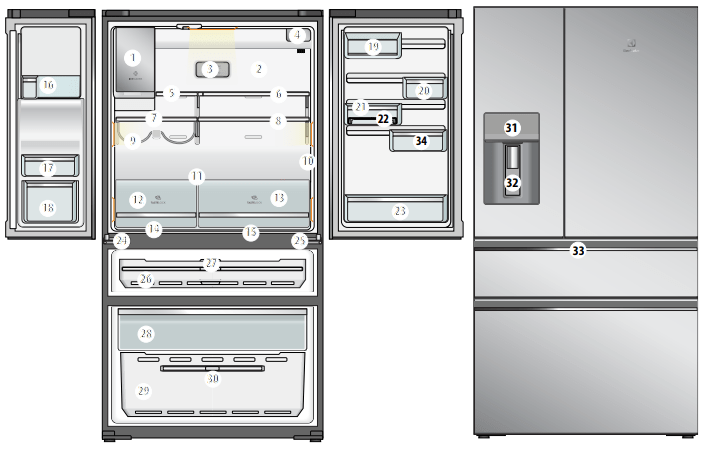
- Ice Maker
- Air distributor - Multiflow
- Deodoriser
- Water filter
- Flip up glass shelf
- Slide/fold glass shelf
- Left glass shelf
- Right glass shelf
- Wine rack
- Internal control panel
- Crisper shelf cover
- TasteLockTM crisper
- TasteLockTM crisper
- Left Snack Zone compartment
- Right Snack Zone Compartment
- Upper fixed door bin
- Left fixed door bin
- Left door bin
- FlexStorTM dairy bin
- FlexStorTM 1/3 bin
- FlexStorTM 2/3 bin
- Egg tray
- Bottle storage bin
- Adjustable left hinge
- Adjustable right hinge
- Convertible drawer
- Drawer divider
- Upper freezer drawer
- Lower freezer basket
- Lower freezer basket divider
- Refrigerator/Freezer control panel
- Water and Ice Dispenser Trigger
- Convertible drawer control panel
- Expandable bin
INSTALLING YOUR NEW APPLIANCE
Installing your refrigerator
Allow the following clearances for ease of installation, proper air circulation, and plumbing and electrical connections:
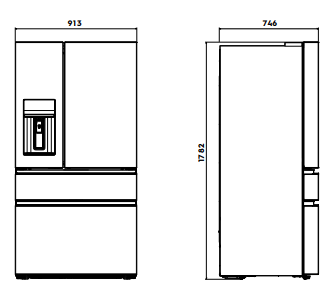
Door opening
Your refrigerator should be positioned to allow easy access to a counter when removing food. For best use of refrigerator drawers and freezer baskets, the refrigerator should be in a position where both can be fully opened.
CAUTION
LED lighting
Your appliance is fitted with long life LED lighting. In the unlikely event the LED lights should fail, then the LED lights should be serviced by the service agent, to avoid a safety hazard. Refer to the warranty page for contact details.
Cabinet Leveling & Refrigerator Door Alignment (if necessary)
Guidelines for final positioning of your refrigerator:
- All four corners of the cabinet must rest firmly on the floor.
- The front should be slightly elevated to ensure that doors close and seal properly.
- Doors should align with each other and be level.
- Most of these conditions can be met by raising or lowering the adjustable front rollers.
To level the cabinet using the front rollers:
1. Slightly open freezer drawer if the toe grill is installed. Lift the toe grille and gently pull forward.
2. Make initial cabinet adjustments by using the front roller height adjusting screws. Use a 3/8 inch socket wrench to turn the adjustment screws (1 per side).
To raise: turn adjustment screw clockwise.
To lower: turn adjustment screw counter clockwise.
3. Ensure both doors are bind-free with their seals touching the cabinet on all four sides and that cabinet is stable.
4. After unit is leveled, lower anti-tip leg using a 3/8 inch socket wrench until it firmly contacts the floor.
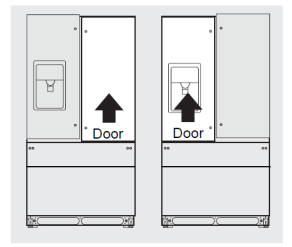
To make final door height adjustments:
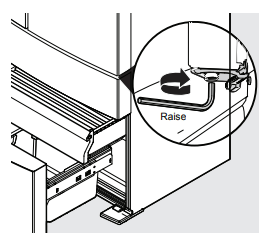
1. Open freezer drawer to make lower hinge visible.
2. Insert 6mm Allen wrench into the shaft of the lower hinge.
3. Adjust the height by turning clockwise or counterclockwise. Turning clockwise will lower the door. Turning counterclockwise will raise the door. Default setting is to the lowest height when you receive your appliance
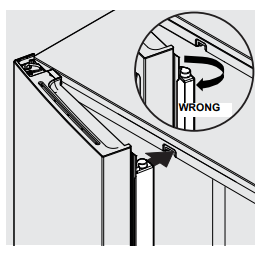
Flipper Mullion
Adjust Flipper Mullion for proper connection with the mullion guide by ensuring the flipper mullion is folded and perpendicular to the fresh food door. If the mullion guide is not in the correct position, it could prevent the door from closing completely.
CONNECTING THE WATER SUPPLY
IMPORTANT
Ensure that your water supply line connections comply with all local plumbing codes.
Before Installing the Water Supply Line, You Will Need:
- Basic Tools: adjustable wrench, flat-blade screwdriver, and PhillipsTM screwdriver
- The water dispenser and automatic ice maker require a drinkable water supply with a pressure range of between 206kPa and 689kPa (30PSI and 100PSI).
- A water supply to suit a ½” tap fitting is required adjacent to the refrigerator. It is recommended that a licensed plumber install a new water supply outlet nearer to the appliance should the tubing supplied not be long enough. It is not recommended that the tubing be extended as this could adversely affect the flow of water to the ice maker or water dispenser.
WARNING
Connect to potable water supply only. If using tank or bore water it is recommended to also use an external filter (not supplied).
The new hose-sets supplied with the appliances must be used and old hose-sets should not be reused.
Never connect the appliance to a hot water supply. Do not use with water that is microbiologically unsafe or with water of unknown quality without adequate disinfection.
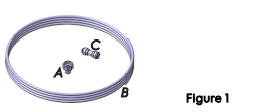
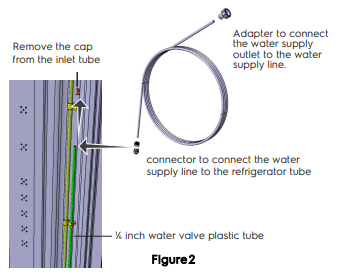
A - Adapter ½ to ¼ inch to connect the water supply outlet to the water supply line.
B - Water supply line ¼ inch with 3 meters in length.
C - ¼ inch connector to connect the water supply line to the refrigerator tube.
- Disconnect the refrigerator from the power source.
- Attach the adapter (item A above) to the water line, connect the water supply line (item B) to the adapter (item A) while holding the other end of the water supply line in a bucket or sink Turn on the water supply to eliminate air and clean the water supply line. Turn off the water supply.
- Remove the plastic protector from the refrigerator tube and connect the water supply line (item B) to the refrigerator tube using the connector (item C) as shown in fig. Make sure the tubes are inserted completely into the connections.
- Wrap excess water supply line behind refrigerator so that it does not vibrate with refrigerator operation. Do not twist the pipe.
- Turn on the water supply, check that there are no leaks in the connections.
- Reconnect the refrigerator to the power source.
- The Ice Maker is factory-switched, within 24 hours your refrigerator will have produced ice, discard the first production.
Water Filter
The water filter should not be used on water that is micro biologically unsafe or with water of unknown quality. The service life of the filter may be reduced in water supplies that contain an excess of particles or other impurities. Reduced flow rate is an indication that a new filter is required. Failure to replace the filter when required can affect the function of the ice maker. Service calls caused by a failure to replace the filter are not covered by warranty. Replacement water filters are available from Electrolux Home Products Spare Parts Centres and can be posted to you for your convenience (refer to spare parts contact numbers on the warranty page).
ABOUT THE USER INTERFACE
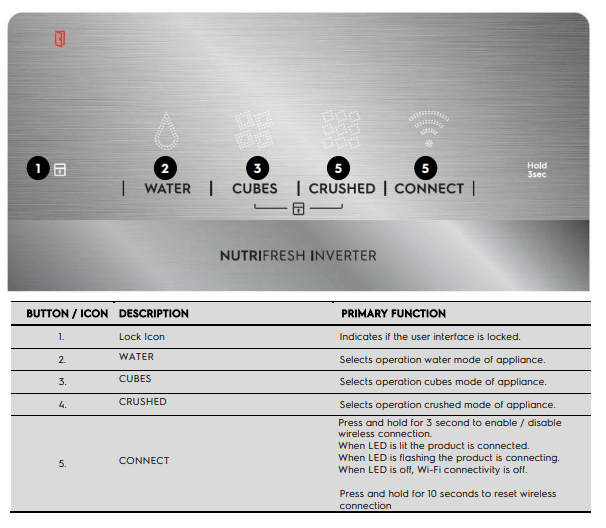
Controls –External User interface
WI-FI CONNECTIVITY SETUP
This chapter describes how to connect the smart appliance (fridge) to the Wi-Fi network and to link it to mobile devices. By this functionality you can receive notifications, control and monitor your fridge from your mobile devices.
To connect the appliance to enjoy the full range of features and services you need:
- Wireless network at home with internet connection enabled.
- Mobile device connected to wireless network.
Frequency 2.412 - 2.472 GHz
Protocol IEEE 802.11b/g/n
Setting up your fridge*
Once you’ve downloaded the Electrolux Life App, simply plug in your fridge to a power supply and you’re ready to get set up.
Add your appliance
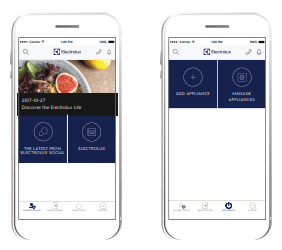
Tap on ‘Appliances’ on the bottom of the home screen.
Tap on ‘Add Appliance’ to get started and follow the prompts on screen.
*Set up will take 3 to 5 mins depending on your network speed.
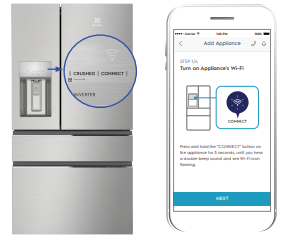
Turn on your fridge Wi-Fi
Press and hold the ‘CONNECT’ button for 3 seconds, until you see the Wi-Fi icon starts flashing.
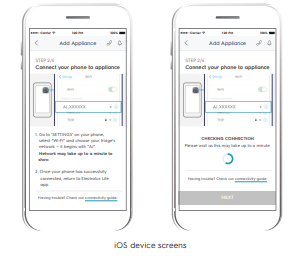
Connect your appliance: iOS
Go to ‘SETTINGS’ on your phone and select your appliance’s Wi-Fi network, that begins with “AJ_”.
Return to the app screen for connection to next step. This may take up to a minute to display
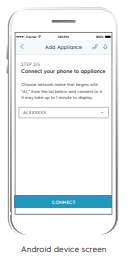
Connect your appliance: Android
For Android devices, select your appliance’s Wi-Fi network from the drop-down box.
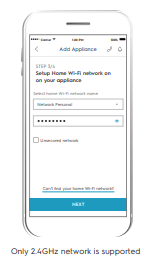
Connect your fridge to your home Wi-Fi*
You’ll need to select your Wi-Fi network name and input your password.
*For iOS devices, you will then be prompted go to ‘SETTINGS’ on your phone and select your Home Wi-Fi, then return to the Electrolux Life app.
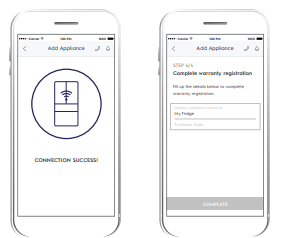
Connection success!
Please proceed to the next screen to register the appliance.
Product registration
Simply add your fridge’s name and the purchase date.
Congratulations!
Now you’re all setup, you can start exploring the Electrolux Life App.
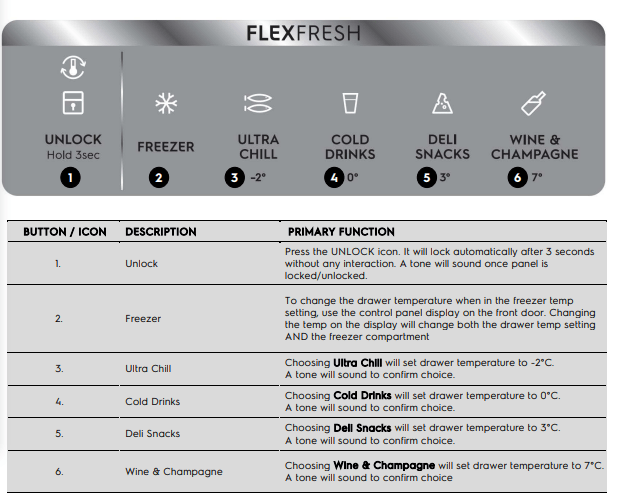
FlexFresh Drawer
Whether you are preparing the perfect frozen dessert or need that extra drink space, we make sure that your refrigerator is the ultimate secret to the perfect night of entertainment.
At the slide of a button, the convertible drawer can adjust from Freezer to +7°C*, with 5 predefined settings so that you can enjoy food at its finest. *within 2.5 hours
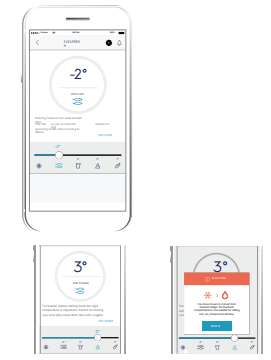
Useful Alerts on your App
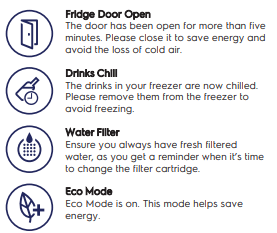
Other Cool Features of your Fridge
TasteLock™ Easy Glide Crispers
Automatic humidity control ensures your fruit and vegetables are preserved in the optimal environment. Designed with your comfort in mind, the easy glide crispers open effortlessly and provide easy access even when they’re full.
SmartSplit Door Design
With optimally split doors you have more usable space in your refrigerator door and can effortlessly reach for larger items, saving you the need to open both doors every time.
Flip Up Shelves
With the ability to flip up some of the refrigerator shelving your taller Instagram worthy creations stay in one piece, ready for their big reveal.
ABOUT THE USER INTERFACE
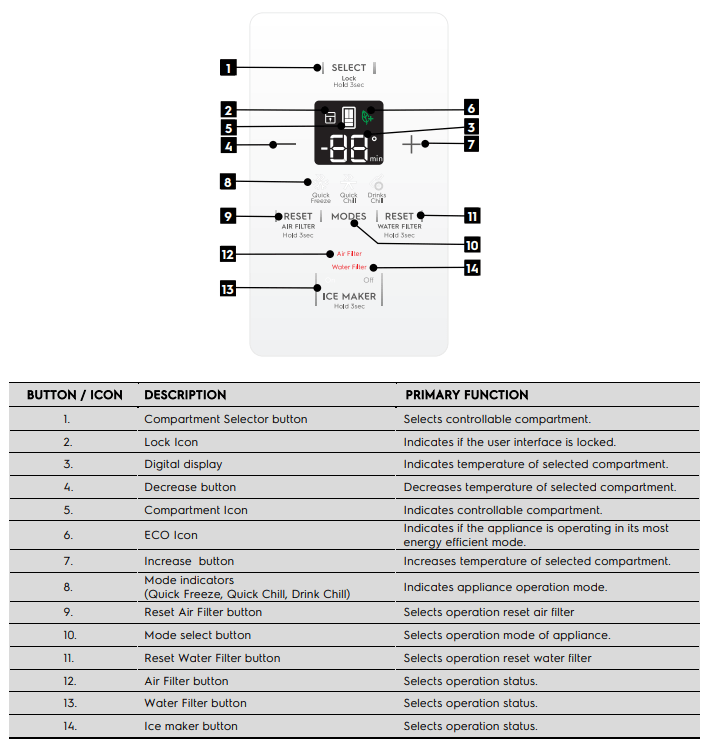
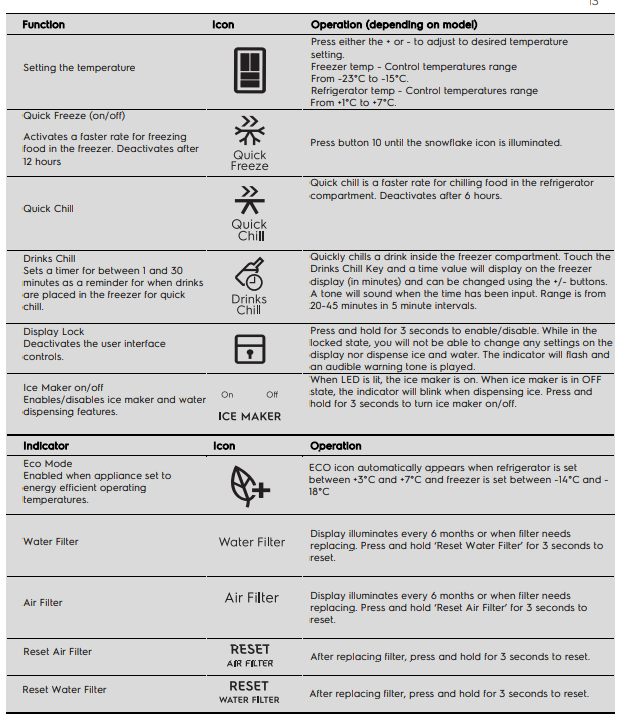
Controls – Internal User interface
ABOUT THE USER INTERFACE
Controls – FlexSpaceTM Drawer control panel
SETTING COOLING TEMPERATURES
IMPORTANT
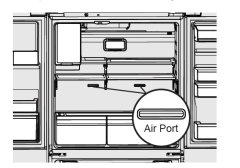
If your product has food freezing in the fresh food compartment, increase the temperature setting 1 or 2 degrees.
If you place food within 1 inch in front of the air ports, there may be the chance of freezing food.
Alerts and Alarms
Water Filter
When illuminated, the water filter needs to be replaced. Change the water filter every 6 months or when 120 gallons of water has been dispensed. To reset, press and hold button for 3 seconds. Tone will sound once it has been reset.
Air Filter Installation
First operation the refrigerator need to installation the air filter which storage at crisper left side and follow installation method as below.
Carbon activated air filter
- Remove plastic wrap.
- Install filter according to your refrigerator’s use&care guide.
- Reset filter reminder light on your refrigerator.
- Replace filter every 6 months.
When illuminated, air filter needs to be replaced. Change the air filter every 6 months. To reset, press and hold button for 3 seconds. Tone will sounds once it has been reset.
Door Open
If a door has been left open for 5 minutes or more, an alarm will sound and the door open indicator will illuminate on the display. The alarm can be turned off by closing the door or pressing any key. Control panel will return to normal operations after the door is closed.
Error tone
An alarm will sound if the user tries to make a selection that is not available.
Automatic Ice & Water Dispenser
Using the ice maker after installation
Before making ice for the first time, be sure to prime the water supply system. Air in new plumbing lines can result in two or three empty ice maker cycles. Furthermore, if the system is not flushed, the first ice cubes may be discolored or have an odd flavor.
Priming the water supply system
CAUTION
For proper dispenser operation, recommended water supply pressure should fall between 30 psi and 100 psi. Excessive pressure may cause the system to malfunction.
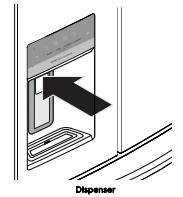
- Begin filling the system by pressing and holding a drinking glass against the dispenser.
- Keep the glass in this position until water comes out of the dispenser. It may take about 1½ minutes.
- Continue dispensing water for about four minutes to flush the system and plumbing connections of any impurities (stopping to empty the glass as necessary).
Ice Maker Operation & care
After the refrigerator is installed properly and has cooled for several hours, the ice maker can produce ice within 24 hours. The ice maker will fill the ice bin from the rear. You must dispense some ice to force the ice forward in the bin. This will allow the bin to fill completely.
Ice Maker and storage bin capacity
This ice maker should produce 2.5 to 3 pounds of ice per 24 hours. The ice bin will hold about 4 pounds of ice.
TURNING THE ICE MAKER ON AND OFF
IMPORTANT
Your ice maker is turned on at the factory so it can work as soon as you install your refrigerator. If you cannot connect a water supply, set the ice maker’s On/Off feature to Off; otherwise, the ice maker’s fill valve may make a loud chattering noise when it attempts to operate without water.
Ice production is controlled by the ice maker’s On/Off feature on the control panel. Pressing the On/Off feature turns the ice maker on & off.
NOTE: The ice maker also has a built-in plastic signal arm that automatically stops ice production when the ice bin is full. This signal arm should not be used to manually stop the ice maker.
IMPORTANT
Turning off the ice maker simply disables ice making.
You will still be able to dispense existing ice, and you will still be able to dispense water.
On occasion, unusually small ice cubes may be noticed in the bucket or in dispensed ice. This could occur in normal operation of the ice maker. If you start seeing these more frequently, it may be an indication of low water pressure "or that" the water filter needs to be replaced. As the water filter nears the end of its useful life and becomes clogged with particles, less water is delivered to the ice maker during each cycle.
Remember, if it has been six months or longer since you last changed your water filter, replace the water filter with a new one. Poor quality household water may require the filter to be changed more frequently.
Ice maker/Dispenser tips
- If your refrigerator is not connected to a water supply or the water supply is turned off, turn off the ice maker as described in the previous section.
- The following sounds are normal when the ice maker is operating:
- Motor running
- Ice dropping into ice bin
- Water valve opening or closing
- Running water
- If you need a large quantity of ice at one time, it is best to get cubes directly from the ice bin.
- Ice cubes stored too long may develop an odd flavor. Empty the ice bin as explained below.
- When dispensing cubed ice, it is normal to have a small quantity of little pieces along with the whole cubes.
- To avoid splashing, dispense ice into your container before adding liquids.
- It is normal for ice to fill to the top of the ice bin.
CAUTION
If the water supply to your refrigerator is softened, be sure the softener is properly maintained. Chemicals from a water softener can damage the ice maker.
Cleaning the ice maker
Clean the ice maker and ice bin at regular intervals, especially prior to vacation or moving.
- Turn off the icemaker.
- Remove the ice bin by pulling straight out.
- Empty and carefully clean the ice bin with mild detergent. Do not use harsh or abrasive cleaners.Do not place in dishwasher. Rinse with clear water.
- Allow the ice bin to dry completely before placing it back into the freezer.
- Place ice bin back into position. Turn the ice maker on.
Remove and empty the ice bin if:
- An extended power failure (one hour or longer) causes ice cubes in the ice bin to melt and refreeze together after power is restored, jamming the dispenser mechanism.
- You do not use the ice dispenser frequently. Ice cubes will freeze together in the bin, jamming the dispenser mechanism.
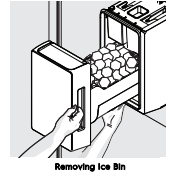
Remove the ice bin and shake to loosen the cubes or clean as explained above.
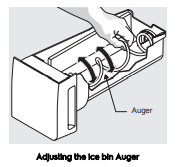
IMPORTANT When removing or replacing the ice bin, avoid rotating the auger in the ice bin. If the auger is accidentally rotated, you must realign the auger by turning it in 45 degree turns (see below) until the ice bin fits into place with the drive mechanism. If the auger is not properly aligned when replacing the ice bin, the refrigerator will not dispense ice. The fresh food door also may not close properly causing warm air to leak into the fresh food compartment.
STORAGE FEATURES
CAUTION
To avoid personal injury or property damage, handle tempered glass shelves carefully. Shelves may break suddenly if nicked, scratched, or exposed to sudden temperature change. Allow the glass shelves to stabilize to room temperature before cleaning. Do not wash in dishwasher.
You can easily adjust shelf positions in the fresh food compartments to suit your needs. The shelves have mounting brackets that attach to slotted supports at the rear of each compartment.
To change a shelf position:
- Remove all food from shelf.
- Lift the front edge up and pull the shelf out.
- Replace by inserting the mounting bracket hooks into the desired support slots.
- Lower the shelf and lock into position.
To adjust the flip shelf:
- Remove food from shelf.
- Lift the right side edge of shelf upwards and push to the left towards ice maker

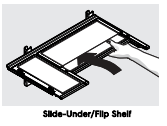
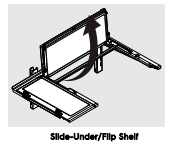
To adjust the slide-under/flip shelf:
1. Pull front half shelf forward until its back drops down, then gently push front half shelf back and under back half shelf
2. With front half fully below back half, lift front of shelf to flip it upwards toward the back of the cabinet.
Drawers
Your refrigerator includes a variety of storage drawers.
TasteLockTM Crisper (with automatic humidity control)
Crisper drawers are designed for storing fruits, vegetables, and other fresh produce. Crispers have an auto humidity control (with replaceable membrane) on the side of each crisper under the humidity control cover.
To remove the auto humidity control membrane:
- Reach to back of humidity control cover.
- Pull up on cover.
- Pull cover towards back of cabinet and remove.
- Replace humidity membrane.
- Replace cover by reversing the steps above. Repeat for both crispers.
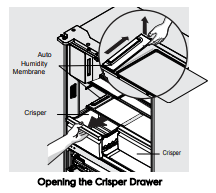
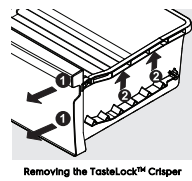
To remove the TasteLockTM Crisper for cleaning:
1. Pull the drawer out until it stops.
2. Lift the front slightly and remove the drawer.
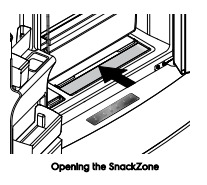
Recessed SnackZone
This drawer is ideal for storage of deli meats and cheese.
Slide back the cover to allow access to the drawers.
Doors
Storage bins
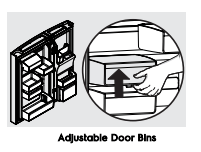
The doors to your fresh food compartment use a system of modular storage bins. All of these bins are removable for easy cleaning. Bins can be adjusted to your needs. Door bins are ideal for storing jars, bottles, cans, and large drink containers. They also enable quick selection of frequently used items.
To move door bin along a rail:
- Tilt bin up so the back of the bin is off the door but the hook is still engaged.
- Slide bin along rail to desired position.
- Lower bin back into place.
To move door bin from rail to rail:
- Lift bin up disengaging the hook.
- Move bin to desired rail location.
- Push bin hook into rail engaging the hook.
Freezer Features
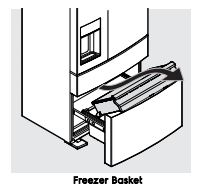
To remove upper freezer basket:
1. Open freezer compartment completely.
2. Lift up and out to remove upper freezer basket.
Reverse the steps to reinstall basket.
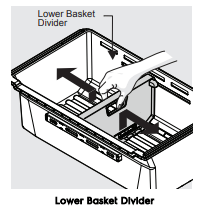
Dividers
Grab hand hold on lower divider and pull up slightly to slide to next position. (The divider cannot be removed.)
CLEANING YOUR REFRIGERATOR
WARNING
BEFORE CLEANING: Turn the refrigerator off at the power point and unplug the cord to prevent any chance of electrocuting yourself.
Doors and exterior (white and silver):
You should only clean the doors with lukewarm soapy water and a soft cloth.
Stainless Steel:
Your stainless steel refrigerator is manufactured from mark-resistant stainless steel. This stainless steel has a special advanced protective coating that eases the removal of marks such as fingerprints and water spots. To keep its appearance, clean it regularly with lukewarm soapy water and a soft cloth.
CAUTION
Never use stainless steel cleaners, abrasive pads or other cleaners that will scratch the surface. Damage to the appliance after delivery is not covered by your warranty.
Interior
Clean the inside of your refrigerator regularly with a soft cloth, unscented mild soap and lukewarm water. Thoroughly dry all surfaces and removable parts and avoid getting water on the controls. Replace removable parts, plug power cord in and switch the power on before returning the food.
Ice and water
Clean the components of the ice maker /water dispenser regularly with a soft cloth, unscented mild soap and rinsing thoroughly with lukewarm water. For further information on the care and cleaning of your Icemaker, Ice dispenser of water dispenser refer to the section "Ice and Water Models"
Door seals
Always keep door seals clean by washing them with a mild detergent and warm water, followed by a thorough drying. Sticky food and drink can cause seals to stick to the cabinet and tear when you open the door.
Never use hot water, solvents, commercial kitchen cleaners, aerosol cleaners, metal polishes, caustic or abrasive cleaners, or scourers to clean your refrigerator. Many commercially available cleaning products and detergents contain solvents that will damage your refrigerator. Use only a soft cloth with an unscented mild soap and lukewarm water.
CAUTION
To clean a crisper or freezer bin with telescopic extension slides, simply wipe with a damp cloth and warm soapy water. Never immerse the cover in water, as this could affect the operation of the slide.
Switching off your refrigerator
If you switch off your refrigerator for an extended period, follow these steps to reduce the chances of mould:
- Remove all food.
- Remove the power plug from the power point.
- Thoroughly clean and dry the Interior.
- Ensure that all the doors are wedged open slightly for air circulation.
Changing the filter
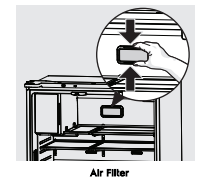
Air Filter (select models)
The air filter is located in the top center of the fresh food compartment.
Replacing your Air Filter
To ensure optimal filtering of refrigerator odors, you should change the air filter six months (The filter status light on the Touch Panel prompts you to replace the filter after six month)
- Remove the air filter cover by squeezing the sides of the cover together and removing from liner
- Remove the old filter and discard it.
- Unpack the new filter and slide it into the housing.The open face must (carbon media) of the filter should be installed facing the air port (hole) in the multiflow.
- Replace the air filter cover by squeezing the sides and snapping it back into place.
- Press and hold the “Reset Air Filter” button on the control panel for three seconds. When the LED turns off, the status has been reset
Water Filter (selected models)
Your refrigerator is equipped with a water filtering system. The water filtering system filters all dispensed drinking water, as well as the water used to produce ice. The water filter is located at the top right side of the fresh food compartment.
In general, you should change the water filter every six months to ensure the highest possible water quality. Water filter status on the user interface prompts you to replace the filter after a standard amount of water (125 gallons/473 liters) has flowed through the system.
If your refrigerator has not been used for a period of time (during moving for example), change the filter before reinstalling the refrigerator
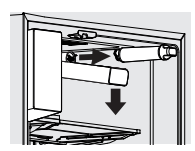
Replacing the Water Filter
To Remove: Pull cover towards you and cover will drop down and allow access to filter.
To Reinstall: Push cover up towards liner and then push towards rear of cabinet. Filter cover will snap back into place.
It is not necessary to turn the water supply off to change the filter. Be ready to wipe up any small amounts of water released during the filter replacement.
- Ensure that the ice maker is turned off
- Remove the filter by turning anti-clockwise 180˚
- Slide the old water filter cartridge straight out of the housing and discard it.
- Unwrap the new filter cartridge and using the alignment guide, slide it gently into filter housing until it stops against the filter connection at the back of the housing.
- Engage the filter by firmly rotating clockwise until the filter snaps into position (once engaged the filter cannot be rotated further).
- Press a drinking glass against the water dispenser while checking for any leaks at the filter housing. Any spurts and sputters that occur as the system purges air out of the dispenser system are normal.
- After filling one glass of water, continue flushing the system for about four minutes.
- Turn on the ice maker.
- When the filter has been replaced press and hold the ‘Ice and Water’ button for three seconds to reset the filter replace timer.
TROUBLESHOOTING
Appliance does not operate at desired temperature
In a modern frost free refrigerator / freezer, cold air is circulated around the various compartments through air vents using a high efficiency fan
Refrigerator is too warm.
- Ensure food is allowed to cool before placing inside the refrigerator.
- Ensure the appliance is set up as per instructions.
- Ensure that contents are not obstructing the cooling vents.
- Ensure the door is not held open or is being opened too frequently.
Freezer is too warm.
- Adjust temperature to a colder setting.
- Ensure food is allowed to cool before placing inside the freezer.
- Ensure the appliance is set up as per instructions .
- Ensure that contents are not obstructing the cooling vents.
- Ensure the door is not held open or is being opened too frequently.
Food is freezing in the refrigerator.
- Adjust temperature to a warmer setting.
- Ensure that fruit and vegetables are stored in the crisper. Items with a high water content should not be placed near the cooling vents.
Unable to change temperature settings.
- Refer to function guide in Controlling Your Refrigerator.
- Ensure that user interface is in "awake" mode before trying to adjust temperature settings.
Appliance noise
Your new refrigerator may make sounds that your old one didn’t make. Because the sounds are new to you, you might be concerned about them. Most of the new sounds are normal. Hard surfaces, like the floor, walls and cabinets, can make the sounds seem louder than they actually are. The following describes the kinds of sounds and what may be making them
Motor noise (compressor).
- Nothing. This is normal as your new refrigerator uses a variable speed compressor and fan that at start up and on warm days runs at a high speed to provide additional cooling.
- When less cooling is required the compressor and fan will run at a lower speed Note that the compressor noise may seem louder at the start of the on cycle.
A clicking noise heard just before the compressor starts.
- Nothing. This is normal as your new refrigerator has an automatic switching action of the temperature control, turning the compressor on and off.
Occasional gurgling, similar to water boiling.
- Nothing. As each refrigeration cycle ends, you may hear a gurgling sound due to the refrigerant flowing in your refrigerator system.
Airflow noise.
- Nothing, this is normal as your new refrigerator uses high efficiency fans to circulate air. Fan speed and noise may increase during periods of heavy usage or hot weather.
Rattling and other noises.
- Ensure that the cabinet is level and stable, refer to Installation Instructions.
- Check the surrounds of the appliance to ensure there is nothing touching or placed on top of the appliance.
- Ensure that contents of the appliance are not placed in such a way that they are vibrating (such as bottles).
Crisper Operation
Excess moisture build up in crisper. It is normal for there to be some moisture and humidity in the crisper bin.
- Ensure that the crisper is not over packed.
- Adjust crisper humidity slides.
Crisper bin cannot be removed.
- If crisper bin interferes with the door bins, remove door bins before removing crisper.
- Position cabinet so that the door can be fully opened.
Freezing items in the crisper.
- Adjust temperature to a warmer setting
Refrigerator operation
Appliance will not run It is normal for the freezer fan not to operate during the automatic defrost cycle, or for a short time after the appliance is switched on.
- Ensure that the cord is plugged into a live power outlet and outlet is switched on.
- Ensure that the household circuit breaker has not tripped or that the fuse has not blown.
- The appliance maybe in defrost mode, check again in half an hour
Compressor motor seems to run too long
At normal room temperatures, expect your motor to run about 40% to 80% of the time. Under warmer conditions, expect it to run even more often.
The variable speed compressor and fan that at start up and on warm days runs at a high speed to provide additional cooling. When less cooling is required the compressor and fan will run at a lower speed
- Ensure that the doors are not held open.
- Check that large amounts of warm food have not just been placed inside the appliance.
- Note that the appliance will run more than normal just after you install it or when adjusting to temperature setting changes.
The exterior of the appliance is warm or hot to touch
This is normal because the appliance transfers heat from the inside out through the outer panels and the divider between the doors.
- Ensure the appliance has the external clearances recommended in the section “Installing your new appliance”.
- The exterior of the cabinet will be much warmer on warmer days it may even feel hot to touch, as the appliance is working harder.
User interface will not respond
To ensure settings are not accidentally changed the user interface will go into sleep mode when not in use.
Press any button to wake user interface
- Check that the user interface is in awake mode, refer to section “About the user interface”.
- Check that the user interface is not locked, refer to section “About the user interface”.
- If the user interface is frozen turn the appliance off for five minutes for the memory to clear, then turn back on.
- Check that the user interface is not in Sabbath Mode, refer to control instructions. (I&W models only).
Alarms sounding
- Check that all doors are fully closed.
- Ensure that the over temperature alarm is not being activated by hot food placed in the freezer.
- Check if the drinks timer has ended, refer control instructions.
- Check if the Filter Replacement alert is activated, refer control instructions. (I&W models only)
Frost build up
- Check that all doors are fully closed.
- Ensure that the doors are not opened too often.
- Ensure that the return air vents are not blocked with packaging.
- Ensure the seals are clean and not obstructed.
Odours
- The interior may need cleaning, refer to cleaning guide.
- Ensure that food is stored correctly as some food, containers and wrapping can produce odours.
- Check appliance for old or unusual food.
Lights not working
The LED lighting is designed to dim automatically if the door is left opened for more than 5 minutes and turn off completely if the door is open for more than 7 minutes. Closing the door will reset the timer.
The LED lighting is also designed to turn on gradually
- Ensure that the cord is plugged into a live power outlet and outlet is switched on.
- Ensure that the household circuit breaker has not tripped or that the fuse has not blown.
- Check that the user interface is not in Sabbath Mode, refer to control instructions.
- Close and re-open the door. When door has been open for 5 minutes the lights fade to 50% then after 7 minutes they will turn off
Door operation
Freezer door pops open.
- This is normal and should re-close. This happens when the refrigerator door is closed too quickly.
- If the freezer door stays open, it indicates that the appliance needs to be tilted backwards a little further. Refer to section “Installing your new appliance”.
Self close not working.
- Check if your appliance has self closing hinges as not all models do.
- It indicates that the appliance needs to be tilted backwards a little further. Refer to section “Installing your new appliance”.
Door not sealing properly
- Ensure there is nothing that is preventing the door from closing such as appliance contents or items placed near the appliance.
- Ensure that the crisper/freezer bin is closed completely. Refit if required as referred to in the section "Using your refrigerator".
- Ensure the appliance is set up as per recommendations.
Door difficult to open and close
- If the door is difficult to open just after you have closed it this is due to the pressure equalising, the door will open normally after a few minutes.
Automatic Ice maker system
Ice maker does not produce ice or not enough ice
The icemaker is designed to produce a tray of ice approximately every 3 hours, depending on room temperature and water temperature.
- Ensure that the cord is plugged into a live power outlet and outlet is switched on.
- Ensure that water is connected and turned on and there are no kinks in the water line.
- Ensure that the Ice Maker is switched on at the user interface refer to "About the User Interface" for details.
- Check that the water filter is not blocked or out of date.
- Check the water supply flow rate.
- If the freezer compartment is too warm, refer to "freezer is too warm" then wait 24 hours for the freezer to reach ideal temperature.
- Turn the unit off at the mains and leave for 2 minutes then turn the appliance back on (this will reset the icemaker unit). Check for ice production after 24 hours.
- Check that there is no obstruction under the ice maker and ensure the ice bin is fitted correctly.
Ice has bad odour or taste
- Cover food to ensure ice does not absorb foreign odours.
- Check that the water filter is not out of date.
- Interior of appliance or ice bin may require cleaning, refer to “Cleaning your refrigerator”.
- Discard stale ice monthly and allow ice maker to produce a fresh supply.
If you still require service
If you have a problem, and the problem persists after you have made the checks mentioned, contact your nearest
Electrolux approved Service Centre or the dealer you bought the refrigerator from. Be ready to quote the model number, the 9-digit PNC and 8-digit serial number, which is stated on the label inside the refrigerator compartment.