
TERMS OF GUARANTEE
Sharp Electronics (UK) Ltd. (“Sharp”) guarantees to provide for the repair, or at its option the replace-
ment, of this product subject to the conditions listed below:-
1. This guarantee shall only apply to faults which are due to inferior workmanship or materials. It
does not cover faults or damage caused by accident, misuse, fair wear and tear, neglect,
tampering with the product, or repair other than by a Service Facility appointed by Sharp.
2. As this product is intended for private domestic use only, the guarantee will not apply if the product
is used in the course of a business, trade or profession.
3. To benefit from this guarantee, any fault which occurs must be notified to Sharp, or its appointed
Service Facility within one year from the date this product was purchased. Proof of purchase
must be provided.
4. The guarantee does not cover carriage costs.
5. In the unlikely event of this product requiring repair, please contact the supplier from whom it was
purchased. Where this is not possible, please contact the Sharp Customer Information Centre on
the telephone number given below.
6. No person has any authority to vary the terms or conditions of this guarantee.
7. This guarantee is offered as an additional benefit to your statutory rights, and does not affect these
rights in any way.
If you have any difficulty operating this product, or would like information on other Sharp products,
please telephone the Sharp Customer Information Centre on the number given below.
Sharp Customer Information Centre - Telephone 08705 274277
(or (01) 676 0648 if telephoning from Ireland)
0201
SHARP ELECTRONICS (U.K.) LTD.
Sharp House, Thorp Road, Newton Heath, Manchester, M40 5BE
SHARP CORPORATION 9906
FEATURES
Cluster Ion Balance Control
The unit controls the ratio of Negative clus-
ter ions and Positive cluster ions depend-
ing on the condition of the room.
• Clean mode
Approximately the same amount of Posi-
tive and Negative cluster ions are dis-
charged. This mode is effective for reduc-
ing some airborne mold.
• Ion control mode
It is said that plenty of Negative cluster
ions exist in places such as waterfalls or
forests in natural environment. In this op-
eration mode, Negative cluster ions will
be released in an increased rate, in order
to bring the room atmosphere close to this
condition.
• AUTO cluster ion mode
The unit will switch between Clean mode
and Ion control mode automatically de-
pending on the amount of pollution in the
air detected by dust and odor sensor.
HEPA filter
• High-efficiency dust collection
Active carbon filter
Powerful deodorization by large particles
of columnar charcoal.
CONTENTS
SAFETY PRECAUTIONS........................ E-2
• CAUTIONS CONCERNING THE USAGE
OF THIS PRODUCT ....................................E-3
• CAUTIONS CONCERNING
THE INSTALLATION....................................E-3
• ABOUT THE FILTER ...................................E-3
NAMES OF PARTS ................................. E-4
• MAIN UNIT DISPLAY...................................E-4
• EXPLODED DIAGRAM................................E-4
• BACK ...........................................................E-6
• ACCESSORIES ...........................................E-6
SPECIFICATIONS ...................................E-6
PREPARATION........................................ E-7
• INSERTING BATTERIES
IN THE REMOTE CONTROL.......................E-7
• USING THE REMOTE CONTROL...............E-7
• INSTALLING THE FILTERS .........................E-8
OPERATION .......................................... E-10
• MAIN UNIT OPERATION .......................... E-10
• REMOTE CONTROL OPERATION........... E-11
GUIDE FOR OPERATION .....................E-12
CARE AND MAINTENANCE................. E-13
• MAIN UNIT................................................ E-13
• FILTER CLEANING................................... E-13
• ODOR SENSOR, DUST SENSOR ........... E-13
• GUIDE FOR LIFE OF FILTERS ................ E-14
TROUBLE SHOOTING.......................... E-15
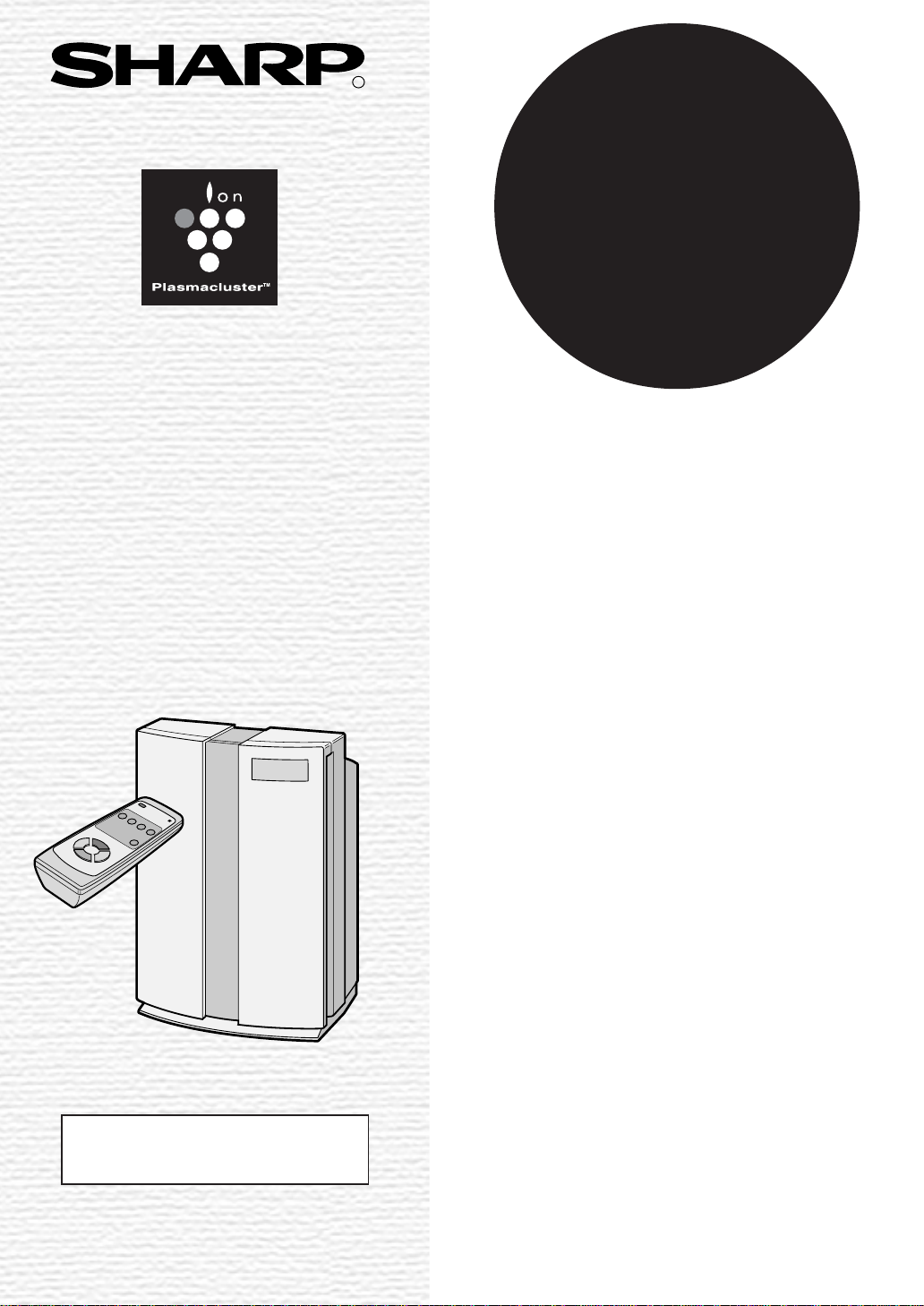
Thank you for purchasing the SHARP FU-60SE.
Please read this manual carefully for the cor-
rect operation. Before using this product, be
sure to read The section: “Safety Precautions.”
After reading this manual, retain it in a conven-
ient location for future reference.
This product is for household use only.
E-1
FOR UNDERSTANDING
THE PRODUCT
Some of the odor ingredients ab-
sorbed by the filters become sepa-
rated and are discharged through the
Air Outlet as odor.
Depending on the usage environment,
this odor may become strong in sev-
eral months and the Air Outlet may
smell.
In this case, purchase an exchange
filter FZ-60SEF of the option goods,
and replace the filters.
This equipment complies with
the requirements of Directives
89/336/EEC and 73/23/EEC as
amended by 93/68/EEC.
ENGLISH

• Do not use the unit if the power cord or plug is damaged or the connection to the wall outlet is
loose.
Electrical shock, short circuit and/or fire may occur as a result.
• Do not damage, break, coat, forcefully bend, pull, twist, bundle, pinch or place heavy objects
on the power cord.
If the power cord is damaged, fire and/or electrical shock may occur as a result.
• Use AC 220-240V only.
Fire and/or electrical shock may occur as a result.
• Do not modify. Repair and disassembly of this product are to be performed by authorized
service personnel only.
Fire, electrical shock and/or bodily injury may occur if not.
For repair, contact your dealer of purchase or the nearest Sharp Service Centre.
• Periodically remove dust from the power plug
Accumulated dust on the power plug may cause bad insulation from humidity, etc.
Fire and/or electrical shock may occur as a result.
• When cleaning the unit, be sure to remove the power plug from the wall outlet.
In addition, never handle the power plug with wet hands.
Electrical shock and/or bodily injury may occur as a result.
• Do not use the unit where there are oil ingredients such as cooking oil, etc., in the air.
Cracking of the unit surface may occur as a result.
• Do not wipe the unit with benzene or paint thinner. Also, do not spray insecticides on the unit.
Cracking, electrical shock and/or fire may occur as a result.
• Do not operate the unit when using indoor smoke-generating insecticides.
Chemical ingredients may accumulate within the unit and then discharge from the Air Outlet when the
unit operates. Discharge of such chemicals may be unhealthy to your body.
• Do not allow the unit to intake flammable gases, sparks from lit cigarettes, incense, etc.
The unit may ignite as a result.
• Do not use the unit where it is humid, such as in a bathroom, or where the unit may get wet.
Electrical shock and/or malfunction may occur as a result.
• Do not insert fingers or foreign objects into the intake or Air Outlet.
Electrical shock and/or malfunction may occur as a result.
• When removing the power plug, always hold the plug and never pull the cord.
Electrical shock and/or fire from short circuit may occur as a result.
• Ventilate when using the unit along with a heating appliance.
Carbon monoxide poisoning may occur as a result.
• Remove the power plug when not using the unit.
Electrical shock from bad insulation and/or fire from short circuit may occur as a result.
• If the supply cord is damaged, it must be replaced by the manufacturer or its service agent or
similarly qualified person in order to avoid a hazard.
• The batteries must be removed from the appliance before it is scrapped and that they are
disposed of safely.
SAFETY PRECAUTIONS
E-2

CAUTIONS CONCERNING THE USAGE OF THIS PRODUCT
• Do not block the intake and Air Outlet.
• Do not use the unit near or on hot objects, such as a stove, etc. Also, do not use the unit where
it may come into contact with steam.
• Do not use the unit on its side.
Deformation, malfunction and/or overheating of the motor may occur as a result.
• Do not install when there is generation of lampblack, such as in a kitchen.
• Do not use detergent when cleaning the unit.
The unit surface may become damaged or cracked.
In addition, the sensors may malfunction as a result.
• Do not operate the unit without the filter.
It will have no purification effect. In addition, it becomes the cause of the trouble.
• Do not wash and reuse filters.
They do not have effect, and it becomes an electric shock and the cause of the trouble.
CAUTIONS CONCERNING THE INSTALLATION
DO NOT USE THE REMOTE CONTROL IN THE FOLLOWING LOCATIONS
• Location where there are an inverter lighting equipment or a electronic spontaneous lighting
equipment
The remote control may become inoperative. In this case, move away from such lighting equipment
or change direction.
• Location exposed to direct sunlight
The unit may not receive signals from the remote control.
The unit may not respond to the signals of the remote control if the ends of fluorescent lighting
become black or lights flicker due the depletion of service life; however, this is not a malfunction of the
remote control or the main unit. In this case, replace the lighting with new fluorescent tubes.
TAKE CAUTION TO THE FOLLOWING DURING INSTALLATION
• Leave at least 2m of space from televisions, radios and wave clocks.
Electrical interference may occur if not.
• Leave at least 60cm of space from the wall
The motor may overheat, causing malfunction if not.
• Avoid a location where sensors are exposed to direct wind
The unit may not operate properly.
• Avoid a location where curtains, etc., come into contact with the intake or Air Outlet.
Curtains, etc., may become dirty or malfunction may occur as a result.
EFFECTIVE OPERATION
• Place on a stable surface with sufficient air circulation
ABOUT THE FILTER
• Do not wash and reuse HEPA filter and Active carbon filter. They do not effect, and may become a
cause of electric shock and trouble.
• The wall, etc., behind the Air Outlet may become dirty as time passes. When using the unit for
extensive period in the same location, use a vinyl sheet, etc., to prevent the wall from becoming dirty.
In addition, periodically clean the wall, etc.
E-3
E-4
NAMES OF PARTS
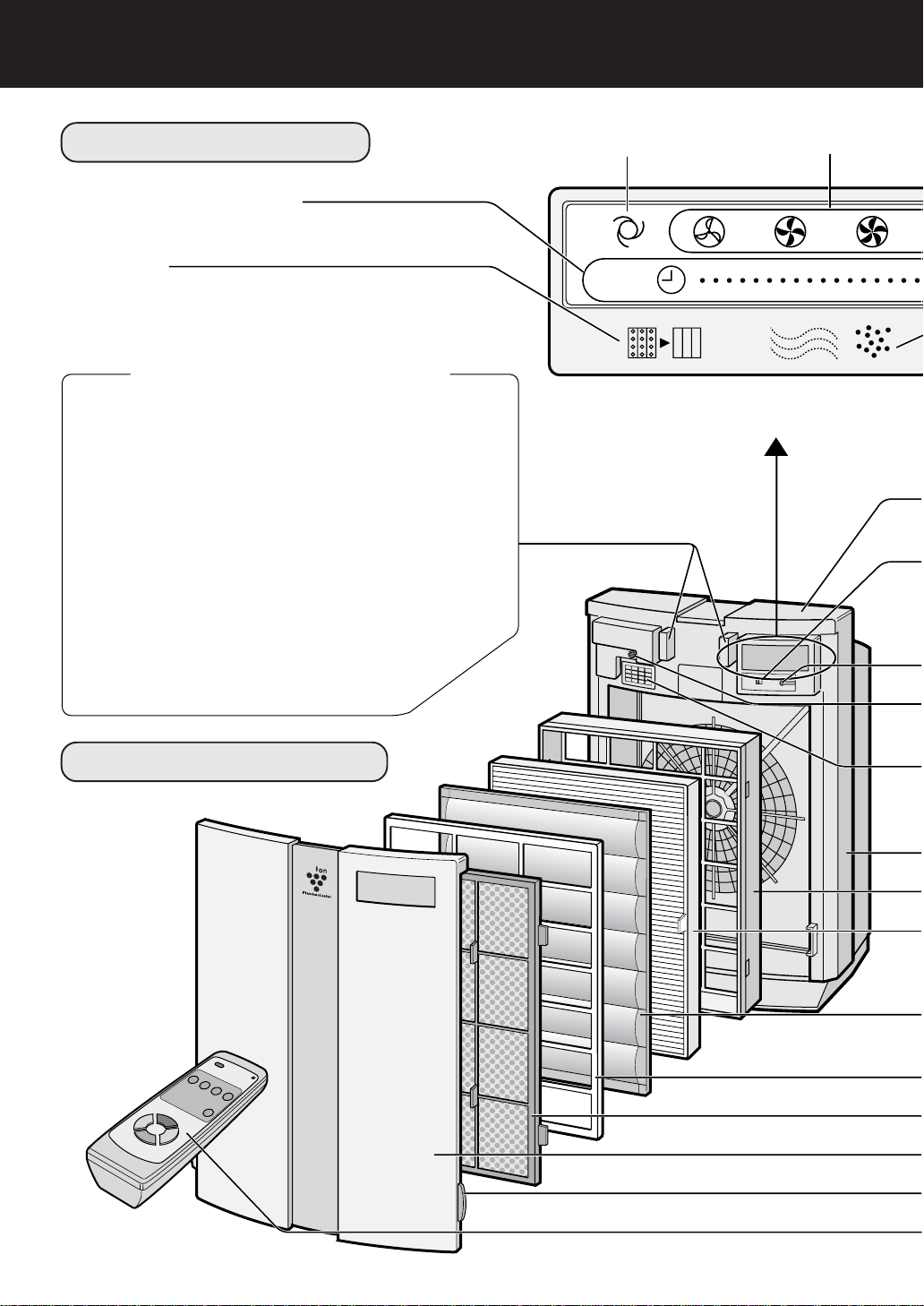
MAIN UNIT DISPLAY
OFF timer display lamps
(set using remote control)
Filter lamp
If the Filter lamp is lit, the Active carbon
filter needs to be cleaned.
AUTO operation lamp
Fan level lamps
CLUSTER ION LAMP
Cluster ion operation is selected using the remote control.
Blue light
When the cluster ion operation is in Clean mode or AUTO
cluster ion mode and the air in the room is dirty, this light
turns on and the unit will operate in Clean mode.
Green light
When the cluster ion operation is in Ion control mode or
AUTO cluster ion mode and the air in the room is clean, this
light turns on and the unit will operate in Ion control mode.
Light off
No cluster ions are generated.
• The light can be turned off by using the ‘DIS-
PLAY ON/OFF button’ on the remote control
even while cluster ions are generated
(Please turn off the lights when not required.)
EXPLODED DIAGRAM
E-5
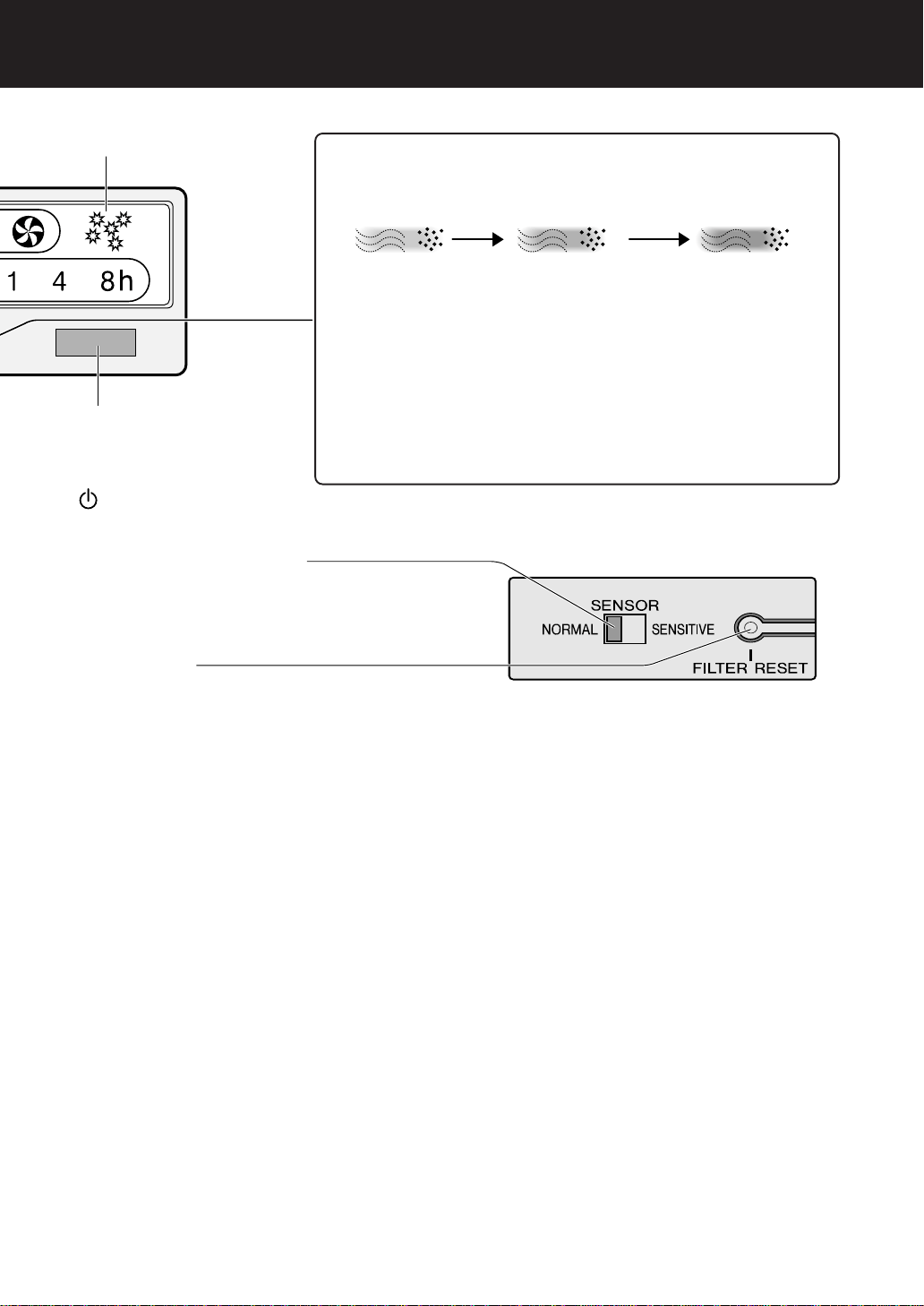
Pollen mode operation lamp
Remote control receiver
MODE/
button See Page E-10
(Used to select operation modes or turn the unit off)
Sensor sensitivity select switch
The sensitivity of odor and dust detection can be adjusted.
This setting is factory set to “Normal”. Normally, use the
unit in this setting. Set the sensitivity to “High” if the sensi-
tivity seems too low depending on the room condition.
Filter reset button
Odor sensor
Detects odors such as tobacco smoke, incense, pets, cos-
metics, etc.
Sensor cover / Dust sensor
Detects dusts, smoke, pollen, house dust, etc. See Page
E-12,E-13
Main unit
Filter frame
HEPA filter (white)
See Page E-14
(Dust collection filter)
Active carbon filter (black) See Page E-14
(Deodorizing filter)
Filter separator
Pre-filter
Front panel
Hook
Remote control See Page E-11
CLEAN-SIGN
The color changes when the air is dirty.
Clean (green) Slightly dirty (orange) Very dirty (red)
ABOUT THE CLEAN-SIGN
• The sensor displays a CLEAN-SIGN lamp depending on relative
changes to the environment from the time the power plug is inserted
into the wall outlet and thereafter.
• When the air is extremely dirty at the time the power plug is inserted,
the CLEAN-SIGN lamp may light green since the polluted state is
the environment against which the sensor bases the pollution rate
on.
In this case, switch manually to the desired operation mode as it is
ineffective in auto operation. See Page E-11
• The CLEAN-SIGN lamp can be turned off using the “DISPLAY ON/
OFF” button of the remote control. See Page E-11
*Before pressing the Filter reset but-
ton, be sure to connect the power plug
to a wall outlet.
There is also a Filter reset button on
the remote control.
Point the remote control toward the
main unit before pressing the Filter
reset button on it.
E-6
NAMES OF PARTS
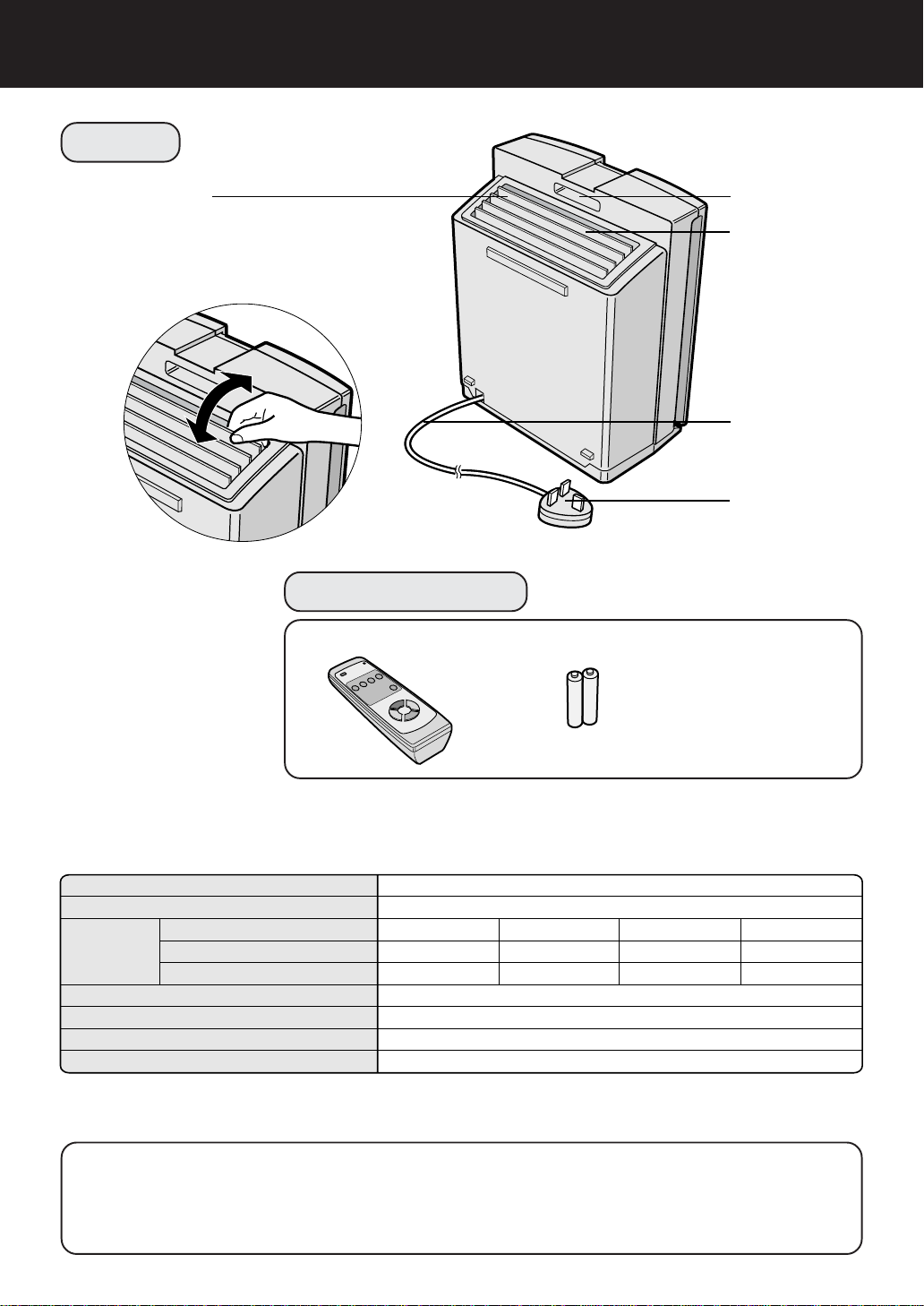
BACK
Ion wide louver
• The output direction of the purified air can
be changed to the directions indicated by
the arrows.
• Set the output direction as desired.
Handle
Air Outlet
Power cord
Power plug
ACCESSORIES
Remote control (1 unit) Battery (R6(AA) battery X 2)
Attached leaflet
• Operation Manual
SPECIFICATIONS
Model
Power supply
Fan level adjustment
Rated power
Fan level
Applicable floor surface
Cord length
Dimensions
Weight
Fan level
operation
FU-60SE-K
220-240V / 50Hz
~46 m
2
*
2.5 m
415 mm(W)x238 mm(D)x572 mm(H)
9.3 kg
Max
53 W
360m
3
/hour
High
16 W
197m
3
/hour
Medium
6 W
95m
3
/hour
Silent
4 W
43 m
3
/hour
* The applicable floor surface area is the surface area for when operating the unit in Max fan level.
(According to Japan Electrical Manufacturer’s Association JEM1467)
About the reduction of standby power
In order to operate the electrical circuits while the power plug is inserted in the wall outlet, this
product consumes about 0.9W of standby power.
For the conservation of energy, remove the power plug when not using the unit.
E-7
PREPARATION
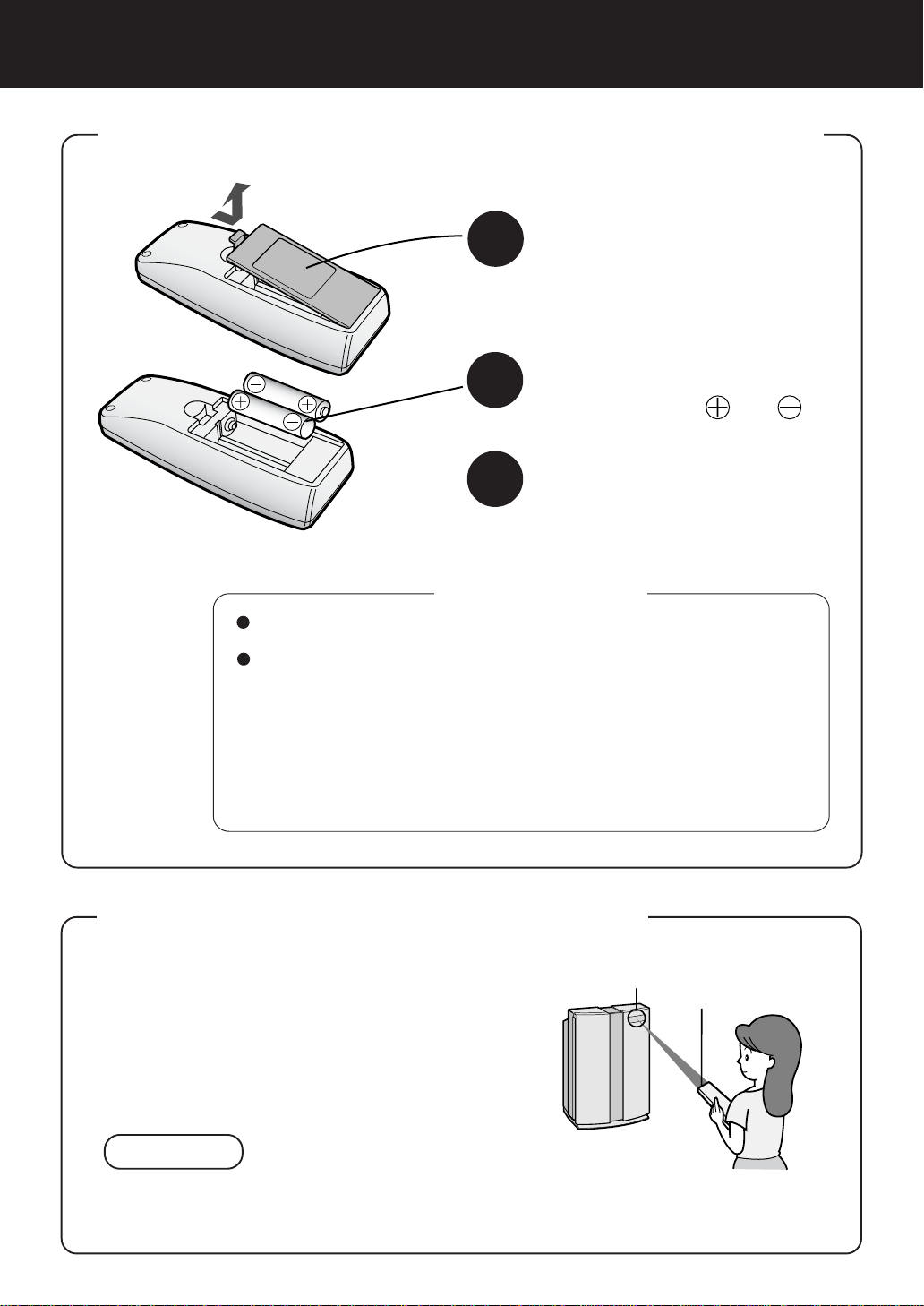
INSERTING BATTERIES IN THE REMOTE CONTROL
About the batteries
• The battery life is about 1 year.
• Replace the batteries when the remote control becomes inoperative.
• Incorrect usage of the batteries may cause battery fluid leakage and/or
damage. Take care of the following when handling:
• When replacing the batteries, replace both batteries with new ones
of the same type. (Use R6(AA) manganese batteries (2 units).)
• When not using the unit or remote control for an extended period,
remove the batteries. This prevents malfunction of the remote control
from battery fluid leakage.
*The batteries of the accessory are for initial use only and may be
depleted within 1 year.
1
Remove the back cover
Press and slide the back cover to re-
move.
2
Insert batteries
Insert batteries with
and as
shown below.
3
Close the back cover
USING THE REMOTE CONTROL
• Operate the remote control facing the main unit
(Receiver).
• The signal range is about 7m (front).
• Make sure there are no objects blocking the path
of the signal.
NOTE
• Avoid strong impact on the remote control. In addition, do not wet the remote control or
place it under direct sunlight or near a stove, etc., otherwise a malfunction may occur.
Receiver
Transmitter
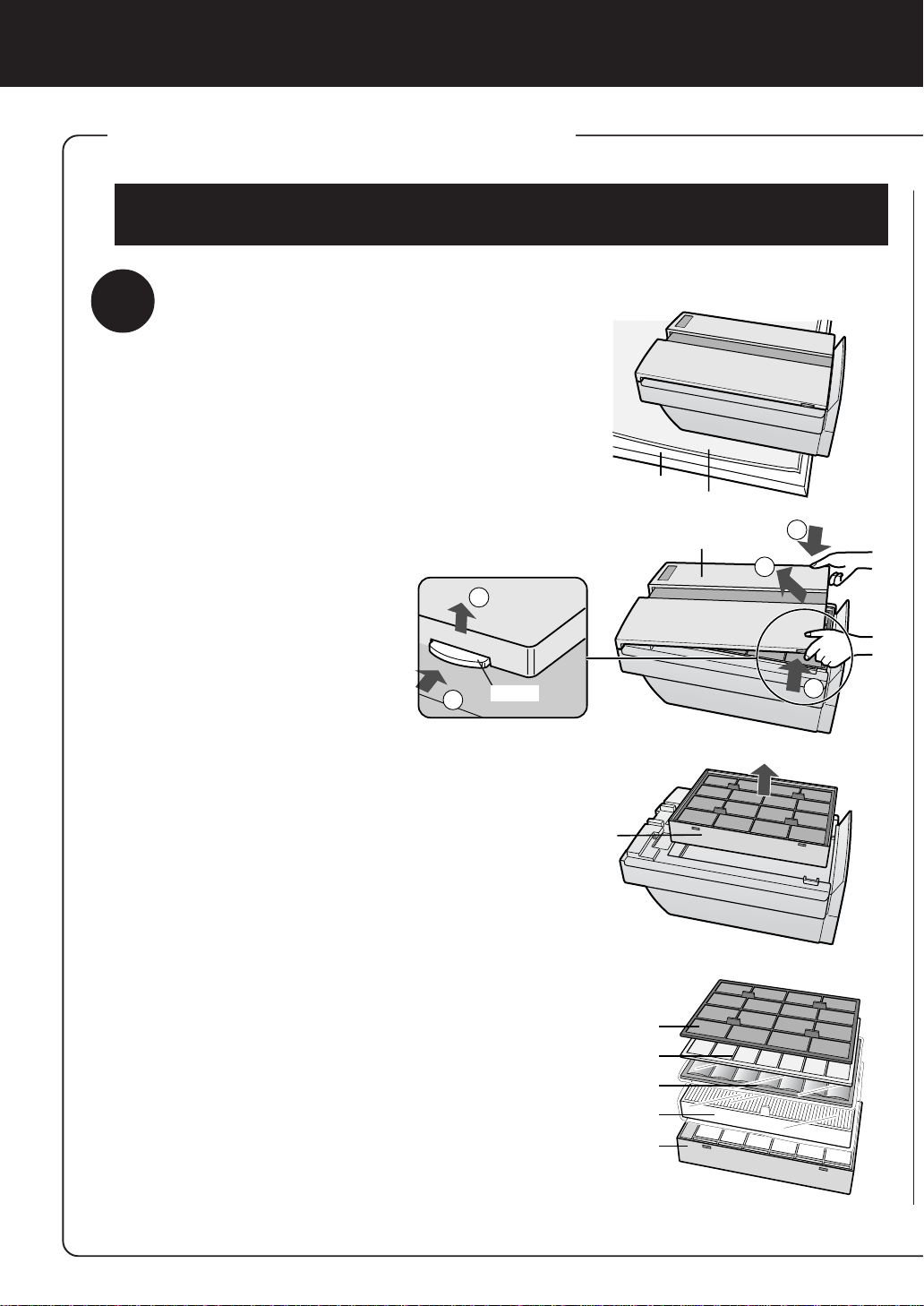
Be sure to remove the power plug from the wall outlet.
E-8
PREPARATION
• Be sure to remove the power plug from the wall outlet.
1
1
1
2
2
Table
Soft cloth
Front panel
Filter frame
Pre-filter
Filter separator
Active carbon filter
HEPA filter
Filter frame
Hook
INSTALLING THE FILTERS
To maintain the quality of the filters, they are installed in the main unit within plastic
bags. Be sure to remove the filters from the plastic bags before using the unit.
1
Remove the filters
1
Place the unit facing up.
Lay the unit on a table, etc., while
making sure not to pinch the
power cord on the rear of the
unit.
2
Remove the Front panel.
Press in the hook on the bottom
of the Front panel and lift to re-
move.
3
Pull out the Filter frame and
remove the Pre-filter and Fil-
ter separator.
4
Remove the Active carbon
filter (black) and HEPA filter
(white) from the plastic bag.
E-9
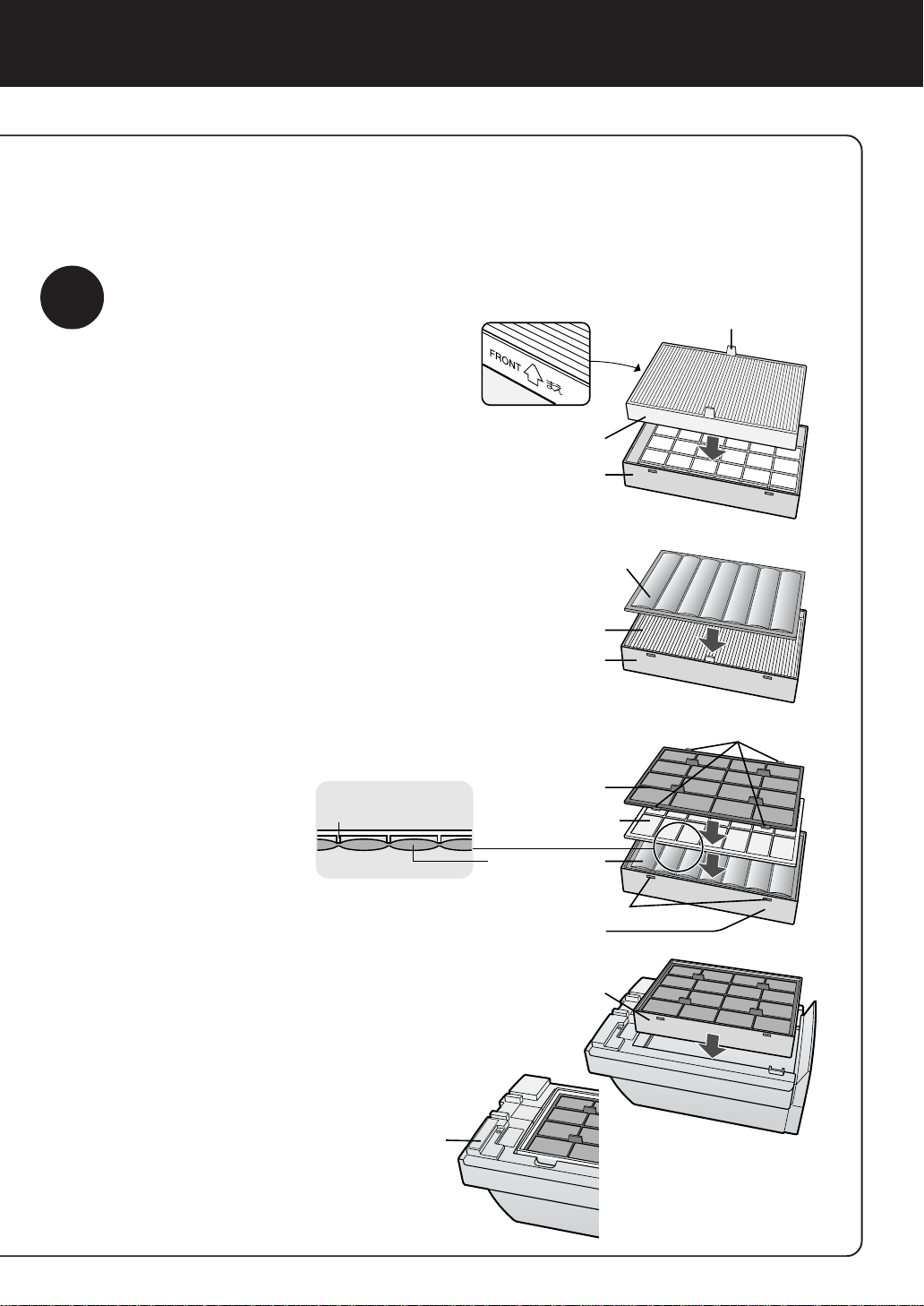
2
Install the filter
1
Remove the HEPA filter from
the plastic bag and mount it
within the Filter frame with the
“FRONT” sign facing up.
Insert so that the tabs on the HEPA filter
are facing toward you.
Proper operation cannot be achieved
when installing the filter backwards.
2
Remove the Active carbon fil-
ter from the plastic bag and
mount it within the Filter frame.
3
Mount the Filter separator and
Pre-filter within the Filter frame
in the respective order.
• Place the Filter sepa-
rator so that the ribs
are facing down as
shown in the diagram
on the right.
• Insert the tabs of the
Pre-filter (4 locations)
in the holes of the Fil-
ter frame.
• Set the Filter frame to the main unit as
shown in the diagram on the right
(There is no vertical orientation).
4
Fill in the usage start date on
the Date label affixed on the
main unit.
Use the date as a
guide for the filter
replacement pe-
riod.
Tabs
HEPA filter
Filter frame
Active carbon filter
HEPA filter
Filter frame
Pre-filter
Tabs (4 places)
Filter separator
Active carbon filter
Hooks
Filter frame
Filter frame
Date label
Rib of the filter separator
Plasmacluster
E-10
OPERATION
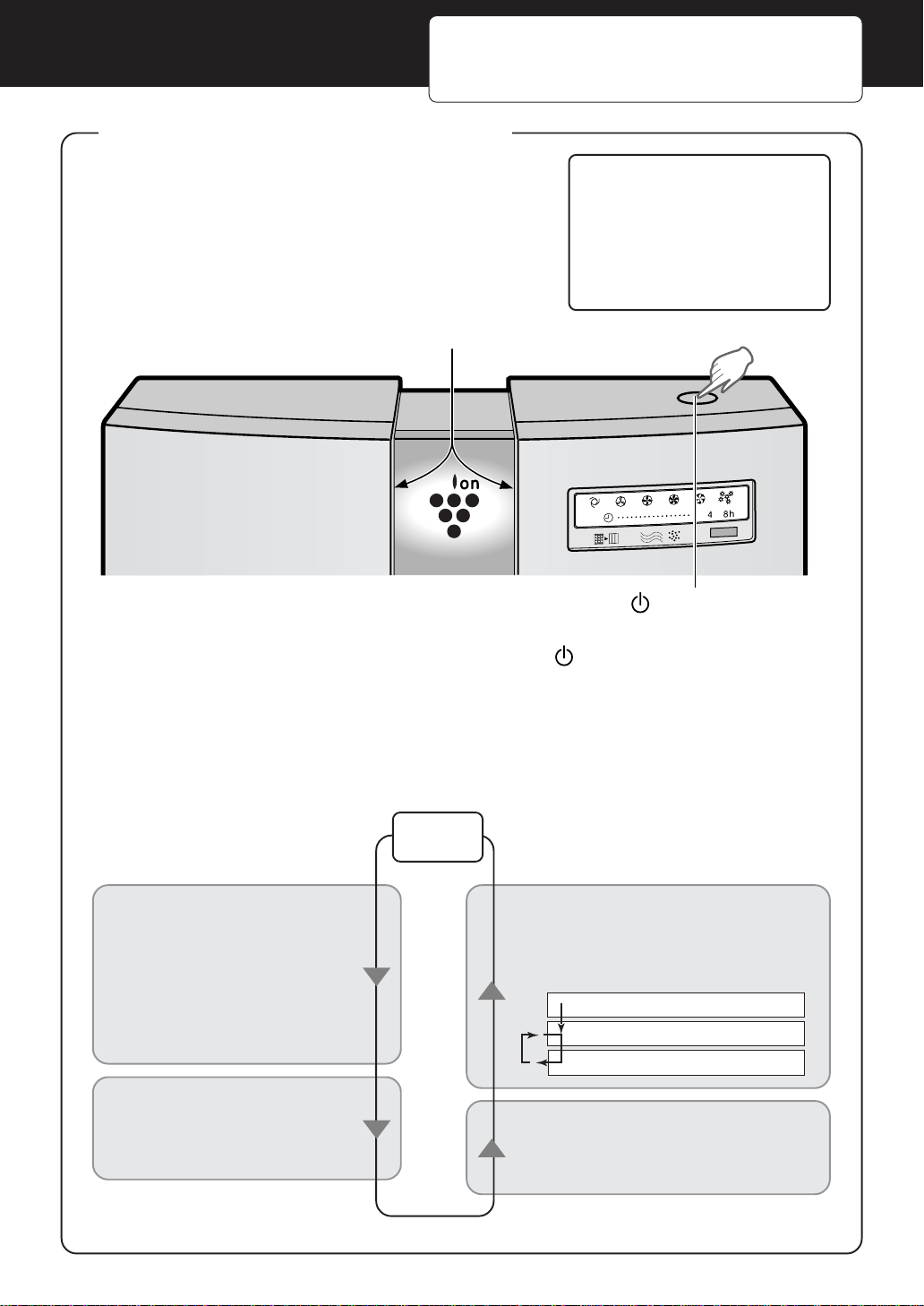
MAIN UNIT OPERATION
Operations available with main unit
• AUTO operation (fan level)
• Silent operation (fan level)
• Medium operation (fan level)
• High operation (fan level)
• Max operation (fan level)
• Pollen mode operation
The unit will start operation when the MODE/
button is pressed.
The unit will start operation in AUTO operation (fan level).
• During operation, the cluster ion lamp will be lit.
The operation mode is switched as follows every time the button is pressed.
The lamp for the operation mode that has been set is lit.
The operation mode suited to the usage condition can be set.
Stop
Auto operation
The fan level is automatically
switched (High, Medium, Si-
lent) depending on the amount
of pollution in the air detected
by the sensor for efficient air
purification.
Silent operation
The unit will operate quietly
using minimal air intake.
Pollen mode Operation
The unit will operate at High level for
10 minutes, then will alternate be-
tween Medium and High.
Medium to Max operation
The unit will operate at a fan level of
medium, high or max.
For the first 30 seconds after the power plug is inserted
into the wall outlet, the unit will check the condition of the
air. If operation is set to ON during this time, the CLEAN-
SIGN lamp will alternately flash green, orange and red.
Cluster ion lamp
MODE/ button
10 minutes: High fan level
20 minutes: Medium fan level
20 minutes: High fan level
Plasmacluster
AUTO
RESET
OFF
E-11
REMOTE CONTROL OPERATION
Operations available
with remote control
• AUTO operation (fan level)
• MANUAL operation (fan level)
• Pollen mode operation
• OFF timer setting
• DISPLAY ON/OFF
• Cluster ion mode selection
•
AUTO cluster ion mode
• Clean mode
• Ion control mode
•
Cluster ion OFF mode
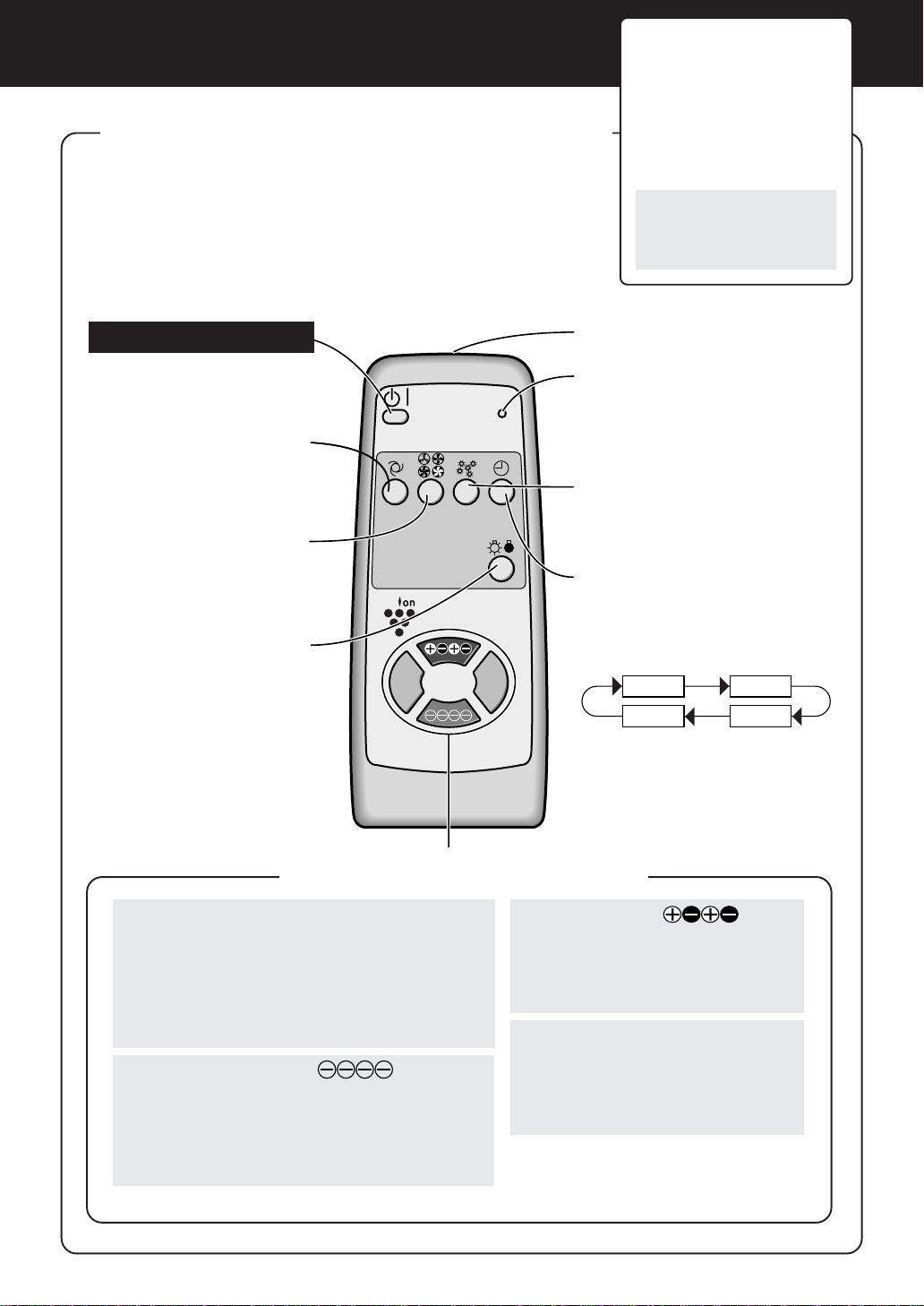
• To start operation, press the POWER ON/OFF button.
A short beep will sound and operation will start in AUTO opera-
tion (fan level).
AUTO cluster ion mode is selected for cluster ion operation.
• To stop operation, press the POWER ON/OFF button again.
A long beep will sound and operation will stop.
POWER ON/OFF button
Used to start AUTO opera-
tion (short beep) and stop op-
eration (long beep).
AUTO (fan level) button
The fan level switches auto-
matically depending on the
amount of pollution in the air.
MANUAL (fan level) button
The fan level can be switched
between Silent, Medium,
High and Max.
DISPLAY ON/OFF button
Switches the Cluster ion
lamp and CLEAN-SIGN
lamp either ON or OFF.
• The cluster ion lamp is
turned on for about 3 sec-
onds by pressing the clus-
ter ion select button (ex-
cluding the OFF button)
during “DISPLAY OFF”
mode.
Transmitter
Filter reset button
Press this button after replacing
the filters.
Pollen mode operation button
The unit operates effectively
when you suspect there is pol-
len in the air. See Page E-10
OFF timer button
Used to set the OFF timer.
The set time switches every time
the button is pressed as shown
below.
1 hour 4 hours
Cancel 8 hours
• The remaining time is indicated
by the lamp as time passes.
• The unit will stop operation
when the set time is up.
Cluster ion select button
AUTO cluster ion button
The unit will switch between Clean mode and
Ion control mode automatically depending on
the amount of pollution in the air detected by
the dust and odor sensors.
‘Clean mode’ operation is carried out for about
1 minute when operation first starts.
Ion control button
The unit will constantly operate in Ion control
mode.
Ion balance is maintained in the room by in-
creasing the ratio of Negative cluster ions.
(Cluster ion lamp on (green))
Clean button
The unit will constantly operate in
Clean mode. Clean mode is effec-
tive for reducing some airborne
mold. (Cluster ion lamp on (blue))
OFF button
The generation of ions is stopped
and the cluster ion lamp is turned
off.
If the room smells especially moldy, operate the unit in Clean mode.
GUIDE FOR OPERATION
GUIDE FOR ODOR SENSOR
• In addition to odor such as cigarette smoke and pet odor, the odor sensor also responds to the
following.
• Insecticide, cosmetics, spray, alcohol.
• Sudden changes in temperature or humidity.
• When the unit is in automatic operation and cosmetics or the like are used in a closed room, it
is normal for the sensor to respond by increasing the air flow. If this is not desirable, change
the sensitivity of the sensor.
GUIDE FOR DUST SENSOR
• The dust sensor detects dust particles in room air, such as cigarette smoke and house dust.
• Compared with cigarette smoke, the amount of dust released when making your bed is so
small that it may not be detected by the dust sensor. Therefore, the amount of dust seen with
the eye may differ from the indication of the clean-sign lamp.
GUIDE FOR FILTER RESET BUTTON
• After replacing filters, make sure to connect the power plug to a wall outlet, and press the filter
Reset button on the main unit or on the remote control. The “BEEP” sound indicates that the
stored operating time has been reset.
If the filter lamp is lit at that time, it will now go off.
E-12
CARE AND MAINTENANCE
(To maintain the best performance of this product, please clean the unit periodically.)
When cleaning, be sure to remove the power plug from the wall outlet. In addition, never handle
the power plug with wet hands.
Electrical shock and/or bodily injury may occur as a result.
MAIN UNIT
For soiling on the main unit and
the installed floor / table surface,
clean as early as possible. Stub-
born dirt may be hard to remove.
Dry wipe with a soft cloth
For stubborn dirt, wipe with a
soft cloth dampened with water
or warm water of 40°C or less.
Do not use volatile fluids
Benzene, paint thinner, polish-
ing powder, etc., may damage
the unit surface.
Do not use detergents
Detergent ingredients may dam-
age the unit surface.
Do not get wet
Never apply water on the unit.
DUST SENSOR
ODOR SENSOR
The care cycles of ODOR SENSOR and DUST
SENSOR are once three months.
The sensitivity of the sensors will become unstable
if the odor or dust sensor is dirty or blocked. Please
clean these parts as follows.
DUST SENSOR
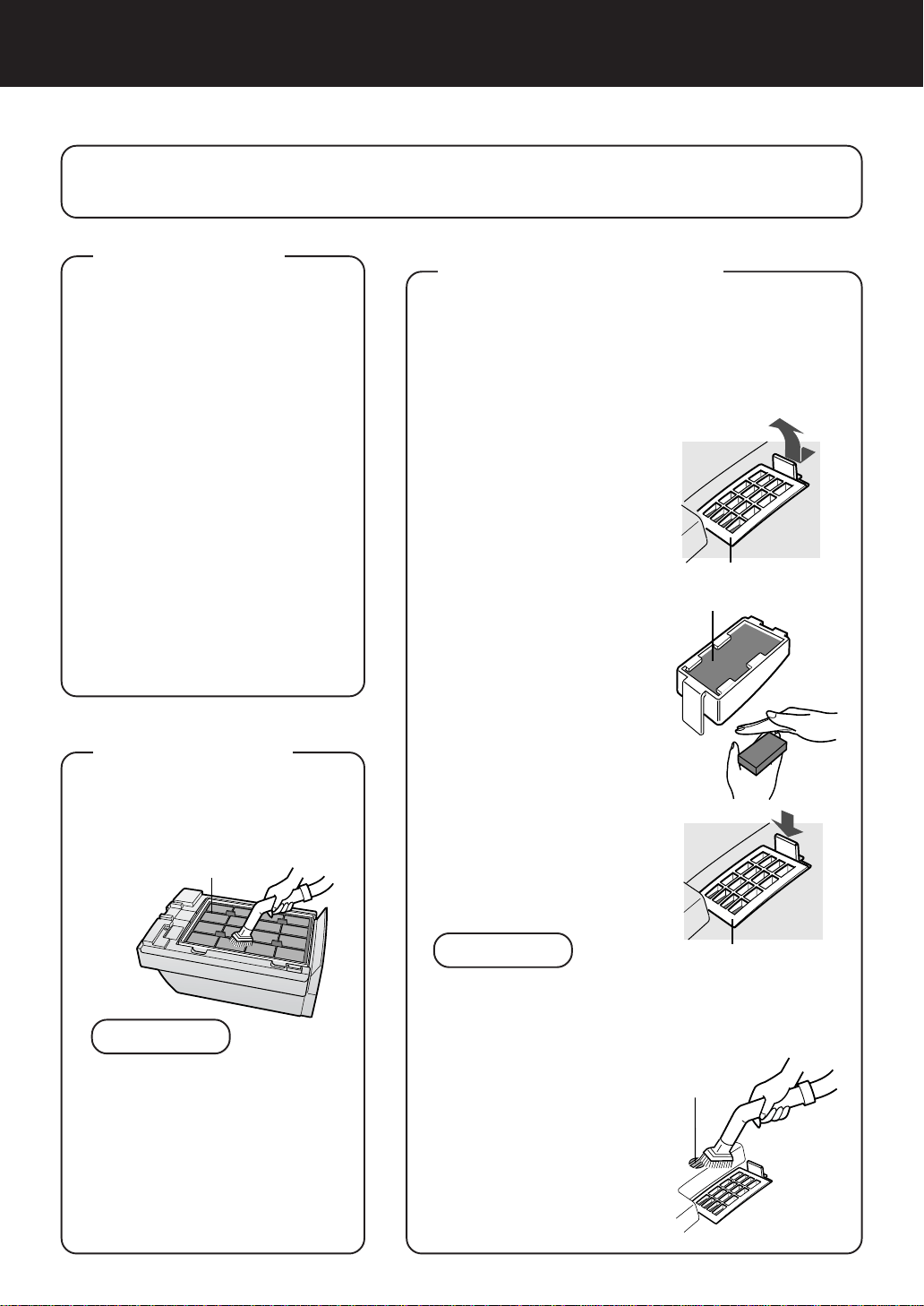
1
Remove the front
panel and detach the
sensor filter
• Detach the sensor filter
while pulling the tab on
the sensor cover.
2
Remove dust from
sensor filter.
• Detach the sensor fil-
ter, and tap it lightly
with your hand to re-
move the dust.
If it is very dirty, wash it
with water and then al-
low it to dry thoroughly.
3
Insert the sensor fil-
ter into the cover, in-
stall it in the main
unit and attach the
front panel.
• The sensor filter can be
inserted either way
round.
CAUTION
• Do not forget to reinstall the sensor cover before
restarting the unit.
• Do not insert foreign object (toothpick, etc,)
into the filter. This may result in damage or mal-
functioning of the unit.
ODOR SENSOR
Remove dust from the sur-
face of the sensor opening
with a vacuum cleaner.
E-13
Sensor cover
Sensor filter
Sensor cover
Sensor
opening
FILTER
CLEANING
Clean the top surface of the pre-
filter lightly with a vacuum
cleaner.
NOTE
• The HEPA filter is damaged
easily. Do not bring it into di-
rect contact with the nozzle of
a vacuum cleaner.
Also make sure never to wash
it with water.
• The HEPA filter and Active
carbon filter do not need clean-
ing.
Pre-filter
E-14
CARE AND MAINTENANCE
GUIDE FOR LIFE OF FILTERS
Filter reset button
RESET
The filter replacement period is indicated by the Filter lamp.
(The lamp will light up in about 5 years, when using the unit for 12 hours daily.)
• The operation hours are saved in memory even when removing the power plug for transpor-
tation to another room, etc.
The Filter lamp is to be used only as a guide.
If dust or odors cannot be removed easily, replace the filters.
Guide for replacing the filters
• HEPA filter About 5 years after opening
• Active carbon filter About 5 years after opening
The replacement period is subject to smoking 10 cigarettes per day and the dust collection/
deodorization ability is reduced by half than that of new filters.
The replacement period differs depending on the operation hours and location of installation.
(According to Japan Electrical Manufacturers’ Association JEM1467)
Depending on the usage environment, odor may be noticed from the Air Outlet in several
months. (For understanding the product. Refer to page E-1)
REPLACING THE FILTERS
1
See page E-9 “Installing the filters” for the replacement method.
2
Fill in the date for which you start using the new filters on the
date label.
3
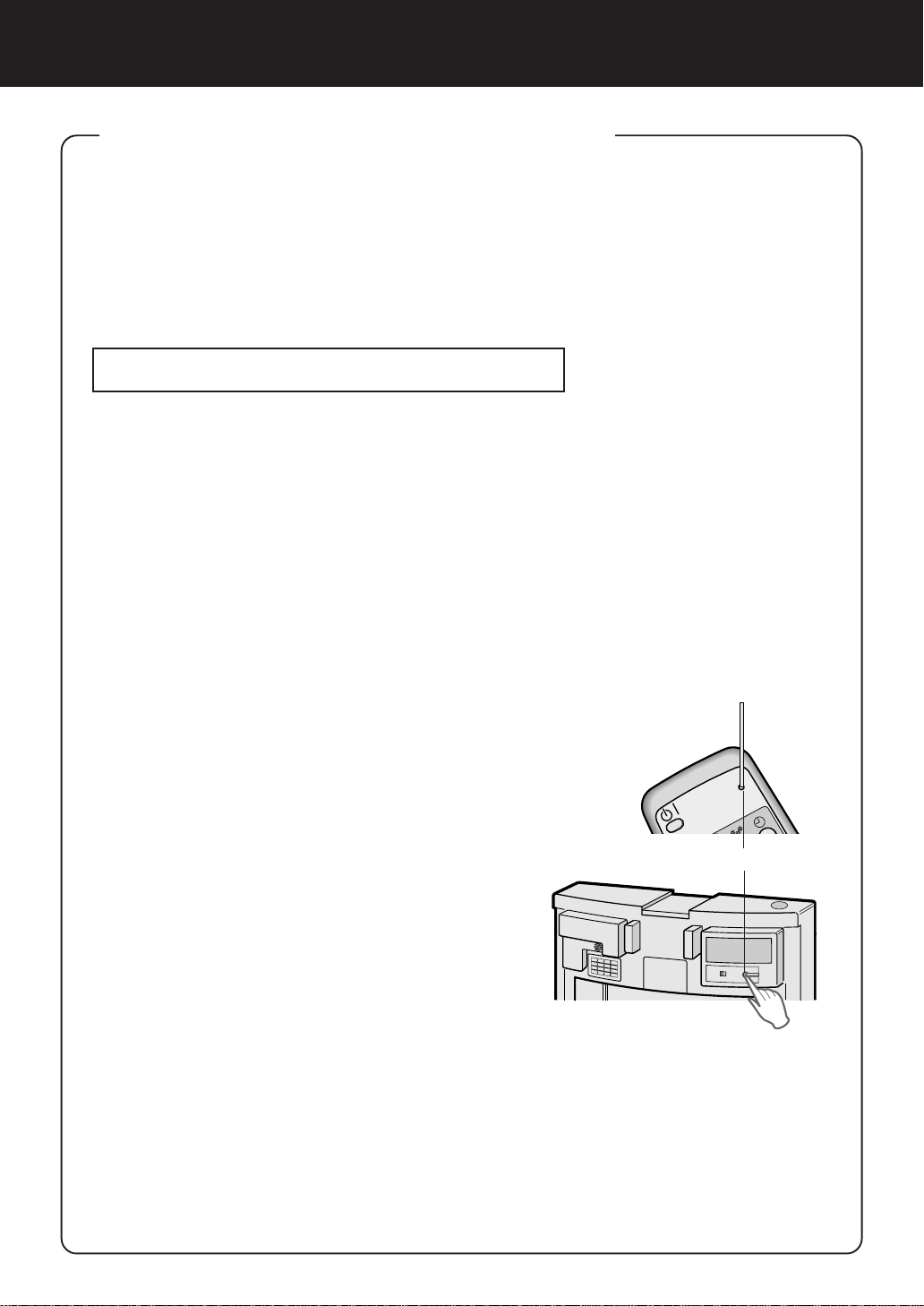
Make sure to connect the power
plug to a wall outlet, point the re-
mote control toward the receiver
on the main unit, and press the fil-
ter reset button with a pointed ob-
ject on the remote control. Or
press the filter reset button on the
main unit. (Refer to page E-11)
• The “BEEP” sound indicates that the stored op-
erating time has been reset.
• If the filter lamp is lit at that time, it will now go
off.
• Press the Filter reset button on the main unit
after removing the front panel.
Replacement filters (Model: FZ-60SEF)
• HEPA filter: 1 unit
• Active carbon filter: 1 unit
Please ask for replacement filters at your dealer of purchase.
Cautions concerning the disposal of filters
Please dispose of replaced filters according to the local disposal laws and regulations.
HEPA filter materials: Active carbon filter materials:
• Filter: Polypropylene • Deodorizer: Activated charcoal
• Frame: Polyester • Net: Polypropylene 60% Polyester 40%
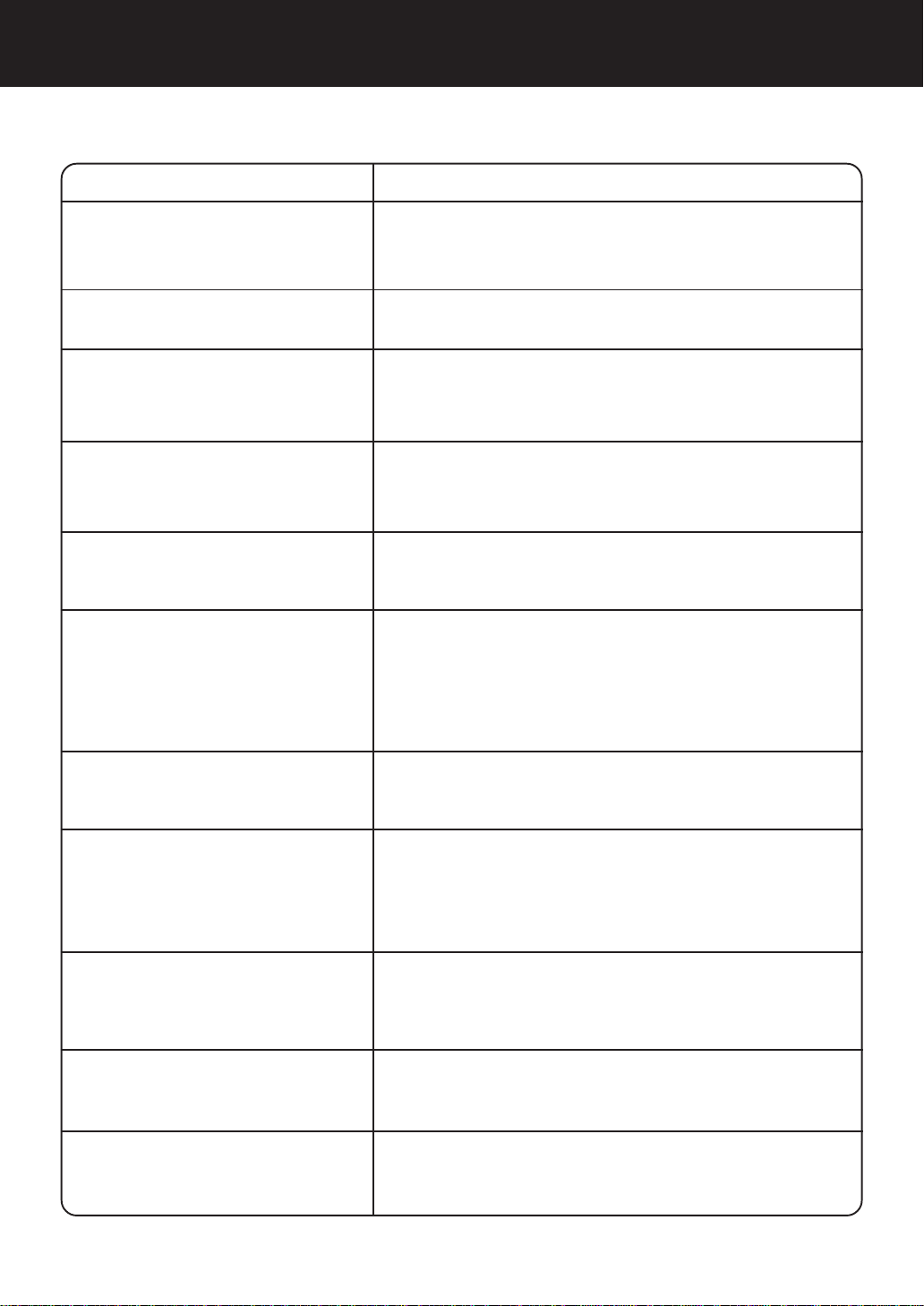
TROUBLESHOOTING
Before calling for repair, check the symptoms below for possible remedies, since the problem may
not be a malfunction of the unit.
SYMPTOM
REMEDY (not a malfunction)
The remote control does not
work
• Have the batteries been depleted?
• Are the batteries inserted correctly?
• Is a fluorescent lighting in the room flickering due to service
life? (Refer to E-3,E-7)
Odor and dust cannot be re-
moved easily
• Are the filters heavily soiled? (Refer to E-14)
The CLEAN-SIGN lamp lights
green even when the air is dirty
• Is the opening of the odor sensor blocked or the sensor filter
clogged? (Refer to E-13)
• Was the air already dirty when the power plug was inserted
into the wall outlet? (Refer to E-5)
The CLEAN-SIGN lamp lights
orange or red even when the air
is clean
• Is the sensor filter dirty or clogged?
The sensitivity of the sensor becomes unstable when the open-
ing of the dust sensor is dirty or is clogged.
Remove dust from the sensor filter. (Refer to E-13)
• During Clean mode (or Ion control mode), the cluster ion lamp
colour will not change.
A sound is
heard from the
unit
Click, click
Tick, tick, tick
• This is the sound that is emitted when the unit is in Ion control
mode.
If the sound is irritating, set the unit away from you.
• This is the sound that is emitted when the unit is generating
cluster ions.
If the sound is irritating, such as when sleeping, set the unit
away from you.
A sound “tick, tick, tick” is
sometimes heard from the unit
and is not sometimes heard.
• A sound is sometime low, loud or none. But the effect of the
cluster ion is the same.
The discharged air smells
• Are the filters heavily soiled?
Replace the filters. (Refer to E-14)
• The ozone generated by the cluster ion generator may have
an odor. However, the density of ozone generated is very little
and is harmless to the human body. Furthermore, the ozone
decomposes quickly so it does not accumulate in the room.
E-15
The cluster ion lamp remains
green (blue) and does not
change
The unit does not operate even
when smoking cigarettes
• Is the unit installed in a location that is difficult for the sensors
to detect cigarette smoke?
• Are the odor or dust sensor openings blocked or clogged?
(In this case, clean the openings.) (Refer to E-13)
The filter lamp is lit even after
replacing filters.
• After replacing filters, connect the power plug to a wall outlet,
and press the filter reset button on the main unit or on the
remote control. (Refer to E-14)
The cluster ion lamp or the
CLEAN-SIGN lamp does not
light.
• Is DISPLAY OFF mode selected?
• Press the DISPLAY ON/OFF button on the remote control.
(Refer to E-11)




This file has been downloaded from:
www.UsersManualGuide.com
User Manual and User Guide for many equipments like mobile phones, photo cameras, monther board, monitors, software, tv, dvd, and othes..
Manual users, user manuals, user guide manual, owners manual, instruction manual, manual owner, manual owner's, manual guide,
manual operation, operating manual, user's manual, operating instructions, manual operators, manual operator, manual product,
documentation manual, user maintenance, brochure, user reference, pdf manual
Downloaded from: http://www.usersmanualguide.com/