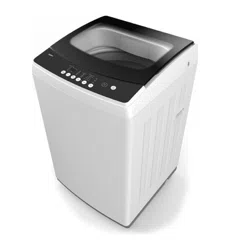
MODEL: STL95 | PRODUCT CODE: 57475 | 07/2017
User Mnul
Exctly wht
you need
Model Code/s:
ETL95.1
Online:
esatto.house
Product:
9.5kg Top Load
Washing Machine

Applinces
Exctly wht
you need
esatto.house03
04
Welcome
05
Safety
Instructions
09
Product
Overview
10
Getting
Started:
Installation
14
Controls
16
Operating
Your Washing
Machine
20
FAQ
22
Care and
Cleaning
24
Other Useful
Information
26
Warranty
Information
Contents
User Manual 04
Welcome
Congratulations on purchasing your washing machine. The Esatto brand is proudly
distributed within Australia by Residentia Group Pty Ltd.
Please refer to the warranty card at the rear of this manual for information regarding your
product’s parts and labour warranty, or visit us online at www.residentiagroup.com.au.
At Residentia Group, we are customer obsessed and our Support Team are there to
ensure you get the most out of your appliance. Should you want to learn more about your
washing machine such as the various washing modes or importantly taking care of the
appliance, our Support Team are here to help.
You can use our online Support Centre at anytime by visiting
http://support.residentiagroup.com.au, or you can contact us via phone by dialing:
1300 11 HELP (4357).
It is important that you read through the following use and care manual thoroughly to
familiarise yourself with the installation and operation requirements of your appliance to
ensure optimum performance.
Again, thank you for choosing an Esatto appliance and we look forward to being of
service to you.
Kind Regards,
The Residentia Team
Residentia Group
—
Head Office
118 Campbell Street
Collingwood VIC
Australia 3066
—
ACN
600 546 656
—
Online
residentia.group
—
Postage
PO Box 341, Mt Eliza
Victoria Australia 3930
—
Telephone
1300 11 4357
—
Email
suppor[email protected]
A RESIDENTIA
GROUP INITIATIVE
esatto.house05
IMPORTANT SAFETY INSTRUCTIONS
READ CAREFULLY AND KEEP FOR FUTURE REFERENCE
Important
Read this manual thoroughly before rst use, even if you are familiar with this type of product. The safety
precautions enclosed herein reduce the risk of re, electric shock and injury when correctly adhered to.
Keep the manual in a safe place for future reference, along with the completed warranty card and purchase
receipt. If applicable, pass these instructions on to the next owner of the appliance.
Always follow basic safety precautions and accident prevention measures when using an electrical appliance,
including the following:
This heading indicates that there is a serious risk of injury if you do not adhere to the warning(s).
This heading indicates that care should be taken to avoid injury to persons or damage to property.
A tick in a circle accompanies a measure or action that you should do or follow.
A cross in a circle accompanies a measure or action that you should NOT do.
Electrical safety
• Before connecting and turning on the washing machine, ensure the electrical voltage and circuit frequency
correspond to those indicated on the appliance.
• Only connect the washing machine to a grounded (earthed) electrical outlet.
• Do not insert any objects into the appliance.
• Do not kink or damage the power cord, and position it out of the way so no one steps on or places
anything on the cord or against it.
• Do not overload the wall outlet. Overloading can result in re or electric shock.
• If the supply cord is damaged, it must be replaced by the manufacturer or its service agent or a similarly
qualied person in order to avoid a hazard.
• Never use this washing machine with a power adapter or an extension cord.
• Unplug the washing machine from the power supply before cleaning, servicing, maintenance or moving the
appliance. Pull by the plug, not by the cord.
• After use, always unplug the appliance and turn off the water.
Warning
All electrical work must be done in accordance with local and national electrical codes as applicable and
should be undertaken by licenced and qualied persons only.
Safety Instructions

User Manual 06
General Safety Instructions Cont.
Installation
• Install the washing machine on a at surface to avoid overturning during use.
• Connect the washing machine to the water mains using new hose sets. Do not reuse old hose sets.
• Make sure that all water and electrical connections are made by qualied personnel only, observing local
safety regulations and following the manufacturer’s instructions (see “Getting Started: Installation” on
pages 10 to 13).
• Improper installation may result in the risk of re, electric shock and/or injury.
• We assume no liability for any eventual damages caused by improper installation.
Usage conditions and restrictions
• The appliance is designed for home use only. It is not suitable for commercial or trade use.
• Do not operate the appliance outdoors.
• This appliance is not intended for use by persons (including children) with reduced physical, sensory or
mental capabilities, or lack of experience and knowledge, unless they have been given supervision or
instruction concerning use of the appliance by a person responsible for their safety.
• Young children should be supervised to ensure they do not play with the appliance.
• Before loading the washing machine, always ensure no pet or young child has climbed into it.
• Make sure all pockets of clothing to be washed are empty. Hard, sharp objects such as coins, safety pins,
bra wires, nails, screws or stones can cause extensive damage to the appliance and block the pump.
• Any damage or malfunction resulting from foreign objects is not covered by your warranty and may lead to
expensive repairs.
• We assume no liability for any eventual damages caused by improper or faulty use.
Cleaning and maintenance
• Before cleaning or carrying out maintenance, always unplug the appliance from the power supply.
• Except for the lters that require regular cleaning, the unit has no user-serviceable parts contained within.
Do not attempt to repair, disassemble or modify it. Repairs made by inexperienced or unqualied persons
may cause injury and/or make more serious repairs to the appliance necessary.
• CAUTION: After each wash, check and clean the lint lter inside the drum. Also check and clean the lint
lter at the back of the machine next to the drain hose outlet on a regular basis.
• This appliance should only be serviced by an authorised service centre, and only genuine spare parts
should be used. Contact the after sales support line for advice.
Caution!
During unpacking, the packaging materials (polythene bags, polystyrene pieces, etc.) should be kept out of
reach of children.
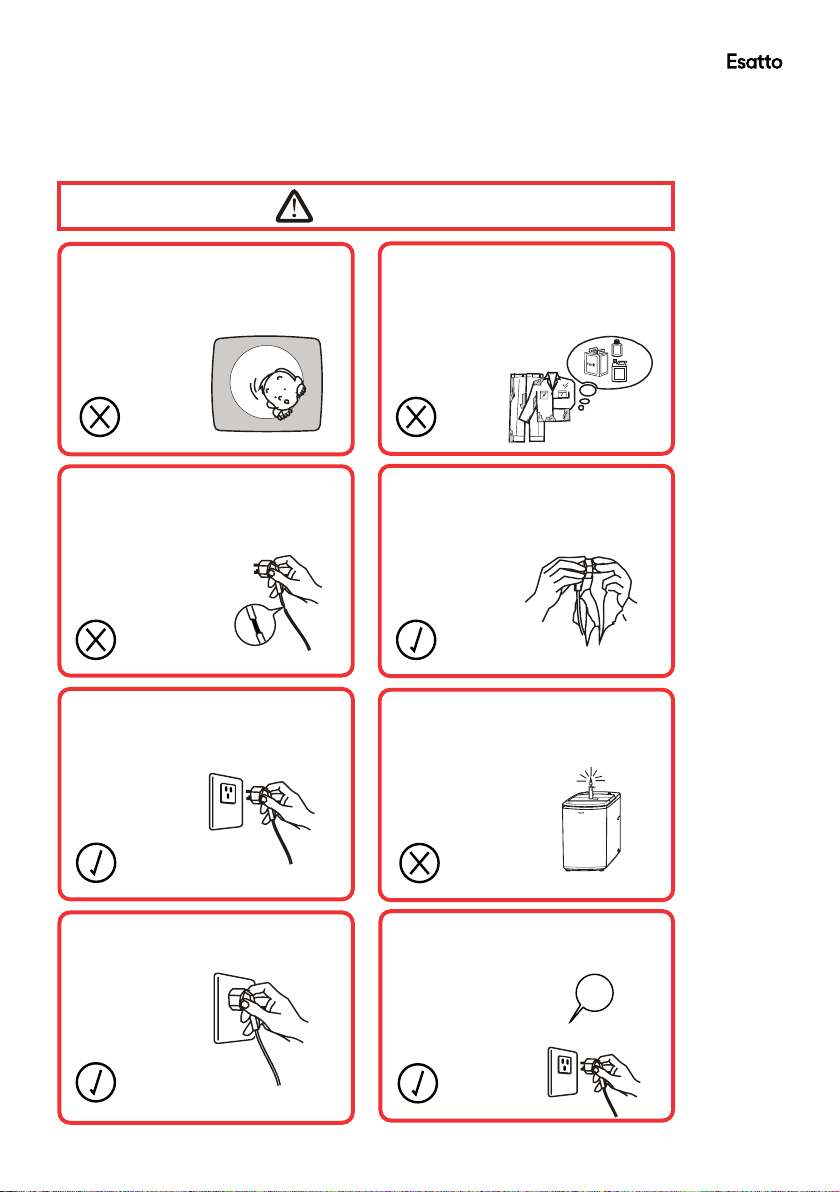
Do not let children climb into the
washing machine or peer into the
rotating spin barrel.
Do not wash clothes that
have residue of flammable
materials.
Do not use the appliance if the
power cord or plug is damaged
to avoid an electric shock, short
circuit or fire.
Regularly clean the power plug
to remove dust and dirt and
avoid contact failure.
Turn the machine off before
pulling out the plug from the
socket if the machine
is not in use.
Do not place any lit candles or
cigarettes on top of the washing
machine.
Insert the power plug securely.
Warnings
Use a 230-240V AC power
source.
230-240V
esatto.house07
General Safety Instructions Cont.
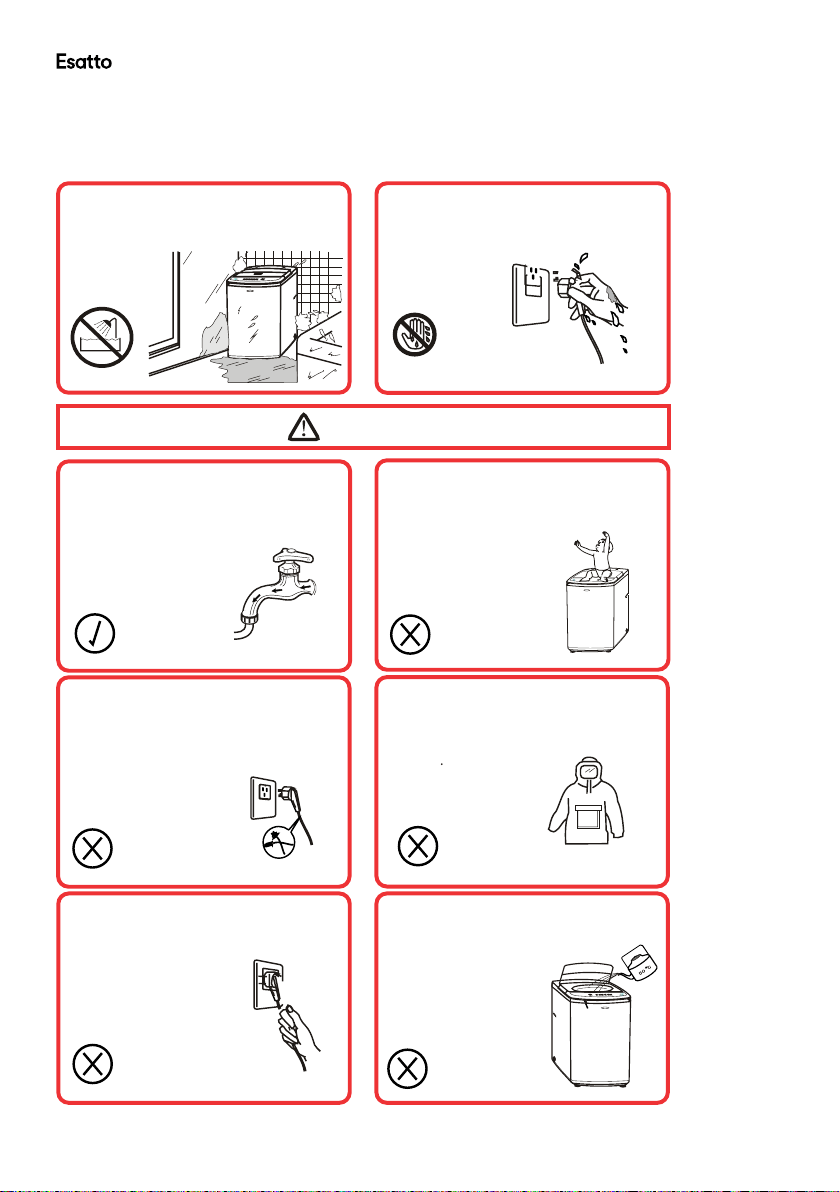
Do not let children climb into the
washing machine or peer into the
rotating spin barrel.
Do not wash clothes that
have residue of flammable
materials.
Do not use the appliance if the
power cord or plug is damaged
to avoid an electric shock, short
circuit or fire.
Regularly clean the power plug
to remove dust and dirt and
avoid contact failure.
Turn the machine off before
pulling out the plug from the
socket if the machine
is not in use.
Do not place any lit candles or
cigarettes on top of the washing
machine.
Insert the power plug securely.
Warnings
Use a 230-240V AC power
source.
230-240V
User Manual 08
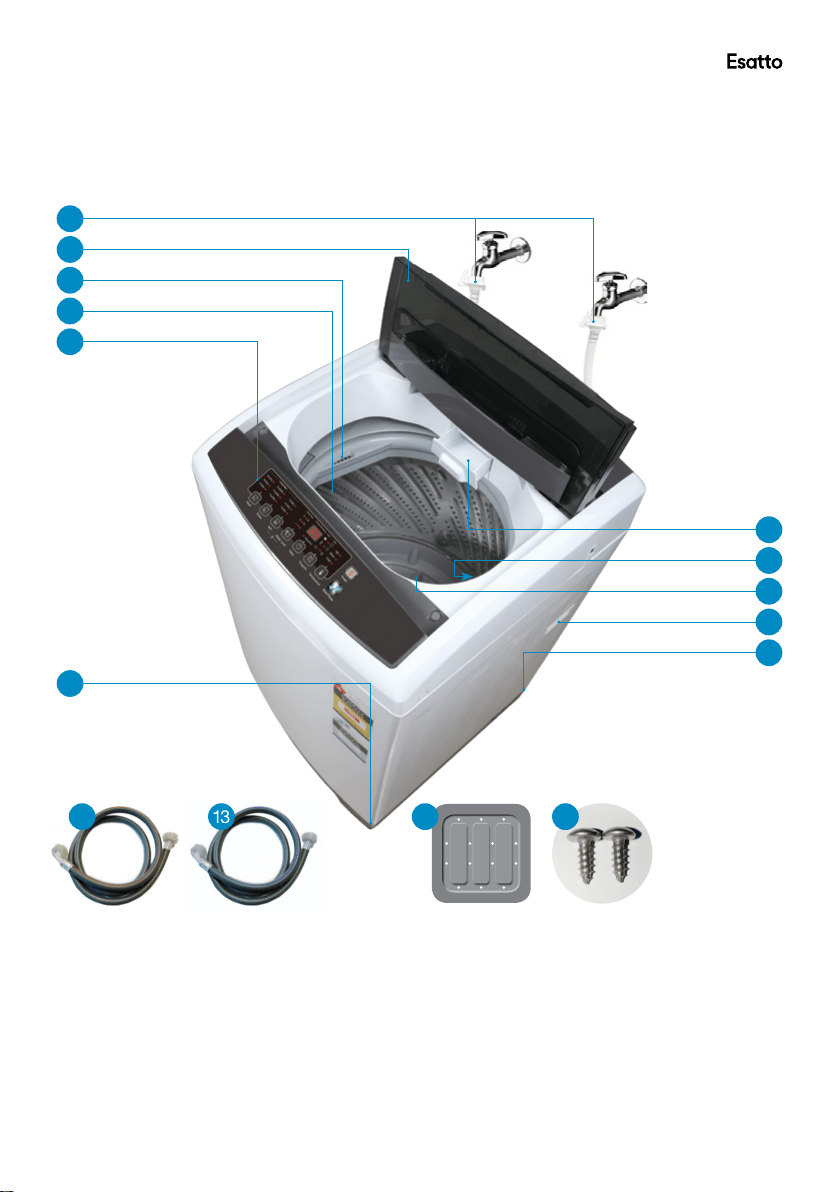
Ensure the water inlet hoses
are connected and the taps are
turned on before washing a load.
Do not change the power cord.
If it needs changing, contact a
Do not pull the power cord when
Do not wash jackets, raincoats,
Do not allow children to lay or sit
Cautions
Do not pull out or insert the plug
with wet hands to avoid electric
shock.
No wet hands
To avoid electric shock, fire and
malfunction, do not install this
machine in a damp place.
No dampness
on top of the washing machine.
fishing coats and similar clothes
in the washing machine.
qualified electrician or call the
after sales support line.
The water temperature should
not exceed 60°C when washing
with warm water.
removing the plug.
General Safety Instructions Cont.
esatto.house09
12 13
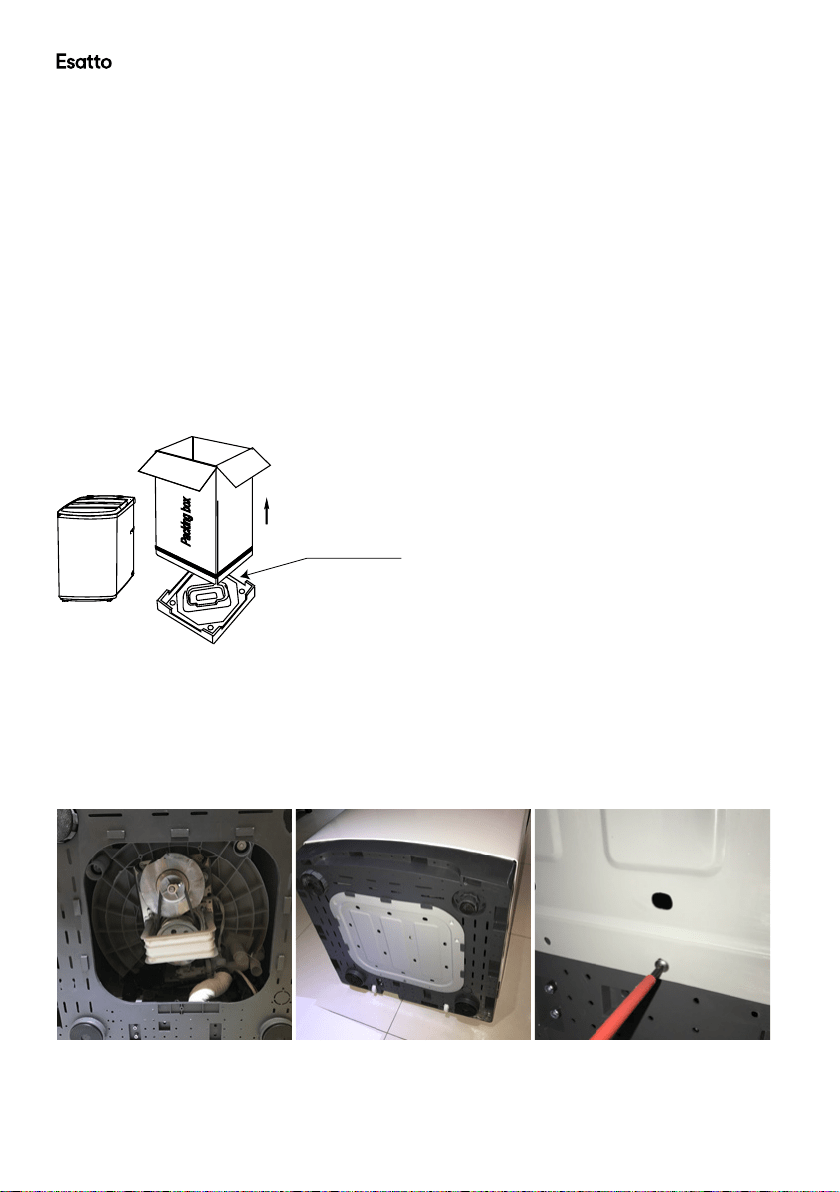
Top Load Washing Machine Layout
Key:
1 Water inlet hoses
2 Lid
3 Softener dispenser
4 Washing/Spin drum
5 Control panel
6 Detergent drawer
7 Lint lter(opposite the softener dispenser)
8 Pulsator
9 Handle (one on each side)
10 Rollers (one on each back corner)
11 Adjustable leg
Accessories (not to scale):
12 Hot water inlet hose (red stripe)
13 Cold water inlet hose (blue stripe)
14 Base cover
15 Installation screws
Not shown:
Instruction manual
Quick start guide
Warranty certicate
Product Overview
1
5
3
8
9
10
2
4
11
6
7
1514
User Manual 10
Getting Started: Installation
Unpacking
• This product has been packaged to protect it against transportation damage. Unpack the appliance but
keep all packaging materials until you have made sure your new washing machine is undamaged and in
good working order. The carton is recyclable. Whenever possible, reuse the carton and recycle it when
disposing of the packaging materials.
• Plastic wrapping can be a suffocation hazard for babies and young children, so ensure all packaging
materials are out of their reach. Dispose of any plastic wrapping safely.
• Unwind the power cord to its full length and inspect it for damage. Do not use the appliance if the
appliance or its cord have been damaged or are not working properly. In case of damage, contact our after
sales support line for advice on examination, repair or return of the damaged product.
• Read this manual to familiarise yourself with all the parts and operating principles of the washing machine.
Pay particular attention to the safety instructions on the previous pages.
• Ensure the washing machine is lifted off the foam base per the illustration below (Fig. 1)
Installing the base cover
Make sure the power cord is unplugged from the mains supply.
• Place some padding (such as a soft mat, blanket or thick towel) on the oor and gently lay the washing
machine on the padding, back side down. Take care not to dent the housing.
• Insert the base cover into the grooves on the underside of the washing machine. (Fig. 2)
• Now secure the base cover by tightening the screw in the centre screw hole as shown in Fig. 2
Foam base
Fig. 1
Fig. 2
esatto.house11
Getting Started: Installation Cont.
Installing the Drain Hose
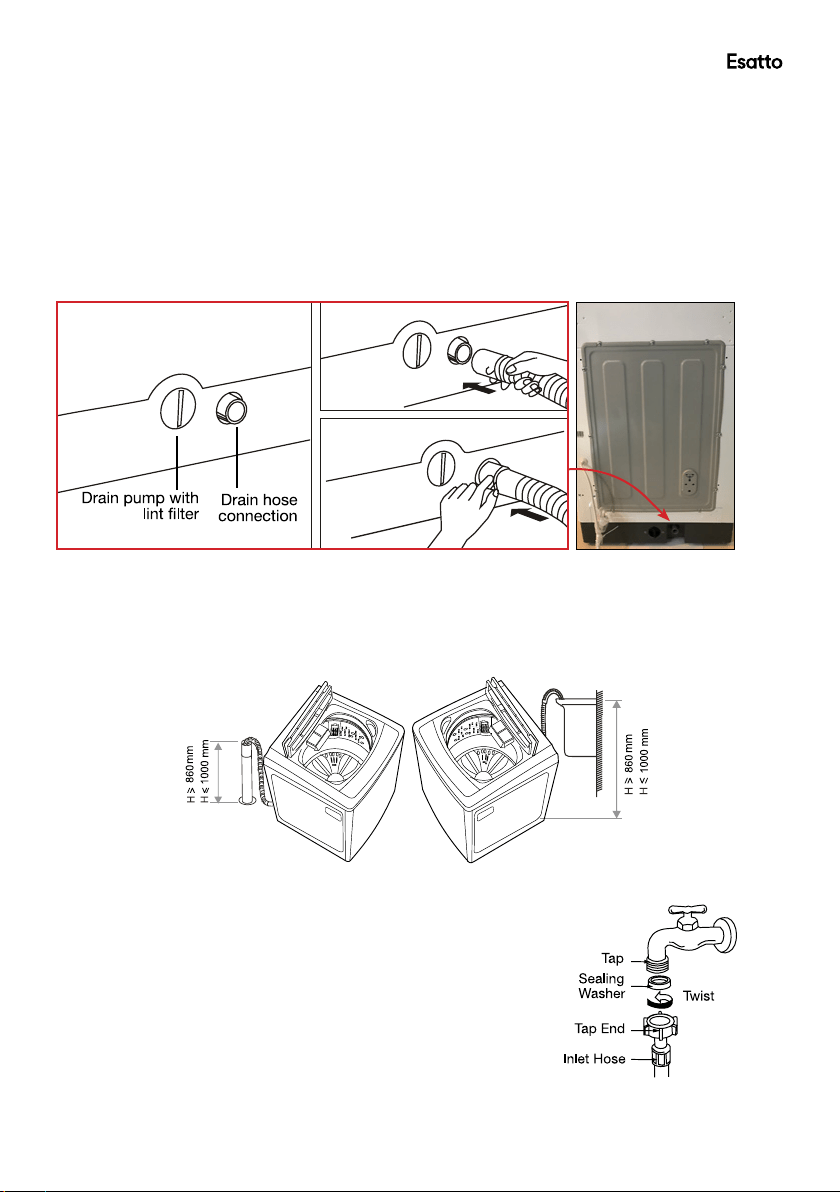
• The drain hose and drain pump lter are located at the back of the machine, as illustrated below (Fig. 3).
• Pinching the two bands of the clamp on the drain hose, connect it to the drain hose connection at the back
of the washer, as illustrated below, middle.
• When the washer is in use, put the drain hose into a drain spout (or into a sink/tub), as illustrated in Fig. 4.
• While the washer is in use, make sure the height of the drain hose is at least 86cm, otherwise the washer
will not work well, or the water may ow out in the course of washing. Also ensure the drain hose is not
higher than 120cm above ground, otherwise the washer will not drain water well.
• Never lay down the drain hose, as water will be discharged.
• Be sure the drain hose is properly routed so it will not kink or lift off the sink.
Connecting the Water Inlet Hoses
• Install the water inlet hoses to your hot and cold water taps,
following the instructions below.
• Check and ensure that the sealing washers are rmly in place.
• Attach the straight end of the hose to your water taps. Make sure
to attach the hot water supply hose (with a red stripe) to the hot
water tap and the cold water supply hose (with a blue stripe) to
the cold water tap.
• Tighten the coupling nuts securely by hand, as illustrated on the
right (Fig. 5).
Fig. 3
Fig. 4
Fig. 5
User Manual 12
Getting Started: Installation Cont.
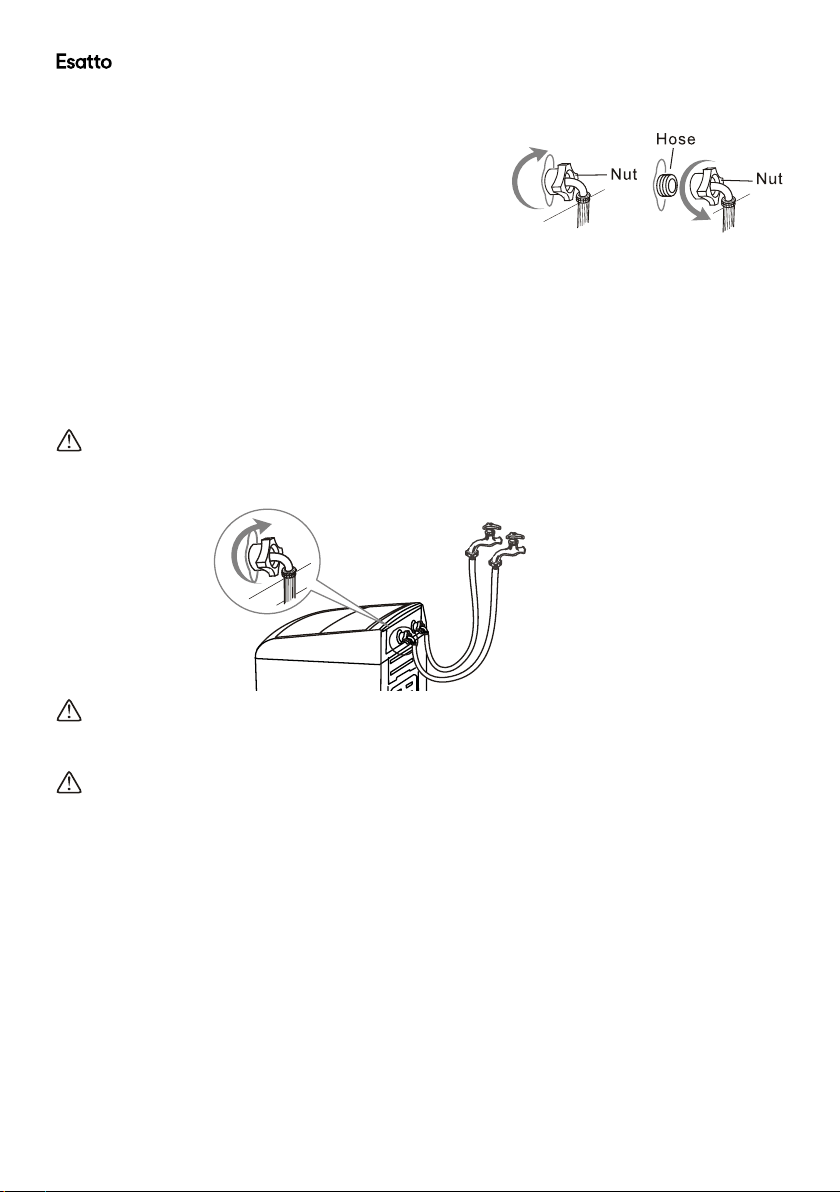
• Attach the curved end of the hose to the corresponding inlet
valve of the washing machine.
• Tighten the coupling nuts securely by hand, as illustrated on
the right and below (Fig. 6 and Fig. 7).
• Tighten the nut by turning it clockwise while holding the hose. (To detach the water supply hose, turn the
nut anticlockwise after turning the tap off.)
• Turn on the taps and check for leaks. Tighten the coupling nuts rmly if there is any leakage. If your water
pressure is strong, close the water tap completely, then open it slightly.
• Make sure your hot water from the tap is no hotter than 60°C.
IMPORTANT!
Both the hot water and cold water hoses must be connected to your taps.
CAUTION!
When tightening the clamping nut, take care not to damage the water inlet valve joint. Apply force evenly and
do not twist the water inlet valve.
CAUTION!
Use only the new (supplied) hoses with your new appliance. Do not use a hose from an existing machine, or
one that has been used previously.
CAUTION! In the event that the hoses are too short for your set-up, please seek advice from your local
washing machine store to purchase a longer hose.
Fig. 6
Fig. 7
esatto.house13
Getting Started: Installation Cont.
Location of machine & Levelling
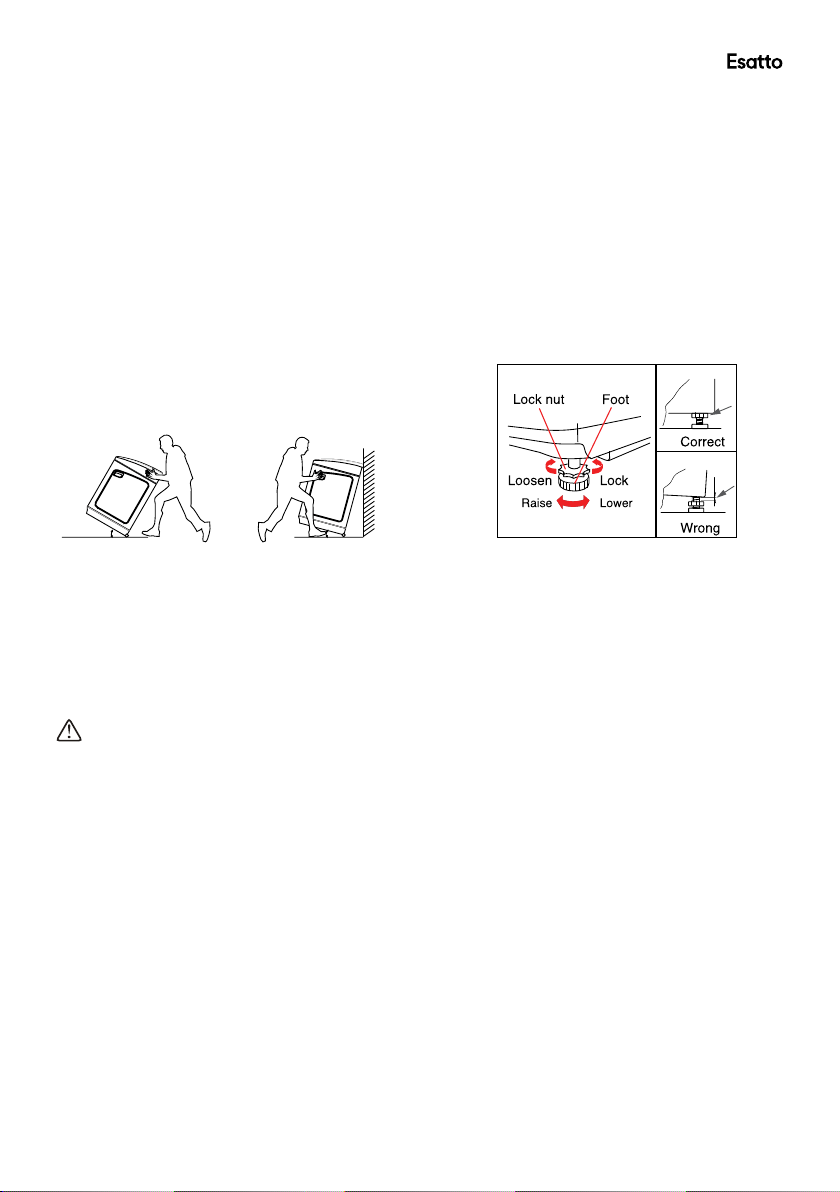
• The washing machine is equipped with two rollers at the rear that can be used to easily move the machine
to its desired location. Tilt the washing machine by approximately 30 degrees and push forward or pull
backwards while holding the machine securely on both sides with your hands as illustrated below (Fig. 8).
• Move the washing machine to its desired location and install on a stable and level surface.
• Note: Moving the machine using the rollers on an uneven surface can damage the rollers.
CAUTION!
Take care of your back. Do not tilt the washing machine too much, which could cause injury.
• If the ground surface where the washing machine is located is uneven, it may require levelling to stablilise.
Using the adjustable foot at the front right hand side of the machine, twist anti-clockwise to increase the
leg height or clockwise to lower the leg height (Fig. 9).
Note: The washer must not be installed on any textured oor coverings, for example: carpet or rugs.
• Once the washing machine is installed in its desired location, it is time to connect the power supply and
turn on the water supply at the hot and cold taps.
CAUTION!
• Check the power supply for damage, making sure it is not squashed or kinked.
• If the power supply is damaged, do not install!
• A damaged power supply must be replaced by a licensed electrician in avoid a hazard.
Do not operate the appliance until it is repaired as there is a risk of electric shock.
Before your rst use
You owe it to yourself and your washer to have your washer installed correctly.
Before you start, it is a good idea to go through the following checklist:
1 Has the washer been lifted out of the foam base packaging? Refer to page 10.
2 Is the drain hose installed securely to the machine using the provided ring clamp and is the hose threaded
through the ‘U-shaped hose guide’ and hooked into your tub or standpipe?
3 Is the hot hose (red striped) connected to the Hot valve (marked ‘Hot’) on the rear of the machine?
Is the cold hose (blue striped) connected to the Cold valve (marked ‘Cold’) on the rear of the machine?
4 Is the washer correctly levelled, feet are extended and cabinet corners are clear of the oor?
5 Before using the washing machine for the rst time, run a complete cycle without any laundry items.
Select the ‘Standard’ program and run the machine until the end of the program.
Fig. 8 Fig. 9
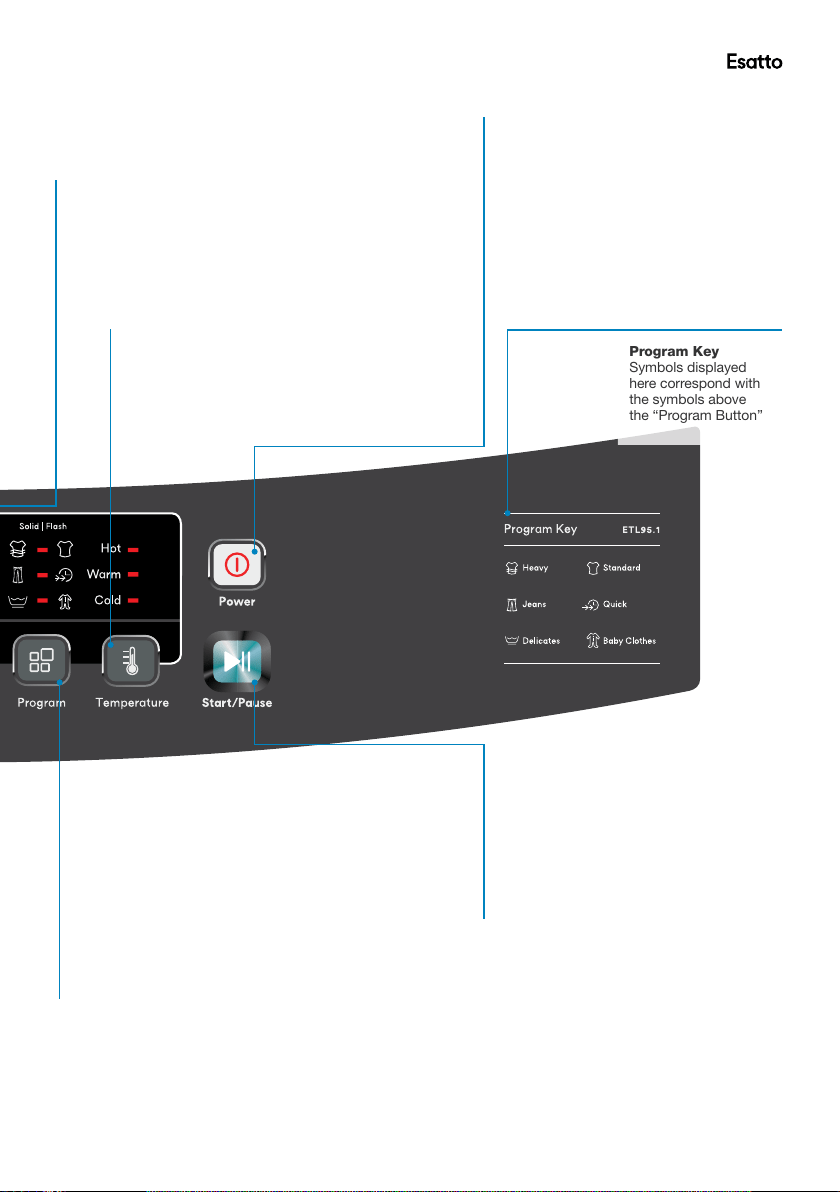
User Manual 14
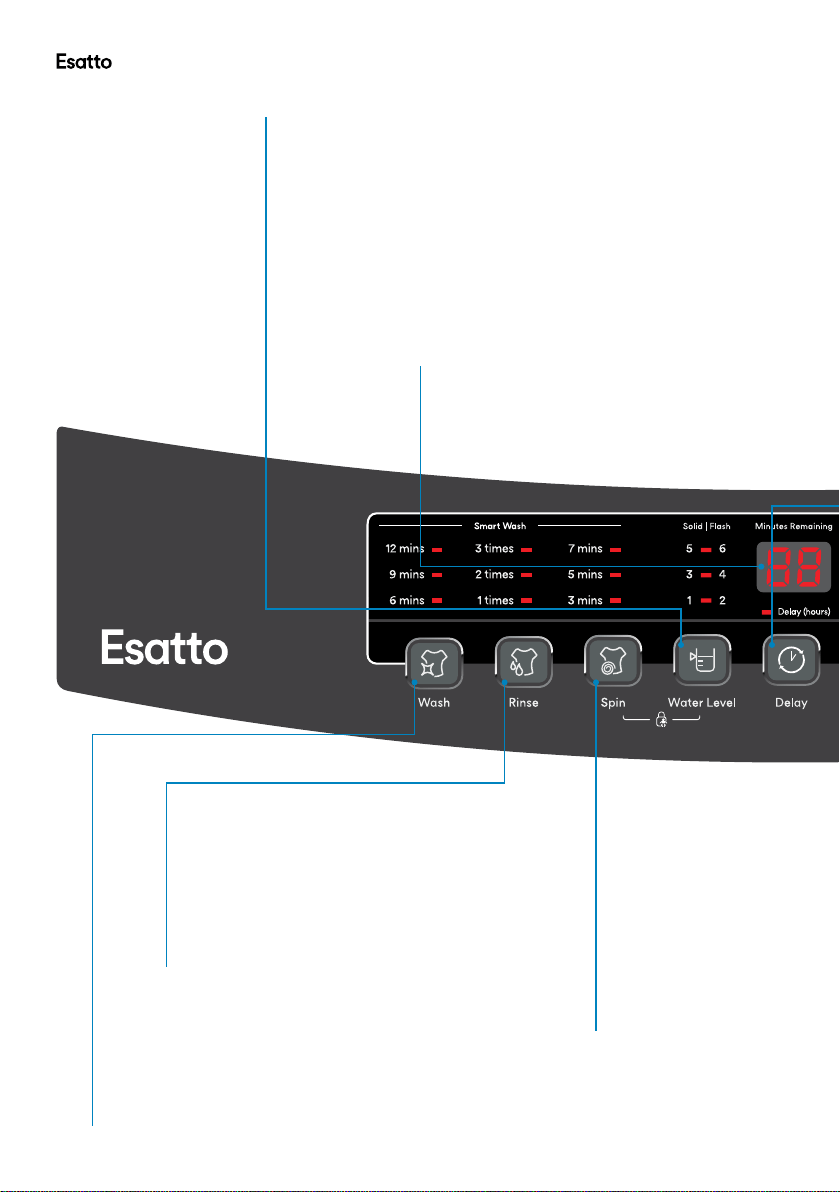
Wash Button
Press this button to increase or decrease the “wash”
time of the selected program. Each program has a
preselected wash time which is the manufacturer’s
recommended setting for the selected program.
Note: no change can be made if you have selected
the Standard program
Rinse Button
Press this button to add to or reduce the
number or rinse cycles for the selected
program. Each program has a preselected
number of rinse cycles based on the
manufacturer’s recommended settings for
the selected program.
Note: no change can be made if you have
selected the Standard program
Spin Button
Press this button to increase
or decrease the length
of time that the washer
dedicates to the spin
cycle during the selected
program. Each program has
a preselected “spin” time
which is the manufacturer’s
recommended setting for the
selected program.
Note: no change can be
made if you have selected
the Standard program
Water Level Button
– Press this button to increase or decrease the desired water level for the selected
program (more information page 18).
– When the machine is rst powered on, the default program is the “heavy”
program. This program uses “fuzzy logic” (see page 18) whereby the machine
automatically detects the weight of your wash load and selects the appropriate
water level accordingly.
– With the exception of the “Heavy” program, the other 5 programs have pre-
determined water levels based on the manufacturer’s recommended settings.
– When the indicator light is solid, it represents the corresponding water level on the
left side of the display (1, 3 or 5).
– When the indicator light is ashing, it represents the corresponding water level on
the right side of the display (2, 4 or 6)
LED Display panel
– This display will show the remaining washing time in
minutes during the washing program
– When adjusting the “wash, rinse or spin” presets, the
display panel will reect the new time remaining in minutes
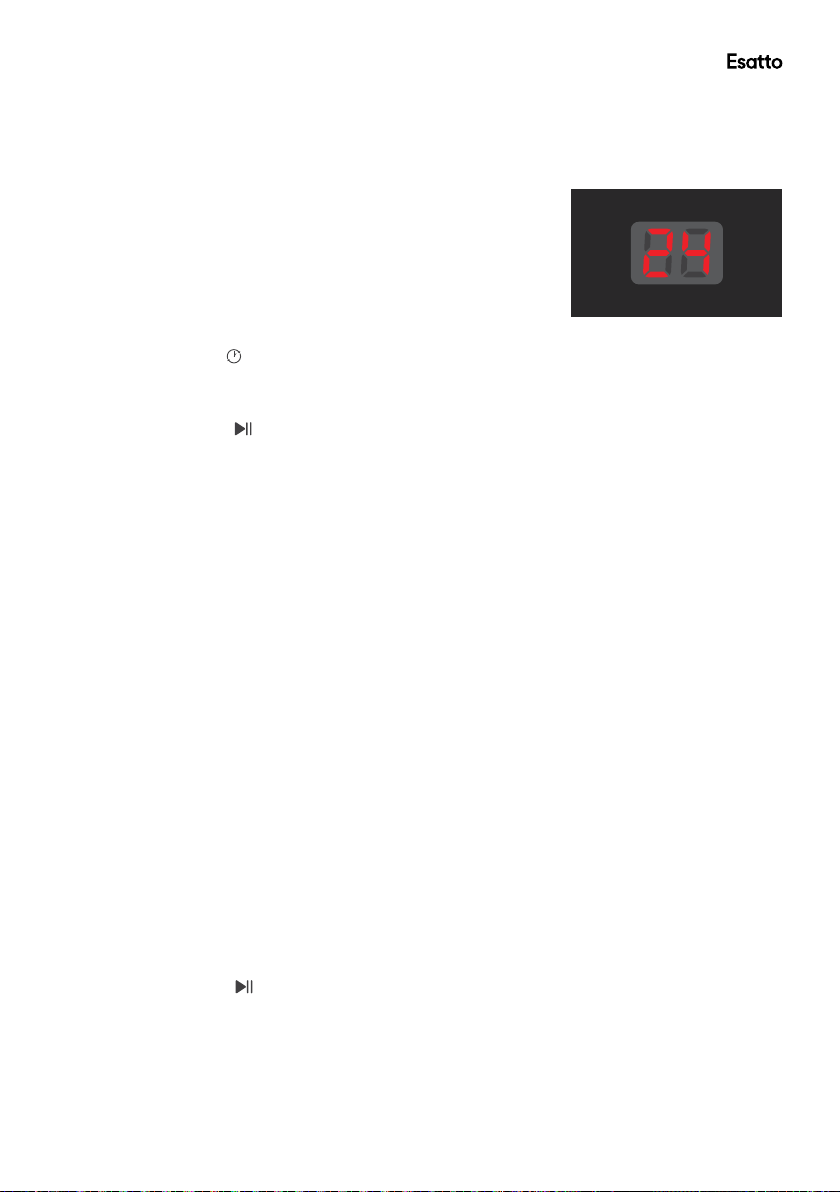
– If you are selecting a “delay start” the LED display will
show the number of hours between 1 & 24
Controls
esatto.house15
Start/Pause Button
– Once the desired program and settings
have been selected, press this button
to start the operation of the washing
machine.
– Pressing this button during the course of
the washing cycle will pause the machine,
pressing it again will resume the operation.
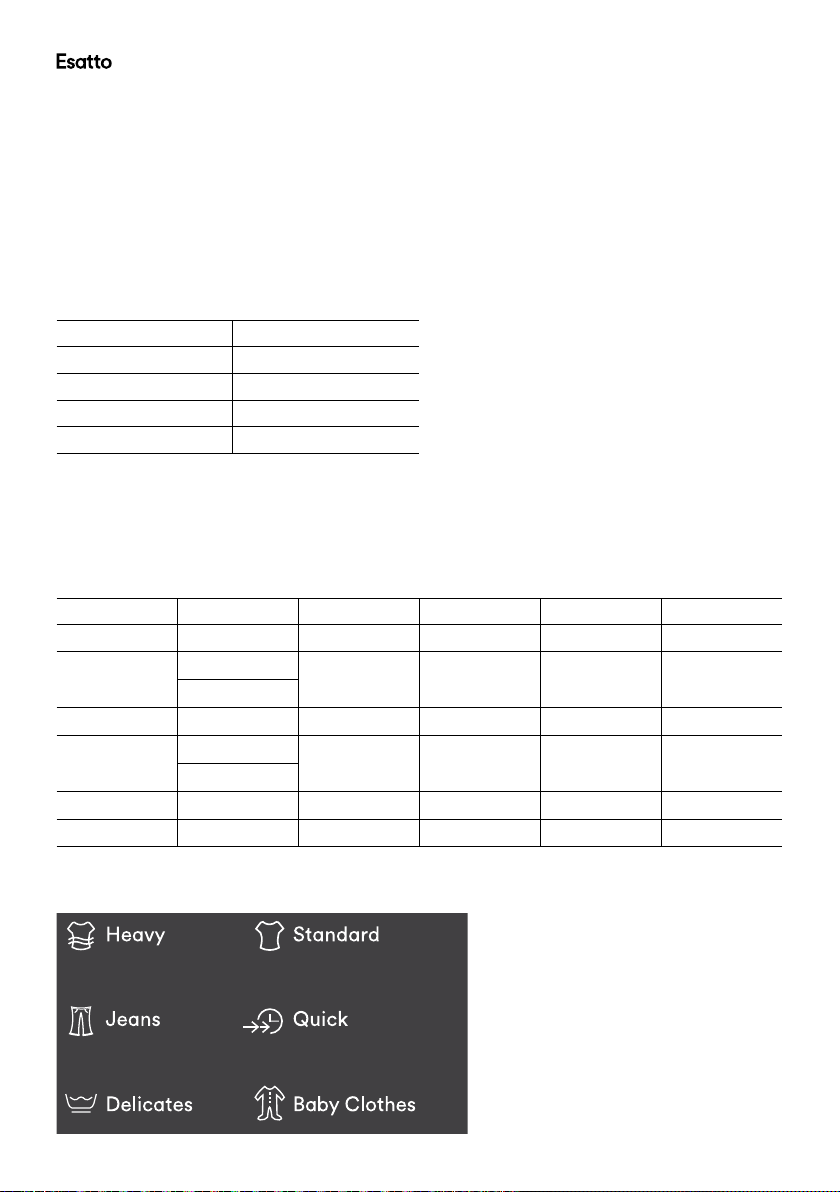
Program Key
Symbols displayed
here correspond with
the symbols above
the “Program Button”
Program Button
– Press this button to select your desired wash program
(Heavy, Jeans, Delicates, Standard, Quick,
Baby Clothes)
– The default program when the machine is rst powered
on is the “heavy” program.
– When the indicator light is solid, it represents the
corresponding program on the left side of the display
(either Heavy, Jeans or Delicates).
– When the indicator light is ashing, it represents the
corresponding program on the right side of the display
(either Standard, Quick or Baby Clothes).
– For more information on the programs see pages 16–17.
Delay Level Button
– Press this button to delay the start of your selected
washing program.
– The “delay start” feature allows you to select a
period of between 1 & 24 hours in which the machine
will delay the start of the selected washing program
(more information page 18).
Power Button
Press this button to switch the machine
on; press this button again to switch the
machine off.
Note: If you switch the machine on and
do not start a washing program within 10
minutes, the machine will automatically
switch off.
Temperature Level Button
– Press this button to adjust the temperature
setting for the selected wash program.
– The default wash temperature setting for all
programs except the “Standard” program
is “cold”. The “Standard” program default
temperature setting is “warm”.
Controls Cont.
User Manual 16
Operating Your Washing Machine
Before you start
• It is important to sort your washing into appropriate loads, particularly separating white/light colours from
dark colours, as well as separating out sheets and towels.
• Wash new, highly coloured and dark coloured items separately to prevent dye transfer onto other items.
• Sort “lint givers” and “lint collectors” (see table below) and where possible wash these items separately. It
is a good idea to turn “lint givers” inside out.
Lint Givers Lint Collectors
Towels Synthetics, eg polar eece
Chenille Corduroy
Nappies Poly cotton
Socks
• Close bra clasps, do up zippers and check pockets.
• Place your clothes directly into the washing drum.
Select your program
• Once the clothes have been loaded into the drum, select the desired program. See below program guide
to assist with your program selection.
Program Wash Time Rinse Time Water Level Spin Time Total Time
Heavy 12 mins 2 Cycles Auto-detect 5 mins 44 mins
Jeans Soak: 10 mins 3 Cycles 6 7 mins 70 mins
Wash: 15 mins
Delicates 9 mins 2 Cycles 6 3 mins 39 mins
Standard Soak: 30 mins 1 Cycle 6 5 mins 79 mins
Wash: 18 mins
Quick 6 mins 1 Cycle 3 3 mins 23 mins
Baby Clothes 15 mins 3 Cycles 5 9 mins 62 mins
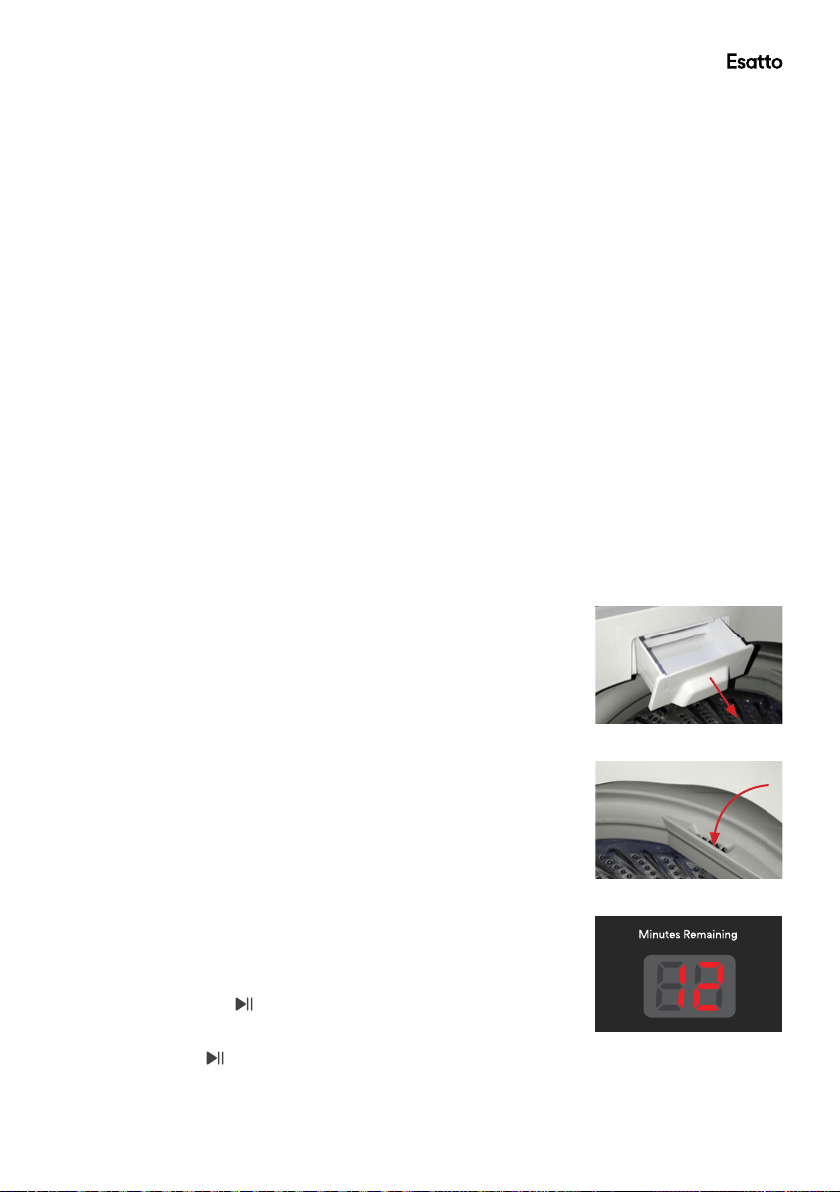
Program Icon Key
esatto.house17
Operating your Washing Machine Cont.
• Heavy
o Suitable for washing large loads including towels and bed sheets. The Heavy program includes an
additional 15 minute soaking time during the washing process.
• Jeans
o Suitable for denim and heavily soiled clothes such as workwear
• Delicates
o Suitable for delicate fabrics. This program has a slower washing and spin speed to provide
protection to your clothes.
• Standard
o Suitable for normally soiled clothing and most common cotton fabrics. Note: This program is the
program used to obtain energy and water efciency ratings. The manufacturer declares that the
water consumption of warm wash is not more than cold wash
• Baby Clothes
o Suitable for baby and infant clothing. This program has an increased rinsing time to reduce the
chance of detergent residue which may irritate young children’s skin.
• Quick
o Suitable for lightly soiled clothes
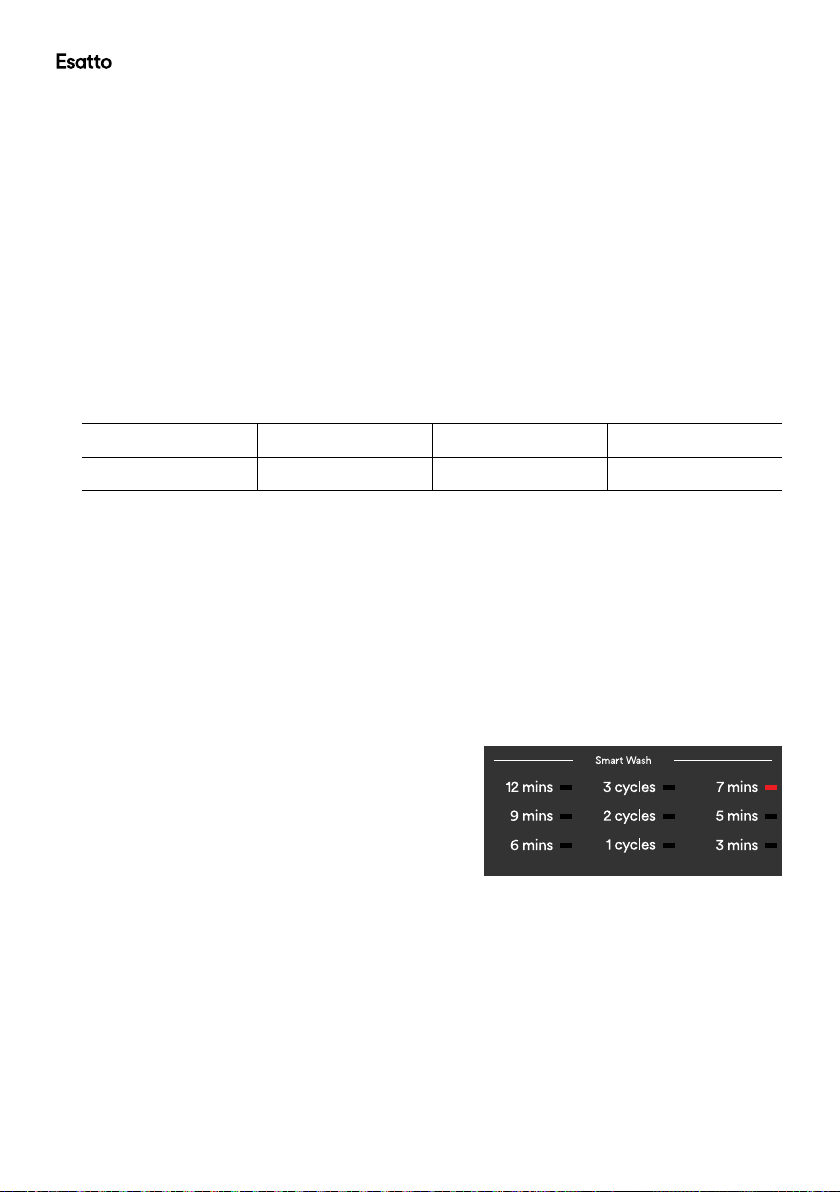
Add Detergent
• Slide out the detergent drawer (Fig. 10).
• For best wash results, follow the detergent manufacturer’s instructions
as shown on the packaging.
• Pour required amount of liquid or powder detergent into the detergent
drawer and close the drawer.
Add Fabric Softener (if required)
• If you wish to use fabric softener, pour the desired amount into the fabric
softener inlet on the side of the drum (Fig. 11).
• Always follow the manufacturer’s recommendations on the fabric softener
packaging for the correct dosage.
Normal usage (no delay start)
• Now that the program has been selected and the detergent/fabric softener
have been added you are ready to start the washing cycle.
• Close the lid and ensure that it closes properly; if it is not closed properly
an alarm will sound and the washing process will not begin.
• Press the “Start/Pause” button to begin the washing program.
• The LED display indicator will show the remaining wash time during the
washing process (Fig. 12).
• If the “Start/Pause” button is pressed during the washing process, the
machine will pause and once the button is pressed again it will resume from
the same place it was paused.
• At the completion of the selected program cycle, an alarm will sound to alert
you that the program has nished.
Fig. 10
Fig. 11
Fig. 12
User Manual 18
Operating your Washing Machine Cont.
Customising a Program
• The washing machine is equipped with fuzzy logic technology when using the “Heavy” program. The
machine will detect the weight of your wash load and select the appropriate wash cycle processes.
• Using the fuzzy logic technology, the machine will automatically select the correct water power and level,
wash and spin time, and rinse type.
• If you wish to manually adjust the program yourself, you can follow the instructions below:
1. Prepare your washing according to points on page 16.
2. Press the Power button, then press the Program button to select the washing program, e.g. Heavy,
Jeans.
3. Press the appropriate process button to select the process and time you want to adjust. The relevant
indicator light will illuminate when the option is selected.
Wash Time Options Rinse Options Spin Time Options Delay Time Options
6 / 9 / 12 minutes 1 / 2 / 3 cycles 3 / 5 / 7 minutes 0 / 1 / 2 / ... / 24 hours
4. Press the Water Level button and choose an appropriate water level.
5. Close the lid and press the Start/Pause button for the washing program to start.
6. At the end of the washing program, a buzzer will sound to alert you that the program has nished
before the power is shut off automatically.
Note: When the Standard program is selected, you can not adjust the wash rinse or spin functions.
Selecting a cycle process (instead of complete wash program)
• On occasion, you may wish to select a single wash cycle or two cycle processes instead of a
complete washing program. For example, if clothing has been soaked from rain, you may want
to run a “spin cycle” only.
Examples below
o Spin Cycle Only: Press the “Wash” button until there
is no indicator light on any of the settings. Press the
“Rinse” button until there is no indicator light on any
of the settings. Now you can press the “Spin” button
between the 3 available settings depending on how long
you wish to run the cycle.
– See Fig. 13 for reference.
o Rinse & Spin Cycle Only: Press the “Wash”
button until there is no indicator light on any of the
settings. Now you can press the “Rinse” and “Spin”
buttons between the available settings to created
your desired program.
Fig. 13
esatto.house19
Operating your Washing Machine Cont.
Using the Delay start feature
• The delay start feature on the washing machine can delay
the start of your selected washing program by 1 hour up to
24 hours.
• Press the power on/off button to turn the machine on and
follow the previously outlined steps for adding the soiled
load, selecting the desired program and adding the required
detergent / fabric softener.
• Close the lid and ensure it is closed properly.
• Press the “delay start” button once to delay the start
by one hour, twice by two hours and so on. The maximum
amount of time you can delay the start is 24 hours (Fig. 14).
• Once you have selected your desired delay start setting,
press the “Start/Pause” button to conrm the delay start.
• Once you have conrmed the delay start function, the
indicator light will ash in the control panel until the program
begins.
• The washing program will automatically commence following
the selected delay setting.
• To cancel the Delay start setting, simply press the Power On/
Off button to turn the machine off and then press it again to
turn the machine back on
Note: When using the delay start feature, it is recommended that you use detergent powder as opposed
to liquid detergent. Do not add detergent directly onto the clothes in the washing drum as it may damage
clothing.
Automatic Power-off feature
• If you switch the machine on and do not start a washing program within 10 minutes, the machine will
automatically switch off. Simply press the Power On/Off button to restart the machine.
Automatic Imbalance Correction feature
• When your washer is spinning, it can sense if the wash load is out of balance. If the laundry is placed in
the drum unevenly before the wash process begins, it is likely that it will cause vibration during operation.
During operation, the washing machine is continuously checking for imbalance and if the spinning vibration
is too great, the machine will automatically start adjusting the program to correct the imbalance.
• When the machine detects imbalance and begins the adjustment of a program, the rinse light will ash and
the machine will begin to inject water to increase the water level. The machine will continue this process
automatically for approximately one minute and then drain the water, returning to the original spinning
state.
• If the washing machine attempts the autocorrection twice and cannot correct the balance, an alarm will
sound and the machine will stop.
• At this point, you will need to open the lid and manually redistribute the wash load creating an even
balance.
• Press the “Start/Pause” button to resume the washing process.
Power failure memory function
• If your homes power supply is unexpectedly cut-off during the operation, the machine will remember
where it was up to in the program cycle process. When the power supply is returned, the machine will
automatically resume at the same place is was interrupted prior to the power outage.
Fig. 14
User Manual 20
FAQ
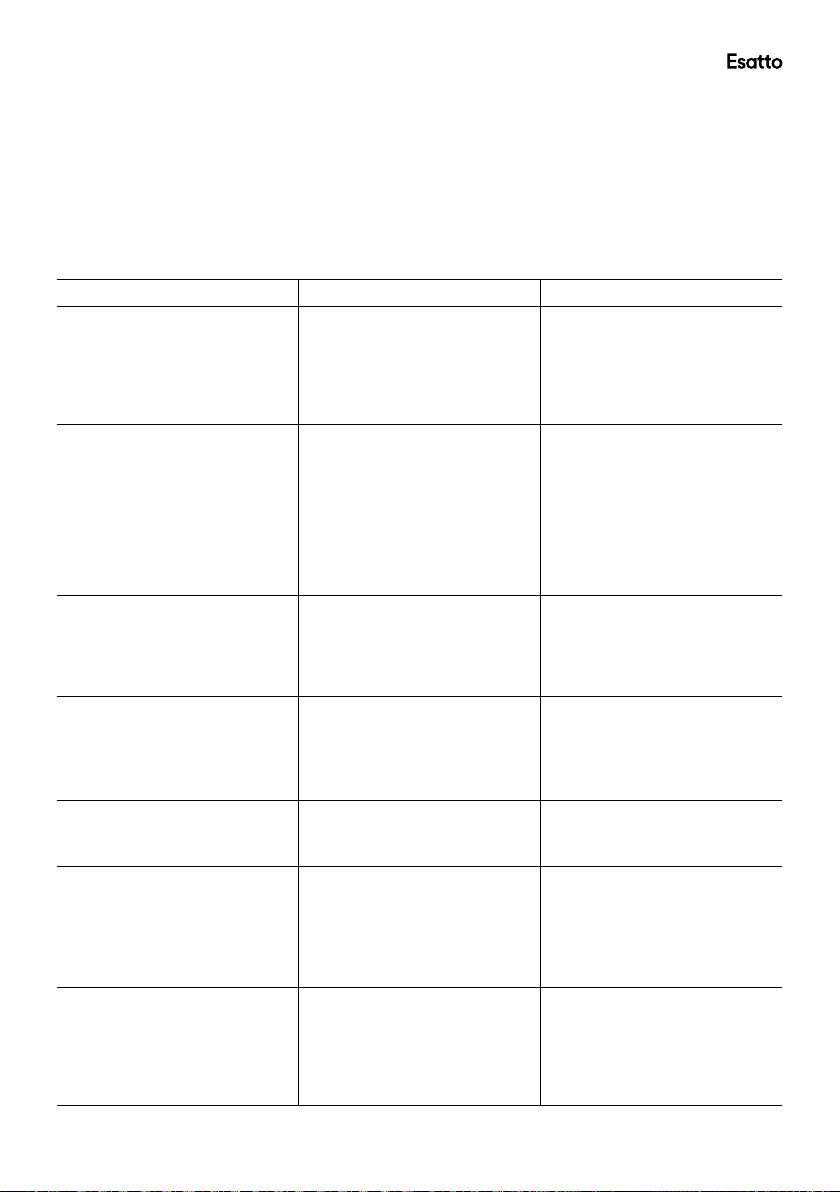
Error messages
When the following problems occur, the microcomputer inside the washer will detect the errors. An
electronic buzzer will sound for approximately 10 seconds, an error message will ash, as shown below,
and the washer will stop operating.
Problem Error Possible Diagnosis Possible Solutions
Washer not lling with water E1 • Inlet taps not turned on
• Blocked inlet hose lters
• ‘Delay Start’ is set
• Check that both the hot
and coldtaps are turned on
• Clear blockages from inlet
hose lters
• Refer to page 19 for
information about the
‘Delay Start’ function
Water is not draining E2 • Drain hose is not properly
connect or installed
• Drain hose is kinked or
obstructed
• Drain hose is clogged
• Drain pump lint lter at the
lower rear of the machine
is clogged
• Check the drain hose
connection as per page 11
• Check the drain hose
connection as per page 11
• Disconnect hose and check
for obstructions
• Clear drain pump lint lter
as per page 23
Washer will not start E3 • Lid is not closed properly • Check that the lid is closed
Washer does not spin E4 • The load could be out
of balance
• Pause washer and manually
redistribute the load
• Check the washer is level
and does not rock in any
direction. Refer to page 13
• Check the washer does not
have suds build up
esatto.house21
FAQ Cont.
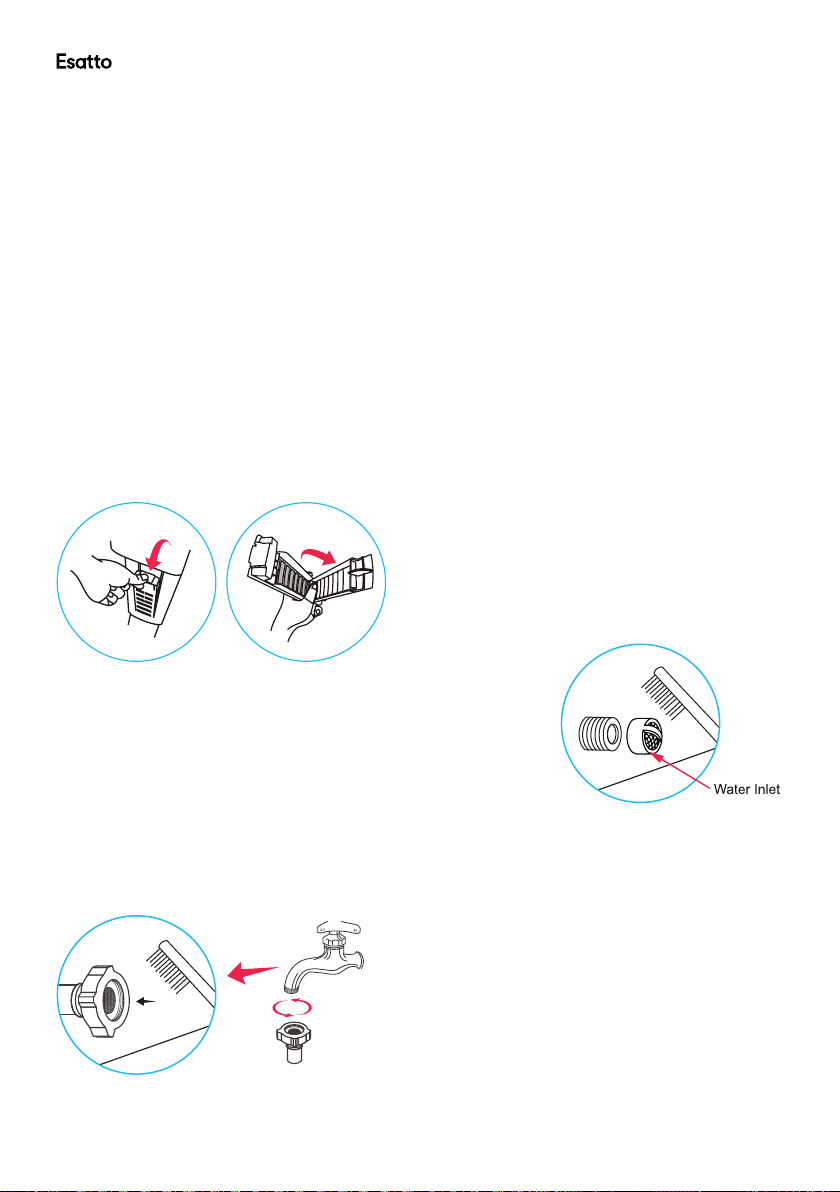
Troubleshooting
The following is a list of problems you may encounter when using this appliance and some suggestions that
may help to correct the problem. If you still have problems, please contact our customer service.
Problem Possible Diagnosis Possible Solutions
The washer does not work • Power not activated
• Household power failure
• Check whether the power
supply cord is plugged in and
the switch turned on
• Check whether a power failure
has occurred. Test by plugging
in another electrical appliance
Washer is lling continuously • Drain hose is not installed
correctly
• Washer could be siphoning
• Ensure drain hose is located
in standpipe or tub
• Ensure standpipe is at least
860 mm high but no more than
1200 mm high
• To prevent siphoning ensure
the drain hose does not extend
more than 20 mm from the end
of the hose guide
Spin speed sounds slower
than normal
• Clothes are unevenly
distributed in the bowl
• The outer wash bowl may still
be hot from being lled with
hot water
• Washer has compensated by
lowering the spin speed
• The washer has slowed the spin
speed as a protective measure
Washer is continually going
out of balance
• Washer may not be level
• Too much water for the load
• Check the washer is level and
does not rock in any direction.
Refer to page 13
• Ensure an appropriate water
level is selected for the load size
Washer is making noises • Banging • Load is out of balance. Press
the Start/Pause and redistribute
the load
Small puddle coming from
under the washer
• The water level is too high for
the amount of clothes and has
caused excessive splashing
• Large bulky garments
(eg towels, sheets) can cause
splashing
• Select a lower water level.
Refer to page 14
• Select the appropriate Program
for the load. Refer to pages
16–17
Linting • Some items in load more likely
to release or pick up lint
• Overloading the washer
• Not enough detergent to hold
the lint in suspension
• Wash lint givers (eg towels)
separately from lint collectors
(eg synthetic fabrics)
• Try reducing your load size
• Try using more detergent
User Manual 22
Care & Cleaning
Cleaning and Care
To prolong the service life of the washing machine, keep it in good condition and perform regular
maintenance. For any type of cleaning and maintenance, make sure the washing machine is disconnected
from the mains power supply.
Cleaning the Washing Machine (when required)
• Use a soft cloth to wipe any water or dirt off the washer lid and housing. If using a damp cloth, squeeze it
almost dry to avoid leaving water residues.
• The detergent box may be pulled out for cleaning, if required. Other inside parts should be wiped with a
damp cloth, if necessary.
• Do not use any chemical, alkaline or abrasive cleaning agents to avoid damaging the surface. Do not spray
water directly onto the washer housing.
Cleaning the lint lter (suggested interval: every week)
Take out the lint lter as illustrated below. Open the lter and rinse it clean under running water, taking care
not the damage any parts. Reinstall the lter, making sure it ts securely behind the cover clasp and latches
and locks securely into place.
Cleaning the water inlet valve (suggested interval: every 6 months)
To avoid blockage of the mesh lter at the water inlet after long time
use, detach the water inlet hose, making sure you have turned off the
water supply at the taps beforehand. Take the mesh lter out of the
water inlet valve and clean the lter with a soft brush. Then assemble
the mesh lter back into the valve and reconnect the water inlet hose.
Cleaning the hose lter (suggested interval: every 6 months)
To avoid blockage of the hose lter after long time use, detach the water inlet hose, making sure you have
turned off the water supply at the taps beforehand. Turn the nut anticlockwise to take off the hose, clean the
lter under running water or with a soft brush, then reconnect the hose.
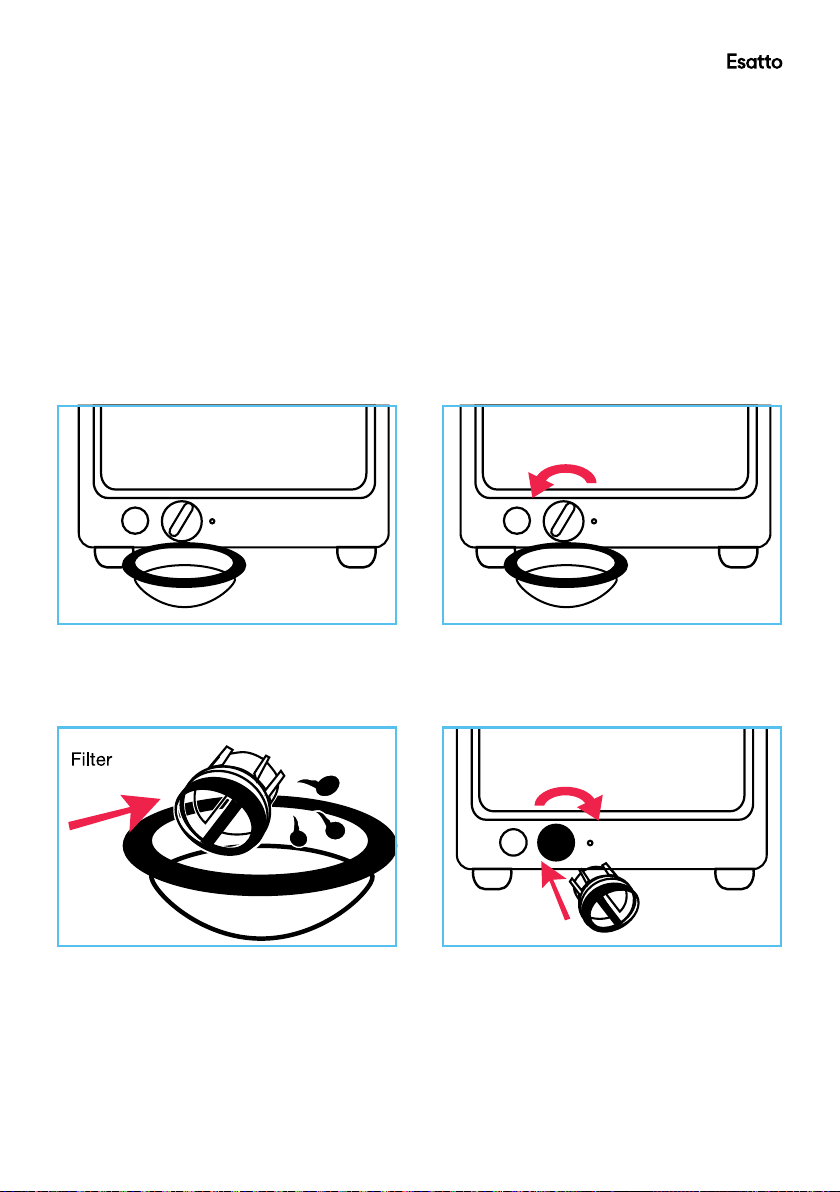
esatto.house23
Care and Cleaning Cont.
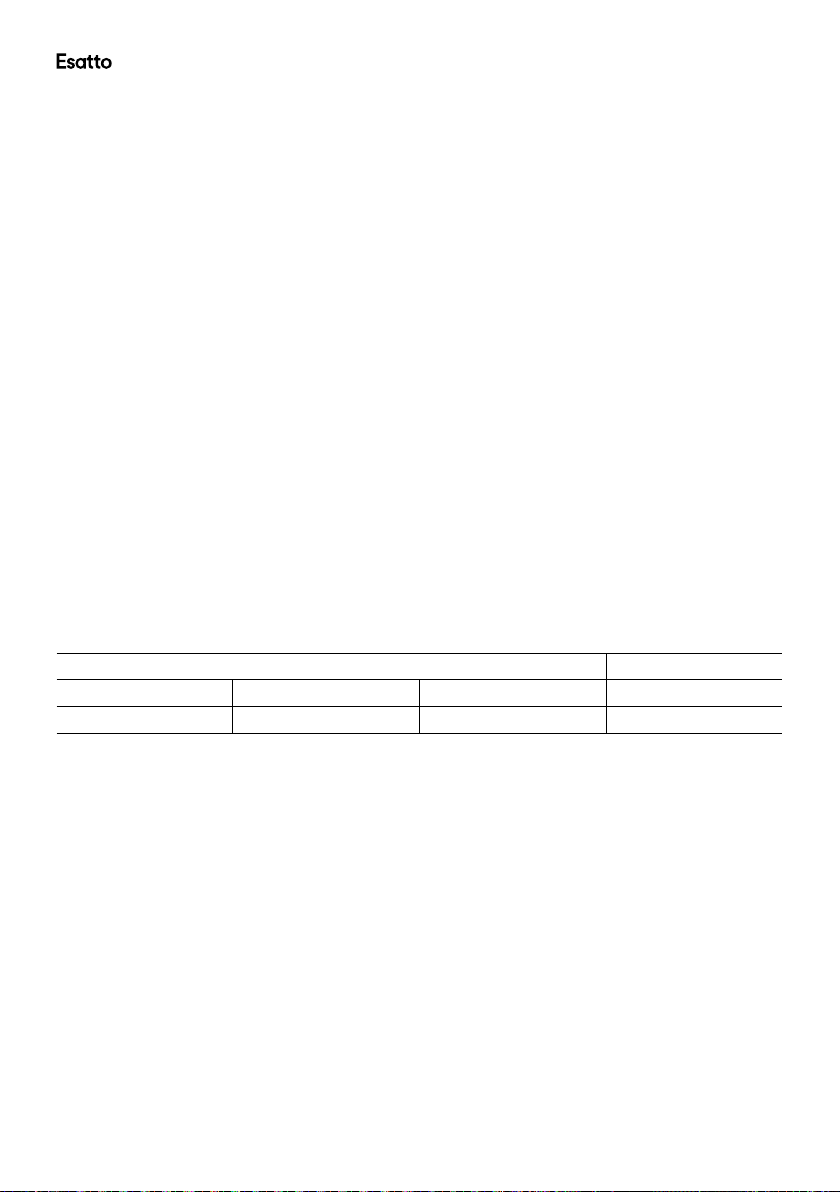
Drain pump maintenance
We recommend that you clean the drain pump lter regularly (at least once a month) to avoid blockages
created by bobby pins, coins and excess lint.
Proceed as follows:
1. Disconnect the washer from the power source.
2. If necessary, wait until the water has cooled down.
3. Place a container underneath the pump opening to collect any spillage (see below, left).
4. Turn the lter cap anticlockwise to take it out gently (see below, right). Always keep a rag nearby to dry up
water spillage when removing the pump lter.
5. To remove any objects from the lter, wash it thoroughly in a basin or under running water (see below,
left).
6. Put the cap back and place the lter back in its seat (see below, right).
Note: The drain pump is located at the rear of the machine as illustrated on Fig. 3, page 11.
User Manual 24
Other Useful Information
Spare Parts
Our after sales support centre stocks a wide range of spare parts for the ETL95.1 Esatto 9.5kg
Top Load Washing Machine. To purchase a part, call the centre on 1300 11 4357 or email us at
support@residentiagroup.com.au
Outer Tub Cover
Impeller Cover
Suspend System
Up Drain Hose
Assembly
Middle Hose Assembly
Cabinet Base Assembly
Water Inlet Hose
Assembly
Air Pipe
Clip Spring
Rear Cover
Handle
Cabinet Subassembly
Capacitor Assembly
Power Cord
Permanent magnet
synchronous pump
Balance Ring Plug
Filtering Cover
Tub Bottom Base
Coupling Plate
Cover Assembly
Cover Pin
Twist Spring
Back Control Panel
Assembly
Impact Switch
Water Inlet Valve
Water Level Sensor
Nozzle Assembly
Top Cover
Screw Cover
PCB
Internal Wire Assembly
Control Panel
Control Panel Sticker
Drain Valve
Subassembly
Retractor
Overow Hose
Outer Tub Subordinate
Assembly
Clutch Body
Subassembly
Lower Cushion
Single phase
asynchronous motor
Earth Wire Subassembly
Motor Pulley Assembly
V-Belt
This product complies with AS/NZS 60335.1 & AS/NZS 60335.2.7 for electrical safety, and with
EN 55014-1:2006+A2:2011 for electromagnetic compatibility.
Dimensions Weight
Width Depth Height Net
601mm 625mm 1015mm 45kg

esatto.house25
Other Useful Information Cont.
WARNING:
This appliance must be earthed
In the event of a malfunction or breakdown, earthing will reduce the risk of an electric shock by providing a
path of least resistance for the electric current.
This appliance is equipped with a cord having an equipment-earthing conductor and an earthing plug. The
plug must be plugged into an appropriate outlet that is installed and earthed in accordance with all local
standards and requirements.
WARNING:
Do not modify the plug under any circumstances. If the plug does not t your outlet, consult a licensed
electrician and have the outlet changed.
Responsible disposal
At the end of its working life, do not throw this appliance out with your household
rubbish. Electrical and electronic products contain substances that can have a
detrimental effect on the environment and human health if disposed of inappropriately.
Observe any local regulations regarding the disposal of electrical consumer goods and
dispose of it appropriately for recycling. Contact your local authorities for advice on
recycling facilities in your area.
User Manual 26
WARRANTY TERMS AND CONDITIONS
LAUNDRY APPLIANCES
This document sets out the terms and conditions of the
product warranties for Residentia Group Appliances. It is
an important document. Please keep it with your proof of
purchase documents in a safe place for future reference
should you require service for your Appliance.
1. IN THIS WARRANTY
(a) ‘acceptable quality’ as referred to in clause 10 of
this warranty has the same meaning referred to in
the ACL;
(b) ‘ACL’ means Trade Practices Amendment (Australian
Consumer Law) Act (No.2) 2010;
(c) ‘Appliance’ means any Residentia Group product
purchased by you accompanied by this document;
(d) ‘ASR’ means Residentia Group authorised service
representative;
(e) ‘Residentia Group’ means Residentia Group Pty Ltd
of 118 Campbell St, Collingwood VIC, ACN 600 546
656 in respect of Appliances purchased in Australia;
(f ) ‘major failure’ as referred to in clause 10 of this
warranty has the same meaning referred to in the
ACL and includes a situation when an Appliance
cannot
be repaired or it is uneconomic for Residentia Group,
at its discretion, to repair an Appliance during the
Warranty Period;
(g) ‘Warranty Period’ means:
(i) where the Appliance is used for personal,
domestic or household use (i.e. normal
single family use) as set out in the instruction
manual, the Appliance is warranted against
manufacturing defects for 24 months, following
the date of original purchase of the Appliance;
(h) ‘you’ means the purchaser of the Appliance not
having purchased the Appliance for re-sale, and ‘your’
has a corresponding meaning.
2. This warranty only applies to Appliances purchased
and used in Australia and is in addition to (and does
not exclude, restrict, or modify in any way) any
non-excludable statutory warranties in Australia.
3. During the Warranty Period Residentia Group or
its ASR will, at no extra charge if your Appliance
is readily accessible for service, without special
equipment and subject to these terms and conditions,
repair or replace any parts which it considers to
be defective. Residentia Group or its ASR may use
remanufactured parts to repair your Appliance. You
agree that any replaced Appliances or parts become
the property of Residentia Group. This warranty does
not apply to light globes, batteries, lters or similar
perishable parts.
4. Parts and Appliances not supplied by Residentia
Group are not covered by this warranty.
Warranty Information
esatto.house27
5. You will bear the cost of transportation, travel and
delivery of the Appliance to and from Residentia
Group or its ASR. If you reside outside of the service
area,
you will bear the cost of:
(a) travel of an authorised representative;
(b) transportation and delivery of the Appliance to and
from Residentia Group or its ASR, in all instances,
unless the Appliance is transported by Residentia
Group or its ASR, the Appliance is transported at
the owner’s cost and risk while in transit to and from
Residentia Group or its ASR.
6. Proof of purchase is required before you can make
a claim under this warranty.
7. You may not make a claim under this warranty unless
the defect claimed is due to faulty or defective parts
or workmanship. Residentia Group is not liable in the
following situations (which are not exhaustive):
(a) the Appliance is damaged by:
(i) accident
(ii) misuse or abuse, including failure to properly
maintain or service
(iii) normal wear and tear
(iv) power surges, electrical storm damage or
incorrect power supply
(v) incomplete or improper installation
(vi) incorrect, improper or inappropriate operation
(vii) insect or vermin infestation
(viii) failure to comply with any additional
instructions supplied with the Appliance;
(b) the Appliance is modied without authority from
Residentia Group in writing;
(c) the Appliance’s serial number or warranty seal has
been removed or defaced;
(d) the Appliance was serviced or repaired by anyone
other than Residentia Group, an authorised repairer
or ASR.
8. This warranty, the contract to which it relates and the
relationship between you and Residentia Group are
governed by the law applicable where the Appliance
was purchased.
9. To the extent permitted by law, Residentia Group
excludes all warranties and liabilities (other than as
contained in this document) including liability for any
loss or damage whether direct or indirect arising from
your purchase, use or non use of the Appliance.
10. For Appliances and services provided by Residentia
Group in Australia, the Appliances come with a
guarantee by Residentia Group that cannot be
excluded under the Australian Consumer Law.
You are entitled to a replacement or refund for a
major failure and for compensation for any other
reasonably foreseeable loss or damage. You are also
entitled to have the Appliance repaired or replaced
if the Appliance fails to be of acceptable quality and
the failure does not amount to a major failure. The
benets to you given by this warranty are in addition
to your other rights and remedies under a law in
relation to the Appliances or services to which the
warranty relates.
11. At all times during the Warranty Period, Residentia
Group shall, at its discretion, determine whether
repair, replacement or refund will apply if an
Appliance has a valid warranty claim applicable to it.
12. To enquire about claiming under this warranty, please
follow these steps:
(a) carefully check the operating instructions, user
manual and the terms of this warranty;
(b) have the model and serial number of the Appliance
available;
(c) have the proof of purchase (e.g. an invoice) available;
(d) telephone the numbers shown below.
13. You accept that if you make a warranty claim,
Residentia Group and its ASR may exchange
information in relation to you to enable Residentia
Group to meet its obligations under this warranty.
IMPORTANT
Before calling for service, please ensure that the steps
in point 12 have been followed.
CONTACT SERVICE
→ Please call 1300 11 HELP (4357)
Our goods come with guarantees that cannot be excluded under the Australian Consumer Law.
You are entitled to a replacement or refund for a major failure and for compensation for any other
reasonably foreseeable loss or damage. You are also entitled to have the goods repaired or replaced
if the goods fail to be of acceptable quality and the failure does not amount to a major failure.
The Australian Consumer Law requires the
inclusion of the following statement with
this warranty:
MODEL: STL95 | PRODUCT CODE: 57475 | 07/2017
This page
is intentionally
left blank
Applinces
Exctly wht
you need
A RESIDENTIA
GROUP INITIATIVE