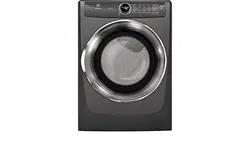
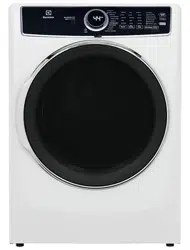
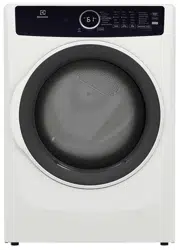
User manual Electric Dryer
Features
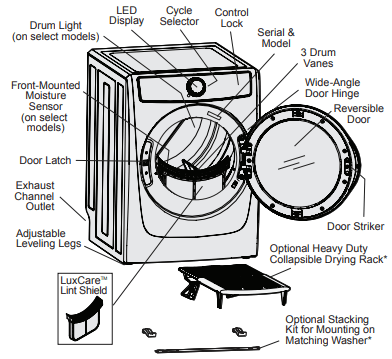
*Not included with initial purchase. May be purchased as accessory.
Operating Instructions
Operating Your Dryer
1. Prepare load for drying.
- Dry items of similar fabric, weight and construction in the same load.
- Separate dark items from light-colored items. Separate items that shed lint from those that attract lint.
- Check for stains which may not have been removed in washing. Repeat stain removal process and wash again before drying. Dryer heat may permanently set some stains.
- Place delicate, rubber coated, or small items in a mesh bag (not included).
- Be sure buckles, buttons and trim are heatproof and won’t damage the drum finish. Close zippers; fasten hooks and loop fasteners. Tie strings and sashes to prevent snagging and tangling.
DO NOT machine wash items containing fiberglass. Small particles of fiberglass left in drum may transfer to fabrics in other loads and cause skin irritation and/or damage to fabrics.
DO NOT wash water resistant and water repellent type clothing or other materials.
2. Check that the lint filter is clean and in place.
DO NOT operate dryer without lint filter in place.
3. Load the dryer and close the door.
- Load items loosely. The average wet load will fill the drum 1/3 to 1/2 full. Items need room to tumble freely for even drying and less wrinkling.
- If desired, place a dryer fabric softener sheet on top of the load at the beginning of the cycle.
- When drying large items, dry only two or three items at a time. Fill out the load with smaller items.
- For delicate or very small loads, add two or three similar items to improve tumbling action.
DO NOT overload the dryer. To save energy, time and avoid uneven drying and wrinkling avoid overloading the dryer.
DO NOT over-dry. Over-drying can cause wrinkles, shrinkage, lint, and a build up of static electricity.
4. Select the appropriate cycle and settings for each load.
- See Cycle Selection and Cycle Settings for detailed descriptions of cycle controls.
- See Cycle Setting Charts to determine which settings are available for each cycle.
- To provide the best care, not every setting or option is available with every cycle. If a setting or option is not available for the cycle selected, the indicator will not light. See Setting Chart for information of available options for each cycle by model.
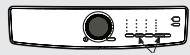
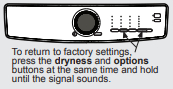
- Adjustments made to most cycle settings will be remembered and recalled each time that cycle is selected in the future. To return to factory settings, press the dryness button and the options button at the same time and hold until the signal sounds.
Over-drying can cause wrinkles, shrinkage, lint, harshness, and a build up of static electricity
To prevent unintentional and accidental exposure of delicate material to excess heat or unexpected steam, the sanitize temperature setting and the perfect steam™ option will not be remembered and must be reselected each time.
5. Close the dryer door and start the drying cycle.
- To start the drying cycle, close the door and press the start/pause button.
- To add an item to the dryer drum, press start/pause. Add the item, close the door and press start/pause to resume the cycle.
- To change settings or options after the cycle has begun, press start/pause, change the settings, and then press start/pause. If the cycle is not paused first, the unit will emit several beeps when the buttons are pressed but no changes to the cycle will be applied.
- To change the cycle once the cycle has begun, press cancel to cancel the cycle, select the new cycle, and press start/pause to begin the new cycle. Changing a cycle selection without cancelling the current WILL NOT change the cycle.
- To cancel a cycle, press cancel.
The dryer WILL NOT operate with the door open.
When drying a single large or bulky item, such as a comforter, pause the cycle part way through to turn the item “inside out” and maximize drying effectiveness.
6. Remove items when done.
- A signal will sound at the end of the cycle if the chime option is not set to mute.
- Immediately remove items when the cycle is completed and hang or fold.
See product manufacturer’s instructions.
7. Clean the lint filter
- See Care and Cleaning section of this instruction.
- CLEAN LINT will be displayed at the end of the cycle as a reminder to remove lint from filter.
ALWAYS REMOVE LINT at the end of the cycle (see warning on previous page).
Controls and Settings
Cycle Selection
Press the power button to turn on the unit. Turn the cycle selector in either direction or repeatedly press the cycles button (depending on your model) to scroll to the desired cycle. The indicator light for the cycle selected will be illuminated and the estimated drying time for Auto Dry cycles or the actual drying time for Time Dry cycles will be displayed on the LED display screen
Default settings and options will automatically be indicated for the cycle selected. In most cases cycle settings and options can be changed. See Cycle Settings, Cycle Options, and Setting Charts for more details.
To change the cycle once it has begun, press the cancel button before selecting a new cycle. Just turning the cycle selector ring or pressing the cycles button WILL NOT change the cycle.
Auto Dry Cycles
Auto Dry cycles take the guesswork out of selecting the correct drying time for each load. Moisture sensors sense the moisture level of the load as it tumbles through the heated air. With Auto Dry cycles, the load will automatically be dried at the selected temperature to the desired dryness level.
Auto Dry cycles save time and energy and protect fabrics. When the load has reached the selected dryness level, it will continue to tumble, unheated, during a cool down period. This helps reduce wrinkling and makes items easier to handle during unloading.
NOTE Initial cycle times for Auto Dry cycles are only estimates, the actual drying time may differ slightly from the time displayed.
Drying times vary depending on size and dampness of the load and fabric type. If the load is too small or almost dry, the moisture sensors may not detect enough moisture to continue the cycle and the cycle may end after a few minutes. If this occurs, then select the time dry cycle to dry such loads.
Room temperature and humidity, type of installation and electrical voltage or gas pressure can also affect drying time.
heavy duty (on select models)
Select this cycle to dry durable fabrics such as jeans and overalls.
towels (on select models)
Select this cycle to dry heavy loads such as towels and non-rubber-backed bath mats.
heavy/towels (on select models)
Select this cycle to dry heavy loads and durable fabrics such as towels, jeans and overalls.
allergen (on select models)
Select this cycle where you wish to reduce allergens as you dry your load. Items prone to heat damage are not recommended for this cycle.
normal
Select this cycle to dry everyday fabrics including cottons, linens and sheets.
active wear (on select models)
Select this cycle to dry lightweight synthetic athletic apparel including stretch fabrics.
delicates
Select this cycle to dry knits and delicates.
mixed load (on select models)
Select this cycle to dry loads containing a mix of fabrics.
NOTE Models equipped with the Predictive Dry feature use the first 90 seconds of Auto Dry cycles to sense the load in the dryer.
During this 90 second period the LED display will show 3 dots  cycling one to the next. When the sensing is complete, the LED display will show the remaining cycle time in minutes and will accurately count down to the end of the cycle.
Timed Dry Cycles
The timed drying cycles allow the selection of exact drying times. The time dry cycle allows the option to select drying time settings ranging from 30 to 75 minutes (depending on the model). Various drying times and temperature settings can be selected when using this cycle.
The fast dry cycles (on select models) have preset times of 15, 18 or 20 minutes (dependent on model) with a preset temperature of high only.
Dryness levels will not be an available option when using either of the timed drying cycles.
time dry
Select this cycle to manually set the drying time from 30 to 75 minutes (depending on model) for any load.
20min fast dry (400 series model)
Select this cycle to quickly dry small loads in 20 minutes.
18min fast dry (500 series model)
Select this cycle to quickly dry small loads in 18 minutes
15min fast dry (600 series model)
Select this cycle to quickly dry small loads in 15 minutes.
instant refresh (on select models)
Select this cycle to refresh fabrics, remove odors and reduce static by injecting the perfect amount of steam into clothing that has been left in the dryer, stored in crowded closets, drawers, or unpacked luggage.
NOTE It is not recommended to use fabric softener sheets with steam cycles or steam options as it may cause staining on clothes.
Cycle Settings
To set or change the drying temperature, dryness level, or drying time press the temp, dryness or time dry buttons to scroll to the desired settings. The indicator light for each setting will be illuminated when selected.
To protect your fabrics, not all temperatures or dryness levels are available with every cycle. If a temperature or dryness level is not appropriate for the cycle, it cannot be selected and will not be lit when scrolling through the settings.
NOTE To change a cycle setting once the cycle has begun, press the start/pause button, make the new selection and press start/pause again.
With exception of the sanitize temperature setting and the perfect steamtm option, adjustments made to cycle settings and options will be remembered and recalled each time that cycle is selected in the future.
Drying Temperature (temp)
To change the temperature, press the temp button to scroll to the desired setting.
sanitize (on select models)
Recommended for durable fabrics and towels. Use this selection to remove harmful bacteria from your clothing or other items where sanitization is desired. This option will kill 99.9% of bacteria. A higher temperature is required to kill bacteria. Please check fabric care labels to prevent damage.
high
Recommended for most cotton fabrics.
normal
Recommended for wrinkle free, easy care, lightweight fabrics and bulky loads.
low (on select models)
Recommended for delicate fabrics.
air dry
This setting (no heat) should only be used with a time dry cycle to dry items containing feathers, down, foam rubber, plastics or rubber-like materials; to refresh clothing, stuffed animal, pillows or blankets; and to dust draperies.
Dryness Level (dryness)
To set or change the dryness level, press the dryness button to scroll to the desired setting.
The dryness levels include max (on select models), high, normal, less (on select models), and damp. Most Auto Dry cycles default to the normal dryness level.
Occasionally a load may seem too damp or over-dried at the end of the cycle. To increase drying time for similar loads in the future, select high or max (on select models). To decrease drying time for similar loads, select less (on select models).
Select damp for items you wish to partially dry before hanging or ironing.
Drying time (time dry)
Manually select or change the drying time for a time dry cycle (on select models) by pressing the time dry button to scroll though the available options. Time dry options include 30, 45, 60 and 75 minutes (dependent on model).
The auto selection is a default for all auto dry cycles and fast dry cycles and cannot be selected or changed. All actual or predicted dry times will count down on the LED display
Cycle Options
To select an option, press options and scroll though the options until the indicator light for the desired option flashes, then press select (set). The indicator will illuminate when the option has been selected. Follow the same steps to deselect an option. The indicator light will turn off when the option is deselected.

NOTE To change a cycle option once the cycle has begun, press the start/pause button, make the new selection and press start/pause again.
To protect your fabrics, not all options are available with every cycle. If an option is not available for a cycle, the indicator will not light.
Occasionally, two options or settings in the same cycle will conflict with each other, like eco option and sanitize temperature (on select models). When this happens, the option selected first will cause the conflicting option to not be selectable.
 perfect steamTM (on select models) The perfect steamTM option injects steam into the clothing prior to cool down to reduce wrinkling, ironing and static cling.
anti-static (on select models)
The anti-static option injects steam into the clothing just before cycle completion to reduce static.
eco
The eco option reduces the drying temperature a few degrees to save energy. In conjunction with automatic moisture sensors, cycle times will increase slightly, but overall energy usage will decrease. The eco icon will illuminate on the LED display to indicate the eco option is activated.

wrinkle release
The wrinkle release option helps prevent wrinkles and tangling by tumbling the dry load without heat for 5 minutes out of every 10 minutes. The 5 minutes on and 5 minutes off is repeated for a total 45 minutes. A chime will sound after each tumble as a reminder to remove the dried load.
extended tumble (on select models)
Select the extended tumble option if the dried load might not be removed promptly at the end of the cycle. The dried load will tumble continuously without heat for 30 minutes. A chime will sound periodically to remind you to remove the dried load.
NOTE When extended tumble and wrinkle release options are both selected the amount of time the load will tumble without heat will increase to a period of up to 75 minutes.
delay time (on select models)
Use delay time to delay the start of the drying cycle to a time convenient to your schedule or during off-peak energy hours. The start of any cycle can be delayed for 30 minutes to 12 hours. After selecting the delay time option, use the cycle selector to scroll to the desired delay time and press start. The delay time icon will illuminate on the LED display to indicate the delay time option is activated, The delay time will begin counting down on the LED display once activated.

NOTE While counting down during delay time, you will notice your dryer periodically tumbling for a few minutes without heat to redistribute the load, maximizing load freshness.
control lock
To lock the controls between cycles, scroll to the control lock option and press select. The control lock icon will show on the LED display. To unlock the controls scroll to the control lock option again and press select. Use this feature to reduce the likelihood of accidental operation by children. Dryer cycles will not run when Control Lock is activated.

chime
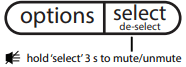
A signal will sound at the end of the cycle (and periodically during extended tumble or wrinkle release). To mute or unmute the chime, press and hold the select button for 3 seconds.
Muting the end of cycle signal will not mute the button tones.
Other Features
LED Display

Icons may vary according to model.
The estimated cycle time for auto dry, the actual time for time dry, or the delay time countdown will be displayed when the cycle is selected. Once the cycle has started, the estimated remaining time will be displayed for the remainder of the cycle.
As the dryer progresses through the cycle phases, the row of cycle phase indicators lights up under the cycle time.
Delay time, eco, control lock, mute (select models), and clean lint icons will also appear on this LED display when activated.
Drum Light (on select models)
The drum light will come on whenever the door is opened to illuminate the drum during loading and unloading. Closing the door turns off the light. The drum light will automatically turn off if the door is left open more than 3 minutes.
Reversible Door
The dryer is equipped with a reversible door. The door can be hinged on the right or left side.
NOTE For step-by-step instructions on door reversal, refer to the Installation Instructions supplied with this dryer.
LuxCareTM Lint Shield filter
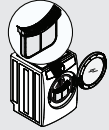
The dryer is equipped with a clamshell style LuxCareTM Lint Shield filter.
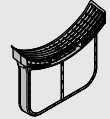
WARNING Clean the filter after every load. A CLEAN LINT message will appear on the LED display at the end of the cycle to remind you to remove the lint from the filter.
NOTE For step-by-step instructions cleaning the lint filter, refer to Cleaning the Filter in the Care & Cleaning section of this Use and Care Guide.
Optional Drying Rack (not included)
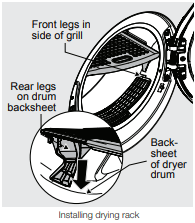
Use the drying rack for items which should not be tumble dried. Extend the collapsed drying rack and insert the rack into the dryer drum. Place the front legs into the front air grill and lower the rear of the rack onto the back of the dryer drum.
Place items to be dried on top of the rack, leaving space between items and not allowing them to hang over the sides or through the holes. The weight should not exceed 10 lbs (4.5 kg).
Select the air dry setting for items containing plastic, foam rubber, rubber-like materials, feathers or down. When items are dry, remove the rack and store it in a convenient location.
NOTE The drying rack accessory should only be used with time dry cycles. Use of rack with auto dry cycles will result in a shortened cycle with unwanted drying results.
Assemble the drying rack
If rack is in separate pieces, press tabs down and insert rear into front.
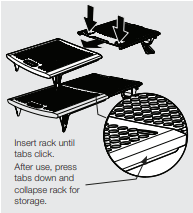
Install the drying rack
See the Accessories section of the Installation Instructions for ordering information.
Care & Cleaning
Cleaning the Filter
Clean the lint filter after every load. Lint build-up on the filter restricts air flow, which causes longer drying times. The filter is located at the bottom of the door opening.
Cleaning the LuxCareTM Lint Shield
1. Remove the filter by pulling it straight up from the dryer.
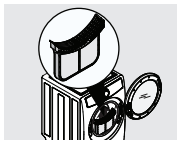
2. Press down the center tab on the top of the filter to open the clamshell.
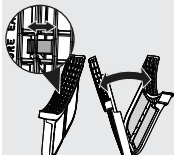
3. Gently clean the lint from the filter.
4. Snap the filter closed and place back into the dryer.
Inside
- Occasionally a waxy build-up may form on the lint filter and/or moisture sensing bars from using dryer-added fabric softener sheets. To remove this build-up, wash them with warm, soapy water. Dry the filter thoroughly and replace. DO NOT operate the dryer without the lint filter in place.
- If the dryer drum becomes stained from non colorfast fabrics, clean the drum with a damp cloth and a mild liquid household cleanser. Remove cleanser residue before drying the next load.
- Before cleaning the dryer drum interior, unplug the electrical power cord to avoid electrical shock hazards.
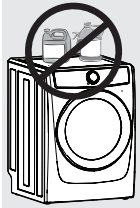
- DO NOT use any type spray cleanser when cleaning the dryer interior. Hazardous fumes or electrical shock could occur.
- Every 18 months a qualified service professional should clean the dryer cabinet interior, lint screen housing and exhaust duct. These areas can collect lint and dust over time. An excessive amount of lint build-up could result in inefficient drying and possible fire hazard.
Outside
- Clean the dryer cabinet with mild soap and water. Never use harsh, gritty or abrasive cleansers.
- If the cabinet becomes stained, clean with diluted chlorine bleach (1 part bleach to 8 parts water). Rinse several times with clear water.
- Remove glue residue from tape or labels with a mixture of warm water and mild detergent. Or, touch residue with the sticky side of the tape or label.
- When cleaning chrome parts, it is best to use only a damp cloth.
- Before moving the dryer, place a strip of cardboard or thin fiberboard under the front leveling legs to prevent damage to the floor.
Water Inlet Hose Inspection (Steam Models Only)
Periodically inspect all water inlet hoses for water leaks, wear, cuts, corrosion and bulges. Replace all hoses, if any sign of the above is visible. All hoses should be replaced every 5 years to reduce the risk of hose failures. When replacing hoses, refer to the Installation Instructions for proper installation. DO NOT overtighten or cross thread the fittings. DO NOT allow the hose to rub against sharp objects. Always ensure the hose fitting rubber gasket is installed and free from water leaks when water pressure is applied.
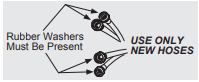
See the Accessories section of the Installation Instructions for ordering information.
Limited Use, Vacation, and Away from Home
1. Turn off the water supply to dryer (steam models only) to avoid water leaks due to water pressure surges and unforeseen occurrences in the water supply.
2. Disconnect or unplug the electrical power to the dryer.
Reconnecting Water Supply and Electrical
IMPORTANT When reinstalling the dryer after disconnecting the water supply lines (steam models only) and electrical power, please follow the steps below:
1. Review the Installation Instructions provided with the dryer to ensure the appliance is level and the water and electrical power supply is properly connected.
2. Ensure the water lines are flushed of debris, prior to connecting the water lines to the dryer inlet.
3. Check for water leaks and replace supply hoses if needed.
Solutions to Common Inquiries
Normal Operating Sounds
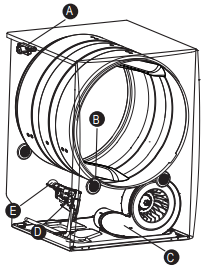
You may or may not hear the following sounds from your new dryer:
A. WATER VALVE (Steam models only.) The flow of water is controlled by electric solenoids. During operation there may be a clicking sound as the valve opens and closes to control the water flow
B.SUSPENSION ROLLERS The dryer drum is supported by a set of suspension rollers. At times there may be a thumping or rolling sound when the dryer starts. This may happen if the dryer has not been in use for a period of time, or after a heavy load has remained in the dryer drum for an extended period, creating a temporary flat spot on the edge of the roller. The noise should dissipate as the dryer operates and the flat spots smooth out.
C.AIR FLOW SYSTEM Your dryer is equipped with a high volume air handling system. In some installations there may be some sounds associated with air movement throughout the dryer, including the air duct, blower, and exhaust system. This is normal and can vary with load size and type.
D.GAS VALVE (Gas models only.) The flow of gas is controlled by electric solenoids. During operation there may be a clicking sound as the valve opens and closes to control the gas flow.
E. GAS BURNER (Gas models only.) When the burner is operating, there may be sounds generated as the air flow mixes with the gas flame. This noise is normal and will only occur when the gas is ignited in the combustion tube.
Common Drying Inquiries
Greasy, oily stains
Rub fabric softener stains with bar soap. Rinse and rewash.
Add a few bath towels to small loads for proper tumbling.
Some “silk-like” fabrics should be air dried.
Use proper drying temperature.
Place fabric softener sheet on top of load before starting the dryer
Lint
- Overloading
- Overdrying causes static electricity
- Lint screen not clean when cycle began
- Lint is attached to “pills”
Reduce load size and rewash using liquid fabric softener in the final rinse.
Or, add a fabric softener sheet and tumble without heat.
Use lint brush or roller to remove lint.
DO NOT overload dryer.
Use fabric softener in washer or dryer to reduce static electricity.
Remove items when they are slightly damp to avoid overdrying.
Check that lint filter is clean and in place.
Pilling (fibers break off, ball up and cling to fabric)
Use a lint brush or shaver to remove pills.
Use fabric softener to lubricate fibers.
When ironing, use spray starch or fabric finish on collars and cuffs.
Turn items inside out to reduce abrasion.
Shrinking
- Temperature too high
- Overdrying
Irreversible condition
Follow fabric care label directions.
If shrinking is a concern, check load often.
Remove items while slightly damp and hang or lay flat to complete drying.
Block knits into shape.
Wrinkling
- Overloading
- Leaving items in dryer after cycle ends
Reduce load size and tumble at medium or low heat for 5-10 minutes.
Remove items immediately. Hang or fold.
DO NOT overload dryer.
Remove items as soon as cycle ends.
Isolated wet spots on fabrics after completed Steam cycle
- Low water pressure in home is not sufficient to atomize incoming water during steam cycle
Check water line pressure.
Ensure water line pressure is minimum of 20 psi. DO NOT exceed 120 psi.
Service Prevention Checklist
Dryer does not start.
- Electrical power cord is not securely plugged in or plug may be loose.
- House fuse blown or circuit breaker tripped.
- Action of pressing start button on “touch screen” style console not recognized
- Thermal limiter tripped.
- Delay time inadvertently activated.
- Door may be open. Unit will not operate with door open.
Make sure the plug fits tightly in wall outlet.
Reset circuit breaker or replace fuse.
Make sure electrical line is not overloaded and the dryer is on a separate circuit.
Press start button with bare fingertip.
Call authorized service person for replacement.
Ensure delay time not activated.
Ensure door is closed.
LED displays 
- Dryer has been programmed to temporarily perform a repeating demo cycle.
Reset the unit back to factory default settings as described earlier.
Dryer runs but won’t heat.
- There are 2 house fuses in the dryer circuit. If 1 of the 2 fuses is blown, the drum may turn but the heater will not operate (electric models).
- Gas supply valve is not open (gas models).
- Dryer does not have enough air supply to support the burner flame (gas models).
- LP gas supply tank is empty or there has been a utility interruption of natural gas (gas models).
Replace fuse.
Check to make sure supply valve is open. Refer to the Installation Instructions provided with the dryer.
See the Installation Instructions provided with the dryer.
Refill or replace tank. Dryer should heat when utility service is restored.
Drying cycle takes too long, outside of the dryer feels too hot or smells hot.
- Lint filter is clogged with lint.
- Exhaust duct requirements have not been met.
- Electric dryer is connected to a 208 volt circuit.
- Drying procedures have not been followed.
- Outside exhaust hood or exhaust duct may be clogged or restricted.
- High humidity.
Make sure all lint has been removed from the dryer lint filter before starting each cycle.
Exhaust duct must be at least 4 inches in diameter and made of rigid or semi-rigid metal.
When in place, the duct must not exceed length listed in the Installation Instructions.
Drying time will be 20% longer than drying on a 240 volt circuit.
See Operating Instructions.
Clean out any obstruction.
Use a dehumidifier near the dryer.
Excess moisture in drum between cycles.
- Exhaust damper stuck open or not present.
Fix or clean the damper, or install new one.
Excessive wrinkling.
- Dryer is overloaded.
- Items left in dryer too long.
- Insufficient sorting of items.
- Drying temperature too high.
- Drying load is very small.
DO NOT overload. See Operating Instructions.
Remove items as soon as cycle ends.
See Operating Instructions.
Follow fabric care label instructions.
Add two or three larger items.
Scratching or chipping of the drum finish.
- Foreign objects such as coins, pins, clips or buttons are inside the dryer.*
- Permanently attached items such as belt buckles, zippers and fasteners may be hitting the inside of the drum.*
Always remove foreign objects from pockets before laundering. Remove objects from drum and restart dryer.
It may be necessary to sew a scrap of material securely around ornaments before drying to prevent scratching and damage to the dryer.