Operating instructions
S 7000 series vacuum cleaners
To avoid the risk of accidents or damage
to the appliance, it is essential to read these
instructions before using it for the first time.
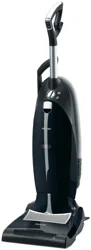
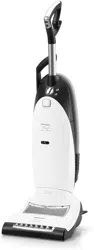
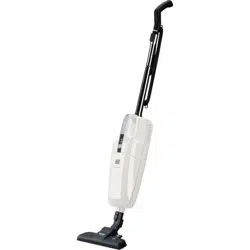
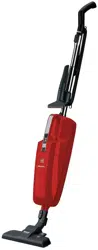
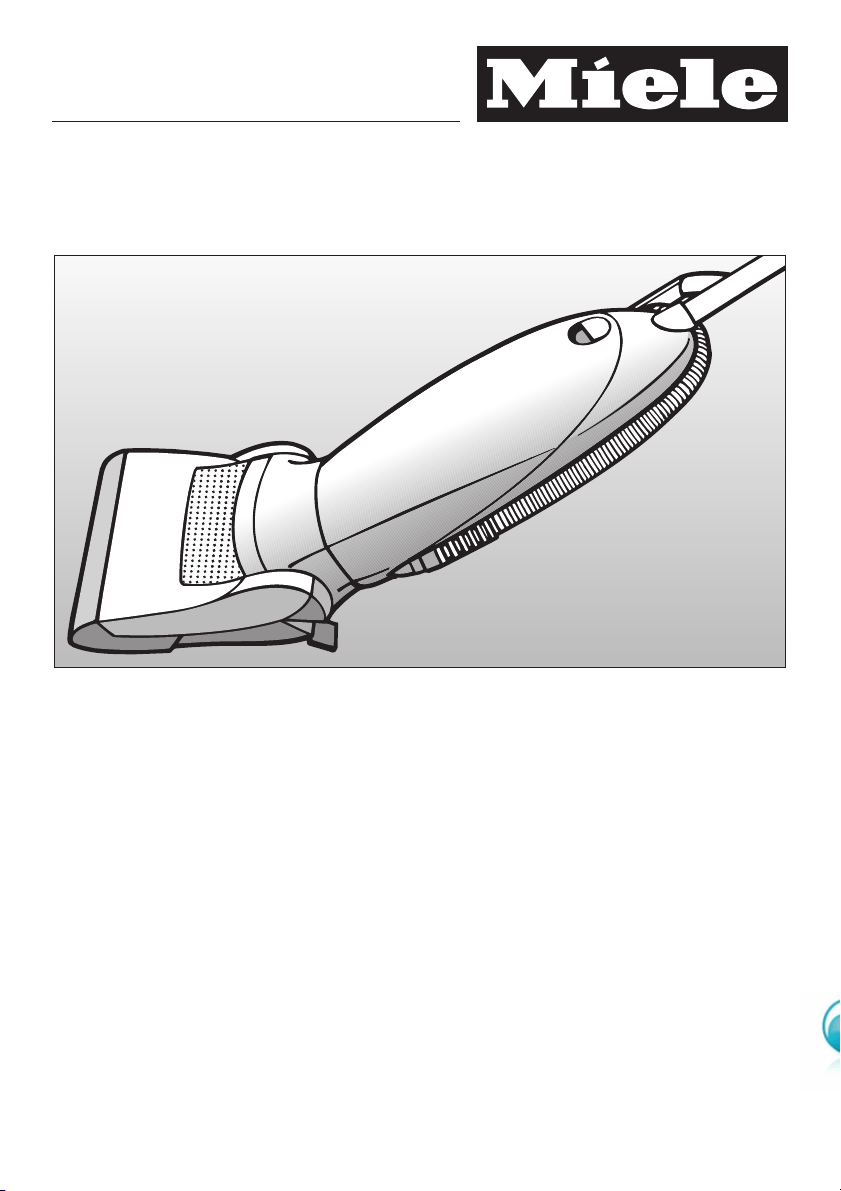
These operating instructions apply to
the standard S 7000 vacuum cleaners
as well as to other models
which are distinguished by names rather than numbers. M.-Nr. 07 793 820
en - AU, NZ

Caring for the environment..........................................3
Guide to the appliance .............................................4
Warning and safety instructions .....................................7
Preparing for use .................................................10
Using the vacuum cleaner .........................................11
Unwind the mains cable ............................................11
Switching on .....................................................12
Releasing the vacuum cleaner .......................................12
Switching on and off ...............................................13
Adjusting the suction power .........................................13
Vacuuming using the suction hose ....................................16
Vacuuming using the telescopic wand .................................17
Using the PowerBrush ............................................18
Recommended use ................................................18
Switching the PowerBrush on and off ..................................19
How to use the PowerBrush..........................................19
Using the accessories supplied .....................................20
Maintenance .....................................................22
Purchasing new dustbags and filters ..................................22
Ordering the correct dustbags and filters ...............................22
When to change the dustbag ........................................23
Replacing the dustbag .............................................24
When to change the dust compartment filter ............................25
How to change the dust compartment filter .............................25
When to change the exhaust filter .....................................26
Replacing the Air Clean filter .........................................27
Replacing an Active Air Clean filter or an Active HEPA filter.................28
Replacing one type of exhaust filter with another .........................29
Removing threads and hair from the PowerBrush.........................30
Cleaning and care ................................................32
Problem solving guide ............................................33
After sales service ................................................34
Optional accessories..............................................35
Electrical connection..............................................39
Contents
2
Disposal of the packing
material
The transport and protective packing
has been selected from materials which
are environmentally friendly for disposal
and can normally be recycled.
Ensure that any plastic wrappings,
bags, etc. are disposed of safely and
kept out of the reach of babies and
young children. Danger of suffocation.
Rather than just throwing these
materials away, please ensure they are
offered for recycling.
Disposing of the dustbag and
filters
These are made from environmentally
friendly materials, and can be disposed
of with the normal household waste, as
long as they have been used
exclusively for general household dust.
Disposal of your old appliance
Electrical and electronic appliances
often contain materials which, if
handled or disposed of incorrectly,
could be potentially hazardous to
human health and to the environment.
They are, however, essential for the
correct functioning of your appliance.
Therefore, please do not dispose of
your old appliance with your household
waste.
Please dispose of it at your local
community waste collection / recycling
centre and ensure that it presents no
danger to children while being stored
for disposal.
Caring for the environment
3
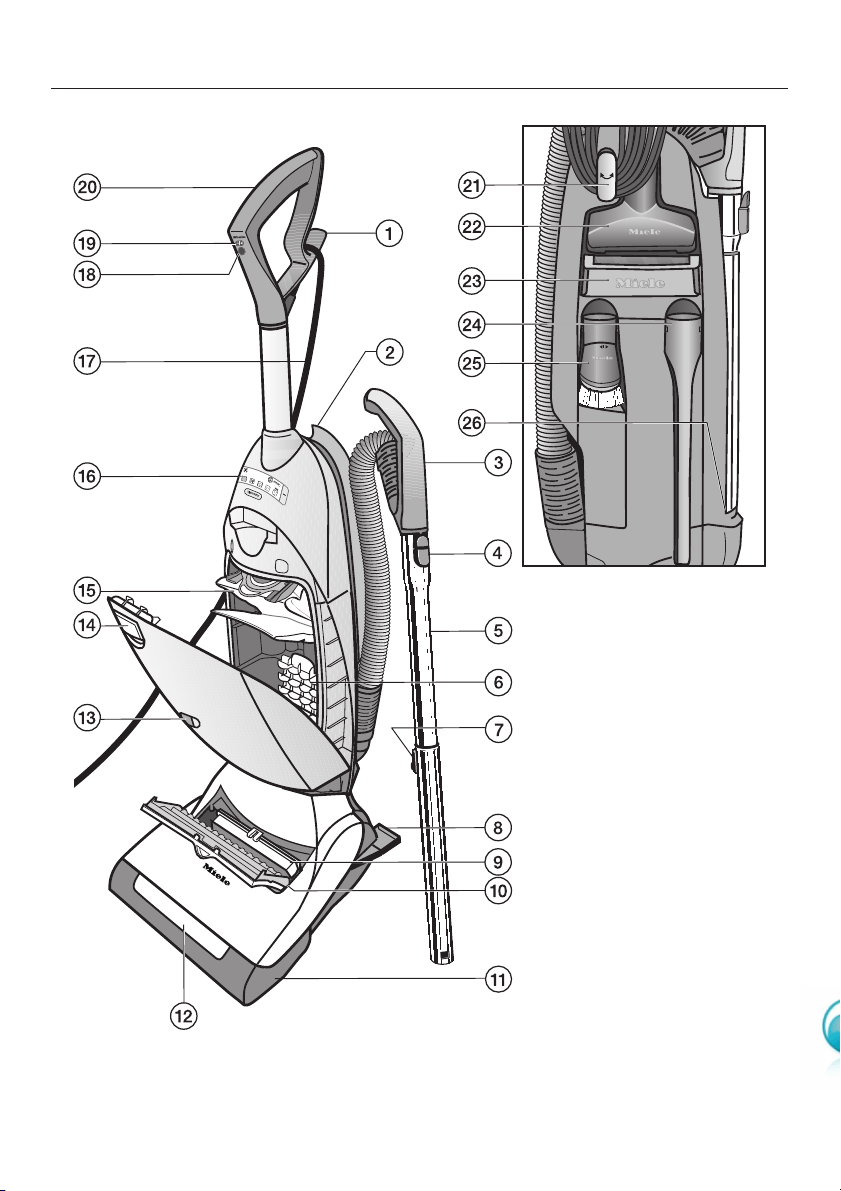
The illustration shows the maximum number of features available on these Miele
vacuum cleaners.
Guide to the appliance
4

aUpper cable hook for mains cable
bSuction hose holder
cSuction hose with handle
dRelease button
eTelescopic wand
fDust compartment filter (for motor protection)
gTelescopic tube release button
hVacuum cleaner foot release
iExhaust filter *
jExhaust filter compartment
kPowerBrush
lLight *
mDustbag change indicator
nDust compartment release button
oHyClean dustbag
pControl unit (see next page)
qMains cable
rButton to switch PowerBrush from carpet to hard flooring
sOn / Off button
tHandle
Those features marked *depend on the model, and may vary or not be available
on your model.
At the rear
uLower swivel hook for mains cable
vUpholstery nozzle
wCarrying handle
xCrevice nozzle
yDusting brush
zTelescopic wand holder
Guide to the appliance
5
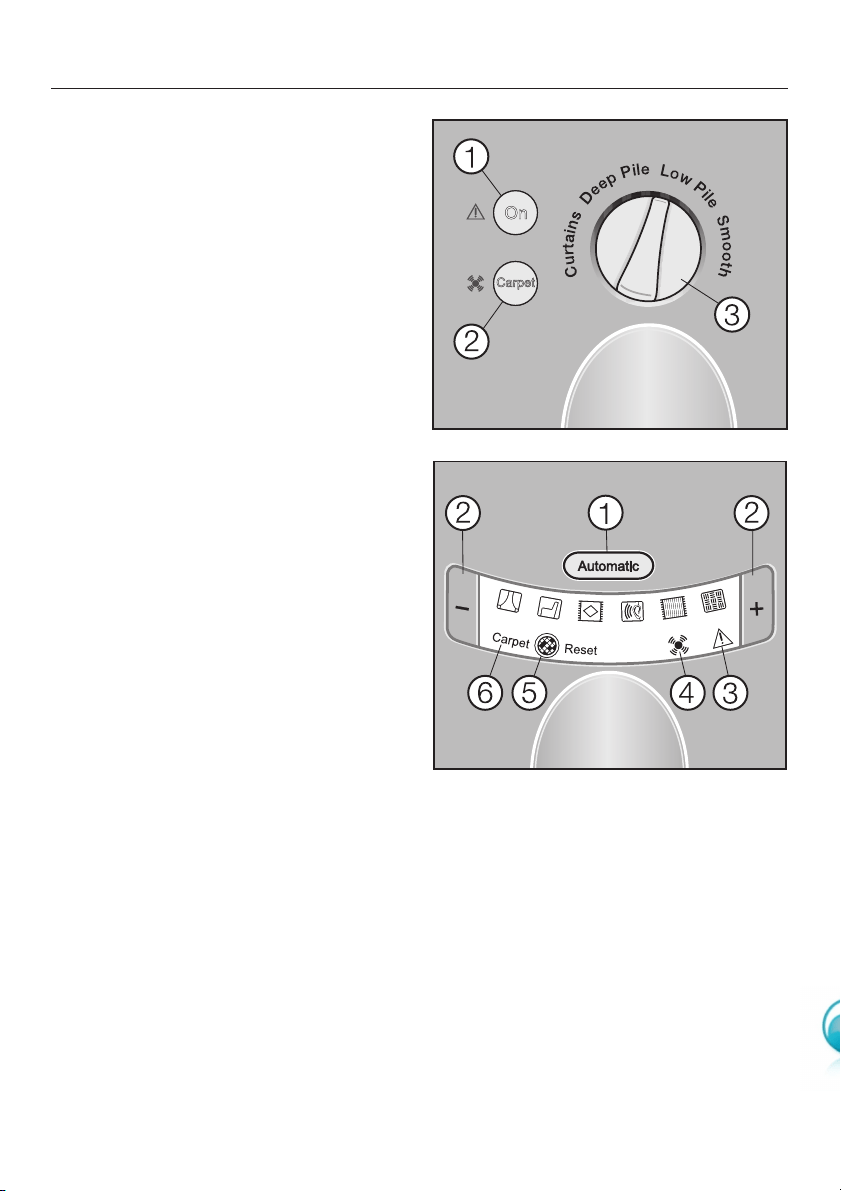
Depending on model, your vacuum
cleaner will be fitted as standard with
one of the following control units:
Vacuum cleaners with a rotary
selector dial
aVacuum cleaner in-operation
indicator light
bPowerBrush in-operation indicator
light
cRotary suction power selector
Vacuum cleaners with + / - buttons
aAutomatic button
bSuction power selector buttons
(+/-buttons)
cThermal cut-out indicator light
dPowerBrush indicator light
eExhaust filter change indicator
(Reset button)
fPowerBrush in-operation indicator
light
Guide to the appliance
6

This appliance meets statutory
safety requirements. Improper use
can, however, lead to personal injury
and material damage.
To avoid the risk of accidents and
damage to the appliance, read
these instructions carefully before
using it for the first time. They
contain important notes on its safety,
operation and maintenance.
Keep these instructions in a safe
place and ensure new users are
familiar with the content. Pass them
on to any future owner.
Always disconnect the vacuum
cleaner from the mains supply when
you have finished using it, as well as
for maintenance work and cleaning.
Switch it off at the wall socket and
unplug it.
Correct application
~This vacuum cleaner must only be
used for domestic household purposes
to vacuum dry floor surfaces. Do not
use on people or animals.
Any other usage, modification or
alteration is at the owner's risk and
could be dangerous.
The manufacturer cannot be held liable
for damage resulting from improper or
incorrect use of the appliance.
~This appliance is not intended for
use by persons (including children)
with reduced physical, sensory or
mental capabilities, or lack of
experience or knowledge, unless they
are supervised whilst using it, or have
been shown how to use it by a person
responsible for their safety.
Safety with children
~This appliance is not a toy! To avoid
the risk of injury, keep children well
away, and do not allow them to play
with it or to use the controls. Supervise
children whilst you are using it.
~Older children may only use the
vacuum cleaner if its operation has
been clearly explained to them, and
they are able to use it safely,
recognising the dangers of incorrect
use.
Technical safety
~Ensure that the connection data on
the data plate (voltage and frequency)
match the mains electricity supply. It is
essential that they match to avoid
damage to the appliance.
~Before using the vacuum cleaner,
check for any signs of damage. Do not
use a damaged appliance: it could be
dangerous.
~While the vacuum cleaner is under
the manufacturer's warranty, repairs
should only be undertaken by a service
technician authorised by Miele.
Otherwise the manufacturer's warranty
will be invalidated.
Warning and safety instructions
7

~Repairs should only be carried out
by a Miele authorised service
technician. Repairs and other work by
unqualified persons could be
dangerous. The manufacturer cannot
be held liable for unauthorised work.
~Do not pull or carry the vacuum
cleaner by the cable.
Keep the cable away from sharp edges
and do not let it be squashed, for
example, under a door.
Avoid running the vacuum cleaner over
the cable.
A damaged cable, plug or socket is a
safety hazard. The appliance must not
be used if any of these have suffered
damage.
~Do not use the vacuum cleaner if the
cable is damaged. A damaged cable
can endanger your safety.
~If the cable is damaged, the
complete cable unit must be replaced.
For safety reasons, this must only be
done by the Miele Service Department
or a Miele authorised service
technician.
~Switch the vacuum cleaner off,
switch off at the wall socket and remove
the plug before changing accessories.
~Do not let the vacuum cleaner get
wet. Clean only with a dry cloth or
slightly damp cloth when disconnected
from the mains supply. If moisture gets
into the appliance, there is a risk of
electric shock.
Correct use
~Never touch the PowerBrush roller
while it is rotating. Danger of injury.
~To avoid the risk of damage, do not
use the vacuum cleaner without the
dustbag, dust compartment filter and
exhaust filter in place.
~If a dustbag is not inserted, the dust
compartment cover does not normally
close. Do not force it.
~Do not vacuum up any water, liquid
or damp dirt. This will cause major
faults and could seriously impair the
functioning and electrical safety of the
appliance. Wait until any freshly
cleaned or shampooed carpets or floor
coverings are completely dry before
attempting to vacuum.
~Do not vacuum toner dust. Toner,
such as that used in printers and
photocopiers, can conduct electricity.
The filter system in the vacuum cleaner
may not filter it completely, causing the
toner to be blown back into the room by
the fan.
~Do not vacuum up any inflammable
or combustible liquids or gases and do
not vacuum in areas where such
substances are stored. The cleaner
might explode.
CAUTION: This hose contains
electrical connections.
– Do not use to suck up water.
– Do not immerse in water for
cleaning.
– The hose should be checked
regularly and must not be used if
damaged.
Warning and safety instructions
8

~Do not vacuum up anything which
has been burning or is still glowing e.g.
cigarettes, ashes or coal, whether
glowing or apparently extinguished.
The vacuum cleaner might catch fire.
~Do not vacuum up items which are
heavy, hard or have sharp edges. They
could cause a blockage and damage
the appliance.
~Do not use the suction hose or
telescopic wand at head level to avoid
the risk of injury, e.g. to eyes and ears.
~Do not use the PowerBrush at head
level. Danger of injury.
~Do not vacuum near items such as
curtains, scarves, clothing etc, as these
could be vacuumed in and become
entangled in the roller.
~Monitor the change dustbag
indicator and change the dustbag if
necessary. Check the exhaust and dust
compartment filters at the same time
and change them too if necessary. A
full bag or blocked filter will reduce the
suction power of the cleaner. A
temperature limiter switches the
vacuum cleaner off automatically if it
gets too hot. See "Problem solving
guide".
Accessories
~It is not advisable to vacuum directly
with the handle, i.e. without an
accessory attached, as the rim could
get damaged and you could hurt
yourself on sharp edges.
~Miele dustbags are disposable and
intended to be used only once. Do not
attempt to re-use, as suction would be
reduced by the blocked pores.
~Use only genuine Miele dustbags,
filters and accessories. This will ensure
optimum performance of the appliance
throughout its life. Failure to use
Original Miele dustbags, filters and
accessories may invalidate the
manufacturer's warranty and cause
damage to the appliance.
The manufacturer cannot be held
liable for damage caused by
non-compliance with these Warning
and safety instructions.
Warning and safety instructions
9
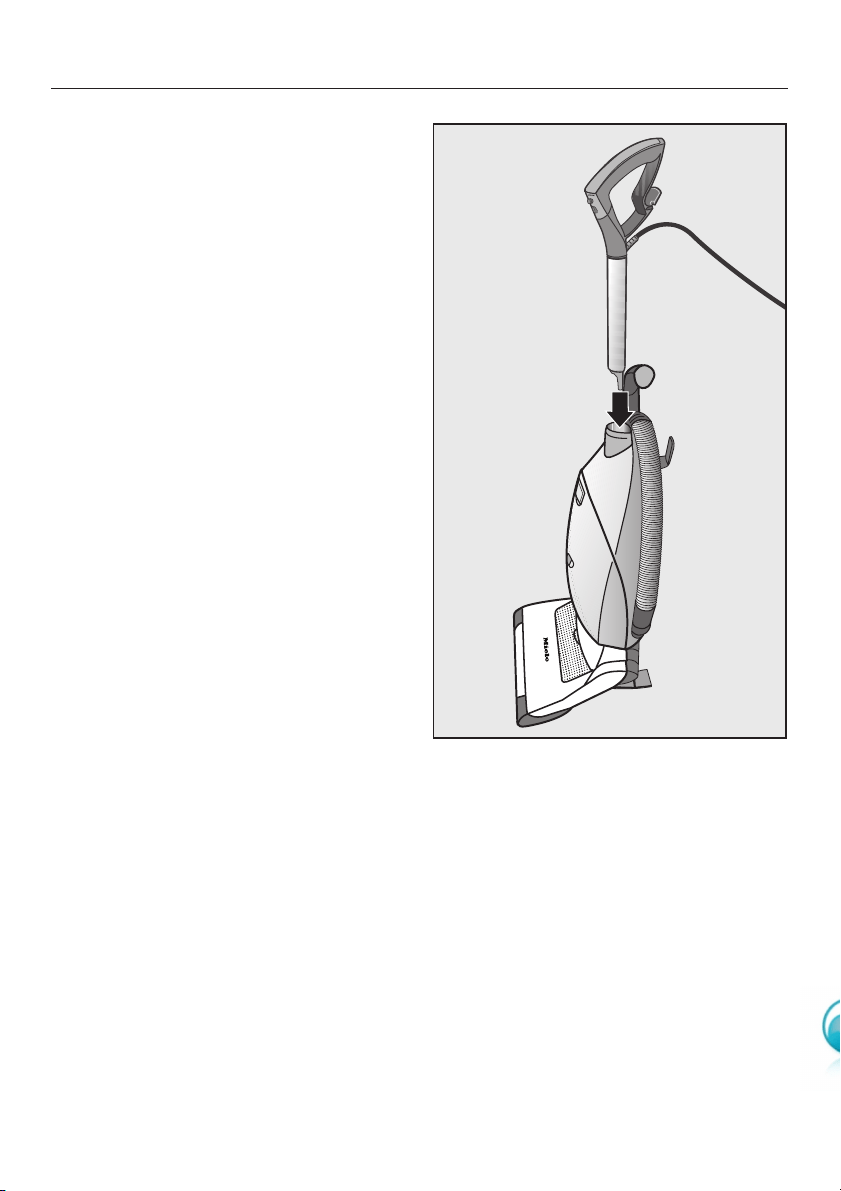
Assembling the vacuum
cleaner
^Raise the vacuum cleaner into the
vertical position.
^Insert the handle into the vacuum
cleaner until it clicks into position.
Preparing for use
10
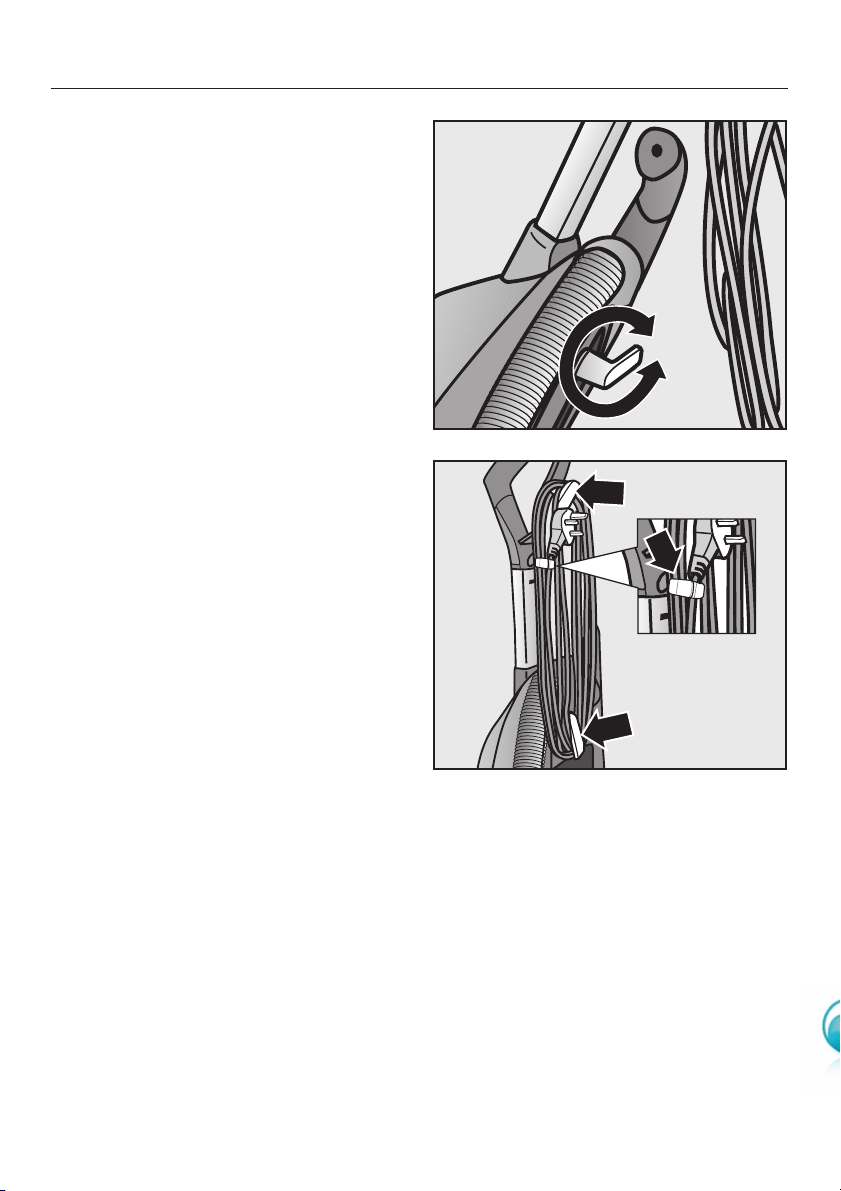
Unwind the mains cable
The lower cable hook can be turned in
either direction.
^Turn it upwards to release the cable.
Winding up the mains cable
When the vacuum cleaner is not in use,
the cable can be wound around the two
cable hooks.
Secure the mains cable by clamping
the plug to the cable (see detail).
Using the vacuum cleaner
11
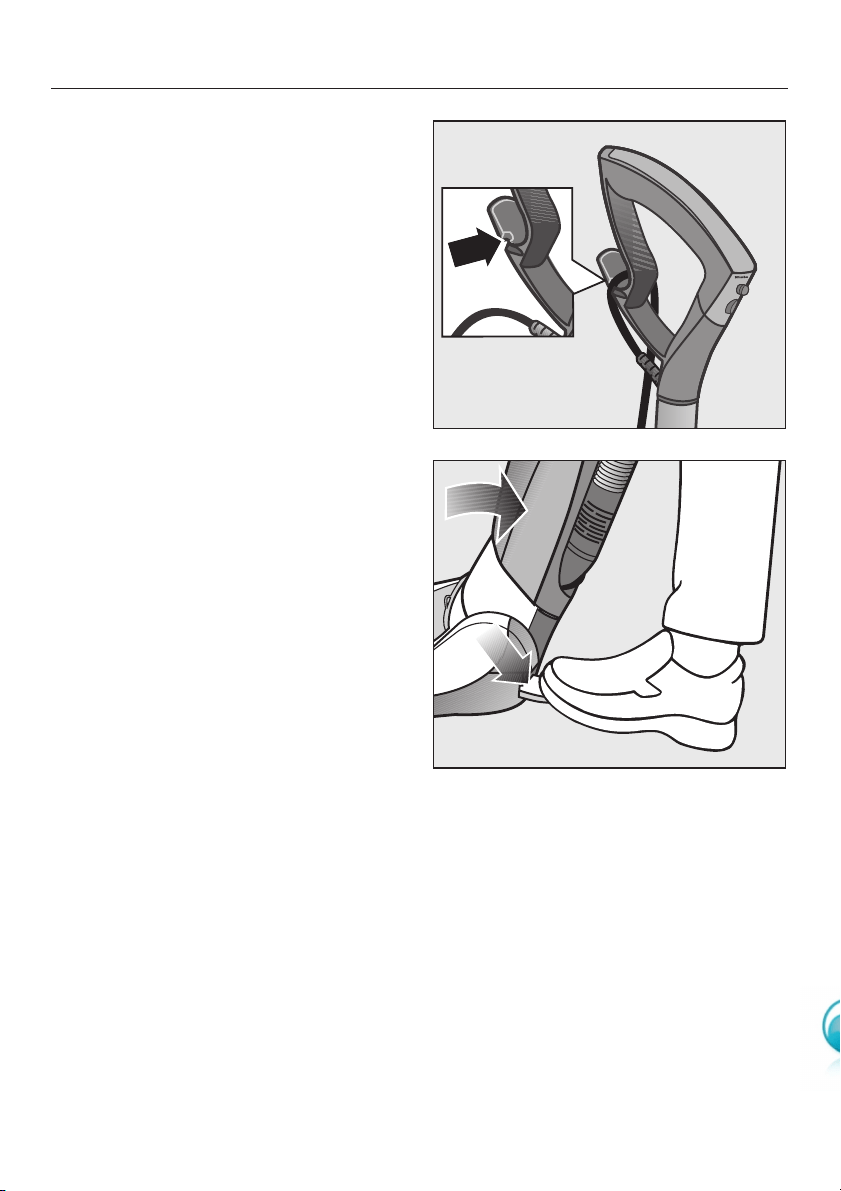
Switching on
^Whilst vacuuming the mains cable
can be fed through the guide at the
side of the upper cable hook (see
detailed drawing).
This way the mains cable will not get in
the way during vacuuming. This also
protects the cable from becoming
kinked.
Releasing the vacuum cleaner
^Step on the foot switch and tilt the
cleaner to a comfortable position for
vacuuming.
Using the vacuum cleaner
12
Please observe the flooring
manufacturer's cleaning and care
instructions.
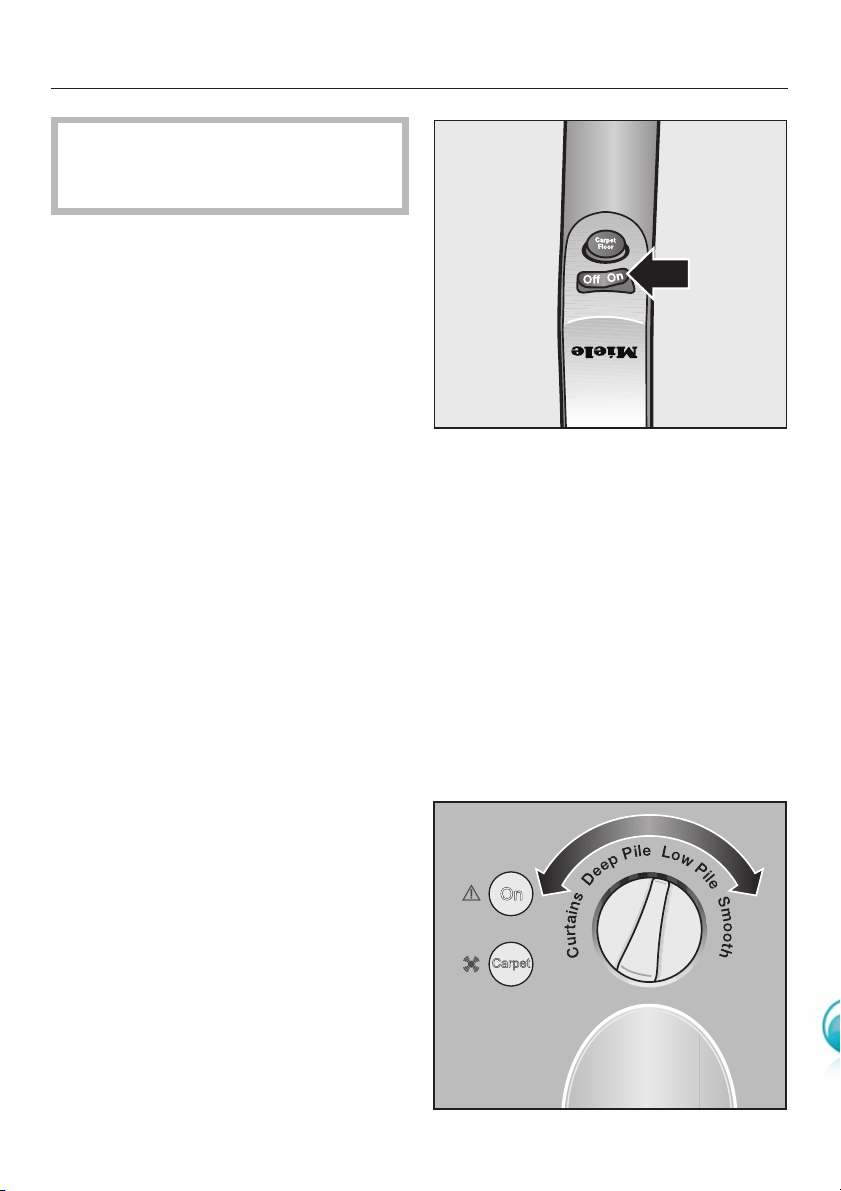
Switching on and off
^Press the On / Off button on the
handle.
The vacuum cleaner will switch on.
Vacuum cleaners with a rotary
selector dial
The vacuum cleaner in-operation
indicator light in the control unit will light
up yellow.
Vacuum cleaners with + / - buttons
The vacuum cleaner suction power
settings in the control unit will light up
yellow.
For good visibility of the working area,
the light on the floorhead will come on.
Adjusting the suction power
The suction power can be regulated to
suit the type of flooring being cleaned.
The controls vary from model to model.
The different options are described on
the following pages.
Rotary selector
^Turn the suction power selector
manually to the setting you require.
Using the vacuum cleaner
13
C
u
r
t
a
i
n
s
D
e
e
p
P
i
l
e
L
o
w
P
i
l
e
S
m
o
o
t
h
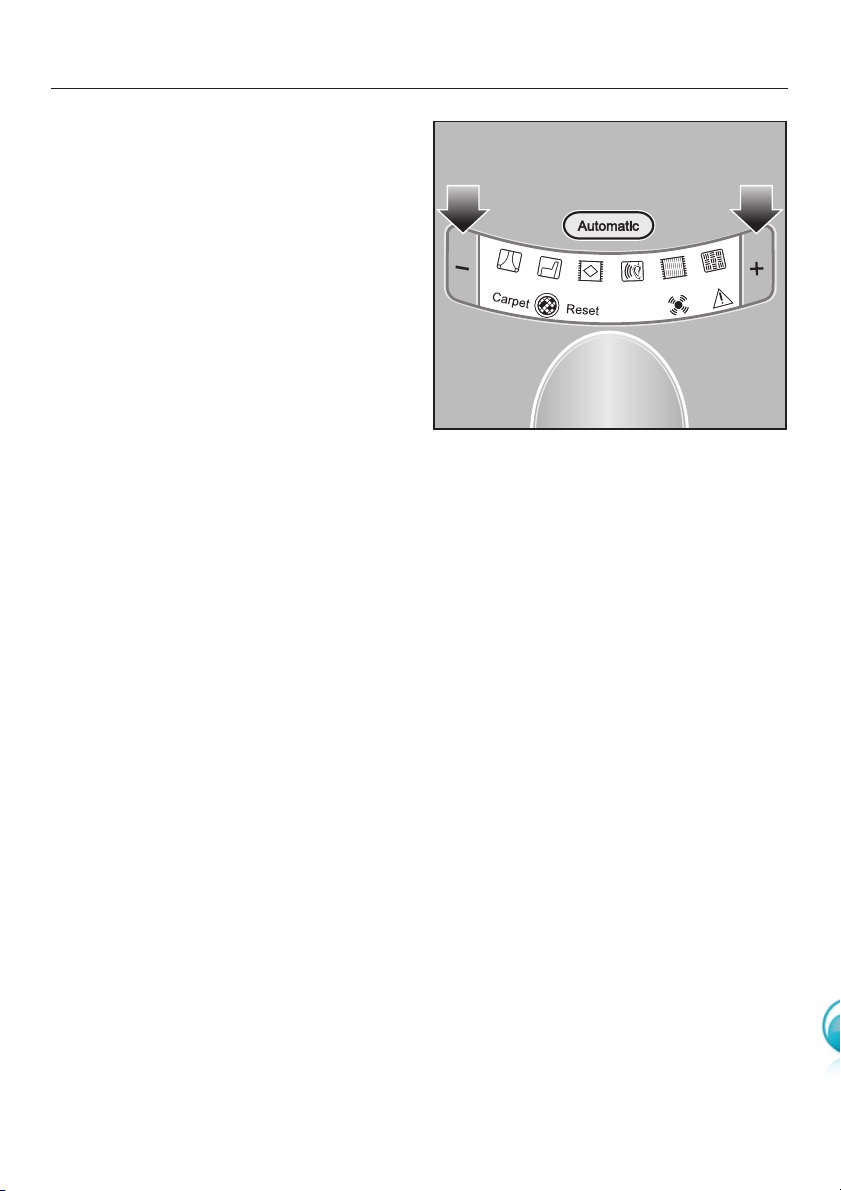
-/+ buttons
Some models also have symbols on the
control unit which indicate the type of
use the settings are suitable for:
a- curtains, lightweight fabrics
b- upholstery, cushions
c- carpets, rugs and runners
(- for daily energy-saving
vacuuming. This setting is also
very quiet.
e- lightly soiled rugs and fitted
carpets
f- heavily soiled hard flooring, and
for intensive cleaning of carpets
^Press the +button to select a higher
suction power level.
^Press the -button to select a lower
suction power level.
The setting selected will light up yellow.
Using the vacuum cleaner
14
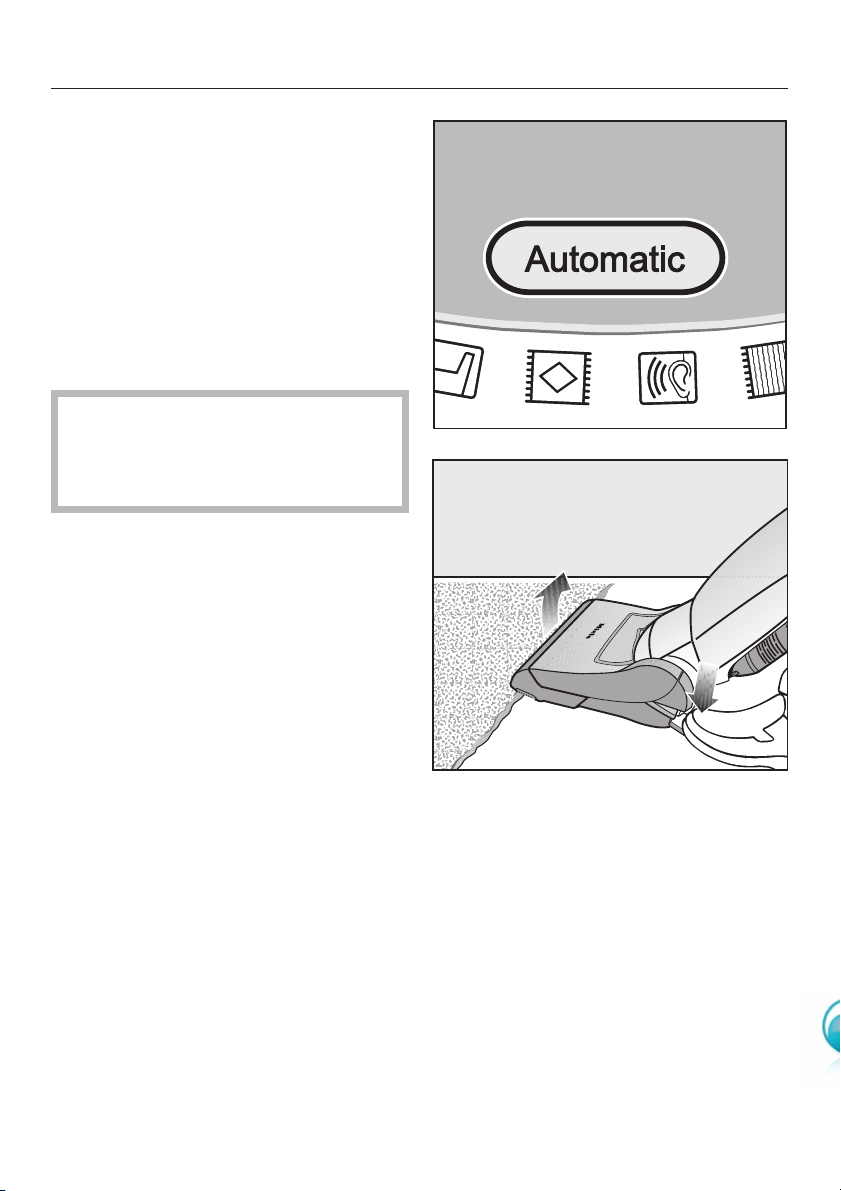
Automatic suction power regulation
(on vacuum cleaners with +/-buttons)
The suction power automatically
adjusts itself to suit the type of flooring
or carpet being vacuumed.
^Press the Automatic button.
The button lights up yellow.
To stop using the automatic setting,
simply press the Automatic button again.
,Do not use the Automatic setting
to vacuum lightweight materials or
curtains. These could be sucked in
and possibly damaged.
Tip
Obstacles and variations in floor height,
for instance when vacuuming over
thresholds and the edges of rugs, are
easy to cope with.
^Briefly press the footswitch and lift
the front of the floorhead over the
obstacle.
Using the vacuum cleaner
15
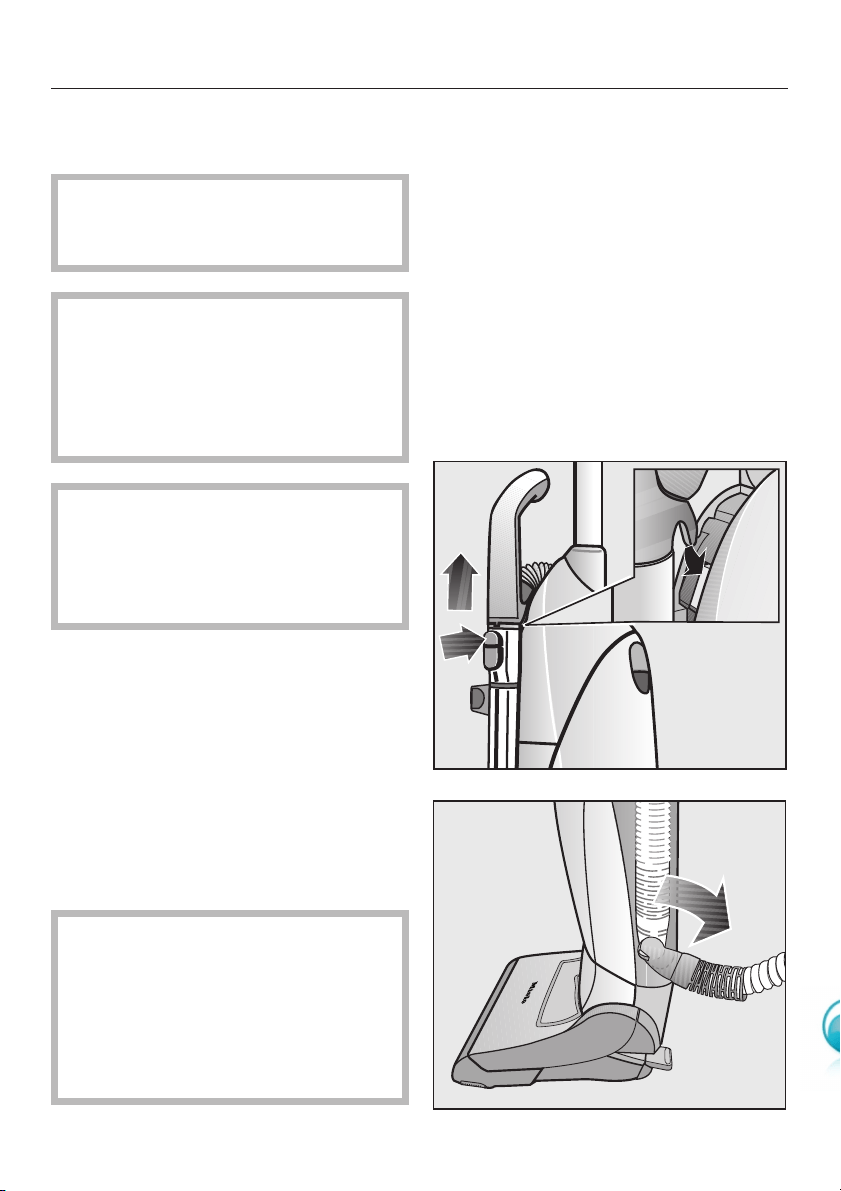
Vacuuming using the suction
hose
,Do not use the suction hose at
head level to avoid the risk of injury,
e.g. to eyes and ears.
,It is not advisable to vacuum
directly with the suction hose, i.e.
without an accessory attached, as
the handle end of the hose could get
damaged and you could hurt
yourself on sharp edges.
,To prevent the risk of injury when
vacuuming the stairs, ensure the
cleaner is placed in a stable position
at the bottom of the stairs, or on one
of the lower steps.
^Raise the vacuum cleaner into the
vertical position.
^To access the suction tube handle,
press the release button on the
telescopic wand.
^To increase stability, turn the elbow
joint at the bottom of the hose
downwards as illustrated until it clicks
into position above the retainer.
During normal vacuuming with the
cleaner the suction tube handle
should be stowed away on the
telescopic wand. Make sure the
handle is also correctly hooked into
its holder on the cleaner (see detail
in the top illustration).
Using the vacuum cleaner
16
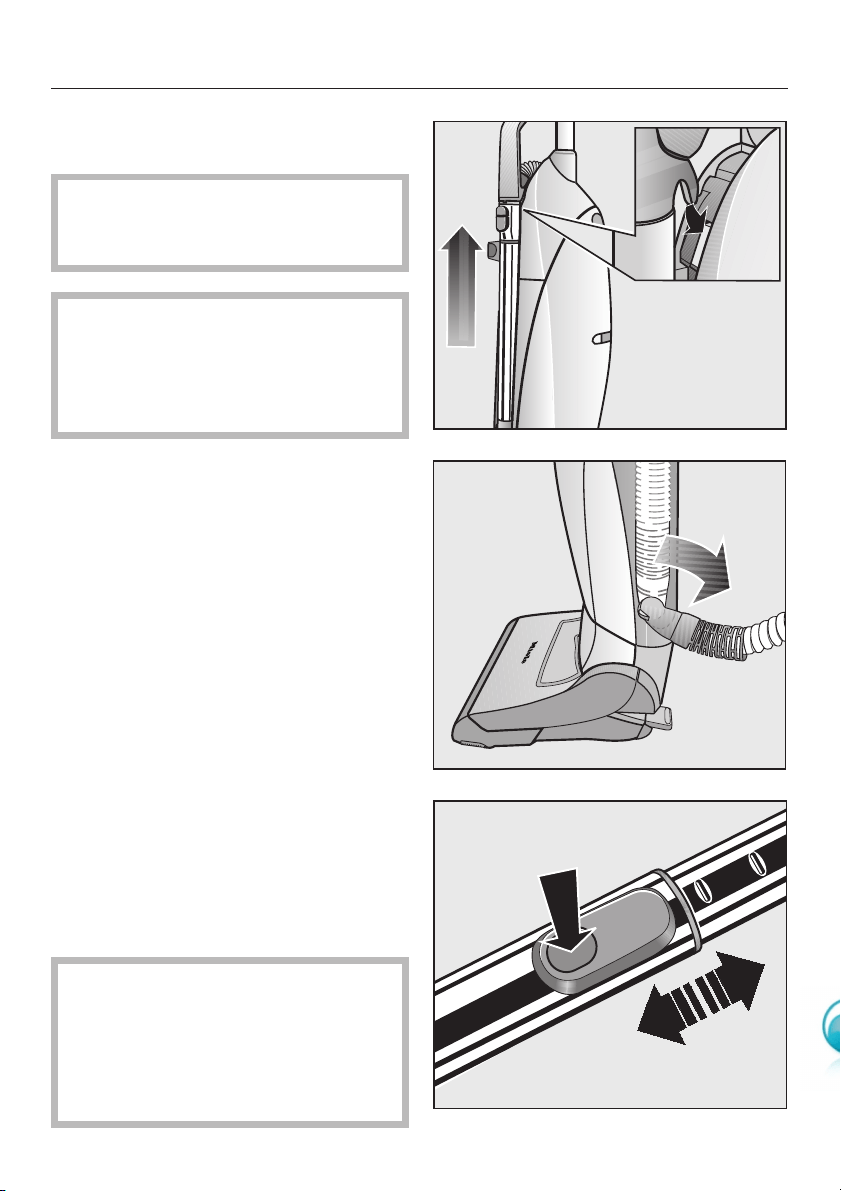
Vacuuming using the
telescopic wand
,Do not use the telescopic wand
at head level to avoid the risk of
injury, e.g. to eyes and ears.
,To prevent the risk of injury when
vacuuming the stairs, ensure the
cleaner is placed in a stable position
at the bottom of the stairs, or on one
of the lower steps.
^Raise the vacuum cleaner into the
vertical position.
^Lift the handle out of its holder to
access the telescopic wand.
^To increase stability, turn the elbow
joint at the bottom of the hose
downwards as illustrated until it clicks
into position above the retainer.
One part of the telescopic wand is
packed inside the other, and it can be
adjusted to suit your height for
comfortable vacuuming.
^Press the telescopic wand release
button (see arrow), and adjust it to
the required height.
For normal vacuum cleaning, the
telescopic wand's tubes must be
pushed back together. Make sure the
handle is also correctly hooked into its
holder on the cleaner (see detail in the
top illustration).
Using the vacuum cleaner
17
Recommended use
Please observe the flooring
manufacturer's cleaning and care
instructions.
The PowerBrush is particularly suitable
for intensive vacuuming of carpets
which are subject to hard wear. It is
very effective at removing deep-seated
dirt and preventing areas of frequent
use being trodden into a path.
,Please note that the PowerBrush
should not be used for vacuuming
deep-pile rugs and carpets or
valuable hand-knotted rugs and
carpets, e.g. Persian and oriental
rugs etc. There is a danger of the
threads being pulled out. Ensure
that the PowerBrush is switched off
before commencing vacuuming of
such rugs and carpets. If in doubt,
contact the carpet manufacturer/
retailer.
,Do not use the PowerBrush to
clean highly variable or uneven
floors. The brush might come into
contact with the floor and cause
damage.
Using the PowerBrush
18
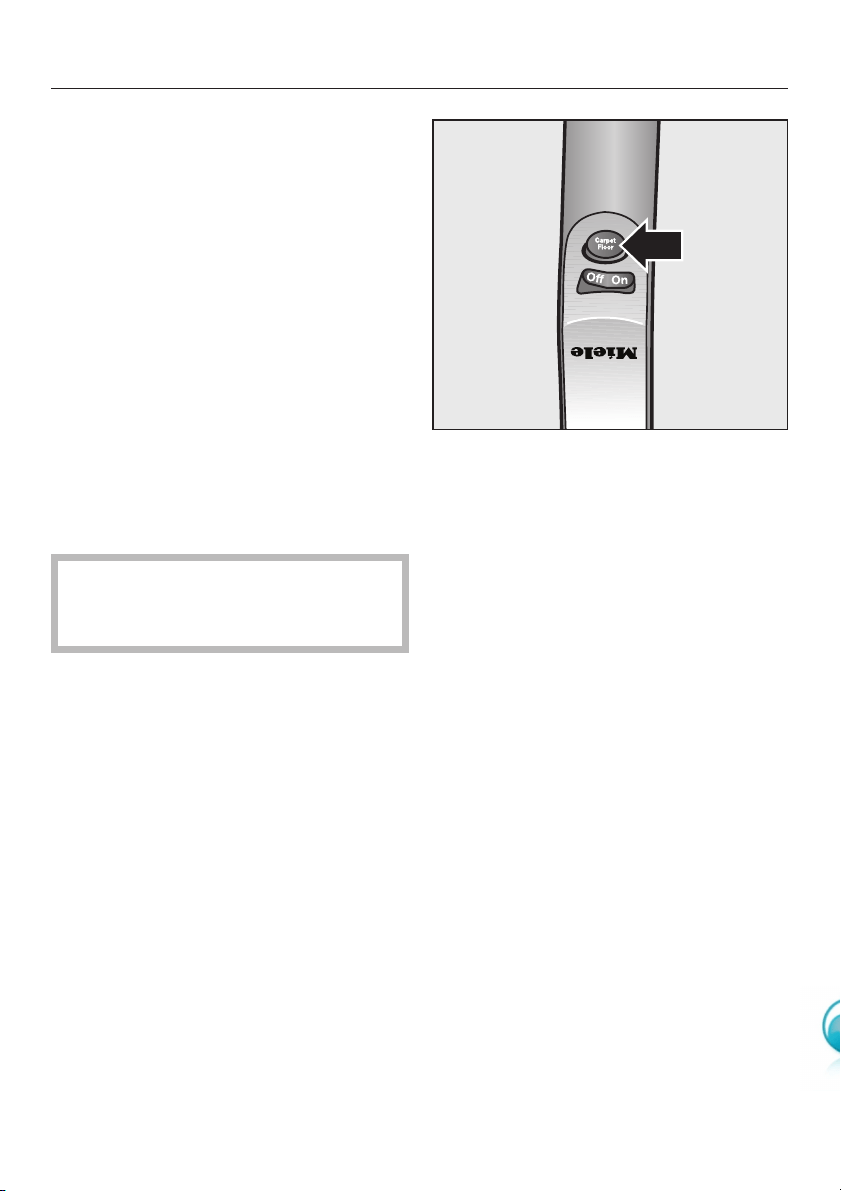
Switching the PowerBrush on
and off
The roller on the PowerBrush is driven
by a motor which can be switched on
and off.
^Press the Carpet button on the
handle.
The PowerBrush will switch on. The
PowerBrush in-operation indicator light
in the control unit will light up yellow.
This button enables you to switch the
PowerBrush off during vacuuming and
the vacuum cleaner will continue to
operate using suction only. This is
useful when moving from vacuuming a
fitted carpet to a rug, for example.
The PowerBrush will switch itself off
automatically as soon as the cleaner
is raised to its upright position.
How to use the PowerBrush
^To achieve the best results, pass the
PowerBrush slowly backwards and
forwards over the carpet or floor
covering.
For rugs and carpets with fringes,
always draw the PowerBrush from the
middle of the rug or carpet across the
fringe towards the floor.
Using the PowerBrush
19
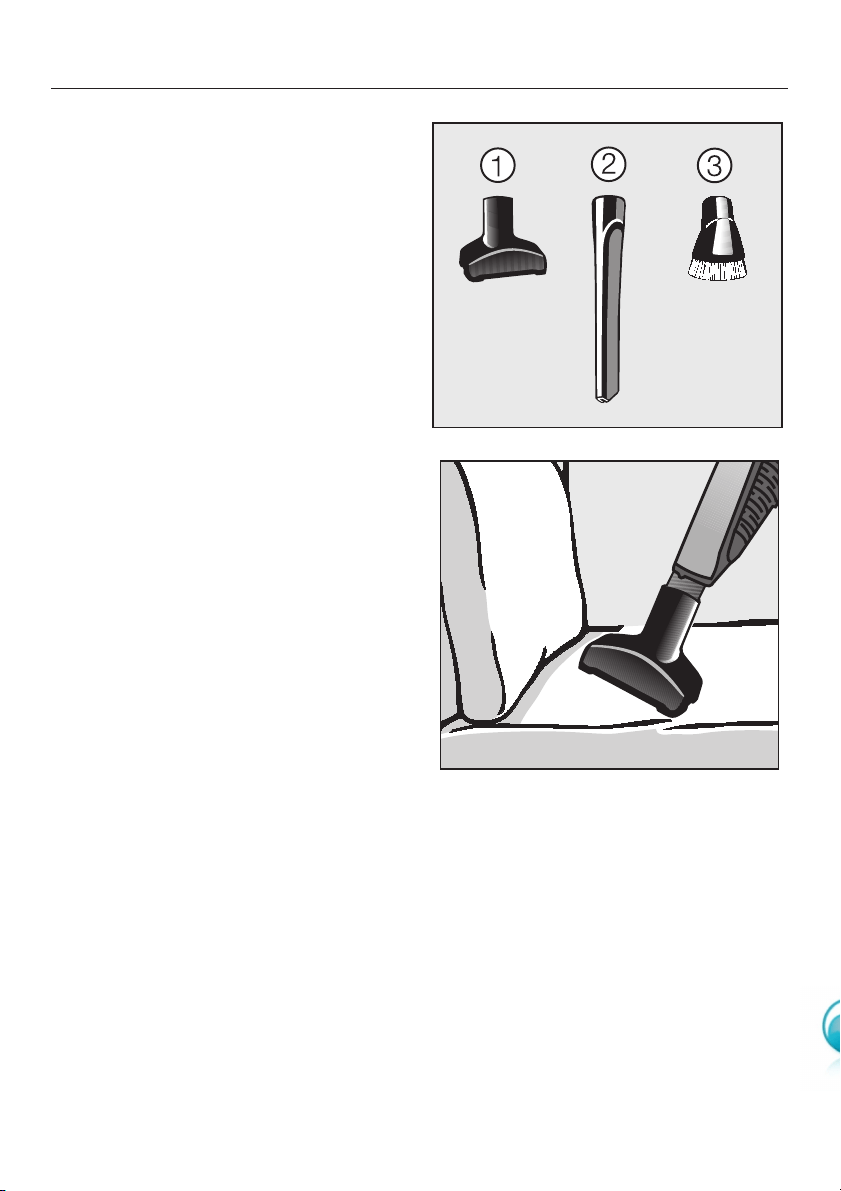
The following accessories are stowed
at the back of the cleaner.
aUpholstery nozzle
bCrevice nozzle, 300 mm
cDusting brush
Attach the accessory required onto the
suction hose handle or onto the
telescopic wand.
Upholstery nozzle
For cleaning upholstery, mattresses,
cushions, curtains, covers etc.
Using the accessories supplied
20
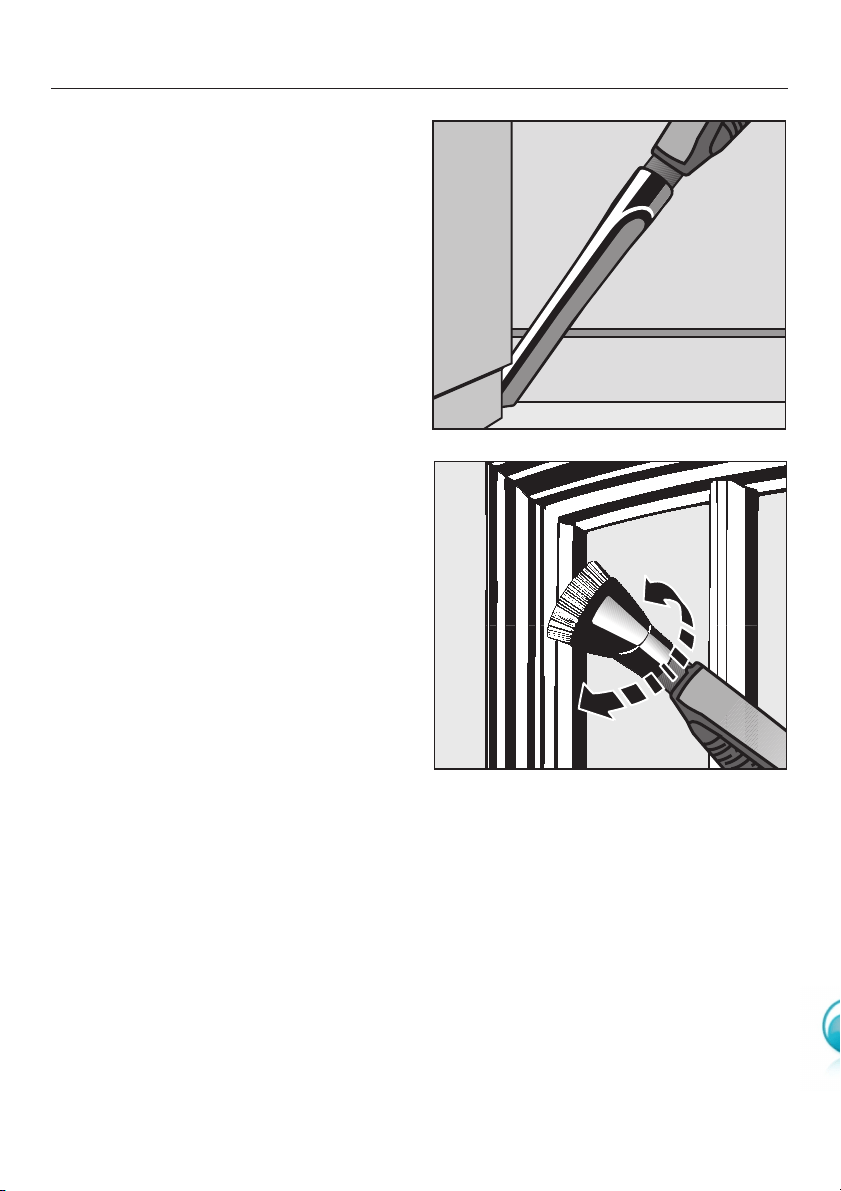
Crevice nozzle, 300 mm
For cleaning in folds, crevices or
corners and narrow gaps.
Dusting brush
For cleaning skirting boards, ornate or
carved articles, etc.
The head of the dusting brush can be
swivelled to attain the best cleaning
position.
Using the accessories supplied
21
,Always disconnect the vacuum
cleaner from the electrical supply
before any maintenance work.
Switch off at the wall socket and
withdraw the plug.
The Miele filter system consists of three
filters which must be replaced from
time to time to ensure that your vacuum
cleaner performs efficiently.
aDustbag
bDust compartment filter (for motor
protection)
cExhaust filter
Use only genuine Miele dustbags,
filters, accessories and optional
accessories. Only this will ensure that
the suction power of the vacuum
cleaner is maintained, giving the best
possible cleaning results.
,The use of dustbags made from
paper or paper-based materials, or
dustbags with a cardboard collar, or
dustbags that do not carry the
"Original Miele" logo, can seriously
damage the vacuum cleaner and
invalidate the warranty.
Purchasing new dustbags and
filters
Original Miele dustbags and filters can
be obtained from your local Miele
Vacuum Cleaner Specialist, directly from
the Miele Spare Parts Department, or via
the internet at www.miele-shop.com.
Ordering the correct dustbags
and filters
Original Miele "U" dustbags and original
filters are identified by the "Original
Miele" logo on the packaging or directly
on the dustbag.
A dust compartment filter and an Air
Clean exhaust filter are supplied with
every packet of Miele dustbags. If you
wish to purchase dust compartment
filters or exhaust filters separately,
please quote the model number of your
appliance when ordering to ensure you
get the correct items. The model
number is located on the data plate
underneath the PowerBrush.
You can replace the exhaust filter fitted
in the vacuum cleaner with one of the
other Miele exhaust filters if you wish
(see "Optional accessories").
Maintenance
22
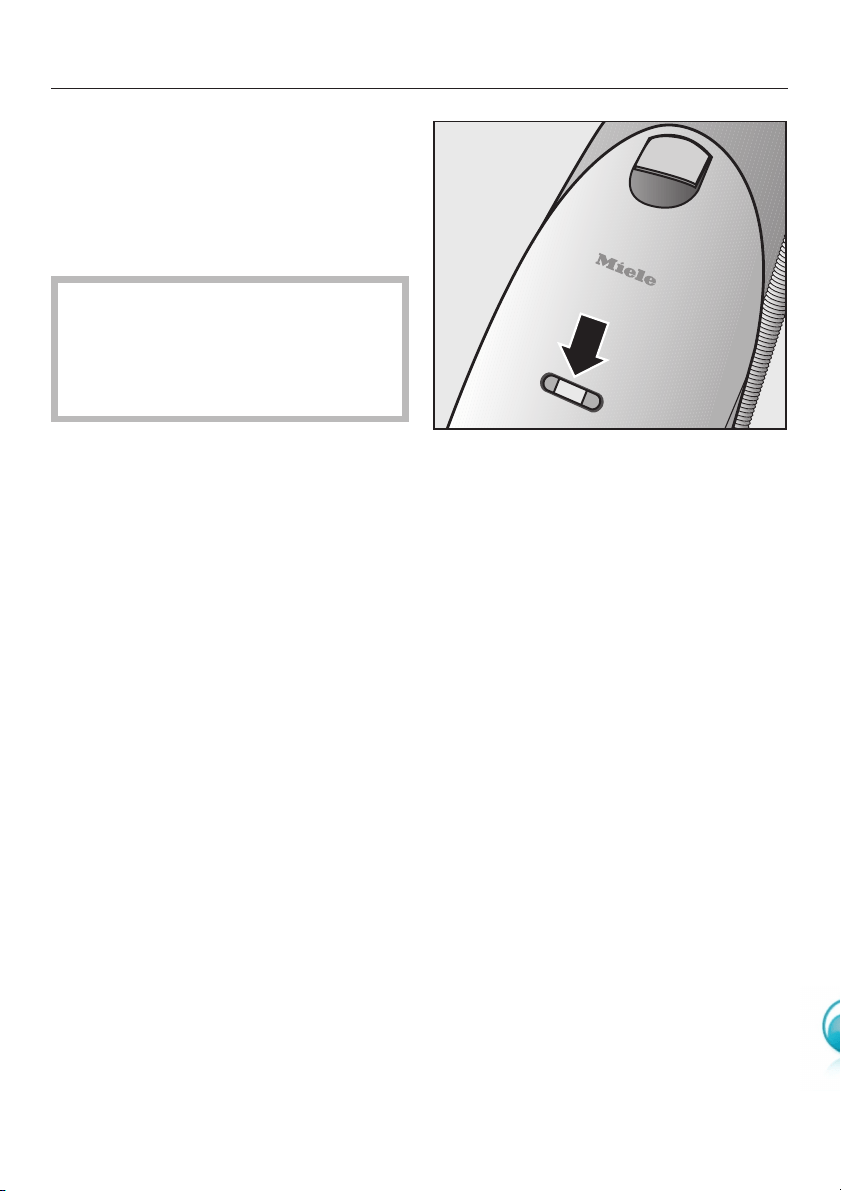
When to change the dustbag
Change the dustbag when the colour
marker in the dustbag change indicator
fills the display, or sooner if it is no
longer effective (see possible reasons
for this below).
Miele dustbags are disposable and
intended to be used only once. Do
not attempt to re-use as suction
would be reduced by the blocked
pores.
Checking the dustbag change
indicator
^Raise the vacuum cleaner into the
vertical position.
^Switch on the vacuum cleaner using
the On/Off control on the handle, and
select the highest power setting.
^Tilt the cleaner until you can see the
colour marker in the dustbag change
indicator easily. The front of the
PowerBrush will lift up as you do this.
If the marker completely fills the
dustbag change indicator, you should
replace the dustbag with a new one.
How the dustbag change indicator
works
The dustbag change indicator is set for
normal household dust. This generally
contains a mixture of dust, hair, carpet
fluff, threads, grit etc.
However, if the cleaner has been used
to vacuum up fine dust, such as
plaster, brick dust, cement or flour, the
pores of the dustbag will become
blocked very quickly. This affects the
air permeability of the bag, and the
marker will indicate that the bag is "full"
even when it is not. If this happens, you
must still change the dustbag because
suction power will be greatly reduced
by blocked pores in the dustbag.
If, on the other hand, you have
vacuumed up a large amount of hair
and carpet fluff which typically contains
a lot of air, the indicator may fail to
react even though the bag is full. You
should still change it! Both these
extremes can occur.
Maintenance
23
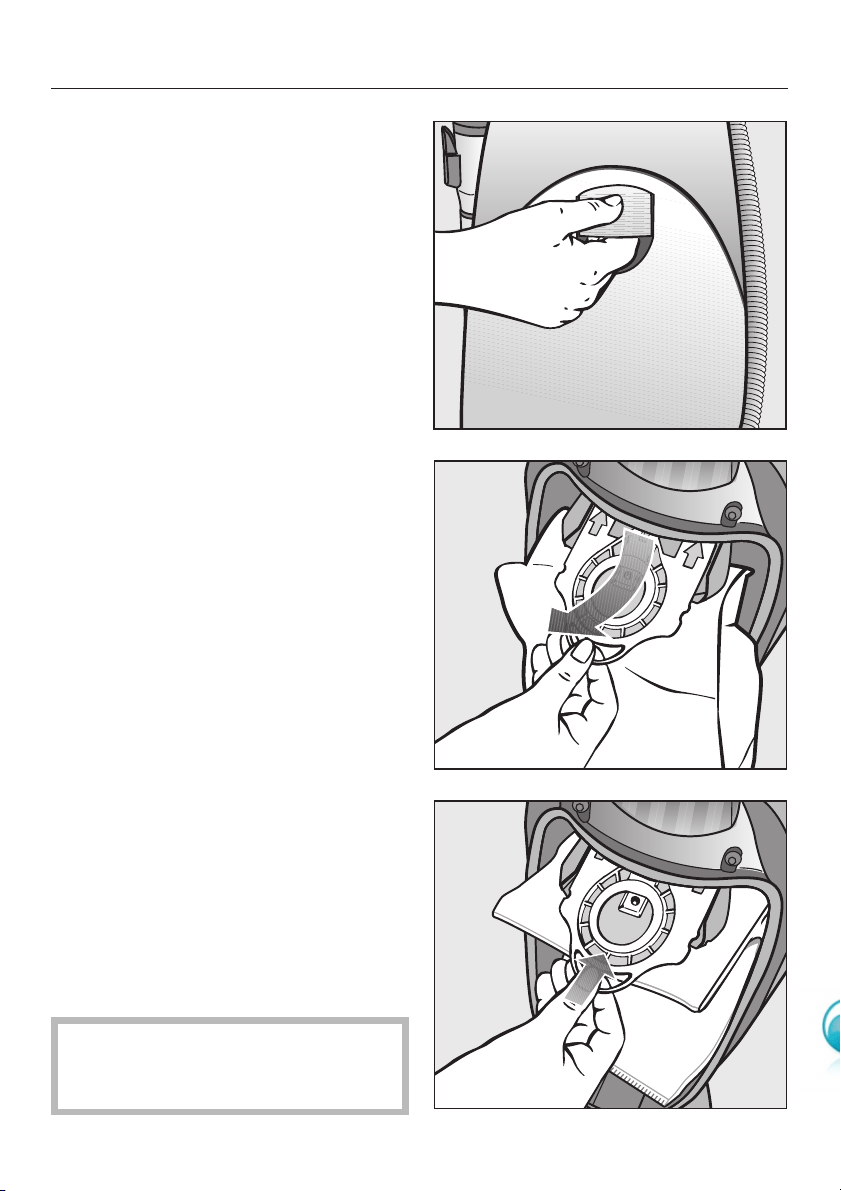
Replacing the dustbag
^Raise the vacuum cleaner into the
vertical position.
^Raise the release button and open
the lid to its resting position.
^Pull on the tab at the side of the collar
and swing the bag up away from the
suction socket before taking it out of
its holder.
The dustbag has a closing flap which
closes automatically to prevent any
dust escaping.
^Fit the new dustbag into the holder as
far as it will go. Leave it folded up
when you take it out of the box.
^It should be unfolded in the dust
compartment.
^Close the dust compartment lid
securely, making sure it clicks into
position. Take care not to trap the
dustbag when doing so. The dustbag
is then automatically guided into
position for vacuuming.
,The lid will not close without a
dustbag in place, or if the dustbag is
incorrectly fitted. Do not force it.
Maintenance
24
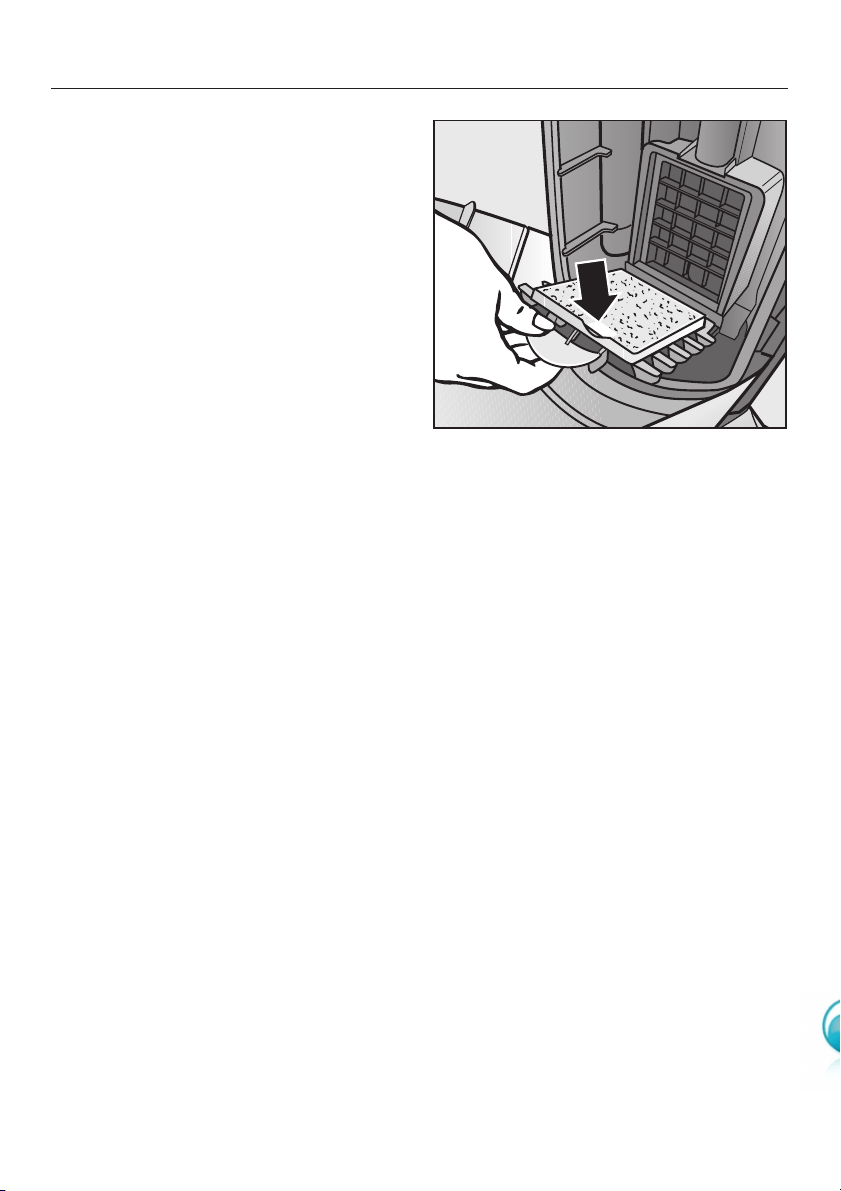
When to change the dust
compartment filter
Replace this filter every time you start a
new packet of dustbags. A dust
compartment filter is supplied with
every packet of Miele dustbags.
How to change the dust
compartment filter
^Open the dust compartment lid.
^Unclip the filter frame and remove the
old filter. Hold by the clean, unsoiled
section (see arrow) to remove it.
^Replace with a new dust
compartment filter.
^Close the filter frame.
^Close the dust compartment lid
firmly. It should click into place.
Maintenance
25
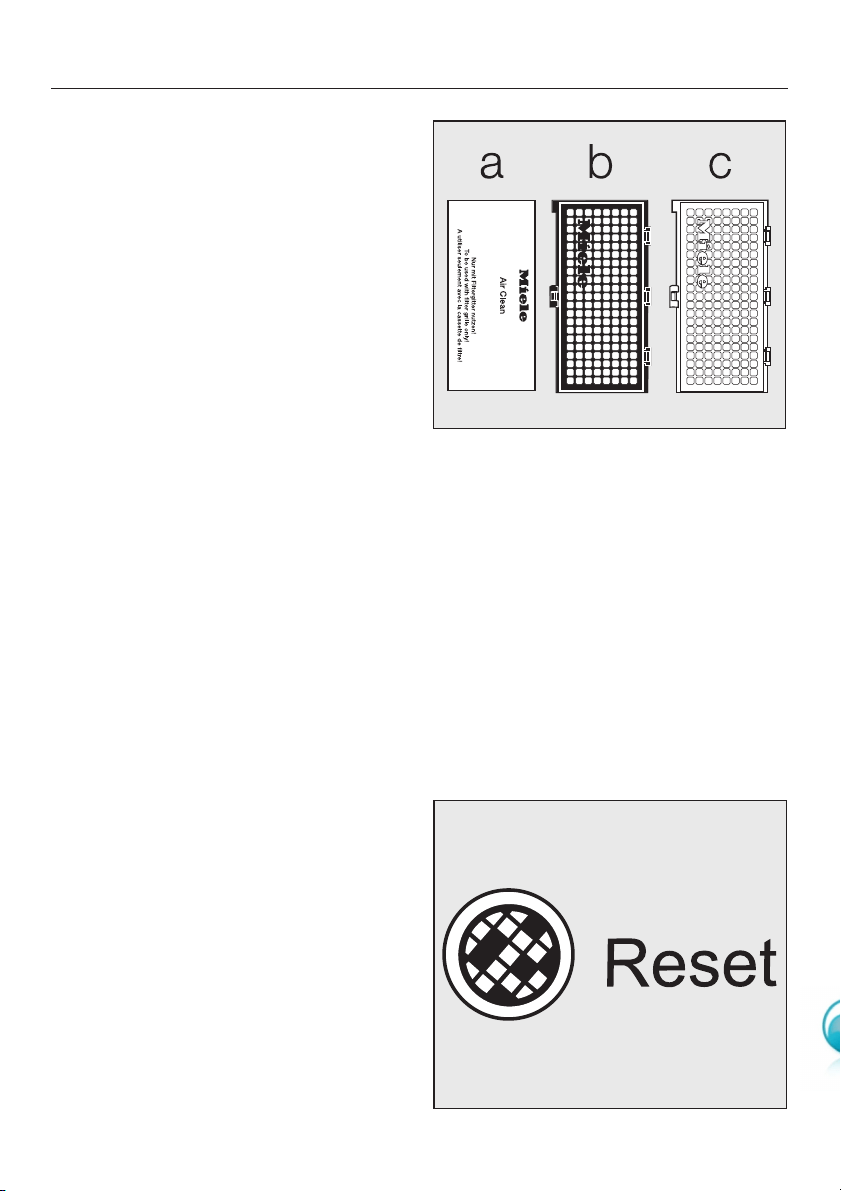
When to change the exhaust
filter
Depending on model, your vacuum
cleaner will be fitted as standard with
one of the following exhaust filters:
aAir Clean filter
Replace this filter every time you start a
new packet of Miele dustbags. An Air
Clean exhaust filter is supplied with
every packet of Miele dustbags.
bActive Air Clean filter (black)
cActive HEPA filter (blue)
These types of filter need to be
changed approx. once a year. Make a
note of the date on the filter.
Exhaust filter change indicator
Certain models are fitted with an
exhaust filter change indicator (reset
button) to show you when to change
your Active Air Clean bor Active HEPA
cfilter.
The indicator lights up after approx. 50
hours of operation, which is equivalent
to about a year of average use. The
vacuum cleaner can still be used with
the exhaust filter indicator lit up.
However, the suction power will be
reduced as will the effectiveness of the
filter if it is not replaced in good time.
The filter change indicator light is
irrelevant if an Air Clean filter ais fitted,
as long as it is replaced every time a
new packet of Miele dustbags is
started. The indicator light will go out
when the reset button is pressed.
Maintenance
26
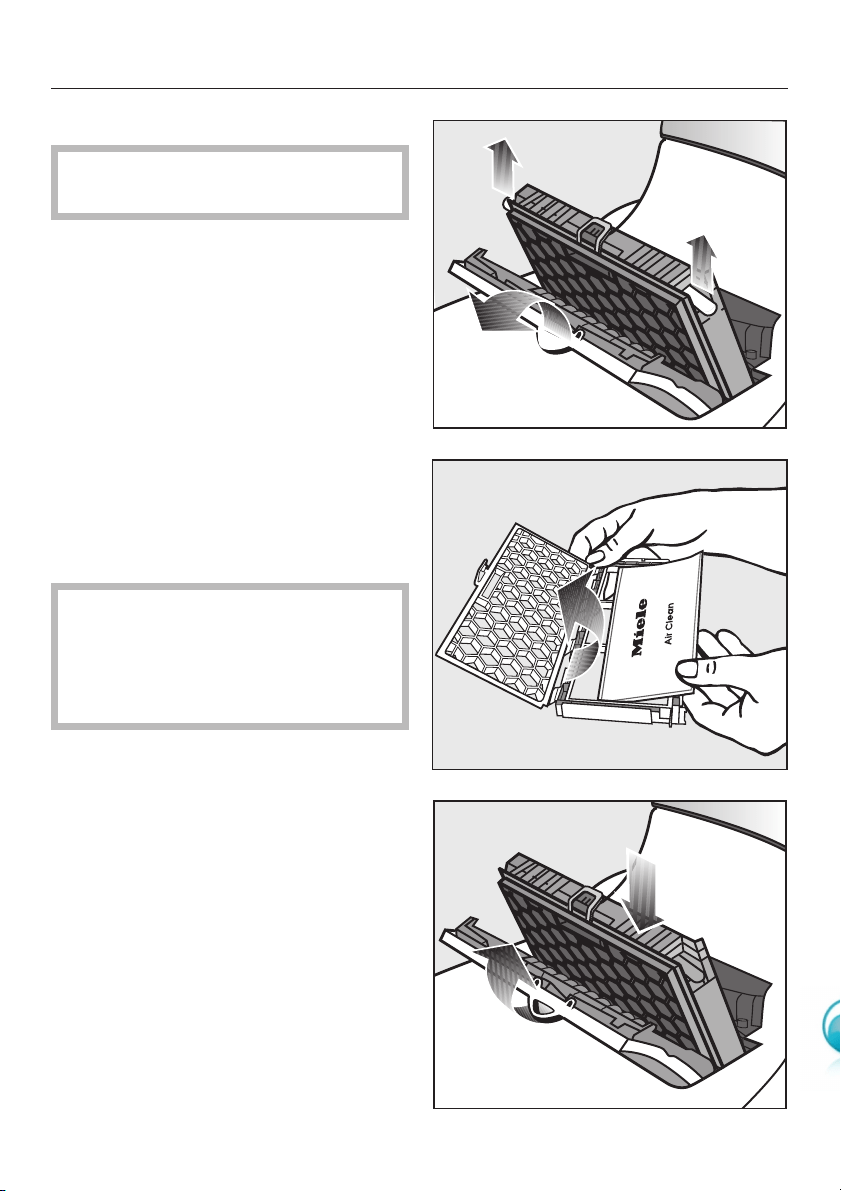
Replacing the Air Clean filter
Do not use more than one exhaust
filter at a time.
^Open the exhaust filter compartment
lid.
^Remove the filter grille.
^Open the filter grille and remove the
used Air Clean filter by one of the
clean, unsoiled sections.
^Replace it with a new Air Clean filter.
If you wish to replace the Air Clean
filter with an Active Air Clean filter or
with an Active HEPA filter , see
"Replacing one type of exhaust filter
with another".
^Secure the catch on the filter grille
and replace it inside the exhaust filter
compartment.
^Close the exhaust filter compartment
lid.
Maintenance
27
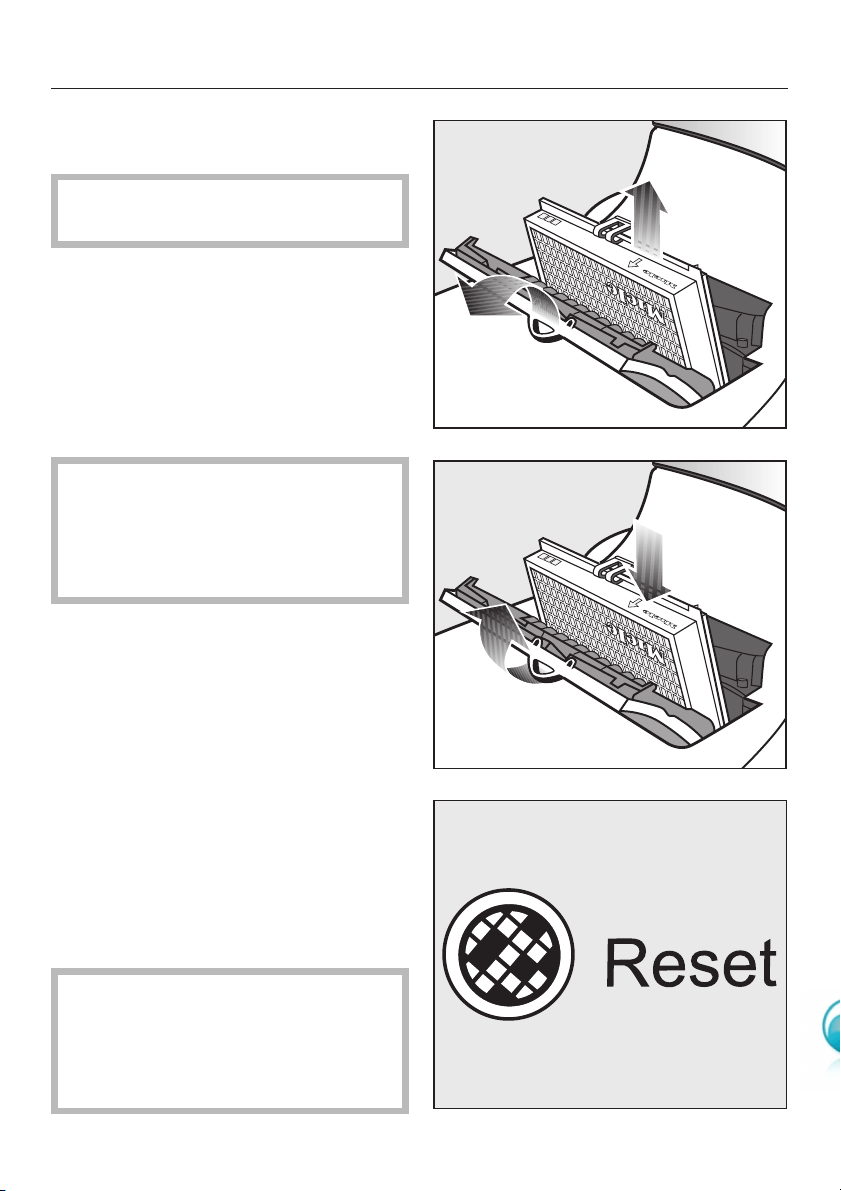
Replacing an Active Air Clean
filter or an Active HEPA filter
Do not use more than one exhaust
filter at a time.
^Open the exhaust filter compartment
lid.
^Remove the exhaust filter.
^Fit the new exhaust filter into position.
If you wish to replace the Active Air
Clean filter or the Active HEPA filter
with an Air Clean filter, see
"Replacing one type of exhaust filter
with another".
^Close the exhaust filter compartment
lid.
Re-setting the exhaust filter change
indicator
If your vacuum cleaner is fitted with an
exhaust filter change indicator (reset
button), this needs to be re-set each
time the filter is replaced. To do this the
vacuum cleaner must be switched on.
^Press the reset button.
The exhaust filter change indicator
goes out and resets to zero.
The filter change indicator can only
be reset by pressing the reset
button after the light has come on.
Pressing the button at any other time
will have no effect.
Maintenance
28
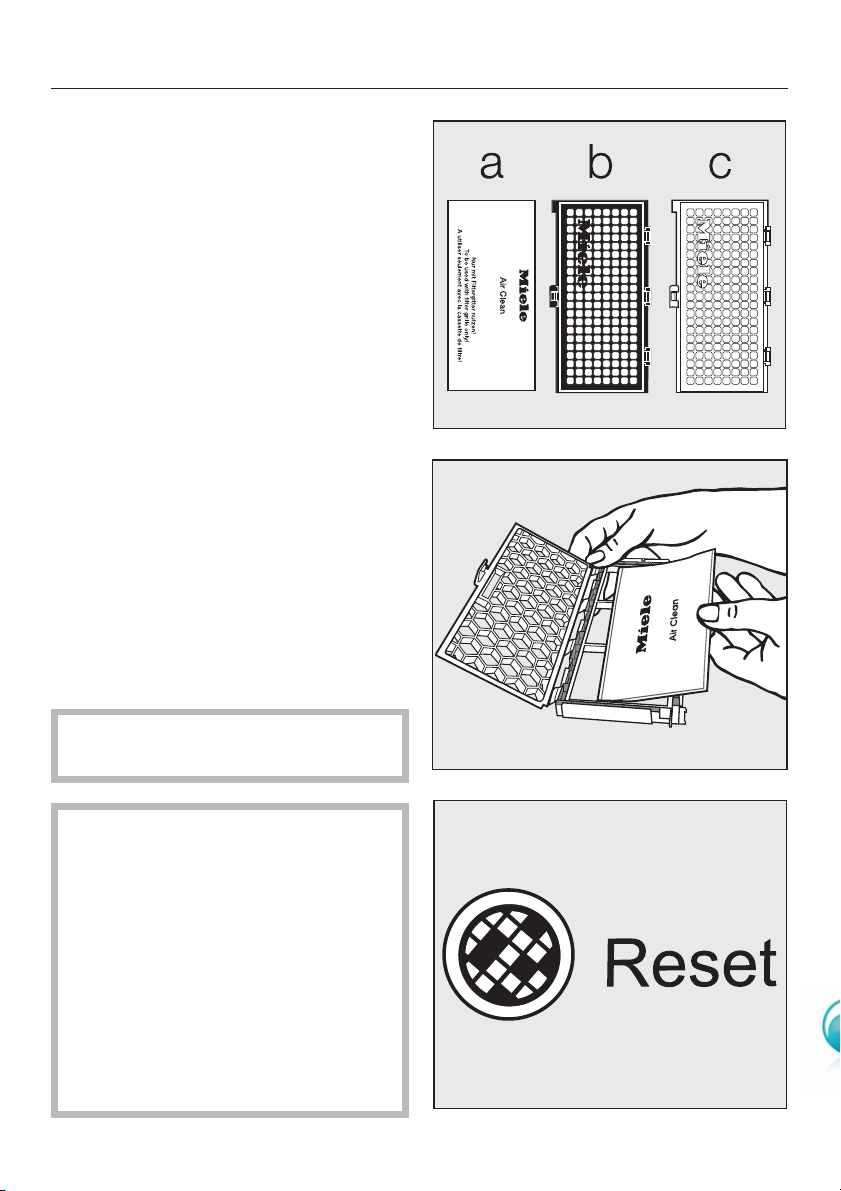
Replacing one type of exhaust
filter with another
Depending on model, your vacuum
cleaner will be fitted as standard with
one of the following exhaust filters:
aAir Clean filter
bActive Air Clean filter (black)
cActive HEPA filter (blue)
Please note
1. If you wish to replace the Air Clean
filter awith an Active Air Clean filter bor
an Active HEPA filter c, it is essential
that you remove the filter grille before
fitting the new type of filter.
2. If you wish to replace the Active Air
Clean filter bor the Active HEPA filter c
with an Air Clean filter a, then it is
essential that you also fit a filter grille *.
*Filter grille - see "Optional
accessories".
Do not use more than one exhaust
filter at a time.
The exhaust filter indicator light (with
reset button) that is fitted on certain
models is designed to come on
when the Active Air Clean or Active
HEPA filter needs to be changed.
The filter change indicator light is
irrelevant if an Air Clean filter is
being used, as long as it is replaced
every time a new packet of Miele
dustbags is started. The indicator
light will go out when the reset
button is pressed.
Maintenance
29
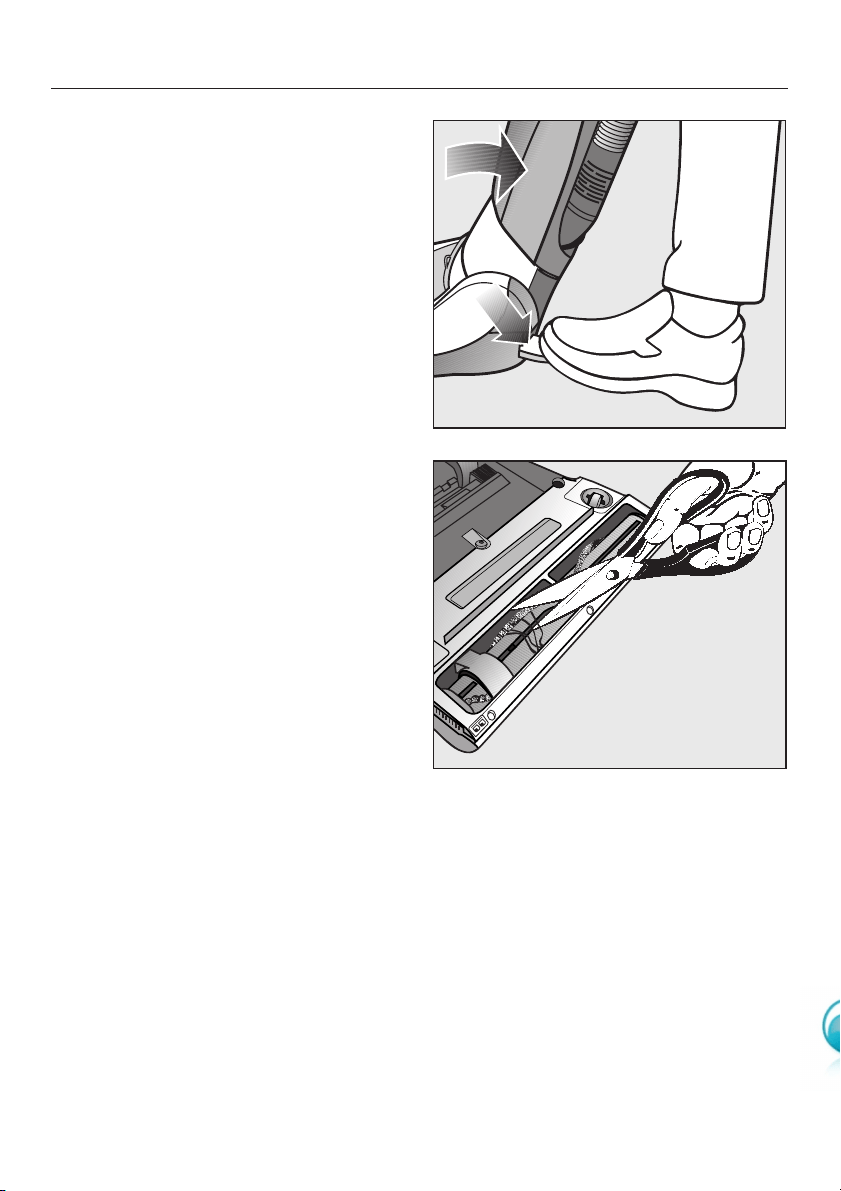
Removing threads and hair
from the PowerBrush
^Switch the PowerBrush and the
vacuum cleaner off, switch it off at
the wall socket and remove the plug.
^Release the vacuum cleaner and
place it flat on the floor.
^Turn the vacuum cleaner over.
^Cut any threads or hairs that have
become entangled in the roller with a
pair of scissors. There is a groove
along the roller to help you.
Then run the vacuum cleaner to
vacuum up the bits.
Maintenance
30
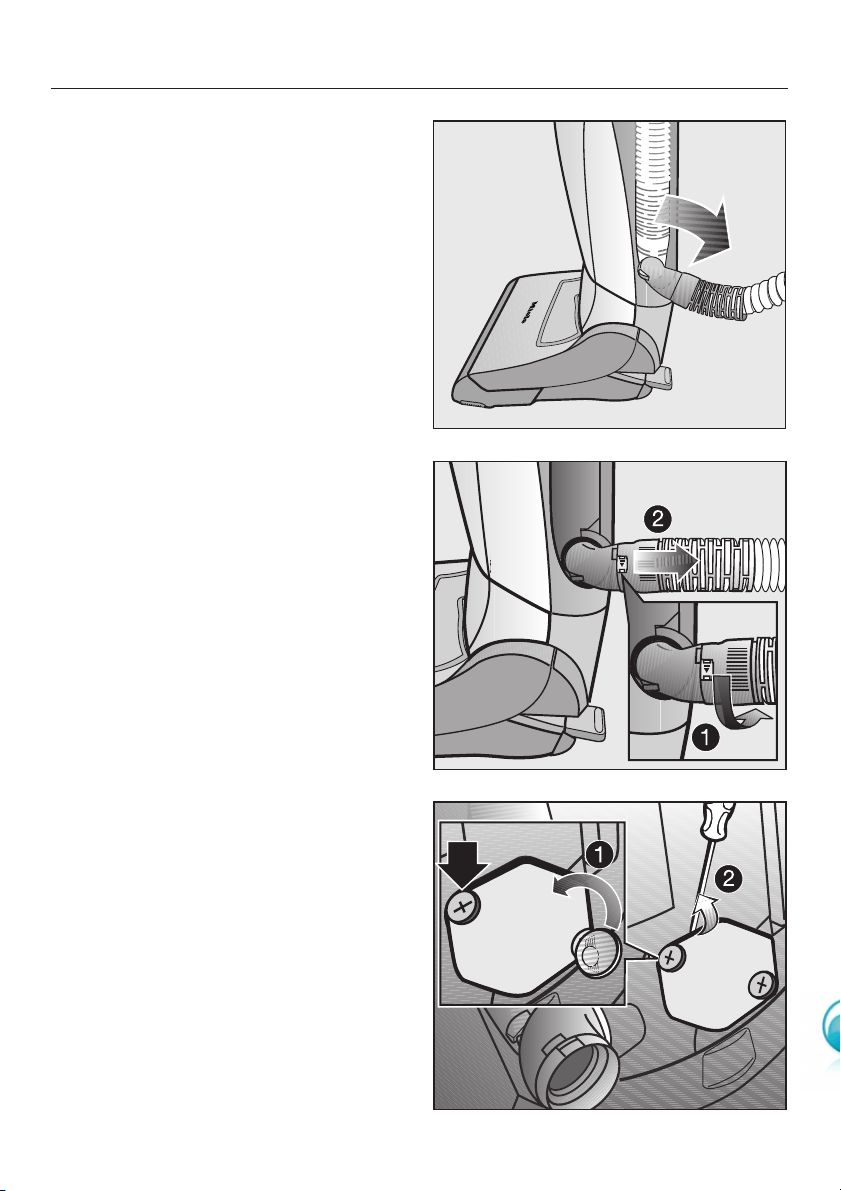
The suction hose can be opened up to
clean out any heavy soiling or
blockages. Any large particles inside it
can then be easily removed.
^Raise the vacuum cleaner into the
vertical position.
^Press the release button on the
telescopic wand and remove the
suction tube handle.
^To increase stability, turn the elbow
joint at the bottom of the hose
downwards as illustrated until it clicks
into position above the retainer.
AUnlock the hose socket by turning it
in the direction of the arrow.
BNow remove the hose socket from
the elbow by pulling it.
^Remove any soiling or blockages.
^Replace the socket and lock it into
position.
If you have not been able to reach all of
the soiling, you could also try the
following.
Unlock the panel on the base of the
vacuum cleaner, as follows.
AUsing a suitable flat-bladed
screwdriver or a five-cent coin,
loosen the two screws anti-clockwise
until you feel a click.
BLever off the panel (you will need to
use a little force).
^Remove any debris or blockages.
^Replace the panel (making sure the
bottom spacer is fitted correctly) and
lock it with the screws.
Maintenance
31
,Always disconnect the vacuum
cleaner from the electrical supply
before cleaning it. Switch off at the
wall socket and remove the plug.
Vacuum cleaner and accessories
External surfaces of the vacuum
cleaner and of the accessories can be
cleaned with a dry or a slightly damp
cloth, or with a proprietary cleaner
suitable for plastic.
,Do not use abrasive cleaning
agents, glass cleaning agents or
all-purpose cleaners. Because of
their chemical composition, they
could cause serious damage to the
plastic casing.
Dust compartment
The dust compartment can, if
necessary, be cleaned using a dry
duster, dusting brush or, if available, a
second vacuum cleaner to vacuum the
dust out.
,Do not let the vacuum cleaner
get wet. If moisture gets into the
appliance, there is a risk of electric
shock.
Cleaning and care
32

The vacuum cleaner switches off
automatically.
Vacuum cleaners with a rotary selector
dial: The vacuum cleaner in-operation
indicator lights up red.
Vacuum cleaners with +/-buttons: The
thermal cut-out indicator lights up red.
The overheating protection mechanism
has been activated by the appliance
overheating or because of a blockage.
^Switch the PowerBrush and the
vacuum cleaner off, switch it off at
the wall socket and withdraw the
plug.
^Check the cleaner for any blockages,
and all the filters in the vacuum
cleaner.
Do not use the vacuum cleaner for
about 20-30 minutes to allow it to cool
down.
The PowerBrush switches off
automatically. The PowerBrush
indicator lights up red.
The red lamp indicates a blockage in
the roller, for example, because a large
object has been vacuumed up.
^Switch the PowerBrush and the
vacuum cleaner off, switch it off at
the wall socket and withdraw the
plug.
^Remove the blockage.
The vacuum cleaner can then be used
again.
The PowerBrush switches off
automatically. The PowerBrush
indicator stays yellow.
The overheating protection mechanism
has been activated by the appliance
overheating or because of a blockage.
^Switch the PowerBrush and the
vacuum cleaner off, switch it off at
the wall socket and withdraw the
plug.
^Check the cleaner for any blockages,
and all the filters in the vacuum
cleaner.
The PowerBrush has to cool down. To
speed this up:
^Switch the vacuum cleaner back on.
^Vacuum for about 10 minutes without
switching the PowerBrush on.
This will cool the PowerBrush down and
it can then be used again as normal.
Problem solving guide
33

In the event of a fault that you cannot
easily remedy, please contact
–your local Miele Vacuum Cleaner
Specialist
or
–the Miele Customer Contact Centre
(see back cover for address).
34
After sales service
Miele accessories including floorheads,
filters and dustbags are available to
order from your local Miele Vacuum
Cleaner Specialist, Miele Spare Parts
Department or via the internet at:
Certain models are supplied as stan-
dard with one or more of the following
accessories:
Attach the accessory required onto the
suction hose handle or onto the
telescopic wand.
Important: please observe the
flooring manufacturer’s cleaning and
care instructions.
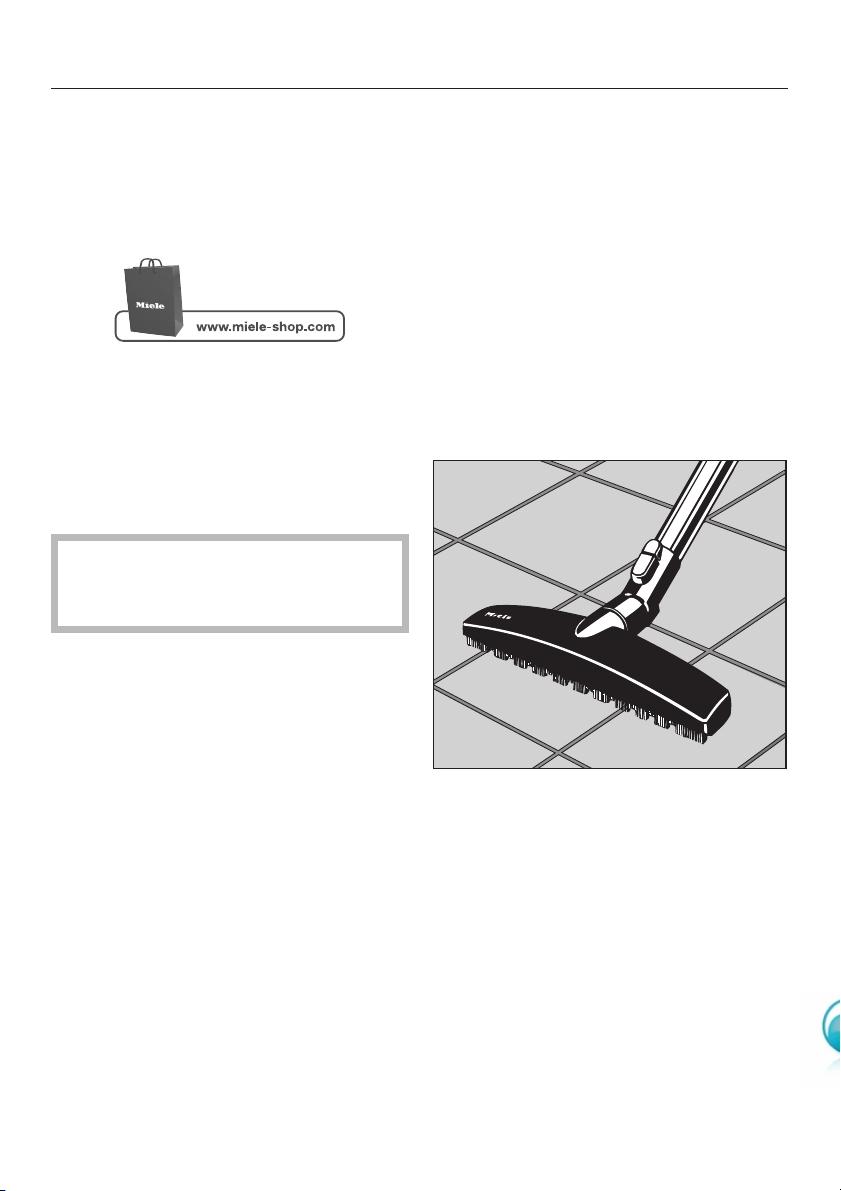
Hardfloor brush
This brush is designed for use on hard
flooring such as tiled or stone floors.
Optional accessories
35
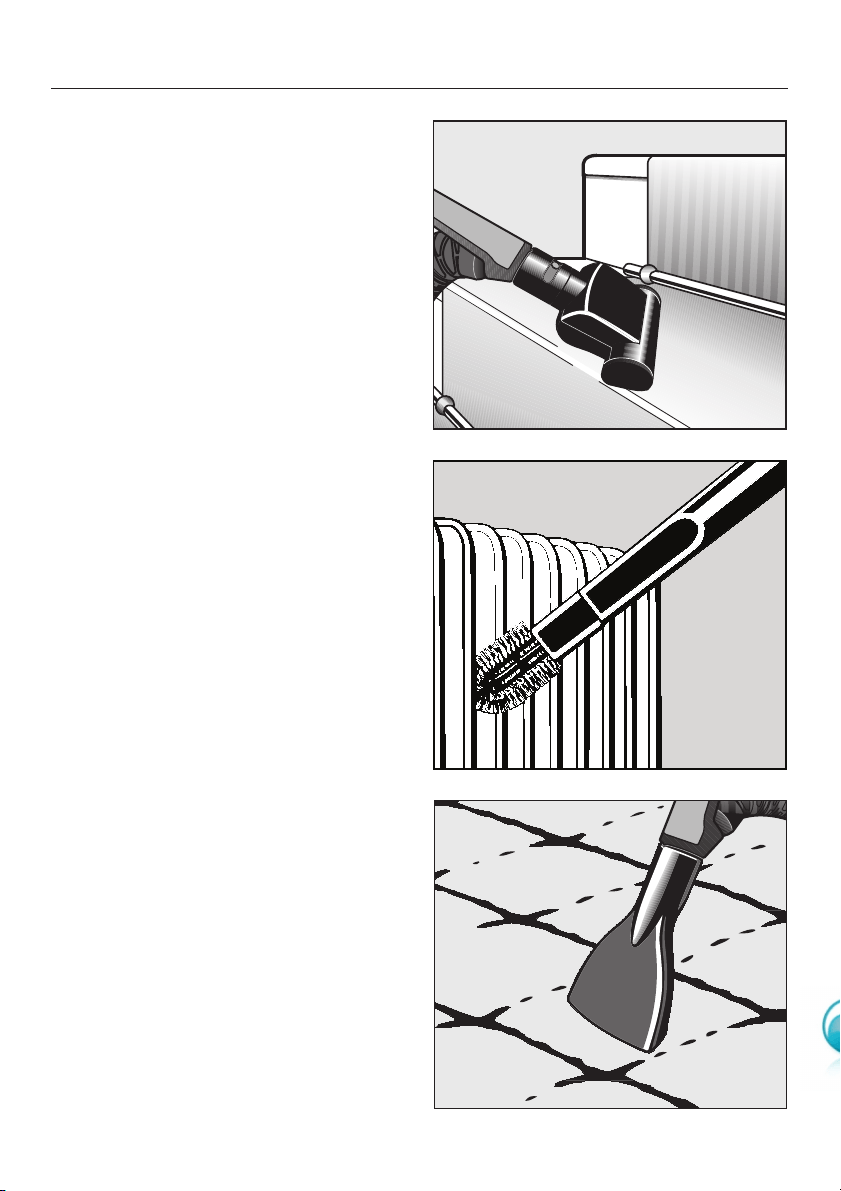
Mini TurboBrush
The Mini TurboBrush is intended for
vacuuming upholstery, mattresses, car
seats, carpeted stairs etc.
Radiator brush
(This brush can only be used if
attached to the crevice nozzle).
For cleaning radiators, narrow shelves
and crevices.
Mattress nozzle
For cleaning upholstery, mattresses,
cushions, curtains, covers etc.
Optional accessories
36
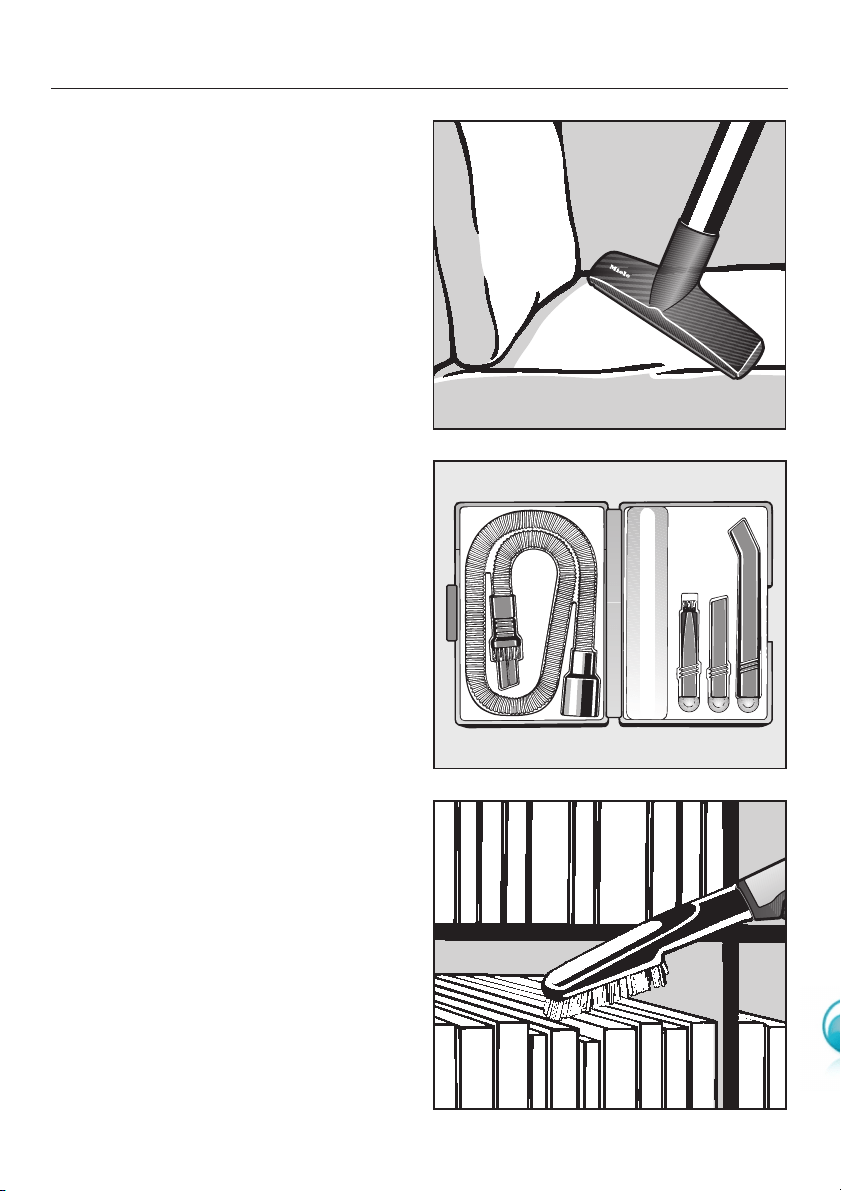
Upholstery nozzle, 190 mm
Extra wide upholstery nozzle, ideal for
cleaning upholstery, mattresses and
pillows quickly.
Microset (SMC 10)
This set is specially designed for
cleaning small objects and difficult to
reach areas (such as PC keyboards,
stereo equipment, intricately carved
furniture and ornaments, models etc).
It consists of:
– Micro-hose with combination nozzle
(crevice nozzle and dusting brush)
–Micro dusting brush
–Micro crevice nozzle
–Angled extension
Universal brush
For dusting books, shelves, etc.
Optional accessories
37

Filter grille
The filter grille is required if you wish to
fit an Air Clean filter instead of an Active
Air Clean filter or an Active HEPA filter
(see "Maintenance - Replacing one
type of exhaust filter with another").
Active Air Clean filter
This is a special active charcoal filter,
which absorbs odours coming from the
dirt collected in the dustbag, keeping
unpleasant smells to a minimum. The
Active Air Clean filter replaces the filter
fitted in the vacuum cleaner. There is
no difference in the filtration levels
between the Active Air Clean filter and
the Air Clean filter.
Active HEPA filter
A combination filter which complies
with the requirements of EN 1822 HEPA
classification 12. It is able to filter out
very fine particles and
micro-organisms. The active charcoal
layer absorbs odours from the dust
collected in the dustbag. This filter is
especially appropriate for allergy
sufferers and users requiring
exceptional standards of hygiene.
The Active HEPA filter replaces the filter
fitted in the vacuum cleaner.
Do not use aroma capsules in your
cleaner if you use either of these
filters. The charcoal in them will
absorb their aroma, rendering them
ineffective.
Optional accessories
38

All electrical work should be carried out
by a suitably qualified and competent
person in strict accordance with
national and local safety regulations.
The voltage connected load are given
on the data plate located underneath
the vacuum cleaner. Please ensure that
these match the household mains
supply. The fuse rating is quoted on the
plug.
The appliance is supplied with a cable
and moulded plug ready for connection
to a 230V/50Hz a.c. single phase
supply.
Test Marks.....................Electrical safety
......................................C-Tick Mark or a combined RCM mark
Electrically suppressed
according to..................AS/NZS 1044
Electrical connection
39

Alteration rights reserved / S 7000 / 0110 M.-Nr. 07 793 820 / 00