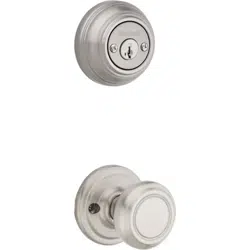
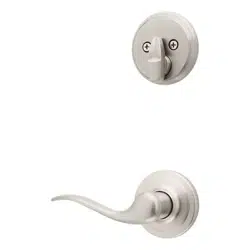
If drilling a new door, use the supplied template and the complete door drilling instructions available
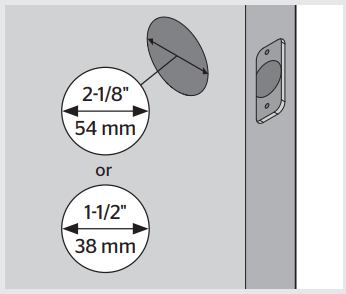
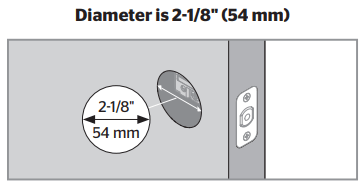
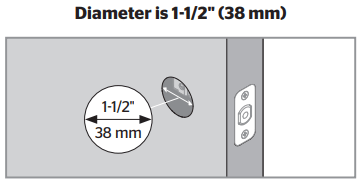
A. Measure to confirm that the hole in the door is either 2-1/8" (54 mm) or 1-1/2" (38 mm).
Note: Additional door preparation may be required for doors with 1-1/2" (38 mm) holes. Consult the deadbolt drilling instructions
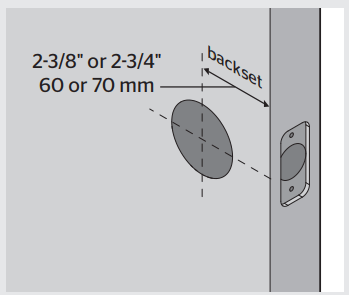
B. Measure to confirm that the backset is either 2-3/8" or 2-3/4" (60 or 70 mm).
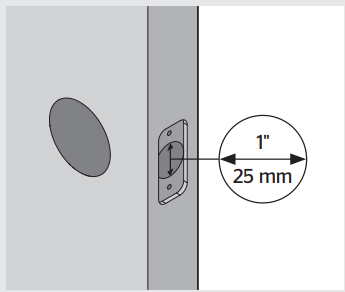
C. Measure to confirm that the hole in the door edge is 1" (25 mm).
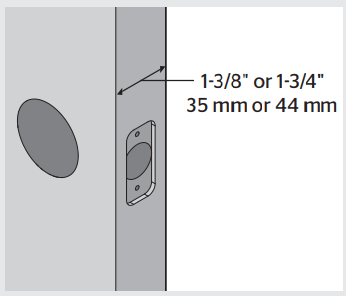
D. Measure to confirm that the door is either 1-3/8" or 1-3/4" (35 mm or 44 mm) thick.
Install the latch and strike
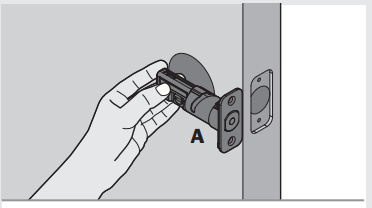
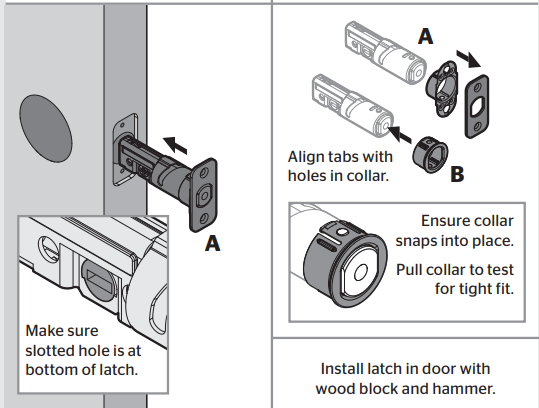
A. Hold the latch in front of the door hole, with the latch face flush against the door edge.
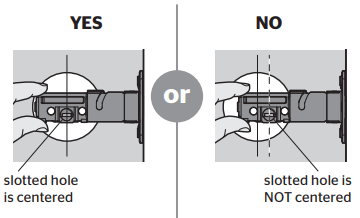
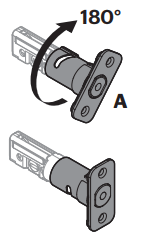
Is the slotted hole centered in the door hole?
No adjustment is required. Proceed to next step.
Rotate latch face as shown to extend latch.
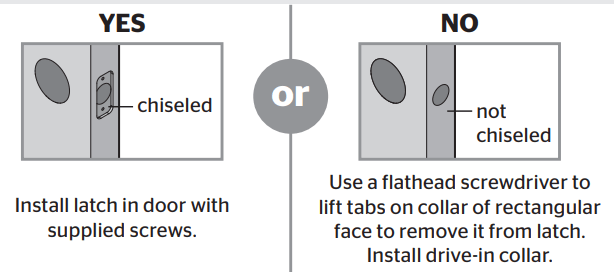
B. Is the door edge chiseled?
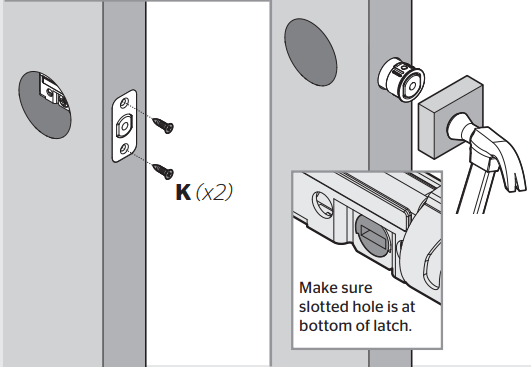
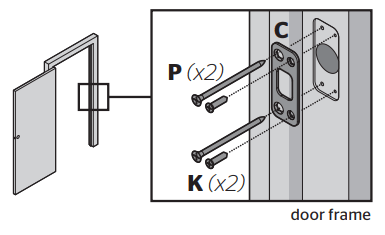
C. Install strike on the door frame.
Make sure hole in door frame is drilled a minimum of 1” (25 mm) deep.
D.
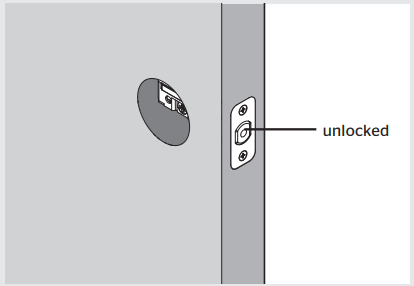
IMPORTANT: Make sure the latch bolt is fully retracted (in the unlocked position).
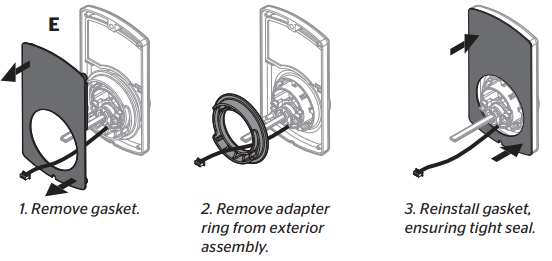
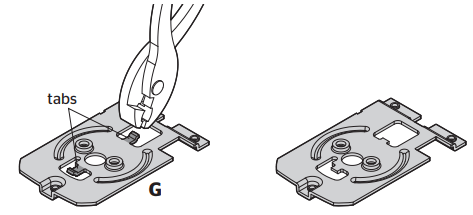
Prepare keypad and mounting plate (only for doors with smaller holes)
What is the diameter of the hole in the door?
No adjustment is required. Proceed to step 4.
OR
A. Remove adapter ring from exterior assembly:
B. Use pliers to remove two tabs from mounting plate:
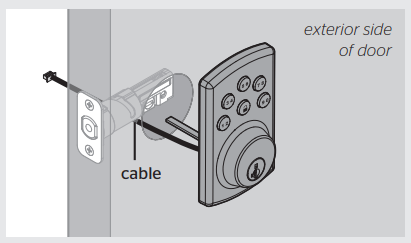
Install exterior assembly
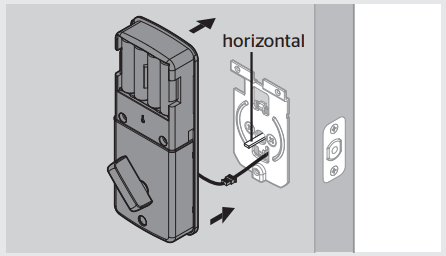
A. Route the cable below the latch.
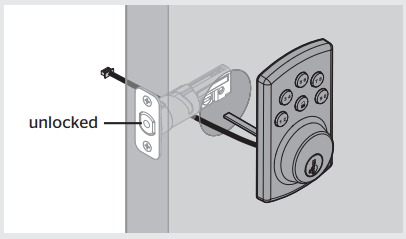
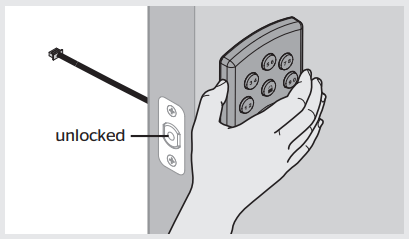
B.IMPORTANT: Make sure the latch is fully retracted (in the unlocked position).
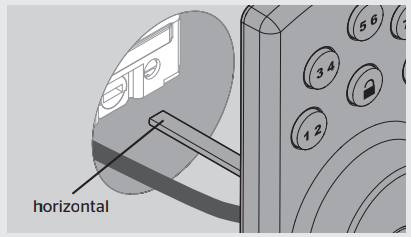
C. IMPORTANT: Make sure the torque blade is in the horizontal position.
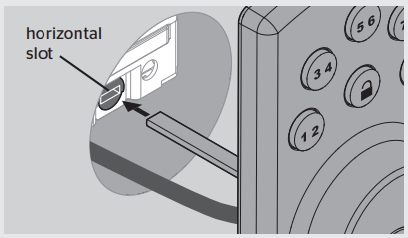
D. Insert the torque blade through the horizontal slot in the latch.
E.IMPORTANT: Hold the exterior assembly on the outside firmly (or have a second pair of hands) for the next steps.
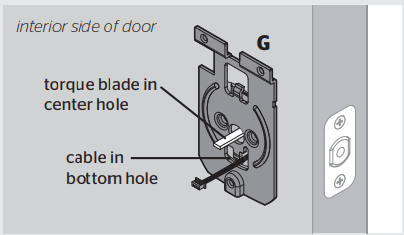
F. Push the torque blade through the center hole in the mounting plate and send the cable through the bottom hole.
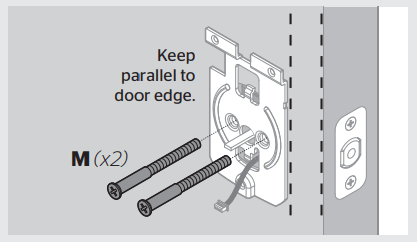
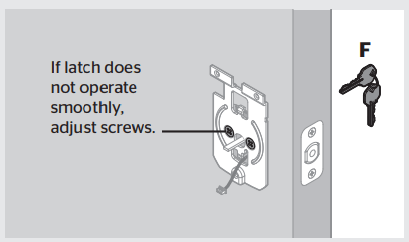
G. Secure the mounting plate with the supplied screws.
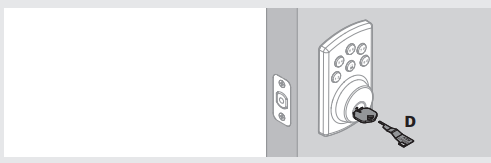
H. Insert the key and test the latch for smooth operation
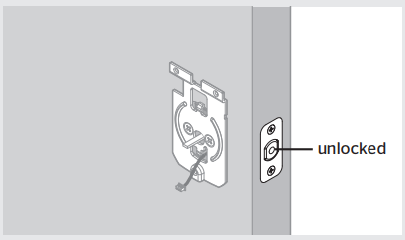
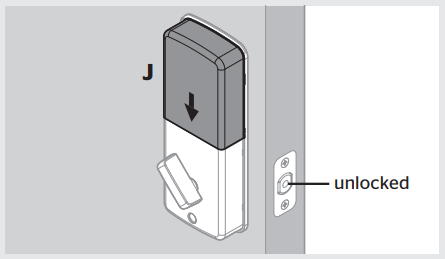
I. Remove the key and make sure the latch bolt is still in the unlocked position
Install interior assembly
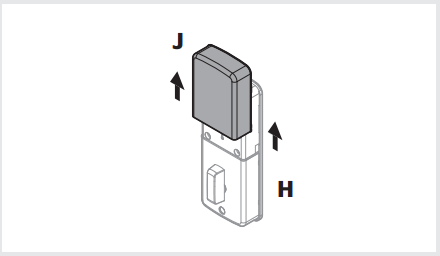
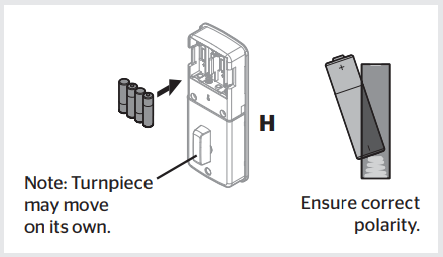
A. Remove the battery cover
B. Load 4 AA batteries into the interior assembly. For best results, use new, nonrechargeable Alkaline batteries only.
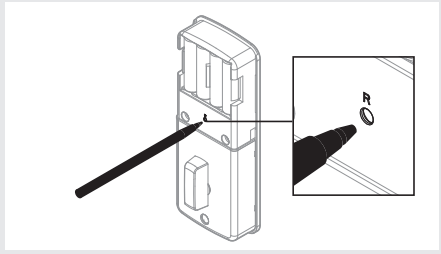
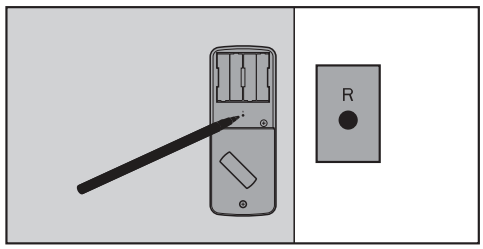
C. Press and hold the Reset button on the interior assembly for 5 seconds, until you hear 3 long beeps.
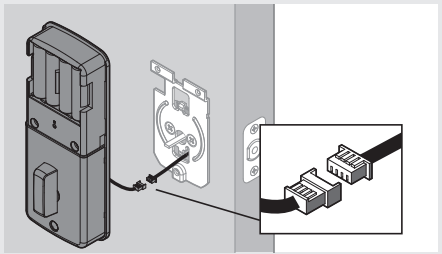
D. Align the colored edges of the connectors and ensure a tight cable connection.
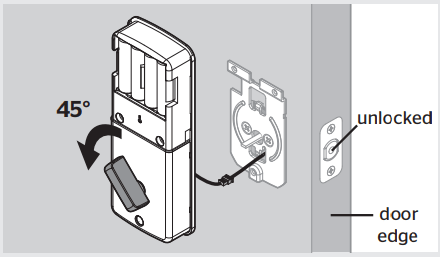
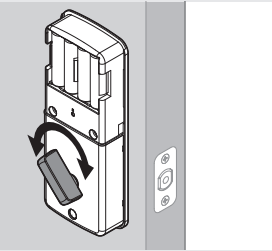
E. IMPORTANT: Rotate the turnpiece AWAY from the door edge and make sure the latch is fully retracted (in the unlocked position).
F. Make sure the torque blade is still in the horizontal position and install the interior assembly
G. Test the turnpiece for smooth rotation.
If turnpiece doesn’t rotate, repeat steps 5E and 5F, making sure to rotate the turnpiece AWAY from the door edge.
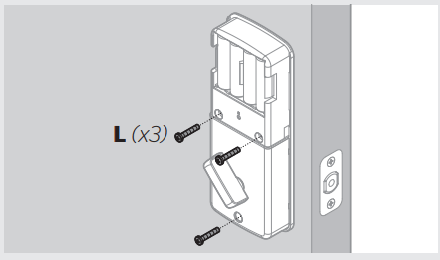
H. Secure the interior assembly with the supplied screws.
I. Reinstall battery cover and make sure the latch is still in the unlocked position.
Set locking and unlocking direction
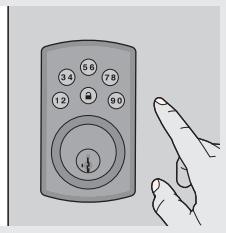
A. While the door is OPEN and UNLOCKED, enter the following code to teach the lock the orientation of the door:
This is your default Mastercode.
1. Press .
2.Press . You will hear one beep.
3.Press 0.
4.Press .
Note: Each button on the keypad represents two numbers. You only need to push the button once to get either number.
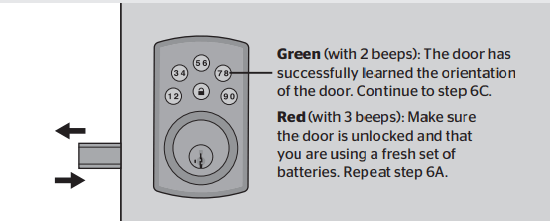
B. The latch bolt will extend and retract. The lock will beep and the keypad will turn green or red.
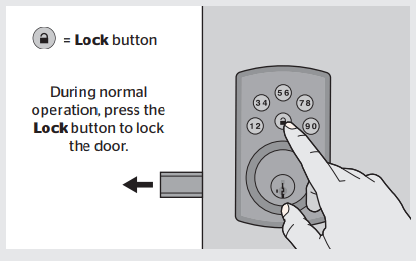
C. Press the Lock button. The latch bolt will extend to lock.
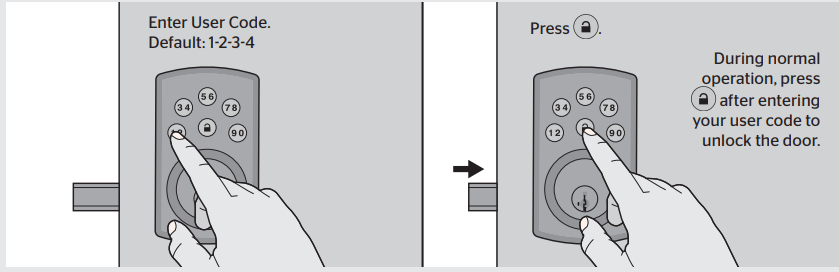
D. Enter the default User Code (1-2-3-4), then press the Lock button. The door will unlock.
IMPORTANT: It is recommended that you replace the default Mastercode and default User Code with codes of your own. See page 4.
Optional: Re-key the lock
If needed, re-key the lock to work with your existing key. See the supplied SmartKey Re-Key instructions for more information.
Quick Setup and Use
Move swiftly during programming. If no digit is pressed for 10 seconds, the system will time out and you will need to restart the procedure.
A. How to delete all User Codes
1.Make sure the lock is unlocked and the door is open.
2.Enter your existing Mastercode - for new install, default is 0-0-0-0.
3.Press . You will hear one beep.
4.Press 5.
5. Press . You will hear two beeps if successful. If you hear three beeps, it was unsuccessful. Repeat from step 1 slowly.
For a new installation, this will delete the default User Code 1-2-3-4. For subsequent instances, this will delete all User Codes in the lock.
Now the lock can only be operated by the key and turnpiece until a new User Code is added in step B.
B. How to add User Codes
A total of 6 User Codes (and a temporary one-time User Code) may be programmed. Do not program a User Code that is the same as your Mastercode.
1. Make sure the lock is unlocked and the door is open.
2. Enter your Mastercode - for new install, default is 0-0-0-0.
3. Press . You will hear one beep.
4. Press 1.
5. Press . You will hear one beep.
6. Enter a new User Code. It must be 4-10 digits.
7. Press . You will hear two beeps if successful. If you hear three beeps, it was unsuccessful. Repeat from step 1 slowly.
8. Test the code: While your door is open, lock it. Enter your new User Code, then press . The door should unlock.
C. How to change your Mastercode
The Mastercode will not unlock your door. It is an added security feature that is used to set up all functions.
1. Make sure the lock is unlocked and the door is open.
2. Enter your Mastercode - for new install, default is 0-0-0-0.
3. Press . You will hear one beep.
4. Press 7.
5. Press . You will hear one beep.
6. Enter a new Mastercode. It must be between 4 and 10 digits.
7. Press . You will hear two beeps if successful. If you hear three beeps, it was unsuccessful. Repeat from step 1 slowly
Additional Programming Features
How to enable/disable Auto-Lock
The Auto-Lock feature automatically re-locks your door 30 seconds after unlocking. This feature is off by default.
1. Make sure the lock is unlocked and the door is open.
2. Enter your existing Mastercode.
3. Press . You will hear one beep.
4. Press 1 - 1.
5. Press . You will hear two beeps if successful. If you hear three beeps, it was unsuccessful. Repeat from step 1 slowly
How to enable/disable User Codes
If User Codes are disabled (example: when you go on vacation), the lock can only be operated by the key and turnpiece until they are enabled again.
1. Make sure the lock is unlocked and the door is open.
2. Enter your existing Mastercode.
3. Press . You will hear one beep.
4. Press 1 - 7.
5. Press . You will hear two beeps if successful. If you hear three beeps, it was unsuccessful. Repeat from step 1 slowly
How to add a one-time User Code
A one-time user code may be used only once, and then it will be deleted immediately after use.
1. Make sure the lock is unlocked and the door is open.
2. Enter your existing Mastercode.
3. Press . You will hear one beep.
4. Press 1 - 9.
5. Press . You will hear one beep.
6. Enter a new User Code. It must be 4-10 digits.
7. Press . You will hear two beeps if successful. If you hear three beeps, it was unsuccessful. Repeat from step 1 slowly.
How to change Auto-Lock time delay
You can set the Auto-Lock time delay to 10, 20, 30, 40, or 50 seconds.
1. Make sure the lock is unlocked and the door is open.
2. Enter your existing Mastercode.
3. Press . You will hear one beep.
4. Press 1 - 3.
5. Press . You will hear one beep.
6. For 10 seconds, press 1. For 20 seconds, press 3. For 30 seconds, press 5. For 40 seconds, press 7. For 50 seconds, press 9.
7. Press . You will hear two beeps if successful. If you hear three beeps, it was unsuccessful. Repeat from step 1 slowly.
How to delete individual User Codes
1. Make sure the lock is unlocked and the door is open.
2. Enter your existing Mastercode.
3. Press . You will hear one beep.
4. Press 3.
5. Press . You will hear one beep.
6. Enter the User Code you wish to delete.
7. Press . You will hear two beeps if successful. If you hear three beeps, it was unsuccessful. Repeat from step 1 slowly.
8. Test the code: While your door is open, lock it. Enter the User Code, then press . The door should not unlock.
How to mute/unmute lock
If the lock is muted, you will not hear beeping during programming, normal operation, low battery indicators, or system alerts.
1. Make sure the lock is unlocked and the door is open.
2. Enter your Mastercode.
3. Press . You will hear one beep.
4. Press 1 - 5.
5. Press . You will hear two beeps if successful. If you hear three beeps, it was unsuccessful. Repeat from step 1 slowly
How to restore default settings
This procedure will delete all User Codes associated with the lock, and the default Mastercode (0-0-0-0) and User Code (1-2-3-4) will be restored.
1. Make sure the door is open and unlocked.Press and hold the Reset button for 5 seconds, until you hear 3 long beeps.
2. Enter the default Mastercode (O-O-O-0).
3. Press . You will hear one beep.
4. Press 0.
5. Press . The latch bolt will extend and retract to learn the orientation of the door. If successful, the keypad will flash green and you will hear 2 beeps. If unsuccessful, the keypad will flash red and you will hear 3 beeps (make sure the door is open and unlocked and that you are using a fresh set of batteries).
6. Test the lock: With the door open and unlocked, press . Make sure it locks the door.
7. Test the default User Code: Enter the default User Code (1-2-3-4), then press . Make sure it unlocks the door.
System Alerts
Alert
Reason
Solution
Keypad flashes red 3 times with 3 beeps.
Door jammed while attempting to lock.
Manually re-lock door. If needed, reposition strike.
Door handing code has not been entered.
Enter door handing code.
No User Code programmed, or User Codes are disabled.
Program at least one User Code, or re-enable User Codes.
Unsuccessful programming.
Attempt programming procedure again.
Incorrect User Code entered.
Re-enter User Code.
Keypad flashes red 5 times with 5 beeps.
5 incorrect User Codes entered within one minute.
Re-enter User Code after 45-second keypad lockout.
Keypad flashes red 10 times with 10 beeps.
Low battery.
Replace batteries.
Regulatory Compliance
This product complies with standards established by the following regulatory bodies:
•Federal Communications Commission (FCC)
•Industry Canada
FCC
This device complies with Part 15 of the FCC Rules. Operation is subject to the following two conditions:
( 1 ) this device may not cause harmful interference, and
( 2 ) this device must accept any interference received, including interference that may cause undesired operation.
This equipment has been tested and found to comply with the limits for a Class B digital device, pursuant to Part 15 of the FCC Rules. These limits are designed to provide reasonable protection against harmful interference in a residential installation. This equipment generates, uses, and can radiate radio frequency energy and, if not installed and used in accordance with the instructions, may cause harmful interference to radio communications. However, there is no guarantee that interference will not occur in a particular installation. If this equipment does cause harmful interference to radio or television reception, which can be determined by turning the equipment off and on, the user is encouraged to try to correct the interference by one or more of the following measures:
•Reorient or relocate the receiving antenna.
•Increase the separation between the equipment and receiver.
•Connect the equipment into an outlet on a circuit different from that to which the receiver is connected.
•Consult the dealer or an experienced radio/TV technician for help.
IMPORTANT! Changes or modifications not expressly approved by the manufacturer could void the user’s authority to operate the equipment.
Industry Canada
This device complies with Industry Canada licence-exempt RSS standard(s). Operation is subject to the following two conditions: ( 1 ) this device may not cause interference, and ( 2 ) this device must accept any interference, including interference that may cause undesired operation of the device.
Troubleshooting
The lock cannot be locked or unlocked by the keypad.
Make sure the lock is programmed with at least one User Code and that the User Codes are not disabled. If needed, restore the lock’s default settings.
The keypad doesn’t respond when touched (no lights are visible and no beeping is heard).
Make sure the cables are properly connected, and make sure the batteries are new and installed correctly.
The door can be locked with the Lock button, but the User Code will not unlock the door.
Make sure the User Code is correct and that the Lock button is pushed after entering the User Code. If the door still won’t unlock, use a key to unlock the door. Call technical support for further troubleshooting.
When the door is closed and the Lock button is pressed to lock the door, the lock beeps 3 times. When the door is open and the Lock button is pressed to lock the door, the lock doesn't beep.
Make sure that the hole in the door frame behind the strike is drilled at least 1 inch (25 mm) deep. Also make sure
the strike plate is aligned with the latch bolt. If needed, reposition the strike.