
OWNER’S MANUAL
LCD TV
Please read this manual carefully before operating
your set and retain it for future reference.
www.lg.com
P/NO :1947-1600-1050
LCD TV MODELS
32LD400
42LD400
47LD500
2
WARNING / CAUTION
This reminder is provided to call the CATV
system installer’s attention to Article 820-
40 of the National Electric Code (U.S.A.).
The code provides guidelines for proper
grounding and, in particular, specifies that
the cable ground shall be connected to the
grounding system of the building, as close
to the point of the cable entry as practical.
WARNING / CAUTION
Class B digital device
This equipment has been tested and found
to comply with the limits for a Class B digital
device, pursuant to Part 15 of the FCC Rules.
These limits are designed to provide reasonable
protection against harmful interference in
a residential installation. This equipment
generates, uses and can radiate radio
frequency energy and, if not installed and used
in accordance with the instructions, may cause
harmful interference to radio communications.
However, there is no guarantee that interference
will not occur in a particular installation. If this
equipment does cause harmful interference
to radio or television reception, which can be
determined by turning the equipment off and
on, the user is encouraged to try to correct the
interference by one or more of the following
measures:
- Reorient or relocate the receiving antenna.
- Increase the separation between the
equipment and receiver.
- Connect the equipment to an outlet on a
circuit different from that to which the receiver
is connected.
- Consult the dealer or an experienced radio/
TV technician for help.
This device complies with part 15 of the FCC
Rules. Operation is subject to the following
two conditions: (1) This device may not cause
(harmful) interference, and (2) this device must
accept any interference received, including
interference that may cause undesired
operation (of the device).
Any changes or modifications in construction
of this device which are not expressly approved
by the party responsible for compliance
could void the user’s authority to operate the
equipment.
FCC Notice
To prevent fire or shock hazards, do not expose
this product to rain or moisture.
CAUTION
Do not attempt to modify this product in
any way without written authorization from
LG Electronics. Unauthorized modification
could void the user’s authority to operate this
product.
TO REDUCE THE RISK OF ELECTRIC
SHOCK DO NOT REMOVE COVER
(OR BACK). NO USER SERVICEABLE
PARTS INSIDE. REFER TO QUALIFIED
SERVICE PERSONNEL.
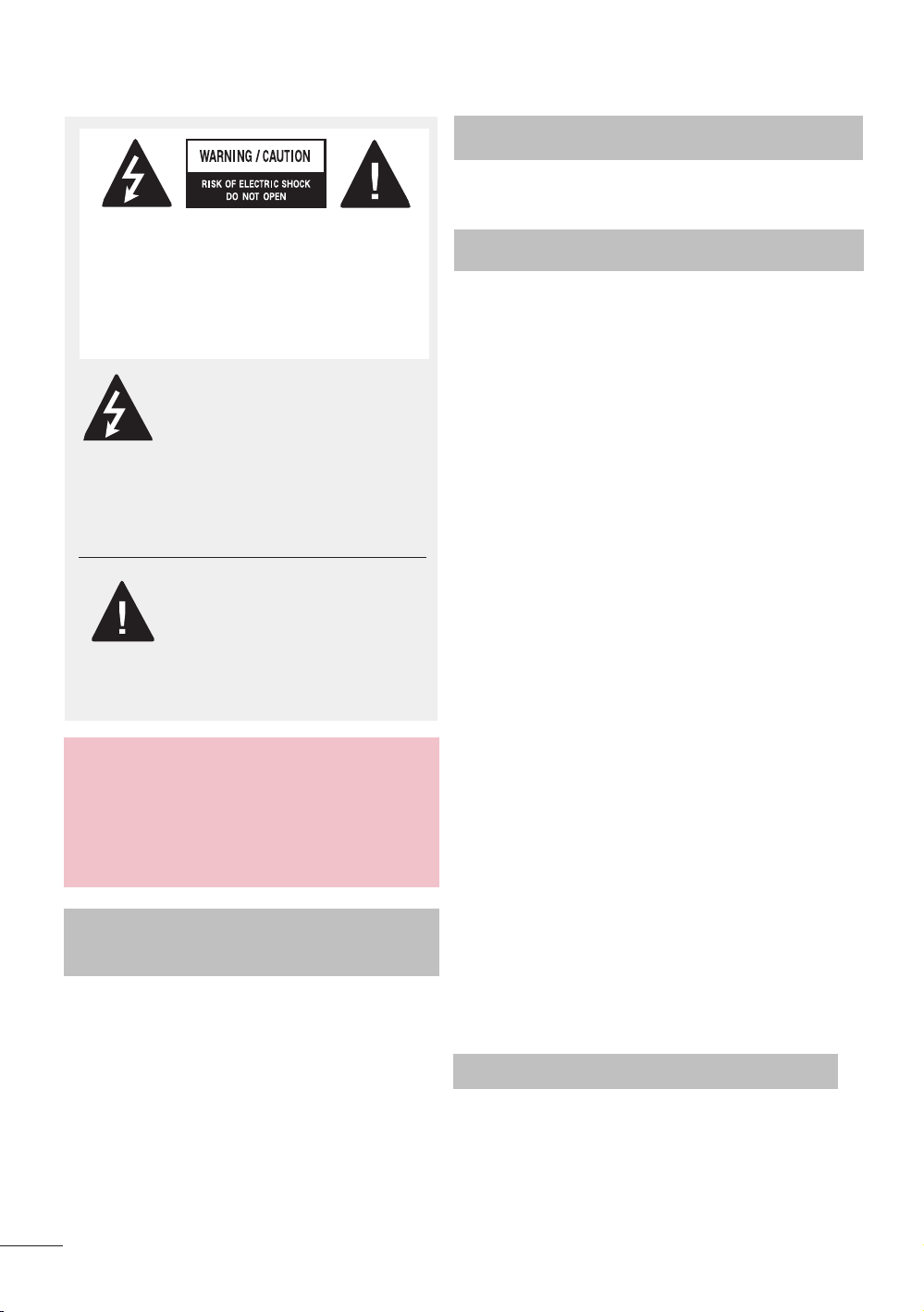
The lightning flash with
arrowhead symbol, within an
equilateral triangle, is intended
to alert the user to the presence of
uninsulated “dangerous voltage” within
the product’s enclosure that may be of
sufficient magnitude to constitute a risk
of electric shock to persons.
The exclamation point within
an equilateral triangle is
intended to alert the user to
the presence of important
operating and maintenance
(servicing) instructions in the literature
accompanying the appliance.
WARNING/CAUTION
TO REDUCE THE RISK OF FIRE
AND ELECTRIC SHOCK, DO NOT
EXPOSE THIS PRODUCT TO RAIN OR
MOISTURE.
NOTE TO CABLE/TV
INSTALLER
3
SAFETY INSTRUCTIONS
Important Safety Instructions
Read these instructions.
Keep these instructions.
Heed all warnings.
Follow all instructions.
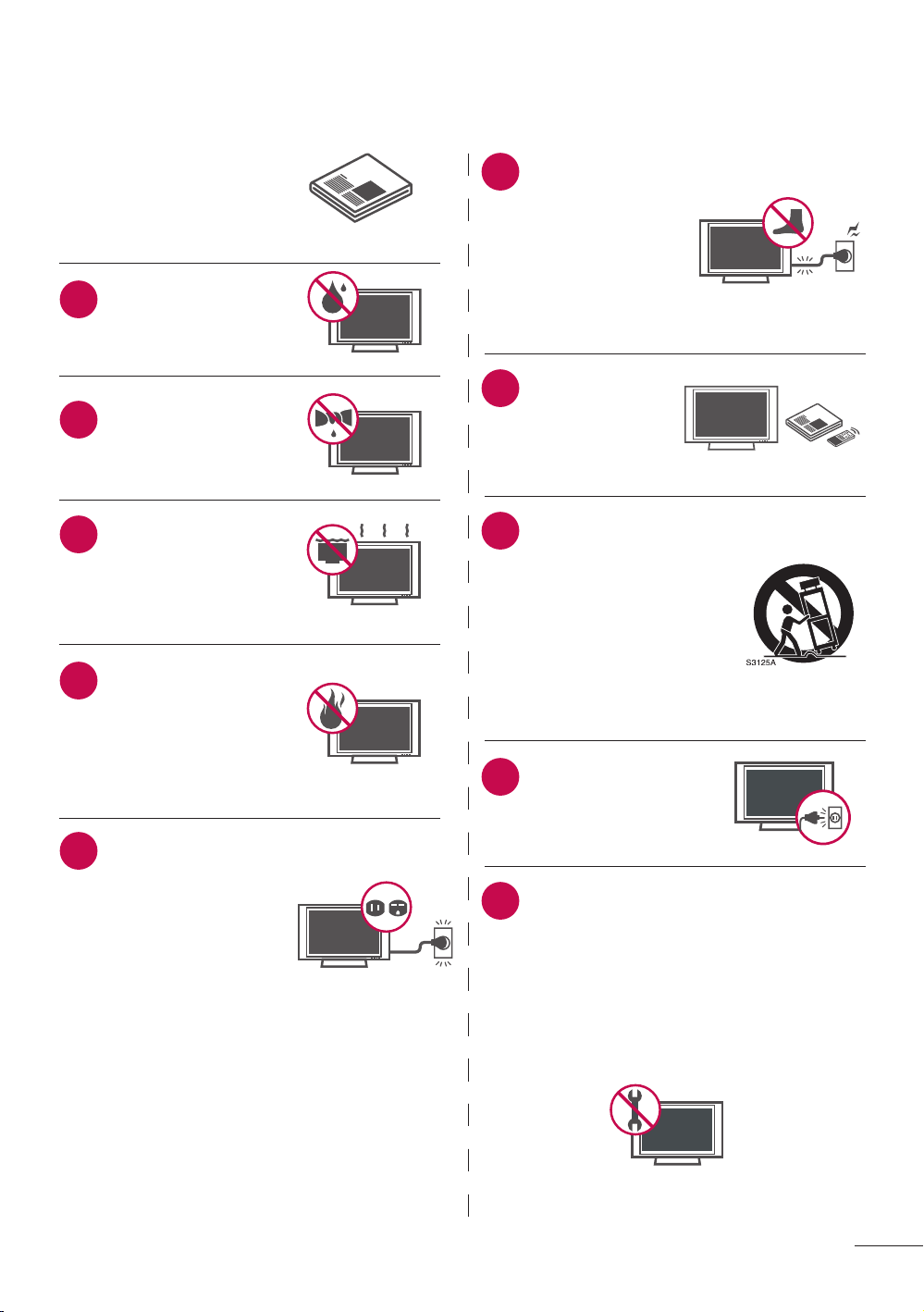
Do not use this
apparatus near water.
Clean only with dry
cloth.
Do not block
any ventilation
openings. Install
in accordance with
the manufacturer’s
instructions.
Do not install near
any heat sources
such as radiators,
heat registers, stoves,
or other apparatus
(including amplifiers)
that produce heat.
Do not defeat the
safety purpose of
the polarized or
grounding-type plug.
A polarized plug has
two blades with one
wider than the other.
A grounding type
plug has two blades
and a third grounding
prong, The wide blade
or the third prong
are provided for your
safety. If the provided
plug does not fit into
your outlet, consult
an electrician for
replacement of the
obsolete outlet.
Protect the
power cord from
being walked
on or pinched
particularly at
plugs, convenience
receptacles, and
the point where
they exit from the
apparatus.
Only use
attachments/
accessories
specified by the
manufacturer.
Use only with the cart,
stand, tripod, bracket,
or table specified by
the manufacturer, or
sold with the apparatus.
When a cart is used,
use caution when
moving the cart/
apparatus combination
to avoid injury from
tip-over.
Unplug this apparatus
during lighting storms
or when unused for
long periods of time.
Refer all servicing to qualified service
personnel. Servicing is required when
the apparatus has been damaged in
any way, such as power-supply cord
or plug is damaged, liquid has been
spilled or objects have fallen into the
apparatus, the apparatus has been
exposed to rain or moisture, does
not operate normally, or has been
dropped.
1
2
3
4
5
6
7
8
9
10
4
Never touch this apparatus or antenna
during a thunder or lighting storm.
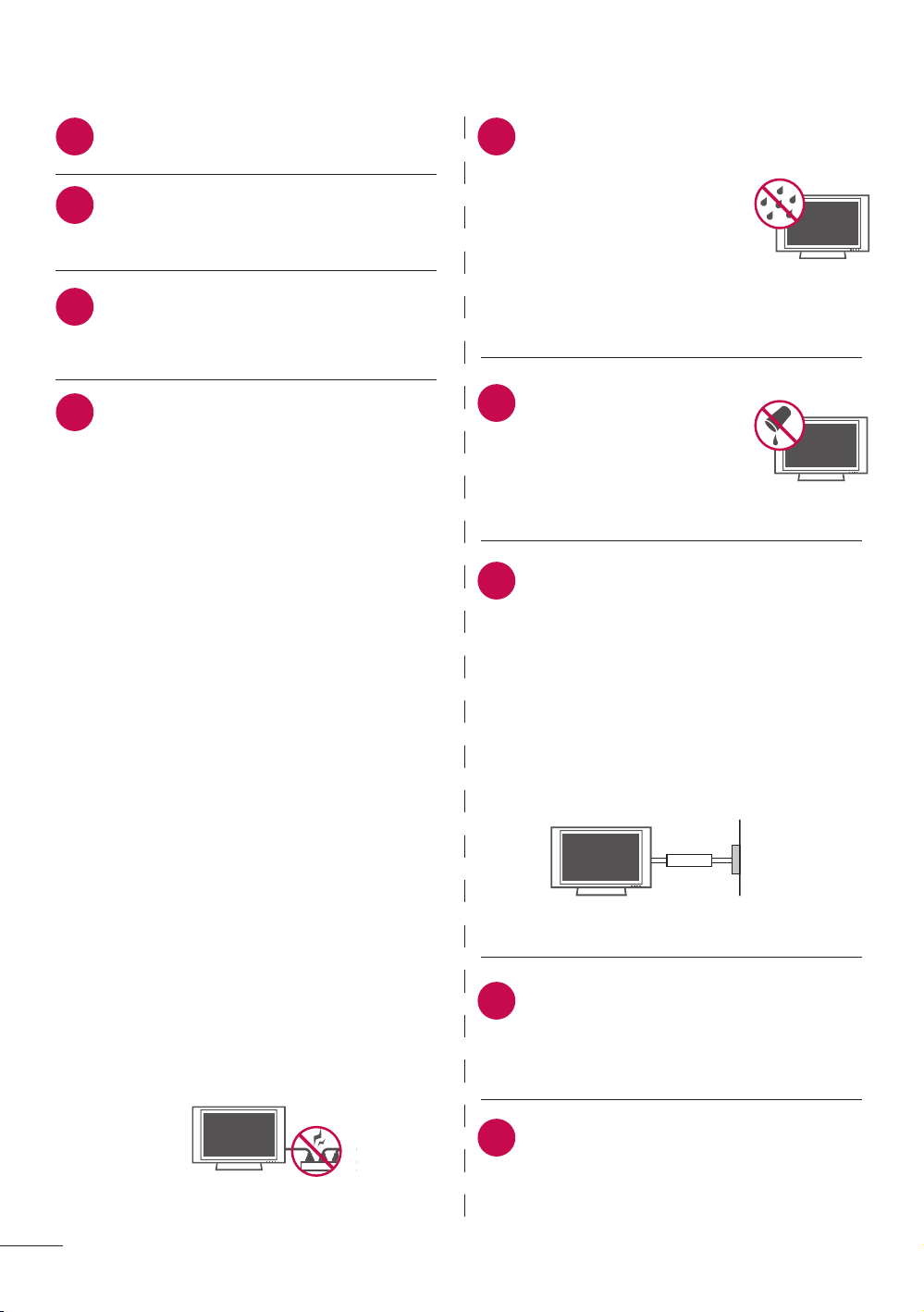
When mounting a TV on the wall, make
sure not to install the TV by the hanging
power and signal cables on the back of
the TV.
Do not allow an impact shock or any
objects to fall into the product, and
do not drop onto the screen with
something.
CAUTION concerning the Power Cord:
It is recommend that appliances be
placed upon a dedicated circuit; that is,
a single outlet circuit which powers only
that appliance and has no additional
outlets or branch circuits. Check the
specification page of this owner’s
manual to be certain.
Do not connect too many appliances to
the same AC power outlet as this could
result in fire or electric shock.
Do not overload wall outlets. Overloaded
wall outlets, loose or damaged wall
outlets, extension cords, frayed power
cords, or damaged or cracked wire
insulation are dangerous . Any of these
conditions could result in electric shock
or fire. Periodically examine the cord of
your appliance, and if its appearance
indicates damage or deterioration,
unplug it, discontinue use of the
appliance, and have the cord replaced
with an exact replacement part by an
authorized servicer. Protect the power
cord from physical or mechanical abuse,
such as being twisted, kinked, pinched,
closed in a door, or walked upon. Pay
particular attention to plugs, wall outlets,
and the point where the cord exits the
appliance.
Do not make the TV with the power cord
plugged in. Do not use a damaged or
loose power cord. Be sure do grasp the
plug when unplugging the power cord.
Do not pull on the power cord to unplug
the TV.
WARNING - To reduce
the risk of fire or electrical
shock, do not expose this
product to rain, moisture
or other liquids. Do not
touch the TV with wet
hands. Do not install this
product near flammable
objects such as gasoline
or candles or expose
the TV to direct air
conditioning.
Do not expose to dripping
or splashing and do not
place objects filled with
liquids, such as vases,
cups, etc. on or over the
apparatus (e.g. on shelves
above the unit).
GROUNDING
Ensure that you connect the earth
ground wire to prevent possible electric
shock (i.e. a TV with a three-prong
grounded AC plug must be connected
to a three-prong grounded AC outlet).
If grounding methods are not possible,
have a qualified electrician install a
separate circuit breaker.
Do not try to ground the unit by
connecting it to telephone wires,
lightening rods, or gas pipes.
DISCONNECTING DEVICE FROM
MAINS
Mains plug is the disconnecting device.
The plug must remain readily operable.
As long as this unit is connected to the
AC wall outlet, it is not disconnected
from the AC power source even if you
turn off this unit by SWITCH.
11 15
16
12
13
14
17
18
19
SAFETY INSTRUCTIONS
Power
Supply
Short-circuit
Breaker
5
Ventilation
Install your TV where there is proper
ventilation. Do not install in a confined
space such as a bookcase. Do not
cover the product with cloth or other
materials (e.g.) plastic while plugged
in. Do not install in excessively dusty
places.
Take care not to touch the ventilation
openings. When watching the TV for a
long period, the ventilation openings
may become hot.
If you smell smoke or other odors
coming from the TV or hear strange
sounds, unplug the power cord contact
an authorized service center.
Do not press strongly
upon the panel with
hand or sharp object
such as nail, pencil
or pen, or make a
scratch on it.
Keep the product away from direct
sunlight.
Dot Effect
The Plasma or LCD panel is a high
technology product with resolution of
two million to six million pixels. In a
very few cases, you could see fine dots
on the screen while you’re viewing the
TV. Those dots are deactivated pixels
and do not affect the performance and
reliability of the TV.
23
24
26
22
25
27
28
ANTENNAS
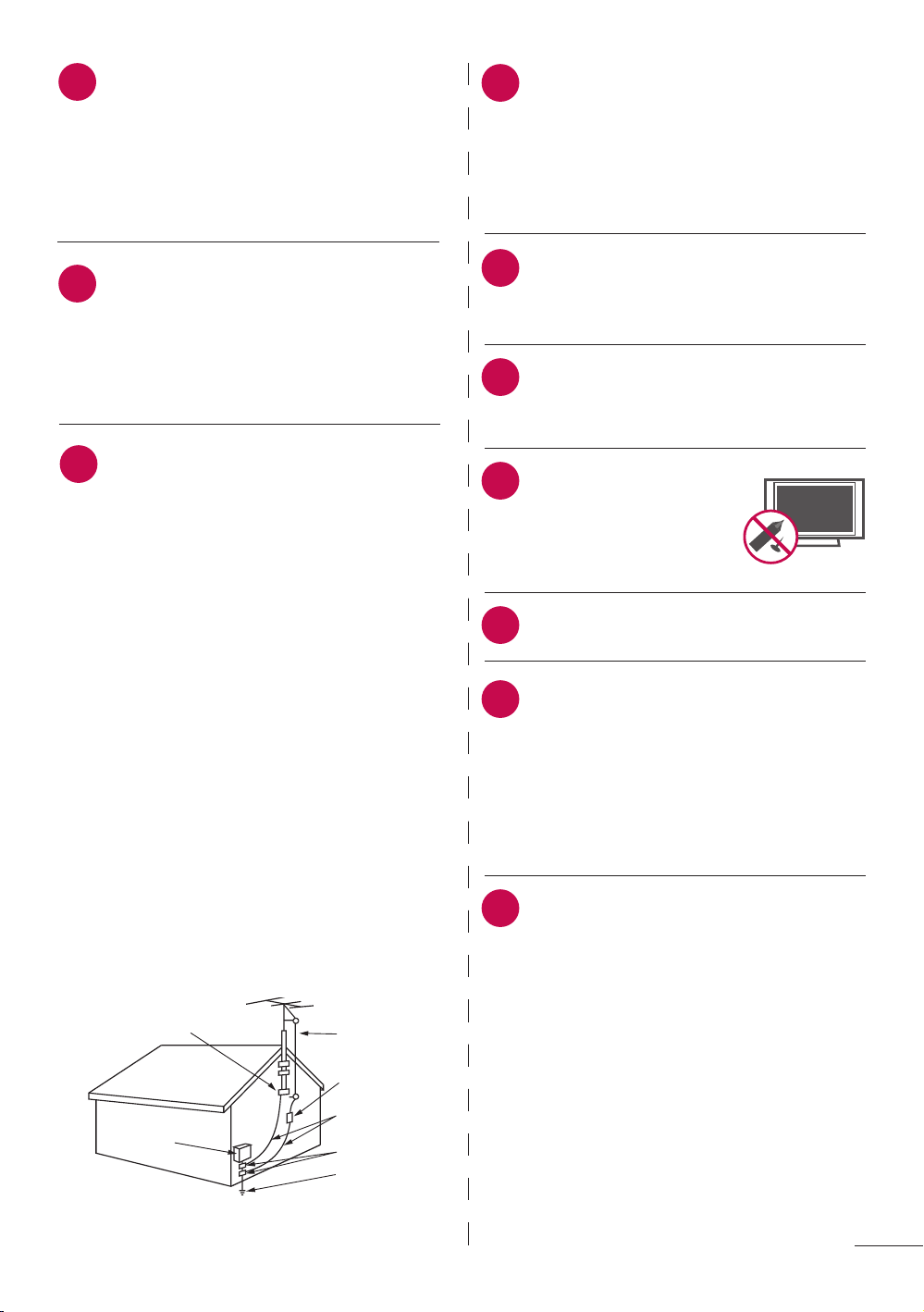
Outdoor antenna grounding
If an outdoor antenna is installed, follow
the precautions below. An outdoor
antenna system should not be located
in the vicinity of overhead power lines
or other electric light or power circuits,
or where it can come in contact with
such power lines or circuits as death or
serious injury can occur.
Be sure the antenna system is grounded
so as to provide some protection against
voltage surges and built-up static
charges.
Section 810 of the National Electrical
Code (NEC) in the U.S.A. provides
information with respect to proper
grounding of the mast and supporting
structure, grounding of the lead-in
wire to an antenna discharge unit, size
of grounding conductors, location of
antenna discharge unit, connection to
grounding electrodes and requirements
for the grounding electrode.
Antenna grounding according to the
National Electrical Code, ANSI/NFPA 70
Ground Clamp
Electric Service
Equipment
Antenna Lead in Wire
Antenna Discharge Unit
(NEC Section 810-21)
Grounding Conductor
(NEC Section 810-21)
Ground Clamps
Power Service Grounding
Electrode System (NEC
Art 250, Part H)
NEC: National Electrical Code
Cleaning
When cleaning, unplug the power
cord and rub gently with a soft cloth to
prevent scratching. Do not spray water
or other liquids directly on the TV as
electric shock may occur. Do not clean
with chemicals such as alcohol, thinners
or benzene.
Moving
Make sure the product is turned off,
unplugged and all cables have been
removed. It may take 2 or more people
to carry larger TVs. Do not press against
or put stress on the front panel of the
T V.
20
21
29
Generated Sound
“Cracking” noise: A cracking noise
that occurs when watching or
turning off the TV is generated by
plastic thermal contraction due to
temperature and humidity. This
noise is common for products where
thermal deformation is required.
Electrical circuit humming/
panel buzzing: A low level noise
is generated from a high-speed
switching circuit, which supplies a
large amount of current to operate a
product. It varies depending on the
product.
This generated sound does not
affect the performance and reliability
of the product.

6
ON DISPOSAL
The fluorescent lamp used in this product contains a small amount of mercury. Do not
dispose of this product with general household waste. Disposal of this product must be
carried out in accordance to the regulations of your local authority.
Contents
WARNING / CAUTION ............2
SAFETY INSTRUCTIONS ........3
Important Safety Instructions ...................3
FEATURE OF THIS TV .............7
PREPARATION
Accessories ....................................................8
Front Panel Information ..............................9
Back Panel Information ............................10
Stand Instructions ...................................... 12
VESA Wall Mounting .................................13
Desktop Pedestal Installation .................. 14
Swivel Stand ................................................14
Securing the TV to the Wall to Prevent
Falling When the TV is Used on a
Stand ............................................................. 15
Antenna or Cable Connection ................16
EXTERNAL EQUIPMENT
SETUP
HD Receiver Setup .................................... 17
DVD Setup ................................................... 19
VCR Setup ................................................... 21
Other A/V Source Setup ........................22
USB Connection........................................22
Audio Out Connection ............................23
PC Setup ..................................................... 24
WATCHING TV/ CHANNEL
CONTROL
Remote Control Functions ......................26
Turning on the TV .....................................28
Channel Selection .....................................28
Volume Adjustment ..................................28
Initial Setting ..............................................29
MENU ADJUSTMENTS
On-Screen Menus Selection ................... 31
Quick Menu ................................................32
Channel Menu............................................33
Picture Menu ..............................................34
Audio Menu ................................................35
Time Menu ..................................................36
Option Menu .............................................. 37
Parental Control / Ratings ......................38
Input Menu .................................................40
USB Menu .................................................... 41
APPENDIX
Troubleshooting .........................................43
Maintenance ...............................................45
Product Specifications .............................46
Open Source License .............................. 47
7
FEATURE OF THIS TV
a Some of these features are not available on all models.
High-definition television. High-
resolution digital television
broadcast and playback system
composed of roughly a million
or more pixels, 16:9 aspect-
ratio screens, and AC3 digital
audio. A subset of digital
television, HDTV formats include
1080i and 720p resolutions.
Manufactured under license
from Dolby Laboratories.
Dolby and the double-D
symbol are trademarks of Dolby
Laboratories.
HDMI logo and “High Definition
Multimedia Interface” are
registered trademarks of HDMI
Licensing LLC.
Displays HDTV programs in
full 1920 x 1080p resolution
for a more detailed picture.
View videos and photos and
listen to music on your TV
through USB 2.0 (‘videos’
dependent on model).
IMPORTANT INFORMATION TO PREVENT “IMAGE
BURN / BURN-IN” ON YOUR TV SCREEN
a When a fixed image (e.g. logos, screen menus, video game, and computer display) is
displayed on the TV for an extended period, it can become permanently imprinted on
the screen. This phenomenon is known as “image burn” or “burn-in.” Image burn is
not covered under the manufacturer’s warranty.
a In order to prevent image burn, avoid displaying a fixed image on your TV screen for a
prolonged period (2 or more hours for LCD).
a Image burn can also occur on the letter-boxed
areas of your TV if you use the 4:3 aspect ratio
setting for an extended period.
8
PREPARATION
PREPARATION
Accessories
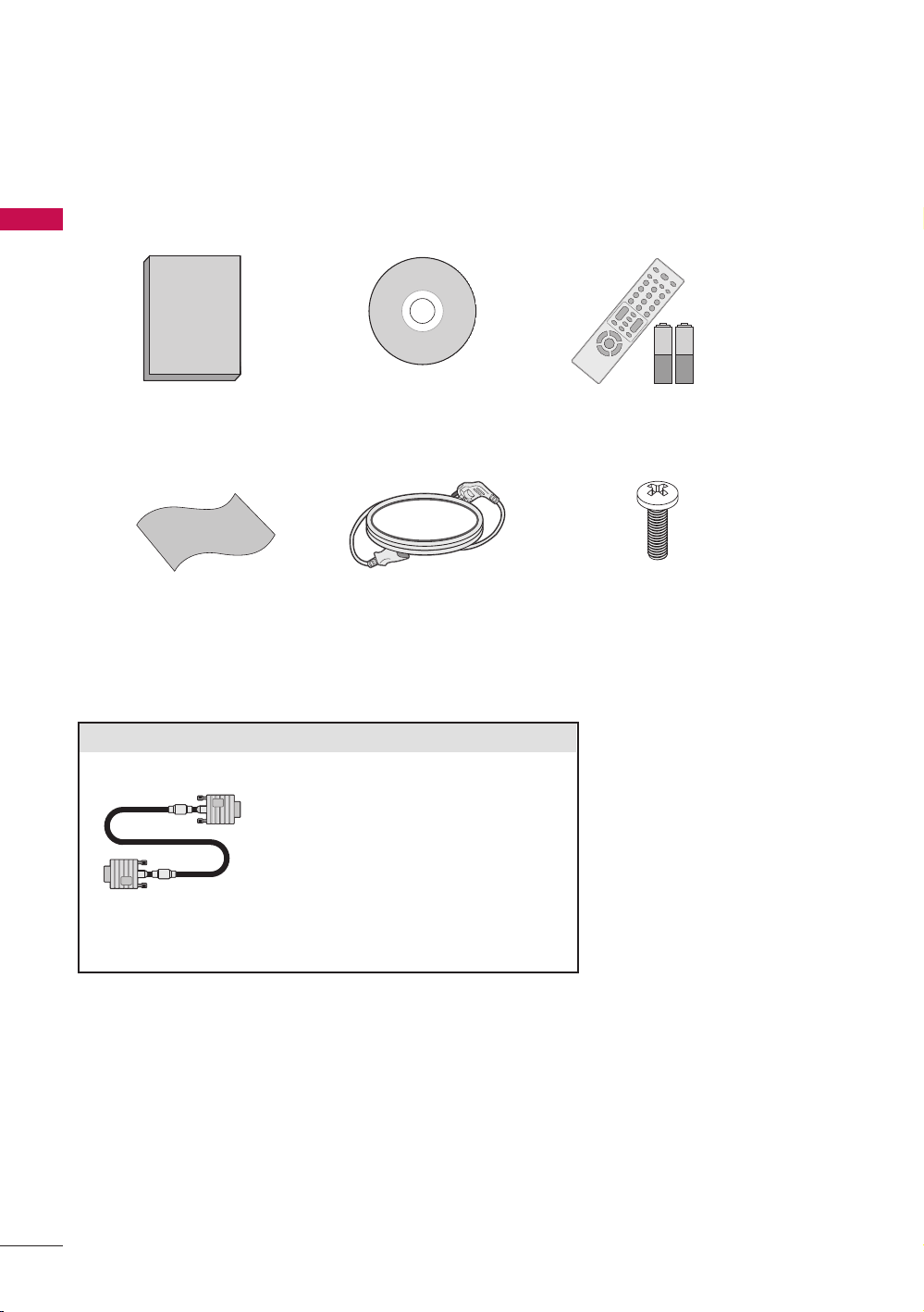
Ensure that the following accessories are included with your TV. If an accessory is
missing, please contact the dealer where you purchased the TV.
The accessories included may differ from the images below.
Remote Control, Batteries (AAA)
1.5V 1.5V
CD ManualOwner’s Manual
D-sub 15 pin cable
Power cablePolishing Cloth
Stand screws
(M4 x 6)
When using the VGA (D-sub 15
pin cable) PC connection, the
user must use shielded signal
interface cables with ferrite cores
to maintain standards compliance.
Option Extras
9
PREPARATION
Front Panel Information
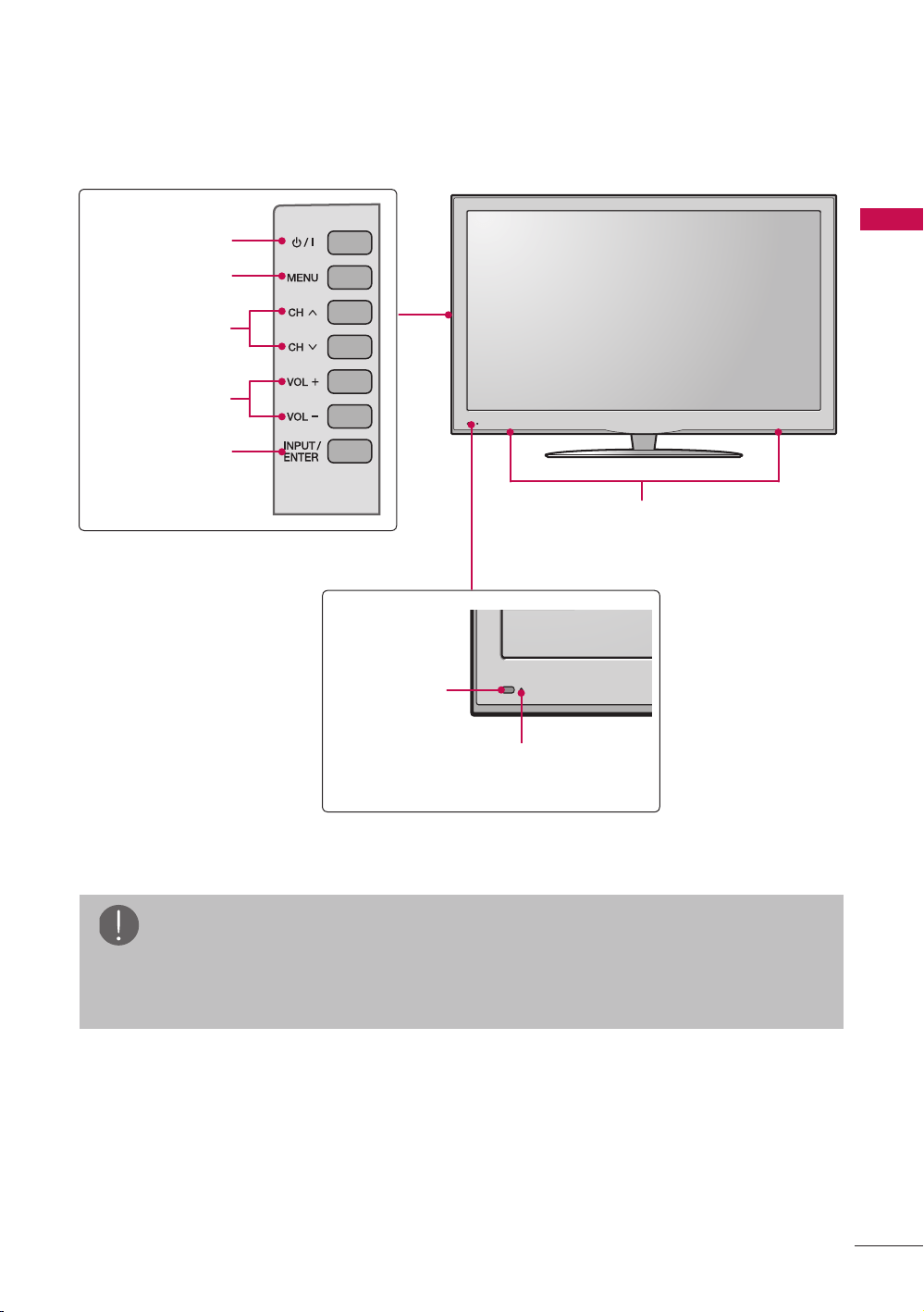
r Image shown may differ from your TV.
Remote
Control Sensor
Power/Standby
Indicator
Speaker
POWER button
MENU button
CHANNEL
buttons
VOLUME
buttons
INPUT button
NOTE
a Do not step on the glass stand or subject it to any impact.It may break, causing
possible injury from fragments of glass, or the TV may fall.
a Do not drag the TV. The floor or the product may be damaged.
10
PREPARATION
AC IN
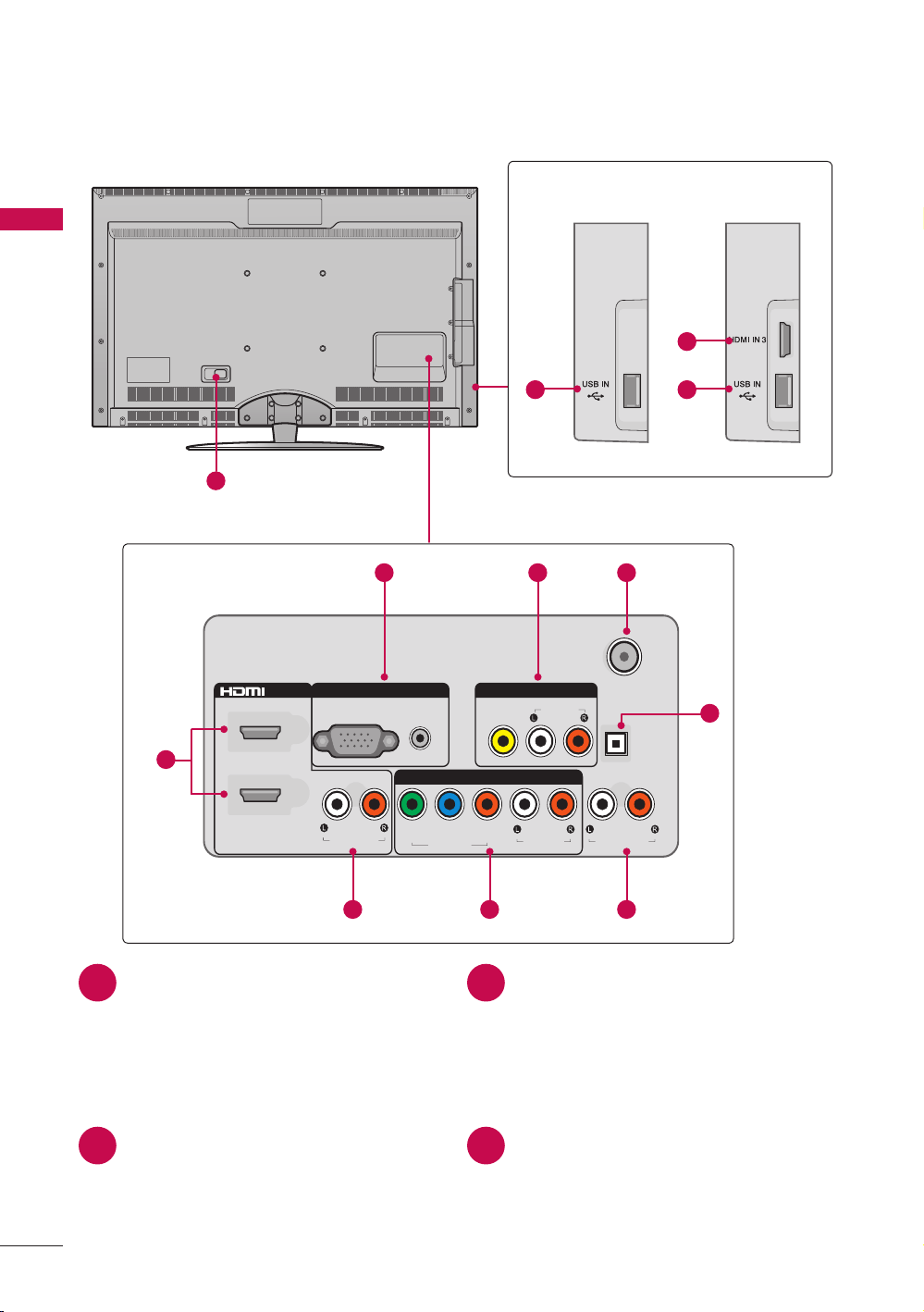
Back Panel Information
r Image shown may differ from your TV.
ANTENNA/
CABLE IN
VIDEO
AV INRGB IN
COMPONENT IN
P
R
P
B
Y
OPTICAL
DIGITAL
AUDIO OUT
AUDIO
AUDIO
AUDIO OUT
AUDIORGB (PC)
1
2
VIDEO
/ DVI IN
DVI AUDIO
9 9
10
1
2 3 4
5
11
678
47LD500
32LD400,
42LD400
HDMI/DVI IN, HDMI IN
Digital Connection.
Supports HD video and Digital audio.
Doesn’t support 480i.
Accepts DVI video using an adapter
or HDMI to DVI cable (not included).
RGB IN (PC)
Analog PC Connection. Uses a D-sub
15 pin cable (VGA cable).
AUDIO IN
0.32 cm (1/8 inch) headphone jack
for analog PC audio input.
AV (Audio/Video) IN
Analog composite connection.
Supports standard definition video
only (480i).
ANTENNA/CABLE IN
Connect over-the-air or cable signals
to this jack.
1 2
3 4
11
PREPARATION
OPTICAL DIGITAL AUDIO OUT
Digital optical audio output for
use with amps and home theater
systems.
Note: In standby mode, this port
doesn’t work.
AUDIO OUT
For use with external speakers.
COMPONENT IN
Analog Connection.
Supports HD.
Uses a red, green, and blue cable for
video & red and white for audio.
DVI AUDIO IN
Digital Connection.
USB INPUT
Used for viewing photos and listening
to MP3s.
HDMI IN 3
Digital Connection.
Supports HD video and Digital audio.
Doesn’t support 480i.
* HDMI 3: For 47LD500
Power Cord Socket
For operation with AC power.
Caution: Never attempt to operate
the TV on DC power.
5 6
7 8
9 10
11
CAUTION
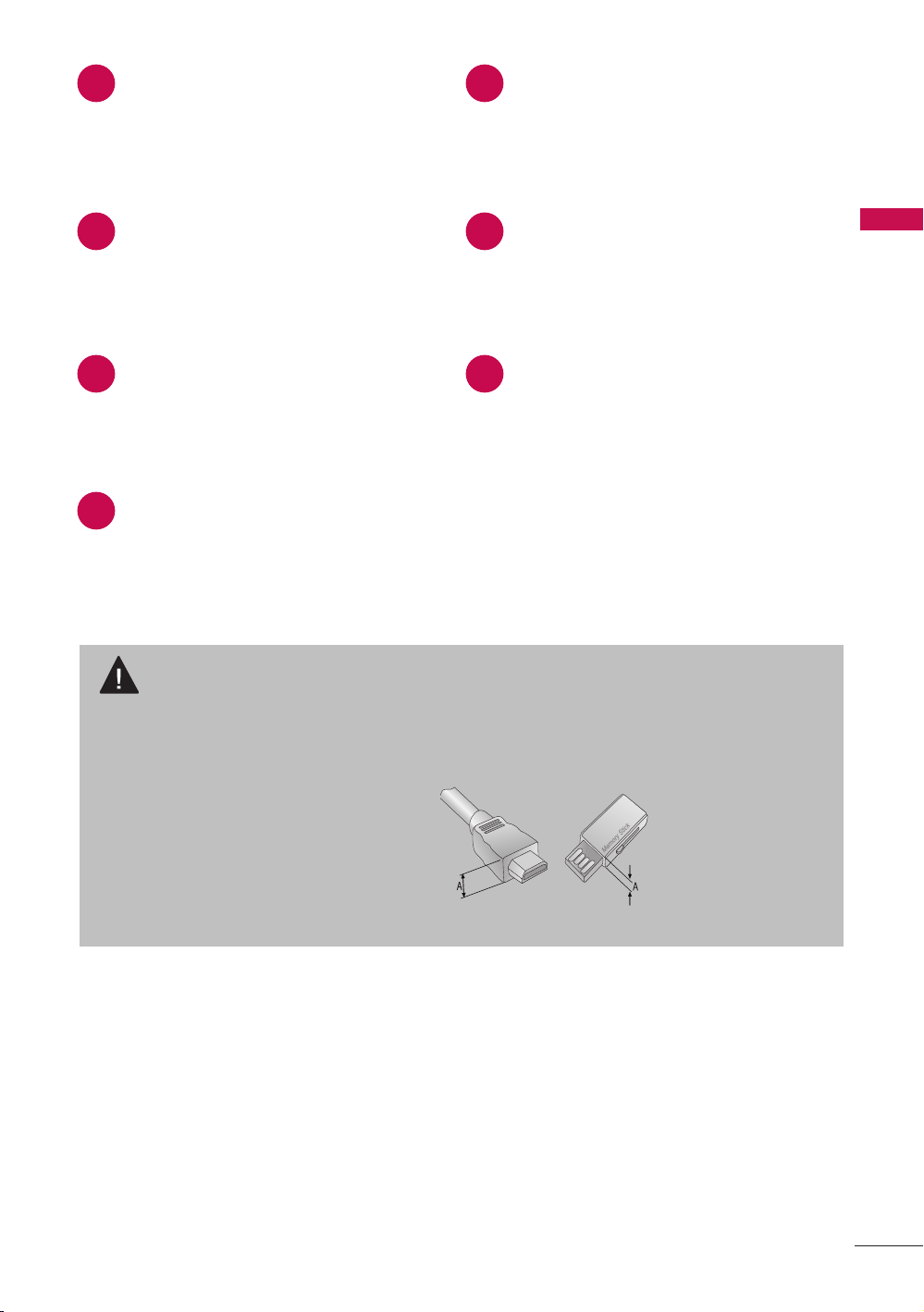
For HDMI IN 3 and USB INPUT
a For an optimal connection, HDMI cables and USB devices should have bezels
less than 10 mm (0.39 inches) thick.
*A is smaller or equals to 10 mm (0.39 inches)
Precautions when using the USB
device
a The recommended capacity is 1
TB or less for a USB external hard
disk and 32 GB or less for USB
memory.
12
PREPARATION
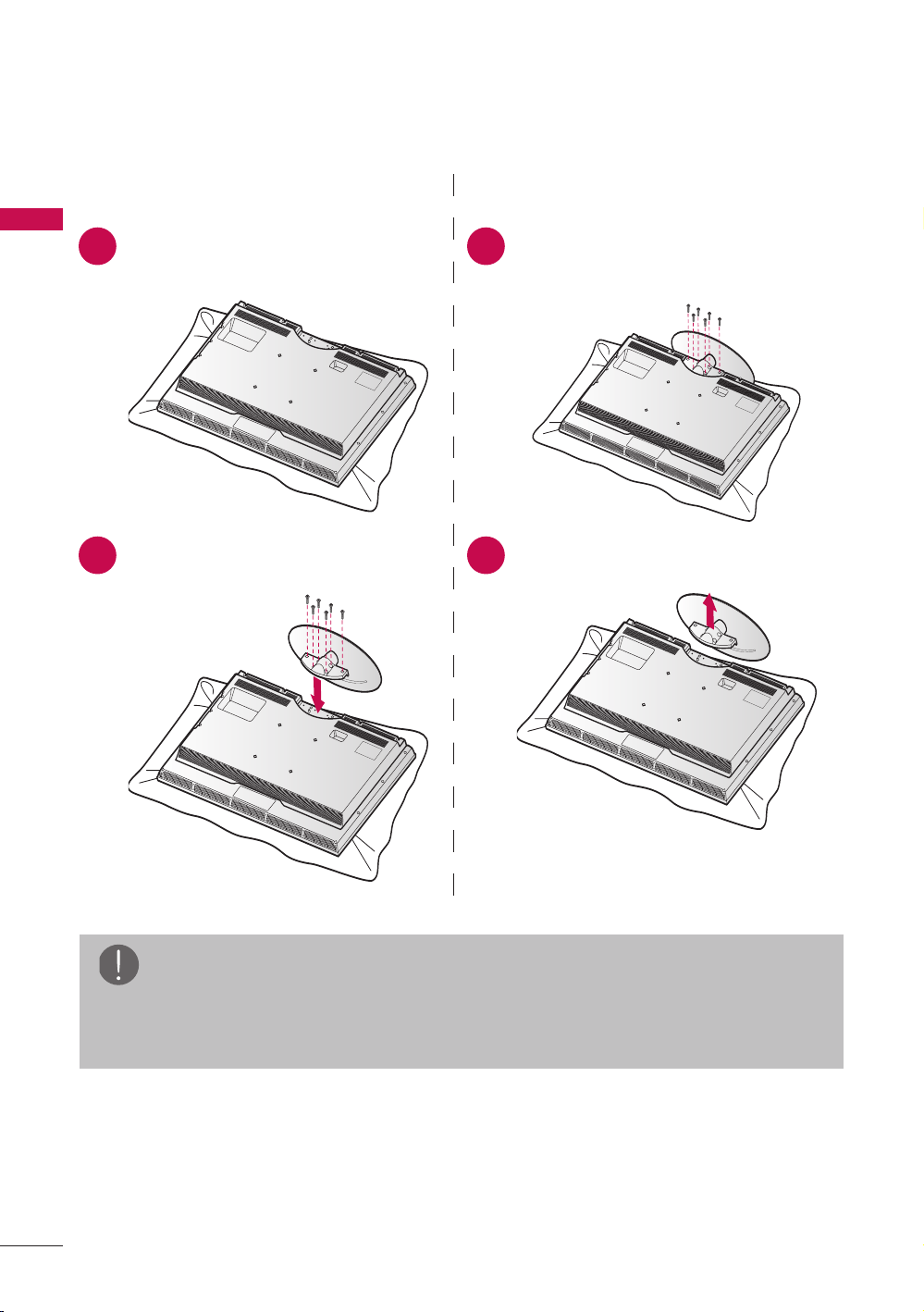
Stand Instructions
r Image shown may differ from your TV.
INSTALLATION DETACHMENT
Carefully place the TV screen side
down on a cushioned surface to
protect the screen from damage.
Carefully place the TV screen side
down on a cushioned surface to
protect the screen from damage.
Assemble the TV and install the 6
screws into the holes as shown.
Remove the screws and detach the
stand from the TV.
1 1
2 2
NOTE
a When assembling the desk type stand, make sure the screws are fully tightened
(If not tightened fully, the TV can tilt forward after the product installation). Do
not over tighten.
(M4 x 6)
13
PREPARATION
VESA Wall Mounting
Install your wall mount on a solid wall perpendicular to the floor. When attaching to other
building materials, please contact your nearest installer.
If installed on a ceiling or slanted wall, it may fall and result in severe personal injury.
Wall mounting bracket is sold separatedly.
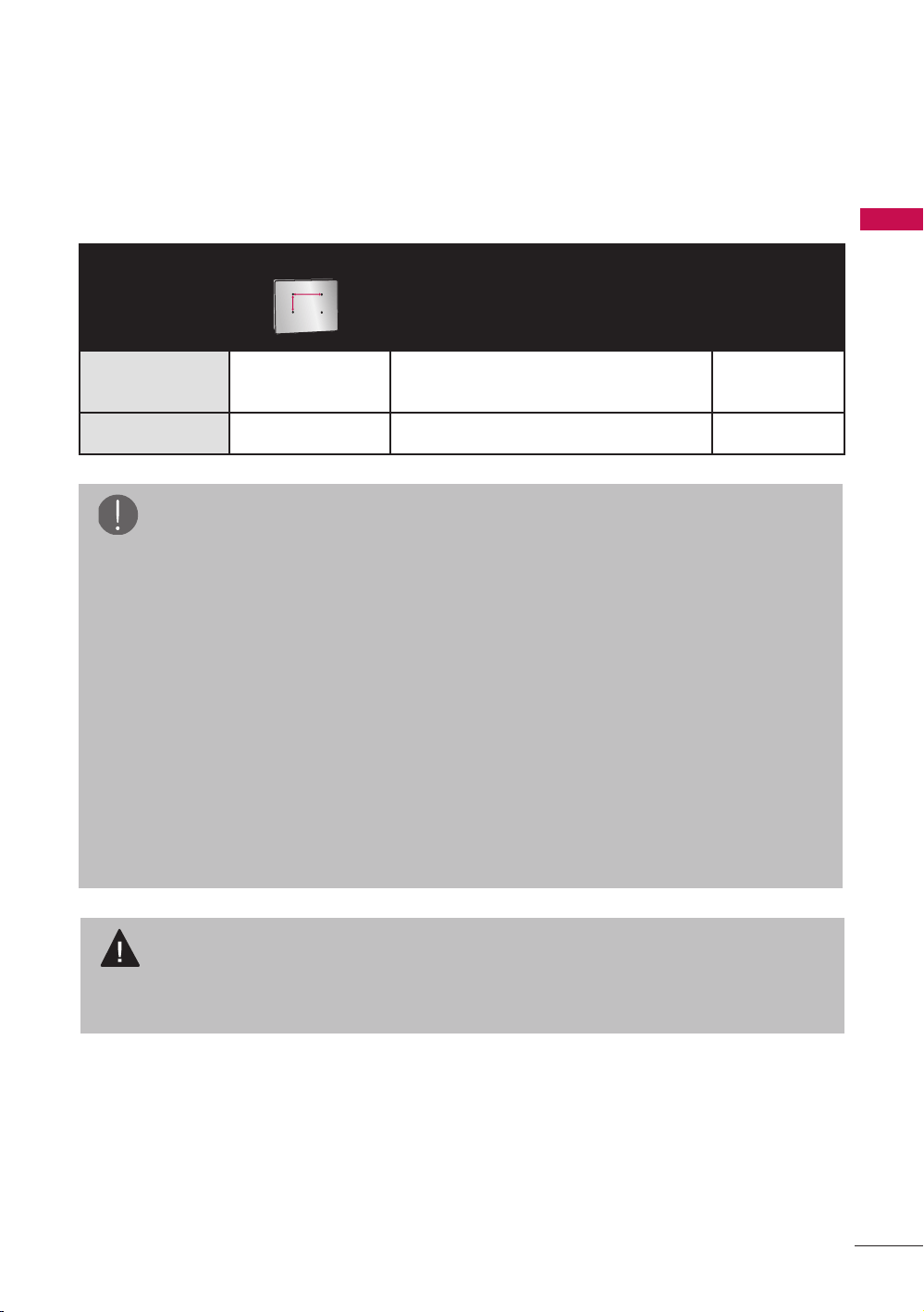
Model
VESA (A*B)
Standard Screw Quantity
32LD400,
42LD400
200 * 200 M6 4
47LD500 400 * 200 M6 4
A
B
NOTE
a Screw length needed depends on
the wall mount used. For further
information, refer to the instructions
included with the mount.
a Standard dimensions for wall mount
kits are shown in the table.
a When purchasing our wall mount kit,
a detailed installation manual and
all parts necessary for assembly are
provided.
a Do not use screws longer than the
standard dimension, as they may
cause damage to the inside to the
T V.
a For wall mounts that do not comply
with the VESA standard screw
specifications, the length of the
screws may differ depending on their
specifications.
a Do not use screws that do not comply
with the VESA standard screw
specifications.
Do not use fasten the screws too
strongly, this may damage the TV
or cause the TV to a fall, leading to
personal injury. LG is not liable for
these kinds of accidents.
a LG is not liable for TV damage or
personal injury when a non-VESA or
non specified wall mount is used or
the consumer fails to follow the TV
installation instructions.
CAUTION
a Do not install your wall mount kit while your TV is turned on. It may result in
personal injury due to electric shock.
14
PREPARATION
Desktop Pedestal Installation
r Image shown may differ from your TV.
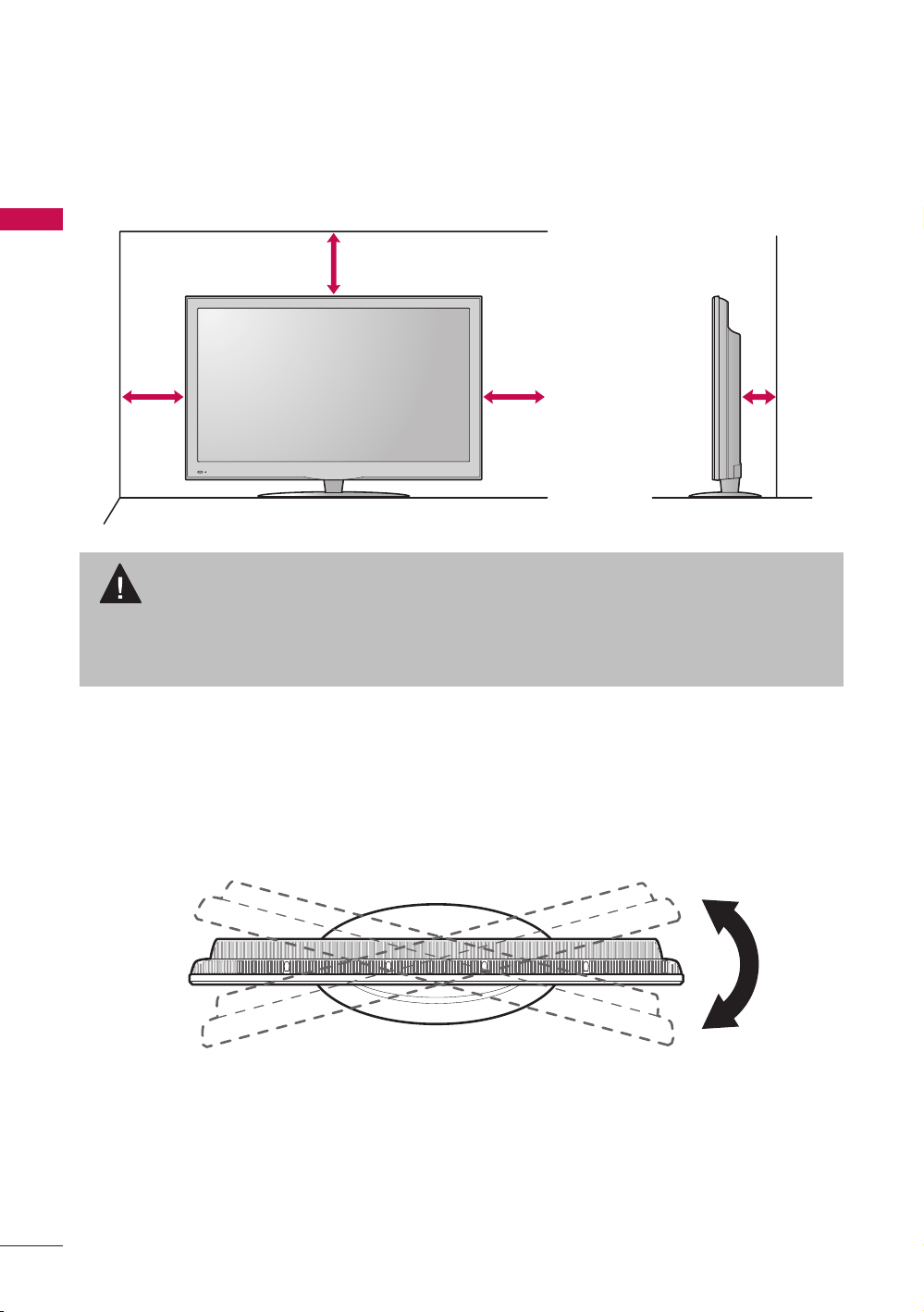
For proper ventilation, allow a clearance of 10.1 cm (4 inches) on all four sides from the
wall.
CAUTION
a Ensure adequate ventilation by following the clearance recommendations.
a Do not mount near or above any type of heat source.
10.1 cm (4 inches)
10.1 cm (4 inches)
10.1 cm
(4 inches)
10.1 cm
(4 inches)
Swivel Stand
After installing the TV, you can adjust the TV set manually to the left or right direction by
30º to suit your viewing position.
15
PREPARATION
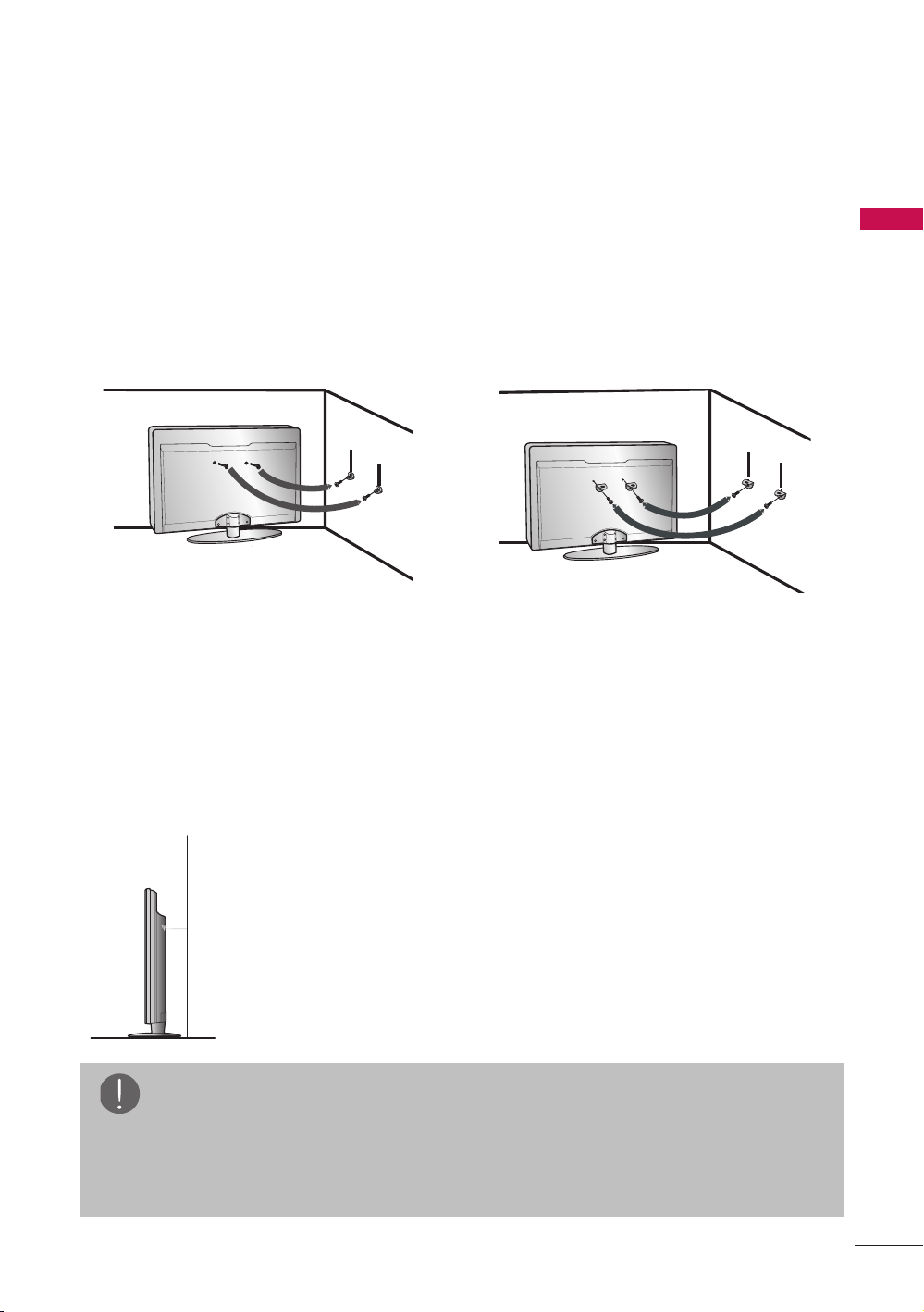
Securing the TV to the Wall to Prevent Falling
When the TV is Used on a Stand
r You should purchase necessary components to prevent the TV from tipping over
(when not using a wall mount).
r Image shown may differ from your TV.
We recommend that you set up the TV close to a wall so it cannot fall over if pushed
backwards.
Additionally, we recommend that the TV be attached to a wall so it cannot be pulled in
a forward direction, potentially causing injury or damaging the product.
Caution: Please make sure that children don’t climb on or hang from the TV.
r Insert the eye-bolts (or TV brackets and bolts) to tighten the product to the wall as
shown in the picture.
* If your product has the bolts in the eye-bolts position before inserting the eye-bolts,
loosen the bolts.
* Insert the eye-bolts or TV brackets/bolts and tighten them securely in the upper
holes.
Secure the wall brackets with the bolts (sold separately) to the wall. Match the height
of the bracket that is mounted on the wall to the holes in the product.
Ensure the eye-bolts or brackets are tightened securely.
r Use a sturdy rope (sold separately) to tie the product. It is safer
to tie the rope so it becomes horizontal between the wall and the
product.
NOTE
a Use a platform or cabinet strong enough and large enough to support the size
and weight of the TV.
a To use the TV safely make sure that the height of the bracket on the wall and the
one on the TV are the same.
16
PREPARATION
ANTENNA/
CABLE IN
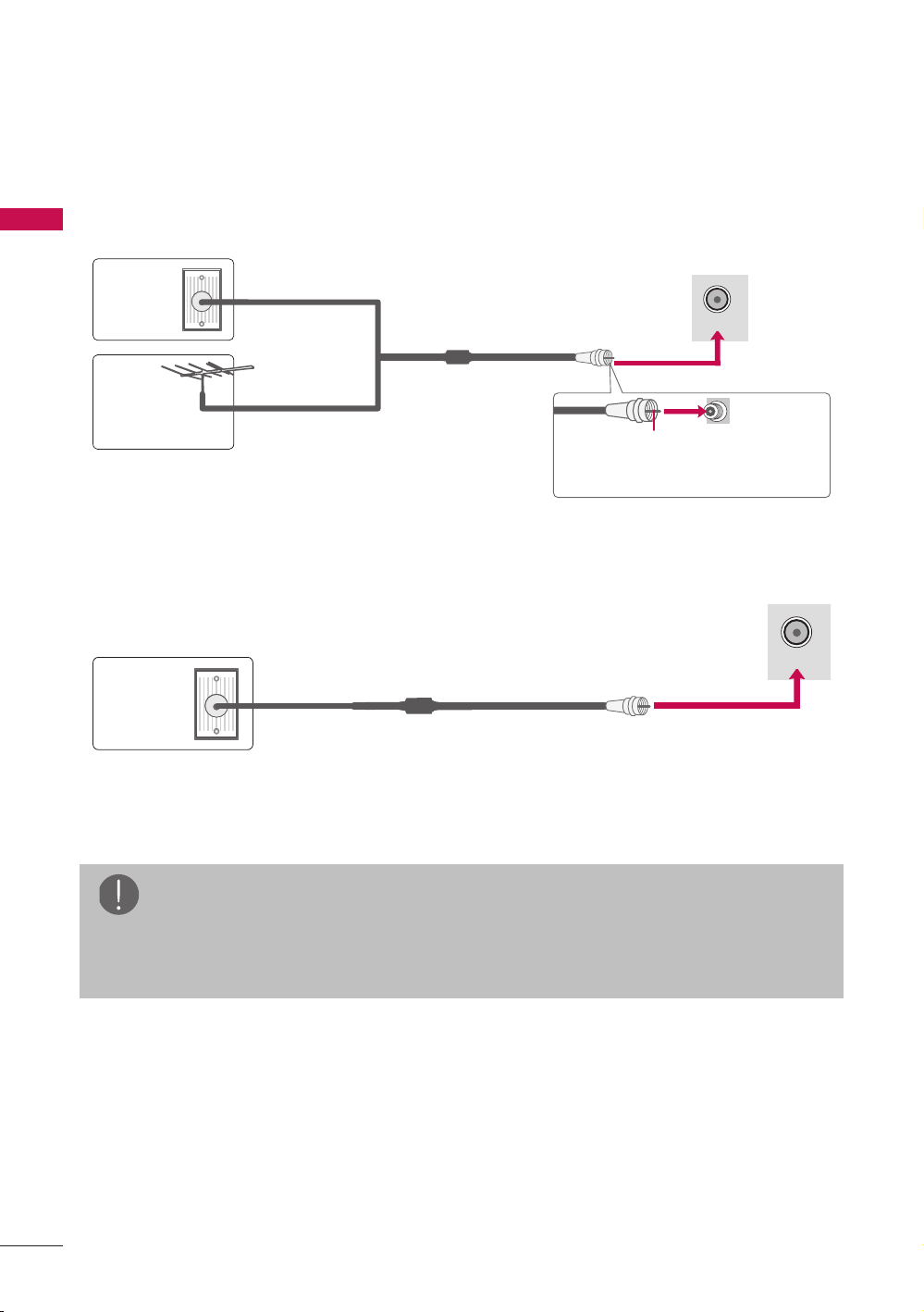
Antenna or Cable Connection
1. Antenna (Analog or Digital)
Wall Antenna Socket or Outdoor Antenna without a Cable Box Connections.
For optimum picture quality, adjust antenna direction if needed.
ANTENNA/
CABLE IN
2. Cable
NOTE
a If the antenna needs to be split for two TV’s, install a 2-Way Signal Splitter.
a For much more information about antennas visit our Knowledgebase at http://
lgknowledgebase.com. Search for antenna.
Wall
Antenna
Socket
Outdoor
Antenna
(VHF, UHF)
Cable TV
Wall Jack
Copper Wire
Single-family Dwellings /Houses
(Connect to wall jack for outdoor antenna)
Multi-family Dwellings/Apartments
(Connect to wall antenna socket)
RF Coaxial Wire (75 Ω)
RF Coaxial Wire (75 Ω)
Be careful not to bend the copper
wire when connecting the antenna.
17
EXTERNAL EQUIPMENT SETUP
EXTERNAL EQUIPMENT SETUP
HD Receiver Setup
This TV can receive digital over-the-air/digital cable signals without an external digital
set-top box. However, if you do receive digital signals from a digital set-top box or other
digital external device.
r To prevent the equipment damage, never plug in any power cords until you have
finished connecting all equipment.
r The pictures in this section may be slightly different from your model.
ANTENNA
/
C
ABLE IN
VIDEO
A
V IN
A
A
R
G
B I
N
C
OMPONENT IN
P
R
P
B
Y
O
PTI
C
A
L
DIGIT
AL
T
T
A
UDIO OU
T
A
UDI
O
A
U
DI
O
A
U
DI
O
OUT
A
U
DI
O
RG
B
(
P
C)
1
2
V
IDE
O
/ D
VI IN
D
D
D
VI A
D
D
U
DI
O
COMPONENT IN
PRPBY
AUDIO
VIDEO
Y L RP
B
P
R
1 2
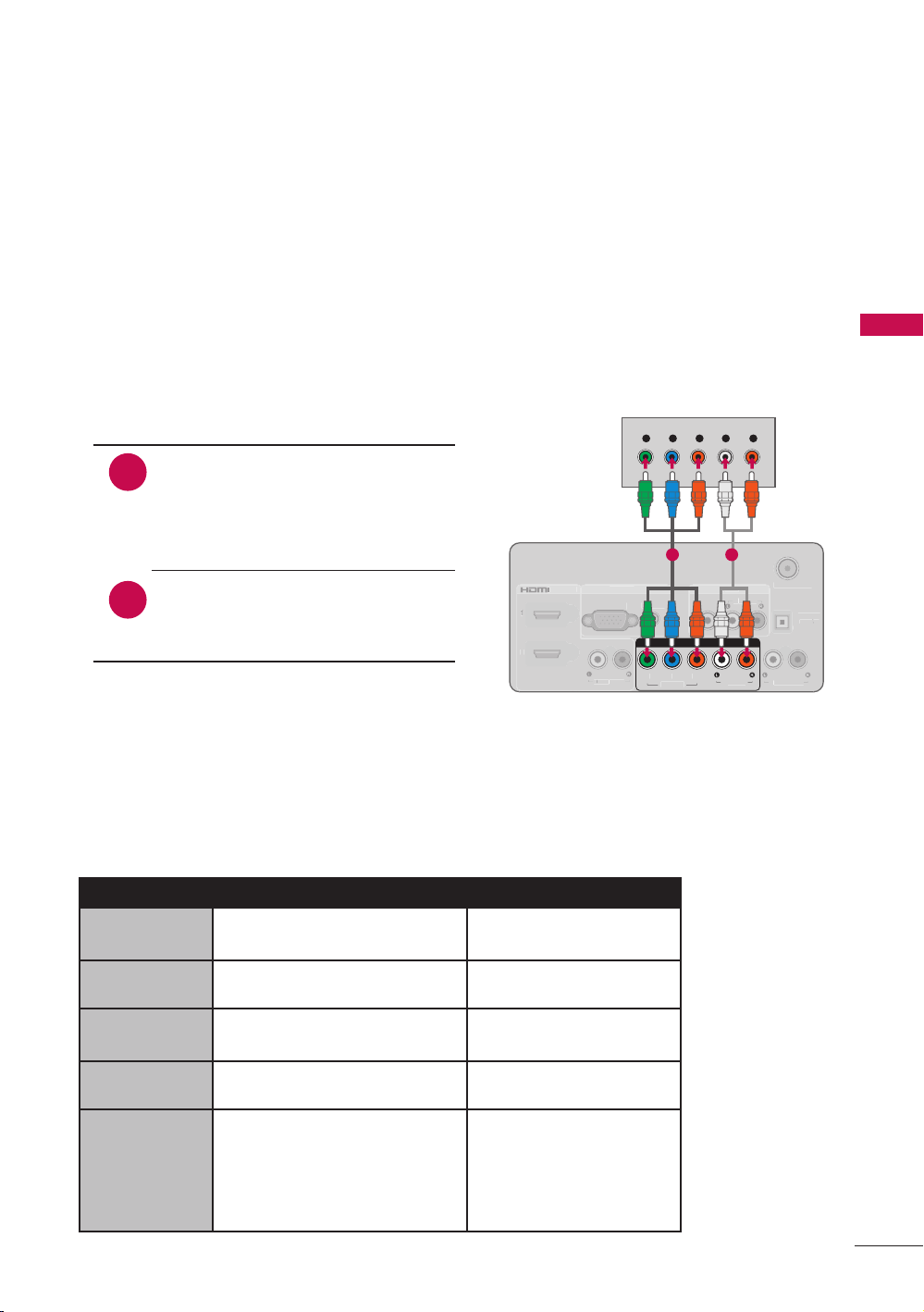
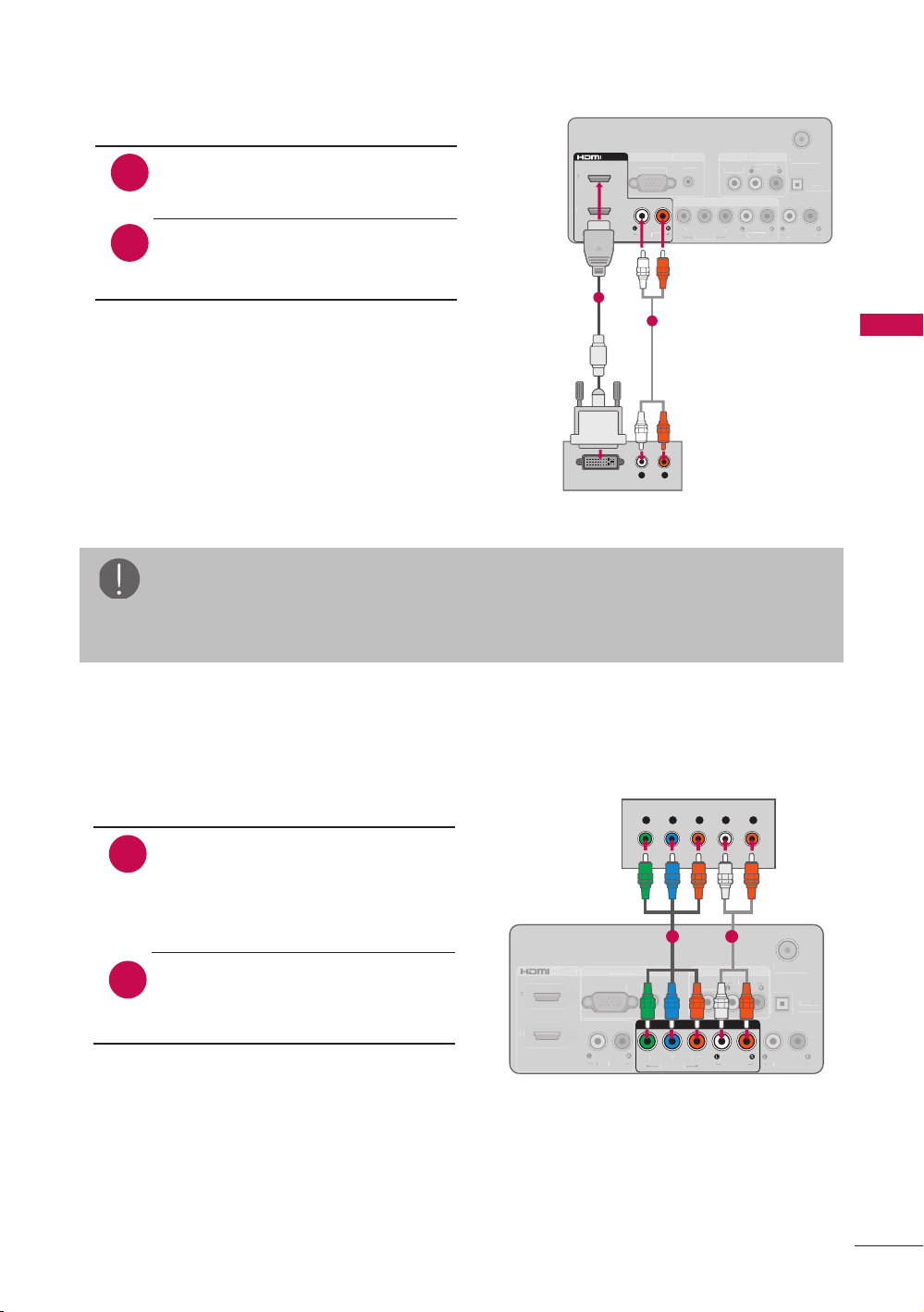
Component Connection
1. How to connect
1
2
Connect the video outputs (Y, PB,
P
R) of the digital set-top box to
the COMPONENT IN VIDEO jack
on the TV. Match the jack colors
(Y = green, P
B = blue, and PR =
red).
Connect the audio output of
the digital set-top box to the
COMPONENT IN AUDIO jack on
the TV.
2. How to use
r Turn on the digital set-top box.
(Refer to the owner’s manual for the digital set-top box operation.)
r Select the Component input source on the TV using the INPUT button on the remote
control.
Y, CB/PB, CR/PR
Resolution Horizontal Frequency(kHz) Vertical Frequency(Hz)
720x480i
15.73
15.73
59.94
60.00
720x480p
31.47
31.50
59.94
60.00
1280x720p
44.96
45.00
59.94
60.00
1920x1080i
33.72
33.75
59.94
60.00
1920x1080p
26.97
27.00
33.71
33.75
67.43 2
67.5 0
23.976
24.00
29.97
30.00
59.94
60.00
18
EXTERNAL EQUIPMENT SETUP
ANTENNA
/
C
ABLE IN
VIDEO
A
V IN
A
A
R
G
B IN
C
OMPONENT IN
P
R
P
B
Y
O
PTI
C
A
L
DIGIT
AL
T
T
A
U
DI
O
OUT
A
UDI
O
A
U
DI
O
A
U
DI
O
OUT
A
U
DI
O
RG
B
(
P
C)
1
2
V
IDE
O
/ D
VI IN
D
D
D
VI A
D
D
U
DI
O
1
2
/ DV I IN
HDMI OUTPUT
1
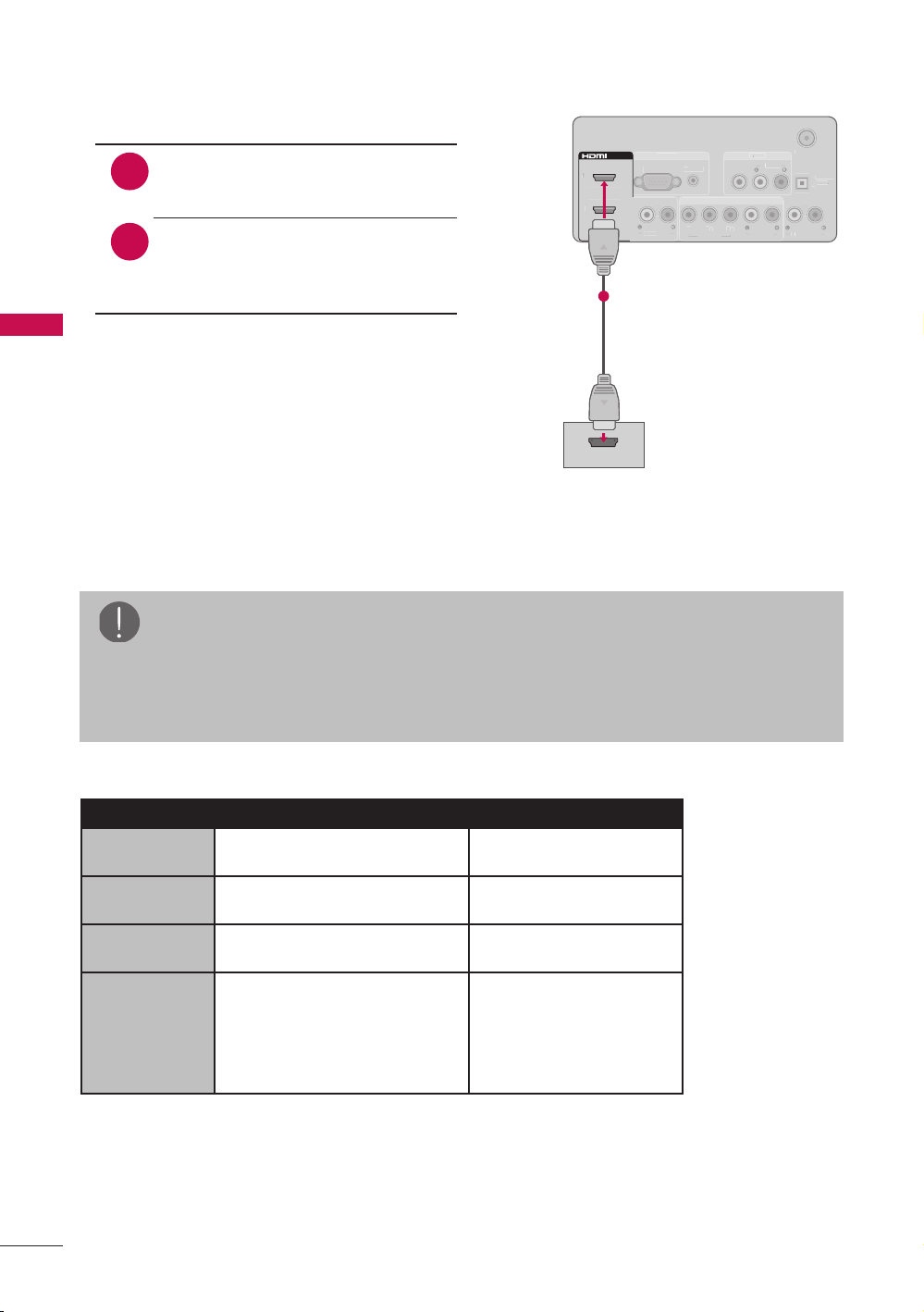
HDMI Connection
1. How to connect
1
2
Connect the digital set-top box
to HDMI/DVI IN 1, 2, or 3* jack
on the TV.
No separate audio connection is
necessary.
HDMI supports both audio and
video.
2. How to use
r Turn on the digital set-top box.
(Refer to the owner’s manual for the digital
set-top box operation.)
r Select the HDMI 1, HDMI 2, or HDMI 3* input
source on the TV using the INPUT button on
the remote control.
* HDMI 3: For 47LD500
HDMI-DTV
Resolution Horizontal Frequency(kHz) Vertical Frequency(Hz)
720x480p
31.47
31.50
59.94
60.00
1280x720p
44.96
45.00
59.94
60.00
1920x1080i
33.72
33.75
59.94
60.00
1920x1080p
26.97
27.00
33.71
33.75
67.43 2
67.5 0
23.976
24.00
29.97
30.00
59.94
60.00
NOTE
a If an HDMI cable doesn’t support High Speed HDMI, it can cause flickers or no
screen display. In this case use the latest cables that support High Speed HDMI.
a HDMI Audio Supported Format: Dolby Digital (32 kHz, 44.1 kHz, 48 kHz), Linear
PCM (32 kHz, 44.1 kHz, 48 kHz)
19
EXTERNAL EQUIPMENT SETUP
ANTENNA
/
C
ABLE IN
VIDEO
A
V IN
A
A
R
G
B IN
C
OMPONENT IN
P
R
P
B
Y
O
PTI
C
A
L
DIGIT
AL
T
T
A
U
DI
O
OUT
A
UDI
O
A
U
DI
O
A
U
DI
O
OUT
A
U
DI
O
RG
B
(
P
C)
1
2
V
IDE
O
/ D
VI IN
D
D
D
VI A
D
D
U
DI
O
1
2
/ DV I IN
DV I AUDIO
1
L R
DVI OUTPUT
AUDIO
2
DVI to HDMI Connection
1. How to connect
1
2
Connect the digital set-top box
to HDMI/DVI IN 1 or 2 jack on
the TV.
Connect the digital set-top box
audio output to the DVI AUDIO
jack on the TV.
2. How to use
r Turn on the digital set-top box.
(Refer to the owner’s manual for the digital
set-top box operation.)
r Select the HDMI 1 or HDMI 2 input source on
the TV using the INPUT button on the remote
control.
NOTE
a A DVI to HDMI cable or adapter is required for this connection.
DVI doesn’t support audio, so a separate audio connection is necessary.
DVD Setup
ANTENNA
/
C
ABLE IN
VIDEO
A
V IN
A
A
R
G
B I
N
C
OMPONENT IN
P
R
P
B
Y
O
PTI
C
A
L
DIGIT
AL
T
T
A
UDIO OU
T
A
UDI
O
A
U
DI
O
A
U
DI
O
OUT
A
U
DI
O
RG
B
(
P
C)
1
2
V
IDE
O
/ D
VI IN
D
D
D
VI A
D
D
U
DI
O
COMPONENT IN
PRPBY
AUDIO
VIDEO
Y L RP
B
P
R
1 2
Component Connection
1. How to connect
1
2
Connect the video outputs (Y, PB,
P
R) of the digital set-top box to
the COMPONENT IN VIDEO jack
on the TV. Match the jack colors
(Y = green, P
B = blue, and PR =
red).
Connect the audio output of
the digital set-top box to the
COMPONENT IN AUDIO jack on
the TV.
2. How to use
r Turn on the DVD player, insert a DVD.
r Select the Component input source on the TV using the INPUT button on the remote
control.
r Refer to the DVD player’s manual for operating instructions.

20
EXTERNAL EQUIPMENT SETUP
ANTENNA
/
C
ABLE IN
VIDEO
A
V IN
A
A
R
G
B I
N
C
OMPONENT IN
P
R
P
B
Y
O
PTI
C
A
L
DIGIT
AL
T
T
A
U
DI
O
OUT
A
UDI
O
A
U
DI
O
A
U
DI
O
OUT
A
U
DI
O
RG
B
(
P
C)
1
2
V
IDE
O
/ D
VI IN
D
D
D
VI A
D
D
U
DI
O
VIDEO
AV IN
AUDIO
L R
VIDEO
AUDIO
1
Composite (RCA) Connection
1. How to connect
1
Connect the AUDIO/VIDEO
jacks between TV and DVD.
Match the jack colors (Video =
yellow, Audio Left = white, and
Audio Right = red)
2. How to use
r Turn on the DVD player, insert a DVD.
r Select the AV input source on the TV
using the INPUT button on the remote
control.
r Refer to the DVD player’s manual for
operating instructions.
HDMI Connection
ANTENNA
/
C
ABLE IN
VIDEO
A
V IN
A
A
R
G
B IN
C
OMPONENT IN
P
R
P
B
Y
O
PTI
C
A
L
DIGIT
AL
T
T
A
U
DI
O
OUT
A
UDI
O
A
U
DI
O
A
U
DI
O
OUT
A
U
DI
O
RG
B
(
P
C)
1
2
V
IDE
O
/ D
VI IN
D
D
D
VI A
D
D
U
DI
O
1
2
/ DV I IN
HDMI OUTPUT
1
1. How to connect
1
2
Connect the digital set-top box
to HDMI/DVI IN 1, 2, or 3* jack
on the TV.
No separate audio connection is
necessary.
HDMI supports both audio and
video.
2. How to use
r Select the HDMI 1, HDMI 2, or HDMI 3* input
source on the TV using the INPUT button on
the remote control.
r Refer to the DVD player’s manual for
operating instructions.
* HDMI 3: For 47LD500
NOTE
a If an HDMI cable doesn’t support High Speed HDMI, it can cause flickers or no
screen display. In this case use the latest cables that support High Speed HDMI.
a HDMI Audio Supported Format: Dolby Digital (32 kHz, 44.1 kHz, 48 kHz), Linear
PCM (32 kHz, 44.1 kHz, 48 kHz)
21
EXTERNAL EQUIPMENT SETUP
VCR Setup
ANTENNA/
CABLE IN
L R
S-VIDEOVIDEO
AUDIO
OUTPUT
SWITCH
ANT IN
ANT OUT
1
2
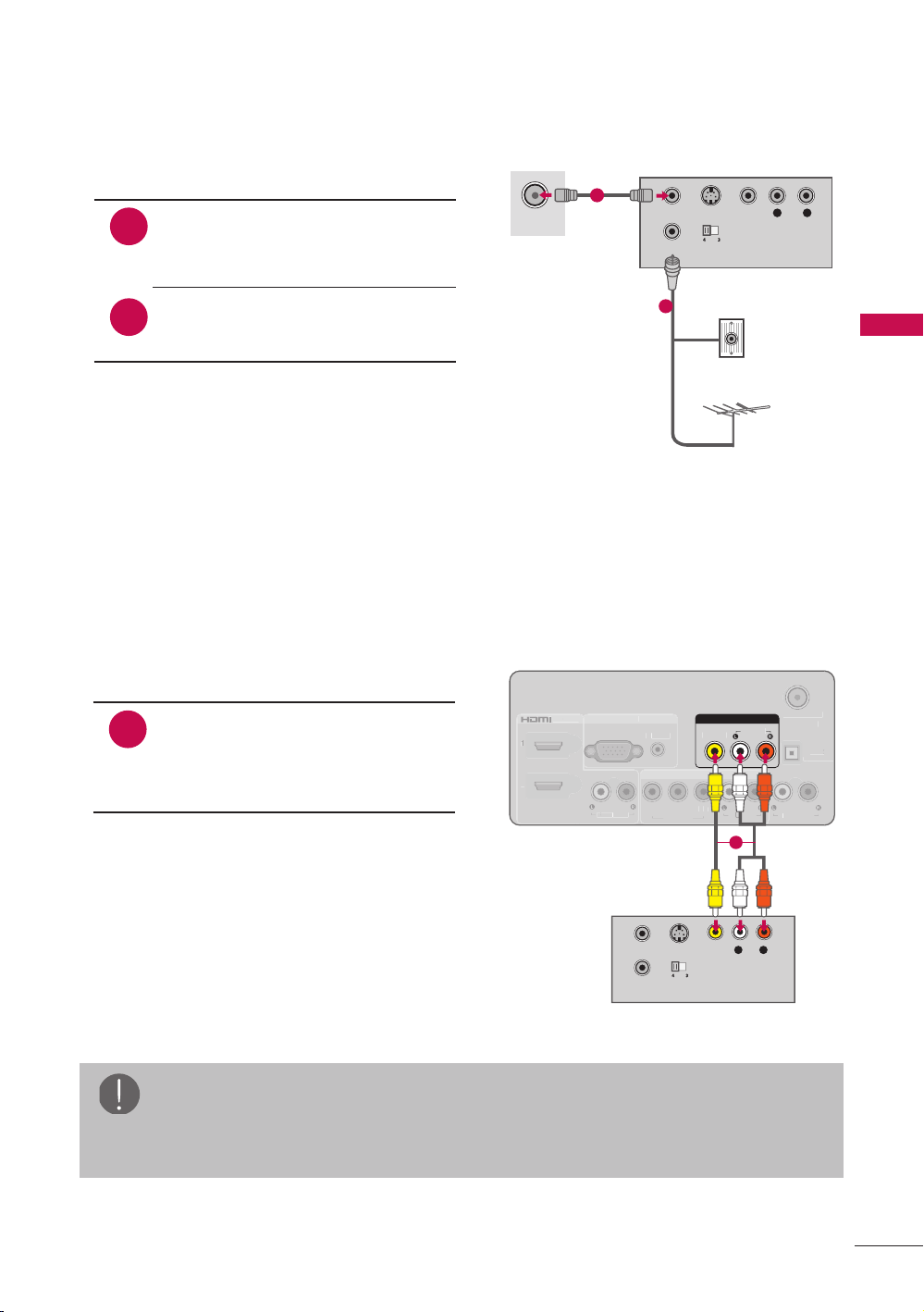
Antenna Connection
1. How to connect
1
2
Connect the RF antenna out
socket of the VCR to the
ANTENNA/CABLE IN socket on
the TV.
Connect the antenna cable to
the RF antenna in socket of the
VCR.
2. How to use
r Set VCR output switch to 3 or 4 and
then tune TV to the same channel
number.
r Insert a video tape into the VCR and
press PLAY on the VCR (Refer to the
VCR owner’s manual).
ANTENNA
/
C
ABLE IN
VIDEO
A
V IN
A
A
R
G
B I
N
C
OMPONENT IN
P
R
P
B
Y
O
PTI
C
A
L
DIGIT
AL
T
T
A
U
DI
O
OUT
A
UDI
O
A
U
DI
O
A
U
DI
O
OUT
A
U
DI
O
RG
B
(
P
C)
1
2
V
IDE
O
/ D
VI IN
D
D
D
VI A
D
D
U
DI
O
VIDEO
AV IN
AUDIO
S-VIDEO
OUTPUT
SWITCH
ANT IN
ANT OUT
L R
VIDEO
AUDIO
1
Composite (RCA) Connection
1. How to connect
1
Connect the AUDIO/VIDEO
jacks between TV and VCR.
Match the jack colors (Video =
yellow, Audio Left = white, and
Audio Right = red)
2. How to use
r Insert a video tape into the VCR and
press PLAY on the VCR. (Refer to the
VCR owner’s manual.)
r Select the AV input source on the TV
using the INPUT button on the remote
control.
NOTE
a If you have a mono VCR, connect the audio cable from the VCR to the AUDIO
L(MONO) jack of the TV.
Wall Jack
Antenna
22
EXTERNAL EQUIPMENT SETUP
ANTENNA
/
C
ABLE IN
VIDEO
A
V IN
A
A
R
G
B I
N
C
OMPONENT IN
P
R
P
B
Y
O
PTI
C
A
L
DIGIT
AL
T
T
A
U
DI
O
OUT
A
UDI
O
A
U
DI
O
A
U
DI
O
OUT
A
U
DI
O
RG
B
(
P
C)
1
2
V
IDE
O
/ D
VI IN
D
D
D
VI A
D
D
U
DI
O
VIDEO
AV IN
AUDIO
L R
VIDEO
AUDIO
1
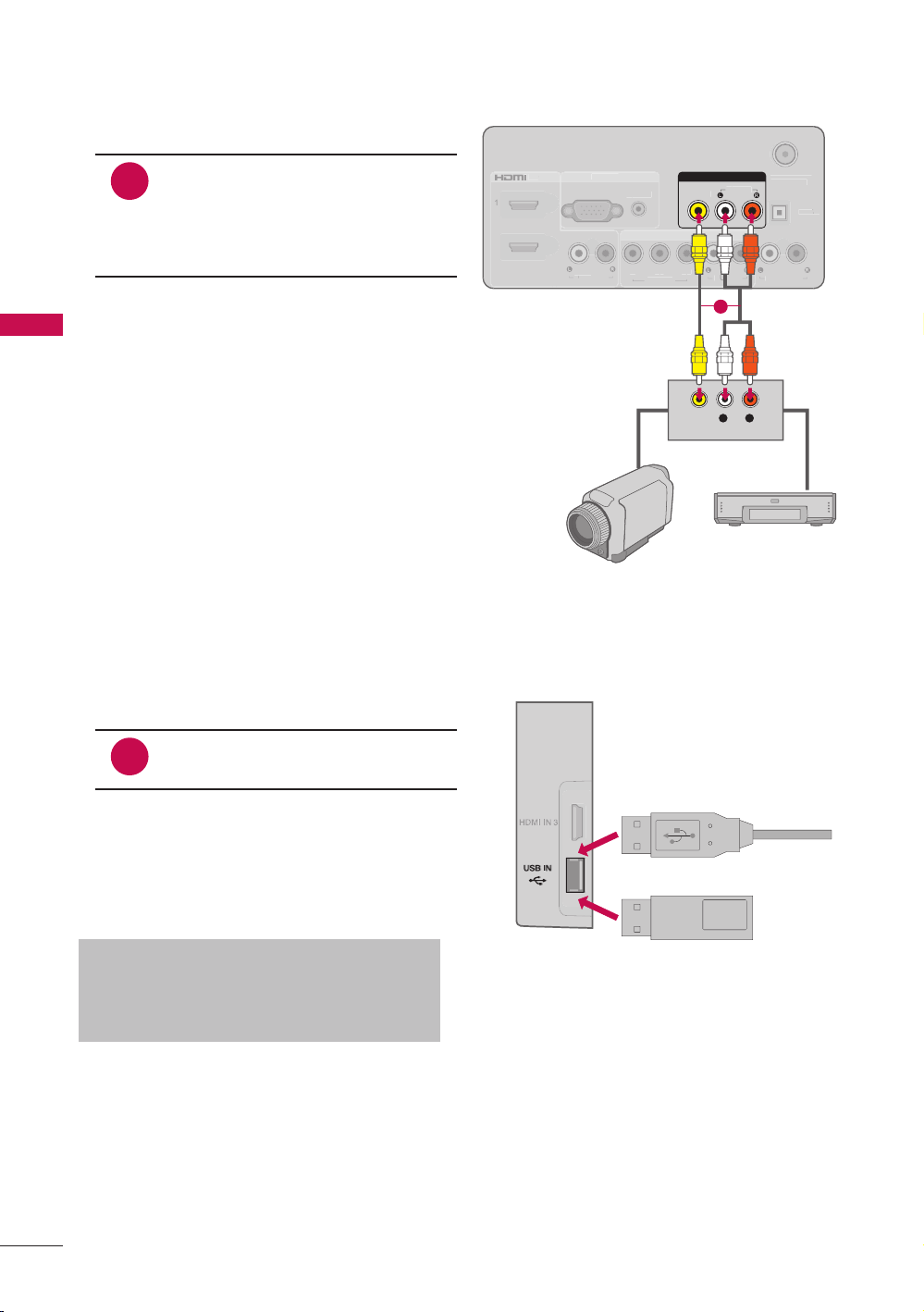
1. How to connect
1
Connect the AUDIO/VIDEO
jacks between TV and external
equipment. Match the jack
colors. (Video = yellow, Audio
Left = white, and Audio Right =
red)
2. How to use
r Select the AV input source on the TV
using the INPUT button on the remote
control.
r Operate the corresponding external
equipment.
Other A/V Source Setup
Camcorder
Video Game Set
Memory Key
1. How to connect
1
Connect the USB device to the
USB IN jack on the side of TV.
2. How to use
r After connecting the USB IN jack, you
use the USB function.
USB Connection
Precautions when using the USB device
a The recommended capacity is 1 TB or
less for a USB external hard disk and
32 GB or less for USB memory.
23
EXTERNAL EQUIPMENT SETUP
NOTE
a When connecting with external audio equipment, such as amplifiers or speakers,
you can turn the TV speakers off in the menu.
Audio Out Connection
Send the TV’s audio to external audio equipment via the Audio Output port.
Digital Connection to a Home Theater Audio System
If you want to enjoy digital broadcasting through 5.1-channel speakers, connect the
OPTICAL DIGITAL AUDIO OUT terminal on the back of TV to a Home Theater (or amp).
ANTENNA
/
C
ABLE IN
VIDEO
A
V IN
A
A
R
G
B I
N
C
OMPONENT IN
P
R
P
B
Y
O
PTI
C
A
L
DIGIT
AL
T
T
A
U
DI
O
OUT
A
UDI
O
A
U
DI
O
A
U
DI
O
OUT
A
U
DI
O
RG
B
(
P
C)
1
2
V
IDE
O
/ D
VI IN
D
D
D
VI A
D
D
U
DI
O
OPTICAL
DIGITA L
AUDIO OUT
1
2
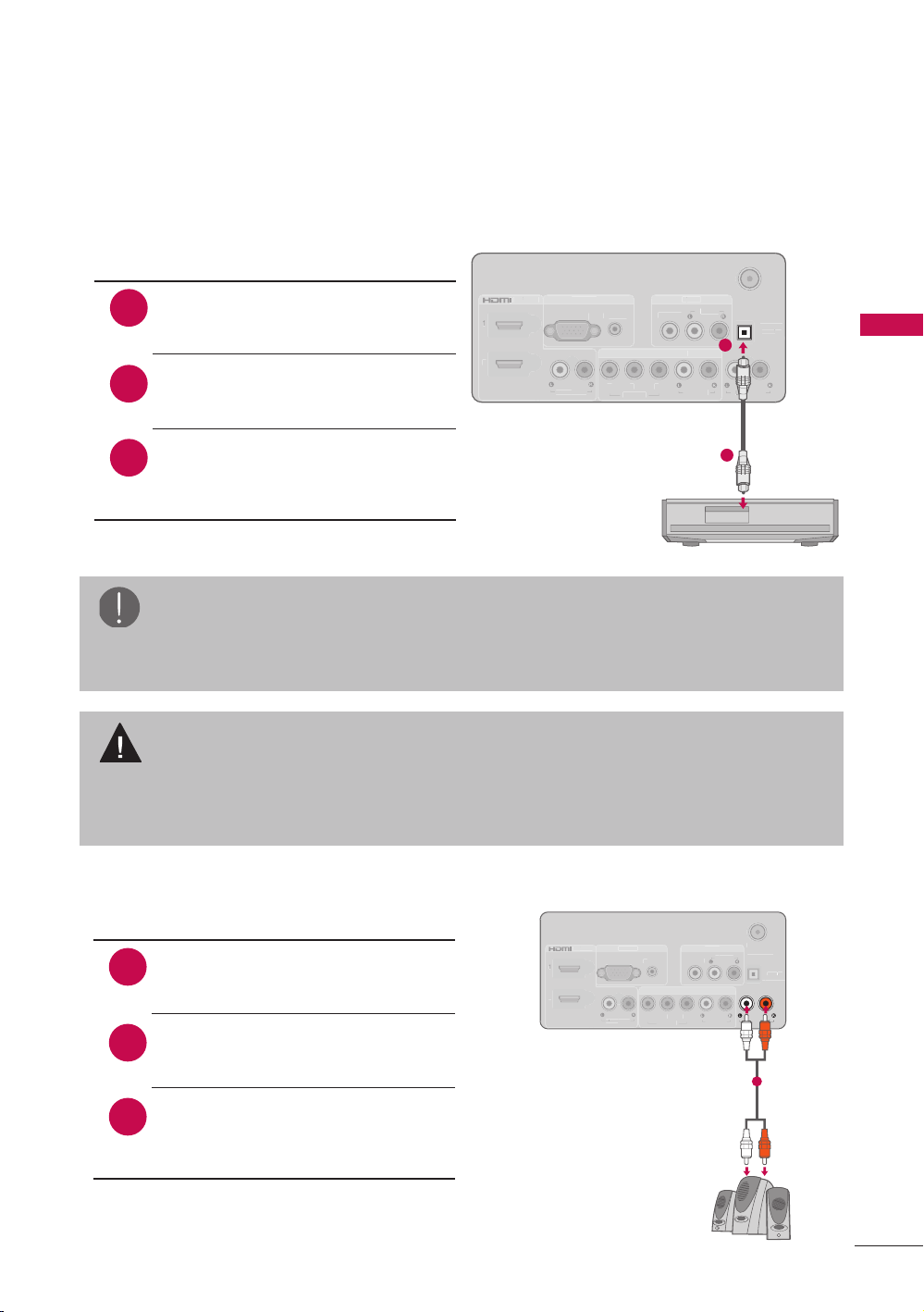
1. How to connect
1
2
Connect one end of the optical
cable to the TV port of OPTICAL
DIGITAL AUDIO OUT.
Connect the other end of the
optical cable to the digital audio
input on the audio equipment.
Set the “TV Speaker option -
Off” in the AUDIO menu. See
the external audio equipment
instruction manual for operation.
3
CAUTION
a Do not look into the optical output port. Looking at the laser beam may damage
your vision.
a Audio with ACP (Audio Copy Protection) function may block digital audio output.
Connecting Using Analogue Audio Cable
ANTENNA
/
C
ABLE IN
VIDEO
A
V IN
A
A
R
G
B I
N
C
OMPONENT IN
P
R
P
B
Y
O
PTI
C
A
L
DIGIT
AL
T
T
A
U
DI
O
OUT
A
UDI
O
A
U
DI
O
A
U
DI
O
OUT
A
U
DI
O
RG
B
(
P
C)
1
2
V
IDE
O
/ D
VI IN
D
D
D
VI A
D
D
U
DI
O
AUDIO OUT
1
1. How to connect
1
2
Connect one end of the audio
cable to the TV port of AUDIO
OUT.
Connect the other end of the
audio cable to the audio input on
the audio equipment.
Set the “TV Speaker option -
Off” in the AUDIO menu. See
the external audio equipment
instruction manual for operation.
3

24
EXTERNAL EQUIPMENT SETUP
PC Setup
This TV provides Plug and Play capability, meaning that a PC adjusts automatically to
the TV’s settings.
ANTENNA
/
C
ABLE IN
VIDEO
A
V IN
A
A
R
G
B I
N
C
OMPONENT IN
P
R
P
B
Y
O
PTI
C
A
L
DIGIT
AL
T
T
A
U
DI
O
OUT
A
UDI
O
A
U
DI
O
A
U
DI
O
OUT
A
U
DI
O
RG
B
(
P
C)
1
2
V
IDE
O
/ D
VI IN
D
D
D
VI A
D
D
U
DI
O
RGB IN
AUDIORGB (PC)
RGB OUTPUT
AUDIO
1 2
1. How to connect
1
2
Connect the VGA output of the
PC to the RGB IN (PC) jack on
the TV.
Connect PC audio output to the
RGB IN (AUDIO) jack on the TV.
2. How to use
r Turn on the PC and the TV.
r Select the RGB-PC input source on
the TV using the INPUT button on the
remote control.
VGA (D-Sub 15 Pin) Connection
ANTENNA
/
C
ABLE IN
VIDEO
A
V IN
A
A
R
G
B IN
C
OMPONENT IN
P
R
P
B
Y
O
PTI
C
A
L
DIGIT
AL
T
T
A
U
DI
O
OUT
A
UDI
O
A
U
DI
O
A
U
DI
O
OUT
A
U
DI
O
RG
B
(
P
C)
1
2
V
IDE
O
/ D
VI IN
D
D
D
VI A
D
D
U
DI
O
1
2
/ DVI IN
DVI AUDIO
1
L R
DVI OUTPUT
AUDIO
2
1. How to connect
1
2
Connect the DVI output of the
PC to the HDMI/DVI IN 1 or 2
jack on the TV.
Connect the PC audio output to
the DVI AUDIO jack on the TV.
2. How to use
r Turn on the PC and the TV.
r Select the HDMI 1 or HDMI 2 input
source on the TV using the INPUT
button on the remote control.
DVI to HDMI Connection
25
EXTERNAL EQUIPMENT SETUP
NOTE
a To get the the best picture quality, adjust the PC graphics card to 1920 x 1080.
a Depending on the graphics card, DOS mode may not work if a HDMI to DVI
Cable is in use.
a In PC mode, there may be noise associated with the resolution, vertical pattern,
contrast or brightness.
a If noise is present, change the PC output to another resolution, change the
refresh rate to another rate or adjust the brightness and contrast on the
PICTURE menu until the picture is clear.
a Avoid keeping a fixed image on the screen for a long period of time. The fixed
image may become permanently imprinted on the screen.
a Depending on the graphics card, some resolution settings may not allow the
image to be positioned on the screen properly.
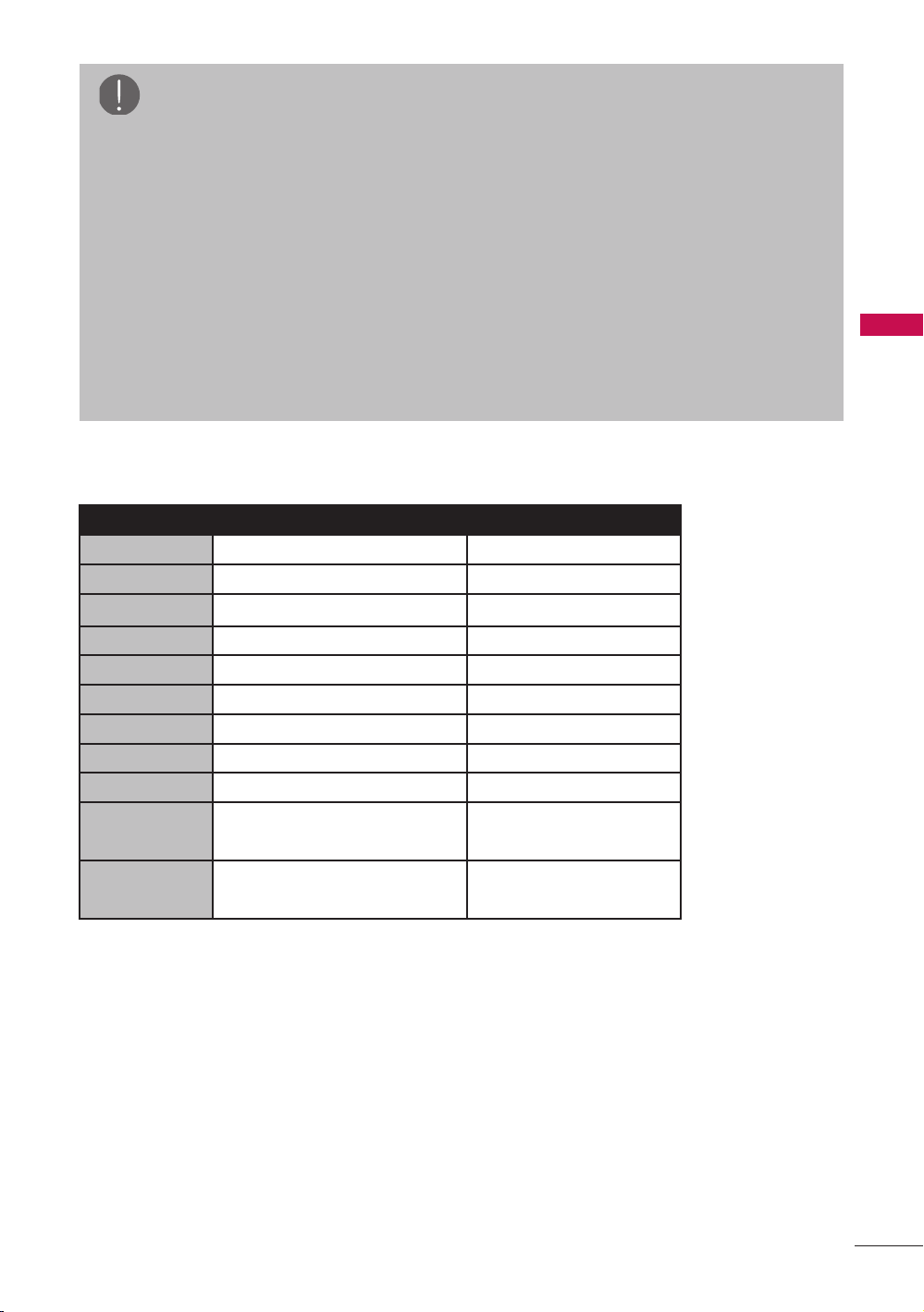
Supported Display Specifications (RGB-PC, HDMI-PC)
Resolution Horizontal Frequency(kHz) Vertical Frequency(Hz)
640x350 31.468 70.09
720x400 31.469 70.08
640x480
31.469 59.94
800x600 37.879 60.31
1024x768 48.363 60.00
1280x768 47.776 59.87
1360x768 47.71 2 60.015
1360x768 63.981 60.02
1600x1200 75.00 60.00
1920x1080
RGB-PC
66.587 59.934
1920x1080
HDMI-PC
66.587 59.934
26
WATCHING TV / CHANNEL CONTROL
WATCHING TV/ CHANNEL CONTROL
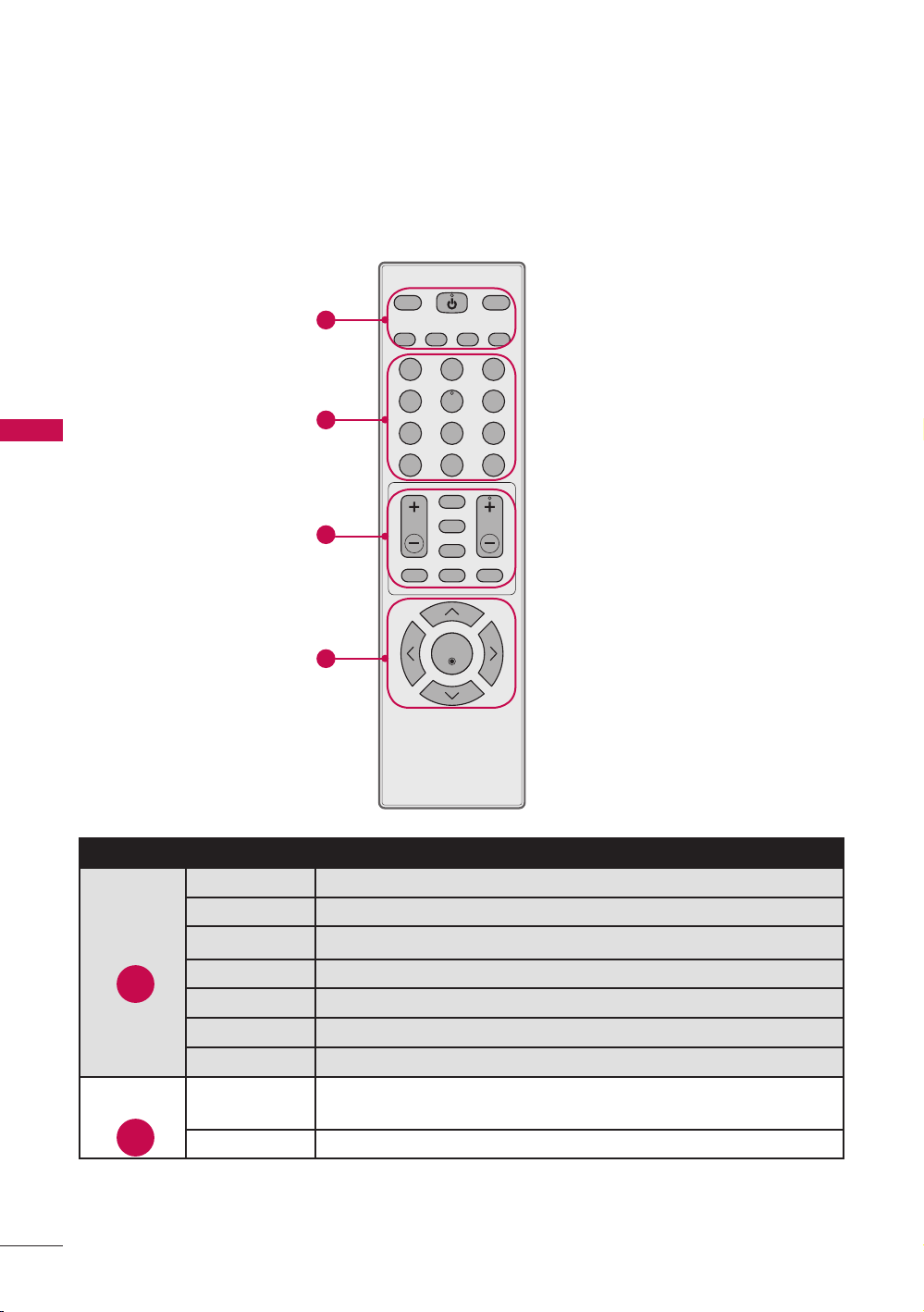
Remote Control Functions
When using the remote control, aim it at the remote control sensor on the TV.
The remote control may differ from the images below.
PICTURE SOUND
SAP
RATIO
TV
INPUT
POWER
FAV
CC
MUTE
MENU
RETURN
Q.MENU
VOL CH
1 2 3
4 5 6
7 8 9
-
0
FLASHBK
ENTER
Group No. Item Description
TV Returns to the last TV channel.
POWER Turns the TV on from standby or off to standby.
INPUT Rotates through inputs.
RATIO Changes the aspect ratio.
SAP Selects MTS sound.
SOUND Changes the sound mode.
PICTURE Changes the picture mode.
NUMBER
buttons
Used to enter a program number for multiple program
channels such as 2-1, 2-2, etc.
FLASHBK Tunes to the last channel viewed.
1
1
2
2
3
4
27
WATCHING TV / CHANNEL CONTROL
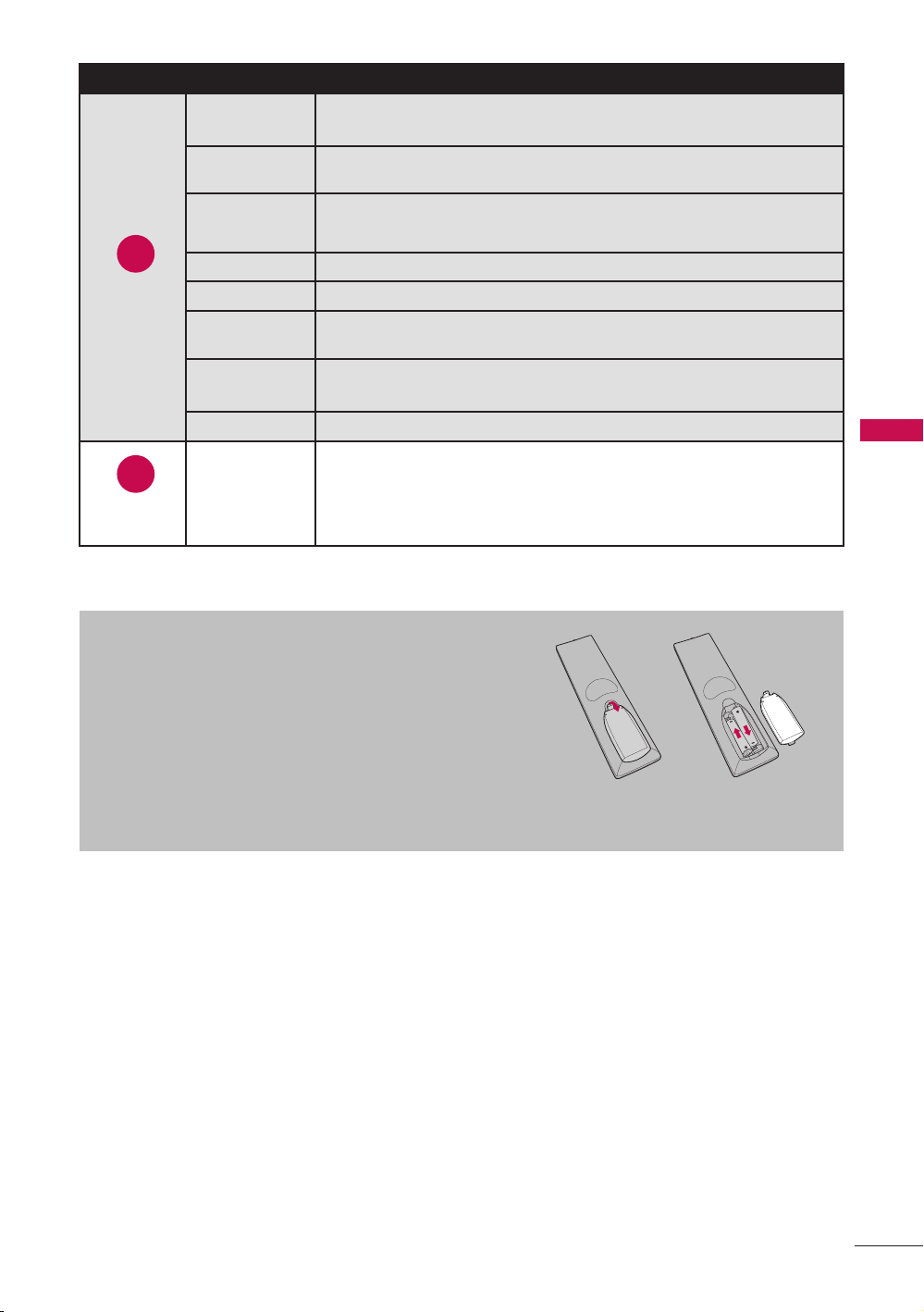
Installing Batteries
r Open the battery compartment cover on the
back side and install the batteries matching
correct polarity.
r Install two 1.5V AAA batteries. Don’t mix old or
used batteries with new ones.
r Close cover.
Group No. Item Description
CHANNEL
(UP/DOWN)
Changes the channel.
RETURN Allows the user to move return one step in an interactive
application or other user interaction function.
FAV Scroll through the programmed Favorite channels.
CC Switches the caption on or off.
MUTE Switches the sound on or off.
MENU Displays the main menu or clears all on-screen displays
and return to TV viewing.
VOLUME
(UP/DOWN)
Adjusts the volume.
Q.MENU Opens the list of Quick Menu options.
THUMBSTICK
(Up/Down/
Left/Right/
ENTER)
Navigates the on-screen menus and adjusts the system
settings to your preference.
3
4
28
WATCHING TV / CHANNEL CONTROL
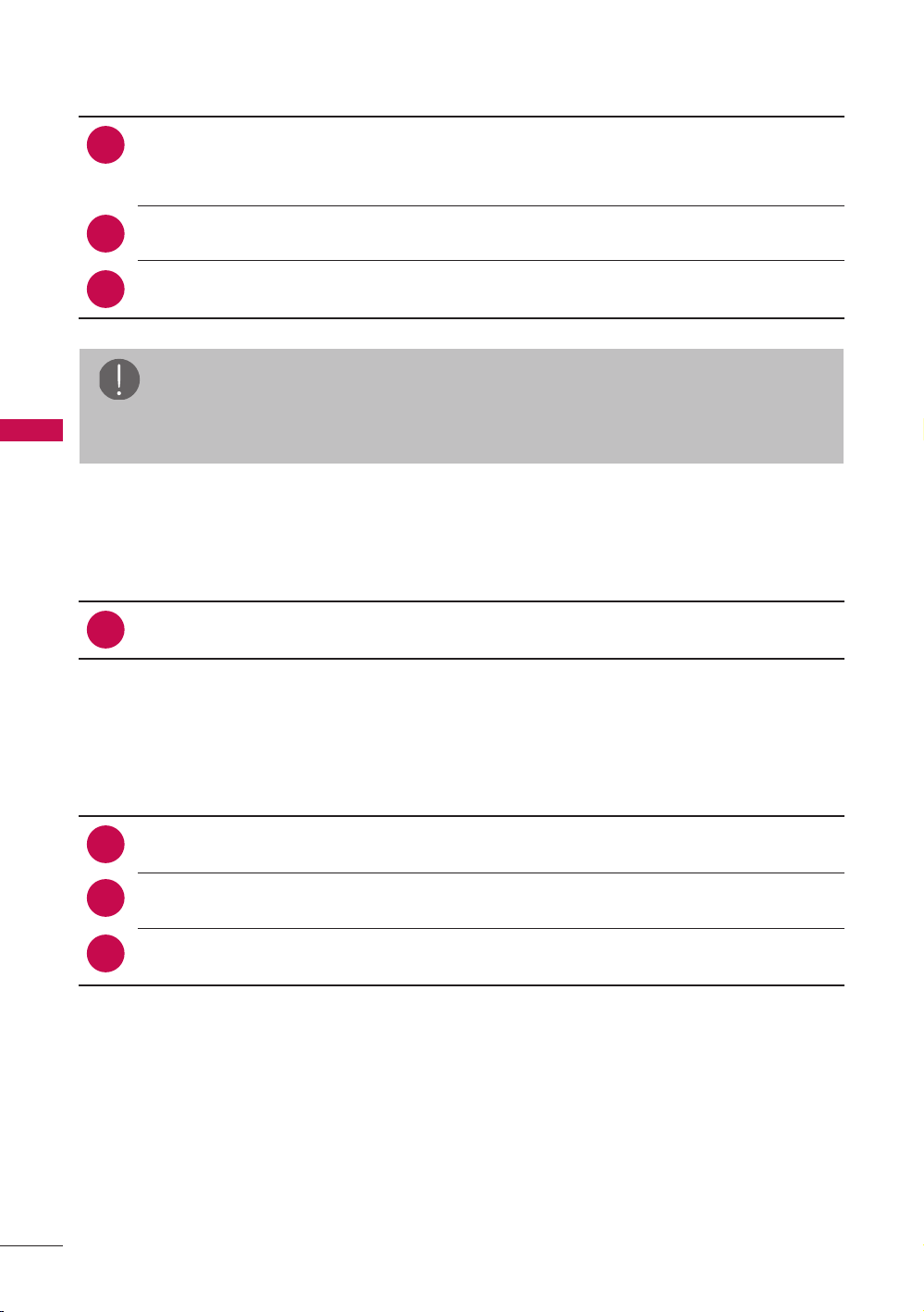
Turning on the TV
1
2
First, connect power cord correctly.
At this moment, the TV switches to standby mode.
a In standby mode to turn TV on, press the POWER button.
Select the viewing source by using the INPUT button on the remote control.
When finished using the TV, press press the POWER button on the remote
control. The TV reverts to standby mode.
3
Channel Selection
1
Press the CHANNEL or NUMBER buttons to select a channel number.
Volume Adjustment
1
2
Press the VOLUME button to adjust the volume.
If you want to switch the sound off, press the MUTE button.
You can cancel the Mute function by pressing the MUTE or VOLUME button.
3
NOTE
a If you intend to be away on vacation, disconnect the power plug from the wall
power outlet.
29
WATCHING TV / CHANNEL CONTROL
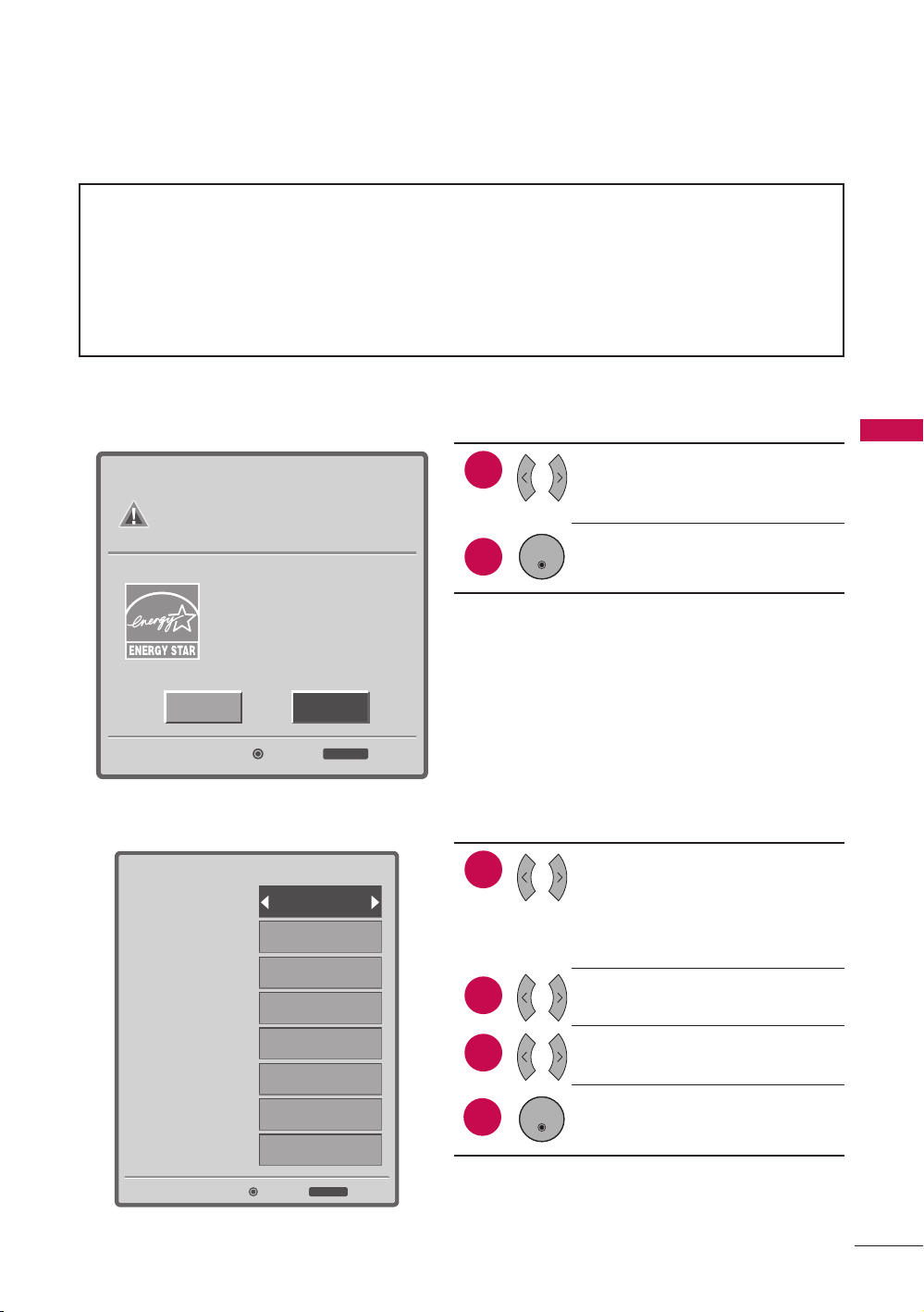
Initial Setting
This Function guides the user to easily set the essential items for viewing the TV for the
first time when purchasing the TV. It will be displayed on the screen when turning the
TV on for the first time. It can also be activated from the user menus.
r Default selection is “Home”. We recommend setting the TV to “Home” mode for
the best picture in your home environment.
r “In Store” Mode is only intended for use in retail environments. Customers can
adjust the “Picture menu - Picture mode” manually while inspecting the TV, but
the TV will automatically return to preset in-store mode after 5 minutes.
r “In Store” Mode is an optimal setting for displaying at stores. “In Store” mode
initializes the TV to set the image quality.
Enter
Step2. Time Setting
Current Time Setting
Year
Month
Date
Hour
Minute
Time Zone
Daylight Saving
Exit
RETURN
Auto
----
--
--
--
--
Eastern
Auto
2. Time Setting
1
2
Select Current Time Setting
option.
r If you select “Manual”,
enter the data for Yea r,
Month, Date, Hour, Minute.
Select Time Zone option.
Select Daylight Saving
option.
After all settings are
completed, press the ENTER
button.
3
4
ENTER
HomeIn Store
Enter
Step1. Mode Setting
Selecting the environment.
Choose the setting mode you want.
Select [Home] when setting
TV up in-home. You can adjust
Picture quality accordingly
through Picture Mode menu
option.
Exit
RETURN
1. Mode Setting
1
2
Select Setting Mode option.
Press the ENTER button.
ENTER
30
WATCHING TV / CHANNEL CONTROL
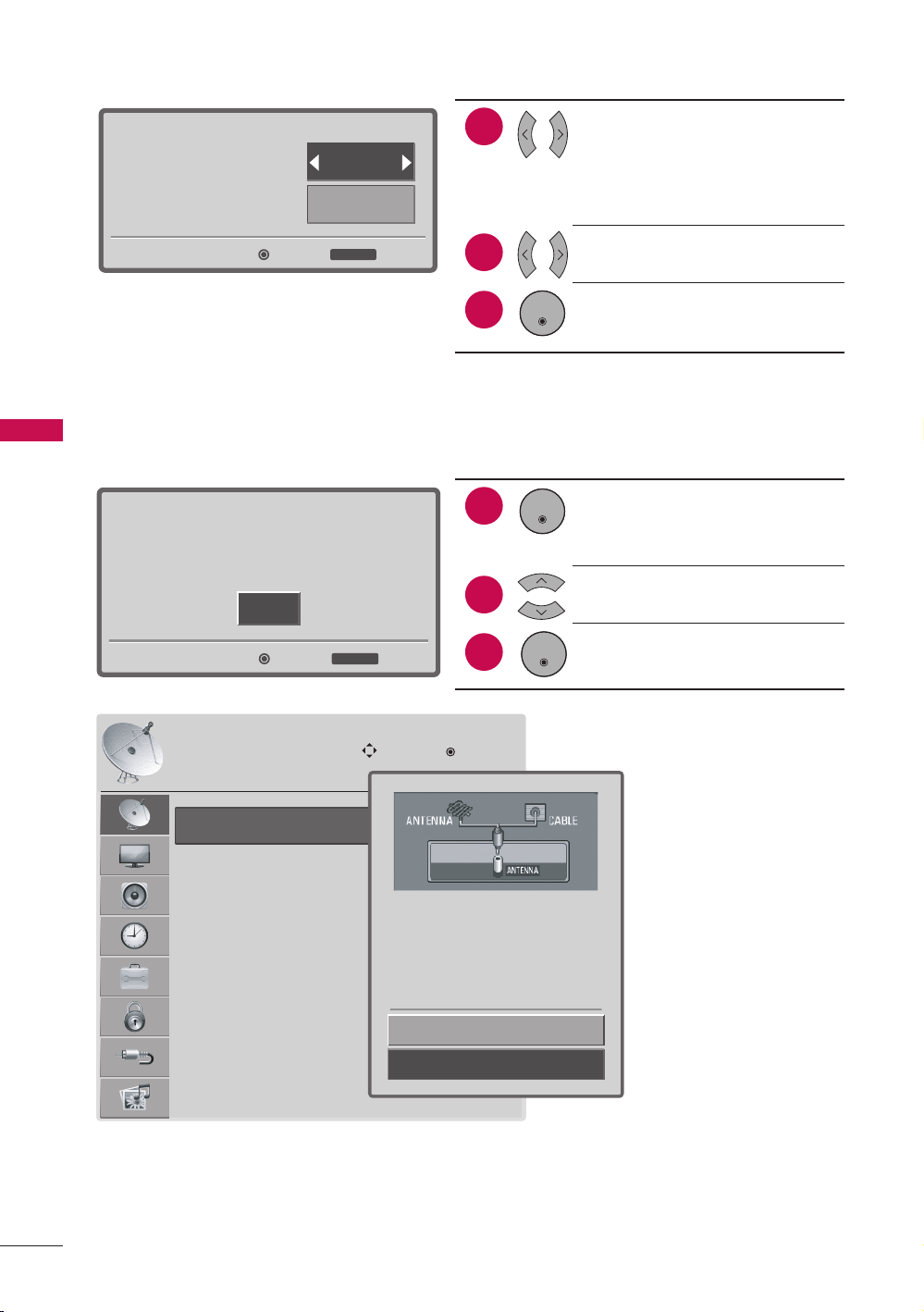
Enter
Step3. Option Setting
1.OSD Language Setting
2.Audio Language Setting
Exit
RETURN
English
English
3. Option Setting
1
2
Select OSD Language
Setting option.
Select Audio Language
Setting option.
Press the ENTER button.
3
ENTER
Enter
Enter
Step4. Auto Tuning
Auto Tuning can change channel map.
Do you want to start Auto Tuning?
Exit
RETURN
4. Auto Tuning
1
2
Check your antenna
connection and press the
ENTER button to start Auto
Tuning.
Select Yes to begin auto
tuning.
Press the ENTER button.
3
ENTER
ENTER
Auto Tuning
Manual Tuning
Channel Edit
CHANNEL
Move
Enter
Yes
No
Press 'Yes' button to begin
auto tuning.
31
MENU ADJUSTMENTS
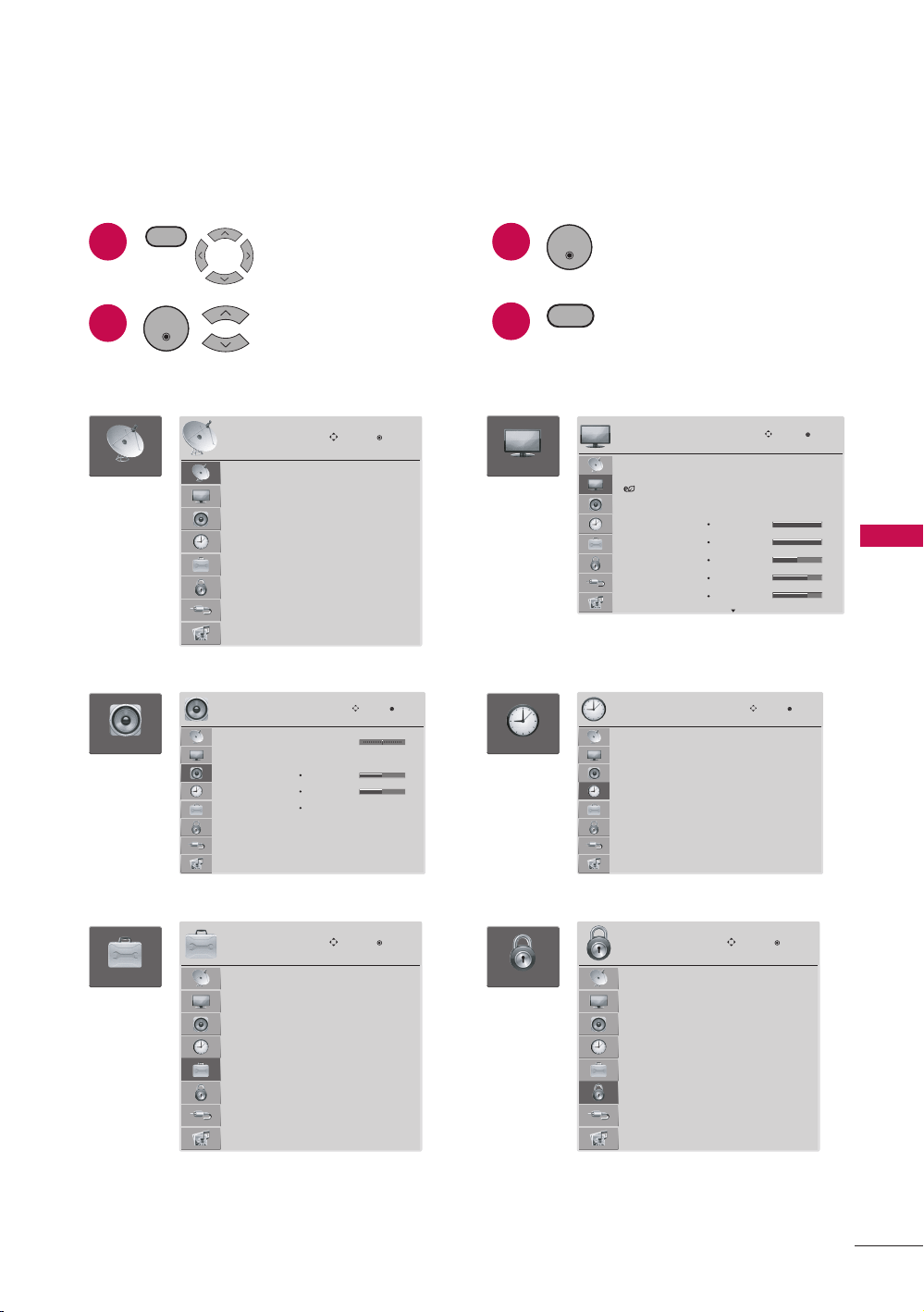
On-Screen Menus Selection
Your TV’s OSD (On Screen Display) may differ slightly from that shown in this manual.
1
2
Display each menu.
Select a menu item.
ENTER
3
4
Accept the current
selection.
Return to TV viewing.
ENTER
RETURN
MENU
Auto Tuning
Manual Tuning
Channel Edit
Move
Enter
CHANNEL
CHANNEL
Balance
Sound Mode
TV Speaker
Digital Audio Out
Analog Audio Out
: Standard
T r eble
Bass
Reset
: On
: PCM
: V a riable
0
50
50
AUDIO
Move
Enter
LR
AUDIO
OPTION
Language
Input Label
Key Lock
Caption
Initial Setting
Move
Enter
OPTION
English
: Off
: Off
Aspect Ratio
Energy Saving
Picture Mode
: 16:9
: Auto
: Vivid
Backlight
Contrast
Brightness
Sharpness
Color
100
100
50
70
70
PICTURE
Move
Enter
PICTURE
Clock
Off Time
On Time
Sleep Timer
Auto Sleep
--
--
----
--
:
--
--
: Off
: Off
: Off
: On
TIME
Move
Enter
TIME
LOCK
Lock System
Set Password
Block Channel
Movie Rating
TV Rating-Children
TV Rating-General
Downloadable Rating
Input Block
Move
Enter
LOCK
: Off
MENU ADJUSTMENTS
32
MENU ADJUSTMENTS
TV
AV
Component
RPG-PC
HDMI1
HDMI2
Move
Enter
Input
INPUT
PHOTO LIST
MUSIC LIST
Move
Enter
USB
USB
* HDMI 3: For 47LD500
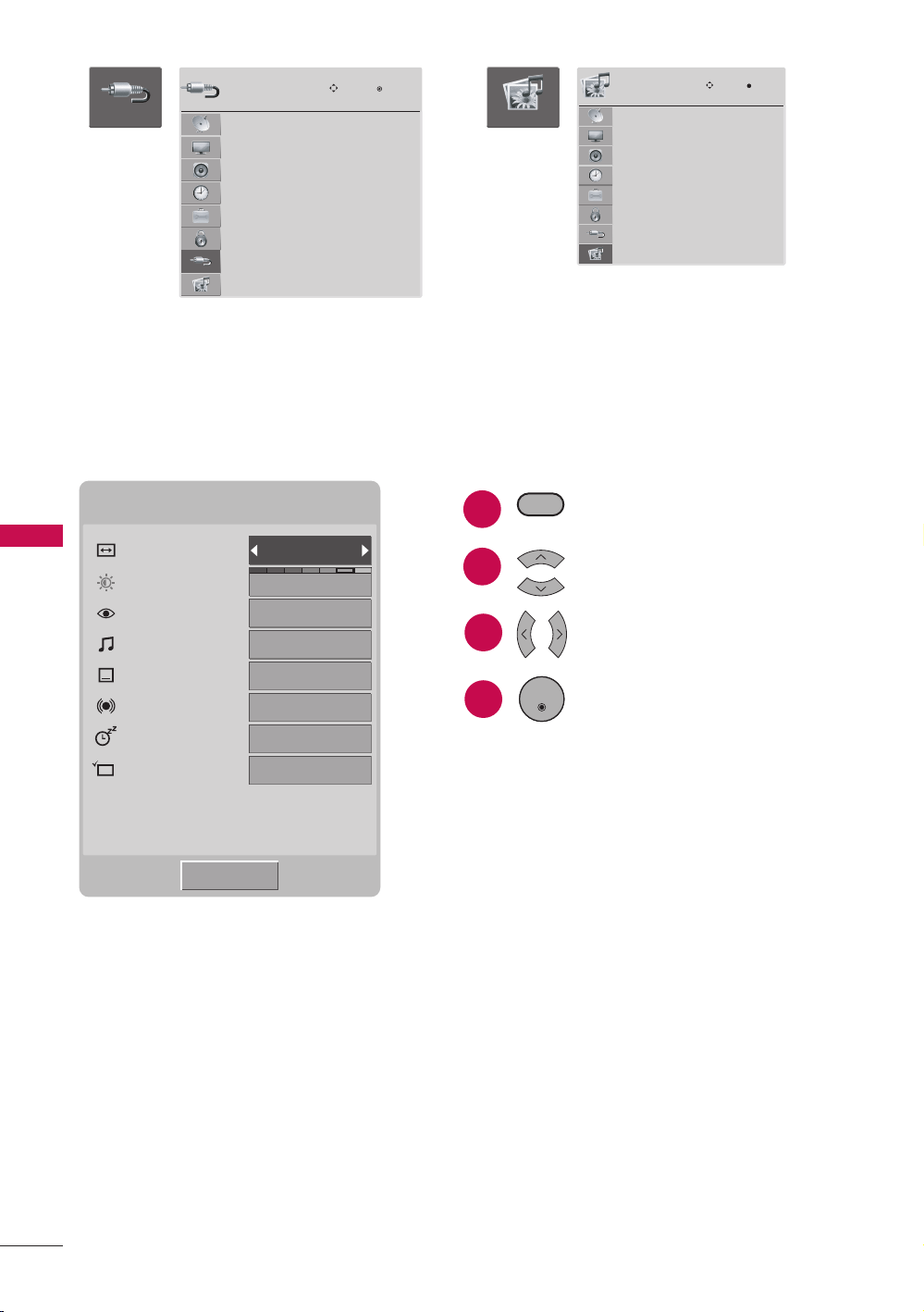
Quick Menu
Your TV’s OSD (On Screen Display) may differ slightly from what is shown in this
manual. Q.Menu (Quick Menu) is a menu of features which users might use frequently.
Q.Menu
Aspect Ratio
Backlight
Picture Mode
Sound Mode
Caption
SAP
Sleep Timer
Del/Add/Fav
16:9
5
Standard
Standard
Off
Mono
Off
Add
M
CH
Close
a Aspect Ratio: Selects your desired picture format.
a Backlight: Selects your desired brightness level of the backlight behind the LCD
screen. Backlight feature will only work if you set “Energy Saving- Off”.
a Picture Mode: Selects the desired preset picture setting.
a Sound Mode: Selects the desired preset sound setting.
a Caption: Sets the caption mode to on or off.
a SAP: Selects MTS sound.
r Analog TV: Mono / Stereo / SAP
r Digital TV: English / French / Spanish / Korean / Japanese / Chinese / German /
Italian / Russian
a Sleep Timer: Turns the TV off at the preset time.
a Del/Add/Fav: Selects channel you want to add, delete, or add to the Favorite list.
3
4
Display Quick menu.
Select a menu item.
Choose the setting.
Accept the current
selection and return to TV
viewing.
ENTER
Q.MENU
1
2
33
MENU ADJUSTMENTS
Channel Menu
The Channel menu offers options to setup of your television to receive TV channels.
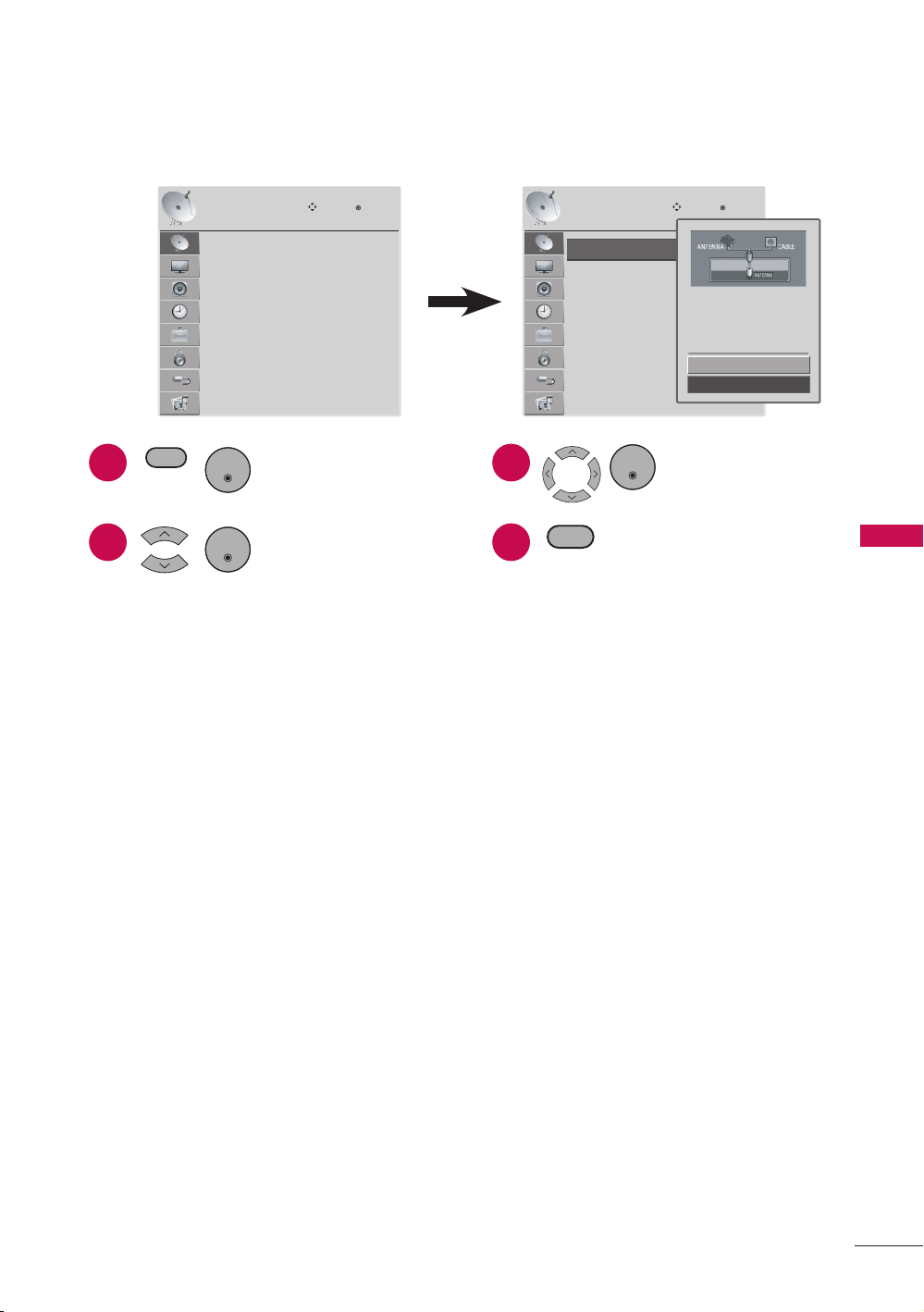
Auto Tuning
Manual Tuning
Channel Edit
Move
Enter
CHANNEL
Auto Tuning
Manual Tuning
Channel Edit
CHANNEL
Move
Enter
Ye s
No
Press 'Yes' button to begin
auto tuning.
1
2
Display CHANNEL
menu.
Select a menu item.
ENTER
3
4
Set the setting.
Return to TV viewing.
ENTER
RETURN
MENU
ENTER
a Auto Tuning
r Automatically finds all channels available through antenna or cable inputs, and
stores them in memory on the channel list.
r Run this function if you change your residence or move the TV.
r Auto Tuning memorizes only the channels available at the time.
r Found channels are grouped in the order of DTV, TV, Cable DTV (CADTV) and
Cable TV (CATV).
a Manual Tuning
r When selecting DTV or Cable DTV input signal in Manual Tuning, you can view the
on-screen signal strength monitor to see the quality of the signal being received.
r Select the channel type and RF-channel number. Then select Add or Delete.
a Channel Edit
r The channels in the Channel Edit List are displayed in black and the channels
deleted from the Channel Edit List are displayed in gray.
r When a channel number is deleted, it means that you will be unable to select
it using CHANNEL button during TV viewing. If you wish to select the deleted
channel, directly enter the channel number with the NUMBER buttons or select it
in the Channel Edit menu.
34
MENU ADJUSTMENTS
Picture Menu
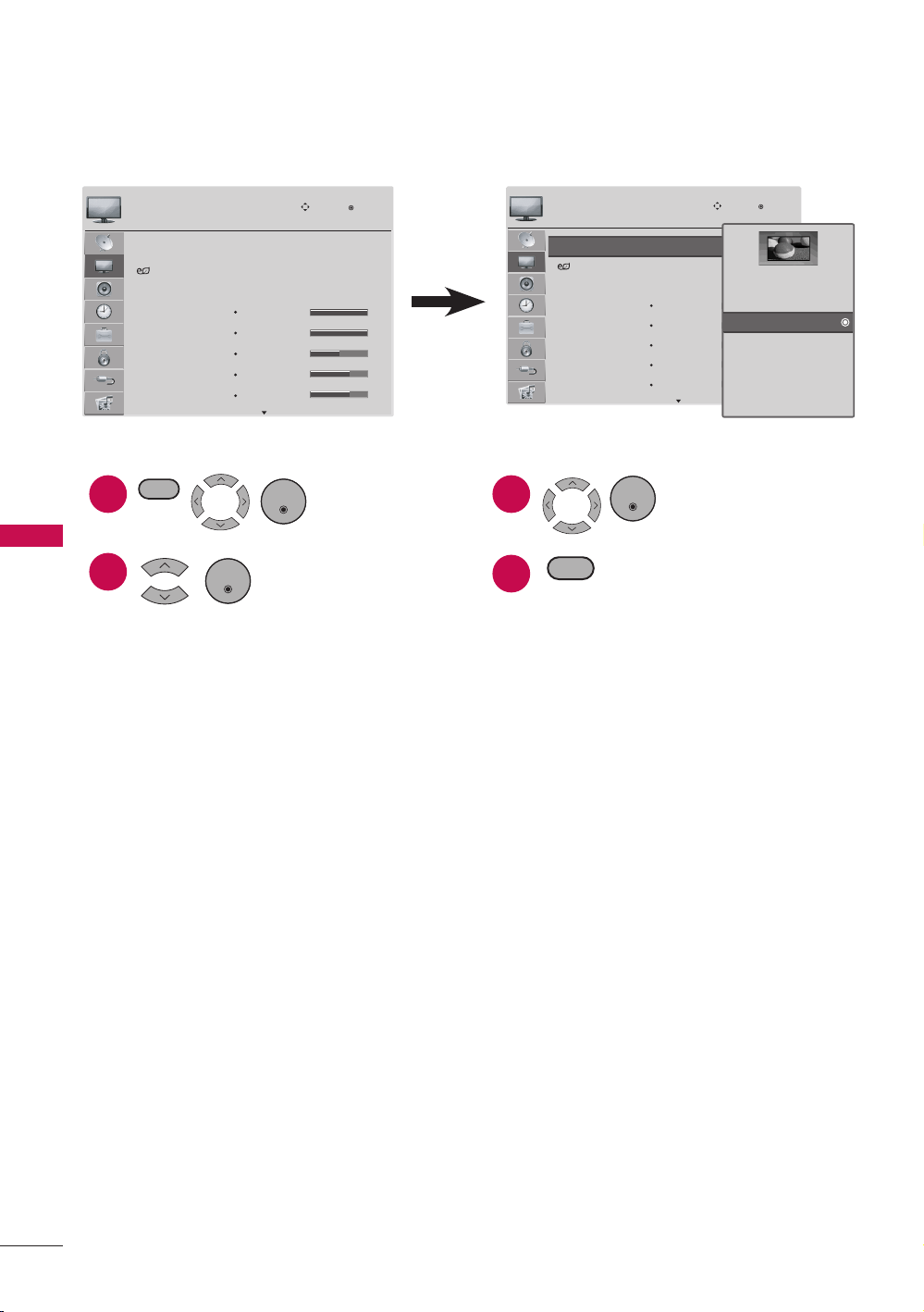
The Picture menu offers options to enhance and refine the picture displayed on your TV
based on ambient room light and personal preferences.
Aspect Ratio
Energy Saving
Picture Mode
: 16:9
: Auto
: Vivid
Backlight
Contrast
Brightness
Sharpness
Color
100
100
50
70
70
PICTURE
Move
Enter
Aspect Ratio
Energy Saving
Picture Mode
: 16:9
: Auto
: Vivid
Backlight
Contrast
Brightness
Sharpness
Color
100
100
50
70
70
PICTURE
Move
Enter
Set By Program
4:3
16:9
Zoom
Cinema Zoom
Just Scan
1
2
Display PICTURE
menu.
Select a menu item.
ENTER
3
4
Set the setting.
Return to TV viewing.
ENTER
RETURN
MENU
ENTER
a Aspect Ratio
r This feature lets you choose the way an analog picture with a 4:3 aspect ratio is
displayed on your TV. You can select a different aspect ratio depending on input
source (analog broadcasting, digital broadcasting, aux).
a Energy Saving
r It reduces the TV’s power consumption by lowering the backlight level.
r You can increase the brightness of your screen by adjusting the Energy Saving
level.
r Backlight feature will only work if you adjust “Energy Saving- Off”.
r When selecting Screen off, the screen will turn off after 3 seconds. Pressing any
button of the remote control will turn on the screen again.
r When selecting Auto, Backlight is automatically adjusted through Intelligent
Sensor according to the surrounding conditions.
a Picture Mode
r Vivid, Standard, Cinema, Sport, and Game settings are preset for the optimum
picture quality at the factory.
r You can use a preset, change each setting manually.
a Backlight: This function adjusts the brightness of the backlight behind the LCD
screen. Adjusting the backlight is recommended when setting the brightness
of the TV. When decreasing the backlight, the brightness of the black becomes
darker without any loss in video signal and the power consumption is reduced.
35
MENU ADJUSTMENTS
a Contrast: Increases or decreases the gradient of the video signal. You may use
Contrast when the bright part of the picture is saturated.
a Brightness: Adjusts the base level of the signal in the picture. You may use
Brightness when the dark part of the picture is saturated.
a Sharpness: Adjusts the level of crispness in the edges between the light and
dark areas of the picture. The lower the level, the softer the image.
a Color: Adjusts intensity of all colors.
a Tint: Adjusts the balance between red and green levels.
a Advanced Control: Allows you to adjust some of the advanced features of
your LG display such as Color Temperature, Fresh Contrast, Fresh Color, Noise
Reduction, Gamma, Black Level, Real Cinema and TruMotion 120Hz* settings.
* TruMotion 120Hz: For 47LD500
a Reset: Returns to factory default settings.
Audio Menu
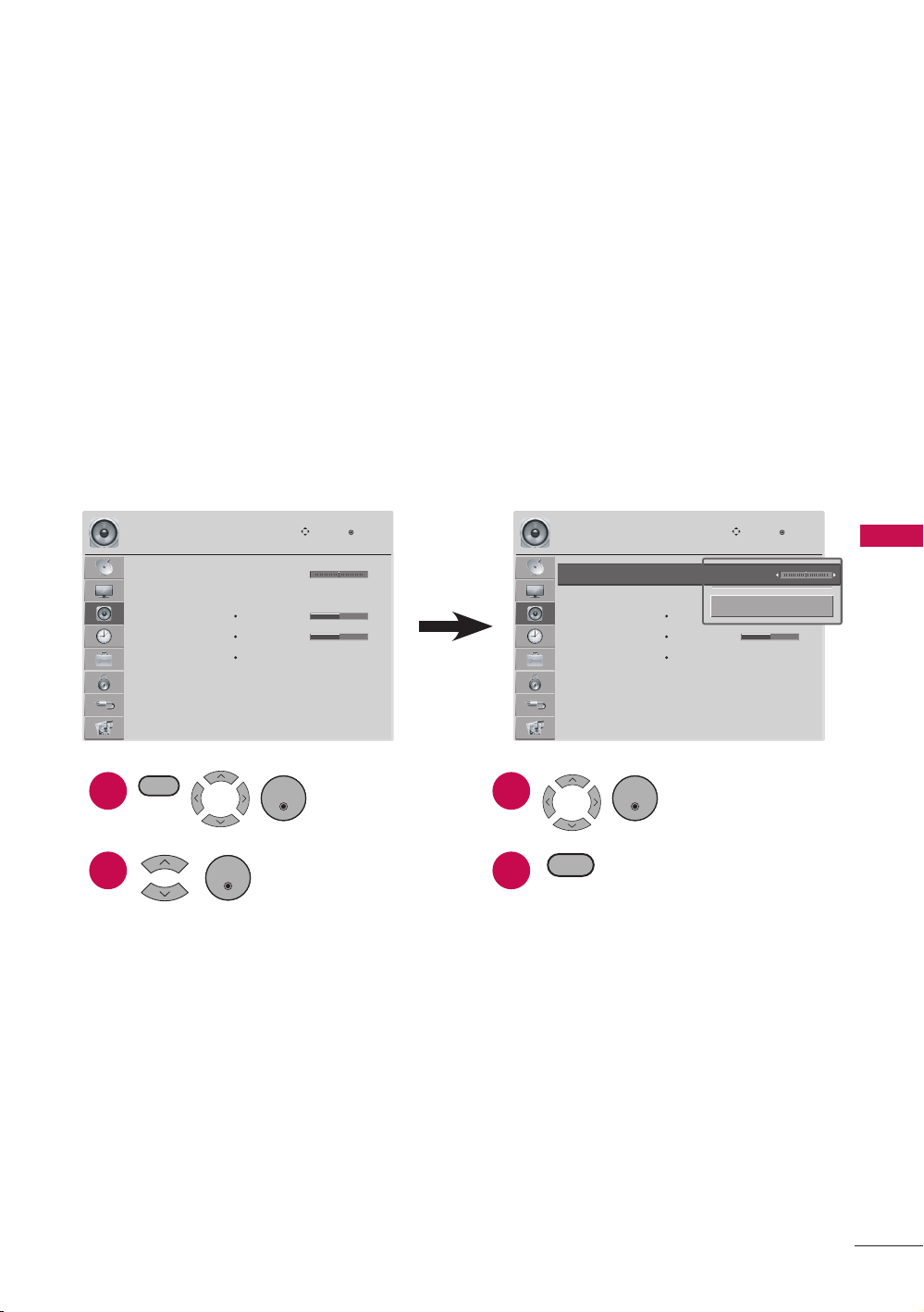
The Audio menu offers options to enhance and refine the sound setting on your TV
based on personal preferences.
Balance
Sound Mode
TV Speaker
Digital Audio Out
Analog Audio Out
: Standard
T r eble
Bass
Reset
: On
: PCM
: Va riable
0
50
50
AUDIO
Move
Enter
LR
Balance
Sound Mode
TV Speaker
Digital Audio Out
Analog Audio Out
: Standard
T r eble
Bass
Reset
: On
: PCM
: Va riable
0
50
50
AUDIO
Move
Enter
LR
Balance :0
Close
LR
1
2
Display AUDIO
menu.
Select a menu item.
ENTER
3
4
Set the setting.
Return to TV viewing.
RETURN
MENU
ENTER
a Balance
r Adjusts the left/right sound of speaker to suit your taste and room situations.
a Sound Mode
r Standard, Music, Cinema, Sport, and Game are preset for optimum sound quality
at the factory.
a Treble: Adjusts the high frequency intensity setting.
a Bass: Adjusts the low frequency intensity setting.
a Reset: Returns to factory default settings.
ENTER
36
MENU ADJUSTMENTS
a TV Speaker
r If you wish to use an external Hi-Fi system, turn off the TV’s internal speakers.
a Digital Audio Out
r Sets the digital audio out setting.
a Analog Audio Out
r Sets the analog audio out setting.
Time Menu
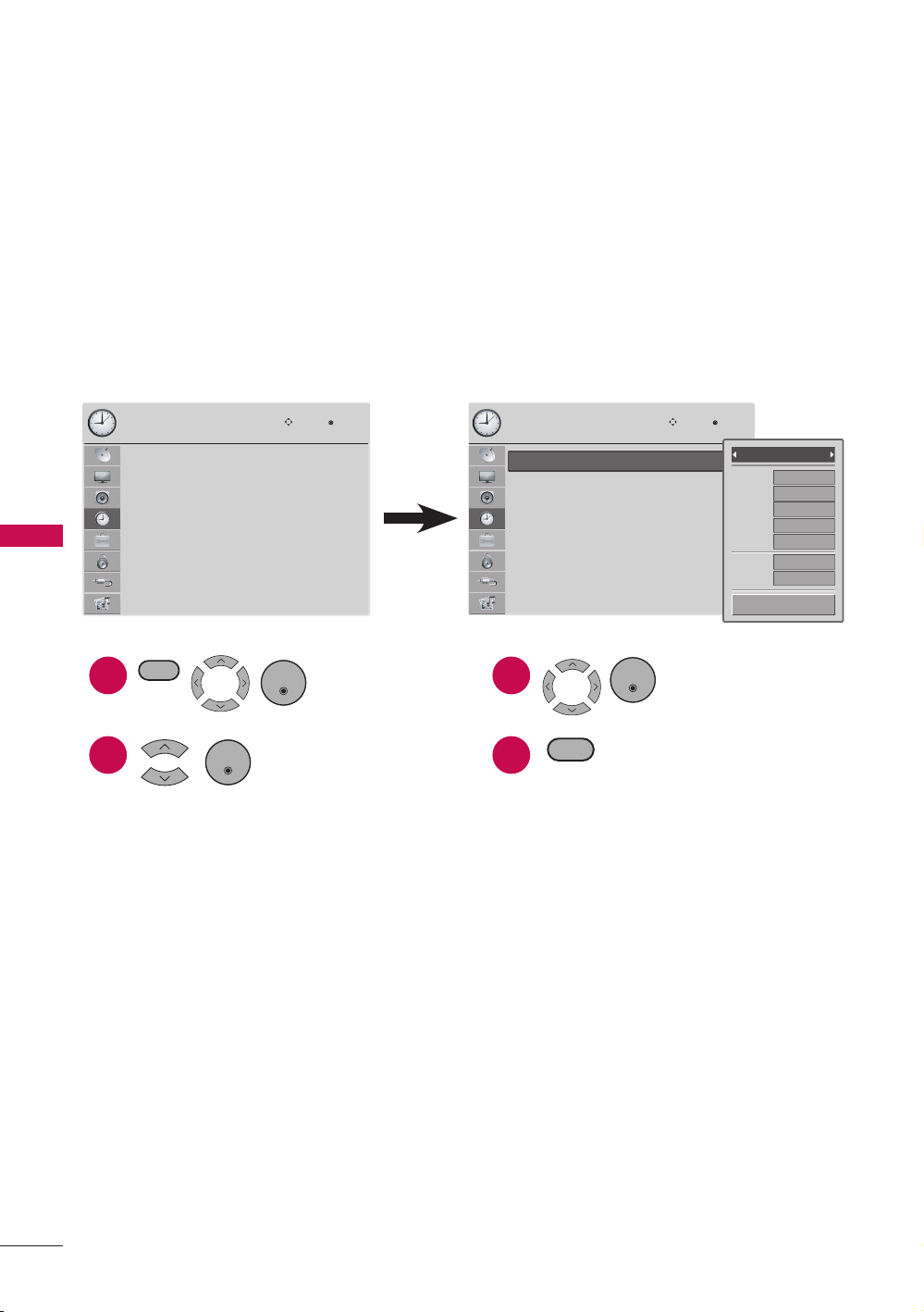
The Time menu offers options to adjust the time setting, set the TV turn/off time, sleep
timer, and auto sleep.
Clock
Off Time
On Time
Sleep Timer
Auto Sleep
--
--
----
--
:
--
--
: Off
: Off
: Off
: On
TIME
Move
Enter
Clock
Off Time
On Time
Sleep Timer
Auto Sleep
--
--
----
--
:
--
--
: Off
: Off
: Off
: On
TIME
Move
Enter
Ye ar
Month
Date
Hour
Minute
Time Zone
Daylight
Saving
----
--
--
--
--
Eastren
Auto
Auto
Close
1
2
Display TIME
menu.
Select a menu item.
ENTER
3
4
Set the setting.
Return to TV viewing.
ENTER
RETURN
MENU
ENTER
a Clock
r Adjusts the time settings on your TV.
r With Auto setting, the time is set automatically from a digital channel signal.
r If the current time setting is wrong, reset the clock manually.
a Off Time
r Sets the time the TV will automatically be turned off.
r This function operates only if the current time has been set.
a On Time
r Sets the time the TV will automatically be turned on.
r This function operates only if the current time has been set.
r The TV must be in standby mode for the On Time to work.
r If you do not press any button within 2 hours after the TV turns on with the On
Time function, the TV will automatically revert to standby mode.
37
MENU ADJUSTMENTS
a Sleep Timer
r Turns the TV off at the preset time.
a Auto Sleep
r If sets “Auto Sleep” to “On”, the TV will automatically turn off in case of no signal
for 10 minutes.
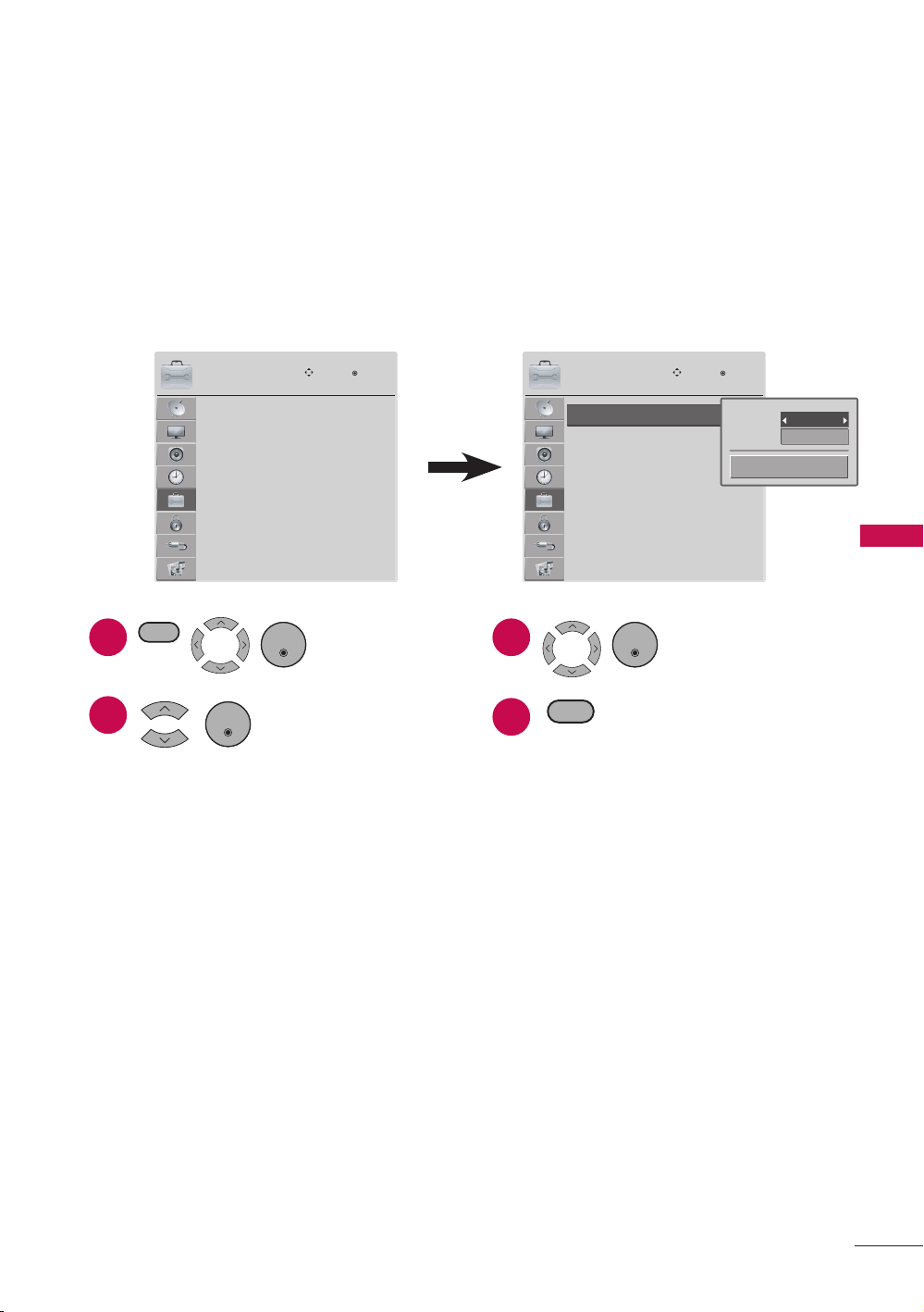
Option Menu
The Option menu offers options to set the TV operating environment.
Language
Input Label
Key Lock
Caption
Initial Setting
Move
Enter
OPTION
English
: Off
: Off
Language
Input Label
Key Lock
Caption
Initial Setting
Move
Enter
OPTION
English
: Off
: Off
Menu
Audio
English
English
Close
1
2
Display OPTION
menu.
Select a menu item.
ENTER
3
4
Set the setting.
Return to TV viewing.
RETURN
MENU
ENTER
a Language
r Sets the on-screen menus and audio languages.
a Input Label
r Sets the label for each input source.
a AV: Input source from a VCR or other external equipment.
a Component: Input source from DVD or a Digital set-top box.
a RGB-PC: Input source from a computer.
a HDMI1/HDMI2/HDMI3*: Input source from high definition (HD) devices.
* HDMI 3: For 47LD500
a Key Lock
r Sets the key lock on or off.
r If this function is set to On:
a A password is required to gain access to this menu.
a The TV is set up with the initial password “0-0-0-0”.
ENTER
38
MENU ADJUSTMENTS
a Caption
r Captions are provided to help the hearing impaired watch TV. Select a caption
mode for displaying captioning information if provided on a program. Analog
caption displays information at any position on the screen and is usually the
program’s dialog. Caption/Text, if provided by the broadcaster, would be
available for both digital and analog channels on the Antenna/Cable. This TV is
programmed to memorize the caption/text mode which was last set when you
turned the power off.
r This function is only available when Caption Mode is set On.
a Caption (CC1-4): The term for the words that scroll across the bottom of the
TV screen; usually the audio portion of the program provided for the hearing
impaired.
a Text (Text1-4): The term for the words that appear in a large black frame and
almost cover the entire screen; usually messages provided by the broadcaster.
a Service (Service1-6): This function in only available for digital broadcasting
system captions (digital input source from DTV/Cable DTV).
a Initial Setting
r See “Initial Setting” (page 29).
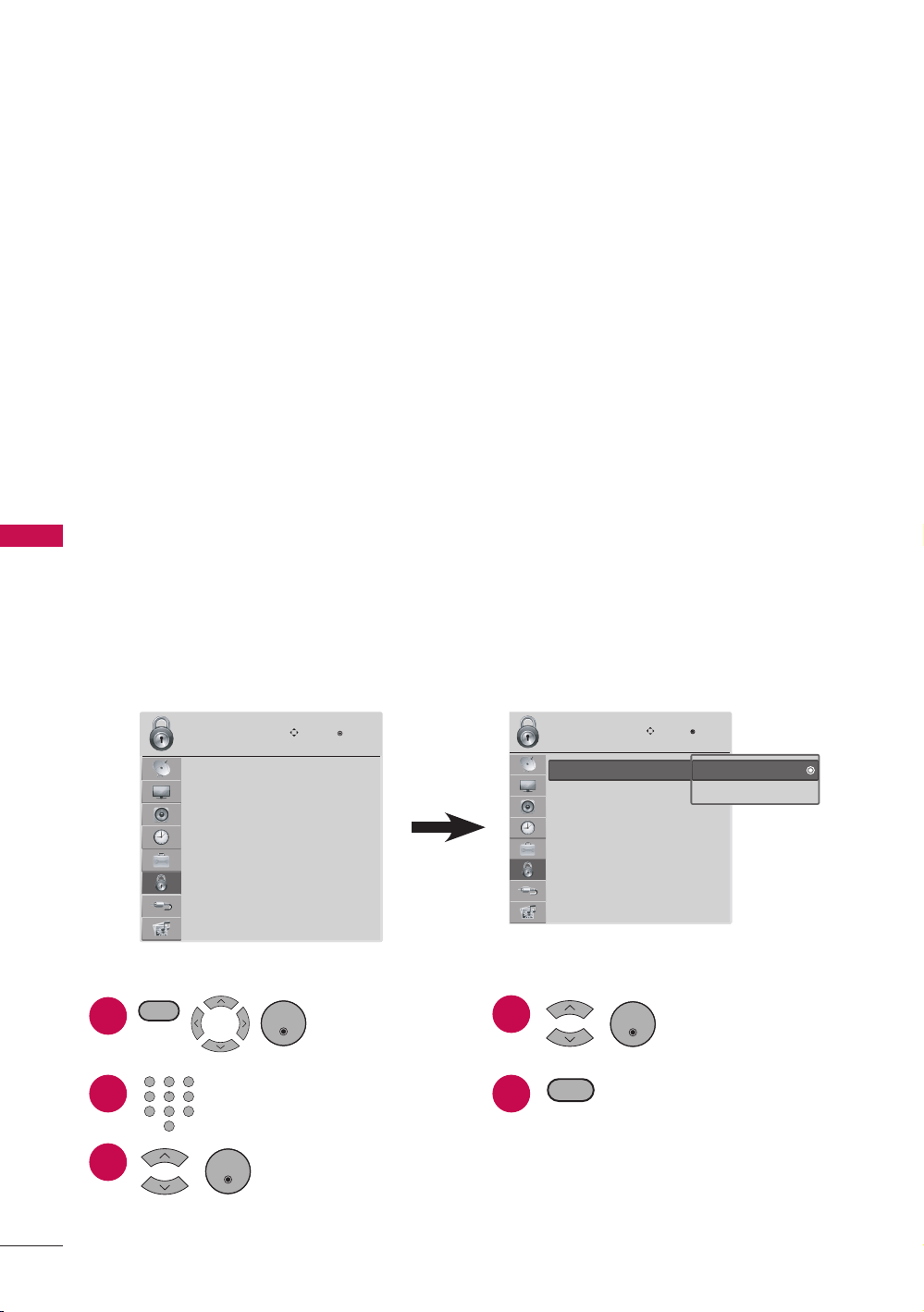
Parental Control / Ratings
The Lock menu offers options to set up blocking schemes to block specific channels,
ratings, and external viewing sources. A password is required to gain access to this
menu.
a The TV is set up with the initial password “0-0-0-0”.
Lock System
Set Password
Block Channel
Movie Rating
TV Rating-Children
TV Rating-General
Downloadable Rating
Input Block
Move
Enter
LOCK
: Off
Lock System
Set Password
Block Channel
Movie Rating
TV Rating-Children
TV Rating-General
Downloadable Rating
Input Block
Move
Enter
LOCK
: Off Off
On
1
2
Display LOCK
menu.
Input the password.
Select a menu item.
ENTER
4
5
Set the setting.
Return to TV viewing.
ENTER
RETURN
MENU
1 2 3
4 5 6
7 8 9
0
3
ENTER

39
MENU ADJUSTMENTS
a Lock System
r Enables or disables the blocking scheme you set up previously.
a Set Password
r Change the password by inputting a new password twice.
a The TV is set up with the initial password “0-0-0-0”.
a Block Channel
r Blocks any channels that you do not want to watch or that you do not want your
children to watch.
a Movie Rating
r Blocks movies according to the movie ratings limits specified, so children cannot
view certain movies. You can set the ratings limit by blocking out all the movies
with the ratings above a specified level. Keep in mind that the movie ratings limit
only applies to movies shown on TV, not TV programs, such as soap operas.
r Movie Rating block options:
a G (General audience)
a PG (Parental guidance suggested)
a PG-13 (Parents strongly cautioned)
a R (Restricted)
a NC-17 (No one 17 and under admitted)
a X (Adult only)
a Blocking Off (Permits all programs)
a If you set PG-13: G and PG movies will be available, PG-13, R, NC-17 and X will
be blocked.
a TV Rating-Children
r Prevents children from watching certain children’s TV programs, according to the
ratings limit set. The children rating does not apply to other TV programs. Unless
you block certain TV programs intended for mature audiences in the TV Rating -
sub menu, your children can view those programs.
r TV Rating-Children block options:
a Age (applies to TV-Y, TV-Y7)
a Fantasy Violence (applies to TV-Y7)
a TV Rating-General
r Based on the ratings, blocks certain TV programs that you and your family do not
want to view.
r TV Rating-General block options:
a Age (applies to TV-G, TV-PG, TV-14, TV-MA).
a Dialogue-sexual dialogue (applies to TV-PG, TV-14).
a Language-adult language (applies to TV-PG, TV-14, TV-MA).
40
MENU ADJUSTMENTS
a Sex-sexual situations (applies to TV-PG, TV-14, TV-MA).
a Violence (applies to TV-PG, TV-14, TV-MA).
a Downloadable Rating
r This function is available only for digital channels.
r This function operates only when TV has received Region5 Rating data.
a Input Block
r Enables you to block an input.
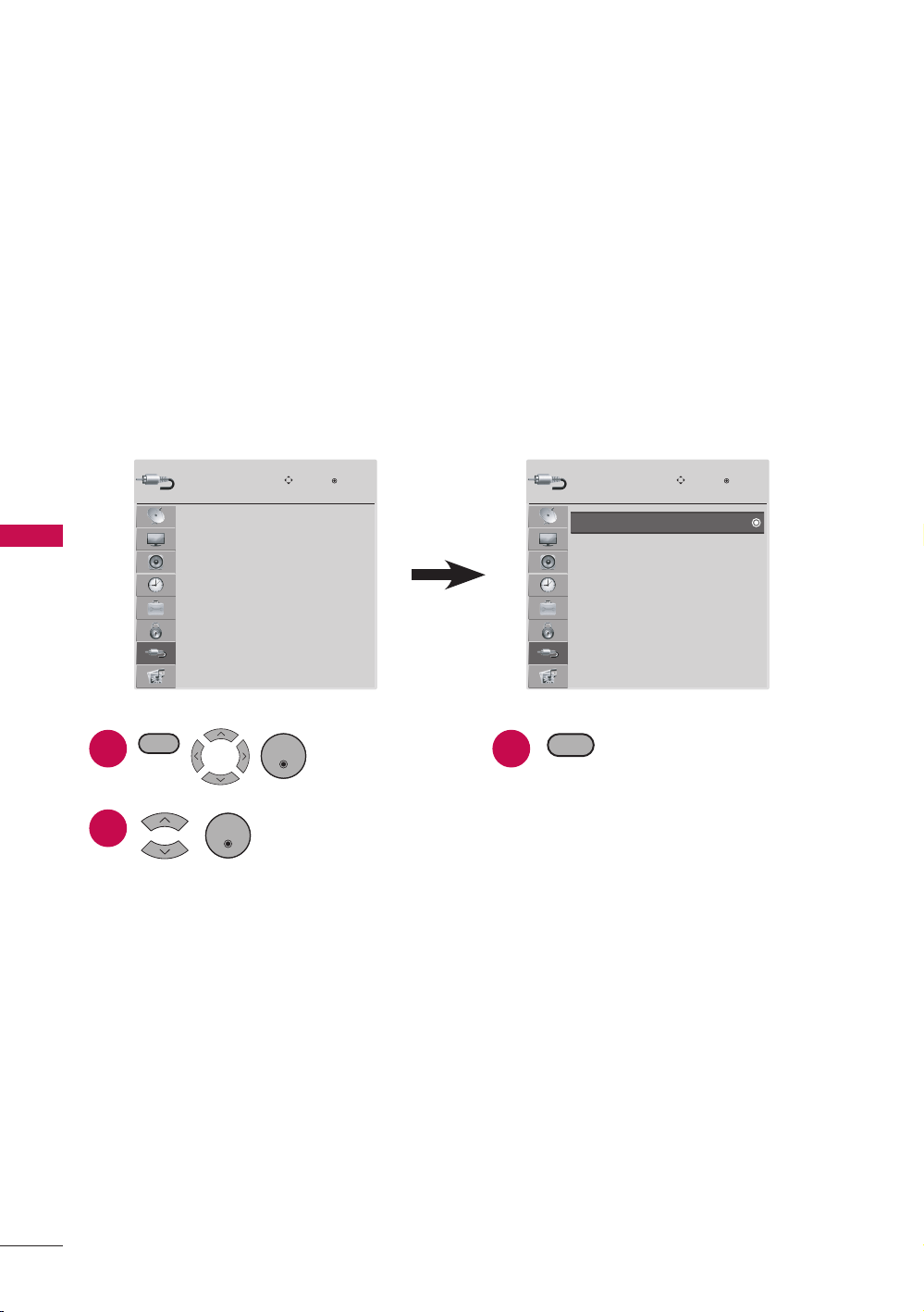
Input Menu
The Input menu offers options to select the desired input source.
TV
AV
Component
RPG-PC
HDMI1
HDMI2
Move
Enter
Input
1
2
Display INPUT
menu.
Select the desired
input source.
ENTER
3
Return to TV viewing.
RETURN
MENU
ENTER
a TV: Select it to watch over-the-air, cable and digital cable broadcasts.
a AV: Select them to watch a VCR or other external equipment.
a Component: Select them to watch DVD or a Digital set-top box.
a RGB-PC: Select it to view PC input.
a HDMI1/HDMI2/HDMI3*: Select them to watch high definition devices.
* HDMI 3: For 47LD500
TV
AV
Component
RPG-PC
HDMI1
HDMI2
Move
Enter
Input
41
MENU ADJUSTMENTS
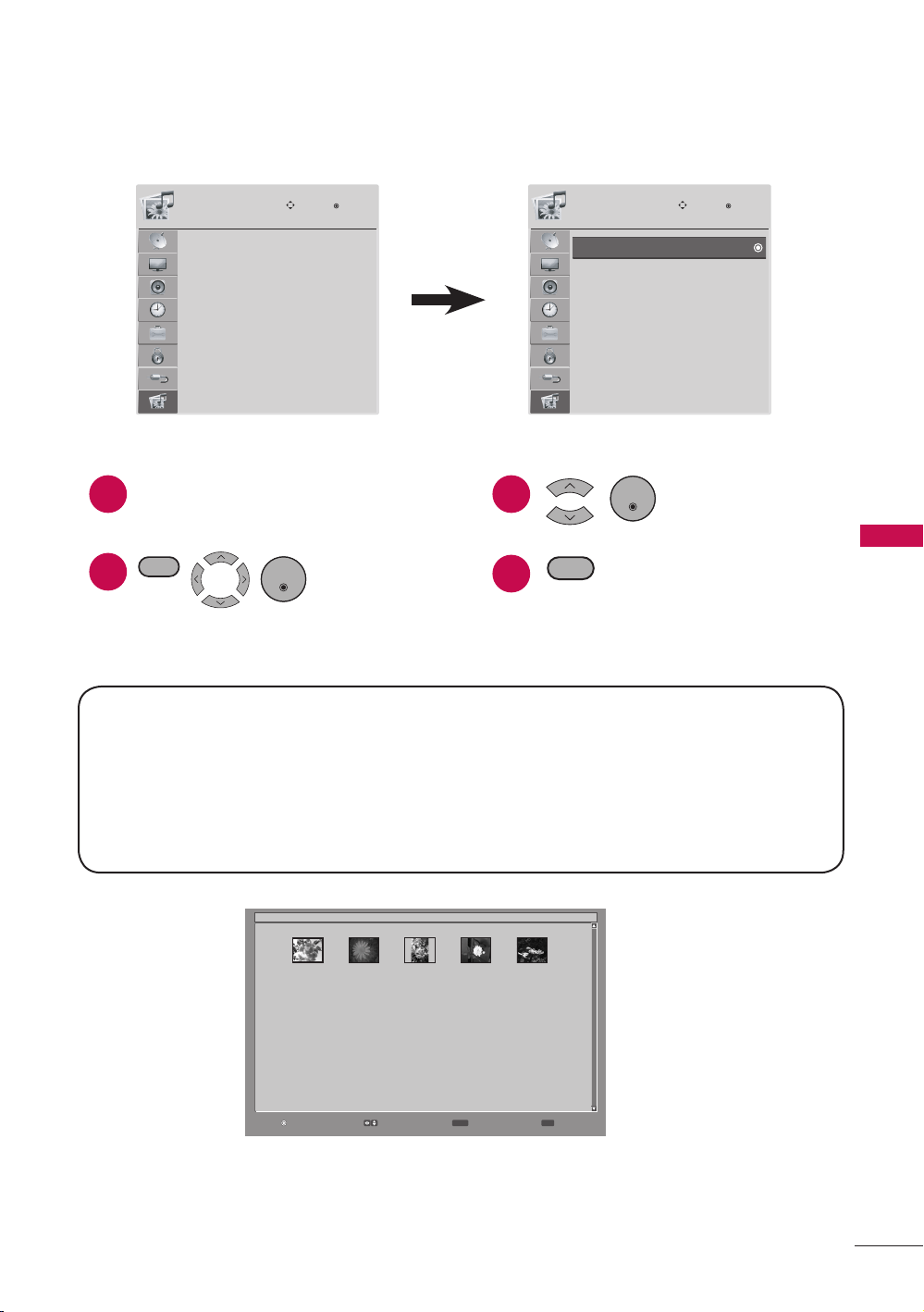
USB Menu
The USB menu will open automatically when you insert a USB drive. USB can also be
accessed by choosing USB in the user menu.
PHOTO LIST
MUSIC LIST
Move
Enter
USB
1
2
Connect the USB device to the USB
IN jack on the side of TV.
. Display USB
menu.
ENTER
3
4
Select PHOTO LIST or
MUSIC LIST.
Return to TV viewing.
ENTER
RETURN
MENU
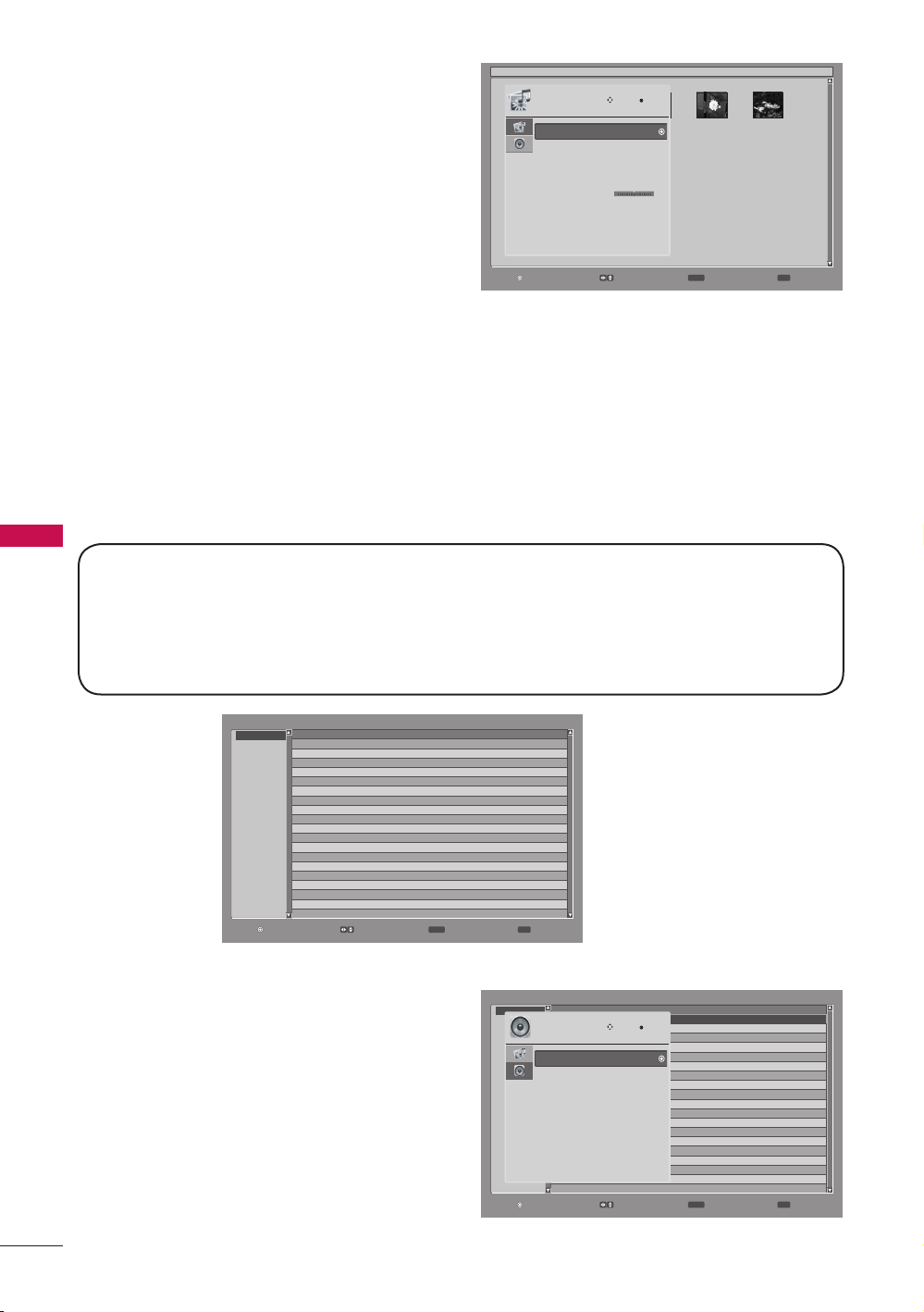
a PHOTO LIST
r To display the image on the screen in full size, select the desired image file and
press the ENTER button.
PHOTO LIST
MUSIC LIST
Move
Enter
USB
Supported photo file: *.JPG
1 Baseline: 64 pixel (width) x 64 pixel (height) to 15360 pixel (width) x 8640 pixel
(height)
1 Progressive: 64 pixel (width) x 64 pixel (height) to 1920 pixel (width) x 1440 pixel
(height)
1 You can play JPEG files only.
1 Non-supported files are displayed in the form of predefined icon.
Enter Select Exit
RETURN MENU
/
P0001001.jpg 0001/0005
P0001001.jpg P0001002.jpg P0001003.jpg P0001004.jpg P0001005.jpg
* MUSIC LIST: For 47LD500
42
MENU ADJUSTMENTS
Enter Select Exit
RETURN MENU
/
P0001001.jpg 0001/0005
P0001001.jpg P0001002.jpg P0001003.jpg P0001004.jpg P0001005.jpg
Slideshow Mode
Slideshow With Music
Repeat
Sort By
Duration
Slideshow Effect
Thumbnail Size
Information
Move
Enter
Photo
Sequence
Off
Off
Photo Date
5
Random
Small
Off
LR
a MUSIC LIST (
For 47LD500
)
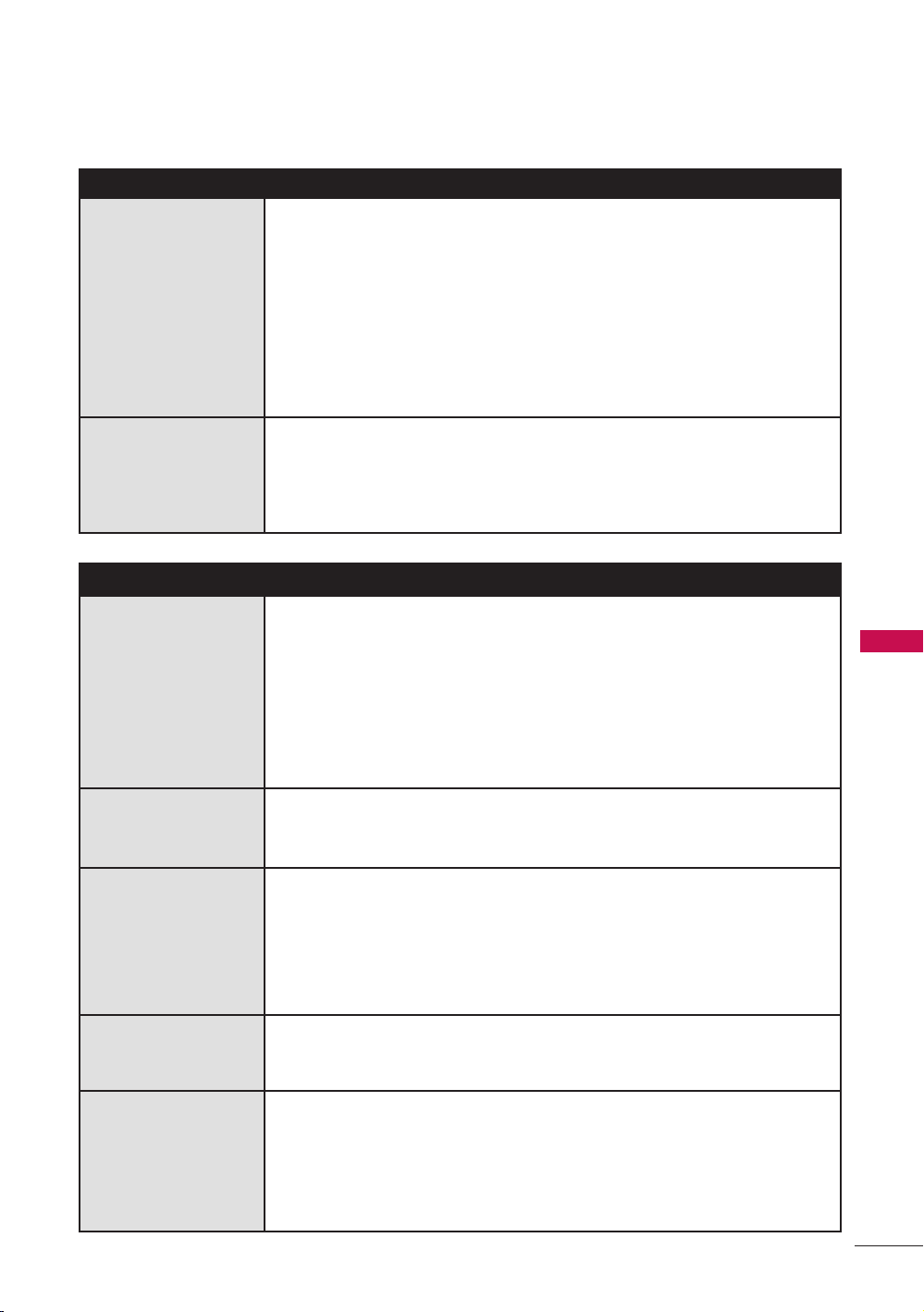
r To start music playback, select the desired audio file and press the ENTER button.
Enter Select Exit
RETURN MENU
File Name
[\]
\
Title GenreArtistAlbum
A Song About U.mp3A Song About UPop Britney SpearsBlackout
Been A While.mp3 Been A While PopBritney SpearsBlackout
Get Back.mp3 Get Back PopBritney SpearsBlackout
Everybody.mp3 EverybodyPop Britney SpearsBlackout
r Press the MENU button to more
options:
a Slideshow Mode: Selects the
slideshow mode.
a Slideshow With Music*: Selects the
slideshow mode with music.
* Slideshow With Music: For 47LD500
a Music file list: Selects the audio
file that will be playback during the
slideshow.
a Repeat: Sets the repeat mode to on
or off.
a Sort By: Selects the file sorting type.
a Duration: Sets the time interval of the slide show.
a Slideshow Effect: Selects the slideshow transition effect.
a Thumbnail Size: Selects the thumbnail size.
a Information: Sets the information to on or off.
Enter Select Exit
RETURN MENU
File Name
[\]
\
Title GenreArtistAlbum
A Song About U.mp3A Song About UPop Britney SpearsBlackout
Been A While.mp3 Been A While PopBritney SpearsBlackout
Get Back.mp3 Get Back PopBritney SpearsBlackout
Everybody.mp3 EverybodyPop Britney SpearsBlackout
A Song About U 0001/0008
Sort By
Play Mode
Repeat
Information
Move
Enter
Music
Title/File
Sequence
Off
Off
MUSIC (*.MP3) supporting file
Bit rate 32 Kbps - 320 Kbps
1 Sampling rate MPEG1 Layer3: 32 kHz, 44.1 kHz, 48 kHz
1 Sampling rate MPEG2 Layer3: 16 kHz, 22.05 kHz, 24 kHz
1 Sampling rate MPEG2.5 Layer3: 8 kHz, 11.025 kHz, 12 kHz
r Press the MENU button to more
options:
a Sort By: Selects the file sorting
type.
a Play Mode: Selects the play mode.
a Repeat: Sets the repeat mode to on
or off.
a Information: Sets the information to
on or off.
43
APPENDIX
APPENDIX
Troubleshooting
Abnormal Operation
The remote control
doesn’t work
r Check to see if there is any object between the product
and the remote control causing obstruction. Ensure you are
pointing the remote control directly at the TV.
r Ensure that the batteries are installed with correct polarity (+
to +, - to -).
r Ensure that the correct remote operating mode is set: TV, VCR
etc.
r Install new batteries.
TV turns off
suddenly
r Is the sleep timer set?
r Check the power control settings. Power interrupted.
r If there is no signal, the TV turns off automatically in 10
minutes.
Video Problems
No picture & No
sound
r Check whether the product is turned on.
r Try another channel. The problem may be with the broadcast.
r Is the power cord inserted into wall power outlet?
r Check your antenna direction and/or location.
r Test the wall power outlet, plug another product’s power cord
into the outlet where the product’s power cord was plugged
in.
Picture appears
slowly after
switching on
r This is normal, the image is muted during the product startup
process. Please contact your service center, if the picture has
not appeared after five minutes.
No or poor color or
poor picture
r Adjust Color in menu option.
r Keep a sufficient distance between the product and the VCR.
r Try another channel. The problem may be with the broadcast.
r Are the video cables installed properly?
r Activate any function to restore the brightness of the picture.
Horizontal/vertical
bars or picture
shaking
r Check for local interference such as an electrical appliance or
power tool.
Poor reception on
some channels
r Station or cable product experiencing problems, tune to
another station.
r Station signal is weak, reorient antenna to receive weaker
station.
r Check for sources of possible interference.
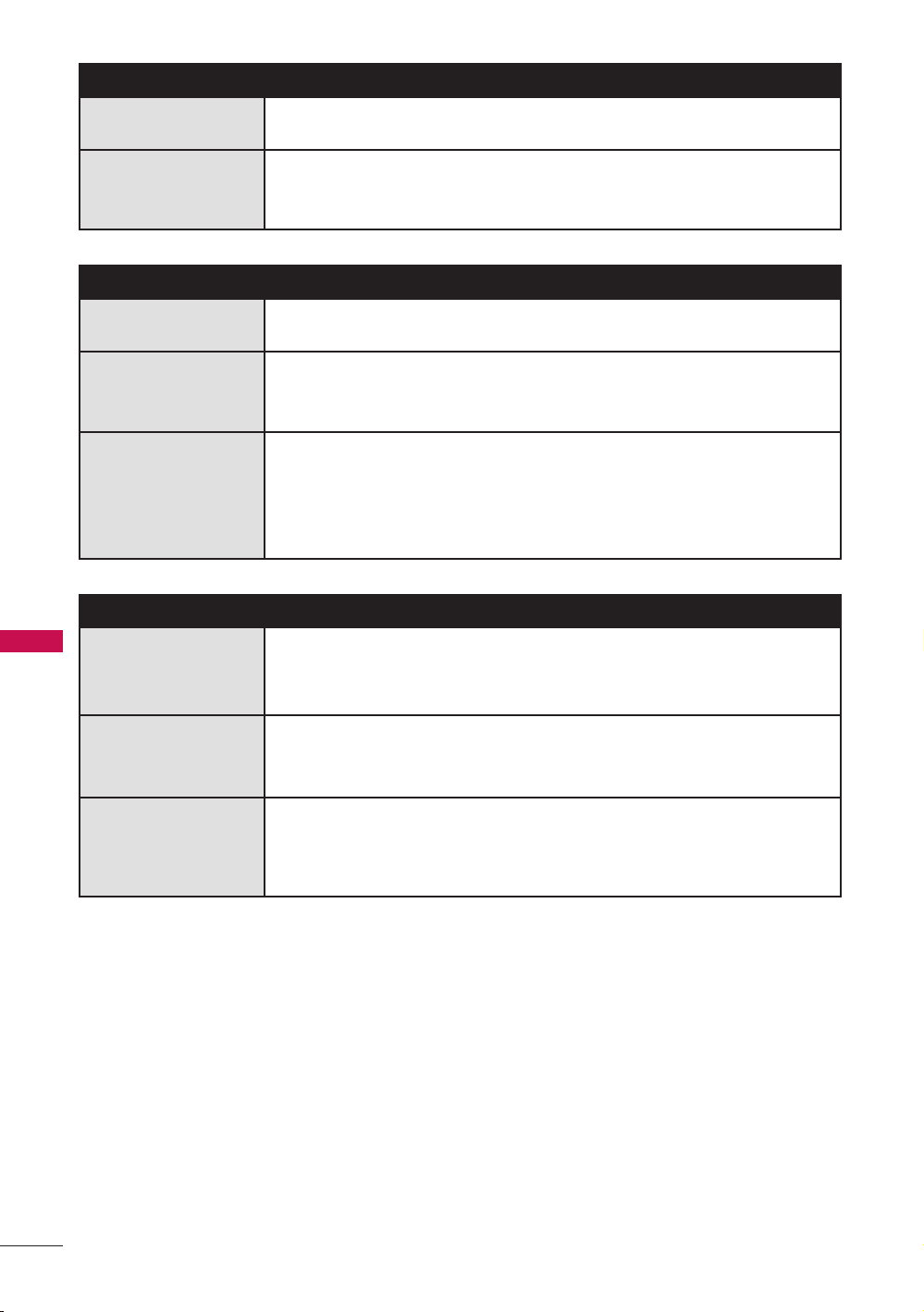
44
APPENDIX
Video Problems
Lines or streaks in
pictures
r Check antenna (Change the direction of the antenna).
No picture when
connecting HDMI
r If an HDMI cable doesn’t support High Speed HDMI, it can
cause flickers or no screen display. In this case use the latest
cables that support High Speed HDMI.
Audio Problems
No output from
one of the speakers
r Adjust Balance in menu option.
Unusual sound
from inside the
product
r A change in ambient humidity or temperature may result in
an unusual noise when the product is turned on or off and
does not indicate a fault with the product.
No sound when
connecting HDMI/
USB
r Check High Speed HDMI cable.
r Check USB cable over version 2.0.
r Use normal MP3 file.
*This feature is not available for all models.
PC Mode Problems
The signal is out of
range
r Adjust resolution, horizontal frequency, or vertical frequency
on the PC.
r Check the input source.
Screen color is
unstable or single
color
r Check the signal cable.
r Reinstall the PC video card.
When connecting
the HDMI cable to
the PC, there is no
audio.
r Check the manual for the video card in the PC to see if it
supports HDMI audio and how to set it up properly.

45
APPENDIX
Maintenance
Early malfunctions can be prevented. Careful and regular cleaning can extend the
amount of time you can enjoy your new TV.
Caution: Be sure to turn the power off and unplug the power cord before you begin any
cleaning.
Cleaning the Screen
Here’s a great way to keep the dust off your screen for a while. Wet a soft cloth in
a mixture of lukewarm water and a little fabric softener or dish washing detergent.
Wring the cloth until it’s almost dry, and then use it to wipe the screen.
Make sure the excess water is off the screen, and then let it air-dry before you turn
on your TV.
Cleaning the Cabinet
r To remove dirt or dust, wipe the cabinet with a soft, dry, lint-free cloth.
r Please be sure not to use a wet cloth.
Extended Absence
CAUTION
a If you expect to leave your TV dormant for a long time (such as a vacation), it’s
a good idea to unplug the power cord to protect against possible damage from
lightning or power surges.
1
2
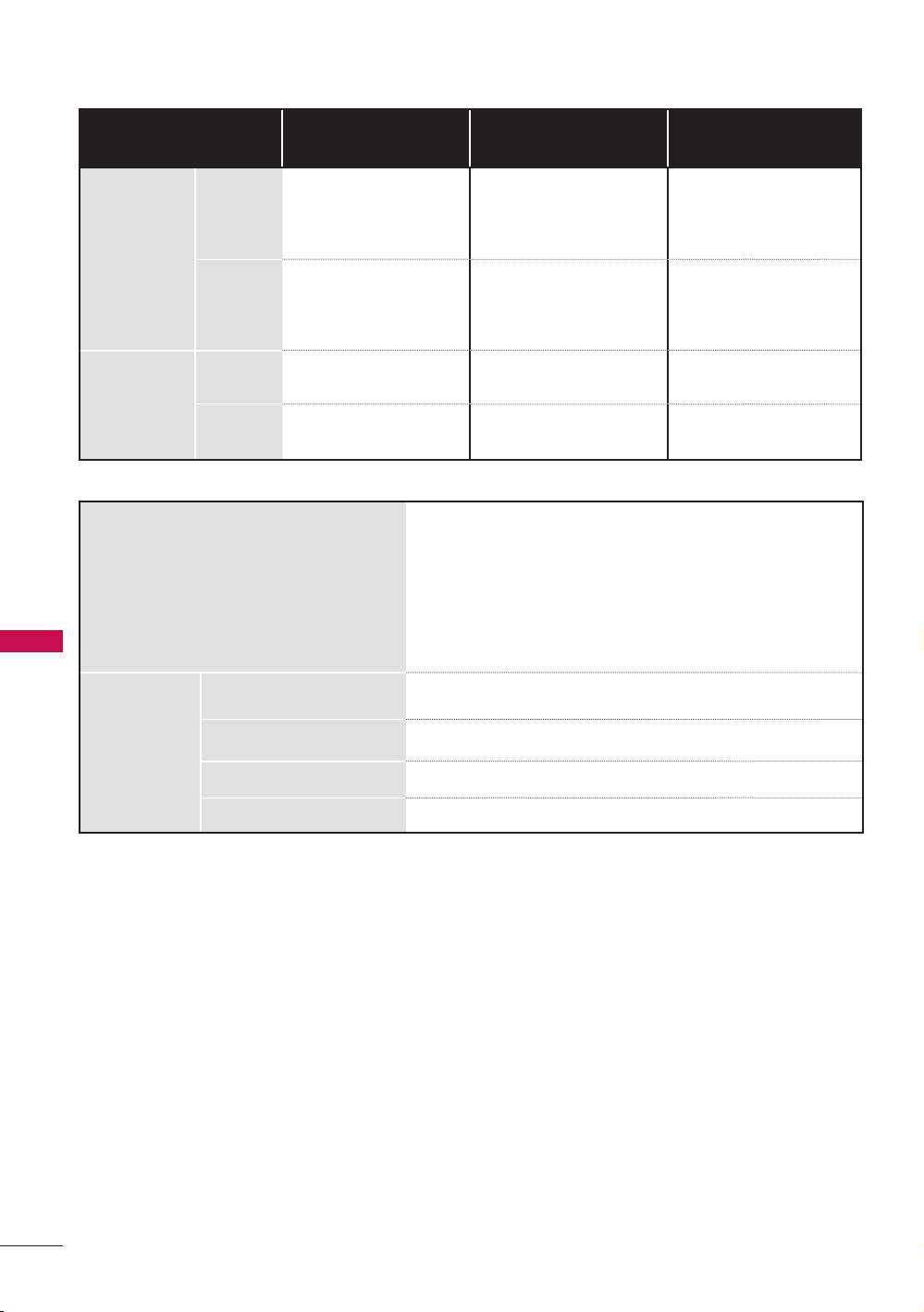
46
APPENDIX
Product Specifications
Models
32LD400
(32LD400-UA)
42LD400
(42LD400-UA)
47LD500
(47LD500-UA)
Dimensions
(Width x
Height x
Depth)
With
stand
791 x 563 x 210mm
(31.1” x 22.2” x 8.3”)
1018.5 x 693 x
246mm
(40.1” x 27.3” x 9.7”)
1136.6 x 760 x
246mm
(44.7” x 29.9” x 9.7”)
Without
stand
791 x 506 x 83mm
(31.1” x 19.9” x 3.3”)
1018.5 x 632 x
92mm
(40.1” x 24.9” x 3.6”)
1136.6 x 699 x
88mm
(44.7” x 27.5” x 3.5”)
Weight
With
stand
9.5 kg (20.9 lb) 15.6 kg (34.4 lb) 18.2 kg (40.1 lb)
Without
stand
8 kg (17.6 lb) 13.5 kg (29.7 lb) 15.9 kg (35 lb)
Power requirement AC 100-240 V ~50/60 Hz
Television System NTSC-M, ATSC, 64 & 256 QAM
Program Coverage
VHF 2-13, UHF 14-69, CATV 1-135, DTV 2-69, CADTV
1-135
External Antenna Impedance
75 Ω
Environment
condition
Operating Temperature 0°C to 35°C (32°F to 95°F)
Operating Humidity 10%~90% (No-condensation)
Storage Temperature -20°C to 60°C (-4°F to 140°F)
Storage Humidity 10%~70% (No-condensation)
* The specifications shown above may be changed without prior notice for quality
improvement.

47
APPENDIX
Open Source License
GNU GENERAL PUBLIC LICENSE
Version 2, June 1991
Copyright (C) 1989, 1991 Free Software
Foundation, Inc., 51 Franklin Street, Fifth
Floor, Boston, MA 02110-1301 USA
Everyone is permitted to copy and distribute
verbatim copies of this license document,
but changing it is not allowed.
Preamble
The licenses for most software are designed
to take away your freedom to share and
change it. By contrast, the GNU General
Public License is intended to guarantee
your freedom to share and change free
software - to make sure the software is free
for all its users. This General Public License
applies to most of the Free Software
Foundation’s software and to any other
program whose authors commit to using
it. (Some other free software foundation
software is covered by the GNU Lesser
General Public License instead.) You can
apply it to your programs, too.
When we speak of free software, we are
referring to freedom, not price. Our General
Public Licenses are designed to make sure
that you have the freedom to distribute
copies of free software (and charge for this
service if you wish), that you receive source
code or can get it if you want it, that you
can change the software or use pieces of
it in new free programs; and that you know
you can do these things.
To protect your rights, we need to make
restrictions that forbid anyone to deny you
these rights or to ask you to surrender
the rights. These restrictions translate
to certain responsibilities for you if you
distribute copies of the software, or if you
modify it.
For example, if you distribute copies of such
a program, whether gratis or for a fee, you
must give the recipients all the rights that
you have. You must make sure that they,
too, receive or can get the source code.
And you must show them these terms so
they know their rights.
We protect your rights with two steps:
(1) copyright the software, and (2) offer
you this license which gives you legal
permission to copy, distribute and/or
modify the software.
Also, for each author’s protection and ours,
we want to make certain that everyone
understands that there is no warranty for
this free software. If the software is modified
by someone else and passed on, we want
its recipients to know that what they have
is not the original, so that any problems
introduced by others will not reflect on the
original authors’ reputations.
Finally, any free program is threatened
constantly by software patents. We wish to
avoid the danger that redistributors of a
free program will individually obtain patent
licenses, in effect making the program
proprietary. To prevent this, we have made
it clear that any patent must be licensed
for everyone’s free use or not licensed at
all.
The precise terms and conditions for
copying, distribution and modification
follow.
GNU GENERAL PUBLIC LICENSE
TERMS AND CONDITIONS FOR
COPYING, DISTRIBUTION AND
MODIFICATION
0. This license applies to any program
or other work which contains a notice
placed by the copyright holder saying
it may be distributed under the terms
of this General Public License. The
“Program”, below, refers to any such
program or work, and a “work based on
the Program” means either the Program
or any derivative work under copyright
law: that is to say, a work containing the
Program or a portion of it, either verbatim
or with modifications and/or translated
into another language. (Hereinafter,
translation is included without limitation
in the term “modification”.) Each licensee
is addressed as “you”.
Activities other than copying, distribution
and modification are not covered by
this license; they are outside its scope.
The act of running the Program is not
restricted, and the output from the
program is covered only if its contents
constitute a work based on the program
(independent of having been made by
running the program). Whether that
is true depends on what the program
does.

48
APPENDIX
1. You may copy and distribute verbatim
copies of the program’s source code as
you receive it, in any medium, provided
that you conspicuously and appropriately
publish on each copy an appropriate
copyright notice and disclaimer of
warranty; keep intact all the notices that
refer to this license and to the absence
of any warranty; and give any other
recipients of the program a copy of this
license along with the Program.
You may charge a fee for the physical
act of transferring a copy, and you may
at your option offer warranty protection
in exchange for a fee.
2. You may modify your copy or copies
of the program or any portion of it,
thus forming a work based on the
Program, and copy and distribute such
modifications or work under the terms
of section 1 above, provided that you
also meet all of these conditions:
a) You must cause the modified files to
carry prominent notices stating that
you changed the files and the date of
any change.
b) You must cause any work that you
distribute or publish, that in whole or
in part contains or is derived from the
Program or any part there of, to be
licensed as a whole at no charge to all
third parties under the terms of this
license.
c) If the modified program normally
reads commands interactively when
run, you must cause it, when started
running for such interactive use in
the most ordinary way, to print or
display an announcement including
an appropriate copyright notice and
a notice that there is no warranty
(or else, saying that you provide
a warranty) and that users may
redistribute the program under these
conditions, and telling the user how to
view a copy of this license. (Exception:
if the Program itself is interactive
but does not normally print such an
announcement, your work based on
the Program is not required to print
an announcement.)
These requirements apply to the
modified work as a whole. If identifiable
sections of that work are not derived
from the Program, and can be
reasonably considered independent
and separate works in themselves, then
this license, and its terms, do not apply
to those sections when you distribute
them as separate works. But when you
distribute the same sections as part of
a whole which is a work based on the
Program, the distribution of the whole
must be on the terms of this license,
whose permissions for other licensees
extend to the entire whole, and thus to
each and every part regardless of who
wrote it.
Thus, it is not the intent of this section
to claim rights or contest your rights to
work written entirely by you; rather, the
intent is to exercise the right to control
the distribution of derivative or collective
works based on the program.
In addition, mere aggregation of another
work not based on the program with
the Program (or with a work based on
the program) on a volume of a storage
or distribution medium does not bring
the other work under the scope of this
license.
3. You may copy and distribute the
program (or a work based on it, under
section 2) in object code or executable
form under the terms of sections 1 and
2 above provided that you also do one
of the following:
a) Accompany it with the complete
corresponding machine-readable
source code, which must be distributed
under the terms of sections 1 and 2
above on a medium customarily used
for software interchange; or,
b) Accompany it with a written offer, valid
for at least three years, to give any third
party, for a charge no more than your
cost of physically performing source
distribution, a complete machine-
readable copy of the corresponding
source code, to be distributed under
the terms of sections 1 and 2 above
on a medium customarily used for
software interchange; or,
c) Accompany it with the information
you received as to the offer to
distribute corresponding source code.
(This alternative is allowed only for
noncommercial distribution and only
if you received the program in object
code or executable form with such
an offer, in accord with Subsection b
above.)
The source code for a work means the
preferred form of the work for making
modifications to it. For an executable
work, complete source code means
all the source code for all modules it

49
APPENDIX
contains, plus any associated interface
definition files, plus the scripts used
to control compilation and installation
of the executable. However, as a
special exception, the source code
distributed need not include anything
that is normally distributed (in either
source or binary form) with the major
components (compiler, kernel, and so
on) of the operating system on which the
executable runs, unless that component
itself accompanies the executable.
If distribution of executable or object
code is made by offering access to copy
from a designated place, then offering
equivalent access to copy the source
code from the same place counts as
distribution of the source code, even
though third parties are not compelled
to copy the source along with the object
code.
4. You may not copy, modify, sublicense,
or distribute the Program except as
expressly provided under this license.
Any attempt otherwise to copy, modify,
sublicense or distribute the Program is
void, and will automatically terminate
your rights under this license. However,
parties who have received copies, or
rights, from you under this license will
not have their licenses terminated
so long as such parties remain in full
compliance.
5. You are not required to accept this
license, since you have not signed
it. However, nothing else grants you
permission to modify or distribute the
Program or its derivative works. These
actions are prohibited by law if you do
not accept this license. Therefore, by
modifying or distributing the program
(or any work based on the program), you
indicate your acceptance of this license
to do so, and all its terms and conditions
for copying, distributing or modifying
the program or works based on it.
6. Each time you redistribute the program
(or any work based on the Program),
the recipient automatically receives a
license from the original licensor to
copy, distribute or modify the Program
subject to these terms and conditions.
You may not impose any further
restrictions on the recipients’ exercise
of the rights granted herein. You are not
responsible for enforcing compliance by
third parties to this license.
7. If, as a consequence of a court judgment
or allegation of patent infringement or for
any other reason (not limited to patent
issues), conditions are imposed on you
(whether by court order, agreement or
otherwise) that contradict the conditions
of this license, they do not excuse you
from the conditions of this license. If
you cannot distribute so as to satisfy
simultaneously your obligations under
this license and any other pertinent
obligations, then as a consequence you
may not distribute the program at all. For
example, if a patent license would not
permit royalty-free redistribution of the
program by all those who receive copies
directly or indirectly through you, then
the only way you could satisfy both it and
this license would be to refrain entirely
from distribution of the program.
If any portion of this section is held
invalid or unenforceable under any
particular circumstance, the balance of
the section is intended to apply and the
section as a whole is intended to apply
in other circumstances.
It is not the purpose of this section to
induce you to infringe any patents or
other property right claims or to contest
validity of any such claims; this section
has the sole purpose of protecting the
integrity of the free software distribution
system, which is implemented by public
license practices. Many people have
made generous contributions to the wide
range of software distributed through
that system in reliance on consistent
application of that system; it is up to
the author/donor to decide if he or she
is willing to distribute software through
any other system and a licensee cannot
impose that choice.
This section is intended to make
thoroughly clear what is believed to be a
consequence of the rest of this license.
8. If the distribution and/or use of the
program is restricted in certain countries
either by patents or by copyrighted
interfaces, the original copyright holder
who places the program under this
license may add an explicit geographical
distribution limitation excluding
those countries, so that distribution is
permitted only in or among countries
not thus excluded. In such case, this
license incorporates the limitation as if
written in the body of this license.
9. The Free Software Foundation may
publish revised and/or new versions of
the General Public License from time to
time. Such new versions will be similar

50
APPENDIX
in spirit to the present version, but may
differ in detail to address new problems
or concerns.
Each version is given a distinguishing
version number. If the program specifies
a version number of this license which
applies to it and “any later version”, you
have the option of following the terms
and conditions either of that version or
of any later version published by the Free
Software Foundation. If the program
does not specify a version number of
this license, you may choose any version
ever published by the Free Software
Foundation.
10. If you wish to incorporate parts of the
program into other free programs whose
distribution conditions are different,
write to the author to ask for permission.
For software which is copyrighted by
the Free Software Foundation, write
to the Free Software Foundation; we
sometimes make exceptions for this.
Our decision will be guided by the two
goals of preserving the free status of
all derivatives of our free software and
of promoting the sharing and reuse of
software generally.
NO WARRANTY
11. BECAUSE THE PROGRAM IS LICENSED
FREE OF CHARGE, THERE IS NO
WARRANTY FOR THE PROGRAM,
TO THE EXTENT PERMITTED BY
APPLICABLE LAW. EXCEPT WHEN
OTHERWISE STATED IN WRITING
THE COPYRIGHT HOLDERS AND/
OR OTHER PARTIES PROVIDE
THE PROGRAM “AS IS” WITHOUT
WARRANTY OF ANY KIND, EITHER
EXPRESSED OR IMPLIED, INCLUDING,
BUT NOT LIMITED TO, THE IMPLIED
WARRANTIES OF MERCHANTABILITY
AND FITNESS FOR A PARTICULAR
PURPOSE. THE ENTIRE RISK AS TO
THE QUALITY AND PERFORMANCE
OF THE PROGRAM IS WITH YOU.
SHOULD THE PROGRAM PROVE
DEFECTIVE, YOU ASSUME THE COST
OF ALL NECESSARY SERVICING,
REPAIR OR CORRECTION.
12. IN NO EVENT UNLESS REQUIRED BY
APPLICABLE LAW OR AGREED TO
IN WRITING WILL ANY COPYRIGHT
HOLDER, OR ANY OTHER PARTY
WHO MAY MODIFY AND/OR
REDISTRIBUTE THE PROGRAM AS
PERMITTED ABOVE, BE LIABLE TO
YOU FOR DAMAGES, INCLUDING ANY
GENERAL, SPECIAL, INCIDENTAL OR
CONSEQUENTIAL DAMAGES ARISING
OUT OF THE USE OR INABILITY TO
USE THE PROGRAM (INCLUDING BUT
NOT LIMITED TO LOSS OF DATA OR
DATA BEING RENDERED INACCURATE
OR LOSSES SUSTAINED BY YOU OR
THIRD PARTIES OR A FAILURE OF THE
PROGRAM TO OPERATE WITH ANY
OTHER PROGRAMS), EVEN IF SUCH
HOLDER OR OTHER PARTY HAS
BEEN ADVISED OF THE POSSIBILITY
OF SUCH DAMAGES.
END OF TERMS AND CONDITIONS
How to apply these terms to your new
programs
If you develop a new program, and you
want it to be of the greatest possible use
to the public, the best way to achieve this
is to make it free software which everyone
can redistribute and change under these
terms.
To do so, attach the following notices to the
program. It is safest to attach them to the
start of each source file to most effectively
convey the exclusion of warranty; and each
file should have at least the “copyright”
line and a pointer to where the full notice
is found.
one line to give the program’s name and a
brief idea of what it does.
Copyright (C) <year> <name of author>
This program is free software; you can
redistribute it and/or modify it under
the terms of the GNU General Public
License as published by the Free Software
Foundation; either version 2 of the license,
or (at your option) any later version.
This program is distributed in the hope
that it will be useful, but WITHOUT ANY
WARRANTY; without even the implied
warranty of MERCHANTABILITY or
FITNESS FOR A PARTICULAR PURPOSE.
See the GNU General Public License for
more details.
You should have received a copy of the
GNU General Public License along with this
program; if not, write to the Free Software
Foundation, Inc., 51 Franklin Street, Fifth
Floor, Boston, MA 02110-1301 USA.
Also add information on how to contact
you by electronic and paper mail.
If the program is interactive, make it output
a short notice like this when it starts in an

51
APPENDIX
interactive mode:
Gnomovision version 69, Copyright (C) year
name of author Gnomovision comes with
ABSOLUTELY NO WARRANTY; for details
type ‘show w’. This is free software, and you
are welcome to redistribute it under certain
conditions; type ‘show c’ for details.
The hypothetical commands ‘show w’ and
‘show c’ should show the appropriate parts
of the General Public License. Of course,
the commands you use may be called
something other than ‘show w’ and ‘show
c’; they could even be mouse-clicks or
menu items-whatever suits your program.
You should also get your employer (if you
work as a programmer) or your school, if
any, to sign a “copyright disclaimer” for the
program, if necessary.
Here is a sample; alter the names:
Yoyodyne, Inc., hereby disclaims all copyright
interest in the program ‘Gnomovision’
(which makes passes at compilers) written
by James Hacker.
signature of Ty Coon, 1 April 1989
Ty Coon, President of Vice
This General Public License does not
permit incorporating your program into
proprietary programs. If your program is
a subroutine library, you may consider it
more useful to permit linking proprietary
applications with the library. If this is what
you want to do, use the GNU Lesser General
Public License instead of this license
GNU LESSER GENERAL PUBLIC LICENSE
Version 2.1, February 1999
Copyright (C) 1991, 1999 Free Software
Foundation, Inc. 51 Franklin Street, Fifth
Floor, Boston, MA 02110-1301 USA
Everyone is permitted to copy and distribute
verbatim copies of this license document,
but changing it is not allowed.
[This is the first released version of the
Lesser GPL. It also counts as the successor
of the GNU Library Public License, version
2, hence the version number 2.1.]
Preamble
The licenses for most software are designed
to take away your freedom to share and
change it. By contrast, the GNU General
Public Licenses are intended to guarantee
your freedom to share and change free
software - to make sure the software is
free for all its users.
This license, the Lesser General Public
License, applies to some specially
designated software packages - typically
libraries - of the Free Software Foundation
and other authors who decide to use it.
You can use it too, but we suggest you first
think carefully about whether this license
or the ordinary General Public License is
the better strategy to use in any particular
case, based on the explanations below.
When we speak of free software, we are
referring to freedom of use, not price. Our
General Public Licenses are designed to
make sure that you have the freedom to
distribute copies of free software (and
charge for this service if you wish); that
you receive source code or can get it if you
want it; that you can change the software
and use pieces of it in new free programs;
and that you are informed that you can do
these things.
To protect your rights, we need to make
restrictions that forbid distributors to deny
you these rights or to ask you to surrender
these rights. These restrictions translate
to certain responsibilities for you if you
distribute copies of the library or if you
modify it.
For example, if you distribute copies of the
library, whether gratis or for a fee, you must
give the recipients all the rights that we
gave you. You must make sure that they,
too, receive or can get the source code.
If you link other code with the library, you
must provide complete object files to the
recipients, so that they can relink them
with the library after making changes to
the library and recompiling it. And you
must show them these terms so they know
their rights.
We protect your rights with a two-step
method: (1) we copyright the library, and
(2) we offer you this license, which gives
you legal permission to copy, distribute
and/or modify the library.
To protect each distributor, we want to
make it very clear that there is no warranty

52
APPENDIX
for the free library. Also, if the library is
modified by someone else and passed
on, the recipients should know that what
they have is not the original version, so
that the original author’s reputation will
not be affected by problems that might be
introduced by others.
Finally, software patents pose a constant
threat to the existence of any free program.
We wish to make sure that a company
cannot effectively restrict the users of a
free program by obtaining a restrictive
license from a patent holder. Therefore, we
insist that any patent license obtained for
a version of the library must be consistent
with the full freedom of use specified in
this license.
Most GNU software, including some
libraries, is covered by the ordinary GNU
General Public License. This license,
the GNU Lesser General Public License,
applies to certain designated libraries, and
is quite different from the ordinary General
Public License. We use this license for
certain libraries in order to permit linking
those libraries into non-free programs.
When a program is linked with a library,
whether statically or using a shared library,
the combination of the two is legally
speaking a combined work, a derivative of
the original library. The ordinary General
Public License therefore permits such
linking only if the entire combination fits
its criteria of freedom. The Lesser General
Public License permits more lax criteria for
linking other code with the library.
We call this license the “Lesser” General
Public License because it does Less
to protect the user’s freedom than the
ordinary General Public License. It also
provides other free software developers
Less of an advantage over competing
non-free programs. These disadvantages
are the reason we use the ordinary General
Public License for many libraries. However,
the Lesser license provides advantages in
certain special circumstances.
For example, on rare occasions, there may
be a special need to encourage the widest
possible use of a certain library, so that it
becomes a de-facto standard. To achieve
this, non-free programs must be allowed
to use the library. A more frequent case
is that a free library does the same job as
widely used non-free libraries. In this case,
there is little to gain by limiting the free
library to free software only, so we use the
Lesser General Public License.
In other cases, permission to use a
particular library in non-free programs
enables a greater number of people to use
a large body of free software. For example,
permission to use the GNU C Library in
non-free programs enables many more
people to use the whole GNU operating
system, as well as its variant, the GNU/
Linux operating system.
Although the Lesser General Public
License is Less protective of the users’
freedom, it does ensure that the user of a
program that is linked with the Library has
the freedom and the wherewithal to run
that program using a modified versionof
the Library.
The precise terms and conditions for
copying, distribution and modification
follow. Pay close attention to the difference
between a “work based on the library” and
a “work that uses the library”. The former
contains code derived from the library,
whereas the latter must be combined with
the library in order to run.
GNU LESSER GENERAL PUBLIC
LICENSE
TERMS AND CONDITIONS FOR COPYING,
DISTRIBUTION AND MODIFICATION
0. This license agreement applies to any
software library or other program which
contains a notice placed by the copyright
holder or other authorized party saying
it may be distributed under the terms
of this Lesser General Public License
(also called “this license”). Each license
is addressed as “you”.
A “library” means a collection of
software functions and/or data prepared
so as to be conveniently linked with
application programs (which use some
of those functions and data) to form
executables.
The “Library”, below, refers to any such
software library or work which has been
distributed under these terms. A “work
based on the Library” means either the
Library or any derivative work under
copyright law: that is to say, a work
containing the library or a portion of it,
either verbatim or with modifications
and/or translated straightforwardly
into another language. (Hereinafter,
translation is included without limitation
in the term “modification”.)
“Source code” for a work means the
preferred form of the work for making

53
APPENDIX
modifications to it. For a library, complete
source code means all the source code
for all modules it contains, plus any
associated interface definition files, plus
the scripts used to control compilation
and installation of the library.
Activities other than copying, distribution
and modification are not covered by
this license; they are outside its scope.
The act of running a program using the
Library is not restricted, and output from
such a program is covered only if its
contents constitute a work based on the
library (independent of the use of the
Library in a tool for writing it). Whether
that is true depends on what the library
does and what the program that uses
the library does.
1. You may copy and distribute verbatim
copies of the library’s complete source
code as you receive it, in any medium,
provided that you conspicuously and
appropriately publish on each copy
an appropriate copyright notice and
disclaimer of warranty; keep intact all
the notices that refer to this license and
to the absence of any warranty; and
distribute a copy of this license along
with the Library.
You may charge a fee for the physical
act of transferring a copy, and you may
at your option offer warranty protection
in exchange for a fee.
2. You may modify your copy or copies
of the Library or any portion of it, thus
forming a work based on the Library, and
copy and distribute such modifications
or work under the terms of section 1
above, provided that you also meet all
of these conditions:
a) The modified work must itself be a
software library.
b) You must cause the files modified to
carry prominent notices stating that
you changed the files and the date of
any change.
c) You must cause the whole of the work
to be licensed at no charge to all
third parties under the terms of this
license.
d) If a facility in the modified Library
refers to a function or a table of data
to be supplied by an application
program that uses the facility, other
than as an argument passed when
the facility is invoked, then you must
make a good faith effort to ensure
that, in the event an application does
not supply such function or table, the
facility still operates, and performs
whatever part of its purpose remains
meaningful.
(For example, a function in a library to
compute square roots has a purpose
that is entirely well-defined independent
of the application. Therefore, Subsection
2d requires that any application-supplied
function or table used by this function
must be optional: if the application does
not supply it, the square root function
must still compute square roots.)
These requirements apply to the
modified work as a whole. If identifiable
sections of that work are not derived
from the library, and can be reasonably
considered independent and separate
works in themselves, then this license,
and its terms, do not apply to those
sections when you distribute them as
separate works. But when you distribute
the same sections as part of a whole
which is a work based on the library, the
distribution of the whole must be on the
terms of this license, whose permissions
for other licenses extend to the entire
whole, and thus to each and every part
regardless of who wrote it.
Thus, it is not the intent of this section
to claim rights or contest your rights to
work written entirely by you; rather, the
intent is to exercise the right to control
the distribution of derivative or collective
works based on the library.
In addition, mere aggregation of
another work not based on the library
with the library (or with a work based
on the library) on a volume of a storage
or distribution medium does not bring
the other work under the scope of this
license.
3. You may opt to apply the terms of the
ordinary GNU General Public License
instead of this License to a given copy
of the Library. To do this, you must alter
all the notices that refer to this License,
so that they refer to the ordinary GNU
General Public License, version 2, instead
of to this License. (If a newer version than
version 2 of the ordinary GNU General
Public License has appeared, then you
can specify that version instead if you
wish.) Do not make any other change in
these notices.

54
APPENDIX
Once this change is made in a given
copy, it is irreversible for that copy, so the
ordinary GNU General Public License
applies to all subsequent copies and
derivative works made from that copy.
This option is useful when you wish to
copy part of the code of the library into
a program that is not a library.
4. You may copy and distribute the library
(or a portion or derivative of it, under
Section 2) in object code or executable
form under the terms of Sections 1 and
2 above provided that you accompany
it with the complete corresponding
machine-readable source code,
which must be distributed under the
terms of sections 1 and 2 above on a
medium customarily used for software
interchange.
If distribution of object code is made by
offering access to copy from a designated
place, then offering equivalent access
to copy the source code from the
same place satisfies the requirement to
distribute the source code, even though
third parties are not compelled to copy
the source along with the object code.
5. A program that contains no derivative
of any portion of the Library, but is
designed to work with the Library by
being compiled or linked with it, is called
a “work that uses the Library”. Such a
work, in isolation, is not a derivative work
of the Library, and therefore falls outside
the scope of this license.
However, linking a “work that uses the
library” with the Library creates an
executable that is a derivative of the
Library (because it contains portions of
the library), rather than a “work that uses
the library”. The executable is therefore
covered by this license. Section 6
states terms for distribution of such
executable.
When a “work that uses the library” uses
material from a header file that is part of
the library, the object code for the work
may be a derivative work of the library
even though the source code is not.
Whether this is true is especially
significant if the work can be linked
without the library, or if the work is itself
a library. The threshold for this to be true
is not precisely defined by law.
If such an object file uses only numerical
parameters, data structure layouts and
accessories, and small macros and
small inline functions (ten lines or less
in length), then the use of the object file
is unrestricted, regardless of whether it
is legally a derivative work. (Executable
containing this object code plus portions
of the library will still fall under Section
6.)
Otherwise, if the work is a derivative of
the library, you may distribute the object
code for the work under the terms of
Section 6. Any executable containing
that work also fall under Section 6,
whether or not they are linked directly
with the library itself.
6. As an exception to the sections above,
you may also combine or link a “work
that uses the library” with the library
to produce a work containing portions
of the library, and distribute that work
under terms of your choice, provided
that the terms permit modification of
the work for the customer’s own use
and reverse engineering for debugging
such modifications.
You must give prominent notice with
each copy of the work that the library
is used in it and that the Library and
its use are covered by this license. You
must supply a copy of this license. If the
work during execution displays copyright
notices, you must include the copyright
notice for the library among them, as
well as a reference directing the user to
the copy of this license. Also, you must
do one of these things:
a) Accompany the work with the
complete corresponding machine-
readable source code for the library
including whatever changes were used
in the work (which must be distributed
under Sections 1 and 2 above); and,
if the work is an executable linked
with the Library, with the complete
machine-readable “work that uses the
Library”, as object code and/or source
code, so that the user can modify the
library and then relink to produce a
modified executable containing the
modified library. (It is understood that
the user who changes the contents
of definitions files in the library will
not necessarily be able to recompile
the application to use the modified
definitions.)
b) Use a suitable shared library
mechanism for linking with the
library. A suitable mechanism is
one that (1) uses at run time a copy
of the library already present on
the user’s computer system, rather

55
APPENDIX
than copying library functions into
the executable, and (2) will operate
properly with a modified version of the
library, if the user installs one, as long
as the modified version is interface-
compatible with the version that the
work was made with.
c) Accompany the work with a written
offer, valid for at least three years,
to give the same user the materials
specified in Subsection 6, above, for
a charge no more than the cost of
performing this distribution.
d) If distribution of the work is made
by offering access to copy from a
designated place, offer equivalent
access to copy the above specified
materials from the same place.
e) Verify that the user has already
received a copy of these materials or
that you have already sent this user
a copy.
For an executable, the required form
of the “work that uses the library”
must include any data and utility
programs needed for reproducing
the executable from it. However, as a
special exception, the materials to be
distributed need not include anything
that is normally distributed (in either
source or binary form) with the major
components (compiler, kernel, and so
on) of the operating system on which the
executable runs, unless that component
itself accompanies the executable.
It may happen that this requirement
contradicts the license restrictions of
other proprietary libraries that do not
normally accompany the operating
system. Such a contradiction means
you cannot use both them and the
library together in an executable that
you distribute.
7. You may place library facilities that are a
work based on the library side-by-side in
a single library together with other library
facilities not covered by this license,
and distribute such a combined library,
provided that the separate distribution
of the work based on the Library and
of the other library facilities is otherwise
permitted, and provided that you do
these two things:
a) Accompany the combined library
with a copy of the same work based
on the Library, uncombined with any
other library facilities. This must be
distributed under the terms of the
sections above.
b) Give prominent notice with the
combined library of the fact that part
of it is a work based on the library,
and explaining where to find the
accompanying uncombined form of
the same work.
8. You may not copy, modify, sublicense,
link with, or distribute the library except
as expressly provided under this license.
Any attempt otherwise to copy, modify,
sublicense, link with, or distribute the
library is void, and will automatically
terminate your rights under this license.
However, parties who have received
copies, or rights, from you under this
license will not have their licenses
terminated so long as such parties
remain in full compliance.
9. You are not required to accept this license,
since you have not signed it. However,
nothing else grants you permission
to modify or distribute the library or
its derivative works. These actions are
prohibited by law if you do not accept
this license. Therefore, by modifying
or distributing the library (or any work
based on the library), you indicate your
acceptance of this license to do so, and
all its terms and conditions for copying,
distributing or modifying the library or
works based on it.
10. Each time you redistribute the library
(or any work based on the Library),
the recipient automatically receives a
license from the original licensor to
copy, distribute, link with or modify
the library subject to these terms and
conditions. You may not impose any
further restrictions on the recipients’
exercise of the rights granted herein.
You are not responsible for enforcing
compliance by third parties with this
license.
11. If, as a consequence of a court judgment
or allegation of patent infringement or for
any other reason (not limited to patent
issues), conditions are imposed on you
(whether by court order, agreement or
otherwise) that contradict the conditions
of this license, they do not excuse you
from the conditions of this license. If
you cannot distribute so as to satisfy
simultaneously your obligations under
this license and any other pertinent
obligations, then as a consequence you
may not distribute the library at all. For

56
APPENDIX
example, if a patent license would not
permit royalty-free redistribution of the
library by all those who receive copies
directly or indirectly through you, then
the only way you could satisfy both it and
this license would be to refrain entirely
from distribution of the library.
If any portion of this section is held
invalid or unenforceable under any
particular circumstance, the balance of
the section is intended to apply, and the
section as a whole is intended to apply
in other circumstances.
It is not the purpose of this section to
induce you to infringe any patents or
other property right claims or to contest
validity of any such claims; this section
has the sole purpose of protecting the
integrity of the free software distribution
system which is implemented by public
license practices. Many people have
made generous contributions to the
wide range of software distributed
through that system in reliance on
consistent application of that system; it
is up to the author/donor to decide if
he or she is willing to distribute software
through any other system and a license
cannot impose that choice.
This section is intended to make
thoroughly clear what is believed to be a
consequence of the rest of this license.
12. If the distribution and/or use of the library
is restricted in certain countries either
by patents or by copyrighted interfaces,
the original copyright holder who places
the library under this license may add
an explicit geographical distribution
limitation excluding those countries, so
that distribution is permitted only in or
among countries not thus excluded. In
such case, this license incorporates the
limitation as if written in the body of this
license.
13. The Free Software Foundation may
publish revised and/or new versions of
the Lesser General Public License from
time to time. Such new versions will be
similar in spirit to the present version,
but may differ in detail to address new
problems or concerns.
Each version is given a distinguishing
version number. If the library specifies
a version number of this license which
applies to it and “any later version”, you
have the option of following the terms
and conditions either of that version or
of any later version published by the
Free Software Foundation.
If the library does not specify a license
version number, you may choose any
version ever published by the Free
Software Foundation.
14. If you wish to incorporate parts of the
library into other free programs whose
distribution conditions are incompatible
with these, write to the author to ask
for permission. For software which
is copyrighted by the Free Software
Foundation, write to the Free Software
Foundation; we sometimes make
exceptions for this. Our decision will be
guided by the two goals of preserving
the free status of all derivatives of our
free software and of promoting the
sharing and reuse of software generally.
NO WARRANTY
15. BECAUSE THE LIBRARY IS LICENSED
FREE OF CHARGE, THERE IS NO
WARRANTY FOR THE LIBRARY, TO THE
EXTENT PERMITTED BY APPLICABLE
LAW. EXCEPT WHEN OTHERWISE
STATED IN WRITING THE COPYRIGHT
HOLDERS AND/OR OTHER PARTIES
PROVIDE THE LIBRARY “AS IS”
WITHOUT WARRANTY OF ANY KIND,
EITHER EXPRESSED OR IMPLIED,
INCLUDING, BUT NOT LIMITED TO,
THE IMPLIED WARRANTIES OF
MERCHANTABILITY AND FITNESS
FOR A PARTICULAR PURPOSE. THE
ENTIRE RISK AS TO THE QUALITY
AND PERFORMANCE OF THE LIBRARY
IS WITH YOU. SHOULD THE LIBRARY
PROVE DEFECTIVE, YOU ASSUME THE
COST OF ALL NECESSARY SERVICING,
REPAIR OR CORRECTION.
16. IN NO EVENT UNLESS REQUIRED BY
APPLICABLE LAW OR AGREED TO
IN WRITING WILL ANY COPYRIGHT
HOLDER, OR ANY OTHER PARTY WHO
MAY MODIFY AND/OR REDISTRIBUTE
THE LIBRARY AS PERMITTED ABOVE,
BE LIABLE TO YOU FOR DAMAGES,
INCLUDING ANY GENERAL, SPECIAL,
INCIDENTAL OR CONSEQUENTIAL
DAMAGES ARISING OUT OF THE
USE OR INABILITY TO USE THE
LIBRARY (INCLUDING BUT NOT
LIMITED TO LOSS OF DATA OR DATA
BEING RENDERED INACCURATE
OR LOSSES SUSTAINED BY YOU OR
THIRD PARTIES OR A FAILURE OF
THE LIBRARY TO OPERATE WITH ANY
OTHER SOFTWARE), EVEN IF SUCH
HOLDER OR OTHER PARTY HAS

57
APPENDIX
BEEN ADVISED OF THE POSSIBILITY
OF SUCH DAMAGES.
END OF TERMS AND CONDITIONS
How to apply these terms to your new
libraries
If you develop a new library, and you want
it to be of the greatest possible use to
the public, we recommend making it free
software that everyone can redistribute
and change. You can do so by permitting
redistribution under these terms (or,
alternatively, under the terms of the
ordinary General Public License).
To apply these terms, attach the following
notices to the library. It is safest to attach
them to the start of each source file to
most effectively convey the exclusion of
warranty;
and each file should have at least the
“copyright” line and a pointer to where the
full notice is found.
one line to give the library’s name and a
brief idea of what it does.
Copyright (C) <year> <name of author>
This library is free software; you can
redistribute it and/or modify it under the
terms of the GNU Lesser General Public
License as published by the Free Software
Foundation; either version 2.1 of the license,
or (at your option) any later version.
This library is distributed in the hope
that it will be useful, but WITHOUT ANY
WARRANTY; without even the implied
warranty of MERCHANTABILITY or
FITNESS FOR A PARTICULAR PURPOSE.
See the GNU Lesser General Public
License for more details.
You should have received a copy of the
GNU Lesser General Public License along
with this library; if not, write to the Free
Software Foundation, Inc., 51 Franklin
Street, Fifth Floor, Boston, MA 02110-1301
USA
Also add information on how to contact
you by electronic and paper mail.
You should also get your employer (if you
work as a programmer)or your school, if
any, to sign a “copyright disclaimer” for the
library, if necessary. Here is a sample; alter
the names:
Yoyodyne, Inc., hereby disclaims all
copyright interest in the library ‘Frob’ (a
library for tweaking knobs) written by
James Random Hacker.
signature of Ty Coon, 1 April 1990
Ty Coon, President of Vice

58
APPENDIX
MOZILLA PUBLIC LICENSE
Version 1.1
1.Definitions.
1.0.1. “Commercial use” means distribution
or otherwise making the covered code
available to a third party.
1.1. “Contributor” means each entity that
creates or contributes to the creation
of modifications.
1.2. “Contributor version” means the
combination of the original code, prior
modifications used by a contributor,
and the modifications made by that
particular contributor.
1.3. “Covered code” means the original
code or modifications or the
combination of the original code and
modifications, in each case including
portions thereof.
1.4. “Electronic distribution mechanism”
means a mechanism generally
accepted in the software development
community for the electronic transfer
of data.
1.5. “Executable” means covered code in
any form other than source code.
1.6. “Initial developer” means the individual
or entity identified as the initial
Developer in the Source Code notice
required by exhibit A.
1.7. “Larger work” means a work which
combines covered code or portions
thereof with code not governed by
the terms of this License.
1.8. “License” means this document.
1.8.1. “Licensable” means having the right
to grant, to the maximum extent
possible, whether at the time of the
initial grant or subsequently acquired,
any and all of the rights conveyed
herein.
1.9. “Modifications” means any addition
to or deletion from the substance or
structure of either the original code
or any previous modifications. When
covered code is released as a series
of files, a modification is:
A. Any addition to or deletion from the
contents of a file containing original
code or previous modifications.
B. Any new file that contains any
part of the original code or previous
modifications.
1.10. “Original code” means source code
of computer software code which is
described in the source code notice
required by exhibit as original code,
and which, at the time of its release
under this license is not already
covered code governed by this
license.
1.10.1. “Patent claims” means any patent
claim(s), now owned or hereafter
acquired, including without limitation,
method, process, and apparatus
claims, in any patent licensable by
grantor.
1.11. “Source code” means the preferred
form of the covered code for
making modifications to it, including
all modules it contains, plus any
associated interface definition files,
scripts used to control compilation
and installation of an executable, or
source code differential comparisons
against either the original code or
another well known, available covered
code of the contributor’s choice. The
source code can be in a compressed
or archival form, provided the
appropriate decompression or de-
archiving software is widely available
for no charge.
1.12. “You” (or “Your”) means an individual
or a legal entity exercising rights
under, and complying with all of
the terms of, this license or a future
version of this license issued under
section 6.1.
For legal entities, “You” includes any
entity which controls, is controlled
by, or is under common control with
You. For purposes of this definition,
“control” means (a) the power, direct
or indirect, to cause the direction or
management of such entity, whether
by contract or otherwise, or (b)
ownership of more than fifty percent
(50%) of the outstanding shares or
beneficial ownership of such entity.
2. Source Code License.
2.1. The initial developer grant.
The initial developer hereby grants You

59
APPENDIX
a world-wide, royalty-free, non-
exclusive license, subject to third
party intellectual property claims:
a) under intellectual property rights
(other than patent or trademark)
licensable by initial developer to use,
reproduce, modify, display, perform,
sublicense and distribute the original
code (or portions thereof) with or
without modifications, and/or as part
of a larger work; and
(b) under patents claims infringed by
the making, using or selling of original
code, to make, have made, use,
practice, sell, and offer for sale, and/
or otherwise dispose of the original
code (or portions there of).
(c) the licenses granted in this section
2.1(a) and (b) are effective on the
date Initial developer first distributes
original code under the terms of this
license.
(d) Notwithstanding section 2.1(b)
above, no patent license is granted:
1) for code that You delete from the
original Code; 2) separate from the
original code; or 3) for infringements
caused by: i) the modification of the
original code or ii) the combination of
the original code with other software
or devices.
2.2. Contributor Grant.
Subject to third party intellectual property
claims, each contributor hereby grants You
a world-wide, royalty-free, non-exclusive
license
(a) under intellectual property rights
(other than patent or trademark)
licensable by contributor, to use,
reproduce, modify, display, perform,
sublicense and distribute the
modifications created by such
contributor (or portions thereof)
either on an unmodified basis, with
other modifications, as covered code
and/or as part of a larger work; and
(b) under patent claims infringed by
the making, using, or selling of
modifications made by that contributor
either alone and/or in combination
with its contributor version (or portions
of such combination), to make, use,
sell, offer for sale, have made, and/or
otherwise dispose of: 1) modifications
made by that contributor (or portions
thereof); and 2) the combination
of modifications made by that
contributor with its contributor version
(or portions of such combination).
(c) the licenses granted in sections 2.2(a)
and 2.2(b) are effective on the date
contributor first makes commercial
use of the covered code.
(d) Notwithstanding section 2.2(b)
above, no patent license is granted:
1) for any code that contributor has
deleted from the contributor version;
2) separate from the contributor
version; 3) for infringements caused
by: i) third party modifications
of contributor version or ii) the
combination of modifications made
by that contributor with other software
(except as part of the contributor
version) or other devices; or 4) under
patent claims infringed by covered
code in the absence of modifications
made by that contributor.
3. Distribution Obligations.
3.1. Application of license.
The modifications which You create or
to which you contribute are governed
by the terms of this license, including
without limitation section 2.2. The
source code version of covered code
may be distributed only under the terms
of this license or a future version of this
license released under section 6.1, and
you must include a copy of this license
with every copy of the source code you
distribute. You may not offer or impose
any terms on any source code version
that alters or restricts the applicable
version of this license or the recipients’
rights hereunder. However, you may
include an additional document offering
the additional rights described in section
3.5.
3.2. Availability of source code.
Any modification which you create or
to which you contribute must be made
available in source code form under
the terms of this license either on the
same media as an executable version or
via an accepted electronic distribution
mechanism to anyone to whom you
made an executable version available;
and if made available via electronic
distribution mechanism, must remain
available for at least twelve (12) months
after the date it initially became
available, or at least six (6) months after
a subsequent version of that particular
modification has been made available to
such recipients. You are responsible for
ensuring that the source code version

60
APPENDIX
remains available even if the electronic
distribution mechanism is maintained
by a third party.
3.3. Description of modifications.
You must cause all covered code to
which you contribute to contain a
file documenting the changes You
made to create that covered code
and the date of any change. You must
include a prominent statement that
the modification is derived, directly or
indirectly, from original code provided
by the initial developer and including
the name of the initial developer in (a)
the source code, and (b) in any notice
in an executable version or related
documentation in which you describe
the origin or ownership of the covered
code.
3.4. Intellectual property matters
(a) Third party claims.
If contributor has knowledge that a
license under a third party’s intellectual
property rights is required to exercise
the rights granted by such contributor
under sections 2.1 or 2.2, contributor
must include a text file with the source
code distribution titled “LEGAL” which
describes the claim and the party
making the claim in sufficient detail that
a recipient will know whom to contact.
If contributor obtains such knowledge
after the modification is made available
as described in section 3.2, contributor
shall promptly modify the LEGAL
file in all copies contributor makes
available thereafter and shall take other
steps (such as notifying appropriate
mailing lists or newsgroups) reasonably
calculated to inform those who received
the covered code that new knowledge
has been obtained.
(b) Contributor APIs.
If contributor’s modifications include an
application programming interface and
contributor has knowledge of patent
licenses which are reasonably necessary
to implement that API, contributor must
also include this information in the
LEGAL file.
(c) Representations.
contributor represents that, except
as disclosed pursuant to section
3.4(a) above, contributor believes
that contributor’s modifications are
contributor’s original creation(s) and/or
contributor has sufficient rights to grant
the rights conveyed by this license.
3.5. Required notices.
You must duplicate the notice in exhibit
A in each file of the source code. If it
is not possible to put such notice in a
particular source code file due to its
structure, then You must include such
notice in a location (such as a relevant
directory) where a user would be likely
to look for such a notice. If You created
one or more modification(s), you may
add your name as a contributor to
the notice described in exhibit A. you
must also duplicate this license in any
documentation for the source code
where You describe recipients’ rights
or ownership rights relating to covered
code. You may choose to offer, and
to charge a fee for, warranty, support,
indemnity or liability obligations to one
or more recipients of covered code.
However, you may do so only on your
own behalf, and not on behalf of the
Initial developer or any contributor.
You must make it absolutely clear than
any such warranty, support, indemnity or
liability obligation is offered by you alone,
and You hereby agree to indemnify the
Initial developer and every contributor
for any liability incurred by the Initial
developer or such contributor as a
result of warranty, support, indemnity or
liability terms you offer.
3.6. Distribution of executable versions.
You may distribute covered code
in executable form only if the
requirements of section 3.1-3.5 have
been met for that covered code, and
if you include a notice stating that the
source code version of the covered
code is available under the terms of
this license, including a description of
how and where you have fulfilled the
obligations of section 3.2. The notice
must be conspicuously included in any
notice in an executable version, related
documentation or collateral in which
you describe recipients’ rights relating
to the covered code. You may distribute
the executable version of covered code
or ownership rights under a license of
your choice, which may contain terms
different from this license, provided that
you are in compliance with the terms of
this license and that the license for the
executable version does not attempt
to limit or alter the recipient’s rights in
the source code version from the rights
set forth in this license. If you distribute

61
APPENDIX
the executable version under a different
license you must make it absolutely clear
that any terms which differ from this
license are offered by you alone, not by
the Initial developer or any contributor.
You hereby agree to indemnify the initial
developer and every contributor for any
liability incurred by the initial developer
or such contributor as a result of any
such terms You offer.
3.7. Larger works.
You may create a larger work by
combining covered code with other
code not governed by the terms of this
license and distribute the larger work
as a single product. In such a case, you
must make sure the requirements of
this license are fulfilled for the covered
code.
4. Inability to comply due to statute or
regulation.
If it is impossible for you to comply with
any of the terms of this license with
respect to some or all of the covered
code due to statute, judicial order, or
regulation then you must: (a) comply
with the terms of this license to the
maximum extent possible; and (b)
describe the limitations and the code
they affect. Such description must be
included in the LEGAL file described in
section 3.4 and must be included with all
distributions of the source code. Except
to the extent prohibited by statute or
regulation, such description must be
sufficiently detailed for a recipient of
ordinary skill to be able to understand
it.
5. Application of this license.
This license applies to code to which the
initial developer has attached the notice
in exhibit A and to related covered
code.
6. Versions of the license.
6.1. New versions.
Netscape communications corporation
(“Netscape”) may publish revised and/
or new versions of the license from time
to time. Each version will be given a
distinguishing version number.
6.2. Effect of new versions.
Once covered code has been published
under a particular version of the license,
you may always continue to use it under
the terms of that version. You may also
choose to use such covered code under
the terms of any subsequent version of
the license published by netscape. No
one other than netscape has the right to
modify the terms applicable to covered
code created under this license.
6.3. Derivative works.
If You create or use a modified version
of this license (which you may only do
in order to apply it to code which is
not already covered code governed by
this license), You must (a) rename Your
license so that the phrases “Mozilla”,
“MOZILLAPL”, “MOZPL”, “Netscape”,
“MPL”, “NPL” or any confusingly similar
phrase do not appear in your license
(except to note that your license differs
from this license) and (b) otherwise
make it clear that Your version of the
license contains terms which differ from
the Mozilla Public license and netscape
Public License. (Filling in the name of
the initial developer, original code or
contributor in the notice described in
exhibit A shall not of themselves be
deemed to be modifications of this
license.)
7. DISCLAIMER OF WARRANTY.
COVERED CODE IS PROVIDED
UNDER THIS LICENSE ON AN “AS
IS” BASIS, WITHOUT WARRANTY
OF ANY KIND, EITHER EXPRESSED
OR IMPLIED, INCLUDING, WITHOUT
LIMITATION, WARRANTIES THAT
THE COVERED CODE IS FREE OF
DEFECTS, MERCHANTABLE, FIT FOR
A PARTICULAR PURPOSE OR NON-
INFRINGING. THE ENTIRE RISK AS TO
THE QUALITY AND PERFORMANCE
OF THE COVERED CODE IS WITH
YOU. SHOULD ANY COVERED CODE
PROVE DEFECTIVE IN ANY RESPECT,
YOU (NOT THE INITIAL DEVELOPER
OR ANY OTHER CONTRIBUTOR)
ASSUME THE COST OF ANY
NECESSARY SERVICING, REPAIR OR
CORRECTION. THIS DISCLAIMER
OF WARRANTY CONSTITUTES AN
ESSENTIAL PART OF THIS LICENSE.
NO USE OF ANY COVERED CODE IS
AUTHORIZED HEREUNDER EXCEPT
UNDER THIS DISCLAIMER.
8. TERMINATION.
8.1. This license and the rights granted
hereunder will terminate automatically if
you fail to comply with terms herein and

62
APPENDIX
fail to cure such breach within 30 days
of becoming aware of the breach. All
sublicenses to the covered code which
are properly granted shall survive any
termination of this license. Provisions
which, by their nature, must remain in
effect beyond the termination of this
license shall survive.
8.2. If you initiate litigation by asserting a
patent infringement
claim (excluding declatory judgment
actions) against initial developer or
a contributor (the initial developer or
contributor against whom you file such
action is referred to as “Participant”)
alleging that:
(a) such participant’s contributor version
directly or indirectly infringes any
patent, then any and all rights granted
by such participant to you under
sections 2.1 and/or 2.2 of this license
shall, upon 60 days notice from
Participant terminate prospectively,
unless if within 60 days after receipt
of notice you either: (i) agree in
writing to pay participant a mutually
agreeable reasonable royalty for your
past and future use of modifications
made by such participant, or (ii)
withdraw your litigation claim with
respect to the contributor version
against such participant. If within 60
days of notice, a reasonable royalty
and payment arrangement are not
mutually agreed upon in writing by
the parties or the litigation claim is
not withdrawn, the rights granted by
participant to you under sections 2.1
and/or 2.2 automatically terminate at
the expiration of the 60 day notice
period specified above.
(b) any software, hardware, or device, other
than such participant’s contributor
Version, directly or indirectly infringes
any patent, then any rights granted
to You by such participant under
sections 2.1(b) and 2.2(b) are revoked
effective as of the date you first
made, used, sold, distributed, or had
made, modifications made by that
participant.
8.3. If you assert a patent infringement
claim against participant alleging
that such participant’s contributor
version directly or indirectly infringes
any patent where such claim is
resolved (such as by license or
settlement) prior to the initiation of
patent infringement litigation, then
the reasonable value of the licenses
granted by such participant under
sections 2.1 or 2.2 shall be taken into
account in determining the amount
or value of any payment or license.
8.4. In the event of termination under
sections 8.1 or 8.2 above, all end
user license agreements (excluding
distributors and resellers) which
have been validly granted by you or
any distributor hereunder prior to
termination shall survive termination.
9. LIMITATION OF LIABILITY.
UNDER NO CIRCUMSTANCES AND
UNDER NO LEGAL THEORY, WHETHER
TORT (INCLUDING NEGLIGENCE),
CONTRACT, OR OTHERWISE, SHALL
YOU, THE INITIAL DEVELOPER, ANY
OTHER CONTRIBUTOR, OR ANY
DISTRIBUTOR OF COVERED CODE,OR
ANY SUPPLIER OF ANY OF SUCH
PARTIES, BE LIABLE TO ANY PERSON
FOR ANY INDIRECT, SPECIAL,
INCIDENTAL, OR CONSEQUENTIAL
DAMAGES OF ANY CHARACTER
INCLUDING, WITHOUT LIMITATION,
DAMAGES FOR LOSS OF GOODWILL,
WORK STOPPAGE, COMPUTER
FAILURE OR MALFUNCTION, OR
ANY AND ALL OTHER COMMERCIAL
DAMAGES OR LOSSES, EVEN IF
SUCH PARTY SHALL HAVE BEEN
INFORMED OF THE POSSIBILITY OF
SUCH DAMAGES. THIS LIMITATION
OF LIABILITY SHALL NOT APPLY TO
LIABILITY FOR DEATH OR PERSONAL
INJURY RESULTING FROM SUCH
PARTY’S NEGLIGENCE TO THE EXTENT
APPLICABLE LAW PROHIBITS SUCH
LIMITATION. SOME JURISDICTIONS
DO NOT ALLOW THE EXCLUSION
OR LIMITATION OF INCIDENTAL OR
CONSEQUENTIAL DAMAGES, SO
THIS EXCLUSION AND LIMITATION
MAY NOT APPLY TO YOU.
10. U.S. GOVERNMENT END USERS.
The covered code is a “commercial item,”
as that term is defined in 48 C.F.R. 2.101
(Oct. 1995), consisting of “commercial
computer software” and “commercial
computer software documentation,”
as such terms are used in 48 C.F.R.
12.212 (Sept. 1995). Consistent with 48
C.F.R. 12.212 and 48 C.F.R. 227.7202-1
through 227.7202-4 (June 1995), all
U.S. Government end users acquire
covered code with only those rights set
forth herein.

63
APPENDIX
11. MISCELLANEOUS.
This license represents the complete
agreement concerning subject matter
hereof. If any provision of this license
is held to be unenforceable, such
provision shall be reformed only to the
extent necessary to make it enforceable.
This License shall be governed by
California law provisions (except to the
extent applicable law, if any, provides
otherwise), excluding its conflict-of-law
provisions. With respect to disputes in
which at least one party is a citizen of, or
an entity chartered or registered to do
business in the united states of america,
any litigation relating to this License
shall be subject to the jurisdiction
of the federal courts of the northern
district of california, with venue lying
in santa clara county, california, with
the losing party responsible for costs,
including without limitation, court costs
and reasonable attorneys’ fees and
expenses. The application of the united
nations convention on contracts for the
International sale of goods is expressly
excluded. Any law or regulation which
provides that the language of a contract
shall be construed against the drafter
shall not apply to this license.
12. RESPONSIBILITY FOR CLAIMS.
As between initial developer and the
contributors, each party is responsible
for claims and damages arising, directly
or indirectly, out of its utilization of rights
under this license and you agree to work
with initial developer and contributors
to distribute such responsibility on
an equitable basis. Nothing herein
is intended or shall be deemed to
constitute any admission of liability.
13. MULTIPLE-LICENSED CODE.
Initial developer may designate portions
of the covered code as “Multiple-
Licensed”. “Multiple-Licensed” means
that the initial developer permits you
to utilize portions of the covered code
under your choice of the NPL or the
alternative licenses, if any, specified by
the initial developer in the file described
in exhibit A.
EXHIBIT A -Mozilla Public License.
The contents of this file are subject to
the Mozilla Public License Version 1.1 (the
“license”); you may not use this file except
in compliance with the License. You may
obtain a copy of the license at http://www.
mozilla.org/MPL/
Software distributed under the license is
distributed on an “AS IS” basis, WITHOUT
WARRANTY OF ANY KIND, either express
or implied. See the license for the specific
language governing rights and limitations
under the License.
The Original Code is _____________________
_________________.
The Initial Developer of the Original Code
is___________________.
Portions created by ______________________
are Copyright (C) _______________________.
All Rights Reserved.
Contributor(s): ___________________________
___________.
Alternatively, the contents of this file may
be used under the terms of the _____
license (the “[___] License”), in which
case the provisions of [______] license are
applicable instead of those above. If you
wish to allow use of your version of this file
only under the terms of the [____] license
and not to allow others to use your version
of this file under the MPL, indicate your
decision by deleting the provisions above
and replace them with the notice and other
provisions required by the [___] license. If
you do not delete the provisions above, a
recipient may use your version of this file
under either the MPL or the [___] license.”
NOTE: The text of this exhibit A may differ
slightly from the text of the notices in the
source code files of the original code. You
should use the text of this exhibit A rather
than the text found in the original code/
source code for Your modifications.

The model and serial number of the TV is located
on the back and one side of the TV.
Record it below should you ever need service.
MODEL
SERIAL