Read “Safety Precautions” (P.E-8 - E-12)
to ensure correct use.
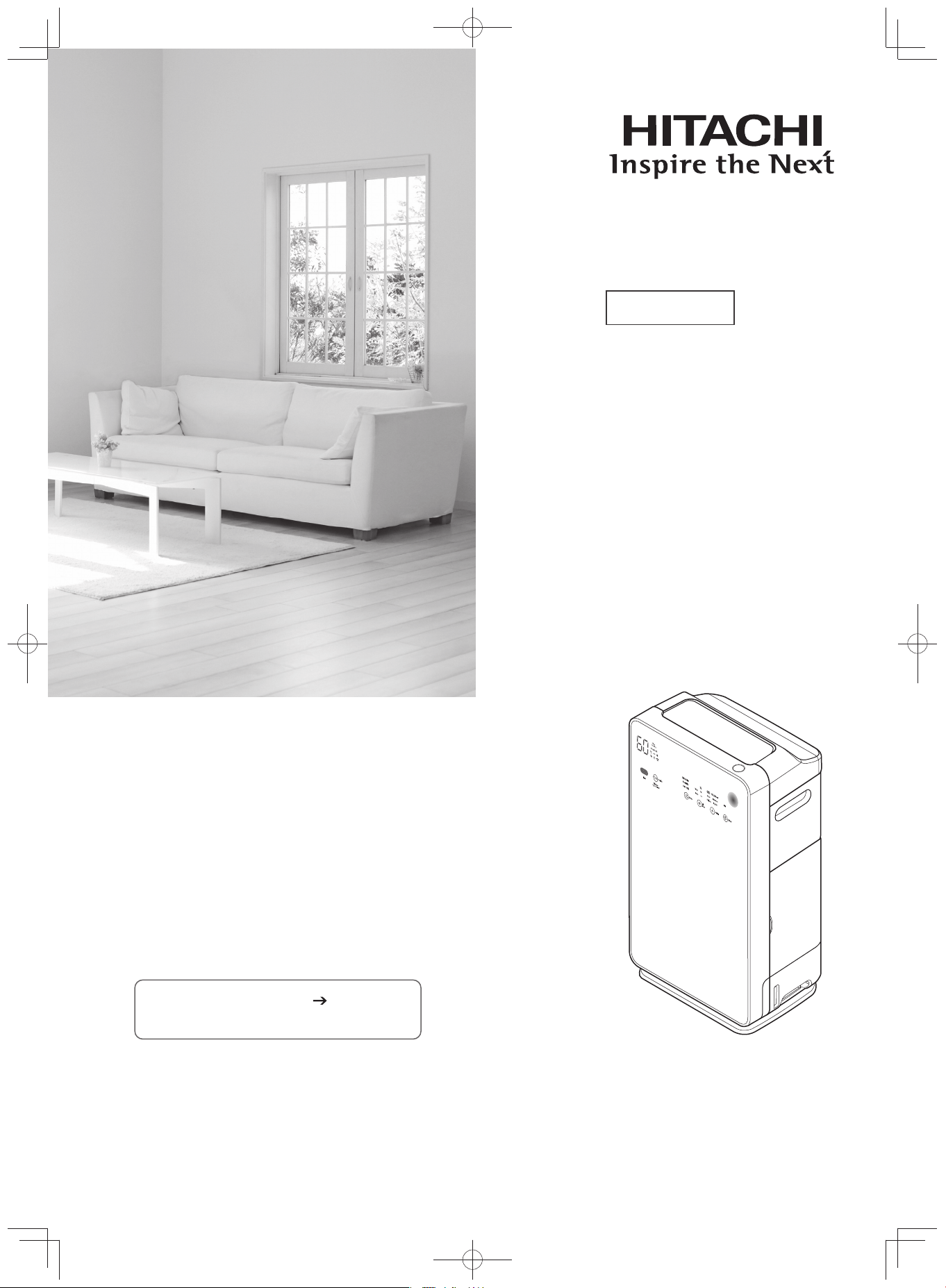
EP-M70E
Model
Hitachi Air Purifier with
Humidifying Function
Instruction Manual
Thank you for purchasing a Hitachi air purifier.
This air purifier is for household use only.
Do not use it for any other purpose besides purifying air.
Please read this instruction manual carefully before
using this product to ensure the unit is operated
correctly.
For future reference, keep this manual in an easily
accessible place.
EP-M70E_EN.indd 1EP-M70E_EN.indd 1 2017/2/23 17:27:022017/2/23 17:27:02
E-2
Features
1. Wide suction and speedy dust collection in just 9 minutes for a 13m
2
room.
Standard applicable fl oor space - 53m
2
2. Easy cleaning with the [Stainless Clean System]
With the stainless pre-fi lter, dust is easily removed.
Also, stainless steel which demonstrates antibacterial effects has been adopted in parts such as
the pre-fi lter, fl ap, air outlet, etc.
3. With the Allergen-free HEPA Filter, fi ne dust particles are thoroughly collected.
Air Purify Mode
Humidifies clean air and increases humidity for dry rooms.
Humidify Mode
Skin Moist Mode
Increases room humidity and controls it to about 60%.
Gives moisture to dry skin during winter, or during dry weather.
Automatically regulates the airflow according to the condition of the
room air, and performs dust collection and deodorization.
Skin Moist
Humidify
Air Purify
Mode
Skin Moist
Humidify
Air Purify
Mode
Skin Moist
Humidify
Air Purify
Mode
EP-M70E_EN.indd 2EP-M70E_EN.indd 2 2017/2/23 17:27:402017/2/23 17:27:40
E-3
Contents
Operatin
g
Air Purifi er
Be
f
ore Use
C
leaning and Maintenance
Features ············································
Name of Each Component / Accessories
····
Operating the Touch Operation Panel
····
Safety Precautions ··························
Cautions on Use ······························
Air Cleaner Deodorizing Performance
···
Preparations for Operation ·············
Setting Filter in Unit
····························
Filling Water Tank
·······························
Installation ········································
E-2
E-4
E-6
E-8
E-13
E-14
E-14
E-16
E-18
Operation ··········································
Starting Operation ····································
Switching Touch Operation Panel Display
····
Selecting Operation Mode (Basic Operations)
····
Switching Airfl ow Rate ······························
Useful Features ································
Operating in Option ···································
Eco Saving Operation ·······························
PM2.5 Sensor ···········································
Switching Between Temperature /
Humidity Monitor Display ··························
Stopping Operation Using Off-timer ··········
Setting the Lock ········································
Memory Function / Monitor /
Sensors / Auto Detection ················
Memory Function ······································
Air Sensor ·················································
Odor Sensor ·············································
Dust Sensor ··············································
Temperature / Humidity Monitor
(Temperature / Humidity Sensor) ··············
Vibration Sensor ·······································
Auto Detection ··········································
Adjusting Sensory Sensitivity Setting ·······
E-19
E-19
E-20
E-21
E-21
E-22
E-22
E-23
E-24
E-24
E-24
E-25
E-26
E-26
E-26
E-26
E-26
E-26
E-27
E-27
E-27
Cleaning ···········································
When the Filter Cleaning Indicator Comes On
····
Replacing Humidifying Filter ·····················
When the “Water Refi ll” Indicator Comes On
······
Water Tank ················································
Humidifying Filter ······································
Water Tank, Tank Cover, Water Tank Filter ····
Pre-fi lter, Filter Assembly / Deodorizing Filter
····
Cleaning the Deodorizing Filter ················
Purifi er ······················································
Dust Sensor ··············································
Replacing the Filter Assembly / De-
odorizing Filter ·································
Replacement Interval ································
Handling the Filter Assembly /
Deodorizing Filter······································
How to Replace the Filter Assembly /
Deodorizing Filter······································
Troubleshooting Guide ···················
Replacement Parts ··························
Specifi cations ··································
E-28
E-28
E-31
E-31
E-32
E-33
E-33
E-34
E-35
E-36
E-36
E-37
E-37
E-37
E-38
E-39
E-42
E-43
Before Use Operating Air Purifier Cleaning and Maintenance
E-13
EP-M70E_EN.indd 3EP-M70E_EN.indd 3 2017/2/23 17:27:402017/2/23 17:27:40
E-4
Name of Each Component / Accessories
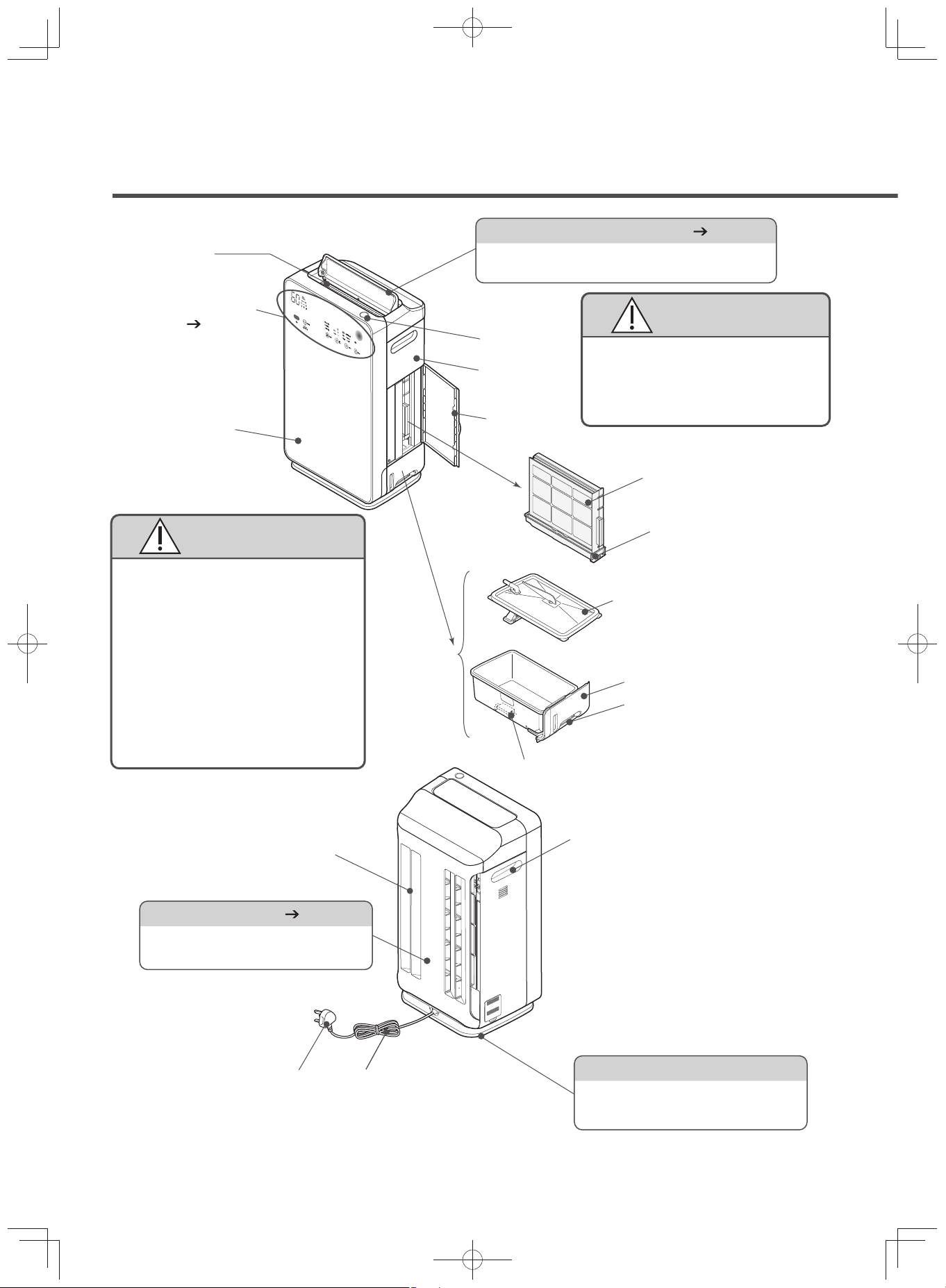
Air outlet
(stainless steel net)
Power plug
Power cord
Glass panel
Handle
Humidifying filter
Tank cover
Water tank
Names of Each Component
CAUTION
Power button
Flap (stainless steel flap) (P.E-21)
The flap controls the wind in vertical direction
according to the operation mode.
Side cover
Purifier
Vibration Sensor (P.E-27)
Senses impact and tilting.
(Installed inside the unit)
Caster
To prevent falls, the movement is
only in sideways direction. (Located
at the base of the unit)
Air inlet
Water tray
Handle
Float switch
CAUTION
Touch Operation
Panel (P.E-6, E-7)
Do not hold the flaps when
moving the unit.
Doing so may cause unexpected
injury when the unit is damaged
and overturned or dropped.
Do not subject the glass panel
(made of tempered glass) to impact
Although tempered glass is
stronger and safer than normal
glass, it can break when subject
to strong impact or force.
In case of scratches or breakage,
stop using and immediately
request repairs.
Refrain from touching the broken
glass.
EP-M70E_EN.indd 4EP-M70E_EN.indd 4 2017/2/23 17:27:402017/2/23 17:27:40

E-5
(P. E - ) Numbers are pages containing the main description each parts.
(x1)
Humidifying filter
Pre-filter
(x1)
Accessories
Filter
CAUTION
Dust Filter (x1)
Deodorizing Filter (x1)
Housed inside the purifier.
The filter must be removed from the
plastic packaging before operating the
unit.
The vibration during transporting the unit might cause deodoriz-
ing agent granules to fall out from the filter.
When removing the plastic cover of the filter and attaching the
filter to the unit, make sure that your hands, clothes, and the
surroundings will not get dirty.
Wipe of any granules that may have fallen or clung to the filter.
This will not affect the deodorizing performance.
*
Senses the presence of cigarette
smoke, dust, pollen, and other
similar air contaminants.
Dust Sensor (P.E-26)
Temperature Sensor (P.E-26)
Odor Sensor (P.E-26)
Senses the odor components in the air.
Senses the air temperature.
Humidity Sensor (P.E-26)
Senses air humidity.
Deodorizing filter
Set in the inner part of the unit.
Set in the outer part of the unit.
Filter Assembly
(Allergen-free, HEPA filter)
Rear panel
Removes large size dust.
Pre-filter
(stainless steel pre-filter*)
*The surface (one side) of the net
has a stainless steel coating.
Detects if the filter assembly is set.
Filter Assembly Detection Switch
CAUTION
Do not place tapes or any materi-
als to press the filter assembly
detection switch, or subject it to
unnecessary force.
It may not be able to detect the
filter and may cause unit failure.
Name of Each Component / Accessories
EP-M70E_EN.indd 5EP-M70E_EN.indd 5 2017/2/23 17:27:402017/2/23 17:27:40
E-6
Operating the Touch Operation Panel
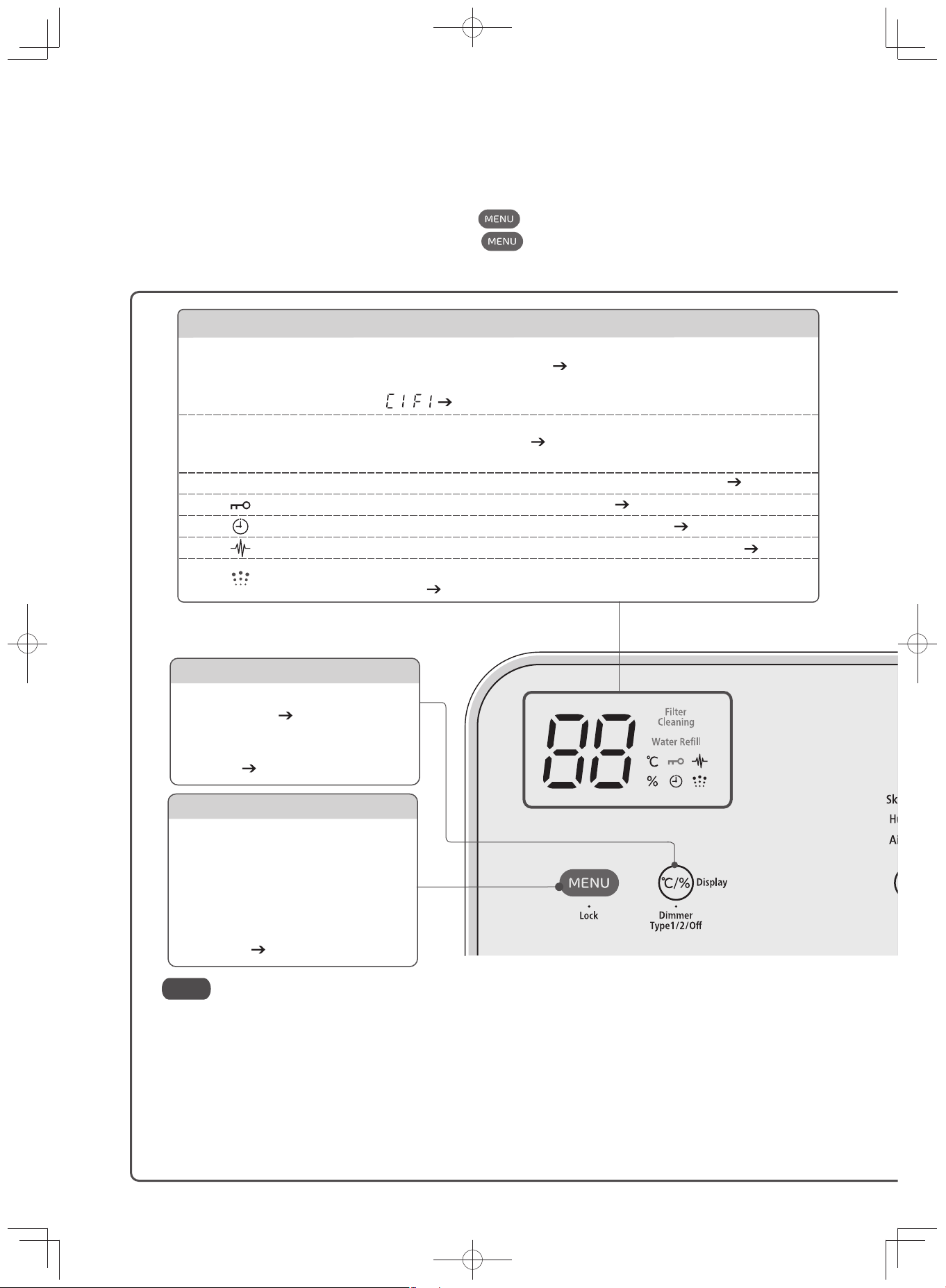
MENU
Touch this button first when the
display or operation panel is off.
When tapped again, it turns off the
display or operation panel.
Lock
(Long-press MENU for about 3 seconds)
Use this to prevent incorrect
operation. (P.E-25)
Note
The air purifying feature works in all operation modes.
The touch operation panel is made of glass.
If the touch operation panel display disappears, touch to display it again.
The touch operation panel display will disappear when is touched again.
The upper part of the touch operation panel is the display section and the lower part is the control section.
Use the touch operation panel to switch settings.
Display Switch
Temperature/
Humidity Monitor
Filter Cleaning
Water Refill
Notification Display
Displays the room temperature and humidity while operating.
This should be taken as a guide only. (P.E-26)
Displays notification contents that came out while operating.
Example: , (P.E-39)
Lights up when it is time to clean the humidifying filter. This notification (guide) is
made based on the operation time. (P.E-28 - E-31) (After the indicator lights up,
unplug the power cord to reset and turn off the indicator.)
The indicator lights up when the water in the water tank is nearly empty. (P.E-31, 32)
The indicator lights up when the child lock is set. (P.E-25)
The indicator lights up when the unit is operating on timer. (P.E-24)
The indicator lights up when the unit is operating with PM2.5 sensing. (P.E-24)
The indicator lights up when the unit is operating on humidify mode or skin
moisturize mode. (P.E-21)
Switches the display between temperature /
humidity monitor.
(P.E-24)
Switches the display of the touch
operation panel. (Long-press for about 3
seconds) (P.E-20)
The glass touch may have a different reaction depending on the sur-
rounding temperature and humidity, physical condition of the user, and
the condition of the electronic appliances near by the unit.
If it does not respond after touching, release and try again.
If the interval between touches is short, the unit may respond incorrectly.
The sensitivity will not change by the force applied when touching.
There may be no response if the operation panel is wet or dirty.
Wipe off with a dry cloth to use.
The display may be difficult to view if the unit is placed in brightly lit
places such as near a window with direct sun light.
EP-M70E_EN.indd 6EP-M70E_EN.indd 6 2017/2/23 17:27:402017/2/23 17:27:40
E-7
Operating the Touch Operation Panel
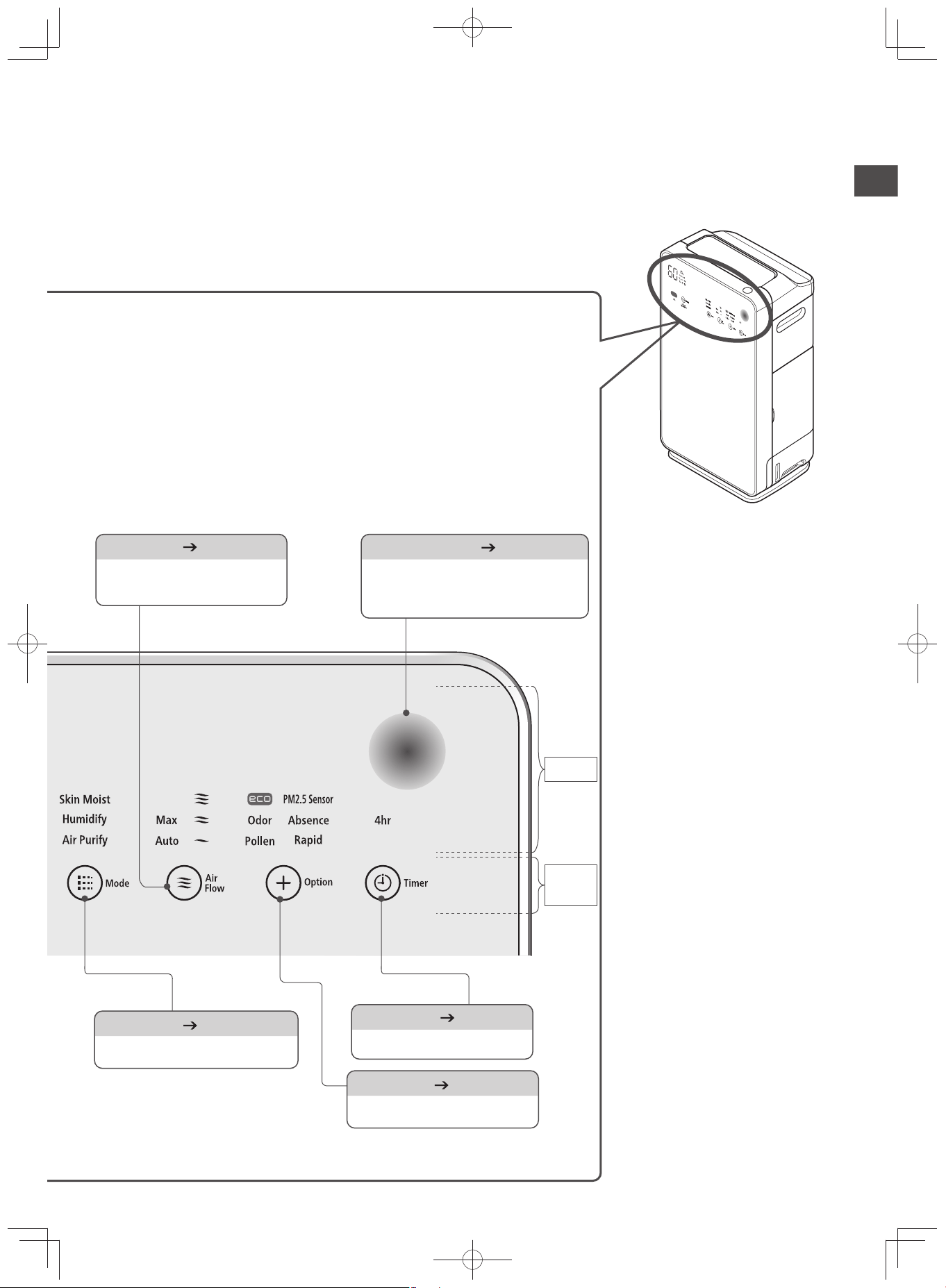
Off-timer (P.E-24)
Use this to set the off-timer.
Airflow (P.E-21)
Use this to switch the
airflow rate.
Option (P.E-22)
Use to switch to quick cycle.
Mode (P.E-21)
Switches the operation mode.
Air Sensor (P.E-26)
Display
Operation
Panel
The level of air contamination detected
by the odor and dust sensors is
indicated through different colors.
EP-M70E_EN.indd 7EP-M70E_EN.indd 7 2017/2/23 17:27:402017/2/23 17:27:40
E-8
Safety Precautions
Please read the following safety precautions carefully before using the unit.
To prevent injury to the user or other people and property damage, the following instructions must
be followed. Also read the precautions appearing in the text carefully to ensure correct use.
Defi nition of each indication
Incorrect operations that are carried out as a result of ignoring instructions will cause harm or dam-
age. The seriousness is classifi ed by the following indications.
WARNING
CAUTION
This symbol indicates the
possibility of death or se-
rious injury.
This symbol indicates
the possibility of injury or
damage to property.
Meaning of Symbols
Indicates “warning or caution”.
Indicates “prohibition”.
Indicates “necessity”.
WARNING
To Prevent Fire, Electric Shock and Injury
AC Outlet, Power Plug and Power Cord
Remove dust from the blade and the blade mounting surface of the power plug.
Otherwise, it may cause a fire.
Be sure to unplug the power cord from the AC outlet when cleaning or not using the
unit for an extended period of time.
Otherwise, it may cause an electric shock or injury.
Be sure to hold the plug when unplugging it.
Otherwise, it may cause an electric shock or short-circuit, which may result in a fire.
Securely insert the power plug into the AC outlet.
Otherwise, it may cause an electric shock, overheating or fire.
Do not stop operation by unplugging the power plug.
Otherwise, it may cause fire, electric shock or malfunction.
Never plug or unplug the power plug with wet hands.
Otherwise, it may cause an electric shock.
Do not use a damaged power cord or power plug, or a loose AC outlet.
Otherwise, it may cause an electric shock, short-circuit or ignition.
Do not damage the power cord.
(Do not break, modify, forcibly bend, pull or twist it. Also do not place any heavy objects on it,
pinch it, or step on it when moving it with the caster.)
Otherwise, it may cause damage to the power cord, fire or ignition.
Make sure to avoid inserting too many plugs into the AC outlet.
Otherwise, it may cause fire or ignition.
Do not immerse the power plug in water, or pour water on it.
Do not use a power plug when wet.
Doing so may cause ground leakage, electrical shock and unit failure.
If the supply cord is damaged, it must be replaced by the manufacturer, its service
agent or similarly qualifi ed persons in order to avoid a hazard.
Do not use with a voltage other than 220-240V AC.
Otherwise, it may cause a fire or electric shock.
EP-M70E_EN.indd 8EP-M70E_EN.indd 8 2017/2/23 17:27:402017/2/23 17:27:40
E-9
WARNING
Before Use
Ventilate the room frequently when in use with heating appliances.
Otherwise, it may cause carbon monoxide poisoning.
This product cannot remove carbon monoxide.
When there is water leakage due to tilting of the unit, unplug the power cord from
the AC outlet and request repairs.
It may cause fire due to electric shock and ground leakage.
Do not block the air outlet or air inlets with laundry, cloth, curtains, etc.
Poor ventilation may cause overheating or fire.
Do not use fl ammable materials (hair sprays, insecticides, air fresheners, etc.) near the unit.
Do not use benzene, thinner or alcohol to clean the purifier.
Otherwise, it may lead to cracking, electric shock, ignition, smoke or fire.
Do not use in a kitchen as a substitute for a ventilation fan and range hood fan.
Otherwise, it may cause unit deformation by heat or it may ignite a fire in the filter.
Also, it may cause failure or a decrease in the lifespan of the pre-filter, filter assembly and deodorizing filter.
Keep away from lit candles, mosquito coils, lit cigarettes, etc. Also, do not let smoke
from these materials enter the unit.
Otherwise, it may cause fire.
Do not operate the unit when using fumigating (smoking) type insecticide. Do not let
chemicals enter the unit.
Use of such insecticides will cause chemicals to accumulate in the unit and depending on a
person’s sensitivity to these chemicals, it may be harmful to one’s health.
Do not place in a location where the air from the outlets will blow directly onto heat-
ing appliances.
Otherwise, it may cause incomplete combustion and carbon monoxide poisoning.
Do not use in narrow spaces such as gaps between the furniture or closet.
Poor ventilation may cause overheating or fire.
Do not operate the unit while the water tank or humidifying fi lter, fi lter assembly /
deodorizing fi lter, etc. are detached.
Otherwis
e it m
ay cause injury, water leakage or failure.
Do not tilt or tip the unit over. Do not put your weight on the unit or step on it.
Also, do not use it in an unstable place or anywhere near infants.
Otherwise, it may cause the unit to tip over due to vibration, which may cause an injury or unit failure.
Also, water may leak from the water tank, which may cause fire due to electric shock or short-circuit.
If the unit is tipped over or tilted, pick up the unit immediately. If water from the tank is leaking,
unplug the power cord from the AC outlet and request repairs.
(When the unit is tipped over or tilted, the operation will stop.)
Cleaning
When cleaning, do not splash water on the unit.
It may cause short-circuiting and electric shock.
Do not add water by submerging or splashing water on the unit.
It may cause short-circuiting and electric shock.
Do not tilt the unit to remove or clean the fi lter.
The water may spill and may cause electric shock or unit failure.
Safety Precautions
EP-M70E_EN.indd 9EP-M70E_EN.indd 9 2017/2/23 17:27:412017/2/23 17:27:41
E-10
Safety Precautions
(Continued)
WARNING
Place of Use
Do not use in a location where there is huge amount of oily smoke such as in cafete-
rias and eateries.
The oil residue or dust deposited in the unit may cause fire, unit failure and unpleasant odor.
Do not use in a location where there is flammable gas, corrosive gas or metallic
dust, or risk of leakage of oil, fl ammable gas.
It may cause fire, explosion or unit failure.
Do not use in a location where solvents such as paint and adhesives are being used or stored.
It may cause deterioration of parts or fire.
Do not use in a location where soot from oil, such as machine oil, is fl oating in the air.
It may cause a crack, electric shock or fire.
Do not use in a location where any chemical is used. (Hospitals, factories, laborato-
ries, beauty salons, photographic laboratories, etc.)
Chemicals and solvents evaporating into the air deteriorate the unit. This causes water leakage
and wets the furniture or may cause electric shock.
Do not place on shelves, desks, tables, etc.
The unit may fall due to its movement and vibration which may cause water leakage and electric shock.
Do not place in a location which has a thick carpet or uneven fl oor.
The unit may incline and fall which may cause water leakage and electric shock.
Do not use in a humid place or in a place where it may easily be wet, such as in a bathroom.
It may cause electric shock or fire due to ground leakage.
Do not place it near a hot object such as a heater.
It may cause deformation, discoloration, injury and unit failure.
Do not put in places exposed to direct sunlight, wind and rain.
It may cause overheating, electric shock and fire due to ground leakage.
Do not use in a location where a machine tool that produces flammable dust or
sparks (such as a grinder or welder) is installed.
It may cause fire.
Miscellaneous
Even after switching on, sometimes the air purifi er is inoperative or air does not come
out. There may be “cracks” and “scratches” in the power cord, or the unit has been
moved which causes the operation to stop. There may also be unusual noise and vibra-
tion during operation. The unit may be deformed and unusually hot. There may be a burnt
odor. If there are abnormalities aside from those mentioned, unplug the power cord im-
mediately to prevent accidents and contact your dealer to request for checks or repairs.
These may cause fire due to electric shock, ground leakage or short-circuiting.
Pay specifi c attention when the user of the air purifi er is the following:
(Infants, children, the elderly, those who cannot control their body temperature)
When the body is exposed directly to the wind for a long time, health may be compromised.
When carrying the air purifi er, unplug the power cord and drain the water in the water tank.
It may cause water leakage which may cause electric shock and ground leakage, and wets the furniture.
Cleaning
Do not use detergents when cleaning.
Usage of chlorine-based and acid type detergents will generate toxic gas and can cause a health threat.
Also, do not use neutral detergents as it may affect the plastic.
(Except when cleaning the humidifying filter)
Do not use detergents when cleaning the water tank or water tray.
The detergent ingredients may damage the unit, which may cause water leakage, electric
shock, injury and unit failure.
EP-M70E_EN.indd 10EP-M70E_EN.indd 10 2017/2/23 17:27:412017/2/23 17:27:41
E-11
Miscellaneous
Do not put your fi nger or any other object (metal, paper, etc.) into the air inlet or outlet.
It may cause injury, electric shock and fire.
Do not drink or allow anyone to drink water from the water tank. Do not use for other purposes.
It may cause a health threat or accident.
Never attempt to disassemble, modify or carry out repairs by yourself.
It may cause fire, electric shock or injury. (Contact your dealer for repairs)
Do not operate detection switches (for the dust fi lter, auto self clean unit, and rear
panel) using your fi ngers, rod, or tape.
Doing so may result in an injury, failure, or unexpected accident.
Children should be supervised to ensure that they do not play with the appliance.
CAUTION
Moving the Air Purifi er
Move only in sideways direction with the caster (to prevent from falling)
There are cases when the floor may be damaged based on the type of flooring. When the wa-
ter tank has water contents, move slowly on an even floor to avoid spilling.
Unplug the power cord from the AC outlet.
Lift the air purifi er when moving it along a mat, a fl oor susceptible to scratches, an
uneven fl oor or a thick carpet.
It may damage the mat, floor and carpet and may cause unit failure and injury when tipped over.
When carrying the air purifi er, hold the handle fi rmly.
If you hold parts other than the handle, the unit may tip over and be damaged, and may cause an accident.
Unplug the power cord from the AC outlet.
When moving the unit without unplugging, the power plug and power cord may be damaged.
Do not carry the unit when it is fi lled with water.
· It may cause water leakage and injury.
· Carrying the unit while it is filled with water may cause the water to spill during operation.
·
When carrying the air purifier, drain the water in the water tank and operate with the unit’s set status.
Do not touch, hold, or lift the moving fl ap.
It may cause an injury and unit failure.
When carrying the air purifier, hold the handle.
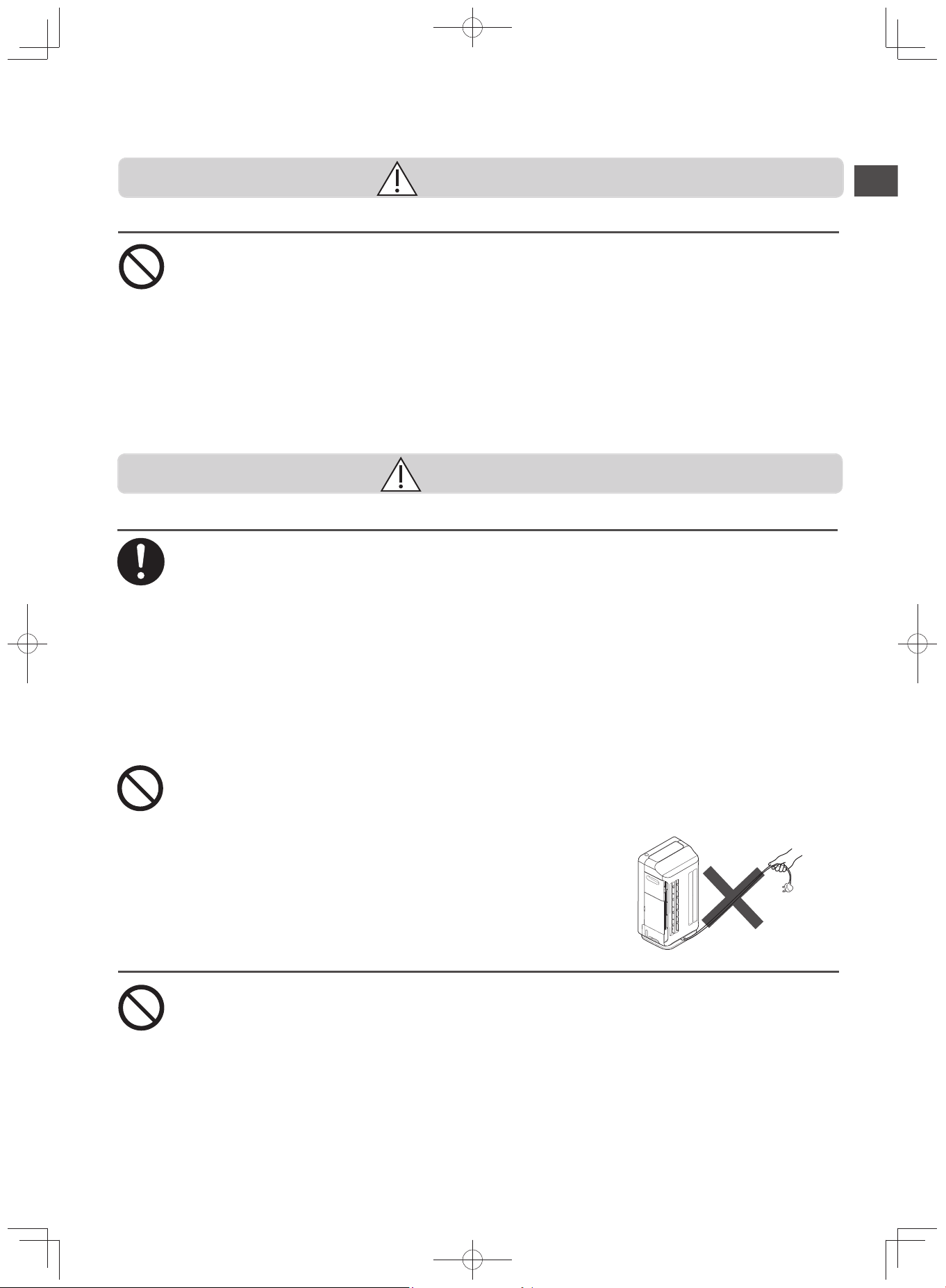
Do not pull the power cord when moving the unit.
It may damage the power cord.
Place of Use
Do not use the air purifier near a wall that cannot be scrubbed, such as a white
cloth-covered wall.
The air purifier will take in the surrounding air and may stain a wall near its air outlet.
Do not use in storerooms for artworks and academic materials, or for other business purposes
It may deteriorate the quality of the stored products.
Do not put water containers such as fl ower vases and fi sh bowls on top or near the unit.
Water deposited in the unit may cause electric shock, fire and unit failure.
Do not use in locations near cooking appliances
It may cause deterioration of parts, electric shock and fire due to heat and oily smoke.
Do not use on fl oors susceptible to scratches such as Cypress fl oors
It may damage the floor.
Safety Precautions
WARNING
EP-M70E_EN.indd 11EP-M70E_EN.indd 11 2017/2/23 17:27:412017/2/23 17:27:41
E-12
Safety Precautions
(Continued)
CAUTION
Miscellaneous
Do not put water directly in the water tray
Doing so may cause water to overflow.
Do not use the unit in case of water leakage
In case of water leakage, unplug the power plug from the outlet and request repairs.
Do not allow the water to freeze
Otherwise, it may cause damage to the water tank and cause unit failure or electric shock.
Whenever there is risk the water may freeze, drain the water tank.
Do not move or stop the fl ap by hand or by any object
Otherwise, it may cause unit failure.
If using the purifier around pets, do not subject any parts to urine and keep pets
away from the power cord
Otherwise it can cause electric shock and fire. If there are damages, unplug and request repairs.
Do not subject the glass panel (made of tempered glass) to impact
Although tempered glass is stronger and safer than normal glass, it can break when subjected
to strong impact or force.
In case of scratches or breakage, stop using and immediately request repairs.
Refrain from directly touching the broken glass.
Use only a genuine fi lter for the Hitachi Air Purifi er
Other filters may cause unit failure.
This appliance is not intended for use by persons (including children) with reduced
physical, sensory or mental capabilities, or lack of experience and knowledge, un-
less they have been given supervision or instruction concerning use of appliance
by a person responsible for their safety.
Cleaning
Perform panel and water tank removal and installation carefully.
It may cause water leakage and may cause injuries such as pinching your fingers.
Hold the unit in place when pulling out the water tank and humidifying fi lter so that
it will not move.
Otherwise, the unit may suddenly move and cause water leakage and accidents.
When cleaning, lay a soft cloth on the fl oor and place the unit and detached parts
(panel, water tray, water tank, etc.) on it
Otherwise, it may scratch the floor.
Attach the parts securely after cleaning
Do not use with the rear panel, pre-filter, dust filter, deodorizing filter, humidifying filter and any
other parts detached.
Otherwise, it may cause unit failure.
Refi ll the water tank with fresh water daily, and clean on a regular basis as instruct-
ed on “Cleaning”.
Continued use without regular cleaning may cause propagation of molds and bacteria due to
dirt and water scale, which can result in unpleasant odors. In rare cases, it may cause health
risk to users who have hypersensitive immune system. In this case, please seek medical advice.
Only use fresh tap water (drinking water) for the water tank
Otherwise, it may cause deformation and deterioration of parts, unit failure or unpleasant odors
due to propagation of molds and bacteria. Do not use hot water (over 40°C), purified water, al-
kali ion water, mineral water, well water or other similar types of water. Also, refrain from putting
organic solvents, chemicals, perfumes, air fresheners or other similar items in the water tank
.
When fi lling the tank with water, do not drop or subject the tank to impact
Otherwise, it may cause the water from the tank to leak and wet the floor. It may damage the
float switch in the tank, which results in the water supply indicator not lighting up.
Do not remove or subject the water tank’s fl oat switch to excessive force.
The indicator will not light up
even if the water tank is empty.
EP-M70E_EN.indd 12EP-M70E_EN.indd 12 2017/2/23 17:27:412017/2/23 17:27:41
E-13
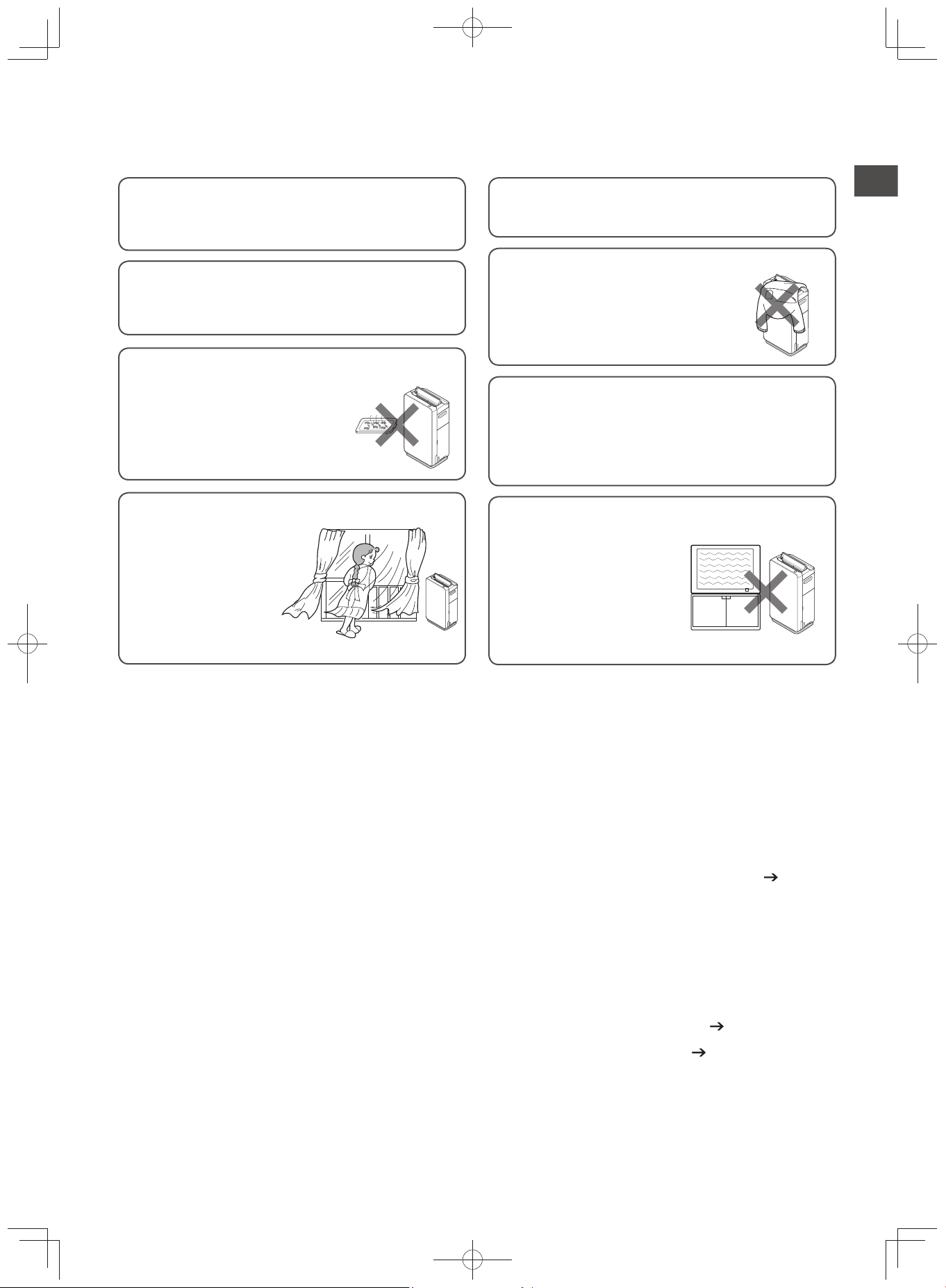
Cautions on Use
Do not operate with the fi lter detached
Otherwise, no cleaning effect can be expected. It
may also cause unit failure.
Do not block or touch the odor and
dust sensors
It may reduce the sensitivity of the sensors.
Do not directly fan plants and animals
It may adversely affect them.
Refrain from moving (changing the orienta-
tion or lifting the unit, etc.) during operation
Moving the unit while in operation may cause the fan
to hit the inner case, generate noise, pull and discon-
nect the power cord, and cause unit failure.
Do not use in locations near cooking appliances
It may cause deformation and dis-
coloration due to heat or oily smoke,
unit damage or fire.
Place the purifier and the cooking appli-
ance at least 1m apart from each other.
Ventilate closed rooms occasionally
The purifier does not have
a ventilation effect (remov-
al of carbon monoxide
and other contaminants).
*
The purifier cannot re-
move harmful substanc-
es in cigarettes (carbon
monoxide, etc.).
Refrain from placing any ob-
ject on the unit and blocking
the air inlet and outlet
Doing so may cause unit failure
and injury.
Do not use near television or radio
Doing so may interfere with
broadcasts.
Please them at least 2m apart
from each other.
The same applies for cord-
less phones and wireless mi-
crophones.
Safety Precautions Cautions on Use Air Cleaner Deodorizing Performance
Air Cleaner Deodorizing Performance
The deodorizing fi lter of the air purifi er does not remove all odors at once, but rather circulates the air in the
room, removing odors gradually.
The deodorizing fi lter is disposable. The deodorizing performance of the fi lter decreases with use.
When the odor emitted from the vent becomes bothersome, soak and wash the deodorizing fi lter.
(P.E-35)
When the deodorizing fi lter has absorbed strong odors or has been continually used in an odorous room,
the odor components remain in the fi lter and unit, causing the odor to be emitted from the vent.
If this happens, you can decrease the amount of odor that remains in the unit by continuing to operate the
purifi er while ventilating the room.
The dust and other contaminants attached to the fi lter and unit also contain odor components.
Periodically clean the fi lter and unit so that odor is less likely to be emitted from the vent.
(P.E-34 - E-36)
If the odor emitted from the vent remains bothersome after cleaning, replace the fi lter.
(P.E-37)
EP-M70E_EN.indd 13EP-M70E_EN.indd 13 2017/2/23 17:27:412017/2/23 17:27:41
E-14
Preparations for Operation
Movement with casters should be done slowly. The movement is only in sideways direction. (To prevent from falling)
No cleaning effect will be experienced if the fi lter is set without detaching the plastic cover. It will also cause unit failure.
Do not tip over or tilt the unit.
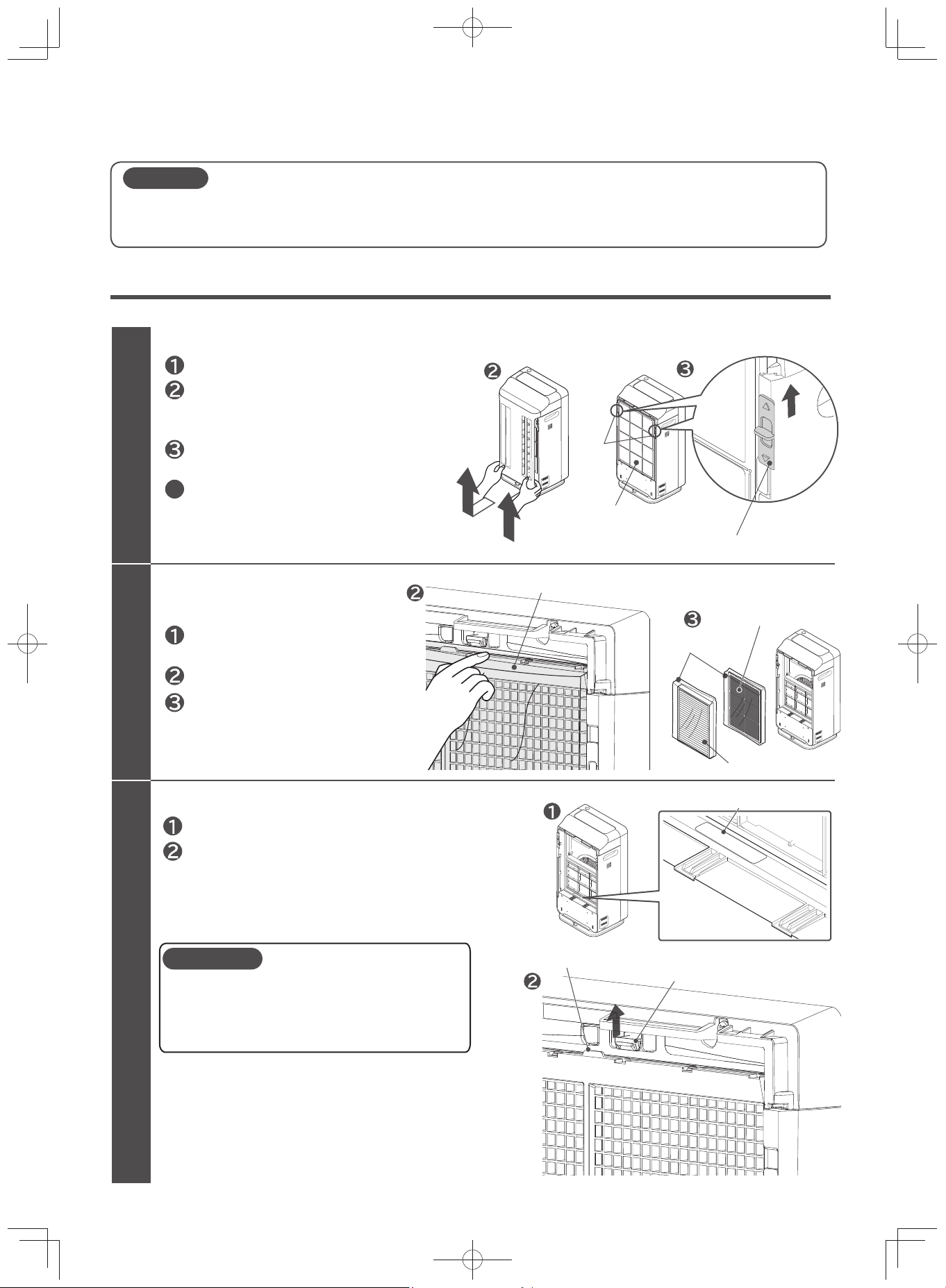
Setting Filter in Unit
Setting procedure is the same with fi lter replacement. (Use only genuine Hitachi Air Purifi er fi lters.)
Remove the filter
(filter assembly and deodorizing filter)
Install the deodorizing filter to the unit
1
2
3
CAUTION
Set the filter at the deodorizing filter set position.
Deodorizing filter set position
Deodorizing filter set position
Unit tab
Deodorizing filter tab
Remove the deodorizing filter.
Deodorizing filter
Remove the filter assembly
from the unit.
Remove the filter from the plastic
packaging.
While pressing the tabs on the unit, set the
deodorizing filter and hook the tabs of the
deodorizing filter with the tabs of the unit.
The filter must be removed from the plastic
packaging.
Do not block the front side of the filter with
cloth, paper or other materials.
Plastic packaging
Deodorizing filter
Filter assembly
Remove rear panel and pre-filter
Place the unit on a flat and stable location.
Remove the pre-filter.
4
Switch
Slide the switch upward.
Pre-filter
Hold the bottom part of the rear panel
(2 locations), pull it out gently, and shift
slightly upward to remove it.
Slide the switch upwards (2 locations)
to release the lock.
CAUTION
EP-M70E_EN.indd 14EP-M70E_EN.indd 14 2017/2/23 17:27:422017/2/23 17:27:42
E-15
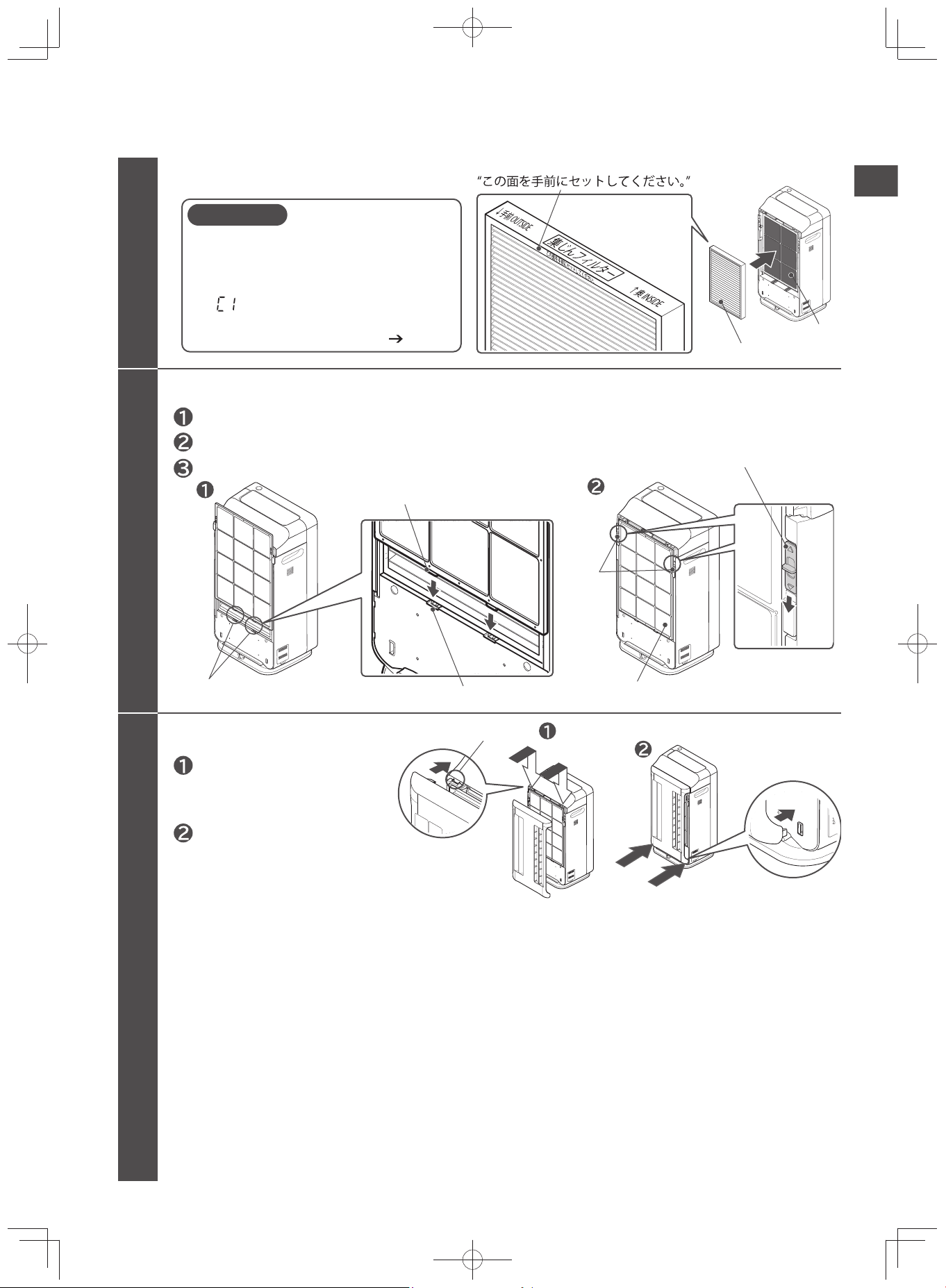
Install the pre-filter to the unit
Attach the rear panel to the unit
Filter assembly
5
6
4
Securely plug the tabs of the pre-filter to the matching holes in the unit.
Slide the switch downwards (2 locations) to lock.
Gently pull the pre-filter to make sure it is not out of place.
Deodorizing filter
CAUTION
Install the filter assembly to the unit
Do not put excessive force and deform
the filter assembly.
If the filter assembly is deformed, it will
not be detected by the unit.
“ ” will be displayed on the
temperature / humidity monitor, and the
unit will not be able to operate. (P.E-
39)
Plug the tabs (2 locations) of the
upper part of the rear panel to
the matching holes in the unit.
Gently push the bottom sides of
the panel one after another, and
close it securely until it clicks.
Set the filter assembly so that you can see the label
Pre-filter
Switch
Slide the switch downward.
Plug the tabs of the pre-filter
Tab
Insertion hole
Insert to the hole
Preparations for Operation
Continued on next page
EP-M70E_EN.indd 15EP-M70E_EN.indd 15 2017/2/23 17:27:422017/2/23 17:27:42
E-16
Preparations for Operation
(Continued)
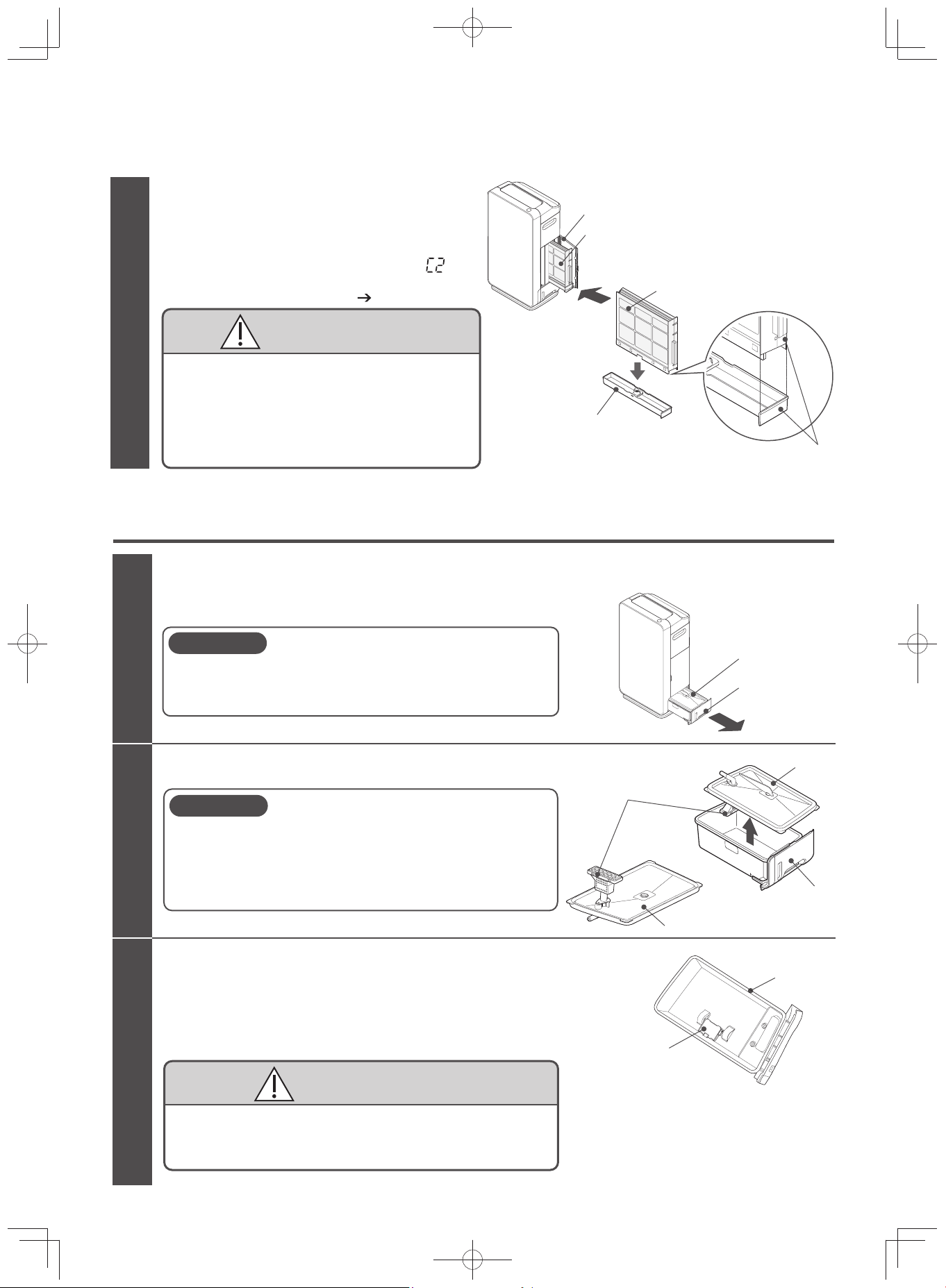
Filling Water Tank
(When Running on “Humidify” and “Skin Moisture” Modes)
Remove the water tank from the unit
Remove the tank cover from the water tank
1
2
CAUTION
CAUTION
CAUTION
3
Rinse in running water for 2-3 times.
Do not use detergent.
Check if the float switch can move up and down.
Water tank
Float switch
Water tank
Tank cover
Water tank filter
Tank cover
Grab the water tank handle, and while slightly
lifting it, gently pull the water tank.
When removing the water tank from the unit, pull the water
tank gently while pressing down the unit since a caster is
attached on its base. (The caster does not have a stopper)
Be careful not to injure your finger or nails when
removing the tank cover.
Make sure that the water tank filter is not subject to
unnecessary force. If damaged, it will not be able to
pump up water.
Rinse the water tank and tank cover with water
and check the movement of the float switch.
Do not to remove the float switch, or subject it to
unnecessary force.
Otherwise “Water Refill” will not be detected.
Water tank
Handle
7
Humidifying filter
Water tray
Set by aligning the broad sides
CAUTION
Check that the water tray set with
humidifying filter is installed in
the unit.
If the humidifying filter is not installed, “ ” will
appear in the temperature / humidity monitor
and the unit will not operate.
(P.E-39)
Do not forcibly open the side cover.
Doing so may break the part.
Securely insert the humidifying filter, making sure
that it is pressed until it reaches the back of the unit.
If it is not securely inserted, it may cause water
leakage during operation.
Also, attach the filter while holding down the unit.
Insert the filters
with caution as
they may get stuck
inside the unit.
Side cover
Humidifying filter
EP-M70E_EN.indd 16EP-M70E_EN.indd 16 2017/2/23 17:27:422017/2/23 17:27:42
E-17
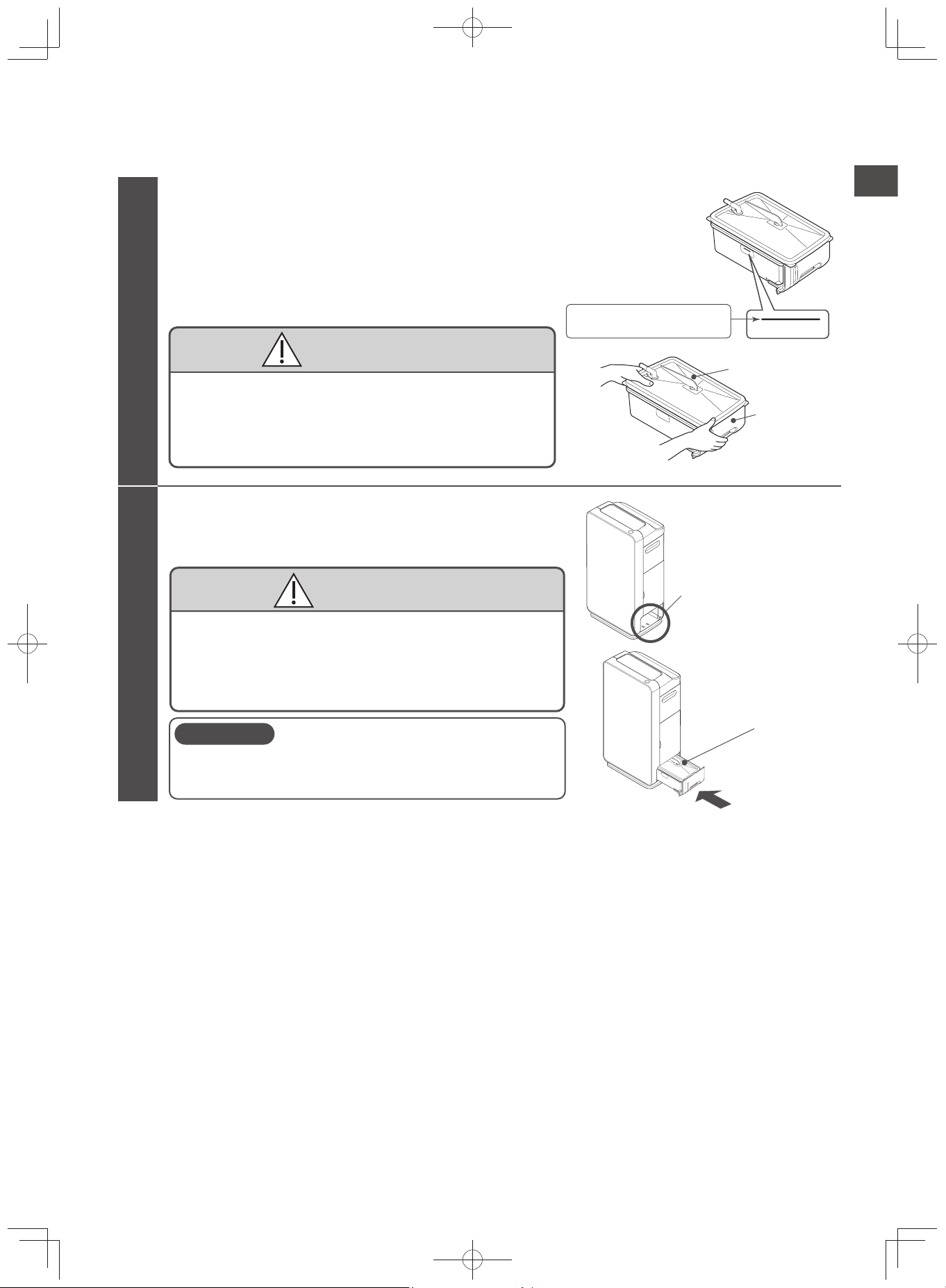
Install the water tank to the unit
5
CAUTION
CAUTION
Wipe off water drops in the water tank holder (inner part)
during installing the water tank.
The water tank may be heavy when filled with water. Be
careful not to injure your fingers, nails, or your back
while handling.
Securely install the tank, making sure that it is pressed
until the back of the unit.
If it is not securely installed, it may cause water leakage
during operation.
Also, hold down the unit to make sure that the unit will not
move during installation.
Water level
Water level
4
CAUTION
Water tank
Tank cover
Fill the water tank, making sure that it does not
exceed the line.
Wipe the moisture around the water tank.
When filling the water tank away from the unit, attach
the tank cover and hold it in place.
Put water in the water tank and place
the tank cover.
If the water exceeds the fill line of the water supply, it
may cause water leakage.
Securely attach the tank cover.
If it is not securely attached, it may cause water leakage
during operation.
Make sure that the water
does not exceed the line.
Water tank holder
Water tank
Preparations for Operation
EP-M70E_EN.indd 17EP-M70E_EN.indd 17 2017/2/23 17:27:422017/2/23 17:27:42
E-18
Installation
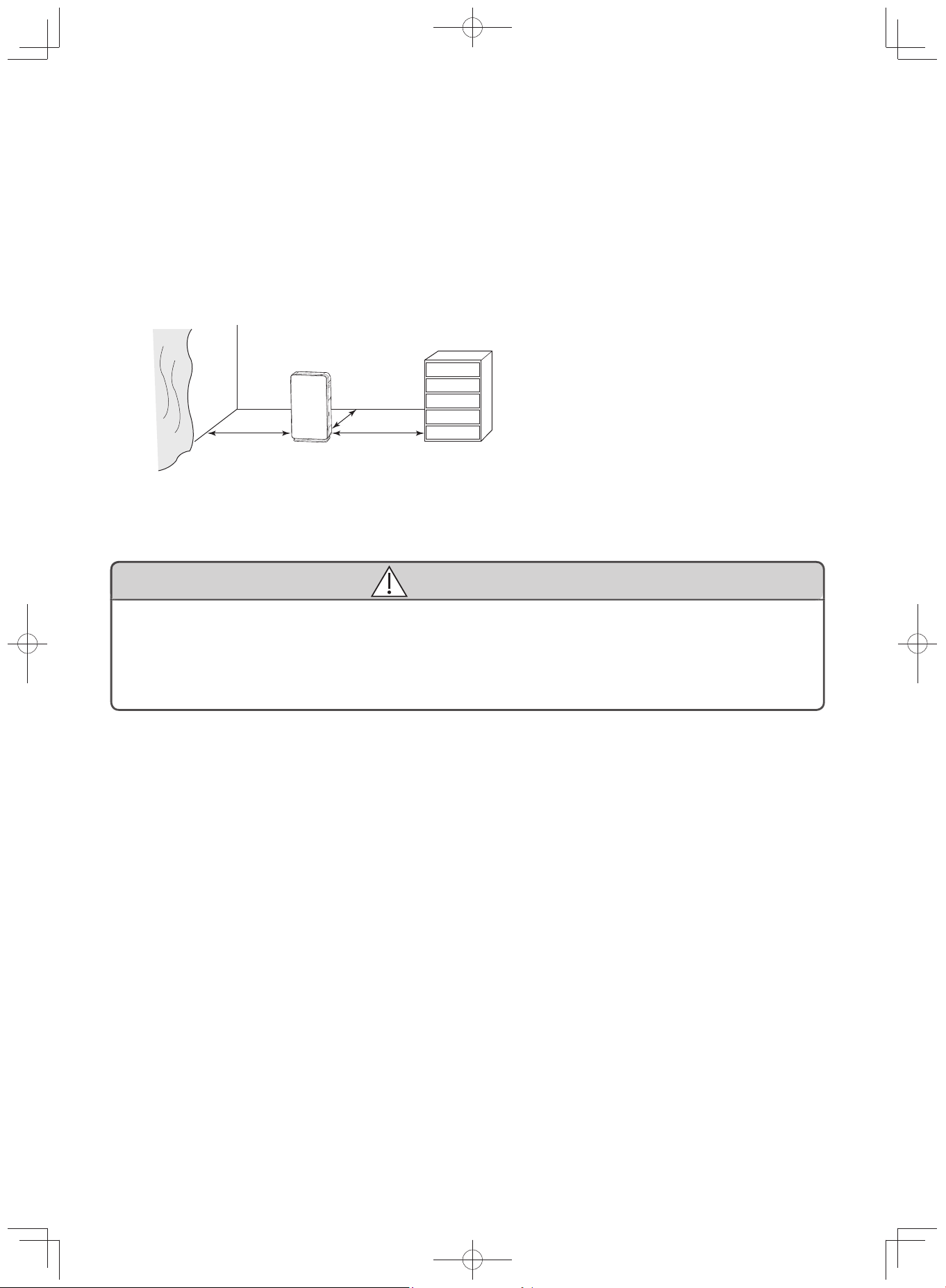
A caster is attached at the base of the unit, thus it should be set on an even, stable and sturdy fl oor.
(No stopper attached to the caster)
Avoid places near heating or cooling equipment and other similar equipment, and choose a location with a good air
circulation.
Keep the rear at least 3cm away from the wall. Depending on the operating environment, walls or fl oors near the
outlet may be stained as the unit draws in air. If this is a concern, move it from its current location and clean the sur-
rounding walls and fl oors regularly.
Be sure to provide space around the sides of the unit so that the inlets and vents are not blocked by curtains or
furniture.
WARNING
Do not place on shelves, desks, tables or other similar places
Unit may fall due to vibration or tilting, and may cause injury, water leakage and electric shock.
Using the unit in a tilted state may cause water leakage.
Moving the unit with the caster can be done on a sturdy and even fl oor. To move the unit on a mat,
carpet, or places with uneven surface, carry the unit by its handle.
Be careful not to pull or pinch the power cord.
Leaving the unit at the same place for an extended period of time may leave stains on the walls and fl oors.
When cleaning the unit, move it to another place and also include cleaning the fl oor.
* Leave space
* Leave space
At least 3cm
*Air inlet and outlet must not
be covered by curtains or
furnitures
EP-M70E_EN.indd 18EP-M70E_EN.indd 18 2017/2/23 17:27:422017/2/23 17:27:42
E-19
Operation
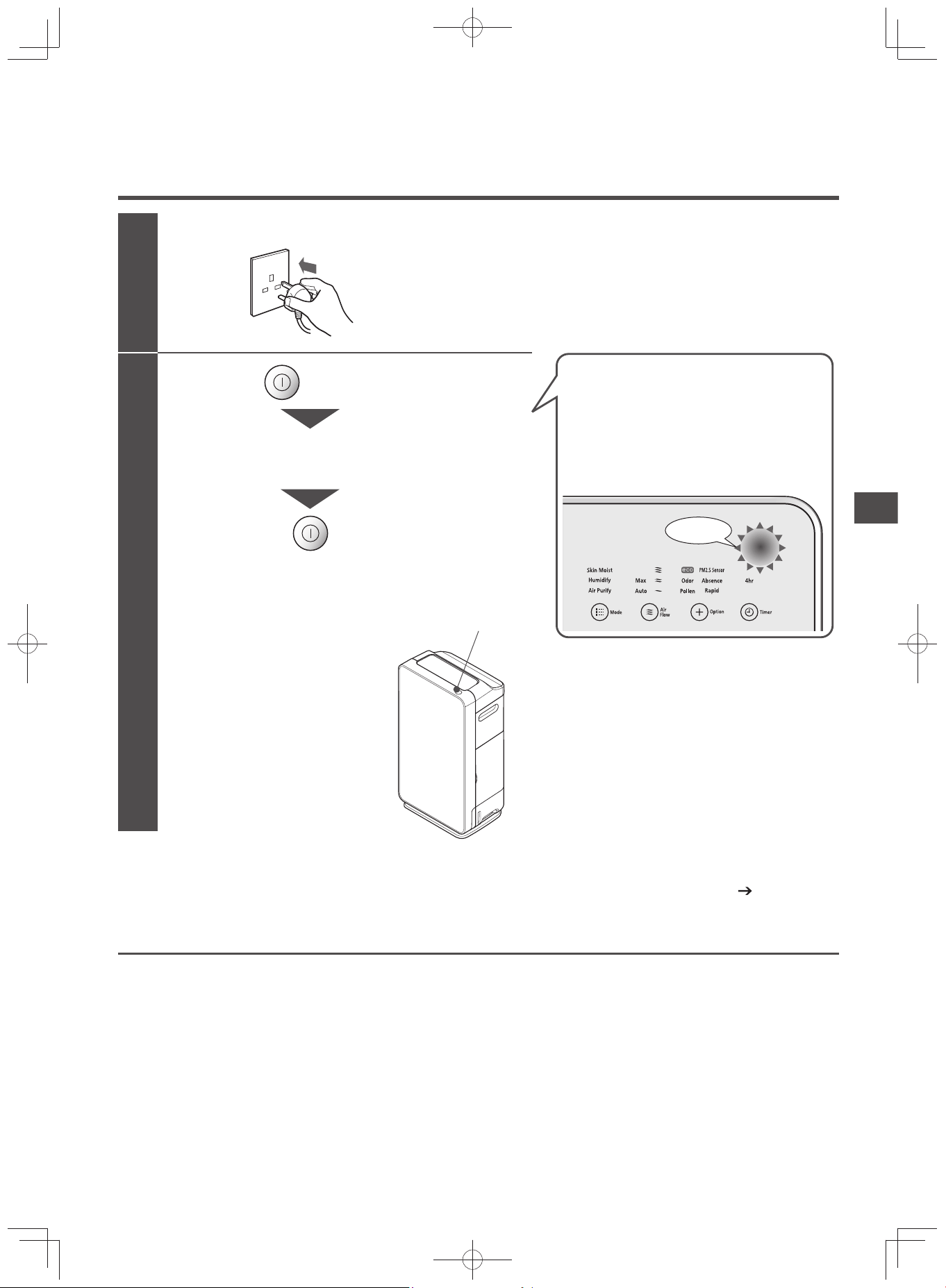
Starting Operation
Securely insert the power plug to the outlet
1
2
Press the power button
Operation will start, and indicator
will light up.
Pressing the power button
while the unit is operating will
dim the indicator and stop the
operation of the unit.
After all indicators have light up at once,
“Air Purify” and “Auto” will light up.
For the first 3 minutes, the unit will
check and store the condition of the
room air.
During that time, the “Air Sensor” will
flash a green light.
Power button
Blinking
“Air Purify” mode is set as a factory default.
From the second use onward, the memory function enables operation based on the saved status.
(P.E-26)
Standby Power Consumption
As long as the power plug is inserted in the outlet, the unit consumes approximately 3W of power, even if the unit
is not in use.
(Unplug from the outlet if the unit will not be used for an extended period of time.)
Installation Operation
EP-M70E_EN.indd 19EP-M70E_EN.indd 19 2017/2/23 17:27:422017/2/23 17:27:42
E-20
Operation Panel
Display
Display Contents Example
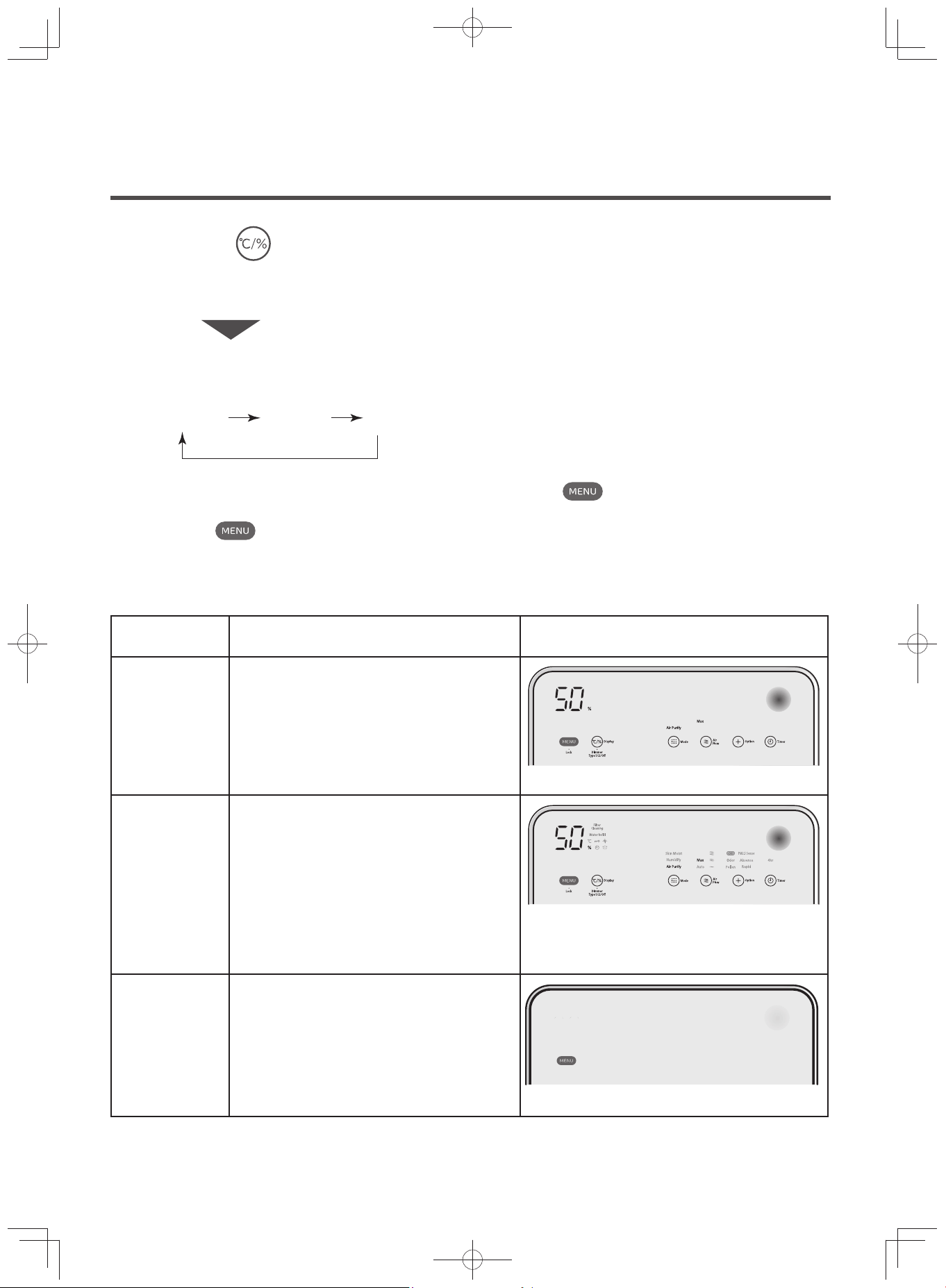
Display 1
Select operation mode and airflow rate by
tapping the panel.
For power saving, the display and operation
panel other than the notifi cation display and
the air sensor will turn off approximately one
minute after the unit stops operating.
Display 2
When all indicators are on, tapping the op-
eration panel and selecting operation mode,
airfl ow rate or other similar buttons will make
the display light of the selected buttons
brighter.
* The display may not be clear to look at
when the unit is placed near windows with
direct sunlight, and other similarly bright
places.
Off
Display is the same as Display 1.
The display, operation panel, notifi cation dis-
play, and clean monitor go off approximately
one minute after the unit stops operating.
Switching Touch Operation Panel Display
Use this to adjust the unit to your preferred setting.
Display Contents of the Operation Panel
In this instruction manual, the following examples are described in Display 1.
The touch operation panel display will switch at each press.
Display 1 Display 2 Off
(When switching from Off to Display 1, the buzzer will ring twice
(beep, beep) and the display will blink once. )
Long-press for about 3 seconds and select touch operation panel
display
Display
·
Dimmer
Type 1/2/Off
(When selecting Air Purify / Max)
(When selecting Air Purify / Max)
(When indicators are dimmed)
If the lights in the touch operation panel display are turned off, tap the
and operate after the panel is dis-
played.
(Tapping the
again turns off the indicator of the touch operation panel display.)
Operation
(Continued)
EP-M70E_EN.indd 20EP-M70E_EN.indd 20 2017/2/23 17:27:422017/2/23 17:27:42
E-21
Operation
Selecting Operation Mode (Basic Operations)
There are three operation modes to choose from. Use these modes according to your preference.
The fan will not stop while the unit is operating in all operation modes.
(The fan may stop if the unit is set to eco saving operation mode.
(P.E-23))
The air purifying feature works in all operation modes.
Switching the operation mode will set the airfl ow to “Auto”.
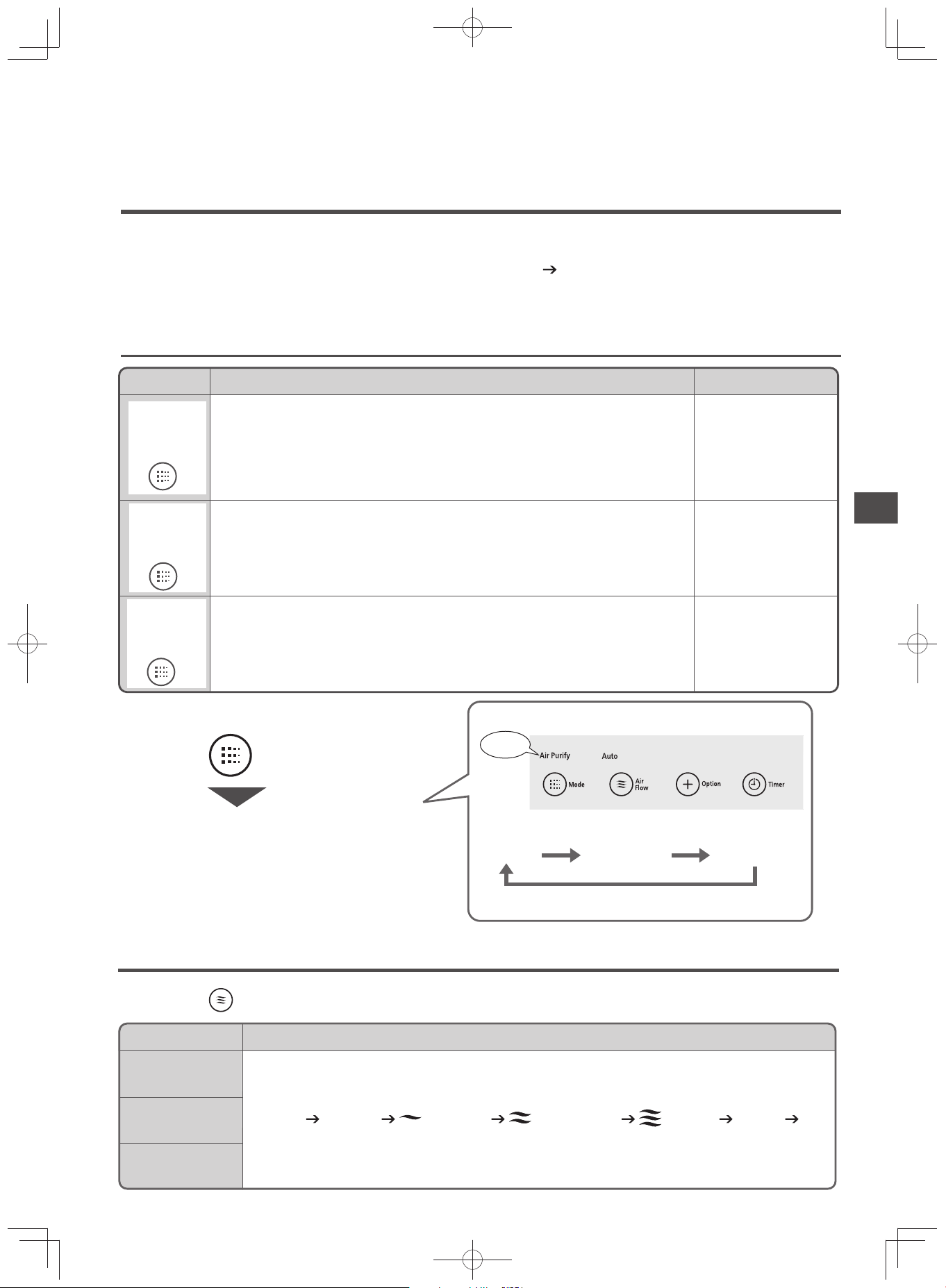
Operation Mode
Operation Pattern and Selection
Controls the room humidity to about 50%.
· During “Auto” operation, the unit operates from silent to high airflow.
Increases room humidity and controls it to about 60%.
· During “Auto” operation, the unit operates from silent to high airflow.
Flap Direction
Upward
Diagonal
Diagonal
This operation mode is fit for normal use.
· Odor and dust sensors will detect the level of room air contamination.
Afterwards, the unit will switch the airflow rate automatically.
· During “Auto” operation, the unit operates from silent to high airflow.
· The humidifying operation is not performed.
Skin Moist
Humidify
Air Purify
Mode
Skin Moist
Humidify
Air Purify
Mode
Skin Moist
Humidify
Air Purify
Mode
Operation Mode Patterns and Tips for Selection
Touch
Each touch changes the operation mode.
Each press of the button changes the mode.
Changing the operation mode will set the airflow to “Auto.”
The indicator of the selected mode will light up.
Humidifying Skin MoistAir Purify
Indicator
Mode
Switching Airfl ow Rate
Each time
Air
flow
button is pressed while the unit is operating, the mode switches in the following order.
Operation Mode
Air Purify
Humidifying
Skin Moist
Airflow
“Medium” “High”“Silent”
…
MaxAuto Auto
EP-M70E_EN.indd 21EP-M70E_EN.indd 21 2017/2/23 17:27:432017/2/23 17:27:43
E-22
Operating in Option
Rapid
For the fi rst hour, the unit operates in “High” airfl ow rate, and depending on the level of air contamination, the unit
will operate in either “High” or “Medium” airfl ow rate. For approximately 8 hours, room air will be forcefully circulated
in “High” airfl ow rate for approximately 10 minutes once every hour. Sensitivity of odor sensors will increase, and de-
pending on the level of air contamination, the unit will operate in either “High” or “Medium” airfl ow rate. Afterwards,
high-speed will be deactivated and the airfl ow rate will return to its previous “Auto” operation mode.
Use this when grilling, cooking hot pot, or in similar instances where the room is exposed to a great deal of strong
odor.
Odor
Once every hour, room air will be forcefully circulated in “High” airfl ow rate. Sensitivity of odor sensor will increase,
and depending on the level of air contamination, the unit will operate in either “High” or “Medium” airfl ow rate.
Use this regularly for environments with strong odors such as garbage, drainage, pet and other similar odors.
You can select Option while operating in “Air Purify” and “Humidify” modes.
Cannot switch while it has stopped or while operating “Skin Moist” mode.
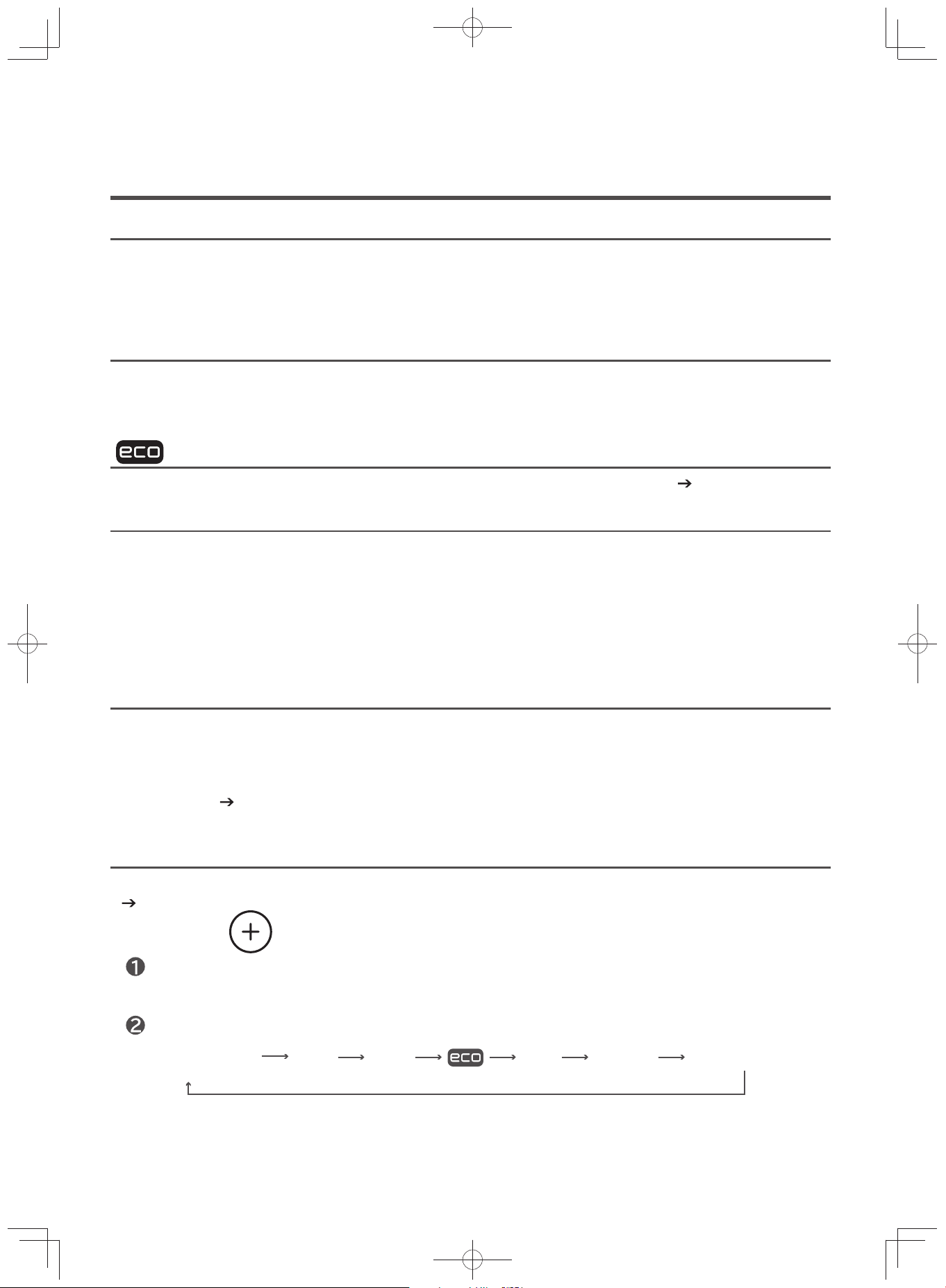
The Quick Cycle will be switched at each touch.
Touch the button
(If it returns to No Display (Clear), it is in [Auto] airflow)
Option
Pollen Odor Rapid AbsenceNo Display (Clear) PM2.5 sensor
Useful Features
Pollen
Once every hour, room air will be forcefully circulated in “High” airfl ow rate. Sensitivity of odor and dust sensors will
increase, and depending on the level of air contamination, the unit will operate in either “High” or “Medium” airfl ow
rate. The fl ap direction will be diagonal.
Use this when worried about pollens getting into the air.
Absence
The unit will operate on “Max” airfl ow rate for the fi rst fi ve minutes (fl ap direction: upward), then it will operate for
about 55 minutes in “High” airfl ow rate (fl ap direction: swing (30 minutes) upward), and the unit will stop operating
afterwards.
(When in “Humidify” operation mode, the airfl ow rate is set to “Auto” depending on the humidity. The fl ap direction
will be diagonal
(P.E-21))
Use this to clean the room air while away.
The unit automatically stops operation when the air becomes clean, saving electricity cost.
(P.E-23)
(Eco Saving Operation)
PM2.5 sensor
Switch to sensing that is suitable for small particles, like PM2.5 (general term for micro particles below 2.5µm).
(P.E-24)
EP-M70E_EN.indd 22EP-M70E_EN.indd 22 2017/2/23 17:27:432017/2/23 17:27:43
E-23
Useful Features
Eco Saving Operation
The unit automatically stops operation when air becomes clean, saving electricity cost.
Also, if this status continues for longer than 8 hours, the unit will automatically stop operating.
(When in “Humidify” operation mode, the unit will not automatically stop depending on the humidity. (P.E-21))
* Comparison of power consumption of automatic operation and eco saving operation in air purifi cation mode.
Auto operation mode: 6.17wh, Eco Saving operation mode: 5.14wh Hitachi investigation
Normal Auto Operation
When the air is clean, the unit will continuously operate in “Silent” airfl ow rate and not stop.
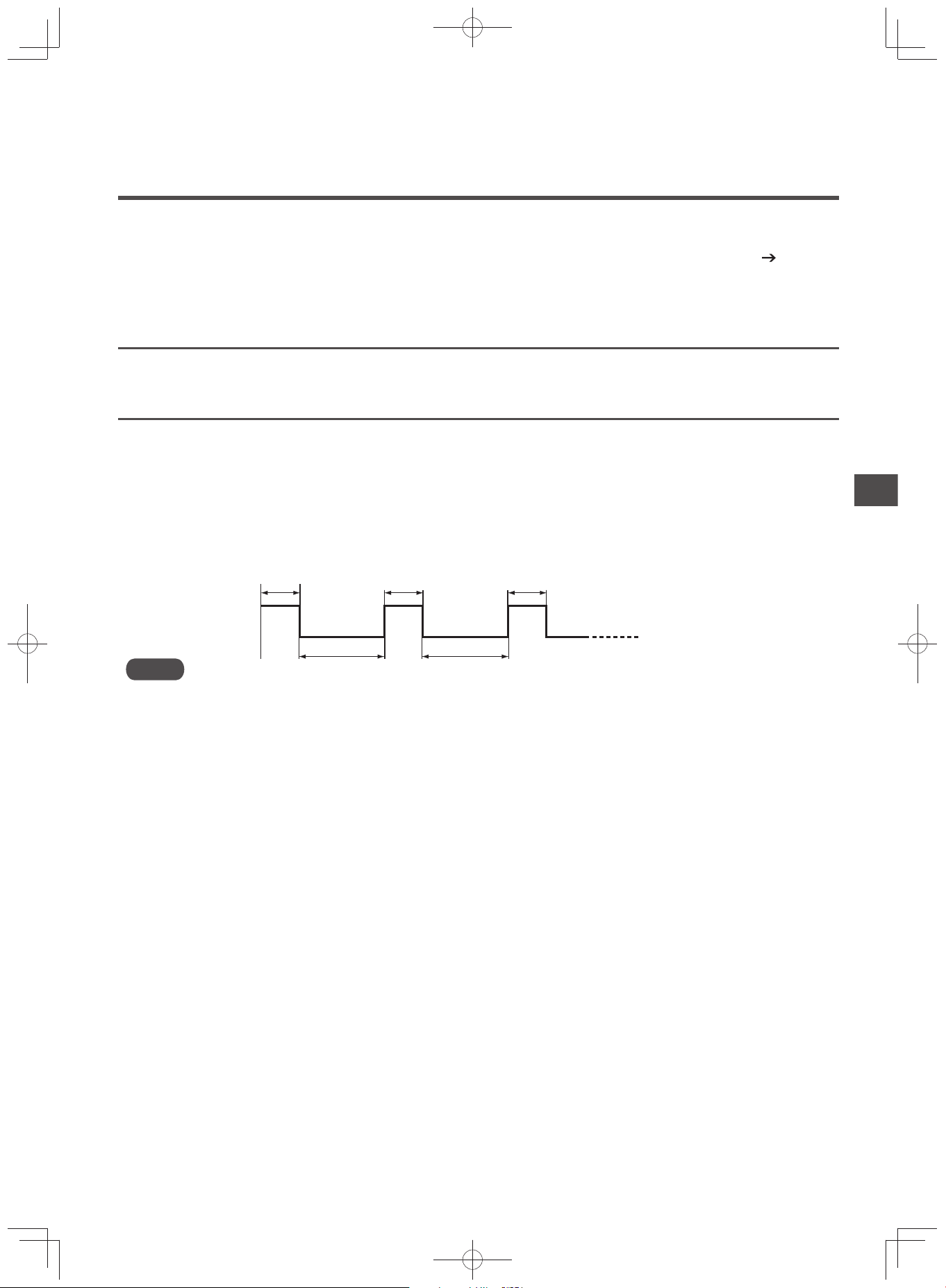
Eco Saving Operation
When the air is clean and “Silent” airfl ow rate operation continues for 10 minutes or longer, the fan stops for about
50 minutes and the unit intermittently operates using “Silent” for about 10 minutes.
If this status continues for longer than 8 hours, the unit will automatically stop operating.
* During eco saving operation, the level of air contamination is detected by the odor and dust sensors. When the
sensors detect odors and dust, the airfl ow rate will switch depending on the level of air contamination.
When the air is clean and the “Silent” airfl ow rate operation continues for 10 minutes or longer, the unit will start in-
termittent operation again.
Stop
10 minutes
50 minutes
50 minutes
10 minutes
10 minutes
“Silent” Airflow
Operation
Note
Fan may stop, and temperature / humidity monitor display may change depending on the effect of the operation.
EP-M70E_EN.indd 23EP-M70E_EN.indd 23 2017/2/23 17:27:432017/2/23 17:27:43
E-24
PM2.5 Sensor
Note
Operation modes other than “Air Purify” cannot be set.
While operating in PM2.5 sensing, the air sensor will light up, then enlarge and shrink slowly.
For the fi rst 90 seconds of operation, the unit will operate in “Max” airfl ow rate (air sensor: red).
The fl ap direction will be diagonal.
It will not respond to the switching of sensor sensitivity.
(P.E-27)
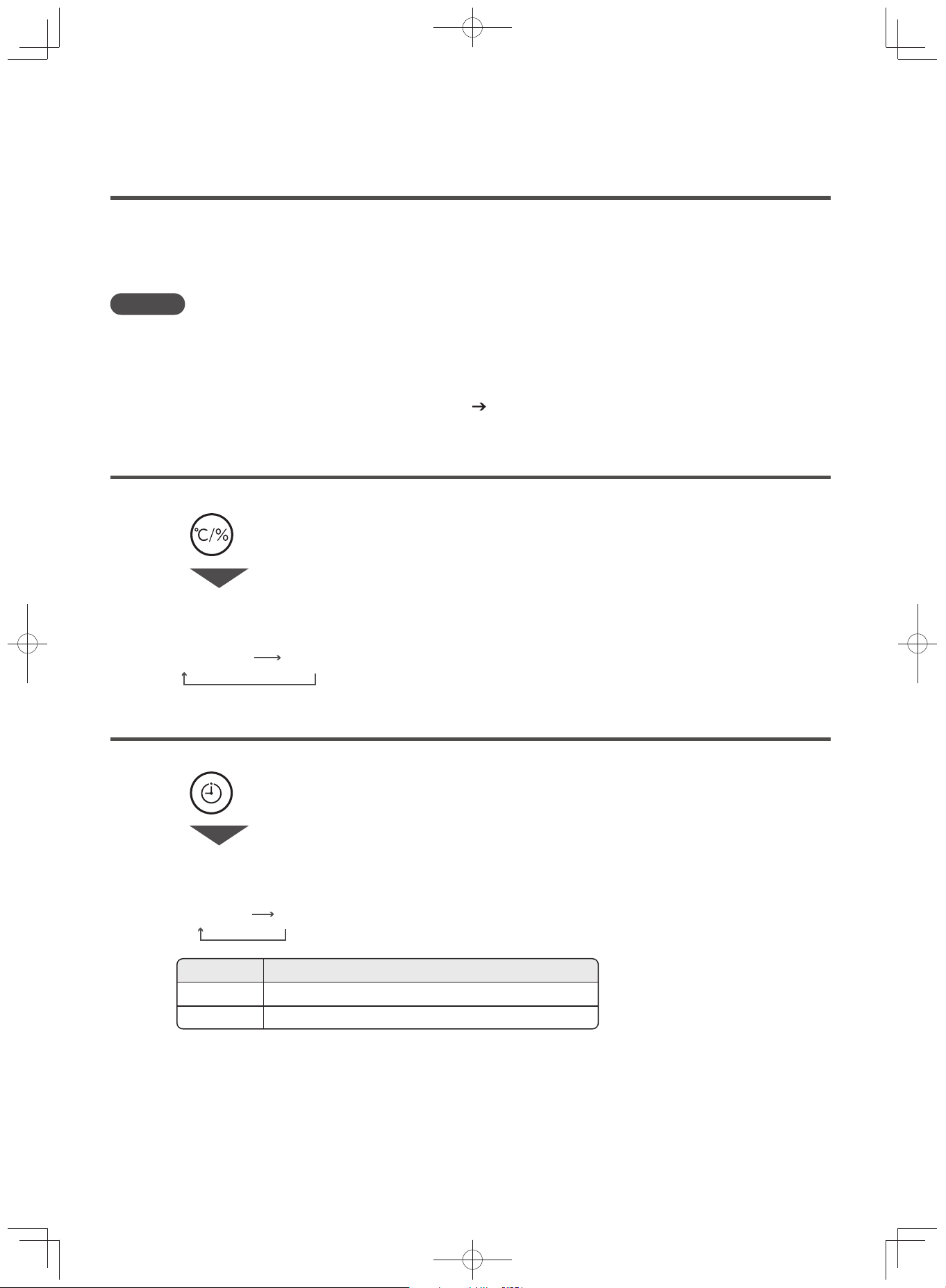
Switching Between Temperature / Humidity Monitor Display
Useful Features
(Continued)
Change into a sensor that is suitable for small particles, like PM2.5 (general term for micro particles be-
low 2.5µm). The level of contamination in the air will be detected by the dust sensor, and the unit will op-
erate automatically between “Medium” to “Max” airfl ow rate.
(Odor sensor control will not be performed)
Temperature / Humidity monitor display alternately shows both temperature and humidity.
Touch to switch display.
The display will switch between humidity (%) and temperature (°C) each time the button is touched.
Humidity (%) Temperature (°C)
Display
Stopping Operation Using Off-timer
No Display 4hr
Touch to set the timer.
At each touch the following display will be appear on the display for setting.
Timer
Display Setting Description
No Display
Automatic stop after about 4 hours of operation4hr
Not Set
Set the off-timer to automatically stop the unit after the set operation time.
EP-M70E_EN.indd 24EP-M70E_EN.indd 24 2017/2/23 17:27:432017/2/23 17:27:43

E-25
Useful Features
Setting the Lock
Prevents accidental operation by children through restricting the operation.
This can be set while the unit is operating.
The same process goes for unlocking the unit.
Long-press for about 3 seconds
1
Indicator
To cancel the child lock, long-press for about 3 seconds. Then the buzzer will ring
twice (beep, beep), and the child lock will be canceled.
Each time is long-pressed for about 3 seconds, the child lock be set or cleared.
The light will go off when the child lock is canceled.
After long-pressing for about 3 seconds, a buzzer will ring once (beep) and the
child lock indicator will lit.
·
Lock
Note
After setting “Lock”, no other buttons can be used except the
power button and .
In the event of a power interruption, restoring the power does not deactivate the child lock setting, even after
pressing the
power button and after removing the power plug from the outlet. Hold for 3 seconds
and cancel the settings.
EP-M70E_EN.indd 25EP-M70E_EN.indd 25 2017/2/23 17:27:432017/2/23 17:27:43
E-26
Memory Function / Monitor / Sensors / Auto Detection
Memory Function
When
power button is turned on, the unit operates the previous operation mode set prior to turning off.
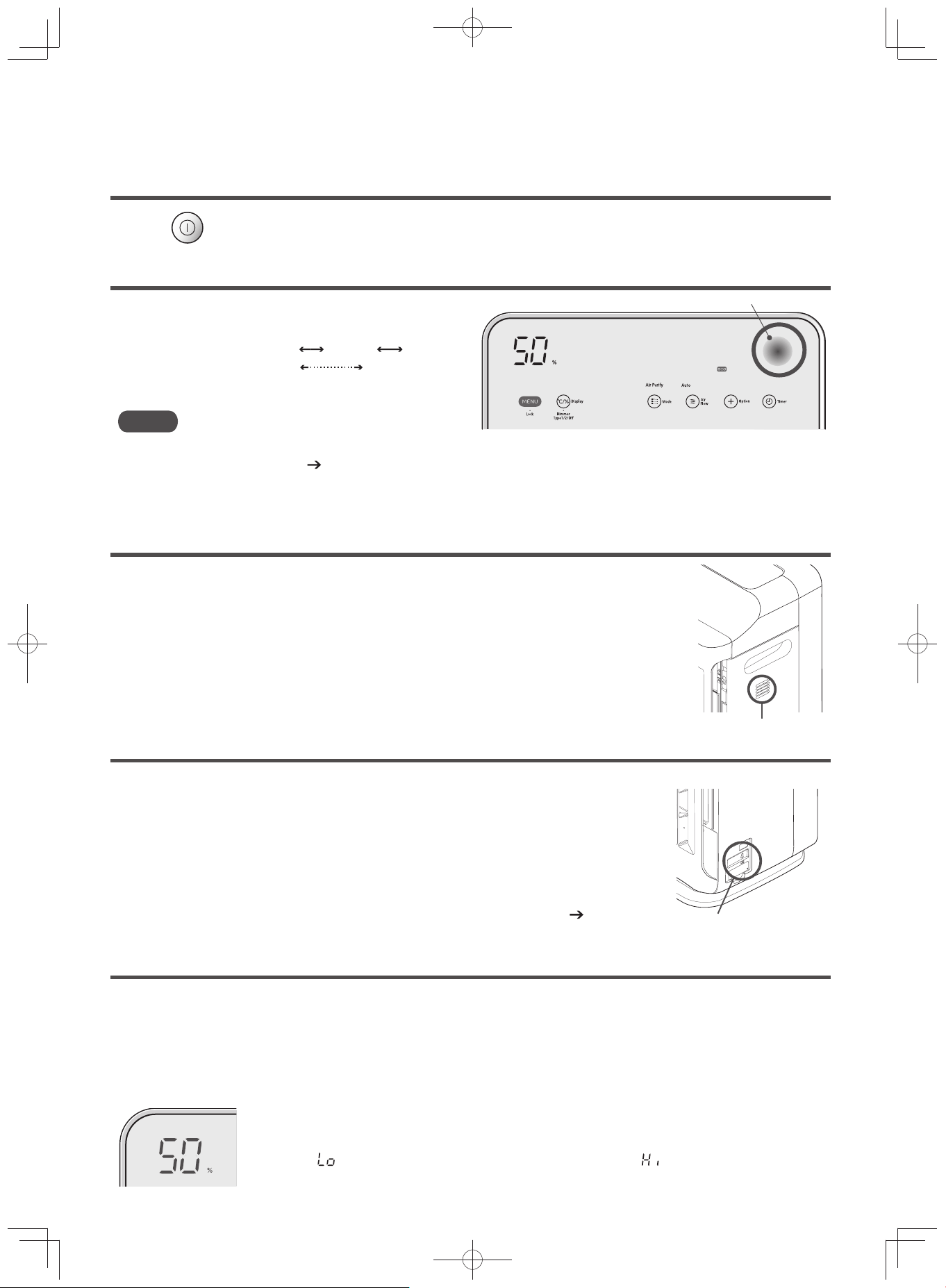
Air Sensor
The level of air contamination detected by the odor
and dust sensors is indicated by different colors.
Air sensor
Display Color : Green Orange Red
Dirtiness Level: CleanࠉࠉࠉࠉࠉDirty
Note
When the unit is placed in a location where contamination is diffi cult to detect, or when the sensor needs cleaning,
the display may not change.
(P.E-36)
While operating in PM2.5 sensing, the air sensor display lights up and then blinks slowly.
Odor Sensor
The sensor detects odors in the air such as cigarette smoke or pet odors.
Even if you think the air is clean, the unit may continue the operation if the odor sensor
detects any gas component that has not been removed by the fi lter.
Also, any of the following may be detected by the odor sensor.
· Combustion gases from heating appliances during use, alcohol, odor of perfumes or
cosmetics used in beauty parlors or aesthetic salons, sprays, vapors, abrupt tem-
perature changes, etc.
Odor Sensor
Dust Sensor
The dust sensor is capable of sensing dust in the air such as cigarette smoke,
house dust, pollen, etc.
The dust sensor may fail to sense dust stirred up when you lay out or put away bed-
ding, which contains signifi cantly fewer contaminants than cigarette smoke, etc. In
such a case, the air sensor display may appear to be different from the apparent
dust in the air.
The dust sensor may not function properly if the sensor is dirty.
Carry out periodical cleaning of the dust sensor and the parts around it.
(P.E-36)
Cover is removed
Dust sensor
Temperature / Humidity Monitor (Temperature / Humidity Sensor)
The values detected by the internal temperature / humidity sensors during operation will be displayed.
The temperature / humidity monitor should be taken as a guide only.
· The indication may differ from thermometer / hygrometer readings. Also, there is a great difference in the dis-
play and the actual temperature and humidity when turning the unit on and switching airfl ow rate.
· Humidity will change as temperature changes.
· Temperature and humidity may differ between places with good air fl ow and those with bad air fl ow.
The estimated current temperature and humidity are displayed and updated every minute in
increments of 1°C and 1%.
(Displays “ ” when the temperature is at -1°C or lower, and “ ” when at 41°C or higher.
Humidity is displayed between 20-85%. )
EP-M70E_EN.indd 26EP-M70E_EN.indd 26 2017/2/23 17:27:432017/2/23 17:27:43
E-27
Memory Function / Monitor / Sensors / Auto Detection
Auto Detection
The air purifi er performs automatic operation by detecting room air contamination using the “Odor Sensor” and “Dust
Sensor”, and room air temperature and humidity using the “Temperature / Humidity Sensor”.
During the fi rst 3 minutes after the power is turned on, the unit will check the air condition of the room.
The purifi er operates even while it checks the air condition of the room.
During this time, the “Air Sensor” fl ashes green.
After checking the air condition, the “Air Sensor” will display the room air contamination using the “Odor Sensor”
and the “Dust Sensor”.
If you plug in the power cord in an environment containing contaminated air, the sensitivity of the sensor may be
reduced.
To clean the air of the room, operate in “High” or “Max”. Or open a window and unplug the power cord from the AC
outlet when ambient air is clean and plug it back in after 10 minutes.
Vibration Sensor
The sensor detects a fall and impact on the unit. (Installed inside the unit)
The operation may stop due to tilting of the unit, strong vibrations or impact of a collision.
When the operation stops, “ ” is displayed on the temperature / humidity monitor and the unit can no longer operate. (P.E-39)
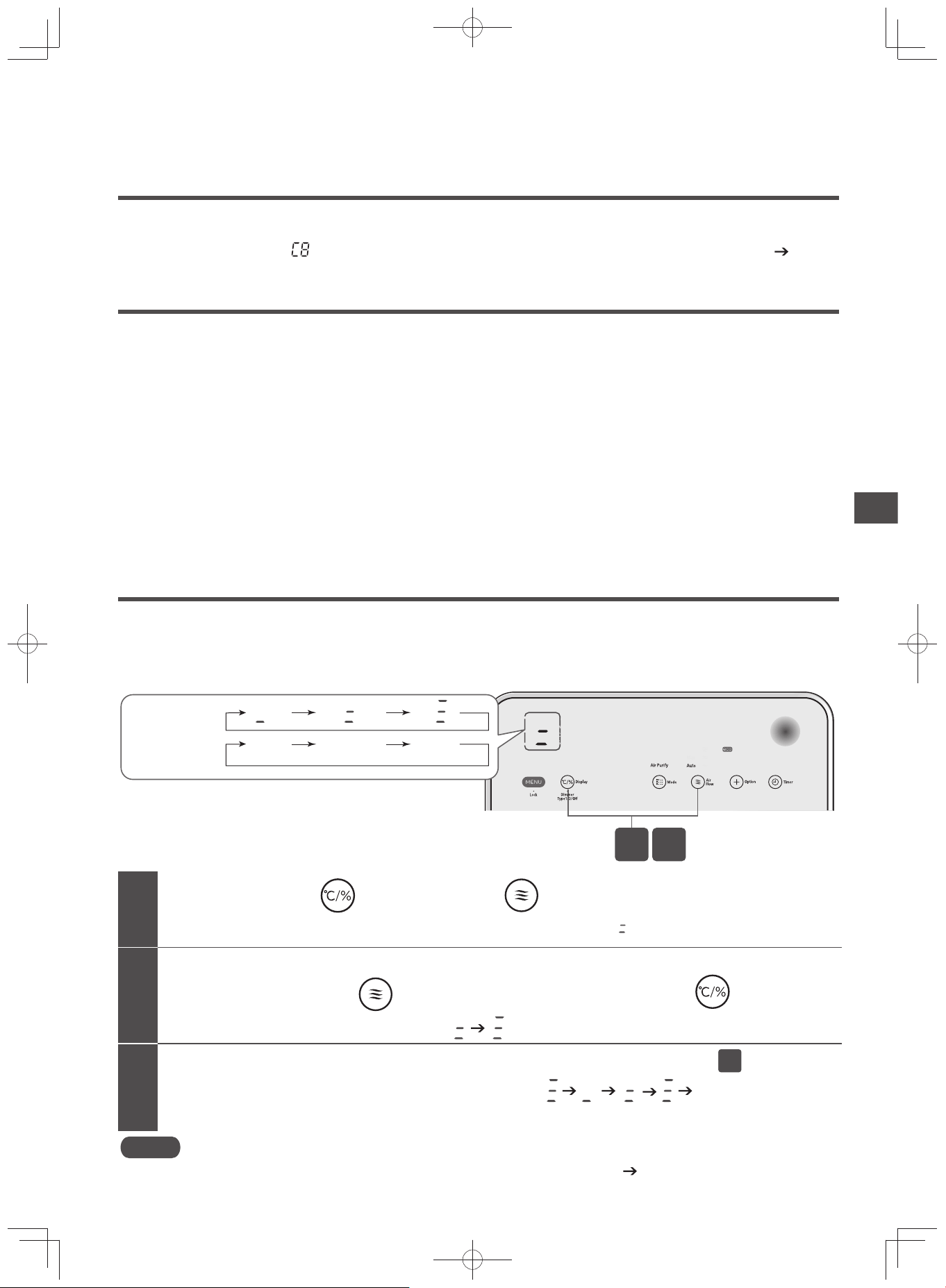
Adjusting Sensory Sensitivity Setting
Sensitivity of the “Odor Sensor” and “Dust Sensor” which performs automatic switching of airfl ow rate can be ad-
justed in 3-step fashion.
You can adjust the sensor sensitivity setting as desired.
The “Odor Sensor” and “Dust Sensor” are similarly adjusted.
While the sensitivity is being displayed (about 10 seconds),
continue long-pressing for about 3 seconds, while pressing once more.
While pressing , long-press for about 3 seconds
The sensitivity display will change from .
The current sensitivity is indicated and displayed. (Factory setting is )
Furthermore, when switching sensitivity, repeat procedure .
When repeating, the sensitivity display will switch like this
…
.
About 10 seconds after the sensitivity display has been switched, it will disappear and the selected sensor sensitivity will be set.
1
2
3
2
2
1
Display
Air
flow
Display
Air
flow
Medium
Display
Low
High
Sensor
Sensitivity
Note
Switching the sensor sensitivity is not supported in the “PM2.5 Sensor” cycle. (P.E-24)
EP-M70E_EN.indd 27EP-M70E_EN.indd 27 2017/2/23 17:27:442017/2/23 17:27:44
E-28
Do not splash water on the unit. Doing so may cause a unit failure.
Do not use volatile solvents, such as gasoline, thinner, benzene, wax, kerosene, alcohol, etc. or polishing powder, or deter-
gent (used for kitchen or laundry). Such chemicals could cause deformation, discoloration, damage or removal of print labels.
When using a chemically treated cloth, follow safety instructions.
Do not use a dryer or heater to dry the unit. Heating could cause deformation, discoloration, damage or removal of print labels.
Lay a soft cloth or similar material beneath and around the purifi er body to protect the fl oor against scratches
and from getting wet.
Do not tilt or tip over the unit.
Cleaning
Do not stop operation by unplugging the power plug.
Otherwise, it may cause fi re, electric shock or unit failure.
When the Filter Cleaning Indicator Comes On
The indicator lights up approximately 240 hours of performing the humidifying operation after the reset. (Guide for
cleaning)
The humidifying system employed in this product is the evaporating type that produces moisturized air by passing
an air stream through the humidifying fi lter.
Depending on the application environment, dirt or odor may adhere to the humidifying fi lter even when the “Humidify”
or “Skin Moist” mode is not activated. Please clean immediately.
When "Humidify" or "Skin Moist" mode is used, be sure to use tap water for the water tank.
Although the humidifying fi lter has been treated against bacteria and mold, it may get slimy or moldy, or may be-
come discolored to pink, red, green, brown, black or gray after a short period of use depending on the quality of tap
water used, and the application environment. (Discoloration has no effect on humidifying performance.)
It is recommended that the fi lter be cleaned as often as practicable regardless of whether the “Filter Cleaning” indicator lights up or not.
Early replacement of the fi lter is recommended if it exhibits any of the following conditions despite periodic cleaning.
·
Heavy dirt is present, attached hardened water scale is diffi cult to remove, bad odors, serious damage or deformation
If you will not use the “Humidify” or “Skin Moist” mode, dispose any water remaining in the water tray and water
tank. Failure to do so may cause dirt build-up or discoloration.
If you continue to use the humidifying fi lter without cleaning it, the water scale attached to the fi lter will solidify and
possibly come out from the vent.
Humidifying filter
Check if the operation has stopped before removing the power plug from the socket
While operating, press the power button and stop operation.
Once you unplug the power cord, the humidifying operation time will be reset and the “Filter Cleaning” indicator will turn off.
(If the "Filter Cleaning" indicator is off, the humidifying operation time will not be reset when you unplug the power cord.)
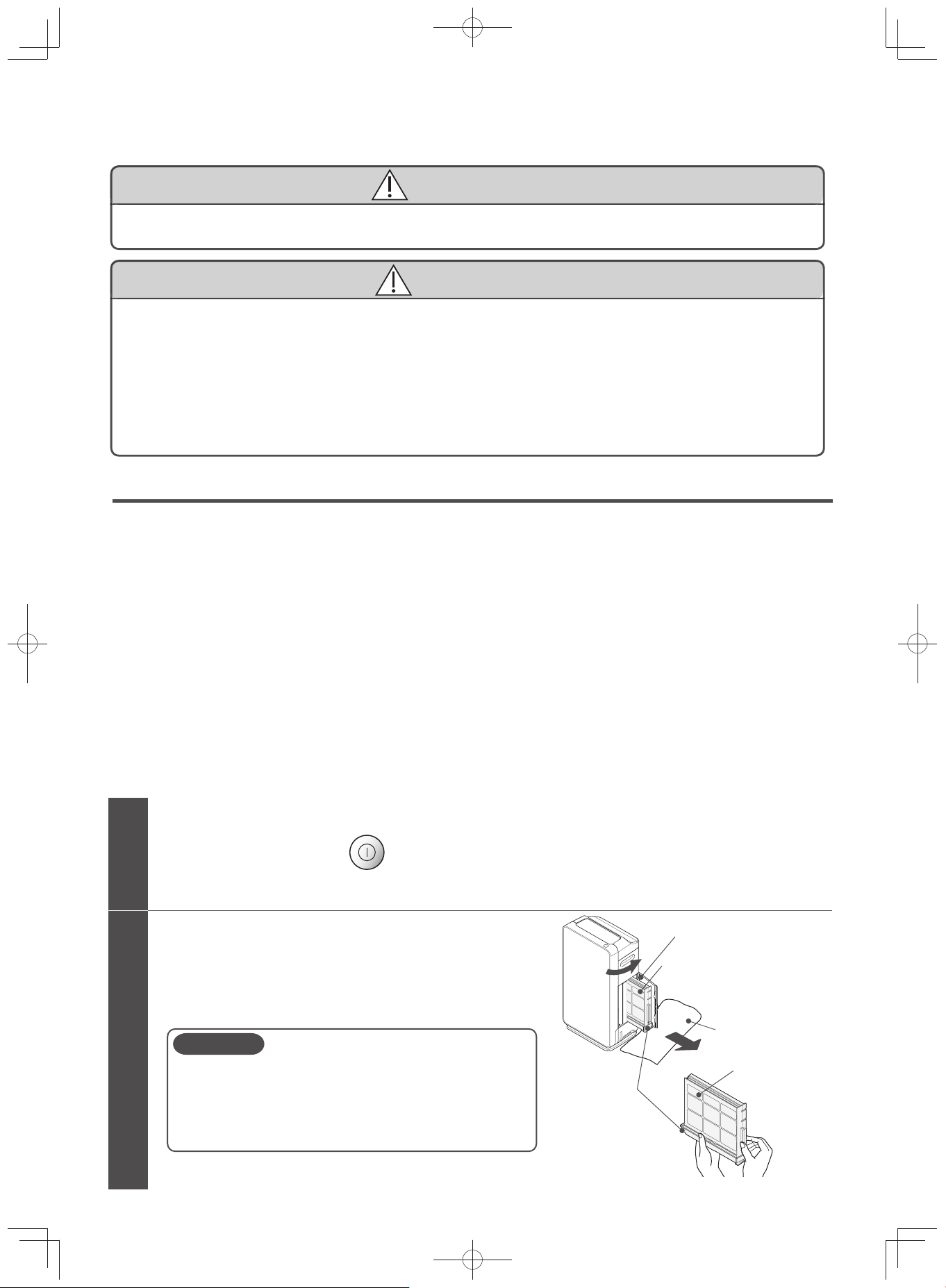
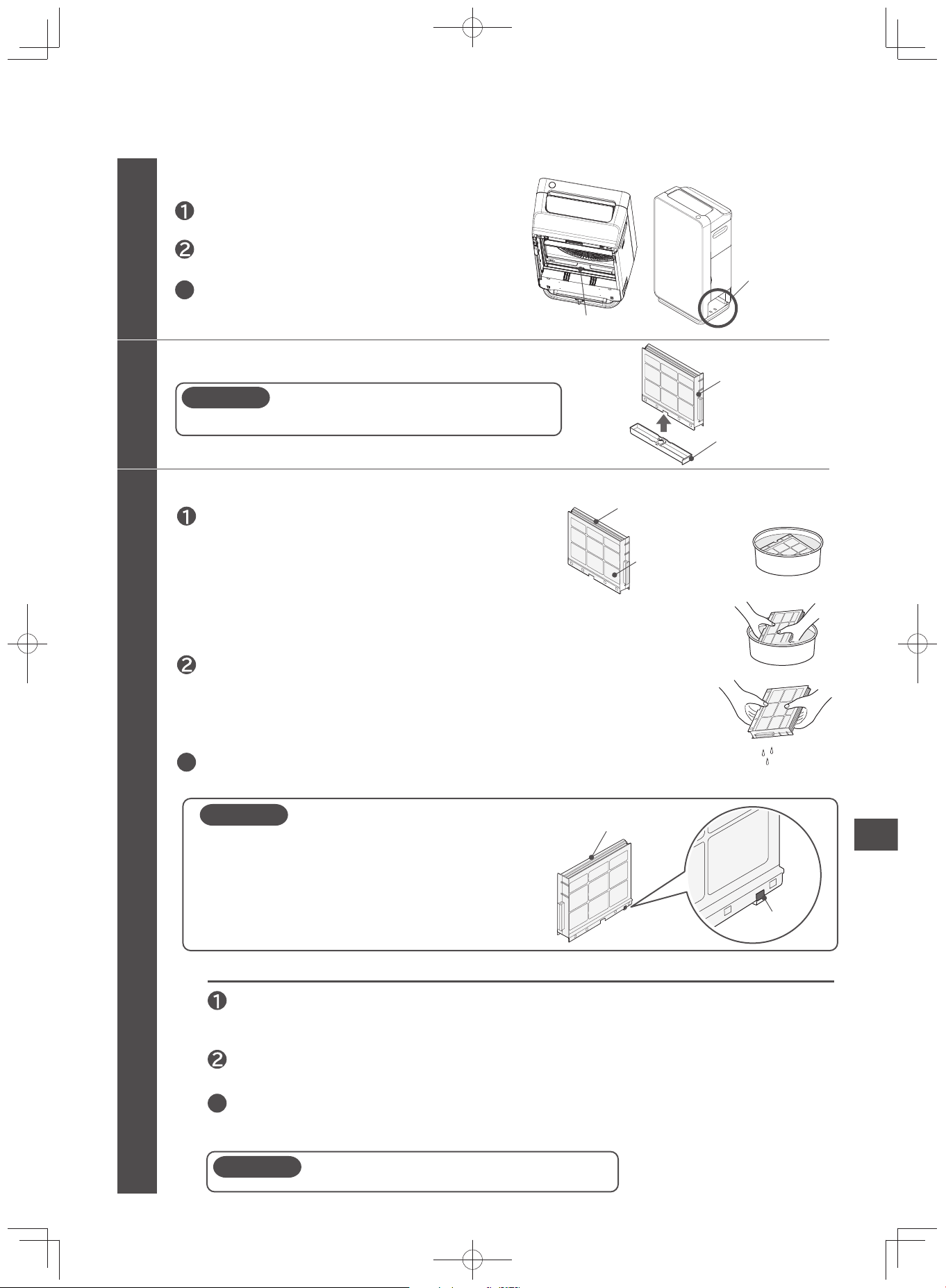
1
2
CAUTION
Lay a towel
Side cover
Humidifying filter
Water tray
Open the side cover and remove the
humidifying filter with the water tray
There might be some water remaining in the water tray.
Slightly pull out the water tray, hold it levelly and take it out.
It is also recommended that you lay a towel.
Since the bottom part of the unit has casters, hold
down the unit while removing the water tray.
(The casters do not have stoppers)
Water might leak if there is remaining water in the
water tray and it is tilted.
WARNING
CAUTION
EP-M70E_EN.indd 28EP-M70E_EN.indd 28 2017/2/23 17:27:442017/2/23 17:27:44
E-29
Cleaning
Clean the humidifying filter
Shake lightly to remove water.
(Until water is no longer dripping)
Remove the humidifying filter from the water tray
Replace with fresh water, and wash and rinse the humidifying filter by shaking it.
(Repeat 2-3 times)
Shake lightly to remove water.
(Until water is no longer dripping)
Use citric acids that are sold in pharmacies.
3
5
Use citric acid when it becomes hard to remove water scale
Remove slowly as the water may splash out.
3
3
Humidifying filter
Case
(Plastic part)
Magnet
Case
(Plastic part)
Clean the water tray mounting of the unit
Wipe off using a soft cloth.
If it is really dirty, clean using an old, soft toothbrush.
3
4
Humidifying filter
Water tray
Remove the rear panel, pre-filter, and
filter assembly/deodorizing filter.
Using a towel, wipe off water droplets that
have fallen inside the water tank holder
(inner side).
CAUTION
Submerge the humidifying filter in any of water,
lukewarm water or water with neutral kitchen
detergent for 30 minutes or longer.
(If there is an unusual amount of dirt, remove
the dirt by rubbing it off with your finger, etc.)
Follow the precautions and usage described on
the neutral kitchen detergent when using it.
(Use only neutral kitchen detergent. )
When using neutral kitchen detergent, rinse the filter so as
not to leave any detergent particles.
CAUTION
Do not remove the humidifying filter from its case.
A magnet is attached to the case in order to detect
the humidifying filter.
Do not remove.
Keep away watches and other objects that may be
affected by the magnet while cleaning.
Remove metal objects that were magnetized.
Dissolve about 20g of citric acid in 3L of lukewarm water (40°C below)
and soak the filter up to 30 minutes and wash.
(Clean off by scrubbing lightly with your fingers)
CAUTION
Although citric acid is a food additive and considered harmless
in terms of food hygiene, keep it out of the reach of children.
Replace with fresh water, and wash and rinse the
humidifying filter by shaking it.
(Repeat 2-3 times)
Water tray mounting
Water tank holde
r
Continued on next page
EP-M70E_EN.indd 29EP-M70E_EN.indd 29 2017/2/23 17:27:442017/2/23 17:27:44
E-30
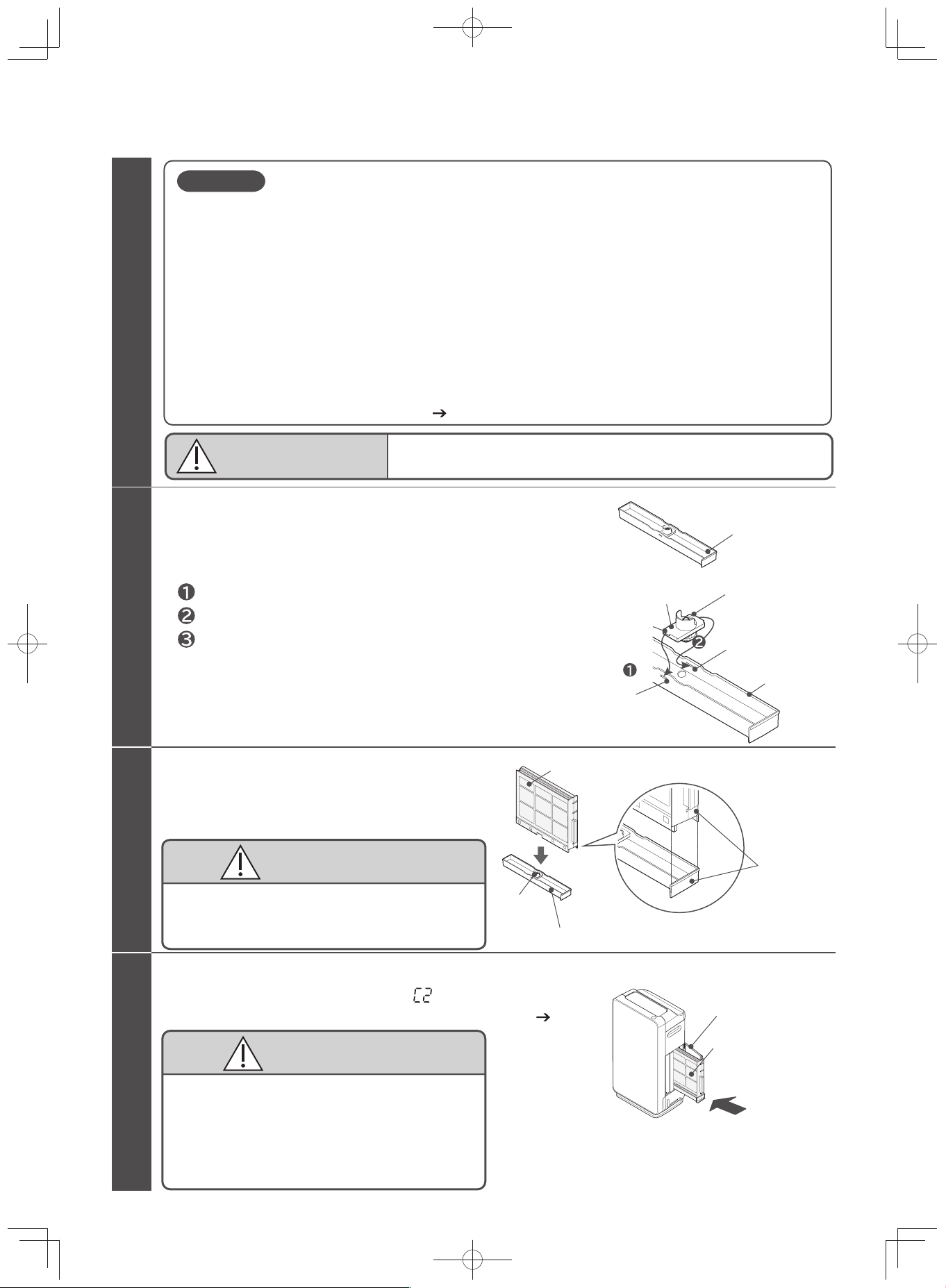
Set the humidifying filter
Attach the water tray with the humidifying filter to the unit
Side cover
Humidifying filter
Clean the water tray
Wash the water tray to remove dirt.
If the valve is dirty with water scale, use an old, soft toothbrush to clean off the dirt.
If the water tray valve has come off, attach the valve.
6
7
8
CAUTION
5
Water tray
Tab (Long)
Water tray
Hole (Short)
Hole (long)
Tab (short)
Valve
Insert the valve tab (short) into the hole (short) of the water tray.
Insert the valve tab (long) into the hole (long) of the water tray.
CAUTION
Humidifying filter
(Continued)
CAUTION
Set by
aligning
the broad
sides
Do not attach the humidifying filter to the unit if it has a lot of water.
This might cause the water to leak.
CAUTION
Check that the spring makes the valve return to its original
position when the valve is pressed from below.
Insert the humidifying filter in the water tray.
Check that the spring makes the valve return to its original
position when the valve is pressed from below.
Insert the humidifying filter securely until it clicks.
If it is not securely inserted, it may cause water
leakage during operation.
If the humidifying filter is not attached, “ ” will be displayed on the
temperature / humidity monitor, and the unit will not operate. (P.E-39)
Insert the filters with caution as they may
get stuck inside the unit.
Securely insert the humidifying filter, making sure that
it is pressed until it reaches the back of the unit.
If it is not securely inserted, it may cause water
leakage during operation.
Also, attach the filter while holding down the unit.
When you use the product for a longer period, white or brown water scales may attach to the inner part
of the water tray or on the surface of the humidifying filter.
Water scales are residue minerals from tap-water that have not evaporated. If you continue to use the
filter without cleaning it, the water scale will come out from the vent in the form of a white powder, or
solidify and become difficult to remove, resulting in lower humidifying performance. In such a case,
replace the filter.
Depending on the quality of tap water used, water scale may attach quickly.
In such a case, clean the filter on a frequent basis.
Rinse the whole case without removing the humidifying filter.
(It might become deformed or damaged if removed. )
Do not deform the humidifying filter by scrubbing it with a brush or using excessive force.
(This will damage it and decrease its performance. )
A new humidifying filter may smell at the beginning. This is normal.
Replace the filter early if it is damaged. (P.E-31)
Water tray
Valve
In particular, clean the valve and the holes of the water
tray often. (When dirt builds up, the drainage performance
decreases and may cause water leakage.)
Cleaning
(Continued)
EP-M70E_EN.indd 30EP-M70E_EN.indd 30 2017/2/23 17:27:452017/2/23 17:27:45
E-31
Replacing Humidifying Filter
The humidifying fi lter is a disposable part. Performance of the fi lter decreases with use.
Replace it after 120 months of use as a guide (cleaning is necessary on a monthly basis).
Early replacement of the fi lter is recommended if it exhibits any of the following conditions despite periodic cleaning.
Heavy dirt is present, attached hardened water scale is diffi cult to remove, bad odors, serious damage or deformation
Depending on the quality of tap water used, the application environment (level of air contamination), and the se-
lected operation mode, the humidifying fi lter may degrade considerably early.
Humidifying Filter Replacement
Model: EPF-KVG900KF
Dispose of the humidifying fi lter according to local regulations.
Cleaning
When the Water Refi ll Indicator Comes On
When humidify or skin moisturize mode is used, the water supply indicator will light up even if there is remaining
water (approximately 20mm from the bottom of the water tank).
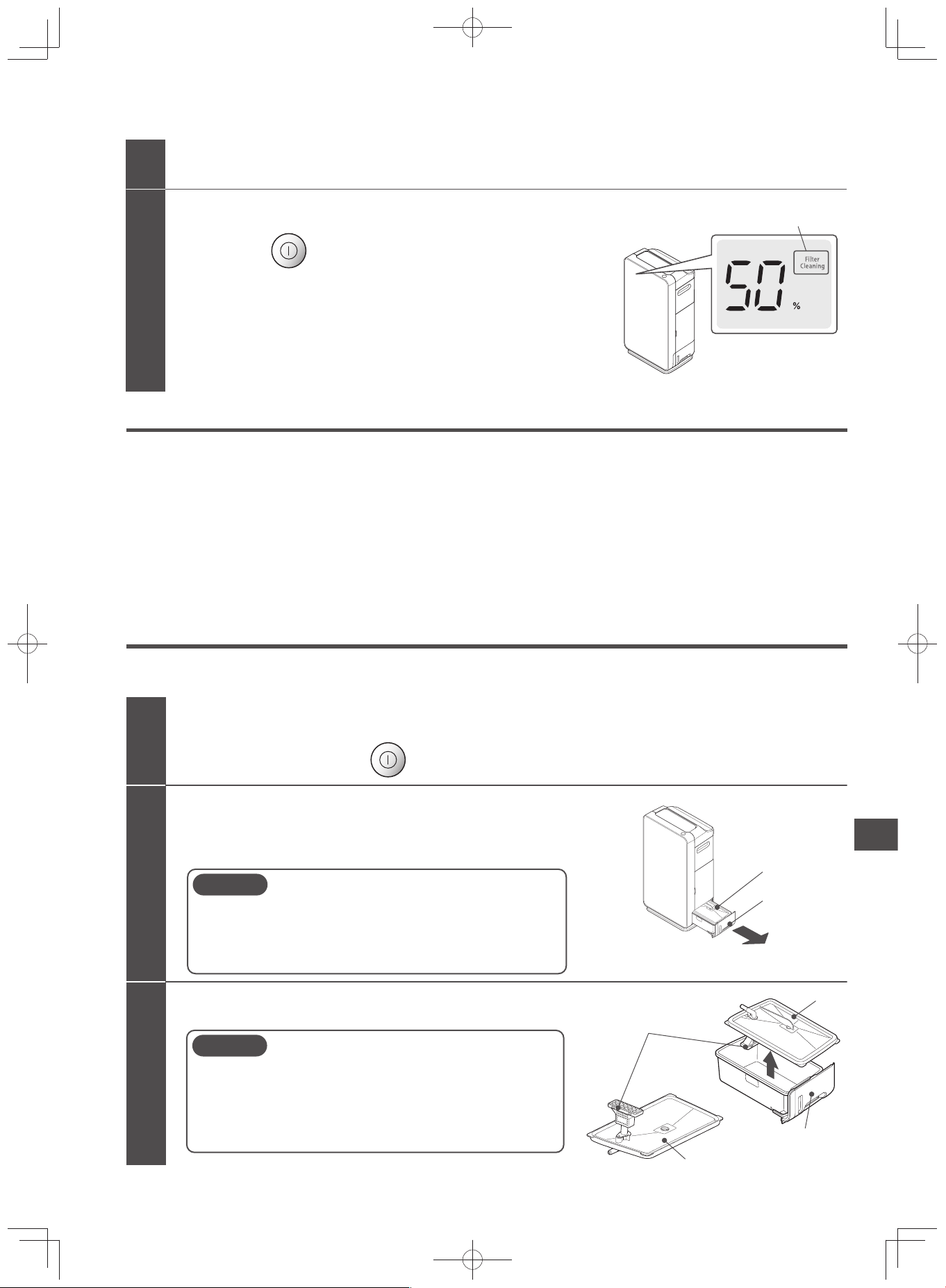
Remove the water tank from the unit
Grab the water tank handle, and while slightly lifting it, gently
pull the water tank.
Check if the operation has stopped before removing the power plug from the socket
While operating, press the power button and stop operation.
Remove the tank cover from the water tank
1
2
3
CAUTION
When removing the water tank from the unit, pull the
water tank gently while pressing down the unit since
a caster is attached on its base.
(The caster does not have a stopper.)
CAUTION
Water tank
Tank cover
Water tank filter
Tank cover
Be careful not to injure your finger or nails when
removing the tank cover.
Make sure that the water tank filter is not subject to
unnecessary force. If damaged, it will not be able to
pump up water.
Water tank
Handle
Continuation on the next page
Close side cover
Insert the power plug into the outlet and
press the power button.
After cleaning, make sure that the “Filter Cleaning” indicator
is not lit.
(The humidifying operation time is reset when the power cord
is unplugged only if the “Filter Cleaning” indicator is lit.)
10
9
Make sure that the indicator is not lit.
EP-M70E_EN.indd 31EP-M70E_EN.indd 31 2017/2/23 17:27:452017/2/23 17:27:45
E-32
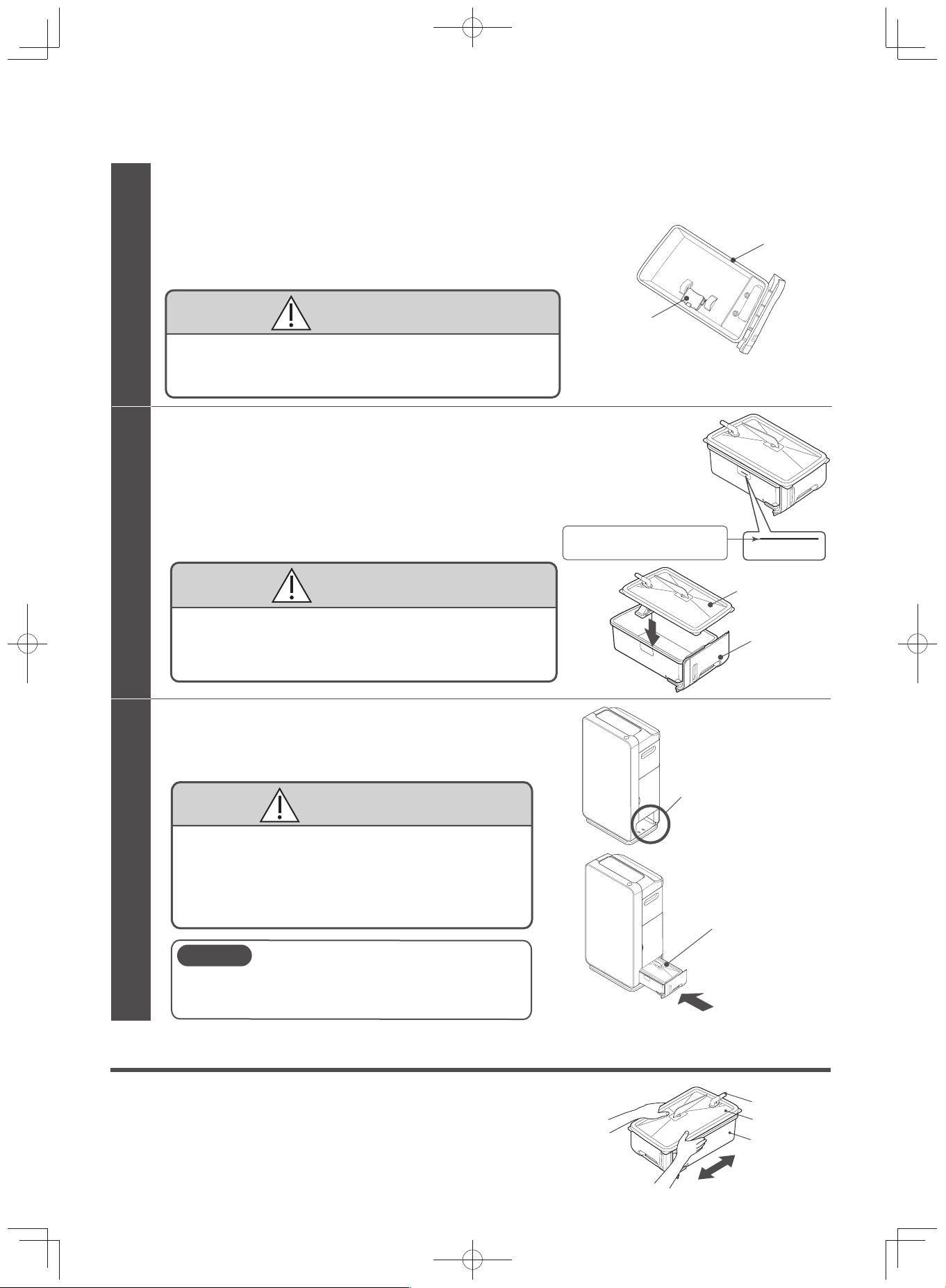
6
Install the water tank to the unit
Wipe off water drops in the water tank holder during
installing the water tank.
The unit cannot operate without the water tank.
Securely install the water tank, making sure that it
reaches the back of the unit.
If it is not securely installed, it may cause water
leakage during operation.
Also, hold down the unit to make sure that the unit will
not move during installation.
CAUTION
CAUTION
The water tank may be heavy when filled with water.
Be careful not to injure your fingers, nails, or your
back while handling.
Put water in the water tank and place the tank cover.
Fill the water tank, making sure it does not exceed the fill line found at
the side of the water tank.
Wipe the moisture around the water tank.
When filling the water tank away from the unit, attach the tank
cover and hold it in place.
Water level
Make sure that the water
does not exceed the line.
Water level
CAUTION
If the water exceeds the fill line, it may cause water leakage.
Securely attach the tank cover.
If it is not securely attached, it may cause water leakage
during operation.
Water tank
Tank cover
5
Rinse the water tank and tank cover with water and check the movement
of the float switch.
Rinse in running water for 2-3 times.
Do not use detergent.
Check if the float switch can move up and down.
Do not to remove the float switch, or subject it to
unnecessary force.
Otherwise “Water Refill” will not be detected.
CAUTION
Water tank
Float switch
4
Water tank
Water tank holder
Water Tank
(Guide for Cleaning: Daily)
Replace water daily with fresh tap water.
(Discard any remaining water in the tank)
Pour a small amount of tap water, tighten the water tank cover, make
sure that the water does not leak, and shake to wash. (Replace the
water and repeat 2 to 3 times)
Tank cover
Water tank
Water inlet
Cleaning
(Continued)
EP-M70E_EN.indd 32EP-M70E_EN.indd 32 2017/2/23 17:27:452017/2/23 17:27:45
E-33
Do not use detergent for cleaning.
Before removing the water tank from the unit, press power button to switch it off.
There is a fl oat switch inside the water tank. Without using excessive force, shake to wash.
CAUTION
Humidifying Filter
(Guide for Cleaning: At Least Once a Month)
Please clean following the procedure seen in “When the Filter Cleaning Indicator Comes On”
(P.E-28 -
E-31)
Depending on the environment it is used in, dirt or odor may adhere to the humidifying fi lter even when it
is not in “Humidify” mode.
It is recommended that the fi lter be cleaned often, regardless of whether the “Filter Cleaning” indicator
lights up or not.
Cleaning
Water Tank, Tank Cover, Water Tank Filter
(Guide for Cleaning: About Once a Month)
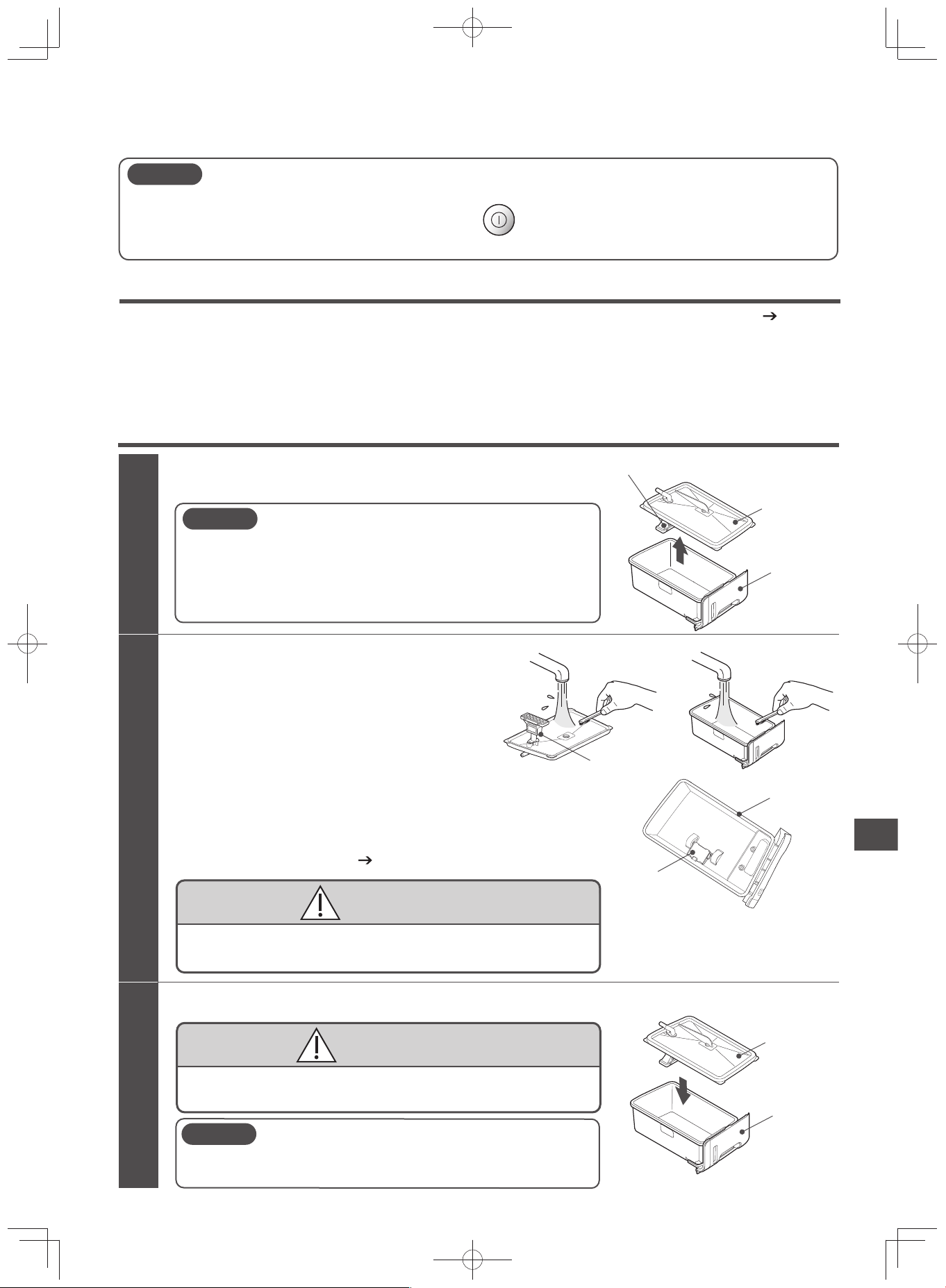
Remove the tank cover from the water tank
Rinse and remove dirt.
Water tank filter
1
2
3
CAUTION
Do not use detergent for cleaning.
Be careful not to injure your finger or nails when removing the
tank cover.
Make sure that the water tank filter is not subject to unnecessary force.
If damaged, it will not be able to pump up water.
Wipe any moisture and attach the tank cover
The tank cover must be pressed and securely attached to the water tank.
Otherwise, it may cause water leakage.
CAUTION
CAUTION
Make sure that the water tank filter is not subject to unnecessary force.
If damaged, it will not be able to pump up water.
Do not to remove the float switch, or subject it to unnecessary force.
Otherwise “Water Refill” will not be detected.
CAUTION
Water tank filter
Water tank
Tank cover
Water tank
Tank cover
Water tank
Float switch
Remove dirt by using cotton swabs or old, soft
toothbrush.
Remove the water scale adhere to the float switch.
Gently clean the water tank filter with running
water. It may become damaged if cleaned roughly
with toothbrush.
The water tank filter is disposable. Replace the
filter when torn, damaged, or when holes form.
For replacement, purchase service parts (parts
number EP-KVG900-039). (P.E-42)
EP-M70E_EN.indd 33EP-M70E_EN.indd 33 2017/2/23 17:27:452017/2/23 17:27:45
E-34
Pre-fi lter, Filter Assembly / Deodorizing Filter
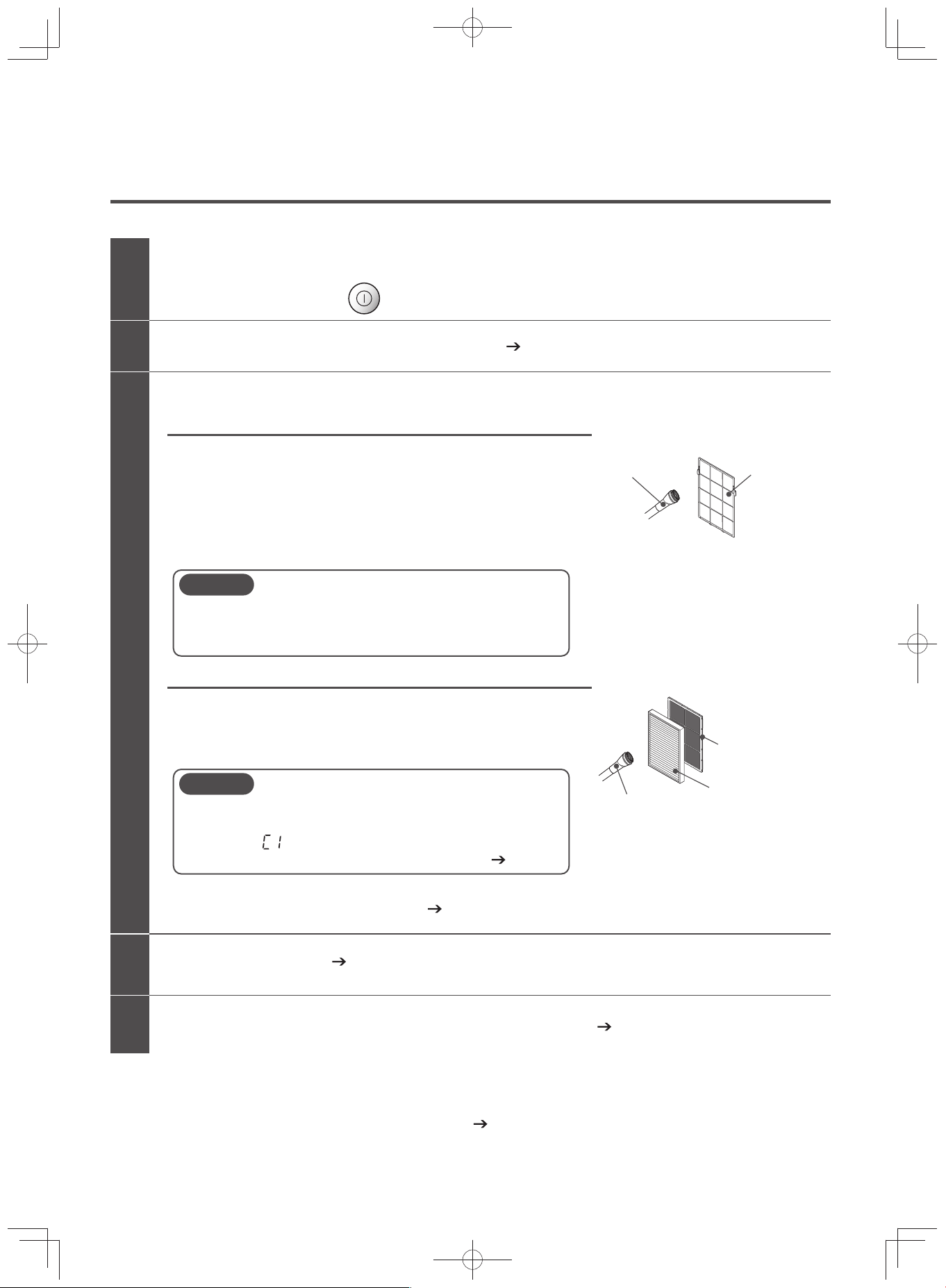
Remove the rear panel and pre-filter (P.E-14)
Check if the operation has stopped before removing the power plug from the socket
While operating, press the power button and stop operation.
Cleaning
Remove dust using a vacuum cleaner.
Lightly clean using the nozzle brush of the vacuum cleaner
and vacuum the dust.
Remove dirt by washing with water.
If it is extremely dirty, wash it with water and a soft sponge
without using excessive force. Drain well and let it dry in a
well-ventilated area away from direct sunlight.
The dust on the filter assembly or deodorizing filter may emit an odor.
Be sure to remove the dust using a vacuum cleaner or the like.
Lightly clean using the nozzle brush of the vacuum cleaner and
vacuum the dust.
1
2
3
4
5
Pre-filter
Filter assembly/Deodorizing filter
Pre-filter
Nozzle brush
The stainless coating of the surface will peel off if it is
rubbed with the floor nozzle of a vacuum cleaner or a scrub.
Do not use detergent (kitchen or laundry use) for cleaning.
CAUTION
Attach each filter (P.E-14, E-15)
Attach the pre-filter and rear panel to the unit (P.E-15)
Nozzle brush
Deodorizing filter
Filter assembly
(Do not wash with water)
Do not put excessive force and deform the filter assembly.
If the filter assembly is deformed, it will not be detected by
the unit. “ ” will be displayed on the temperature / humidity
monitor, and the unit will not be able to operate. (P.E-39)
CAUTION
If the odor from the air outlet becomes a bother, soak the
deodorizing filter as soon as possible. (P.E-35)
Note: Clean the back face as well.
The pre-fi lter is disposable.
When the pre-fi lter needs to be replaced because of the stainless coating is peeling on its surface or breakage,
please purchase a service part (part no. EP-LVG70-042). (P.E-42)
Clean the pre-fi lter, dust fi lter, and deodorizing fi lter frequently because dust and dirt get on them.
Cleaning
(Continued)
EP-M70E_EN.indd 34EP-M70E_EN.indd 34 2017/2/23 17:27:452017/2/23 17:27:45
E-35
Cleaning the Deodorizing Filter
(Guide for Cleaning: About Once Every 6 Months)
To maintain deodorizing performance, frequent washing is recommended.
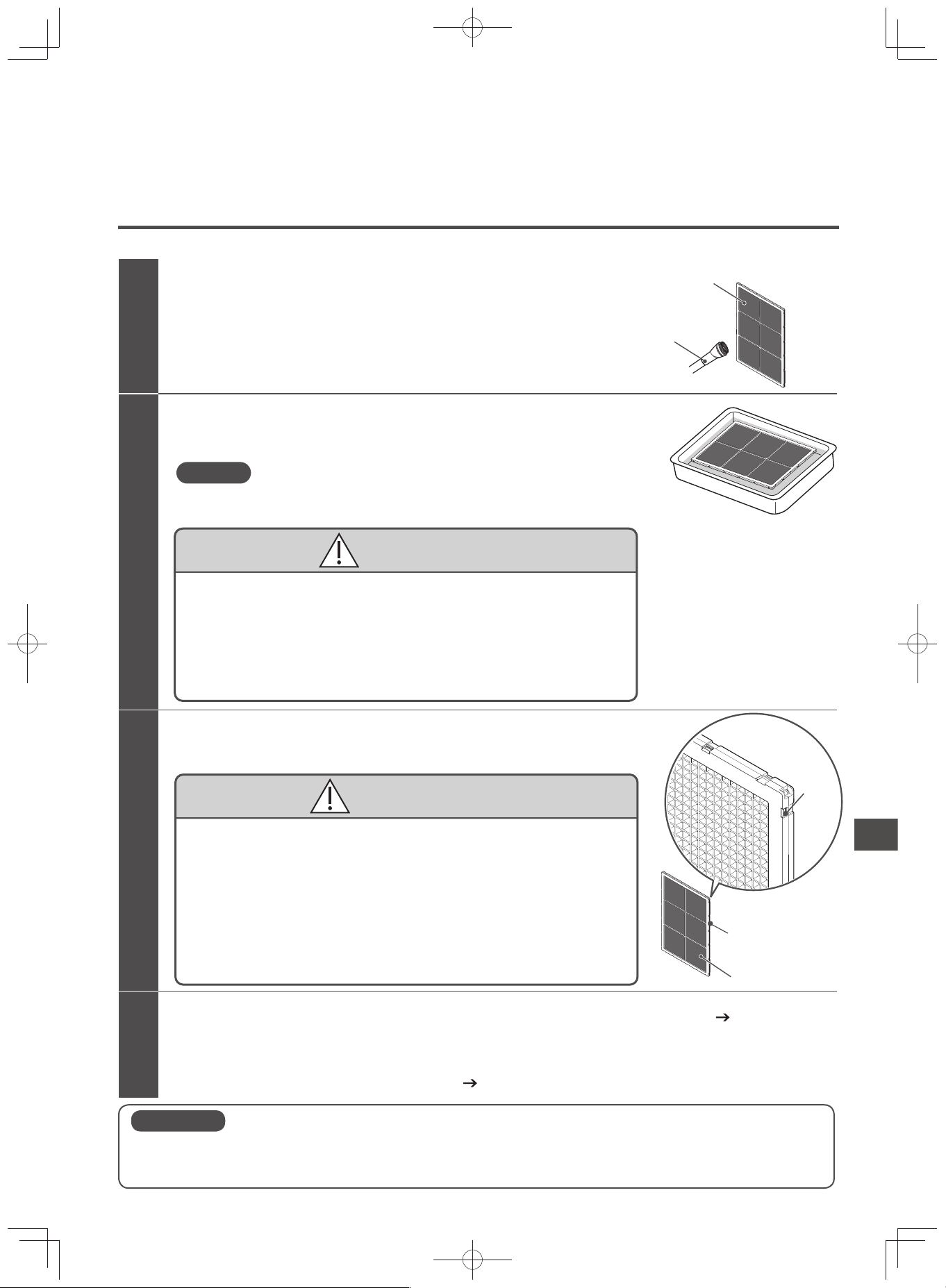
Soak the deodorizing filter
Remove using a vacuum cleaner.
Lightly clean using the nozzle brush of the
vacuum cleaner and vacuum the dust.
Remove dust from the surface
1
2
3
Soak in water or lukewarm water (below 40°C) for about 3 hours.
Dry the deodorizing filter
Dry properly in a well-shaded area. (Place it in a well-ventilated area for about 1 day)
4
Set the deodorizing filter and attach the panel on the purifier body (P.E-14, E-15)
The deodorizing filter is disposable.
There might be some odor left even if the deodorizing filter has been soaked and cleaned.
Replace filter if the odor becomes a bother. (P.E-37)
Nozzle brush
Deodorizing filter
Do not remove the deodorizing filter from its case.
This will damage the filter.
Do not scrub using a brush.
This will damage the filter.
Do not use any detergent.
The detergent smell will cling on to the deodorizing filter and may
damage it.
CAUTION
Do not use when wet. Wipe off any remaining droplets of water.
The water droplets will go out of the air outlet, decreasing deodorizing
effect, and may become the source of odor.
Do not dry using a dryer or heater appliances.
This will cause deformation.
Do not use excessive force on the deodorizing filter.
This will damage the filter.
If the tabs on the case come off, press down the tabs.
CAUTION
Case
Deodorizing filter
Tab
After soaking, some deodorizing agent granules might fall out. However,
the deodorizing performance will not be affected.
Note
If the odor from the air outlet becomes a bother, clean the deodorizing fi lter immediately.
The deodorizing fi lter cannot remove the odor of harmful substances in cigarettes (carbon monoxide, etc.). or continuously occurring odors.
Use in places with strong smells such as cigarettes or barbecue will shorten the life of the deodorizing fi lter.
In such a case, be sure to use the deodorizing fi lter while ventilating the room.
CAUTION
Cleaning
EP-M70E_EN.indd 35EP-M70E_EN.indd 35 2017/2/23 17:27:452017/2/23 17:27:45
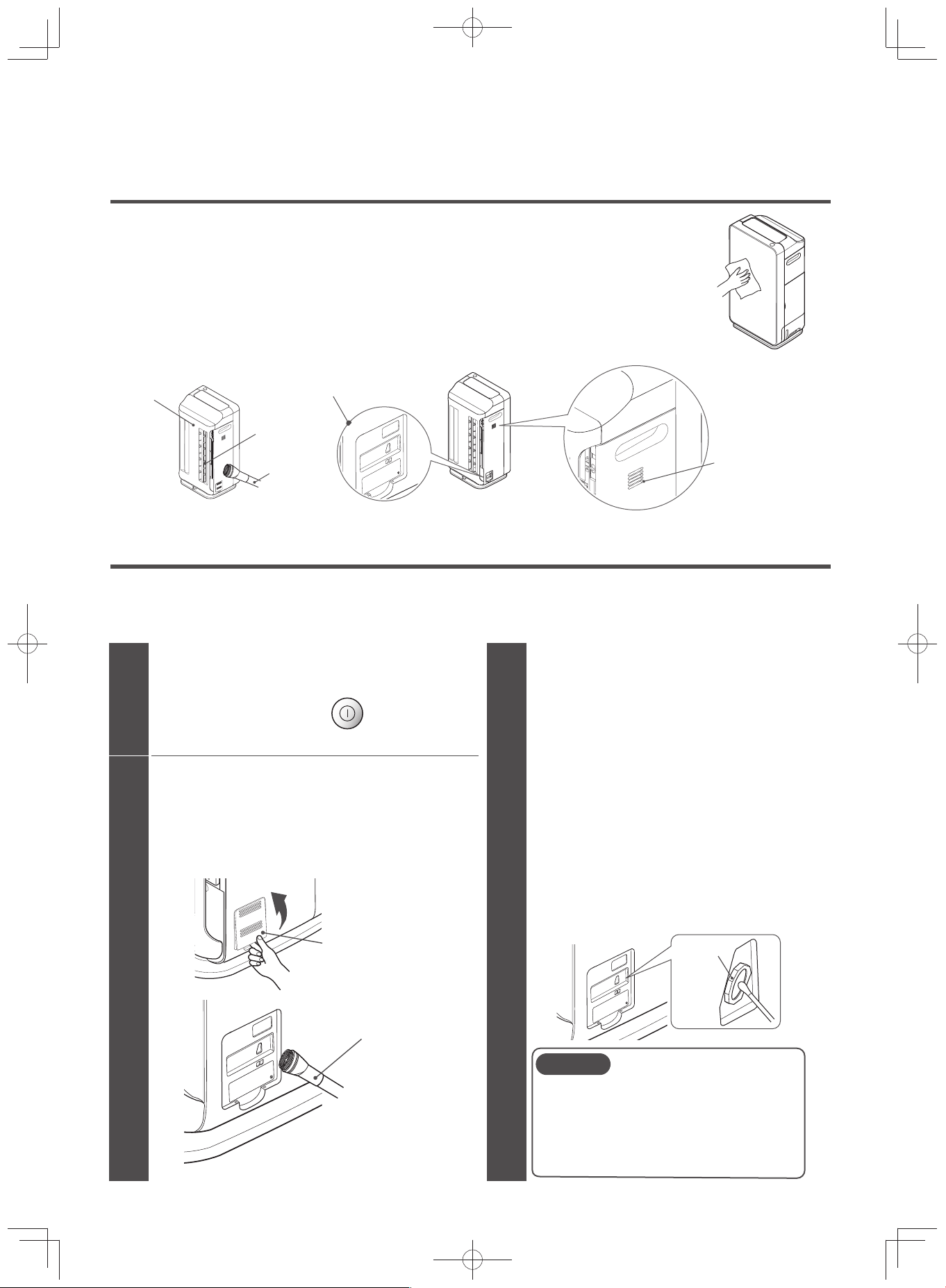
E-36
Purifi er
(Guide for Cleaning: About Once a Month)
Wipe off dirt on the unit and glass panel, rear panel, and the surface using a soft, damp cloth.
Clean adhering chemicals such as oil components and insecticides regularly.
Remove dust from the surfaces of the rear panel air inlet, dust sensor, odor sensor, tempera-
ture sensor, and humidity sensor using a vacuum cleaner and wipe off using a soft cloth.
Rear panel
Dust sensor
Temperature sensor
Odor sensor
Humidity sensor
Air inlet
Nozzle brush
Dust Sensor
(Guide for Cleaning: At Least Once Every 3-6 Months)
Clean regularly at least once every 3-6 months.
The dust sensor is less likely to detect dirt in the air if it is not cleaned regularly.
If the sensor is dirty, it might not work properly and will detect dust even if the air is clean.
Remove dust sensor cover and collect
the dust
Place your finger on the lower part and press.
Remove the dust cover, vacuum well using the nozzle
brush of the vacuum cleaner, and wipe using a soft cloth.
Check if the operation has stopped before
removing the power plug from the socket
While operating, press the power button and
stop operation.
1
2
3
Wipe the lens with a cotton swab
(commercial product)
CAUTION
Dust sensor cover
Nozzle brush
Lens
When dirt is difficult to remove, wipe the lens
with a cotton swab slightly moistened with
water, then wipe with a dry cotton swab after.
Remove all dust around the lens.
After cleaning, attach the dust sensor cover.
After cleaning, plug the air purifier in a clean
environment and turn on in Purify/Auto
operation mode. If the Air Sensor does not
turn green after about 10 minutes, there
might be remaining dust left.
Please clean it again.
Do not put excessive force on the lens.
This may cause damage.
Do not use excessive force when removing and
attaching the tabs of the dust sensor cover.
This may cause damage.
Cleaning
(Continued)
EP-M70E_EN.indd 36EP-M70E_EN.indd 36 2017/2/23 17:27:452017/2/23 17:27:45
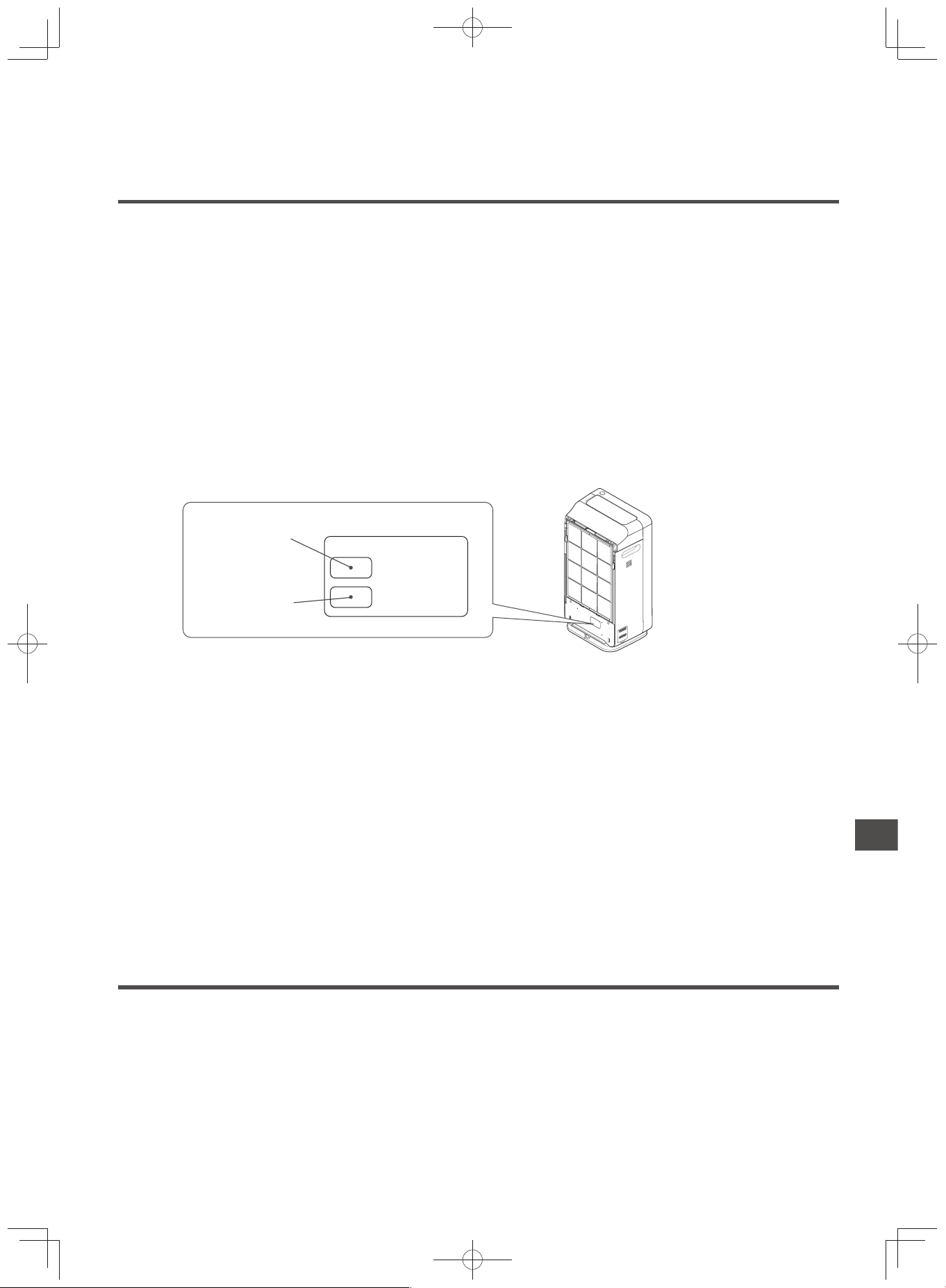
E-37
Replacing the Filter Assembly / Deodorizing Filter
Replacement Interval
The fi lter is disposable. The deodorizing performance of the fi lter decreases with use.
The standard life of a fi lter assembly and a deodorizing fi lter is approximately 10 years as determined by the
Japan Electrical Manufacturers' Association.
A test according to JEM1467(Japan Electrical Manufacturers' Association) was conducted.
If 5 cigarettes are
smoked per day:
[Filter Assembly] Number of years is up to the point the air purifying time takes twice as long as when the fi lter
was new.
[Deodorizing Filter] Number of years is up to the point the deodorizing rate (ammonia, acetaldehyde, and acetic
acid usually contained in tobacco) becomes half as when the fi lter was new.
* This is only a guide. It differs from the actual use in an average household.
The fi lter assembly should be replaced immediately if its color resembles any of the colors on the dirtiness
label attached to the unit.
The colors on the dirtiness label only serve as a guide.
Depending on the installation location, the actual color
of the contaminated fi lter may differ from the color on the label.
Dirtiness Label
For the room seldom
exposed to cigarette
smoke
For the room
always exposed
to cigarette smoke
Filter Replacement Guide
Replace the filter
promptly when its
color becomes
similar to either
color.
Replace the deodorizing fi lter when it becomes diffi cult to remove odor.
Depending on the location and usage, it may also be shortened. If it becomes diffi cult to remove dust or
odor, replace the fi lter immediately. Otherwise, the fi lter may generate odors.
The following cases will shorten the life of the fi lter:
When the purifi er takes in oily smoke, carbon substances (soot), etc. or when the smell of new building materials
remains after the construction or remodeling of a building
When used in stores, such as in coffee shops, game parlors, barber shops, beauty parlors, hotels, inns, and of-
fi ces
When used in places with strong smells such as cigarettes, barbecue, aroma oils, or air fresheners
When the purifi er takes in combustion gases generated by heating appliances
When the purifi er takes in solvents such as paints, adhesives, etc.
When used in dusty locations near roads subject to heavy traffi c.
Handling the Filter Assembly / Deodorizing Filter
Make sure to take the fi lter out of its plastic cover before using.
Do not set the fi lter while it is still inside the plastic cover.
This may cause a unit failure.
Avoid handling it roughly.
Do not crush, crumple, or roll the fi lter.
When the fi lter is broken, it will not have any cleaning effect.
Do not wash the fi lter assembly.
The fi lter assembly cannot be reused even after washing.
Please buy and replace it with a new fi lter assembly.
The fi lter contains plastic. Dispose of the fi lter according to local regulations.
Replacing the Filter Assembly / Deodorizing Filter Cleaning
EP-M70E_EN.indd 37EP-M70E_EN.indd 37 2017/2/23 17:27:462017/2/23 17:27:46
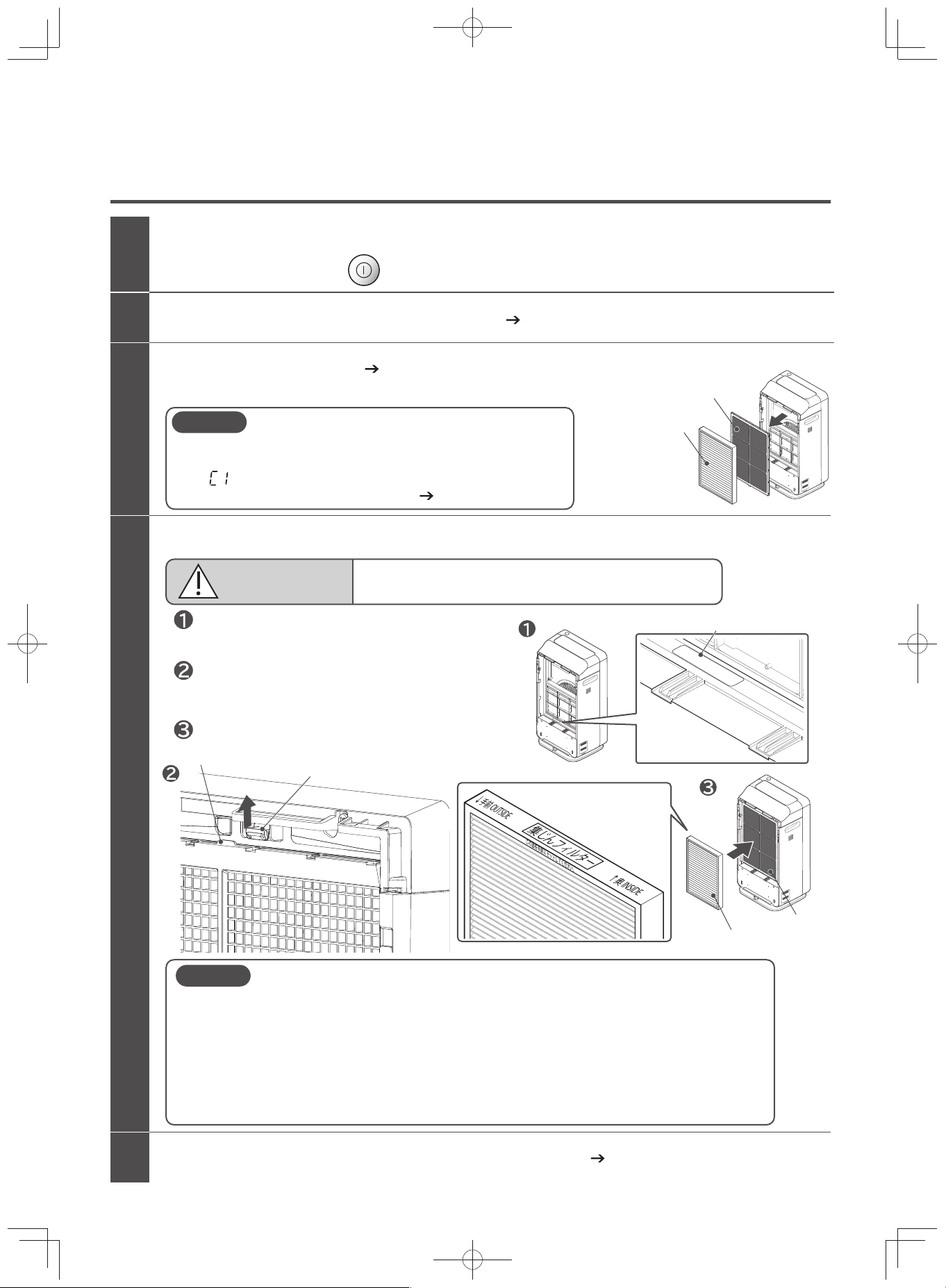
E-38
How to Replace the Filter Assembly / Deodorizing Filter
Remove the rear panel and pre-filter (P.E-14)
Remove the old filter (P.E-14)
Remove the plastic packaging of the new filter, and attach the filter in the unit
Attach the pre-filter and rear panel to the unit (P.E-15)
Attach the deodorizing filter in the unit.
Attach the filter assembly to the unit.
Remove the filter assembly first, then the deodorizing filter.
Set the filter at the deodorizing filter set position.
Check if the operation and the fan have stopped, and then unplug the power cord
While operating, press the power button and stop operation.
1
2
3
4
5
CAUTION
Use only a genuine filter for the Hitachi Air Purifier
Other filters may cause unit to malfunction.
CAUTION
If the filter is set while without removing its plastic packaging, it will not be able to
have a cleaning effect. It will also cause unit malfunction.
The vibration during transporting the unit might cause deodorizing agent granules to
fall out from the filter.
When removing the plastic cover of the filter and attaching the filter to the unit,
make sure that your hands, clothes, and the surroundings does not get dirty.
Wipe off any granules that may have fallen or clung to the filter.
This will not affect the deodorizing performance.
CAUTION
Do not put excessive force and deform the filter assembly. If the
filter assembly is deformed, it will not be detected by the unit.
“ ” will be displayed on the temperature / humidity monitor,
and the unit will not be able to operate. (P.E-39)
Deodorizing filter
set position
Deodorizing filter set position
Unit tab
Deodorizing filter tab
While pressing the tabs on the unit, set the
deodorizing filter and hook the tabs of the
deodorizing filter with the tabs of the unit.
Filter assembly
Deodorizing filter
Filter assembly
Deodorizing filter
Replacing the Filter Assembly / Deodorizing Filter
(Continued)
EP-M70E_EN.indd 38EP-M70E_EN.indd 38 2017/2/23 17:27:462017/2/23 17:27:46
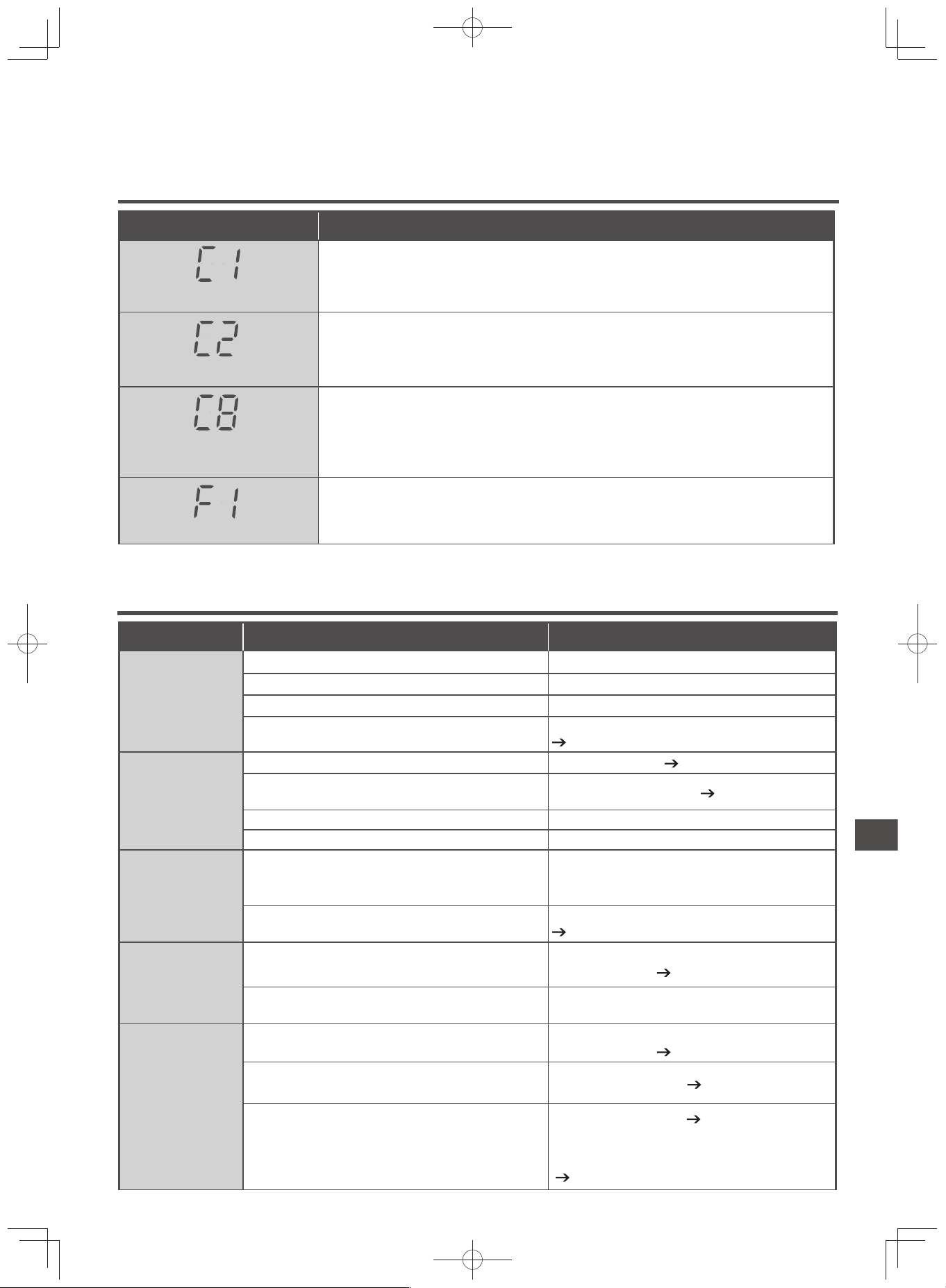
E-39
Troubleshooting Guide
When a notifi cation is displayed on the temperature/humidity monitor
Notifi cation Display and Details
Solution
The fi lter assembly is not set.
Install the fi lter assembly.
If the same message appears, the fi lter assembly may be deformed and cannot be used.
Replace the fi lter assembly.
The humidifying fi lter is not set.
Install the humidifying fi lter.
The vibration sensor has
detected something.
Unplug from outlet and plug it again.
If the unit fell over and water from the tank is leaking, make sure to unplug it from the out-
let and request repairs.
Fan is not rotating.
Unplug from outlet and plug it again.
If the same message appears, discontinue use, make sure to unplug it from the outlet,
and request repairs.
Note: If the problem cannot be solved, request repair.
Troubleshooting GuideReplacing the Filter Assembly / Deodorizing Filter
Before Requesting Repairs
Symptoms Check Solution
Air does not
come out
or
it will not turn
on
Is the power plug properly inserted in the outlet? Insert the power plug properly in the outlet.
Is the breaker switched off? Switch on breaker.
Did you turn on the “Power” button on the unit? Press the “Power” button to turn on.
Are the fi lter assembly, deodorizing fi lter, and hu-
midifying fi lter correctly installed in the unit?
Install fi lters correctly in the unit.
(P.E-14 - E-16)
It cannot be
operated
Is the child lock set? Cancel the setting.
(P.E-25)
Are there any water droplets or dust on the opera-
tion panel?
Wipe off with a soft cloth.
(P.E-6, E-7)
Are you wearing any gloves or have bandages? Touch it directly.
Are you touching any other buttons? Touch one at a time.
The operation
stopped mid-
way
Are there any strong impact or is the unit tilted?
Make sure not to subject the unit to strong im-
pacts.
Or place it in on a stable, even location.
Is it operating in “Absence” or “Eco Saving Opera-
tion” cycle?
Switch to other quick cycles.
(P.E-22, E-23)
The airfl ow rate
does not decrease
even though the
air is clean
Is the airfl ow rate switched?
Touch Airfl ow Level button and select Auto or an-
other airfl ow rate.
(P.E-21)
Is it operating in Humidify or Skin Moist mode? If the humidity is low, the airfl ow will not decrease.
The airfl ow
rate does not
increase even
though the air
is contaminat-
ed
Is the airfl ow rate switched?
Touch Airfl ow Level button and select Auto or an-
other airfl ow rate.
(P.E-21)
Is the odor sensor opening blocked by dust or any
other objects?
Clean the odor sensor.
(P.E-36)
When the power plug is in the outlet, did the air
around become clean?
Switch the airfl ow rate.
(P.E-21)
Or open a window, unplug the power plug from
the outlet when the surrounding air becomes
clean, and plug it in again after 10 seconds.
(P.E-27)
EP-M70E_EN.indd 39EP-M70E_EN.indd 39 2017/2/23 17:27:462017/2/23 17:27:46
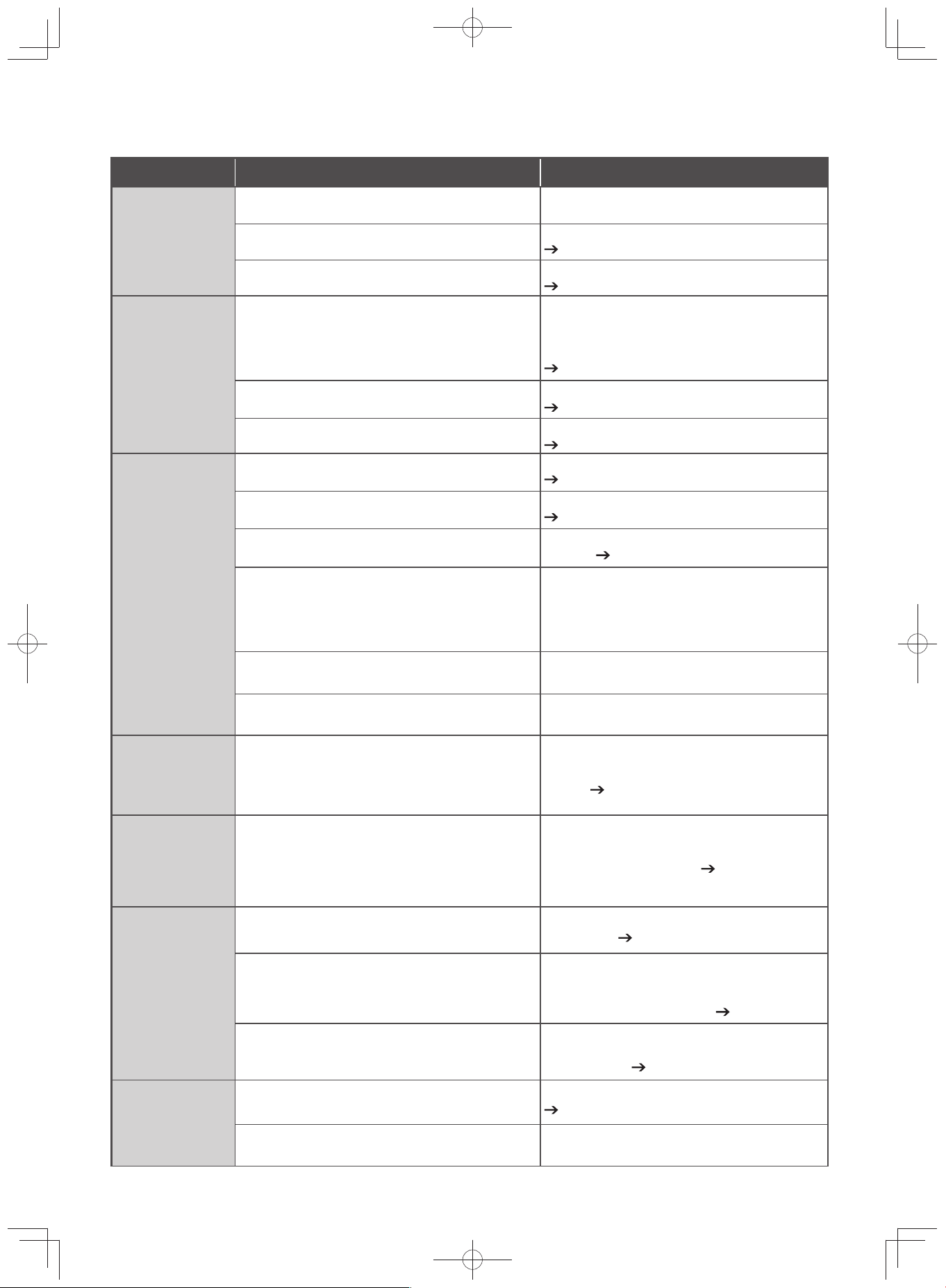
E-40
Troubleshooting Guide
(Continued)
Symptoms Check Solution
The air sen-
sor display
color does not
change from
green
Is the unit placed in a location where it cannot be
reached by odors and dust?
Try moving it to another location.
Is the dust sensor dirty?
Clean the dust sensor.
(P.E-36)
Is the odor sensor opening blocked by dust or any
other objects?
Clean the odor sensor.
(P.E-36)
The air sen-
sor display
color does not
change from
red
Is there anything nearby that the odor sensor may
detect?
Heating appliances that generate combustion
gases
Alcohol, cosmetics, sprays, etc.
The purifier may detect components of invisible
gas that cannot be cleaned by the fi lter and still
continue operating.
Open a window for ventilation.
(P.E-27)
Is the dust sensor dirty?
Clean the dust sensor.
(P.E-36)
Is the odor sensor opening blocked by dust or any
other objects?
Clean the odor sensor.
(P.E-36)
The water is
leaking
Is the water tank correctly installed in the unit?
Install the water tank correctly in the unit.
(P.E-16, E-17)
Is the tank cover securely attached?
Attach the tank cover securely.
(P.E-16)
Is the humidifying filter securely installed in the
unit?
Securely install the humidifying fi lter in
the unit.
(P.E-30)
Was the unit tilted or carried while there was still
water inside?
Place the unit on even ground, and do not carry
the unit while there is still water inside.
Also, when transferring the unit on casters, there
is a risk of spilling the water, therefore, transfer
the unit slowly across a fl at surface.
Are there any cracks in the water tank or tank
cover?
Immediately stop using the unit, go to your shop
dealer and request repairs.
Is water leaking from the tank?
Immediately stop using the unit, go to your shop
dealer and request repairs.
The Filter
Cleaning indi-
cator does not
turn off
If you unplug the power cord, does the Filter
Cleaning indicator reset?
Once you unplug the power cord, the humidify-
ing operation time will reset and the indicator will
turn off.
(P.E-28)
The touch op-
eration panel
display disap-
peared
Did you set the touch operation panel display to
be hidden?
Hold display switch button for 3 seconds and
switch the display settings.
(P.E-20)
It is hard to re-
move the smell
or the unit has
a smell
Is the pre-fi lter too dirty?
Refer to “Pre-fi lter” in “Cleaning” when cleaning
the pre-fi lter.
(P.E-34)
Is the fi lter dirty?
Or is it time to replace the fi lter?
Refer to “Replacing the Filter Assembly / De-
odorizing Filter” when replacing the fi lter.
Depending on the location or usage, the replace-
ment interval may be shorter.
(P.E-37)
Is the humidifying fi lter dirty?
Or is it time to replace the humidifying fi lter?
Refer to “When the Filter Cleaning Indicator
Comes On” in “Cleaning” when cleaning the hu-
midifying fi lter. (P.E-28 - E-31)
The airfl ow rate
switched in the
middle of op-
eration
Is it set in “Auto” airfl ow rate, or “Pollen” or “Eco
Saving Operation” quick cycles?
Switch airfl ow rate and quick cycle.
(P.E-21 - E-23)
Are the rear panel, fi lters, and humidifying fi lter
correctly set?
Set them correctly.
EP-M70E_EN.indd 40EP-M70E_EN.indd 40 2017/2/23 17:27:462017/2/23 17:27:46
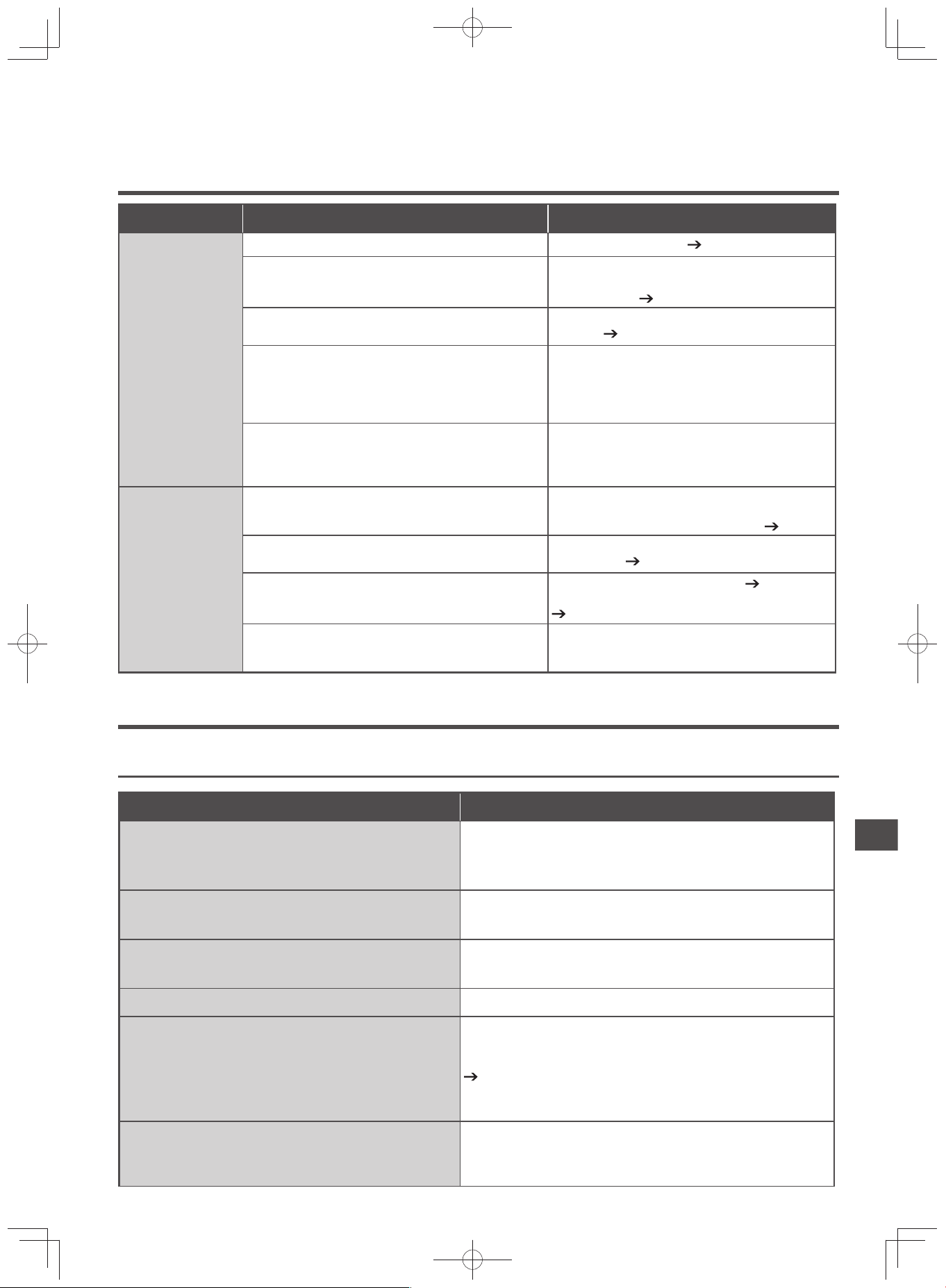
E-41
Symptoms Check Solution
The unit does
not humidify
(the humidity
does not in-
crease)
Is the water supply indicator lit? Fill the tank with water.
(P.E-31, E-32)
Is the Filter Cleaning indicator lit?
Refer to “When the Filter Cleaning Indicator
Comes On” in “Cleaning” when cleaning the hu-
midifying fi lter.
(P.E-28 - E-31)
Is the Humidity Monitor displaying 70%?
It automatically operates according to the humid-
ity level.
(P.E-21)
Is the room too large or ventilated?
The humidity may not increase depending on
the size of the room, the installation location,
whether windows are open or closed, and the
state of ventilation. Use the unit in combination
with another humidifi er.
Is a heater used in the room?
Depending on the heater used, the air in the
room may become dry, causing the humidity to
not increase. Use the unit in combination with
another humidifi er.
The humidi-
fying perfor-
mance is inad-
equate
(Water in the
water tank
has not de-
creased)
Is the airfl ow rate weak?
When the “Medium” or “Silent” airfl ow rate is se-
lected, the humidifying performance is lessened.
Set the airfl ow rate to “High” or “Max”.
(P.E-21)
Is there any dust on the pre-fi lter?
Refer to “Pre-fi lter” in “Cleaning” when cleaning
the pre-fi lter.
(P.E-34)
Is the humidifying fi lter correctly set?
Or is it dirty with water scales?
Set the humidifying fi lter correctly.
(P.E-30)
Clean or replace the humidifying fi lter if it is dirty.
(P.E-28 - E-31)
The humidifying performance varies depending
on the level of humidity and temperature of the
room.
If the humidity level is high, such as on a rainy
day, or if the temperature of the room is low, the
humidifying performance decreases.
Humidifying
Following Conditions are Normal
Sounds and Vibrations
Symptoms Cause (This is normal)
When using humidify or skin moisturize
modes, the purifi er sometimes makes whir-
ring and gargling sounds
It is the sound of the unit pumping water from the water tank for a
few seconds every few minutes.
The unit makes rattling sounds when it is
being moved
It is the sound of the metal ball inside the “Vibration Sensor”.
The flap makes whirring, rattling, and rumbling
noises when it is opened, closed, or in swing mode
It is the sound of the motor that moves the fl ap.
The unit vibrates when it is on “Max” airfl ow rate.
It is because of the rotation of the fan.
The airflow rate frequently switches in the
middle of humidify mode and the sound is
distracting
It is because the airflow rate is controlled automatically. When
the humidity changes, the airfl ow rate may switch to “High”.
If it becomes a distraction, switch to your preferred airfl ow rate.
(P.E-21)
The humidifying performance will decrease when it is switched
to a weaker airfl ow rate.
When switching the operation mode or air-
flow rate, the purifier sometimes makes
whirring and whirling sounds
This is the sound of the unit changing the rotational speed of the
motor.
Troubleshooting Guide
EP-M70E_EN.indd 41EP-M70E_EN.indd 41 2017/2/23 17:27:472017/2/23 17:27:47
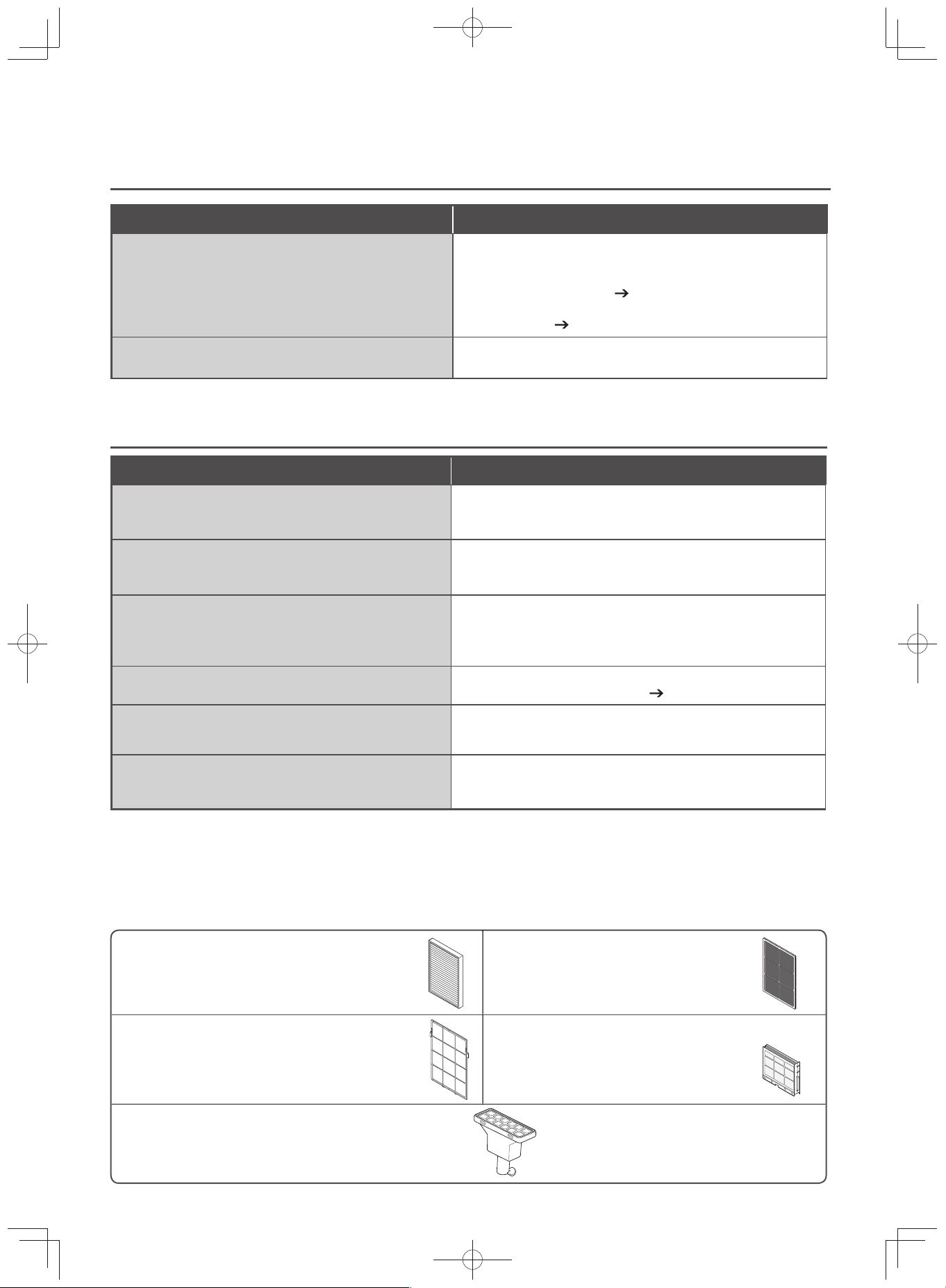
E-42
Heat and Smells
Symptoms Cause (This is normal)
The air coming out of the air outlet smells
The unit’s parts have a smell when it is fi rst used.
Or the deodorizing performance of the deodorizing fi lter has de-
creased.
Clean the deodorizing fi lter.
(P.E-34, E-35)
Or there are odors clinging to the humidifying filter. Clean the
humidifying fi lter.
(P.E-28 - E-31)
The Touch Operation Panel is warm
The unit’s interior is lined with control circuits.
This causes the unit to become warm.
Operations / Others
Symptoms Cause (This is normal)
There is no vapor or mist visible
As the unit employs an evaporating type that produces moistur-
ized air by passing an air stream through the humidifying fi lter, no
vapor or mist is visible.
The movement of the fl ap is unstable, or its
direction is misaligned
It may have become misaligned when it was moved by hand. If it
does not work properly because it was moved by hand, stop it by
pressing the ”Power” button once, and start the operation again.
The temperature and humidity monitor read-
ings differ from the room thermometer and
hygrometer readings.
The temperature and humidity displayed on the monitor is merely
a guide.
Depending on the difference of room environment, the display
may differ.
The fan stopped
The fan may stop
if it is set in eco saving operation.
(P.E-23)
The rotation does not increase smoothly
when “Max” airfl ow rate is used
The rotation gradually increases.
It takes approximately 1 minute for the rotation to increase.
Noise enters the television and radio
Separate the purifi er from the television and radio, or change the
orientation of the purifi er.
Or, use an outlet in a different location.
Replacement Parts
Purchase from Hitachi Home Appliances dealers.
Filter assembly for Hitachi Air Purifi er
(Allergen-free, HEPA fi lter)
EPF-KVG900H
Deodorizing fi lter for Hitachi Air Purifi er
EPF-KVG900D
Pre-fi lter (stainless steel pre-fi lter)
Specify service part EP-LVG70-042.
Water tank fi lter
Specify service part EP-KVG900-039.
Replacement humidifying fi lter for Hitachi Air Purifi er
EPF-KVG900KF
Troubleshooting Guide
(Continued)
EP-M70E_EN.indd 42EP-M70E_EN.indd 42 2017/2/23 17:27:472017/2/23 17:27:47
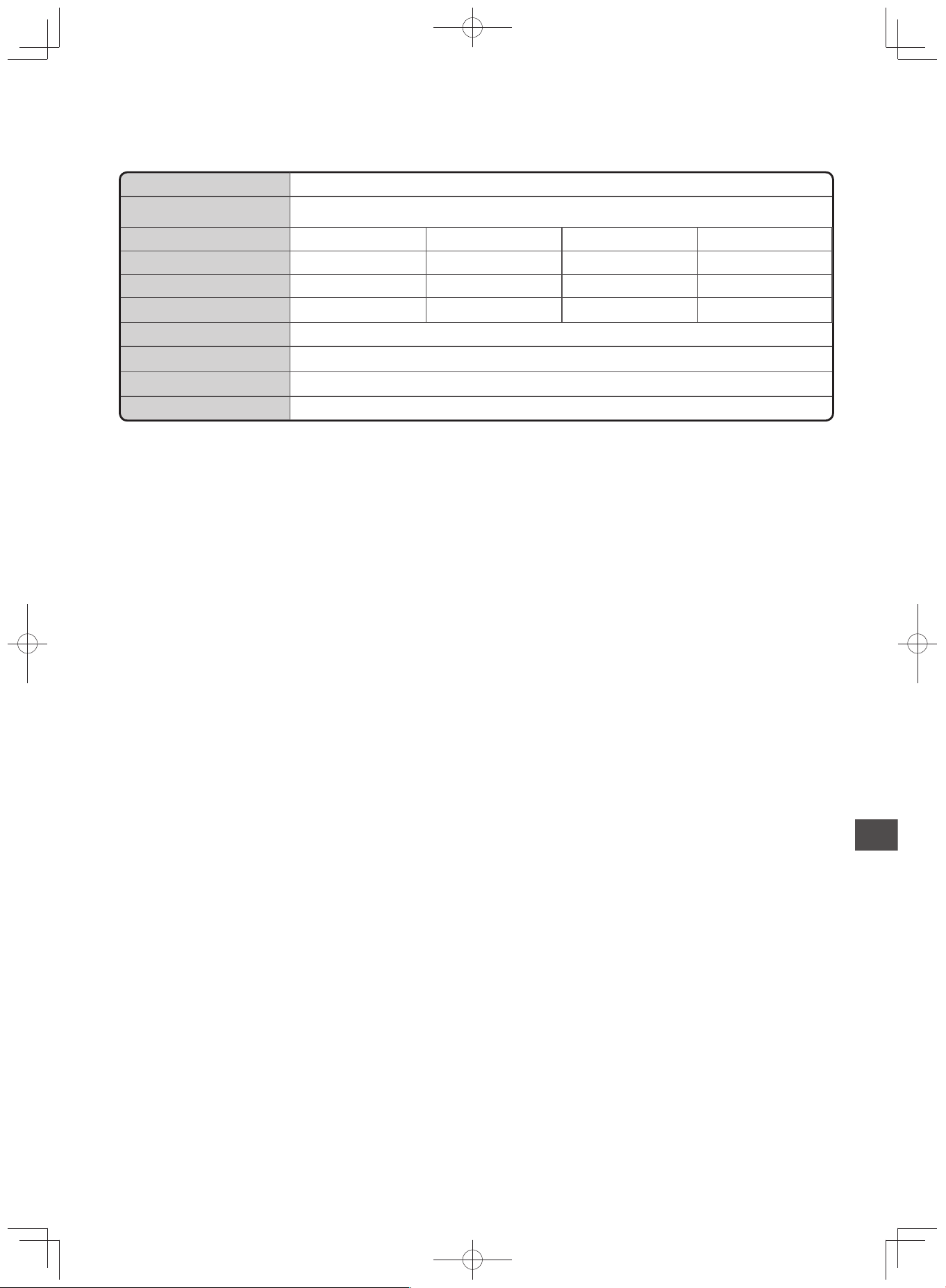
E-43
Specifi cations
Power Supply AC 220-240V 50-60Hz
Applicable Floor Space 53m
2
Max High Medium Silent
Airflow Rate (m
3
/min.) 7.2 4.0 2.7 1.1
Power Consumption (W) 59 16 11 8
Operating Sound (dB) 49 38 30 15
Tank Capacity Approx. 2.5L
Unit Dimensions 669mm (H) × 360mm (W) × 254mm (D)
Weight Approx. 12.0kg
Power Cord Length Approx. 1.8m
Specifications Troubleshooting Guide Replacement Parts
EP-M70E_EN.indd 43EP-M70E_EN.indd 43 2017/2/23 17:27:472017/2/23 17:27:47

E-44
EP-M70E_EN.indd 44EP-M70E_EN.indd 44 2017/2/23 17:27:472017/2/23 17:27:47