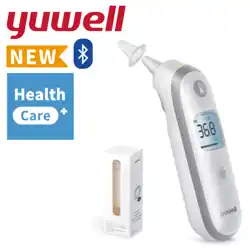
YUWELL®
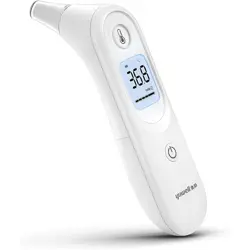
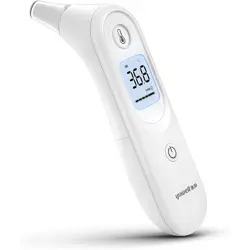
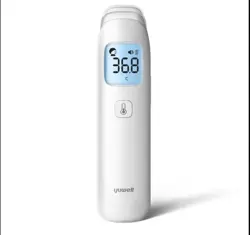
Infrared Ear Thermometer
YHT108/YHT202/YHT208
Revision date: Jan. 2025
YY-THM0108D-01(A/0)
JIANGSU YUYUE MEDICAL EQUIPMENT & SUPPLY CO.,LTD.
No.1 Baisheng Road Development Zone, Danyang,
Jiangsu 212300 CHINA
www.yuwell.com
If you have any questions, please contact your device supplier.
Instructions for Use
Please carefully read and follow the instructions for use before use.
For the date of manufacture, please refer to the packaging.
See probe cover package for probe cover instructions.
The picture is for reference only; please refer to the actual product.
Supplier's Declaration of Conformity
47 CFR § 2.1077 Compliance Information
Trade Name:
Product name: Infrared ear thermometer
Model Number: YHT108, YHT202, YHT208
Responsible party: YUWELL MEDTECH USA LLC
Address: 2152 Serene Ct, Keller, TX 76248
Contact information
Name: Fang Zhang
Telephone number: (206) 639-1311
FCC Compliance Statement
This device complies with Part 15 of the FCC Rules. Operation is subject to the
following two conditions: (1) This device may not cause harmful interference,
and (2) this device must accept any interference received, including interfer-
ence that may cause undesired operation.

01
Table of Contents
I. Glossary....................................................................................... 01
II. Device Description...................................................................... 01
Purpose of the device (Indications for Use and Intended Use) ... 01
When the device should not be used (Contraindications)........... 01
Working Principle ....................................................................... 01
Risks and Benefits....................................................................... 02
Detachable Parts and Materials for Use ...................................... 02
III. Device Structure and Composition............................................ 02
Packaging List............................................................................. 02
Device Features........................................................................... 02
Device Display............................................................................. 03
IV. Warnings and Precautions ......................................................... 03
Safety Warnings and Cautions .................................................... 03
Performance Warnings and Cautions.......................................... 03
Cleaning and Disinfection Warnings and Cautions ..................... 04
Compliance Warnings and Cautions ........................................... 05
V. Setup and Use ............................................................................. 06
Installing the AA batteries........................................................... 06
Using the infrared ear thermometer........................................... 06
VI. Device Functions........................................................................ 07
VII. Cleaning and Disinfection......................................................... 08
Cleaning procedure .................................................................... 08
Post-cleaning inspection ............................................................ 09
Disinfection procedure ............................................................... 09
VIII. Troubleshooting Instructions .................................................. 09
IX. Technical Specification.............................................................. 10
X. Symbols...................................................................................... 12
XI. After-sales Service ..................................................................... 13
XII. Guidance and Manufacturers Declaration on EMC.................... 14
XIII. Cybersecurity........................................................................... 17
II. Device Description
Purpose of the device (Indications for Use and Intended Use)
Indications for Use: The infrared ear thermometer is indicated for intermittent
measurement of human body temperature from the ear canal. The device can
be used by people of all ages except preterm babies or babies who are small for
gestational age. The thermometer is intended for use in professional settings
and the home environment. It is not for emergency clinical conditions. The probe
cover is used as a sanitary barrier between the infrared ear thermometer and
the ear canal.
Intended Purpose: The infrared ear thermometer is a non-sterile, reusable
device intended for the intermittent determination of the human’s body
temperature. People of all ages can use the thermometer except for pre-term
babies or babies who are small for gestational age.
Intended Users: Health care professionals and lay persons at least 11 years
old.
When the device should not be used (Contraindications)
Do not use an ear thermometer if there is inflammation in the ear canal.
Do not use an ear thermometer if you have not fully recovered from surgery or
ear canal trauma.
Working Principle
The infrared ear thermometer is equipped with an infrared sensor, which can
transform the infrared light released by human ear membrane into corresponding
electrical signal. The signal is corrected by the amplifier and signal processing
circuit according to the internal algorithm of the instrument and the targeted
emissivity, and then transformed into the temperature value of the measured
human body. The Infrared ear thermometer is a non-contact thermometer.ac-
I. Glossary
RF: Radio Frequency
PC: Personal Computer
℃: Celsius degree
℉: Fahrenheit degree
App: Application
DDoS: Distributed Denial-of-Service
MRI: Magnetic resonance imaging
RFID: Radio Frequency Identification Devices
FCC: Federal Communications Commission
EM environment: Electromagnetic environment
ME equipment: Medical electrical equipment
HF SURGICAL EQUIPMENT: High-frequency surgery equipment
Quality of Service (QoS): The necessary level of performance in a data commu-
nications system or other service

01
Table of Contents
I. Glossary....................................................................................... 01
II. Device Description...................................................................... 01
Purpose of the device (Indications for Use and Intended Use) ... 01
When the device should not be used (Contraindications)........... 01
Working Principle ....................................................................... 01
Risks and Benefits....................................................................... 02
Detachable Parts and Materials for Use ...................................... 02
III. Device Structure and Composition............................................ 02
Packaging List............................................................................. 02
Device Features........................................................................... 02
Device Display............................................................................. 03
IV. Warnings and Precautions ......................................................... 03
Safety Warnings and Cautions .................................................... 03
Performance Warnings and Cautions.......................................... 03
Cleaning and Disinfection Warnings and Cautions ..................... 04
Compliance Warnings and Cautions ........................................... 05
V. Setup and Use ............................................................................. 06
Installing the AA batteries........................................................... 06
Using the infrared ear thermometer........................................... 06
VI. Device Functions........................................................................ 07
VII. Cleaning and Disinfection......................................................... 08
Cleaning procedure .................................................................... 08
Post-cleaning inspection ............................................................ 09
Disinfection procedure ............................................................... 09
VIII. Troubleshooting Instructions .................................................. 09
IX. Technical Specification.............................................................. 10
X. Symbols...................................................................................... 12
XI. After-sales Service ..................................................................... 13
XII. Guidance and Manufacturers Declaration on EMC.................... 14
XIII. Cybersecurity........................................................................... 17
II. Device Description
Purpose of the device (Indications for Use and Intended Use)
Indications for Use: The infrared ear thermometer is indicated for intermittent
measurement of human body temperature from the ear canal. The device can
be used by people of all ages except preterm babies or babies who are small for
gestational age. The thermometer is intended for use in professional settings
and the home environment. It is not for emergency clinical conditions. The probe
cover is used as a sanitary barrier between the infrared ear thermometer and
the ear canal.
Intended Purpose: The infrared ear thermometer is a non-sterile, reusable
device intended for the intermittent determination of the human’s body
temperature. People of all ages can use the thermometer except for pre-term
babies or babies who are small for gestational age.
Intended Users: Health care professionals and lay persons at least 11 years
old.
When the device should not be used (Contraindications)
Do not use an ear thermometer if there is inflammation in the ear canal.
Do not use an ear thermometer if you have not fully recovered from surgery or
ear canal trauma.
Working Principle
The infrared ear thermometer is equipped with an infrared sensor, which can
transform the infrared light released by human ear membrane into corresponding
electrical signal. The signal is corrected by the amplifier and signal processing
circuit according to the internal algorithm of the instrument and the targeted
emissivity, and then transformed into the temperature value of the measured
human body. The Infrared ear thermometer is a non-contact thermometer.ac-
I. Glossary
RF: Radio Frequency
PC: Personal Computer
℃: Celsius degree
℉: Fahrenheit degree
App: Application
DDoS: Distributed Denial-of-Service
MRI: Magnetic resonance imaging
RFID: Radio Frequency Identification Devices
FCC: Federal Communications Commission
EM environment: Electromagnetic environment
ME equipment: Medical electrical equipment
HF SURGICAL EQUIPMENT: High-frequency surgery equipment
Quality of Service (QoS): The necessary level of performance in a data commu-
nications system or other service
02 03
III. Device Structure and Composition
cording to the working principle.
Risks and Benefits
●Risk: 1. Improper device use may result in harm. Always followt he
provided instructions. Please do not attempt to self-diagnose or
self-treat. Consult with your physician, If you feel unwell.
2. This device contains small parts that could be a choking risk if swallowed by
a child. Keep small parts away from young children to prevent choking hazards.
3. As with all items applied to the skin, there is a risk of irritation and discomfort..
●Benefits: The device measures body temperature and can assist in diagnos-
ing body conditions. The clinical benefit is considered indirect, and all intended
patient populations can use it.
●Limitation: The device should not be used as a replacement for a rectal
thermometer when measuring rectal temperature.
Detachable Parts and Materials for Use
Probe cover (PP), Cover (PP), Protective case (ABS), 2 AA alkaline batteries.
Packaging List
Infrared ear thermometer Instructions for use, 2 AA alkaline batteries,
Protective case, APP Quick Guide, Probe cover (Box of 20).
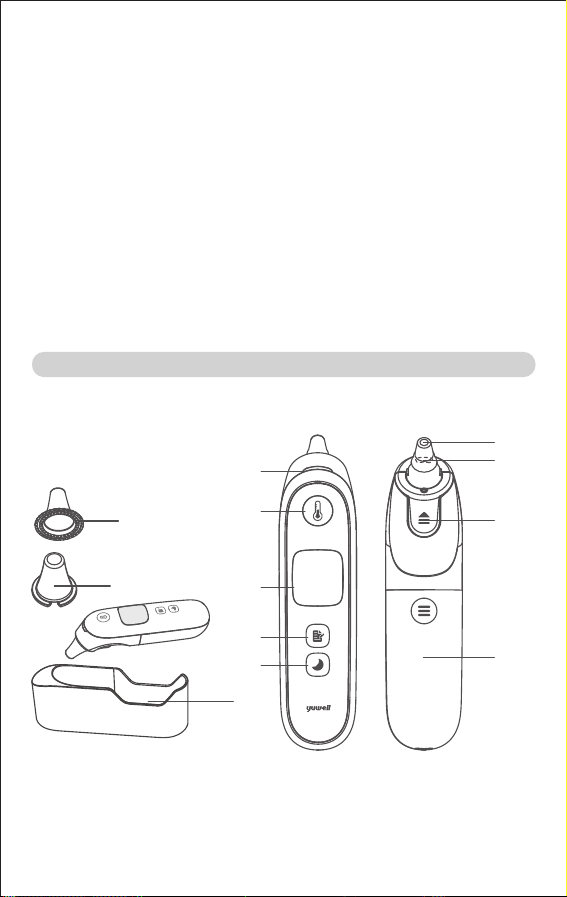
Device Features
①
②
⑫
③
④
⑤
⑥
⑦
⑧
⑨
⑩
⑪
① Probe cover
② Cover
③ Indicator light
④ Measure button
⑤ Display area
⑥ Memory button
⑦ Night mode button
⑧ Sensor lens
⑨ Probe
⑩ Probe cover replacement button
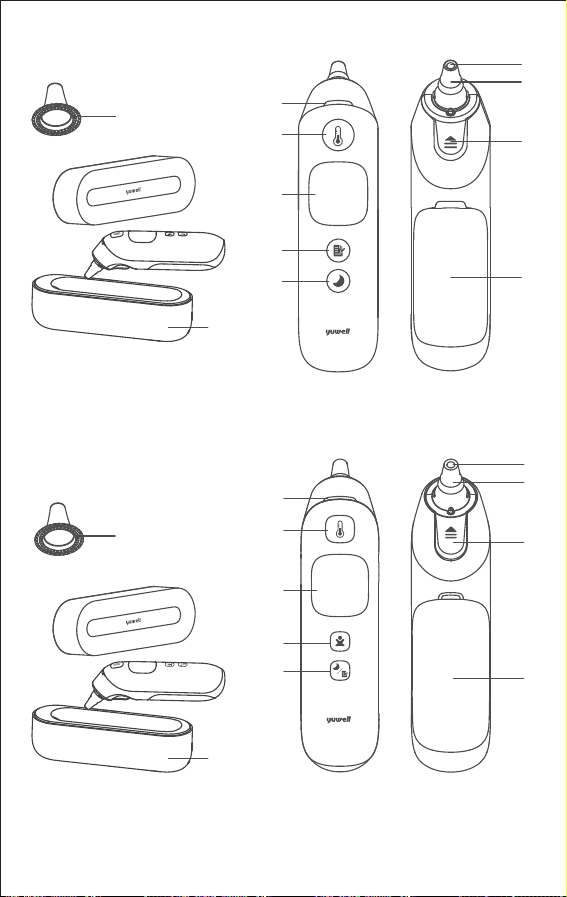
① Probe cover
② Protective case
③ Indicator light
④ Measure button
⑤ Display area
⑥ Memory button
⑦ Night mode button
⑧ Sensor lens
⑨ Probe
⑩ Probe cover replacement button
⑪ Battery cover
① Probe cover
② Protective case
③ Indicator light
④ Measure button
⑤ Display area
⑥ Age select button
⑦ Memory/night mode button
⑧ Sensor lens
①
●YHT108
①
③
④
⑤
⑥
⑦
⑧
⑨
⑩
⑪
●YHT208
●YHT202
③
④
⑤
⑥
⑦
⑧
⑨
⑩
⑪
⑨ Probe
⑩ Probe cover replace-
ment button
⑪ Battery cover
②
②
⑪ Battery cover
⑫ Protective case
02 03
III. Device Structure and Composition
cording to the working principle.
Risks and Benefits
●Risk: 1. Improper device use may result in harm. Always followt he
provided instructions. Please do not attempt to self-diagnose or
self-treat. Consult with your physician, If you feel unwell.
2. This device contains small parts that could be a choking risk if swallowed by
a child. Keep small parts away from young children to prevent choking hazards.
3. As with all items applied to the skin, there is a risk of irritation and discomfort..
●Benefits: The device measures body temperature and can assist in diagnos-
ing body conditions. The clinical benefit is considered indirect, and all intended
patient populations can use it.
●Limitation: The device should not be used as a replacement for a rectal
thermometer when measuring rectal temperature.
Detachable Parts and Materials for Use
Probe cover (PP), Cover (PP), Protective case (ABS), 2 AA alkaline batteries.
Packaging List
Infrared ear thermometer Instructions for use, 2 AA alkaline batteries,
Protective case, APP Quick Guide, Probe cover (Box of 20).
Device Features
①
②
⑫
③
④
⑤
⑥
⑦
⑧
⑨
⑩
⑪
① Probe cover
② Cover
③ Indicator light
④ Measure button
⑤ Display area
⑥ Memory button
⑦ Night mode button
⑧ Sensor lens
⑨ Probe
⑩ Probe cover replacement button
① Probe cover
② Protective case
③ Indicator light
④ Measure button
⑤ Display area
⑥ Memory button
⑦ Night mode button
⑧ Sensor lens
⑨ Probe
⑩ Probe cover replacement button
⑪ Battery cover
① Probe cover
② Protective case
③ Indicator light
④ Measure button
⑤ Display area
⑥ Age select button
⑦ Memory/night mode button
⑧ Sensor lens
①
●YHT108
①
③
④
⑤
⑥
⑦
⑧
⑨
⑩
⑪
●YHT208
●YHT202
③
④
⑤
⑥
⑦
⑧
⑨
⑩
⑪
⑨ Probe
⑩ Probe cover replace-
ment button
⑪ Battery cover
②
②
⑪ Battery cover
⑫ Protective case
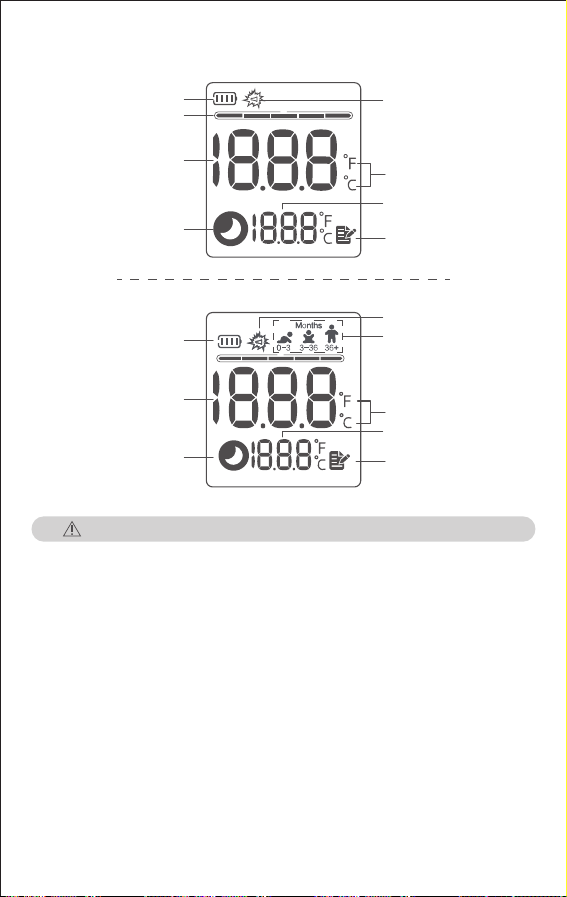
04 05
IV. Warnings and Precautions
Proper use is critical for obtaining accurate temperatures. Please ensure you
read the instructions for use carefully and thoroughly.
Safety Warnings and Cautions
WARNING: Do not use in areas filled with flammable gases, such as anesthetics,
oxygen, oxygen enriched environments, or nitrous oxide, to prevent fire risk.
WARNING: Do not use the device during magnetic resonance imaging (MRI) or
in an MRI environment.
WARNING: Do not use damaged, perforated, dirty, or poor fitting probe covers to
avoid inaccurate or unavailable temperature measurements.
WARNING: Use only with YUWELL certified probe covers for accurate readings.
CAUTION: Due to the limited size of the label, the font is too small. Please put it
in a suitable location for viewing.
CAUTION: Please pay attention to device storage to prevent damage caused by
pets and pests.
CAUTION: Do not reuse the probe cover to avoid cross-infection.
CAUTION: Do not leave the thermometer unattended around children. Small
items, such as probe covers, may pose a choking hazard.
Performance Warnings and Cautions
WARNING: Avoid dropping the thermometer from a height, as damage to the
probe may affect the accuracy of the measurement.
WARNING: The ear thermometer should not be transported without packaging to
avoid mechanical vibrations impacting temperature measurement accuracy.
WARNING: This device contains sensitive electronic components and should not
be used in environments with strong electromagnetic interference (e.g., mobile
phones, microwave ovens, etc.) to prevent temporary impacts on its accuracy.
CAUTION: To ensure an accurate temperature reading, Please ensure the
probe is properly aligned with the eardrum and in close contact with the ear
canal when measuring.
CAUTION: The temperature in each ear of the same person may vary slightly.
For consistency, measuring the same ear each time for comparison is
recommended.
CAUTION: The measurement results are for reference only and cannot replace
a doctor’s diagnosis. Some people may not have a fever when they are ill. If you
feel unwell, regardless of the measurement results, it is recommended to see a
doctor immediately.
CAUTION: The ear canal temperature may increase after lying on one side. Wait
ten minutes before measuring, or alternatively, measure the other ear.
CAUTION: Keep the ear canal clean, as excess earwax can affect the accuracy
of the measurement.
CAUTION: Do not measure when the device is wet, which may lead to inaccurate
measurement.
CAUTION: Avoid measuring body temperature within 30 minutes after exercise,
bathing, or eating, as these activities can temporarily alter the normal body
temperature.
CAUTION: Do not use the thermometer if there is blood or drainage in the
external ear canal.
CAUTION: Use the untreated ear if prescription ear drops or other ear medica-
tions have been placed in the ear canal.
CAUTION: Patients with deformities of the face and/or ear may be unable to use
the ear thermometer.
CAUTION: Complete occlusion of the ear canal due to cerumen (ear wax) may
result in lower temperature readings.
CAUTION: If there is a temperature difference between the device’s storage
location and the measuring environment, the device should be placed in the
measuring environment for at least 30 minutes to avoid inaccurate measure-
ment.
CAUTION: If multiple measurements are required for the same person, remove
the thermometer from the ear canal after each measurement, and follow the
measurement steps to retest.
Probe cover prompt
Memory
icon
Battery level
Measurement status
Night mode icon
Temperature units
Display area of
measuring
Device Display
●YHT108/YHT202
●YHT208
Battery level
Display area of
measuring
Night mode icon
Probe cover prompt
Age group
Memory icon
Temperature units

04 05
IV. Warnings and Precautions
Proper use is critical for obtaining accurate temperatures. Please ensure you
read the instructions for use carefully and thoroughly.
Safety Warnings and Cautions
WARNING: Do not use in areas filled with flammable gases, such as anesthetics,
oxygen, oxygen enriched environments, or nitrous oxide, to prevent fire risk.
WARNING: Do not use the device during magnetic resonance imaging (MRI) or
in an MRI environment.
WARNING: Do not use damaged, perforated, dirty, or poor fitting probe covers to
avoid inaccurate or unavailable temperature measurements.
WARNING: Use only with YUWELL certified probe covers for accurate readings.
CAUTION: Due to the limited size of the label, the font is too small. Please put it
in a suitable location for viewing.
CAUTION: Please pay attention to device storage to prevent damage caused by
pets and pests.
CAUTION: Do not reuse the probe cover to avoid cross-infection.
CAUTION: Do not leave the thermometer unattended around children. Small
items, such as probe covers, may pose a choking hazard.
Performance Warnings and Cautions
WARNING: Avoid dropping the thermometer from a height, as damage to the
probe may affect the accuracy of the measurement.
WARNING: The ear thermometer should not be transported without packaging to
avoid mechanical vibrations impacting temperature measurement accuracy.
WARNING: This device contains sensitive electronic components and should not
be used in environments with strong electromagnetic interference (e.g., mobile
phones, microwave ovens, etc.) to prevent temporary impacts on its accuracy.
CAUTION: To ensure an accurate temperature reading, Please ensure the
probe is properly aligned with the eardrum and in close contact with the ear
canal when measuring.
CAUTION: The temperature in each ear of the same person may vary slightly.
For consistency, measuring the same ear each time for comparison is
recommended.
CAUTION: The measurement results are for reference only and cannot replace
a doctor’s diagnosis. Some people may not have a fever when they are ill. If you
feel unwell, regardless of the measurement results, it is recommended to see a
doctor immediately.
CAUTION: The ear canal temperature may increase after lying on one side. Wait
ten minutes before measuring, or alternatively, measure the other ear.
CAUTION: Keep the ear canal clean, as excess earwax can affect the accuracy
of the measurement.
CAUTION: Do not measure when the device is wet, which may lead to inaccurate
measurement.
CAUTION: Avoid measuring body temperature within 30 minutes after exercise,
bathing, or eating, as these activities can temporarily alter the normal body
temperature.
CAUTION: Do not use the thermometer if there is blood or drainage in the
external ear canal.
CAUTION: Use the untreated ear if prescription ear drops or other ear medica-
tions have been placed in the ear canal.
CAUTION: Patients with deformities of the face and/or ear may be unable to use
the ear thermometer.
CAUTION: Complete occlusion of the ear canal due to cerumen (ear wax) may
result in lower temperature readings.
CAUTION: If there is a temperature difference between the device’s storage
location and the measuring environment, the device should be placed in the
measuring environment for at least 30 minutes to avoid inaccurate measure-
ment.
CAUTION: If multiple measurements are required for the same person, remove
the thermometer from the ear canal after each measurement, and follow the
measurement steps to retest.
Probe cover prompt
Memory
icon
Battery level
Measurement status
Night mode icon
Temperature units
Display area of
measuring
Device Display
●YHT108/YHT202
●YHT208
Battery level
Display area of
measuring
Night mode icon
Probe cover prompt
Age group
Memory icon
Temperature units

06 07
CAUTION: When using the thermometer with a smart device, keep both devices
within the recommended range of each other (see Specifications for details);
moving outside of this range may cause a loss in connection with the smart
device.
CAUTION: When using the thermometer with a smart device, keep the devices
away from sources that may interfere with the Bluetooth connection. Other
devices may cause radio frequency interference (RFI), which may result in a
loss of quality of service (see Specifications for details) for the Bluetooth
connection. Devices that may cause RFI include but are not limited to: electro-
cautery equipment, diathermy equipment, other cellular telephones, wireless
PC and tablets, pagers, RFID devices, MRI, and electromagnetic security
systems.
Cleaning, Disinfection and Care Warnings and Cautions
WARNING: Do not immerse this device in medical alcohol or other liquids.
WARNING: Avoid contact between liquid and the device’s metal parts.
WARNING: Cleaned devices should be stored in a dust-free and dry place.
Please avoid direct sunlight and not store the device in an area with high
temperatures, humidity, dust, or corrosive gases.
WARNING: This device is suitable for multiple people to use. A new probe cover
must be used before each measurement to prevent cross-infection. Clean the
device before use for optimal performance.
WARNING: The sensor lens is a delicate infrared optical component and is the
most frequently damaged and stained part. To maintain measurement accura-
cy, always cover the sensor after use.
WARNING: Patients can take their temperature or have someone assist them.
The use and maintenance methods are the same in both situations.
WARNING: All the servicing and maintenance should be performed before or
after use. While the ME equipment is in use, servicing and maintenance must
not be performed.
WARNING: Please remove the battery if the thermometer is not used for an
extended period. Keep the battery out of children's reach.
WARNING: Please keep the probe clean before and after use. If the sensor lens
becomes dirty, gently wipe it with a soft dry cloth or cotton swab. Do not use
other objects to clean it or blow on the infrared sensor. It may scratch the sensor
mirror or cause device failure.
WARNING: This device contains batteries and recyclable electronic compo-
nents. To protect the environment, do not dispose of it with household waste.
Dispose of used batteries at an appropriate collection location following national
or local regulations.
CAUTION: Store thermometer and probe covers in a dry location, free from dust
and contamination and away from direct sunlight.
CAUTION: Do not expose the thermometer to extreme temperatures below
-20℃ (-4℉) or above +55℃ (131℉), nor to excessive humidity and
desiccation (> 90 % RH, <15% RH).
CAUTION: When the ambient temperature is 20℃ (68℉), the thermometer
requires approximately 4 hours to stabilize if transitioning from the maximum or
the minimum storage temperatures before it is ready for use.
Compliance Warnings and Cautions
WARNING: Do not modify the device without authorization from the manufactur-
er. If the probe is damaged, return the device to the manufacturer or distributor
for service.
WARNING: Dispose of thermometer, accessories, and battery per local laws and
regulations.
NOTE: This device complies with Part 15 of the FCC Rules. Operation is subject
to the following two conditions: (1) This device may not cause harmful interfer-
ence, and (2) This device must accept any interference received, including
interference that may cause undesired operation.
NOTE: This equipment has been tested and found to comply with the limits for a
Class B digital device, according to Part 15 of the FCC Rules. These limits are
designed to provide reasonable protection against harmful interference in a
residential installation. This equipment generates, uses and can radiate radio
frequency energy and, if not installed and used in accordance with the
instructions, may cause harmful interference to radio communications. Howev-
er, there is no guarantee that interference will not occur in a particular installa-
tion. If this equipment does cause harmful interference to radio or television
reception, which can be determined by turning the equipment off and on, the
user is encouraged to try to correct the interference by one or more of the
following measures:
●Reorient or relocate the receiving antenna.
●Increase the separation between the equipment and receiver.
●Consult the dealer or an experienced radio/TV technician for help.
V. Setup and Use
Installing the AA Batteries
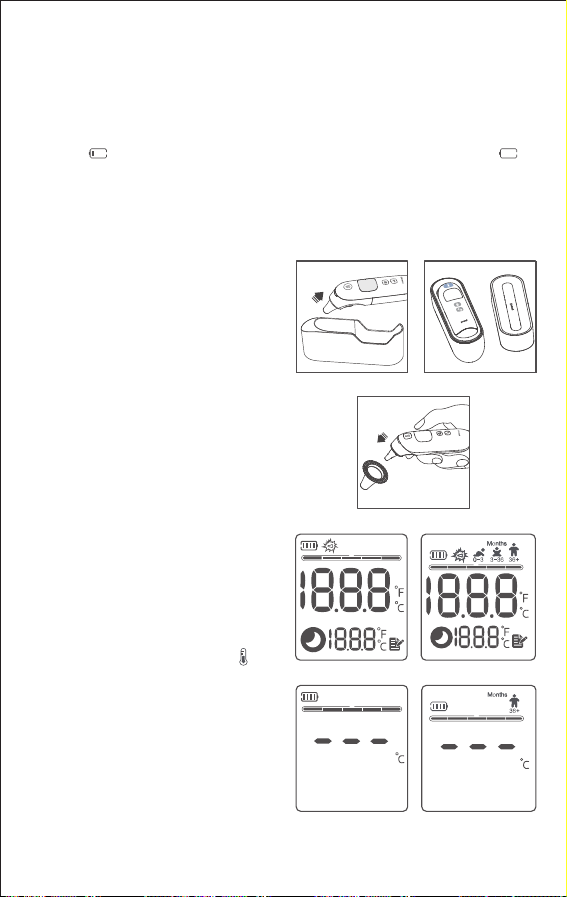
1. Remove the battery cover, as shown
in figure 1 or figure 2.
2. Insert two new AA alkaline batteries,
ensuring they match the labels (+ and -)
inside the battery compartment. (The
device will perform internal self-check,
the display shows all segments as
shown in figure 6 or figure 7.)
NOTE: The thermometer will not work if
the batteries are inserted incorrectly.
3. Secure the battery cover by snapping
it into place.
Figure 1 Figure 2

06 07
CAUTION: When using the thermometer with a smart device, keep both devices
within the recommended range of each other (see Specifications for details);
moving outside of this range may cause a loss in connection with the smart
device.
CAUTION: When using the thermometer with a smart device, keep the devices
away from sources that may interfere with the Bluetooth connection. Other
devices may cause radio frequency interference (RFI), which may result in a
loss of quality of service (see Specifications for details) for the Bluetooth
connection. Devices that may cause RFI include but are not limited to: electro-
cautery equipment, diathermy equipment, other cellular telephones, wireless
PC and tablets, pagers, RFID devices, MRI, and electromagnetic security
systems.
Cleaning, Disinfection and Care Warnings and Cautions
WARNING: Do not immerse this device in medical alcohol or other liquids.
WARNING: Avoid contact between liquid and the device’s metal parts.
WARNING: Cleaned devices should be stored in a dust-free and dry place.
Please avoid direct sunlight and not store the device in an area with high
temperatures, humidity, dust, or corrosive gases.
WARNING: This device is suitable for multiple people to use. A new probe cover
must be used before each measurement to prevent cross-infection. Clean the
device before use for optimal performance.
WARNING: The sensor lens is a delicate infrared optical component and is the
most frequently damaged and stained part. To maintain measurement accura-
cy, always cover the sensor after use.
WARNING: Patients can take their temperature or have someone assist them.
The use and maintenance methods are the same in both situations.
WARNING: All the servicing and maintenance should be performed before or
after use. While the ME equipment is in use, servicing and maintenance must
not be performed.
WARNING: Please remove the battery if the thermometer is not used for an
extended period. Keep the battery out of children's reach.
WARNING: Please keep the probe clean before and after use. If the sensor lens
becomes dirty, gently wipe it with a soft dry cloth or cotton swab. Do not use
other objects to clean it or blow on the infrared sensor. It may scratch the sensor
mirror or cause device failure.
WARNING: This device contains batteries and recyclable electronic compo-
nents. To protect the environment, do not dispose of it with household waste.
Dispose of used batteries at an appropriate collection location following national
or local regulations.
CAUTION: Store thermometer and probe covers in a dry location, free from dust
and contamination and away from direct sunlight.
CAUTION: Do not expose the thermometer to extreme temperatures below
-20℃ (-4℉) or above +55℃ (131℉), nor to excessive humidity and
desiccation (> 90 % RH, <15% RH).
CAUTION: When the ambient temperature is 20℃ (68℉), the thermometer
requires approximately 4 hours to stabilize if transitioning from the maximum or
the minimum storage temperatures before it is ready for use.
Compliance Warnings and Cautions
WARNING: Do not modify the device without authorization from the manufactur-
er. If the probe is damaged, return the device to the manufacturer or distributor
for service.
WARNING: Dispose of thermometer, accessories, and battery per local laws and
regulations.
NOTE: This device complies with Part 15 of the FCC Rules. Operation is subject
to the following two conditions: (1) This device may not cause harmful interfer-
ence, and (2) This device must accept any interference received, including
interference that may cause undesired operation.
NOTE: This equipment has been tested and found to comply with the limits for a
Class B digital device, according to Part 15 of the FCC Rules. These limits are
designed to provide reasonable protection against harmful interference in a
residential installation. This equipment generates, uses and can radiate radio
frequency energy and, if not installed and used in accordance with the
instructions, may cause harmful interference to radio communications. Howev-
er, there is no guarantee that interference will not occur in a particular installa-
tion. If this equipment does cause harmful interference to radio or television
reception, which can be determined by turning the equipment off and on, the
user is encouraged to try to correct the interference by one or more of the
following measures:
●Reorient or relocate the receiving antenna.
●Increase the separation between the equipment and receiver.
●Consult the dealer or an experienced radio/TV technician for help.
V. Setup and Use
Installing the AA Batteries
1. Remove the battery cover, as shown
in figure 1 or figure 2.
2. Insert two new AA alkaline batteries,
ensuring they match the labels (+ and -)
inside the battery compartment. (The
device will perform internal self-check,
the display shows all segments as
shown in figure 6 or figure 7.)
NOTE: The thermometer will not work if
the batteries are inserted incorrectly.
3. Secure the battery cover by snapping
it into place.
Figure 1 Figure 2
08 09
NOTE: The batteries included with this device are for trial use. Please replace
them with new batteries when measuring.
4.Battery Reminder
The status of the internal electrical power source will be indicated by different
icons depending on the battery capacity. When the screen only displays the
symbol " ", replace the battery as soon as possible; when the symbol " "
appears, replace the battery immediately. To replace batteries, slide open the
battery cover and remove the old batteries. Insert two new AA batteries,
ensuring they align correctly with the (+) and (-) markings inside the battery
compartment. Ensure the batteries are properly installed before closing the
cover.
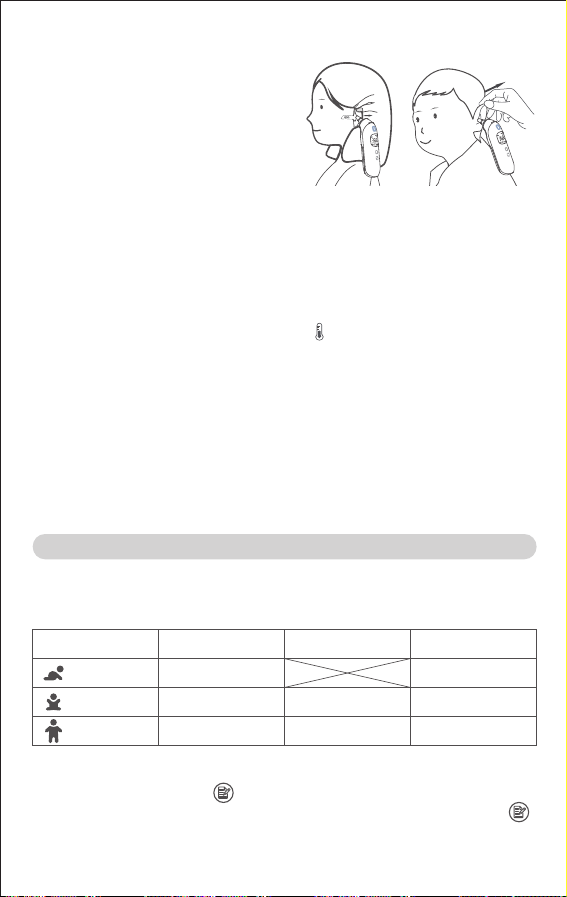
figure 11figure 10
Figure 6 Figure 7
Figure 3 Figure 4
Figure 8 Figure 9
Figure 5
Using Infrared Ear Thermometer
1. Take the infrared ear thermometer
out of the protective case, as shown in
figure 3 or figure 4. If the model is
equipped with a cover, remove the
cover.
2. Attach probe cover.
Place a new, clean probe cover onto
the probe, ensuring the centers are
aligned, and insert it firmly until
properly attached, as shown in figure 5.
NOTE: Please only use the designated
probe cover to ensure the accuracy of
the measurement. Please contact the
manufacturer or an authorized seller to
purchase the genuine probe covers.
NOTE: Probe covers are single-use.
Always use a new, clean, undamaged
probe cover before each measure-
ment. Before attaching the probe
cover, please ensure the sensor lens is
clean and intact.
3. Press the measure button " " to
power on the device.
Infrared ear thermometer YHT108/
YHT202
The thermometer will perform an
internal self-check, displaying all
segments on the screen, as shown in
figure 6. After self-check, the screen
will display the pending test status as
shown in Figure 8, with the indicator
light on.
Infrared ear thermometer YHT208
The thermometer will perform an internal
self-check, displaying all segments on
the screen, as shown in figure 7 . After
self-check, the screen will display the
pending test status as shown in Figure 9,
with the indicator light is on (Please select
the age group when measuring for the
first time after installing the batteries.).
VI. Device Functions
0-3 Months
Age Group
White Backlight
Normal Temperature
Orange Backlight
Evaluated Temperature
Red Backlight
High Temperature
≥34.0-≤37.5℃
(≥93.2-≤99.5℉)
>37.5-≤39.4℃
(≥99.5-≤102.9℉)
>39.4℃
(>102.9℉)
≥34.0-≤37.5℃
(≥93.2-≤99.5℉)
>37.5-≤38.5℃
(≥99.5-≤101.3℉)
>38.5℃
(>101.3℉)
≥34.0-≤37.5℃
(≥93.2-≤99.5℉)
>37.5℃
(>99.5℉)
36 Months-
Adult
3-36 Months
1. High Temperature Reminder
When in use, if the temperature measurement is exceeds 37.5℃ (99.5℉),
device will play a long beep followed by three short beeps to remind the user.
2. Memory Mode
Infrared ear thermometer YHT108/YHT202
Press the memory button " " memory value inquiry can be carried out. To
clear the previous stored memory value, press and hold the memory button" "
for approximately 5s until “CLr” appears on the screen.
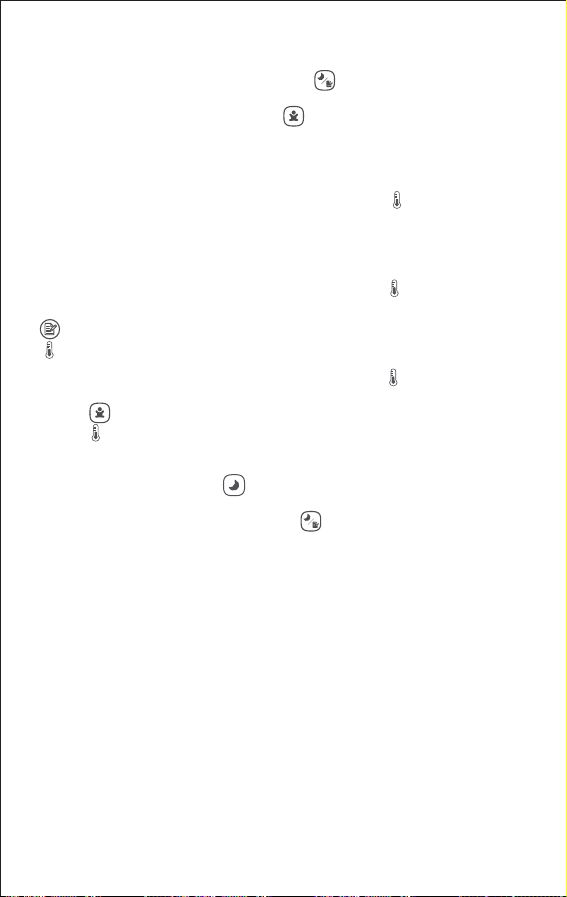
4. Gently pull on the patient's ear, then insert the probe snuggly into the ear
canal.
For patients over one year old, pulled the ear back and up, as shown in Figure 10;
For patients under one year old, pulled the ear back and up, as shown in Figure 11.
NOTE: Do not move while measuring.
5. Press and release the measure button " ", the device will beep after about
one second to indicate the completion of the measurement, and the measure-
ment reading will be displayed.
NOTE: When the indicator light is on, the next measurement can be taken. The
time interval between each measurement will be less than 12 seconds.
6. To take another temperature measurement, press the probe cover replace-
ment button to remove and discard the used cover. Attach a new, clean, and
undamaged probe cover before measuring.
7. If another measurement is unnecessary, remove the used probe cover, put
the cover on the thermometer, and store the thermometer in the protective
case.
08 09
NOTE: The batteries included with this device are for trial use. Please replace
them with new batteries when measuring.
4.Battery Reminder
The status of the internal electrical power source will be indicated by different
icons depending on the battery capacity. When the screen only displays the
symbol " ", replace the battery as soon as possible; when the symbol " "
appears, replace the battery immediately. To replace batteries, slide open the
battery cover and remove the old batteries. Insert two new AA batteries,
ensuring they align correctly with the (+) and (-) markings inside the battery
compartment. Ensure the batteries are properly installed before closing the
cover.
figure 11figure 10
Figure 6 Figure 7
Figure 3 Figure 4
Figure 8 Figure 9
Figure 5
Using Infrared Ear Thermometer
1. Take the infrared ear thermometer
out of the protective case, as shown in
figure 3 or figure 4. If the model is
equipped with a cover, remove the
cover.
2. Attach probe cover.
Place a new, clean probe cover onto
the probe, ensuring the centers are
aligned, and insert it firmly until
properly attached, as shown in figure 5.
NOTE: Please only use the designated
probe cover to ensure the accuracy of
the measurement. Please contact the
manufacturer or an authorized seller to
purchase the genuine probe covers.
NOTE: Probe covers are single-use.
Always use a new, clean, undamaged
probe cover before each measure-
ment. Before attaching the probe
cover, please ensure the sensor lens is
clean and intact.
3. Press the measure button " " to
power on the device.
Infrared ear thermometer YHT108/
YHT202
The thermometer will perform an
internal self-check, displaying all
segments on the screen, as shown in
figure 6. After self-check, the screen
will display the pending test status as
shown in Figure 8, with the indicator
light on.
Infrared ear thermometer YHT208
The thermometer will perform an internal
self-check, displaying all segments on
the screen, as shown in figure 7 . After
self-check, the screen will display the
pending test status as shown in Figure 9,
with the indicator light is on (Please select
the age group when measuring for the
first time after installing the batteries.).
VI. Device Functions
0-3 Months
Age Group
White Backlight
Normal Temperature
Orange Backlight
Evaluated Temperature
Red Backlight
High Temperature
≥34.0-≤37.5℃
(≥93.2-≤99.5℉)
>37.5-≤39.4℃
(≥99.5-≤102.9℉)
>39.4℃
(>102.9℉)
≥34.0-≤37.5℃
(≥93.2-≤99.5℉)
>37.5-≤38.5℃
(≥99.5-≤101.3℉)
>38.5℃
(>101.3℉)
≥34.0-≤37.5℃
(≥93.2-≤99.5℉)
>37.5℃
(>99.5℉)
36 Months-
Adult
3-36 Months
1. High Temperature Reminder
When in use, if the temperature measurement is exceeds 37.5℃ (99.5℉),
device will play a long beep followed by three short beeps to remind the user.
2. Memory Mode
Infrared ear thermometer YHT108/YHT202
Press the memory button " " memory value inquiry can be carried out. To
clear the previous stored memory value, press and hold the memory button" "
for approximately 5s until “CLr” appears on the screen.
4. Gently pull on the patient's ear, then insert the probe snuggly into the ear
canal.
For patients over one year old, pulled the ear back and up, as shown in Figure 10;
For patients under one year old, pulled the ear back and up, as shown in Figure 11.
NOTE: Do not move while measuring.
5. Press and release the measure button " ", the device will beep after about
one second to indicate the completion of the measurement, and the measure-
ment reading will be displayed.
NOTE: When the indicator light is on, the next measurement can be taken. The
time interval between each measurement will be less than 12 seconds.
6. To take another temperature measurement, press the probe cover replace-
ment button to remove and discard the used cover. Attach a new, clean, and
undamaged probe cover before measuring.
7. If another measurement is unnecessary, remove the used probe cover, put
the cover on the thermometer, and store the thermometer in the protective
case.
10 11
Infrared ear thermometer YHT208
Long press the memory/night mode button " "access to memory page, short
press to query memory value. To clear the previous stored memory value,
press and hold the age select button " " for approximately 5s until “CLr”
appears on the screen.
NOTE: When the number of groups exceeds the specified number, the latest
memory value will cover the earliest memory value.
3. Power Off
Manual power off: Press and hold the measure button " " to turn off the device.
Automatic power off: The device will automatically turn off after 60s±10s of
inactivity.
4. Switching Temperature Unit
Infrared ear thermometer YHT108/YHT202
In power off state, press and hold the measure button " " for approximately
8s‒12s to enter the temperature unit switching state, press the memory button
" " to select "℃" or "℉" temperature units, then press the measure button
" " to confirm your selection.
Infrared ear thermometer YHT208
In power off state, press and hold the measure button " " for approximately
8s‒12s to enter the temperature unit switching state, press the age select
button " " to select "℃" or "℉" temperature units, then press the measure
button " " to confirm your selection.
5.Night Mode
Infrared ear thermometer YHT108/YHT202
Press the night mode button " " to enter the night mode.
Infrared ear thermometer YHT208
Pressing the memory/night mode button " " to enter the night mode .
In night mode, all audible beeps are muted, the night mode icon is displayed on
the screen and night-light will turn on. Secondary press of night mode button
turns night mode off both sound on and night-light off.
6. Age Selection Function (Infrared ear thermometer YHT208)
Select age with the age select button. Press button to toggle through each age
group.
NOTE: Please select the age group when measuring for the first time after
installing the batteries.
NOTE: When the device is switched on again, it defaults to the age group
selected last time. If the patient's age group is different from the default age
group, please select the age again.
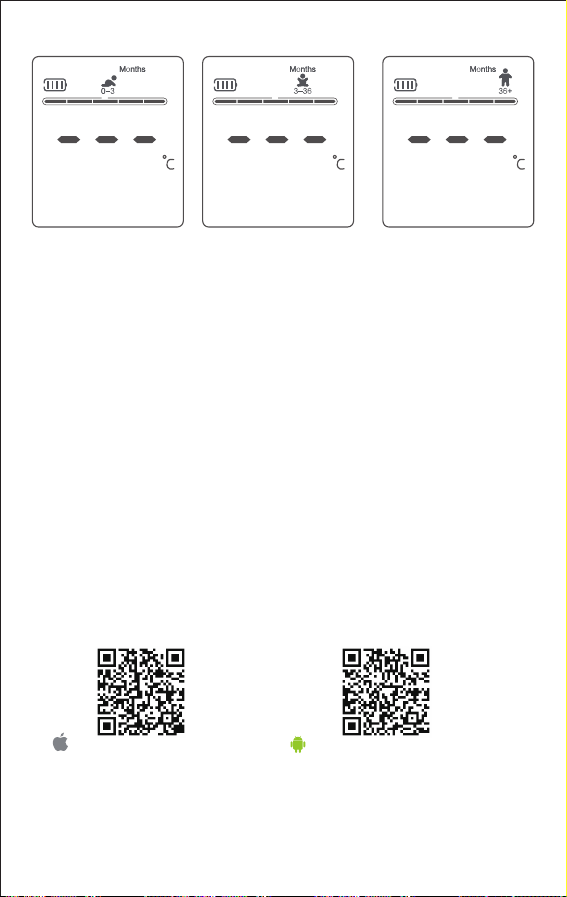
Support version iOS 10.0
and above
Support version Android 5.0
and above
7. Bluetooth (Optional)
(1) Download & Install Yuwell HealthCare+ app
Method 1: Search for the Yuwell HealthCare+ app in the App Store or Google
Play store and download it.
Method 2: Scan the QR codes below to download and install.
(2) Measurement
Launch the Yuwell HealthCare+ app and choose the temperature measurement
interface. Ensure the Bluetooth is enabled on the smart device. Attach a new,
clean probe cover to the thermometer and take a measurement.
NOTE: When powered on, the thermometer will automatically search for and
connect to your smart device.
NOTE: Keep the thermometer and smart device within the recommended range.
(see Bluetooth technology information section for details); Outside of this range
may result in a lost connection with the smart device
(3) Measurement Records
Click the "Data" on the main interface of the Yuwell HealthCare+ app to open the
history records. Temperature records and curve are available.
NOTE: Bluetooth communication is only available with smart devices using the
Yuwell HealthCare+ app. The thermometer can only connect to a single smart
device at a time to minimize the risk of unauthorized access.
10 11
Infrared ear thermometer YHT208
Long press the memory/night mode button " "access to memory page, short
press to query memory value. To clear the previous stored memory value,
press and hold the age select button " " for approximately 5s until “CLr”
appears on the screen.
NOTE: When the number of groups exceeds the specified number, the latest
memory value will cover the earliest memory value.
3. Power Off
Manual power off: Press and hold the measure button " " to turn off the device.
Automatic power off: The device will automatically turn off after 60s±10s of
inactivity.
4. Switching Temperature Unit
Infrared ear thermometer YHT108/YHT202
In power off state, press and hold the measure button " " for approximately
8s‒12s to enter the temperature unit switching state, press the memory button
" " to select "℃" or "℉" temperature units, then press the measure button
" " to confirm your selection.
Infrared ear thermometer YHT208
In power off state, press and hold the measure button " " for approximately
8s‒12s to enter the temperature unit switching state, press the age select
button " " to select "℃" or "℉" temperature units, then press the measure
button " " to confirm your selection.
5.Night Mode
Infrared ear thermometer YHT108/YHT202
Press the night mode button " " to enter the night mode.
Infrared ear thermometer YHT208
Pressing the memory/night mode button " " to enter the night mode .
In night mode, all audible beeps are muted, the night mode icon is displayed on
the screen and night-light will turn on. Secondary press of night mode button
turns night mode off both sound on and night-light off.
6. Age Selection Function (Infrared ear thermometer YHT208)
Select age with the age select button. Press button to toggle through each age
group.
NOTE: Please select the age group when measuring for the first time after
installing the batteries.
NOTE: When the device is switched on again, it defaults to the age group
selected last time. If the patient's age group is different from the default age
group, please select the age again.
Support version iOS 10.0
and above
Support version Android 5.0
and above
7. Bluetooth (Optional)
(1) Download & Install Yuwell HealthCare+ app
Method 1: Search for the Yuwell HealthCare+ app in the App Store or Google
Play store and download it.
Method 2: Scan the QR codes below to download and install.
(2) Measurement
Launch the Yuwell HealthCare+ app and choose the temperature measurement
interface. Ensure the Bluetooth is enabled on the smart device. Attach a new,
clean probe cover to the thermometer and take a measurement.
NOTE: When powered on, the thermometer will automatically search for and
connect to your smart device.
NOTE: Keep the thermometer and smart device within the recommended range.
(see Bluetooth technology information section for details); Outside of this range
may result in a lost connection with the smart device
(3) Measurement Records
Click the "Data" on the main interface of the Yuwell HealthCare+ app to open the
history records. Temperature records and curve are available.
NOTE: Bluetooth communication is only available with smart devices using the
Yuwell HealthCare+ app. The thermometer can only connect to a single smart
device at a time to minimize the risk of unauthorized access.

12 13
VII. Cleaning and Disinfection
Manual Cleaning Procedure
1. Use a clean and dry soft cloth or cotton swab to gently wipe the sensor lens
for a minimum of 30 seconds.
2. Thoroughly wipe the device surfaces with a non-linting cloth dampened (not
dripping) with soap solution for at least three (3) minutes. And wipe the device
surface with a non-linting cloth dampened (not dripping) with bottled water for at
least three (3) minutes.
NOTE: Prepare the cleaning solution according to the detergent manufacturer’s
instructions. (e.g., Alconox® Powdered Precision Cleaner, 10 g/L)
NOTE: Pay extra attention to the device's cracks, crevices, and hard-to-reach
areas.
3. Dry the device thoroughly with a soft, clean, non-linting cloth.
Post-cleaning inspection
IInspect the device visually after cleaning for cleanliness, damage, and missing
or illegible device labeling or markings:
1.If any visible dirt or residue remains, repeat the cleaning procedure.
2.Any damaged device should be removed from use. Damage may include, but
is not limited to, corrosion, discoloration, excessive scratches, flaking, cracks,
and wear.
3. Remove any device with missing, illegible device labeling or marking from use.
Disinfection Procedure
1. Clean the device before disinfection.
2. With the probe facing down, wipe the device surfaces with a non-linting cloth
dampened (not dripping) with 70% Isopropyl Alcohol (IPA).
3.Allow all surfaces to remain wet for at least two (2) minutes. If necessary, use
additional wipes to ensure the surfaces remain wet for the full duration.
4.Dry thoroughly with a soft, clean, non-linting cloth.
5. Allow at least five (5) minutes of drying before taking a temperature reading.
Make sure the probe lens is clean and dry before use.
Please contact the local
distributor or manufacture.
The operating temperature is
exceeds the set value.
Place the thermometer at room
temperature, 10℃‒ 40℃ (50℉
‒104℉) for 30 minutes before
use.
The operating environment
temperature has changed
significantly compared to the
storage temperature.
Place the thermometer at the
operating environment
temperature for 30 minutes
before use.
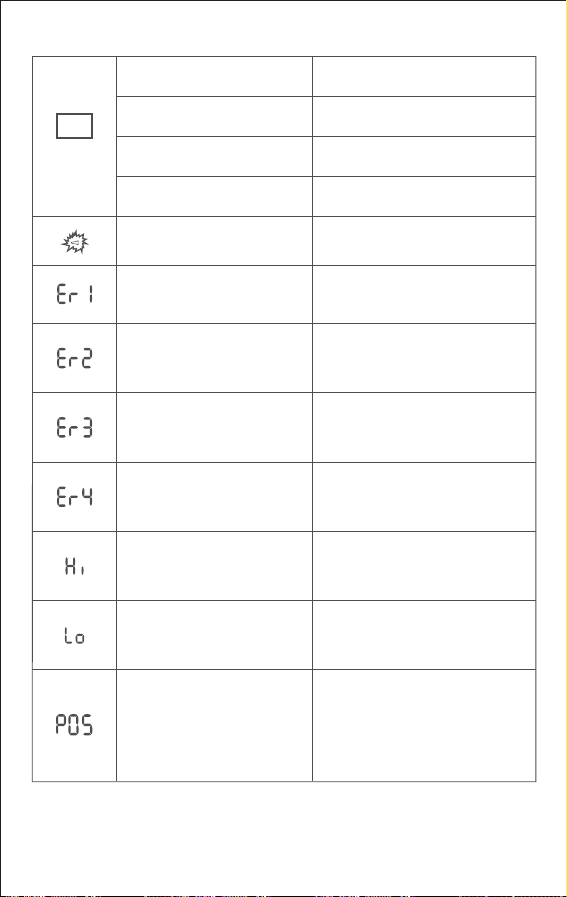
VIII.Troubleshooting Instructions
Thermometer has been
automatically turned off.
Blank screen
The batteries were wearing out
Screen is still blank.
Restart
Check if the battery is correctly
installed.
Replace with new batteries.
Please contact the authorize
reseller for repair.
No probe cover is attached,
or probe cover is not in place.
Attach the probe cover in place.
Battery is not correctly
installed.
The operating temperature is
below the set value.
Place the thermometer at room
temperature, 10℃‒40℃ (50℉‒
104℉) for 30 minutes before use.
Low power unable to use. Replace with new batteries.
Situation Solution
Error
Message
Please measure again following
the instructions.
Please measure again following
the instructions.
The measured temperature
is above the device’s
measuring range.
The measured
temperature is below the
device’s measuring
range.
Sensor error
Take care that the positioning of
the probe is correct and remains
stable. Replace probe cover and
reposition. Press measuring
button to begin a new
measurement.
The thermometer probe was
not positioned securely in
ear canal. An accurate
measurement was not
possible
12 13
VII. Cleaning and Disinfection
Manual Cleaning Procedure
1. Use a clean and dry soft cloth or cotton swab to gently wipe the sensor lens
for a minimum of 30 seconds.
2. Thoroughly wipe the device surfaces with a non-linting cloth dampened (not
dripping) with soap solution for at least three (3) minutes. And wipe the device
surface with a non-linting cloth dampened (not dripping) with bottled water for at
least three (3) minutes.
NOTE: Prepare the cleaning solution according to the detergent manufacturer’s
instructions. (e.g., Alconox® Powdered Precision Cleaner, 10 g/L)
NOTE: Pay extra attention to the device's cracks, crevices, and hard-to-reach
areas.
3. Dry the device thoroughly with a soft, clean, non-linting cloth.
Post-cleaning inspection
IInspect the device visually after cleaning for cleanliness, damage, and missing
or illegible device labeling or markings:
1.If any visible dirt or residue remains, repeat the cleaning procedure.
2.Any damaged device should be removed from use. Damage may include, but
is not limited to, corrosion, discoloration, excessive scratches, flaking, cracks,
and wear.
3. Remove any device with missing, illegible device labeling or marking from use.
Disinfection Procedure
1. Clean the device before disinfection.
2. With the probe facing down, wipe the device surfaces with a non-linting cloth
dampened (not dripping) with 70% Isopropyl Alcohol (IPA).
3.Allow all surfaces to remain wet for at least two (2) minutes. If necessary, use
additional wipes to ensure the surfaces remain wet for the full duration.
4.Dry thoroughly with a soft, clean, non-linting cloth.
5. Allow at least five (5) minutes of drying before taking a temperature reading.
Make sure the probe lens is clean and dry before use.
Please contact the local
distributor or manufacture.
The operating temperature is
exceeds the set value.
Place the thermometer at room
temperature, 10℃‒ 40℃ (50℉
‒104℉) for 30 minutes before
use.
The operating environment
temperature has changed
significantly compared to the
storage temperature.
Place the thermometer at the
operating environment
temperature for 30 minutes
before use.
VIII.Troubleshooting Instructions
Thermometer has been
automatically turned off.
Blank screen
The batteries were wearing out
Screen is still blank.
Restart
Check if the battery is correctly
installed.
Replace with new batteries.
Please contact the authorize
reseller for repair.
No probe cover is attached,
or probe cover is not in place.
Attach the probe cover in place.
Battery is not correctly
installed.
The operating temperature is
below the set value.
Place the thermometer at room
temperature, 10℃‒40℃ (50℉‒
104℉) for 30 minutes before use.
Low power unable to use. Replace with new batteries.
Situation Solution
Error
Message
Please measure again following
the instructions.
Please measure again following
the instructions.
The measured temperature
is above the device’s
measuring range.
The measured
temperature is below the
device’s measuring
range.
Sensor error
Take care that the positioning of
the probe is correct and remains
stable. Replace probe cover and
reposition. Press measuring
button to begin a new
measurement.
The thermometer probe was
not positioned securely in
ear canal. An accurate
measurement was not
possible
14 15
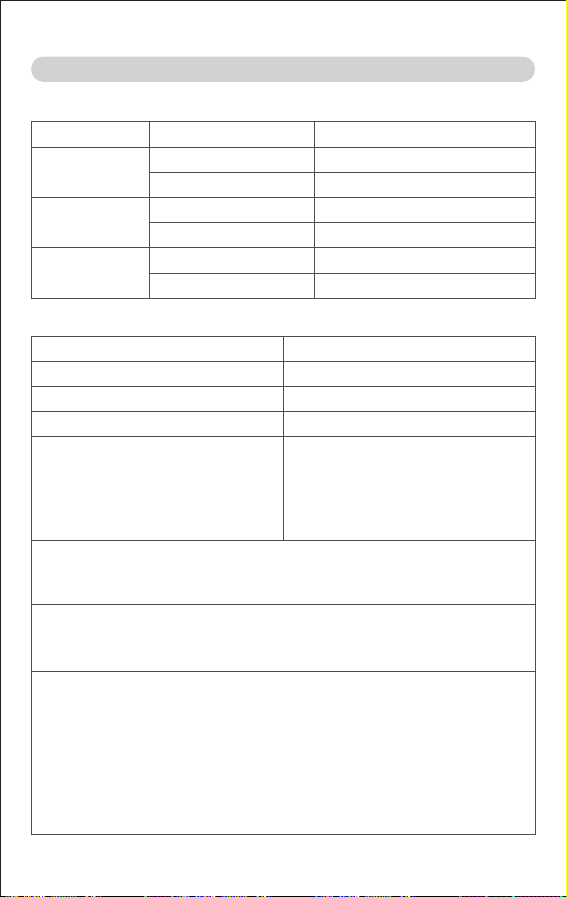
IX.Technical Specification
2. Displayed Temperature Range and Accuracy
ITEM
Displayed temperature range
Temperature units
Display resolution
Accuracy for displayed
temperature range
PARAMETER
34.0℃‒42.2℃ (93.2℉‒108.0℉)
℃/℉
0.1℃ (0.1℉)
NOTE: In accordance with ISO 80601-2-56.
The rated output range: 34.0℃‒42.0℃ (93.2℉‒107.6℉).
The rated extended output range: 42.1℃‒42.2℃ (107.6℉ ‒108.0℉).
NOTE: Body temperature varies based on the measurement site, age,
individual differences, and time of day. The typical tympanic temperature for
most people is: 35.5℃‒37.5℃ (95.9℉‒99.5℉); this is for reference only.
NOTE: This thermometer meets ASTM Standard E 1965-98 requirements.
Full responsibility for the conformance of this device to the standard is
assumed by JIANGSU YUYUE MEDICAL & SUPPLY CO.,LTD..
ASTM laboratory accuracy requirements for infrared ear thermometer in the
display range of 37℃‒39℃ (98℉‒102℉) is ±0.2℃ (±0.4℉), while for
mercury-in-glass and electronic thermometers, the requirement, according
to ASTM Standards E667-86 and E1112-86 is ±0.1℃ (±0.2℉).
±0.2℃ (±0.4℉),
35.0 ℃‒42.0℃ (95.0℉‒107.6℉);
±0.3℃ (±0.5℉),
34.0℃‒34.9℃ (93.2℉‒94.8℉),
42.1℃‒42.2℃ (107.8℉‒108.0℉)
ITEM
Operating Temperature Range
Transport and Storage Temperature Range
DESCRIPTION
+10℃‒+40℃ (50℉‒104℉)
-20℃‒+55℃ (-4℉‒131℉)
Humidity
Atmospheric Pressure
15% to 90%, no condensation
70kPa‒106kPa
6. Environment
MODEL
YHT108
WEIGHT WITHOUT BATTERYDIMENSIONS
6" ×2.3"×1.5"
153 mm×59 mm×37.5 mm
YHT202
5.9" ×2.1"×1.5"
150 mm×54 mm×38 mm
YHT208
5.8" ×2.1"×1.5"
148 mm×54 mm×38 mm
4.Physical Characteristics
Frequency Range
Bandwidth
Modulation
Frequency characteristics
Max Conducted TX Power
Recommended Range
FCC ID (YHT108)
2402 MHz-2480 MHz
1 MHz, 2 MHz
GFSK
UHF
2 dBm
~10 feet (~3 meters) line-of-sight
FCC ID (YHT208)
FCC ID (YHT202)
5. Bluetooth Technology Information
About 0.187 lbs. (85g)
About 0.165 lbs. (75g)
About 0.176 lbs. (80g)
7. Service Life
ITEM
Service Life
DESCRIPTION
5 years (excluding vulnerable and consumable parts)
3. Battery Life
ITEM
Power supply
Battery life
DESCRIPTION
DC 3V (2 x 1.5V AA alkaline batteries)
New battery enables more than
600 times measurements.
2A2JJ-YHT108
2A2JJ-YHT202
2A2JJ-YHT208
Quality of Service (QoS)
Delay <10 seconds
Model
YHT108
YHT202
YHT208
YHT108001
REF/Catalog Number
YHT108002
YHT202001
YHT202002
YHT208001
YHT208002
Description
No Wireless Communication
Communication (Bluetooth)
No Wireless Communication
Communication (Bluetooth)
No Wireless Communication
Communication (Bluetooth)
1. Configuration

14 15
IX.Technical Specification
2. Displayed Temperature Range and Accuracy
ITEM
Displayed temperature range
Temperature units
Display resolution
Accuracy for displayed
temperature range
PARAMETER
34.0℃‒42.2℃ (93.2℉‒108.0℉)
℃/℉
0.1℃ (0.1℉)
NOTE: In accordance with ISO 80601-2-56.
The rated output range: 34.0℃‒42.0℃ (93.2℉‒107.6℉).
The rated extended output range: 42.1℃‒42.2℃ (107.6℉ ‒108.0℉).
NOTE: Body temperature varies based on the measurement site, age,
individual differences, and time of day. The typical tympanic temperature for
most people is: 35.5℃‒37.5℃ (95.9℉‒99.5℉); this is for reference only.
NOTE: This thermometer meets ASTM Standard E 1965-98 requirements.
Full responsibility for the conformance of this device to the standard is
assumed by JIANGSU YUYUE MEDICAL & SUPPLY CO.,LTD..
ASTM laboratory accuracy requirements for infrared ear thermometer in the
display range of 37℃‒39℃ (98℉‒102℉) is ±0.2℃ (±0.4℉), while for
mercury-in-glass and electronic thermometers, the requirement, according
to ASTM Standards E667-86 and E1112-86 is ±0.1℃ (±0.2℉).
±0.2℃ (±0.4℉),
35.0 ℃‒42.0℃ (95.0℉‒107.6℉);
±0.3℃ (±0.5℉),
34.0℃‒34.9℃ (93.2℉‒94.8℉),
42.1℃‒42.2℃ (107.8℉‒108.0℉)
ITEM
Operating Temperature Range
Transport and Storage Temperature Range
DESCRIPTION
+10℃‒+40℃ (50℉‒104℉)
-20℃‒+55℃ (-4℉‒131℉)
Humidity
Atmospheric Pressure
15% to 90%, no condensation
70kPa‒106kPa
6. Environment
MODEL
YHT108
WEIGHT WITHOUT BATTERYDIMENSIONS
6" ×2.3"×1.5"
153 mm×59 mm×37.5 mm
YHT202
5.9" ×2.1"×1.5"
150 mm×54 mm×38 mm
YHT208
5.8" ×2.1"×1.5"
148 mm×54 mm×38 mm
4.Physical Characteristics
Frequency Range
Bandwidth
Modulation
Frequency characteristics
Max Conducted TX Power
Recommended Range
FCC ID (YHT108)
2402 MHz-2480 MHz
1 MHz, 2 MHz
GFSK
UHF
2 dBm
~10 feet (~3 meters) line-of-sight
FCC ID (YHT208)
FCC ID (YHT202)
5. Bluetooth Technology Information
About 0.187 lbs. (85g)
About 0.165 lbs. (75g)
About 0.176 lbs. (80g)
7. Service Life
ITEM
Service Life
DESCRIPTION
5 years (excluding vulnerable and consumable parts)
3. Battery Life
ITEM
Power supply
Battery life
DESCRIPTION
DC 3V (2 x 1.5V AA alkaline batteries)
New battery enables more than
600 times measurements.
2A2JJ-YHT108
2A2JJ-YHT202
2A2JJ-YHT208
Quality of Service (QoS)
Delay <10 seconds
Model
YHT108
YHT202
YHT208
YHT108001
REF/Catalog Number
YHT108002
YHT202001
YHT202002
YHT208001
YHT208002
Description
No Wireless Communication
Communication (Bluetooth)
No Wireless Communication
Communication (Bluetooth)
No Wireless Communication
Communication (Bluetooth)
1. Configuration
16 17
1. YUYUE provides a 12-month warranty to the original end-user purchaser
from the original purchase date. Please contact the manufacturer if you require
a circuit diagram, components, necessary materials, or electrical circuit mainte-
nance during the warranty period.
2. The infrared ear thermometer is calibrated at the time of manufacture. No
recalibration is necessary if used as instructed. However, YUYUE recommends
an annual calibration check if clinical accuracy is uncertain.
If you are concerned about the accuracy of the temperature, please contact the
manufacturer.
Calibration mode: Press and hold the measure button, then insert the battery,
and the screen will display “CAL”.
Adjusted mode is for general use; calibration mode is for after-sales service only.
XI. After-sales Service
9. Compliance
EQUIPMENT CLASSIFICATIONS PER IEC 60601-1
Degree of Protection against Electric
shock
Mode of Operation
Environment
Continuous operation
Not for use in an OXYGEN RICH
ENVIRONMENT
Internally powered ME equipment
Type BF applied part, The
applied part is the probe.
Degree of Protection from Liquid Ingress
The MAX. temperature of applied part not exceed 48℃
IP22
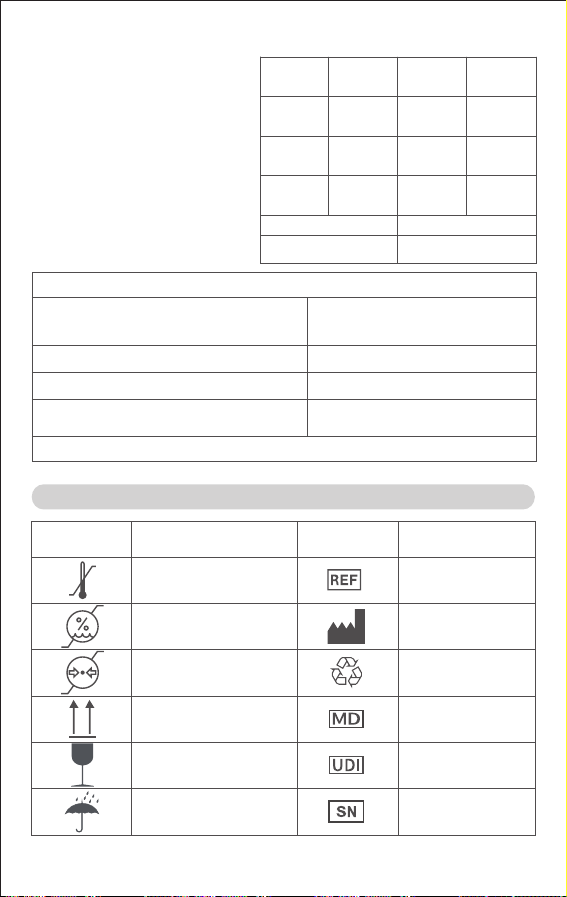
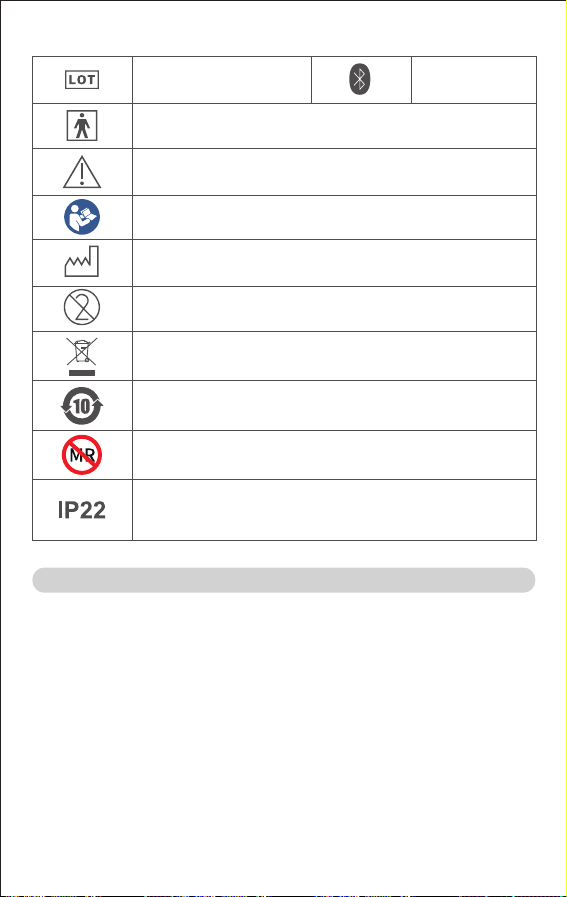
SYMBOL DEFINITION SYMBOL DEFINITION
Temperature limit
Humidity limitation
Atmospheric
pressure limitation
This way up
Fragile, handle
with care
Keep dry
Medical device
Recyclable
Manufacturer
Bluetooth
X. Symbols
Serial number
Unique device
identifier
Safety and environmental protection use period for 10 years
Protected against solid foreign objects of 12.5 mmφ and
greater. Protection against vertically falling water drops
when enclosure tilted up to 15°.
Waste from electrical and electronic equipment (WEEE)
MR Unsafe. Not appropriate for use in MR environment (i.e.,
inside the MR magnet room)
Type BF applied part
Caution
Follow instructions for use
Date of manufacture
Batch code
Do not re-use
8. Clinical Accuracy
The clinical thermometer operates
in adjusted mode.
Clinical accuracy was tested
according to ISO 80601-2-56.
The mercury thermometer
measurement from the oral cavity
is used as the reference. Three
groups were tested, with a
minimum of 35 subjects per age.
The results are shown in the table
below.
REFERENCE BODY SITE Oral
Measuring site of
infrared ear thermometer
Ear canal
CLINICAL
BIAS(
Δcb)
LIMITS OF
AGREEMENT
(
LA
)
CLINICAL
REPEATABI
-LITY(
σr
)
Less than
1 year of age
Aged
1-5 years
Older than
5 years
Catalogue number
16 17
1. YUYUE provides a 12-month warranty to the original end-user purchaser
from the original purchase date. Please contact the manufacturer if you require
a circuit diagram, components, necessary materials, or electrical circuit mainte-
nance during the warranty period.
2. The infrared ear thermometer is calibrated at the time of manufacture. No
recalibration is necessary if used as instructed. However, YUYUE recommends
an annual calibration check if clinical accuracy is uncertain.
If you are concerned about the accuracy of the temperature, please contact the
manufacturer.
Calibration mode: Press and hold the measure button, then insert the battery,
and the screen will display “CAL”.
Adjusted mode is for general use; calibration mode is for after-sales service only.
XI. After-sales Service
9. Compliance
EQUIPMENT CLASSIFICATIONS PER IEC 60601-1
Degree of Protection against Electric
shock
Mode of Operation
Environment
Continuous operation
Not for use in an OXYGEN RICH
ENVIRONMENT
Internally powered ME equipment
Type BF applied part, The
applied part is the probe.
Degree of Protection from Liquid Ingress
The MAX. temperature of applied part not exceed 48℃
IP22
SYMBOL DEFINITION SYMBOL DEFINITION
Temperature limit
Humidity limitation
Atmospheric
pressure limitation
This way up
Fragile, handle
with care
Keep dry
Medical device
Recyclable
Manufacturer
Bluetooth
X. Symbols
Serial number
Unique device
identifier
Safety and environmental protection use period for 10 years
Protected against solid foreign objects of 12.5 mmφ and
greater. Protection against vertically falling water drops
when enclosure tilted up to 15°.
Waste from electrical and electronic equipment (WEEE)
MR Unsafe. Not appropriate for use in MR environment (i.e.,
inside the MR magnet room)
Type BF applied part
Caution
Follow instructions for use
Date of manufacture
Batch code
Do not re-use
8. Clinical Accuracy
The clinical thermometer operates
in adjusted mode.
Clinical accuracy was tested
according to ISO 80601-2-56.
The mercury thermometer
measurement from the oral cavity
is used as the reference. Three
groups were tested, with a
minimum of 35 subjects per age.
The results are shown in the table
below.
REFERENCE BODY SITE Oral
Measuring site of
infrared ear thermometer
Ear canal
CLINICAL
BIAS(
Δcb)
LIMITS OF
AGREEMENT
(
LA
)
CLINICAL
REPEATABI
-LITY(
σr
)
Less than
1 year of age
Aged
1-5 years
Older than
5 years
Catalogue number

18 19
XII. Guidance and Manufacturers Declaration on EMC
Electromagnetic Compatibility (EMC) Compliance
1.This device has been tested and complies with the Class B limits for medical
devices according to the IEC 60601-1-2.
2.The thermometer is suitable for both professional and home use, except near
active HF SURGICAL EQUIPMENT or in RF shielded magnetic resonance
imaging (MRI) rooms.
3.The thermometer measure ranges between 34.0℃‒ 42.2℃ (93.2℉‒108.0℉).
Accuracy is ±0.2℃ (±0.4℉) within 35.0℃‒ 42.0℃ (95.0℉‒107.6℉), ±0.3℃
(±0.5℉) beyond this range. When using the device near strong electromag-
netic interference (e.g., cell phones, microwaves, etc.), it may temporarily affect
accuracy. Please keep the device away if necessary.
4.WARNING: Do not place the thermometer near or stack it with other medical
devices to avoid potentially inaccurate measurements.
5.WARNING: Portable RF communications equipment (including peripherals
such as antenna cables and external antennas) should be used no closer than
30 cm (12 inches) to any part of the thermometer. Otherwise, degradation of the
performance of the thermometer could result.
Table 1. Electromagnetic Emissions
Phenomenon and Standard
RF Emissions CISPR 11
Harmonic Current Disturbance
IEC 61000-3-2
Limit
Class B Group 1
Class A
Test Result
PASS
Not applicable
Voltage Fluctuations & Flicker
IEC 61000-3-3
‒
Not applicable
Phenomenon
and Standard
Immunity Test Levels
Test Result
PASS
Professional
Healthcare Facility
Environment
Home Healthcare
Environment
± 8 kV contact
± 2 kV, ± 4 kV, ± 8 kV, ± 15 kV air
Electrostatic
discharge
IEC 61000-4-2
Table 2. Electromagnetic Immunity
PASS
8 A/m for 30 kHz, 65 A/m for 134.2
kHz,75 A/m for 13.56 kHz
Proximity
Magnetic Fields
IEC 61000-4-39
Not applicable
Voltage dips: 0 % U
T
; 0,5 cycle, 0 %
U
T
; 1 cycle, 70 % U
T
; 25/30 cycles
Voltage interruptions: 0 % U
T
;
250/300 cycle
Voltage Dips,
Short Interrupts
,and Voltage
Variations on
Power Supply
Input Lines
IEC 61000-4-11
PASS
30 A/m
50 Hz and 60 Hz
Power Frequency
Magnetic Field
IEC 61000-4-8
Not applicable
‒
Electrical Transient
Conduction Along
Supply Lines
ISO 7637-2
PASS
PASS
3 V/m
80 MHz – 2,7 GHz
80 % AM at 1 kHz
10 V/m
80 MHz – 2,7 GHz
80 % AM at 1 kHz
Radiated RF EM
Fields
IEC 61000-4-3
Not applicable
± 2 kV
100 kHz repetition
frequency
Electrical Fast
Transient/burst
IEC 61000-4-4
Not applicable
± 0,5 kV, ± 1 kV (Line-to-line)
± 0,5 kV, ± 1 kV, ± 2 kV
(Line-to-ground)
Surge
IEC 61000-4-5
Test specifications for ENCLOSURE
PORT IMMUNITY to RF wireless
communications equipment
Proximity Fields
from RF Wireless
Communications
Equipment
IEC 61000-4-3
Not applicable
3 V
0,15 MHz–80 MHz
6 V in ISM bands
between 0,15 MHz
and 80 MHz
80 % AM at 1 kHz
3 V
0,15 MHz–80 MHz
6 V in ISM and
amateur radio
bands between
0,15 MHz and 80 MHz
80 % AM at 1 kHz
Conducted
Disturbances
Induced by RF
IEC 61000-4-6
Warranty card
Product name:
Infrared Ear Thermometer
Model:
YHT108/YHT202/YHT208
3. The warranty does not cover:
A. Vulnerable and consumable parts: cover, battery and probe cover;
B. Damage caused by unauthorized disassembly and assembly;
C. Damage caused by improper use contrary to the instructions;
D. Damage caused by lack of proper maintenance;
E. Damage caused by device drops;
F. Damage caused by external force;
4. Maintenance services beyond the
warranty scope will be charged as per
regulations.
5. If issues cannot be resolved or
unexpected problems arise, please
contact the local distributor.

18 19
XII. Guidance and Manufacturers Declaration on EMC
Electromagnetic Compatibility (EMC) Compliance
1.This device has been tested and complies with the Class B limits for medical
devices according to the IEC 60601-1-2.
2.The thermometer is suitable for both professional and home use, except near
active HF SURGICAL EQUIPMENT or in RF shielded magnetic resonance
imaging (MRI) rooms.
3.The thermometer measure ranges between 34.0℃‒ 42.2℃ (93.2℉‒108.0℉).
Accuracy is ±0.2℃ (±0.4℉) within 35.0℃‒ 42.0℃ (95.0℉‒107.6℉), ±0.3℃
(±0.5℉) beyond this range. When using the device near strong electromag-
netic interference (e.g., cell phones, microwaves, etc.), it may temporarily affect
accuracy. Please keep the device away if necessary.
4.WARNING: Do not place the thermometer near or stack it with other medical
devices to avoid potentially inaccurate measurements.
5.WARNING: Portable RF communications equipment (including peripherals
such as antenna cables and external antennas) should be used no closer than
30 cm (12 inches) to any part of the thermometer. Otherwise, degradation of the
performance of the thermometer could result.
Table 1. Electromagnetic Emissions
Phenomenon and Standard
RF Emissions CISPR 11
Harmonic Current Disturbance
IEC 61000-3-2
Limit
Class B Group 1
Class A
Test Result
PASS
Not applicable
Voltage Fluctuations & Flicker
IEC 61000-3-3
‒
Not applicable
Phenomenon
and Standard
Immunity Test Levels
Test Result
PASS
Professional
Healthcare Facility
Environment
Home Healthcare
Environment
± 8 kV contact
± 2 kV, ± 4 kV, ± 8 kV, ± 15 kV air
Electrostatic
discharge
IEC 61000-4-2
Table 2. Electromagnetic Immunity
PASS
8 A/m for 30 kHz, 65 A/m for 134.2
kHz,75 A/m for 13.56 kHz
Proximity
Magnetic Fields
IEC 61000-4-39
Not applicable
Voltage dips: 0 % U
T
; 0,5 cycle, 0 %
U
T
; 1 cycle, 70 % U
T
; 25/30 cycles
Voltage interruptions: 0 % U
T
;
250/300 cycle
Voltage Dips,
Short Interrupts
,and Voltage
Variations on
Power Supply
Input Lines
IEC 61000-4-11
PASS
30 A/m
50 Hz and 60 Hz
Power Frequency
Magnetic Field
IEC 61000-4-8
Not applicable
‒
Electrical Transient
Conduction Along
Supply Lines
ISO 7637-2
PASS
PASS
3 V/m
80 MHz – 2,7 GHz
80 % AM at 1 kHz
10 V/m
80 MHz – 2,7 GHz
80 % AM at 1 kHz
Radiated RF EM
Fields
IEC 61000-4-3
Not applicable
± 2 kV
100 kHz repetition
frequency
Electrical Fast
Transient/burst
IEC 61000-4-4
Not applicable
± 0,5 kV, ± 1 kV (Line-to-line)
± 0,5 kV, ± 1 kV, ± 2 kV
(Line-to-ground)
Surge
IEC 61000-4-5
Test specifications for ENCLOSURE
PORT IMMUNITY to RF wireless
communications equipment
Proximity Fields
from RF Wireless
Communications
Equipment
IEC 61000-4-3
Not applicable
3 V
0,15 MHz–80 MHz
6 V in ISM bands
between 0,15 MHz
and 80 MHz
80 % AM at 1 kHz
3 V
0,15 MHz–80 MHz
6 V in ISM and
amateur radio
bands between
0,15 MHz and 80 MHz
80 % AM at 1 kHz
Conducted
Disturbances
Induced by RF
IEC 61000-4-6
Warranty card
Product name:
Infrared Ear Thermometer
Model:
YHT108/YHT202/YHT208
3. The warranty does not cover:
A. Vulnerable and consumable parts: cover, battery and probe cover;
B. Damage caused by unauthorized disassembly and assembly;
C. Damage caused by improper use contrary to the instructions;
D. Damage caused by lack of proper maintenance;
E. Damage caused by device drops;
F. Damage caused by external force;
4. Maintenance services beyond the
warranty scope will be charged as per
regulations.
5. If issues cannot be resolved or
unexpected problems arise, please
contact the local distributor.

20 21
5240
5500
5785
If necessary to achieve the IMMUNITY TEST LEVEL, the distance between
the transmitting antenna and the ME EQUIPMENT or ME SYSTEM may be
reduced to 1 m. The 1 m test distance is permitted by IEC 61000-4-3.
a) For some services, only the uplink frequencies are included.
b) The carrier shall be modulated using a 50 % duty cycle square wave
signal.
c) As an alternative to FM modulation, the carrier may be pulse modulated
using a 50 % duty cycle square wave signal at 18 Hz. While it does not
represent actual modulation, it would be worst case.
5100-5800
WLAN 802.11
a/n
Pulse
modulation
b)
217 Hz
9
Table 3. Test Specifications for ENCLOSURE PORT IMMUNITY to RF Wireless
Communications Equipment
Test
Frequency
(MHz)
385
Band
a)
(MHz)
380-390
Service
a)
TETRA 400
Modulation
b)
Pulse
modulation
b)
18 Hz
IMMUNITY
Test LEVEL
(V/m)
27
2450 282400-2570
Bluetooth,
WLAN,
802.11 b/g/n
RFID 2450,
LTE Band 7
Pulse
modulation
b)
217 Hz
710
745
780
810
870
930
450
704-787
800-960
430-470
1700-1990
LTE Band
13,17
GSM 800/900,
TETRA 800,
iDEN 820,
CDMA 850,
LTE Band 5
GMRS 460,
FRS 460
GSM 1800;
CDMA 1900;
GSM 1900;
DECT;
LTE Band 1, 3,
4, 25; UMTS
1720
1845
1970
Pulse
modulation
b)
217 Hz
Pulse
modulation
b)
18 Hz
FM
c)
±5 kHz
deviation
1 kHz sine
Pulse
modulation
b)
217 Hz
28
9
28
28
XIII. Cybersecurity
1.Cybersecurity Controls and Product Specification Description
(1) The device and the App communicate via Bluetooth, ensuring secure
communication through a private protocol.
(2) Please ensure that your network environment has installed and updated
firewall and antivirus software to protect against malicious software and virus
intrusions.
2. Detailed Cybersecurity Implementation Diagram
3. Network Interface and Port Description
4. Support Infrastructure Requirements
(1) Users should only pair the device with their mobile phones in a secure and
trusted environment; for example:
●Encrypted broadband networks
●Dedicated network lines
●WIFI Personal portable Wi-Fi
(2) Place the device as far away as possible from other electronic devices that
may cause interference. For instance, maintain a certain distance from other
Bluetooth devices, Wi-Fi routers, and microwave ovens.
(3) It is recommended that users protect their mobile phones to prevent
unauthorized access to personal data by:
●Setting an automatic keyboard lock on the phone to prevent unauthorized
use;
●Configuring a personal device PIN or password to unlock the keyboard;
●Installing security protection software on the phone to guard against viruses,
trojans, and other intrusions.
(4) Please do not install or use the APP on rooted or jailbroken devices.
5.Software Bill of Materials (SBOM): An international standard Software Bill of
Materials (SBOM) in SPDX format has been generated, supporting conversion
Infrared ear
thermometer
Yuwell
HeaithCare+
app
Trust boundary
Date transfer by Bluetooth
Interface Interface functionality Attribute Approved Destination
End-points
Bluetooth Transmit measured
body temperature values
Outgoing Yuwell
HealthCare+ application
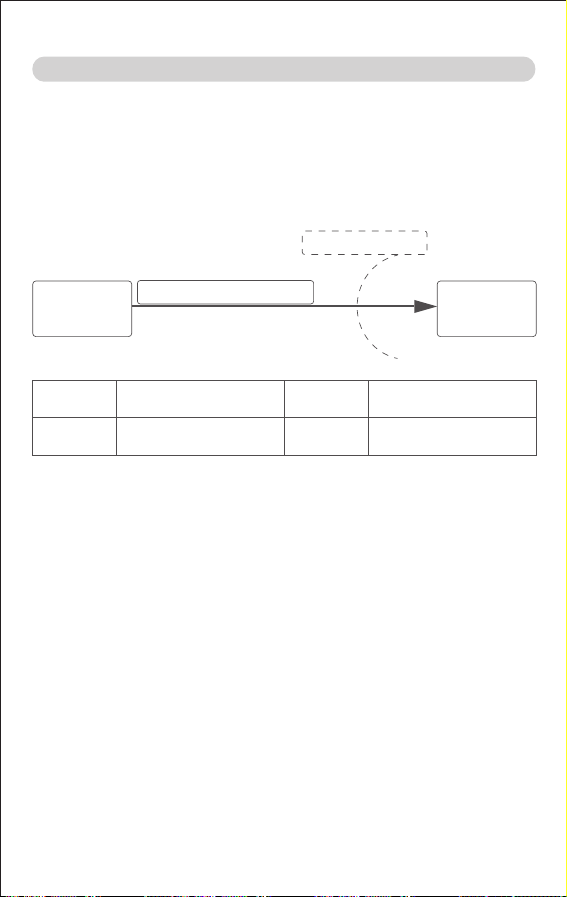
20 21
5240
5500
5785
If necessary to achieve the IMMUNITY TEST LEVEL, the distance between
the transmitting antenna and the ME EQUIPMENT or ME SYSTEM may be
reduced to 1 m. The 1 m test distance is permitted by IEC 61000-4-3.
a) For some services, only the uplink frequencies are included.
b) The carrier shall be modulated using a 50 % duty cycle square wave
signal.
c) As an alternative to FM modulation, the carrier may be pulse modulated
using a 50 % duty cycle square wave signal at 18 Hz. While it does not
represent actual modulation, it would be worst case.
5100-5800
WLAN 802.11
a/n
Pulse
modulation
b)
217 Hz
9
Table 3. Test Specifications for ENCLOSURE PORT IMMUNITY to RF Wireless
Communications Equipment
Test
Frequency
(MHz)
385
Band
a)
(MHz)
380-390
Service
a)
TETRA 400
Modulation
b)
Pulse
modulation
b)
18 Hz
IMMUNITY
Test LEVEL
(V/m)
27
2450 282400-2570
Bluetooth,
WLAN,
802.11 b/g/n
RFID 2450,
LTE Band 7
Pulse
modulation
b)
217 Hz
710
745
780
810
870
930
450
704-787
800-960
430-470
1700-1990
LTE Band
13,17
GSM 800/900,
TETRA 800,
iDEN 820,
CDMA 850,
LTE Band 5
GMRS 460,
FRS 460
GSM 1800;
CDMA 1900;
GSM 1900;
DECT;
LTE Band 1, 3,
4, 25; UMTS
1720
1845
1970
Pulse
modulation
b)
217 Hz
Pulse
modulation
b)
18 Hz
FM
c)
±5 kHz
deviation
1 kHz sine
Pulse
modulation
b)
217 Hz
28
9
28
28
XIII. Cybersecurity
1.Cybersecurity Controls and Product Specification Description
(1) The device and the App communicate via Bluetooth, ensuring secure
communication through a private protocol.
(2) Please ensure that your network environment has installed and updated
firewall and antivirus software to protect against malicious software and virus
intrusions.
2. Detailed Cybersecurity Implementation Diagram
3. Network Interface and Port Description
4. Support Infrastructure Requirements
(1) Users should only pair the device with their mobile phones in a secure and
trusted environment; for example:
●Encrypted broadband networks
●Dedicated network lines
●WIFI Personal portable Wi-Fi
(2) Place the device as far away as possible from other electronic devices that
may cause interference. For instance, maintain a certain distance from other
Bluetooth devices, Wi-Fi routers, and microwave ovens.
(3) It is recommended that users protect their mobile phones to prevent
unauthorized access to personal data by:
●Setting an automatic keyboard lock on the phone to prevent unauthorized
use;
●Configuring a personal device PIN or password to unlock the keyboard;
●Installing security protection software on the phone to guard against viruses,
trojans, and other intrusions.
(4) Please do not install or use the APP on rooted or jailbroken devices.
5.Software Bill of Materials (SBOM): An international standard Software Bill of
Materials (SBOM) in SPDX format has been generated, supporting conversion
Infrared ear
thermometer
Yuwell
HeaithCare+
app
Trust boundary
Date transfer by Bluetooth
Interface Interface functionality Attribute Approved Destination
End-points
Bluetooth Transmit measured
body temperature values
Outgoing Yuwell
HealthCare+ application

22 23
to other international and industry-standard SBOM formats such as CycloneDX
and SWID. If required, users can send an email to request the latest SBOM list.
6. Software and Firmware Download
(1) The App is distributed exclusively through the Google Play Store and Apple
Store. Downloading software updates from unauthorized channels increases
the risk of cybersecurity vulnerabilities. Our company bears no responsibility for
any consequences that may arise from such actions.
(2) Users should regularly check and perform available updates for the APP
software to promptly address potential security vulnerabilities.
7. Security Event Response Design
The device operates fully localized, without communication to the cloud, and
does not handle sensitive personal data. Data transmission is based on
Bluetooth protocol.
8. Critical Function Protection
The device operates fully localized without networking. Its core functions remain
unaffected even if the device is partially damaged and unusable.
9. Backup and Restore Features
No such function
10. Retention and Recovery of Device Configuration
The device operates fully offline and uses Bluetooth for communication.
There is no risk of network-based attacks (e.g., DDoS attacks, etc.), and
neither the device nor the app requires security configurations.
11. Secure configuration of device
The device and app do not have security configurations. Bluetooth communica-
tion is used, and the manufacturer has closed all service ports to prevent
attacks, as confirmed by security testing.
12. Capture of Forensic Evidence
The app does not generate log files because internet connectivity is absent to
transmit log files.
13. Information Concerning Device Cybersecurity End of Support and End of
Life
During the valid service period of the device, our company will provide continu-
ous tracking and repair of any security issues that exist with the device. If the
device exceeds its service life, our company cannot guarantee reasonable
software update services for users. Continued use of the device after support
has ended may pose certain security risks to users, and it is recommended that
users discontinue use of the device.
14.Information on Securely Decommissioning Devices
The device does not contain sensitive, confidential, or proprietary data or
software; users can delete all measurement data on the device and in the app.

22 23
to other international and industry-standard SBOM formats such as CycloneDX
and SWID. If required, users can send an email to request the latest SBOM list.
6. Software and Firmware Download
(1) The App is distributed exclusively through the Google Play Store and Apple
Store. Downloading software updates from unauthorized channels increases
the risk of cybersecurity vulnerabilities. Our company bears no responsibility for
any consequences that may arise from such actions.
(2) Users should regularly check and perform available updates for the APP
software to promptly address potential security vulnerabilities.
7. Security Event Response Design
The device operates fully localized, without communication to the cloud, and
does not handle sensitive personal data. Data transmission is based on
Bluetooth protocol.
8. Critical Function Protection
The device operates fully localized without networking. Its core functions remain
unaffected even if the device is partially damaged and unusable.
9. Backup and Restore Features
No such function
10. Retention and Recovery of Device Configuration
The device operates fully offline and uses Bluetooth for communication.
There is no risk of network-based attacks (e.g., DDoS attacks, etc.), and
neither the device nor the app requires security configurations.
11. Secure configuration of device
The device and app do not have security configurations. Bluetooth communica-
tion is used, and the manufacturer has closed all service ports to prevent
attacks, as confirmed by security testing.
12. Capture of Forensic Evidence
The app does not generate log files because internet connectivity is absent to
transmit log files.
13. Information Concerning Device Cybersecurity End of Support and End of
Life
During the valid service period of the device, our company will provide continu-
ous tracking and repair of any security issues that exist with the device. If the
device exceeds its service life, our company cannot guarantee reasonable
software update services for users. Continued use of the device after support
has ended may pose certain security risks to users, and it is recommended that
users discontinue use of the device.
14.Information on Securely Decommissioning Devices
The device does not contain sensitive, confidential, or proprietary data or
software; users can delete all measurement data on the device and in the app.

YUWELL®
Infrared Ear Thermometer
YHT108/YHT202/YHT208
Revision date: Jan. 2025
YY-THM0108D-01(A/0)
JIANGSU YUYUE MEDICAL EQUIPMENT & SUPPLY CO.,LTD.
No.1 Baisheng Road Development Zone, Danyang,
Jiangsu 212300 CHINA
www.yuwell.com
If you have any questions, please contact your device supplier.
E-mail: [email protected] / [email protected]
Instructions for Use
Please carefully read and follow the instructions for use before use.
For the date of manufacture, please refer to the packaging.
See probe cover package for probe cover instructions.
The picture is for reference only; please refer to the actual product.
Supplier's Declaration of Conformity
47 CFR § 2.1077 Compliance Information
Trade Name:
Product name: Infrared ear thermometer
Model Number: YHT108, YHT202, YHT208
Responsible party: YUWELL MEDTECH USA LLC
Address: 2152 Serene Ct, Keller, TX 76248
Contact information
Name: Fang Zhang
Telephone number: (206) 639-1311
E-mail address: [email protected]
FCC Compliance Statement
This device complies with Part 15 of the FCC Rules. Operation is subject to the
following two conditions: (1) This device may not cause harmful interference,
and (2) this device must accept any interference received, including interfer-
ence that may cause undesired operation.