INSTRUCTION MANUAL
MANUAL DE INSTRUCCIONES
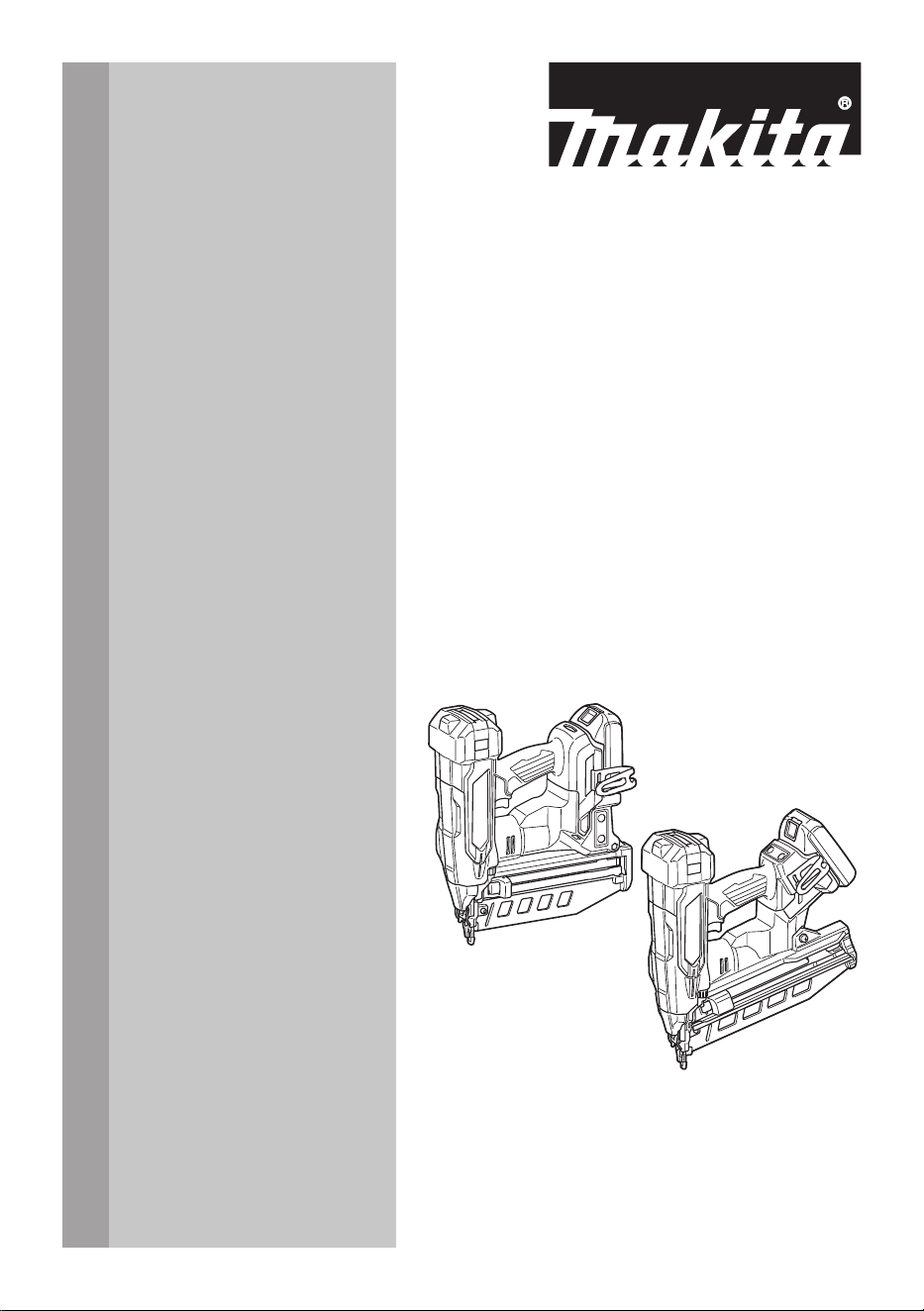
Cordless Finish Nailer
Clavadora de Acabado
Inalámbrica
XNB05
XNB06
IMPORTANT: Read Before Using.
IMPORTANTE: Lea antes de usar.
2 ENGLISH
ENGLISH (Original instructions)
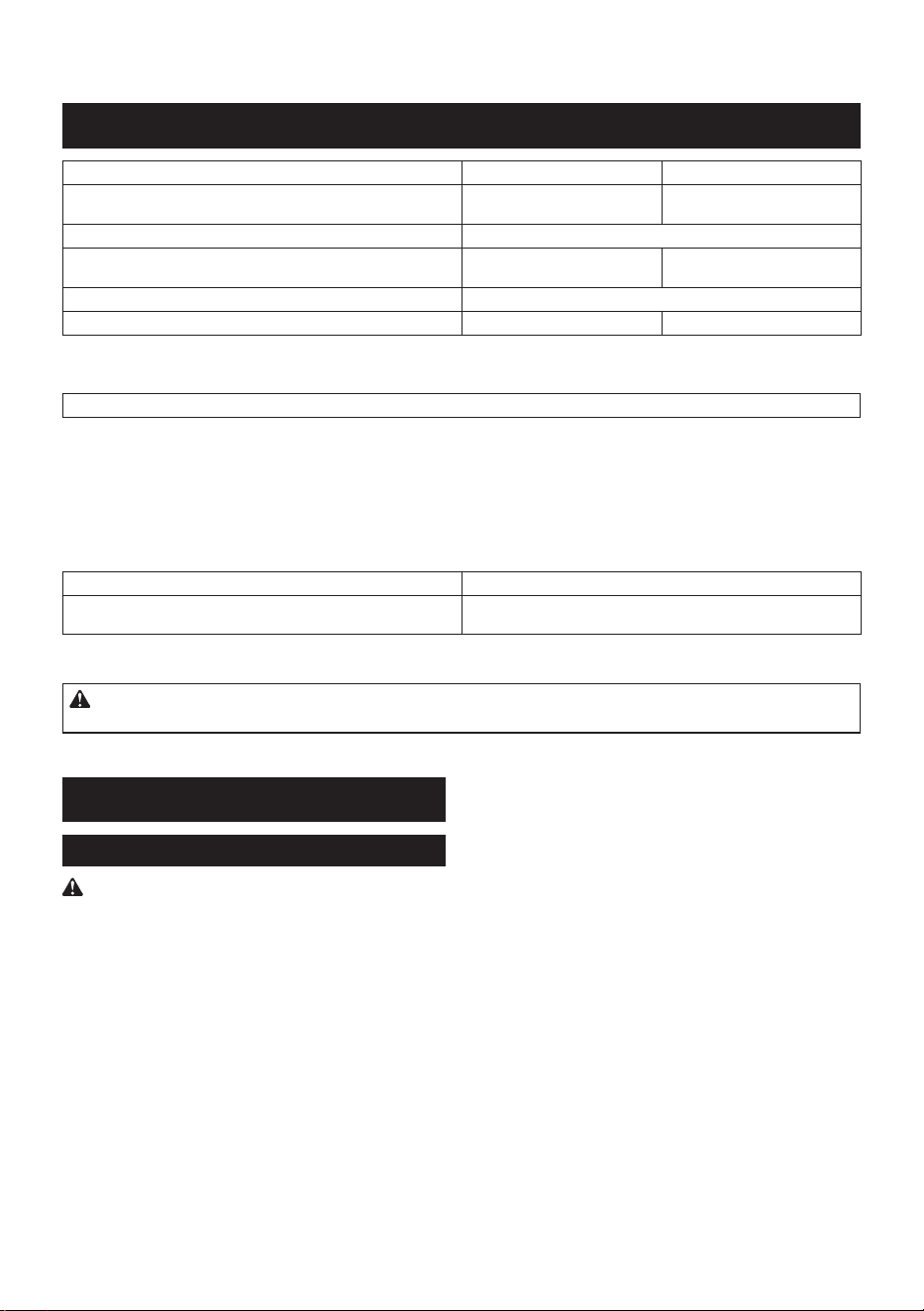
SPECIFICATIONS
Model: XNB05 XNB06
Nail size 16 Ga x 19 mm - 64 mm
(16 Ga x 3/4" - 2-1/2")
16 Ga x 32 mm - 64 mm
(16 Ga x 1-1/4" - 2-1/2")
Magazine capacity 110 pcs.
Dimensions (L x W x H)
*1 *2
276 mm x 98 mm x 320 mm
(10-7/8" x 3-7/8" x 12-5/8")
288 mm x 116 mm x 325 mm
(11-3/8" x 4-9/16" x 12-3/4")
Rated voltage D.C. 18 V
Net weight 2.9 - 3.3 kg (6.4 - 7.3 lbs) 3.0 - 3.3 kg (6.6 - 7.3 lbs)
*1
without hook
*2
with BL1820B
NOTE: Nails are referred to as "fasteners" in this instruction manual unless otherwise specied.
• Due to our continuing program of research and development, the specications herein are subject to change
without notice.
• Specications may dier from country to country.
• The weight may dier depending on the attachment(s), including the battery cartridge. The lightest and heavi-
est combination are shown in the table.
Applicable battery cartridge and charger
Battery cartridge BL1815N / BL1820B / BL1830B / BL1840B / BL1850B / BL1860B
Charger DC18RC / DC18RD / DC18SD / DC18SE / DC18SF / DC18SH /
DC18WC
• Some of the battery cartridges and chargers listed above may not be available depending on your region of
residence.
WARNING: Only use the battery cartridges and chargers listed above. Use of any other battery cartridges
and chargers may cause injury and/or re.
SAFETY WARNINGS
General power tool safety warnings
WARNING Read all safety warnings, instruc-
tions, illustrations and specications provided with
this power tool. Failure to follow all instructions listed
below may result in electric shock, re and/or serious
injury.
Save all warnings and instruc-
tions for future reference.
The term "power tool" in the warnings refers to your
mains-operated (corded) power tool or battery-operated
(cordless) power tool.
Work area safety
1. Keep work area clean and well lit. Cluttered or
dark areas invite accidents.
2. Do not operate power tools in explosive atmo-
spheres, such as in the presence of ammable
liquids, gases or dust. Power tools create sparks
which may ignite the dust or fumes.
3. Keep children and bystanders away while
operating a power tool. Distractions can cause
you to lose control.
Electrical safety
1. Power tool plugs must match the outlet. Never
modify the plug in any way. Do not use any
adapter plugs with earthed (grounded) power
tools. Unmodied plugs and matching outlets will
reduce risk of electric shock.
2. Avoid body contact with earthed or grounded
surfaces, such as pipes, radiators, ranges and
refrigerators. There is an increased risk of elec-
tric shock if your body is earthed or grounded.
3. Do not expose power tools to rain or wet con-
ditions. Water entering a power tool will increase
the risk of electric shock.
4. Do not abuse the cord. Never use the cord for
carrying, pulling or unplugging the power tool.
Keep cord away from heat, oil, sharp edges
or moving parts. Damaged or entangled cords
increase the risk of electric shock.
5. When operating a power tool outdoors, use an
extension cord suitable for outdoor use. Use of
a cord suitable for outdoor use reduces the risk of
electric shock.

3 ENGLISH
6. If operating a power tool in a damp location is
unavoidable, use a ground fault circuit inter-
rupter (GFCI) protected supply. Use of a GFCI
reduces the risk of electric shock.
7. Power tools can produce electromagnetic
elds (EMF) that are not harmful to the user.
However, users of pacemakers and other similar
medical devices should contact the maker of their
device and/or doctor for advice before operating
this power tool.
Personal safety
1. Stay alert, watch what you are doing and use
common sense when operating a power tool.
Do not use a power tool while you are tired or
under the inuence of drugs, alcohol or med-
ication. A moment of inattention while operating
power tools may result in serious personal injury.
2. Use personal protective equipment. Always
wear eye protection. Protective equipment such
as a dust mask, non-skid safety shoes, hard hat or
hearing protection used for appropriate conditions
will reduce personal injuries.
3. Prevent unintentional starting. Ensure the
switch is in the o-position before connecting
to power source and/or battery pack, picking
up or carrying the tool. Carrying power tools with
your nger on the switch or energising power tools
that have the switch on invites accidents.
4. Remove any adjusting key or wrench before
turning the power tool on. A wrench or a key left
attached to a rotating part of the power tool may
result in personal injury.
5. Do not overreach. Keep proper footing and
balance at all times. This enables better control
of the power tool in unexpected situations.
6. Dress properly. Do not wear loose clothing or
jewellery. Keep your hair and clothing away
from moving parts. Loose clothes, jewellery or
long hair can be caught in moving parts.
7. If devices are provided for the connection of
dust extraction and collection facilities, ensure
these are connected and properly used. Use of
dust collection can reduce dust-related hazards.
8. Do not let familiarity gained from frequent use
of tools allow you to become complacent and
ignore tool safety principles. A careless action
can cause severe injury within a fraction of a
second.
9. Always wear protective goggles to protect
your eyes from injury when using power tools.
The goggles must comply with ANSI Z87.1 in
the USA.
It is an employer's responsibility to enforce the
use of appropriate safety protective equipment
by the tool operators and by other persons in
the immediate working area.
Power tool use and care
1. Do not force the power tool. Use the correct
power tool for your application. The correct
power tool will do the job better and safer at the
rate for which it was designed.
2. Do not use the power tool if the switch does
not turn it on and o. Any power tool that cannot
be controlled with the switch is dangerous and
must be repaired.
3. Disconnect the plug from the power source
and/or remove the battery pack, if detachable,
from the power tool before making any adjust-
ments, changing accessories, or storing power
tools. Such preventive safety measures reduce
the risk of starting the power tool accidentally.
4. Store idle power tools out of the reach of chil-
dren and do not allow persons unfamiliar with
the power tool or these instructions to operate
the power tool. Power tools are dangerous in the
hands of untrained users.
5. Maintain power tools and accessories. Check
for misalignment or binding of moving parts,
breakage of parts and any other condition that
may aect the power tool’s operation. If dam-
aged, have the power tool repaired before use.
Many accidents are caused by poorly maintained
power tools.
6. Keep cutting tools sharp and clean. Properly
maintained cutting tools with sharp cutting edges
are less likely to bind and are easier to control.
7. Use the power tool, accessories and tool bits
etc. in accordance with these instructions, tak-
ing into account the working conditions and
the work to be performed. Use of the power tool
for operations dierent from those intended could
result in a hazardous situation.
8. Keep handles and grasping surfaces dry,
clean and free from oil and grease. Slippery
handles and grasping surfaces do not allow for
safe handling and control of the tool in unexpected
situations.
9. When using the tool, do not wear cloth work
gloves which may be entangled. The entangle-
ment of cloth work gloves in the moving parts may
result in personal injury.
Battery tool use and care
1. Recharge only with the charger specied by
the manufacturer. A charger that is suitable for
one type of battery pack may create a risk of re
when used with another battery pack.
2. Use power tools only with specically desig-
nated battery packs. Use of any other battery
packs may create a risk of injury and re.
3. When battery pack is not in use, keep it away
from other metal objects, like paper clips,
coins, keys, nails, screws or other small metal
objects, that can make a connection from one
terminal to another. Shorting the battery termi-
nals together may cause burns or a re.
4. Under abusive conditions, liquid may be
ejected from the battery; avoid contact. If con-
tact accidentally occurs, ush with water. If
liquid contacts eyes, additionally seek medical
help. Liquid ejected from the battery may cause
irritation or burns.
5. Do not use a battery pack or tool that is dam-
aged or modied. Damaged or modied batteries
may exhibit unpredictable behaviour resulting in
re, explosion or risk of injury.
6. Do not expose a battery pack or tool to re or
excessive temperature. Exposure to re or tem-
perature above 130 °C may cause explosion.
4 ENGLISH
7. Follow all charging instructions and do not
charge the battery pack or tool outside the
temperature range specied in the instruc-
tions. Charging improperly or at temperatures
outside the specied range may damage the
battery and increase the risk of re.
Service
1. Have your power tool serviced by a qualied
repair person using only identical replacement
parts. This will ensure that the safety of the power
tool is maintained.
2. Never service damaged battery packs. Service
of battery packs should only be performed by the
manufacturer or authorized service providers.
3. Follow instruction for lubricating and chang-
ing accessories.
4. Do not modify or attempt to repair the appli-
ance or the battery pack except as indicated in
the instructions for use and care.
Cordless nailer safety warnings
1. Always assume that the tool contains fasten-
ers. Careless handling of the nailer can result in
unexpected ring of fasteners and personal injury.
2. Do not point the tool towards yourself or any-
one nearby. Unexpected triggering will discharge
the fastener causing an injury.
3. Do not actuate the tool unless the tool is
placed rmly against the workpiece. If the tool
is not in contact with the workpiece, the fastener
may be deected away from your target.
4. Disconnect the tool from the power source
when the fastener jams in the tool. While
removing a jammed fastener, the nailer may be
accidentally activated if it is plugged in.
5. Use caution while removing a jammed fas-
tener. The mechanism may be under compression
and the fastener may be forcefully discharged
while attempting to free a jammed condition.
6. Do not use this nailer for fastening electrical
cables. It is not designed for electric cable instal-
lation and may damage the insulation of electric
cables thereby causing electric shock or re
hazards.
7. Always wear safety glasses to protect your
eyes from dust or fastener injury.
8. Keep hands and feet away from the ejection
port area.
9. Always remove the battery cartridge before
loading the fasteners, adjustment, inspection,
maintenance or after operation is over.
10. Make sure no one is nearby before operation.
Never attempt to drive fasteners from both the
inside and outside of wall at the same time.
Fasteners may rip through and/or y o, present-
ing a grave danger.
11. Watch your footing and maintain your balance
with the tool. Make sure there is no one below
when working in high locations.
12. Never use fastener driving tools marked with
the symbol "Do not use on scaoldings, lad-
ders" for specic application for example:
• when changing one driving location to
another involves the use of scaoldings,
stairs, ladders, or ladder alike constructions,
e.g. roof laths;
• closing boxes or crates;
• tting transportation safety systems e.g. on
vehicles and wagons.
13. Check walls, ceilings, oors, roong and
the like carefully to avoid possible electrical
shock, gas leakage, explosions, etc. caused by
stapling into live wires, conduits or gas pipes.
14. Use only fasteners specied in this manual.
The use of any other fasteners may cause mal-
function of the tool.
15. Do not tamper with the tool or attempt to use it
for other than driving fasteners.
16. Do not operate the tool without fasteners. It
shortens the service life of the tool.
17. Stop driving operations immediately if you
notice something wrong or out of the ordinary
with the tool.
18. Never fasten into any materials which may
allow the fastener to puncture and y through
as a projectile.
19. Never actuate the switch trigger and contact
element at the same time until you are pre-
pared to fasten workpieces. Allow the work-
piece to depress the contact element. Never
defeat its purpose by securing the contact
element back or by depressing it by hand.
20. Never tamper with the contact element. Check
the contact element frequently for proper
operations.
21. Always remove fasteners from the tool when
not in use.
22. Avoid placing magnets or similar magnetic
device too close to the tool. It may aect the
magnetic sensor in the tool.
SAVE THESE INSTRUCTIONS.
WARNING: DO NOT let comfort or familiarity
with product (gained from repeated use) replace
strict adherence to safety rules for the subject
product. MISUSE or failure to follow the safety
rules stated in this instruction manual may cause
serious personal injury.
Symbols
The followings show the symbols used for tool.
volts
direct current
Read and understand tool labels and man-
ual. Failure to follow warnings could result
in death or serious injury.
Operators and others in work area must
wear safety glasses with side shields.
5 ENGLISH
Keep ngers away from trigger when
not driving fasteners to avoid accidental
discharge.
Important safety instructions for
battery cartridge
1. Before using battery cartridge, read all instruc-
tions and cautionary markings on (1) battery
charger, (2) battery, and (3) product using
battery.
2. Do not disassemble or tamper with the battery
cartridge. It may result in a re, excessive heat,
or explosion.
3. If operating time has become excessively
shorter, stop operating immediately. It may
result in a risk of overheating, possible burns
and even an explosion.
4. If electrolyte gets into your eyes, rinse them
out with clear water and seek medical atten-
tion right away. It may result in loss of your
eyesight.
5. Do not short the battery cartridge:
(1) Do not touch the terminals with any con-
ductive material.
(2) Avoid storing battery cartridge in a con-
tainer with other metal objects such as
nails, coins, etc.
(3) Do not expose battery cartridge to water
or rain.
A battery short can cause a large current
ow, overheating, possible burns and even a
breakdown.
6. Do not store and use the tool and battery car-
tridge in locations where the temperature may
reach or exceed 50 °C (122 °F).
7. Do not incinerate the battery cartridge even if
it is severely damaged or is completely worn
out. The battery cartridge can explode in a re.
8. Do not nail, cut, crush, throw, drop the battery
cartridge, or hit against a hard object to the
battery cartridge. Such conduct may result in a
re, excessive heat, or explosion.
9. Do not use a damaged battery.
10. The contained lithium-ion batteries are subject
to the Dangerous Goods Legislation require-
ments.
For commercial transports e.g. by third parties,
forwarding agents, special requirement on pack-
aging and labeling must be observed.
For preparation of the item being shipped, consult-
ing an expert for hazardous material is required.
Please also observe possibly more detailed
national regulations.
Tape or mask o open contacts and pack up the
battery in such a manner that it cannot move
around in the packaging.
11. When disposing the battery cartridge, remove
it from the tool and dispose of it in a safe
place. Follow your local regulations relating to
disposal of battery.
12. Use the batteries only with the products
specied by Makita. Installing the batteries
to non-compliant products may result in a re,
excessive heat, explosion, or leak of electrolyte.
13. If the tool is not used for a long period of time,
the battery must be removed from the tool.
14. During and after use, the battery cartridge may
take on heat which can cause burns or low
temperature burns. Pay attention to the han-
dling of hot battery cartridges.
15. Do not touch the terminal of the tool imme-
diately after use as it may get hot enough to
cause burns.
16. Do not allow chips, dust, or soil stuck into the
terminals, holes, and grooves of the battery
cartridge. It may cause heating, catching re,
burst and malfunction of the tool or battery car-
tridge, resulting in burns or personal injury.
17. Unless the tool supports the use near
high-voltage electrical power lines, do not use
the battery cartridge near high-voltage electri-
cal power lines. It may result in a malfunction or
breakdown of the tool or battery cartridge.
18. Keep the battery away from children.
SAVE THESE INSTRUCTIONS.
CAUTION: Only use genuine Makita batteries.
Use of non-genuine Makita batteries, or batteries that
have been altered, may result in the battery bursting
causing res, personal injury and damage. It will
also void the Makita warranty for the Makita tool and
charger.
Tips for maintaining maximum
battery life
1. Charge the battery cartridge before completely
discharged. Always stop tool operation and
charge the battery cartridge when you notice
less tool power.
2. Never recharge a fully charged battery car-
tridge. Overcharging shortens the battery
service life.
3. Charge the battery cartridge with room tem-
perature at 10 °C - 40 °C (50 °F - 104 °F). Let
a hot battery cartridge cool down before
charging it.
4. When not using the battery cartridge, remove
it from the tool or the charger.
5. Charge the battery cartridge if you do not use
it for a long period (more than six months).
6 ENGLISH
FUNCTIONAL
DESCRIPTION
CAUTION: Always be sure that the tool is
switched o and the battery cartridge is removed
before adjusting or checking function on the tool.
Installing or removing battery
cartridge
CAUTION: Always switch o the tool before
installing or removing of the battery cartridge.
CAUTION: Hold the tool and the battery car-
tridge rmly when installing or removing battery
cartridge. Failure to hold the tool and the battery
cartridge rmly may cause them to slip o your hands
and result in damage to the tool and battery cartridge
and a personal injury.
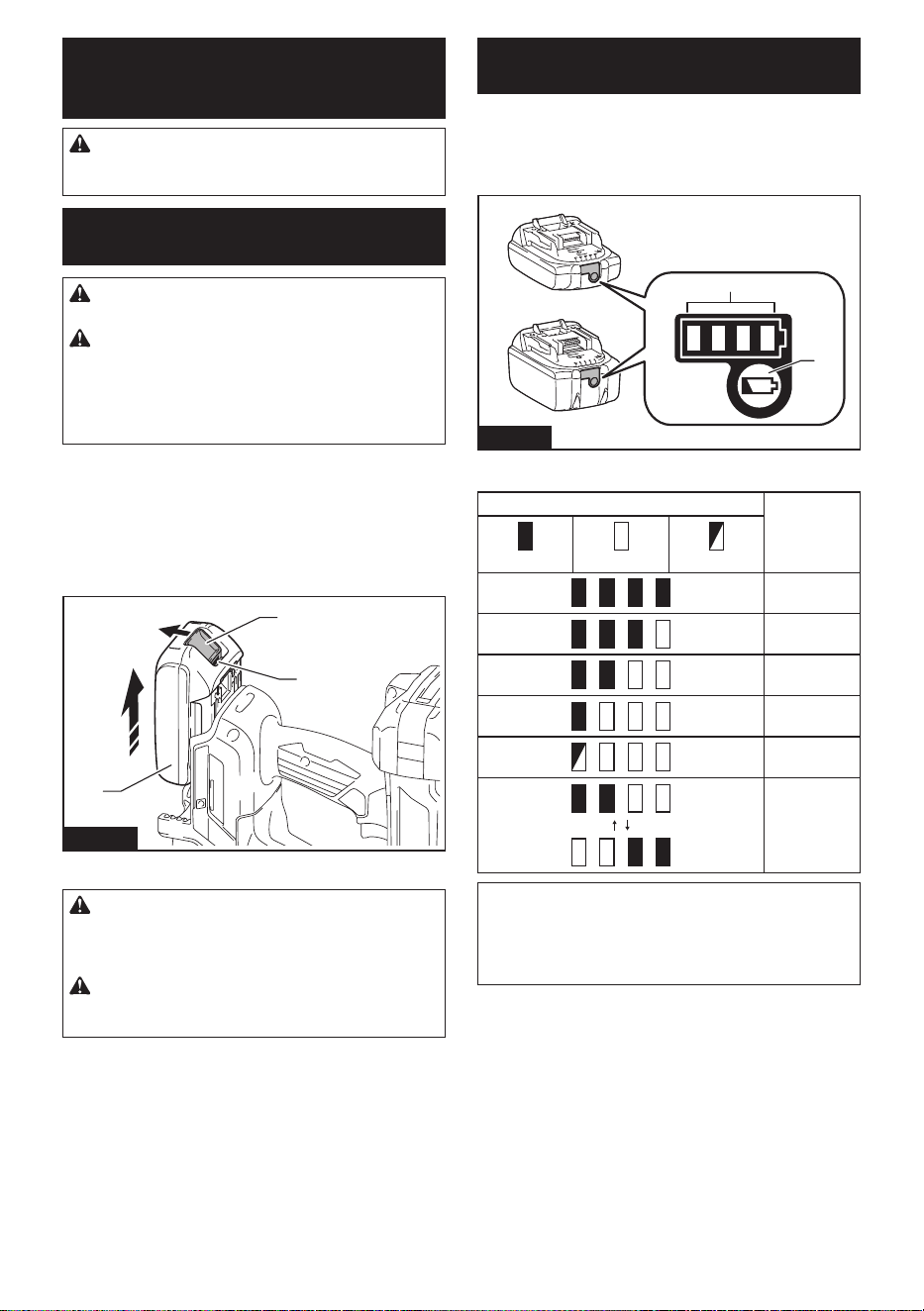
To install the battery cartridge, align the tongue on the
battery cartridge with the groove in the housing and slip
it into place. Insert it all the way until it locks in place
with a little click. If you can see the red indicator as
shown in the gure, it is not locked completely.
To remove the battery cartridge, slide it from the tool
while sliding the button on the front of the cartridge.
1
3
2
Fig.1
► 1. Red indicator 2. Button 3. Battery cartridge
CAUTION: Always install the battery cartridge
fully until the red indicator cannot be seen. If not,
it may accidentally fall out of the tool, causing injury to
you or someone around you.
CAUTION: Do not install the battery cartridge
forcibly. If the cartridge does not slide in easily, it is
not being inserted correctly.
Indicating the remaining battery
capacity
Only for battery cartridges with the indicator
Press the check button on the battery cartridge to indi-
cate the remaining battery capacity. The indicator lamps
light up for a few seconds.
1
2
Fig.2
► 1. Indicator lamps 2. Check button
Indicator lamps Remaining
capacity
Lighted O Blinking
75% to 100%
50% to 75%
25% to 50%
0% to 25%
Charge the
battery.
The battery
may have
malfunctioned.
NOTE: Depending on the conditions of use and the
ambient temperature, the indication may dier slightly
from the actual capacity.
NOTE: The rst (far left) indicator lamp will blink when
the battery protection system works.
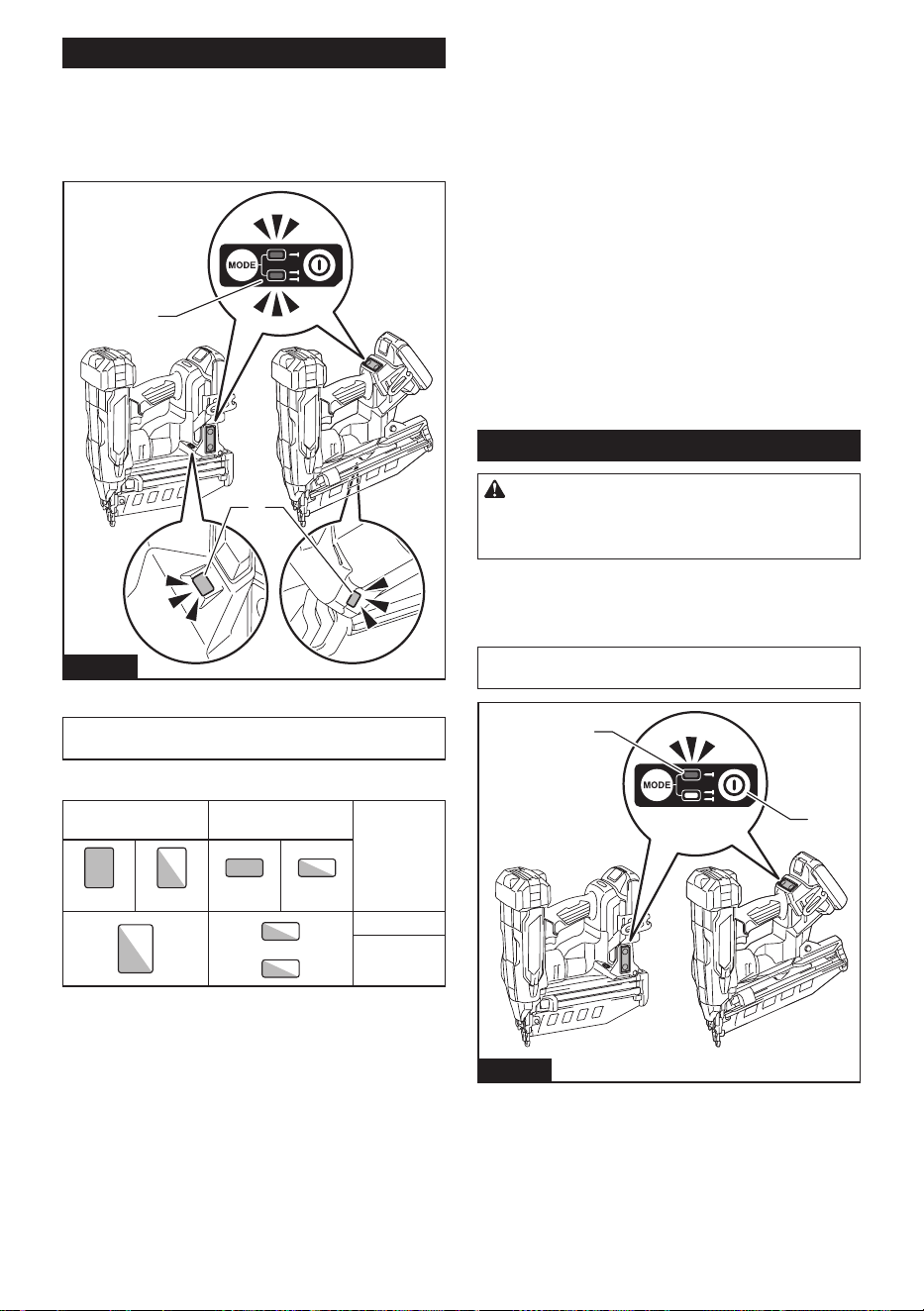
7 ENGLISH
Tool / battery protection system
The tool is equipped with a tool/battery protection sys-
tem. This system automatically cuts o power to the
motor to extend tool and battery life. The tool will auto-
matically stop during operation if the tool or battery is
placed under one of the following conditions.
1
2
Fig.3
► 1. Lamp 2. Power/mode indicator
NOTE: The switch design varies depending on your
region of residence.
Protection status indication
Lamp
Power/mode
indicator
Status
On Blinking On Blinking
Overload
Overheat
Overload protection
When the tool/battery is operated in a manner that
causes it to draw an abnormally high current, the tool
automatically stops. In this situation, turn the tool o
and stop the application that caused the tool to become
overloaded. Then turn the tool on to restart.
Overheat protection
When the tool/battery is overheated, the tool stops
automatically. In this situation, let the tool cool down
before turning the tool on again.
Overdischarge protection
When the battery capacity becomes low, the tool stops
automatically. If the product does not operate even
when the switches are operated, remove the bat-
tery(ies) from the tool and charge the battery(ies).
Protections against other causes
Protection system is also designed for other causes
that could damage the tool and allows the tool to stop
automatically. Take all the following steps to clear the
causes, when the tool has been brought to a temporary
halt or stop in operation.
1. Make sure that all switch(es) is/are in the o posi-
tion, and then turn the tool on again to restart.
2. Charge the battery(ies) or replace it/them with
recharged battery(ies).
3. Let the tool and battery(ies) cool down.
If no improvement can be found by restoring protection
system, then contact your local Makita Service Center.
Power switch action
CAUTION: Before installing the battery car-
tridge into the tool, always check to see that the
switch trigger actuates properly and returns to
the "OFF" position when released.
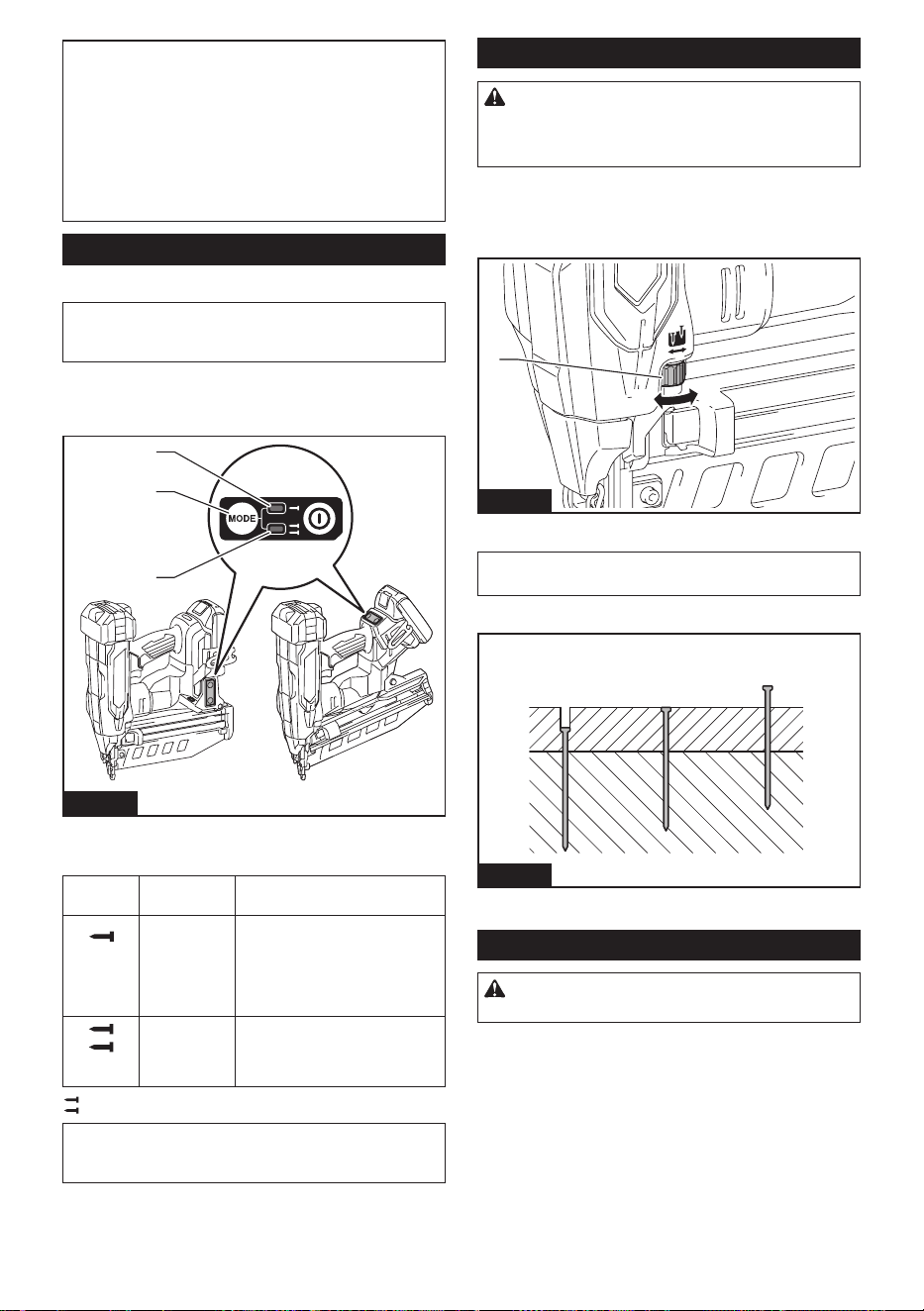
To turn on the tool, press and hold the main power
button until the power indicator lights up.
To turn o the tool, press and hold the main power
button until the power indicator goes o.
NOTE: The switch design varies depending on your
region of residence.
2
1
Fig.4
► 1. Main power button 2. Power indicator
8 ENGLISH
NOTE: The tool cannot be turned on while either the
switch trigger or the contact element is actuated. Be
sure to release the switch trigger and the contact
element before turning on the tool.
NOTE: The tool cannot be turned o while driving
fasteners.
NOTE: The main power switch will automatically shut
down if the tool is left unattended for an extended
duration.
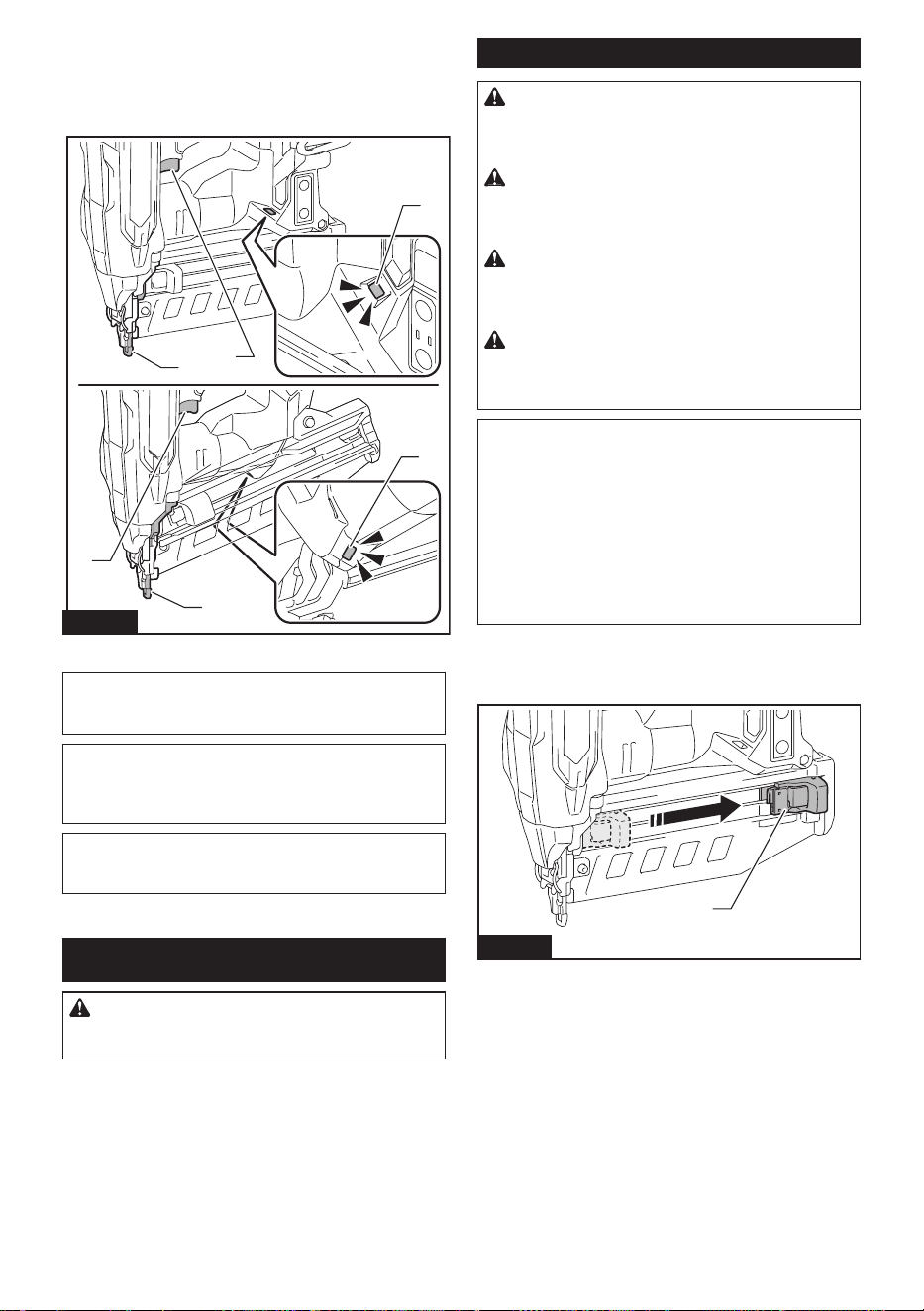
Selecting actuation mode
Country specic
NOTE: Only a single driving mode is available in
some regions or countries. The switch design varies
depending on your region of residence.
The tool employs a selective-actuation triggering. Press
and shortly hold the actuation mode switch button to
select the desired actuation mode.
2
1
3
Fig.5
► 1. Actuation mode switch button 2. Sequential actu-
ation mode 3. Contact actuation mode
Mode
switch
Actuation
mode
Feature
Full sequen-
tial actuation
Drive one fastener in one
sequential operation. Suitable
for driving a fastener carefully
and accurately and helpful when
you require precise fastener
placement.
Contact
actuation
Either a single driving or continu-
ous driving is available. Preferred
when you require high productive
fastener placement.
: Unavailable in some regions and countries.
NOTE: Actuation mode cannot be switched to another
while either the switch trigger or the contact element
is actuated.
Adjusting the driving depth
WARNING: Always make sure that your
ngers are not placed on the switch trigger or
the contact element and the battery cartridge is
removed before adjusting the depth of driving.
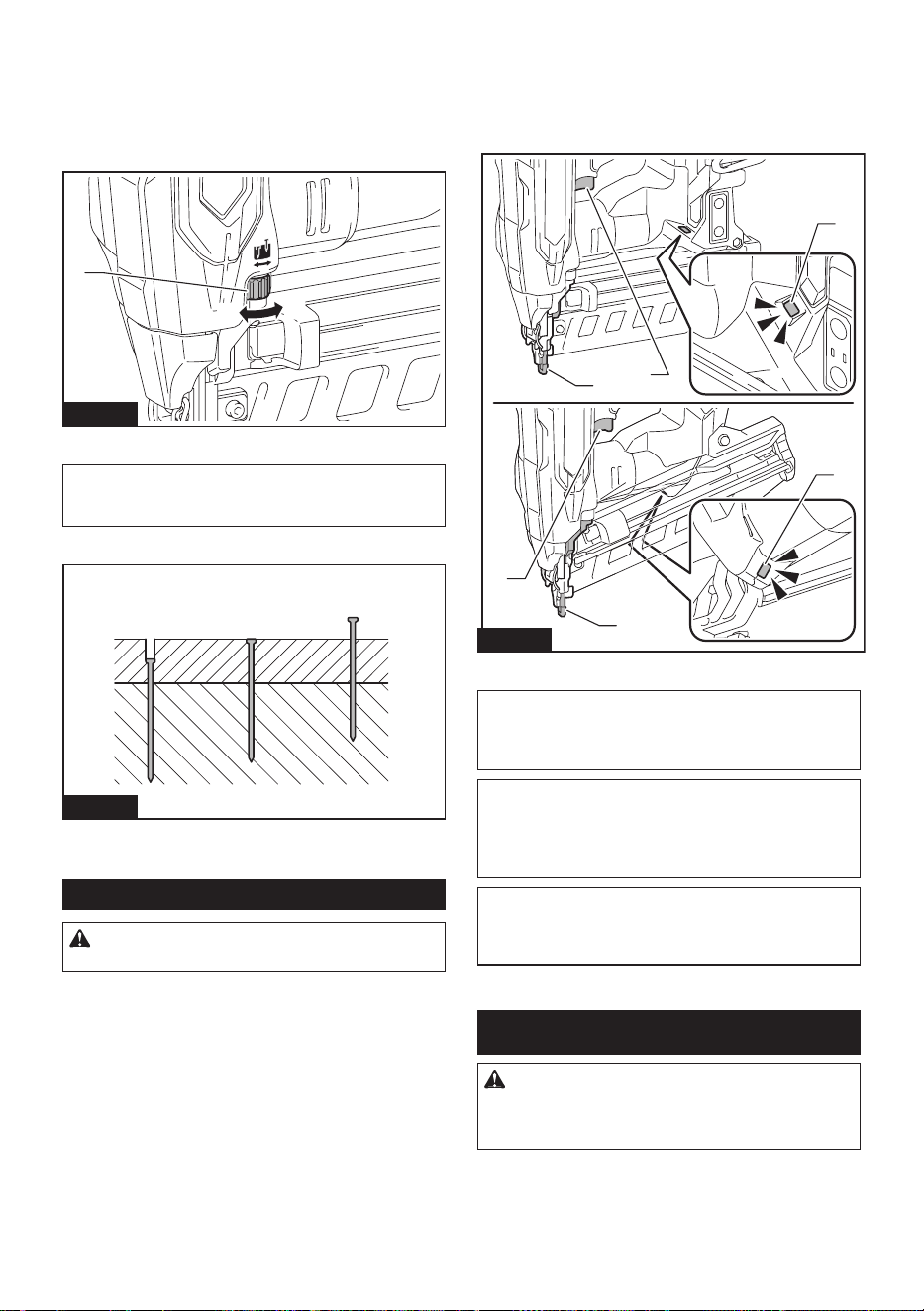
Turn the depth adjuster to adjust the driving depth. The
driving depth gets deeper as you turn the depth adjuster
to A direction, shallower to B direction in the gure. The
range of the driving depth adjustment is 6.0 mm (1/4″).
A
B
1
Fig.6
► 1. Depth adjuster
NOTICE: Do not turn the depth adjuster too
much, or the depth adjuster may get stuck.
Adjust the driving depth as necessary.
23
1
Fig.7
► 1. Too deep 2. Flush 3. Too shallow
Lighting up the lamp
CAUTION: Do not look in the light or see the
source of light directly.
9 ENGLISH
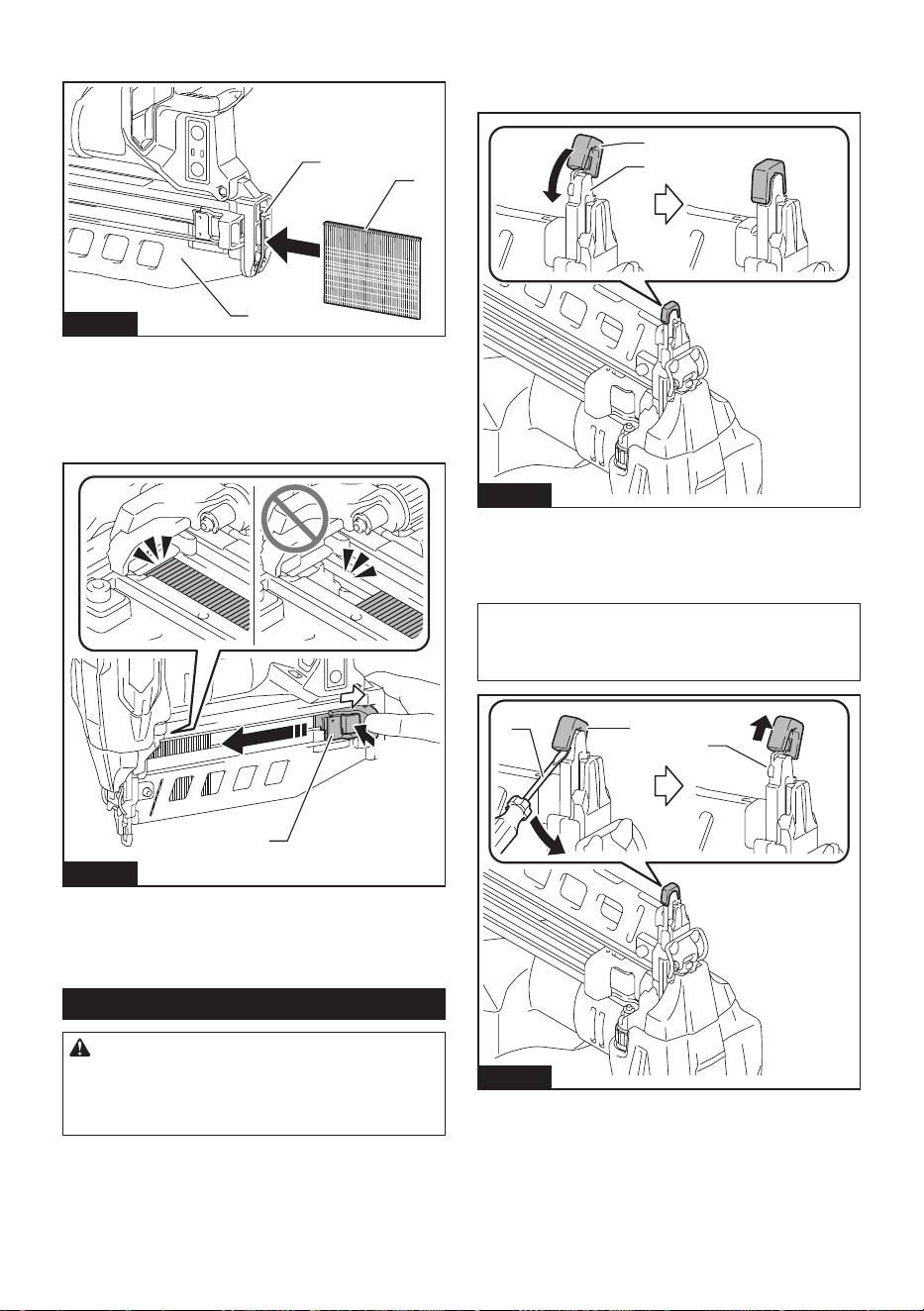
Pull the switch trigger or actuate the contact element to
light up the lamp. The lamp keeps on lighting while pull-
ing the switch trigger or actuating the contact element.
The lamp goes out several seconds after releasing the
switch trigger and the contact element.
3
3
1
2
1
2
Fig.8
► 1. Switch trigger 2. Contact element 3. Lamp
NOTICE: Use a dry cloth to wipe the dirt o the
lens of the lamp. Be careful not to scratch the lens
of lamp, or it may lower the illumination.
NOTICE: When the tool is overheated, the lamp
ashes. In this case, release the switch trigger
and contact element, and then cool down the tool/
battery before operating again.
NOTE: The tool may not re after the battery
becomes low on power even while the lamp remains
lit. In this case, charge the battery cartridge.
ASSEMBLY
CAUTION: Always be sure that the tool is
switched o and the battery cartridge is removed
before carrying out any work on the tool.
Loading/unloading the fasteners
CAUTION: Always make sure that the battery
cartridge is removed before loading the fasteners.
Unintentional ring may cause personal injuries and
property damage.
CAUTION: Be careful not to get your ngers
caught in the magazine. The pusher tends to
spring back to its original position when the pusher is
unlocked.
CAUTION: Do not abruptly slide the pusher
with fasteners loaded in the magazine. Accidentally
dropping fasteners especially when working in high
places may cause personal injuries.
CAUTION: Load the fasteners in the correct
direction. Loading in wrong direction may cause
premature wear and tear of the driver and damage of
the other parts.
NOTICE: Gently slide the pusher along the mag-
azine. A forceful contact between the pusher and
fastener strip may damage the fasteners.
NOTICE: Make sure that the fastener strip is
properly aligned in the magazine and secured
with the pusher. If not, try reloading.
NOTICE: Do not use deformed fasteners and
fastener strips. Use fasteners specied in this
manual. Using fasteners other than those specied
may cause fastener jamming and malfunction.
1. Remove the battery cartridge.
2. Pull the pusher downward until it locks with a little
click.
1
Fig.9
► 1. Pusher
10 ENGLISH
3. Insert the fastener strip into the slit on the bottom
of the magazine.
1
2
3
Fig.10
► 1. Slit 2. Fastener strip 3. Magazine
4. Pull and hold the pusher downward and then
press the "A" portion as shown in the gure.
The pusher is unlocked and holds the fasteners in the
magazine.
1
A
Fig.11
► 1. Pusher
To remove the fasteners, pull the pusher downward until
it locks with a little click. Take out fasteners from the slit
on the bottom of the magazine.
Nose adapter
CAUTION: Always make sure that your n-
gers are not placed on the switch trigger or the
contact element, remove all the fasteners left in
the magazine, and remove the battery cartridge
before attaching or detaching the nose adapter.
When driving fasteners on the material with easi-
ly-marred surfaces, attach the nose adapter onto the
contact element.
Attaching nose adapter
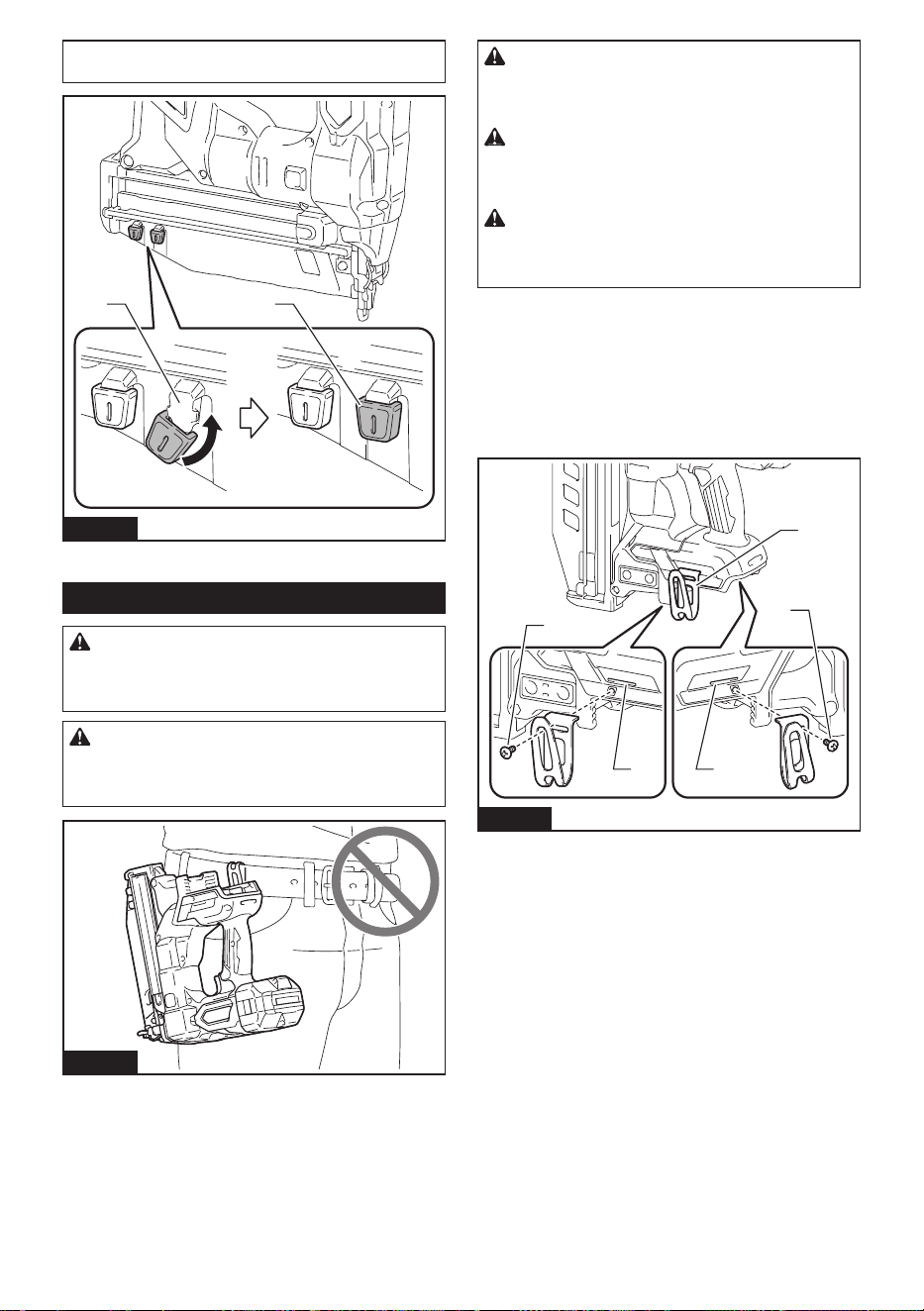
Put the nose adapter on the contact element. Make
sure that the nose adapter ts perfectly as illustrated.
1
2
Fig.12
► 1. Nose adapter 2. Contact element
Detaching nose adapter
The nose adapter can be removed by hand.
NOTE: When you cannot remove the nose adapter
by hand, insert the slotted screwdriver between the
nose adapter and contact element and remove the
nose adapter.
3
1
2
Fig.13
► 1. Nose adapter 2. Contact element 3. Slotted
screwdriver
11 ENGLISH
NOTE: You can store the nose adapter on the holder
as shown in the gure to keep it from being lost.
2 1
Fig.14
► 1. Nose adapter 2. Holder
Hook
WARNING: Be careful not to overload the
hook as too much force. Otherwise irregular over-
burden may cause damages to the tool resulting in
personal injury.
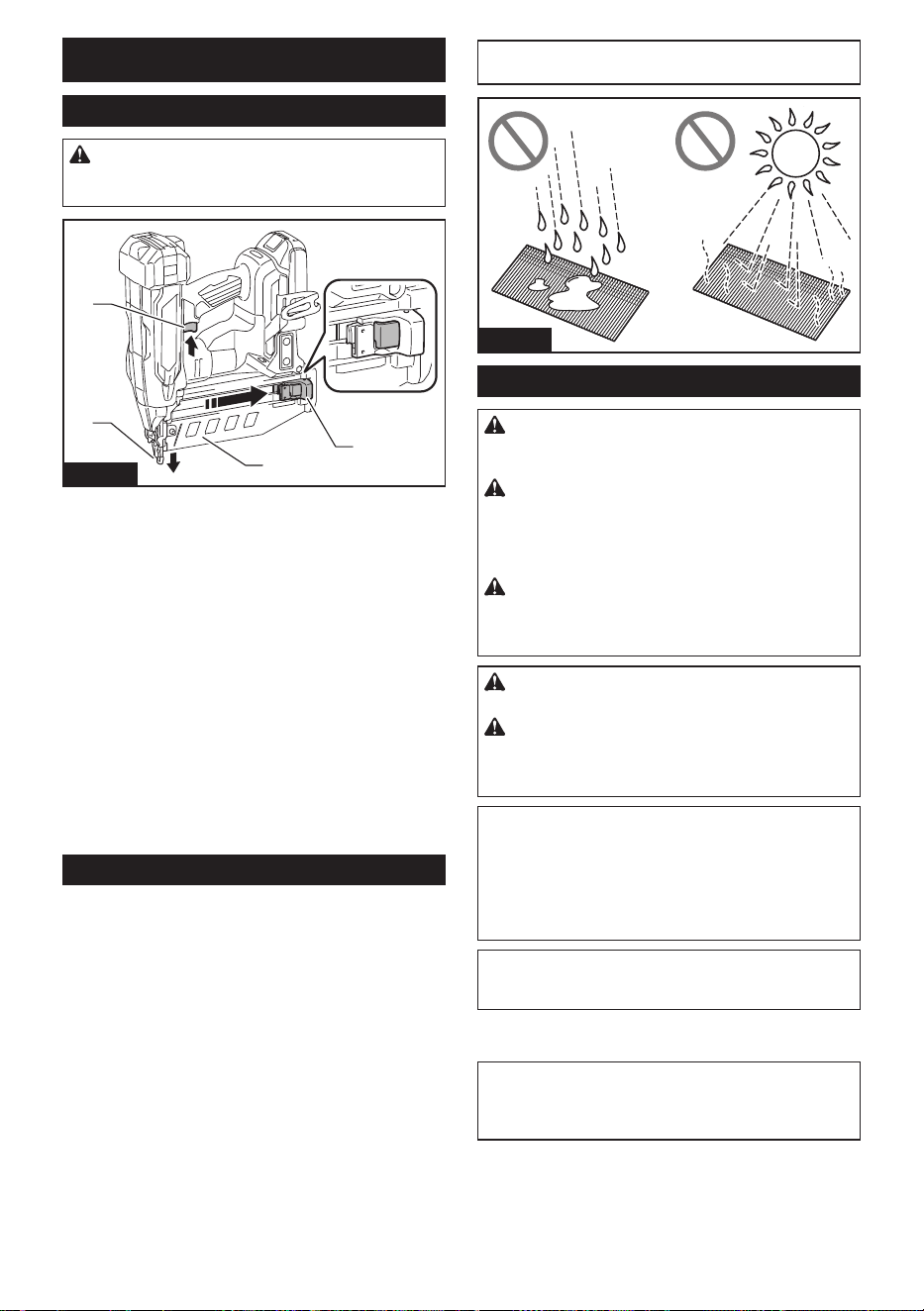
CAUTION: Do not hang the hook from the
waist belt. Dropping the tool, which is caused by the
hook accidentally coming out of place, may cause
unintentional ring and result in personal injuries.
Fig.15
CAUTION: When installing the hook, always
secure it with the screw rmly. If not, the hook
may come o from the tool and result in the personal
injury.
CAUTION: Use the hanging/mounting parts
for their intended purposes only. Using for unin-
tended purpose may cause accident or personal
injury.
CAUTION: Make sure to hang the tool
securely before releasing your hold. Insucient
or unbalanced hooking may cause falling o and you
may be injured.
The hook is convenient for temporarily hanging the
tool. Hang the tool on a tool rack, rail or the wall with
the hook.
The hook can be installed on either side of the tool.
To install the hook, insert it into a groove in the tool
housing on either side and then secure it with the screw
as shown in the gure. To remove, loosen the screw
and then remove the hook.
2
3
1 1
3
Fig.16
► 1. Groove 2. Hook 3. Screw
12 ENGLISH
OPERATION
Testing safety system
WARNING: Make sure all safety systems are
in working order before operation. Failure to do
so may cause personal injuries.
4
3
1
2
Fig.17
► 1. Switch trigger 2. Contact element 3. Magazine
4. Pusher
Test safety system as follows for possible fault or mal-
function before operation.
1. Remove the battery cartridge from the tool. Then
unload all the fasteners left in the magazine.
2. Install the battery cartridge in place and turn the
tool on.
3. Pull the switch trigger without placing the contact
element against the material.
4. Pull the pusher downward and hold it in place.
Then place the contact element against the material
without pulling the switch trigger.
If the tool works in case step 3 or 4 described above,
safety system is not functioning properly. Stop using
the tool immediately and ask your local Makita Service
Center.
Handling of the fasteners
Nails
Handle nails and their box carefully. If the nails have
been handled roughly, they may be out of shape or their
connector breaks, causing poor nail feed.
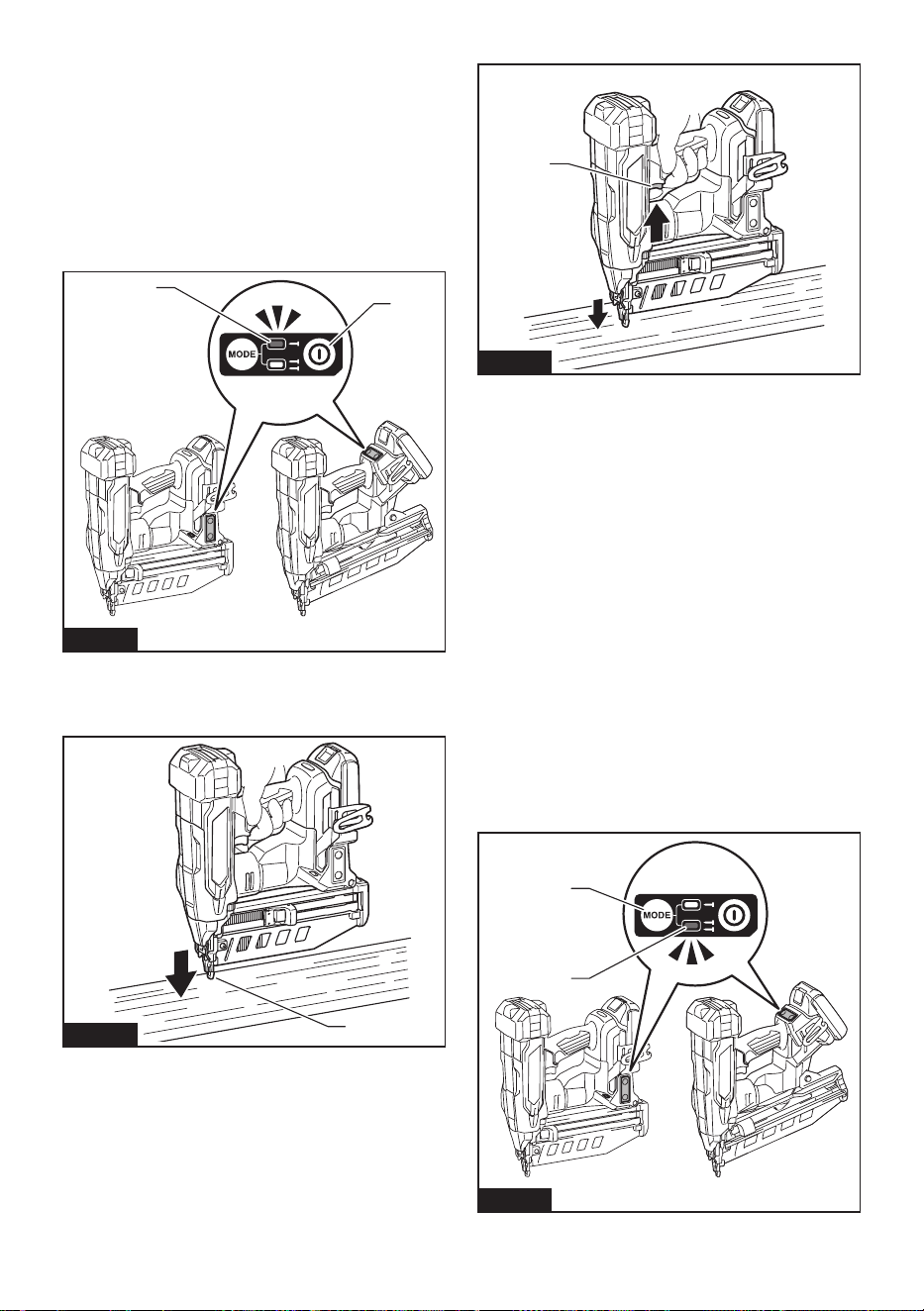
NOTICE: Avoid storing nails in a very humid or
hot place or place exposed to direct sunlight.
Fig.18
Driving fasteners
WARNING: Keep your face away from the tool
when operating the tool. Failure to do so may cause
injury.
WARNING: Do not use this tool for fastening
electrical cables. This tool is not designed for elec-
tric cable installation and may damage the insulation
of electric cables thereby causing electric shock or
re hazards.
WARNING: Continue to place the contact
element rmly on the material until the fastener
is driven completely. Unintentional ring may cause
personal injuries.
CAUTION: Hold the tool rmly during
operation.
CAUTION: Do not drive fasteners on hard
materials such as metal or the like. If the fastener
cannot penetrate the material, the tool may be kicked
back toward you and injury result.
NOTICE: The tool will not start fastening after
ve seconds no switch operation while either
the switch trigger or the contact element is being
solely actuated. Release the switch trigger or
pull the contact element free from the workpiece,
and then reposition the tool in place to restart
fastening.
NOTE: If you drive fasteners continuously for a long
time, the exhaust air will get hot due to the heat from
the motor.
The tool employs two driving actions; full sequential
actuation and contact actuation.
NOTE: Only a single driving mode (full sequential
actuation) is available in some regions or countries.
The switch design varies depending on your region
of residence.
13 ENGLISH
Full sequential actuation
In this mode, you can drive one fastener by one
sequential operation.
A workpiece contact and then a trigger need to be
activated in a specic sequence to actuate the tool.
Release and re-activate the switch controls in the same
sequence to continue driving fasteners.
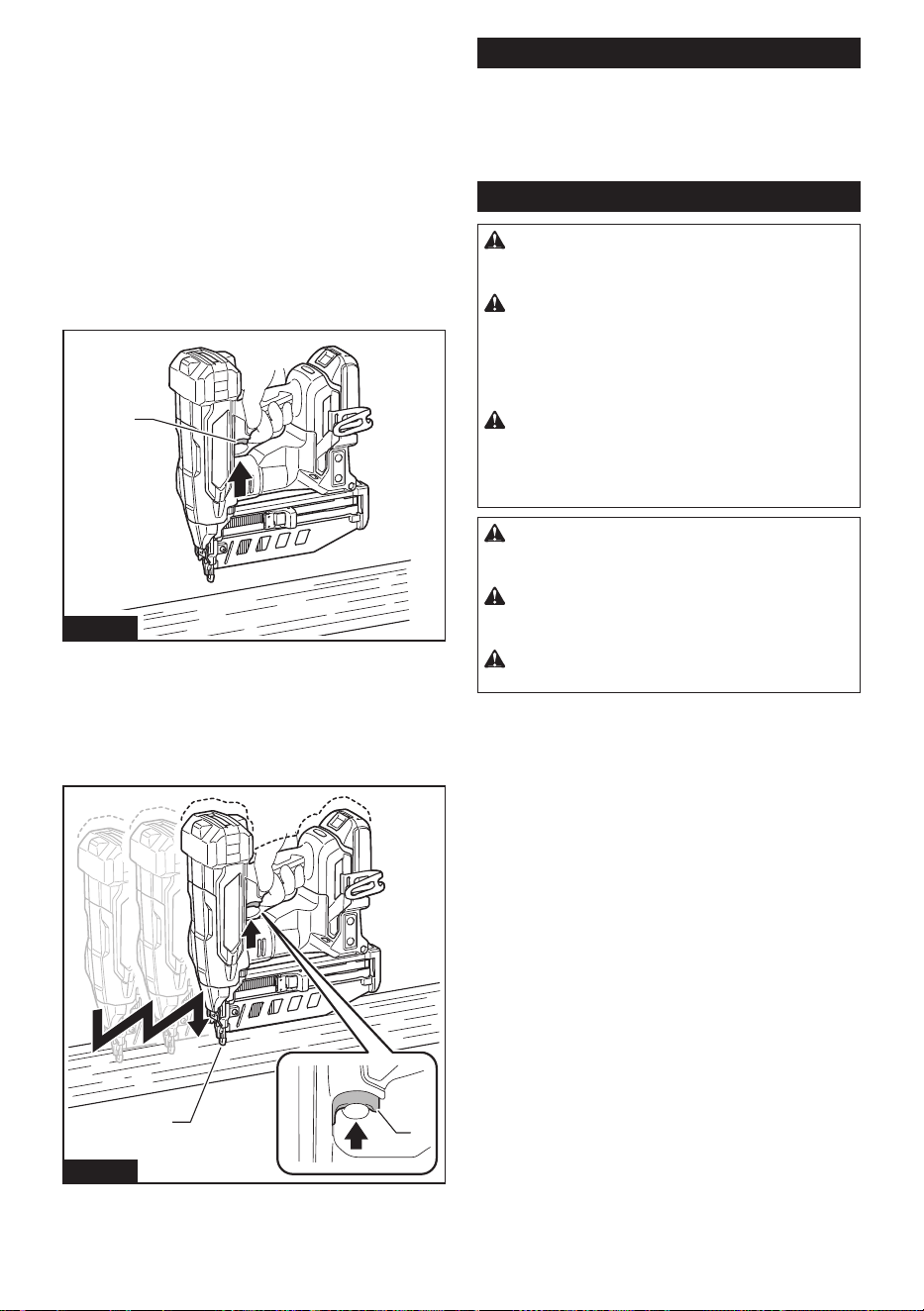
1. Press and hold the main power button to turn on
the tool.
2. Make sure that the sequential actuation mode
lamp lights up.
2
1
Fig.19
► 1. Main power button 2. Sequential actuation mode
lamp
3. Place the contact element at on the material.
1
Fig.20
► 1. Contact element
4. Pull the switch trigger fully to drive a fastener.
1
Fig.21
► 1. Switch trigger
5. Release your nger from the switch trigger. Then
lift the contact element up from the material.
To drive the next fastener, repeat the steps 3 to 5 in the
same sequence.
Contact actuation
Country specic
In this mode, you can choose either continuous or
single driving by following any sequences of the trigger
operation.
A workpiece contact and a trigger can be activated
in any sequences to actuate the tool. Release and
re-activate the workpiece contact to continuously drive
fasteners.
For a single driving
1. Press and hold the main power button to turn on
the tool.
2. Press and shortly hold the actuation mode switch
button to select the contact actuation mode.
The contact actuation mode lamp lights up.
2
1
Fig.22
► 1. Actuation mode switch button 2. Contact actua-
tion mode lamp
14 ENGLISH
3. Place the contact element at on the material.
4. Pull the switch trigger fully to drive a fastener.
5. Release your nger from the switch trigger. Then
lift the contact element up from the material.
To drive the next fastener, repeat the steps 3 to 5 in the
same sequence.
For a continuous driving
1. Press and hold the main power button to turn on
the tool.
2. Press and shortly hold the actuation mode switch
button to select the contact actuation mode.
The contact actuation mode lamp lights up.
3. Pull the switch trigger.
1
Fig.23
► 1. Switch trigger
4. Place the contact element at on the material to
drive a fastener.
5. Move the tool to the next areas with the switch
trigger pulled, and place the contact element at on the
material to drive following fasteners.
1
2
Fig.24
► 1. Switch trigger 2. Contact element
Anti dry re mechanism
When the remaining fasteners in the magazine
decrease to 6 - 9 pieces for model XNB05 / 6 - 9 pieces
for model XNB06, the switch can no longer be actuated
and the tool stops ring. Insert a new strip of fasteners
in the magazine before restarting operation.
Removing jammed fasteners
WARNING: Always make sure that the bat-
tery cartridge and fasteners are removed before
removing jammed fasteners.
WARNING: Do not push on the fastener driver
forcibly. Do not strike the fastener driver and fas-
teners with any hand tools to clear jams. Mind that
the tool is charged with compressed air and the pres-
sure is maintained inside. Failure to follow the safety
precautions in the manual can result in serious injury.
WARNING: Never point the tool at yourself or
other persons nearby when clearing jams. Failure
to do so may cause a risk of injury by misring since
the tool is charged with compressed air in a factory
sealed chamber.
CAUTION: Do not remove the jammed fasten-
ers with bare hands. The fastener may jump out of
the magazine and cause an injury.
CAUTION: To address frequent jamming or
hard-to-clear jamming situations, consult your
local Makita Service Center.
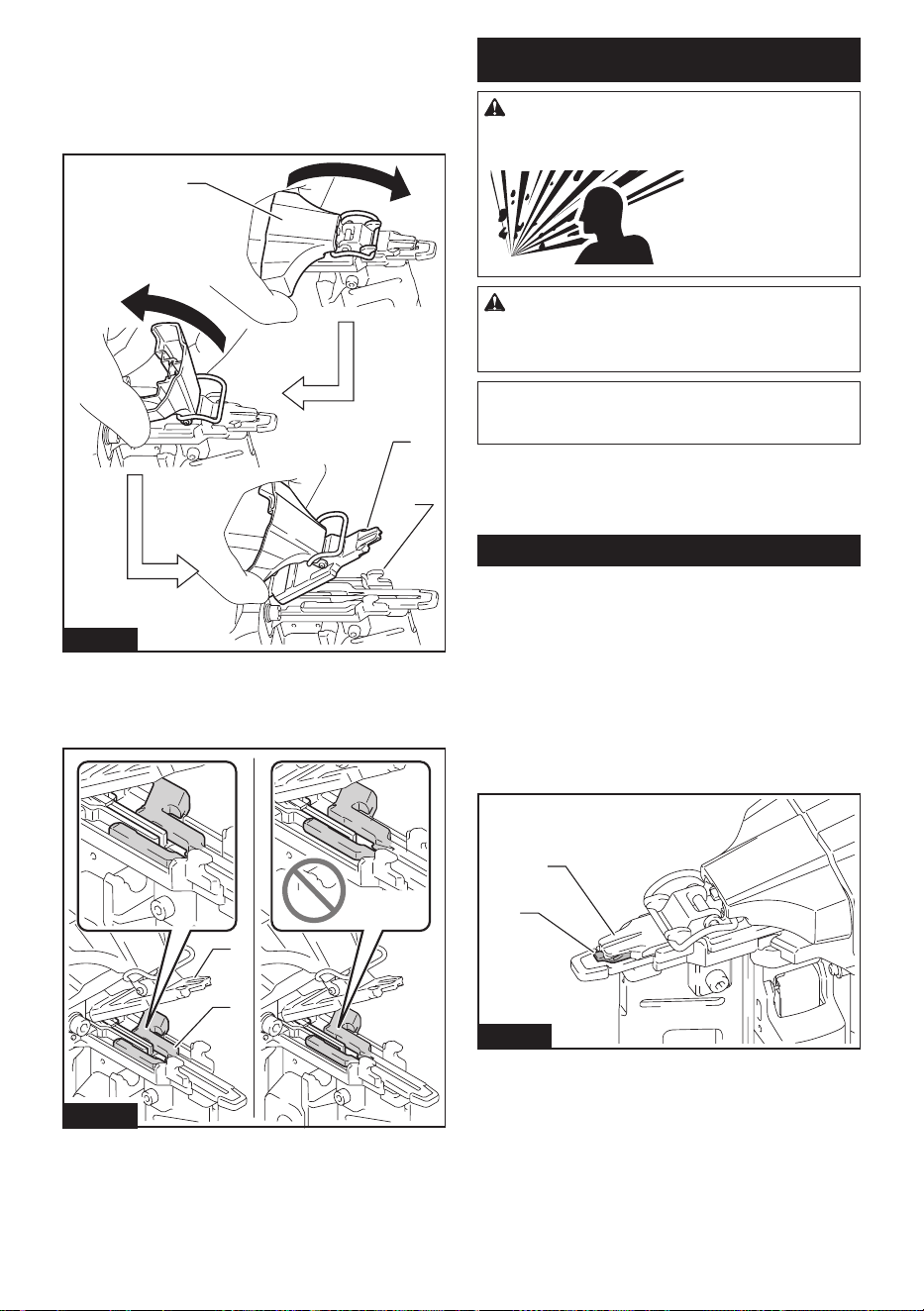
CAUTION: Be sure to lock the latch after
removing jammed fasteners.
15 ENGLISH
When a fastener jamming occurs, look over closely
the fastener feeding and driving unit. Jams tend to be
caused by fasteners wedged between the fastener
driver and the under driver guide.
To clear a jam, release the latch and open the driver
guide, then remove the jammed fasteners.
3
2
1
Fig.25
► 1. Latch 2. Under driver guide 3. Driver guide
To lock the latch after clearing a jam, return the contact
element to its original position and close the driver
guide, then lock the latch.
1
2
Fig.26
► 1. Contact element 2. Driver guide
MAINTENANCE
WARNING: Do not disassemble this tool. This
tool is sealed with compressed air and disassembly
may result in serious injury.
CAUTION: Always be sure that the tool is
switched o and the battery cartridge is removed
before attempting to perform inspection or
maintenance.
NOTICE: Never use gasoline, benzine, thinner,
alcohol or the like. Discoloration, deformation or
cracks may result.
To maintain product SAFETY and RELIABILITY,
repairs, any other maintenance or adjustment should
be performed by Makita Authorized or Factory Service
Centers, always using Makita replacement parts.
Initializing driver position
The driver may not be positioned correctly behind the
fastener to be driven next after a fastener jamming or
under low battery condition. Always perform initializa-
tion steps before you restart operation.
1. Remove the battery cartridge from the tool.
2. Take out all the fasteners left in the magazine.
3. Observe the driver position.
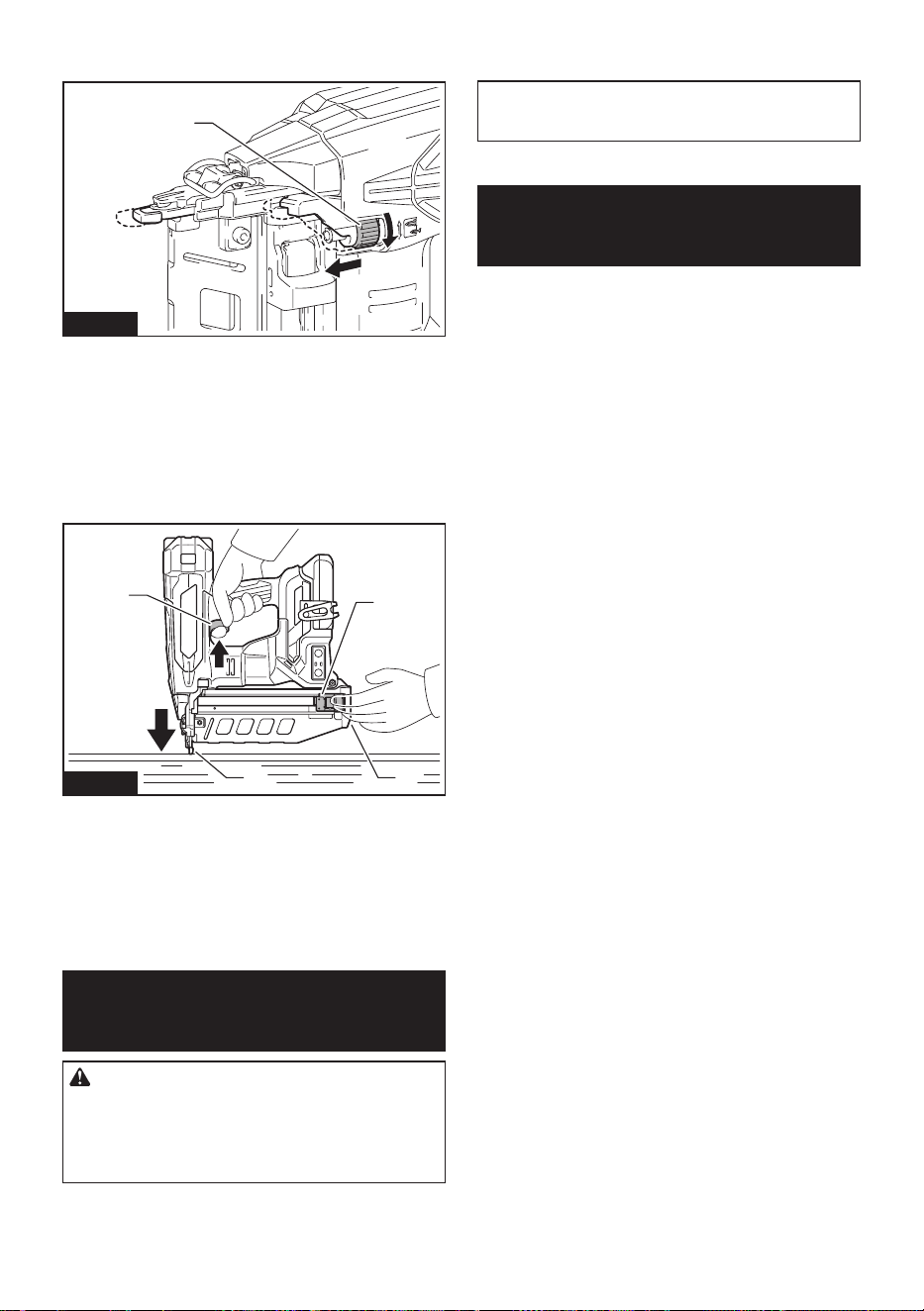
If you see the driver tip out of the driver guide, the
contact element cannot correctly be actuated during
initialization.
1
2
Fig.27
► 1. Driver 2. Driver guide
16 ENGLISH
Turn the depth adjuster to set the shallowest so that the
contact element functions properly.
1
Fig.28
► 1. Depth adjuster
4. Install the battery cartridge in place and turn the
tool on.
5. Pull the pusher downward and hold it in place.
Then place the contact element against the material
that can be damaged.
6. Pull the switch trigger fully, with the contact ele-
ment actuated, to reset the driver position.
1
2
4
3
Fig.29
► 1. Pusher 2. Magazine slit 3. Contact element
4. Switch trigger
The driver position will be initialized correctly.
7. Remove the battery cartridge from the tool.
Reload the fasteners in the magazine. Place the battery
cartridge back into the tool.
OPTIONAL
ACCESSORIES
CAUTION: These accessories or attachments
are recommended for use with your Makita tool
specied in this manual. The use of any other
accessories or attachments might present a risk of
injury to persons. Only use accessory or attachment
for its stated purpose.
If you need any assistance for more details regard-
ing these accessories, ask your local Makita Service
Center.
• Nails (angle nish nail of 16Ga is not available.)
• Makita genuine battery and charger
NOTE: Some items in the list may be included in the
tool package as standard accessories. They may
dier from country to country.
MAKITA LIMITED
WARRANTY
Please refer to the annexed warranty sheet for the
most current warranty terms applicable to this product.
If annexed warranty sheet is not available, refer to the
warranty details set forth at below website for your
respective country.
United States of America: www.makitatools.com
Canada: www.makita.ca
Other countries: www.makita.com
17 ESPAÑOL
ESPAÑOL (Instrucciones originales)
ESPECIFICACIONES
Modelo: XNB05 XNB06
Tamaño del clavo 16 Ga x 19 mm - 64 mm
(16 Ga x 3/4" - 2-1/2")
16 Ga x 32 mm - 64 mm
(16 Ga x 1-1/4" - 2-1/2")
Capacidad del cartucho 110 pzas.
Dimensiones (La x An x Al)
*1 *2
276 mm x 98 mm x 320 mm
(10-7/8" x 3-7/8" x 12-5/8")
288 mm x 116 mm x 325 mm
(11-3/8" x 4-9/16" x 12-3/4")
Tensión nominal 18 V c.c.
Peso neto 2,9 kg - 3,3 kg (6,4 lbs - 7,3 lbs) 3,0 kg - 3,3 kg (6,6 lbs - 7,3 lbs)
*1
sin gancho
*2
con BL1820B
NOTA: En este manual de instrucciones, los clavos se denominan "clavos (jadores)", a menos que se especi-
que lo contrario.
• Debido a nuestro continuo programa de investigación y desarrollo, las especicaciones aquí incluidas están
sujetas a cambio sin previo aviso.
• Las especicaciones pueden variar de país a país.
• El peso puede variar en función de los accesorios, incluido el cartucho de batería. En la tabla se muestra la
combinación de peso más ligero y más pesado.
Cartucho de batería y cargador aplicables
Cartucho de batería BL1815N / BL1820B / BL1830B / BL1840B / BL1850B / BL1860B
Cargador DC18RC / DC18RD / DC18SD / DC18SE / DC18SF / DC18SH /
DC18WC
• Algunos de los cartuchos de batería y cargadores enumerados arriba podrían no estar disponibles depen-
diendo de su área de residencia.
ADVERTENCIA: Use únicamente los cartuchos de batería y los cargadores indicados arriba. El uso de
cualquier otro cartucho de batería y cargador podría ocasionar una lesión y/o un incendio.
ADVERTENCIAS DE
SEGURIDAD
Advertencias generales de
seguridad para herramientas
eléctricas
ADVERTENCIA Lea todas las advertencias
de seguridad, instrucciones, ilustraciones y espe-
cicaciones suministradas con esta herramienta
eléctrica. El no seguir todas las instrucciones indicadas
a continuación podrá ocasionar una descarga eléctrica,
incendio o lesiones graves.
Conserve todas las advertencias
e instrucciones como referencia
en el futuro.
En las advertencias, el término “herramienta eléctrica”
se reere a su herramienta eléctrica de funcionamiento
con conexión a la red eléctrica (con cableado eléctrico)
o herramienta eléctrica de funcionamiento a batería
(inalámbrica).
Seguridad en el área de trabajo
1. Mantenga el área de trabajo limpia y bien ilu-
minada. Las áreas oscuras o desordenadas son
propensas a accidentes.
2. No utilice las herramientas eléctricas en
atmósferas explosivas, tal como en la presen-
cia de líquidos, gases o polvo inamables. Las
herramientas eléctricas crean chispas que pueden
prender fuego al polvo o los humos.
3. Mantenga a los niños y curiosos alejados
mientras utiliza una herramienta eléctrica. Las
distracciones le pueden hacer perder el control.
Seguridad eléctrica
1. Las clavijas de conexión de las herramientas
eléctricas deberán encajar perfectamente en la
toma de corriente. No modique nunca la cla-
vija de conexión de ninguna forma. No utilice
ninguna clavija adaptadora con herramientas
eléctricas que tengan conexión a tierra (puesta
a tierra). La utilización de clavijas no modica-
das y que encajen perfectamente en la toma de
corriente reducirá el riesgo de que se produzca

18 ESPAÑOL
una descarga eléctrica.
2. Evite tocar con el cuerpo supercies conec-
tadas a tierra o puestas a tierra tales como
tubos, radiadores, cocinas y refrigeradores. Si
su cuerpo es puesto a tierra o conectado a tierra
existirá un mayor riesgo de que sufra una des-
carga eléctrica.
3. No exponga las herramientas eléctricas a la
lluvia ni a condiciones húmedas. La entrada de
agua en una herramienta eléctrica aumentará el
riesgo de que se produzca una descarga eléctrica.
4. No maltrate el cable. Nunca utilice el cable
para transportar, jalar o desconectar la herra-
mienta eléctrica. Mantenga el cable alejado del
calor, aceite, objetos cortantes o piezas móvi-
les. Los cables dañados o enredados aumentan
el riesgo de sufrir una descarga eléctrica.
5. Cuando utilice una herramienta eléctrica en
exteriores, utilice un cable de extensión apro-
piado para uso en exteriores. La utilización de
un cable apropiado para uso en exteriores redu-
cirá el riesgo de que se produzca una descarga
eléctrica.
6. Si no es posible evitar usar una herramienta
eléctrica en condiciones húmedas, utilice un
alimentador protegido con interruptor de cir-
cuito de falla a tierra (ICFT). El uso de un ICFT
reduce el riesgo de descarga eléctrica.
7. Las herramientas eléctricas pueden producir
campos electromagnéticos (CEM) que no son
dañinos para el usuario. Sin embargo, si los
usuarios tienen marcapasos y otros dispositivos
médicos similares, deberán consultar al fabricante
de su dispositivo y/o a su médico antes de operar
esta herramienta eléctrica.
Seguridad personal
1. Manténgase alerta, preste atención a lo que
está haciendo y utilice su sentido común
cuando opere una herramienta eléctrica. No
utilice una herramienta eléctrica cuando esté
cansado o bajo la inuencia de drogas, alco-
hol o medicamentos. Un momento de distracción
mientras opera las herramientas eléctricas puede
terminar en una lesión grave.
2. Use equipo de protección personal. Póngase
siempre protección para los ojos. El equipo
protector tal como máscara contra el polvo, zapa-
tos de seguridad antiderrapantes, casco rígido y
protección para oídos utilizado en las condiciones
apropiadas reducirá el riesgo de lesiones.
3. Impida el encendido accidental. Asegúrese
de que el interruptor esté en la posición de
apagado antes de conectar a la alimentación
eléctrica y/o de colocar el cartucho de batería,
así como al levantar o cargar la herramienta.
Cargar las herramientas eléctricas con su dedo
en el interruptor o enchufarlas con el interrup-
tor encendido hace que los accidentes sean
comunes.
4. Retire cualquier llave de ajuste o llave de
apriete antes de encender la herramienta. Una
llave de ajuste o llave de apriete que haya sido
dejada puesta en una parte giratoria de la herra-
mienta eléctrica puede ocasionar alguna lesión.
5. No utilice la herramienta donde no alcance.
Mantenga los pies sobre suelo rme y el equi-
librio en todo momento. Esto permite un mejor
control de la herramienta eléctrica en situaciones
inesperadas.
6. Use una vestimenta apropiada. No use ropa
suelta ni alhajas. Mantenga el cabello y la ropa
alejados de las piezas móviles. Las prendas
de vestir holgadas, las alhajas y el cabello largo
suelto podrían engancharse en estas piezas
móviles.
7. Si dispone de dispositivos para la conexión
de equipos de extracción y recolección de
polvo, asegúrese de conectarlos y utilizarlos
debidamente. Hacer uso de la recolección de
polvo puede reducir los riesgos relacionados con
el polvo.
8. No permita que la familiaridad adquirida
debido al uso frecuente de las herramientas
haga que se sienta conado e ignore los prin-
cipios de seguridad de las herramientas. Un
descuido podría ocasionar una lesión grave en
una fracción de segundo.
9. Utilice siempre gafas protectoras para prote-
ger sus ojos de lesiones al usar herramientas
eléctricas. Las gafas deben cumplir con la
Norma ANSI Z87.1 en EUA.
Es responsabilidad del empleador imponer
el uso de equipos protectores de seguridad
apropiados a los operadores de la herramienta
y demás personas cerca del área de trabajo.
Mantenimiento y uso de la herramienta eléctrica
1. No fuerce la herramienta eléctrica. Utilice la
herramienta eléctrica correcta para su aplica-
ción. La herramienta eléctrica adecuada hará un
mejor trabajo y de forma más segura a la veloci-
dad para la que ha sido fabricada.
2. No utilice la herramienta eléctrica si el inte-
rruptor no la enciende y apaga. Cualquier
herramienta eléctrica que no pueda ser contro-
lada con el interruptor es peligrosa y debe ser
reemplazada.
3. Desconecte la clavija de la fuente de alimen-
tación y/o retire la batería de la herramienta
eléctrica, en caso de ser removible, antes de
realizar ajustes, cambiar accesorios o almace-
nar las herramientas eléctricas. Tales medidas
de seguridad preventivas reducirán el riesgo
de poner en marcha la herramienta eléctrica de
forma accidental.
4. Guarde la herramienta eléctrica que no use
fuera del alcance de los niños y no permita
que las personas que no están familiarizadas
con ella o con las instrucciones la operen. Las
herramientas eléctricas son peligrosas en manos
de personas que no saben operarlas.
5. Dé mantenimiento a las herramientas eléctri-
cas y los accesorios. Compruebe que no haya
piezas móviles desalineadas o estancadas,
piezas rotas y cualquier otra condición que
pueda afectar al funcionamiento de la herra-
mienta eléctrica. Si la herramienta eléctrica
está dañada, haga que la reparen antes de
utilizarla. Muchos de los accidentes son ocasio-
nados por no dar un mantenimiento adecuado a

19 ESPAÑOL
las herramientas eléctricas.
6. Mantenga las herramientas de corte limpias
y losas. Si recibe un mantenimiento adecuado
y tiene los bordes alados, es probable que la
herramienta se atasque menos y sea más fácil
controlarla.
7. Utilice la herramienta eléctrica, los accesorios
y las brocas de acuerdo con estas instruccio-
nes, considerando las condiciones laborales
y el trabajo a realizar. Si utiliza la herramienta
eléctrica para realizar operaciones distintas de
las indicadas, podrá presentarse una situación
peligrosa.
8. Mantenga los mangos y supercies de asi-
miento secos, limpios y libres de aceite o
grasa. Los mangos y supercies de asimiento
resbalosos no permiten una manipulación segura
ni el control de la herramienta en situaciones
inesperadas.
9. Cuando vaya a utilizar esta herramienta, evite
usar guantes de trabajo de tela ya que éstos
podrían atorarse. Si los guantes de trabajo de
tela llegaran a atorarse en las piezas móviles,
esto podría ocasionar lesiones personales.
Uso y cuidado de la herramienta a batería
1. Recargue sólo con el cargador especicado
por el fabricante. Un cargador que es adecuado
para un solo tipo de batería puede generar riesgo
de incendio al ser utilizado con otra batería.
2. Utilice las herramientas eléctricas solamente
con las baterías designadas especícamente
para ellas. La utilización de cualquier otra batería
puede crear un riesgo de lesiones o incendio.
3. Cuando no se esté usando la batería, mantén-
gala alejada de otros objetos metálicos, como
sujetapapeles (clips), monedas, llaves, clavos,
tornillos u otros objetos pequeños de metal
los cuales pueden actuar creando una cone-
xión entre las terminales de la batería. Originar
un cortocircuito en las terminales puede causar
quemaduras o incendios.
4. En condiciones abusivas, podrá escapar
líquido de la batería; evite tocarlo. Si lo toca
accidentalmente, enjuague con agua. Si hay
contacto del líquido con los ojos, busque asis-
tencia médica. Puede que el líquido expulsado
de la batería cause irritación o quemaduras.
5. No utilice una herramienta ni una batería que
estén dañadas o hayan sido modicadas. Las
baterías dañadas o modicadas podrían oca-
sionar una situación inesperada provocando un
incendio, explosión o riesgo de lesiones.
6. No exponga la herramienta ni la batería al
fuego ni a una temperatura excesiva. La expo-
sición al fuego o a una temperatura superior a los
130 °C podría causar una explosión.
7. Siga todas las instrucciones para la carga y
evite cargar la herramienta o la batería fuera
del rango de temperatura especicado en
las instrucciones. Una carga inadecuada o a
una temperatura fuera del rango especicado
podría dañar la batería e incrementar el riesgo de
incendio.
Servicio
1. Haga que una persona calicada repare la
herramienta eléctrica utilizando sólo piezas de
repuesto idénticas. Esto asegura que se man-
tenga la seguridad de la herramienta eléctrica.
2. Nunca dé servicio a baterías que estén daña-
das. El servicio a las baterías solamente deberá
ser efectuado por el fabricante o un agente de
servicio autorizado.
3. Siga las instrucciones para la lubricación y
cambio de accesorios.
4. No modique ni intente reparar el aparato ni el
paquete de baterías salvo como se indique en
las instrucciones para el uso y cuidado.
Advertencias de seguridad para la
clavadora inalámbrica
1. Siempre asuma que la herramienta contiene
clavos. Un manejo descuidado de la clavadora
puede provocar el disparo accidental de los clavos
y ocasionar lesiones personales.
2. No apunte la herramienta hacia usted mismo
ni hacia otras personas que estén cerca. Un
accionamiento inesperado del gatillo descargará
el clavo ocasionando una lesión.
3. No active la herramienta a menos que esté
colocada rmemente contra la pieza de tra-
bajo. Si la herramienta no está haciendo contacto
con la pieza de trabajo, el clavo podría desviarse
lejos de su objetivo.
4. Desconecte la herramienta de la fuente de
alimentación cuando el clavo se atasque en la
herramienta. Al extraer algún clavo que se haya
atascado, la clavadora podría activarse acciden-
talmente si ésta se encuentra conectada.
5. Tenga precaución al extraer un clavo atas-
cado. El mecanismo podría estar bajo compresión
y el clavo podría descargarse con fuerza al inten-
tar liberarlo del atascamiento.
6. No utilice esta clavadora para jar cables
eléctricos. Ésta no está diseñada para la ins-
talación de cableado eléctrico y podría dañar el
aislamiento de los cables eléctricos, originando
en consecuencia peligros de descarga eléctrica o
incendio.
7. Siempre use gafas de seguridad para proteger
sus ojos del polvo o de lesiones ocasionadas
por los clavos.
8. Mantenga las manos y los pies alejados del
área del puerto de expulsión.
9. Siempre retire el cartucho de batería antes de
cargar los clavos, hacer un ajuste, realizar una
inspección y dar mantenimiento, o tras haber
nalizado la operación.
10. Asegúrese de que no haya nadie cerca antes
de la operación. Nunca intente clavar clavos al
mismo tiempo desde la parte interior y exterior
de la pared. Los clavos podrían desgarrar o salir
volando, representando un grave peligro.
11. Esté atento a pisar sobre suelo rme y mante-
ner el equilibrio con la herramienta. Asegúrese
de que no haya nadie debajo cuando esté
trabajando en lugares elevados.
20 ESPAÑOL
12. Nunca utilice herramientas para clavar clavos
marcadas con el símbolo de “No usar en anda-
mios o escaleras” para aplicaciones especí-
cas, por ejemplo:
• cambiar una ubicación de clavado a otra
implica el uso de andamios, escalones,
escaleras o construcciones similares a una
escalera, por ejemplo listones para techos;
• cerrar cajas o cajones;
• instalar sistemas de seguridad de transporte,
por ejemplo en vehículos y vagones.
13. Revise cuidadosamente las paredes, techos,
pisos, tejados y similares para evitar una posi-
ble descarga eléctrica, fuga de gas, explosio-
nes, etc. a causa del engrapado en cables con
corriente, conductos o tubos de gas.
14. Utilice solamente los clavos especicados
en este manual. El uso de cualquier otro clavo
podría ocasionar una avería de la herramienta.
15. No intente manipular indebidamente la herra-
mienta ni procure usarla para otro n que no
sea clavar clavos.
16. No opere la herramienta sin clavos. Esto acor-
tará la vida útil de la herramienta.
17. Detenga las operaciones de clavado de inme-
diato si nota algo malo o fuera de lo común
con la herramienta.
18. Nunca clave en materiales que puedan ser
perforados por el clavo y donde pueda salir
volando como un proyectil.
19. Nunca active el gatillo interruptor y el ele-
mento de contacto al mismo tiempo hasta que
esté preparado para jar las piezas de trabajo.
Deje que la pieza de trabajo presione el ele-
mento de contacto. Nunca anule su propósito
jando hacia atrás el elemento de contacto o
presionándolo con la mano.
20. Nunca manipule indebidamente el elemento de
contacto. Verique con frecuencia el elemento
de contacto para realizar las operaciones de
manera correcta.
21. Siempre retire los clavos de la herramienta
cuando no la esté utilizando.
22. Evite colocar imanes o dispositivos magné-
ticos similares demasiado cerca de la herra-
mienta. Podría afectar el sensor magnético de la
herramienta.
GUARDE ESTAS
INSTRUCCIONES.
ADVERTENCIA: NO DEJE que la comodidad
o familiaridad con el producto (a base de utilizarlo
repetidamente) evite que siga estrictamente las
normas de seguridad para dicho producto. El
USO INCORRECTO o el no seguir las normas de
seguridad indicadas en este manual de instruc-
ciones puede ocasionar lesiones graves.
Símbolos
A continuación se muestran los símbolos utilizados
para la herramienta.
volts o voltios
corriente directa o continua
Lea y entienda el manual y las etiquetas
de la herramienta. El no seguir las adver-
tencias podría ocasionar la muerte o una
lesión grave.
Los operarios y demás personas que se
encuentran en el área de trabajo deben
usar gafas de seguridad con protección
lateral.
Mantenga los dedos alejados del gatillo
interruptor cuando no esté colocando cla-
vos a n de evitar una descarga accidental.
Instrucciones importantes de
seguridad para el cartucho de
batería
1. Antes de utilizar el cartucho de batería, lea
todas las instrucciones e indicaciones de
precaución en el (1) el cargador de batería, (2)
la batería, y (3) el producto con el que se utiliza
la batería.
2. No desarme ni modique el cartucho de bate-
ría. Podría ocurrir un incendio, calor excesivo o
una explosión.
3. Si el tiempo de operación se ha acortado en
exceso, deje de operar de inmediato. Podría
correrse el riesgo de sobrecalentamiento,
posibles quemaduras e incluso explosión.
4. En caso de que ingresen electrolitos en sus
ojos, enjuáguelos bien con agua limpia y con-
sulte de inmediato a un médico. Esto podría
ocasionar pérdida de visión.
5. Evite cortocircuitar el cartucho de batería:
(1) No toque las terminales con ningún mate-
rial conductor.
(2) Evite guardar el cartucho de batería en un
cajón junto con otros objetos metálicos,
tales como clavos, monedas, etc.
(3) No exponga el cartucho de batería al
agua o la lluvia.
Un cortocircuito en la batería puede causar
un ujo grande de corriente, sobrecalenta-
miento, posibles quemaduras e incluso una
descompostura.
6. No guarde ni utilice la herramienta y el cartu-
cho de batería en lugares donde la tempera-
tura pueda alcanzar o exceder los 50 °C (122
°F).
7. Nunca incinere el cartucho de batería incluso
en el caso de que esté dañado seriamente o
ya no sirva en absoluto. El cartucho de batería
puede explotar si se tira al fuego.
8. No clave, corte, aplaste, lance o deje caer el
cartucho de batería, ni golpee un objeto sólido
21 ESPAÑOL
contra el cartucho de batería. Dicha acción
podría resultar en un incendio, calor excesivo o en
una explosión.
9. No use una batería dañada.
10. Las baterías de ión de litio están sujetas a los
requisitos reglamentarios en materia de bie-
nes peligrosos.
Para el trasporte comercial, por ej., mediante
terceros o agentes de transporte, se deben tomar
en cuenta los requisitos especiales relativos al
empaque y el etiquetado.
Para efectuar los preparativos del artículo que se
va a enviar, se requiere consultar a un experto
en materiales peligrosos. Si es posible, consulte
además otras regulaciones nacionales más deta-
lladas.
Pegue o cubra con cinta adhesiva los contactos
abiertos y empaque la batería de manera que ésta
no pueda moverse dentro del paquete.
11. Para deshacerse del cartucho de batería,
sáquelo de la herramienta y deséchelo en un
lugar seguro. Siga las regulaciones locales
relacionadas al desecho de las baterías.
12. Utilice las baterías únicamente con los pro-
ductos especicados por Makita. Instalar las
baterías en productos que no cumplan con los
requisitos podría ocasionar un incendio, un calen-
tamiento excesivo, una explosión o una fuga de
electrolito.
13. Si no se utiliza la herramienta por un
período largo, debe extraerse la batería de la
herramienta.
14. El cartucho de batería podría absorber calor
durante y después de su uso, lo que ocasiona-
ría quemaduras o quemaduras a baja tempe-
ratura. Tenga cuidado con la manipulación de
los cartuchos de batería que estén calientes.
15. No toque el terminal de la herramienta inme-
diatamente después de su uso, ya que el
mismo podría estar lo sucientemente caliente
como para provocarle quemaduras.
16. No permita que las rebabas, el polvo o la tierra
queden atrapados en los terminales, oricios
y ranuras del cartucho de batería. Podría pro-
vocar calentamiento, incendio, explosión y mal
funcionamiento de la herramienta o del cartucho
de batería, lo que resultaría en quemaduras o
lesiones personales.
17. No utilice el cartucho de batería cerca de
cables eléctricos de alto voltaje, a menos que
la herramienta sea compatible con el uso cer-
cano a estos cables eléctricos de alto voltaje.
Esto podría ocasionar una avería o descompos-
tura de la herramienta o del cartucho de batería.
18. Mantenga la batería alejada de los niños.
GUARDE ESTAS
INSTRUCCIONES.
PRECAUCIÓN: Utilice únicamente baterías
originales de Makita. El uso de baterías no origina-
les de Makita, o de baterías alteradas, puede ocasio-
nar que las baterías exploten causando un incendio,
lesiones personales y daños. Asimismo, esto inva-
lidará la garantía de Makita para la herramienta y el
cargador Makita.
Consejos para alargar al máximo
la vida útil de la batería
1. Cargue el cartucho de batería antes de que
se descargue completamente. Pare siem-
pre la operación y cargue el cartucho de
batería cuando note menos potencia en la
herramienta.
2. No cargue nunca un cartucho de batería que
esté completamente cargado. La sobrecarga
acortará la vida de servicio de la batería.
3. Cargue el cartucho de batería a una tempera-
tura ambiente de 10 °C - 40 °C (50 °F - 104 °F).
Si un cartucho de batería está caliente, déjelo
enfriar antes de cargarlo.
4. Cuando no utilice el cartucho de batería,
sáquelo de la herramienta o del cargador.
5. Cargue el cartucho de batería si no va a utili-
zarlo durante un período prolongado (más de
seis meses).
DESCRIPCIÓN DEL
FUNCIONAMIENTO
PRECAUCIÓN: Asegúrese siempre de que la
herramienta esté apagada y el cartucho de batería
haya sido extraído antes de realizar cualquier
ajuste o comprobación en la herramienta.
Instalación o extracción del
cartucho de batería
PRECAUCIÓN: Apague siempre la herra-
mienta antes de colocar o quitar el cartucho de
batería.
PRECAUCIÓN: Sujete la herramienta y el car-
tucho de la batería con rmeza al colocar o quitar
el cartucho de batería. Si no se sujeta con rmeza la
herramienta y el cartucho de batería, puede ocasio-
nar que se resbalen de sus manos causando daños
a la herramienta y al cartucho de batería, así como
lesiones a la persona.
22 ESPAÑOL
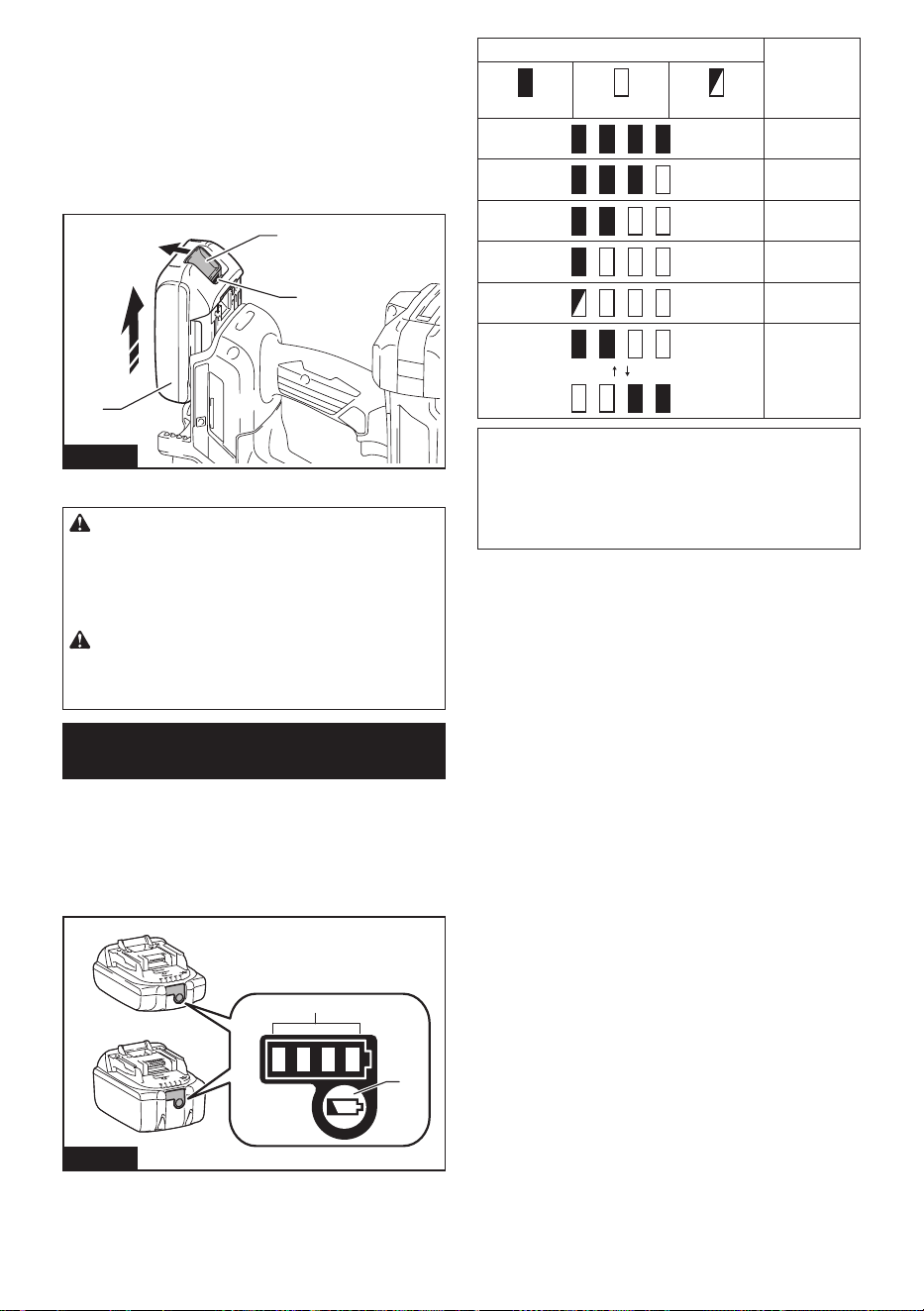
Para instalar el cartucho de batería, alinee la lengüeta
sobre el cartucho de batería con la ranura en la carcasa
y deslícela hasta su lugar. Insértelo por completo hasta
que se je en su lugar con un pequeño clic. Si puede
ver el indicador rojo como se muestra en la ilustración,
este no ha quedado asegurado por completo.
Para quitar el cartucho de batería, deslícelo de la herra-
mienta mientras desliza el botón sobre la parte delan-
tera del cartucho.
1
3
2
Fig.1
► 1. Indicador rojo 2. Botón 3. Cartucho de batería
PRECAUCIÓN: Introduzca siempre com-
pletamente el cartucho de batería hasta que
el indicador rojo no pueda verse. Si no, podría
accidentalmente salirse de la herramienta y caer al
suelo causando una lesión a usted o alguien a su
alrededor.
PRECAUCIÓN: No instale el cartucho de
batería a la fuerza. Si el cartucho no se desliza al
interior fácilmente, se debe a que no está siendo
insertado correctamente.
Indicación de la capacidad restante
de la batería
Únicamente para cartuchos de batería con el
indicador
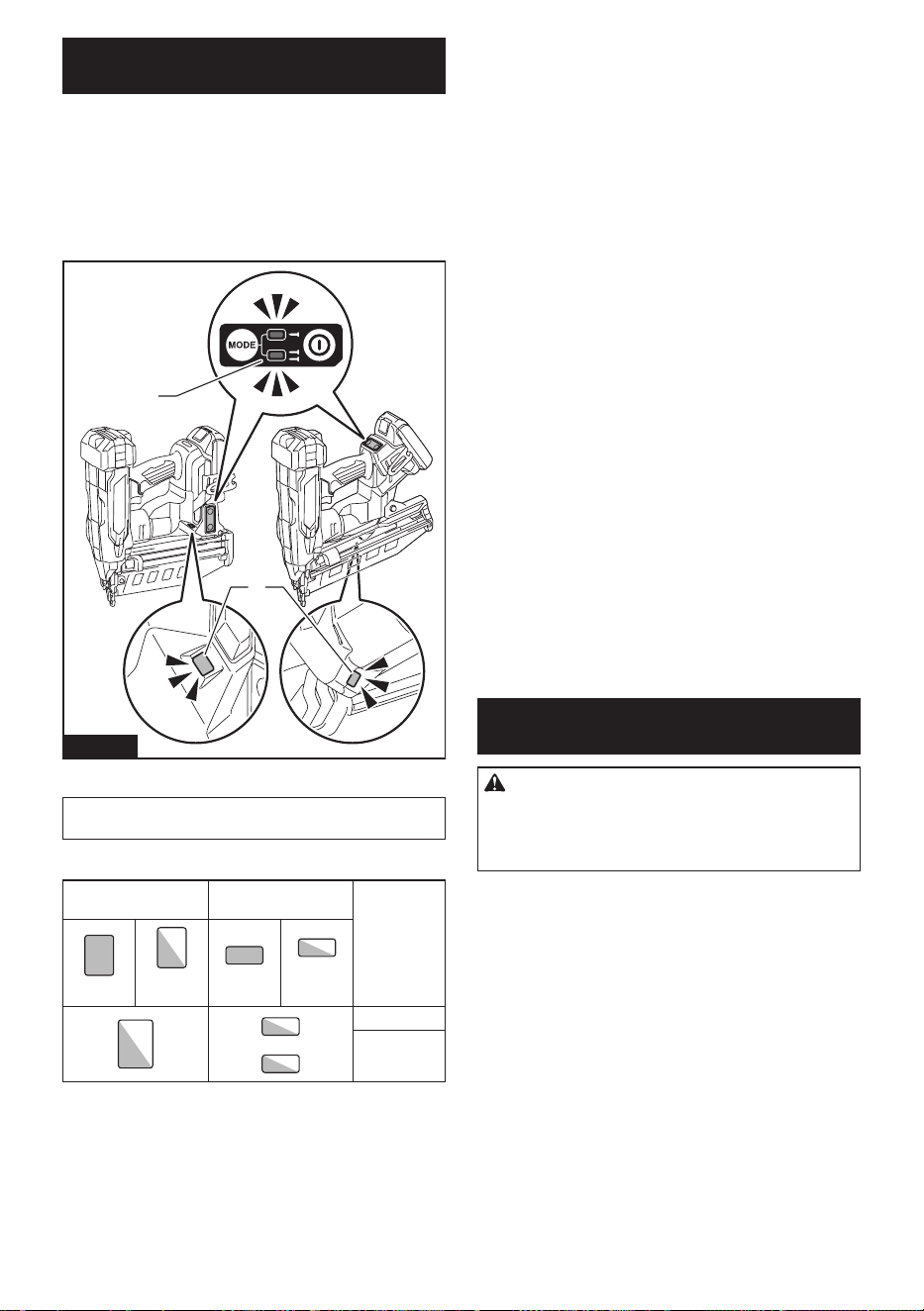
Oprima el botón de vericación en el cartucho de la
batería para que indique la capacidad restante de la
batería. Las luces indicadoras se iluminarán por algu-
nos segundos.
1
2
Fig.2
► 1. Luces indicadoras 2. Botón de vericación
Luces indicadoras Capacidad
restante
Iluminadas Apagadas Parpadeando
75% a 100%
50% a 75%
25% a 50%
0% a 25%
Cargar la
batería.
La batería
pudo haber
funcionado
mal.
NOTA: Dependiendo de las condiciones de uso y
la temperatura ambiente, la indicación podrá diferir
ligeramente de la capacidad real.
NOTA: La primera luz indicadora (extrema izquierda)
parpadeará cuando el sistema de protección de
batería esté en funcionamiento.
23 ESPAÑOL
Sistema de protección para la
herramienta/batería
La herramienta está equipada con un sistema de pro-
tección para la herramienta/batería. Este sistema corta
en forma automática el suministro de energía al motor
para prolongar la vida útil de la herramienta y la batería.
La herramienta se detendrá automáticamente durante
la operación si la herramienta o la batería se someten a
una de las siguientes condiciones. En algunas condicio-
nes, los indicadores pueden encenderse.
1
2
Fig.3
► 1. Luz indicadora 2. Indicador de encendido/ modo
NOTA: El diseño del interruptor varía según su región
de residencia.
Indicación de estado de protección
Luz indicadora
Indicador de encen-
dido/ modo
Estado
Encendida
Parpa-
deando
Encendida
Parpa-
deando
Sobrecarga
Sobrecalen-
tamiento
Protección contra sobrecarga
Cuando la herramienta/batería sean utilizadas de
una manera que cause que consuman una cantidad
inusualmente alta de corriente, la herramienta se
detendrá automáticamente. En este caso, apague la
herramienta y detenga la aplicación que causó que
la herramienta se sobrecargara. Luego encienda la
herramienta para reiniciarla.
Protección contra
sobrecalentamiento
Cuando la herramienta/batería se sobrecalienten, la
herramienta se detendrá automáticamente. En este
caso, permita que la herramienta se enfríe antes de
volver a encenderla.
Protección contra sobredescarga
Cuando la capacidad de la batería se reduce, la herra-
mienta se detiene automáticamente. Si el producto no
funciona incluso cuando los interruptores están siendo
operados, retire la o las baterías de la herramienta y
cárguela(s).
Protección contra otras causas
El sistema de protección también está diseñado para
otras causas que podrían dañar la herramienta, y per-
mite que la herramienta se detenga automáticamente.
Siga todos los pasos a continuación para eliminar las
causas cuando la herramienta se haya detenido tempo-
ralmente o se haya detenido durante el funcionamiento.
1. Asegúrese de que todos los interruptores estén en
la posición de apagado, y luego vuelva a encen-
der la herramienta para reiniciarla.
2. Cargue la(s) batería(s) o reemplácela(s) con
batería(s) recargada(s).
3. Deje que la herramienta y la(s) batería(s) se
enfríen.
Si no hay ninguna mejora al restaurar el sistema de
protección, comuníquese con su centro local de servi-
cio Makita.
Accionamiento del interruptor de
encendido
PRECAUCIÓN: Antes de insertar el cartucho
de batería en la herramienta, compruebe siem-
pre y cerciórese de que el gatillo interruptor se
acciona debidamente y que vuelve a la posición
“OFF” (apagado) cuando lo suelta.
24 ESPAÑOL
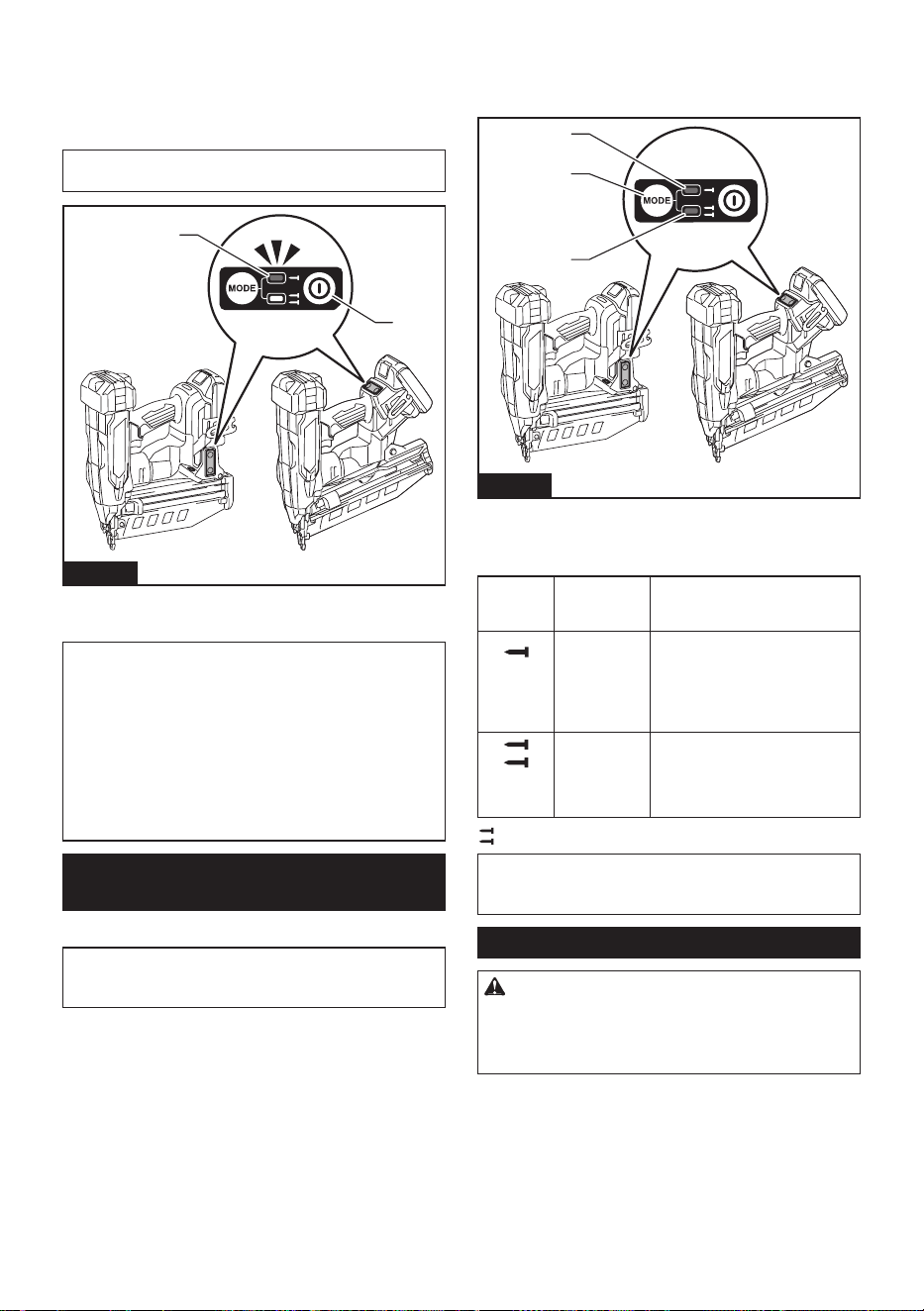
Para encender la herramienta, mantenga presionado el
botón de encendido principal hasta que se encienda el
indicador de encendido.
Para apagar la herramienta, mantenga oprimido el
botón de encendido principal hasta que el indicador de
energía se apague.
NOTA: El diseño del interruptor varía según su región
de residencia.
2
1
Fig.4
► 1. Botón de encendido principal 2. Indicador de
encendido
NOTA: La herramienta no se puede encender mien-
tras el gatillo interruptor o el elemento de contacto
están accionados. Asegúrese de soltar el gatillo
interruptor y el elemento de contacto antes de encen-
der la herramienta.
NOTA: La herramienta no se puede apagar mientras
se colocan clavos.
NOTA: El interruptor de alimentación principal se
apagará automáticamente si la herramienta se deja
desatendida durante un período prolongado.
Selección del modo de
accionamiento
Especíco del país
NOTA: En algunas regiones o países, solamente está
disponible un único modo de clavado. El diseño del
interruptor varía según su región de residencia.
La herramienta emplea un disparo de accionamiento
selectivo. Presione y mantenga presionado brevemente
el botón de cambio de modo de accionamiento para
seleccionar el modo de accionamiento deseado.
2
1
3
Fig.5
► 1. Botón de cambio de modo de accionamiento
2. Modo de accionamiento secuencial 3. Modo de
accionamiento por contacto
Interrup-
tor de
modo
Modo de
acciona-
miento
Característica
Acciona-
miento
secuencial
completo
Clave un clavo en una operación
secuencial. Adecuado para
colocar un clavo con cuidado
y precisión, y útil cuando se
requiere una colocación precisa
del clavo.
Acciona-
miento por
contacto
Está disponible tanto el clavado
individual como el continuo.
Preferido cuando se requiere
una colocación de clavos de alta
productividad.
: No disponible en algunas regiones y países.
NOTA: El modo de accionamiento no se puede cam-
biar a otro mientras esté accionado el gatillo interrup-
tor o el elemento de contacto.
Ajuste de la profundidad de clavado
ADVERTENCIA: Asegúrese siempre de que
sus dedos no estén colocados sobre el gatillo
interruptor o el elemento de contacto, y que el
cartucho de batería haya sido extraído antes de
ajustar la profundidad del clavado.
25 ESPAÑOL
Gire el ajustador de profundidad para ajustar la pro-
fundidad del clavado. La profundidad de clavado se
hace más honda a medida que se gira el ajustador de
profundidad en la dirección de A, y menos honda si se
gira en la dirección de B, tal como se ilustra en la gura.
El rango del ajuste de la profundidad del clavado es de
6,0 mm (1/4″).
A
B
1
Fig.6
► 1. Ajustador de profundidad
AVISO: No gire demasiado el ajustador de pro-
fundidad, porque el ajustador de profundidad
podría atascarse.
Ajuste la profundidad de clavado según sea necesario.
23
1
Fig.7
► 1. Demasiado profundo 2. Al ras 3. Demasiado
supercial
Encendido de la lámpara
PRECAUCIÓN: No mire a la luz ni vea a la
fuente de luz directamente.
Jale el gatillo interruptor o accione el elemento de con-
tacto para encender la lámpara. La lámpara continuará
encendida mientras se esté jalando el gatillo interruptor
o accionando el elemento de contacto. La lámpara se
apagará varios segundos después de haber soltado el
gatillo interruptor y el elemento de contacto.
3
3
1
2
1
2
Fig.8
► 1. Gatillo interruptor 2. Elemento de contacto 3. Luz
AVISO: Utilice un paño seco para quitar la sucie-
dad de la lente de la lámpara. Tenga cuidado de
no rayar la lente de la lámpara ya que la ilumina-
ción podría disminuir.
AVISO: Cuando la herramienta se sobrecaliente,
la lámpara parpadea. En este caso, suelte el
gatillo interruptor y el elemento de contacto, y
luego deje enfriar la herramienta/batería antes de
hacerla funcionar nuevamente.
NOTA: Es posible que la herramienta no clave si la
batería tiene poca energía, incluso cuando la lámpara
permanece encendida. En este caso, cargue el cartu-
cho de batería.
MONTAJE
PRECAUCIÓN: Asegúrese siempre de que la
herramienta esté apagada y el cartucho de batería
haya sido extraído antes de realizar cualquier
trabajo en la misma.
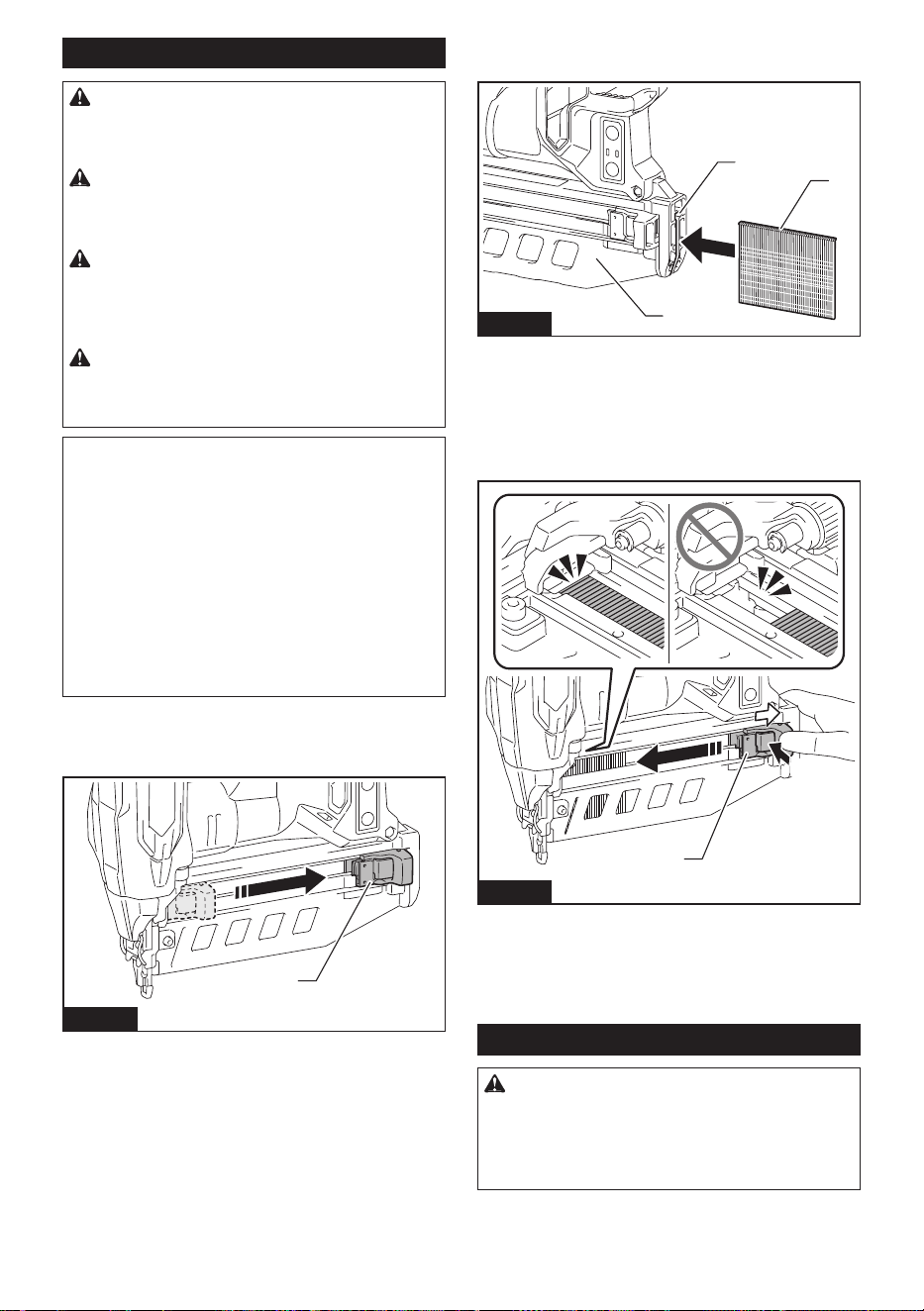
26 ESPAÑOL
Carga y descarga de los clavos
PRECAUCIÓN: Asegúrese siempre de que se
haya extraído el cartucho de batería antes de car-
gar los clavos. Un disparo accidental podría causar
lesiones personales y daños materiales.
PRECAUCIÓN: Tenga cuidado de no pillarse
los dedos con el cartucho. La palanca pulsadora
tiende a volver a su posición original cuando se
desbloquea.
PRECAUCIÓN: No deslice bruscamente el
empujador con clavos cargados en el cartucho.
La caída accidental de clavos, especialmente si se
está trabajando en lugares elevados, podría causar
lesiones personales.
PRECAUCIÓN: Cargue los clavos en la direc-
ción correcta. El cargarlos en la dirección incorrecta
podría causar el desgaste prematuro del impulsor y
daños a otras piezas.
AVISO: Deslice suavemente la palanca pulsa-
dora a lo largo del cartucho. Un contacto fuerte
entre la palanca pulsadora y la tira de clavos podría
dañar los clavos.
AVISO: Asegúrese de que la tira de clavos esté
correctamente alineada en el cartucho y asegu-
rada con la palanca pulsadora. De lo contrario,
intente cargarla de nuevo.
AVISO: No utilice clavos ni tiras de clavos defor-
mados. Utilice los clavos especicados en este
manual. El uso de clavos distintos a los especica-
dos podría provocar que los sujetadores se atasquen
y funcionen mal.
1. Retire el cartucho de batería.
2. Jale la palanca pulsadora hacia abajo hasta que
encaje en su sitio con un clic perceptible.
1
Fig.9
► 1. Palanca pulsadora
3. Inserte la tira de clavos en la ranura ubicada en la
parte inferior del cartucho.
1
2
3
Fig.10
► 1. Ranura 2. Tira de clavos 3. Cartucho
4. Tire y mantenga la palanca pulsadora hacia abajo,
y luego presione la parte "A" como se muestra en la
gura.
La palanca pulsadora está desbloqueada y sujeta los
clavos en el cartucho.
1
A
Fig.11
► 1. Palanca pulsadora
Para retirar los clavos, jale la palanca pulsadora hacia
abajo hasta que encaje en su sitio con un clic percepti-
ble. Extraiga los clavos de la ranura ubicada en la parte
inferior del cartucho.
Adaptador de boquilla
PRECAUCIÓN: Asegúrese siempre de que
sus dedos no estén colocados sobre el gatillo
interruptor o el elemento de contacto, retire todos
los clavos que queden en el cartucho y retire el
cartucho de batería antes de colocar o quitar el
adaptador de boquilla.
Al colocar clavos en materiales con supercies que se
dañan fácilmente, coloque el adaptador de boquilla en
el elemento de contacto.
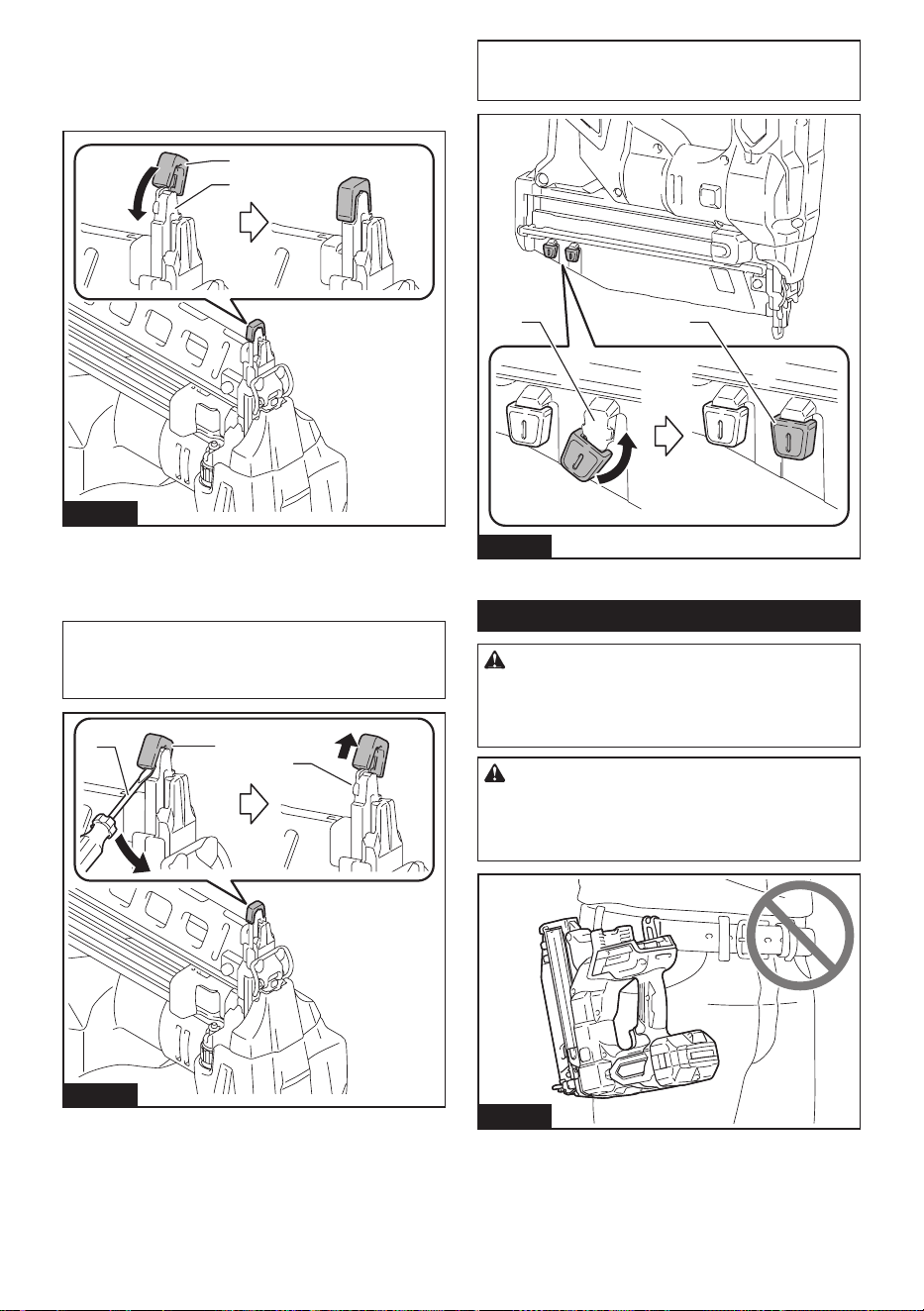
27 ESPAÑOL
Colocación del adaptador de punta
Coloque el adaptador de boquilla en el elemento de
contacto. Asegúrese de que el adaptador de boquilla
encaje perfectamente como se ilustra.
1
2
Fig.12
► 1. Adaptador de boquilla 2. Elemento de contacto
Separación del adaptador de punta
El adaptador de boquilla se puede quitar con la mano.
NOTA: Cuando no pueda quitar el adaptador de
boquilla con la mano, inserte el destornillador de
punta plana entre el adaptador de boquilla y el ele-
mento de contacto, y retire el adaptador de boquilla.
3
1
2
Fig.13
► 1. Adaptador de boquilla 2. Elemento de contacto
3. Destornillador de punta plana
NOTA: El adaptador de boquilla se puede guardar en
el soporte del cartucho como se muestra en la gura,
para evitar que se pierda.
2 1
Fig.14
► 1. Adaptador de boquilla 2. Soporte
Gancho
ADVERTENCIA: Tenga cuidado de no sobre-
cargar el gancho aplicando demasiada fuerza.
De lo contrario, la sobrecarga irregular podría oca-
sionar daños a la herramienta y provocar lesiones
personales.
PRECAUCIÓN: No cuelgue el gancho del
cinturón. Si la herramienta se cae debido a que
el gancho se soltó accidentalmente, podría causar
un disparo no intencional y ocasionar lesiones
personales.
Fig.15
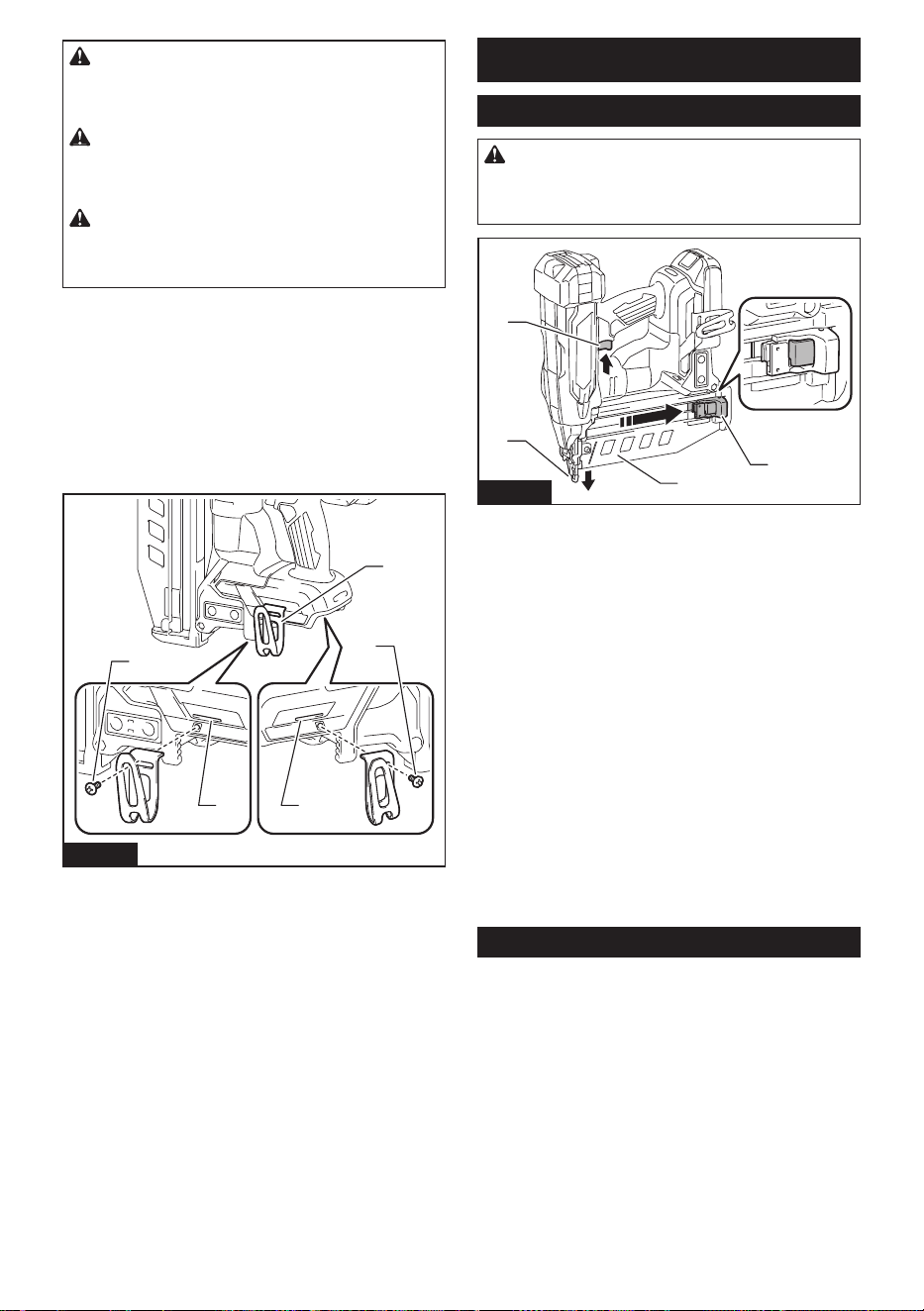
28 ESPAÑOL
PRECAUCIÓN: Cuando instale el gancho,
siempre asegúrelo rmemente con el tornillo. De
lo contrario, el gancho podría desprenderse de la
herramienta y ocasionar lesiones personales.
PRECAUCIÓN: Utilice las piezas para colgar
o montar únicamente para los nes previstos. El
uso para un n no previsto podría provocar acciden-
tes o lesiones personales.
PRECAUCIÓN: Asegúrese de colgar la
herramienta de forma segura antes de soltarla. Un
enganche insuciente o desequilibrado podría provo-
car caídas y lesiones.
El gancho resulta útil para colgar temporalmente la
herramienta. Cuelgue la herramienta en un estante
para herramientas, en un riel o en la pared con el
gancho.
El gancho puede instalarse en ambos lados de la
herramienta.
Para instalar el gancho, insértelo en una ranura en la
carcasa de la herramienta en cualquier lado, y luego
fíjelo con el tornillo como se muestra en la gura. Para
quitarlo, aoje el tornillo y después retire el gancho.
2
3
1 1
3
Fig.16
► 1. Ranura 2. Gancho 3. Tornillo
OPERACIÓN
Prueba del sistema de seguridad
ADVERTENCIA: Asegúrese de que todos los
sistemas de seguridad estén funcionando correc-
tamente antes de la operación. El no hacerlo
podría causar lesiones personales.
4
3
1
2
Fig.17
► 1. Gatillo interruptor 2. Elemento de contacto
3. Cartucho 4. Palanca pulsadora
Pruebe el sistema de seguridad de la siguiente manera
para detectar posibles fallas o mal funcionamiento
antes de operarlo.
1. Retire el cartucho de batería de la herramienta. A
continuación, descargue todos los clavos que quedan
en el cartucho.
2. Instale el cartucho de batería en su lugar, y
encienda la herramienta.
3. Jale el gatillo interruptor sin que el elemento de
contacto toque el material.
4. Jale la palanca pulsadora hacia abajo y mantén-
gala en su lugar. Luego, coloque el elemento de con-
tacto contra el material sin jalar el gatillo interruptor.
Si la herramienta funciona en el caso de los pasos 3
o 4 descritos anteriormente, el sistema de seguridad
no está funcionando correctamente. Deje de utilizar la
herramienta inmediatamente y pregunte en el centro de
servicio de Makita de su localidad.
Manejo de los clavos
Clavos
Manipule los clavos y su caja con cuidado. Si los clavos
se han manipulado con brusquedad, puede que hayan
quedado deformados o que las tiras se hayan partido,
ocasionando una alimentación de clavos deciente.
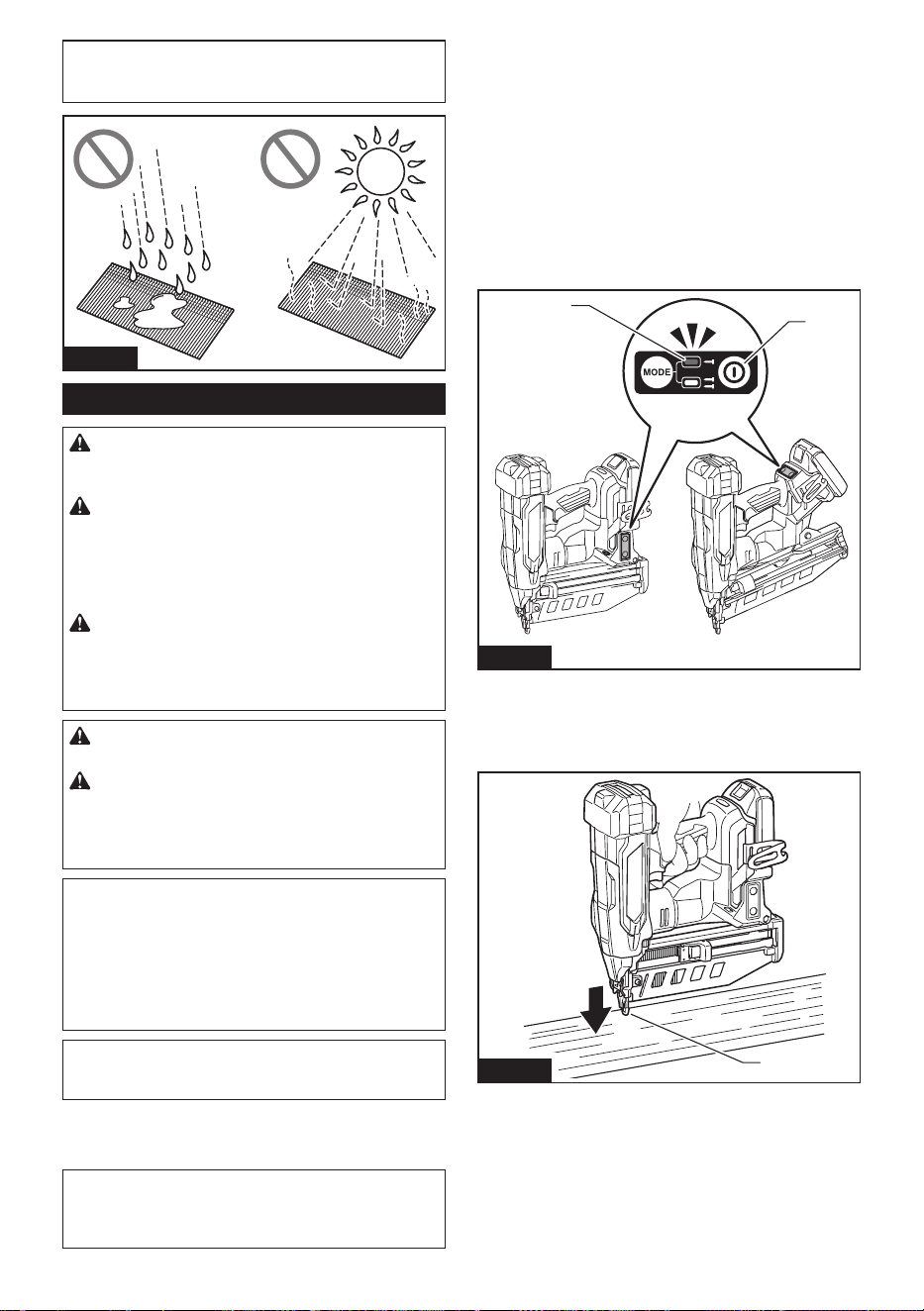
29 ESPAÑOL
AVISO: Evite almacenar los clavos en lugares
muy húmedos o calientes o expuestos a la luz
directa del sol.
Fig.18
Clavado de los clavos
ADVERTENCIA: Mantenga la cara alejada de
la herramienta cuando la utilice. De lo contrario,
podría ocasionar lesiones.
ADVERTENCIA: No utilice esta clavadora
para clavar cables eléctricos. Esta herramienta
no está diseñada para la instalación de cableado
eléctrico y podría dañar el aislamiento de los cables
eléctricos, originando en consecuencia peligros de
descarga eléctrica o incendio.
ADVERTENCIA: Mantenga el elemento de
contacto colocado rmemente sobre el material
hasta que el clavo se haya clavado por completo.
Un disparo no intencional podría causar lesiones
personales.
PRECAUCIÓN: Sujete rmemente la herra-
mienta durante la operación.
PRECAUCIÓN: No clave clavos en materia-
les duros como metales o similares. Si el clavo
no puede penetrar en el material, la herramienta
podría experimentar un fuerte retroceso y resultar en
lesiones.
AVISO: La herramienta no comenzará a apretar
después de cinco segundos sin operación del
interruptor mientras se esté accionando úni-
camente el gatillo interruptor o el elemento de
contacto. Suelte el gatillo interruptor o extraiga
el elemento de contacto de la pieza de trabajo, y
luego vuelva a colocar la herramienta en su lugar
para reiniciar la jación.
NOTA: Si la herramienta se acciona durante mucho
tiempo de manera continua, el aire de escape se
calentará debido al calor procedente del motor.
La herramienta emplea dos acciones de clavado:
accionamiento secuencial completo y accionamiento
por contacto.
NOTA: En algunas regiones o países, solamente está
disponible un único modo de clavado (accionamiento
secuencial completo). El diseño del interruptor varía
según su región de residencia.
Accionamiento secuencial completo
En este modo, usted puede insertar un clavo mediante
una operación secuencial.
Es necesario activar un contacto de la pieza de trabajo
y luego un gatillo en una secuencia especíca para
accionar la herramienta. Suelte y vuelva a activar los
controles del interruptor en la misma secuencia para
continuar colocando los clavos.
1. Mantenga oprimido el botón de encendido princi-
pal para encender la herramienta.
2. Asegúrese de que la luz indicadora del modo de
accionamiento secuencial se encienda.
2
1
Fig.19
► 1. Botón de encendido principal 2. Luz indicadora
de modo de accionamiento secuencial
3. Coloque el elemento de contacto horizontalmente
sobre el material.
1
Fig.20
► 1. Elemento de contacto
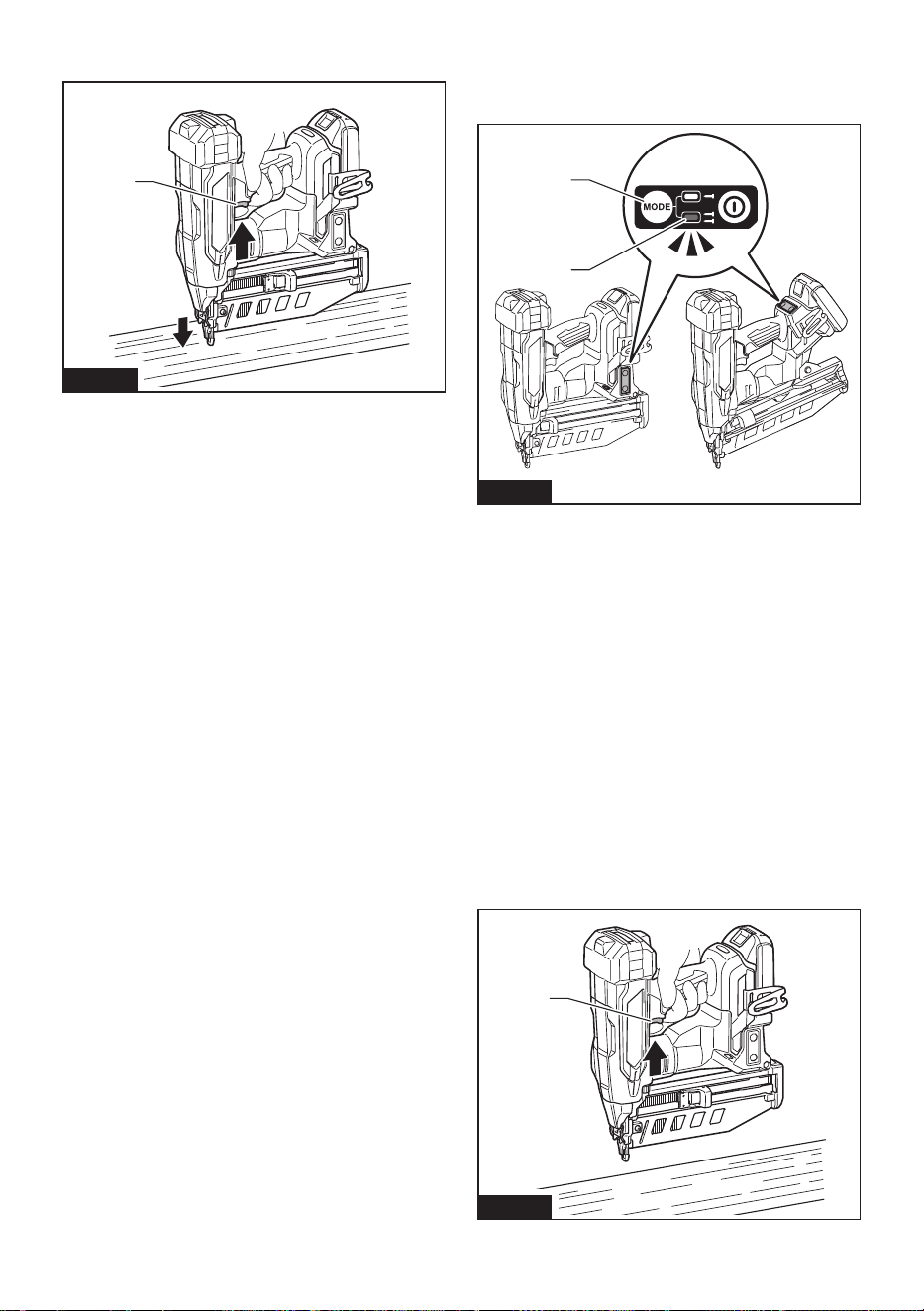
30 ESPAÑOL
4. Jale el gatillo interruptor completamente para
clavar un clavo.
1
Fig.21
► 1. Gatillo interruptor
5. Suelte el dedo del gatillo interruptor. Luego
levante el elemento de contacto del material.
Para clavar el siguiente clavo, repita los pasos 3 a 5 en
la misma secuencia.
Accionamiento por contacto
Especíco del país
En este modo, puede elegir entre clavado continuo o
individual siguiendo cualquier secuencia de operación
del gatillo.
Se puede activar un contacto de pieza de trabajo y un
gatillo en cualquier secuencia para accionar la herra-
mienta. Libere y vuelva a activar el contacto de la pieza
de trabajo para impulsar los clavos de forma continua.
Para un clavado individual
1. Mantenga oprimido el botón de encendido princi-
pal para encender la herramienta.
2. Presione y mantenga presionado brevemente
el botón de cambio de modo de accionamiento para
seleccionar el modo de accionamiento por contacto.
La lámpara del modo de accionamiento por contacto se ilumina.
2
1
Fig.22
►
1. Botón de cambio de modo de accionamiento 2. Luz
indicadora de modo de accionamiento por contacto
3. Coloque el elemento de contacto horizontalmente
sobre el material.
4. Jale el gatillo interruptor completamente para
clavar un clavo.
5. Suelte el dedo del gatillo interruptor. Luego
levante el elemento de contacto del material.
Para clavar el siguiente clavo, repita los pasos 3 a 5 en
la misma secuencia.
Para un clavado continuo
1. Mantenga oprimido el botón de encendido princi-
pal para encender la herramienta.
2. Presione y mantenga presionado brevemente
el botón de cambio de modo de accionamiento para
seleccionar el modo de accionamiento por contacto.
La lámpara del modo de accionamiento por contacto se ilumina.
3. Jale el gatillo interruptor.
1
Fig.23
► 1. Gatillo interruptor
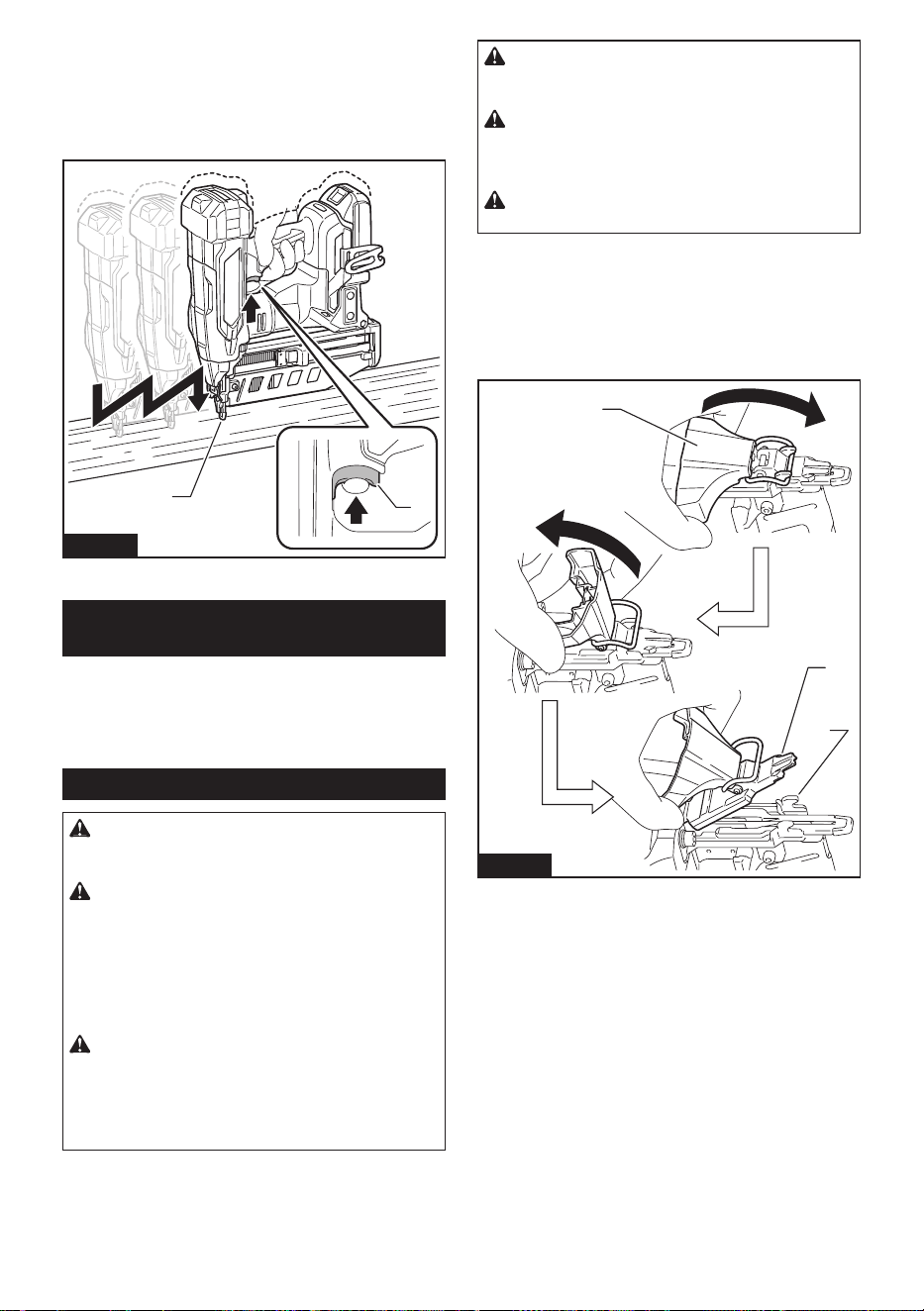
31 ESPAÑOL
4. Coloque el elemento de contacto plano sobre el
material para colocar un clavo.
5. Mueva la herramienta a las siguientes áreas con
el gatillo interruptor presionado, y coloque el elemento
de contacto extendido sobre el material para colocar los
siguientes clavos.
1
2
Fig.24
► 1. Gatillo interruptor 2. Elemento de contacto
Mecanismo contra el disparo en
seco
Cuando los clavos restantes en el cartucho disminuyen
a 6 - 9 piezas para el modelo XNB05 / 6 - 9 piezas para
el modelo XNB06, el interruptor ya no puede accionarse
y la herramienta deja de clavar. Inserte una nueva tira
de clavos en el cartucho antes de reiniciar la operación.
Extracción de clavos atascados
ADVERTENCIA: Asegúrese siempre de qui-
tar el cartucho de batería y los clavos antes de
quitar los clavos atascados.
ADVERTENCIA: No presione con fuerza el
impulsor de clavos. No golpee el impulsor de
clavos ni los clavos con ninguna herramienta
manual para eliminar atascos. Tenga en cuenta
que la herramienta se carga con aire comprimido y
la presión se mantiene en el interior. No seguir las
precauciones de seguridad del manual puede provo-
car lesiones graves.
ADVERTENCIA: Nunca apunte la herra-
mienta hacia usted mismo ni hacia otras perso-
nas cercanas al eliminar atascos. De lo contrario,
podría haber riesgo de lesiones por disparo fallido, ya
que la herramienta se carga con aire comprimido en
una cámara sellada de fábrica.
PRECAUCIÓN: No retire los clavos atasca-
dos con las manos desnudas. El clavo podría
saltar del cartucho y provocar lesiones.
PRECAUCIÓN: Para abordar atascos fre-
cuentes o situaciones de atascos difíciles de
eliminar, consulte con su Centro de Servicio
Makita local.
PRECAUCIÓN: Asegúrese de bloquear el
seguro después de extraer los clavos atascados.
Cuando se produzca un atasco de clavo, observe
atentamente la unidad de alimentación y clavado de
clavos. Los atascos tienden a ser causados por clavos
encajados entre el impulsor de clavos y la guía inferior
del impulsor.
Para eliminar un atasco, suelte el seguro y abra la guía
del impulsor, luego retire los clavos atascados.
3
2
1
Fig.25
► 1. Seguro 2. Guía inferior del impulsor 3. Guía del
impulsor
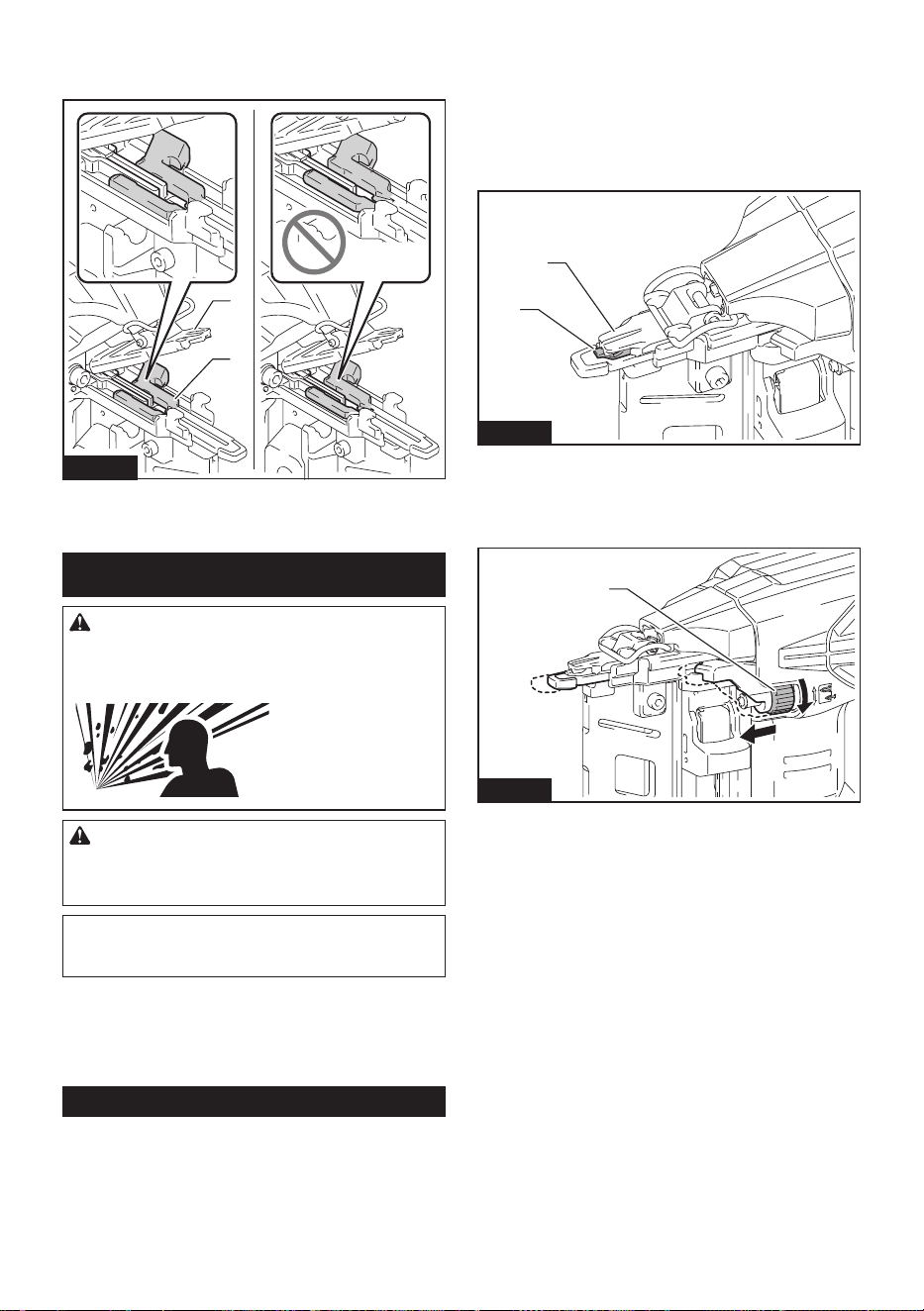
32 ESPAÑOL
Para bloquear el seguro después de eliminar un atasco,
regrese el elemento de contacto a su posición original y
cierre la guía del impulsor, luego bloquee el seguro.
1
2
Fig.26
► 1. Elemento de contacto 2. Guía del impulsor
MANTENIMIENTO
ADVERTENCIA: No desensamble esta herra-
mienta. Esta herramienta está sellada con aire com-
primido y su desmontaje podría provocar lesiones
graves.
PRECAUCIÓN: Asegúrese siempre de que la
herramienta esté apagada y el cartucho de batería
extraído antes de intentar realizar una inspección
o mantenimiento.
AVISO: Nunca use gasolina, bencina, diluyente
(tíner), alcohol o sustancias similares. Puede que
esto ocasione grietas o descoloramiento.
Para mantener la SEGURIDAD y FIABILIDAD del pro-
ducto, las reparaciones, y cualquier otra tarea de man-
tenimiento o ajuste deberán ser realizadas en centros
de servicio autorizados o de fábrica Makita, empleando
siempre repuestos Makita.
Iniciar la posición para inserción
Es posible que el impulsor no esté posicionado correc-
tamente detrás del clavo que se va a accionar luego de
un atasco del clavo o en condiciones de batería baja.
Realice siempre los pasos de inicialización antes de
reiniciar la operación.
1. Retire el cartucho de batería de la herramienta.
2. Saque todos los clavos que quedan en el
cartucho.
3. Observe la posición del impulsor.
Si ve que la punta del impulsor se sale de la guía del
impulsor, el elemento de contacto no se puede accionar
correctamente durante la inicialización.
1
2
Fig.27
► 1. Impulsor 2. Guía del impulsor
Gire el ajustador de profundidad para establecerlo en la
posición más supercial para que el elemento de con-
tacto funcione correctamente.
1
Fig.28
► 1. Ajustador de profundidad
4. Instale el cartucho de batería en su lugar, y
encienda la herramienta.
5. Jale la palanca pulsadora hacia abajo y mantén-
gala en su lugar. Luego, coloque el elemento de con-
tacto contra el material que puede dañarse.
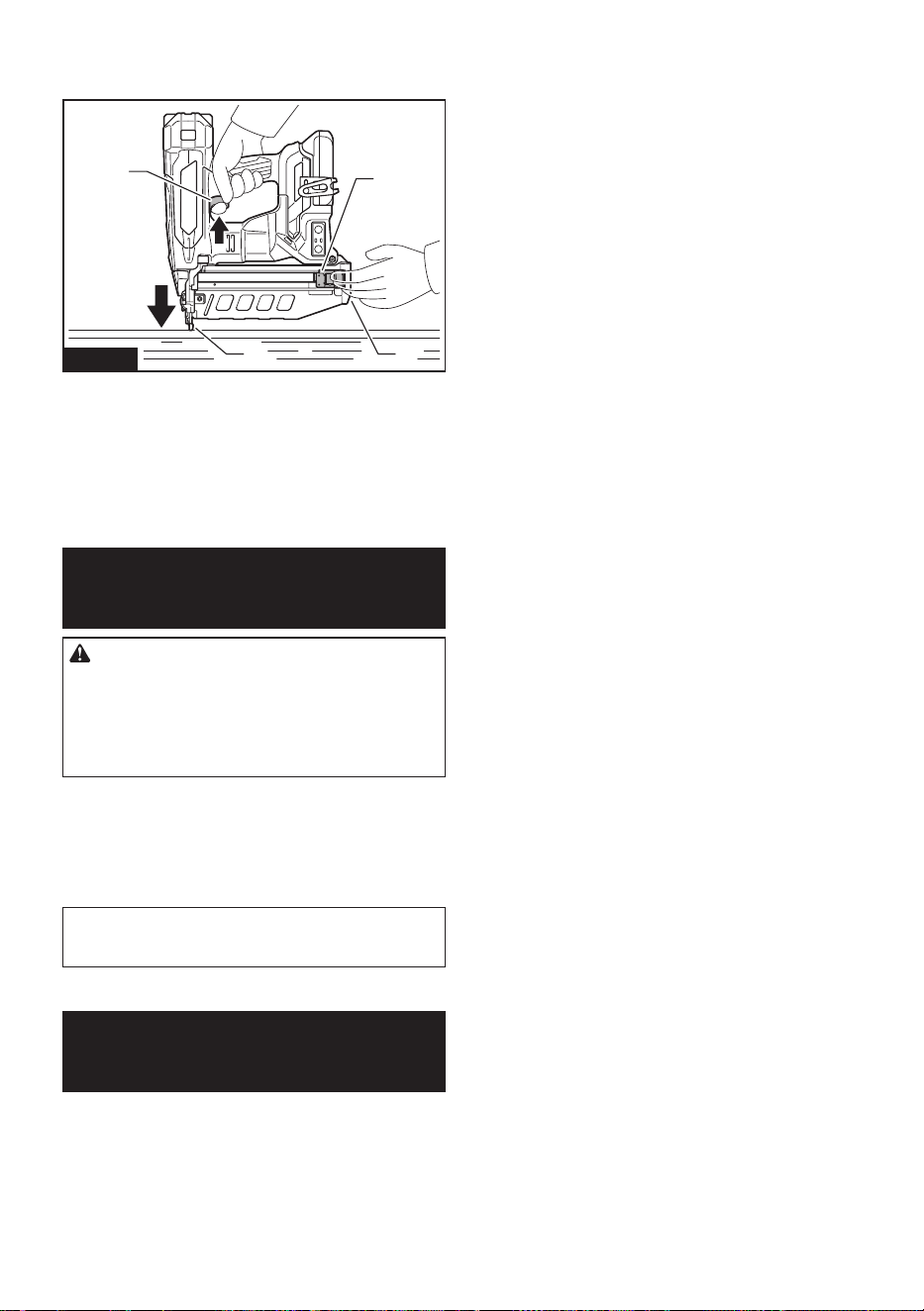
33
6. Tire completamente del gatillo interruptor, con el
elemento de contacto accionado, para restablecer la
posición del impulsor.
1
2
4
3
Fig.29
► 1. Palanca pulsadora 2. Ranura del cartucho
3. Elemento de contacto 4. Gatillo interruptor
La posición del impulsor se iniciará correctamente.
7. Retire el cartucho de batería de la herramienta.
Recargue los clavos en el cartucho. Inserte el cartucho
de batería de vuelta en la herramienta.
ACCESORIOS
OPCIONALES
PRECAUCIÓN: Estos accesorios o aditamen-
tos están recomendados para utilizarse con su
herramienta Makita especicada en este manual.
El empleo de cualquier otro accesorio o aditamento
puede conllevar el riesgo de lesiones personales.
Utilice los accesorios o aditamentos solamente para
su n establecido.
Si necesita cualquier ayuda para más detalles en
relación con estos accesorios, pregunte a su centro de
servicio local Makita.
• Clavos (el clavo con acabado en ángulo de calibre
16 no está disponible).
• Batería y cargador originales de Makita
NOTA: Algunos de los artículos en la lista pueden
incluirse en el paquete de la herramienta como acce-
sorios estándar. Éstos pueden variar de país a país.
GARANTÍA LIMITADA DE
MAKITA
Ésta Garantía no aplica para México
Consulte la hoja de la garantía anexa para ver los
términos más vigentes de la garantía aplicable a este
producto. En caso de no disponer de esta hoja de
garantía anexa, consulte los detalles sobre la garantía
descritos en el sitio web de su país respectivo indicado
a continuación.
Estados Unidos de América: www.makitatools.com
Canadá: www.makita.ca
Otros países: www.makita.com
ESPAÑOL

34

35

Some dust created by power sanding, sawing, grinding, drilling, and other
construction activities contains chemicals known to the State of California
to cause cancer, birth defects or other reproductive harm. Some examples
of these chemicals are:
• lead from lead-based paints,
• crystalline silica from bricks and cement and other masonry products, and
• arsenic and chromium from chemically-treated lumber.
Your risk from these exposures varies, depending on how often you do this
type of work. To reduce your exposure to these chemicals: work in a well
ventilated area, and work with approved safety equipment, such as those
dust masks that are specially designed to filter out microscopic particles.
WARNING
< USA only >
ADVERTENCIA
Algunos polvos creados por el lijado, aserrado, esmerilado, taladrado y
otras actividades de la construcción contienen sustancias químicas
reconocidas por el Estado de California como causantes de cáncer, defectos
de nacimiento y otros peligros de reproducción. Algunos ejemplos de estos
productos químicos son:
• plomo de pinturas a base de plomo,
• sílice cristalino de ladrillos y cemento y otros productos de albañilería, y
• arsénico y cromo de maderas tratadas químicamente.
El riesgo al que se expone varía, dependiendo de la frecuencia con la que
realice este tipo de trabajo. Para reducir la exposición a estos productos
químicos: trabaje en un área bien ventilada y póngase el equipo de seguridad
indicado, tal como las máscaras contra polvo que están especialmente
diseñadas para filtrar partículas microscópicas.
< Sólo en los Estados Unidos >
Makita Corporation
3-11-8, Sumiyoshi-cho,
Anjo, Aichi 446-8502 Japan
www.makita.com
885A94-947
XNB05-1
EN, ESMX
20241211