1
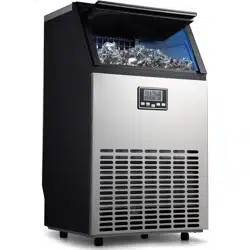
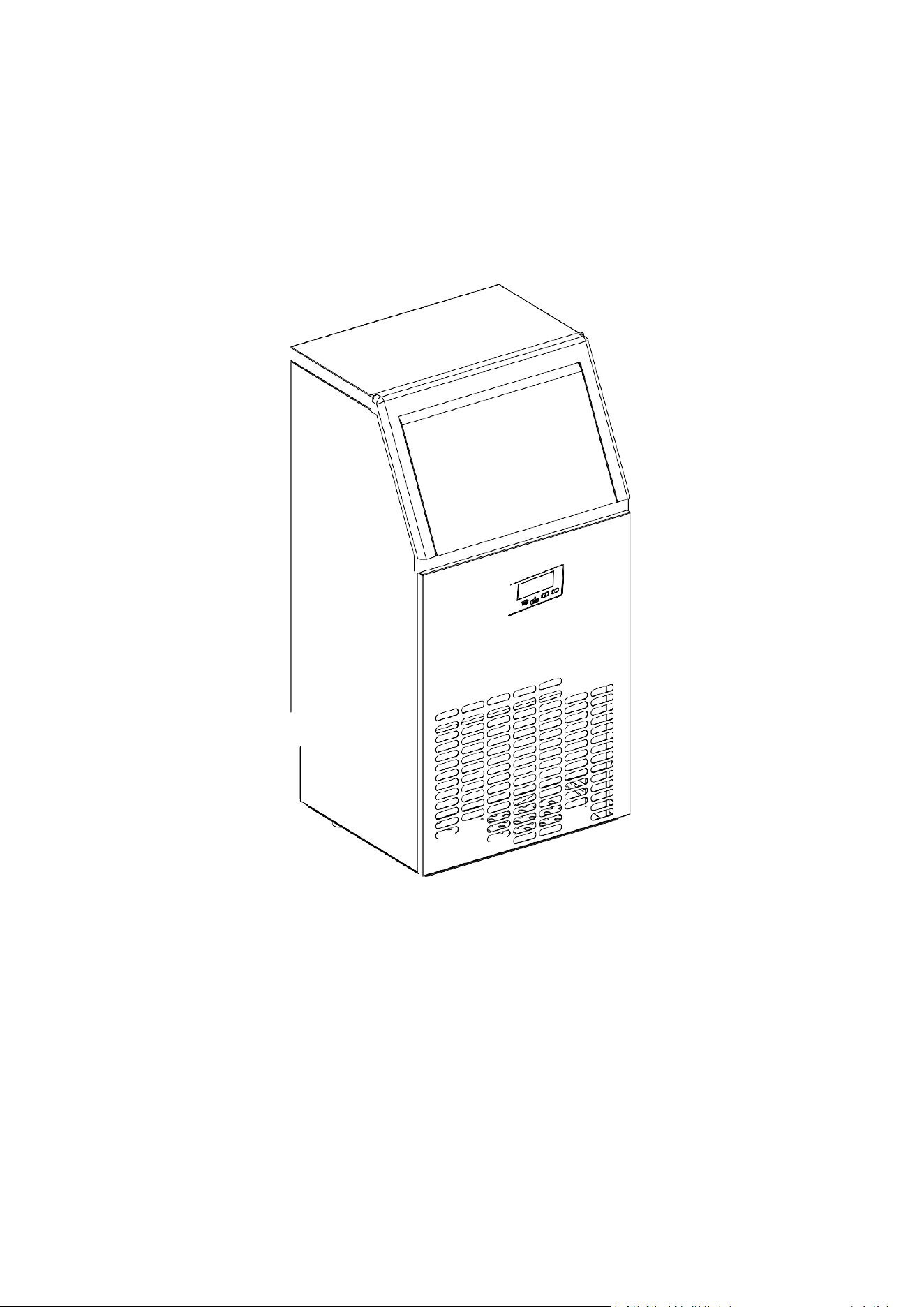
Ice Machine CIM 2
User Manual
Model: HZB-65
To ensure proper use of this equipment and your safety, please read the following instructions
carefully before operating this equipment.

1
CONTENTS
Specification ........................................................................................................................................5
Basic Information ................................................................................................................................6
Main Structure ............................................................................................................................6
Ice Making and Water Tank Parts...............................................................................................7
Operation Panel .......................................................................................................................... 8
Installation Steps.................................................................................................................................9
Unpack the Ice Machine ............................................................................................................. 9
Installation Location Requirements ............................................................................................9
Electrical Requirements and Connections ................................................................................10
Ice Machine Water Pipe Connection ........................................................................................11
Instructions ....................................................................................................................................... 13
Clean the Ice Machine Before First Use................................................................................... 13
Operation of the Ice Making Process ....................................................................................... 14
Automatic Self-Cleaning Program............................................................................................ 15
Timer Setting Operation........................................................................................................... 16
Drain..........................................................................................................................................17
Normal Sound........................................................................................................................... 17
Preparing Your Ice Machine for Long-term Storage.................................................................18
Cleaning and Maintenance.......................................................................................................18
General Troubleshooting.................................................................................................................. 24
Dispose of the Product Properly .......................................................................................................25
Warranty........................................................................................................................................... 26
Warranty Terms.........................................................................................................................26
Warranty Exclusions ..................................................................................................................26
Get Service ................................................................................................................................26
After-Sales Information............................................................................................................ 27

2
Important Safety
When using electrical appliances, basic safety precautions should be followed to reduce the
risk of fire, electric shock, and personal or property injury. Please read all instruction manuals
before using any equipment.
Use this equipment only for its intended use as described in this user manual.
Before using this ice machine, it must be properly installed in accordance with the installation
instructions.
The device must be placed so that the plug can be easily accessed. Do not run wiring on carpet or
other insulation. Do not cover the wires, keep the wires away from the active area, and do not
submerge them in water. Do not plug other appliances into the same outlet, and make sure the
plug is fully inserted into the outlet.
We do not recommend using an extension cord as it may overheat and become a fire hazard. If
you must use an extension cord, use one with a minimum size of 14AWG and a power rating of at
least 1875 watts.
If the power cord is damaged, it must be replaced by the manufacturer or its service agent or
similarly qualified person to avoid a hazard.
When not in use for a long period of time, please unplug the power plug from the power outlet.
Unplug or disconnect the power supply before cleaning or servicing the appliance. NOTE: If for
any reason this product requires service, we strongly recommend that it be done by a certified
technician.
Never unplug the unit by pulling on the power cord. Be sure to hold the plug firmly and pull
straight out of the socket.

3
Do not use this unit outdoors. Avoid exposing the unit to direct sunlight. Ensure that there is at
least 6 inches of space between the back of the unit and the wall, and keep the front side open.
Keep vents in appliance enclosures or built-in structures unobstructed.
Do not overturn the machine or it will make unusual noises and make ice cubes of unusual size.
In serious cases, this may cause the machine to leak.
If the device was brought in from outside during the winter, allow it to warm up for a few hours
to room temperature before plugging it in.
Do not use liquids other than water to make ice cubes. Do not clean the ice machine with
flammable liquids. These fumes can cause a fire or explosion.
WARNING: This equipment must be grounded. Use a suitable power supply according to the
nameplate.
WARNING: Keep vents in the device enclosure or built-in structure clear of obstructions.
WARNING: Do not damage the refrigerant circuit.
WARNING: This device is not intended for use by persons (including children) with reduced
physical, sensory or mental capabilities or lack of experience and knowledge, unless their
use is being supervised or directed by those responsible for their safety.
WARNING: Children should be supervised to ensure they do not play with the device.
WARNING: This equipment must be grounded. Use a 110-120V/60Hz grounded power
supply.
WARNING: Do not store explosive substances, such as aerosol cans with flammable
propellants, in this device.
4
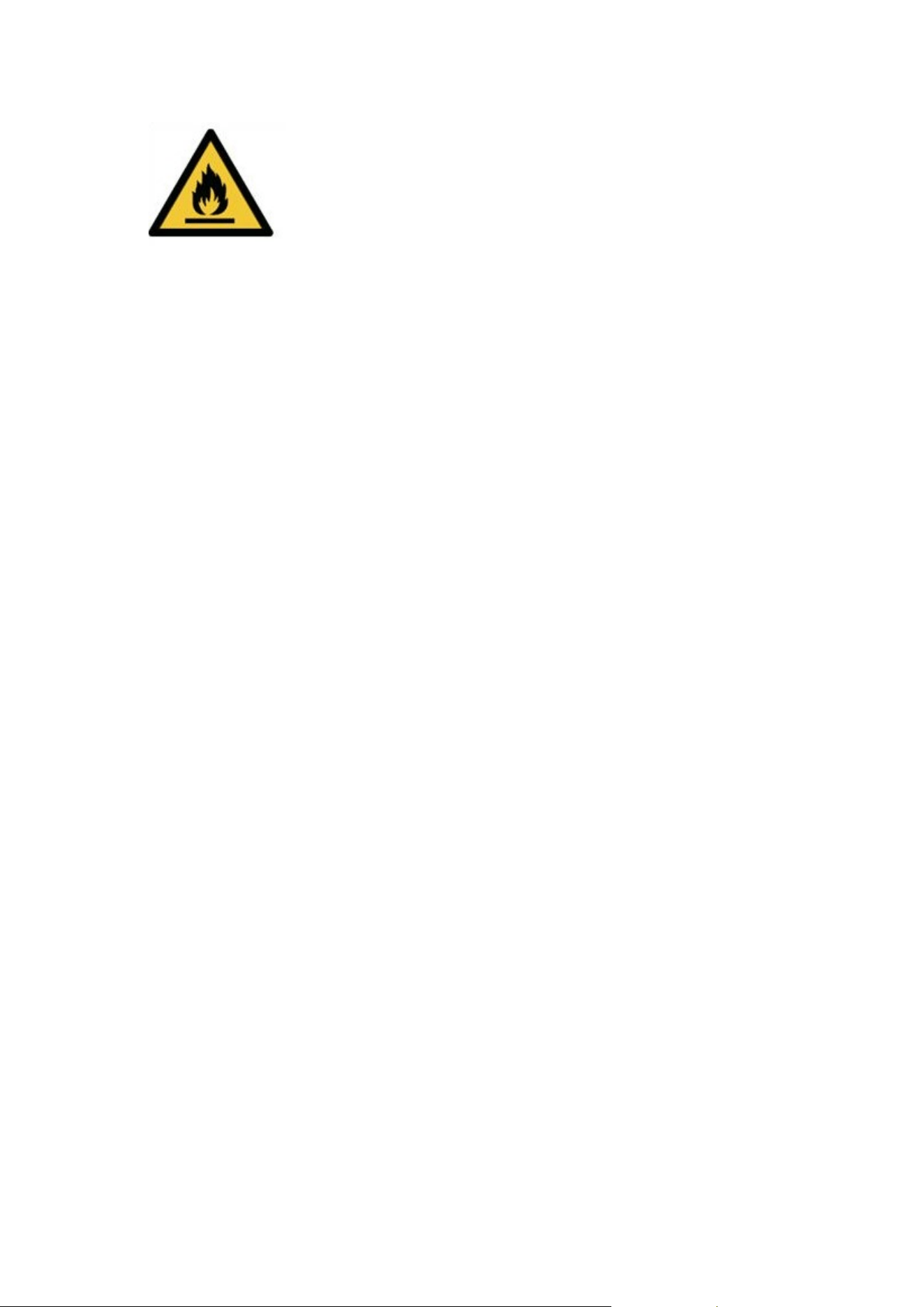
DANGER – Risk of fire or explosion due to the use of flammable
refrigerants. Do not use a mechanical device to defrost the ice
machine. Do not puncture the refrigerant pipes.
Caution - Risk of fire or explosion due to the use of flammable refrigerants. Please consult
the service manual/user guide before attempting to install or service this product. All safety
precautions must be followed.
Caution - Risk of fire or explosion. Dispose of property in accordance with federal or local
regulations due to the use of flammable refrigerants.
CAUTION - Perforated refrigerant piping creates a risk of fire or explosion; follow operating
instructions carefully due to the use of flammable refrigerants.
Ice machines should be installed in accordance with the ASHRAE 15 Refrigeration System
Safety Standard. Ice machines should not be installed in hallways or hallways of public
buildings.
If there is a problem with the unit that requires repair, similar parts should be replaced and
repaired by a factory-authorized repair technician to minimize the risk of possible fire due to
incorrect parts or incorrect repairs.
Important:
The wires in this power lead are colored according to the following code:
Green or green with yellow bar: Ground wire
White: Neutral wire
Black: Live wire
To avoid hazards due to device instability, it must be placed on a flat surface.
5
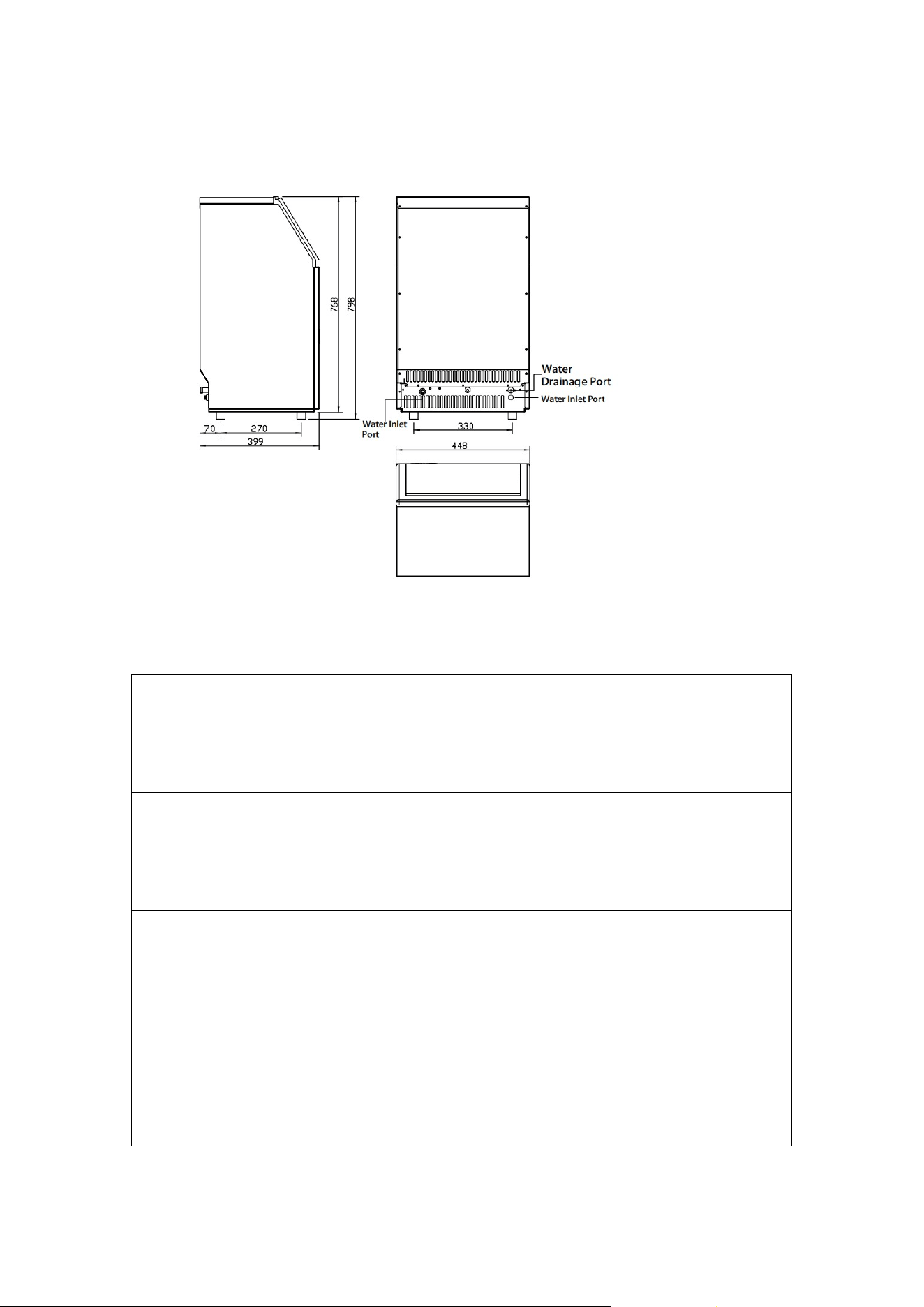
Specification
Model HZB-65
Supply voltage 1 PH, 110-120V/60Hz
Ice making rated current 2.7A/3.0A
Size/inches 17.6 x 15.7 x 31.4
Net weight 62 lbs
Ice making capacity 150 lbs/24 hours
Refrigerant capacity R290, 3.17 Oz/90g
Foaming agent C5H10
Maximum ice storage 33 lbs
Working conditions Room temperature 50-90 degrees Fahrenheit
Water temperature 41-77 degrees Fahrenheit
Water pressure 6-87 psi
Note: Tested at 70°F room temperature and 50°F water temperature.
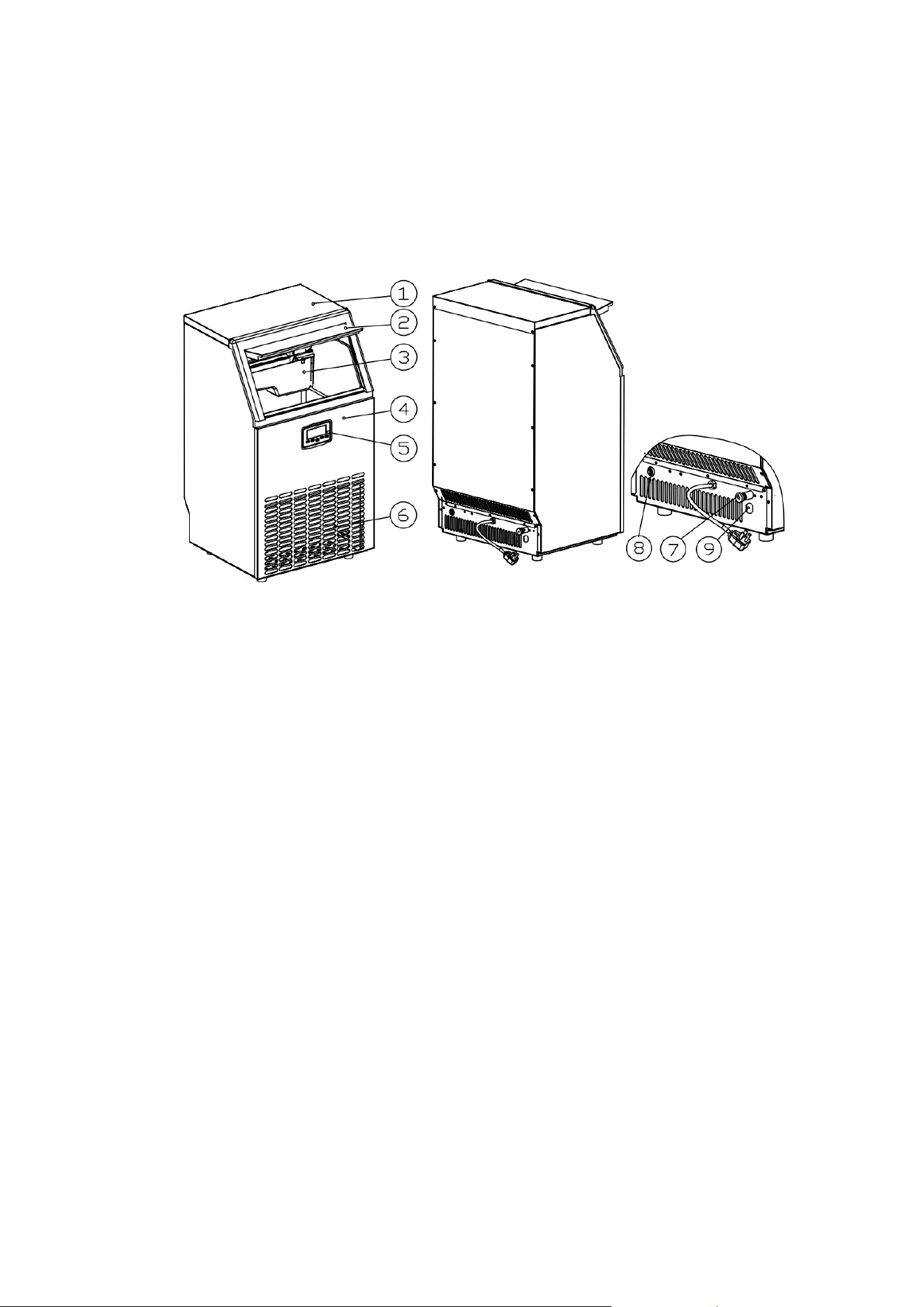
Figure 1
6
Basic Information
Main Structure
1. Top cover
2. Ice door
3. Ice making and its water tank components: including ice making evaporator, water tank,
water pump and some detection parts
4. Front panel
5. Operation panel
6. Air outlet: The air must be well circulated; the hot air will be blown out when the equipment
is running.
7. Drainage port: For normal use, plug it in with a cover. When it is time to drain, remove the
lid and connect the white drain
8. Water supply inlet: Used to connect the water supply pipe
9. Water inlet for bottled water: Used for places where there is no water supply pipe but
bottled water
Accessories:
2 meters long white drain pipe
faucet quick connector
6.35mm diameter white water supply pipe (3m long)
transparent silicone water supply pipe
Figure 2
7
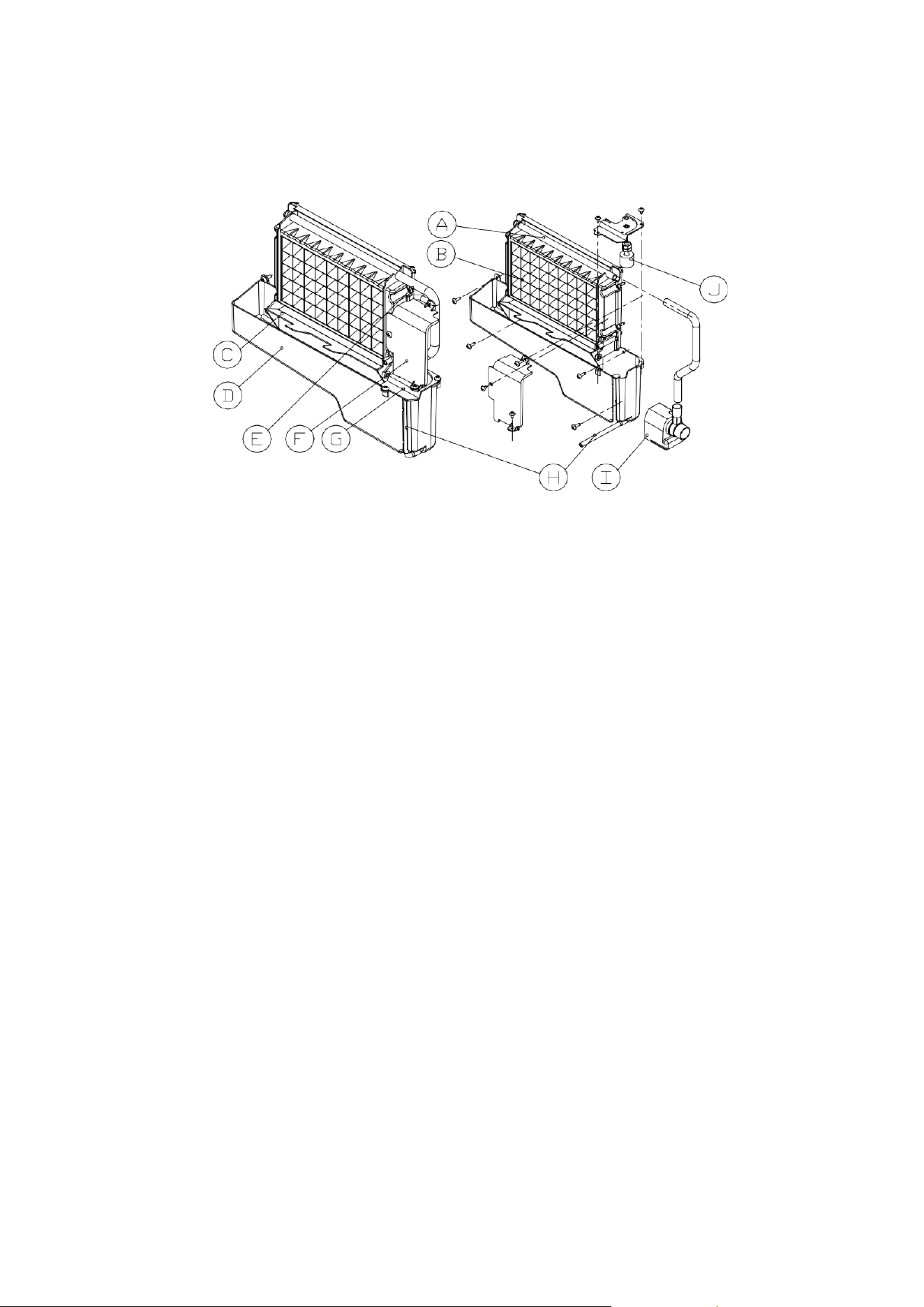
Ice Making and Water Tank Parts
A. Water divider: There are nine small holes from which water will flow. If no water flows out, it
can be disassembled for cleaning
B. Evaporator (ice making module)
C. Ice full detection board: used to detect whether the inner cabinet is full of ice. Check if the
ice making process is completed
D. Water tank
E. Water supply pipe
F. Cover plate on the right side of the evaporator
G. Water level switch mounting plate
H. Water tank drain pipe: When making ice, the pipe should be inserted in the groove of the
water tank wall; and the pipe should be removed when draining
I. Water Pump
J. Water level detection switch
Figure 3
8
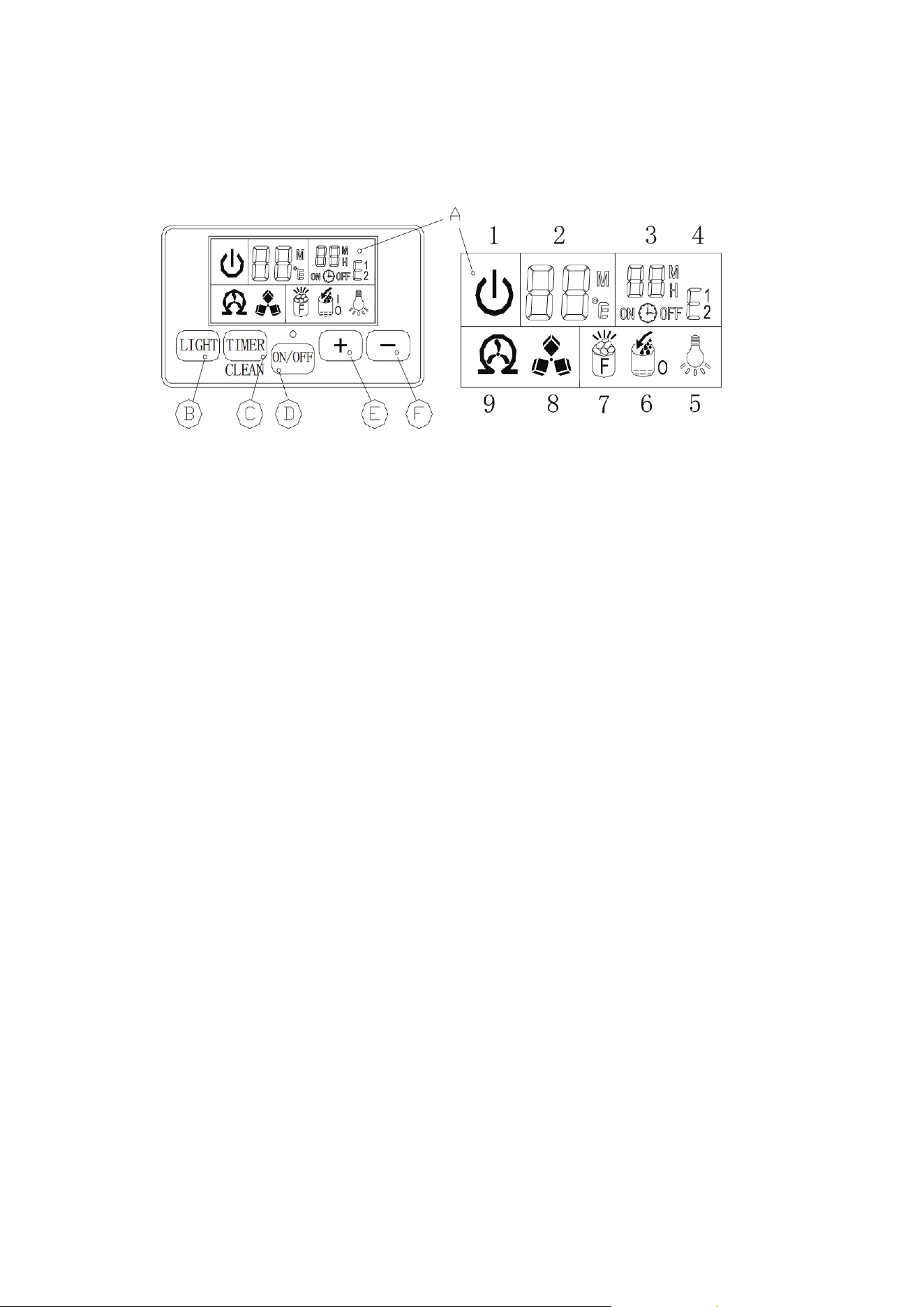
Operation Panel
A. LCD display window
1. The machine’s on/off status symbol: When the machine is turned off (standby mode), the
symbol flashes, when the machine is operating, the symbol will remain on.
2. Ambient temperature and ice making countdown time display
3. Ice making setting and timer setting display
4. Error code: E1 means the ambient temperature sensor is faulty, E2 means the ice making
process is abnormal
5. Light symbol: When the symbol is displayed, the LED light in the cabinet turns on
6. Water flow and water shortage symbol: If the arrow of the symbol is flashing, it means that
water is flowing in from the main water supply system; if the entire symbol remains on, it
means that there is no water in the main water supply system
7. Full ice display: When the freezer is full of ice, this symbol will turn on and the device will
stop the ice making process
8. Ice making and collecting ice display: When the ice cube symbol keeps rotating, it means the
device is making ice; if the symbol flashes, it means the device is in the process of collecting
ice
9. Self-cleaning display
B. “LED Light” button: Turns the internal LED light on or off.
NOTE: Press and hold this button for more than 5 seconds to convert ambient temperature units
between Fahrenheit and Celsius.
Figure 4

9
C. “Timer/Clean” button: Press this button once quickly to enter the timer setting program; press
and hold this button for more than 5 seconds to let the device enter the self-cleaning program.
D. Switch buttons: ON/OFF
E&F. “ - “, “ + “ buttons:
This is used to adjust the duration of the ice making process. The default setting is 0. Each time
the "+" or "-" button is pressed, it increases or decreases by 1 minute.
In addition, the delay time of the timer can be adjusted; the default setting is 0. Each press of the
"+" or "-" button increases or decreases the time by 1 hour.
Installation Steps
Unpack the Ice Machine
1. Remove the outer and inner packaging. Check that all accessories, including instruction
manual, ice scoop, white water inlet tube, 4-way to 2-way quick connector and drain tube,
etc., are inside the package. If any parts are missing, please contact our customer service.
2. Remove the tape used to secure the door and inner cabinet, ice scoop, etc., and roughly
clean the inner cabinet and ice scoop with a damp towel.
3. Place the ice machine on a flat surface away from direct sunlight and other heat sources
(e.g.: stove, stove, radiator). Make sure there is a minimum distance of 8 inches between the
air outlet and the obstruction, and at least 2 inches between the left and right sides and the
wall.
4. As the ice machine may be upside down during shipping or shipping, wait 4 hours for the
refrigerant to settle before inserting the ice machine.
5. Electrical appliances must be placed where the plug can be reached.
WARNING: Only connect to a potable water supply and use potable water only.
Installation Location Requirements
a. This product is not suitable for outdoor use. Maintain proper room temperature and inlet
water temperature according to the above specification sheet. Otherwise, the ice making
performance will be affected.
10
b. The unit should not be located near any heat source.
c. The unit shall be located on a solid level foundation at normal countertop height.
d. There must be at least 2 inches of clearance at the rear and 10 inches at the front to allow
for door opening and good airflow.
e. Do not place anything on top of the ice machine.
To ensure proper ventilation of the ice machine, the front of the unit must be completely
unobstructed (at least 8 inches of free space). Leave at least 2 inches of clearance at the back and
at least 2 inches at the top and sides for air circulation. If necessary, the installation should allow
the ice machine to be pulled forward for servicing.
When installing the ice machine under the counter, follow the recommended spacing dimensions
shown above. Place power, water, and drain fittings in the recommended locations as shown.
Choose a well-ventilated area with temperatures above 50 degrees Fahrenheit and below 90
degrees Fahrenheit. The unit must be installed where it is not affected by elements such as wind,
rain, water spray or dripping water. The ice machine requires a continuous water supply at a
pressure of 6-87 psi, as required by the spec sheet above. The temperature of the water entering
the ice machine should be between 41 and 77 degrees Fahrenheit to function properly.
Electrical Requirements and Connections
WARNING: This unit must be grounded.
Electric Shock Hazard
Insert the plug into a grounded wall outlet.
Never remove the ground pin.
Use a separate power source or outlet. Never use an adapter.
Never use extension cords.
Failure to follow these instructions could result in death, fire or electric shock.

11
It is important to ensure proper electrical connections before moving the ice machine to its final
location.
It is recommended to provide a separate circuit for your ice machine only. Use an outlet that
cannot be turned off by a switch. If the power cord or plug is to be replaced, it should be done by
a qualified service engineer.
This equipment requires a standard 110–120-volt, 60 Hz electrical outlet with a good grounding
arrangement.
Recommended Grounding Method
For your personal safety, this equipment must be properly grounded. This equipment is equipped
with a power cord with a grounded plug. To minimize the potential shock hazard, the cord must
be plugged into a matching grounding-type wall outlet and grounded in accordance with the
National Electrical Code and local codes and regulations. If a matching wall outlet is not available,
it is the customer's personal responsibility to have a properly grounded wall outlet installed by a
qualified electrician.
Ice Machine Water Pipe Connection
IMPORTANT: Be sure to use the new hose provided with the unit to connect to the main water
line, the old hose cannot be reused.
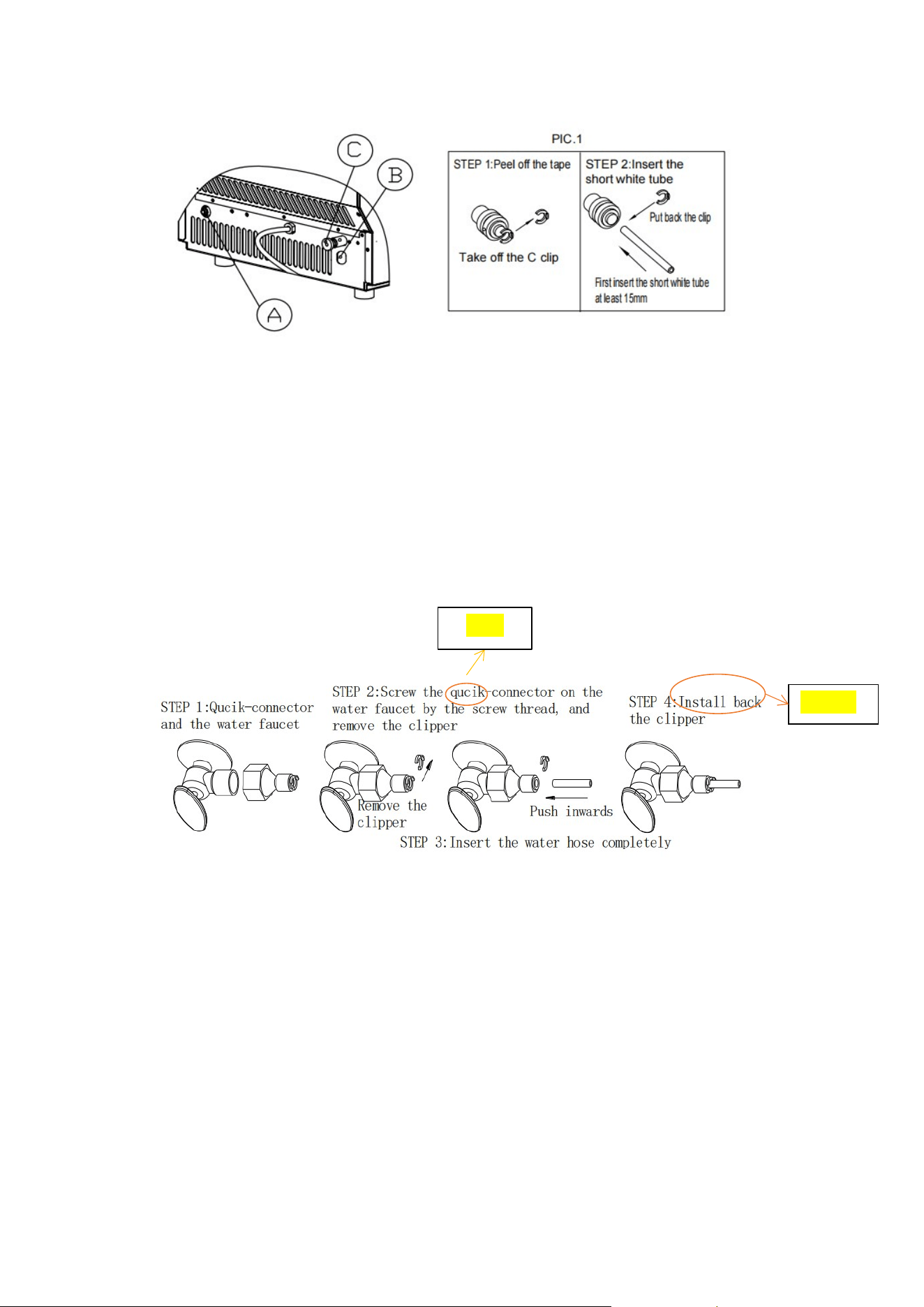
Option 1: Connect the water supply hose to the unit
1. First remove the clip on the water supply inlet located at the rear of the device (as shown in
Figure 5 "A").
2. Insert one end of the white hose into the water inlet, push it inwards completely, put back
the clip, and the water pipe connection is complete.
12
3. Connect the water hose to the tap of the main water system. First thread the water supply
quick connector onto the faucet; then remove the clip from the water hose quick connector,
insert the other end of the water hose fully into the quick connector port, and replace the
clip.
Important: The water pressure in the main water system must be at least 6-87 psi.
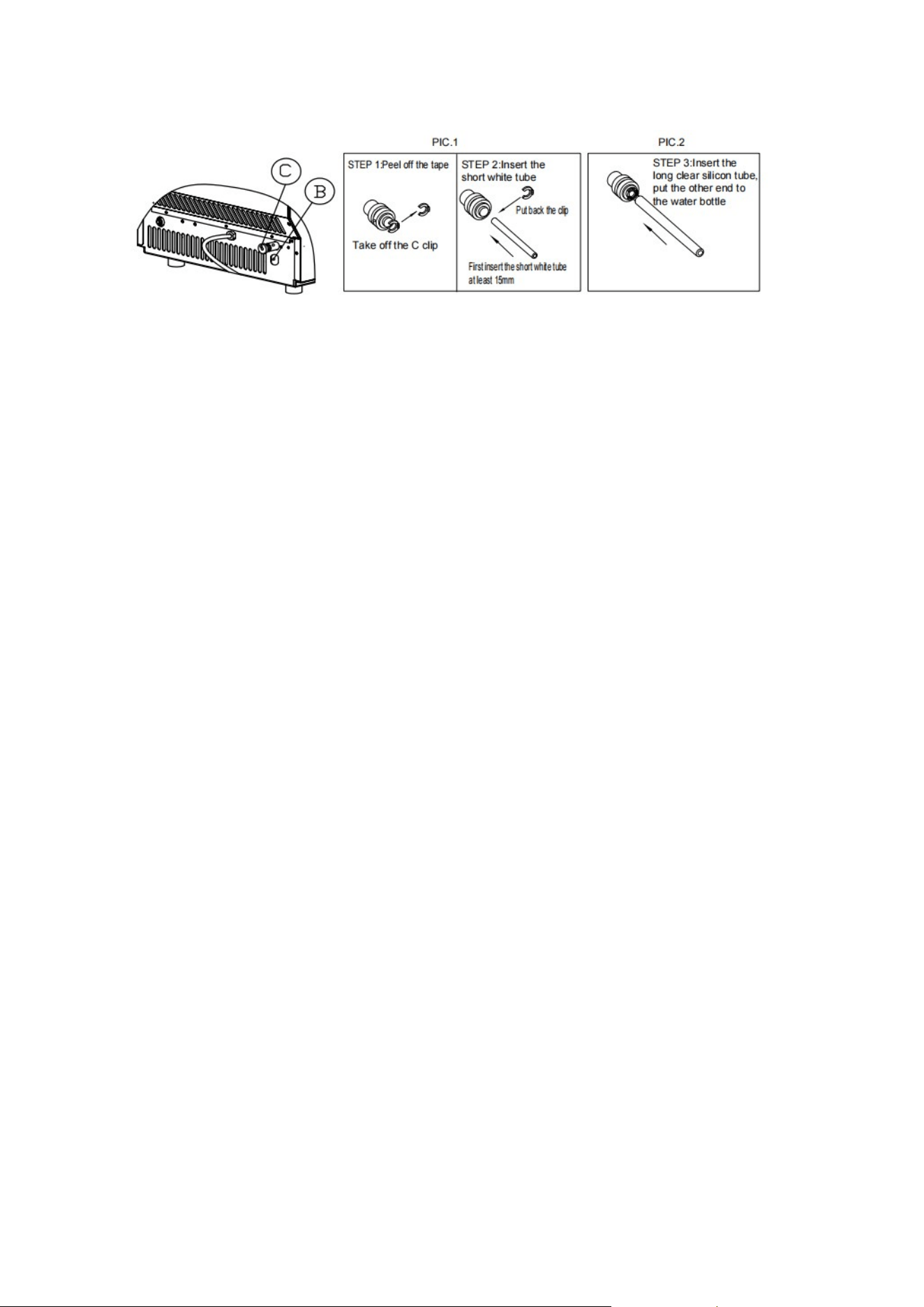
Option 2: Use bottled water to connect the hose, for Part B
Figure 5
Figure 6
Quick
Reinstall
13
Connect the drain
Pull out the black drain cap (indicated as C in Figure 7 above), then connect the white drain hose
from the accessory, and connect the other end again to drain to the main drain.
Instructions
Clean the Ice Machine Before First Use
Before using your ice machine, a thorough cleaning is highly recommended.
1. Open the ice removal door.
2. Clean with diluted detergent, warm water and a soft cloth.
3. Repeatedly wash the internal parts that are in contact with water; you can pull the drain
pipe of the water tank ("7" as shown in Figure 2) to drain the cleaning water in the water
tank, and then wash the internal freezer until all internal parts are cleaned. Clean, then drain
all wash water from the drain on the back of the unit. The drain pipe of the water tank and
the cover of the device drain must be reinstalled, otherwise, the device will not be able to
make ice properly. It is also recommended that you should discard the ice cubes made from
the first ice making cycle after cleaning.
4. The exterior of the ice machine should be cleaned regularly with a mild detergent solution
and warm water.
5. Dry the inside and outside with a clean, soft cloth.
Figure 7
14
Operation of the Ice Making Process
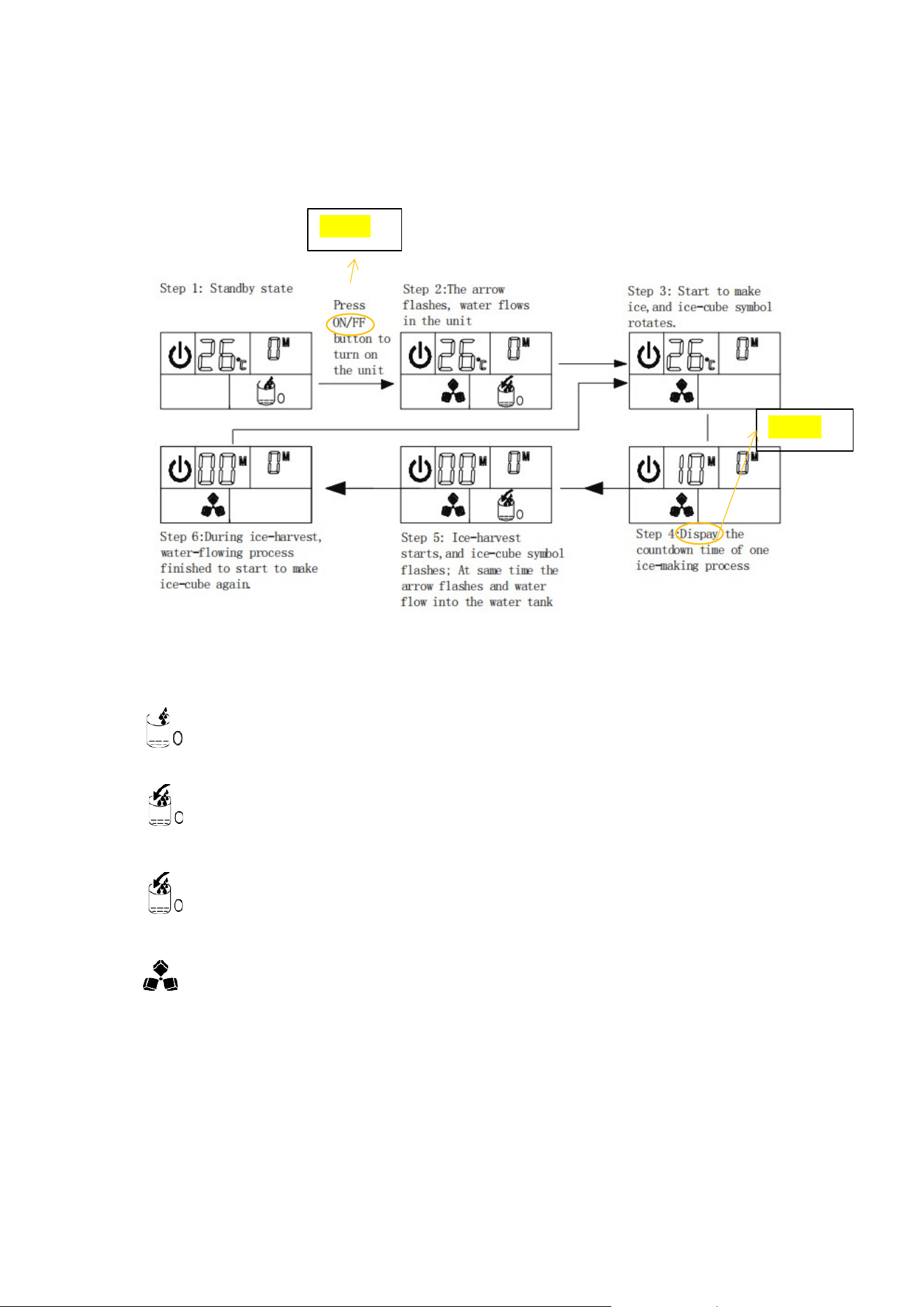
The ice making procedure is shown in the figure below:
automatic water supply symbol
The arrow symbol flashes to indicate that water is flowing into the tank.
If the entire symbol remains on, it means that there is a water shortage.
The ice cube symbol, when it spins, means the device is making ice cubes; when it
flashes, it means the unit is in the process of ice harvesting.
F - Fahrenheit (ambient temperature)
H - Hour unit (set timer)
M - Minute unit (ice setting and countdown)
Figure 8
ON/OFF
Displays

15
1. After connecting the main water supply hose to the device, plug in the main power plug.
Then press the On/Off button on the control panel to start the ice making cycle. The On/Off
status symbol will remain illuminated; the number on the left in the LCD display window
shows the current ambient temperature, the number on the right shows the current ice
making setting, and the ice cube symbol rotates. When the number on the left flashes, the
number indicates the countdown time to complete an ice making cycle.
2. Each ice making cycle will last about 11 to 20 minutes, depending on ambient temperature
and water temperature. When making ice for the first time, the duration of ice making will
be slightly longer depending on the initial water temperature.
3. After the ice making process is over, switch to the ice harvesting process. During the ice
extraction process, the ice cube symbol will flash and rotate. At the same time, the arrow on
the water addition symbol starts to flash, and the water will flow into the water tank again
until the float of the water level switch rises to the highest position. Then, the water stops
flowing, and the entire manual water addition symbol disappears.
After the ice harvest is completed, the “full ice” detection plate will rotate down once, and
then return to the original position to enter the next ice making process.
If the full ice detection plate is rotated and cannot be returned to its original position due
to being squeezed by the ice cubes, it means that the ice cubes in the ice storage bin are full and
the ice making will be stopped automatically.
4. When the "ice full" symbol display turns on, the unit stops running. If you remove the ice
cubes, the device will restart making ice cubes after three minutes.
5. During the ice making process, press the "+" or "-" button to adjust the length of each ice
making cycle to change the thickness of the ice cubes. Press the "+" or "-" button, the
number on the right will flash, the default setting is zero, and each time the "+" or "-" button
is pressed, each ice making cycle will increase or decrease by 1 minute. After 5 seconds of
setting, the new setting will be remembered by the system.
Note: Poor water quality will lead to poor ice quality and reduce the transparency of the
ice.
Automatic Self-Cleaning Program
Start the self-cleaning program: After connecting all the water pipes, plug in the main power plug,
and then press the "Timer/Cleaning" button on the control panel for more than 5 seconds to
16
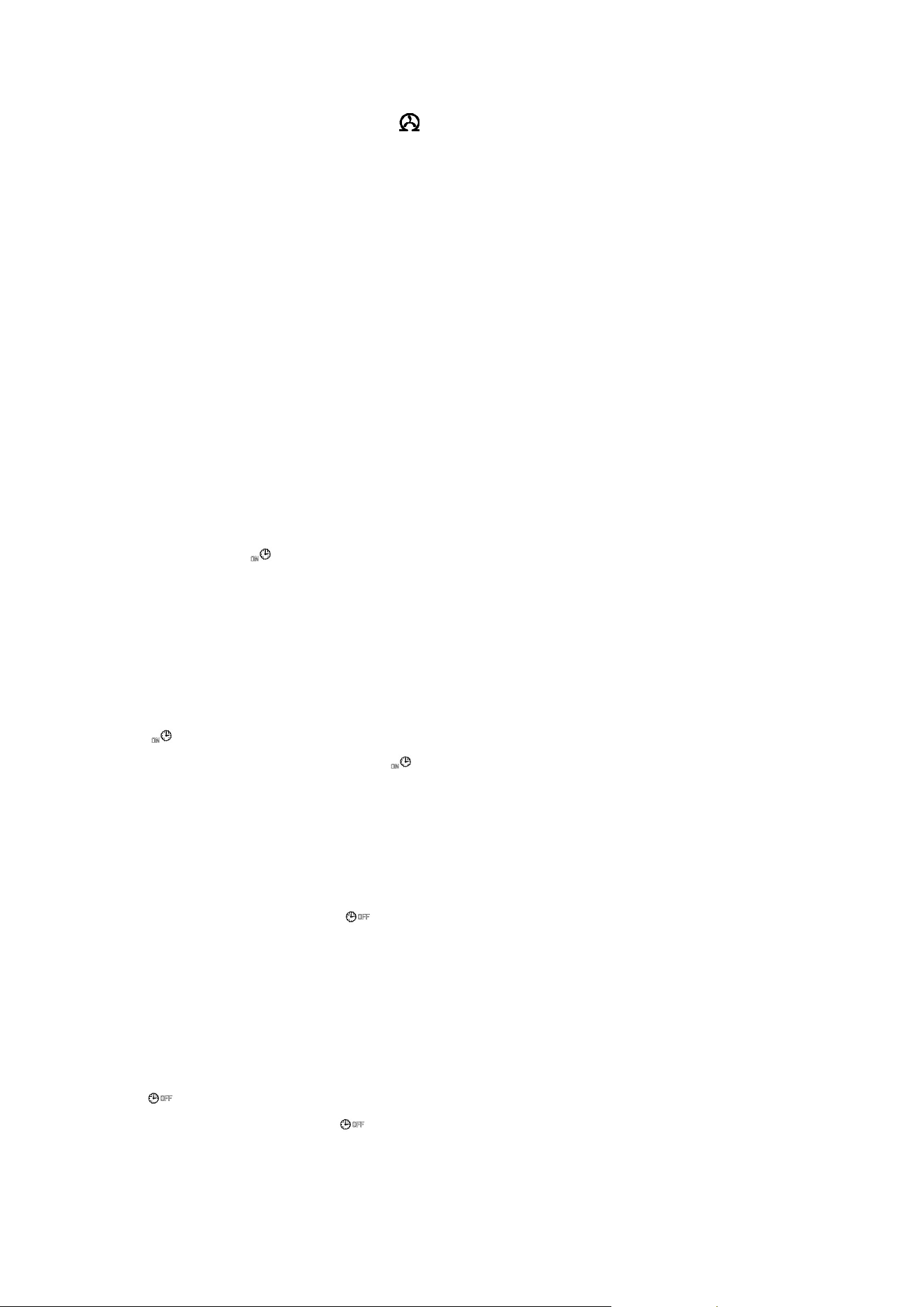
enter the self-cleaning program. The " " symbol will stay on during this time; the number to
the left will indicate the time remaining. The total duration of a self-cleaning program is 20
minutes.
Canceling the self-cleaning program: It takes approximately 20 minutes to complete a
self-cleaning program. When the program ends, the system will automatically enter standby
mode. You can also force the automatic cleaning cycle to be canceled by pressing the On/Off
button on the control panel.
Timer Setting Operation
Delay time range: 1-24 hours, default time: 1 hour
How to set the On Timer: When the unit is in standby mode, press the Timer/Clean button to set
the timer. The " " symbol will illuminate and the number "1" above the symbol will flash to
display the set delay time. While the number flashes, press the "+", "-" button to change the
delay time of the timer, each press the "+" or "-" button to increase or decrease by 1 hour. Five
seconds after setting, your desired setting will be remembered.
How to cancel the on-timer: Press the "Timer/Timer" button; the number above the symbol
" " will flash, showing the current delay time of your on-timer, press the button again to
cancel the timer setting, the symbol " " and numbers will also disappear. The second easy way
to cancel the on-timer is to press the On/Off button, which will force the on-timer setting to be
canceled.
How to set the shutdown timer: When the machine is working, press the "Timer/Clean" button
to set the timer to stop. The " " symbol will start to light up and the number "1" above the
symbol will flash to display the set delay time. While the number flashes, press the "+", "-" button
to change the delay time of the timer; each press of the "+" or "-" button will increase or
decrease the time by 1 hour. Five seconds after setting, your desired setting will be remembered.
How to cancel the off timer: Press the "Timer/Wash" button, the number above the symbol
" " will flash, showing the current delay time of your off timer, then press the button again to
cancel the timer setting, the " " above and numbers will also disappear; the second easy way
to cancel the shutdown is to press the "On/Off" button, which will force the On Timer to be
canceled and also shut down the unit.

17
Internal LED light operation
When the machine is powered on, press the "light" button on the operation panel once; the LED
light in the freezer will illuminate, and the " " symbol on the LCD display window will also turn
on.
Pressing the button again will cause the LED light and the " " symbol will go out at the same
time.
Note: If you press the "LIGHT" button for more than 5 seconds, you can switch between Celsius
and Fahrenheit (between °C and °F).
Drain
First, make sure the drain hose is properly connected to the rear of the unit.
1. You can drain the water in the freezer through the white drain pipe attached to the rear
drain. Make sure not to set the white drain pipe too high.
2. For the water in the water tank, you can remove the silicone tube marked "H" on the right
side of the water tank in Figure 3 to drain the clean water in the water tank, until the
silicone tube is fully extended, and the water can flow out into the freezer. The water can
then drain through the drain on the rear of the unit.
Reminder: Frequent cleaning of the water tank can improve the quality of ice cubes and
prolong the service life of the equipment and its circulating water pump.
Normal Sound
Your new ice machine may be making unfamiliar sounds. Most of the new sounds are normal.
Hard surfaces like floors, walls, and cabinets can make things sound louder than they really are.
Here are some of the kinds of sounds you might find strange.
For each ice cycle, you will hear a swishing sound as the control valve opens to allow water
to flow into the tank.
A rattling noise may emanate from the flow of refrigerant or from the water pipes. Items

18
stored on top of the ice machine can also make noise.
High-efficiency compressors may produce pulsating or high-pitched sounds.
Water flowing from the tank to the evaporator plate may make a splashing sound.
Preparing Your Ice Machine for Long-term Storage
If the ice machine is not going to be used for an extended period of time, or if it is to be moved
elsewhere, it will be necessary to drain all water from the system.
1. Allow all ice cubes to drain from the ice machine's evaporator.
2. Turn off the unit and unplug the power cord.
3. Shut off the water supply to the main water system.
4. Disconnect the water supply hose from the water inlet valve.
5. Pull out the water tank drain pipe marked "H" in Figure 3 to drain the water in the water
tank. When all the water has drained, refit the drain hose to the tank.
6. Then drain all the water from the drain ("7" in Figure 2) located on the back of the unit.
7. Disconnect the drain from the main drain or floor drain and re-cover the drain cap.
8. Leave the door open for circulation and to prevent mildew.
9. Keep the water supply hose and power cord disconnected until ready to use again.
10. Dry the inside and wipe the outside of the device.
11. Place a plastic bag over the device to keep dust and dirt out.
Cleaning and Maintenance
WARNING: Before performing any cleaning or maintenance operations, unplug the ice machine
from main power. (Exception: Ice Machine Self-Cleaning Program).
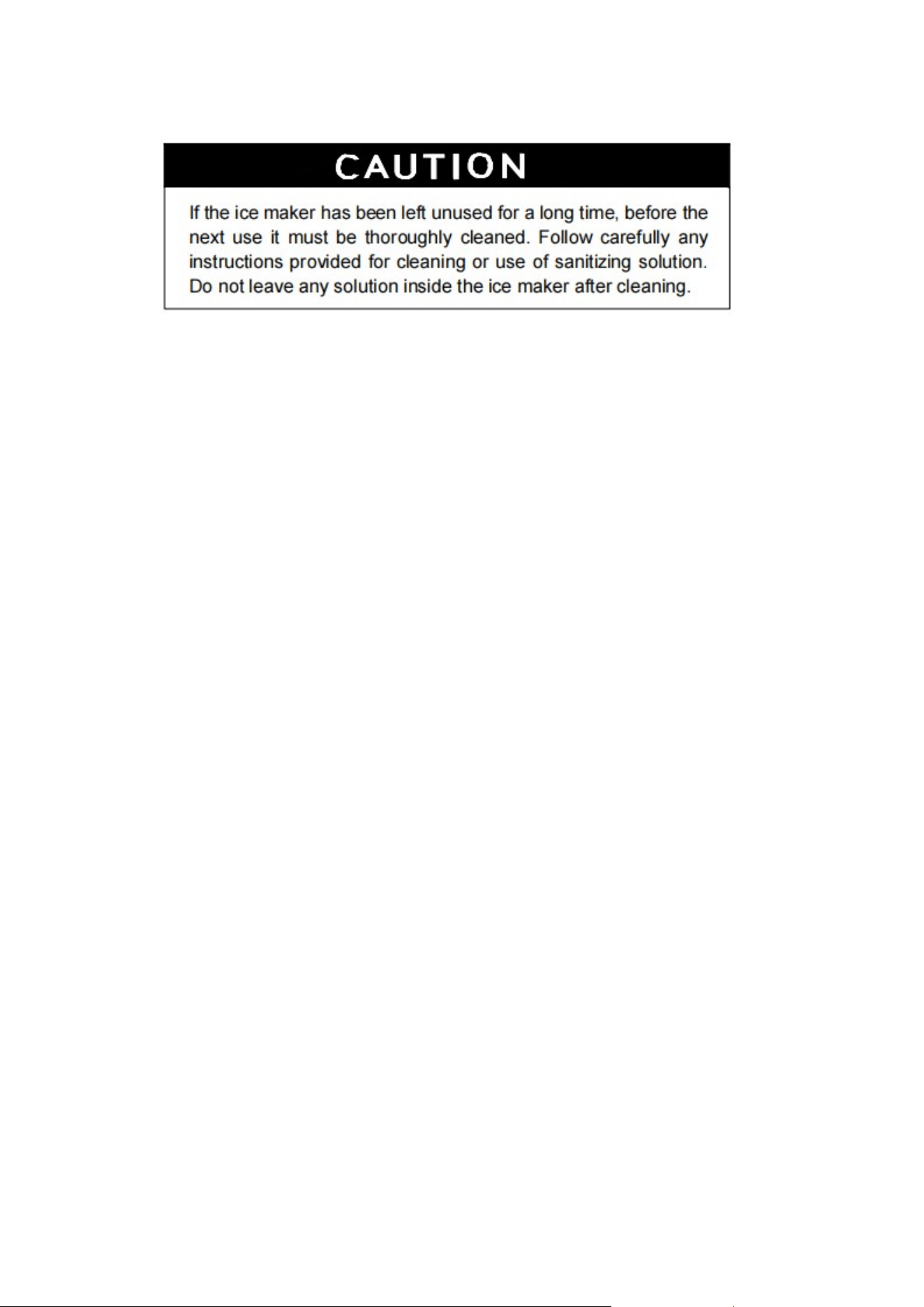
Do not use any alcohol or fumes to clean/sanitize the ice machine. This can cause cracks in the
plastic parts.
Have the condenser inspected and cleaned at least once a year by a trained service technician for
the unit to function properly.
19
This equipment must be cleaned with a water jet. Regular cleaning and proper maintenance will
ensure efficiency, optimum performance, hygiene and longevity. The maintenance intervals listed
are based on normal conditions. If you have pets, or the device is used outdoors, or have other
special considerations, you may want to shorten the interval.
What not to do
Don't put anything that isn't ice in the ice bin: Not only are things like wine and beer bottles
unsanitary, but labels can slip off and clog drains.
External cleaning
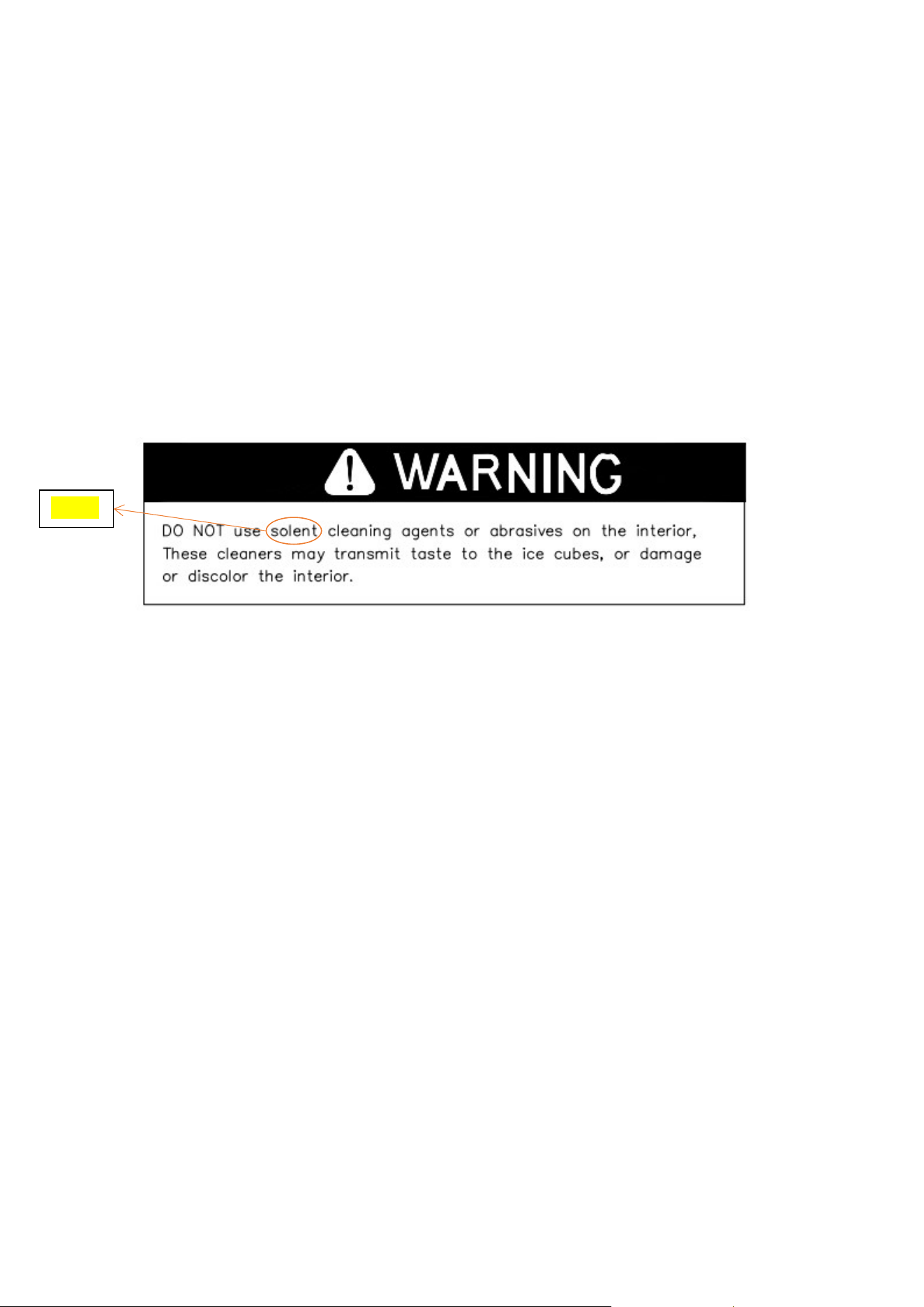
Doors and cabinets can be cleaned with a mild detergent and warm water solution, such as 28
grams of dishwashing liquid mixed with 7.5 liters of warm water. Do not use solvent-based or
abrasive cleaners. Use a soft sponge and rinse with clean water. Wipe with a soft, clean towel to
prevent water spots.
Stainless steel models will discolor when exposed to chlorine and should be cleaned. Clean
stainless-steel models with mild detergent and warm water and a damp cloth. Never use abrasive
cleaners.
Note: Stainless steel models exposed to chlorine and moisture, such as in areas such as spas or
swimming pools, may have some stainless steel discoloration. Chlorine discoloration is normal.
Internal cleaning
For ice bins
Ice storage bins should be sterilized occasionally. Before using the ice machine for the first time,
20
clean the ice box and use it again after an extended period of inactivity. Typically, it is convenient
to sanitize the storage bin after the ice making system has been cleaned and the storage bin is
empty.
1. Disconnect power to the unit.
2. Open the door and with a clean cloth, wipe the inside with a sanitizing solution made from
28g of household bleach or chlorine and 7.5L of hot water (95
°
F to 115
°
F).
3. Rinse thoroughly with clean water. Wastewater will be drained through the drain.
4. Reconnect the power to the device.
Ice scoops should be cleaned regularly. Wash like any other food container.
Ice making parts cleaning
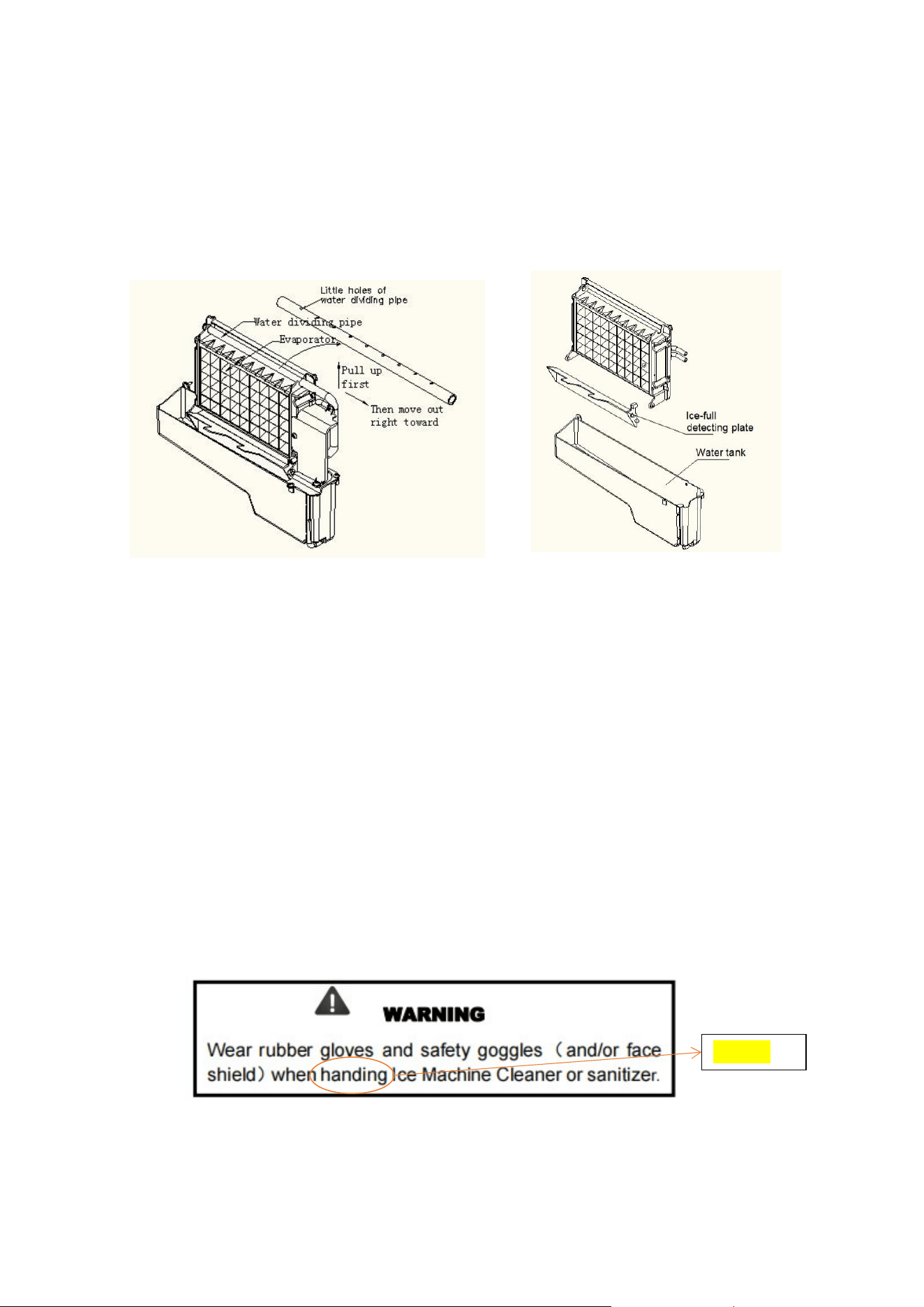
During use, please clean the main system of the ice machine regularly (as shown in Figure 9).
1. Repeat the above steps to clean the water tank and other internal parts of the device.
2. Paying attention to the water distribution pipe on the evaporator, when the compressor and
water pump are running normally, if there is no water flowing from the water distribution
pipe, or the water flow is very small, please drain the water distribution pipe cleanly. Clean
each of the small holes on the manifold shown in the picture below, making sure nothing is
blocking each of the holes, and put them back in place.
3. When there are ice cubes on the surface of the evaporator, but it is not easy to fall, do not
use mechanical means to forcibly remove them; simply press the "ON/OFF" button for more
than 5 seconds and the device will enter the ice melting process. After a while, the large ice
cubes will fall. Then, turn off the unit, unplug the power cord, and clean the surface of the
evaporator.
4. Cleaning of the water tank and full ice detection board (as shown in Figure 10). The water
tank and full ice detection plate are very important to keep the ice cubes hygienic. Place a
mixture of neutral detergent and water in a clean water nozzle and spray onto all interior
surfaces of the water tank and ice detection plate. Wipe these surfaces as much as possible
with a clean cloth. Then, spray the surface with clean water and wipe with a clean dry cloth.
solvent
21
The clean water in the tank is then drained by pulling out the tank's drain hose ("H" in Figure
2). When all the clean water has drained, reinstall the tank drain hose.
Recommendation: Clean internal parts and reinstall in their respective locations, discard
the first batch of ice when the machine is back in operation.
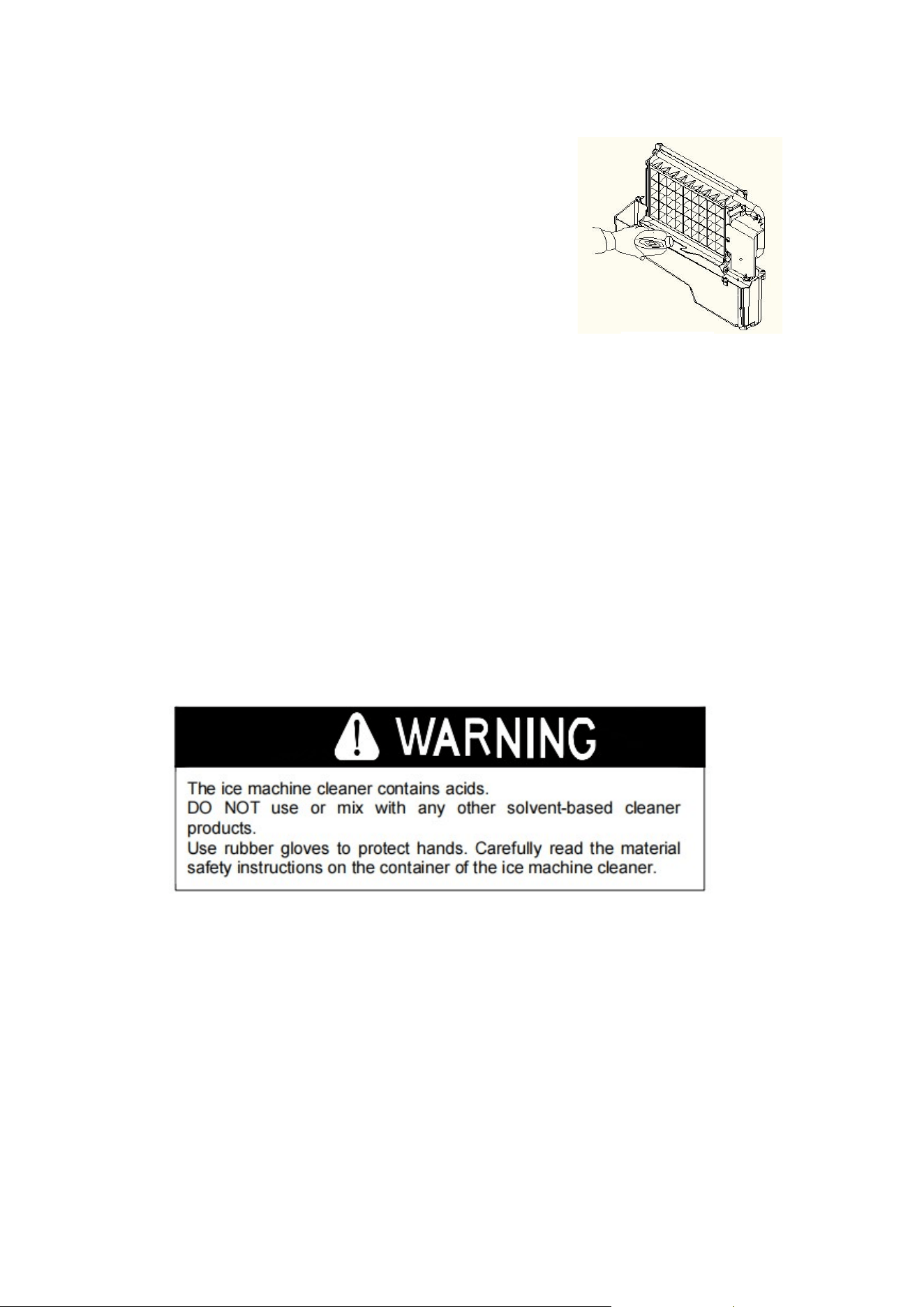
Use Nu-Calgon Nickel Safe Ice machine Cleaner to Clean the Ice machine System
Minerals removed from water during the freezing cycle can eventually form hard, scaly deposits
in the water system. Regular cleaning of the system will help remove mineral deposits. How often
you need to clean your system depends on how hard your water is. For hard water of 4 to 5
grains/liter, you may need to clean the system every 6 months.
1. Turn off the ice machine. Keep the ice machine connected to the water supply and drain;
turn off the tap of the main water supply.
2. Open the door and scoop out all the ice cubes. Either throw them away or keep them in the
freezer or cooler.
handling
Figure 9
Figure 10
22
3. Make a cleaning solution. Mix Nu-Calgon Nickel Safe Ice
Machine Cleaner with water to make a cleaning solution.
Using a plastic or stainless-steel container with a capacity
of more than 4 liters, mix 300 ml of Nu-Calgon Nickle Safe
Ice machine Cleaner with 2.8 liters of warm water
at
approximately 120°F-140°F, then divide them into 2 cups.
It is best to maintain the temperature of each cup
of
cleaning solution.
4. Check to make sure the tank drain is properly seated in the
groove in the tank wall. Then pour a cup of Nickle Safe Ice
machine Cleaning Solution into the water tank. Wait about 5 minutes.
5. Turn on the power of the ice machine, and then press the "Scheduled Cleaning" button on
the control panel for more than 5 seconds to enter the self-cleaning program. As explained
above, the pump runs for 8 minutes, stops for 3 minutes per cycle, and another cycle. The
total duration of a self-cleaning program is 20 minutes. During this process, the "Clean" light
will stay on and the digital window will show the time remaining.
6. 20 minutes after a self-cleaning procedure is completed, remove the drain pipe of the water
tank and drain the cleaning fluid into the lower ice storage bin. Shake the device gently to
completely drain all cleaning fluid. Then install the drain hose back into the tank.
7. Repeat steps 4 - 6 to clean the ice making system again.
8. Then turn on the faucet of the main water supply and let water flow into the unit. Press the
"Scheduled Cleaning" button on the control panel again for more than 5 seconds to enter
the self-cleaning program. As explained above, the pump runs for 8 minutes, stops for 3
minutes per cycle, and another cycle. The total duration of a self-cleaning program is 20
minutes.
During this process, the "CLEAN" light will stay on and the digital window will show the
remaining time. Through this process, it will flush the manifold, evaporator, water pump, silicone
tube and water tank, etc.
9. After a self-cleaning procedure is completed, remove the drain of the water tank and drain
the cleaning fluid into the lower ice storage bin while gently shaking the device to drain all
Figure 11

23
the water completely. Then reinstall the drain hose to the tank.
10. Repeat steps 8-9 two more times.
11. Follow the procedure above to clean the ice storage bin.
12. This special cleaning routine is now complete and you can go back to normal ice making
mode. It is recommended to discard the first batch of ice cubes.
Cleaning Advice
1. Daily cleaning
You should clean the ice shovel, door and water distribution pipe yourself every day. At the end
of each day, rinse the ice shovel and wipe the sides of the door with a clean cloth.
2. Clean once every two weeks
According to the internal cleaning plan, clean the ice shovel, freezer, water tank, full ice detection
plate and evaporator surface every two weeks.
3. Cleaning once every six months
This includes all parts and surfaces exposed to water or ice, such as ice storage bins, water tanks,
doors, evaporators, pumps, silicone hoses, water distribution pipes, etc. Clean with Nu-Calgon
Nickel Safe Ice machine Cleaner every 6 months. They should be cleaned by maintenance
personnel according to the Ice Component System Cleaning Procedure.
24
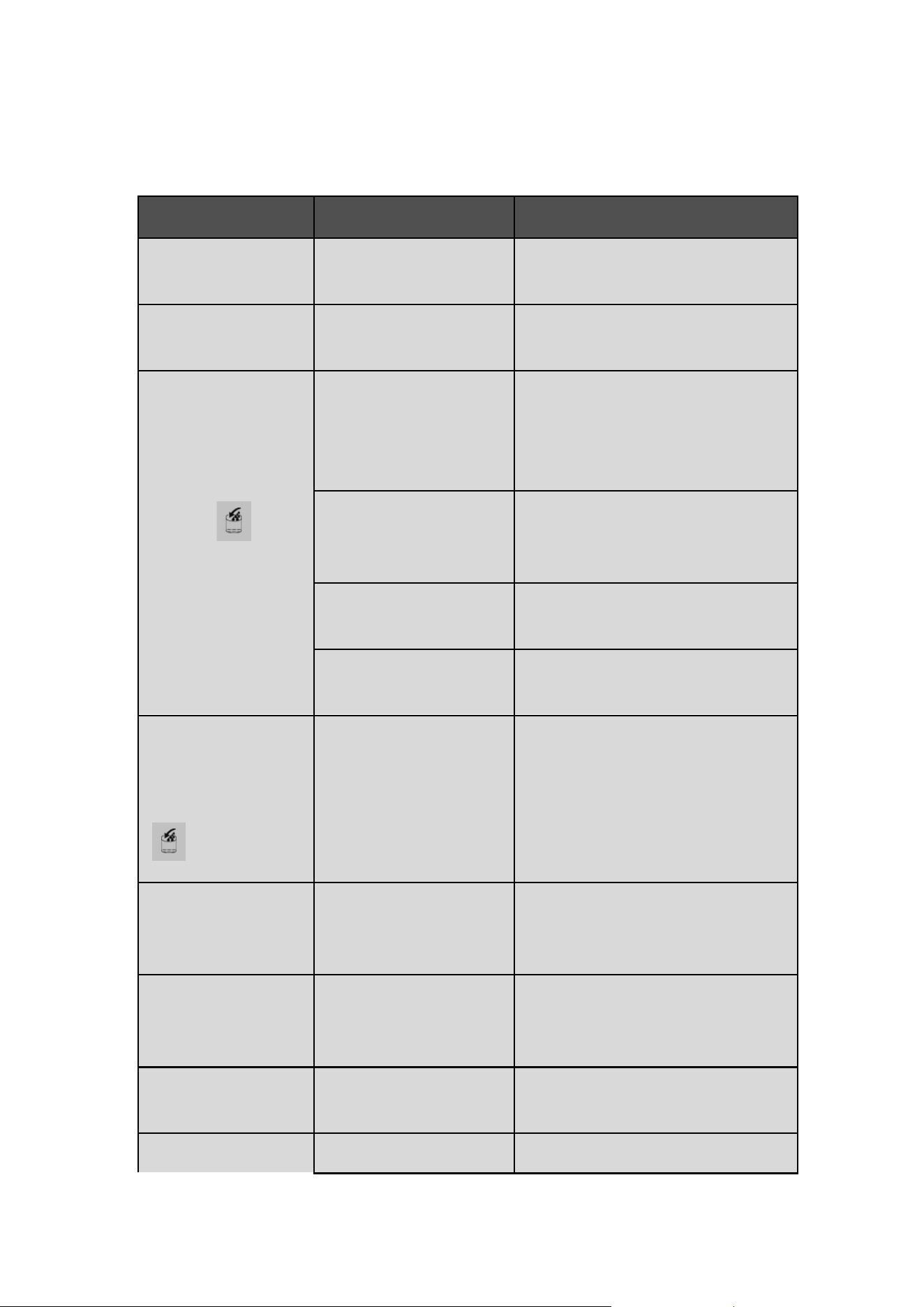
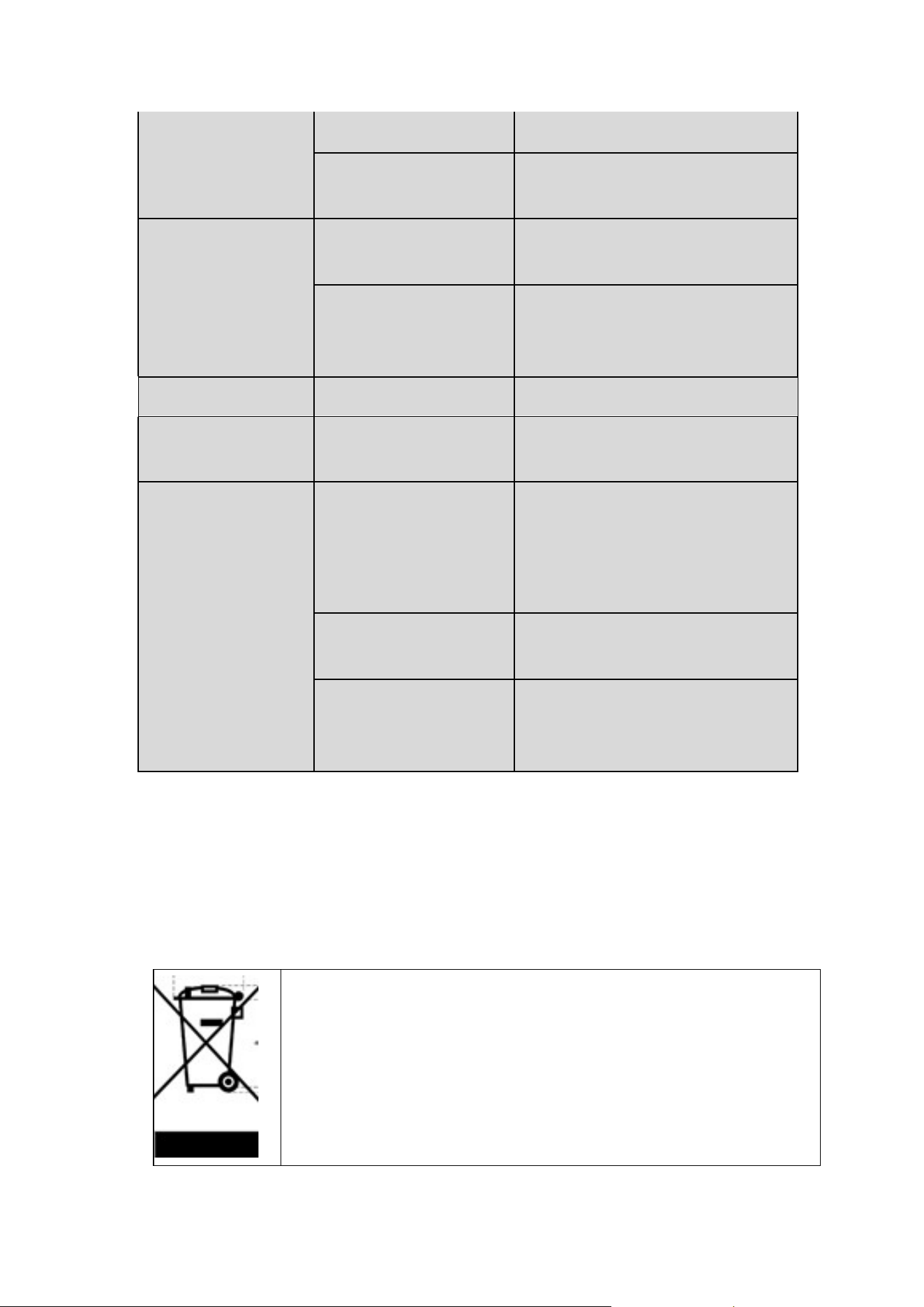
General Troubleshooting
Problem Possible Cause Solution
The screen displays the
"E1" code
Temperature sensor failure
Requires technical maintenance personnel to
maintain
The screen displays the
"E2" code
Machine does not make ice or
gas leaks
Requires technical maintenance personnel to
maintain
The entire " " symbol
is always on
There is no water in the device
Main water pressure too low or water supply
hose clogged. Check them and increase water
pressure and clean supply hoses
The float ball of the water level
detection switch is blocked and
cannot be raised
Cleaning the water tank and water level
detection switch
Water flows out of the side of
the tank
Place equipment in a horizontal position, not a
slope
Water comes out of the drain of
the tank
Remove the pipe and install the right side of
the return tank
The appliance enters the ice
making process, but there is
no water flow in the
appliance, the entire
" " symbol is on
There is no water in the tank, or
there is a problem with the
water supply, or the silicone
tube of the tank is not in the
correct position
Main water pressure too low or water supply
hose clogged. Check them, increase the water
pressure, clean the water supply hose, the
silicone tube of the tank should be clamped in
the groove of the tank
The water pump works, but
there is no water coming
out of the manifold
The hole in the drain pipe is
clogged
Clean these little holes
Water circulation pump not
working
Some particular substance in
the water tank is blocking the
pump blades
Clean the tank and pump
The transparency of the ice
cubes is not very clear
Poor water quality
Use a water filter or water purifier to soften or
filter the water
Irregularly shaped ice cubes Poor water quality or dirty tank
Clean the water tank and replace with new
25
water
The small hole in the shunt tube
is somewhat clogged
Clean the water distribution pipe to make sure
all nine holes are unobstructed
Ice cubes are very thin
Ambient temperature is too
high
Move equipment to a low temperature space,
or extend the duration of each ice cycle
Poor air circulation around the
device
Make sure there is more than 8 inches of space
between the front and rear of the device and
obstacles
The ice cubes are too thick Ambient temperature is too low Reduce time per ice making cycle
The "Ice Full" symbol lights
up
Ice bin full of ice cubes Take out some ice cubes
The ice cycle is normal, but
no ice is produced
The ambient temperature or
the water temperature in the
tank is too high
Refrigerant leak
Move to a place where the temperature is
below 90 degrees Fahrenheit and switch to
cold water
Blocked cooling system pipes
Requires technical maintenance personnel to
maintain
The ambient temperature or
the water temperature in the
tank is too high
Requires technical maintenance personnel to
maintain
Dispose of the Product Properly
This sign indicates that this product should not be disposed of with other
household waste. To prevent possible harm to the environment or human health
from uncontrolled waste disposal, waste should be recycled responsibly to
promote sustainable reuse of material resources. To return your used device,
please use the returns and recycling system or contact the retailer where you
purchased the product. They can use the product for environmentally safe
recycling.

26
Warranty
This device is covered by a limited manufacturer's warranty. The manufacturer will repair or
replace any part of this equipment that is defective in material or workmanship within three
years from the date of original purchase, provided that the equipment is used under normal
operating conditions as intended by the manufacturer.
Warranty Terms
During the first three years, any part of this equipment that is defective due to material or
workmanship will be repaired or replaced at the manufacturer's discretion, free of charge, to the
original purchaser. The purchaser will be responsible for any removal or shipping costs.
Warranty Exclusions
Warranty will not apply if damage is caused by any of the following:
Damaged when transporting or moving the device
Improper power supply, such as low voltage, defective household wiring, or improper fuses
Accidents, alterations, misuse or abuse of electrical appliances, such as the use of
unapproved accessories, insufficient indoor air circulation, or abnormal operating conditions
(extreme temperatures)
Fire, flood, war, riot, hostilities or acts of God such as hurricanes, floods, etc.
Damage caused by the use of force or external influence
Partially or completely disassembled equipment that is excessively worn by the user
Get Service
When making a warranty claim, please have the original purchase checklist with the purchase
date ready. Once your device is confirmed to be eligible for warranty service, all repairs will be
performed by an Acekool authorized repair facility. The buyer will be responsible for any removal
or shipping costs. Replacement parts will be new, but either remanufactured or refurbished at
27
the manufacturer's discretion. For technical support and warranty services, please email
support@acekool.vip.
After-Sales Information
Model: HZB-65
Email: support@acekool.vip
Phone: 1-866-658-5891 (US)
Monday-Friday from 7 a.m.- 3 p.m. EST
Made In China