Digital Camera
Digital-Kamera
Appareil photo numérique
Fotocamera digitale
Cámara digital
DC-S5D
DVQW1926ZB
DC-S5D_E-DVQW1926.book 1 ページ 2025年4月2日 水曜日 午後2時26分
DVQW1926 (ENG)
2
Dear Customer,
We would like to take this opportunity to thank you for purchasing this Panasonic
Digital Camera.
About the operating instructions
In addition to this booklet, the DC-S5D is supplied with the operating instructions for
the DC-S5.
Please also refer to the operating instructions for the DC-S5.
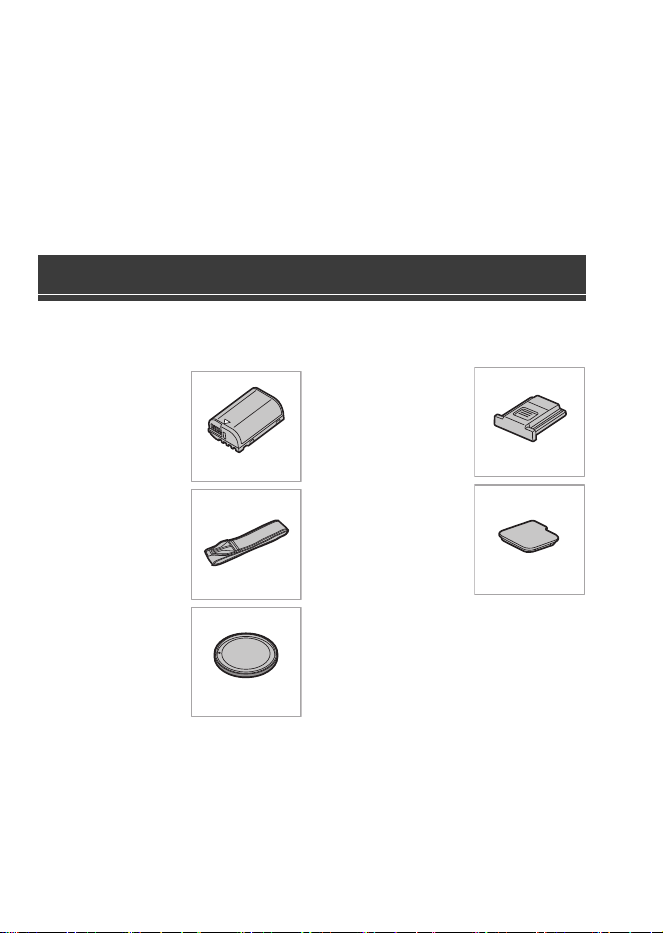
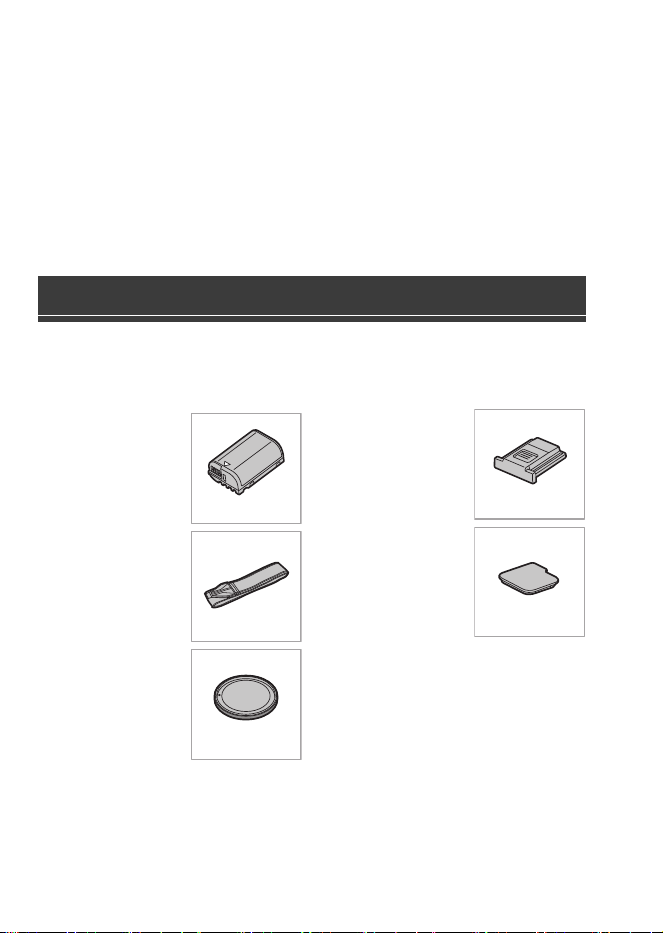
Check that all the accessories are supplied before using the camera.
(Product numbers correct as of October 2024.)
Battery pack
0
Charge the battery
before use.
Shoulder strap
Body cap
¢1
Hot shoe cover
¢1
Cover for the
battery grip
connector
¢1
¢1 This is attached to the camera at the
time of purchase.
0
The Battery charger, AC adaptor and USB connection cable are optional.
Standard Accessories
DMW-BLK22
DVPW1023Z
1HE1MC891Z
DVYE1121Z
SKF0145K
DC-S5D_E-DVQW1926.book 2 ページ 2025年4月2日 水曜日 午後2時26分
DVQW1926 (ENG)
3
ENGLISH
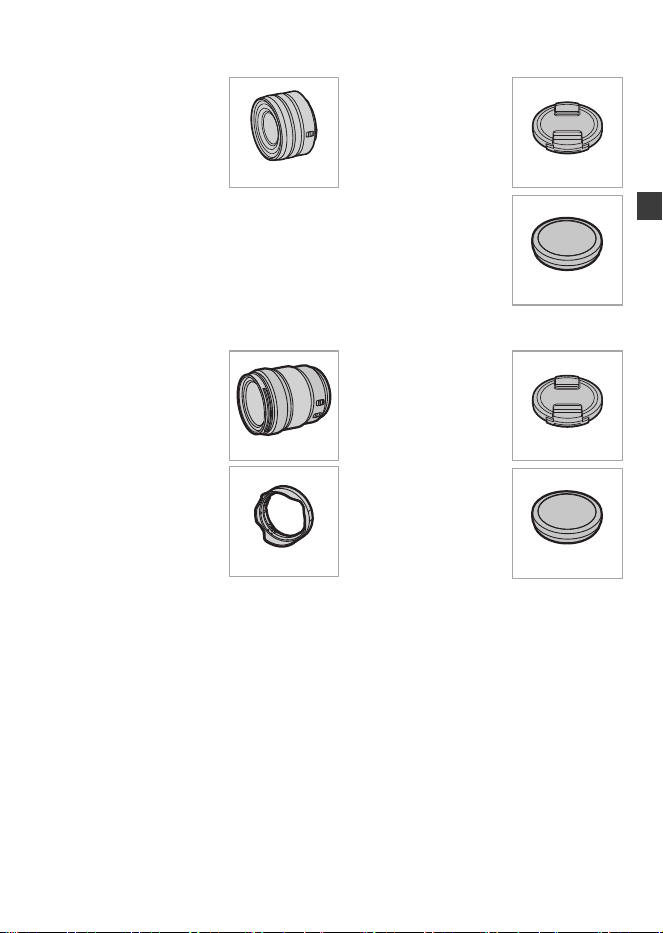
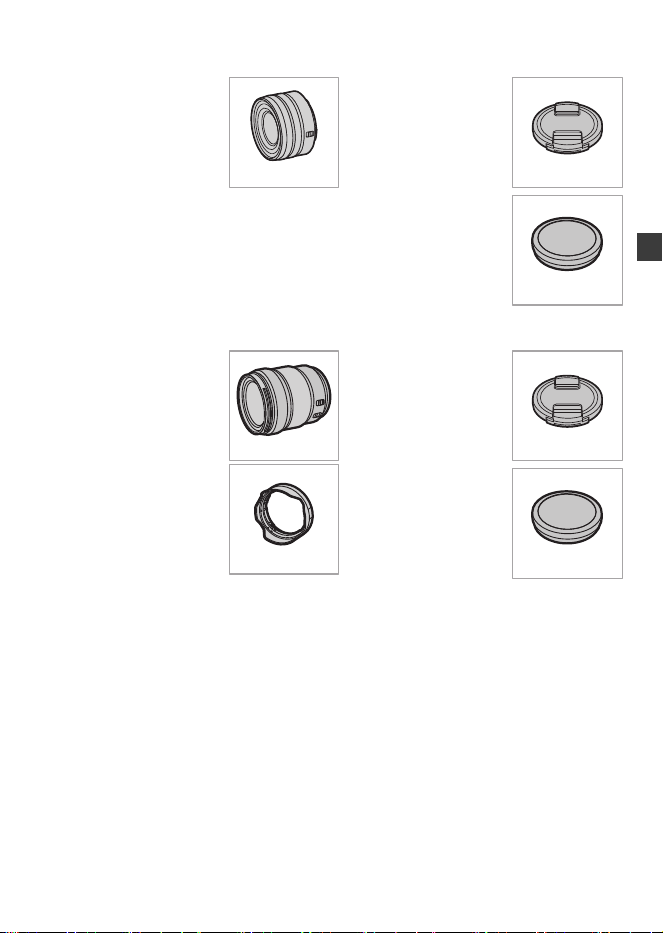
Items Supplied with DC-S5DN (Lens Kit Product)
35 mm full-frame
interchangeable lens
0
This lens is dust and
splash resistant.
Lens cap
¢2
Lens rear cap
¢2
Items Supplied with DC-S5DH (Lens Kit Product)
35 mm full-frame
interchangeable lens
0
This lens is dust and
splash resistant.
Lens hood
Lens cap
¢2
Lens rear cap
¢2
¢2 This is attached to the lens at the time of purchase.
0
To improve the dust and splash resistant performance of the interchangeable lens
(S-R1840/S-R28200), a lens mount rubber is used in the mount.
– The lens mount rubber will leave scuff marks on the digital camera mount, but this
does not impact performance.
– To replace the lens mount rubber, contact Panasonic.
S-R1840
6GE1SR1840Z
RGE1Z276Z
S-R28200
1ZE2SE28200Z
CGE1Z293Z
RGE1Z276Z
DC-S5D_E-DVQW1926.book 3 ページ 2025年4月2日 水曜日 午後2時26分
DVQW1926 (ENG)
4
S-R1840
0
Attach and remove the lens only when the lens barrel is retracted.
0
When the interchangeable lens (S-R1840) is attached, a message is displayed if the
lens barrel is retracted and recording is not possible. Rotate the zoom ring to extend
it.
0
Recording at or near the closest focusing distance at wide angle will degrade image
quality around the edges of the image. We recommend checking each picture after
you have taken it when recording.
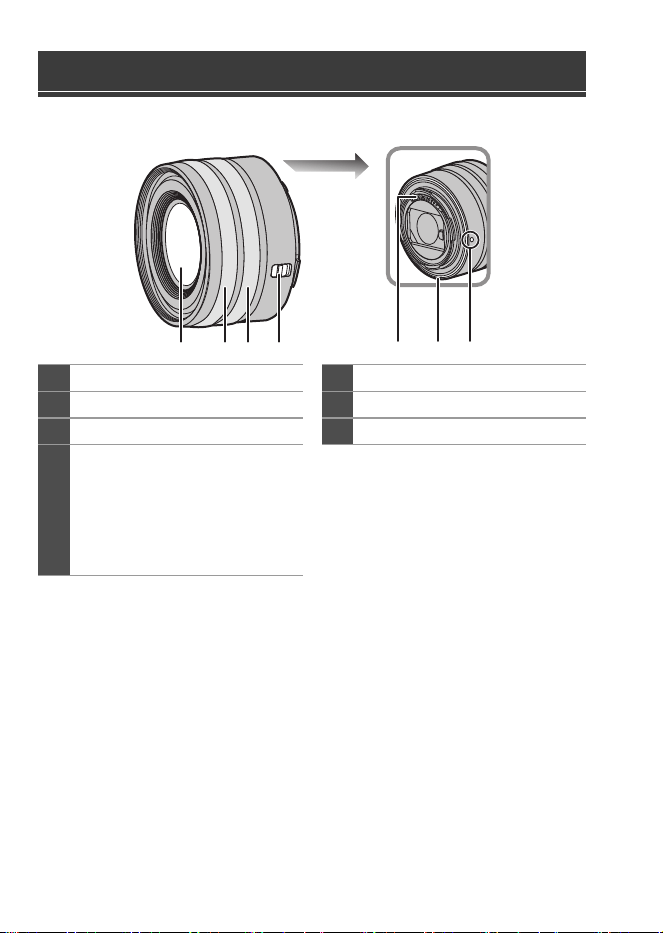
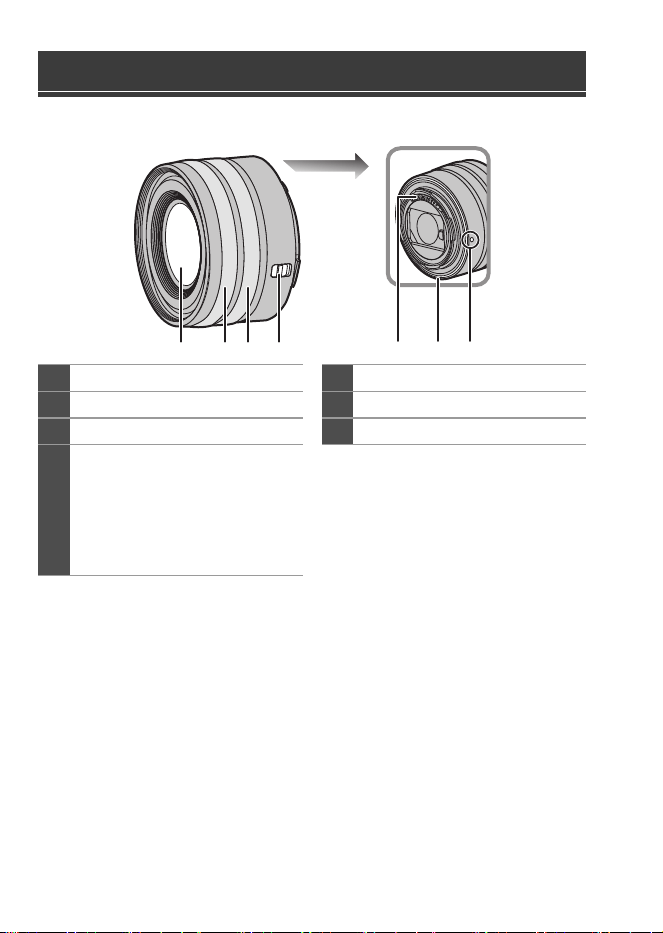
Names of Parts
1
Lens surface
5
Contact points
2
Focus ring
6
Lens mount rubber
3
Zoom ring
7
Lens fitting mark
4
[AF/MF] switch
0
You can switch between AF and
MF.
If [MF] is set on either the lens or
camera, operation will be with
MF.
4
2 31 765
DC-S5D_E-DVQW1926.book 4 ページ 2025年4月2日 水曜日 午後2時26分
DVQW1926 (ENG)
5
DVQW1926 (ENG)
5
ENGLISH
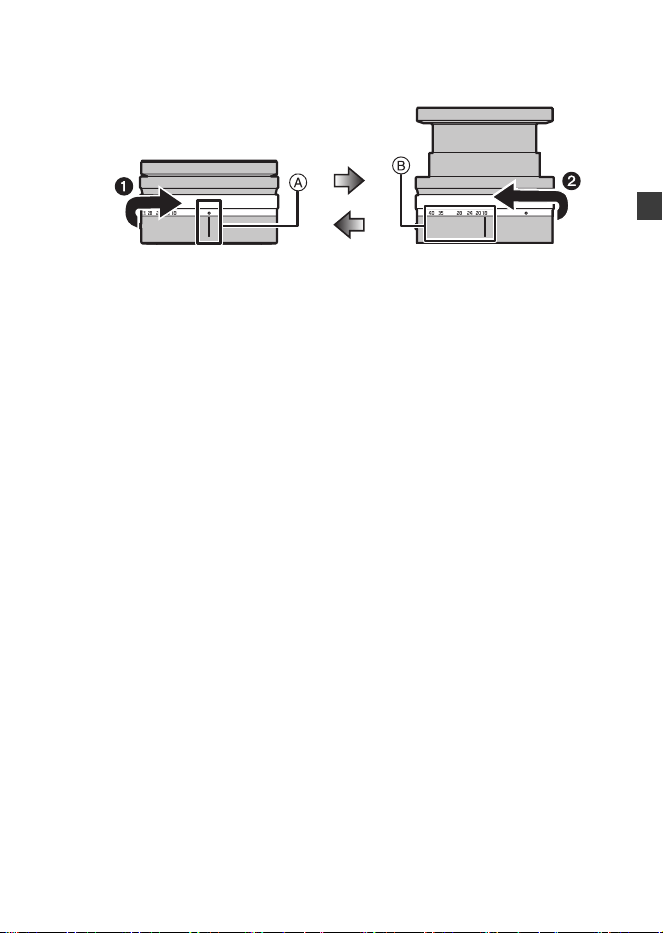
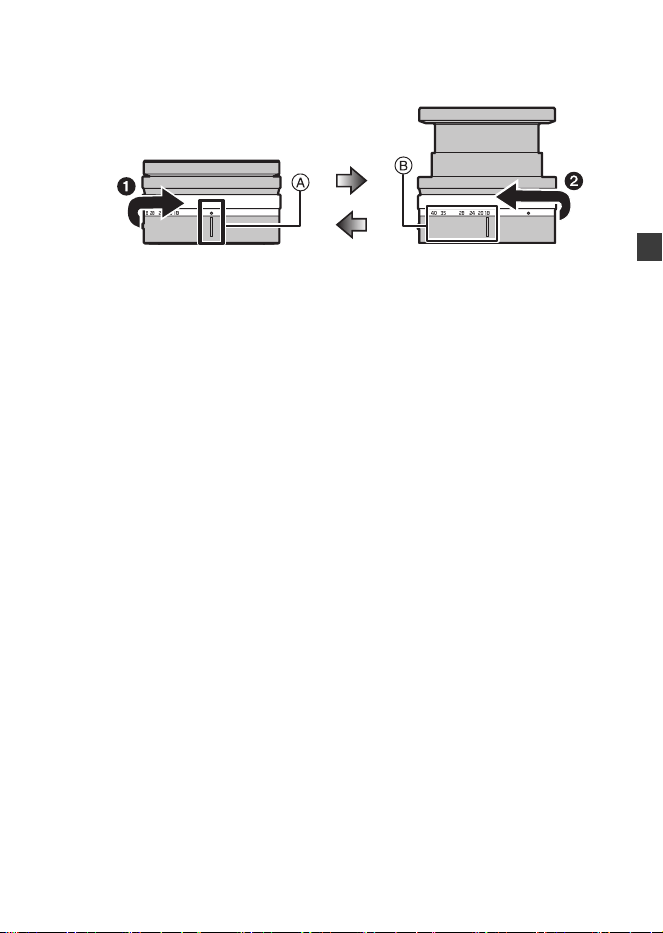
How to Extend/Retract the Lens [When the
Interchangeable Lens (S-R1840) Is Attached]
(a) Lens retracted
(b) Ready for recording
How to Extend the Lens
Rotate the zoom ring in the direction of arrow 1 from position A (the lens is
retracted) to position B (18 mm to 40 mm) to extend the lens.
0
When the lens barrel is retracted, images cannot be recorded.
How to Retract the Lens
Rotate the zoom ring in the direction of arrow 2 from position B (18 mm to
40 mm) to position A to retract the lens.
0
At the 18 mm position, you will feel a click. Keep rotating to the A position.
0
When you are not recording images, we recommend that you retract the lens.
(a) (b)
DC-S5D_E-DVQW1926.book 5 ページ 2025年4月2日 水曜日 午後2時26分
DVQW1926 (ENG)
6
S-R28200
0
Recording at or near the closest focusing distance at wide angle will degrade image
quality around the edges of the image. We recommend checking each picture after
you have taken it when recording.
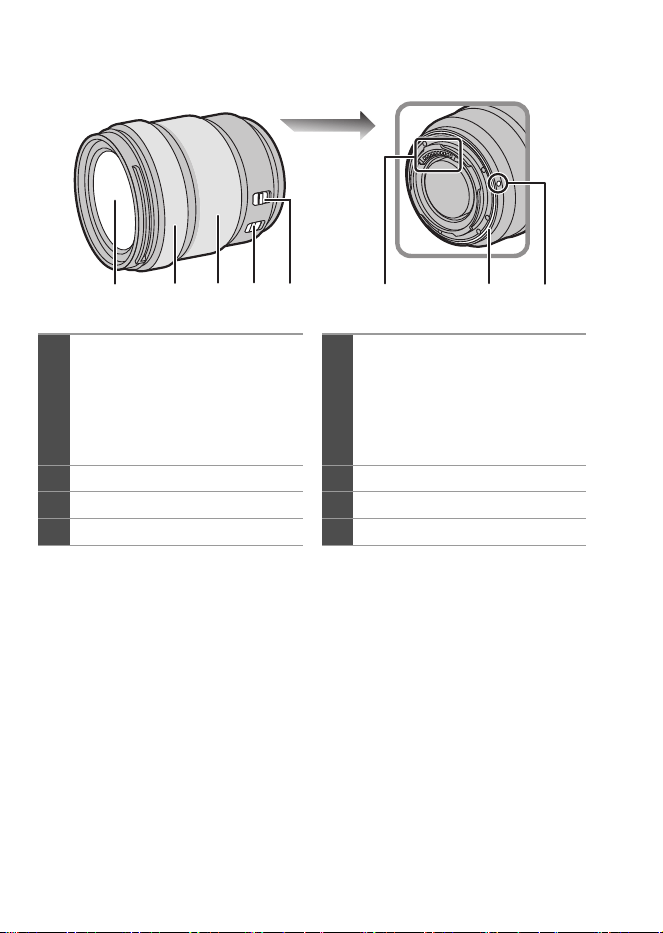
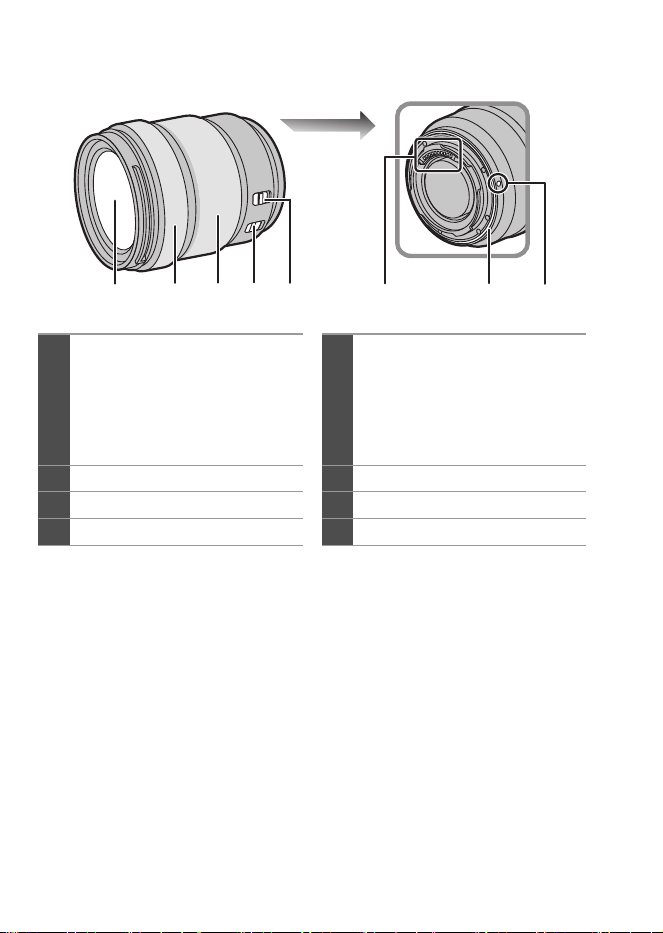
1
Lens surface
5
[AF/MF] switch
0
You can switch between AF and
MF.
If [MF] is set on either the lens or
camera, operation will be with
MF.
2
Focus ring
6
Contact points
3
Zoom ring
7
Lens mount rubber
4
O.I.S. switch
8
Lens fitting mark
21 43 7865
DC-S5D_E-DVQW1926.book 6 ページ 2025年4月2日 水曜日 午後2時26分
DVQW1926 (ENG)
7
DVQW1926 (ENG)
7
ENGLISH
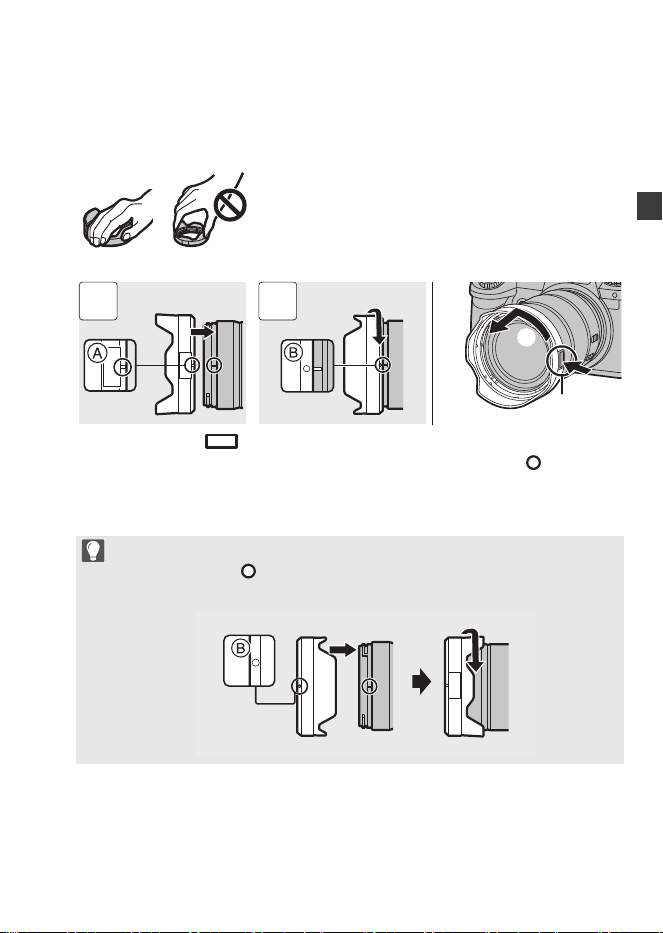
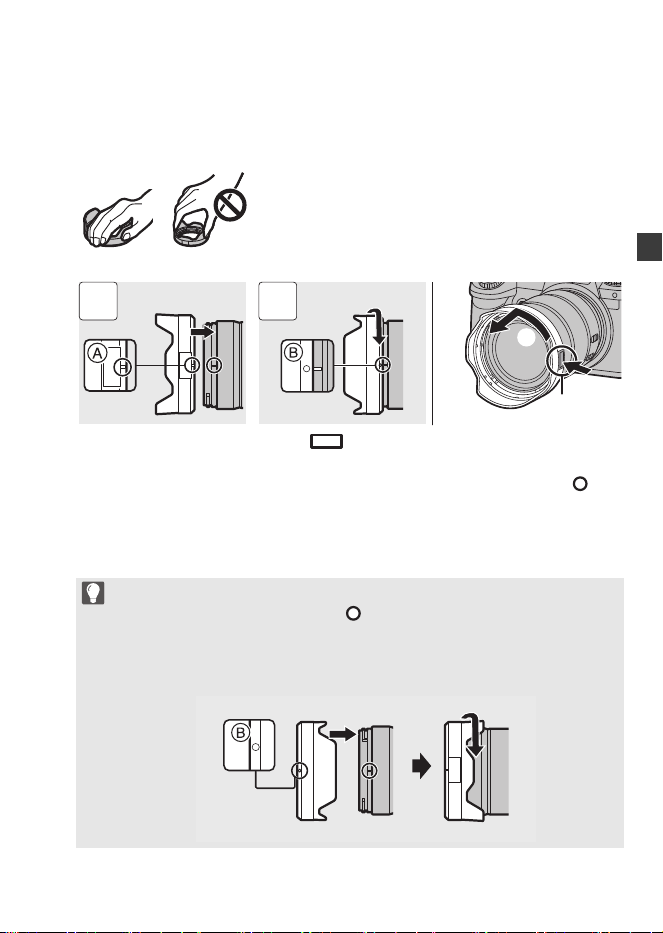
Attaching a Lens Hood
When attaching the lens hood (flower shape) supplied with the
interchangeable lens (S-R28200)
1 Align mark A ( ) on the lens hood with the mark on the tip of the lens.
2 Rotate the lens hood in the direction of the arrow to align mark B ( ) on the lens
hood with the mark on the tip of the lens.
0
When removing the lens hood, rotate while pressing the lens hood button C.
Hold the lens hood with your fingers placed as shown in the picture.
0
Do not hold the lens hood in a way that twists or bends it.
0
When carrying, the lens hood can be attached in the reverse direction.
1 Align mark B ( ) on the lens hood with the mark on the tip of the lens.
2 Attach the lens hood by rotating it in the direction of the arrow until it clicks.
1 2
DC-S5D_E-DVQW1926.book 7 ページ 2025年4月2日 水曜日 午後2時26分
DVQW1926 (ENG)
8
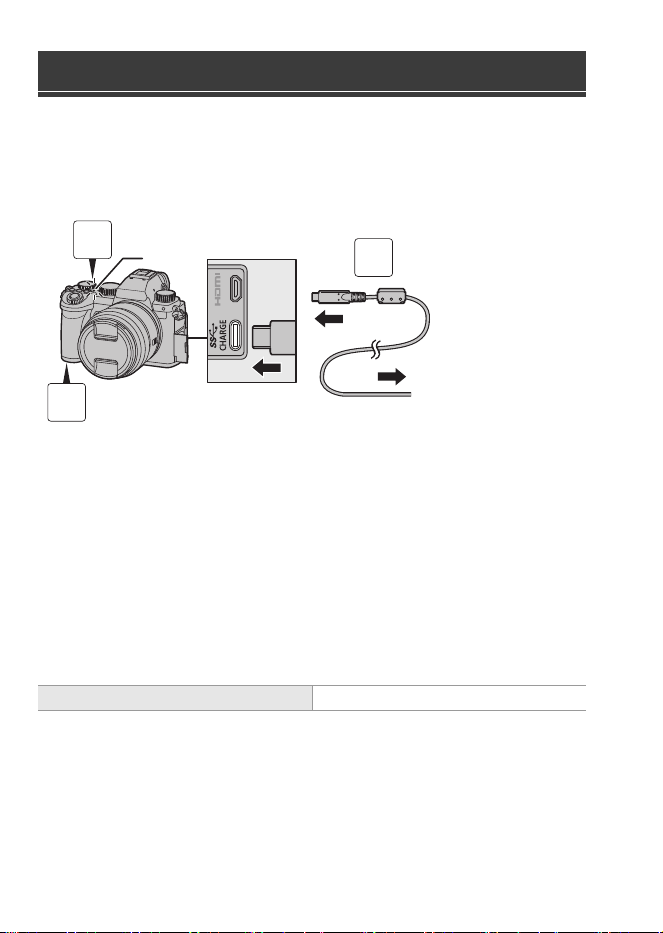
Charge using an AC adaptor (optional/commercially available) and a USB
connection cable (commercially available).
Inserting a Battery into the Camera for Charging
A To the AC adaptor
1
Set the camera on/off switch to [OFF].
2
Insert the battery into the camera.
3
Connect the camera USB port and the AC adaptor using
the USB connection cable.
4
Connect the AC adaptor to an electrical outlet.
0
The charging light B turns red and charging begins.
0
Using either the camera body and the optional AC Adaptor (DMW-AC11) or the
camera body and the supplied accessories of the optional Battery Charger
(DMW-BTC15).
Charging the Battery
Charging time Approx. 240 min
3
1
2
DC-S5D_E-DVQW1926.book 8 ページ 2025年4月2日 水曜日 午後2時26分
DVQW1926 (ENG)
9
DVQW1926 (ENG)
9
ENGLISH
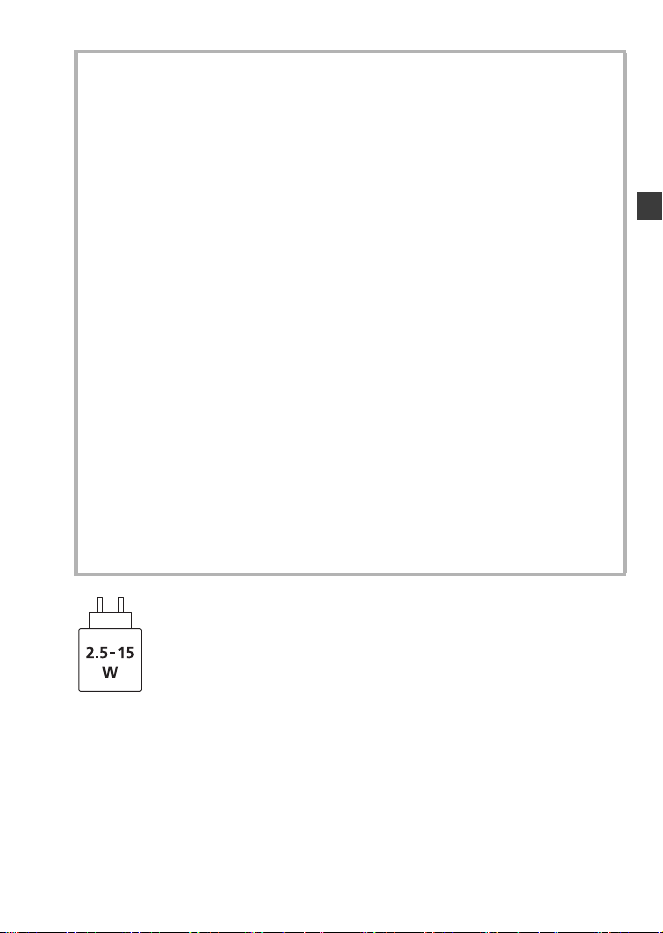
The power delivered by the charger must be between min. 2.5 Watts required by this
product, and max. 15 Watts in order to achieve the maximum charging speed.
Cautions
0
The battery that can be used with the camera is DMW-BLK22. (As of October
2024)
0
Always use genuine Panasonic batteries (DMW-BLK22).
0
If you use other batteries, we cannot guarantee the quality of this product.
0
It is recommended to use the Panasonic AC Adaptor (DMW-AC11: optional)
or the supplied accessories of the Panasonic Battery Charger
(DMW-BTC15: optional) for charging.
0
You can charge with the camera body using a commercially available AC adaptor
and a USB connection cable.
*Recommended specifications for the commercially available AC adaptor
– Supports 5 V/3 A (15 W) DC output
– USB Type-C terminal
*Use a USB connection cable with 15 W output or better for charging.
0
You can also use an AC adaptor with 5 V/500 mA or better for charging.
However, charging time may be longer than with the recommended AC adaptor.
0
Operation is not guaranteed with all commercially available devices.
0
Using charging methods other than those specified may result in fluid leakage,
overheating, combustion, rupturing, etc., and these may cause injury.
0
This battery may present a risk of fire or chemical burn if mistreated.
0
Place the removed battery in a plastic bag, and store or keep away from metallic
objects (clips, etc.).
0
When disposing of the batteries, please contact your local authorities or dealer
and ask for the correct method of disposal.
DC-S5D_E-DVQW1926.book 9 ページ 2025年4月2日 水曜日 午後2時26分

DVQW1926 (ENG)
10
Refer to the operating instructions for other specifications.
35 mm full-frame interchangeable lens:
S-R1840 “LUMIX S 18-40mm F4.5-6.3”
Specifications
Power consumption: 4.3 W (when recording with the monitor), 3.3 W (when
playing back with the monitor)
[When using the interchangeable lens (S-R1840)]
4.5 W (when recording with the monitor), 3.5 W (when
playing back with the monitor)
[When using the interchangeable lens (S-R28200)]
Mount Leica Camera AG L-Mount
Focal length f=18 mm to 40 mm
Lens construction 8 elements in 7 groups (3 aspherical lenses, 2 ED
lenses, 1 UHR lens)
* The protective glass is not included
Aperture type 7 diaphragm blades/Circular aperture diaphragm
Maximum aperture F4.5 (Wide) to F6.3 (Tele)
Minimum aperture value F22 (Wide) to F32 (Tele)
Angle of view 100o (Wide) to 57o (Tele)
In focus distance 0.15 m (0.49 feet) to ¶ (Wide to focal length 21 mm)/
0.35 m (1.15 feet) to ¶ (Tele) (from the focus distance
reference line)
Maximum image
magnification
0.28k (focal length 21 mm)
Optical Image Stabilizer No
Filter diameter 62 mm
Maximum diameter ‰67.9 mm (2.67q)
Overall length Approx. 40.9 mm (1.61q) (from the tip of the lens to the
base side of the lens mount when the lens barrel is
retracted)
Mass Approx. 155 g (0.34 lb)
DC-S5D_E-DVQW1926.book 10 ページ 2025年4月2日 水曜日 午後2時26分

DVQW1926 (ENG)
11
DVQW1926 (ENG)
11
ENGLISH
35 mm full-frame interchangeable lens:
S-R28200 “LUMIX S 28-200mm F4-7.1 MACRO O.I.S.”
Dust and splash resistant Yes
Recommended operating
temperature
j10 oC to 40 oC (14 oF to 104 oF)
Permissible relative
humidity
10 %RH to 80 %RH
Mount Leica Camera AG L-Mount
Focal length f=28 mm to 200 mm
Lens construction 17 elements in 13 groups (1 aspherical lens, 4 ED
lenses, 1 UHR lens)
Aperture type 9 diaphragm blades/Circular aperture diaphragm
Maximum aperture F4 (Wide) to F7.1 (Tele)
Minimum aperture value F32 (Wide) to F45 (Tele)
Angle of view 75o (Wide) to 12o (Tele)
In focus distance 0.14 m (0.46 feet) to ¶ (Wide)/0.65 mm (2.13 feet) to
¶ (Tele) (from the focus distance reference line)
Maximum image
magnification
0.50k (Wide)
Optical Image Stabilizer Yes
Filter diameter 67 mm
Maximum diameter ‰77.3 mm (3.04q)
Overall length Approx. 93.4 mm (3.68q) (from the tip of the lens to the
base side of the lens mount)
Mass Approx. 413 g (0.91 lb)
Dust and splash resistant Yes
Recommended operating
temperature
j10 oC to 40 oC (14 oF to 104 oF)
Permissible relative
humidity
10 %RH to 80 %RH
DC-S5D_E-DVQW1926.book 11 ページ 2025年4月2日 水曜日 午後2時26分
DVQW1926 (ENG)
12
Listed below are the numbers of pictures that can be taken and the time
lengths available for recording when the supplied battery is being used.
0
The number of pictures that can be taken is according to the CIPA (Camera &
Imaging Products Association) standards.
0
Using a Panasonic SDHC memory card.
0
The values listed are approximate.
Recording Pictures (When Using the Monitor)
When the interchangeable lens (S-R1840) is used
When the interchangeable lens (S-R28200) is used
Recording Pictures (When Using the Viewfinder)
When the interchangeable lens (S-R1840) is used
When the interchangeable lens (S-R28200) is used
0
The numbers in parentheses indicate the values that result when [Time to Sleep] in
[Power Save LVF Shooting] is set to [1SEC] and the [Power Save LVF Shooting]
function works as intended.
(Based on the test conditions derived from the CIPA standard and specified by
Panasonic)
Number of Pictures That Can Be Taken
and Available Recording Time with the
Battery
Number of pictures that can be taken 430
Number of pictures that can be taken 410
Number of pictures that can be taken 450 (1500)
Number of pictures that can be taken 430 (1450)
DC-S5D_E-DVQW1926.book 12 ページ 2025年4月2日 水曜日 午後2時26分
DVQW1926 (ENG)
13
DVQW1926 (ENG)
13
ENGLISH
Recording Videos (When Using the Monitor)
When the interchangeable lens (S-R1840) is used
[MP4] (Recording with the recording quality set to [FHD/8bit/28M/50p])
[MP4] (Recording with the recording quality set to [4K/10bit/100M/50p])
[MOV] (Recording with the recording quality set to [FHD/50p/420/8-L])
[MOV] (Recording with the recording quality set to [4K/50p/420/10-L])
[MOV] (Recording with the recording quality set to [C4K/50p/420/8-L])
When the interchangeable lens (S-R28200) is used
[MP4] (Recording with the recording quality set to [FHD/8bit/28M/50p])
[MP4] (Recording with the recording quality set to [4K/10bit/100M/50p])
Continuous available recording time (minutes) 140
Actual available recording time (minutes) 70
Continuous available recording time (minutes) 100
Actual available recording time (minutes) 50
Continuous available recording time (minutes) 140
Actual available recording time (minutes) 70
Continuous available recording time (minutes) 100
Actual available recording time (minutes) 50
Continuous available recording time (minutes) 110
Actual available recording time (minutes) 55
Continuous available recording time (minutes) 130
Actual available recording time (minutes) 65
Continuous available recording time (minutes) 100
Actual available recording time (minutes) 50
DC-S5D_E-DVQW1926.book 13 ページ 2025年4月2日 水曜日 午後2時26分
DVQW1926 (ENG)
14
[MOV] (Recording with the recording quality set to [FHD/50p/420/8-L])
[MOV] (Recording with the recording quality set to [4K/50p/420/10-L])
[MOV] (Recording with the recording quality set to [C4K/50p/420/8-L])
0
Actual available recording time is the time available for recording when repeating
actions such as turning the camera on and off, starting/stopping recording, etc.
Playback (When Using the Monitor)
When the interchangeable lens (S-R1840) is used
When the interchangeable lens (S-R28200) is used
The following accessories are available for use:
(Product numbers correct as of October 2024.)
Continuous available recording time (minutes) 130
Actual available recording time (minutes) 65
Continuous available recording time (minutes) 100
Actual available recording time (minutes) 50
Continuous available recording time (minutes) 100
Actual available recording time (minutes) 50
Playback time (minutes) 280
Playback time (minutes) 260
Digital Camera Accessory System
Product name Model number
Battery Charger DMW-BTCD15
¢1
AC Adaptor DMW-AC11
¢2
DC Coupler DMW-DCC18
¢1
Tripod Grip DMW-SHGR2
DC-S5D_E-DVQW1926.book 14 ページ 2025年4月2日 水曜日 午後2時26分

DVQW1926 (ENG)
15
DVQW1926 (ENG)
15
ENGLISH
¢1 A separately available AC adaptor and USB connection cable are required. It is
recommended to use the Panasonic AC Adaptor (DMW-AC11: optional).
¢2 Supplied with an AC cable/AC mains lead and USB connection cable.
0
Some optional accessories may not be available in some countries.
0
Always use a genuine Panasonic Tripod Grip (DMW-SHGR1/DMW-SHGR2:
optional).
0
Refer to the operating instructions for DC-S5 for other accessories.
0
In order to enhance security, password authentication will always be used when
establishing direct Wi-Fi connections between the camera and a smartphone.
The [Wi-Fi Password] menu item in [Wi-Fi Setup] has been removed, and the [Wi-Fi
Password] will always be [ON].
0
When connecting to Wi-Fi via a wireless access point, the [TKIP] of encryption
method and [No Encryption] in [Security type] are no longer supported.
0
This camera does not support functionality to send images to a PC via Wi-Fi.
[PC] cannot be selected as a destination in [Wi-Fi Function] [New Connection]
[Send Images While Recording]/[Send Images Stored in the Camera].
There is no [PC Connection] menu item in [Wi-Fi Setup].
0
Due to the cessation of the services, this camera does not support functionality to
send images to web services/cloud sync services via Wi-Fi.
[Web service]/[Cloud Sync. Service] cannot be selected as a destination in [Wi-Fi
Function] [New Connection] [Send Images While Recording]/[Send Images
Stored in the Camera].
There is no [LUMIX CLUB] menu item in [Wi-Fi Setup].
0
When [Sleep Mode] or [Sleep Mode(Wi-Fi)] in [Power Save Mode] is set to [OFF],
the power consumption of this camera may rise.
0
For more information about the energy efficiency of the product, please visit our
website, www.panasonic.com
, and enter the model number in the search box.
Notes on the Wi-Fi Function
Notes on the [Power Save Mode]
DC-S5D_E-DVQW1926.book 15 ページ 2025年4月2日 水曜日 午後2時26分
DVQW1926 (GER)
16
Sehr geehrter Kunde,
Wir möchten diese Gelegenheit nutzen, Ihnen für den Kauf dieser Digital-Kamera von
Panasonic zu danken.
Informationen zur Bedienungsanleitung
Neben dieser Broschüre erhalten Sie mit der DC-S5D auch die Bedienungsanleitung
für die DC-S5.
Sie finden in der Bedienungsanleitung für die DC-S5 wichtige Hinweise, die
auch für diese Kamera gelten.
Kontrollieren Sie vor dem Gebrauch der Kamera, dass alle Zubehörteile mitgeliefert
wurden.
(Die Produktnummern beziehen sich auf den Stand von Oktober 2024.)
Akkupack
0
Laden Sie den
Akku vor dem
ersten Einsatz auf.
Schultergurt
Kameradeckel
¢1
Zubehörschuhabdeckung
¢
1
Abdeckung für
Akkugriff-
Steckverbinder
¢1
¢1 Ist zum Kaufzeitpunkt an der Kamera
angebracht.
0
Das Akku-Ladegerät, der Netzadapter und das USB-Anschlusskabel sind als
Sonderzubehör erhältlich.
Standardzubehör
DMW-BLK22
DVPW1023Z
1HE1MC891Z
DVYE1121Z
SKF0145K
DC-S5D_E-DVQW1926.book 16 ページ 2025年4月2日 水曜日 午後2時26分
DVQW1926 (GER)
17
DEUTSCH
Mit DC-S5DN (Objektiv-Kit-Produkt) mitgelieferte Objekte
Austauschbares
35 mm-Vollformat-Objektiv
0
Das Objektiv ist
staubdicht und
spritzwassergeschützt.
Objektivdeckel
¢2
Hinterer
Objektivdeckel
¢2
Mit DC-S5DH (Objektiv-Kit-Produkt) mitgelieferte Objekte
Austauschbares
35 mm-Vollformat-Objektiv
0
Das Objektiv ist
staubdicht und
spritzwassergeschützt.
Gegenlichtblende
Objektivdeckel
¢2
Hinterer
Objektivdeckel
¢2
¢2 Ist zum Kaufzeitpunkt am Objektiv angebracht.
0
Zum Verbessern des Staub- und Spritzwasserschutzes des austauschbaren
Objektivs (S-R1840/S-R28200) ist ein Objektivfassungsgummi an der Fassung
angebracht.
– Durch das Objektivfassungsgummi kommt es zu Schleifspuren an der
Digital-Kamera. Dadurch wird die Leistung jedoch nicht beeinträchtigt.
– Wenden Sie sich an Panasonic, um das Objektivfassungsgummi austauschen zu
lassen.
S-R1840
6GE1SR1840Z
RGE1Z276Z
S-R28200
1ZE2SE28200Z
CGE1Z293Z
RGE1Z276Z
DC-S5D_E-DVQW1926.book 17 ページ 2025年4月2日 水曜日 午後2時26分
DVQW1926 (GER)
18
S-R1840
0
Achten Sie darauf, das Objektiv nur anzubringen und zu entfernen, wenn der
Objektivtubus eingefahren ist.
0
Ist ein austauschbares Objektiv (S-R1840) angebracht, wird eine Meldung
angezeigt, falls das Objektiv eingefahren und daher keine Aufnahme möglich ist.
Drehen Sie den Zoom-Ring, um es auszufahren.
0
Weitwinkelaufnahmen an oder nahe der Scharfstell-Nahgrenze weisen eine
verminderte Bildqualität an den Bildrändern auf. Wir empfehlen, jedes Bild nach der
Aufnahme zu überprüfen.
Bezeichnungen der Teile
1
Linsenoberfläche
5
Kontaktpunkte
2
Fokusring
6
Objektivfassungsgummi
3
Zoom-Ring
7
Linsenmarkierung
4
[AF/MF]-Schalter
0
Sie können zwischen AF und
MF wechseln.
Wenn an Objektiv oder Kamera
[MF] eingestellt ist, erfolgt der
Betrieb mit MF.
4
2 31 765
DC-S5D_E-DVQW1926.book 18 ページ 2025年4月2日 水曜日 午後2時26分
DVQW1926 (GER)
19
DVQW1926 (GER)
19
DEUTSCH
Ausfahren/Einfahren des Objektivs [wenn das
austauschbare Objektiv (S-R1840) angebracht ist]
(a) Das Objektiv ist eingefahren
(b) Sie können nun Aufnahmen erstellen
Ausfahren des Objektivs
Drehen Sie den Zoomring in Pfeilrichtung 1 von Position A (das Objektiv ist
eingefahren) nach Position B (18 mm bis 40 mm) um das Objektiv auszufahren.
0
Wenn der Objektivtubus eingefahren ist können keine Bilder aufgenommen werden.
Einfahren des Objektivs
Drehen Sie den Zoomring in Pfeilrichtung 2 von Position B (18 mm bis 40 mm)
nach Position A, um das Objektiv einzufahren.
0
An der 18-mm-Position spüren Sie, wie das Objektiv einrastet. Drehen Sie weiter bis
zur Position A.
0
Wir empfehlen, das Objektiv einzufahren, wenn Sie keine Bilder aufnehmen.
(a) (b)
DC-S5D_E-DVQW1926.book 19 ページ 2025年4月2日 水曜日 午後2時26分
DVQW1926 (GER)
20
S-R28200
0
Weitwinkelaufnahmen an oder nahe der Scharfstell-Nahgrenze weisen eine
verminderte Bildqualität an den Bildrändern auf. Wir empfehlen, jedes Bild nach der
Aufnahme zu überprüfen.
1
Linsenoberfläche
5
[AF/MF]-Schalter
0
Sie können zwischen AF und
MF wechseln.
Wenn an Objektiv oder Kamera
[MF] eingestellt ist, erfolgt der
Betrieb mit MF.
2
Fokusring
6
Kontaktpunkte
3
Zoom-Ring
7
Objektivfassungsgummi
4
O.I.S.-Schalter
8
Linsenmarkierung
21 43 7865
DC-S5D_E-DVQW1926.book 20 ページ 2025年4月2日 水曜日 午後2時26分
DVQW1926 (GER)
21
DVQW1926 (GER)
21
DEUTSCH
Anbringen einer Gegenlichtblende
Beim Anbringen der Gegenlichtblende (Blumenform), die mit dem
austauschbaren Objektiv (S-R28200) mitgeliefert wurde
1 Richten Sie die Markierung A ( ) an der Gegenlichtblende mit der
Markierung am Rand des Objektivs aus.
2 Drehen Sie die Gegenlichtblende in Pfeilrichtung, bis die Markierung B ( ) an
der Gegenlichtblende an der Markierung am Objektivrand ausgerichtet ist.
0
Um die Gegenlichtblende zu entfernen, drehen Sie diese, während Sie die
Gegenlichtblendentaste C gedrückt halten.
Halten Sie die Gegenlichtblende mit den Fingern wie in der Abbildung dargestellt.
0
Halten Sie die Gegenlichtblende nicht so fest, dass sie verdreht oder verbogen wird.
0
Beim Transport kann die Gegenlichtblende in umgekehrter Richtung angebracht werden.
1 Richten Sie die Markierung B ( ) an der Gegenlichtblende an der
Markierung am Objektivrand aus.
2 Bringen Sie die Gegenlichtblende an, indem Sie sie in Pfeilrichtung drehen,
bis ein Klicken zu hören ist.
1 2
DC-S5D_E-DVQW1926.book 21 ページ 2025年4月2日 水曜日 午後2時26分
DVQW1926 (GER)
22
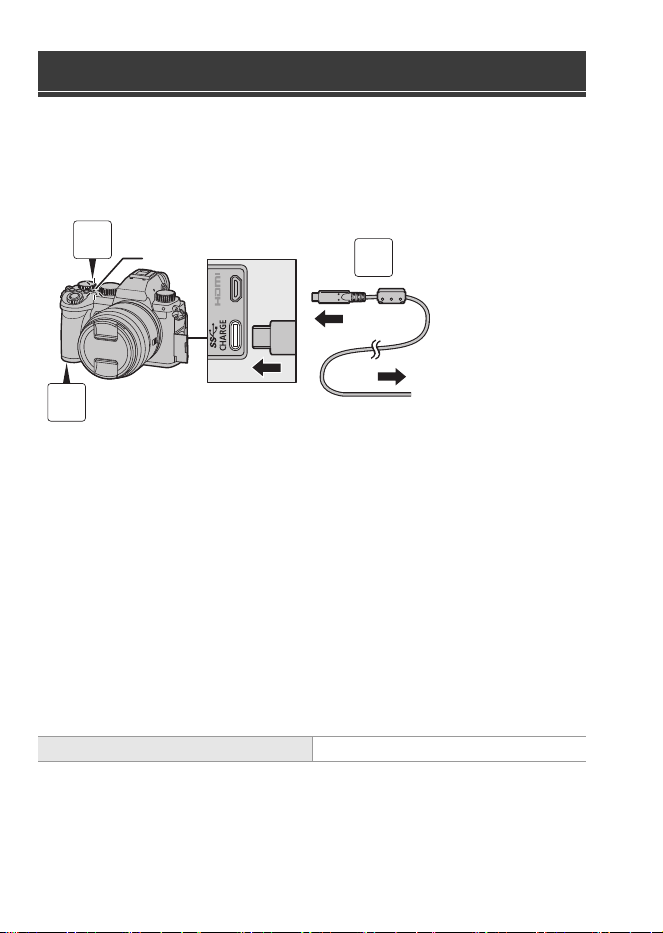
Verwenden Sie zum Laden einen Netzadapter (Sonderzubehör/im Handel
erhältlich) und ein USB-Anschlusskabel (im Handel erhältlich).
Einsetzen eines aufzuladenden Akkus in die Kamera
A Zum Netzadapter
1
Schalten Sie den Ein/Aus-Schalter der Kamera auf
[OFF].
2
Setzen Sie den Akku in die Kamera ein.
3
Verbinden Sie den USB-Anschluss der Kamera und den
Netzadapter mithilfe des USB-Anschlusskabels.
4
Schließen Sie den Netzadapter an eine Netzsteckdose
an.
0
Die Ladeleuchte B leuchtet rot, und der Aufladevorgang beginnt.
0
Bei Verwendung des Kameragehäuses und des als Sonderzubehör erhältlichen
Netzadapters (DMW-AC11) oder bei Verwendung des Kameragehäuses und des im
Lieferumfang des als Sonderzubehör erhältlichen Akku-Ladegeräts (DMW-BTC15)
enthaltenen Zubehörs.
Aufladen des Akkus
Ladedauer Ca. 240 min
3
1
2
DC-S5D_E-DVQW1926.book 22 ページ 2025年4月2日 水曜日 午後2時26分
DVQW1926 (GER)
23
DVQW1926 (GER)
23
DEUTSCH
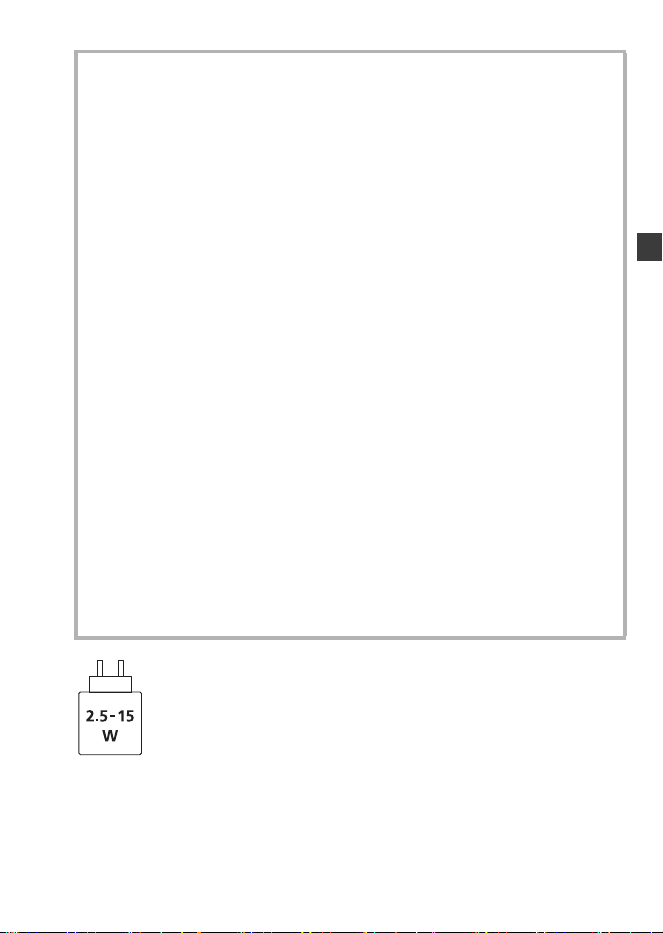
Das Ladegerät muss eine Leistung liefern, die zwischen dem für dieses Projekt
erforderlichen Mindestwert von 2,5 Watt und einem Höchstwert von 15 Watt liegt,
damit die kürzest mögliche Ladedauer erreicht wird.
Sicherheitshinweise
0
Der folgende Akku kann mit dieser Kamera verwendet werden: DMW-BLK22.
(Stand: Oktober 2024)
0
Verwenden Sie stets Originalakkus von Panasonic (DMW-BLK22).
0
Falls andere Akkus verwendet werden, übernehmen wir keine Garantie für
die Qualität dieses Produkts.
0
Wir empfehlen, den Netzadapter (DMW-AC11: Sonderzubehör) oder das mit
dem Akku-Ladegerät (DMW-BTC15: Sonderzubehör) von Panasonic
mitgelieferte Zubehör zum Aufladen zu verwenden.
0
Sie können das Kameragehäuse zum Laden mithilfe eines im Handel
erhältlichen Netzadapters und USB-Anschlusskabels verwenden.
*Empfohlene Spezifikationen für im Handel erhältliche Netzadapter
– DC-Ausgang unterstützt 5 V/3 A (15 W)
– USB Type-C-Anschluss
*
Verwenden Sie zum Aufladen ein USB-Anschlusskabel mit mindestens 15 W Ausgangsleistung.
0
Sie können zum Aufladen auch einen Netzadapter mit mindestens 5 V/500 mA
verwenden. Allerdings nimmt der Ladevorgang damit mehr Zeit als mit dem
empfohlenen Netzadapter in Anspruch.
0
Der Betrieb kann nicht mit allen im Handel erhältlichen Geräten gewährleistet werden.
0
Die Verwendung anderer als der angegebenen Verfahren zum Aufladen kann zu Flüssigkeitsaustritt,
Überhitzung, Entzündung, Brechen usw. und in der Folge zu Verletzungen führen.
0
Wenn dieser Akku unsachgemäß gehandhabt wird, besteht Brandgefahr sowie
die Gefahr chemischer Verbrennungen.
0
Bewahren Sie den entfernten Akku in einen Kunststoffbeutel auf und halten Sie
ihn von metallischen Gegenständen (Büroklammern usw.) fern.
0
Erfragen Sie die korrekte Entsorgung des Akkus bei den lokalen Behörden oder
Ihrem Händler.
DC-S5D_E-DVQW1926.book 23 ページ 2025年4月2日 水曜日 午後2時26分
DVQW1926 (GER)
24
Informationen zu anderen Spezifikationen finden Sie in der Bedienungsanleitung.
Austauschbares 35 mm-Vollformat-Objektiv:
S-R1840 “LUMIX S 18-40mm F4.5-6.3”
Technische Daten
Stromverbrauch: 4,3 W (bei Aufnahme mit dem Monitor), 3,3 W (bei
Wiedergabe auf dem Monitor)
[Wenn das austauschbare Objektiv verwendet wird
(S-R1840)]
4,5 W (bei Aufnahme mit dem Monitor), 3,5 W (bei
Wiedergabe auf dem Monitor)
[Wenn das austauschbare Objektiv verwendet wird
(S-R28200)]
Fassung Leica Camera AG L-Mount
Brennweite f=18 mm bis 40 mm
Objektivaufbau 8 Elemente in 7 Gruppen (3 asphärische Linsen,
2 ED-Linsen, 1 UHR-Linse)
* Das Schutzglas ist hierbei nicht mitgezählt
Blende 7 Blendenlamellen/runde Blende
Maximale Blendenöffnung F4.5 (Weitwinkel) bis F6.3 (Tele)
Minimale Blende F22 (Weitwinkel) bis F32 (Tele)
Bildwinkel 100o (Weitwinkel) bis 57o (Tele)
Schärfebereich 0,15 m bis ¶ (Weitwinkel bis 21 mm Brennweite)/
0,35 m bis ¶ (Tele) (von der Bezugslinie für
Fokusentfernung)
Maximale Vergrößerung 0,28k (Brennweite 21 mm)
Optischer Bildstabilisator Nein
Filterdurchmesser 62 mm
Max. Durchmesser ‰67,9 mm
Gesamtlänge Ca. 40,9 mm (vom Rand des Objektivs bis zur
Grundseite der Objektivfassung bei eingefahrenem
Objektivtubus)
DC-S5D_E-DVQW1926.book 24 ページ 2025年4月2日 水曜日 午後2時26分

DVQW1926 (GER)
25
DVQW1926 (GER)
25
DEUTSCH
Austauschbares 35 mm-Vollformat-Objektiv:
S-R28200 “LUMIX S 28-200mm F4-7.1 MACRO O.I.S.”
Gewicht Ca. 155 g
Staub- und
Spritzwassergeschützt
Ja
Empfohlene
Betriebstemperatur
j10 oC bis 40 oC
Zulässige relative
Luftfeuchtigkeit
10 %RH bis 80 %RH
Fassung Leica Camera AG L-Mount
Brennweite f=28 mm bis 200 mm
Objektivaufbau 17 Elemente in 13 Gruppen (1 asphärische Linse,
4 ED-Linsen, 1 UHR-Linse)
Blende 9 Blendenlamellen/runde Blende
Maximale Blendenöffnung F4 (Weitwinkel) bis F7.1 (Tele)
Minimale Blende F32 (Weitwinkel) bis F45 (Tele)
Bildwinkel 75o (Weitwinkel) bis 12o (Tele)
Schärfebereich 0,14 m bis ¶ (Weitwinkel)/0,65 mm bis ¶ (Tele) (von
der Bezugslinie für Fokusentfernung)
Maximale Vergrößerung 0,50k (Weitwinkel)
Optischer Bildstabilisator Ja
Filterdurchmesser 67 mm
Max. Durchmesser ‰77,3 mm
Gesamtlänge Ca. 93,4 mm (vom Rand des Objektivs bis zur
Grundseite der Objektivfassung)
Gewicht Ca. 413 g
Staub- und
Spritzwassergeschützt
Ja
Empfohlene
Betriebstemperatur
j10 oC bis 40 oC
Zulässige relative
Luftfeuchtigkeit
10 %RH bis 80 %RH
DC-S5D_E-DVQW1926.book 25 ページ 2025年4月2日 水曜日 午後2時26分
DVQW1926 (GER)
26
In der Liste unten finden Sie die jeweilige Anzahl der Bilder, die
aufgenommen werden können, sowie die verfügbaren Aufnahmedauern,
wenn der mitgelieferte Akku verwendet wird.
0
Die Anzahl der aufnehmbaren Bilder ist nach dem CIPA-Standard (Camera &
Imaging Products Association) angegeben.
0
Bei Verwendung einer SDHC-Speicherkarte von Panasonic
0
Die aufgeführten Werte sind Näherungswerte.
Aufnehmen von Bildern (wenn der Monitor verwendet
wird)
Wenn das austauschbare Objektiv (S-R1840) verwendet wird
Wenn das austauschbare Objektiv (S-R28200) verwendet wird
Aufnehmen von Bildern (wenn der Sucher verwendet
wird)
Wenn das austauschbare Objektiv (S-R1840) verwendet wird
Wenn das austauschbare Objektiv (S-R28200) verwendet wird
0
Die Zahlen in Klammern bezeichnen die Ergebniswerte, wenn [Zeit bis Ruhe-Modus]
in [Energiespar. Sucher-Aufn.] auf [1SEC] eingestellt ist und die Funktion
[Energiespar. Sucher-Aufn.] wie vorgesehen funktioniert.
(Auf Basis der durch den CIPA-Standard und von Panasonic angegebenen
Testbedingungen)
Anzahl der aufnehmbaren Bilder und
verfügbare Aufnahmedauer im
Akkubetrieb
Anzahl der aufnehmbaren Bilder 430
Anzahl der aufnehmbaren Bilder 410
Anzahl der aufnehmbaren Bilder 450 (1500)
Anzahl der aufnehmbaren Bilder 430 (1450)
DC-S5D_E-DVQW1926.book 26 ページ 2025年4月2日 水曜日 午後2時26分
DVQW1926 (GER)
27
DVQW1926 (GER)
27
DEUTSCH
Aufnehmen von Videos (wenn der Monitor verwendet wird)
Wenn das austauschbare Objektiv (S-R1840) verwendet wird
[MP4]
(Aufnahme mit auf [FHD/8bit/28M/50p] eingestellter Aufnahmequalität)
[MP4]
(Aufnahme mit auf [4K/10bit/100M/50p] eingestellter Aufnahmequalität)
[MOV]
(Aufnahme mit auf [FHD/50p/420/8-L] eingestellter Aufnahmequalität)
[MOV]
(Aufnahme mit auf [4K/50p/420/10-L] eingestellter Aufnahmequalität)
[MOV]
(Aufnahme mit auf [C4K/50p/420/8-L] eingestellter Aufnahmequalität)
Wenn das austauschbare Objektiv (S-R28200) verwendet wird
[MP4]
(Aufnahme mit auf [FHD/8bit/28M/50p] eingestellter Aufnahmequalität)
[MP4]
(Aufnahme mit auf [4K/10bit/100M/50p] eingestellter Aufnahmequalität)
Verfügbare kontinuierliche Aufnahmedauer (Minuten) 140
Tatsächliche verfügbare Aufnahmedauer (Minuten) 70
Verfügbare kontinuierliche Aufnahmedauer (Minuten) 100
Tatsächliche verfügbare Aufnahmedauer (Minuten) 50
Verfügbare kontinuierliche Aufnahmedauer (Minuten) 140
Tatsächliche verfügbare Aufnahmedauer (Minuten) 70
Verfügbare kontinuierliche Aufnahmedauer (Minuten) 100
Tatsächliche verfügbare Aufnahmedauer (Minuten) 50
Verfügbare kontinuierliche Aufnahmedauer (Minuten) 110
Tatsächliche verfügbare Aufnahmedauer (Minuten) 55
Verfügbare kontinuierliche Aufnahmedauer (Minuten) 130
Tatsächliche verfügbare Aufnahmedauer (Minuten) 65
Verfügbare kontinuierliche Aufnahmedauer (Minuten) 100
Tatsächliche verfügbare Aufnahmedauer (Minuten) 50
DC-S5D_E-DVQW1926.book 27 ページ 2025年4月2日 水曜日 午後2時26分
DVQW1926 (GER)
28
[MOV]
(Aufnahme mit auf [FHD/50p/420/8-L] eingestellter Aufnahmequalität)
[MOV]
(Aufnahme mit auf [4K/50p/420/10-L] eingestellter Aufnahmequalität)
[MOV]
(Aufnahme mit auf [C4K/50p/420/8-L] eingestellter Aufnahmequalität)
0
Die tatsächliche verfügbare Aufnahmedauer bezeichnet die für Aufnahmen
verfügbare Zeit, wenn wiederholt Aktionen wie Ein- und Ausschalten, Starten/
Stoppen der Aufnahme usw. ausgeführt werden.
Wiedergabe (bei Verwendung des Monitors)
Wenn das austauschbare Objektiv (S-R1840) verwendet wird
Wenn das austauschbare Objektiv (S-R28200) verwendet wird
Das folgende Zubehör kann verwendet werden:
(Die Produktnummern beziehen sich auf den Stand von Oktober 2024.)
Verfügbare kontinuierliche Aufnahmedauer (Minuten) 130
Tatsächliche verfügbare Aufnahmedauer (Minuten) 65
Verfügbare kontinuierliche Aufnahmedauer (Minuten) 100
Tatsächliche verfügbare Aufnahmedauer (Minuten) 50
Verfügbare kontinuierliche Aufnahmedauer (Minuten) 100
Tatsächliche verfügbare Aufnahmedauer (Minuten) 50
Wiedergabedauer
(Minuten)
280
Wiedergabedauer
(Minuten)
260
Zubehörsystem für Digital-Kamera
Produktname Modellnummer
Akku-Ladegerät DMW-BTCD15
¢1
Netzadapter DMW-AC11
¢2
DC-Verbindungsstück DMW-DCC18
¢1
Stativgriff DMW-SHGR2
DC-S5D_E-DVQW1926.book 28 ページ 2025年4月2日 水曜日 午後2時26分

DVQW1926 (GER)
29
DVQW1926 (GER)
29
DEUTSCH
¢1 Es werden ein Netzadapter und USB-Anschlusskabel benötigt (separat erhältlich).
Wir empfehlen, den Netzadapter (DMW-AC11: Sonderzubehör) von Panasonic zu
verwenden.
¢2 Geliefert mit AC-Netzleitung und USB-Anschlusskabel.
0
Bestimmtes Sonderzubehör ist in einigen Ländern unter Umständen nicht erhältlich.
0
Verwenden Sie stets einen Original-Stativgriff von Panasonic (DMW-SHGR1/
DMW-SHGR2: Sonderzubehör).
0
Für weiteres Zubehör beachten Sie bitte die Bedienungsanleitung für die DC-S5.
0
Aus Sicherheitsgründen wird bei einer direkten WLAN-Verbindung zwischen
Kamera und Smartphone stets ein Passwort benötigt.
Der Eintrag [Wi-Fi-Passwort] im Menü [Wi-Fi-Setup] wurde entfernt.
[Wi-Fi-Passwort] ist immer [ON].
0
Bei Wi-Fi-Verbindungen über Drahtlos-Zugangspunkte werden die
Verschlüsselungsmethode [TKIP] und die Option [Keine Verschlüss.] in
[Sicherheitstyp] nicht mehr unterstützt.
0
Diese Kamera unterstützt die Übertragung von Bildern über WLAN auf einen PC
nicht.
[PC] kann nicht als Ziel gewählt werden (unter [Wi-Fi-Funktion] [Neue
Verbindung] [Bilder während der Aufnahme schicken]/[Auf Kamera gespeicherte
Bilder übertragen]).
Im Menü [Wi-Fi-Setup] gibt es den Eintrag [PC-Verbindung] nicht.
0
Aufgrund der Einstellung der Dienste unterstützt diese Kamera keine Übertragung
von Bildern über WLAN an Web-Dienste und keine Cloud-Synchronisation.
[WEB-Dienst]/[Cloud Sync. Service] kann nicht als Ziel gewählt werden (unter
[Wi-Fi-Funktion] [Neue Verbindung] [Bilder während der Aufnahme schicken]/
[Auf Kamera gespeicherte Bilder übertragen]).
Im Menü [Wi-Fi-Setup] gibt es den Eintrag [LUMIX CLUB] nicht.
0
Wenn [Ruhe-Modus] oder [Ruhe-Modus(Wi-Fi)] unter [Energiesparmodus] auf [OFF]
eingestellt ist, kann der Stromverbrauch der Kamera höher ausfallen.
0
Für weitere Informationen zur Energieeffizienz des Produkts besuchen Sie unsere
Website www.panasonic.com
und geben Sie im Suchfeld die Modellnummer ein.
Hinweise zur WLAN-Funktion
Hinweise zum [Energiesparmodus]
DC-S5D_E-DVQW1926.book 29 ページ 2025年4月2日 水曜日 午後2時26分
DVQW1926 (FRE)
30
À notre clientèle,
Nous vous remercions d’avoir fait l'acquisition de cet appareil photo numérique
Panasonic.
À propos du manuel d’utilisation
En plus de ce livret, le DC-S5D est fourni avec le manuel d'utilisation du DC-S5.
Veuillez également consulter le manuel d'utilisation du DC-S5.
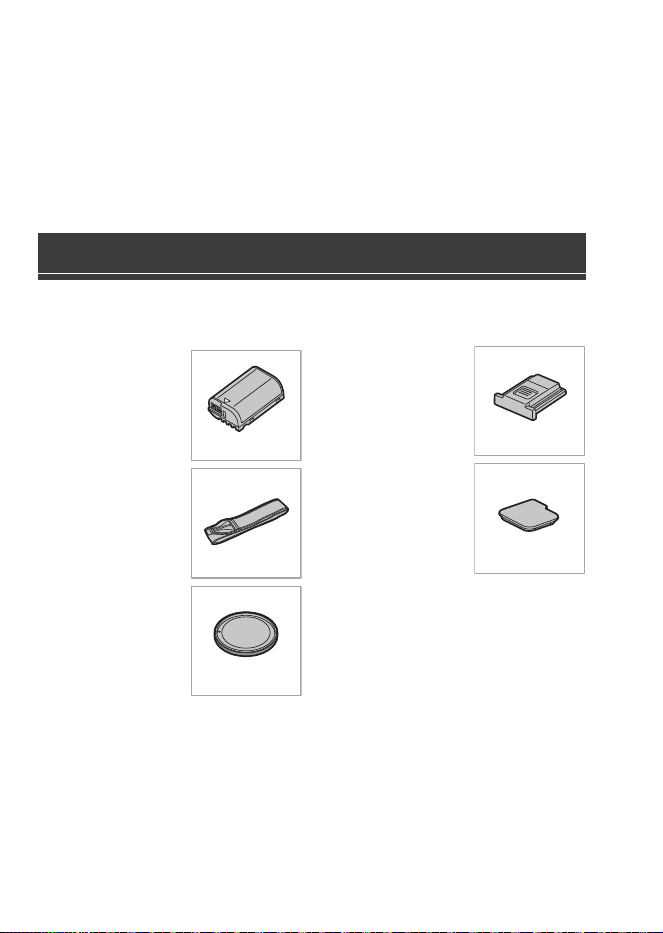
Vérifiez que tous les accessoires sont fournis avant d’utiliser l’appareil photo.
(Les numéros de produit sont corrects à compter d’octobre 2024.)
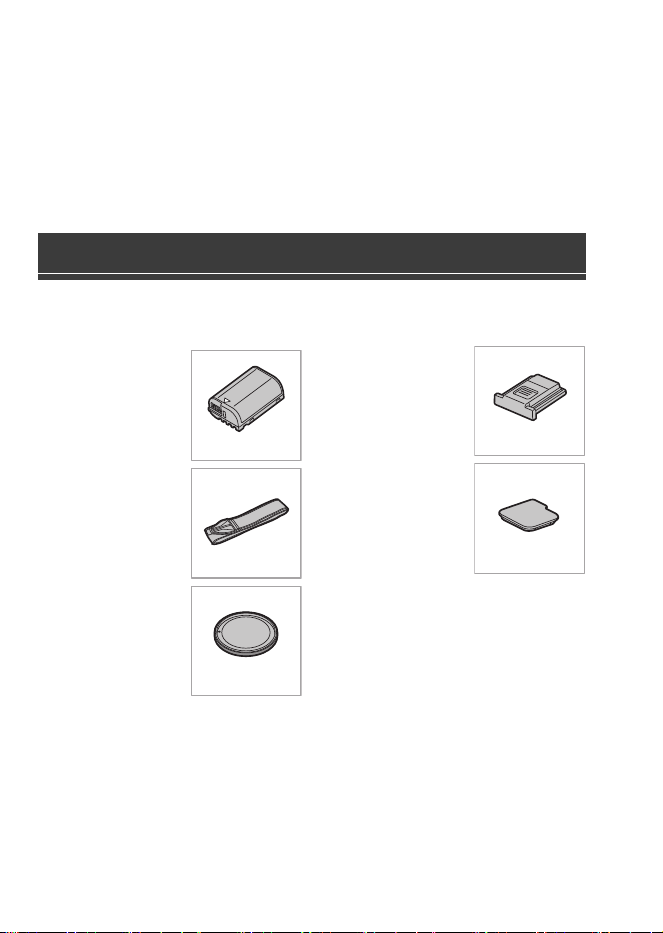
Bloc-batterie
0
Chargez la batterie
avant utilisation.
Bandoulière
Capuchon de
boîtier
¢1
Capuchon de griffe
porte-accessoires
¢1
Couvercle pour
connecteur de la
prise
d'alimentation
¢1
¢1 Celui-ci est attaché à l’appareil photo
au moment de l’achat.
0
Le chargeur de batterie, l'adaptateur secteur et le câble de raccordement USB
sont en option.
Accessoires standard
DMW-BLK22
DVPW1023Z
1HE1MC891Z
DVYE1121Z
SKF0145K
DC-S5D_E-DVQW1926.book 30 ページ 2025年4月2日 水曜日 午後2時26分
DVQW1926 (FRE)
31
FRANÇAIS
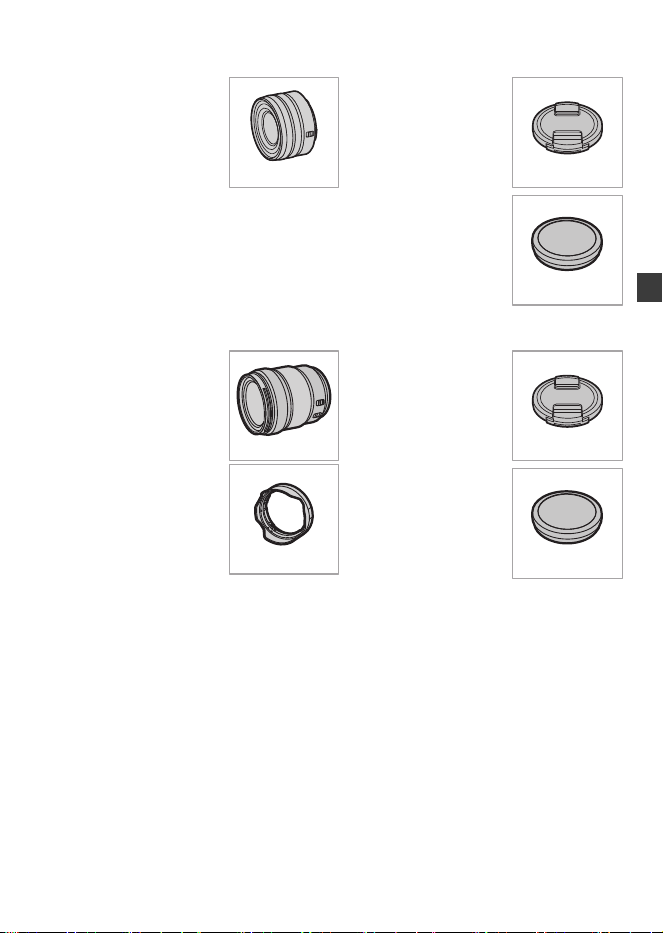
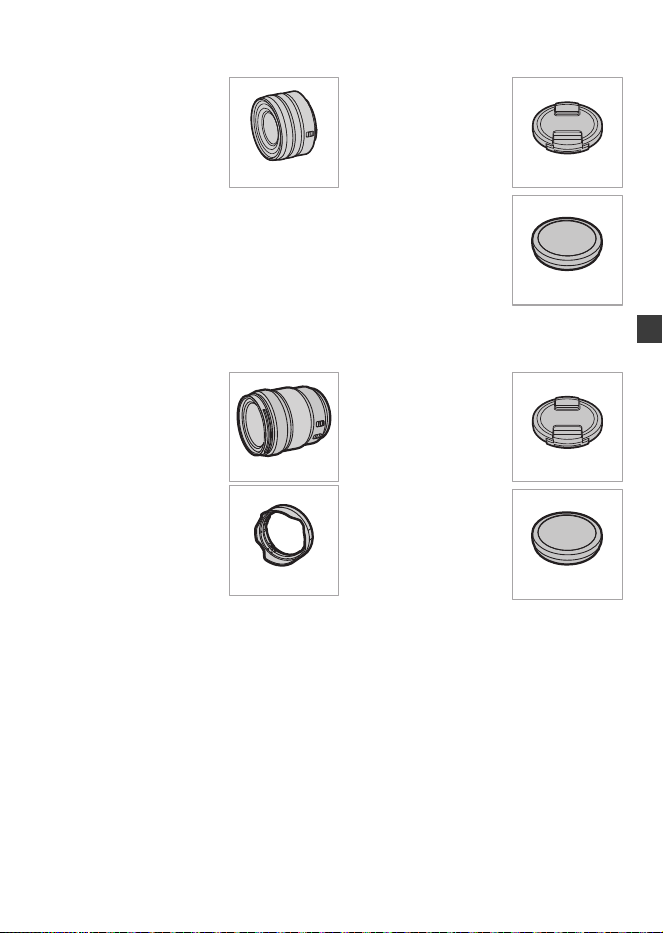
Éléments fournis avec le DC-S5DN (Kit d’objectif)
Objectif interchangeable
plein cadre 35 mm
0
Cet objectif résiste
à la poussière et
aux éclaboussures.
Protège-objectif
¢2
Capuchon arrière
d’objectif
¢2
Éléments fournis avec le DC-S5DH (Kit d’objectif)
Objectif interchangeable
plein cadre 35 mm
0
Cet objectif résiste
à la poussière et
aux éclaboussures.
Parasoleil
Protège-objectif
¢2
Capuchon arrière
d’objectif
¢2
¢2 Celui-ci est attaché à l’objectif au moment de l’achat.
0
Pour améliorer les performances de résistance à la poussière et aux éclaboussures
de l'objectif interchangeable (S-R1840/S-R28200), un joint en caoutchouc est utilisé
dans la monture de l'objectif.
– Le joint en caoutchouc de l'objectif laisse des marques sur la monture de l'appareil
photo numérique, mais cela n'a aucune incidence sur les performances.
– Pour le remplacer le joint en caoutchouc de l'objectif, contactez Panasonic.
S-R1840
6GE1SR1840Z
RGE1Z276Z
S-R28200
1ZE2SE28200Z
CGE1Z293Z
RGE1Z276Z
DC-S5D_E-DVQW1926.book 31 ページ 2025年4月2日 水曜日 午後2時26分
DVQW1926 (FRE)
32
S-R1840
0
Installez ou retirez l'objectif uniquement lorsque le barillet de l’objectif est rétracté.
0
Quand l’objectif interchangeable (S-R1840) est installé, un message s'affiche si le
barillet de l'objectif est rétracté et que l'enregistrement n'est pas possible. Tournez la
bague du zoom pour l'étendre.
0
Un enregistrement à ou près de la distance de mise au point à la limite du
grand-angle dégradera la qualité des bords de l’image. Nous vous conseillons de
vérifier chaque photo après l’avoir prise, durant l’enregistrement.
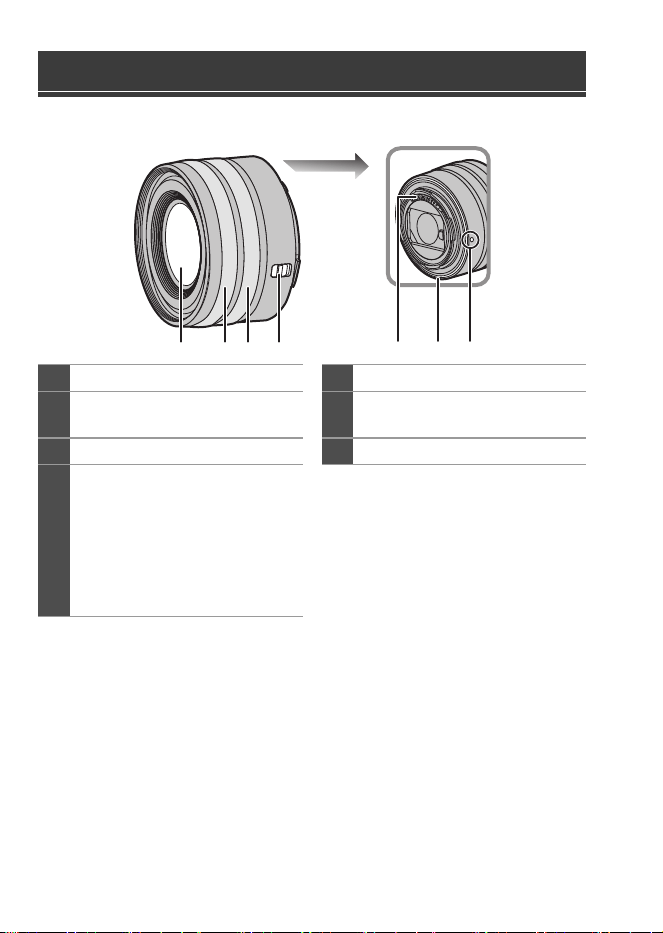
Noms des éléments
1
Surface de l’objectif
5
Points de contact
2
Bague de mise au point
6
Garniture en caoutchouc de
l'objectif
3
Bague de zoom
7
Repère d’insertion de l’objectif
4
Commutateur [AF/MF] (MPA/
MPM)
0
Vous pouvez permuter entre AF
et MF.
Si [MF] est réglé sur l'objectif ou
l'appareil photo, la mise au point
manuelle sera utilisée.
4
2 31 765
DC-S5D_E-DVQW1926.book 32 ページ 2025年4月2日 水曜日 午後2時26分
DVQW1926 (FRE)
33
DVQW1926 (FRE)
33
FRANÇAIS
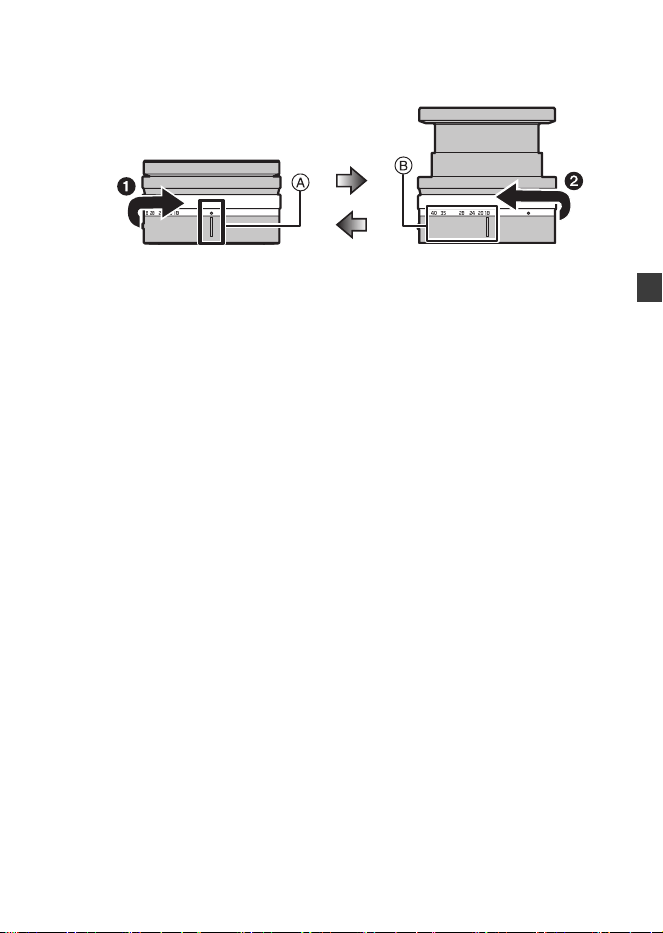
Comment étendre/rétracter l'objectif [lorsque l'objectif
interchangeable (S-R1840) est installé]
(a) L’objectif est rétracté
(b) Prêt pour enregistrer
Comment déployer l'objectif
Tournez la bague de zoom dans la direction indiquée par la flèche 1 de la
position A (l'objectif est rétracté) vers la position B (18 mm à 40 mm) pour
déployer l'objectif.
0
Lorsque le barillet de l'objectif est rétracté, les images ne peuvent pas être
enregistrées.
Comment rétracter l'objectif
Tournez la bague de zoom dans la direction indiquée par la flèche 2 de la
position B (18 mm à 40 mm) vers la position A pour rétracter l'objectif.
0
À la position 18 mm, vous sentirez un clic. Continuez à tourner vers la position A.
0
Lorsque vous ne prenez pas de photos, nous vous conseillons de rétracter l'objectif.
(a) (b)
DC-S5D_E-DVQW1926.book 33 ページ 2025年4月2日 水曜日 午後2時26分
DVQW1926 (FRE)
34
S-R28200
0
Un enregistrement à ou près de la distance de mise au point à la limite du
grand-angle dégradera la qualité des bords de l’image. Nous vous conseillons de
vérifier chaque photo après l’avoir prise, durant l’enregistrement.
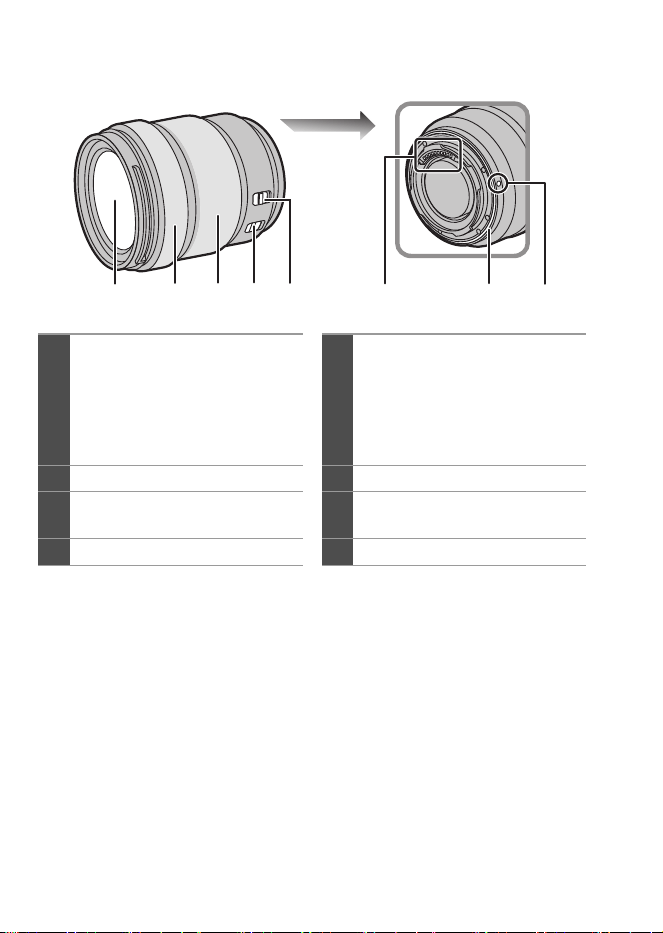
1
Surface de l’objectif
5
Commutateur [MPA/MPM]
0
Vous pouvez permuter entre
MPA et MPM.
Si [MF] est réglé sur l'objectif ou
l'appareil photo, la mise au point
manuelle sera utilisée.
2
Bague de mise au point
6
Points de contact
3
Bague de zoom
7
Garniture en caoutchouc de
l'objectif
4
Commutateur O.I.S.
8
Repère d’insertion de l’objectif
21 43 7865
DC-S5D_E-DVQW1926.book 34 ページ 2025年4月2日 水曜日 午後2時26分
DVQW1926 (FRE)
35
DVQW1926 (FRE)
35
FRANÇAIS
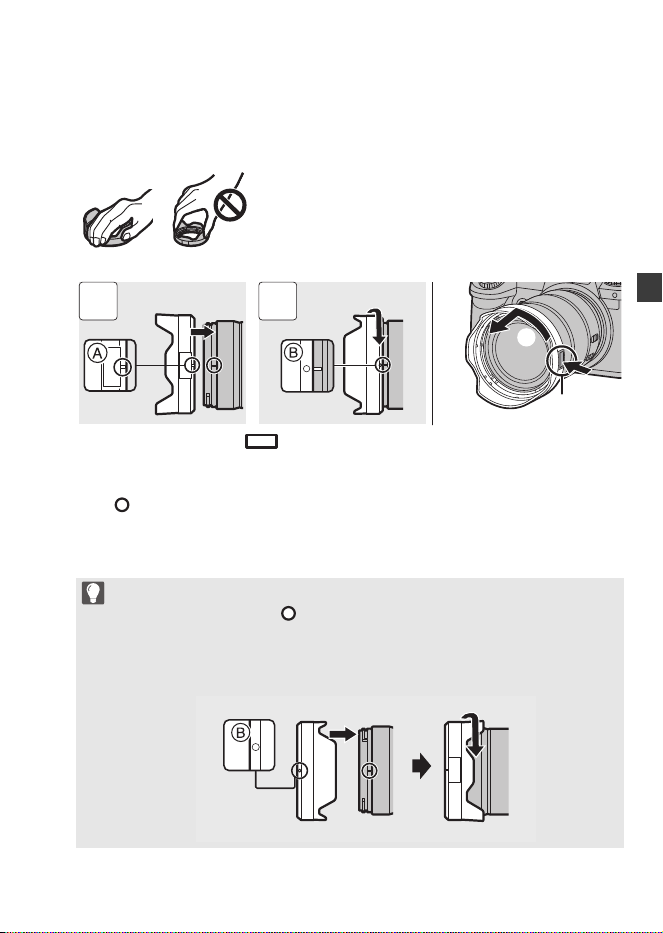
Mise en place d’un parasoleil
Pour installer le parasoleil (forme tulipe) fourni avec l’objectif
interchangeable (S-R28200)
1 Alignez le repère A ( ) présent sur le parasoleil avec le repère situé à
l'extrémité de l'objectif.
2 Faites tourner le parasoleil dans le sens de la flèche pour aligner le repère B
( ) présent sur celui-ci avec le repère situé à l'extrémité de l'objectif.
0
Pour retirer le parasoleil, faites-le tourner tout en appuyant sur la touche du
parasoleil C.
Tenez le parasoleil avec vos doigts positionnés comme sur l’image.
0
Ne tenez pas le parasoleil de manière à le tordre ou le plier.
0
Pendant le transport, le parasoleil peut être fixé en sens inverse.
1 Alignez le repère B ( ) présent sur le parasoleil avec le repère situé à
l'extrémité de l'objectif.
2 Fixez le parasoleil en le faisant tourner dans le sens de la flèche jusqu’à
entendre un clic.
1 2
DC-S5D_E-DVQW1926.book 35 ページ 2025年4月2日 水曜日 午後2時26分
DVQW1926 (FRE)
36
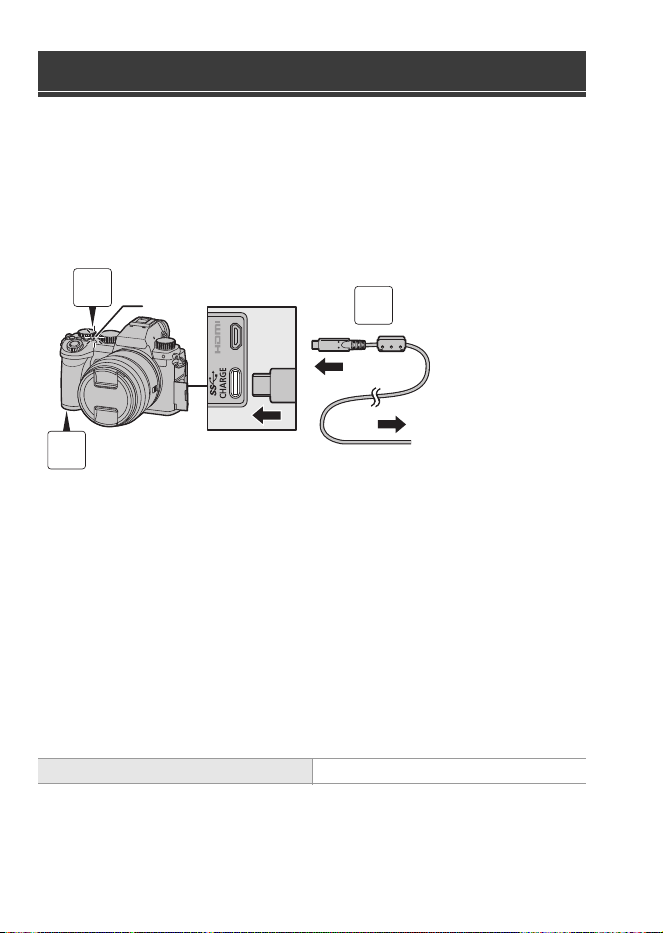
Chargez en utilisant un adaptateur secteur (en option/disponible dans le
commerce) et un câble de raccordement USB (disponible dans le
commerce).
Insertion d'une batterie dans l'appareil photo pour la
charger
A Vers l’adaptateur secteur
1
Placez l’interrupteur marche/arrêt de l’appareil photo
sur [OFF].
2
Insérez la batterie dans l’appareil photo.
3
Branchez le port USB de l'appareil photo et l'adaptateur
secteur à l'aide du câble de raccordement USB.
4
Branchez l’adaptateur secteur à une prise électrique.
0
Le témoin de charge B devient rouge et la charge commence.
0
En utilisant le boîtier de l'appareil photo et l'adaptateur secteur en option
(DMW-AC11) ou le boîtier de l'appareil photo et les accessoires fournis du chargeur
de batterie en option (DMW-BTC15).
Charge de la batterie
Durée de charge Environ 240 min
3
1
2
DC-S5D_E-DVQW1926.book 36 ページ 2025年4月2日 水曜日 午後2時26分
DVQW1926 (FRE)
37
DVQW1926 (FRE)
37
FRANÇAIS
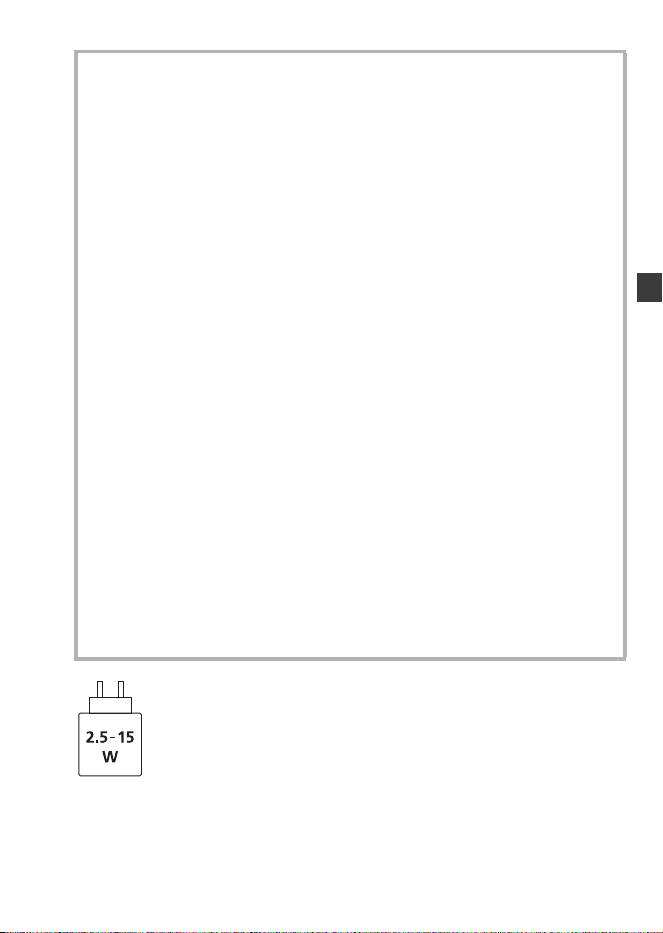
La puissance du courant fourni par le chargeur doit se situer entre 2,5 watts min., ce
qui est requis par le produit et 15 watts max., ce qui permet d’atteindre la vitesse de
charge maximale.
Précautions à prendre
0
La batterie qui peut être utilisée avec cet appareil photo est le modèle
DMW-BLK22. (à compter d’octobre 2024)
0
Assurez-vous d’utiliser une batterie de marque Panasonic (DMW-BLK22).
0
Si vous utilisez d’autres batteries, nous ne pouvons pas garantir la qualité
de ce produit.
0
Il est recommandé d'utiliser l'adaptateur secteur Panasonic (DMW-AC11 :
en option) ou les accessoires fournis du chargeur de batterie Panasonic
(DMW-BTC15 : en option) pour charger.
0
Vous pouvez charger avec le boîtier de l’appareil photo en utilisant un adaptateur
secteur disponible dans le commerce et un câble de raccordement USB.
*Spécifications recommandées pour un adaptateur secteur disponible dans le commerce
– Prise en charge d’une sortie CC 5 V/3 A (15 W)
– Prise USB Type-C
*Utilisez un câble de raccordement USB de 15 W ou plus de puissance pour charger.
0
Vous pouvez également utiliser un adaptateur secteur de 5 V/500 mA ou plus
pour charger. Cependant la durée de charge peut être plus longue qu’avec
l’adaptateur secteur recommandé.
0
Le fonctionnement n’est pas garanti avec tous les dispositifs disponibles dans le commerce.
0
Utiliser des méthodes de charge autres que celles indiquées peut entrainer une
fuite de liquide, une surchauffe, une combustion, un éclatement, etc. qui peuvent
causer des blessures.
0
Cette batterie peut présenter un risque d'incendie ou de brulure chimique si elle
n'est pas traitée correctement.
0
Placez la batterie retirée dans un sac en plastique, et rangez-la ou gardez-la
éloignée des objets métalliques (pinces, etc.).
0
Pour vous débarrasser des batteries, veuillez contacter les autorités locales ou
votre revendeur afin de connaître la procédure de mise au rebut à suivre.
DC-S5D_E-DVQW1926.book 37 ページ 2025年4月2日 水曜日 午後2時26分
DVQW1926 (FRE)
38
Consultez le mode d'emploi pour les autres caractéristiques.
Objectif interchangeable plein cadre 35 mm :
S-R1840 “LUMIX S 18-40mm F4.5-6.3”
Spécifications
Consommation d’énergie :
4,3 W (lors d'un enregistrement avec l'écran), 3,3 W (lors
de la lecture avec l'écran)
[Lorsque vous utilisez l'objectif interchangeable
(S-R1840)]
4,5 W (lors d'un enregistrement avec l'écran), 3,5 W (lors
de la lecture avec l'écran)
[Lorsque vous utilisez l'objectif interchangeable
(S-R28200)]
Monture Leica Camera AG L-Mount
Longueur focale f=18 mm à 40 mm
Construction de l’objectif 8 éléments dans 7 groupes (3 lentilles asphériques,
2 lentilles ED, 1 lentille UHR)
* Le verre protecteur n’est pas inclus
Type de diaphragme 7 lames de diaphragme/Diaphragme à ouverture
circulaire
Ouverture maximale F4.5 (Grand-angle) à F6.3 (Téléobjectif)
Valeur d’ouverture minimum
F22 (Grand-angle) à F32 (Téléobjectif)
Angle de vue 100o (Grand-angle) à 57o (Téléobjectif)
Distance de mise au point
avant
0,15 m (0,49 pi) à ¶ (Grand-angle à la longueur focale
21 mm)/0,35 m (1,15 pi) à ¶ (Téléobjectif) (à partir de
la ligne de référence de la distance de mise au point)
Grossissement maximum de l’image
0,28k (longueur focale 21 mm)
Stabilisateur optique de l’image
Non
Diamètre fitre 62 mm
Diamètre maximum ‰67,9 mm (2,67q)
Longueur totale
Environ40,9mm (1,61
q
) (du bout de l'objectif à la base
côté monture de l'objectif lorsque le barillet est rétracté)
DC-S5D_E-DVQW1926.book 38 ページ 2025年4月2日 水曜日 午後2時26分

DVQW1926 (FRE)
39
DVQW1926 (FRE)
39
FRANÇAIS
Objectif interchangeable plein cadre 35 mm :
S-R28200 “LUMIX S 28-200mm F4-7.1 MACRO S.O.I.”
Poids Environ 155 g (0,34 lb)
Résistance à la poussière
et aux éclaboussures
Oui
Température de
fonctionnement recommandée
j10 oC à 40 oC (14 oF à 104 oF)
Humidité relative permise 10 %RH à 80 %RH
Monture Leica Camera AG L-Mount
Longueur focale f=28 mm à 200 mm
Construction de l’objectif 17 éléments dans 13 groupes (1 lentille asphérique,
4 lentilles ED, 1 lentille UHR)
Type de diaphragme 9 lames de diaphragme/Diaphragme à ouverture
circulaire
Ouverture maximale F4 (Grand-angle) à F7.1 (Téléobjectif)
Valeur d’ouverture minimum
F32 (Grand-angle) à F45 (Téléobjectif)
Angle de vue 75o (Grand-angle) à 12o (Téléobjectif)
Distance de mise au point
avant
0,14 m (0,46 pi) à ¶ (Grand-angle)/0,65 mm (2,13 pi) à
¶ (Téléobjectif) (à partir de la ligne de référence de la
distance de mise au point)
Grossissement maximum de l’image
0,50k (Grand-angle)
Stabilisateur optique de l’image
Oui
Diamètre fitre 67 mm
Diamètre maximum ‰77,3 mm (3,04q)
Longueur totale Environ 93,4 mm (3,68q) (du bout de l'objectif à la base
côté monture de l’objectif)
Poids Environ 413 g (0,91 lb)
Résistance à la poussière
et aux éclaboussures
Oui
Température de
fonctionnement recommandée
j10 oC à 40 oC (14 oF à 104 oF)
Humidité relative permise 10 %RH à 80 %RH
DC-S5D_E-DVQW1926.book 39 ページ 2025年4月2日 水曜日 午後2時26分
DVQW1926 (FRE)
40
La liste suivante répertorie le nombre de photos pouvant être prises et les
durées disponibles pour l’enregistrement lorsque la batterie fournie est en
cours d’utilisation.
0
Les nombres de photos qui peuvent être prises sont basées sur la norme CIPA
(Camera & Imaging Products Association).
0
Utilisation d’une carte mémoire SDHC de Panasonic.
0
Les valeurs indiquées sont approximatives.
Enregistrement des photos (En utilisant l’écran)
Quand l’objectif interchangeable (S-R1840) est utilisé
Quand l’objectif interchangeable (S-R28200) est utilisé
Enregistrement des photos (En utilisant le viseur)
Quand l’objectif interchangeable (S-R1840) est utilisé
Quand l’objectif interchangeable (S-R28200) est utilisé
0
Les nombres entre parenthèses indiquent les valeurs obtenues lorsque [Délai avant
veille] dans [Éco. Énergie si utilisation viseur] est réglé sur [1 S] et la fonction [Éco.
Énergie si utilisation viseur] fonctionne comme prévu.
(Basé sur les conditions de test dérivées de la norme CIPA et spécifiées par
Panasonic)
Nombre de photos enregistrables et durée
d’enregistrement disponible avec la batterie
Nombre de photos pouvant être prises 430
Nombre de photos pouvant être prises 410
Nombre de photos pouvant être prises 450 (1500)
Nombre de photos pouvant être prises 430 (1450)
DC-S5D_E-DVQW1926.book 40 ページ 2025年4月2日 水曜日 午後2時26分
DVQW1926 (FRE)
41
DVQW1926 (FRE)
41
FRANÇAIS
Enregistrement vidéos (En utilisant l’écran)
Quand l’objectif interchangeable (S-R1840) est utilisé
[MP4]
(Enregistrement avec la qualité d'enregistrement réglée sur [FHD/8bit/28M/50p])
[MP4]
(Enregistrement avec la qualité d'enregistrement réglée sur [4K/10bit/100M/50p])
[MOV]
(Enregistrement avec la qualité d'enregistrement réglée sur [FHD/50p/420/8-L])
[MOV]
(Enregistrement avec la qualité d'enregistrement réglée sur [4K/50p/420/10-L])
[MOV]
(Enregistrement avec la qualité d'enregistrement réglée sur [C4K/50p/420/8-L])
Quand l’objectif interchangeable (S-R28200) est utilisé
[MP4]
(Enregistrement avec la qualité d'enregistrement réglée sur [FHD/8bit/28M/50p])
[MP4]
(Enregistrement avec la qualité d'enregistrement réglée sur [4K/10bit/100M/50p])
Durée d'enregistrement sans interruption disponible (minutes)
140
Durée d'enregistrement réellement disponible (minutes) 70
Durée d'enregistrement sans interruption disponible (minutes)
100
Durée d'enregistrement réellement disponible (minutes) 50
Durée d'enregistrement sans interruption disponible (minutes)
140
Durée d'enregistrement réellement disponible (minutes) 70
Durée d'enregistrement sans interruption disponible (minutes)
100
Durée d'enregistrement réellement disponible (minutes) 50
Durée d'enregistrement sans interruption disponible (minutes)
110
Durée d'enregistrement réellement disponible (minutes) 55
Durée d'enregistrement sans interruption disponible (minutes)
130
Durée d'enregistrement réellement disponible (minutes) 65
Durée d'enregistrement sans interruption disponible (minutes)
100
Durée d'enregistrement réellement disponible (minutes) 50
DC-S5D_E-DVQW1926.book 41 ページ 2025年4月2日 水曜日 午後2時26分
DVQW1926 (FRE)
42
[MOV]
(Enregistrement avec la qualité d'enregistrement réglée sur [FHD/50p/420/8-L])
[MOV]
(Enregistrement avec la qualité d'enregistrement réglée sur [4K/50p/420/10-L])
[MOV]
(Enregistrement avec la qualité d'enregistrement réglée sur [C4K/50p/420/8-L])
0
La durée d’enregistrement réellement disponible est la durée disponible pour
enregistrer en cas d’actions répétées comme mettre en marche et éteindre l’appareil
photo, démarrer/arrêter l’enregistrement, etc.
Lecture (en utilisant l’écran)
Quand l’objectif interchangeable (S-R1840) est utilisé
Quand l’objectif interchangeable (S-R28200) est utilisé
Les accessoires suivants sont disponibles pour utilisation :
(Les numéros de produit sont corrects à compter d’octobre 2024.)
Durée d'enregistrement sans interruption disponible (minutes)
130
Durée d'enregistrement réellement disponible (minutes) 65
Durée d'enregistrement sans interruption disponible (minutes)
100
Durée d'enregistrement réellement disponible (minutes) 50
Durée d'enregistrement sans interruption disponible (minutes)
100
Durée d'enregistrement réellement disponible (minutes) 50
Durée de lecture (minutes) 280
Durée de lecture (minutes) 260
Accessoires de l'appareil photo numérique
Nom du produit Numéro de modèle
Chargeur de batterie DMW-BTCD15
¢1
Adaptateur secteur DMW-AC11
¢2
Coupleur C.C. DMW-DCC18
¢1
Trépied à poignée DMW-SHGR2
DC-S5D_E-DVQW1926.book 42 ページ 2025年4月2日 水曜日 午後2時26分

DVQW1926 (FRE)
43
DVQW1926 (FRE)
43
FRANÇAIS
¢1 Un adaptateur secteur disponible séparément et un câble de raccordement USB
sont nécessaires. Il est conseillé d’utiliser l’adaptateur secteur Panasonic
(DMW-AC11 : en option).
¢2 Fourni avec un cordon d’alimentation secteur et un câble de raccordement USB.
0
Certains accessoires en option ne sont pas disponibles dans certains pays.
0
Assurez-vous de toujours utiliser un trépied à poignée de Panasonic (DMW-SHGR1/
DMW-SHGR2 : en option).
0
Consultez le manuel d’utilisation du DC-S5 pour les autres accessoires.
0
Pour renforcer la sécurité, l'authentification par mot de passe sera toujours utilisée lors
de l'établissement de connexions Wi-Fi directes entre l'appareil photo et un smartphone.
L'élément de menu [Mot de passe Wi-Fi] dans [Configuration Wi-Fi] a été supprimé
et le [Mot de passe Wi-Fi] sera toujours [OUI].
0
Lors de la connexion Wi-Fi via un point d’accès sans fil, le [TKIP] de la méthode de
chiffrement et l’option [Sans chiffrement] dans [Type de sécurité] ne sont plus pris en charge.
0
Cet appareil photo ne prend pas en charge la fonctionnalité permettant d'envoyer
des images vers un ordinateur via Wi-Fi.
[PC] ne peut pas être sélectionné comme destination dans [Fonction Wi-Fi]
[Nouvelle connexion] [Envoyer images pendant l'enregistrement]/[Envoyer
images enregistrées dans l'appareil].
Il n'y a pas d'élément de menu [Connexion PC] dans [Configuration Wi-Fi].
0
En raison de l'arrêt des services, cet appareil photo ne prend pas en charge la
fonctionnalité permettant d'envoyer des images vers des services Web/services de
synchronisation cloud via Wi-Fi.
[Service WEB]/[Service de synchro cloud] ne peut pas être sélectionné comme
destination dans [Fonction Wi-Fi] [Nouvelle connexion] [Envoyer images
pendant l'enregistrement]/[Envoyer images enregistrées dans l'appareil].
Il n'y a pas d'élément de menu [LUMIX CLUB] dans [Configuration Wi-Fi].
0
Lorsque [Mode veille] ou [Mode veille (Wi-Fi)] dans [Mode économie d'énergie] est
réglé sur [NON], la consommation électrique de cet appareil photo peut augmenter.
0
Pour plus d'informations sur l'efficacité énergétique du produit, veuillez visiter notre site Web,
www.panasonic.com
, et saisissez le numéro du modèle dans la fenêtre de recherche.
Remarques sur la fonction Wi-Fi
Remarques sur [Mode économie d'énergie]
DC-S5D_E-DVQW1926.book 43 ページ 2025年4月2日 水曜日 午後2時26分
DVQW1926 (ITA)
44
Gentile cliente,
Grazie per aver acquistato questa fotocamera digitale Panasonic.
Nota relativa alle istruzioni per l'uso
Oltre al presente opuscolo, la DC-S5D viene fornita con le istruzioni per l'uso della
DC-S5.
Consultare anche le istruzioni per l’uso della DC-S5.
Controllare che tutti gli accessori siano forniti prima di utilizzare la fotocamera.
(I codici dei prodotti sono aggiornati a ottobre 2024.)
Batteria
0
Caricare la batteria
prima dell'uso.
Tracolla
Coperchio sul
corpo della
fotocamera
¢1
Coperchio
dell’adattatore
¢1
Copertura del
connettore del
battery grip
¢1
¢1 È installato sulla fotocamera al
momento dell'acquisto.
0
Il carica batterie, l’adattatore CA e il cavo di collegamento USB sono opzionali.
Accessori standard
DMW-BLK22
DVPW1023Z
1HE1MC891Z
DVYE1121Z
SKF0145K
DC-S5D_E-DVQW1926.book 44 ページ 2025年4月2日 水曜日 午後2時26分
DVQW1926 (ITA)
45
ITALIANO
Parti fornite con DC-S5DN (Prodotto kit obiettivo)
Obiettivo intercambiabile
full frame 35 mm
0
Questo obiettivo è
resistente alla polvere
ed agli schizzi.
Copriobiettivo
¢2
Copriobiettivo
posteriore
¢2
Parti fornite con DC-S5DH (Prodotto kit obiettivo)
Obiettivo intercambiabile
full frame 35 mm
0
Questo obiettivo è
resistente alla polvere
ed agli schizzi.
Paraluce
Copriobiettivo
¢2
Copriobiettivo
posteriore
¢2
¢2 È installato sull'obiettivo al momento dell'acquisto.
0
Per migliorare le prestazioni dell'obiettivo intercambiabile (S-R1840/S-R28200) in
termini di resistenza alla polvere ed agli schizzi, sull'attacco dell'obiettivo è presente
una protezione in gomma.
– La gomma sull'innesto dell'obiettivo lascerà segni di striscio sull'innesto della
fotocamera digitale, ma questo non influisce sulle prestazioni.
– Per sostituire la protezione in gomma sull'innesto dell'obiettivo, contattare
Panasonic.
S-R1840
6GE1SR1840Z
RGE1Z276Z
S-R28200
1ZE2SE28200Z
CGE1Z293Z
RGE1Z276Z
DC-S5D_E-DVQW1926.book 45 ページ 2025年4月2日 水曜日 午後2時26分
DVQW1926 (ITA)
46
S-R1840
0
Inserire e rimuovere l'obiettivo solo quando il cilindro dell'obiettivo è ritratto.
0
Quando è installato l'obiettivo intercambiabile (S-R1840), viene visualizzato un
messaggio se il cilindro dell'obiettivo è ritratto e la registrazione non è possibile.
Ruotare la ghiera dello zoom per estenderlo.
0
Registrare all'estremità grandangolo alla distanza di messa a fuoco più vicina o
vicino ad essa degraderà la qualità dell'immagine attorno ai bordi. Consigliamo di
verificare ciascuna immagine dopo averla scattata quando si registra.
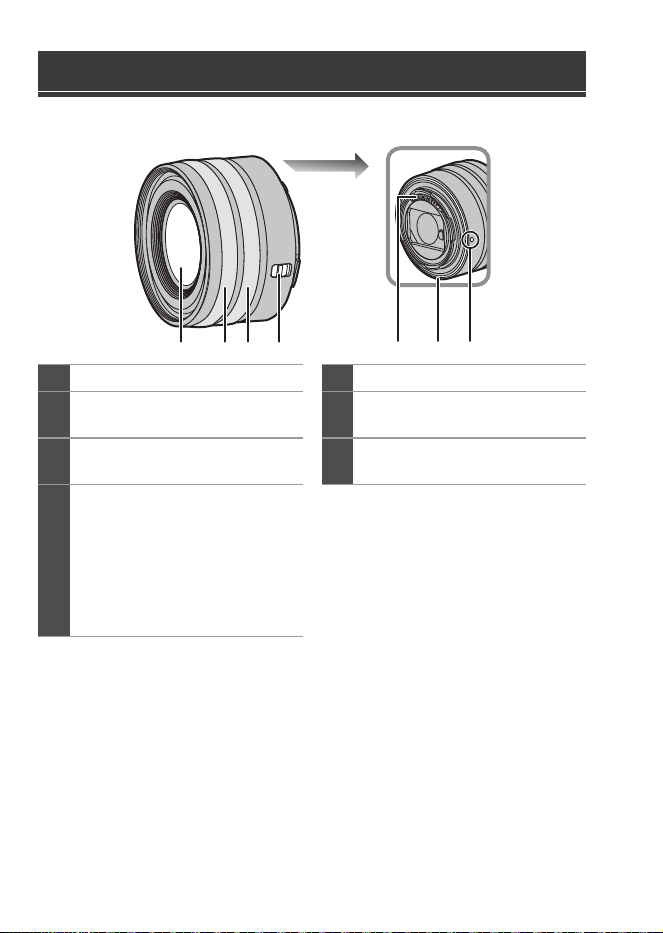
Nome dei componenti
1
Superficie dell’obiettivo
5
Punti di contatto
2
Ghiera messa a fuoco
6
Protezione in gomma sull'innesto
dell'obiettivo
3
Ghiera dello zoom
7
Segno per l'installazione
dell'obiettivo
4
Selettore [AF/MF]
0
È possibile commutare tra AF a
MF.
Se è impostato [MF]
sull’obiettivo o sulla fotocamera,
verrà utilizzata la messa a fuoco
manuale.
4
2 31 765
DC-S5D_E-DVQW1926.book 46 ページ 2025年4月2日 水曜日 午後2時26分
DVQW1926 (ITA)
47
DVQW1926 (ITA)
47
ITALIANO
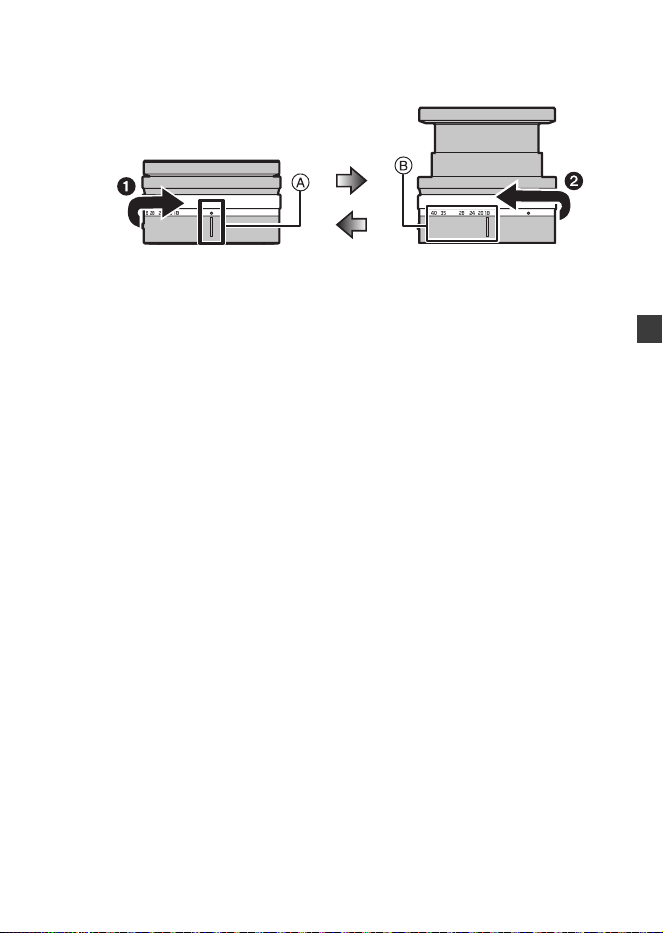
Come estendere/ritrarre l'obiettivo [quando è installato
l'obiettivo intercambiabile (S-R1840)]
(a) Obiettivo ritratto
(b) Pronto per la registrazione
Come estrarre l'obiettivo
Ruotare la ghiera dello zoom in direzione della freccia 1 dalla posizione A
(l'obiettivo è ritratto) alla posizione B (da 18 mm a 40 mm) per estendere
l'obiettivo.
0
Quando il cilindro dell'obiettivo è ritratto, non è possibile riprendere immagini.
Come ritrarre l'obiettivo
Ruotare la ghiera dello zoom in direzione della freccia 2 dalla posizione B (da
18 mm a 40 mm) alla posizione A per ritrarre l'obiettivo.
0
Nella posizione di 18 mm, si sentirà un clic. Continuare a ruotare fino alla posizione
A.
0
Quando non si riprendono immagini, si consiglia di ritrarre l'obiettivo.
(a) (b)
DC-S5D_E-DVQW1926.book 47 ページ 2025年4月2日 水曜日 午後2時26分
DVQW1926 (ITA)
48
S-R28200
0
Registrare all'estremità grandangolo alla distanza di messa a fuoco più vicina o
vicino ad essa degraderà la qualità dell'immagine attorno ai bordi. Consigliamo di
verificare ciascuna immagine dopo averla scattata quando si registra.
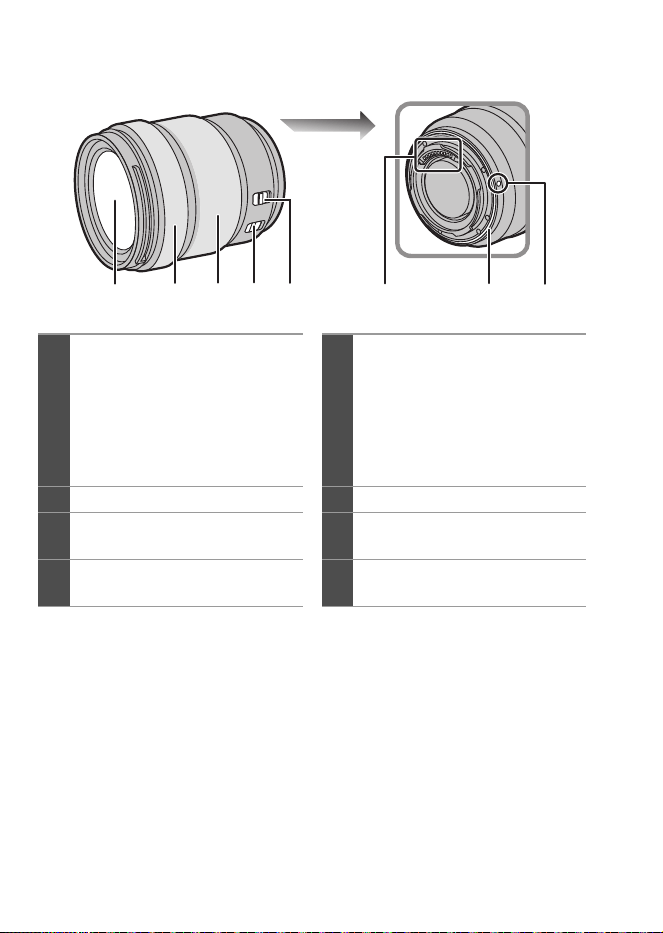
1
Superficie dell’obiettivo
5
Selettore [AF/MF]
0
È possibile commutare tra AF a
MF.
Se è impostato [MF]
sull’obiettivo o sulla fotocamera,
verrà utilizzata la messa a fuoco
manuale.
2
Ghiera messa a fuoco
6
Punti di contatto
3
Ghiera dello zoom
7
Protezione in gomma sull'innesto
dell'obiettivo
4
Interruttore O.I.S.
8
Segno per l'installazione
dell'obiettivo
21 43 7865
DC-S5D_E-DVQW1926.book 48 ページ 2025年4月2日 水曜日 午後2時26分
DVQW1926 (ITA)
49
DVQW1926 (ITA)
49
ITALIANO
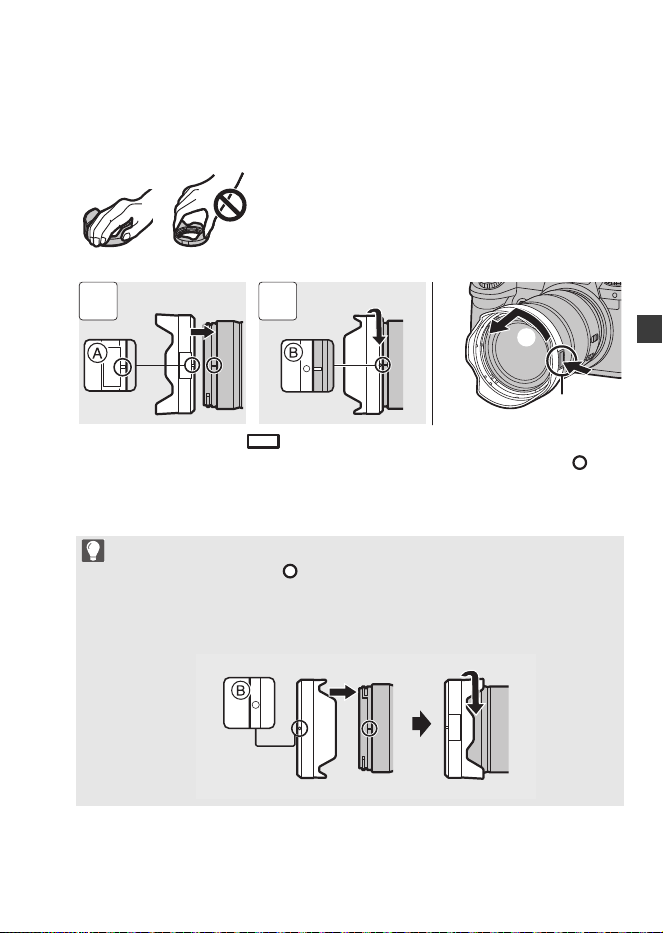
Installazione di un paraluce
Quando si installa il paraluce (a forma di fiore) in dotazione con
l'obiettivo intercambiabile (S-R28200)
1 Allineare il segno A ( ) sul paraluce con il segno sull'estremità dell'obiettivo.
2 Ruotare il paraluce nella direzione della freccia per allineare il segno B () sul
paraluce con il segno sull'estremità dell'obiettivo.
0
Quando si rimuove il paraluce, ruotarlo tenendo premuto il pulsante del paraluce C.
Tenere il paraluce con le dita come indicato in figura.
0
Tenere il paraluce in modo da evitare di torcerlo o di piegarlo.
0
Durante il trasporto, è possibile montare il paraluce al contrario.
1 Allineare il segno B ( ) sul paraluce con il segno sull'estremità
dell'obiettivo.
2 Installare il paraluce ruotandolo nella direzione della freccia finché non si
sente un clic.
1 2
DC-S5D_E-DVQW1926.book 49 ページ 2025年4月2日 水曜日 午後2時26分
DVQW1926 (ITA)
50
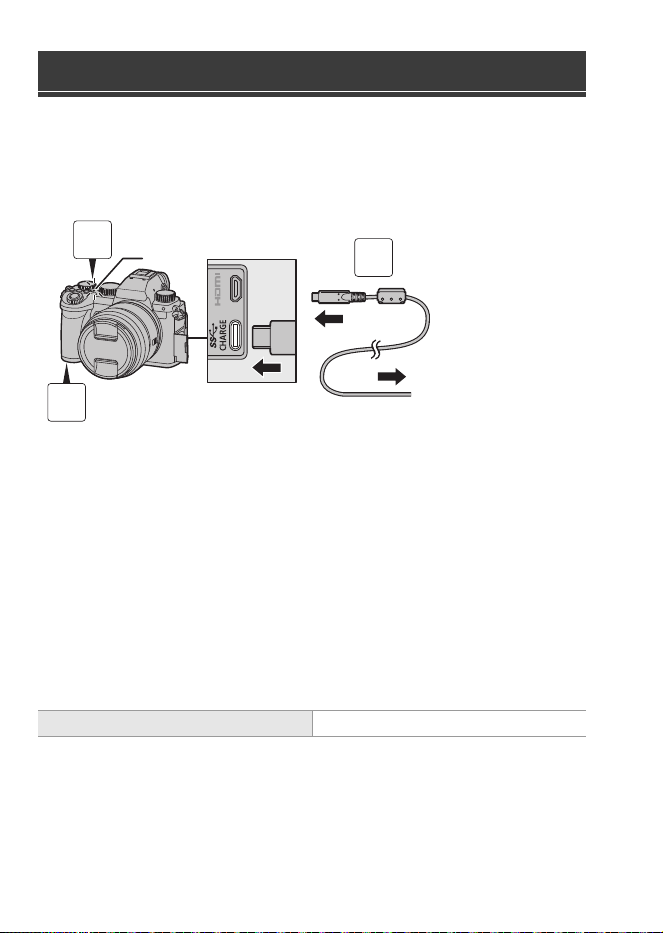
Caricare utilizzando un adattatore CA (opzionale/disponibile in commercio)
e un cavo di collegamento USB (disponibile in commercio).
Inserimento di una batteria nella fotocamera per la carica
A All’adattatore CA
1
Posizionare l’interruttore di accensione/spegnimento
della fotocamera su [OFF].
2
Inserire la batteria nella fotocamera.
3
Collegare l'adattatore CA alla porta USB della
fotocamera usando il cavo di collegamento USB.
4
Collegare l’adattatore CA a una presa elettrica.
0
La spia di carica B si accende in rosso e la carica ha inizio.
0
Utilizzando il corpo della fotocamera e l'adattatore CA opzionale (DMW-AC11)
oppure il corpo della fotocamera e gli accessori in dotazione del carica batterie
opzionale (DMW-BTC15).
Carica della batteria
Tempo di caricamento Circa 240 min
3
1
2
DC-S5D_E-DVQW1926.book 50 ページ 2025年4月2日 水曜日 午後2時26分
DVQW1926 (ITA)
51
DVQW1926 (ITA)
51
ITALIANO
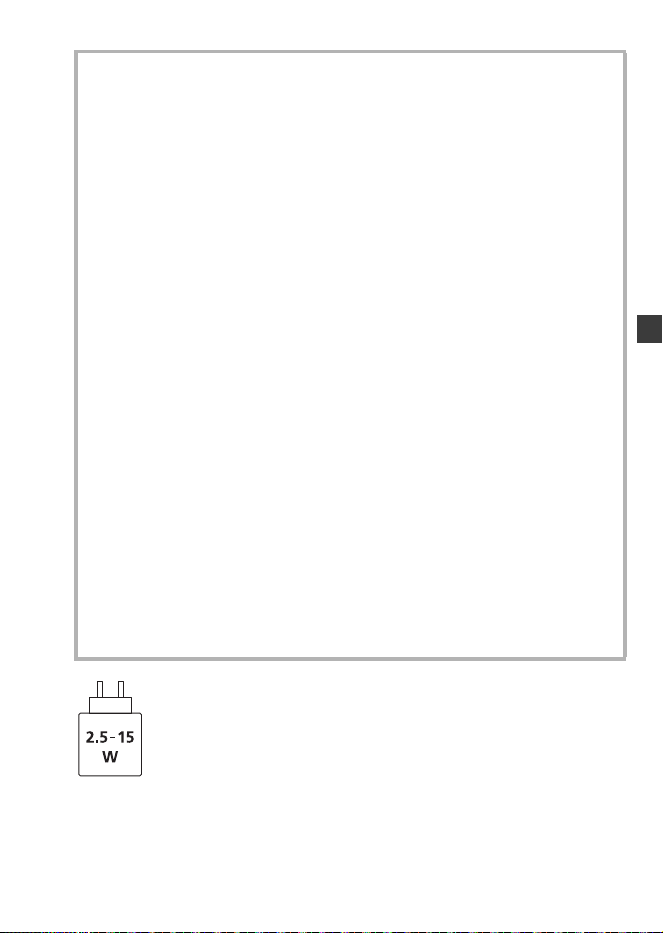
La potenza erogata dal caricatore deve essere compresa tra min. 2,5 Watt richiesti da
questo prodotto e max. 15 Watt per raggiungere la massima velocità di ricarica.
Precauzioni
0
La batteria utilizzabile con la fotocamera è DMW-BLK22. (Informazioni
aggiornate a ottobre 2024)
0
Utilizzare sempre batterie Panasonic originali (DMW-BLK22).
0
Se si utilizzano altre batterie, non possiamo garantire la qualità di questo
prodotto.
0
Per la ricarica si consiglia di utilizzare l'adattatore CA Panasonic
(DMW-AC11: opzionale) o gli accessori in dotazione del carica batterie
Panasonic (DMW-BTC15: opzionale).
0
È possibile caricare con il corpo della fotocamera utilizzando un adattatore CA
disponibile in commercio e un cavo di collegamento USB.
*Specifiche raccomandate per l'adattatore CA disponibile in commercio
– Supporta un'uscita CC da 5 V/3 A (15 W)
– Terminale USB Type-C
*
Per la ricarica utilizzare un cavo di collegamento USB con uscita da 15 W o superiore.
0
Per la ricarica è inoltre possibile utilizzare un adattatore CA da 5 V/500 mA o
superiore. Tuttavia, il tempo di ricarica potrebbe essere più lungo rispetto a
quello con l'adattatore CA consigliato.
0
Il funzionamento non è garantito con tutti i dispositivi disponibili in commercio.
0
L'utilizzo di metodi di ricarica diversi da quelli specificati potrebbe causare perdite
di liquidi, surriscaldamento, combustione, rottura, ecc. e ciò potrebbe causare
lesioni.
0
Questa batteria può presentare un rischio di incendio o ustione chimica se non
utilizzata correttamente.
0
Dopo aver rimosso la batteria, collocarla in una busta di plastica e riporla, o
tenerla lontano da oggetti metallici (graffette, ecc.).
0
Quando si smaltiscono le batterie, contattare le autorità locali o il rivenditore e
chiedere informazioni sul metodo corretto di smaltimento.
DC-S5D_E-DVQW1926.book 51 ページ 2025年4月2日 水曜日 午後2時26分

DVQW1926 (ITA)
52
Consultare le istruzioni per l'uso per le altre specifiche.
Obiettivo intercambiabile full frame 35 mm:
S-R1840 “LUMIX S 18-40mm F4.5-6.3”
Specifiche
Consumo di corrente: 4,3 W (quando si registra con il monitor), 3,3 W (quando
si riproduce con il monitor)
[Quando si utilizza l'obiettivo intercambiabile (S-R1840)]
4,5 W (quando si registra con il monitor), 3,5 W (quando
si riproduce con il monitor)
[Quando si utilizza l'obiettivo intercambiabile (S-R28200)]
Supporto Leica Camera AG L-Mount
Distanza focale f=18 mm a 40 mm
Costruzione dell’obiettivo 8 elementi in 7 gruppi (3 lenti asferiche, 2 lenti ED,
1 lente UHR)
* Il vetro protettivo non è incluso
Tipo di apertura
Diaframma con 7 lamelle/Diaframma ad apertura circolare
Apertura massima F4.5 (Grandangolo) a F6.3 (Tele)
Valore minimo dell’apertura
F22 (Grandangolo) a F32 (Tele)
Profondità di campo 100o (Grandangolo) a 57o (Tele)
Distanza di messa a fuoco 0,15 m a ¶ (Grandangolo a lunghezza focale 21 mm)/
0,35 m a ¶ (Tele) (dalla linea di riferimento della
distanza di messa a fuoco)
Ingrandimento massimo
dell’immagine
0,28k (lunghezza focale 21 mm)
Stabilizzatore ottico di
immagine
No
Diametro filtro 62 mm
Diametro massimo ‰67,9 mm
Lunghezza complessiva Circa 40,9 mm (dall’estremità dell'obiettivo al lato di
base dell'attacco dell'obiettivo quando il cilindro
dell'obiettivo è ritratto)
DC-S5D_E-DVQW1926.book 52 ページ 2025年4月2日 水曜日 午後2時26分

DVQW1926 (ITA)
53
DVQW1926 (ITA)
53
ITALIANO
Obiettivo intercambiabile full frame 35 mm:
S-R28200 “LUMIX S 28-200mm F4-7.1 MACRO O.I.S.”
Massa Circa 155 g
Resistenza alla polvere ed
agli schizzi
Sì
Temperatura operativa
raccomandata
j10 oC a 40 oC
Umidità relativa accettabile
10 %RH a 80 %RH
Supporto Leica Camera AG L-Mount
Distanza focale f=28 mm a 200 mm
Costruzione dell’obiettivo 17 elementi in 13 gruppi (1 lente asferica, 4 lenti ED,
1 lente UHR)
Tipo di apertura
Diaframma con 9 lamelle/Diaframma ad apertura circolare
Apertura massima F4 (Grandangolo) a F7.1 (Tele)
Valore minimo dell’apertura
F32 (Grandangolo) a F45 (Tele)
Profondità di campo 75o (Grandangolo) a 12o (Tele)
Distanza di messa a fuoco 0,14 m a ¶ (Grandangolo)/0,65 mm a ¶ (Tele) (dalla
linea di riferimento della distanza di messa a fuoco)
Ingrandimento massimo
dell’immagine
0,50k (Grandangolo)
Stabilizzatore ottico di
immagine
Sì
Diametro filtro 67 mm
Diametro massimo ‰77,3 mm
Lunghezza complessiva Circa 93,4 mm (dall’estremità dell'obiettivo al lato di
base dell'attacco dell’obiettivo)
Massa Circa 413 g
Resistenza alla polvere ed
agli schizzi
Sì
Temperatura operativa
raccomandata
j10 oC a 40 oC
Umidità relativa accettabile
10 %RH a 80 %RH
DC-S5D_E-DVQW1926.book 53 ページ 2025年4月2日 水曜日 午後2時26分
DVQW1926 (ITA)
54
Di seguito sono elencate il numero di foto che è possibile scattare e
l'autonomia di registrazione quando si usa la batteria in dotazione.
0
Il numero di foto che è possibile scattare si basa sugli standard CIPA (Camera &
Imaging Products Association).
0
Usando una scheda di memoria SDHC Panasonic.
0
I valori indicati sono approssimativi.
Registrazione di foto (quando si utilizza il monitor)
Quando si utilizza l'obiettivo intercambiabile (S-R1840)
Quando si utilizza l'obiettivo intercambiabile (S-R28200)
Registrazione di foto (quando si utilizza il mirino)
Quando si utilizza l'obiettivo intercambiabile (S-R1840)
Quando si utilizza l'obiettivo intercambiabile (S-R28200)
0
I numeri tra parentesi indicano i valori risultanti quando [Tempo prima di autospegn.]
in [Scatto LVF risp. energ.] è impostato su [1SEC] e la funzione [Scatto LVF risp.
energ.] funziona come previsto.
(Secondo le condizioni di test previste dallo standard CIPA e specificate da
Panasonic)
Numero di foto che è possibile scattare
ed autonomia di registrazione con la
batteria
Numero di foto che è possibile scattare 430
Numero di foto che è possibile scattare 410
Numero di foto che è possibile scattare 450 (1500)
Numero di foto che è possibile scattare 430 (1450)
DC-S5D_E-DVQW1926.book 54 ページ 2025年4月2日 水曜日 午後2時26分
DVQW1926 (ITA)
55
DVQW1926 (ITA)
55
ITALIANO
Registrazione di video (quando si utilizza il monitor)
Quando si utilizza l'obiettivo intercambiabile (S-R1840)
[MP4]
(Registrazione con qualità di registrazione impostata su [FHD/8bit/28M/50p])
[MP4]
(Registrazione con qualità di registrazione impostata su [4K/10bit/100M/50p])
[MOV]
(Registrazione con qualità di registrazione impostata su [FHD/50p/420/8-L])
[MOV]
(Registrazione con qualità di registrazione impostata su [4K/50p/420/10-L])
[MOV]
(Registrazione con qualità di registrazione impostata su [C4K/50p/420/8-L])
Quando si utilizza l'obiettivo intercambiabile (S-R28200)
[MP4]
(Registrazione con qualità di registrazione impostata su [FHD/8bit/28M/50p])
[MP4]
(Registrazione con qualità di registrazione impostata su [4K/10bit/100M/50p])
Tempo di registrazione continua disponibile (minuti) 140
Autonomia di registrazione effettiva disponibile (minuti) 70
Tempo di registrazione continua disponibile (minuti) 100
Autonomia di registrazione effettiva disponibile (minuti) 50
Tempo di registrazione continua disponibile (minuti) 140
Autonomia di registrazione effettiva disponibile (minuti) 70
Tempo di registrazione continua disponibile (minuti) 100
Autonomia di registrazione effettiva disponibile (minuti) 50
Tempo di registrazione continua disponibile (minuti) 110
Autonomia di registrazione effettiva disponibile (minuti) 55
Tempo di registrazione continua disponibile (minuti) 130
Autonomia di registrazione effettiva disponibile (minuti) 65
Tempo di registrazione continua disponibile (minuti) 100
Autonomia di registrazione effettiva disponibile (minuti) 50
DC-S5D_E-DVQW1926.book 55 ページ 2025年4月2日 水曜日 午後2時26分
DVQW1926 (ITA)
56
[MOV]
(Registrazione con qualità di registrazione impostata su [FHD/50p/420/8-L])
[MOV]
(Registrazione con qualità di registrazione impostata su [4K/50p/420/10-L])
[MOV]
(Registrazione con qualità di registrazione impostata su [C4K/50p/420/8-L])
0
L’autonomia di registrazione effettiva disponibile è il tempo disponibile per la
registrazione quando si eseguono ripetutamente operazioni quali accensione/
spegnimento della fotocamera, avvio/arresto della registrazione, ecc.
Riproduzione (quando si utilizza il monitor)
Quando si utilizza l'obiettivo intercambiabile (S-R1840)
Quando si utilizza l'obiettivo intercambiabile (S-R28200)
I seguenti accessori sono disponibili per l'uso:
(I codici dei prodotti sono aggiornati a ottobre 2024.)
Tempo di registrazione continua disponibile (minuti) 130
Autonomia di registrazione effettiva disponibile (minuti) 65
Tempo di registrazione continua disponibile (minuti) 100
Autonomia di registrazione effettiva disponibile (minuti) 50
Tempo di registrazione continua disponibile (minuti) 100
Autonomia di registrazione effettiva disponibile (minuti) 50
Tempo di riproduzione (minuti) 280
Tempo di riproduzione (minuti) 260
Sistema di accessori della fotocamera digitale
Nome del prodotto Numero del modello
Carica batterie DMW-BTCD15
¢1
Adattatore CA DMW-AC11
¢2
DC coupler DMW-DCC18
¢1
Impugnatura per treppiede DMW-SHGR2
DC-S5D_E-DVQW1926.book 56 ページ 2025年4月2日 水曜日 午後2時26分

DVQW1926 (ITA)
57
DVQW1926 (ITA)
57
ITALIANO
¢1 Sono necessari un adattatore CA e un cavo di collegamento USB disponibili
separatamente. Si consiglia di utilizzare l'adattatore CA originale Panasonic
(DMW-AC11: opzionale).
¢2 Fornito con un cavo di rete CA e un cavo di collegamento USB.
0
È possibile che alcuni accessori opzionali non siano disponibili in determinati paesi.
0
Utilizzare sempre un'impugnatura per treppiede originale Panasonic (DMW-SHGR1/
DMW-SHGR2: opzionale).
0
Consultare le istruzioni per l'uso della DC-S5 per gli altri accessori.
0
Per aumentare la sicurezza, quando si stabiliscono connessioni Wi-Fi dirette tra la
fotocamera e uno smartphone verrà sempre utilizzata l'autenticazione tramite
password.
La voce di menu [Password Wi-Fi] in [Impostazione Wi-Fi] è stato rimossa, e
[Password Wi-Fi] sarà sempre [ON].
0
Quando ci si collega al Wi-Fi tramite un punto di accesso wireless, il [TKIP] come
metodo di crittografia e [Nessuna crittogr.] in [Tipo di protezione] non sono più
supportati.
0
Questa fotocamera non supporta la funzionalità di invio immagini ad un PC tramite Wi-Fi.
[PC] non può essere selezionato come destinazione in [Funzione Wi-Fi] [Nuova
connessione] [Invia immagini durante la registrazione]/[Invia immagini memoriz.
nella fotocamera].
Non è presente alcuna voce di menu [Connessione PC] in [Impostazione Wi-Fi].
0
A causa della cessazione dei servizi, questa fotocamera non supporta la funzionalità
di invio di immagini a servizi Web/servizi di sincronizzazione cloud tramite Wi-Fi.
[Servizio Web]/[Servizio sincr. cloud] non può essere selezionato come destinazione
in [Funzione Wi-Fi] [Nuova connessione] [Invia immagini durante la
registrazione]/[Invia immagini memoriz. nella fotocamera].
Non è presente alcuna voce di menu [LUMIX CLUB] in [Impostazione Wi-Fi].
0
Quando [Autospegnim.] o [Autospegnim. (Wi-Fi)] in [Modo di risparmio energia] è
impostato su [OFF], il consumo di corrente di questa fotocamera potrebbe aumentare.
0
Per maggiori informazioni sull'efficienza energetica del prodotto, visitare il nostro sito
web, www.panasonic.com
, ed immettere il numero del modello nella casella di ricerca.
Note sulla funzione Wi-Fi
Note su [Modo di risparmio energia]
DC-S5D_E-DVQW1926.book 57 ページ 2025年4月2日 水曜日 午後2時26分
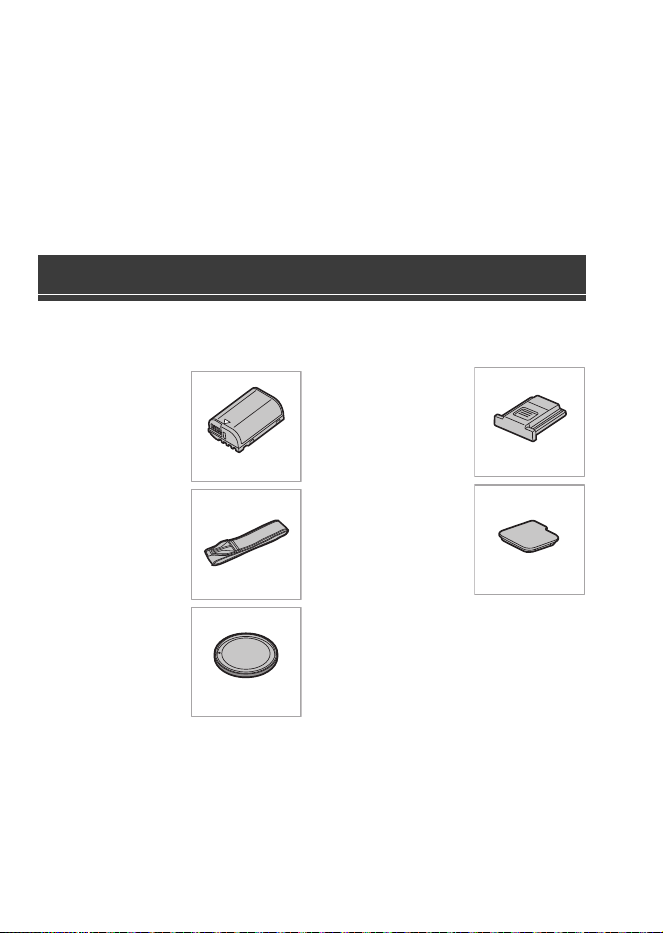
DVQW1926 (SPA)
58
Estimado cliente,
Nos gustaría aprovechar la oportunidad para agradecerle la compra de esta cámara
digital Panasonic.
Acerca de las instrucciones de funcionamiento
Aparte de este folleto, la DC-S5D se suministra con las instrucciones de
funcionamiento para la DC-S5.
Consulte también las instrucciones de funcionamiento para la DC-S5.
Antes de usar la cámara, compruebe que estén suministrados todos los accesorios.
(Números de productos correctos a partir de octubre de 2024.)
Batería
0
Cargue la batería
antes de usarla.
Correa de
transporte
Tapa del cuerpo
¢1
Cubierta de la
zapata caliente
¢1
Cubierta del
conector de la
empuñadura con
batería
¢1
¢1 Esto se coloca en la cámara en el
momento de la compra.
0
El cargador de batería, el adaptador de CA y el cable de conexión USB son
opcionales.
Accesorios de serie
DMW-BLK22
DVPW1023Z
1HE1MC891Z
DVYE1121Z
SKF0145K
DC-S5D_E-DVQW1926.book 58 ページ 2025年4月2日 水曜日 午後2時26分
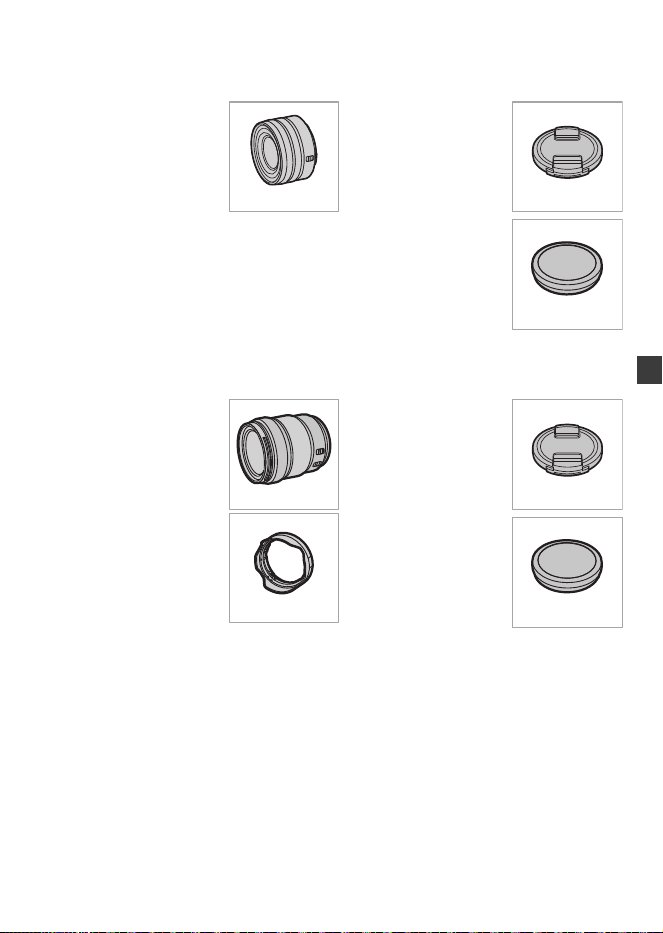
DVQW1926 (SPA)
59
ESPAÑOL
Elementos suministrados con DC-S5DN (producto del juego de
lentes)
Lente intercambiable
de marco completo
de 35 mm
0
Esta lente es resistente al
polvo y a las salpicaduras.
Tapa de la lente
¢2
Tapa trasera de la
lente
¢2
Elementos suministrados con DC-S5DH (producto del juego de
lentes)
Lente intercambiable
de marco completo
de 35 mm
0
Esta lente es resistente al
polvo y a las salpicaduras.
Parasol
Tapa de la lente
¢2
Tapa trasera de la
lente
¢2
¢2 Esto se adjunta a la lente al momento de la compra.
0
Para mejorar la resistencia al polvo y a las salpicaduras de la lente intercambiable
(S-R1840/S-R28200), en la montura se utiliza una goma de montaje de la lente.
– La goma de montaje de la lente dejará marcas de roce en la montura de la cámara
digital, pero esto no afecta al desempeño.
– Para sustituir la goma de montaje de la lente, póngase en contacto con
Panasonic.
S-R1840
6GE1SR1840Z
RGE1Z276Z
S-R28200
1ZE2SE28200Z
CGE1Z293Z
RGE1Z276Z
DC-S5D_E-DVQW1926.book 59 ページ 2025年4月2日 水曜日 午後2時26分
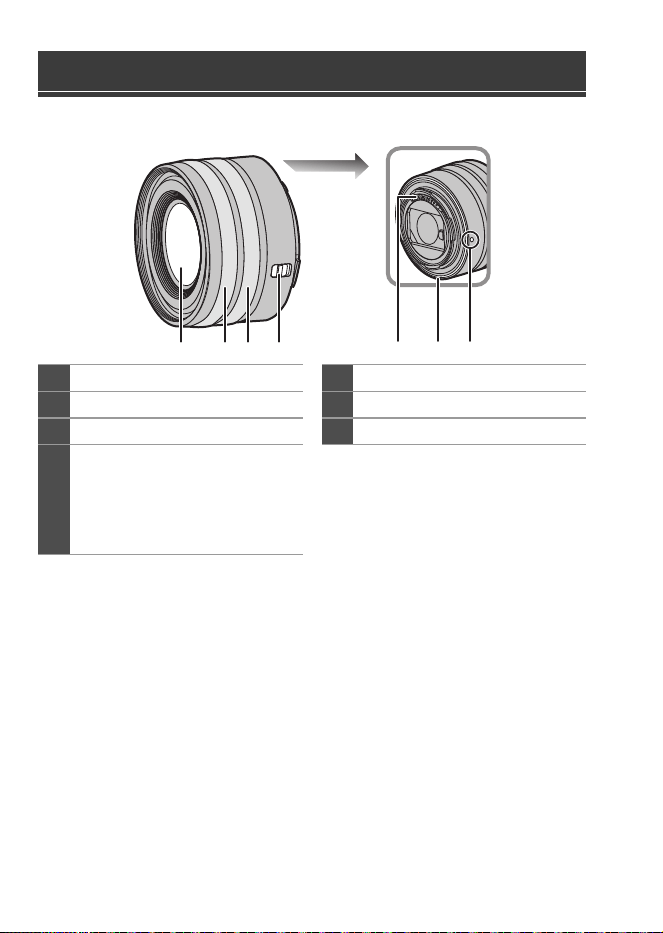
DVQW1926 (SPA)
60
S-R1840
0
Coloque y retire el lente solamente cuando el cilindro del objetivo está retraído.
0
Cuando se coloca la lente intercambiable (S-R1840), se muestra un mensaje si el
cilindro del objetivo está retraído y no es posible grabar. Gire el anillo del zoom para
extenderlo.
0
Grabar con gran angular a la distancia de enfoque más cercana o cerca de ella hará
que se degrade la calidad de imagen alrededor de los bordes de la misma. Cuando
se graba, se recomienda revisar cada imagen después de haberla tomado.
Nombres de las piezas
1
Superficie del objetivo
5
Punto de contacto
2
Anillo del enfoque
6
Goma de montaje de la lente
3
Anillo de zoom
7
Marca para ajustar la lente
4
Interruptor [AF/MF]
0
Puede cambiar entre AF y MF.
Si [MF] está ajustado en la lente
o la cámara, el funcionamiento
se realizará con MF.
4
2 31 765
DC-S5D_E-DVQW1926.book 60 ページ 2025年4月2日 水曜日 午後2時26分
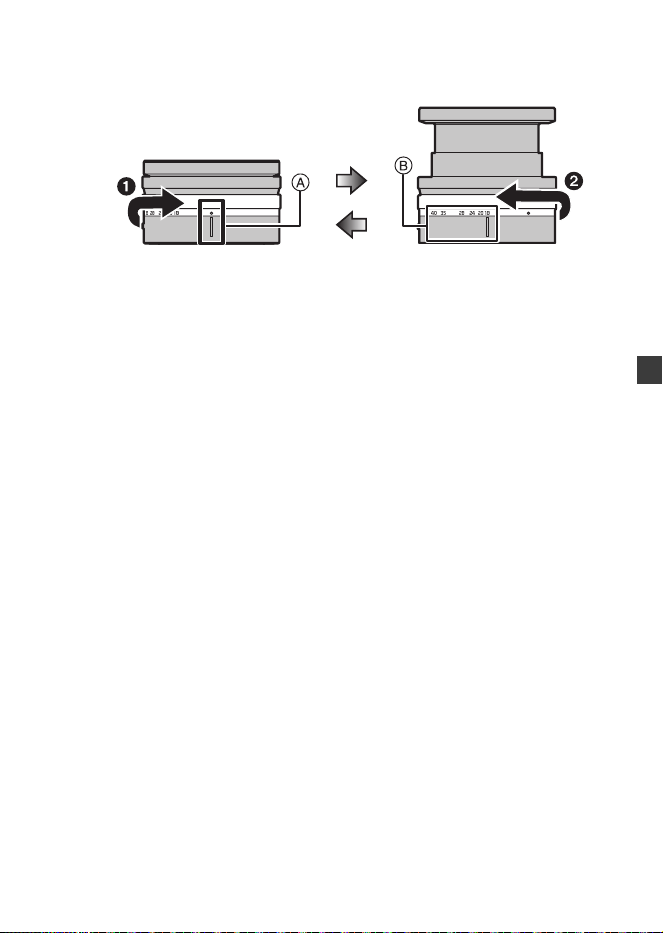
DVQW1926 (SPA)
61
DVQW1926 (SPA)
61
ESPAÑOL
Cómo extender/retraer la lente [cuando la lente
intercambiable (S-R1840) está instalada]
(a) Lente retraída
(b) Listo para la grabación
Cómo extender la lente
Gire el anillo del zoom en la dirección que marca la flecha 1 desde la posición
A (la lente está retraída) hasta la posición B (de 18 mm a 40 mm) para extender
la lente.
0
Cuando el cilindro del objetivo está retraído, no pueden grabarse imágenes.
Cómo retraer la lente
Gire el anillo del zoom en la dirección que marca la flecha 2 desde la posición
B (de 18 mm a 40 mm) hasta la posición A para retraer la lente.
0
En la posición de 18 mm, sentirá un clic. Siga girando hasta la posición A.
0
Cuando no esté grabando imágenes, le recomendamos retraer la lente.
(a) (b)
DC-S5D_E-DVQW1926.book 61 ページ 2025年4月2日 水曜日 午後2時26分
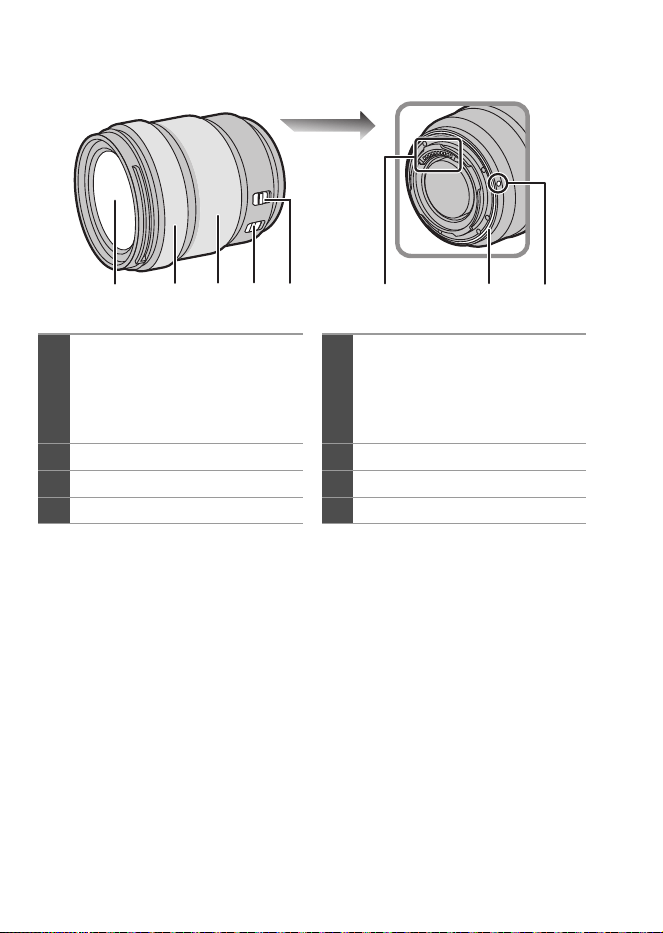
DVQW1926 (SPA)
62
S-R28200
0
Grabar con gran angular a la distancia de enfoque más cercana o cerca de ella hará
que se degrade la calidad de imagen alrededor de los bordes de la misma. Cuando
se graba, se recomienda revisar cada imagen después de haberla tomado.
1
Superficie del objetivo
5
Interruptor [AF/MF]
0
Puede cambiar entre AF y MF.
Si [MF] está ajustado en la lente
o la cámara, el funcionamiento
se realizará con MF.
2
Anillo del enfoque
6
Punto de contacto
3
Anillo de zoom
7
Goma de montaje de la lente
4
Interruptor O.I.S.
8
Marca para ajustar la lente
21 43 7865
DC-S5D_E-DVQW1926.book 62 ページ 2025年4月2日 水曜日 午後2時26分
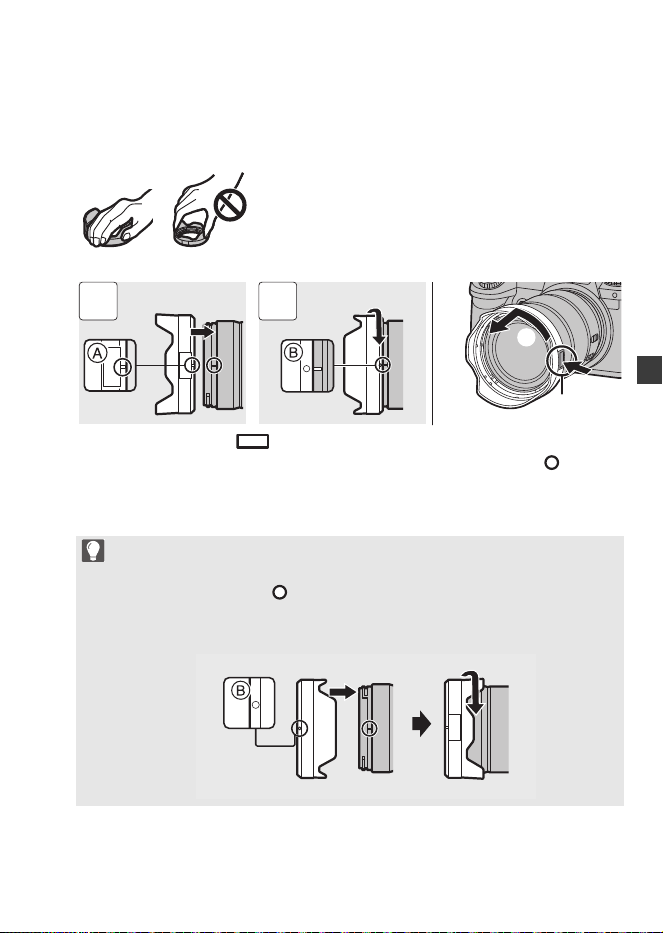
DVQW1926 (SPA)
63
DVQW1926 (SPA)
63
ESPAÑOL
Cómo montar un parasol
Cuando coloque el parasol (en forma de flor) suministrado con la
lente intercambiable (S-R28200)
1 Alinee la marca A ( ) del parasol con la marca del extremo de la lente.
2 Gire el parasol en la dirección de la flecha para alinear la marca B ( ) del
parasol con la marca en el extremo de la lente.
0
Cuando retire el parasol, gire mientras pulsa el botón del parasol C.
Sostenga el parasol con sus dedos colocados como se muestra en la imagen.
0
No sostenga el parasol de forma que pueda doblarla o torcerla.
0
Cuando transporte la cámara, puede colocar el parasol en la dirección
inversa.
1 Alinee la marca B ( ) en el parasol con la marca en el extremo de la
lente.
2 Monte el parasol girándolo en la dirección de la flecha hasta que haga clic.
1 2
DC-S5D_E-DVQW1926.book 63 ページ 2025年4月2日 水曜日 午後2時26分
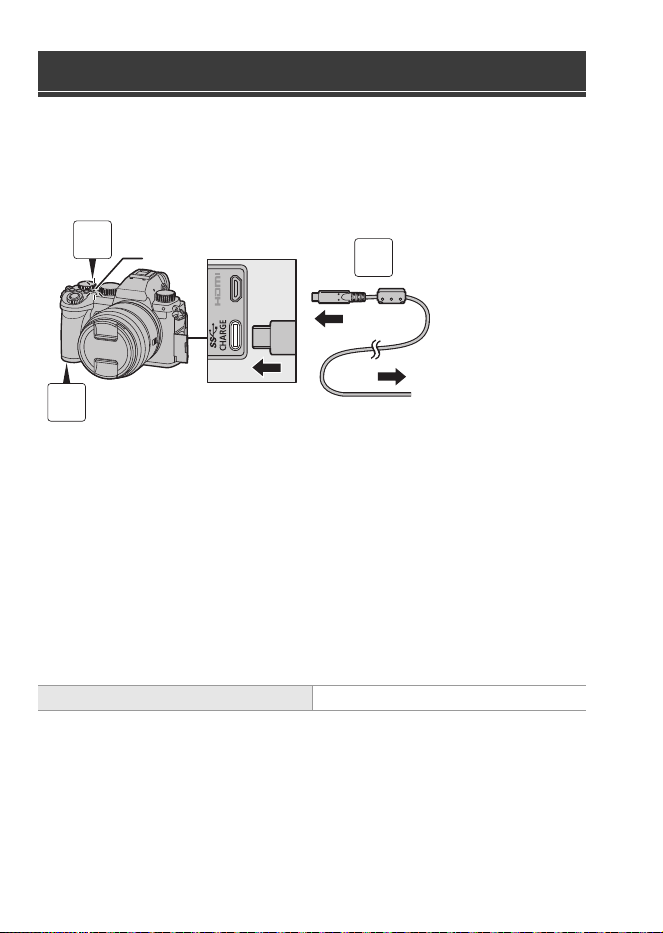
DVQW1926 (SPA)
64
Cargue utilizando un adaptador de CA (opcional/disponible en el mercado)
y un cable de conexión USB (disponible en el mercado).
Cómo insertar una batería en la cámara para su carga
A Al adaptador de CA
1
Establezca el interruptor on/off de la cámara en [OFF].
2
Inserte la batería en la cámara.
3
Conecte el puerto USB de la cámara y el adaptador de
CA usando el cable de conexión USB.
4
Conecte el adaptador de CA a la toma de corriente.
0
La luz de carga B se vuelve roja y comienza la carga.
0
Utilizando el cuerpo de la cámara y el adaptador de CA opcional (DMW-AC11) o el
cuerpo de la cámara y los accesorios suministrados del cargador de batería
opcional (DMW-BTC15).
Cargar la batería
Tiempo de carga Aprox. 240 min
3
1
2
DC-S5D_E-DVQW1926.book 64 ページ 2025年4月2日 水曜日 午後2時26分
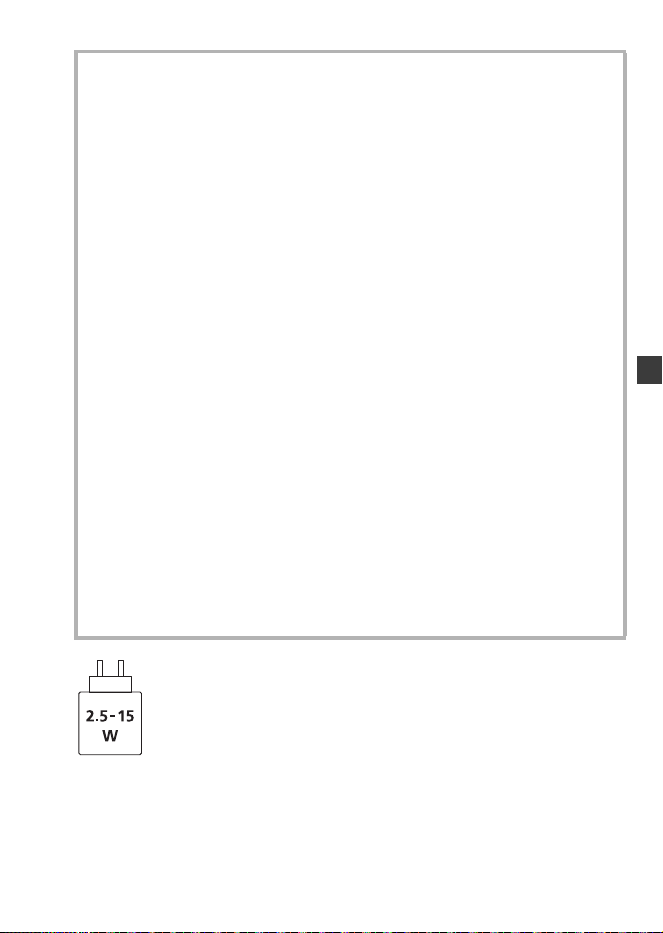
DVQW1926 (SPA)
65
DVQW1926 (SPA)
65
ESPAÑOL
Para alcanzar la máxima velocidad de carga, la alimentación suministrada por el
cargador debe ser de entre mín. 2,5 vatios requeridos por este producto y máx.
15 vatios.
Precauciones
0
La batería que se puede usar con la cámara es la DMW-BLK22. (A partir de
octubre de 2024)
0
Utilice siempre baterías de Panasonic (DMW-BLK22).
0
Si utiliza otras baterías, no podemos garantizar la calidad de este producto.
0
Se recomienda utilizar el adaptador de CA Panasonic (DMW-AC11:
opcional) o los accesorios suministrados del cargador de batería
Panasonic (DMW-BTC15: opcional) para cargar.
0
Puede cargar con el cuerpo de la cámara utilizando un adaptador de CA
disponible en el mercado y un cable de conexión USB.
*Especificaciones recomendadas para el adaptador de CA disponible en el mercado
– Compatible con salida CC de 5 V/3 A (15 W)
– Terminal USB Type-C
*Utilice un cable de conexión USB con una salida de 15 W o superior para la carga.
0
También puede utilizar para la carga un adaptador de CA de 5 V/500 mA o
superior. No obstante, puede que el tiempo de carga sea mayor que con el
adaptador de CA recomendado.
0
No se garantiza el funcionamiento con todos los dispositivos disponibles en el
mercado.
0
Usar métodos de carga distintos de los especificados podría provocar fugas de
fluido, sobrecalentamiento, combustión, rotura, etc., y causar lesiones.
0
Esta batería puede presentar riesgo de incendio o quemaduras químicas si se
trata indebidamente.
0
Coloque la batería extraída en una bolsa de plástico y almacene o mantenga
alejado de objetos metálico (grapas, etc.).
0
Al desechar las baterías, comuníquese con sus autoridades locales o con el
distribuidor y pregunte sobre el método correcto de eliminación.
DC-S5D_E-DVQW1926.book 65 ページ 2025年4月2日 水曜日 午後2時26分

DVQW1926 (SPA)
66
Consulte las instrucciones de funcionamiento para conocer otras especificaciones.
Lente intercambiable de marco completo de 35 mm:
S-R1840 “LUMIX S 18-40mm F4.5-6.3”
Especificaciones
Potencia absorbida: 4,3 W (cuando se graba con el monitor), 3,3 W (cuando
se reproduce con el monitor)
[Cuando utilice la lente intercambiable (S-R1840)]
4,5 W (cuando se graba con el monitor), 3,5 W (cuando
se reproduce con el monitor)
[Cuando utilice la lente intercambiable (S-R28200)]
Montura Leica Camera AG L-Mount
Longitud focal f=18 mm a 40 mm
Estructura de la lente 8 elementos en 7 grupos (3 lentes asféricas, 2 lentes
ED, 1 lente UHR)
* El cristal protector no está incluido
Tipo de abertura 7 aspas de diafragma/Diafragma de apertura circular
Apertura máxima F4.5 (Gran angular) a F6.3 (Teleobjetivo)
Valor de abertura mínimo F22 (Gran angular) a F32 (Teleobjetivo)
Ángulo visual 100o (Gran angular) a 57o (Teleobjetivo)
En la distancia del
enfoque
0,15 m (0,49 pies) a ¶ (desde gran angular a la
distancia focal de 21 mm)/0,35 m (1,15 pies) a 
(Teleobjetivo) (desde la línea de referencia de la
distancia de enfoque)
Máxima ampliación de la
imagen
0,28k (distancia focal de 21 mm)
Estabilizador óptico de la imagen
No
Diámetro del filtro 62 mm
Diámetro máximo ‰67,9 mm (2,67q)
Longitud total Aprox. 40,9 mm (1,61q) (desde la punta de la lente
hasta el lado de la base del montaje de la lente cuando
el cilindro del objetivo está retraído)
DC-S5D_E-DVQW1926.book 66 ページ 2025年4月2日 水曜日 午後2時26分

DVQW1926 (SPA)
67
DVQW1926 (SPA)
67
ESPAÑOL
Lente intercambiable de marco completo de 35 mm:
S-R28200 “LUMIX S 28-200mm F4-7.1 MACRO O.I.S.”
Masa Aprox. 155 g (0,34 lb)
Resistencia al polvo y a
las salpicaduras
Sí
Temperatura de funcionamiento
recomendada
j10 oC a 40 oC (14 oF a 104 oF)
Humedad relativa admisible
10 %RH a 80 %RH
Montura Leica Camera AG L-Mount
Longitud focal f=28 mm a 200 mm
Estructura de la lente 17 elementos en 13 grupos (1 lente asférica, 4 lentes
ED, 1 lente UHR)
Tipo de abertura 9 aspas de diafragma/Diafragma de apertura circular
Apertura máxima F4 (Gran angular) a F7.1 (Teleobjetivo)
Valor de abertura mínimo F32 (Gran angular) a F45 (Teleobjetivo)
Ángulo visual 75o (Gran angular) a 12o (Teleobjetivo)
En la distancia del
enfoque
0,14 m (0,46 pies) a ¶ (Gran angular)/0,65 mm
(2,13 pies) a ¶ (Teleobjetivo) (desde la línea de
referencia de la distancia de enfoque)
Máxima ampliación de la
imagen
0,50k (Gran angular)
Estabilizador óptico de la imagen
Sí
Diámetro del filtro 67 mm
Diámetro máximo ‰77,3 mm (3,04q)
Longitud total Aprox. 93,4 mm (3,68q) (desde la punta de la lente en
hasta el lado base del montaje de la lente)
Masa Aprox. 413 g (0,91 lb)
Resistencia al polvo y a
las salpicaduras
Sí
Temperatura de funcionamiento
recomendada
j10 oC a 40 oC (14 oF a 104 oF)
Humedad relativa admisible
10 %RH a 80 %RH
DC-S5D_E-DVQW1926.book 67 ページ 2025年4月2日 水曜日 午後2時26分
DVQW1926 (SPA)
68
A continuación se indican la cantidad de imágenes que pueden tomarse y
el tiempo disponible para grabar cuando se utiliza la batería suministrada.
0
El número de imágenes que se pueden tomar se basa en los estándares CIPA
(Camera & Imaging Products Association).
0
Uso de una tarjeta de memoria SDHC de Panasonic.
0
Los valores indicados son aproximados.
Grabación de imágenes (Cuando se usa el monitor)
Cuando se usa la lente intercambiable (S-R1840)
Cuando se usa la lente intercambiable (S-R28200)
Grabación de imágenes (Cunado se usa el visor)
Cuando se usa la lente intercambiable (S-R1840)
Cuando se usa la lente intercambiable (S-R28200)
0
Los números entre paréntesis indican valores resultantes cuando [Modo de espera]
en [Disp. LVF ahorro energ.] está establecido en [1SEC] y la función [Disp. LVF
ahorro energ.] funciona como está previsto.
(En función de la condiciones de prueba derivadas de la norma CIPA y
especificadas por Panasonic)
Número de imágenes que se pueden
tomar y tiempo de grabación disponible
con la batería
Número de imágenes que se pueden tomar 430
Número de imágenes que se pueden tomar 410
Número de imágenes que se pueden tomar 450 (1500)
Número de imágenes que se pueden tomar 430 (1450)
DC-S5D_E-DVQW1926.book 68 ページ 2025年4月2日 水曜日 午後2時26分
DVQW1926 (SPA)
69
DVQW1926 (SPA)
69
ESPAÑOL
Grabación de vídeos (Cuando se usa el monitor)
Cuando se usa la lente intercambiable (S-R1840)
[MP4]
(Grabación con la calidad de grabación ajustada en [FHD/8bit/28M/50p])
[MP4]
(Grabación con la calidad de grabación ajustada en [4K/10bit/100M/50p])
[MOV]
(Grabación con la calidad de grabación ajustada en [FHD/50p/420/8-L])
[MOV]
(Grabación con la calidad de grabación ajustada en [4K/50p/420/10-L])
[MOV]
(Grabación con la calidad de grabación ajustada en [C4K/50p/420/8-L])
Cuando se usa la lente intercambiable (S-R28200)
[MP4]
(Grabación con la calidad de grabación ajustada en [FHD/8bit/28M/50p])
[MP4]
(Grabación con la calidad de grabación ajustada en [4K/10bit/100M/50p])
Tiempo de grabación continua disponible (minutos) 140
Tiempo de grabación real disponible (minutos) 70
Tiempo de grabación continua disponible (minutos) 100
Tiempo de grabación real disponible (minutos) 50
Tiempo de grabación continua disponible (minutos) 140
Tiempo de grabación real disponible (minutos) 70
Tiempo de grabación continua disponible (minutos) 100
Tiempo de grabación real disponible (minutos) 50
Tiempo de grabación continua disponible (minutos) 110
Tiempo de grabación real disponible (minutos) 55
Tiempo de grabación continua disponible (minutos) 130
Tiempo de grabación real disponible (minutos) 65
Tiempo de grabación continua disponible (minutos) 100
Tiempo de grabación real disponible (minutos) 50
DC-S5D_E-DVQW1926.book 69 ページ 2025年4月2日 水曜日 午後2時26分
DVQW1926 (SPA)
70
[MOV]
(Grabación con la calidad de grabación ajustada en [FHD/50p/420/8-L])
[MOV]
(Grabación con la calidad de grabación ajustada en [4K/50p/420/10-L])
[MOV]
(Grabación con la calidad de grabación ajustada en [C4K/50p/420/8-L])
0
El tiempo de grabación real disponible es el tiempo disponible para la grabación
cuando se repiten acciones como encender o apagar la cámara y comenzar/detener
la grabación, etc.
Reproducción (Cuando se usa el monitor)
Cuando se usa la lente intercambiable (S-R1840)
Cuando se usa la lente intercambiable (S-R28200)
Los siguientes accesorios están disponibles para su uso:
(Números de productos correctos a partir de octubre de 2024.)
Tiempo de grabación continua disponible (minutos) 130
Tiempo de grabación real disponible (minutos) 65
Tiempo de grabación continua disponible (minutos) 100
Tiempo de grabación real disponible (minutos) 50
Tiempo de grabación continua disponible (minutos) 100
Tiempo de grabación real disponible (minutos) 50
Tiempo de reproducción (minutos) 280
Tiempo de reproducción (minutos) 260
Sistema de accesorios de la cámara digital
Nombre del producto Número de modelo
Cargador de batería DMW-BTCD15
¢1
Adaptador de CA DMW-AC11
¢2
Adaptador DC DMW-DCC18
¢1
Empuñadura-Trípode DMW-SHGR2
DC-S5D_E-DVQW1926.book 70 ページ 2025年4月2日 水曜日 午後2時26分

DVQW1926 (SPA)
71
DVQW1926 (SPA)
71
ESPAÑOL
¢1 Se requiere un adaptador de CA y un cable de conexión USB disponibles por
separado. Se recomienda utilizar el adaptador de CA Panasonic (DMW-AC11:
opcional).
¢2 Suministrado con un cable de alimentación de CA y un cable de conexión USB.
0
Es posible que algunos accesorios opcionales no estén disponibles en algunos países.
0
Utilice siempre una empuñadura-trípode original de Panasonic (DMW-SHGR1/
DMW-SHGR2: opcional).
0
Consulte las instrucciones de funcionamiento de DC-S5 para conocer otros
accesorios.
0
Para mejorar la seguridad, siempre se utilizará la autenticación de contraseña al
establecer conexiones Wi-Fi directas entre la cámara y un teléfono inteligente.
El elemento de menú [Contraseña Wi-Fi] en [Ajuste Wi-Fi] se ha eliminado y
[Contraseña Wi-Fi] siempre será [ON].
0
Al conectarse a Wi-Fi a través de un punto de acceso inalámbrico, el [TKIP] como
método de cifrado y [No encriptado] en [Tipo de seguridad] ya no son compatibles.
0
Esta cámara no admite la funcionalidad para enviar imágenes a un ordenador a
través de Wi-Fi.
[PC] no se puede seleccionar como destino en [Función Wi-Fi]
[Nueva conexión]
[Enviar imágenes durante la grabación]/[Enviar imágenes almacenadas en la cámara].
No hay ningún elemento de menú [Conexión PC] en [Ajuste Wi-Fi].
0
Debido al cese de los servicios, esta cámara no admite la funcionalidad para enviar
imágenes a servicios web/servicios de sincronización en la nube a través de Wi-Fi.
[Servicio WEB]/[Servicio sincron. de nube] no se puede seleccionar como destino
en [Función Wi-Fi] [Nueva conexión] [Enviar imágenes durante la grabación]/
[Enviar imágenes almacenadas en la cámara].
No hay ningún elemento de menú [LUMIX CLUB] en [Ajuste Wi-Fi].
0
Cuando [Modo hiber.] o [Modo hiber. (Wi-Fi)] en [Modo ahorro de energía] se
establece en [OFF], el consumo de energía de esta cámara puede aumentar.
0
Para más información sobre la eficiencia energética del producto, visite nuestra página
web, www.panasonic.com
, e introduzca el número de modelo en el cuadro de búsqueda.
Notas sobre la función Wi-Fi
Notas sobre [Modo ahorro de energía]
DC-S5D_E-DVQW1926.book 71 ページ 2025年4月2日 水曜日 午後2時26分

2023 No. CONSUMER PROTECTION
The Product Security and Telecommunications Infrastructure
(Security Requirements for Relevant Connectable Products) Regulations 2023
Statement of compliance
We hereby deliver our Statement of Compliance for product (type, batch);
Digital Camera
Refer to the website below for compliant models and their support periods.
https://panasonic.jp/support/global/cs/info/im_sec_info.html
Name / address of each manufacturer of the product and authorised representative;
Declaration of compliance that, in the opinion of the manufacturer, we have
complied with the deemed compliance conditions in Schedule 2;
1. No universal default passwords: Complies with ETSI EN 303 645 provisions
5.1-1, 5.1-2
2. Product Security vulnerability report: Complies with ETSI EN 303 645
provisions 5.2-1
Panasonic Product Security Incident Response Team link:
https://holdings.panasonic/global/corporate/product-security.html
3. Security update periods: Complies with 5.3-13 of ETSI EN 303 645
Panasonic product security update link:
https://panasonic.jp/support/global/cs/info/im_sec_info.html
Statement of Compliance signatory;
Manufacturer name: Panasonic Entertainment & Communication Co., Ltd.
Address: 1-10-12 Yagumo-higashi-machi, Moriguchi City, Osaka
570-0021, Japan
Representative: TOSHIYUKI TSUMURA
Company name: Panasonic Entertainment & Communication Co., Ltd.
Signature by:
Name: TOSHIYUKI TSUMURA
Title: Director, Imaging Solution Business Division
Place: 1-10-12 Yagumo-higashi-machi, Moriguchi City, Osaka, Japan
Date: 29/5/2024
DC-S5D_E-DVQW1926.book 72 ページ 2025年4月2日 水曜日 午後2時26分