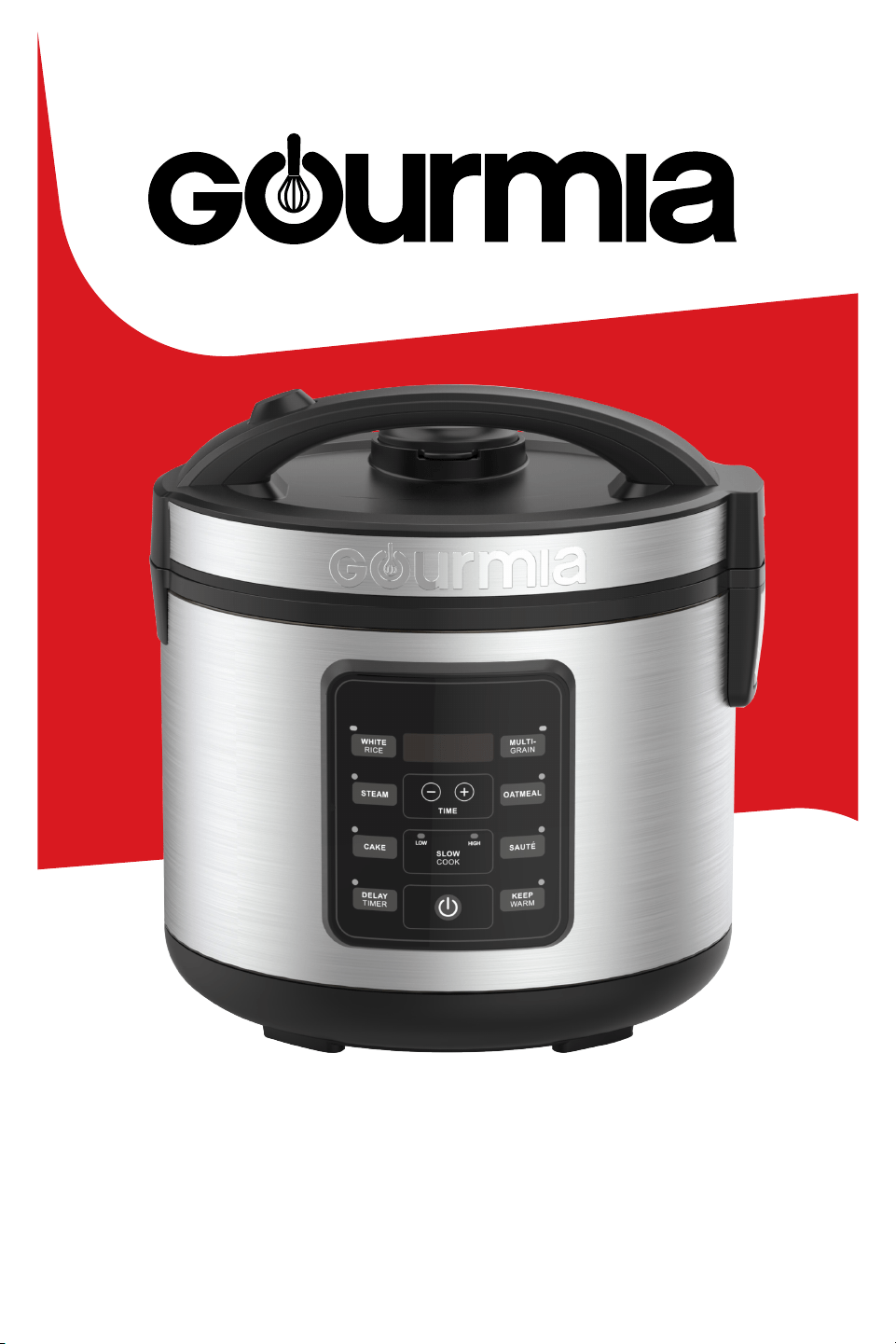
User Manual | Multicooker | GRC512 1
User Manual | GRC512
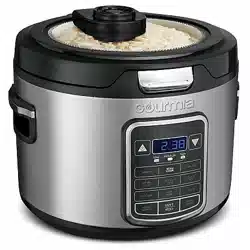
5 QT.
RICE & GRAIN MULTICOOKER

For customer service visit www.gourmia.com or call 888.552.00332 For customer service visit www.gourmia.com or call 888.552.00332
All rights reserved. No portion of this manual may be reproduced by any means whatsoever without written permission
from e Steelstone Group, except for the inclusion of quotations in a media review Although every precaution has been
taken in the preparation of this manual, e Steelstone Group assumes no responsibility for errors or omissions Nor is
been made to ensure that the information contained in this manual is complete and accurate, e Steelstone Group is
not engaged in rendering professional advice or services to the individual consumer; further, e Steelstone Group shall
not be held responsible for any loss or damage allegedly arising from any information or suggestions in this manual.
Model: GRC512 | © 2024 Gourmia | 1.1
e Steelstone Group Brooklyn, NY | Gourmia.com
TABLE OF CONTENTS
Important Safeguards . . . . . . . . . . . . . . . . . . . . . . . . . .4
Know Your Multicooker. . . . . . . . . . . . . . . . . . . . . . . . .5
Before First Use. . . . . . . . . . . . . . . . . . . . . . . . . . . . . .7
Troubleshooting . . . . . . . . . . . . . . . . . . . . . . . . . . . . .7
Using Your Multicooker . . . . . . . . . . . . . . . . . . . . . . . . .8
Cleaning & Maintenance . . . . . . . . . . . . . . . . . . . . . . . 17
Recipes . . . . . . . . . . . . . . . . . . . . . . . . . . . . . . . . . 18
Warranty and Services. . . . . . . . . . . . . . . . . . . . . . . . .19
User Manual | Multicooker | GRC512 3
Here at Gourmia, we’re all about helping cooks make easy, healthy, and delicious meals an
everyday possibility. We know how fast-paced life is and that sometimes a home-cooked
meal doesn’t make the top of the priority list, no matter how bad you want it.
Our dependable, easy-to-use appliances are here to help you change that. We’re giving you
the tools to eat better and healthier without spending hours in the kitchen prepping and
cooking.
We want you to get the most out of your multicooker, which is why our team is available
to help with any questions you may have. Whether you have a question with setup or need
some guidance on which preset to use, we’re happy to walk you through it.
Welcome to the ease of cooking with Gourmia.
is manual provides instructions for all of the multicooker’s functions and features along
with directions for assembling, operating, cleaning, and maintaining the appliance. Please
read all safety instructions and directions for safe usage at all times. Keep this manual for
future use.
ank you for choosing Gourmia!
We’d love to hear about the delicious dishes you’re creating!
Share your thoughts, recipes, and photos with us.
Congratulations on the purchase
of your Multicooker from Gourmia!

For customer service visit www.gourmia.com or call 888.552.00334
IMPORTANT SAFEGUARDS
IMPORTANT SAFEGUARDS
Read all instructions before using the electric appliance.
1. is appliance is not intended for use
by children or persons with reduced
physical, sensory, or mental capabilities,
or a lack of experience and knowledge,
unless they have supervision.
3. To prevent electric shock do not
immerse cord, plugs, or the base in water.
4. Check if the voltage indicated on the
appliance corresponds to the local main
voltage before you connect the appliance.
5. Always make sure that the plug
is inserted properly into the wall outlet.
6. DO NOT operate any appliance with
a damaged cord or plug, aer the appli-
ance malfunctions, or if the appliance has
been damaged in any manner. Return the
appliance to the nearest authorized service
center for repair.
7. DO NOT let the cord hang over
the edge of the table or counter.
8. NEVER connect this appliance
to an external timer switch, separate
remote-control system or extension cords.
9. To disconnect, turn o the appliance,
then remove the plug from wall outlet.
10. DO NOT place appliance on or near a
hot gas, electric burner, or in a heated oven.
11. Leave at least 4 inches of free space on
the back and sides of the appliance.
12. DO NOT use the appliance for any
other purpose than described in this
manual. e use of accessory attachments
not recommended by the appliance
manufacturer may cause injuries.
13. DO NOT leave the appliance
unattended during use.
14. Unplug from outlet when not in use
and before cleaning. Allow to cool before
putting on or taking o parts, and before
cleaning the appliance.
15. DO NOT touch, cover or obstruct the
Steam Vent on the top of the cooker, it is
extremely hot.
16. Dry the outside of the Inner Pot prior
to use. If the Inner Pot is wet, it may dam-
age or cause the product to malfunction.
17. Use caution when opening the lid
during or aer cooking. Hot steam will
escape.
18. Rice should not be le in the Inner Pot
with the Keep Warm function on, for more
than 12 hours.
19. Do NOT use the Inner Pot on a stove-
top or burner.
20. DO NOT use outdoors.
21. is appliance is intended for
household use only.
22. Save these instructions for future use.
Electrical Polarized Plug
is appliance has a polarized plug (one blade is wider than the other).
To reduce the risk of electric shock, the plug is intended to be used
by inserting it into the electrical outlet only one way. Reverse the plug
and re-insert if it does not t securely into the outlet. If the plug does not t,
contact a qualied electrician for assistance. Do not modify the plug in any way.
Power: 120V~ 60Hz 1,700W
User Manual | Multicooker | GRC512 5
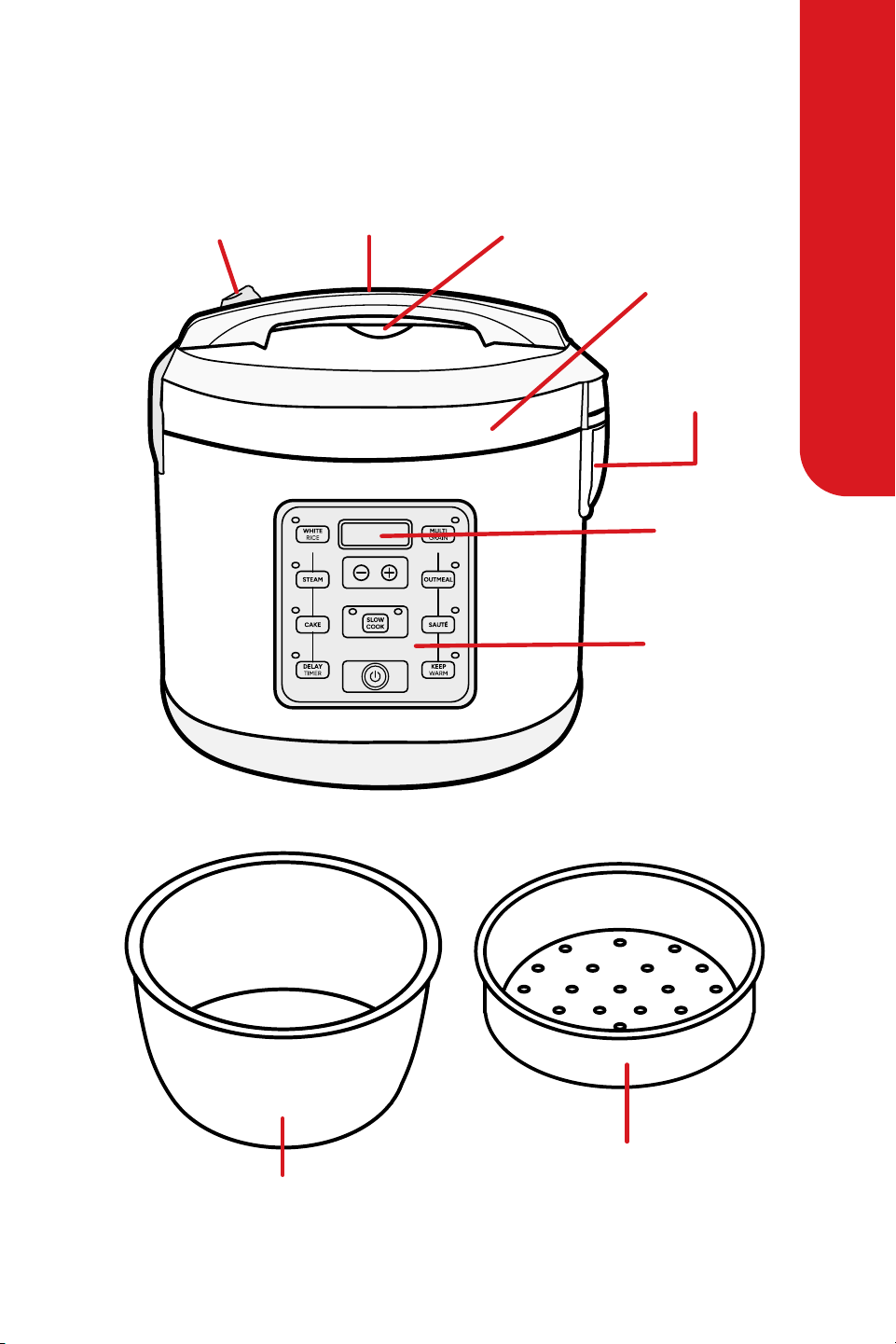
KNOW YOUR MULTICOOKER
KNOW YOUR MULTICOOKER
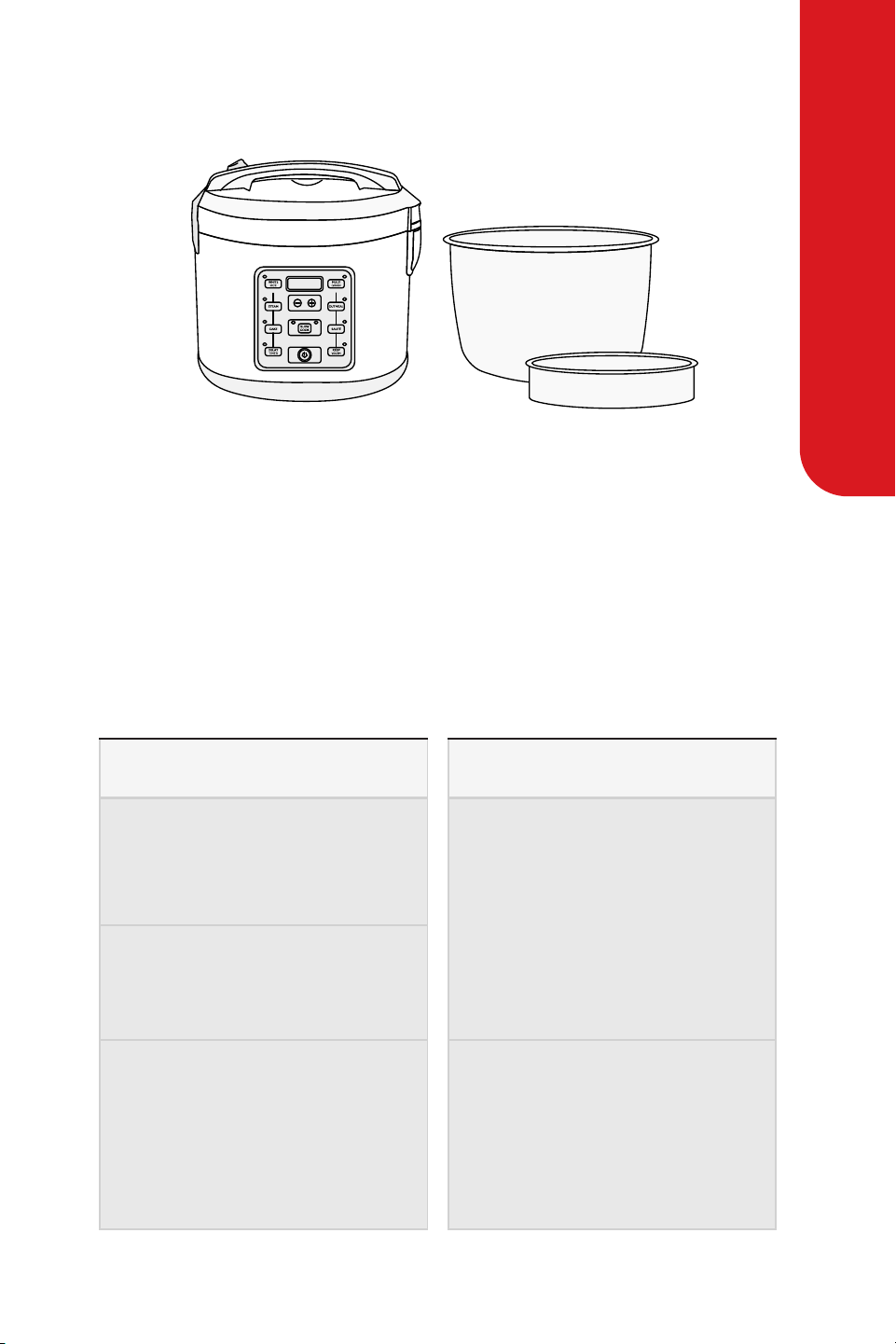
Lid Release Handle
Steam Tray
Inner Pot
Steam Vent
Lid
Condensation
Collector
Control
Panel
Digital
Display
For customer service visit www.gourmia.com or call 888.552.00336
KNOW YOUR MULTICOOKER
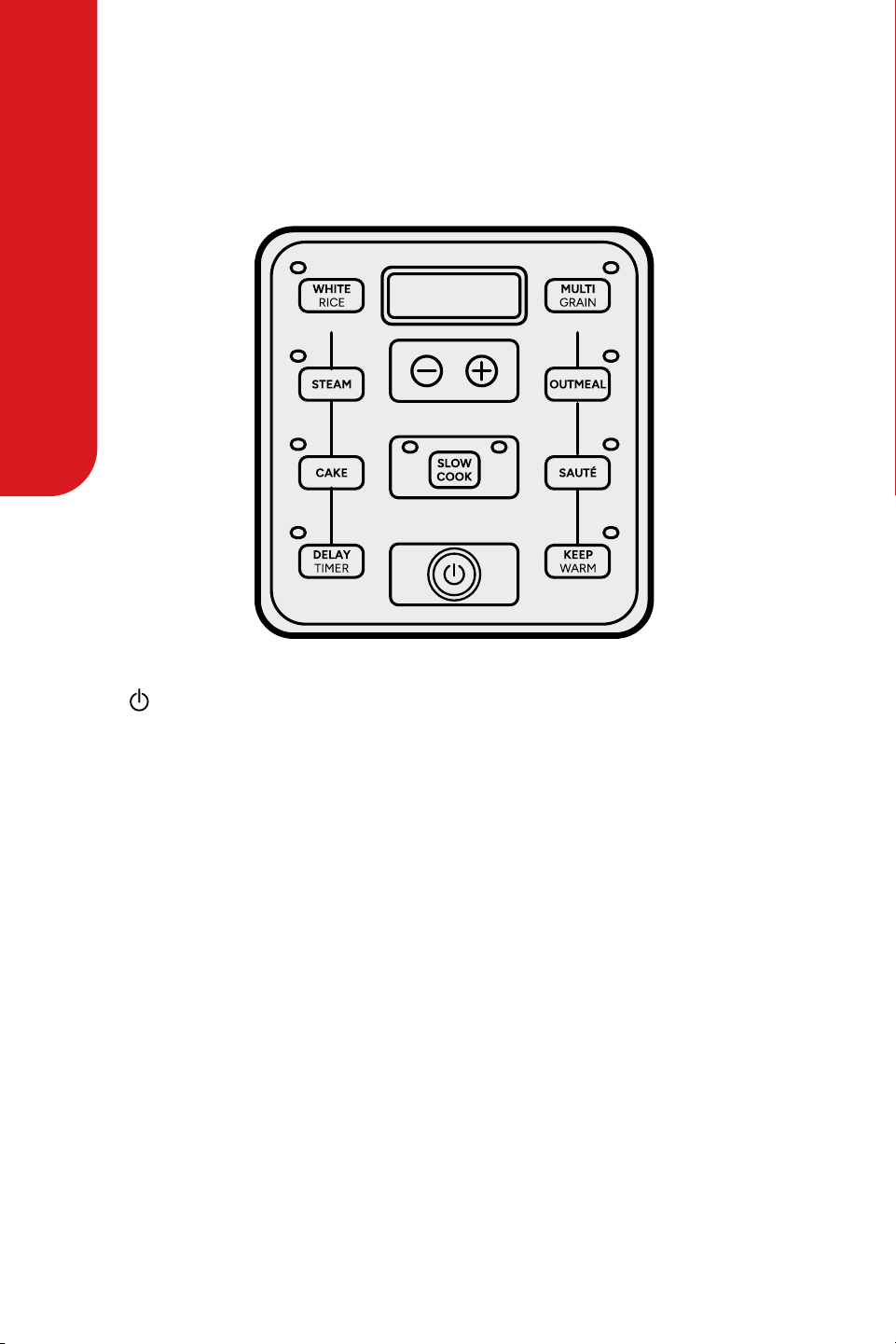
Digital Controls
( )
Turns the cooker on/o.
(+) or (-)
Allows you to adjust times for Steam,
Delay Timer and Slow Cook.
Delay Timer
Allows for rice, grain or oatmeal to be
ready right when it’s needed.
Add rice and water in the morning and
come home to delicious rice that is ready
to eat!
Slow Cook
Sets to slow cook high or low from 2
to 10 hours. Great for homemade roasts
and stews.
Steam
Perfect for healthy sides and main courses.
Oatmeal
Makes quick and healthy breakfast without
any stirring.
Cake
Creates cakes and other treats.
Saute
Saute foods at high heat. Perfect for stir fry,
browning foods, and much more!
White Rice
Ideal for uy, delicious white rice.
Multigrain
Ideal for cooking brown rice and other
tough-to-cook whole grains like quinoa
and barley.
Keep Warm
Keeps food warm and ready to serve once
food is nished cooking.
KNOW YOUR MULTICOOKER
User Manual | Multicooker | GRC512 7
BEFORE FIRST USE
BEFORE FIRST USE
1. Take the appliance and accessories out from the box. Remove the stickers, protective
foil or plastic from the appliance.
2. Before using your appliance for the rst time, wash steam tray and all other accessories
in warm, soapy water. Rinse and dry thoroughly.
3. Remove the Inner Pot from cooker and clean with warm, soapy water.
4. Wipe cooker body clean with a damp cloth.
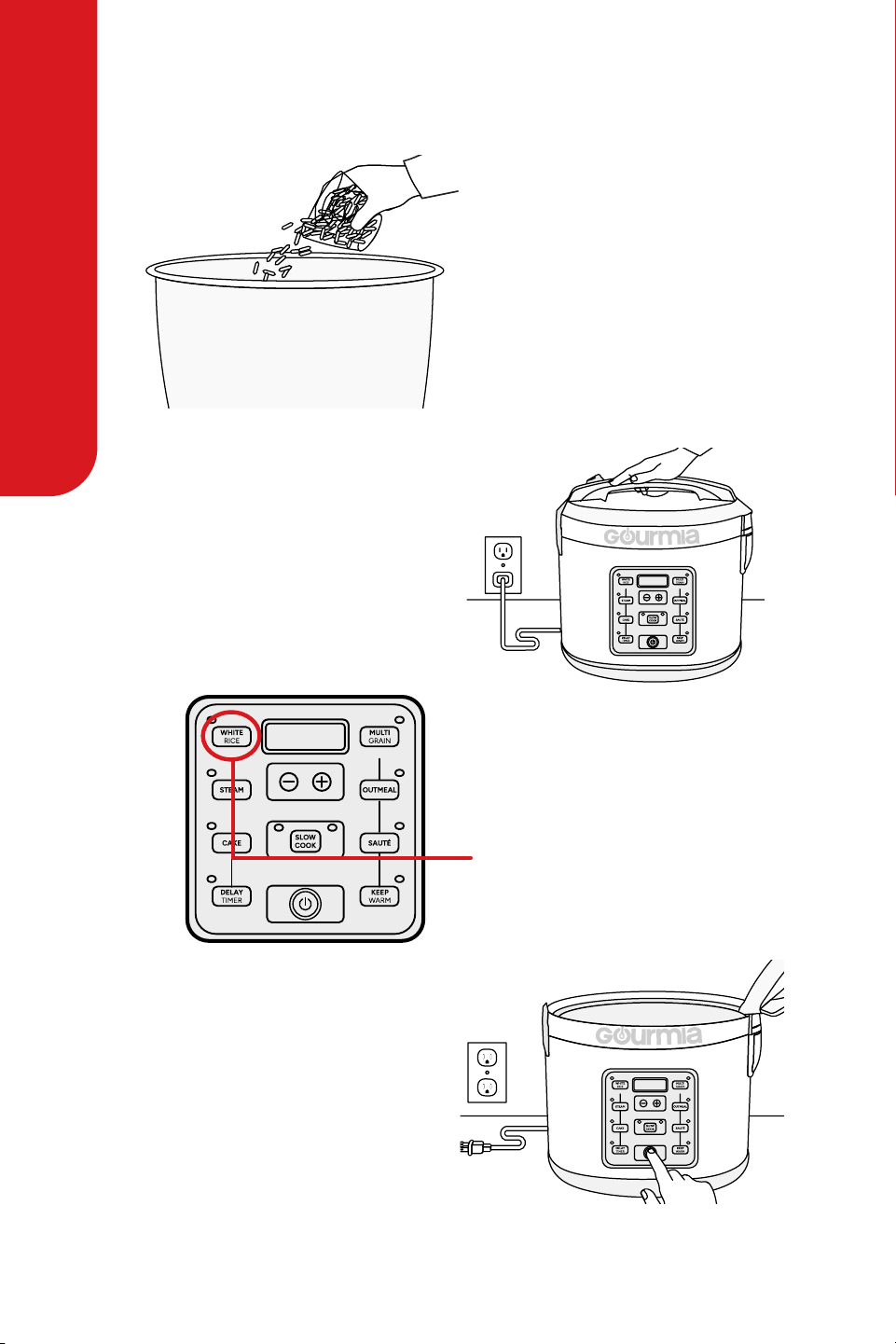
Troubleshooting
Rice is too dry/hard aer cooking. Rice is too moist/soggy aer cooking.
If your rice is dry or hard/chewy
when the cooker switches to Keep
Warm, additional water and cook-
ing time will soen the rice.
When the cooker switches to Keep
Warm, use a Spatula to stir the
rice.
is will redistribute the bottom
(moist) part of the rice as well as
release excess moisture.
Depending on how dry your rice
is, add ½ to 1 cup of water and stir
throughly.
Close the lid and press the White
Rice button. When cooker switch-
es to Keep Warm mode, open the
lid and stir the rice to check the
consistency. Repeat as necessary
until rice is so and moist.
Close the lid and leave the Keep
Warm mode for 10-30 minutes as
needed. Open the lid and stir
occasionally to release excess
moisture.
For customer service visit www.gourmia.com or call 888.552.00338
USING YOUR MULTICOOKER
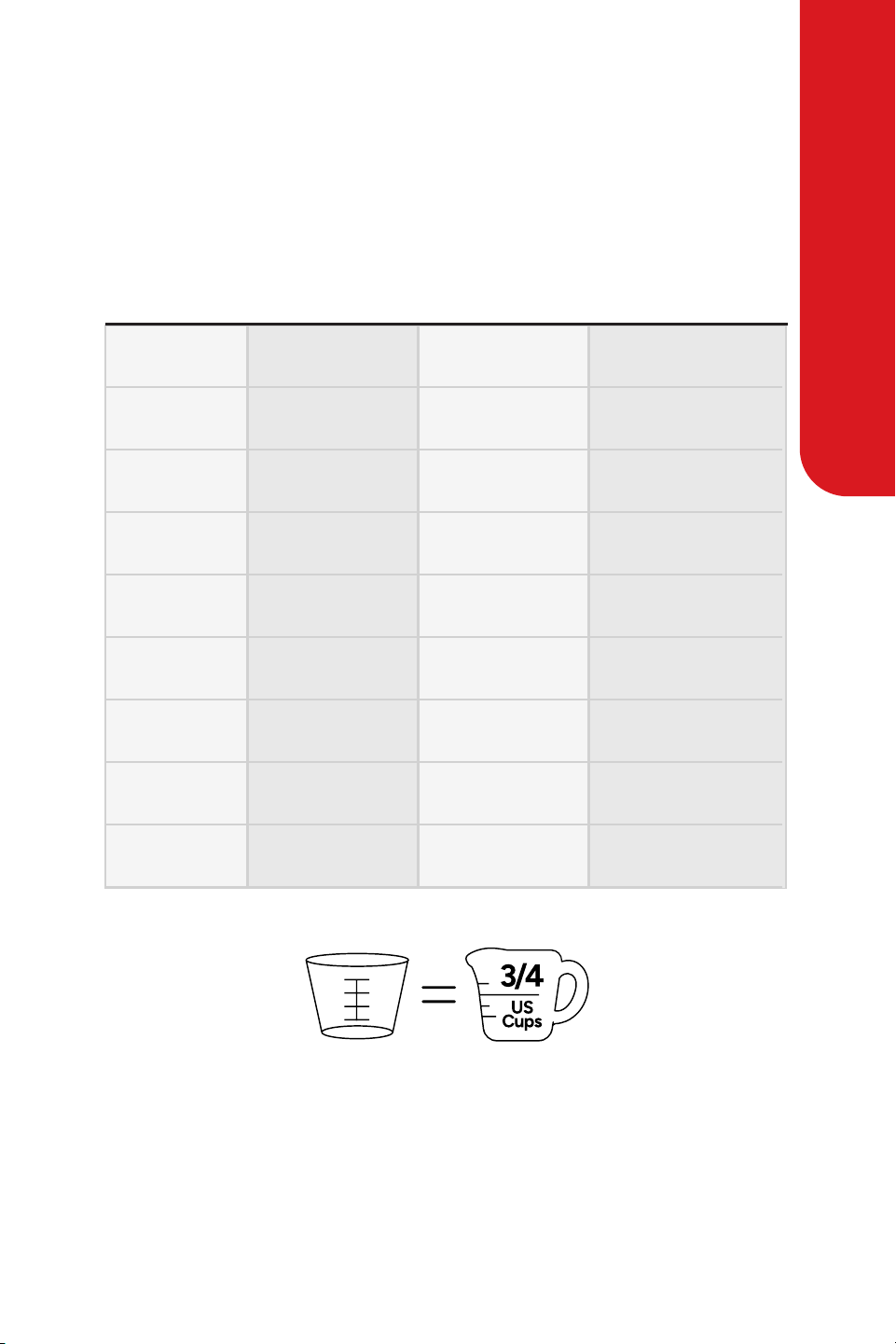
Using Your Multicooker: White Rice Function
1. Using the provided measuring
cup, add white rice to the Inner
Pot.
2. Rinse rice to remove excess
starch. Drain.
3. Fill with water to the line to the
number of cups of rice being
cooked.
4. Place the Inner Pot into the
cooker.
5. Close the lid securely.
6. Plug the power cord into the
wall outlet.
7. Press the power button to turn
on the cooker.
8. Press White Rice. e cooking
indicator light will light up and
the cooker will start.
9. Once rice is nished, the cooker
will beep and automatically switch
to Keep Warm.
10. When nished, turn the cooker
o by pressing the power button
twice and unplug the power cord.
User Manual | Multicooker | GRC512 9
USING YOUR MULTICOOKER
Using Your Multicooker: White Rice Function
Rinse rice before placing it into the Inner Pot to remove excess bran and starch.
is will help reduce browning and sticking to the bottom of the pot.
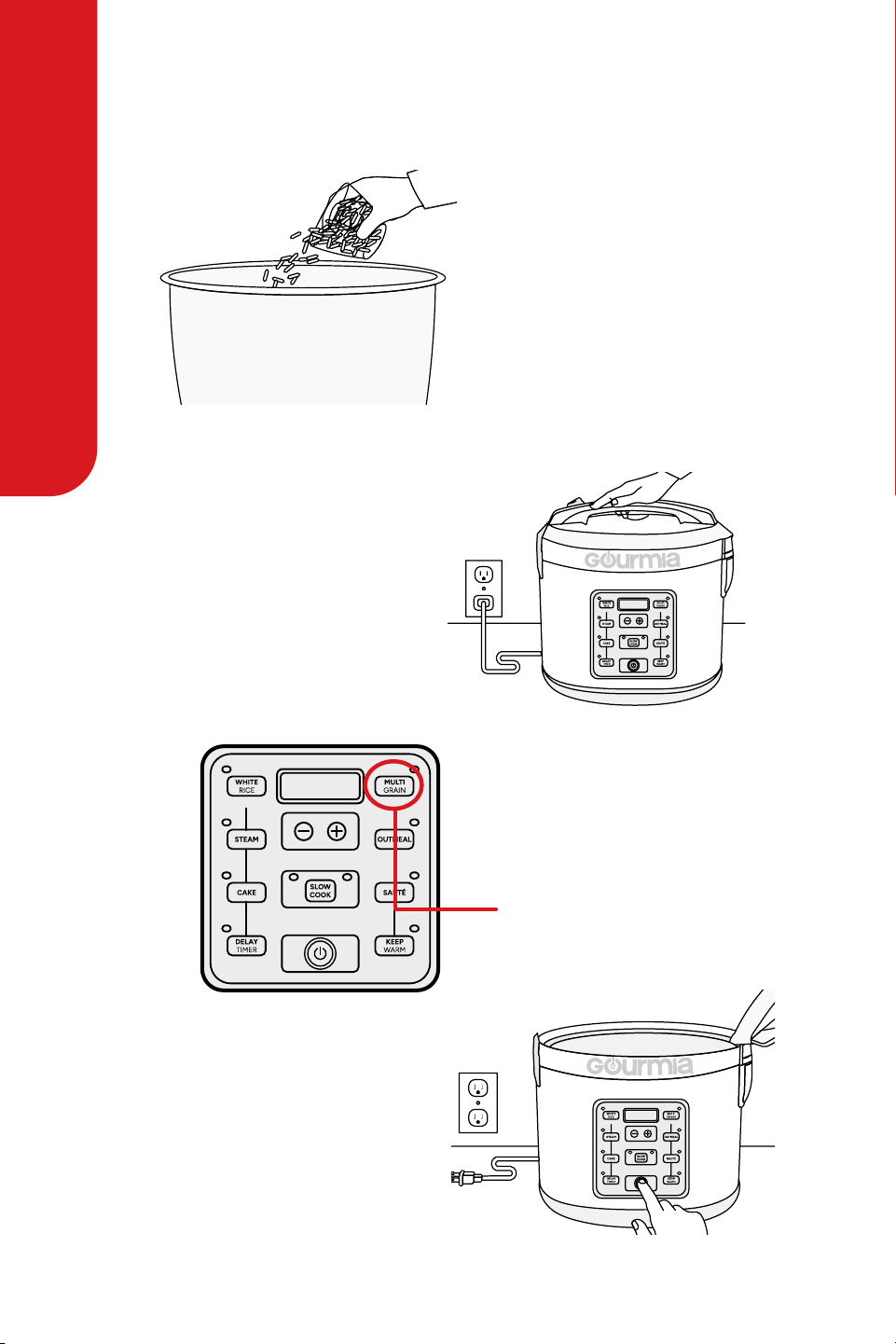
is chart is only a general measuring guide, rice/water measurements may vary.
Using Your Multicooker: White Rice Function
MEASUREMENTS
UNCOOKED
WHITE RICE
2 Cups
4 Cups
26-32 minutes
3 Cups
6 Cups
28-34 minutes
4 Cups
8 Cups
29-35 minutes
5 Cups
10 Cups
31-37 minutes
6 Cups
12 Cups
32-38 minutes
7 Cups
14 Cups
34-40 minutes
8 Cups
16 Cups
35-41 minutes
9 Cups
18 Cups
37-43 minutes
10 Cups
20 Cups
38-44 minutes
Line 2
Line 3
Line 4
Line 5
Line 6
Line 7
Line 8
Line 9
Line 10
*1 Rice Cooker Cup = ¾ US Cup
WATER LINE
(inside pot)
COOKING
TIME
APPROX
COOKED
RICE YIELD*
For customer service visit www.gourmia.com or call 888.552.003310
USING YOUR MULTICOOKER
Using Your Multicooker: Multigrain Function
1. Using the provided measuring
cup, add brown rice to the Inner
Pot.
2. Rinse rice to remove excess
starch. Drain.
3. Fill with water to the line to the
number of cups of rice being
cooked.
4. Place the Inner Pot into the
cooker.
5. Close the lid securely.
6. Plug the power cord into a wall
outlet.
7. Press the power button to turn
on the cooker.
8. Press Multigrain. e cooking
indicator light will illuminate
and the cooker will start.
9. Once grains are nished, the
cooker will beep and automatically
switch to Keep Warm.
10. When nished, turn the cooker
o by pressing the power button
twice and unplug the power cord.

User Manual | Multicooker | GRC512 11
USING YOUR MULTICOOKER
Using Your Multicooker: Multigrain Function
Measurement Table
UNCOOKED
GRAINS
2 Cups 4 Cups
Brown Rice: 39-45 Min.
Quinoa: 30-35 Min.
Bulgur: 30-35 Min.
Barley: 5 Hour
Brown Rice: 41-47 Min.
Quinoa: 41-44 Min.
Bulgur: 32-36 Min.
Barley: 5 Hour
Brown Rice: 43-49 Min.
Quinoa: 52-56 Min.
Bulgur: 34-38 Min.
Barley: 5 Hour
Brown Rice: 45-51 Min.
Quinoa: 55-60 Min.
Bulgur: 34-40 Min.
Barley: 5 Hour
Brown Rice: 46-52 Min.
Quinoa: 59-63 Min.
Bulgur: 37-42 Min.
Barley: 5 Hour
Brown Rice: 48-54 Min.
Quinoa: 60-65 Min.
Bulgur: 38-43 Min.
Barley: 5 Hour
Brown Rice: 50-56 Min.
Quinoa: 62-68 Min.
Bulgur: 39-44 Min.
Barley: 5 Hour
Brown Rice: 52-58 Min.
Quinoa: 64-71 Min.
Bulgur: 40-45 Min.
Barley: 5 Hour
Brown Rice: 54-60 Min.
Quinoa: 65-72 Min.
Bulgur: 42-46 Min.
Barley: 5 Hour
3 Cups 6 Cups
4 Cups 8 Cups
5 Cups 10 Cups
6 Cups 12 Cups
7 Cups 14 Cups
8 Cups 16 Cups
9 Cups 18 Cups
10 Cups 20 Cups
Line 2
Line 3
Line 4
Line 5
Line 6
Line 7
Line 8
Line 9
Line 10
*1 Rice Cooker Cup = ¾ US Cup
WATER LINE
(inside pot)
COOKING TIMES
(Includes Soaking)
APPROX
COOKED
YIELD*
For customer service visit www.gourmia.com or call 888.552.003312
USING YOUR MULTICOOKER
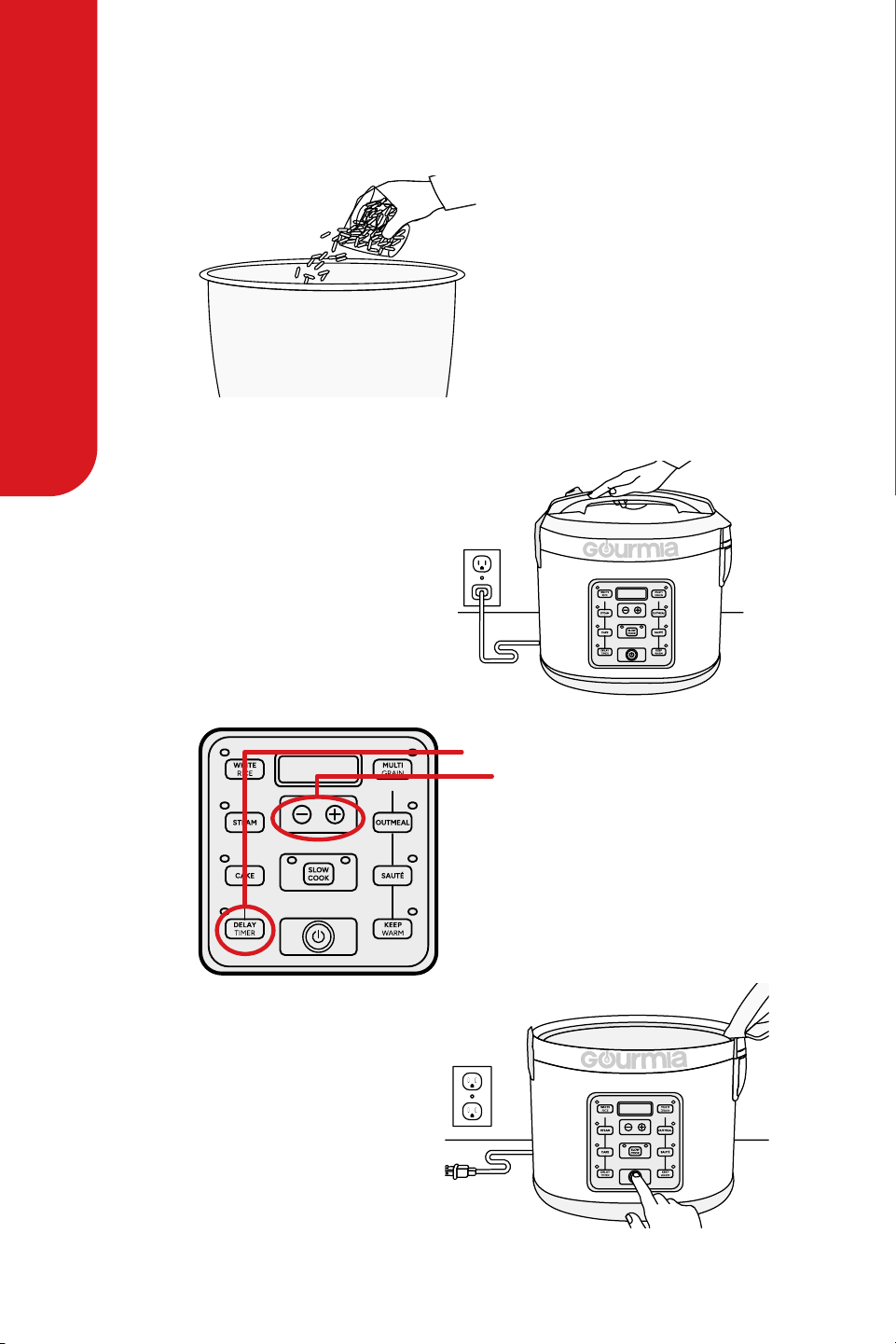
Using Your Multicooker: Delay Timer
1. Using the provided measuring
cup, add rice or grain to the
Inner Pot.
2. Rinse to remove excess starch.
Drain.
3. Fill with water to the line to the
number of cups of rice being
cooked.
4. Place the Inner Pot into the
cooker.
5. Close the lid securely.
6. Plug into a wall outlet and press
the power button.
7. Press the Delay Timer button.
Press (+)to increase in one hour
increments from 1 to 15 hours.
8. Once the time is selected, press
the White Rice, Oatmeal or
Multigrain button, depending on
the grain being cooked.
9. Once rice or grain is nished,
the cooker will beep and
automatically switch to Keep
War m.
10. When nished, turn the cooker
o by pressing the power button
twice and unplug the power cord.

User Manual | Multicooker | GRC512 13
USING YOUR MULTICOOKER
Using Your Multicooker: Delay Timer
Using Your Multicooker: Cooking Modes
1. Add food to the Inner Pot.
2. Place the Inner Pot into the cooker.
3. Close the lid securely.
4. Plug the power cord into a wall outlet.
5. Press the power button to turn on the
cooker.
6. Press Slow Cook twice for Slow Cook
(high) or once for Slow Cook (low).
7. Press(-) or (+)to adjust cook time in 10
minute increments. Low time setting
can be set 6-10 hours. High time setting
can be set 2-5 hours.
8. Once the cooking time is selected, the
cooker will beep to indicate it is setting
at the displayed time.
9. e cooker will begin to slow cook. e
Digital Display will count down in one
minute increments from the selected
time.
10. Once food is nished, the cooker will
beep and automatically switch to Keep
War m.
11. Open the lid to check if food is done. If
fully cooked, remove food for serving.
12. When nished serving, turn the rice
cooker o by pressing the power button
twice and unplug the power cord.
Slow Cook
1. Using the measuring cup, add 3 cups of
water to the Inner Pot.
2. Place the Inner Pot into the cooker.
3. Place food to be steamed onto the
Steam Tray.
4. Place the Steam Tray into the cooker.
5. Close the lid securely.
6. Plug the power cord into a wall outlet.
7. Press the power button to turn on the
cooker.
8. Press the Steam button. e Digital
Display will show a ashing 0:05 for
ve minutes of steam time.
9. Press (+) or(-) to increase or decrease
steaming time by one minute, up to 30
minutes.
10. Once the time is selected, the cooker
will beep to indicate it is setting at the
displayed time. e display will stop
ashing to indicate it has set.
11. When the water reaches a boil, the
Digital Display will count down in one
minute increments from the selected
time.
12. Once the selected time has passed, the
cooker will beep and switch to Keep
War m.
13. Check steamed food. If nished
steaming, carefully remove food to
prevent overcooking.
14. Use glove to prevent burns.
15. When nished steaming, turn the
cooker o by pressing the power button
twice and unplug the power cord.
Steam

For customer service visit www.gourmia.com or call 888.552.003314
USING YOUR MULTICOOKER
Using Your Multicooker: Cooking Modes
1. Using the measuring cup, add rice or
grain to the Inner Pot.
2. Rinse to remove excess starch. Drain.
3. Fill with water to the line to the number
of cups of rice/grain being cooked.
4. Place the Inner Pot into the cooker.
5. Close the lid securely.
6. Plug the power cord into a wall outlet.
7. Press the power button to turn on the
cooker.
8. Press White Rice or Multigrain,
depending on the type of grain being
cooked.
9. e cooking indicator light will
illuminate and the cooker will now
begin cooking.
10. Place food to be steamed onto the
Steam Tray.
11. Using caution to avoid escaping steam,
open the lid.
12. Place Steam Tray into the cooker.
13. Close the lid securely.
14. When food is nished steaming,
remove Steam Tray.
15. Use glove to prevent burns.
16. Allow the cooker to continue cooking.
17. Once rice or grain is nished, the
cooker will beep and automatically
switch to Keep Warm.
18. When nished, turn the cooker o by
pressing the power button twice and
unplug the power cord.
Steam & Cook Grain
1. Following packaging instructions for
suggested oatmeal/water ratio, add
oatmeal and water to the Inner Pot.
2. Place Inner Pot into the cooker.
3. Close the lid securely.
4. Plug the power cord into a wall outlet.
5. Press the power button to turn on the
cooker.
6. Press Oatmeal to begin cooking.
7. e cooking indicator light of the
selected function will illuminate and
the cooker will start.
8. Once cooking is complete, the cooker
will automatically switch to Keep
War m.
9. When nished, turn the cooker o by
pressing the power button twice and
unplug the power cord.
Oatmeal

User Manual | Multicooker | GRC512 15
USING YOUR MULTICOOKER
Using Your Multicooker
Steaming Times
MEAT
Fish
140 F
Chicken
165 F
Pork
160 F
Beef 160 F
25 minutes
30 minutes
30 minutes
Medium = 25 min
Medium-Well = 30 min
Well = 33 min
STEAMING TIME
SAFE INTERNAL
TEMPERATURE
MEAT
Asparagus
Corn Cob
Broccoli
Green Beans
Cabbage
Peas
Carrots
Potatoes
Squash
Cauliower
Spinach
Zucchini
9-11 minutes
12-16 minutes
6-8 minutes
9-11 minutes
5-7 minutes
4-6 minutes
11-13 minutes
28-33 minutes
9-11 minutes
7-9 minutes
2-4 minutes
9-11 minutes
STEAMING TIME

For customer service visit www.gourmia.com or call 888.552.003316
USING YOUR MULTICOOKER
Using Your Multicooker: Cooking Modes
1. Prepare one pre-packaged cake mix according to the instructions.
2. Spray the inside of the Inner Pot with nonstick spray.
3. Pour the cake mixture into the Inner Pot.
4. Place the Inner Pot into the cooker and close the lid securely.
5. Plug the power cord into a wall outlet.
6. Press the power button to turn the cooker on.
7. Press Cake. e cooker will beep to indicate it has set.
8. Once cooking is complete, the cooker will automatically switch to Keep Warm.
9. When nished, turn the cooker o by pressing the power button twice
and unplug the power cord.
Cake
1. Place the Inner Pot into the cooker.
2. Close the lid securely.
3. Plug the power cord into a wall outlet.
4. Press the power button to turn on the cooker.
5. Press Saute. e cooker will beep to start heating the Inner Pot.
6. Aer letting the cooker heat briey, open the lid and add the ingredients.
7. Using a long-handled wooden spoon, stir the ingredients until they are your desired
level of cooked.
8. When nished, turn cooker o by pressing the power button twice and unplug the
power cord.
Sauté
NOTE: Do not use the provided Serving Spatula to cook soup or saute.
It is not intended for use with high-temperatures. Use a long-handled wooden
or heat-safe spoon to stir food while cooking soup or sauteing.
User Manual | Multicooker | GRC512 17
CLEANING & MAINTENANCE
CLEANING & MAINTENANCE
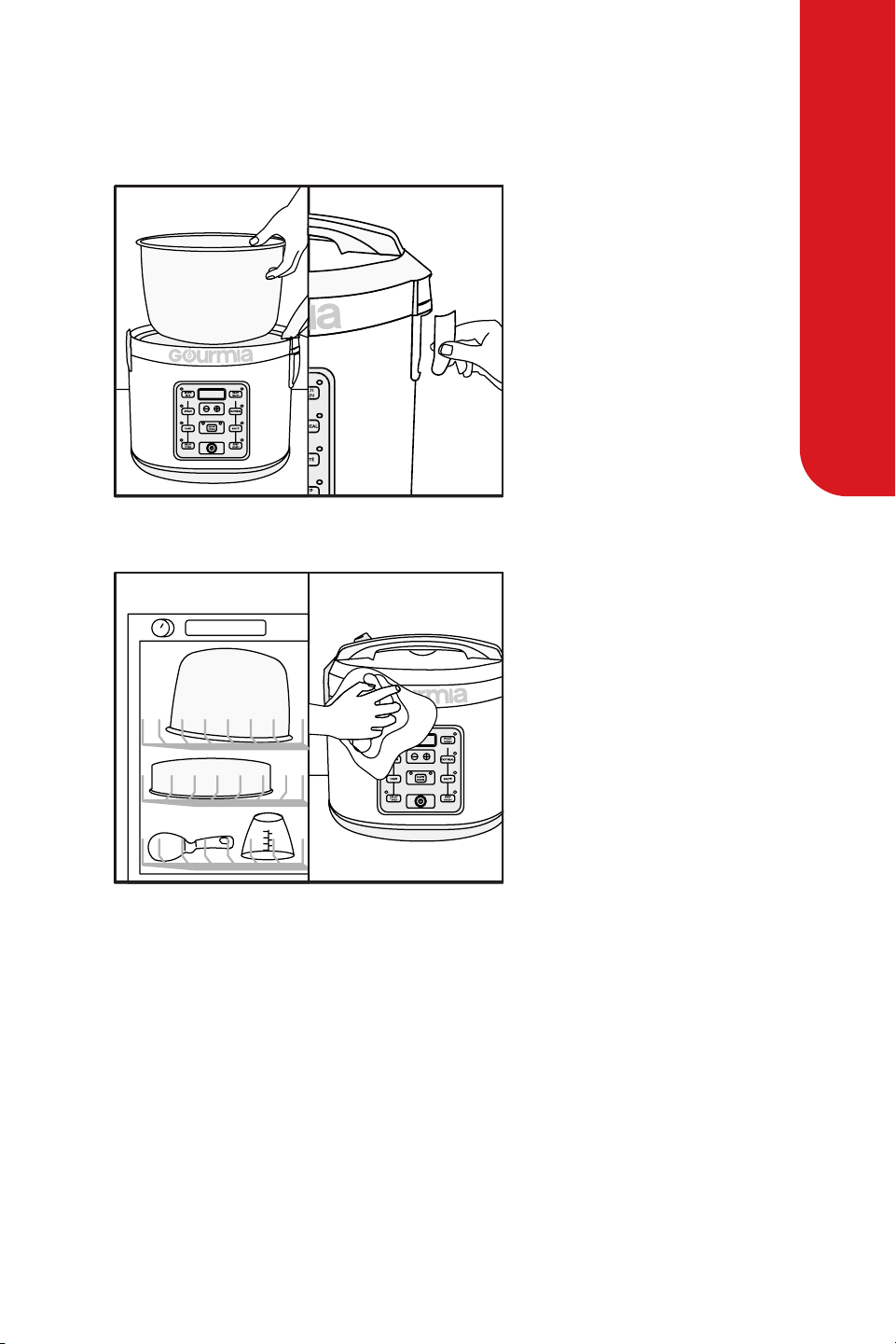
1. Remove the Steam Tray when
cooker is completely cooled.
2. Remove the Condensation
Collector.
1. Soak the Inner Pot and all
accessories or wash them in the
top rack of the dishwasher.
2. Wipe cooker body clean
with a damp cloth.
3. oroughly dry cooker body
and all accessories.
4. Reassemble for next use.
NOTE: Do not use the provided Serving Spatula to cook soup or saute.
It is not intended for use with high-temperatures. Use a long-handled wooden
or heat-safe spoon to stir food while cooking soup or sauteing.
Storage
Store the product carefully in a safe place like a cupboard, shelf, or countertop.
Do not knock or drop it as this can damage the product.

For customer service visit www.gourmia.com or call 888.552.003318
RECIPES
Recipes
Shrimp Jambalaya
San Antonio Rice
Ingredients
Ingredients
Instructions
Instructions
• 1½ cups white rice
• 2 cups chicken broth
• 1 cup water
• 2 (15 oz.) cans diced tomatoes
• 2 tsp creole seasoning
• 1 lb. large shrimp, peeled & deveined
• 1 cup white rice
• 1 jar (12 oz) fresh salsa, mild or hot
• 1tbsp vegetable oil
• 1 cup fresh or canned corn kernels
• ½tsp ground cumin
• ½tsp salt
• 1¼ cups water
• Fresh ground pepper, to taste
• Fresh minced cilantro, for garnish
1. Combine all ingredients (except shrimp) into the inner pot. Ensure they are evenly
mixed.
2. Close the lid and press White Rice.
3. When done, add the shrimp and give it a quick stir.
4. Close the lid and press Steam; set for 5 minutes.
5. Check every minute until shrimp is cooked pink throughout.
6. Serve hot in bowls.
1. Press the power button to turn on the rice cooker.
2. Add all ingredients except cilantro to the inner pot, stir, close the lid and press the
White Rice button.
3.
When the rice cooker switches to Keep Warm mode, open the lid, quickly stir and
recover.
4. Allow to stand for 8-10 minutes before serving. Spoon onto a serving dish, garnish
with fresh cilantro and serve.
5. Makes a avorful supper or side dish for grilled chicken or sh.

User Manual | Multicooker | GRC512 19
WARRANTY & SERVICES
is Limited Warranty is for one full year from the date of purchase
and requires proof of purchase from an authorized seller. It is applicable
to the original purchaser only and is not transferable to a third party
user. Repair or replacement of defective parts is solely at Gourmia’s
discretion. In the event that repair isn’t possible, Gourmia will replace
the product/part. If product repair/replacement won’t suce, Gourmia
has the option of refunding the cash value of the product or component
returned.
Product defects not covered under the Warranty provisions include
normal wear and damage incurred from use or accidental negligence,
misuse of instruction specications or repair by unauthorized parties.
Gourmia is not liable for any incidental or consequential damages
incurred by such circumstances.
Only valid within the United States.
For Customer Service, Questions or Comments
gourmia.com • inf[email protected] • 888.552.0033
Mon-u 9:00 a.m. to 6:00 p.m. Et
Fri 9:00 a.m. to 3:00 p.m. Et
Languages: English, Spanish, French
Register your product at
www.gourmia.com/warranty
Warranty & Services

MAINTENANCE
We’d love to hear from you!
888.552.0033
info@gourmia.com