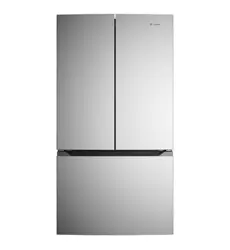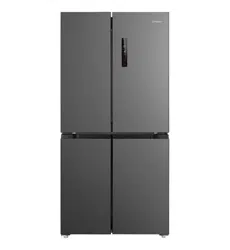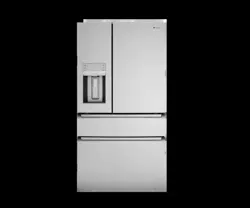
User Manual
Products:
WQE5400
WHE5600
WHE5650
2 www.westinghouse.com
HAPPY TO HELP
Thank you for choosing Westinghouse. We have designed this product to make your life
simpler and deliver impeccable performance for many years. Please spend a few minutes reading
this document to get the best from your new Westinghouse appliance.
Visit our website to:
Get usage advice or service information:
www.westinghouse.com.au
Register your product for better service:
register.westinghouse.com.au
Buy Accessories, Consumables and Original spare parts for your appliance:
shop.westinghouse.com.au
CUSTOMER CARE AND SERVICE
Always use original spare parts.
When contacting our Authorised Service Centre, ensure that you have the following
data available: Model, PNC, Serial Number.
The information can be found on the rating plate which is located inside the product.
Warning / Caution-Safety information.
General information and tips.
Environmental information.
Subject to change without notice.
CONTENTS
................................................................................................ 3
............................................................................ 5
.......................................................................................................... 19
......................................................................... 24
.................................................................................... 25
29..............................................................................................
............................................................................ 30
1. SAFETY INFORMATION
2. DESCRIPTION OF THE APPLIANCE
3. CONTROL PANEL
4. INSTALLING YOUR NEW APPLIANCE
5. USING YOUR REFRIGERATOR
6. AUTOMATIC ICE MAKER
............................................................................................... 31
7. CLEANING YOUR REFRIGERATOR
8. FOOD STORAGE GUIDE
32....................................................................................................
........................................................................................................................... 35
9. TROUBLESHOOTING
10. NOISES
WE’RE THINKING OF YOU
CUSTOMER CARE AND SERVICE
Get usage advice, brochures, trouble shooter, service information:
www.electrolux.com
Register your product for better service:
www.electrolux.com/productregistration
Buy Accessories, Consumables and Original spare parts for your appliance:
www.electrolux.com/shop
Visit our website to:
Subject to change without notice.
Warning / Caution-Safety information.
General information and tips.
Environmental information.
Thank you for choosing this Electrolux product. We have created it to give you
impeccable performance for many years, with innovative technologies that help
make life simpler features you might not find on ordinary appliances. Please spend
a few minutes reading to get the very best from it.
Always use original spare parts.
When contacting our Authorised Service Centre, ensure that you have the follow-
ing data available: Model, PNC, Serial Number.
The information can be found on the rating plate.
1. SAFETY INFORMATION .................................................................................................................... 3
2. DESCRIPTION OF THE APPLIANCE .................................................................................................. 5
3. INSTALLING YOUR NEW APPLIANCE .............................................................................................. 8
4. TEMPERATURE CONTROL ...............................................................................................................11
5. USING YOUR REFRIGERATOR ........................................................................................................18
6. CONNECTING THE WATER SUPPLY ................................................................................................21
7. AUTOMATIC ICE &WATER DISPENSER .......................................................................................... 23
8. GENERAL INFORMATION ...............................................................................................................25
9. FOOD STORAGE GUIDE ..................................................................................................................28
10. TROUBLESHOOTING ....................................................................................................................29
11. NOISES .......................................................................................................................................... 33
12. WARRANTY ..................................................................................................................................34
CONTENTS
3
EN
1. SAFETY INFORMATION
Note: You must read these warnings carefully
before installing or using the refrigerator. If you need
assistance, contact your customer care center.
The manufacturer will not accept liability, should
these instructions or any other safety instructions
incorporated in this book be ignored.
WARNING
• It is essential the electric outlet is properly earthed
to ground. Consult a qualified electrician if you are
unsure.
• Do not use electrical appliances inside the
food storage compartments of the appliance,
unless they are of the type recommended by the
manufacturer.
• Unplug the refrigerator before cleaning or moving it
to avoid electric shock.
• Never unplug the refrigerator by pulling the
electrical cord as this may damage it. Grip the plug
firmly and pull straight out.
• If the power cord is damaged, it must be replaced
by the manufacturer, its service agent or similarly
qualified persons in order to avoid a hazard.
• Don’t use a steam cleaner. If live components come
into contact with condensing steam, they may
short-circuit or cause an electric shock.
• Do not store explosive substances such as aerosol
cans with a flammable propellant this appliance.
If pressurized aerosol containers bear the word
‘flammable’ and/or a small flame symbol, do not
store them inside any refrigerator or freezer. If you
do so you may cause an explosion.
• Do not damage the refrigerant circuit.
• This appliance contains insulation formed with
flammable blowing gases. Avoid safety hazards by
carefully disposing of this appliance.
• If you wish to discard this refrigerator, please
contact your local authorities and ask for the
correct method of disposal.
• When you dispose of your old refrigerators and
freezers, remove any doors. Children can suocate
if they get trapped inside.
• When positioning the appliance, ensure the supply
cord is not trapped or damaged.
• Do not locate multiple portable socket-outlets or
portable power supplies at the rear of the appliance.
• Children should be supervised to ensure that they
do not play with the appliance.
• This appliance is not intended for use by persons
(including children) with reduced physical,sensory
or mental capabilities, or lack of experience
and knowledge, unless they have been given
supervision or instruction concerning use of the
appliance by a person responsible for their safety.
WARNING
R600a refrigerant warning
This appliance contains flammable
R600a refrigerant. Avoid safety
hazards by carefully installing,
handling, servicing and disposing
of this appliance.
• Ensure that the tubing of the refrigerant circuit is
not damaged during transportation and installation.
• Leaking refrigerant may cause eye injuries or ignite.
• The room for installing appliance must be at least
1m
3
per 8g of refrigerant. The amount of refrigerant
in the appliance can be found on the rating plate
inside the appliance.
• If you are unsure of the refrigerant check the rating
plate inside the refrigerator compartment.
• It is hazardous for anyone other than an Authorized
Service Person to service this appliance. In
Queensland Australia the Authorization Service
Person MUST hold a Gas Work Authorization for
hydrocarbon refrigerants to carry out servicing or
repairs which involve the removal of covers.
• Keep ventilation openings in the appliance enclosure
or in the built-in structure, clear of obstruction.
• Do not use mechanical devices or other means to
accelerate the defrosting process, other than those
recommended by the manufacturer.
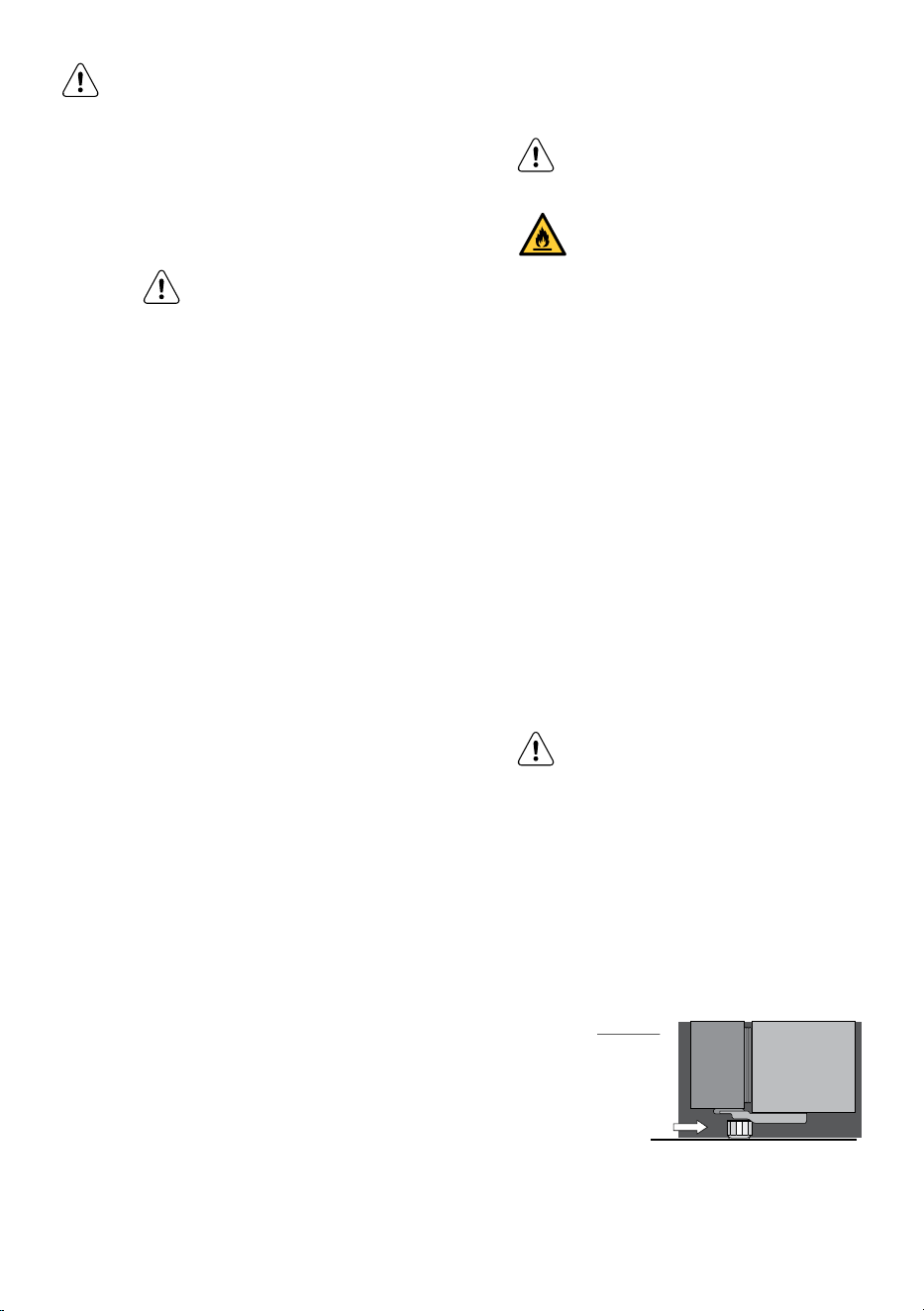
WARNING
Stable Footing
When your refrigerator is in place, you
need to stabilize it. Lift the front of the
refrigerator to take the weight o each
stability foot and make small quarter
turns to each foot until it is in firm
contact with the floor. If you intend to
move the refrigerator, remember to
wind up each foot so that you can move
it freely. Repeat the process of the foot
adjustment once you have settled on
the new location of the refrigerator.
Side View
Stabilising foot
wound down

4 www.westinghouse.com
GENERAL WARNINGS
Read the following carefully to avoid damage or injury.
It is important to use your refrigerator safely. Check
these safety points before using your refrigerator.
• The appliance must be plugged into its own
dedicated electrical outlet.
• The plug must be accessible when the refrigerator
is in position.
• It is essential the power point is properly pored to
ground. Consult a qualified electrician if you are
unsure.
• Don’t use extension cords or adapter plugs with this
refrigerator.
• If the supply cord is damaged, it must be replaced
by the manufacturer, its service agent or similarly
qualified persons in order to avoid a hazard.
• Unplug the appliance before cleaning and before
changing the light bulb(when fitted) to avoid electric
shock.
• Never unplug the refrigerator by pulling the
electrical cord as this may damage it. Grip the plug
firmly and pull straight out.
• Choose a location for your refrigerator that isn’t
too cold. The ambient room temperature should be
above 10°C.
• Stand your refrigerator in a dry place avoid areas of
high moisture or humidity.
• Don’t put the refrigerator in frosty or unprotected
areas like a garage or on the verandah.
• Don’t plug your refrigerator into a timer fitted to the
powerpoint.
• Do not put the refrigerator in direct sunlight, near
stoves, fires or heaters.
• Do not put the refrigerator on an uneven surface.
• Do not store flammable materials on or under the
appliance, e.g. aerosols.
• Never store fizzy drinks in the freezer compartment.
• Never try to repair the refrigerator yourself, only use
a qualified or authorized service person for repairs.
• Never use electric heaters or dryers to defrost the
freezer because you can receive an electric shock.
• When transporting and installing the refrigerator,
care should be taken to ensure that no parts of the
refrigerating circuit are damaged.
• If the appliance is equipped with an Ice maker or a
water dispenser, fill them with potable water only.
• If the appliance requires a water connection,
connect it to potable water supply only.
• When installed correctly, your refrigerator should:
– Have adequate space at the back and sides for
air circulation.
– Be vertically aligned to the surrounding
cupboards.
– Have doors that will self-close from
a partially open position.
NOTE: You must read these warnings carefully
before installing or using the refrigerator. If you need
assistance, contact your Customer Care Department.
The manufacturer will not accept liability, should
these instructions or any other safety instructions
incorporated in this book be ignored.
Environmental information.
This appliance is intended to be used
in household and similar applications
such as,
• The kitchen areas in shops, oce and
other working environments;
• Farm house and by clients in hotels, motels
and other residential type environments;
• Bed and breakfast type environments;
• Catering and similar non-retail
applications;
5
EN
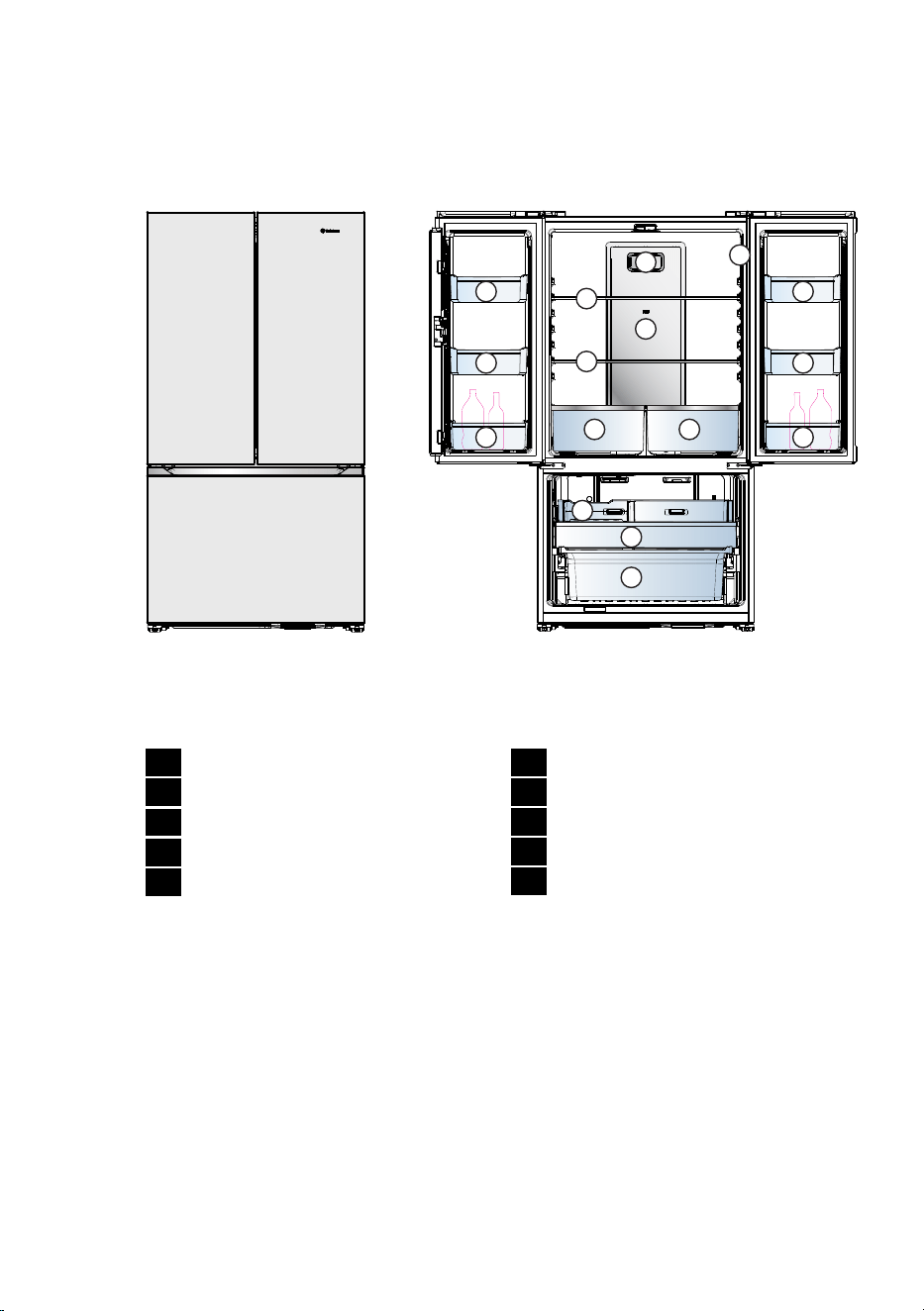
2.1 FRENCH DOOR REFRIGERATOR FEATURES
1
1
1
1
2 2
3
4
5
5
6
7 7
9
10
WHE5600 illustrated
8
1
Gallon Door Bins
2
Bottle Door Bins
3
Deodorizer Cover
4
Cover Multi Flow
5
Glass shelf
6
UI Control Panel (on the right side wall)
7
Crisper Drawer
8
Ice Ball
9
Upper Freezer Drawer
10
Lower Freezer Drawer
2. DESCRIPTION OF THE APPLIANCE
Features may vary depending on model. Not all models will have features listed.
The details of the refrigerator feature:
6 www.westinghouse.com
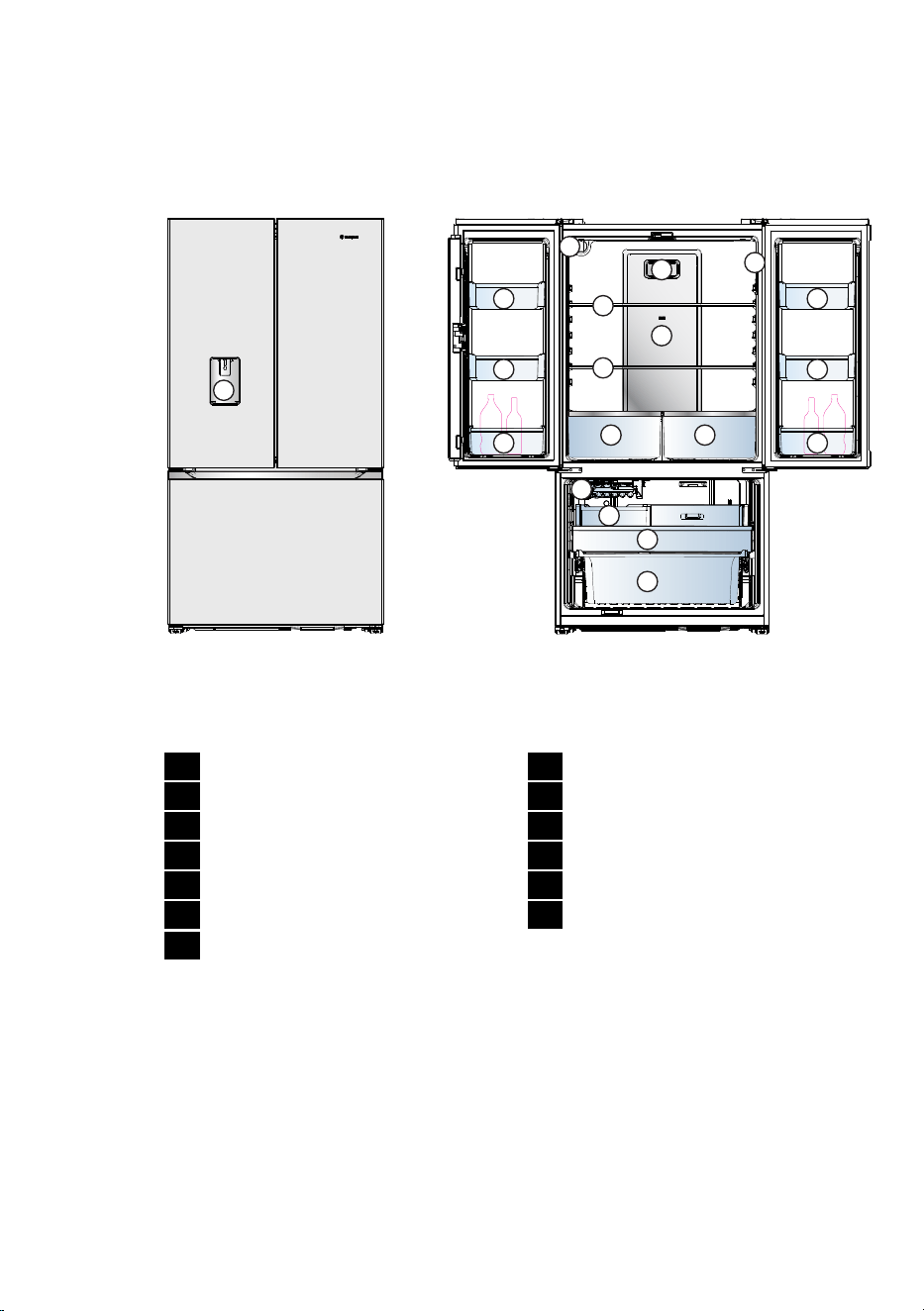
2.2 FRENCH DOOR ICE & WATER REFRIGERATOR FEATURES
2
1
2
2
2
3 3
5
6
7
4
7
8
9 9
13
12
11
10
WHE5650 illustrated
1
Water Dispenser
2
Gallon Door Bins
3
Bottle Door Bins
4
Water Filter
5
Deodorizer Cover
6
Cover Multi Flow
7
Glass shelf
8
UI Control Panel (on the right side wall)
9
Crisper Drawer
10
Automatic Ice maker
11
Ice Bucket
12
Upper Freezer Drawer
13
Lower Freezer Drawer
Features may vary depending on model. Not all models will have features listed.
The details of the refrigerator feature:
7
EN
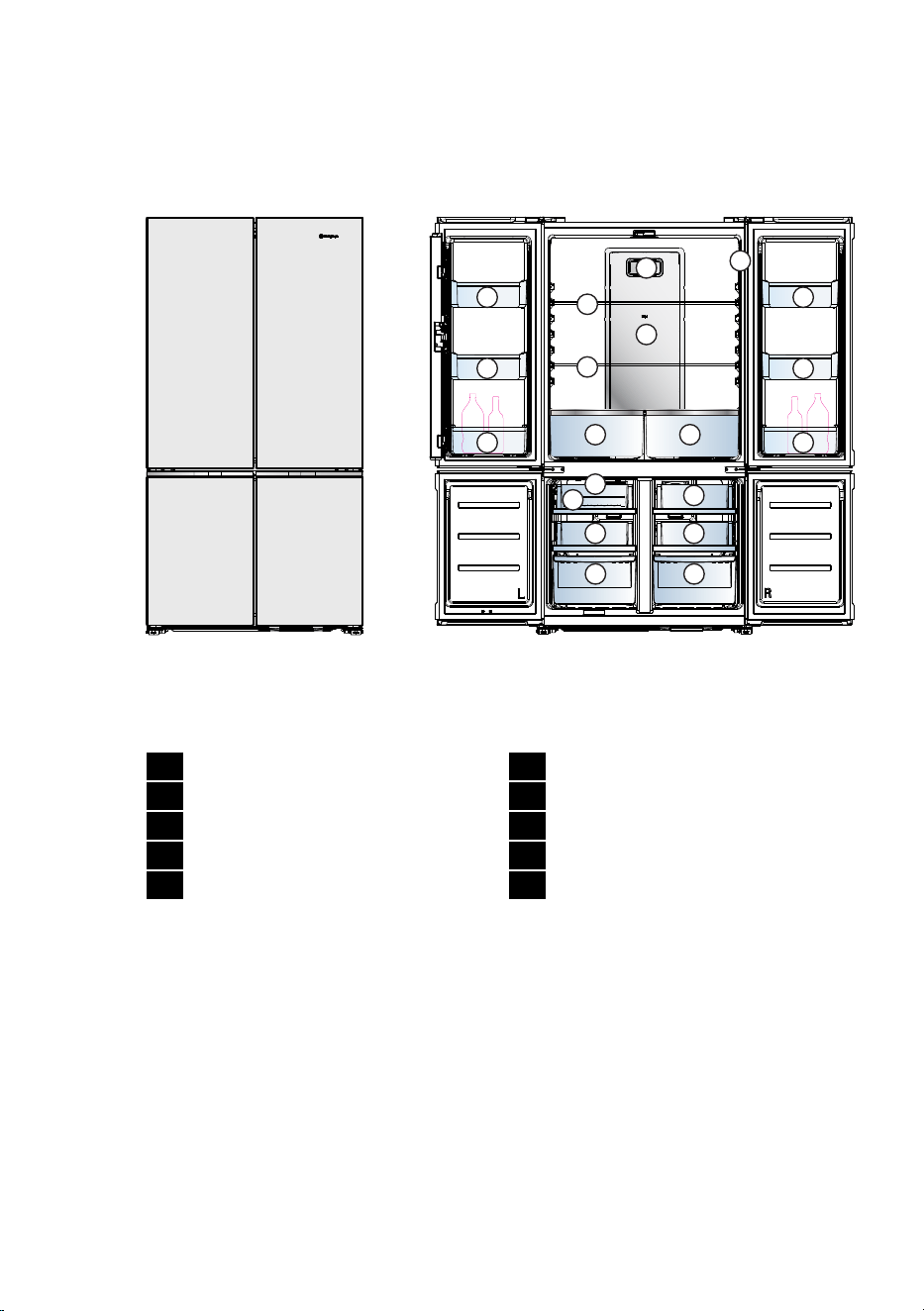
2.3 QUATTRO FRENCH DOOR REFRIGERATOR FEATURES
1
1
1
1
2 2
3
4
5
5
6
7
9
9
7
10
9
9
10
WQE5400 illustrated
8
1
Gallon Door Bins
2
Bottle Door Bins
3
Deodorizer Cover
4
Cover Multi Flow
5
Glass shelf
6
UI Control Panel (on the right side wall)
7
Crisper Drawer
8
Ice Ball
9
Pull Out Drawer Freezer
10
Lower Freezer Drawer
Features may vary depending on model. Not all models will have features listed.
The details of the refrigerator feature:
8 www.westinghouse.com
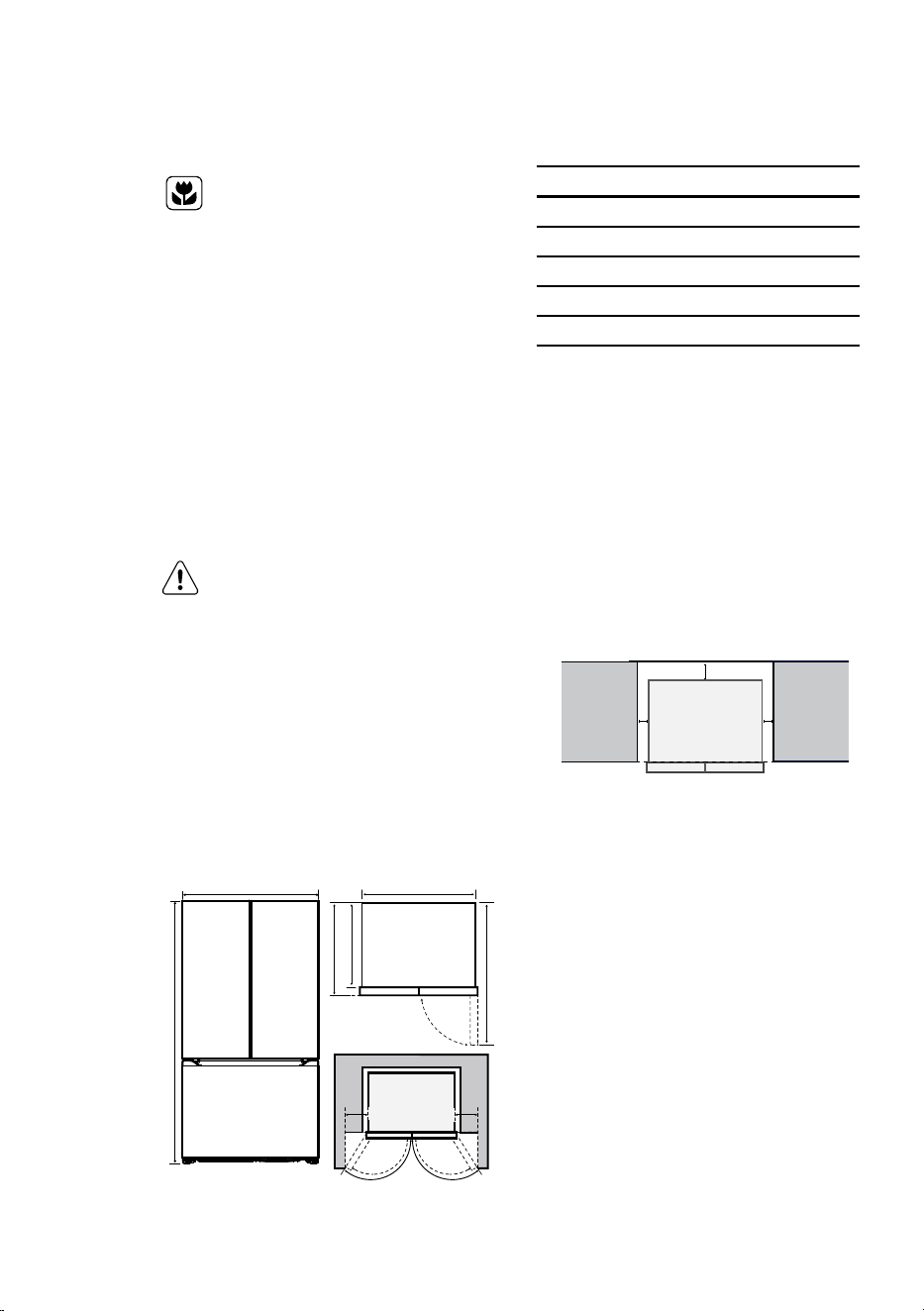
Product Dimensions
Total width (W) mm 896
Total depth (D) mm 730
Maximum height (H) mm 1725
Cabinet width (W1) mm 890
Cabinet depth (D1) mm 640
Depth door open 90° (D2) mm 1108
When positioned in a corner area, spacing of at least
285mm on the hinge side will allow the doors to open
enough to enable the removal of bins and shelves.
Installation options for optimal aesthetics :
Front of fridge body in line with kitchen cabinet
Side clearance must be 5mm either side of fridge body,
to have the fridge doors siting proud of the kitchen
cabinetry.
Minimum cabinetry opening (WxDxH) :
940mm x 679mm x 1755mm
50 mm
5 mm 5 mm
Note : Spacers supplied to assist
Note : Top gap 30 mm.
(If kitchen cabinet height 1800mm ,Top gap is 75 mm)
3. INSTALLING YOUR NEW APPLIANCE
UNPACKING
Environment
Most of the packing materials are
recyclable. Please dispose of those
materials through your local recycling
depot or by placing them in appropriate
collection containers.
Important – check for any damages or marks.
If you find the refrigerator is damaged or marked, you
must report it within 7 days should you wish to claim
for damage/ marks under the manufacturers warranty.
This does not aect your statutory rights.
Clean your refrigerator thoroughly following the
instructions in the “Cleaning” section and wipe o any
dust that has accumulated during shipping.
LOCATING THE REFRIGERATOR
CAUTION
Automatic aerosol systems (such as
insect control) should not be located
adjacent to the product as the spray
may cause long term damage to the
external plastics of the appliance.
Do not put the refrigerator in a location that is too
cold or is unprotected, for example in a garage or on
a veranda. The ambient temperature should be above
10°C.
Put the refrigerator in a dry place avoiding areas of high
moisture or humidity.
Ensure the refrigerator is located on an even surface.
W1
D2
D1D
90
°
W
H
126°
Fresh food door
126°
Fresh food door
120 °
Freezer door
120 °
Freezer door
267
mm
267
mm
9
EN
6. You may now need to fine-tune the installation by
repeating steps 3, 4 and 5.
7. When you have the appliance in its final position, it
needs to be stabilised. Wind the stability foot under
the door hinge down to the floor until it just makes
contact with the floor. Lift the front of the appliance
to take the weight o the stability foot, then turn it
half a turn further to ensure firm contact with the
floor. Wind the large height adjusting nut back up to
ensure all the weight is now on the front stability
foot. Wind the large height adjusting nut back up to
ensure all the weight is now on the front stability
foot.
stability foot
wound down
Front view
8. Repeat step 7 for the stability foot on the handle
side. Whenever you need to move the appliance,
be sure to wind the feet back up so that the
appliance can roll freely and be sure to reset it when
reinstalling.
9. Plug your refrigerator straight into its own power
point and never use a double adapter. If you need to
roll the refrigerator to get to the plug, remember to
raise the stability foot first.
10. Before you put any food in your refrigerator,
it’s recommended you leave it on for 2 or 3 hours to
check it is running properly.
DOOR OPENING
Your refrigerator should be positioned to allow easy
access to a counter when removing food. For best
use of refrigerator drawers and freezer baskets, the
refrigerator should be in a position where both door
can be fully opened.
WARNING
LED lighting
Your appliance is fitted with long life
LED lighting. In the unlikely event the
LED lights should fail, then the LED lights
should be serviced by the service agent,
to avoid a safety hazard. Refer to the
warranty page for contact details.
INSTALLING YOUR REFRIGERATOR
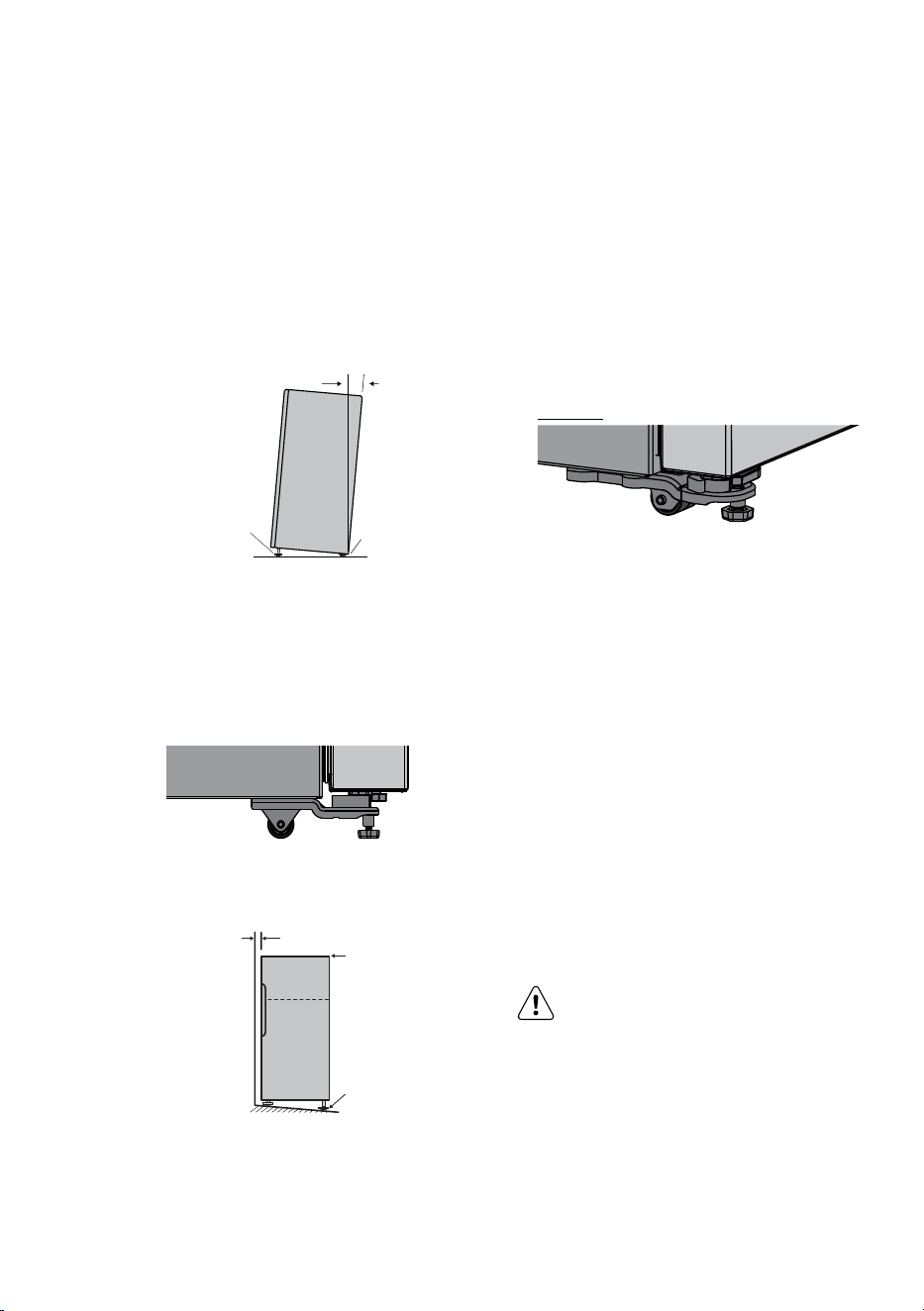
1. Roll the refrigerator into place.
The rollers are designed for forward or backward
movement only. They are not castors. Moving the
refrigerator sideways may damage your floor and
the rollers. Before moving your refrigerator ensure
height adjusting nut and the stability foot
are fully wound up o the floor.
2. Stability foot adjusting nut under door hinge down
until the refrigerator is tilted back by 10mm (see
diagram).
Height
adjusting
nut
Fixed rear rollers
10-15mm
3. Stability foot adjusting nut on the handle side down
until the refrigerator is level and stable. If you have
diculty winding the nut or height adjusting foot
down (recommend 20 mm wrench), have someone
tilt the refrigerator back so you have better access.
stability foot
wound up
4. Check the alignment of the refrigerator to the
surrounding cupboards to see if it is level. You can
adjust the level as detailed in step 2 and 3.
aligned to
cupboards
i.e.,
even gap
top of refrigerator
is level i.e.,
horizontal
adjust front feel
for unevenness
of floor i.e.,
wind this foot
down or up
5. If you find your refrigerator rocks from corner to
corner, it means your floor is uneven. Find a piece
of plastic or hardboard etc. and pack it firmly under
the roller.
10 www.westinghouse.com
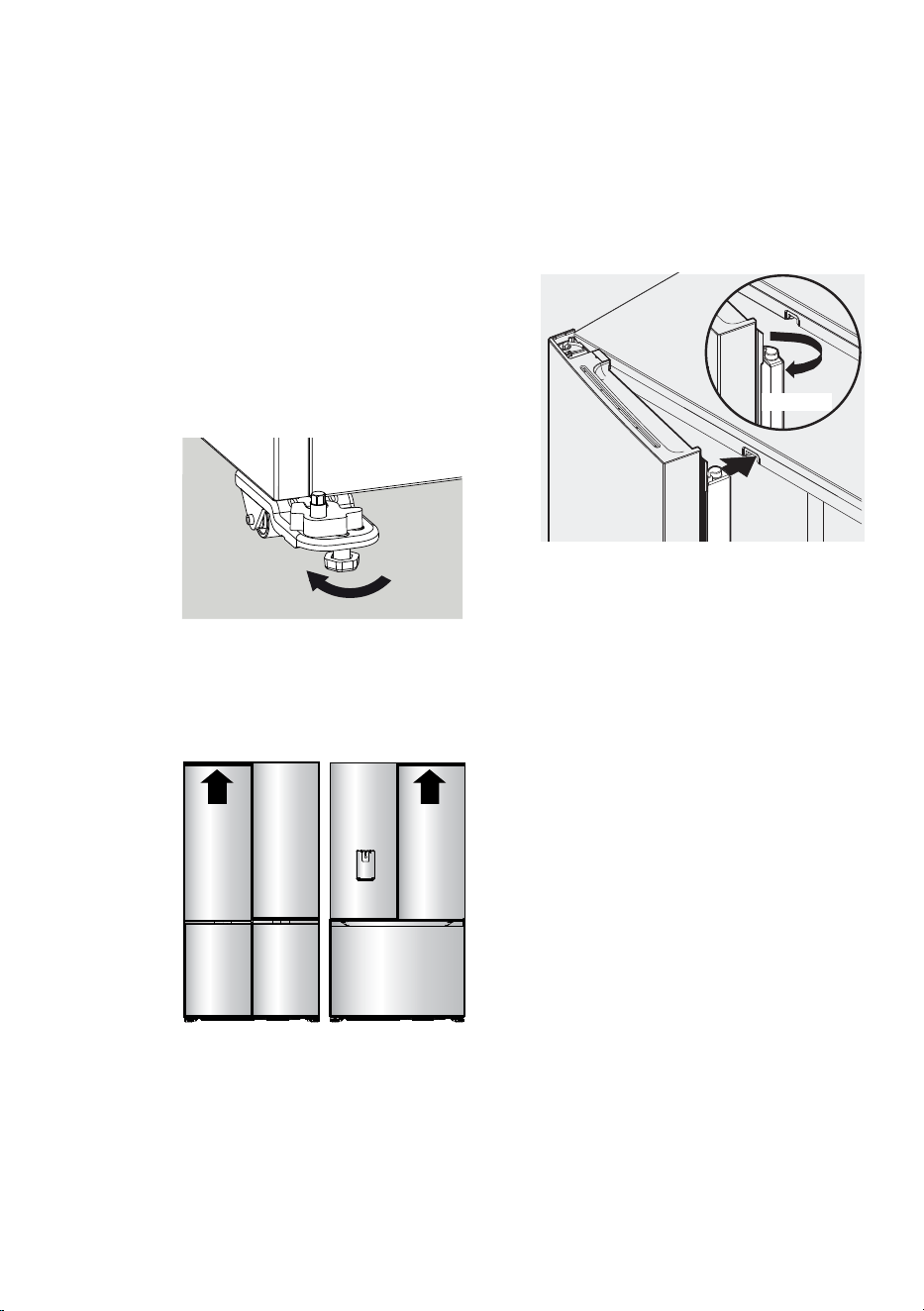
FLIPPER MULLION
Adjust Flipper Mullion for proper connection with the
mullion guide by ensuring the flipper mullion is folded
and perpendicular to the fresh food door. If the mullion
guide is not in the correct position, it could prevent the
door from closing completely.
WRONG
Cabinet Levelling & Refrigerator Door Alignment
(if necessary)
All four corners of the cabinet must rest firmly on the
floor
• The front should be slightly elevated to ensure that
doors close and seal properly.
• Doors should align with each other and be level.
Most of these conditions can be met by raising or
lowering the adjustable front rollers.
To level the cabinet using the front rollers:
1. Lower anti-tip legs until they are both touching the
floor. Use a pair of pliers to adjust.
Anti-Tip
Legs
To raise: turn leg clockwise.
To lower: turn leg counterclockwise.
2. Ensure both doors are bind-free with their seals
touching the cabinet on all four sides and that
cabinet is stable.
Door Door

11
EN
4. TEMPERATURE CONTROL
The following pages explain the various functions of
the user interface to help you better understand how to
get the most out of your new refrigerator.
IMPORTANT
NOTE: When you set a temperature,
you set an average temperature for the
whole refrigerator cabinet. Ensuring
that you make only small adjustments
and wait at least 24 hours to see if the
new temperature is correct to your
liking.
Checking the softness of ice cream is
a good indication that your freezer is
the right temperature, while checking
the temperature of water kept in
the refrigerator is a good way of
checking the temperature of the food
compartment.
Temperatures inside each compartment
may vary, depending on how much food
you store and where you place it.
High or low room temperature may also
aect the actual temperature inside the
refrigerator.
TEMPERATURE ADJUSTMENT
The factory default settings;
Bottom mount & French door
Refrigerator 3°C
Freezer -18°C
All Refrigerator Mid
All Freezer -18°C
If you want to change the temperature, follow the
instructions in the section about the user interface
for your model. Ensure that you make only small
adjustments and wait 24 hours to see if it’s correct to
your liking.
12 www.westinghouse.com
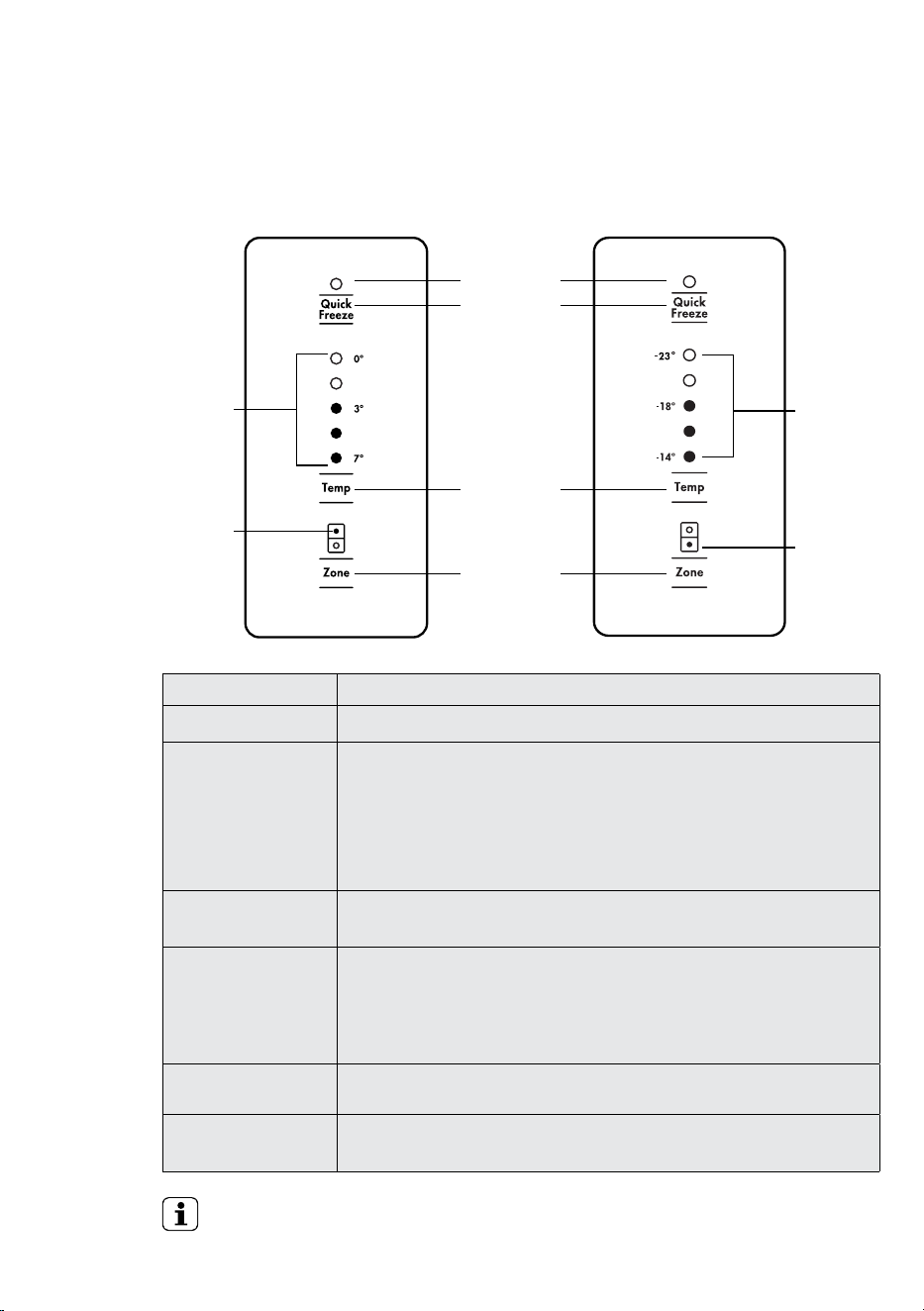
DESCRIPTION OPERATION / PRIMARY FUNCTION
Quick Freeze on/ o icon • Indicates the status of the Quick Freeze function.
Quick Freeze button Use the Quick Freeze function when you add a large amount of food to the freezer
compartment.
• Press the ‘Quick Freeze’ button. The Quick Freeze icon will flash indicating that the quick
freeze is active and the compressor will run continuously for 90 minutes.
• After 90 minutes the freezer will automatically return to normal mode.
• The Quick Freeze function can be cancelled anytime by pressing the button again.
Refrigerator / Freezer
temperature scale icons
• Indicates the temperature setting of the refrigerator compartment.
• Indicates the temperature setting of the freezer compartment.
Temperature adjust
button
• Touch any button to awaken control.
• Touch the ‘Temp’ button to decrease the selected compartment temperature.
There are 8 temperature settings indicated by the illumination sequence on the
display. Once the coldest temperature is reached the display will return to the
warmest setting with the next press.
Refrigerator/Freezer
indication icon
• Indicates the selected zone.
Compartment select
button
• Press to select the desired compartment.
• The refrigerator / freezer indication icon will show which zone is selected.
IMPORTANT
The factory default settings for the refrigerator is “3°C” and “-18°C” for the freezer. If you want to change
the temperature, remember to make only small adjustments and wait 24 hours to see if it’s correct.
ABOUT THE USER INTERFACE
Controls –French door
Refrigerator
scale icons
temperature
Temperature
adjust
Refrigerator
indication
icon
Compartment
select button
Freezer
scale icons
temperature
Quick
freeze button
Quick freeze
on/o icon
Freezer
indication
icon
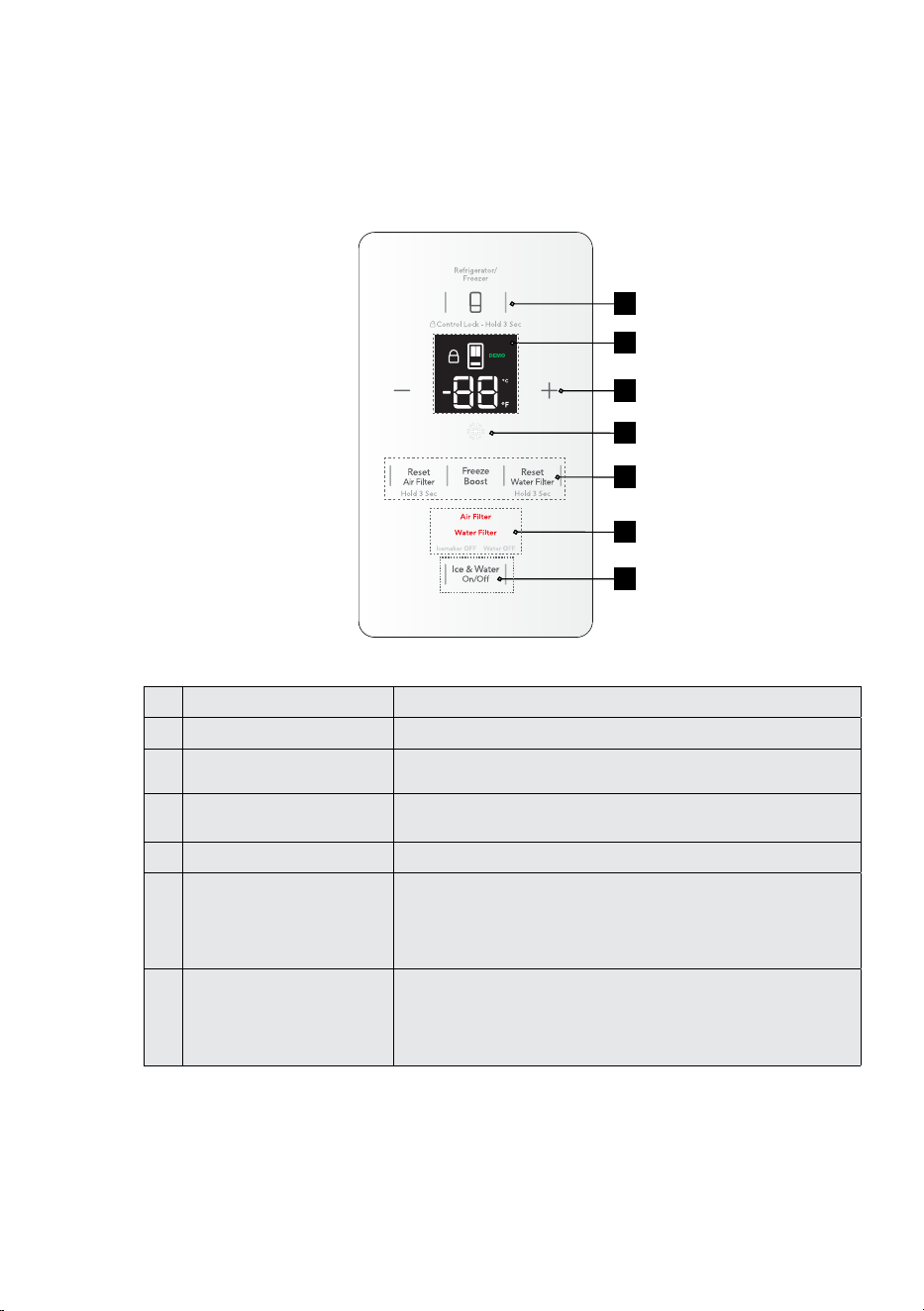
13
EN
No. Type Functions
1 Selection Key Zone compartment
2 LED Module (LED Digi Display) 2x7 segment digits + Celsius / Fahrenheit + DEMO , UI lock + Selected
Zone
3 Values Key • ' - ' Decrease
• ' + ' Increase
4 Function Icon (White LED) Freeze Boost
5 Function Keys • Reset Air Filter
• freeze Boost
• Reset Water Filter
• Ice & Water Turn ON/OFF
6 Status Alerts (Red LED) • Air Filter
• Water Filter
• Ice maker OFF
• Water OFF
ABOUT THE USER INTERFACE
Controls –French door ice & water models
1
2
4
3
5
6
5
14 www.westinghouse.com
FUNCTIONS OF THE USER INTERFACE
French door ice & water models
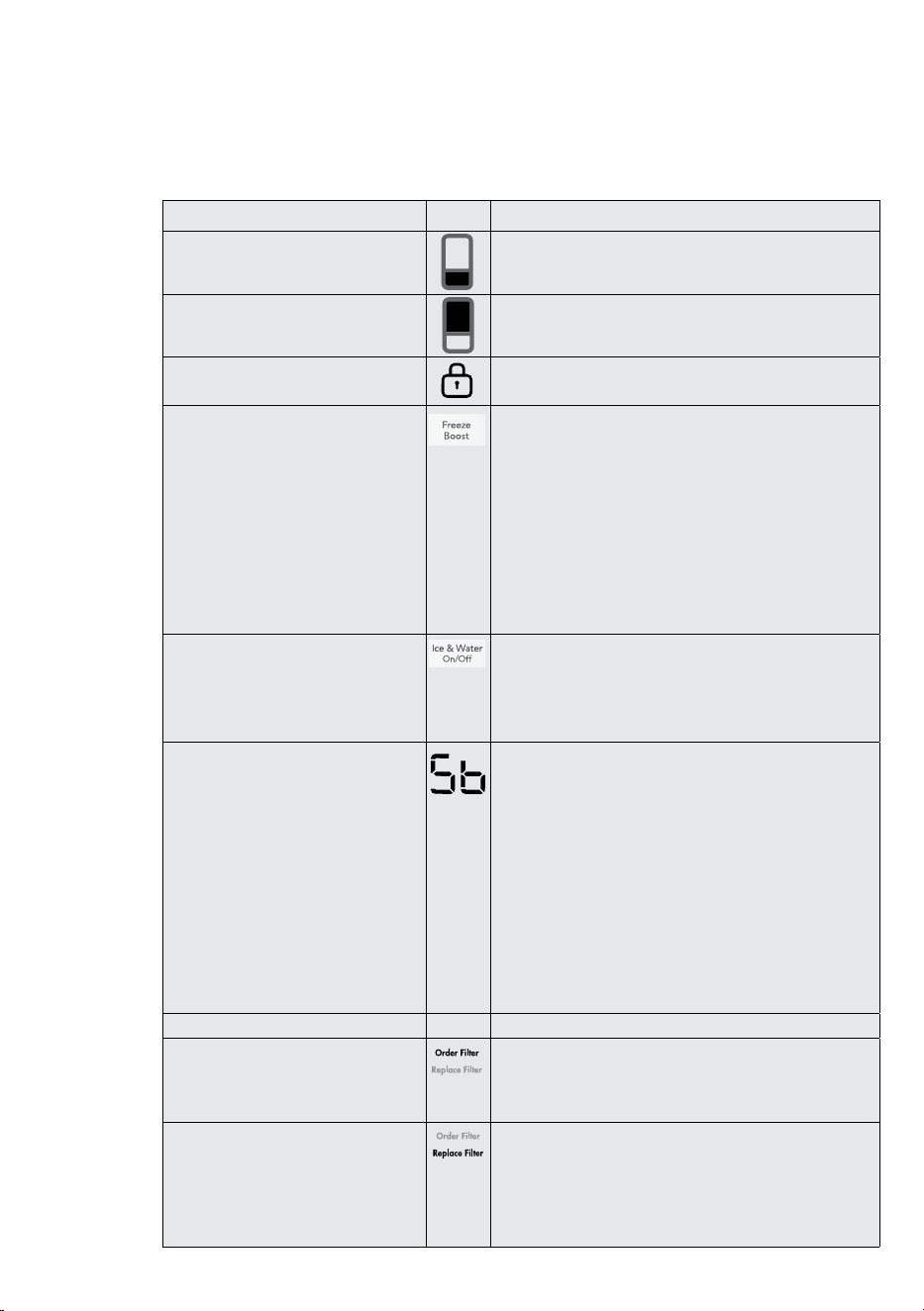
FUNCTION. ICON OPERATION
Setting the freezer temperature
• Press button 1 until freezer is displayed on icon 3.
• Press buttons 3 (Increase /Decrease) to adjust
temperature up or down.
Setting the refrigerator temperature
• Press button 1 until the refrigerator is displayed on icon 3.
• Press buttons 3 (Increase /Decrease) to adjust
temperature up or down.
Display Lock
Deactivates the user interface controls.
• To turn on/o press and hold button 1 for 3 seconds, the
lock icon is illuminated when activated.
Freeze Boost is a freezer function.
It ignores the user set temperature
(turn "OFF" thermostat) and put the
compressor running all the time for 12
hours. When Quick Freeze ends, the
appliance will adjust back to the user
set temperature.
Figure : Freeze Boost
5.6.1 Activate/Deactivate Freeze Boost
To activate the ‘Freeze Boost’, tap on the “Freeze Boost” key.
• The “Freeze Boost’ icon becomes 100% illuminated.
• The numerical display will show the lowest freezer temp
setting.
• Play Tone_Confirm.
To deactivate ‘Freeze Boost’ tap on the “Freeze Boost” key.
• The “freeze boost” icon becomes 0% illuminated;
• The numerical display will show the previous set temp
• Play Tone_Cancel
Ice & Water on/o
Enables/disables ice maker and water
dispensing features.
The ‘Ice & Water On/O’ key provides 4 toggle interactions
• 1
st
Tap - turns o the Icemaker
• 2
nd
Tap - turns o the Water Dispenser
• 3
rd
Tap - turns o both the Icemaker and Water Dispenser
• 4
th
Tap - turns on both the Icemaker and Water Dispenser
Sabbath Mode
Disables all lights and other electrical
activity from occurring when the
refrigerator door is opened.
To activate/deactivate sabbath mode, Press and hold “ –“ and
“Ice & Water On/O” keys for 10 seconds.
On detection of 10 seconds holding:
• Play tone_Confirm and
• Blink “t” once on internal UI segement display (All other
LEDs turns o)
• UI reverts to previous
NOTE: All alarm functions are deactivated except High
temperature alarm is not disabled for health reasons. If high
temp alarm active, The alarm will sound intermittently for 10
minutes. The alram will silence on its own.
The unit stays in Sabbath Mode after power outage recovery.
It must be deactivated by the user.
INDICATOR ICON OPERATION
Order Filter
Reminder when the water filter
periodically requires replacement.
• Order filter icon will appear as a reminder to order a
replacement water filter.
• When the filter has been replaced press and hold button 9
for 3 seconds to reset the filter replacement timer.
Replace Filter
Reminder when the water filter requires
replacement.
• Replace filter icon and alarm will activate as a reminder to
replace the water filter.
• Mute alarm for 1 week by pressing any button on the user
interface.
• When the filter has been replaced press and hold button
14 for 3 seconds to reset the filter replacement timer.
15
EN
INDICATOR ICON OPERATION
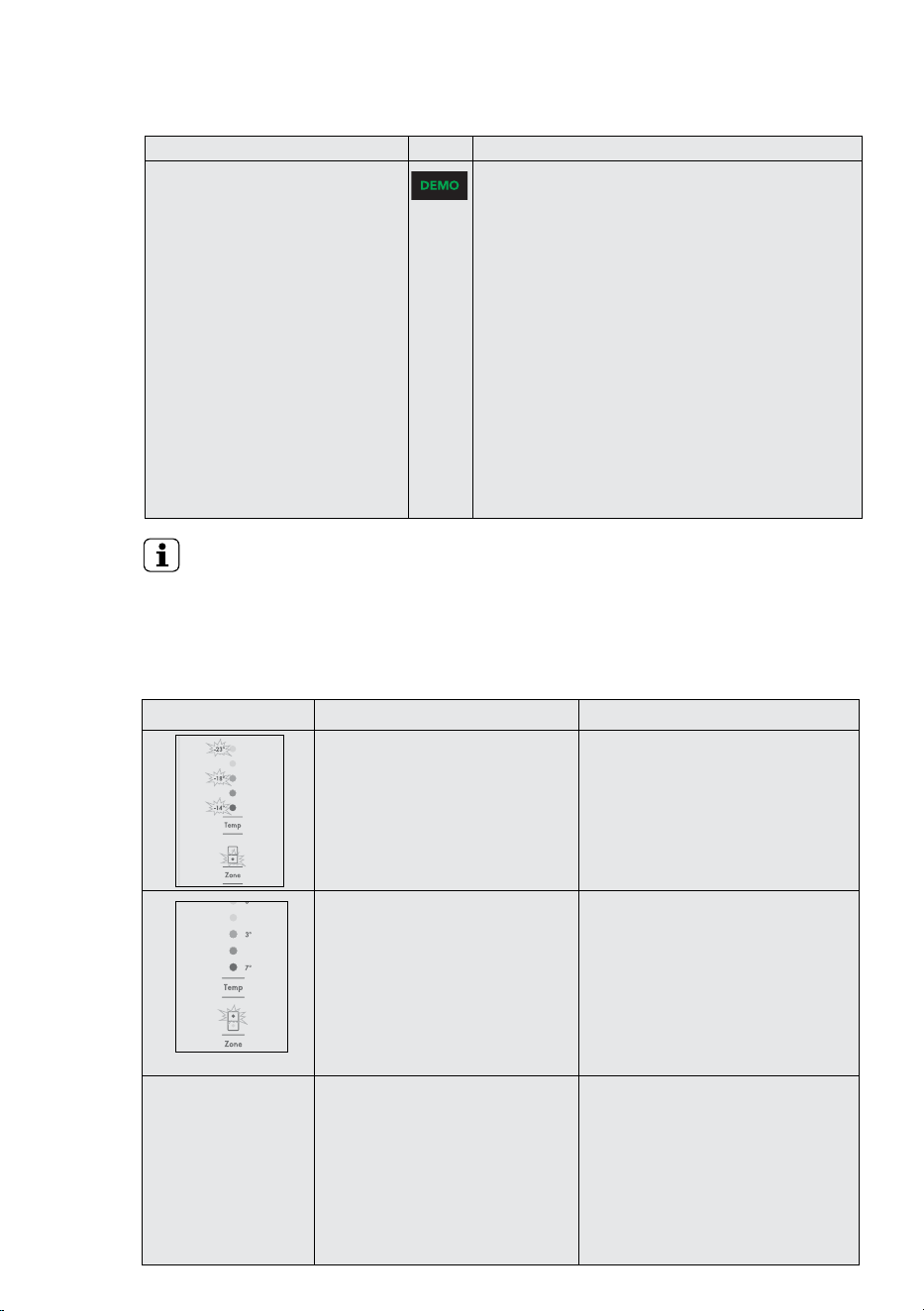
Demo Mode
The purpose of demo mode is to allow
salesman on the shop floor to demo
the UI and refrigerator features to the
consumers without refrigeration active.
When demo mode is activated, the UI
and internal light will work normally, but
the cooling system will be turned o.
Activate DEMO Mode
Demo mode can only be activated if user long tap and hold
“Refrigerator/Freezer” and “Reset Air Filter” Keys from
internal UI together for 10 seconds.
On detection of 10 second holding:
• Illuminate the “DEMO” indicator on the LED display
• Play Tone_Confirm
Figure: Activate ‘DEMO’ mode
Press and hold for 10 seconds
Deactive DEMO Mode
Demo mode can only be deactivated if user long tap and
hold “Refrigerator/Freezer” and “Reset Air Filter” Keys from
internal UI together for 10 seconds again.
On detection of 10 second holding:
• Turn o the “DEMO” indicator
• Play Tone_Cancel
ERROR CODES & ALARMS
ALARM
ALARM ICON WHAT IT MEANS OPERATION
Freezer Temperature Alarm
Activates if the freezer temperature is
10°C over set temperature for a period of
50 minutes (except during a defrost).
An alarm will sound the temperature
icons will flash.
• To deactivate the alarm for 50 minutes
press any button.
• To deactivate alarm for 12 hrs on the
ice & water model press and hold
Select Mode for 10 seconds for non ice
and water models press and hold any
button for 10 seconds.
Door Alarm
Activates if the refrigerator or freezer
doors are left open for longer than 2
minutes.
An alarm will sound and the aected
compartment icon will flash and the
temperature and icons will fade on
and o.
• Alarm will sound and icon will flash
indicating which door is open. (Ice &
water models)
• To silence the alarm for 8 minutes while
the door is open press any button (the
icons will continue to flash until door
is closed).
Sound Tone
For WHE5650 model only
Door Alarm
Activates if the refrigerator or freezer
doors are left open for longer than 2
minutes.
An alarm will sound and the aected
compartment icon will flash and the
temperature and icons will fade on
and o.
• Alarm will sound which door is open.
(Ice & water models)
• To silence the alarm for 8 minutes while
the door is open press any button (the
icons will continue to flash until door
is closed).
IMPORTANT
The factory default settings for the refrigerator is “3°C” and “-18°C” for the freezer. If you want to change
the temperature, remember to make only small adjustments and wait 24 hours to see if it’s correct.
16 www.westinghouse.com
ALARM ICON WHAT IT MEANS OPERATION
For WHE5650 model only
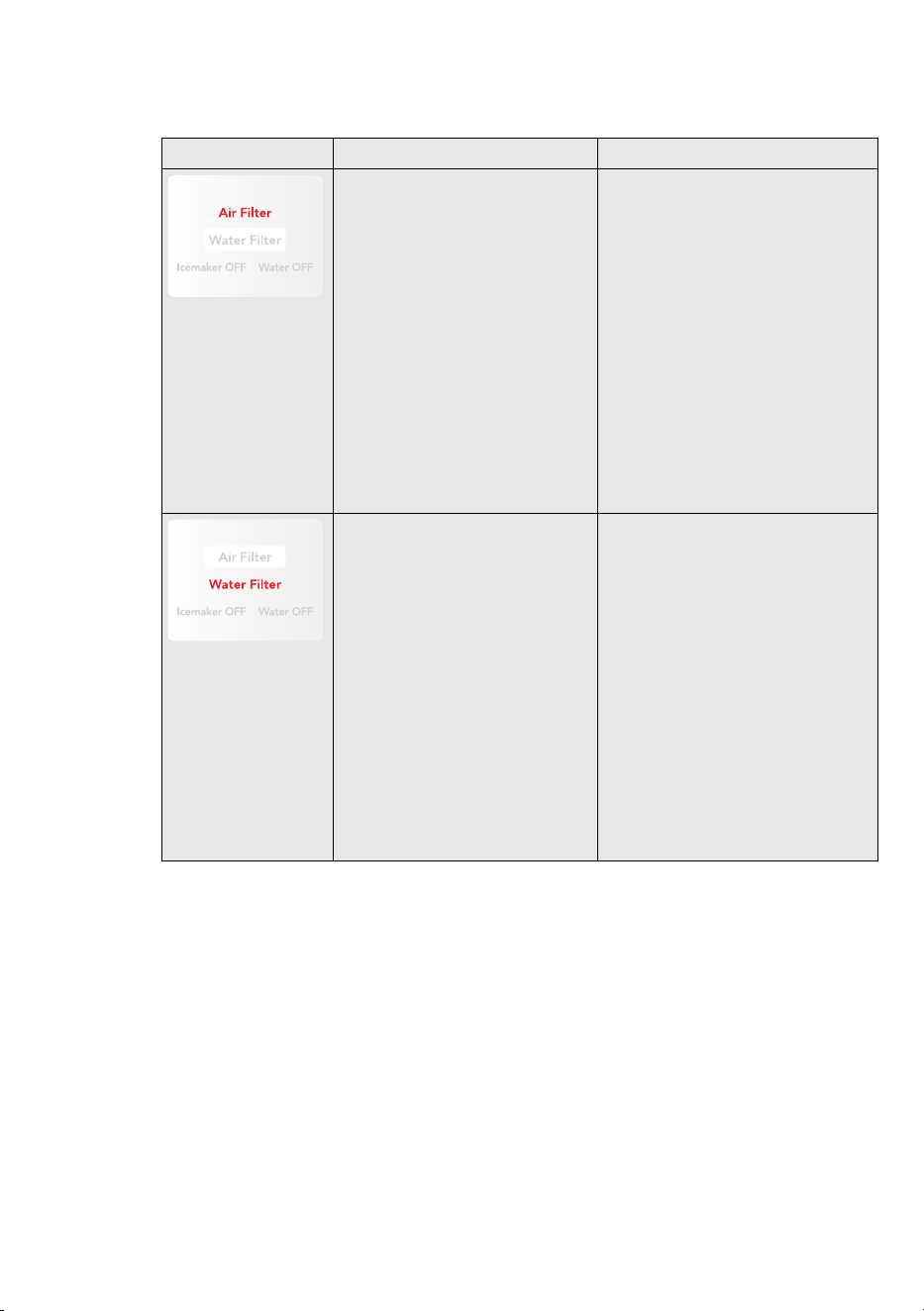
Air Filter Alert
It warns the user that the Air filters have
to be changed as soon as possible.
When air filter is used for 6 months
since the last filter reset, the LED_air
filter will automatically illuminate to
100%
Tap the “Reset Air Filter” button once:
• All other display items will temporarily
disappear.
• Only the air filter light will remain
visible.
• A confirmation sound will play.
Press and hold the button:
• The air filter light will start blinking to
show that the reset is in progress.
Keep holding for 3 seconds:
• The air filter light will turn o.
• All display items will return to normal.
• A confirmation sound will play.
• The air filter timer will reset to 0 months
and start counting again (for 6 months).
For WHE5650 model only
Water Filter Alert
It warns user that the water filter has to
be changed as soon as possible.
When water filter is used for 6 months
or 120 gallons of water has been
dispensed since the last filter reset,
LED_water filter will automatically
illuminate to 100%.
Tap the “Reset Water Filter” button once:
• All other display items will temporarily
disappear.
• Only the water filter light will stay on.
• A soft confirmation sound will play.
Press and hold the button:
• The water filter light will start blinking,
showing that the reset is in progress.
Keep holding for 3 seconds:
• The water filter light will turn o.
• All display items will return to normal.
• A confirmation sound will play.
• The water filter timer will reset and
start counting again (for 6 months or
120 gallons, whichever comes first).
17
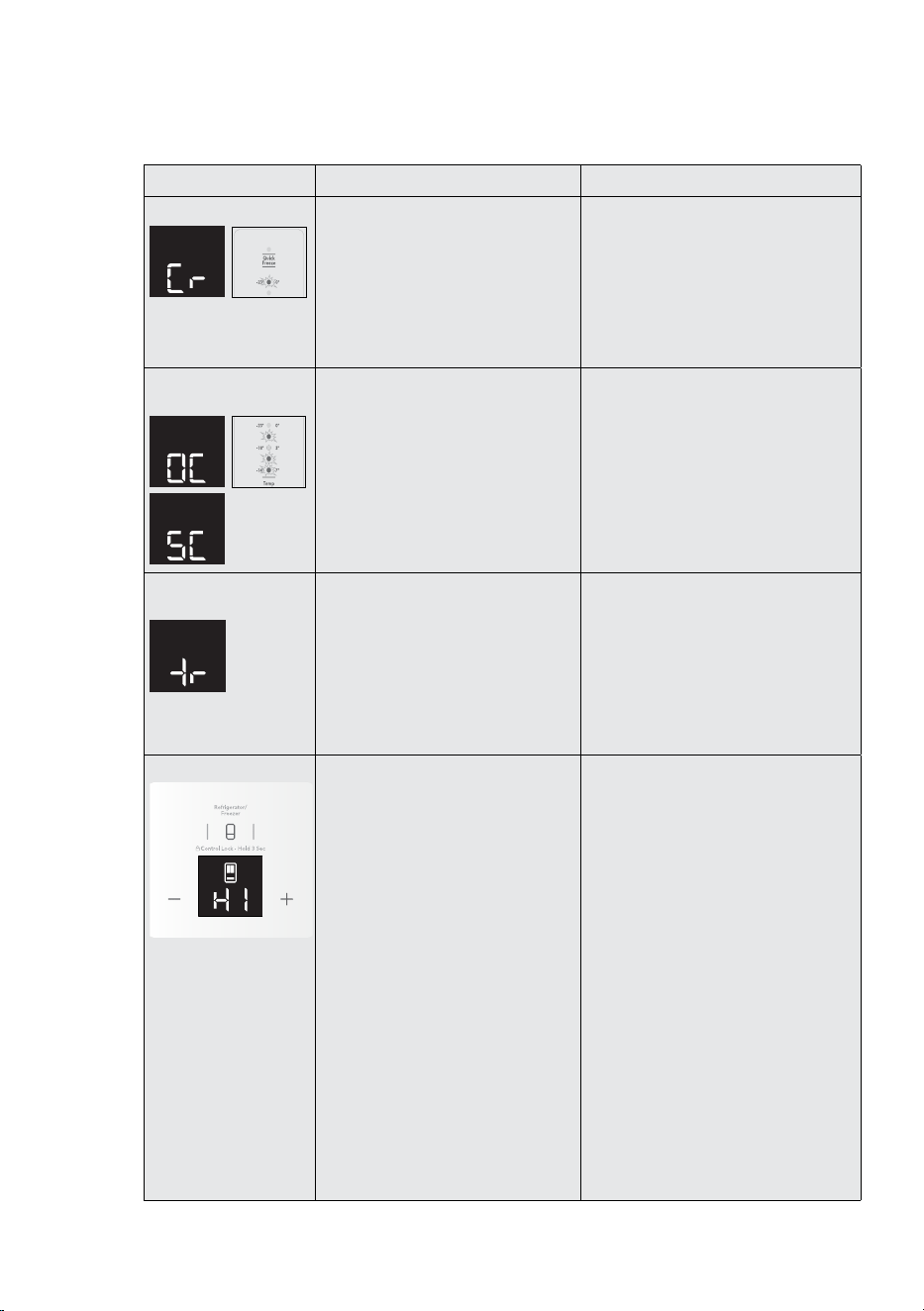
EN
ERROR CODE
ERROR CODE WHAT IT MEANS WHAT TO DO…
Communication Error
If you see this icon displayed (Ice &
Water model) or the top temperature
icon is flashing it means that the control
has lost contact with the main control
board.
The appliance will operate at its last
known setting, all auxiliary functions
will not work.
Turn the unit o at the power point for
5 minutes and then turn it back on.
Under most circumstances this will reset
the display enabling normal function to
continue.
If the error re-occurs then call for service.
Sensor – Open Circuit /
Short Circuit
If you see this icon displayed (Ice &
Water model) or any combination of the
first, second and fourth temperature
icons are flashing it means that an error
has been detected on a sensor.
The refrigerator will run in a default
cycle to prevent food spoilage.
Call for service.
Ice cube tray water fill
not detected
This error indicates that when an ice
harvest occurred and a tray water fill
was attempted, that the tray sensor did
not get above 0°C.
Check the following:
Water turned on at tap, water filter not
blocked, no kinks in water tube.
If after checking these items and they do
not appear to be the cause of the error, call
for service.
High Temp
Display and blink “HI” in internal
UI’s display with the correspondent
compartment segment icon
On touching any key:
• Mute the alarm.
• Display and blink set temperature of
correspondent compartment in the
numeric display until temperature
reaches an acceptable level.
• After “z” amount of time, if the high
temperature condition is not improved,
play
• Tone_Alarm every 10 seconds until alert
is acknowledged.
On closing the door:
• Mute the alarm
• Internal UI goes to Sleep mode
• After “z” amount of time, if the high
temperature condition is not improved,
play
• Tone_Alarm every 10 seconds until alert
is acknowledged.
If the error re-occurs then call for service.
18 www.westinghouse.com
Refrigerators work by transferring heat from the food
inside to the outside air. This operation makes the
back and sides of the refrigerator feel warm or even
hot particularly at start-up and on warm days – this is
normal.
Avoid placing food against the air vents in the
refrigerator as it aects ecient circulation. If the door
is opened frequently, a light frosting will occasionally
occur on the freezer’s interior. This is normal and will
clear after a few days. If the freezer door is accidentally
kept open, a heavy frost will coat the inside walls and
should be removed.
Your new refrigerator uses a high-speed compressor,
along with other energy-ecient components, which
may make unusual sounds and be more noticeable at
night and quieter times. These sounds simply indicate
your refrigerator is working how it should. They include:
• Compressor running noises;
• Air movement noise from the small fan motor;
• A gurgling sound, similar to water boiling;
• A popping noise, heard during automatic
defrosting; and
• A clicking noise, prior to compressor
start-up. Further details can be found in the
Troubleshooting Guide
IMPORTANT
Ensure all freezer drawers and shelves are
pushed back completely to prevent them from
keeping the door open.
WHE5600
&
WHE5650
WQE5400
5. USING YOUR REFRIGERATOR
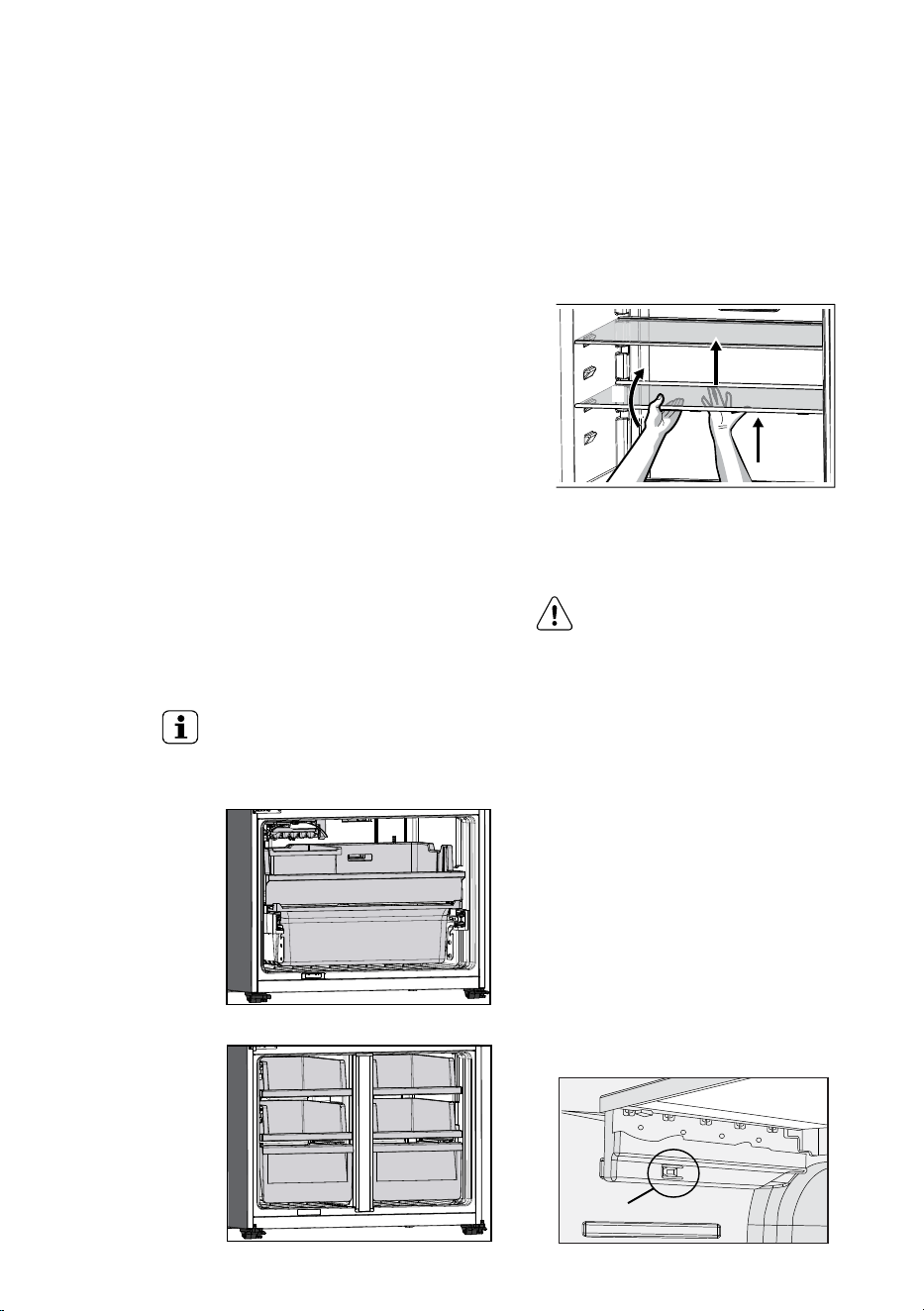
SHELVES
You can easily adjust shelf positions in the refrigerator
compartments to suit your needs. The shelves have
mounting brackets that attach to slotted supports at
the rear of each compartment.
1. Remove all the food from the shelf.
2. Lift the rear edge up and pull the shelf out.
1
2
3
3. Replace by inserting the mounting bracket hooks
into the desired support slots.
4. Lower the shelf and lock into position.
CAUTION
To avoid personal injury or property
damage, handle tempered glass shelves
carefully. Shelves may break suddenly
if nicked, scratched, or exposed to
sudden temperature change. Allow
the glass shelves to stabilize to room
temperature before cleaning. Do not
wash in dishwasher.
DRAWERS
Your refrigerator includes a variety of storage drawers.
Removal (Freezer Drawer): WQE5400
1. Empty food from the Drawer. On some models it will
be necessary to remove the bottle storage bins.
2. Remove the Drawer by pulling forward, then up and
forward again.
3. For top mount and single door, remove the crisper
shelf by lifting the catches on the left and right
underside of the shelf and pulling the shelf forward.
CATCH
19
EN
Drawers fitted with telescopic slides
To remove the drawer for cleaning.
1. Empty food from the drawer.
2. Remove the drawer by pulling it forward and lifting
the front to unhook it from the slides. Once you have
removed the drawer, ensure the slides are pushed
back so they are fully closed.
WARNING
Never close the door while the
telescopic slides are extended. This may
damage the slide and/or refrigerator or
cause the slide to become disengaged
from the refrigerator.
To replace the drawer:
1. Ensure the telescopic slides are pushed in all the
way.
2. Slide the drawer into place over the slides and push
the bin in until it stops.
3. Drop drawer into position.
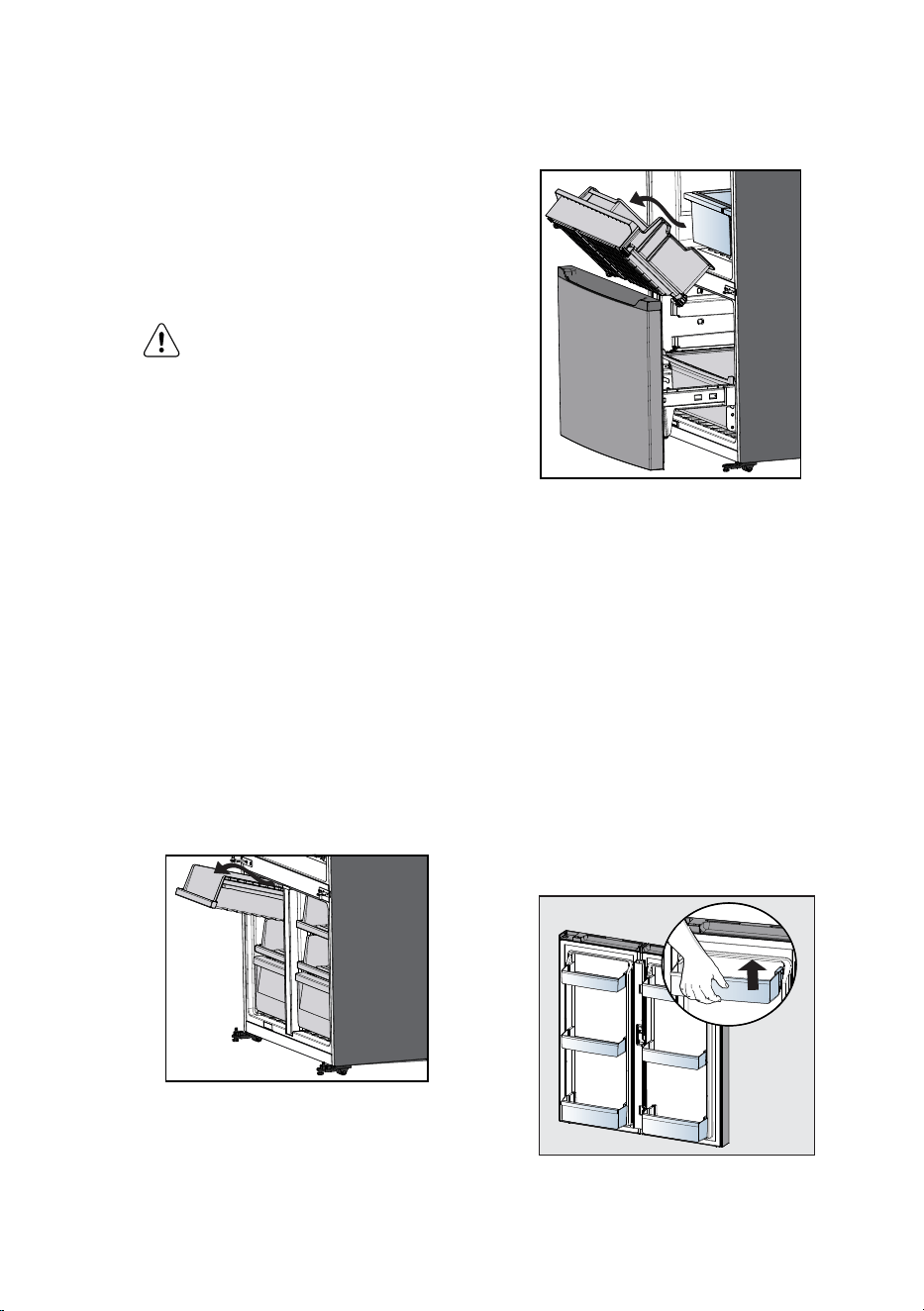
FREEZER STORAGE
To remove freezer drawers:
All freezer drawers are removable.
1. Open doors completely to gain access to drawers.
2. Pull the drawer to the stopper. Lift up and pull to
remove it from the cabinet.
3. Reverse the steps to reinstall drawer
WQE5400
Removal (Freezer Drawer): WHE5600 & WHE5650
1. Open fully Freezer Door to remove drawer
2. Remove the Upper Drawer by pulling forward, then
up the drawer
3. Reverse the steps to reinstall drawer
WHE5600 & WHE5650
DOORS
Storage bins
The doors to your fresh food compartment use a
system of modular storage bins. All of these bins are
removable for easy cleaning. Bins can be adjusted to
your needs.
Door bins are ideal for storing jars, bottles, cans, and
large drink containers. They also enable quick selection
of frequently used items.
To remove the door bin:
1. Lift and unlock from lugs to remove.
2. Replace by lift up and push bin down until the
support lugs lock it in place.
Removing door bin
20 www.westinghouse.com
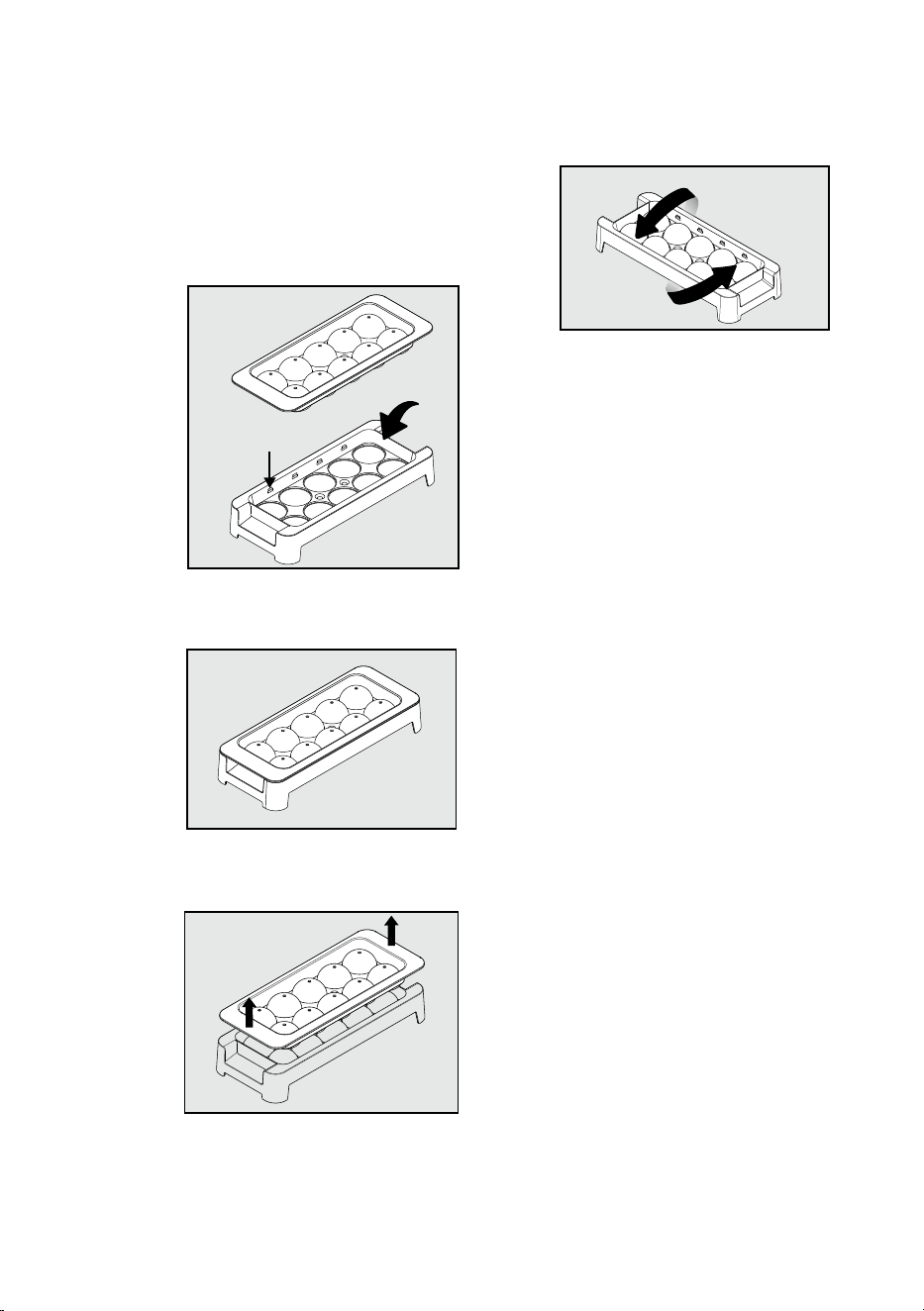
ICE BALL TRAY
(Applicable on WHE5600* & WQE5400*)
1. Prior to using the ice tray , clean it with water and
dish detergent.
2. To make ice ball, fill the ice tray with water until the
water level.
Water
Water Level
3. Close the ice tray with the top cover. Remove extra
water by pressing the ice tray .
4. Place the ice tray in freezer compartment.
5. To remove ice balls. Pull the lid handle out to open
the tray.
Lift
up
6. Hold the tray at its ends and twist gently.
Twist
NOTE:
• Place the ice ball tray on a flat surface in freezer
compartment.
• The ice making time depends in your temperature
setting.
21
EN
6. CONNECTING THE WATER SUPPLY
WARNING
Connect to potable water supply
only. If using tank or bore water it is
recommended to also use an external
filter (not supplied).
The new hose-sets supplied with the appliances must
be used and old hose-sets should not be reused.
Never connect the appliance to a hot water supply.
Do not use with water that is microbiologically unsafe
or with water of unknown quality without adequate
disinfection.
WATER FILTER
It should not be used on water that is micro biologically
unsafe or with water of unknown quality. The service
life of the filter may be reduced in water supplies that
contain an excess of particles or other impurities.
Reduced flow rate is an indication that a new filter is
required. Failure to replace the filter when required
can aect the function of the ice maker. Service calls
caused by a failure to replace the filter are not covered
by warranty. Replacement water filters are available
from Electrolux Home Products Spare Parts Centres
and can be posted to you for your convenience (refer to
spare parts contact numbers on the warranty page).
Note: A backflow prevention device compliant to AS/
NZS 2845.1 for low hazard situations must be installed
upstream of the connection in accordance to NCC
volume 3.
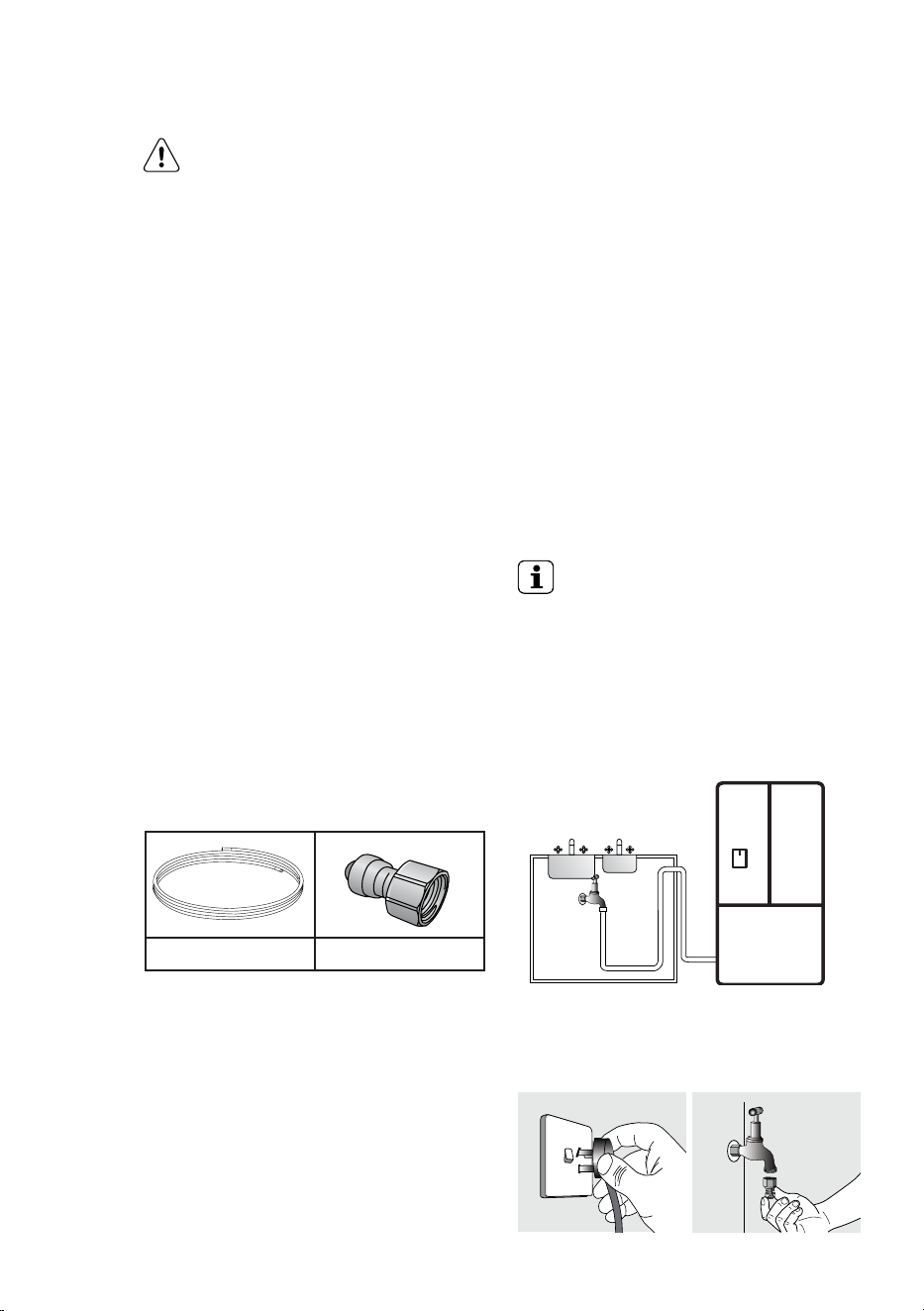
Contents of installation kit
4 metres of water tubing 1 x 1/2” tap fitting
WATER SUPPLY AND PLUMBING
A drinkable water supply to suit a 1/2” tap fitting
is required adjacent to the refrigerator. It is
recommended that a licensed plumber install a new
water supply outlet nearer to the appliance should
the tubing supplied not be long enough. It is not
recommended that the tubing be extended as this
could adversely aect the flow of water to the ice
maker or water dispenser. If there is a risk of flow rate
higher than the maximum flow rate 2.46 L/min, a flow
controller should be installed. The water dispenser and
automatic ice maker require a drinkable water supply
with a pressure range of between 206kPa and 689kPa
(30psi and 100psi). If the water supply is above 100psi
a pressure limiting valve should be installed.
It is recommended that a noise reduction valve also be
fitted in the water supply line. This will reduce water
hammer and its eects from quick action household
taps and fast acting valves on appliances.
The refrigerator water valve is pre-fitted with a
push-fit connector for inserting the water tube. When
the tap connection is other than 1/2”, adapters can
be purchased from plumbing supply stores or good
hardware stores.
Please read before beginning installation.
The appliance complies with the relevant backflow
prevention requirements specified in AS/NZS 2845.1.
The water connection to your ice and water product
can be self installed. However, it is recommended
that you seek advice from a licensed plumber before
commencing the installation.
IMPORTANT
Check for water leaks at all water
connection points in the first 2 to 3
hours after installation, and correct
it in case of any water leak. Recheck
after 24 hours; if leak still occurs, it is
recommended to contact a licensed
plumber for advice.
Water is to be connected as per diagram below.
sink
mains
water
inlet
kitchen cupboard
½" tap
fitting
Step 1 Ensure that the refrigerator is disconnected
from power supply.
Step 2 Connect tap fitting to water supply tap. Tap
must be close to the refrigerator.(only hand tighten)
Step 3 Push the tube into tap fitting past insertion
mark.
22 www.westinghouse.com
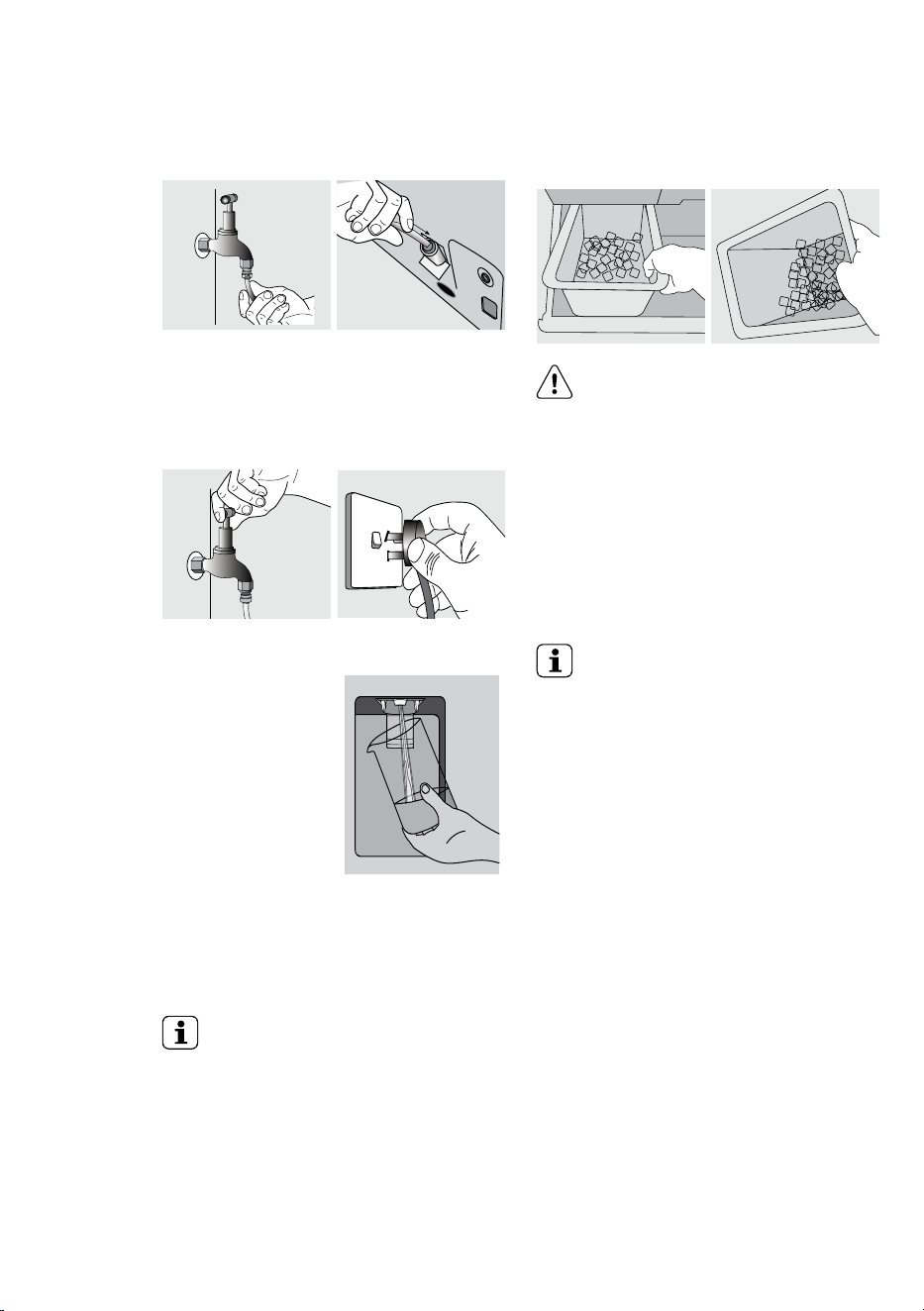
Step 4 Connect other end of tube to inlet on rear of
refrigerator.
Step 5 Turn on water and check all joints and tubes
for leaks.
Step 6 Reconnect the power.
Step 7 Move the refrigerator back into place being
careful not to kink or split the tubing.
Step 8 Switch ON Water Dispenser. By referring to Ice
& Water on/o function. Using a large container, run the
water dispenser to clear air
from lines. This may take a
few minutes. Purge and
dispense a minimum of 2
litres of water. Initial water
may be black in colour. This is
residual carbon dust from
the filter and is non-toxic. If
the water is slow to shut o
or the dispenser is dripping,
air may still be in the lines.
Either purge more water through the system to remove
this air or allow some time for the air to be removed
over subsequent dispensing. For normal use, water
dispenser will automatically shut o after 2 minutes of
continuous operation.
IMPORTANT
As the water cut o is not instant, leave
glass under dispenser briefly until water
has stopped flowing to avoid spills.
Clean and empty the dispenser drip tray
regularly to avoid overflow. Flushing
system about 2 minutes after period of
non-use exceeding 30 days.
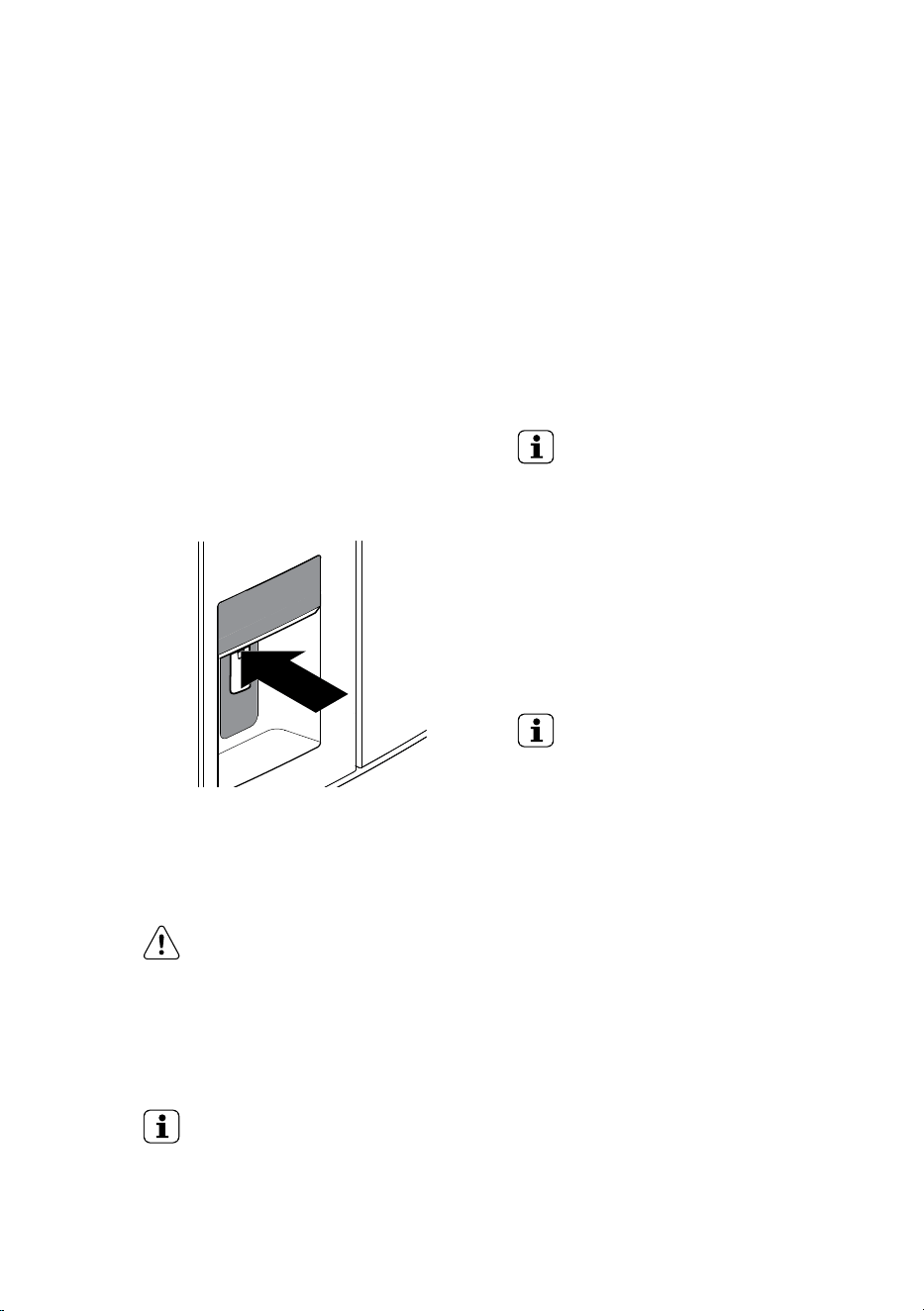
Step 9 Switch ON Ice Maker. Once the refrigerator has
been running for at least 24 hours remove the ice bin
and dispose of the first few batches of ice to ensure
that impurities have been flushed from the system.
CAUTION
Water dispenser should not be used
for extended periods of time. After 2
minutes of continuous use the water
dispenser will automatically shut o.
INCREASE ICE STORAGE FOR INCREASED
USAGE
When the Ice Bin is removed from the cabinet the Auto
Ice Maker will continue to dispense ice into the top
freezer drawer.
IMPORTANT
• Always fit the filter as per manufacturer’s
instructions.
• If you need to replace water tube, only use
approved water quality piping that meets
the pressure requirements.
• Make sure your refrigerator is level to avoid
uneven ice cubes.
• Replace filter at suggested intervals to
avoid water/ice reduction and irregularities
in taste.
• Remove and clean ice bin once a month,
discarding unused ice cubes. This will
ensure fresh, clean ice and smooth
operation of your ice maker.
• Clean and empty the dispenser drip tray
regularly to avoid overflow.
23
EN
Ice maker operation & care
After the refrigerator is installed properly and has
cooled for several hours, the ice maker can produce
ice within 24 hours. The ice maker will fill the ice bin
from the rear. You must dispense some ice to force
the ice forward in the bin. This will allow the bin to fill
completely.
Ice Maker and Storage Bin Capacity
This ice maker should produce 1 kg of ice per 24 hours.
The ice bin will hold about 1.8 kg of ice.
TURNING THE ICE MAKER ON AND OFF
IMPORTANT
Your ice maker is turned on at the
factory so it can work as soon as you
install your refrigerator. If you do not
fill the water tank, set the ice maker’s
On/O feature to O; otherwise, the
ice maker’s fill valve may make a loud
chattering noise when it attempts to
operate without water.
Ice production is controlled by the ice maker’s On/
O feature on the control panel. Pressing the On/O
feature turns the ice maker on & o.
IMPORTANT
Turning o the ice maker simply
disables ice making. You will still be able
to dispense existing ice, and you will
still be able to dispense water.
ICE MAKER/DISPENSER TIPS
• If your refrigerator is not connected to a water
supply or the water supply is turned o, turn o the
ice maker as described in the previous section.
• The following sounds are normal when the ice
maker is operating:
- Motor running
- Ice dropping into ice bin
- Water valve opening or closing
- Running water
• If you need a large quantity of ice at one time, it is
best to get cubes directly from the ice bin.
• Ice cubes stored too long may develop an odd flavor.
Empty the ice bin as explained below.
• It is normal to have a small quantity of little pieces
along with the whole cube.
• It is normal for ice to fill to the top of the ice bin.
7. AUTOMATIC ICE &WATER DISPENSER
NOTE: The Automatic ice & water for WHE5650 model
only
USING THE ICE MAKER AFTER INSTALLATION
Before making ice for the first time, be sure to prime
the water supply system. Air in new plumbing lines
can result in two or three empty ice maker cycles.
Furthermore, if the system is not flushed, the first ice
cubes may be discolored or have an odd flavor.
PRIMING THE WATER SUPPLY SYSTEM
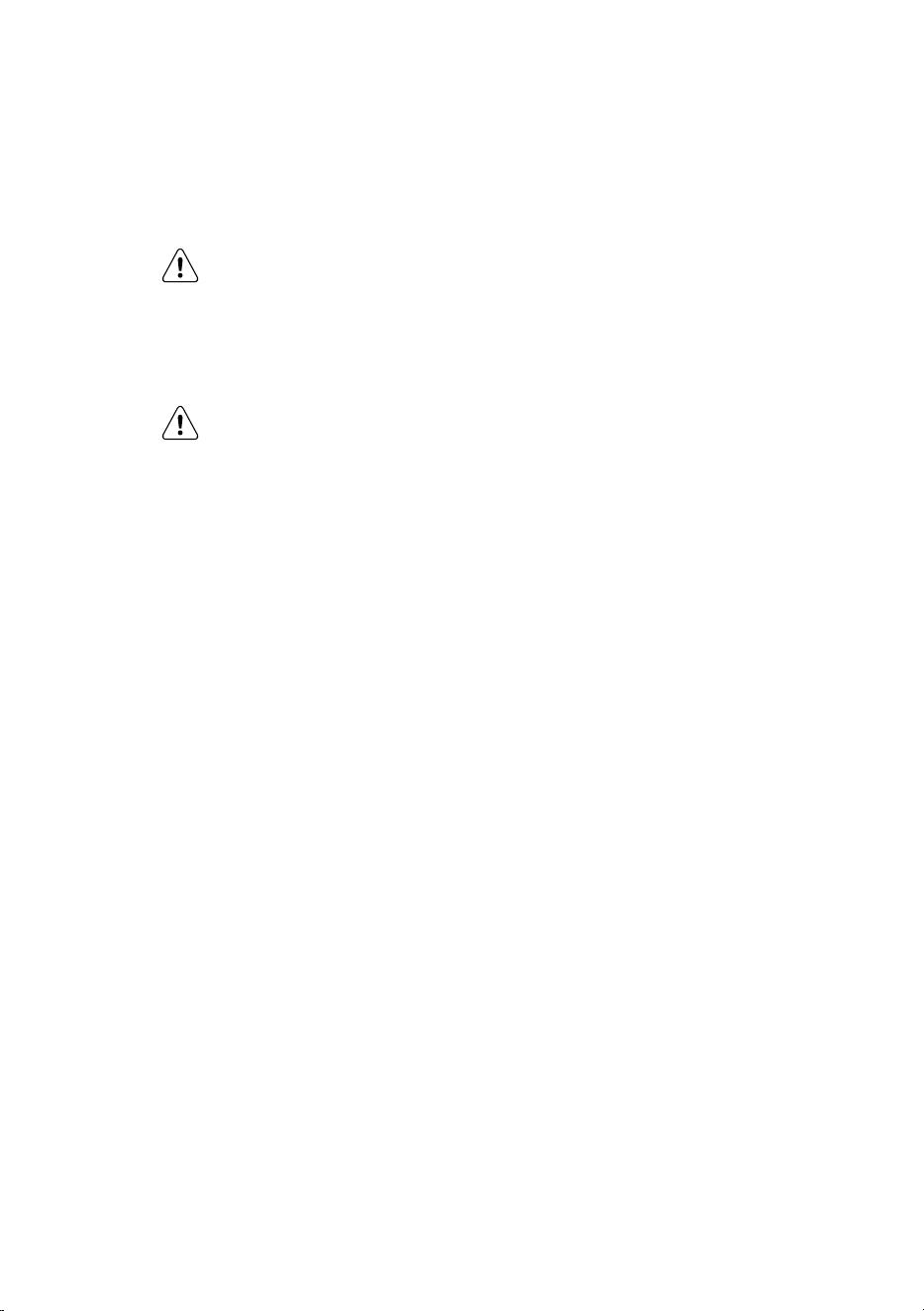
1. Begin filling the system by pressing and holding a
drinking glass against the dispenser.
2. Keep the glass in this position until water comes out
of the dispenser. It may take about 1½ minutes.
3. Continue dispensing water for about four minutes
to flush the system and plumbing connections of
any impurities (stopping to empty the glass as
necessary).
NOTE: The water dispenser has a built-in device
that shuts o the water flow after three minutes of
continuous use. To reset this shut-o device, simply
release the dispenser paddle. Only the first 750 ml of
dispensed water is chilled.
CAUTION
Do not fill the Water tank with anything
other then clean water (Filtered or
Mineral water). Soft drink, juice, tea
or hot water etc, can damage your
automatic ice maker. The Water tank
can withstand a maximum water
temperature of 60°C
TIP AND USEFUL INFORMATION
Remove and clean ice bin and water
tank once a month, discarding unused
ice and water. This will ensure fresh ice
and smooth operation of your ice maker.
Make sure your refrigerator is level to
avoid uneven ice cubes.
24 www.westinghouse.com
Water dispenser tips
• Check on the display make sure dispenser on.
• Keep the glass in this position until water come out
of the dispenser
CAUTION
If the water supply to your refrigerator
is softened, be sure the softener is
properly maintained. Chemicals from
a water softener can damage the ice
maker.
CAUTION
It may remain water drop after your
dispenser.
CLEANING THE ICE MAKER[
Clean the ice maker and ice bin at regular intervals,
especially prior to vacation or moving.
1. Turn o the ice maker.
2. Remove the ice bin by pulling straight out.
3. Empty and carefully clean the ice bin with mild
detergent. Do not use harsh or abrasive cleaners.
Do not place in dishwasher. Rinse with clear water.
4. Allow the ice bin to dry completely before placing it
back into the freezer.
5. Place ice bin back into position. Turn the ice
maker on.
25
EN
8. GENERAL INFORMATION
CLEANING YOUR REFRIGERATOR
WARNING
BEFORE CLEANING: Turn the refrigerator
o at the power point and unplug
the cord to prevent any chance of
electrocuting yourself.
Vinyl Coated Material
Your VCM material refrigerator is manufactured from
mark-resistant surface steel. This VCM material steel
has a special advanced protective coating that eases
the removal of marks such as fingerprints and water
spots. To keep its appearance, clean it regularly with
lukewarm soapy water and a soft cloth.
CAUTION
To clean a crisper or freezer bin with
telescopic extension slides, simply wipe
with a damp cloth and warm soapy
water. Never immerse the cover in
water, as this could aect the operation
of the slide.
Interior
Clean the inside of your refrigerator regularly with a
soft cloth, unscented mild soap and lukewarm water.
Thoroughly dry all surfaces and removable parts and
avoid getting water on the controls. Replace removable
parts, plug power cord in and switch the power on
before returning the food.
Ice and water
Clean the components of the ice maker/water
dispenser regularly with a soft cloth, unscented mild
soap and rinsing thoroughly with lukewarm water. For
further information on the care and cleaning of your
ice maker, ice dispenser of water dispenser refer to the
section “Ice and Water Models”
Door seals
Always keep door seals clean by washing them with
a mild detergent and warm water, followed by a
thorough drying. Sticky food and drink can cause seals
to stick to the cabinet and tear when you open the door.
CAUTION
Never use hot water, solvents,
commercial kitchen cleaners, aerosol
cleaners, metal polishes, caustic or
abrasive cleaners, or scourers to clean
your refrigerator. Many commercially
available cleaning products and
detergents contain solvents that will
damage your refrigerator. Use only a
soft cloth with an unscented mild soap
and lukewarm water.
To clean a crisper or freezer bin with
telescopic extension slides, simply wipe
with a damp cloth and warm soapy
water. Never immerse the cover in
water, as this could aect the operation
of the slide.
Switching o your refrigerator
If you switch o your refrigerator for an extended
period, follow these steps to reduce the chances of
mould.
1. Remove all food.
2. Remove the power plug from the power point.
3. Thoroughly clean and dry the Interior.
4. Ensure that all the doors are wedged open slightly
for air circulation.
CHANGING THE FILTER
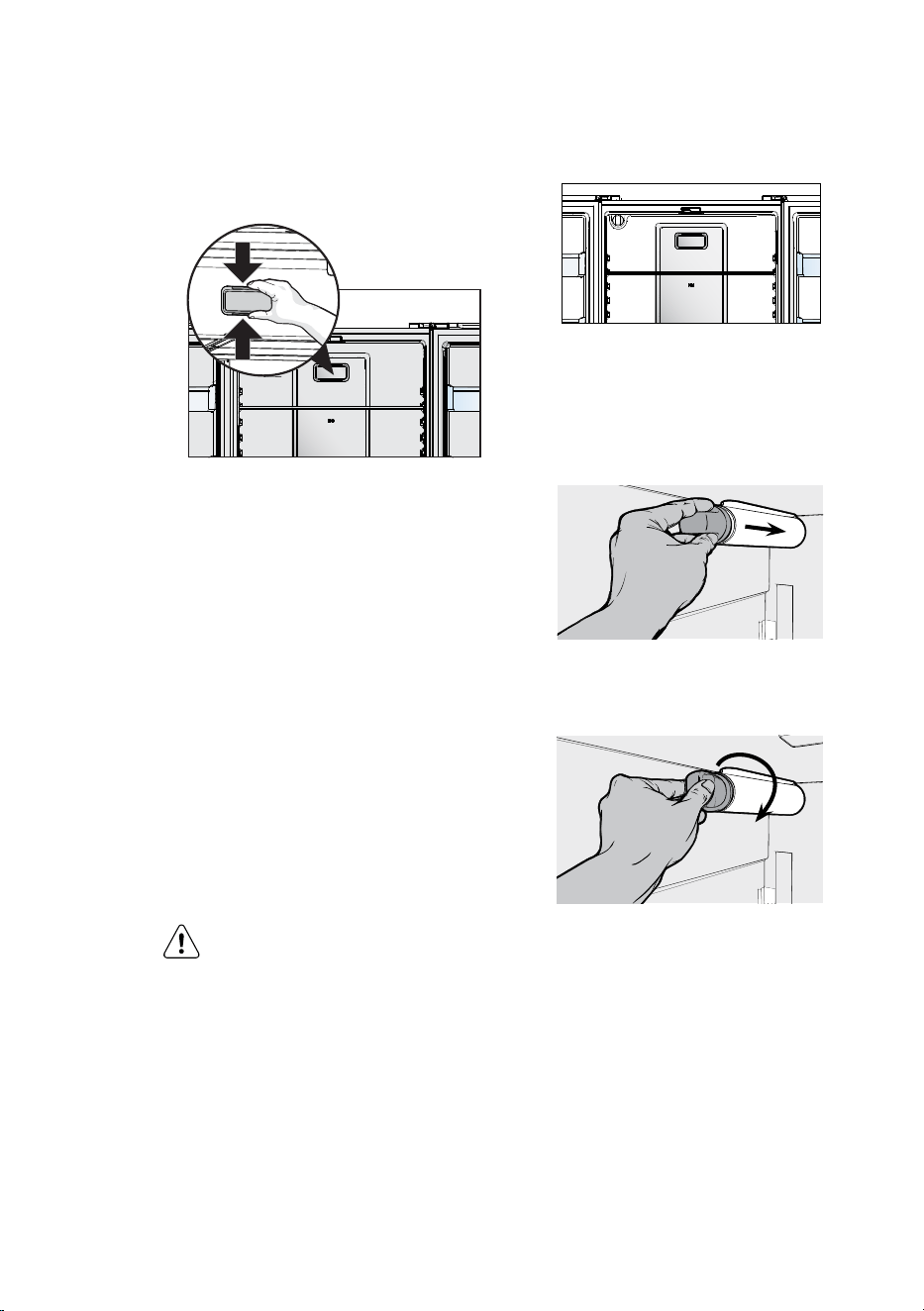
Air Filter (select models)
The air filter is located in the top center of the fresh
food compartment.
Replacing your Air Filter
To ensure optimal filtering of refrigerator odors, you
should change the air filter six months (The filter status
light on the Touch Panel prompts you to replace the
filter after six month -For Model WHE5650 Only)
1. Remove the air filter cover by squeezing the sides of
the cover together and removing from liner
2. Remove the old filter and discard it.
3. Unpack the new filter and slid e it into the housing.
The open face must (carbon media) of the filter
should be installed facing the air port (hole) in the
multiflow.
4. Replace the air filter cover by squeezing the sides
and snapping it back into place.
26 www.westinghouse.com
5. Press and hold the “Reset Air Filter” button on the
control panel for three seconds. When the LED turns
o, the status has been reset (*For Model WHE5650
Only).
Water Filter (For Model WHE5650 Only)
Your refrigerator is equipped with a water filtering
system. The water filtering system filters all dispensed
drinking water, as well as the water used to produce
ice. The water filter is located at the top right side of
the fresh food compartment.
In general, you should change the water filter every six
months to ensure the highest possible water quality.
Water filter status on the user interface prompts you
to replace the filter after a standard amount of water
(750 litres) has flowed through the system.
If your refrigerator has not been used for a period of
time (during moving for example), change the filter
before reinstalling the refrigerator
NOTE: When ordering your replacement filter, please
reorder the same filter type that is currently in your
refrigerator.
WARNING
Use the appliance with water filter
supplied by Electrolux Home Products
Pty Ltd or its authorized service agent
only.
For correct operation of this appliance
it is essential to observe the
manufacturer’s instructions.
Replacing the Water Filter
It is not necessary to turn the water supply o to
change the filter. Be ready to wipe up any small
amounts of water released during the filter
replacement.
1. Ensure that the ice maker is turned o.
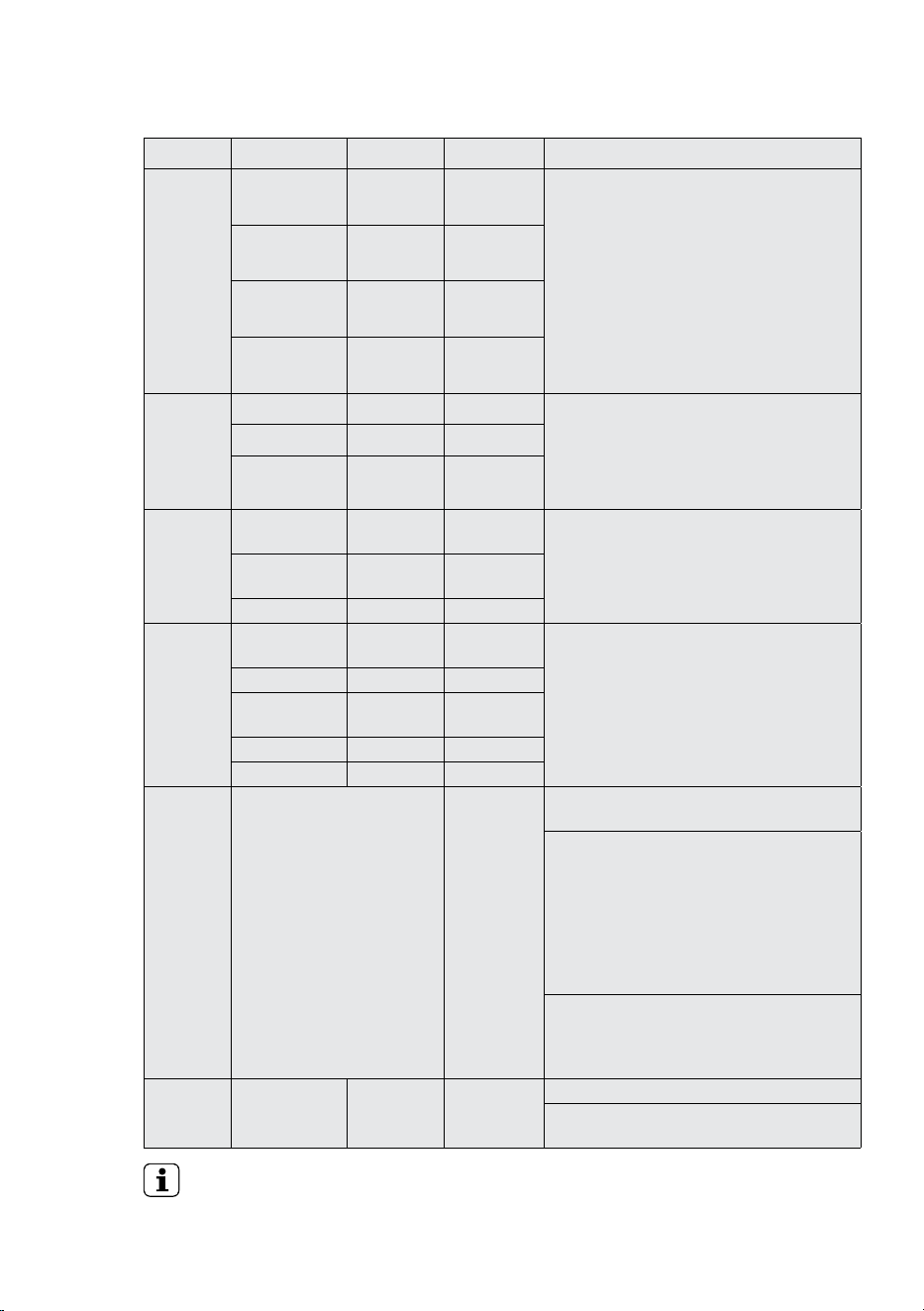
2. Remove the filter by turning anti-clockwise 180˚
3. Slide the old water filter cartridge straight out of the
housing and discard it.
2
2
4. Unwrap the new filter cartridge and using the
alignment guide, slide it gently into filter housing
until it stops against the filter connection at the
back of the housing.
5. Engage the filter by firmly rotating clockwise until
the filter snaps into position (once engaged the filter
cannot be rotated further).
6. Press a drinking glass against the water dispenser
while checking for any leaks at the filter housing.
Any spurts and sputters that occur as the system
purges air out of the dispenser system are normal.
7. After filling one glass of water, continue flushing the
system for about four minutes.
8. Turn on the ice maker.
9. When the filter has been replaced press and hold
the ‘Reset Water Filter’ button for three seconds to
reset the filter replace timer.
10. Replace the filter, don't take o filter cover.
ICE AND WATER (selected models)
Clean the components of the ice maker/water
dispenser regularly with a soft cloth, unscented mild
soap and rinsing thoroughly with lukewarm water. For
further information on the care and cleaning of your
ice maker, ice dispenser of water dispenser refer to the
section “Ice and Water Models.
27
EN
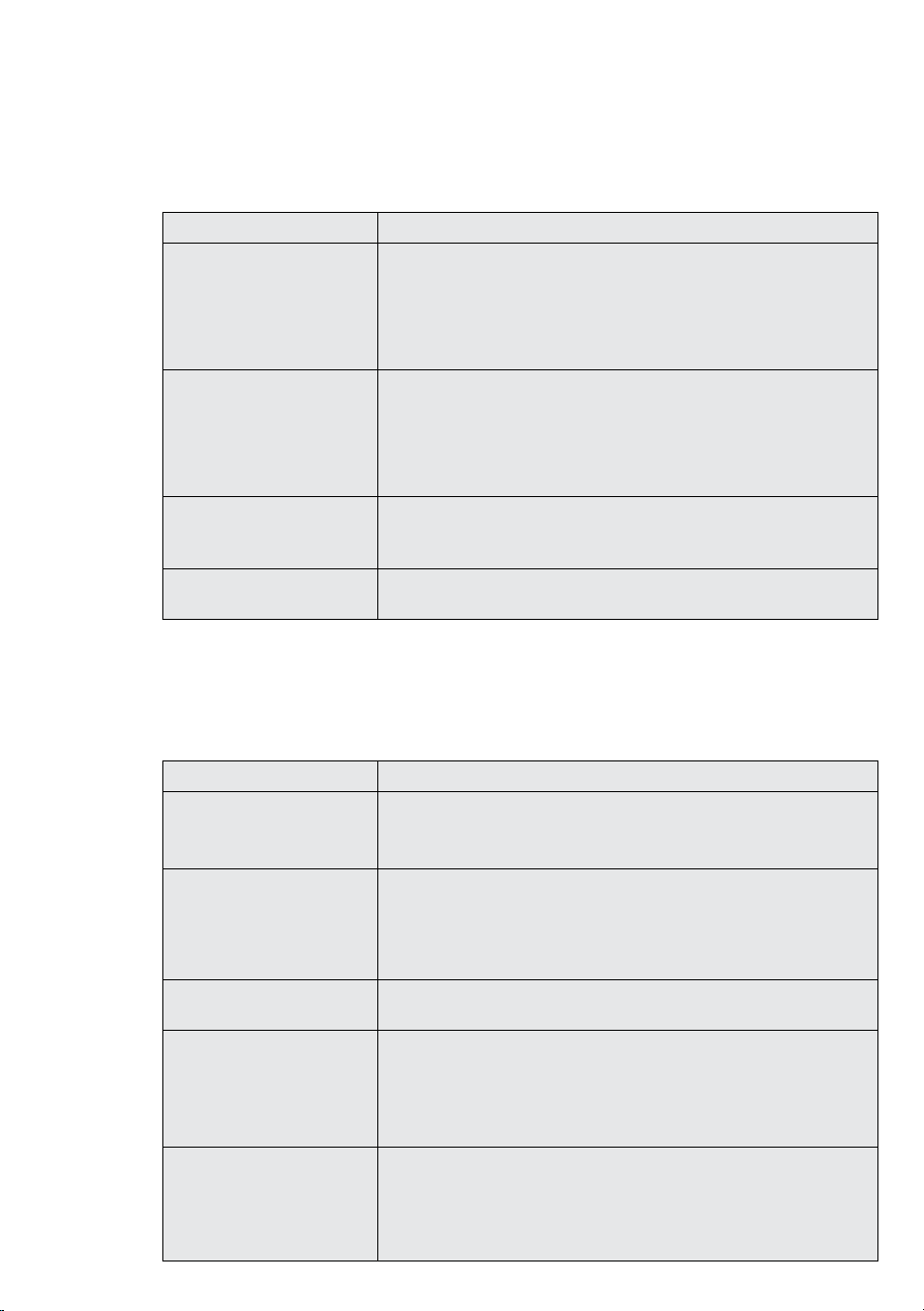
9. FOOD STORAGE GUIDE
IMPORTANT
Please note, use this information as a guide only, actual storage times will vary depending
on how you use your refrigerator, climatic conditions and the freshness of the food.
Category Product Refrigerator Freezer Storage tips
Meat Sausages and
Mince
1-2 Days 2-3 Months Keep cold meat at the back of the refrigerator
where it is coldest.
Plastic can cause meat to sweat if stored in
refrigerator for more than a day.
Roast can take up to 48 hours to defrost
properly, transfer frozen roast to the refrigerator
2 days before use.
Chops and
Steak
3-4 Days 4-6 Months
Cold Meats 3-5 Days 4-6 Months
Roasts 3-5 Days 12 Months
Poultry Chicken 1-2 Days 2 Months If poultry takes on a smell or colour you are
unsure about it is best to throw it out.
Whole eggs are not suitable for freezing, slightly
beaten eggs may be frozen for four months.
Roast Chicken 3-5 Days 12 Months
Eggs 6 Weeks Not Suitable
Seafood Whole fish and
fillets
2-3 Days 2 Months Store in an airtight container or foil.
Never freeze prawns in salty water as this will
dehydrate the flesh.
Lobster and
Crab
1-2 Days 2 Months
Prawns 1-2 Days 2 Months
Dairy Milk Until Expiry
Date
Not Suitable If dairy takes on a smell or colour and you are
unsure about it, it is best to throw it out.
Depending on the variety hard cheese can last
from 2 weeks to 2 months.
* Texture may change depending of the type of
soft cheese
Yogurt 7- 10 Days Not Suitable
Hard Cheeses 2 Weeks – 2
Months
2 Months
(Grated)
Soft Cheeses 1-2 Weeks Not Suitable
Butter 8 Weeks 12 Months
Fruit &
Vegetables
Every fruit and vegetable has a
dierent shelf life. Some stay
fresh for a couple of days e.g.
beans, others can last for a
couple of months e.g. onions.
8-12 Months
When
freezing chop
and blanch
in small
portions.
Keep vegetables in the crisper and away from
the air vents to avoid freezing.
To maintain freshness, ensure that washed
fruits and vegetables are thoroughly dried or
wrapped in absorbent paper before refrigeration.
Excess moisture can cause condensation inside
the drawer, increasing the risk of spoilage ,If
vegetable box is concealed and maintaining high
humidity, then condensation may occur below
crisper tray or surrounding inside veg box wall.
Try to keep fruit and vegetables separated as
fruits that give o high levels of ethylene (the
ripening agent) can prematurely ripen and spoil
surrounding vegetables
Left Overs Homemade
meals
3-4 Days 2-6 Months Store in sealed container.
Freeze meal in small portion sizes to limit
wastage.
28 www.westinghouse.com
10. TROUBLESHOOTING
CONCERN WHAT TO DO
Refrigerator is too warm • Adjust the refrigerator to a colder setting.
• Ensure food is allowed to cool before placing inside the refrigerator.
• Ensure the appliance is set up as per instructions.
• Ensure that contents are not obstructing the cooling vents.
• Ensure the door is not held open or is being opened too frequently.
Freezer is too warm • Adjust temperature to a colder setting.
• Ensure food is allowed to cool before placing inside the freezer.
• Ensure the appliance is set up as per instructions.
• Ensure that contents are not obstructing the cooling vents.
• Ensure the door is not held open or is being opened too frequently.
Food is freezing in the
refrigerator
• Adjust temperature to a warmer setting.
• Ensure that fruit and vegetables are stored in the crisper. Items with a
high water content should not be placed near the cooling vents.
Unable to change temperature
settings
• Refer to sections “temperature control”.
Appliance does not operate at desired temperature
In a modern frost free refrigerator / freezer, cold air is circulated around the various compartments through air vents
using a high eciency fan.
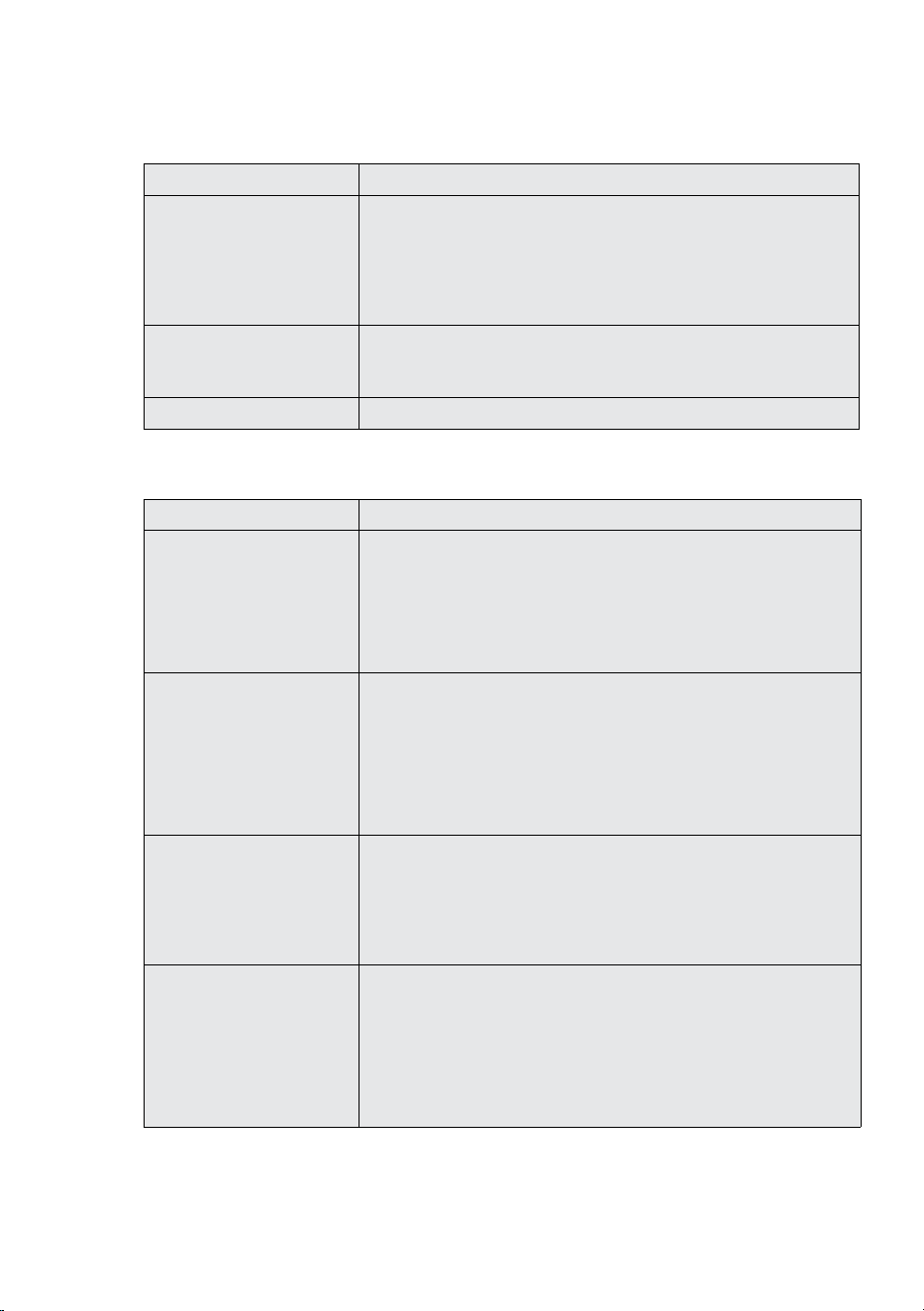
Appliance noise
Your new refrigerator may make sounds that your old one didn’t make. Because the sounds are new to you, you
might be concerned about them. Most of the new sounds are normal. Hard surfaces, like the floor, walls and
cabinets, can make the sounds seem louder than they actually are. The following describes the kinds of sounds and
what may be making them.
CONCERN WHAT TO DO
Motor noise (compressor) Nothing. This is normal as your new refrigerator uses a high-speed
compressor which switches on and o during operation.
Note that the compressor noise may seem louder at the start of the on cycle.
Motor noise (compressor); These refrigerators are fitted with a variable speed compressor and fan. At
start up and on warm days they run at a higher speed to provide additional
cooling. When less cooling is required the compressor and fan will run at a
lower speed. As a result it is normal for sound levels to change depending on
operating conditions.
A clicking noise heard just
before the compressor starts.
Nothing. This is normal as your new refrigerator has an automatic switching
action of the temperature control, turning the compressor on and o.
Occasional gurgling, similar to
water boiling.
Nothing. As each cycle ends, you may hear a gurgling sound due to the
refrigerant flowing in your refrigerator system.
Nothing, this is normal as your new refrigerator uses high eciency fans to
circulate air. Fan speed and noise may increase during periods of heavy usage
or hot weather.
Rattling and other noises. • Ensure that the cabinet is level and stable, refer to Installation Instructions
• Check the surrounds of the appliance to ensure there is nothing touching or
placed on top of the appliance.
• Ensure that contents of the appliance are not placed in such a way that
they are vibrating (such as bottles).
29
EN
Crisper Operation
CONCERN WHAT TO DO
Excess moisture build up in
crisper
It is normal for there to be some
moisture and humidity in the
crisper bin.
• Ensure that the crisper is not over packed.
• Adjust crisper humidity slides.
• To recommend using food wrapper (Cling film) as below shared picture or
zip lock bag.
Crisper bin can not be removed • If crisper bin interferes with the door bins, remove door bins before
removing crisper.
• Position cabinet so that the door can be fully opened.
Freezing items in the crisper • Adjust temperature to a warmer setting.
Refrigerator operation
CONCERN WHAT TO DO
Appliance will not run
It is normal for the freezer
fan not to operate during the
automatic defrost cycle, or for a
short time after the appliance is
switched on.
• Ensure that the cord is plugged into a live power outlet and outlet is
switched on.
• Ensure that the household circuit breaker has not tripped or that the fuse
has not blown.
• The appliance maybe in defrost mode, check again in half an hour.
Compressor motor seems to
run too long
At normal room temperatures,
expect your motor to run about
40% to 80% of the time. Under
warmer conditions, expect it to
run more often.
• Ensure that the doors are not held open.
• Check that large amounts of warm food have not just been placed inside
the appliance.
• Note that the appliance will run more than normal just after you install it
or when adjusting the temperature setting changes.
Compressor motor seems to
run too long.
These appliances use a variable
speed compressor, which by
design can run for long periods
of time, this is normal
• The variable speed compressor and fan that at start up and on warm
days, runs at high speeds to provide additional cooling. When less cooling
is required the compressor and fan will run at a lower speed, but still may
not switch o. This is normal.
• It is possible that the only time the compressor and fan will stop is when
the refrigerator is defrosting which is approximately once per day.
The exterior of the appliance is
warm or hot to touch
This is normal because the
appliance transfers heat from
the inside out through the outer
panels and the divider between
the doors.
• Ensure the appliance has the external clearances recommended in the
section “Installing your new appliance”.
• The exterior of the cabinet will be much warmer on warmer days it may
even feel hot to touch, as the appliance is working harder.
30 www.westinghouse.com
CONCERN WHAT TO DO
Alarms Sounding • Check that all doors are fully closed.
• Ensure that the over temperature alarm is not being activated by hot food
placed in the freezer.
Frost build up • Check that all doors are fully closed.
• Ensure that the doors are not opened too often.
• Ensure that the return air vents are not blocked with packaging.
• Ensure the seals are clean and not obstructed.
Odours • The interior may need cleaning, refer to cleaning guide.
• Ensure that food is stored correctly as some food, containers and
wrapping properly can avoid odours issue.
• Check appliance for old or unusual food.
• Ensure replacement of the air filter every 6 months.
Lights not working
The LED lighting is designed
to turn on gradually. The LED
lighting is designed to dim
automatically if the door is
left opened for more than 5
minutes and turn o completely
if the door is open for more than
7 minutes. Closing the door will
reset the timer.
• Ensure that the cord is plugged into a live power outlet and outlet is
switched on.
• Ensure that the household circuit breaker has not tripped or that the fuse
has not blown.
• Check that the Refrigerator Temp setting is not in Sabbath Mode, refer to
control instructions.
low cooling due to surrounding
ventilation.
• Ensure user installation as per instructions.
Door operation
CONCERN WHAT TO DO
Freezer door pops open. • This is normal and should re-close. This happens when the refrigerator
door is closed too quickly.
• If the freezer door stays open, it indicates that the appliance needs to
be tilted backwards a little further. Refer to section “Installing your new
appliance”.
Self close not working. • Check if your appliance has self closing hinges as not all models do.
• It indicates that the appliance needs to be tilted backwards a little further.
Refer to section “Installing your new appliance”.
Door not sealing properly • Ensure there is nothing that is preventing the door from closing such as
appliance contents or items placed near the appliance.
• Ensure that the crisper/freezer bin is closed completely. Refit if required
as referred to in the section “Using your refrigerator”.
• Ensure the appliance is set up as per recommendations.
Door dicult to open and close • If the door is dicult to open just after you have closed it this is due to the
pressure equalising, the door will open normally after a few minutes.
31
EN
Ice & Water system
CONCERN WHAT TO DO
Ice maker does not produce ice
or not enough ice
The icemaker is designed
to produce a tray of ice
approximately every 3 hours,
depending on the conditions.
• Ensure that the cord is plugged into a live power outlet and outlet is
switched on.
• Ensure that water is connected and turned on and there are no kinks in
the water line.
• Ensure that the Ice Maker is switched on at the user interface.
• Check that the water filter is not blocked or out of date.
• Check the water supply flow rate.
• If the freezer compartment is too warm, refer to "freezer is too warm"
then wait 24 hours for the freezer to reach ideal temperature.
• Turn the unit o at the mains and leave for 2 minutes then turn the
appliance back on (this will reset the icemaker unit). Check for ice
production after 24 hours.
• Check that there is no obstruction under the ice maker and ensure the ice
bin is fitted correctly.
Water dispenser not
functioning
• Ensure that the cord is plugged into a live power outlet and outlet is
switched on.
• Ensure that water is connected and turned on and there are no kinks in
the water line.
• Ensure that the Water Dispenser is switched on at the user interface.
• Ensure water line is purged refer to “Connecting the water supply”.
• Check that the water filter is not blocked or out of date.
• Check the water pressure, refer to “Connecting the water supply”.
Ice or water has bad odour or
taste
• Cover food to ensure ice does not absorb foreign odours.
• Check that the water filter is not out of date.
• Interior of appliance or ice bin may require cleaning.
• Discard stale ice monthly and allow ice maker to produce a fresh supply.
Connect tap fitting to water
supply tap
• To recommend tightening by hand only. If using a tools may damage the
fitting.
If you still require service
If you have a problem, and the problem persists after you have made the checks mentioned, contact your nearest
Electrolux approved Service Centre or the dealer you bought the refrigerator from. Be ready to quote the model
number, the 9-digit PNC and 8-digit serial number, which is stated on the label inside the refrigerator compartment.
32 www.westinghouse.com
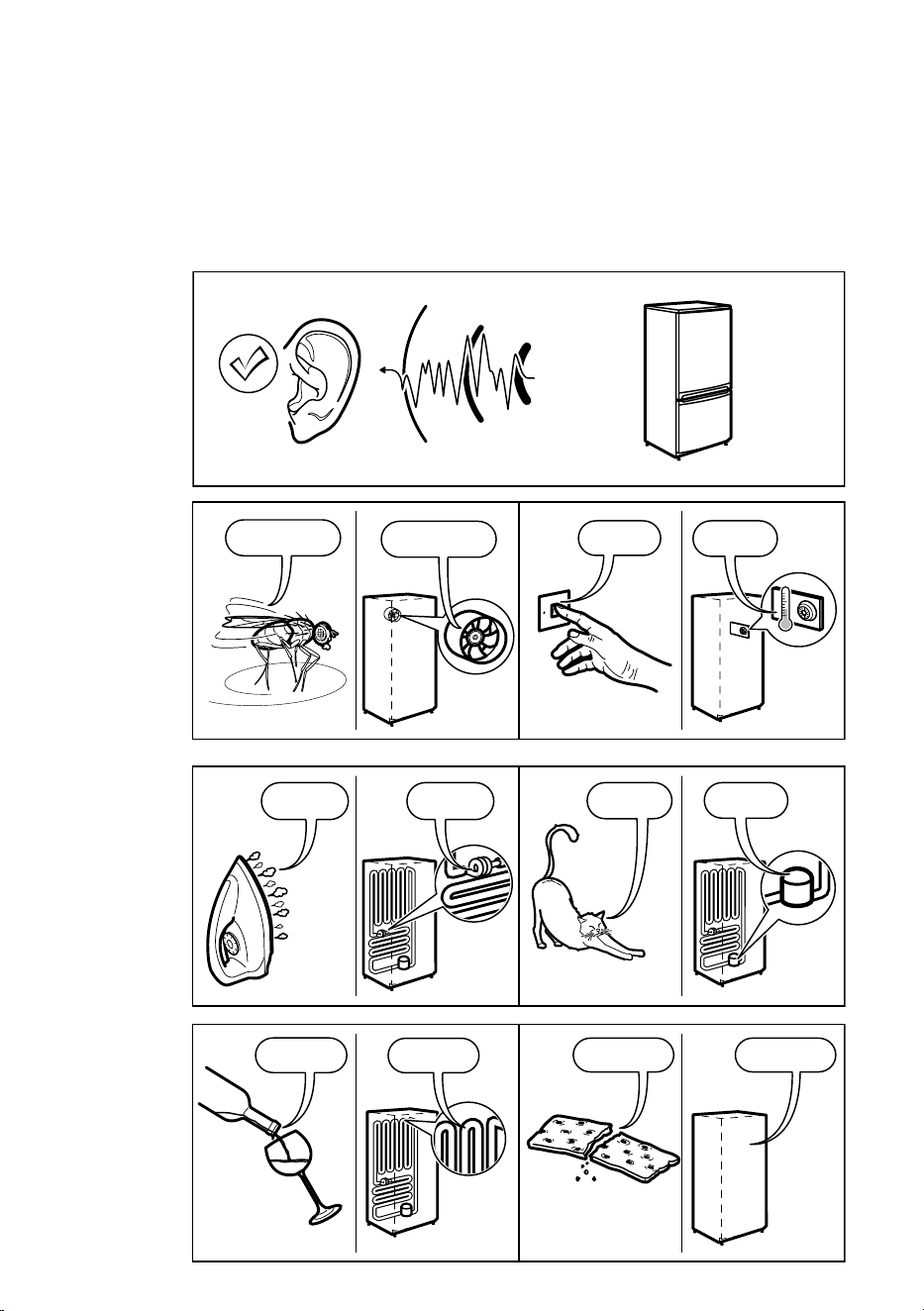
10. NOISES
Appliance noise
Your new refrigerator may make sounds that your old one didn’t make. Because the sounds
are new to you, you might be concerned about them. Most of the new sounds are normal.
Hard surfaces, like the floor, walls and cabinets, can make the sounds seem louder than they
actually are. The following describes the kinds of sounds and what may be making them.
BRRR
!
HISSS!
CLICK!
BLUBB!
CRACK!
SSSRR
R!
OK
CLICK!
CLICK!
SSSRRR!
SSSRRR!
BRRR!
BRRR!
HISSS!
HISSS!
BLUBB!
BLUBB!
CRACK!CRACK!
11. NOISES
Appliance noise
Your new refrigerator may make sounds that your old one didn’t make. Because the sounds are new
to you, you might be concerned about them. Most of the new sounds are normal. Hard surfaces, like
the floor, walls and cabinets, can make the sounds seem louder than they actually are. The following
describes the kinds of sounds and what may be making them.
33
EN
This document sets out the terms and conditions of the product
warranties for Westinghouse Appliances. It is an important
document. Please keep it with your proof of purchase documents
in a safe place for future reference should there be a manufacturing
defect in your Appliance. This warranty is in addition to other rights
you may have under the Australian Consumer Law.
1. In this warranty:
(a) ‘ACL’ or ‘Australian Consumer Law’ means Schedule 2 to the
Competition and Consumer Act 2010;
(b) ‘Appliance’ means any Electrolux product purchased by you and
accompanied by this document;
(c) ‘ASC’ means Electrolux’s authorised serviced centres;
(d) ‘Westinghouse’ is the brand controlled by Electrolux Home Products
Pty Ltd of 163 O’Riordan Street, Mascot NSW 2020, ABN 51 004
762 341 in respect of Appliances purchased in Australia and Electrolux
(NZ) Limited (collectively “Electrolux”) of 3-5 Niall Burgess Road, Mount
Wellington, in respect of Appliances purchased in New Zealand;
(e) ‘WarrantyPeriod’meanstheperiodspeciedinclause3ofthis
warranty;
(f) ‘you’ means the purchaser of the Appliance not having purchased
the Appliance for re-sale, and ‘your’ has a corresponding meaning.
2. Application: This warranty only applies to new Appliances, purchased
and used in Australia or New Zealand and is in addition to (and does not
exclude, restrict, or modify in any way) other rights and remedies under
a law to which the Appliances or services relate, including any non-
excludable statutory guarantees in Australia and New Zealand.
3. Warranty Period: Subject to these terms and conditions, this warranty
continues for in Australia for a period of 24 months and in New Zealand
for a period of 24 months, following the date of original purchase of the
Appliance.Speciccomponentsarewarrantedagainstmanufacturing
defects in Australia and New Zealand for the periods listed below;
• Compressor – Further 3 years
• External Condenser – Further 3 years
• Evaporator – Further 3 years
• Drier – Further 3 years
4. Repair or replace warranty: During the Warranty Period, Electrolux
or its ASC will, at no extra charge if your Appliance is readily accessible
for service, without special equipment and subject to these terms and
conditions, repair or replace any parts which it considers to be defective.
Electrolux may, in its absolute discretion, choose whether the remedy
oeredforavalidwarrantyclaimisrepairorreplacement.Electroluxorits
ASC may use refurbished parts to repair your Appliance. You agree that
any replaced Appliances or parts become the property of Electrolux.
5. Travel and transportation costs: Subject to clause 7, Electrolux will
bear the reasonable cost of transportation, travel and delivery of the
Appliance to and from Electrolux or its ASC. Travel and transportation will
be arranged by Electrolux as part of any valid warranty claim.
6. Proof of purchase is required before you can make a claim under this
warranty.
7. Exclusions: You may not make a claim under this warranty unless the
defect claimed is due to faulty or defective parts or workmanship. This
warranty does not cover:
(a) lightglobes,batteries,ltersorsimilarperishableparts;
(b) parts and Appliances not supplied by Electrolux;
(c) cosmeticdamagewhichdoesnotaecttheoperationofthe
Appliance;
(d) damage to the Appliance caused by:
(i) negligence or accident;
(ii) misuse or abuse, including failure to properly maintain or service;
(iii) improper, negligent or faulty servicing or repair works done by
anyone other than an Electrolux authorised repairer or ASC;
(iv) normal wear and tear;
(v) power surges, electrical storm damage or incorrect power supply;
(vi) incomplete or improper installation;
(vii) incorrect, improper or inappropriate operation;
(viii) insect or vermin infestation;
(ix) failure to comply with any additional instructions supplied with
the Appliance;
In addition, Electrolux is not liable under this warranty if:
(a) the Appliance has been, or Electrolux reasonably believes that the
Appliance has been, used for purposes other than those for which
the Appliance was intended, including where the Appliance has
been used for any non-domestic purpose;
(b) theApplianceismodiedwithoutauthorityfromElectroluxinwriting;
(c) the Appliance’s serial number or warranty seal has been removed
or defaced.
8. How to claim under this warranty: To enquire about claiming under
this warranty, please follow these steps:
(a) carefully check the operating instructions, user manual and the
terms of this warranty;
(b) have the model and serial number of the Appliance available;
(c) have the proof of purchase (e.g. an invoice) available;
(d) telephone the numbers shown below.
9. Australia: For Appliances and services provided by Electrolux in
Australia: Electrolux goods come with guarantees that cannot be
excluded under the Australian Consumer Law. You are entitled to a
replacement or refund for a major failure and for compensation for any
other reasonably foreseeable loss or damage. You are also entitled to
have the Appliance repaired or replaced if the Appliance fails to be of
acceptable quality and the failure does not amount to a major failure.
‘Acceptable quality’ and ‘major failure’ have the same meaning as
referred to in the ACL.
10. New Zealand: For Appliances and services provided by Electrolux
in New Zealand, the Appliances come with a guarantee by Electrolux
pursuant to the provisions of the Consumer Guarantees Act, the Sale
of Goods Act and the Fair Trading Act. Where the Appliance was
purchased in New Zealand for commercial purposes the Consumer
Guarantee Act does not apply.
11.Condentiality: You accept that if you make a warranty claim, Electrolux
and its agents including ASC may exchange information in relation to you
to enable Electrolux to meet its obligations under this warranty.
Warranty
FOR SALES IN AUSTRALIA AND NEW ZEALAND
APPLIANCE: WESTINGHOUSE REFRIGERATORS AND FREEZERS
Important Notice
Before calling for service, please ensure that the steps listed in clause 8 above have been followed.
AUSTRALIA
FOR SERVICE
ortondtheaddressofyournearest
authorised service centre in Australia
PLEASE CALL 13 13 49
For the cost of a local call
FOR SPARE PARTS
ortondtheaddressofyournearest
spare parts centre in Australia
PLEASE CALL 13 13 50
For the cost of a local call
NEW ZEALAND
FOR SERVICE
ortondtheaddressofyournearest
authorised service centre in New Zealand
PLEASE CALL 0800 10 66 10
FOR SPARE PARTS
ortondtheaddressofyournearest
spare parts centre in New Zealand
PLEASE CALL 0800 10 66 20
WFridgeFreezer_Warr_Jul19
12. WARRANTY

...........................................................................................................................................
...........................................................................................................................................
...........................................................................................................................................
...........................................................................................................................................
...........................................................................................................................................
...........................................................................................................................................
...........................................................................................................................................
...........................................................................................................................................
...........................................................................................................................................
...........................................................................................................................................
...........................................................................................................................................
...........................................................................................................................................
...........................................................................................................................................
...........................................................................................................................................
...........................................................................................................................................
...........................................................................................................................................
...........................................................................................................................................
...........................................................................................................................................
...........................................................................................................................................
...........................................................................................................................................
...........................................................................................................................................
...........................................................................................................................................
...........................................................................................................................................
...........................................................................................................................................
...........................................................................................................................................
...........................................................................................................................................
...........................................................................................................................................
...........................................................................................................................................
...........................................................................................................................................
...........................................................................................................................................
...........................................................................................................................................
...........................................................................................................................................
...........................................................................................................................................
...........................................................................................................................................

...........................................................................................................................................
...........................................................................................................................................
...........................................................................................................................................
...........................................................................................................................................
...........................................................................................................................................
...........................................................................................................................................
...........................................................................................................................................
...........................................................................................................................................
...........................................................................................................................................
...........................................................................................................................................
...........................................................................................................................................
...........................................................................................................................................
...........................................................................................................................................
...........................................................................................................................................
...........................................................................................................................................
...........................................................................................................................................
...........................................................................................................................................
...........................................................................................................................................
...........................................................................................................................................
...........................................................................................................................................
...........................................................................................................................................
...........................................................................................................................................
...........................................................................................................................................
...........................................................................................................................................
...........................................................................................................................................
...........................................................................................................................................
...........................................................................................................................................
...........................................................................................................................................
...........................................................................................................................................
...........................................................................................................................................
...........................................................................................................................................
...........................................................................................................................................
...........................................................................................................................................
...........................................................................................................................................
email:
web:
NEW ZEALAND
email:
phone:
service:
AUSTRALIA
spare parts:
web:
© 2017 Electrolux Home Products Pty Ltd.
ABN 51 004 762 341
For more information on all Westinghouse
appliances, or for dimension and installation
information, call into your retailer, phone or email
our customer care team or visit our website:
and WESTINGHOUSE are trademarks of Westinghouse Electric Corporation.
Used under license. All Rights Reserved.
13 13 49
13 13 50
customercare@electrolux.com.au
westinghouse.com.au
0800 436 245
customercare@electrolux.com.nz
westinghouse.com.nz
A24336553-A-252025