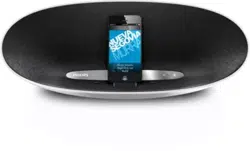
www.philips.com/welcome
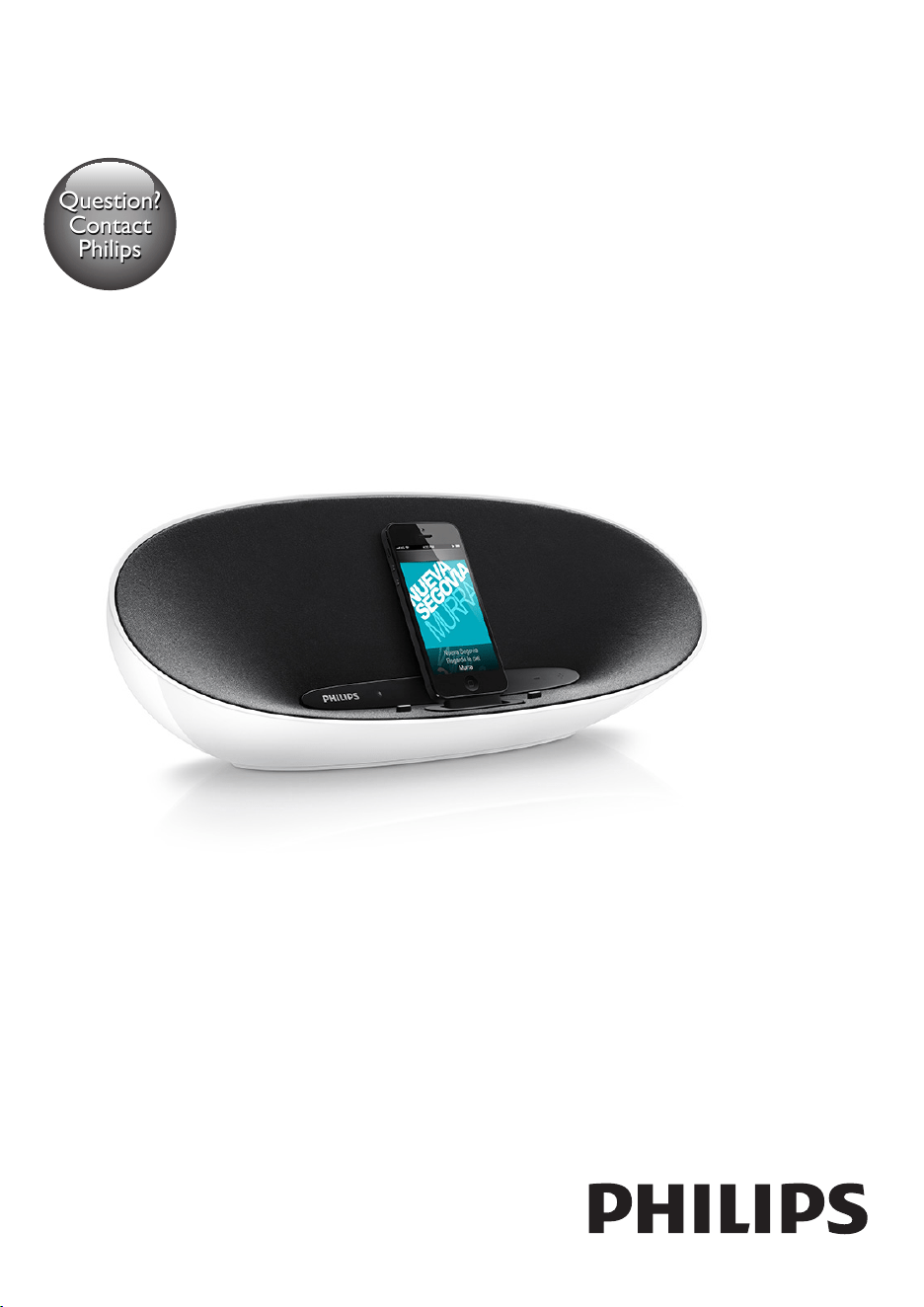
User manual
Always there to help you
Register your product and get support at
DS8300/37
Question?
Contact
Philips
Register online at www.philips.com/welcome today to
get the very most from your purchase.
Visit our World Wide Web Site at http://www.philips.com/welcome
Registering your model with PHILIPS makes you eligible for all of the valuable benets listed below,so don't miss out.
Register online at www.philips.com/welcome to ensure:
*Product Safety Notication *Additional Benefits
By registering your product, you'll receive notication - directly
from the manufacturer.
Registering your product guarantees that you'll receive all of
the privileges to which you’re entitled, including special money-
saving offers.
Registering your model with PHILIPS makes you eligible for all of the valuable benefits listed below, so don't miss out.
Complete and return your Product Registration Card at once, or register online at www.philips.com/welcome to
ensure:
Return your Product Registration Card or register online at
www.philips.com/welcome today to get the very most from your purchase.
Visit our World Wide Web Site at http://www.philips.com/welcome
Congratulations on your purchase,
and welcome to the “family!”
Dear PHILIPS product owner:
Thank you for your confidence in PHILIPS.You’ve selected one of
the best-built, best-backed products available today. We’ll do every-
thing in our power to keep you happy with your purchase for many
years to come.
As a member of the PHILIPS “family,” you’re entitled to protection
by one of the most comprehensive warranties and outstanding
service networks in the industry. What’s more, your purchase guar-
antees you’ll receive all the information and special offers for which
you qualify, plus easy access to accessories from our convenient
home shopping network.
Most importantly, you can count on our uncompromising commit-
ment to your total satisfaction.
All of this is our way of saying welcome - and thanks for investing
in a PHILIPS product.
P.S. To get the most from your PHILIPS purchase,be
sure to complete and return your Product Registration
Card at once, or register online at:
www.philips.com/welcome
For Customer Use
Enter below the Serial No.which is locat-
ed on the rear of the cabinet. Retain this
information for future reference.
Model No.__________________________
Serial No. ________________________
Know these
safetysymbols
This “bolt of lightning” indicates unin-
sulated material within your unit may
cause an electrical shock. For the safety of
everyone in your household, please do not
remove product covering.
The “exclamation point” calls atten-
tion to features for which you should
read the enclosed literature closely to pre-
vent operating and maintenance problems.
WARNING: To reduce the risk of fire or
electric shock, this apparatus should not be
exposed to rain or moisture and objects
filled with liquids, such as vases, should not
be placed on this apparatus.
CAUTION: To prevent electric shock,
match wide blade of plug to wide slot, fully
insert.
ATTENTION:Pour éviter les choc élec-
triques, introduire la lame la plus large de la
fiche dans la borne correspondante de la
prise et pousser jusqu’au fond.
CAUTION
RISK OF ELECTRIC SHOCK
DO NOT OPEN
CAUTION: TO REDUCE THE RISK OF ELECTRIC SHOCK, DO NOT
REMOVE COVER (OR BACK). NO USER-SERVICEABLE PARTS
INSIDE. REFER SERVICING TO QUALIFIED SERVICE PERSONNEL.
*Proof of
Purchase
Returning the enclosed card guarantees
that your date of purchase will be on file,
so no additional paperwork will be
required from you to obtain warranty
service.
*Product Safety
Notification
By registering your product, you'll receive
notification - directly from the manufac-
turer - in the rare case of a product
recall or safety defect.
*Additional Benefits
Registering your product guarantees that
you'll receive all of the privileges to
which you're entitled, including special
money-saving offers.
Congratulations on your purchase,
and welcome to the “family!”
Dear PHILIPS product owner:
Thank you for your condence in PHILIPS.You’ve selected one of
the best-built, best-backed products available today.We’ll do every-
thing in our power to keep you happy with your purchase for many
years to come.
As a member of the PHILIPS “family,” you’re entitled to protection
by one of the most comprehensive warranties in the industry.
What’s more, your purchase guar antees you’ll receive all the
information and special offers for which you qualify, plus easy access
to accessories from our convenient home shopping network.
Most importantly, you can count on our uncompromising commit-
ment to your total satisfaction.
All of this is our way of saying welcome - and thanks for investing
in a PHILIPS product.
P.S. To get the most from your PHILIPS purchase, be
sure to register online at:
www.philips.com/welcome

1EN
Contents
1 Important 2
Safety 2
Notice 3
2 Your Docking Entertainment System 5
Introduction 5
What's in the box 5
Overview of the main unit 5
3 Get started 7
Prepare the remote control 7
Connect power 7
Turn on 8
4 Play 9
Play from iPod/iPhone/iPad 9
Play from Bluetooth device 9
Play from an external device 10
Adjust volume level 10
Mute sound 10
5 Product information 11
Specications 11
6 Troubleshooting 12
About Bluetooth device 12
2 EN
1 Important
Safety
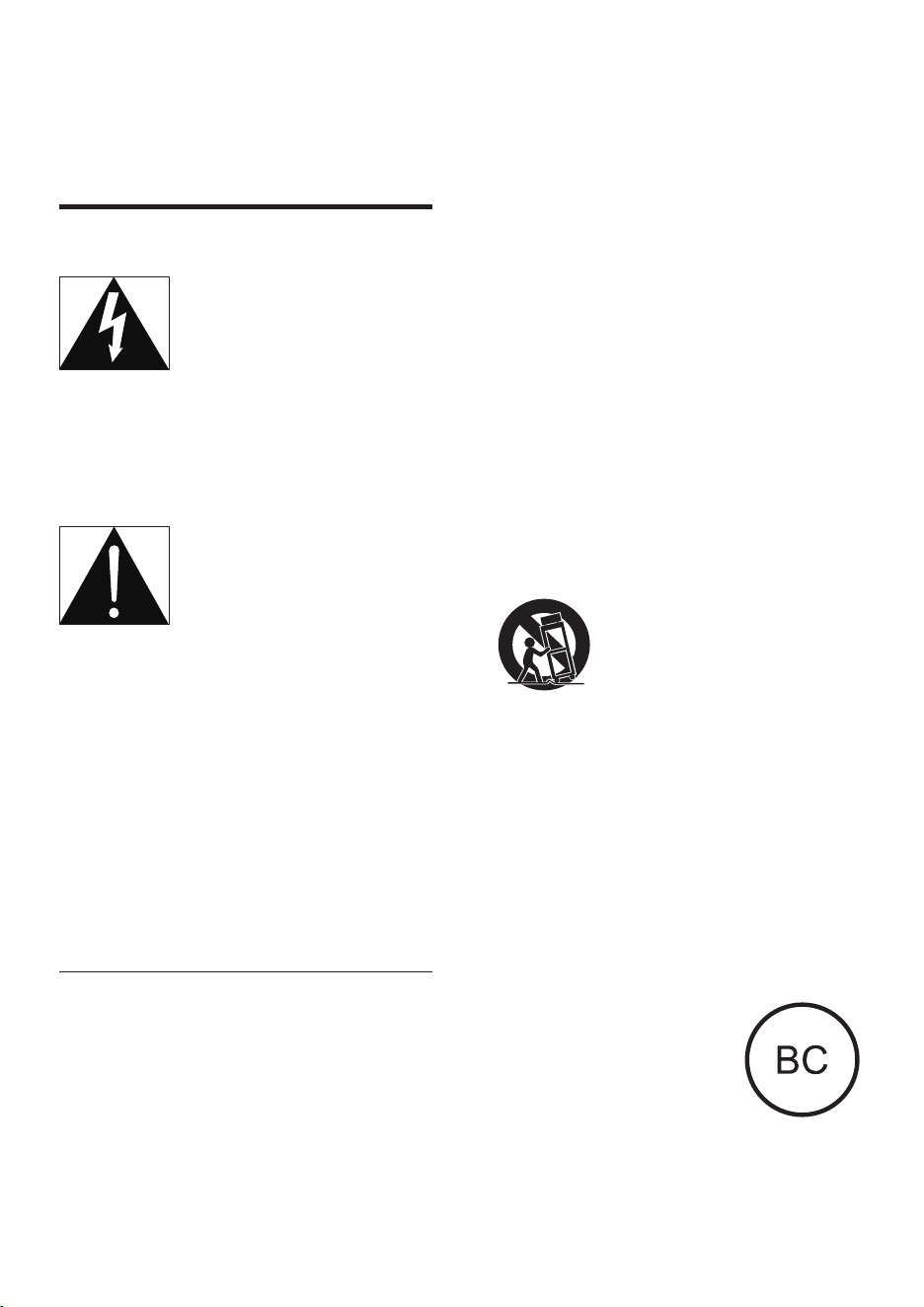
This 'bolt of lightning' indicates uninsulated
material within the device may cause an
electrical shock. For the safety of everyone in
your household, please do not remove the
covering.
The 'exclamation mark' calls attention to
features for which you should read the enclosed
literature closely to prevent operating and
maintenance problems.
WARNING:Toreducetheriskofreorelectric
shock, the device should not be exposed to rain
ormoistureandobjectslledwithliquids,such
as vases, should not be placed on the device.
CAUTION: To prevent electric shock, fully
insert the plug. (For regions with polarized
plugs: To prevent electric shock, match wide
blade to wide slot.)
Important Safety Instructions
a Read these instructions.
b Keep these instructions.
c Heed all warnings.
d Follow all instructions.
e Do not use this apparatus near water.
f Clean only with dry cloth.
g Do not block any ventilation openings.
Install in accordance with the
manufacturer's instructions.
h Do not install near any heat sources such
as radiators, heat registers, stoves, or
other apparatus (including ampliers) that
produce heat.
i Protect the power cord from being
walked on or pinched, particularly at
plugs, convenience receptacles, and the
point where they exit from the apparatus.
j Only use attachments/accessories
specied by the manufacturer.
k Use only with the cart, stand, tripod,
bracket, or table specied by the
manufacturer or sold with the apparatus.
When a cart is used, use caution when
moving the cart/apparatus combination to
avoid injury from tip-over.
l Unplug this apparatus during lightning
storms or when unused for long periods
of time.
m Only use the specied type of battery.
n Battery usage CAUTION – To prevent
battery leakage which may result in bodily
injury, property damage, or damage to
the unit:
• Install all batteries correctly, + and - as
marked on the unit.
• Do not mix batteries
(old and new or carbon
and alkaline, etc.).
• Remove batteries when
the unit is not used for
a long time.
• Batteries (battery pack or batteries
installed) shall not be exposed to

3EN
excessiveheatsuchassunshine,reor
the like.
o Refer all servicing to qualied service
personnel. Servicing is required when
the apparatus has been damaged in any
way, such as power-supply cord or plug
is damaged, liquid has been spilled or
objects have fallen into the apparatus, the
apparatus has been exposed to rain or
moisture, does not operate normally, or
has been dropped.
p Apparatus shall not be exposed to
dripping or splashing.
q Do not place any sources of danger on
the apparatus (e.g. liquid lled objects,
lighted candles).
r This product may contain lead and
mercury. Disposal of these materials
may be regulated due to environmental
considerations. For disposal or recycling
information, please contact your local
authorities or the Electronic Industries
Alliance: www.eiae.org.
s Where the MAINS plug or an applicance
coupler is used as the disconnect device,
the disconnect device shall remain readily
operable.
Risk of swallowing batteries!
• The product or remote control may
contain a button cell battery, which is
possible to be swallowed. Keep the battery
out of reach of children at all times! If
swallowed, the battery can cause serious
injury or death. Severe internal burns can
occur within two hours of ingestion.
• If you suspect that a battery has been
swallowed or placed inside any part of the
body, seek immediate medical attention.
• When you change the batteries, always
keep all new and used batteries out of
reach of children. Ensure that the battery
compartment is completely secure after
you replace the battery.
• If the battery compartment cannot be
completely secured, discontinue use of the
product. Keep out of reach of children and
contact the manufacturer.
Warning
• Never remove the casing of this apparatus.
• Never lubricate any part of this apparatus.
• Never place this apparatus on other electrical
equipment.
• Keep this apparatus away from direct sunlight, naked
amesorheat.
• Ensure that you always have easy access to the power
cord, plug or adaptor to disconnect the apparatus from
the power.
Notice
Anychangesormodicationsmadetothis
device that are not expressly approved by
Philips Consumer Lifestyle may void the user’s
authoritytooperatetheequipment.
Notice for the USA
This equipment has been tested and found
to comply with the limits for a Class B digital
device, pursuant to part 15 of the FCC Rules.
These limits are designed to provide reasonable
protection against harmful interference in a
residentialinstallation.Thisequipmentgenerates,
uses,andcanradiateradiofrequencyenergy
and, if not installed and used in accordance
with the instruction manual, may cause harmful
interference to radio communications.
However, there is no guarantee that
interference will not occur in a particular
installation.Ifthisequipmentdoescauseharmful
interference to radio or television reception,
which can be determined by turning the
equipmentoffandon,theuserisencouraged
to try to correct the interference by one or
more of the following measures:
• Relocate the receiving antenna.
• Increase the separation between
equipmentandreceiver.
4 EN
• Connecttheequipmentintoanoutleton
a circuit different from that to which the
receiver is connected.
• Consult the dealer or an experienced
radio/TV technician for help.
This device complies with Part 15 of the FCC
Rules and RSS standard of Industry Canada.
Operation is subject to the following two
conditions:
• this device may not cause harmful
interference, and
• this device must accept any interference
received, including interference that may
cause undesired operation.
RF Radiation Exposure Statement: This
equipmentcomplieswithFCC’sandIC’sRF
radiation exposure limits set forth for an
uncontrolled environment. The antenna(s)
used for this transmitter must be installed and
operated to provide a separation distance of
at least 20 cm from all persons and must not
be collocated or operating in conjunction with
any other antenna or transmitter. Installers must
ensure that 20cm separation distance will be
maintained between the device (excluding its
handset) and users.
Notice for Canada
This Class B digital apparatus complies with
Canadian ICES-003.
This device complies with Industry Canada
licence-exempt RSS standard(s): Operation
is subject to the following Two conditions:(1)
this device may not cause interference, and
(2) this device must accept any interference,
including interference that may cause undesired
operation of the device.
Disposal of your old product
Your product is designed and manufactured
withhighqualitymaterialsandcomponents,
which can be recycled and reused.
Never dispose of your product with other
household waste. Please inform yourself about
the local rules on the separate collection of
electrical and electronic products and batteries.
The correct disposal of these products helps
preventpotentiallynegativeconsequenceson
the environment and human health.
Please visit www.recycle.philips.com for
additional information on a recycling center in
your area.
Environmental information
All unnecessary packaging has been omitted.
We have tried to make the packaging easy to
separate into three materials: cardboard (box),
polystyrene foam (buffer) and polyethylene
(bags, protective foam sheet.)
Your system consists of materials which can
be recycled and reused if disassembled by a
specialized company. Please observe the local
regulations regarding the disposal of packaging
materials,andoldequipment.
The Bluetooth® word mark and logos are
registered trademarks owned by Bluetooth
SIG, Inc. and any use of such marks by Philips is
under license.
“Made for iPod,” “Made for iPhone,” and “Made
for iPad” mean that an electronic accessory
hasbeendesignedtoconnectspecicallyto
iPod, iPhone, or iPad, respectively, and has
beencertiedbythedevelopertomeet
Apple performance standards. Apple is not
responsible for the operation of this device
or its compliance with safety and regulatory
standards. Please note that the use of this
accessory with iPod, iPhone, or iPad may affect
wireless performance.
iPod and iPhone are trademarks of Apple Inc.,
registered in the U.S. and other countries. iPad
is a trademark of Apple Inc.
Note
• The type plate is located on the bottom of the product.
5EN
2 Your Docking
Entertainment
System
Congratulations on your purchase, and
welcometoPhilips!Tofullybenetfromthe
support that Philips offers, register your product
at www.philips.com/welcome.
Introduction
With this unit, you can enjoy audio from the
iPod/iPhone/iPad and other audio devices.
What's in the box
Check and identify the contents of your
package:
• Main unit
• Remote control
• 1 x AC adaptor
• 1 x AC power cord
• Short User manual
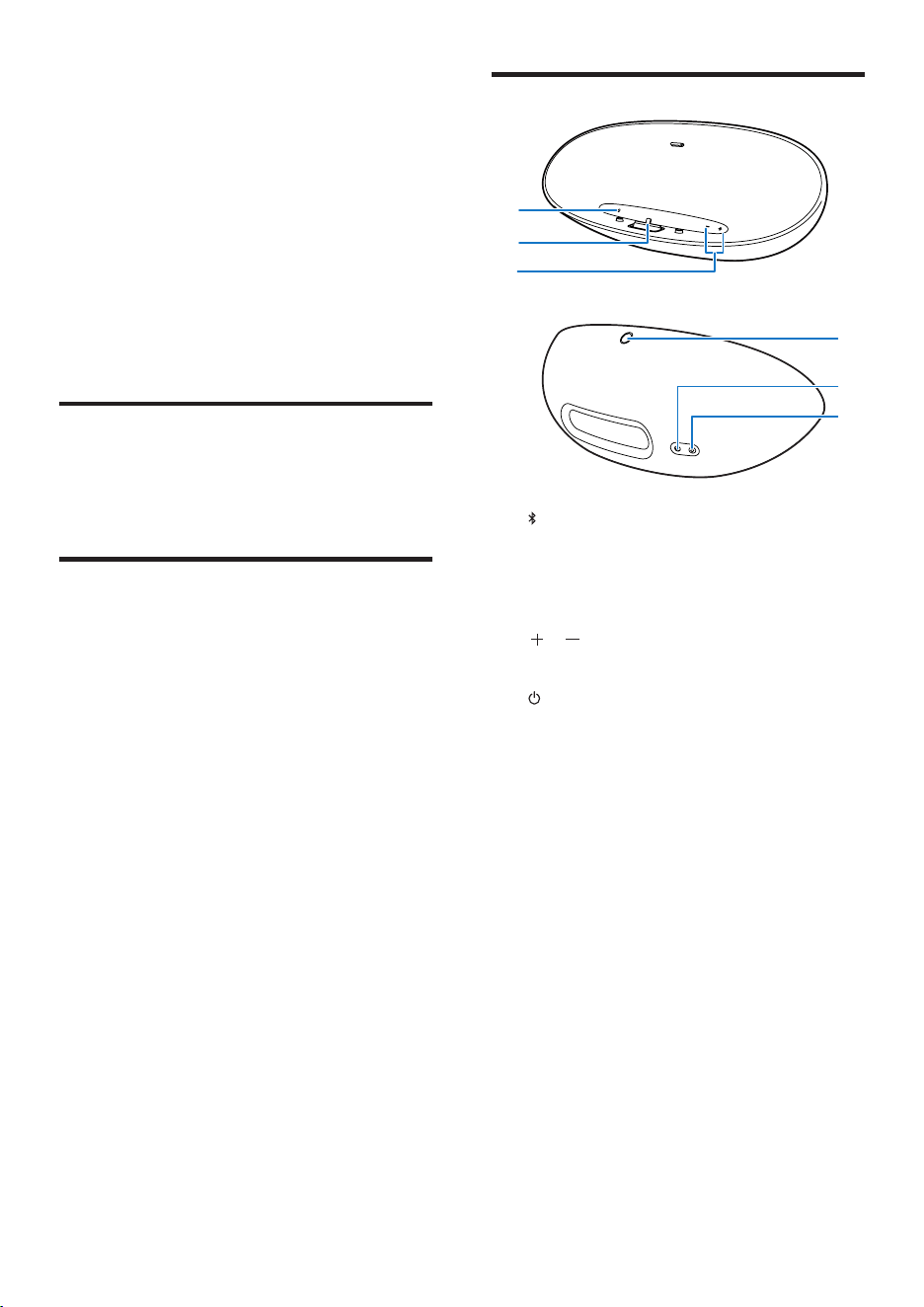
Overview of the main unit
a
• Select Bluetooth mode
• Pair with Bluetooth device.
b iPod/iPhone/iPad dock
c /
• Adjust volume.
d
• Turn on the unit.
e Power supply socket
f AUDIO IN
• Jack for an external audio device.
d
e
f
a
b
c
6 EN
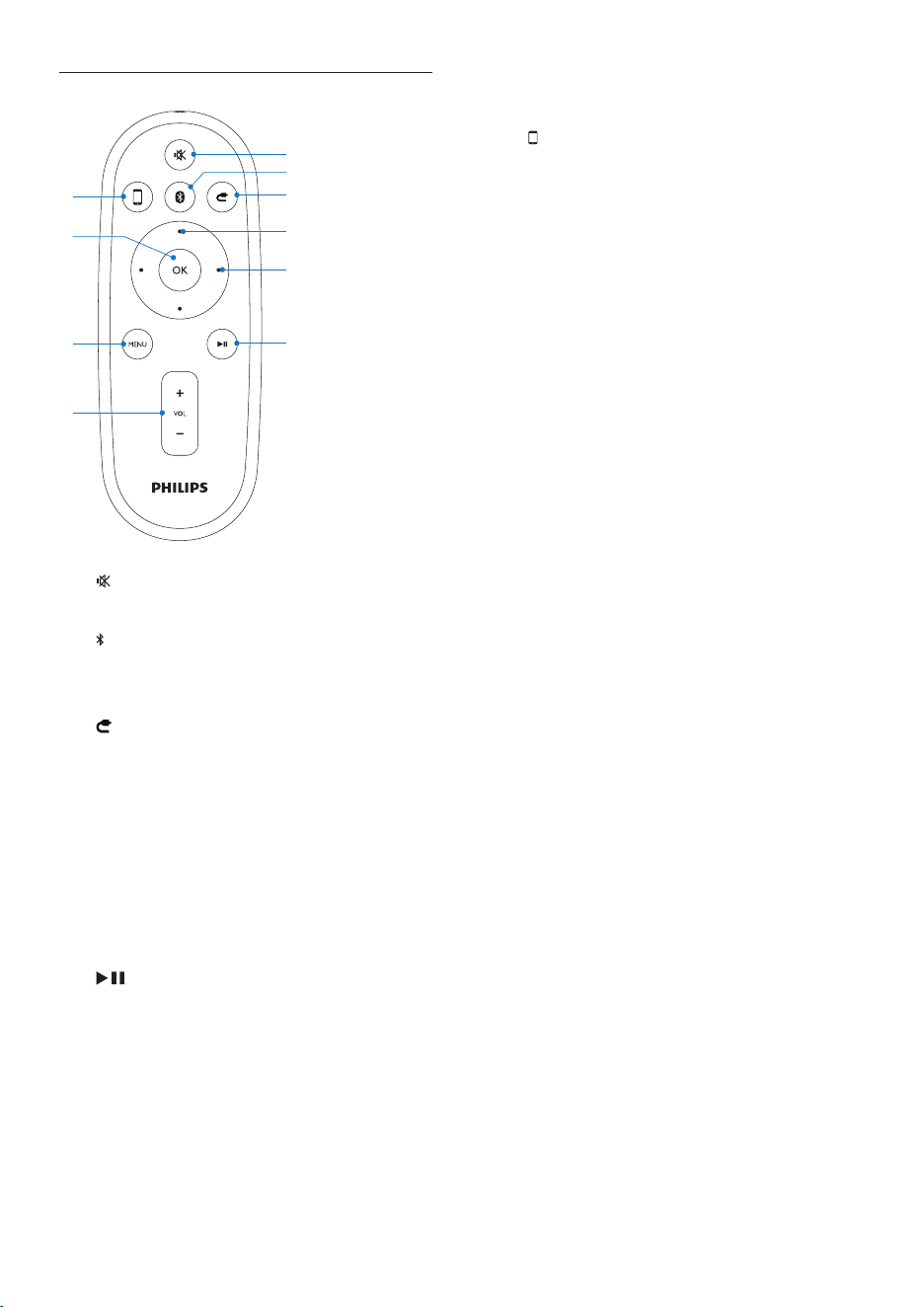
Overview of the remote control
a
• Mute or restore volume.
b
• Select Bluetooth mode
• Pair with Bluetooth device.
c
• Select audio-in mode
d Up/down keys
• Navigate through the iPod/iPhone
menu.
e Fast forward/backward keys
• Fast reverse or fast forward within a
track or iPhone/iPod/iPad.
• Skip to the previous/next track.
f
• Start or pause play.
g VOL +/-
• Adjust volume.
h MENU
• Access the iPod/iPhone menu.
j
h
g
i
a
f
e
c
b
d
i OK
• Conrmaselection.
j
• Select iPod/iPhone/iPad dock mode.
7EN
3 Get started
Caution
• Use of controls or adjustments or performance of
procedures other than herein may result in hazardous
radiation exposure or other unsafe operation.
Always follow the instructions in this chapter in
sequence.
If you contact Philips, you will be asked for the
model and serial number of this apparatus. The
model number and serial number are on the
bottom of the apparatus. Write the numbers
here:
Model No. __________________________
Serial No. ___________________________
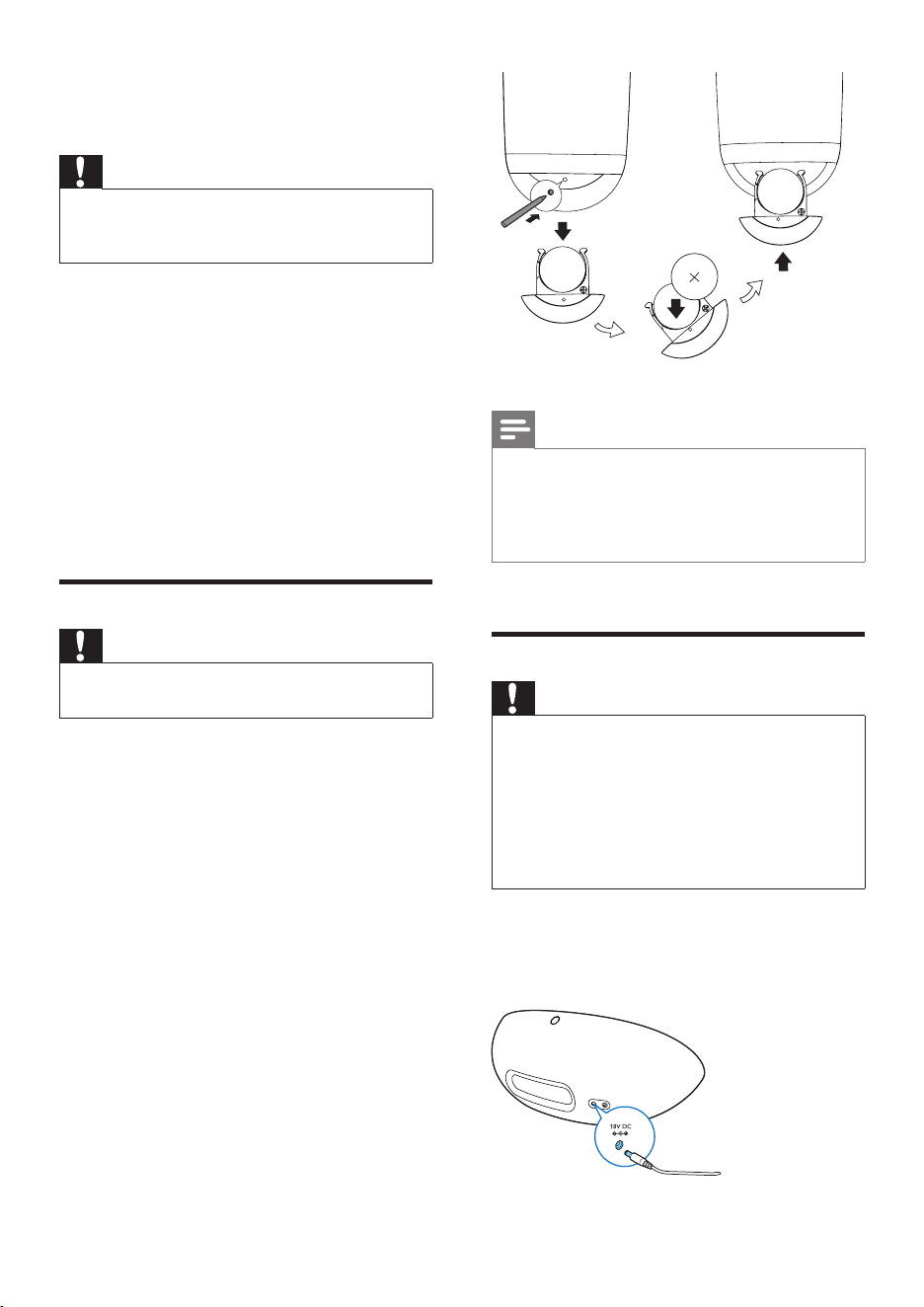
Prepare the remote control
Caution
• Risk of explosion! Keep batteries away from heat,
sunshineorre.Neverdiscardbatteriesinre.
For rst-time use:
1 Remove the protective tab to activate the
remote control battery.
To replace the remote control battery:
1 Press the hole with the tip of a ball-point
pen or a sharp tool to open the battery
compartment.
2 Insert one CR2025 battery with correct
polarity (+/-) as indicated.
3 Close the battery compartment.
Note
• Before pressing any function button on the remote
control,rstselectthecorrectsourcewiththeremote
control instead of the main unit.
• If you are not going to use the remote control for a
long time, remove the battery.
Connect power
Caution
• Risk of product damage! Ensure that the power supply
voltage corresponds to the voltage printed on the
bottom of the unit.
• Risk of electric shock! When you unplug the AC
adaptor, always pull the plug from the socket. Never
pull the cord.
• Before connecting the AC adaptor, ensure you have
completed all other connections.
1 Insert the plug of the AC adaptor to the
DC IN socket on the back of the charge
base.
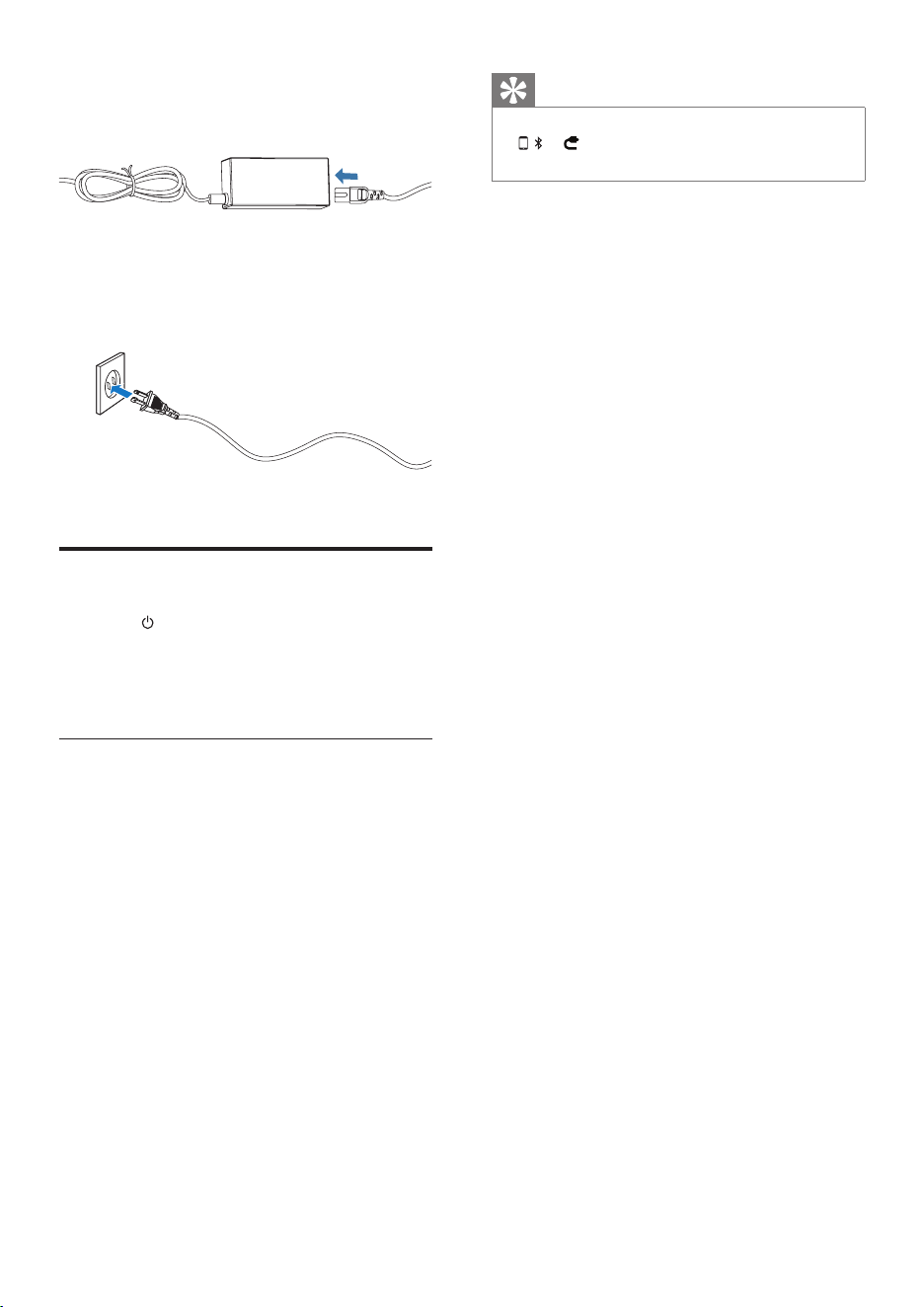
8 EN
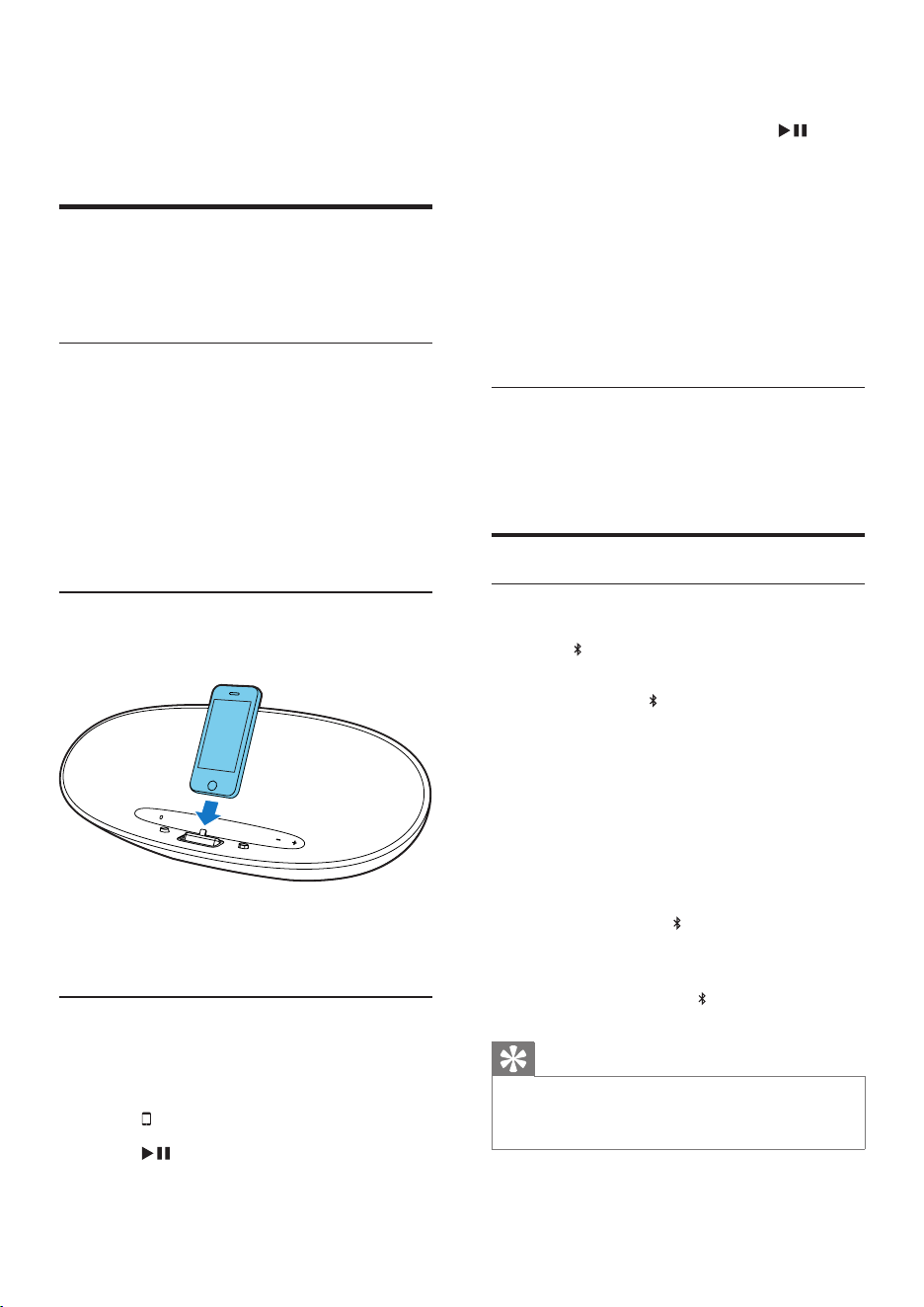
2 Connect one end of the AC power cord
to the AC adaptor.
3 Connect the other end of the AC power
cord to the wall outlet.
Turn on
1 Press on the main unit.
» When user approaches the unit, light
LED under volume button on the main
unit turns on automatically.
Switch to ECO standby
The unit switches to standby mode
automatically, when:
• In DOCK mode: the iPod/iPhone/iPad
is disconnected from the unit.
• In Audio-in mode: the device no
longer playing music for more than 15
minutes.
• In Bluetooth mode: the Bluetooth
device no longer playing music for
more than 15 minutes.
When the unit is in standby mode for longer
than 15 minutes, the unit switches to ECO
power mode automatically.
Tip
• Under ECO/standby mode, press
, or on the remote control, the unit will switch
on to the corresponding selected source.
9EN
4 Play
Play from iPod/iPhone/iPad
You can enjoy audio from iPod/iPhone/iPad
through this unit.
Compatible iPod/iPhone/iPad
Apple iPod, iPhone and iPad models with a
lightning dock connector. Made for :
• iPod nano (7th generation)
• iPod touch (5th generation)
• iPhone 5
• iPad Mini
• iPad 4
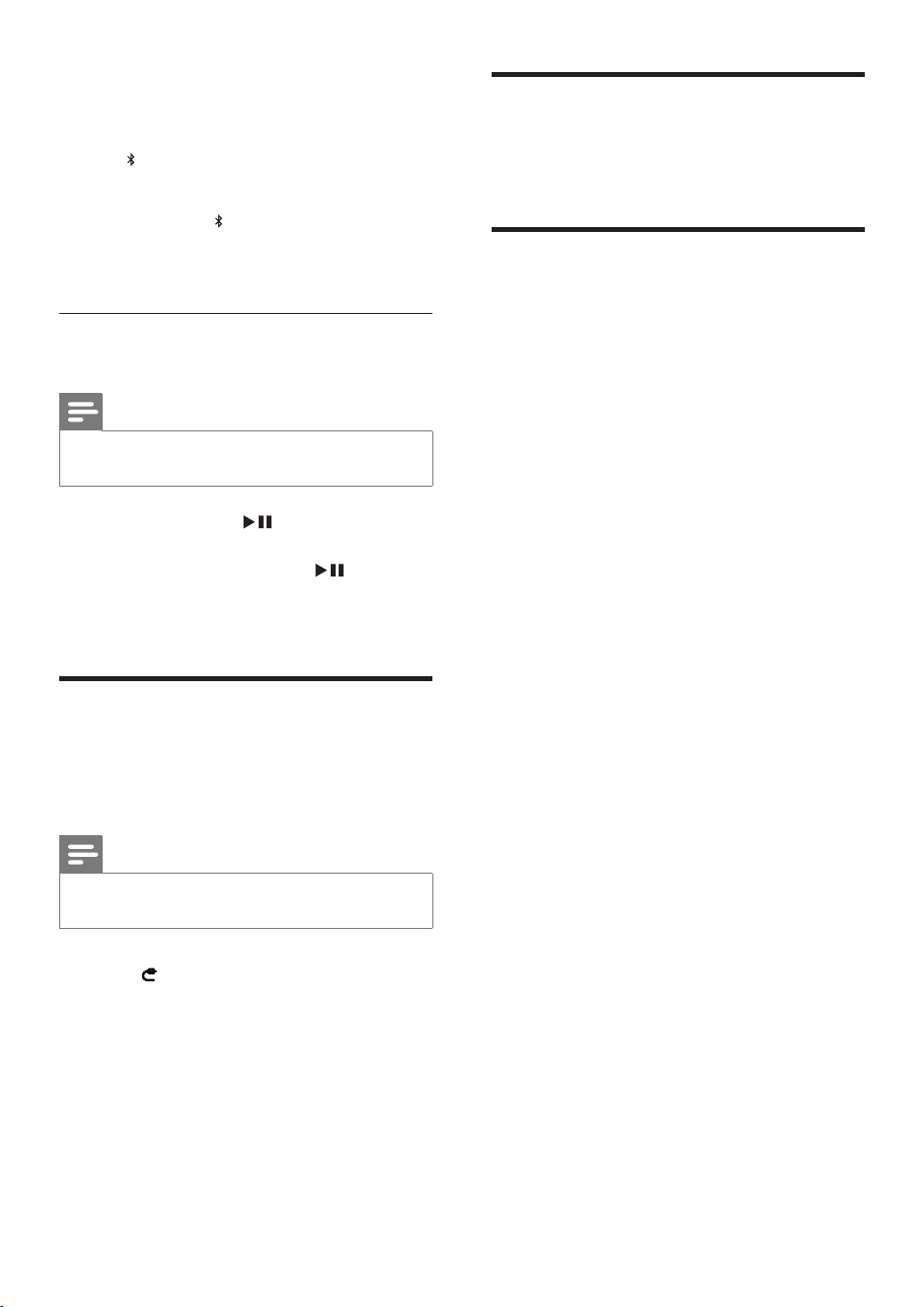
Load the iPod/iPhone/iPad
1 Place the iPod/iPhone/iPad in the dock.
Remove the iPod/iPhone/iPad
1 Pull the iPod/iPhone/iPad out of the dock.
Listen to the iPod/iPhone/iPad
1 Ensure that the iPod/iPhone/iPad is loaded
correctly.
2 Press to select dock mode.
3 Press .
» The connected iPod/iPhone/iPad starts
play.
• To pause/resume play, press .
• To skip to a track, press fast forward/
backward keys.
• To search during play, press and hold
fast forward/backward keys, then
release to resume normal play.
• To navigate the menu, press MENU,
then press up/down keysto select, and
press OKtoconrm.(foriPodand
iPhone only)
Charge the iPod/iPhone/iPad
When the unit is connected to power, the
docked iPod/iPhone/iPad begins to charge.
Play from Bluetooth device
Pair with Bluetooth deivces
1 Press to select Bluetooth source.
» Paring starts automatically.
» LED under button on the main unit
ashesrapidly.
2 Turn on Bluetooth function on your device.
3 Search for Bluetooth devices that can pair
with your device.
4 When “PHILIPS DS8300” displays, select it
to start connection.
» Doublebeeptoneconrmationis
heard and the LED turns on stably if
connection is successful.
» If the pairing cannot be completed
within 15 minute, LED turns off.
Tip
• If your Bluetooth device is already paired with DS8300
before,youjustneedtondoutthe“PHILIPSDS8300”
onyourBluetoothmenu,thenconrmtheconnection.
10 EN
• To disconnect Bluetooth
1 Turn off the connected device or move it
beyond the communication range.
» LEDashes.
• To erase Bluetooth paring information
1 Press and hold for 5 seconds.
» The unit beeps once after paring
information is cleared successfully.
Play audio les from Bluetooth
devices
Note
• Make sure the Bluetooth connection between the unit
and the device is active.
• To start play, press on the remote
control.
• To pause/resume play, press again.
• To track up/down, press forward/backward
keys.
Play from an external device
With this docking speaker, you can also enjoy
audio from an external device such as an MP3
player.
Note
• Make sure that no iPod/iPhone/iPad is docked in the
speaker.
1 Press to select audio-in mode.
2 Connect the supplied audio-in cable to:
• the AUDIO IN jack (3.5mm) on the
back of the unit.
• the headphone jack on an external
device.
3 Start to play the device (see the device
user manual).
Adjust volume level
1 During play, press VOL +/- to increase/
decrease the volume level.
Mute sound
1 During play, press MUTE to mute/unmute
sound.
11EN
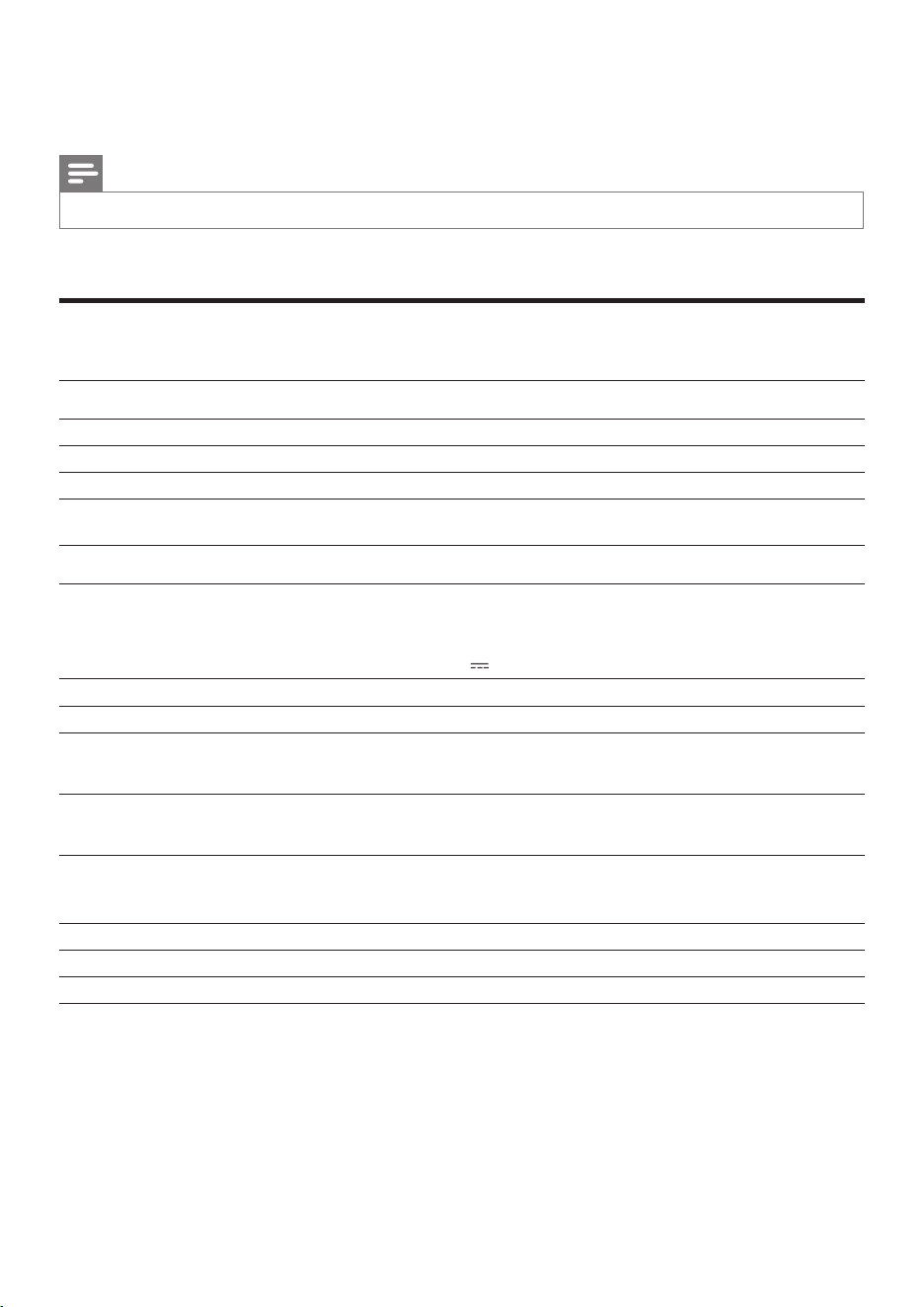
5 Product information
Note
• Product information is subject to change without prior notice.
Specications
Amplier
Rated Output Power 2X15 W RMS
Signal to Noise Ratio 65 dBA
Audio-in Link 0.6 V RMS 10 kohm
General information
AC power (power adaptor) OH-1048A1802500U-U
Input: 100-240V~, 50/60Hz, 1.5A MAX;
Output: 18V 2.5A;
Operation Power Consumption <40W
ECO Standby Power Consumption <0.5W
Dimensions
- Main Unit (W x H x D) 443.9 x 166.7 x 180.3mm
Weight
- Main Unit 1.90 kg
Bluetooth
Frequencyband 2.4000 GHz - 2.4835 GHz ISM Band
Range 8 meters(free space)
Standard Bluetooth 2.1 + EDR

12 EN
6 Troubleshooting
Warning
• Never remove the casing of this apparatus.
To keep the warranty valid, never try to repair
the system yourself.
If you encounter problems when using this
apparatus, check the following points before
requestingservice.Iftheproblemremains
unsolved, go to the Philips web site (www.
philips.com/welcome). When you contact
Philips, ensure that the apparatus is nearby
and the model number and serial number are
available.
No power
• Ensure that the AC power plug of the unit
is connected properly.
• Ensure that there is power at the AC
outlet.
No sound
• Adjust the volume.
No response from the unit
• Disconnect and reconnect the AC power
plug, then turn on the unit again.
About Bluetooth device
Music playback is unavailable on the system
even after successful Bluetooth connection.
• The device cannot be used with the
system to play music.
The audio quality is poor after connection
with a Bluetooth-enabled device.
• The Bluetooth reception is poor. Move
the device closer to the system or remove
any obstacle between the device and the
system.
Cannot connect with the system.
• Thedevicedoesnotsupporttheproles
requiredforthesystem.
• The Bluetooth function of the device is not
enabled. Refer to the user manual of the
device for how to enable the function.
• The system is not in the pairing mode.
• The system is already connected with
another Bluetooth-enabled device.
Disconnect that device or all other
connected devices and then try again.
The paired device connects and disconnects
constantly.
• The Bluetooth reception is poor. Move
the device closer to the system or remove
any obstacle between the device and the
system.
• For some devices, the Bluetooth
connection may be deactivated
automatically as a power-saving feature.
This does not indicate any malfunction of
the system.

13EN
PHILIPS LIMITED WARRANTY
ONE (1) YEAR
WARRANTY COVERAGE:
PHILIPS warranty obligation is limited to the terms set forth
below.
WHO IS COVERED:
Philips warrants the product to the original purchaser or the per-
son receiving the product as a gift against defects in materials and
workmanship as based on the date of original purchase
(“Warranty Period”) from an Authorized Dealer. The original
sales receipt showing the product name and the purchase date
from an authorized retailer is considered such proof.
WHAT IS COVERED:
The Philips warranty covers new products if a defect in material
or workmanship occurs and a valid claim is received by Philips
within the Warranty Period. At its option, Philips will either (1)
repair the product at no charge, using new or refurbished
replacement parts, or (2) exchange the product with a product
that is new or which has been manufactured from new, or ser-
viceable used parts and is at least functionally equivalent or most
comparable to the original product in Philips current inventory,
or (3) refund the original purchase price of the product.
Philips warrants replacement products or parts provided under
this warranty against defects in materials and workmanship from
the date of the replacement or repair for ninety (90) days or for
the remaining portion of the
original product’s warranty,
whichever provides longer coverage for you. When a product or
part is exchanged, any replacement item becomes your property
and the replaced item becomes Philips’ property. When a refund
is given, your product becomes Philips’ property.
Note: Any product sold and identified as refurbished or
renewed carries a ninety (90) day limited warranty.
Replacement product can only be sent if all warranty
requirements are met. Failure to follow all requirements
can result in delay.
WHAT IS NOT COVERED - EXCLUSIONS AND
LIMITATIONS:
This Limited Warranty applies only to the new products manu-
factured by or for Philips that can be identified by the trademark,
trade name, or logo affixed to it. This Limited Warranty does not
apply to any non-Philips hardware product or any software, even
if packaged or sold with the product. Non-Philips manufacturers,
suppliers, or publishers may provide a separate warranty for their
own products packaged with the bundled product.
Philips is not liable for any damage to or loss of any programs,
data, or other information stored on any media contained within
the product, or any non-Philips product or part not covered by
this warranty. Recovery or reinstallation of programs, data or
other information is not covered under this Limited Warranty.
This warranty does not apply (a) to damage caused by accident,
abuse, misuse,
neglect, misapplication, or non-Philips product, (b)
to damage caused by service performed by anyone other than
Philips or Philips Authorized Service Location, (c) to a product
or
a part that has been modified without the written permission of
Philips, or (d) if any Philips serial number has been removed or
defaced, or (e) product, accessories or consumables sold “AS IS”
without warranty of any kind by including refurbished Philips
product sold “AS IS” by some retailers.
This Limited Warranty does not cover:
• Shipping charges to return defective product to Philips.
• Labor charges for installation or setup of the product, adjust-
ment of customer controls on the product, and installation or
repair of antenna/signal source systems outside of the product.
• Product repair and/or part replacement because of improper
installation or maintenance, connections to improper voltage
supply, power line surge, lightning damage, retained images or
screen markings resulting from viewing fixed stationary con-
tent for extended periods, product cosmetic appearance items
due to normal wear and tear, unauthorized repair or other
cause not within the control of Philips.
• Damage or claims for products not being available for use, or
for lost data or lost software.
• Damage from mishandled shipments or transit accidents when
returning product to Philips.
• A product that requires modification or adaptation to enable
it to operate in any country other than the country for which
it was designed, manufactured, approved and/or authorized, or
repair of
products damaged by these modifications.
• A product used for commercial or institutional purposes
(including but not limited to rental purposes).
• Product lost in shipment and no signature verification receipt
can be provided.
• Failure to operate per Owner’s Manual.
TO OBTAIN ASSISTANCE IN THE U.S.A., CANADA,
PUERTO RICO, OR U.S. VIRGIN ISLANDS…
Contact Philips Customer Care Center at:
1-866-309-0845
REPAIR OR REPLACEMENT AS PROVIDED UNDER THIS
WARRANTY IS THE EXCLUSIVE REMEDY FOR THE CON-
SUMER. PHILIPS SHALL NOT BE LIABLE FOR ANY INCIDEN-
TAL OR CONSEQUENTIAL DAMAGES FOR BREACH OF
ANY EXPRESS OR IMPLIED WARRANTY ON THIS PROD-
UCT. EXCEPT TO THE EXTENT PROHIBITED BY APPLICABLE
LAW, ANY IMPLIED WARRANTY OF MERCHANTABILITY OR
FITNESS FOR A PARTICULAR PURPOSE ON THIS PRODUCT
IS LIMITED IN DURATION TO THE DURATION OF THIS
WARRANTY.
Some states do not allow the exclusions or limitation of inciden-
tal or consequential damages, or allow limitations on how long an
implied warranty lasts, so
the above limitations or exclusions may
not apply to you.
This warranty gives you specific legal rights. You may have other rights which vary from state/province to state/province.
3140 035 51091
P&F USA, Inc. PO Box 2248, Alpharetta, GA 30023-2248

P&F USA Inc.
PO Box 2248
Alpharetta, GA 30023-2248
Phone 1 866 309 0845
Specifications are subject to change without notice
© 2013 Koninklijke Philips Electronics N.V.
All rights reserved.
DS8300_37_UM_V1.1