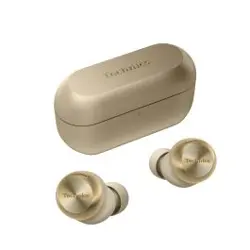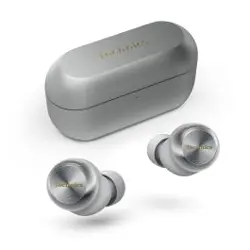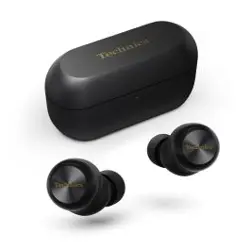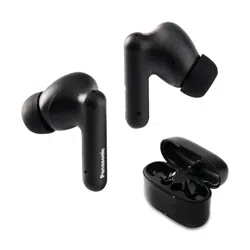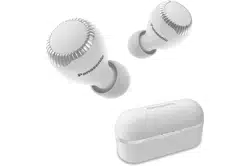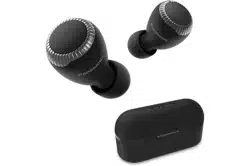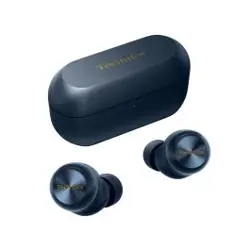

Owner’s Manual
Welcome!
Welcome! ....................................................4
Quick start guide
Quick start ..................................................5
Let’s Get Started
Part names and functions .......................14
EAH-AZ100 ................................................14
EAH-AZ80 ..................................................16
EAH-AZ60M2 .............................................18
EAH-AZ40M2 .............................................20
Status Indicator LEDs ................................21
Charge .......................................................23
Charging .....................................................23
Charge the earphones and charging cradle at
the same time .............................................24
Charge only the charging cradle ................26
Charge only the earphones ........................26
Charge wirelessly (EAH-AZ100/EAH-AZ80/
EAH-AZ60M2) ............................................27
Turn the earphones on/off .......................28
EAH-AZ100 ................................................28
EAH-AZ80/EAH-AZ60M2/EAH-AZ40M2 ....29
Wear the earphones .................................29
EAH-AZ100 ................................................29
EAH-AZ80 ..................................................30
EAH-AZ60M2/EAH-AZ40M2 ......................31
For better sound (Change earpieces) ....31
EAH-AZ100 ................................................31
EAH-AZ80/EAH-AZ60M2/EAH-AZ40M2 ....33
Pair for the first time ................................34
Use the app to pair with a Bluetooth
®
device .........................................................34
Pair with a Bluetooth
®
device without the
app .............................................................35
Pair a subsequent device ........................35
Use the app to pair the earphones with a
subsequent Bluetooth
®
device ...................35
Pair the earphones with a subsequent
Bluetooth
®
device without the app .............36
Convenient Function
Listen to music .........................................38
Talk ............................................................38
Use only one earphone ............................39
Use external sound control .....................39
Activate voice assistant features ...........40
Establish multi-point connections .........40
Use the touch sensors .............................41
Use the app ...............................................43
Launch the app ..........................................43
Home screen ..............................................44
Set external sound control .........................47
Set sound enhancement ............................50
Play a sound to find the headphones .........51
Use location services to find the
headphones ...............................................52
Check Voice Focus AI (EAH-AZ100) .........52
Check JustMyVoice (EAH-AZ80/EAH-
AZ60M2) ....................................................52
Usage Guide (EAH-AZ100) ........................52
Set the language, messages, and
screen ........................................................53
Selecting the best earpiece for Active Noise
Cancelling (EAH-AZ100/EAH-AZ80/EAH-
AZ60M2) ....................................................53
Add/change/find headphones ....................54
Set auto power off ......................................54
Set the headphone fitting sensor (EAH-AZ100/
EAH-AZ80/EAH-AZ60M2) ..........................54
About LE Audio (EAH-AZ100) ....................55
About Auracast™ (EAH-AZ100) ................55
Use LDAC ..................................................56
Select a connection mode ..........................56
Use multi-point ...........................................57
Set the operation during multi-point connection
(EAH-AZ100) ..............................................57
Suppress sound interruptions and
delays .........................................................57
Spatial Audio (EAH-AZ100) .......................57
Disable the touch sensors ..........................58
Customize the touch sensors .....................58
Customize external sound control
switching ....................................................60
Select an ambient mode ............................61
Optimize noise cancelling (EAH-AZ100/EAH-
AZ80/EAH-AZ60M2) ..................................61
Voice Focus AI settings (EAH-AZ100) .......61
One-touch Conversation Mode (EAH-
AZ100) .......................................................62
2
Table of Contents

Select a level of background noise reduction
(EAH-AZ80/EAH-AZ60M2/EAH-
AZ40M2) ....................................................62
Voice assistant (EAH-AZ100) ....................63
Select a voice assistant (EAH-AZ80/EAH-
AZ60M2/EAH-AZ40M2) .............................63
Set maintenance notifications ....................63
Reset the app .............................................63
Reset the headphones to factory
settings .......................................................63
Firmware updates ......................................64
Help ............................................................64
FAQ
Troubleshooting .......................................65
FAQ for the smartphone app (Technics
Audio Connect) ........................................70
Reset to factory settings .........................75
EAH-AZ100 ................................................75
EAH-AZ80/EAH-AZ60M2/EAH-AZ40M2 ....75
Maintenance .............................................76
Maintenance ...............................................76
Clean the earpieces ...................................77
Clean the charging terminals of the
earphones ..................................................80
Clean the charging cradle terminal
section ........................................................80
Specifications ...........................................81
EAH-AZ100 ................................................81
EAH-AZ80/EAH-AZ60M2 ...........................83
EAH-AZ40M2 .............................................85
Other Information
About Bluetooth
®
.....................................87
About water resistance ............................87
Disposal of Old Equipment and Batteries
(Only for European Union and countries
with recycling systems) ...........................88
Ecodesign Information ............................89
EAH-AZ100 ................................................89
EAH-AZ80 ..................................................91
EAH-AZ40M2 .............................................93
About this document
3
Table of Contents
Welcome!
Thank you for purchasing this product.
4
Welcome!
Quick start
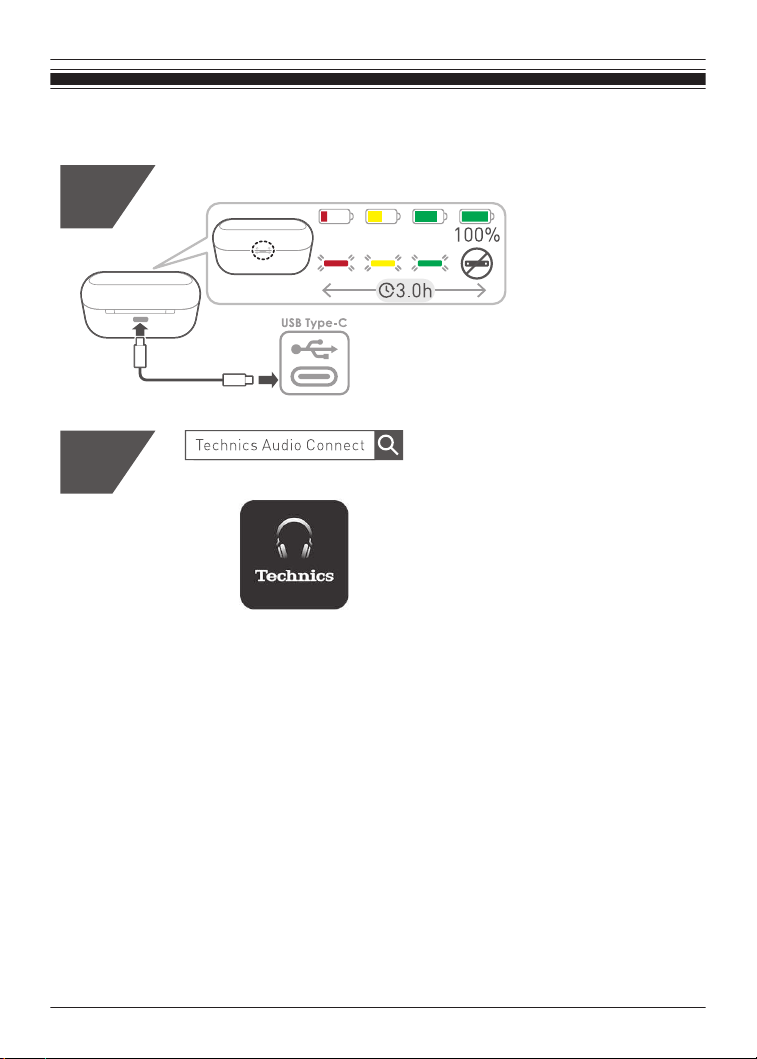
The illustrations use EAH-AZ60M2 as an example.
1
2
{{"Google Play"|tolink("https://play.google.com/store/apps/details?
id=com.panasonic.technicsaudioconnect")}}
5
Quick start guide
{{"Apple Store"|tolink("https://itunes.apple.com/app/id1498029651")}}
3
EAH-AZ100
6
Quick start guide
EAH-AZ80
EAH-AZ60M2
EAH-AZ40M2
7
Quick start guide
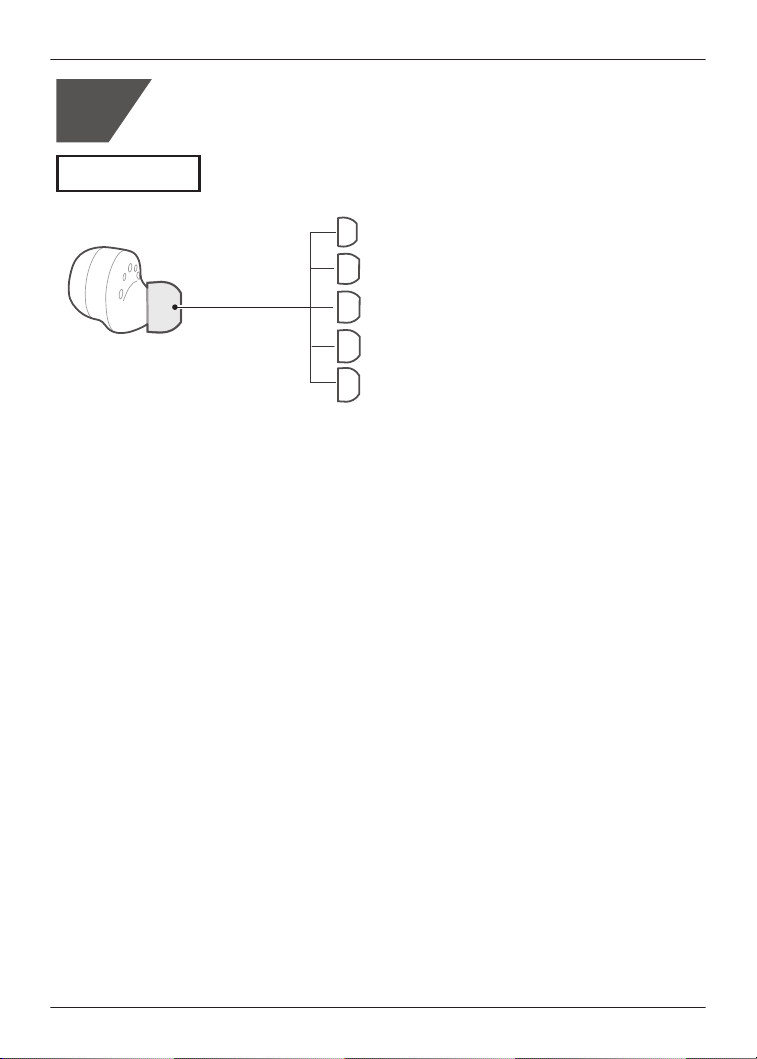
XS
S
M
ML
L
EAH-AZ100
4
8
Quick start guide
$
5
3
%
$
$
%
2
%
%
$
$
$
%
1
$
%
&
'
&
'
4
$
'
&
9
Quick start guide
EAH-AZ80
EAH-AZ60M2
EAH-AZ40M2
10
Quick start guide
1st
5
*1
*1 From the Bluetooth
®
menu in the Bluetooth
®
device, select the earphones.
EAH-AZ100: Technics EAH-AZ100
EAH-AZ80: Technics EAH-AZ80
EAH-AZ40M2: Technics EAH-AZ40M2
11
Quick start guide
2nd
Press
for 5~8 s
*1
*1 From the Bluetooth
®
menu in the Bluetooth
®
device, select the earphones.
EAH-AZ100: Technics EAH-AZ100
EAH-AZ80: Technics EAH-AZ80
EAH-AZ40M2: Technics EAH-AZ40M2
12
Quick start guide
*1
6
*1 This function is not available on the EAH-AZ100 ( ).
13
Quick start guide
Part names and functions
EAH-AZ100
Earphones
1
5
7
2
4
1
7
3
4
6
6
L
R
1. Microphones for calls/Microphones for noise cancelling
2. Touch sensor (L) (left)
R Operate the earphone by touching.
3. Touch sensor (R) (right)
R Operate the earphone by touching.
4. Charging terminals
5. Raised dot indicating the L side
R Indicates the left earphone.
6. Wear sensors
R Detects whether earphones are worn and pauses/resumes music accordingly.
7. Earpieces
R Select the size with the best audio quality and comfort.
14
Let’s Get Started
Charging cradle
4
6
1
3
3
5
2
1. Charging cradle lid
2. Rating
R Displays the model number.
3. Terminal section
4. Charging terminal
R Use when charging with the USB charging cord.
5. Qi charging contact
R Use when charging with a separately sold Qi standard certified wireless charger.
6. LED
R Indicates the status of the charging cradle and earphones.
“Status Indicator LEDs”, Page 21
15
Let’s Get Started
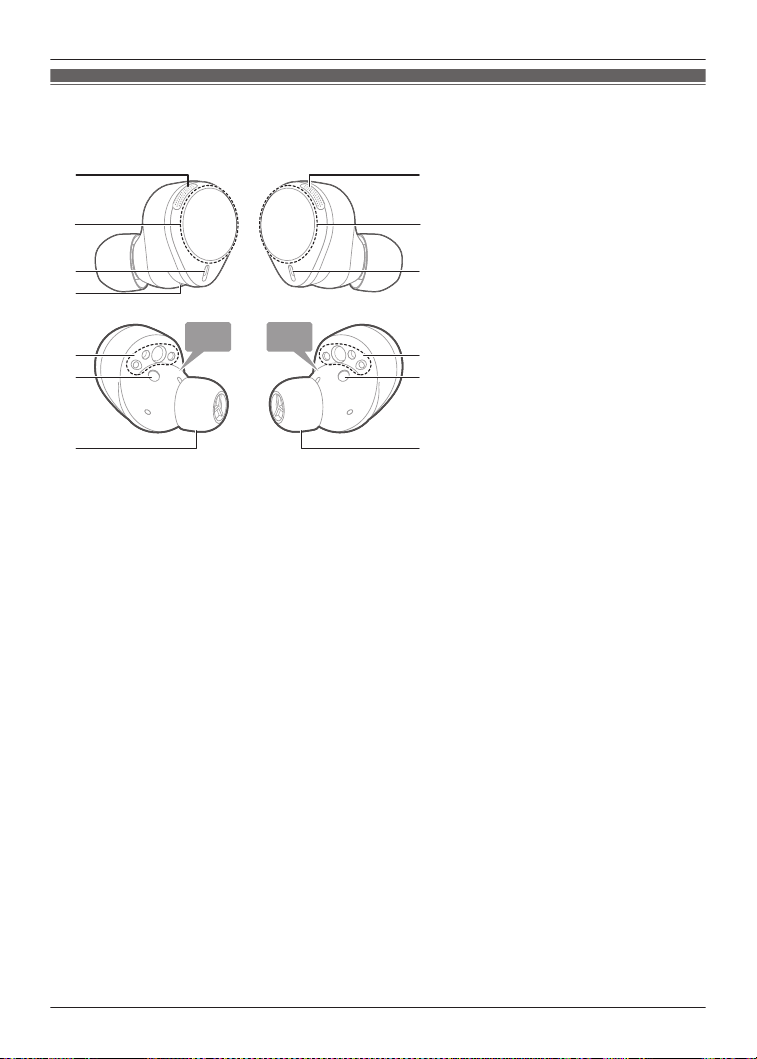
EAH-AZ80
Earphones
1
5
7
2
4
1
7
3
4
L
R
8
6
8
6
1. Microphones for noise cancelling
2. Touch sensor (L) (left)
R Operate the earphone by touching.
3. Touch sensor (R) (right)
R Operate the earphone by touching.
4. Microphones for calls
5. Raised dot indicating the L side
R Indicates the left earphone.
6. Charging terminals
7. Earpieces
R Select the size with the best audio quality and comfort.
8. Wear sensors
R Detects whether earphones are worn and pauses/resumes music accordingly.
16
Let’s Get Started
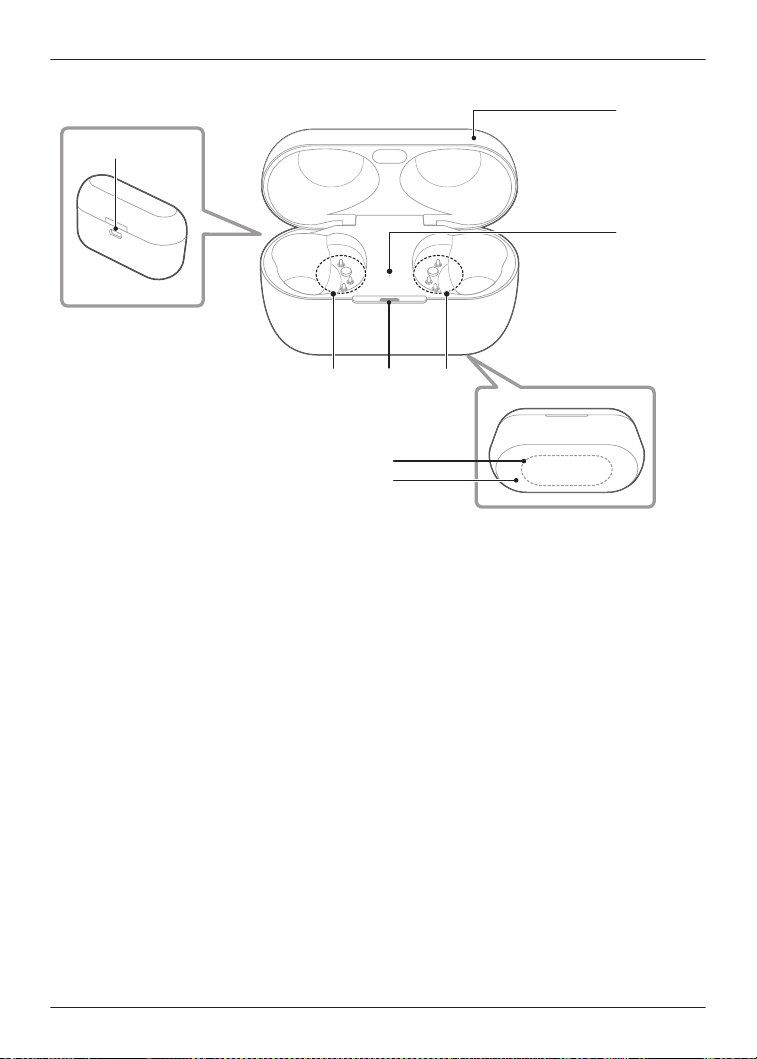
Charging cradle
6
43
1
3
5
7
2
1. Charging cradle lid
2. Rating
R Displays the model number.
3. Terminal section
4. Charging cradle status indicator LED
R Indicates the status of the charging cradle.
“Status Indicator LEDs”, Page 21
5. Earphone status indicator LED
R Indicates the status of the earphones when they are in the charging cradle.
(No LEDs on the earphones)
“Status Indicator LEDs”, Page 21
6. Charging terminal
R Use when charging with the USB charging cord.
7. Qi charging contact
R Use when charging with a separately sold Qi standard certified wireless charger.
17
Let’s Get Started
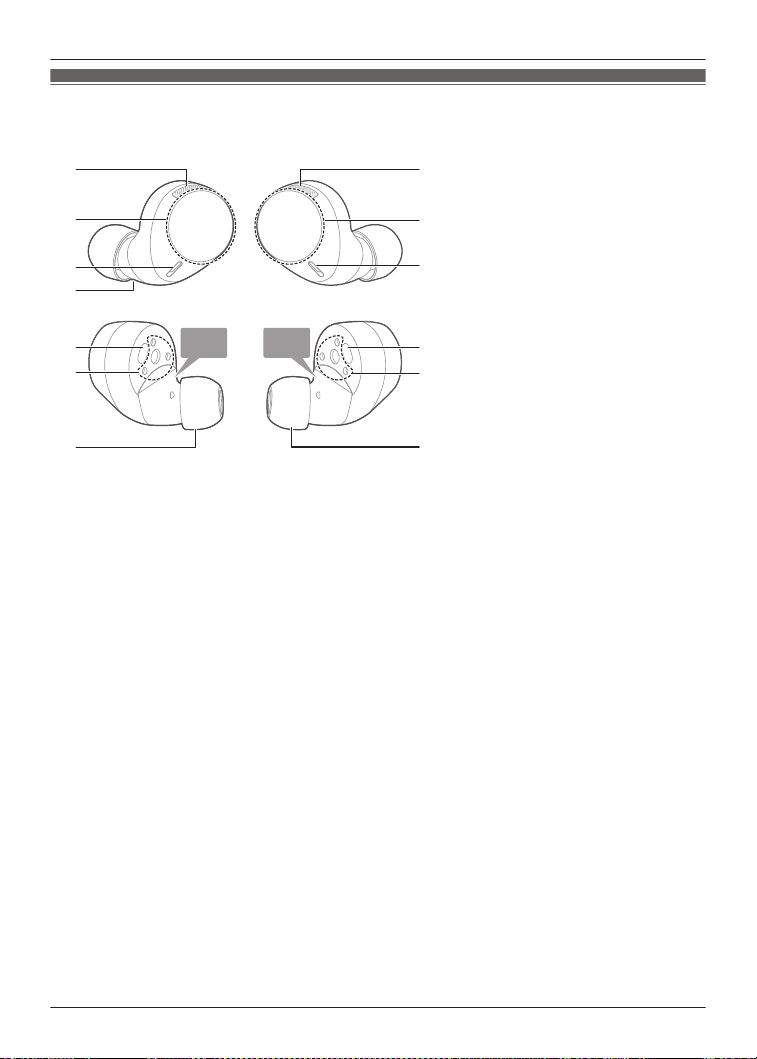
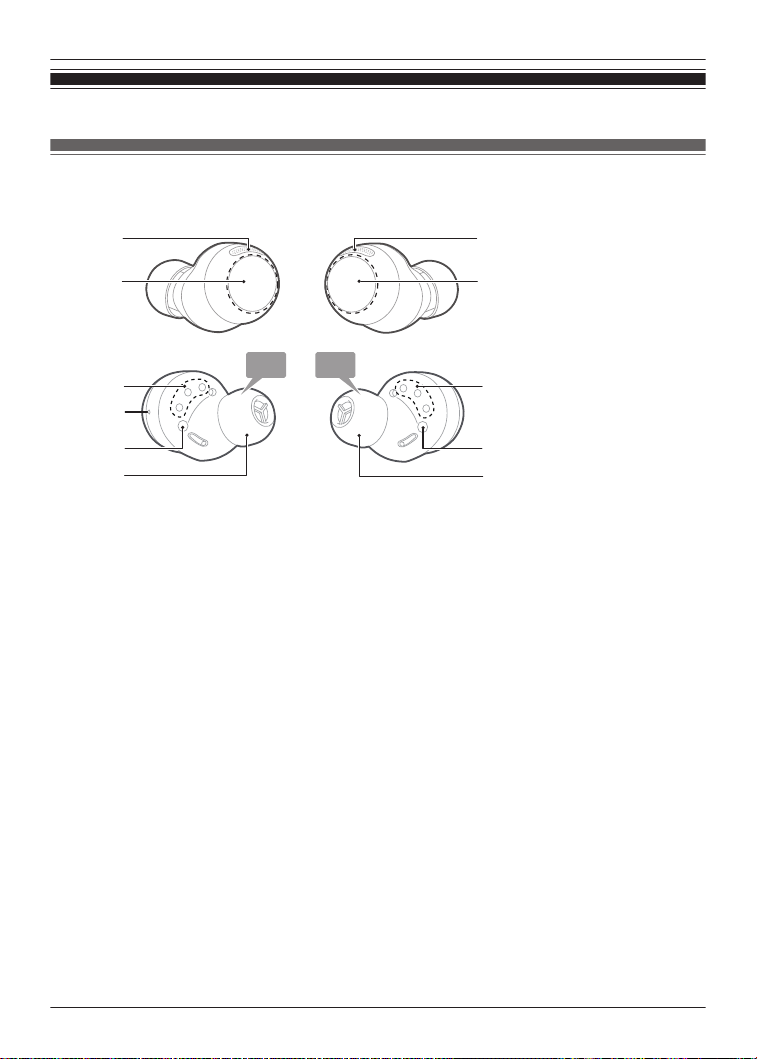
EAH-AZ60M2
Earphones
L
R
1 1
5
7
2
4
7
3
4
8
6
8
6
1. Microphones for noise cancelling
2. Touch sensor (L) (left)
R Operate the earphone by touching.
3. Touch sensor (R) (right)
R Operate the earphone by touching.
4. Microphones for calls
5. Raised dot indicating the L side
R Indicates the left earphone.
6. Charging terminals
7. Earpieces
R Select the size with the best audio quality and comfort.
8. Wear sensors
R Detects whether earphones are worn and pauses/resumes music accordingly.
18
Let’s Get Started
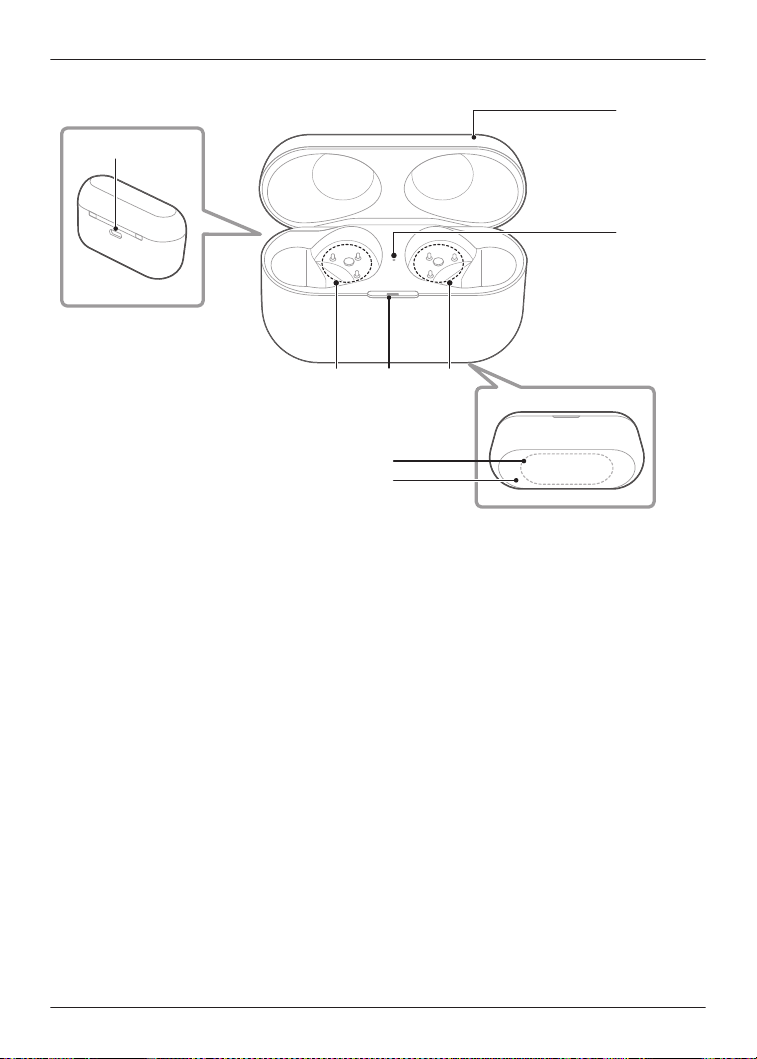
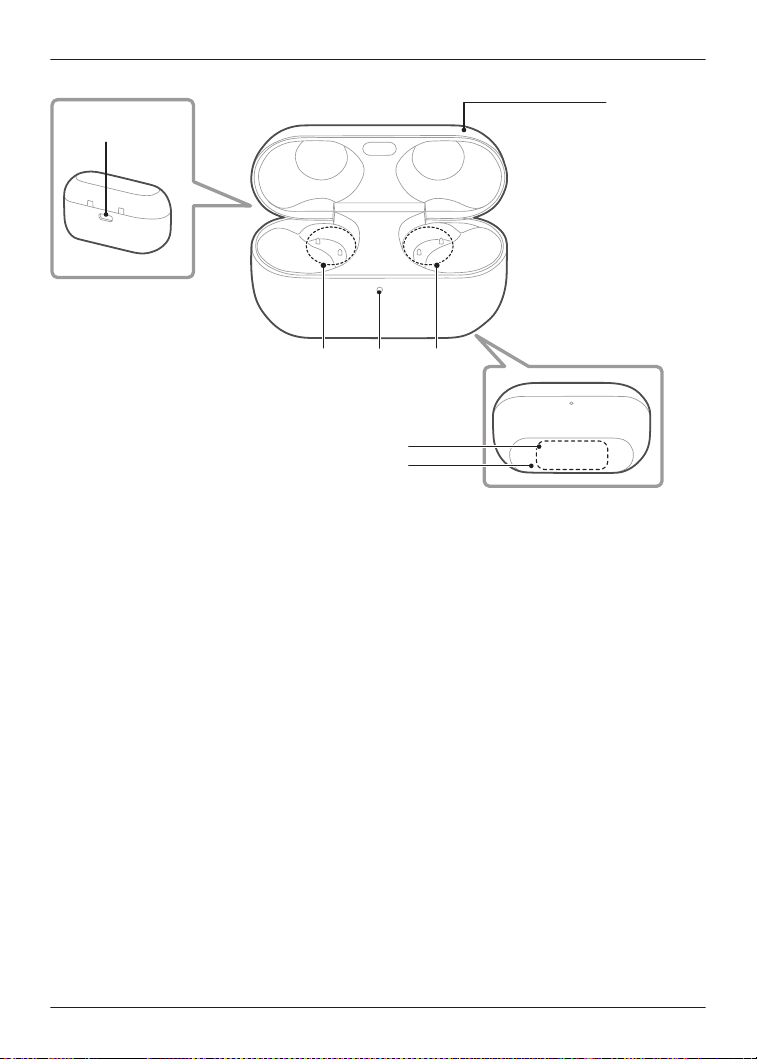
Charging cradle
6
43
1
7
2
3
5
1. Charging cradle lid
2. Rating
R Displays the model number.
3. Terminal section
4. Charging cradle status indicator LED
R Indicates the status of the charging cradle.
“Status Indicator LEDs”, Page 21
5. Earphone status indicator LED
R Indicates the status of the earphones when they are in the charging cradle.
(No LEDs on the earphones)
“Status Indicator LEDs”, Page 21
6. Charging terminal
R Use when charging with the USB charging cord.
7. Qi charging contact
R Use when charging with a separately sold Qi standard certified wireless charger.
19
Let’s Get Started
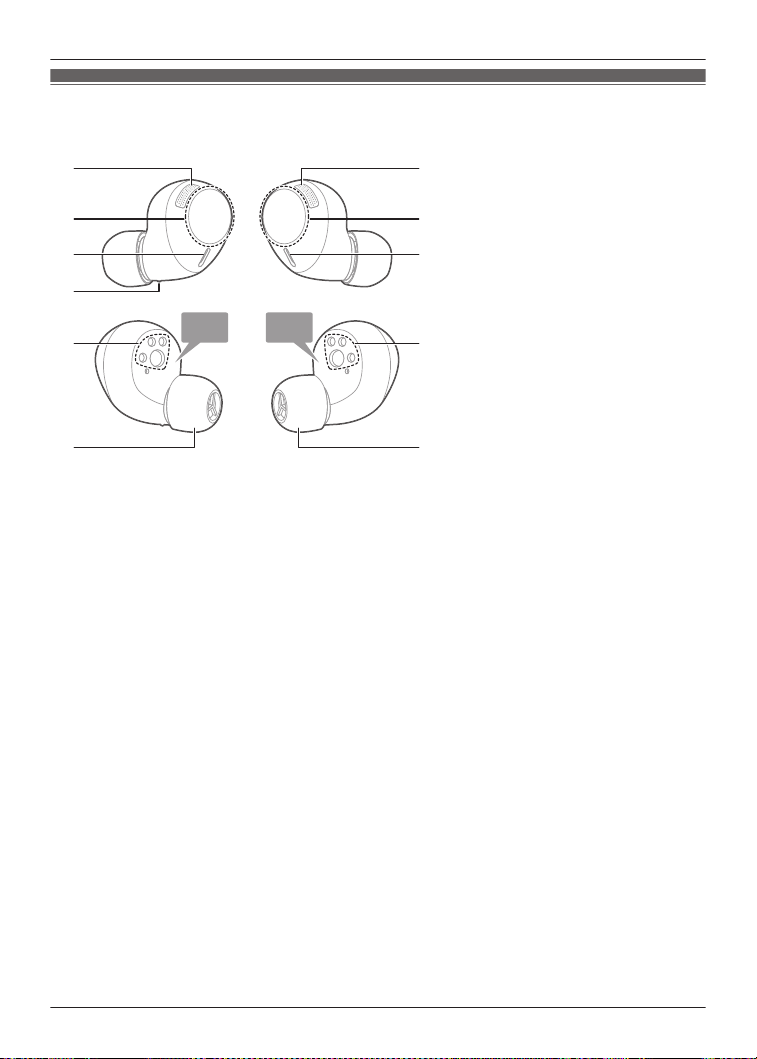
EAH-AZ40M2
Earphones
1 1
5
7
2
4
7
3
4
66
L
R
1. Microphones for noise cancelling
2. Touch sensor (L) (left)
R Operate the earphone by touching.
3. Touch sensor (R) (right)
R Operate the earphone by touching.
4. Microphones for calls
5. Raised dot indicating the L side
R Indicates the left earphone.
6. Charging terminals
7. Earpieces
R Select the size with the best audio quality and comfort.
20
Let’s Get Started
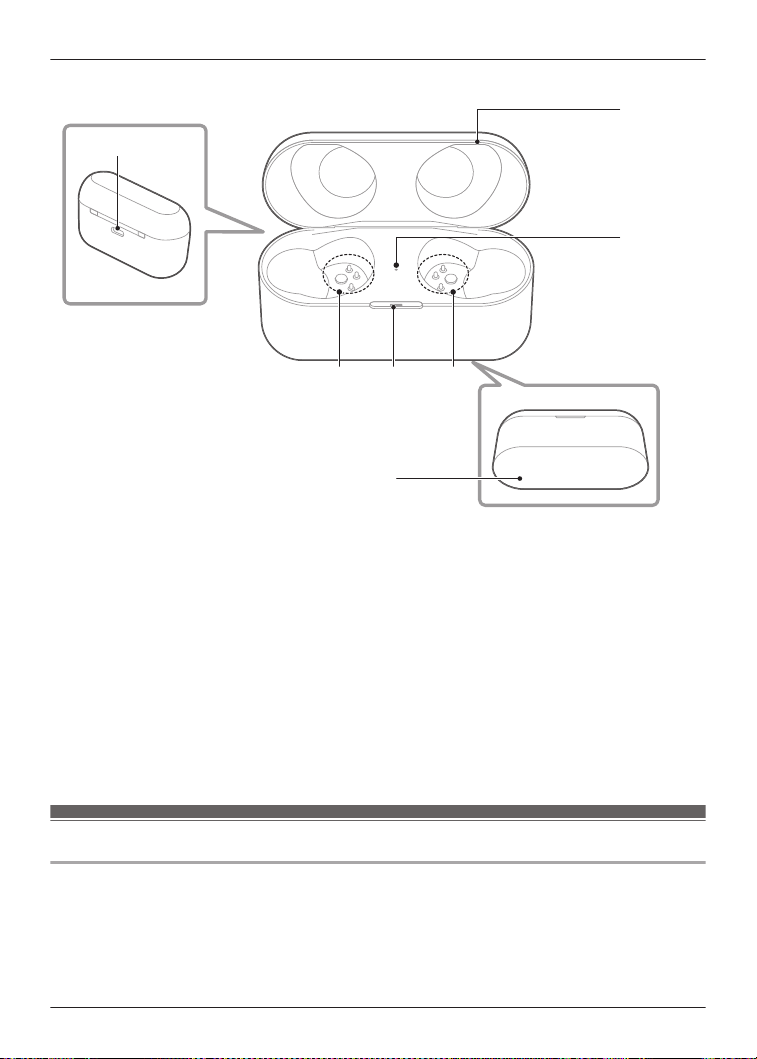
Charging cradle
6
1
5
33 4
2
1. Charging cradle lid
2. Rating
R Displays the model number.
3. Terminal section
4. Charging cradle status indicator LED
R Indicates the status of the charging cradle.
“Status Indicator LEDs”, Page 21
5. Earphone status indicator LED
R Indicates the status of the earphones when they are in the charging cradle.
(No LEDs on the earphones)
“Status Indicator LEDs”, Page 21
6. Charging terminal
R Use when charging with the USB charging cord.
Status Indicator LEDs
EAH-AZ100
When charging with the USB charging cord with the earphones stored in the charging cradle.
*1
21
Let’s Get Started
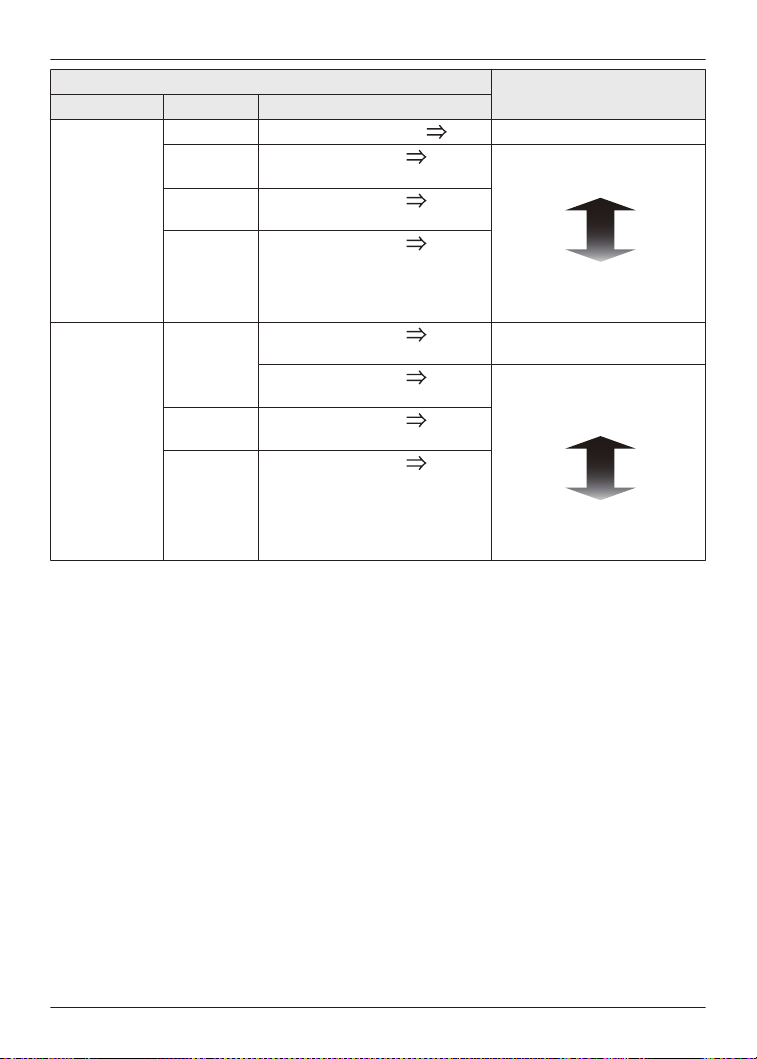
Charging cradle status
Status description
Lid LED color LED pattern
Open Light blue Flashing slowly 3 times Off Earphones charging
Green
*2
Lights for 4 seconds
Flashing slowly
*3
The charging cradle is
sufficiently charged
The charging cradle is
running low
Yellow
*2
Lights for 4 seconds
Flashing slowly
Red
*2
Lights for 4 seconds
Flashing slowly
Close Green Lights for 4 seconds Off The charging cradle is fully
charged
Lights for 4 seconds
Flashing slowly
The battery level of the
charging cradle has a
sufficient charge
The battery level of the
charging cradle is low charge
Yellow Lights for 4 seconds
Flashing slowly
Red Lights for 4 seconds
Flashing slowly
*1 When the earphones are put in the charging cradle, the LED (light blue) flashes once on
each side.
Put the earphones into the charging cradle again if the LED does not flash.
*2 Earphones fully charged.
*3 The charging cradle is fully charged when the LED stops flashing.
Note:
R You can check the remaining charge of the earphones and charging cradle on the home
screen of the [Technics Audio Connect] app.
“Home screen”, Page 44
22
Let’s Get Started
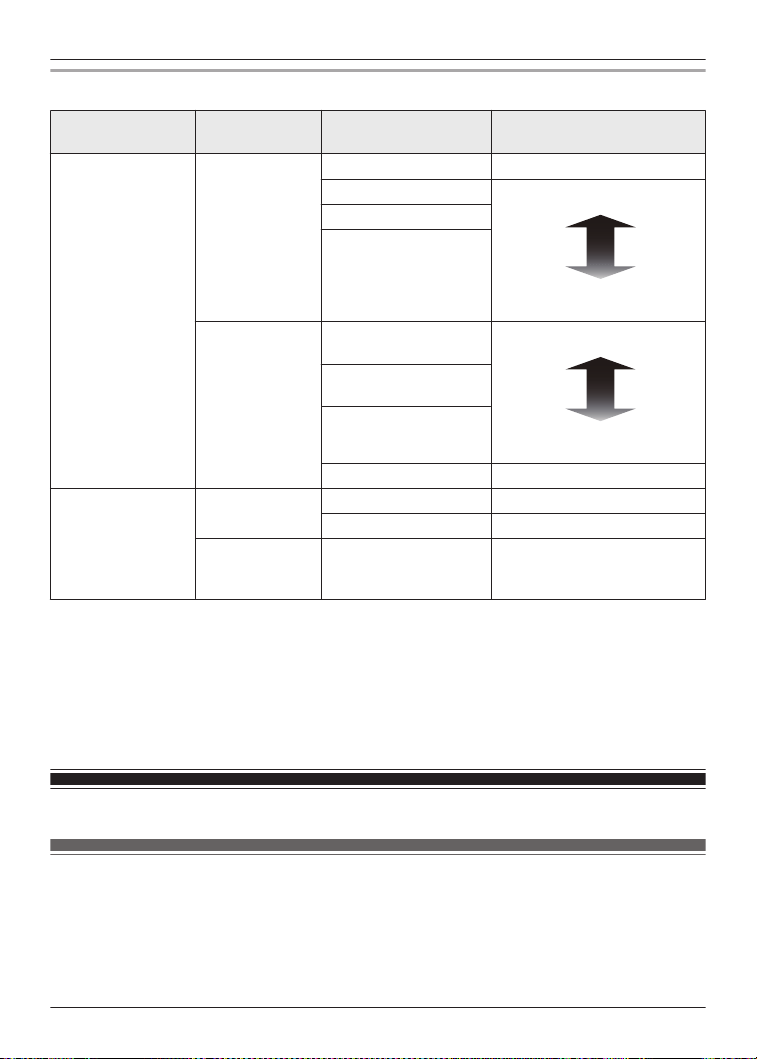
EAH-AZ80/EAH-AZ60M2/EAH-AZ40M2
LED type
Charging
cradle status
LED color/pattern Status description
Charging cradle
status indicator
LED
Charging Off
Fully charged
*1
Flashing green Sufficient charge
Low charge
Flashing yellow
Flashing red
When the lid of
the charging
cradle is opened
Green (about 3
seconds)
Sufficient charge
Low charge
Yellow (about 3
seconds)
Red (about 3 seconds)
Does not light up No charge
Earphone status
indicator LED
Charging
earphones
Off Fully charged
Red Earphones charging
When the
earphones are
inserted
Quickly flashing red
(twice)
The earphones are properly
inserted into the charging
cradle
*1 Charging is complete when the lid of the charging cradle is opened and the LED lights up
green.
Note:
R You can check the remaining charge of the earphones and charging cradle on the home
screen of the [Technics Audio Connect] app.
“Home screen”, Page 44
Charge
Charging
Upon purchase, charge first before use.
Important:
R Do not touch the terminal section with your bare hands.
23
Let’s Get Started
R The device cannot charge properly if there is dust or water droplets on the charging terminal,
earphones, or charging cradle terminal section. Remove dust and water droplets before
charging.
“Clean the charging terminals of the earphones”, Page 80
“Clean the charging cradle terminal section”, Page 80
R Hold the plug of the USB charging cord straight when plugging in or out.
(Plugging the USB charging cord at an angle to the charging terminal will deform the plug and
cause a malfunction.)
R Confirm (L) and (R) on the earphones, and align the terminal section of the charging cradle
with the charging terminals of the earphones. (Earphones will not charge if their charging
contact positions are incorrect.)
R We recommend charging at a room temperature between 10°C to 35°C.
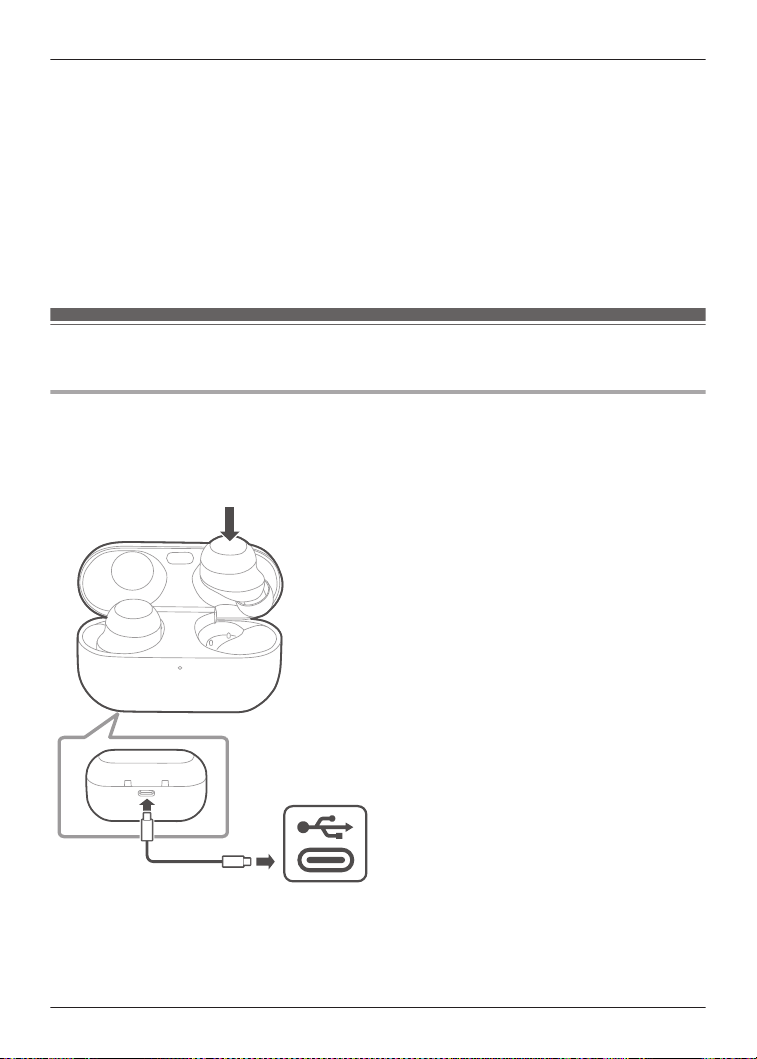
Charge the earphones and charging cradle at the same
time
EAH-AZ100
1 Use the included USB charging cord to connect the charging cradle to a separately sold
USB PD supported AC adapter (USB Type-C).
R You can also charge from a USB Type-C port on a computer. Turn on your computer. It
may not charge if the computer is in standby or sleep mode.
USB Type-C
2 Put the earphones into the charging cradle.
R The LED (light blue) of the charging cradle flashes once on each side before charging.
(Put the earphones into the charging cradle again if the LED (light blue) does not flash.)
24
Let’s Get Started
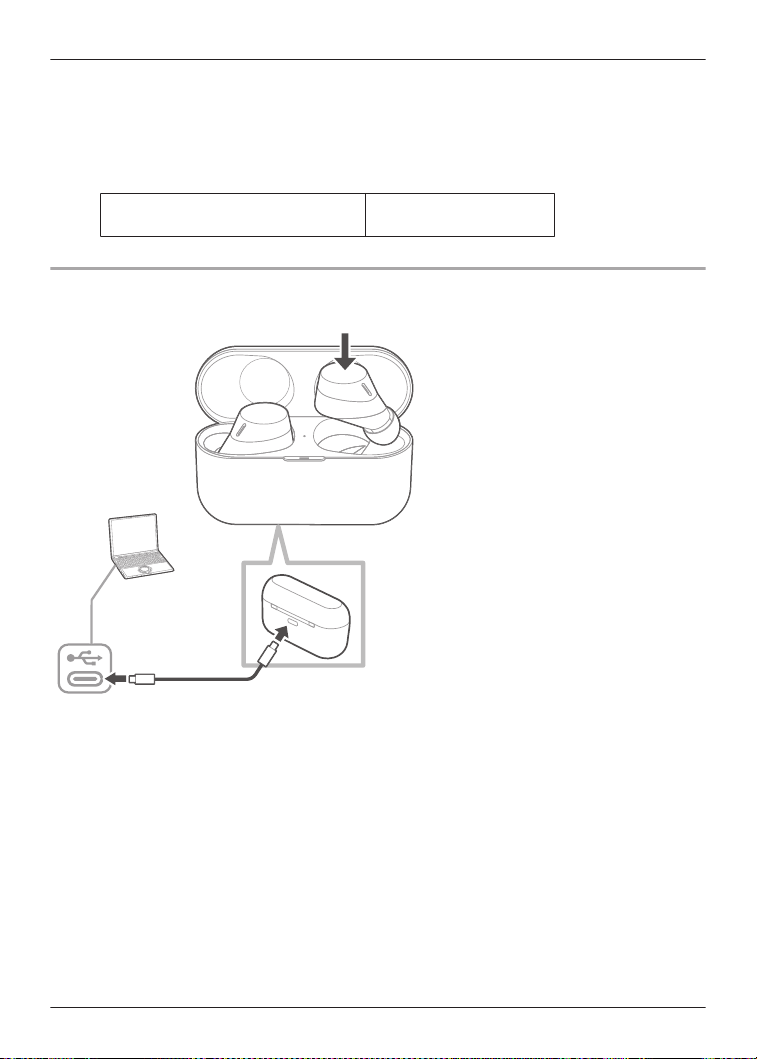
3 Close the charging cradle lid.
R The LED (red, yellow, or green) lights up to indicate the battery level of the charging
cradle.
R The LED (red, yellow, or green) flashes slowly while the charging cradle is being charged.
R Charging for the charging cradle is complete when the LED turns off.
R Charging time (the time from empty to full charge)
Charging the earphones and
charging cradle at the same time
About 3.0 hours
EAH-AZ80/EAH-AZ60M2/EAH-AZ40M2
The illustrations use EAH-AZ60M2 as an example.
USB Type-C
1 Use the included USB charging cord to connect the charging cradle to a separately sold
USB PD supported AC adapter (USB Type-C).
R You can also charge from a USB Type-C port on a computer. Turn on your computer. It
may not charge if the computer is in standby or sleep mode.
R The charging cradle status indicator LED flashes (red, yellow, or green), and charging
starts.
2 Put the earphones into the charging cradle.
R The earphone status indicator LED quickly flashes red (twice). (Put the earphones into
the charging cradle again if the LED does not flash.)
R The earphone status indicator LED lights up (red), and charging starts.
R Charging for the earphones is complete when the earphone status indicator LED turns off.
R Charging for the charging cradle is complete when the charging cradle status indicator
LED turns off.
R Charging time (the time from empty to full charge)
25
Let’s Get Started
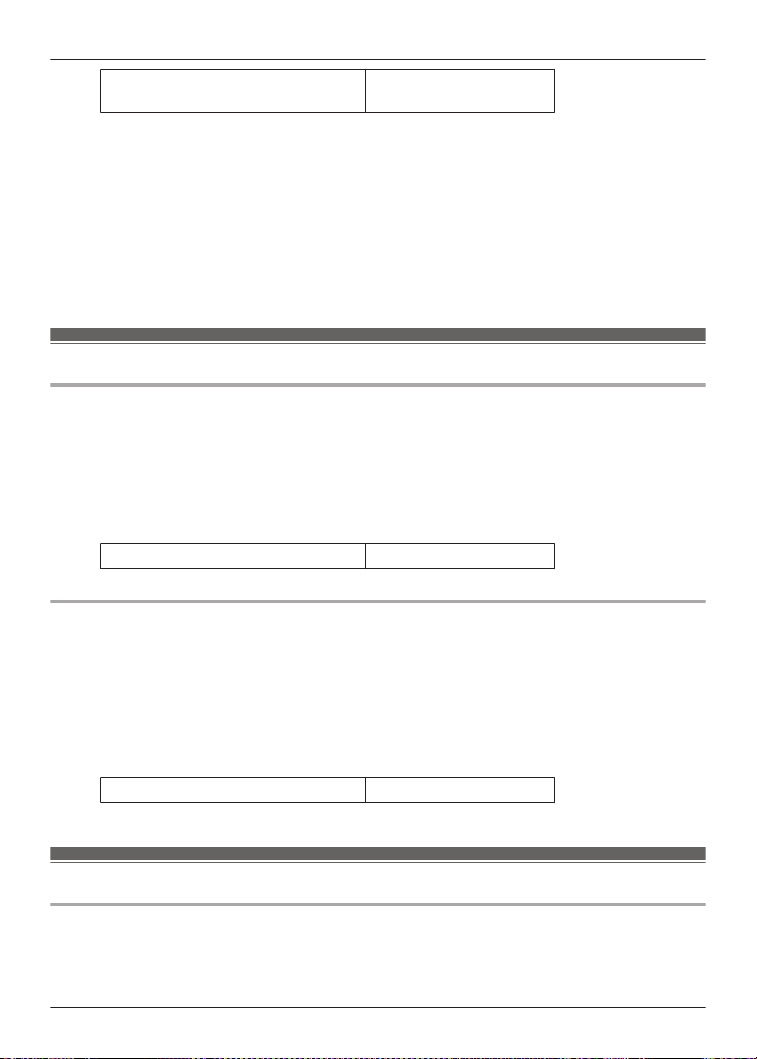
Charging the earphones and
charging cradle at the same time
About 3.0 hours
Note:
R You cannot turn on the earphones or connect them to a Bluetooth
®
device when they are
charging in the charging cradle.
R You can charge using a separately sold AC adapter.
Recommended AC adapter specifications
Supports PD (Power Delivery)
DC 5 V (500 mA or higher)
USB Type-C port
We do not guarantee that all AC adapters can be used for charging.
Charge only the charging cradle
EAH-AZ100
To charge only the charging cradle, charge without putting in the earphones.
1 Use the included USB charging cord to connect the charging cradle to a separately sold
USB PD supported AC adapter (USB Type-C).
R The LED of the charging cradle flashes (red, yellow, or green), and charging starts.
R Charging for the charging cradle is complete when the LED turns off.
R Charging time (the time from empty to full charge)
Charging only the charging cradle About 2.5 hours
EAH-AZ80/EAH-AZ60M2/EAH-AZ40M2
To charge only the charging cradle, charge without putting in the earphones.
1 Use the included USB charging cord to connect the charging cradle to a separately sold
USB PD supported AC adapter (USB Type-C).
R The charging cradle status indicator LED flashes (red, yellow, or green), and charging
starts.
R Charging is complete when the charging cradle status indicator LED turns off.
R Charging time (the time from empty to full charge)
Charging only the charging cradle About 2.5 hours
Charge only the earphones
EAH-AZ100
You can charge the earphones with the charging cradle if it is sufficiently charged, even when
there is no power supply nearby.
26
Let’s Get Started
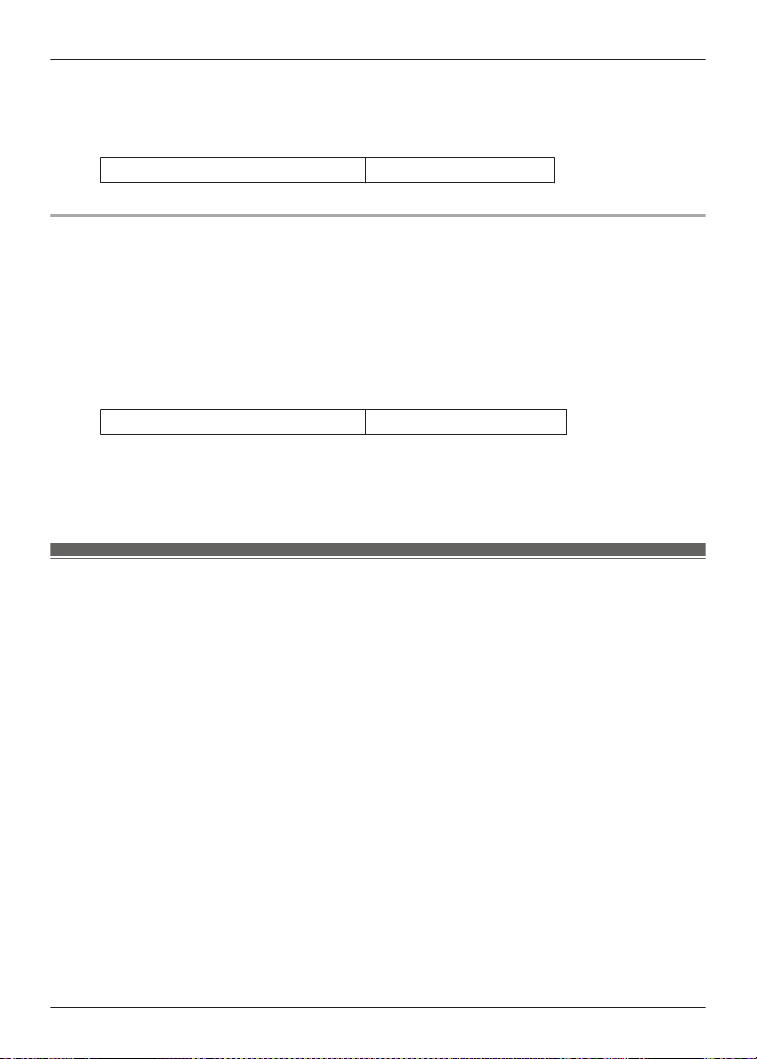
1 Put the earphones into the charging cradle.
R The LED (light blue) flashes once on each side. (Put the earphones into the charging
cradle again if the LED does not flash.)
R Charging time (the time from empty to full charge)
Charging only the earphones About 2.0 hours
EAH-AZ80/EAH-AZ60M2/EAH-AZ40M2
You can charge the earphones with the charging cradle if it is sufficiently charged, even when
there is no power supply nearby.
1 Put the earphones into the charging cradle.
R The earphone status indicator LED quickly flashes red (twice). (Put the earphones into
the charging cradle again if the LED does not flash.)
R The earphone status indicator LED lights up (red), and charging starts.
R Charging is complete when the earphone status indicator LED turns off.
R Charging time (the time from empty to full charge)
Charging only the earphones About 2.0 hours
Note:
R If the charging cradle is fully charged, you can charge earphones with no charge about two
times.
Charge wirelessly (EAH-AZ100/EAH-AZ80/EAH-AZ60M2)
You can charge this unit with a separately sold Qi standard wireless charger. For information
about your wireless charger, please refer to its manual.
1 Close the charging cradle lid.
2 Place the charging cradle on the wireless charger with the Technics logo facing up.
R Qi charging contact position
EAH-AZ100: Qi charging contact Page 15
EAH-AZ80: Qi charging contact Page 17
EAH-AZ60M2: Qi charging contact Page 19
Important:
R The unit is not guaranteed to charge with all commercially available Qi standard wireless
chargers.
R This unit does not support wireless chargers that are not Qi standard certified or have
magnetic attachments. Do not use these chargers to charge the charging cradle. (It may
cause the charging cradle to malfunction.)
R Do not charge wirelessly in the following places.
In humid, dusty, or shaky areas, or near telephones, TVs, radios, or devices with built-in
magnets
R Before charging wirelessly:
– Remove any covers attached to the charging cradle.
27
Let’s Get Started

(The material and thickness of covers, or foreign matter such as dust caught between the
charging cradle and covers, may prevent the battery from charging properly and result in
fire, burns, or injury.)
– If there are other devices that support wireless charging nearby, keep them at least 30 cm
away.
(The wireless charger may not detect the charging cradle correctly and charging may fail.)
R While charging wirelessly:
– Do not place metal objects (such as coins, or straps and clips that contain metal) on the
wireless charger. (It may result in fire, burns, or injury.)
– If you hear noise from a TV or radio, charge in a place farther away from the TV or radio.
– Do not use a wireless charger while it is covered with something such as a blanket.
R If you have an electronic medical device such as an implanted cardiac pacemaker or
defibrillator, consult your physician before using a wireless charger. (It may result in radio
waves that adversely affect the operation of electronic medical devices.)
R Do not attach metal objects (such as stickers with materials that contain metal) to the wireless
charger or charging cradle. (It may result in fire, burns, or injury.)
R Keep IC cards, magnetic cards, and magnetic objects away from the wireless charger.
– IC cards may malfunction. Magnetic data on cash cards, credit cards, telephone cards, and
floppy disks may be erased. Placing the charger close to a strong magnetic field may also
result in malfunction.
Note:
R If the charging cradle is not placed properly during wireless charging, charging may be slower,
charging may stop, or the wireless charger, earphones, and charging cradle may get hot.
R Depending on your wireless charger, charging may be slower or may stop at high or low
temperatures. Also, although the earphones and charging cradle may get warm while and
after charging, it is not a malfunction.
Turn the earphones on/off
EAH-AZ100
Turn on
1 Take out the earphones from the charging cradle.
R A startup sound will play.
If the earphones are difficult to remove
“The earphones are difficult to remove.”, Page 69
Turn off
1 Put the earphones into the charging cradle.
R When the earphones are put in the charging cradle, the LED (light blue) flashes once on
each side.
(Put the earphones into the charging cradle again and charge the charging cradle if the
LED does not flash.)
28
Let’s Get Started
Important:
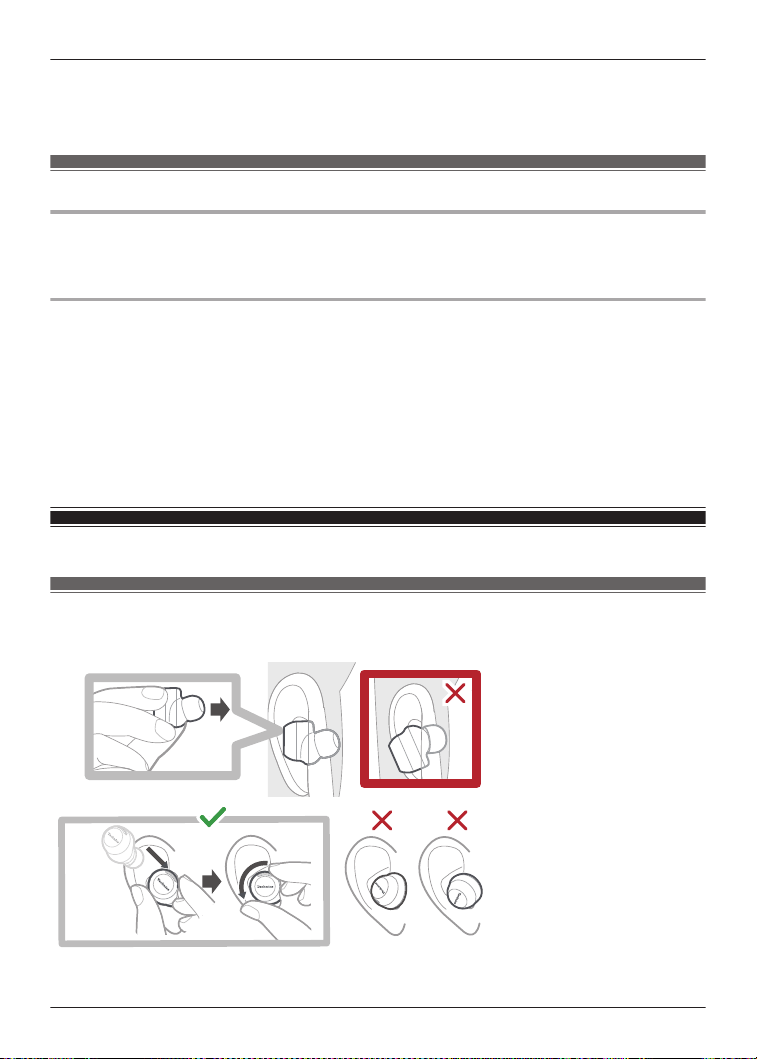
R Bringing a magnetic object close to the earphones during use may turn off the earphones. Do
not bring magnetic objects close to the earphones during use.
EAH-AZ80/EAH-AZ60M2/EAH-AZ40M2
Turn on
1 Take out the earphones from the charging cradle.
R A startup sound will play.
Turn off
1 Put the earphones into the charging cradle.
R When you put them in, the earphone status indicator LED quickly flashes red (twice).
(Put the earphones into the charging cradle again and charge the charging cradle if the
LED does not flash.)
Important:
R Bringing a magnetic object close to the earphones during use may turn off the earphones. Do
not bring magnetic objects close to the earphones during use.
Wear the earphones
EAH-AZ100
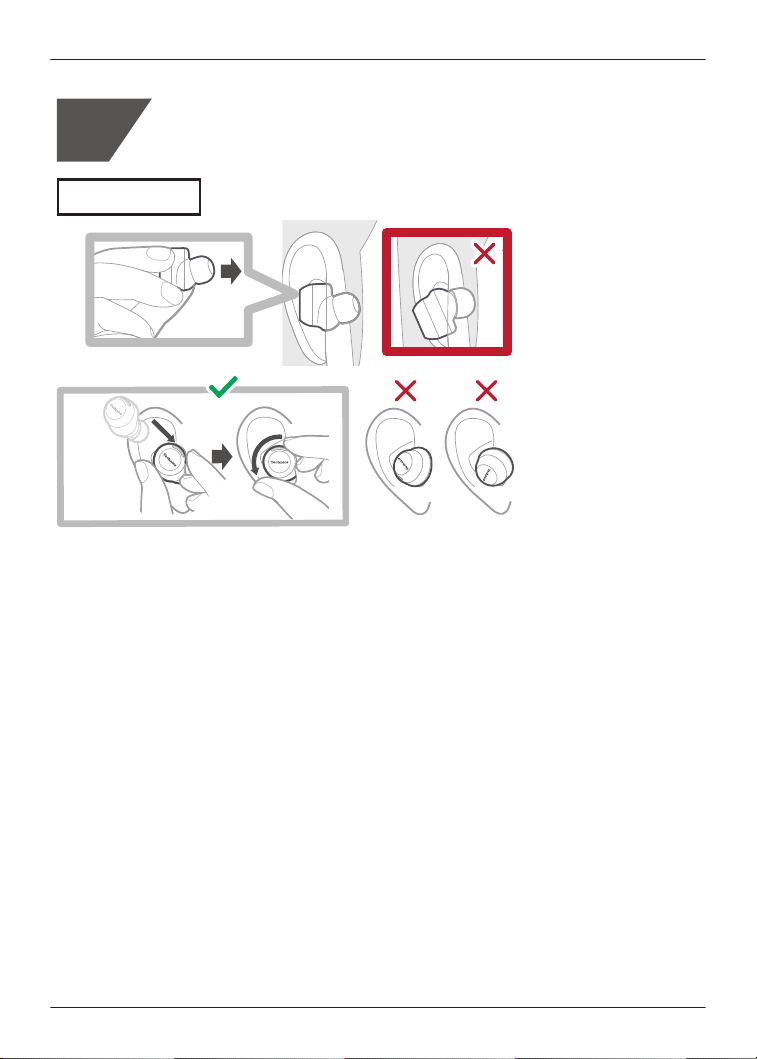
Wear the earphones correctly to achieve good noise cancelling and acoustics.
1 Check the top and bottom orientation of the earphones and the L (left) and R (right) positions.
29
Let’s Get Started
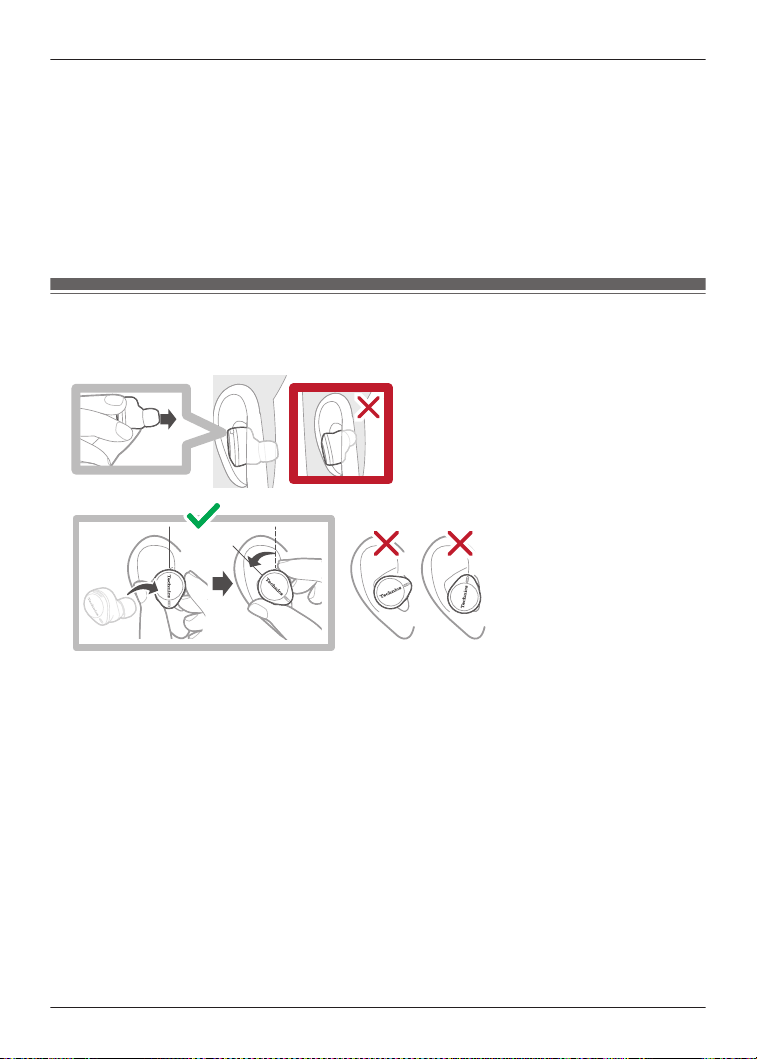
2 Wear them securely.
R With the Technics logo oriented diagonally, insert into your ears while twisting slightly
backwards, and adjust so that the earpieces fit well into your ear canals.
R Earphone (L) has a raised dot indicating the L side.
R After wearing them, check that they do not fall off from your ears.
R If the earphones fall off easily, replace them with earpieces of a different size (included).
“EAH-AZ100”, Page 31
R Select the earpieces that provide the best noise cancelling.
“Selecting the best earpiece for Active Noise Cancelling (EAH-AZ100/EAH-AZ80/EAH-
AZ60M2)”, Page 53
EAH-AZ80
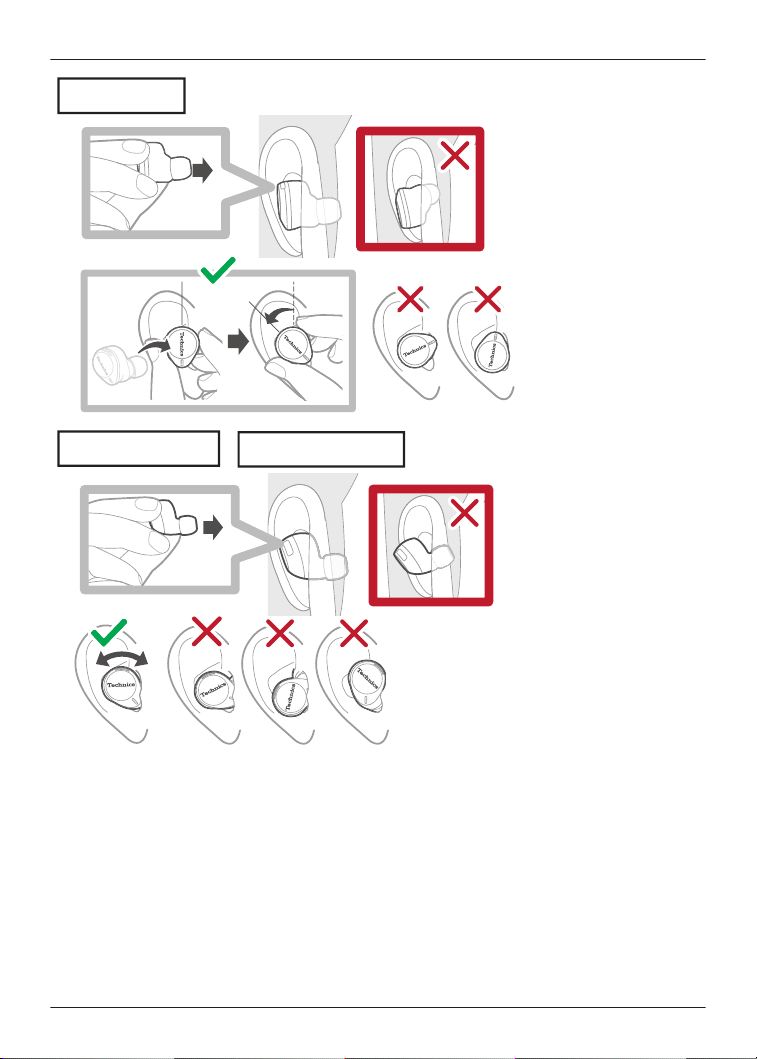
Wear the earphones correctly to achieve good noise cancelling and acoustics.
1 Check the top and bottom orientation of the earphones and the L (left) and R (right) positions.
2 Wear them securely.
R With the Technics logo oriented vertically, insert into your ears while twisting slightly
backwards, and adjust so that the earpieces fit well into your ear canals.
R Earphone (L) has a raised dot indicating the L side.
R After wearing them, check that they do not fall off from your ears.
R If the earphones fall off easily, replace them with earpieces of a different size (included).
“EAH-AZ80/EAH-AZ60M2/EAH-AZ40M2”, Page 33
R Select the earpieces that provide the best noise cancelling.
“Selecting the best earpiece for Active Noise Cancelling (EAH-AZ100/EAH-AZ80/EAH-
AZ60M2)”, Page 53
30
Let’s Get Started
EAH-AZ60M2/EAH-AZ40M2
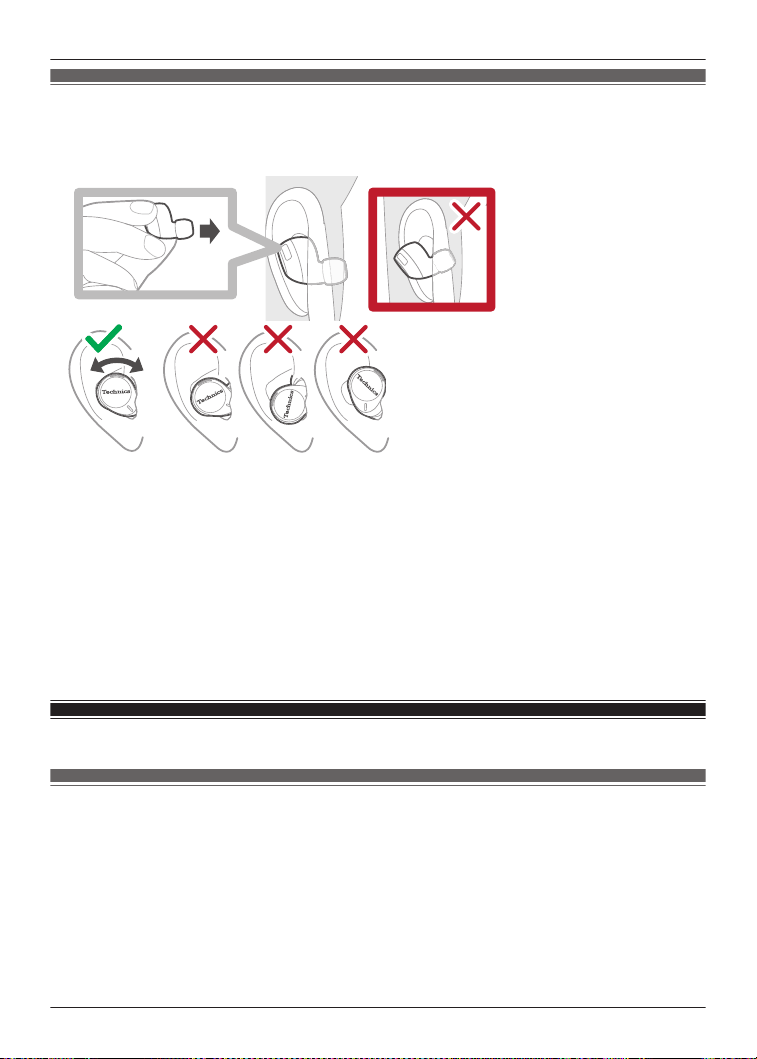
Wear the earphones correctly to achieve good noise cancelling and acoustics.
1 Check the top and bottom orientation of the earphones and the L (left) and R (right) positions.
2 Wear them securely.
R Earphone (L) has a raised dot indicating the L side.
R After wearing them, check that they do not fall off from your ears.
R If the earphones fall off easily, replace them with earpieces of a different size (included).
“EAH-AZ80/EAH-AZ60M2/EAH-AZ40M2”, Page 33
R Select the earpieces that provide the best noise cancelling.
EAH-AZ60M2: “Selecting the best earpiece for Active Noise Cancelling (EAH-AZ100/
EAH-AZ80/EAH-AZ60M2)”, Page 53
For better sound (Change earpieces)
EAH-AZ100
The size of the earpieces affects the audio quality (music playback, calls) and comfort. Select a
size that is comfortable and fits well in both ears.
Note:
R Even with earpieces of the same size, the dimensions may vary depending on the model.
31
Let’s Get Started
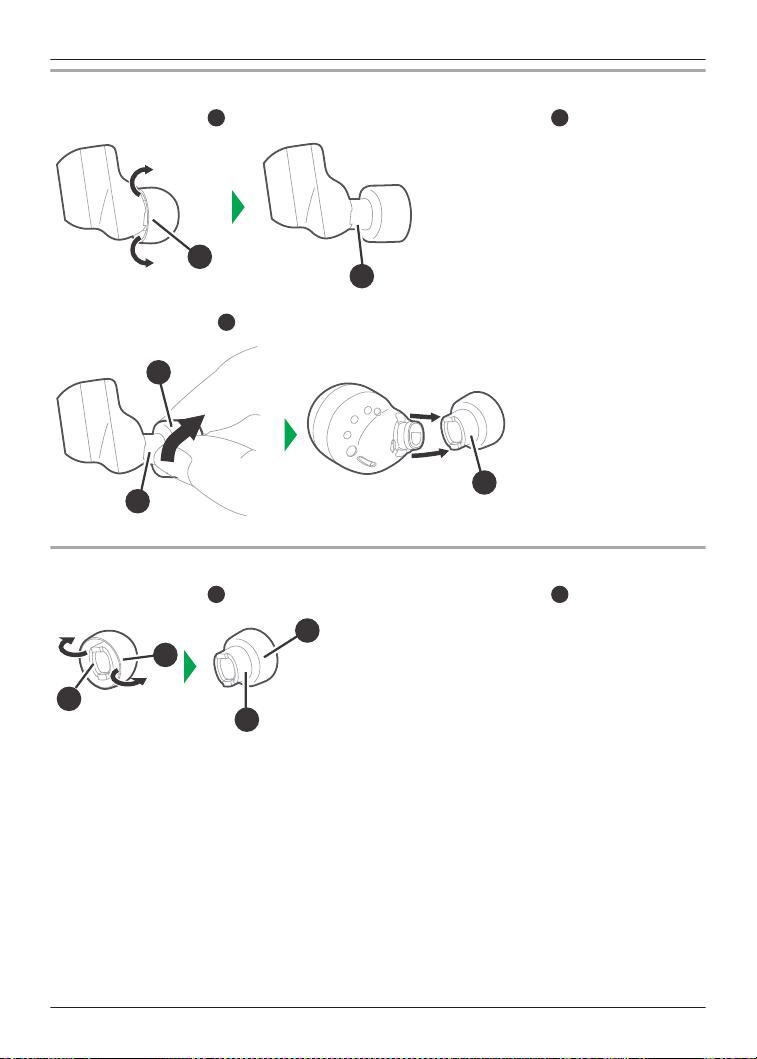
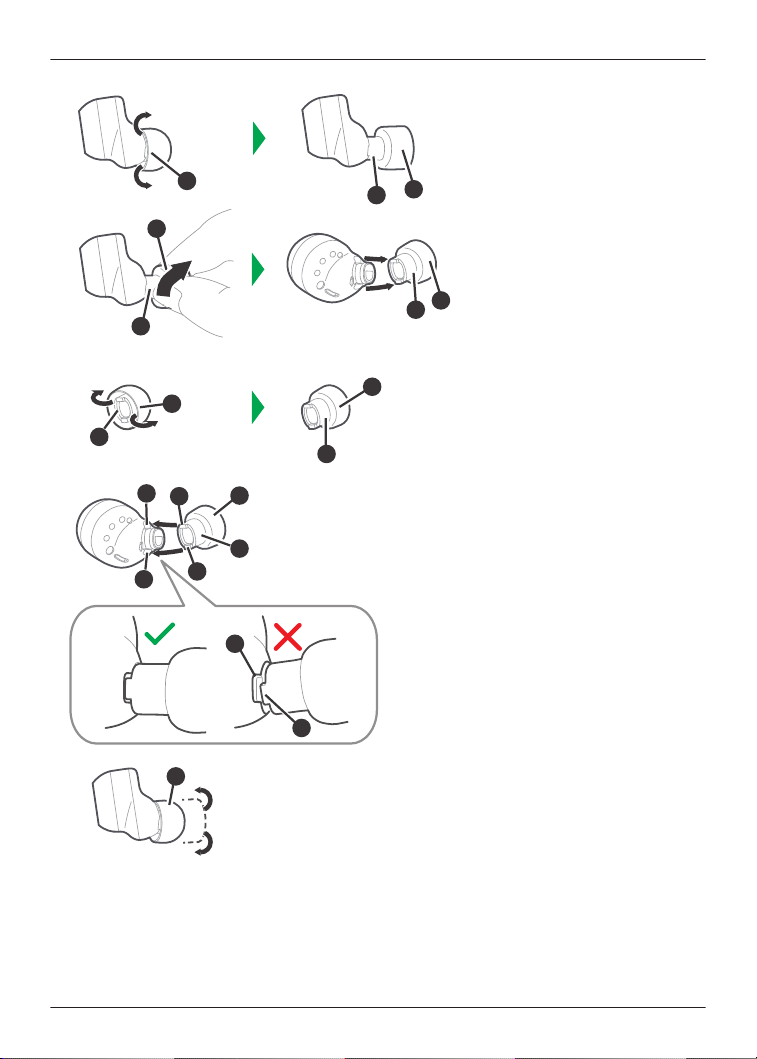
Removing the earpiece
1 Turn the earpiece
$
inside out to reveal the earphone insertion part
%
.
$
%
2 Grasp the earpiece
%
and gently pull it out at an angle while twisting slightly.
%
%
$
Attaching the earpiece
1 Turn the earpiece
$
inside out to reveal the earphone insertion part
%
.
%
$
$
%
32
Let’s Get Started
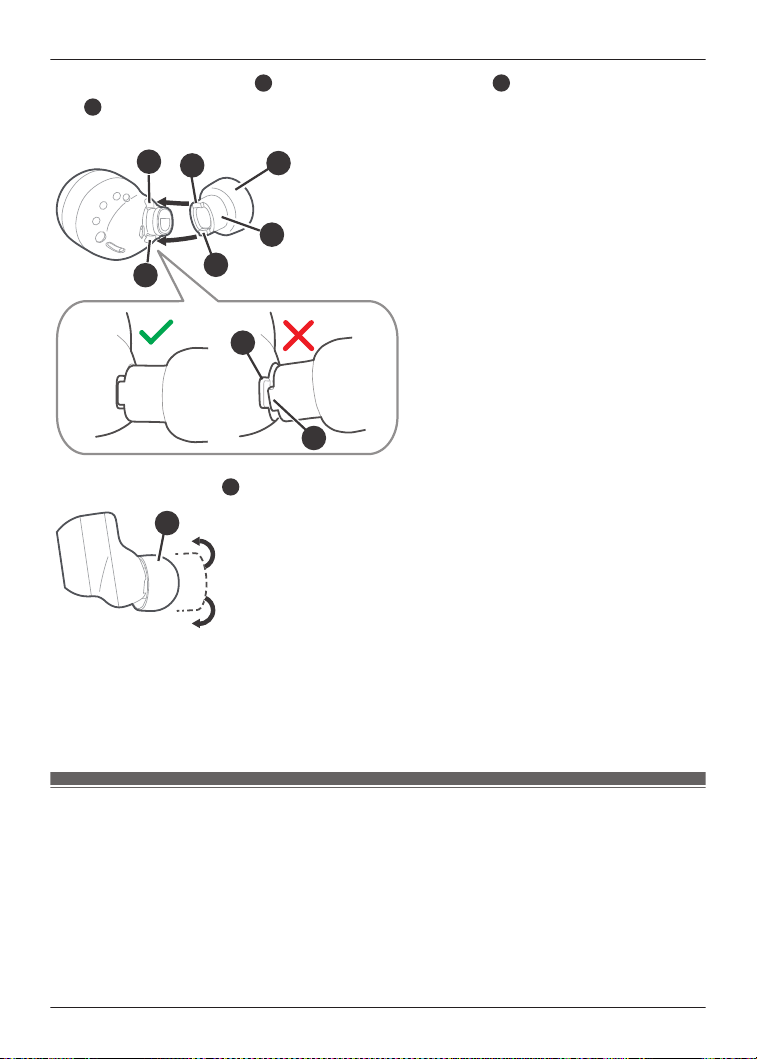
2 Align the two protrusions
&
on the earpiece’s insertion part
%
with the two indentations
'
on the earphone and insert them.
R Make sure to insert it fully, and check that the earpiece is not angled incorrectly.
%
&
'
&
'
$
&
'
3 Return the earpiece
$
to its original position.
$
Note:
R The size of the earpieces that fit your ears may differ between the left and right.
R Select the earpieces that provide the best noise cancelling.
“Selecting the best earpiece for Active Noise Cancelling (EAH-AZ100/EAH-AZ80/EAH-
AZ60M2)”, Page 53
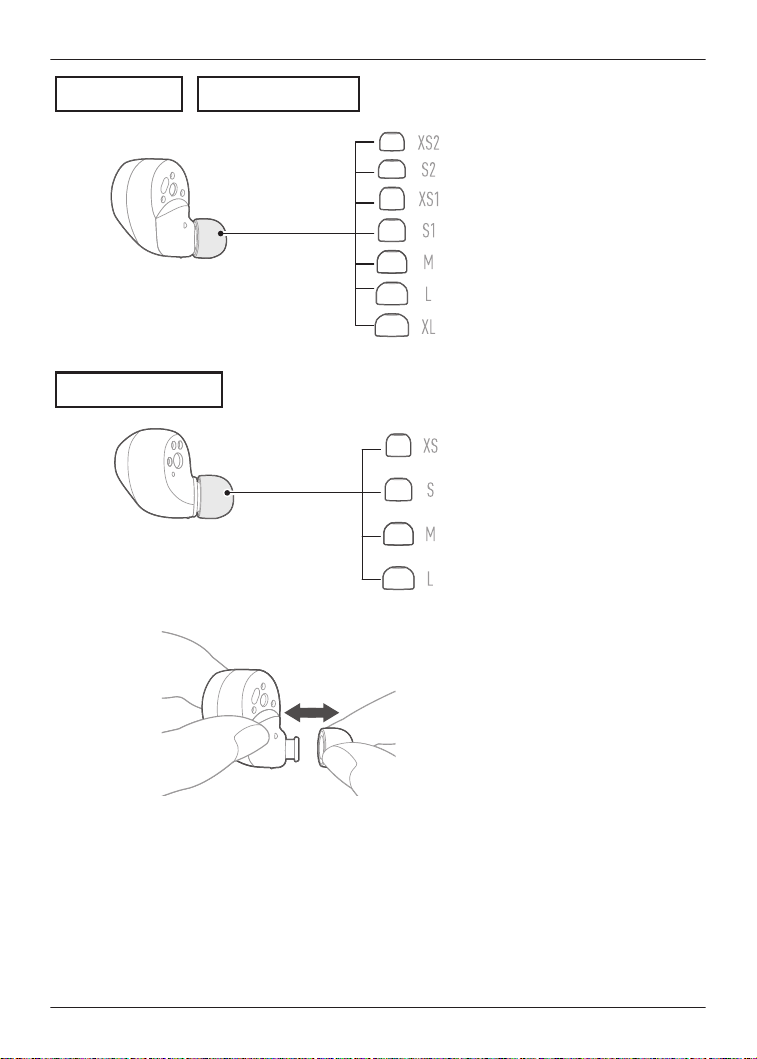
EAH-AZ80/EAH-AZ60M2/EAH-AZ40M2
The size of the earpieces affects the audio quality (music playback, calls) and comfort. Select a
size that is comfortable and fits well in both ears.
Note:
R Even with earpieces of the same size, the dimensions may vary depending on the model.
The illustrations use EAH-AZ60M2 as an example.
33
Let’s Get Started
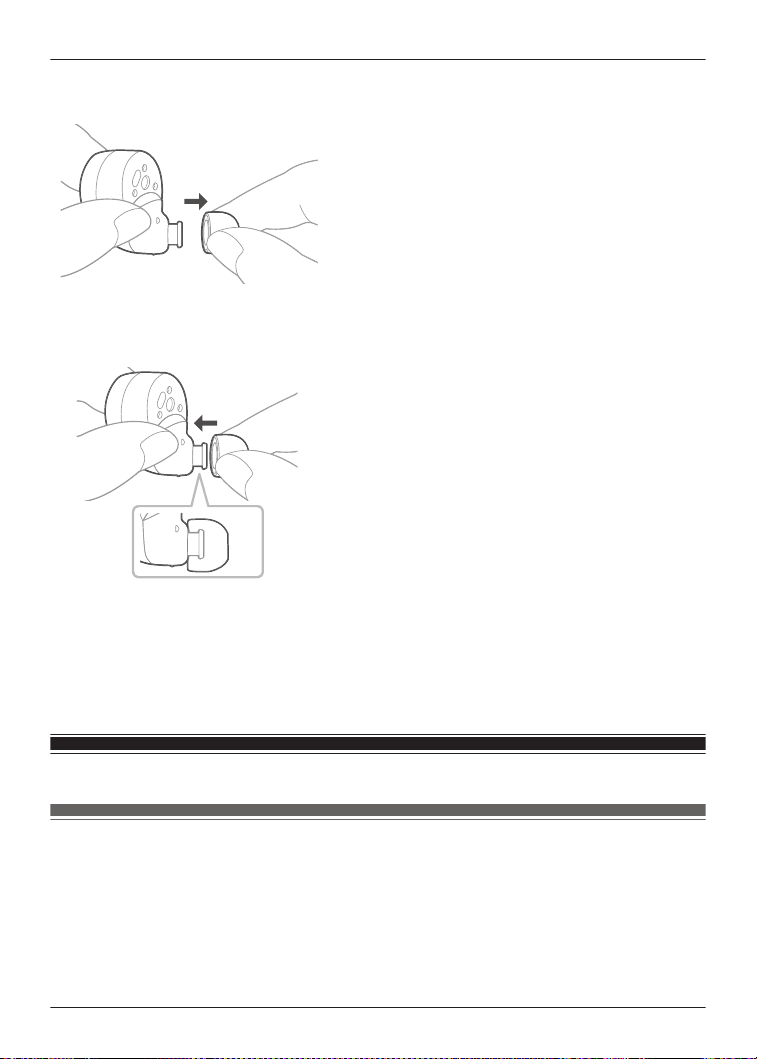
1 Remove the earpiece.
R Hold the earpiece and pull out while twisting slightly.
2 Attach the earpiece.
R Make sure that the earpiece is firmly attached and not slanted.
Note:
R The size of the earpieces that fit your ears may differ between the left and right.
R Select the earpieces that provide the best noise cancelling.
EAH-AZ80/EAH-AZ60M2: “Selecting the best earpiece for Active Noise Cancelling (EAH-
AZ100/EAH-AZ80/EAH-AZ60M2)”, Page 53
Pair for the first time
Use the app to pair with a Bluetooth
®
device
Important:
R Depending on the connected Bluetooth
®
device, a loud sound may be output during playback.
Check the volume setting of the Bluetooth
®
device before starting playback.
1 Download the [Technics Audio Connect] app.
{{"Google Play"|tolink("https://play.google.com/store/apps/details?
id=com.panasonic.technicsaudioconnect")}}
34
Let’s Get Started
{{"Apple Store"|tolink("https://itunes.apple.com/app/id1498029651")}}
2 Launch the [Technics Audio Connect] app.
3 Tap the product you want to pair.
4 Follow the on-screen instructions.
Pair with a Bluetooth
®
device without the app
You can pair without using the [Technics Audio Connect] app.
(Example)
R Using the earphones with a Bluetooth
®
device not supported by the [Technics Audio Connect]
app
Important:
R When pairing, keep the Bluetooth
®
device and earphones close together. (Within about 1 m)
R Depending on the connected Bluetooth
®
device, a loud sound may be output during playback.
Check the volume setting of the Bluetooth
®
device before starting playback.
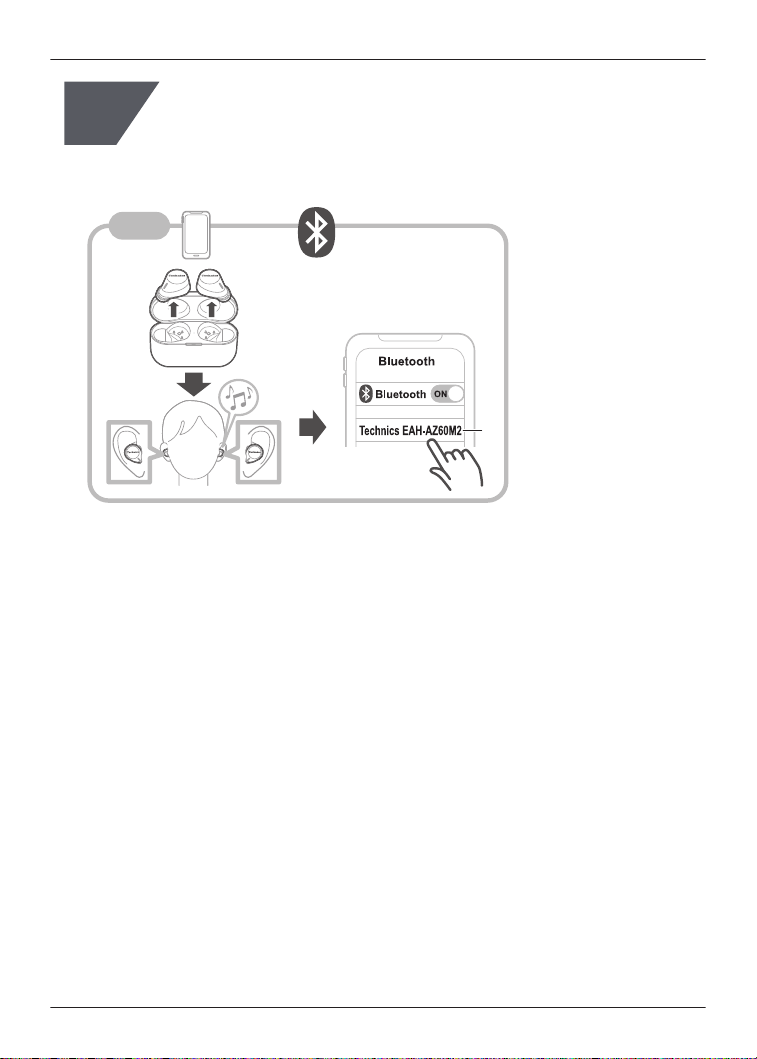
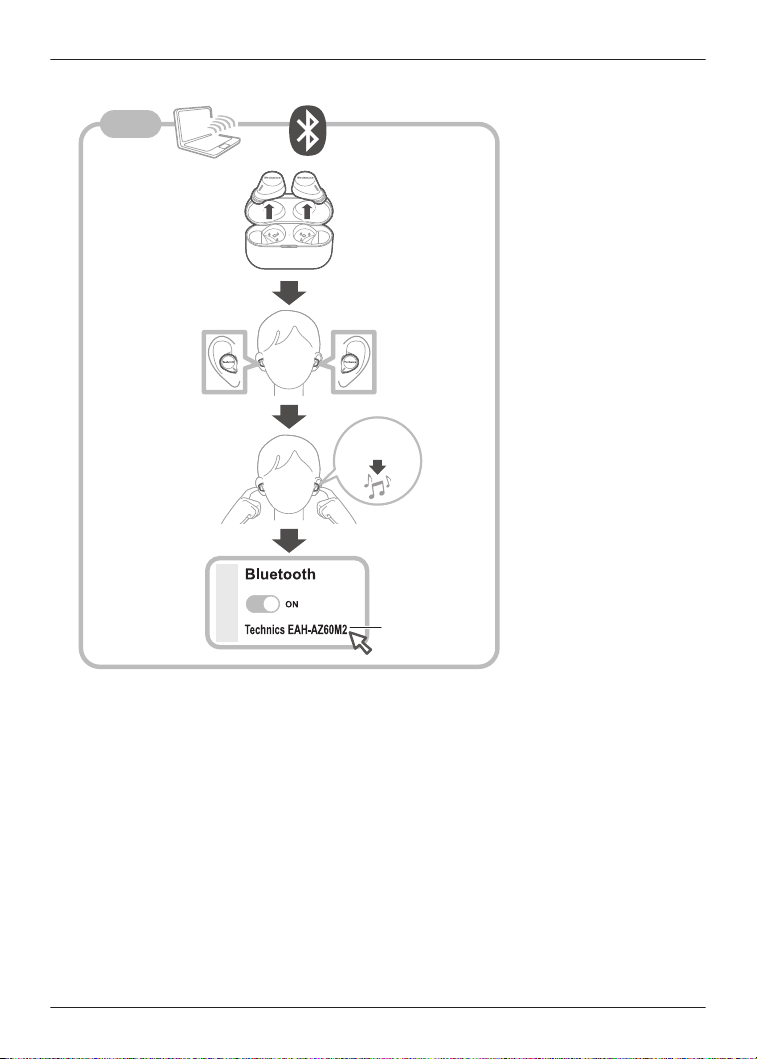
1 Put both earphones (L and R) into the charging cradle and charge.
2 Take out both earphones (L and R) from the charging cradle and wear them.
R After the startup sound plays, a melody repeats.
To listen to the melody of the EAH-AZ100, click {{"Here"|tolink("https://
eww.pavc.panasonic.co.jp/avcacc/technics/sound-data/Pair_const_az100.wav")}}.
To listen to the melody of the EAH-AZ80/EAH-AZ60M2/EAH-AZ40M2, click {{"Here"|
tolink("https://eww.pavc.panasonic.co.jp/avcacc/technics/sound-data/Pair_const.wav")}}.
3 Turn on Bluetooth
®
in the Bluetooth
®
device.
4 From the Bluetooth
®
menu in the Bluetooth
®
device, select the earphones.
R If you are asked to input a passkey, input the earphone passkey “0000” (four zeros).
R For details about setting up Bluetooth
®
, please refer to the manual of the Bluetooth
®
device.
Pair a subsequent device
Use the app to pair the earphones with a subsequent
Bluetooth
®
device
You can pair up to 10 Bluetooth
®
devices with the earphones.
R When pairing with LE Audio compatible Bluetooth
®
devices
“Number of LE Audio connections”, Page 55
(Example)
R Using the earphones with a work phone as the first device and a private phone as the second
device
35
Let’s Get Started

Important:
R Depending on the connected Bluetooth
®
device, a loud sound may be output during playback.
Check the volume setting of the Bluetooth
®
device before starting playback.
1 Install and launch the [Technics Audio Connect] app on the subsequent Bluetooth
®
device.
2 Follow the on-screen instructions.
Note:
R If you pair a device when the maximum number of paired Bluetooth
®
devices is exceeded,
previously paired devices will be overwritten. To use overwritten devices again, pair them
again.
R Pairing a subsequent device is easier if you turn off Bluetooth
®
in the first device.
R When pairing a subsequent device, the earphones will cancel pairing mode and go into
connection standby mode if the device is not connected within 5 minutes. Pair again.
R The unit remembers the last connected device. The unit may connect automatically after it is
turned on.
R The unit can connect to up to 3 Bluetooth
®
devices at the same time.
“Establish multi-point connections”, Page 40
Pair the earphones with a subsequent Bluetooth
®
device
without the app
You can pair up to 10 Bluetooth
®
devices with the earphones.
R When pairing with LE Audio compatible Bluetooth
®
devices
“Number of LE Audio connections”, Page 55
You can pair by using the touch sensors on the earphones.
(Example)
R Using the earphones with a smartphone as the first device and a computer as the second
device
Important:
R When pairing, keep the Bluetooth
®
device and earphones close together. (Within about 1 m)
R Depending on the connected Bluetooth
®
device, a loud sound may be output during playback.
Check the volume setting of the Bluetooth
®
device before starting playback.
1 Put both earphones (L and R) into the charging cradle and charge.
2 Take out both earphones (L and R) from the charging cradle and wear them.
3 Touch and hold both touch sensors (L and R) at the same time until you hear the pairing
sound.
R A message about starting to pair plays, and a melody repeats.
To listen to the melody of the EAH-AZ100, click {{"Here"|tolink("https://
eww.pavc.panasonic.co.jp/avcacc/technics/sound-data/Pair_const_az100.wav")}}.
To listen to the melody of the EAH-AZ80/EAH-AZ60M2/EAH-AZ40M2, click {{"Here"|
tolink("https://eww.pavc.panasonic.co.jp/avcacc/technics/sound-data/Pair_const.wav")}}.
4 Turn on Bluetooth
®
in the subsequent Bluetooth
®
device.
5 From the Bluetooth
®
menu in the subsequent Bluetooth
®
device, select the earphones.
R If you are asked to input a passkey, input the earphone passkey “0000” (four zeros).
36
Let’s Get Started

R For details about setting up Bluetooth
®
, please refer to the manual of the Bluetooth
®
device.
Note:
R If you pair a device when the maximum number of paired Bluetooth
®
devices is exceeded,
previously paired devices will be overwritten. To use overwritten devices again, pair them
again.
R Pairing a subsequent device is easier if you turn off Bluetooth
®
in the first device.
R The earphones will cancel pairing mode and go into connection standby mode if the device is
not connected within 5 minutes. Pair again.
R The unit remembers the last connected device. The unit may connect automatically after it is
turned on.
R The unit can connect to up to 3 Bluetooth
®
devices at the same time.
“Establish multi-point connections”, Page 40
37
Let’s Get Started

Listen to music
If a Bluetooth
®
device supports the “A2DP” and “AVRCP” Bluetooth
®
profiles, you can use the
earphones to play music and video.
R With the EAH-AZ100, you can use the earphones to control LE Audio compatible Bluetooth
®
devices to play music and videos.
“About LE Audio (EAH-AZ100)”, Page 55
1 Connect the Bluetooth
®
device and earphones.
2 On the Bluetooth
®
device, select and play the music or video.
R The earphones will play the audio of the music or video.
R You can adjust the volume by using the touch sensor (L) on the earphones.
“Use the touch sensors”, Page 41
EAH-AZ100: “Operating time (Earphones)”, Page 81
EAH-AZ80/EAH-AZ60M2: “Operating time (Earphones)”, Page 83
EAH-AZ40M2: “Operating time (Earphones)”, Page 85
Note:
R A2DP (Advanced Audio Distribution Profile): Transmits audio to the earphones.
R AVRCP (Audio/Video Remote Control Profile): Allows remote control with the earphones.
R Be aware that sound may leak from the earphones depending on the volume.
R Music may sound distorted if you increase the volume to near maximum. Decrease the
volume.
R EAH-AZ100/EAH-AZ80/EAH-AZ60M2: At default settings, the music pauses when you take
off the earphones during playback, and resumes when you wear them again within about 1
minute. You can change the settings.
“Set the headphone fitting sensor (EAH-AZ100/EAH-AZ80/EAH-AZ60M2)”, Page 54
R The [Technics Audio Connect] app for the EAH-AZ100 allows you to hold conversations while
wearing the earphones and listening to music. You must set in advance.
“One-touch Conversation Mode (EAH-AZ100)”, Page 62
Talk
If a Bluetooth
®
phone (mobile phone or smartphone) supports the “HSP” or “HFP” Bluetooth
®
profile, you can use the earphones to talk.
R With the EAH-AZ100, if a Bluetooth
®
phone (mobile phone or smartphone) supports the LE
Audio, you can use the earphones to talk.
“About LE Audio (EAH-AZ100)”, Page 55
1 Connect the Bluetooth
®
phone and earphones.
2 When receiving a call, touch an earphone touch sensor (L or R) once to answer.
R When receiving a call, the ringtone plays from the earphones.
R (HFP only) To reject a call, touch and hold a touch sensor (L or R) for about 2 seconds.
3 Talk.
R You can adjust the volume or mute the call by using the touch sensors on the earphones.
“Use the touch sensors”, Page 41
R With the EAH-AZ100, you can reduce the other party’s surrounding sounds by touching
the touch sensor (R) 3 times during a call. You must set in advance.
38
Convenient Function

“Voice Focus AI settings (EAH-AZ100)”, Page 61
EAH-AZ100: “Call time (Earphones)”, Page 82
EAH-AZ80/EAH-AZ60M2: “Call time (Earphones)”, Page 83
EAH-AZ40M2: “Call time (Earphones)”, Page 85
4 Touch and hold an earphone touch sensor (L or R) for about 2 seconds to end the call.
Note:
R HSP (Headset Profile): Allows the earphones to receive monaural audio and the microphone
to transmit audio.
R HFP (Hands-Free Profile): Provides incoming and outgoing communication in addition to the
HSP functions. (The earphones cannot make calls.)
R You may have to configure hands-free settings on the Bluetooth
®
phone.
R Depending on the Bluetooth
®
phone, you may hear incoming and outgoing ringtones from the
earphones.
R You can use the microphone on the earphones and the app on a Bluetooth
®
device to have
the Bluetooth
®
device make a call.
“Activate voice assistant features”, Page 40
Use only one earphone
You can use just one earphone after completing initial settings and after connecting to a
Bluetooth
®
device. For example, if you take out only earphone (R) and leave earphone (L) in the
charging cradle, earphone (R) will connect to the smartphone. You can listen to music or make
calls with one earphone while charging the other.
Note:
R The audio will be monaural.
R If you take out the other earphone from the charging cradle when using only one earphone,
the earphones will automatically connect wirelessly and switch to using both. The audio will be
stereo.
Use external sound control
External sound control switches between noise cancelling and ambient sound.
1 While wearing the earphones, touch and hold touch sensor (R) for about 2 seconds.
R The mode switches between noise cancelling and ambient sound every time you touch
and hold.
(A voice prompt will notify you of the mode you switched to.)
R The default setting is “Noise cancelling”.
Note:
R The [Technics Audio Connect] app allows you to turn off external sound control.
“Set external sound control”, Page 47
R Noise Cancelling: Reduces sound (noise) from the surroundings. While using noise cancelling,
you may hear a slight noise from the noise reduction circuit, but this is not a malfunction. (You
may hear this slight noise in quiet places or during the silence between songs.)
39
Convenient Function

R Ambient Sound: The microphones capture sound from the surroundings and play it on the
earphones. You can hear sounds from your surroundings such as train announcements while
wearing the earphones.
Activate voice assistant features
You can activate voice assistant features (such as Amazon Alexa or Siri) with a touch sensor on
the earphone.
1 Connect the Bluetooth
®
device and earphones.
“When using Amazon Alexa as a voice assistant (EAH-AZ80/EAH-AZ60M2/EAH-AZ40M2)”,
Page 40
2 Touch and hold touch sensor (L) for about 2 seconds.
R The voice assistant feature in the Bluetooth
®
device is activated.
Note:
R Voice assistant features may not activate depending on the smartphone specifications and the
app version.
R For details about voice commands for the voice assistant feature, please refer to the manual
of the Bluetooth
®
device that uses the voice assistant feature.
When using Amazon Alexa as a voice assistant (EAH-AZ80/EAH-AZ60M2/
EAH-AZ40M2)
Use the [Technics Audio Connect] app to complete setup.
Important:
R Install the latest version of the Amazon Alexa app.
1 Connect the Bluetooth
®
device and earphones.
2 In the home screen of the [Technics Audio Connect] app, tap [SETTINGS].
3 Tap [Select voice assistant] and select Amazon Alexa.
4 Follow the on-screen instructions.
R After signing into Amazon, you will need to add the headphones in the Amazon device
setup.
Note:
R Amazon Alexa is not available in all languages and countries. Amazon Alexa features may
also vary by location. For details, please refer to the manuals of the apps.
Establish multi-point connections
Multi-point allows the earphones to connect up to 3 Bluetooth
®
devices at the same time.
Note:
R Multi-point connections are established only with the last device connected via Bluetooth
®
(up
to 3).
R When connecting 3 devices with multi-point, set the number of multi-point devices to 3.
40
Convenient Function
“Use multi-point”, Page 57
R For information about using the Bluetooth
®
devices, please refer to the manuals of the
Bluetooth
®
devices.
R This feature may not work with some apps or software.
1 Confirm that the earphones are paired with the Bluetooth
®
devices.
2 Connect the first Bluetooth
®
device and earphones.
R From the Bluetooth
®
menu in the Bluetooth
®
device, select your headphones.
3 Connect the subsequent Bluetooth
®
device and earphones.
R From the Bluetooth
®
menu in the Bluetooth
®
device, select your headphones.
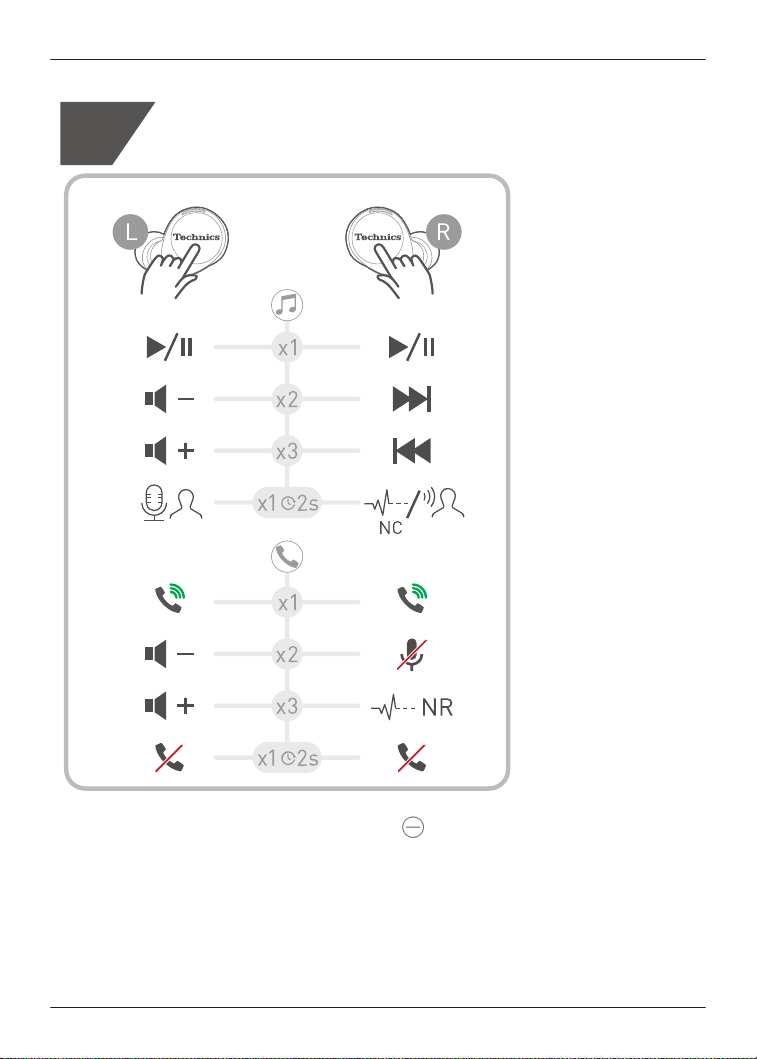
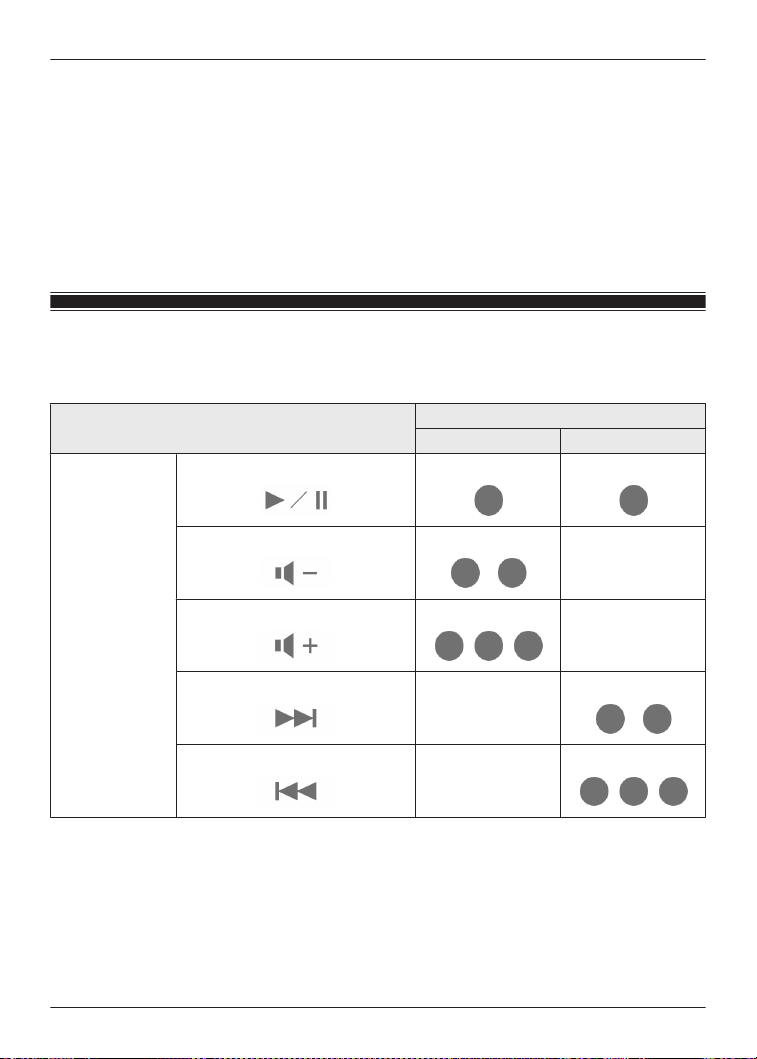
Use the touch sensors
You can use the touch sensors on the earphones to operate the earphones, or remote control
Bluetooth
®
devices connected to the earphones.
Function
Touch sensor gesture
L R
Music
Playback/Pause
Single tap Single tap
Decrease volume
Double tap
-
Increase volume
Triple tap
-
Next track
-
Double tap
Previous track
-
Triple tap
41
Convenient Function
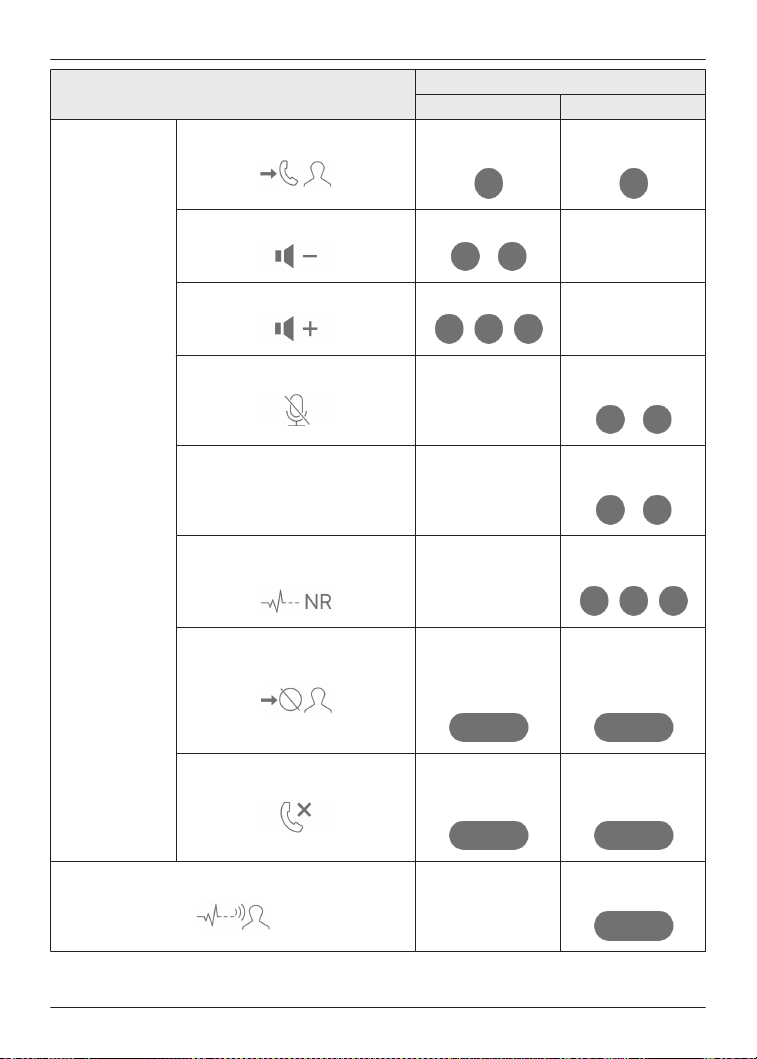
Function
Touch sensor gesture
L R
Calls
Answer call
Single tap during
incoming call
Single tap during
incoming call
Decrease volume
Double tap
-
Increase volume
Triple tap
-
Mute your voice
-
Double tap during
a call
Unmute -
Double tap during
mute
Switch the noise level from the
other party
*1
-
Triple tap during a
call
Reject call
Tap and hold for
about 2 seconds
during incoming
call
Tap and hold for
about 2 seconds
during incoming
call
End call
Tap and hold for
about 2 seconds
during a call
Tap and hold for
about 2 seconds
during a call
Switch external sound control
-
Tap and hold for
about 2 seconds
42
Convenient Function
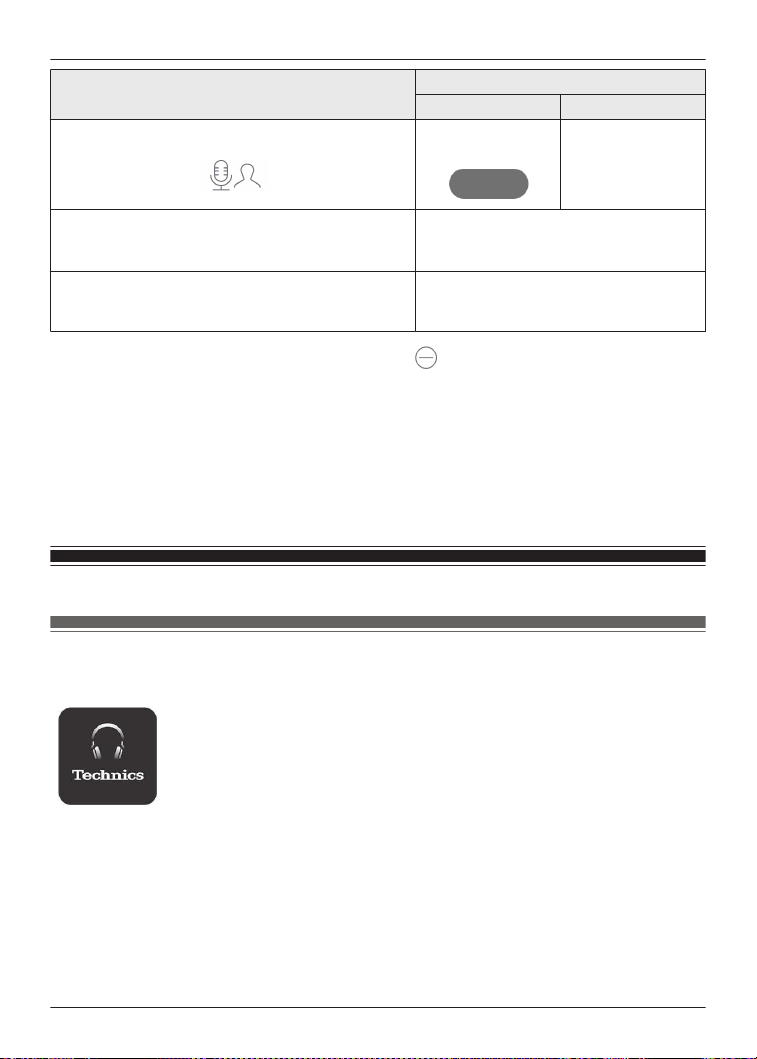
Function
Touch sensor gesture
L R
Activate voice assistant
Tap and hold for
about 2 seconds
-
Set to Bluetooth
®
pairing mode
“Pair the earphones with a subsequent
Bluetooth
®
device without the app”,
Page 36
Reset to factory settings
“EAH-AZ100”, Page 75
“EAH-AZ80/EAH-AZ60M2/EAH-
AZ40M2”, Page 75
*1
This function is not available on the EAH-AZ100 ( ).
Note:
R You can change the touch sensor control buttons on the [Technics Audio Connect] app.
“Customize the touch sensors”, Page 58
R Depending on the Bluetooth
®
device or the app, some features may not work or may operate
differently even if you use the touch sensors.
R If you use only one earphone, you can only perform operations that are available on that side.
R A beep will play to indicate that you have reached the maximum or minimum volume level.
Use the app
Launch the app
1 Tap the [Technics Audio Connect] icon on the smartphone.
2 Take out the earphones from the charging cradle.
R The earphones turn on and the home screen is displayed.
43
Convenient Function
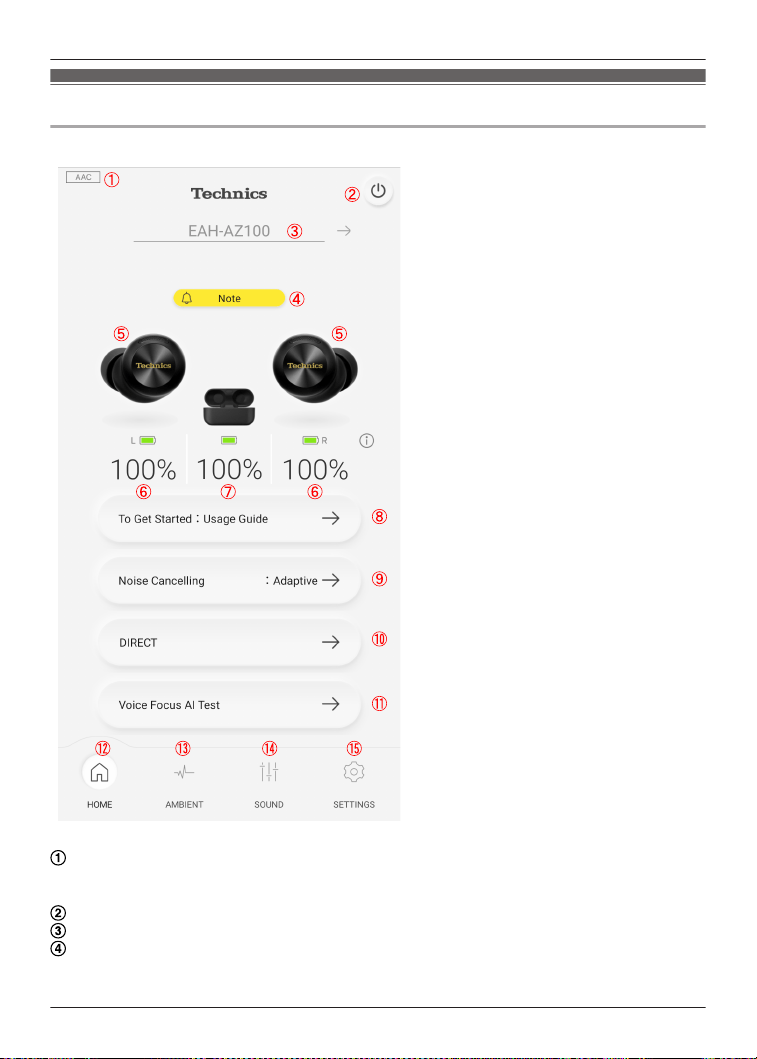
Home screen
EAH-AZ100
Connected codec
R Displays the codec of the Bluetooth
®
device connected to the headphones. It may not be
displayed depending on the Bluetooth
®
device.
Turns off the headphones.
Headphone name
Note
R Displayed when there is a notification (such as an update). You can tap it to view the
notifications.
44
Convenient Function
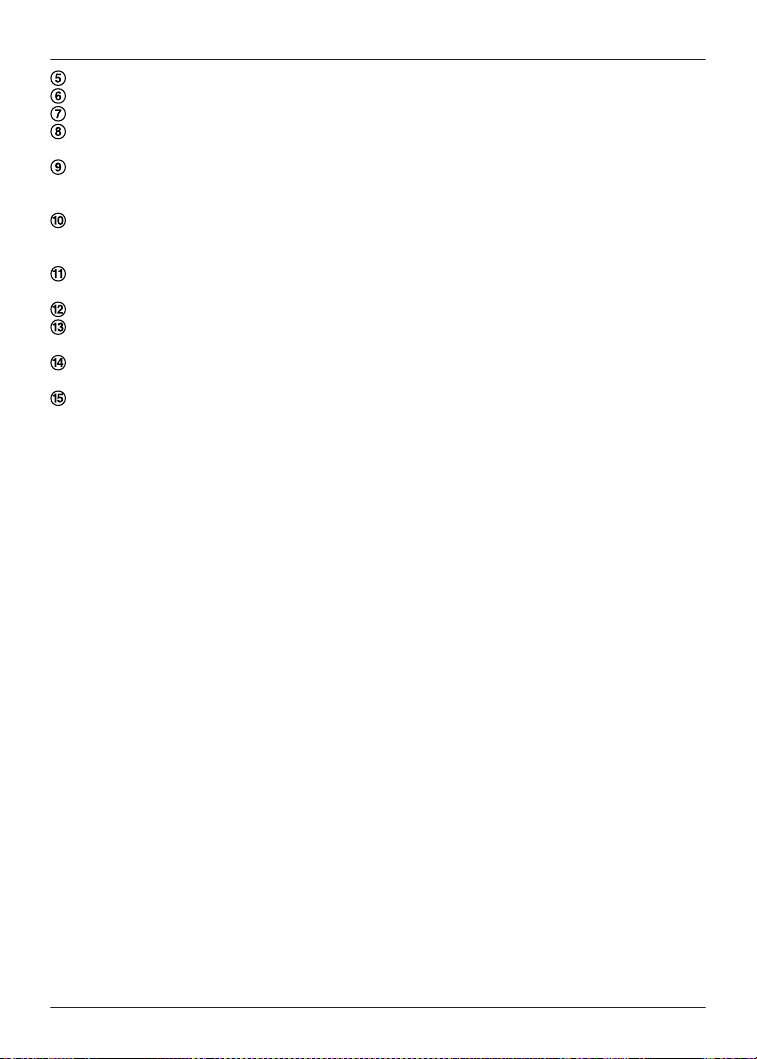
Connected headphones
Remaining earphone charge
Remaining charging cradle charge
Using your headphones and recommended settings.
“Usage Guide (EAH-AZ100)”, Page 52
External sound control setting
R You can tap it to set external sound control.
“Set external sound control”, Page 47
Sound enhancement setting
R You can tap it to set the sound enhancement.
“Set sound enhancement”, Page 50
You can check the voice transmitted to the other party.
“Check Voice Focus AI (EAH-AZ100)”, Page 52
Displays the home screen.
Displays the setting screen for external sound control.
“Set external sound control”, Page 47
Displays the setting screen for sound enhancement.
“Set sound enhancement”, Page 50
Displays the setting screen.
Note:
R You can change the items displayed in sections H to K on the home screen.
“Set the language, messages, and screen”, Page 53
45
Convenient Function
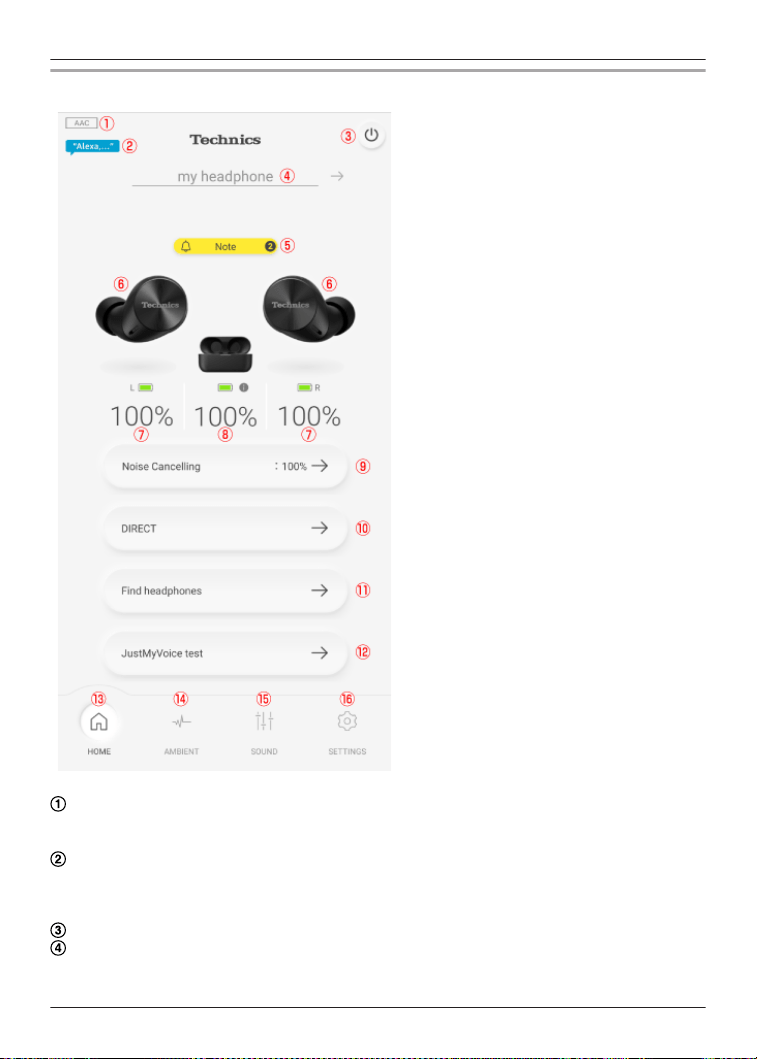
EAH-AZ80/EAH-AZ60M2/EAH-AZ40M2
Connected codec
R Displays the codec of the Bluetooth
®
device connected to the headphones. It may not be
displayed depending on the Bluetooth
®
device.
Amazon Alexa (EAH-AZ80/EAH-AZ60M2)
R Displayed when [Use voice commands to start Alexa] for Amazon Alexa is on.
“When using Amazon Alexa as a voice assistant (EAH-AZ80/EAH-AZ60M2/EAH-
AZ40M2)”, Page 40
Turns off the headphones.
Headphone name
46
Convenient Function
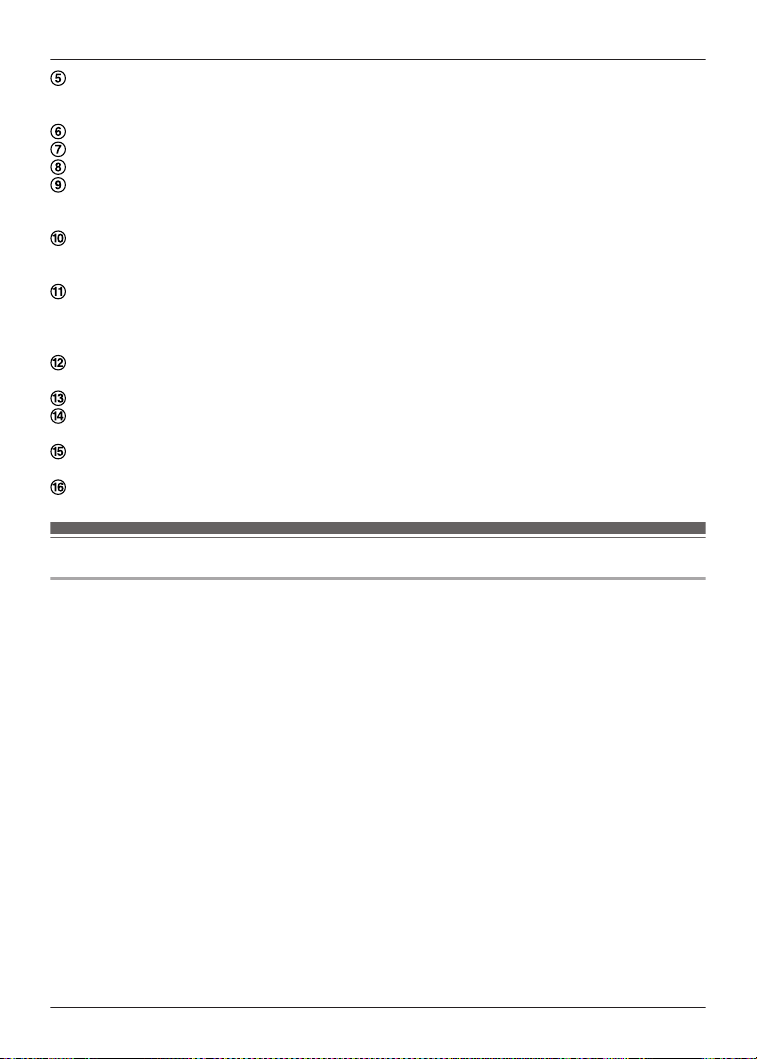
Note
R Displayed when there is a notification (such as an update). You can tap it to view the
notifications.
Connected headphones
Remaining earphone charge
Remaining charging cradle charge
External sound control setting
R You can tap it to set external sound control.
“Set external sound control”, Page 47
Sound enhancement setting
R You can tap it to set the sound enhancement.
“Set sound enhancement”, Page 50
Use to find your lost headphones.
R You must set in advance.
“Play a sound to find the headphones”, Page 51
“Use location services to find the headphones”, Page 52
You can check the voice transmitted to the other party. (EAH-AZ80/EAH-AZ60M2)
“Check JustMyVoice (EAH-AZ80/EAH-AZ60M2)”, Page 52
Displays the home screen.
Displays the setting screen for external sound control.
“Set external sound control”, Page 47
Displays the setting screen for sound enhancement.
“Set sound enhancement”, Page 50
Displays the setting screen.
Set external sound control
EAH-AZ100
1 In the home screen of the [Technics Audio Connect] app, tap [AMBIENT].
R When setting external sound control for the first time, tap [Adjust] and pre-adjust noise
cancelling.
“Optimize noise cancelling (EAH-AZ100/EAH-AZ80/EAH-AZ60M2)”, Page 61
47
Convenient Function
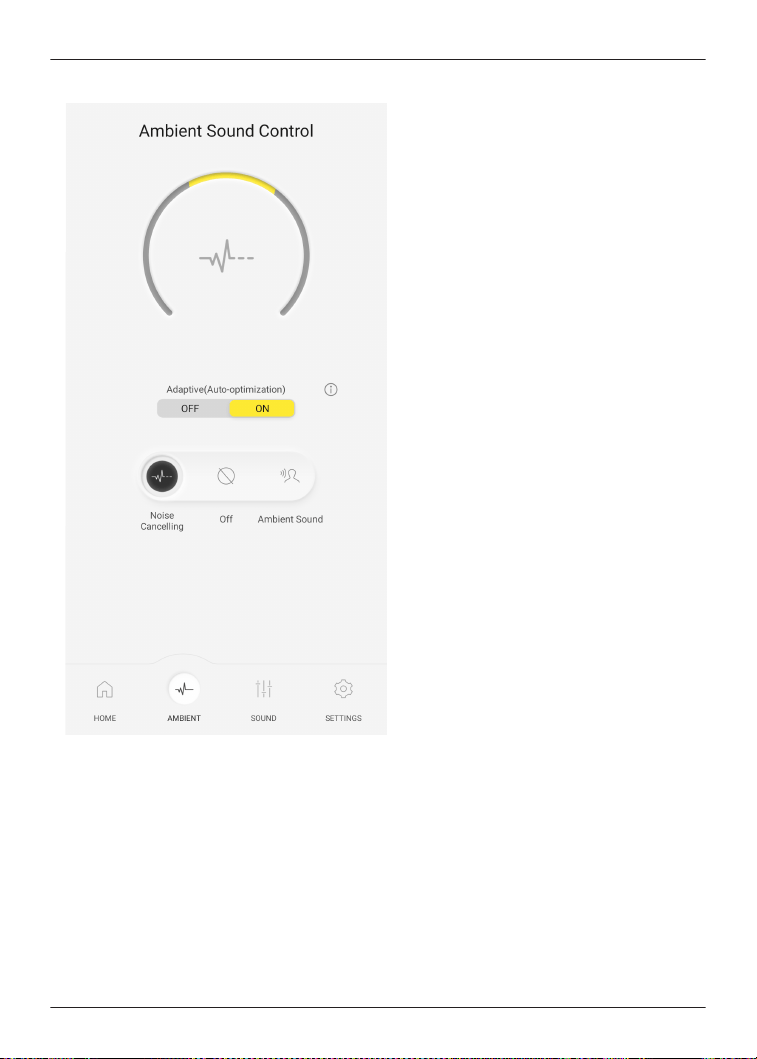
2 Select an external sound control mode.
R [Adaptive (Auto-optimization)] is turned ON: It continuously adjusts to your ears and
surrounding environment, ensuring that noise cancelling is always at its most effective
level. (You cannot adjust the level of external sound control.)
R [Adaptive (Auto-optimization)] is turned OFF: You can adjust the level of external
sound control.
Noise Cancelling: The closer to Max (100), the more noise is removed.
Ambient Sound (Transparent): The closer to Max (100), the more external sound is
transmitted.
R [Ambient Sound] has Transparent and Attention modes.
If you select “Off” or “Ambient Sound” (Attention), you cannot adjust the level of external
sound control.
48
Convenient Function
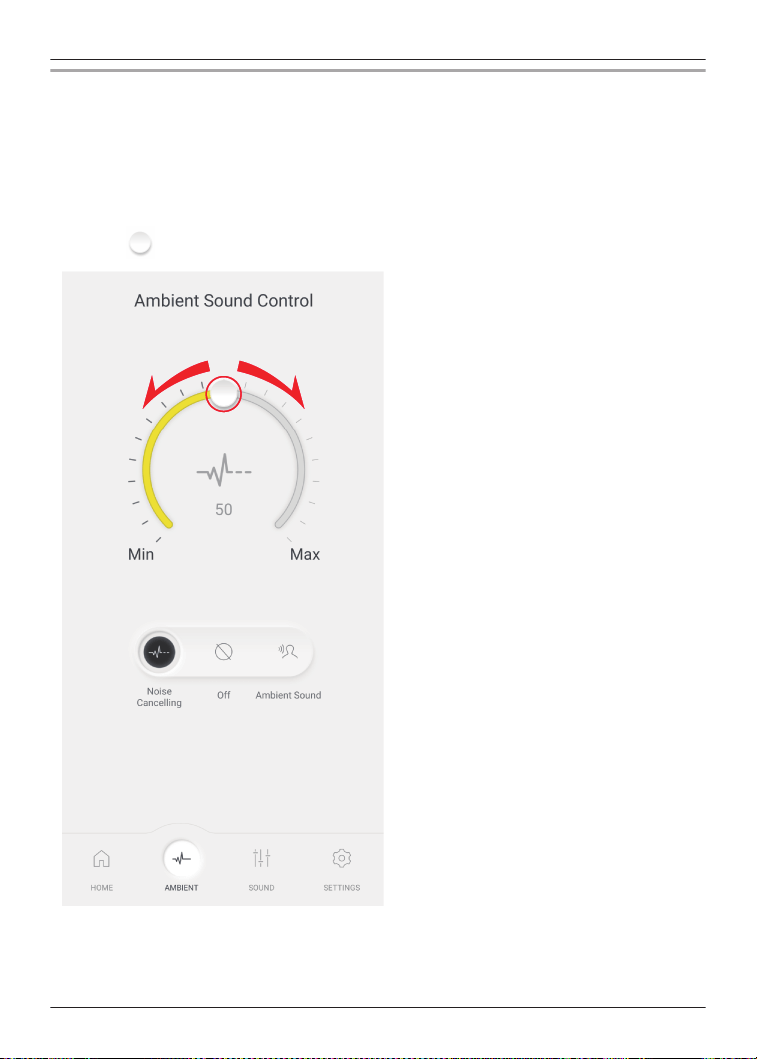
EAH-AZ80/EAH-AZ60M2
1 In the home screen of the [Technics Audio Connect] app, tap [AMBIENT].
R When setting external sound control for the first time, tap [Adjust] and pre-adjust noise
cancelling.
“Optimize noise cancelling (EAH-AZ100/EAH-AZ80/EAH-AZ60M2)”, Page 61
2 Select an external sound control mode.
R [Ambient Sound] has Transparent and Attention modes.
3 Move to adjust the level.
R Noise Cancelling: The closer to Max (100), the more noise is removed.
R Ambient Sound (Transparent): The closer to Max (100), the more external sound is
transmitted.
R If you select “Off” or “Ambient Sound” (Attention), you cannot adjust the level.
49
Convenient Function

EAH-AZ40M2
1 In the home screen of the [Technics Audio Connect] app, tap [AMBIENT].
2 Select an external sound control mode.
R [Ambient Sound] has Transparent and Attention modes.
R You cannot adjust the level of external sound control.
Set sound enhancement
1 In the home screen of the [Technics Audio Connect] app, tap [SOUND].
2 Select a sound enhancement.
R You can select an option such as Bass Enhancer or Clear Voice.
R In Custom, you can set the sound ranges. Move
up or down to adjust the level.
50
Convenient Function
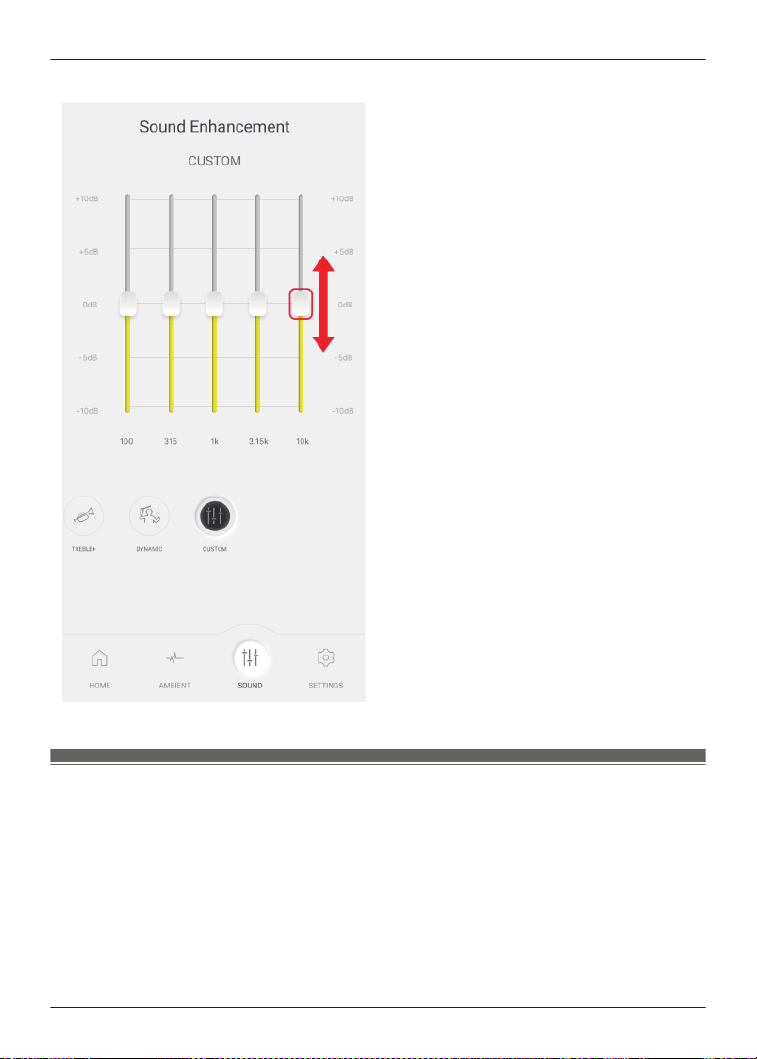
The screen uses the EAH-AZ60M2 as an example.
Play a sound to find the headphones
You can find your lost headphones.
Important:
R When playing a sound to find your earphones, the sound will not play if the headphones are
off. Set the auto power off setting to [Always on] in advance.
“Set auto power off”, Page 54
1 In the home screen of the [Technics Audio Connect] app, tap [SETTINGS]®[Find
headphones].
2 Tap [Emit sound].
3 Follow the on-screen instructions.
51
Convenient Function

Use location services to find the headphones
You can find your lost headphones.
Important:
R When searching with location services, turn on location services in the smartphone in advance
and allow the app to access the location information of the smartphone.
1 In the home screen of the [Technics Audio Connect] app, tap [SETTINGS]®[Find
headphones].
2 Tap [Switch on].
R If [Switch on] is not displayed, go to step 4.
3 Follow the on-screen instructions.
4 Tap [Check position].
R The location information when the headphones and smartphone were last connected is
displayed.
Check Voice Focus AI (EAH-AZ100)
You can check the voice transmitted to the other party when you use the earphones to talk.
1 In the home screen of the [Technics Audio Connect] app, tap [Voice Focus AI Test].
2 Tap [Next].
3 Confirm that Voice Focus AI is [ON].
4 Tap [START] and talk.
R You will hear the voice (your voice) transmitted to the other party with a delay of about 2
seconds.
5 When you are finished checking, tap [STOP].
Check JustMyVoice (EAH-AZ80/EAH-AZ60M2)
You can check the voice transmitted to the other party when you use the earphones to talk.
1 In the home screen of the [Technics Audio Connect] app, tap [JustMyVoice test].
2 Tap [Next].
3 Confirm that JustMyVoice is [ON].
4 Tap [START] and talk.
R You will hear the voice (your voice) transmitted to the other party with a delay of about 2
seconds.
5 When you are finished checking, tap [STOP].
Usage Guide (EAH-AZ100)
Using your headphones and recommended settings.
52
Convenient Function

1 In the home screen of the [Technics Audio Connect] app, tap [SETTINGS].
2 Tap [Usage Guide].
3 Tap [Using for the first time] or [Recommended settings].
4 Follow the on-screen instructions.
Set the language, messages, and screen
Note:
R The EAH-AZ100 automatically displays the body color of the connected headphones on the
home screen.
1 In the home screen of the [Technics Audio Connect] app, tap [SETTINGS].
2 Tap [Voice prompt language], [Customize voice prompt], [Headphone name], [Body
color] or [Customize home screen].
R Voice prompt language: Select the language of the headphone voice prompt.
R Customize voice prompt: Select the voice prompt and notification volume, and external
sound control and device connection messages.
R Headphone name: Edit the name displayed on the home screen.
R Body color (EAH-AZ80/EAH-AZ60M2/EAH-AZ40M2): Select the color of the earphones
displayed on the home screen.
R Customize home screen: Select the items you want to display on the home screen.
3 Follow the on-screen instructions.
Selecting the best earpiece for Active Noise Cancelling
(EAH-AZ100/EAH-AZ80/EAH-AZ60M2)
To maximize the noise cancelling effect, sound quality, call performance, etc., you can select the
best earpieces for your ears from the included earpieces.
Important:
R When selecting the best earpiece, make sure the version of the [Technics Audio Connect]
app, firmware, and voice prompt are the latest.
“Firmware updates”, Page 64
R Wear the earphones correctly.
“EAH-AZ100”, Page 29
“EAH-AZ80”, Page 30
“EAH-AZ60M2/EAH-AZ40M2”, Page 31
R Test in a quiet environment.
1 In the home screen of the [Technics Audio Connect] app, tap [SETTINGS].
2 Tap [Selecting the best earpiece for Active Noise Cancelling]®[Next]®[Next].
3 Tap [Select the size] for earphone (L), select the current earpiece attached to the
earphone, and tap [OK].
4 Tap [Select the size] for earphone (R), select the current earpiece attached to the
earphone, and tap [OK].
53
Convenient Function

5 Tap [Next].
6 Tap [Test].
R Do not touch the earphones while measuring.
7 Check the result.
If a size is displayed in “Next earpiece size”, replace with the displayed earpiece, tap
[Replaced] and go to step 6.
R Repeat steps 6 and 7 until the size is displayed in “Confirmed size”.
If the size is displayed in “Confirmed size”, proceed to step 8.
(Depending on the result, the earpiece may need to be replaced.)
If “Could not measure” is displayed in “Confirmed size”, tap [Try again] and start over from
step 3.
8 Tap [OK].
Note:
R The result is a guide. It does not guarantee the effect of noise cancelling.
R If the test is repeated, the result may vary due to changes in the measurement environment
and wearing conditions.
R Depending on the shape of the ear, it may not be possible to determine the best earpieces.
Select the most stable earpieces.
R If the size of earpieces is determined to be optimal and you feel uncomfortable with the
earpieces, replace them with earpieces that are more comfortable to wear.
Add/change/find headphones
1 In the home screen of the [Technics Audio Connect] app, tap [SETTINGS].
2 Tap [Add headphones], [Use other headphones], or [Find headphones].
R Add headphones: Select a model to pair in the app and start pairing.
R Use other headphones: Select from other paired headphones.
R Find headphones: “Play a sound to find the headphones”, Page 51
3 Follow the on-screen instructions.
Set auto power off
1 In the home screen of the [Technics Audio Connect] app, tap [SETTINGS].
2 Tap [Auto power off].
3 Select the time it takes for the headphones to turn off after a period of silence.
Set the headphone fitting sensor (EAH-AZ100/EAH-AZ80/
EAH-AZ60M2)
You can set how the earphones work when you wear or take off the earphones.
1 In the home screen of the [Technics Audio Connect] app, tap [SETTINGS].
54
Convenient Function

2 Tap [Headphone fitting sensor].
3 Set based on your preferences.
About LE Audio (EAH-AZ100)
The Bluetooth
®
standard consists of two types: LE Audio and Classic Audio. To use LE Audio,
you need a Bluetooth
®
device that is compatible with LE Audio.
Important:
R You may need to configure your Bluetooth
®
device that is compatible with LE Audio. For
details, please refer to the manual of the Bluetooth
®
device.
R When connected via LE Audio, please remove both earphones from the charging cradle.
LE Audio Connection Settings
1 In the home screen of the [Technics Audio Connect] app, tap [SETTINGS].
2 Tap [LE Audio Connection Settings].
3 Select [Prioritize LE Audio].
4 Follow the on-screen instructions.
R All pairing information for the earphones will be erased.
5 When the pairing sound (melody) plays, unpair this unit from the Bluetooth
®
menu in the
Bluetooth
®
device, and pair again.
R Multi-point will be disabled. (The number of multi-point connections will be set to "Only 1
device".)
R The voice assistant and spatial audio will be set to off.
Note:
R When connected via LE Audio, LDAC cannot be used.
R When connected via LE Audio, you may be unable to make calls depending on the calling app
being used.
Number of LE Audio connections
You can pair up to 10 Bluetooth
®
devices, including both LE Audio and Classic Audio. Of these,
you can pair a maximum of 4 LE Audio devices.
About Auracast™ (EAH-AZ100)
Auracast is a new Bluetooth technology that supports multi-audio streaming.
Audio streamed from a single source can be received simultaneously by multiple devices.
For example, you can listen to Auracast broadcasts streamed in exhibition halls or airports using
your own headphones.
To use this feature, you need to search for Auracast broadcasts in locations where they are being
streamed.
55
Convenient Function

Receive Auracast broadcasts
1 Set [Prioritize LE Audio].
“LE Audio Connection Settings”, Page 55
2 In the home screen of the [Technics Audio Connect] app, tap [SETTINGS].
3 Tap [Auracast].
4 Select available broadcasts.
Note:
R Auracast is available when "LE Audio Connection Settings" is set to "Prioritize LE Audio".
R You may need to enter a password to receive Auracast broadcasts.
R Cannot start Auracast reception while in use (during audio playback and/or calls).
Use LDAC
Important:
R To play music on a device that cannot install the [Technics Audio Connect] app, install the app
on another Bluetooth
®
device and turn on [LDAC for headphones].
R You may need to set the audio codec of the playback device. For details, please refer to the
manual of the playback device.
1 In the home screen of the [Technics Audio Connect] app, tap [SETTINGS].
2 Tap [Connection mode].
3 Select [Prioritize sound quality], and turn on [LDAC for headphones].
4 Follow the on-screen instructions.
Note:
R This unit complies with the “High Resolution Audio” standard of the Japan Audio Association.
R To enjoy wireless high-resolution quality (sound quality certified by the high-resolution wireless
logo), use a playback device with the high-resolution wireless logo and set the Bluetooth
®
sound quality setting to sound quality priority mode / LDAC 990 kbps.
R In modes other than the above (connection priority mode, etc.), playback may not be possible
with high resolution quality.
Select a connection mode
1 In the home screen of the [Technics Audio Connect] app, tap [SETTINGS].
2 Tap [Connection mode].
3 Select a mode.
4 Follow the on-screen instructions.
56
Convenient Function

Use multi-point
1 In the home screen of the [Technics Audio Connect] app, tap [SETTINGS].
2 Tap [Number of multi-point connections].
3 Select the number of devices.
4 Follow the on-screen instructions.
Set the operation during multi-point connection
(EAH-AZ100)
You can set the music playback and call operations while multiple devices are connected
simultaneously.
1 In the home screen of the [Technics Audio Connect] app, tap [SETTINGS].
2 Tap [Multi-point operation].
3 Follow the on-screen instructions.
Suppress sound interruptions and delays
1 In the home screen of the [Technics Audio Connect] app, tap [SETTINGS].
2 Tap [Suppression of sound interruptions and delays].
3 Select a mode.
4 Follow the on-screen instructions.
Spatial Audio (EAH-AZ100)
1 In the home screen of the [Technics Audio Connect] app, tap [SETTINGS].
2 Tap [Spatial Audio].
3 Tap [Next].
4 Tap [ON] for Spatial Audio.
5 Follow the on-screen instructions.
Note:
R By turning on head tracking, you can experience natural and realistic sound that moves in
sync with your head movements.
R When your head is continuously moving, such as during jogging, the head tracking function
may not operate correctly.
57
Convenient Function

Disable the touch sensors
You can disable the touch sensors on the earphones during music playback and calls.
1 In the home screen of the [Technics Audio Connect] app, tap [SETTINGS].
2 Tap [Customizing the touch sensor].
3 Turn off [Touch sensor operations].
4 Tap [OK].
Customize the touch sensors
You can change the functions assigned to the left and right touch sensors.
1 In the home screen of the [Technics Audio Connect] app, tap [SETTINGS].
2 Tap [Customizing the touch sensor].
3 Tap [General operations] or [Telephone].
58
Convenient Function
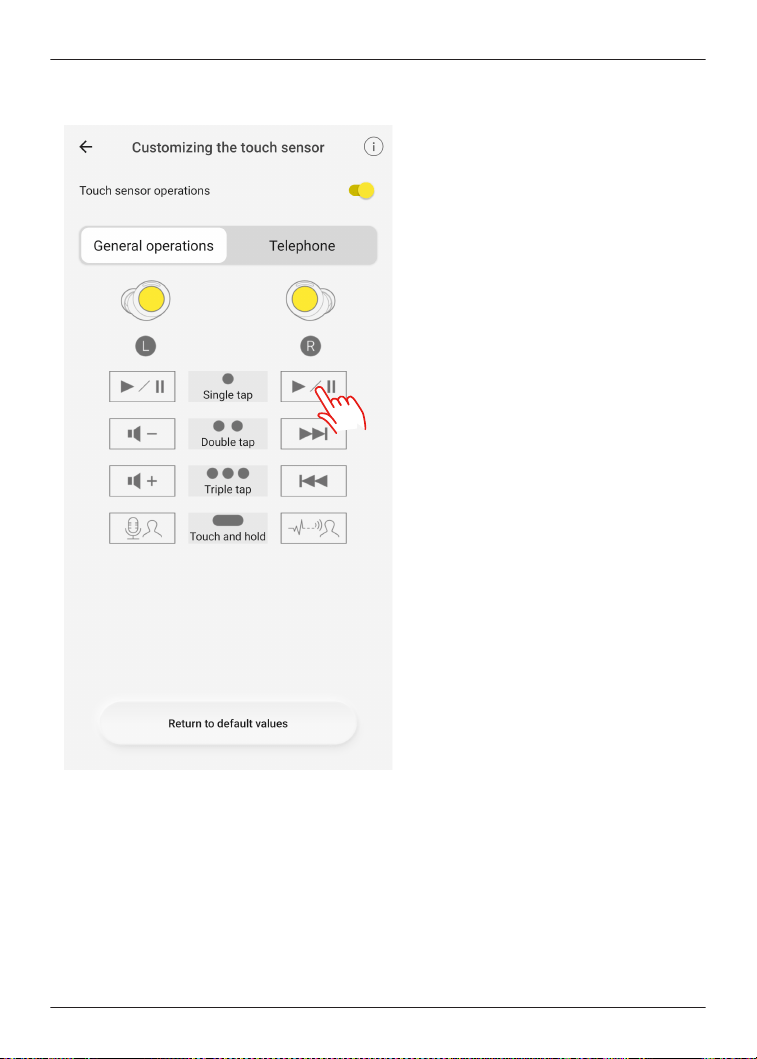
4 Tap the icon of the function you want to change.
Example) Changing the single tap function of the right earphone in [General operations]
59
Convenient Function
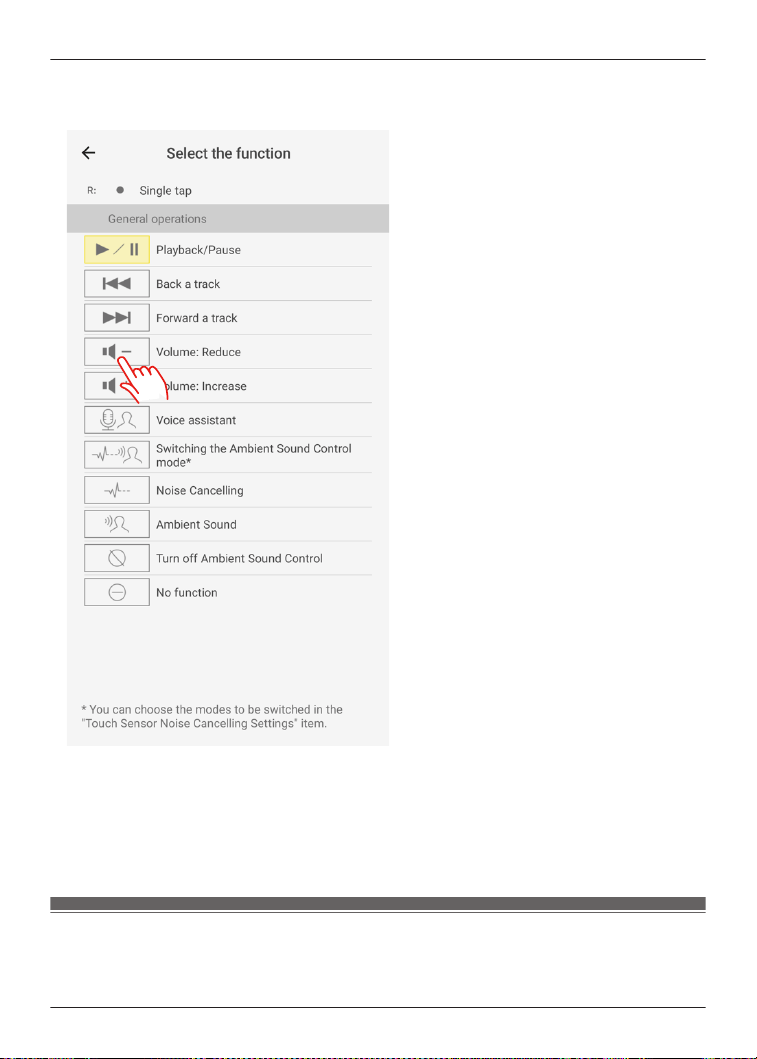
5 Select and tap a function.
Example) Changing to [Volume: Reduce]
6 Tap [Confirm].
Note:
R To reset to default settings, tap [Return to default values], and then tap [OK].
Customize external sound control switching
The mode switches every time you touch and hold the touch sensor (R) on the earphones. You
can select what modes to switch between.
60
Convenient Function
1 In the home screen of the [Technics Audio Connect] app, tap [SETTINGS].
2 Tap [Touch Sensor Noise Cancelling Settings].
3 Select 2 or more modes.
4 Tap [Set].
5 Tap [OK].
Select an ambient mode
Ambient sound allows you to select the mode when listening to sounds from your surroundings
without removing the earphones.
1 In the home screen of the [Technics Audio Connect] app, tap [SETTINGS].
2 Tap [Ambient mode settings].
3 Select a mode.
R Transparent: Transmits external sounds as-is. (Music does not pause.)
R Attention: Pauses music and emphasizes voices such as conversations and
announcements.
Optimize noise cancelling (EAH-AZ100/EAH-AZ80/
EAH-AZ60M2)
1 In the home screen of the [Technics Audio Connect] app, tap [SETTINGS].
2 Tap [Optimizing noise cancellation (pre-adjustment)].
3 Move up or down to adjust the level.
R Adjust to a level that minimizes noise in noisy areas.
4 Tap [Confirm].
5 Tap [OK].
Voice Focus AI settings (EAH-AZ100)
You can suppress ambient sounds during a call.
Suppress sounds around you
1 In the home screen of the [Technics Audio Connect] app, tap [SETTINGS].
2 Tap [Voice Focus AI settings].
3 Turn on [Suppress sounds around you].
61
Convenient Function

Suppress sounds around the other party
1 In the home screen of the [Technics Audio Connect] app, tap [SETTINGS].
2 Tap [Usage Guide].
3 Tap [Recommended settings].
4 Tap [Set] for [Suppress sounds around the other party during a call].
5 Tap [OK].
R It will operate as follows:
Touch the touch sensor (R) three times during a call to enable [Suppress sounds
around the other party].
R When the call ends, [Suppress sounds around the other party] will be disabled.
Note:
R You may not be able to hear sounds other than the person’s voice, such as call waiting.
One-touch Conversation Mode (EAH-AZ100)
When someone speaks to you while music is playing, touching the touch sensor will pause the
music and emphasize the other person’s voice.
This makes it easier to have a conversation even while wearing the earphones.
1 In the home screen of the [Technics Audio Connect] app, tap [SETTINGS].
2 Tap [Usage Guide].
3 Tap [Recommended settings].
4 Tap [Set] for [One-touch Conversation Mode].
5 Tap [OK].
R It will operate as follows:
Touching the touch sensor (R) while music is playing will enable [Ambient Sound] and
[Attention].
R Touching it again will resume the music playback.
Select a level of background noise reduction (EAH-AZ80/
EAH-AZ60M2/EAH-AZ40M2)
Set a level that reduces background noise from the other party during a call.
1 In the home screen of the [Technics Audio Connect] app, tap [SETTINGS].
2 Tap [Level of background noise reduction].
3 Select a level.
R Select “Normal” if the other party’s environment is relatively quiet, or “Strong” if the other
party’s environment is noisy (constant noise such as a ventilation fan).
62
Convenient Function

Voice assistant (EAH-AZ100)
You can activate your smartphone’s voice assistant by operating this device.
1 In the home screen of the [Technics Audio Connect] app, tap [SETTINGS].
2 Tap [Voice assistant].
3 Turn on [Voice assistant on your smartphone].
4 Follow the on-screen instructions.
Select a voice assistant (EAH-AZ80/EAH-AZ60M2/
EAH-AZ40M2)
1 In the home screen of the [Technics Audio Connect] app, tap [SETTINGS].
2 Tap [Select voice assistant].
3 Select a voice assistant.
4 Follow the on-screen instructions.
Set maintenance notifications
Regular maintenance is required to use this unit comfortably.
You will be informed about maintaining the earphones and earpieces regularly.
1 In the home screen of the [Technics Audio Connect] app, tap [SETTINGS].
2 Turn on [Maintenance notification].
R You can tap [Website with maintenance tips] to check the maintenance procedure.
Reset the app
1 In the home screen of the [Technics Audio Connect] app, tap [SETTINGS].
2 Tap [About the application].
3 Tap [Reset app].
4 Tap [Reset].
5 Follow the on-screen instructions.
Reset the headphones to factory settings
1 In the home screen of the [Technics Audio Connect] app, tap [SETTINGS].
2 Tap [Headphone information].
63
Convenient Function

3 Tap [Restore headphones to the factory settings].
4 Tap [Reset].
5 Follow the on-screen instructions.
Firmware updates
If an update notification is displayed on your smartphone, follow the on-screen instructions to
update to the latest version.
Important:
R While the firmware is updating, place the headphones and your smartphone close together
and wait without using them. The update may be interrupted or delayed if there is music
playing or a call during the update.
1 In the home screen of the [Technics Audio Connect] app, tap [SETTINGS].
2 Tap [Update headphones].
3 Follow the on-screen instructions.
R Wait until the update is complete and do not operate the headphones or the app.
4 In the home screen, tap [SETTINGS].
5 Tap [Headphone information] and confirm that “Firmware is up to date.” is displayed.
Help
You can check user guides and headphone information.
1 In the home screen of the [Technics Audio Connect] app, tap [SETTINGS].
2 Select and check an item in Help.
64
Convenient Function

Troubleshooting
Before requesting repair:
R Update the firmware.
R Resetting to factory settings may resolve the problem.
R Refer to “FAQ”.
{{"https://av.jpn.support.panasonic.com/support/technics/product-faq/AZ3/index.html"|
tolink("https://av.jpn.support.panasonic.com/support/technics/product-faq/AZ3/index.html")}}
If the FAQ or the following measures do not resolve the problem, or if the problem is not
described below, please contact your dealer.
Cannot connect to a Bluetooth
®
device.
R EAH-AZ100: Up to 10 Bluetooth
®
devices can be paired with the earphones. If you pair a
device when the maximum number of paired Bluetooth
®
devices is exceeded, previously
paired devices will be overwritten. To use overwritten devices again, pair them again.
When pairing with LE Audio compatible Bluetooth
®
devices
“Number of LE Audio connections”, Page 55
R EAH-AZ80/EAH-AZ60M2/EAH-AZ40M2: Up to 10 Bluetooth
®
devices can be paired with the
earphones. If you pair a device when the maximum number of paired Bluetooth
®
devices is
exceeded, previously paired devices will be overwritten. To use overwritten devices again, pair
them again.
R Unpair this unit from the Bluetooth
®
menu in the Bluetooth
®
device, and pair again.
“Use the app to pair with a Bluetooth
®
device”, Page 34
“Pair with a Bluetooth
®
device without the app”, Page 35
There is no sound.
R Check if the earphones and the Bluetooth
®
device are connected.
R Check if music is playing on the Bluetooth
®
device.
R Check if the earphones are on and if the volume is not too low.
“The volume is low./The other party’s voice is low.”, Page 66
R Pair/connect the earphones and the Bluetooth
®
device again.
“Use the app to pair with a Bluetooth
®
device”, Page 34
“Pair with a Bluetooth
®
device without the app”, Page 35
R Check if the Bluetooth
®
device supports the “A2DP” profile. For details, please refer to the
manual of the Bluetooth
®
device.
“Listen to music”, Page 38
R Turn off the Bluetooth
®
in another device that is connected via multipoint and check again
The sound cuts out./Lots of noise./Poor audio quality.
R Are you covering the earphones or Bluetooth
®
device with your palm? The signals and audio
may be interrupted.
R Are you out of the Bluetooth
®
communication range (about 10 m)? Bring the earphones and
the Bluetooth
®
device closer together.
R Are there any obstacles between the earphones and the Bluetooth
®
device? Avoid obstacles.
R Turn off wireless LAN devices that you are not using.
R Using devices that interfere with radio waves, such as microwaves, may affect communication.
R Depending on the signal conditions, radio waves in the same 2.4 GHz band as Bluetooth
®
may interfere and cause sound skipping.
R When using LDAC and multi-point together, change the “LDAC playback sound quality setting”
and “connection setting” of the playback device from “prioritize sound quality” to “best effort” or
“prioritize connectivity” to lower the bit rate. You may not be able to change the settings on
some playback devices. For details, please refer to the manual of the playback device.
65
FAQ

R Setting [Suppression of sound interruptions and delays] to [Suppress the interruption of
the sound] in the [Technics Audio Connect] app may resolve the problem.
My voice doesn’t go through during a call.
R Check if the Bluetooth
®
device supports the “HSP” or “HFP” profile. For details, please refer to
the manual of the Bluetooth
®
phone.
“Talk”, Page 38
R Check that the audio settings of the Bluetooth
®
phone are set to communicate with this unit.
R When connected via LE Audio, you may be unable to make calls depending on the calling app
being used.
It’s difficult for the other party to hear my voice during a call.
R EAH-AZ100: If Voice Focus AI (Suppress sounds around you) is on, the earphones detect
your voice with a speech detection microphone so that the other party can hear you. Your
voice cannot be detected if the earpieces are not in close contact with your ears. Replace with
earpieces that fit well in your ears.
“EAH-AZ100”, Page 31
R EAH-AZ100: At default settings, Voice Focus AI (Suppress sounds around you) is on. When
talking in a quiet environment, turning off Voice Focus AI (Suppress sounds around you) may
resolve the problem.
“Check Voice Focus AI (EAH-AZ100)”, Page 52
R EAH-AZ80/EAH-AZ60M2: If JustMyVoice is on, the earphones detect your voice with a
speech detection microphone so that the other party can hear you. Your voice cannot be
detected if the earpieces are not in close contact with your ears. Replace with earpieces that fit
well in your ears.
“EAH-AZ80/EAH-AZ60M2/EAH-AZ40M2”, Page 33
R EAH-AZ80/EAH-AZ60M2: At default settings, JustMyVoice is on. When talking in a quiet
environment, turning off JustMyVoice may resolve the problem. You can turn it off even if [We
recommend enabling the setting.] is displayed in the setting screen.
“Check JustMyVoice (EAH-AZ80/EAH-AZ60M2)”, Page 52
R To make calls using an app on a computer connected through Wi-Fi
®
, we recommend setting
the Wi-Fi router to the 5 GHz band, which does not interfere with Bluetooth
®
radio waves.
The volume is low./The other party’s voice is low.
R Wear the earphones correctly.
“EAH-AZ100”, Page 29
“EAH-AZ80”, Page 30
“EAH-AZ60M2/EAH-AZ40M2”, Page 31
R The volume of Bluetooth
®
devices such as smartphones and the volume of the earphones
may be controlled separately. Increase the volume of both the earphones and the Bluetooth
®
device.
“Use the touch sensors”, Page 41
R Is there earwax or dust in the earpieces? Foreign matter such as earwax or dust may clog the
protective mesh of the earphones and decrease the volume or change the acoustic
characteristics, resulting in malfunction. If the sponge inside the earpieces get dirty, remove
the earpieces from the earphones and clean them.
“Clean the earpieces”, Page 77
Voice Focus AI (Suppress sounds around the other party) may not be effective or may
have limited effectiveness. (EAH-AZ100)
R This feature is initially set to OFF when a call starts and can only be switched ON during the
call. Please activate it if you feel that the surrounding noise from the caller is too loud. This
feature will revert to OFF once the call ends.
R This feature identifies only human voices and suppresses other surrounding noises. Voices
from people other than the speaker may not be sufficiently suppressed.
66
FAQ

The left and right batteries deplete at different rates.
R The left and right may vary depending on signal and operating conditions.
R Using the microphone of an earphone for calls will quickly deplete the battery of that earphone.
R The remaining earphone charge values may differ between the left and right on the [Technics
Audio Connect] app.
Amazon Alexa doesn’t respond. (EAH-AZ80/EAH-AZ60M2/EAH-AZ40M2)
R Confirm that the voice assistant is set to Amazon Alexa.
R Confirm that your mobile device can transmit data.
R Confirm that the device is registered in the Amazon Alexa app.
Cannot charge.
R EAH-AZ100: If the LED (green) lights for 4 seconds and then turns off when you try to charge,
the charging cradle is fully charged. If the earphones are placed in the charging cradle and the
LED (red, yellow, or green) lights for 4 seconds and then flashes slowly when the lid of the
charging cradle is opened, the earphones are fully charged.
R EAH-AZ80/EAH-AZ60M2/EAH-AZ40M2: If the charging cradle status indicator LED turns off
immediately when you try to charge, the charging cradle is fully charged. If the earphone
status indicator LED turns off when you put the earphones in the charging cradle and open the
lid, the earphones are fully charged.
R If the charging and operating time have gotten shorter, the internal batteries of the earphones
and charging cradle may be exhausted. (Each internal battery can be recharged about 500
times.)
R Immediately after purchase or when this has not been used for a while, the charging cradle
status indicator LED may not turn on for a few minutes after starting to charge, but will if you
continue charging. If it does not turn on even after a while, please request your dealer for
repair.
The charging cradle does not charge with the USB charging cord.
R Is there any foreign matter or dirt on either ends of the USB charging cord and on the contacts
of the connected devices?
→ Wipe off dirt because it may cause overheating or malfunction.
“Clean the charging cradle terminal section”, Page 80
R Firmly connect one end of the USB charging cord to a computer or separately sold USB PD
supported AC adapter (USB Type-C connector), and the other end to the charging terminal of
the charging cradle.
R If you are using a computer USB port, confirm that the computer supplying power is on. It will
not charge if the computer is in standby or sleep mode. (If it still does not charge, try another
USB port on your computer.)
R If this unit does not charge even after trying the measures above, remove the USB charging
cord and insert it again.
The charging cradle does not charge wirelessly. (EAH-AZ100/EAH-AZ80/EAH-AZ60M2)
R Is the charging cradle placed properly on the wireless charger?
→ If it is not placed properly, charging may be slower or may stop. For information about the
charging position, please refer to the manual of the wireless charger.
R Charge at a room temperature between 10 °C to 35 °C. Higher room temperatures may result
in longer charging times. Depending on your wireless charger, charging may be slower or may
stop.
The earphones do not charge.
R Are the charging terminals of the earphones dirty?
→ Wipe off the dirt.
“Clean the charging terminals of the earphones”, Page 80
R Are the earphones properly inserted into the charging cradle?
“Charge the earphones and charging cradle at the same time”, Page 24
67
FAQ

R If you are using third-party earpieces, you may not be able to charge them with the included
charging cradle. Use the included earpieces.
The earphones or charging cradle is warm while charging.
R Although the earphones or charging cradle may get warm while charging, it is not a
malfunction.
R EAH-AZ100/EAH-AZ80/EAH-AZ60M2: If the charging cradle is not placed properly during
wireless charging, the wireless charger, earphones, and charging cradle may get hot. For
correct placement, please refer to the manual of the wireless charger.
The earphones don’t turn on. The earphones don’t work.
R Turn them off and then on again. (Put them in the charging cradle, wait about 15 seconds, and
then take them out.)
“EAH-AZ100”, Page 28
“EAH-AZ80/EAH-AZ60M2/EAH-AZ40M2”, Page 29
R Are the touch sensors disabled?
“Disable the touch sensors”, Page 58
“Customize the touch sensors”, Page 58
Music doesn’t pause and the touch sensors aren’t disabled even after I take off the
earphones. (EAH-AZ100/EAH-AZ80/EAH-AZ60M2)
R At default settings, the music pauses and the touch sensors are disabled when you take off
the earphones.
→ Check the headphone fitting sensor settings.
“Set the headphone fitting sensor (EAH-AZ100/EAH-AZ80/EAH-AZ60M2)”, Page 54
→ If the wear sensors are dirty, music may not pause or the touch sensors may respond to
unintended operation. Wipe off any dirt on the wear sensors with a dry, soft cloth.
R When putting the earphones down on a desk, etc., the earphones may be detected as being
worn or music may be played if the wear sensors are close to the desk. To prevent erroneous
operation, take care to keep the wear sensors away from the desk, etc. when putting the
earphones down.
EAH-AZ100: Wear sensors Page 14
EAH-AZ80: Wear sensors Page 16
EAH-AZ60M2: Wear sensors Page 18
The wear sensors don’t work. (EAH-AZ100/EAH-AZ80/EAH-AZ60M2)
R The wear sensors may not work if they are dirty or moist. Wipe off any dirt and moisture with a
dry, soft cloth.
The LED does not turn on or flash even after the charging cradle lid is opened.
EAH-AZ100: The LED does not turn on (for about 4 seconds) or flash in light blue.
EAH-AZ80/EAH-AZ60M2/EAH-AZ40M2: The LED does not turn on (for about 3 seconds).
R The battery has no charge. Charge with the included USB charging cord.
“Charge the earphones and charging cradle at the same time”, Page 24
The LED of the charging cradle is quickly flashing red.
R LED position
EAH-AZ100: LED Page 15
EAH-AZ80: Charging cradle status indicator LED Page 17
EAH-AZ60M2: Charging cradle status indicator LED Page 19
EAH-AZ40M2: Charging cradle status indicator LED Page 21
R EAH-AZ100: It could not charge properly. Remove the USB charging cord and insert it again.
R EAH-AZ80/EAH-AZ60M2/EAH-AZ40M2: It could not charge properly. Remove the USB
charging cord and insert it again. If the problem persists, clean the charging terminals of the
earphones and the charging cradle terminal section.
“Clean the charging terminals of the earphones”, Page 80
“Clean the charging cradle terminal section”, Page 80
68
FAQ
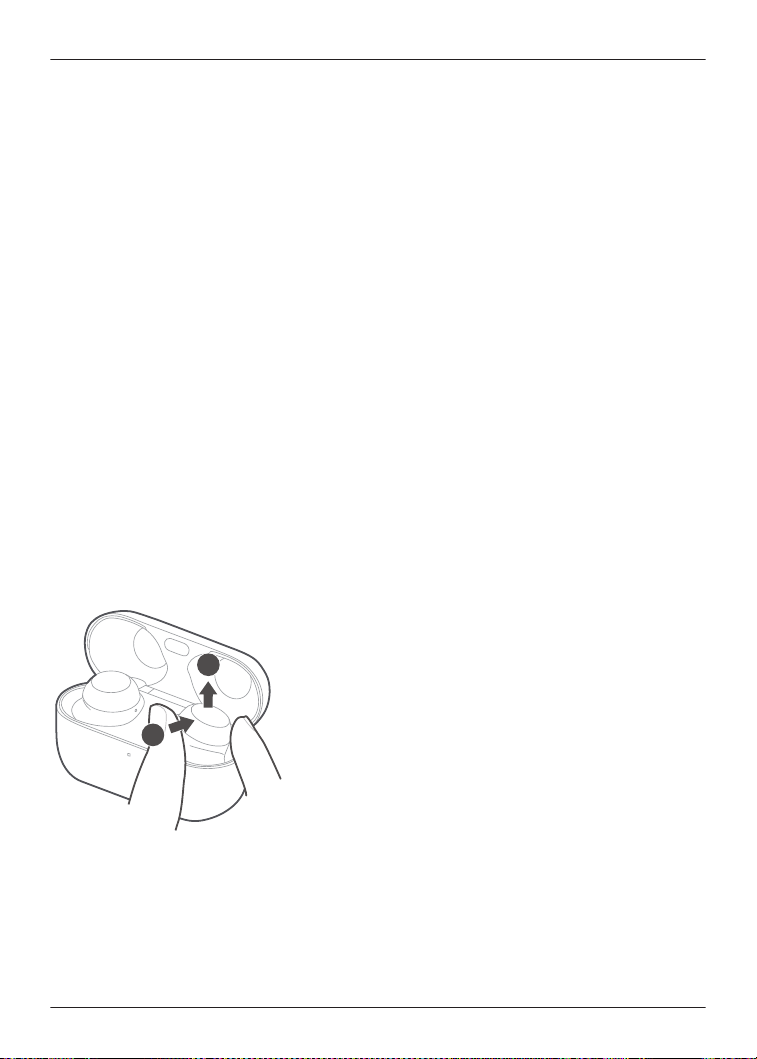
R If the charging terminals of the charging cradle become abnormally hot, immediately unplug
the USB charging cord and contact your dealer.
R The temperature of the charging cradle internal battery is abnormal. Stop charging and wait for
a while. We recommend charging at an ambient temperature between 10 °C to 35 °C.
The charging cradle status indicator LED and the earphone status indicator LED are
flashing red at the same time. (EAH-AZ80/EAH-AZ60M2/EAH-AZ40M2)
R The earphones are not properly inserted into the charging cradle. Put in the earphones again
properly.
R Is there dust, water droplets, or dirt on the terminals of the earphones or charging cradle?
Remove dust, water, and dirt.
“Clean the charging terminals of the earphones”, Page 80
“Clean the charging cradle terminal section”, Page 80
The pattern of the charging cradle status indicator LED changed while charging.
(EAH-AZ80/EAH-AZ60M2/EAH-AZ40M2)
R The pattern differs depending on whether the charging cradle lid is open or closed. (This is not
a malfunction.)
Cannot feel the best noise cancelling effect.
R Wear the earphones correctly.
“EAH-AZ100”, Page 29
“EAH-AZ80”, Page 30
“EAH-AZ60M2/EAH-AZ40M2”, Page 31
R Replace the earpieces.
“EAH-AZ100”, Page 31
“EAH-AZ80/EAH-AZ60M2/EAH-AZ40M2”, Page 33
R EAH-AZ100/EAH-AZ80/EAH-AZ60M2: Select the best earpieces.
“Selecting the best earpiece for Active Noise Cancelling (EAH-AZ100/EAH-AZ80/EAH-
AZ60M2)”, Page 53
The earphones are difficult to remove.
R Push the earphones from the side inside the charging cradle to tilt them and remove them.
While resetting the EAH-AZ100 to factory settings, the pairing sound that played once
stops.
R Turn off the Bluetooth
®
function of the connected Bluetooth
®
device and try again.
“EAH-AZ100”, Page 75
69
FAQ

FAQ for the smartphone app (Technics Audio
Connect)
Q01. What products can I use with Technics Audio Connect?
R EAH-AZ70W, EAH-AZ60, EAH-AZ40, EAH-A800, EAH-AZ80, EAH-AZ60M2, EAH-AZ40M2,
EAH-AZ100 (as of December 2024)
R This manual describes instructions for EAH-AZ100, EAH-AZ80, EAH-AZ60M2 and
EAH-AZ40M2.
Q02. What devices can run Technics Audio Connect?
Android™ devices
R Operating system Android 9.0 or later. However, operation of the app on all Android™ devices
running these operating systems is not guaranteed.
iPhone/iPad/iPod touch
R Operating system iOS 15.0 or later. However, the app may not operate correctly depending on
the OS version.
Q03. What languages are supported?
R The app supports the display of Japanese, English, French, German, Spanish, Canadian
French, Italian, Polish, Russian, Ukrainian, Simplified Chinese, and Traditional Chinese. The
language switches automatically to match the language of the smartphone. The display is set
to English if the language is not Japanese, English, French, German, Spanish, Canadian
French, Italian, Polish, Russian, Ukrainian, Simplified Chinese, or Traditional Chinese.
Q04. How do I unpair the headphones?
R You cannot unpair from this app.
To unpair, remove the headphones from the Bluetooth
®
settings on the device.
Q05. Cannot connect to the headphones.
R When pairing new headphones or when the headphones are not paired, on the home screen
of the [Technics Audio Connect] app, tap [SETTINGS]®[Add headphones] and follow the
on-screen instructions. When the headphones are not connected, tap [Add headphones] in
the headphone list and follow the on-screen instructions.
R If you cannot connect to paired headphones, turn on the headphones and connect from the
Bluetooth
®
settings of your device.
R If your device is in airplane mode, turn off the mode.
R If the device’s Bluetooth
®
is off, turn it on.
R You may be able to connect by bringing the device and headphones closer together or by
turning off other Bluetooth
®
devices.
iPhone/iPad/iPod touch
R In iOS 15.0 or later, a Bluetooth
®
confirmation screen is displayed when you launch the app
for the first time. If you selected [Don’t Allow], follow the steps below to turn on Bluetooth
®
.
1 On the device, go to Settings>Privacy & Security (or Privacy)>Bluetooth>turn on [Audio
Connect].
2 Launch the app.
R If you cannot connect even after doing the above, follow the steps below to pair the
headphones and device again.
1 Close all apps running in the background.
2 Turn off the device’s Bluetooth
®
.
70
FAQ

3 Reset the headphones to factory settings.
“EAH-AZ100”, Page 75
“EAH-AZ80/EAH-AZ60M2/EAH-AZ40M2”, Page 75
4 Turn on the device’s Bluetooth
®
.
5 Delete the headphone registration information from the device’s Bluetooth
®
settings.
6 Pair the headphones and device again.
“Use the app to pair with a Bluetooth
®
device”, Page 34
“Pair with a Bluetooth
®
device without the app”, Page 35
Q06. Cannot update the firmware.
R Connect the device to the Internet.
R Check if the firmware version is the latest from [SETTINGS] on the home screen of the
[Technics Audio Connect] app®[Headphone information].
R If the transfer of the firmware to the headphones does not start, or if the number stops and
does not progress during transfer, try the following methods.
[Method 1]
1 Confirm that the remaining charge for both earphones (L and R) is at least 70%.
2 Keep the headphones out of the charging cradle from the start to the end of the transfer/
update.
R After starting the transfer/update, do not make calls or play music until the end of the
update.
[Method 2] *If Method 1 does not resolve the problem
1 Force close the app.
2 Launch the app again.
R If the firmware update notification is not displayed, allow notifications.
Android™ devices
71
FAQ
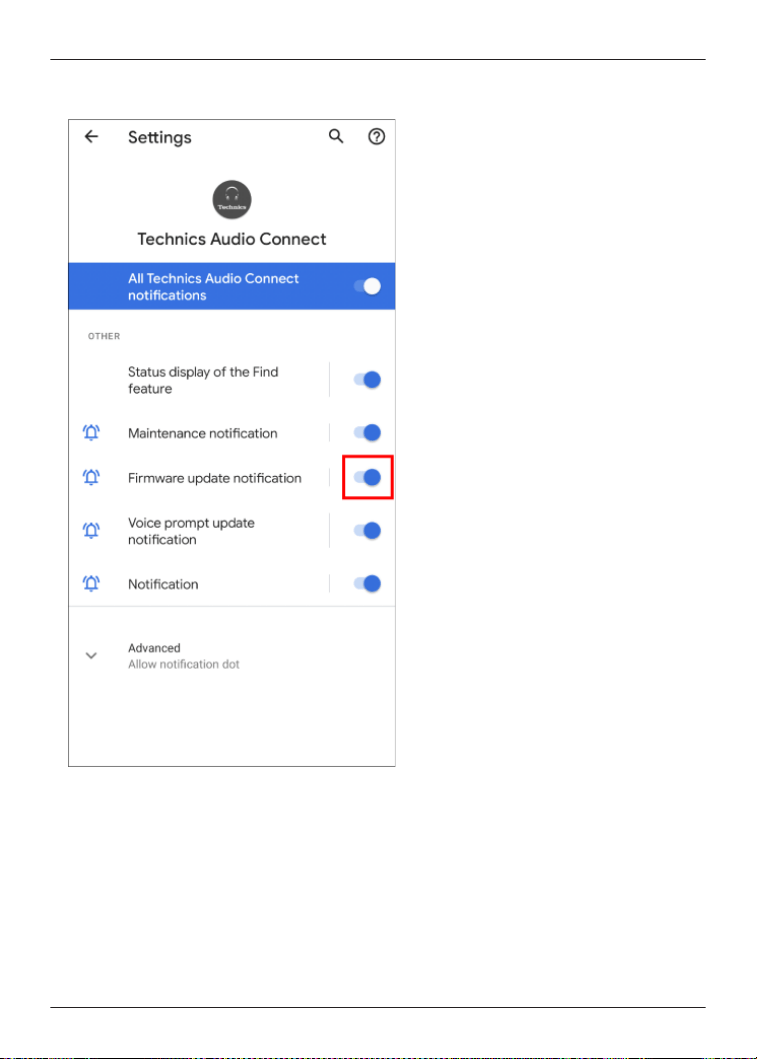
R On the device, go to “Settings”>“Apps & notifications”>“App info”>[Technics Audio
Connect]>“Notifications”>turn on “Firmware update notification”.
iPhone/iPad/iPod touch
72
FAQ
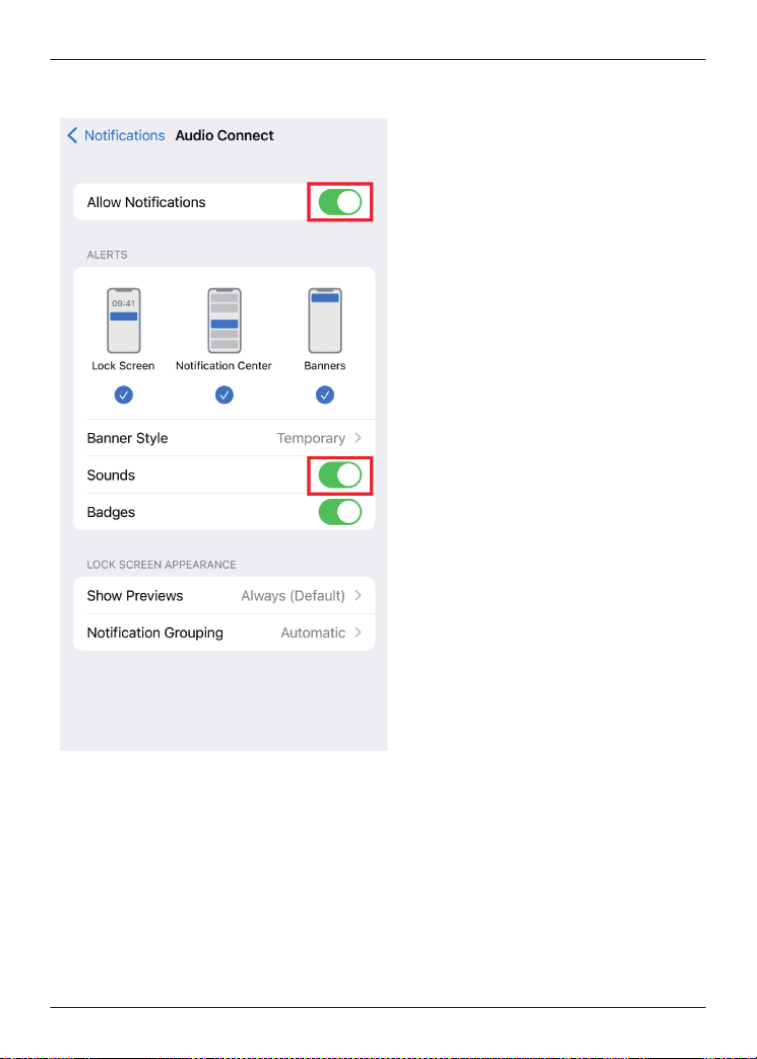
R On the device, go to “Settings”>“Notifications”>[Audio Connect]>turn on “Allow
Notifications”. To disable update notification sounds, turn off “Sounds”.
R If the firmware update fails, the transfer may start when the firmware is detected again.
Q07. A specific codec is not displayed in the connected codec display.
R Some codecs may not be displayed because the codec used is selected from those supported
by your device.
For information about codecs supported by your device, please confirm with the device
manufacturer or carrier.
Q08. I cannot change the settings on the app when multiple headphones are connected.
R If multiple headphones are connected to the device, you cannot change the settings for
headphones other than those recognized by this app. Use after confirming that only one pair
of headphones is connected on the device’s Bluetooth
®
settings.
73
FAQ

Q09. Cannot turn on location services (Android™ devices only)
R Location services may not turn on if battery saving mode is on in the Android location settings.
Set Android’s location settings to a mode other than battery saving.
(The specifications of the location service mode depend on the Android™ device. Please refer
to the manual of your device.)
Q10. I want to delete the headphones connected to the app from the list.
Android™ devices
R Delete the headphone pairing information from the device’s Bluetooth
®
settings.
iPhone/iPad/iPod touch
R Tap [Delete headphones from the list] in the headphone list on the [Technics Audio
Connect] app and follow the on-screen instructions.
Q11. Can I operate messaging apps that use the Internet?
R You can answer incoming calls, but you cannot operate messaging apps that use the Internet.
(Some smartphones do not support functions for answering incoming calls.)
Q12. Can I turn on the headphones without the charging cradle?
R To turn on the headphones, wear both earphones (L and R) on each ear, and touch and hold
the touch sensor for at least 2 seconds until you hear the startup sound.
Q13. I reset the headphones to factory settings, but “Headphone name” displayed in the
app and the language settings for voice prompt and Amazon Alexa have not changed.
R Those are not reset even if you reset the headphones to factory settings because the app
manages “Headphone name”.
“Reset the headphones to factory settings”, Page 63
R Language settings for voice prompt and Amazon Alexa (EAH-AZ80/EAH-AZ60M2) are saved
as downloaded data in the earphones. Downloaded data is not reset even if the headphones
are reset to factory settings.
Q14. When can I adjust the headphone volume?
R You can adjust the volume during music playback and calls. You may not be able to adjust the
volume depending on the Bluetooth
®
device. Be aware that if you touch and adjust the volume
during a call, the microphone on the headphones may pick up the sound of your touch and
transmit it as noise to the other party.
Q15. The [Turn Bluetooth on] button doesn’t disappear. (iOS only)
R Turn on the “Bluetooth” setting in the smartphone’s “Settings” screen.
Apart from the setting above, you may be able to temporarily turn Bluetooth on and off in the
Control Center.
Confirm that the “Bluetooth” setting in the “Settings” screen and “Bluetooth” in the Control
Center are on.
In iOS 15.0 or later, also turn on “Settings”>[Audio Connect]>“Bluetooth” on the device.
Q16. The settings change sometimes.
R When putting the earphones down on a desk, etc., the touch sensors may register a touch
depending on the desk material. To prevent erroneous operation, take care to keep the touch
sensors away from the desk, etc. when putting the earphones down.
Q17. Can I use only one side (L or R)?
R If pairing with the smartphone is complete, you can use just the side (L or R) that you take out
of the charging cradle.
74
FAQ

Reset to factory settings
EAH-AZ100
You can reset to the factory settings (default settings upon purchase) when you want to delete all
pairing information in the earphones.
1 Put both earphones (L and R) into the charging cradle and charge for about 15 minutes.
2 Take out earphone (R) from the charging cradle and wear it.
3 When you hear the startup sound of earphone (R), touch and hold touch sensor (R). (Do not
release your finger even when you hear the message.)
4 When you hear the pairing sound (melody) from earphone (R), release your finger from
touch sensor (R).
R To listen to the pairing sound, click {{"Here"|tolink("https://eww.pavc.panasonic.co.jp/
avcacc/technics/sound-data/Pair_const_az100.wav")}}.
R If you do not hear the pairing sound even after touching for about 10 seconds, start over
from step 1.
5 Take out earphone (L) from the charging cradle and wear it.
6 When you hear the startup sound from the earphone (L) and the pairing sound (melody),
touch and hold the touch sensors on both earphones simultaneously until you hear the
completion message (about 10 seconds).
7 Put both earphones back into the charging cradle.
Note:
R When the pairing sound that played once stops, turn off the Bluetooth
®
function of the
connected Bluetooth
®
device and try again.
R To pair a Bluetooth
®
device with the earphones again, delete the pairing information (device
name) on the Bluetooth
®
device that was paired with the earphones, and then pair the
earphones with the Bluetooth
®
device again.
“Use the app to pair with a Bluetooth
®
device”, Page 34
“Pair with a Bluetooth
®
device without the app”, Page 35
R Some settings such as the language settings for voice prompt are not reset.
R You can use the [Technics Audio Connect] app to reset to the factory settings (default settings
upon purchase).
“Reset the headphones to factory settings”, Page 63
EAH-AZ80/EAH-AZ60M2/EAH-AZ40M2
You can reset to the factory settings (default settings upon purchase) when you want to delete all
pairing information in the earphones.
1 Put both earphones (L and R) into the charging cradle and charge for about 15 minutes.
2 Take out earphone (R) from the charging cradle and wear it.
3 When you hear the startup sound of earphone (R), touch and hold touch sensor (R). (Do not
release your finger even when you hear the message.)
75
FAQ
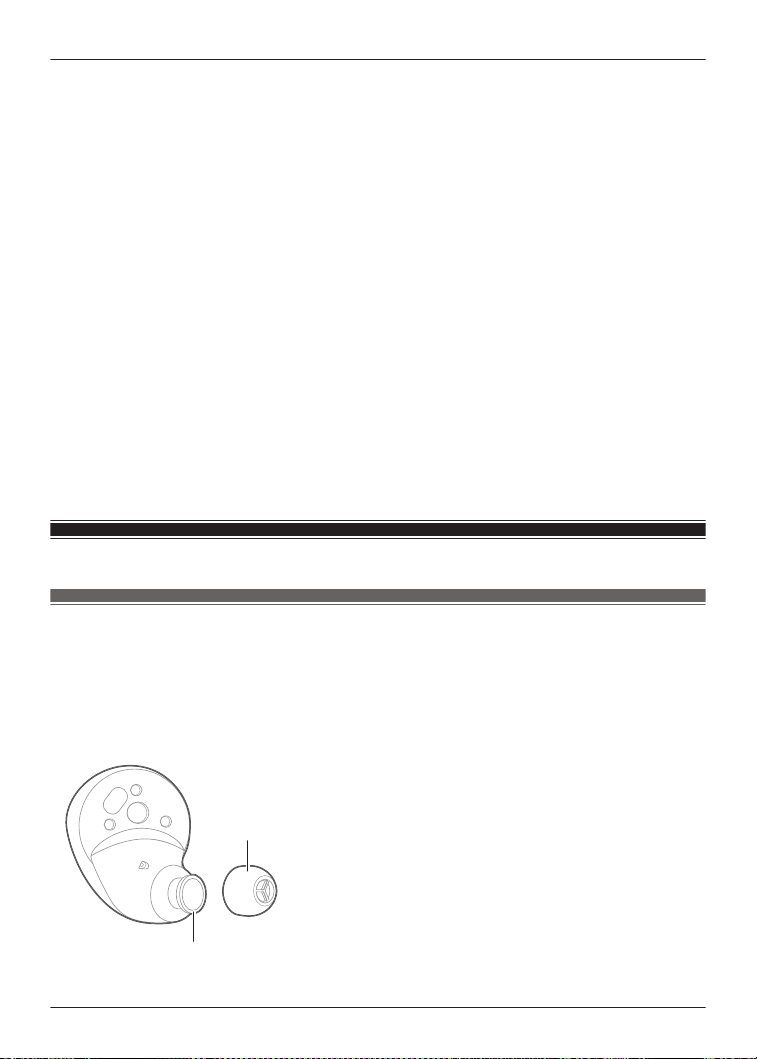
4 When you hear the pairing sound (melody) from earphone (R), release your finger from
touch sensor (R).
R To listen to the pairing sound, click {{"Here"|tolink("https://eww.pavc.panasonic.co.jp/
avcacc/technics/sound-data/Pair_const.wav")}}.
R If you do not hear the pairing sound even after touching for about 10 seconds, start over
from step 1.
5 Touch and hold touch sensor (R) again until you hear the completion message.
R Resetting earphone (R) is complete when you hear the completion message.
6 Put earphone (R) back into the charging cradle.
7 Repeat steps 2 to 6 above for earphone (L).
Note:
R To pair a Bluetooth
®
device with the earphones again, delete the pairing information (device
name) on the Bluetooth
®
device that was paired with the earphones, and then pair the
earphones with the Bluetooth
®
device again.
“Use the app to pair with a Bluetooth
®
device”, Page 34
“Pair with a Bluetooth
®
device without the app”, Page 35
R Some settings such as the language settings for voice prompt and Amazon Alexa are not
reset.
R You can use the [Technics Audio Connect] app to reset to the factory settings (default settings
upon purchase).
“Reset the headphones to factory settings”, Page 63
Maintenance
Maintenance
R Wipe with a soft, dry cloth.
R Remove the earpieces from the earphones and remove any earwax or dust. (Do not touch the
protective mesh because it affects the audio characteristics.)
The illustrations use EAH-AZ60M2 as an example.
For the EAH-AZ100
“Removing the earpiece”, Page 32
2
1
76
FAQ
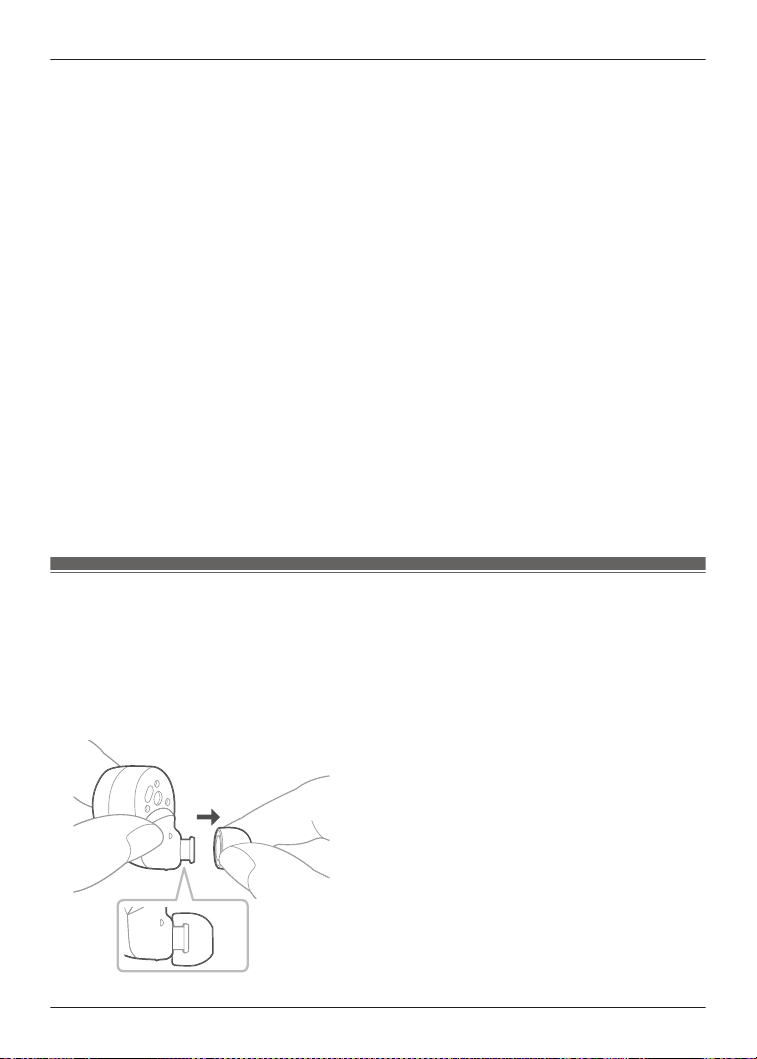
1. Earpiece
2. Protective mesh
R If it is very dirty, firmly wring a cloth soaked in water, wipe off the dirt, and then wipe with a dry
cloth.
R Do not use solvents such as benzine, thinner, alcohol, kitchen detergent, or chemical wipes
because they may alter or damage the exterior.
R Use a dry cotton swab with a pointed tip (such as for make-up) to wipe off dust on the
charging terminals of the earphones. Do not use sharp, hard objects.
“Clean the charging terminals of the earphones”, Page 80
R Clean the contact pins of the charging cradle with a cotton swab or soft dry cloth.
“Clean the charging cradle terminal section”, Page 80
R Maintaining battery performance
If you will not use the unit for long periods, fully charge it once every 6 months to maintain the
performance of the internal battery.
R The earpieces will wear out after long-term use. To replace the earpieces, please contact your
dealer or repair service.
Keep the earphones clean.
R After use, confirm that there is no earwax or dust on the earpieces. If there is, remove the
earpieces from the earphones and clean them.
“Clean the earpieces”, Page 77
R Store the earphones in the charging cradle to protect them from dust.
R If hair styling products or cosmetics get on the earphones, quickly wipe them off with a soft,
dry cloth. (Do not touch the protective mesh because it affects the audio characteristics.)
Keep the holes clean.
R Foreign matter such as earwax or dust in the holes of the earpieces may decrease the volume
or change the acoustic characteristics, and result in malfunction.
Clean the earpieces
Regular maintenance is required for comfortable use.
Foreign matter such as earwax or dust in the holes of the earpieces may decrease the volume or
change the acoustic characteristics, and result in malfunction.
The illustrations use EAH-AZ60M2 as an example.
1 Remove the earpiece.
R Hold the earpiece and pull out while twisting slightly.
77
FAQ
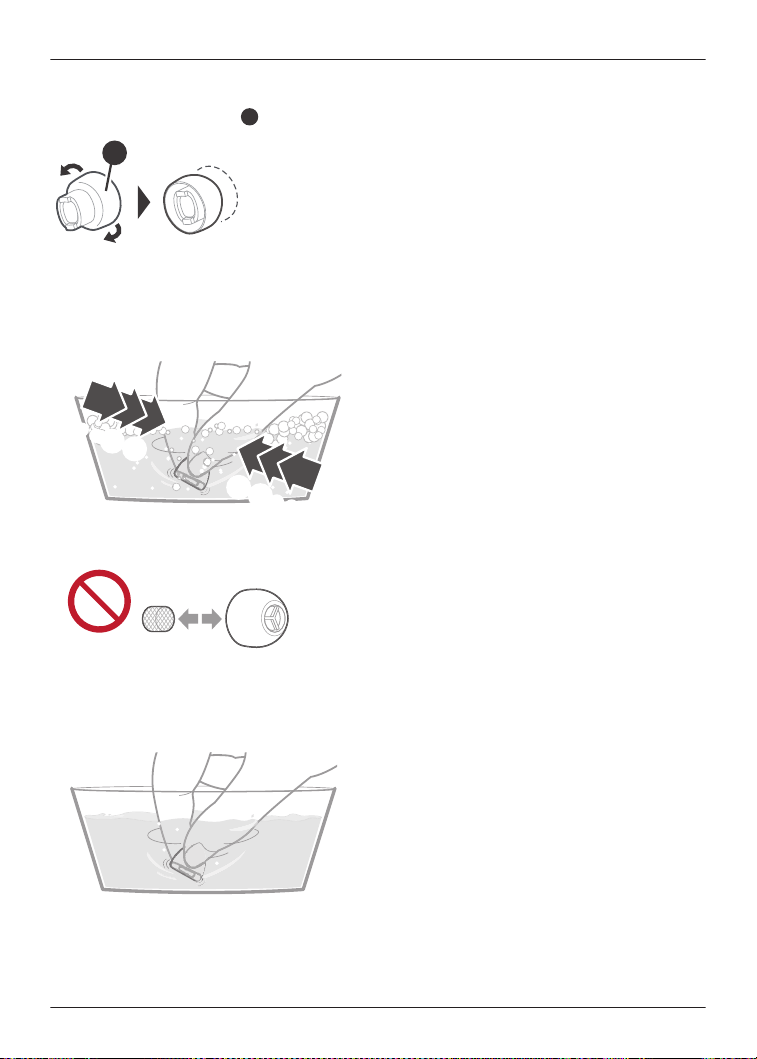
R For the EAH-AZ100
“Removing the earpiece”, Page 32
Return the earpiece
$
to its original position.
$
R If you clean the earphones with the earpieces attached, you may damage the protective
mesh on the earphones.
2 Wash the earpieces with your fingertips.
(Using a diluted neutral detergent or warm water is effective.)
・・・
B A
A B
・・・
R Do not remove the sponge from the earpieces.
3 Rinse thoroughly with clean water after washing.
78
FAQ
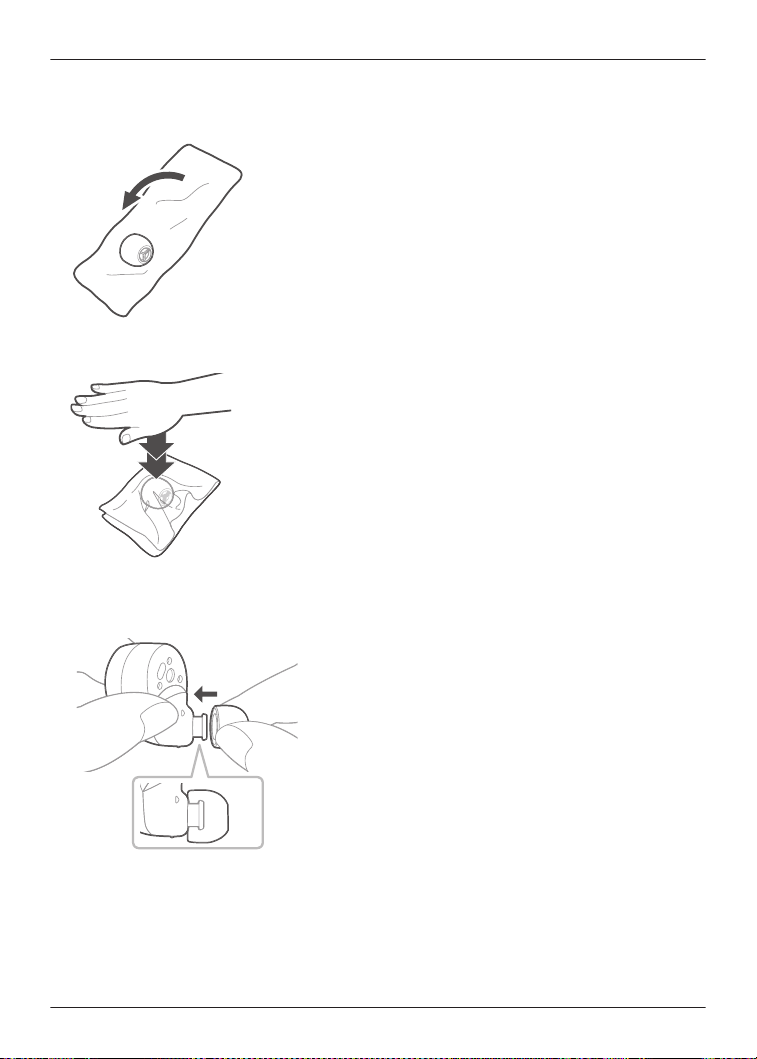
4 Wrap the earpieces with a soft, dry cloth and press firmly about 3 to 5 times to remove the
moisture.
R After washing the earpieces, remove the moisture and dry them thoroughly.
5 Attach the earpiece.
R Make sure that the earpiece is firmly attached and not slanted.
R For the EAH-AZ100
“Attaching the earpiece”, Page 32
79
FAQ
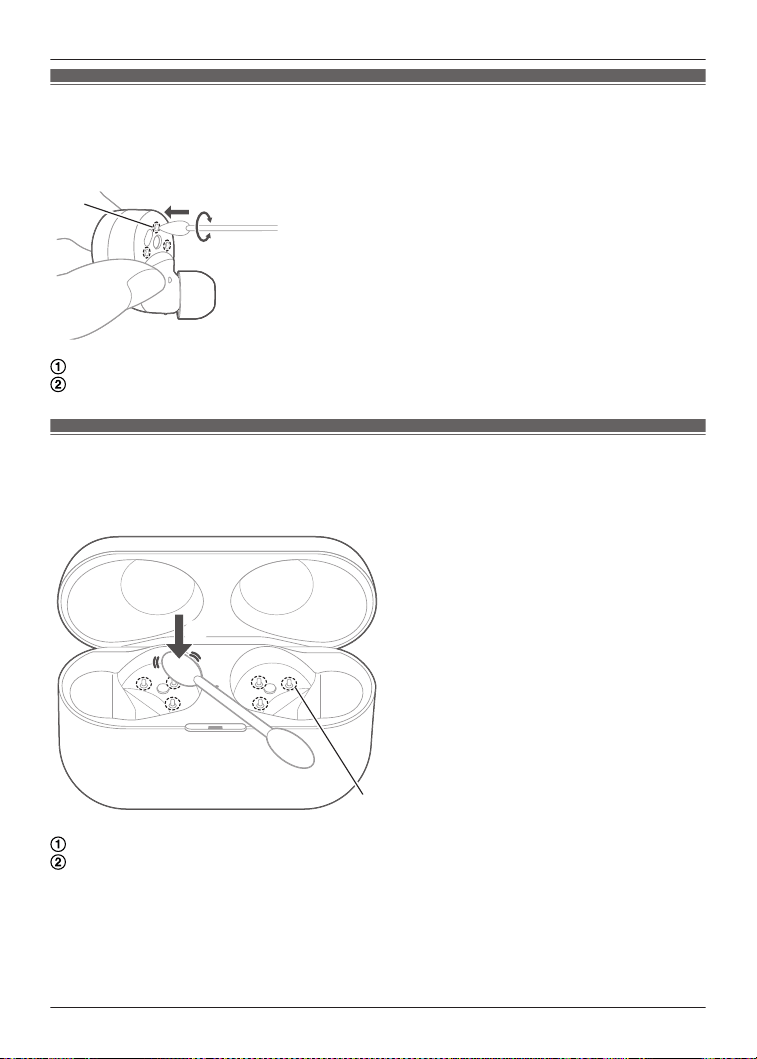
Clean the charging terminals of the earphones
Use a cotton swab with a pointed tip (such as for make-up) to wipe off dirt from the charging
terminals of the earphones.
The illustrations use EAH-AZ60M2 as an example.
A
A
B
Put the tip of the cotton swab on the charging terminal (A).
Rotate the cotton swab to wipe off dirt.
Clean the charging cradle terminal section
Clean the contact pins of the charging cradle with a cotton swab or soft dry cloth.
The illustrations use EAH-AZ60M2 as an example.
AA
BB
B
Put the cotton swab on the tip of the contact pin (B) from above.
Stroke the tip of the contact pin with a cotton swab to wipe off dirt.
80
FAQ
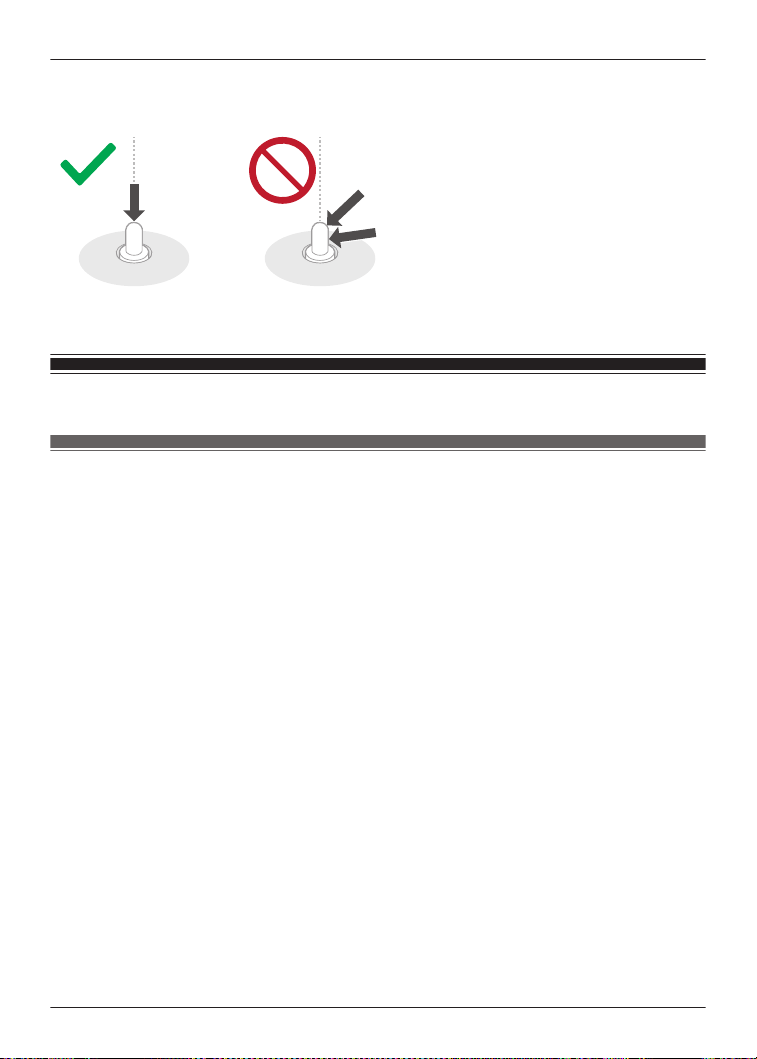
Note:
R Do not apply force to the contact pin from the side or at an angle. (It may result in malfunction.)
Specifications
EAH-AZ100
n General
Power supply (Charging cradle)
DC 5 V, 500 mA (USB charge)
Built-in Battery
Earphones: 3.7 V, Lithium polymer
Charging cradle: 3.7 V, Lithium polymer
Built-in Battery Capacity
Earphones: 85 mAh
Charging cradle: 550 mAh
Operating time (Earphones)
*1
Approx. 10.0 hours (Noise cancelling: ON, AAC)
Approx. 12.0 hours (Noise cancelling: OFF, AAC)
Approx. 8.0 hours (Noise cancelling: ON, SBC)
Approx. 12.0 hours (Noise cancelling: OFF, SBC)
Approx. 7.0 hours (Noise cancelling: ON, LDAC)
Approx. 8.0 hours (Noise cancelling: OFF, LDAC)
Approx. 5.0 hours (Noise cancelling: ON, LC3)
Approx. 5.0 hours (Noise cancelling: OFF, LC3)
Operating time (Earphones + Charging cradle)
*1
Approx. 28 hours (Noise cancelling: ON, AAC)
Approx. 29 hours (Noise cancelling: OFF, AAC)
Approx. 24 hours (Noise cancelling: ON, SBC)
Approx. 26 hours (Noise cancelling: OFF, SBC)
Approx. 18 hours (Noise cancelling: ON, LDAC)
Approx. 19 hours (Noise cancelling: OFF, LDAC)
Approx. 15 hours (Noise cancelling: ON, LC3)
Approx. 15 hours (Noise cancelling: OFF, LC3)
81
FAQ

Call time (Earphones)
*1
Approx. 6.0 hours (Voice Focus AI [Speaking]: ON)
Approx. 6.0 hours (Voice Focus AI: OFF)
Waiting time (Earphones)
*1
Approx. 8 hours (Noise cancelling: ON)
Approx. 15 hours (Noise cancelling: OFF, Auto power off does not work)
Quick charge Operating time (Earphones)
*1
15 min. charge, Approx. 90 min. (Noise cancelling: ON, AAC)
Charging time
*2
(25 °C (77 °F))
Earphones: Approx. 2.0 hours
Charging cradle: Approx. 2.5 hours
*3
Earphones with Charging cradle: Approx. 3.0 hours
*3
Charging temperature range
10 °C to 35 °C (50 °F to 95 °F)
Operating temperature range
0 °C to 40 °C (32 °F to 104 °F)
Operating humidity range
35 %RH to 80 %RH (no condensation)
Mass (Weight)
Earphone: Approx. 5.9 g (0.21 oz) (one side only: L and R are the same)
Charging cradle: Approx. 42 g (1.5 oz)
n Bluetooth
®
section
Bluetooth
®
system specification
Ver. 5.3
Wireless equipment classification
Class 1
Max RF Power
10 dBm
Max RF Power (e.i.r.p)
9 dBm
Frequency band
2402 MHz to 2480 MHz
Supported profiles
A2DP, AVRCP, HSP, HFP, TMAP, PBP
Supported codec
SBC, AAC, LDAC, LC3
n Earphones section
Driver units
10 mm (3/8 in)
Microphone
Monaural, MEMS Mic
n Charging cradle section
Charging terminal
USB Type-C Shape
n Accessory section
USB Charging Cord
(Input Plug: USB Type-C Shape, Output Plug: USB Type-C Shape)
82
FAQ

Approx. 0.2 m (0.66 ft)
Earpieces set
XS, S, M, ML, L each 2 pcs.,
(Size M attached)
R Only for U.S.A.: To order accessories, refer to “Limited Warranty”.
*1 It may be shorter depending on the operating conditions.
*2 The time required to charge the batteries from empty to full.
*3 When charging via USB
R Specifications are subject to change without notice.
EAH-AZ80/EAH-AZ60M2
n General
Power supply (Charging cradle)
DC 5 V, 500 mA (USB charge)
Built-in Battery
Earphones: 3.7 V, Lithium polymer
Charging cradle: 3.7 V, Lithium polymer
Built-in Battery Capacity
EAH-AZ80:
Earphones: 85 mAh
Charging cradle: 700 mAh
EAH-AZ60M2:
Earphones: 85 mAh
Charging cradle: 650 mAh
Operating time (Earphones)
*1
Approx. 7.0 hours (Noise cancelling: ON, AAC)
Approx. 7.5 hours (Noise cancelling: OFF, AAC)
Approx. 6.5 hours (Noise cancelling: ON, SBC)
Approx. 7.0 hours (Noise cancelling: OFF, SBC)
Approx. 4.5 hours (Noise cancelling: ON, LDAC)
Approx. 5.0 hours (Noise cancelling: OFF, LDAC)
Operating time (Earphones + Charging cradle)
*1
Approx. 24 hours (Noise cancelling: ON, AAC)
Approx. 25 hours (Noise cancelling: OFF, AAC)
Approx. 23 hours (Noise cancelling: ON, SBC)
Approx. 24 hours (Noise cancelling: OFF, SBC)
Approx. 16 hours (Noise cancelling: ON, LDAC)
Approx. 17 hours (Noise cancelling: OFF, LDAC)
Call time (Earphones)
*1
Approx. 4.5 hours (JMV
*2
: ON)
Approx. 5.5 hours (JMV
*2
: OFF)
Waiting time (Earphones)
*1
Approx. 9 hours (Noise cancelling: ON)
Approx. 15 hours (Noise cancelling: OFF, Auto power off does not work)
Quick charge Operating time (Earphones)
*1
15 min. charge, Approx. 70 min. (Noise cancelling: ON, AAC)
83
FAQ

Charging time
*3
(25 °C (77 °F))
Earphones: Approx. 2.0 hours
Charging cradle: Approx. 2.5 hours
*4
Earphones with Charging cradle: Approx. 3.0 hours
*4
Charging temperature range
10 °C to 35 °C (50 °F to 95 °F)
Operating temperature range
0 °C to 40 °C (32 °F to 104 °F)
Operating humidity range
35 %RH to 80 %RH (no condensation)
Mass (Weight)
EAH-AZ80:
Earphone: Approx. 7 g (0.25 oz) (one side only: L and R are the same)
Charging cradle: Approx. 50 g (1.8 oz)
EAH-AZ60M2:
Earphone: Approx. 7 g (0.25 oz) (one side only: L and R are the same)
Charging cradle: Approx. 45 g (1.6 oz)
n Bluetooth
®
section
Bluetooth
®
system specification
Ver. 5.3
Wireless equipment classification
Class 1
Max RF Power
9 dBm
Max RF Power (e.i.r.p)
6 dBm
Frequency band
2402 MHz to 2480 MHz
Supported profiles
A2DP, AVRCP, HSP, HFP
Supported codec
SBC, AAC, LDAC
n Earphones section
Driver units
EAH-AZ80: 10 mm (3/8 in)
EAH-AZ60M2: 8 mm (5/16 in)
Microphone
Monaural, MEMS Mic
n Charging cradle section
Charging terminal
USB Type-C Shape
n Accessory section
USB Charging Cord
(Input Plug: USB Type-C Shape, Output Plug: USB Type-C Shape)
Approx. 0.2 m (0.66 ft)
Earpieces set
XS1, XS2, S1, S2, M, L, XL each 2 pcs.,
84
FAQ

(Size M attached)
R Only for U.S.A.: To order accessories, refer to “Limited Warranty”.
*1 It may be shorter depending on the operating conditions.
*2 JustMyVoice™
*3 The time required to charge the batteries from empty to full.
*4 When charging via USB
R Specifications are subject to change without notice.
EAH-AZ40M2
n General
Power supply (Charging cradle)
DC 5 V, 500 mA (USB charge)
Built-in Battery
Earphones: 3.7 V, Lithium polymer
Charging cradle: 3.7 V, Lithium polymer
Built-in Battery Capacity
Earphones: 55 mAh
Charging cradle: 450 mAh
Operating time (Earphones)
*1
Approx. 5.5 hours (Noise cancelling: ON, AAC)
Approx. 7.0 hours (Noise cancelling: OFF, AAC)
Approx. 5.0 hours (Noise cancelling: ON, SBC)
Approx. 6.0 hours (Noise cancelling: OFF, SBC)
Approx. 3.5 hours (Noise cancelling: ON, LDAC)
Approx. 4.0 hours (Noise cancelling: OFF, LDAC)
Operating time (Earphones + Charging cradle)
*1
Approx. 18 hours (Noise cancelling: ON, AAC)
Approx. 24 hours (Noise cancelling: OFF, AAC)
Approx. 17 hours (Noise cancelling: ON, SBC)
Approx. 21 hours (Noise cancelling: OFF, SBC)
Approx. 12 hours (Noise cancelling: ON, LDAC)
Approx. 14 hours (Noise cancelling: OFF, LDAC)
Call time (Earphones)
*1
Approx. 4.5 hours
Waiting time (Earphones)
*1
Approx. 9 hours (Noise cancelling: ON)
Approx. 20 hours (Noise cancelling: OFF, Auto power off does not work)
Quick charge Operating time (Earphones)
*1
15 min. charge, Approx. 60 min. (Noise cancelling: ON, AAC)
Charging time
*2
(25 °C (77 °F))
Earphones: Approx. 2.0 hours
Charging cradle: Approx. 2.5 hours
*3
Earphones with Charging cradle: Approx. 3.0 hours
*3
Charging temperature range
10 °C to 35 °C (50 °F to 95 °F)
85
FAQ

Operating temperature range
0 °C to 40 °C (32 °F to 104 °F)
Operating humidity range
35 %RH to 80 %RH (no condensation)
Mass (Weight)
Earphone: Approx. 5 g (0.18 oz) (one side only: L and R are the same)
Charging cradle: Approx. 35 g (1.2 oz)
n Bluetooth
®
section
Bluetooth
®
system specification
Ver. 5.3
Wireless equipment classification
Class 1
Max RF Power
9 dBm
Max RF Power (e.i.r.p)
6 dBm
Frequency band
2402 MHz to 2480 MHz
Supported profiles
A2DP, AVRCP, HSP, HFP
Supported codec
SBC, AAC, LDAC
n Earphones section
Driver units
6 mm (1/4 in)
Microphone
Monaural, MEMS Mic
n Charging cradle section
Charging terminal
USB Type-C Shape
n Accessory section
USB Charging Cord
(Input Plug: USB Type-C Shape, Output Plug: USB Type-C Shape)
Approx. 0.2 m (0.66 ft)
Earpieces set
XS, S, M, L each 2 pcs.,
(Size M attached)
R Only for U.S.A.: To order accessories, refer to “Limited Warranty”.
*1 It may be shorter depending on the operating conditions.
*2 The time required to charge the batteries from empty to full.
*3 When charging via USB
R Specifications are subject to change without notice.
86
FAQ

About Bluetooth
®
Panasonic bears no responsibility for data and/or information that is compromised during
a wireless transmission.
Frequency band used
This unit uses the 2.4 GHz frequency band.
Certification of this unit
R This unit conforms to frequency restrictions and has received certification based on frequency
laws. Thus, a wireless permit is not necessary.
R The actions below are punishable by law in some countries:
– Taking apart/modifying this unit.
– Removing specification indications.
Restrictions of use
R Wireless transmission and/or usage with all Bluetooth
®
equipped devices is not guaranteed.
R All devices must conform to standards set by Bluetooth SIG, Inc.
R Depending on the specifications and settings of a device, it can fail to connect or some
operations can be different.
R This unit supports Bluetooth
®
security features. But depending on the operating environment
and/or settings, this security may not be sufficient. Transmit data wirelessly to this unit with
caution.
R This unit cannot transmit data to a Bluetooth
®
device.
Range of use
Use this unit at a maximum range of 10 m (33 ft).
The range can decrease depending on the environment, obstacles or interference.
Interference from other devices
R This unit may not function properly and troubles such as noise and sound jumps may arise
due to radio wave interference if this unit is located too close to other Bluetooth
®
devices or
the devices that use the 2.4 GHz band.
R This unit may not function properly if radio waves from a nearby broadcasting station, etc. is
too strong.
Intended usage
R This unit is for normal, general use only.
R Do not use this system near an equipment or in an environment that is sensitive to radio
frequency interference (example: airports, hospitals, laboratories, etc).
About water resistance
Cautions for use in places where the unit may get wet (from spray, rain, etc.)
Observe the following precautions. Incorrect operation cause malfunction.
R Do not charge the charging cradle or the earphones while your hands are wet or while there
are still water droplets on this unit (earphones or charging cradle).
R Do not use the USB charging cord.
R Do not apply soapy water or detergent or immerse in water.
R If water drops get onto the unit in cold climates, wipe off with a soft, dry cloth.
R If water gets onto the earphones or microphone, wipe off with a soft, dry cloth.
– Sound may get smaller or get distorted.
87
Other Information
– If there are water drops left in the earpieces, you may hear the sound at reduced volume or
you may not be able to hear anything at all. If this is the case, remove the earpieces and
get rid of the water drops.
If water does get into the earphones or the charging cradle, cease use and consult your
dealer.
Malfunction due to improper handling by you will not be covered by the warranty.
Disposal of Old Equipment and Batteries
(Only for European Union and countries with
recycling systems)
These symbols on the products, packaging, and/or accompanying documents mean that used
electrical and electronic products and batteries must not be mixed with general household waste.
For proper treatment, recovery and recycling of old products and used batteries, please take
them to applicable collection points in accordance with your national legislation.
By disposing of them correctly, you will help to save valuable resources and prevent any potential
negative effects on human health and the environment.
For more information about collection and recycling, please contact your local authority.
Penalties may be applicable for incorrect disposal of this waste, in accordance with national
legislation.
Note for the battery symbol (bottom symbol):
This symbol might be used in combination with a chemical symbol. In this case it complies with
the requirement set by the Directive for the chemical involved.
88
Other Information
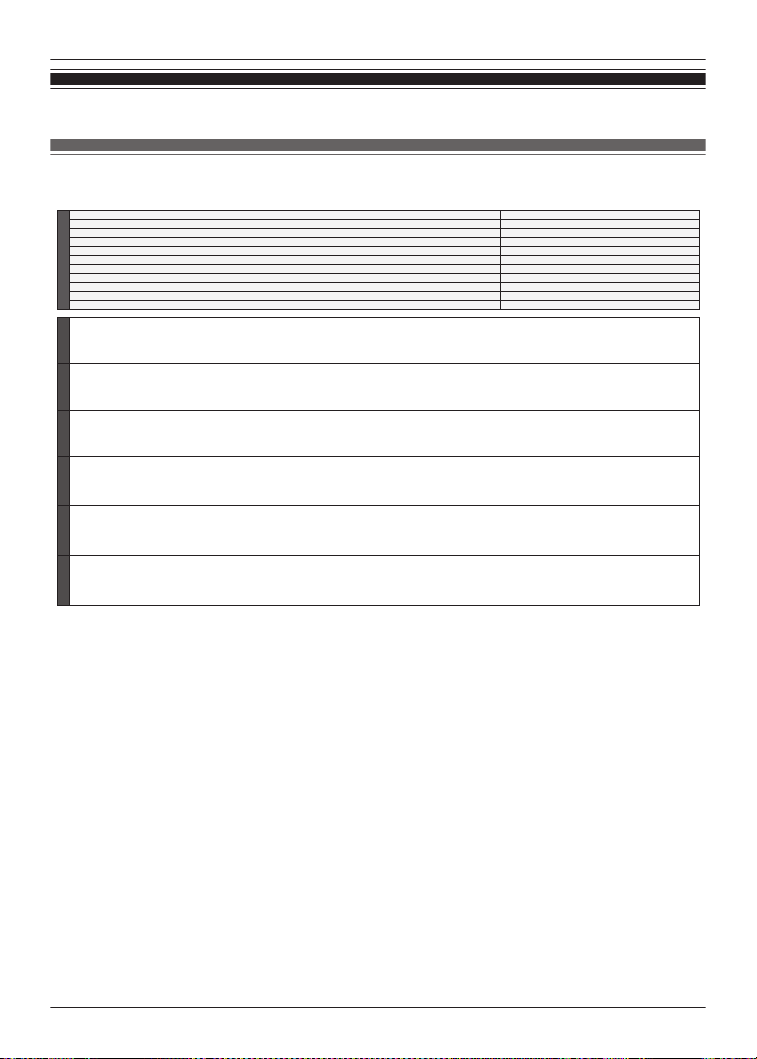
Ecodesign Information
EAH-AZ100
[A] Ecodesign Information [B] Regulation (EU) 2023/826
[C]Manufacturer's name
[D] Product type Digital Wireless Stereo Earphones
[E] Model No. EAH-AZ100
[F] Power consumption in off mode (Watt or n.a.) n.a.
[G] Power consumption in standby mode or another condition (Watt or n.a.) 0.1W (another condition)
[H] Power consumption in network standby mode(s) (Watt or n.a.) n.a.
[I] Default time to switch to off mode (minutes or n.a.) n.a.
[J] Default time to switch to standby mode or another condition (minutes or n.a.) 0 minute (to another condition)
[K] Default time to switch to networked standby mode(s) (minutes or n.a.) n.a.
[L] Power consumption in networked standby if all wired network ports are connected and all wireless network ports are activated (Watt or n.a.) n.a.
[M] Guidance on how to activate and deactivate wireless network ports (See user manual or n.a.) See user manual
[A] Ecodesign Informationen [B] Verordnung (EU) 2023/826 [C] Name des Herstellers [D] Produktart
[E] Modell Nr. [F] Leistungsaufnahme im Aus- Zustand [Watt oder nicht anwendbar] [G] Leistungsaufnahme im Bereitschaftszustand oder einem anderen Zustand [Watt oder nicht anwendbar ]
[H] Leistungsaufnahme im vernetzten Bereitschaftszustand [Watt oder nicht anwendbar ] [I] Zeitdauer bis zum Aus- Zustand [Minuten oder nicht anwendbar]
[J] Zeitdauer bis zum Bereitschaftszustand oder einen anderen Zustand [Minuten oder nicht anwendbar]
[K]Zeitdauer bis zum vernetzten Bereitschaftszustand [Minuten oder nicht anwendbar]
[L] Leistungsaufnahme im vernetzten Bereitschaftszustand, wenn alle drahtgebundenen Netzwerk-Ports mit dem Netzwerk verbunden und alle drahtlosen Netzwerk-Ports aktiviert sind [Watt oder nicht anwendbar]
[M] Hinweise zur Aktivierung und Deaktivierung drahtloser Netzwerk-Ports (siehe Bedienungsanleitung oder nicht anwendbar)
[A] Ecodesigninformatie [B] Verordening (EU) 2023/826 [C] Naam van de fabrikant [D] Producttype
[E] Model-nr.
[F] Elektriciteitsverbruik in uit-stand (watt of n.v.t.)
[G] Elektriciteitsverbruik in stand-by-stand of een andere stand (watt of n.v.t.)
[H] Elektriciteitsverbruik in netwerkgebonden stand-by (watt of n.v.t.) [I] Tijdsperiode tot overschakeling naar de uit-stand (minuten of n.v.t.)
[J] Tijdsperiode tot overschakeling naar de stand-by-stand of een andere stand (minuten of n.v.t.) [K] Tijdsperiode tot overschakeling naar netwerkgebonden stand-by (minuten of n.v.t.)
[L] Elektriciteitsverbruik in netwerkgebonden stand-by wanneer alle bedrade netwerkpoorten verbonden zijn en alle draadloze netwerkpoorten geactiveerd zijn (watt of n.v.t.)
[M] Leidraad in verband met het activeren en deactiveren van draadloze netwerkpoorten (Zie gebruikershandleiding of n.v.t.)
[A] Informations sur l'écoconception [B] Règlement (UE) 2023/826 [C] Nom du fabricant [D] Type de produit
[E] N°du modèle
[F] Consommation d’électricité en mode d'arrêt (Watt ou N.A.)
[G] Consommation d’électricité en mode de veille ou un autre état dans (Watt ou N.A.)
[H] Consommation d’électricité en mode(s) de veille avec maintien de la connexion au réseau (Watt ou N.A.) [I] Laps de temps pour passer en mode d'arrêt (minutes ou N.A.)
[J] Laps de temps pour passer en mode de veille ou un autre état dans (minutes ou N.A.) [K] Laps de temps pour passer en mode(s) de veille avec maintien de la connexion au réseau (minutes ou N.A.)
[L]
Consommation d’électricité en veille avec maintien de la connexion au réseau si tous les ports réseau filaires sont connectés et tous les ports réseau sans fil sont activés (Watt ou N.A.)
[M]
[A] Ekodesigninformation [B] Förordning (EU) 2023/826 [C] Tillverkarens namn [D] Produktslag
[E] Modellnr [F] Effektförbrukning i frånläge (watt eller ej tillämpligt) [G] Effektförbrukning i standbyläge eller annat tillstånd (watt eller ej tillämpligt)
[H] Effektförbrukning i nätverksanslutet standbyläge (watt eller ej tillämpligt) [I] Tidsperiod fram till frånläge (minuter eller ej tillämpligt)
[J] Tidsperiod fram till standbyläge eller annat tillstånd (minuter eller ej tillämpligt) [K] Tidsperiod fram till nätverksanslutet standbyläge (minuter eller ej tillämpligt)
[L] Effektförbrukning i nätverksanslutet standbyläge om alla fasta nätverksportar är anslutna och alla trådlösa nätverksportar är aktiverade (watt eller ej tillämpligt).
[M] Vägledning om hur man aktiverar och avaktiverar trådlösa nätverksportar (se bruksanvisning eller ej tillämpligt)
[A] Ecodesign informasjoner
[B] Forordning (EU) 2023/826 [C] Produsentens navn [D] Produkttype
[E] Modell nr. [F] Effektopptak i av-tilstand [watt eller brukes ikke] [G] Effektopptak i driftsberedskap eller annen tilstand [watt eller brukes ikke]
[H] Effektopptak i fornettet driftsberedskap [watt eller brukes ikke ] [I] Tidsvarighet inntil av-tilstand [minutter eller brukes ikke]
[J] Tidsvarighet til driftsberedskap eller annen tilstand [minutter eller brukes ikke] [K] Tidsvarighet til fornettet driftsberedskap [minutter eller brukes ikke]
[L] Effektopptak i fornettet driftsberedskap, når alle ledningsbundede nettverksporter er forbundet med nettverket og alle trådløse netterksporter er aktiverte [watt eller brukes ikke ]
[M] Henvisninger for aktivering og deaktivering av trådløse nettverksporter (se bruksanvisning eller brukes ikke)
[A] Ecodesign-information [B] Forordning (EU) 2023/826 [C] Producentens navn [D] Produkttype
[E] Model nr. [F] Effektforbrug i slukket tilstand [watt eller ikke anvendelig] [G] Effektforbrug i standbytilstand elle anden driftstilstand [watt eller ikke anvendelig]
[H] Effektorbrug i netværksforbundet standbytilstand [watt eller ikke anvendelig] [I] Tidsinterval, efter hvilket udstyret slås over i slukket tilstand [minutter eller ikke anvendelig]
[J] Tidsinterval, efter hvilket udstyret slås over i standbytilstand elle anden driftstilstand [minutter eller ikke anvendelig] [K] Tidsinterval, efter hvilket udstyret slås over i netværksforbundet standbytilstand [minutter eller ikke anvendelig]
[L] Effektforbruget i netværksforbundet standbytilstand, hvis alle kablede netværksporte er tilsluttet og alle trådløse netværksporte er aktiveret [watt eller ikke anvendelig]
[M] Vejledning om, hvordan trådløse netværksporte aktiveres og deaktiveres (se brugervejledning eller ikke anvendelig)
English
Panasonic
Deutsch
Nederlands
Français
Orientations sur l’activation et la désactivation des ports réseau sans fil (voir manuel de l'utilisateur ou N.A.)
Svenska
NorskDansk
89
Other Information
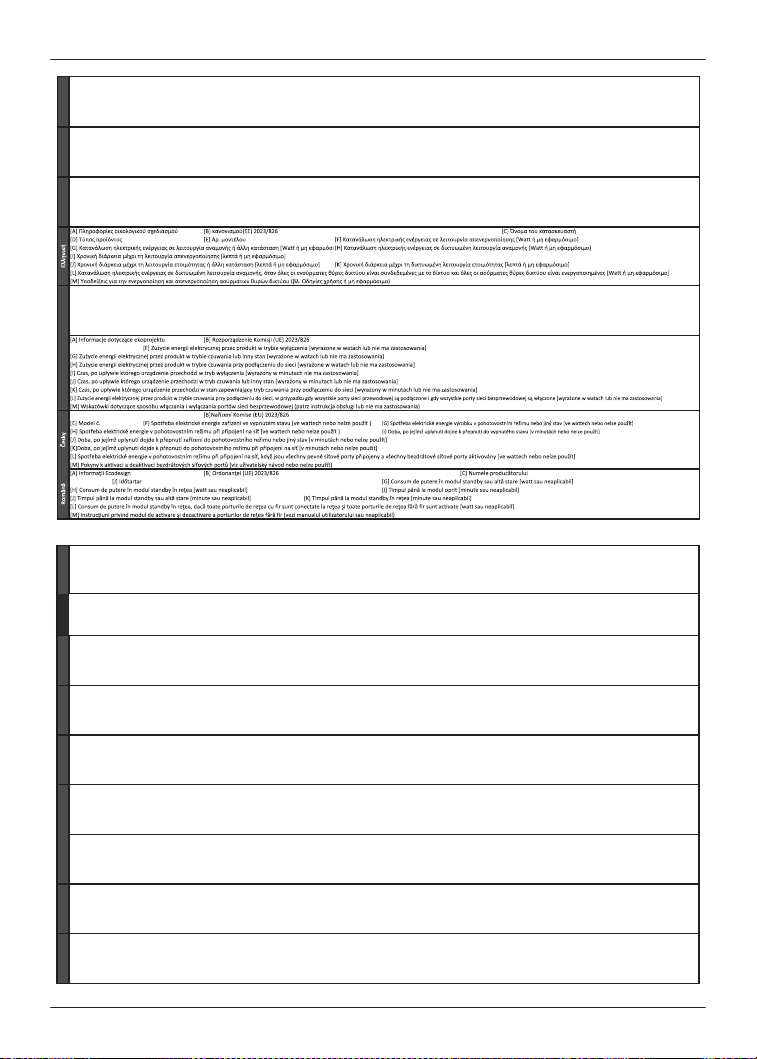
[A] Información de diseño ecológico [B] Reglamento (UE) 2023/826 [C] Nombre del fabricante [D] Tipo del producto
[E] nº de modelo [F] Consumo eléctrico en modo desac!vado [en va!os o no aplicable] [G] Consumo eléctrico del producto en modo preparado o otro estado [en va!os o no aplicable]
[H] Consumo eléctrico del producto en modo preparado en red [en va!os o no aplicable] [I] Plazo transcurrido hasta el modo desac!vado [en minutos o no aplicable]
[J] Plazo transcurrido hasta el modo preparado o otro estado [en minutos o no aplicable] [K] Plazo transcurrido hasta el modo preparado en red [minutos o no aplicable]
[L] Consumo eléctrico del producto en modo preparado en red si todos los puertos de red alámbricos están conectados y todos los puertos de red inalámbricos están ac!vados [en va!os o no aplicable]
[M] Orientaciones sobre cómo ac!var y desac!var los puertos de red inalámbricos (véase manual de usuario o no aplicable)
[A] Informações Ecodesign [B] Regulamento (UE) 2023/826 [C] Nome do fabricante [D] Tipo de produto
[E] Modelo n.º [F] Potência absorvida no estado desligado [Wa"s ou não aplicável] [G] Potência absorvida no estado operacional ou outro estado [Wa"s ou não aplicável]
[H] Potência absorvida no estado operacional em rede [Wa"s ou não aplicável] [I] Tempo até ao estado desligado [minutos ou não aplicável]
[J] Tempo até ao estado operacional ou outro estado [minutos ou não aplicável] [K] Tempo até ao estado operacional em rede [minutos ou não aplicável]
[L] Potência absorvida em estado operacional em rede, quando todas as portas de rede com fios es!verem ligadas à rede e todas as portas de rede sem fios es!verem a!vadas [Wa"s ou não aplicável]
[M] Indicações rela!vamente à a!vação e desa!vação de portas de rede sem fios (ver manual de instruções ou não aplicável)
[A] Informazioni proge"azione ecocompa!bile [B] Regolamento (UE) 2023/826 [C] Nome del fabbricante [D] Tipo di prodo"o
[E] Modello n. [F] Consumo di energia ele"rica in modo spento [Wa" o non applicabile] [G] Consumo di energia ele"rica in modo stand-by o altra condizione [Wa" o non applicabile]
[H] Consumo di energia ele"rica dalla rete in modo stand-by [Wa" o non applicabile] [I] Lasso di tempo fino al modo spento [minu! o non applicabile]
[J] Lasso di tempo fino al modo stand-by o altra condizione [minu! o non applicabile] [K] Lasso di tempo fino al modo stand-by in rete [minu! o non applicabile]
[L] Consumo di energia ele"rica dalla rete in modo stand-by quando tu"e le porte di accesso alla rete cablata sono collegate e quando tu"e le porte di accesso alla rete senza fili sono a$vate [Wa" o non applicabile]
[M] Informazioni su come a$vare e disa$vare le porte della rete senza fili (si vedano le istruzioni per l'uso o non applicabile)
[A] Ecodesign - !edot [B] Asetuksen (EU) 2023/826 [C] Valmistajan nimi [D] Tuotelaji
[E] Tyyppi nr. [F] Tehonkulutus pois kytketyssä !lassa [wa$ tai ei soveltuva ] [G] Verkkovalmius!lan tehonkulutus tai muu !la [minuu!t tai ei soveltuva ]
[H] Tehonkulutus verkkovalmius!lassa [wa$ tai ei soveltuva ] [I] Aikaväli pois-!lassa [minuu!t tai ei soveltuva ]
[J] Aikaväli valmius!laan saakka tai muu !la [minuu!t tai ei soveltuva ] [K] Aikaväli verkkovalmius!laan saakka [minuu!t tai ei soveltuva ]
[L] Verkkovalmius!lan tehonkulutus, kun kaikki kiinteäs! kytketyt verkkopor!t on kytke"y päälle ja kaikki langa"omat verkkopor!t on kytke"y käy"öön [wa$ tai ei soveltuva ]
[M] Ohjeistus siitä, miten langa"omat verkkopor!t kytketään käy"öön tai poistetaan käytöstä [katso käy"öohje tai ei soveltuva ]
[C] Nazwa producenta [D] Rodzaj produktu
[E] Numer modelu
[A] Informace o ekodesignu [C] Jméno výrobce [D] Druh produktu
[D] Tipul produsului
[E] Nr. model [F] Consum de putere în modul oprit [wa" sau neaplicabil]
Español
Português
ItalianoSuomiPolski
[A] Termékinformációs követelmények [B] Rendelet (EU) 2023/826 [C] Gyártó neve [D] Termékfajta
[E] Modell száma [F] Energiafogyasztás kikapcsolt állapotban [W-ban vagy nem alkalmazható] [G] Energiafogyasztás készenlé! üzemmódban vagy más olyan állapot [W-ban vagy nem alkalmazható]
[H] Energiafogyasztási adatok hálózatvezérelt készenlé! üzemmódban [W-ban vagy nem alkalmazható] [I] Időtartam, melynek elteltével kikapcsolt üzemmódba kapcsolja [perc vagy nem alkalmazható]
[J] Időtartam, melynek elteltével készenlé! üzemmódban vagy más olyan állapot [perc vagy nem alkalmazható] [K] Időtartam, melynek elteltével hálózatvezérelt készenlé! üzemmódba kapcsolja [percben vagy nem alkalmazható]
[L] Energiafogyasztás hálózatvezérelt készenlé! üzemmódban, ha az összes vezetékes hálóza! port csatlakoztatva van és az összes vezeték nélküli hálóza! port engedélyezve van [W-ban vagy nem alkalmazható]
[M] Iránymutatás arról, hogy hogyan kell a vezeték nélküli hálóza! portokat engedélyezni és le!ltani (lásd a felhasználói kézikönyvben vagy nem alkalmazható)
[A] Екодизайн информация
[B] регламента(EС) 2023/826 [C] Име на производителя [D] Вид на продукта
[E] Модел № [F] Консумация на мощност в режим "изключен" [Ватове или не се прилага]
[G] Консумация на мощност в режим "в готовност" или друго състояние [Ватове или не се прилага]
[H] Консумация на мощност в мрежови режим на готовност [Ватове или не се прилага]
[I] Интервал от време до режим "изключен" [минути или не се прилага]
[J] Интервал от време до режим "в готовност" или друго състояние [минути или не се прилага]
[K]Интервал от време до мрежови режим на готовност [минути]
[L] Консумация на мощност в мрежови режим на готовност, когато всички жични мрежови портове са свързани с мрежата и всички безжични мрежови портове са активирани [Ватове или не се прилага]
[M] Указания за активиране и дезактивиране на безжични мрежови портове (виж ръководството за потребителя или не се прилага)
[A] Ökodisaine teave
[B] Määrust (EL) 2023/826
[C] Tootja nimi [D] Toote liik
[E] Mudel nr [F] Võimsustarve väljalülitatud seisundis [va{des võoi ei kohaldata] [G] Võimsustarve ooteseisundis või muu seisund [va{des või ei kohaldata]
[H] Võimustarve võrguühendusega ooteseisundis [va{des või ei kohaldata ] [I]Aeg, mille möödudes lülitub seade väljalüliatud seisundisse [minu!tes või ei kohaldata]
[J] Aeg, mille möödudes lülitub seade ooteseisundisse või muu seisund [minu!tes või ei koha
[K] aeg, mille möödudes lülitub seade võrguühendusega ooteseisundisse [minu!tes või ei kohaldata]
[L]Võimsustrave võrguühebndusega ooteseisundis, kui kõik juhtmetega sidevõrgu pordid on ühendatud ja kõik raadiokohtvõrgu pordid on ak!veeritud [va{des või ei kohaldata]
[M] Juhised, kuidas raadiokohtvõrgu porte aj!veerida ja deak!veerida (vaadake kasutusjuhendit või ei kohaldata)
[A] Ekodizaina informācija [B] Komisijas Regulas (EK) 2023/826 [C] Ražotāja nosaukums [D] Ražojuma veids
[E] Modeļa Nr. [F] Elektroenerģijas patēriņš izslēgtā režīmā [vatos vai ne!ek piemērots] [G] Elektroenerģijas patēriņš gatavības režīmā vai cits stāvoklis [vatos vai ne!ek piemērots]
[I] Laiks līdz izslēgtam režīmam [minūtes vai ne!ek piemērots]
[J] Laiks līdz gatavības režīmam vai cits stāvoklis [minūtes vai ne!ek piemērots] [K] Laiks līdz klierosas gatavības režīmam [minūtes vai ne!ek piemērots]
[A] Informacija apie ekologišką dizainą [B] Reglamento (ES) 2023/826 [C] Gamintojo pavadinimas [D] Gaminio rūšis
[E] Modelio Nr. [F] Išjung!es režimu veikiančio gaminio naudojamoji galia išjungus [vatais arba netaikoma] [G] Budėjimo režimu veikiančio gaminio naudojamoji galia arba kita būsena [vatais arba netaikoma]
[I] Laikas iki išjung!es režimo [minutėmis arba netaikoma]
[J] Laikas iki pareng!es režimo arba kita būsena [minutėmis arba netaikoma] [K] Laikotarpis iki !nklinio budėjimo režimo įjungimo [minutėmis arba netaikoma]
[A] Informacije o ekološkom dizajnu [B] Uredbe (EU) 2023/826 [C] Naziv proizvođača [D] Vrsta proizvoda
[E] Model br. [F] Potrošnja električne energije u stanju isključenos! [va! ili ne primjenjuje se] [G] Potrošnja električne energije u stanju pripravnos! ili drugo stanje [va! ili ne primjenjuje se ]
[H] Potrošnja električne energije u stanju umrežene pripravnos! [va! ili ne primjenjuje se ] [I] Vrijeme do prebacivanja u stanje isključenos! [minute ili ne primjenjuje se]
[J] Vrijeme do prebacivanja u stanje pripravnos! ili drugo stanje [minute ili ne primjenjuje se
[K] Vrijeme do prebacivanja u stanje umrežene pripravnos! [minute ili ne primjenjuje se]
[L] Potrošnja električne energije proizvoda u umreženom stanju pripravnos! kad su svi žični mrežni priključci spojeni i svi bežični mrežni priključci ak!virani [ va! ili ne primjenjuje se ]
[M] Upute za ak!viranje i deak!viranje bežičnih mrežnih priključaka (vidi priručnik za korisnike ili ne primjenjuje se)
[A] Informacije o Ecodesign [B] Uredbe (EU) 2023/826 [C] Ime proizvajalca [D] Vrsta izdelka
[E] Št. modela [F] Poraba električne energije v stanju izključenos! [Wa{ ali pa se ne nanaša] [G] Poraba električne energije v stanju pripravljenos! ali drugo stanj [Wa{ ali pa se ne nanaša]
[H] Poraba električne energije v omrežnem stanju pripravljenos! [Wa{ ali pa se ne nanaša] [I] Časovno obdobje do stanja izključenos! [Minute ali pa se ne nanaša]
[J] Časovno obdobje do stanja pripravljenos! ali drugo stanj [Minute ali pa se ne nanaša] [K] Časovno obdobje do omreženega stanja pripravljenos! [Minute ali pa se ne nanaša]
[L] Poraba električne energije v omrežnem stanju pripravljenos!, če so priključena vsa žična omrežna vrata in so ak!virana vsa brezžična omrežna vrata [Wa{ ali pa se ne nanaša]
[M] Napotki za ak!viranje in deak!viranje brezžičnih omrežnih vrat (glejte navodila za uporabo ali pa se ne nanaša )
[A] Informácie o ekodizajne [B]Nariadenia (EÚ) 2023/826 [C] Meno výrobcu [D] Druh produktu
[E] Model č. [F] Spotreba energie v stave vypnu!a [Wa alebo sa nepoužíva ] [G] Spotreba energie v stave pohotovos! alebo iný stav [Wa alebo sa nepoužíva]
[H] Spotreba energie v stave pohotovos! pri zapojení v sie! [Wa alebo sa nepoužíva ] [I] Čas ktorý uplynie až do stavu vypnu!a [minúty alebo sa nepoužíva]
[J] Čas ktorý uplynie až do stavu pohotovos! alebo iný stav [minúty alebo sa nepoužíva] [K] Čas ktorý uplynie až do stavu pohotovos! pri zapojení v sie! [minúty alebo nepoužíva sa]
[L] Spotreba energie v stave pohotovos! pri zapojení v sie!, ak sú všetky drôtové sieťové porty pripojené a všetky bezdrôtové sieťové porty ak!vované [Wa alebo sa nepoužíva]
[M] Pokyny na ak!váciu a deak!váciu bezdrôtových sieťových portov (pozri návod na obsluhu alebo sa nepoužíva)
[A] Ecodesign информације
[B] уредбе (ЕU) 2023/826 [C] Име произвођача [D] Врста производа
[E] Модел бр. [F] Примљена снага у стању искључености [ват или није примељиво] [G] Примљена снага у стању приправности или други услов [ват или није применљиво]
[H] Примљена снага у умреженом стању приправн
[B] [I] Време трајања до стања искључености [ват или није применљиво]
[J] Време трајања до стања приправности или други услов [минути или није применљиво] [K] Време трајања до умреженог стања приправности [минути или није применљиво]
[L] Примљена снага у умреженом стању приправности када су сви жични мрежни прикључци спојени са мрежом и св
[I]
[M] Упутства за активирање и деактивирање бежичних мрежних прикључака [види упу
[K]
Magyar
български
Ees
Latviešu
[H] Elektroenerģijas patēriņš klierosas gatavības režīmā [vatos vai ne!ek piemērots]
[L] Elektroenerģijas patēriņš klierosas gatavības režīmā, ja visas vadu kla pieslēgvietas ir pievienotas, un visas bezvadu kla pieslēgvietas ir ak!vizētas [vatos vai ne!ek piemērots]
[M] Norādījumi par to, kā ak!vizēt un deak!vizēt bezvadu kla pieslēgvietas (skat lietošanas instrukciju vai ne!ek piemērots)
Slovenský
Српска
Lietuviu
[H] Tinklinio budėjimo režimu veikiančio gaminio naudojamoji galia [vatais arba netaikoma]
[L] Tinklinio budėjimo režimu veikiančio gaminio naudojamoji galia, kai visi laidinio !nklo prievadai yra prijung! ir visi belaidžio !nklo prievadai yra įjung! [vatais arba netaikoma]
[M] Nurodymai, kaip įjung! ir išjung! belaidžio !nklo prievadus (žr. naudojimo instrukciją arba netaikoma)
Hrvatski
Slovenščina
90
Other Information
EAH-AZ80
[A] Ecodesign Information [B] Regulation (EU) 2023/826
[C]Manufacturer's name
[D] Product type Digital Wireless Stereo Earphones
[E] Model No. EAH-AZ80
[F] Power consumption in off mode (Watt or n.a.) n.a.
[G] Power consumption in standby mode or another condition (Watt or n.a.) 0.1W (another condition)
[H] Power consumption in network standby mode(s) (Watt or n.a.) n.a.
[I] Default time to switch to off mode (minutes or n.a.) n.a.
[J] Default time to switch to standby mode or another condition (minutes or n.a.) 0 minute (to another condition)
[K] Default time to switch to networked standby mode(s) (minutes or n.a.) n.a.
[L] Power consumption in networked standby if all wired network ports are connected and all wireless network ports are activated (Watt or n.a.) n.a.
[M] Guidance on how to activate and deactivate wireless network ports (See user manual or n.a.) See user manual
[A] Ecodesign Informationen [B] Verordnung (EU) 2023/826 [C] Name des Herstellers [D] Produktart
[E] Modell Nr. [F] Leistungsaufnahme im Aus- Zustand [Watt oder nicht anwendbar] [G] Leistungsaufnahme im Bereitschaftszustand oder einem anderen Zustand [Watt oder nicht anwendbar ]
[H] Leistungsaufnahme im vernetzten Bereitschaftszustand [Watt oder nicht anwendbar ] [I] Zeitdauer bis zum Aus- Zustand [Minuten oder nicht anwendbar]
[J] Zeitdauer bis zum Bereitschaftszustand oder einen anderen Zustand [Minuten oder nicht anwendbar]
[K]Zeitdauer bis zum vernetzten Bereitschaftszustand [Minuten oder nicht anwendbar]
[L] Leistungsaufnahme im vernetzten Bereitschaftszustand, wenn alle drahtgebundenen Netzwerk-Ports mit dem Netzwerk verbunden und alle drahtlosen Netzwerk-Ports aktiviert sind [Watt oder nicht anwendbar]
[M] Hinweise zur Aktivierung und Deaktivierung drahtloser Netzwerk-Ports (siehe Bedienungsanleitung oder nicht anwendbar)
[A] Ecodesigninformatie [B] Verordening (EU) 2023/826 [C] Naam van de fabrikant [D] Producttype
[E] Model-nr.
[F] Elektriciteitsverbruik in uit-stand (watt of n.v.t.)
[G] Elektriciteitsverbruik in stand-by-stand of een andere stand (watt of n.v.t.)
[H] Elektriciteitsverbruik in netwerkgebonden stand-by (watt of n.v.t.) [I] Tijdsperiode tot overschakeling naar de uit-stand (minuten of n.v.t.)
[J] Tijdsperiode tot overschakeling naar de stand-by-stand of een andere stand (minuten of n.v.t.) [K] Tijdsperiode tot overschakeling naar netwerkgebonden stand-by (minuten of n.v.t.)
[L] Elektriciteitsverbruik in netwerkgebonden stand-by wanneer alle bedrade netwerkpoorten verbonden zijn en alle draadloze netwerkpoorten geactiveerd zijn (watt of n.v.t.)
[M] Leidraad in verband met het activeren en deactiveren van draadloze netwerkpoorten (Zie gebruikershandleiding of n.v.t.)
[A] Informations sur l'écoconception [B] Règlement (UE) 2023/826 [C] Nom du fabricant [D] Type de produit
[E] N°du modèle
[F] Consommation d’électricité en mode d'arrêt (Watt ou N.A.)
[G] Consommation d’électricité en mode de veille ou un autre état dans (Watt ou N.A.)
[H] Consommation d’électricité en mode(s) de veille avec maintien de la connexion au réseau (Watt ou N.A.) [I] Laps de temps pour passer en mode d'arrêt (minutes ou N.A.)
[J] Laps de temps pour passer en mode de veille ou un autre état dans (minutes ou N.A.) [K] Laps de temps pour passer en mode(s) de veille avec maintien de la connexion au réseau (minutes ou N.A.)
[L]
Consommation d’électricité en veille avec maintien de la connexion au réseau si tous les ports réseau filaires sont connectés et tous les ports réseau sans fil sont activés (Watt ou N.A.)
[M]
[A] Ekodesigninformation [B] Förordning (EU) 2023/826 [C] Tillverkarens namn [D] Produktslag
[E] Modellnr [F] Effektförbrukning i frånläge (watt eller ej tillämpligt) [G] Effektförbrukning i standbyläge eller annat tillstånd (watt eller ej tillämpligt)
[H] Effektförbrukning i nätverksanslutet standbyläge (watt eller ej tillämpligt) [I] Tidsperiod fram till frånläge (minuter eller ej tillämpligt)
[J] Tidsperiod fram till standbyläge eller annat tillstånd (minuter eller ej tillämpligt) [K] Tidsperiod fram till nätverksanslutet standbyläge (minuter eller ej tillämpligt)
[L] Effektförbrukning i nätverksanslutet standbyläge om alla fasta nätverksportar är anslutna och alla trådlösa nätverksportar är aktiverade (watt eller ej tillämpligt).
[M] Vägledning om hur man aktiverar och avaktiverar trådlösa nätverksportar (se bruksanvisning eller ej tillämpligt)
[A] Ecodesign informasjoner
[B] Forordning (EU) 2023/826 [C] Produsentens navn [D] Produkttype
[E] Modell nr. [F] Effektopptak i av-tilstand [watt eller brukes ikke] [G] Effektopptak i driftsberedskap eller annen tilstand [watt eller brukes ikke]
[H] Effektopptak i fornettet driftsberedskap [watt eller brukes ikke ] [I] Tidsvarighet inntil av-tilstand [minutter eller brukes ikke]
[J] Tidsvarighet til driftsberedskap eller annen tilstand [minutter eller brukes ikke] [K] Tidsvarighet til fornettet driftsberedskap [minutter eller brukes ikke]
[L] Effektopptak i fornettet driftsberedskap, når alle ledningsbundede nettverksporter er forbundet med nettverket og alle trådløse netterksporter er aktiverte [watt eller brukes ikke ]
[M] Henvisninger for aktivering og deaktivering av trådløse nettverksporter (se bruksanvisning eller brukes ikke)
[A] Ecodesign-information [B] Forordning (EU) 2023/826 [C] Producentens navn [D] Produkttype
[E] Model nr. [F] Effektforbrug i slukket tilstand [watt eller ikke anvendelig] [G] Effektforbrug i standbytilstand elle anden driftstilstand [watt eller ikke anvendelig]
[H] Effektorbrug i netværksforbundet standbytilstand [watt eller ikke anvendelig] [I] Tidsinterval, efter hvilket udstyret slås over i slukket tilstand [minutter eller ikke anvendelig]
[J] Tidsinterval, efter hvilket udstyret slås over i standbytilstand elle anden driftstilstand [minutter eller ikke anvendelig] [K] Tidsinterval, efter hvilket udstyret slås over i netværksforbundet standbytilstand [minutter eller ikke anvendelig]
[L] Effektforbruget i netværksforbundet standbytilstand, hvis alle kablede netværksporte er tilsluttet og alle trådløse netværksporte er aktiveret [watt eller ikke anvendelig]
[M] Vejledning om, hvordan trådløse netværksporte aktiveres og deaktiveres (se brugervejledning eller ikke anvendelig)
English
Panasonic
Deutsch
Nederlands
Français
Orientations sur l’activation et la désactivation des ports réseau sans fil (voir manuel de l'utilisateur ou N.A.)
Svenska
NorskDansk
91
Other Information
[A] Información de diseño ecológico [B] Reglamento (UE) 2023/826 [C] Nombre del fabricante [D] Tipo del producto
[E] nº de modelo [F] Consumo eléctrico en modo desac!vado [en va!os o no aplicable] [G] Consumo eléctrico del producto en modo preparado o otro estado [en va!os o no aplicable]
[H] Consumo eléctrico del producto en modo preparado en red [en va!os o no aplicable] [I] Plazo transcurrido hasta el modo desac!vado [en minutos o no aplicable]
[J] Plazo transcurrido hasta el modo preparado o otro estado [en minutos o no aplicable] [K] Plazo transcurrido hasta el modo preparado en red [minutos o no aplicable]
[L] Consumo eléctrico del producto en modo preparado en red si todos los puertos de red alámbricos están conectados y todos los puertos de red inalámbricos están ac!vados [en va!os o no aplicable]
[M] Orientaciones sobre cómo ac!var y desac!var los puertos de red inalámbricos (véase manual de usuario o no aplicable)
[A] Informações Ecodesign [B] Regulamento (UE) 2023/826 [C] Nome do fabricante [D] Tipo de produto
[E] Modelo n.º [F] Potência absorvida no estado desligado [Wa"s ou não aplicável] [G] Potência absorvida no estado operacional ou outro estado [Wa"s ou não aplicável]
[H] Potência absorvida no estado operacional em rede [Wa"s ou não aplicável] [I] Tempo até ao estado desligado [minutos ou não aplicável]
[J] Tempo até ao estado operacional ou outro estado [minutos ou não aplicável] [K] Tempo até ao estado operacional em rede [minutos ou não aplicável]
[L] Potência absorvida em estado operacional em rede, quando todas as portas de rede com fios es!verem ligadas à rede e todas as portas de rede sem fios es!verem a!vadas [Wa"s ou não aplicável]
[M] Indicações rela!vamente à a!vação e desa!vação de portas de rede sem fios (ver manual de instruções ou não aplicável)
[A] Informazioni proge"azione ecocompa!bile [B] Regolamento (UE) 2023/826 [C] Nome del fabbricante [D] Tipo di prodo"o
[E] Modello n. [F] Consumo di energia ele"rica in modo spento [Wa" o non applicabile] [G] Consumo di energia ele"rica in modo stand-by o altra condizione [Wa" o non applicabile]
[H] Consumo di energia ele"rica dalla rete in modo stand-by [Wa" o non applicabile] [I] Lasso di tempo fino al modo spento [minu! o non applicabile]
[J] Lasso di tempo fino al modo stand-by o altra condizione [minu! o non applicabile] [K] Lasso di tempo fino al modo stand-by in rete [minu! o non applicabile]
[L] Consumo di energia ele"rica dalla rete in modo stand-by quando tu"e le porte di accesso alla rete cablata sono collegate e quando tu"e le porte di accesso alla rete senza fili sono a$vate [Wa" o non applicabile]
[M] Informazioni su come a$vare e disa$vare le porte della rete senza fili (si vedano le istruzioni per l'uso o non applicabile)
[A] Πληροφορίεσ οικολογικού σχεδιασμού [B] κανονισμού(ΕΕ) 2023/826 [C] Όνομα του κατασκευαστή
[D] Τύποσ προϊόντοσ [E] Αρ. μοντέλου [F] Κατανάλωση ηλεκτρικήσ ενέργειασ σε λειτουργία απενεργοποίησησ [Wa" ή μη εφαρμόσιμο]
[G] Κατανάλωση ηλεκτρικήσ ενέργειασ σε λειτουργία αναμονήσ ή άλλη κατάσταση [Wa" ή μη εφαρμόσι
[H] Κατανάλωση ηλεκτρικήσ ενέργειασ σε δικτυωμένη λειτουργία αναμονήσ [Wa" ή μη εφαρμόσιμο]
[I] Χρονική διάρκεια μέχρι τη λειτουργία απενεργοποίησησ [λεπτά ή μη εφαρμόσιμο]
[J] Χρονική διάρκεια μέχρι τη λειτουργία ετοιμότητασ ή άλλη κατάσταση [λεπτά ή μη εφαρμόσιμο] [K] Χρονική διάρκεια μέχρι τη δικτυωμένη λειτουργία ετοιμότητασ [λεπτά ή μη εφαρμόσιμο]
[L] Κατανάλωση ηλεκτρικήσ ενέργειασ σε δικτυωμένη λειτουργία αναμονήσ, όταν όλεσ οι ενσύρματεσ θύρεσ δικτύου είναι συνδεδεμένεσ με το δίκτυο και όλεσ οι ασύρματεσ θύρεσ δικτύου είναι ενεργοποιημένεσ [Wa" ή μη εφαρμόσιμο]
[M] Υποδείξεισ για την ενεργοποίηση και απενεργοποίηση ασύρματων θυρών δικτύου (βλ. Οδηγίεσ χρήσησ ή μη εφαρμόσιμο)
[A] Ecodesign - !edot [B] Asetuksen (EU) 2023/826 [C] Valmistajan nimi [D] Tuotelaji
[E] Tyyppi nr. [F] Tehonkulutus pois kytketyssä !lassa [wa$ tai ei soveltuva ] [G] Verkkovalmius!lan tehonkulutus tai muu !la [minuu!t tai ei soveltuva ]
[H] Tehonkulutus verkkovalmius!lassa [wa$ tai ei soveltuva ] [I] Aikaväli pois-!lassa [minuu!t tai ei soveltuva ]
[J] Aikaväli valmius!laan saakka tai muu !la [minuu!t tai ei soveltuva ] [K] Aikaväli verkkovalmius!laan saakka [minuu!t tai ei soveltuva ]
[L] Verkkovalmius!lan tehonkulutus, kun kaikki kiinteäs! kytketyt verkkopor!t on kytke"y päälle ja kaikki langa"omat verkkopor!t on kytke"y käy"öön [wa$ tai ei soveltuva ]
[M] Ohjeistus siitä, miten langa"omat verkkopor!t kytketään käy"öön tai poistetaan käytöstä [katso käy"öohje tai ei soveltuva ]
[A] Informacje dotyczące ekoprojektu [B] Rozporządzenie Komisji (UE) 2023/826 [C] Nazwa producenta [D] Rodzaj produktu
[E] Numer modelu [F] Zużycie energii elektrycznej przez produkt w trybie wyłączenia [wyrażone w watach lub nie ma zastosowania]
[G] Zużycie energii elektrycznej przez produkt w trybie czuwania lub inny stan [wyrażone w watach lub nie ma zastosowania]
[H] Zużycie energii elektrycznej przez produkt w trybie czuwania przy podłączeniu do sieci [wyrażone w watach lub nie ma zastosowania]
[I] Czas, po upływie którego urządzenie przechodzi w tryb wyłączenia [wyrażony w minutach nie ma zastosowania]
[J] Czas, po upływie którego urządzenie przechodzi w tryb czuwania lub inny stan [wyrażony w minutach lub nie ma zastosowania]
[K] Czas, po upływie którego urządzenie przechodzi w stan zapewniający tryb czuwania przy podłączeniu do sieci [wyrażony w minutach lub nie ma zastosowania]
[L] Zużycie energii elektrycznej przez produkt w trybie czuwania przy podłączeniu do sieci, w przypadku gdy wszystkie porty sieci przewodowej są podłączone i gdy wszystkie porty sieci bezprzewodowej są włączone [wyrażone w watach lub nie ma zastosowania]
[M] Wskazówki dotyczące sposobu włączania i wyłączania portów sieci bezprzewodowej (patrz instrukcja obsługi lub nie ma zastosowania)
[A] Informace o ekodesignu [B]Nařízení Komise (EU) 2023/826 [C] Jméno výrobce [D] Druh produktu
[E] Model č. [F] Spotřeba elektrické energie zařízení ve vypnutém stavu [ve wa"ech nebo nelze použít ] [G] Spotřeba elektrické energie výrobku v pohotovostním režimu nebo jiný stav [ve wa"ech nebo nelze použít]
[H] Spotřeba elektrické energie v pohotovostním režimu při připojení na síť [ve wa"ech nebo nelze použít ] [I] Doba, po jejímž uplynu dojde k přepnu do vypnutého stavu [v minutách nebo nelze použít]
[J] Doba, po jejímž uplynu dojde k přepnu zařízení do pohotovostního režimu nebo jiný stav [v minutách nebo nelze použít]
[K]Doba, po jejímž uplynu dojde k přepnu do pohotovostního režimu při připojení na síť [v minutách nebo nelze použít]
[L] Spotřeba elektrické energie v pohotovostním režimu při připojení na síť, když jsou všechny pevné síťové porty připojeny a všechny bezdrátové síťové porty ak!vovány [ve wa"ech nebo nelze použít]
[M] Pokyny k ak!vaci a deak!vaci bezdrátových síťových portů (viz uživatelský návod nebo nelze použít)
[A] Informaţii Ecodesign [B] Ordonanţei (UE) 2023/826 [C] Numele producătorului [D] Tipul produsului
[E] Nr. model
[J] Időtartam
[F] Consum de putere în modul oprit [wa" sau neaplicabil] [G] Consum de putere în modul standby sau altă stare [wa" sau neaplicabil]
[H] Consum de putere în modul standby în reţea [wa" sau neaplicabil] [I] Timpul până la modul oprit [minute sau neaplicabil]
[J] Timpul până la modul standby sau altă stare [minute sau neaplicabil] [K] Timpul până la modul standby în reţea [minute sau neaplicabil]
[L] Consum de putere în modul standby în reţea, dacă toate porturile de reţea cu fir sunt conectate la reţea şi toate porturile de reţea fără fir sunt ac!vate [wa" sau neaplicabil]
[M] Instrucţiuni privind modul de ac!vare şi dezac!vare a porturilor de reţea fără fir (vezi manualul u!lizatorului sau neaplicabil)
Español
Português
Italiano
Ελληνική
SuomiPolskiČesky
Română
[A] Termékinformációs követelmények [B] Rendelet (EU) 2023/826 [C] Gyártó neve [D] Termékfajta
[E] Modell száma [F] Energiafogyasztás kikapcsolt állapotban [W-ban vagy nem alkalmazható] [G] Energiafogyasztás készenlé! üzemmódban vagy más olyan állapot [W-ban vagy nem alkalmazható]
[H] Energiafogyasztási adatok hálózatvezérelt készenlé! üzemmódban [W-ban vagy nem alkalmazható] [I] Időtartam, melynek elteltével kikapcsolt üzemmódba kapcsolja [perc vagy nem alkalmazható]
[J] Időtartam, melynek elteltével készenlé! üzemmódban vagy más olyan állapot [perc vagy nem alkalmazható] [K] Időtartam, melynek elteltével hálózatvezérelt készenlé! üzemmódba kapcsolja [percben vagy nem alkalmazható]
[L] Energiafogyasztás hálózatvezérelt készenlé! üzemmódban, ha az összes vezetékes hálóza! port csatlakoztatva van és az összes vezeték nélküli hálóza! port engedélyezve van [W-ban vagy nem alkalmazható]
[M] Iránymutatás arról, hogy hogyan kell a vezeték nélküli hálóza! portokat engedélyezni és le!ltani (lásd a felhasználói kézikönyvben vagy nem alkalmazható)
[A] Екодизайн информация
[B] регламента(EС) 2023/826 [C] Име на производителя [D] Вид на продукта
[E] Модел № [F] Консумация на мощност в режим "изключен" [Ватове или не се прилага]
[G] Консумация на мощност в режим "в готовност" или друго състояние [Ватове или не се прилага]
[H] Консумация на мощност в мрежови режим на готовност [Ватове или не се прилага]
[I] Интервал от време до режим "изключен" [минути или не се прилага]
[J] Интервал от време до режим "в готовност" или друго състояние [минути или не се прилага]
[K]Интервал от време до мрежови режим на готовност [минути]
[L] Консумация на мощност в мрежови режим на готовност, когато всички жични мрежови портове са свързани с мрежата и всички безжични мрежови портове са активирани [Ватове или не се прилага]
[M] Указания за активиране и дезактивиране на безжични мрежови портове (виж ръководството за потребителя или не се прилага)
[A] Ökodisaine teave
[B] Määrust (EL) 2023/826
[C] Tootja nimi [D] Toote liik
[E] Mudel nr [F] Võimsustarve väljalülitatud seisundis [va{des võoi ei kohaldata] [G] Võimsustarve ooteseisundis või muu seisund [va{des või ei kohaldata]
[H] Võimustarve võrguühendusega ooteseisundis [va{des või ei kohaldata ] [I]Aeg, mille möödudes lülitub seade väljalüliatud seisundisse [minu!tes või ei kohaldata]
[J] Aeg, mille möödudes lülitub seade ooteseisundisse või muu seisund [minu!tes või ei koha
[K] aeg, mille möödudes lülitub seade võrguühendusega ooteseisundisse [minu!tes või ei kohaldata]
[L]Võimsustrave võrguühebndusega ooteseisundis, kui kõik juhtmetega sidevõrgu pordid on ühendatud ja kõik raadiokohtvõrgu pordid on ak!veeritud [va{des või ei kohaldata]
[M] Juhised, kuidas raadiokohtvõrgu porte aj!veerida ja deak!veerida (vaadake kasutusjuhendit või ei kohaldata)
[A] Ekodizaina informācija [B] Komisijas Regulas (EK) 2023/826 [C] Ražotāja nosaukums [D] Ražojuma veids
[E] Modeļa Nr. [F] Elektroenerģijas patēriņš izslēgtā režīmā [vatos vai ne!ek piemērots] [G] Elektroenerģijas patēriņš gatavības režīmā vai cits stāvoklis [vatos vai ne!ek piemērots]
[I] Laiks līdz izslēgtam režīmam [minūtes vai ne!ek piemērots]
[J] Laiks līdz gatavības režīmam vai cits stāvoklis [minūtes vai ne!ek piemērots] [K] Laiks līdz klierosas gatavības režīmam [minūtes vai ne!ek piemērots]
[A] Informacija apie ekologišką dizainą [B] Reglamento (ES) 2023/826 [C] Gamintojo pavadinimas [D] Gaminio rūšis
[E] Modelio Nr. [F] Išjung!es režimu veikiančio gaminio naudojamoji galia išjungus [vatais arba netaikoma] [G] Budėjimo režimu veikiančio gaminio naudojamoji galia arba kita būsena [vatais arba netaikoma]
[I] Laikas iki išjung!es režimo [minutėmis arba netaikoma]
[J] Laikas iki pareng!es režimo arba kita būsena [minutėmis arba netaikoma] [K] Laikotarpis iki !nklinio budėjimo režimo įjungimo [minutėmis arba netaikoma]
[A] Informacije o ekološkom dizajnu [B] Uredbe (EU) 2023/826 [C] Naziv proizvođača [D] Vrsta proizvoda
[E] Model br. [F] Potrošnja električne energije u stanju isključenos! [va! ili ne primjenjuje se] [G] Potrošnja električne energije u stanju pripravnos! ili drugo stanje [va! ili ne primjenjuje se ]
[H] Potrošnja električne energije u stanju umrežene pripravnos! [va! ili ne primjenjuje se ] [I] Vrijeme do prebacivanja u stanje isključenos! [minute ili ne primjenjuje se]
[J] Vrijeme do prebacivanja u stanje pripravnos! ili drugo stanje [minute ili ne primjenjuje se
[K] Vrijeme do prebacivanja u stanje umrežene pripravnos! [minute ili ne primjenjuje se]
[L] Potrošnja električne energije proizvoda u umreženom stanju pripravnos! kad su svi žični mrežni priključci spojeni i svi bežični mrežni priključci ak!virani [ va! ili ne primjenjuje se ]
[M] Upute za ak!viranje i deak!viranje bežičnih mrežnih priključaka (vidi priručnik za korisnike ili ne primjenjuje se)
[A] Informacije o Ecodesign [B] Uredbe (EU) 2023/826 [C] Ime proizvajalca [D] Vrsta izdelka
[E] Št. modela [F] Poraba električne energije v stanju izključenos! [Wa{ ali pa se ne nanaša] [G] Poraba električne energije v stanju pripravljenos! ali drugo stanj [Wa{ ali pa se ne nanaša]
[H] Poraba električne energije v omrežnem stanju pripravljenos! [Wa{ ali pa se ne nanaša] [I] Časovno obdobje do stanja izključenos! [Minute ali pa se ne nanaša]
[J] Časovno obdobje do stanja pripravljenos! ali drugo stanj [Minute ali pa se ne nanaša] [K] Časovno obdobje do omreženega stanja pripravljenos! [Minute ali pa se ne nanaša]
[L] Poraba električne energije v omrežnem stanju pripravljenos!, če so priključena vsa žična omrežna vrata in so ak!virana vsa brezžična omrežna vrata [Wa{ ali pa se ne nanaša]
[M] Napotki za ak!viranje in deak!viranje brezžičnih omrežnih vrat (glejte navodila za uporabo ali pa se ne nanaša )
[A] Informácie o ekodizajne [B]Nariadenia (EÚ) 2023/826 [C] Meno výrobcu [D] Druh produktu
[E] Model č. [F] Spotreba energie v stave vypnu!a [Wa alebo sa nepoužíva ] [G] Spotreba energie v stave pohotovos! alebo iný stav [Wa alebo sa nepoužíva]
[H] Spotreba energie v stave pohotovos! pri zapojení v sie! [Wa alebo sa nepoužíva ] [I] Čas ktorý uplynie až do stavu vypnu!a [minúty alebo sa nepoužíva]
[J] Čas ktorý uplynie až do stavu pohotovos! alebo iný stav [minúty alebo sa nepoužíva] [K] Čas ktorý uplynie až do stavu pohotovos! pri zapojení v sie! [minúty alebo nepoužíva sa]
[L] Spotreba energie v stave pohotovos! pri zapojení v sie!, ak sú všetky drôtové sieťové porty pripojené a všetky bezdrôtové sieťové porty ak!vované [Wa alebo sa nepoužíva]
[M] Pokyny na ak!váciu a deak!váciu bezdrôtových sieťových portov (pozri návod na obsluhu alebo sa nepoužíva)
[A] Ecodesign информације
[B] уредбе (ЕU) 2023/826 [C] Име произвођача [D] Врста производа
[E] Модел бр. [F] Примљена снага у стању искључености [ват или није примељиво] [G] Примљена снага у стању приправности или други услов [ват или није применљиво]
[H] Примљена снага у умреженом стању приправн
[B] [I] Време трајања до стања искључености [ват или није применљиво]
[J] Време трајања до стања приправности или други услов [минути или није применљиво] [K] Време трајања до умреженог стања приправности [минути или није применљиво]
[L] Примљена снага у умреженом стању приправности када су сви жични мрежни прикључци спојени са мрежом и св
[I]
[M] Упутства за активирање и деактивирање бежичних мрежних прикључака [види упу
[K]
Magyar
български
Ees
Latviešu
[H] Elektroenerģijas patēriņš klierosas gatavības režīmā [vatos vai ne!ek piemērots]
[L] Elektroenerģijas patēriņš klierosas gatavības režīmā, ja visas vadu kla pieslēgvietas ir pievienotas, un visas bezvadu kla pieslēgvietas ir ak!vizētas [vatos vai ne!ek piemērots]
[M] Norādījumi par to, kā ak!vizēt un deak!vizēt bezvadu kla pieslēgvietas (skat lietošanas instrukciju vai ne!ek piemērots)
Slovenský
Српска
Lietuviu
[H] Tinklinio budėjimo režimu veikiančio gaminio naudojamoji galia [vatais arba netaikoma]
[L] Tinklinio budėjimo režimu veikiančio gaminio naudojamoji galia, kai visi laidinio !nklo prievadai yra prijung! ir visi belaidžio !nklo prievadai yra įjung! [vatais arba netaikoma]
[M] Nurodymai, kaip įjung! ir išjung! belaidžio !nklo prievadus (žr. naudojimo instrukciją arba netaikoma)
Hrvatski
Slovenščina
92
Other Information
EAH-AZ40M2
[A] Ecodesign Information [B] Regulation (EU) 2023/826
[C]Manufacturer's name
[D] Product type Digital Wireless Stereo Earphones
[E] Model No. EAH-AZ40M2
[F] Power consumption in off mode (Watt or n.a.) n.a.
[G] Power consumption in standby mode or another condition (Watt or n.a.) 0.1W (another condition)
[H] Power consumption in network standby mode(s) (Watt or n.a.) n.a.
[I] Default time to switch to off mode (minutes or n.a.) n.a.
[J] Default time to switch to standby mode or another condition (minutes or n.a.) 0 minute (to another condition)
[K] Default time to switch to networked standby mode(s) (minutes or n.a.) n.a.
[L] Power consumption in networked standby if all wired network ports are connected and all wireless network ports are activated (Watt or n.a.) n.a.
[M] Guidance on how to activate and deactivate wireless network ports (See user manual or n.a.) See user manual
[A] Ecodesign Informationen [B] Verordnung (EU) 2023/826 [C] Name des Herstellers [D] Produktart
[E] Modell Nr. [F] Leistungsaufnahme im Aus- Zustand [Watt oder nicht anwendbar] [G] Leistungsaufnahme im Bereitschaftszustand oder einem anderen Zustand [Watt oder nicht anwendbar ]
[H] Leistungsaufnahme im vernetzten Bereitschaftszustand [Watt oder nicht anwendbar ] [I] Zeitdauer bis zum Aus- Zustand [Minuten oder nicht anwendbar]
[J] Zeitdauer bis zum Bereitschaftszustand oder einen anderen Zustand [Minuten oder nicht anwendbar]
[K]Zeitdauer bis zum vernetzten Bereitschaftszustand [Minuten oder nicht anwendbar]
[L] Leistungsaufnahme im vernetzten Bereitschaftszustand, wenn alle drahtgebundenen Netzwerk-Ports mit dem Netzwerk verbunden und alle drahtlosen Netzwerk-Ports aktiviert sind [Watt oder nicht anwendbar]
[M] Hinweise zur Aktivierung und Deaktivierung drahtloser Netzwerk-Ports (siehe Bedienungsanleitung oder nicht anwendbar)
[A] Ecodesigninformatie [B] Verordening (EU) 2023/826 [C] Naam van de fabrikant [D] Producttype
[E] Model-nr.
[F] Elektriciteitsverbruik in uit-stand (watt of n.v.t.)
[G] Elektriciteitsverbruik in stand-by-stand of een andere stand (watt of n.v.t.)
[H] Elektriciteitsverbruik in netwerkgebonden stand-by (watt of n.v.t.) [I] Tijdsperiode tot overschakeling naar de uit-stand (minuten of n.v.t.)
[J] Tijdsperiode tot overschakeling naar de stand-by-stand of een andere stand (minuten of n.v.t.) [K] Tijdsperiode tot overschakeling naar netwerkgebonden stand-by (minuten of n.v.t.)
[L] Elektriciteitsverbruik in netwerkgebonden stand-by wanneer alle bedrade netwerkpoorten verbonden zijn en alle draadloze netwerkpoorten geactiveerd zijn (watt of n.v.t.)
[M] Leidraad in verband met het activeren en deactiveren van draadloze netwerkpoorten (Zie gebruikershandleiding of n.v.t.)
[A] Informations sur l'écoconception [B] Règlement (UE) 2023/826 [C] Nom du fabricant [D] Type de produit
[E] N°du modèle
[F] Consommation d’électricité en mode d'arrêt (Watt ou N.A.)
[G] Consommation d’électricité en mode de veille ou un autre état dans (Watt ou N.A.)
[H] Consommation d’électricité en mode(s) de veille avec maintien de la connexion au réseau (Watt ou N.A.) [I] Laps de temps pour passer en mode d'arrêt (minutes ou N.A.)
[J] Laps de temps pour passer en mode de veille ou un autre état dans (minutes ou N.A.) [K] Laps de temps pour passer en mode(s) de veille avec maintien de la connexion au réseau (minutes ou N.A.)
[L]
Consommation d’électricité en veille avec maintien de la connexion au réseau si tous les ports réseau filaires sont connectés et tous les ports réseau sans fil sont activés (Watt ou N.A.)
[M]
[A] Ekodesigninformation [B] Förordning (EU) 2023/826 [C] Tillverkarens namn [D] Produktslag
[E] Modellnr [F] Effektförbrukning i frånläge (watt eller ej tillämpligt) [G] Effektförbrukning i standbyläge eller annat tillstånd (watt eller ej tillämpligt)
[H] Effektförbrukning i nätverksanslutet standbyläge (watt eller ej tillämpligt) [I] Tidsperiod fram till frånläge (minuter eller ej tillämpligt)
[J] Tidsperiod fram till standbyläge eller annat tillstånd (minuter eller ej tillämpligt) [K] Tidsperiod fram till nätverksanslutet standbyläge (minuter eller ej tillämpligt)
[L] Effektförbrukning i nätverksanslutet standbyläge om alla fasta nätverksportar är anslutna och alla trådlösa nätverksportar är aktiverade (watt eller ej tillämpligt).
[M] Vägledning om hur man aktiverar och avaktiverar trådlösa nätverksportar (se bruksanvisning eller ej tillämpligt)
[A] Ecodesign informasjoner
[B] Forordning (EU) 2023/826 [C] Produsentens navn [D] Produkttype
[E] Modell nr. [F] Effektopptak i av-tilstand [watt eller brukes ikke] [G] Effektopptak i driftsberedskap eller annen tilstand [watt eller brukes ikke]
[H] Effektopptak i fornettet driftsberedskap [watt eller brukes ikke ] [I] Tidsvarighet inntil av-tilstand [minutter eller brukes ikke]
[J] Tidsvarighet til driftsberedskap eller annen tilstand [minutter eller brukes ikke] [K] Tidsvarighet til fornettet driftsberedskap [minutter eller brukes ikke]
[L] Effektopptak i fornettet driftsberedskap, når alle ledningsbundede nettverksporter er forbundet med nettverket og alle trådløse netterksporter er aktiverte [watt eller brukes ikke ]
[M] Henvisninger for aktivering og deaktivering av trådløse nettverksporter (se bruksanvisning eller brukes ikke)
[A] Ecodesign-information [B] Forordning (EU) 2023/826 [C] Producentens navn [D] Produkttype
[E] Model nr. [F] Effektforbrug i slukket tilstand [watt eller ikke anvendelig] [G] Effektforbrug i standbytilstand elle anden driftstilstand [watt eller ikke anvendelig]
[H] Effektorbrug i netværksforbundet standbytilstand [watt eller ikke anvendelig] [I] Tidsinterval, efter hvilket udstyret slås over i slukket tilstand [minutter eller ikke anvendelig]
[J] Tidsinterval, efter hvilket udstyret slås over i standbytilstand elle anden driftstilstand [minutter eller ikke anvendelig] [K] Tidsinterval, efter hvilket udstyret slås over i netværksforbundet standbytilstand [minutter eller ikke anvendelig]
[L] Effektforbruget i netværksforbundet standbytilstand, hvis alle kablede netværksporte er tilsluttet og alle trådløse netværksporte er aktiveret [watt eller ikke anvendelig]
[M] Vejledning om, hvordan trådløse netværksporte aktiveres og deaktiveres (se brugervejledning eller ikke anvendelig)
Svenska
NorskDansk
English
Panasonic
Deutsch
Nederlands
Français
Orientations sur l’activation et la désactivation des ports réseau sans fil (voir manuel de l'utilisateur ou N.A.)
93
Other Information
[A] Información de diseño ecológico [B] Reglamento (UE) 2023/826 [C] Nombre del fabricante [D] Tipo del producto
[E] nº de modelo [F] Consumo eléctrico en modo desac!vado [en va!os o no aplicable] [G] Consumo eléctrico del producto en modo preparado o otro estado [en va!os o no aplicable]
[H] Consumo eléctrico del producto en modo preparado en red [en va!os o no aplicable] [I] Plazo transcurrido hasta el modo desac!vado [en minutos o no aplicable]
[J] Plazo transcurrido hasta el modo preparado o otro estado [en minutos o no aplicable] [K] Plazo transcurrido hasta el modo preparado en red [minutos o no aplicable]
[L] Consumo eléctrico del producto en modo preparado en red si todos los puertos de red alámbricos están conectados y todos los puertos de red inalámbricos están ac!vados [en va!os o no aplicable]
[M] Orientaciones sobre cómo ac!var y desac!var los puertos de red inalámbricos (véase manual de usuario o no aplicable)
[A] Informações Ecodesign [B] Regulamento (UE) 2023/826 [C] Nome do fabricante [D] Tipo de produto
[E] Modelo n.º [F] Potência absorvida no estado desligado [Wa"s ou não aplicável] [G] Potência absorvida no estado operacional ou outro estado [Wa"s ou não aplicável]
[H] Potência absorvida no estado operacional em rede [Wa"s ou não aplicável] [I] Tempo até ao estado desligado [minutos ou não aplicável]
[J] Tempo até ao estado operacional ou outro estado [minutos ou não aplicável] [K] Tempo até ao estado operacional em rede [minutos ou não aplicável]
[L] Potência absorvida em estado operacional em rede, quando todas as portas de rede com fios es!verem ligadas à rede e todas as portas de rede sem fios es!verem a!vadas [Wa"s ou não aplicável]
[M] Indicações rela!vamente à a!vação e desa!vação de portas de rede sem fios (ver manual de instruções ou não aplicável)
[A] Informazioni proge"azione ecocompa!bile [B] Regolamento (UE) 2023/826 [C] Nome del fabbricante [D] Tipo di prodo"o
[E] Modello n. [F] Consumo di energia ele"rica in modo spento [Wa" o non applicabile] [G] Consumo di energia ele"rica in modo stand-by o altra condizione [Wa" o non applicabile]
[H] Consumo di energia ele"rica dalla rete in modo stand-by [Wa" o non applicabile] [I] Lasso di tempo fino al modo spento [minu! o non applicabile]
[J] Lasso di tempo fino al modo stand-by o altra condizione [minu! o non applicabile] [K] Lasso di tempo fino al modo stand-by in rete [minu! o non applicabile]
[L] Consumo di energia ele"rica dalla rete in modo stand-by quando tu"e le porte di accesso alla rete cablata sono collegate e quando tu"e le porte di accesso alla rete senza fili sono a$vate [Wa" o non applicabile]
[M] Informazioni su come a$vare e disa$vare le porte della rete senza fili (si vedano le istruzioni per l'uso o non applicabile)
[A] Πληροφορίεσ οικολογικού σχεδιασμού [B] κανονισμού(ΕΕ) 2023/826 [C] Όνομα του κατασκευαστή
[D] Τύποσ προϊόντοσ [E] Αρ. μοντέλου [F] Κατανάλωση ηλεκτρικήσ ενέργειασ σε λειτουργία απενεργοποίησησ [Wa" ή μη εφαρμόσιμο]
[G] Κατανάλωση ηλεκτρικήσ ενέργειασ σε λειτουργία αναμονήσ ή άλλη κατάσταση [Wa" ή μη εφαρμόσι
[H] Κατανάλωση ηλεκτρικήσ ενέργειασ σε δικτυωμένη λειτουργία αναμονήσ [Wa" ή μη εφαρμόσιμο]
[I] Χρονική διάρκεια μέχρι τη λειτουργία απενεργοποίησησ [λεπτά ή μη εφαρμόσιμο]
[J] Χρονική διάρκεια μέχρι τη λειτουργία ετοιμότητασ ή άλλη κατάσταση [λεπτά ή μη εφαρμόσιμο] [K] Χρονική διάρκεια μέχρι τη δικτυωμένη λειτουργία ετοιμότητασ [λεπτά ή μη εφαρμόσιμο]
[L] Κατανάλωση ηλεκτρικήσ ενέργειασ σε δικτυωμένη λειτουργία αναμονήσ, όταν όλεσ οι ενσύρματεσ θύρεσ δικτύου είναι συνδεδεμένεσ με το δίκτυο και όλεσ οι ασύρματεσ θύρεσ δικτύου είναι ενεργοποιημένεσ [Wa" ή μη εφαρμόσιμο]
[M] Υποδείξεισ για την ενεργοποίηση και απενεργοποίηση ασύρματων θυρών δικτύου (βλ. Οδηγίεσ χρήσησ ή μη εφαρμόσιμο)
[A] Ecodesign - !edot [B] Asetuksen (EU) 2023/826 [C] Valmistajan nimi [D] Tuotelaji
[E] Tyyppi nr. [F] Tehonkulutus pois kytketyssä !lassa [wa$ tai ei soveltuva ] [G] Verkkovalmius!lan tehonkulutus tai muu !la [minuu!t tai ei soveltuva ]
[H] Tehonkulutus verkkovalmius!lassa [wa$ tai ei soveltuva ] [I] Aikaväli pois-!lassa [minuu!t tai ei soveltuva ]
[J] Aikaväli valmius!laan saakka tai muu !la [minuu!t tai ei soveltuva ] [K] Aikaväli verkkovalmius!laan saakka [minuu!t tai ei soveltuva ]
[L] Verkkovalmius!lan tehonkulutus, kun kaikki kiinteäs! kytketyt verkkopor!t on kytke"y päälle ja kaikki langa"omat verkkopor!t on kytke"y käy"öön [wa$ tai ei soveltuva ]
[M] Ohjeistus siitä, miten langa"omat verkkopor!t kytketään käy"öön tai poistetaan käytöstä [katso käy"öohje tai ei soveltuva ]
[A] Informacje dotyczące ekoprojektu [B] Rozporządzenie Komisji (UE) 2023/826 [C] Nazwa producenta [D] Rodzaj produktu
[E] Numer modelu [F] Zużycie energii elektrycznej przez produkt w trybie wyłączenia [wyrażone w watach lub nie ma zastosowania]
[G] Zużycie energii elektrycznej przez produkt w trybie czuwania lub inny stan [wyrażone w watach lub nie ma zastosowania]
[H] Zużycie energii elektrycznej przez produkt w trybie czuwania przy podłączeniu do sieci [wyrażone w watach lub nie ma zastosowania]
[I] Czas, po upływie którego urządzenie przechodzi w tryb wyłączenia [wyrażony w minutach nie ma zastosowania]
[J] Czas, po upływie którego urządzenie przechodzi w tryb czuwania lub inny stan [wyrażony w minutach lub nie ma zastosowania]
[K] Czas, po upływie którego urządzenie przechodzi w stan zapewniający tryb czuwania przy podłączeniu do sieci [wyrażony w minutach lub nie ma zastosowania]
[L] Zużycie energii elektrycznej przez produkt w trybie czuwania przy podłączeniu do sieci, w przypadku gdy wszystkie porty sieci przewodowej są podłączone i gdy wszystkie porty sieci bezprzewodowej są włączone [wyrażone w watach lub nie ma zastosowania]
[M] Wskazówki dotyczące sposobu włączania i wyłączania portów sieci bezprzewodowej (patrz instrukcja obsługi lub nie ma zastosowania)
[A] Informace o ekodesignu [B]Nařízení Komise (EU) 2023/826 [C] Jméno výrobce [D] Druh produktu
[E] Model č. [F] Spotřeba elektrické energie zařízení ve vypnutém stavu [ve wa"ech nebo nelze použít ] [G] Spotřeba elektrické energie výrobku v pohotovostním režimu nebo jiný stav [ve wa"ech nebo nelze použít]
[H] Spotřeba elektrické energie v pohotovostním režimu při připojení na síť [ve wa"ech nebo nelze použít ] [I] Doba, po jejímž uplynu dojde k přepnu do vypnutého stavu [v minutách nebo nelze použít]
[J] Doba, po jejímž uplynu dojde k přepnu zařízení do pohotovostního režimu nebo jiný stav [v minutách nebo nelze použít]
[K]Doba, po jejímž uplynu dojde k přepnu do pohotovostního režimu při připojení na síť [v minutách nebo nelze použít]
[L] Spotřeba elektrické energie v pohotovostním režimu při připojení na síť, když jsou všechny pevné síťové porty připojeny a všechny bezdrátové síťové porty ak!vovány [ve wa"ech nebo nelze použít]
[M] Pokyny k ak!vaci a deak!vaci bezdrátových síťových portů (viz uživatelský návod nebo nelze použít)
[A] Informaţii Ecodesign [B] Ordonanţei (UE) 2023/826 [C] Numele producătorului [D] Tipul produsului
[E] Nr. model
[J] Időtartam
[F] Consum de putere în modul oprit [wa" sau neaplicabil] [G] Consum de putere în modul standby sau altă stare [wa" sau neaplicabil]
[H] Consum de putere în modul standby în reţea [wa" sau neaplicabil] [I] Timpul până la modul oprit [minute sau neaplicabil]
[J] Timpul până la modul standby sau altă stare [minute sau neaplicabil] [K] Timpul până la modul standby în reţea [minute sau neaplicabil]
[L] Consum de putere în modul standby în reţea, dacă toate porturile de reţea cu fir sunt conectate la reţea şi toate porturile de reţea fără fir sunt ac!vate [wa" sau neaplicabil]
[M] Instrucţiuni privind modul de ac!vare şi dezac!vare a porturilor de reţea fără fir (vezi manualul u!lizatorului sau neaplicabil)
Ελληνική
SuomiPolskiČesky
Română
Español
Português
Italiano
[A] Termékinformációs követelmények [B] Rendelet (EU) 2023/826 [C] Gyártó neve [D] Termékfajta
[E] Modell száma [F] Energiafogyasztás kikapcsolt állapotban [W-ban vagy nem alkalmazható] [G] Energiafogyasztás készenlé! üzemmódban vagy más olyan állapot [W-ban vagy nem alkalmazható]
[H] Energiafogyasztási adatok hálózatvezérelt készenlé! üzemmódban [W-ban vagy nem alkalmazható] [I] Időtartam, melynek elteltével kikapcsolt üzemmódba kapcsolja [perc vagy nem alkalmazható]
[J] Időtartam, melynek elteltével készenlé! üzemmódban vagy más olyan állapot [perc vagy nem alkalmazható] [K] Időtartam, melynek elteltével hálózatvezérelt készenlé! üzemmódba kapcsolja [percben vagy nem alkalmazható]
[L] Energiafogyasztás hálózatvezérelt készenlé! üzemmódban, ha az összes vezetékes hálóza! port csatlakoztatva van és az összes vezeték nélküli hálóza! port engedélyezve van [W-ban vagy nem alkalmazható]
[M] Iránymutatás arról, hogy hogyan kell a vezeték nélküli hálóza! portokat engedélyezni és le!ltani (lásd a felhasználói kézikönyvben vagy nem alkalmazható)
[A] Екодизайн информация
[B] регламента(EС) 2023/826 [C] Име на производителя [D] Вид на продукта
[E] Модел № [F] Консумация на мощност в режим "изключен" [Ватове или не се прилага]
[G] Консумация на мощност в режим "в готовност" или друго състояние [Ватове или не се прилага]
[H] Консумация на мощност в мрежови режим на готовност [Ватове или не се прилага]
[I] Интервал от време до режим "изключен" [минути или не се прилага]
[J] Интервал от време до режим "в готовност" или друго състояние [минути или не се прилага]
[K]Интервал от време до мрежови режим на готовност [минути]
[L] Консумация на мощност в мрежови режим на готовност, когато всички жични мрежови портове са свързани с мрежата и всички безжични мрежови портове са активирани [Ватове или не се прилага]
[M] Указания за активиране и дезактивиране на безжични мрежови портове (виж ръководството за потребителя или не се прилага)
[A] Ökodisaine teave
[B] Määrust (EL) 2023/826
[C] Tootja nimi [D] Toote liik
[E] Mudel nr [F] Võimsustarve väljalülitatud seisundis [va{des võoi ei kohaldata] [G] Võimsustarve ooteseisundis või muu seisund [va{des või ei kohaldata]
[H] Võimustarve võrguühendusega ooteseisundis [va{des või ei kohaldata ] [I]Aeg, mille möödudes lülitub seade väljalüliatud seisundisse [minu!tes või ei kohaldata]
[J] Aeg, mille möödudes lülitub seade ooteseisundisse või muu seisund [minu!tes või ei koha
[K] aeg, mille möödudes lülitub seade võrguühendusega ooteseisundisse [minu!tes või ei kohaldata]
[L]Võimsustrave võrguühebndusega ooteseisundis, kui kõik juhtmetega sidevõrgu pordid on ühendatud ja kõik raadiokohtvõrgu pordid on ak!veeritud [va{des või ei kohaldata]
[M] Juhised, kuidas raadiokohtvõrgu porte aj!veerida ja deak!veerida (vaadake kasutusjuhendit või ei kohaldata)
[A] Ekodizaina informācija [B] Komisijas Regulas (EK) 2023/826 [C] Ražotāja nosaukums [D] Ražojuma veids
[E] Modeļa Nr. [F] Elektroenerģijas patēriņš izslēgtā režīmā [vatos vai ne!ek piemērots] [G] Elektroenerģijas patēriņš gatavības režīmā vai cits stāvoklis [vatos vai ne!ek piemērots]
[I] Laiks līdz izslēgtam režīmam [minūtes vai ne!ek piemērots]
[J] Laiks līdz gatavības režīmam vai cits stāvoklis [minūtes vai ne!ek piemērots] [K] Laiks līdz klierosas gatavības režīmam [minūtes vai ne!ek piemērots]
[A] Informacija apie ekologišką dizainą [B] Reglamento (ES) 2023/826 [C] Gamintojo pavadinimas [D] Gaminio rūšis
[E] Modelio Nr. [F] Išjung!es režimu veikiančio gaminio naudojamoji galia išjungus [vatais arba netaikoma] [G] Budėjimo režimu veikiančio gaminio naudojamoji galia arba kita būsena [vatais arba netaikoma]
[I] Laikas iki išjung!es režimo [minutėmis arba netaikoma]
[J] Laikas iki pareng!es režimo arba kita būsena [minutėmis arba netaikoma] [K] Laikotarpis iki !nklinio budėjimo režimo įjungimo [minutėmis arba netaikoma]
[A] Informacije o ekološkom dizajnu [B] Uredbe (EU) 2023/826 [C] Naziv proizvođača [D] Vrsta proizvoda
[E] Model br. [F] Potrošnja električne energije u stanju isključenos! [va! ili ne primjenjuje se] [G] Potrošnja električne energije u stanju pripravnos! ili drugo stanje [va! ili ne primjenjuje se ]
[H] Potrošnja električne energije u stanju umrežene pripravnos! [va! ili ne primjenjuje se ] [I] Vrijeme do prebacivanja u stanje isključenos! [minute ili ne primjenjuje se]
[J] Vrijeme do prebacivanja u stanje pripravnos! ili drugo stanje [minute ili ne primjenjuje se
[K] Vrijeme do prebacivanja u stanje umrežene pripravnos! [minute ili ne primjenjuje se]
[L] Potrošnja električne energije proizvoda u umreženom stanju pripravnos! kad su svi žični mrežni priključci spojeni i svi bežični mrežni priključci ak!virani [ va! ili ne primjenjuje se ]
[M] Upute za ak!viranje i deak!viranje bežičnih mrežnih priključaka (vidi priručnik za korisnike ili ne primjenjuje se)
[A] Informacije o Ecodesign [B] Uredbe (EU) 2023/826 [C] Ime proizvajalca [D] Vrsta izdelka
[E] Št. modela [F] Poraba električne energije v stanju izključenos! [Wa{ ali pa se ne nanaša] [G] Poraba električne energije v stanju pripravljenos! ali drugo stanj [Wa{ ali pa se ne nanaša]
[H] Poraba električne energije v omrežnem stanju pripravljenos! [Wa{ ali pa se ne nanaša] [I] Časovno obdobje do stanja izključenos! [Minute ali pa se ne nanaša]
[J] Časovno obdobje do stanja pripravljenos! ali drugo stanj [Minute ali pa se ne nanaša] [K] Časovno obdobje do omreženega stanja pripravljenos! [Minute ali pa se ne nanaša]
[L] Poraba električne energije v omrežnem stanju pripravljenos!, če so priključena vsa žična omrežna vrata in so ak!virana vsa brezžična omrežna vrata [Wa{ ali pa se ne nanaša]
[M] Napotki za ak!viranje in deak!viranje brezžičnih omrežnih vrat (glejte navodila za uporabo ali pa se ne nanaša )
[A] Informácie o ekodizajne [B]Nariadenia (EÚ) 2023/826 [C] Meno výrobcu [D] Druh produktu
[E] Model č. [F] Spotreba energie v stave vypnu!a [Wa alebo sa nepoužíva ] [G] Spotreba energie v stave pohotovos! alebo iný stav [Wa alebo sa nepoužíva]
[H] Spotreba energie v stave pohotovos! pri zapojení v sie! [Wa alebo sa nepoužíva ] [I] Čas ktorý uplynie až do stavu vypnu!a [minúty alebo sa nepoužíva]
[J] Čas ktorý uplynie až do stavu pohotovos! alebo iný stav [minúty alebo sa nepoužíva] [K] Čas ktorý uplynie až do stavu pohotovos! pri zapojení v sie! [minúty alebo nepoužíva sa]
[L] Spotreba energie v stave pohotovos! pri zapojení v sie!, ak sú všetky drôtové sieťové porty pripojené a všetky bezdrôtové sieťové porty ak!vované [Wa alebo sa nepoužíva]
[M] Pokyny na ak!váciu a deak!váciu bezdrôtových sieťových portov (pozri návod na obsluhu alebo sa nepoužíva)
[A] Ecodesign информације
[B] уредбе (ЕU) 2023/826 [C] Име произвођача [D] Врста производа
[E] Модел бр. [F] Примљена снага у стању искључености [ват или није примељиво] [G] Примљена снага у стању приправности или други услов [ват или није применљиво]
[H] Примљена снага у умреженом стању приправн
[B] [I] Време трајања до стања искључености [ват или није применљиво]
[J] Време трајања до стања приправности или други услов [минути или није применљиво] [K] Време трајања до умреженог стања приправности [минути или није применљиво]
[L] Примљена снага у умреженом стању приправности када су сви жични мрежни прикључци спојени са мрежом и св
[I]
[M] Упутства за активирање и деактивирање бежичних мрежних прикључака [види упу
[K]
Slovenský
Српска
Lietuviu
[H] Tinklinio budėjimo režimu veikiančio gaminio naudojamoji galia [vatais arba netaikoma]
[L] Tinklinio budėjimo režimu veikiančio gaminio naudojamoji galia, kai visi laidinio !nklo prievadai yra prijung! ir visi belaidžio !nklo prievadai yra įjung! [vatais arba netaikoma]
[M] Nurodymai, kaip įjung! ir išjung! belaidžio !nklo prievadus (žr. naudojimo instrukciją arba netaikoma)
Hrvatski
Slovenščina
български
Ees'
Latviešu
[H] Elektroenerģijas patēriņš klierosas gatavības režīmā [vatos vai ne!ek piemērots]
[L] Elektroenerģijas patēriņš klierosas gatavības režīmā, ja visas vadu kla pieslēgvietas ir pievienotas, un visas bezvadu kla pieslēgvietas ir ak!vizētas [vatos vai ne!ek piemērots]
[M] Norādījumi par to, kā ak!vizēt un deak!vizēt bezvadu kla pieslēgvietas (skat lietošanas instrukciju vai ne!ek piemērots)
Magyar
94
Other Information

Recommended operating environment
The following is the recommended operating environment to correctly display this document. (As
of December 2024)
When displaying on a computer
– Latest stable build of various modern browsers
When displaying on a smartphone
– iOS 15.0 or later
– Android 9.0 or later
Terms used in this document
R In this document, smartphones and tablets are collectively referred to as “smartphones”.
Trademarks
R iPad, iPhone, iPod touch and Siri are trademarks of Apple Inc. registered in the U.S. and other
countries.
App Store is a service mark of Apple Inc.
R Google, Android, Google Play and the Google Play logo are trademarks of Google LLC.
R The Bluetooth
®
word mark and logos are registered trademarks owned by Bluetooth SIG, Inc.
The Auracast™ word mark and logos are trademarks owned by Bluetooth SIG, Inc. Any use of
such marks by Panasonic Entertainment & Communication Co., Ltd. is under license. Other
trademarks and trade names are those of their respective owners.
R Amazon, Alexa and all related logos are trademarks of Amazon.com, Inc. or its affiliates.
R LDAC and LDAC logo are trademarks of Sony Corporation.
R Manufactured under license from Dolby Laboratories.
Dolby, Dolby Audio, Dolby Atmos, and the double-D symbol are trademarks of Dolby
Laboratories Licensing Corporation.
R Wi-Fi is a registered trademark or trademark of the Wi-Fi Alliance.
R Company names, logos, product names, and software names appearing in this document are
trademarks or registered trademarks of their respective companies.
Other
R Screenshots and icons in this document are for reference only. The actual display may differ
depending on the model and OS you are using. It also depends on the devices connected to
the system and the current state of the system.
R The illustrations in this document are for visual reference. They may differ from actual
situations.
R The illustrations of the earphones and charging cradle in this document are those of
EAH-AZ60M2.
R Design and specifications are subject to change without notice.
95
About this document

PNQP1774TA C0223KM6105