USER GUIDE &
INSTALLATION INSTRUCTIONS
Nexus 90 Induction
Australia
U111049 - 06d

i
Contents
1. Before You Start... 1
Personal Safety 1
Electrical Connection Safety 2
Peculiar Smells 3
Ventilation 3
Maintenance 3
Induction care 4
Grill/Glide-out Grill™ Care 7
Cooling Fan 7
Cooker Care 7
Cleaning 8
2. Cooker Overview 9
The Hob 9
Pan Detector, 10
Residual Heat Indicator, H 10
Child Lock, 11
Low Temperature Setting, L1/L2/L3 11
Power Boost Setting, P 11
Power Sharing Zones 12
The Bridging-Zone Function 12
Overheat Function 12
The Ovens 14
Multifunction Oven Functions 15
Operating the Ovens 16
Main Oven Light 16
3. Using the Glide-out Grill™ 18
4. 3 Button clock 19
5. Cooking tips 21
6. Cooking Table 22
7. Cleaning your cooker 23
Hob 23
Grills 24
Control panel and doors 24
Induction Griddle (some models only) 24
Ovens 25
Cleaning table 26
8. Troubleshooting 27
9. Service and Spares 29
Safety Requirements and Regulations 30
Provision of Ventilation 30
Location of Cooker 30
Positioning the Cooker 31
Moving the Cooker 31
Fitting the Stability Bracket 32
Repositioning the Cooker Following
Connection 32
Levelling the Cooker 32
Electrical Connection 33
Connection in New Zealand 34
Fixed Wiring 34
Final Checks 35
Final Fitting 35
Customer Care 35
10. Servicing 36
1. Panels 36
2. Hotplates 36
3. Controls 36
4. Grill 37
5. Ovens 37
6. Doors 39
11. Circuit Diagrams 41
Hob 41
Oven 42
12. Technical Data 43

1
Your cooker should give you many years of
trouble-free cooking if installed and operated
correctly. It is important that you read this
section before you start.
Personal Safety
This appliance is for cooking purposes only.
It must not be used for other purposes, for
example heating a room. Using it for any
other purpose could invalidate any warranty
or liability claim. Besides invalidating claims
this wastes fuel and may overheat the control
knobs.
• This appliance can be used by children
aged from 8years and above and persons
with reduced physical, sensory or mental
capabilities or lack of experience and
knowledge if they have been given
supervision or instruction concerning
use of the appliance in a safe way and
understand the hazards involved.
• WARNING: Children less than 8 years
of age should be kept away unless
continuously supervised. Children shall not
play with the appliance. Cleaning and user
maintenance shall not be made by children
without supervision.
• Suitable only for indoor installation.
• DO NOT operate this appliance before
reading the instruction booklet.
• DO NOT place articles on or against this
appliance.
• DO NOT operate with panels, covers or
guards removed from this appliance.
• The cooker should not be placed on a base.
• This appliance is designed for domestic
cooking only. Use for any other purpose
could invalidate any warranty or liability
claim.
• Before operating the ovens please refer
to the oven shelf installation, in the
Accessories section.
• WARNING: The appliance and its
accessible parts become hot during use
and will retain heat even after you have
stopped cooking. Care should be taken to
avoid touching heating elements. Children
less than 8 years of age shall be kept away
unless continuously supervised.
• CAUTION: A long term cooking process
has to be supervised from time to time.
A short term cooking process has to be
supervised continuously.
• At the risk of fire DO NOT store items on
the cooking surfaces.
• To avoid overheating, DO NOT install the
cooker behind a decorative door.
• WARNING: Accessible parts will become
hot during use and will retain heat even
after you have stopped cooking. Keep
babies and children away from the cooker
and never wear loose-fitting or hanging
clothes when using the appliance.
• DO NOT use a steam cleaner on your
cooker.
• Always keep combustible materials, e.g.
curtains, and flammable liquids a safe
distance away from the cooker.
• DO NOT spray aerosols in the vicinity of
the cooker while it is on.
1. Before You Start...
2
ArtNo.132-0001 - 1 phase 240Vac 50Hz
1-phase 230 V
AC
50 Hz
Electrical Connection Safety
n
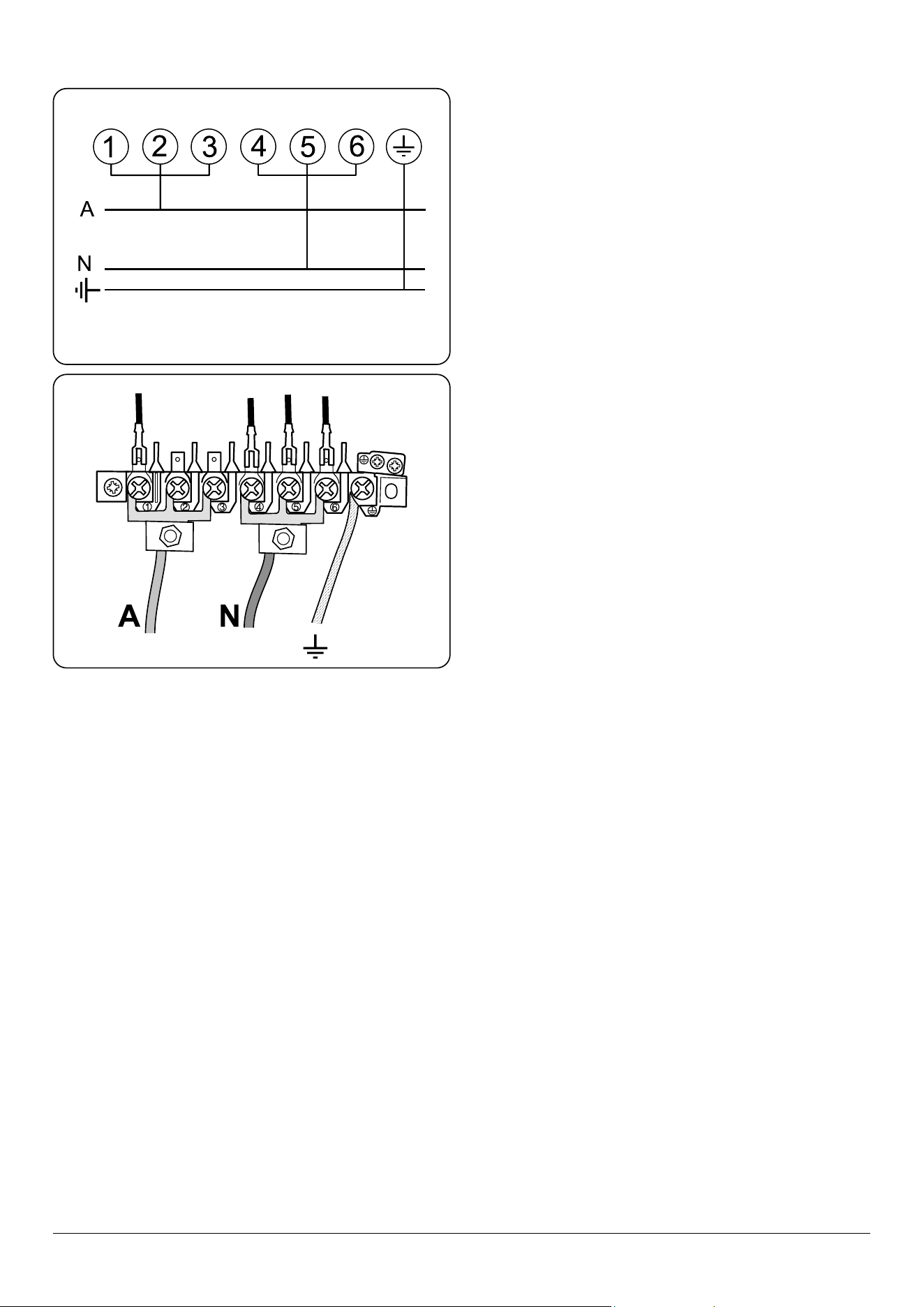
WARNING: THE APPLIANCE MUST BE
EARTHED.
The cooker is preset for a single-phase earthed
electrical connection. It is essential to install
a multi-pole circuit breaker that completely
disconnects the appliance from the mains, with
a minimum contact break distance of 3 mm.
The total electrical load of the appliance is
approximately 15 kW. The cable size used
should be suitable for this load and comply
with all local requirements (i.e. PVC Insulated
cable IEC 60227 – code 53 for ordinary cables).
Access to the mains terminal is gained by
removing the electrical terminal cover box on
the back panel. Connect the mains cable to the
correct terminals for your electrical supply type
(Fig. 1.1 and Fig. 1.2). Check that the links are
correctly tted and that the terminal screws are
tight. Secure the mains cable using the cable
clamp.
Minimum temperature rating T105.
Read the instructions before installing or using
this appliance.
• This appliance is heavy so take care when
moving it.
• The cable size and type should be suitable
for the Electrical Load of the appliance and
comply with the relevant national and local
requirements.
• The cooker may be installed in a kitchen/
kitchen diner but NOT in a room
containing a bath or shower.
• The cooker MUST NOT be connected to an
ordinary domestic power point.
• It is normal for the hob control display
to flash for about 2 seconds during first
power setting.
• Set the clock to make sure that the oven is
functional – see the relevant section in this
manual.
Fig. 1.1
Fig. 1.2

3
• The appliance must be installed in
accordance with the regulations in force
and only in a well ventilated space.
• Failure to install the appliance correctly
could invalidate any warranty or liability
claims and lead to prosecution.
• DO NOT install the appliance on a
platform.
• DO NOT manouvre the cooker while it is
plugged into the electricity supply.
• Before electrical reconnection, check that
the appliance is electrically safe.
Peculiar Smells
When you rst use your cooker it may give o
an odour. This should stop after use.
Before using for the rst time, make sure that
all packing materials have been removed and
then, to dispel manufacturing odours, turn the
ovens to 200 °C and run for at least an hour.
Before using the grill for the rst time you
should also turn on the grill and run for 30
minutes with the grill pan in position, pushed
fully back and the grill door open.
Make sure the room is well ventilated to the
outside air (see ‘Ventilation’ below). People with
respiratory or allergy problems should vacate
the area for this brief period.
Ventilation
The use of a cooking appliance results in the
production of heat and moisture in the room
in which it is installed. Therefore, make sure
that the kitchen is well ventilated: keep natural
ventilation holes open or install a powered
cookerhood that vents outside. If you have
several hotplates/burners on, or use the cooker
for a long time, open a window or turn on an
extractor fan
Maintenance
• It is recommended that this appliance is
serviced annually.
• WARNING: Before replacing the bulb,
turn o the power supply and make sure
that the oven is cool.
• DO NOT use cooking vessels on the
hotplate that overlap the edges.
• Unless specified otherwise in this guide,
always allow the cooker to cool and then
switch it off at the mains before cleaning or
carrying out any maintenance work.
• DO NOT use the control knobs to
manoeuvre the cooker.
• NEVER operate the cooker with wet hands.
• DO NOT use a towel or other bulky cloth
in place of a glove – it might catch fire if
brought into contact with a hot surface.
• DO NOT use hotplate protectors, foil or
hotplate covers of any description. These
may affect the safe use of your hotplate
burners and are potentially hazardous to
health.
• NEVER heat unopened food containers.
Pressure build up may make the containers
burst and cause injury.
• DO NOT use unstable saucepans. Always
make sure that you position the handles
away from the edge of the hotplate.
• NEVER leave the hotplate unattended
at high heat settings. Pans boiling over
can cause smoking, and greasy spills may
catch on fire. Use a deep fat thermometer
whenever possible to prevent fat
overheating beyond the smoking point.
n
WARNING: Unattended cooking on a
hob with fat or oil can be dangerous and
may result in re.

4
Induction care
• IMPORTANT INFORMATION FOR
PACEMAKER AND IMPLANTED
INSULIN PUMP USERS: The functions
of this hob comply with the applicable
European standards on electromagnetic
interference. If you are fitted with a
pacemaker or implanted insulin pump and
are concerned please consult your doctor
for medical advice.
• When the hob is in use keep magnetic
items away, such as credit and debit cards,
floppy disk, calculators, etc.
• To fully utilise the power of your
induction hob and to ensure longevity of
performance, we recommend the use of
AGA Rangemaster Induction cookware.
If you decide to purchase an alternative
set of cookware for use on your induction
cooker, we would strongly recommend
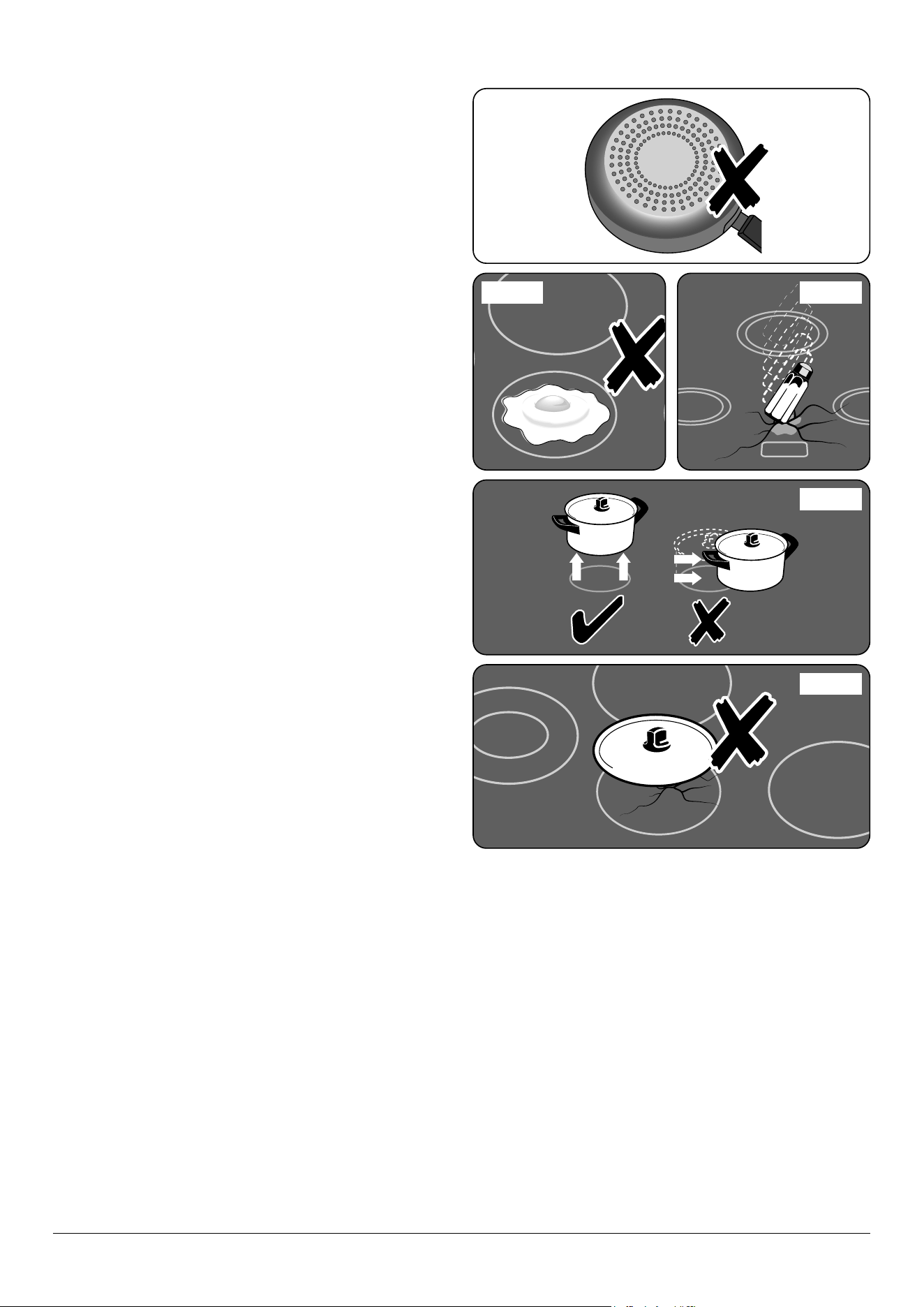
that composite aluminium cookware with
steel inserts, example shown Fig. 1.3,
are avoided. This type of construction
can significantly reduce the lifetime and
performance of your induction cook top.
• Take care when touching the marked
cooking areas of the hob.
• Use adequately sized pans with flat
bottoms that are large enough to cover
the surface of the hotplate heating area.
The use of undersized pans will expose a
portion of the surface unit to direct contact
and may result in the ignition of clothing.
• Only certain types of glass, glass-ceramic,
earthenware or other glazed containers
are suitable for use on the warming zone;
others may break because of the sudden
change in temperature.
• Only certain types of stainless steel,
enamelled steel or cast iron cookware with
enamelled bases are suitable for induction
hob cooking.
n
NEVER try to extinguish a fire with water,
but switch off the appliance and then
cover the flame e.g. with a lid or a fire
blanket.
• NEVER leave a chip pan unattended.
Always heat fat slowly, and watch as it
heats. Deep fry pans should be only one
third full of fat.
• WARNING: Danger of re: do not store
items on the cooking surfaces.
• NEVER try to move a pan of hot fat,
especially a deep fat fryer. Wait until the
fat is cool. Filling the pan too full of fat can
cause spill over when food is added. If you
use a combination of oils or fats in frying,
stir them together before heating, or as the
fats melt.
• Foods for frying should be as dry as
possible. Frost on frozen foods or moisture
on fresh foods can cause hot fat to bubble
up and over the sides of the pan. Carefully
watch for spills or overheating of foods
when frying at high or medium high
temperatures.
• DO NOT use the top of the flue (the slot
along the back of the cooker) for warming
plates, dishes, drying tea towels or
softening butter.
• DO NOT use water on grease fires and
never pick up a flaming pan. Turn the
controls off and then smother a flaming
pan on a surface unit by covering the pan
completely with a well fitting lid or baking
tray. If available, use a multi-purpose dry
chemical or foam-type fire extinguisher.
• DO NOT modify this appliance. This
appliance is not intended to be operated
by means of external timer or separated
remote-control system.
• If flammable materials are stored in the
drawer, oven(s) or grill(s) it may explode
and result in fire or property damage.
5
Fig. 1.3
• Take care NOT to scratch the surface when
placing cookware on the glass panel.
• Only certain types of glass, glass-ceramic,
earthenware or other glazed containers are
suitable for hotplate cooking; others may
break because of the sudden change in
temperature. NEVER cook directly on the
hob surface (Fig. 1.4).
• DO NOT leave the hob zones switched on
unless being used for cooking.
• DO NOT stand or rest heavy objects on the
hob. Although the ceramic surface is very
strong, a sharp blow or sharp falling object
(e.g. a salt cellar) might cause the surface
to crack or break (Fig. 1.5).
• WARNING: Should a crack appear in
the surface, disconnect the appliance
immediately from the supply and arrange
for its repair.
• ALWAYS LIFT cookware off the hob.
Sliding the griddle plate or pans may cause
marks and scratches (Fig. 1.6).
• Take care NOT TO PLACE HOT LIDS onto
the hob surface (Fig. 1.7). Lids that have
been used to cover a hot pan can “stick”
or create a “vacuum” effect to the Glass
Hob. Should this occur, DO NOT attempt
to lift the lid off the glass surface, this may
damage the glass. Instead slide the lid to
the edge of the hob surface and remove,
taking care not to scratch the hob surface.
Alternatively wait until the lid has cooled to
room temperature, the vacuum has been
released, then remove the lid by lifting it
from the hob surface.
• DO NOT place anything between the
base of the pan and the hob surface (e.g.
asbestos mats, aluminium foil, wok stand).
• Take care NOT to place metallic objects
such as knives, forks, spoons and lids on
the hob surface since they can get hot.
ArtNo.312-0001 Not cooking surface
ArtNo.312-0001 Not cooking surface
ArtNo.312-0003 Moving pans
Fig. 1.4 Fig. 1.5
Fig. 1.6
Fig. 1.7
6
• We recommend that you avoid wiping
any surface unit areas until they have
cooled and the indicator light has gone off.
Sugar spills are the exception to this (see
‘Cleaning your Cooker’). After cleaning, use
a dry cloth or paper towel to remove any
cleaning cream residue.
• The ceramic surface should be washed
after use in order to prevent it from
becoming scratched or dirty. However, you
should clean the hob with caution as some
cleaners can produce noxious fumes if
applied to a hot surface.
• DO NOT leave the hob unattended.
Care should be taken to not allow your
cookware to boil dry. It will damage your
cookware and Induction Glass Hob.
• After use, switch off the hob element by its
control. DO NOT rely on the pan detector.
Oven Care
• When the oven is not in use and before
attempting to clean the cooker always be
certain that the control knobs are in the
OFF position.
• Use oven gloves to protect your hand from
potential burns.
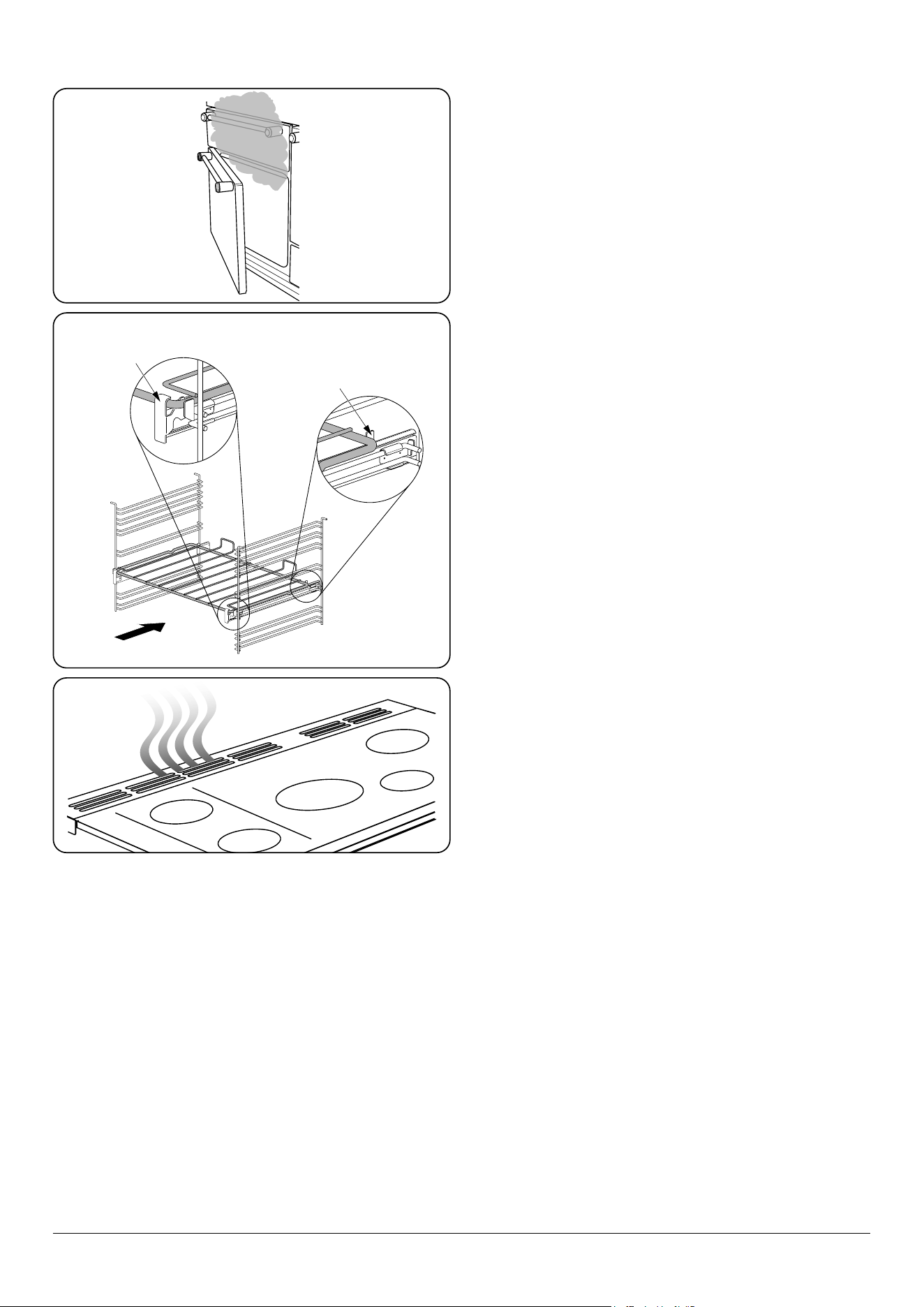
• Cooking high moisture content foods can
create a ‘steam burst’ when the oven door
is opened (Fig. 1.8). When opening the
oven, stand well back and allow any steam
to disperse.
• The inside door face is constructed with
toughened safety glass. Take care NOT
to scratch the surface when cleaning the
glass panel.
• Accidental damage may cause the door
glass panel to fracture.
• Keep oven vent ducts unobstructed.
• DO NOT use harsh abrasive cleaners or
sharp metal scrapers to clean the oven door
glass since they can scratch the surface,
which may result in shattering of the glass.
FRONT
Rear stop
Front
bracket
ArtNo.090-0007 90 Ceramic:
oven steam out the back
Fig. 1.8
Fig. 1.9
Fig. 1.10
ArtNo.324-0001 Steam burst

7
• Make sure the shelves are pushed firmly
to the back of the oven. DO NOT close the
door against the oven shelves.
• DO NOT use aluminium foil to cover
shelves, linings or the oven roof.
• When the oven is on, DO NOT leave the
oven door open for longer than necessary,
otherwise the control knobs may become
very hot.
• DO NOT use the timed oven if the
adjoining oven is already warm.
• DO NOT place warm food in the oven to be
timed.
• DO NOT use a timed oven that is already
warm.
• Use dry oven gloves when applicable –
using damp gloves might result in steam
burns when you touch a hot surface.
Oven Shelves (dependant on model)
To t the glide-out shelf, hook the front of the
shelf onto the runners as shown (Fig. 1.9). The
rear of the shelf should rest on the runners, in
front of the rear stop (Fig. 1.9).
Standard oven shelves can be tted by lining
up the shelf with a groove in the oven ladders.
Push the shelf back until the ends hit the shelf
stop. Lift the front so the shelf clears the stops,
then lower the front so the shelf is level and
push it fully back.
Hob Care
• NEVER allow anyone to climb or stand on
the hob.
• DO NOT use the hob surface as a cutting
board.
• DO NOT leave utensils, foodstus or
combustible items on the hob when it
is not in use (e.g. tea towels, frying pans
containing oil).
• DO NOT place plastic or aluminium foil, or
plastic containers on the hob.
• Always turn the control to the OFF position
before removing a pan.
• Avoid heating an empty pan. Doing so may
damage both the hob and pan.
Grill/Glide-out Grill™ Care
• When using the grill, make sure that the
grill pan is in position and pushed fully in,
otherwise the control knobs may become
very hot.
• DO NOT leave the grill on for more than
a few moments without the grill pan
underneath it, otherwise the knobs may
become hot.
• NEVER close the grill door when the grill is
on.
• Accessible parts may be hot when the grill
is in use. Young children should be kept
away
Cooling Fan
This appliance may have a cooling fan. When
the grill or ovens are in operation the fan will
run to cool the fascia and control knobs.
Cooker Care
As steam can condense to water droplets
on the cool outer trim of the oven, it may be
necessary during cooking to wipe away any
moisture with a soft cloth. This will also help to
prevent soiling and discolouration of the oven
exterior by cooking vapours (Fig. 1.10).

8
Cleaning
• Isolate the electricity supply before
carrying out any thorough cleaning. Allow
the cooker to cool.
• In the interests of hygiene and safety, the
cooker should be kept clean at all times as
a build up in fats and other food stuff could
result in a fire.
• Clean only the parts listed in this guide.
• Clean with caution. If a wet sponge or
cloth is used to wipe spills on a hot surface,
be careful to avoid steam burns. Some
cleaners can produce noxious fumes if
applied to a hot surface.
• NEVER use paint solvents, washing soda,
caustic cleaners, biological powders,
bleach, chlorine based bleach cleaners,
coarse abrasives or salt.
• DO NOT mix different cleaning products
– they may react together with hazardous
results.
• All parts of the cooker can be cleaned with
hot soapy water.
• Take care that no water seeps into the
appliance.
• Before you remove any of the grill parts for
cleaning, make sure that they are cool or
use oven gloves.
• DO NOT use any abrasive substances on
the grill and grill parts.
• DO NOT put the side runners in a
dishwasher.
• DO NOT put the burner heads in a
dishwasher.
• NEVER use caustic or abrasive cleaners as
these will damage the surface.
• DO NOT use steel wool, oven cleaning
pads or any other materials that will
scratch the surface.
• NEVER store flammable materials in the
drawer. This includes paper, plastic and
cloth items, such as cookbooks, plastic
ware and towels, as well as flammable
liquids.
• DO NOT store explosives, such as aerosol
cans, on or near the appliance.
• DO NOT use steel wool, oven cleaning
pads, or any other materials that will
scratch the surface.
• DO NOT attempt to disassemble or clean
around any burner while another burner
is on, otherwise an electric shock could
result.
9
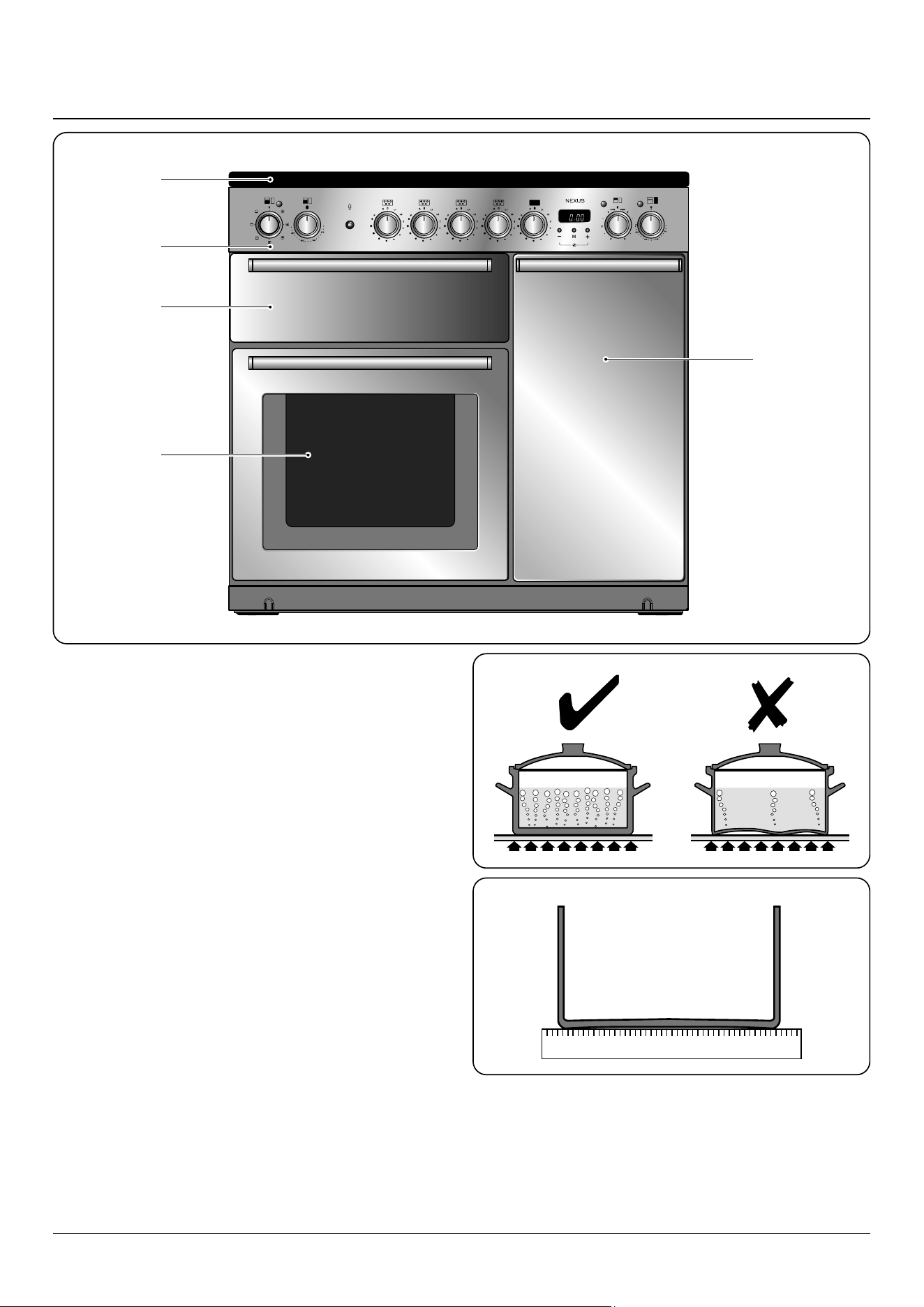
The 90 induction cooker (Fig. 2.1) has the following features:
A. 5 induction cooking zones
B. A control panel
C. Glide-out Grill™ with 4 position Trivet
D. Multifunction oven
E. Tall fan oven
The Hob
Use only pans that are suitable for induction hobs. We
recommend stainless steel, enamelled steel pans or cast iron
pans with enamelled bases. Note that some stainless steel
pans are not suitable for use with an induction hob so please
check carefully before purchasing any cookware.
Pans made of copper, aluminium or ceramic are not suitable
for use on an induction hob. The kind of pan you use and the
quantity of food aects the setting required. Higher settings
are required for larger quantities of food.
Pots and pans should have thick, smooth, at bottoms
(Fig. 2.2). This allows the maximum heat transfer from the
hob to the pan, making cooking quick and energy ecient.
Never use a round-bottomed wok, even with a stand.
The very best pans have bases that are very slightly curved
up when cold (Fig. 2.3). If you hold a ruler across the bottom
you will see a small gap in the middle. When they heat up the
metal expands and lies at on the cooking surface.
B
A
C
D
E
ArtNo.025-0005 - Overview - 90 induction - 2 button clock & GO grill
2. Cooker Overview
Fig. 2.1
Fig. 2.2
Fig. 2.3
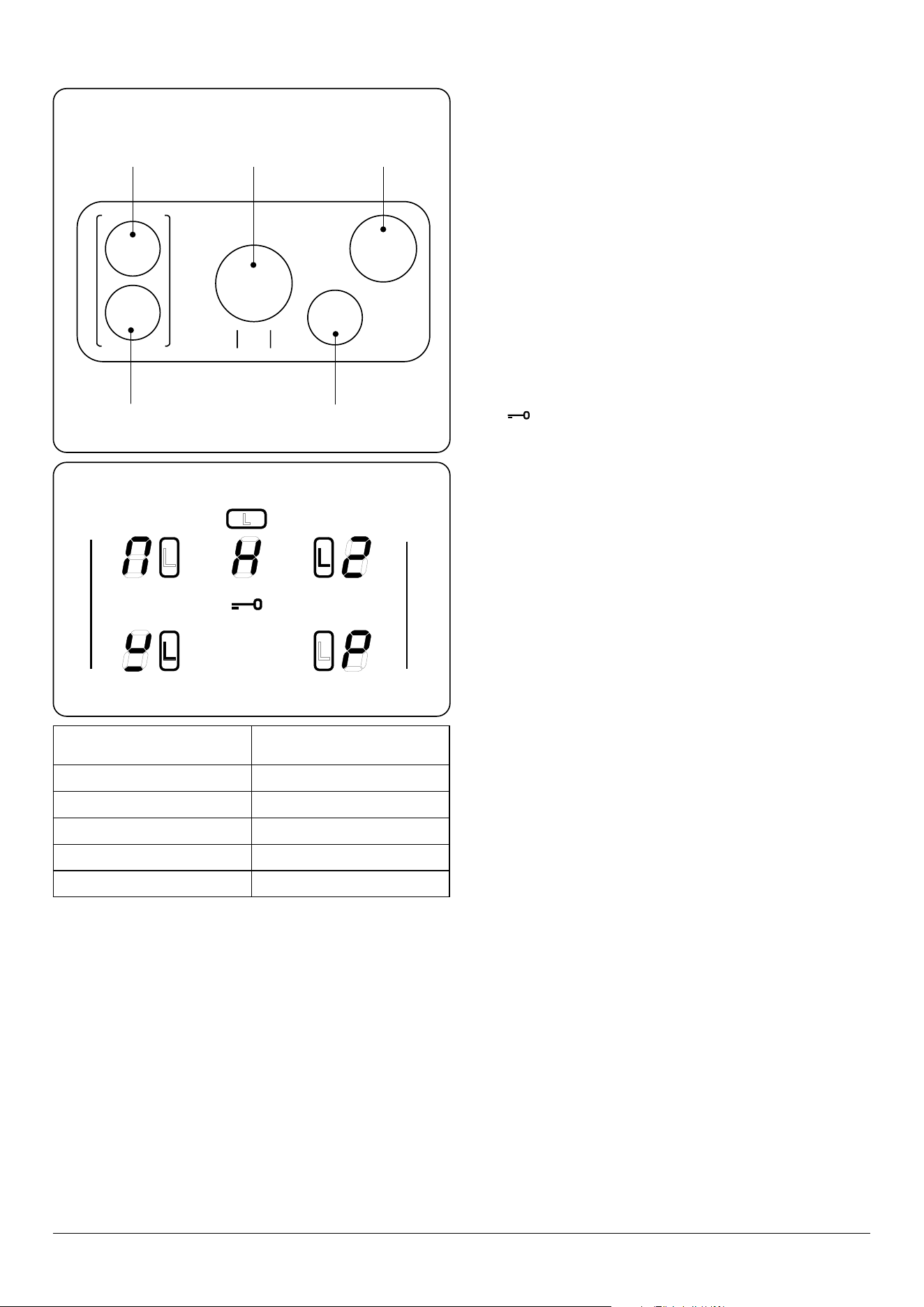
10
Max: 1.85 kW
Boost: 2.5 kW
Max: 1.85 kW
Boost: 3.2 kW
Max: 1.85 kW
Boost: 2.5 kW
Max: 1.85 kW
Boost: 2.5 kW
Max: 1.15 kW
Boost: 2.0 kW
Zone 2
Zone 1
Zone 3
Zone 4
Zone 5
Make sure that the base of the pan is clean and dry to prevent
any residue burning onto the hob panel. This also helps
prevent scratches and deposits.
Always use pans that are the same size as (or slightly larger
than) the areas marked on the hob. Using a lid will help the
contents boil more quickly.
The induction hob comprises of ve cooking zones
containing induction elements with dierent ratings and
diameters (Fig. 2.4) each with a pan detector and residual
heat indicator, and a hob control display.
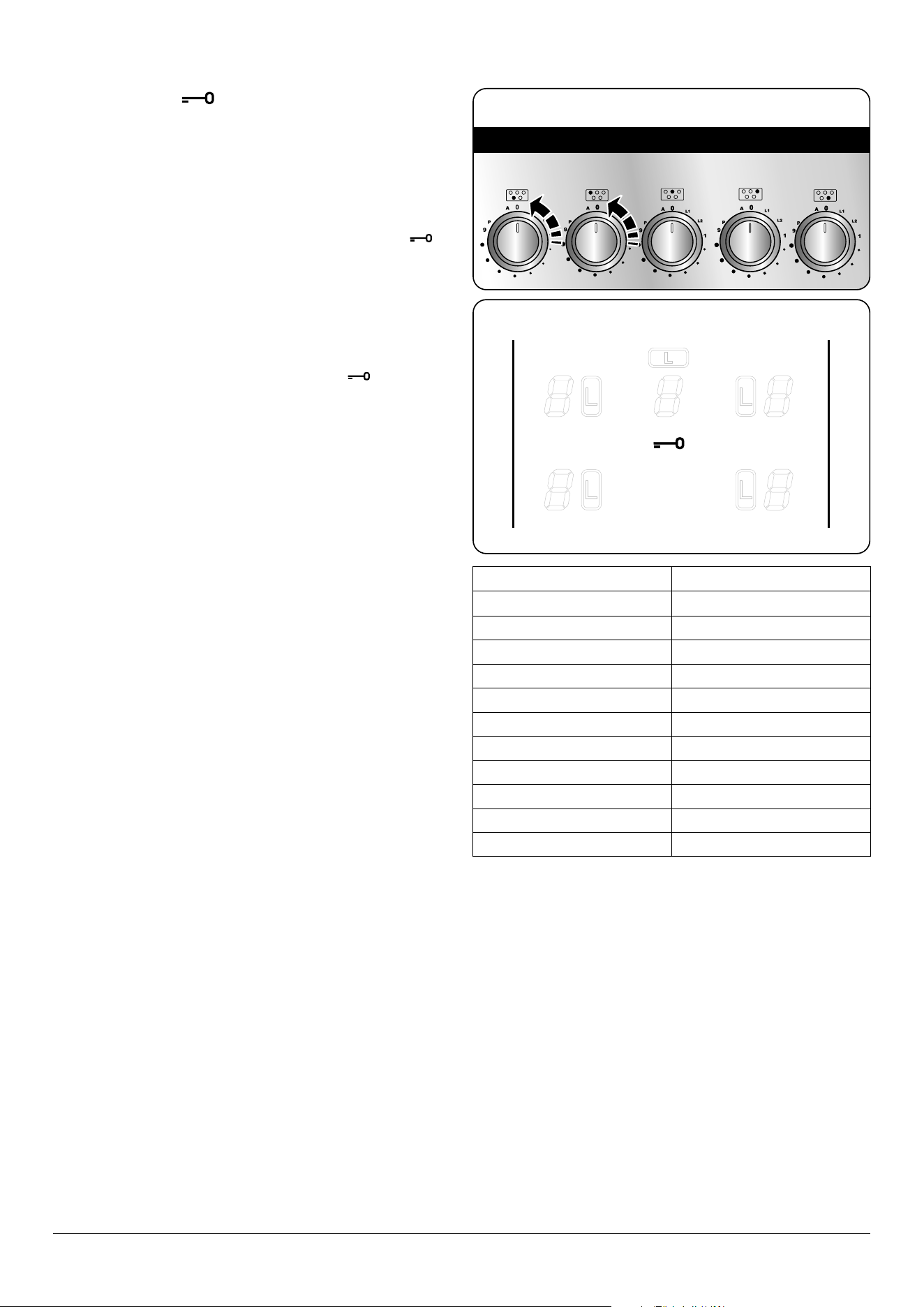
The hob control display (Fig. 2.5) informs you of the following
induction hob functions:
• Pan detector
• H Residual heat indicator
• Child lock
• L1/L2/L3 Low temperature setting
• P Power boost setting
Pan Detector,
n
IMPORTANT: After use, switch o the hob element
by its control and DO NOT RELY on the pan detector.
If a cooking area is switched on and there is no pan in place
or if the pan is too small for the cooking area, then no heat
will be generated. The symbol [ ] will appear on the hob
control display; this is the “pan-missing symbol”. Place a pan
of the correct size on the cooking area and the [ ] symbol
will disappear and cooking can begin. After 10 minutes
without detecting a pan the cooking zone will switch o
automatically.
Table 2.1 shows the minimum pan sizes recommended for
each cooking zone.
Note: Using pans with a base diameter smaller than those
recommended will result in a power reduction.
Residual Heat Indicator, H
After use, a cooking zone will remain hot for a while as heat
dissipates. When a cooking zone is switched o the residual
heat indicator symbol [H ], will appear in the display. This
shows that the cooking zone temperature is above 60 °C and
may still cause burns. Once the temperature has dropped to
below 60 °C the [H ] will go out.
Table 2.1
Cooking Zone
Minimum Pan Diameter
(Pan Base) mm
Front left 180
Rear left 180
Centre 210
Rear right 180
Front right 140
Fig. 2.4
Fig. 2.5
11
Child Lock,
n
IMPORTANT: The child lock can only be activated
when all the cooking zones are switched o.
To prevent the unwanted use by children, the hob can be
locked.
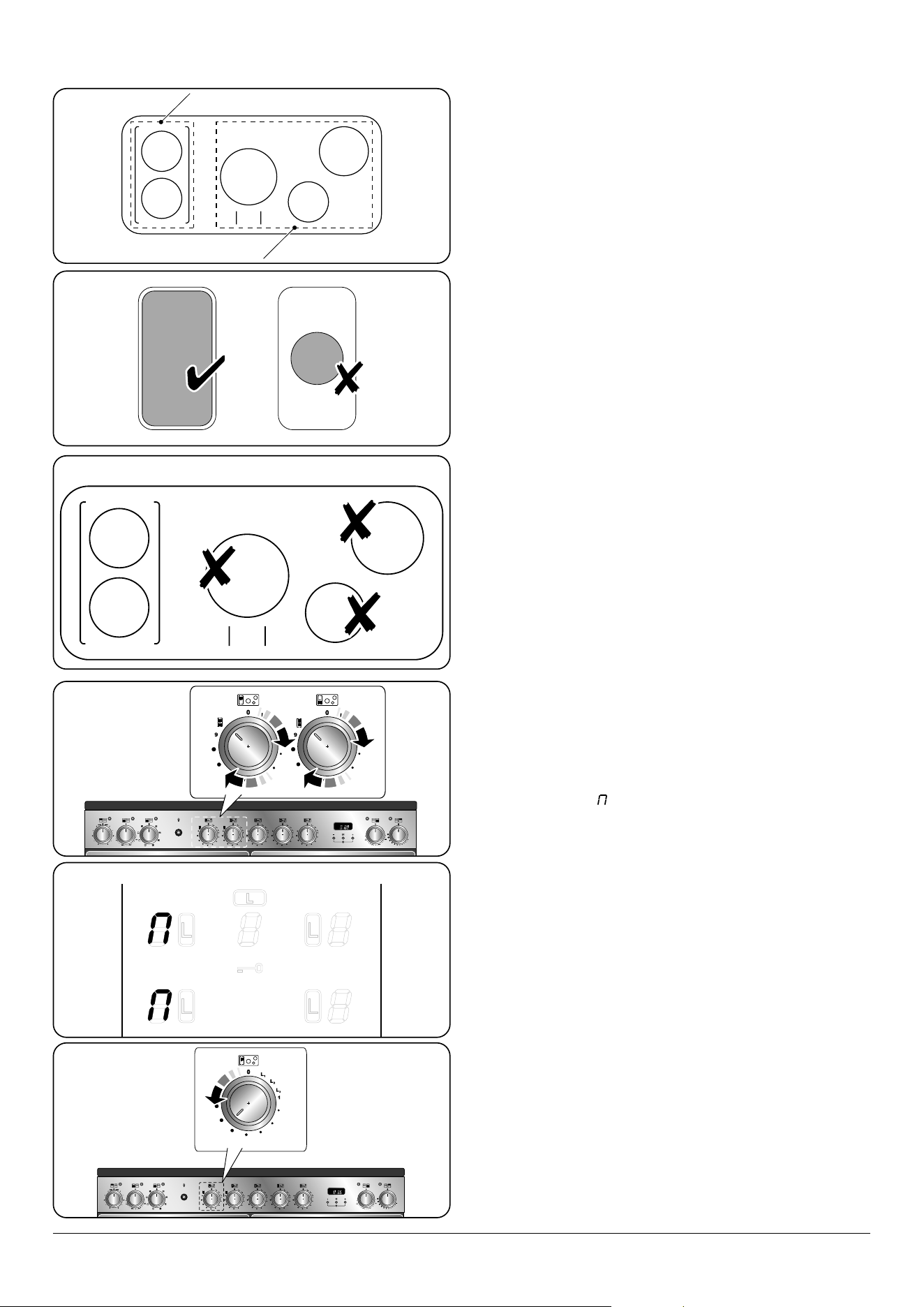
To lock the hob, simultaneously turn the two left-hand
controls counter-clockwise (Fig. 2.6) and hold until the
symbol appears in the centre of the hob control display
(Fig. 2.7).
Note: [
A ] will ash when locking the hob – this is normal.
Locking the hob will NOT aect the oven; it can still be used.
To unlock the hob, simultaneously turn the two left-hand
controls counter-clockwise and hold until the
symbol
disappears from the centre of the hob control display.
Low Temperature Setting, L1/L2/L3
n
This function should only be used when heating
from cold
Each cooking area is equipped with 3 low temperature
settings:
• L1 will maintain a temperature of about 44 °C – ideal for
gently melting butter or chocolate.
• L2 will maintain a temperature of about 70 °C – ideal for
keeping food warm, once it is cooked.
• L3 will maintain a temperature of about 94 °C – ideal for
simmering (bring the pan to the boil and then select L3
to keep soups, sauces, stews, etc at an optimal simmer).
The maximum time this setting can be used is 2 hours. To
increase the heat, just turn the control knob to the required
level. The maximum times for all other power levels are
shown in Table 2.2.
Power Boost Setting, P
All of the induction cooking zones have Power Boost
available, activated by turning the control knob clockwise
until [P ] is shown on the hob control display.
Power Boost allows additional power to be made available for
each of the cooking zones. This is useful to bring a large pan
of water to the boil quickly.
The Power Boost function operates for a maximum of 10
minutes on each zone, after which the power is automatically
reduced to setting 9.
Deactivate the Power Boost function by turning the control
knob to a lower setting.
Table 2.2
Fig. 2.6
Fig. 2.7
Power Level Maximum Operating Time
L1, L2 and L3
2 hours
1 6 hours
2 6 hours
3 5 hours
4 5 hours
5 4 hours
6 1.5 hours
7 1.5 hours
8 1.5 hours
9 1.5 hours
Power Boost 10 minutes
12
Power Sharing Zones
Power sharing is taking the power from the adjacent zone.
For example, if zones C, D and E (Fig. 2.8) are set to power
level 9, or set to Power Boost (P) the power level in D or E will
adjust in the order it was switched on.
n
Avoid heating an empty pan. Doing so may damage
both the hob and pan.
Example 1: Set zone C to power level 9, switch on zone D
to power level 9 and then zone E to power level 9. After a
few seconds zone D power level will reduce to 7. Zone C will
remain at P or 9
Example 2: Set zone C to power level 9, switch on zone E
to power level 9 and then zone D to power level 9. After a
few seconds zone E power level will reduce to 6. Zone C will
remain at P or 9
Example 3: Set zone D and E to power level 9 and then zone
C to power level 9. After a few seconds zone E power level will
reduce to 6.
The same principle applies when using zone A and B. When
using zone A on Power Boost (P) and then switching zone B
to Power Boost (P), the power to zone A will reduce slightly.
n
This is a built-in safety device.
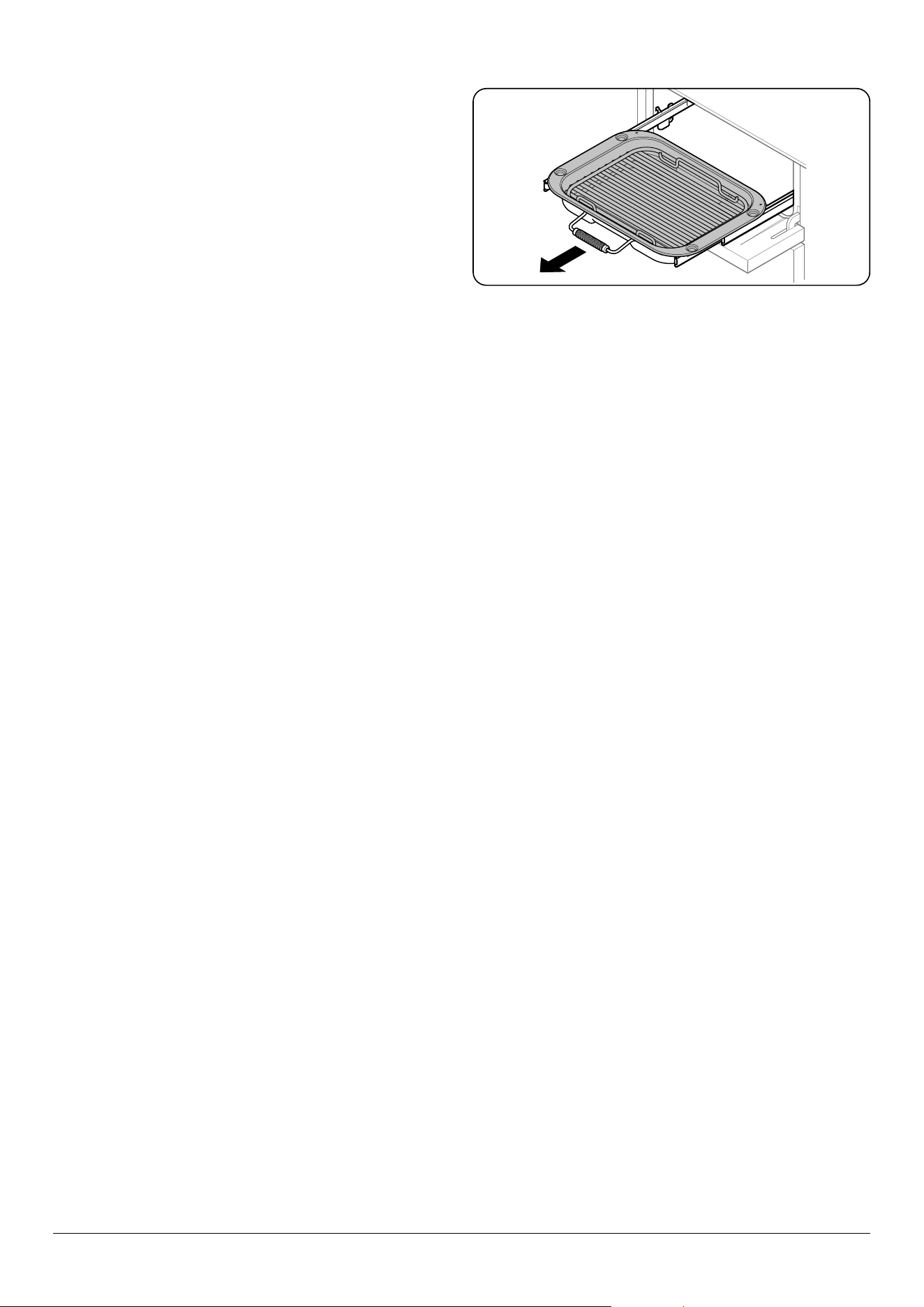
The Bridging-Zone Function
Zones A and B can be bridged, creating an area, ideal for use
with an induction griddle plate (supplied).
Note: The griddle plate should comprise of an induction
friendly, at bottom, large enough to cover zones A and B of
the hotplate heating area (Fig. 2.9).
DO NOT use zones C, D or E to heat the griddle plate (Fig. 2.10).
To activate the bridging-zone function, simultaneously turn
the two left-hand controls completely clockwise (Fig. 2.11)
and hold until the [ ] symbols appear in the centre of the
hob control display (Fig. 2.12). The temperature can then be
adjusted using the left-hand knob (Fig. 2.13).
Turn both knobs counter-clockwise to cancel the dualzone
function and return to normal operation.
n
DO NOT turn the two left-hand knobs individually
to heat the griddle plate. This can cause excessive
temperatures and damage the coating on the
griddle plate.
Overheat Function
This function identies when the temperature of the pan rises
rapidly and works to maintain a safe level of pan temperature.
It should not interfere with normal cooking.
Cookware with bases that become distorted (Fig. 2.2) when
heated may interfere with the operation of the Overheat
Function. This may result in damage to your cookware or
Induction Glass Hob.
Please read and follow the manufacturers’ instructions
carefully before using cookware on your induction hob.
A
B
C
E
D
A & B linked
C, D & E linked
A
B
C
E
D
M
M
Fig. 2.9
Fig. 2.10
Fig. 2.11
Fig. 2.12
Fig. 2.13
Fig. 2.8
13
The Glide-out Grill™ (Fig. 2.14)
n
WARNING: When the trivet has been removed from
the grill pan, please ensure that the grill pan and
cradle are fully returned into the grill chamber. The
grill pan door MUST remain open.
n
Accessible parts may be hot when the broiler is in
use. Young children should be kept away.
n
Never close the grill door when the grill is on.
1. For best results, slide the carriage back into the grill
chamber. The grill trivet can be removed and the
food placed on it while you are waiting for the grill to
preheat.
2. DO NOT leave the grill on for more than a few moments
without the grill pan underneath it, otherwise the knobs
may become hot.
3. Once the grill has preheated, slide the carriage out
again. With the trivet back in place with the food on it,
slide the carriage back into the grill chamber. Make sure
that it is pushed right in.
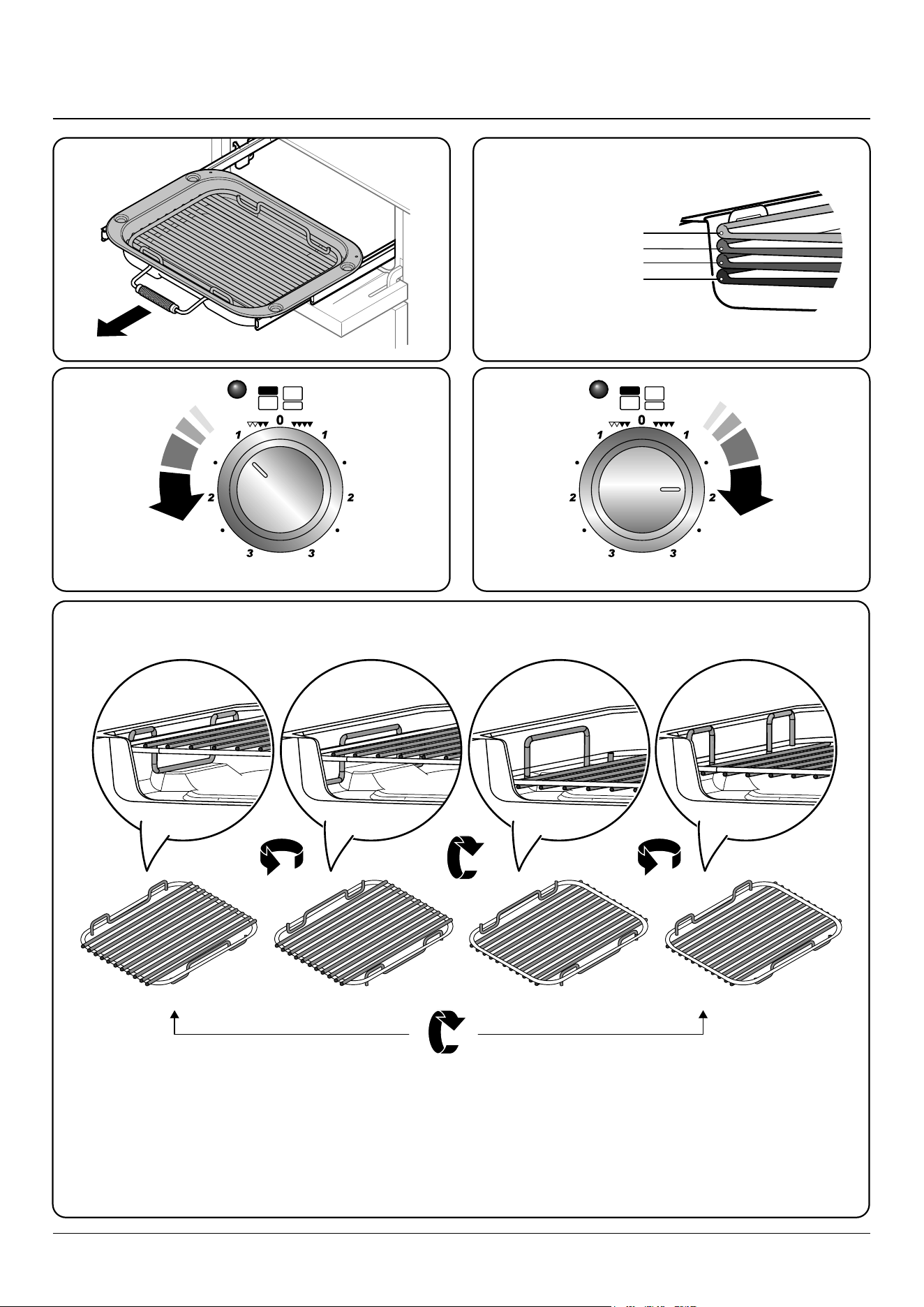
The grill pan trivet can be turned to give four grilling heights
by a combination of turning it back to front and turning it
upside down. See chapter Using the Glide-out Grill™.
Fig. 2.14
14
The Ovens
The clock must be set to the time of day before the ovens will
work. See the following section on ‘The Clock’ for instructions
on setting the time of day.
References to ‘left-hand’ and ‘right-hand’ ovens apply as
viewed from the front of the appliance.
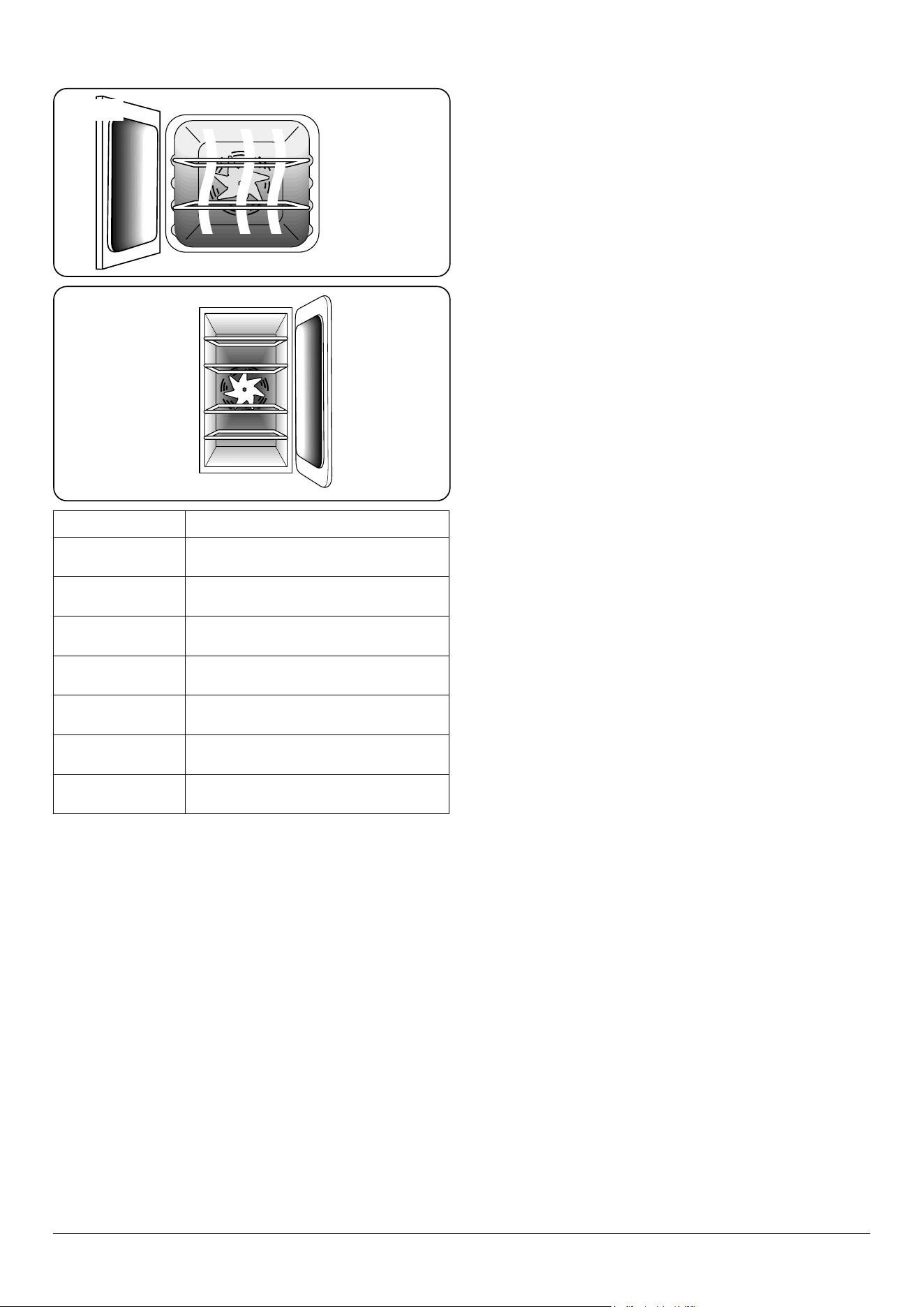
The left-hand oven is a multifunction oven (Fig. 2.15), while
the right-hand oven is a fan oven (Fig. 2.16).
Fan ovens circulate hot air continuously, which means
faster, more even cooking. The recommended cooking
temperatures for a fan oven are generally lower than those
for a non-fan oven.
Multifunction ovens have an oven fan and oven fan element,
as well as two extra heating elements. One element is in
the top of the oven and the second is under the oven base.
Take care to avoid touching the top element and element
deector when placing or removing items from the oven.
The multifunction oven has 3 main cooking functions: fan,
fan assisted and conventional cooking. These functions
should be used to complete most of your cooking.
The browning element and base heat can be used in the
latter part of the cooking process to ne tune the results to
your particular requirements.
Use fanned grilling for all your grilling needs and defrost to
safely thaw small items of frozen food.
Table 2.3 gives a summary of the multifunction modes.
The multifunction oven has many varied uses. We suggest
you keep a careful eye on your cooking until you are familiar
with each function. Remember, not all functions will be
suitable for all food types.
Function Use
Defrost
To thaw small items in the oven without heat
Fan oven
A full cooking function, even heat throughout,
great for baking
Fanned grilling
Grilling meat and sh with the door closed
Fan assisted
A full cooking function good for roasting and
baking
Conventional
oven
A full cooking function for roasting and baking in
the lower half of the oven
Browning
element
To brown and crisp cheese topped dishes
Base heat
To crisp up the bases of quiche, pizza or pastry
Table 2.3
ArtNo.321-0006 - Multi-function oven
ArtNo.323-0002 Tall oven
Multi-function oven
Tall fan oven
Fig. 2.15
Fig. 2.16
15
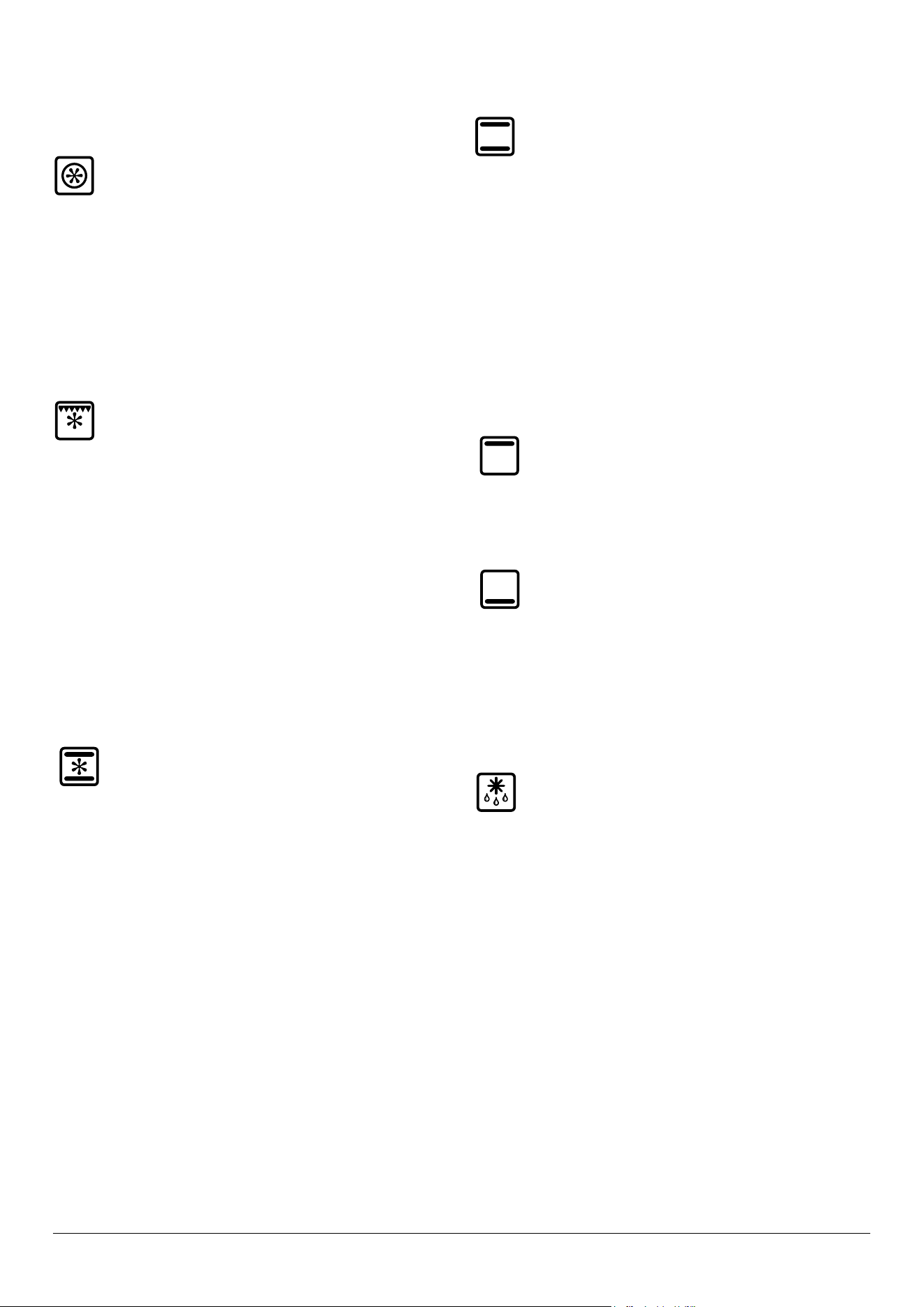
Multifunction Oven Functions
Fan Oven
This function operates the fan and the heating
element around it. An even heat is produced
throughout the oven, allowing you to cook large
amounts quickly.
Fan oven cooking is particularly suitable for baking on several
shelves at one time and is a good ‘all-round’ function. It may
be necessary to reduce the temperature by approximately
10 °C for recipes previously cooked in a conventional oven.
If you wish to preheat the oven, wait until the indicator light
has gone out before inserting the food.
Fanned Grilling
This function operates the fan while the top element
is on. It produces a more even, less erce heat than a
conventional grill. For best results, place the food to
be grilled, on a trivet over a roasting tin, which should be
smaller than a conventional grill pan. This allows greater air
circulation. Thick pieces of meat or sh are ideal for grilling in
this way, as the circulated air reduces the erceness of the
heat from the grill.
The oven door should be kept closed while grilling is in
progress, so saving energy.
You will also nd that the food needs to be watched and
turned less than for normal grilling. Preheat this function
before cooking.
For best results we recommend that the grill pan is not
located on the uppermost shelf.
Fan Assisted Oven
This function operates the fan, circulating air heated
by the elements at the top and the base of the oven.
The combination of fan and conventional cooking
(top and base heat) makes this function ideal for cooking
large items that need thorough cooking, such as a large meat
roast.
It is also possible to bake on two shelves at one time,
although they will need to be swapped over during the
cooking time, as the heat at the top of the oven is greater
than at the base, when using this function.
This is a fast intensive form of cooking; keep an eye on the food
cooking until you have become accustomed to this function.
Conventional Oven (Top and Base Heat)
This function combines the heat from the top and
base elements. It is particularly suitable for roasting
and baking pastry, cakes and biscuits.
Food cooked on the top shelf will brown and crisp faster than
on the lower shelf, because the heat is greater at the top of
the oven than at the base, as in ‘Fan Assisted Oven’ function.
Similar items being cooked will need to be swapped around
for even cooking. This means that foods requiring dierent
temperatures can be cooked together, using the cooler zone
in the lower half of the oven and hotter area to the top.
The exposed top element may cook some foods too quickly,
so we recommend that the food be positioned in the lower
half of the oven to cook. The oven temperature may also need
to be lowered.
Browning Element
This function uses the element in the top of the oven
only. It is a useful function for the browning or
nishing of pasta dishes, vegetables in sauce,
shepherds pie and lasagne, the item to be browned being
already hot before switching to the top element.
Base Heat
This function uses the base element only. It will crisp
up your pizza or quiche base or nish o cooking the
base of a pastry case on a lower shelf. It is also a
gentle heat, good for slow cooking of casseroles in the
middle of the oven or for plate warming.
The Browning and Base Heat functions are useful additions
to your oven, giving you exibility to nish o items to
perfection.
Defrost
This function operates the fan to circulate cold air
only. Make sure the temperature control is at 0°C and
that no heat is applied. This enables small items such
as desserts, cream cakes and pieces of meat, sh and poultry
to be defrosted.
Defrosting in this way speeds up the process and protects
the food from ies. Pieces of meat, sh and poultry should
be placed on a shelf, over a tray to catch any drips. Be sure to
wash the shelf and tray after defrosting.
Defrost with the oven door closed.
Large items, such as whole chickens and joints should not be
defrosted in this way. We recommend this be carried out in a
refrigerator.
Defrosting should not be carried out in a warm oven or when
an adjoining oven is in use or still warm.
Make sure that dairy foods, meat and poultry are completely
defrosted before cooking.
16
ArtNo.320-0017
Main oven light
Operating the Ovens
Multifunction Ovens
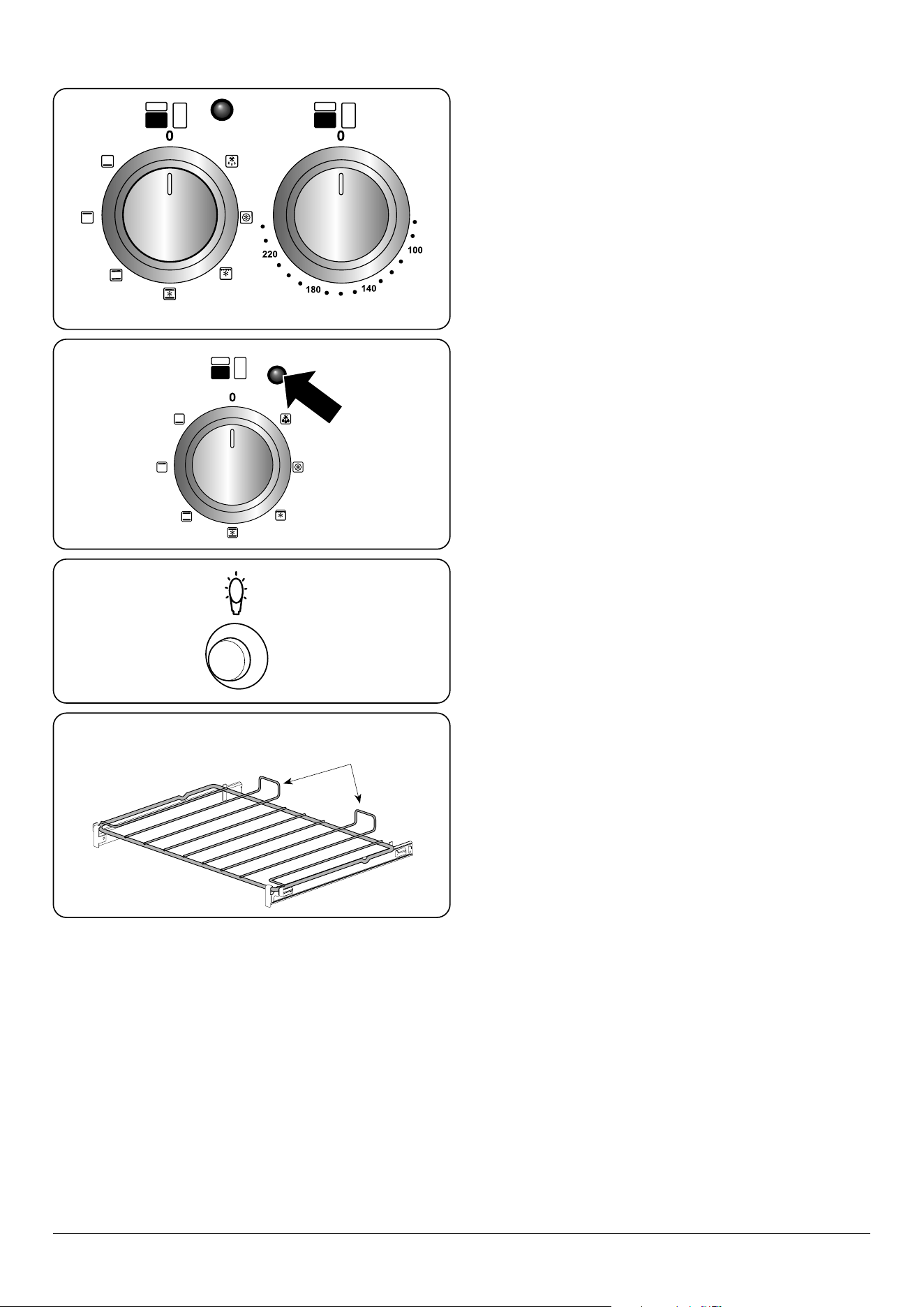
The multifunction oven has two controls: a function selector
and a temperature setting knob (Fig. 2.17).
Turn the function selector control to a cooking function. Turn
the oven temperature knob to the temperature required (Fig.
2.18).
The oven heating light will glow until the oven has reached
the temperature you selected. It will then cycle on and o
during cooking.
When cooking foods with high water content, there may be
some steam visible at the grille at the rear of the hotplate.
This is perfectly normal.
Fan Ovens
Turn the oven knob to the desired temperature (Fig. 2.18).
The oven indicator light will glow until the oven has reached
the temperature selected. It will then cycle on and o during
cooking.
Main Oven Light
Press the button to turn the light on (Fig. 2.19).
If the oven light fails, turn o the power supply before
changing the bulb. See the ‘Troubleshooting’ section for
details on how to change the bulb.
Accessories
Glide-out Shelf - Left-hand (Main) Oven
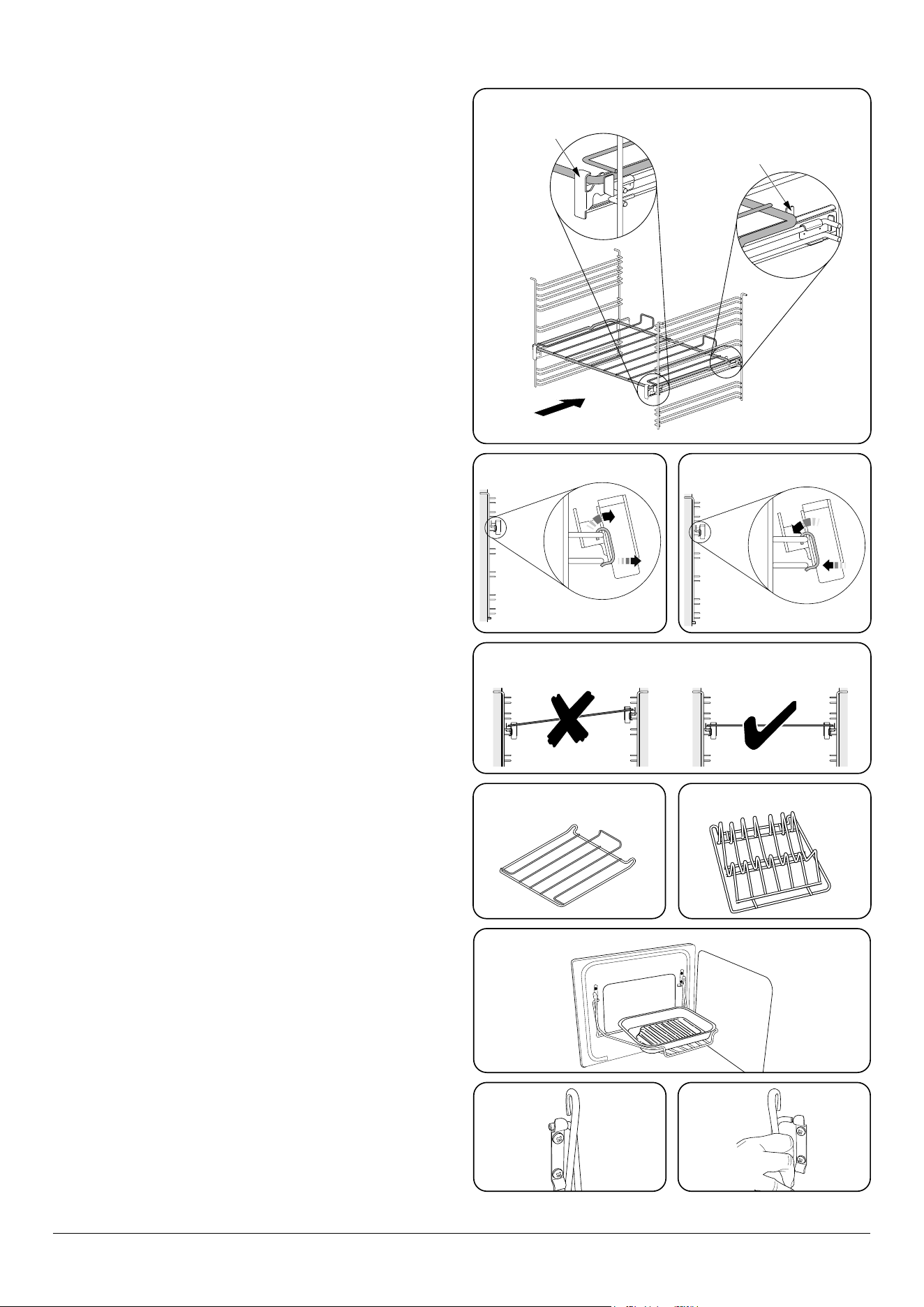
The oven shelves (Fig. 2.20) are retained when pulled
forward but can be easily removed and retted.
The left-hand oven is supplied with glide-out oven shelves.
To t the glide-out shelves, hook the front of the shelf onto
the runners as shown (Fig. 2.21). The rear of the shelf should
rest on the runners, in front of the rear stop (Fig. 2.21).
The glide-out shelves and runners can be easily removed or
repositioned.
To remove the glide-out shelves
Raise the rear of the shelf, so that it clears the rear stops. Then
unhook from the front locating bracket.
ArtNo.270-0006 Proplus
oven control light
Function control Temperature control
Fig. 2.17
Fig. 2.18
Fig. 2.19
Fig. 2.20
Shelf guard
Front
17
1
2
ArtNo.324-0002 Oven shelf
ArtNo.324-0010 Plate warming shelf
FRONT
Rear stop
Front
bracket
2
1
To remove the glide-out runners
Twist to unclip the base of the runners from the shelf
supports. Then unhook the runner from the top rung of the
shelf support and remove (Fig. 2.22).
To refit the glide-out runners
Hook the rear of the runner over the top rung of a pair of shelf
supports. Then hook the front of the runner onto the same
rung. Push to clip under the bottom rung (Fig. 2.23).
Ensure that the shelf runners are tted in the same position
on each side (Fig. 2.24).
The front of the shelf runners can be identied by the bracket
(Fig. 2.21).
n
DO NOT put the glide-out shelf runners in a
dishwasher.
Oven Shelves – Right-hand (Tall) Oven
The tall oven is supplied with four at cooking shelves
(Fig. 2.25) and a plate warming shelf (Fig. 2.26).
When using the tall oven, you can cook on all four shelves at
the same time, but make sure that they are well spaced out to
allow the hot air to circulate.
The Handyrack (Optional extra)
The Handyrack (Fig. 2.27) ts to the left-hand oven door
only. Food cooking on it is easy to attend to, because it is
accessible when the door is open.
The maximum weight that can be held by the Handyrack
is 5.5 kg (12 lb). It should only be used with the supplied
roasting tin, which is designed to t the Handyrack. Any other
vessel could be unstable.
It can be tted at two dierent heights. One of the oven
shelves must be removed and the other positioned to suit.
When the Handyrack is used in its highest position, other
dishes can be cooked on the bottom shelf position or base of
the oven.
When the Handyrack is used in its lowest position, other
dishes can be cooked on the second shelf position or base of
the oven.
To t the Handyrack, locate one side of it on the door bracket
(Fig. 2.28).
Then spring the other side out to clip it onto the other
bracket (Fig. 2.29).
Fig. 2.21
Fig. 2.23
Fig. 2.24
Fig. 2.25 Fig. 2.26
Fig. 2.27
Fig. 2.28 Fig. 2.29
Fig. 2.22
ArtNo.320-0015
Fitting the Handyack 1
ArtNo.320-0014 Handyrack on LH door
ArtNo.320-0016
Fitting the handyrack 2
18
Nearest to the element
Middle High
Middle Low
Furthest from the element
3. Using the Glide-out Grill™
180o
180o 180o 180o
Nearest to the element Middle LowMiddle High Furthest from the element
Four grill height positions
Four grill height positions
refer to Fig. 3.5
To switch on both elements
Fig. 3.1
Fig. 3.2
To switch on the right half element
Fig. 3.3
Fig. 3.4
Fig. 3.5
Cooking suggestions
1. Nearest to the element – Toast, streaky bacon.
2. Middle high – cheese on toast, welsh rarebit, courgette slices, back bacon.
3. Middle low – sh llets, vegetable skewers.
4. Furthest from the element – whole sh, thick pork chops, chicken breasts, chicken or beef skewers.
NOTE: A short term cooking process has to be supervised continously.
DocAUS.020-0004 - Overview - 110DF - Elan
19
4. 3 Button clock
Using the clock
You can use the clock to turn the programmable oven on and
o. The clock must be set to the time of day before the
oven will work.
NOTE: When using the timer functions, rst set the clock as
required before setting the oven temperature.
The oven can be switched on when the cook symbol [
]
is displayed. This symbol remains visible during normal
operation.
Setting the clock
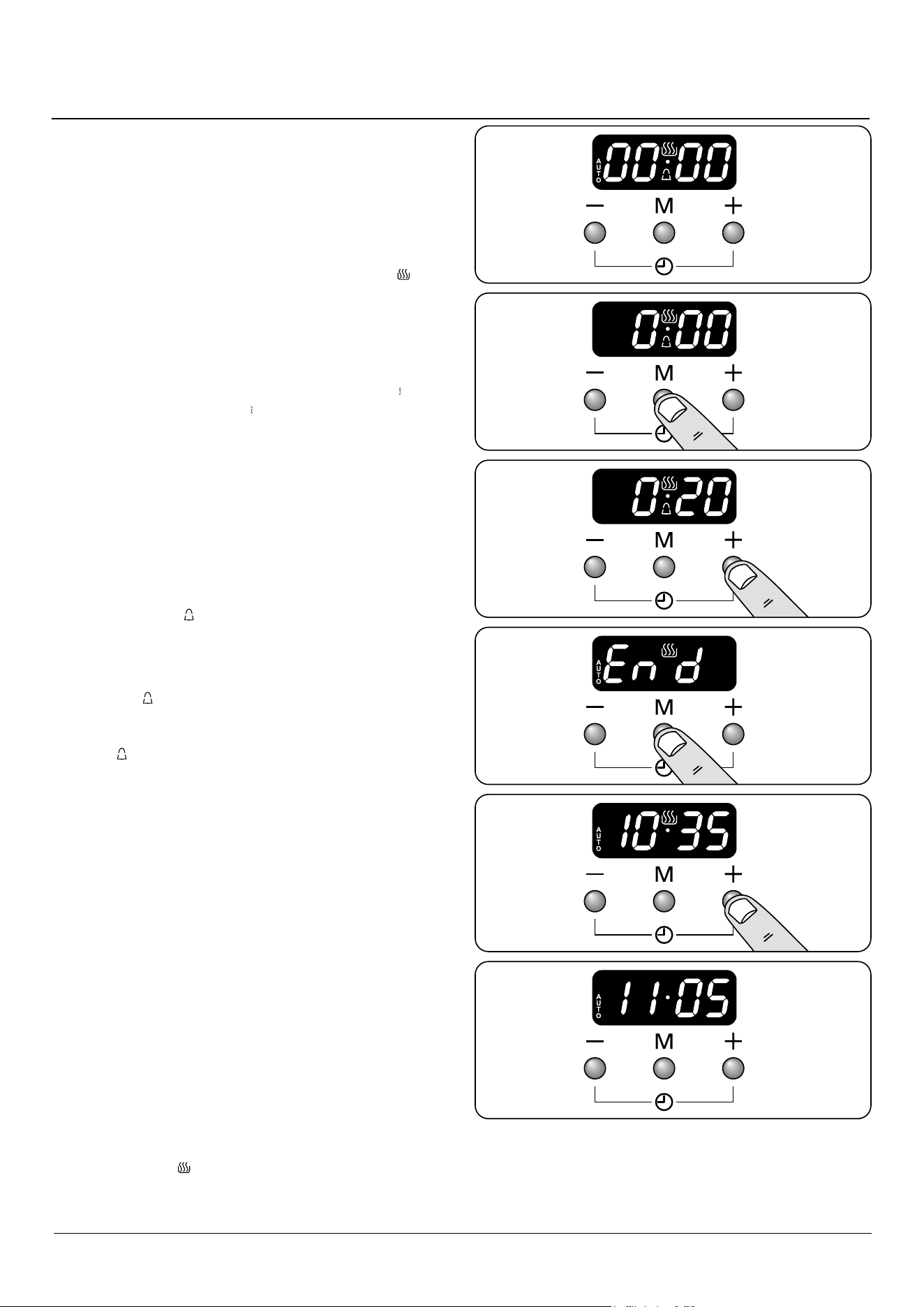
1. The LCD clock is shown in (Fig. 4.1). Once the cooker is
connected and switched on, the display ashes (00.00 )
and the time starts from (00.00 ).
2. To set the clock press the [+] and [-] buttons
simultaneously, the point between hours and minutes
will start to ash for 5 seconds. Whilst the point is
ashing press either the [+] or [-] button to set the
correct time.
IMPORTANT: The timed oven will not operate unless the
clock has been set.
Program selection - Setting the minute minder
The minute minder [
] provides the ability to set a
countdown from 00:01h to 23:59h, at the end of which an
alarm will sound.
1. Press the mode [M] button once (Fig. 4.2). The bell
symbol [ ] will ash on the display. Select the desired
countdown from 00:01h to 23:59h using the [+] button
(Fig. 4.3). The countdown will automatically begin and
the [ ] symbol will show in the display.
2. Once the specied time has elapsed an alarm will
sound.
3. To stop the alarm press any button.
Re-set the minute minder
To re-set the minute minder, rst select the minute minder
program by pressing the mode [M] button. Then press the
[+] and [-] buttons simultaneously.
• The ‘cook period’, which is the length of time you want
the oven to cook for (dur).
• The ‘stop time’, which is the time of day you want the
oven to stop cooking (End).
To stop the programmable oven at a specific time of day
1. Press the mode [M] button 3 times, until the display
ashes ‘End’ (Fig. 4.4).
2. Select the ‘stop time’ using the [+] or [-] buttons. The
display will show the current time along with the ‘AUTO’
and Cooking [ ] symbols (Fig. 4.5).
ArtNo.306-0001 - 3-button clock
ArtNo.306-0001 - 3-button clock
ArtNo.306-0001 - 3-button clock
ArtNo.306-0001 - 3-button clock
ArtNo.306-0001 - 3-button clock
ArtNo.306-0001 - 3-button clock
Fig. 4.1
Fig. 4.2
Fig. 4.3
Fig. 4.4
Fig. 4.5
Fig. 4.6
20
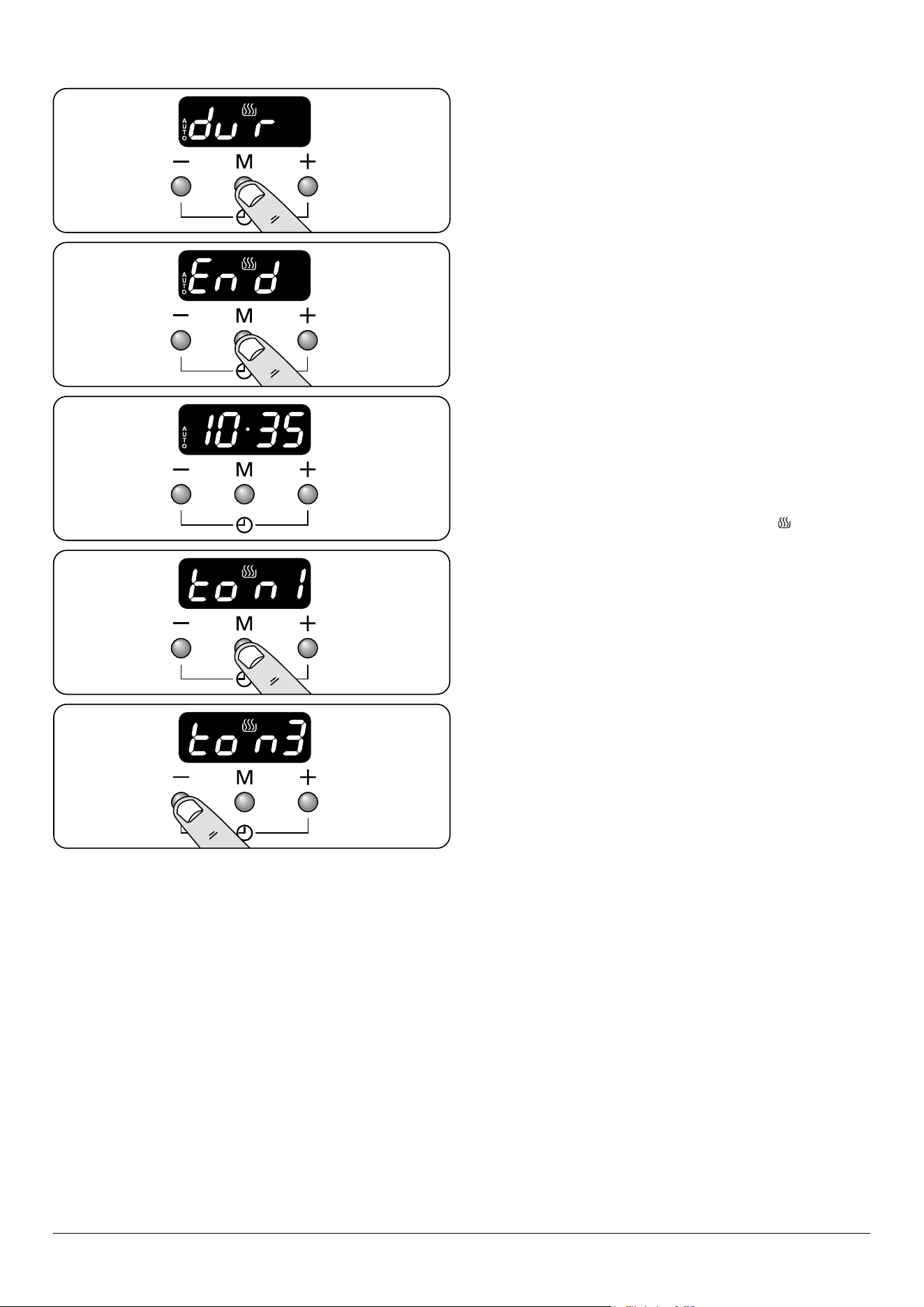
3. When the ‘stop time’ is reached an alarm will sound and
the oven will stop working. The word ‘AUTO’ will ash on
the display (Fig. 4.6).
4. Press any button to stop the alarm and return to
manual cooking. If the alarm is not stopped, it will stop
automatically after 7 minutes.
To start and then stop the programmable oven
Set the programmable oven to automatically start and stop
using a combination of the ‘cook period’ and ‘stop time’.
You cannot set a start time directly – this is set automatically
by a combination of the ‘cook period’ and ‘stop time’.
1. Press the mode [M] button until the display ashes ‘dur’
(Fig. 4.7). Then set the ‘cook period’ using the [+] or [-]
buttons.
2. Press the mode [M] button until the display ashes ‘End’
(Fig. 4.8). Then set the ‘stop time’ using the [+] or [-]
buttons. Current time will be displayed along with the
word ‘AUTO’ (Fig. 4.9).
3. Set the oven to the required cooking temperature.
4. During the ‘cook period’ the cook symbol [ ] is
illuminated in the display.
5. When cooking is nished an alarm will sound. Press any
button to stop the alarm and return to manual cooking.
If the alarm is not stopped, it will stop automatically
after 7 minutes.
AUTO is showing, but you want to revert to manual
cooking
You can cancel any automatic settings by pressing the [+] and
[-] buttons simultaneously.
Changing the frequency of the alarm
It is possible to change the alarm frequency.
1. Press the the [+] and [-] buttons simultaneously, then
the mode [M] button. The display will show ‘ton1,2 or 3’
(Fig. 4.10).
2. To select the tone press the [-] button until desired tone
is reached (Fig. 4.11).
ArtNo.306-0001 - 3-button clock
ArtNo.306-0001 - 3-button clock
ArtNo.306-0001 - 3-button clock
ArtNo.306-0001 - 3-button clock
ArtNo.306-0001 - 3-button clock
Fig. 4.7
Fig. 4.8
Fig. 4.9
Fig. 4.10
Fig. 4.11

21
Using Your Induction Cooker
If you have not used an induction cooker before please be
aware of the following:
• Make sure that the pans you have or buy are suitable
for use on the induction hob. Stainless steel, enamelled
steel or cast iron is ideal. Double check before you
buy pans – they must have bases that would attract a
magnet.
• Allow time to get used to induction cooking; it is fast
and powerful as well as being gentle. When simmering,
you may notice that liquids appear to stop bubbling and
then start again almost immediately. This is perfectly
normal.
• You may notice a faint vibrating sound coming from
the pans when using the induction hob. Again, this is
perfectly normal and will depend upon the type and
style of pans you are using.
• The induction heating elements will phase on and off
when cooking. Although an active cooking zone may
appear to switch on and off, a constant heat is still being
supplied to the base of the pan – this is completely
normal.
Tips on cooking with the timer
If you want to cook more than one dish, choose dishes that
require approximately the same cooking time. However,
dishes can be ‘slowed down’ slightly by using small containers
and covering them with aluminium foil, or ‘speeded up’
slightly by cooking smaller quantities or placing them in
larger containers.
Very perishable foods such as pork or sh should be avoided
if a long delay period is planned, especially in hot weather.
n
DO NOT place warm food in the oven to be timed.
n
DO NOT use a timed oven that is already warm.
n
DO NOT use the timed oven if the adjoining oven is
already warm.
Whole poultry must be thoroughly defrosted before being
placed in the oven. Check that meat and poultry are fully
cooked before serving.
General oven tips
The wire shelves should always be pushed rmly to the back
of the oven.
Baking trays with food cooking on them should be placed
level with the front edge of the oven’s wire shelves. Other
containers should be placed centrally. Keep all trays and
containers away from the back of the oven, as overbrowning
of the food may occur.
For even browning, the maximum recommended sizes of
baking tray are:
• depth: 340 mm (13 3/8”) by width: 340 mm (13 3/8”) in the
main oven
• depth: 321 mm (12 5/8”) by width: 232 mm (9 1/8”) in the
tall oven.
When the oven is on, DO NOT leave the door open for
longer than necessary, otherwise the knobs may get very
hot.
• Always leave a “finger’s width” between dishes on
the same shelf. This allows the heat to circulate freely
around them.
• To reduce fat splashing when you add vegetables to hot
fat around a roast, dry them thoroughly or brush lightly
with cooking oil.
• Where dishes may boil and spill over during cooking,
place them on a baking tray.
• The ‘Cook & Clean’ oven liners (see ‘Cleaning Your
Cooker’) work better when fat splashes are avoided.
Cover meat when cooking with foil or use a roasting
bag.
• Sufficient heat rises out of the oven while cooking to
warm plates in the grill compartment.
• If you want to brown the base of a pastry dish, preheat
the baking tray for 15 minutes before placing the dish in
the centre of the tray.
5. Cooking tips
22
6. Cooking Table
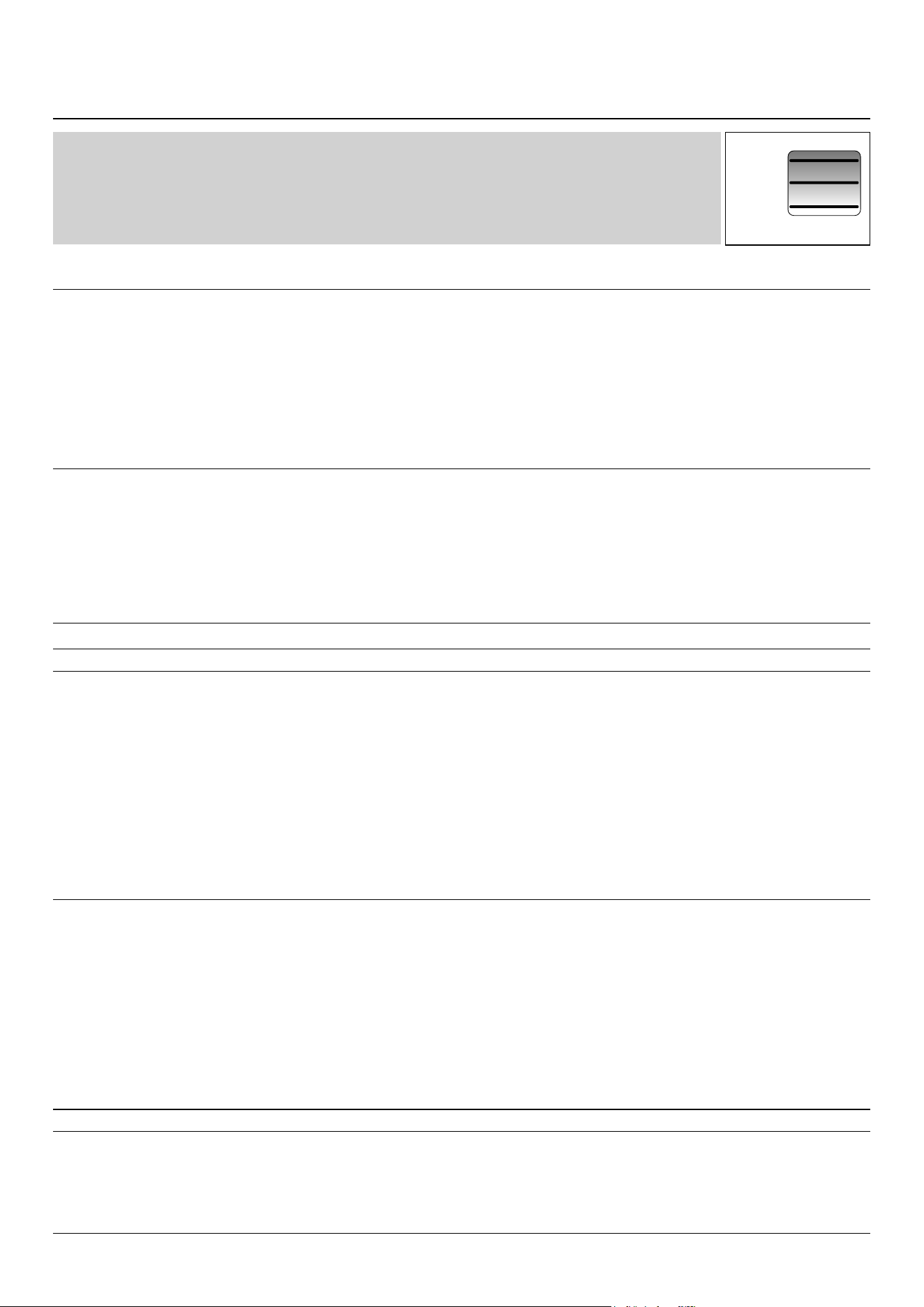
Oven Shelf Positions
Top (T)
Centre (C)
Base (B)
ArtNo.050-0007
Oven shelf positions
The oven control settings and cooking times given in the table below are intended to be used as a
guide only. Individual tastes may require the temperature to be altered to provide a preferred result.
Food is cooked at lower temperature in a fan oven than in a conventional oven. When using recipes,
reduce the fan oven temperature by 10 °C and the cooking time by 5-10 minutes. The temperature in
the fan oven does not vary with height in the oven so you can use any shelf.
Food
Conventional Oven
°C (Shelf Position)
Fan Oven
Temperature
Approximate Cooking Time
Meat
Beef (no bone)
Lamb
Pork
160 (C)
200 (C)
160 (C)
200 (C)
160 (C)
200 (C)
150 °C
190 °C
150 °C
190 °C
150 °C
190 °C
30-35 minutes per 500g +30-35 minutes.
20-25 minutes per 500g +20-25 minutes.
30-35 minutes per 500g +30-35 minutes.
25-30 minutes per 500g +25-30 minutes.
35-40 minutes per 500g +35-40 minutes.
25-30 minutes per 500g +25-30 minutes.
Thoroughly thaw frozen joints
before cooking. Meat may be
roasted at 220°C (210°C for
fan oven) and the cooking
time adjusted accordingly. For
stued and rolled meats, add
approximately 10 minutes per
500g, or cook at 200°C (190°C)
for 20 minutes then 160°C
(150°C) for the remainder.
Poultry
Chicken
Turkey
Duck
160 (C)
200 (C)
160 (C)
200 (C)
160 (C)
200 (C)
150 °C
190 °C
150 °C
190 °C
150 °C
190 °C
20-25 minutes per 500g +20-25 minutes.
15-20 minutes per 500g +15-20 minutes.
20 minutes per 500g +20 minutes.
15 minutes per 500g +15 minutes.
25-30 minutes per 500g.
20 minutes per 500g.
For stued poultry, you could
cook at 200°C (190°C) for 20
minutes then 160°C (150°C)
for remainder. Do not forget
to include the weight of the
stung. For fresh or frozen
pre-packed poultry, follow
instructions on the pack.
Thoroughly thaw frozen
poultry before cooking.
Casserole 140-150 (C) 130 °C-140 °C 2-4 hours according to recipe.
Yorkshire Pudding 220 (C) 210 °C Large tins 30-35 minutes; individual 10-20 minutes.
Cake
Very rich fruit - Christmas, wedding, etc.
Fruit 180 mm tin
Fruit 230 mm tin
Madeira 180 mm
Queen cakes
Scones
Victoria sandwich
180 mm tin
210 mm tin
140 (C/B)
150 (C/B)
150 (C/B)
160 (C/B)
190 (C/B)
220 (C/B)
180 (C/B)
180 (C/B)
130 °C
140 °C
140 °C
150 °C
180 °C
210 °C
170 °C
170 °C
45-50 minutes per 500g of mixture.
2-2½ hours.
Up to 3½ hours.
80-90 minutes.
15-25 minutes.
10-15 minutes.
20-30 minutes.
30-40 minutes.
Using the conventional oven:
When two tier cooking leave
at least one runner space
between shelves. Position
the baking tray with the front
edge along the front of the
oven shelf.
Up to three tiers can be
cooked on, in a fan oven, at
the same time. But make sure
to leave at least one runner
space between each shelf
being cooked on.
Desserts
Shortcrust tarts
Fruit pies
Tartlets
Pu pastry
Meringues
Baked egg custard
Baked sponge pudding
Milk pudding
200 (C/B)
200 (C/B)
200 (C/B)
210 (C/B)
100 (C/B)
160 (C/B)
180 (C/B)
140-150 (C/B)
190 °C
190 °C
190 °C
200 °C
90 °C
150 °C
170 °C
130 °C-140 °C
20-30 minutes on a preheated tray.
35-45 minutes.
10-20 minutes according to size.
20-40 minutes according to size.
2-3 hours.
45-60 minutes.
40-45 minutes.
2 to 3 hours.
Up to three tiers can be
cooked on, in a fan oven, at
the same time. But make sure
to leave at least one runner
space between each shelf
being cooked on.
Bread 210 (C) 200 °C 20-30 minutes.
Fish Fanned Grilling
Fillet
Whole
Steak
190 (C/B)
190 (C/B)
190 (C/B)
190 °C (C/B)
190 °C (C/B)
190 °C (C/B)
15-20 minutes
15-20 minutes per 500g.
Steaks according to thickness.
23
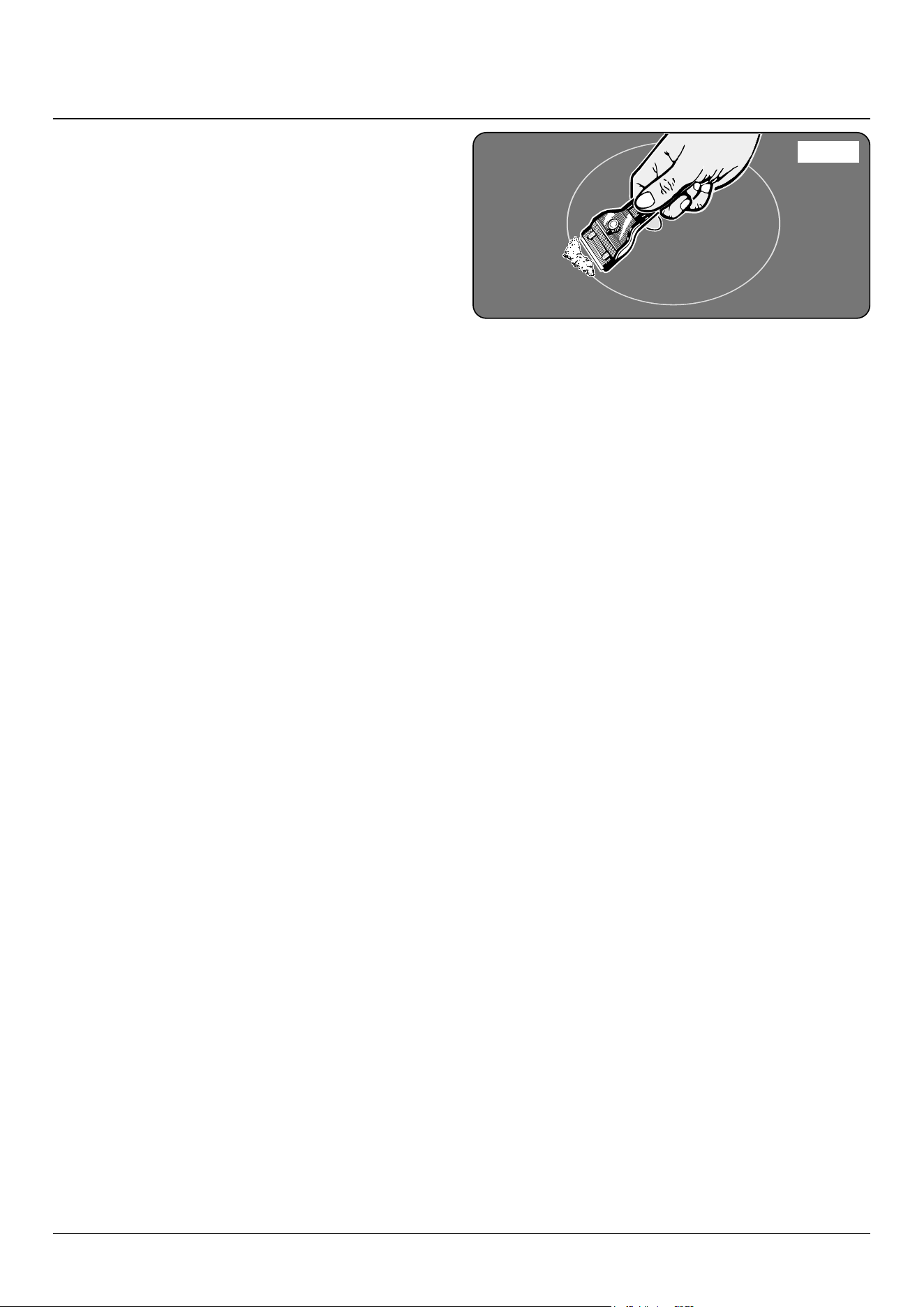
ArtNo.312-0010 Cleaning; scraping the ceramic hob
n
Isolate the electricity supply before carrying out any
major cleaning. Then allow the cooker to cool.
n
NEVER use paint solvents, washing soda, caustic
cleaners, biological powders, bleach, chlorine based
bleach cleaners, coarse abrasives or salt.
n
DO NOT mix dierent cleaning products – they may
react together with hazardous results.
All parts of the cooker can be cleaned with hot soapy water
– but take care that no surplus water seeps into the
appliance.
Remember to switch the electricity supply back on and reset
the clock before re-using the cooker.
Hob
Daily care
First of all, be sure that all heat indicator lights are o and
that the cooking surface is cool. Apply a small dab of ceramic
cleaning cream in the centre of each area to be cleaned.
Dampen a clean paper towel and work the cream onto the
cooking surface. As a nal step, wipe the cooking surface with
a clean, dry paper towel.
Cleaning spills
For spills and boil-overs that occur while cooking, turn o the
unit and wipe the area surrounding the hot zone with a clean
paper towel. If a spill (other than a sugary substance) is on the
hot zone, do not clean until the unit has completely cooled
down, and then follow the instructions below, ‘Cleaning
Burned-on Spills’.
If you accidentally melt anything on the surface, or if you spill
foods with a high sugar content (preserves, tomato sauce,
fruit juice, etc.), remove the spill IMMEDIATELY with a razor
scraper, while the unit is still hot.
n
IMPORTANT: Use an oven glove to protect your hand
from potential burns.
Scrape the major spill or melted material from the cooking
zone and push into a cold area. Then, turn the unit ‘OFF’
and allow to cool before cleaning further. After the cooking
surface cools down and the heat indicator lights go o, follow
the ‘Daily Care’ procedure outlined above.
Cleaning burned-on spills
Make sure that the heat indicator lights are o and that the
hob is cool. Remove the excess burned-on substance with a
single-edged razor scraper. Hold the scraper at an angle of
about 30° to the surface and then scrape o the burned-on
matter (Fig. 7.1).
Once you have removed as much as possible with the scraper,
follow the ‘Daily Care’ procedure outlined above.
7. Cleaning your cooker
Fig. 7.1
DocNo.040-0004 - Cleaning - 110 ceramic GENERIC
24
Grills
The grill pan and trivet should be washed in hot soapy water.
After grilling meats or any foods that soil, leave to soak for a
few minutes immediately after use. Stubborn particles may
be removed from the trivet using a nylon brush. Alternatively,
the grill pan can be washed in a dishwasher.
n
Before you remove any of the grill parts for cleaning,
make sure that they are cool, or use oven gloves.
n
DO NOT use any abrasive substances.
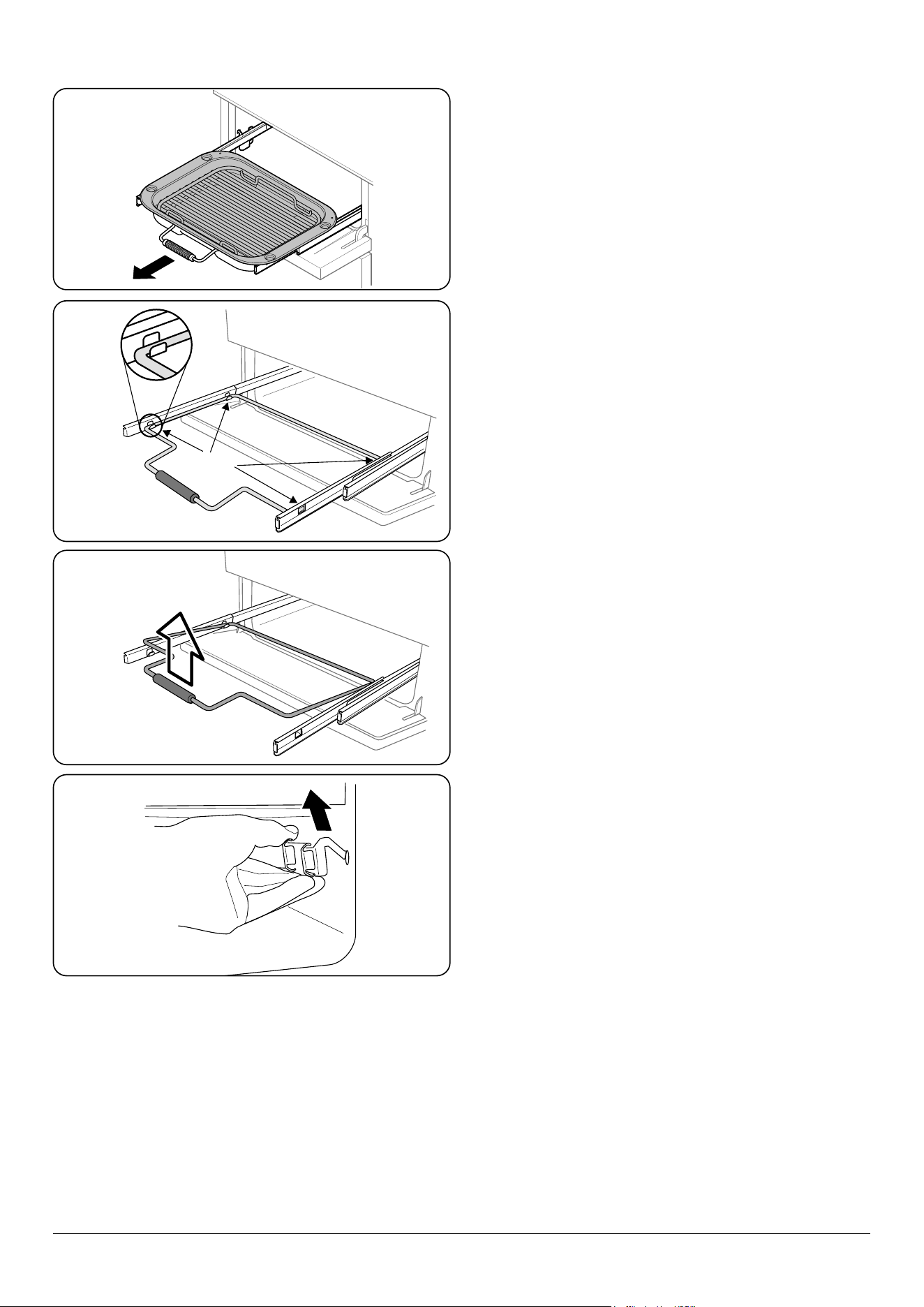
Removing the glide-out grill pan
The glide-out grill pan can be easily removed for cleaning as
follows: Remove the grill pan support frame by pulling the
grill pan forward (Fig. 7.2).
Lift the grill pan clear of the support frame. The support frame
is held to the side rails by two clips on each side (Fig. 7.3).
For each side, support the side rail with one hand and with
the other hand lift the frame up and out of the side clips
(Fig. 7.4).
For safety, push the side rails back into the grill chamber.
If you need to remove the side rails to allow cleaning of the
grill chamber, you can unhook them from the grill chamber
sides (Fig. 7.5) and wipe the sides clean with a soft cloth and
mild detergent.
n
DO NOT put the side runners in a dishwasher.
Once you have nished, hook the side rails back onto the
sides of the chamber. To ret the frame, pull the side rails
forward and, for each side in turn, support the side rail and
press the frame down into the side rails.
Replace the grill pan.
Control panel and doors
Avoid using any abrasive cleaners, including cream cleaners.
For best results, use a liquid detergent.
The same cleaner can also be used on the doors. Alternatively,
use a soft cloth wrung out in clean hot soapy water. You can
use the same method for cleaning the control panel and
knobs. After cleaning, polish with a dry cloth.
Induction Griddle (some models only)
n
NEVER use paint solvents, washing soda, caustic
cleaners, biological powders, bleach, chlorine based
bleach cleaners, coarse abrasives or salt.
n
DO NOT mix dierent cleaning products – they may
react together with hazardous results.
n
DO NOT put this griddle in a dishwasher.
Safety
n
Please always use potholders for cast-on handles because
they tend to get hot, given their good heat conductivity.
ArtNo.331-0003 Grill frame out, no pan
ArtNo.331-0004 Removing the grill frame
ArtNo.331-0005 Removing the grill rail
Fig. 7.2
Fig. 7.3
Fig. 7.4
Fig. 7.5
25
ArtNo.320-0002b
- Oven door side screws (Toledo)
Glass fronted door panels
The oven door front panels can be taken o so that the glass
panels can be cleaned. Move the cooker forward to gain
access to the sides (see the ‘Moving the Cooker’ section under
‘Installation’).
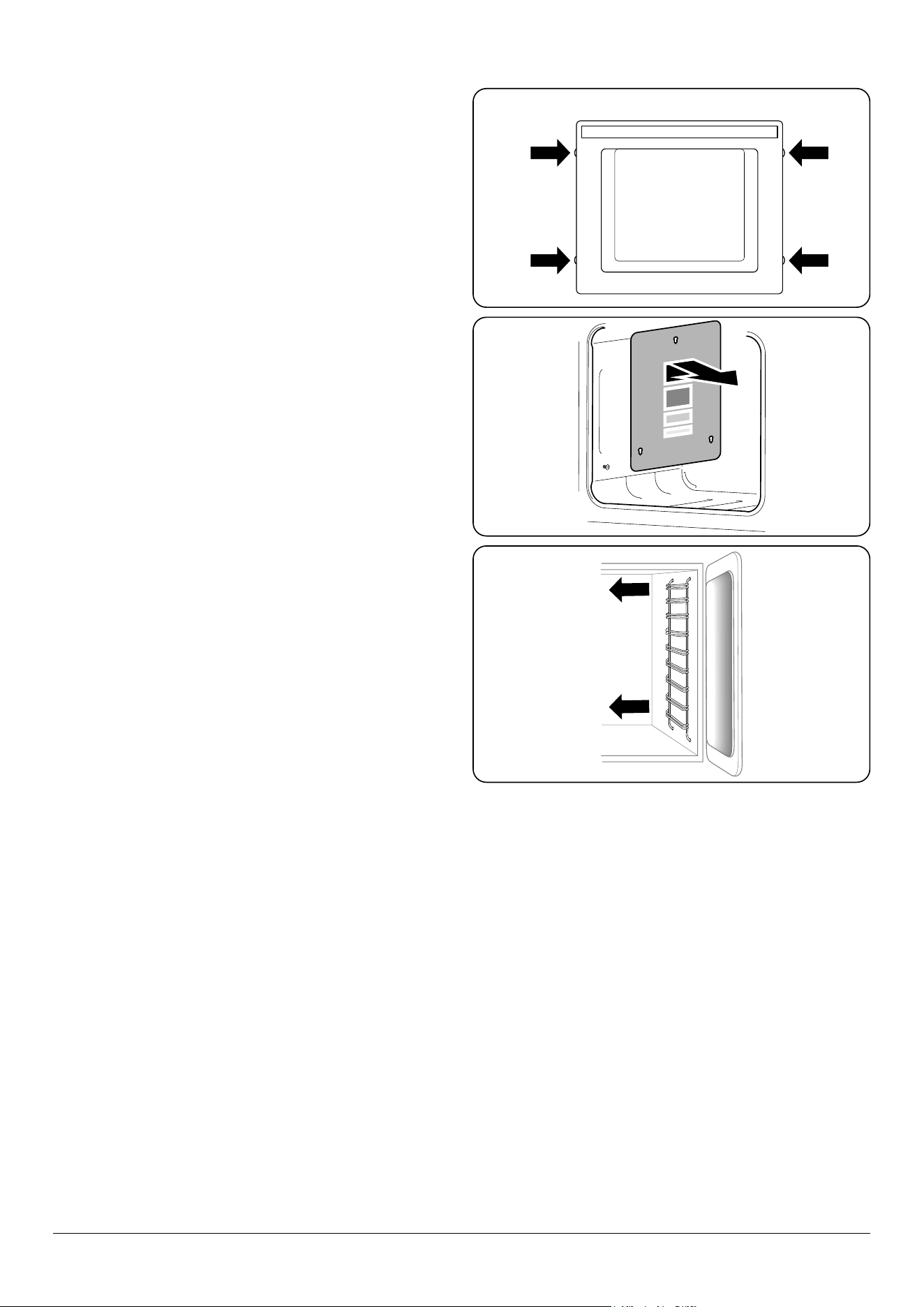
Open the oven door slightly and remove the front panel
xing screws from the door sides, two each side (Fig. 7.6).
Carefully lift o the outer door panel. The inside face of the
glass panels can now be cleaned – take care not to disturb or
wet the door insulation.
NOTE: If the door is triple glazed then the inner two panels
are xed together and should not be separated. After
cleaning, carefully ret the outer door panel and replace the
side xing screws.
n
DO NOT use harsh abrasive cleaners or sharp metal
scrapers to clean the oven door glass since they can
scratch the surface, which may result in shattering of
the glass.
Ovens
The oven door front panels can be taken o so that the glass
panels can be cleaned. Move the cooker forward to gain
access to the sides (see the ‘Moving the Cooker’ section under
‘Installation’).
‘Cook & Clean’ Panels
The main oven has side ‘Cook & Clean’ panels which have
been coated with a special enamel that partly cleans itself.
This does not stop all marks on the lining, but helps to reduce
the amount of manual cleaning needed.
These panels work better above 200 °C. If you do most of your
cooking below this temperature, occasionally remove the
panels and wipe with a lint free cloth and hot soapy water.
The panels should then be dried and replaced and the oven
heated at 200 °C for about one hour. This will make sure that
the panels are working eectively.
Removing the panels to clean the enamel interior
Some of the lining panels can be removed for cleaning.
If you wish to clean the enamel interior of the oven, you will
need to remove the shelves before removing the ‘Cook &
Clean’ panels. To remove the side panels, simply lift the panel
and slide forwards. (Fig. 7.7).
Once the panels have been removed, the oven enamel
interior can be cleaned.
n
DO NOT use steel wool, oven cleaning pads, or any
other materials that will scratch the surface.
Ret in the reverse order.
Tall oven
To clean the oven sides, slide out the shelves, unhook the
supports from the oven sides and lift out (Fig. 7.8).
Fig. 7.6
Fig. 7.7
Fig. 7.8
26
Cleaning table
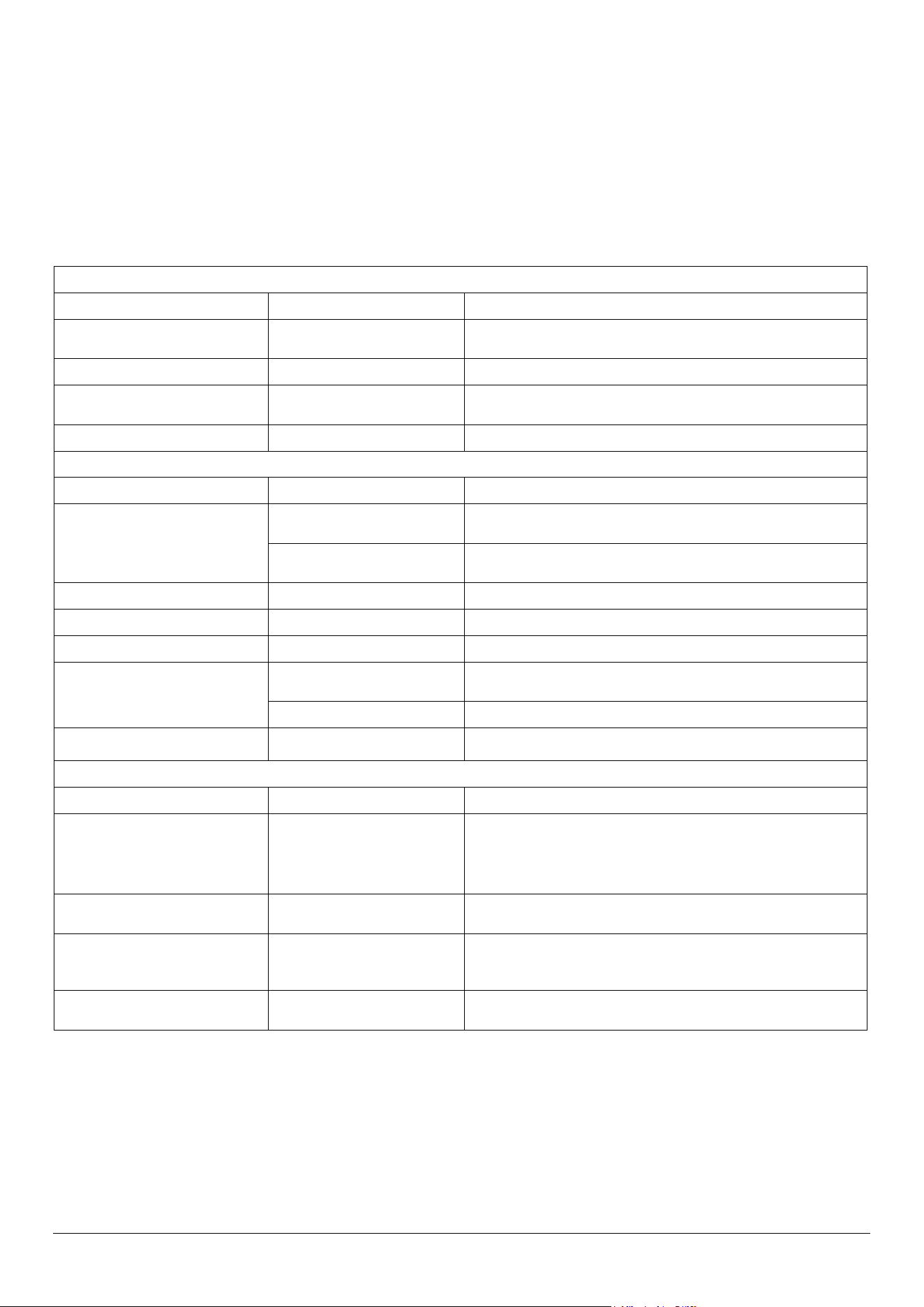
Cleaners listed (Table 7.1) are available from supermarkets or
electrical retailers as stated.
For enamelled surfaces use a cleaner that is approved for use
on vitreous enamel.
Regular cleaning is recommended. For easier cleaning, wipe
up any spillages immediately.
Hotplate
Part Finish Recommended Cleaning Method
Hob top Enamel or stainless steel
Hot soapy water, soft cloth. Any stubborn stains remove gently with a nylon
scourer.
Ceramic/Induction hob Toughened glass Hot soapy water; cream cleaner/scourer if necessary.
Griddle plate (some models only) Non-stick surface
Allow to cool. Wash in hot soapy water. Do not use abrasive cleaners/
scourers.
Warming zone (some models only) Toughened glass Hot soapy water, cream cleaner/scourer if necessary.
Outside of Cooker
Part Finish Recommended Cleaning Method
Door, door surround and storage
drawer exterior
Enamel or paint
Hot soapy water, soft cloth.
Any stubborn stains, remove gently with a liquid detergent.
Stainless steel E-cloth (electrical retailers) or microbre all-purpose cloth (supermarket).
Sides and plinth Painted surface Hot soapy water, soft cloth.
Splashback/rear grille Enamel or stainless steel Hot soapy water, soft cloth. Cream cleaner, with care, if necessary.
Control panel Paint, enamel or stainless steel Warm soapy water. Do not use abrasive cleaners on lettering.
Control knobs/handles & trims
Plastic/chrome, copper or lacquered
brass
Warm soapy water, soft cloth.
Brass Brass polish.
Oven door glass/glass lid (some models
only)
Toughened glass Hot soapy water, cream cleaner/scourer if necessary.
Oven and Grill
Part Finish Recommended Cleaning Method
Sides, oor & roof of oven NOT COOK &
CLEAN OVEN PANELS (see below)
Enamel
Any proprietary oven cleaner that is suitable for enamel.
CAUTION: CORROSIVE/CAUSTIC OVEN CLEANERS: FOLLOW
MANUFACTURER’S INSTRUCTIONS.
Do not allow contact with the oven elements.
Cook & Clean oven panels (some
models only)
Special enamel that partly cleans
itself
This surface cleans itself at 200 °C and above, or the panels can be removed
and washed with hot soapy water and a nylon brush.
Oven shelves, Handyrack, grill trivet,
Handygrill rack (some models only)
Chrome
An oven interior cleaner that is suitable for chrome. Soap lled pad.
Dishwasher.
Grill pan/meat tin (some models only) Enamel Hot soapy water. Soap lled pad. Dishwasher.
Table 7.1

DocNo.050-0001 - Troubleshooting - Induction GENERIC
27
n
Interference with and repairs to the hob MUST NOT
be carried out by unqualied persons. Do not try
to repair the hob as this may result in injury and
damage to the hob. Please arrange for repair by a
suitably competent person.
NOTE: The induction hob is able to self-diagnose a number
of problems and can show this information to the user via the
hob control display. Error codes may be displayed if your hob
has developed a fault.
If your appliance reports an error or is not working, you may
be able to correct the fault by consulting the following.
Error code E2 is displayed
The electronic unit is too hot. Please check the installation of
the cooker, making sure that there is sucient ventilation. In
extreme cases, if a cooking utensil has been allowed to boil
dry this error code may also be displayed. If in doubt please
contact your installer or a qualied repair engineer.
No display operation
Over voltage or loss of supply voltage to the cooker. If in
doubt please contact your installer or a qualied repair
engineer.
Error code U400 is displayed
The cooker has been incorrectly connected. The control will
switch o after approximately 1 second and the error code
will be permanently displayed.
Consult your installer or a qualied repair engineer.
Error code Er followed by a number is displayed
The appliance has developed an internal technical fault that
cannot be rectied by the user.
Consult your installer or a qualied repair engineer.
The fuse blows or the RCD trips regularly
Please contact your installer or a qualied repair engineer.
The cooker will not switch on
Has the wiring system in the house blown a fuse or tripped an
RCD?
Has the cooker been correctly connected to the mains
supply?
The induction hob is noisy
When using the induction hob there may be some ‘noise’
emitted from the pan. This is normal and may be most
noticeable when cooking on high power settings or if 5 pans
are used simultaneously. The type of pan may also contribute
to induction ‘noise’.
Power failure
In the event of a failure in the electrical supply, remember to
reset the clock so that the timed oven continues to operate.
The cooling fan
The induction hob incorporates a cooling fan. This cooling
fan is active when either the grill or the oven(s) are on. Under
certain conditions, the cooling fan may remain active when
the grill or oven(s) are switched o. This is normal and the fan
will switch o automatically.
The fascia gets hot when I use the oven
If the fascia becomes excessively hot when the cooker is in
use then the cooling fan may have failed. Should this occur
please contact your installer, a qualied repair engineer or
Customer Service to arrange for its repair.
A crack has appeared in the hob surface
Disconnect the cooker immediately from the power supply
and arrange for its repair. Do not use the cooker until after the
repair.
My hob is scratched
Always use the cleaning methods recommended in this
guide, and make sure that the pan bottoms are smooth and
clean.
Marks from mineral deposits from water or food can be
removed with a cleaning cream. However, tiny scratches are
not removable but will become less visible in time as a result
of cleaning.
The oven fan is noisy
The note of the oven fan may change as the oven heats up –
this is perfectly normal.
The knobs get hot when I use the oven or grill. Can I
avoid this?
Yes, this is caused by heat rising from the oven or the grill,
and heating them up. Do not leave the oven door open. Make
sure that the grill pan is pushed right back to the ‘back stop’
when grilling.
ALWAYS grill with the grill compartment door open.
DO NOT leave the oven door open.
If there is an installation problem and I don’t get my
original installer to come back to fix it, who pays?
You do. Service organisations will charge for their call-outs if
they are correcting work carried out by your original installer.
Therefore, it’s in your own interest to keep track of this
installer so that you can contact them as required.
Food is cooking too slowly, too quickly, or burning
Cooking times may dier from your previous oven. Check
that you are using the recommended temperatures and
shelf positions – see the oven cooking guide. Then adjust the
settings according to your own individual tastes.
8. Troubleshooting
28
The oven light is not working
The bulb has probably blown. You can buy a replacement bulb
(which is not covered under the guarantee) from most electrical
stores.
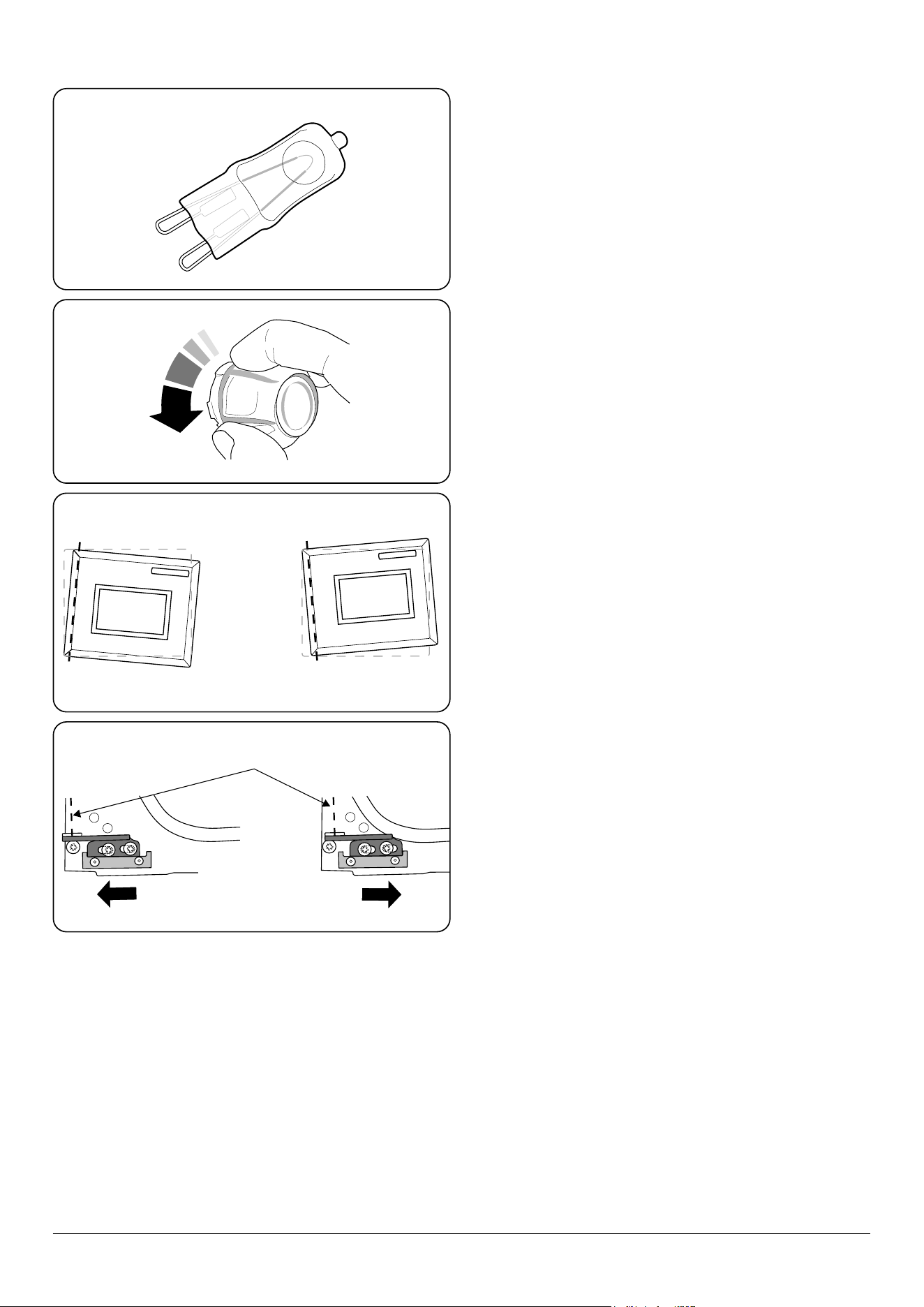
Ask for a 40 W – 230 V halogen lamp (G9) (Fig. 8.1).
Before removing the existing bulb, turn o the power supply
and make sure that the oven is cool. Open the oven door and
remove the oven shelves.
Locate the bulb cover and unscrew it by turning it counter-
clockwise – it may be very sti (Fig. 8.2).
Pull the existing bulb to remove it. When handling the
replacement bulb, avoid touching the glass with your ngers,
as oils from your hands can cause premature failure. Push,
click in the replacement bulb.
Replace the bulb cover and turn on the electricity supply to
check that the bulb now lights.
The oven door is misaligned
The bottom hinge of the left hand oven door can be adjusted
to alter the angle of the door (Fig. 8.3). Loosen the bottom
hinge xing screws and use the notch and a at bladed
screwdriver to move the position of the hinge to set the
hinge position (Fig. 8.4).
The oven is not cooking evenly
DO NOT use a baking tray with dimensions larger than those
specied in the section on ‘General Oven Tips’.
If you are cooking a large item, be prepared to turn it round
during cooking.
If two shelves are used, check that space has been left for
the heat to circulate. When a baking tray is put into the oven,
make sure that it is placed centrally on the shelf.
Check that the door seal is not damaged and that the door
catch is adjusted so that the door is held rmly against the
seal.
A dish of water when placed on the shelf should be the
same depth all over. (For example, if it is deeper at the back,
then the back of the cooker should be raised up or the front
lowered.) If the cooker is not level, arrange for your supplier
to level it for you.
The timed oven is not coming on when turned on manually
Is the power on? Is the clock illuminated? If not, there may be
something wrong with the power supply. Is the cooker supply
on at the isolator switch? Has the time of day been set?
The timed oven is not coming on when automatic cooking
Has the oven knob been left in the OFF position by mistake?
Oven temperature getting hotter as the cooker gets older
If turning the temperature down using the oven control knob
has not worked, or has only worked for a short time, then you
may need a new thermostat. This should be tted by a service
person.
ArtNo.320-0006 Oven door hinge adjustment 1
Eect of hinge adjustment – exagerrated for clarity
ArtNo.320-0007 Oven door hinge adjustment 2
Centreline of hinge pin
Oven door omitted for clarity
Fig. 8.1
Fig. 8.2
Fig. 8.3
Fig. 8.4
INSTALLATION
Check the appliance is electrically safe when you have nished.
29
Firstly, please complete the appliance details below and keep them safe for future reference – this information will enable us
to accurately identify the particular appliance and help us to help you. Filling this in now will save time and inconvenience
if you later have a problem with the appliance. It may also be of benet to keep your purchase receipt with this leaet. You
may be required to produce the receipt to validate a warranty eld visit.
Distributor’s Name and Address Andi-Co Australia Pty Ltd.
1 Stamford Road,
Oakleigh, VIC 3166
Customer Care
Tel: 1300 650 020
Email: [email protected]
Name of Appliance
Appliance Serial Number*
Fuel Type
Date of Purchase
Installer’s Name, Address and
Telephone No.
Date of Installation
* This information is on the appliance data badge.
If You Have a Problem
In the unlikely event that you have a problem with your appliance, please refer to rest of this booklet, especially the problem
solving section, rst to check that you are using the appliance correctly.
If you are still having diculty, contact Customer Care on 1300 650 020 or email [email protected]om.au.
Please Note
For warranty information and how to request a remedy, please refer to the Warranty Statement at
https://www.andico.com.au/warranty/ or contact Customer Care.
Out of Warranty
We recommend that our appliances are serviced regularly throughout their life to maintain the best performance and
eciency. The frequency of service will depend on usage – for normal usage once a year should suce.
Service work should only be carried out by a suitably Authorised Person.
Spare Parts
To maintain optimum and safe performance, we recommend that only genuine spare parts are used. Do not use re-
conditioned or unauthorised controls. Contact Spare Parts on (03) 9569 7744 or email [email protected]om.au
9. Service and Spares
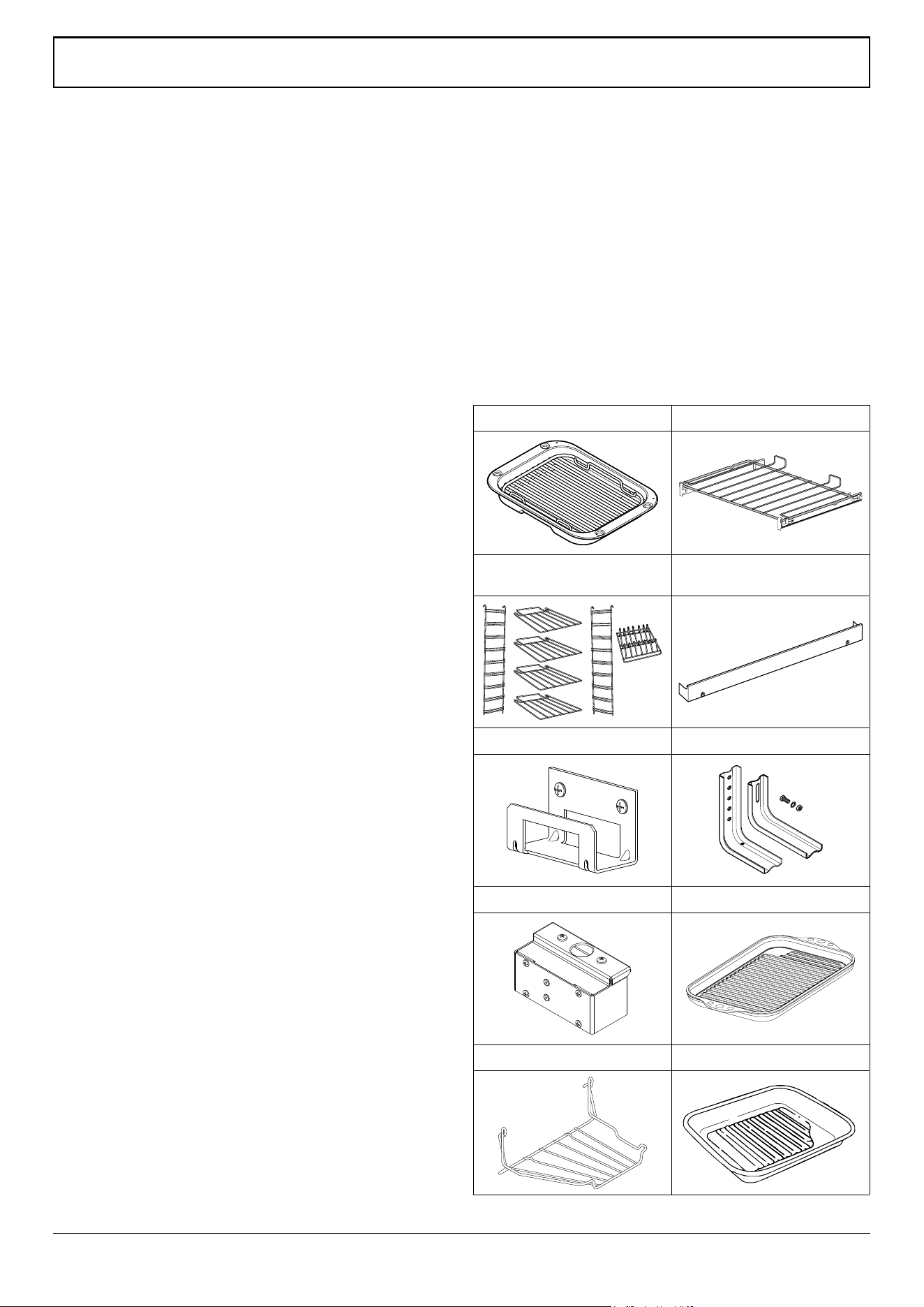
30
WARNING! Refer to Before You Start... chapter.
Check the appliance is electrically safe and gas sound when you have nished.
Safety Requirements and Regulations
n
Please read the Before you start... chapter, before
you begin any installation and maintenance work on
this appliance.
Provision of Ventilation
This appliance is not connected to a combustion products
evacuation device. Therefore, particular attention must be
given to the relevant requirements regarding ventilation.
All rooms require a window that can be opened, or
equivalent, while some rooms require a permanent vent in
addition to the window.
Location of Cooker
The cooker may be installed in a kitchen/kitchen diner but
NOT in a room containing a bath or shower.
This appliance is designed for domestic cooking only. Use for
any other purpose could invalidate any warranty or liability
claim.
You will need the following equipment to complete the
cooker installation satisfactorily:
Multimeter (for electrical checks).
You will also need the following tools:
1. Steel tape measure
2. Cross-head screwdriver
3. Flat-bladed screwdriver
4. Spirit level
5. Pencil
6. Adjustable spanner
7. 3 mm and 4 mm Allen keys
8. 13 mm spanner or socket wrench
Checking the parts:
Grill pan and trivet 2 Flat shelves with runners
Tall oven shelves and shelf
supports (example shown)
Plinth
ArtNo.000-0010 Tall oven shelves
Stability location bracket Stability bracket
Conduit box Induction Griddle Plate
Handyrack (optional) Roasting tin (Optional)
ArtNo.324-0004 Roasting tin
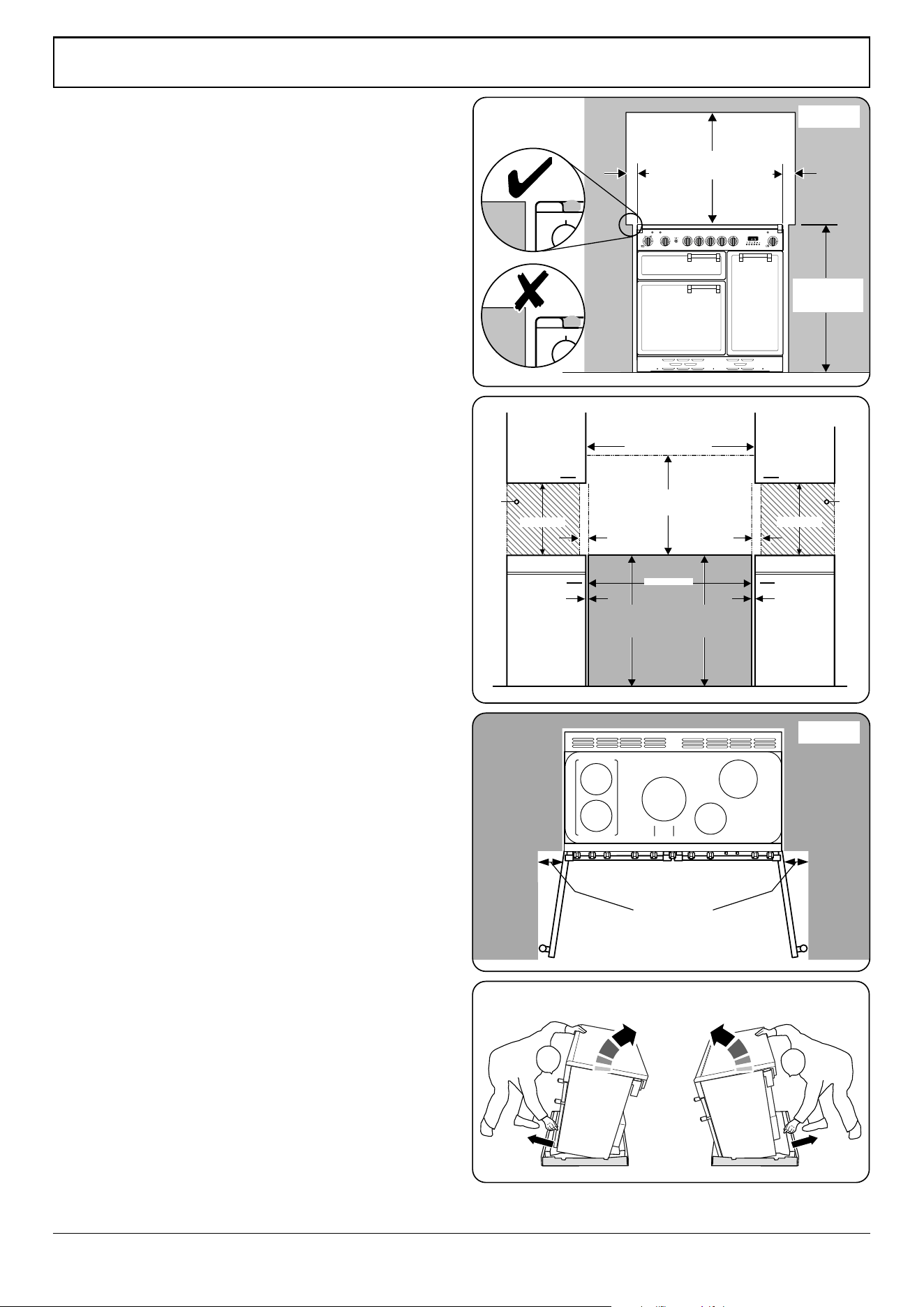
31
WARNING! Refer to Before You Start... chapter.
Check the appliance is electrically safe and gas sound when you have nished.
ArtNo.110-0004 - 110 Cooker min spacings
5 mm
5 mm
Height to Hotplate
905 mm min
930 mm max
Height to Flue Trim
905 mm min
930 mm max
650 mm min
410 mm min
410 mm min
Wall
Wall
910 mm
75 mm min 75 mm min
check cookerhood instructions for actual dimensions
900 mm
130 mm min
ArtNo.090-0028 - 90 cooker min spacing GENERIC
75 mm
min
75 mm
min
650 mm
min
905 mm min
930 mm max
Positioning the Cooker
Fig. 9.1 and Fig. 9.2 show the minimum recommended
distance from the cooker to nearby surfaces.
The cooker should not be placed on a base.
Where the appliance is installed next to cabinetry, the
cabinet material must be capable of withstanding 70°C. If
this appliance is installed near vinyl wrapped surfaces, use an
installation kit available from the vinyl-wrap supplier. Falcon
cannot accept any responsibility for damage caused due to
installation into cabinets with low temperature tolerances.
The hotplate surround should be level with, or above,
any adjacent work surface. A gap of 75 mm should be left
between each side of the cooker ABOVE the hotplate level
and any adjacent vertical surface.
For non-combustible surfaces (such as unpainted metal or
ceramic tiles), this can be reduced to 25 mm.
A minimum space of 650 mm is required between the top of
the hob and a horizontal combustible surface.
*Any cookerhood should be installed in accordance with the
hood manufacturer’s instructions.
**Any splashback must be tted in accordance with the
manufacturers instructions. Allowance should be made for the
additional height of the ue trim, which is tted to the cooker
hob.
Surfaces of furniture and walls at the sides and rear of the
appliance should be heat, splash and steam resistant. Certain
types of vinyl or laminate kitchen furniture are particularly
prone to heat damage and discolouration. We cannot accept
responsibility for damage caused by normal use of the
cooker to any material that de-laminates or discolours at
temperatures less than 65 °C above room temperature.
DO NOT box the cooker in – it must be possible to move the
cooker in and out for cleaning and servicing.
If the cooker is near a corner of the kitchen, a clearance of
130 mm is required to allow the oven doors to open (Fig. 9.3).
The actual opening of the doors is slightly less, but this allows
for some protection of your hand as you open the door.
Moving the Cooker
We recommend that two people manoeuvre the cooker.
Make sure that the oor covering is rmly xed, or removed,
to prevent it being disturbed when moving the cooker
around.
To help you, there are two levelling rollers at the back, and
two screw-down levelling feet at the front.
Remove the polystyrene base pack. From the front, tilt
the cooker backwards and remove the front half of the
polystyrene base (Fig. 9.4). Repeat from the back and remove
the rear half of the polystyrene base.
Fig. 9.1
Fig. 9.2
Fig. 9.3
Fig. 9.4
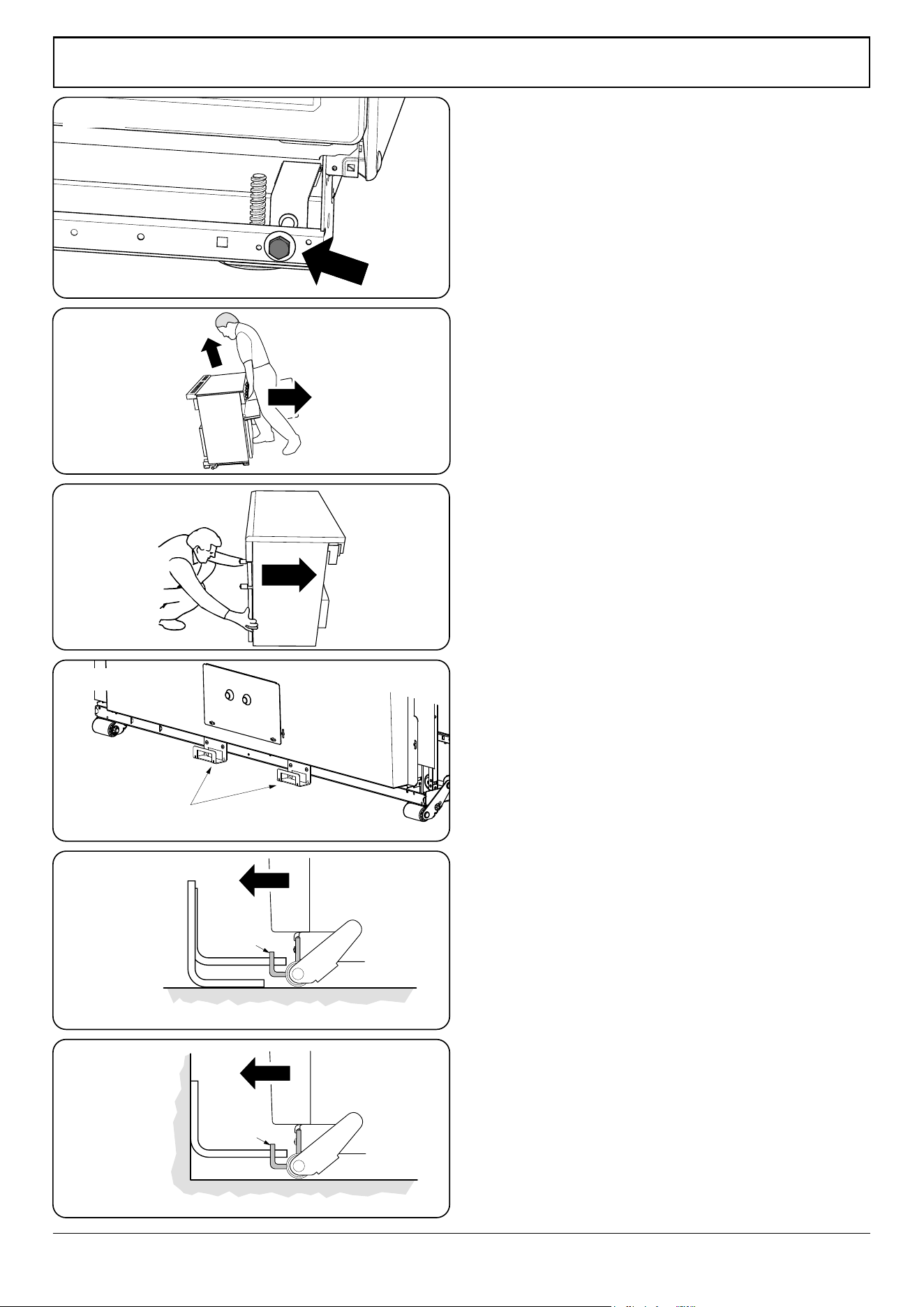
32
WARNING! Refer to Before You Start... chapter.
Check the appliance is electrically safe and gas sound when you have nished.
ArtNo.070-0014 - Stability bracket - Wall fitting
Cooker
Stability
bracket
Floor
Stability
location
bracket
Wall
Typical wall mounting
ArtNo.070-0014 - Stability bracket - Wall fitting
Cooker
Stability bracket
Floor
Stability
location
bracket
Typical oor mounting
Alternative positions
for stability location
bracket
ArtNo.010-0004 Moving the cooker
Lowering the Two Rear Rollers
To adjust the height of the rear of the cooker, rst t a 13 mm
spanner or socket wrench onto the hexagonal adjusting nut
(Fig. 9.5).
Rotate the nut – clockwise to raise – counter-clockwise to
lower. Make 10 complete (360°) turns clockwise.
Make sure you lower BOTH REAR ROLLERS.
Completing the Move
Unfold the rear edge of the cardboard base tray. Open the
grill door and right-hand oven door so that you can get a
good grip on the bottom of the fascia panel as you move the
oven (Fig. 9.6).
Carefully push the cooker backwards o the base tray.
Remove the base tray.
Position the cooker close to its nal position, leaving just
enough space to get behind it (Fig. 9.7).
Fitting the Stability Bracket
We recommend using a stability bracket; rst attach the
bracket location device to the rear of the cooker (Fig. 9.8).
Then adjust the bracket to engage through the slot of the
device (Fig. 9.9 and Fig. 9.10).
Repositioning the Cooker Following
Connection
If you need to move the cooker once it has been connected,
make sure it is switched o at the supply switch before
gripping under the fascia panel and lifting the front of the
cooker slightly (Fig. 9.6). Check behind the cooker to make
sure that the electricity cable is not caught.
As you progress, always make sure that the cable has
sucient slack to allow the cooker to move.
When you replace the cooker, check behind it again once
more to make sure that the electricity cable is not caught or
trapped.
Levelling the Cooker
It is recommended that you use a spirit level on a shelf in one
of the ovens to check for level.
Place the cooker in its intended position. Take care not to
twist it within the gap between the kitchen units as damage
may occur to the cooker or units.
The front feet and rear rollers can be adjusted to level the
cooker.
To adjust the height of the rear of the cooker use a 13 mm
spanner or socket wrench to turn the hexagonal adjusting
nuts at the front bottom corners of the cooker.
To set the front turn the feet bases to raise or lower.
Fig. 9.5
Fig. 9.6
Fig. 9.7
Fig. 9.8
Fig. 9.9
Fig. 9.10
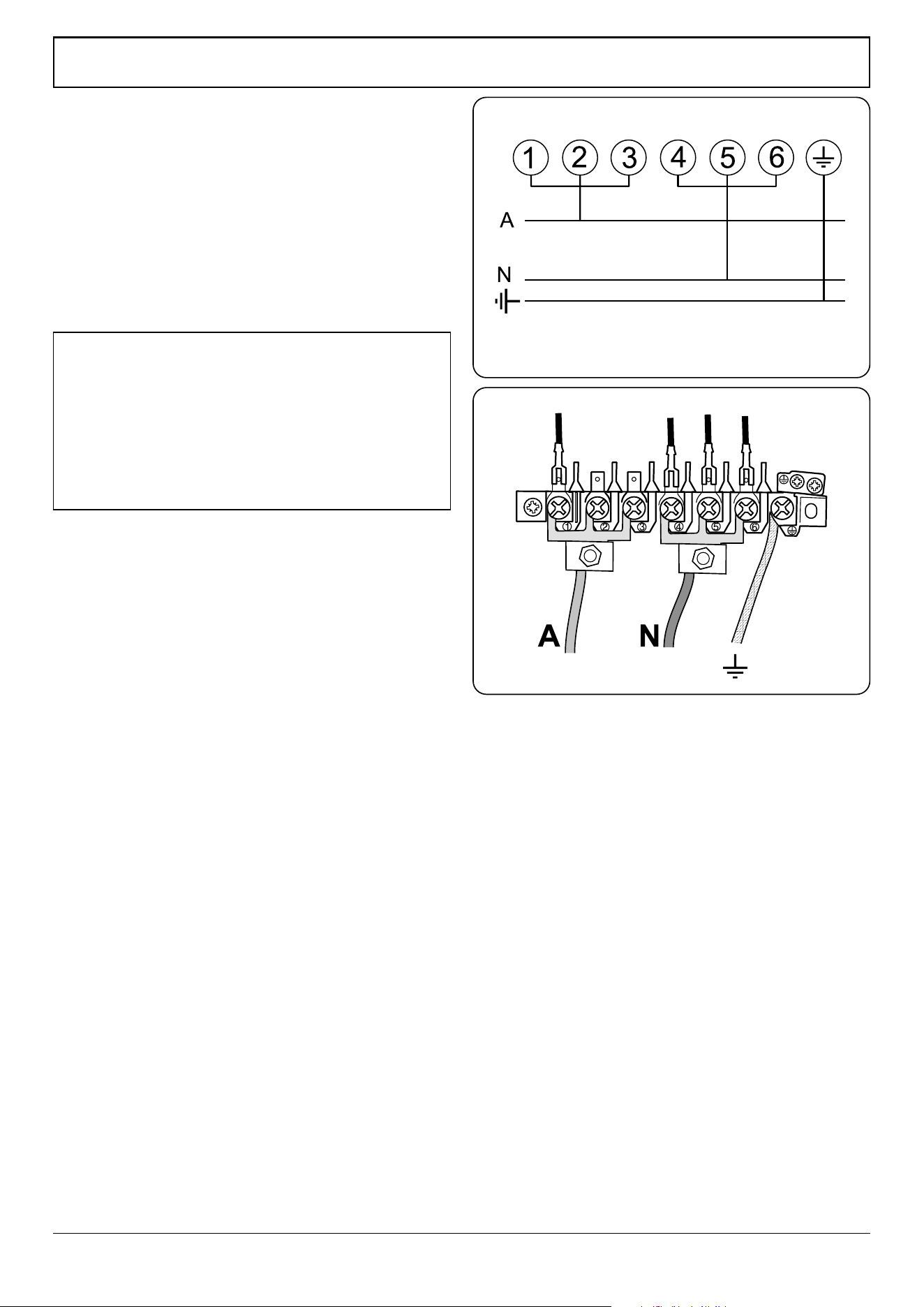
33
WARNING! Refer to Before You Start... chapter.
Check the appliance is electrically safe and gas sound when you have nished.
ArtNo.132-0001 - 1 phase 240Vac 50Hz
1-phase 230 V
AC
50 Hz
Electrical Connection
This appliance must be installed by a qualied electrician
to comply with with current AS/NZS 3000 Wiring Rules
and regulations in force.
Make sure that the mains characteristics (voltage, nominal,
power, etc.) match the ratings indicated on the data plate
axed to the cooker.
The cooker is preset for a single-phase earthed electrical
connection. It is essential to install a multi-pole circuit breaker
that completely disconnects the appliance from the mains,
with a minimum contact break distance of 3 mm.
Current Operated Earth Leakage Breakers
The combined use of your induction cooker and other
domestic appliances may cause nuisance tripping, so we
recommend that the cooker is protected on an individual
RCD (Residual Current Device) or RCBO (Residual Current
Breaker with Overload).
IF IN DOUBT, PLEASE CONSULT A SUITABLY QUALIFIED
ELECTRICIAN.
n
WARNING: THIS APPLIANCE MUST BE EARTHED.
The appliance must be connected to an ecient earthing
circuit. If the electricity network is not equipped with an
earth connection, then it must be installed separately in
compliance with local regulations.
Earthing is a safety measure required by law, and must be
performed with particular care by a qualied technician,
who must also check that the electricity supply
characteristics are correct.
The total electrical load of the appliance is approximately
14.8 kW. The cable size used should be suitable for this load
and comply with all local requirements (i.e. PVC Insulated
cable IEC 60227 – code 53 for ordinary cables).
Access to the mains terminal is gained by removing the
electrical terminal cover box on the back panel. Connect
the mains cable to the correct terminals for your electrical
supply type (Fig. 9.11 and Fig. 9.12). Check that the links are
correctly tted and that the terminal screws are tight. Secure
the mains cable using the cable clamp.
An isolation switch shall be provided and mounted near
the cooker, in a readily accessible position, in compliance
with AS/NZS 3000 and/or AS/NZS 5601 as applicable for the
appliance conguration.
Note: The marking for the rated current of the fuse protecting
a socket should be placed on or near the socket outlet.
Fig. 9.11
Fig. 9.12
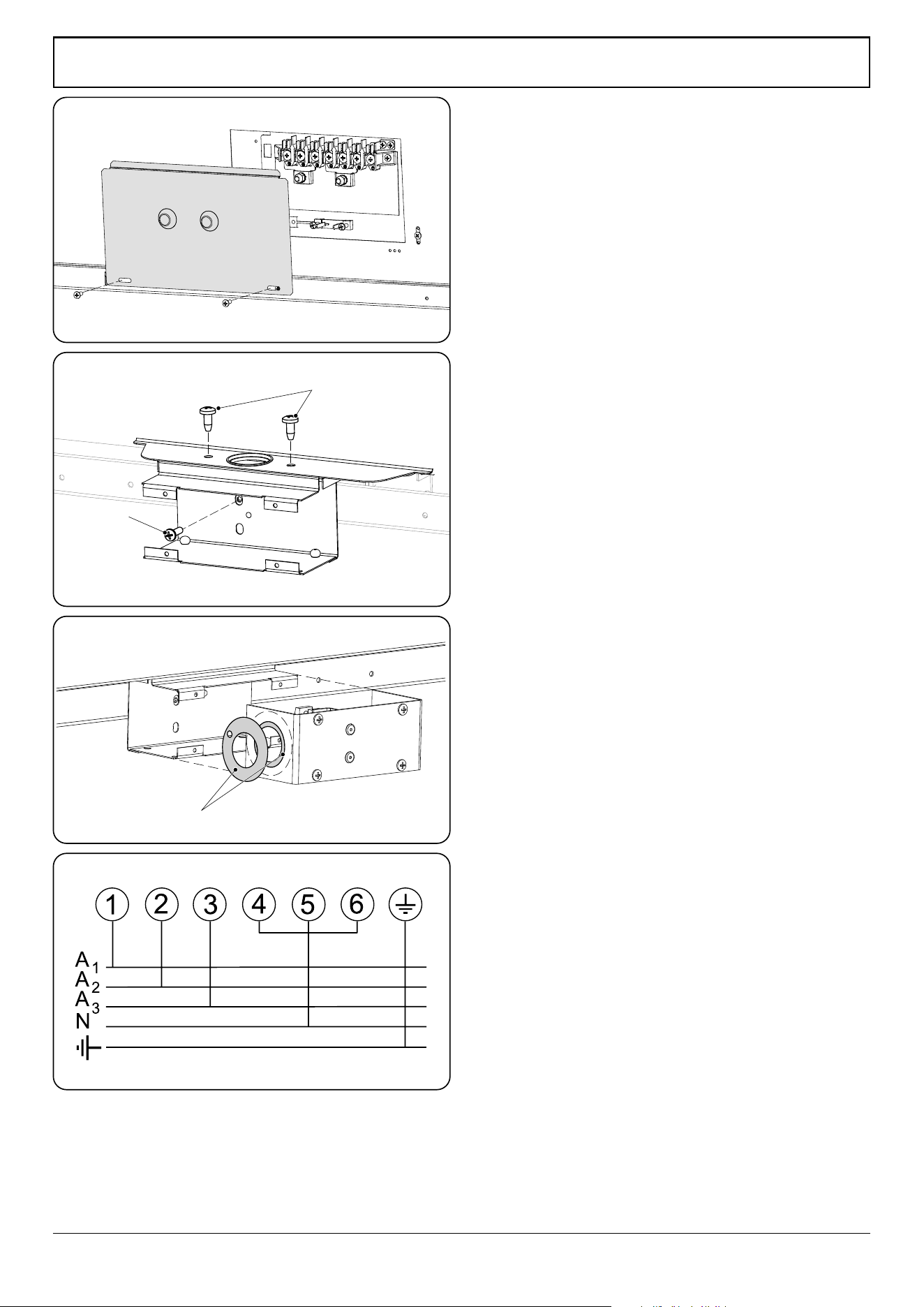
34
WARNING! Refer to Before You Start... chapter.
Check the appliance is electrically safe and gas sound when you have nished.
Connection in New Zealand
Type of cord in accordance with IEC 60227 with a minimum
rating of 90°C.
Cord size recommended for this application is 3 x 10 mm²,
three-core cable (Power cables may be sized to take into
account the coincidence factor AS/NZS 60335.2.6:2014).
Rating of the plug is 32 Amp, in accordance with AS/NZS
3112. Based on the arithmetic mean value when measured
under full load stabilized conditions, Clause 10 IEC 60335-1.
If this cooking range is to be connected to a new or upgrade
electrical installation, then it must be connected to the
supply by a supply cord tted with:
• An appropriately rated plug that is compatible with the
socket – outlet fitted to the final sub –circuit in the fixed
wiring that supplies this cooking range
OR
• An appropriately rated installation male connector that
is compatible with the installation female connector
fitted to the final sub circuit in the fixed wiring that
supplies this cooking range.
Note: The marking for the rated current of the fuse protecting
a socket should be placed on or near the socket outlet.
Fixed Wiring
For connection to xed wiring, i.e. exible conduit, remove
the electrical terminal cover on the back panel (Fig. 9.13).
Fit the conduit box to the cooker using the two M5 screw
ttings located at the top of the box. Remove the M4 screw
from the base, and x to the cooker, via the tting through
the back of the conduit box (Fig. 9.14).
The conduit box cover is reversible. Fit the reducer plate if
required (Fig. 9.15). Feed the cable through the conduit box
and secure in place with the cable clamp.
Connect the mains cable to the correct terminals for your
electrical supply type (Fig. 9.16). Check that the links are
correctly tted and that the terminal screws are tight.
Fit the cover to the conduit box.
Conduit box
M4 screw
M5 screws
Reducer plates
Reversible conduit box cover
ArtNo.132-0002 - 3 phase 240/415Vac 50Hz
3-phase 400 V
AC
50 Hz
Fig. 9.13
Fig. 9.14
Fig. 9.15
Fig. 9.16
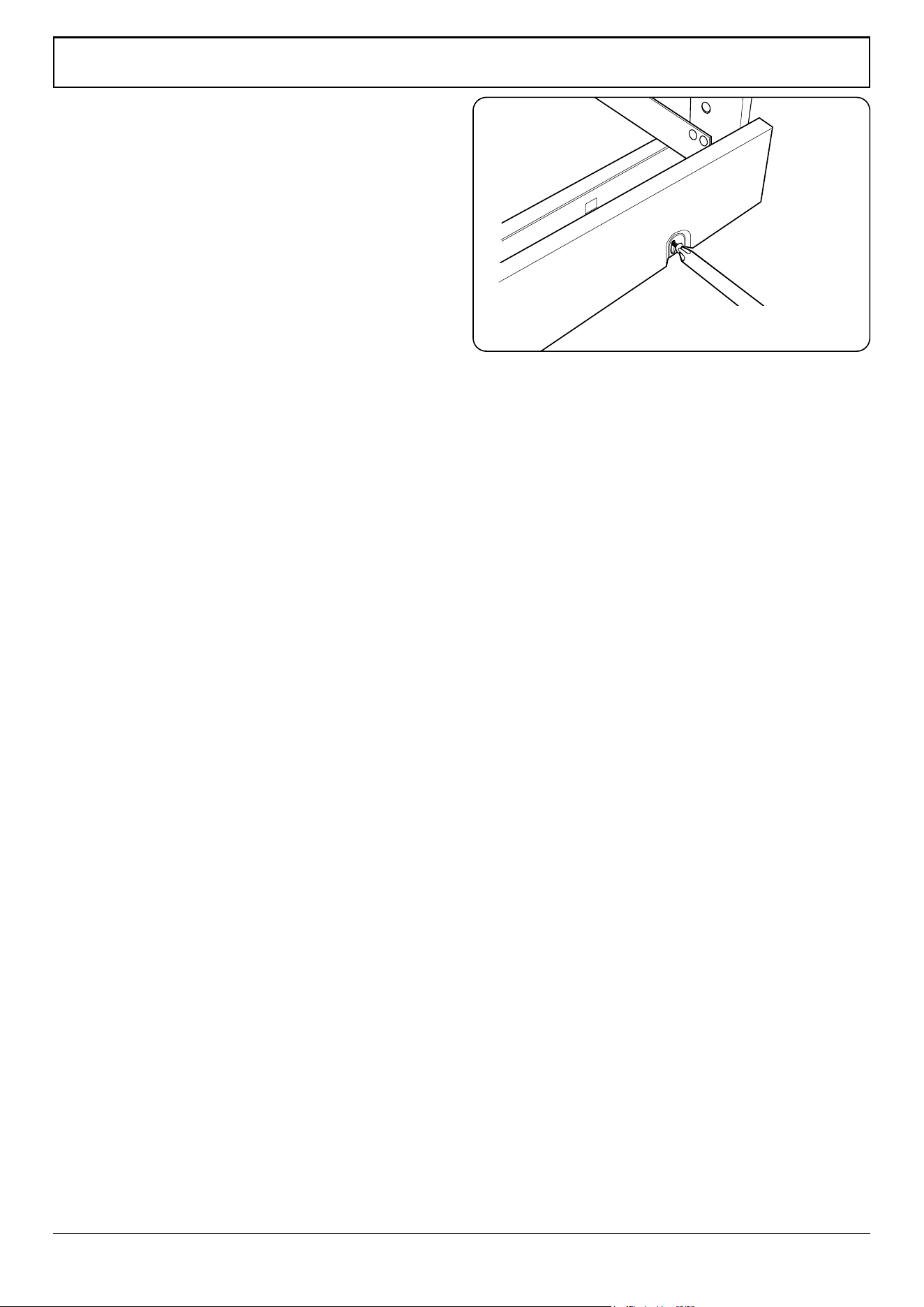
35
WARNING! Refer to Before You Start... chapter.
Check the appliance is electrically safe and gas sound when you have nished.
Final Checks
Hob Check
Check each cooking zone in turn. Be sure to use pans of the
correct size and material.
Grill Check
Turn on the grill control and check that the grill heats up.
Oven Check
Set the clock as described earlier, and then turn on the ovens.
Check the oven fans start to turn and that the ovens heat up.
Final Fitting
Fitting the Plinth
Remove the 3 screws along the front bottom edge of the
cooker. Position the plinth, replace and tighten 2 of the xing
screws (Fig. 9.17). The third can be discarded.
Customer Care
Installer: Please complete your details in this guide, inform
the user how to operate the cooker and hand over the
instructions.
Thank you.
ArtNo.350-0012 - Securing the plinth
Fig. 9.17
x 2 positions

WARNING – SERVICING TO BE CARRIED OUT ONLY BY AN AUTHORISED PERSON
Disconnect from electricity before servicing. Check appliance is safe when you have nished.
36
10. Servicing
n
Disconnect the cooker from the electricity supply
before servicing, particularly before removing any
of the following: control panel, side panels, ceramic
hob, or any of the electrical components or cover
boxes.
n
Before reconnection, check that the appliance is
electrically safe.
1. Panels
1.1 To Remove the Control Panel
n
DISCONNECT FROM THE ELECTRICITY SUPPLY.
Removing the Control Panel
Pull o all the control knobs and remove the xing screws
underneath the control panel.
The control panel will drop down slightly. It is held at the top
by two holes in the top edge, one at each end, that locate on
the tags on the inner panel. Lift the control panel clear of the
tags and pull forwards, taking care not to damage or strain
the wiring.
1.2 To Remove the Side Panels
n
DISCONNECT FROM THE ELECTRICITY SUPPLY.
Remove the control panel (see 1.1). Pull the cooker forward.
Remove the 4 retaining screws for each panel (1 at the front
base, 1 on the top and 2 at the rear).
Reassemble in reverse order.
2. Hotplates
2.1 To Lift up the Ceramic Hob
n
DISCONNECT FROM ELECTRICITY SUPPLY.
Pull o the push t control panel end caps at each end and
remove the end xing screws under the end cap.
Remove the lower front retaining screws (one each side)
situated beneath the lower edge at the front corners of the
side panels.
Swing the side panels to gain access to the hob xing screws
(1 each side) at the top front of the side uprights.
Remove these screws.
Lift up the ceramic hob at the front and prop into position
with a non-metallic prop.
Caution: The ceramic hob material is much more sensitive
to scratches on the underside than the top.
Take care not to touch or scratch the underside of the ceramic
as this will weaken the material and cause the top to shatter.
3. Controls
3.1 To Replace the Light Switch
n
DISCONNECT FROM ELECTRICITY SUPPLY.
Remove the control panel (see 1.1).
Note: The old switch may be destroyed during removal.
Remove the old switch from its bezel by gripping the switch
body behind the control panel and twisting sharply. Remove
the switch bezel by folding back its locking wings and
pushing forward. Fit the new bezel to the control panel by
rst lining up the raised key on its body with the cut-out in
the control panel and pushing it in from the front.
Assemble the new switch to the bezel by lining up the key
sections and pushing home. Fit the new button by pushing in
from the front. Replace the Control Panel in reverse order and
test for correct operation.
3.2 To Remove the Electronic Timer
n
DISCONNECT FROM ELECTRICITY SUPPLY.
Remove the control panel (see 1.1). Pull o the timer control
button(s).
Remove the timer/mounting bracket assembly from the
control panel by removing the xing screws.
Remove the timer from its mounting bracket by depressing
the plastic lugs on the timer case, at the same time pulling
the unit forward. Reassemble in reverse order. When
replacing the leads, refer to the wiring diagram in this
manual. Check the operation of the timer.

WARNING – SERVICING TO BE CARRIED OUT ONLY BY AN AUTHORISED PERSON
Disconnect from electricity before servicing. Check appliance is safe when you have nished.
37
4. Grill
4.1 To Replace the Grill Controller
n
DISCONNECT FROM ELECTRICITY SUPPLY.
Lift up the hob and remove the control panel (see 1.1 and
2.1). Disconnect the wiring from the controller. Remove the
two screws holding the controller to the mounting panel. Fit
the new controller and reassemble in reverse order. Check for
correct operation.
4.2 To Remove a Grill Element
n
DISCONNECT FROM ELECTRICITY SUPPLY.
Remove the grill pan from the grill compartment. Undo the
two screws and washers in the grill roof and remove the
enamelled front shield.
Undo the 2 screws and washers securing the grill element
front support. Remove the screws from the grill elements.
Lift the elements out carefully and, noting their position,
disconnect the leads from the element terminals.
If it is not possible to disconnect the leads in this way, pull the
cooker forward to gain access to the rear. Undo the screws
securing the electric cover to the back sheet and remove
the cover. Disconnect the terminals from the rear. Fit new
elements and reassemble in the reverse order. Check the
operation of the grill.
5. Ovens
5.1 To Replace an Oven Thermostat
n
DISCONNECT FROM THE ELECTRICITY SUPPLY.
Lift the ceramic hob and remove the control panel (see 1.1
and 2.1). Open the oven door. Remove the oven furniture.
For the right-hand oven, remove the thermostat phial cover
(two screws). Unclip the thermostat phial from the clips in the
oven back.
For the left-hand oven, pull cooker forward to gain access
to the cover box at the rear of the cooker. Remove the four
screws securing the cover and lift clear.
Feed the thermostat capillary out of the oven. Disconnect
the wiring from the thermostat. Remove two screws holding
thermostat to mounting panel. Fit new thermostat and
reassemble in reverse order. Make sure that the phial is
clipped to the oven back with the phial centrally positioned
between the clips.
Check the operation of the thermostat.
5.2 To Remove an Oven Element Thermal Cut-out
n
DISCONNECT FROM ELECTRICITY SUPPLY.
Pull the cooker forward to gain access to the cover box. Undo
the cover screws and lift clear. The cut-out is located on the
earth plate beside the oven element connections. Disconnect
the cut-out wiring. Undo the xings that secure the cut-out to
the earth plate and remove. Fit the replacement control and
re-assemble in reverse order.
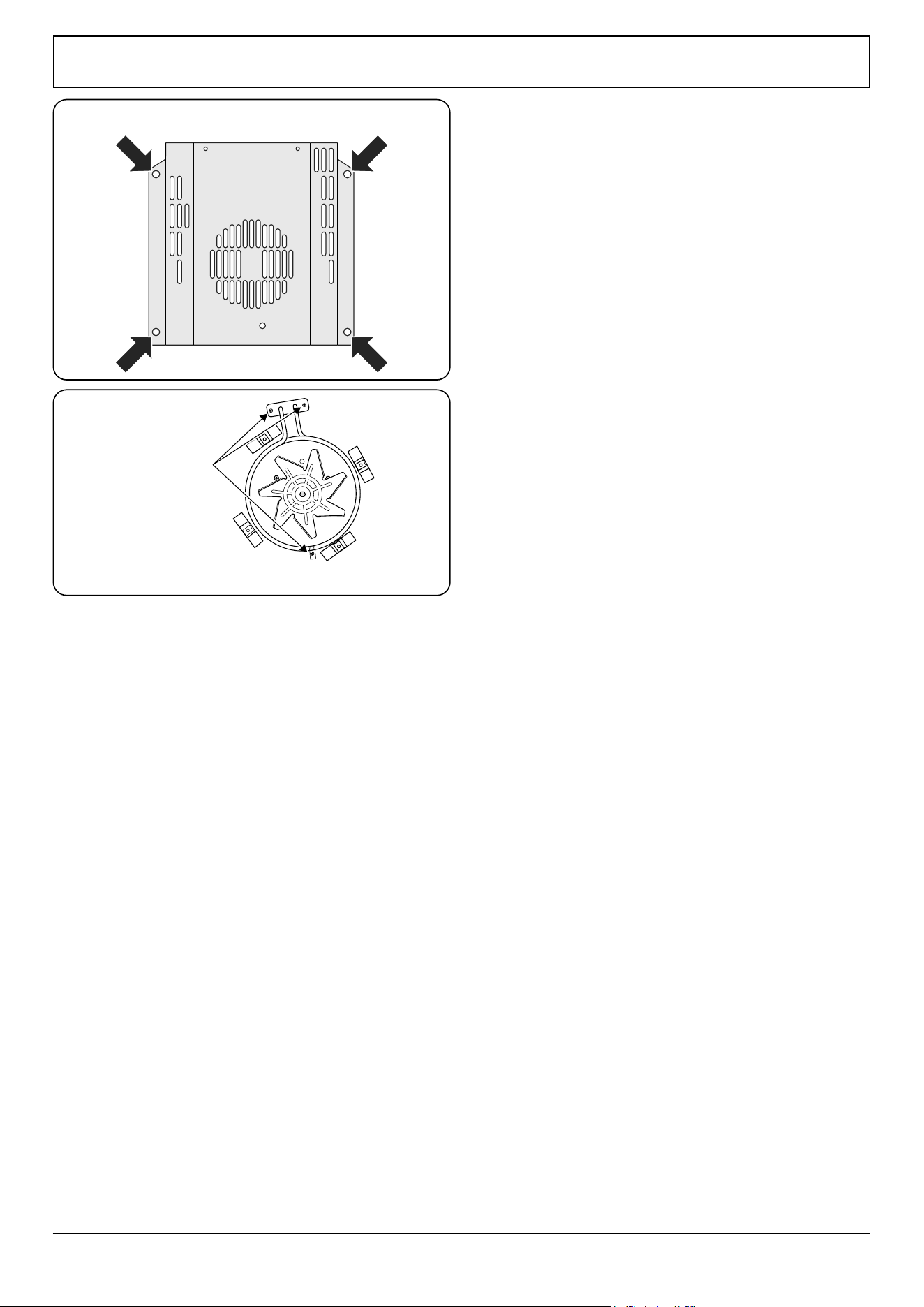
WARNING – SERVICING TO BE CARRIED OUT ONLY BY AN AUTHORISED PERSON
Disconnect from electricity before servicing. Check appliance is safe when you have nished.
38
Element xing screws
ArtNo.321-0005 Fan oven element
5.3 To Remove an Oven Inner Back
n
DISCONNECT FROM ELECTRICITY SUPPLY.
Open the door and remove the shelves. Remove the screws
and washers securing the inner back to the back of the oven
(Fig. 10.2). Carefully lift away the inner back. Reassemble in
reverse order making sure that the screws and washers are
fully tightened.
5.4 To Remove the Fan Oven Element
n
DISCONNECT FROM ELECTRICITY SUPPLY.
Remove the oven inner back (see 5.3). Remove the two
screws from the top of the element and the one from the
bottom of the element inside the oven (Fig. 10.3).
Lift the element out carefully, disconnecting the terminals
connected to the element (noting their positions).
If it is not possible to disconnect the leads in this way, pull the
cooker forward to gain access to the rear.
Remove the screws securing the electric cover to the back
sheet, remove the cover and disconnect the terminals from
the rear.
5.5 To Replace an Oven Fan
n
DISCONNECT FROM ELECTRICITY SUPPLY.
Pull the cooker forward to gain access to the rear. Remove
the screws securing the electric cover to the back sheet and
remove the cover.
Disconnect the three terminals connected to the fan noting
their position. Remove the oven inner back
(see 5.3). Hold the fan blade and remove the centre nut
(left-hand thread) two brass washers, fan blade and circlip.
Unscrew the fan retaining nuts and washers (three o each)
and lift the fan away from the rear of the cooker. Fit the new
fan and reassemble in reverse order.
Check the operation of the oven.
Fig. 10.2
Fig. 10.3
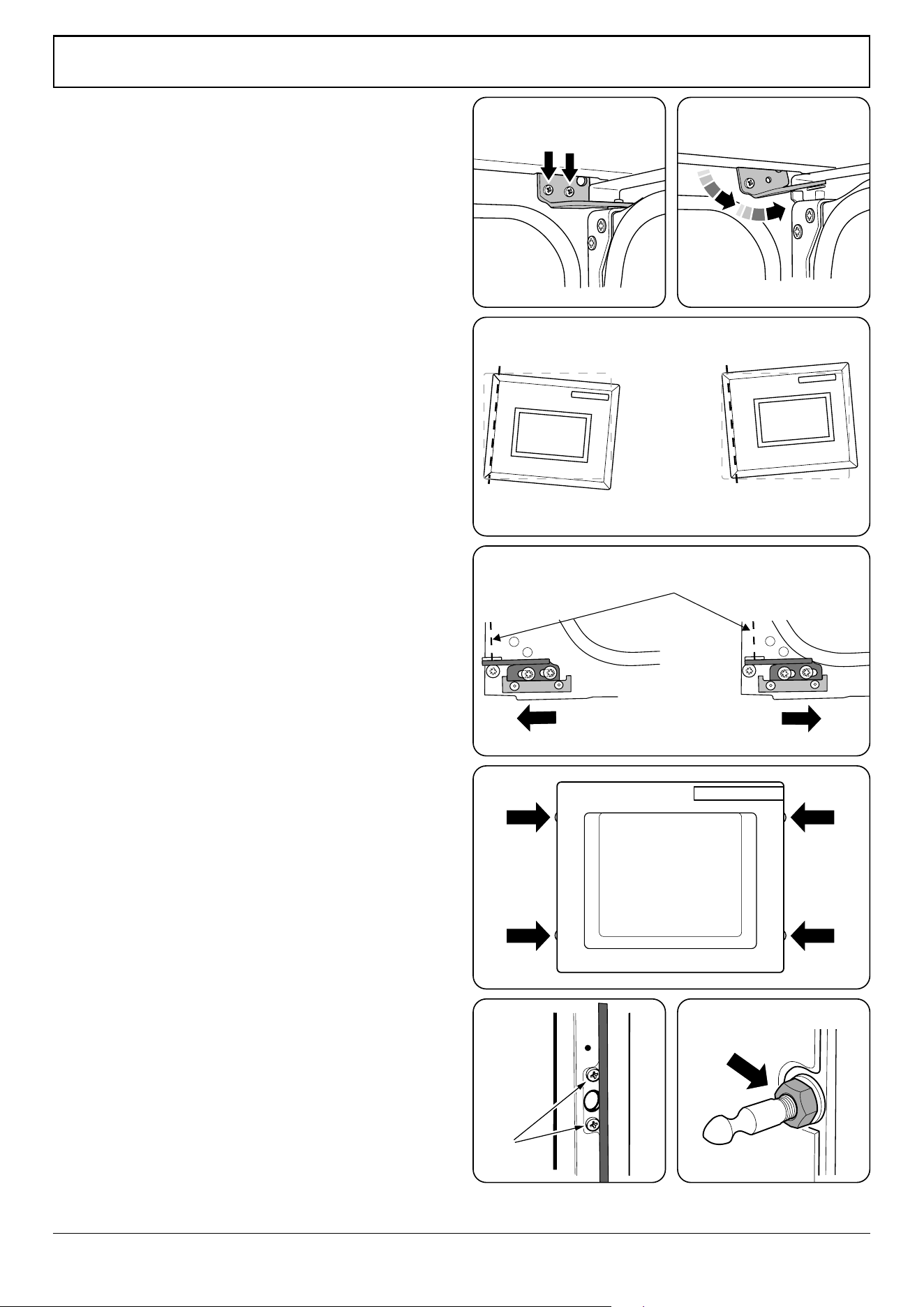
WARNING – SERVICING TO BE CARRIED OUT ONLY BY AN AUTHORISED PERSON
Disconnect from electricity before servicing. Check appliance is safe when you have nished.
39
6. Doors
6.1 To Remove the Grill Door
Remove the left-hand side panel (see 1.2). Remove the
control panel (see 1.1). Remove the centre cover strip (5
screws, 2 top, 2 bottom, 1 in middle). Remove the two
countersunk screws (1 each side) securing the grill hinge arms
to the front of the grill chamber.
Note: The arms are spring tensioned. Carefully remove the
grill door. Retain the gaskets.
Reassemble in reverse order, ensuring that the gasket is tted
between the hinge arm and the front of the grill chamber.
Remove the two screws and washers securing the grill
element front support. Remove the screws from the grill
element. Lift the element out carefully, disconnecting the
leads from the element terminals (noting their position). If
it is not possible to disconnect the leads in this way, pull the
cooker forward to gain access to the rear, remove the screws
securing the electric cover to the back sheet, remove the
cover and disconnect the terminals from the rear.
Fit the new element and reassemble in reverse order. Check
the operation of the grill.
6.2 To Replace an Oven Door
Open the oven door. Support the door and remove the two
screws securing the upper hinge and gasket to the cooker
front (Fig. 10.4). Remove the door from the lower hinge by
lifting slightly and moving outwards (Fig. 10.5).
n
THE DOOR IS HEAVY, SO TAKE CARE.
Reassemble in reverse order.
6.3 To Adjust an Oven Door Angle
The bottom hinge of the left-hand oven door can be adjusted
to alter the angle of the door (Fig. 10.6). Loosen the bottom
hinge xing screws and use the notch and a at bladed
screwdriver to move the position of the hinge to set the
hinge position (Fig. 10.7).
Retighten the hinge screws.
6.4 To Replace the Main Oven Door Outer Panel
Move the cooker forward to gain access to the sides.
Open the oven door slightly and remove the front panel
xing screws from the door sides – two each side
(Fig. 10.8).
Carefully lift o the outer door panel.
Remove the door handle from the panel by unscrewing the
two retaining nuts. Fit the door handle to the new panel. Fit
the panel to the door. Reassemble in reverse order.
6.5 To Change the Main Oven Door Latch
Remove the outer door panel (see 6.4). Remove screws ‘B’ that
hold the latch assembly to the inner door panel (Fig. 10.9). Fit
the new catch and reassemble in reverse order.
Verify the door operation.
ArtNo.320-0002a Proplus oven door side screws
ArtNo.320-0007 Oven door hinge adjustment 2
ArtNo.320-0006 Oven door hinge adjustment 1
Eect of hinge adjustment – exagerrated for clarity
Centreline of hinge pin
Oven door omitted for clarity
ArtNo.320-0001 Door hinges
1
ArtNo.320-0001 Door hinges
2
ArtNo.320-0004 Oven door keep
ArtNo.320-0003 Oven door latch
B
Fig. 10.4 Fig. 10.5
Fig. 10.6
Fig. 10.7
Fig. 10.8
Fig. 10.9 Fig. 10.10
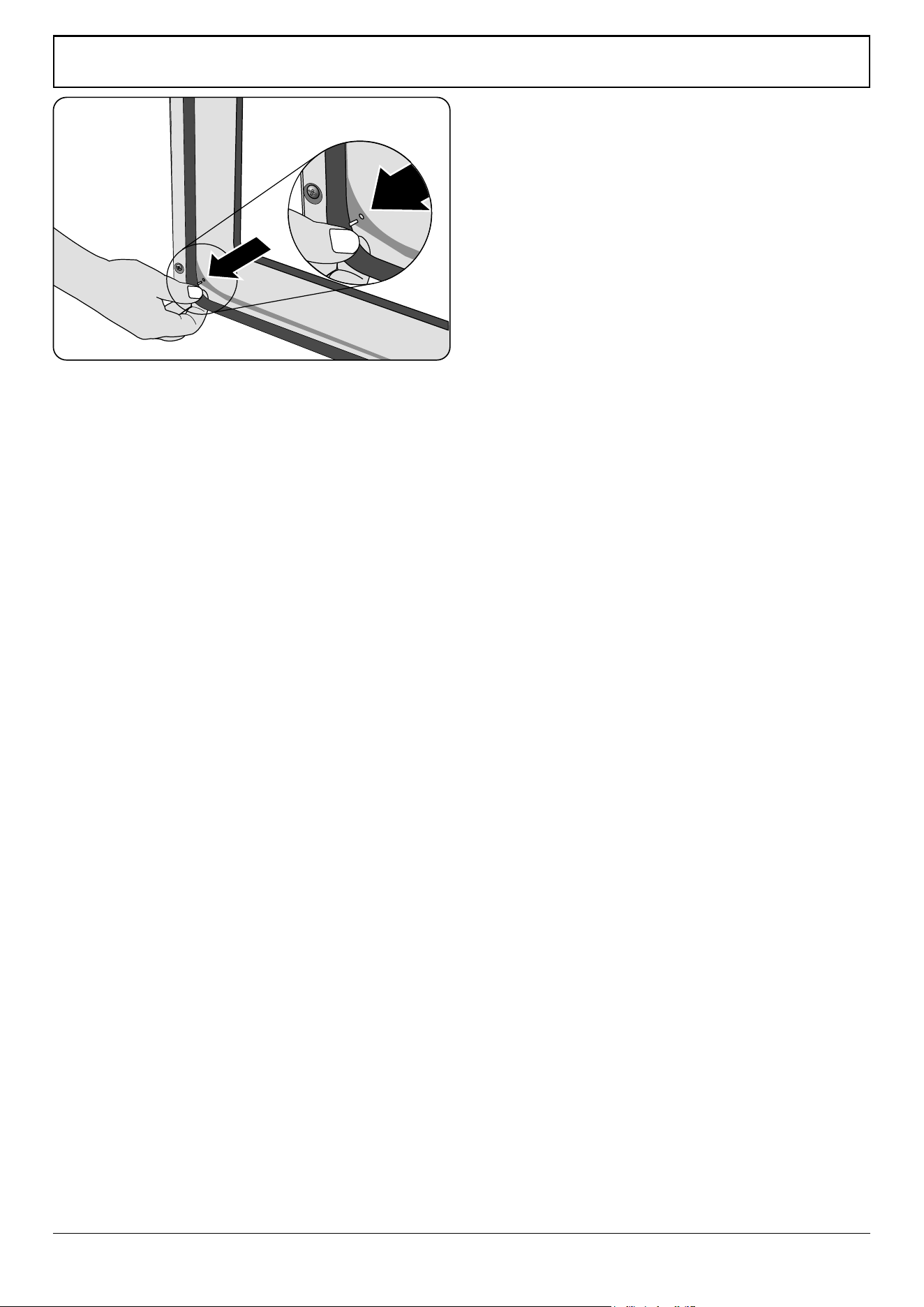
WARNING – SERVICING TO BE CARRIED OUT ONLY BY AN AUTHORISED PERSON
Disconnect from electricity before servicing. Check appliance is safe when you have nished.
40
6.6 To Adjust the Main Oven Door Catch Keep
Open the oven door, and slacken o the locknut at the base
of the keep (Fig. 10.10).
Screw in or out as required until the required t is obtained.
Retighten the locking nut.
6.7 To Replace the Tall Oven Door Outer Panel
Remove the oven door (see 6.2). Lay the door face down on a
suitable surface and remove the two screws from the bottom
edge of the door and the two screws from the inside face of
the door.
Remove the outer door panel. Remove the handle by
unscrewing the two screws. Unscrew the two cross-headed
screws holding the door handle xing bracket to the door
panel. Fit the door handle bracket and door handle to the
new panel.
Fit the panel to the door and reassemble in the reverse order.
6.8 To Replace the Tall oven Magnetic Latch
Remove the control panel (see 1.1). Remove the plinth and
the central vertical cover (5 screws). Prise the retaining clip o
the magnet unit.
Fit the new unit and retaining clip, and reassemble in reverse
order. Check that the door operates correctly.
6.9 To Replace an Oven Door Seal
Open the oven door. The seal has small hooks that hold it in
place by locating into holes in the rear door face on the main
oven and oven front face on tall oven. At the corner, pull the
seal diagonally away from the door centre until the hook is
released (Fig. 10.11). Proceed to the next hook and release it
in a similar way, and so on.
You can use force if the hooks are sti, as the old seal will be
discarded. Carefully lift away the inner back. Reassemble in
reverse order making sure that the four screws and washers
are fully tightened.
ArtNo.320-0005 Oven door rubber seal
Fig. 10.11
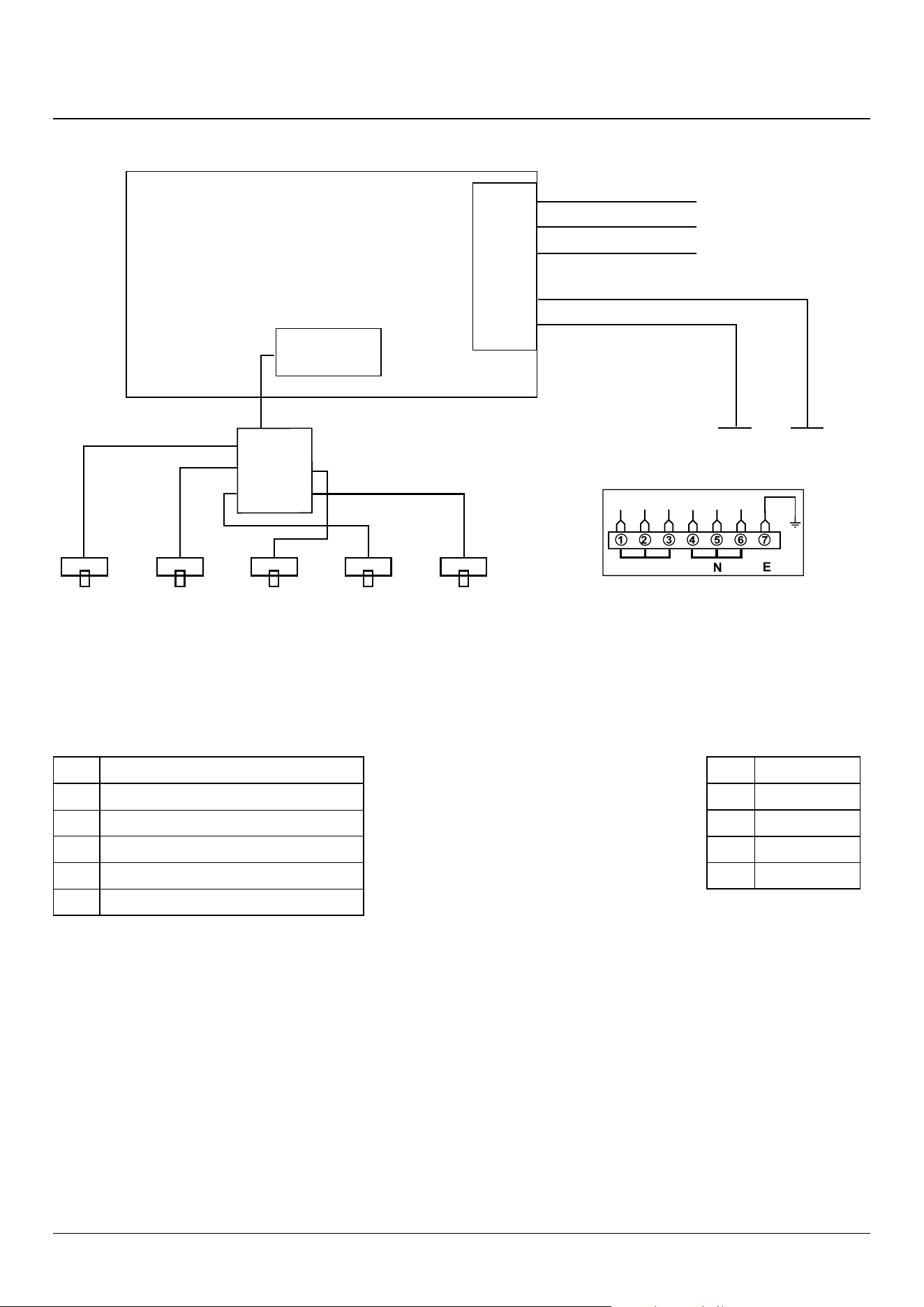
41
11. Circuit Diagrams
Hob
12
53
4
E
5
4
3
2
1
INTERFACE
BOARD
1
2
5
4
3
INDUCTION UNIT
HOB
DISPLAY
Earth
N(6)
N(4)
A(2) A(3)
On Terminal Bloc
k
On Terminal Block
On Terminal Block
w/br
w/br
w/br
w/br
w/br
g/y
b
b
br
br
A
Key
The connections shown in the circuit diagram are for single-phase. The ratings are for 230 V 50 Hz.
Code Description
1
Left-hand front element
2
Left-hand rear element
3
Right-hand rear element
4
Right-hand front element
5
Centre element
Code Colour
b
Blue
br
Brown
g/y
Green/yellow
w/br
White/brown
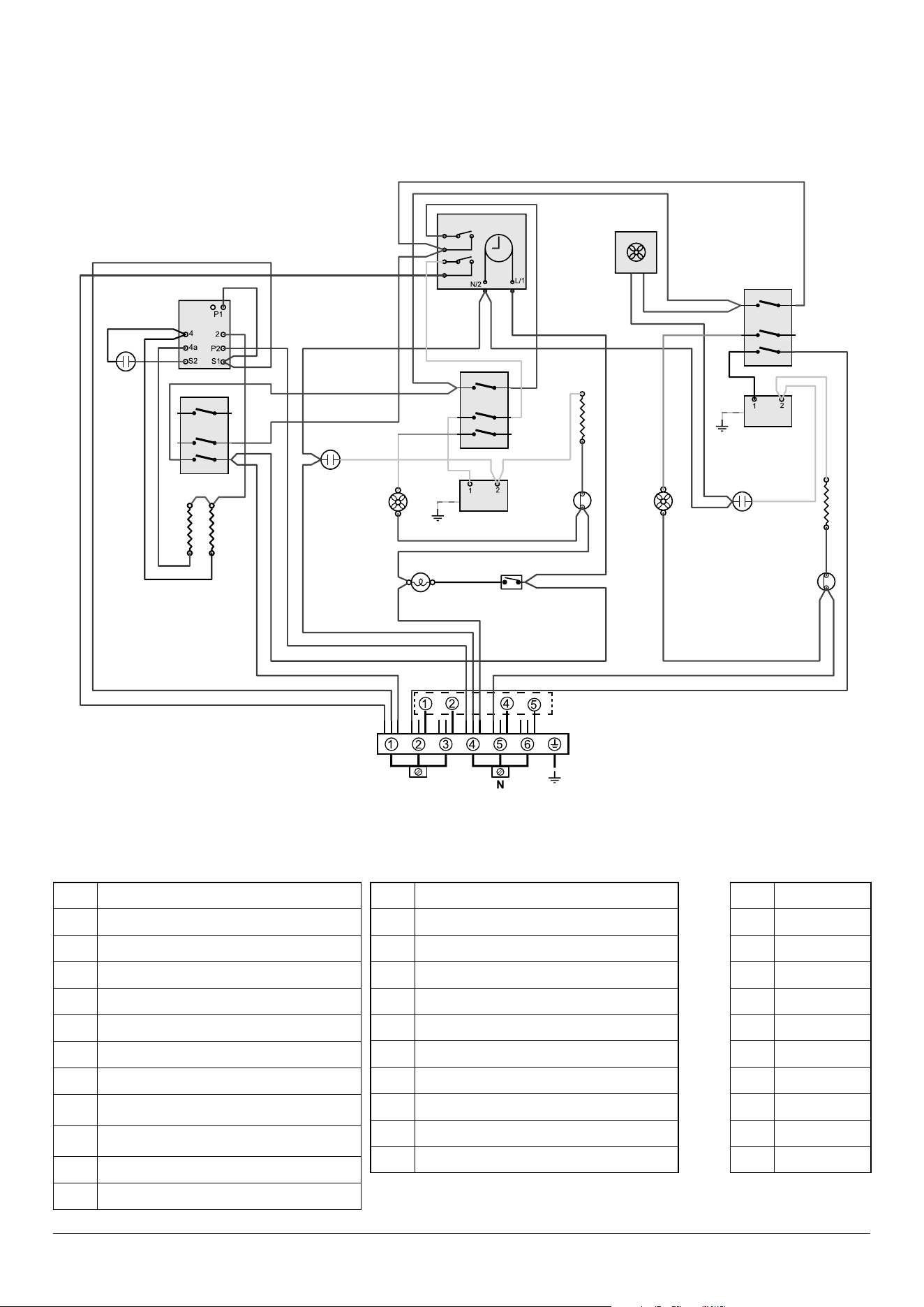
42
Key
The connections shown in the circuit diagram are for single-phase. The ratings are for 230 V 50 Hz.
P095199
1
2
1
P1
P1
P2
E
P095199
1
2
1
P1
P1
P2
P095199
1
2
1
P1
P1
P2
A
b
b
b
br
br
br
r
v
r
r
br
br
v
r
y
b
br
b
r
or
y
y
y
y
y
v
y
or
g/y
b
br
br
b
bk
r
v
br
or
v
bk
bk
g/y
y
y
b
y
b
b
or
b
r
v
r
bk
r
r
bk
b
b
b
y
v
v
br
r
bk
r
b
br
r
b
b
br
br
br
br
b
b
b
b
b
br
br
bb
y
b
b
bk
b
y
bk
r
br
Key
The connections shown in the circuit diagram are for single-phase. The ratings are for 230 V 50 Hz.
Code Description
A1 Grill energy regulator
A2 Grill front switch
A3 Grill elements
B1 Left-hand fanned oven thermostat
B2 Left-hand oven thermostat front switch
B3 Left-hand oven element
B4 Left-hand oven fan
C1 Right-hand oven thermostat
C2 Right-hand oven thermostat front switch
Code Description
C3 Right-hand oven element
C4 Right-hand oven fan
D Clock
F Cooling fan
G1 Oven light switch
G2 Oven light
H Thermal cut-out
J Neon
Code Colour
b Blue
br Brown
bk Black
or Orange
r Red
v Violet
w White
y Yellow
g/y Green/yellow
bk Black
A1
A2
A3
J
J
B4
B1
B2
D
H
B3
G1
G2
C4
J
H
C3
C1
C2
F
Code Description
A1
Grill front switch
A2
Grill energy regulator
A3
Grill element left-hand side
A4
Grill element right-hand side
B1
Left-hand multifunction oven thermostat
B2
Left-hand multifunction oven control
B3
Left-hand multifunction oven base element
B4
Left-hand multifunction oven top element
(outer pair)
B5
Left-hand multifunction oven browning element
(inner pair)
B6
Left-hand multifunction oven fan element
B7
Left-hand multifunction oven fan
Code Description
C
Clock
D1
Right-hand fan oven thermostat
D2
Right-hand fan oven control
D3
Right-hand fan oven element
D4
Right-hand oven fan
H1
Oven light switch
H2
Oven light
I
Thermal cut-out
J
Neon
K
Cooling fan
Code Colour
b
Blue
br
Brown
bk
Black
or
Orange
r
Red
v
Violet
w
White
y
Yellow
g/y
Green/yellow
gr
Grey
Oven
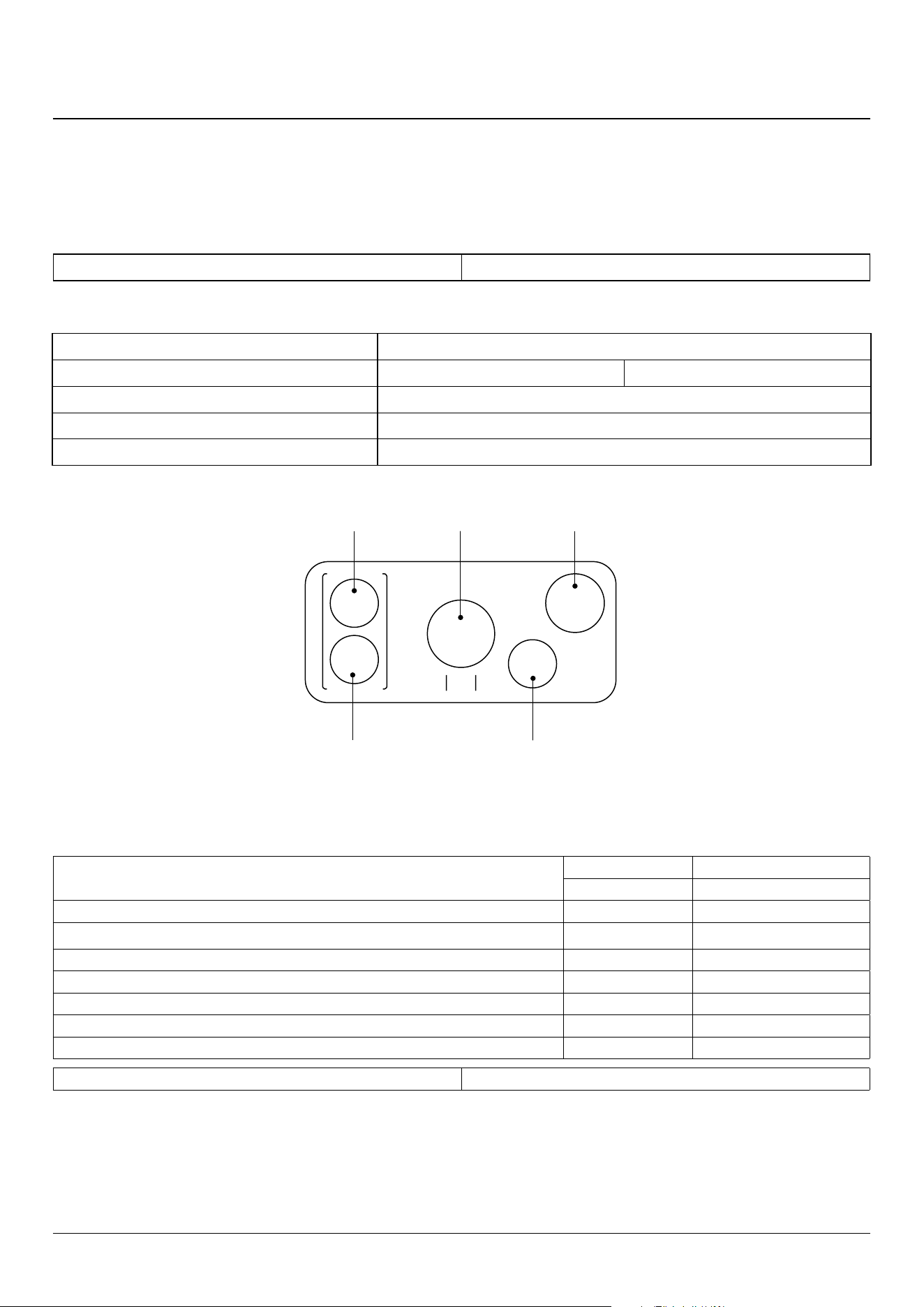
43
12. Technical Data
INSTALLER: Please leave these instructions with the user.
DATA BADGE LOCATION: Cooker back, serial number repeater badge below the oven door opening.
COUNTRY OF DESTINATION: Australia.
Connections
Electric 230 / 400 V ~ 50 Hz 3N
Dimensions
Model NEXUS 90 Induction
Overall height minimum 905 mm
maximum 930 mm
Overall width 900 mm
Overall depth
608 mm excluding handles, 648 mm including handles
Minimum height above the hotplate 650 mm
Hotplate Ratings
Max: 1.85 kW
Boost: 2.5 kW
Max: 1.85 kW
Boost: 3.2 kW
Max: 1.85 kW
Boost: 2.5 kW
Max: 1.85 kW
Boost: 2.5 kW
Max: 1.15 kW
Boost: 2.0 kW
Zone 2
Zone 1
Zone 3
Zone 4
Zone 5
Oven Efficiencies
Ovens
Main Oven Tall Oven
Multifunction Forced Air Convection
Maximum power output @ 230 V 50 Hz 2.5 kW 2.5 kW
Energy eciency class on a scale of A (more ecient) to G (less ecient) A A
Energy consumption based on standard load 0.88kWh 0.83kWh
Usable volume (litres) 79 67
Size Large Large
Time to cook standard load 41 minutes 49 minutes
Surface area of the grid 1400cm
2
790cm
2
Grill 2.3 kW
Maximum total electrical load at 230 V (approximate total including oven lights, oven fan, etc.): 14.8 kW.
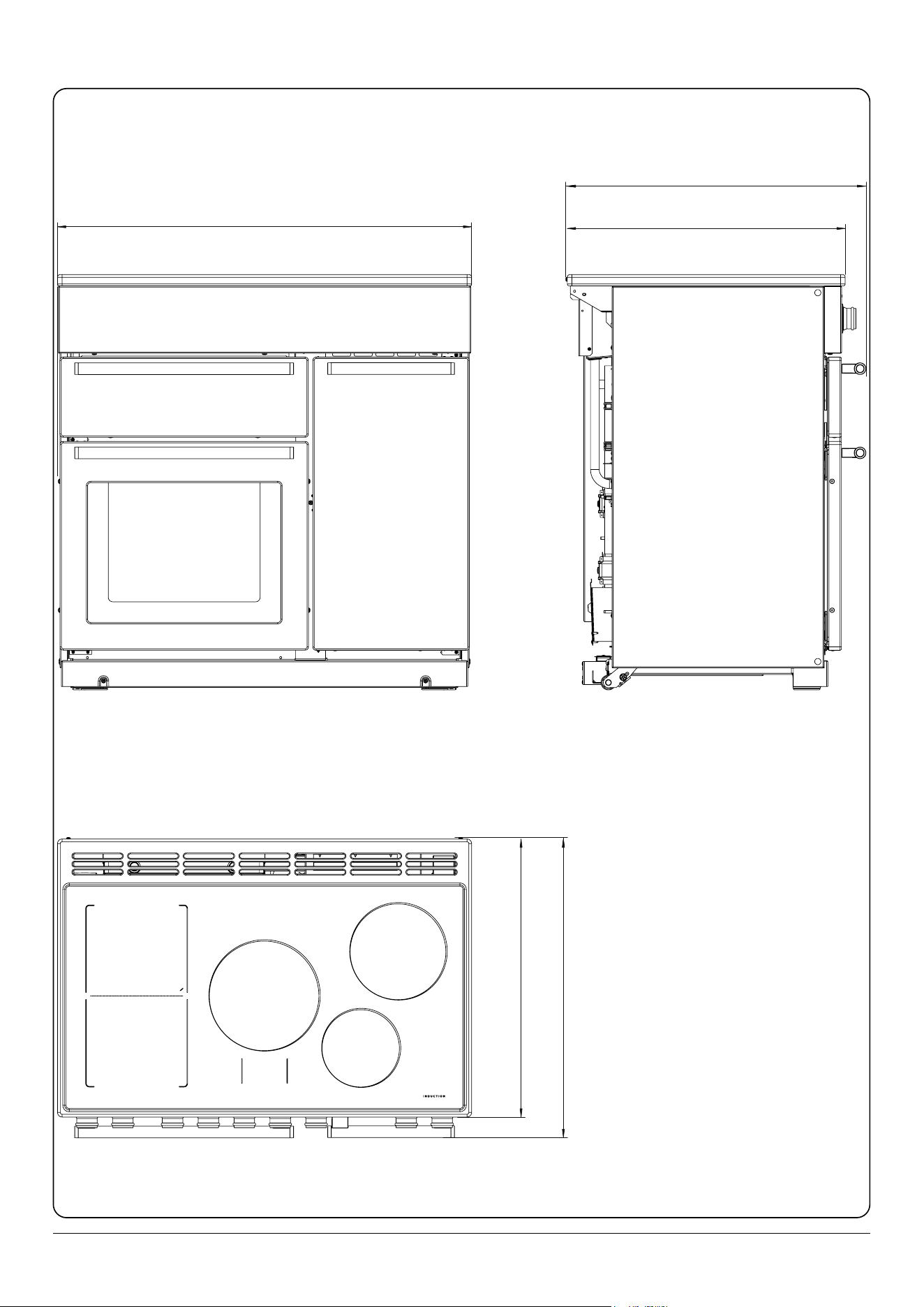
44
608 DEPTH EXCLUDING HANDLES
648 DEPTH INCLUDING HANDLES
900
608 DEPTH EXCLUDING HANDLES
648 DEPTH INCLUDING HANDLES

Clarence Street, Royal Leamington Spa,
Warwickshire, CV31 2AD, England.
www.falconworld.com