

en-us
2
Further information and explanations are available online:
Table of contents
1 IMPORTANT SAFETY INSTRUCTIONS.................... 4
1.1 Safety definitions....................................................... 4
1.2 General information................................................... 4
1.3 Safe use.................................................................... 4
1.4 Child safety ............................................................... 6
1.5 Safe use of the meat probe ....................................... 6
1.6 Steam cooking .......................................................... 6
1.7 Cleaning function ...................................................... 7
1.8 Proper installation and maintenance ......................... 7
1.9 Remote operation ..................................................... 7
1.10 State of California Proposition 65 Warnings ............ 7
2 Preventing material damage .................................... 8
2.1 General information................................................... 8
2.2 Steam ....................................................................... 8
2.3 Core temperature probe............................................ 8
2.4 Cleaning.................................................................... 9
3 Environmental protection and energy-saving ........ 9
3.1 Disposal of packaging ............................................... 9
3.2 Saving energy ........................................................... 9
4 Familiarizing yourself with your appliance ........... 10
4.1 Appliance ................................................................ 10
4.2 Oven cavity ............................................................. 10
4.3 Interior lighting ........................................................ 10
4.4 Water tank .............................................................. 10
4.5 Control elements..................................................... 11
4.6 Types of heating ..................................................... 14
4.7 Low power mode display......................................... 16
4.8 Additional information.............................................. 17
4.9 Pop-up notifications................................................. 17
4.10 Quick guides ......................................................... 17
4.11 Cooling fan............................................................ 17
4.12 Drying the oven cavity........................................... 17
4.13 Automatic switch-off .............................................. 17
4.14 Wipe protection ..................................................... 18
4.15 Proximity sensor ................................................... 18
4.16 Door lock............................................................... 18
4.17 Steam removal...................................................... 18
5 Accessories............................................................. 19
5.1 Other accessories ................................................... 19
5.2 Sliding accessories into the oven cavity .................. 20
6 Before using for the first time ................................ 20
6.1 Initial use................................................................. 20
7 Basic Operation ...................................................... 21
7.1 Switching on the appliance...................................... 21
7.2 Opening the appliance door ..................................... 21
7.3 Changing the type of heating.................................... 21
7.4 Changing the temperature........................................ 22
7.5 Displaying the current interior oven temperature ...... 22
7.6 Add broiler................................................................ 22
7.7 Steam injection......................................................... 22
7.8 Opening the appliance door automatically after
the cooking process ................................................. 22
7.9 Deactivating automatic appliance door opening ....... 23
7.10 Interrupting and continuing an operation ................ 23
7.11 Ending automatic oven cavity drying ...................... 23
7.12 Opening and closing the control center .................. 23
7.13 Switching the interior lighting on or off .................... 23
7.14 After each use ........................................................ 23
7.15 Switching off the appliance..................................... 23
7.16 Switching on the appliance after automatic shut-
off........................................................................... 23
7.17 Displaying information ............................................ 23
7.18 Displaying appliance information ............................ 23
7.19 Using the quick guides ........................................... 24
8 Timer functions ........................................................ 24
8.1 Overview of the timer functions ................................ 24
8.2 Call up the timer menu ............................................. 24
8.3 Exiting the timer menu.............................................. 24
8.4 Cooking time ............................................................ 24
8.5 Cooking time end ..................................................... 25
8.6 Count-up cooking timer ............................................ 25
9 Sabbath mode .......................................................... 26
9.1 Selecting a time period for the Sabbath mode
function .................................................................... 26
9.2 Opening the Sabbath mode function ........................ 26
9.3 Selecting the settings for the interior lighting while
the Sabbath mode function is active......................... 26
9.4 Setting heating cycles .............................................. 26
9.5 Changing the time period for the Sabbath mode
function .................................................................... 27
9.6 Changing settings for the interior lighting.................. 27
9.7 Changing the heating cycle ...................................... 27
9.8 Deleting a heating cycle ........................................... 27
9.9 Starting the Sabbath mode function ......................... 27
9.10 Switching off the Sabbath mode function................ 27
10 Child lock................................................................ 27
10.1 Activating the childproof lock .................................. 27
10.2 Deactivating the childproof lock .............................. 27

en-us
3
11 Favorites................................................................ 27
11.1 Creating the first favorites ..................................... 28
11.2 Selecting a favorite................................................ 28
11.3 Renaming a favorite .............................................. 28
11.4 Starting a favorite.................................................. 28
11.5 Changing a favorite............................................... 28
11.6 Deleting a favorite ................................................. 28
12 Programs ............................................................... 28
12.1 Automatic programs .............................................. 28
12.2 Recommended settings ........................................ 29
13 Core temperature sensor ..................................... 30
13.1 Inserting the core temperature probe into the
food....................................................................... 31
13.2 Turning the food.................................................... 32
13.3 Setting the core temperature probe....................... 32
13.4 Deleting the set core temperature ......................... 33
13.5 Changing the set core temperature ....................... 33
13.6 Using the core temperature probe with the Sous-
vide cooking type of heating.................................. 33
13.7 Core temperature guideline values........................ 33
13.8 Estimated cooking time ......................................... 34
14 HomeConnect® ................................................... 34
14.1 Setting upHomeConnect®................................... 34
14.2 HomeConnect® settings ...................................... 34
14.3 Starting functions with the HomeConnect® app
via manual Remote start ....................................... 35
14.4 Starting functions with the HomeConnect® app
via permanently activated Remote start ................ 35
14.5 Using the HomeConnect® app to change
settings ................................................................. 35
14.6 Switching the Wi-Fi on or off ................................. 35
14.7 Software update.................................................... 36
14.8 Data Protection ..................................................... 36
15 Basic settings........................................................ 37
15.1 Overview of the basic settings............................... 37
15.2 Changing the basic settings .................................. 42
16 Cleaning and maintenance................................... 43
16.1 Cleaning agents .................................................... 43
16.2 Microfiber cloth...................................................... 44
16.3 Cleaning the drain filter ......................................... 44
16.4 Cleaning aid.......................................................... 45
16.5 Cleaning program ................................................. 45
16.6 Rapid drying.......................................................... 48
16.7 Descaling program................................................ 48
16.8 Removing the shelf supports................................. 50
16.9 Fitting the shelf supports ....................................... 50
17 Troubleshooting.................................................... 51
17.1 Power failure ......................................................... 53
17.2 Check the water tank ............................................ 53
17.3 Demo mode .......................................................... 53
18 How it works ........................................................... 54
18.1 General cooking tips............................................... 54
18.2 Sous-vide cooking .................................................. 54
18.3 Preparing bulky food .............................................. 55
19 Transportation, storage and disposal................... 55
19.1 Disposal of your old appliance................................ 55
20 Customer Service................................................... 56
20.1 Model number (E-Nr.), production number (FD)
and consecutive numbering (Z-Nr.) ........................ 56
20.2 Rating plate location............................................... 56
21 Information regarding Free and Open Source
Software.................................................................. 56
22 STATEMENT OF LIMITED PRODUCT
WARRANTY ............................................................ 57
22.1 What this warranty covers & Who it applies to........ 57
22.2 How long the warranty lasts ................................... 57
22.3 Repair/replace as your exclusive remedy ............... 57
22.4 Out of warranty product.......................................... 58
22.5 Warranty exclusions ............................................... 58
22.6 Obtaining warranty service ..................................... 58
22.7 Product information ................................................ 58

en-us
4
Read all of the instructions carefully before using the
appliance. In order to reduce the risk of fire, electric
shocks and personal injuries when using the appliance,
follow the basic safety precautions, including the following
safety instructions.
1.1 Safety definitions
Here you can find explanations of the safety signal words
used in this manual.
WARNING
This indicates that death or serious injuries may occur as
a result of non-observance of this warning.
CAUTION
This indicates that minor or moderate injuries may occur
as a result of non-observance of this warning.
NOTICE:
This indicates that damage to the appliance or property
may occur as a result of non-compliance with this
advisory.
Note:This alerts you to important information and/or tips.
1.2 General information
Here you can find general information about this manual.
¡ Please read this manual carefully.
¡ Observe the safety instructions and warnings.
¡ Keep the manual and the product information in a safe
place for future reference or for the next owner.
¡ Check the appliance for damage after unpacking it. Do
not connect the appliance if it has been damaged in
transit.
This appliance is intended for use up to a maximum height
of 13,100feet (4000meters) above sea level.
1.3 Safe use
WARNING
When properly cared for, your new appliance has been
designed to be safe and reliable.
▶ Read all instructions carefully before use. These
precautions will reduce the risk of burns, electric shock,
fire, and injury to persons.
▶ When using kitchen appliances, basic safety
precautions must be followed, including those in the
following pages.
WARNING
While cooking food items, small amounts of certain by-
products, such as particulate matter / soot, can be
released. To minimize exposure to these substances:
▶ Always ensure proper ventilation by using an
appropriate ventilation fan or hood vented to the
outside and/or an open window.
▶ Always operate the unit according to the instructions in
this manual.
WARNING
Overheated materials can cause fire or burns and may
produce potentially harmful smoke or fumes.
▶ To prevent overheating, turn ventilation hood ON when
heating grease, fats or frying using medium to high heat
settings.
▶ Avoid heating empty pots and pans.
▶ Do not allow pans to boil dry.
▶ Do not allow aluminum foil, plastic, paper, or cloth to
come in contact with a hot surface element, burner, or
grate.
WARNING
If materials inside an oven or warming drawer should
ignite, keep door closed.
▶ Turn off the appliance and disconnect the circuit at the
circuit breaker box.
A fire could occur during cooking.
▶ Always have a working smoke detector near the
kitchen.
▶ Have an appropriate fire extinguisher available, nearby,
highly visible and easily accessible near the appliance.
NEVER cover any slots, holes or passages in the oven
bottom or cover an entire rack with materials such as
aluminum foil.
▶ Doing so blocks air flow through the oven.
▶ Aluminum foil linings may also trap heat, causing a fire
hazard.
Cooking fires can spread if extinguished incorrectly.
▶ Never use water on cooking fires.
Wear Proper Apparel. Loose-fitting or hanging garments,
such as ties, scarves, jewelry, or dangling sleeves, should
never be worn while using the appliance.
▶ Tie long hair so that it does not hang loose.
▶ Secure all loose garments, etc. before beginning.
In the event that personal clothing or hair catches fire,
drop and roll immediately to extinguish flames.
IMPORTANT SAFETY INSTRUCTIONS
READ AND SAVE THESE INSTRUCTIONS

en-us
5
Do Not Use Water on Grease Fires.
▶ Smother fire or flame or use dry chemical or foam-type
extinguisher.
CAUTION
The oven vents are important for air circulation. Covering
the oven vents will cause the oven to overheat. Refer to
the appliance overview for the location of the oven vents.
▶ Do not obstruct oven vents.
WARNING
Use Only Dry Potholders - Moist or damp potholders on
hot surfaces may result in burns from steam.
▶ Do not let potholders touch hot heating elements.
▶ Do not use a towel or other bulky cloth.
DO NOT TOUCH HEATING ELEMENTS OR INTERIOR
SURFACES OF OVEN - Heating elements may be hot
even though they are dark in color. Interior surfaces of an
oven become hot enough to cause burns.
▶ During and after use, do not touch, or let clothing,
potholders, or other flammable materials contact
heating elements or interior surfaces of oven until they
have had sufficient time to cool. Other surfaces of the
appliance may become hot enough to cause burns.
Among these surfaces are oven vent openings,
surfaces near these openings and oven doors.
Use Care When Opening Door - Let hot air or steam
escape before removing or replacing food.
▶ Standing to the side, open the door (or drawer) slowly
and slightly to let hot air and/or steam escape.
▶ Keep your face clear of the opening and make sure
there are no children or pets near the appliance.
▶ After the release of hot air and/or steam, proceed with
your cooking.
▶ Keep doors shut unless necessary for cooking or
cleaning purposes.
▶ Do not leave open doors unattended.
Do not clean the appliance while it is still hot. Some
cleaners produce noxious fumes when applied to a hot
surface. Wet clothes and sponges can cause burns from
steam.
CAUTION
Use caution when cooking foods with high alcohol content
(e.g. rum, brandy, bourbon) in the oven. Alcohol
evaporates at high temperatures. There is a risk of
burning as the alcohol vapors may catch fire in the oven.
▶ Use only small quantities of alcohol in foods, and open
the oven door carefully.
Placement of Oven Racks - Always place oven racks in
desired location while oven is cool. If the rack must be
moved while the oven is hot, do not let potholders contact
the hot heating elements in the oven. Use caution when
removing oven racks from the lowest rack position to
avoid contact with the hot oven door.
WARNING
Storage in or on Appliance - The use of corrosive
chemicals in heating or cleaning will damage the
appliance and could result in injury.
▶ Flammable materials, corrosive chemicals, vapors or
non-food products should not be stored or used in an
oven or on or near surface units.
▶ The appliance is specifically designed for use when
heating or cooking food.
This appliance is intended for normal family household
use only. It is not approved for outdoor use. See the
Statement of Limited Product Warranty. If you have any
questions, contact the manufacturer.
WARNING
Using this appliance other than for its intended use can
cause fire or injury to persons.
▶ Use this appliance only for its intended use as
described in this manual.
▶ NEVER use your appliances as a space heater for
warming or heating the room. Doing so may result in
overheating the appliance.
▶ Never use the appliance for storage.
Do not heat or warm unopened food containers. Build-up
of pressure may cause the container to burst and cause
injury.
Failure to operate knobs properly may result in personal
injury and damage to the appliance.
Cooking or roasting bags might explode.
▶ Follow the manufacturer’s directions when using
cooking or roasting bags.
CAUTION
To avoid possible injury or damage to the appliance,
ensure oven rack is installed exactly per installation
instructions and not backwards or upside down.
Do not place anything on the oven cavity bottom. Do not
cover it with aluminum foil. A build-up of heat could
damage the appliance or cause injury.
WARNING
Moisture intrusion may cause an electric shock.
▶ Do not use any steam cleaners or high-pressure
cleaners to clean the appliance.
IMPORTANT SAFETY INSTRUCTIONS
READ AND SAVE THESE INSTRUCTIONS

en-us
6
To avoid risk of injury from a damaged appliance or power
cord, observe the following.
▶ Do not turn the power on if the appliance or the power
cord is damaged. Doing so may cause injury.
▶ Never operate a damaged appliance.
▶ If the appliance or the power cord is damaged,
immediately switch off the breaker in the circuit breaker
box.
▶ Call Customer Service. →
Page56
▶ Repairs to the appliance should only be performed by
an authorized service provider.
WARNING
Scratched glass in the appliance door may develop into a
crack.
▶ Do not use any harsh or abrasive cleaners or sharp
metal scrapers to clean the glass on the oven door, as
they may scratch the surface.
1.4 Child safety
This appliance is not intended for use by persons
(including children) with reduced physical, sensory or
mental capabilities, or lack of experience and knowledge,
unless they have been given supervision or instruction
concerning use of the appliance by a person responsible
for their safety.
When children become old enough to use the appliance, it
is the responsibility of the parents or legal guardians to
ensure that they are instructed in safe practices by
qualified persons.
Children should be supervised to ensure that they do not
play with the appliance.
WARNING
Do not allow children to use this appliance unless closely
supervised by an adult.
▶ Children and pets should not be left alone or
unattended in the area where the appliance is in use.
They should never be allowed to play in its vicinity,
whether or not the appliance is in use.
Do not allow anyone to climb, stand, lean, sit, or hang on
any part of an appliance, especially a door, warming
drawer, or storage drawer.
▶ This can damage the appliance, and the unit may tip
over, potentially causing severe injury.
Do not let children play with the appliance.
CAUTION
Do not store items of interest to children in an appliance,
in cabinets above an appliance or on the backguard of an
appliance. Children climbing on the appliance to reach
items could be seriously injured.
Do Not Leave Children Alone.
▶ Children should not be left alone or unattended in the
area where the appliance is in use.
▶ They should never be allowed to sit or stand on any
part of the appliance.
▶ Always check inside the oven before turning it on.
WARNING
To avoid the risk of suffocation:
▶ Do not allow children to play with packaging material.
▶ Store small parts safely as they can be a choke hazard.
1.5 Safe use of the meat probe
WARNING
The oven interior and the meat probe become very hot.
▶ Use oven mitts to plug and unplug the meat probe.
WARNING
Use of a wrong meat probe can damage the insulation.
Use only the meat probe intended for this appliance.
1.6 Steam cooking
Follow these additional safety instructions when using a
steam cooking mode.
CAUTION
The water in the oven cavity is hot.
▶ Let the oven cavity cool down before you clean the
appliance.
WARNING
Hot steam may escape when the appliance door is
opened. Steam is not visible at certain temperatures!
▶ Open the appliance door carefully during or after
cooking.
▶ Do not stand too near or lean over the appliance when
opening the appliance door .
The water in the oven cavity becomes very hot during
cooking.
▶ DO NOT clean the appliance immediately after
switching it off.
▶ Wait until the appliance has cooled down.
Hot steam can leak during operation.
▶ Do not touch the ventilation openings.
IMPORTANT SAFETY INSTRUCTIONS
READ AND SAVE THESE INSTRUCTIONS
en-us
7
▶ Keep children away.
Hot liquid may spill over the sides of cooking accessories
when they are removed from the oven cavity.
▶ Carefully remove cooking accessories with oven mitts.
Movement when opening the appliance door and when
removing the cookware can cause hot liquid to spray out.
▶ Do not stand too close to the appliance when opening
it.
▶ Open appliance door carefully.
▶ Remove cookware carefully.
▶ Keep children away.
1.7 Cleaning function
Follow these safety instructions when using the cleaning
function.
WARNING
To prevent the cleaner from coming into contact with the
skin or eyes, do not remove the locking cap from a spent
cartridge.
CAUTION
To avoid injury, do not remove the wax plugs from the
opening of the cleaning cartridge. Do not use any other
detergents. Do not use damaged cartridges.
WARNING
Do not use a protective coating to line the oven and do not
use commercial oven cleaner.
Clean only parts listed in this manual.
1.8 Proper installation and maintenance
WARNING
In the event of a malfunction, it might become necessary
to turn off the power supply.
▶ Have the installer show you the circuit breaker or fuse.
Mark it for easy reference.
To avoid electrical shock hazard, before servicing the
appliance, turn power off at the service panel and lock the
panel to prevent the power from being switched on
accidentally.
Proper Installation - Improper installation or grounding can
cause electric shock.
▶ This appliance must be properly installed and grounded
by a qualified technician.
▶ Connect only to properly grounded outlet.
▶ Refer to installation instructions for details.
User Servicing - Do not repair or replace any part of the
appliance unless specifically recommended in this
manual.
▶ All other servicing should be referred to an authorized
service provider.
WARNING
Grease and fat can ignite when heated.
▶ Keep the oven free from grease build up.
CAUTION
In the event of an error the display flashes and beeps
continuously.
▶ Disconnect appliance from the power supply and call
an authorized service provider.
WARNING
Malfunctions can cause injuries.
▶ Do not operate this appliance if it is not working
properly, or if it has been damaged. Contact an
authorized service provider.
1.9 Remote operation
CAUTION
This appliance may be configurable to allow remote
operation at any time.
▶ Do not store any flammable materials or temperature
sensitive items inside, on top or near surface units of
the appliance.
1.10 State of California Proposition 65
Warnings
This product may contain a chemical known to the State
of California, which can cause cancer or reproductive
harm. Therefore, the packaging of your product may bear
the following label as required by California:
IMPORTANT SAFETY INSTRUCTIONS
READ AND SAVE THESE INSTRUCTIONS
en-us Preventing material damage
8
Preventing material damage
2 Preventing material damage
Preventing material damage
2.1 General information
NOTICE:
A build-up of heat could damage the appliance.
▶ Do not place anything directly on the oven cavity floor.
▶ Do not line the oven cavity floor with aluminum foil.
▶ Always place cookware in a perforated cooking
container or on a wire rack.
The appliance may become damaged due to the use of
unsuitable liquids.
▶ Do not use any liquids other than water.
▶ Only use cold, fresh tap water, softened water or non-
carbonated mineral water.
▶ You can obtain information about your mains water from
your water supplier.
Chloride and acids may damage the stainless steel
surface.
▶ Remove any residues of salt, hot sauces, e.g. ketchup
or mustard, salted food, e.g. salted roasts, or other
foods containing chloride or acid immediately.
If aluminum foil comes into contact with the door pane, it
could cause permanent discoloration.
▶ Do not allow aluminum foil in the oven cavity to come
into contact with the door pane.
Fruit juice can cause permanent stains in the oven cavity.
▶ Always remove fruit juice immediately.
▶ Wipe with a damp cloth, followed by a dry cloth.
The prolonged presence of moisture in the oven cavity
leads to corrosion.
▶ Do not keep moist food in the closed oven cavity for
extended periods of time.
▶ Do not store food in the oven cavity.
Rusting material may lead to corrosion in the oven cavity.
▶ Only use original accessories in the oven cavity.
▶ Do not use any enameled baking trays or grill trays.
▶ Never use serving plates or cutlery that may rust.
Small parts that are not original may damage the
appliance.
▶ Only use original small parts, e.g. knurled nuts.
▶ If necessary, order small parts from our spare parts
service.
Heat can damage stainless steel cooking containers.
▶ Only heat stainless steel cooking containers up to
445°F (230°C).
▶ Do not use stainless steel cooking containers in the
oven.
Leaving the appliance to cool down with the door open will
damage the front of adjacent units over time.
▶ Always allow the oven cavity to cool down with the door
closed after cooking at high temperatures.
▶ Do not trap anything in the appliance door.
▶ Only leave the oven cavity to dry with the door open if a
lot of moisture was produced during operation.
If the seal is very dirty, the appliance door will no longer
close properly during operation. The fronts of adjacent
units could be damaged.
▶ Always keep the seal clean.
▶ Never operate the appliance if the seal is damaged or
missing.
Sitting or placing objects on the appliance door may
damage it.
▶ Do not place, hang or support objects on the appliance
door.
▶ Do not place any cookware or accessories on the
appliance door.
Carrying the appliance by the appliance frame may cause
it to bend. The appliance frame cannot support the weight
of the appliance.
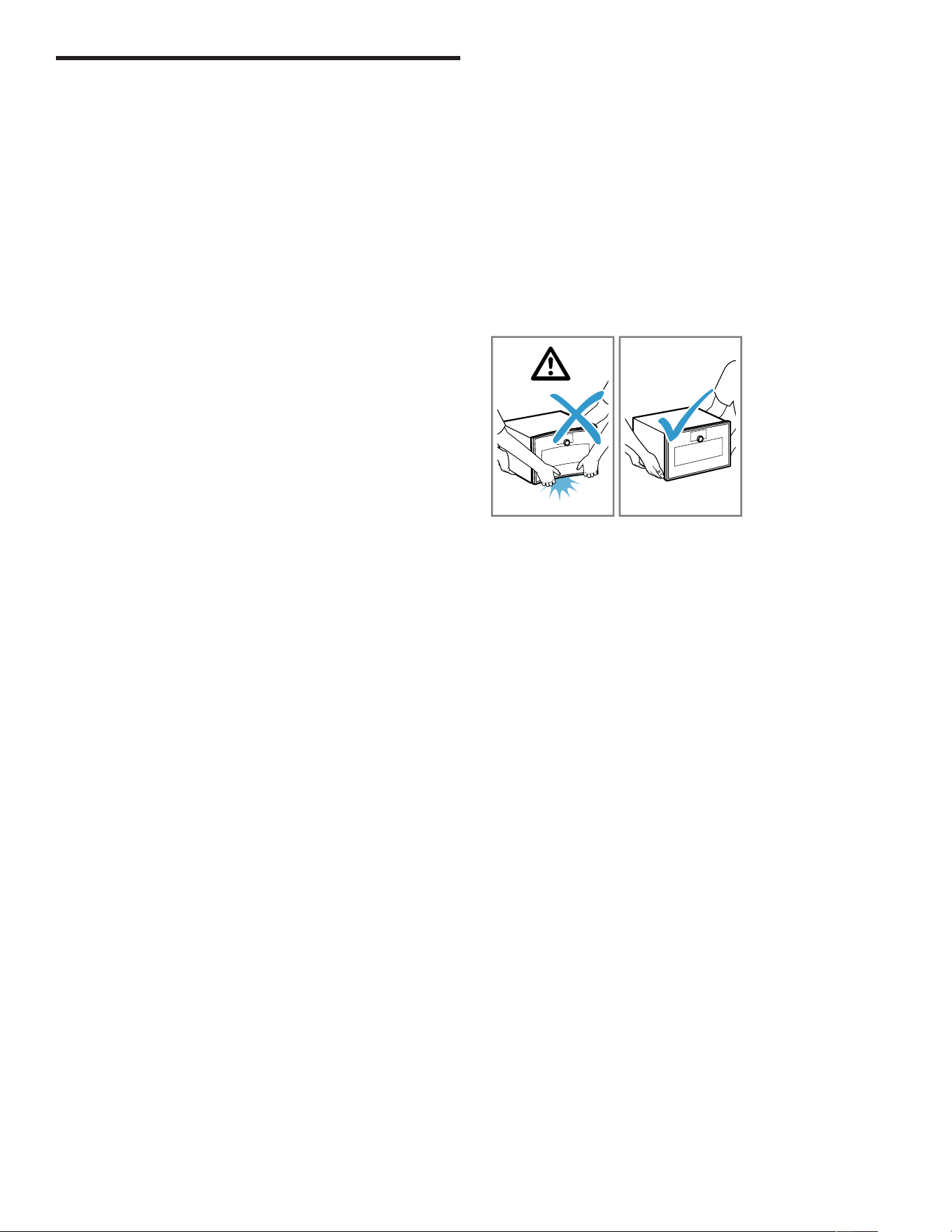
▶ Do not lift the appliance using the appliance frame.
▶ Always lift the appliance at the casing.
2.2 Steam
NOTICE:
Dripping liquids may damage the oven cavity.
▶ To catch any dripping liquids, when steaming using a
perforated cooking container, always insert the
unperforated cooking container underneath.
Silicone baking molds are not suitable for combined
operation with steam.
▶ Cookware must be heat- and steam-resistant.
Using cookware with rust spots may cause corrosion in
the oven cavity. Even the smallest spots of rust can cause
corrosion.
▶ Do not use cookware with rust spots.
Hot water in the water tank may damage the steam
system.
▶ Only fill the water tank with cold water.
If descaling solution comes into contact with the control
panel or other delicate surfaces, it will damage them.
▶ Remove descaling solution immediately with water.
2.3 Core temperature probe
WARNING
An incorrect core temperature probe may damage the
insulation.
▶ Only use the core temperature probe that is suitable for
this appliance.

Environmental protection and energy-saving en-us
9
NOTICE:
Temperatures above 480°F (250°C) damage the core
temperature probe.
▶ Only use the core temperature probe in your appliance
at a maximum temperature of 445°F (230°C).
You may damage the cable of the core temperature probe
with the appliance door.
▶ Do not trap the cable of the core temperature probe in
the appliance door.
The heat of the grilling surface may damage the core
temperature probe.
▶ Ensure that the distance between the glass grilling
surface and the core temperature probe and the cable
of the core temperature probe is a few centimeters. In
doing so, ensure that the meat can expand during the
cooking process.
Aggressive cleaning agents may damage the core
temperature probe.
▶ Do not clean the core temperature probe in the
dishwasher.
2.4 Cleaning
NOTICE:
Limescale may damage the appliance.
▶ Descale the appliance regularly.
Using the wrong descaler may damage the appliance.
▶ Only use the specified descaling tablets.
Improper care of the appliance can lead to corrosion in the
oven cavity.
▶ Follow the care and cleaning instructions for the
appliance.
→
"Cleaning and maintenance", Page43
▶ Clean the oven cavity each time you use it as soon as
the appliance has cooled down.
▶ After cleaning the cooking compartment, use Rapid
drying →
Page48
to dry it.
The descaling tablet may damage the oven cavity.
▶ Use the descaling tablet for the descaling program only.
▶ Place the descaling tablet into the water tank.
▶ Never place the descaling tablet in the oven cavity or
heat it up in the oven cavity.
Heat may melt the cleaning cartridge and damage the
oven cavity.
▶ Use cleaning cartridges for the cleaning program only.
▶ Never place cleaning cartridges in the oven cavity when
it is hot or heat them up in the oven cavity.
Heat may damage the inserted cartridge.
▶ Never heat up the appliance if you have inserted the
cartridge.
Heat damages the water tank.
▶ Do not dry the water tank in the hot oven cavity.
Environmental protection and energy-saving
3 Environmental protection and
energy-saving
Environmental protection and energy-saving
3.1 Disposal of packaging
The packaging materials are environmentally compatible
and can be recycled.
▶ Sort the individual components by type and dispose of
them separately.
3.2 Saving energy
If you follow these instructions, your appliance will use
less power.
When steaming, you can cook on several levels at the
same time.
a
With steam, various dishes can be prepared at the
same time without the different flavors mixing. When
preparing dishes with different cooking times, those
with the longest cooking time should be placed in the
oven first.
When cooking multiple dishes, do so in succession or in
parallel.
a
The oven cavity is heated after cooking the first dish.
This reduces the cooking time for the following dishes.
Use dark-colored or black-coated baking tins.
a
These types of baking tin absorb the heat particularly
well.
Open the appliance door as little as possible during
operation.
a
This maintains the temperature in the oven cavity and
eliminates the need for the appliance to reheat.
Remove any accessories that are not being used from the
oven cavity.
a
Accessories that are not being used do not need to be
heated.
Allow frozen food to defrost before cooking.
a
This saves the energy that would otherwise be required
to defrost it.
en-us Familiarizing yourself with your appliance
10
Familiarizing yourself with your appliance
4 Familiarizing yourself with your
appliance
Familiarizing yourself with your appliance
This Use and Care Manual covers several models. Your
model may have some but not all of the features listed.
4.1 Appliance
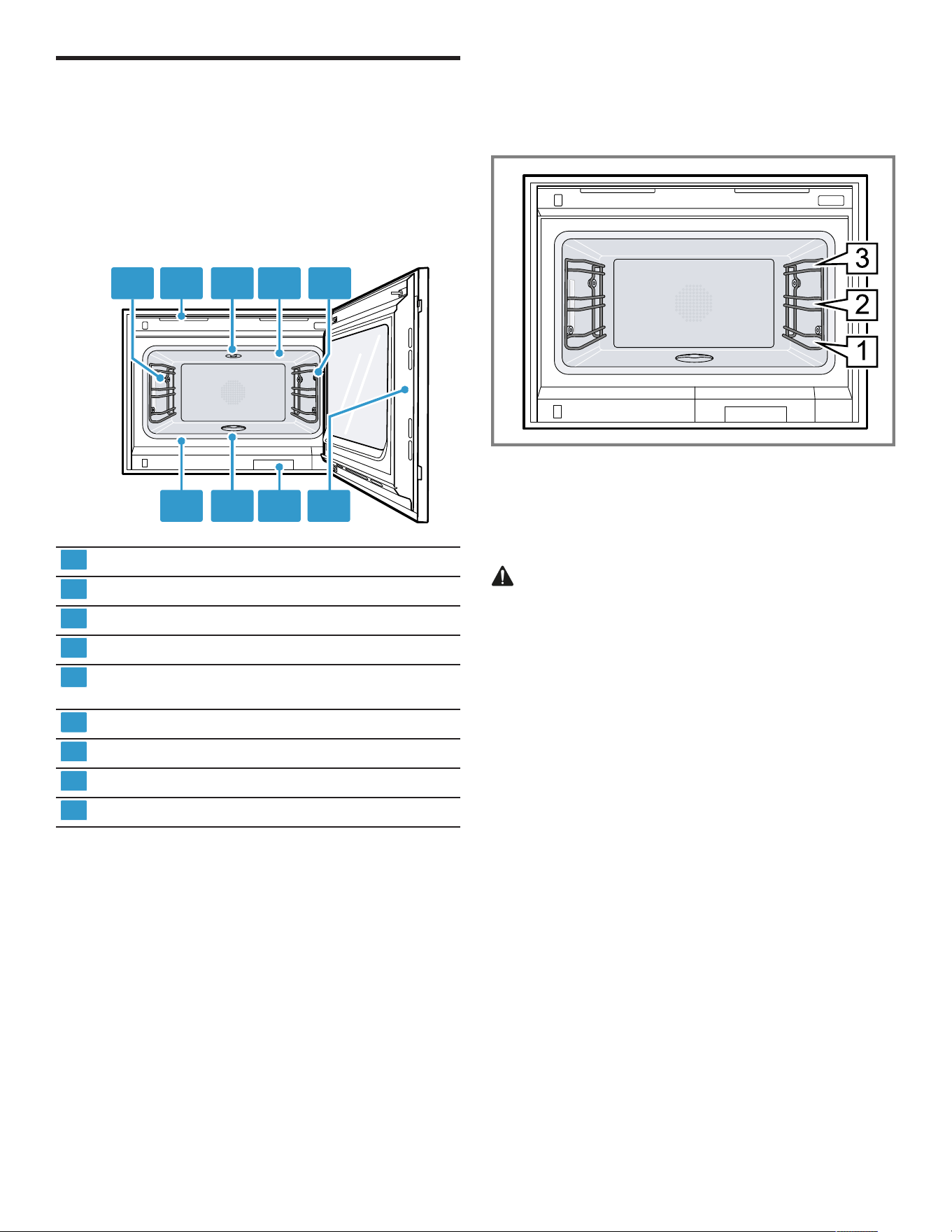
Here you can find an overview of the parts of your
appliance.
1 2 3 4 5
6789
1
Interior lighting
2
Ventilation slots
3
Socket for cleaning cartridge
4
Broiling area
5
Connection socket for core temperature probe
→
Page30
6
Intended area for opening the door
7
Water tank for descaling program
8
Drain filter
9
Door seal
4.2 Oven cavity
The cooking compartment has three shelf levels. Count
the shelf levels from the bottom up.
NOTICE:
A build-up of heat could damage the appliance.
▶ Ensure that the oven cavity floor always remains clear.
▶ Do not place anything directly on the oven cavity floor.
▶ Do not line the oven cavity floor with aluminum foil.
▶ Always place cookware in the perforated cooking
container or on the wire rack.
The accessories may tip.
▶ Do not push the accessories between the shelf
positions.
When steaming, defrosting, dough proving and reheating,
you can use up to three shelf levels at a time. You can
only bake on one level. Use level 2 for baking or, for taller
baking tins, use level 1. For very small baked goods, you
can also use two levels, e.g. level 1 and level 3.
4.3 Interior lighting
When you open the appliance door, the interior lighting
switches on. If the appliance door remains open for longer
than around 3minutes, the interior lighting switches off.
WARNING
The light emitted by LED lights is very dazzling, and can
damage the eyes (risk group 1).
▶ Do not look directly into the switched on LED lights for
longer than 100seconds.
You can also switch on the interior lighting when the
appliance is in low power mode.
After approximately 20minutes, the appliance switches
the interior lighting off.
When you switch on the appliance, the appliance switches
the interior lighting on.
→
"Switching the interior lighting on or off", Page23
In most operating modes, the appliance keeps the interior
lighting switched on.
You can specify whether the appliance will switch the
interior lighting on during operation in the basic settings
→
Page37
. If you select the "Manual" setting in the basic
settings, the appliance does not switch on the interior
lighting automatically but you can switch on the interior
lighting when required. After approximately 20seconds,
the appliance switches the interior lighting off.
4.4 Water tank
Your appliance is equipped with a water tank for the
descaling process, with a maximum capacity of 1.4 gallons
(1.7liters).
When you open the appliance door, you will see the water
tank.
Familiarizing yourself with your appliance en-us
11
4.5 Control elements
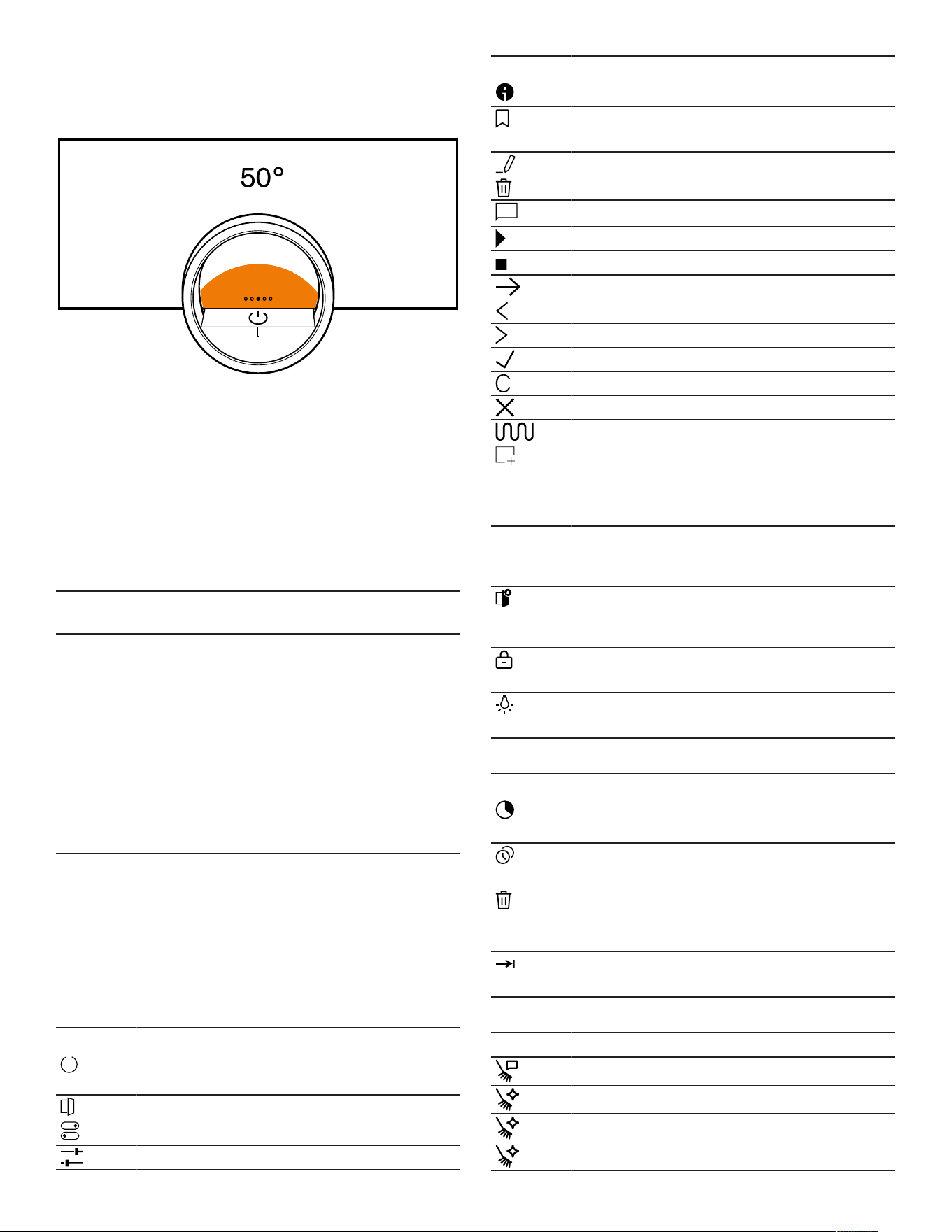
You can use the control panel to configure all functions of
your appliance and to obtain information about the
operating status.
On certain models, specific details may differ from those
pictured.
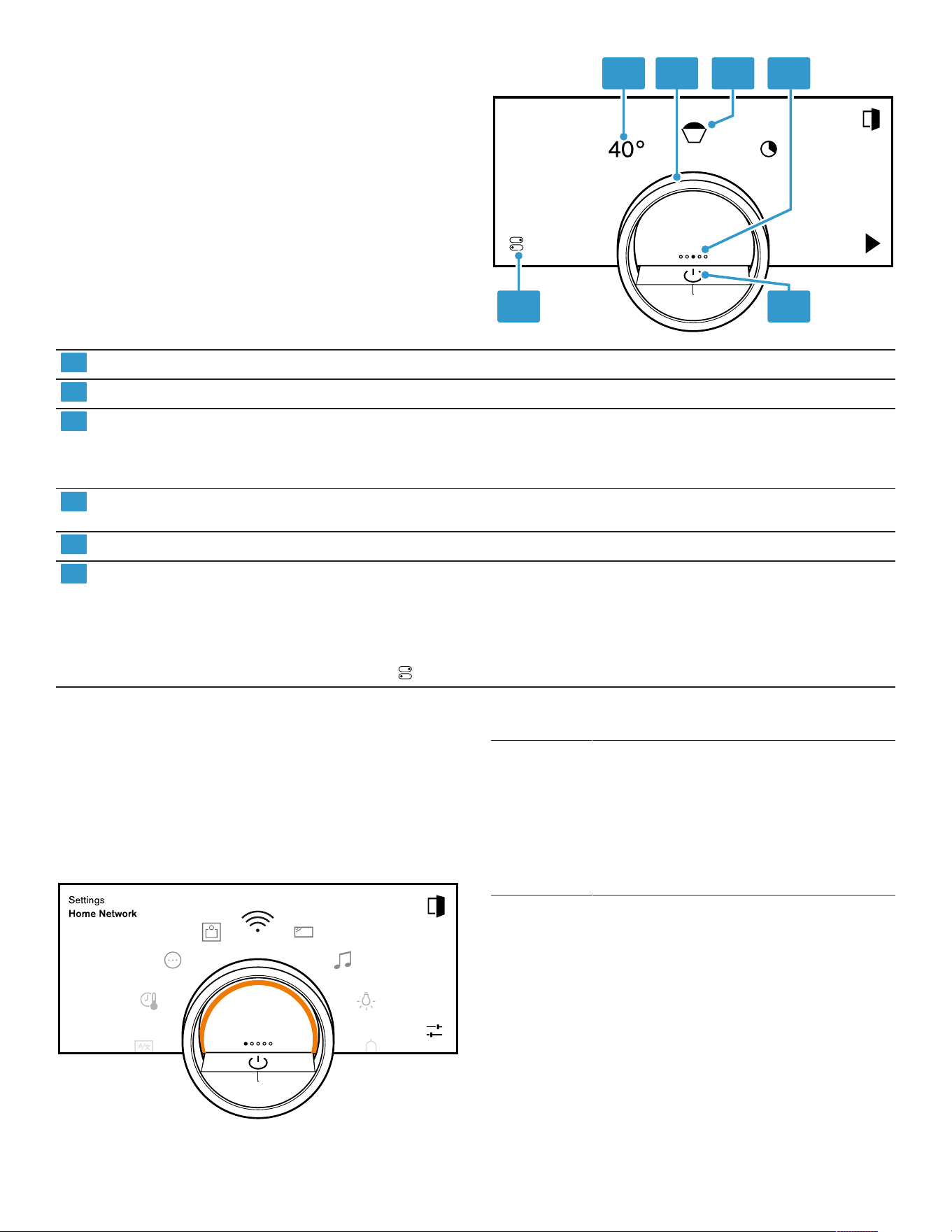
1 2 3 4
56
1
Symbols Show settings, and start or end functions.
2
Control ring Use the control ring to change the selection.
3
12 o'clock position The 12 o'clock position shows the value that is currently selected for a
function, which you can change using the control ring. If required, press on
another function, e.g. on the temperature or cooking time, to position this at
the 12 o'clock position.
4
Position indicator The filled point on the display in the middle of the control ring shows the
current horizontal navigation position between the appliance displays.
5
On/off button Switch the appliance on and off.
6
Status line The status line shows the current status of functions or appliance
components, e.g.:
¡ HomeConnect® connection status
¡ Child lock
¡ Water tank fill level
Press to open the control center →
Page14
.
Control ring
Operation using the control ring is only possible when the
appliance is switched on. You can use the control ring to
navigate through the ring menus or the list menus and
select settings.
When you touch the control ring, the display shows a ring
in orange behind the control ring.
While operating the appliance, you can only use the
control ring if you first select a function on the display.
Turn Navigate in ring menus and list menus:
¡ Turn the control ring to the right to
increase the values.
¡ Turn the control ring to the left to
decrease the values.
¡ Turn the control ring to the right or left
quickly to change the values in larger
increments.
You can set how the control ring behaves in the basic
settings →
Page37
. In the "Standard" setting, press on
the required function on the display and use the control
ring to change the value of the function.
In the "Quick selection" setting, use the control ring, which
is at the 12 o'clock position, to directly change the values
for the function.
Process visualization
For process visualization, the appliance shows a section
of a circle in orange behind the control ring.
The appliance shows the section of a circle in orange
behind the control ring under the following conditions:
¡ A cooking time is set.
en-us Familiarizing yourself with your appliance
12
¡ A core temperature is set for the core temperature
probe.
The section of the circle in orange becomes larger the
longer the timer runs or the closer the core temperature of
the food approaches the set core temperature.
If no cooking time and no core temperature are set, the
section of the circle pulsates in orange.
Display
The display shows the selected settings and setting
options, as well as messages about the appliance's
operating status.
Press Selects or confirms the
procedure or function
Press and hold Displays additional
information
Swipe horizontally Navigates between
appliance displays
For example, in the
"Manual" appliance display,
swipe to the left or right
Note:You can only use the
function if you are in an
appliance display and no
program is running.
Note:If no display language is available in your national
language, select a display language that is available, e.g.
English.
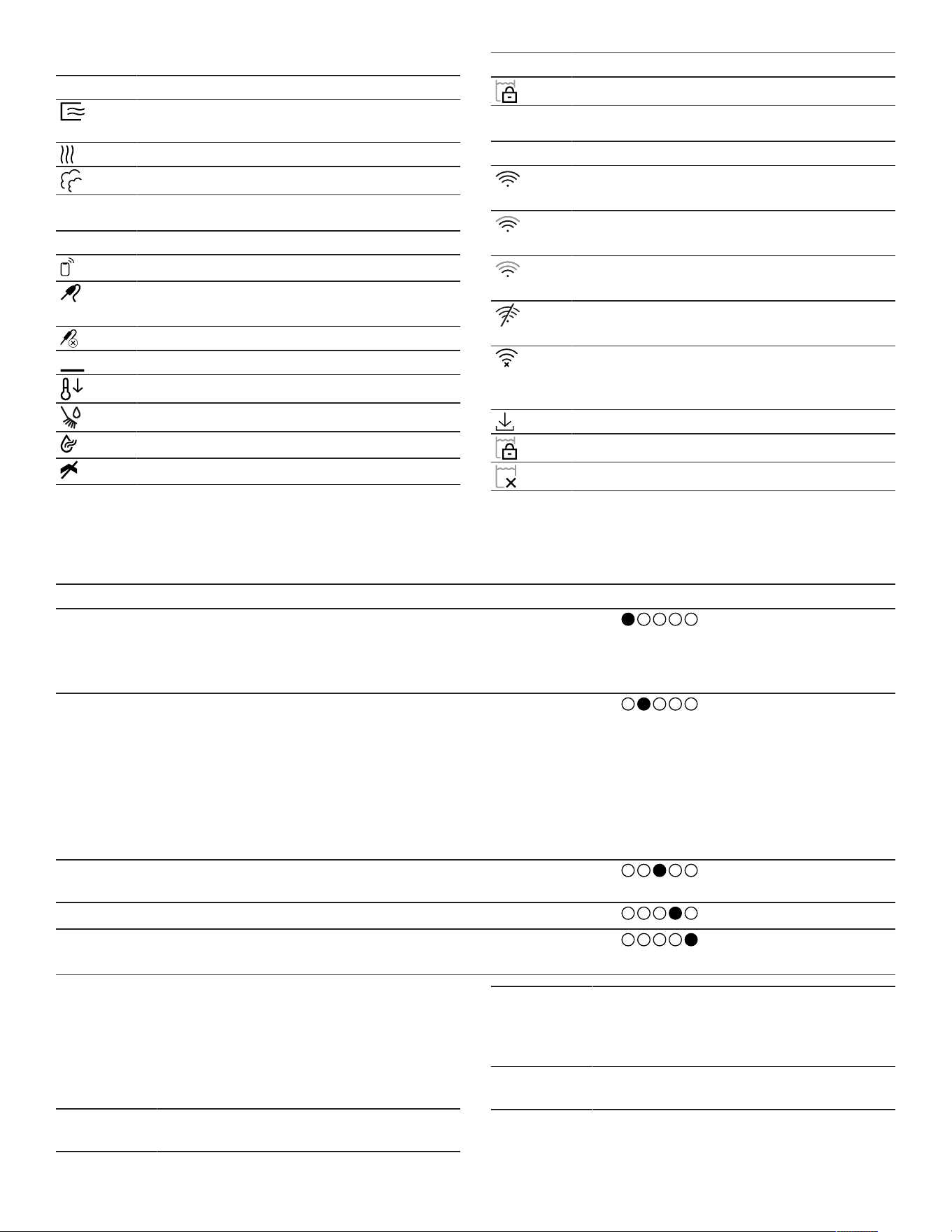
Symbols
Use the symbols to start or stop functions, or to navigate
in the appliance menu.
Operation
Symbol Function
Switch the appliance on or off at the control
ring
Opening the appliance door
Open the control center →
Page23
Edit settings
Symbol Function
Call up additional information →
Page23
Save a favorite
→
"Favorites", Page27
Edit a favorite
Deleting a favorite
Tip for calling up programs →
Page28
Start
Stop
Switch to the next step
Back or accept settings
Next
Confirm
Delete
Cancel
Turning on the broiler
Switching between the display for the
preferred types of heating and the display of
all available types of heating
→
"Basic settings", Page37
Symbols in the control center
Symbol Function
Opening the appliance door
automatically after the
cooking process
Activate or deactivate the
panel lock →
Page27
Switch the interior lighting
on or off →
Page23
Timer functions
Symbol Function
Call up the timer menu
→
Page24
Call up "Sabbath mode"
→
Page26
Deleting the heating cycle
from "Sabbath mode"
→
Page27
Delaying the cooking time
end →
Page25
Cleaning and maintenance
Symbol Function
Cleaning aid →
Page45
Cleaning program →
Page45
Descaling program →
Page48
Rapid drying →
Page48
Familiarizing yourself with your appliance en-us
13
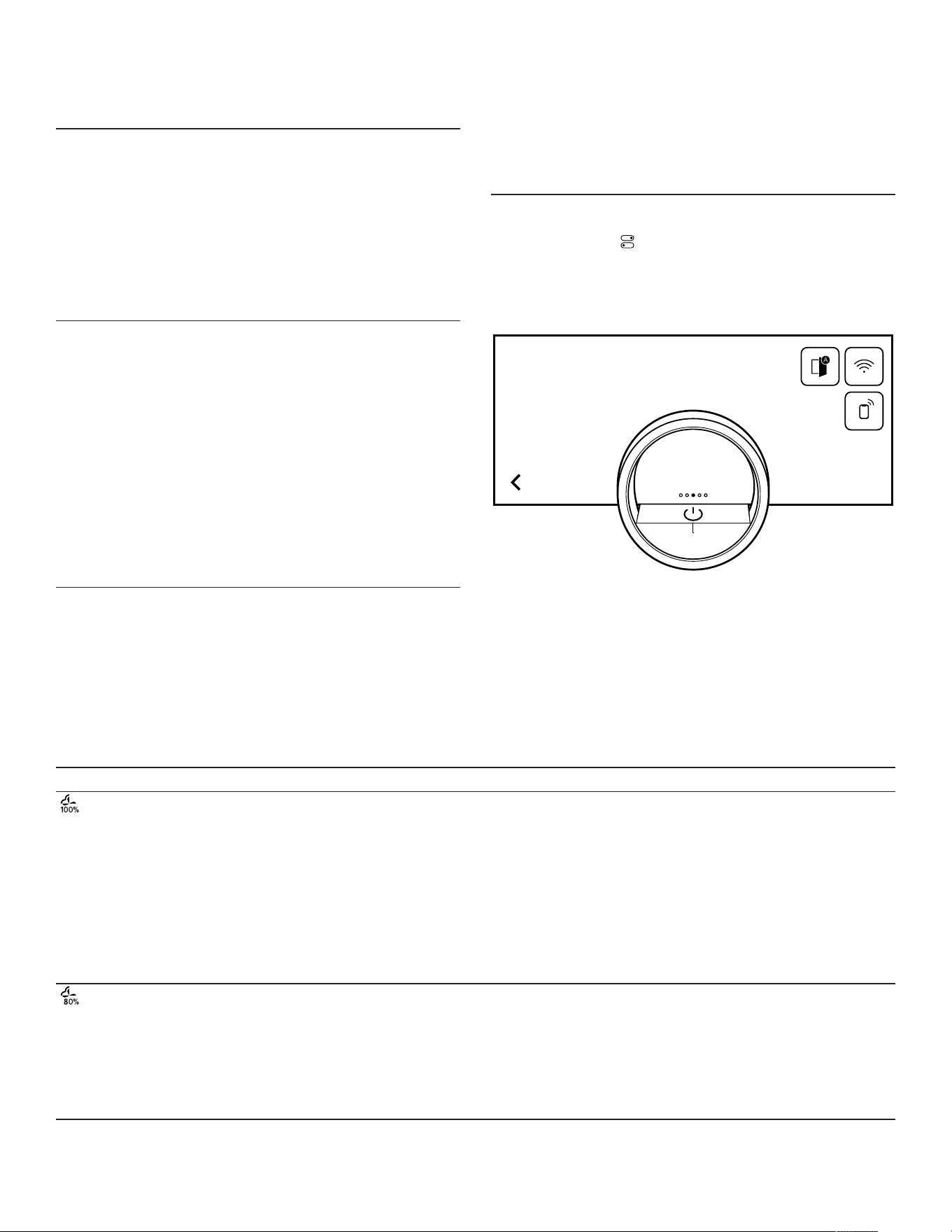
Drying and misting
Symbol Function
Ending automatic cooking compartment
drying
Ending the automatic drying process
Starting or ending misting
Status
Symbol Function
Remote start →
Page35
Core temperature probe is inserted
→
"Core temperature sensor", Page30
Core temperature probe is missing
Status display for the heating process
Display of a cooling process
Pre-rinsing or post-rinsing
Rapid drying →
Page48
has started
Appliance is in demo mode →
Page53
Symbol Function
Water tank is locked
Status in the control center
Symbol Function
Connection to the router:
Strong→
"HomeConnect® ", Page34
Connection to the router:
OK→
"HomeConnect® ", Page34
Connection to the router:
Weak→
"HomeConnect® ", Page34
No connection to the
router.→
"HomeConnect® ", Page34
Appliance connected to the router. No
connection to the Home Connect
server.→
"HomeConnect® ", Page34
Software update status
Water tank is locked
Water tank missing
Appliance displays
You can find an overview of the appliance displays here.
Appliance displays Use Position indicator
Settings ¡ Adjusting the basic settings
→
Page37
¡ Adjusting the HomeConnect®
settings →
Page34
Modes & Service ¡ Starting the cleaning aid
→
Page45
¡ Starting the cleaning program
→
Page45
¡ Starting rapid drying →
Page48
¡ Starting the descaling program
→
Page48
¡ Starting the quick guide →
Page24
Manual operation Setting the temperature, type of
heating and timer function
Favorites
Calling up favorites →
Page27
Programs Calling up automatic programs and
recommended settings →
Page28
Tip:In the basic settings →
Page37
, you can set which
appliance menu your appliance starts in.
Colors
The different colors are used to guide the user in the
relevant setting situations.
Red ¡ Error messages for which you may
need the help of customer service.
Orange ¡ Information that you must observe so
that you can continue to use your
appliance
¡ Symbols for starting and stopping
White ¡ Information
¡ Additional information
en-us Familiarizing yourself with your appliance
14
Appearance
Depending on the situation, the appearance of symbols,
values or the entire display changes.
Zooming in ring menus and
list menus
When you use the control
ring to select a list entry in a
list menu, the display
enlarges this list entry and
displays it as underlined.
When you use the control
ring to select a value in a
ring menu, the display
shows this value enlarged
in the 12 o'clock position.
Zoom at end of cooking or
core temperature probe
A few minutes before the
cooking process ends, the
appliance shows the
remaining cooking time
enlarged in the center of
the display.
As soon as the current core
temperature is just a few
degrees below the set
value, the display shows
the current core
temperature enlarged.
All other displays are
hidden.
Pared-down display If the appliance does not
detect a user in the
immediate vicinity, the
appliance reduces the
amount of information
shown on the display and
only the most important
information remains. This
function is preset. You can
change the setting in the
basic settings →
Page37
.
Control center
The control center provides you with access to functions
that are only visible in the status bar via symbols. You can
activate or deactivate functions in the control center.
On the left-hand side, the display shows the symbols and
texts with information on the current status of the
appliance. On the right-hand side, the display shows the
touch fields of the control center.
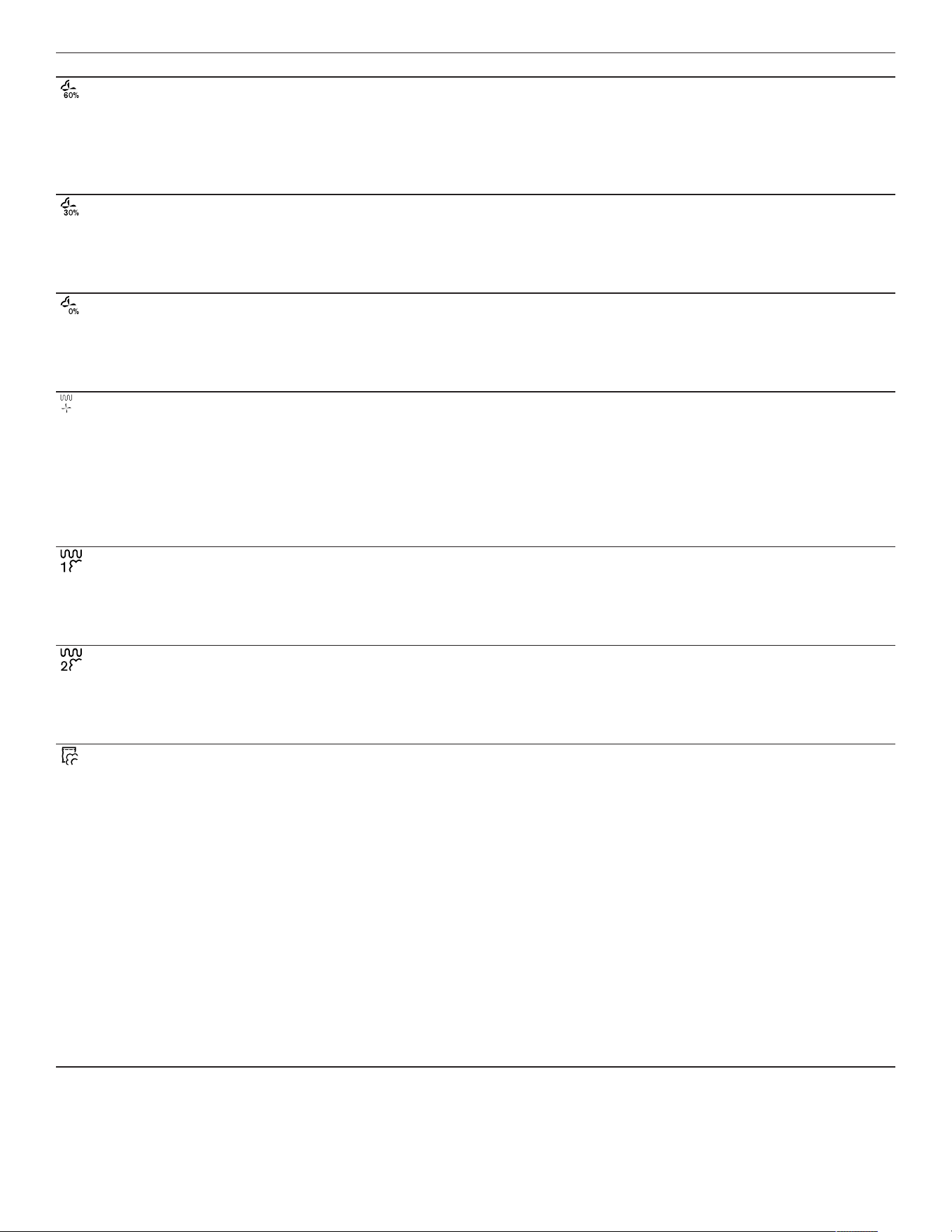
4.6 Types of heating
This is where you will find an overview of the types of heating. You will find recommendations for using the types of
heating.
Symbols Function/type of heating Temperature/setting Use
Hot air + 100 % humidity 86-445°F
(30-230°C)
Steaming at 158-212°F
(70-100°C): The food is fully
enveloped by steam and is gently
cooked without being over-cooked.
For vegetables, fish, seafood.
Combi-operation at 300-445°F
(150-230°C): The combination of
hot air and steam guarantees a
light and crispy result. For puff
pastry, bread rolls.
Hot air + 80 % humidity 86-445°F
(30-230°C)
Combi-operation at 300-445°F
(150-230°C): The combination of
hot air and steam guarantees a
juicy yet crispy result. For poultry
and meals with little inherent
moisture, such as bread, bread
rolls.
Familiarizing yourself with your appliance en-us
15
Symbols Function/type of heating Temperature/setting Use
Hot air + 60 % humidity 86-445°F
(30-230°C)
Combi-operation at 300-445°F
(150-230°C): The combination of
hot air and steam guarantees a
juicy yet crispy result. For poultry
and meals with a high level of
moisture, such as bakes, lasagne.
Hot air + 30 % humidity 86-445°F
(30-230°C)
Combi-operation at 300-445°F
(150-230°C): The inherent
moisture of the meals is retained
and they are prevented from drying
out. For bakes, cakes.
Convection + 0 % humidity 86-445°F
(30-230°C)
Hot air is distributed evenly and
moisture can escape from the
cooking compartment. For moist
foods, such as fruit cake, quiches,
bakes.
Broil + circulated air 86-445°F
(30-230°C)
Extremely intensive heat from
above, which is distributed quickly
and evenly by the fan. Guarantees
that a crust is formed with
simultaneous all-round heating.
For meat, poultry, fish, vegetable
skewers. No preheating is
required.
Broil level 1 + humidity 86-445°F
(30-230°C)
Medium broiler output, combined
with steam, guarantees that a crust
is formed with simultaneous all-
round heating. For bakes and
gratins.
Broil level 2 + humidity 86-445°F
(30-230°C)
High broiler output, combined with
steam, guarantees that a crust is
formed with simultaneous all-round
heating. For stuffed vegetables
and poultry.
Sous-vide cooking 122-204°F
(50-95°C)
Highly precise steaming of
vacuum-packed meals in the
temperature range of 120-200°F
(50-95°C). Nutrients and flavor are
perfectly preserved. For meat, fish,
vegetables, and desserts. The
cooking temperature should only
be 2-4°F (1-2°C) above the target
core temperature. As a result, the
cooking time is relatively long and,
at the same time, it is almost
impossible to over-cook the food.
Meat and vegetables can be briefly
seared after sous-vide cooking; it
is preferable to sear fish before
cooking it. With , you must pay
attention to special food hygiene.
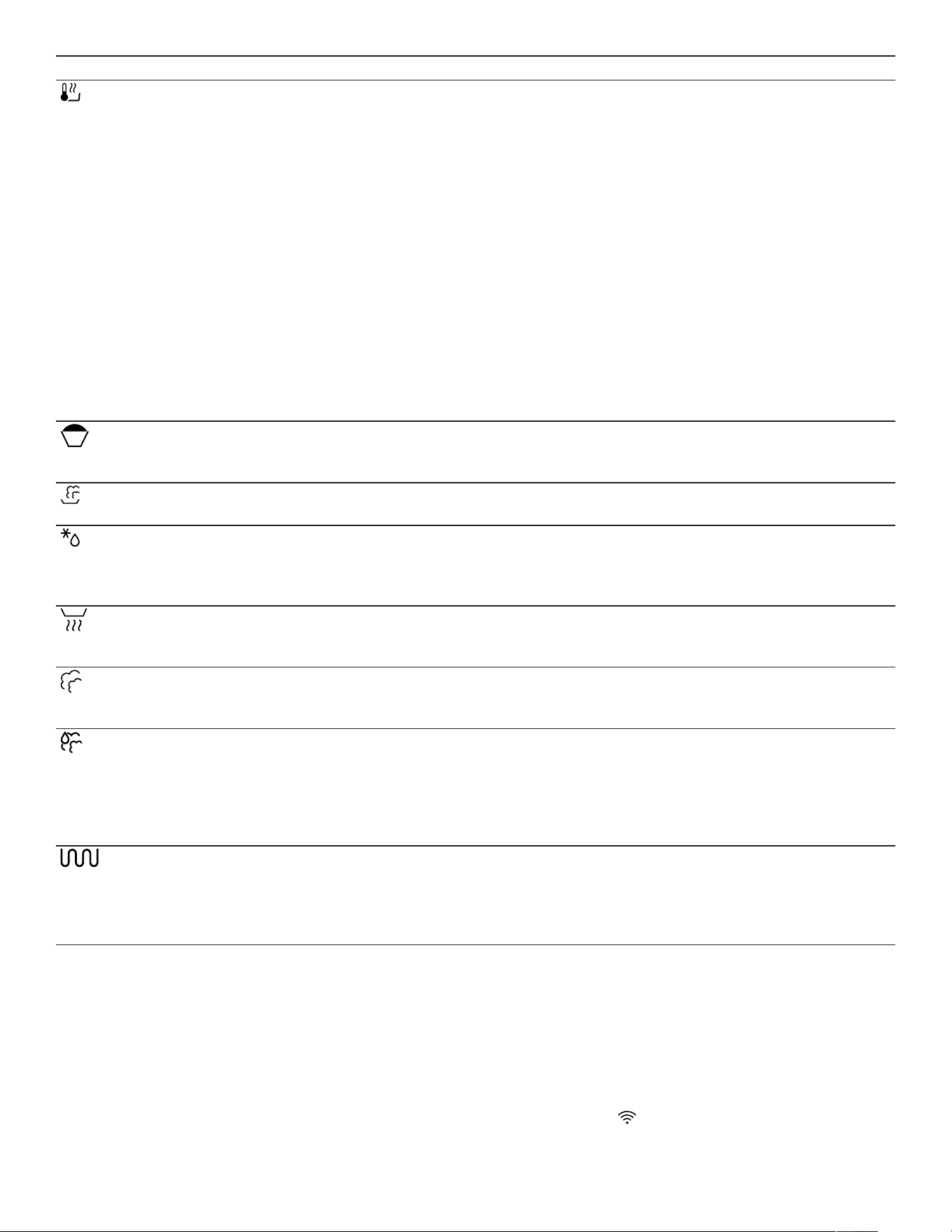
en-us Familiarizing yourself with your appliance
16
Symbols Function/type of heating Temperature/setting Use
Low-temperature cooking 86-194°F
(30-90°C)
With this cooking method, meat is
particularly soft and juicy, flavors
are retained and even
strengthened. Only season
sparingly. Sear the meat briefly on
all sides at a high heat in the frying
pan before cooking it. This gives
the meat a crust, which prevents
the meat juices from escaping and
produces the kind of flavor
characteristic of a roast. The
cooking temperature should only
be 50-60°F (10-15°C) above the
target core temperature. The more
the interior temperature is reduced,
the longer the cooking process
takes. You can do this to control
the cooking time end.
Dough proofing 86-122°F
(30-50°C)
Optimal climate at which the dough
rises quickly without drying out.
For yeast dough and sourdough.
Keeping warm 122-194°F
(50-90°C)
Optimal climate for keeping food
warm without it drying out.
Defrosting 104-140°F
(40-60°C)
Optimal climate for gently
defrosting frozen food without it
drying out. For roasts, fish,
vegetables.
Reheating 140-355°F
(60-180°C)
For gently reheating cooked food.
The steam ensures that the food
does not dry out.
Misting Steam is let into the cooking
compartment in order to increase
the moisture.
Condensation function The steam is condensed by cold
water so that only a little steam
escapes when the door is opened.
The function can be used at
temperatures up to 266°F
(130°C).
Add broiler The broiler is switched on for a few
minutes in order to additionally
brown the food. The function can
be used at temperatures from
300°F (150°C)
4.7 Low power mode display
The appliance has different displays in low power mode.
The displays depend on whether or not the appliance
detects a user.
On the display without user detection, the appliance is
switched off and the display is black. The appliance
switches to low power mode without user detection if,
when the appliance is switched on, you do not implement
any settings for approx. 20minutes or approx. 20minutes
after the appliance has completed a heating process.
If the proximity sensor detects a user or if you touch the
control ring or press on the display, the appliance switches
to low power mode with user detection.
In low power mode with user detection, the display shows
the door opening symbol and the status bar. In the basic
settings →
Page37
, you can select whether the display
also shows the GAGGENAU logo.
If the appliance is connected to the HomeConnect® app,
the display shows .
→
"HomeConnect® ", Page34
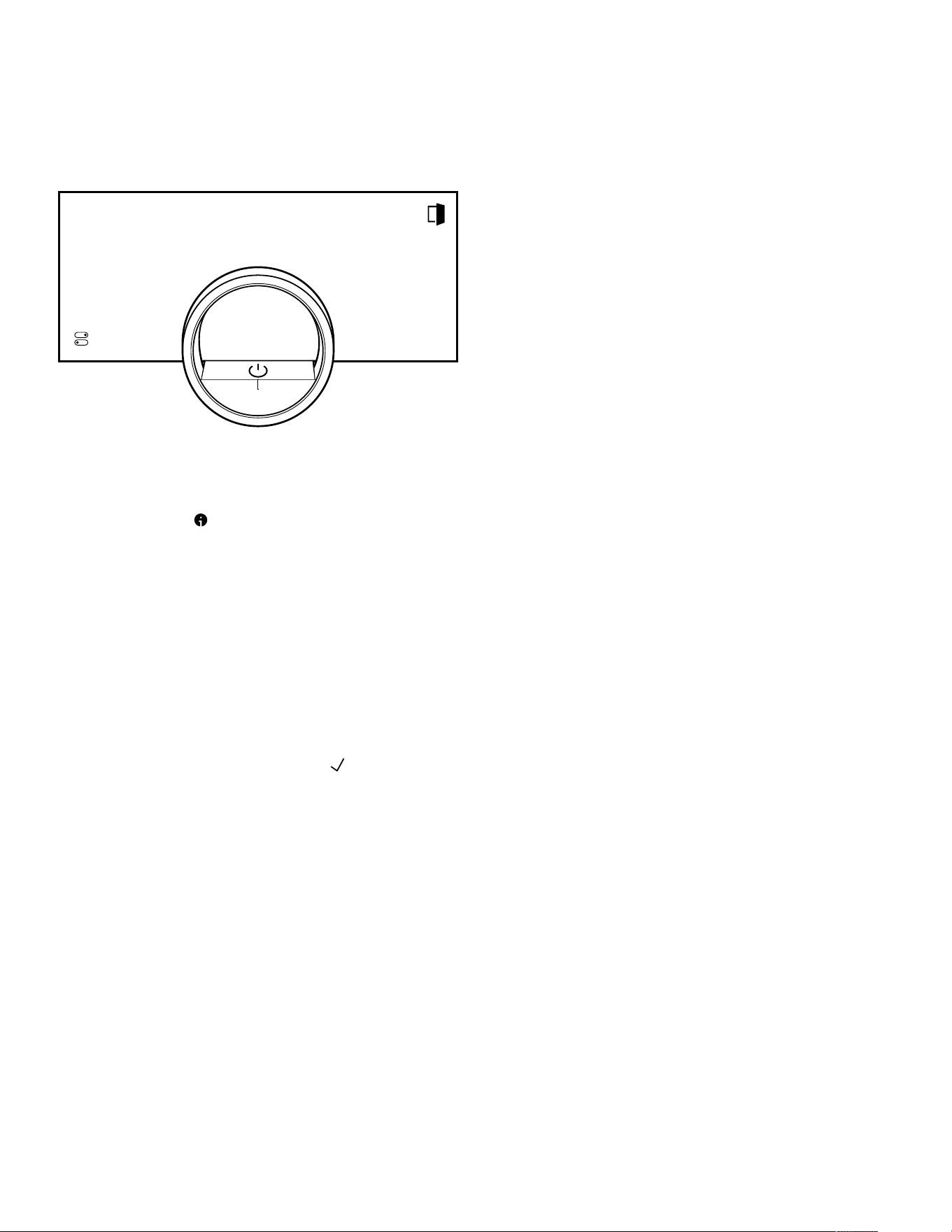
Familiarizing yourself with your appliance en-us
17
The user detection distance depends on the selected
basic settings.
In low power mode with user detection, the display
brightness is reduced. The brightness of the display
depends on the viewing angle.
4.8 Additional information
If required, you can display additional information.
When you press on , the display shows additional
information about the current function.
When you press and hold certain symbols or values, the
display shows additional information about the current
function. Additional information is available for all symbols
that are arranged around the control ring, e.g. information
about the set type of heating or current interior oven
temperature.
In the basic settings →
Page37
, you can activate or
deactivate the "Info-i" function.
The appliance also occasionally displays important
information about safety and the operating status
automatically. These messages disappear automatically
after a few seconds, or when you press to confirm the
message.
For messages about HomeConnect®, the appliance also
displays the HomeConnect® status.
→
"HomeConnect® ", Page34
4.9 Pop-up notifications
Pop-up notifications contain explanations about current
functions.
In the basic settings →
Page37
, you can activate or
deactivate the "Pop-up hints" function.
4.10 Quick guides
Your appliance comes with a quick guide to help you with
various topics.
4.11 Cooling fan
The cooling fan switches on when the appliance is in
operation. The hot air escapes above the door.
After removing your food from the appliance, keep the
door closed until the appliance has cooled down. The
appliance door must not be left half open as this may
damage adjacent kitchen units. The cooling fan continues
running for a certain period of time after the appliance has
stopped heating and then it switches itself off
automatically.
Do not cover the ventilation slots. Otherwise, the
appliance may overheat.
4.12 Drying the oven cavity
After operation with a steam function at temperatures of
between 176 and 212°F (80 and 100°C), the cooling fan
and the fan wheel on the back wall of the oven cavity
continue to run for a while after the appliance is switched
off and then they switch off automatically.
Automatic oven cavity drying does not start with cooking
processes below 176°F (80°C).
After automatic oven cavity drying, the oven cavity may
still contain moisture. The quick-drying function dries the
oven cavity fully. If the oven cavity is very humid, we
recommend you cancel the oven cavity drying process
and run a quick-drying process instead, which takes
approx. 15 minutes.
After certain cooking processes, the oven cavity drying
process may take up to 95minutes. Keep the appliance
door closed while the oven cavity is being dried.
If automatic oven cavity drying does not start or there is
still too much moisture in the oven cavity after oven cavity
drying, start the quick-drying process. →
Page48
4.13 Automatic switch-off
For your protection, the appliance is equipped with an
automatic shut-off function. The appliance switches off the
heating process after 12hours if you do not operate the
appliance or program a cooking time during this time. The
display shows a message.
If you set a cooking time, you can use the appliance for
longer.
If you set a cooking time, you can operate the appliance in
the "Sous-vide cooking" type of heating for a maximum of
72hours.
When programming with the "Sabbath mode" function, the
appliance switches off after up to 74hours.

en-us Familiarizing yourself with your appliance
18
4.14 Wipe protection
Your appliance detects if you would like to clean the
display or navigate between the appliance displays. The
appliance locks the operation via the display and the
control ring for a short time.
Press the display to return to the operation.
4.15 Proximity sensor
Your appliance detects whether you are in front of the
appliance or moving towards it. Your appliance disregards
if you are passing in front of it.
If you do not remain in the detection zone for the
appliance when it is switched on, the appliance reduces
the display to what is essential.
Note:You can set the distance at which the appliance can
detect you in the basic settings. To ensure that the
proximity sensor optimally detects the user, set the
installation height of the appliance's upper edge in the
basic settings →
Page37
.
4.16 Door lock
The "Door lock" function prevents the appliance door from
being opened accidentally. This is particularly useful when
installing the appliance under the countertop.
In the basic settings →
Page37
, you can activate or
deactivate the "Door lock" function. When you activate the
function and press , the display shows a slide control
instead of the symbol.
4.17 Steam removal
During the steam removal process, the appliance
introduces cold water into the oven cavity. The steam
condenses on the oven cavity wall and the oven cavity
cools down.
If you open the appliance door after steam removal, only a
little steam escapes.
Steam removal only works with the following types of
heating and if the temperature in the oven cavity is below
265°F (130°C):
¡ "Hot air + 100 % humidity"
¡ "Hot air + 80 % humidity"
¡ "Hot air + 60 % humidity"
¡ "Sous-vide cooking"
The appliance carries out steam removal automatically at
the end of an automatic program →
Page28
or a timed
program (cooking time →
Page24
).
Accessories en-us
19
Accessories
5 Accessories
Accessories
Only use genuine accessories. These are designed
especially for your appliance.
Note:Accessories may become deformed if they get hot.
Deformation has no effect on function. As the accessory
cools down, it will regain its original shape.
The accessories supplied may differ depending on the
appliance model.
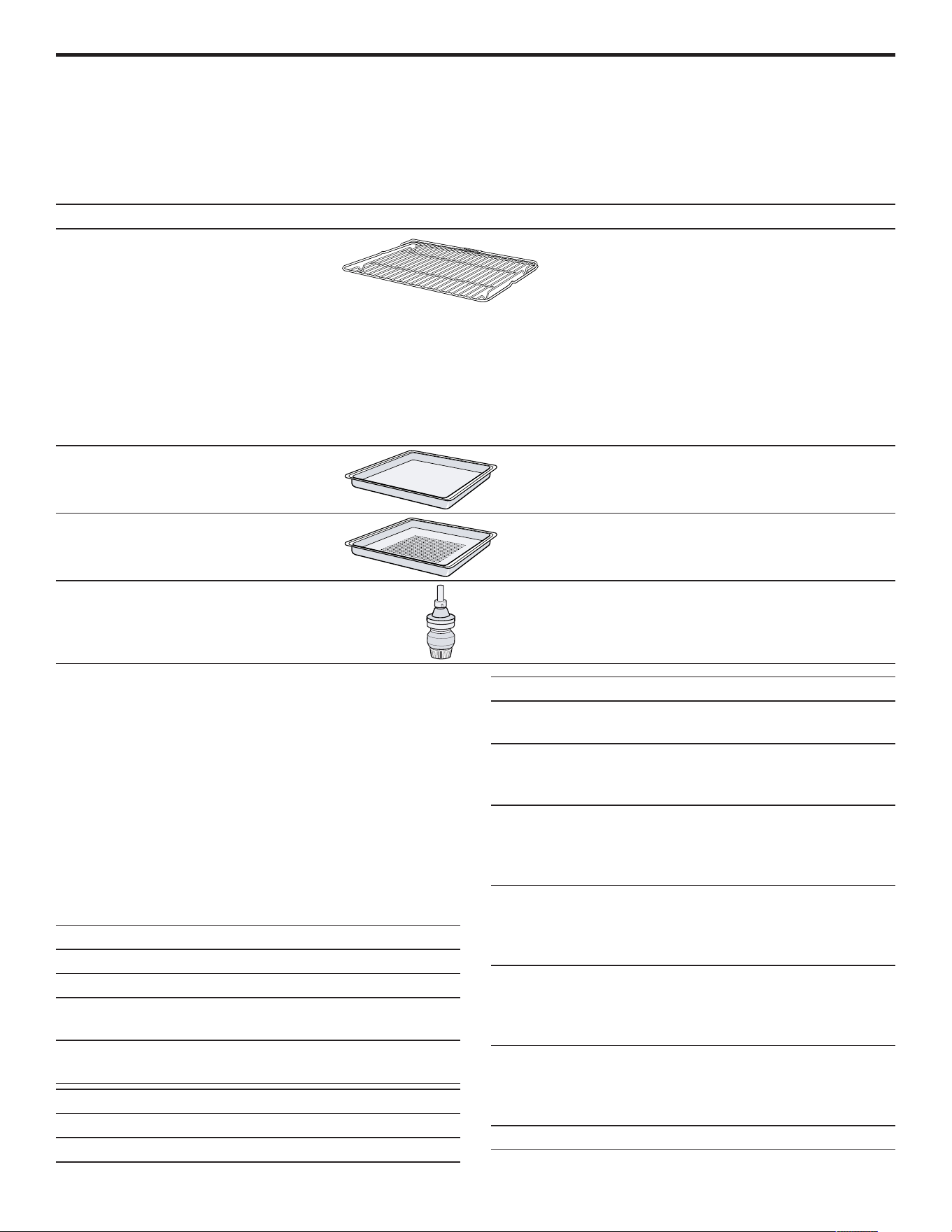
Accessories Use
Wire rack ¡ Cookware
¡ Cake tins
¡ Ovenproof dishes
¡ Roaster
Note:Only use the combi-steam oven
pan support in the combi-steam oven
and not in the oven or microwave. The
pan support may become discolored at
temperatures above 250°C. The pan
support for the combi-steam oven is
labeled with lettering.
Stainless steel cooking container,
unperforated
¡ Cooking rice, cereals, and legumes
¡ Catching dripping liquid during
steaming and defrosting
Stainless steel cooking container,
perforated
¡ Steaming vegetables and fish
¡ Extracting juice from berries
¡ Defrosting
Cleaning cartridge Cleaning the oven cavity with the
cleaning program →
Page45
5.1 Other accessories
You can purchase other accessories from our Customer
Service, specialist retailers or online.
You will find a comprehensive range of products for your
appliance in our brochures and online:
www.gaggenau.com
Accessories are appliance-specific. When purchasing,
always check for compatibility with your appliance model
number (E-Nr).
You can find out which accessories are available for your
appliance in our online shop or from our Customer
Service.
Other accessories Order number
Full extension drawer BA010301
Core temperature sensor BA010050
Stainless steel cooking
container, perforated
BA020370
Stainless steel cooking
container, unperforated
BA020361
Other accessories Order number
Glass tray BA046118
Set with 4 descaling tablets 17002490
Other accessories Order number
Set with 4 cleaning
cartridges
CLS10040
GN adapter, for use with
GN cooking inserts and
roasters
GN010330
Stainless steel cooking
container, GN 1/3,
perforated, 1½" deep, 0.4
gal (40mm, 1.5l)
GN124130
Stainless steel cooking
container, GN 1/3,
unperforated, 1½" deep,
0.4 gal (40mm, 1.5l)
GN114130
Stainless steel cooking
container, GN 2/3,
perforated, 1½" deep, 0.8
gal (40mm, 3l)
GN124230
Stainless steel cooking
container, GN 2/3,
unperforated, 1½" deep,
0.8 gal (40mm, 3l)
GN114230
Cast aluminum roaster GN340230
en-us Before using for the first time
20
Cooking container, non-stick, perforated
NOTICE:
Intense heat damages non-stick cooking containers.
▶ Only heat non-stick cooking containers up to 445°F
(230°C).
▶ Use non-stick cooking containers only in the combi-
steam oven.
¡ Order number
¡ BA020381
Cooking container, non-stick, perforated
NOTICE:
Intense heat damages non-stick cooking containers.
▶ Only heat non-stick cooking containers up to 445°F
(230°C).
▶ Use non-stick cooking containers only in the combi-
steam oven.
¡ Order number
¡ BA020381
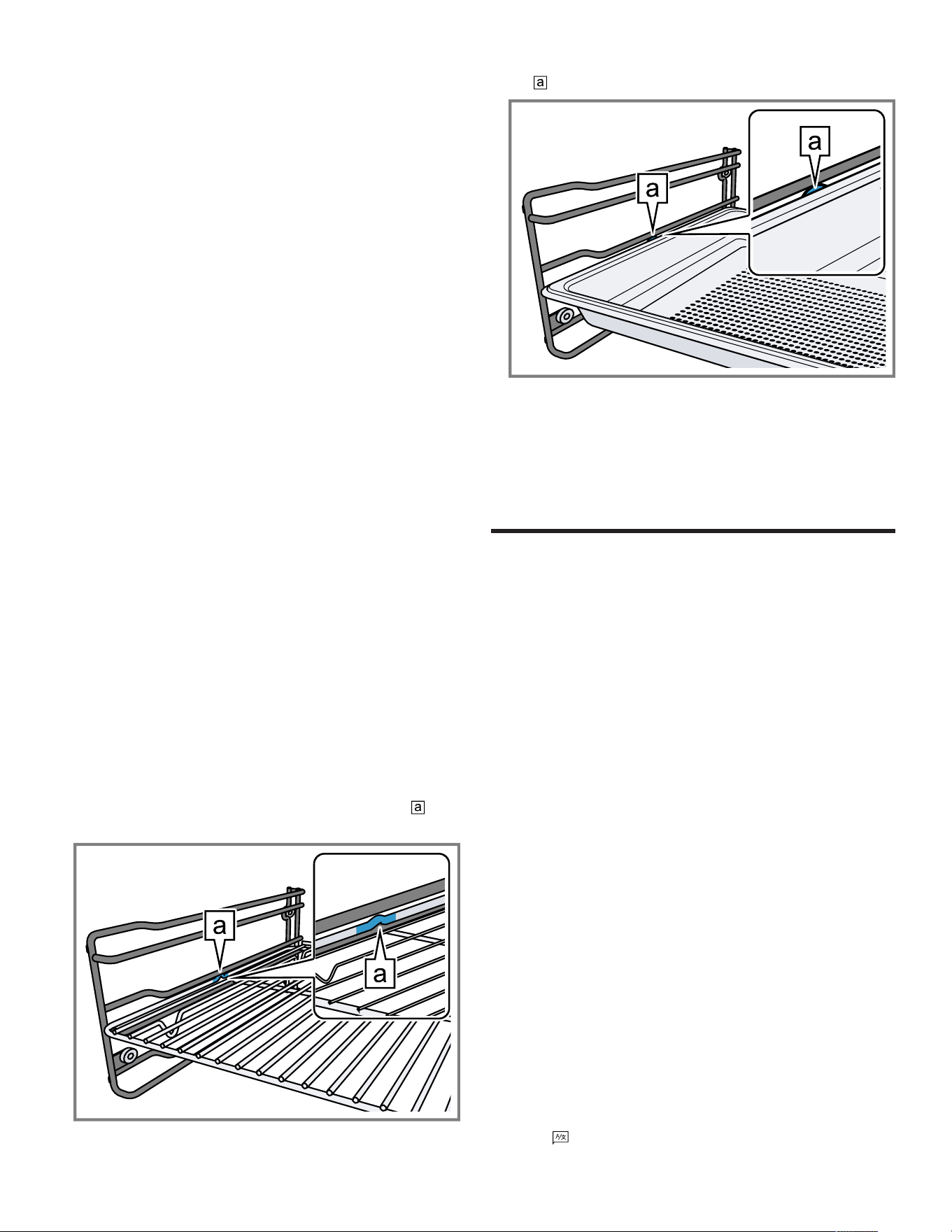
5.2 Sliding accessories into the oven cavity
The wire rack and the perforated cooking container are
equipped with a locking function. For the tilt protection to
work correctly, always insert the wire rack and the
perforated cooking container into the oven cavity the right
way round. The locking function is not available for the
unperforated cooking tray.
NOTICE:
The accessories may tip.
▶ Do not push the accessories between the shelf
positions.
The oven's wire rack is not suitable for the combi-steam
oven. Corrosion may form on the oven's wire rack.
▶ Do not use the oven's wire rack in the combi-steam
oven.
1. When inserting the wire rack, ensure that the lug is
facing upwards.
2. Ensure that the safety bracket on the wire rack is
located at the rear and is facing upwards.
3. When inserting the cooking container, ensure that the
lug is facing upwards.
The locking function prevents the accessories from
tilting when they are pulled out.
Note:To completely pull out the accessories, lift them
slightly.
Remove any accessories that you do not require from the
oven cavity.
Before using for the first time
6 Before using for the first time
Before using for the first time
Apply the initial configuration settings. Clean the appliance
and the accessories.
6.1 Initial use
Implement the settings for initial use before using your
appliance.
First read the information under Safety.
The appliance must be installed and connected.
After connecting to the power supply, the appliance shows
the "Initialization" display.
The appliance shows the "Initialization" display when it is
first switched on after being connected to the power
supply, if the initial start-up has not been completed
successfully or the appliance has been restored to the
factory settings.
Implement the following settings:
¡ Setting the language
¡ Activating HomeConnect®
¡ Set the temperature unit
¡ Set the weight unit
¡ Setting the time format
¡ Set the time
You can retroactively change all of the settings in the
basic settings →
Page37
.
Follow the instructions in the display. The display guides
you through the initial settings.
Setting the language and implementing the
remaining settings
1. Press .
a The display shows the preset language.
Basic Operation en-us
21
2. Use the control ring to select the required display
language.
3. Press to confirm.
4. Press .
5. Implement the remaining settings.
a The appliance starts a rinsing process.
a The display shows the appliance display that is selected
in the basic settings →
Page37
as the start screen.
Cleaning the door pane
Note:To ensure tightness, the door seal is lubricated at
the factory. Residue may remain on the door pane.
▶ Before using for the first time, clean the door pane with
glass cleaner and a window cloth or a microfiber cloth.
Do not use a glass scraper.
Cleaning theaccessories
▶ Before first use, clean the accessories thoroughly using
hot soapy water and a soft cloth.
Heating up the appliance
1. Ensure that there is no leftover packaging in the oven
cavity.
2. Remove any accessories from the oven cavity.
3. To eliminate the new-appliance smell, heat up the
empty appliance with the door closed.
The ideal setting for heating is 390°F (200°C) in the
Hot air+60% humidity type of heating for one hour.
4. Clean the appliance interior.
Basic Operation
7 Basic Operation
Basic Operation
7.1 Switching on the appliance
1.
To exit low power mode →
Page16
, press on the
appliance's control ring or in the HomeConnect®app.
a The display shows a temperature, a symbol for the type
of heating, and a symbol for the timer.
a The appliance switches the interior lighting on.
a lights up orange.
2. Set the temperature, type of heating and cooking time
that you require.
Tip:In the basic settings →
Page37
, you can specify
which appliance display appears on the display after the
appliance is switched on and whether you want the interior
lighting to switch on.
Note:If you do not implement any settings for an
extended period, the display shows the appliance display
that is selected in the basic settings →
Page37
as the
start screen, and then the low power mode display.
7.2 Opening the appliance door
WARNING
The inside of the appliance door becomes very hot during
operation.
▶ During or after operation of the appliance, only touch
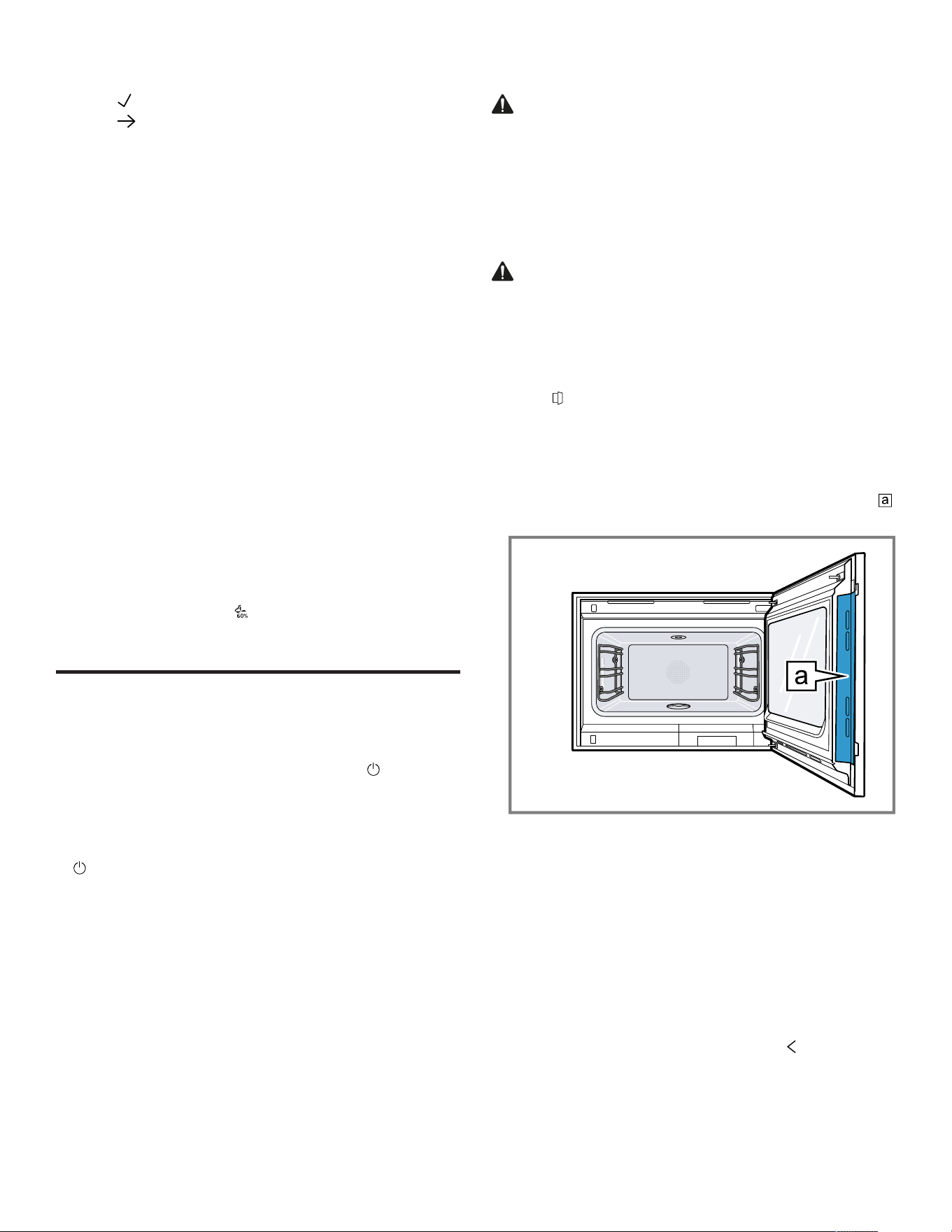
the appliance door at the surface intended for this on
the side.
▶ Always open the appliance door as far as it will go.
▶ Ensure that the appliance door does not swing back.
WARNING
Hot steam may escape when you open the appliance
door. Steam may not be visible, depending on the
temperature.
▶ Open the appliance door carefully.
▶ Keep children away from the appliance.
1. Press .
‒ If the "Door lock" function is activated in the basic
settings →
Page37
, move the slide control to the
other end.
a The appliance door opens automatically.
2. Only touch the appliance door at the designated area
and open it fully.
Tip:In the control center, you can set that the appliance
door opens automatically after the current cooking
process.
7.3 Changing the type of heating
Note:You can change the type of heating during
operation.
1. Press the current symbol for the type of heating.
2. Use the control ring to select the required type of
heating.
3. Press on the selected type of heating or , or wait a few
seconds.
a The display shows the selected type of heating and the
suggested temperature.
a If you have previously used the type of heating, the
display shows the last temperature that you used.

en-us Basic Operation
22
4.
If required, change the temperature. →
Page22
5. If the display shows a notification window, follow the
instructions in the notification window.
6. Press to start the operation.
7.4 Changing the temperature
Note:You can change the temperature during operation.
Requirement:The type of heating is selected.
→
"Changing the type of heating", Page21
1. Press the temperature displayed.
2. Use the control ring to select the desired temperature.
a The display shows the temperatures that are available
for the selected type of heating.
3. To change the previously stored appliance display,
press the required temperature or .
If you do not use the appliance for an extended period,
the display returns to the previously stored appliance
display.
a The display shows the selected temperature.
Note:Once the operation has started, the display shows a
progress bar below the selected temperature if the
changed temperature is more than 20°C higher than the
previous temperature.
7.5 Displaying the current interior oven
temperature
▶ Press and hold the set temperature.
a The display shows the current interior oven
temperature.
Note:During continuous operation after heating up, slight
temperature fluctuations are normal.
7.6 Add broiler
You can brown or gratinate your food using the broiler.
The "Add broiler" function is available for the "Hot air +
100 % humidity", "Hot air + 80 % humidity", "Hot air + 60 %
humidity", "Hot air + 30 % humidity"" and "Convection + 0
% humidity" type of heating.
The "Add broiler" function is not available until a
temperature of 150°C is reached.
Turning on the broiler
NOTICE:
Temperatures above 480°F (250°C) damage the core
temperature probe.
▶ If you use the core temperature probe, never place the
food on the top shelf level.
1. Use the control ring to select the required type of
heating and start the operation.
The "Add broiler" function is not available for all types of
heating.
2. Press .
a lights up.
a The appliance switches the grill off for approx. 3
minutes.
Deactivating the broiler
Requirement: lights up orange.
▶ Press .
a lights up white.
a The broiler is deactivated.
7.7 Steam injection
With the "Misting" function, the appliance brings steam
specifically into the oven cavity. This enables you to bake
food such as bread and bread rolls with sufficient
moisture. It also gives yeast-risen baked goods a smooth,
shiny crust.
The "Misting" function is available for the following types of
heating only:
¡ "Hot air + 30 % humidity"
¡ "Convection + 0 % humidity"
¡ "Broil + circulated air"
Note:For best results, activate the function at the
beginning of the cooking process.
Starting steam injection
▶ Press .
a lights up.
a After a short time, the appliance injects steam into the
oven cavity.
a The appliance ends the misting automatically after
approximately 5minutes.
Canceling steam injection
▶ Press .
7.8 Opening the appliance door
automatically after the cooking process
The "automatic door opening" function at the end of the
cooking process is only valid for the current cooking
process.
WARNING
The appliance and its parts that can be touched become
hot during use.
▶ Young children under 8 years of age must be kept away
from the appliance.
▶ Ensure that young children are not in the vicinity of the
appliance when the appliance door opens automatically.
Note:Use the "automatic door opening" function at the
end of the cooking process only if required to prevent the
food from being overcooked or burning. In order to reduce
the amount of moisture deposited on the unit fronts, open
the appliance door fully after the cooking time has elapsed
if possible.
1. Press .

Basic Operation en-us
23
2. Press .
a The display shows .
a The appliance opens the appliance door automatically
after the current cooking process with a set cooking
time end or set core temperature.
Note:The appliance door also opens when the child lock
→
Page27
is activated or the door lock →
Page18
is
activated.
7.9 Deactivating automatic appliance door
opening
1. Press .
2. Press .
a The display shows .
a Automatic appliance door opening after the cooking
process is deactivated.
7.10 Interrupting and continuing an
operation
1. To interrupt the operation, press .
2. To continue the operation, press .
7.11 Ending automatic oven cavity drying
Note:When you open the appliance door, the appliance
interrupts the automatic oven cavity drying process.
Requirement:In the control center, the display shows .
1. Press .
2. Press .
a The appliance ends the automatic oven cavity drying
process.
Tip:Under "Modes & Service", you can start the "Rapid
drying" function at any time.
7.12 Opening and closing the control center
1. Press to open the control center.
a The appliance shows a description above the functions
currently active.
2. To activate or deactivate a function as required, press
the symbol for the function.
3. Press to close the control center.
a A pop-up message →
Page17
tells you if a function has
been activated.
7.13 Switching the interior lighting on or off
1. Press .
2. Press .
7.14 After each use
Dry the cooking compartment to ensure that no moisture
remains in the appliance and to prevent odor from building
up.
WARNING
Hot steam may escape when you open the appliance
door. Steam may not be visible, depending on the
temperature.
▶ Open the appliance door carefully.
▶ Keep children away from the appliance.
Drying the oven cavity
1. Remove food residues and/or dirt from the oven cavity
as soon as the appliance has cooled down.
Burnt-on food residue and/or dirt will be much harder to
remove later.
2. Once the cooking compartment has cooled down, wipe
it out and dry it thoroughly with a soft cloth.
3. If necessary, wipe dry any condensation on units or
handles.
4. If required, you can use the
→
"Rapid drying", Page48
function to quickly dry the
cooking compartment.
7.15 Switching off the appliance
▶ Press on the control ring.
Depending on the type of heating, you may hear an
automatic rinse cycle running.
a The appliance switches to low power mode.
7.16 Switching on the appliance after
automatic shut-off
Requirement:After prolonged operation, the automatic
shut-off →
Page17
switches off the appliance.
▶ Press on the control ring.
7.17 Displaying information
▶ Press .
a The appliance displays information about the selected
function.
→
"Additional information", Page17
7.18 Displaying appliance information
1. Swipe repeatedly from left to right until the display
shows "Modes & Service".
a The display shows the available functions in a list menu.
2. Use the control ring to select the "Appliance
information" function.
3. Press "Appliance information".
a The display shows the appliance information, e.g. the E-
number and the serial number.

en-us Timer functions
24
4. Press to exit the display.
7.19 Using the quick guides
1. Select the "Modes & Service" appliance display.
2. Use the control ring to select "Quick guide", then
release the control ring.
3. Select the required quick guide and view it.
Timer functions
8 Timer functions
Timer functions
Your appliance has different timer functions, with which
you can control its operation.
8.1 Overview of the timer functions
Use to select the different timer functions.
Timer function Usage
Cooking time
Cooking time end
A cooking time or cooking time end can only be set in
combination with a type of heating.
The "Cooking time" and "Core temperature probe"
functions are not available at the same time.
8.2 Call up the timer menu
▶ Press .
a The display shows "h" and "min" for hours and minutes.
a The display shows the display for the minutes enlarged
in the 12 o'clock position.
8.3 Exiting the timer menu
▶ Press or press on the selected cooking time to switch
to the previously stored appliance display.
a The timer menu is closed.
8.4 Cooking time
When you set the cooking time for your food, the
appliance automatically switches off after this time. The
maximum possible cooking time depends on the set type
of heating.
For most types of heating, you can set a cooking time of
1minute up to 24hours.
For the "Sous-vide cooking" and "Drying" types of heating,
the maximum cooking time is 72hours.
You can change the type of heating and temperature while
the cooking time counts down.
Setting the cooking time
Requirement:No core temperature is set. You cannot
use the "Cooking time" and "Core temperature probe"
functions at the same time.
1. Place the food in the oven cavity.
2. Press .
a The display shows h : min for hours and minutes.
3. Press the required value and use the control ring to
change the value.
‒ Turn the control ring slowly to change the value in
smaller increments.
‒ Turn the control ring quickly to change the value in
greater increments.
The maximum possible cooking time depends on the
type of heating.
a The appliance automatically calculates the time for the
cooking time end.
4. Press or press on the selected cooking time to switch
to the previously stored appliance display.
If you do not use the appliance for an extended period,
the appliance saves the settings and the display returns
to the previously stored appliance display.
a If the appliance is in operation, the appliance shows the
temperature, the operating mode, and the remaining
cooking time.
a 3minutes before the end of the cooking time, the
display zooms in on the remaining cooking time.
a After the cooking time has elapsed, the display shows
00:00 and a signal tone sounds.
5. Turn the control ring or open the appliance door.
The appliance door opens automatically if you have
activated this function.
a The signal tone stops.
Note:If there is no further operation following the signal
tone, the display shows the "Downtime timer" function with
the + symbol. The display shows how much time has
elapsed since the cooking time ended. After approx.
20minutes without any further operation, the appliance
switches to low power mode.
Changing the cooking time
Requirement:You have set a type of heating and a
temperature.
1. Press .
a The display shows h : min for hours and minutes.
2. Press the required value and use to delete the value,
or use the control ring to change the value.
‒ Turn the control ring slowly to change the value in
smaller increments.
‒ Turn the control ring quickly to change the value in
greater increments.
The maximum possible cooking time depends on the
type of heating.
a The appliance automatically calculates the time for the
cooking time end.
3. Press or press on the selected cooking time to switch
to the previously stored appliance display.

Timer functions en-us
25
If you do not use the appliance for an extended period,
the display returns to the previously stored appliance
display.
a The display shows the temperature, the type of heating,
the remaining cooking time, and the cooking time end.
Deleting the cooking time
Tip:In the "Manual" appliance display, double-click on the
cooking time in order to delete the cooking time without
switching to the timer settings.
1. Press .
a The display shows h : min for hours and minutes.
2. Press the required value and use to delete the value.
a The display shows --:--.
3. Press or press on the selected cooking time to switch
to the previously stored appliance display.
If you do not use the appliance for an extended period,
the display returns to the previously stored appliance
display.
a The display does not show a cooking time.
8.5 Cooking time end
As soon as you set a cooking time, the display shows the
cooking time end. You can delay the cooking time end by
a maximum of 12 hours.
For example, if you set a cooking time of 90minutes at 10
a.m., you can delay the end of the cooking time so that the
cooking process ends at 11.30 p.m. at the latest.
For most types of heating, the maximum cooking time is
24hours.
For the "Sous-vide cooking" and "Drying" types of heating,
the maximum cooking time is 72hours.
With the "Sous-vide cooking" type of heating, it is not
possible to postpone the end of the cooking time for
hygiene reasons.
Bear in mind that food which spoils easily should not be
left in the appliance for too long.
Delaying the cooking time end
Requirement:No core temperature is set. You cannot
use the "Cooking time" and "Core temperature probe"
functions at the same time.
1. Place the food in the oven cavity.
2. Press .
a The display shows h : min for hours and minutes.
3.
Set the cooking time. →
Page24
a The appliance automatically calculates the time for the
cooking time end.
4. Press or press on the selected cooking time to switch
to the previously stored appliance display.
If you do not use the appliance for an extended period,
the display returns to the previously stored appliance
display.
5. Press on the cooking time end.
6. Use the control ring to set the required cooking time
end.
7. Press .
a The appliance switches to standby.
a The display shows the temperature, the type of heating,
and the cooking time end.
a If the end of cooking time is one or more days in the
future, the display shows "+1d".
a The appliance starts at the calculated time and
automatically switches off once the cooking time has
elapsed.
a After the cooking time has elapsed, the display shows
00:00 and a signal tone sounds.
8. Turn the control ring or open the appliance door.
The appliance door opens automatically if you have
activated this function.
a The signal tone stops.
Note:If there is no further operation following the signal
tone, the display shows the "Downtime timer" function with
the + symbol. The display shows how much time has
elapsed since the cooking time ended. After approx.
20minutes without any further operation, the appliance
switches to low power mode.
Resetting the delay of the cooking time end
Note:In the "Manual" appliance display, double-click on
the cooking time end in order to reset the delay of the
cooking time end without switching to the timer settings.
Requirement:You have used the control ring to manually
set the cooking time end.
1. Press .
2. To reset the delay of the cooking time, press .
a The appliance calculates the cooking time end based
on the cooking time.
a The display shows the cooking time end.
3. Press or press on the cooking time end to switch to
the previously stored appliance display.
If you do not use the appliance for an extended period,
the display returns to the previously stored appliance
display.
8.6 Count-up cooking timer
If no cooking time is set, the display shows the time that
has elapsed since the start of the process.
In the basic settings, you can switch the "Count-up
cooking timer" function on or off.
Reset Count-up cooking timer
1. Press and hold .
2. Press .
a The "Count-up cooking timer" function is reset.

en-us Sabbath mode
26
Sabbath mode
9 Sabbath mode
Sabbath mode
You can use this function to keep food warm and cook
food for up to 74hours without having to switch the
appliance on or off. You can select the "Convection" type
of heating, temperature, and the required cooking time.
Bear in mind that food which spoils easily should not be
left in the appliance for too long.
You can use the "Sabbath mode" function to program 9
different heating cycles with a total cooking time of
74hours. Set a start time and an end time. The display
shows which settings have been selected.
You can define whether the interior lighting is switched on
or switched off during the selected cooking time.
At the end of the selected cooking time, the appliance
automatically deactivates the function. If required, you can
deactivate the "Sabbath mode" function at any time using
the on/off button .
If the "Sabbath mode" function is active, the display screen
does not change when you approach the appliance.
If the "Sabbath mode" function is active, you cannot
operate the appliance via the display and the control ring.
If the "Sabbath mode" function is active, the "Automatic
door opening at the end of the cooking process" function is
not available.
9.1 Selecting a time period for the Sabbath
mode function
Requirement:The "Sabbath mode" function is set to "On"
in the basic settings →
Page37
.
1. Press the start time.
2. Use the control ring to change the start time.
3. Press .
a The appliance automatically calculates the time for the
end time.
a The display shows the start time and the end time.
4. Press the end time.
5. Use the control ring to change the end time.
a The display shows the start time and the end time.
6. Press to confirm.
a The display shows .
9.2 Opening the Sabbath mode function
Requirement:The "Sabbath mode" function is set to "On"
in the basic settings →
Page37
.
1. Swipe repeatedly from left to right until the display
shows "Modes & Service".
2. Use the control ring to select the "Sabbath mode"
function.
3. Set the switch to the right of the "Sabbath mode" list
entry to "On".
a The display shows the start time and the end time.
9.3 Selecting the settings for the interior
lighting while the Sabbath mode function
is active
Requirement:A start time and an end time are selected.
→
"Selecting a time period for the Sabbath mode function",
Page26
1. Press .
2. To switch the interior lighting on at the lowest lighting
level for the entire cooking time while the "Sabbath
mode" function is active, set the switch for the interior
lighting to "On".
3. To switch the interior lighting off for the entire cooking
time while the "Sabbath mode" function is active, set the
switch for the interior lighting to "Off".
a The display shows the start time and the end time.
4. To program the first heating cycle, if needed, press +.
→
"Setting heating cycles", Page26
9.4 Setting heating cycles
1. Press .
a The display shows the settings that have been selected
for the "Sabbath mode" function.
2. Press "Summary".
3. Press .
4. Press +.
5. Press the temperature to set it.
‒ Use the control ring to select the required
temperature and press .
6. To change the start time, press the start time.
‒ Use the control ring to change the start time and
press .
7. To change the end time, press the end time.
‒ Use the control ring to change the end time and
press .
a The display shows the settings for the first heating
cycle.
8. Press to confirm.
9. To program a further heating cycle, if needed, press +.
‒ Program the settings for the further heating cycle.
You can program up to 9 heating cycles.
a The display shows the settings for the programmed
heating cycles.
a The display shows the start time and the end time for
the "Sabbath mode" function.
10.Touch the control ring.
a The display shows the settings for the programmed
heating cycles.
11.Navigate though the list of programmed heating cycles
in the menu with the control ring.

Child lock en-us
27
9.5 Changing the time period for the Sabbath
mode function
1. Press .
a The display shows the settings that have been selected
for the "Sabbath mode" function.
2. Press "Summary".
3. Press .
4. Press .
a The display shows the start time and the end time.
5. Press the start time and use the control ring to change
the start time.
9.6 Changing settings for the interior lighting
1. Press .
a The display shows the settings that have been selected
for the "Sabbath mode" function.
2. Press "Summary".
3. Press .
4. To switch the interior lighting on at the lowest lighting
level for the entire cooking time while the "Sabbath
mode" function is active, set the switch for the interior
lighting to "On".
5. To switch the interior lighting off for the entire cooking
time while the "Sabbath mode" function is active, set the
switch for the interior lighting to "Off".
9.7 Changing the heating cycle
1. Press .
a The display shows the settings that have been selected
for the "Sabbath mode" function.
2. Press "Summary".
3. Press .
4. Navigate though the list of programmed heating cycles
in the menu with the control ring and press the required
heating cycle.
5. To change the settings for the heating cycle, press the
corresponding settings.
6. To save the changed setting, press .
9.8 Deleting a heating cycle
1. Press .
a The display shows the settings that have been selected
for the "Sabbath mode" function.
2. Press "Summary".
3. Press .
4. Navigate though the list of programmed heating cycles
in the menu with the control ring and select the required
heating cycle.
5. Press .
9.9 Starting the Sabbath mode function
▶ Press to start.
a The "Sabbath mode" function starts.
a At the end of the "Sabbath mode" function, the
appliance switches off.
9.10 Switching off the Sabbath mode
function
1. Swipe repeatedly from left to right until the display
shows "Modes & Service".
2. Use the control ring to select the "Sabbath mode"
function.
3. Set the switch to the right of the "Sabbath mode" list
entry to "Off".
Child lock
10 Child lock
Child lock
Activate the "Child lock" function so that children cannot
accidentally switch the appliance on or change the
settings.
If the child lock is activated, operation via the display and
the control ring is not possible.
If the child lock is activated and the power fails, the child
lock can be deactivated when the power comes back on.
You can activate the child lock even during operation.
10.1 Activating the childproof lock
Requirement:In the basic settings →
Page37
, the
option "On" is set for the "Display child lock" function.
1. Press .
2. Press .
a The display shows .
a The "Child lock" function is activated.
10.2 Deactivating the childproof lock
1. Press and hold for approximately 2seconds.
a The "Child lock" function is deactivated.
2. Set the appliance as normal.
Favorites
11 Favorites
Favorites
In the "Favorites" appliance display, you can save
preferred automatic programs, recommended settings or
combinations of type of heating, temperature, core
temperature or cooking time. The appliance adopts the
selected settings, such as temperature, cooking time,
weight or level of browning for the favorites.
You can individually select the names for the favorites.
You can use the HomeConnect® app to change the
saved settings for the favorite or the order of the favorites.
After starting the favorite, you can change the settings.
→
"Changing a favorite", Page28

en-us Programs
28
11.1 Creating the first favorites
Note:You can save a food as a favorite at the beginning
or end of an automatic program or a setting
recommendation.
Requirement:The settings for the favorites are selected
or a heating process ends.
1. Press .
a The display shows the "Favorites" appliance display.
2. Press .
3. Use the keyboard to enter a name.
4. Press .
11.2 Selecting a favorite
1. Swipe repeatedly from right to left until the display
shows "Favorites".
2. Use the control ring to select the desired favorite.
3. Press the favorite.
11.3 Renaming a favorite
Requirement:The favorite has been selected.
→
"Selecting a favorite", Page28
1. Press .
2. Enter the name for the favorite.
3. Press to confirm.
11.4 Starting a favorite
Requirement:The favorite has been selected.
→
"Selecting a favorite", Page28
▶ Press to start.
11.5 Changing a favorite
Requirements
¡ The favorite has been selected.
→
"Selecting a favorite", Page28
¡ The favorite is stopped.
1. Change the selected settings, e.g. the temperature, the
type of heating, or the cooking time.
The "Add broiler" function is unavailable.
The "Condensation function" function is unavailable.
The "Automatic door opening at end of process"
function is available.
2. Press .
3. Press to start.
a The operation starts with the changed settings.
Note:The appliance does not save the changed settings
in the selected favorite. If you select the favorite again, the
settings match the settings when the favorite was created.
You can use the HomeConnect® app to change the
settings for the favorites.
11.6 Deleting a favorite
Requirement:The favorite has been selected.
→
"Selecting a favorite", Page28
1. Press .
2. Press to confirm.
Programs
12 Programs
Programs
The "Programs" appliance display includes the automatic
programs and recommended settings.
12.1 Automatic programs
You can use the "Automatic programs" function to cook a
wide variety of food. The appliance will choose the optimal
setting for you.
In automatic programs, the appliance defines the optimal
settings after you enter the weight and required cooking
result, for example. The automatic programs are labeled
with a checkmark in the overview list.
Depending on the type of heating, the cooking time only
begins once the appliance has preheated. You can find
information about the accessories or shelf levels in the tip
for the respective program.
Note:In the basic settings →
Page37
, you can filter
automatic programs, e.g. with the following filters
"Vegetarian" or "No meat & poultry".
Information about the settings for the automatic
programs
Observe the instructions for the settings of the automatic
programs.
¡ The cooking result depends on the quality of the food
and the size and type of cookware. For an optimal
cooking result, only use food that is in good condition
and meat that is chilled to refrigerator temperature. For
frozen food, use food straight out of the freezer only.
¡ The food is divided into categories. One or more dishes
are listed for each category. The display shows the last
selected meal.
¡ For some dishes, the appliance asks you to enter, for
example, the weight, the desired level of browning, the
thickness of the food or the cooking level of the food.
¡ For some food, preheat the empty cooking
compartment for an optimal cooking result. Place the
food in the cooking compartment once the preheating is
complete and a message appears in the display.
¡ The appliance displays the selected settings next time
as a suggestion.
¡ For some programs, you need the core temperature
probe. Use the core temperature probe →
Page30
for
these programs.
¡ To achieve good results, the cooking compartment must
not be too hot for the type of food you have selected. If
the cooking compartment is too hot, the display shows a
corresponding notification. Allow the appliance to cool
and then try again.

Programs en-us
29
Selecting an automatic program
1. Swipe repeatedly from right to left until the display
shows "Programs".
a The display shows the first program in the "Vegetables"
category or the last set automatic program.
a The display shows the preselected values for the
program or the last set values.
a The display shows a tip and symbols for the Favorites
→
Page27
category and for the program start.
2. Use the control ring to select the required meal, and
press on the required meal.
a The display shows the name of the selected dish and
the corresponding values.
Changing category
1. Press the symbol for the category.
a The display shows the available categories in the ring
menu.
2. Select the required category with the control ring.
3. Press or press the category in order to confirm the
selection.
a The display shows the first dish in the selected category
and the corresponding values.
Changing the program
1. Press on the name of a dish or navigate through the list
of dishes in the menu with the control ring.
2. Press the required dish.
a The display shows the name of the selected dish and
the corresponding settings.
3. Press the setting.
4. Use the control ring to change the setting and press on
the required setting.
Not all settings can be changed.
You cannot change the type of heating.
5. Press .
a The display shows the name of the selected dish and
the corresponding settings.
6. Press .
a The display shows information about the accessories
and preparation.
7. Follow the information on the display.
Starting the automatic program
▶ Press .
a Once the cooking time has elapsed, a signal tone
sounds.
a The appliance stops heating.
a The appliance carries out steam removal.
Note:If you open the appliance door during an automatic
program, this affects the cooking result. Do not open the
appliance door, or only open it briefly. The appliance
interrupts the automatic program and continues to run
when you close the appliance door.
Extending the cooking time
If you are still not satisfied with the cooking result, you can
increase the cooking time again.
1. Press 00.00.
2. Select the required cooking time.
3. Press to confirm.
Note:If you press during the cooking process, the
appliance carries out steam removal and the cooking
process is ended.
Canceling the automatic program
Note:Once you have started the automatic program, you
can no longer change the settings.
▶ Press .
a The appliance ends the automatic program.
Saving a program as a favorite
You can save a program as a favorite at the start or end of
an automatic program.
1. Press .
a The display shows the "Favorites" appliance display.
2. Press .
3. Use the keyboard to enter a name.
4. Press .
You can only change the settings for a saved favorite
via the HomeConnect® app.
12.2 Recommended settings
With recommended settings, the appliance specifies the
optimal type of heating.
The recommended settings are not labeled with a
checkmark in the overview list.
If a weight is specified in the tip, the recommended
temperature and the cooking time relate to this weight
specification. You can adapt the temperature and cooking
time within the available ranges.
Depending on the type of heating, the cooking time only
begins once the appliance has preheated. You can find
information about the accessories or shelf levels in the tip
for the respective program.
Information on the recommended settings
Observe the information on the recommended settings.
¡ The cooking result depends on the quality of the food
and the size and type of cookware. For an optimal
cooking result, only use food that is in good condition
and meat that is chilled to refrigerator temperature. For
frozen food, use food straight out of the freezer only.
¡ The food is divided into categories. One or more dishes
are listed for each category. The display shows the last
selected meal.
¡ With the recommended settings, the appliance specifies
the type of heating.
¡ You can change the temperature and the cooking time
in the specified areas.

en-us Core temperature sensor
30
¡ For some food, preheat the empty cooking
compartment for an optimal cooking result. Place the
food in the cooking compartment once the preheating is
complete and a message appears in the display.
¡ The appliance displays the selected settings next time
as a suggestion.
¡ To achieve good results, the cooking compartment must
not be too hot for the type of food you have selected. If
the cooking compartment is too hot, the display shows a
corresponding notification. Allow the appliance to cool
and then try again.
Selecting a recommended setting
1. Swipe repeatedly from right to left until the display
shows "Programs".
a The display shows the first program in the "Vegetables"
category or the last set automatic program.
a The display shows the preselected values for the
program or the last set values.
a The display shows a tip and symbols for the Favorites
→
Page27
category and for the program start.
2. Use the control ring to select the required meal, and
press on the required meal.
a The display shows the name of the selected dish and
the corresponding values.
Changing category
1. Press the symbol for the category.
a The display shows the available categories in the ring
menu.
2. Select the required category with the control ring.
3. Press or press the category in order to confirm the
selection.
a The display shows the first dish in the selected category
and the corresponding values.
Changing the program
1. Press on the name of a dish or navigate through the list
of dishes in the menu with the control ring.
2. Press the required dish.
a The display shows the name of the selected dish and
the corresponding settings.
3. Press the setting.
4. Use the control ring to change the setting and press on
the required setting.
Not all settings can be changed.
You cannot change the type of heating.
5. Press .
a The display shows the name of the selected dish and
the corresponding settings.
6. Press .
a The display shows information about the accessories
and preparation.
7. Follow the information on the display.
Starting a recommended setting
▶ Press .
a Once the cooking time has elapsed, a signal tone
sounds.
a The appliance stops heating.
a The appliance carries out steam removal.
Note:If you open the appliance door when a
recommended setting is running, this affects the cooking
result. Do not open the appliance door, or only open it
briefly. The appliance interrupts the recommended setting
and continues to run when you close the appliance door.
Extending the cooking time
If you are still not satisfied with the cooking result, you can
increase the cooking time again.
1. Press 00.00.
2. Select the required cooking time.
3. Press to confirm.
Note:If you press during the cooking process, the
appliance carries out steam removal and the cooking
process is ended.
Changing a recommended setting
Note:Once you have started the recommended setting,
you can change the settings.
1. Press on the recommended setting.
2. Change the desired settings.
Saving a program as a favorite
You can save a program as a favorite at the start or end of
a recommended setting.
Requirements
¡ The temperature and type of heating are set.
¡ The cooking time or core temperature is set.
1. Press .
a The display shows the "Favorites" appliance display.
2. Press .
3. Use the keyboard to enter a name.
4. Press .
You can only change the settings for a saved
"Favorites" via the HomeConnect® app.
Core temperature sensor
13 Core temperature sensor
Core temperature sensor
The core temperature probe makes it possible to cook with
exact precision. The core temperature probe measures
the temperature at 3 measuring points inside the food.
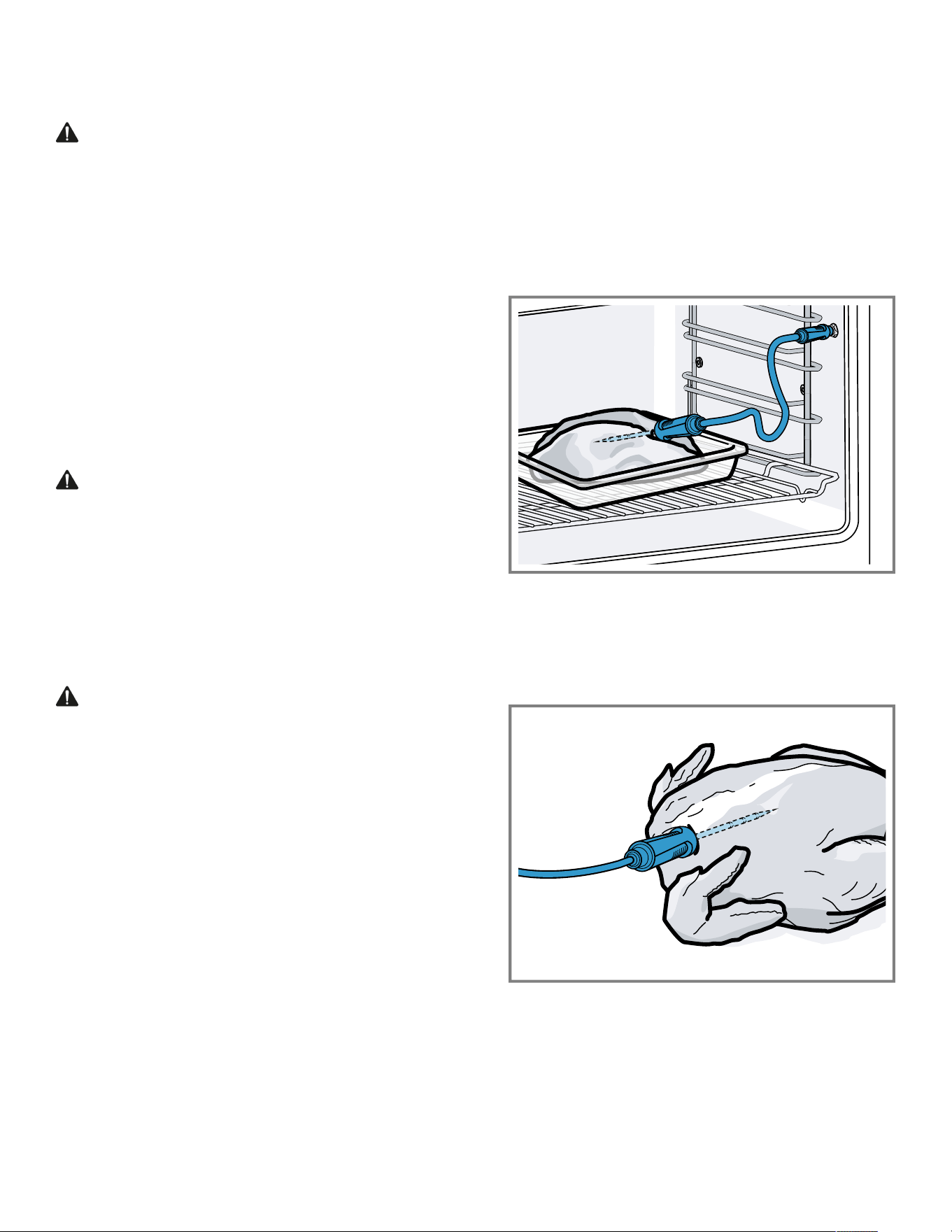
Core temperature sensor en-us
31
When the required core temperature is reached, the
appliance automatically switches off, ensuring that all food
is cooked perfectly.
WARNING
The oven cavity and the core temperature probe become
very hot.
▶ Use oven gloves when inserting and removing the core
temperature probe.
NOTICE:
Temperatures above 480°F (250°C) damage the core
temperature probe.
▶ Only use the core temperature probe in your appliance
at a maximum temperature of 445°F (230°C).
▶ Do not use the core temperature probe with the "Broil"
type of heating.
▶ Before using the "Broil" type of heating, remove the
core temperature probe from the cooking compartment.
▶ When using the core temperature probe with
the"Broil+circulated air" type of heating, set the
temperature to a maximum of 480°F (250°C).
WARNING
An incorrect core temperature probe may damage the
insulation.
▶ Only use the core temperature probe that is suitable for
this appliance.
NOTICE:
Aggressive cleaning agents may damage the core
temperature probe.
▶ Do not clean the core temperature probe in the
dishwasher.
WARNING
The core temperature probe is sharp.
▶ Handle the core temperature probe with care.
Only use the core temperature probe that is suitable for
this appliance. The core temperature probe →
Page19
is
available as a spare part from customer service or the
online shop. You can also use the core temperature probe
of the Gaggenau oven or the microwave oven of the same
appliance series.
If you use the core temperature probe, never place the
food on the top shelf level.
After use, always remove the core temperature probe from
the cooking compartment. Never store the core
temperature probe in the cooking compartment.
After each use, clean the core temperature probe with a
damp cloth.
The measurable range is 60-212°F (15°C to 100°C).
Outside of the measurable range, the display shows
"<60F (15°C)" or ">212F (100°C)" for the current core
temperature.
If you leave food in the cooking compartment for some
time after cooking, the core temperature will continue to
rise somewhat due to the residual heat in the cooking
compartment.
13.1 Inserting the core temperature probe
into the food
1. Insert the core temperature probe fully into the food.
2. Do not insert the core temperature probe into the fat.
3. Ensure that the core temperature probe is not touching
any cookware or any bones.
4. Place the food in the oven cavity.
Inserting the core temperature probe into meat
1. Insert the core temperature probe at the thickest point
on the side as far as it will go into the meat.
2. If there is more than one piece of meat, insert the core
temperature probe into the middle of the thickest piece.
Inserting the core temperature probe into poultry
1. Insert the core temperature probe as far as it will go into
the thickest point in the breast.
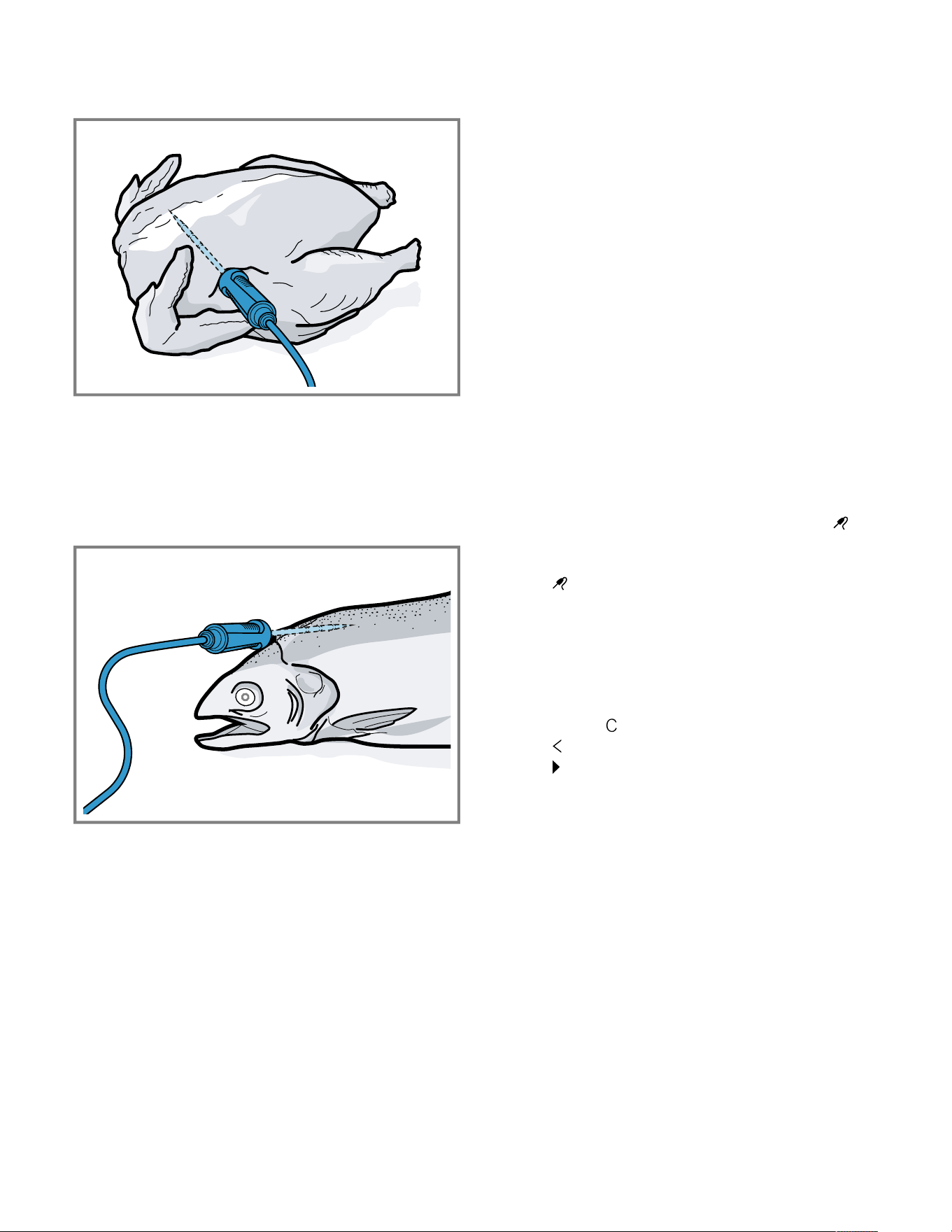
en-us Core temperature sensor
32
2. Depending on its composition, insert the core
temperature probe into the poultry crossways or
lengthways.
3. With poultry, ensure that the tip of the core temperature
probe does not protrude into the cavity in the middle of
the bird.
Inserting the core temperature probe into fish
1. Insert the core temperature probe behind the head as
far as it will go towards the spine.
2. Place the whole fish onto the wire rack and prop it up in
the swimming position using half a potato.
13.2 Turning the food
1. Do not pull out the core temperature probe when turning
the food.
2. Turn the food.
3. Once you have turned the food, check that the core
temperature probe is correctly positioned in the food.
13.3 Setting the core temperature probe
NOTICE:
The heat of the grilling surface may damage the core
temperature probe.
▶ Ensure that the distance between the glass grilling
surface and the core temperature probe and the cable
of the core temperature probe is a few centimeters. In
doing so, ensure that the meat can expand during the
cooking process.
You may damage the cable of the core temperature probe
with the appliance door.
▶ Do not trap the cable of the core temperature probe in
the appliance door.
Requirement:A cooking time end is not set. The cooking
time end and core temperature probe functions are not
available at the same time.
1. Slide the food into the oven cavity with the core
temperature probe inserted.
2. Insert the core temperature probe into the socket in the
oven cavity.
3. Close the appliance door.
a The display shows the current interior oven temperature
and the symbol for the core temperature probe .
4. Select the required type of heating and interior oven
temperature using the control ring.
5. Press .
6. Use the control ring to select the required core
temperature →
Page33
.
‒ Ensure that the set core temperature is higher than
the current core temperature.
You can change the set core temperature at any time.
7. The set core temperature can be cleared and reset as
needed using or the control ring.
8. Press or press the set core temperature.
9. Press .
a The appliance heats up using the set type of heating.
a Once you have set the core temperature, the display
shows the type of heating and the current core
temperature.
a Once you have set the core temperature, the display
shows the type of heating and switches between
displaying the estimated time →
Page34
until the core
temperature is reached and the current and set core
temperature.
a If the current core temperature is 9°F (5°C) below the
set core temperature, the display shows the current and
set core temperature as enlarged.
a Once the core temperature for the food has been
reached, the display shows the required core
temperature alongside the set core temperature and a
signal sounds.
a The appliance ends the cooking process automatically.
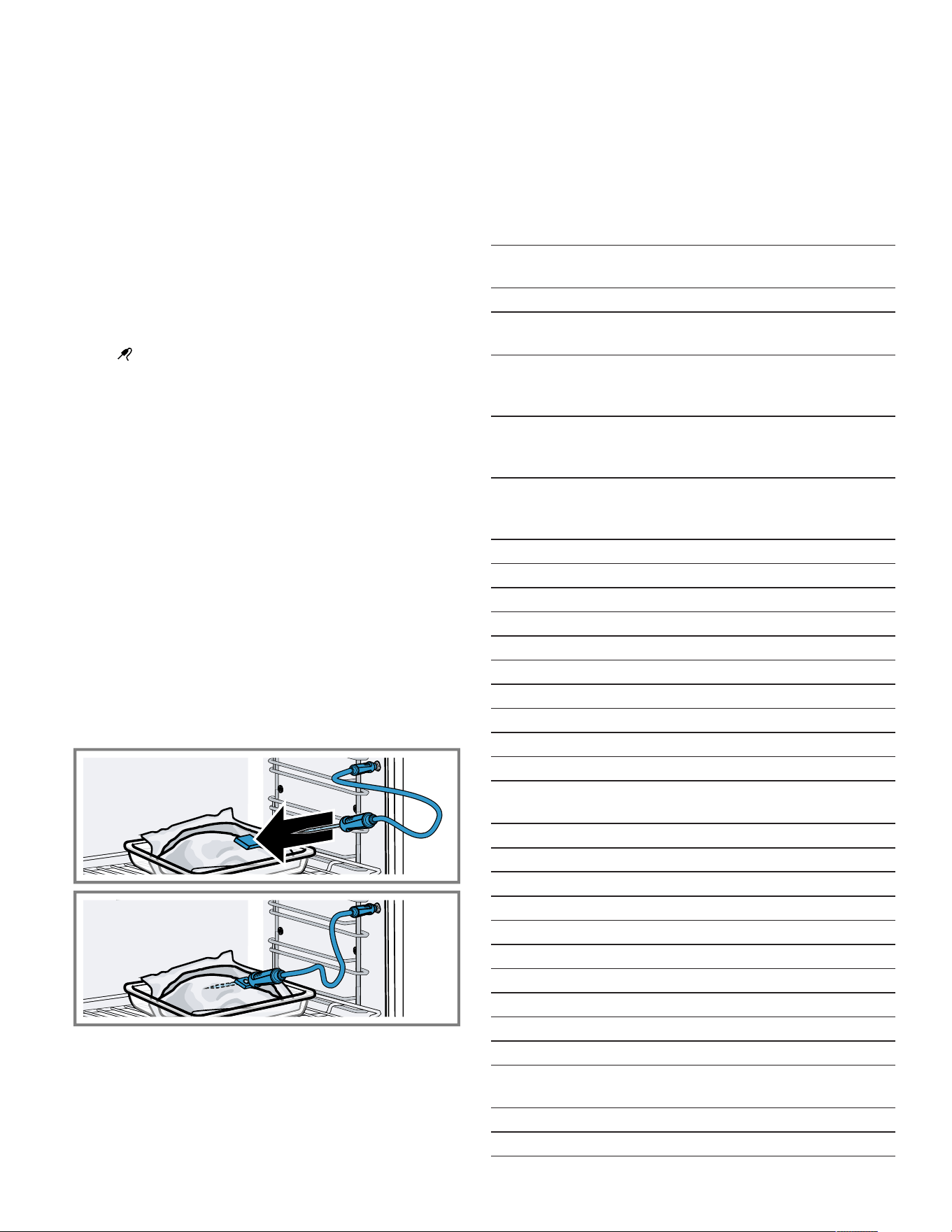
Core temperature sensor en-us
33
Note:If you do not continue to operate the appliance after
the signal tone, the display shows how much time has
elapsed since the food reached the core temperature.
Once you start operating the appliance again, the
appliance clears the time display. After around 20minutes
without any further operation, the appliance switches to
low power mode.
13.4 Deleting the set core temperature
▶ In the "Manual" appliance display, double-click on the
temperature.
a The display shows the current core temperature.
13.5 Changing the set core temperature
1. Press .
2. Change the set core temperature using the control ring.
Once the display shows the set core temperature
enlarged in the 12 o'clock position, you can change the
set core temperature directly using the control ring.
13.6 Using the core temperature probe with
the Sous-vide cooking type of heating
Note:Only use foam tape and cooking bags that are heat-
resistant, suitable for sous-vide cooking, and of high
quality.
1. Position the food in a special heat-resistant sous-vide
cooking bag.
2. Vacuum-seal the food in the cooking bag.
3. Stick the heat-resistant foam tape onto the cooking bag.
4. Insert the core temperature probe through the foam
tape, the cooking bag and the thickest part of the food.
‒ Position the tip of the core temperature probe in the
center of the food.
5. Set the interior temperature at least 2-4°F (1-2°C)
higher than the desired core temperature.
13.7 Core temperature guideline values
The following overview provides you with guideline values
for the core temperature. The guideline values depend on
the quality and composition of the food.
Only use fresh food that has not been frozen. For hygiene
reasons, ensure that critical foods such as fish and game
reach a core temperature of at least 140-160°F
(62-70°C) and poultry and minced meat 180-195°F
(80-90°C).
Food Core temperature
guideline value in °F (°C)
Beef
Sirloin, fillet of beef,
entrecôte, roast beef, rare
116-131 (47-55)
Sirloin, fillet of beef,
entrecôte, roast beef,
medium rare
133-145 (56-63)
Sirloin, fillet of beef,
entrecôte, roast beef,
medium
147-158 (64-70)
Sirloin, fillet of beef,
entrecôte, roast beef, well
done
160-167 (71-75)
Pork
Joint of pork 167-176 (75-80)
Loin of pork, medium rare 149-158 (65-70)
Loin of pork, medium 160-167 (71-75)
Pork loin, well done 169-176 (76-80)
Meatloaf 185 (85)
Fillet of pork, medium rare 149-158 (65-70)
Fillet of pork, medium 160-167 (71-75)
Veal
Joint of veal, well done 167-176 (75-80)
Breast of veal, stuffed, well
done
167-176 (75-80)
Saddle of veal, medium 147-158 (64-70)
Saddle of veal, well done 160-167 (71-75)
Fillet of veal, rare 120-131 (50-55)
Fillet of veal, medium rare 133-145 (56-63)
Fillet of veal, medium 147-158 (64-70)
Fillet of veal, well done 160-167 (71-75)
Game
Saddle of venison 140-158 (60-70)
Leg of venison 158-167 (70-75)
Venison loin steaks 149-158 (65-70)
Saddle of hare, saddle of
rabbit
149-158 (65-70)
Poultry
Chicken 194 (90)

en-us HomeConnect®
34
Food Core temperature
guideline value in °F (°C)
Guinea fowl 176-185 (80-85)
Goose, turkey, duck 185-194 (85-90)
Duck breast, medium rare 131-140 (55-60)
Duck breast, medium 141-158 (61-70)
Duck breast, well done 160-176 (71-80)
Ostrich steak 140-149 (60-65)
Lamb
Leg of lamb, medium 149-156 (65-69)
Leg of lamb, well done 158-176 (70-80)
Saddle of lamb, medium
rare
131-140 (55-60)
Saddle of lamb, medium 141-147 (61-64)
Saddle of lamb, well done 149-167 (65-75)
Mutton
Leg of mutton, medium rare 158-176 (70-75)
Leg of mutton, medium 169-176 (76-80)
Leg of mutton, well done 178-185 (81-85)
Saddle of mutton, medium 158-176 (70-75)
Saddle of mutton, well done 169-176 (76-80)
Fish
Fillet, whole, medium 136-147 (58-64)
Fillet, whole, well done 149-154 (65-68)
Terrine 144-149 (62-65)
Other
Bread 205 (96)
Pâté 162-167 (72-75)
Terrine 158-176 (70-75)
Foie gras 113-140 (45-60)
Reheating food 167 (75)
13.8 Estimated cooking time
After preheating, if the appliance has a temperature
setting above 250°F (120°C) and the core temperature
probe is inserted, the display shows an estimated cooking
time a few minutes into the cooking time. The appliance
continuously updates the estimated cooking time.
The estimated cooking time is only available if you
connect your appliance to the HomeConnect® app.
The longer the cooking process lasts, the more precise the
estimated cooking time becomes. Do not open the
appliance door; this distorts the estimated cooking time.
The display shows the estimated cooking time in manual
operation and in the automatic program.
To display the current core temperature, press on the set
core temperature.
HomeConnect®
14 HomeConnect®
HomeConnect®
This appliance is network-capable. Connecting your
appliance to a mobile device lets you control its functions
via the HomeConnect® app, adjust its basic settings and
monitor its operating status.
The HomeConnect® services are not available in every
country. The availability of the HomeConnect® function
depends on the availability of the HomeConnect®
services in your country. You can find information on this
at: www.home-connect.com.
The HomeConnect® app guides you through the entire
registration process. Follow the instructions, noting the
information in the HomeConnect® app.
Notes
¡ Note the safety information in this instruction manual
and ensure that it is also observed when operating the
appliance using the HomeConnect® app.
¡ Operating the appliance on the appliance itself always
takes priority. It is not possible to operate the appliance
using the HomeConnect® app during this time.
¡ In networked standby mode, the appliance requires a
maximum of 2watts.
14.1 Setting upHomeConnect®
Requirements
¡ The appliance is connected to the power supply and is
switched on.
¡ You have a mobile device with a current version of the
iOS or Android operating system, e.g. a smartphone.
¡ The appliance receives signals from the WLAN home
network (Wi-Fi) at its installation location.
¡ The mobile device and the appliance are within range of
your home network's Wi-Fi signal.
1. Scan the following QR code.
You can install the HomeConnect® app and connect
your appliance via the QR code.
2. Follow the instructions in the HomeConnect® app.
14.2 HomeConnect® settings
You can adjust the home network settings in your
appliance's basic settings.
Which settings the display shows will depend on whether
HomeConnect® has been set up and whether the
appliance is connected to your home network.

HomeConnect® en-us
35
You can switch the network connection on or off as
required. The network information is retained after the
appliance is switched off. After switching on the appliance,
wait for a few seconds until it reconnects to the home
network.
The display uses different symbols to show the connection
strength to the router.
Note:In networked standby mode, the appliance requires
a maximum of 2W.
You can use the HomeConnect® app to access the
appliance's functions. If you select the "Off (monitoring
only)" setting in the basic settings →
Page37
for "Remote
start", the HomeConnect® app only shows the
appliance's operating status and you can configure the
settings.
If you select the "Permanent" setting in the basic settings
→
Page37
for "Remote start", you can start and operate
your appliance at any time without any prior approval on
the appliance.
If you select the "Manual" setting in the basic settings
→
Page37
for "Remote start", the appliance requires
approval in the control center in order to start a function.
In the basic settings →
Page37
, you can use "Network
information" to display the network information.
In the basic settings →
Page37
, you can use "Network
credentials reset" to delete all network access data from
the appliance at any time.
14.3 Starting functions with the
HomeConnect® app via manual
Remote start
You can use the HomeConnect® app to set the appliance
remotely via the "Remote start" function. If you select the
"Manual" setting in the basic settings for "Remote start",
the appliance requires approval in the control center in
order to start a function.
WARNING
Combustible objects that are left in the cooking
compartment may catch fire.
▶ Never store combustible objects in the cooking
compartment.
▶ If smoke is emitted, the appliance must be switched off
or the fuse must be switched off and the door must be
held closed in order to stifle any flames.
Requirements
¡ The appliance is connected to the home network and to
the HomeConnect®app.
¡ To start a function, the "Manual" setting is selected in
the basic settings for "Remote start".
1. To activate manual remote start, press and then .
2. Configure a setting in the HomeConnect®app and
send it to the appliance.
3. Start a function.
Note:If you open the appliance door more than
15minutes after activating remote start or after the
operation ends, the appliance deactivates the manual
remote start.
24hours after activating remote start, the appliance
deactivates the manual remote start.
14.4 Starting functions with the
HomeConnect® app via permanently
activated Remote start
You can use the HomeConnect® app to set and start the
appliance remotely via the "Remote start" function. If you
select the "Permanent" setting in the basic settings for
"Remote start", the appliance does not require approval in
the control center in order to start a function.
WARNING
Combustible objects that are left in the cooking
compartment may catch fire.
▶ Never store combustible objects in the cooking
compartment.
▶ If smoke is emitted, the appliance must be switched off
or the fuse must be switched off and the door must be
held closed in order to stifle any flames.
Requirements
¡ The appliance is connected to the home network and to
the HomeConnect®app.
¡ To start a function, the "Permanent" setting is selected
in the basic settings for "Remote start".
1. Configure a setting in the HomeConnect®app and
send it to the appliance.
2. Start a function.
14.5 Using the HomeConnect® app to
change settings
You can use the HomeConnect® app to set the appliance
remotely.
WARNING
Combustible objects that are left in the cooking
compartment may catch fire.
▶ Never store combustible objects in the cooking
compartment.
▶ If smoke is emitted, the appliance must be switched off
or the fuse must be switched off and the door must be
held closed in order to stifle any flames.
Requirement:The appliance is connected to the home
network and to the HomeConnect®app.
▶ Configure a setting in the HomeConnect®app and
send it to the appliance.
14.6 Switching the Wi-Fi on or off
Requirement:The "On" and "Off" settings are only
available if a connection to the HomeConnect® server
has been established.

en-us HomeConnect®
36
1. Press in the status line.
2. Press in the control center.
3. Press the desired setting.
4. If required, use to switch to "Settings".
14.7 Software update
Your appliance's software can be updated using the
software update function, e.g. for the purposes of
optimization, troubleshooting or security updates.
To do this, you must be a registered
HomeConnect®user, have installed the app on your
mobile device and be connected to the
HomeConnect®server.
As soon as a software update is available, you will be
informed via the HomeConnect®app and will be able to
start the software update via the app. Once the update
has been successfully downloaded, you can start installing
it via the HomeConnect®app if you are in your home
network (Wi-Fi). The HomeConnect®app informs you
once the installation is successful.
Notes
¡
The software update consists of two steps.
– The first step is the download.
– The second step is the installation on your appliance.
¡ You can continue to use your appliance as normal while
updates are downloading. Depending on your personal
settings in the app, software updates can also be set to
download automatically.
¡ Installation takes a few minutes. You cannot use your
appliance during installation.
¡ We recommend that you install security updates as
soon as possible.
14.8 Data Protection
Please read this information on data protection.
The first time your appliance is registered on a home
network connected to the Internet, your appliance
transmits the following types of data to the
HomeConnect® server (initial registration):
¡ Unique appliance identification (consisting of appliance
codes as well as the MAC address of the installed Wi-Fi
communication module).
¡ Security certificate of the Wi-Fi communication module
(to ensure a secure data connection).
¡ The current software and hardware version of your
home appliance.
¡ Status of any previous reset to factory settings.
This initial registration prepares the HomeConnect®
functions for use and is only required when you want to
use the HomeConnect® functions for the first time.
Note:Please note that the HomeConnect® functions can
only be used in conjunction with the HomeConnect® app.
Information on data protection can be retrieved in the
HomeConnect® app.

Basic settings en-us
37
Basic settings
15 Basic settings
Basic settings
You can configure the basic settings for your appliance to meet your needs.
15.1 Overview of the basic settings
Here you can find an overview of the basic settings and factory settings. The basic settings depend on the features of
your appliance.
Symbol Basic setting Setting Selection Use
Wi-Fi Wi-Fi ¡ On
¡ Off
1
Switching the Wi-Fi on
or off
Note:The On and Off
settings are only
available if a
connection to the
HomeConnect®
server has been
established.
All settings are
retained after the
appliance is switched
off.
Switch on the Wi-Fi in
order to allow the
appliance to be
controlled via the app
and to use additional
appliance functions.
HomeConnect®
assistant
¡ During the initial
connection to the
HomeConnect®
app: "Start"
¡ If you have already
connected
successfully to the
HomeConnect®
app: "Connect now"
Setting
upHomeConnect®
→
Page34
Remote start ¡ Off (monitoring only)
¡ Manual
1
¡ Permanent
Note:The settings are
only available if you
have selected the "On"
setting for Wi-Fi.
Setting "Remote start"
→
"Starting functions
with the
HomeConnect® app
via manual Remote
start", Page35
Network information ¡ MAC address
¡ Wi-Fi SSID
¡ IPv4 address
¡ IPv6 address
Note:The settings are
only available if you
have selected the "On"
setting for Wi-Fi.
Displaying "Network
information"
1
Factory setting (may vary according to model)

en-us Basic settings
38
Symbol Basic setting Setting Selection Use
Network credentials
reset
¡ Confirm
The connections are
reset. The appliance
deletes saved network
access data.
Note:The settings are
only available if you
have selected the "On"
setting for Wi-Fi.
Reset the network
access data
Display Brightness ¡ 1
¡ 2
¡ 3
¡ 4
1
¡ 5
¡ 6
Sets the brightness in
increments
Distant view ¡ "On"
1
: The display
shows less content
if you are at a
greater distance.
¡ "Off": The display
always shows the
same content.
Switch the remote
view on or off
Screen in off-mode ¡ GAGGENAU
logo"displayed on
approach"
1
¡ None
Sets the low power
mode display
→
Page16
Ring behavior ¡ "Standard": Press
the required
function and use the
control ring to
change the function
¡ "Quick selection"
1
:
Use the control ring
to change the
function located
above the control
ring
Set the control ring
behavior
Display child lock ¡ "On"
1
: The symbol
for the "Display
child lock" function
is only visible in the
status line if the
"Display child lock"
function is active.
Control ring and
touch fields are
locked.
¡ "Off": The "Display
child lock" function
cannot be activated.
Displays or hides the
symbol for the child
lock →
Page27
in the
control center
1
Factory setting (may vary according to model)

Basic settings en-us
39
Symbol Basic setting Setting Selection Use
Door lock ¡ Activated
¡ Off
1
Activates or
deactivates the door
lock
Note:The door lock
→
Page18
prevents
the appliance door
from being opened
accidentally. This is
particularly useful
when installing the
appliance under the
countertop.
Display alignment ¡ Vertical
1
¡ Horizontal
Aligns the display
horizontally or
vertically depending
on the appliance's
installation position or
the user's body size
Sounds Switch-on/switch-off
sounds
¡ Quiet
¡ Standard
1
¡ Loud
Set the volume of the
on/off tones
Notification sounds ¡ Off
¡ Quiet
¡ Standard
1
¡ Loud
Set the volume of the
notification tones
Note:The notification
tones for the warnings
and error messages
always remain
switched on.
Process sounds Volume
¡ Off
¡ Quiet
¡ Standard
1
¡ Loud
"Repetitions":
¡ 1x
¡ "10 s": The
appliance emits the
signal tone
repeatedly for
10seconds.
¡ "30 s"
1
: The
appliance emits the
signal tone
repeatedly for
30seconds.
¡ "3 min": The
appliance emits the
signal tone
repeatedly for
3minutes.
"Preheating signal":
¡ "On"
1
¡ Off
¡ Set the volume of
the process tones
¡ Sets the desired
maximum duration
of the process tones
¡ Activates or
deactivates the
process tone
following preheating
1
Factory setting (may vary according to model)

en-us Basic settings
40
Symbol Basic setting Setting Selection Use
Visual feedback ¡ On
¡ Off
1
Switches the pulsating
light for program end,
notifications or error
messages on or off
Volume reduction ¡ "On": Lowers the
volume for all tones
to a certain volume
level in a defined
period
¡ "Reduced": Lowers
the volume for all
tones to the "Quiet"
volume level in a
defined period and
switches off the
tones for cleaning
¡ "Off"
1
: Switches off
all tones in a
defined period
Start time
¡ "22h"
1
End time
¡ "7h"
1
Sets the lowering of
the volume
Note:The signal
tones for warnings,
error messages, and
switching on and
switching off always
remain switched on.
Interior lighting Brightness ¡ Dark
¡ Standard
1
¡ Bright
Sets the brightness of
the interior lighting
Activation ¡ Automatic
1
¡ Manual
Switches the interior
lighting on
automatically or
manually
Light interaction ¡ On
1
¡ Off
Sets the light
interaction
Note:If you are
outside of the range
that the appliance
recognizes, the
appliance reduces the
interior lighting to what
is essential.
Notifications Info-i ¡ On
1
¡ Off
Display or hide
additional information
Tip:If you press ,
the display shows
additional information
→
Page17
. If you
switch off the function,
the display does not
show any symbol or
any additional
information.
Pop-up hints ¡ On
1
¡ Off
Displays or hides pop-
up notifications
→
Page17
1
Factory setting (may vary according to model)
Basic settings en-us
41
Symbol Basic setting Setting Selection Use
Language - ¡ German
¡ French
¡ [...]
¡ English
1
Setting the language
Time and units Time ¡ Time
1
¡ "Automatic": Select
the "Automatic"
option if your
appliance is
connected to
HomeConnect®.
Set the time
Time format ¡ 12
¡ 24
1
Set the time format
Temperature unit ¡ °C
1
¡ °F
Set the temperature
unit
Weight unit ¡ "Metric": "g/kg"
¡ "Imperial": "oz/lb"
Set the weight unit
Volume unit ¡ "Metric": "ml/l"
¡ "Imperial": "fl oz"
1
Set the capacity unit
Advanced Display Sabbath mode ¡ On
¡ Off
1
Displays or hides the
"Sabbath mode"
function
Demo mode ¡ On
¡ Off
1
Activates or
deactivates demo
mode
Note:The setting is
only available in the
first 3minutes after
connecting to the
power supply.
Factory settings ¡ Restore Resets the appliance
to the factory settings
Note:The appliance
starts the initialization.
The display asks you
to specify settings that
the appliance installer
has implemented.
Appliance Start screen ¡ Manual
1
¡ Favorites
¡ Programs
Select a display that
shows the display after
switching on
Preselection of types
of heating
Overview of the
available types of
heating →
Page14
.
Selects the preferred
types of heating
1
Factory setting (may vary according to model)

en-us Basic settings
42
Symbol Basic setting Setting Selection Use
¡ On
¡ Off
¡ Selects the
preferred type of
heating that is
available after the
appliance is
switched on
¡ If required, displays
or hides additional
types of heating at a
later point
Note:The sequence
of the types of heating
is defined.
Food preference ¡ Off
1
¡ Vegetarian
¡ No meat & poultry
¡ No fish & seafood
¡ No pork
¡ Kosher
Selects the preferred
food for automatic
programs and
recommended settings
Count-up cooking
timer
¡ On
1
¡ Off
Sets the total cooking
time timer
Note:The running
cooking time is
automatically counted
up if no cooking time
has been stored.
User detection "Behavior":
¡ Automatic
¡ "Below 3' 11'' (1.2
m)"- "Below 4'' (0.1
m)"
"Installation height":
¡ Under 91.4 cm/36"
¡ Between 91.4 cm/
36" and 150 cm/59"
1
¡ Over 150 cm/59''
¡ Sets the distance
from which the
proximity sensor
detects the user
¡ Set the appliance's
installation height
Note:To ensure that
the proximity sensor
optimally detects the
user, store the
installation height of
the appliance's upper
edge.
Introduction to the
appliance
Start Start the appliance
introduction
Note:The appliance
introduction contains a
short description of the
basic functions.
1
Factory setting (may vary according to model)
15.2 Changing the basic settings
1. Swipe repeatedly from left to right until the display
shows Basic settings →
Page37
.
a The display shows the symbols for the available
settings in a ring menu.
2. Use the control ring to select the required basic setting.
3. Press the required basic setting.
a The display shows the settings for the selected basic
setting.
4. Depending on the selected basic setting, use the control
ring to select the setting, or press the required setting.
‒ With a list menu, ensure that the required setting is
above the horizontal line.
Cleaning and maintenance en-us
43
5. Use to activate the setting or use the control ring to
select the setting option, and press the setting.
6. If required, use to switch to the previous view.
Cleaning and maintenance
16 Cleaning and maintenance
Cleaning and maintenance
16.1 Cleaning agents
To avoid damaging the various surfaces on the appliance,
do not use any unsuitable cleaning agents.
WARNING
Moisture intrusion may cause an electric shock.
▶ Do not use any steam cleaners or high-pressure
cleaners to clean the appliance.
WARNING
The appliance and its parts that can be touched become
hot during use.
▶ Caution should be exercised here in order to avoid
touching heating elements.
▶ Young children under 8 years of age must be kept away
from the appliance.
WARNING
Scratched glass in the appliance door may develop into a
crack.
▶ Do not use any harsh or abrasive cleaners or sharp
metal scrapers to clean the glass on the appliance door,
as they may scratch the surface.
NOTICE:
Unsuitable cleaning agents damage the surfaces of the
appliance.
▶ Do not use harsh or abrasive cleaning agents.
▶ Do not use cleaning agents with a high alcohol content.
▶ Do not use hard scouring pads or cleaning sponges.
▶ Do not use any special cleaners for cleaning the
appliance while it is hot.
Salt contained in new sponge cloths may damage
surfaces.
▶ Wash new sponge cloths thoroughly before use.
Using oven cleaner in a hot oven cavity damages the
stainless steel surfaces.
▶ Never use oven cleaner in the oven cavity when it is still
warm.
▶ Remove all food remnants from the oven cavity and the
appliance door before you next heat up the appliance.
WARNING
Loose food resides, fat, and meat juices may catch fire.
▶ Remove coarse dirt from the oven cavity and from the
accessories.
Suitable cleaning agents
Only use cleaning agents that are suitable for the different surfaces on your appliance.
Appliance door
Area Suitable cleaning agents Information
Door pane ¡ Glass cleaner Do not use a glass scraper.
Clean it using a soft cloth or a microfiber cloth.
Door seal ¡ Hot soapy water Clean with a dish cloth.
Do not remove or scrub.
Do not use metal scrapers or glass scrapers for cleaning.
Control ring ¡ Soapy water Clean with a slightly damp soft cloth.
Do not spray with any cleaning agent.

en-us Cleaning and maintenance
44
Cooking compartment
Area Suitable cleaning agents Information
Oven cavity inner
walls
¡ Hot soapy water Clean with a dishcloth and dry with a soft cloth.
Stainless steel cleaner that is suitable for the appliance can be obtained
from customer service or online.
To prevent corrosion, remove any patches of limescale, grease, starch
or albumin (e.g. egg white) from stainless steel surfaces immediately.
Corrosion may form under such stains.
Do not use oven spray or other aggressive oven cleaners or abrasive
materials. Scouring pads, rough sponges and pan cleaners are
unsuitable. These items scratch the surface.
Always dry the oven cavity after cleaning.
→
"Rapid drying", Page48
Note:Undissolved detergent causes patches to appear when heating
up and these patches cannot be removed. Thoroughly remove residues
from detergents or care products using clean water before drying the
oven cavity.
Lightly soiled
cooking
compartment
¡ Cleaning aid
The cleaning aid →
Page45
loosens stubborn dirt in the cooking
compartment and makes cleaning easier.
Very dirty oven
cavity
¡ Cleaning program
The cleaning program →
Page45
removes stubborn dirt.
Broiling area ¡ Glass ceramic cleaner Regularly clean with glass ceramic cleaner.
Do not use a glass scraper.
Glass cover for the
oven cavity light
¡ Hot soapy water Clean with a dish cloth.
Water tank ¡ Hot soapy water
¡ Dishwasher
To remove residual detergent after cleaning, rinse thoroughly with clean
water.
Clean in the dishwasher as necessary.
Remove the lid and place the water tank upside down in the
dishwasher.
Note:Before fitting the lid, ensure that the suction hose is free of
residues.
→
"Check the water tank", Page53
After cleaning, leave the water tank to dry with the lid open.
Shelf supports ¡ Dishwasher
¡ Hot soapy water
Note:If required, remove the shelf supports for cleaning.
→
"Removing the shelf supports", Page50
In the event of heavy soiling, leave to soak and use a brush.
Cooking container,
wire rack
¡ Dishwasher
¡ Hot soapy water
Soak burned-on residues and clean with a brush.
Light-colored patches on stainless steel are caused by protein residues.
Remove these stains with lemon juice. Rinse thoroughly with clean
water.
Core temperature
probe
¡ Hot soapy water Wipe with a damp cloth
Do not clean in the dishwasher.
16.2 Microfiber cloth
The honeycomb microfiber cloth is especially suitable for
cleaning easily damaged surfaces, such as glass, glass
ceramic, stainless steel or aluminum. The microfiber cloth
removes liquid and greasy deposits in one go.
The microfiber cloth can be obtained from customer
service or from the online shop.
16.3 Cleaning the drain filter
1. If necessary, clean the drain filter.
When cooking fish or meat, we recommend cleaning
the appliance after each use.
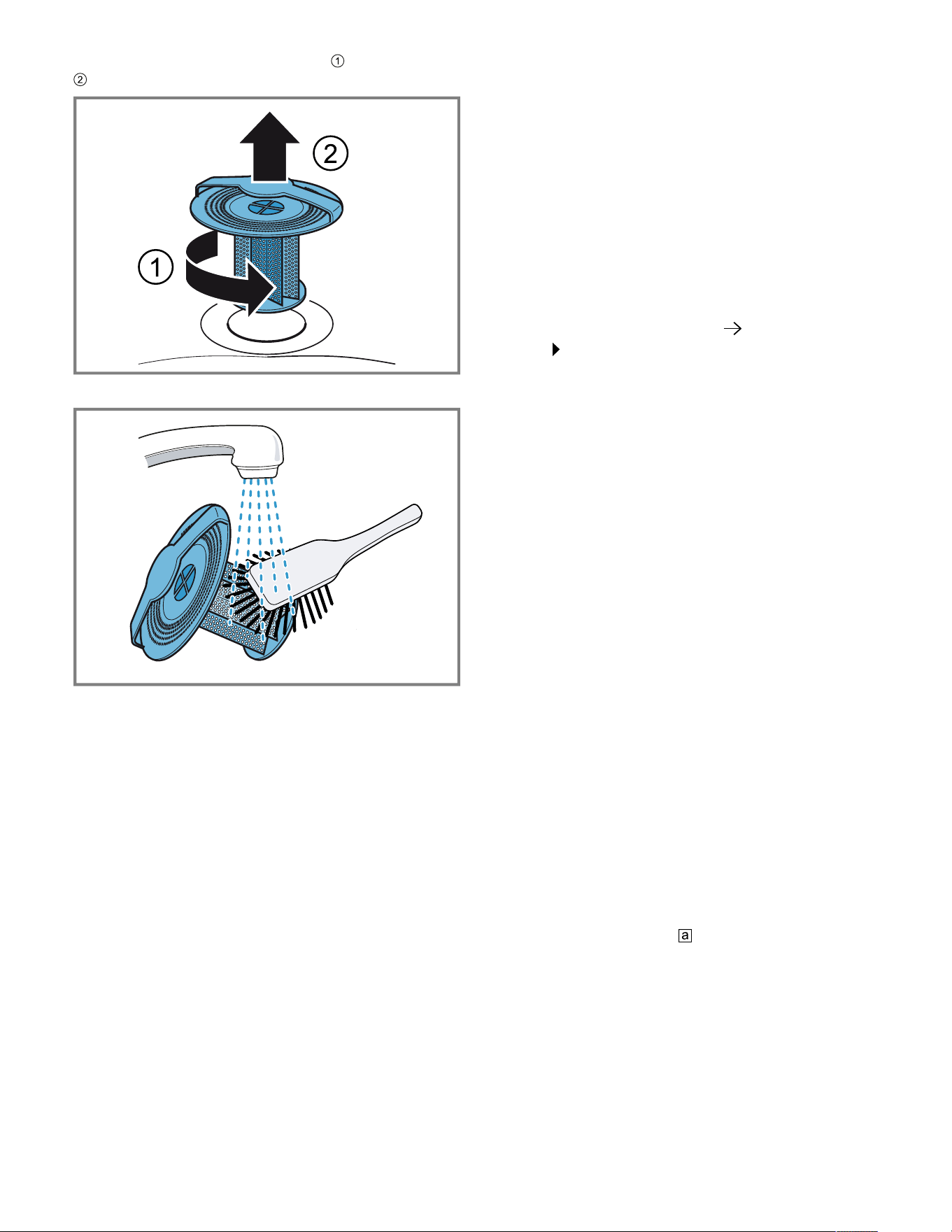
Cleaning and maintenance en-us
45
2. Turn the drain filter counterclockwise and remove it
.
3. Remove any food remnants from the drain filter.
4. Rinse out the drain filter under running water. If it is very
dirty, clean it in the dishwasher.
5. Insert the drain filter and turn it clockwise as far as it will
go.
Note:Never operate the combi-steam oven without the
drain filter in place.
16.4 Cleaning aid
The cleaning aid loosens stubborn dirt in the cooking
compartment and makes cleaning easier.
Always allow the cleaning aid to run to the end. You
cannot cancel the cleaning aid.
Preparing the cleaning aid
Requirement:The interior oven temperature is below
104°F (40°C).
1. Remove all accessories from the oven cavity.
2. Remove the shelf supports from the oven cavity.
→
Page50
3. Clean the accessories and side shelf supports
separately.
4. Wipe out any coarse dirt.
5. Spray and wipe out the oven cavity with a cleaning
agent.
6. Close the appliance door.
Starting the cleaning aid
Note:The appliance will take you through the necessary
steps.
1. Swipe repeatedly from left to right until the display
shows "Modes & Service".
a The display shows the available functions in a list menu.
2. Use the control ring to select the "Cleaning aid"
function.
3. Press the "Cleaning aid" list item.
4. Switch to the next window with .
5. Press to start.
a The cleaning time counts down.
a The light in the oven cavity remains switched off.
a An audible signal will sound once the cleaning time has
elapsed.
a The display shows a message.
6. Wipe out the oven cavity.
7. Clean the drain filter.
8. Wipe the oven cavity dry with a soft cloth.
9. Before using the oven again, remove any detergent
residue from the oven cavity.
10.
Fit the shelf supports. →
Page50
→
"Fitting the shelf
supports", Page50
Note:If the cleaning aid was canceled due to a power cut,
it must be restarted before using the oven again in order to
remove any detergent residues from the appliance.
16.5 Cleaning program
The cleaning program removes stubborn dirt using a
cleaning cartridge, and cleans, rinses and dries the oven
cavity fully automatically. You need special cleaning
cartridges for the cleaning program.
NOTICE:
Heat may melt the cleaning cartridge and damage the
oven cavity.
▶ Use cleaning cartridges for the cleaning program only.
▶ Never place cleaning cartridges in the oven cavity when
it is hot or heat them up in the oven cavity.
Screw a cleaning cartridge in at the top of the
appliance. Ensure that the drain filter remains inserted in
the oven cavity floor while the cleaning program is in
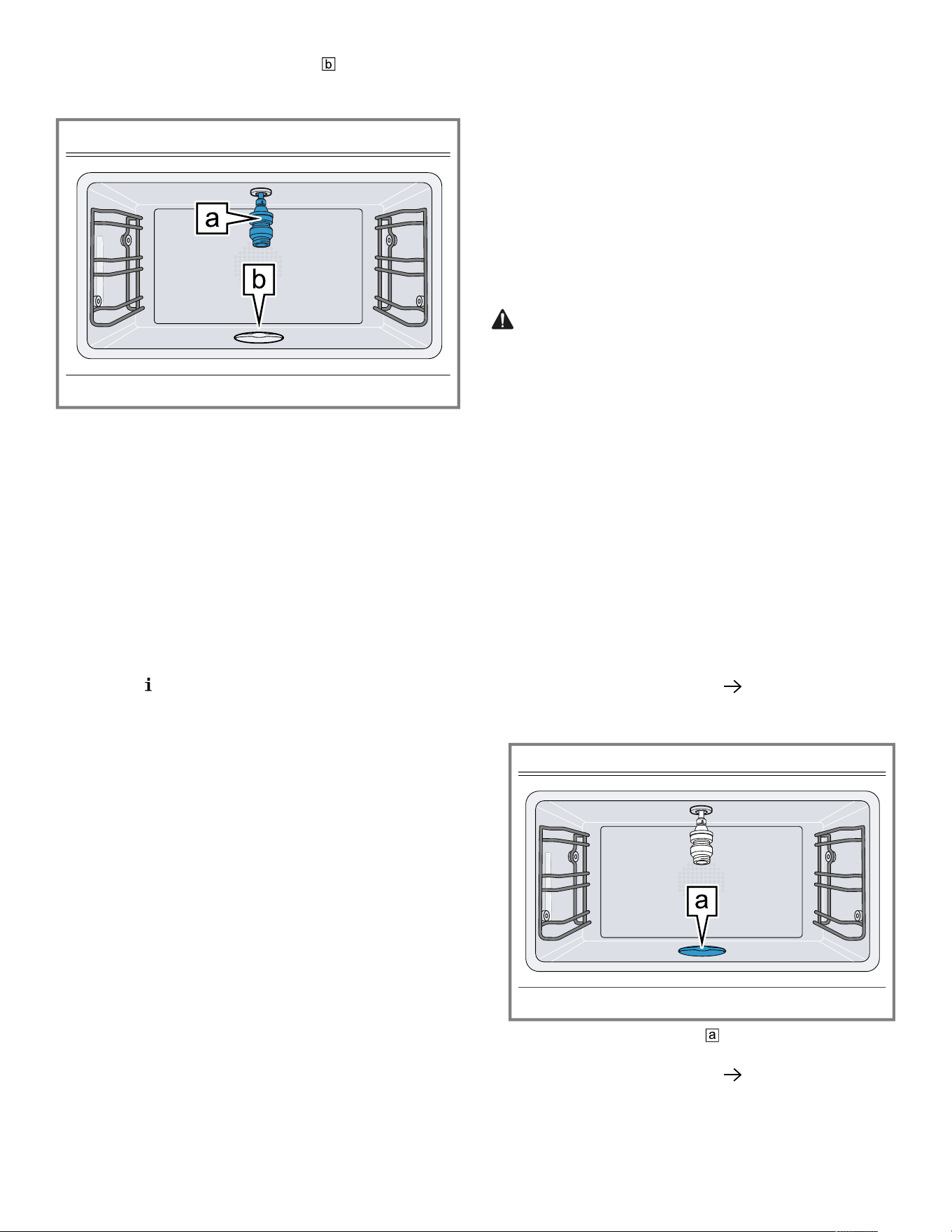
en-us Cleaning and maintenance
46
progress. If you remove the drain filter before the
cleaning program is started, the oven cavity will not be
clean.
The cleaning cartridges can be obtained from customer
service or from the online shop. You can only use the
cleaning cartridges once and cannot refill them. Do not
use any other cleaner.
The cleaning program takes around 4hours from
beginning to end. The cleaning program runs
automatically.
With normal use, we recommend cleaning the appliance
with the cleaning program four times a year. Depending on
the use, more frequent cleaning can be necessary.
If there are a lot of food remnants, do not allow them to
burn on. Start the cleaning program as soon as the
appliance has cooled to 104°F (40°C).
You can check the temperature in the oven cavity by
touching the symbol.
You can only restart the cleaning program once the
appliance has cooled down to below 104°F (40°C).
Remove the cooking containers, core temperature probe
and other accessories from the cooking compartment
before you start the cleaning program.
Note:To clean the wire rack, you can insert the rack at
level 1 and leave it in the oven cavity while the appliance
is being cleaned.
The appliance door is locked during the cleaning program.
Do not try and open the appliance door during the
cleaning program. The water may escape from the oven
cavity.
The noise from the appliance fan is louder when the
cleaning program is in progress. This is normal.
Always allow the cleaning program to run to the end. You
cannot cancel the cleaning program.
Selecting a cleaning program
1. Swipe repeatedly from left to right until the display
shows "Modes & Service".
a The display shows the available functions in a list menu.
2. Use the control ring to select the "Cleaning program"
function.
3. Press the "Cleaning program" list item.
‒ If the cooking compartment temperature is too high,
allow the appliance to cool.
Selecting the switch-off time
Requirement:The display shows the switch-off time at
which the appliance ends the cleaning program.
▶ If required, you can use the control ring to delay the
switch-off time.
a The appliance moves the start time and switch-off time.
The cleaning time remains the same.
Preparing the appliance for the cleaning program
WARNING
The cleaning agent solution may cause chemical burns in
the mouth, throat and eyes or on the skin.
▶ Follow the safety instructions on the packaging of the
cleaning cartridges.
▶ Do not drink the cleaning agent solution.
▶ The cleaning agent solution must not come into contact
with food.
▶ Clean the water tank in the dishwasher before you next
use the appliance.
▶ Dispose of the empty cleaning cartridge in accordance
with regional regulations for household garbage.
NOTICE:
Heat may damage the inserted cartridge.
▶ Never heat up the appliance if you have inserted the
cartridge.
1. Remove all accessories from the oven cavity.
2. Remove coarse dirt.
3. Switch to the next window with .
4. Ensure that the drain filter remains inserted in the oven
cavity floor while the cleaning program is in progress.
If you remove the drain filter before the cleaning
program is started, the oven cavity will not be clean.
5. Switch to the next window with .
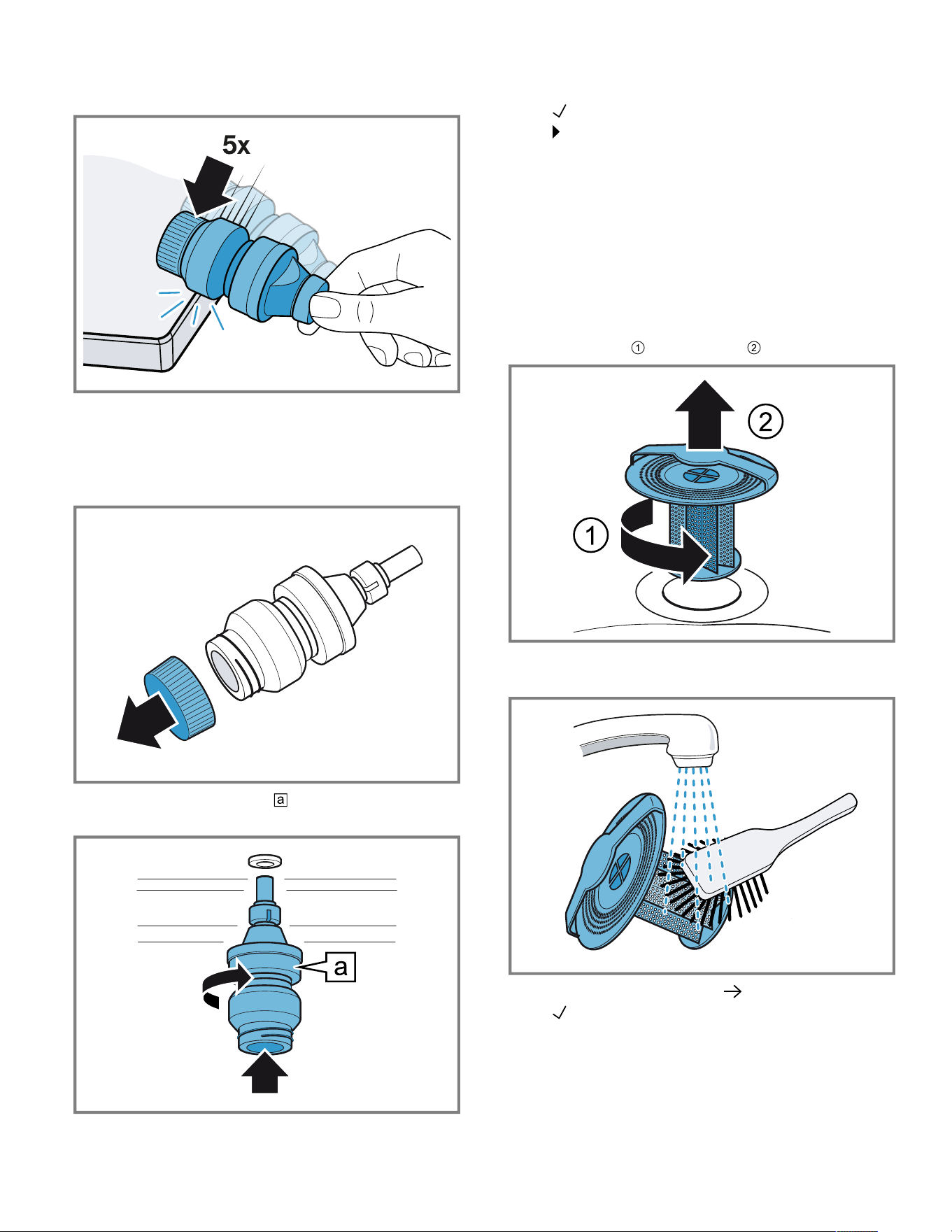
Cleaning and maintenance en-us
47
6. To dissolve the cleaning powder in the cleaning
cartridge, lightly tap the cleaning cartridge against the
countertop.
7. Remove the locking cap from the cleaning cartridge.
‒ Do not remove the wax plug from the opening of the
cleaning cartridge.
‒ Do not use any other cleaning agents.
‒ Do not use damaged cleaning cartridges.
8. Screw the cleaning cartridge fully into the socket in
the top of the oven cavity.
Starting the cleaning program
1. Close the appliance door.
2. Press to confirm.
3. Press to start.
a The switch-off time counts down on the display. The
cleaning duration counts down on the display.
a The light in the oven cavity remains switched off.
a The appliance door is locked.
a After around 3hours 40minutes, the display shows a
message.
Ending the cleaning program
1. Remove the cleaning cartridge.
2. Turn the drain filter in the oven cavity floor
counterclockwise and remove it .
3. Remove any food remnants from the drain filter.
4. Rinse out the drain filter under running water.
5. Switch to the next window with .
6. Press to confirm.
a The cleaning program is complete.
7. Allow the appliance to cool down.
8. Polish the oven cavity and door pane with a soft cloth.
‒ If required, remove the white streaks in the oven
cavity and on the door pane with a damp cloth.

en-us Cleaning and maintenance
48
Depending on the water hardness, the final rinse may
leave white streaks in the oven cavity and on the door
pane after drying.
9. Dispose of the empty cleaning cartridge in accordance
with regional regulations for household garbage.
Causes of an unsatisfactory cleaning result
Note the causes of an unsatisfactory cleaning result.
WARNING
The cleaning agent solution may cause chemical burns in
the mouth, throat and eyes or on the skin.
▶ To prevent the detergent from coming into contact with
your skin or eyes, do not remove the locking cap from a
spent cartridge.
Possible cause Solution
The locking cap is still on
the cleaning cartridge.
After the end of the
cleaning program, remove
the cleaning cartridge from
the appliance. Do not reuse
the cleaning cartridge.
Dispose of the cleaning
cartridge in accordance
with the regional
regulations.
The drain filter is missing. Ensure that the drain filter
remains inserted in the
cooking compartment floor
while the cleaning program
is in progress.
The power has failed. Following a power outage,
the appliance ends the
cleaning program with a
short program.
Dirt is heavily baked on. Run the cleaning program
again to remove stubborn
dirt.
After cleaning, there is still
cleaning agent residue in
the cleaning cartridge.
Repeat the cleaning with a
new cleaning cartridge.
Before cleaning, tap the
cleaning cartridge against
the countertop with more
force.
16.6 Rapid drying
You can use the "Rapid drying" function to dry the cooking
compartment quickly after cleaning or steaming.
NOTICE:
Heat damages the water tank.
▶ Do not dry the water tank in the hot oven cavity.
The "Rapid drying" function lasts 15minutes.
Starting Rapid drying
Requirement:The appliance door is closed.
1. Swipe repeatedly from left to right until the display
shows "Modes & Service".
a The display shows the available functions in a list menu.
2. Use the control ring to select the "Rapid drying"
function.
3. Press "Start".
4. If required, change the end time for the drying time.
‒ Use the control ring to change the end time for the
drying time.
5. Switch to the next window with .
6. Follow the instructions in the notification texts.
7. Press to start.
a The display shows 15minutes for the drying time and
355°F (180°C).
a If you have selected the start of the drying time, the
display shows and the time for the start of the drying
time.
a The display shows the drying time that has elapsed.
a The interior lighting remains switched off.
a A signal sounds after 15minutes.
a The display shows a message.
a The "Rapid drying" has finished.
8. Press to confirm.
a The display shows the start screen.
9. Allow the appliance to cool down.
10.Polish the oven cavity and door pane with a soft cloth.
Ending Rapid drying
▶ Press .
a The appliance ends the "Rapid drying" function.
16.7 Descaling program
You can use the descaling program to descale the
appliance fully automatically. If you descale the appliance
regularly, your appliance will be in a good condition.
NOTICE:
Limescale may damage the appliance.
▶ Descale the appliance regularly.
Using the wrong descaler may damage the appliance.
▶ Only use the specified descaling tablets.
The descaling tablet may damage the oven cavity.
▶ Use the descaling tablet for the descaling program only.
▶ Place the descaling tablet into the water tank.
▶ Never place the descaling tablet in the oven cavity or
heat it up in the oven cavity.
The descaling tablets can be obtained from customer
service, our website or the online shop.
Depending on the water hardness and the use of the
appliance, a message on the display reminds you to run
the descaling program.
To prevent damage to the appliance, the appliance locks
the operating modes that use steam after this message
has been repeated. You can still use the appliance to run
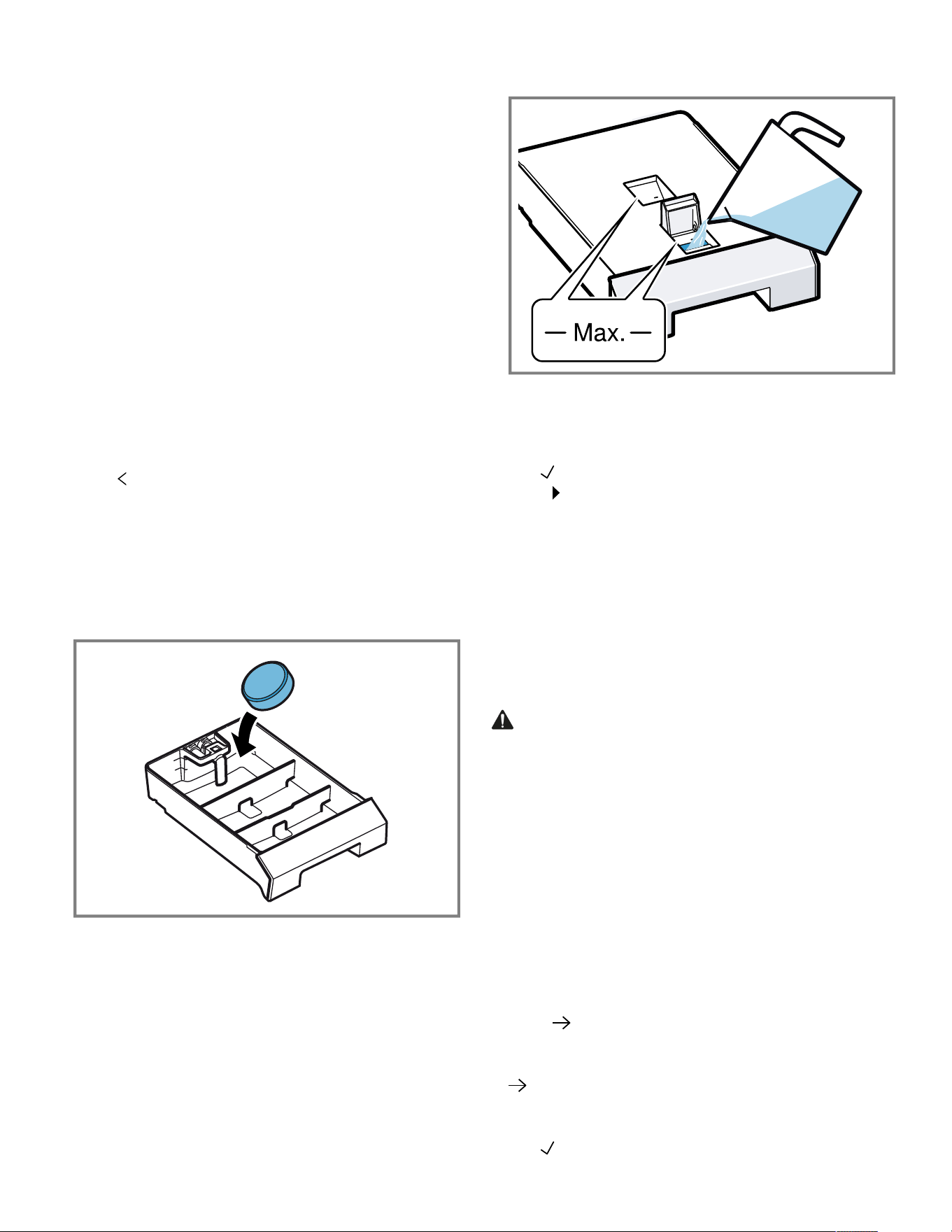
Cleaning and maintenance en-us
49
operating modes that do not require steam. You can only
use the appliance without any restrictions after you have
run the descaling program.
The descaling program takes 1hour 50minutes from
beginning to end. After 1hour 30minutes, empty, clean
and refill the water tank.
Activating and preparing the descaling program
1. Swipe repeatedly from left to right until the display
shows "Modes & Service".
a The display shows the available functions in a list menu.
2. Use the control ring to select the "Automatic descaling"
function.
You cannot cancel the descaling program. Always allow
the descaling program to run to the end.
3. Move the switch to "On".
4. Follow the instructions in the notification texts.
5. Use the control ring to select "End time".
6. Press the preset end time.
7. Use the control ring to change the end time for the
descaling.
8. Press .
a The end time for the descaling has been set.
9. Remove all accessories from the oven cavity.
10.Remove the water tank from the appliance and take off
the lid.
11.Remove the descaling tablet from the plastic packaging.
12.Place the descaling tablet in the compartment at the
back of the water tank.
M
a
x
.
1
.
0
L
13.Position the lid on the tank and click it into place.
14.Fill the water tank up to the "Max." mark with 1.7l cold
water.
M
A
X
1,7 l
Max.
M
a
x
.
1
.
0
L
M
a
x
.
M
a
x
.
15.Slide the water tank back in as far as it will go.
Starting the descaling program
1. Close the appliance door.
2. Use to confirm the last notification.
3. Press to start.
a The display shows the descaling time as 1.5hours.
a The descaling time counts down on the display.
a If you have selected a switch-off time, the switch-off
time counts down on the display.
a The light in the oven cavity remains switched off.
a After approximately1hour 30minutes, the display
shows a message.
4. Clean the water tank and refill it with fresh water.
Continuing the descaling program
WARNING
The descaling solution may cause chemical burns in the
mouth, throat and eyes or on the skin.
▶ Avoid the skin coming into contact with the descaling
solution.
▶ Keep children away from the descaling solution.
▶ Do not drink the descaling solution.
▶ The descaling solution must not come into contact with
food.
▶ Clean the water tank in the dishwasher or thoroughly by
hand before you next use the appliance.
Requirement:The display shows a message that the
appliance has canceled the program.
1. Empty the water tank, thoroughly clean it and slide it
into the appliance.
2. Press .
a The appliance starts the rinsing process.
3. Follow the instructions in the notification texts and press
.
a Once the descaling program has ended, a signal tone
sounds.
4. Use to confirm the last notification.
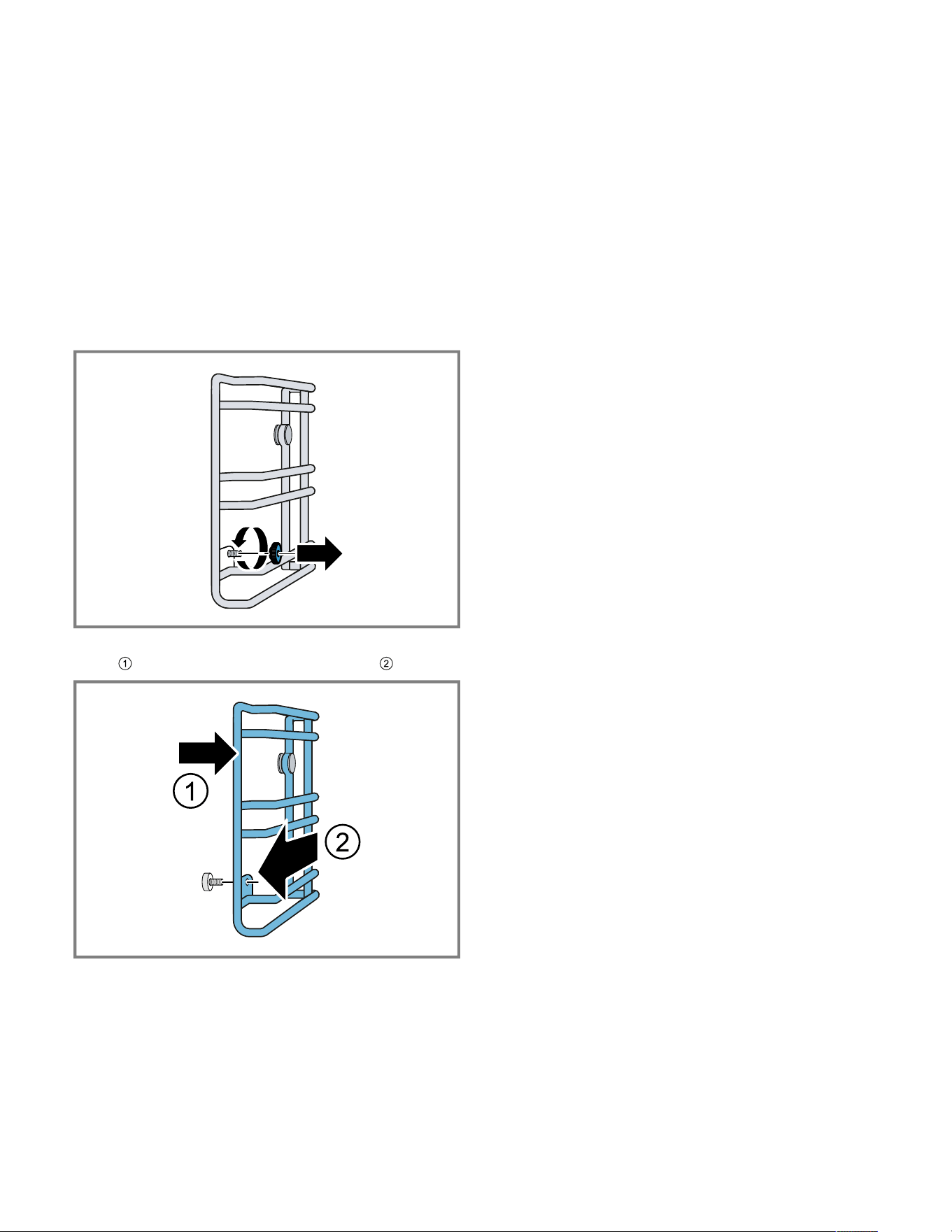
en-us Cleaning and maintenance
50
5. Clean the water tank and refill it with fresh water.
Cleaning the water tank
After the descaling program, remove the descaling residue
from the water tank.
1. Remove the water tank from the appliance.
2. Remove the tank lid.
3. Clean the water tank and the tank lid in the dishwasher
or thoroughly by hand.
16.8 Removing the shelf supports
1. Place a dishcloth in the oven cavity to protect the
stainless steel from scratches.
2. Undo the knurled nuts.
3. Lift the shelf supports slightly sideways away from the
screw and pull them out towards the front .
4. Clean the shelf supports in hot soapy water or in the
dishwasher.
16.9 Fitting the shelf supports
NOTICE:
Incorrect spare parts may lead to corrosion in the oven
cavity.
▶ Only use the original knurled nuts.
1. Fit the shelf supports on the correct side of the cooking
compartment.
The shelf supports for the left and right side of the
cooking compartment are different.
2. Slide the back of the shelf supports onto the bolts and
attach them at the front.
3. Tighten the knurled nuts.
Note:If you lose a knurled nut, you can order this as a
spare part from our customer service.
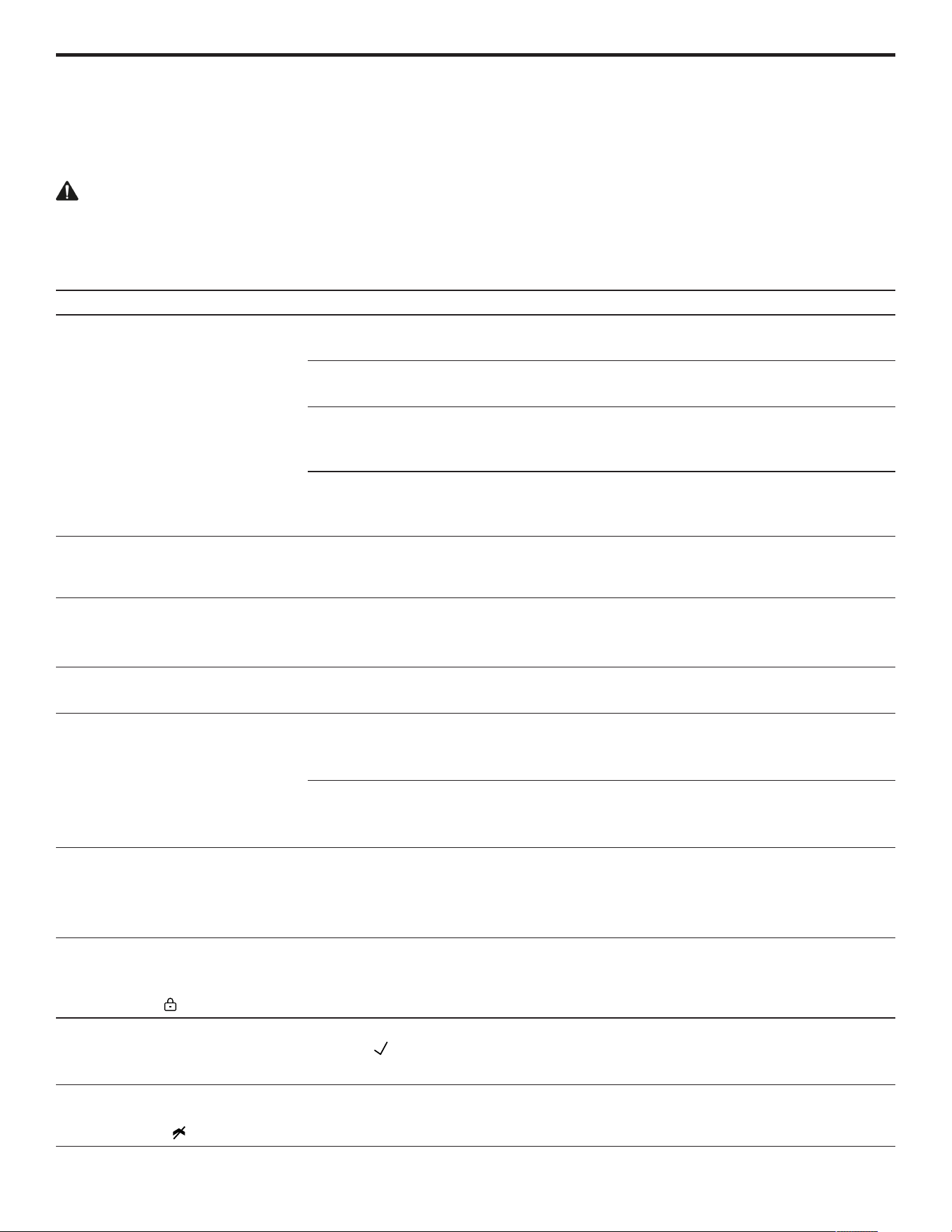
Troubleshooting en-us
51
Troubleshooting
17 Troubleshooting
Troubleshooting
You can eliminate minor issues on your appliance
yourself. Please read the information on eliminating issues
before contacting Customer Service. This may avoid
unnecessary repair visits.
WARNING
To avoid risk of injury from improper repairs, observe the
following.
▶ Only qualified technicians or authorized service
providers should perform repairs.
▶ If the power cord of this appliance becomes damaged, it
must be replaced by the manufacturer, the
manufacturer's Customer Service, or an authorized
service provider in order to prevent injury.
▶ Only genuine spare parts may be used to repair the
appliance.
▶ If the appliance has an issue, call Customer Service.
Issue Cause and troubleshooting
The appliance is not working. The plug for the power cord is not plugged in.
▶ Connect the appliance to the power supply.
The circuit breaker in the circuit breaker panel has tripped.
▶ Check the breaker panel.
There has been a power failure.
▶ Check whether the lighting in your kitchen or other appliances in the room are
working.
Operating error.
▶ Switch off the circuit breaker for the appliance in the fuse box and switch it back
on after approximately 60seconds.
The appliance is not working.
Display shows "Appliance locked.
Descaling required."
Build-up of limescale in the appliance.
▶
Start the descaling program →
Page48
.
Despite descaling, "Please
descale" appears on the display.
Build-up of limescale in the appliance, incorrect descaler used.
1. Use the specified descaling tablets.
2.
Start the descaling program →
Page48
.
The appliance does not start. The appliance door is not fully closed.
▶ Close the appliance door.
The appliance cannot be started
via the HomeConnect® app.
The appliance is not connected to the HomeConnect® app.
▶ Start the connection between the appliance and the HomeConnect® app.
→
"Setting upHomeConnect®", Page34
The appliance is connected to the HomeConnect® app but the remote control
function is not activated.
▶
Activate the remote control function in the Home Connect settings →
Page34
.
The appliance is not working. The
display shows E5117.
The appliance does not receive water.
1.
Check the water tank. →
Page53
2. If the display shows the error message again, contact customer service
→
Page56
.
The appliance is not working. The
display does not respond. The
display shows the symbol for the
childproof lock .
Childproof lock is activated.
▶
Deactivate the childproof lock. →
Page27
The appliance automatically
switches off.
Safety switch-off function: No operation for more than 12hours.
1. Press to confirm the message.
2. Switch off the appliance.
The appliance does not heat up;
the display shows the symbol for
the demo mode .
The appliance is in demo mode.
▶
Deactivate the demo mode in the basic settings →
Page37
.

en-us Troubleshooting
52
Issue Cause and troubleshooting
No steam is visible. Water vapor above 100°C is not visible.
▶ This is normal.
No action required.
Powerful steam release at the top
of the door.
You have changed the operating mode.
▶ This is normal.
No action required.
Powerful steam release at the side
of the door.
The door seal is dirty or loose.
1. Clean the door seal.
2. Insert the door seal into the groove.
Humming noise when switching
on.
The drain pump starts running.
▶ Normal operating noise
No action required.
The appliance has been switched off for a few days. Automatic rinsing during initial
use.
▶ Normal: Automatic rinsing during initial use.
No action required.
A whistling noise occurs during
heating.
Noises may occur during steam generation.
▶ This is normal.
No action required.
A "plop" sound can be heard
during cooking.
Tension expansion when the temperature difference is large.
▶ This is normal.
No action required.
Steaming is not possible. Build-up of limescale in the appliance. The appliance must be descaled to avoid
damage to the appliance.
▶
Start the descaling program →
Page48
.
The appliance is no longer
producing steam correctly.
Build-up of limescale in the appliance.
▶
Start the descaling program →
Page48
.
The lighting does not work. The lighting is defective.
▶ Call
→
"Customer Service", Page56
.
Water drips out when you open the
appliance door.
The collecting channel on the underside of the door pane is full.
▶ Dry the collecting channel with a sponge.
An unpleasant smell occurs during
heating.
The appliance is new.
▶ Before using it for the first time, heat the appliance at 60% humidity and
200°C for one hour.
Issue Cause and troubleshooting
Display shows . The water tank is not OK.
1. Press .
2. Refer to the notifications on the display.
Display shows "Cleaning aid
program terminated. Wipe out the
cooking compartment. Remove
cleaning agent residues."
The appliance was switched off during the cleaning aid program or the power
supply was disconnected.
1. Fill the water tank.
2. Wipe out the cooking compartment.
3. Restart the cleaning aid program.
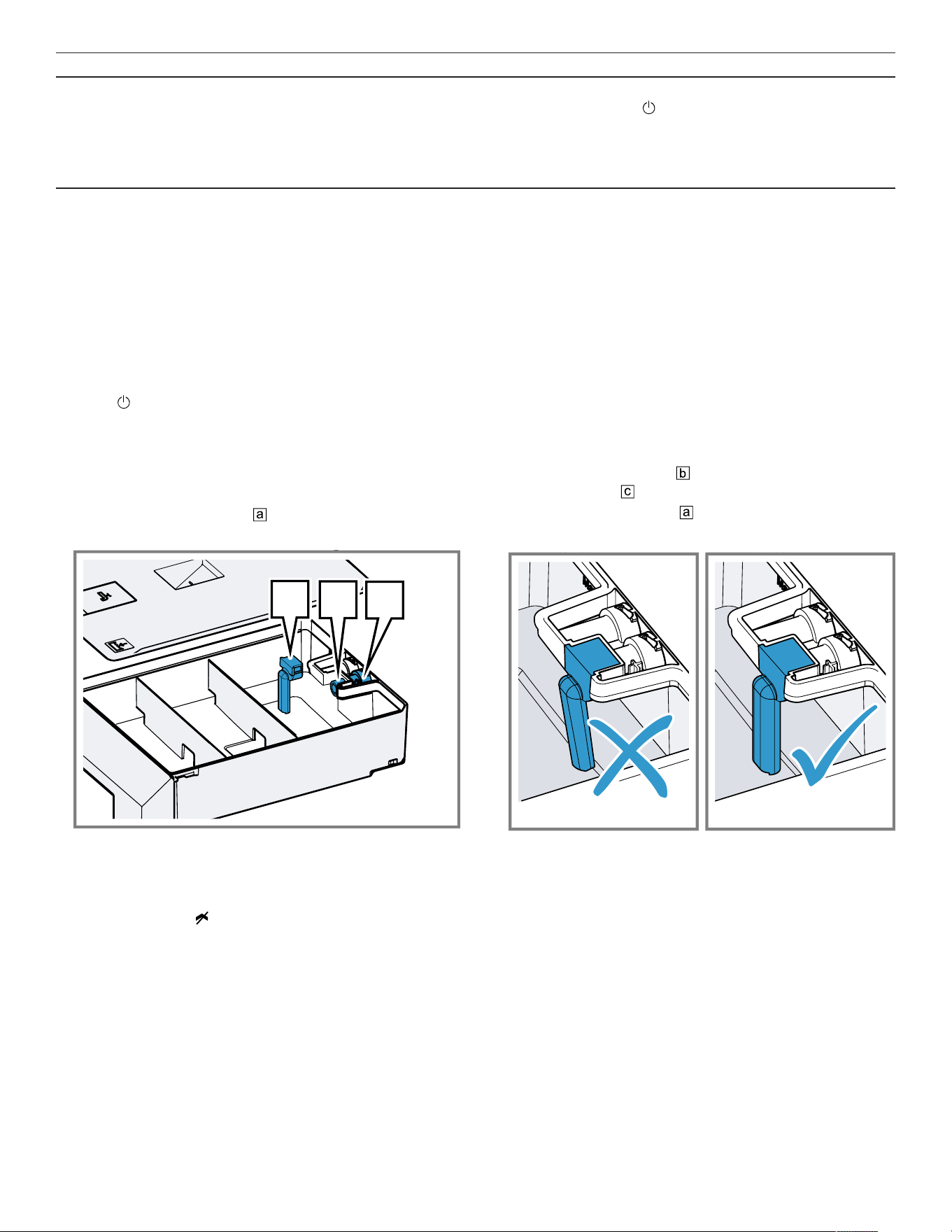
Troubleshooting en-us
53
Issue Cause and troubleshooting
The display shows the error
message "Exx".
An error occurred.
1. If the display shows an error message, press .
a If the display no longer shows the error message, it was a one-off problem.
2. If the display continues to show or repeatedly shows the error message, contact
customer service →
Page56
and provide them with the error code.
17.1 Power failure
Your appliance can bridge a power failure of a few
seconds. The operation continues.
If the power failure lasts longer and the appliance was
operating, the display shows a message. The operation is
interrupted.
Switch the appliance back on again after a power failure
1. Press . 2. Switch theappliance back on again as usual.
17.2 Check the water tank
1. Remove the right-hand water tank.
2. Remove the tank lid.
3. Remove the suction hose towards the rear of the
water tank and clean it under running water.
a
b
c
4. Check whether the suction hose is free of residues.
5. Check whether the filter is free of residues at the
discharge valve towards the rear of the water tank.
6. Fully fit the suction hose .
‒ Ensure that the suction hose is not kinked.
7. Fit the tank lid.
17.3 Demo mode
If the display shows , demo mode is activated. The
appliance does not heat up.
Deactivating demo mode
1. To briefly disconnect the appliance from the mains,
switch off the household fuse or the circuit breaker in
the fuse box.
2. Deactivate demo mode within 3minutes in the basic
settings →
Page37
.

en-us How it works
54
How it works
18 How it works
How it works
Here, you can find the ideal settings for various types of
food as well as the best accessories and cookware. We
have perfectly tailored these recommendations to your
appliance.
You can find recommended settings →
Page29
for some
meals in the display under Programs →
Page28
or in the
HomeConnect®app.
The following overview only contains standard dishes for
test purposes.
18.1 General cooking tips
Take note of the following information when cooking all
types of food.
¡ The cooking times specified are intended as a guide.
The actual cooking time depends on the quality and
temperature of the food before cooking, as well as its
weight and thickness.
¡ The values given refer to average quantities for 4
people. If you want to prepare a larger amount, expect a
longer cooking time.
¡ Use the cookware specified. If you use other cookware,
cooking times may be longer or shorter.
¡ Always use plates, baking tins or ovenproof dishes with
the wire rack.
¡ If you have not made a particular dish before, start with
the shortest specified time. If required, you can continue
to cook the food.
¡ Open the oven cavity door on the preheated oven for a
short time only and quickly place your food inside the
appliance.
¡ When steaming, defrosting, dough proving and
reheating, you can use up to 3 shelf levels at a time
(shelf levels 1, 2 and 3). This will not cause flavor to
transfer. You can therefore cook fish, vegetables and
desserts at the same time. The specified cooking times
may need to be extended for large quantities of food.
¡ If you are only baking on one level, use level 2. If you
are baking on two levels at the same time, use levels 1
and 3.
¡ Ensure that the food does not lie against the oven cavity
or the back panel.
¡ The appliance door must shut properly. Keep the seal
surfaces clean at all times.
¡ To ensure optimal steam circulation, do not position the
racks and containers too closely.
¡ When cooking very cold foods and when cooking at
high temperatures, the cooking container may deform.
This deformation does not impair its performance.
When the cooking container cools down again, it returns
to its original shape.
¡ If the appliance is above 210°F (100°C), allow the
appliance to cool down before steaming. Otherwise, the
high temperature causes the food to dry out.
¡ When steaming at temperatures up to 210°F (100°C),
no preheating is necessary. Place the food in the cold
oven cavity and then switch on the appliance.
¡ The estimated cooking time starts as soon as the
cooking compartment reaches the selected
temperature.
¡ Always preheat the appliance. This will produce the
best cooking results. The cooking times specified refer
to a preheated appliance.
18.2 Sous-vide cooking
When sous-vide cooking, you cook the food under a
vacuum at low temperatures between 120-200°F
(50-95°C) and at 100% steam.
WARNING
Due to the low sous-vide cooking cooking temperatures,
there is a risk to health if you do not follow the instructions
for use and hygiene instructions below.
▶ Use only fresh, good-quality food.
▶ Wash and disinfect your hands. Use disposable gloves
or grill tongs.
▶ Take extra care when preparing critical food, such as
poultry, eggs and fish.
▶ Always thoroughly rinse and/or peel fruit and vegetables
where necessary.
▶ Always keep countertops and chopping boards clean.
Use different chopping boards for different types of
food.
▶ Maintain the cold chain. Only interrupt the cold chain
briefly to prepare the food. Store vacuum-sealed food
back in the refrigerator until it is ready to be cooked.
▶ The food is suitable for immediate consumption only.
Once the food is cooked, consume it immediately. Do
not store it after cooking. Do not store the food in the
refrigerator either. The food is not suitable for reheating.
¡ Sous-vide cooking is a gentle, low-fat method of
cooking meat, fish, vegetables and desserts. A vacuum-
sealing machine uses heat to hermetically seal the food
in a special heat-resistant cooking bag.
¡ The protective envelope retains the nutrients and
flavors. The low temperatures and the direct heat
transfer help you to achieve precisely controlled cooking
in order to achieve the desired cooking results. It is
almost impossible to overcook the food.
¡ Use the portion sizes listed in the cooking table. For
larger quantities and items, adjust the cooking time
accordingly. The portions given for fish, meat and
poultry correspond to a single serving. The portions
specified for vegetables and desserts correspond to
servings for 4 people.
¡ You can cook on up to two levels. Slide the cooking
containers in at levels 1and 3 to achieve the best
cooking results. If you are cooking on just one level, use
level 2.
¡ When using the sous-vide cooking method, only use
heat-resistant vacuum-pack bags designed for this
purpose. Do not cook the food in the vacuum-sealing
bag in which you bought the food, e.g. portioned fish.
These bags are not suitable for sous-vide cooking.

Transportation, storage and disposal en-us
55
¡ To ensure an even transfer of heat and a perfect
cooking result, use a chamber vacuum-sealing machine
that can create a 99% vacuum when vacuum-sealing
food.
¡ With the "Sous-vide cooking" type of heating, it is not
possible to postpone the end of the cooking time for
hygiene reasons.
Vacuum-sealing
When vacuum-sealing, heat-seal the food in a special
plastic bag so that it is airtight.
Note the following points when vacuum-sealing:
¡ There is no/hardly any air in the vacuum-sealing bag.
¡ The heat-sealed seam is perfectly sealed.
¡ The vacuum-sealing bag has no holes in it. Do not use
a core temperature probe.
¡ Pieces of meat or fish that have been vacuum-sealed
together are not pressed directly against one another.
¡ You have vacuum-sealed vegetables and desserts as
flat as possible.
Before cooking the food, check whether the vacuum in the
bag is intact.
If in doubt, place the food into a new bag and vacuum-seal
it again. Vacuum-seal food no more than one day before
the cooking process. This is the only way to prevent the
escape of gases from the food (e.g. from vegetables)
which inhibit the transfer of heat, or to prevent the texture
of the food from changing, and thus altering how it cooks,
as a result of the vacuum pressure.
Quality of the food
The quality of the cooking result is 100% influenced by the
quality of the ingredients you use.
Use only fresh, top-quality food. This is the only way to
guarantee a consistent cooking result that delivers
impeccable flavor.
Preparation
Sous-vide cooking prevents flavors from escaping,
intensifying the food's natural flavor. Note that the usual
quantities of seasoning and condiments, such as herbs,
spices and garlic, will have a much greater effect on the
flavor. Start off by halving the quantities you usually use.
If the ingredients are of high quality, it is often sufficient to
enclose them in the bag with just a small knob of butter
and a little salt and pepper. Generally, the fact that the
food's natural flavors intensify during cooking is sufficient
on its own to produce a flavorful cooking result.
Do not place the vacuum-sealed food items on top of one
another or too close together in the cooking containers. To
ensure even heat distribution, make sure that you do not
touch the food. If you have more than one vacuum-sealing
bag, cook on two levels.
Remove the vacuum-sealing bags with care after cooking,
as hot water accumulates on the bags. Place the
unperforated cooking container into the oven cavity at the
level below the perforated cooking container containing
the hot food.
Dry the outside of the bag, place it into a clean,
unperforated cooking container and cut it open with
scissors. Place all of the food, along with its juices, into the
cooking container.
The food can be finished off as follows once the sous-vide
cooking stage is complete:
¡ Vegetables: Flash fry in a frying pan or on the teppan
yaki to give them the flavors you would expect from
frying. In doing so, you can effortlessly season the
vegetables or mix them with other ingredients without
the vegetables cooling down.
¡ Fish: Season and coat with hot butter. Since many
types of fish fall apart easily after cooking using the
sous-vide method, if you want to flash fry fish, this
should be done before the sous-vide cooking stage. Fry
the food for longer if has not been sufficiently well
cooked during the sous-vide cooking stage.
¡ Meat: Flash fry at a very high temperature for a few
seconds only on each side. This gives the meat a nice
crust and the flavors you would expect from frying,
without overcooking it. You can achieve a particularly
good result using a teppan yaki or under the grill.
Note:Dab the meat with a dish towel before placing it into
hot oil, in order to avoid fat spitting out of the pan.
Serve the food on pre-heated plates and, if possible, with
a hot sauce or butter as sous-vide cooking takes place at
relatively low temperatures.
18.3 Preparing bulky food
Recommendation for preparing bulky food.
¡ To prepare bulky food items, you can remove the shelf
supports at both sides.
¡ To do this, undo the knurled nuts at the front of the shelf
supports, and pull the shelf supports out towards the
front.
¡ Place the rack directly onto the bottom of the cooking
compartment and place the food or roaster onto the
rack. Do not place the food or roaster directly onto the
bottom of the oven cavity. If required, remove the shelf
supports. →
Page50
Transportation, storage and disposal
19 Transportation, storage and
disposal
Transportation, storage and disposal
19.1 Disposal of your old appliance
Environmentally compatible disposal allows valuable raw
materials to be recycled.
1. Unplug the appliance from the power supply.
2. Cut through the power cord.
3. Dispose of the appliance in an environmentally
responsible manner.
Information about current disposal methods can be
obtained from your specialist dealer or local authority.
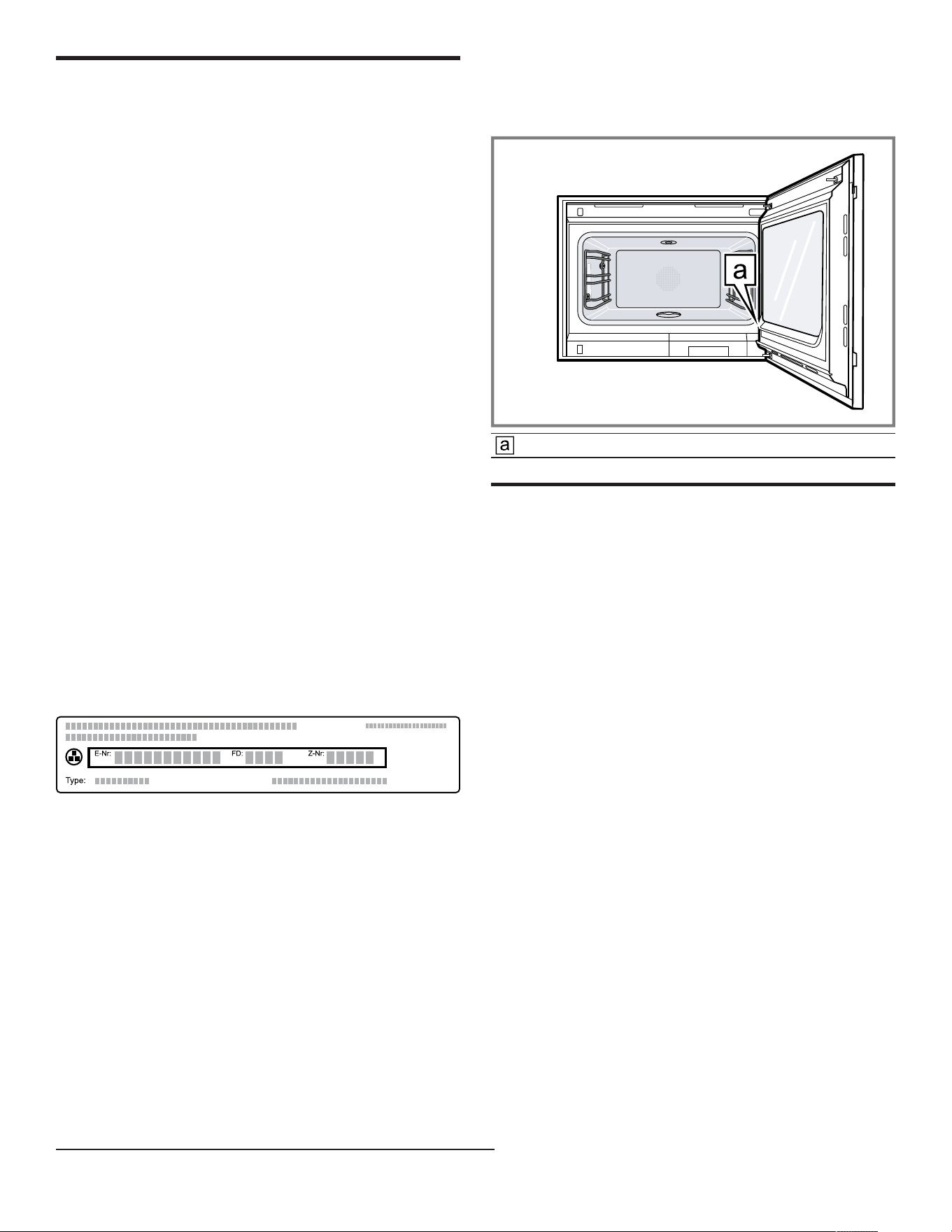
en-us Customer Service
56
Customer Service
20 Customer Service
Customer Service
With any warranty repair, we will make sure your
appliance is repaired by an authorized service provider
using genuine replacement parts. We use only genuine
replacement parts for all repairs.
Detailed information on the warranty period and terms of
warranty can be found in the Statement of Limited Product
Warranty, from your retailer, or on our website.
If you contact Customer Service, you will need the model
number (E-Nr.), the production number (FD) and the
consecutive numbering (Z-Nr.) of your appliance.
The LED light sources are available as a spare part and
should only be replaced by an authorized service provider.
USA:
1-877-442-4436
www.gaggenau.com
www.gaggenau.com/us/appliances/eshop
CA:
1-877-442-4436
www.gaggenau.com
www.gaggenau.ca
For assistance with connecting to HomeConnect®, you
can also view instructions here:
www.home-connect.com/us/en/help-support/set-up
20.1 Model number (E-Nr.), production
number (FD) and consecutive
numbering (Z-Nr.)
You can find the model number (E-Nr.), the production
number (FD) and the consecutive numbering (Z-Nr.) on
the appliance's rating plate.
You can see the rating plate with these numbers when you
open the appliance door.
Making a note of your appliance's details and the
Customer Service telephone number will enable you to
find them again quickly.
20.2 Rating plate location
The rating plate is located at the door frame close to the
lower door hinge.
Rating plate
Information regarding Free and Open Source Software
21 Information regarding Free and
Open Source Software
Information regarding Free and Open Source Software
This product includes software components that are
licensed by the copyright holders as free or open source
software.
The applicable license information is stored on your home
appliance. You can also access the applicable license
information via your HomeConnect® app: "Profile ->
Legal information -> License Information".
1
You can
download the license information on the brand product
website. (Please search on the product website for your
appliance model and additional documents). Alternatively,
you can request the relevant information from
[email protected] or BSH Hausgeräte GmbH, Carl-
Wery-Str. 34, 81739 Munich, Germany.
The source code will be made available to you on request.
Please send your request to [email protected] or
BSH Hausgeräte GmbH, Carl-Wery-Str.34, 81739 Munich,
Germany.
Subject: „OSSREQUEST“
The cost of performing your request will be charged to
you. This offer is valid for three years from the date of
purchase or at least as long as we offer support and spare
parts for the relevant appliance.
1
Depending on the appliance specifications

STATEMENT OF LIMITED PRODUCT WARRANTY en-us
57
STATEMENT OF LIMITED PRODUCT WARRANTY
22 STATEMENT OF LIMITED
PRODUCT WARRANTY
STATEMENT OF LIMITED PRODUCT WARRANTY
22.1 What this warranty covers & Who it
applies to
The limited warranty provided by BSH Home Appliances
(“Gaggenau“) in this Statement of Limited Product
Warranty applies only to the Gaggenau appliance sold to
you (“Product“), provided that the Product was purchased:
¡ For your normal, household (non-commercial) use, and
has in fact at all times only been used for normal
household purposes.
¡ New at retail from a BSH authorized dealer or directly
from BSH (not a display, "as is", or previously returned
model), and not for resale, or commercial use.
¡ Within the United States or Canada, and has at all times
remained within the country of original purchase.
The warranties stated herein apply to the original
purchaser of the product warranted herein and to each
succeeding owner of the product purchased for ordinary
home use during the term of the warranty.
Please make sure to register your Product; while not
necessary to effectuate warranty coverage, it is the best
way for Gaggenau to notify you in the unlikely event of a
safety notice or product recall.
22.2 How long the warranty lasts
Gaggenau warrants that the Product is free from defects in
materials and workmanship for a period of seven hundred
and thirty (730) days from the date of the original delivery.
The foregoing timeline begins to run upon the date of
original delivery, and shall not be stalled, tolled, extended,
or suspended, for any reason whatsoever. This Product is
also warranted to be free from cosmetic defects in
material and workmanship (such as scratches of stainless
steel, paint/porcelain blemishes, chips, dents, or other
damage to the finish) of the Product, for a period of sixty
(60) days from the date of delivery or closing date for new
construction. This cosmetic warranty excludes slight color
variations due to inherent differences in painted and
porcelain parts, as well as differences caused by kitchen
lighting, product location, or other similar factors. This
cosmetic warranty specifically excludes any display, floor,
“As Is”, or “B” stock appliances.
22.3 Repair/replace as your exclusive
remedy
During this warranty period, Gaggenau or one of its
authorized service providers will repair your Product
without charge to you (subject to certain limitations stated
herein) if your Product proves to have been manufactured
with a defect in materials or workmanship. If reasonable
attempts to repair the Product have been made without
success, then Gaggenau will replace your Product
(upgraded models may be available to you, in Gaggenau's
sole discretion, for an additional charge). Nothing in this
warranty requires damaged or defective parts to be
replaced with parts of a different type or design than the
original parts. All removed parts and components shall
become the property of Gaggenau at its sole option. All
replaced and/or repaired parts shall assume the identity of
the original part for purposes of this warranty and this
warranty shall not be extended with respect to such parts.
Gaggenau's sole liability and responsibility hereunder is to
repair manufacturer-defective Product only, using a
Gaggenau authorized service provider during normal
business hours. For safety and property damage
concerns, Gaggenau highly recommends that you do not
attempt to repair the Product yourself, or use a non-
authorized service provider; Gaggenau will have no
responsibility or liability for damage resulting from repairs
or work performed by a non-authorized service provider.
Authorized service providers are those persons or
companies that have been specially trained on Gaggenau
products, and who possess, in Gaggenau's opinion, a
superior reputation for customer service and technical
ability (note that they are independent entities and are not
agents, partners, affiliates or representatives of
Gaggenau). Nevertheless, taking your product to be
serviced by a repair shop that is not affiliated with or an
authorized dealer of Gaggenau will not void this warranty.
Also, using third-party parts will not void this warranty.
Notwithstanding the foregoing, Gaggenau will not incur
any liability, or have responsibility, for the Product if it is
located in a remote area (more than 100 miles from an
authorized service provider) or is reasonably inaccessible,
hazardous, threatening, or treacherous locale,
surroundings, or environment; in any such event, if you
request, Gaggenau would still pay for labor and parts and
ship the parts to the nearest authorized service provider,
but you would still be fully liable and responsible for any
travel time or other special charges by the service
company, assuming they agree to make the service call.
Further, to the extent you have installed the Product in a
difficult-to-access location or have otherwise installed
temporary or permanent fixtures that create barriers to
accessing or removing the Product, Gaggenau will not
incur any liability for, or have responsibility, for work or

en-us STATEMENT OF LIMITED PRODUCT WARRANTY
58
costs associated with moving the Product or otherwise
creating access to the Product in order to repair or replace
it. All such costs shall be your sole responsibility.
22.4 Out of warranty product
Gaggenau is under no obligation, at law or otherwise, to
provide you with any concessions, including repairs,
prorates, or Product replacement, once this warranty has
expired.
22.5 Warranty exclusions
The warranty coverage described herein excludes all
defects or damage that are not the direct fault of
Gaggenau, including without limitation, one or more of the
following:
¡ Use of the Product in anything other than its normal,
customary and intended manner (including without
limitation, any form of commercial use, use or storage of
an indoor product outdoors, use of the Product in
conjunction with air or water-going vessels).
¡ Any party's willful misconduct, negligence, misuse,
abuse, accidents, neglect, improper operation, failure to
maintain, improper or negligent installation, tampering,
failure to follow operating instructions, mishandling,
unauthorized service (including selfperformed "fixing" or
exploration of the appliance's internal workings).
¡ Adjustment, alteration or modification of any kind.
¡ A failure to comply with any applicable state, local, city,
or county electrical, plumbing and/or building codes,
regulations, or laws, including failure to install the
product in strict conformity with local fire and building
codes and regulations.
¡ Ordinary wear and tear, spills of food, liquid, grease
accumulations, or other substances that accumulate on,
in, or around the Product.
¡ Any external, elemental and/or environmental forces
and factors, including without limitation, rain, wind,
sand, floods, fires, mud slides, freezing temperatures,
excessive moisture or extended exposure to humidity,
lightning, power surges, structural failures surrounding
the appliance, and acts of God.
¡ Service calls to correct the installation of your Product,
to instruct you how to use your Product, to replace
house fuses or correct house wiring or plumbing.
¡ Removal and replacement of trim or decorative panels
that interfere with servicing the Product.
¡ Damage or defects caused by labor or parts installed by
any non-authorized service provider, unless approved
by Gaggenau before service is performed.
In no event shall Gaggenau have any liability or
responsibility whatsoever for damage to surrounding
property, including cabinetry, floors, ceilings, and other
structures or objects around the Product. Also excluded
from this warranty are Products, on which the serial
numbers have been altered, defaced, or removed; service
visits to teach you how to use the Product, or visits where
there is nothing wrong with the Product; correction of
installation problems (you are solely responsible for any
structure and setting for the Product, including all
electrical, plumbing or other connecting facilities, for
proper foundation/flooring, and for any alterations
including without limitation cabinetry, walls, floors,
shelving, etc.); and resetting of breakers or fuses.
TO THE EXTENT ALLOWED BY LAW, THIS WARRANTY
SETS OUT YOUR EXCLUSIVE REMEDIES WITH
RESPECT TO PRODUCT, WHETHER THE CLAIM
ARISES IN CONTRACT OR TORT (INCLUDING STRICT
LIABILITY, OR NEGLIGENCE) OR OTHERWISE. THIS
WARRANTY IS IN LIEU OF ALL OTHER WARRANTIES,
WHETHER EXPRESS OR IMPLIED. ANY WARRANTY
IMPLIED BY LAW, WHETHER FOR MERCHANTABILITY
OR FITNESS FOR A PARTICULAR PURPOSE, OR
OTHERWISE, SHALL BE EFFECTIVE ONLY FOR THE
PERIOD THAT THIS EXPRESS LIMITED WARRANTY IS
EFFECTIVE. IN NO EVENT WILL THE MANUFACTURER
BE LIABLE FOR CONSEQUENTIAL, SPECIAL,
INCIDENTAL, INDIRECT, "BUSINESS LOSS", AND/OR
PUNITIVE DAMAGES, LOSSES, OR EXPENSES,
INCLUDING WITHOUT LIMITATION TIME AWAY FROM
WORK, HOTELS AND/OR RESTAURANT MEALS,
REMODELLING EXPENSES IN EXCESS OF DIRECT
DAMAGES WHICH ARE DEFINITIVELY CAUSED
EXCLUSIVELY BY GAGGENAU, OR OTHERWISE.
SOME STATES DO NOT ALLOW THE EXCLUSION OR
LIMITATION OF INCIDENTAL OR CONSEQUENTIAL
DAMAGES, AND SOME STATES DO NOT ALLOW
LIMITATIONS ON HOW LONG AN IMPLIED WARRANTY
LASTS, SO THE ABOVE EXCLUSIONS OR
LIMITATIONS MAY NOT APPLY TO YOU. THIS
WARRANTY GIVES YOU SPECIFIC LEGAL RIGHTS,
AND YOU MAY ALSO HAVE OTHER RIGHTS WHICH
VARY FROM STATE TO STATE.
No attempt to alter, modify or amend this warranty shall be
effective unless authorized in writing by an officer of BSH.
22.6 Obtaining warranty service
To obtain warranty service for your product, you should
contact Gaggenau Customer Support at 1-877-442-4436
to schedule a repair.
22.7 Product information
For handy reference, copy the information below from the
rating plate. Keep your invoice and/or delivery documents
for warranty validation.
Model number (E-Nr.)
Production number
(FD)
Date of delivery


BSH Home Appliances Corporation
1901 Main Street, Suite 600
Irvine, CA 92614
USA
www.gaggenau.com
1-877-442-4436
© 2025 BSH Home Appliances Corporation
*9001954638*
9001954638 en-us (050814)

