EN
· The Perfect Partner of Your Life ·
FM
88 92 96 100 104 108
MHz
AM
53 75 100 130 150 171
MHz
x10
SW
5.9 7.6 10.2 13.0 16.0 18.0
MHz
PREV
REW
PAUSE
TWS
NEXT
F.FWD
VOL-
OFF
VOL+
MUSIC
FM
SW
AM
1. Functional Components
Ⅱ
PRODUCT INTRODUCTION
2. Product Specifications
Ⅲ
POWER SUPPLY
1. USB Charging
2.Solar Charging
3.D Cell(UM-1 1.5V Battery)
Ⅰ
PRECAUTIONS
Ⅳ
RADIO RECEPTION
1.Play via Bluetooth
Ⅴ
MUSIC PLAYBACK
2.Played by USB Drive/TF Card
Ⅵ
FAQ
VII
AFTER-SALE SERVICE
TWS Function
How to Get Better Reception
4
7-9
10-11
12-14
16
15
2
5-6

3
PREFACE
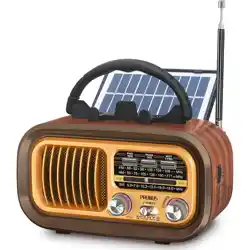
Thank you for purchasing PRUNUS J-150 BTS Solar Radio/BT
Speaker/MP3 Player. In order to get the best from the radio,
please read this manual carefully before using it and take
special notice of the section on precautions.
PRUNUS J-150 BTS Solar Radio/BT Speaker/MP3
Player User Manual

4
1. Please fully charge the radio to activate it before the first use
or after a long period of non-use.
2. Please remove the batteries if you do not plan to use the radio
for a long time.
3. Don’t get the radio wet or use it in a moist environment. E.g.
Keep it out of rain and use carefully in bathrooms and kitchens.
4. Don’t place any potentially damaging objects, such a
liquid-filled containers and lighted candle, on the top of the
radio.
5. Keep the radio away from sources of heat, such as radiators,
hot water pipes and fires.
6. Keep the radio away from any solvents, such as white spirit,
paraffin and petrol.
7. Keep the radio away from magnets and magnetic fields.
Ⅰ
PRECAUTIONS
5
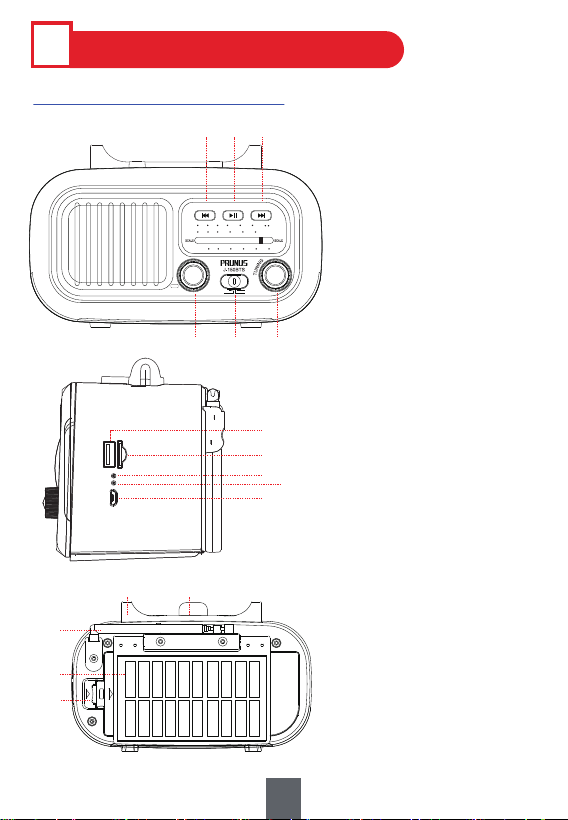
1. Functional Components
Ⅱ
PRODUCT INTRODUCTION
①Volume/Power Knob
②Mode Button:
MUSIC/FM/AM/SW
③Tuning Knob
④Previous/Rewind
⑤Play/Pause/TWS
⑥Next/Fast forward
⑦USB Drive Port
⑧TF Card Slot
⑨Power Indicator
⑩Charging Indicator
⑪Charging Port
⑫Handle
⑬Phone Stand
⑭Telescopic Antenna
⑮Solar Panel
⑯Battery Compartment
⑧
⑩
⑨
⑦
⑪
FM 88 92 96 100 104 108
MHz
AM 53 75 100 130 150 171
MHz
x10
SW 5.9 7.6 10.2 13.0 16.0 18.0
MHz
PREV
REW
PAUSE
TWS
NEXT
F.FWD
VOL-
OFF
VOL+
MUSIC
FM
SW
AM
①
⑥④
③
②
⑤
⑫
⑭
⑮
⑯
⑬

6
1) Model: J-150 BTS
2) Band: FM: 88-108 MHz; AM: 530-1710KHz; SW: 5.9-18.0MHz
3) MP3 Playing: Bluetooth / TF Card / USB Drive
4) Battery: 3.7V/ 1200mAh LI-ION
5) Speaker Power: 3W
6) Charging Standard: DC5V/0.5-2A
7) Solar Panel: 5V/0.7W; 105 x 60 x 2.5mm
8) Dimension: 170 x 95 x 107mm
9) Weight: 530g
10) TF card/USB flash drive: Max support 64G
11) Supported music file format: MP3, WMA, WAV
12) Package Included:
Radio x 1, Charging Cable x 1, User Manual x 1
2. Product Specifications
7
Ⅲ
POWER SUPPLY
Tips:
1. To protect the radio, please charge the radio with standard
DC5V/0.5-2A charger(or other devices that can supply this
type of power).
2. To protect the battery, please try to avoid charging the radio
continuously for a long time, such as 24 hours or more.
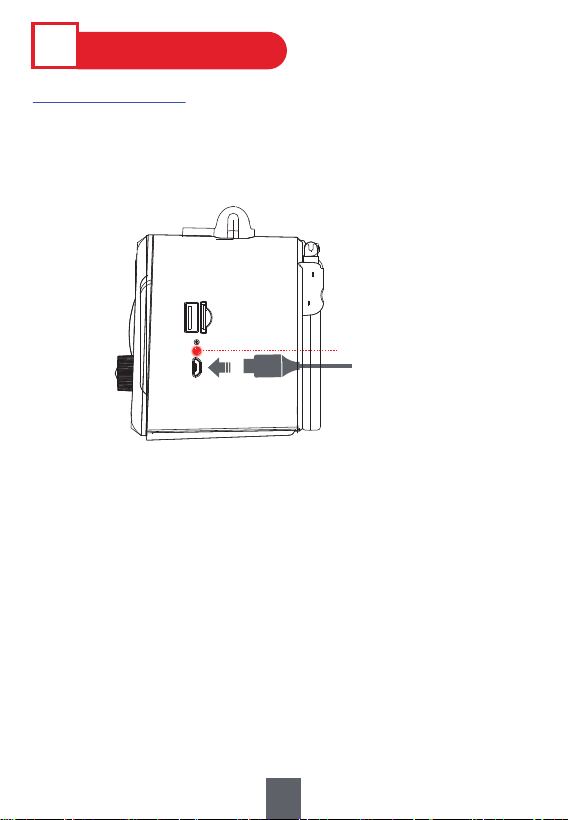
Use the supplied USB charging cable to charge the built-in battery.
The <⑩Charging Indicator> will light up when it's charging, and
goes off when fully charged. Takes 4-6 hours to full charge.
USB-C cable
⑩Charging Indicator
1. USB Charging
8
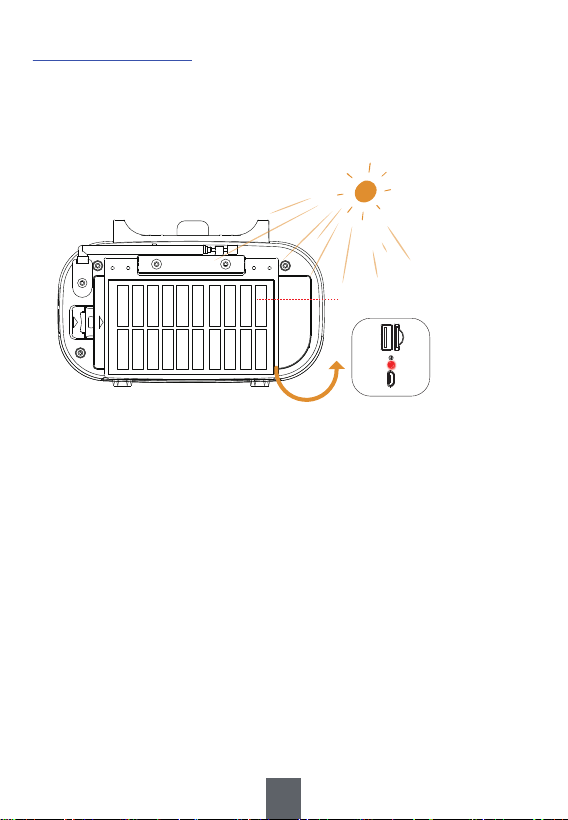
1) Unfold the solar panel on the back of the radio,
2) Put the radio in sunlight. The <⑩Charging Indicator> will light
up when it's charging, and goes off when fully charged.
2.Solar Charging
Tips:
Takes about 12-15 hours to fully charge in full sunlight. The
charging efficiency depends on the intensity of sunlight. It's
recommended to charge it in strong sunlight.
⑮Solar Panel
9
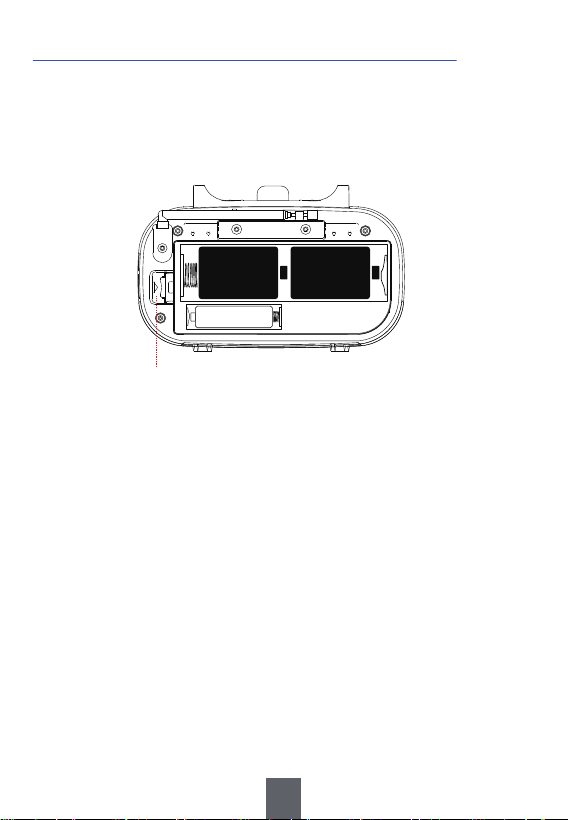
1) Open the battery compartment.
2) Follow the electrode marks inside to install the batteries.
3) Cover the battery compartment.
3.D Cell(UM-1 1.5V Battery) *2 (not included)
Note:
a. Don't use a new battery and old battery together.
b. Don't use batteries of different type or brand together.
c. Don't use batteries with different power (mAh).
d. Don't use alkaline battery and rechargeable battery together.
D D
LI-ION
⑯Battery Compartment
10
Ⅳ
RADIO RECEPTION
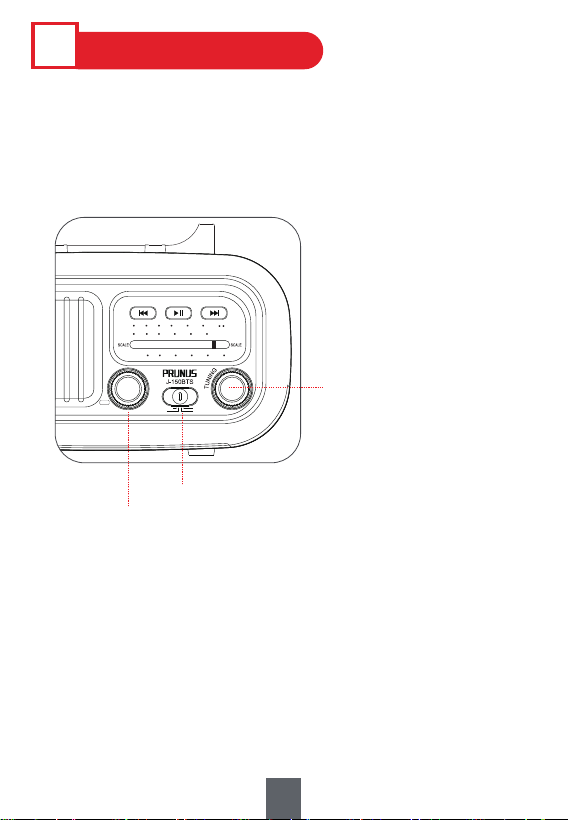
1. Turn <①Volume/Power Knob> to turn on radio.
2. Move <②Mode Button> to choose “FM”, “AM”, or “SW”.
3. Turn <③Tuning Knob> to choose the station.
4. Turn <①Volume/Power Knob> to adjust the volume.
FM 88 92 96 100 104 108
MHz
AM 53 75 100 130 150 171
MHz
x10
SW 5.9 7.6 10.2 13.0 16.0 18.0
MHz
PREV
REW
PAUSE
TWS
NEXT
F.FWD
VOL-
OFF
VOL+
MUSIC
FM
SW
AM
②Mode Button
①Volume/Power Knob
③Tuning Knob
11
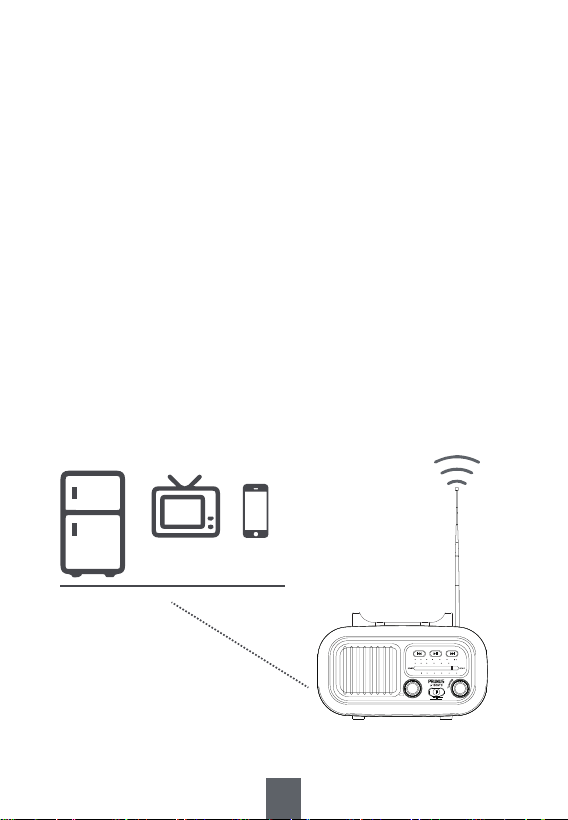
◆ How to Get Better Reception?
1. Adjust the telescopic antenna while listening to FM/SW, but
reposition the radio while listening to AM.
2. When you're indoors, approach it to the window and try to
keep it away from the electronic devices, such as computers,
TVs, refrigerators and mobile phones.
3. When you're outdoors, please try to listen to the radio in an
open place.
4. Human Body Induction: When reception is weak, it will get
better if you hold the radio in hand, but its reception will be
weak again when the hand is away. This is a common
phenomenon among almost all the radios, it's not a problem.
Away from the electronic devices
FM 88 92 96 100 104 108
MHz
AM 53 75 100 130 150 171
MHz
x10
SW 5.9 7.6 10.2 13.0 16.0 18.0
MHz
PREV
REW
PAUSE
TWS
NEXT
F.FWD
VOL-
OFF
VOL+
MUSIC
FM
SW
AM
12
J-150BTS
FM 88 92 96 100 104 108
MHz
AM 53 75 100 130 150 171
MHz
x10
SW 5.9 7.6 10.2 13.0 16.0 18.0
MHz
PREV
REW
PAUSE
TWS
NEXT
F.FWD
VOL-
OFF
VOL+
MUSIC
FM
SW
AM
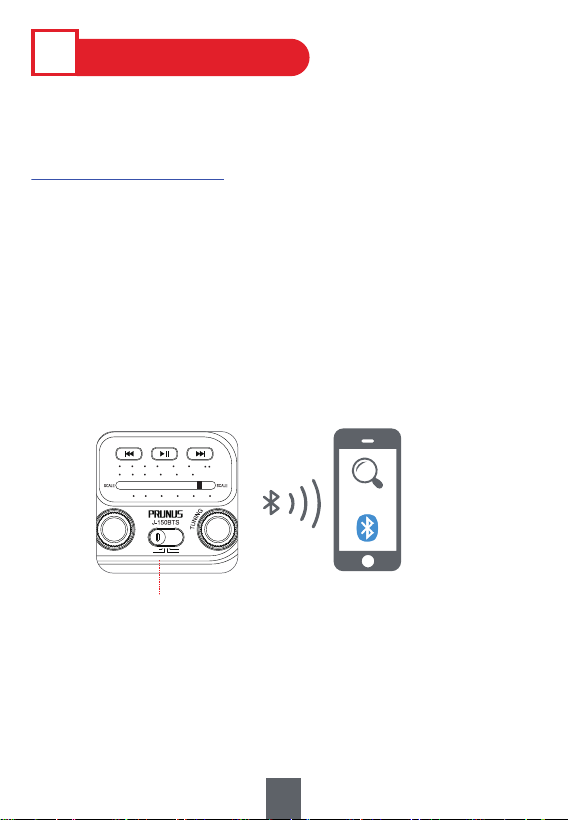
1.Play via Bluetooth
Ⅴ
MUSIC PLAYBACK
Tips : Press <⑤Play/Pause/TWS> twice to switch modes
among Bluetooth, TF card and USB drive.
Tips :
1. Press <④Previous/Rewind> or <⑥Next/Fast forward> to
choose the previous or the next song.
2. Press <⑤Play/Pause/TWS> to pause and resume the playback.
1) Move <②Mode Button> to “Music”. A “waiting for paring”
sound means the radio is right in Bluetooth mode and ready to
pair.
2) Turn on the Bluetooth on your device, such as mobile phone,
to search and connect the device named “J-150 BTS”. A "con
nected" sound indicates that the device is successfully
connected.
3) Open the music app/software on your device and play music.
②Mode Button
13
FM 88 92 96 100 104 108
MHz
AM 53 75 100 130 150 171
MHz
x10
SW 5.9 7.6 10.2 13.0 16.0 18.0
MHz
PREV
REW
PAUSE
TWS
NEXT
F.FWD
VOL-
OFF
VOL+
MUSIC
FM
SW
AM
FM 88 92 96 100 104 108
MHz
AM 53 75 100 130 150 171
MHz
x10
SW 5.9 7.6 10.2 13.0 16.0 18.0
MHz
PREV
REW
PAUSE
TWS
NEXT
F.FWD
VOL-
OFF
VOL+
MUSIC
FM
SW
AM
FM 88 92 96 100 104 108
MHz
AM 53 75 100 130 150 171
MHz
x10
SW 5.9 7.6 10.2 13.0 16.0 18.0
MHz
PREV
REW
PAUSE
TWS
NEXT
F.FWD
VOL-
OFF
VOL+
MUSIC
FM
SW
AM
FM 88 92 96 100 104 108
MHz
AM 53 75 100 130 150 171
MHz
x10
SW 5.9 7.6 10.2 13.0 16.0 18.0
MHz
PREV
REW
PAUSE
TWS
NEXT
F.FWD
VOL-
OFF
VOL+
MUSIC
FM
SW
AM
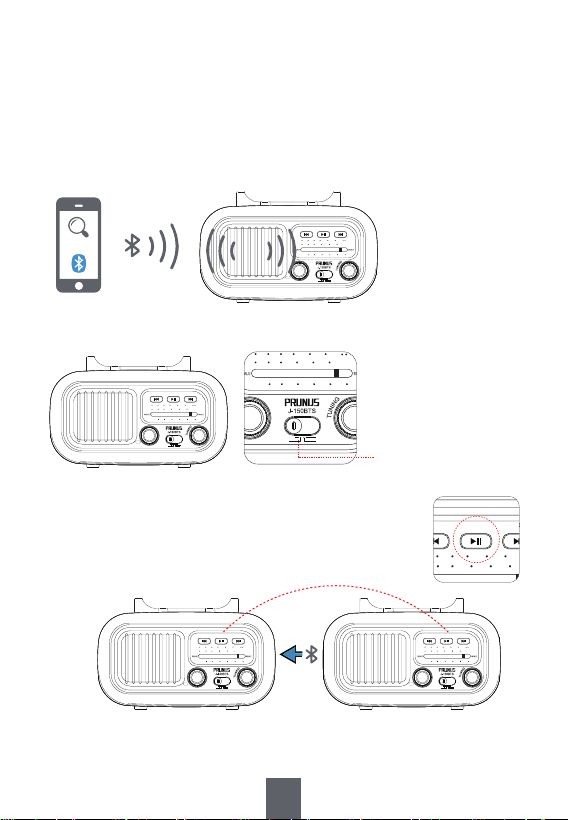
TWS Function:
Note: This function is available only if you have two radios of
the same model. Two speakers connected wirelessly, provide
the stereo effect of a 2.0 speaker system.
1) Follow the steps of “1. Play via Bluetooth”.
J-150BTS
A.
A.
2) Turn on the other radio and move <②Mode Button> to “MUSIC”.
4) Long press <⑤Play/Pause/TWS> of “ radio B” to disconnect.
B.
B.
FM 88 92 96 100 104 108
MHz
AM 53 75 100 130 150 171
MHz
x10
SW 5.9 7.6 10.2 13.0 16.0 18.0
MHz
PREV
REW
PAUSE
TWS
NEXT
F.FWD
VOL-
OFF
VOL+
MUSIC
FM
SW
AM
FM 87 92 96 100 104 108
MHz
AM 53 75 100 130 150 171
MHz
x10
SW 5.9 7.6 10.2 13.0 16.0 18.0
MHz
PREV
REW
PAUSE
TWS
NEXT
F.FWD
VOL-
OFF
VOL+
MUSIC
FM
SW
AM
②Mode Button
3) Long press <⑤Play/Pause/TWS> of the two
radios simultaneously. Then two radios will play
music simultaneously as a better stereo sound
source.
14
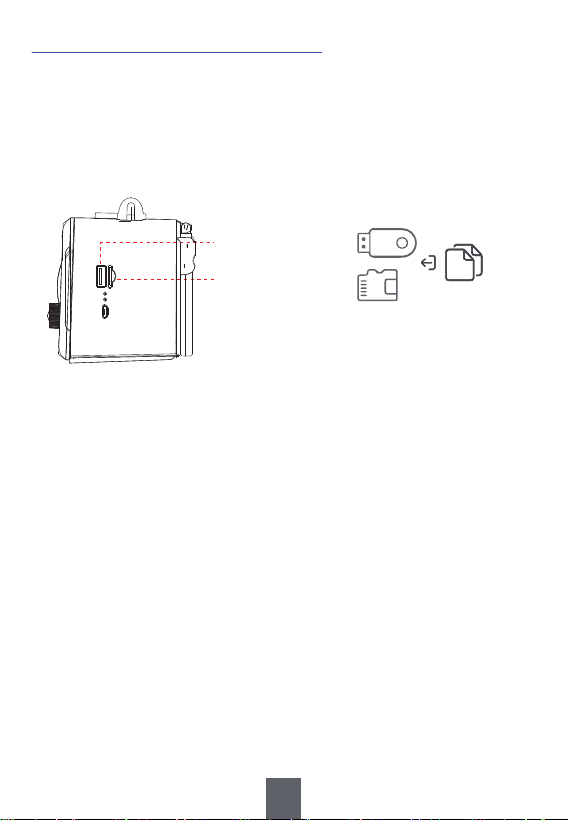
2.Played by USB Drive/TF Card
1) Move <②Mode Button> to “Music”.
2) Insert the USB drive/TF card loaded with MP3 files into <⑧TF
Card Slot> or <⑦USB Drive Port>. Once the MP3 files are
detected, the radio will play automatically.
⑧TF Card Slot
⑦USB Drive Port
MP3
Song
Tips :
1. Press <④Previous/Rewind> or <⑥Next/Fast forward> to choose the
previous or the next song.
2. Long press <④Previous/Rewind> or <⑥Next/Fast forward> to fast
forward or rewind down. (Only available under “USB playback” and
“TF card playback”.)
3. Press <⑤Play/Pause/TWS> to pause and resume the playback.
4. Please make sure the USB drive and TF card are in FAT or FAT32
format, as the radio can’t read the USB drive and TF card in
NTFS format.

15
Ⅵ
FAQ
Q1: Why is the sound fuzzy?
A1: It’s possible that your surrounding signal maybe weak, please
refer to“◆ How to Get Better Reception?” in IV RADIO RECEPTION.
Q2: Why can't the TF card/USB drive be read?
A2: Please make sure they’re in FAT or FAT32 Format, as
the radio can’t read TF card/USB drive in NTFS Format.
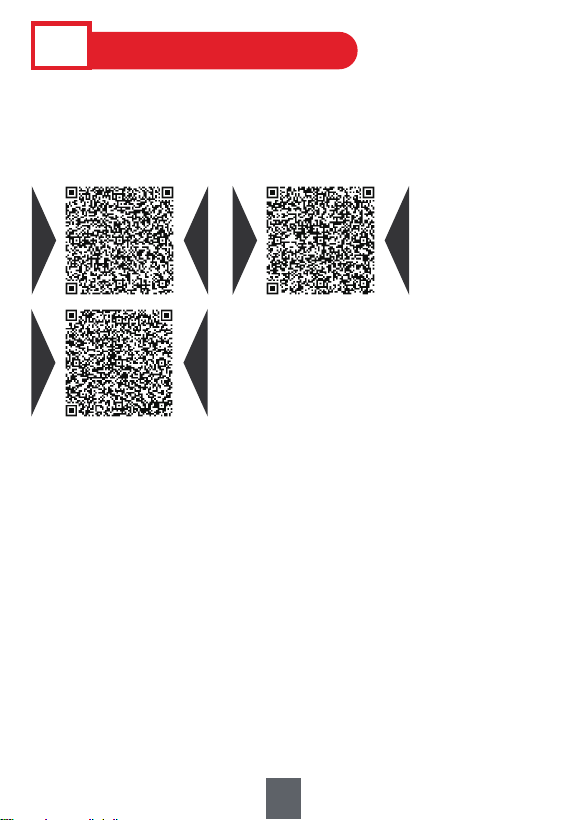
1. If the radio fails, please scan this QR code. Then click “Ask a
question” and log into Amazon to contact us. We will provide you
with the best service.
2. You can also send your messages to our customer service e-mail:
3. America Local Customer Support Number:
(805) 712-2661
US US CA CA
VII
AFTER-SALE SERVICE
UK UK
12
16