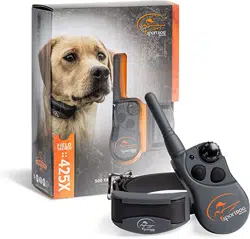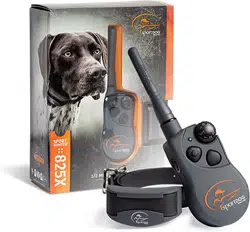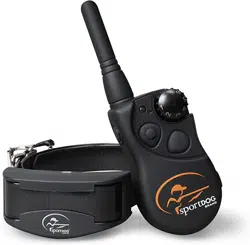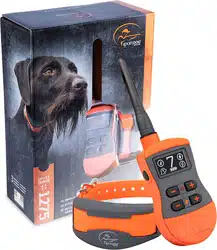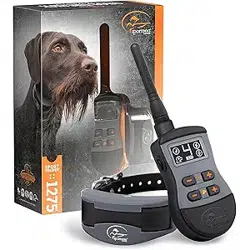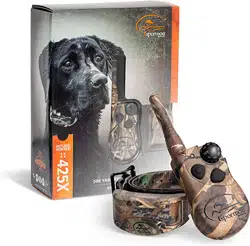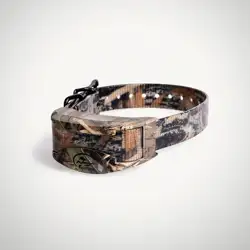

OPERATING GUIDE FOR SDR-AXF, SDR-AXS, SDR-AXC, SDR-AX, SDR-AXW
PLEASE READ THIS ENTIRE GUIDE BEFORE BEGINNING

2 1-800-732-0144
Hereinafter Radio Systems Corporation®, Radio Systems PetSafe Europe Ltd., Radio Systems Australia Pty Ltd. and
any other affiliate or Brand of Radio Systems Corporation may be referred to collectively as “We” or “Us”.
Thank you for choosing SportDOG Brand® training products. Used properly, this product will help you train your
dog efficiently and safely. To ensure your satisfaction, please review this owner’s manual thoroughly. If you have
questions regarding this product, contact our Customer Care Center at 1-800-732-0144, visit our website at
www.sportdog.com, or view our support videos at www.youtube.com/sportdogbrand.
To get the most protection out of your warranty, please register your product within 30 days at www.sportdog.com.
By registering and keeping your receipt you will enjoy the product’s full warranty and, should you ever need to
call the Customer Care Center, we will be able to help you faster. Most importantly, your valuable information will
never be given or sold to anyone. Complete warranty information is available online at www.sportdog.com.
OTHER IMPORTANT INFORMATION
Use of this product implies acceptance of any and all terms, conditions, and notices related to this product
including, but not limited to, those found in this Operating Guide and the Insert containing important Regulatory
Compliance and Safety information.
TABLE OF CONTENTS
PREPARE THE COLLAR RECEIVER .........................................................................................3
FIT THE COLLAR RECEIVER...................................................................................................5
FIND THE BEST INTENSITY LEVEL FOR YOUR DOG ...............................................................5
CHANGING STATIC STIMULATION RANGES ...........................................................................6
PROGRAM THE REMOTE TRANSMITTER ..............................................................................6
MATCH THE COLLAR RECEIVER AND REMOTE TRANSMITTER .............................................9
PROGRAM THE SYSTEM FOR MULTI-DOG OPERATION ....................................................... 10
CHANGE ID CODES .............................................................................................................. 12
BATTERY ............................................................................................................................. 13
videos available at www.youtube.com/sportdogbrand or on each products’ VIDEOS tab at sportdog.com.
2 1-800-732-0144 3WWW.SPORTDOG.COM
STEP
::
01 PREPARE THE COLLAR RECEIVER
CHARGE THE COLLAR RECEIVER
(
SD-425X, SD-425XS, SD-425XCAMO, SD-825X
)
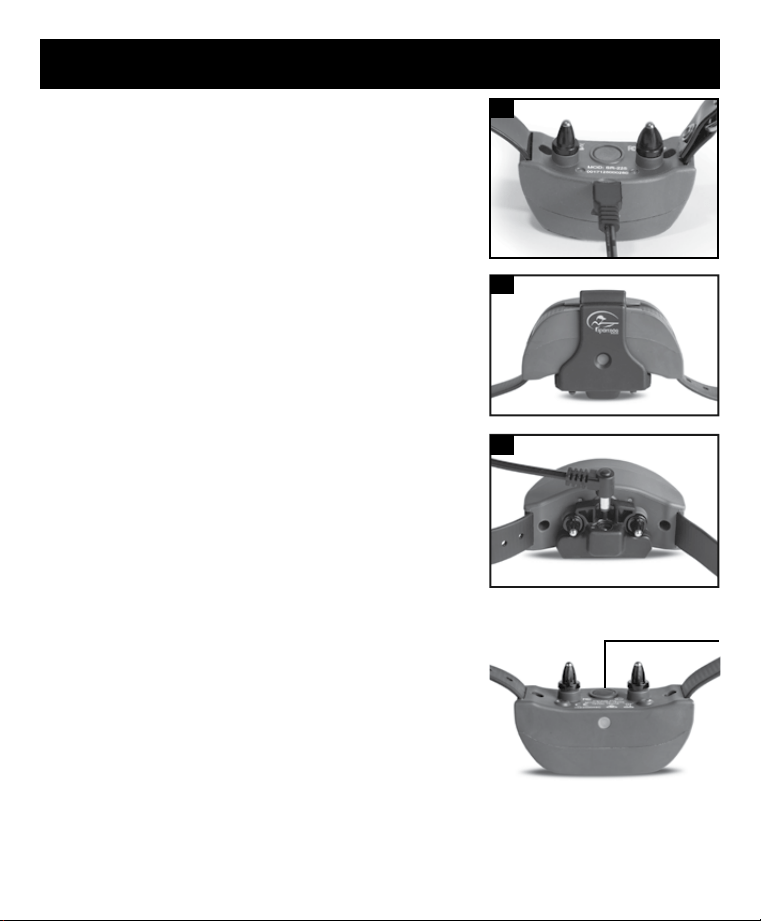
1. Lift the rubber cover protecting the Charging Jack.
2. Connect one of the charge connectors to the Charging Jack (1A).
3. Plug the charger into a standard 120/240-volt AC wall outlet.
4. Charge the Collar Receiver for 2 hours during the first charge,
and every charge thereafter. Remove the charge connector once
charged and secure the rubber cover fully to ensure debris does not
enter the Charging Jack.
CHARGE THE COLLAR RECEIVER
(
SD-1225X, SD-1825X, SD-1825XCAMO
)
1. Align the Contact Points with the Charging Cradle, making sure the hole
on the Charging Cradle aligns with the Receiver Indicator Light.
2. Push the Charging Cradle up and back on the Collar Receiver, until the
cradle snaps into place (1B).
3. Plug the charge connector into the Charging Cradle (1C).
4. Plug the charger into a standard 120/240-volt AC wall outlet.
5. Charge the Collar Receiver for 2 hours during the first charge, and every
charge thereafter. Remove both the charge connector and Charging
Cradle from the Collar Receiver once charged. The Charging Cradle is
not intended to be attached when the Collar Receiver is in use.
Using Li-Ion technology, the Collar Receiver only requires a 2 hour
charge. It is not harmful to let the unit charge for more than 2 hours.
TO TURN THE COLLAR RECEIVER ON
Press and release the On/Off Button. The Collar Receiver Indicator Light
will come on and the Collar Receiver will beep 1-2 times (1-3 times for
SD-1225X, SD1825X, SD-1825XCAMO) depending on what stimulation
range is chosen (page 6). The default is 2 (medium).
TO TURN THE COLLAR RECEIVER OFF
Press and release the On/Off Button when the Receiver Indicator Light
comes on solid red and the Collar Receiver beeps for 2 seconds.
To extend the life between charging cycles, turn the Collar Receiver off
when it is not in use.
NOTE: Approximate battery life between charges is 50 to 70 hours (140 to 160 hours for SD-1225X, SD-1825X,
SD-1825XCAMO), depending on frequency of use.
1A
1B
1C
ON/OFF
BUTTON
4 1-800-732-0144
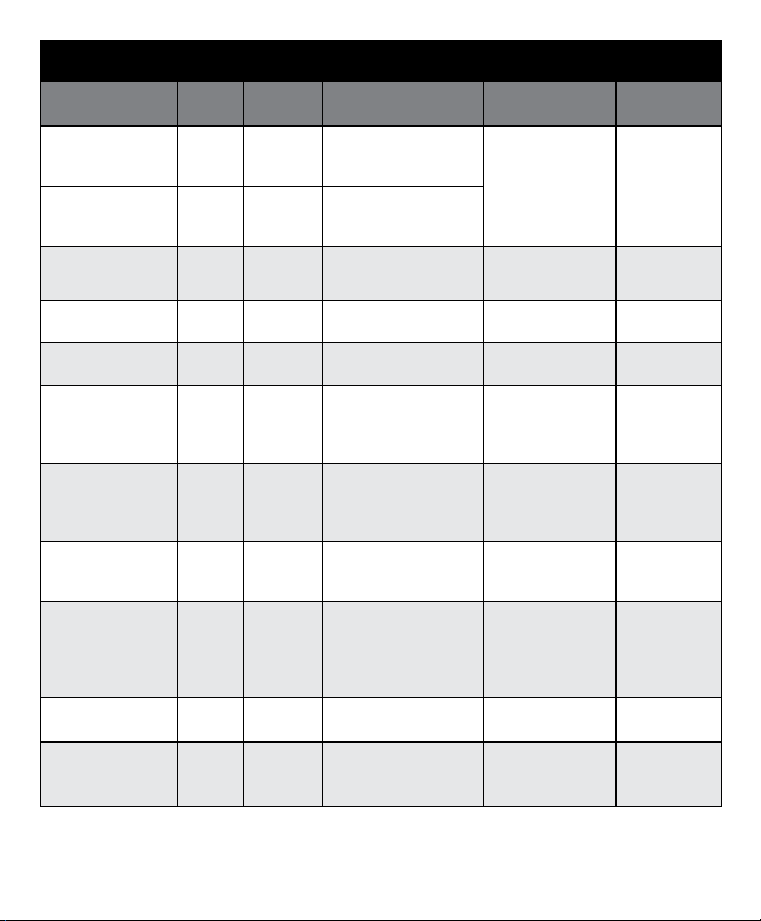
RECEIVER INDICATOR LIGHT
OPERATIONAL
MODE
LIGHT
COLOR
BATTERY
STATUS
LIGHT FUNCTION
SPEAKER
FUNCTION
VIBRATION
Unit is turned on via
On/Off Button
Green Good Light is solid in color
during beep sequence
Beeps 1-3 times
depending on
stimulation range
setting (2 is the
default setting).
Please see page 6.
N/A
Unit is turned on via
On/Off Button
Red Low Light is solid in color
during beep sequence
Unit is turned off via
On/Off Button
Red N/A Light is solid in color
during beep sequence
Beeps continuously
for
2 seconds
N/A
Unit is on Green Good Light flashes every 2
seconds
N/A N/A
Unit is on Red Low Light flashes every 2
seconds
N/A N/A
Unit is delivering
continuous static
stimulation
Red N/A Light is solid in color for as
long as button is pressed
(up to 10 seconds)
N/A N/A
Unit is delivering
momentary static
stimulation
Red N/A Light will quickly flash
once no matter how long
button is pressed
N/A N/A
Unit is delivering tone
stimulation
Off N/A N/A Unit will beep for
as long as button is
pressed
N/A
Unit is delivering
vibration stimulation
Off N/A N/A N/A Unit will vibrate
for as long
as button is
pressed (up to 10
seconds)
Unit is charging Green Low Light is solid in color while
on the charger
N/A N/A
Unit is fully charged
(charger still
connected)
Green Good
Light flashes once per
second once the battery is
completely charged
N/A N/A
4 1-800-732-0144 5WWW.SPORTDOG.COM
STEP
::
02 FIT THE COLLAR RECEIVER
IMPORTANT: THE PROPER FIT AND PLACEMENT OF THE COLLAR RECEIVER IS IMPORTANT FOR EFFECTIVE
TRAINING. THECONTACT POINTS MUST HAVE DIRECT CONTACT WITH YOUR DOG’S SKIN.
To ensure a proper fit, follow these steps:
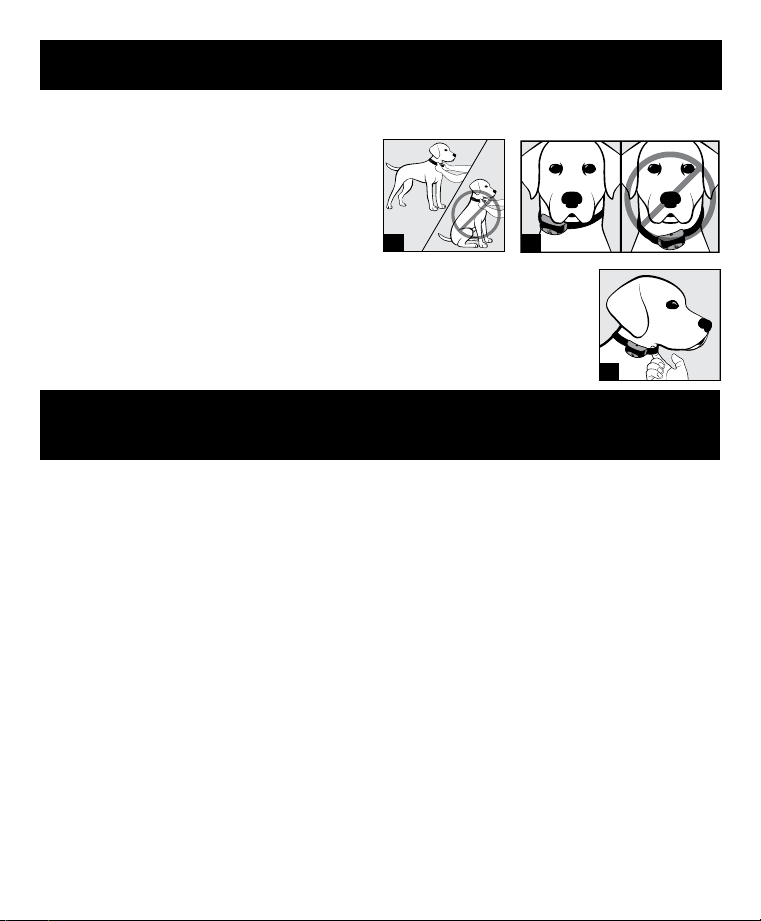
1. With your dog standing (2A), center the Collar
Receiver so the Contact Points are underneath your
dog’s neck, touching the skin (2B). If your dog has a
long or thick coat, you have two options to ensure
consistent contact: either trim the hair around the
Contact Points or switch to the longer Contact Points
included with your system.
2. The Collar Receiver should fit snugly, yet loose enough to allow one finger to fit between
the strap and your dog’s neck (2C).
3. Allow your dog to wear the collar for several minutes, and then recheck the fit. Check the
fit again as your dog becomes more comfortable wearing the Collar Receiver.
STEP
::
03 FIND THE BEST INTENSITY LEVEL FOR YOUR
DOG
Your SportDOG® Brand system has multiple intensity levels. This allows you to choose the static stimulation level
that is best for your dog. For training efficiency, it is important to find the right intensity level for your dog. This is
called the Recognition Level, at which your dog looks around in curiosity, or flicks his ears.
NOTE: Always start at the lowest level and work your way up.
FINDING YOUR DOG’S RECOGNITION LEVEL
NOTE: Every dog is different and you cannot predict where your dog’s Recognition Level will be. Watch closely for any
slight change in behavior that demonstrates your dog is feeling the static stimulation.
1. With the Collar Receiver turned on and properly fitted to your dog, set the Remote Transmitter’s Intensity Dial
at Level 1 and press the Continuous Static Stimulation Button for 1 to 2 seconds.
2. If your dog shows no reaction to Level 1, go to Level 2 and repeat the process.
3. YOUR DOG SHOULD NOT VOCALIZE OR PANIC WHEN RECEIVING STATIC STIMULATION. IF THIS HAPPENS, THE
STATIC STIMULATION LEVEL IS TOO HIGH AND YOU NEED TO GO BACK TO THE PREVIOUS LEVEL AND REPEAT
THE PROCESS.
4. Once you find your dog’s Recognition Level, this is the level you should use when you begin a training exercise.
5. If you have progressed to the highest static stimulation level while searching for your dog’s Recognition Level
and your dog continues to show no response, check to see if the Collar Receiver is snug against your dog’s neck.
Then go back to Intensity Level 1 and repeat the process. If your dog still does not indicate he is feeling the static
stimulation, you have three options: you may either have to trim the hair beneath the Contact Points, switch to
the longer Contact Points included in your system, or change to a higher static stimulation range.
If after completing all of these steps your dog still does not indicate he is feeling the static stimulation, please
contact the Customer Care Center at 1-800-732-0144.
2A 2B
2C
6 1-800-732-0144
CHANGING STATIC STIMULATION RANGES
Your SportDOG® Brand Collar Receiver comes with 2-3 static stimulation ranges depending on the model. In the
Remote Transmitter’s default mode (see below) there are 21 static stimulation levels within each range, with 1
being the lowest and 21 being the highest. The default range setting is 2 or medium.
To change the range of static stimulation, follow these steps:
1. Make sure the Collar Receiver is off.
2. Then turn the unit on by pressing and releasing the On/Off button.
3. After the Indicator Light turns off and within 5 seconds, press and hold the On/Off button for 3 seconds.
4. The Collar Receiver will then beep and the Indicator Light will flash orange as indicated by the chart below. Continue
to hold the button until the number of beeps/orange flashes equals the desired stimulation range shown.
5. Release the button once the desired range is selected; the Collar Receiver will turn off.
6. Turn the unit back on. It will then beep according to the static stimulation range selected in Step 4.
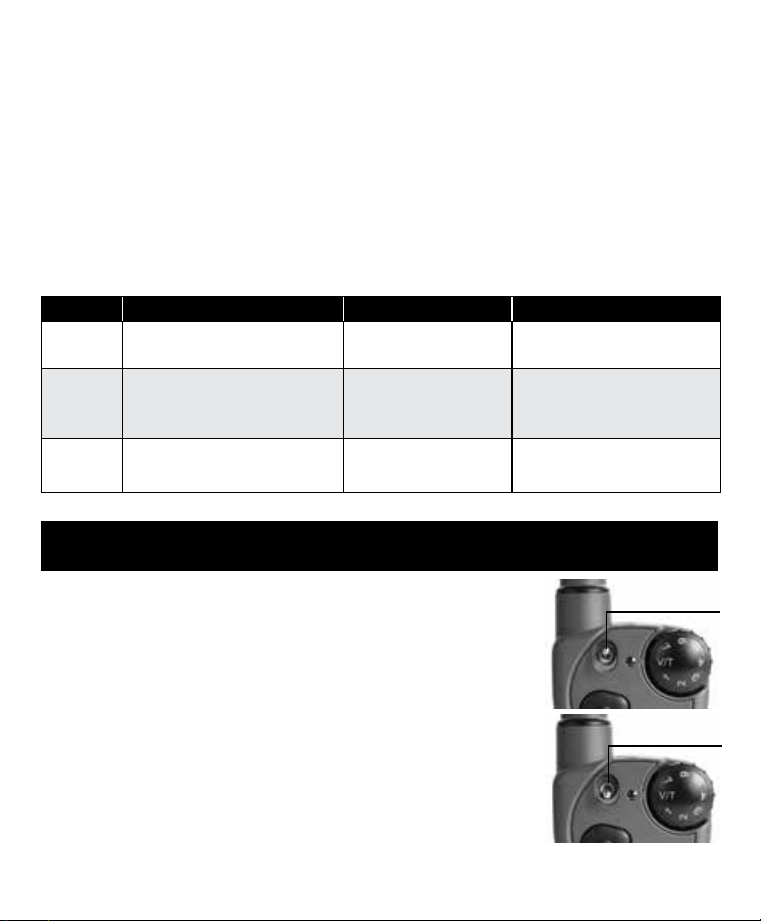
BEEPS STATIC STIMULATION RANGE DOG TEMPERAMENT MODEL
1 beep
Low Mild SD-425X, SD-825X, SD-1225X,
SD-1825X, and SD-1825XCAMO
2 beeps Medium Moderate SD-425X, SD-425XS,
SD-425XCAMO, SD-825X,
SD-1225X, SD-1825X,
and SD-1825XCAMO
3 beeps High Stubborn SD-425XS, SD-425XCAMO,
SD-1225X, SD-1825X,
and SD-1825XCAMO
STEP
::
04 PROGRAM THE REMOTE TRANSMITTER
Your Remote Transmitter has multiple operational modes (seven modes: SD-425X,
SD-425XS, SD-425XCAMO, SD-825X, SD-1225X or fourteen modes: SD-1825X,
SD-1825XCAMO) to allow you to select the best match for your type or style of training.
The Remote Transmitter is factory set to mode 5 (SD-425X, SD-425XS, SD-425XCAMO,
SD-825X, SD-1225X) or 5:a (SD-1825X, SD-1825XCAMO). There is also one
programming mode (Mode V/T) which allows you to change the system’s ID code.
TO CHANGE THE MODE
1. Referring to the model appropriate mode chart on pages 7-9, choose your
desired mode number (1-7) and toggle position (a or b if using SD-1825X,
SD-1825XCAMO). Adjust both the Intensity Dial and Toggle Switch to match your
desired mode.
2. Turn the Remote Transmitter over and remove the belt clip (if attached).
3. Using a pen or the tine on the buckle of your collar strap, press and release the
Mode Button. When the Mode Button is pressed, the Transmitter Indicator Light
will be solid in color. When it is released, it will flash a number of times that
corresponds to the mode selected.
TOGGLE SWITCH* IN
THE
a POSITION
TOGGLE SWITCH IN
THE
b POSITION
*Toggle switch only applicable to
SD-1825X and SD-1825XCAMO
6 1-800-732-0144 7WWW.SPORTDOG.COM
For example, if mode 6:a is desired on the SD-1825X, switch the toggle to the grey/a position and adjust the
Intensity Dial to Level 6. Once the Mode Button has been depressed, the Transmitter Indicator Light will be solid,
and once the Mode Button is released, the Transmitter Indicator Light will flash 6 times. However, if you select
Mode V/T (ID Code) in the grey/a position, the light will remain solid in color once the Mode Button is released.
NOTE: If you own an original SD-425, SD-425S, SD-425CAMO, SD-825, SD-1225, SD-1825, or SD-1825CAMO your
transmitter will work with the X-Series Add-A-Dog® collars, but you will need to download the correct mode chart
for your system from sportdog.com.
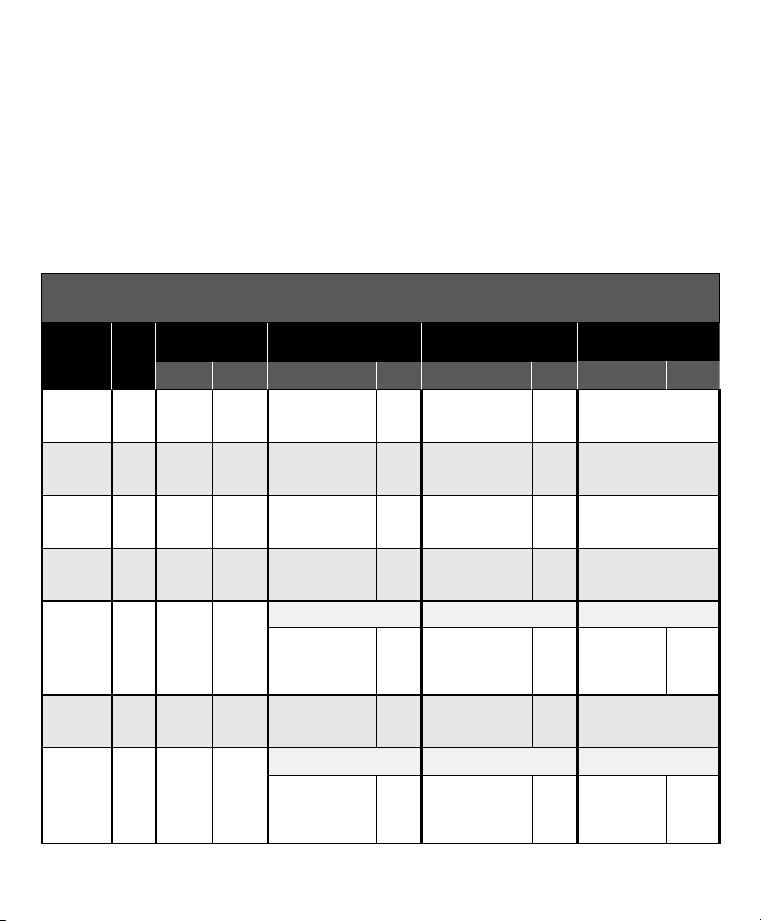
SD-425X / SD-425XS / SD-425XCAMO / SD-825X / SD-1225X
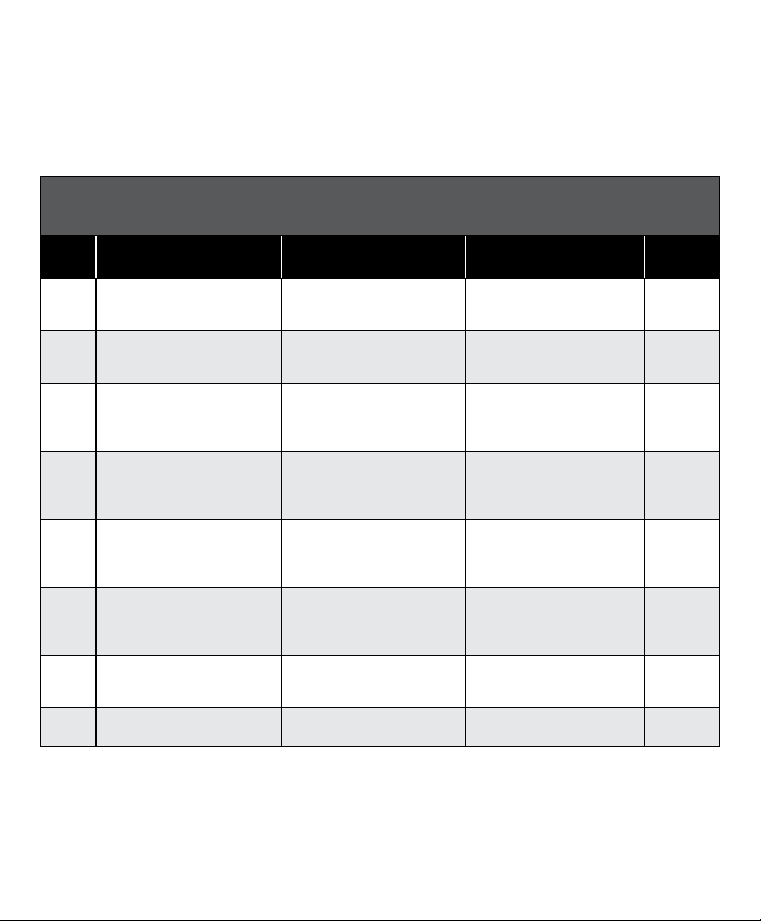
MODE CHART
(
REFER TO PAGE 6 FOR HOW TO CHANGE MODES
)
MODE
UPPER BUTTON
FUNCTION
LOWER BUTTON
FUNCTION
SIDE BUTTON
FUNCTION
NUMBER
OF DOGS
1 Continuous static stimulation
(Level set by Intensity Dial)
OR Vibe if dial set to V/T
Momentary static stimulation
(Level set by Intensity Dial)
OR Vibe if dial set to V/T
Tone only 1
2 Continuous static stimulation
(Level set by Intensity Dial)
OR Tone if dial set to V/T
Momentary static stimulation
(Level set by Intensity Dial)
OR Tone if dial set to V/T
Vibe only 1
3 Dog 1: Continuous static
stimulation (Level set by
Intensity Dial)
OR Tone if dial set to V/T
Dog 2: Continuous static
stimulation (Level set by
Intensity Dial)
OR Tone if dial set to V/T
Dog 3: Continuous static
stimulation (Level set by
Intensity Dial)
OR Tone if dial set to V/T
3
4 Dog 1: Continuous static
stimulation (Level set by
Intensity Dial)
OR Vibe if dial set to V/T
Dog 2: Continuous static
stimulation (Level set by
Intensity Dial)
OR Vibe if dial set to V/T
Dog 3: Continuous static
stimulation (Level set by
Intensity Dial)
OR Vibe if dial set to V/T
3
5* Medium Continuous static
stimulation (Level set by
Intensity Dial)
OR Tone if dial set to V/T
Low Continuous static
stimulation (Level set by
Intensity Dial)
OR Tone if dial set to V/T
High Continuous static
stimulation (Level set by
Intensity Dial)
OR Tone if dial set to V/T
1
6 Medium Continuous static
stimulation (Level set by
Intensity Dial)
OR Vibe if dial set to V/T
Low Continuous static
stimulation (Level set by
Intensity Dial)
OR Vibe if dial set to V/T
High Continuous static
stimulation (Level set by
Intensity Dial)
OR Vibe if dial set to V/T
1
7 Continuous static stimulation
(Level set by Intensity Dial)
OR Tone if dial set to V/T
Momentary static stimulation
(Level set by Intensity Dial)
OR Tone if dial set to V/T
Locate Remote Beeper** 1
V/T
(ID CODE)
N/A N/A See STEP 07 N/A
NOTE: Modes 1, 2, 3, 4, and 7 provide 7 levels of stimulation, which correspond to the setting of the Intensity Dial.
Modes 5 and 6 provide more “increments” to choose from – a total of 21 levels of static stimulation. For
example, in mode 5 with the Intensity Dial set at 1, the Lower Button provides level 1 of 21, the Upper Button
provides level 2 of 21, and the Side Button provides level 3 of 21.
* Factory Default Mode.
** Locate Remote Beeper: The Side Button turns run mode off and locates the Remote Beeper. To enable run mode again,
press and hold the Side Button for 3 seconds.
8 1-800-732-0144
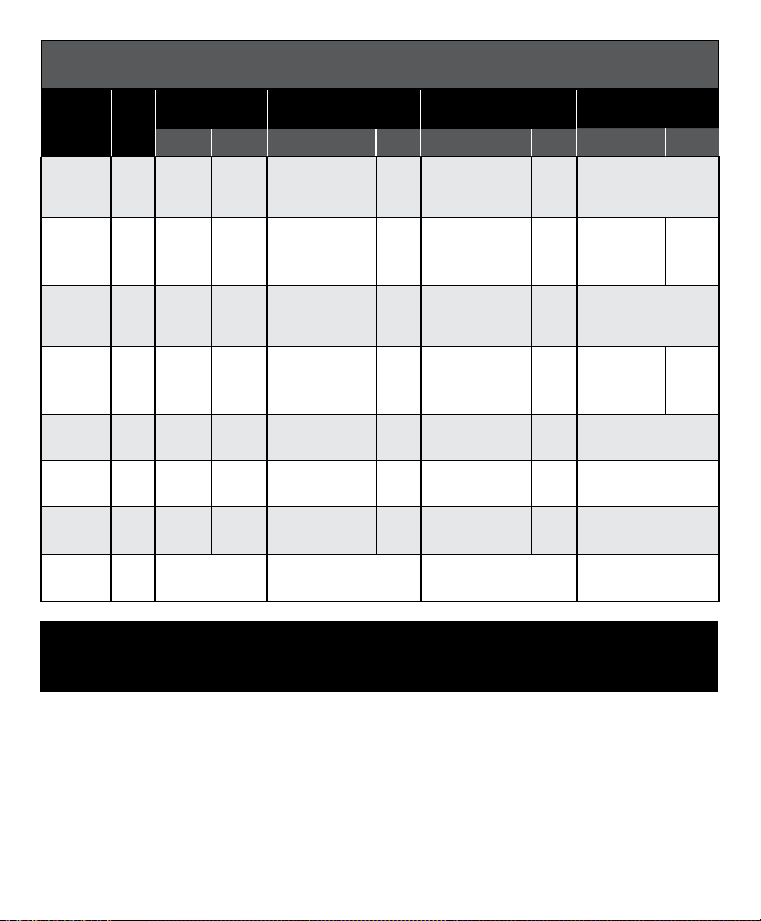
KEY FOR SD-1825X / SD-1825XCAMO MODE CHART (PAGES 8 AND 9):
* Factory Default Mode.
r
For two-dog operation setup refer to STEP 06 on page 10.
^ For three- and six-dog operation setup refer to STEP 06 on pages 10-11.
•
Locate Remote Beeper: The Side Button turns run mode off and locates the Remote Beeper. To enable run
mode again, press and hold the Side Button for 3 seconds.
»
Remote Launcher: Match your SD-1825X or SD-1825XCAMO Transmitter to your Launcher Receiver by
pressing and holding the Launcher Receiver’s On/Off button. When a “P” appears on the Receiver’s LCD,
press the Upper Button on your Remote Transmitter. Your Remote Transmitter and Launcher Receiver are
now matched. The Side Button on your Remote Transmitter will be used to activate your Launcher basket.
SD-1825X / SD-1825XCAMO MODE CHART
(
REFER TO PAGE 6 FOR HOW TO CHANGE MODES
)
MODE:
TOGGLE
POSITION
DOGS
TOGGLE SWITCH
FUNCTION
UPPER BUTTON
FUNCTION
LOWER BUTTON
FUNCTION
SIDE BUTTON
FUNCTION
a b DIAL 1-7 V/T DIAL 1-7 V/T DIAL 1-7 V/T
1:a
2
r
Dog 1 Dog 2
High Continuous
Static Stimulation
Vibe
High Momentary
Static Stimulation
Vibe Tone
1:b
2
Dog 1 Dog 2
High Continuous
Static Stimulation
Vibe
High Continuous
Static Stimulation
Vibe Locate Remote Beeper
•
2:a
2
Dog 1 Dog 2
High Continuous
Static Stimulation
Tone
High Momentary
Static Stimulation
Tone Vibe
2:b
2
Dog 1 Dog 2
High Continuous
Static Stimulation
Vibe
Low Continuous
Static Stimulation
Vibe Tone
3:a
6^
Dogs
1-3
Dogs
4-6
Dog 1 (a) / Dog 4 (b) Dog 2 (a) / Dog 5 (b) Dog 3 (a) / Dog 6 (b)
High Continuous
Static Stimulation
Tone
High Continuous
Static Stimulation
Tone
High
Continuous
Static
Stimulation
Tone
3:b
2
Dog 1 Dog 2
High Continuous
Static Stimulation
Tone
Low Continuous
Static Stimulation
Tone Vibe
4:a
6
Dogs
1-3
Dogs
4-6
Dog 1 (a) / Dog 4 (b) Dog 2 (a) / Dog 5 (b) Dog 3 (a) / Dog 6 (b)
High Continuous
Static Stimulation
Vibe
High Continuous
Static Stimulation
Vibe
High
Continuous
Static
Stimulation
Vibe
8 1-800-732-0144 9WWW.SPORTDOG.COM
SD-1825X / SD-1825XCAMO MODE CHART
(
REFER TO PAGE 6 FOR HOW TO CHANGE MODES
)
MODE:
TOGGLE
POSITION
DOGS
TOGGLE SWITCH
FUNCTION
UPPER BUTTON
FUNCTION
LOWER BUTTON
FUNCTION
SIDE BUTTON
FUNCTION
a b DIAL 1-7 V/T DIAL 1-7 V/T DIAL 1-7 V/T
4:b
2
Dog 1 Dog 2
Rising High
Continuous Static
Stimulation
Vibe
High Continuous
Static Stimulation
Vibe Tone
5:a
*
2
Dog 1 Dog 2
Medium
Continuous Static
Stimulation
Tone
Low Continuous
Static Stimulation
Tone
High
Continuous
Static
Stimulation
Tone
5:b
2
Dog 1 Dog 2
Rising High
Continuous Static
Stimulation
Tone
High Continuous
Static Stimulation
Tone Vibe
6:a
2
Dog 1 Dog 2
Medium
Continuous Static
Stimulation
Vibe
Low Continuous
Static Stimulation
Vibe
High
Continuous
Static
Stimulation
Vibe
6:b
2
Dog 1 Dog 2
High Continuous
Static Stimulation
Vibe Tone Vibe
Remote Launcher
»
7:a
2
Dog 1 Dog 2
High Continuous
Static Stimulation
Tone
High Momentary
Static Stimulation
Tone Locate Remote Beeper•
7:b
2
Dog 1 Dog 2
High Continuous
Static Stimulation
Tone Vibe Tone
Remote Launcher
»
V/T
(ID CODE)
N/A a N/A N/A See STEP 07
STEP
::
05 MATCH THE COLLAR RECEIVER AND
REMOTE TRANSMITTER
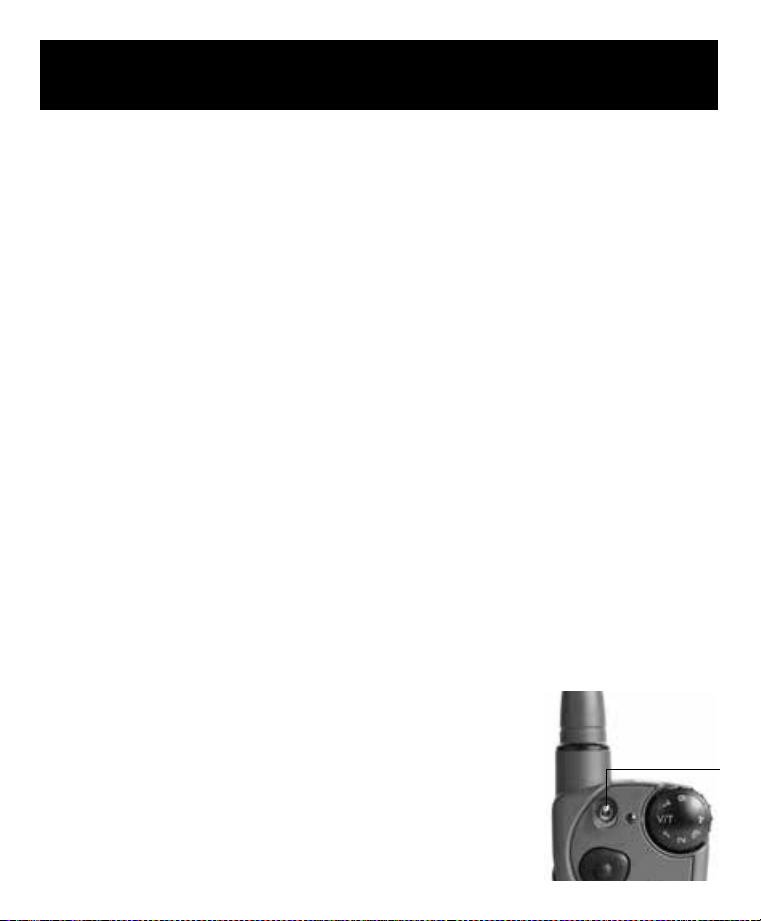
To match the Collar Receiver to work with a new Remote Transmitter or to reprogram a new Collar Receiver to work
with your existing Remote Transmitter:
1. Turn off the Collar Receiver.
2. Press and hold the On/Off Button. The Receiver Indicator Light will come on, then turn off after 4-5 seconds. If
the On/Off Button is released too early, the Receiver Indicator Light will begin flashing as normal. If this occurs,
start over from Step 1.
3. After the Receiver Indicator Light has turned off, release the On/Off Button.
4. Press and hold the Upper Button on the Remote Transmitter until the Receiver Indicator Light flashes 5 times.
Once the Receiver Indicator Light has flashed 5 times, the Collar Receiver has been matched and will begin
flashing as normal. If the Receiver Indicator Light does not flash 5 times, start over from Step 1.
10 1-800-732-0144
STEP
::
06 PROGRAM THE SYSTEM FOR MULTI-DOG
OPERATION
PROGRAM THE SYSTEM FOR TWO OR THREE-DOG OPERATION
(
SD-425X, SD-425XS, SD-425XCAMO, SD-825X, SD-1225X
)
SportDOG
®
Add-A-Dog
®
Collar Receiver(s) must be purchased to train additional dogs. Please refer to "Compatible
SportDOG Systems" chart on page 11 for compatible Add-A-Dog Collar Receivers for these systems.
1. Program the Remote Transmitter to mode 3 or 4 (see page 7).
2. Program the first Collar Receiver.
A. Turn off the Collar Receiver.
B. Press and hold the On/Off Button. The Receiver Indicator Light will come on, then turn off in 4-5 seconds.
If the On/Off Button is released too early, the Receiver Indicator Light will begin its normal flashing. If this
occurs, start over and repeat from A.
C. After the Receiver Indicator Light has turned off, release the On/Off Button.
D. Press and hold the Upper Button on the Remote Transmitter until the Receiver Indicator Light flashes 5
times. If the Receiver Indicator Light does not flash 5 times, start over and repeat from A.
3. Program the second Collar Receiver using A through D above, but using the Lower Button in place of the Upper
Button.
4. Program the third Collar Receiver using A through D above, but using the Side Button in place of the Upper Button.
PROGRAM THE SYSTEM FOR MULTI-DOG OPERATION
(
SD-1825X, SD-1825XCAMO
)
SportDOG Add-A-Dog Collar Receivers must be purchased to train additional dogs in two-, three-, or six-dog mode.
Please refer to the chart on page 11 for compatible Add-A-Dog Collar Receivers for these systems.
TWO-DOG OPERATION
SportDOG Collar Receivers can be set to respond to either the a or b toggle position on the Remote Transmitter.
1. Program the Remote Transmitter to mode 1, 2, 5, 6, or 7 with the toggle in the grey/a position, or any mode with
the toggle in the orange/b position (see pages 8-9).
2. Next, with the toggle switch in the grey/a position, you can now program the first Collar Receiver.
A. Turn off the Collar Receiver.
B. Press and hold the On/Off Button on the Collar Receiver. The Receiver
Indicator Light will come on, then turn off in 4-5 seconds. If the On/Off
Button is released too early, the Receiver Indicator Light will begin its
normal flashing. If this occurs, start over and repeat from A.
C. After the Receiver Indicator Light has turned off, release the On/Off Button.
D. Press and hold the Upper Button on the Remote Transmitter until the
Receiver Indicator Light flashes 5 times. If the Receiver Indicator Light does
not flash 5 times, start over and repeat from A.
3. To program the second Collar Receiver, repeat steps A through D, but with the
toggle switch in the orange/b position.
TOGGLE SWITCH
SET TO
GREY/
a
FOR DOG 1 OR SET
TO
ORANGE/
b
FOR DOG 2.
10 1-800-732-0144 11WWW.SPORTDOG.COM
THREE-DOG OPERATION
1. Program the Remote Transmitter to mode 3 or 4 with the toggle in the grey/a position (see page 8).
2. Program the first Collar Receiver:
A. Turn off the Collar Receiver.
B. Press and hold the On/Off Button on the Collar Receiver. The Receiver Indicator Light will come on, then
turn off in 4-5 seconds. If the On/Off Button is released too early, the Receiver Indicator Light will begin its
normal flashing. If this occurs, start over and repeat from A.
C. After the Receiver Indicator Light has turned off, release the On/Off Button.
D. Press and hold the Upper Button on the Remote Transmitter until the Receiver Indicator Light flashes 5
times. If the Receiver Indicator Light does not flash 5 times, start over and repeat from A.
3. To program the second Collar Receiver, repeat steps A through D, using the Lower Button in place of the Upper
Button.
4. To program the third Collar Receiver, repeat steps A through D, using the Side Button in place of the Upper
Button.
SIX-DOG OPERATION
Repeat Steps 1-4 from "THREE-DOG OPERATION" above for dogs 1-3, then flip the toggle switch to the orange/b
position and repeat Steps 2-4 for dogs 4-6.
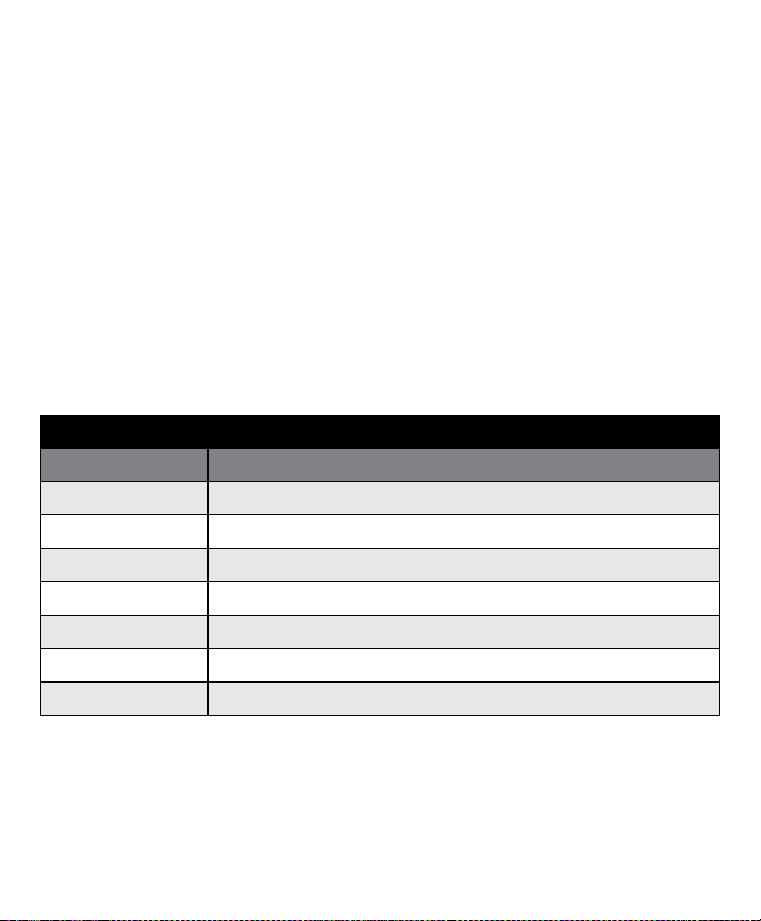
COMPATIBLE SPORTDOG® SYSTEMS
ADD A DOG® COLLAR SYSTEMS
SDR-AXF SD-425, SD-425X, SD-575, SD-575E, SD-825, SD-825X , SD-875, and SD-875E
SDR-AXS SD-425S and SD-425XS
SDR-AXC SD-425CAMO and SD-425XCAMO
SDR-AX SD-1225, SD-1225X, SD-1275, SD-1275E, SD-1825, SD-1825X, and SD-2525
SDR-AXW SD-1825CAMO and SD-1825XCAMO
SDR-H SD-3225
SDR-AB SD-1875

12 1-800-732-0144
STEP
::
07
CHANGE ID CODES
An ID Code is the signal identification between the Remote Transmitter and Collar Receiver. Each is programmed
in 1 of 2,000 ID Codes from the factory. The Remote Transmitter has the flexibility to program two or more Remote
Transmitters to the same ID Code, allowing them to control one Collar Receiver. There are 64 programmable ID
Codes available.
TO MANUALLY PROGRAM A REMOTE TRANSMITTER’S ID CODE
1. Turn the Intensity Dial to V/T (if programing SD-1825X or SD-1825XCAMO place the toggle switch in the grey/a
position), and then press and release the Mode Button on the back of your Remote Transmitter. This does not
change the mode, so the current mode will still be active after the ID change is complete.
2. Once the Mode Button is released, the Transmitter Indicator Light will illuminate solid green and stay on for 15
seconds.
3. While the green Indicator Light is on, turn the Intensity Dial to select the 1st digit of the ID and then press and
release the Side Button. The green Indicator Light will flash rapidly confirming selection.
4. Again, while the green Indicator Light is on, turn the Intensity Dial to select the 2nd digit of the ID and then press
and release the Side Button. The green Indicator Light will flash rapidly confirming selection. The 2nd digit is
optional and, if not desired, wait until the green light turns off and refrain from pressing the Side Button.
5. At the end of 15 seconds, or after the second press of the Side Button, the green Indicator Light will turn off and
the ID of the Remote Transmitter will be updated. At this point, the Remote Transmitter will be in the same mode
it was in prior to setting the ID.
6. Upon changing the ID Code, you will need to match the Collar Receiver to the Remote Transmitter (see STEP 05).
NOTE: If you press the Side Button only once (skipping Step 4) the ID is still a two digit ID. The left digit is
defaulted to 1. For example, if you selected 6 in Step 3 and pressed the Side Button only once, the ID you get
will be 16.
TO RETURN THE REMOTE TRANSMITTER TO THE FACTORY ID
1. Turn the Intensity Dial to V/T (if programing SD-1825X or SD-1825XCAMO place the toggle switch in the
grey/a position) and then press and release the Mode Button on the back of your Remote Transmitter. This does
not change the mode, so the current mode will still be active after the ID change is complete.
2. Do not press any buttons and wait until the green Transmitter Indicator Light turns off.
3. You will need to match the Collar Receiver to the Remote Transmitter (see STEP 05).
12 1-800-732-0144 13WWW.SPORTDOG.COM
ACCESSORIES
To purchase additional accessories for your SportDOG Brand® product visit our website at www.sportdog.com,
contact the Customer Care Center at 1-800-732-0144, or visit a retailer near you.
BATTERY
This Collar Receiver operates on one Li-Ion battery pack. Only replace with battery received from calling the
Customer Care Center at 1-800-732-0144.
• Batteries should never be removed from the battery compartment for charging.
• Rechargeable Lithium Ion (Li-Ion) batteries are not memory sensitive, do not require depletion before charging,
and cannot be over charged.
• The battery comes partially charged from the factory, but will require a full charge before the first use.
• When storing the unit for long periods, remember to regularly give batteries a full charge. This should be done
once every 3 to 4 months.
• You should expect hundreds of recharge cycles from your battery. However, all rechargeable batteries lose
capacity over time relative to the number of recharge cycles they experience. This is normal. If your operating
time drops to half of the original life, contact the Customer Care Center to purchase a new battery.
• The battery should last for a period of 3-5 years. When a battery needs replacement, you can order a new pack
by calling our Customer Care Center at 1-800-732-0144. Please do not open the Collar Receiver until you have
received the replacement.
AT END OF PRODUCT LIFE, USE THESE BATTERY REMOVAL INSTRUCTIONS FOR FINAL DISPOSAL (DO NOT
OPEN THE COLLAR RECEIVER UNTIL YOU HAVE RECEIVED THE REPLACEMENT):
• Using a 3/32 Hex Key for your Collar Receiver, remove the case screws.
• Remove the case back or cover.
• Remove the old battery pack.
These instructions are not valid for repair or battery replacement. To avoid invalidating your warranty, please
call the Customer Care Center at 1-800-732-0144 for help in replacing your battery with one that is specifically
approved by Radio Systems Corporation®.
REALTREE MAX-5 Camouflage Pattern ©2013 of Jordan Outdoor Enterprises, Ltd., all rights reserved.

14 1-800-732-0144

14 1-800-732-0144 15WWW.SPORTDOG.COM

SPORTDOG.COM
©2019, 2021 RADIO SYSTEMS CORPORATION
Radio Systems Corporation • 10427 PetSafe Way • Knoxville, TN 37932 • 1.800.732.0144
L400-2251/1