USER MANUAL
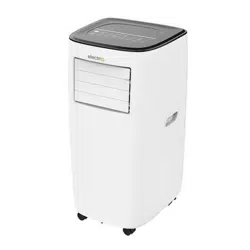
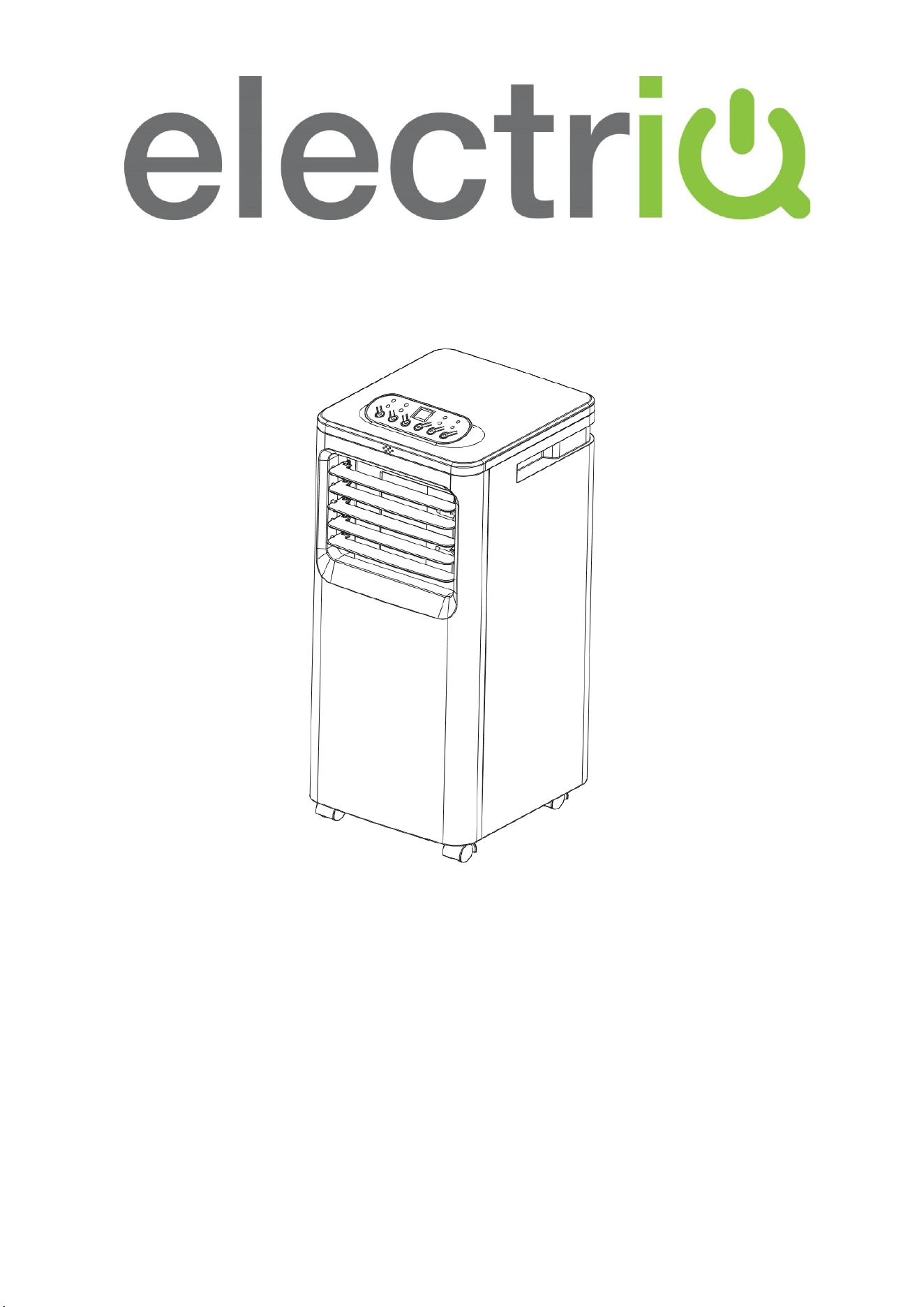
electriQ 7,000 BTU
PORTABLE AIR CONDITIONER
SF8000E
Thank you for choosing electriQ
Please read this user manual before using this innovative Air Conditioner and keep it
safe for future reference.
Visit our page www.electriQ.co.uk for our entire range of Intelligent Electricals
2

3
CONTENTS
SAFETY INFORMATION
4
FEATURES AND PARTS LIST
6
INSTALLATION
7
OPERATION
10
REMOTE CONTROL
11
CLEANING AND MAINTENANCE
12
EMPTYING THE INTERNAL WATER TANK
13
TROUBLESHOOTING
14
ERROR CODES
14
SUPPORT
15
TECHNICAL SPECIFICATION
16
4
SAFETY INSTRUCTIONS
Important!
• Carefully read the instructions before operating the unit
• This appliance is for indoor use only.
• Rating: This unit must be only connected to a 220-240 V / 50 Hz
earthed outlet.
• Installation must be in accordance with regulations of the country where the unit is
used.
• If you are in any doubt about the suitability of your electrical supply have it checked
and, if necessary, modified by a qualified electrician.
• This air conditioner has been tested and is safe to use. However, as with any electrical
appliance - use it with care.
• Disconnect the power from the appliance before dismantling, assembling or cleaning.
• Avoid touching any moving parts of the appliance.
• Never insert fingers, pencils or any other objects though the guard
• This appliance is not intended for use by persons (including children) with reduced
physical, sensory or mental capabilities. It is also not intended for use by those with a
lack of experience and knowledge, unless they have been given supervision or
instruction concerning the use of the appliance by a person responsible for their
safety.
• Do not leave children unsupervised with this appliance.
• Do not clean the unit by spraying it or immersing it in water.
• Never connect the unit to an electrical outlet using an extension cord. If an outlet is
not available, one should be installed by a qualified electrician.
• Never operate this appliance if the cord or plug is damaged. Ensure the power cord is
not stretched or exposed to sharp objects/edges.
• A damaged supply cord should be replaced by the manufacturer or a qualified
electrician in order to avoid a hazard.
• Any service other than regular cleaning or filter replacement should be performed by
an authorised service representative. Failure to comply could result in a voided
warranty.
• Do not use the appliance for any purpose other than its intended use.
• The air conditioner unit must always be stored and transported upright, otherwise
irreparable damage may be caused to the compressor; if in doubt we suggest waiting
at least 24 hours before starting the unit.
• Avoid restarting the air conditioning unit unless 3 minutes have passed since being
turned off. This prevents damage to the compressor.
• Never use the mains plug as a switch to start and turn off the air conditioning unit. Use
the provided ON/OFF button located on the control panel.
• Always place the unit on a dry and stable surface.

5
• The appliance should not be installed in laundry or wet rooms.
• The appliance must be placed in a room without sources of ignition (for example: open
flames, an operating gas appliance or an operating electric heater).
• R290 refrigerant gas complies with European environmental directives.
• R290 has a low GWP (Global Warming Potential) of 3.
• The SF8000E-V4 contains about 180 g of R290 refrigerant gas.
• Do not use or store in an unventilated space with an area smaller than 8.7 m
2
per unit.
• The room must be such as to prevent stagnation of possible leaks of refrigerant gas as
there could be a danger of fire or explosion should the refrigerant come into contact
with electric heaters, stoves or other sources of ignition.
• Refrigerant gas may be odourless.
• Do not use the product and contact the retailer for advice, if damage has occurred to
the unit which may have compromised the refrigerant system.
• Any repairs or maintenance must only be carried out on the unit by a suitably qualified
engineer. Before opening and servicing the unit the authorised engineer must be in
possession of a copy of the manufacturer’s service manual and must follow the safety
information contained within it to ensure all hazards are minimized.
• The refrigerant system should not be perforated or punctured.
Energy Saving and Unit Safety Protection Tips
• Do not cover or restrict the airflow from the outlet or inlet grills.
• For maximum performance the minimum distance from a wall or objects should be
50cm.
• Keep the filters clean. Under normal conditions, filters should only need cleaning once
every three weeks (approximately). Since the filters remove airborne particles, more
frequent cleaning maybe necessary, depending on the air quality.
• For the initial start-up set the fan speed to maximum and the thermostat to 5 degrees
lower than the current room temperature. After, set appliance to your desired
settings.
• To protect the unit, we recommend not using the cooling function when the ambient
temperature is higher than 35
o
C.
6
FEATURES AND PARTS LIST
FEATURES
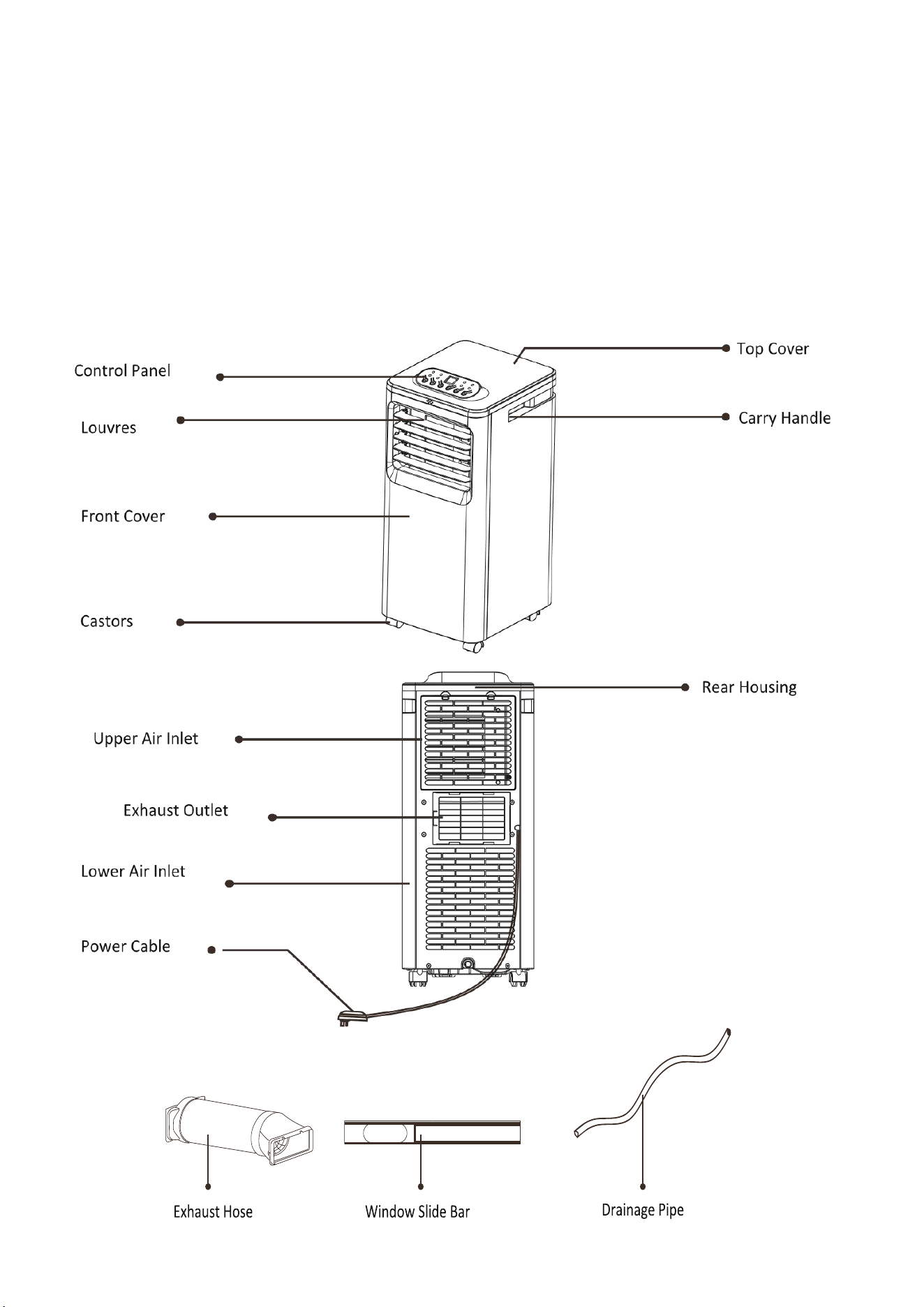
• 3 in 1 Cooling, Fan, Dehumidifier.
• 2 speed fan: Balancing quiet operation with performance.
• 24 Hours Start / Stop Timer
• Digital Thermostat: Set the temperature between 15°C and 32°C.
• Remote Control.
• Castors and Handles for Enhanced Portability.
• Auto-Restart to retain the settings in the event of power failure.
PART LIST
7
INSTALLATION
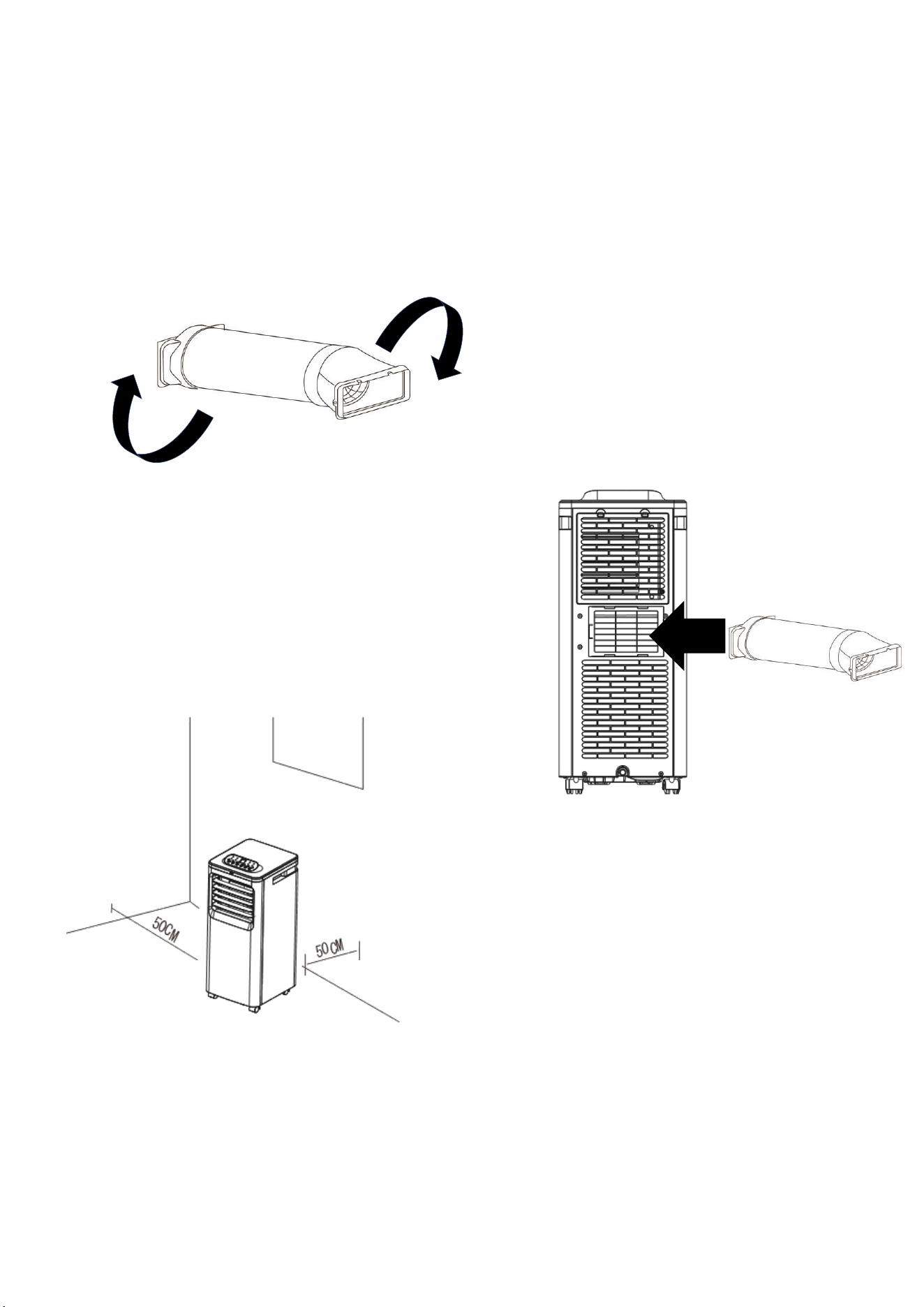
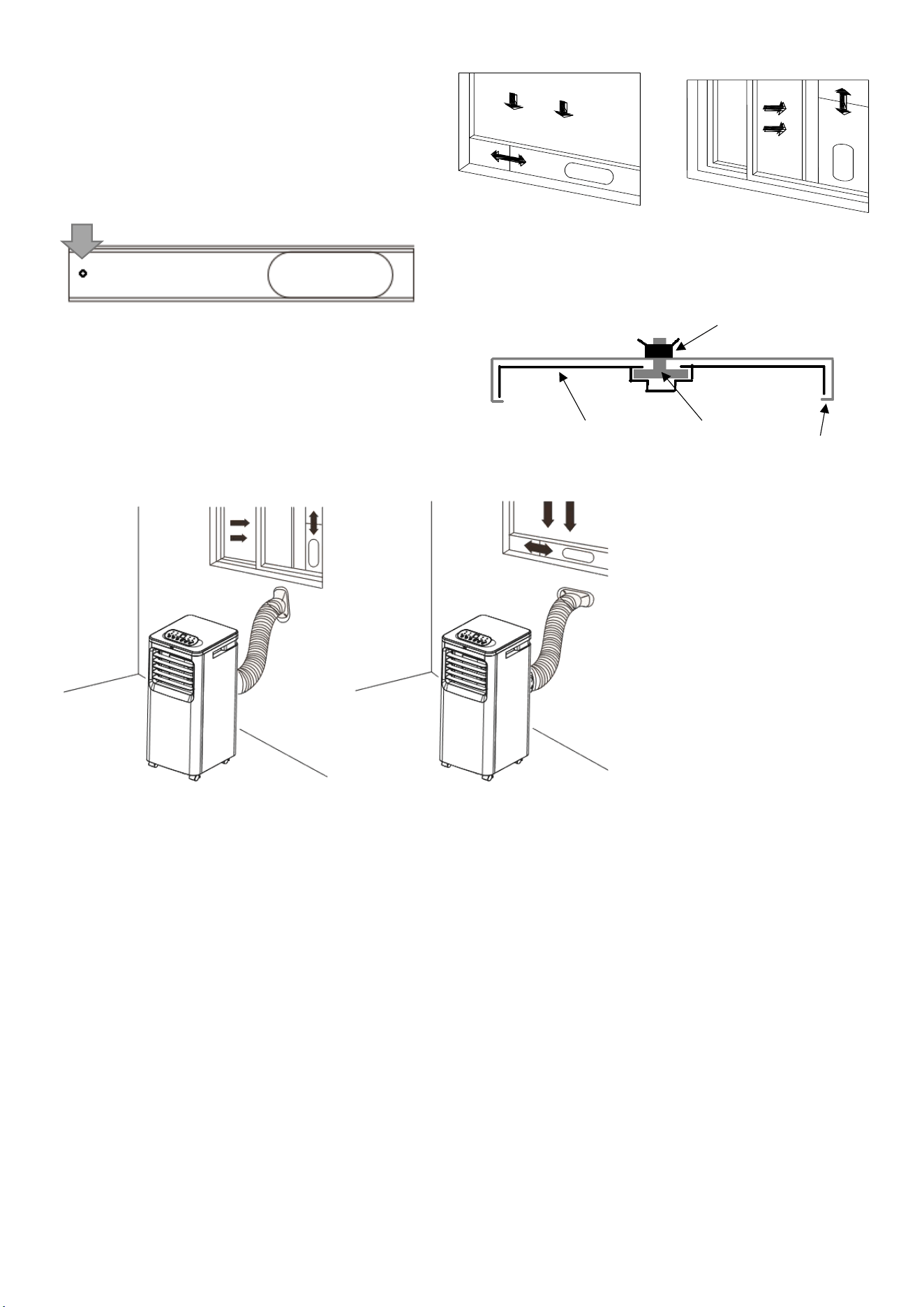
WARNING: Before using this unit, please keep it upright for at least 3-4 hours.
This unit can easily be moved from one room to another.
While moving the unit please note that it must always be kept upright and then placed on an even surface.
1. Attach the fishtail connector to the end of
the hose, by extending the end of the hose
and twisting until firmly attached to the
connector (At least 3 full rotations).
2. Attach the Hose to the Outlet adaptor, in the
same way by extending the end of the hose
and twisting until firmly attached (At least 3
full rotations).
3. Slide the Outlet adaptor into position on
the rear of the unit.
4.
Make sure the unit is upright and there are no
obstructions to the air inlets and outlet grills, with at
least 50cm of space to the sides and rear of the unit.
8
INSTALLATION OF WINDOW KIT
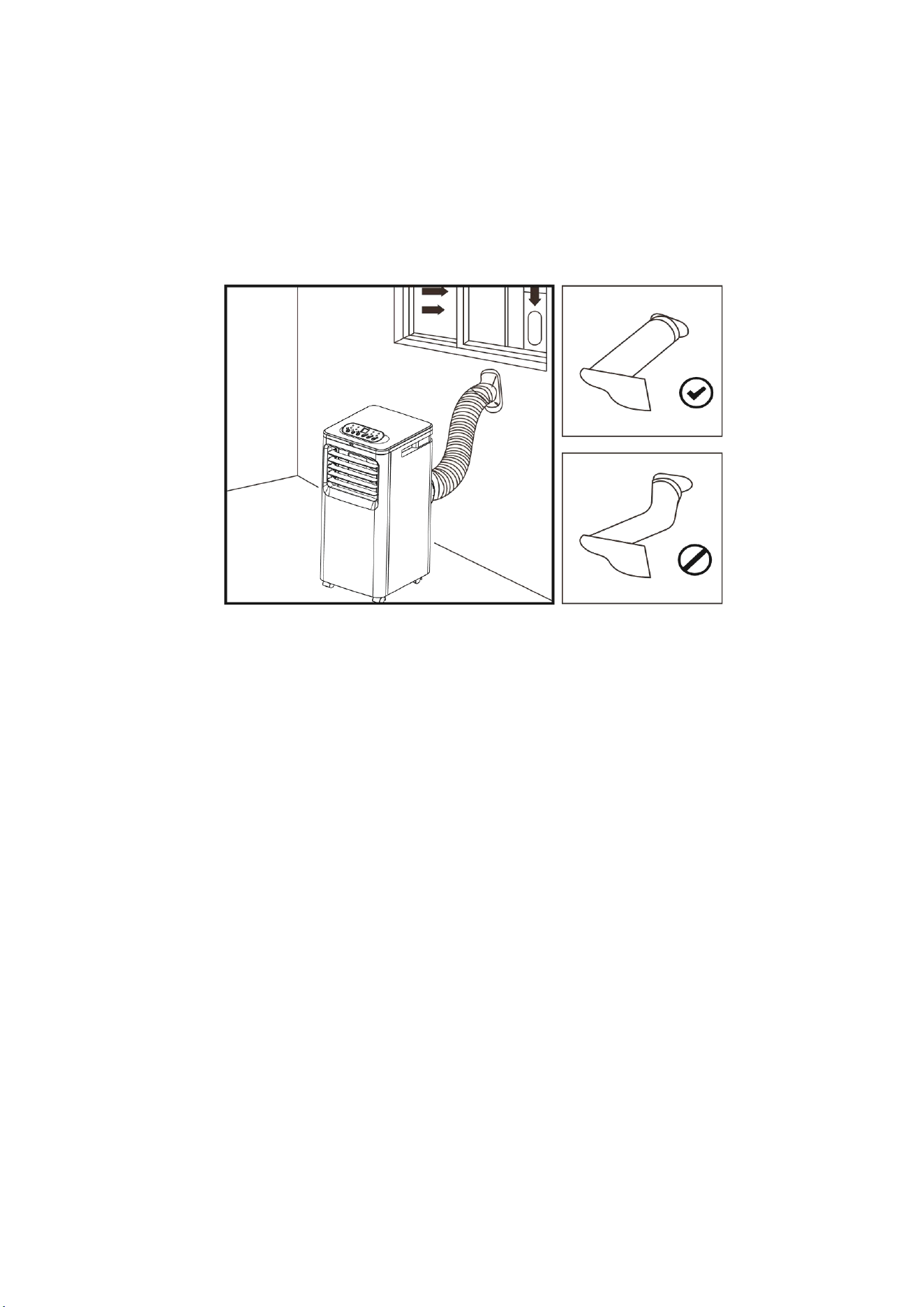
The window kit (slide bar and fishtail) can be used
with sliding windows and doors. For other types of
window, the fishtail should be used on its own.
NOTES:
• The window kit is only designed to be installed with sliding or sash windows or doors. The window
kit is not designed to be used with any other style of windows.
• The fish tail adaptor can be used without the slide bar with most windows / doors.
• When using the air conditioner ensure that the opening around the fishtail adaptor is as small as
possible to ensure the efficiency of the unit is not reduced.
• The best form of installation is through a wall duct. By properly venting you expel hot air from your
room while efficiently cooling it.
• Your air conditioner should be used without the vent pipe in dry mode. When using dry mode
ensure that an external water tank is used, monitored and regularly emptied before overflowing.
Permanent plumbing can be also installed or an external uplift water pump can be set up to allow
for uninterrupted use.
2.
Push the screw thread of the plate through
the hole in the rear of the front slide bar
section.
1.
Slide the rear section of the slide bar onto the
front section lining up the plate so it runs
within the groove. Extend the bar to the
required length, and use the supplied wing nut
to secure
3.
Partially open the
window and place the
extended slide bar in
position before closing
the window onto it.
4.
Fix the fishtail adaptor
into the opening on
the slide bar.
Plate
Wing nut
Slide Bar
(Front Section)
Slide Bar
(Rear Section)
9
IMPORTANT SAFEGUARDS
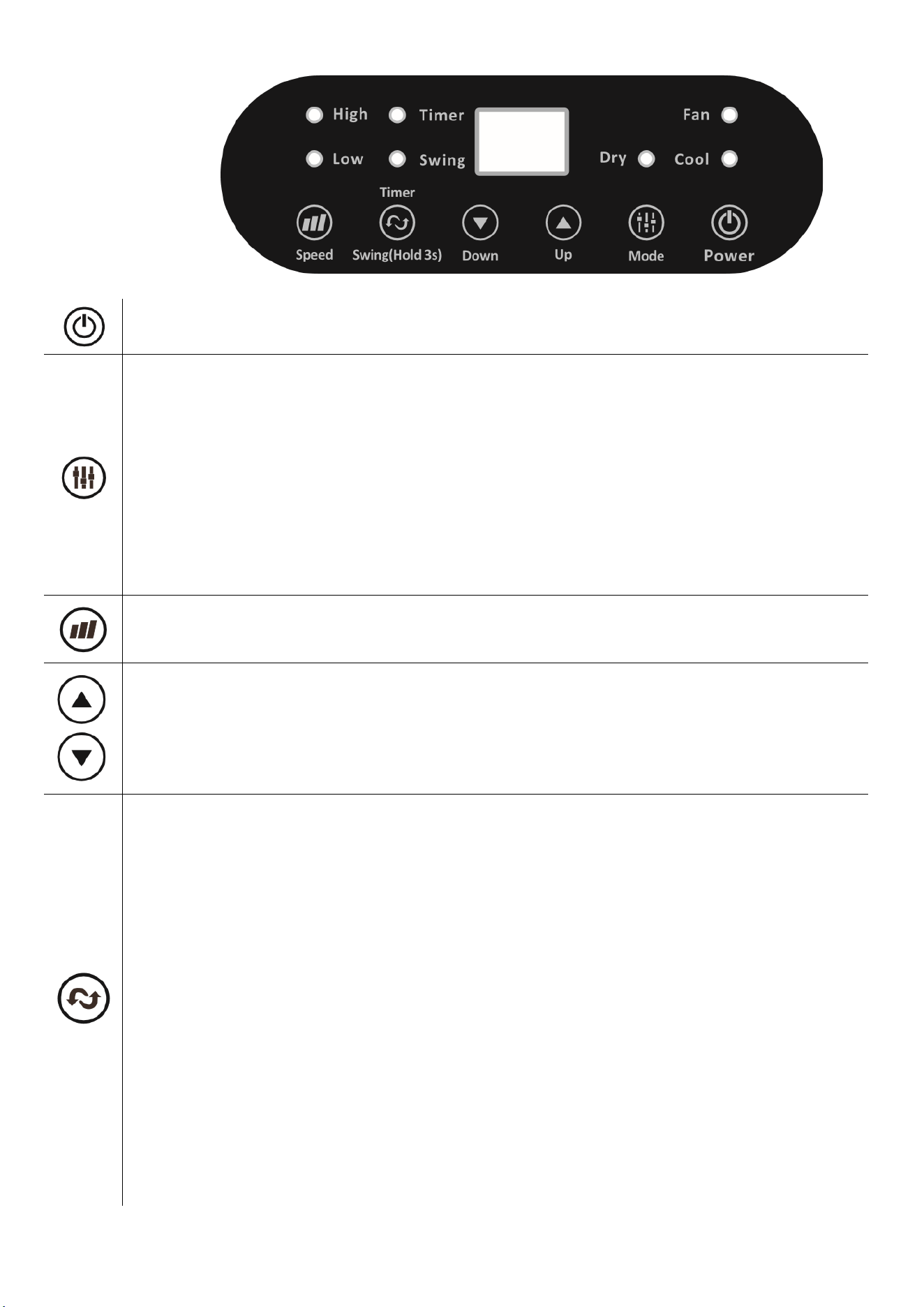
The length of the soft hose extends from approximately 30 cm to 150 cm. If hose is extended above this
length, the unit may malfunction which can invalidate the warranty. The outlet vent must be well
ventilated and not obstructed as this will cause the unit to overheat. Keep the hose as straight and short
as possible and avoid bending the air hose by more than 30 degrees in order to maintain the
performance of the unit. Excessive bends in the hose may prevent the unit from expelling the hot air,
which can lead to internal damage which would invalidate the warranty.
10
OPERATION
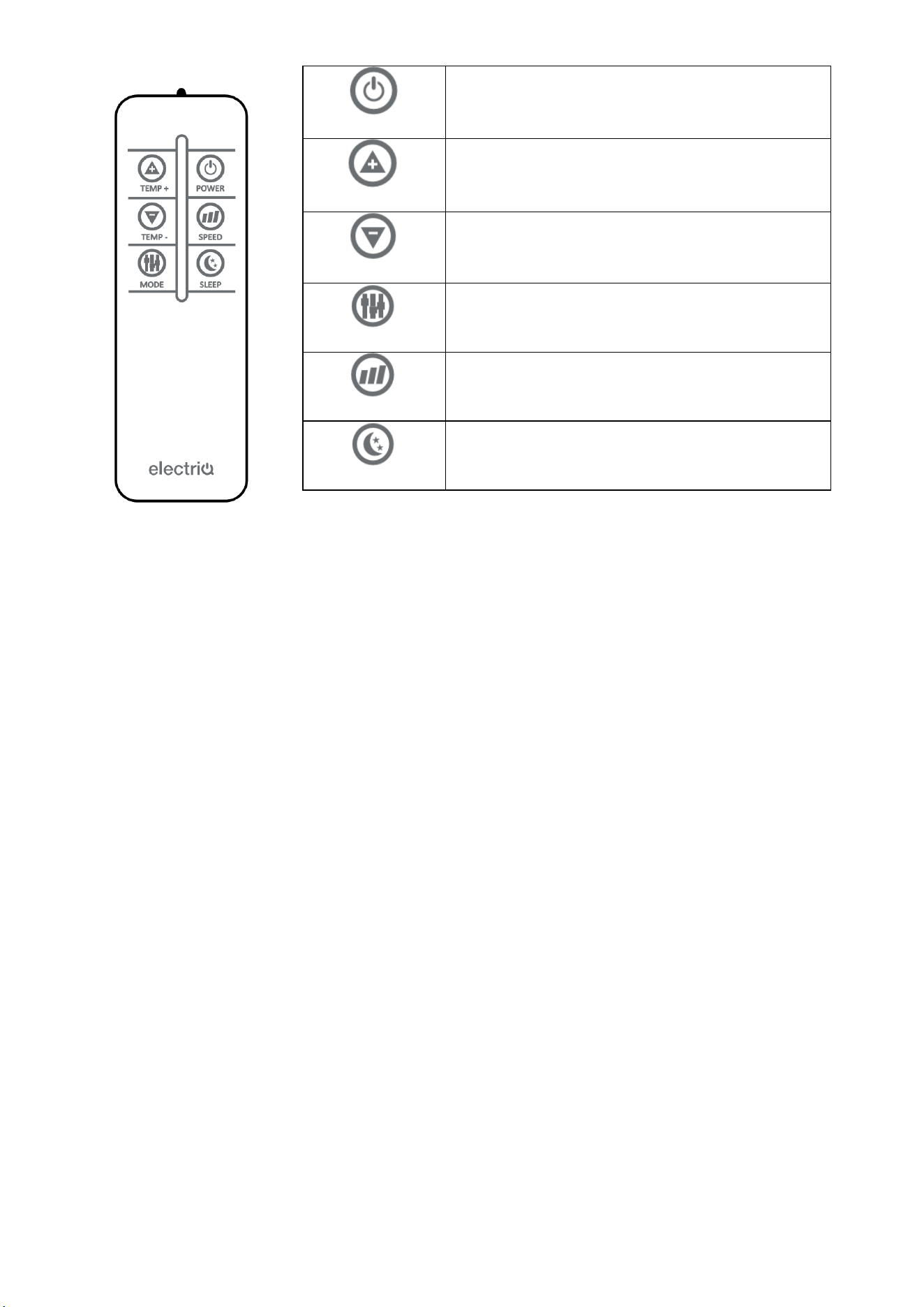
Press the POWER button to turn the unit ON or OFF.
Press the MODE button to cycle between the 3 modes, the indicator for the selected mode will
be illuminated.
COOL: The room is cooled with the cold air expelled through the front air outlet while hot air is
expelled through the vent pipe. The desired room temperature can be set between 15 and 32
degrees using the UP and DOWN buttons, and the fan speed can be changed using the SPEED
button.
FAN: The fan speed can be changed pressing the SPEED button.
DRY: Should be operated without the vent hose, but with continuous drainage to remove
moisture from the air. The unit will run in low fan speed and display dH. Do not use when the
room temperature is below 15 degrees.
Press the SPEED button to change between the two fan speeds. The LED’s will indicate the
currently selected fan speed. The fan speed cannot be changed in DRY modes.
Used to adjust the temperature in COOL mode and to set the duration of the TIMER. The
buttons are not used in FAN or DRY modes. Press both buttons together to change between
displaying the temperature in Celsius and Fahrenheit.
SWING
Press this button to enable the swing function. When the SWING button is pressed again the
louvres will stop in their current position. Do not attempt to adjust the angle of the blades
manually.
POWER ON TIMER
With the appliance in standby, press and hold the SWING button for 3 seconds to set the power-
on timer. Use the UP and DOWN buttons to adjust the duration of the timer (1 to 24 hours). The
Timer indicator will turn on and the unit will start after the selected number of hours.
POWER OFF TIMER
With the appliance running with the desired settings, press and hold the SWING button for 3
seconds to set the power-off timer. Use the UP and DOWN buttons to adjust the duration of the
timer (1 to 24 hours). The timer indicator will illuminate and the unit will stop after selected
number of hours.
Notes:
• The timer functions cannot be combined or repeated.
• To cancel the timer, press and hold the SWING button for 3 seconds.
11
REMOTE CONTROL
NOTE: The design of the remote may vary from the diagram, due to
continuous product improvement.
MULTI PROTECTIVE FUNCTIONS
FROST PROTECTION
In COOL or DRY modes, if the temperature of the exhaust is too low, the machine will automatically stop
operating until the temperature has risen.
OVERFLOW PROTECTION
When the water in the internal water tank exceeds the warning level, the machine will stop operating and
sound an alarm with the LCD display showing “E4”. To resume operation empty the internal water tank. After
the water is emptied, the machine will automatically return to the original state.
AUTO-DEFROST
The machine has automatic defrosting function. If during operation the temperature of the internal coils
drops too low, the unit will enter auto defrost and the heating symbol will flash on the control panel.
AUTOMATIC THERMAL PROTECTION
To protect the service life of the machine, the machine has automatic thermal protection. If the temperature
within the unit is outside of the specified range, the compressor and the lower motor will stop operation.
The appliance will automatically return to normal operation after the temperature of the machine recovers.
COMPRESSOR PROTECTION
To prevent damage to the compressor there is a 3 minute delay start protection function.
POWER
Press to turn the unit on or off.
TEMP +
Press to increase the desired temperature.
TEMP -
Press to decrease the desired temperature.
MODE
Press to change between Cooling, Fan and
Dehumidifying Modes
SPEED
Press to change between the fan speeds.
SLEEP
Press the sleep button to enter sleep mode.
12
MAINTENANCE AND CLEANING
PLEASE SHUT OFF THE UNIT AND UNPLUG FROM THE MAINS BEFORE CLEANING OR PERFORMING ANY
MAINTENANCE
CLEAN THE SURFACE
Clean the surface of the machine with a wet soft cloth. Do not use chemicals, such as benzene, alcohol,
gasoline, etc; otherwise, as this may cause damage to the surface and or the internal workings of the
machine
AIR FILTER CLEANING
If the filter screen is clogged with dust, the effectiveness of the air conditioner is reduced. The filter screen
should be cleaned once every two weeks or as often as necessarily in your environment.
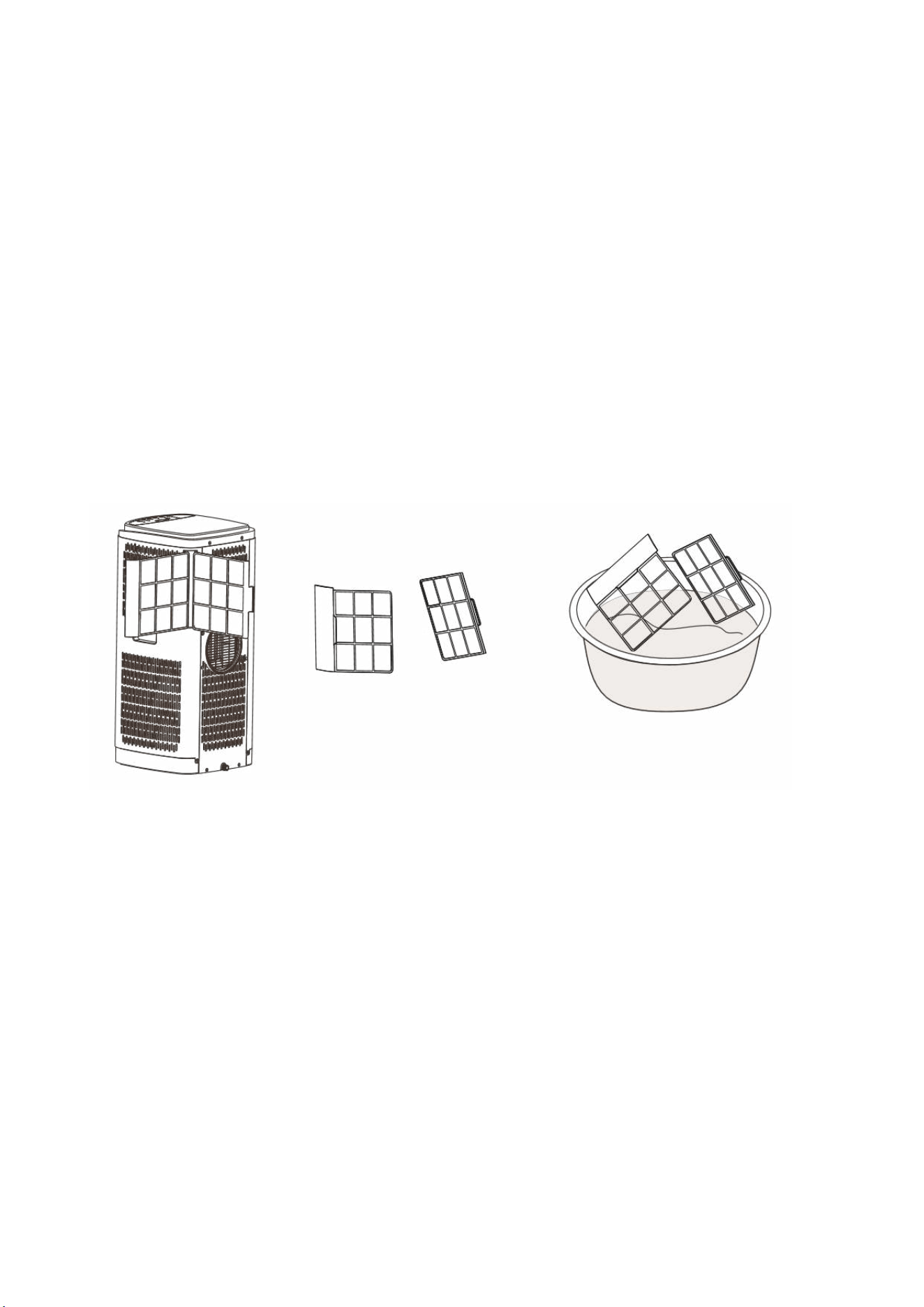
CLEAN THE UPPER FILTER SCREEN FRAMES
Remove the filter screens by gently sliding them out of the unit. Once removed put the evaporator filter
screen into warm water with neutral detergent (about 40℃ /104℉) and dry it in the shade after rinsing
clean.
13
EMPTYING THE INTERNAL WATER TANK
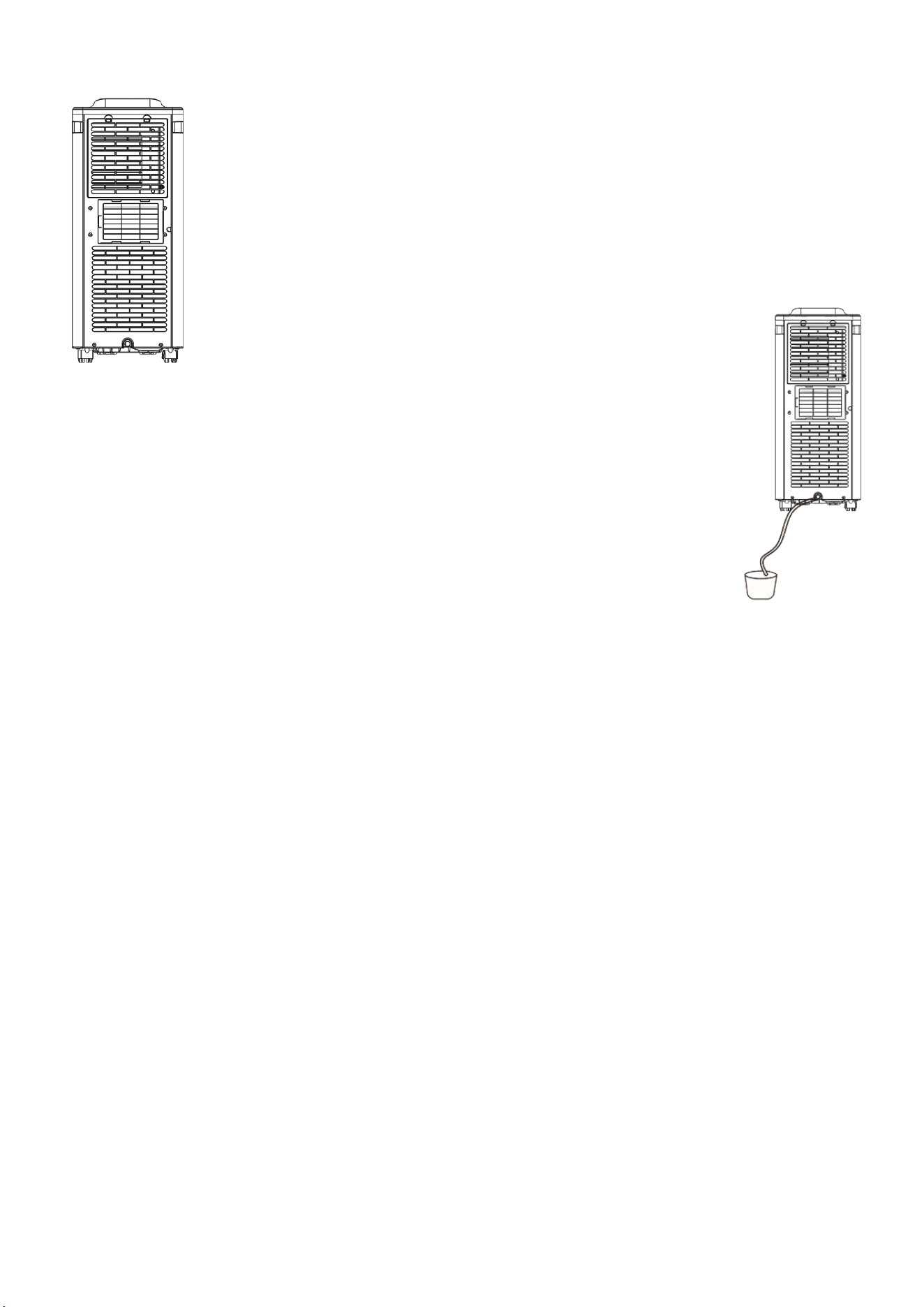
MANUAL DRAINAGE:
When the internal water tank is full the unit will stop working, and the unit will display
E4. Turn off the unit and unplug it from the mains. Try not to move the appliance abruptly
as this may cause the water in the internal tank to spill out.
Place a tray under the water plug or place the unit in a drainage area.
Remove the drainage cap and rubber stopper from the drain port - water will drain from
the internal tank. One the tank is empty, place the rubber stopper and cap back in
position.
CONTINUOUS DRAINAGE:
Remove the drainage cap and rubber stopper from the drain port on the base of the
unit. Connect a water pipe to the drain port.
You can plumb this pipe into your current plumbing system, lead it outside and use
gravity fall or use a water pump.
NOTE: This model has a self-evaporative function, which reduces the need to empty the water tank in cooling
mode. If the unit is vented correctly most of the water is reused to cool the condenser coils and any excess
is evaporated. Please do not use continuous drainage if you intend to use the self-evaporating facility.
END OF SEASON MAINTENANCE
1. Remove the drainage cap and rubber stopper from the drainage hole and empty the internal
tank. You can also drain the water by leaning the unit backwards.
2. Run the unit in fan mode, with a low fan speed, with the rubber stopper still removed, and a
container under the drain port.
3. Keep the unit in this mode for half day - until the conduit is dried. Doing this helps to keep the
inside of the unit dry and prevents mould from developing.
4. Turn off the unit and disconnect the plug from the mains.
5. Replace the rubber stopper and drainage cap.
6. Coil the wire and bind it together, then put it into the accessory space.
7. Separate the vent pipe and store it safely.
8. Cover the unit and keep it in a dry place.
9. Take the batteries out of remote control and store or dispose of them safely. Keep all
accessories with the unit ready for next season.
14
TROUBLESHOOTING
Do not repair or disassemble the air conditioning. Unqualified repair will invalidate the warranty and may lead to failure,
causing injuries and property damage. Only use it as directed in this user manual and only perform operations advised here.
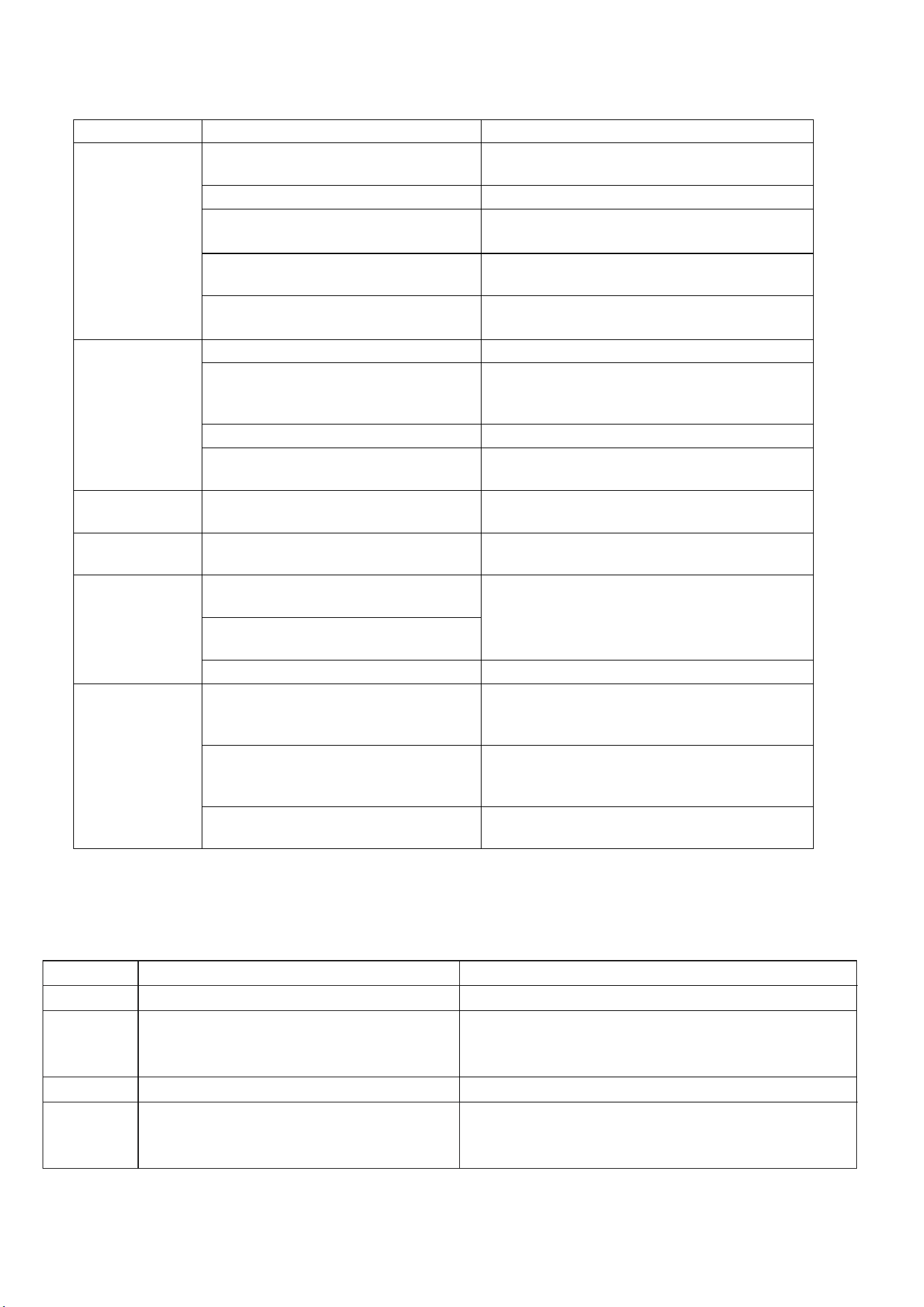
Problems
Reasons
Solutions
The air
conditioner does
not work.
There is no electricity.
Turn it on after connecting it to a socket with
electricity.
The display shows "E4".
Discharge the water inside.
The ambient temperature is too low or
too high
Only use to use the machine within temperature
range of 7-35
⁰C (44-95⁰F).
In cooling mode, the room temperature is
lower than the desired temperature
Change the desired temperature.
In dry mode, the ambient temperature is
low.
The ambient temperature must be above 17 ⁰C.
(62
⁰F).
The cooling
effect is not good
There is direct sunlight.
Use curtains to reduce the direct sun heat
Doors or windows are open; there are a
lot of people; or in cooling mode, there
are other sources of heat (e.g. fridges)
Close doors and windows; increase air
conditioning power
The filter screen is dirty.
Clean or replace the filter screen.
The air inlet or outlet is blocked.
Clear obstructions; make sure venting is correct as
described in this user manual and hose is not bent
Loud Noise
The air conditioning is not placed on a flat
surface.
Put the air conditioning on a flat and hard place
(to reduce noise).
Compressor does
not work.
Overheat protection starts.
Wait for 3 minutes until the temperature is
lowered, and then restart the machine.
The remote
control does not
work.
The distance between the machine and
the remote control is too far.
Let the remote control get close to the air
conditioner, and make sure that the remote
control directly faces the receiver.
The remote control is not aligned with
the receiver.
Batteries are dead.
Replace batteries.
Others
No refrigerant or there is very little
refrigerant
Refer to Service Centre (check leakage, wielding,
vacuum pump, charge refrigerant according to
name plate)
Anti-freezing protection
Waiting for defrosting.
Function will recover automatically. No user input
needed.
High pressure protection
After inside gas pressure comes down, it will
function normally. No user input needed
If problems not listed in the table occur or recommended solutions do not work, please contact the
service centre.
ERROR CODES
CODE
CAUSE
SOLUTION
dH
Unit is in dry mode
Not a fault – no action required.
E2
Room temperature sensor error
Check to ensure filters are clean, vent pipe is not
restricted, and room temperature is within operational
range.
E4
Water Tank Full
Empty the water tank.
MODE
LIGHT
FLASHING
Cool / dry the compressor has not
started, the mode light will flash. This is
normal
The unit will start operation when the protection
period has finished ( approx. 3 minutes)

15
APPENDIX
Disposal: Do not dispose this product as unsorted municipal waste. Collection of such
waste must be handled separately as special treatment is necessary. Recycling facilities
are now available for all customers at which you can deposit your old electrical products.
Customers will be able to take any old electrical equipment to participating civic amenity
sites run by their local councils. Please remember that this equipment will be further
handled during the recycling process, so please be considerate when depositing your
equipment. Please contact the local council for details of your local household waste
recycling centres.
electriQ UK SUPPORT
www.electriQ.co.uk/support
Please, for your own convenience, make these simple checks before calling the service line. If the unit still
fails to operate call the number below, or complete the online form.
0330 390 3061
1. Has the unit been standing upright for at least 2 hours?
2. Is the unit plugged into the mains?
3. Is the fuse OK?
4. Switch the unit off and wait three minutes to see if the issue is resolved. Restart the unit.
5. Check if the water tank is full.
Office hours: 9AM - 5PM Monday to Friday
www.electriQ.co.uk
Unit J6, Lowfields Business Park
Lowfields Way, Elland
West Yorkshire, HX5 9DA
16
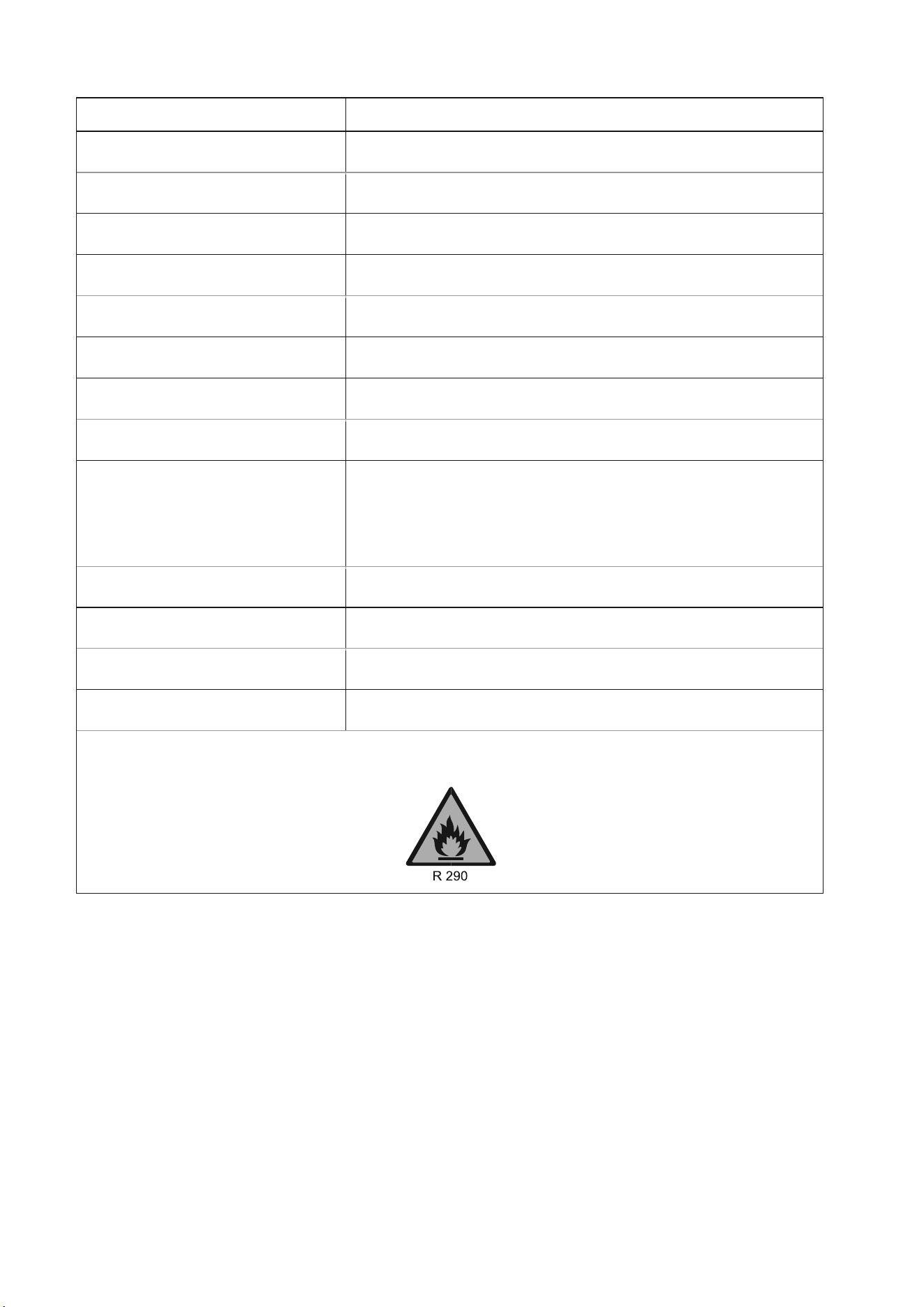
TECHNICAL DATA
Model
SF8000E-V4
Capacity Cooling
7,000 BTU
Rated Input
780W
Running Current
3.4 A
Fan
2 Speeds
Airflow
260m
3
/h
Refrigerant
R290/180g
Sound power level
≤56dB(A)
Thermostat
15-32
o
C
Maximum working pressure of
suction/exhaust side
1.0/3.5MPa
Maximum Allowable Pressure
3.5Mpa
Power Supply
AC 220-240V/50Hz
Net Weight
21kg
Dimension(L*D*H)
310x310x700mm
The unit must be vented outside when in Air Cooling mode. For the purposes of EU regulation EN12102
this is a local air conditioner and produces less than 65dB(A) sound energy.
V20230517