INSTRUCTION MANUAL
MANUAL DE INSTRUCCIONES
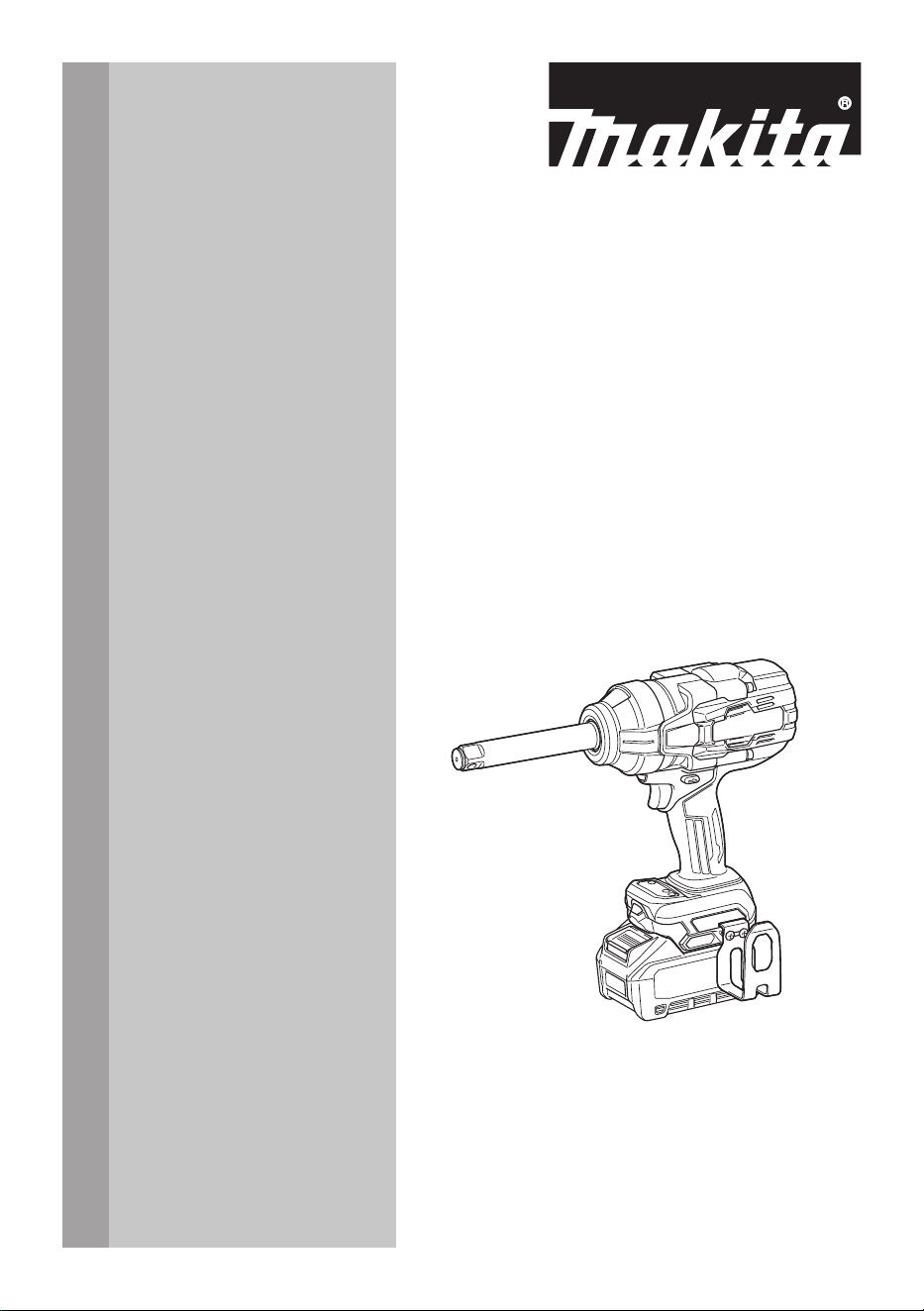
Cordless Impact Wrench
Llave de Impacto Inalámbrica
GWT11
IMPORTANT: Read Before Using.
IMPORTANTE: Lea antes de usar.
2 ENGLISH
ENGLISH (Original instructions)
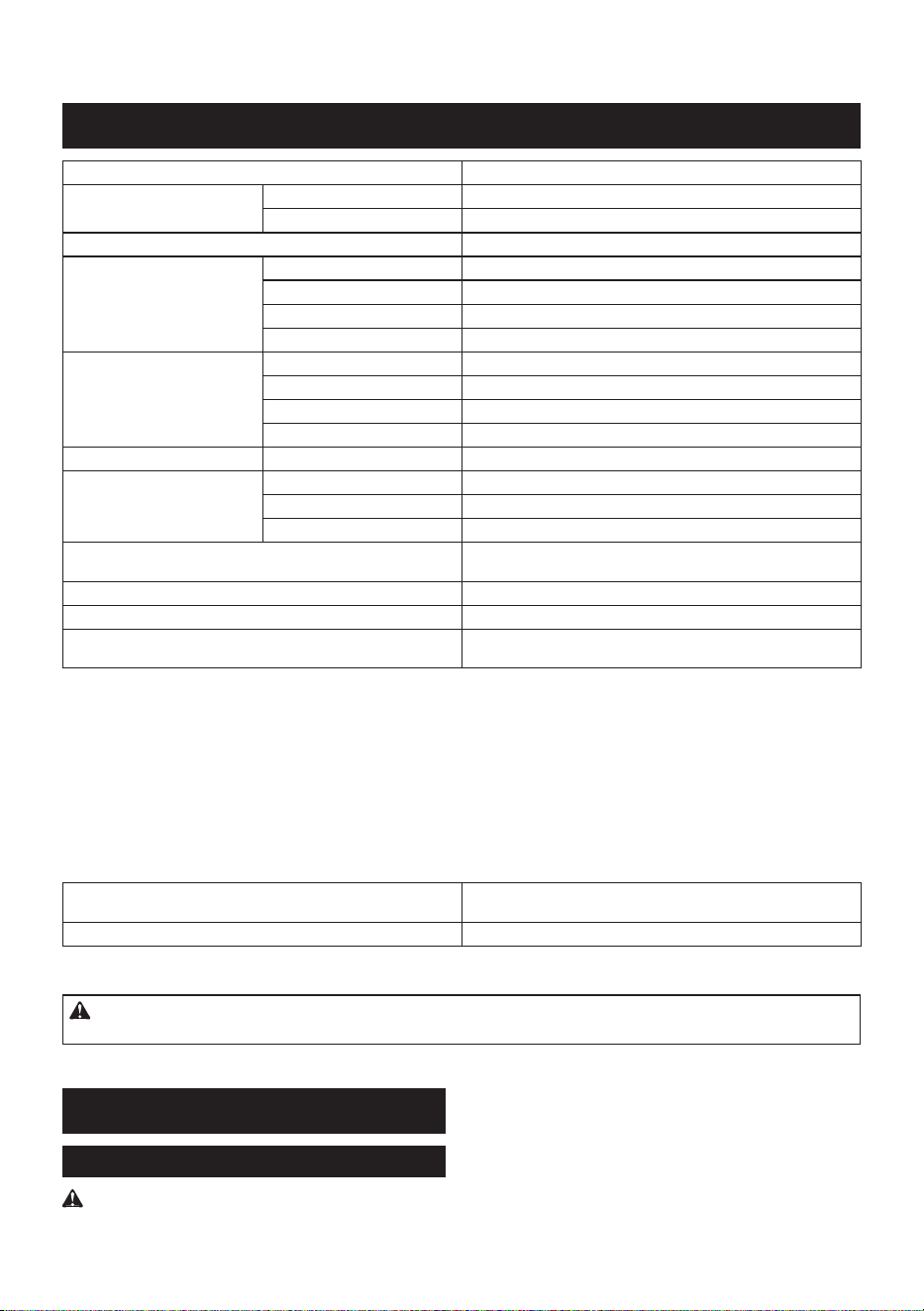
SPECIFICATIONS
Model: GWT11
Fastening capacities Standard bolt M12 - M36 (1/2″ - 1-1/2″)
High tensile bolt M10 - M27 (3/8″ - 1-1/8″)
Square drive 19.0 mm (3/4″)
No load speed (RPM) Max impact mode (4) 0 - 1,800 /min
Hard impact mode (3) 0 - 1,100 /min
Medium impact mode (2) 0 - 700 /min
Soft impact mode (1) 0 - 500 /min
Impacts per minute Max impact mode (4) 0 - 2,600 /min
Hard impact mode (3) 0 - 2,000 /min
Medium impact mode (2) 0 - 1,400 /min
Soft impact mode (1)
*1
- /min
Max. fastening torque
*2
Max impact mode (4) 1,500 N·m (1,110 ft·lbs)
Target fastening torque
*3
Hard impact mode (3) 300 - 450 N·m (220 - 330 ft·lbs)
Medium impact mode (2) 50 - 150 N·m (40 - 110 ft·lbs)
Soft impact mode (1) 30 - 50 N·m (20 - 40 ft·lbs)
Nut-Busting torque
(at max impact mode (4) )
1,900 N·m (1,400 ft·lbs)
Overall length 329 mm (13″)
Rated voltage D.C. 36 V - 40 V max
Net weight 4.3 - 5.5 kg
(9.5 - 12.1 lbs)
*1
Tool stops automatically as soon as it has started impact blows.
*2
Fastening torque with M30 (1-1/4″) for 6 seconds.
*3
With M20 - M24 (3/4″ - 1″).
• Due to our continuing program of research and development, the specications herein are subject to change
without notice.
• Specications may dier from country to country.
• The weight may dier depending on the attachment(s), including the battery cartridge. The lightest and heavi-
est combination are shown in the table.
Applicable battery cartridge and charger
Battery cartridge BL4020* / BL4025* / BL4040* / BL4040F* / BL4050F / BL4080F
* : Recommended battery
Charger DC40RA / DC40RB / DC40RC / DC40WA
• Some of the battery cartridges and chargers listed above may not be available depending on your region of
residence.
WARNING: Only use the battery cartridges and chargers listed above. Use of any other battery cartridges
and chargers may cause injury and/or re.
SAFETY WARNINGS
General power tool safety warnings
WARNING Read all safety warnings, instruc-
tions, illustrations and specications provided with
this power tool. Failure to follow all instructions listed
below may result in electric shock, re and/or serious
injury.
Save all warnings and instruc-
tions for future reference.
The term "power tool" in the warnings refers to your
mains-operated (corded) power tool or battery-operated
(cordless) power tool.

3 ENGLISH
Work area safety
1. Keep work area clean and well lit. Cluttered or
dark areas invite accidents.
2. Do not operate power tools in explosive atmo-
spheres, such as in the presence of ammable
liquids, gases or dust. Power tools create sparks
which may ignite the dust or fumes.
3. Keep children and bystanders away while
operating a power tool. Distractions can cause
you to lose control.
Electrical safety
1. Power tool plugs must match the outlet. Never
modify the plug in any way. Do not use any
adapter plugs with earthed (grounded) power
tools. Unmodied plugs and matching outlets will
reduce risk of electric shock.
2. Avoid body contact with earthed or grounded
surfaces, such as pipes, radiators, ranges and
refrigerators. There is an increased risk of elec-
tric shock if your body is earthed or grounded.
3. Do not expose power tools to rain or wet con-
ditions. Water entering a power tool will increase
the risk of electric shock.
4. Do not abuse the cord. Never use the cord for
carrying, pulling or unplugging the power tool.
Keep cord away from heat, oil, sharp edges
or moving parts. Damaged or entangled cords
increase the risk of electric shock.
5. When operating a power tool outdoors, use an
extension cord suitable for outdoor use. Use of
a cord suitable for outdoor use reduces the risk of
electric shock.
6. If operating a power tool in a damp location is
unavoidable, use a ground fault circuit inter-
rupter (GFCI) protected supply. Use of a GFCI
reduces the risk of electric shock.
7. Power tools can produce electromagnetic
elds (EMF) that are not harmful to the user.
However, users of pacemakers and other similar
medical devices should contact the maker of their
device and/or doctor for advice before operating
this power tool.
Personal safety
1. Stay alert, watch what you are doing and use
common sense when operating a power tool.
Do not use a power tool while you are tired or
under the inuence of drugs, alcohol or med-
ication. A moment of inattention while operating
power tools may result in serious personal injury.
2. Use personal protective equipment. Always
wear eye protection. Protective equipment such
as a dust mask, non-skid safety shoes, hard hat or
hearing protection used for appropriate conditions
will reduce personal injuries.
3. Prevent unintentional starting. Ensure the
switch is in the o-position before connecting
to power source and/or battery pack, picking
up or carrying the tool. Carrying power tools with
your nger on the switch or energising power tools
that have the switch on invites accidents.
4. Remove any adjusting key or wrench before
turning the power tool on. A wrench or a key left
attached to a rotating part of the power tool may
result in personal injury.
5. Do not overreach. Keep proper footing and
balance at all times. This enables better control
of the power tool in unexpected situations.
6. Dress properly. Do not wear loose clothing or
jewellery. Keep your hair and clothing away
from moving parts. Loose clothes, jewellery or
long hair can be caught in moving parts.
7. If devices are provided for the connection of
dust extraction and collection facilities, ensure
these are connected and properly used. Use of
dust collection can reduce dust-related hazards.
8. Do not let familiarity gained from frequent use
of tools allow you to become complacent and
ignore tool safety principles. A careless action
can cause severe injury within a fraction of a
second.
9. Always wear protective goggles to protect
your eyes from injury when using power tools.
The goggles must comply with ANSI Z87.1 in
the USA.
It is an employer's responsibility to enforce the
use of appropriate safety protective equipment
by the tool operators and by other persons in
the immediate working area.
Power tool use and care
1. Do not force the power tool. Use the correct
power tool for your application. The correct
power tool will do the job better and safer at the
rate for which it was designed.
2. Do not use the power tool if the switch does
not turn it on and o. Any power tool that cannot
be controlled with the switch is dangerous and
must be repaired.
3. Disconnect the plug from the power source
and/or remove the battery pack, if detachable,
from the power tool before making any adjust-
ments, changing accessories, or storing power
tools. Such preventive safety measures reduce
the risk of starting the power tool accidentally.
4. Store idle power tools out of the reach of chil-
dren and do not allow persons unfamiliar with
the power tool or these instructions to operate
the power tool. Power tools are dangerous in the
hands of untrained users.
5. Maintain power tools and accessories. Check
for misalignment or binding of moving parts,
breakage of parts and any other condition that
may aect the power tool’s operation. If dam-
aged, have the power tool repaired before use.
Many accidents are caused by poorly maintained
power tools.
6. Keep cutting tools sharp and clean. Properly
maintained cutting tools with sharp cutting edges
are less likely to bind and are easier to control.
7. Use the power tool, accessories and tool bits
etc. in accordance with these instructions, tak-
ing into account the working conditions and
the work to be performed. Use of the power tool
for operations dierent from those intended could
result in a hazardous situation.
8. Keep handles and grasping surfaces dry,
clean and free from oil and grease. Slippery
handles and grasping surfaces do not allow for
safe handling and control of the tool in unexpected
situations.
4 ENGLISH
9. When using the tool, do not wear cloth work
gloves which may be entangled. The entangle-
ment of cloth work gloves in the moving parts may
result in personal injury.
Battery tool use and care
1. Recharge only with the charger specied by
the manufacturer. A charger that is suitable for
one type of battery pack may create a risk of re
when used with another battery pack.
2. Use power tools only with specically desig-
nated battery packs. Use of any other battery
packs may create a risk of injury and re.
3. When battery pack is not in use, keep it away
from other metal objects, like paper clips,
coins, keys, nails, screws or other small metal
objects, that can make a connection from one
terminal to another. Shorting the battery termi-
nals together may cause burns or a re.
4. Under abusive conditions, liquid may be
ejected from the battery; avoid contact. If con-
tact accidentally occurs, ush with water. If
liquid contacts eyes, additionally seek medical
help. Liquid ejected from the battery may cause
irritation or burns.
5. Do not use a battery pack or tool that is dam-
aged or modied. Damaged or modied batteries
may exhibit unpredictable behaviour resulting in
re, explosion or risk of injury.
6. Do not expose a battery pack or tool to re or
excessive temperature. Exposure to re or tem-
perature above 130 °C may cause explosion.
7. Follow all charging instructions and do not
charge the battery pack or tool outside the
temperature range specied in the instruc-
tions. Charging improperly or at temperatures
outside the specied range may damage the
battery and increase the risk of re.
Service
1. Have your power tool serviced by a qualied
repair person using only identical replacement
parts. This will ensure that the safety of the power
tool is maintained.
2. Never service damaged battery packs. Service
of battery packs should only be performed by the
manufacturer or authorized service providers.
3. Follow instruction for lubricating and chang-
ing accessories.
4. Do not modify or attempt to repair the appli-
ance or the battery pack except as indicated in
the instructions for use and care.
Cordless impact wrench safety
warnings
1. Wear ear protectors.
2. Check the impact socket carefully for wear,
cracks or damage before installation.
3. Hold the tool rmly.
4. Keep hands away from rotating parts.
5. Do not touch the impact socket, bolt, nut or the
workpiece immediately after operation. They
may be extremely hot and could burn your skin.
6. Always be sure you have a rm footing.
Be sure no one is below when using the tool in
high locations.
7. The proper fastening torque may dier
depending upon the kind or size of the bolt.
Check the torque with a torque wrench.
8. Make sure there are no electrical cables, water
pipes, gas pipes etc. that could cause a hazard
if damaged by use of the tool.
9. Do not carry the tool by holding the impact
socket or any detachable accessories. The tool
body otherwise may accidentally fall o, causing
injury to you or someone around you.
SAVE THESE INSTRUCTIONS.
WARNING: DO NOT let comfort or familiarity
with product (gained from repeated use) replace
strict adherence to safety rules for the subject
product.
MISUSE or failure to follow the safety rules stated
in this instruction manual may cause serious
personal injury.
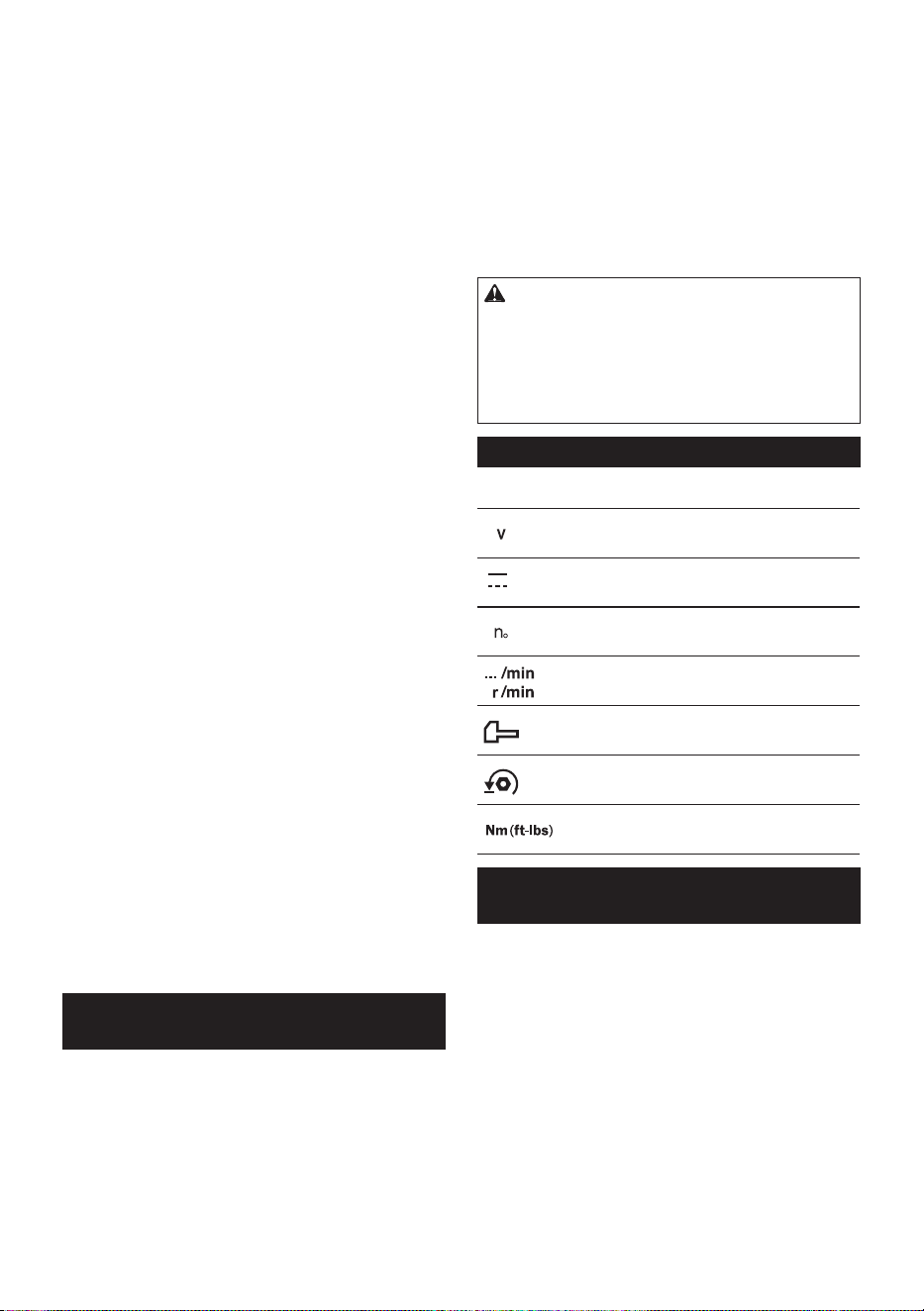
Symbols
The followings show the symbols used for tool.
volts
direct current
no load speed
revolutions or reciprocation per minute
number of blow
Auto-stop mode
Fastening torque
Important safety instructions for
battery cartridge
1. Before using battery cartridge, read all instruc-
tions and cautionary markings on (1) battery
charger, (2) battery, and (3) product using
battery.
2. Do not disassemble or tamper with the battery
cartridge. It may result in a re, excessive heat,
or explosion.
3. If operating time has become excessively
shorter, stop operating immediately. It may
result in a risk of overheating, possible burns
and even an explosion.
4. If electrolyte gets into your eyes, rinse them
out with clear water and seek medical atten-
tion right away. It may result in loss of your
eyesight.
5 ENGLISH
5. Do not short the battery cartridge:
(1) Do not touch the terminals with any con-
ductive material.
(2) Avoid storing battery cartridge in a con-
tainer with other metal objects such as
nails, coins, etc.
(3) Do not expose battery cartridge to water
or rain.
A battery short can cause a large current
ow, overheating, possible burns and even a
breakdown.
6. Do not store and use the tool and battery car-
tridge in locations where the temperature may
reach or exceed 50 °C (122 °F).
7. Do not incinerate the battery cartridge even if
it is severely damaged or is completely worn
out. The battery cartridge can explode in a re.
8. Do not nail, cut, crush, throw, drop the battery
cartridge, or hit against a hard object to the
battery cartridge. Such conduct may result in a
re, excessive heat, or explosion.
9. Do not use a damaged battery.
10. The contained lithium-ion batteries are subject
to the Dangerous Goods Legislation require-
ments.
For commercial transports e.g. by third parties,
forwarding agents, special requirement on pack-
aging and labeling must be observed.
For preparation of the item being shipped, consult-
ing an expert for hazardous material is required.
Please also observe possibly more detailed
national regulations.
Tape or mask o open contacts and pack up the
battery in such a manner that it cannot move
around in the packaging.
11. When disposing the battery cartridge, remove
it from the tool and dispose of it in a safe
place. Follow your local regulations relating to
disposal of battery.
12. Use the batteries only with the products
specied by Makita. Installing the batteries to
non-compliant products may result in a re, exces-
sive heat, explosion, or leak of electrolyte.
13. If the tool is not used for a long period of time,
the battery must be removed from the tool.
14. During and after use, the battery cartridge may
take on heat which can cause burns or low
temperature burns. Pay attention to the han-
dling of hot battery cartridges.
15. Do not touch the terminal of the tool imme-
diately after use as it may get hot enough to
cause burns.
16. Do not allow chips, dust, or soil stuck into the
terminals, holes, and grooves of the battery
cartridge. It may cause heating, catching re,
burst and malfunction of the tool or battery car-
tridge, resulting in burns or personal injury.
17. Unless the tool supports the use near
high-voltage electrical power lines, do not use
the battery cartridge near high-voltage electri-
cal power lines. It may result in a malfunction or
breakdown of the tool or battery cartridge.
18. Keep the battery away from children.
SAVE THESE INSTRUCTIONS.
CAUTION: Only use genuine Makita batteries.
Use of non-genuine Makita batteries, or batteries that
have been altered, may result in the battery bursting
causing res, personal injury and damage. It will
also void the Makita warranty for the Makita tool and
charger.
Tips for maintaining maximum
battery life
1. Charge the battery cartridge before completely
discharged. Always stop tool operation and
charge the battery cartridge when you notice
less tool power.
2. Never recharge a fully charged battery car-
tridge. Overcharging shortens the battery
service life.
3. Charge the battery cartridge with room tem-
perature at 10 °C - 40 °C (50 °F - 104 °F). Let
a hot battery cartridge cool down before
charging it.
4. When not using the battery cartridge, remove
it from the tool or the charger.
5. Charge the battery cartridge if you do not use
it for a long period (more than six months).
FUNCTIONAL
DESCRIPTION
CAUTION: Always be sure that the tool is
switched o and the battery cartridge is removed
before adjusting or checking function on the tool.
Installing or removing battery
cartridge
CAUTION: Always switch o the tool before
installing or removing of the battery cartridge.
CAUTION: Hold the tool and the battery car-
tridge rmly when installing or removing battery
cartridge. Failure to hold the tool and the battery
cartridge rmly may cause them to slip o your hands
and result in damage to the tool and battery cartridge
and a personal injury.
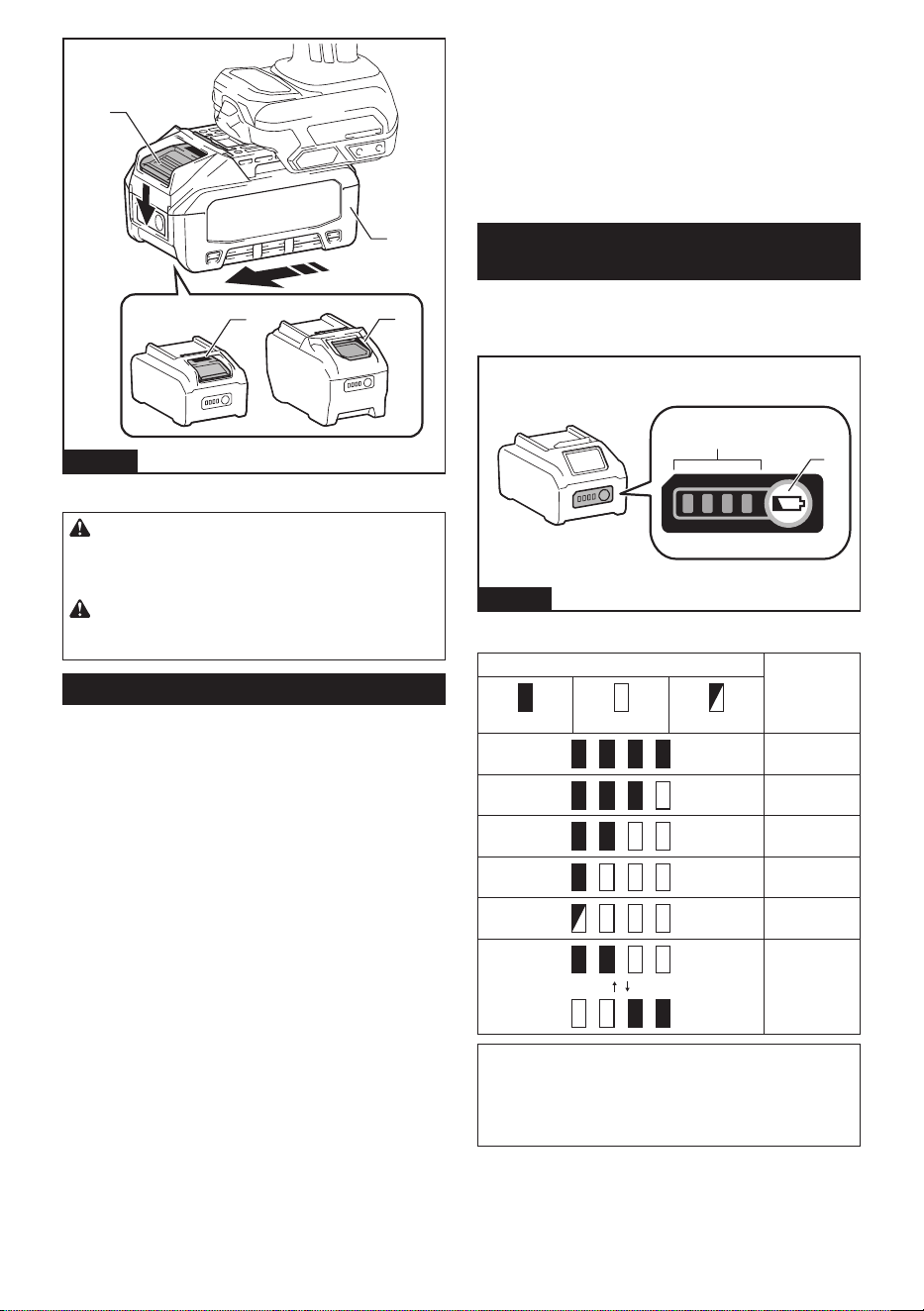
To install the battery cartridge, align the tongue on the
battery cartridge with the groove in the housing and slip
it into place. Insert it all the way until it locks in place
with a little click. If you can see the red indicator as
shown in the gure, it is not locked completely.
To remove the battery cartridge, slide it from the tool
while sliding the button on the front of the cartridge.
6 ENGLISH
1
1
2
3
Fig.1
► 1. Red indicator 2. Button 3. Battery cartridge
CAUTION: Always install the battery cartridge
fully until the red indicator cannot be seen. If not,
it may accidentally fall out of the tool, causing injury to
you or someone around you.
CAUTION: Do not install the battery cartridge
forcibly. If the cartridge does not slide in easily, it is
not being inserted correctly.
Tool / battery protection system
The tool is equipped with a tool/battery protection sys-
tem. This system automatically cuts o the power to
extend tool and battery life. The tool will automatically
stop during operation if the tool or battery is placed
under one of the following conditions:
Overload protection
This protection works when the tool is operated in a
manner that causes it to draw an abnormally high cur-
rent. In this situation, turn the tool o and stop the appli-
cation that caused the tool to become overloaded. Then
turn the tool on to restart.
Overheat protection
When the tool is overheated, the tool stops automati-
cally and the lamps blink. In this situation, let the tool
and battery cool before turning the tool on again.
Overdischarge protection
This protection works when the remaining battery
capacity gets low. In this situation, remove the battery
from the tool and charge the battery.
Protections against other causes
Protection system is also designed for other causes
that could damage the tool and allows the tool to stop
automatically. Take all the following steps to clear the
causes, when the tool has been brought to a temporary
halt or stop in operation.
1. Make sure that all switch(es) is/are in the o posi-
tion, and then turn the tool on again to restart.
2. Charge the battery(ies) or replace it/them with
recharged battery(ies).
3. Let the tool and battery(ies) cool down.
If no improvement can be found by restoring protection
system, then contact your local Makita Service Center.
Indicating the remaining battery
capacity
Press the check button on the battery cartridge to indi-
cate the remaining battery capacity. The indicator lamps
light up for a few seconds.
1
2
Fig.2
► 1. Indicator lamps 2. Check button
Indicator lamps Remaining
capacity
Lighted O Blinking
75% to 100%
50% to 75%
25% to 50%
0% to 25%
Charge the
battery.
The battery
may have
malfunctioned.
NOTE: Depending on the conditions of use and the
ambient temperature, the indication may dier slightly
from the actual capacity.
NOTE: The rst (far left) indicator lamp will blink when
the battery protection system works.
7 ENGLISH
Switch action
CAUTION: Before installing the battery car-
tridge into the tool, always check to see that the
switch trigger actuates properly and returns to
the "OFF" position when released.
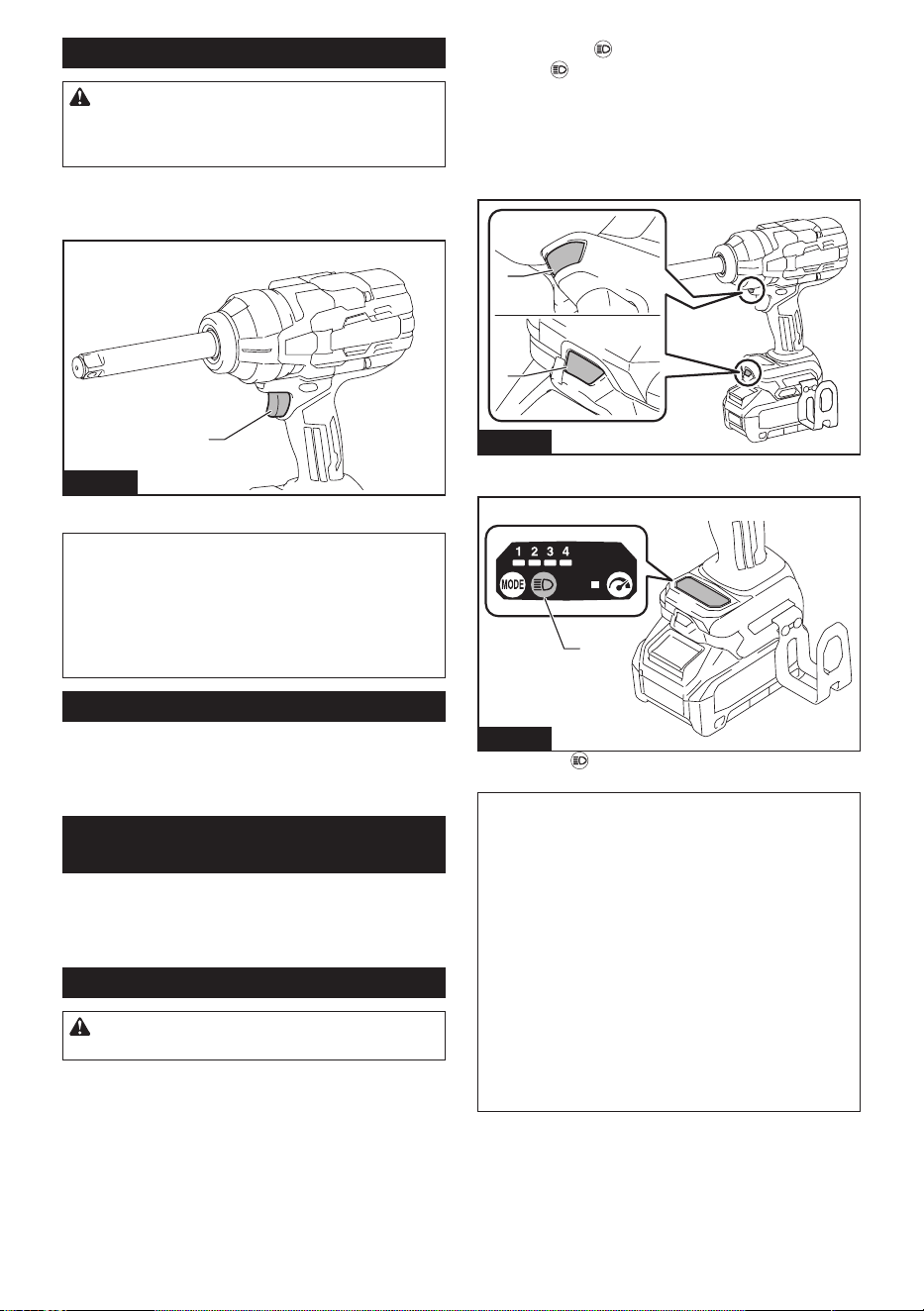
To start the tool, simply pull the switch trigger. Tool
speed is increased by increasing pressure on the switch
trigger. Release the switch trigger to stop.
1
Fig.3
► 1. Switch trigger
NOTE: The tool automatically stops when you keep
pulling the switch trigger for about 6 minutes.
NOTE: When full speed mode is turned on, the rota-
tion speed becomes fastest even if you do not pull the
switch trigger fully.
For detailed information, refer to the section of full
speed mode.
Electric brake
This tool is equipped with an electric brake. If the tool
consistently fails to quickly stop after the switch trigger
is released, have the tool serviced at a Makita service
center.
Accidental re-start preventive
function
Even if you install the battery cartridge while pulling the
switch trigger, the tool does not start.
To start the tool, rst release the switch trigger and then
pull the switch trigger.
Lighting up front lamps
CAUTION: Do not look in the light or see the
source of light directly.
Press the button to switch on the lamp status. Press
the button again to switch o the lamp status.
With the lamp status ON, pull the switch trigger to turn
on the lamps. To turn o the lamps, release the switch
trigger. The lamps go out approximately 10 seconds
after releasing the switch trigger.
With the lamp status OFF, the lamps do not turn on
even if the trigger is pulled.
1
1
Fig.4
► 1. Lamps
1
Fig.5
► 1. Button
NOTE: The lamp status can be recognized by pulling
the switch trigger. The ON status has been main-
tained if you see the lamps light up. The ON status
has been lost if not.
NOTE: When the tool is overheated, the front lamps
ash for one minute, and then the LED display on the
control panel goes o. In this case, cool down the tool
before operating again.
NOTE: Use a dry cloth to wipe the dirt o the lens
of the lamp. Be careful not to scratch the lens of the
lamp, or it may lower the illumination.
NOTE: While pulling the switch trigger, the lamp
status cannot be changed.
NOTE: You can change the lamp status for a dura-
tion of approximately 10 seconds after releasing the
switch trigger.
8 ENGLISH
Forward/Reverse switch
CAUTION: Always check the direction of
rotation before operation.
CAUTION: Use the forward/reverse switch
only after the tool comes to a complete stop.
Changing the direction of rotation before the tool
stops may damage the tool.
CAUTION: When not operating the tool,
always set the forward/reverse switch to the neu-
tral position.
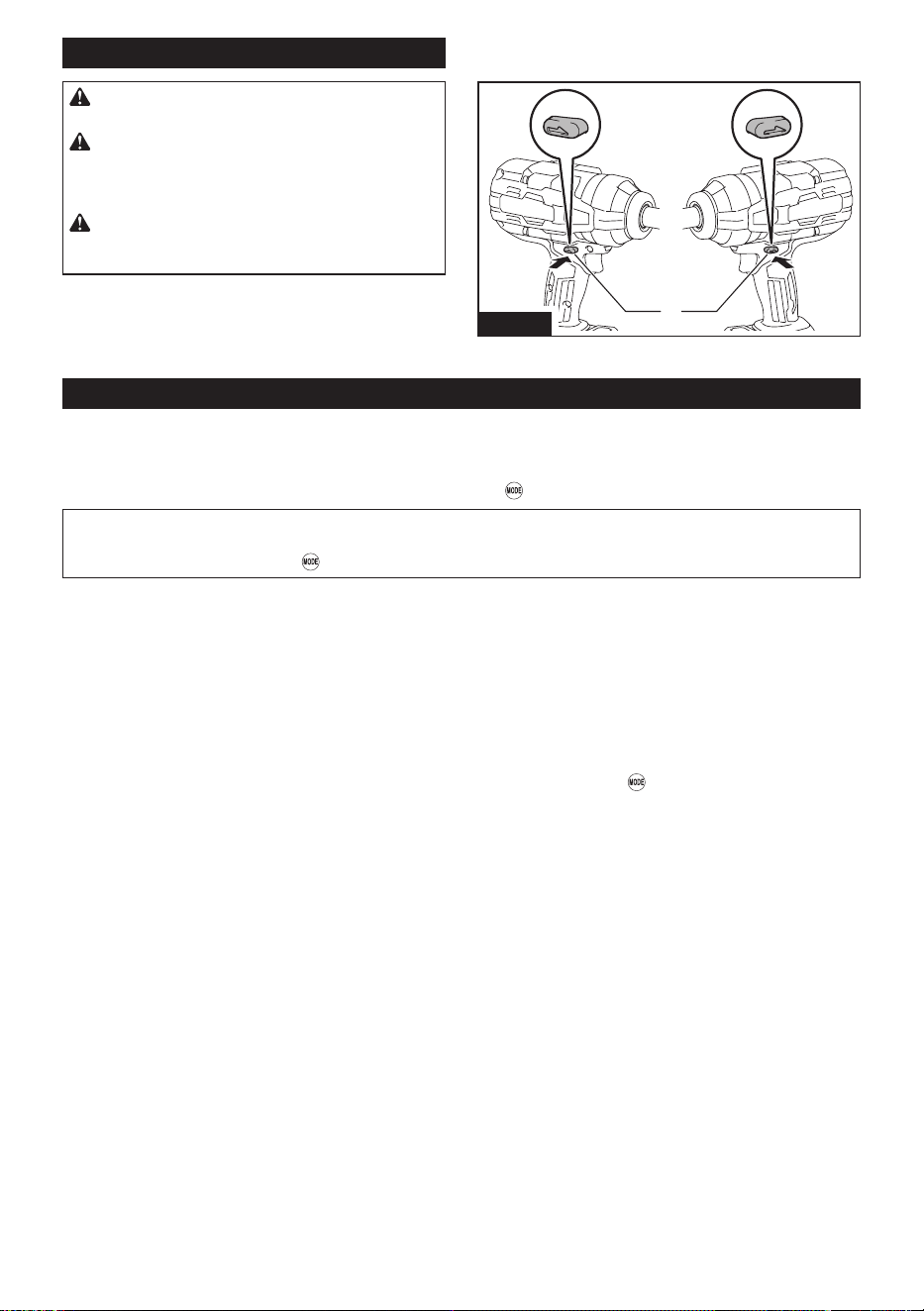
Change the rotation direction using the forward/reverse
switch. Depress the switch from the A side for clockwise
(forward) rotation or from the B side for counterclock-
wise (reverse) rotation.
When the forward/reverse switch is in the neutral posi-
tion, the switch trigger cannot be pulled.
AB
1
Fig.6
► 1. Forward/Reverse switch
Changing operation mode
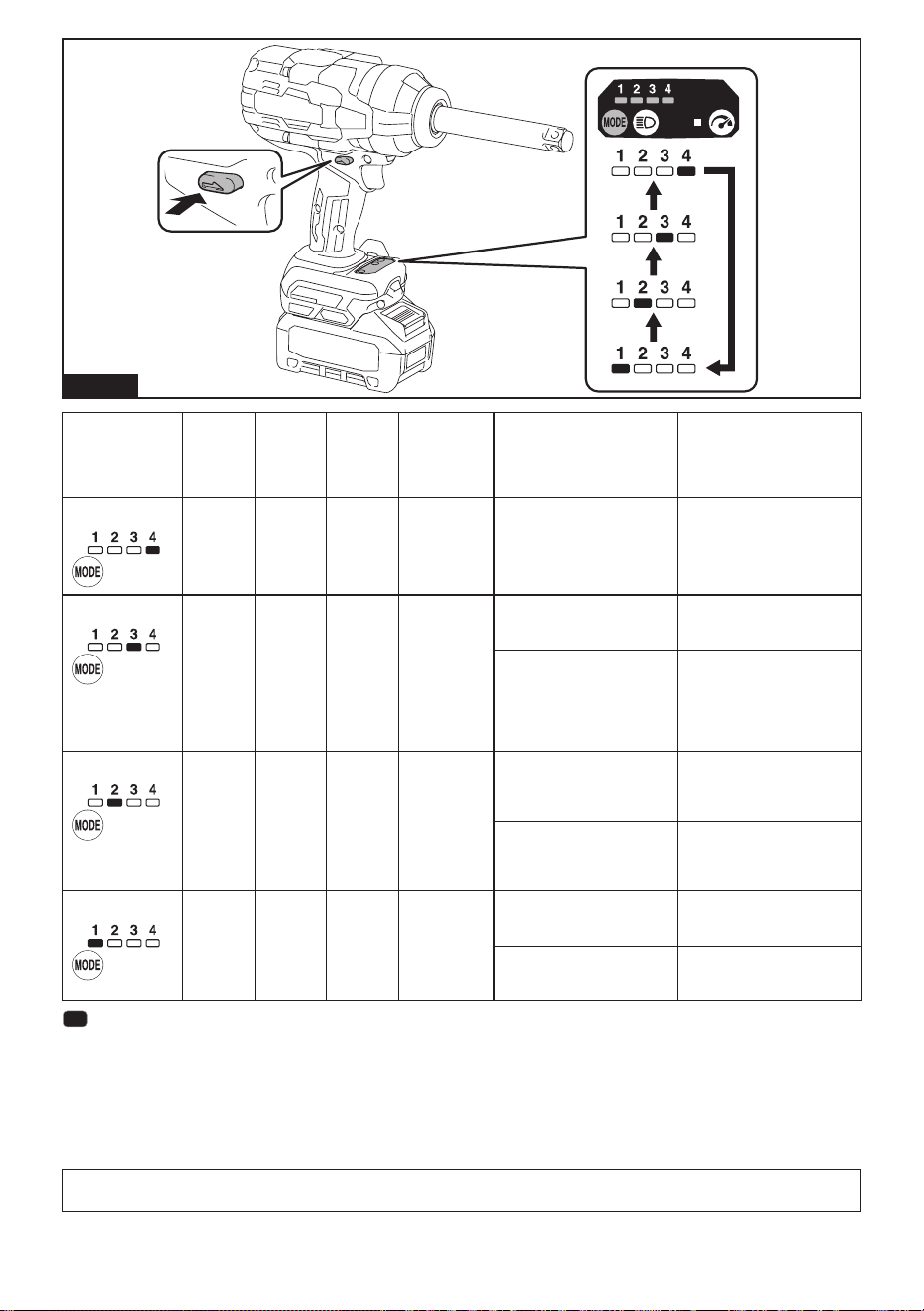
The tool features multiple application modes for ecient bolt/nut fastening and torque control. Select an appropriate
mode according to your preferences and needs.
Application modes can be switched for approximately 1 minute(s) after you release the switch trigger. You can
extend the hold time for 1 more minute(s) by pressing the button
.
NOTE: The LED display on the control panel goes o to save the battery power while the tool is switched o.
NOTE: When the LED display on the control panel stays blank, slightly pull the switch trigger to reactivate the
display and then press the button
.
Application modes in clockwise (forward) rotation
4 right-hand threading modes are available: a single free-range impact mode and 3 auto-stop modes.
Auto-stop modes employ 3 levels of torque limiting. It helps to repeat fastening continuously with equal torque,
reducing the risk of breakage of bolts/nuts due to overtightening.
An auto-stop feature turns the tool o once the bolt or nut you are working on has been fastened to a predetermined
torque level.
Free-range impact mode allows you to control the torque with the switch trigger. You can adjust the torque manually
on the trigger for fastening. It is recommended for people who already feel comfortable using power tools.
The modes can be toggled among the applicational options by pressing the button
.
9 ENGLISH
Fig.7
Indication Mode Max.
blows
(/min)
Max.
rotation
speed
(RPM)
(/min)
Target torque
(N·m (ft·lbs))
*1
Features Application
4 (Max)
Impact
(Free-
range)
2,600 1,800
1,500 (1,110)
*2 *3
Maximum speed, blows and
torque can be obtained.
Fastening operation that
requires a dynamic pow-
er-speed range control.
3 (Hard)
Auto-stop 2,000 1,100 300 - 450
(220 - 330)
Prevents the tool from add-
ing too much torque when
fastening temporarily.
Temporary fastening.
Stops automatically approx-
imately 0.8 second after
the tool has started impact
blows.
Stops the tool from rotating
any further before it gets to
the predetermined torque.
This makes it easier to then
fasten bolts/nuts on com-
pletely.
*4
2 (Medium) Auto-stop 1,400 700 50 - 150
(40 - 110)
Secures the initial xing to
prevent loss of clamping
force or displacement of
fastening components.
Primary fastening.
(Secondary retention)
Stops automatically approx-
imately 0.5 second after
the tool has started impact
blows.
Allows to fasten bolts/nuts
with the required torque in a
cross-fastening manner.
1 (Soft)
Auto-stop -
*5
500 30 - 50
(20 - 40)
Seats bolts/nuts at the
rotation speed according to
the target torque.
Hand fastening.
Stops automatically as
soon as the tool has started
impact blows.
Roughly fastens bolts/nuts to
hold fastening components
in place.
: The lamp is on.
*1
The declared values have been measured in accordance with the manufacturer's standard test method and may
not guarantee optimal performance on specic tasks.
*2
Maximum fastening torque with M30 (1-1/4″) for 6 seconds.
*3
Tool requires to apply the correct pressure to the switch trigger for good torque control.
*4
Wheel nuts (lug nuts) on cars, nuts and bolts on other vehicles and buildings need to be fastened to a specic level
of torque. Be sure to tighten a fastener to its required tension using a torque wrench.
*5
Tool stops soon after starting impact blows.
NOTE: The timing to stop the tool driving varies depending on the type of the bolt/nut and material to be driven.
Make a test driving before using the auto-stop mode.
10 ENGLISH
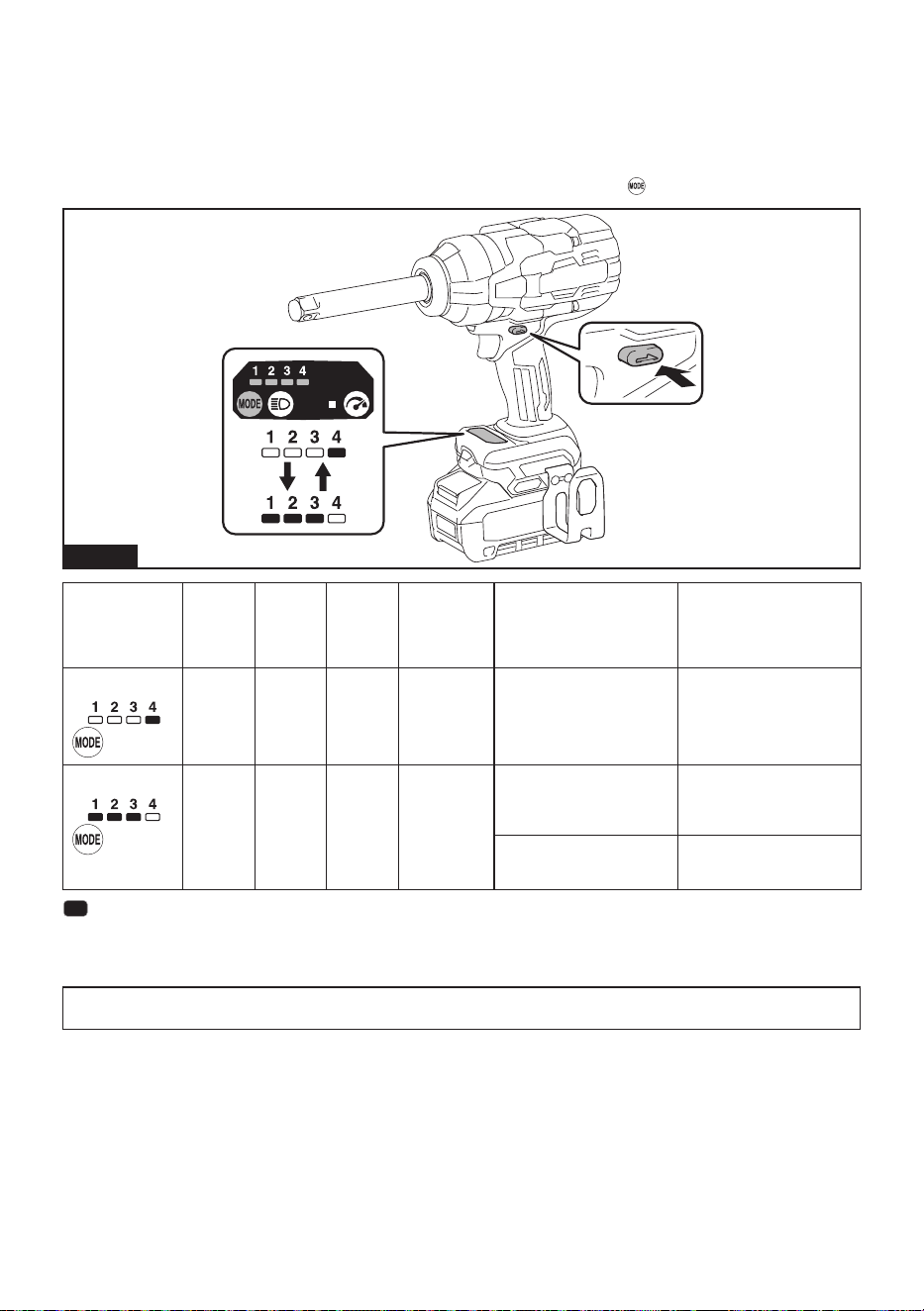
Application modes in counterclockwise (reverse) rotation
2 left-hand threading modes are available: free-range impact mode and auto-stop mode.
Auto-stop mode lowers the rotation speed to avoid unfastened bolts/nuts falling o and damaging the material you
are working on.
Free-range impact mode allows you to control the torque with the switch trigger. You can adjust the torque manually
on the trigger for unfastening. It is recommended for people who already feel comfortable using power tools.
The modes can be toggled among the applicational options by pressing the button
.
Fig.8
Indication Mode Max.
blows
(/min)
Max.
rotation
speed
(RPM)
(/min)
Target torque
(N·m (ft·lbs))
*1
Features Application
4
Impact
(Free-
range)
2,600 1,800
1,900 (1,400)
*2
Maximum speed, blows and
torque can be obtained.
Unfastening operation that
requires a dynamic pow-
er-speed range control.
1/2/3
Auto-stop 2,600 1,800 1,900 (1,400) Automatically slows down
the rotation speed from the
full speed after the tool has
stopped impact blows.
Bolts/nuts loosening.
Prevents the tool from loos-
ening bolts/nuts too fast and
causing them to come o.
Less likely to have bolts/nuts
slip away during removal.
: The lamp is on.
*1
The declared values have been measured in accordance with the manufacturer's standard test method and may
not guarantee optimal performance on specic tasks.
*2
Tool requires to apply the correct pressure to the switch trigger to control the torque.
NOTE: The timing to slow down the rotation speed varies depending on the type of the bolt/nut and material to be
driven. Make a test driving before using this mode.
11 ENGLISH
Full speed mode
In full speed mode, the rotating speed immediately
reaches its fastest in the selected mode whether you
pull the switch trigger slightly or fully.
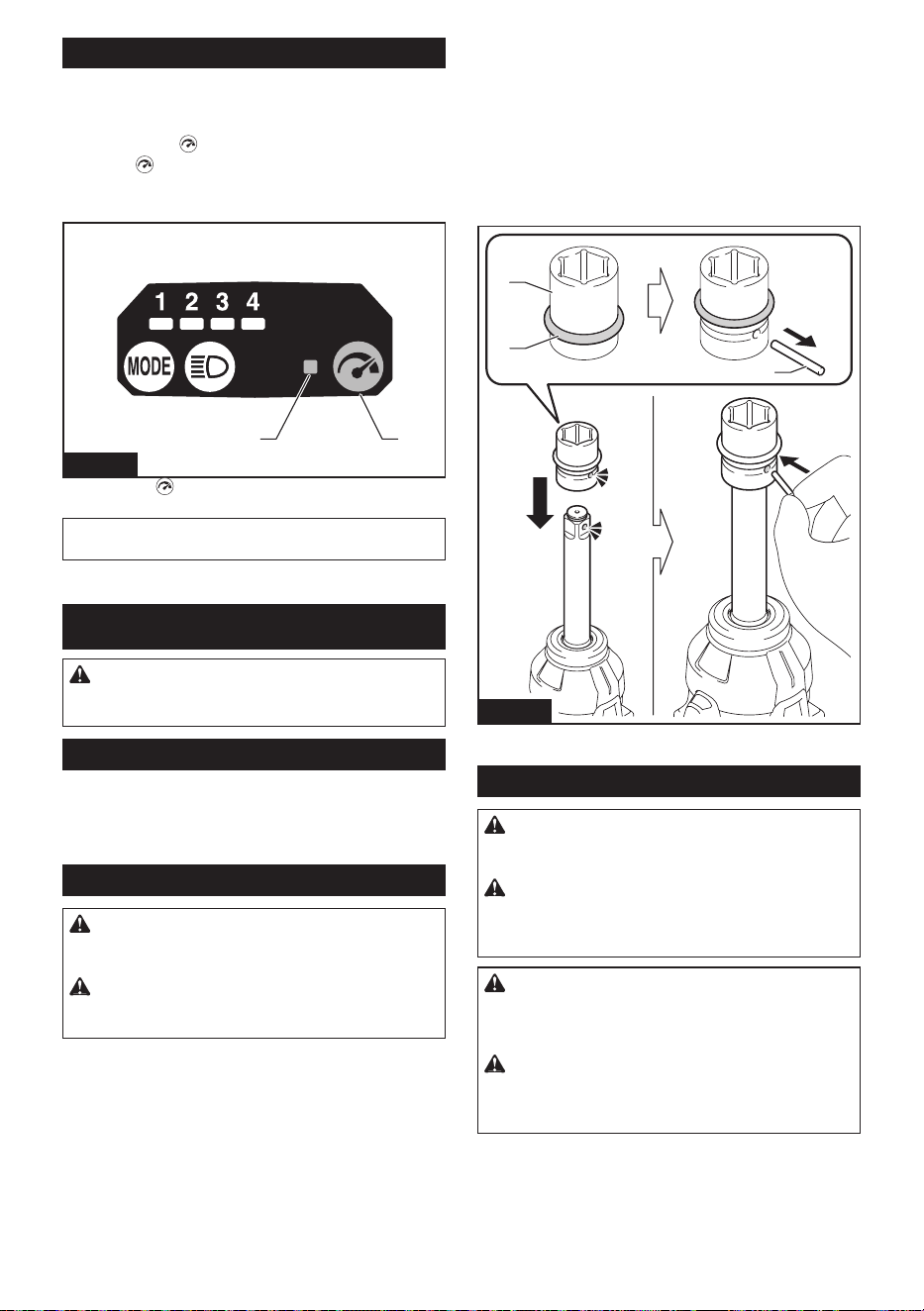
Press the button to switch to full speed mode. Press
the button again to exit the mode. The indicator lamp
on the control panel lights up while full speed mode is
set to on.
12
Fig.9
► 1. Button
2. Indicator lamp
NOTE: The tool stays in full speed mode after you
change application modes.
ASSEMBLY
CAUTION: Always be sure that the tool is
switched o and the battery cartridge is removed
before carrying out any work on the tool.
Selecting correct impact socket
Always use the correct size impact socket for bolts and
nuts. An incorrect size impact socket will result in inac-
curate and inconsistent fastening torque and/or damage
to the bolt or nut.
Installing or removing impact socket
CAUTION: Make sure that the impact socket
and the mounting portion are not damaged before
installing the impact socket.
CAUTION: After inserting the impact socket,
make sure that it is rmly secured. If it comes out,
do not use it.
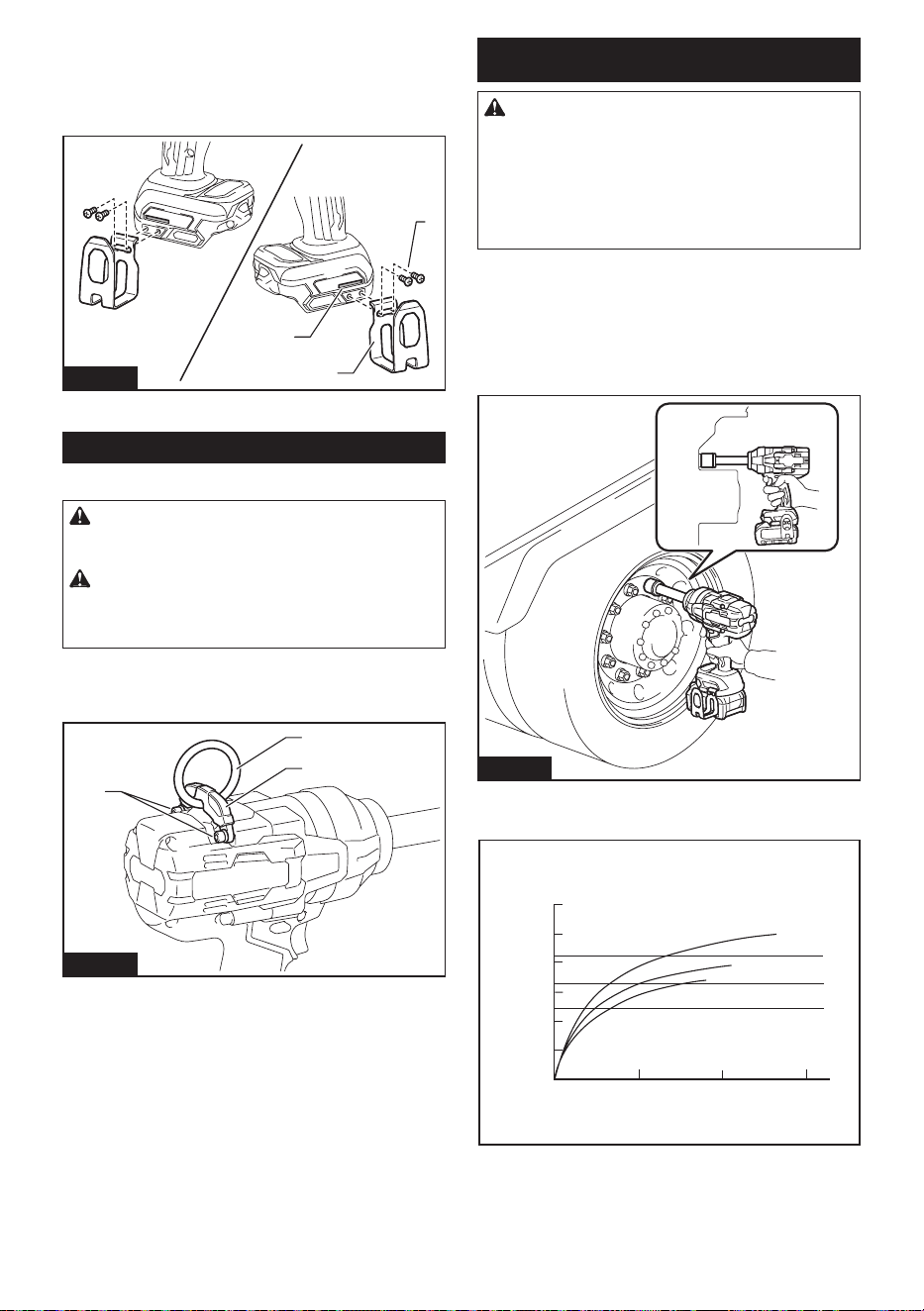
Move the O-ring out of the groove in the impact socket
and remove the pin from the impact socket. Fit the
impact socket onto the square drive so that the hole in
the impact socket is aligned with the hole in the square
drive.
Insert the pin through the hole in the impact socket and
square drive. Then return the O-ring to the original posi-
tion in the impact socket groove to retain the pin.
To remove the impact socket, follow the installation
procedures in reverse.
1
2
3
Fig.10
► 1. Impact socket 2. O-ring 3. Pin
Installing hook
WARNING: Use the hanging/mounting parts
for their intended purposes only, e.g., hanging the
tool on a tool belt between jobs or work intervals.
WARNING: Be careful not to overload the
hook as too much force or irregular overburden
may cause damages to the tool resulting in per-
sonal injury.
CAUTION: When installing the hook, always
secure it with the screw rmly. If not, the hook
may come o from the tool and result in the personal
injury.
CAUTION: Make sure to hang the tool
securely before releasing your hold. Insucient
or unbalanced hooking may cause falling o and you
may be injured.
12 ENGLISH
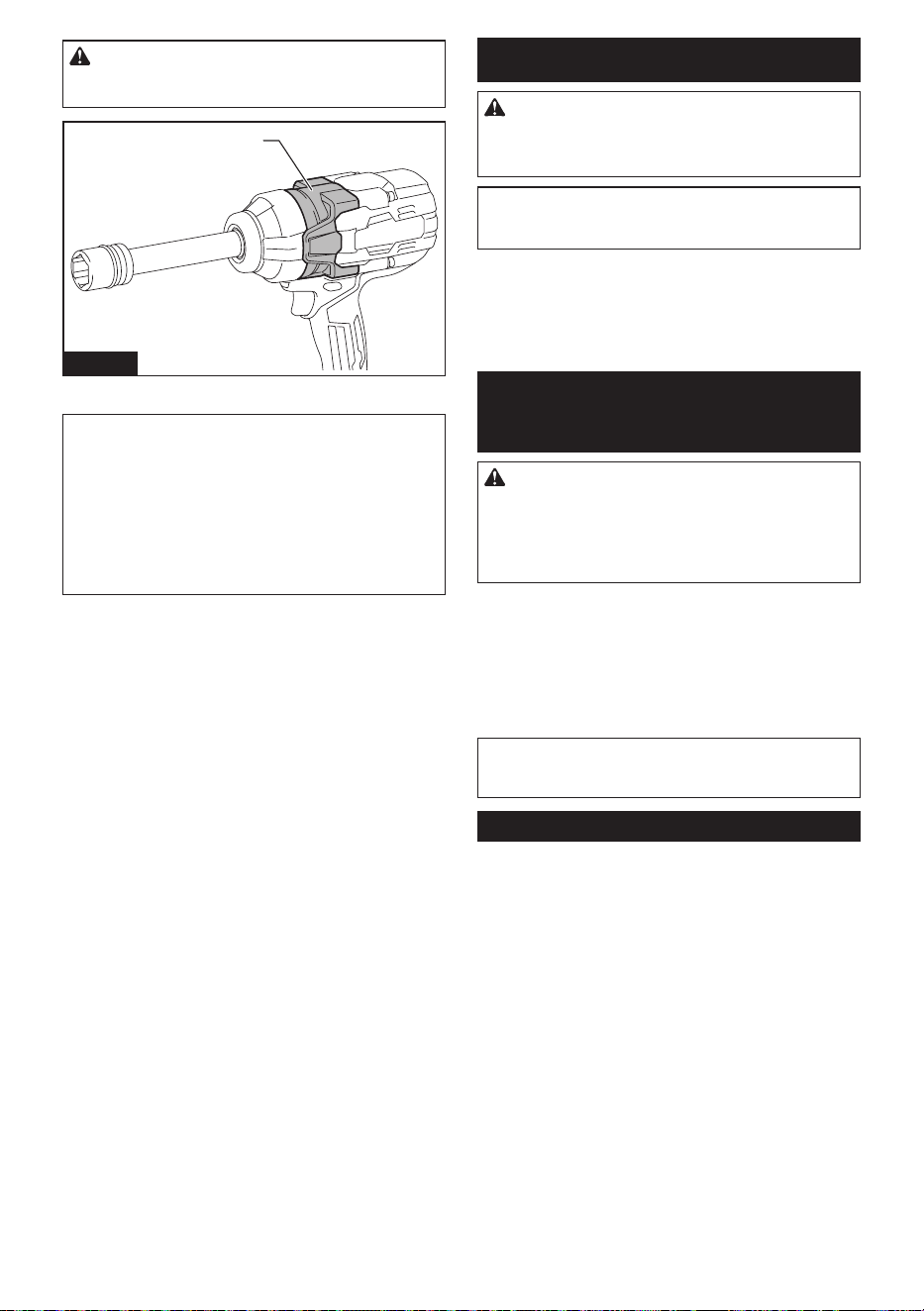
The hook is convenient for temporarily hanging the tool.
This can be installed on either side of the tool. To install
the hook, insert it into a groove in the tool housing
on either side and then secure it with two screws. To
remove, loosen the screws and then take them out.
3
1
2
Fig.11
► 1. Groove 2. Hook 3. Screws
Ring
Country specic
CAUTION: Before using the ring, always
make sure that the bracket and ring are secured
and not damaged.
CAUTION: Use the hanging/mounting parts
for their intended purposes only. Using for unin-
tended purpose may cause accident or personal
injury.
The ring is convenient for hanging the tool with hoist.
First, place the rope through the ring. Then hang the
tool up to the air with hoist.
1
2
3
Fig.12
► 1. Bracket 2. Ring 3. Screws
OPERATION
CAUTION: Always insert the battery cartridge
all the way until it locks in place. If you can see
the red indicator around the front button, the battery
cartridge is not locked completely. Insert the battery
cartridge fully until the red indicator cannot be seen.
If not, the battery cartridge may accidentally fall out
of the tool, causing injury to you or someone around
you.
Hold the tool rmly and place the impact socket over
the bolt or nut. Turn the tool on and fasten for the proper
fastening time.
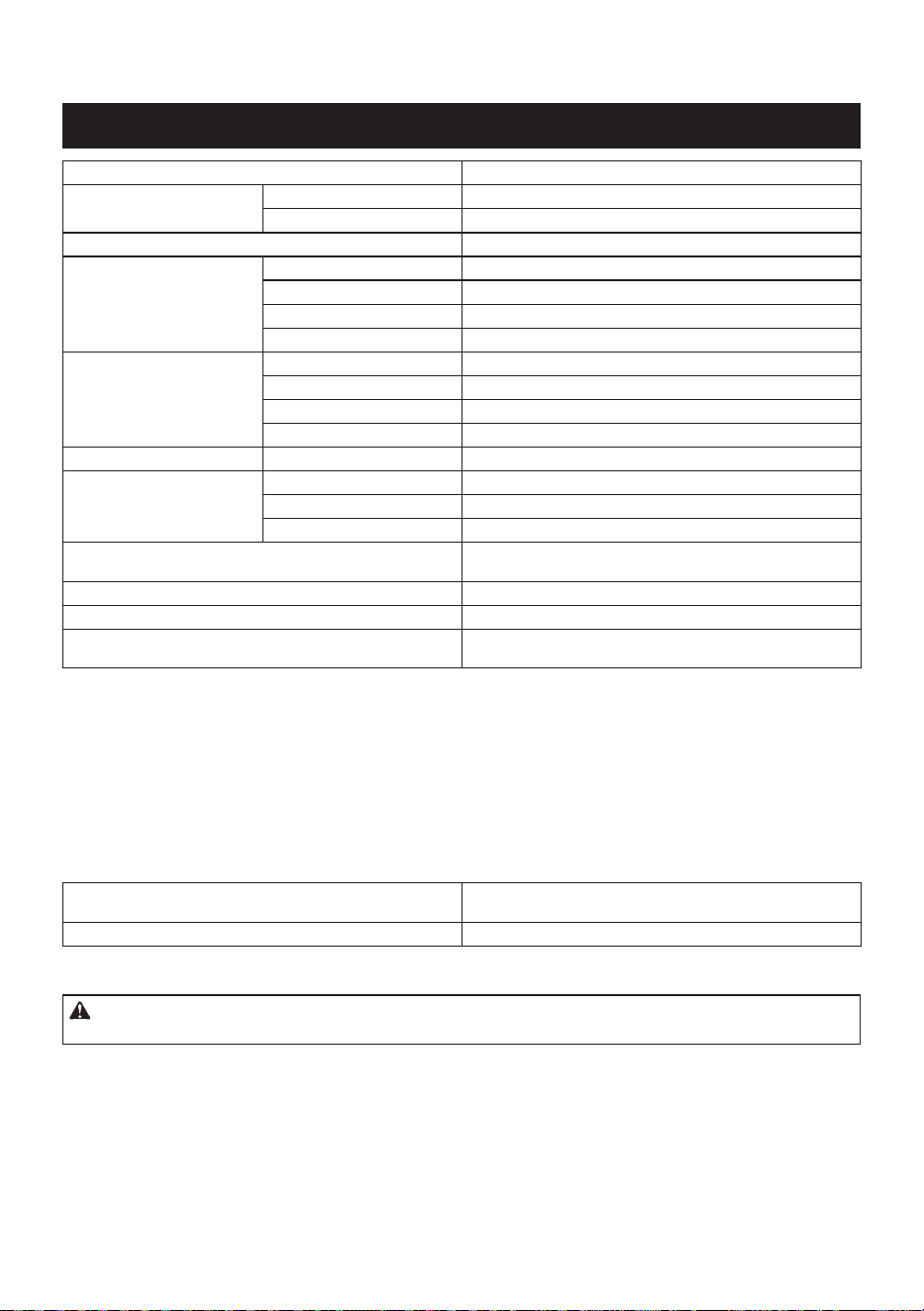
The proper fastening torque may dier depending upon
the kind or size of the bolt, the material of the workpiece
to be fastened, etc. The relation between fastening
torque and fastening time is shown in the gure(s).
Fig.13
Proper fastening torque for high tensile bolt with
max impact mode (4)
0
321
1
2
(885)
(738)
(590)
(443)
(295)
(148)
1200
1000
800
600
400
200
N•m
(ft•lbs)
M24
(1
″
)
M24
(1
″
)
M22
(7/8
″
)
M22
(7/8
″
)
M20
(3/4
″
)
M20
(3/4
″
)
1. Fastening time (second) 2. Fastening torque
13 ENGLISH
CAUTION: If the tool is operated continu-
ously, do not touch the hammer case. The hammer
case may be extremely hot and could burn your skin.
1
Fig.14
► 1. Hammer case
NOTE: Hold the tool pointed straight at the bolt or nut.
NOTE: Excessive fastening torque may damage the
bolt/nut or impact socket. Before starting your job,
always perform a test operation to determine the
proper fastening time for your bolt or nut.
NOTE: If the tool is operated continuously until the
battery cartridge has discharged, allow the tool to rest
for 15 minutes before proceeding with a fresh battery
cartridge.
The fastening torque is aected by a wide variety of
factors including the following. After fastening, always
check the torque with a torque wrench.
1. When the battery cartridge is discharged almost
completely, voltage will drop and the fastening
torque will be reduced.
2. Impact socket
• Failure to use the correct size impact socket
will cause a reduction in the fastening torque.
• A worn impact socket (wear on the hex end
or square end) will cause a reduction in the
fastening torque.
3. Bolt
• Even though the torque coecient and the
class of bolt are the same, the proper fasten-
ing torque will dier according to the diame-
ter of bolt.
• Even though the diameters of bolts are the
same, the proper fastening torque will dier
according to the torque coecient, the class
of bolt and the bolt length.
4. The use of the universal joint somewhat reduces
the fastening force of the impact wrench.
Compensate by fastening for a longer period of
time.
5. The manner of holding the tool or the material
of driving position to be fastened will aect the
torque.
6. Operating the tool at low speed will cause a reduc-
tion in the fastening torque.
MAINTENANCE
CAUTION: Always be sure that the tool is
switched o and the battery cartridge is removed
before attempting to perform inspection or
maintenance.
NOTICE: Never use gasoline, benzine, thinner,
alcohol or the like. Discoloration, deformation or
cracks may result.
To maintain product SAFETY and RELIABILITY,
repairs, any other maintenance or adjustment should
be performed by Makita Authorized or Factory Service
Centers, always using Makita replacement parts.
OPTIONAL
ACCESSORIES
CAUTION: These accessories or attachments
are recommended for use with your Makita tool
specied in this manual. The use of any other
accessories or attachments might present a risk of
injury to persons. Only use accessory or attachment
for its stated purpose.
If you need any assistance for more details regard-
ing these accessories, ask your local Makita Service
Center.
• Impact socket
• Universal joint
• Protector
• Makita genuine battery and charger
NOTE: Some items in the list may be included in the
tool package as standard accessories. They may
dier from country to country.
MAKITA LIMITED WARRANTY
Please refer to the annexed warranty sheet for the
most current warranty terms applicable to this product.
If annexed warranty sheet is not available, refer to the
warranty details set forth at below website for your
respective country.
United States of America: www.makitatools.com
Canada: www.makita.ca
Other countries: www.makita.com
14 ESPAÑOL
ESPAÑOL (Instrucciones originales)
ESPECIFICACIONES
Modelo: GWT11
Capacidades de apriete Perno estándar 12 mm - 36 mm (1/2″ - 1-1/2″)
Perno de alta resistencia 10 mm - 27 mm (3/8″ - 1-1/8″)
Adaptador cuadrado 19,0 mm (3/4″)
Velocidad sin carga (RPM) Modo de impacto máx. (4) 0 r/min - 1 800 r/min
Modo de impacto duro (3) 0 r/min - 1 100 r/min
Modo de impacto medio (2) 0 r/min - 700 r/min
Modo de impacto suave (1) 0 r/min - 500 r/min
Impactos por minuto Modo de impacto máx. (4) 0 ipm - 2 600 ipm
Modo de impacto duro (3) 0 ipm - 2 000 ipm
Modo de impacto medio (2) 0 ipm - 1 400 ipm
Modo de impacto suave (1)
*1
- ipm
Torsión de apriete máxima
*2
Modo de impacto máx. (4) 1 500 N·m (1 110 ft·lbs)
Torsión de apriete objetivo
*3
Modo de impacto duro (3) 300 N·m - 450 N·m (220 ft·lbs - 330 ft·lbs)
Modo de impacto medio (2) 50 N·m - 150 N·m (40 ft·lbs - 110 ft·lbs)
Modo de impacto suave (1) 30 N·m - 50 N·m (20 ft·lbs - 40 ft·lbs)
Torsión de rompimiento de tuerca
(en el modo de impacto máx. (4))
1 900 N·m (1 400 ft·lbs)
Longitud total 329 mm (13″)
Tensión nominal 36 V - 40 V c.c. máx.
Peso neto 4,3 kg - 5,5 kg
(9,5 lbs - 12,1 lbs)
*1
La herramienta se detiene automáticamente poco después de que comience los golpes de impacto.
*2
Torsión de apriete con 30 mm (1-1/4″) por 6 segundos.
*3
Con 20 mm - 24 mm (3/4″ - 1″).
• Debido a nuestro continuo programa de investigación y desarrollo, las especicaciones aquí incluidas están
sujetas a cambio sin previo aviso.
• Las especicaciones pueden variar de país a país.
• El peso puede variar en función de los accesorios, incluido el cartucho de batería. En la tabla se muestra la
combinación de peso más ligero y más pesado.
Cartucho de batería y cargador aplicables
Cartucho de batería BL4020* / BL4025* / BL4040* / BL4040F* / BL4050F / BL4080F
* : Batería recomendada
Cargador DC40RA / DC40RB / DC40RC / DC40WA
• Algunos de los cartuchos de batería y cargadores enumerados arriba podrían no estar disponibles depen-
diendo de su área de residencia.
ADVERTENCIA: Use únicamente los cartuchos de batería y los cargadores indicados arriba. El uso de
cualquier otro cartucho de batería y cargador podría ocasionar una lesión y/o un incendio.

15 ESPAÑOL
ADVERTENCIAS DE
SEGURIDAD
Advertencias generales de
seguridad para herramientas
eléctricas
ADVERTENCIA Lea todas las advertencias
de seguridad, instrucciones, ilustraciones y espe-
cicaciones suministradas con esta herramienta
eléctrica. El no seguir todas las instrucciones indicadas
a continuación podrá ocasionar una descarga eléctrica,
incendio o lesiones graves.
Conserve todas las advertencias
e instrucciones como referencia
en el futuro.
En las advertencias, el término “herramienta eléctrica”
se reere a su herramienta eléctrica de funcionamiento
con conexión a la red eléctrica (con cableado eléctrico)
o herramienta eléctrica de funcionamiento a batería
(inalámbrica).
Seguridad en el área de trabajo
1. Mantenga el área de trabajo limpia y bien ilu-
minada. Las áreas oscuras o desordenadas son
propensas a accidentes.
2. No utilice las herramientas eléctricas en
atmósferas explosivas, tal como en la presen-
cia de líquidos, gases o polvo inamables. Las
herramientas eléctricas crean chispas que pueden
prender fuego al polvo o los humos.
3. Mantenga a los niños y curiosos alejados
mientras utiliza una herramienta eléctrica. Las
distracciones le pueden hacer perder el control.
Seguridad eléctrica
1. Las clavijas de conexión de las herramientas
eléctricas deberán encajar perfectamente en la
toma de corriente. No modique nunca la cla-
vija de conexión de ninguna forma. No utilice
ninguna clavija adaptadora con herramientas
eléctricas que tengan conexión a tierra (puesta
a tierra). La utilización de clavijas no modica-
das y que encajen perfectamente en la toma de
corriente reducirá el riesgo de que se produzca
una descarga eléctrica.
2. Evite tocar con el cuerpo supercies conec-
tadas a tierra o puestas a tierra tales como
tubos, radiadores, cocinas y refrigeradores. Si
su cuerpo es puesto a tierra o conectado a tierra
existirá un mayor riesgo de que sufra una des-
carga eléctrica.
3. No exponga las herramientas eléctricas a la
lluvia ni a condiciones húmedas. La entrada de
agua en una herramienta eléctrica aumentará el
riesgo de que se produzca una descarga eléctrica.
4. No maltrate el cable. Nunca utilice el cable
para transportar, jalar o desconectar la herra-
mienta eléctrica. Mantenga el cable alejado del
calor, aceite, objetos cortantes o piezas móvi-
les. Los cables dañados o enredados aumentan
el riesgo de sufrir una descarga eléctrica.
5. Cuando utilice una herramienta eléctrica en
exteriores, utilice un cable de extensión apro-
piado para uso en exteriores. La utilización de
un cable apropiado para uso en exteriores redu-
cirá el riesgo de que se produzca una descarga
eléctrica.
6. Si no es posible evitar usar una herramienta
eléctrica en condiciones húmedas, utilice un
alimentador protegido con interruptor de cir-
cuito de falla a tierra (ICFT). El uso de un ICFT
reduce el riesgo de descarga eléctrica.
7. Las herramientas eléctricas pueden producir
campos electromagnéticos (CEM) que no son
dañinos para el usuario. Sin embargo, si los
usuarios tienen marcapasos y otros dispositivos
médicos similares, deberán consultar al fabricante
de su dispositivo y/o a su médico antes de operar
esta herramienta eléctrica.
Seguridad personal
1. Manténgase alerta, preste atención a lo que
está haciendo y utilice su sentido común
cuando opere una herramienta eléctrica. No
utilice una herramienta eléctrica cuando esté
cansado o bajo la inuencia de drogas, alco-
hol o medicamentos. Un momento de distracción
mientras opera las herramientas eléctricas puede
terminar en una lesión grave.
2. Use equipo de protección personal. Póngase
siempre protección para los ojos. El equipo
protector tal como máscara contra el polvo, zapa-
tos de seguridad antiderrapantes, casco rígido y
protección para oídos utilizado en las condiciones
apropiadas reducirá el riesgo de lesiones.
3. Impida el encendido accidental. Asegúrese
de que el interruptor esté en la posición de
apagado antes de conectar a la alimentación
eléctrica y/o de colocar el cartucho de batería,
así como al levantar o cargar la herramienta.
Cargar las herramientas eléctricas con su dedo
en el interruptor o enchufarlas con el interrup-
tor encendido hace que los accidentes sean
comunes.
4. Retire cualquier llave de ajuste o llave de
apriete antes de encender la herramienta. Una
llave de ajuste o llave de apriete que haya sido
dejada puesta en una parte giratoria de la herra-
mienta eléctrica puede ocasionar alguna lesión.
5. No utilice la herramienta donde no alcance.
Mantenga los pies sobre suelo rme y el equi-
librio en todo momento. Esto permite un mejor
control de la herramienta eléctrica en situaciones
inesperadas.
6. Use una vestimenta apropiada. No use ropa
suelta ni alhajas. Mantenga el cabello y la ropa
alejados de las piezas móviles. Las prendas
de vestir holgadas, las alhajas y el cabello largo
suelto podrían engancharse en estas piezas
móviles.
7. Si dispone de dispositivos para la conexión
de equipos de extracción y recolección de
polvo, asegúrese de conectarlos y utilizarlos
debidamente. Hacer uso de la recolección de
polvo puede reducir los riesgos relacionados con
el polvo.

16 ESPAÑOL
8. No permita que la familiaridad adquirida
debido al uso frecuente de las herramientas
haga que se sienta conado e ignore los prin-
cipios de seguridad de las herramientas. Un
descuido podría ocasionar una lesión grave en
una fracción de segundo.
9. Utilice siempre gafas protectoras para prote-
ger sus ojos de lesiones al usar herramientas
eléctricas. Las gafas deben cumplir con la
Norma ANSI Z87.1 en EUA.
Es responsabilidad del empleador imponer
el uso de equipos protectores de seguridad
apropiados a los operadores de la herramienta
y demás personas cerca del área de trabajo.
Mantenimiento y uso de la herramienta eléctrica
1. No fuerce la herramienta eléctrica. Utilice la
herramienta eléctrica correcta para su aplica-
ción. La herramienta eléctrica adecuada hará un
mejor trabajo y de forma más segura a la veloci-
dad para la que ha sido fabricada.
2. No utilice la herramienta eléctrica si el inte-
rruptor no la enciende y apaga. Cualquier
herramienta eléctrica que no pueda ser contro-
lada con el interruptor es peligrosa y debe ser
reemplazada.
3. Desconecte la clavija de la fuente de alimen-
tación y/o retire la batería de la herramienta
eléctrica, en caso de ser removible, antes de
realizar ajustes, cambiar accesorios o almace-
nar las herramientas eléctricas. Tales medidas
de seguridad preventivas reducirán el riesgo
de poner en marcha la herramienta eléctrica de
forma accidental.
4. Guarde la herramienta eléctrica que no use
fuera del alcance de los niños y no permita
que las personas que no están familiarizadas
con ella o con las instrucciones la operen. Las
herramientas eléctricas son peligrosas en manos
de personas que no saben operarlas.
5. Dé mantenimiento a las herramientas eléctri-
cas y los accesorios. Compruebe que no haya
piezas móviles desalineadas o estancadas,
piezas rotas y cualquier otra condición que
pueda afectar al funcionamiento de la herra-
mienta eléctrica. Si la herramienta eléctrica
está dañada, haga que la reparen antes de
utilizarla. Muchos de los accidentes son ocasio-
nados por no dar un mantenimiento adecuado a
las herramientas eléctricas.
6. Mantenga las herramientas de corte limpias
y losas. Si recibe un mantenimiento adecuado
y tiene los bordes alados, es probable que la
herramienta se atasque menos y sea más fácil
controlarla.
7. Utilice la herramienta eléctrica, los accesorios
y las brocas de acuerdo con estas instruccio-
nes, considerando las condiciones laborales
y el trabajo a realizar. Si utiliza la herramienta
eléctrica para realizar operaciones distintas de
las indicadas, podrá presentarse una situación
peligrosa.
8. Mantenga los mangos y supercies de asi-
miento secos, limpios y libres de aceite o
grasa. Los mangos y supercies de asimiento
resbalosos no permiten una manipulación segura
ni el control de la herramienta en situaciones
inesperadas.
9. Cuando vaya a utilizar esta herramienta, evite
usar guantes de trabajo de tela ya que éstos
podrían atorarse. Si los guantes de trabajo de
tela llegaran a atorarse en las piezas móviles,
esto podría ocasionar lesiones personales.
Uso y cuidado de la herramienta a batería
1. Recargue sólo con el cargador especicado
por el fabricante. Un cargador que es adecuado
para un solo tipo de batería puede generar riesgo
de incendio al ser utilizado con otra batería.
2. Utilice las herramientas eléctricas solamente
con las baterías designadas especícamente
para ellas. La utilización de cualquier otra batería
puede crear un riesgo de lesiones o incendio.
3. Cuando no se esté usando la batería, mantén-
gala alejada de otros objetos metálicos, como
sujetapapeles (clips), monedas, llaves, clavos,
tornillos u otros objetos pequeños de metal
los cuales pueden actuar creando una cone-
xión entre las terminales de la batería. Originar
un cortocircuito en las terminales puede causar
quemaduras o incendios.
4. En condiciones abusivas, podrá escapar
líquido de la batería; evite tocarlo. Si lo toca
accidentalmente, enjuague con agua. Si hay
contacto del líquido con los ojos, busque asis-
tencia médica. Puede que el líquido expulsado
de la batería cause irritación o quemaduras.
5. No utilice una herramienta ni una batería que
estén dañadas o hayan sido modicadas. Las
baterías dañadas o modicadas podrían oca-
sionar una situación inesperada provocando un
incendio, explosión o riesgo de lesiones.
6. No exponga la herramienta ni la batería al
fuego ni a una temperatura excesiva. La expo-
sición al fuego o a una temperatura superior a los
130 °C podría causar una explosión.
7. Siga todas las instrucciones para la carga y
evite cargar la herramienta o la batería fuera
del rango de temperatura especicado en
las instrucciones. Una carga inadecuada o a
una temperatura fuera del rango especicado
podría dañar la batería e incrementar el riesgo de
incendio.
Servicio
1. Haga que una persona calicada repare la
herramienta eléctrica utilizando sólo piezas de
repuesto idénticas. Esto asegura que se man-
tenga la seguridad de la herramienta eléctrica.
2. Nunca dé servicio a baterías que estén daña-
das. El servicio a las baterías solamente deberá
ser efectuado por el fabricante o un agente de
servicio autorizado.
3. Siga las instrucciones para la lubricación y
cambio de accesorios.
4. No modique ni intente reparar el aparato ni el
paquete de baterías salvo como se indique en
las instrucciones para el uso y cuidado.
17 ESPAÑOL
Advertencias de seguridad para la
llave de impacto inalámbrica
1. Póngase protectores de oídos.
2. Revise cuidadosamente el dado de impacto
para ver que no haya desgaste, grietas o
daños antes de la instalación.
3. Sujete la herramienta con rmeza.
4. Mantenga las manos alejadas de las piezas
giratorias.
5. No toque el dado de impacto, el perno, la
tuerca o la pieza de trabajo inmediatamente
después de la operación. Podrían estar extre-
madamente calientes y causarle quemaduras en
la piel.
6. Asegúrese siempre de que pisa sobre suelo
rme.
Asegúrese de que no haya nadie debajo
cuando utilice la herramienta en lugares altos.
7. La torsión de apriete apropiada puede variar
en función del tipo o tamaño del perno.
Compruebe el par de apriete con una llave de
torsión.
8. Asegúrese de que no haya cables eléctricos,
tubos de agua, tubos de gas, etc. que pudieran
representar un peligro en caso de ser dañados
por el uso de la herramienta.
9. No transporte la herramienta sujetándola por
el dado de impacto o cualquier accesorio des-
montable. De lo contrario, el cuerpo de la herra-
mienta podría caerse accidentalmente y provocar
lesiones a usted o a alguien a su alrededor.
GUARDE ESTAS
INSTRUCCIONES.
ADVERTENCIA: NO DEJE que la comodidad
o familiaridad con el producto (a base de utilizarlo
repetidamente) evite que siga estrictamente las
normas de seguridad para dicho producto.
El USO INCORRECTO o el no seguir las normas
de seguridad indicadas en este manual de ins-
trucciones puede ocasionar lesiones graves.
Símbolos
A continuación se muestran los símbolos utilizados
para la herramienta.
volts o voltios
corriente directa o continua
velocidad sin carga
revoluciones o alternaciones por minuto,
frecuencia de rotación
número de percusiones
Modo de paro automático
Torsión de apriete
Instrucciones importantes de
seguridad para el cartucho de
batería
1. Antes de utilizar el cartucho de batería, lea
todas las instrucciones e indicaciones de
precaución en el (1) el cargador de batería, (2)
la batería, y (3) el producto con el que se utiliza
la batería.
2. No desarme ni modique el cartucho de bate-
ría. Podría ocurrir un incendio, calor excesivo o
una explosión.
3. Si el tiempo de operación se ha acortado en
exceso, deje de operar de inmediato. Podría
correrse el riesgo de sobrecalentamiento,
posibles quemaduras e incluso explosión.
4. En caso de que ingresen electrolitos en sus
ojos, enjuáguelos bien con agua limpia y con-
sulte de inmediato a un médico. Esto podría
ocasionar pérdida de visión.
5. Evite cortocircuitar el cartucho de batería:
(1) No toque las terminales con ningún mate-
rial conductor.
(2) Evite guardar el cartucho de batería en un
cajón junto con otros objetos metálicos,
tales como clavos, monedas, etc.
(3) No exponga el cartucho de batería al
agua o la lluvia.
Un cortocircuito en la batería puede causar
un ujo grande de corriente, sobrecalenta-
miento, posibles quemaduras e incluso una
descompostura.
6. No guarde ni utilice la herramienta y el cartu-
cho de batería en lugares donde la tempera-
tura pueda alcanzar o exceder los 50 °C (122
°F).
7. Nunca incinere el cartucho de batería incluso
en el caso de que esté dañado seriamente o
ya no sirva en absoluto. El cartucho de batería
puede explotar si se tira al fuego.
8. No clave, corte, aplaste, lance o deje caer el
cartucho de batería, ni golpee un objeto sólido
contra el cartucho de batería. Dicha acción
podría resultar en un incendio, calor excesivo o en
una explosión.
9. No use una batería dañada.
10. Las baterías de ión de litio están sujetas a los
requisitos reglamentarios en materia de bie-
nes peligrosos.
Para el trasporte comercial, por ej., mediante
terceros o agentes de transporte, se deben tomar
en cuenta los requisitos especiales relativos al
empaque y el etiquetado.
Para efectuar los preparativos del artículo que se
va a enviar, se requiere consultar a un experto
en materiales peligrosos. Si es posible, consulte
además otras regulaciones nacionales más deta-
lladas.
18 ESPAÑOL
Pegue o cubra con cinta adhesiva los contactos
abiertos y empaque la batería de manera que ésta
no pueda moverse dentro del paquete.
11. Para deshacerse del cartucho de batería,
sáquelo de la herramienta y deséchelo en un
lugar seguro. Siga las regulaciones locales
relacionadas al desecho de las baterías.
12. Utilice las baterías únicamente con los pro-
ductos especicados por Makita. Instalar las
baterías en productos que no cumplan con los
requisitos podría ocasionar un incendio, un calen-
tamiento excesivo, una explosión o una fuga de
electrolito.
13. Si no se utiliza la herramienta por un
período largo, debe extraerse la batería de la
herramienta.
14. El cartucho de batería podría absorber calor
durante y después de su uso, lo que ocasiona-
ría quemaduras o quemaduras a baja tempe-
ratura. Tenga cuidado con la manipulación de
los cartuchos de batería que estén calientes.
15. No toque el terminal de la herramienta inme-
diatamente después de su uso, ya que el
mismo podría estar lo sucientemente caliente
como para provocarle quemaduras.
16. No permita que las rebabas, el polvo o la tierra
queden atrapados en los terminales, oricios
y ranuras del cartucho de batería. Podría pro-
vocar calentamiento, incendio, explosión y mal
funcionamiento de la herramienta o del cartucho
de batería, lo que resultaría en quemaduras o
lesiones personales.
17. No utilice el cartucho de batería cerca de
cables eléctricos de alto voltaje, a menos que
la herramienta sea compatible con el uso cer-
cano a estos cables eléctricos de alto voltaje.
Esto podría ocasionar una avería o descompos-
tura de la herramienta o del cartucho de batería.
18. Mantenga la batería alejada de los niños.
GUARDE ESTAS
INSTRUCCIONES.
PRECAUCIÓN: Utilice únicamente baterías
originales de Makita. El uso de baterías no origina-
les de Makita, o de baterías alteradas, puede ocasio-
nar que las baterías exploten causando un incendio,
lesiones personales y daños. Asimismo, esto inva-
lidará la garantía de Makita para la herramienta y el
cargador Makita.
Consejos para alargar al máximo
la vida útil de la batería
1.
Cargue el cartucho de batería antes de que
se descargue completamente. Pare siempre
la operación y cargue el cartucho de batería
cuando note menos potencia en la herramienta.
2. No cargue nunca un cartucho de batería que
esté completamente cargado. La sobrecarga
acortará la vida de servicio de la batería.
3. Cargue el cartucho de batería a una tempera-
tura ambiente de 10 °C - 40 °C (50 °F - 104 °F).
Si un cartucho de batería está caliente, déjelo
enfriar antes de cargarlo.
4. Cuando no utilice el cartucho de batería,
sáquelo de la herramienta o del cargador.
5. Cargue el cartucho de batería si no va a utili-
zarlo durante un período prolongado (más de
seis meses).
DESCRIPCIÓN DEL
FUNCIONAMIENTO
PRECAUCIÓN: Asegúrese siempre de que la
herramienta esté apagada y el cartucho de batería
haya sido extraído antes de realizar cualquier
ajuste o comprobación en la herramienta.
Instalación o extracción del
cartucho de batería
PRECAUCIÓN: Apague siempre la herra-
mienta antes de colocar o quitar el cartucho de
batería.
PRECAUCIÓN: Sujete la herramienta y el car-
tucho de la batería con rmeza al colocar o quitar
el cartucho de batería. Si no se sujeta con rmeza la
herramienta y el cartucho de batería, puede ocasio-
nar que se resbalen de sus manos causando daños
a la herramienta y al cartucho de batería, así como
lesiones a la persona.
Para instalar el cartucho de batería, alinee la lengüeta
sobre el cartucho de batería con la ranura en la carcasa
y deslícela hasta su lugar. Insértelo por completo hasta
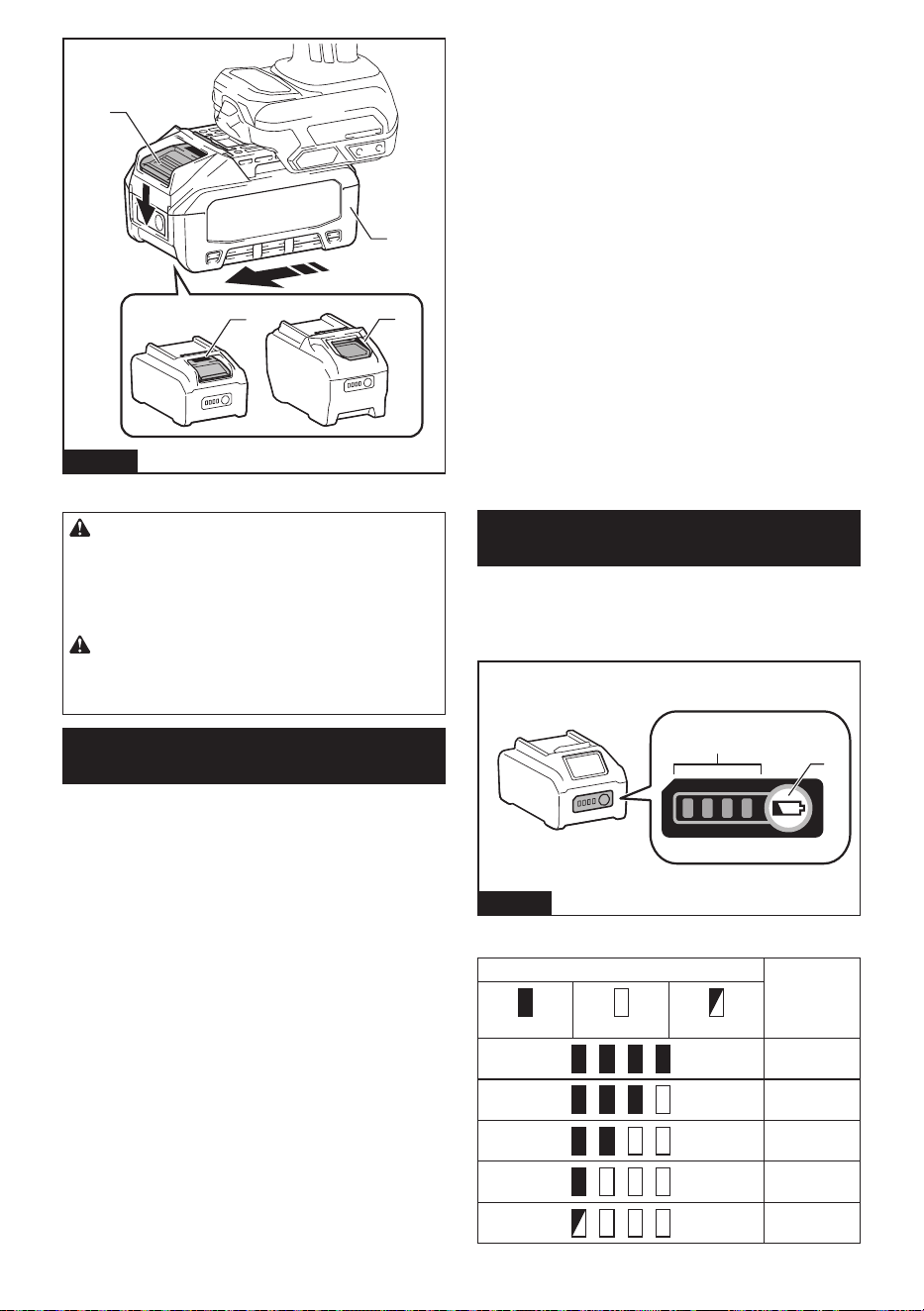
que se je en su lugar con un pequeño clic. Si puede
ver el indicador rojo como se muestra en la ilustración,
este no ha quedado asegurado por completo.
Para quitar el cartucho de batería, deslícelo de la herra-
mienta mientras desliza el botón sobre la parte delan-
tera del cartucho.
19 ESPAÑOL
1
1
2
3
Fig.1
► 1. Indicador rojo 2. Botón 3. Cartucho de batería
PRECAUCIÓN: Introduzca siempre com-
pletamente el cartucho de batería hasta que
el indicador rojo no pueda verse. Si no, podría
accidentalmente salirse de la herramienta y caer al
suelo causando una lesión a usted o alguien a su
alrededor.
PRECAUCIÓN: No instale el cartucho de
batería a la fuerza. Si el cartucho no se desliza al
interior fácilmente, se debe a que no está siendo
insertado correctamente.
Sistema de protección para la
herramienta/batería
La herramienta está equipada con un sistema de pro-
tección para la herramienta/batería. Este sistema corta
automáticamente la alimentación para prolongar la vida
de la herramienta y la batería. La herramienta se deten-
drá automáticamente durante la operación si la herra-
mienta o la batería se someten a una de las siguientes
condiciones:
Protección contra sobrecarga
Esta protección funciona cuando la herramienta se está
utilizando de una manera que causa que consuma una
cantidad de corriente inusualmente alta. En esta situa-
ción, apague la herramienta y detenga la aplicación
que haya causado que la herramienta se sobrecargara.
Luego encienda la herramienta para reiniciarla.
Protección contra
sobrecalentamiento
Cuando la herramienta se sobrecaliente, la herramienta
se detendrá automáticamente y las lámparas parpa-
dearán. En este caso, espere a que la herramienta
y la batería se enfríen antes de volver a encender la
herramienta.
Protección en caso de
sobredescarga
Esta protección funciona cuando la capacidad restante
de la batería disminuye. En esta situación, extraiga la
batería de la herramienta y cárguela.
Protección contra otras causas
El sistema de protección también está diseñado para
otras causas que podrían dañar la herramienta, y per-
mite que la herramienta se detenga automáticamente.
Siga todos los pasos a continuación para eliminar las
causas cuando la herramienta se haya detenido tempo-
ralmente o se haya detenido durante el funcionamiento.
1. Asegúrese de que todos los interruptores estén en
la posición de apagado, y luego vuelva a encen-
der la herramienta para reiniciarla.
2. Cargue la(s) batería(s) o reemplácela(s) con
batería(s) recargada(s).
3. Deje que la herramienta y la(s) batería(s) se
enfríen.
Si no hay ninguna mejora al restaurar el sistema de
protección, comuníquese con su centro local de servi-
cio Makita.
Indicación de la capacidad restante
de la batería
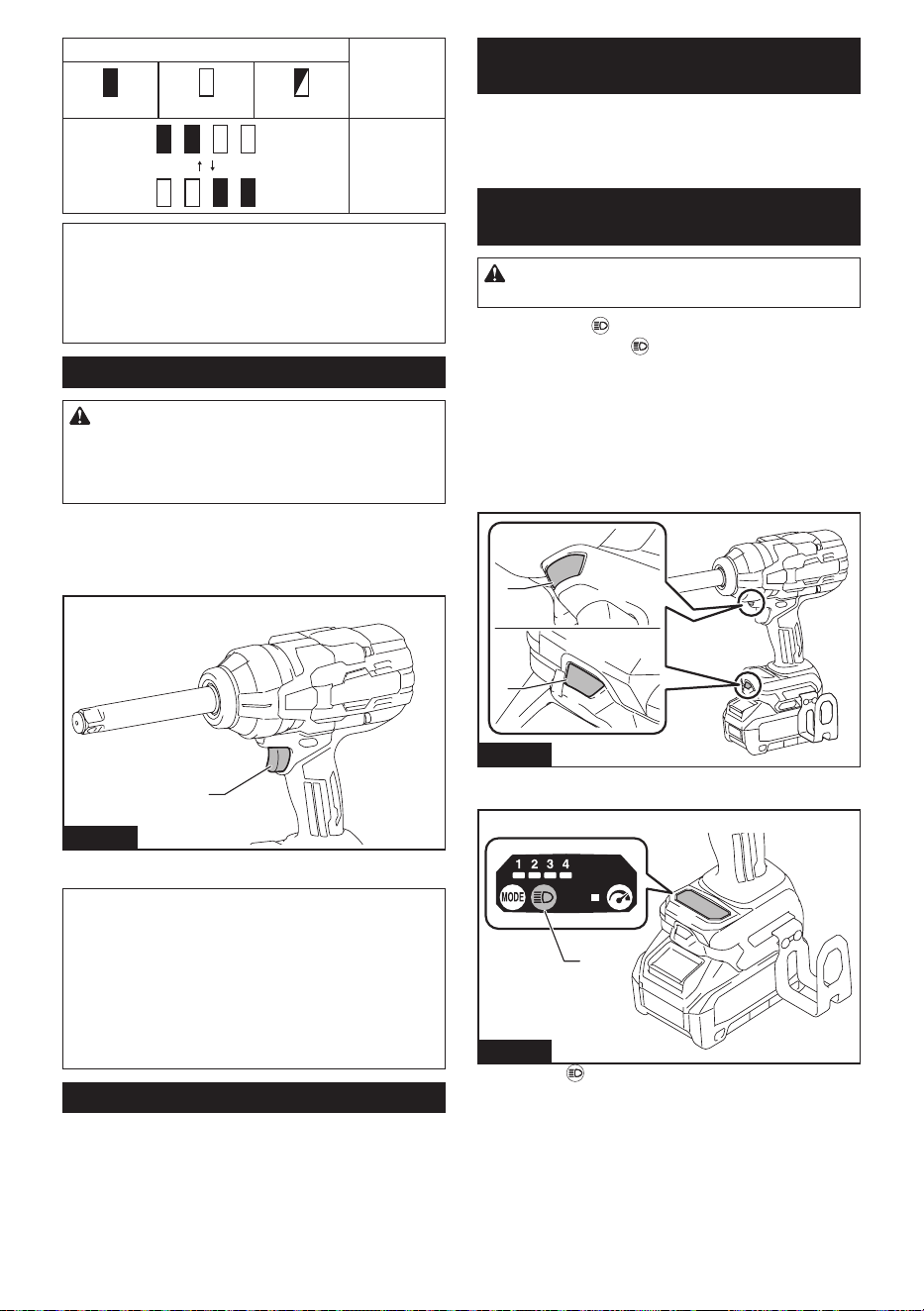
Oprima el botón de vericación en el cartucho de la
batería para que indique la capacidad restante de la
batería. Las luces indicadoras se iluminarán por algu-
nos segundos.
1
2
Fig.2
► 1. Luces indicadoras 2. Botón de vericación
Luces indicadoras Capacidad
restante
Iluminadas Apagadas Parpadeando
75% a 100%
50% a 75%
25% a 50%
0% a 25%
Cargar la
batería.
20 ESPAÑOL
Luces indicadoras Capacidad
restante
Iluminadas Apagadas Parpadeando
La batería
pudo haber
funcionado
mal.
NOTA: Dependiendo de las condiciones de uso y
la temperatura ambiente, la indicación podrá diferir
ligeramente de la capacidad real.
NOTA: La primera luz indicadora (extrema izquierda)
parpadeará cuando el sistema de protección de
batería esté en funcionamiento.
Accionamiento del interruptor
PRECAUCIÓN: Antes de insertar el cartucho
de batería en la herramienta, compruebe siem-
pre y cerciórese de que el gatillo interruptor se
acciona debidamente y que vuelve a la posición
“OFF” (apagado) cuando lo suelta.
Para poner en marcha la herramienta, simplemente
apriete el gatillo interruptor. La velocidad de la herra-
mienta aumenta incrementando la presión en el gatillo.
Para detenerla, suelte el gatillo.
1
Fig.3
► 1. Gatillo interruptor
NOTA: La herramienta se detiene automáticamente
cuando continúa jalando el gatillo interruptor alrede-
dor de 6 minutos.
NOTA: Cuando se activa el modo de velocidad
máxima, la velocidad de rotación se vuelve más
rápida incluso si no aprieta el gatillo interruptor por
completo.
Para información detallada, consulte la sección del
modo de velocidad máxima.
Freno eléctrico
La herramienta está equipada con un freno eléctrico. Si
la herramienta falla constantemente en detenerse tras
soltar el gatillo interruptor, lleve la herramienta a mante-
nimiento a un centro de servicio Makita.
Función para evitar el encendido
accidental
Aunque instale el cartucho de batería mientras se jala
el gatillo interruptor, la herramienta no arranca.
Para arrancar la herramienta, primero suelte el gatillo
interruptor y luego jale el mismo.
Iluminación de las lámparas
delanteras
PRECAUCIÓN: No mire a la luz ni vea a la
fuente de luz directamente.
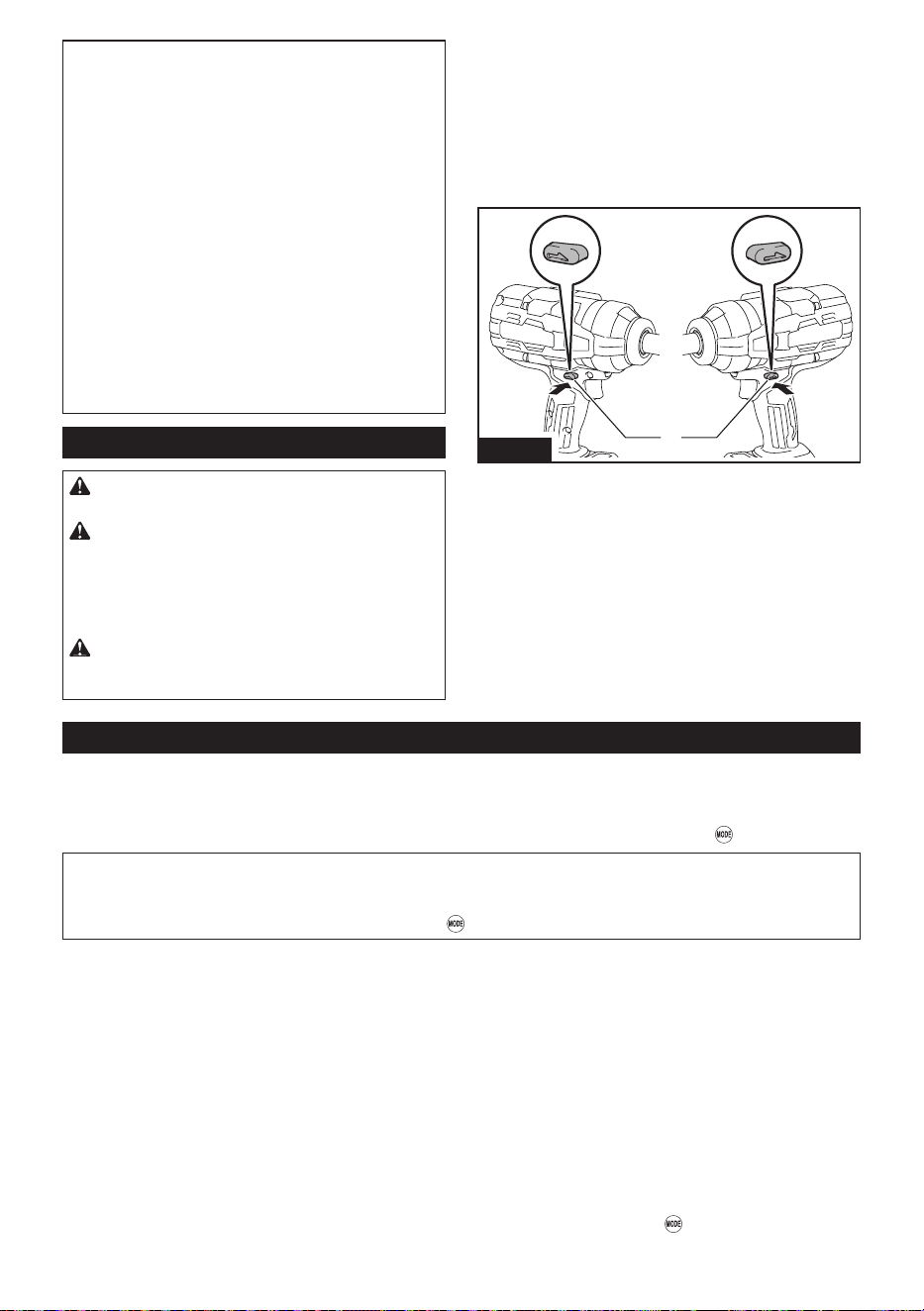
Oprima el botón para prender el estatus de la lám-
para. Oprima el botón nuevamente para apagar el
estatus de la lámpara.
Con el estado de la lámpara activado, jale el gatillo
interruptor para encender las lámparas. Para apagar-
las, suelte el gatillo interruptor. Las lámparas delanteras
se apagan aproximadamente 10 segundos tras haber
liberado el gatillo interruptor.
Con el estatus de la lámpara DESACTIVADO, las lám-
paras no se encienden incluso si se aprieta el gatillo.
1
1
Fig.4
► 1. Lámparas
1
Fig.5
► 1. Botón
21 ESPAÑOL
NOTA: El estatus de la lámpara se puede reco-
nocer apretando el gatillo interruptor. El estado
ENCENDIDA se mantiene si ve que las lámparas se
encienden. El estado ENCENDIDA se habrá perdido
si no.
NOTA: Cuando la herramienta se sobrecalienta, las
lámparas delanteras parpadean durante un minuto, y
luego la pantalla LED del panel de control se desac-
tiva. En este caso, deje enfriar la herramienta antes
de usarla de nuevo.
NOTA: Utilice un paño seco para quitar la suciedad
de la lente de la lámpara. Tenga cuidado de no rayar
la lente de la lámpara ya que la iluminación podría
disminuir.
NOTA: Mientras se jala el gatillo interruptor, el estado
de la lámpara no puede cambiarse.
NOTA: Puede cambiar el estatus de la lámpara
durante un período de aproximadamente 10 segun-
dos después de soltar el gatillo interruptor.
Interruptor de avance/retroceso
PRECAUCIÓN: Conrme siempre la direc-
ción de rotación antes de la operación.
PRECAUCIÓN: Utilice el interruptor de
avance/retroceso solamente después de que
la herramienta haya parado completamente. El
cambiar la dirección de rotación antes de que la
herramienta se detenga podría causar daños a la
herramienta.
PRECAUCIÓN: Cuando no esté utilizando
la herramienta, ponga siempre el interruptor de
avance/retroceso en la posición neutral.
Cambie la dirección de rotación utilizando el interruptor
de avance/retroceso. Presione el interruptor desde el
lado A para girar en el sentido de las manecillas del
reloj (hacia adelante) o desde el lado B para girar en
sentido inverso al de las manecillas del reloj (hacia
atrás).
Cuando el interruptor de avance/retroceso está en
la posición neutral, no se puede apretar el gatillo
interruptor.
AB
1
Fig.6
► 1. Interruptor de avance/retroceso
Cambio del modo de operación
La herramienta cuenta con múltiples modos de aplicación para un ajuste eciente de pernos y tuercas y control de la
torsión de apriete. Seleccione un modo apropiado según sus preferencias y necesidades.
Los modos de aplicación se pueden cambiar durante aproximadamente 1 minuto(s) después de soltar el gatillo
interruptor. Usted puede extender el tiempo de sujeción por 1 minuto(s) más al oprimir el botón
.
NOTA: La pantalla LED del panel de control se apaga para ahorrar energía de la batería mientras la herramienta
está apagada.
NOTA: Cuando la pantalla LED del panel de control permanece en blanco, apriete ligeramente el gatillo interrup-
tor para reactivar la pantalla, y luego presione el botón
.
Modos de aplicación en rotación en el sentido de las manecillas del reloj
(hacia adelante)
Hay 4 modos de roscado a la derecha disponibles: un solo modo de impacto de grado libre y 3 modos de paro
automático.
Los modos de paro automático emplean 3 niveles de limitación de torsión de apriete. Ayuda a repetir la jación con-
tinuamente con la misma torsión de apriete, reduciendo el riesgo de rotura de pernos/tuercas debido a un apriete
excesivo.
Una función de paro automático apaga la herramienta una vez que el perno o la tuerca en el que está trabajando se
haya ajustado a un nivel de torsión de apriete predeterminado.
El modo de impacto de grado libre le permite controlar la torsión de apriete con el gatillo interruptor. Usted puede
ajustar la torsión de apriete manualmente del gatillo para apretar. Se recomienda para personas que ya se sienten
cómodas utilizando herramientas eléctricas.
Los modos se pueden alternar entre las opciones de la aplicación presionando el botón
.
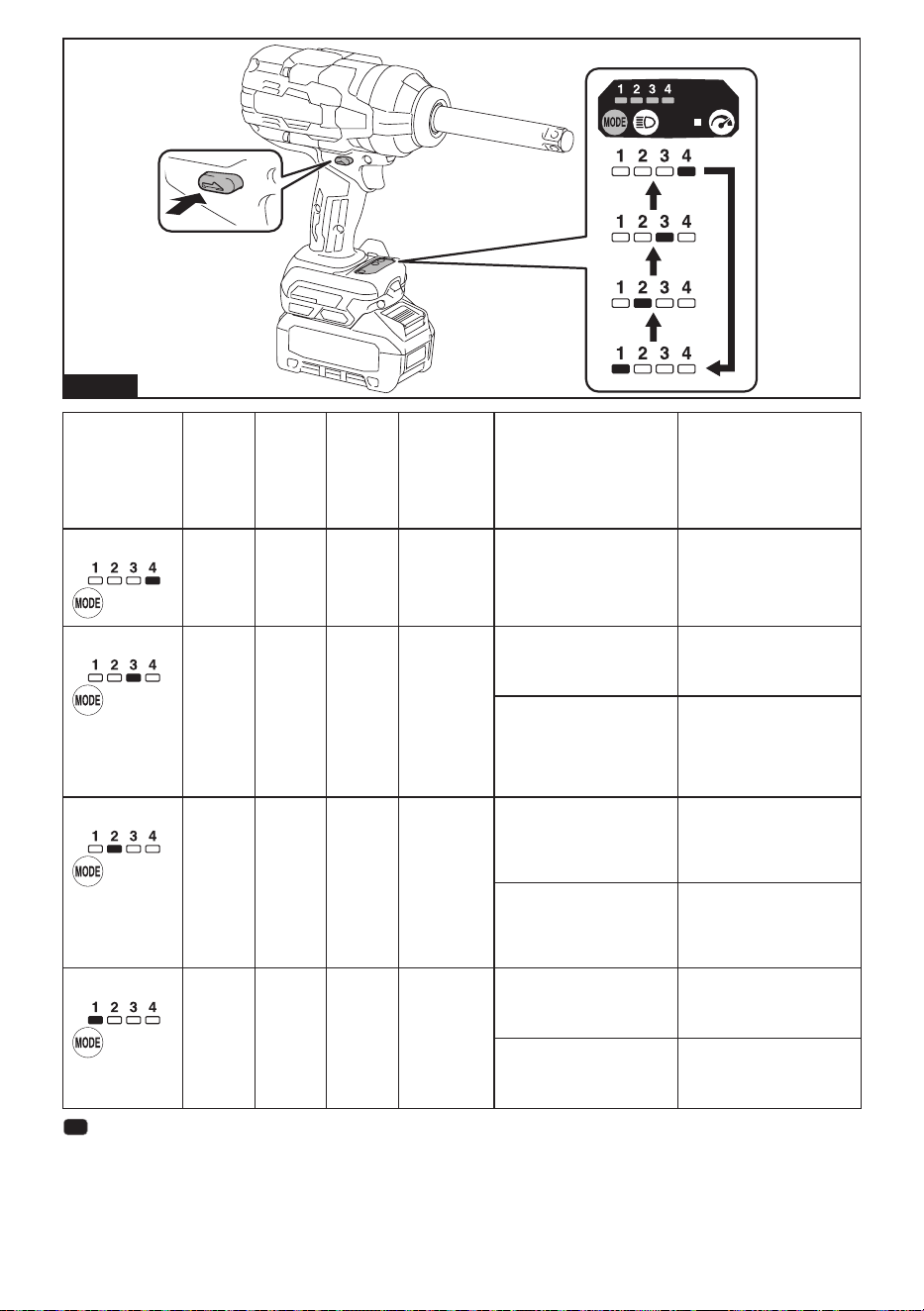
22 ESPAÑOL
Fig.7
Indicación Modo Golpes
máximos
(gpm)
Velo-
cidad
máxima
de
rotación
(RPM)
(r/min)
Torsión
de apriete
objetivo
(N·m (ft·lbs))
*1
Características Aplicación
4 (Máx.)
Impacto
(grado
libre)
2 600 1 800
1 500 (1 110)
*2 *3
Se pueden obtener máxima
velocidad, golpes y torsión
de apriete.
Operación de jación
que requiere un control
dinámico del rango de
potencia-velocidad.
3 (duro)
Paro
automá-
tico
2 000 1 100 300 - 450
(220 - 330)
Evita que la herramienta
agregue demasiada torsión
de apriete al realizar una
jación temporal.
Fijación temporal.
Se detiene automáticamente
a los aproximadamente 0,8
segundos después de que la
herramienta ha iniciado los
golpes de impacto.
Impide que la herramienta
gire más antes de alcanzar
el torque predeterminado.
Esto hace que sea más fácil
apretar completamente los
pernos y las tuercas.
*4
2 (medio) Paro
automá-
tico
1 400 700 50 - 150
(40 - 110)
Asegura la jación inicial
para evitar la pérdida de
fuerza de sujeción o el des-
plazamiento de los compo-
nentes de jación.
Fijación principal. (Retención
secundaria)
Se detiene automáticamente
a los aproximadamente 0,5
segundos después de que la
herramienta ha iniciado los
golpes de impacto.
Permite jar pernos/tuercas
con la torsión de apriete
requerida de manera
cruzada.
1 (suave)
Paro
automá-
tico
-
*5
500 30 - 50
(20 - 40)
Coloca los pernos/tuercas a
la velocidad de rotación de
acuerdo con la torsión de
apriete objetivo.
Fijación a mano.
Se detiene automáticamente
poco después de que la
herramienta comience los
golpes de impacto.
Fija de forma aproximada
pernos y tuercas para
mantener los componentes
de jación en su lugar.
: La lámpara está encendida.
*1
Los valores declarados se han medido de acuerdo con el método de prueba estándar del fabricante y pueden no
garantizar un desempeño óptimo en tareas especícas.
*2
Torsión de apriete máximo con 30 mm (1-1/4″) por 6 segundos.
*3
La herramienta necesita aplicar la presión correcta al gatillo interruptor para lograr un buen control de la torsión de
apriete.
23 ESPAÑOL
*4
Las tuercas de las ruedas de los automóviles, las tuercas y los tornillos de otros vehículos y edicios deben apre-
tarse con un nivel especíco de torsión de apriete. Asegúrese de apretar el sujetador a la tensión requerida usando
una llave dinamométrica.
*5
La herramienta se detiene poco después de iniciar los golpes de impacto.
NOTA: El tiempo para detener el atornillado de la herramienta varía según el tipo de perno/tuerca y el material
que se va a atornillar. Realice una prueba de atornillado antes de usar el modo de paro automático.
Modos de aplicación en rotación en sentido inverso al de las manecillas del
reloj (inverso)
Hay 2 modos de roscado a la izquierda disponibles: modo de impacto de grado libre y modo de paro automático.
El modo de paro automático reduce la velocidad de rotación para evitar que los pernos o tuercas no apretados se
caigan y dañen el material en el que está trabajando.
El modo de impacto de grado libre le permite controlar la torsión de apriete con el gatillo interruptor. Usted puede
ajustar la torsión de apriete manualmente del gatillo para desapretar. Se recomienda para personas que ya se sien-
ten cómodas utilizando herramientas eléctricas.
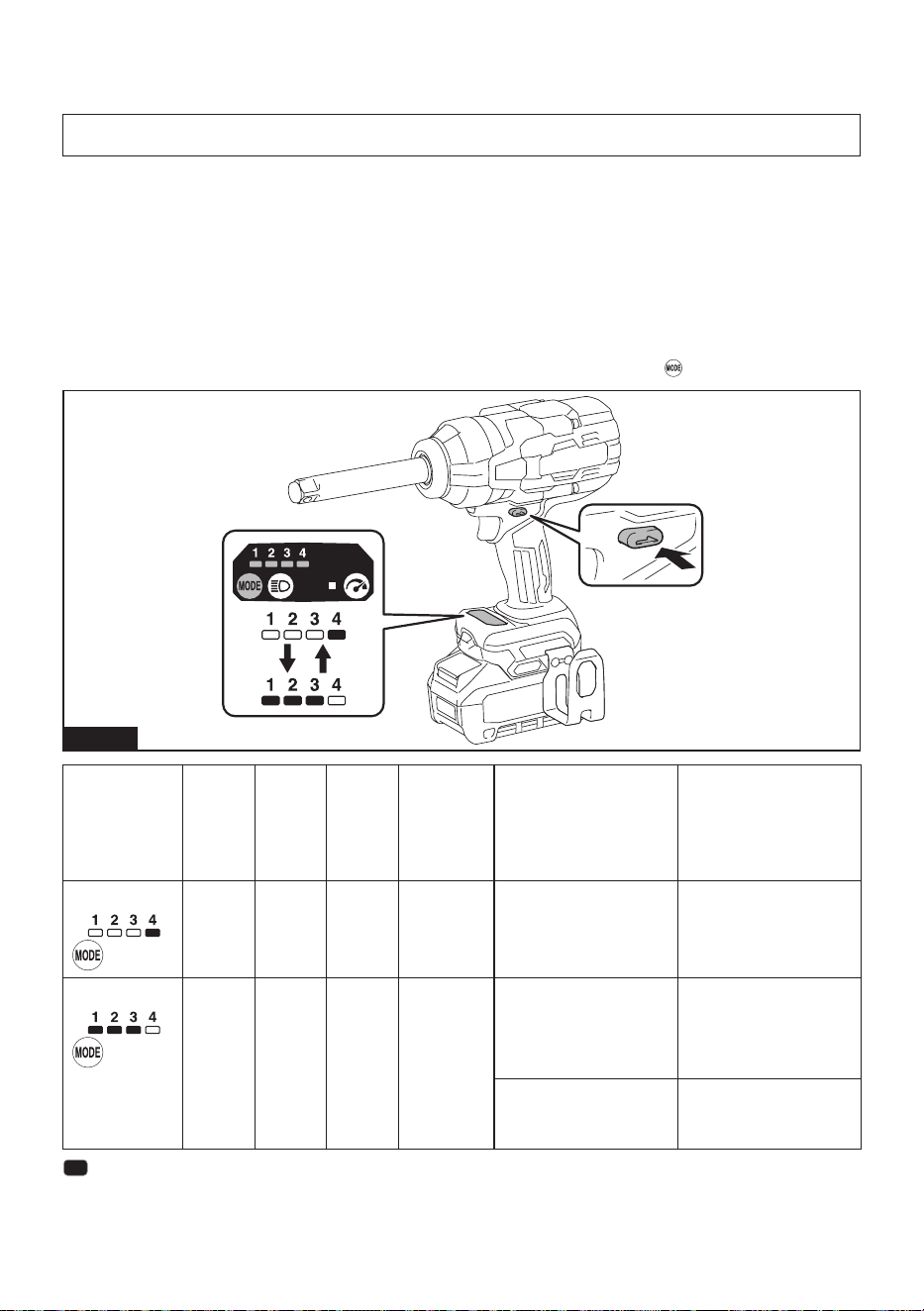
Los modos se pueden alternar entre las opciones de la aplicación presionando el botón
.
Fig.8
Indicación Modo Golpes
máximos
(gpm)
Velo-
cidad
máxima
de
rotación
(RPM)
(r/min)
Torsión
de apriete
objetivo
(N·m (ft·lbs))
*1
Características Aplicación
4
Impacto
(grado
libre)
2 600 1 800
1 900 (1 400)
*2
Se pueden obtener máxima
velocidad, golpes y torsión
de apriete.
Operación de desapretado
que requiere un control
dinámico del rango de
potencia-velocidad.
1/2/3
Paro
automá-
tico
2 600 1 800 1 900 (1 400) Reduce automáticamente la
velocidad de rotación desde
la velocidad máxima des-
pués de que la herramienta
haya dejado de producir
golpes de impacto.
Perno/tuercas que se
aojan.
Evita que la herramienta
aoje los pernos o tuercas
demasiado rápido y provo-
que que se salgan.
Es menos probable que los
pernos o tuercas se salgan
durante la extracción.
: La lámpara está encendida.
*1
Los valores declarados se han medido de acuerdo con el método de prueba estándar del fabricante y pueden no
garantizar un desempeño óptimo en tareas especícas.
*2
La herramienta necesita aplicar la presión correcta al gatillo interruptor para controlar la torsión de apriete.
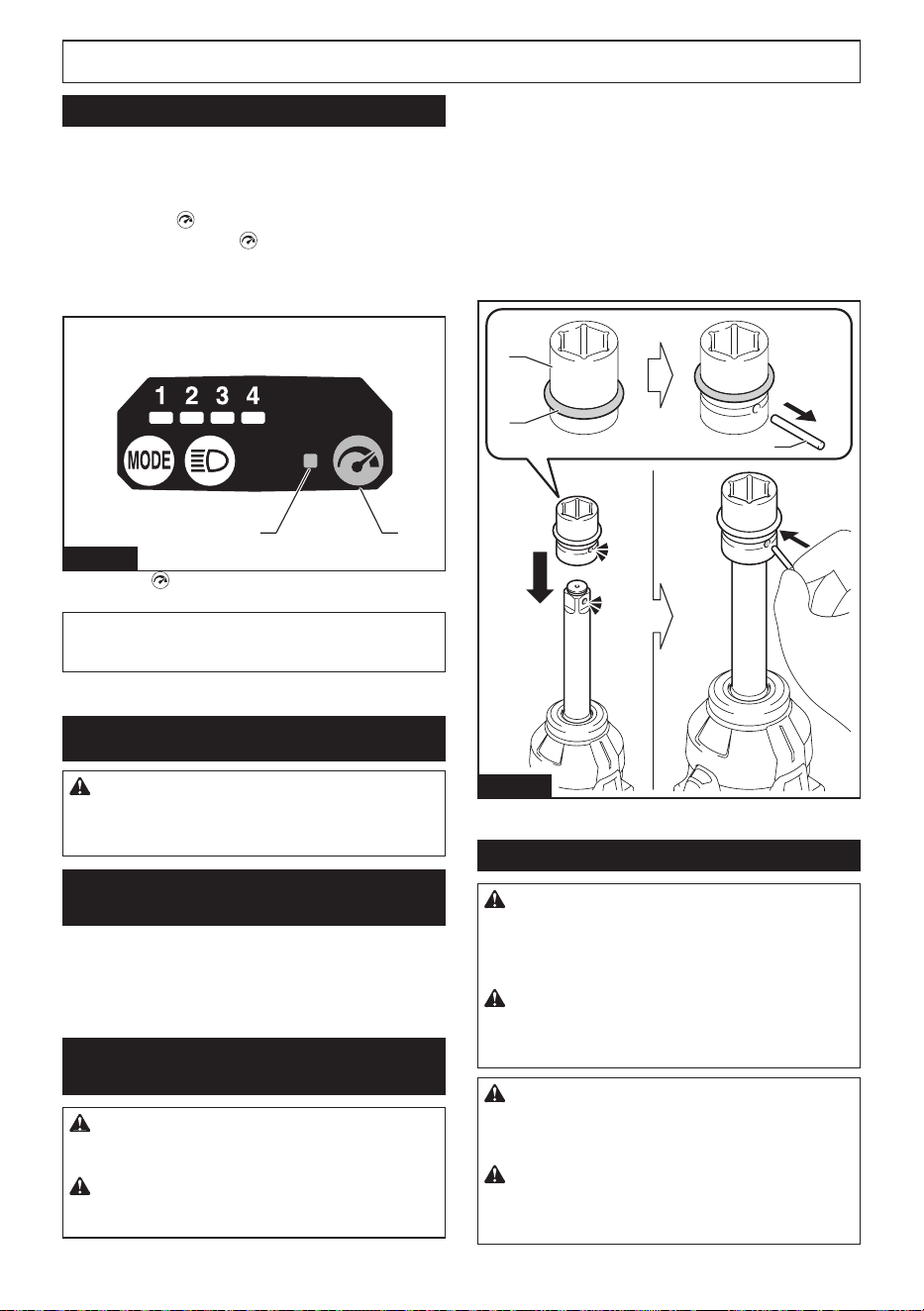
24 ESPAÑOL
NOTA: El momento para reducir la velocidad de rotación varía según el tipo de perno/tuerca y el material a colo-
car. Realice una prueba de atornillado antes de usar este modo.
Modo de velocidad máxima
En el modo de velocidad máxima, la velocidad de rota-
ción alcanza inmediatamente su velocidad más rápida
en el modo seleccionado, independientemente de si
aprieta el gatillo interruptor levemente o por completo.
Oprima el botón para cambiar al modo de velocidad
máxima. Oprima el botón nuevamente para salir
del modo. La luz indicadora en el panel de control se
enciende cuando el modo de velocidad máxima está
activado.
12
Fig.9
► 1. Botón
2. Luz indicadora
NOTA: La herramienta permanece en modo de
velocidad máxima después de cambiar los modos de
aplicación.
MONTAJE
PRECAUCIÓN: Asegúrese siempre de que la
herramienta esté apagada y el cartucho de batería
haya sido extraído antes de realizar cualquier
trabajo en la misma.
Selección del dado de impacto
correcto
Utilice siempre el dado de impacto de tamaño correcto
para pernos y tuercas. El utilizar un dado de impacto de
tamaño incorrecto dará como resultado una torsión de
apriete imprecisa e inconsistente y/o daños al perno o
a la tuerca.
Instalación o extracción del dado de
impacto
PRECAUCIÓN: Asegúrese de que el dado de
impacto y la pieza de montaje no estén dañados
antes de instalar el dado de impacto.
PRECAUCIÓN: Después de insertar el dado
de impacto, asegúrese de que éste quede rme-
mente asegurado. Si se llega a salir, no lo utilice.
Saque el anillo en O fuera de la ranura en el dado
de impacto y retire el pasador del dado de impacto.
Coloque el dado de impacto en el adaptador cuadrado
de manera que el oricio en el dado de impacto quede
alineado con el oricio en el adaptador cuadrado.
Inserte el pasador a través del oricio en el dado de
impacto y el adaptador cuadrado. Luego coloque
nuevamente el anillo en O en su posición original en la
ranura del dado de impacto para retener el pasador.
Para retirar el dado de impacto, siga el procedimiento
de instalación en orden inverso.
1
2
3
Fig.10
► 1. Dado de impacto 2. Anillo en O 3. Pasador
Instalación del gancho
ADVERTENCIA: Utilice las piezas para col-
gado/montado solo para los nes previstos; por
ejemplo, colgar la herramienta en un cinturón
de herramientas entre trabajos o intervalos de
trabajo.
ADVERTENCIA: Tenga cuidado de no sobre-
cargar el gancho, ya que demasiada fuerza o una
sobrecarga irregular podrían dañar la herramienta
y provocar lesiones personales.
PRECAUCIÓN: Cuando instale el gancho,
siempre asegúrelo rmemente con el tornillo. De
lo contrario, el gancho podría desprenderse de la
herramienta y ocasionar lesiones personales.
PRECAUCIÓN: Asegúrese de colgar la
herramienta de forma segura antes de soltarla. Un
enganche insuciente o desequilibrado podría provo-
car que se caiga y usted podría lesionarse.
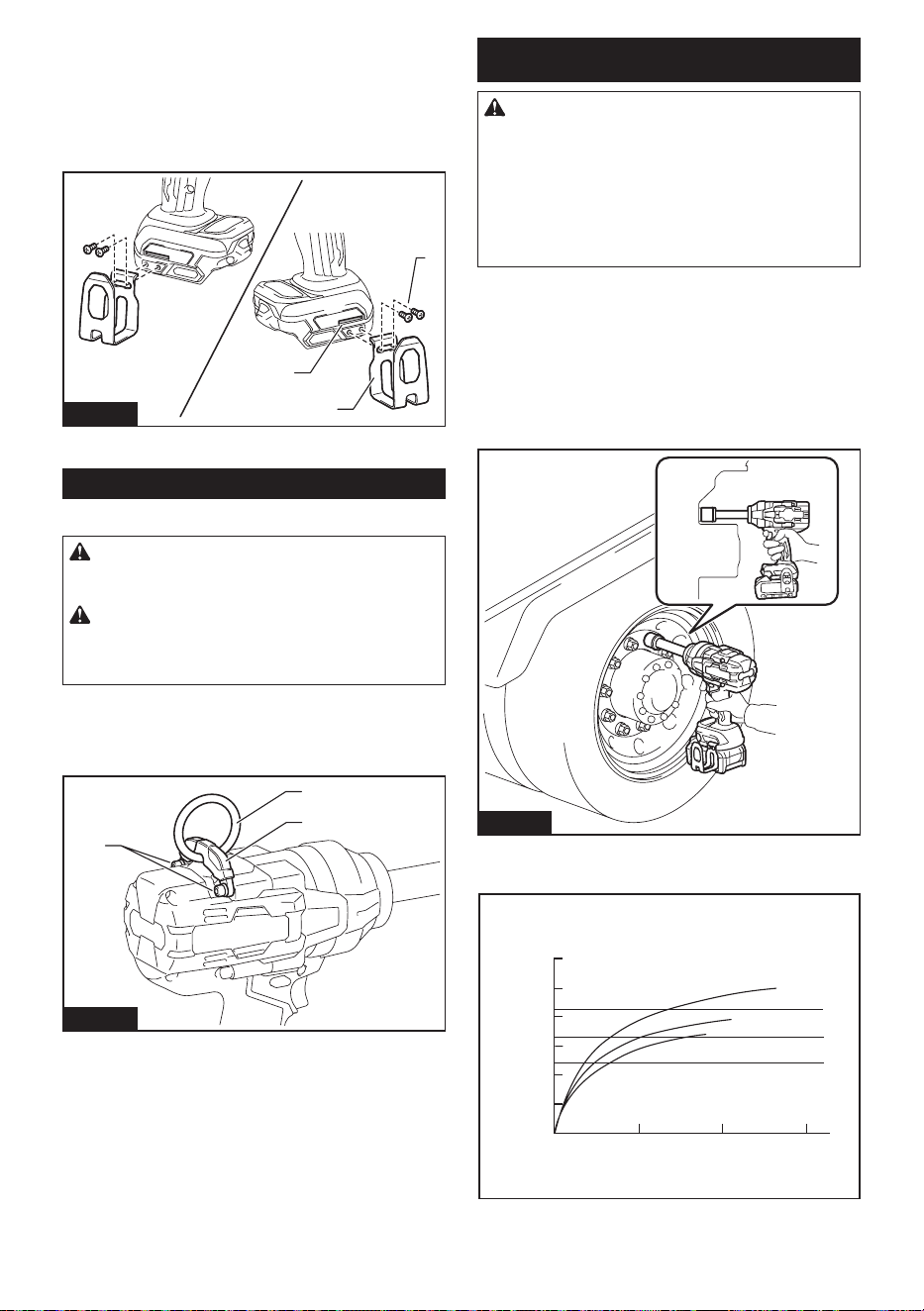
25 ESPAÑOL
El gancho resulta útil para colgar temporalmente la
herramienta. Se puede instalar en cualquiera de los
lados de la herramienta. Para instalar el gancho, insér-
telo en una ranura del alojamiento de la herramienta
de cualquiera de los lados y después sujételo con dos
tornillos. Para quitarlo, aoje los tornillos y después
sáquelos.
3
1
2
Fig.11
► 1. Ranura 2. Gancho 3. Tornillos
Anillo
Especíco del país
PRECAUCIÓN: Antes de usar el anillo, ase-
gúrese siempre de que el soporte y el anillo estén
asegurados y no tengan daños.
PRECAUCIÓN: Utilice las partes para col-
gado/montaje para sus propósitos pretendidos
solamente. El uso para un propósito no pretendido
podría ocasionar un accidente o una lesión personal.
El anillo es conveniente cuando desea colgar la herra-
mienta con cable de izar. Primero, introduzca la cuerda
a través del anillo. Luego cuelgue la herramienta en el
aire con el cable de izar.
1
2
3
Fig.12
► 1. Soporte 2. Anillo 3. Tornillos
OPERACIÓN
PRECAUCIÓN: Siempre inserte por completo
el cartucho de batería hasta que se je en su
lugar. Si puede ver el indicador rojo alrededor del
botón delantero, el cartucho de batería no está com-
pletamente asegurado. Inserte el cartucho de batería
completamente hasta que no se pueda ver el indica-
dor rojo. De lo contrario, el cartucho de batería podría
caerse accidentalmente de la herramienta y provocar
lesiones a usted o a alguien a su alrededor.
Sujete rmemente la herramienta y ponga el dado de
impacto sobre el perno o la tuerca. Ponga en marcha
la herramienta y apriete durante el tiempo de apriete
apropiado.
La torsión de apriete adecuada podrá variar depen-
diendo del tipo o tamaño del perno, el material de la
pieza de trabajo que se va a apretar, etc. La relación
entre la torsión de apriete y el tiempo de apriete se
muestra en la(s) gura(s).
Fig.13
Torsión de apriete apropiada para un perno de alta
resistencia con un modo de impacto máx. (4)
0
321
1
2
N•m
(ft•lbs)
24 mm
(1
″
)
24 mm
(1
″
)
22 mm
(7/8
″
)
22 mm
(7/8
″
)
20 mm
(3/4
″
)
20 mm
(3/4
″
)
(885
ft•lbs
)
(738
ft•lbs
)
(590
ft•lbs
)
(443
ft•lbs
)
(295
ft•lbs
)
(148
ft•lbs
)
1200
N•m
1000
N•m
800
N•m
600
N•m
400
N•m
200
N•m
1. Tiempo de apriete (segundos) 2. Torsión de apriete
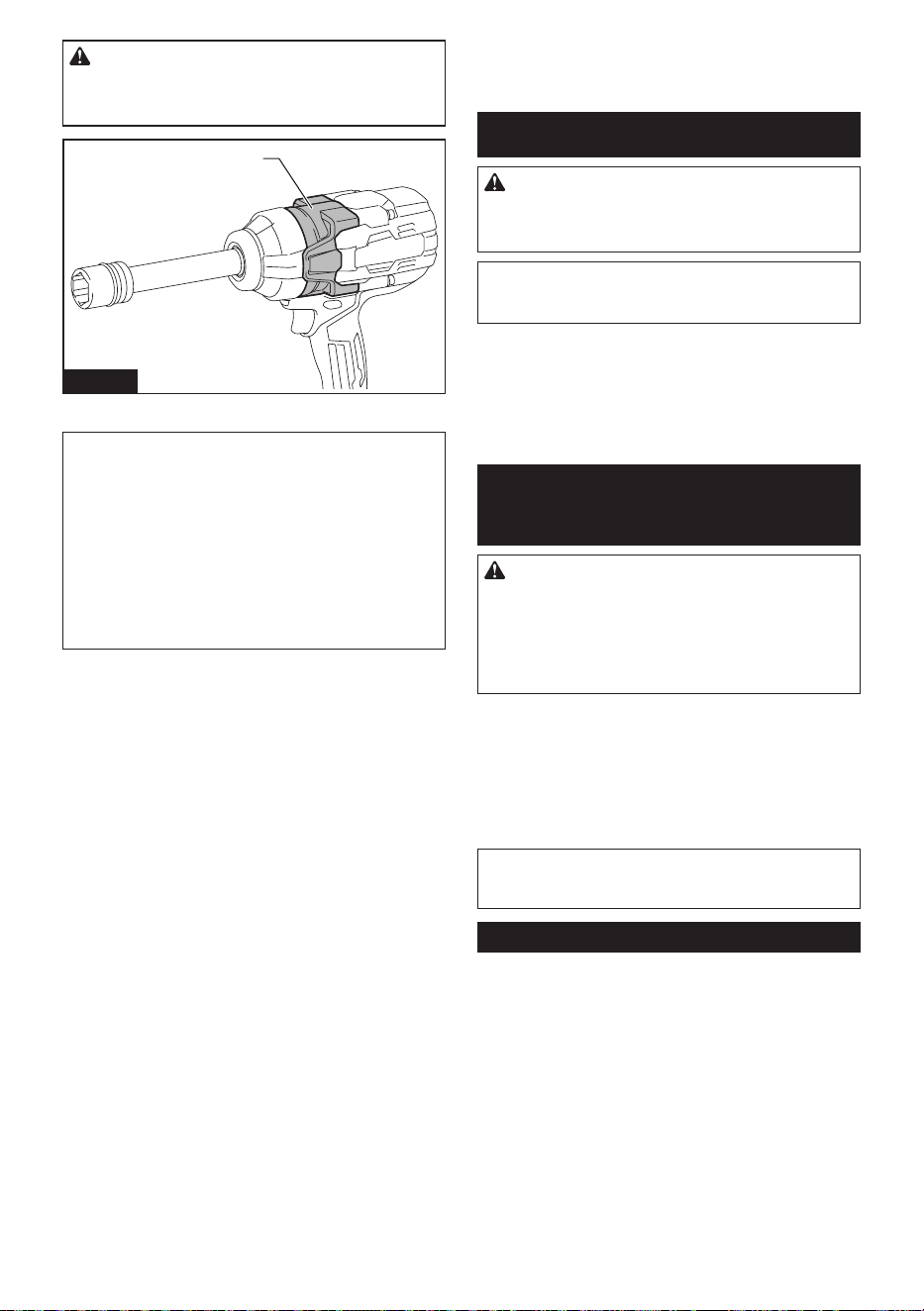
26 ESPAÑOL
PRECAUCIÓN: Si se opera la herramienta
continuamente, no toque la carcasa del marti-
llo. La carcasa del martillo podría estar caliente en
extremo y quemarle la piel.
1
Fig.14
► 1. Carcasa del martillo
NOTA: Sujete la herramienta orientada en línea recta
al perno o tuerca.
NOTA: Una torsión de apriete excesiva puede dañar
el perno/tuerca o el dado de impacto. Antes de
comenzar su trabajo, realice siempre una operación
de prueba para determinar el tiempo de apriete apro-
piado para el perno o la tuerca que quiere apretar.
NOTA: Si la herramienta se opera de forma continua
hasta descargarse la batería, permita que la herra-
mienta descanse unos 15 minutos antes de continuar
con una batería recargado.
La torsión de apriete se ve afectada por una amplia
variedad de factores incluyendo los siguientes.
Después del apriete, compruebe siempre la torsión con
una llave de torsión.
1. Cuando el cartucho de batería esté casi completa-
mente descargado, caerá la tensión y se reducirá
la torsión de apriete.
2. Dado de impacto
• Si no se utiliza un dado de impacto del
tamaño correcto, la torsión de apriete se
verá reducida.
• Si se utiliza un dado de impacto desgastado
(desgaste en el extremo hexagonal o en el
extremo cuadrado), la torsión de apriete se
verá reducida.
3. Perno
• Incluso si el coeciente de torsión y la clase
de tornillo son los mismos, la adecuada
torsión de apriete variará en función del
diámetro del tornillo.
• Incluso si el diámetro del tornillo o perno
es el mismo, la torsión de apriete correcta
variará de acuerdo con el coeciente de
torsión, la clase y la longitud del perno o
tornillo.
4. El uso de la junta universal reduce algo la fuerza
de jación de la llave de impacto. Compense esto
alargando el tiempo de apriete.
5. La forma de sostener la herramienta o el material
en la posición a apretar afectará a la torsión.
6. La operación de la herramienta a baja velocidad
ocasionará una reducción de la torsión de apriete.
MANTENIMIENTO
PRECAUCIÓN: Asegúrese siempre de que la
herramienta esté apagada y el cartucho de batería
extraído antes de intentar realizar una inspección
o mantenimiento.
AVISO: Nunca use gasolina, bencina, diluyente
(tíner), alcohol o sustancias similares. Puede que
esto ocasione grietas o descoloramiento.
Para mantener la SEGURIDAD y FIABILIDAD del pro-
ducto, las reparaciones, y cualquier otra tarea de man-
tenimiento o ajuste deberán ser realizadas en centros
de servicio autorizados o de fábrica Makita, empleando
siempre repuestos Makita.
ACCESORIOS
OPCIONALES
PRECAUCIÓN: Estos accesorios o aditamen-
tos están recomendados para utilizarse con su
herramienta Makita especicada en este manual.
El empleo de cualquier otro accesorio o aditamento
puede conllevar el riesgo de lesiones personales.
Utilice los accesorios o aditamentos solamente para
su n establecido.
Si necesita cualquier ayuda para más detalles en
relación con estos accesorios, pregunte a su centro de
servicio local Makita.
• Dado de impacto
• Junta universal
• Protector
• Batería y cargador originales de Makita
NOTA: Algunos de los artículos en la lista pueden
incluirse en el paquete de la herramienta como acce-
sorios estándar. Éstos pueden variar de país a país.
GARANTÍA LIMITADA DE MAKITA
Ésta Garantía no aplica para México
Consulte la hoja de la garantía anexa para ver los
términos más vigentes de la garantía aplicable a este
producto. En caso de no disponer de esta hoja de
garantía anexa, consulte los detalles sobre la garantía
descritos en el sitio web de su país respectivo indicado
a continuación.
Estados Unidos de América: www.makitatools.com
Canadá: www.makita.ca
Otros países: www.makita.com

27

Some dust created by power sanding, sawing, grinding, drilling, and other
construction activities contains chemicals known to the State of California
to cause cancer, birth defects or other reproductive harm. Some examples
of these chemicals are:
• lead from lead-based paints,
• crystalline silica from bricks and cement and other masonry products, and
• arsenic and chromium from chemically-treated lumber.
Your risk from these exposures varies, depending on how often you do this
type of work. To reduce your exposure to these chemicals: work in a well
ventilated area, and work with approved safety equipment, such as those
dust masks that are specially designed to filter out microscopic particles.
WARNING
< USA only >
ADVERTENCIA
Algunos polvos creados por el lijado, aserrado, esmerilado, taladrado y
otras actividades de la construcción contienen sustancias químicas
reconocidas por el Estado de California como causantes de cáncer, defectos
de nacimiento y otros peligros de reproducción. Algunos ejemplos de estos
productos químicos son:
• plomo de pinturas a base de plomo,
• sílice cristalino de ladrillos y cemento y otros productos de albañilería, y
• arsénico y cromo de maderas tratadas químicamente.
El riesgo al que se expone varía, dependiendo de la frecuencia con la que
realice este tipo de trabajo. Para reducir la exposición a estos productos
químicos: trabaje en un área bien ventilada y póngase el equipo de seguridad
indicado, tal como las máscaras contra polvo que están especialmente
diseñadas para filtrar partículas microscópicas.
< Sólo en los Estados Unidos >
Makita Corporation
3-11-8, Sumiyoshi-cho,
Anjo, Aichi 446-8502 Japan
www.makita.com
885B14-947
GWT11-1
EN, ESMX
20250123