1
Operation Guide 5755
MA2503-EA
© 2025 CASIO COMPUTER CO., LTD.
Published: 3/2025
You can also find information about
operational procedures at the CASIO website.
https://s.casio.jp/mw/en/5755/
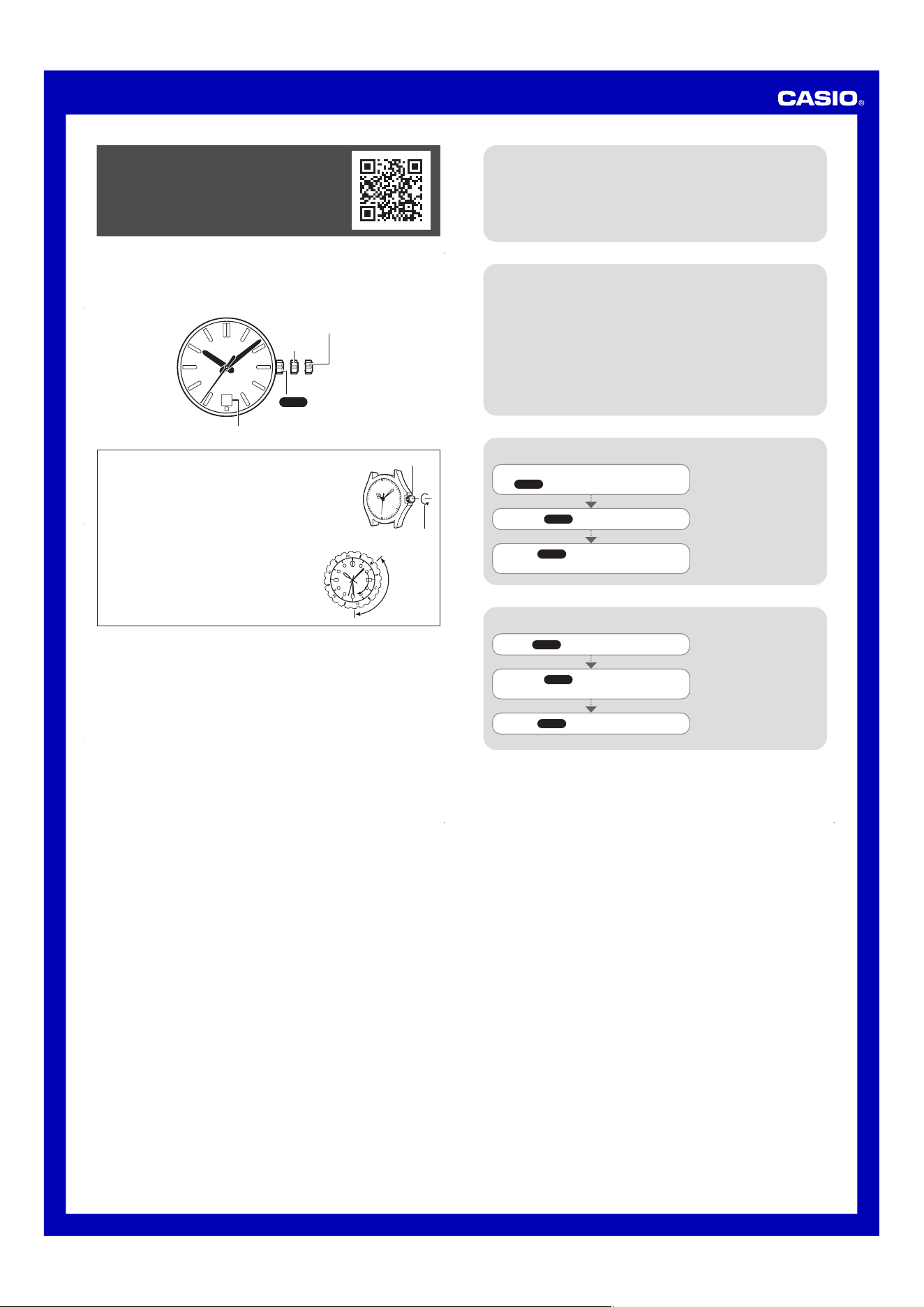
To adjust the time setting
Winding the Mainspring
Mainspring Winding Precautions
When the second hand is at 12o’clock, pull
the
Crown out to Click 2.
Rotate the Crown to change the time setting.
Push the Crown back in on a time signal to
resume timekeeping.
Note
x Take care that you set the
correct AM or PM time.
x When setting the time, move
the hands so they are four
to five minutes before the
desired time setting, and
then move them forward to
the desired time.
The mainspring winds naturally through the movement of your wrist while wearing
the watch. You can also wind the mainspring manually by rotating the crown (manual
winding).
If the watch stops, you can re-start it by rotating the crown or gently shaking the
watch. Once the second hand begins to move, you can set the time and date, and
then wear the watch normally.
To wind the mainspring, slowly turn the crown to the right (towards 12 o’clock). If
your watch has a screw-lock crown, first rotate the crown away from 12 o’clock to
loosen it. Next, slowly rotate the crown towards 12 o’clock to wind the mainspring.
Though the crown can continue to be rotated even after the mainspring is fully
wound, the mainspring does not wind beyond a certain point.
Note that the crown rotates freely towards 6 o’clock, without winding the mainspring.
The watch runs for approximately 40 hours after the mainspring is fully wound.
Insufficient winding may cause timekeeping to run fast or slow. To ensure optimal
performance, wear the watch for at least 8 hours a day.
If you don’t wear the watch, wind the mainspring fully at approximately the same time
each day.
To change the day setting
Note
x The day setting uses a
31-day month. Make
adjustments for months of
shorter lengths.
x Avoid changing the day
setting between the hours
of 9 p.m. and 1 a.m.
Otherwise, the day setting
may not change correctly at
midnight.
Pull the Crown out to Click 1.
Rotate the Crown towards you to set the
day.
Push the Crown back in.
x Your watch may differ somewhat from the one shown in the illustration.
About This Watch
x This watch is a mechanical timepiece powered by a mainspring.
30
Click 1
Crown
Click 2
Day
Crown Operations
Crown
Loosen
Some water-resistant models (10BAR, 20BAR) have a screw-in
crown. When you need to perform a crown operation, rotate
it towards you to unscrew it. Then pull the crown out. Avoid
applying undue force when pulling. The watch loses its water
resistance while the crown is unscrewed. After performing a
crown operation, fully screw the crown back in.
If your watch has a rotary bezel...
Start
Elapsed time
Current
You can rotate the bezel to align its
▼
mark with the
minute hand. Then you will be able to tell how much
time has elapsed since aligning the
▼
mark.
Specifications
Accuracy: Average daily deviation of –35 seconds to +45 seconds
Winding Mechanism: Automatic with manual winding
Oscillation Frequency: 21,600 per hour
Operating Time: Approximately 40 hours (when fully wound)
Jewels: 24
Other: Hacking Function (Stops seconds hand when the crown is pulled out.)
Important!
x Due to the characteristics of mechanical watches, conditions such as the amount of
time the watch is worn, wrist movement, and the degree that the mainspring is wound
may cause accuracy to deviate outside of the specified rang.
Specifications are subject to change without notice.

