
Instruction Manual
WW-300
AD-2300
COMPLETE PERIOD
PAIN RELIEVER
WITH TENS TECHNOLOGY

CONTENTS
3
4
5
5
5
6
6
7
11
12
13
14
16
17
21
25
Brand Story
Introduction
Getting to Know
Features
Box Includes
Intended Use
Contraindication
How to Guide
Care & Maintenance
Troubleshooting
Operation Principal
Specification
Explanation of Symbols
Warnings
Electromagnetic Compatibility Information
Support
At Kinetik Wellbeing we are driven by the belief that everyone
deserves to take control of their health from the comfort of
their own home. Designed with simplicity in mind, our clinically
validated devices empower you to proactively monitor and
manage your long-term health journey.
We created our Women’s Wellness range to empower and
support women through every stage of life, addressing
everything from menstrual discomfort to menopausal
symptoms.
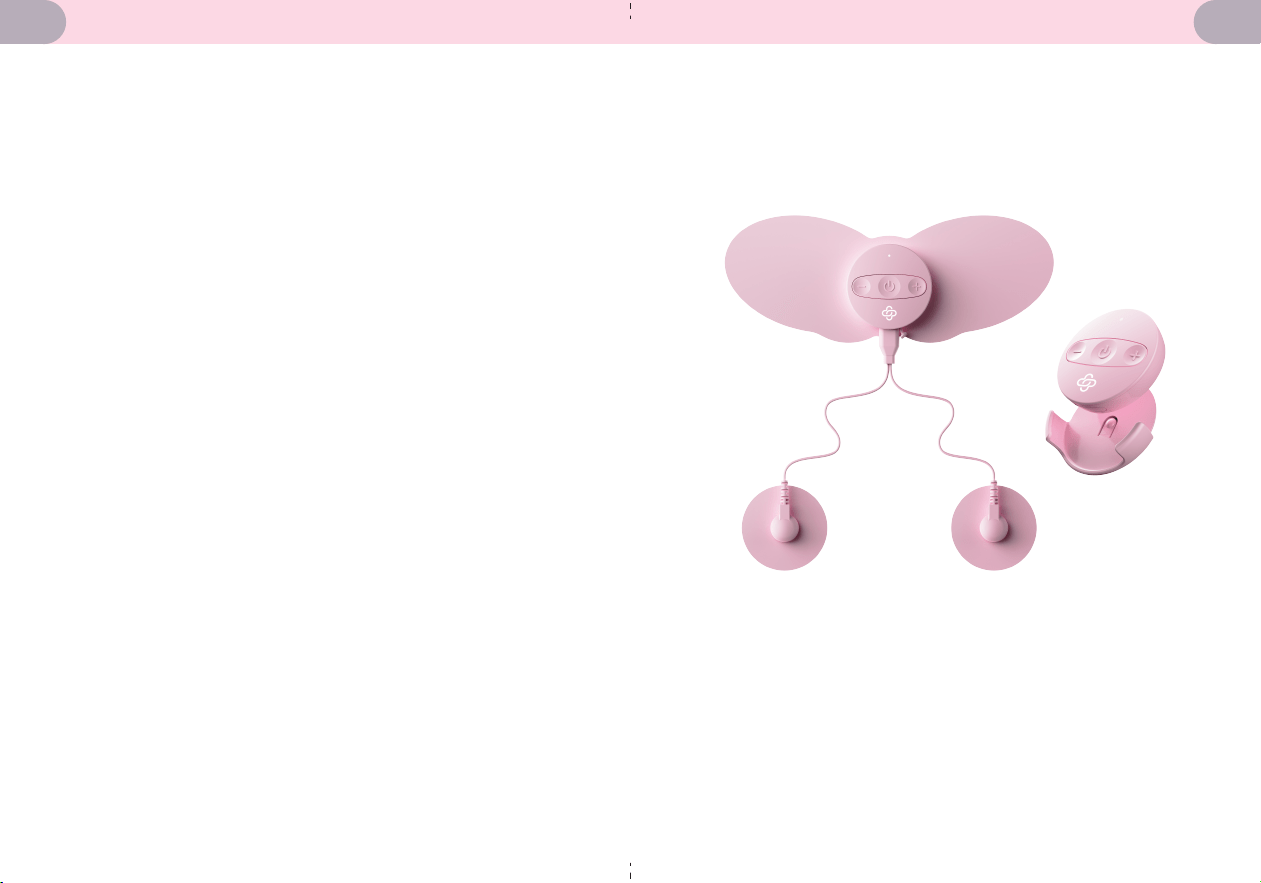
Discover the Complete Period Pain Reliever with TENS
technology, your go-to device for managing period pain
and endometriosis.
Powered by TENS technology, it blocks pain signals and
boosts endorphin release for quick, natural relief. Equipped
with a control unit, two precision pads, and two butterfly pads,
it delivers targeted comfort right where it’s needed. Choose
from 20 intensity levels and 6 modes to tailor your treatment
to your preference. Compact and portable, it’s perfect for use
at home or on the move. Take charge of your pain and enjoy
your day with this innovative and user-friendly device.
BRAND STORY INTRODUCTION
43
GETTING TO KNOW YOUR COMPLETE PERIOD
PAIN RELIEVER
Features:
• Targeted pain relief
• 6 TENS programmes
• Rechargeable
• Drug free pain relief
• Clinically validated
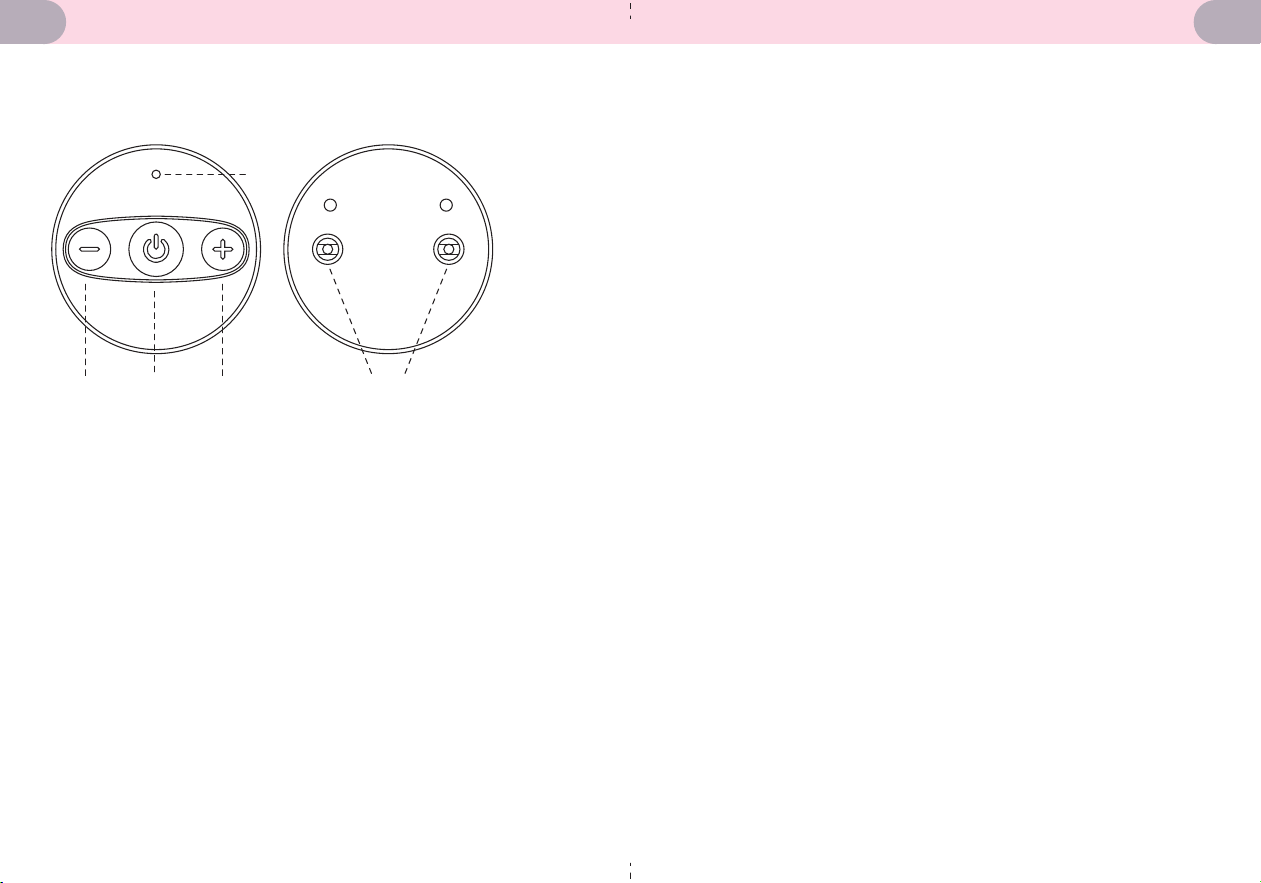
1. Indicator Light
2. Intensity -
3. Mode / On-Off
1
2 3 4 5
Box Includes:
• Control Unit
• Belt Clip
• Pair of Precision Pads x2
• Butterfly Pads x2
• Wires for Precision Pads
• 1x Type-C Charging Cable
• Storage Pouch
• User Manual
4. Intensity +
5. Electrode Buckle
INTENDED USE
The TENS is a Transcutaneous Electrical Nerve Stimulation
(TENS) unit that is intended to provide temporary relief from
muscle soreness caused by exercise, household tasks, or work
activities. It is also effective in alleviating chronic pain,
intractable pain, and pain associated with arthritis. It is
important to apply the electrode pads only on intact skin.
The TENS device is suitable for adult users, including
laypersons and professionals.
CONTRAINDICATION
Patients with implanted electronic devices such as pacemakers,
life-sustaining medical devices (e.g., artificial hearts or lungs), or
electrocardiographs should not use this device.
65
HOW TO GUIDE
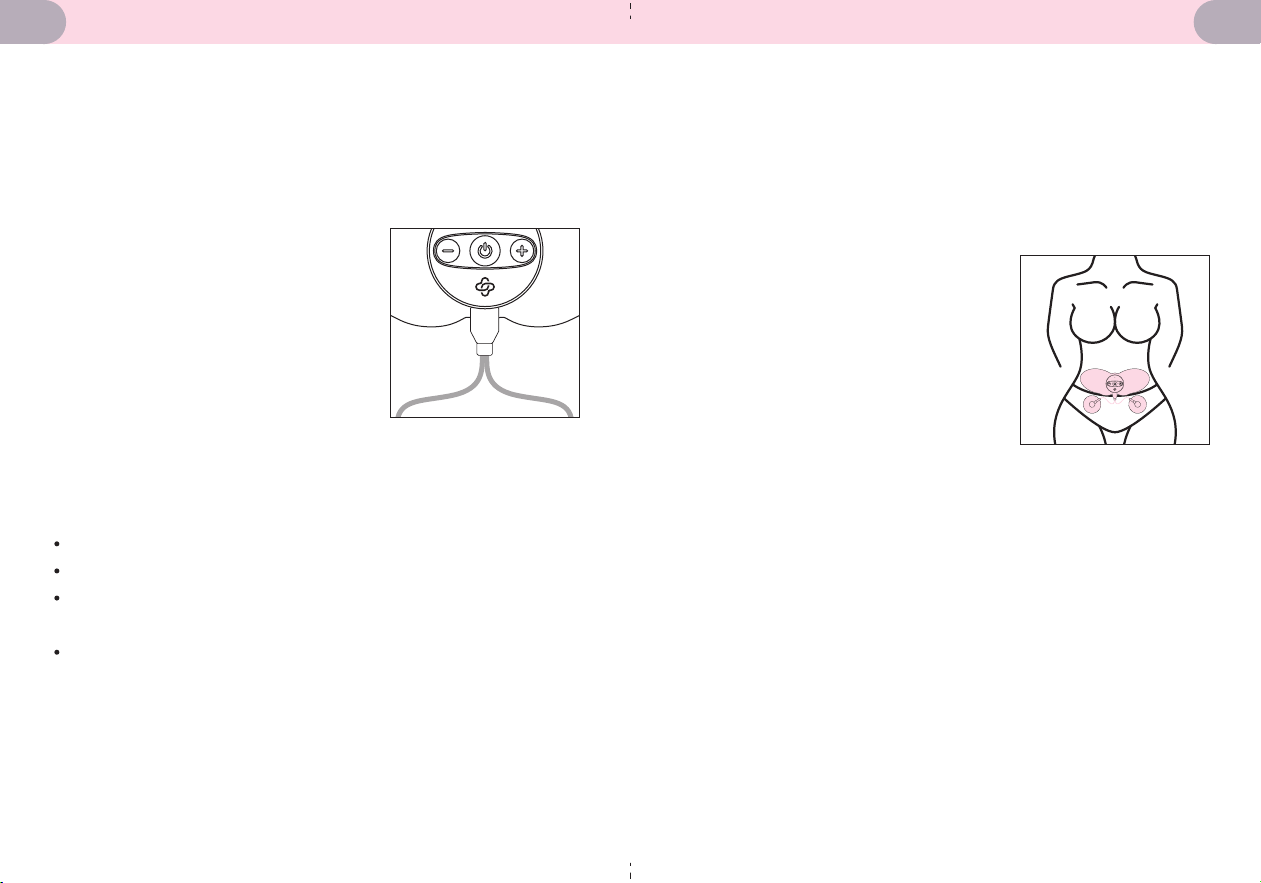
Preparing the Electrode Pads
Attach the end of the electrode cord with the two metal
buttons to the two electrode pads. Connect the other end of
the electrode cord with one plug into the type-C socket on
the bottom of the main unit.
Wireless Electrode Pad: Attach two
electrode buckles to the Wireless
electrode Butterfly pads.
Each electrode pad is protected by a
layer of transparent film. Remove the
layer of film before applying the pads
to the skin.
You can use Circular Electrode Pads
and Wireless Electrode Pad simultaneously or use Wireless
Electrode Butterfly Pad alone.
Note:
Hold the plug when pulling it out. Do not pull on the wire.
Never stick two adhesive electrode pads together.
The electrode pads must fit precisely inside the conductive
surface.
The electrode pad has a service life and is generally not
recommended to be used for a long time. It is
recommended to use the electrode pads less than 20 times
in total. The specific number of times depends on usage
and storage conditions.
Using Your TENS Device
Clean the areas of skin you intend on placing the electrode
pads.
Place the electrode pads around the treatment areas.
Hold down the power button for 2 seconds to turn it on.
Press the power button to choose your desired treatment
mode.
After selecting your treatment
mode, the default intensity is set to
zero. Use the + or - button to adjust
the intensity and start the
treatment.
Once the 15-minute treatment
cycle is completed, the intensity will
change to 0 and the main unit will
automatically shut off.
Press and hold the power button for 2 seconds to power off
the main unit during the treatment.
•
•
•
•
•
•
•
Note:
• Precision pads must be used in pairs. A single pad only will
not work.
87
Setting the Volume
There are 4 volume settings, ranging from 0 (mute) to 3, its
default setting is 1.
Continuously hold the – button, after 3 seconds, press the +
button, the indicator light will flash slowly to show it is ready
to change the volume setting.
Press the + button until you have chosen your desired volume.
Release the - button to save the settings and power off the
device.
Alternatively, to activate the mute setting, press the – and +
buttons simultaneously for two seconds to set the volume to
0 (mute), then the device will turn off.
Treatment Chart
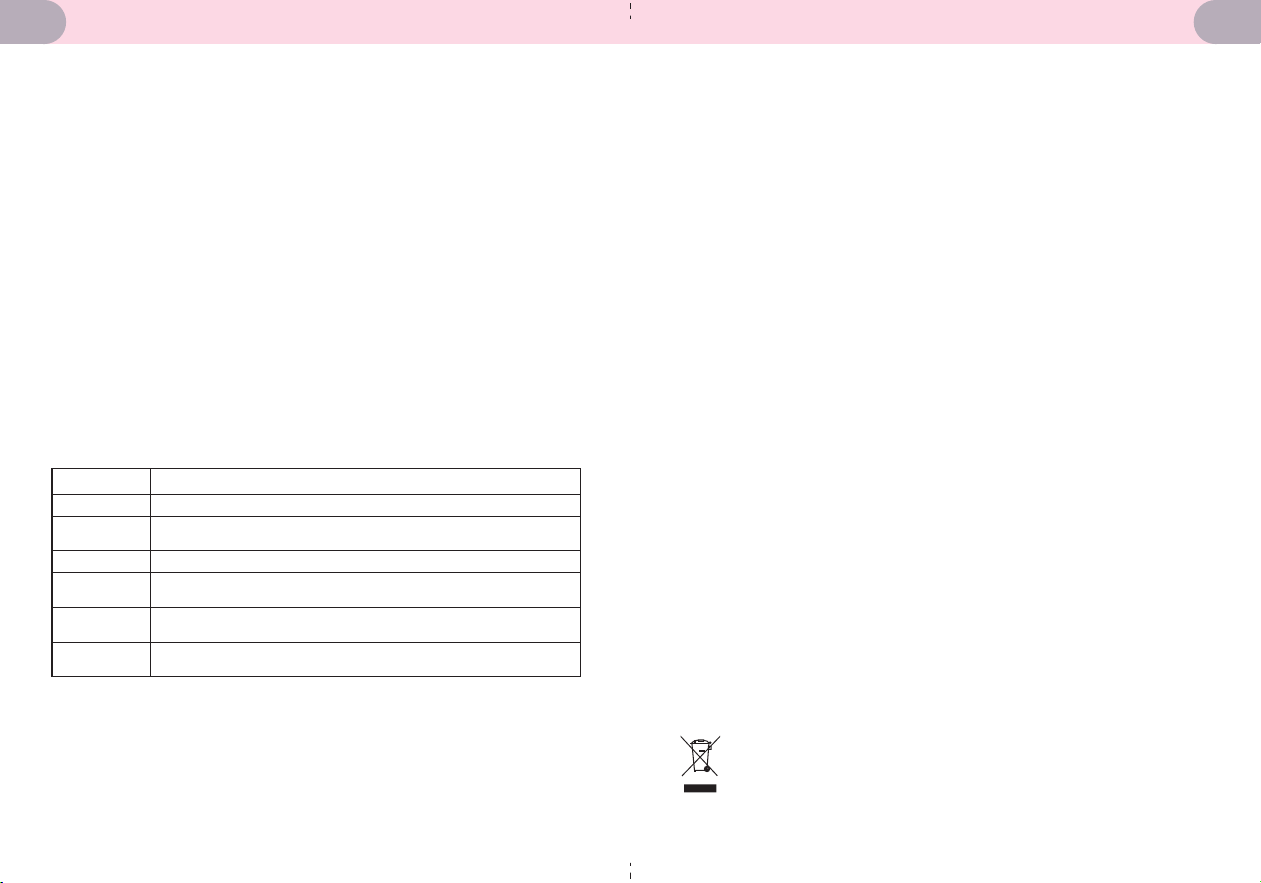
Composite
Mode Sensation
Table 5.1 Treatment Descriptions
Knock
Rub
Tapping
Muscle
Relaxation
Press
Less intense, numbing electrical stimulation
A special waveform designed to relieve muscle fatigue
A slight sense of kneading
Knocking feeling that alternates from fast to slow and
back to fast
Tapping sensations that vary in duration, intensity, and
interval
Simulates manual pressing, providing a repeated pressing
sensation
Charging
Ensure the main unit is fully charged before first use. The
TENS device will indicate it needs to be charged when the
indicator light continuously blinks.
Ensure the device is off before charging.
Insert the TYPE-C port of the charging cable into the main
unit and insert the USB port of the charging cable into an
USB compatible plug. Plug it into a socket and switch it on.
The TENS Device will indicate that it is charging when there is
an initial beep and the indicator light flashes, this will change
to a steady light once it is fully charged.
Avoid positioning the device in a manner that obstructs
access to the disconnection device.
During normal use, when the indicator light continuously
blinks and continuous buzzes appear, it indicates that the
power is insufficient and needs to be charged.
Warning:
• Do not plug or unplug the power cord into the electrical
outlet with wet hands.
• Do not overload power outlets, ensure to plug the device
into the appropriate voltage outlet.
• If the AC adapter is abnormal, please change the adapter.
• Do not use any other type of charging cable as it may harm
the main unit.
• Don’t use this main unit when charging.
• The main unit, the lithium batteries, the electrode pads,
and the electrode cords must be disposed of according
to local regulations at the end of their usage.
109
• Avoid dropping or subjecting the device to strong impacts.
• Avoid high temperatures. Do not immerse the device in
water, as this will result in damage.
• Do not disassemble or attempt to repair the device or
components.
• Lithium battery replacement should only be performed by a
qualified service centre technician.
• Clean the main unit with a lightly moistened cloth (or a
cloth soaked in a neutral cleaning solution) and wipe gently.
Do not use chemicals (like thinner. benzene).
• Wash the electrode pads when the adhesive surface
becomes dirty, or they are difficult to attach.
• First, remove the electrode cord from the electrode pads.
Then wash the electrode pads softly with your fingertips
under slow-running cold water for several seconds (do not
use a sponge/cloth/sharp object like a nail on the adhesive
side, and do not use detergents, chemicals, or soap.) Dry the
pads and let the adhesive surface air dry completely. Do not
wipe with tissue paper or cloth.
• Please wait for approximately 2 hours for the device to
warm up or cool down before use when the device is
transferred from the temperature of storage and
transportation to the normal operating temperature
environment.
• Your device was tested before being sold and does not
require calibration or regular maintenance.
CARE & MAINTENANCE
1. Main unit
cannot be
turned on
properly
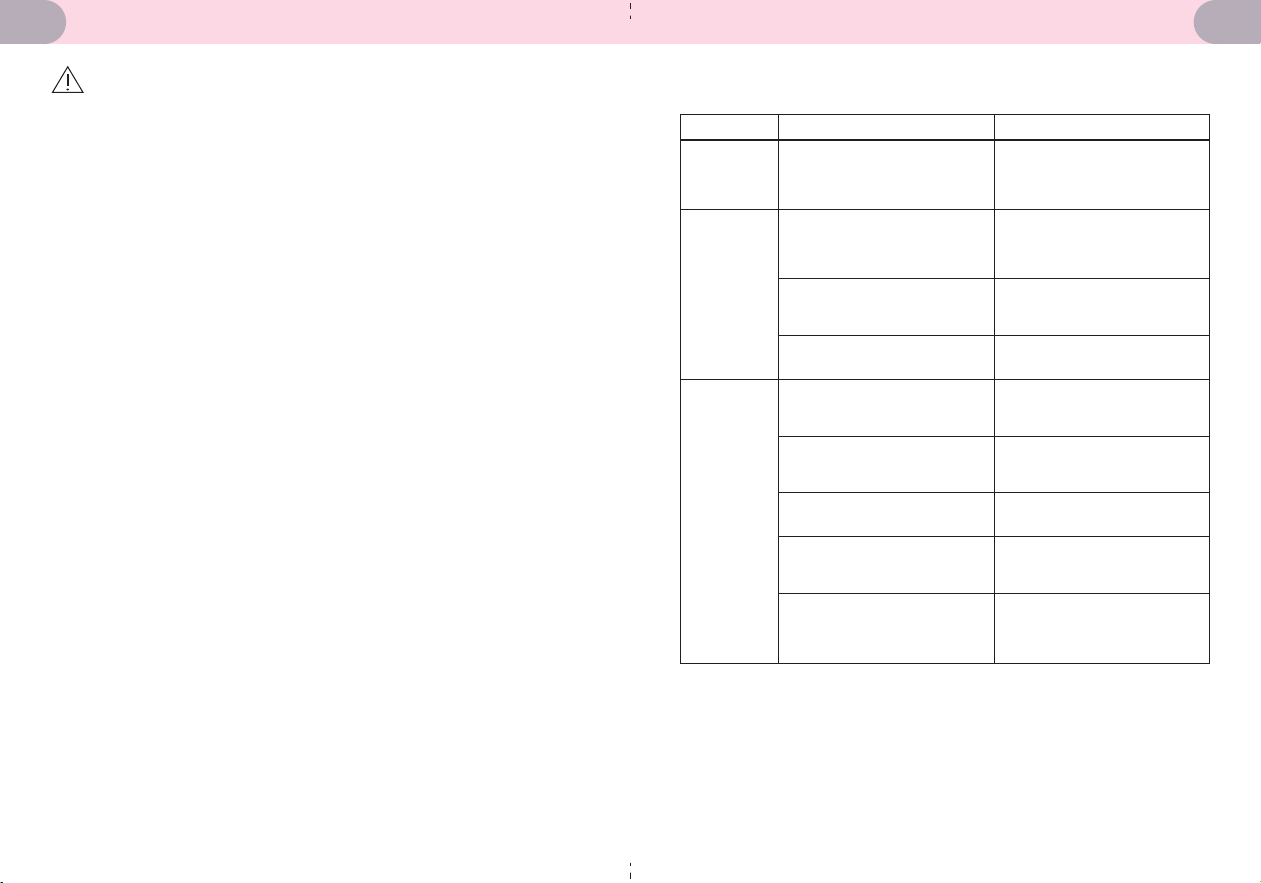
Problem Question Answer
• Is the battery exhausted? • Charge the battery.
• Is the intensity > 0?
• Press the intensity + to
increase intensity.
2. No
stimulation
feeling
3. Weak
stimulation
• Is the electrode cord
properly connected to the
main unit and the electrode
pads?
• Ensure the main unit and
the pads are connected.
• Have the protective film
been removed from the
pads?
• Are the electrode pads
firmly adhered to the skin?
• Are the electrode pads
overlapped?
• Is there any dirt on the
electrode pads?
• Is the level of intensity too
low?
• Have the electrode pads
been placed in the proper
position?
• Ensure the pads are firmly
adhered to the skin for
optimal performance.
• Separate the pads and
ensure the pads individually
attached to the skin.
• Gently clean the pads to
maintain their effectiveness.
• Increase the intensity to a
level that suits your
personal comfort.
• Please correctly connect
the electrode pads and
attach them to the
appropriate body parts.
• Remove the protective film
from the pads using.
TROUBLESHOOTING
1211

Product name: Complete Period Pain Reliever with TENS
Technology
Model: AD-2300
Classification: Internally powered; Class II, Type BF applied
part; IP22; No AP or APG; Continuous operation; not intended
to be used in an oxygen-rich environment
Size: Approx. 49.8mm X 49.8mm X 12mm (1.96" X 1.96" X 0.5")
Weight: Approx. 18.5g (0.65 oz.) (exclude pads)
Electrode pads:
a. Circular Electrode Pads: Approx. Φ50mm (Φ2.0");
Model: EP5036N01
b. Wireless Electrode Pad: Approx. 192mm×74mm (7.6" x 2.9*);
Model: EP 1927436N01
Electrode cords: Approx. 600 mm(23.6");
Electrode Cords model: TC6-3.8-0600
Output channel: 2
Number of treatments: 6 treatments
Intensity levels: 20
Output pulse frequency: 0-100 Hz
Output voltage: max. 110 Vpp (500 ohms)
Output pulse width: 0-250 µs
15-minute countdown timer
Power source:
Medical AC adapter: DC 5V 1A
Lithium battery: 1X3.7V Li-ion 100mAh
SPECIFICATION
Problem Question Answer
• Are the electrode pads too
dry?
• Rinse with a small amount
of running water, scrub
gently with your fingers for a
few seconds, and dry
naturally before using.
• Are the surface of the
electrode pads scratched?
• Replace the electrode pads
with new ones.
4. The skin
becomes
red or
uncomforta
ble
5. Power cut
off during
use
• Do the electrode pads
stick closely to the skin?
• Stick the electrode pads
closelt to the skin.
• Are the electrode pads
dirty?
• Are the electrode pads
detached from the skin?
• Are the electrode cords
disconnected?
• Has the battery been
exhausted?
• Turn off the power and
stick the electrode pads
firmly to the skin.
• Turn off the power and
connect the electrode cords.
• Charge the battery.
• Clean the electrode pads.
TROUBLESHOOTING
OPERATION PRINCIPLE
The electrical impulses {Output pulse frequency: 0-100 Hertz
(Hz); Output voltage: max. 110 peak-to-peak voltage (Vpp)
(500 ohms); Output pulse width: 0-250 μs} generated by the
TENS device are transmitted to the nerves under the skin to
block or shut out the pain message from the source of pain to
the brain. Additionally, these electrical impulses also increase
the production of the body's natural painkillers, such as
endorphins. Furthermore, low-frequency vibrations can
promote blood circulation and relieve pain.
Note: If the monitor is still faulty, please contact the local
distributor or the factory.
1413
Environmental temperature for operation/storage: 5°C to
40°C (41°F to 104°F)
Environmental humidity and pressure for operation/storage:
≤80%RH, 80-105kPa
Environmental temperature for transport: -20°C to 55°C
(-4°F to 131°F)
Environmental humidity for transport: ≤90%RH
Environmental pressure: 80 kPa to 105 kPa
Main unit life: Three (3) years
Battery life: Approx. 1 month (when used for one time a day)
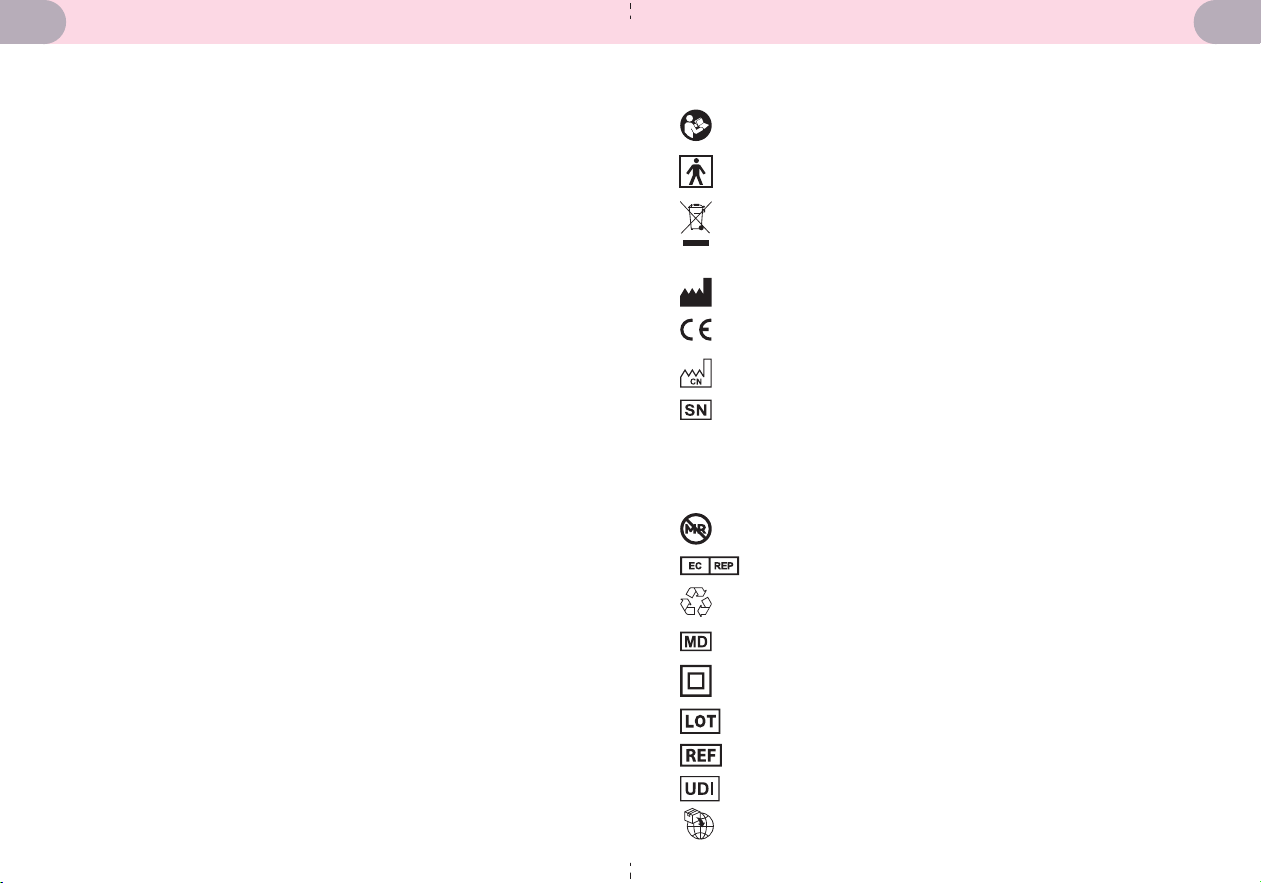
EXPLANATION OF SYMBOLS
Symbol for "THE INSTRUCTION MANUAL MUST BE READ" (The
sign background-color: blue. The sign graphical symbol: white)
Symbol for *ENVIRONMENT PROTECTION. Electrical products
should not be disposed of as household waste. Please recycle
where facilities exist. Check with your local Authority or
retailer for recycling advice."
The first characteristic numeral symbol for "Degrees of
protection against access to hazardous parts and against
solid foreign objects. " The second characteristic numeral
symbol for "Degrees of protection against ingress of water."
Symbol for TYPE BF APPLIED PARTS" (The electrode pads are
type BF applied part)
Symbol for "COMPILES WITH REGULATION (EU) 2017/745"
Symbol for "MANUFACTURER"
Symbol for “DATE OF MANUFACTURE” and “MADE IN CHINA”
Symbol for " SERIAL NUMBER"
Symbol for "MR Unsafe"
Symbol for "MEDICAL DEVICE"
Symbol for "EUROPEAN REPRESENTATION"
Symbol for "RECYCLABLE"
0197
IP22
Class II Equipment
Batch Code
Catalogue Number / Model Number
Unique Device Identifier
Importer’s Information
1615
WARNINGS
Use alongside implanted electronic devices(e.g.,
pacemakers, intracardiac defibrillators, etc.) may result in
electric shocks, burns, interference, or even be
life-threatening.
Simultaneous connection of a PATIENT to high-frequency
surgical medical electrical (ME) equipment may result in
burns at the site of the stimulator electrodes and possible
damage to the device.
For Hospitals and Clinics: In the presence of, or when
attached to the body, electronic monitoring equipment (e.g.,
cardiac monitors, ECG alarms, etc.) may not operate
properly when the electrical stimulation device is in use.
Operation within proximity (e.g., 3 feet or 1 meter) to
shortwave or microwave therapy equipment may produce
instability in the stimulator output.
Pregnant women should not use the device.
This device is designed for adults and should never be used
on infants or young children.
Consult your physician or other health care professionals
before use on older children.
Never let children or persons who are incapable of
expressing their own use the TENS device.
Keep the device safely stored and inaccessible to children
to prevent from swallowing the batteries or small parts.
Never use the device while sleeping or driving. Never use
the device in humid environments (e.g., bathroom), as it may
cause intense stimulation.
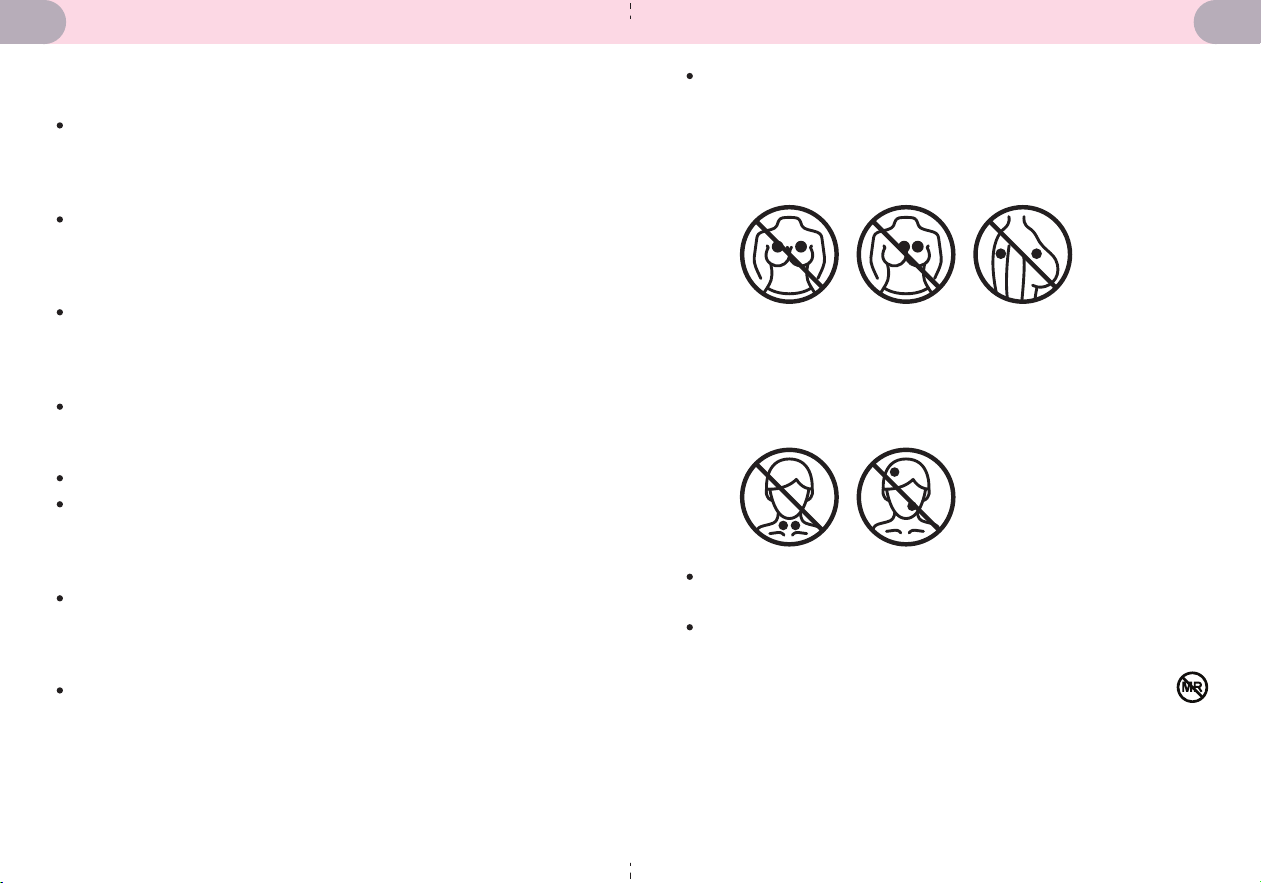
Never apply the pads to these body areas
a. Avoid placing the electrode pads near to the heart, or on
both sides of the thorax simultaneously (lateral or front and
back), or across your chest (especially on the two large
pectoral muscles). Otherwise, it can increase the risk of
ventricular fibrillation and may induce cardiac arrest.
b. Avoid placing the electrode pads on the following areas:
head, eyes, mouth, any area of the face, neck (especially
the carotid sinus), private parts, or affected skin. Once you
feel unwell or your skin appears abnormal while using the
device, please stop using it immediately and seek medical
attention.
If you are allergic to the device’s material, please do not
use it.
See the section regarding ELECTROMAGNETIC
COMPATIBILITY INFORMATION for information regarding
potential electromagnetic interference (EMI), or other
interference, between the TENS device and other devices.
Please do not use the device within the environment of the
following devices: Magnetic Resonance Imaging (MRI),
computerized axial tomography (CT), diathermy, Radio
Frequency Identification (RFID), active HF SURGICAL
EQUIPMENT, and electromagnetic security systems such as
metal detectors.
1817

Place the electrode pads on intact skin only. Do not place
on cuts, wounds, or areas with skin conditions.
Please do not share electrode pads to prevent the risk of
infection and cross-contamination.
Please do not use any other electrode pads and / or
electrode cords other than those supplied by the original
equipment manufacturer, otherwise injury, discomfort, or
equipment damage could result.
Medical AC adapter (input: AC 100-240V, 50/60Hz, 0.2A;
output: DC 5V, 1A ) is suitable for this device, please use the
AC adapter that was supplied by the manufacturer.
Keep all electrode cords away from babies and children to
prevent suffocation and death from winding cords around
the neck.
If the electrode pads are damaged or the adhesive starts to
weaken, please replace them immediately to prevent
potential skin injuries.
Do not use this device for anything other than its intended
purpose.
Limit therapy time to no more than 30 minutes per session
if using the electrode pads on the same part of the body.
Power off the main unit before shifting or moving the
position of the electrode pads.
During stimulation and therapy, please do not let any metal
(e.g., a part of a leather belt, wristwatch, jewellery, etc.)
touch the electrode pads.
The device might not meet its performance specifications
or may cause safety hazards if stored or used outside the
specified temperature and humidity ranges listed in the
specifications section.
The output wave parameters are not to be influenced by
load resistance, except output voltage.
2019
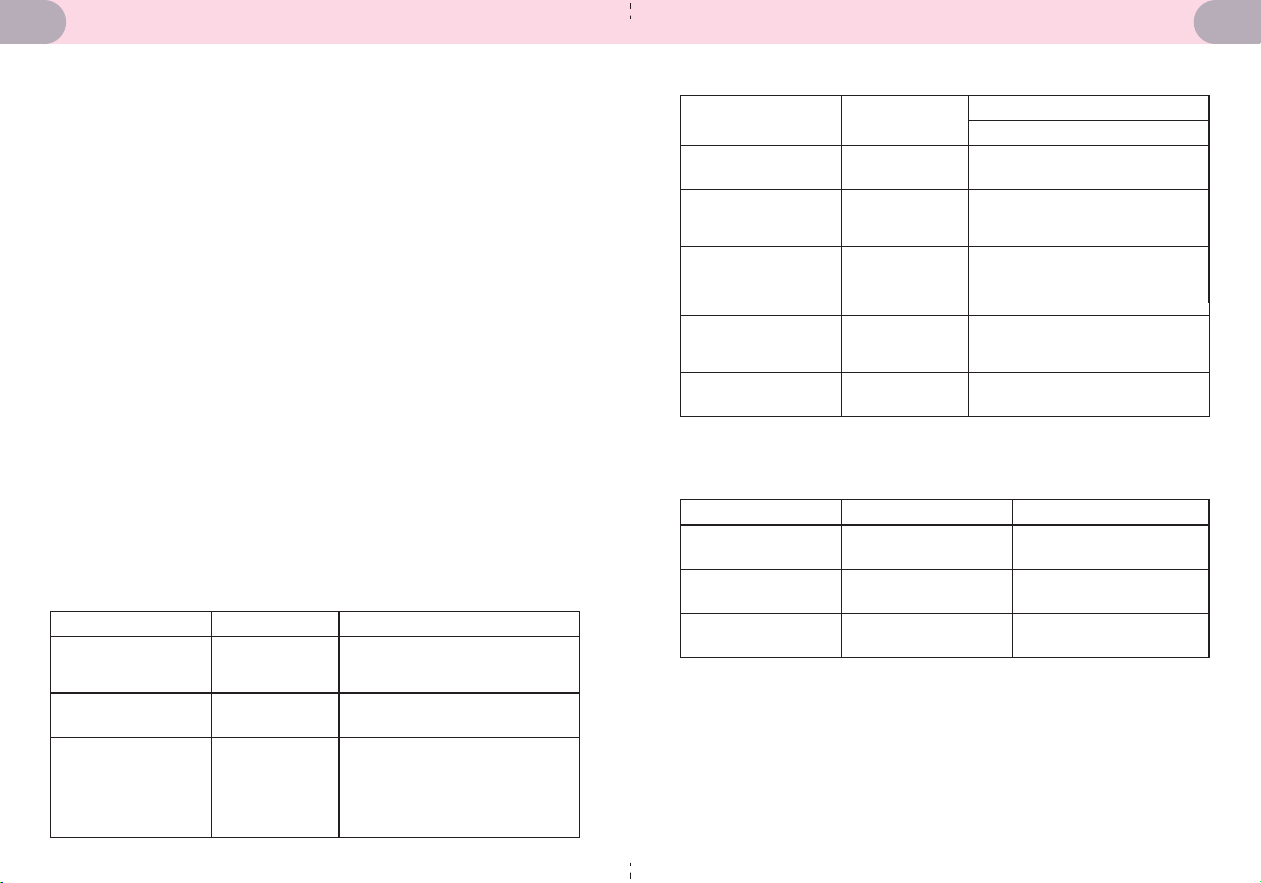
• The essential performance in normal working mode is
output frequency 0Hz~100Hz, intensity max—110 Vpp
(500 ohms) pulse waveform.
• When EMI affects the above performance, please stop
using the device.
• Use of this equipment and accessories adjacent to, or
stacked with, other equipment should be avoided because
it could result in improper operation. If such use is
necessary, this equipment and the other equipment should
be observed to verify that they are operating normally.
• The use of accessories and cables other than those
specified or provided by the manufacturer of this
equipment could result in increased electromagnetic
emissions or decreased electromagnetic immunity of this
equipment and improper operation.
• Equipment (including peripherals such as antenna cables
and external antennas) should be used no closer than 30
cm (12 inches) to any part of the device, including cables
specified by the manufacturer. Otherwise, degradation of
the performance of this equipment could result
ELECTROMAGNETIC COMPATIBILITY
INFORMATION
Conducted and
radiated RF
emissions
Conducted and
radiated RF
emissions
Phenomenon Compliance Electromagnetic environment
CISPR 11
Group 1, Class B
The device is intended to be
used in home healthcare
environment
The standard for low-power
equipment, which does not
produce voltage fluctuations
and flickers, specifies that the
EUT (Equipment Under Test)
power should be less than 75W.
Harmonic
distortion
IEC 61000-3-2
NA
IEC 61000-3-3
NA
The power of the device is below
the 75-watt limit
Electrostatic
Discharge
Proximity magnetic
fields
Proximity fields from
RF wireless
communications
equipment
Rated power
frequency magnetic
fields
Phenomenon
Basic EMC
Standard
Immunity Test Levels
Home Healthcare Environment
IEC 61000-4-2
±8 kV contact
±2kV, ±4kV, ±8kV, ±15kV air
Refer to table 4
Radiated RF EM field IEC 61000-4-3
IEC 61000-4-3
Refer to table 3IEC 61000-4-39
IEC 61000-4-8
1 0 V/ m
80MHz-2.7GHz
80% AM at 1kHz
30A/m
50Hz or 60Hz
Table 2. Enclosure Port
30 kHz
13,56 MHz
Test frequency Modulation Immunity Test Level (A/m)
CW
65
7.5
8
134,2 kHz
Pulse modulation 2, 1
kHz
Pulse modulation 50
kHz
Table 3. Test specifications for ENCLOSURE PORT IMMUNITY to proximity
magnetic fields
2221
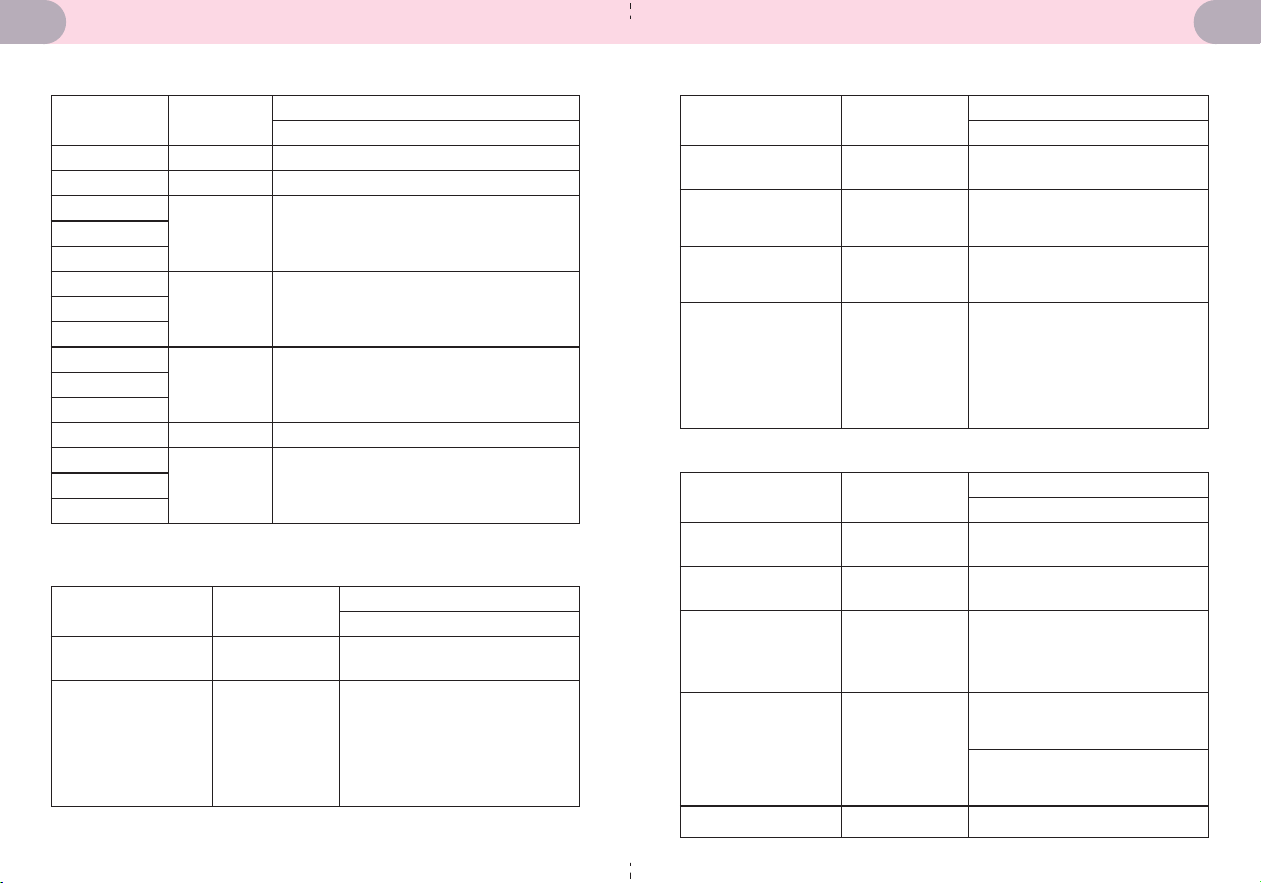
Electrostatic
Discharge
Conducted
disturbances induced
by RF fields a)
Phenomenon
Basic EMC
Standard
Immunity Test Levels
Home Healthcare Environment
IEC 61000-4-2
±8 kV contact
±2kV, ±4kV, ±8kV, ±15kV air
IEC 61000-4-6
3 V
0,15 MHz - 80 MHz
6 V in ISM and amateur radio
bands between 0,15 MHz and 80
MHz
80% AM at 1 kHz
Table 5. Patient Coupling Port
Test Frequency
(MHz)
Band (MHz)
Immunity Test Levels
Home Healthcare Environment
380-390
430-470
740-787
800-960
1700-1990
2400-2570
5100-5800
Pulse modulation 18Hz, 27V/m
FM, ±5 kHz deviation, 1k Hz sine, 28 V/m
Pulse modulation 217Hz, 9V/m
Pulse modulation 18Hz, 28V/m
Pulse modulation 217Hz, 28V/m
Pulse modulation 217Hz, 28V/m
Pulse modulation 217Hz, 9V/m
385
450
710
745
780
810
870
930
1720
1845
1970
2450
5240
5500
5785
Table 4.
Electrostatic
Discharge
Phenomenon
Basic EMC
Standard
Immunity Test Levels
Home Healthcare Environment
IEC 61000-4-2
±8 kV contact
±2kV, ±4kV, ±8kV, ±15kV air
This test applies only to output
lines intended to connect
directly to outdoor cables.
Electrical fast
transients / bursts
Surges
Line-to-ground
IEC 61000-4-4
NA
IEC 61000-4-5
NA
3 V
0,15 MHz - 80 MHz
6 V in ISM and amateur radio
bands between 0,15 MHz and
80 MHz
80% AM at 1 kHz
Conducted
disturbances induced
by RF fields
IEC 61000-4-6
SiP/SOPS whose maximum
cable length is less than 3 m in
length are excluded.
Electrical fast
transients / bursts
Phenomenon
Basic EMC
Standard
Immunity Test Levels
Home Healthcare Environment
IEC 61000-4-4
±2 kV
100kHz repetition frequency
3V, 0.15MHz-80MHz
6V in ISM and amateur radio
bands between
0.15MHz and 80MHz
80%AM at 1kHz
Surges
Line-to-ground
Voltage dips
IEC 61000-4-5
IEC 61000-4-6
0% U
T
; 0.5 cycle
At 0°, 45°, 90°, 135°, 180°, 225°,
270° and 315°
0% U
T
; 1 cycle and
70% U
T
; 25/30 cycles
Single phase: at 0°
Conducted
disturbances induced
by RF fields
IEC 61000-4-11
±0.5 kV, ±1 kV
Voltage interruptions IEC 61000-4-11 0% U
T
: 250/300 cycles
Table 6. Signal Input/Output Parts Port
Table 7. Input a.c. Power Port
2423
SUPPORT
www.kinetikwellbeing.com
Kinetik Medical Devices Ltd
Unit 11, Perrywood Business Park
Honeycrock Lane
Salfords, Redhill
RH1 5JQ
United Kingdom
+44 (0) 1483 937 967
Please feel free to contact us at:
Share Info GmbH
Am Schulzentrum 12, 41564 Kaarst, Germany
WW_WW-300_UK_IB_20250506_v9
iHealthLabs Europe SAS
36 Rue de Ponthieu, 75008,
Paris, France
ANDON HEALTH CO., LTD.
No. 3 Jin Ping Street, Ya An Road,
Nankai District, Tianjin 300190, China.
AD-2300
25 26

